Copyright © 2015, Oracle and/or its affiliates. All rights reserved. |
MySQL Performance Tuning Basics
Korea LUG
Ryusuke Kajiyama / 梶山隆輔
MySQL Global Business Unit
MySQL Sales Consulting Senior Manager, Asia Pacific & Japan
Copyright © 2016, Oracle and/or its affiliates. All rights reserved. |
Program Agenda
What is "Performance"
Key points in MySQL architecture
Key commands, logs, tools
Parameters
1
2
3
4
3
Copyright © 2016, Oracle and/or its affiliates. All rights reserved. |
Program Agenda
What is "Performance"
Key points in MySQL architecture
Key commands, logs, tools
Parameters
1
2
3
4
4
Copyright © 2016, Oracle and/or its affiliates. All rights reserved. |
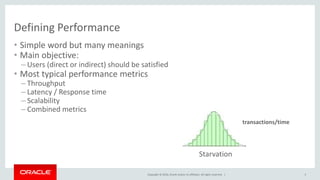
Defining Performance
• Simple word but many meanings
• Main objective:
– Users (direct or indirect) should be satisfied
• Most typical performance metrics
– Throughput
– Latency / Response time
– Scalability
– Combined metrics
Starvation
transactions/time
5
Copyright © 2016, Oracle and/or its affiliates. All rights reserved. |
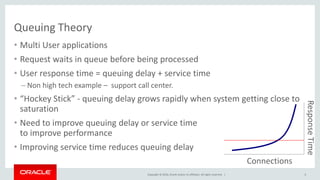
Queuing Theory
• Multi User applications
• Request waits in queue before being processed
• User response time = queuing delay + service time
– Non high tech example – support call center.
• “Hockey Stick” - queuing delay grows rapidly when system getting close to
saturation
• Need to improve queuing delay or service time
to improve performance
• Improving service time reduces queuing delay
Connections
ResponseTime
6
Copyright © 2016, Oracle and/or its affiliates. All rights reserved. |
Service Time: Key to the hotspot
• Main Question – where does service time comes from ?
– network, cpu, disk, locks...
• Direct Measurements
– Sum up all query times from web pages
• Indirect measurements
– CPU usage
– Disk IO latency
– Network traffic
– Load Average
– Number of running queries
– etc.
7
Copyright © 2016, Oracle and/or its affiliates. All rights reserved. |
Benchmark Tests
• Great tool to:
– Quantify application performance
– Measure performance effect of the changes
– Validate Scalability
– Plan deployment
• But
– Can be very misleading if done wrong
– Need to be able to read results correctly
• Typical Errors
– Testing with 1GB size with 100GB in production
– Using uniform distribution
• “Harry Potter” ordered as frequent as Zulu dictionary
– Testing in single user scenario
8
Copyright © 2016, Oracle and/or its affiliates. All rights reserved. |
Business side of optimization
• Performance costs money, whatever road you take
• Investigate different possibilities
– Better hardware could be cheaper than a major rewrite
• How much performance/scalability/reliability do you need ?
– 99.999% could be a lot more expensive than 99.9%
– Is peak traffic requirements 100x average or just 3x ?
• Take a look at whole picture
– Is this the largest risk/bottleneck ?
• Identify which optimizations are critical for business
– Optimization of “everything” is often waste of resources
– What is the cost of suboptimal performance ?
9
Copyright © 2016, Oracle and/or its affiliates. All rights reserved. |
Program Agenda
What is "Performance"
Key points in MySQL architecture
Key commands, logs, tools
Parameters
1
2
3
4
10
Copyright © 2016, Oracle and/or its affiliates. All rights reserved. | 11
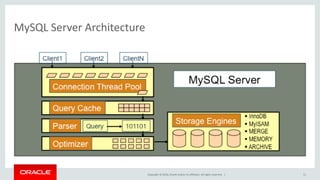
MySQL Server Architecture
Copyright © 2016, Oracle and/or its affiliates. All rights reserved. |
Program Agenda
What is "Performance"
Key points in MySQL architecture
Key commands, logs, tools
Parameters
1
2
3
4
12
Copyright © 2016, Oracle and/or its affiliates. All rights reserved. |
Basic1: Checking Server Configurations
• The MySQL server is controlled by “System Variables”
• Set via:
– Option File: my.cnf / my.ini
– Temporary change: SET [GLOBAL] <vriable>=<value>
• Can be per connection (LOCAL) or server wide (GLOBAL)
13
Copyright © 2016, Oracle and/or its affiliates. All rights reserved. |
Basic2: Checking Status of Server
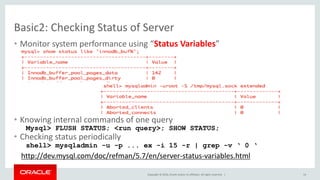
• Monitor system performance using “Status Variables”
• Knowing internal commands of one query
Mysql> FLUSH STATUS; <run query>; SHOW STATUS;
• Checking status periodically
shell> mysqladmin -u -p ... ex -i 15 -r | grep -v ‘ 0 ‘
http://dev.mysql.com/doc/refman/5.7/en/server-status-variables.html
14
Copyright © 2016, Oracle and/or its affiliates. All rights reserved. |
Monitoring Queries - Slow Query Log
#Time: 08073101 16:25:24
#User@Host: root[root] @ localhost [127.0.0.1]
#Query_time: 8 Lock_time: 0 Rows_sent: 20 Rows_examined: 243661
SELECT part_num FROM `inventory`.`parts` WHERE
(`ven` = "foo") ORDER BY `delivery_datetime` DESC LIMIT 100;
Pros
• Logs queries that took longer than X (user defined)
• Logs queries that do not use indexes (5.0 and higher)
• Includes data needed to trace offending queries
Cons
• Growth must be managed using FLUSH LOGS
• Entries must be parsed/sorted for relevance
• mysqldumpslow helps, but still tedious, takes time
15
Copyright © 2016, Oracle and/or its affiliates. All rights reserved. |
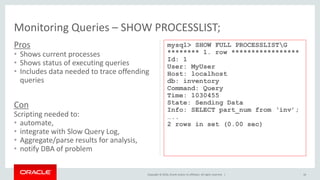
Pros
• Shows current processes
• Shows status of executing queries
• Includes data needed to trace offending
queries
16
Con
Scripting needed to:
• automate,
• integrate with Slow Query Log,
• Aggregate/parse results for analysis,
• notify DBA of problem
Monitoring Queries – SHOW PROCESSLIST;
mysql> SHOW FULL PROCESSLISTG
******** 1. row *****************
Id: 1
User: MyUser
Host: localhost
db: inventory
Command: Query
Time: 1030455
State: Sending Data
Info: SELECT part_num from ‘inv’;
…..
2 rows in set (0.00 sec)
Copyright © 2016, Oracle and/or its affiliates. All rights reserved. |
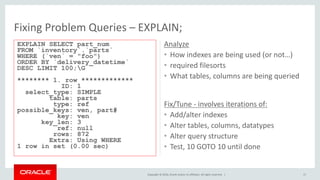
Analyze
• How indexes are being used (or not…)
• required filesorts
• What tables, columns are being queried
17
Fix/Tune - involves iterations of:
• Add/alter indexes
• Alter tables, columns, datatypes
• Alter query structure
• Test, 10 GOTO 10 until done
Fixing Problem Queries – EXPLAIN;
EXPLAIN SELECT part_num
FROM `inventory`.`parts`
WHERE (`ven` = "foo")
ORDER BY `delivery_datetime`
DESC LIMIT 100;G
******** 1. row *************
ID: 1
select_type: SIMPLE
table: parts
type: ref
possible_keys: ven, part#
key: ven
key_len: 3
ref: null
rows: 872
Extra: Using WHERE
1 row in set (0.00 sec)
Copyright © 2016, Oracle and/or its affiliates. All rights reserved. |
MySQL 5.7: Optimizer - Cost Info in JSON EXPLAIN
• Expanded JSON EXPLAIN
– Now includes all available cost info
– Used for Visual Explain In MySQL Workbench
{
"query_block": {
"select_id": 1,
"cost_info": {
"query_cost": "200.40"
},
"table": {
"table_name": "nicer_but_slower_film_list",
"access_type": "ALL",
"rows_examined_per_scan": 992,
"rows_produced_per_join": 992,
"filtered": 100,
"cost_info": {
"read_cost": "2.00",
"eval_cost": "198.40",
"prefix_cost": "200.40",
"data_read_per_join": "852K"
},
"used_columns": [
"FID",
"title",
"description",
"category",
"price",
"length",
"rating",
"actors"
],
...
18
Copyright © 2016, Oracle and/or its affiliates. All rights reserved. |
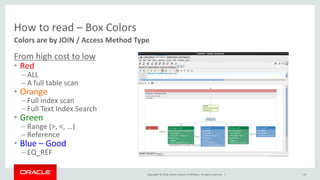
How to read – Box Colors
From high cost to low
• Red
– ALL
– A full table scan
• Orange
– Full index scan
– Full Text Index Search
• Green
– Range (>, <, …)
– Reference
• Blue – Good
– EQ_REF
19
Colors are by JOIN / Access Method Type
Copyright © 2016, Oracle and/or its affiliates. All rights reserved. |
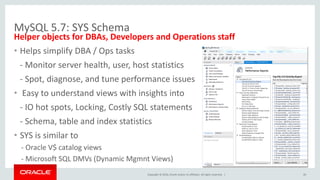
MySQL 5.7: SYS Schema
Helper objects for DBAs, Developers and Operations staff
• Helps simplify DBA / Ops tasks
- Monitor server health, user, host statistics
- Spot, diagnose, and tune performance issues
• Easy to understand views with insights into
- IO hot spots, Locking, Costly SQL statements
- Schema, table and index statistics
• SYS is similar to
- Oracle V$ catalog views
- Microsoft SQL DMVs (Dynamic Mgmnt Views)
20
Copyright © 2016, Oracle and/or its affiliates. All rights reserved. |
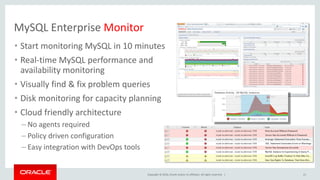
MySQL Enterprise Monitor
21
• Start monitoring MySQL in 10 minutes
• Real-time MySQL performance and
availability monitoring
• Visually find & fix problem queries
• Disk monitoring for capacity planning
• Cloud friendly architecture
– No agents required
– Policy driven configuration
– Easy integration with DevOps tools
Copyright © 2016, Oracle and/or its affiliates. All rights reserved. |
“With the MySQL Query Analyzer, we were able to identify
and analyze problematic SQL code, and triple our database
performance. More importantly, we were able to
accomplish this in three days, rather than taking weeks.”
Keith Souhrada
Software Development Engineer
Big Fish Games
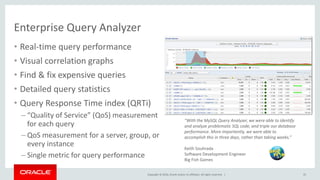
Enterprise Query Analyzer
22
• Real-time query performance
• Visual correlation graphs
• Find & fix expensive queries
• Detailed query statistics
• Query Response Time index (QRTi)
– “Quality of Service” (QoS) measurement
for each query
– QoS measurement for a server, group, or
every instance
– Single metric for query performance
Copyright © 2016, Oracle and/or its affiliates. All rights reserved. |
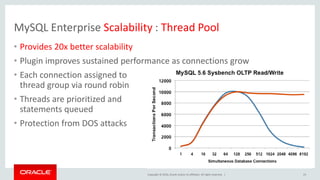
MySQL Enterprise Scalability : Thread Pool
23
Performance
Security
Availability
• Provides 20x better scalability
• Plugin improves sustained performance as connections grow
• Each connection assigned to
thread group via round robin
• Threads are prioritized and
statements queued
• Protection from DOS attacks
Copyright © 2016, Oracle and/or its affiliates. All rights reserved. |
Program Agenda
What is "Performance"
Key points in MySQL architecture
Key commands, logs, tools
Parameters
1
2
3
4
24
Copyright © 2016, Oracle and/or its affiliates. All rights reserved. |
Server Connections & Threads
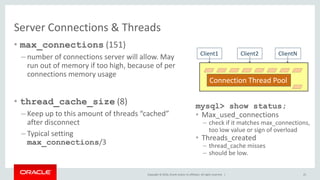
• max_connections (151)
– number of connections server will allow. May
run out of memory if too high, because of per
connections memory usage
• thread_cache_size (8)
– Keep up to this amount of threads “cached”
after disconnect
– Typical setting
max_connections/3
25
Client2 ClientN
Connection Thread Pool
Client1
mysql> show status;
• Max_used_connections
– check if it matches max_connections,
too low value or sign of overload
• Threads_created
– thread_cache misses
– should be low.
Copyright © 2016, Oracle and/or its affiliates. All rights reserved. |
Connection Thread Work Buffers
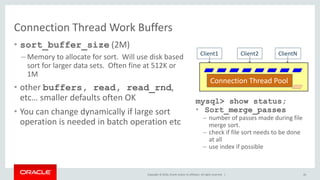
• sort_buffer_size (2M)
– Memory to allocate for sort. Will use disk based
sort for larger data sets. Often fine at 512K or
1M
• other buffers, read, read_rnd,
etc… smaller defaults often OK
• You can change dynamically if large sort
operation is needed in batch operation etc
26
Client2 ClientN
Connection Thread Pool
Client1
mysql> show status;
• Sort_merge_passes
– number of passes made during file
merge sort.
– check if file sort needs to be done
at all
– use index if possible
Copyright © 2016, Oracle and/or its affiliates. All rights reserved. |
Server Query Cache
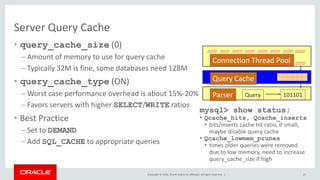
• query_cache_size (0)
– Amount of memory to use for query cache
– Typically 32M is fine, some databases need 128M
• query_cache_type (ON)
– Worst case performance overhead is about 15%-20%
– Favors servers with higher SELECT/WRITE ratios
• Best Practice
– Set to DEMAND
– Add SQL_CACHE to appropriate queries
27
Connection Thread Pool
Parser Query 101101
Query Cache
mysql> show status;
• Qcache_hits, Qcache_inserts
• hits/inserts cache hit ratio, if small,
maybe disable query cache
• Qcache_lowmem_prunes
• times older queries were removed
due to low memory, need to increase
query_cache_size if high
Copyright © 2016, Oracle and/or its affiliates. All rights reserved. |
InnoDB Performance Tips
• innodb_buffer_pool_size
– 80% of memory on Innodb only system
– caches data & indexes unlike MyISAM
• innodb_log_file_size
– A key parameter for write performance
– Recovery time is no more an issue.
– Bigger is better for write QPS stability
• innodb_flush_log_at_trx_commit
– 1 (slow) will flush (fsync) log at each commit. Truly ACID
– 2 (fast) will only flush log buffer to OS cache on commit,
sync to disk once/sec.
– 0 (fastest) will flush (fsync) log every second or so
• innodb_file_per_table
– Always good choice to distribute i/o
– Default ON from 5.6
Storage Engines
 InnoDB
 MyISAM
 MERGE
 MEMORY
ARCHIVE
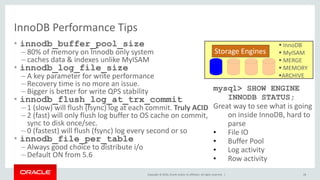
mysql> SHOW ENGINE
INNODB STATUS;
Great way to see what is going
on inside InnoDB, hard to
parse
• File IO
• Buffer Pool
• Log activity
• Row activity
28
Copyright © 2016, Oracle and/or its affiliates. All rights reserved. |
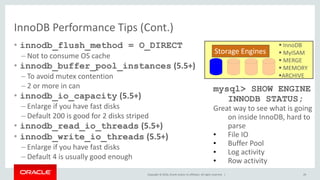
InnoDB Performance Tips (Cont.)
• innodb_flush_method = O_DIRECT
– Not to consume OS cache
• innodb_buffer_pool_instances (5.5+)
– To avoid mutex contention
– 2 or more in can
• innodb_io_capacity (5.5+)
– Enlarge if you have fast disks
– Default 200 is good for 2 disks striped
• innodb_read_io_threads (5.5+)
• innodb_write_io_threads (5.5+)
– Enlarge if you have fast disks
– Default 4 is usually good enough
Storage Engines
 InnoDB
 MyISAM
 MERGE
 MEMORY
ARCHIVE
mysql> SHOW ENGINE
INNODB STATUS;
Great way to see what is going
on inside InnoDB, hard to
parse
• File IO
• Buffer Pool
• Log activity
• Row activity
29
Copyright © 2016, Oracle and/or its affiliates. All rights reserved. | 30
제3회난공불락 오픈소스 인프라세미나 - MySQL Performance

제3회난공불락 오픈소스 인프라세미나 - MySQL Performance

  • 2.
    Copyright © 2015,Oracle and/or its affiliates. All rights reserved. | MySQL Performance Tuning Basics Korea LUG Ryusuke Kajiyama / 梶山隆輔 MySQL Global Business Unit MySQL Sales Consulting Senior Manager, Asia Pacific & Japan
  • 3.
    Copyright © 2016,Oracle and/or its affiliates. All rights reserved. | Program Agenda What is "Performance" Key points in MySQL architecture Key commands, logs, tools Parameters 1 2 3 4 3
  • 4.
    Copyright © 2016,Oracle and/or its affiliates. All rights reserved. | Program Agenda What is "Performance" Key points in MySQL architecture Key commands, logs, tools Parameters 1 2 3 4 4
  • 5.
    Copyright © 2016,Oracle and/or its affiliates. All rights reserved. | Defining Performance • Simple word but many meanings • Main objective: – Users (direct or indirect) should be satisfied • Most typical performance metrics – Throughput – Latency / Response time – Scalability – Combined metrics Starvation transactions/time 5
  • 6.
    Copyright © 2016,Oracle and/or its affiliates. All rights reserved. | Queuing Theory • Multi User applications • Request waits in queue before being processed • User response time = queuing delay + service time – Non high tech example – support call center. • “Hockey Stick” - queuing delay grows rapidly when system getting close to saturation • Need to improve queuing delay or service time to improve performance • Improving service time reduces queuing delay Connections ResponseTime 6
  • 7.
    Copyright © 2016,Oracle and/or its affiliates. All rights reserved. | Service Time: Key to the hotspot • Main Question – where does service time comes from ? – network, cpu, disk, locks... • Direct Measurements – Sum up all query times from web pages • Indirect measurements – CPU usage – Disk IO latency – Network traffic – Load Average – Number of running queries – etc. 7
  • 8.
    Copyright © 2016,Oracle and/or its affiliates. All rights reserved. | Benchmark Tests • Great tool to: – Quantify application performance – Measure performance effect of the changes – Validate Scalability – Plan deployment • But – Can be very misleading if done wrong – Need to be able to read results correctly • Typical Errors – Testing with 1GB size with 100GB in production – Using uniform distribution • “Harry Potter” ordered as frequent as Zulu dictionary – Testing in single user scenario 8
  • 9.
    Copyright © 2016,Oracle and/or its affiliates. All rights reserved. | Business side of optimization • Performance costs money, whatever road you take • Investigate different possibilities – Better hardware could be cheaper than a major rewrite • How much performance/scalability/reliability do you need ? – 99.999% could be a lot more expensive than 99.9% – Is peak traffic requirements 100x average or just 3x ? • Take a look at whole picture – Is this the largest risk/bottleneck ? • Identify which optimizations are critical for business – Optimization of “everything” is often waste of resources – What is the cost of suboptimal performance ? 9
  • 10.
    Copyright © 2016,Oracle and/or its affiliates. All rights reserved. | Program Agenda What is "Performance" Key points in MySQL architecture Key commands, logs, tools Parameters 1 2 3 4 10
  • 11.
    Copyright © 2016,Oracle and/or its affiliates. All rights reserved. | 11 MySQL Server Architecture
  • 12.
    Copyright © 2016,Oracle and/or its affiliates. All rights reserved. | Program Agenda What is "Performance" Key points in MySQL architecture Key commands, logs, tools Parameters 1 2 3 4 12
  • 13.
    Copyright © 2016,Oracle and/or its affiliates. All rights reserved. | Basic1: Checking Server Configurations • The MySQL server is controlled by “System Variables” • Set via: – Option File: my.cnf / my.ini – Temporary change: SET [GLOBAL] <vriable>=<value> • Can be per connection (LOCAL) or server wide (GLOBAL) 13
  • 14.
    Copyright © 2016,Oracle and/or its affiliates. All rights reserved. | Basic2: Checking Status of Server • Monitor system performance using “Status Variables” • Knowing internal commands of one query Mysql> FLUSH STATUS; <run query>; SHOW STATUS; • Checking status periodically shell> mysqladmin -u -p ... ex -i 15 -r | grep -v ‘ 0 ‘ http://dev.mysql.com/doc/refman/5.7/en/server-status-variables.html 14
  • 15.
    Copyright © 2016,Oracle and/or its affiliates. All rights reserved. | Monitoring Queries - Slow Query Log #Time: 08073101 16:25:24 #User@Host: root[root] @ localhost [127.0.0.1] #Query_time: 8 Lock_time: 0 Rows_sent: 20 Rows_examined: 243661 SELECT part_num FROM `inventory`.`parts` WHERE (`ven` = "foo") ORDER BY `delivery_datetime` DESC LIMIT 100; Pros • Logs queries that took longer than X (user defined) • Logs queries that do not use indexes (5.0 and higher) • Includes data needed to trace offending queries Cons • Growth must be managed using FLUSH LOGS • Entries must be parsed/sorted for relevance • mysqldumpslow helps, but still tedious, takes time 15
  • 16.
    Copyright © 2016,Oracle and/or its affiliates. All rights reserved. | Pros • Shows current processes • Shows status of executing queries • Includes data needed to trace offending queries 16 Con Scripting needed to: • automate, • integrate with Slow Query Log, • Aggregate/parse results for analysis, • notify DBA of problem Monitoring Queries – SHOW PROCESSLIST; mysql> SHOW FULL PROCESSLISTG ******** 1. row ***************** Id: 1 User: MyUser Host: localhost db: inventory Command: Query Time: 1030455 State: Sending Data Info: SELECT part_num from ‘inv’; ….. 2 rows in set (0.00 sec)
  • 17.
    Copyright © 2016,Oracle and/or its affiliates. All rights reserved. | Analyze • How indexes are being used (or not…) • required filesorts • What tables, columns are being queried 17 Fix/Tune - involves iterations of: • Add/alter indexes • Alter tables, columns, datatypes • Alter query structure • Test, 10 GOTO 10 until done Fixing Problem Queries – EXPLAIN; EXPLAIN SELECT part_num FROM `inventory`.`parts` WHERE (`ven` = "foo") ORDER BY `delivery_datetime` DESC LIMIT 100;G ******** 1. row ************* ID: 1 select_type: SIMPLE table: parts type: ref possible_keys: ven, part# key: ven key_len: 3 ref: null rows: 872 Extra: Using WHERE 1 row in set (0.00 sec)
  • 18.
    Copyright © 2016,Oracle and/or its affiliates. All rights reserved. | MySQL 5.7: Optimizer - Cost Info in JSON EXPLAIN • Expanded JSON EXPLAIN – Now includes all available cost info – Used for Visual Explain In MySQL Workbench { "query_block": { "select_id": 1, "cost_info": { "query_cost": "200.40" }, "table": { "table_name": "nicer_but_slower_film_list", "access_type": "ALL", "rows_examined_per_scan": 992, "rows_produced_per_join": 992, "filtered": 100, "cost_info": { "read_cost": "2.00", "eval_cost": "198.40", "prefix_cost": "200.40", "data_read_per_join": "852K" }, "used_columns": [ "FID", "title", "description", "category", "price", "length", "rating", "actors" ], ... 18
  • 19.
    Copyright © 2016,Oracle and/or its affiliates. All rights reserved. | How to read – Box Colors From high cost to low • Red – ALL – A full table scan • Orange – Full index scan – Full Text Index Search • Green – Range (>, <, …) – Reference • Blue – Good – EQ_REF 19 Colors are by JOIN / Access Method Type
  • 20.
    Copyright © 2016,Oracle and/or its affiliates. All rights reserved. | MySQL 5.7: SYS Schema Helper objects for DBAs, Developers and Operations staff • Helps simplify DBA / Ops tasks - Monitor server health, user, host statistics - Spot, diagnose, and tune performance issues • Easy to understand views with insights into - IO hot spots, Locking, Costly SQL statements - Schema, table and index statistics • SYS is similar to - Oracle V$ catalog views - Microsoft SQL DMVs (Dynamic Mgmnt Views) 20
  • 21.
    Copyright © 2016,Oracle and/or its affiliates. All rights reserved. | MySQL Enterprise Monitor 21 • Start monitoring MySQL in 10 minutes • Real-time MySQL performance and availability monitoring • Visually find & fix problem queries • Disk monitoring for capacity planning • Cloud friendly architecture – No agents required – Policy driven configuration – Easy integration with DevOps tools
  • 22.
    Copyright © 2016,Oracle and/or its affiliates. All rights reserved. | “With the MySQL Query Analyzer, we were able to identify and analyze problematic SQL code, and triple our database performance. More importantly, we were able to accomplish this in three days, rather than taking weeks.” Keith Souhrada Software Development Engineer Big Fish Games Enterprise Query Analyzer 22 • Real-time query performance • Visual correlation graphs • Find & fix expensive queries • Detailed query statistics • Query Response Time index (QRTi) – “Quality of Service” (QoS) measurement for each query – QoS measurement for a server, group, or every instance – Single metric for query performance
  • 23.
    Copyright © 2016,Oracle and/or its affiliates. All rights reserved. | MySQL Enterprise Scalability : Thread Pool 23 Performance Security Availability • Provides 20x better scalability • Plugin improves sustained performance as connections grow • Each connection assigned to thread group via round robin • Threads are prioritized and statements queued • Protection from DOS attacks
  • 24.
    Copyright © 2016,Oracle and/or its affiliates. All rights reserved. | Program Agenda What is "Performance" Key points in MySQL architecture Key commands, logs, tools Parameters 1 2 3 4 24
  • 25.
    Copyright © 2016,Oracle and/or its affiliates. All rights reserved. | Server Connections & Threads • max_connections (151) – number of connections server will allow. May run out of memory if too high, because of per connections memory usage • thread_cache_size (8) – Keep up to this amount of threads “cached” after disconnect – Typical setting max_connections/3 25 Client2 ClientN Connection Thread Pool Client1 mysql> show status; • Max_used_connections – check if it matches max_connections, too low value or sign of overload • Threads_created – thread_cache misses – should be low.
  • 26.
    Copyright © 2016,Oracle and/or its affiliates. All rights reserved. | Connection Thread Work Buffers • sort_buffer_size (2M) – Memory to allocate for sort. Will use disk based sort for larger data sets. Often fine at 512K or 1M • other buffers, read, read_rnd, etc… smaller defaults often OK • You can change dynamically if large sort operation is needed in batch operation etc 26 Client2 ClientN Connection Thread Pool Client1 mysql> show status; • Sort_merge_passes – number of passes made during file merge sort. – check if file sort needs to be done at all – use index if possible
  • 27.
    Copyright © 2016,Oracle and/or its affiliates. All rights reserved. | Server Query Cache • query_cache_size (0) – Amount of memory to use for query cache – Typically 32M is fine, some databases need 128M • query_cache_type (ON) – Worst case performance overhead is about 15%-20% – Favors servers with higher SELECT/WRITE ratios • Best Practice – Set to DEMAND – Add SQL_CACHE to appropriate queries 27 Connection Thread Pool Parser Query 101101 Query Cache mysql> show status; • Qcache_hits, Qcache_inserts • hits/inserts cache hit ratio, if small, maybe disable query cache • Qcache_lowmem_prunes • times older queries were removed due to low memory, need to increase query_cache_size if high
  • 28.
    Copyright © 2016,Oracle and/or its affiliates. All rights reserved. | InnoDB Performance Tips • innodb_buffer_pool_size – 80% of memory on Innodb only system – caches data & indexes unlike MyISAM • innodb_log_file_size – A key parameter for write performance – Recovery time is no more an issue. – Bigger is better for write QPS stability • innodb_flush_log_at_trx_commit – 1 (slow) will flush (fsync) log at each commit. Truly ACID – 2 (fast) will only flush log buffer to OS cache on commit, sync to disk once/sec. – 0 (fastest) will flush (fsync) log every second or so • innodb_file_per_table – Always good choice to distribute i/o – Default ON from 5.6 Storage Engines  InnoDB  MyISAM  MERGE  MEMORY ARCHIVE mysql> SHOW ENGINE INNODB STATUS; Great way to see what is going on inside InnoDB, hard to parse • File IO • Buffer Pool • Log activity • Row activity 28
  • 29.
    Copyright © 2016,Oracle and/or its affiliates. All rights reserved. | InnoDB Performance Tips (Cont.) • innodb_flush_method = O_DIRECT – Not to consume OS cache • innodb_buffer_pool_instances (5.5+) – To avoid mutex contention – 2 or more in can • innodb_io_capacity (5.5+) – Enlarge if you have fast disks – Default 200 is good for 2 disks striped • innodb_read_io_threads (5.5+) • innodb_write_io_threads (5.5+) – Enlarge if you have fast disks – Default 4 is usually good enough Storage Engines  InnoDB  MyISAM  MERGE  MEMORY ARCHIVE mysql> SHOW ENGINE INNODB STATUS; Great way to see what is going on inside InnoDB, hard to parse • File IO • Buffer Pool • Log activity • Row activity 29
  • 30.
    Copyright © 2016,Oracle and/or its affiliates. All rights reserved. | 30