












C# no bolso –
Desenvolvendo apps
Multiplataforma
Desenvolvedor e Influenciador C#
fb.com/allan.cleysson // @allanzh
Allan Cleysson
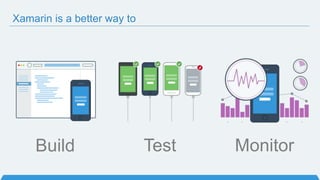
Xamarin is a better way to
Build Test Monitor
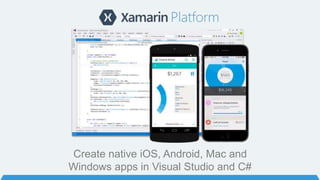
Create native iOS, Android, Mac and
Windows apps in Visual Studio and C#
C# on 2.6 billion devices
Mobile
Development
Approaches
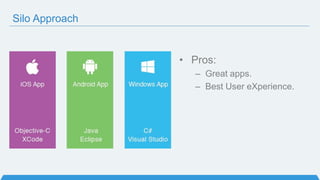
Silo Approach
• Pros:
– Great apps.
– Best User eXperience.
Silo Approach
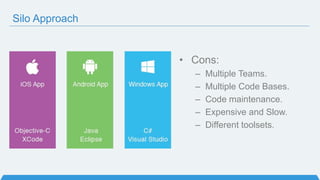
• Cons:
– Multiple Teams.
– Multiple Code Bases.
– Code maintenance.
– Expensive and Slow.
– Different toolsets.
Write Once, Run Anywhere Approach
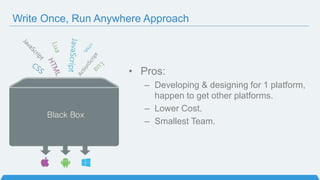
• Pros:
– Developing & designing for 1 platform,
happen to get other platforms.
– Lower Cost.
– Smallest Team.
Write Once, Run Anywhere Approach
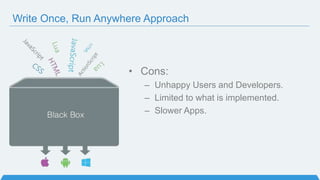
• Cons:
– Unhappy Users and Developers.
– Limited to what is implemented.
– Slower Apps.
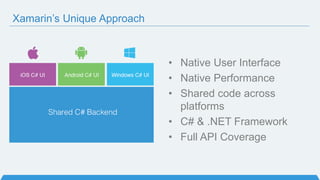
Xamarin’s Unique Approach
• Native User Interface
• Native Performance
• Shared code across
platforms
• C# & .NET Framework
• Full API Coverage
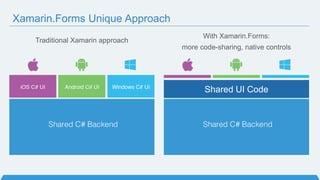
With Xamarin.Forms:
more code-sharing, native controls
Traditional Xamarin approach
Shared UI Code
Xamarin.Forms Unique Approach
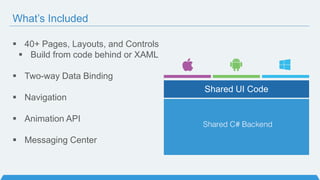
 40+ Pages, Layouts, and Controls
 Build from code behind or XAML
 Two-way Data Binding
 Navigation
 Animation API
 Messaging Center
Shared UI Code
What’s Included
Why C#?
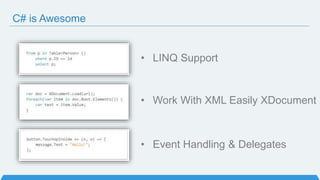
C# is Awesome
• LINQ Support
• Work With XML Easily XDocument
• Event Handling & Delegates
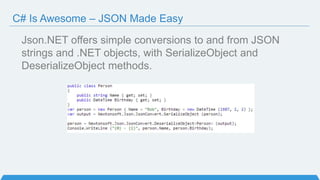
Json.NET offers simple conversions to and from JSON
strings and .NET objects, with SerializeObject and
DeserializeObject methods.
C# Is Awesome – JSON Made Easy
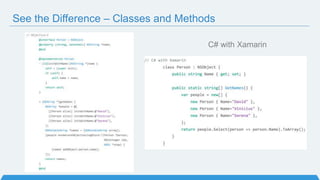
C# with XamarinObjective-C
See the Difference – Classes and Methods
Write Beautiful & Maintainable Code
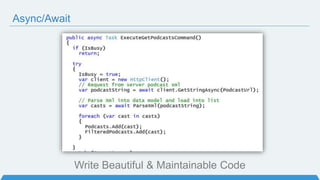
Async/Await
Why Xamarin?
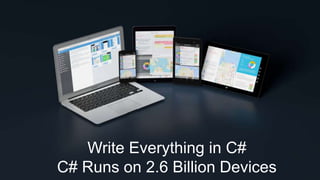
Write Everything in C#
C# Runs on 2.6 Billion Devices
First
release of
Xamarin.Mac
Launch
Partner
Program
200,000
Developers
Xamarin
Founded
First release of
Xamarin.Android
Xamarin.iOS
launches (originally
known as
MonoTouch)
Ximian
Founded
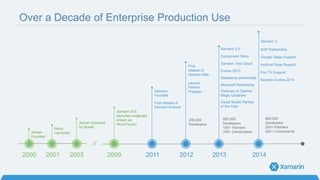
Over a Decade of Enterprise Production Use
2001 2003 2009 2011 2012 2013
Mono
Launches
Ximian Acquired
by Novell
Xamarin 2.0
Component Store
Xamarin Test Cloud
Evolve 2013
Microsoft Partnership
500,000
Developers
100+ Partners
100+ Components
2014
//
Xamarin 3
2000
SAP Partnership
Fire TV Support
Salesforce partnership
Visionary in Gartner
Magic Quadrant
Google Glass Support
Visual Studio Partner
of the Year
Android Wear Support
Xamarin Evolve 2014
800,000
Developers
200+ Partners
200+ Components
Enterprise Customers in all Verticals & Use Cases
How
Xamarin
Works
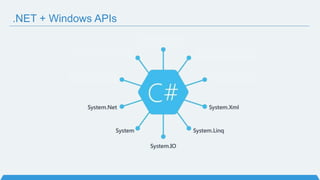
.NET + Windows APIs
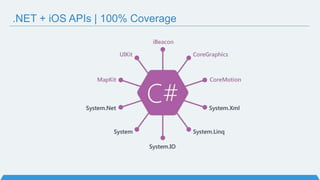
.NET + iOS APIs | 100% Coverage
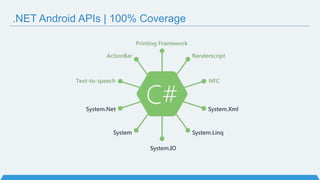
.NET Android APIs | 100% Coverage
Anything you can do in Objective-C, Swift, or Java
can be done in C# with Xamarin using Visual Studio
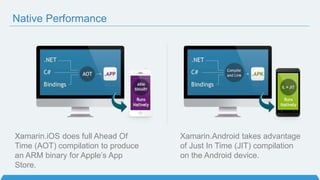
Xamarin.iOS does full Ahead Of
Time (AOT) compilation to produce
an ARM binary for Apple’s App
Store.
Native Performance
Xamarin.Android takes advantage
of Just In Time (JIT) compilation
on the Android device.
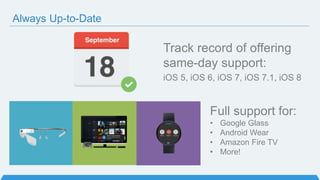
Always Up-to-Date
Track record of offering
same-day support:
iOS 5, iOS 6, iOS 7, iOS 7.1, iOS 8
Full support for:
• Google Glass
• Android Wear
• Amazon Fire TV
• More!
Code Sharing: Accelerate Development
• Up to 90% Code Reuse
• Leverage existing libraries
– NuGet Support
Code-sharing stats from iCircuit, built with Xamarin and featured on the App Store.
Source: http://praeclarum.org/post/42378027611/icircuit-code-reuse-part-cinq
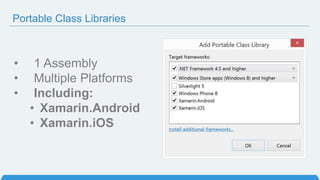
• 1 Assembly
• Multiple Platforms
• Including:
• Xamarin.Android
• Xamarin.iOS
Portable Class Libraries
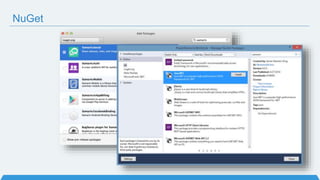
NuGet
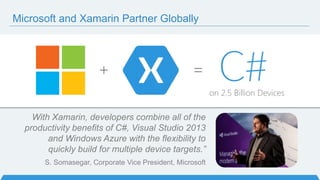
Microsoft and Xamarin Partner Globally
With Xamarin, developers combine all of the
productivity benefits of C#, Visual Studio 2013
and Windows Azure with the flexibility to
quickly build for multiple device targets.”
S. Somasegar, Corporate Vice President, Microsoft
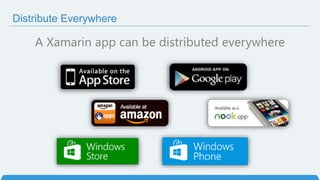
Distribute Everywhere
A Xamarin app can be distributed everywhere
Xamarin Studio
PC or Mac
Visual Studio Plugin
VS 2010 and Higher
Development Environment
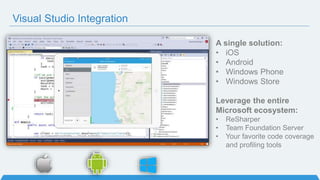
Visual Studio Integration
A single solution:
• iOS
• Android
• Windows Phone
• Windows Store
Leverage the entire
Microsoft ecosystem:
• ReSharper
• Team Foundation Server
• Your favorite code coverage
and profiling tools
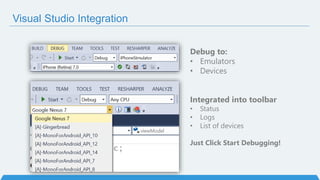
Visual Studio Integration
Debug to:
• Emulators
• Devices
Integrated into toolbar
• Status
• Logs
• List of devices
Just Click Start Debugging!
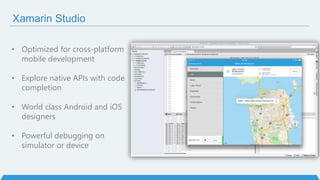
Xamarin Studio
• Optimized for cross-platform
mobile development
• Explore native APIs with code
completion
• World class Android and iOS
designers
• Powerful debugging on
simulator or device
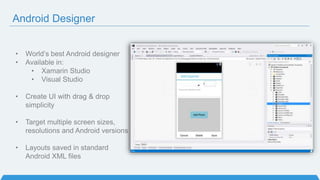
Android Designer
• World’s best Android designer
• Available in:
• Xamarin Studio
• Visual Studio
• Create UI with drag & drop
simplicity
• Target multiple screen sizes,
resolutions and Android versions
• Layouts saved in standard
Android XML files
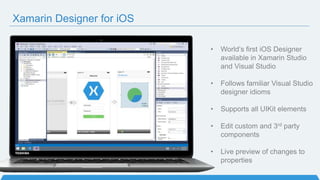
Xamarin Designer for iOS
• World’s first iOS Designer
available in Xamarin Studio
and Visual Studio
• Follows familiar Visual Studio
designer idioms
• Supports all UIKit elements
• Edit custom and 3rd party
components
• Live preview of changes to
properties
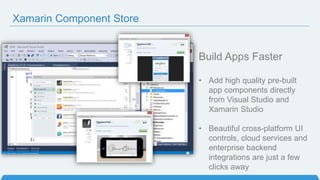
Xamarin Component Store
Build Apps Faster
• Add high quality pre-built
app components directly
from Visual Studio and
Xamarin Studio
• Beautiful cross-platform UI
controls, cloud services and
enterprise backend
integrations are just a few
clicks away
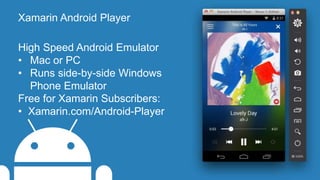
Xamarin Android Player
High Speed Android Emulator
• Mac or PC
• Runs side-by-side Windows
Phone Emulator
Free for Xamarin Subscribers:
• Xamarin.com/Android-Player
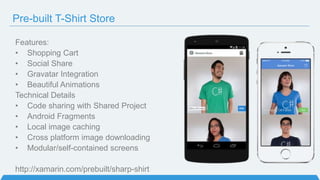
Pre-built T-Shirt Store
Features:
• Shopping Cart
• Social Share
• Gravatar Integration
• Beautiful Animations
Technical Details
• Code sharing with Shared Project
• Android Fragments
• Local image caching
• Cross platform image downloading
• Modular/self-contained screens
http://xamarin.com/prebuilt/sharp-shirt
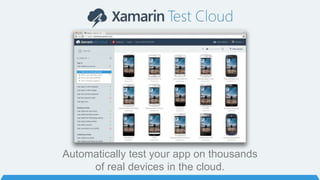
Automatically test your app on thousands
of real devices in the cloud.
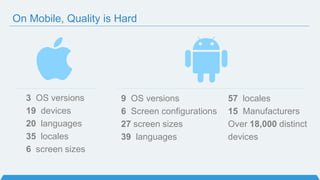
3 OS versions
19 devices
20 languages
35 locales
6 screen sizes
9 OS versions
6 Screen configurations
27 screen sizes
39 languages
57 locales
15 Manufacturers
Over 18,000 distinct
devices
On Mobile, Quality is Hard
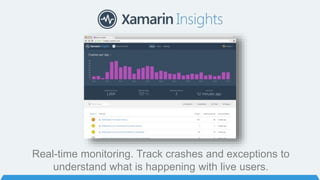
Real-time monitoring. Track crashes and exceptions to
understand what is happening with live users.
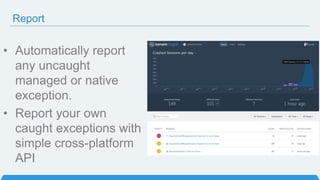
Report
• Automatically report
any uncaught
managed or native
exception.
• Report your own
caught exceptions with
simple cross-platform
API
Track
• Track any event that
occurs in your
application.
• Even track performance
of how long an
operation takes.
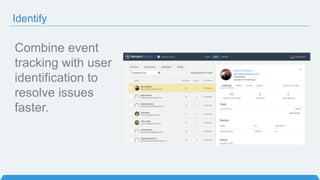
Identify
Combine event
tracking with user
identification to
resolve issues
faster.
Even More!
Xamarin.Forms Controls
blog.xamarin.com/enterprise-
component-vendors-join-
xamarin.forms-ecosystem/
Unrivaled Mobile Development Training
– Live online training from Xamarin experts
– Lectures and labs
– One-on-one with expert Xamarin mobile
developers
What You’ll Learn
• iOS and Android Fundamentals
• Mobile App Lifecycle
• Native UI and Controls
• Cross-platform Architecture
• Mobile Best Practices
• Secure Backend Integration
Get Started Today: xamarin.com/download

C# no bolso - desenvolvendo apps multiplataforma

  • 1.
    C# no bolso– Desenvolvendo apps Multiplataforma Desenvolvedor e Influenciador C# fb.com/allan.cleysson // @allanzh Allan Cleysson
  • 2.
    Xamarin is abetter way to Build Test Monitor
  • 3.
    Create native iOS,Android, Mac and Windows apps in Visual Studio and C#
  • 4.
    C# on 2.6billion devices
  • 5.
  • 6.
    Silo Approach • Pros: –Great apps. – Best User eXperience.
  • 7.
    Silo Approach • Cons: –Multiple Teams. – Multiple Code Bases. – Code maintenance. – Expensive and Slow. – Different toolsets.
  • 8.
    Write Once, RunAnywhere Approach • Pros: – Developing & designing for 1 platform, happen to get other platforms. – Lower Cost. – Smallest Team.
  • 9.
    Write Once, RunAnywhere Approach • Cons: – Unhappy Users and Developers. – Limited to what is implemented. – Slower Apps.
  • 11.
    Xamarin’s Unique Approach •Native User Interface • Native Performance • Shared code across platforms • C# & .NET Framework • Full API Coverage
  • 12.
    With Xamarin.Forms: more code-sharing,native controls Traditional Xamarin approach Shared UI Code Xamarin.Forms Unique Approach
  • 13.
     40+ Pages,Layouts, and Controls  Build from code behind or XAML  Two-way Data Binding  Navigation  Animation API  Messaging Center Shared UI Code What’s Included
  • 14.
  • 15.
    C# is Awesome •LINQ Support • Work With XML Easily XDocument • Event Handling & Delegates
  • 16.
    Json.NET offers simpleconversions to and from JSON strings and .NET objects, with SerializeObject and DeserializeObject methods. C# Is Awesome – JSON Made Easy
  • 17.
    C# with XamarinObjective-C Seethe Difference – Classes and Methods
  • 18.
    Write Beautiful &Maintainable Code Async/Await
  • 19.
  • 20.
    Write Everything inC# C# Runs on 2.6 Billion Devices
  • 21.
    First release of Xamarin.Mac Launch Partner Program 200,000 Developers Xamarin Founded First releaseof Xamarin.Android Xamarin.iOS launches (originally known as MonoTouch) Ximian Founded Over a Decade of Enterprise Production Use 2001 2003 2009 2011 2012 2013 Mono Launches Ximian Acquired by Novell Xamarin 2.0 Component Store Xamarin Test Cloud Evolve 2013 Microsoft Partnership 500,000 Developers 100+ Partners 100+ Components 2014 // Xamarin 3 2000 SAP Partnership Fire TV Support Salesforce partnership Visionary in Gartner Magic Quadrant Google Glass Support Visual Studio Partner of the Year Android Wear Support Xamarin Evolve 2014 800,000 Developers 200+ Partners 200+ Components
  • 22.
    Enterprise Customers inall Verticals & Use Cases
  • 23.
  • 24.
  • 25.
    .NET + iOSAPIs | 100% Coverage
  • 26.
    .NET Android APIs| 100% Coverage
  • 27.
    Anything you cando in Objective-C, Swift, or Java can be done in C# with Xamarin using Visual Studio
  • 28.
    Xamarin.iOS does fullAhead Of Time (AOT) compilation to produce an ARM binary for Apple’s App Store. Native Performance Xamarin.Android takes advantage of Just In Time (JIT) compilation on the Android device.
  • 29.
    Always Up-to-Date Track recordof offering same-day support: iOS 5, iOS 6, iOS 7, iOS 7.1, iOS 8 Full support for: • Google Glass • Android Wear • Amazon Fire TV • More!
  • 30.
    Code Sharing: AccelerateDevelopment • Up to 90% Code Reuse • Leverage existing libraries – NuGet Support Code-sharing stats from iCircuit, built with Xamarin and featured on the App Store. Source: http://praeclarum.org/post/42378027611/icircuit-code-reuse-part-cinq
  • 31.
    • 1 Assembly •Multiple Platforms • Including: • Xamarin.Android • Xamarin.iOS Portable Class Libraries
  • 32.
  • 33.
    Microsoft and XamarinPartner Globally With Xamarin, developers combine all of the productivity benefits of C#, Visual Studio 2013 and Windows Azure with the flexibility to quickly build for multiple device targets.” S. Somasegar, Corporate Vice President, Microsoft
  • 34.
    Distribute Everywhere A Xamarinapp can be distributed everywhere
  • 35.
    Xamarin Studio PC orMac Visual Studio Plugin VS 2010 and Higher Development Environment
  • 36.
    Visual Studio Integration Asingle solution: • iOS • Android • Windows Phone • Windows Store Leverage the entire Microsoft ecosystem: • ReSharper • Team Foundation Server • Your favorite code coverage and profiling tools
  • 37.
    Visual Studio Integration Debugto: • Emulators • Devices Integrated into toolbar • Status • Logs • List of devices Just Click Start Debugging!
  • 38.
    Xamarin Studio • Optimizedfor cross-platform mobile development • Explore native APIs with code completion • World class Android and iOS designers • Powerful debugging on simulator or device
  • 39.
    Android Designer • World’sbest Android designer • Available in: • Xamarin Studio • Visual Studio • Create UI with drag & drop simplicity • Target multiple screen sizes, resolutions and Android versions • Layouts saved in standard Android XML files
  • 40.
    Xamarin Designer foriOS • World’s first iOS Designer available in Xamarin Studio and Visual Studio • Follows familiar Visual Studio designer idioms • Supports all UIKit elements • Edit custom and 3rd party components • Live preview of changes to properties
  • 41.
    Xamarin Component Store BuildApps Faster • Add high quality pre-built app components directly from Visual Studio and Xamarin Studio • Beautiful cross-platform UI controls, cloud services and enterprise backend integrations are just a few clicks away
  • 42.
    Xamarin Android Player HighSpeed Android Emulator • Mac or PC • Runs side-by-side Windows Phone Emulator Free for Xamarin Subscribers: • Xamarin.com/Android-Player
  • 43.
    Pre-built T-Shirt Store Features: •Shopping Cart • Social Share • Gravatar Integration • Beautiful Animations Technical Details • Code sharing with Shared Project • Android Fragments • Local image caching • Cross platform image downloading • Modular/self-contained screens http://xamarin.com/prebuilt/sharp-shirt
  • 44.
    Automatically test yourapp on thousands of real devices in the cloud.
  • 45.
    3 OS versions 19devices 20 languages 35 locales 6 screen sizes 9 OS versions 6 Screen configurations 27 screen sizes 39 languages 57 locales 15 Manufacturers Over 18,000 distinct devices On Mobile, Quality is Hard
  • 47.
    Real-time monitoring. Trackcrashes and exceptions to understand what is happening with live users.
  • 48.
    Report • Automatically report anyuncaught managed or native exception. • Report your own caught exceptions with simple cross-platform API
  • 49.
    Track • Track anyevent that occurs in your application. • Even track performance of how long an operation takes.
  • 50.
    Identify Combine event tracking withuser identification to resolve issues faster.
  • 51.
  • 52.
  • 53.
    Unrivaled Mobile DevelopmentTraining – Live online training from Xamarin experts – Lectures and labs – One-on-one with expert Xamarin mobile developers What You’ll Learn • iOS and Android Fundamentals • Mobile App Lifecycle • Native UI and Controls • Cross-platform Architecture • Mobile Best Practices • Secure Backend Integration
  • 54.
    Get Started Today:xamarin.com/download

Editor's Notes

  • #2 Xamarin Introduction!
  • #6 Let’s talk about the state of mobile development today
  • #8 Multiple Teams Multiple Code Bases Expensive & Slow Positive = Great apps delivered to user’s platform Negative = Development hampered by multiple code bases & fragmentation
  • #9 Unhappy Users Unhappy Developers Increase in Abandoned Apps Limited to what is implemented
  • #10 Unhappy Users Unhappy Developers Increase in Abandoned Apps Limited to what is implemented
  • #12 UI build natively per platform, leveraging C# C# + XAML C# + XML C# + XIB One shared app logic code base, iOS, Android, Mac, Windows Phone, Windows Store, Windows
  • #13 Xamarin recently introduced Xamarin.Forms a new library for cross platform user interface. We will touch up on this later, but this enables you to be highly productive, share code, but build out UI on each platform and access platform APIs. With Xamarin.Forms you now have a nice Shared UI Code layer, but still access to platform APIs You can start from native, pick a few screens, or start with forms, and replace with native later
  • #14 Xamarin.Forms is much more that just a framework and includes everything you need to get up and running to build out full native applications. If you are used to MVVM type of development you will feel right at home.
  • #15 Let’s talk a bit about C# and why it is awesome.
  • #16 Statically typed so you avoid a pitfall of errors that afflict other languages. Use LINQ in your Xamarin projects to query, filter and select data from in-memory arrays, or from databases such as SQLite. Parsing XML is easy Setting up event handling is a breeze Intellisense, lambdas, etc. are all awesome.
  • #17 Use your favorite libraries like Json.NET!
  • #18 Here is an example of creating a class with a method to get names 1 Line with LINQ to execute this command Take advantage of C# features and set properties easily
  • #19 The async and await keywords in C# 5.0 now available to Xamarin developers make asynchronous programming incredibly pleasant. You end up with code that is much more linear and much easier to understand. The compiler does a lot of magic for you which simplifies your code and your life.
  • #20 Let’s talk a bit about why you would choose Xamarin as your development platform.
  • #25 If you have ever developed for a Windows Platform before these .NET namespaces might look familiar. However, if we go to a new platform such as Windows Phone or Store we have a new SDK to use and a new set of namespaces.
  • #26 You can think of iOS and Android development the same with Xamarin. You can see we have all of our .NET namespaces and libraries, but Xamarin give us 100% api coverage of each iOS API in it’s SDK that we access view C#.
  • #27 The same is true for Android as well.
  • #29 There is no compromise on performance. Xamarin apps look and feel native because they are native.
  • #30 Apple has a developer preview where Xamarin has alphas ready. Google does not offer this. Android versions are usually 4 to 8 weeks out for a stable release, but alphas and betas are usually earlier. Xamarin realizes how important having iOS ready because within 24 hours a large portion of iOS users upgrade Android on the other hand is much different. After 4 months on the market Android 4.4 only had 1% adoption
  • #31 iCircuit is made by Frank Krueger, a long time Mono & Xamarin developer. Sharing code lead to 70 to 90% code reuse across platforms speeding up development Real-time circuit simulator and editor used to design analog and digital circuits http://praeclarum.org/post/42378027611/icircuit-code-reuse-part-cinq
  • #32 Portable Class Libraries are awesome! You can write all of your C# code in one assembly and share across all platforms Before the Xamarin & Microsoft Partnership PCLs were limited ONLY to Windows Platforms Now add official support to create and use PCLs in Visual Studio and Xamarin Sudio
  • #34 Major announcement at the end of 2013: Truly Portable Class Libraries Support for VS 2013 Special offers for MSDN Subscribers 20 City Roadshow!
  • #35 Compiles down to APK or IPA that you can distribute anywhere, any store. Or even internal enterprise
  • #36 Xamarin Studio PC -> Android Mac -> iOS, Android, Mac Visual Studio: iOS, Android Windows
  • #37 Additionally Supports Visual Studio 2010, 2012, & of course 2013 Additionally support desktop apps on Windows: WPF, ASP.NET, Silverlight, WinForms! The same Solution & Projects open in BOTH Xamarin Studio and Visual Studio!
  • #38 Connect to Mac build host for iOS development Show list of all iOS devices and Simulators to debug on Shows all Android devices and emulators X86, Arm, Genymotion.. Take advantage of all debugging power of VS
  • #39 Xamarin Studio is available for Android development on the PC. Xamarin Studio on Mac offers: Android, iOS and Mac development World Class IDE with great features: Code Analysis Upload to Test Flight Git & Subversion Integration Code Completion Code Navigation Easy transition from Visual Studio The same Solution & Projects open in BOTH Xamarin Studio and Visual Studio!
  • #40 State of the art features: View different Themes View different device sizes Multi-view editing!
  • #42 Add high quality pre-built app components directly from Visual Studio. Includes dozens of beautiful UI controls and web services – adding a theme or a 3rd party library is just a few clicks away Complements existing .NET NuGet ecosystem Differentiator: focus on UI controls and themes – we are making developers better designers across all platforms
  • #43 Xamarin Android Player runs on Mac or PC and is built natively on each platform with Xamarin.Mac and WPF. On PC you will have no issues running the Xamarin Android Player if Hyper-V is enabled as you can run it side-by-side with no issues.
  • #44 Open source apps, you can download and get started with today
  • #46 If you look at the wide range of devices there is no way to tackle everything. These are low numbers for just the top manufactures on Android.
  • #47 Looking at just a few of the screen sizes of Samsung devices you couldn’t even fit all of them on the screen, so how do you handle this problem?
  • #48 Test Cloud enables you to write Automated Test in C# to run against hundreds of physical devices. This means you get real results from real devices to you know how your app will look, feel, and act on a wide range of devices before your users run into issues.
  • #49 Xamarin UITest is a framework that ties in directly to the Nunit testing framework to write the UI tests. You can even run them directly against a simulator for free to do regression tests on your applications.
  • #54 Demo time if so desired
  • #55 Several enterprise component vendors announced their support for Xamarin.Forms. Enabling developers to use beautiful charts, grids, and other controls from their shared C# code.
  • #56 Xamarin University Learn to build native iOS, Android, and Windows apps with C# in just 30 days.
  • #58 Additional Resources that might be interesting for your group. Includes: Evolve, Test Flight, Case studies, and Xamarin University.
  • #59 Second conference! Huge success All sessions and highlights are available to stream online! Great resources for anyone to see
  • #61 A consumer music streaming company founded by the guys who founded Skype, 18 million tracks. Millions and millions of users in 17 countries. When we talked to them 3 years ago, they had a problem: three codebases on three platforms, the same app implemented 3 times for iOS, Android and Windows. When they wanted to add a new feature, they had to do it 3x. Now their apps are built on Xamarin and they are sharing >50,000 lines of code on each device, and delivering a gorgeous user experience
  • #62 A consumer music streaming company founded by the guys who founded Skype, 18 million tracks. Millions and millions of users in 17 countries. When we talked to them 3 years ago, they had a problem: three codebases on three platforms, the same app implemented 3 times for iOS, Android and Windows. When they wanted to add a new feature, they had to do it 3x. Now their apps are built on Xamarin and they are sharing >50,000 lines of code on each device, and delivering a gorgeous user experience
  • #63 Rdio is "the best looking and best implemented of all three mobile music apps"
  • #66 \