







Building iOS
applications with
Xamarin and C#
• Microsoft and Xamarin MVP
• @Tinytoot | www.tomwalker.codes
• Tom Walker
Meet Tom Walker | @Tinytoot
• Founder @LdnOntNetDevs | LondonNetDevelopers.ca
• Windows Platform Development MVP
• Xamarin MVP
• Developer for 15+ years now focusing on mobile and web frontend
– Worked with large enterprises, startups and software companies
– Design & build internal enterprise and consumer facing software
Objectives
• Define the Problem
• How Xamarin Works
• Development Environment
• iOS Application Life Cycle
• Demo - Bing Images
Define the Problem
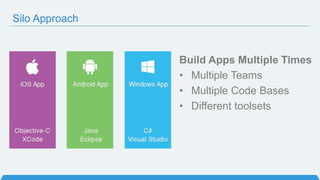
Silo Approach
Build Apps Multiple Times
• Multiple Teams
• Multiple Code Bases
• Different toolsets
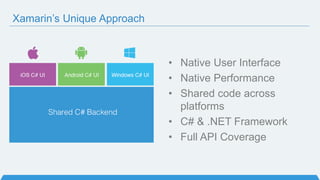
Xamarin’s Unique Approach
• Native User Interface
• Native Performance
• Shared code across
platforms
• C# & .NET Framework
• Full API Coverage
How
Xamarin
Works
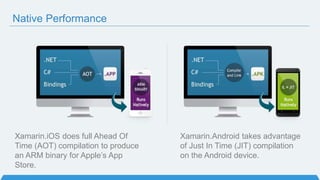
Xamarin.iOS does full Ahead Of
Time (AOT) compilation to produce
an ARM binary for Apple’s App
Store.
Native Performance
Xamarin.Android takes advantage
of Just In Time (JIT) compilation
on the Android device.
.NET + Windows APIs
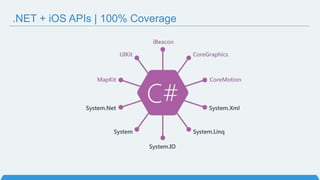
.NET + iOS APIs | 100% Coverage
Always Up-to-Date
Track record of offering
same-day support:
iOS 5, iOS 6, iOS 7, iOS 7.1, iOS 8
Full support for:
• Google Glass
• Android Wear
• Amazon Fire TV
• More!
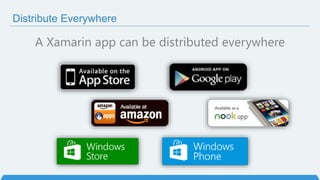
Distribute Everywhere
A Xamarin app can be distributed everywhere
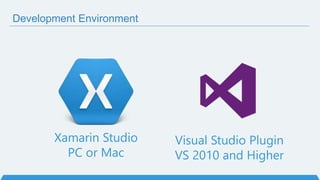
Xamarin Studio
PC or Mac
Visual Studio Plugin
VS 2010 and Higher
Development Environment
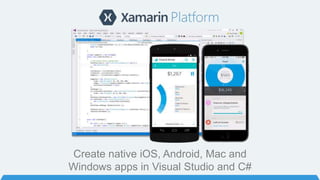
Create native iOS, Android, Mac and
Windows apps in Visual Studio and C#
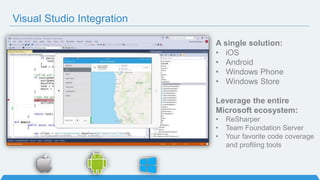
Visual Studio Integration
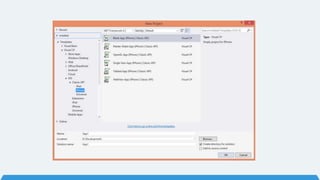
A single solution:
• iOS
• Android
• Windows Phone
• Windows Store
Leverage the entire
Microsoft ecosystem:
• ReSharper
• Team Foundation Server
• Your favorite code coverage
and profiling tools
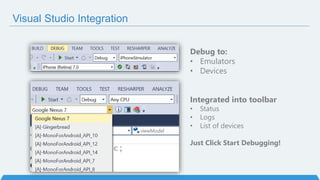
Visual Studio Integration
Debug to:
• Emulators
• Devices
Integrated into toolbar
• Status
• Logs
• List of devices
Just Click Start Debugging!
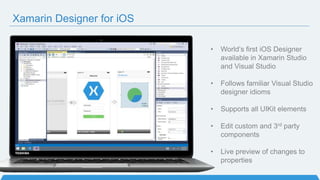
Xamarin Designer for iOS
• World’s first iOS Designer
available in Xamarin Studio
and Visual Studio
• Follows familiar Visual Studio
designer idioms
• Supports all UIKit elements
• Edit custom and 3rd party
components
• Live preview of changes to
properties
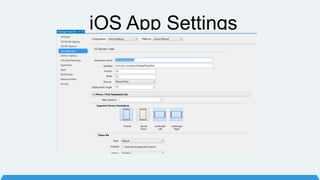
iOS App Settings
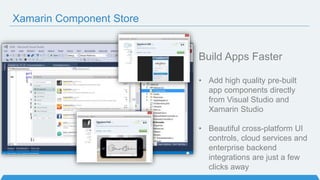
Xamarin Component Store
Build Apps Faster
• Add high quality pre-built
app components directly
from Visual Studio and
Xamarin Studio
• Beautiful cross-platform UI
controls, cloud services and
enterprise backend
integrations are just a few
clicks away
iOS Application
Lifecycle & Structure
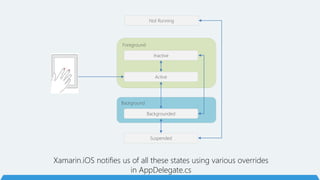
Background
Foreground
Not Running
Inactive
Active
Backgrounded
Suspended
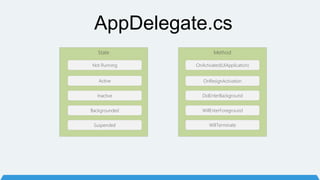
Xamarin.iOS notifies us of all these states using various overrides
in AppDelegate.cs
MethodState
AppDelegate.cs
Not Running
Inactive
Active
Backgrounded
Suspended
OnActivated(UIApplication)
OnResignActivation
DidEnterBackground
WillEnterForeground
WillTerminate
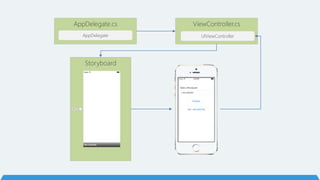
AppDelegate.cs
AppDelegate
ViewController.cs
UIViewController
Storyboard
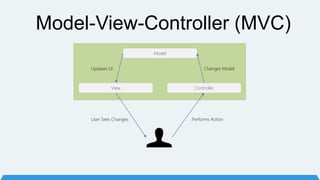
Model-View-Controller (MVC)
Model
View Controller
Performs Action
Changes ModelUpdates UI
User Sees Changes
Demo
Recap
• Define the Problem
• How Xamarin Works
• Development Environment
• iOS Application Life Cycle
• Demo - Bing Images
Thanks you
Questions?
• Microsoft and Xamarin MVP
• @Tinytoot | www.tomwalker.codes
• Tom Walker

Building iOS applications with Xamarin and C#

Editor's Notes

  • #2 Xamarin Introduction!
  • #6 Multiple Teams Multiple Code Bases Expensive & Slow Positive = Great apps delivered to user’s platform Negative = Development hampered by multiple code bases & fragmentation
  • #7 UI build natively per platform, leveraging C# C# + XAML C# + XML C# + XIB One shared app logic code base, iOS, Android, Mac, Windows Phone, Windows Store, Windows
  • #9 There is no compromise on performance. Xamarin apps look and feel native because they are native.
  • #10 If you have ever developed for a Windows Platform before these .NET namespaces might look familiar. However, if we go to a new platform such as Windows Phone or Store we have a new SDK to use and a new set of namespaces.
  • #11 You can think of iOS and Android development the same with Xamarin. You can see we have all of our .NET namespaces and libraries, but Xamarin give us 100% api coverage of each iOS API in it’s SDK that we access view C#.
  • #12 Apple has a developer preview where Xamarin has alphas ready. Google does not offer this. Android versions are usually 4 to 8 weeks out for a stable release, but alphas and betas are usually earlier. Xamarin realizes how important having iOS ready because within 24 hours a large portion of iOS users upgrade Android on the other hand is much different. After 4 months on the market Android 4.4 only had 1% adoption
  • #13 Compiles down to APK or IPA that you can distribute anywhere, any store. Or even internal enterprise
  • #14 Xamarin Studio PC -> Android Mac -> iOS, Android, Mac Visual Studio: iOS, Android Windows
  • #16 Additionally Supports Visual Studio 2010, 2012, & of course 2013 Additionally support desktop apps on Windows: WPF, ASP.NET, Silverlight, WinForms! The same Solution & Projects open in BOTH Xamarin Studio and Visual Studio!
  • #18 Connect to Mac build host for iOS development Show list of all iOS devices and Simulators to debug on Shows all Android devices and emulators X86, Arm, Genymotion.. Take advantage of all debugging power of VS
  • #21 Add high quality pre-built app components directly from Visual Studio. Includes dozens of beautiful UI controls and web services – adding a theme or a 3rd party library is just a few clicks away Complements existing .NET NuGet ecosystem Differentiator: focus on UI controls and themes – we are making developers better designers across all platforms
  • #22 Let’s talk a bit about C# and why it is awesome.
  • #27 Demo time if so desired
  • #28 Let’s talk a bit about C# and why it is awesome.
  • #29 Xamarin Introduction!