Introduction to Computers

          CLASS 6
Peripherals

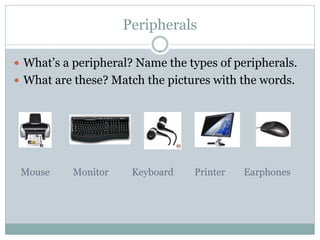
 What’s a peripheral? Name the types of peripherals.
 What are these? Match the pictures with the words.


 Mouse     Monitor    Keyboard   Printer   Earphones
More periperhals

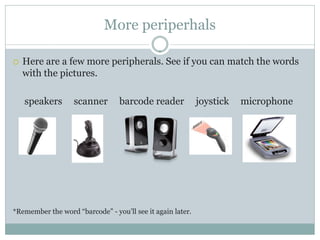
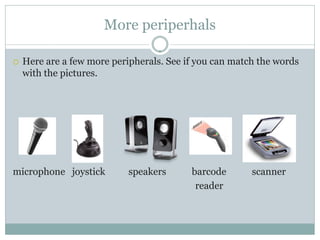
   Here are a few more peripherals. See if you can match the words
    with the pictures.

    speakers       scanner       barcode reader             joystick   microphone


*Remember the word “barcode” - you’ll see it again later.
More periperhals

   Here are a few more peripherals. See if you can match the words
    with the pictures.


microphone joystick         speakers      barcode       scanner
                                           reader
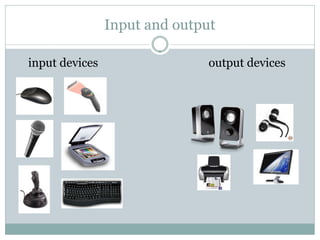
Input and output

input devices                  output devices
Wikiquestions

 Where does the word “Wikipedia” come from?


 When was Wikipedia started?


 How does Wikipedia make money?


 How popular is the Wikipedia website?


 Is Wikipedia a reliable source of information?
Wikiquestions

 Where does the word “Wikipedia” come from?
   “Wiki” and “Encyclopedia”

 When was Wikipedia started?
   2001

 How does Wikipedia make money?
   Donations only - no advertising.

 How popular is the Wikipedia website?
   Currently the worlds’ 6th most popular website.

 Is Wikipedia a reliable source of information?
   Studies show that Wikipedia is as reliable as major
    encyclopedias [1]. You should still check with your teacher.
Internet Explorer is not good

 IE - it’s no good! If Microsoft didn’t include this web
  browser with each copy of Windows, most people
  wouldn’t use it.
 For today’s lesson, I will need you to check if you
  have the Google Chrome browser.
 If you don’t have this browser, take a minute and
  download it.
 Don’t know how to download it?
  Google “Google Chrome”, silly!
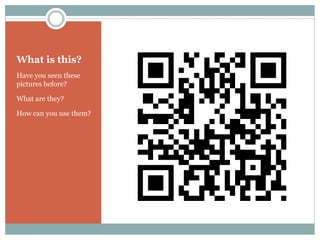
What is this?
Have you seen these
pictures before?

What are they?

How can you use them?
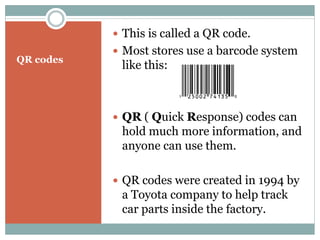
 This is called a QR code.
            Most stores use a barcode system
QR codes
            like this:


            QR ( Quick Response) codes can
            hold much more information, and
            anyone can use them.

            QR codes were created in 1994 by
            a Toyota company to help track
            car parts inside the factory.
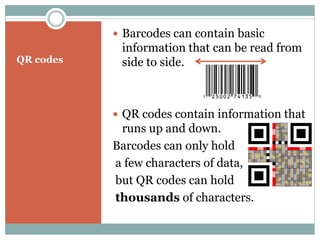
 Barcodes can contain basic
            information that can be read from
QR codes    side to side.


            QR codes contain information that
            runs up and down.
           Barcodes can only hold
           a few characters of data,
           but QR codes can hold
           thousands of characters.
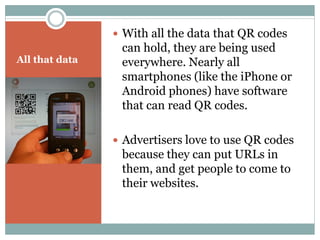
 With all the data that QR codes
                 can hold, they are being used
All that data    everywhere. Nearly all
                 smartphones (like the iPhone or
                 Android phones) have software
                 that can read QR codes.

                 Advertisers love to use QR codes
                 because they can put URLs in
                 them, and get people to come to
                 their websites.
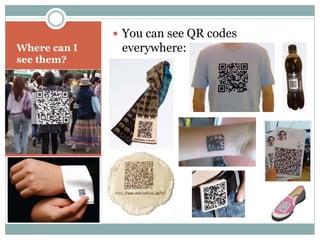
 You can see QR codes
Where can I    everywhere:
see them?
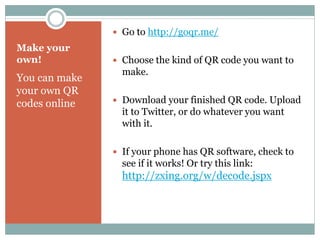
 Go to http://goqr.me/
Make your
own!            Choose the kind of QR code you want to
                 make.
You can make
your own QR
codes online    Download your finished QR code. Upload
                 it to Twitter, or do whatever you want
                 with it.

                If your phone has QR software, check to
                 see if it works! Or try this link:
                 http://zxing.org/w/decode.jspx
Twitter review

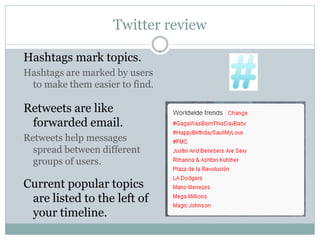
Hashtags mark topics.
Hashtags are marked by users
 to make them easier to find.

Retweets are like
 forwarded email.
Retweets help messages
  spread between different
  groups of users.

Current popular topics
 are listed to the left of
 your timeline.
This week:

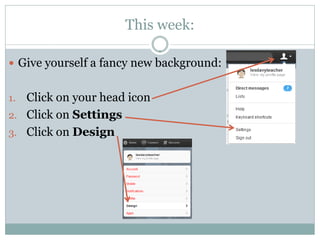
 Give yourself a fancy new background:


1. Click on your head icon
2. Click on Settings
3. Click on Design
New Background

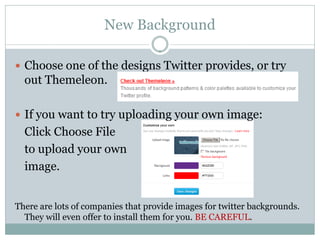
 Choose one of the designs Twitter provides, or try
  out Themeleon.

 If you want to try uploading your own image:
  Click Choose File
  to upload your own
  image.


There are lots of companies that provide images for twitter backgrounds.
  They will even offer to install them for you. BE CAREFUL.
Should I use free materials?

 Websites that offer things like free backgrounds,
  smilies for chat, toolbars and other extras don’t
  usually do it because they are nice.
 Companies exist to make money.
 Some companies make money honestly, others don’t.
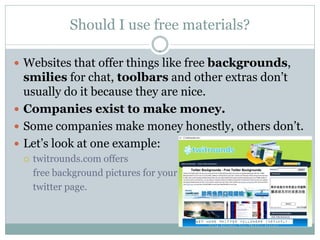
 Let’s look at one example:
    twitrounds.com offers
     free background pictures for your
     twitter page.
Yay! Free stuff!

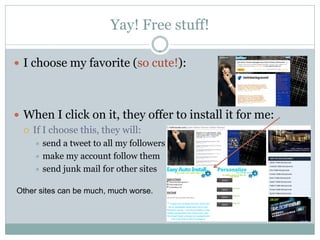
 I choose my favorite (so cute!):


 When I click on it, they offer to install it for me:
   If I choose this, they will:
     send a tweet to all my followers
     make my account follow them
     send junk mail for other sites


Other sites can be much, much worse.
You Try

 Change the background of your twitter page.
 Do It Yourself - don’t let the webpage sign-in for you.
 You can use themeleon or some other place to find a
  background (hint: search on google!)
 Find the one you like, add it, and let me see it.
 Remember - don’t sign up for anything, and try to
  not download anything to your computer.

C 6

  • 1.
  • 2.
    Peripherals  What’s aperipheral? Name the types of peripherals.  What are these? Match the pictures with the words. Mouse Monitor Keyboard Printer Earphones
  • 3.
    More periperhals  Here are a few more peripherals. See if you can match the words with the pictures. speakers scanner barcode reader joystick microphone *Remember the word “barcode” - you’ll see it again later.
  • 4.
    More periperhals  Here are a few more peripherals. See if you can match the words with the pictures. microphone joystick speakers barcode scanner reader
  • 5.
    Input and output inputdevices output devices
  • 6.
    Wikiquestions  Where doesthe word “Wikipedia” come from?  When was Wikipedia started?  How does Wikipedia make money?  How popular is the Wikipedia website?  Is Wikipedia a reliable source of information?
  • 7.
    Wikiquestions  Where doesthe word “Wikipedia” come from?  “Wiki” and “Encyclopedia”  When was Wikipedia started?  2001  How does Wikipedia make money?  Donations only - no advertising.  How popular is the Wikipedia website?  Currently the worlds’ 6th most popular website.  Is Wikipedia a reliable source of information?  Studies show that Wikipedia is as reliable as major encyclopedias [1]. You should still check with your teacher.
  • 8.
    Internet Explorer isnot good  IE - it’s no good! If Microsoft didn’t include this web browser with each copy of Windows, most people wouldn’t use it.  For today’s lesson, I will need you to check if you have the Google Chrome browser.  If you don’t have this browser, take a minute and download it.  Don’t know how to download it? Google “Google Chrome”, silly!
  • 9.
    What is this? Haveyou seen these pictures before? What are they? How can you use them?
  • 10.
     This iscalled a QR code.  Most stores use a barcode system QR codes like this:  QR ( Quick Response) codes can hold much more information, and anyone can use them.  QR codes were created in 1994 by a Toyota company to help track car parts inside the factory.
  • 11.
     Barcodes cancontain basic information that can be read from QR codes side to side.  QR codes contain information that runs up and down. Barcodes can only hold a few characters of data, but QR codes can hold thousands of characters.
  • 12.
     With allthe data that QR codes can hold, they are being used All that data everywhere. Nearly all smartphones (like the iPhone or Android phones) have software that can read QR codes.  Advertisers love to use QR codes because they can put URLs in them, and get people to come to their websites.
  • 13.
     You cansee QR codes Where can I everywhere: see them?
  • 14.
     Go tohttp://goqr.me/ Make your own!  Choose the kind of QR code you want to make. You can make your own QR codes online  Download your finished QR code. Upload it to Twitter, or do whatever you want with it.  If your phone has QR software, check to see if it works! Or try this link: http://zxing.org/w/decode.jspx
  • 15.
    Twitter review Hashtags marktopics. Hashtags are marked by users to make them easier to find. Retweets are like forwarded email. Retweets help messages spread between different groups of users. Current popular topics are listed to the left of your timeline.
  • 16.
    This week:  Giveyourself a fancy new background: 1. Click on your head icon 2. Click on Settings 3. Click on Design
  • 17.
    New Background  Chooseone of the designs Twitter provides, or try out Themeleon.  If you want to try uploading your own image: Click Choose File to upload your own image. There are lots of companies that provide images for twitter backgrounds. They will even offer to install them for you. BE CAREFUL.
  • 18.
    Should I usefree materials?  Websites that offer things like free backgrounds, smilies for chat, toolbars and other extras don’t usually do it because they are nice.  Companies exist to make money.  Some companies make money honestly, others don’t.  Let’s look at one example:  twitrounds.com offers free background pictures for your twitter page.
  • 19.
    Yay! Free stuff! I choose my favorite (so cute!):  When I click on it, they offer to install it for me:  If I choose this, they will:  send a tweet to all my followers  make my account follow them  send junk mail for other sites Other sites can be much, much worse.
  • 20.
    You Try  Changethe background of your twitter page.  Do It Yourself - don’t let the webpage sign-in for you.  You can use themeleon or some other place to find a background (hint: search on google!)  Find the one you like, add it, and let me see it.  Remember - don’t sign up for anything, and try to not download anything to your computer.