Why do you need a BPM model?
Your processes are your way of doing business and often time is
the most neglected part of the business. Done the right way they
are the key to simplicity, scalability, efficiency, and profitability.
• Are your processes documented the way you want them
done?
• Does each employee know the process they are following
and why?
• Do they complete them accurately?
• Do errors and rework keep you up at night or
• Or cause you to spend time working in the business?
A Sharper Approach to Business Process
Performance
Standards
Document
Main Processes
Process Maps
Stoplight Report
Leadership Team
WIN Meetings
Accountability in ASANA
Process Maps
Why Process Mapping?
• It ensures that your organization does the Process the same
way every time
• Improve Employee Productivity
• It identifies steps that are not needed in the process
• Removes steps created by the thinking that “we’ve always
done it that way”
• It helps create checklists for each department
• It helps identified where you can apply technology to
streamline and automate the process
• It allows you to work on the business and not in the business.
Create a self-sustaining business
• I believe in the 20/80 rule when documenting processes.
Identify your main processes and document them.
• By documenting your main processes it give you peace of mind
knowing that everything is done the way you want it
consistently and proficiently.
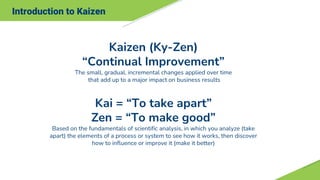
Introduction to Kaizen
Kaizen (Ky-Zen)
“Continual Improvement”
The small, gradual, incremental changes applied over time
that add up to a major impact on business results
Kai = “To take apart”
Zen = “To make good”
Based on the fundamentals of scientific analysis, in which you analyze (take
apart) the elements of a process or system to see how it works, then discover
how to influence or improve it (make it better)
Problem & Goal Statement
Ten Basic Principles for Improvement
1. Throw out all fixed ideas about how to do things.
2. Think of how the new method WILL work-not how it
won’t.
3. Don’t accept excuses…Totally deny the status quo.
4. Don’t seek perfection on the first pass, build improvement.
5. Correct mistakes the moment they are found.
6. Don’t spend a lot of money on improvements.
7. Problems give you a chance to use your brain!
8. Ask “Why” at least five times until you find root cause.
9. Ten peoples ideas are better than that of one person.
10.Improvement knows NO limits!!
Core Processes
Process Map
2 Categories of Process Maps:
Ø“As Is”
• To truly understand how a process works in the real world
• Continuous improvement
• Lean the process
• Problem identification
• Eliminate wait time, rework, and other non-value added time
Ø“Should Be”
• To Establish performance standards
• To Establish standard processes
• To Establish process expectations
• Training
• Customer expectations
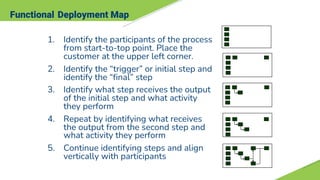
Functional Deployment Map
1. Identify the participants of the process
from start-to-top point. Place the
customer at the upper left corner.
2. Identify the “trigger” or initial step and
identify the “final” step
3. Identify what step receives the output
of the initial step and what activity
they perform
4. Repeat by identifying what receives
the output from the second step and
what activity they perform
5. Continue identifying steps and align
vertically with participants
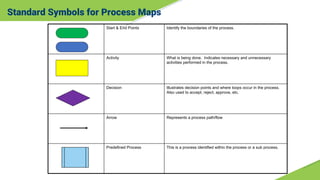
Standard Symbols for Process Maps
Start & End Points Identify the boundaries of the process.
Activity What is being done. Indicates necessary and unnecessary
activities performed in the process.
Decision Illustrates decision points and where loops occur in the process.
Also used to accept, reject, approve, etc.
Arrow Represents a process path/flow
Predefined Process This is a process identified within the process or a sub process.
Process Mapping
Process Maps identify the steps in the ”As IS” Process.
“As Is” Process Map
Sample “As Is” Process Map
Fix and flip
property is
identified
Gain access
Create sow and end
date
Get bids of windows,
roof and foundation
Decide on contractors
and General
Close on property
Get bids HVAC
Decide on HVAC
contractor: Is
there a storage for
supplies?
Order supplies using
from Home Depot
Coordinate delivery of
materials
General contractor
check materials in and
secures them
Give general contractor
money 1st draw.
Some subs get worked
with directly.
Twice Weekly check
contractors status and
SOW
Is changed to
SOW Needed?
Contractor does work in
order of importance
predefined by GM
Payment schedule is based
SOW decided upon Visual
inspection and comparison
to the SOW. Payment are
in three schedules
Work is complete
Final payment is made
after visual inspection
Order a photographer Realtor list property
Property is
ready for
Marketing
No
No
Revise
Order Pod
Sales
Manager
Yes
Yes
Identify Waste
Process Observation
Waste Types Defined
“The relentless pursuit of the
elimination of waste from every
business process…”
The Objective of Lean
1
2
3
4
5
6
7
8 Behavioral
Defects
Inventory
Waiting
Over Processing
Over Production
Transportation
Motion
Type of Waste Definition
Excessive movement by people or
machines
Product moving from person to
person or between locations
Producing more than is required at
the current time
Unnecessary work beyond what is
needed to meet customer
requirements
Periods of inactivity while waiting for
the next process step to begin
Unprocessed or partially processed
materials, or undelivered finished
goods
Process steps that result in scrap,
rework or re-processing
Unused creativity and underutilized
human capital
“Should Be” Process Map
SALES
P.C.
ADMIN
Finance
Vendor
FIX AND FLIP "SHOULD BE"
Fix and Flip
contract is
signed for
purchase
Task is created
via podio for
inspection &
SOW
Update
information
into Podio
Get SOW
completed &
create
materials list
Podio sends
email to
Vendor for
inspection
inspection
process
Was inspection
completed
No
Did it pass? Yes
No
Notify
Integrator and
Renegotiate
Yes
Send
Estimate to
up to three
contractors
Contractor
gets
estimate
Receive
bids
Can the #'s
work?
Award bid to
contractor
Ask contractor
for revised
prices.
Yes
No
No
Send SOW
estimate/budget
to lender for
approval
Schedule
lender for
inspection
Is lender willing
to lend?
Is he willing to
fund full
amount?
Yes
Identify
new
lender
No
Podio creates
task for finance
to identify
remaining
funds source
Yes
No
Podio
creates task
to Complete
underwriting
process
Finalize
contract,
SOW and
Materials list
Review final
SOW,
contract and
materials
Does SOW
includes Roof,
foundation or
under ground
plumbing?
Yes
Schedule for
day after
closing?
Complete
pre-closing
checklist via
Podio.
Insurance
Key Code
Utilities
Pod
House Closed?
Update Lender,
Utilites,
Insurance of
new date
Order
Materials
Yes
No
Notifiy
Contractor
for start date
Ask for
better
price?
Ask for first draw
from Lender
Send money to
Vendor for Draw
Invoice Sent
Weekly
Checklist in
Podio for
SOW
Has major step
been Complete &
Approved
Podio Notifies
Finance &
Vendor
Yes
Lender draw
process
Has money
been recieved
Yes
No
Invoice Sent
Is this final
payment
Deposit funds
Yes
No
Punchlist
Walkthrough for
each Vendor
Is work
complete?
Vendor
completes work
Yes
No
Complete
punchlist in
Podio
Podio notifies
Finance of final
payment
Final check is cut
Step payment
process
No
Did SOW
change?
PC get approval
from Intregrator
Was it
approved?
Admin updates
SOW and Vendor
Contract
Yes
No
Yes
No
No
Podio creates task for
admin to order
photographer
Pictures taken
Podio Notifies
Realitor
Get sales price
guidance from
Intregrator
Property is ready
for Marketing
Could
Renegotiate?
No
Project
Terminated
Yes
Follow Up
Process
Owner Notifies or
House is Sold to
other party?
Yes
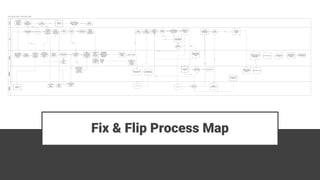
Fix & Flip Process Map
Documented and Followed by all

Business Process Management regvised 2.pdf

  • 3.
    Why do youneed a BPM model? Your processes are your way of doing business and often time is the most neglected part of the business. Done the right way they are the key to simplicity, scalability, efficiency, and profitability. • Are your processes documented the way you want them done? • Does each employee know the process they are following and why? • Do they complete them accurately? • Do errors and rework keep you up at night or • Or cause you to spend time working in the business?
  • 4.
    A Sharper Approachto Business Process Performance Standards Document Main Processes Process Maps Stoplight Report Leadership Team WIN Meetings Accountability in ASANA
  • 5.
  • 6.
    Why Process Mapping? •It ensures that your organization does the Process the same way every time • Improve Employee Productivity • It identifies steps that are not needed in the process • Removes steps created by the thinking that “we’ve always done it that way” • It helps create checklists for each department • It helps identified where you can apply technology to streamline and automate the process • It allows you to work on the business and not in the business. Create a self-sustaining business • I believe in the 20/80 rule when documenting processes. Identify your main processes and document them. • By documenting your main processes it give you peace of mind knowing that everything is done the way you want it consistently and proficiently.
  • 7.
    Introduction to Kaizen Kaizen(Ky-Zen) “Continual Improvement” The small, gradual, incremental changes applied over time that add up to a major impact on business results Kai = “To take apart” Zen = “To make good” Based on the fundamentals of scientific analysis, in which you analyze (take apart) the elements of a process or system to see how it works, then discover how to influence or improve it (make it better)
  • 8.
    Problem & GoalStatement
  • 9.
    Ten Basic Principlesfor Improvement 1. Throw out all fixed ideas about how to do things. 2. Think of how the new method WILL work-not how it won’t. 3. Don’t accept excuses…Totally deny the status quo. 4. Don’t seek perfection on the first pass, build improvement. 5. Correct mistakes the moment they are found. 6. Don’t spend a lot of money on improvements. 7. Problems give you a chance to use your brain! 8. Ask “Why” at least five times until you find root cause. 9. Ten peoples ideas are better than that of one person. 10.Improvement knows NO limits!!
  • 10.
  • 11.
    Process Map 2 Categoriesof Process Maps: Ø“As Is” • To truly understand how a process works in the real world • Continuous improvement • Lean the process • Problem identification • Eliminate wait time, rework, and other non-value added time Ø“Should Be” • To Establish performance standards • To Establish standard processes • To Establish process expectations • Training • Customer expectations
  • 12.
    Functional Deployment Map 1.Identify the participants of the process from start-to-top point. Place the customer at the upper left corner. 2. Identify the “trigger” or initial step and identify the “final” step 3. Identify what step receives the output of the initial step and what activity they perform 4. Repeat by identifying what receives the output from the second step and what activity they perform 5. Continue identifying steps and align vertically with participants
  • 13.
    Standard Symbols forProcess Maps Start & End Points Identify the boundaries of the process. Activity What is being done. Indicates necessary and unnecessary activities performed in the process. Decision Illustrates decision points and where loops occur in the process. Also used to accept, reject, approve, etc. Arrow Represents a process path/flow Predefined Process This is a process identified within the process or a sub process.
  • 14.
    Process Mapping Process Mapsidentify the steps in the ”As IS” Process.
  • 15.
  • 16.
    Sample “As Is”Process Map Fix and flip property is identified Gain access Create sow and end date Get bids of windows, roof and foundation Decide on contractors and General Close on property Get bids HVAC Decide on HVAC contractor: Is there a storage for supplies? Order supplies using from Home Depot Coordinate delivery of materials General contractor check materials in and secures them Give general contractor money 1st draw. Some subs get worked with directly. Twice Weekly check contractors status and SOW Is changed to SOW Needed? Contractor does work in order of importance predefined by GM Payment schedule is based SOW decided upon Visual inspection and comparison to the SOW. Payment are in three schedules Work is complete Final payment is made after visual inspection Order a photographer Realtor list property Property is ready for Marketing No No Revise Order Pod Sales Manager Yes Yes
  • 17.
  • 18.
  • 19.
    Waste Types Defined “Therelentless pursuit of the elimination of waste from every business process…” The Objective of Lean 1 2 3 4 5 6 7 8 Behavioral Defects Inventory Waiting Over Processing Over Production Transportation Motion Type of Waste Definition Excessive movement by people or machines Product moving from person to person or between locations Producing more than is required at the current time Unnecessary work beyond what is needed to meet customer requirements Periods of inactivity while waiting for the next process step to begin Unprocessed or partially processed materials, or undelivered finished goods Process steps that result in scrap, rework or re-processing Unused creativity and underutilized human capital
  • 20.
  • 21.
    SALES P.C. ADMIN Finance Vendor FIX AND FLIP"SHOULD BE" Fix and Flip contract is signed for purchase Task is created via podio for inspection & SOW Update information into Podio Get SOW completed & create materials list Podio sends email to Vendor for inspection inspection process Was inspection completed No Did it pass? Yes No Notify Integrator and Renegotiate Yes Send Estimate to up to three contractors Contractor gets estimate Receive bids Can the #'s work? Award bid to contractor Ask contractor for revised prices. Yes No No Send SOW estimate/budget to lender for approval Schedule lender for inspection Is lender willing to lend? Is he willing to fund full amount? Yes Identify new lender No Podio creates task for finance to identify remaining funds source Yes No Podio creates task to Complete underwriting process Finalize contract, SOW and Materials list Review final SOW, contract and materials Does SOW includes Roof, foundation or under ground plumbing? Yes Schedule for day after closing? Complete pre-closing checklist via Podio. Insurance Key Code Utilities Pod House Closed? Update Lender, Utilites, Insurance of new date Order Materials Yes No Notifiy Contractor for start date Ask for better price? Ask for first draw from Lender Send money to Vendor for Draw Invoice Sent Weekly Checklist in Podio for SOW Has major step been Complete & Approved Podio Notifies Finance & Vendor Yes Lender draw process Has money been recieved Yes No Invoice Sent Is this final payment Deposit funds Yes No Punchlist Walkthrough for each Vendor Is work complete? Vendor completes work Yes No Complete punchlist in Podio Podio notifies Finance of final payment Final check is cut Step payment process No Did SOW change? PC get approval from Intregrator Was it approved? Admin updates SOW and Vendor Contract Yes No Yes No No Podio creates task for admin to order photographer Pictures taken Podio Notifies Realitor Get sales price guidance from Intregrator Property is ready for Marketing Could Renegotiate? No Project Terminated Yes Follow Up Process Owner Notifies or House is Sold to other party? Yes Fix & Flip Process Map
  • 22.