Business LettersWhy Are They Important ?How Do You Create a Good Impression?21st Century Skills Performance Assessment2012-2013Virginia Lee Taylor-Mounts
Why Are They Important?
Professional CommunicationThe reader’s time is very important; write clearly and carefully outline the intent of your communication.The format of the letter helps to clarify the content of the letter.("How to Write a Business Letter That Gets Results," n.d.)
Business LettersProfessional CommunicationProvide informationAdvertiseKeep track of communications outside an organization(Riverside, n.d.)
Provide InformationShare ideasMake offersRequest informationOffer thanksSend congratulationsIntroduce yourself or othersMake RecommendationsApologize("Etiquette for Writing Business Letters," n.d.)
AdvertiseThese letters have common characteristics:Find a common ground with the consumerConsumers must feel they need your productYou should offer a solution to their problemShow the consumer what’s in it for them("Effective Advertising Messages," n.d.)
Keep Track of Outside CommunicationProvide documentation of important mattersCan be filed, scanned and filed electronicallyMore formal than emailProfessional way to communicate("Etiquette for Writing Business Letters," n.d.)
Writing LettersIntent of the communicationKnow your audienceLanguage – tone, choice of wordsVisual appearance—format of letter(Riverside, n.d.)
Intent of CommunicationsPurposeKnow why the correspondence is being writtenWhat will the correspondence do for the readerState you main point earlyWhat action do you want out of the reader("Purdue OWL: Effective Workplace Writing," n.d.)
Know Your AudienceWhat is the expectation of your audienceExpectationsCharacteristicsGoalsWhy do they need this informationKnow what information they needMake your document persuasive("Purdue OWL: Effective Workplace Writing," n.d.)
Language—Tone & Choice of WordsTone is a reflection of you and the companyYou should:Know why you are writing the documentWhat action do you want from the readerKnow what you want the reader to learn or understandTone affects how the reader will react to what is saidKnow what tone you want to demonstrateConfidence 				CourteousSincere("Purdue OWL: Effective Workplace Writing," n.d.)
AIDAAttentionInterestDesireAction("How to Write a Business Letter That Gets Results," n.d.)
AttentionGet the reader’s attentionUse a statement that will grab their attention.FlatteryAsk a questionSurprise("How to Write a Business Letter That Gets Results," n.d.)
InterestGet the reader interested in the reason for the letterIt could be your product, meeting, you as a prospective employee("How to Write a Business Letter That Gets Results," n.d.)
DesireExplain what you can do for them, how you can help themBe specificUse professional languageDo not use slang("How to Write a Business Letter That Gets Results," n.d.)
ActionTell them what action you want them to takeDon’t expect them to guess what you want them to doYour words should help them understand how you can do something for them("How to Write a Business Letter That Gets Results," n.d.)
How Do You Create A Good Impression?
Letter FormatsBlockModified Block
BlockEvery thing begins at the let marginNo paragraph indentionsThe date should be about 2 to 3 lines below the letterheadAdjust this to create a pleasing appearanceAll other spacing should remain true to standard
Modified  BlockThe date begins 2 to 3 lines below the letterheadAdjust this to create a pleasing appearanceAll other spacing should remain true to standard The date, complimentary close, and typed signature begin at center Paragraphs can be indented ½ inch or be block with the left hand margin
Parts of the LetterAddress  DateSalutationBody of the TextClosingEnclosuresTypist initials
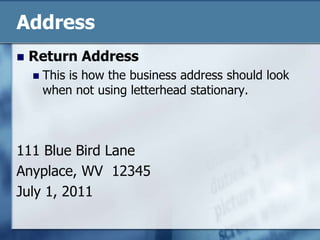
Address Return Address—address of the senderLetterheadContains business name and address clearly identifiedNo letterheadYou must insert the return addressDo not use the sender’s name or title in the addressUse only the street address, city, state, and zip codePlace city, state, & zip code one line above the datePlace the street address on the line above the city, state, & zip code  (see next slide for example)("Purdue OWL: Basic Business Letters," n.d.)
AddressReturn AddressThis is how the business address should look  when not using letterhead stationary.111 Blue Bird LaneAnyplace, WV  12345July 1, 2011
Address Mailing AddressUsing letterheadThe mailing address is placed a quad space below the current date("Purdue OWL: Basic Business Letters," n.d.)
DateThis indicates the date the letter was writtenUse American date formatEx. July 1, 2011Do not abbreviate the monthsWrite them out completely ("Purdue OWL: Basic Business Letters," n.d.)Place the date approximately 2 or 3 lines below the letter head or about 2 inches from the top if you are not using letter head.
SalutationsUse the personal title of the addresseeIf you don’t know the gender of the addressee, use a nonsexist salutation or use the complete name.Ex. “To Whom It May Concern”Ex.  “Dear Chris Harmon” ("Purdue OWL: Basic Business Letters," n.d.)Place the salutation a double space below the mailing address.
Body of LetterAll lines of the paragraph are single spacedDouble space between each paragraphModified Block LetterCan have a ½ inch paragraph indentionBlock LetterParagraph begins at the left margin
Complimentary CloseDouble space below the last paragraph of the letterThe first word of the complimentary begins with a capital letter; all other words begin with a lower case letter.Place a comma after the last word of the complimentary close
Typed SignatureBegins a quad space below the complimentary closeThe blank spaces between the complimentary close and the typed signature provide room for the sender of the letter to sign the letterIf the sender has a title, please it on the line below the typed signature
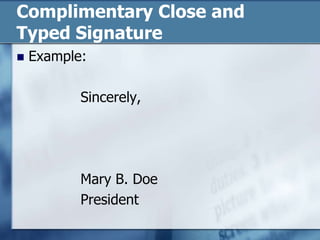
Complimentary Close andTyped SignatureExample:			Sincerely,			Mary B. Doe			President
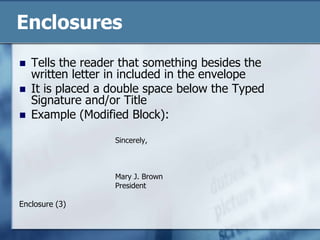
EnclosuresTells the reader that something besides the written letter in included in the envelopeIt is placed a double space below the Typed Signature and/or TitleExample (Modified Block):Sincerely,Mary J. BrownPresidentEnclosure (3)
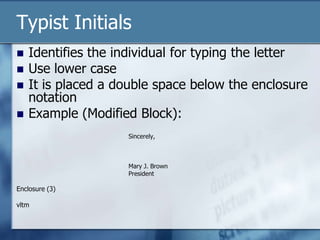
Typist InitialsIdentifies the individual for typing the letterUse lower caseIt is placed a double space below the enclosure notationExample (Modified Block):Sincerely,Mary J. BrownPresidentEnclosure (3)vltm
FontPreferred font is Times New RomanPreferred size is 12
Formatting the Business LetterMargins—Block & Modified Block
Final ImpressionProofread, Proofread, Proofread ! ! !Never mail a letter with a typing error.Never mail a letter with a grammar errorErrors in letters can diminish the impression that you are making upon the reader.
You Try It !If you have any questions, review this PP again or email me.Practice is located in the practice folder on the website!

Business letters pp

  • 1.
    Business LettersWhy AreThey Important ?How Do You Create a Good Impression?21st Century Skills Performance Assessment2012-2013Virginia Lee Taylor-Mounts
  • 2.
    Why Are TheyImportant?
  • 3.
    Professional CommunicationThe reader’stime is very important; write clearly and carefully outline the intent of your communication.The format of the letter helps to clarify the content of the letter.("How to Write a Business Letter That Gets Results," n.d.)
  • 4.
    Business LettersProfessional CommunicationProvideinformationAdvertiseKeep track of communications outside an organization(Riverside, n.d.)
  • 5.
    Provide InformationShare ideasMakeoffersRequest informationOffer thanksSend congratulationsIntroduce yourself or othersMake RecommendationsApologize("Etiquette for Writing Business Letters," n.d.)
  • 6.
    AdvertiseThese letters havecommon characteristics:Find a common ground with the consumerConsumers must feel they need your productYou should offer a solution to their problemShow the consumer what’s in it for them("Effective Advertising Messages," n.d.)
  • 7.
    Keep Track ofOutside CommunicationProvide documentation of important mattersCan be filed, scanned and filed electronicallyMore formal than emailProfessional way to communicate("Etiquette for Writing Business Letters," n.d.)
  • 8.
    Writing LettersIntent ofthe communicationKnow your audienceLanguage – tone, choice of wordsVisual appearance—format of letter(Riverside, n.d.)
  • 9.
    Intent of CommunicationsPurposeKnowwhy the correspondence is being writtenWhat will the correspondence do for the readerState you main point earlyWhat action do you want out of the reader("Purdue OWL: Effective Workplace Writing," n.d.)
  • 10.
    Know Your AudienceWhatis the expectation of your audienceExpectationsCharacteristicsGoalsWhy do they need this informationKnow what information they needMake your document persuasive("Purdue OWL: Effective Workplace Writing," n.d.)
  • 11.
    Language—Tone & Choiceof WordsTone is a reflection of you and the companyYou should:Know why you are writing the documentWhat action do you want from the readerKnow what you want the reader to learn or understandTone affects how the reader will react to what is saidKnow what tone you want to demonstrateConfidence CourteousSincere("Purdue OWL: Effective Workplace Writing," n.d.)
  • 12.
    AIDAAttentionInterestDesireAction("How to Writea Business Letter That Gets Results," n.d.)
  • 13.
    AttentionGet the reader’sattentionUse a statement that will grab their attention.FlatteryAsk a questionSurprise("How to Write a Business Letter That Gets Results," n.d.)
  • 14.
    InterestGet the readerinterested in the reason for the letterIt could be your product, meeting, you as a prospective employee("How to Write a Business Letter That Gets Results," n.d.)
  • 15.
    DesireExplain what youcan do for them, how you can help themBe specificUse professional languageDo not use slang("How to Write a Business Letter That Gets Results," n.d.)
  • 16.
    ActionTell them whataction you want them to takeDon’t expect them to guess what you want them to doYour words should help them understand how you can do something for them("How to Write a Business Letter That Gets Results," n.d.)
  • 17.
    How Do YouCreate A Good Impression?
  • 18.
  • 19.
    BlockEvery thing beginsat the let marginNo paragraph indentionsThe date should be about 2 to 3 lines below the letterheadAdjust this to create a pleasing appearanceAll other spacing should remain true to standard
  • 20.
    Modified BlockThedate begins 2 to 3 lines below the letterheadAdjust this to create a pleasing appearanceAll other spacing should remain true to standard The date, complimentary close, and typed signature begin at center Paragraphs can be indented ½ inch or be block with the left hand margin
  • 21.
    Parts of theLetterAddress DateSalutationBody of the TextClosingEnclosuresTypist initials
  • 22.
    Address Return Address—addressof the senderLetterheadContains business name and address clearly identifiedNo letterheadYou must insert the return addressDo not use the sender’s name or title in the addressUse only the street address, city, state, and zip codePlace city, state, & zip code one line above the datePlace the street address on the line above the city, state, & zip code (see next slide for example)("Purdue OWL: Basic Business Letters," n.d.)
  • 23.
    AddressReturn AddressThis ishow the business address should look when not using letterhead stationary.111 Blue Bird LaneAnyplace, WV 12345July 1, 2011
  • 24.
    Address Mailing AddressUsingletterheadThe mailing address is placed a quad space below the current date("Purdue OWL: Basic Business Letters," n.d.)
  • 25.
    DateThis indicates thedate the letter was writtenUse American date formatEx. July 1, 2011Do not abbreviate the monthsWrite them out completely ("Purdue OWL: Basic Business Letters," n.d.)Place the date approximately 2 or 3 lines below the letter head or about 2 inches from the top if you are not using letter head.
  • 26.
    SalutationsUse the personaltitle of the addresseeIf you don’t know the gender of the addressee, use a nonsexist salutation or use the complete name.Ex. “To Whom It May Concern”Ex. “Dear Chris Harmon” ("Purdue OWL: Basic Business Letters," n.d.)Place the salutation a double space below the mailing address.
  • 27.
    Body of LetterAlllines of the paragraph are single spacedDouble space between each paragraphModified Block LetterCan have a ½ inch paragraph indentionBlock LetterParagraph begins at the left margin
  • 28.
    Complimentary CloseDouble spacebelow the last paragraph of the letterThe first word of the complimentary begins with a capital letter; all other words begin with a lower case letter.Place a comma after the last word of the complimentary close
  • 29.
    Typed SignatureBegins aquad space below the complimentary closeThe blank spaces between the complimentary close and the typed signature provide room for the sender of the letter to sign the letterIf the sender has a title, please it on the line below the typed signature
  • 30.
    Complimentary Close andTypedSignatureExample: Sincerely, Mary B. Doe President
  • 31.
    EnclosuresTells the readerthat something besides the written letter in included in the envelopeIt is placed a double space below the Typed Signature and/or TitleExample (Modified Block):Sincerely,Mary J. BrownPresidentEnclosure (3)
  • 32.
    Typist InitialsIdentifies theindividual for typing the letterUse lower caseIt is placed a double space below the enclosure notationExample (Modified Block):Sincerely,Mary J. BrownPresidentEnclosure (3)vltm
  • 33.
    FontPreferred font isTimes New RomanPreferred size is 12
  • 34.
    Formatting the BusinessLetterMargins—Block & Modified Block
  • 35.
    Formatting the BusinessLetterMargins—Block & Modified Block
  • 36.
    Final ImpressionProofread, Proofread,Proofread ! ! !Never mail a letter with a typing error.Never mail a letter with a grammar errorErrors in letters can diminish the impression that you are making upon the reader.
  • 37.
    You Try It!If you have any questions, review this PP again or email me.Practice is located in the practice folder on the website!