Plugin
Development for
Beginners
By Joe Cartonia
About me
Name: Joe Cartonia
GitHub: https://github.com/cssjoe
Twitter: @joemotocss
I was born in Buffalo, living in Virginia Beach since 2007, and working as a WordPress
plugin and API developer for BoldGrid since 2014. Technology has always been a major
interest of mine since the first grade. I also enjoy traveling, motorsports, snowboarding,
playing guitar, and spending time at the beach.
Why make a plugin?
● Add functionality to your website
○ There may not be a plugin available to satisfy your needs
○ Other plugins may not suffice or may be too complicated
● Create a useful plugin, intending to publish in the WordPress.org directory.
○ Contribute open source solutions to the community
● Make a plugin for a commercial or private service
○ For sale or subscription
○ If the license is not GPL, then it cannot be on WordPress.org.
Software licenses
A software license is expected to be included with plugins. In most cases, GPL (General
Public License) is used; the same open source license that WordPress core uses. This
means that everyone is free to use and redistribute the plugin, in a modified or
unmodified form.
License specification examples: GPL-2.0-or-later, GPL-2.0+, GPL2, GPL3, MIT
Information on licenses:
● https://developer.wordpress.org/plugins/the-basics/including-a-software-license/
● https://www.gnu.org/licenses/gpl.html
● https://choosealicense.com/
Simple ways to start developing a plugin
● Single PHP file
○ For simple/basic functionality
○ Quick and easy
○ https://developer.wordpress.org/plugins/the-basics/header-requirements/
■ Start with a main plugin file header
● Multiple files under a directory structure
○ For more advanced functionality
○ Usually requires more of a time investment
○ Better organization of code; readability and easier to maintain.
○ Allows code to be modular
● Boilerplate
○ For more advanced developers
○ Similar to multiple files, but provides a head start to creating the structure.
○ Online generators, such as: https://wppb.me/
○ Examples on GitHub: https://github.com/devinvinson/WordPress-Plugin-Boilerplate/
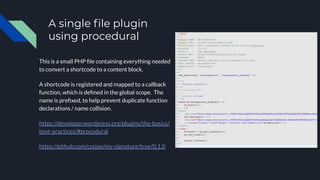
A single file plugin
using procedural
This is a small PHP file containing everything needed
to convert a shortcode to a content block.
A shortcode is registered and mapped to a callback
function, which is defined in the global scope. The
name is prefixed, to help prevent duplicate function
declarations / name collision.
https://developer.wordpress.org/plugins/the-basics/
best-practices/#procedural
https://github.com/cssjoe/my-signature/tree/0.1.0
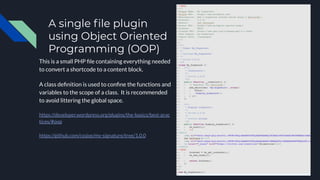
A single file plugin
using Object Oriented
Programming (OOP)
This is a small PHP file containing everything needed
to convert a shortcode to a content block.
A class definition is used to confine the functions and
variables to the scope of a class. It is recommended
to avoid littering the global space.
https://developer.wordpress.org/plugins/the-basics/best-prac
tices/#oop
https://github.com/cssjoe/my-signature/tree/1.0.0
Avoiding class name collisions
Class names can be defined different ways. They should be unique in the global space.
● Using a unique prefix
○ Example: class My_Plugin_Name_Some_Class_Name {}
○ Accessed globally using My_Plugin_Name_Some_Class_Name
● Using a namespace
○ Example: namespace PluginNameCategory;
class My_Class {}
○ Accessed globally using PluginNameCategoryMy_Class
○ https://www.php.net/manual/en/language.namespaces.rationale.php
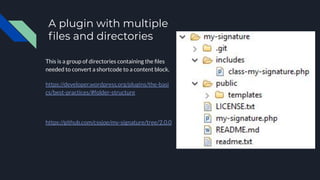
A plugin with multiple
files and directories
This is a group of directories containing the files
needed to convert a shortcode to a content block.
https://developer.wordpress.org/plugins/the-basi
cs/best-practices/#folder-structure
https://github.com/cssjoe/my-signature/tree/2.0.0
The example plugin in action
Left side: A shortcode
“[my-signature]” is added to a page
in the wp-admin post and page
editor.
Right side: A preview of the page contains the
markup inserted from the plugin.
Resources available
WordPress.org
● Make WordPress Plugins: https://make.wordpress.org/plugins/
● Plugin Handbook: https://developer.wordpress.org/plugins/
● Plugin Directory: https://developer.wordpress.org/plugins/wordpress-org/
Code reference
● https://developer.wordpress.org/reference/
● http://www.php.net/
Making WordPress Slack Workspace
● https://wordpress.slack.com/messages/pluginreview
WordPress Meetups
● https://www.meetup.com/topics/wordpress/
Q & A
Please ask any questions that you may have.
I will try to answer all questions in the time that we have left.
Thank you!
I would like to thank everyone for attending.
The plugin examples used here are available on GitHub: https://github.com/cssjoe
This slideshow and others are available on SlideShare.net: https://www.slideshare.net/JoeCartonia
Please follow me on Twitter: @joemotocss

Plugin Development for Beginners v.2019

  • 1.
  • 2.
    About me Name: JoeCartonia GitHub: https://github.com/cssjoe Twitter: @joemotocss I was born in Buffalo, living in Virginia Beach since 2007, and working as a WordPress plugin and API developer for BoldGrid since 2014. Technology has always been a major interest of mine since the first grade. I also enjoy traveling, motorsports, snowboarding, playing guitar, and spending time at the beach.
  • 3.
    Why make aplugin? ● Add functionality to your website ○ There may not be a plugin available to satisfy your needs ○ Other plugins may not suffice or may be too complicated ● Create a useful plugin, intending to publish in the WordPress.org directory. ○ Contribute open source solutions to the community ● Make a plugin for a commercial or private service ○ For sale or subscription ○ If the license is not GPL, then it cannot be on WordPress.org.
  • 4.
    Software licenses A softwarelicense is expected to be included with plugins. In most cases, GPL (General Public License) is used; the same open source license that WordPress core uses. This means that everyone is free to use and redistribute the plugin, in a modified or unmodified form. License specification examples: GPL-2.0-or-later, GPL-2.0+, GPL2, GPL3, MIT Information on licenses: ● https://developer.wordpress.org/plugins/the-basics/including-a-software-license/ ● https://www.gnu.org/licenses/gpl.html ● https://choosealicense.com/
  • 5.
    Simple ways tostart developing a plugin ● Single PHP file ○ For simple/basic functionality ○ Quick and easy ○ https://developer.wordpress.org/plugins/the-basics/header-requirements/ ■ Start with a main plugin file header ● Multiple files under a directory structure ○ For more advanced functionality ○ Usually requires more of a time investment ○ Better organization of code; readability and easier to maintain. ○ Allows code to be modular ● Boilerplate ○ For more advanced developers ○ Similar to multiple files, but provides a head start to creating the structure. ○ Online generators, such as: https://wppb.me/ ○ Examples on GitHub: https://github.com/devinvinson/WordPress-Plugin-Boilerplate/
  • 6.
    A single fileplugin using procedural This is a small PHP file containing everything needed to convert a shortcode to a content block. A shortcode is registered and mapped to a callback function, which is defined in the global scope. The name is prefixed, to help prevent duplicate function declarations / name collision. https://developer.wordpress.org/plugins/the-basics/ best-practices/#procedural https://github.com/cssjoe/my-signature/tree/0.1.0
  • 7.
    A single fileplugin using Object Oriented Programming (OOP) This is a small PHP file containing everything needed to convert a shortcode to a content block. A class definition is used to confine the functions and variables to the scope of a class. It is recommended to avoid littering the global space. https://developer.wordpress.org/plugins/the-basics/best-prac tices/#oop https://github.com/cssjoe/my-signature/tree/1.0.0
  • 8.
    Avoiding class namecollisions Class names can be defined different ways. They should be unique in the global space. ● Using a unique prefix ○ Example: class My_Plugin_Name_Some_Class_Name {} ○ Accessed globally using My_Plugin_Name_Some_Class_Name ● Using a namespace ○ Example: namespace PluginNameCategory; class My_Class {} ○ Accessed globally using PluginNameCategoryMy_Class ○ https://www.php.net/manual/en/language.namespaces.rationale.php
  • 9.
    A plugin withmultiple files and directories This is a group of directories containing the files needed to convert a shortcode to a content block. https://developer.wordpress.org/plugins/the-basi cs/best-practices/#folder-structure https://github.com/cssjoe/my-signature/tree/2.0.0
  • 10.
    The example pluginin action Left side: A shortcode “[my-signature]” is added to a page in the wp-admin post and page editor. Right side: A preview of the page contains the markup inserted from the plugin.
  • 11.
    Resources available WordPress.org ● MakeWordPress Plugins: https://make.wordpress.org/plugins/ ● Plugin Handbook: https://developer.wordpress.org/plugins/ ● Plugin Directory: https://developer.wordpress.org/plugins/wordpress-org/ Code reference ● https://developer.wordpress.org/reference/ ● http://www.php.net/ Making WordPress Slack Workspace ● https://wordpress.slack.com/messages/pluginreview WordPress Meetups ● https://www.meetup.com/topics/wordpress/
  • 12.
    Q & A Pleaseask any questions that you may have. I will try to answer all questions in the time that we have left.
  • 13.
    Thank you! I wouldlike to thank everyone for attending. The plugin examples used here are available on GitHub: https://github.com/cssjoe This slideshow and others are available on SlideShare.net: https://www.slideshare.net/JoeCartonia Please follow me on Twitter: @joemotocss