Shahar Evron, Zend Technologies BUILDING SCALABLE DEVELOPMENT ENVIRONMENTS
Prologue Who am I ? Shahar – Pronunciation is not important! Working for Zend Technologies for the last 2½ years Spend much of my time watching others work ;) Who are you ? Executives ? Project / Product Managers ?  Development / Testing Team leaders?  Developers?
Prologue What is this all about ? A semi-technical checklist of good development practices No exciting news – most of you probably know / read about / applied some of these practices Aimed at helping you build a healthy development environment What is this  not  ? In any way related to application or server performance A technical guide An introduction to specific development or testing methodologies (RAD, XP, Scrum, etc.)
Scalability ? “ scalability is a desirable property of a system, a network, or a process, which indicates its ability to either handle growing amounts of work in a graceful manner, or to be readily enlarged.” André B. Bondi, Characteristics of scalability and their impact on performance
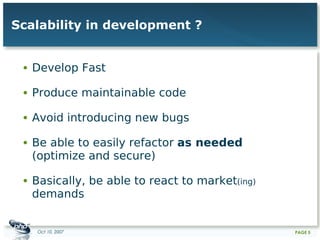
Develop Fast Produce maintainable code Avoid introducing new bugs Be able to easily refactor  as needed  (optimize and secure) Basically, be able to react to market (ing)  demands Scalability in development ?
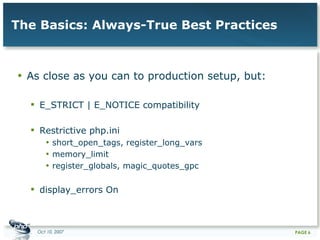
The Basics: Always-True Best Practices As close as you can to production setup, but: E_STRICT | E_NOTICE compatibility Restrictive php.ini  short_open_tags, register_long_vars memory_limit register_globals, magic_quotes_gpc display_errors On
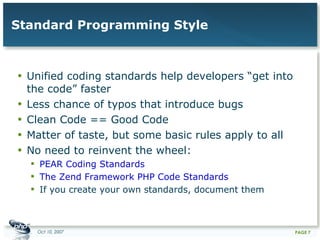
Standard Programming Style Unified coding standards help developers “get into the code” faster Less chance of typos that introduce bugs Clean Code == Good Code Matter of taste, but some basic rules apply to all No need to reinvent the wheel:  PEAR Coding Standards The Zend Framework PHP Code Standards If you create your own standards, document them
Standard Programming Style Always-true bug-reducing standards: Avoid short open tags Skip closing tag ( ?> ) when not required (you also save a couple of bytes on disk!) Use meaningful labels Document! Be E_NOTICE and E_STRICT compliant: <?php    echo  $info [ VERSION ];  // No good!    echo  $info [ 'VERSION' ];  // Better!  ?>
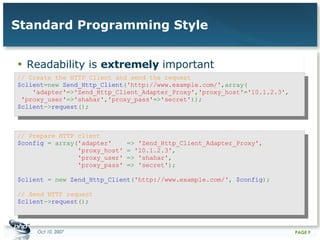
Standard Programming Style Readability is  extremely  important // Create the HTTP Client and send the request  $client =new  Zend_Http_Client ( 'http://www.example.com/' ,array(    'adapter' => 'Zend_Http_Client_Adapter_Proxy' , 'proxy_host' = '10.1.2.3' ,  'proxy_user' => 'shahar' , 'proxy_pass' => 'secret' ));  $client -> request ();  // Prepare HTTP client  $config  = array( 'adapter'  =>  'Zend_Http_Client_Adapter_Proxy' ,    'proxy_host'  =  '10.1.2.3' ,    'proxy_user'  =>  'shahar' ,    'proxy_pass'  =>  'secret' );  $client  = new  Zend_Http_Client ( 'http://www.example.com/' ,  $config );  // Send HTTP request  $client -> request ();
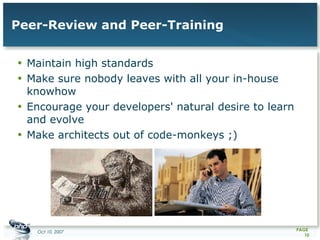
Peer-Review and Peer-Training Maintain high standards Make sure nobody leaves with all your in-house knowhow Encourage your developers' natural desire to learn and evolve Make architects out of code-monkeys ;)
Source / Revision Control Not just for rolling back your mistakes Allows your developers to work on the same modules without interfering with each other's work  Use advanced features: Tag before you release and when testing Branch major versions and when working on experimental changes Work on trunk, merge into production branches when needed, tag from branches, deploy from tags
Source / Revision Control Enforce good SCM practices: Update before you start working Run tests before committing Commit often After fixing a single bug or implementing a single feature Daily (?) Always use descriptive commit log entries Developers who commit broken code should be punished! Requires some discipline at first  ...but is well worth it!
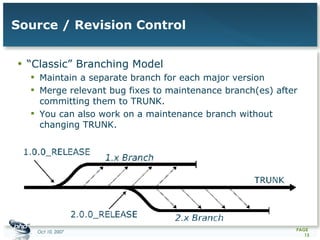
Source / Revision Control “Classic” Branching Model Maintain a separate branch for each major version Merge relevant bug fixes to maintenance branch(es) after committing them to TRUNK.  You can also work on a maintenance branch without changing TRUNK.
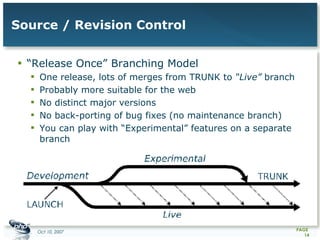
Source / Revision Control “Release Once” Branching Model One release, lots of merges from TRUNK to  “Live”  branch Probably more suitable for the web No distinct major versions No back-porting of bug fixes (no maintenance branch) You can play with “Experimental” features on a separate branch
Bug Tracking Goes hand in hand with SCM Everything should be reported Nothing should fall between the cracks  BTS != TODO list Manage versions and targets Organize tasks according to their priorities Assign tasks to developers Make sure bugs are tested after they are “fixed”
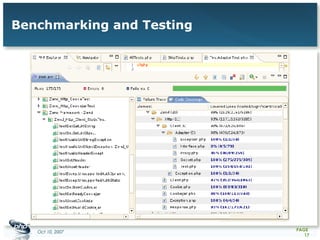
Benchmarking and Testing Unit Testing Generally executed by the developers during the development phase (eg. Before committing) Usually PHPUnit or SimpleTest Generate code coverage reports New bug == new test Functional Testing Generally executed by testers during the testing phase Build scenarios and test plans Be organized as much as you can
Benchmarking and Testing
Benchmarking and Testing Benchmarking Build (at least one) typical user browsing scenario How many visitors are you expecting? Set up your load targets according to your business plans Make sure you can withstand those targets If not –  profile  and optimize Benchmarking tools: AB Apache Flood JMeter WebLoad
Putting It All Together Typical “healthy” development environments are organized in 3 tiers: Development Staging / Testing Production
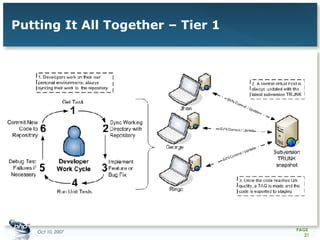
Putting It All Together – Tier 1 Allow all developers to conveniently work on the entire project without “blocking” each other Each developer with it's own working copy, virtual host and DB snapshot However the server setup (PHP environment) should be identical and close to production setup A single “HEAD” virtual host, auto-updated on each commit will allow you to see “clean” progress Once a milestone is reached, it is tagged and pushed into the  testing environment
Putting It All Together – Tier 1
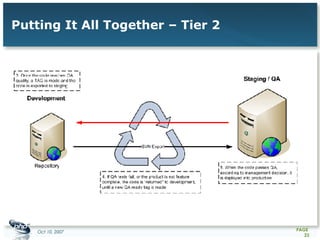
Putting It All Together – Tier 2 Staging should be identical in setup to production If you plan to run benchmarks on it, it should also have similar (or comparable) hardware  Test on static code snapshots (== tags), with some meaningful DB data snapshot Report all issues into a BTS with clear tag / target tracking If release objectives are not met, send back to developers for another RC Once you have a good RC tag it again and move to production
Putting It All Together – Tier 2
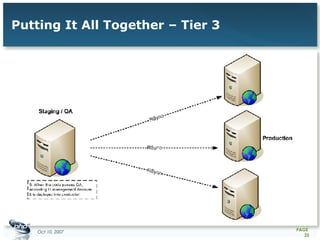
Putting It All Together – Tier 3 Nobody  should have access to production code It might be a good idea to do a quick run over the current issues in the BTS, to make sure nothing was left out Even minor fixes to production should be versioned and tagged before deployment Plan properly for production deployment Roll-back procedures, downtime etc. Is a DB schema going to change?
Putting It All Together – Tier 3
Epilogue Further Reading: Development Methodologies: Scrum, XP, FDD and Agile methodologies in general Source Control: Eric Sink's Source Control Howto The Subversion Book Bug Tracking Simon Tatham's “How to Report Bugs Effectively” Testing Context Driven Testing School
Thank You! ﺷﻜﺮﺍﹰ Qagaasakuq Grazie Tak Dank U Dankon Kiitos დიდი მადლობა Danke Qujanaq ευχαριστώ Merci どうも Рахмет 감사합니다 سوپاس Баярлалаа aahéhee' Takk Fyrir تشكر Dzięki спасибо Gracias asanteni ขอบคุณ teşekkürler дякую אַ  דאַנק ngiyabona תודה 多謝 謝謝 (Any Questions?)

Building Scalable Development Environments

  • 1.
    Shahar Evron, ZendTechnologies BUILDING SCALABLE DEVELOPMENT ENVIRONMENTS
  • 2.
    Prologue Who amI ? Shahar – Pronunciation is not important! Working for Zend Technologies for the last 2½ years Spend much of my time watching others work ;) Who are you ? Executives ? Project / Product Managers ? Development / Testing Team leaders? Developers?
  • 3.
    Prologue What isthis all about ? A semi-technical checklist of good development practices No exciting news – most of you probably know / read about / applied some of these practices Aimed at helping you build a healthy development environment What is this not ? In any way related to application or server performance A technical guide An introduction to specific development or testing methodologies (RAD, XP, Scrum, etc.)
  • 4.
    Scalability ? “scalability is a desirable property of a system, a network, or a process, which indicates its ability to either handle growing amounts of work in a graceful manner, or to be readily enlarged.” André B. Bondi, Characteristics of scalability and their impact on performance
  • 5.
    Develop Fast Producemaintainable code Avoid introducing new bugs Be able to easily refactor as needed (optimize and secure) Basically, be able to react to market (ing) demands Scalability in development ?
  • 6.
    The Basics: Always-TrueBest Practices As close as you can to production setup, but: E_STRICT | E_NOTICE compatibility Restrictive php.ini short_open_tags, register_long_vars memory_limit register_globals, magic_quotes_gpc display_errors On
  • 7.
    Standard Programming StyleUnified coding standards help developers “get into the code” faster Less chance of typos that introduce bugs Clean Code == Good Code Matter of taste, but some basic rules apply to all No need to reinvent the wheel: PEAR Coding Standards The Zend Framework PHP Code Standards If you create your own standards, document them
  • 8.
    Standard Programming StyleAlways-true bug-reducing standards: Avoid short open tags Skip closing tag ( ?> ) when not required (you also save a couple of bytes on disk!) Use meaningful labels Document! Be E_NOTICE and E_STRICT compliant: <?php echo $info [ VERSION ]; // No good! echo $info [ 'VERSION' ]; // Better! ?>
  • 9.
    Standard Programming StyleReadability is extremely important // Create the HTTP Client and send the request $client =new Zend_Http_Client ( 'http://www.example.com/' ,array( 'adapter' => 'Zend_Http_Client_Adapter_Proxy' , 'proxy_host' = '10.1.2.3' , 'proxy_user' => 'shahar' , 'proxy_pass' => 'secret' )); $client -> request (); // Prepare HTTP client $config = array( 'adapter' => 'Zend_Http_Client_Adapter_Proxy' , 'proxy_host' = '10.1.2.3' , 'proxy_user' => 'shahar' , 'proxy_pass' => 'secret' ); $client = new Zend_Http_Client ( 'http://www.example.com/' , $config ); // Send HTTP request $client -> request ();
  • 10.
    Peer-Review and Peer-TrainingMaintain high standards Make sure nobody leaves with all your in-house knowhow Encourage your developers' natural desire to learn and evolve Make architects out of code-monkeys ;)
  • 11.
    Source / RevisionControl Not just for rolling back your mistakes Allows your developers to work on the same modules without interfering with each other's work Use advanced features: Tag before you release and when testing Branch major versions and when working on experimental changes Work on trunk, merge into production branches when needed, tag from branches, deploy from tags
  • 12.
    Source / RevisionControl Enforce good SCM practices: Update before you start working Run tests before committing Commit often After fixing a single bug or implementing a single feature Daily (?) Always use descriptive commit log entries Developers who commit broken code should be punished! Requires some discipline at first ...but is well worth it!
  • 13.
    Source / RevisionControl “Classic” Branching Model Maintain a separate branch for each major version Merge relevant bug fixes to maintenance branch(es) after committing them to TRUNK. You can also work on a maintenance branch without changing TRUNK.
  • 14.
    Source / RevisionControl “Release Once” Branching Model One release, lots of merges from TRUNK to “Live” branch Probably more suitable for the web No distinct major versions No back-porting of bug fixes (no maintenance branch) You can play with “Experimental” features on a separate branch
  • 15.
    Bug Tracking Goeshand in hand with SCM Everything should be reported Nothing should fall between the cracks BTS != TODO list Manage versions and targets Organize tasks according to their priorities Assign tasks to developers Make sure bugs are tested after they are “fixed”
  • 16.
    Benchmarking and TestingUnit Testing Generally executed by the developers during the development phase (eg. Before committing) Usually PHPUnit or SimpleTest Generate code coverage reports New bug == new test Functional Testing Generally executed by testers during the testing phase Build scenarios and test plans Be organized as much as you can
  • 17.
  • 18.
    Benchmarking and TestingBenchmarking Build (at least one) typical user browsing scenario How many visitors are you expecting? Set up your load targets according to your business plans Make sure you can withstand those targets If not – profile and optimize Benchmarking tools: AB Apache Flood JMeter WebLoad
  • 19.
    Putting It AllTogether Typical “healthy” development environments are organized in 3 tiers: Development Staging / Testing Production
  • 20.
    Putting It AllTogether – Tier 1 Allow all developers to conveniently work on the entire project without “blocking” each other Each developer with it's own working copy, virtual host and DB snapshot However the server setup (PHP environment) should be identical and close to production setup A single “HEAD” virtual host, auto-updated on each commit will allow you to see “clean” progress Once a milestone is reached, it is tagged and pushed into the testing environment
  • 21.
    Putting It AllTogether – Tier 1
  • 22.
    Putting It AllTogether – Tier 2 Staging should be identical in setup to production If you plan to run benchmarks on it, it should also have similar (or comparable) hardware Test on static code snapshots (== tags), with some meaningful DB data snapshot Report all issues into a BTS with clear tag / target tracking If release objectives are not met, send back to developers for another RC Once you have a good RC tag it again and move to production
  • 23.
    Putting It AllTogether – Tier 2
  • 24.
    Putting It AllTogether – Tier 3 Nobody should have access to production code It might be a good idea to do a quick run over the current issues in the BTS, to make sure nothing was left out Even minor fixes to production should be versioned and tagged before deployment Plan properly for production deployment Roll-back procedures, downtime etc. Is a DB schema going to change?
  • 25.
    Putting It AllTogether – Tier 3
  • 26.
    Epilogue Further Reading:Development Methodologies: Scrum, XP, FDD and Agile methodologies in general Source Control: Eric Sink's Source Control Howto The Subversion Book Bug Tracking Simon Tatham's “How to Report Bugs Effectively” Testing Context Driven Testing School
  • 27.
    Thank You! ﺷﻜﺮﺍﹰQagaasakuq Grazie Tak Dank U Dankon Kiitos დიდი მადლობა Danke Qujanaq ευχαριστώ Merci どうも Рахмет 감사합니다 سوپاس Баярлалаа aahéhee' Takk Fyrir تشكر Dzięki спасибо Gracias asanteni ขอบคุณ teşekkürler дякую אַ דאַנק ngiyabona תודה 多謝 謝謝 (Any Questions?)