Silverlight Intermediate(Developing RIA Apps with Silverlight)Aniruddha Chakrabarti.NET and Integration CoE
Intro …Get to know each other – AllWhat you want to know – AllCourse Objective and Summary – AniruddhaLogisticsScheduleTake Away
AgendaRIA and Web 2.0, RIA tools
Silverlight – History, Overview and Architecture
Controls, Panel, Layout, Transform, Brush …
Resource, Style, Control Template, Data Template
Data Binding, Data Annotation, Isolated Storage
Full Screen and Out of Browser Support
HTML Bridge: Interaction between managed code & JavaScript
Silverlight-enabled WCF Service
What’s new in Silverlight 4What is RIARIA stands for Rich Internet Application
“Rich Internet Applications (RIAs) are web applications that have many of the characteristics of desktop applications, typically delivered either by way of a site-specific browser, via a browser plug-in, or independently via sandboxes or virtual machines” – WikipediaThe term RIA introduced in white paper in Mar 2002 by Macromedia (now Adobe),though the concept had existed for many years earlier under names such as:Remote Scripting, by Microsoft, circa 1998 X Internet, by Forrester Research in October 2000 Rich (web) clients Rich web application
RIA CharacteristicsImproved usability via rich and creative user interface that provides an interactive rich experience - similar to desktop rich client applications. Support for Audio, Video.
Modular and loosely coupled web app architecture that supports flexibility and user-level customization
High-performing rich and interactive web-based apps.
Collaboration platform to share information among diverse and geographically separate groups.
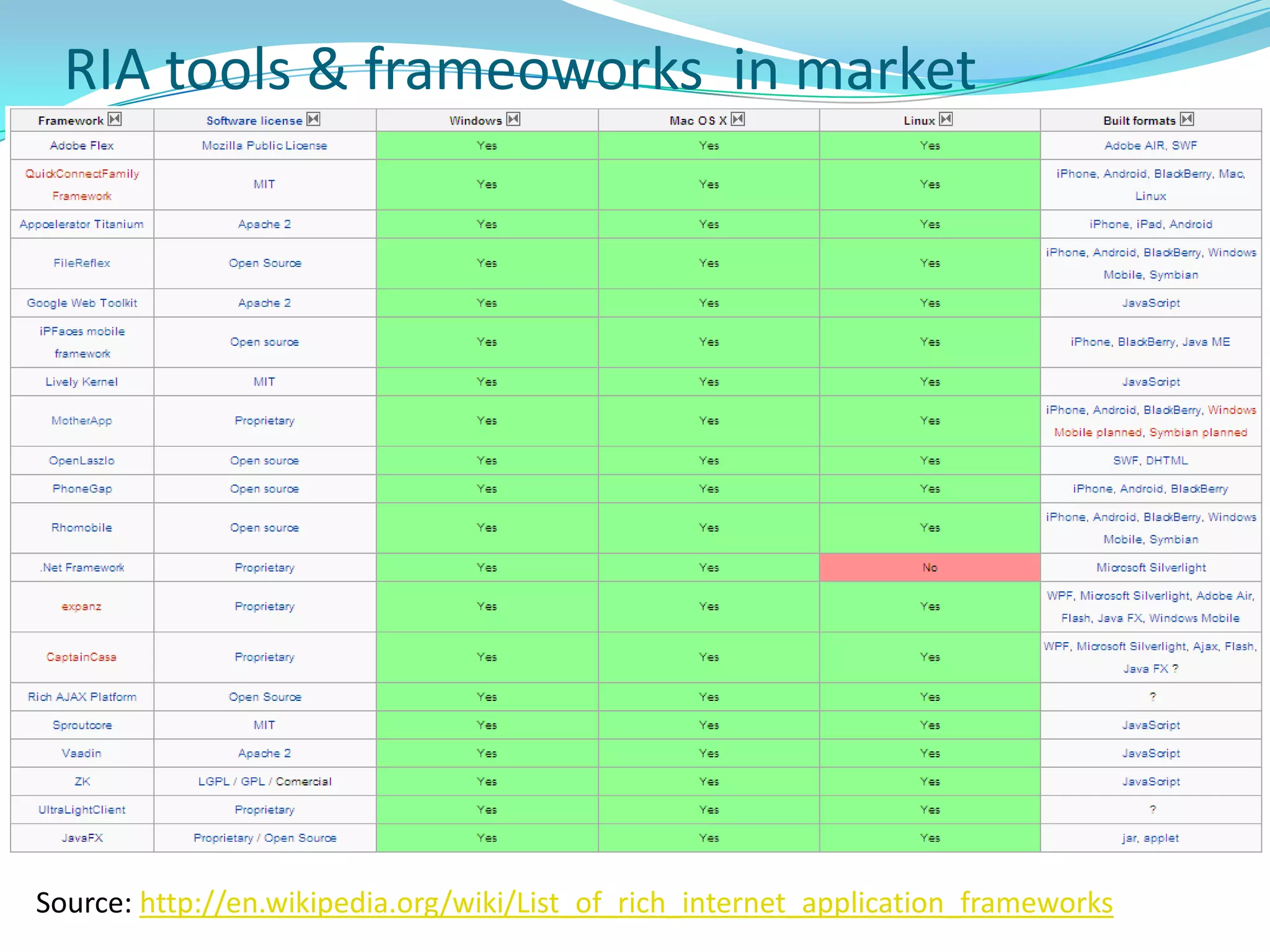
Platform-independent technology that is supported on cross-platform (support for many OS), cross-browser and cross-device (available on computers, mobile devices).RIA tools & frameoworks  in marketSource: http://en.wikipedia.org/wiki/List_of_rich_internet_application_frameworks
RIA Landscape – Other tools in MarketFlashMultimedia platform used to add animation, video, and interactivity to Web pages. Frequently used for advertisements and games.Manipulates vector and raster graphics to provide animation of text, drawings, and still images. Supports streaming of audio and video. Can capture user input via mouse, keyboard, microphone, camera. Coded in an Object-oriented language called ActionScript.May be displayed on various computer systems and devices, using Adobe Flash Player, which is available free of charge for common Web browsers, some mobile phones and few devices.FlexSDK for the development and deployment of cross-platform rich Internet applications based on the Adobe Flash platform. Can be written using Adobe Flash Builder or by using the freely available Flex compiler from Adobe.
RIA Landscape – Other tools in MarketAIR (Adobe Integrated Runtime)Cross-platform runtime environment developed by Adobe Systems for building rich Internet applications using Adobe Flash, Adobe Flex, HTML, or Ajax, that can be deployed as desktop applications.Development EnvironmentHTML/Ajax, either via Adobe's own Dreamweaver CS4 (In addition to Dreamweaver CS3), another HTML editor or a normal text editor in conjunction with the AIR SDKAdobe Flash Builder (formerly Adobe Flex Builder) Flash CS4
RIA Landscape – Other tools in MarketJava Applet / JavaFXJava platform for creating and delivering RIAs that can run across wide variety of connected devices. Enables building apps for desktop, browser and mobile phones. TV set-top boxes, gaming consoles, Blu-ray players and other platforms are planned.Developers use a statically typed, declarative language called JavaFX Script; Java code can be integrated into JavaFX programs. JavaFX is compiled to Java bytecode, so JavaFX applications run on any desktop and browser that runs the Java Runtime Environment (JRE) and on top of mobile phones running Java ME.On desktop, the current release supports Windows XP, Vista and Mac OS X OS. JavaFX 1.2 would support Linux and OpenSolarisOn mobile, JavaFX is capable of running on multiple mobile operating systems, including Symbian OS, Windows Mobile, and proprietary real-time operating systems.
What is Silverlightcross-browser, cross-platform, and cross-deviceplug-in for delivering next generation of .NET-based media experiences and rich interactive apps for Web.
Supported by small download that installs in seconds
Subset of WPF and .NET Framework
Provides compelling graphics that users can manipulate directly in browser - drag, turn, zoom. Streams video, audio.
Reads data and updates the display without interrupting user by refreshing the whole page.
Supported on multiple platforms and browsers
Windows - Win 7, Vista, XP, Server 2008, Server 2003, 2000
Mac - OS 10.4.8+ (PowerPC)  & OS 10.4.8+ (Intel-based)
Linux - Supported on Linux by Mono project (Novel)
Browsers - IE 6/7/8, Firefox 1/2/3, Safari 2/3 (Chrome from S4)History of SilverlightMicrosoft showed first version along with WPF at MIX conference in March 2006 – was then called WPF/E (Windows presentation Foundation Everywhere)
Was later renamed to Silverlight - Silverlight 1.0 was released in May 2007 at MIX 2007 by Scott G.
Less no of UI Controls, No support for .NET (functionality has to be coded in JavaScript), no XAP package
Silverlight 2.0 was released in October 2008
Silverlight 3.0 was released in late 2009.
Silverlight 4.0 was released on April 2010 (soon after .NET 4, Visual Studio 2010 release)Features Supported by SilverlightWPF and XAML - Includes subset of WPF - greatly extends elements in browser. WPF allows immersive graphics, animation, media, and other rich client features, extending browser-based UI possible with HTML. XAML provides a declarative markup syntax for creating elements.
Extensions to JavaScript-  Provides extensions to the universal browser scripting language that provide control over the browser UI, including ability to work with WPF elements.
Cross-browser, cross-platform support -  Runs the same on all popular browsers and on popular platforms.
Integration with existing applications - Integrates seamlessly with existing JavaScript and ASP.NET AJAX code to complement existing functionality.
Access to the .NET Framework programming model – could be created using dynamic languages such as IronPython as well as languages such as C# and VB.
Networking support - Includes support for HTTP over TCP. You can connect to WCF, SOAP, or ASP.NET AJAX services and receive XML, JSON, or RSS data.
LINQ – Includes LINQ – enables to program data access using intuitive native syntax and strongly typed objects in .NET Framework languages. Which UI Platform to useThick ClientWPFXBAP (XAML Browser Apps)Win FormsThin ClientASP.NET Web FormsASP.NET AjaxASP.NET MVCASP.NET Dynamic DataRIASilverlight (with ASP.NET Web Forms)Silverlight (with ASP.NET MVC)Silverlight (with ASP.NET Web Forms/MVC + Ajax)
Architecture
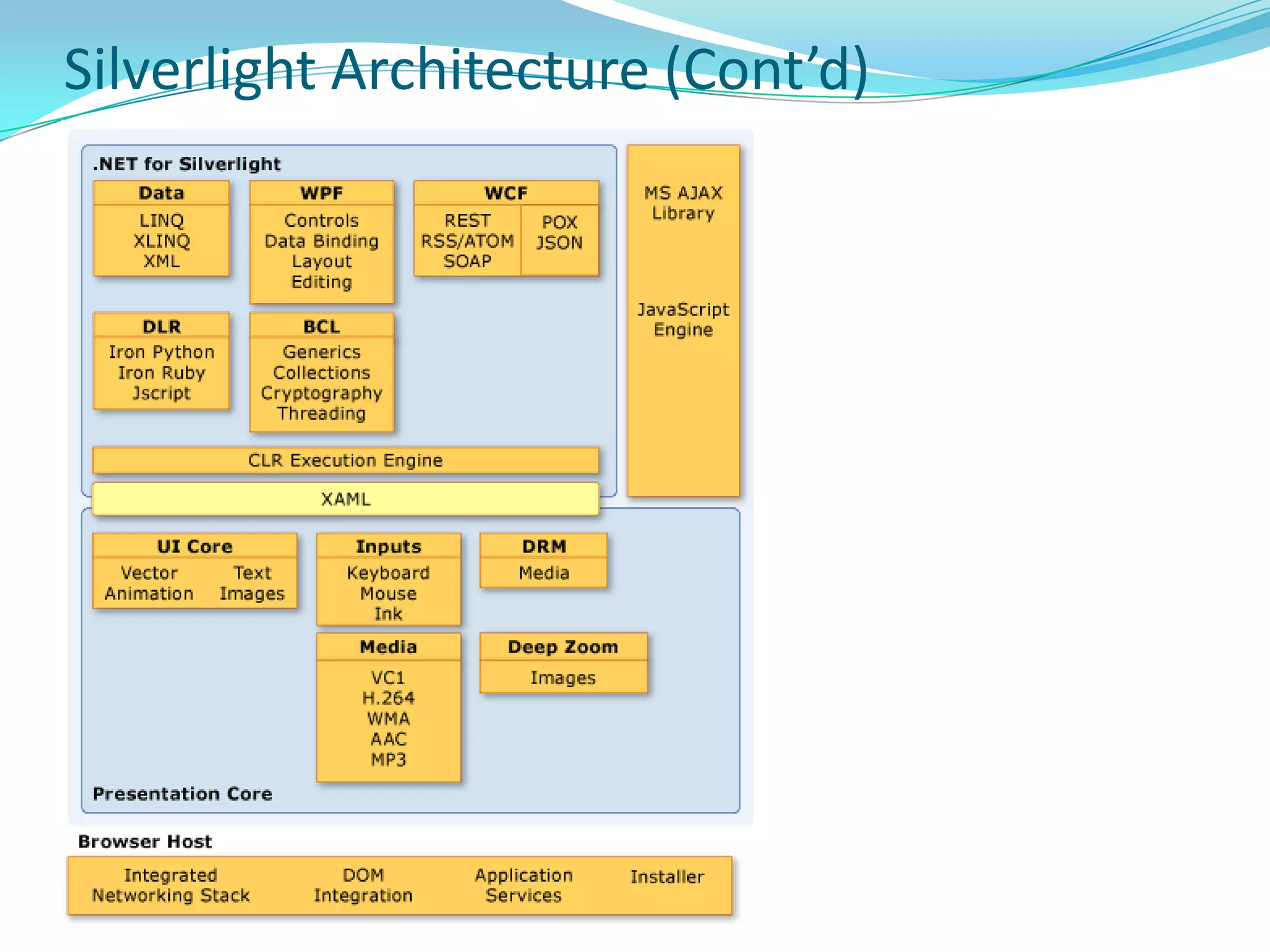
Silverlight ArchitectureSilverlight platform as a whole consists of two major parts, plus an installer and update component –
Core presentation framework - Components and services oriented toward the UI and user interaction, including user input, lightweight UI controls for Web apps, media playback, data binding, vector graphics, text, animation, and images.  Also includes XAML for specifying layout.
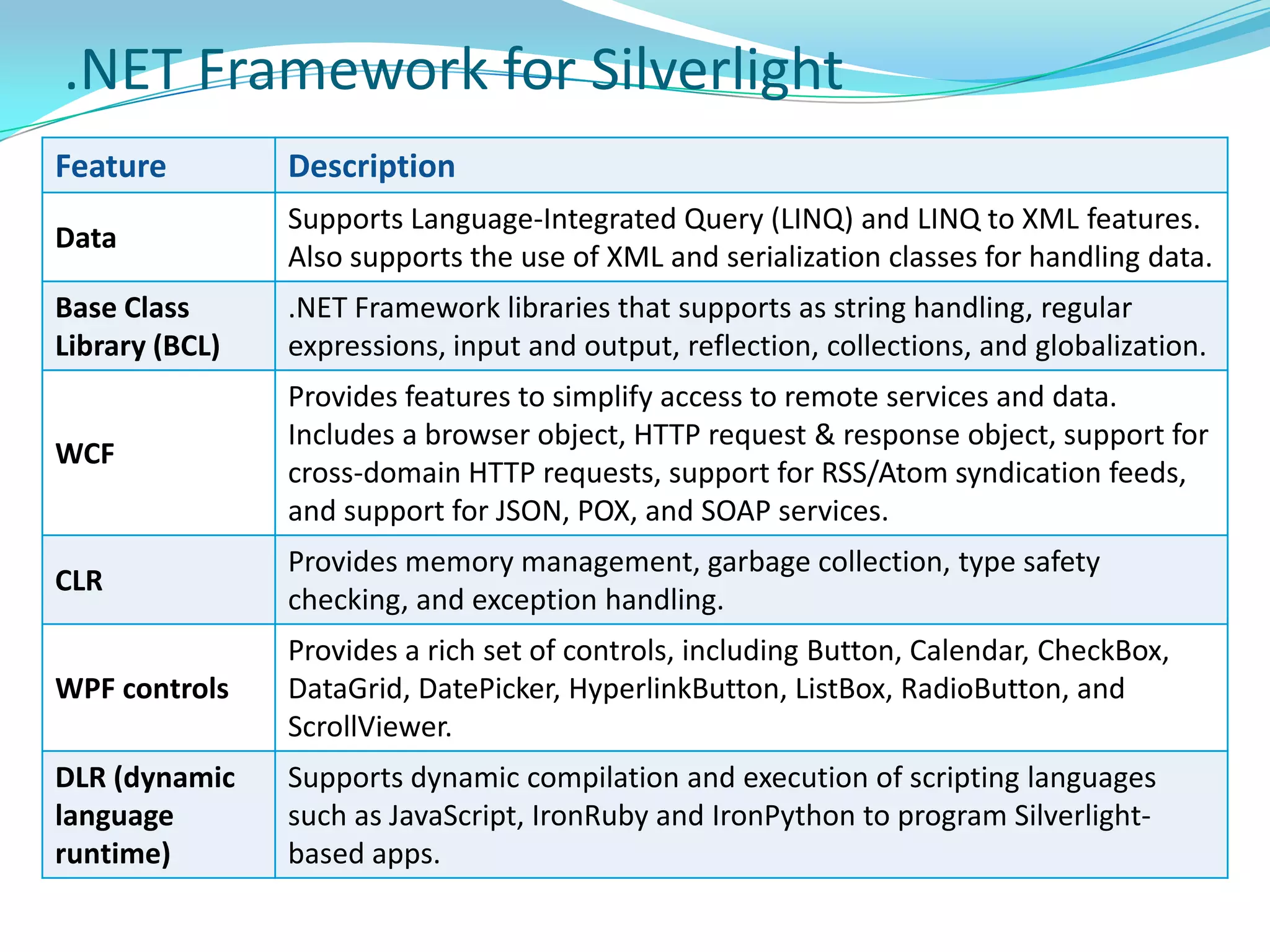
.NET Framework for Silverlight - A subset of the .NET Framework that contains components and libraries, including data integration, extensible Windows controls, networking, base class libraries, garbage collection, and CLR.
Installer and updater - An installation and update control that simplifies the process of installing the application for first-time users, and subsequently provides low-impact, automatic updates. Silverlight Architecture (Cont’d)
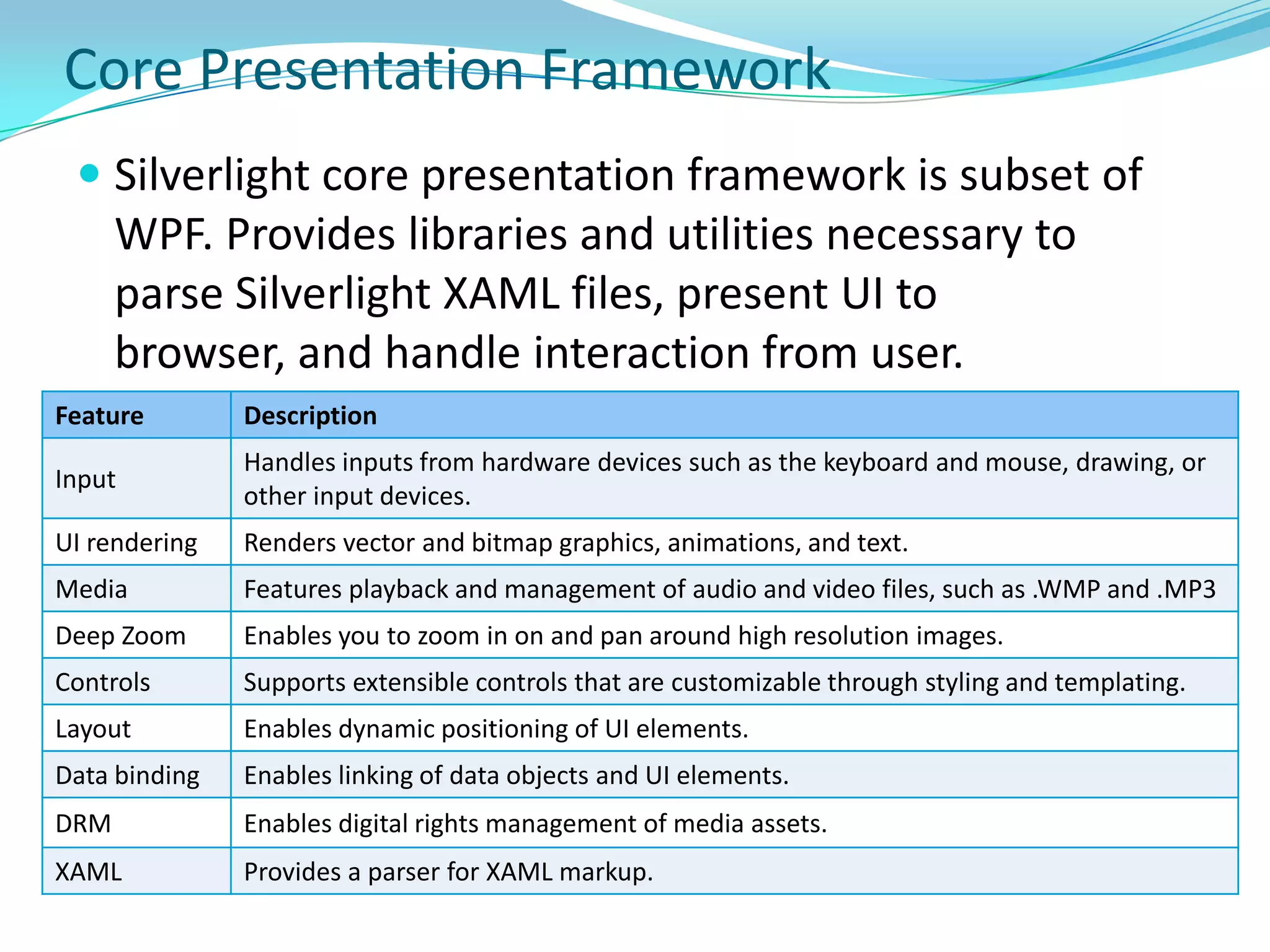
Core Presentation FrameworkSilverlight core presentation framework is subset of WPF. Provides libraries and utilities necessary to parse Silverlight XAML files, present UI to browser, and handle interaction from user..NET Framework for Silverlight
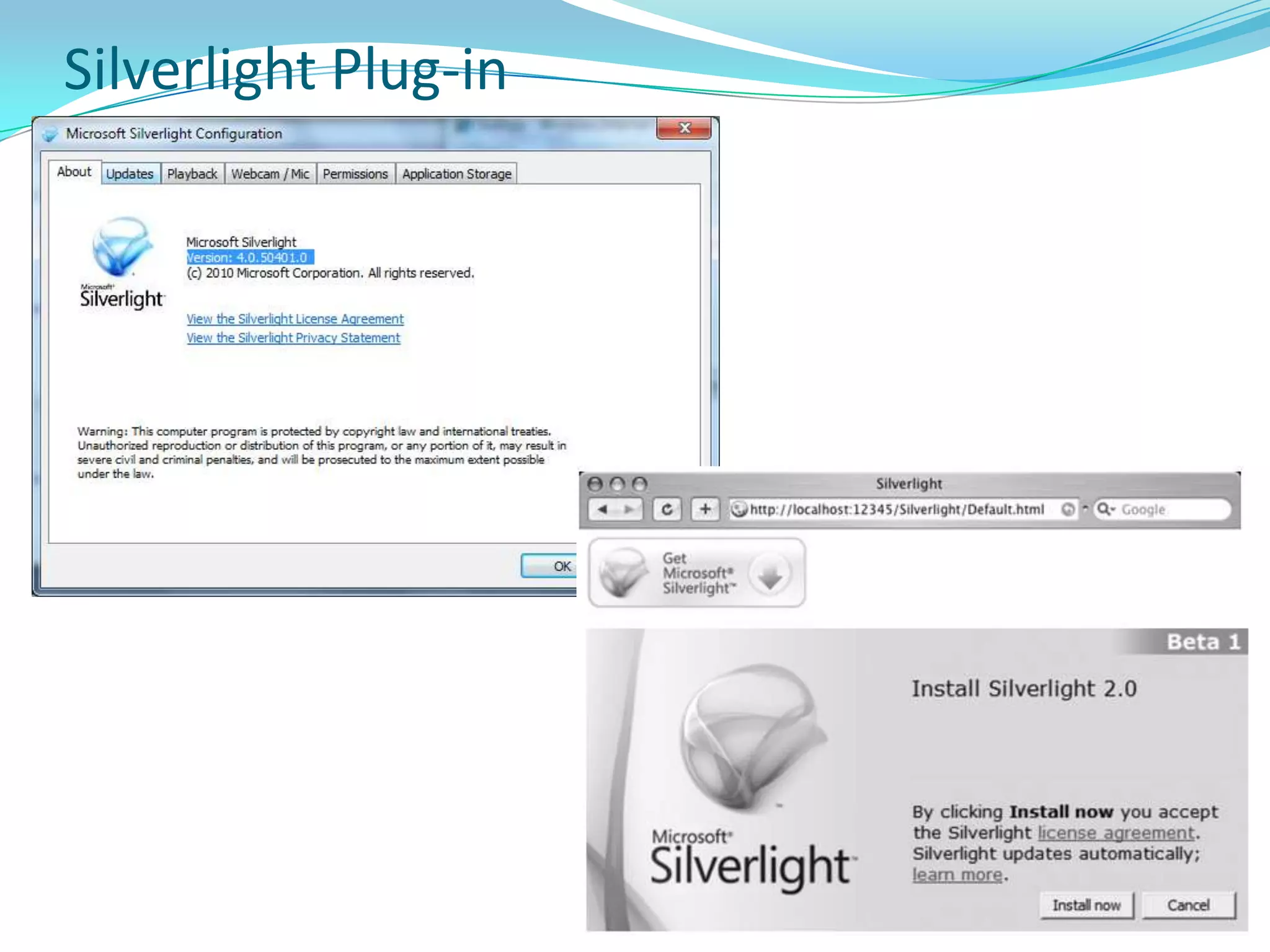
Silverlight Plug-in
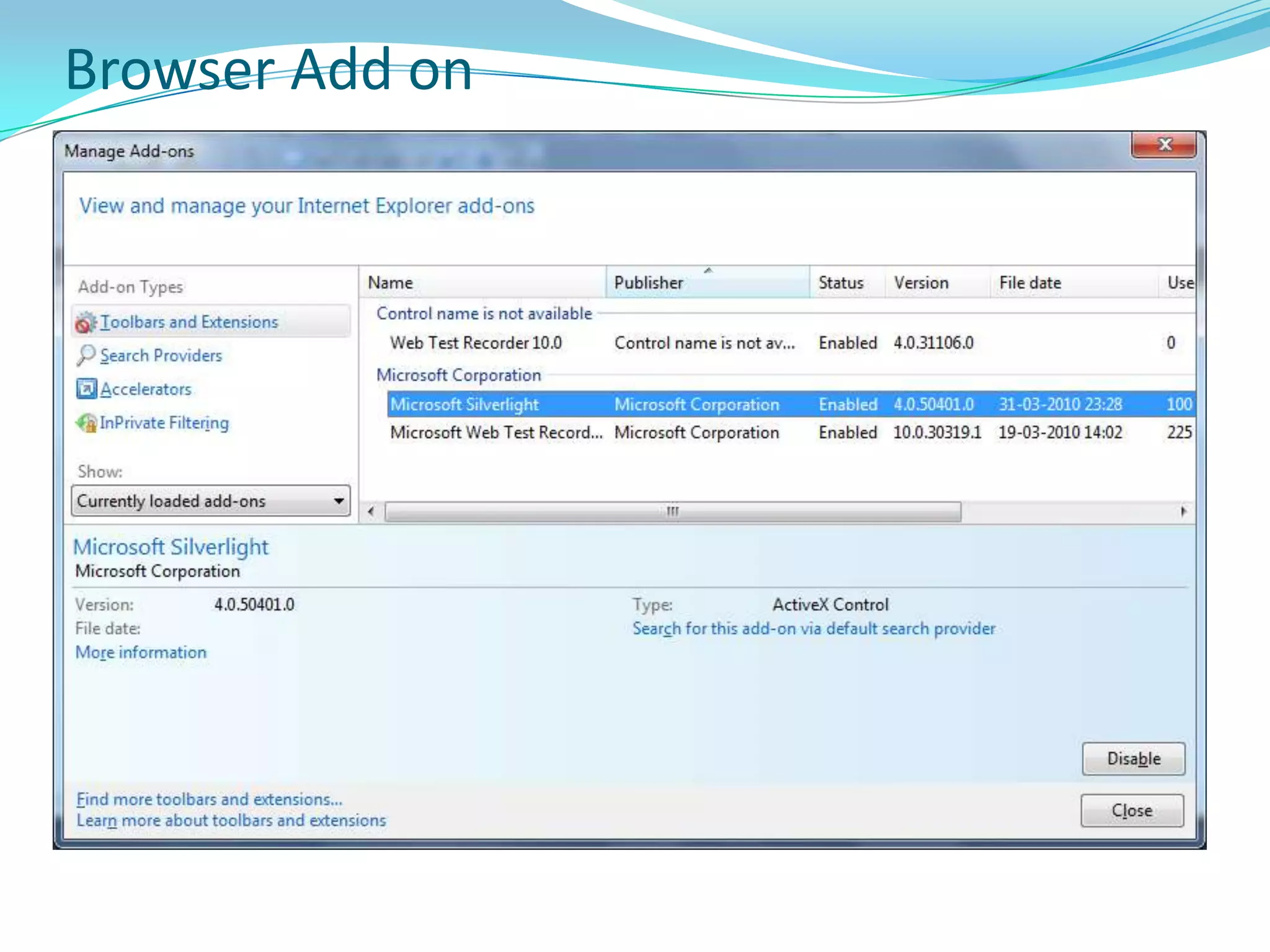
Browser Add on
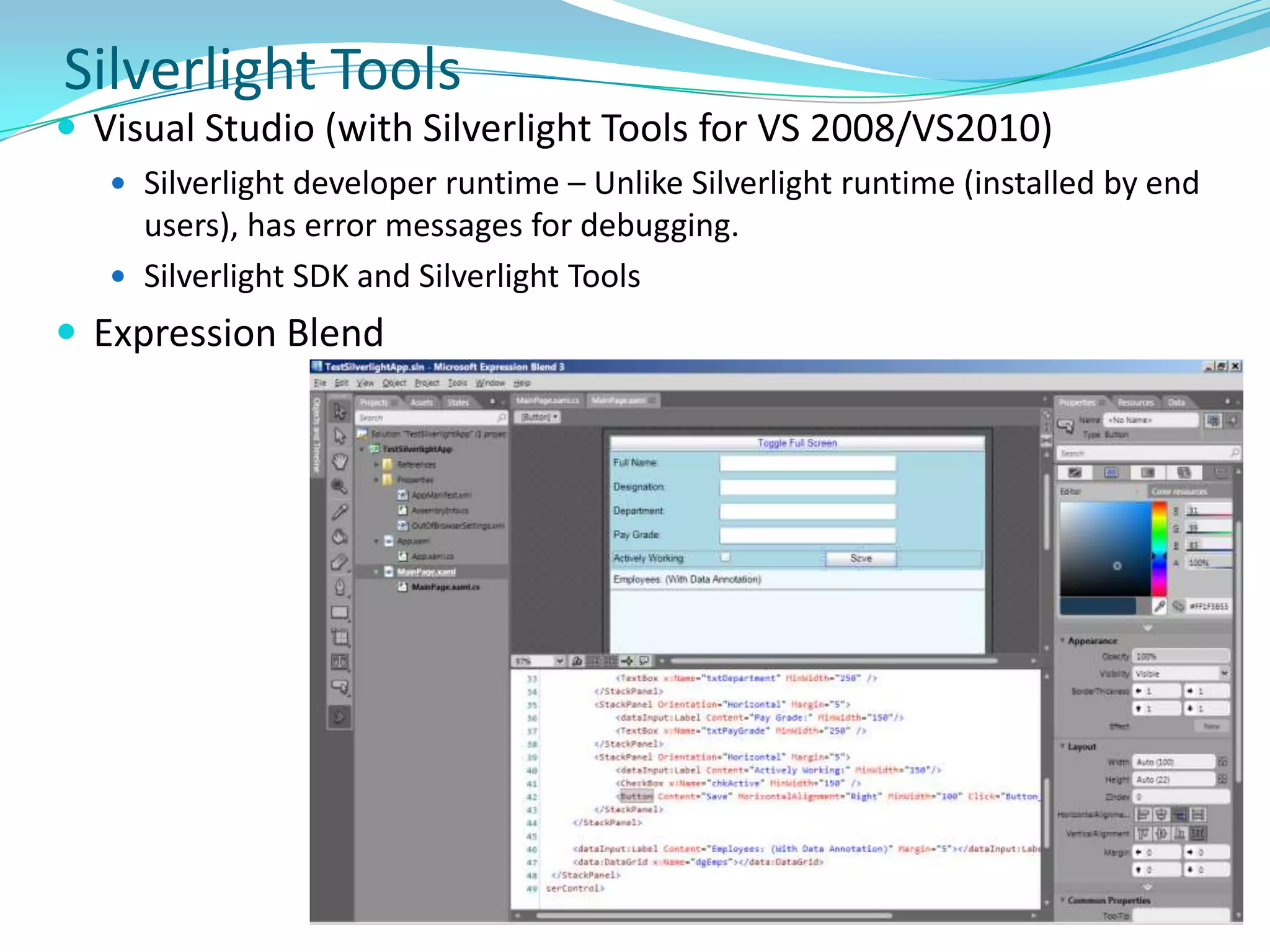
Silverlight ToolsVisual Studio (with Silverlight Tools for VS 2008/VS2010)
Silverlight developer runtime – Unlike Silverlight runtime (installed by end users), has error messages for debugging.
Silverlight SDK and Silverlight Tools
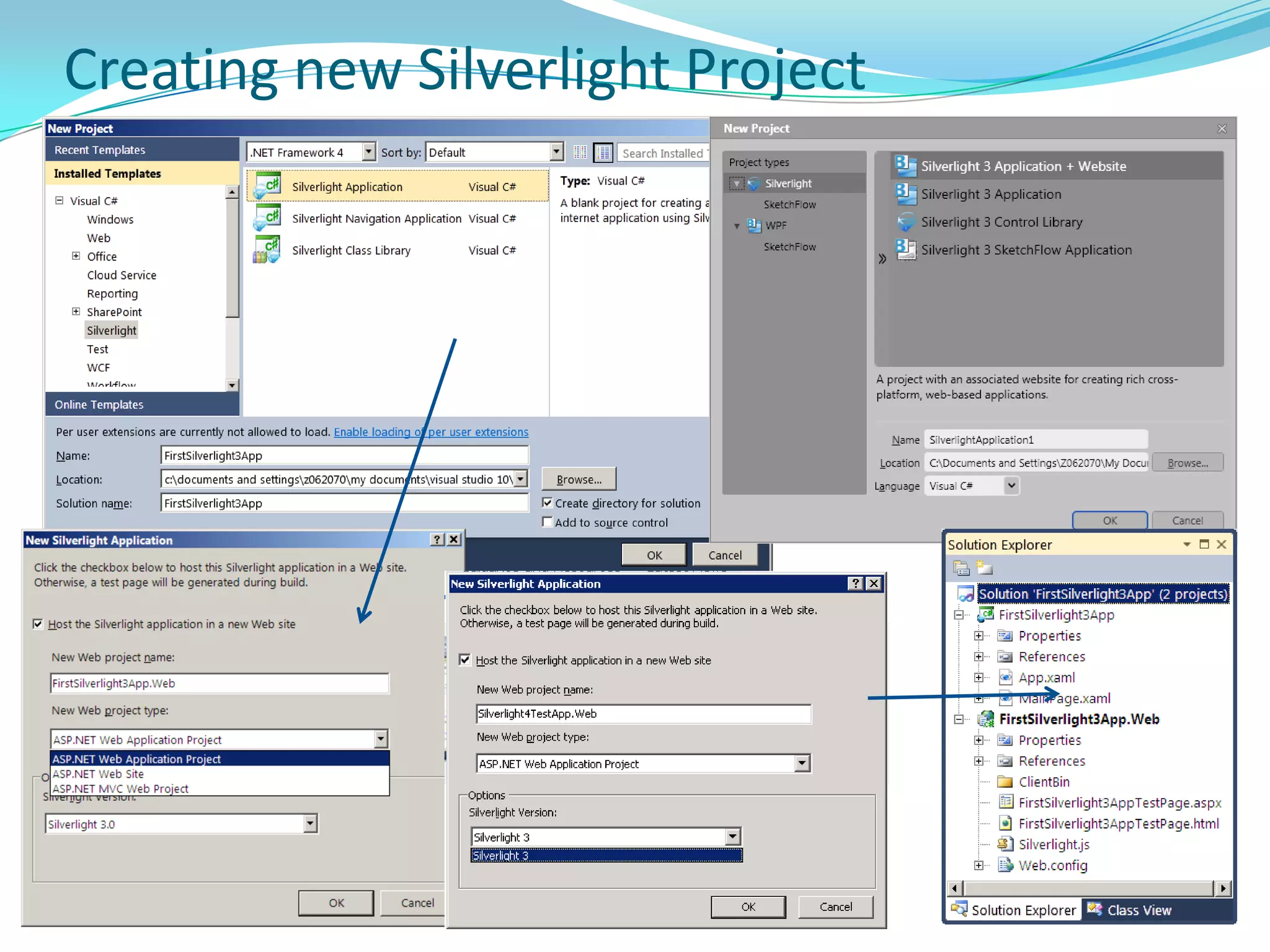
Expression BlendCreating new Silverlight Project
Application and Programming Model
Application and Programming ModelProvides two distinct models for app development:Managed API for Silverlight - uses code running on CLR for Silverlight. Could be used with compiled languages (VB, C#) or dynamic languages such (IronPython, IronRuby)JavaScript API for Silverlight - uses JavaScript code interpreted by the browser.Both can not be used at the same time within a single instance of the Silverlight plug-in. However, you can implement a splash screen that uses the JavaScript API and then transitions to the managed API when your application has loaded. Managed API provides significantly more functionality than JavaScript API. Managed API apps have access to lightweight version of .NET Framework. JavaScript API, however, has access only to the Silverlight presentation core and the browser JavaScript engine.
Managed Programming & Application ModelManaged API enables you to bundle managed assemblies and resource files into application package (.xap) files. Silverlight plug-in is responsible for loading an application package and extracting its contents. Application package must contain an assembly with a class derived from Application. Application class encapsulates interaction between appand the Silverlight plug-in. Also provides application lifetime events & resource management. Silverlight documentation uses “application model” to refer to application packaging and the common functionality encapsulated by the Application class.
Application ClassApplication class encapsulates services commonly required by Silverlight-based app, like life-cycle event notification and interaction with Silverlight plug-in.
Events
Startup, Exit, UnhandledException
Property
Current: Returns the current application object.
Host: Allows code to interact directly with the Silverlight plug-in that hosts it.
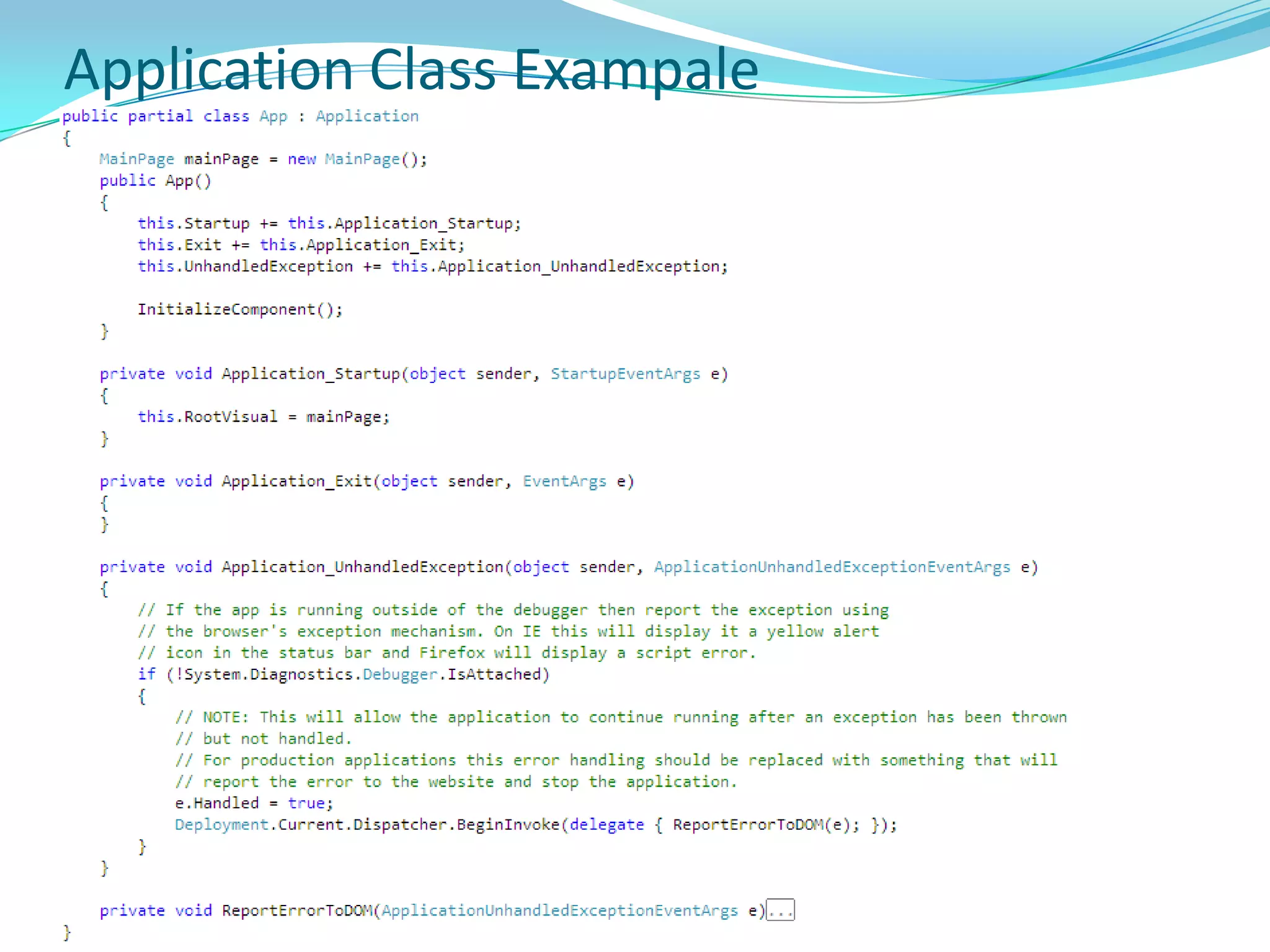
RootVisual: To display the application UI, RootVisual is set at Startup event handler (represents the entry point of application code in the Silverlight plug-in life cycle).Application Class Exampale
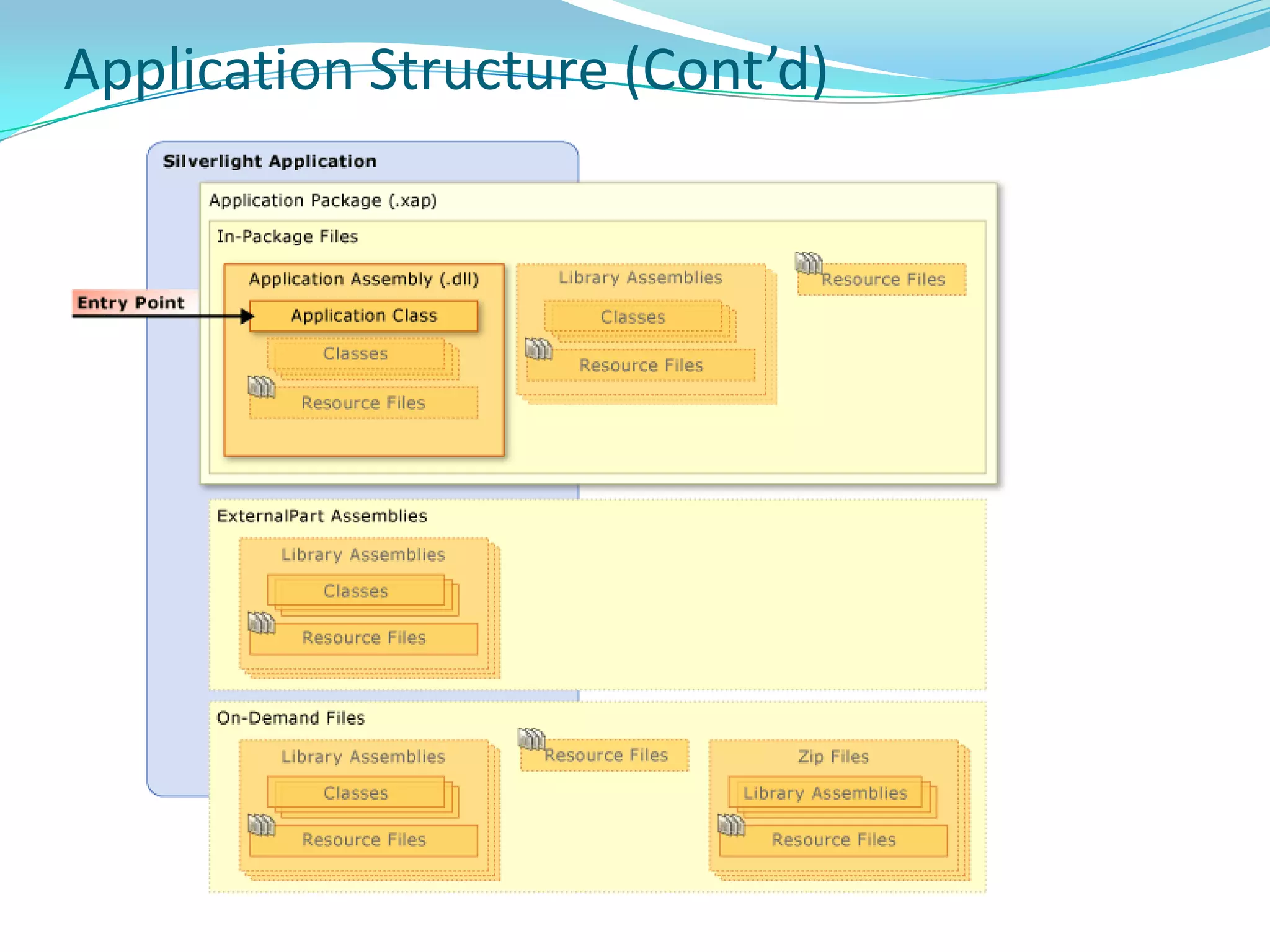
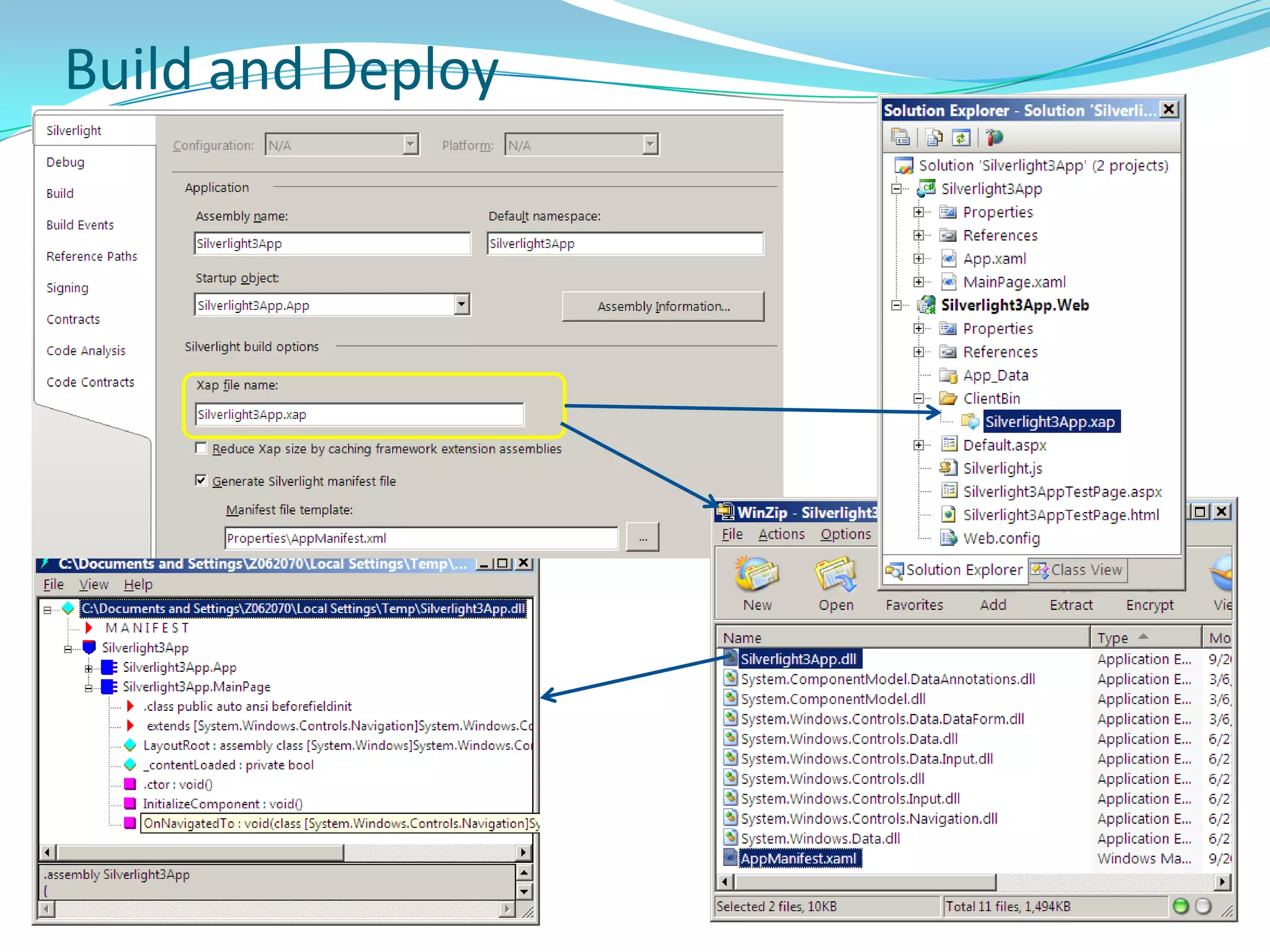
Application StructureSilverlight apps are deployed as .xap package (xaml app package)An application package is a zip file (compressed using the Deflate algorithm) that has a .xap file extension.For Silverlight-based apps using the managed API, build process generates an application package.While embedding Silverlight plug-in in web page, specify app package that the plug-in should download. Plug-in uses a manifest file in application package to identify the application class to instantiate. This class is known as the entry point of your application, and it must derive from the Application class.
Application Structure (Cont’d)
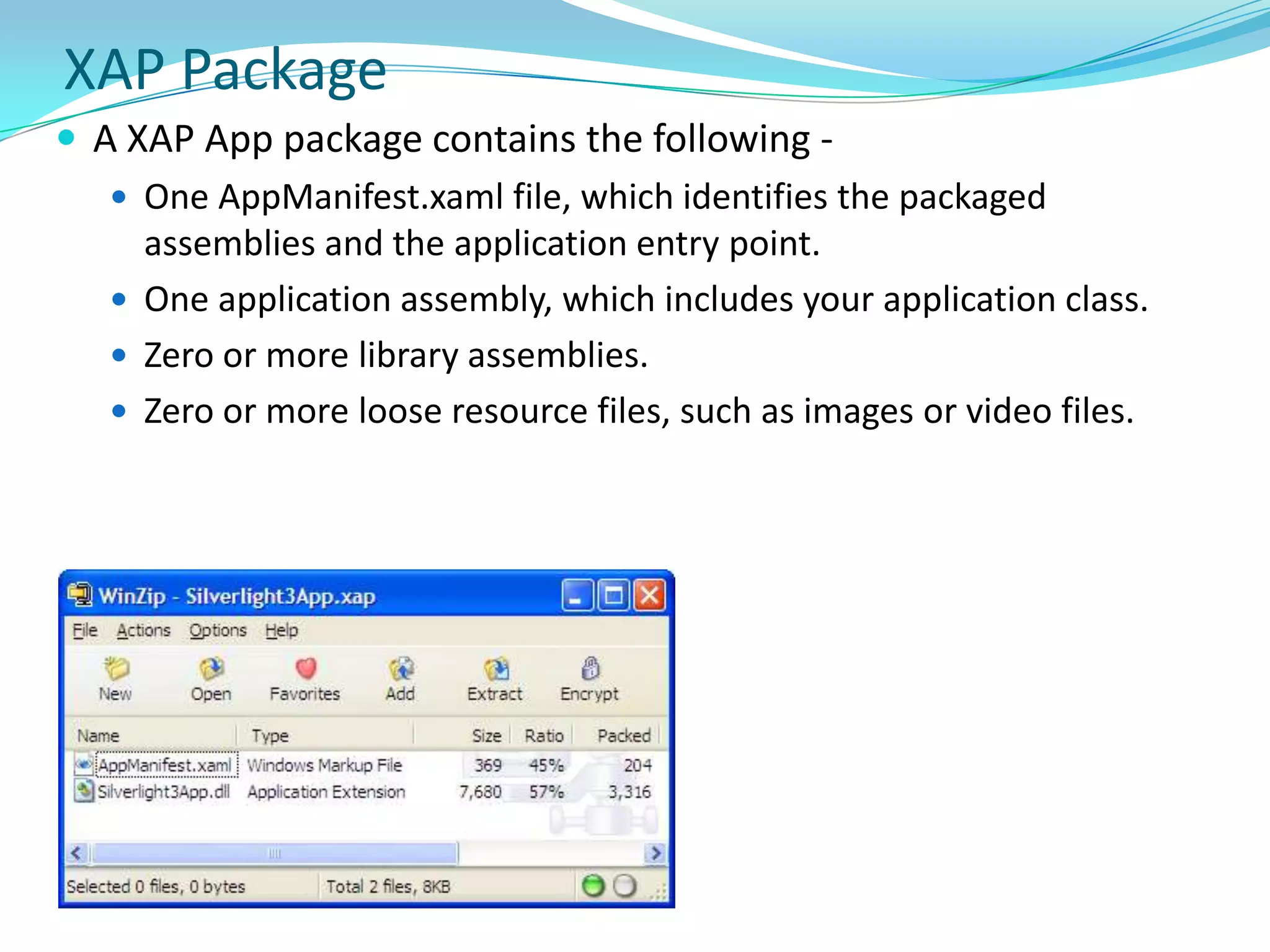
XAP PackageA XAP App package contains the following - One AppManifest.xaml file, which identifies the packaged assemblies and the application entry point. One application assembly, which includes your application class.Zero or more library assemblies.Zero or more loose resource files, such as images or video files.
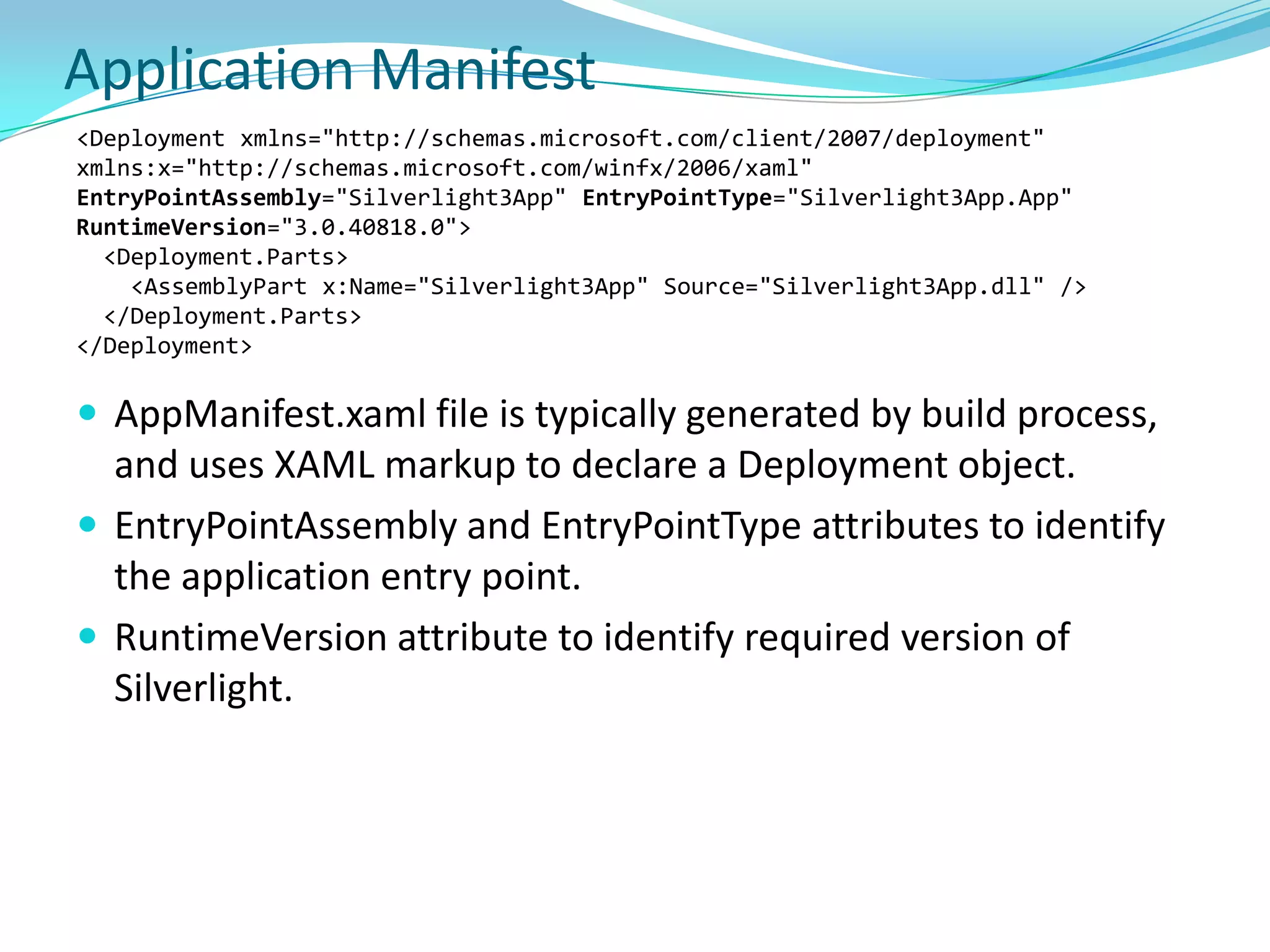
Application Manifest<Deployment xmlns="http://schemas.microsoft.com/client/2007/deployment" xmlns:x="http://schemas.microsoft.com/winfx/2006/xaml" EntryPointAssembly="Silverlight3App" EntryPointType="Silverlight3App.App" RuntimeVersion="3.0.40818.0">  <Deployment.Parts>    <AssemblyPart x:Name="Silverlight3App" Source="Silverlight3App.dll" />  </Deployment.Parts></Deployment>AppManifest.xaml file is typically generated by build process, and uses XAML markup to declare a Deployment object.EntryPointAssembly and EntryPointType attributes to identify the application entry point. RuntimeVersion attribute to identify required version of Silverlight.
Build and Deploy
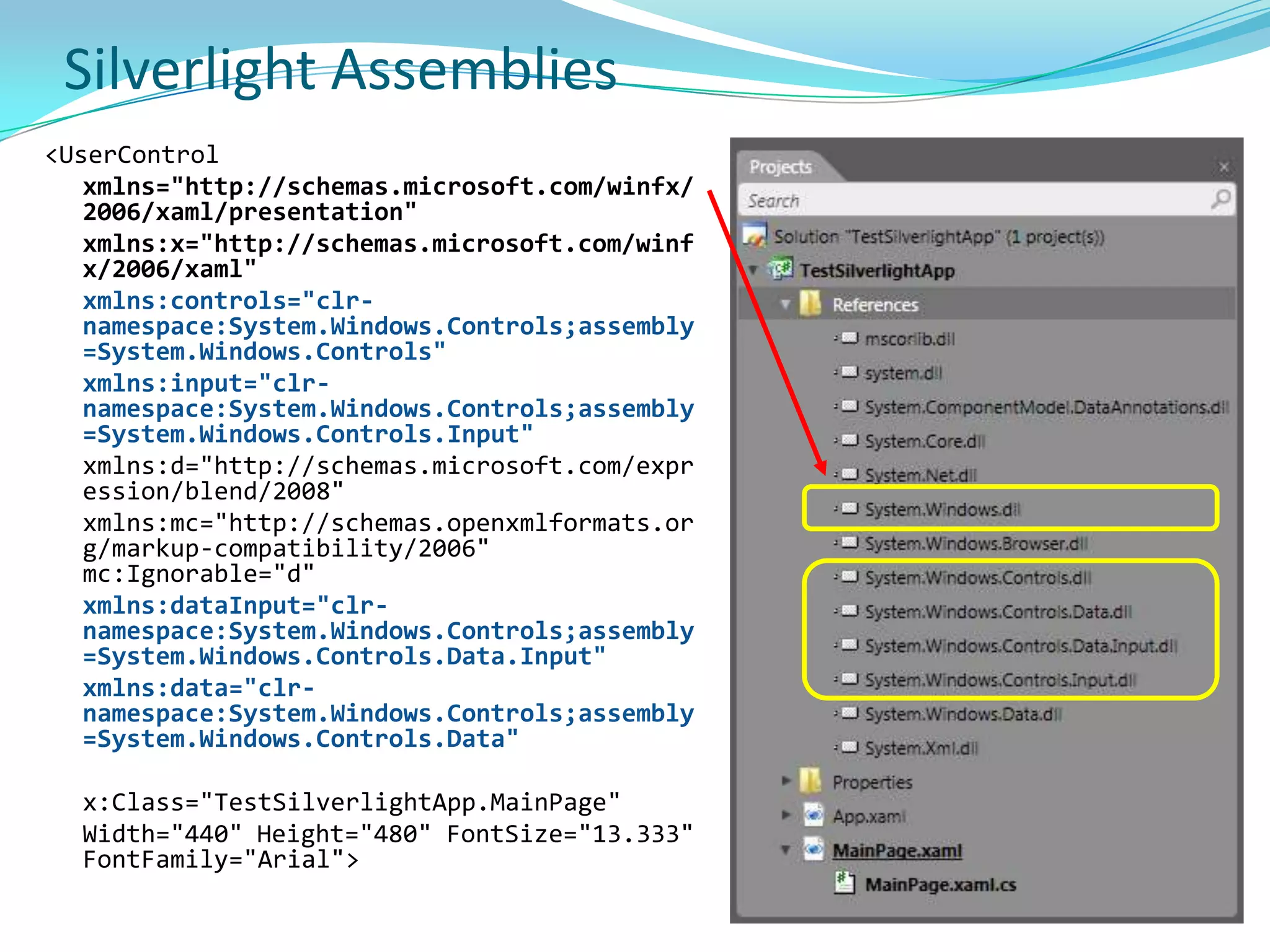
Silverlight Assemblies<UserControlxmlns="http://schemas.microsoft.com/winfx/2006/xaml/presentation"xmlns:x="http://schemas.microsoft.com/winfx/2006/xaml"xmlns:controls="clr-namespace:System.Windows.Controls;assembly=System.Windows.Controls"xmlns:input="clr-namespace:System.Windows.Controls;assembly=System.Windows.Controls.Input"xmlns:d="http://schemas.microsoft.com/expression/blend/2008" xmlns:mc="http://schemas.openxmlformats.org/markup-compatibility/2006" mc:Ignorable="d" xmlns:dataInput="clr-namespace:System.Windows.Controls;assembly=System.Windows.Controls.Data.Input"xmlns:data="clr-namespace:System.Windows.Controls;assembly=System.Windows.Controls.Data"	x:Class="TestSilverlightApp.MainPage"	Width="440" Height="480" FontSize="13.333" FontFamily="Arial">
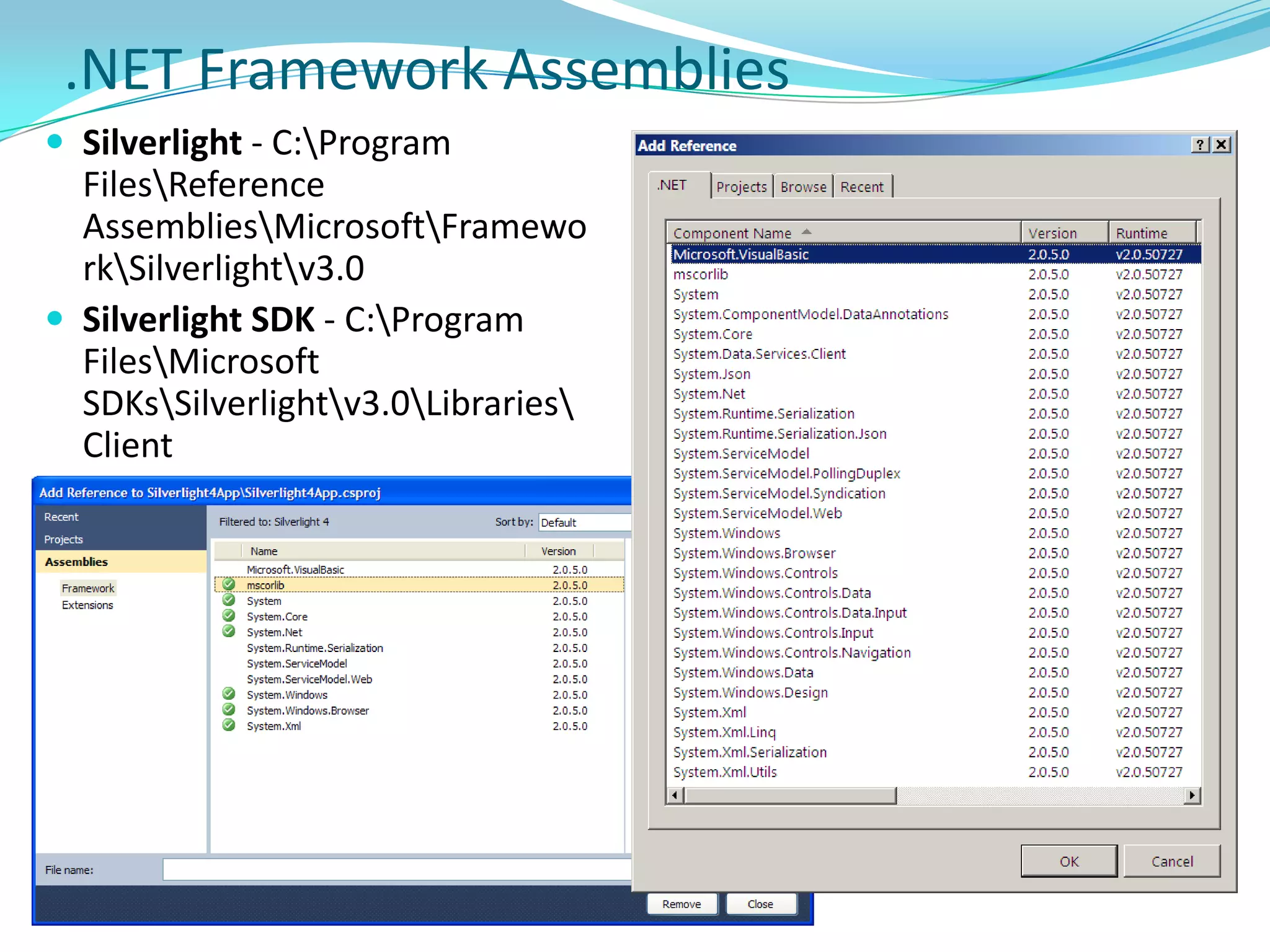
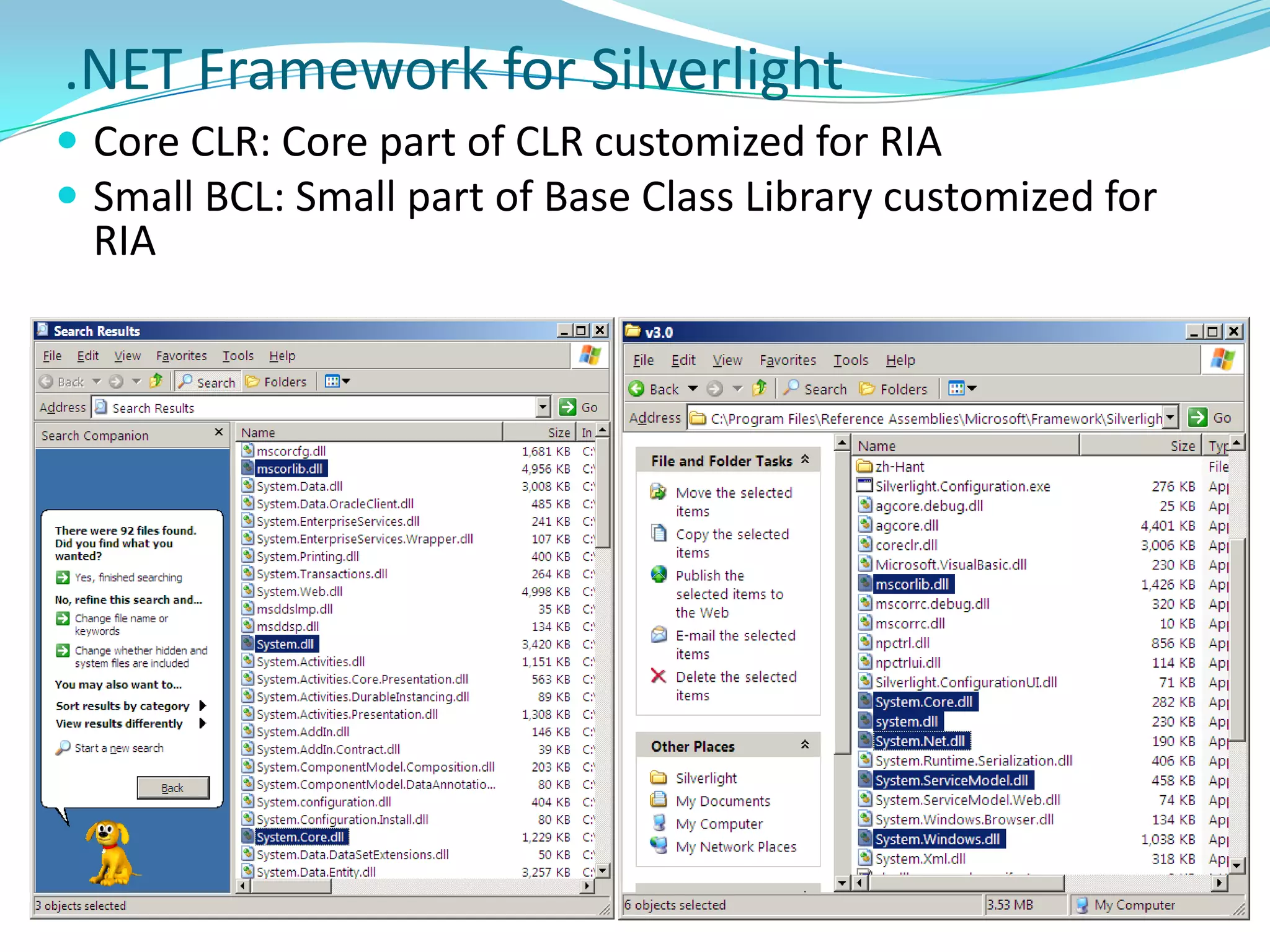
.NET Framework AssembliesSilverlight - C:\Program Files\Reference Assemblies\Microsoft\Framework\Silverlight\v3.0
Silverlight SDK - C:\Program Files\Microsoft SDKs\Silverlight\v3.0\Libraries\Client.NET Framework for SilverlightCore CLR: Core part of CLR customized for RIA
Small BCL: Small part of Base Class Library customized for RIAControls
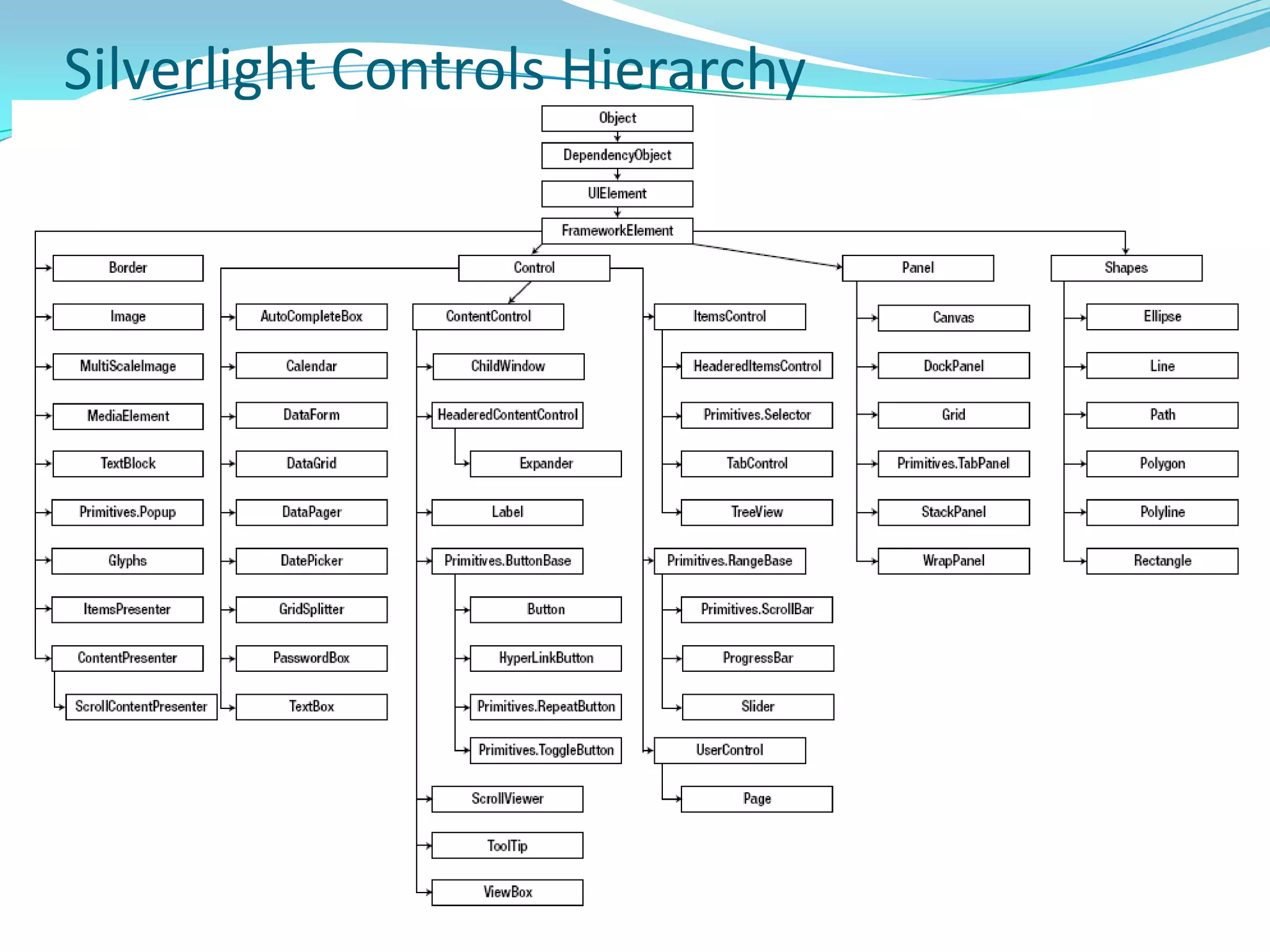
Silverlight Controls Hierarchy
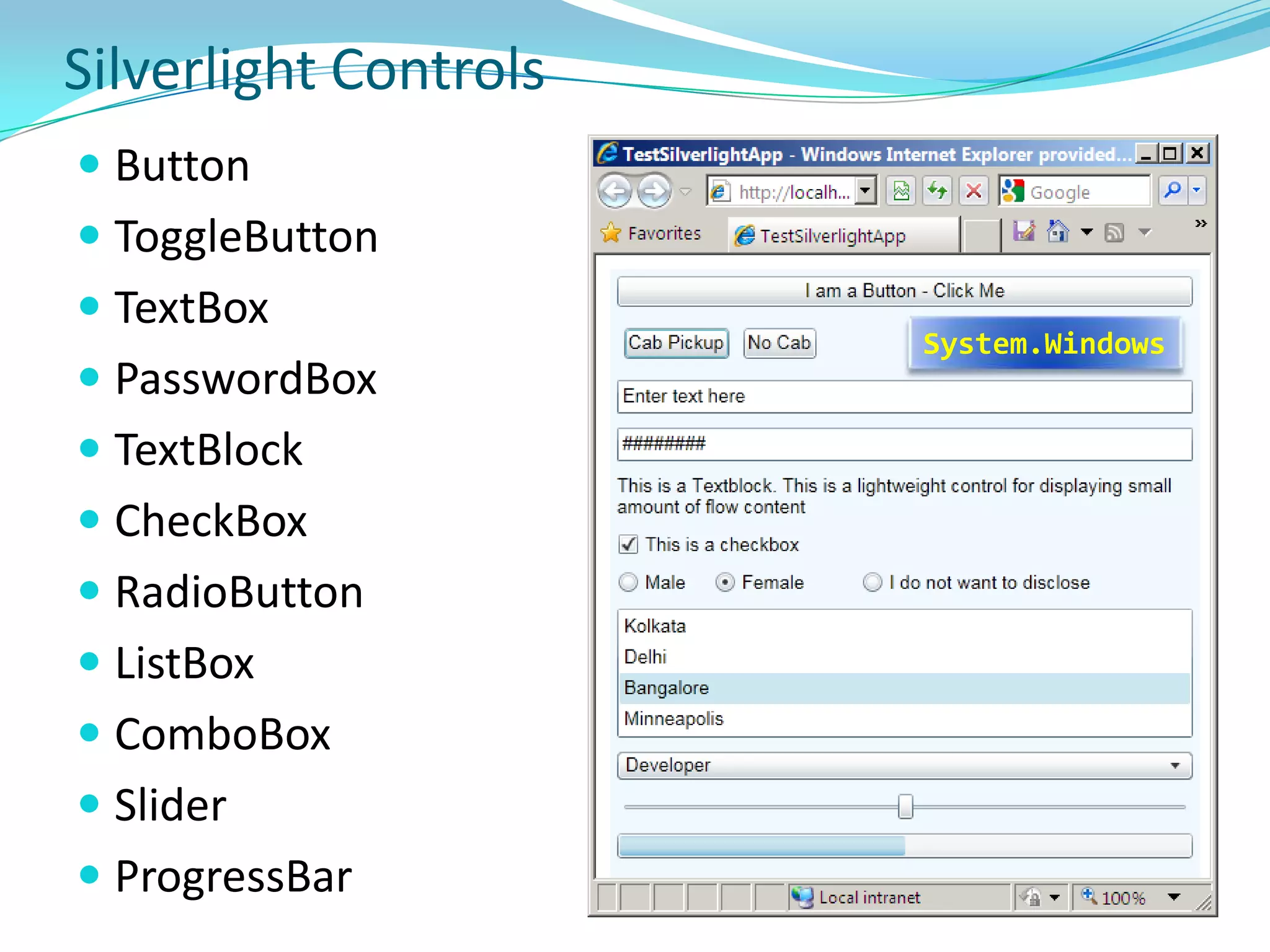
Silverlight ControlsButton
ToggleButton
TextBox
PasswordBox
TextBlock
CheckBox
RadioButton
ListBox
ComboBox
Slider
ProgressBarSystem.Windows
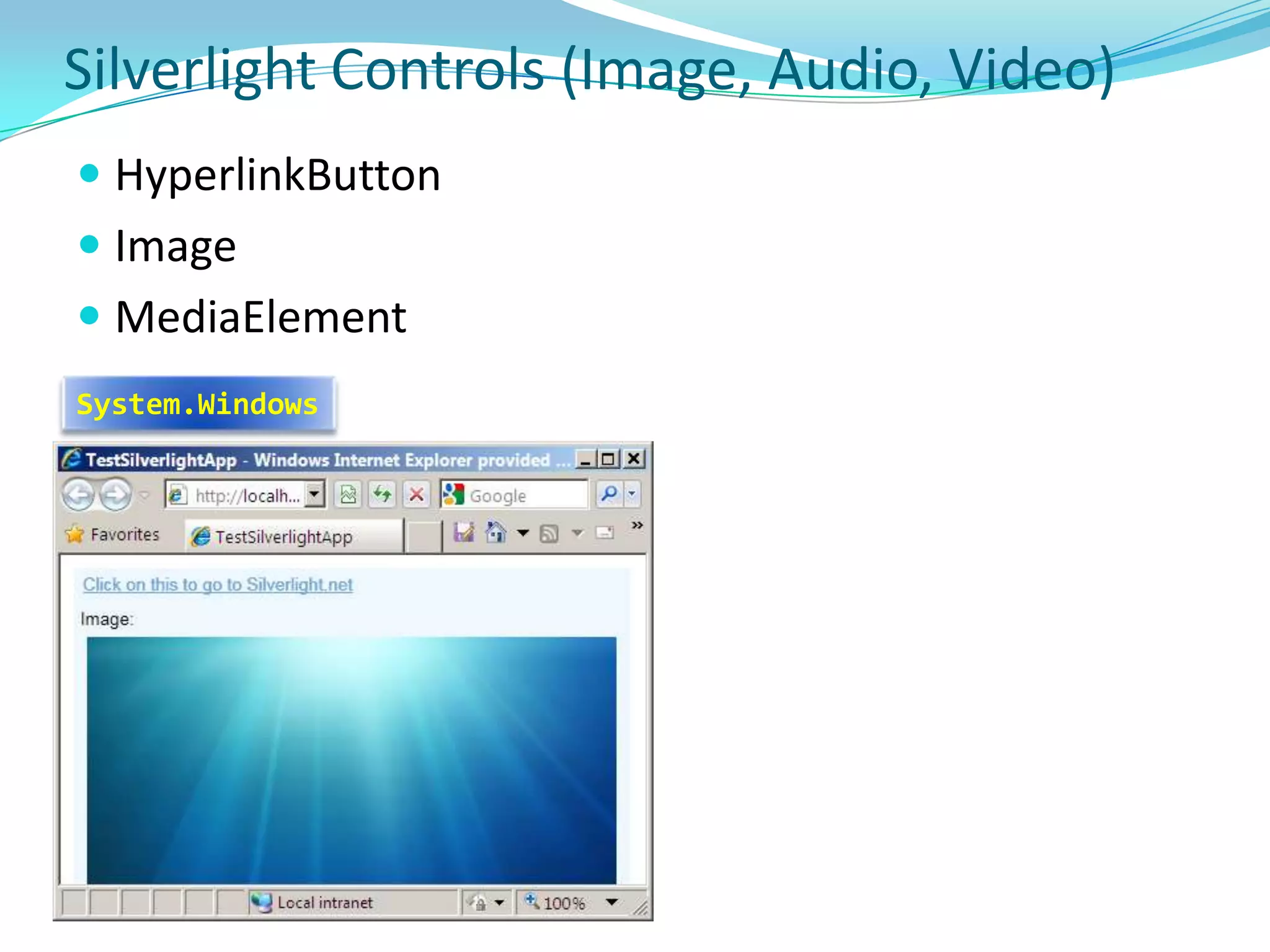
Silverlight Controls (Image, Audio, Video)HyperlinkButton
Image
MediaElementSystem.Windows
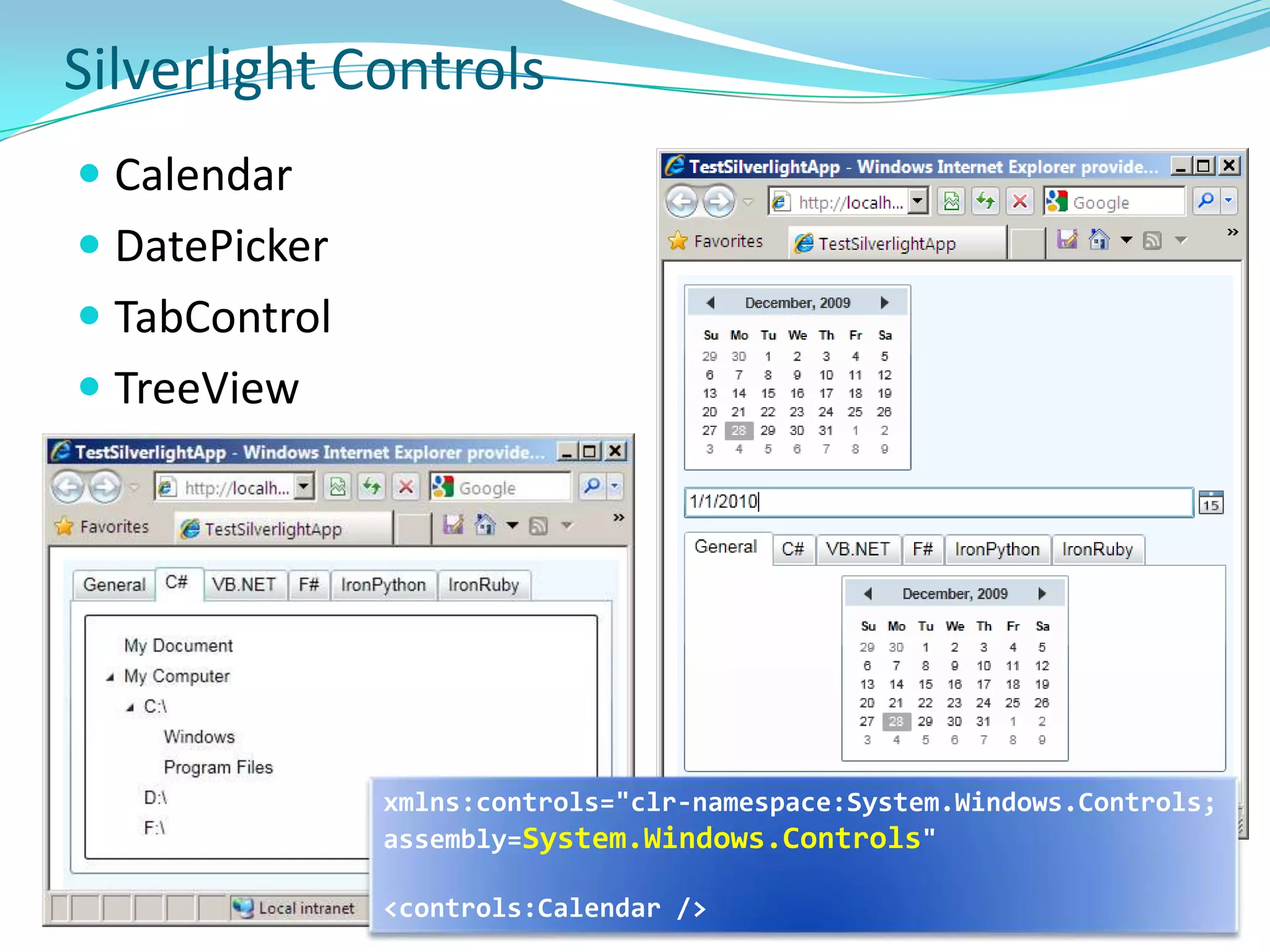
Silverlight ControlsCalendar
DatePicker
TabControl
TreeViewxmlns:controls="clr-namespace:System.Windows.Controls;assembly=System.Windows.Controls"<controls:Calendar />
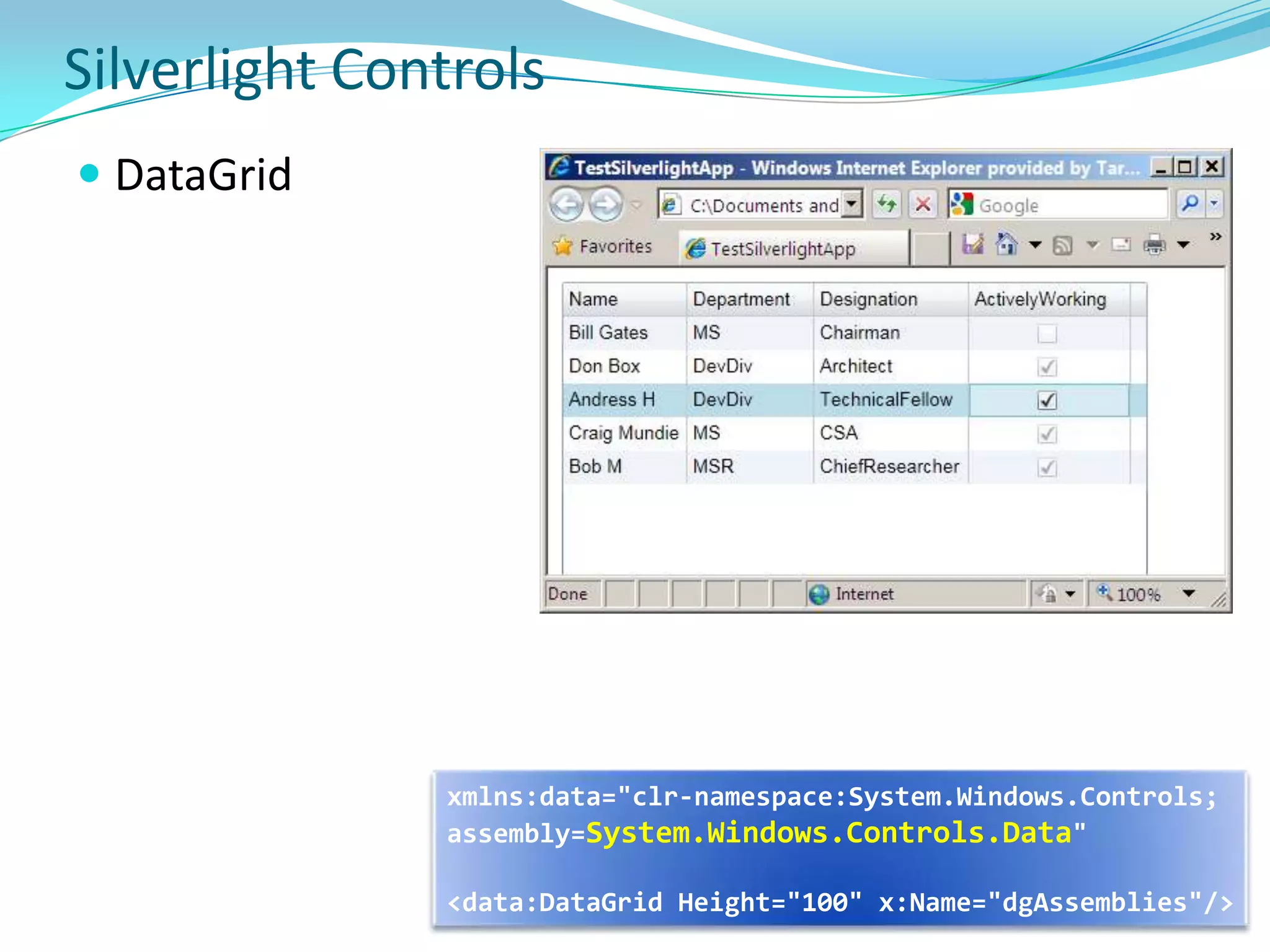
Silverlight ControlsDataGridxmlns:data="clr-namespace:System.Windows.Controls;assembly=System.Windows.Controls.Data"<data:DataGrid Height="100" x:Name="dgAssemblies"/>
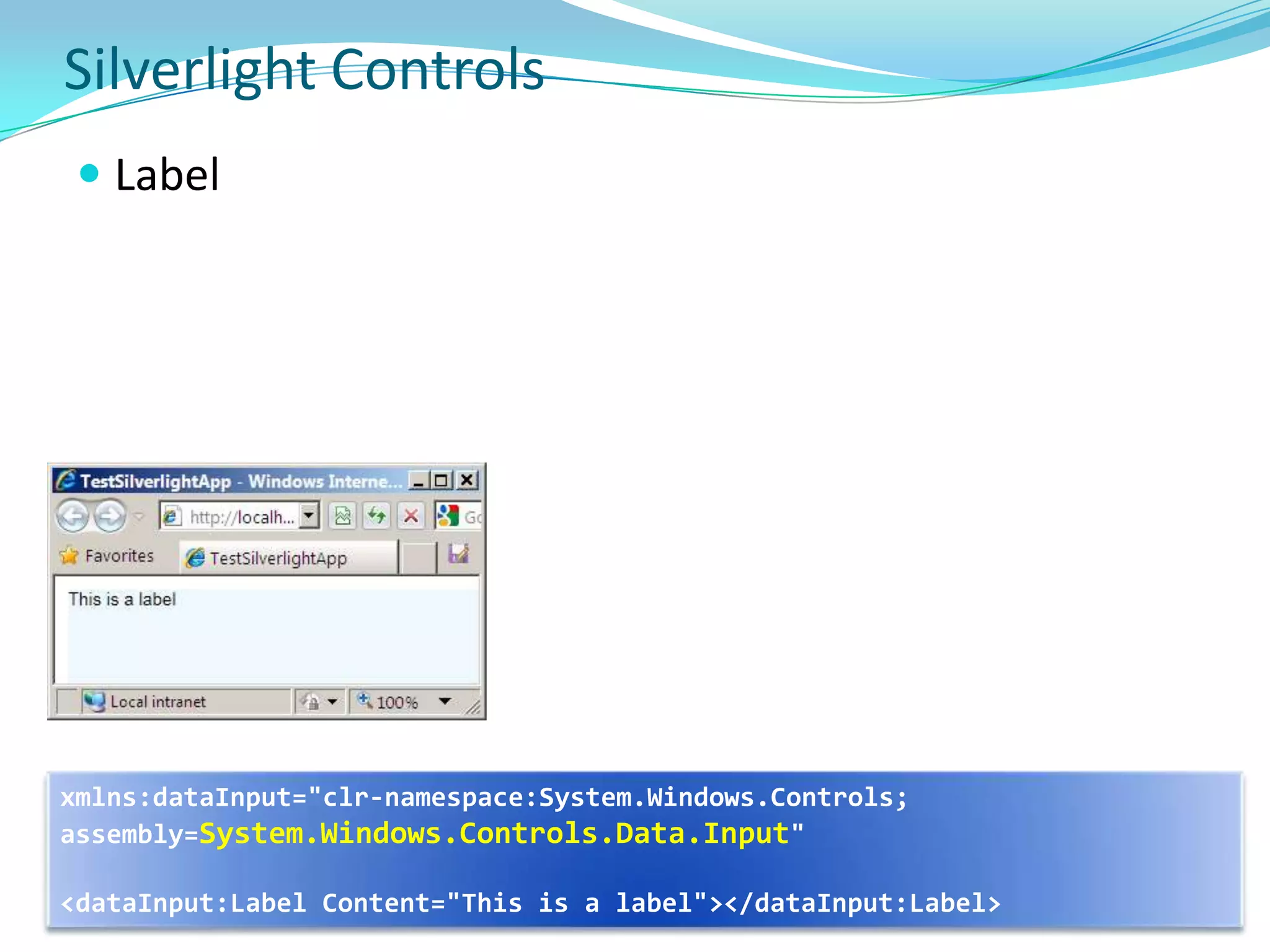
Silverlight ControlsLabelxmlns:dataInput="clr-namespace:System.Windows.Controls; assembly=System.Windows.Controls.Data.Input"<dataInput:Label Content="This is a label"></dataInput:Label>
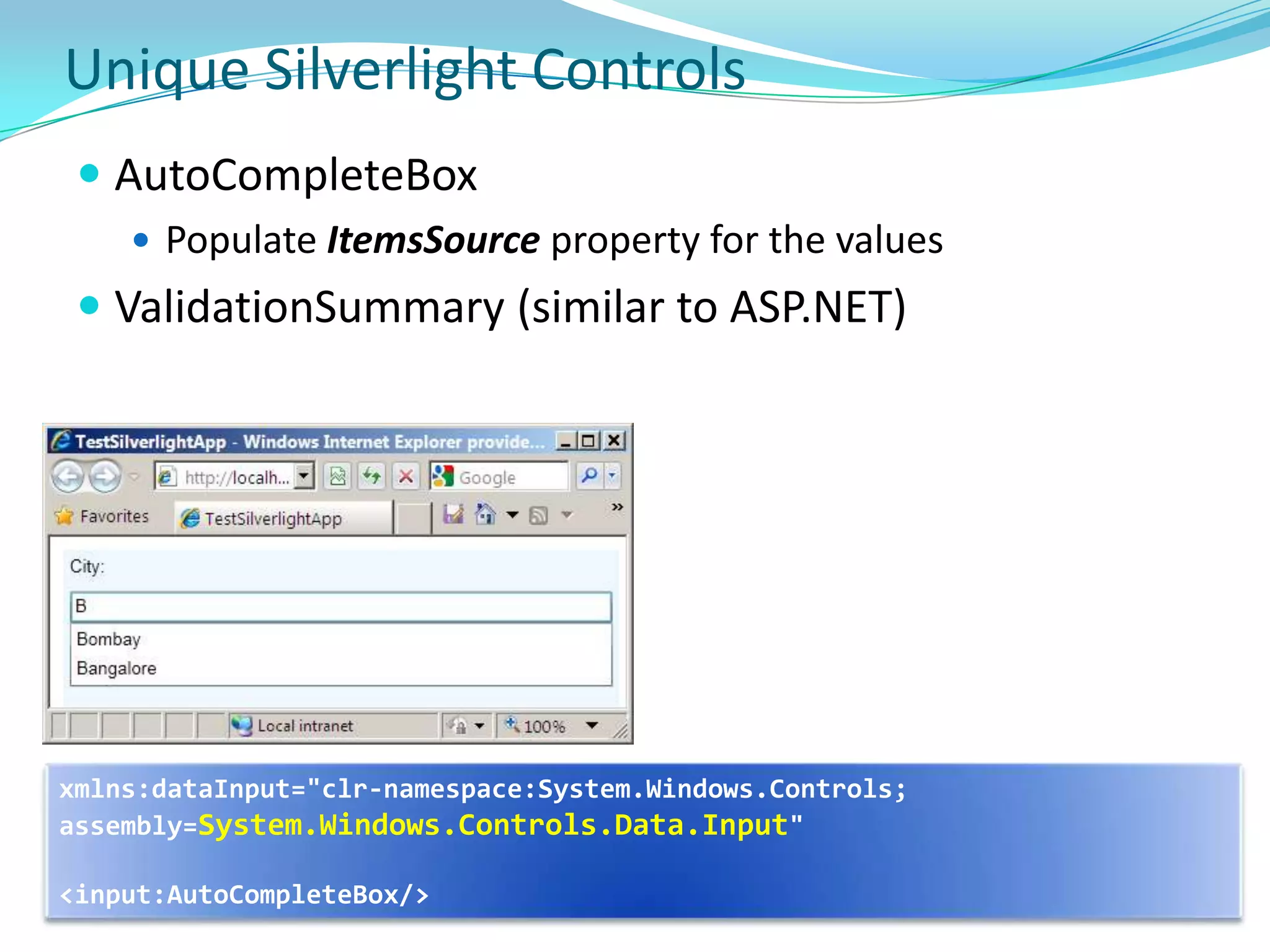
Unique Silverlight ControlsAutoCompleteBox
Populate ItemsSource property for the values
ValidationSummary (similar to ASP.NET)xmlns:dataInput="clr-namespace:System.Windows.Controls; assembly=System.Windows.Controls.Data.Input"<input:AutoCompleteBox/>
Not Supported ControlsSilverlight does not support these controls
ListView
ExpanderLayout, Input and Panels
Layout SystemSilverlight plug-in defines area that Silverlight-based appis displayed in – Embed plug-in in a host HTML page; Either position plug-in somewhere inline in HTML page display or have plug-in take up entire HTML page. Two frames of reference when positioning Silverlight objects: Within the plug-in: Position objects on the Silverlight surface within the plug-in’s bounding box. Most of the layout overviews describe this type of positioning.Within the HTML: The entire plug-in and all the objects positioned within it are subject to where you place the plug-in in HTML.
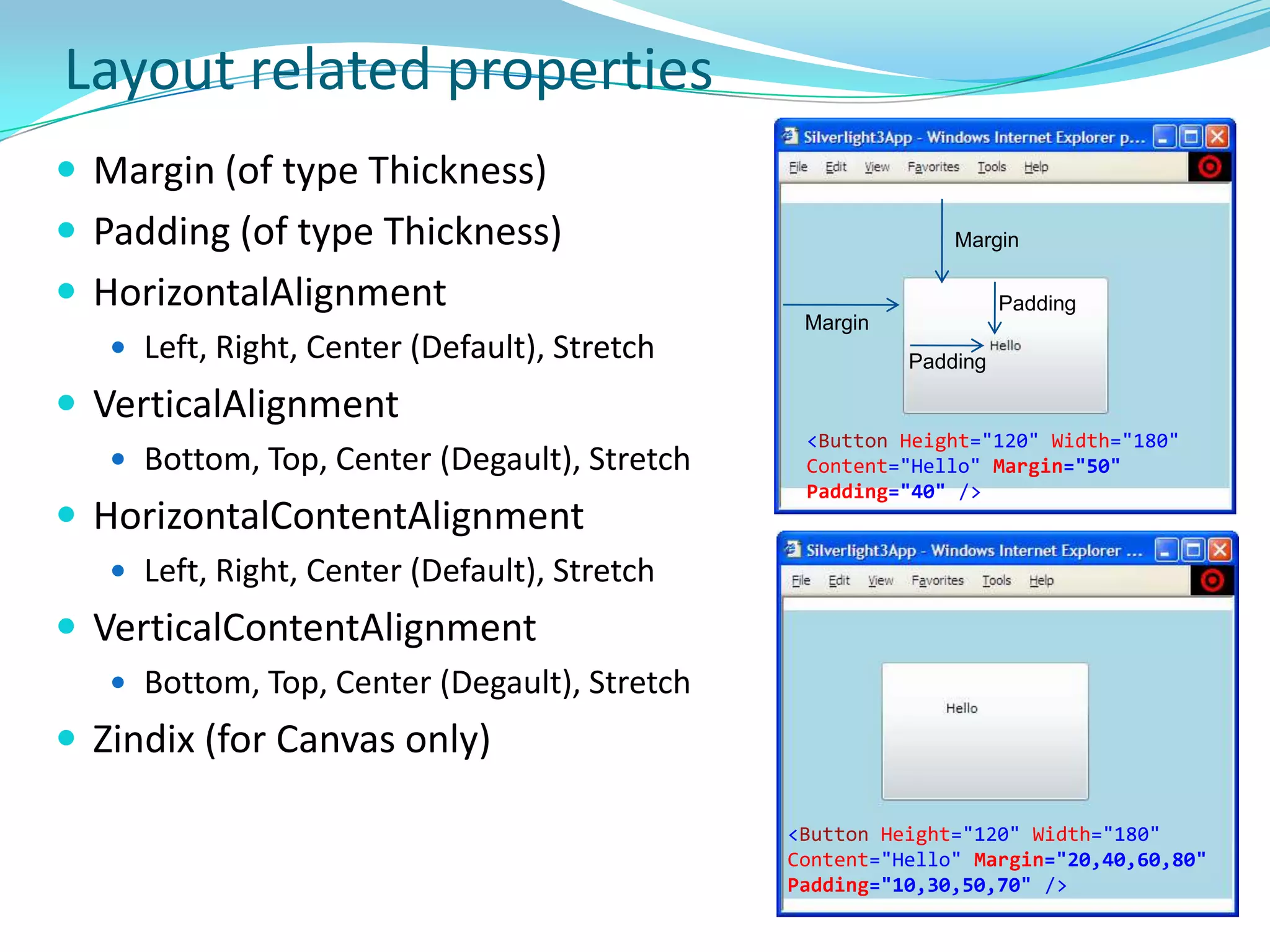
Layout related propertiesMargin (of type Thickness)Padding (of type Thickness)HorizontalAlignmentLeft, Right, Center (Default), StretchVerticalAlignmentBottom, Top, Center (Degault), StretchHorizontalContentAlignmentLeft, Right, Center (Default), StretchVerticalContentAlignmentBottom, Top, Center (Degault), StretchZindix (for Canvas only)MarginPaddingMarginPadding<Button Height="120" Width="180" Content="Hello"Margin="50" Padding="40" /><Button Height="120" Width="180" Content="Hello"Margin="20,40,60,80" Padding="10,30,50,70" />
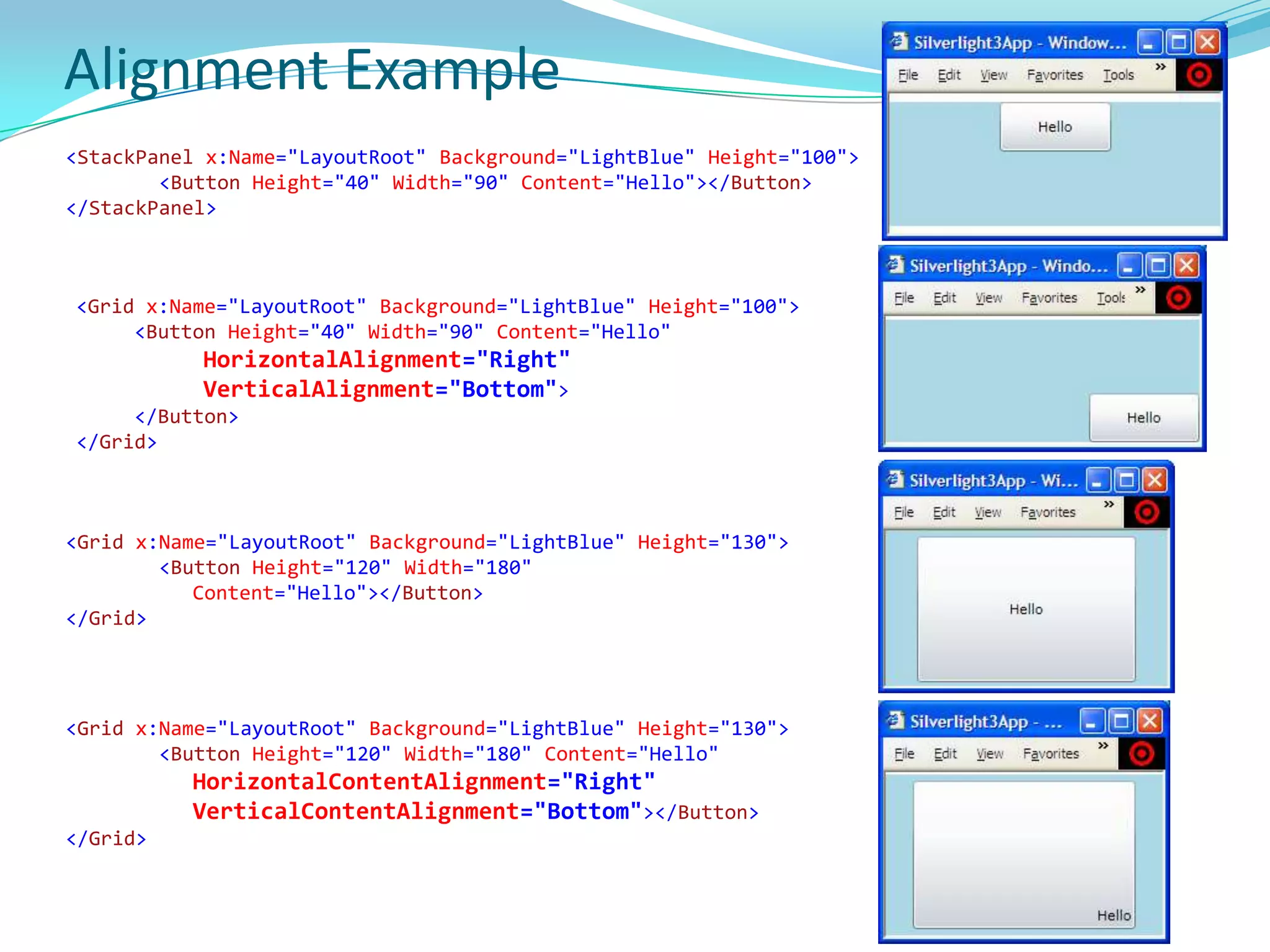
Alignment Example<StackPanel x:Name="LayoutRoot" Background="LightBlue" Height="100"><Button Height="40" Width="90" Content="Hello"></Button></StackPanel><Grid x:Name="LayoutRoot" Background="LightBlue" Height="100"><Button Height="40" Width="90" Content="Hello"HorizontalAlignment="Right"VerticalAlignment="Bottom">     </Button></Grid><Grid x:Name="LayoutRoot" Background="LightBlue" Height="130"><Button Height="120" Width="180" 	Content="Hello"></Button></Grid><Grid x:Name="LayoutRoot" Background="LightBlue" Height="130"><Button Height="120" Width="180" Content="Hello"HorizontalContentAlignment="Right"VerticalContentAlignment="Bottom"></Button></Grid>
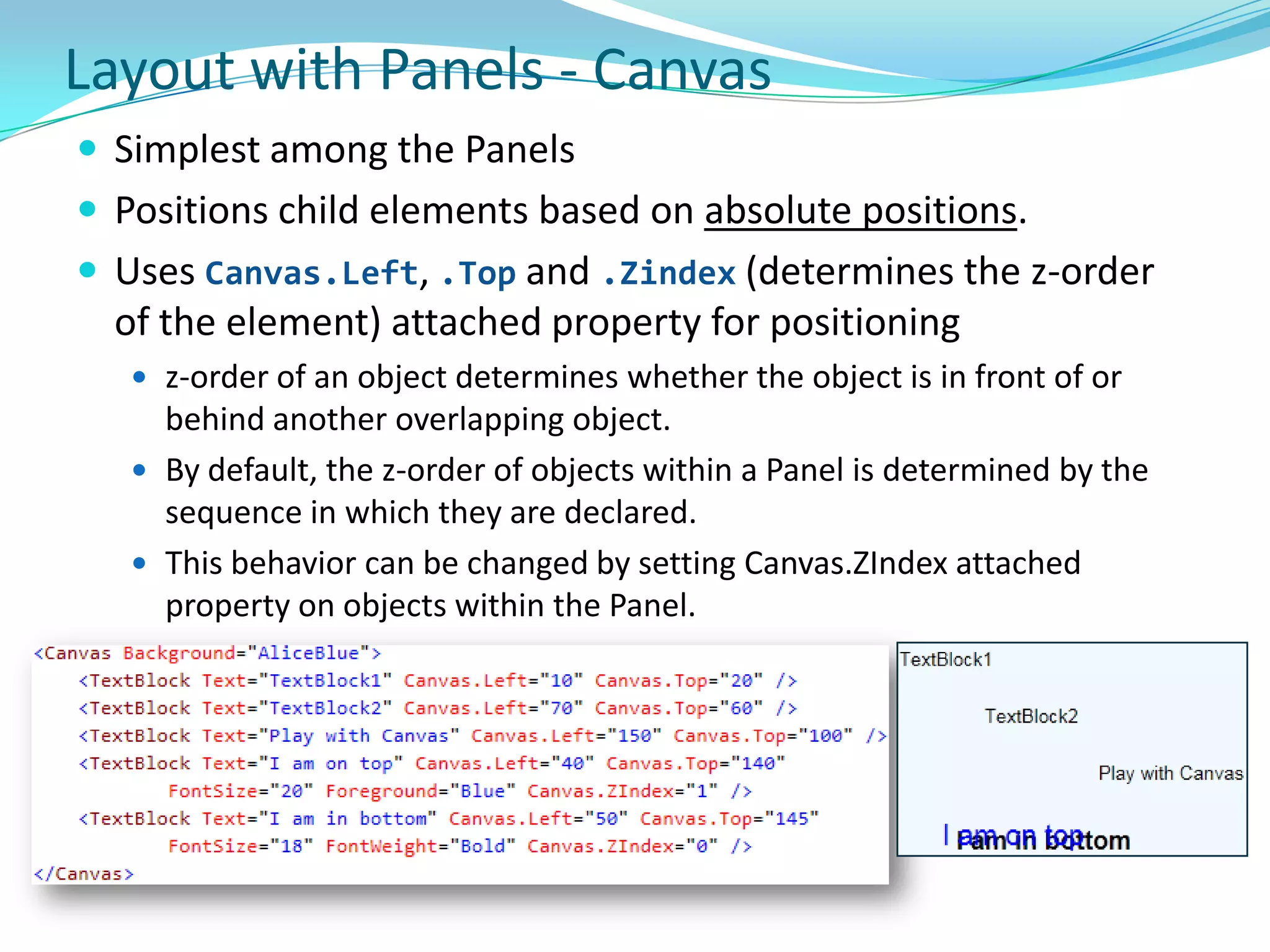
Layout with Panels - CanvasSimplest among the Panels
Positions child elements based on absolute positions.
Uses Canvas.Left, .Top and .Zindex (determines the z-order of the element) attached property for positioning
z-order of an object determines whether the object is in front of or behind another overlapping object.
By default, the z-order of objects within a Panel is determined by the sequence in which they are declared.
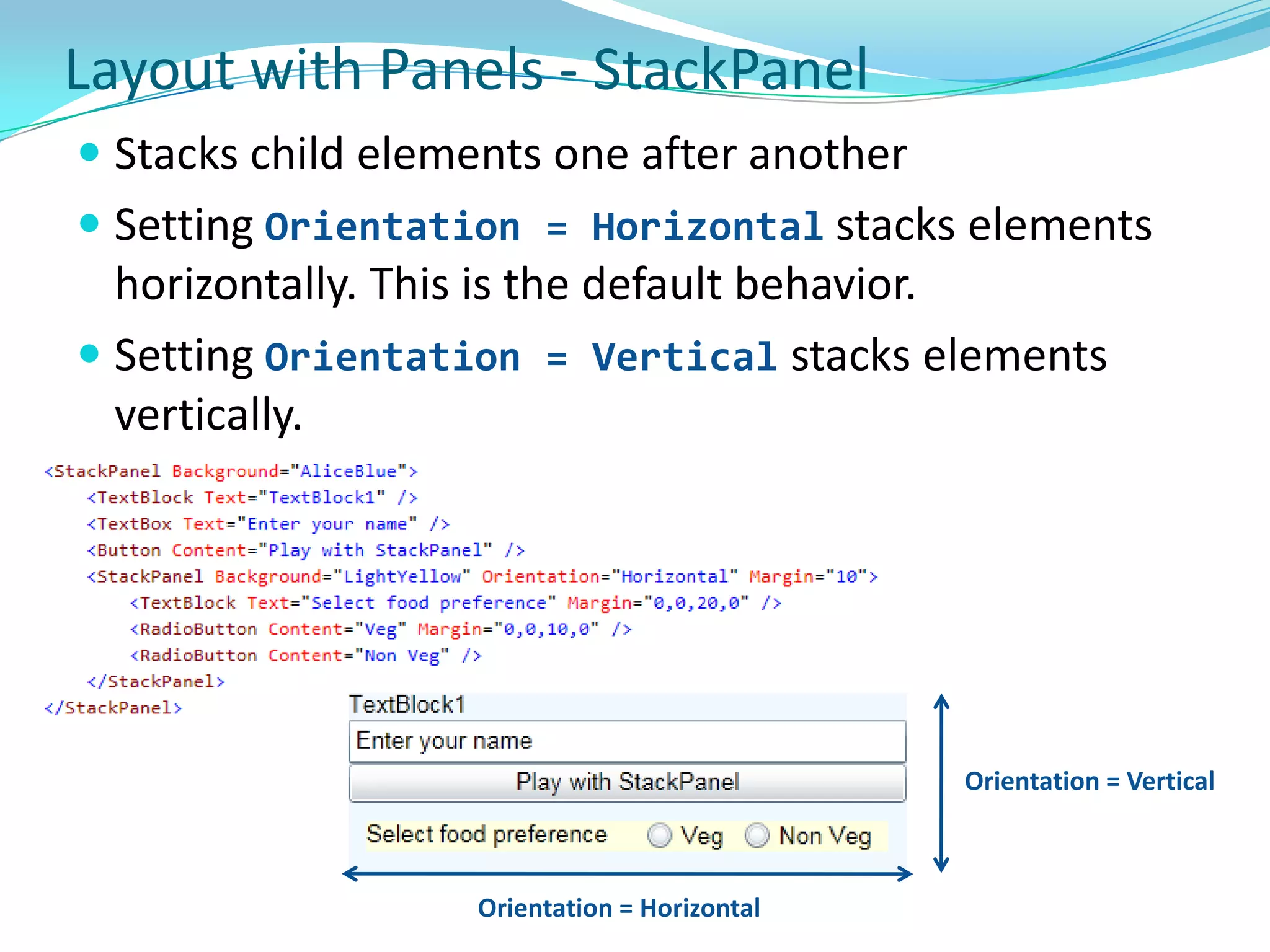
This behavior can be changed by setting Canvas.ZIndex attached property on objects within the Panel.Layout with Panels - StackPanelStacks child elements one after another
Setting Orientation = Horizontalstacks elements horizontally. This is the default behavior.
Setting Orientation = Vertical stacks elements vertically.Orientation = VerticalOrientation = Horizontal
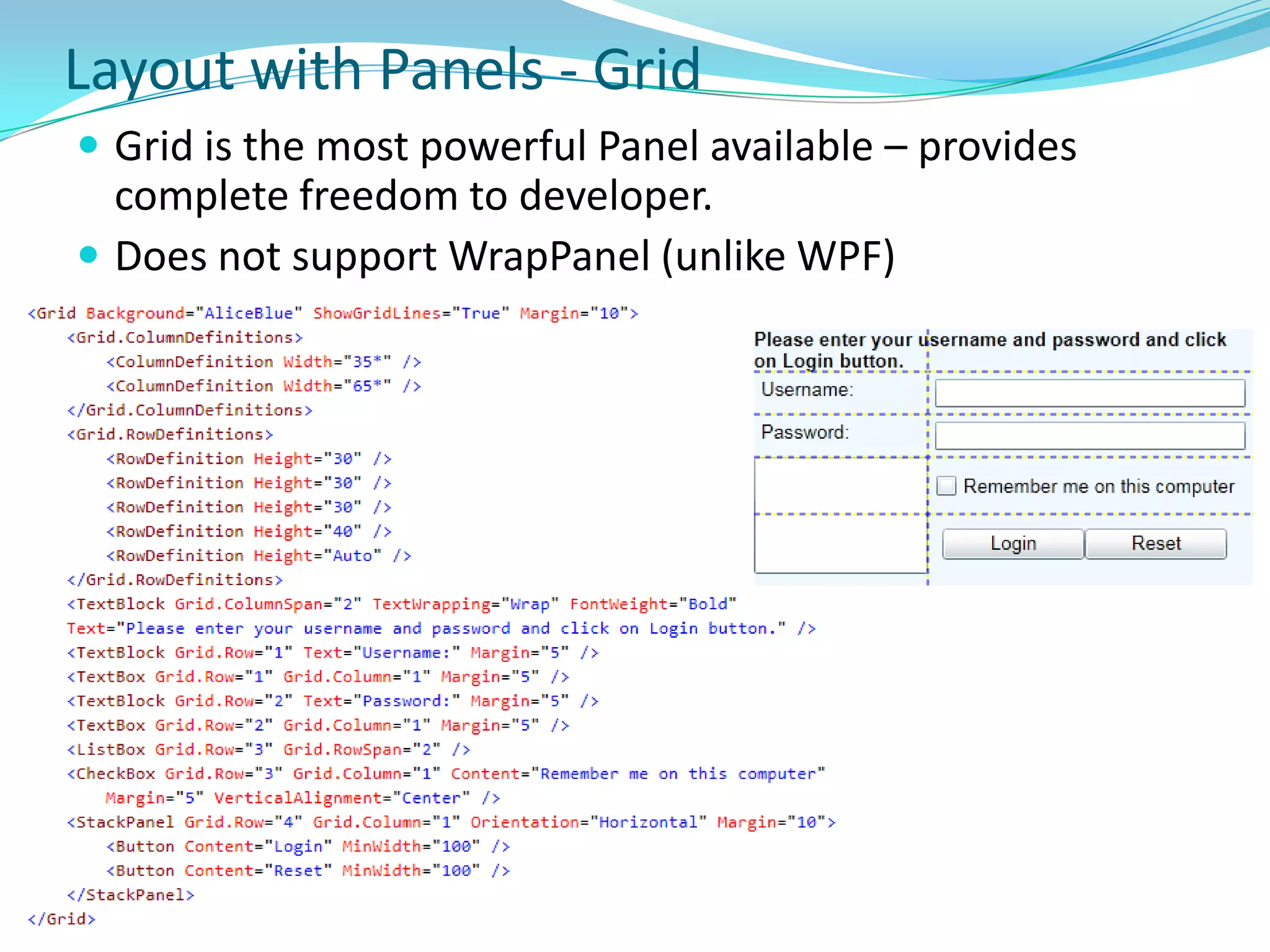
Layout with Panels - GridGrid is the most powerful Panel available – provides complete freedom to developer.
Does not support WrapPanel (unlike WPF)Layout (Continued)ScrollViewer
Border
Popup2D Graphics
TransformScaleTransform
RotateTransform
SkewTransform
TranslateTransform
MatrixTransform
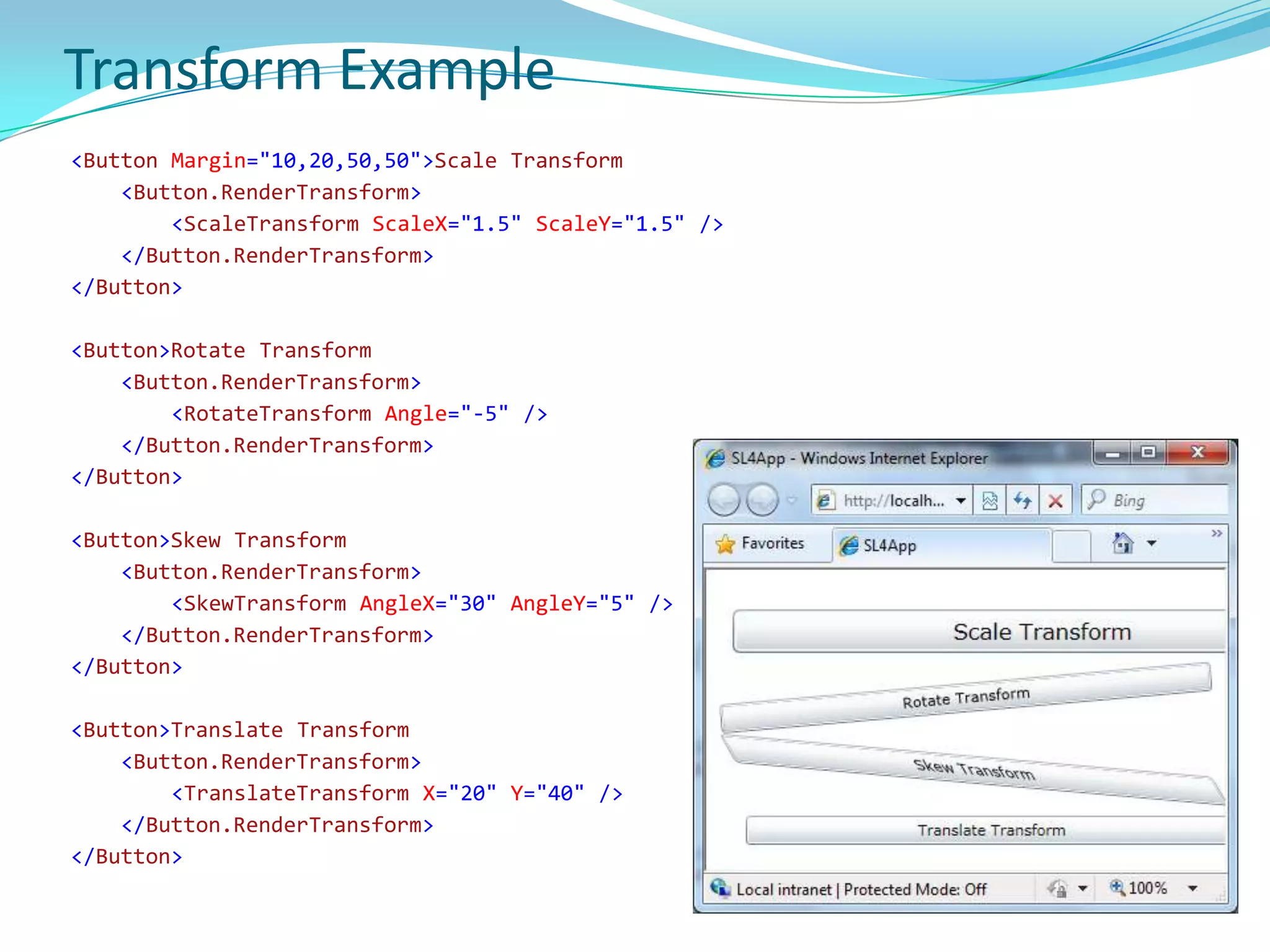
GroupTransformTransform Example        <Button Margin="10,20,50,50">Scale Transform<Button.RenderTransform><ScaleTransformScaleX="1.5"ScaleY="1.5" /></Button.RenderTransform></Button><Button>Rotate Transform<Button.RenderTransform><RotateTransform Angle="-5" /></Button.RenderTransform></Button><Button>Skew Transform<Button.RenderTransform><SkewTransformAngleX="30"AngleY="5" /></Button.RenderTransform></Button> <Button>Translate Transform<Button.RenderTransform><TranslateTransform X="20" Y="40" /></Button.RenderTransform></Button>
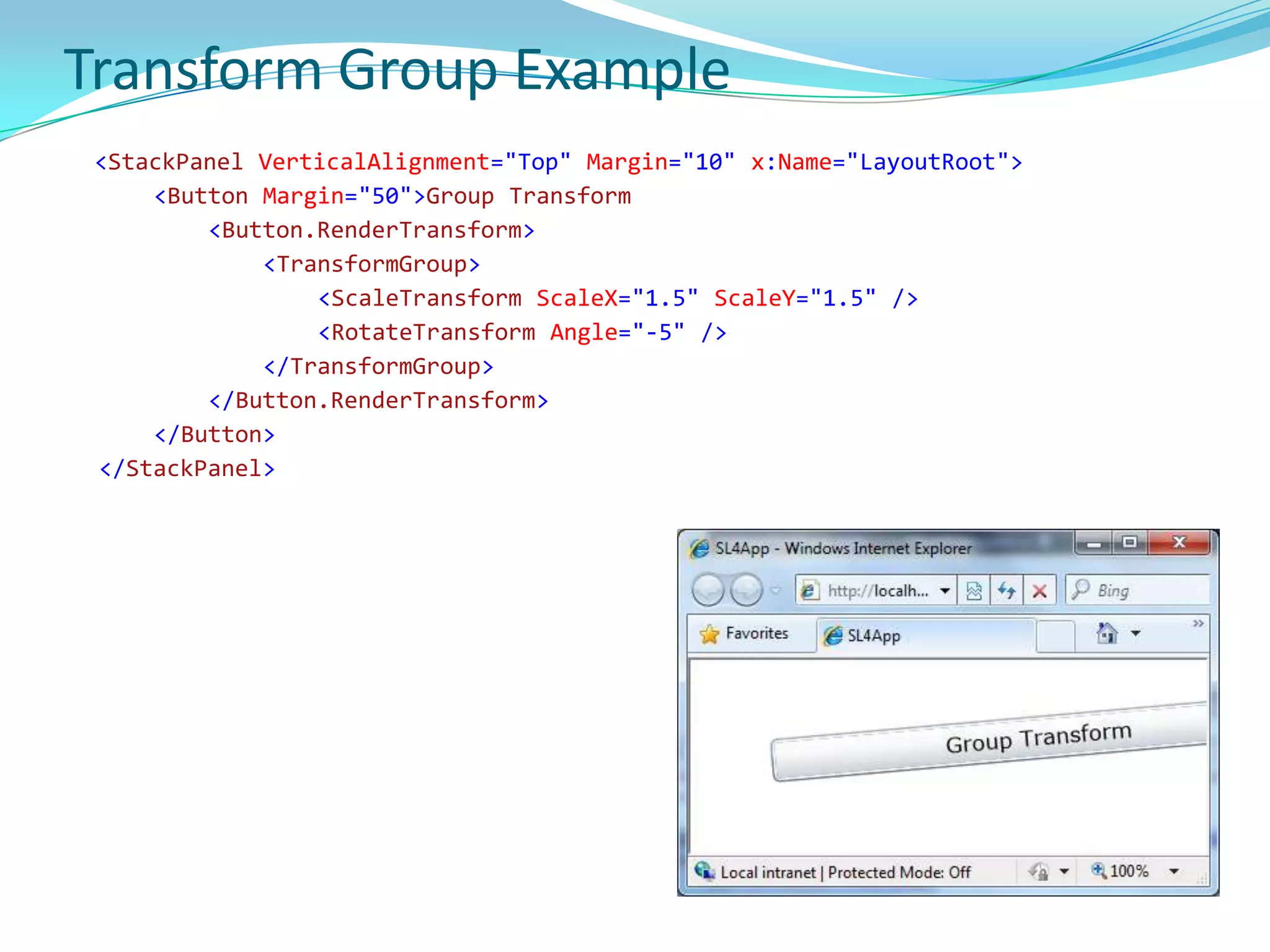
Transform Group Example<StackPanelVerticalAlignment="Top" Margin="10" x:Name="LayoutRoot"><Button Margin="50">Group Transform<Button.RenderTransform><TransformGroup><ScaleTransformScaleX="1.5"ScaleY="1.5" /><RotateTransform Angle="-5" /></TransformGroup></Button.RenderTransform></Button></StackPanel>
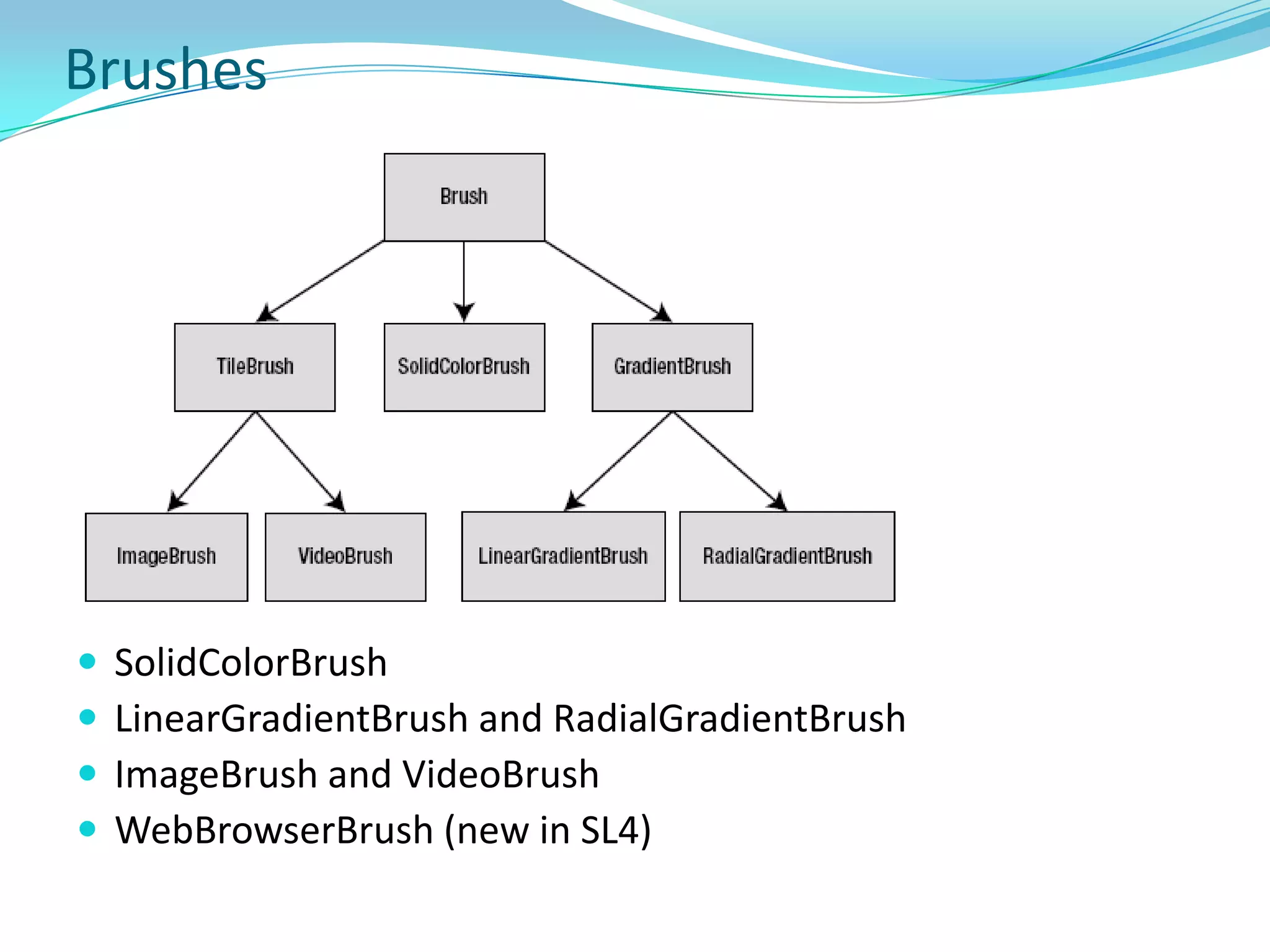
BrushesSolidColorBrush
LinearGradientBrush and RadialGradientBrush
ImageBrush and VideoBrush
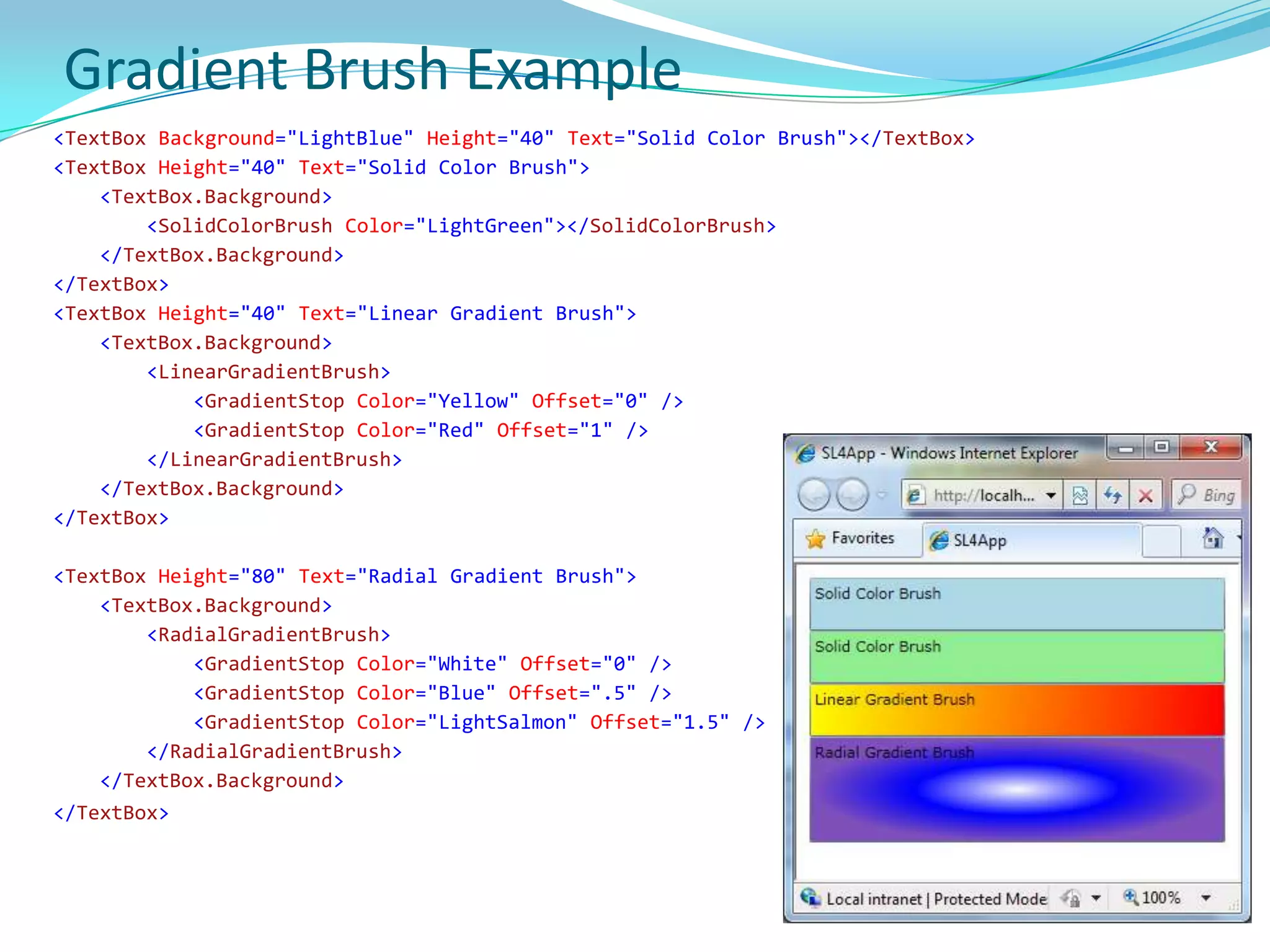
WebBrowserBrush (new in SL4)Gradient Brush Example        <TextBox Background="LightBlue" Height="40" Text="Solid Color Brush"></TextBox><TextBox Height="40" Text="Solid Color Brush"><TextBox.Background><SolidColorBrush Color="LightGreen"></SolidColorBrush></TextBox.Background></TextBox><TextBox Height="40" Text="Linear Gradient Brush"><TextBox.Background><LinearGradientBrush><GradientStop Color="Yellow" Offset="0" /><GradientStop Color="Red" Offset="1" /></LinearGradientBrush></TextBox.Background></TextBox> <TextBox Height="80" Text="Radial Gradient Brush"><TextBox.Background><RadialGradientBrush><GradientStop Color="White" Offset="0" /><GradientStop Color="Blue" Offset=".5" /><GradientStop Color="LightSalmon" Offset="1.5" /></RadialGradientBrush></TextBox.Background></TextBox>
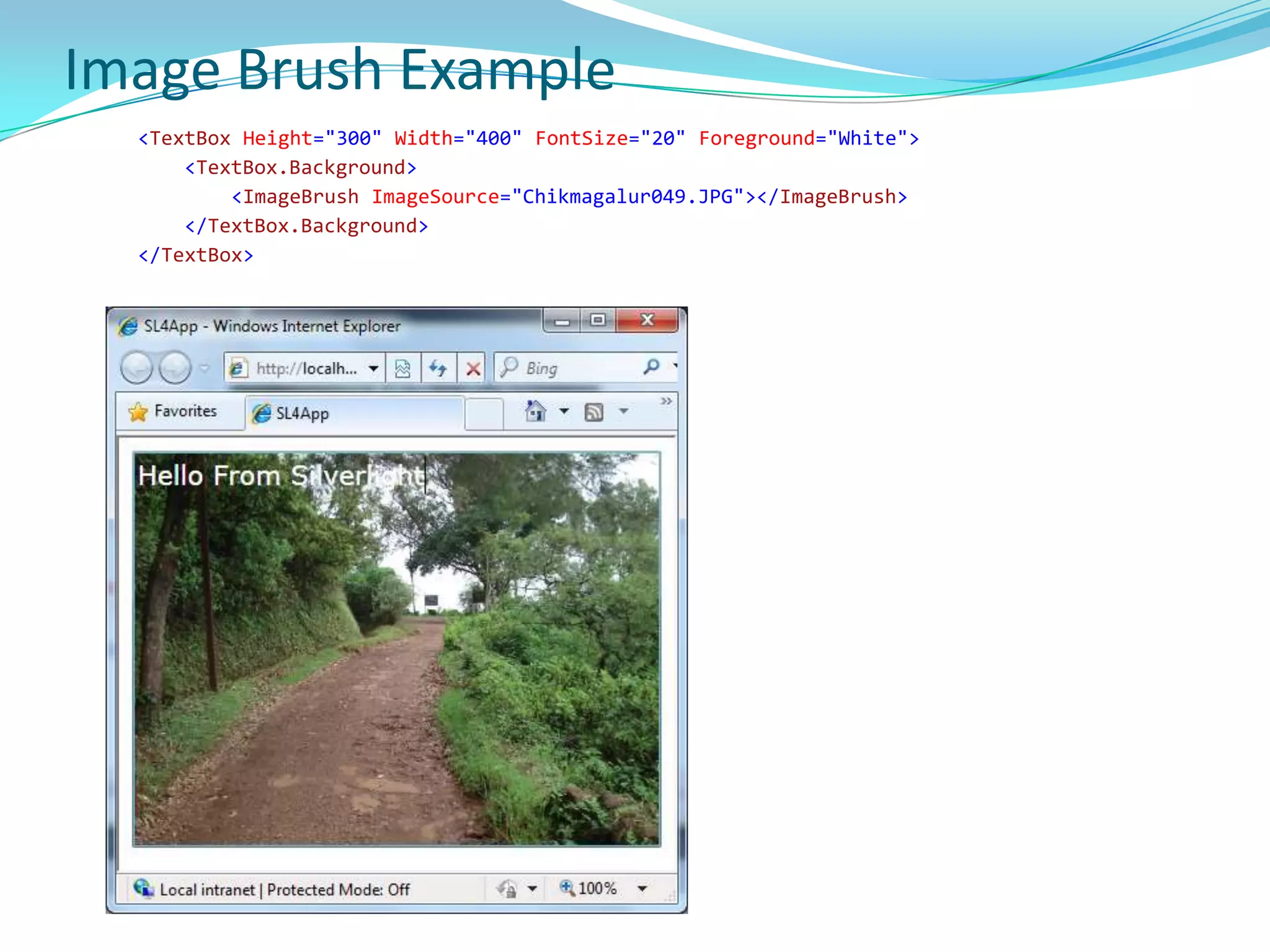
Image Brush Example        <TextBox Height="300" Width="400"FontSize="20" Foreground="White"><TextBox.Background><ImageBrushImageSource="Chikmagalur049.JPG"></ImageBrush></TextBox.Background></TextBox> 
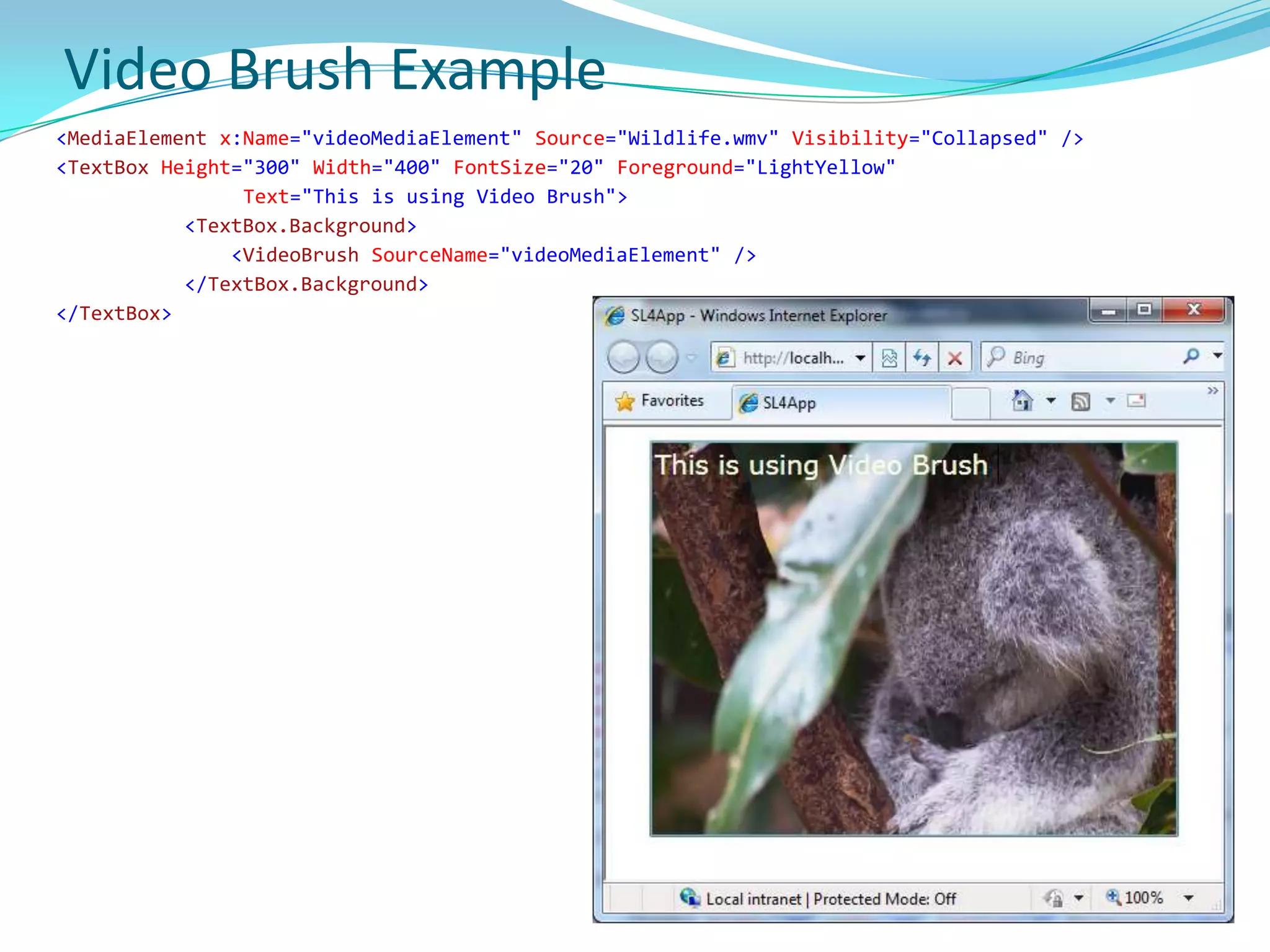
Video Brush Example <MediaElement x:Name="videoMediaElement" Source="Wildlife.wmv" Visibility="Collapsed" /><TextBox Height="300" Width="400"FontSize="20" Foreground="LightYellow" Text="This is using Video Brush"><TextBox.Background><VideoBrushSourceName="videoMediaElement" /></TextBox.Background></TextBox> 
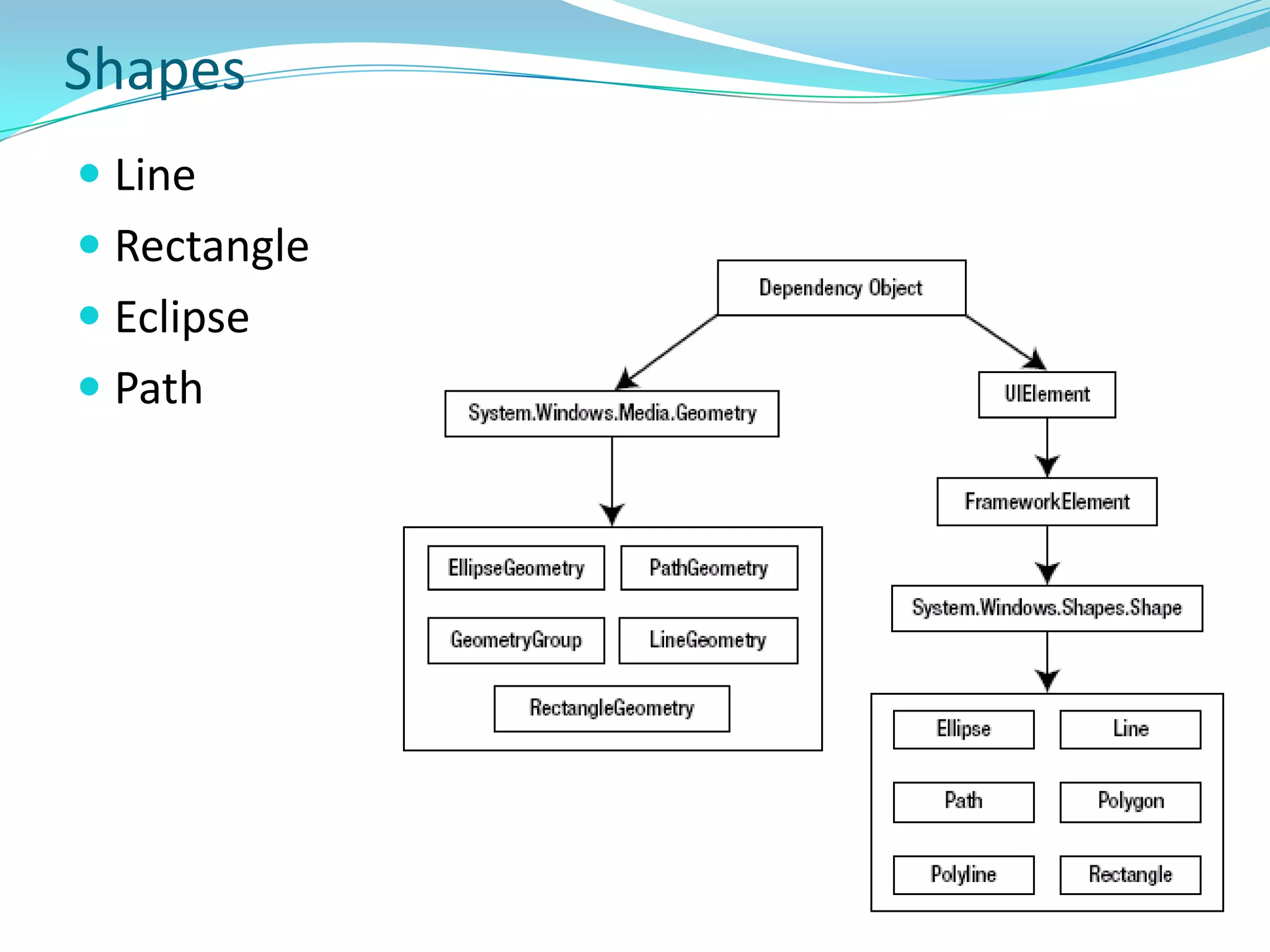
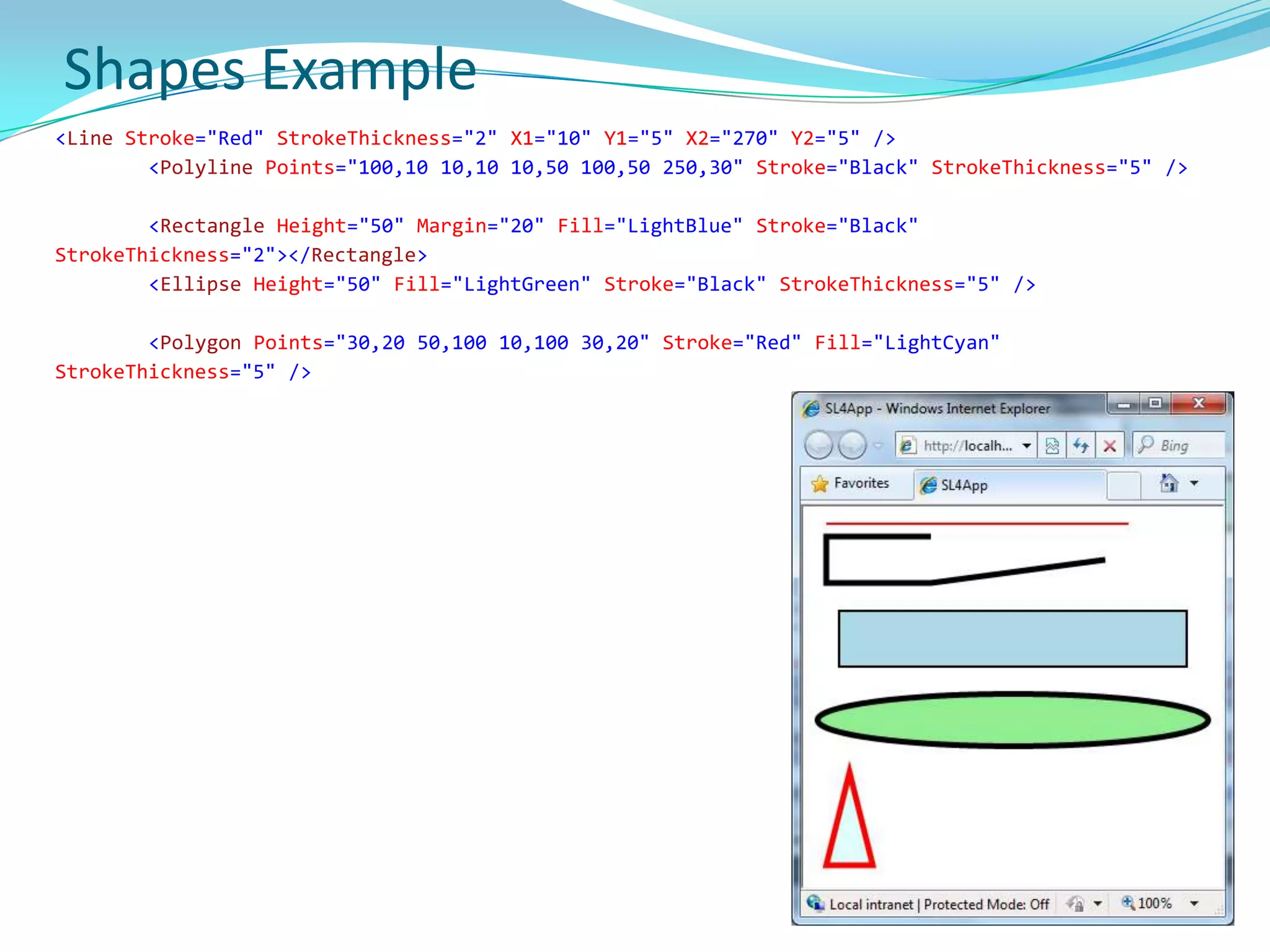
ShapesLineRectangleEclipsePath
Shapes Example<Line Stroke="Red"StrokeThickness="2" X1="10" Y1="5" X2="270" Y2="5" /><Polyline Points="100,10 10,10 10,50 100,50 250,30" Stroke="Black"StrokeThickness="5" /><Rectangle Height="50" Margin="20" Fill="LightBlue" Stroke="Black"StrokeThickness="2"></Rectangle><Ellipse Height="50" Fill="LightGreen" Stroke="Black"StrokeThickness="5" /> <Polygon Points="30,20 50,100 10,100 30,20" Stroke="Red" Fill="LightCyan"StrokeThickness="5" />
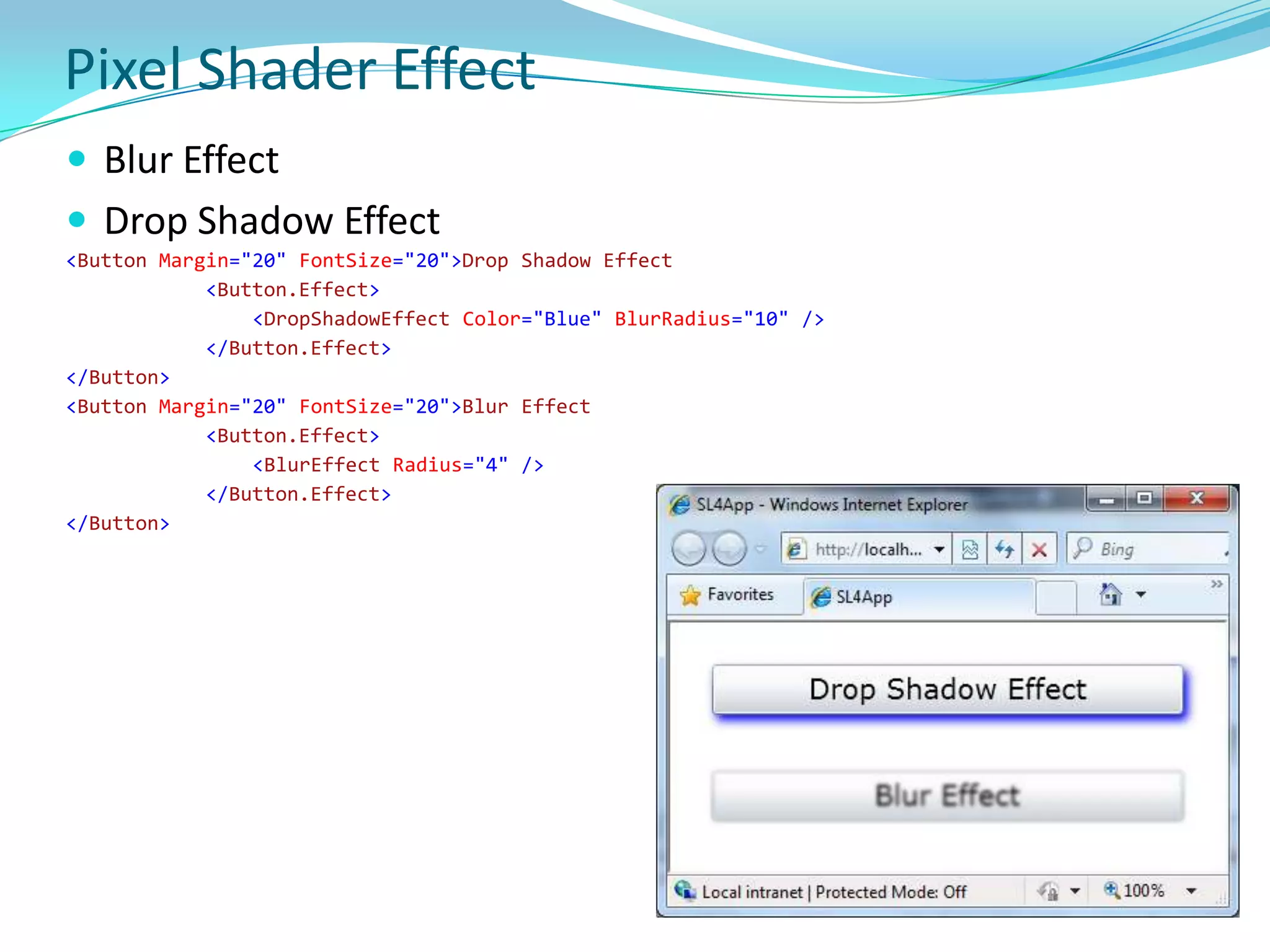
Pixel Shader EffectBlur EffectDrop Shadow Effect<Button Margin="20"FontSize="20">Drop Shadow Effect<Button.Effect><DropShadowEffect Color="Blue"BlurRadius="10" /></Button.Effect></Button><Button Margin="20"FontSize="20">Blur Effect<Button.Effect><BlurEffect Radius="4" /></Button.Effect></Button>
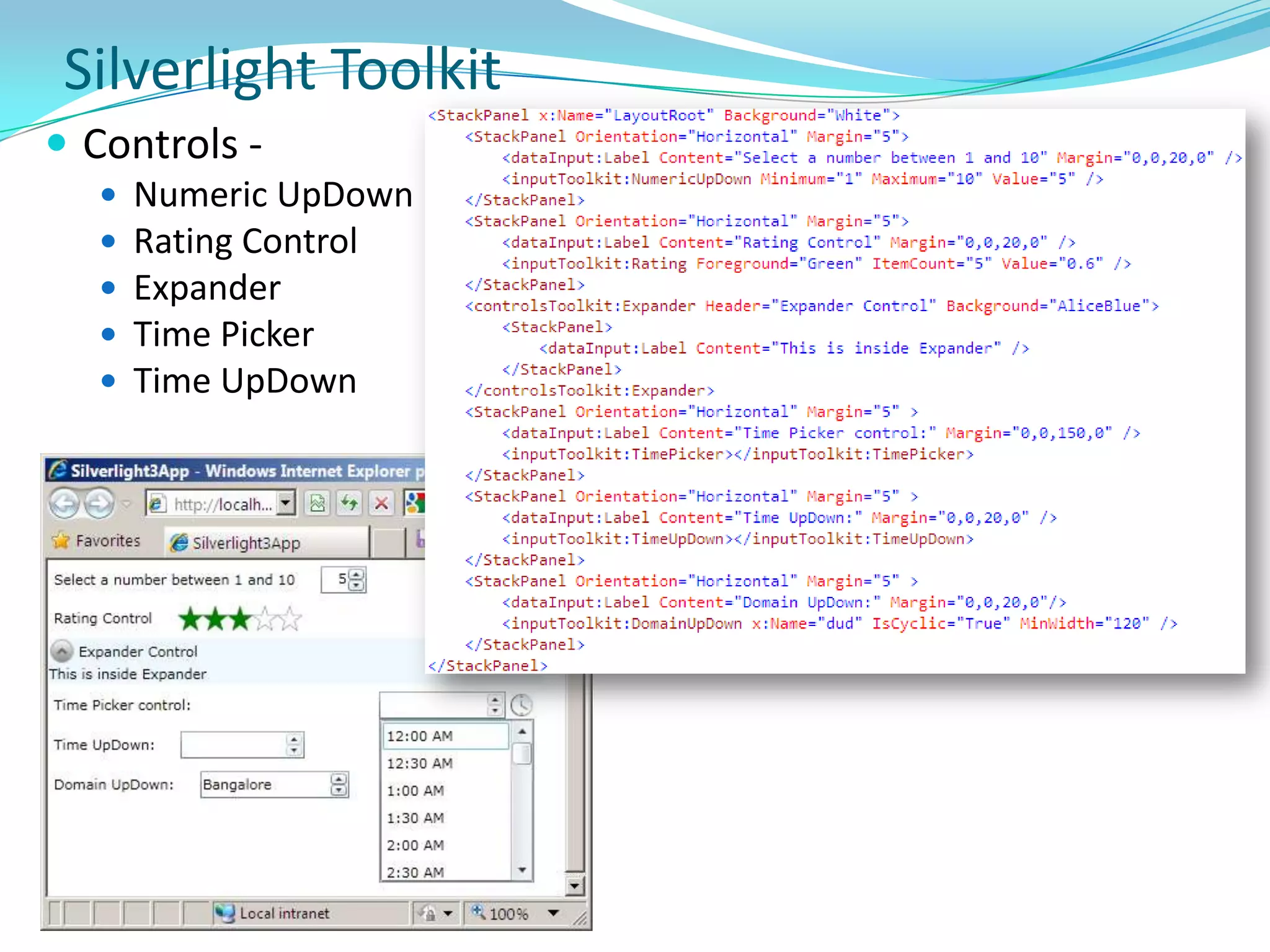
Silverlight ToolkitControls -
Numeric UpDown
Rating Control
Expander
Time Picker
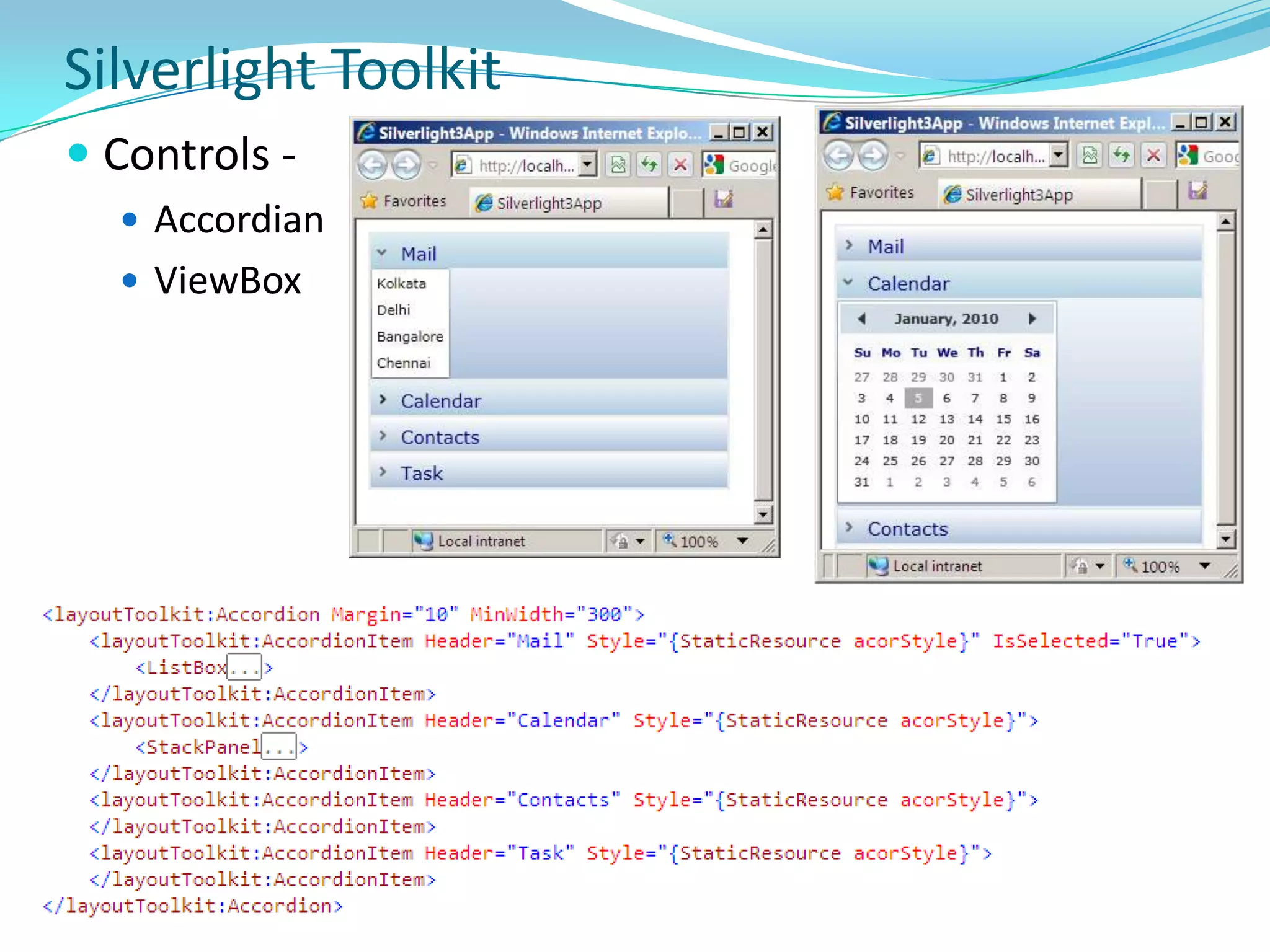
Time UpDownSilverlight ToolkitControls -
Accordian
ViewBoxSilverlight ToolkitPanels
Wrap Panel
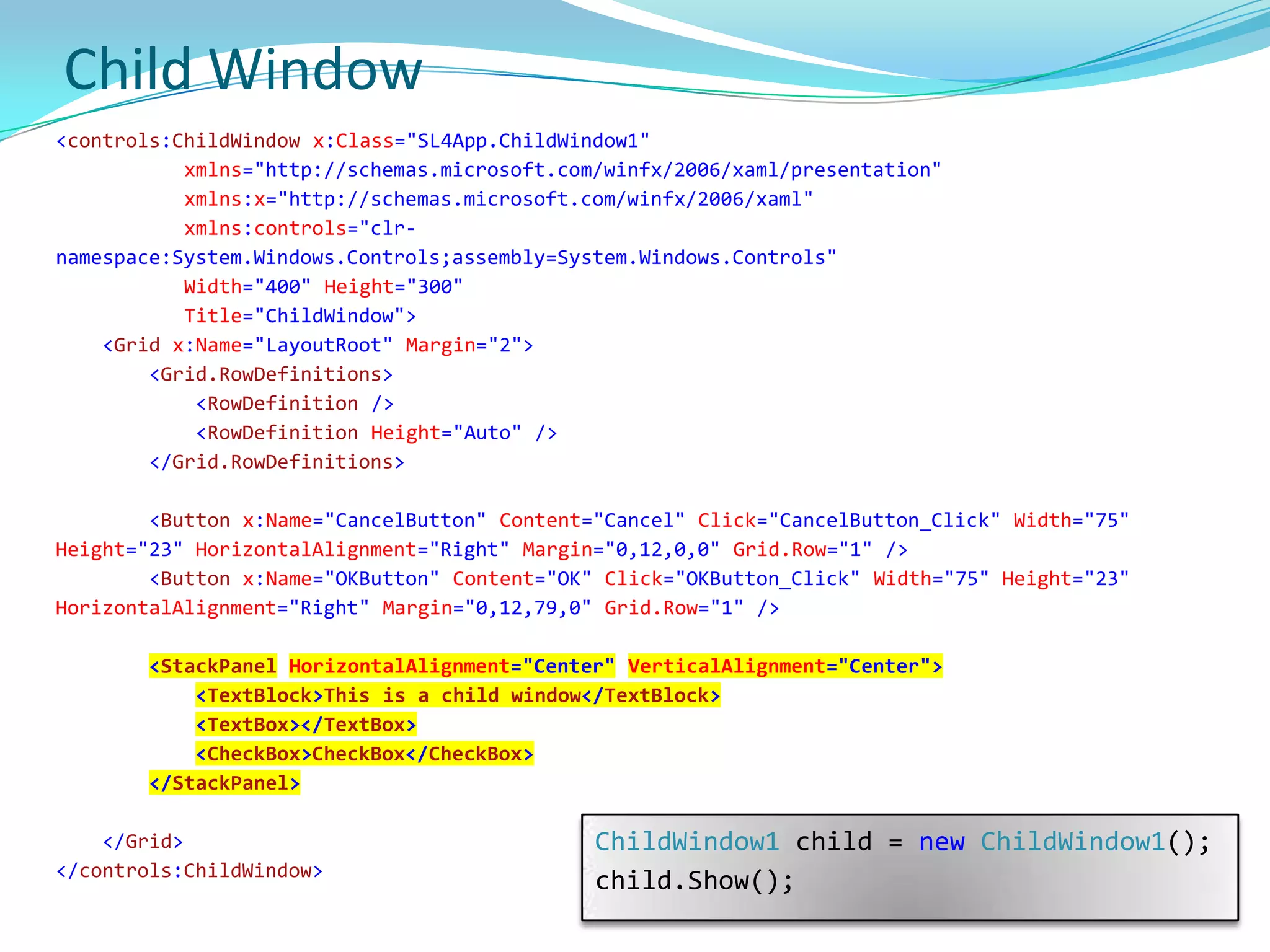
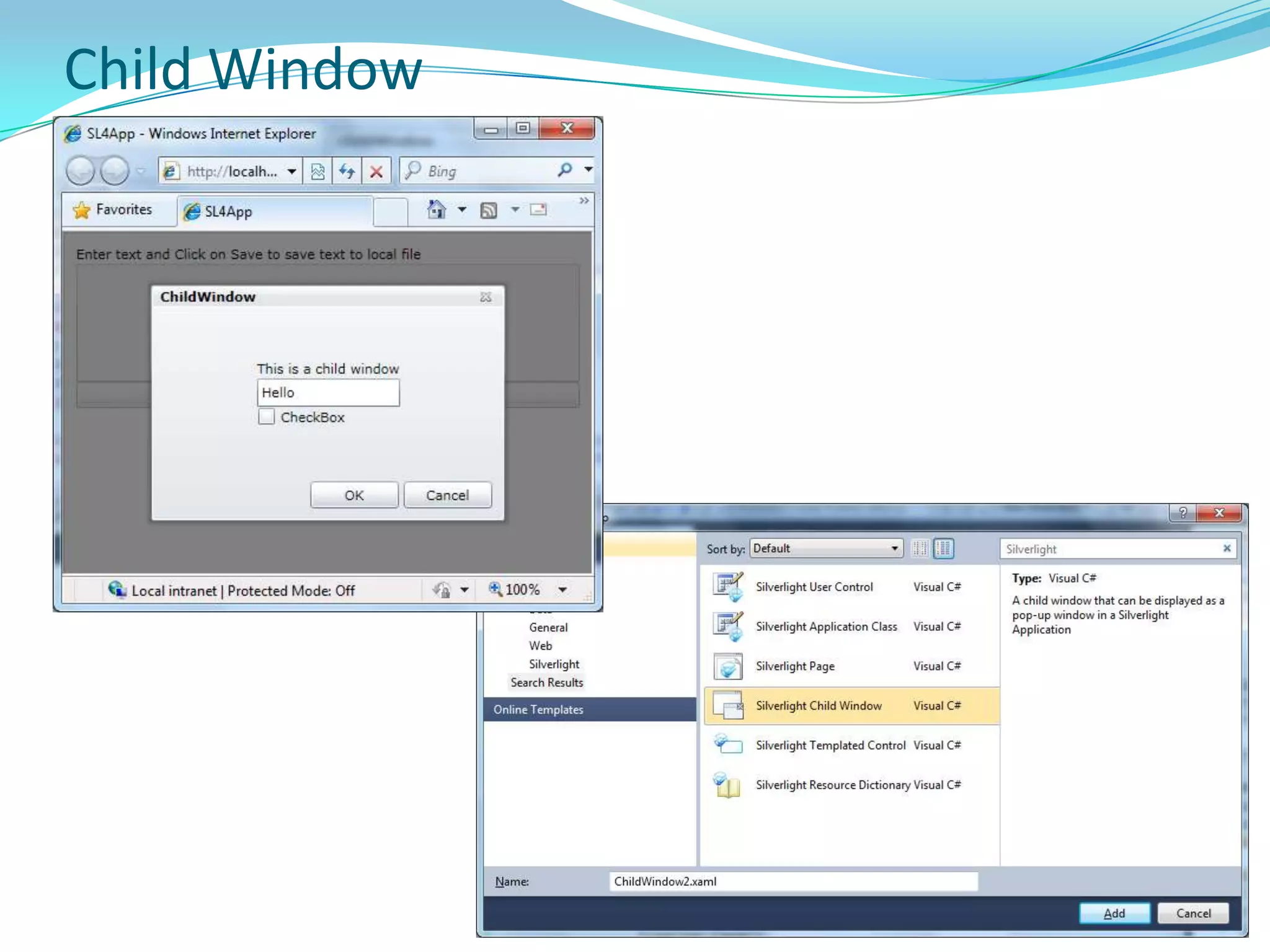
Dock PanelChild Window<controls:ChildWindow x:Class="SL4App.ChildWindow1"xmlns="http://schemas.microsoft.com/winfx/2006/xaml/presentation"xmlns:x="http://schemas.microsoft.com/winfx/2006/xaml"xmlns:controls="clr-namespace:System.Windows.Controls;assembly=System.Windows.Controls" Width="400" Height="300" Title="ChildWindow"><Grid x:Name="LayoutRoot" Margin="2"><Grid.RowDefinitions><RowDefinition /><RowDefinition Height="Auto" /></Grid.RowDefinitions> <Button x:Name="CancelButton" Content="Cancel" Click="CancelButton_Click" Width="75" Height="23"HorizontalAlignment="Right" Margin="0,12,0,0"Grid.Row="1" /><Button x:Name="OKButton" Content="OK" Click="OKButton_Click" Width="75" Height="23"HorizontalAlignment="Right" Margin="0,12,79,0"Grid.Row="1" /><StackPanelHorizontalAlignment="Center"VerticalAlignment="Center"><TextBlock>This is a child window</TextBlock><TextBox></TextBox><CheckBox>CheckBox</CheckBox></StackPanel></Grid></controls:ChildWindow>ChildWindow1 child = newChildWindow1();child.Show();
Child Window
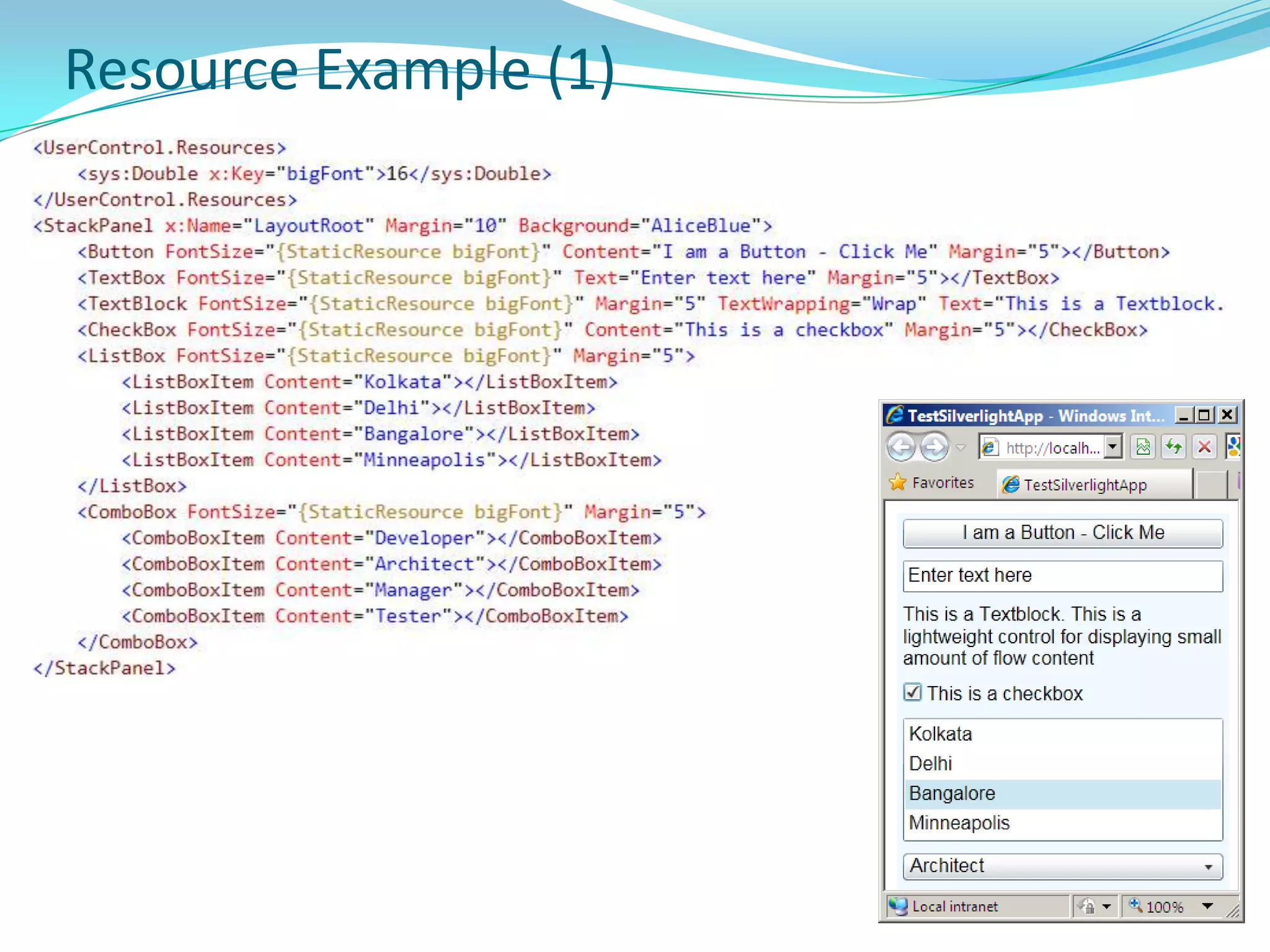
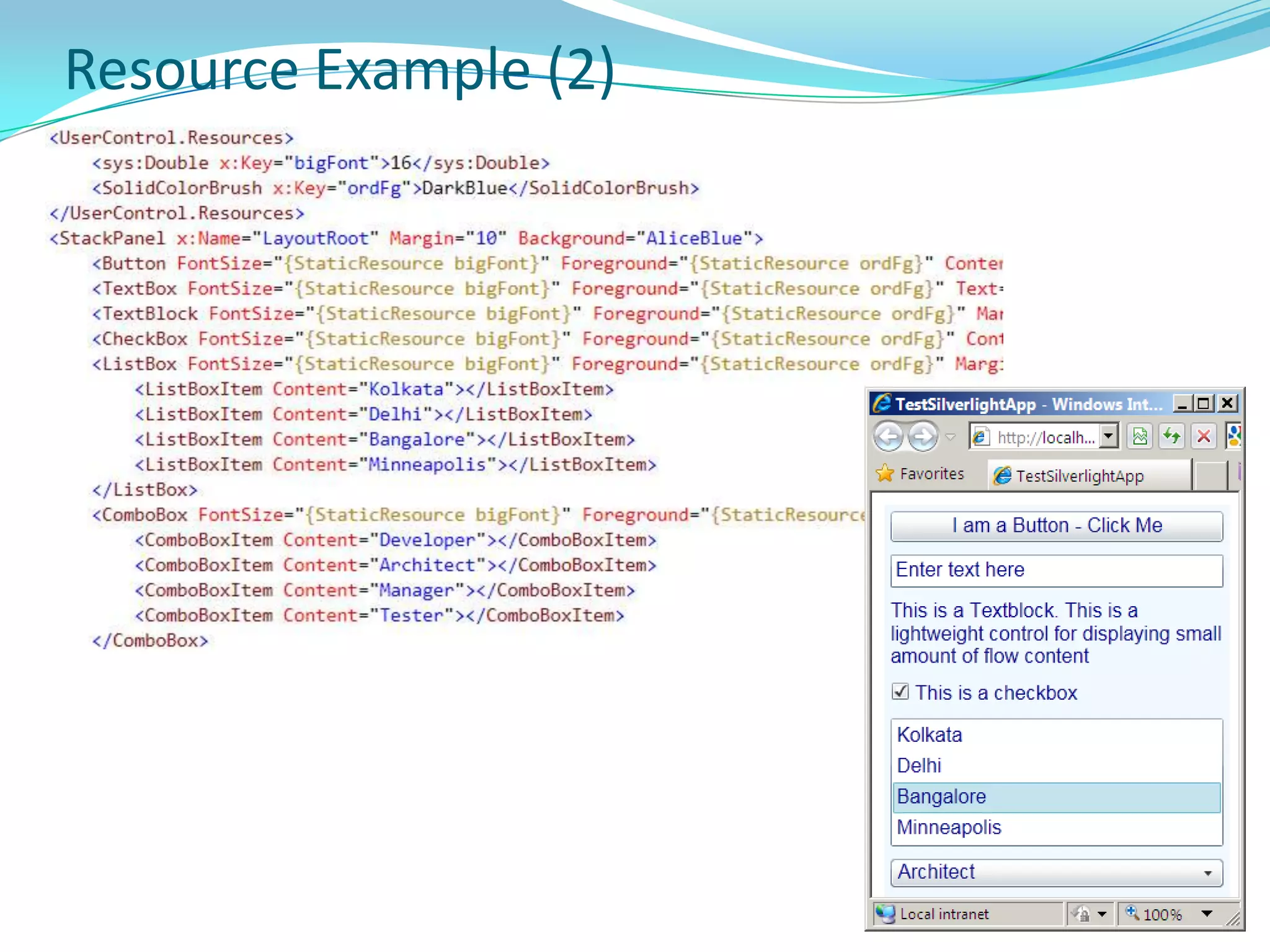
ResourceResources allow reuse
Resources are stored in ResourceDictionary

Building RIA Apps with Silverlight

  • 1.
    Silverlight Intermediate(Developing RIAApps with Silverlight)Aniruddha Chakrabarti.NET and Integration CoE
  • 2.
    Intro …Get toknow each other – AllWhat you want to know – AllCourse Objective and Summary – AniruddhaLogisticsScheduleTake Away
  • 3.
    AgendaRIA and Web2.0, RIA tools
  • 4.
    Silverlight – History,Overview and Architecture
  • 5.
    Controls, Panel, Layout,Transform, Brush …
  • 6.
    Resource, Style, ControlTemplate, Data Template
  • 7.
    Data Binding, DataAnnotation, Isolated Storage
  • 8.
    Full Screen andOut of Browser Support
  • 9.
    HTML Bridge: Interactionbetween managed code & JavaScript
  • 10.
  • 11.
    What’s new inSilverlight 4What is RIARIA stands for Rich Internet Application
  • 12.
    “Rich Internet Applications(RIAs) are web applications that have many of the characteristics of desktop applications, typically delivered either by way of a site-specific browser, via a browser plug-in, or independently via sandboxes or virtual machines” – WikipediaThe term RIA introduced in white paper in Mar 2002 by Macromedia (now Adobe),though the concept had existed for many years earlier under names such as:Remote Scripting, by Microsoft, circa 1998 X Internet, by Forrester Research in October 2000 Rich (web) clients Rich web application
  • 13.
    RIA CharacteristicsImproved usabilityvia rich and creative user interface that provides an interactive rich experience - similar to desktop rich client applications. Support for Audio, Video.
  • 14.
    Modular and looselycoupled web app architecture that supports flexibility and user-level customization
  • 15.
    High-performing rich andinteractive web-based apps.
  • 16.
    Collaboration platform toshare information among diverse and geographically separate groups.
  • 17.
    Platform-independent technology thatis supported on cross-platform (support for many OS), cross-browser and cross-device (available on computers, mobile devices).RIA tools & frameoworks in marketSource: http://en.wikipedia.org/wiki/List_of_rich_internet_application_frameworks
  • 18.
    RIA Landscape –Other tools in MarketFlashMultimedia platform used to add animation, video, and interactivity to Web pages. Frequently used for advertisements and games.Manipulates vector and raster graphics to provide animation of text, drawings, and still images. Supports streaming of audio and video. Can capture user input via mouse, keyboard, microphone, camera. Coded in an Object-oriented language called ActionScript.May be displayed on various computer systems and devices, using Adobe Flash Player, which is available free of charge for common Web browsers, some mobile phones and few devices.FlexSDK for the development and deployment of cross-platform rich Internet applications based on the Adobe Flash platform. Can be written using Adobe Flash Builder or by using the freely available Flex compiler from Adobe.
  • 19.
    RIA Landscape –Other tools in MarketAIR (Adobe Integrated Runtime)Cross-platform runtime environment developed by Adobe Systems for building rich Internet applications using Adobe Flash, Adobe Flex, HTML, or Ajax, that can be deployed as desktop applications.Development EnvironmentHTML/Ajax, either via Adobe's own Dreamweaver CS4 (In addition to Dreamweaver CS3), another HTML editor or a normal text editor in conjunction with the AIR SDKAdobe Flash Builder (formerly Adobe Flex Builder) Flash CS4
  • 20.
    RIA Landscape –Other tools in MarketJava Applet / JavaFXJava platform for creating and delivering RIAs that can run across wide variety of connected devices. Enables building apps for desktop, browser and mobile phones. TV set-top boxes, gaming consoles, Blu-ray players and other platforms are planned.Developers use a statically typed, declarative language called JavaFX Script; Java code can be integrated into JavaFX programs. JavaFX is compiled to Java bytecode, so JavaFX applications run on any desktop and browser that runs the Java Runtime Environment (JRE) and on top of mobile phones running Java ME.On desktop, the current release supports Windows XP, Vista and Mac OS X OS. JavaFX 1.2 would support Linux and OpenSolarisOn mobile, JavaFX is capable of running on multiple mobile operating systems, including Symbian OS, Windows Mobile, and proprietary real-time operating systems.
  • 21.
    What is Silverlightcross-browser,cross-platform, and cross-deviceplug-in for delivering next generation of .NET-based media experiences and rich interactive apps for Web.
  • 22.
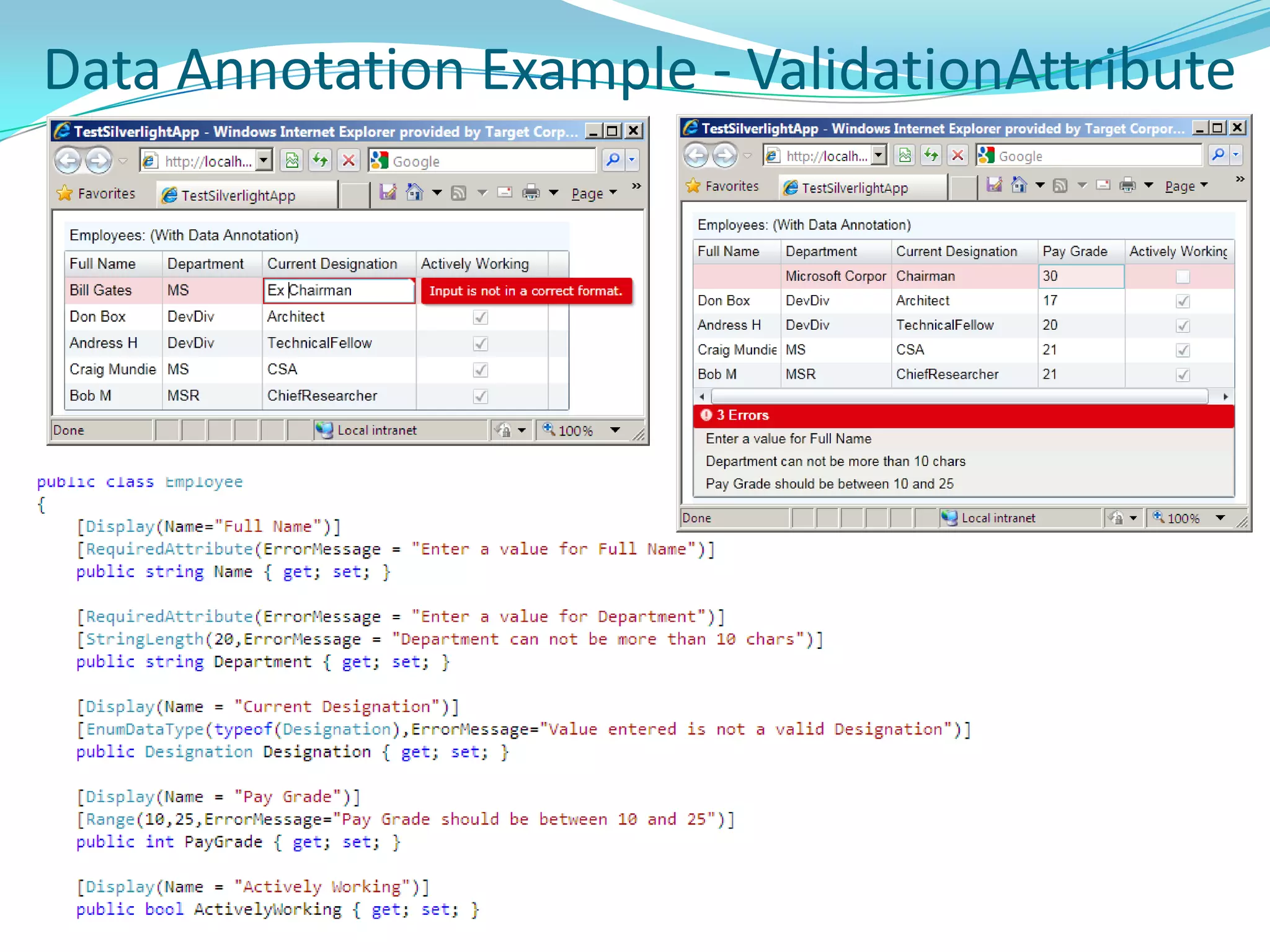
    Supported by smalldownload that installs in seconds
  • 23.
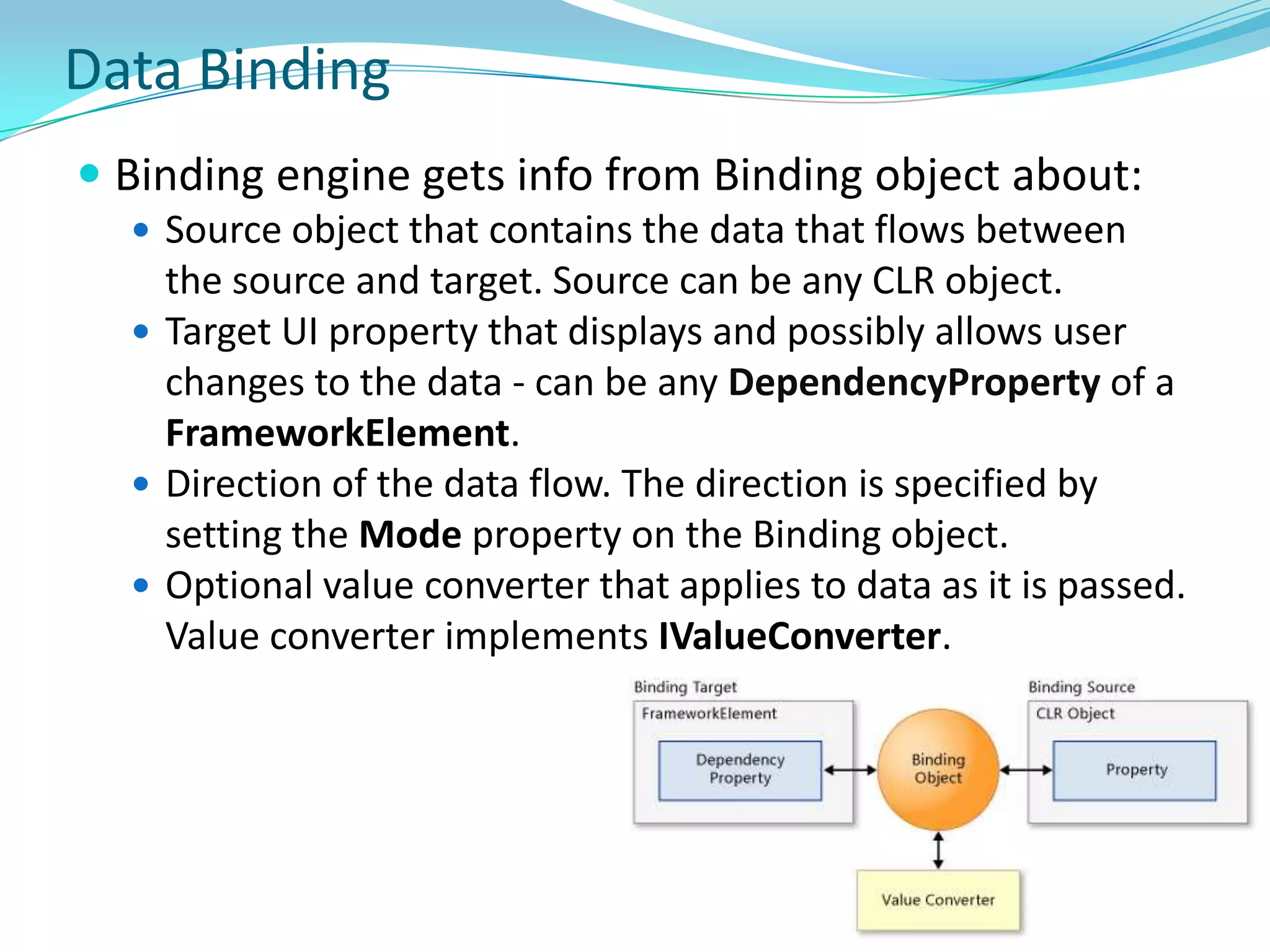
    Subset of WPFand .NET Framework
  • 24.
    Provides compelling graphicsthat users can manipulate directly in browser - drag, turn, zoom. Streams video, audio.
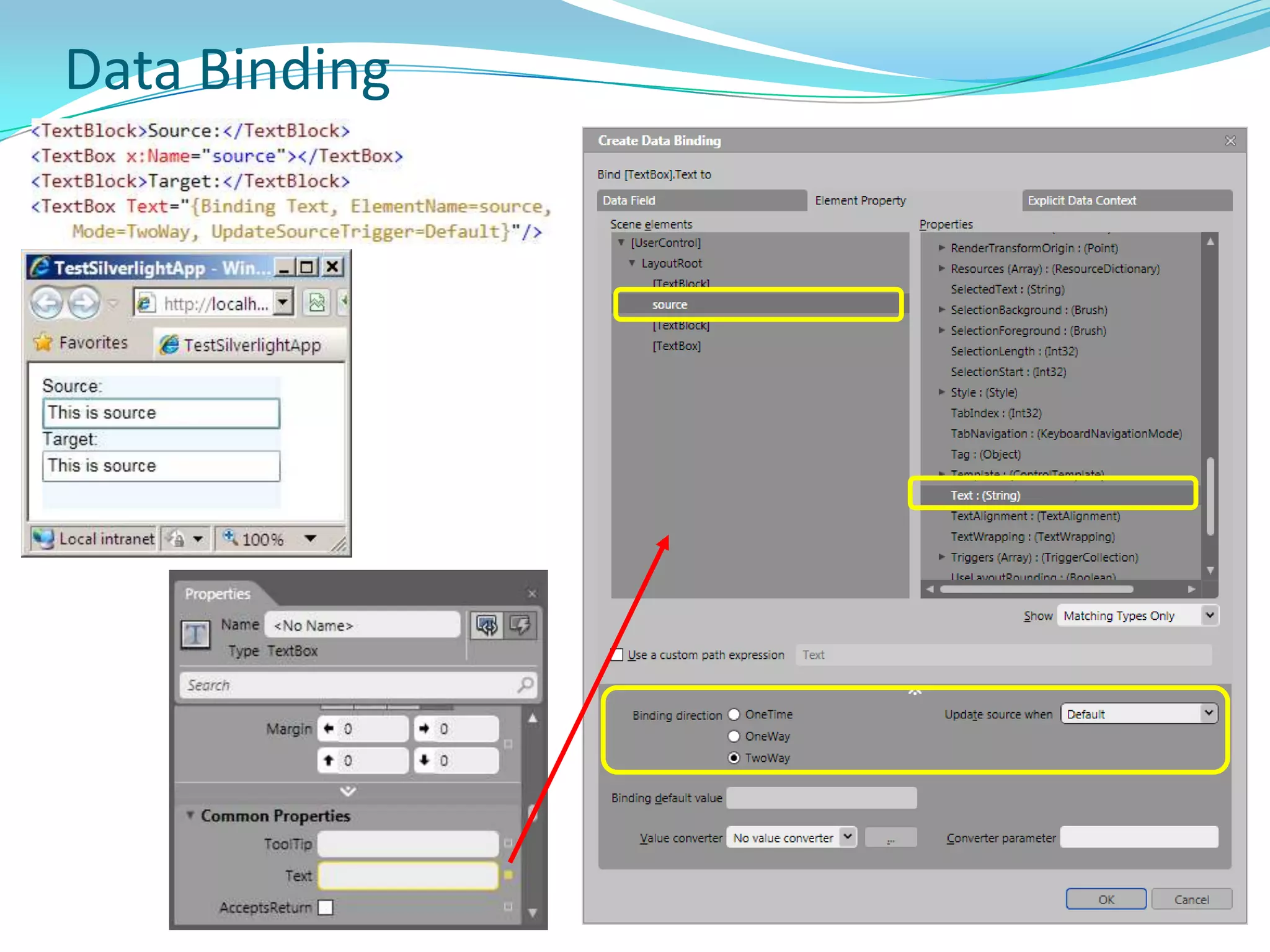
  • 25.
    Reads data andupdates the display without interrupting user by refreshing the whole page.
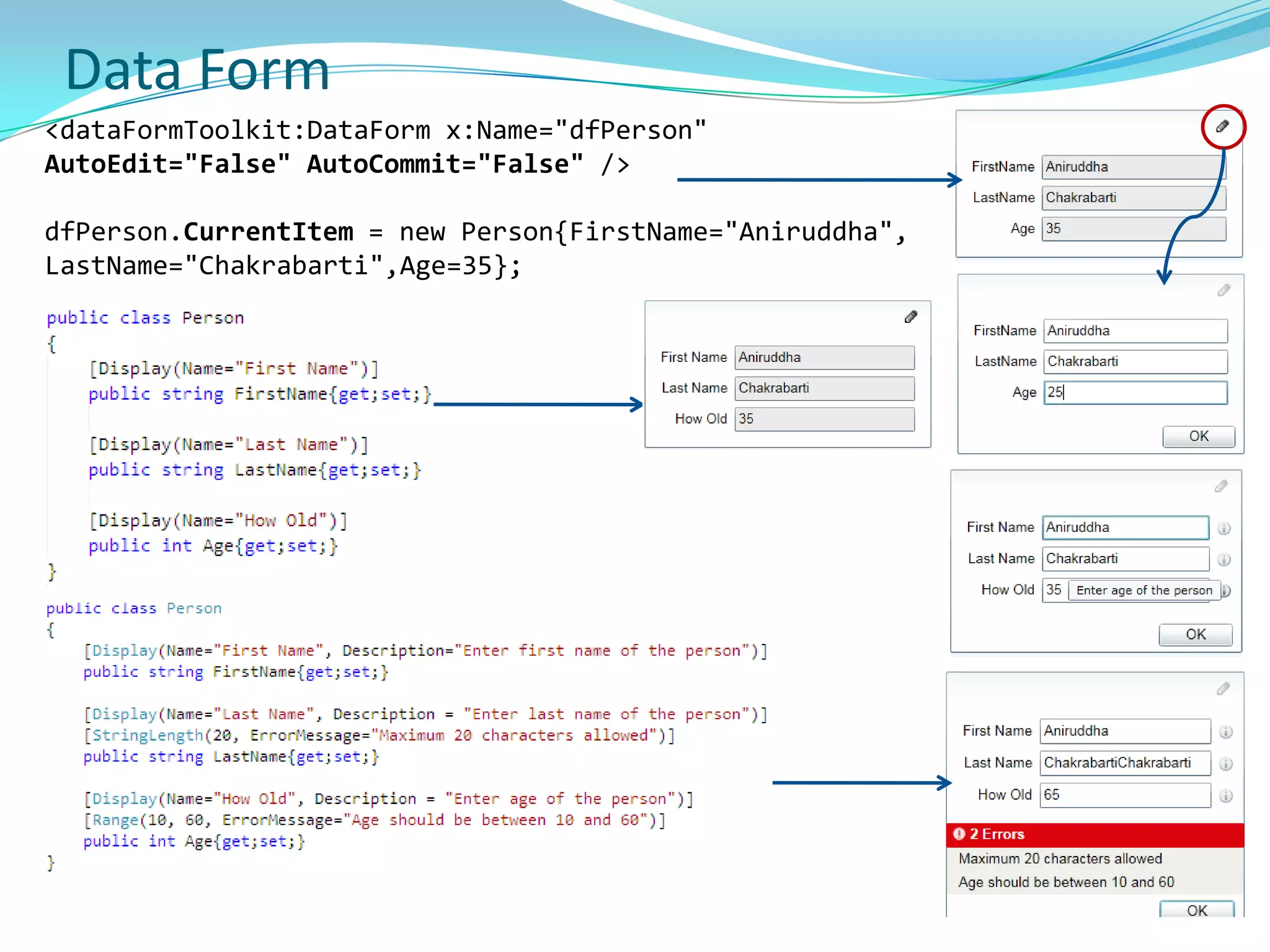
  • 26.
    Supported on multipleplatforms and browsers
  • 27.
    Windows - Win7, Vista, XP, Server 2008, Server 2003, 2000
  • 28.
    Mac - OS10.4.8+ (PowerPC) & OS 10.4.8+ (Intel-based)
  • 29.
    Linux - Supportedon Linux by Mono project (Novel)
  • 30.
    Browsers - IE6/7/8, Firefox 1/2/3, Safari 2/3 (Chrome from S4)History of SilverlightMicrosoft showed first version along with WPF at MIX conference in March 2006 – was then called WPF/E (Windows presentation Foundation Everywhere)
  • 31.
    Was later renamedto Silverlight - Silverlight 1.0 was released in May 2007 at MIX 2007 by Scott G.
  • 32.
    Less no ofUI Controls, No support for .NET (functionality has to be coded in JavaScript), no XAP package
  • 33.
    Silverlight 2.0 wasreleased in October 2008
  • 34.
    Silverlight 3.0 wasreleased in late 2009.
  • 35.
    Silverlight 4.0 wasreleased on April 2010 (soon after .NET 4, Visual Studio 2010 release)Features Supported by SilverlightWPF and XAML - Includes subset of WPF - greatly extends elements in browser. WPF allows immersive graphics, animation, media, and other rich client features, extending browser-based UI possible with HTML. XAML provides a declarative markup syntax for creating elements.
  • 36.
    Extensions to JavaScript- Provides extensions to the universal browser scripting language that provide control over the browser UI, including ability to work with WPF elements.
  • 37.
    Cross-browser, cross-platform support- Runs the same on all popular browsers and on popular platforms.
  • 38.
    Integration with existingapplications - Integrates seamlessly with existing JavaScript and ASP.NET AJAX code to complement existing functionality.
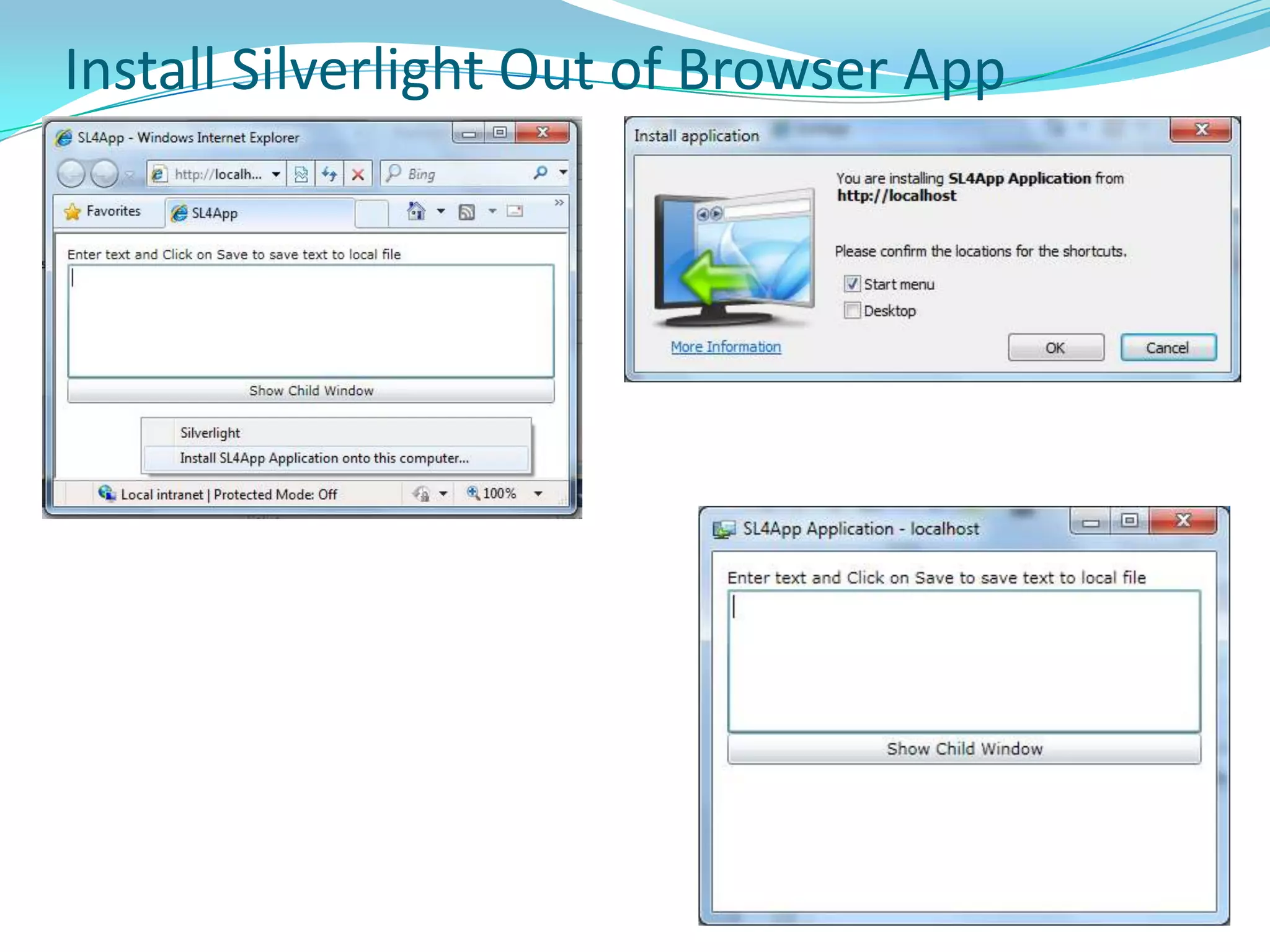
  • 39.
    Access to the.NET Framework programming model – could be created using dynamic languages such as IronPython as well as languages such as C# and VB.
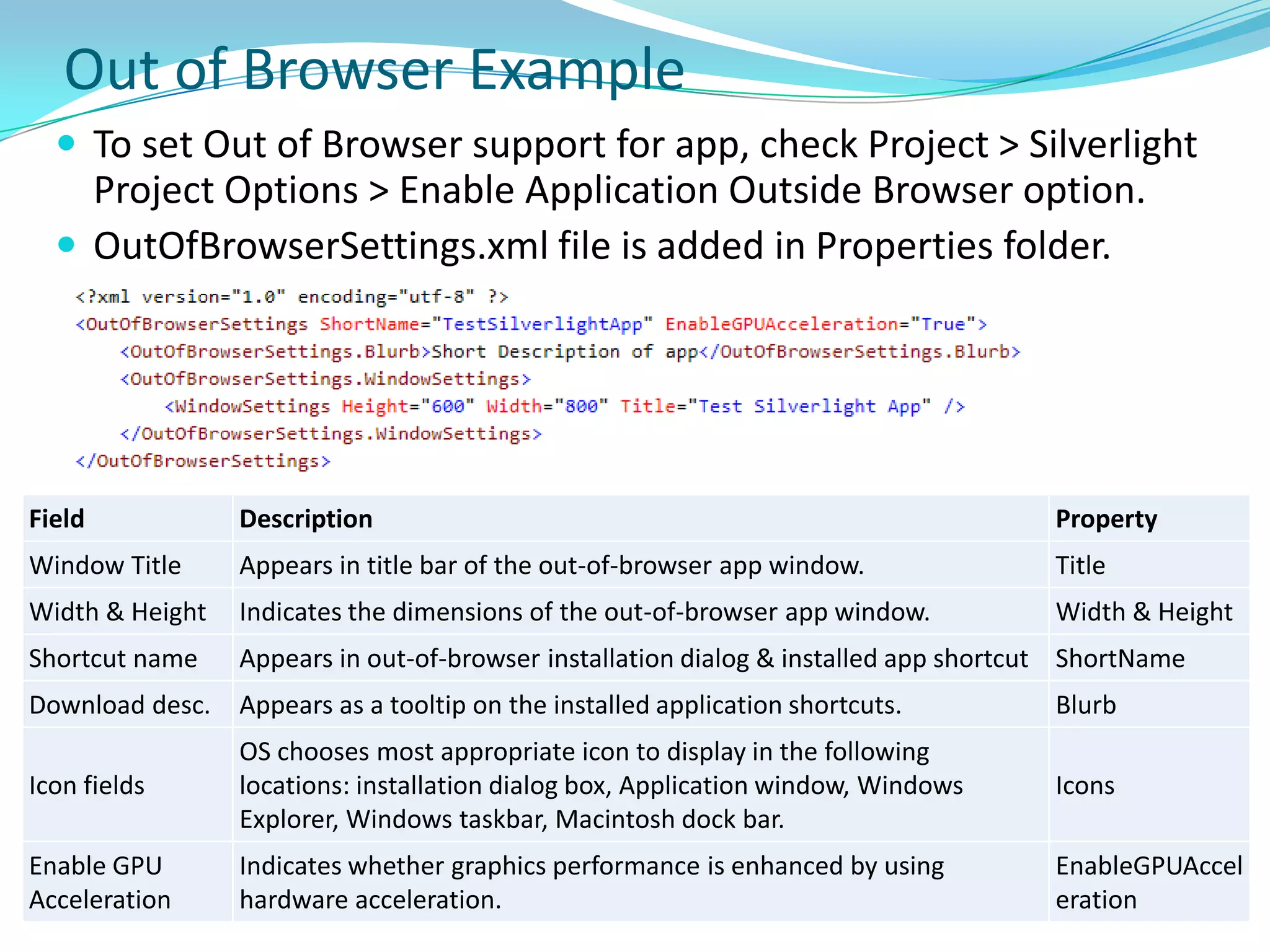
  • 40.
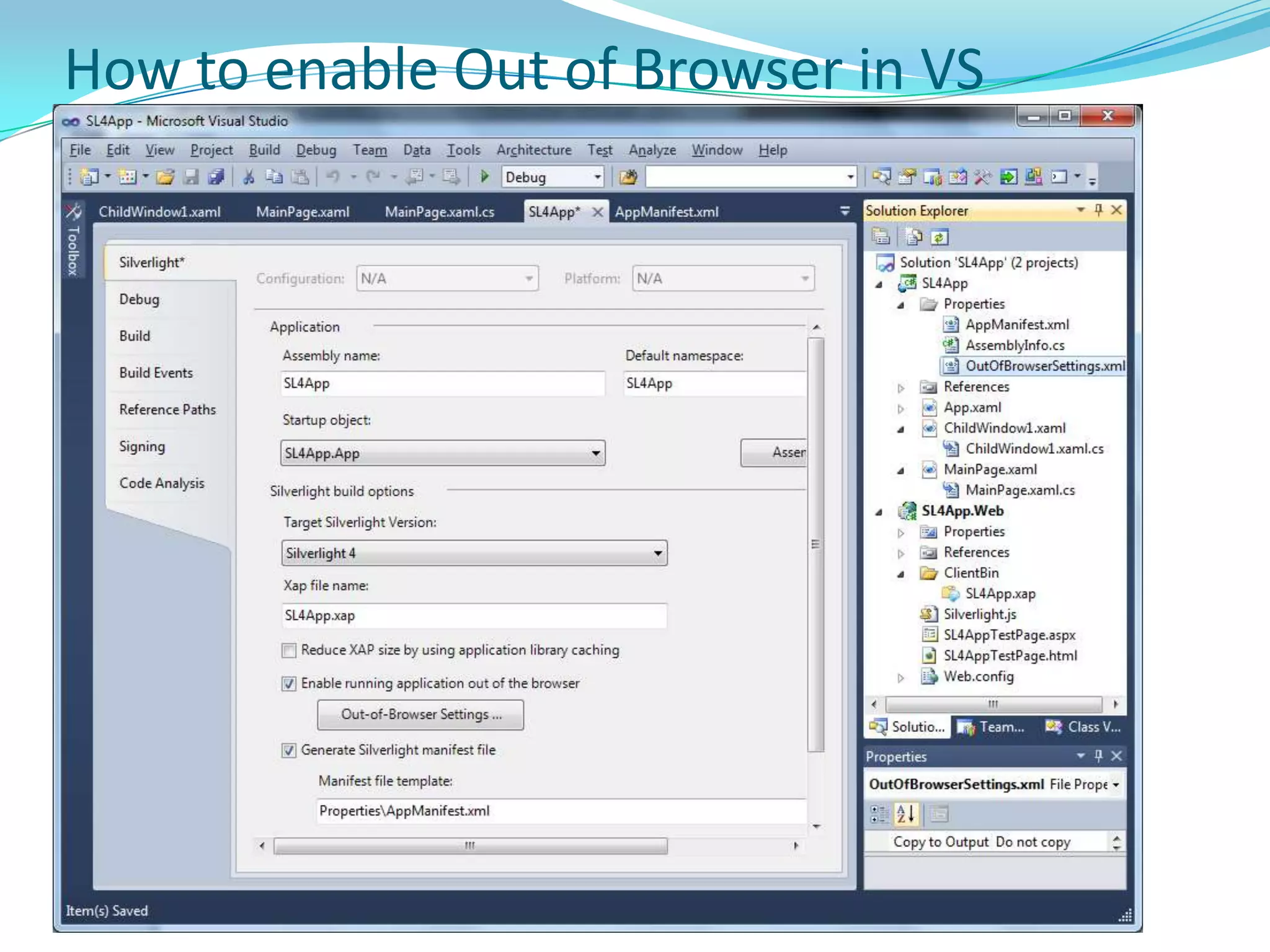
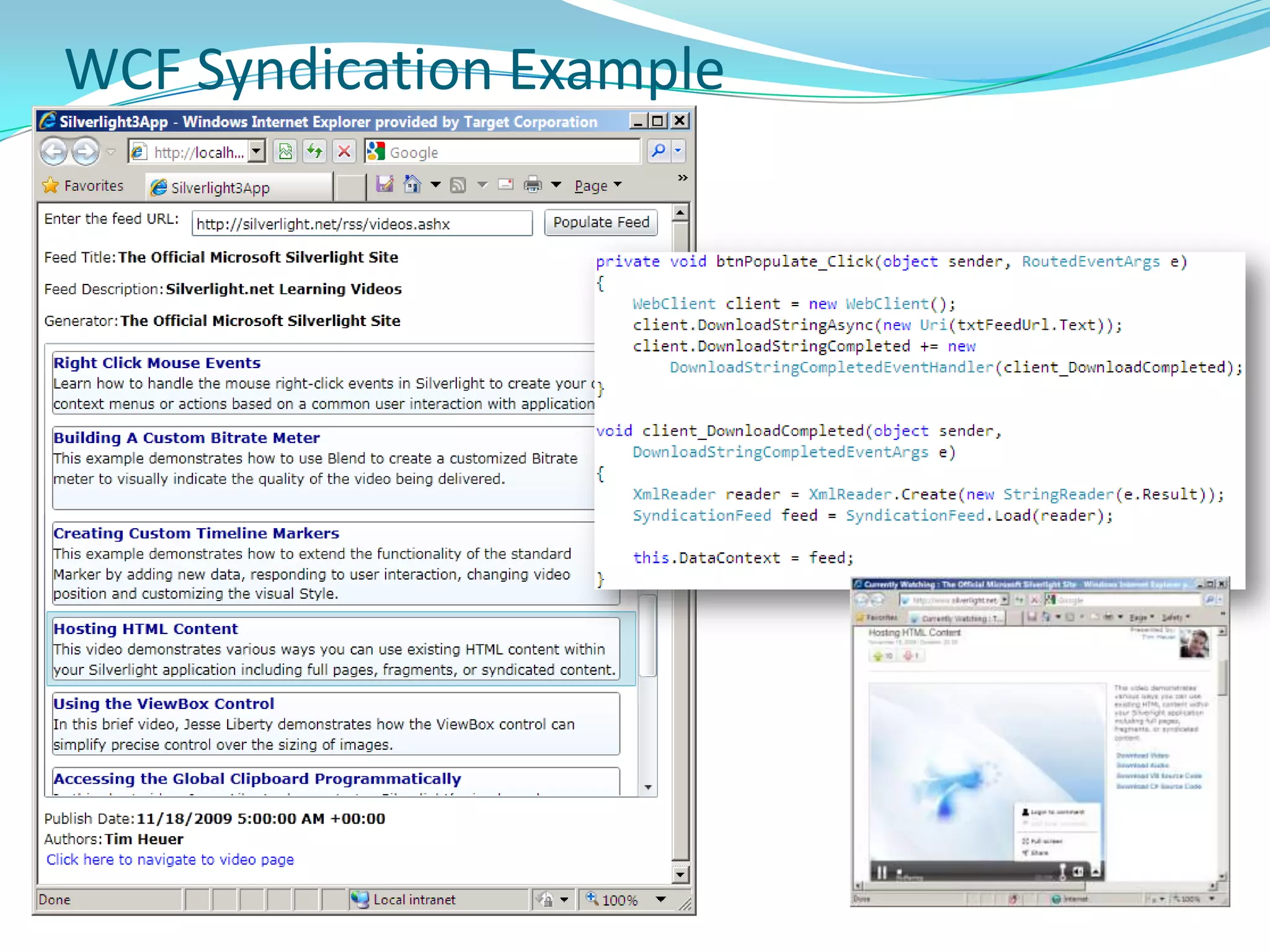
    Networking support -Includes support for HTTP over TCP. You can connect to WCF, SOAP, or ASP.NET AJAX services and receive XML, JSON, or RSS data.
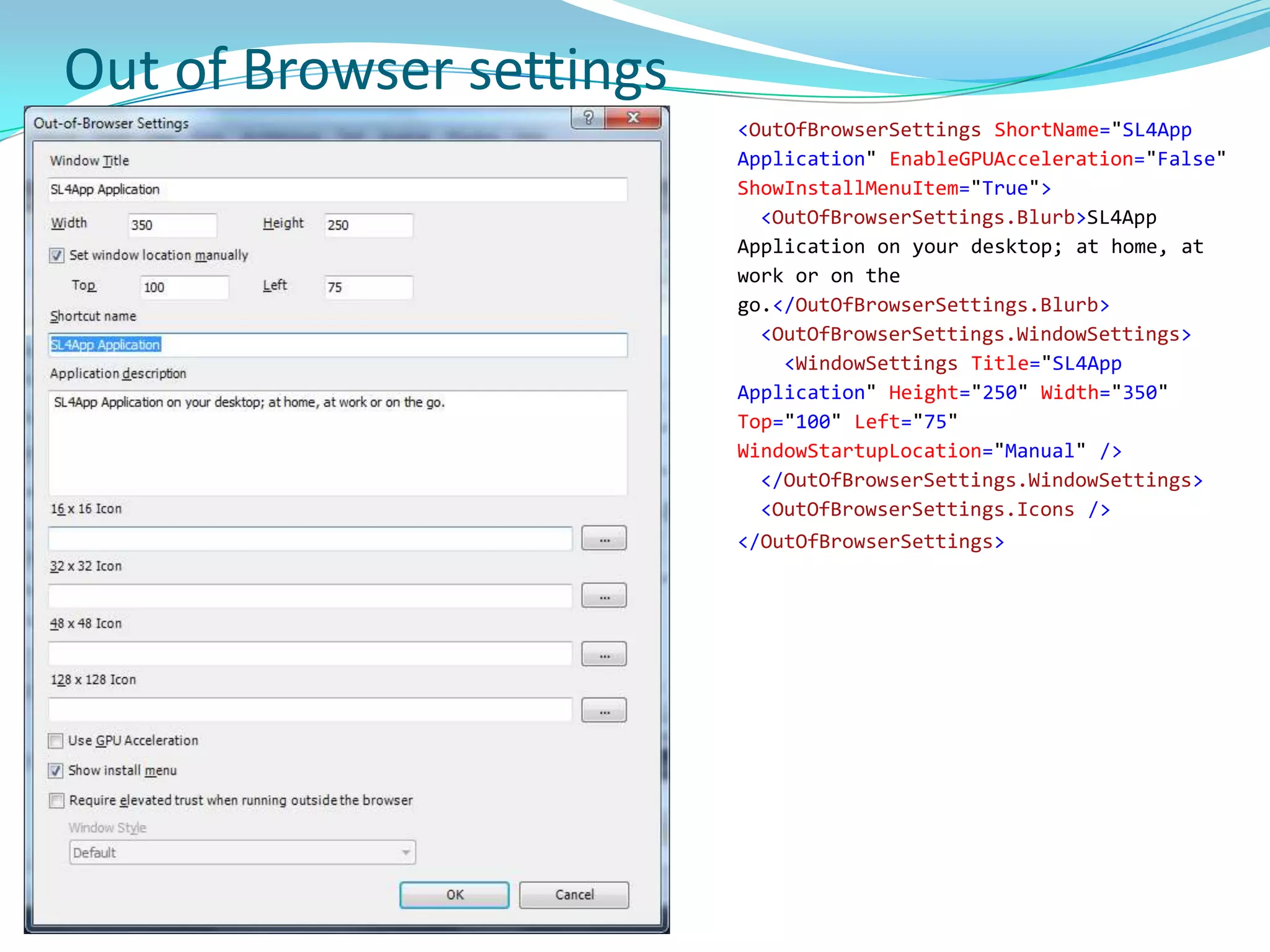
  • 41.
    LINQ – IncludesLINQ – enables to program data access using intuitive native syntax and strongly typed objects in .NET Framework languages. Which UI Platform to useThick ClientWPFXBAP (XAML Browser Apps)Win FormsThin ClientASP.NET Web FormsASP.NET AjaxASP.NET MVCASP.NET Dynamic DataRIASilverlight (with ASP.NET Web Forms)Silverlight (with ASP.NET MVC)Silverlight (with ASP.NET Web Forms/MVC + Ajax)
  • 42.
  • 43.
    Silverlight ArchitectureSilverlight platformas a whole consists of two major parts, plus an installer and update component –
  • 44.
    Core presentation framework- Components and services oriented toward the UI and user interaction, including user input, lightweight UI controls for Web apps, media playback, data binding, vector graphics, text, animation, and images. Also includes XAML for specifying layout.
  • 45.
    .NET Framework forSilverlight - A subset of the .NET Framework that contains components and libraries, including data integration, extensible Windows controls, networking, base class libraries, garbage collection, and CLR.
  • 46.
    Installer and updater- An installation and update control that simplifies the process of installing the application for first-time users, and subsequently provides low-impact, automatic updates. Silverlight Architecture (Cont’d)
  • 47.
    Core Presentation FrameworkSilverlightcore presentation framework is subset of WPF. Provides libraries and utilities necessary to parse Silverlight XAML files, present UI to browser, and handle interaction from user..NET Framework for Silverlight
  • 48.
  • 49.
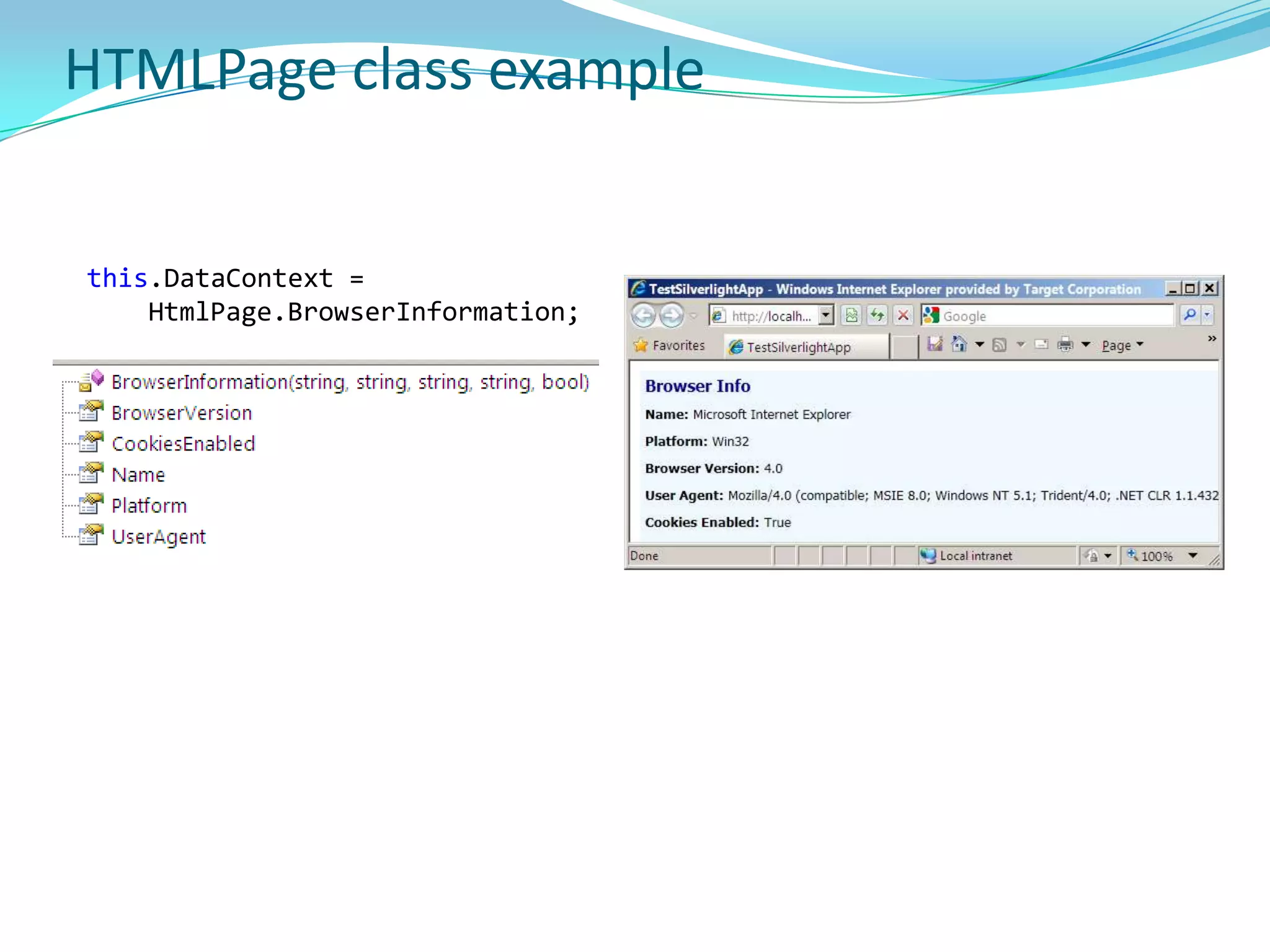
  • 50.
    Silverlight ToolsVisual Studio(with Silverlight Tools for VS 2008/VS2010)
  • 51.
    Silverlight developer runtime– Unlike Silverlight runtime (installed by end users), has error messages for debugging.
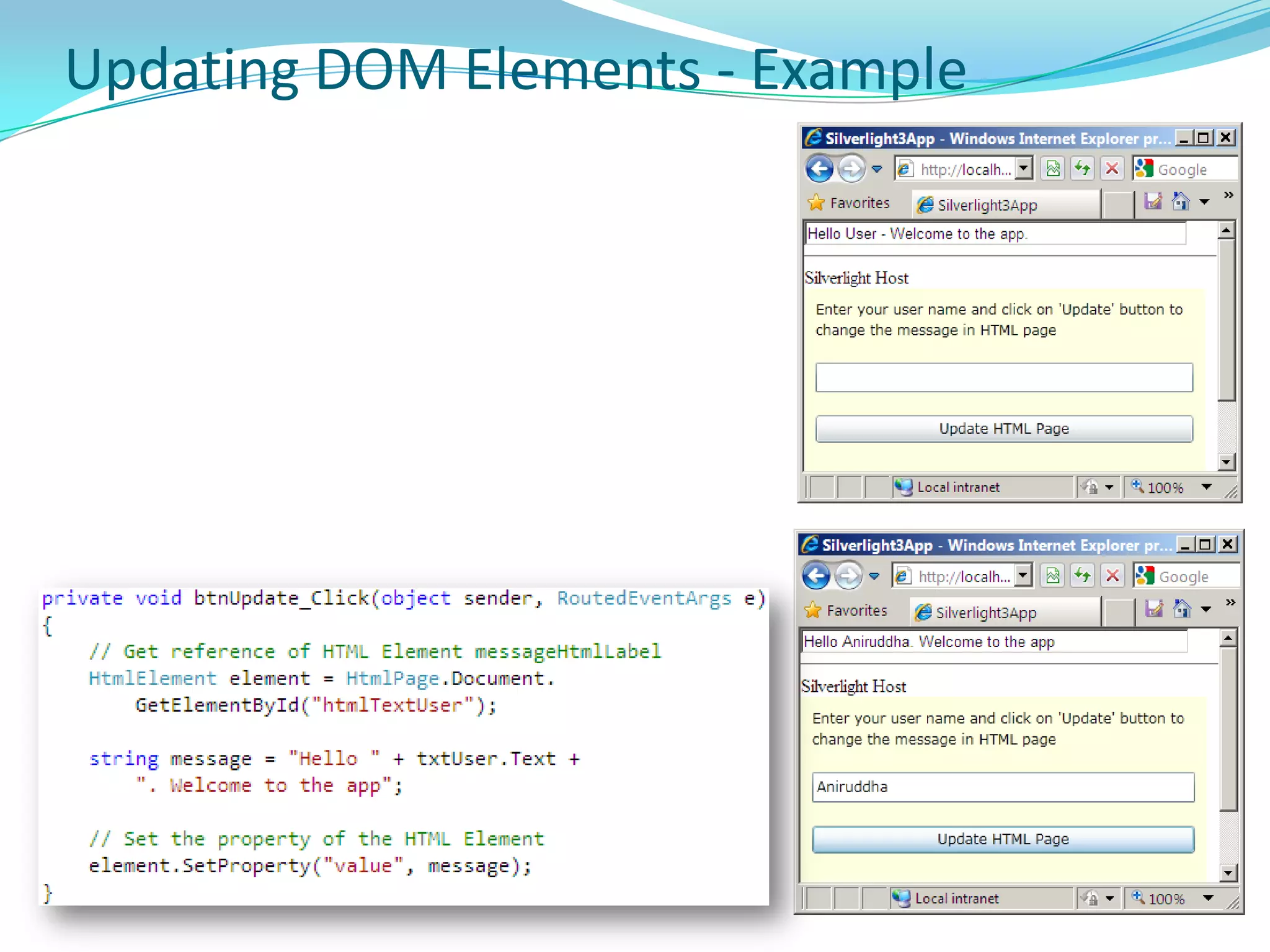
  • 52.
    Silverlight SDK andSilverlight Tools
  • 53.
    Expression BlendCreating newSilverlight Project
  • 54.
  • 55.
    Application and ProgrammingModelProvides two distinct models for app development:Managed API for Silverlight - uses code running on CLR for Silverlight. Could be used with compiled languages (VB, C#) or dynamic languages such (IronPython, IronRuby)JavaScript API for Silverlight - uses JavaScript code interpreted by the browser.Both can not be used at the same time within a single instance of the Silverlight plug-in. However, you can implement a splash screen that uses the JavaScript API and then transitions to the managed API when your application has loaded. Managed API provides significantly more functionality than JavaScript API. Managed API apps have access to lightweight version of .NET Framework. JavaScript API, however, has access only to the Silverlight presentation core and the browser JavaScript engine.
  • 56.
    Managed Programming &Application ModelManaged API enables you to bundle managed assemblies and resource files into application package (.xap) files. Silverlight plug-in is responsible for loading an application package and extracting its contents. Application package must contain an assembly with a class derived from Application. Application class encapsulates interaction between appand the Silverlight plug-in. Also provides application lifetime events & resource management. Silverlight documentation uses “application model” to refer to application packaging and the common functionality encapsulated by the Application class.
  • 57.
    Application ClassApplication classencapsulates services commonly required by Silverlight-based app, like life-cycle event notification and interaction with Silverlight plug-in.
  • 58.
  • 59.
  • 60.
  • 61.
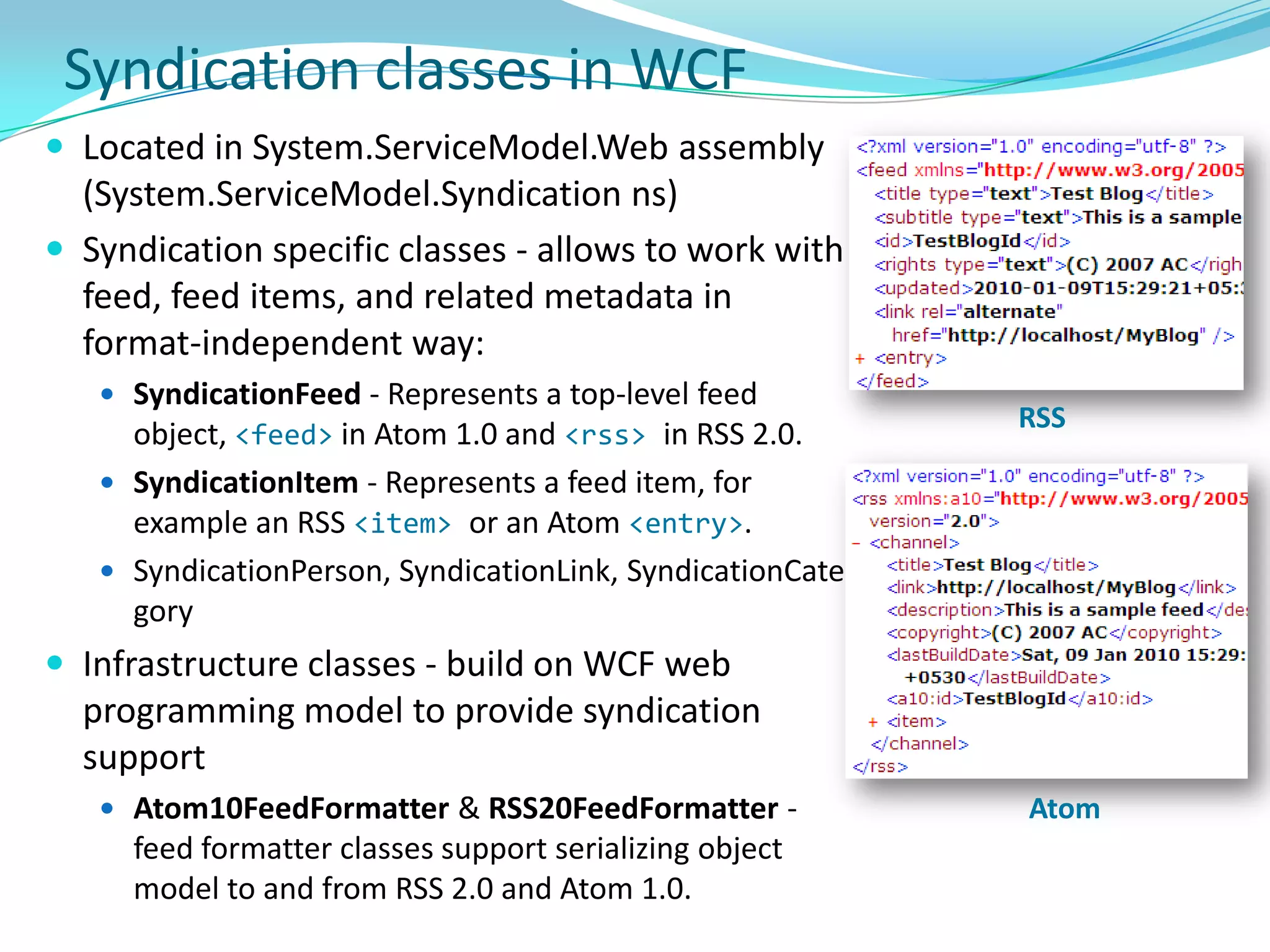
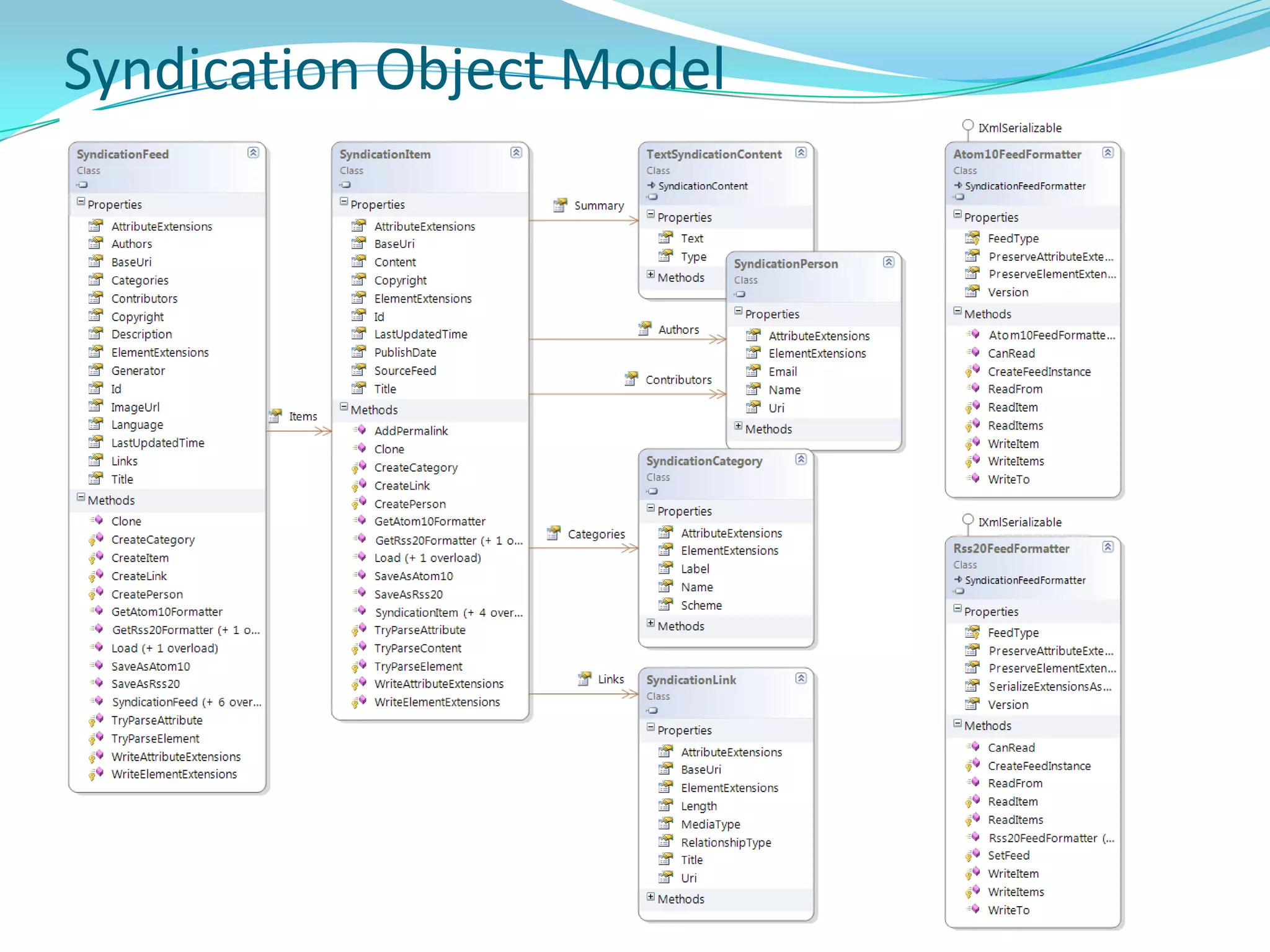
    Current: Returns thecurrent application object.
  • 62.
    Host: Allows codeto interact directly with the Silverlight plug-in that hosts it.
  • 63.
    RootVisual: To displaythe application UI, RootVisual is set at Startup event handler (represents the entry point of application code in the Silverlight plug-in life cycle).Application Class Exampale
  • 64.
    Application StructureSilverlight appsare deployed as .xap package (xaml app package)An application package is a zip file (compressed using the Deflate algorithm) that has a .xap file extension.For Silverlight-based apps using the managed API, build process generates an application package.While embedding Silverlight plug-in in web page, specify app package that the plug-in should download. Plug-in uses a manifest file in application package to identify the application class to instantiate. This class is known as the entry point of your application, and it must derive from the Application class.
  • 65.
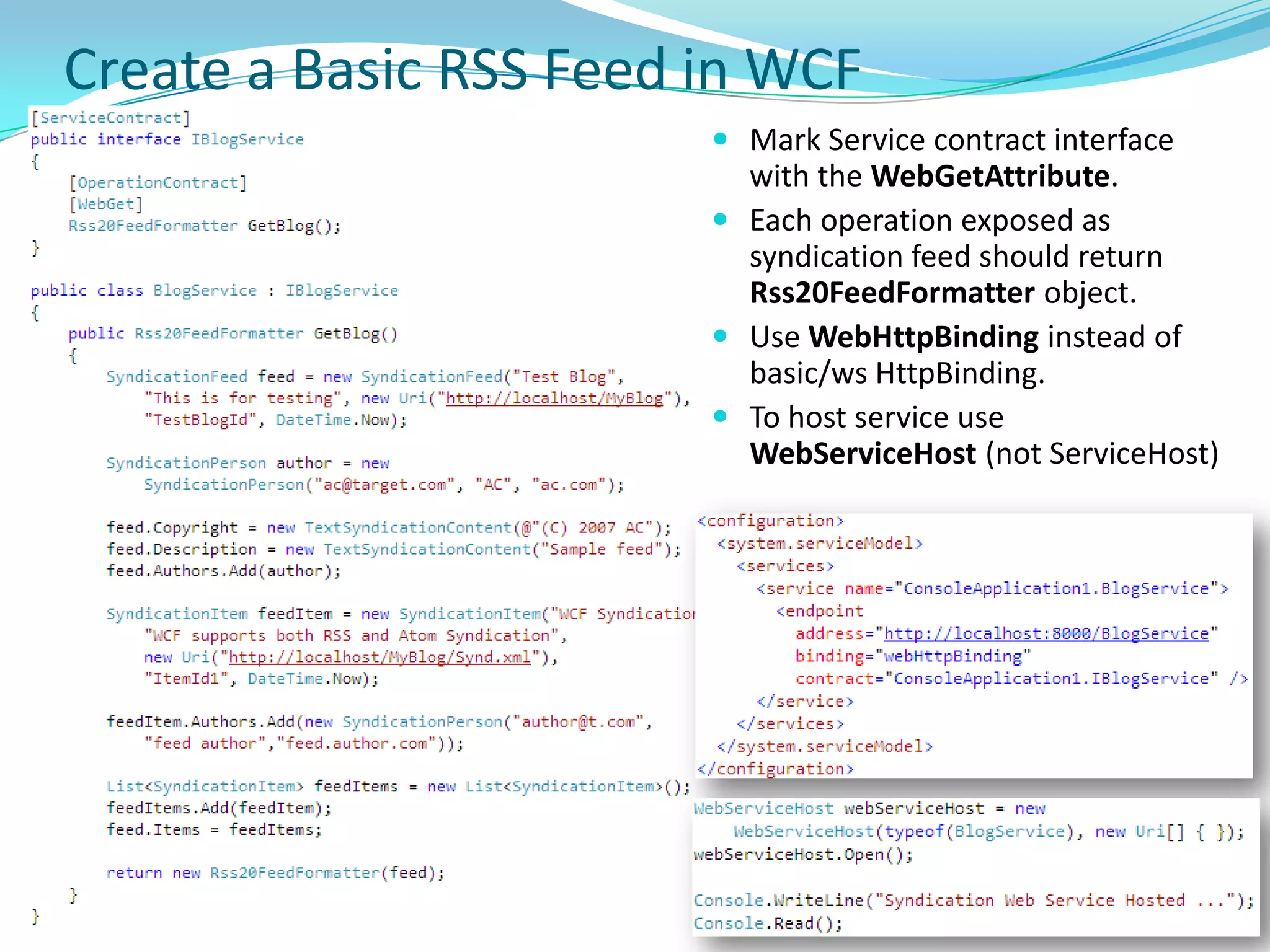
  • 66.
    XAP PackageA XAPApp package contains the following - One AppManifest.xaml file, which identifies the packaged assemblies and the application entry point. One application assembly, which includes your application class.Zero or more library assemblies.Zero or more loose resource files, such as images or video files.
  • 67.
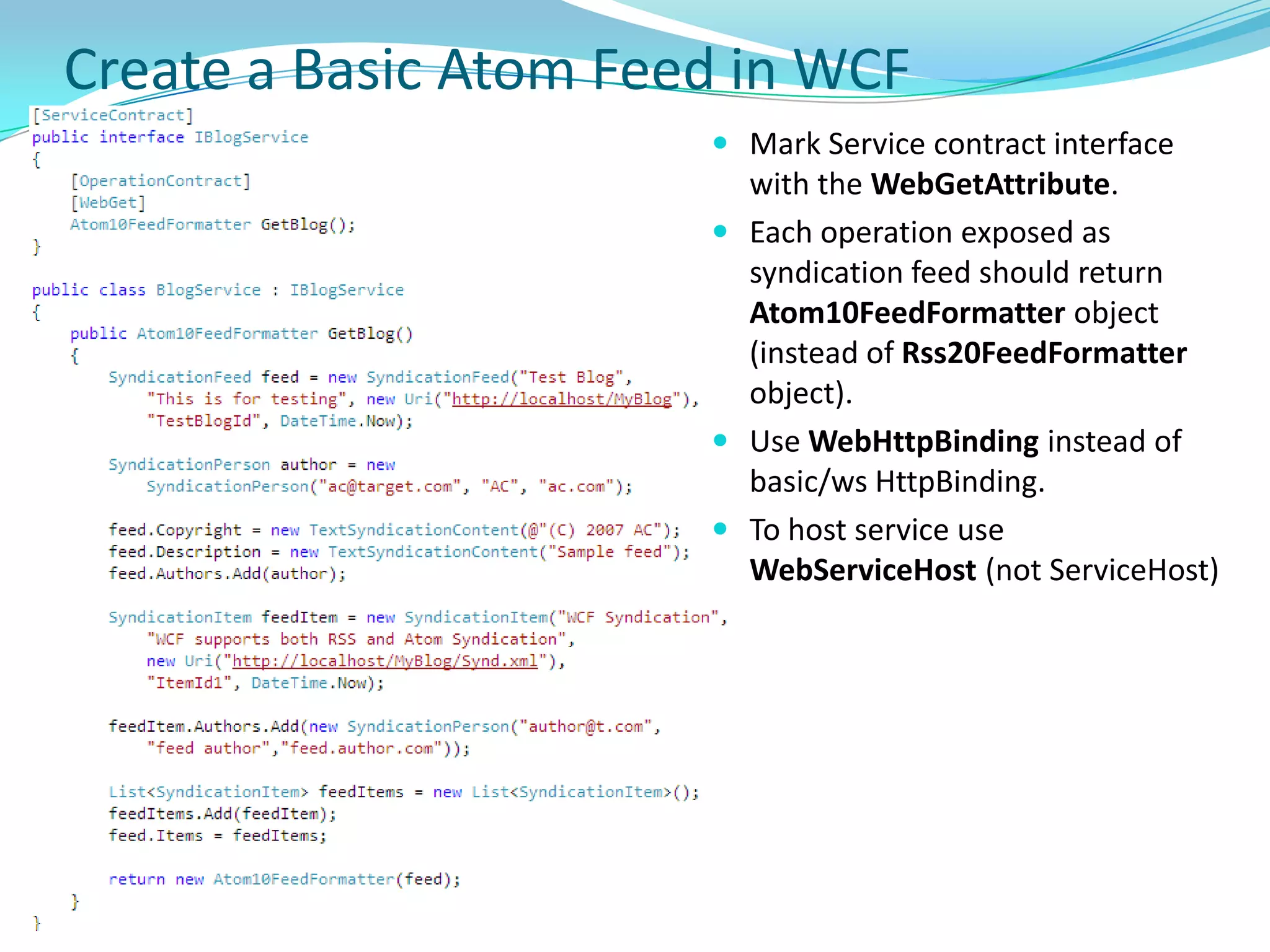
    Application Manifest<Deployment xmlns="http://schemas.microsoft.com/client/2007/deployment"xmlns:x="http://schemas.microsoft.com/winfx/2006/xaml" EntryPointAssembly="Silverlight3App" EntryPointType="Silverlight3App.App" RuntimeVersion="3.0.40818.0"> <Deployment.Parts> <AssemblyPart x:Name="Silverlight3App" Source="Silverlight3App.dll" /> </Deployment.Parts></Deployment>AppManifest.xaml file is typically generated by build process, and uses XAML markup to declare a Deployment object.EntryPointAssembly and EntryPointType attributes to identify the application entry point. RuntimeVersion attribute to identify required version of Silverlight.
  • 68.
  • 69.
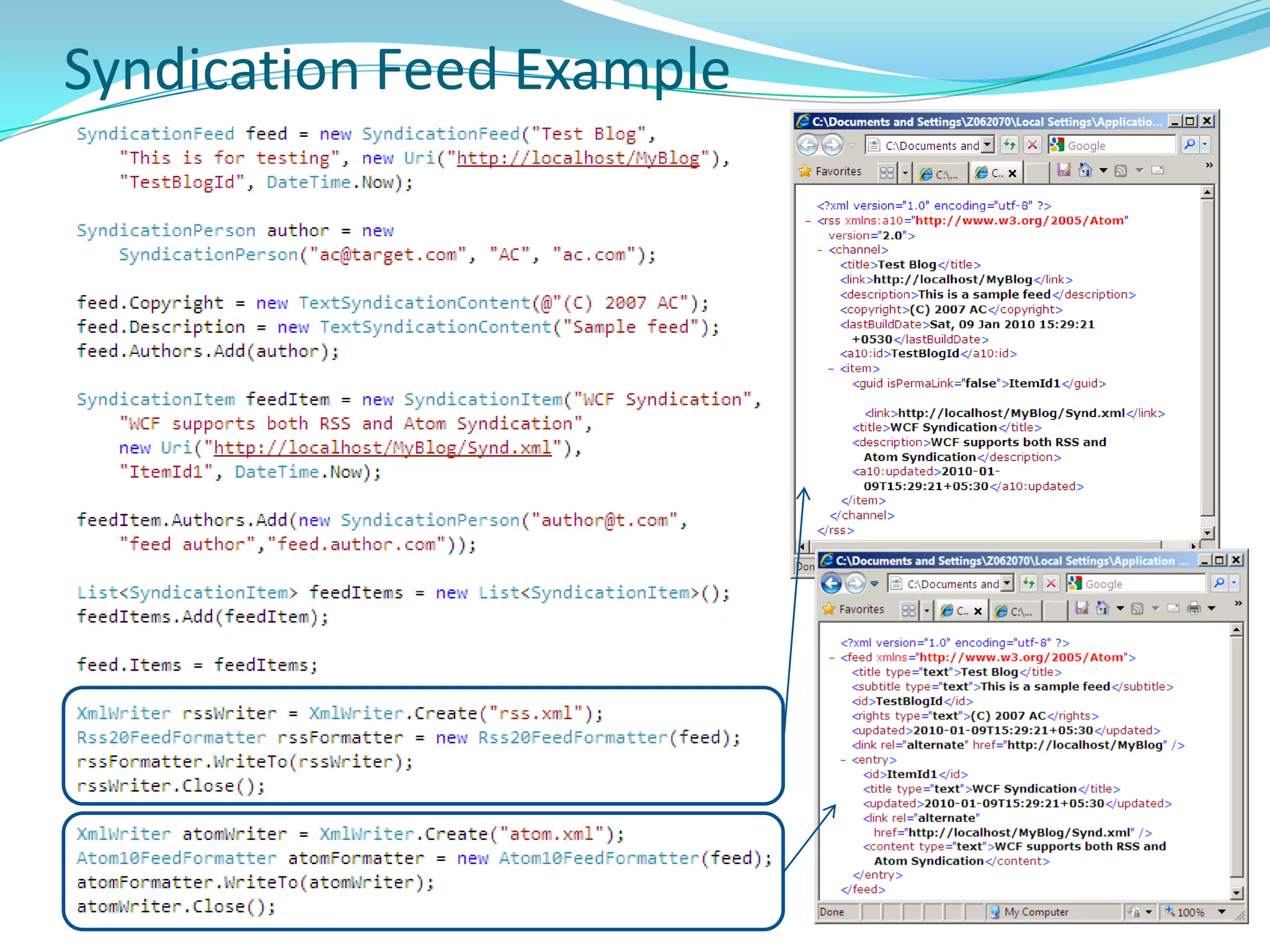
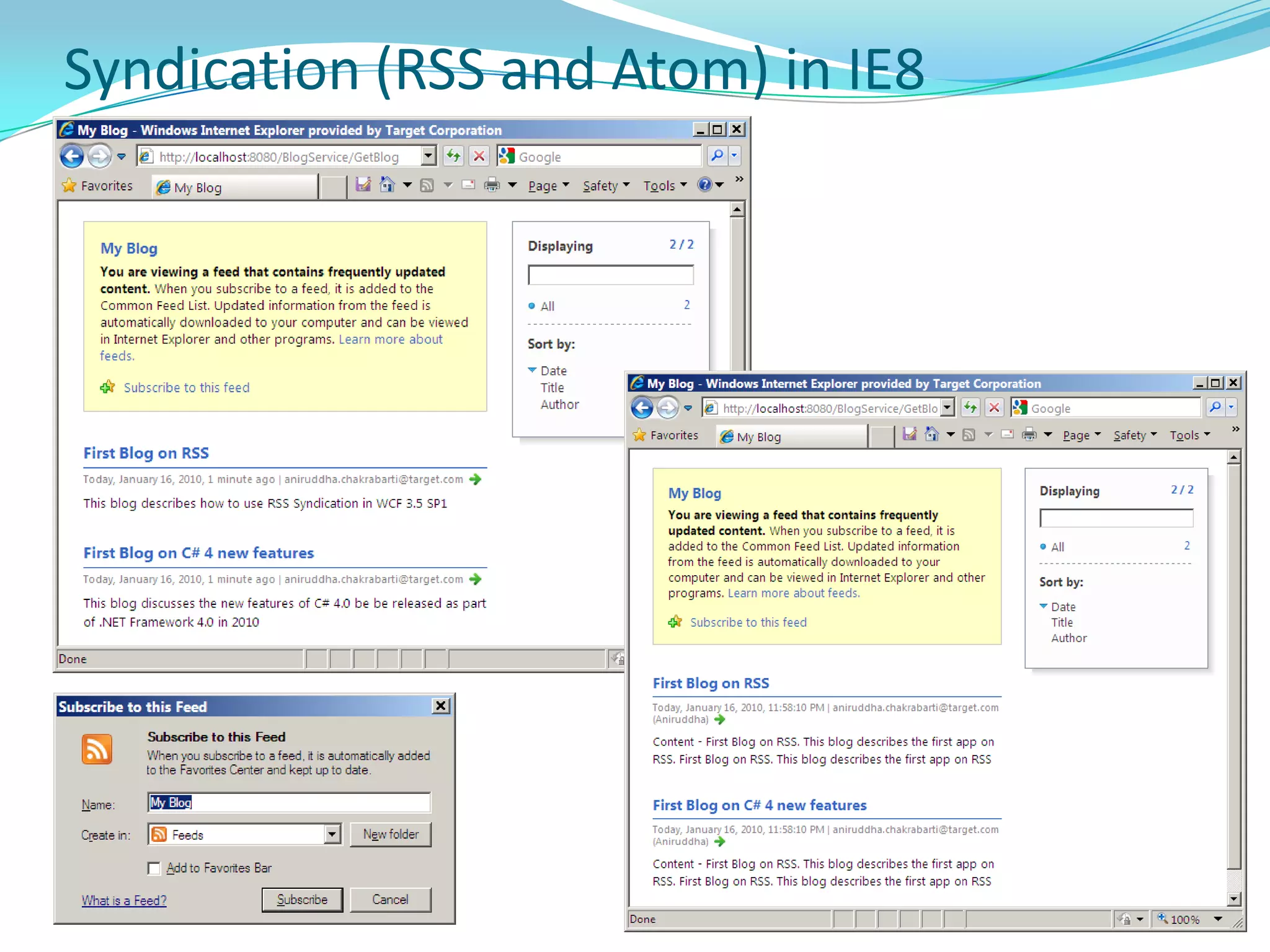
  • 70.
    .NET Framework AssembliesSilverlight- C:\Program Files\Reference Assemblies\Microsoft\Framework\Silverlight\v3.0
  • 71.
    Silverlight SDK -C:\Program Files\Microsoft SDKs\Silverlight\v3.0\Libraries\Client.NET Framework for SilverlightCore CLR: Core part of CLR customized for RIA
  • 72.
    Small BCL: Smallpart of Base Class Library customized for RIAControls
  • 73.
  • 74.
  • 75.
  • 76.
  • 77.
  • 78.
  • 79.
  • 80.
  • 81.
  • 82.
  • 83.
  • 84.
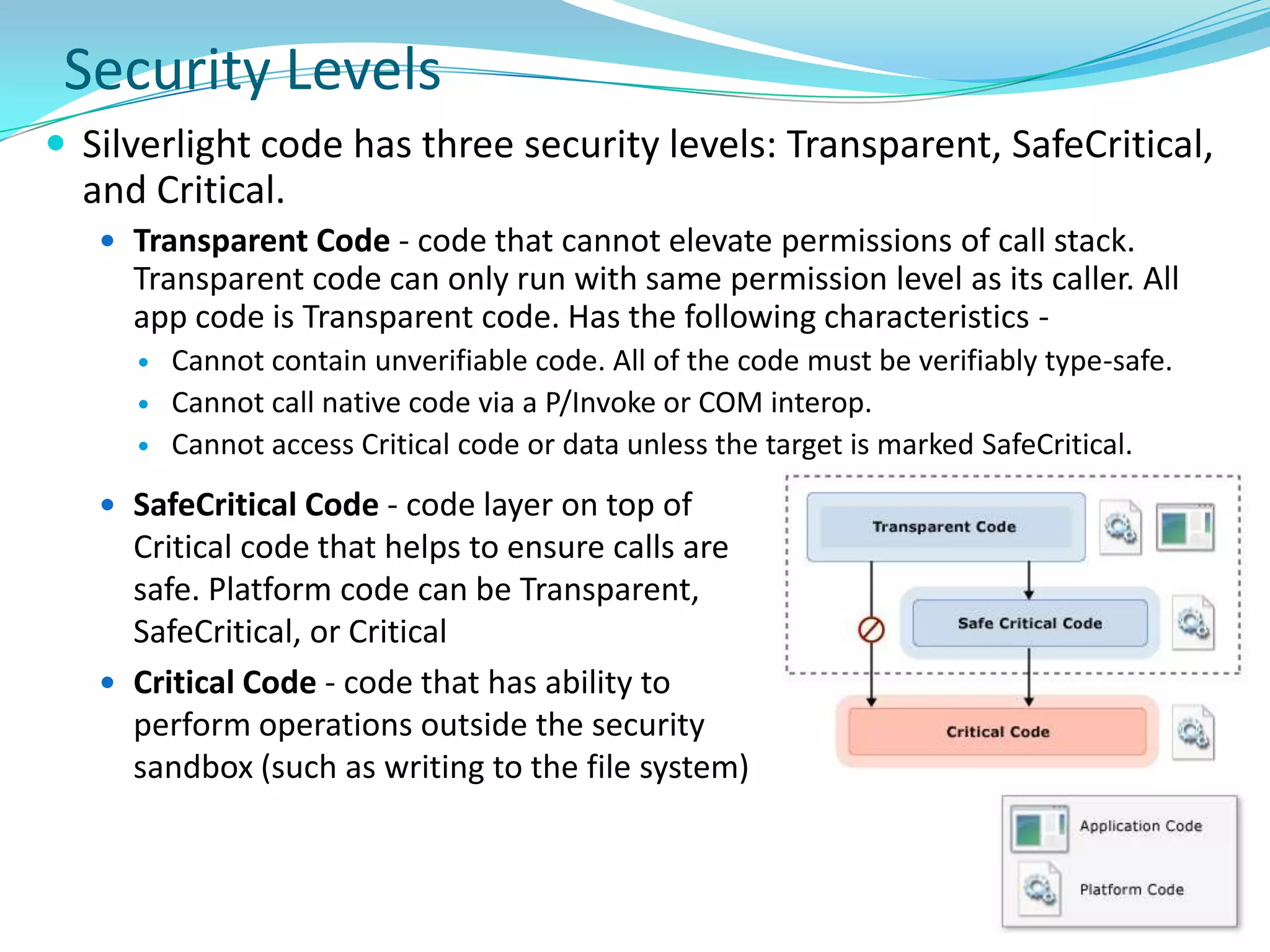
  • 85.
    Silverlight Controls (Image,Audio, Video)HyperlinkButton
  • 86.
  • 87.
  • 88.
  • 89.
  • 90.
  • 91.
  • 92.
  • 93.
  • 94.
  • 95.
  • 96.
    ValidationSummary (similar toASP.NET)xmlns:dataInput="clr-namespace:System.Windows.Controls; assembly=System.Windows.Controls.Data.Input"<input:AutoCompleteBox/>
  • 97.
    Not Supported ControlsSilverlightdoes not support these controls
  • 98.
  • 99.
  • 100.
    Layout SystemSilverlight plug-indefines area that Silverlight-based appis displayed in – Embed plug-in in a host HTML page; Either position plug-in somewhere inline in HTML page display or have plug-in take up entire HTML page. Two frames of reference when positioning Silverlight objects: Within the plug-in: Position objects on the Silverlight surface within the plug-in’s bounding box. Most of the layout overviews describe this type of positioning.Within the HTML: The entire plug-in and all the objects positioned within it are subject to where you place the plug-in in HTML.
  • 101.
    Layout related propertiesMargin(of type Thickness)Padding (of type Thickness)HorizontalAlignmentLeft, Right, Center (Default), StretchVerticalAlignmentBottom, Top, Center (Degault), StretchHorizontalContentAlignmentLeft, Right, Center (Default), StretchVerticalContentAlignmentBottom, Top, Center (Degault), StretchZindix (for Canvas only)MarginPaddingMarginPadding<Button Height="120" Width="180" Content="Hello"Margin="50" Padding="40" /><Button Height="120" Width="180" Content="Hello"Margin="20,40,60,80" Padding="10,30,50,70" />
  • 102.
    Alignment Example<StackPanel x:Name="LayoutRoot"Background="LightBlue" Height="100"><Button Height="40" Width="90" Content="Hello"></Button></StackPanel><Grid x:Name="LayoutRoot" Background="LightBlue" Height="100"><Button Height="40" Width="90" Content="Hello"HorizontalAlignment="Right"VerticalAlignment="Bottom"> </Button></Grid><Grid x:Name="LayoutRoot" Background="LightBlue" Height="130"><Button Height="120" Width="180" Content="Hello"></Button></Grid><Grid x:Name="LayoutRoot" Background="LightBlue" Height="130"><Button Height="120" Width="180" Content="Hello"HorizontalContentAlignment="Right"VerticalContentAlignment="Bottom"></Button></Grid>
  • 103.
    Layout with Panels- CanvasSimplest among the Panels
  • 104.
    Positions child elementsbased on absolute positions.
  • 105.
    Uses Canvas.Left, .Topand .Zindex (determines the z-order of the element) attached property for positioning
  • 106.
    z-order of anobject determines whether the object is in front of or behind another overlapping object.
  • 107.
    By default, thez-order of objects within a Panel is determined by the sequence in which they are declared.
  • 108.
    This behavior canbe changed by setting Canvas.ZIndex attached property on objects within the Panel.Layout with Panels - StackPanelStacks child elements one after another
  • 109.
    Setting Orientation =Horizontalstacks elements horizontally. This is the default behavior.
  • 110.
    Setting Orientation =Vertical stacks elements vertically.Orientation = VerticalOrientation = Horizontal
  • 111.
    Layout with Panels- GridGrid is the most powerful Panel available – provides complete freedom to developer.
  • 112.
    Does not supportWrapPanel (unlike WPF)Layout (Continued)ScrollViewer
  • 113.
  • 114.
  • 115.
  • 116.
  • 117.
  • 118.
  • 119.
  • 120.
    GroupTransformTransform Example <Button Margin="10,20,50,50">Scale Transform<Button.RenderTransform><ScaleTransformScaleX="1.5"ScaleY="1.5" /></Button.RenderTransform></Button><Button>Rotate Transform<Button.RenderTransform><RotateTransform Angle="-5" /></Button.RenderTransform></Button><Button>Skew Transform<Button.RenderTransform><SkewTransformAngleX="30"AngleY="5" /></Button.RenderTransform></Button> <Button>Translate Transform<Button.RenderTransform><TranslateTransform X="20" Y="40" /></Button.RenderTransform></Button>
  • 121.
    Transform Group Example<StackPanelVerticalAlignment="Top"Margin="10" x:Name="LayoutRoot"><Button Margin="50">Group Transform<Button.RenderTransform><TransformGroup><ScaleTransformScaleX="1.5"ScaleY="1.5" /><RotateTransform Angle="-5" /></TransformGroup></Button.RenderTransform></Button></StackPanel>
  • 122.
  • 123.
  • 124.
  • 125.
    WebBrowserBrush (new inSL4)Gradient Brush Example <TextBox Background="LightBlue" Height="40" Text="Solid Color Brush"></TextBox><TextBox Height="40" Text="Solid Color Brush"><TextBox.Background><SolidColorBrush Color="LightGreen"></SolidColorBrush></TextBox.Background></TextBox><TextBox Height="40" Text="Linear Gradient Brush"><TextBox.Background><LinearGradientBrush><GradientStop Color="Yellow" Offset="0" /><GradientStop Color="Red" Offset="1" /></LinearGradientBrush></TextBox.Background></TextBox> <TextBox Height="80" Text="Radial Gradient Brush"><TextBox.Background><RadialGradientBrush><GradientStop Color="White" Offset="0" /><GradientStop Color="Blue" Offset=".5" /><GradientStop Color="LightSalmon" Offset="1.5" /></RadialGradientBrush></TextBox.Background></TextBox>
  • 126.
    Image Brush Example <TextBox Height="300" Width="400"FontSize="20" Foreground="White"><TextBox.Background><ImageBrushImageSource="Chikmagalur049.JPG"></ImageBrush></TextBox.Background></TextBox> 
  • 127.
    Video Brush Example<MediaElement x:Name="videoMediaElement" Source="Wildlife.wmv" Visibility="Collapsed" /><TextBox Height="300" Width="400"FontSize="20" Foreground="LightYellow" Text="This is using Video Brush"><TextBox.Background><VideoBrushSourceName="videoMediaElement" /></TextBox.Background></TextBox> 
  • 128.
  • 129.
    Shapes Example<Line Stroke="Red"StrokeThickness="2"X1="10" Y1="5" X2="270" Y2="5" /><Polyline Points="100,10 10,10 10,50 100,50 250,30" Stroke="Black"StrokeThickness="5" /><Rectangle Height="50" Margin="20" Fill="LightBlue" Stroke="Black"StrokeThickness="2"></Rectangle><Ellipse Height="50" Fill="LightGreen" Stroke="Black"StrokeThickness="5" /> <Polygon Points="30,20 50,100 10,100 30,20" Stroke="Red" Fill="LightCyan"StrokeThickness="5" />
  • 130.
    Pixel Shader EffectBlurEffectDrop Shadow Effect<Button Margin="20"FontSize="20">Drop Shadow Effect<Button.Effect><DropShadowEffect Color="Blue"BlurRadius="10" /></Button.Effect></Button><Button Margin="20"FontSize="20">Blur Effect<Button.Effect><BlurEffect Radius="4" /></Button.Effect></Button>
  • 131.
  • 132.
  • 133.
  • 134.
  • 135.
  • 136.
  • 137.
  • 138.
  • 139.
  • 140.
    Dock PanelChild Window<controls:ChildWindowx:Class="SL4App.ChildWindow1"xmlns="http://schemas.microsoft.com/winfx/2006/xaml/presentation"xmlns:x="http://schemas.microsoft.com/winfx/2006/xaml"xmlns:controls="clr-namespace:System.Windows.Controls;assembly=System.Windows.Controls" Width="400" Height="300" Title="ChildWindow"><Grid x:Name="LayoutRoot" Margin="2"><Grid.RowDefinitions><RowDefinition /><RowDefinition Height="Auto" /></Grid.RowDefinitions> <Button x:Name="CancelButton" Content="Cancel" Click="CancelButton_Click" Width="75" Height="23"HorizontalAlignment="Right" Margin="0,12,0,0"Grid.Row="1" /><Button x:Name="OKButton" Content="OK" Click="OKButton_Click" Width="75" Height="23"HorizontalAlignment="Right" Margin="0,12,79,0"Grid.Row="1" /><StackPanelHorizontalAlignment="Center"VerticalAlignment="Center"><TextBlock>This is a child window</TextBlock><TextBox></TextBox><CheckBox>CheckBox</CheckBox></StackPanel></Grid></controls:ChildWindow>ChildWindow1 child = newChildWindow1();child.Show();
  • 141.
  • 142.
  • 143.
    Resources are storedin ResourceDictionary
  • 144.
    Resource property isdefined in FrameworkElement, so each class deriving from it can store resources.
  • 145.
    Could be storedin Page or in App.xaml
  • 146.
    Only StaticResource MarkupExtenstion is supported, DynamicResource is not supported .Resource, Style and Template
  • 147.
  • 148.
  • 149.
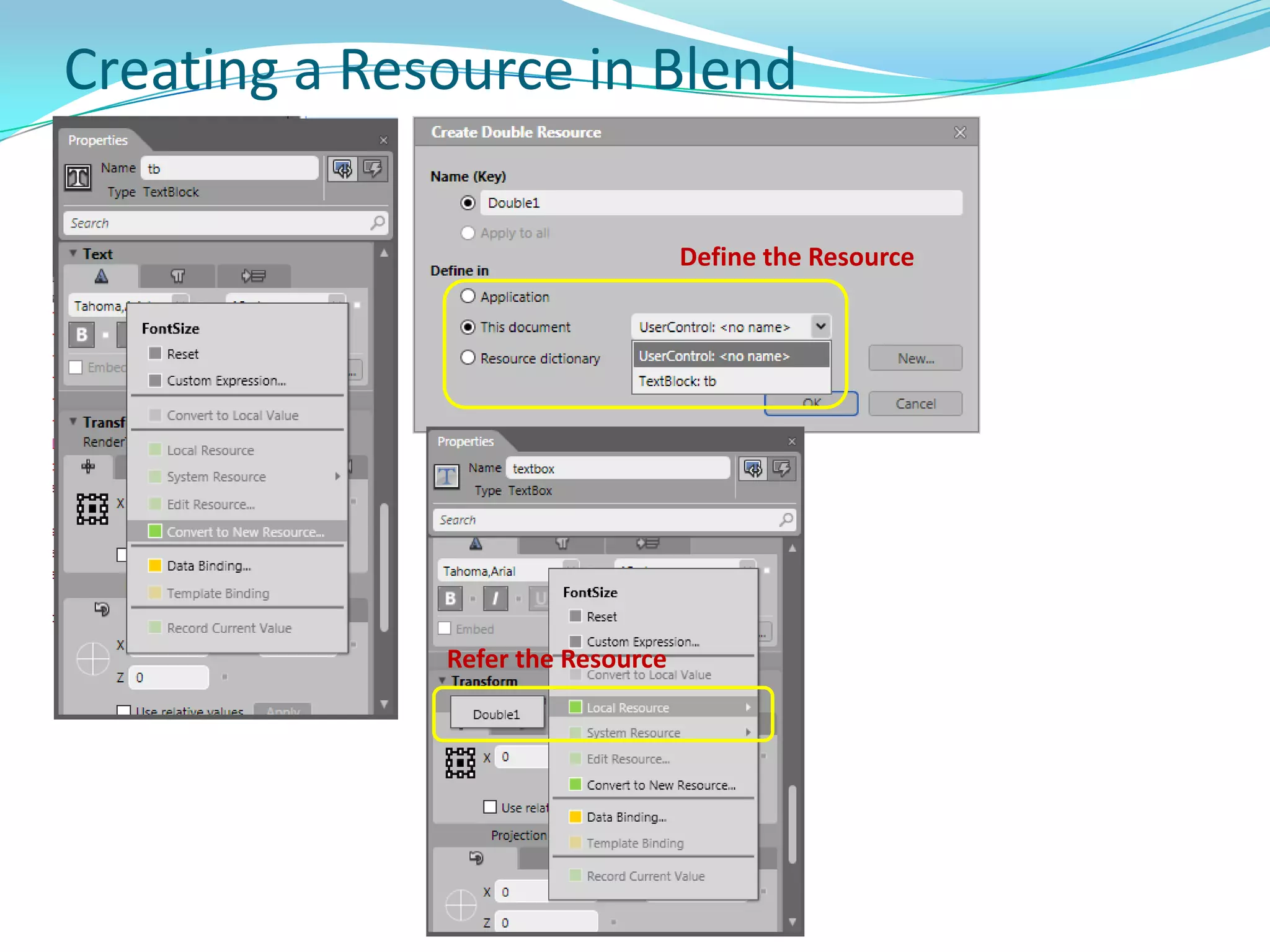
    Creating a Resourcein BlendDefine the ResourceRefer the Resource
  • 150.
  • 151.
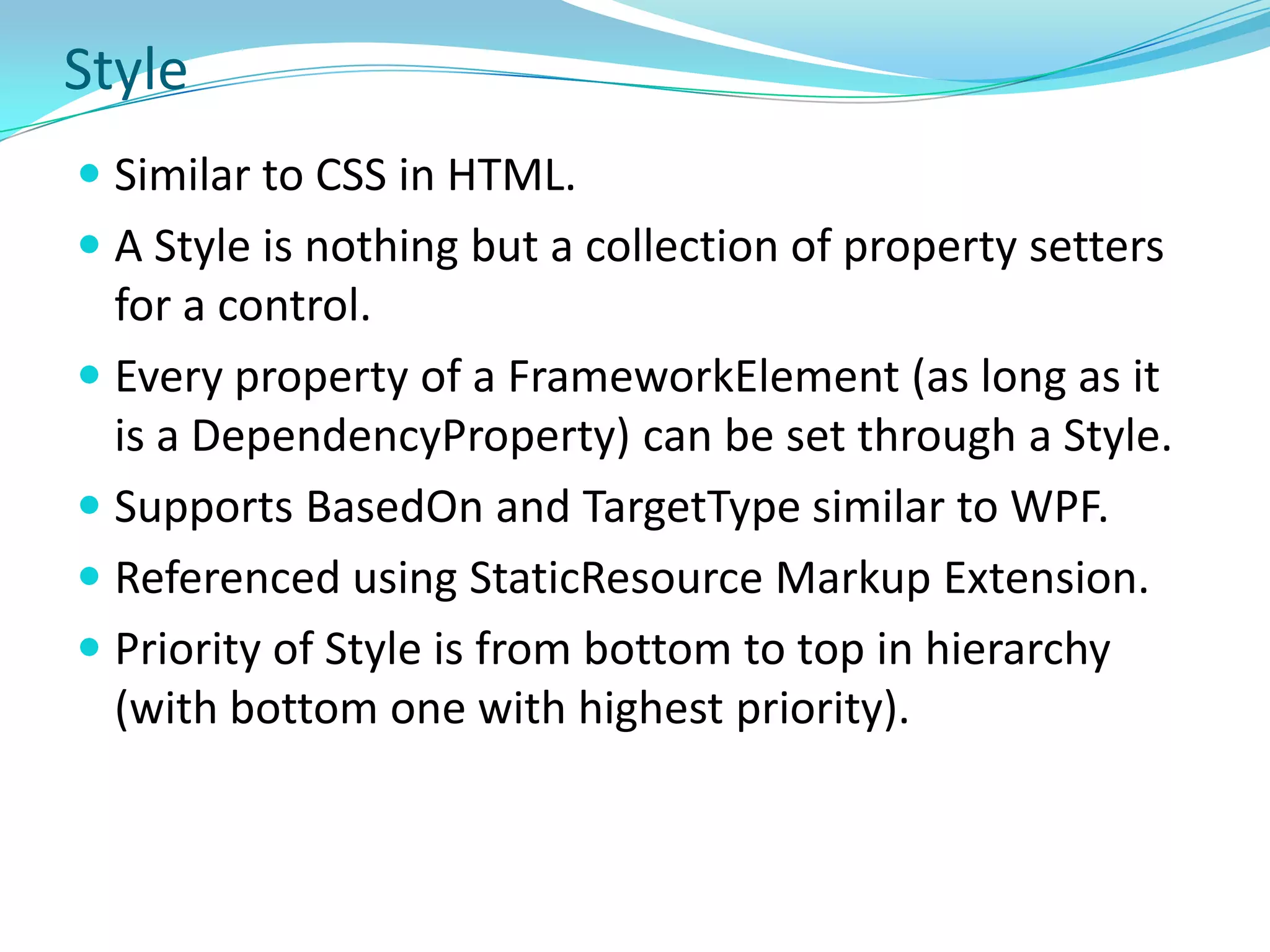
    A Style isnothing but a collection of property setters for a control.
  • 152.
    Every property ofa FrameworkElement (as long as it is a DependencyProperty) can be set through a Style.
  • 153.
    Supports BasedOn andTargetType similar to WPF.
  • 154.
  • 155.
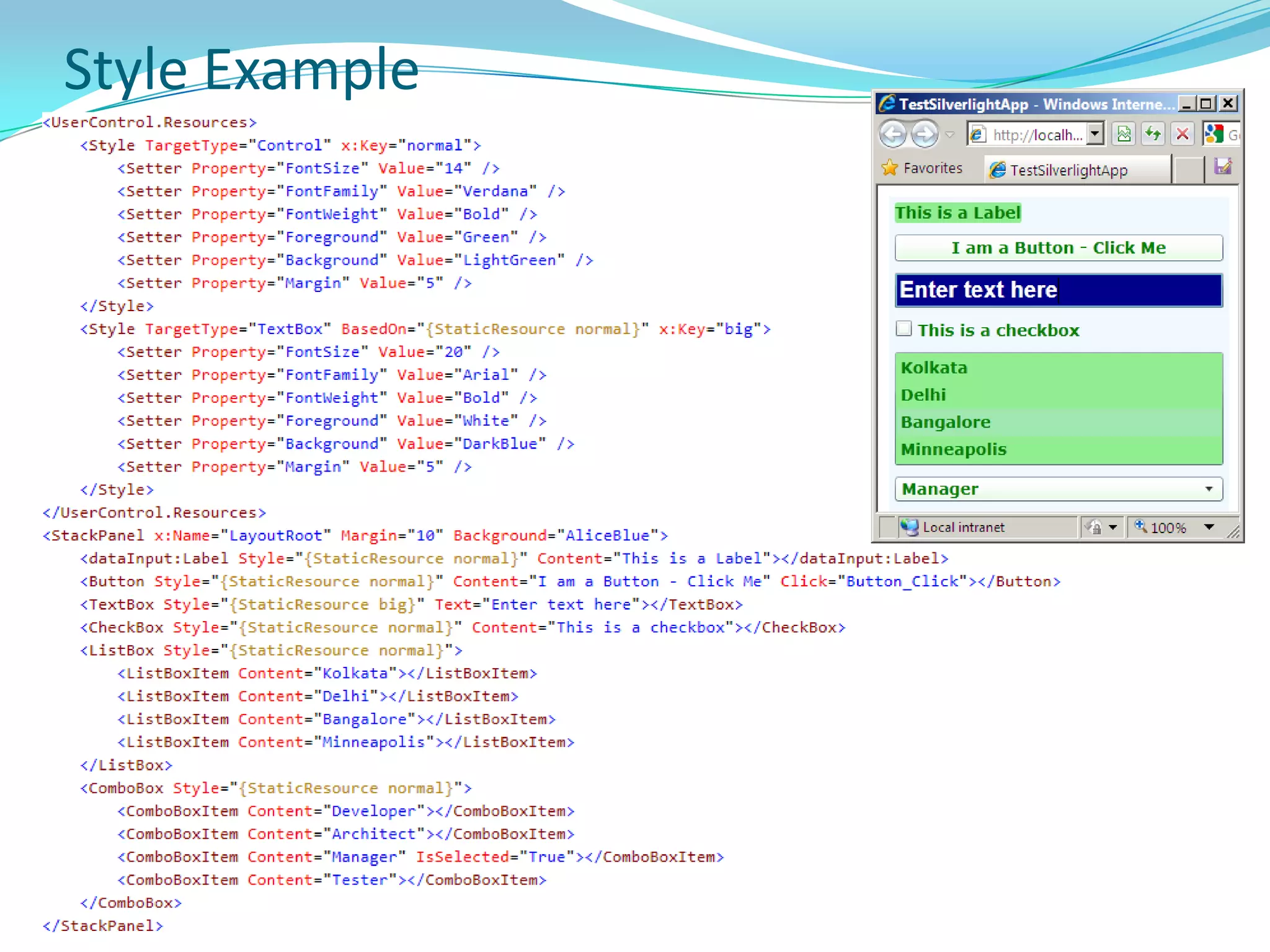
    Priority of Styleis from bottom to top in hierarchy (with bottom one with highest priority).Style Example
  • 156.
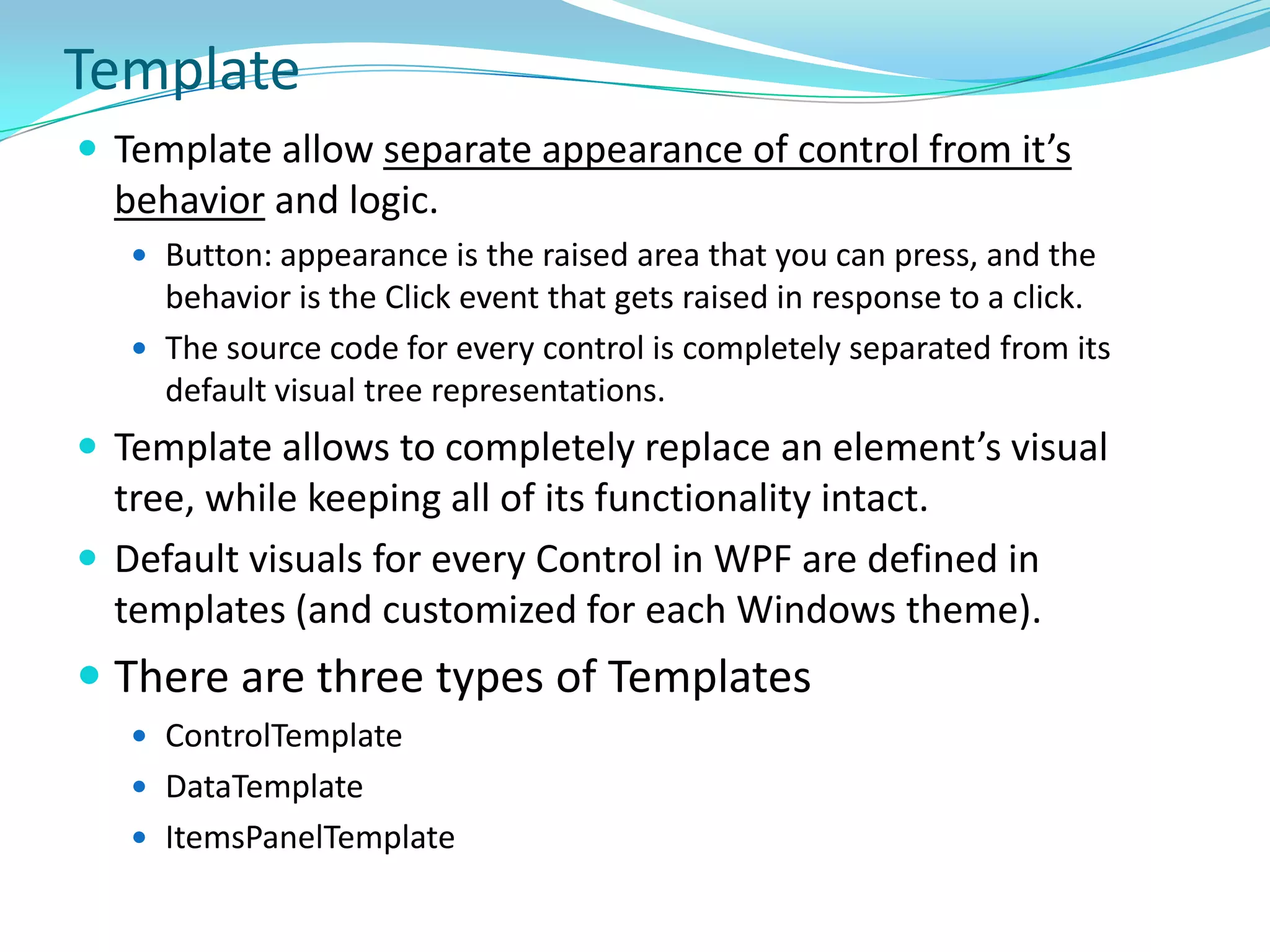
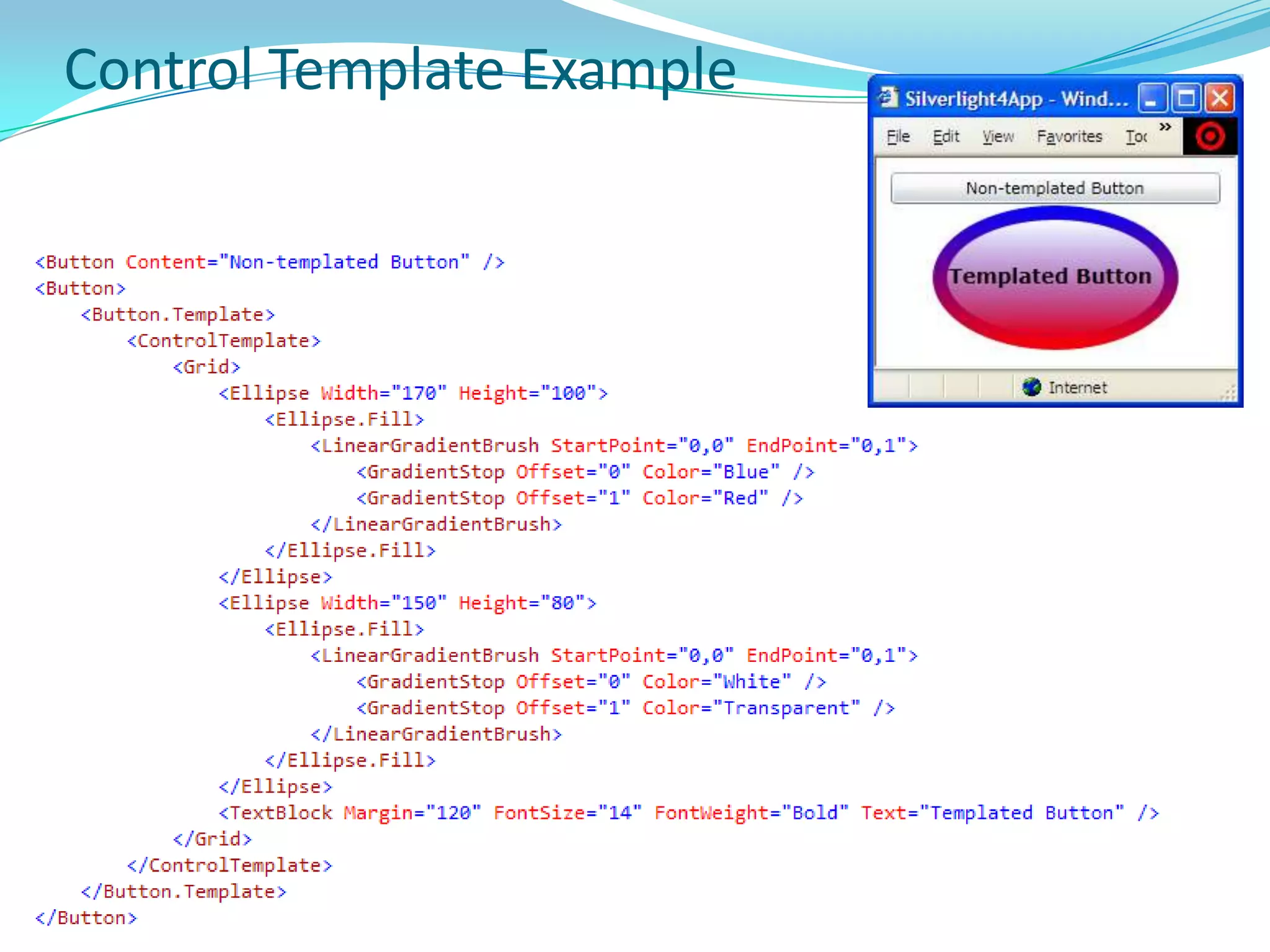
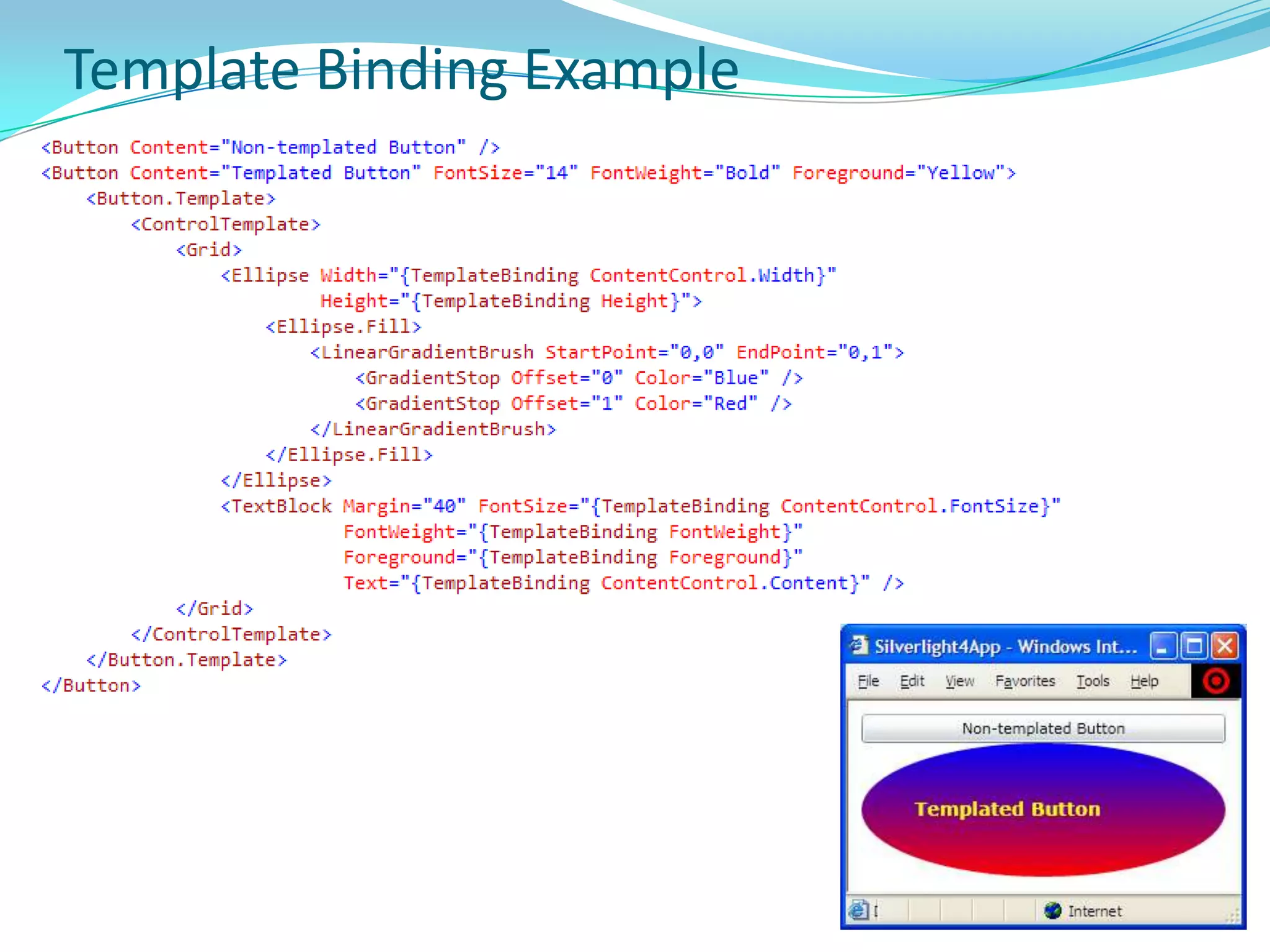
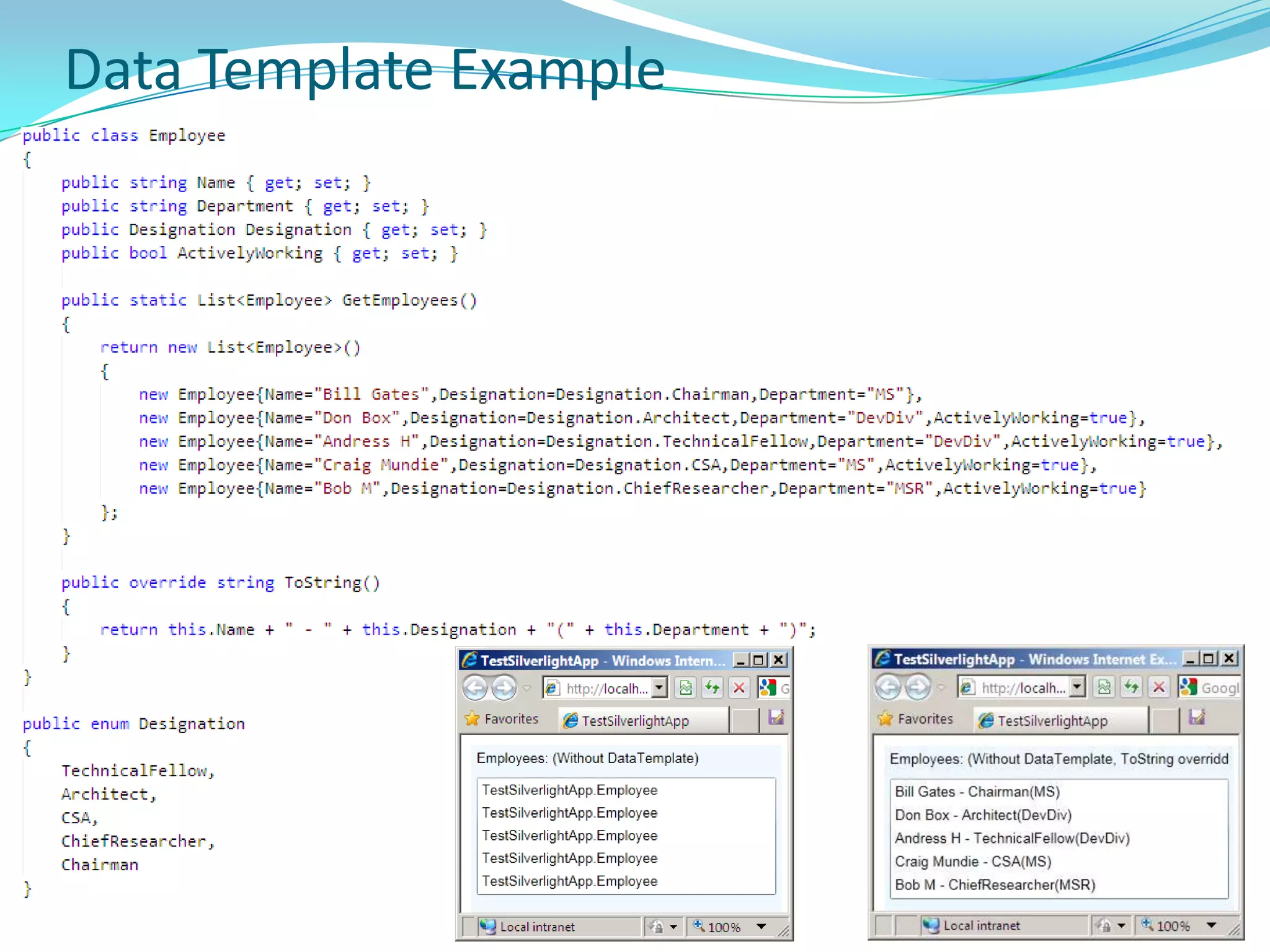
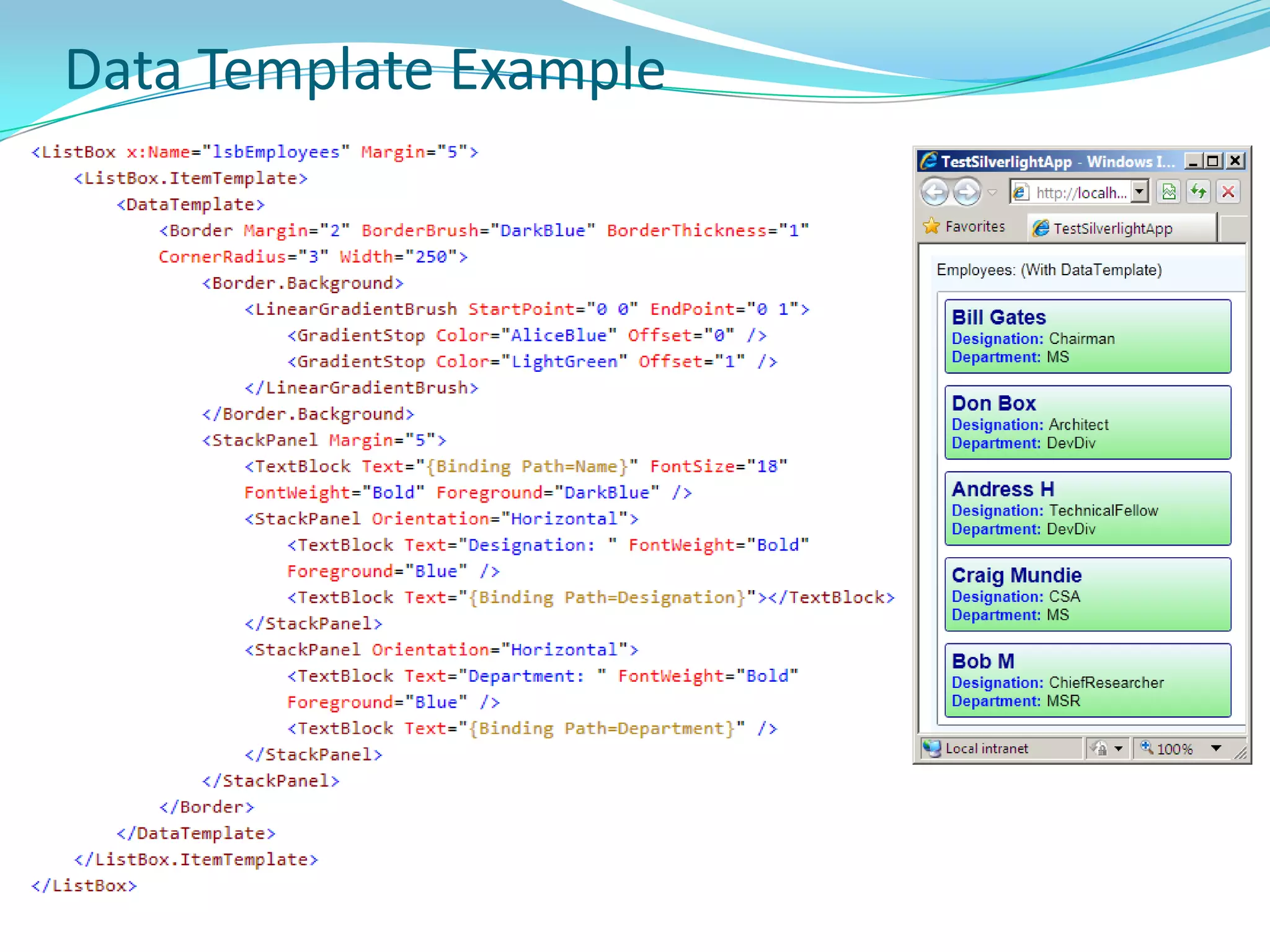
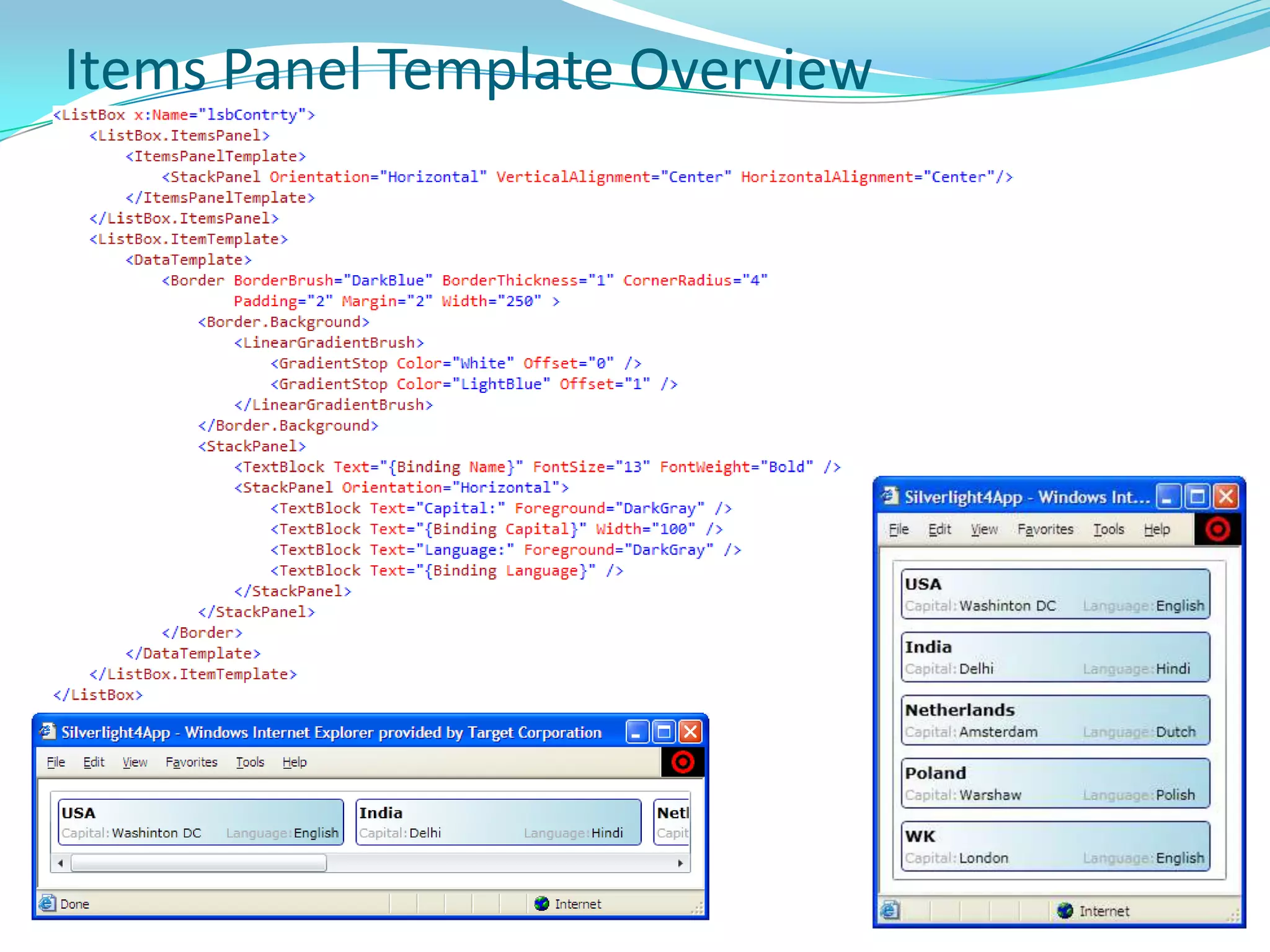
    TemplateTemplate allow separateappearance of control from it’s behavior and logic.Button: appearance is the raised area that you can press, and the behavior is the Click event that gets raised in response to a click.The source code for every control is completely separated from its default visual tree representations.Template allows to completely replace an element’s visual tree, while keeping all of its functionality intact.Default visuals for every Control in WPF are defined in templates (and customized for each Windows theme). There are three types of TemplatesControlTemplateDataTemplateItemsPanelTemplate
  • 157.
  • 158.
  • 159.
  • 160.
  • 161.
  • 162.
    Data AnnotationYou canapply attributes to the class or members that specify validation rules, how data is displayed, and set relationships between entity classes.
  • 163.
  • 164.
    By applying theseattributes on data class or member, you centralize the data definition and do not have to re-apply the same rules in multiple places.
  • 165.
    Could be ofthree types
  • 166.
    Display Attribute –for UI purpose
  • 167.
  • 168.
    Data Modeling AttribtueDisplayAttributeSystem.ComponentModel.DataAnnotations namespace contains following Display/UI related attributes -
  • 169.
    DataTypeAttribute - Specifiesa particular type of data, such as e-mail address or phone number.
  • 170.
    DisplayAttribute - Specifieslocalizable strings for data types and members that are used in the user interface.
  • 171.
    DisplayColumnAttribute - Designatesdisplay and sorting properties when a table is used as a parent table in a foreign key relationship.
  • 172.
    DisplayFormatAttribute - Specifieshow data fields are displayed and formatted.
  • 173.
    FilterUIHintAttribute - Designatesthe filtering behavior for a column.
  • 174.
    UIHintAttribute - Designatesthe control and values to use to display the associated entity member.
  • 175.
    Are automatically appliedwhen used with DataGrid control.
  • 176.
    Can manually retrievedisplay attribute values when data binding by using controls such as Label and DescriptionViewer. Validation AttributeFollowing attributes are used to enforce validation rules for data applied to the class or member:
  • 177.
    CustomValidationAttribute - Usesa custom method for validation.
  • 178.
    DataTypeAttribute - Specifiesa particular type of data, such as e-mail address or phone number.
  • 179.
    EnumDataTypeAttribute - Ensuresthat the value exists in an enumeration.
  • 180.
    RangeAttribute - Designatesminimum and maximum constraints.
  • 181.
    RegularExpressionAttribute - Usesa regular expression to determine valid values.
  • 182.
    RequiredAttribute - Specifiesthat a value must be provided.
  • 183.
    StringLengthAttribute - Designatesmax and min number of characters.
  • 184.
    ValidationAttribute - Servesas base class for validation attributes.
  • 185.
    All validation attributesderive from the ValidationAttribute class. The logic to determine if a value is valid is implemented in the overridden IsValid method.
  • 186.
    Are automatically appliedwhen used with DataGrid control. Data Annotation Example - DisplayAttribute
  • 187.
    Data Annotation Example- ValidationAttribute
  • 188.
    Data BindingBinding enginegets info from Binding object about:
  • 189.
    Source object thatcontains the data that flows between the source and target. Source can be any CLR object.
  • 190.
    Target UI propertythat displays and possibly allows user changes to the data - can be any DependencyProperty of a FrameworkElement.
  • 191.
    Direction of thedata flow. The direction is specified by setting the Mode property on the Binding object.
  • 192.
    Optional value converterthat applies to data as it is passed. Value converter implements IValueConverter.Data Binding
  • 193.
    Data Form<dataFormToolkit:DataForm x:Name="dfPerson"AutoEdit="False"AutoCommit="False" />dfPerson.CurrentItem = new Person{FirstName="Aniruddha",LastName="Chakrabarti",Age=35};
  • 194.
  • 195.
  • 196.
  • 197.
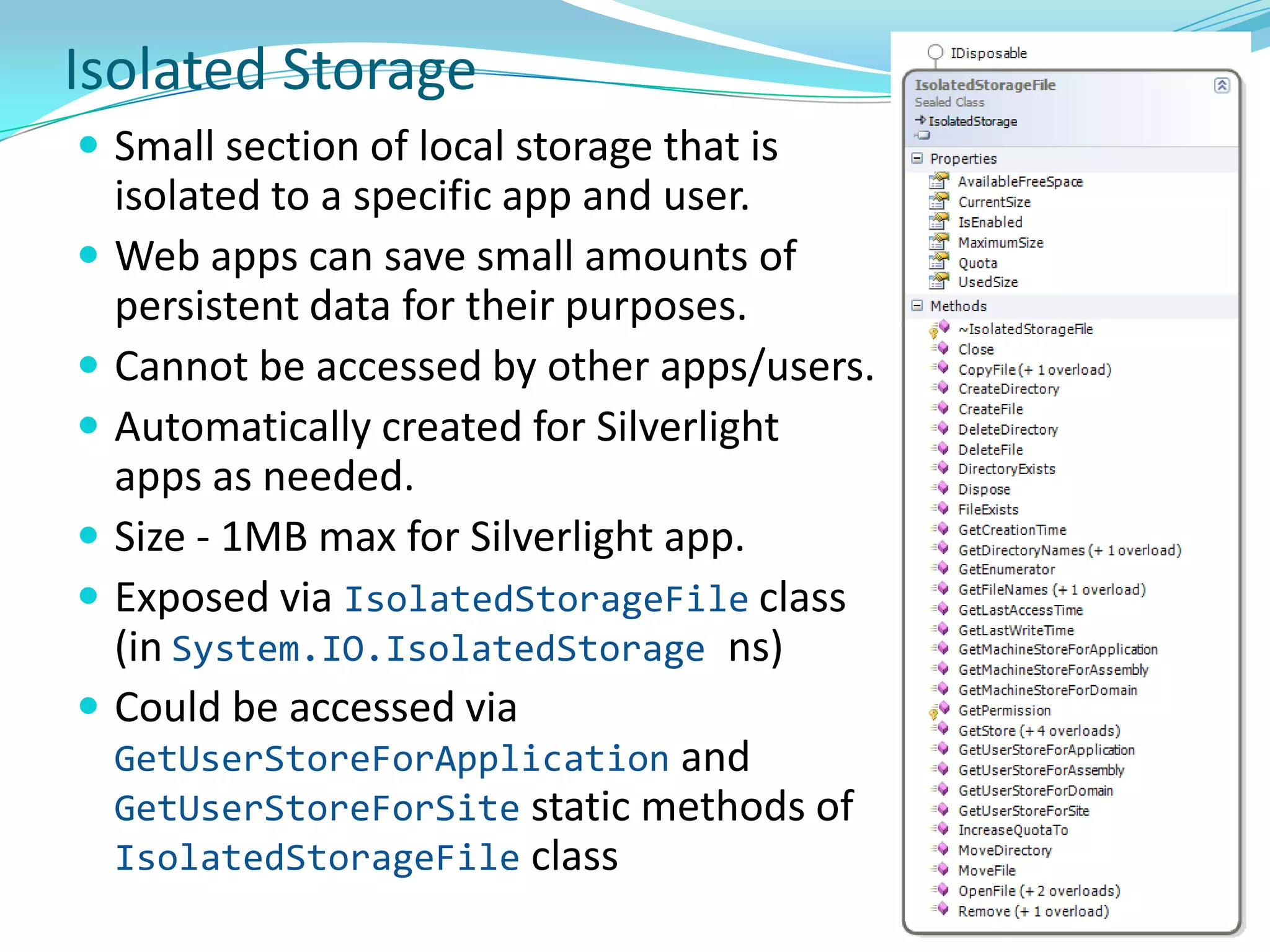
    IValueConverter, IMultiValueConverterIsolated StorageSmallsection of local storage that is isolated to a specific app and user.
  • 198.
    Web apps cansave small amounts of persistent data for their purposes.
  • 199.
    Cannot be accessedby other apps/users.
  • 200.
    Automatically created forSilverlight apps as needed.
  • 201.
    Size - 1MBmax for Silverlight app.
  • 202.
    Exposed via IsolatedStorageFileclass(inSystem.IO.IsolatedStoragens)
  • 203.
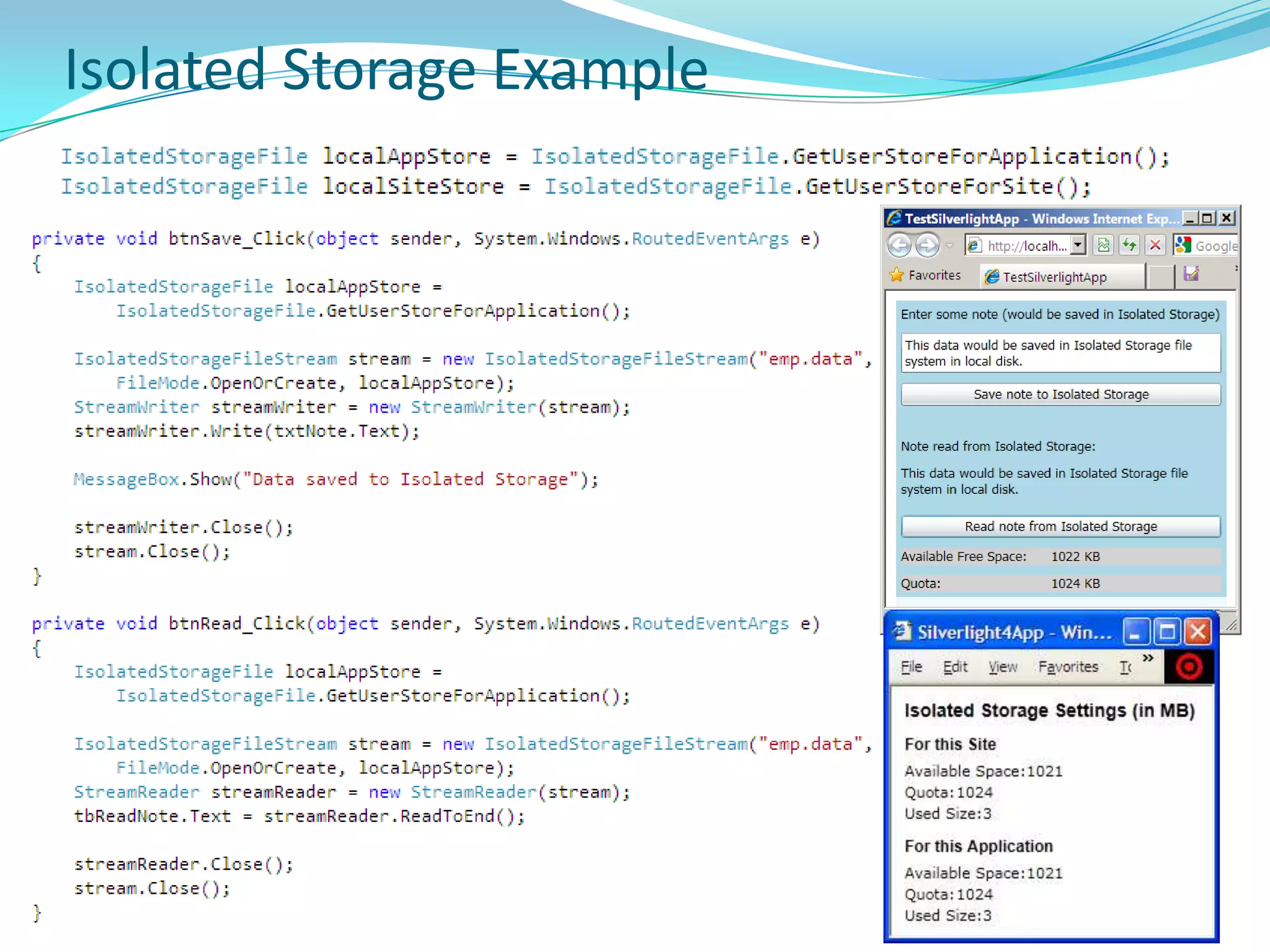
    Could be accessedvia GetUserStoreForApplication and GetUserStoreForSite static methods of IsolatedStorageFile classIsolated Storage Example
  • 204.
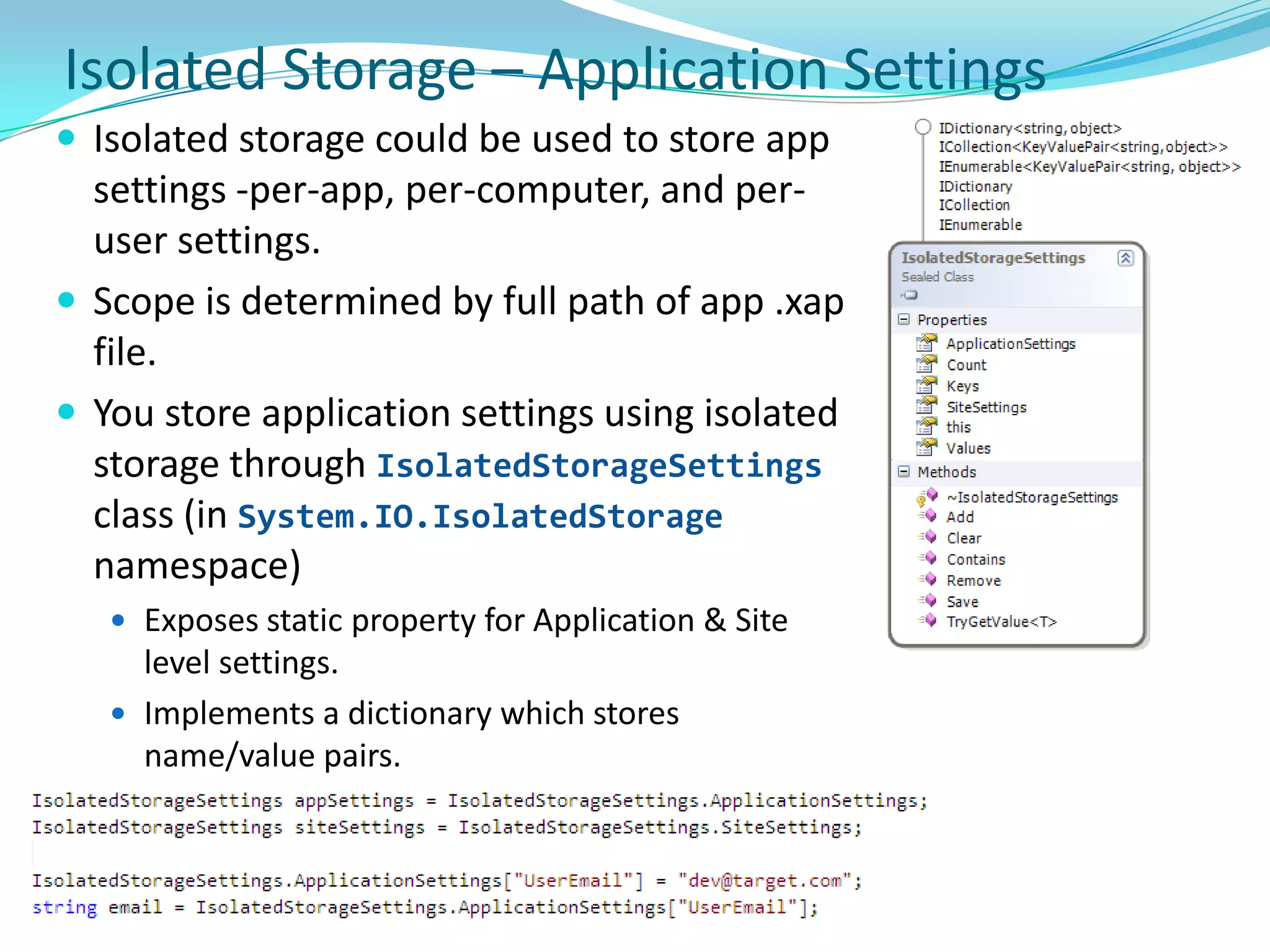
    Isolated Storage –Application SettingsIsolated storage could be used to store app settings -per-app, per-computer, and per-user settings. 
  • 205.
    Scope is determinedby full path of app .xap file.
  • 206.
    You store applicationsettings using isolated storage through IsolatedStorageSettings class (in System.IO.IsolatedStorage namespace)
  • 207.
    Exposes static propertyfor Application & Site level settings.
  • 208.
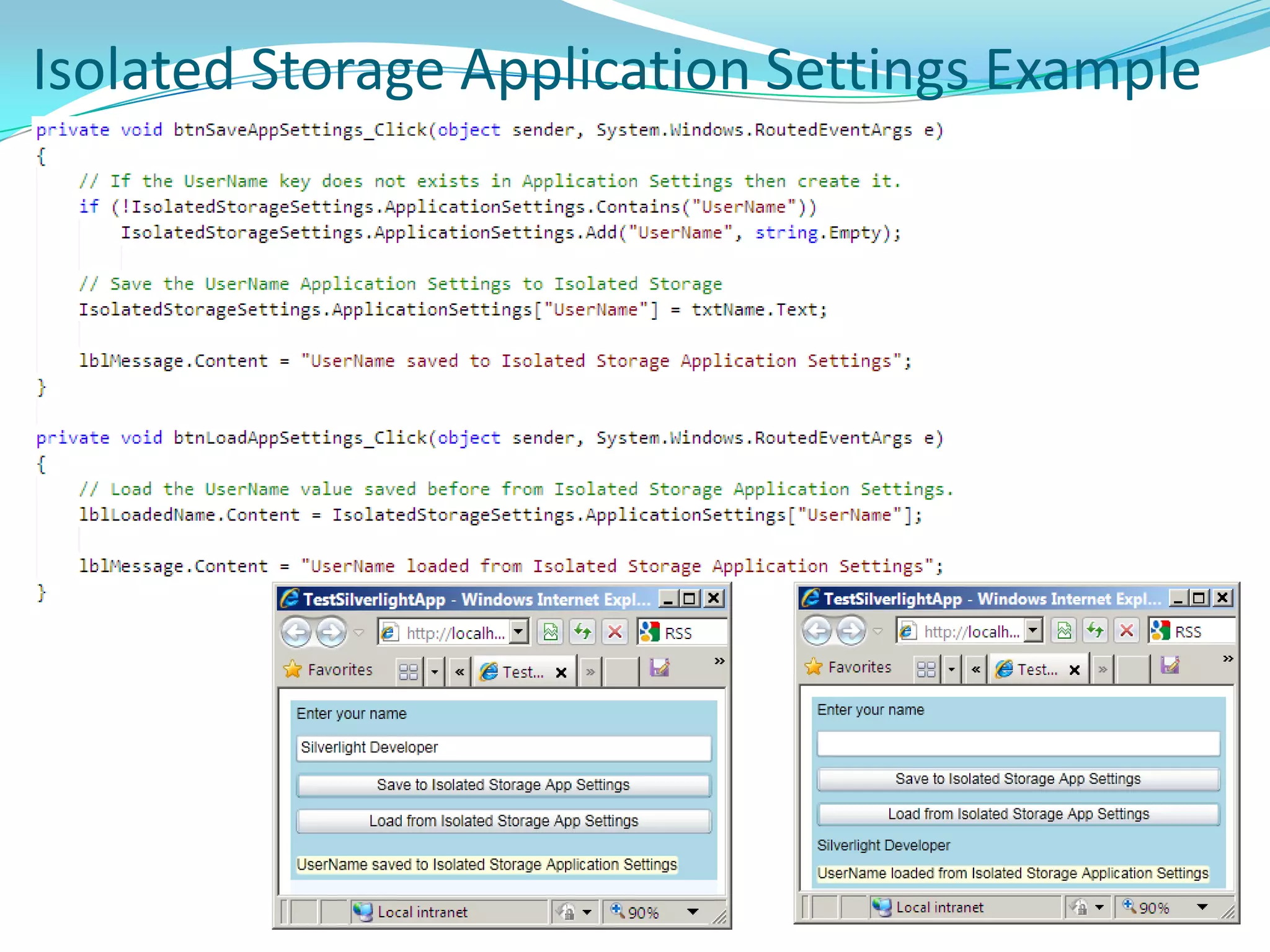
    Implements a dictionarywhich stores name/value pairs.Isolated Storage Application Settings Example
  • 209.
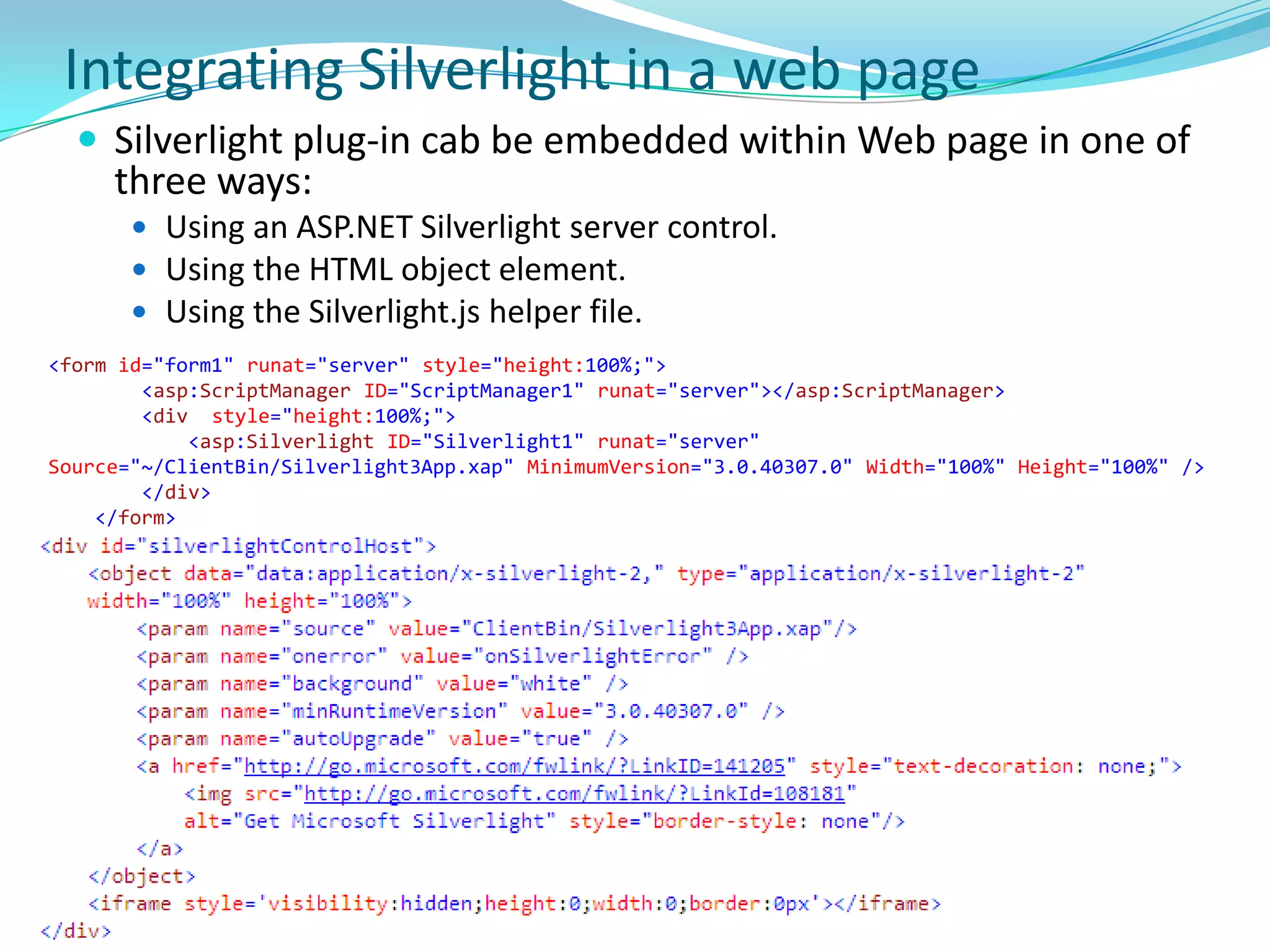
    Integrating Silverlight ina web pageSilverlight plug-in cab be embedded within Web page in one of three ways:
  • 210.
    Using an ASP.NETSilverlight server control.
  • 211.
    Using the HTMLobject element.
  • 212.
    Using the Silverlight.jshelper file.<form id="form1" runat="server" style="height:100%;"> <asp:ScriptManager ID="ScriptManager1" runat="server"></asp:ScriptManager> <div style="height:100%;"> <asp:Silverlight ID="Silverlight1" runat="server" Source="~/ClientBin/Silverlight3App.xap" MinimumVersion="3.0.40307.0" Width="100%" Height="100%" /> </div> </form>
  • 213.
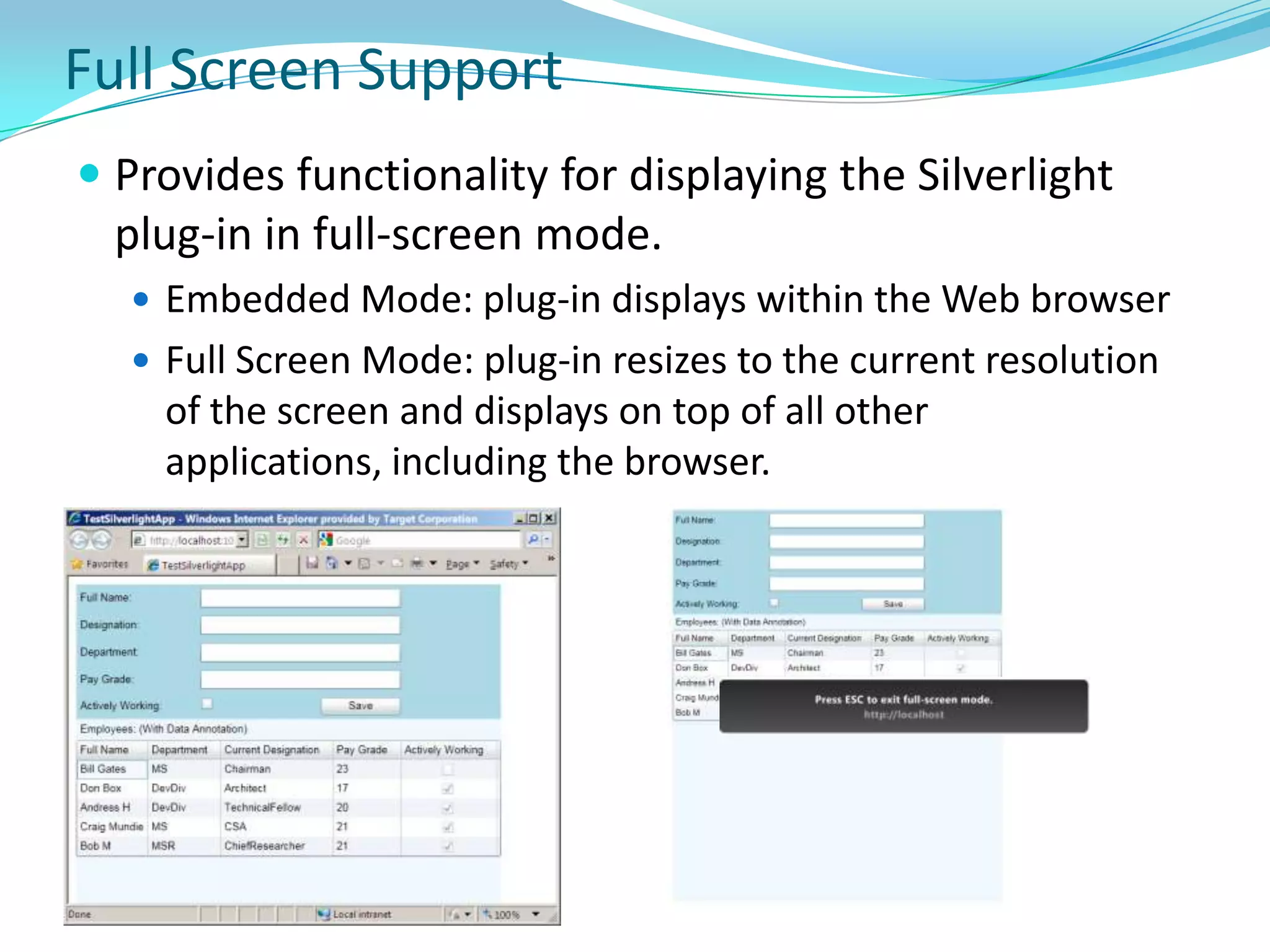
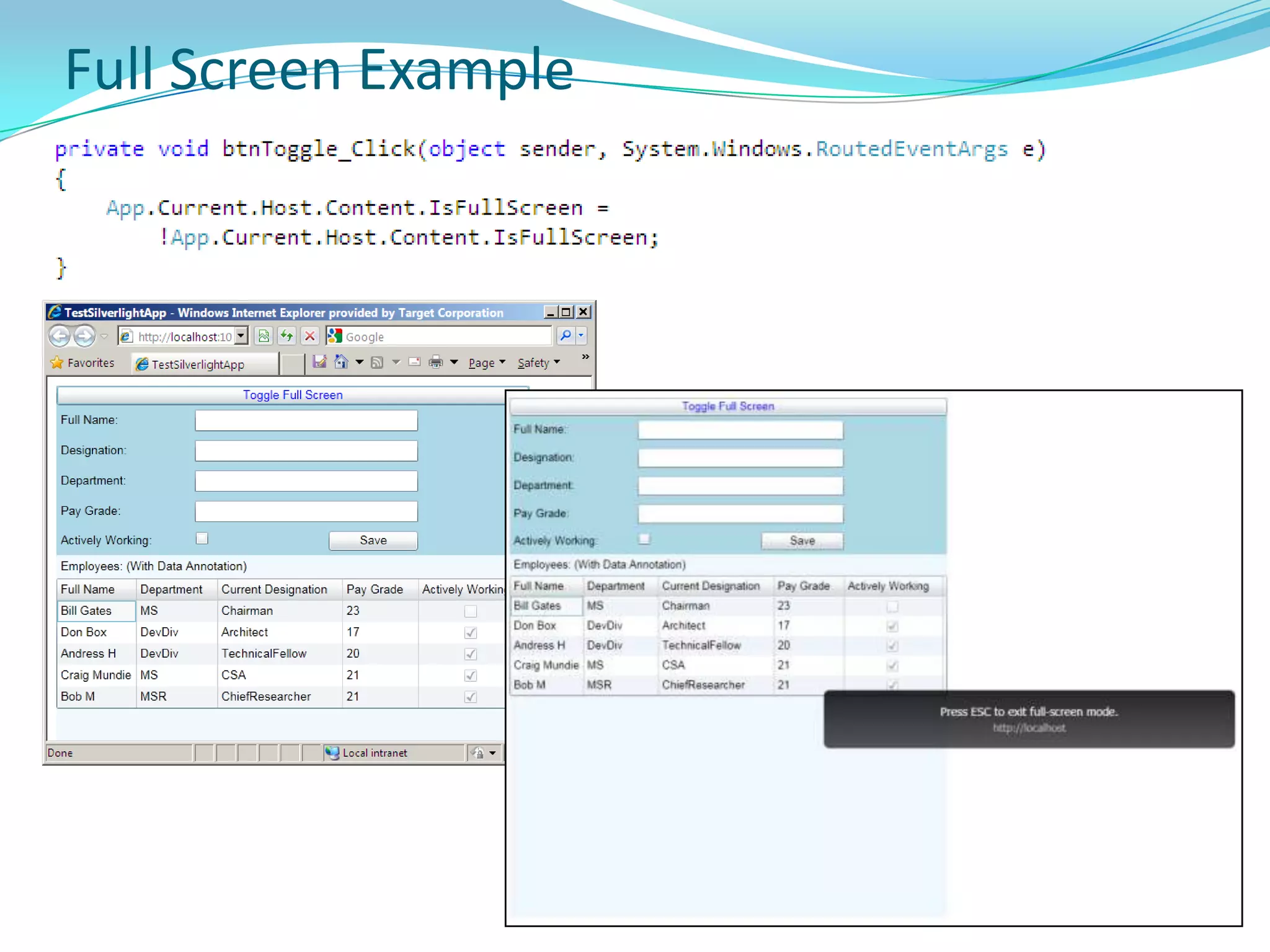
    Full Screen SupportProvidesfunctionality for displaying the Silverlight plug-in in full-screen mode.
  • 214.
    Embedded Mode: plug-indisplays within the Web browser
  • 215.
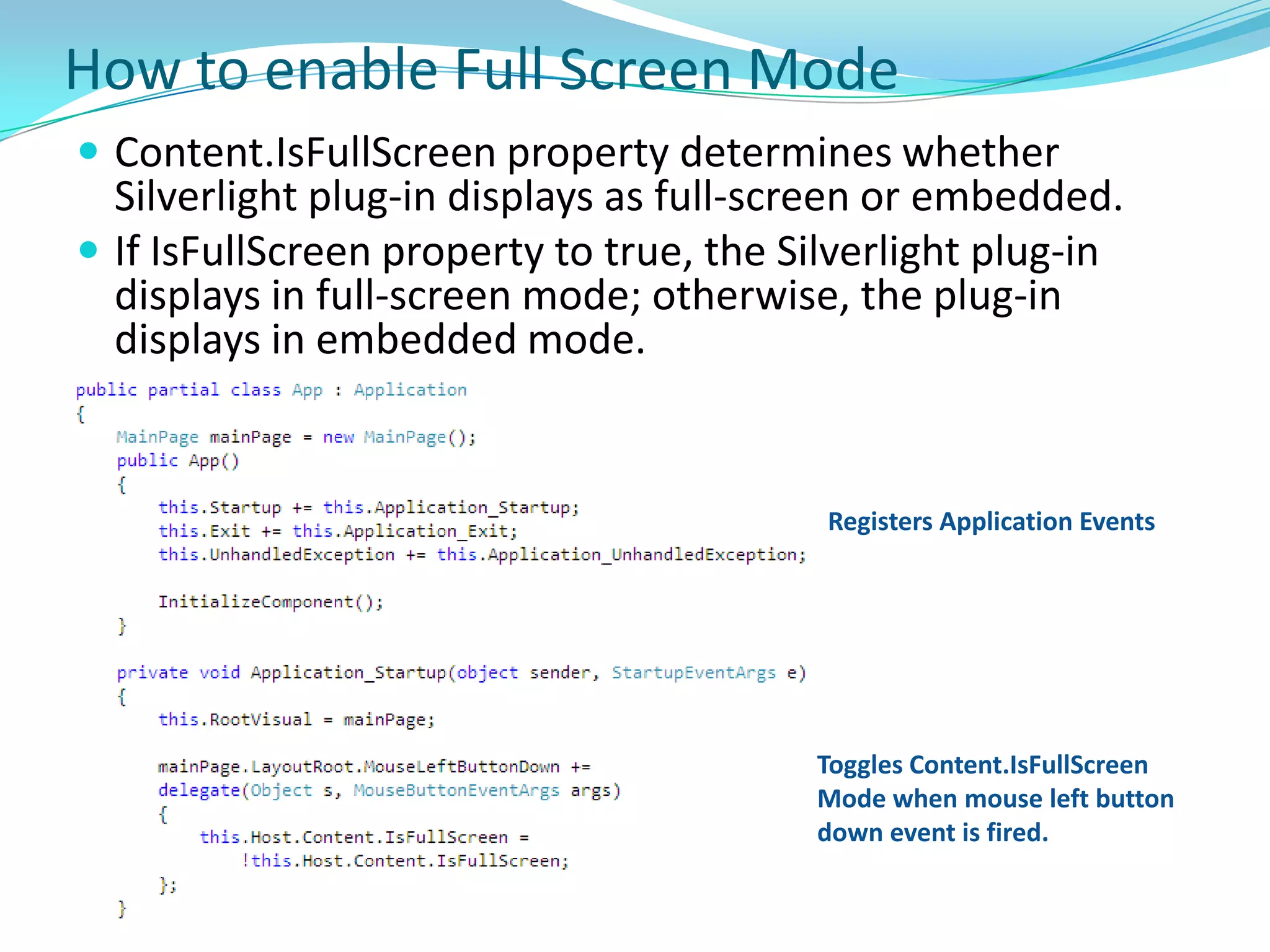
    Full Screen Mode:plug-in resizes to the current resolution of the screen and displays on top of all other applications, including the browser.How to enable Full Screen ModeContent.IsFullScreen property determines whether Silverlight plug-in displays as full-screen or embedded.
  • 216.
    If IsFullScreen propertyto true, the Silverlight plug-in displays in full-screen mode; otherwise, the plug-in displays in embedded mode.Registers Application EventsToggles Content.IsFullScreen Mode when mouse left button down event is fired.
  • 217.
  • 218.
    Out of BrowserSupportFirst introduced in SL3
  • 219.
    Silverlight-based apps canbe configured, so that users can install them from their host Web pages and run them outside the browser.
  • 220.
    Configuration is asimple matter of providing additional information about an application. This information is supplied through the application manifest.
  • 221.
    Silverlight uses thisinfo to display installation UI, shortcuts for launching the app, and an out-of-browser application window. Out of Browser ExampleTo set Out of Browser support for app, check Project > Silverlight Project Options > Enable Application Outside Browser option.
  • 222.
    OutOfBrowserSettings.xml file isadded in Properties folder.How to enable Out of Browser in VS
  • 223.
    Out of Browsersettings<OutOfBrowserSettingsShortName="SL4App Application"EnableGPUAcceleration="False"ShowInstallMenuItem="True"> <OutOfBrowserSettings.Blurb>SL4App Application on your desktop; at home, at work or on the go.</OutOfBrowserSettings.Blurb> <OutOfBrowserSettings.WindowSettings> <WindowSettingsTitle="SL4App Application"Height="250"Width="350"Top="100"Left="75"WindowStartupLocation="Manual" /> </OutOfBrowserSettings.WindowSettings> <OutOfBrowserSettings.Icons /></OutOfBrowserSettings>
  • 224.
  • 225.
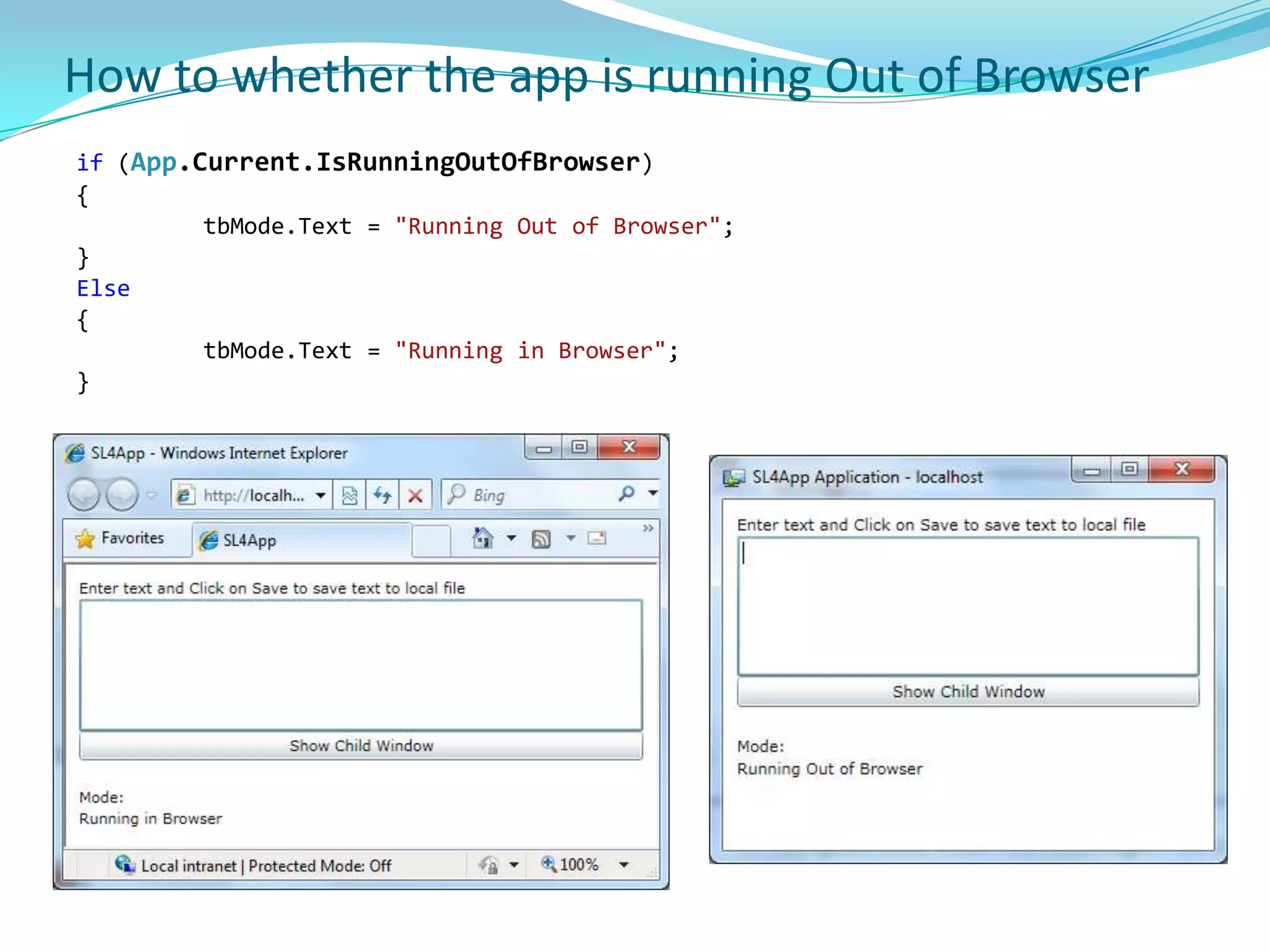
    How to whetherthe app is running Out of Browserif (App.Current.IsRunningOutOfBrowser){tbMode.Text = "Running Out of Browser";}Else{tbMode.Text = "Running in Browser";}
  • 226.
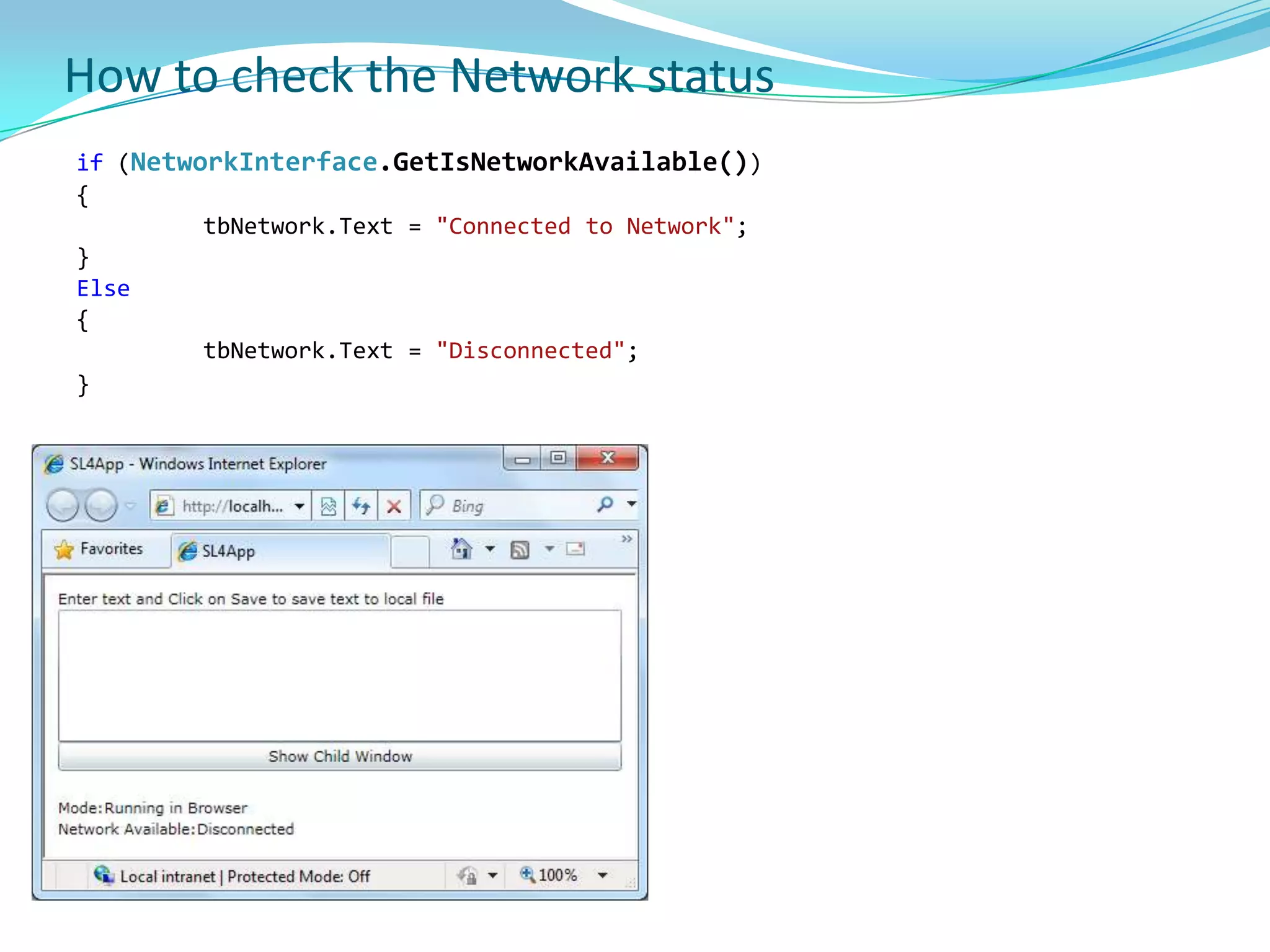
    How to checkthe Network statusif (NetworkInterface.GetIsNetworkAvailable()){tbNetwork.Text = "Connected to Network";}Else{tbNetwork.Text = "Disconnected";}
  • 227.
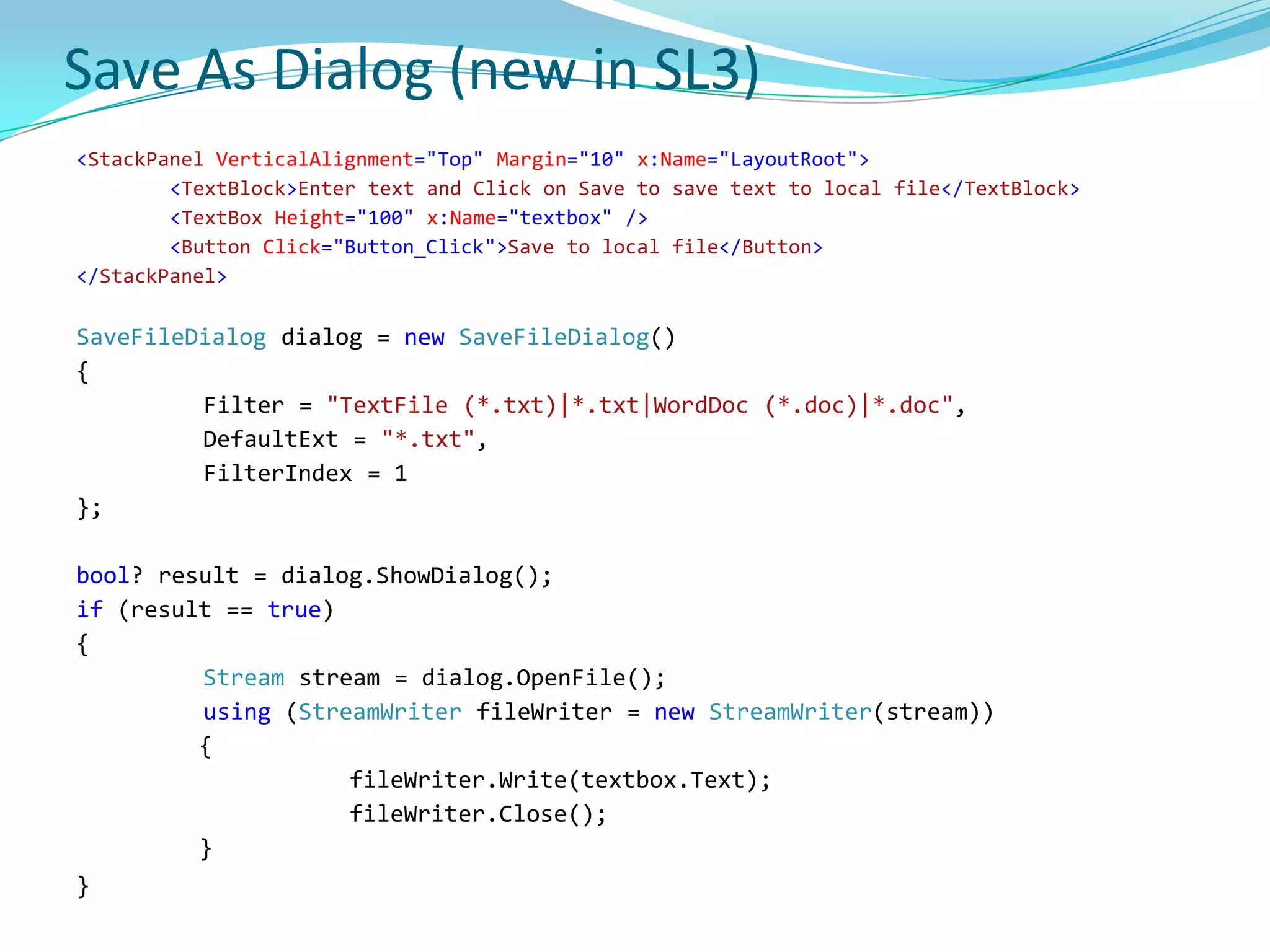
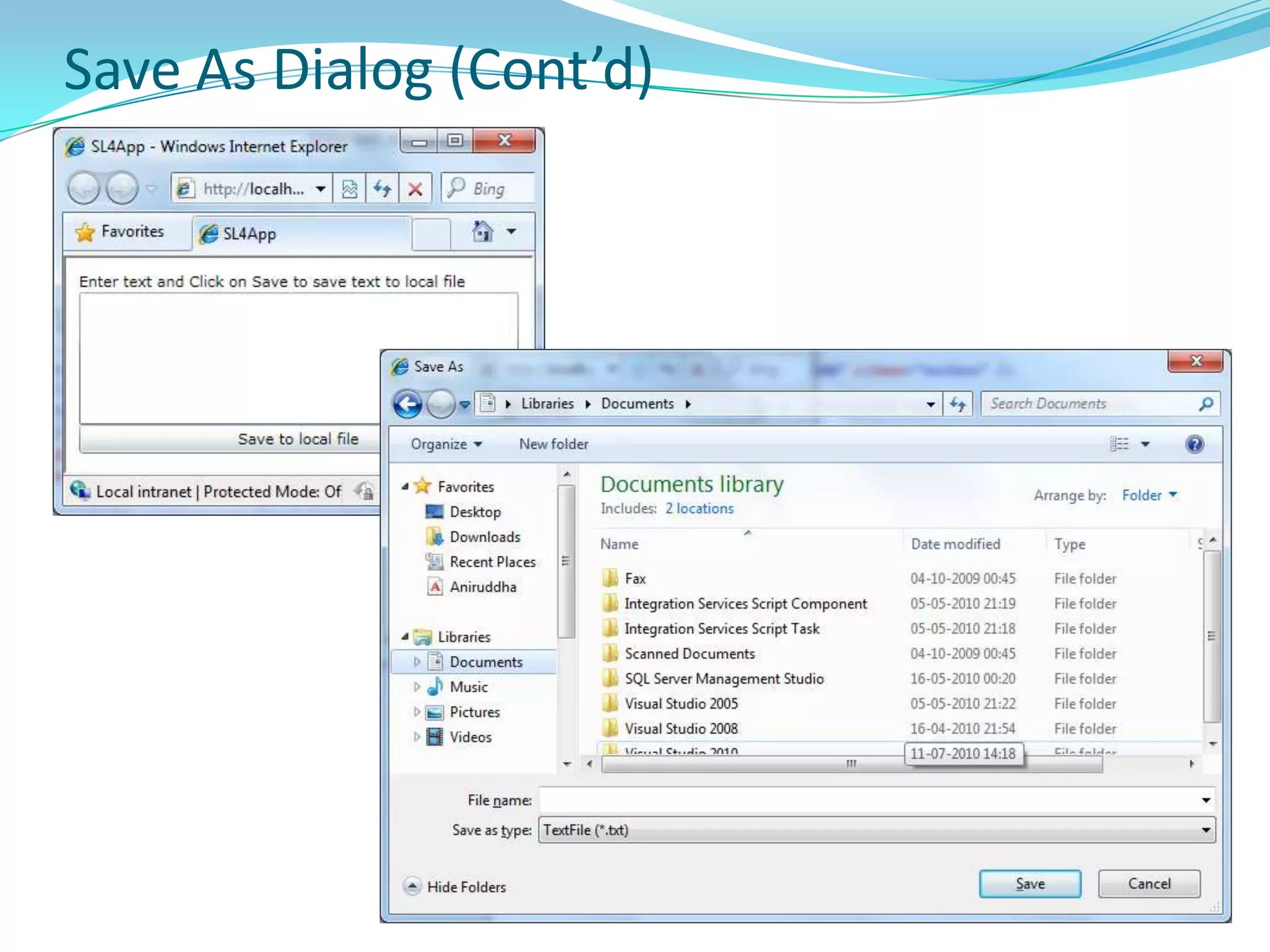
    Save As Dialog(new in SL3)<StackPanelVerticalAlignment="Top" Margin="10" x:Name="LayoutRoot"><TextBlock>Enter text and Click on Save to save text to local file</TextBlock><TextBox Height="100" x:Name="textbox" /><Button Click="Button_Click">Save to local file</Button></StackPanel>SaveFileDialog dialog = newSaveFileDialog(){ Filter = "TextFile (*.txt)|*.txt|WordDoc (*.doc)|*.doc",DefaultExt = "*.txt",FilterIndex = 1}; bool? result = dialog.ShowDialog();if (result == true){ Streamstream = dialog.OpenFile(); using (StreamWriterfileWriter = newStreamWriter(stream)) {fileWriter.Write(textbox.Text);fileWriter.Close(); }}
  • 228.
    Save As Dialog(Cont’d)
  • 229.
    HTML BridgeAllows toattach Silverlight managed event handlers to HTML controls.
  • 230.
    Attach JavaScript eventhandlers to Silverlight controls.
  • 231.
    Expose complete managedtypes to JavaScript for scripting.
  • 232.
    Expose individual methodsof managed types to JavaScript for scripting.
  • 233.
    Use managed containersfor DOM elements such as window, document, and standard HTML elements.
  • 234.
    Pass managed typesas parameters to JavaScript functions and objects.
  • 235.
    Return managed typesfrom JavaScript.Accessing the HTML DOMBrowser library provides access to HTML document, individual DOM elements and allows to invoke scripts from managed Silverlight code.
  • 236.
    To access HTMLDOM from Silverlight, use following HTML Bridge classes from System.Windows.Browser
  • 237.
    HtmlPage - representsthe Web page. HtmlPage is static and is the main entry point for all DOM access.
  • 238.
    Exposes properties likeDocument, Plugin, BrowserInformation and Window
  • 239.
  • 240.
    Provides GetElementById, SetProperty,GetProperty, Submit methods and Body, QueryString properties
  • 241.
  • 242.
    PropvidesSetProperty, GetProperty methodsand Id, Children, Parent, CssClass properties.HTMLPage class examplethis.DataContext = HtmlPage.BrowserInformation;
  • 243.
  • 244.
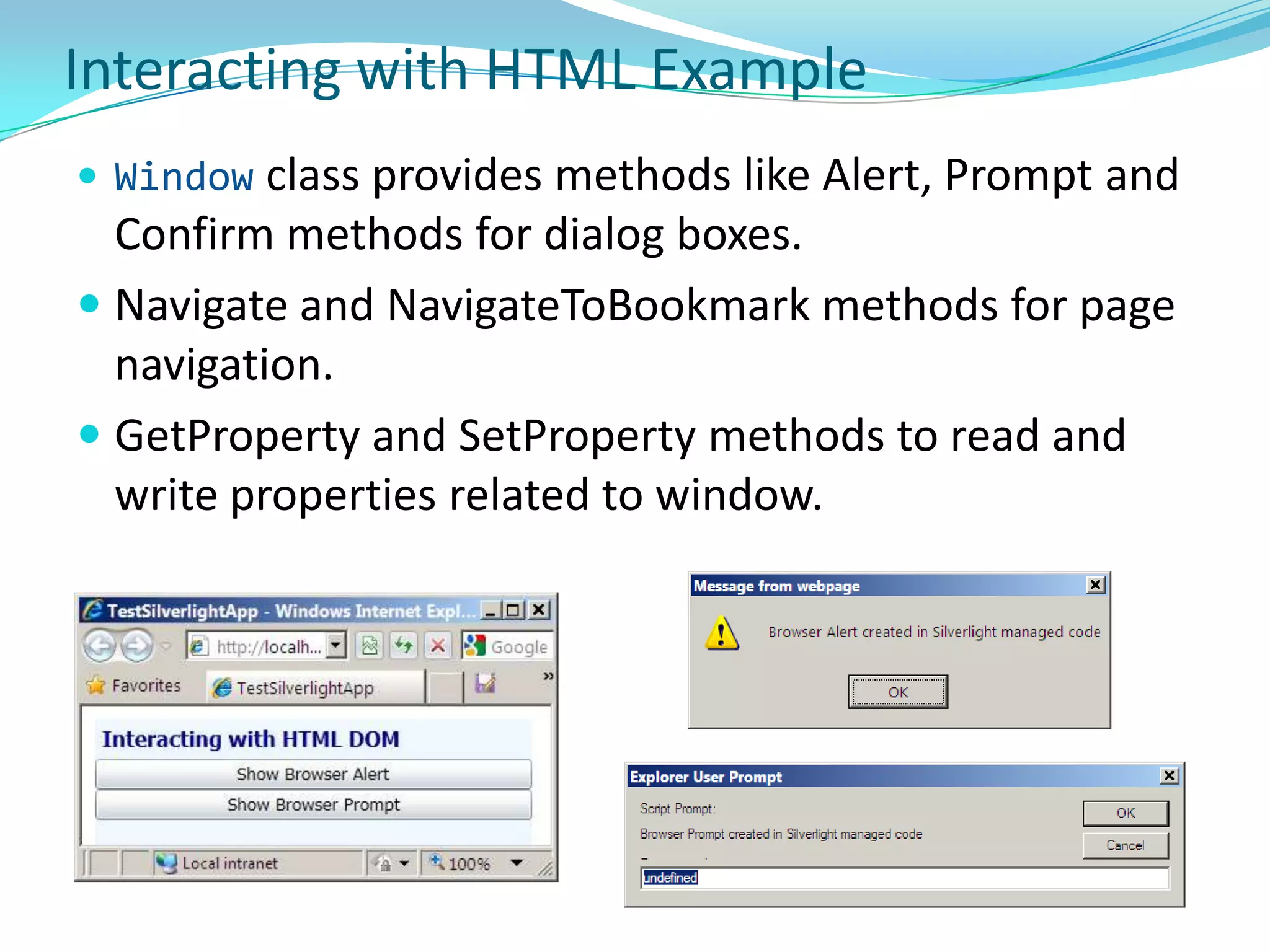
    Interacting with HTMLExampleWindow class provides methods like Alert, Prompt and Confirm methods for dialog boxes.
  • 245.
    Navigate and NavigateToBookmarkmethods for page navigation.
  • 246.
    GetProperty and SetPropertymethods to read and write properties related to window.Silverlight-enabled WCF ServiceWCF server functionality for hosting Web services is not available in Silverlight 3/4. WCF client-side features are generally supported.
  • 247.
    Currently Silverlight WCFFramework only supports basicHttpBinding, PollingDuplexHttpBinding and CustomBinding.
  • 248.
    Other WCF bindingsare not available because they require features that are not supported by the Silverlight client. WSHttpBinding, for example, requires sessions and transactions, which are not supported.Making a Service Available Across Domain BoundariesTo prevent cross-site request forgery, Silverlight allows only site-of-origin communication by default for all requests other than images and media. Example - a Silverlight control hosted at http://contoso.com/mycontrol.aspx can access only services on that same domain by default – for example http://contoso.com/service.svc, but not a service at http://fabrikam.com/service.svc.To enable a Silverlight control to access a service in another domain, the service must explicitly opt-in to allow cross-domain access. Silverlight 4 supports two different mechanisms for services to opt-in to cross-domain access: Place a clientaccesspolicy.xml file at the root of the domain where the service is hosted to configure the service to allow cross-domain access. Place a valid crossdomain.xml file at the root of the domain where the service is hosted. The file must mark the entire domain public. Silverlight supports a subset of the crossdomain.xml schema.
  • 249.
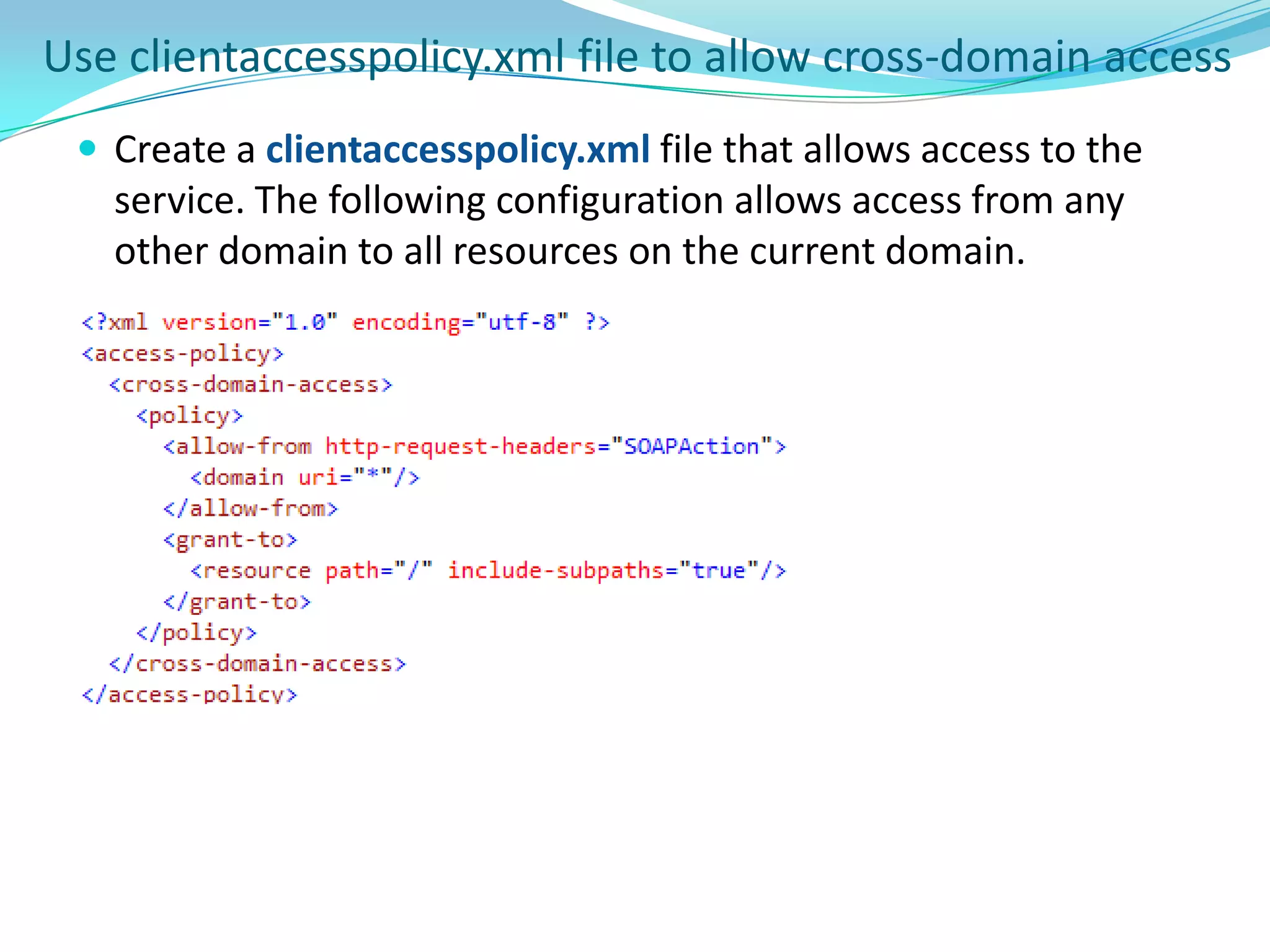
    Use clientaccesspolicy.xml fileto allow cross-domain accessCreate a clientaccesspolicy.xml file that allows access to the service. The following configuration allows access from any other domain to all resources on the current domain.
  • 250.
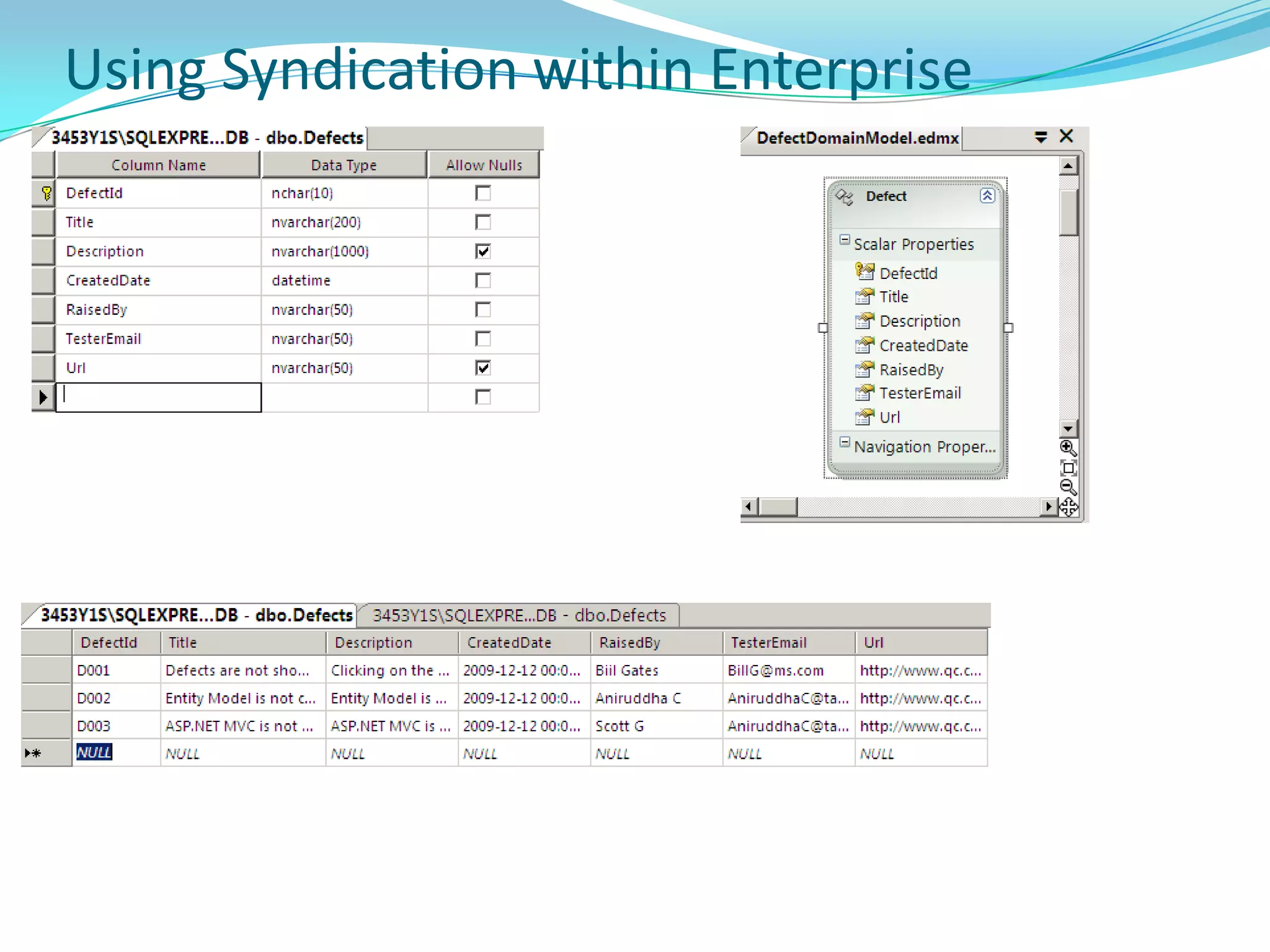
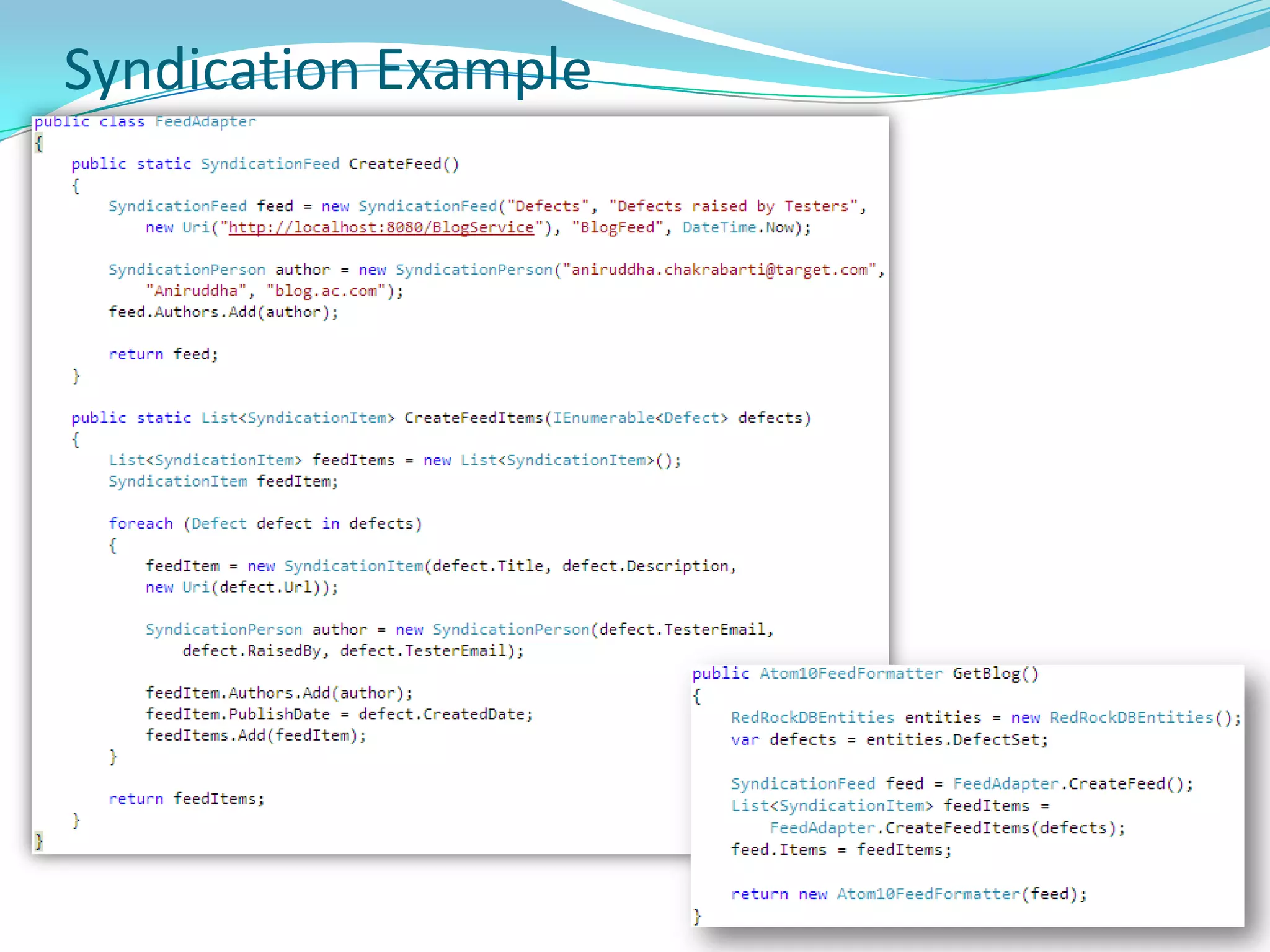
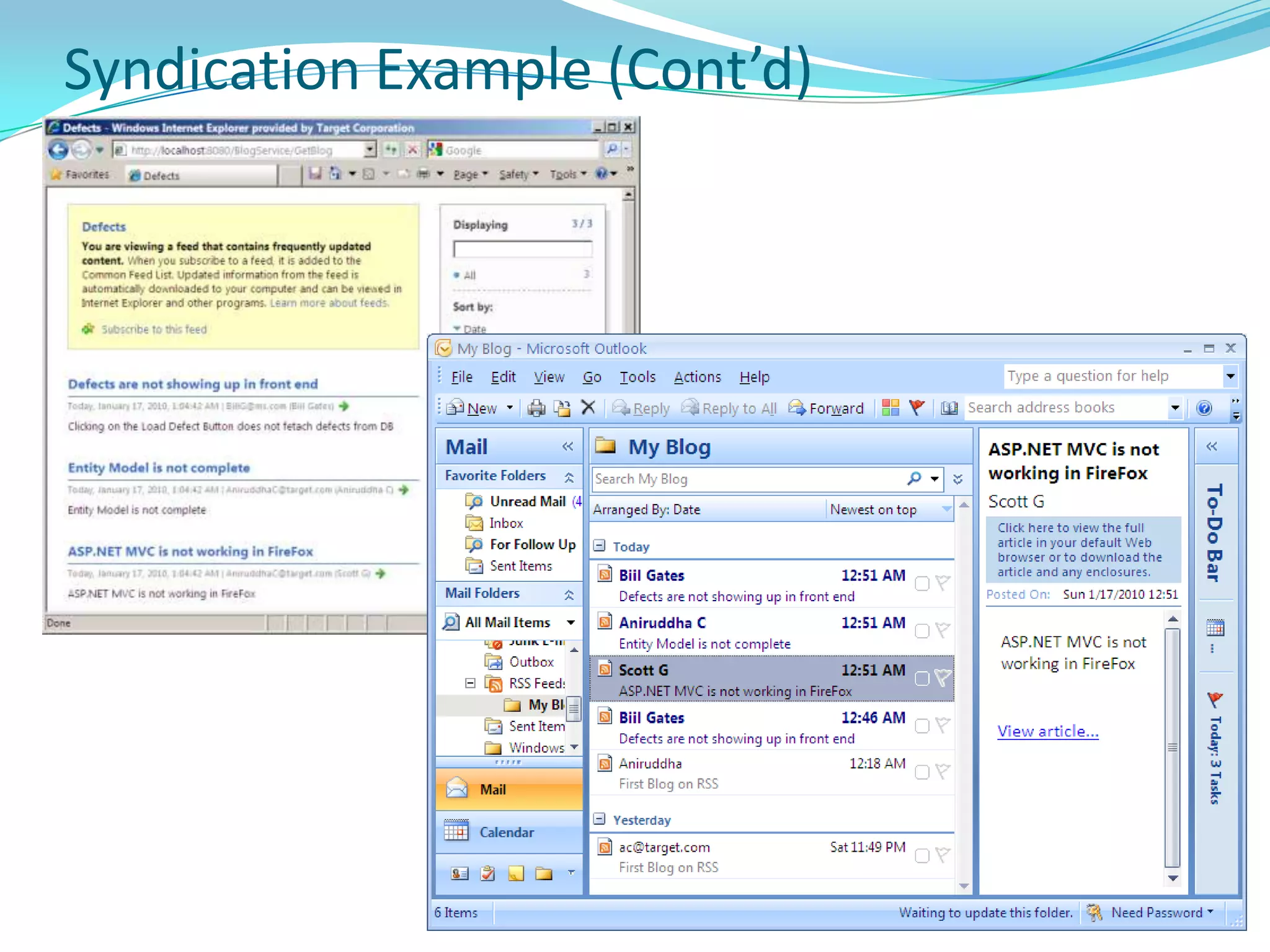
    WCF Syndication (RSSand Atom)Mechanism of app integration - server exposes some application data in interoperable format known as a Feed.
  • 251.
    Feed - collectionof application data that consists of some feed-level metadata (title, author, URL, and other metadata) and a series of feed items.
  • 252.
    Within the feed,feed items are ordered in reverse chronological order.
  • 253.
  • 254.
    Standard set ofitem-level metadata (title, URL, creation date, category etc)
  • 255.
    Arbitrary amount ofapplication specific data.
  • 256.
    Two common typesof syndication feeds are Really Simple Syndication (RSS) 2.0 and Atom 1.0 – WCF supports both.Syndication classes in WCFLocated in System.ServiceModel.Web assembly (System.ServiceModel.Syndication ns)
  • 257.
    Syndication specific classes- allows to work with feed, feed items, and related metadata in format-independent way:
  • 258.
    SyndicationFeed - Representsa top-level feed object, <feed> in Atom 1.0 and <rss> in RSS 2.0.
  • 259.
    SyndicationItem - Representsa feed item, for example an RSS <item> or an Atom <entry>.
  • 260.
  • 261.
    Infrastructure classes -build on WCF web programming model to provide syndication support
  • 262.
    Atom10FeedFormatter & RSS20FeedFormatter- feed formatter classes support serializing object model to and from RSS 2.0 and Atom 1.0.RSSAtom
  • 263.
  • 264.
  • 265.
    Create a BasicRSS Feed in WCFMark Service contract interface with the WebGetAttribute.
  • 266.
    Each operation exposedas syndication feed should return Rss20FeedFormatter object.
  • 267.
    Use WebHttpBinding insteadof basic/wsHttpBinding.
  • 268.
    To host serviceuse WebServiceHost (not ServiceHost)Create a Basic Atom Feed in WCFMark Service contract interface with the WebGetAttribute.
  • 269.
    Each operation exposedas syndication feed should return Atom10FeedFormatter object (instead of Rss20FeedFormatter object).
  • 270.
    Use WebHttpBinding insteadof basic/wsHttpBinding.
  • 271.
    To host serviceuse WebServiceHost (not ServiceHost)Syndication (RSS and Atom) in IE8
  • 272.
  • 273.
  • 274.
  • 275.
  • 276.
  • 277.
  • 278.
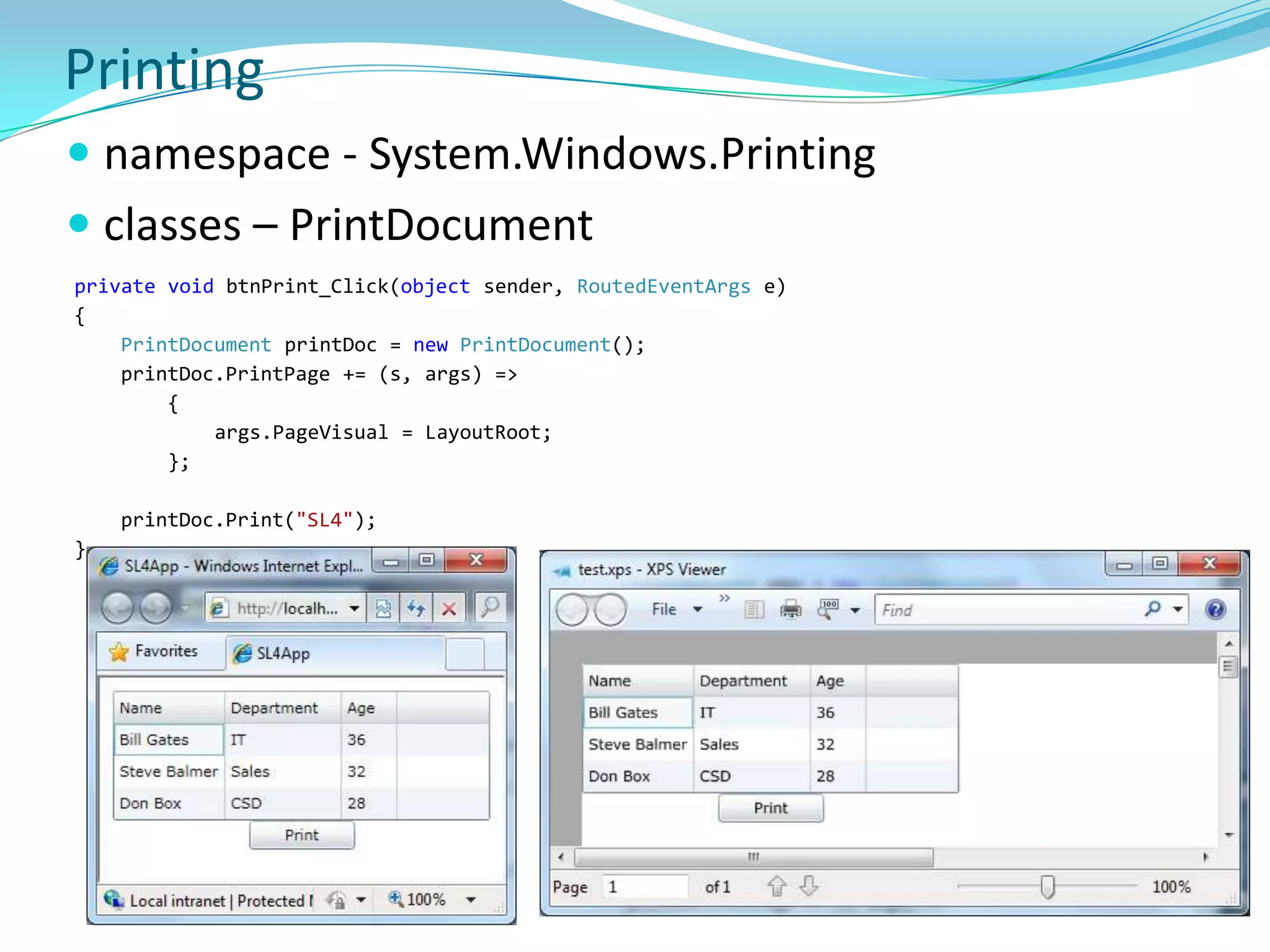
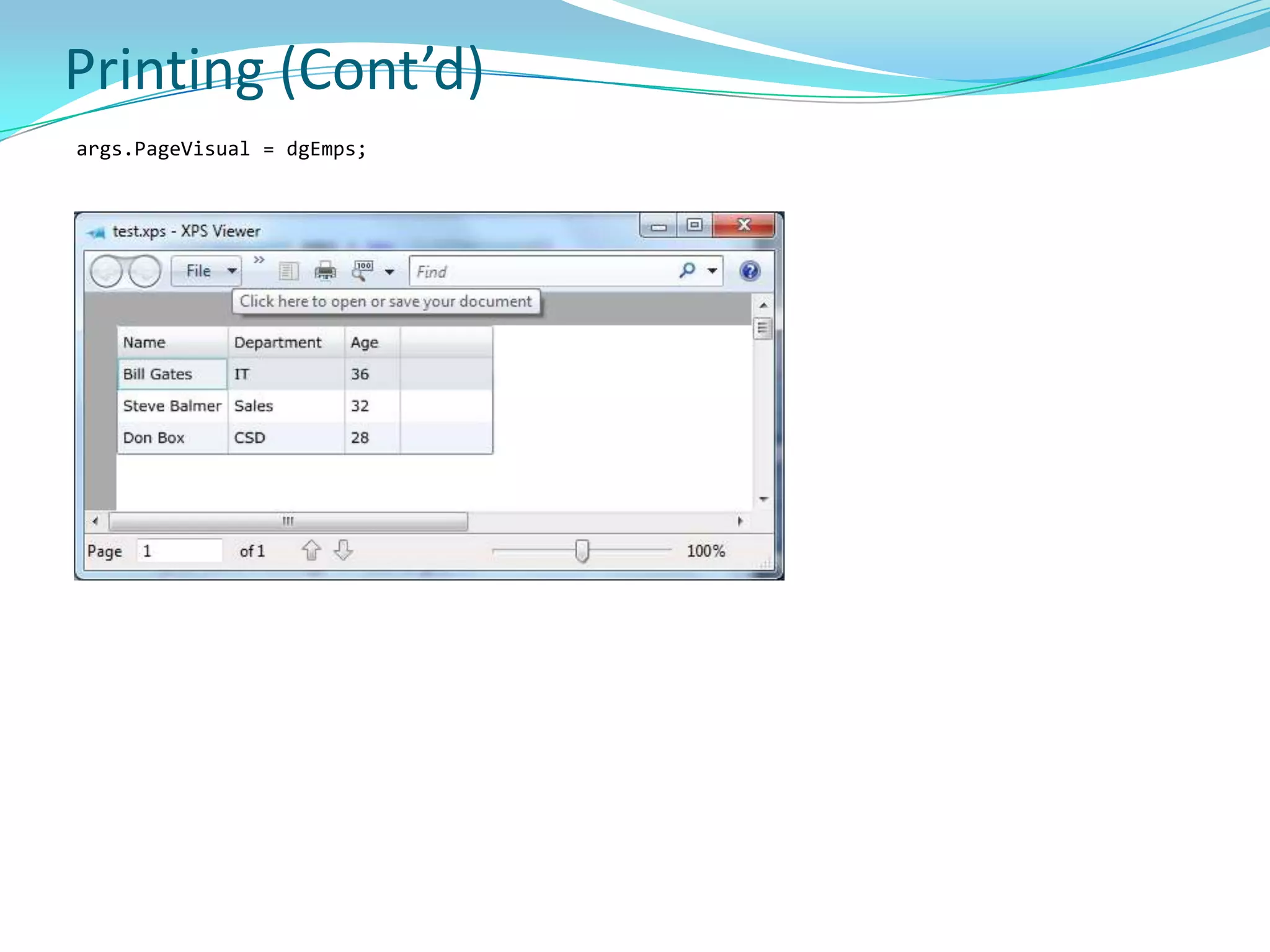
    Printingnamespace - System.Windows.Printingclasses– PrintDocument privatevoidbtnPrint_Click(object sender, RoutedEventArgs e) {PrintDocumentprintDoc = newPrintDocument();printDoc.PrintPage += (s, args) => {args.PageVisual = LayoutRoot; }; printDoc.Print("SL4"); }
  • 279.
  • 280.
  • 281.
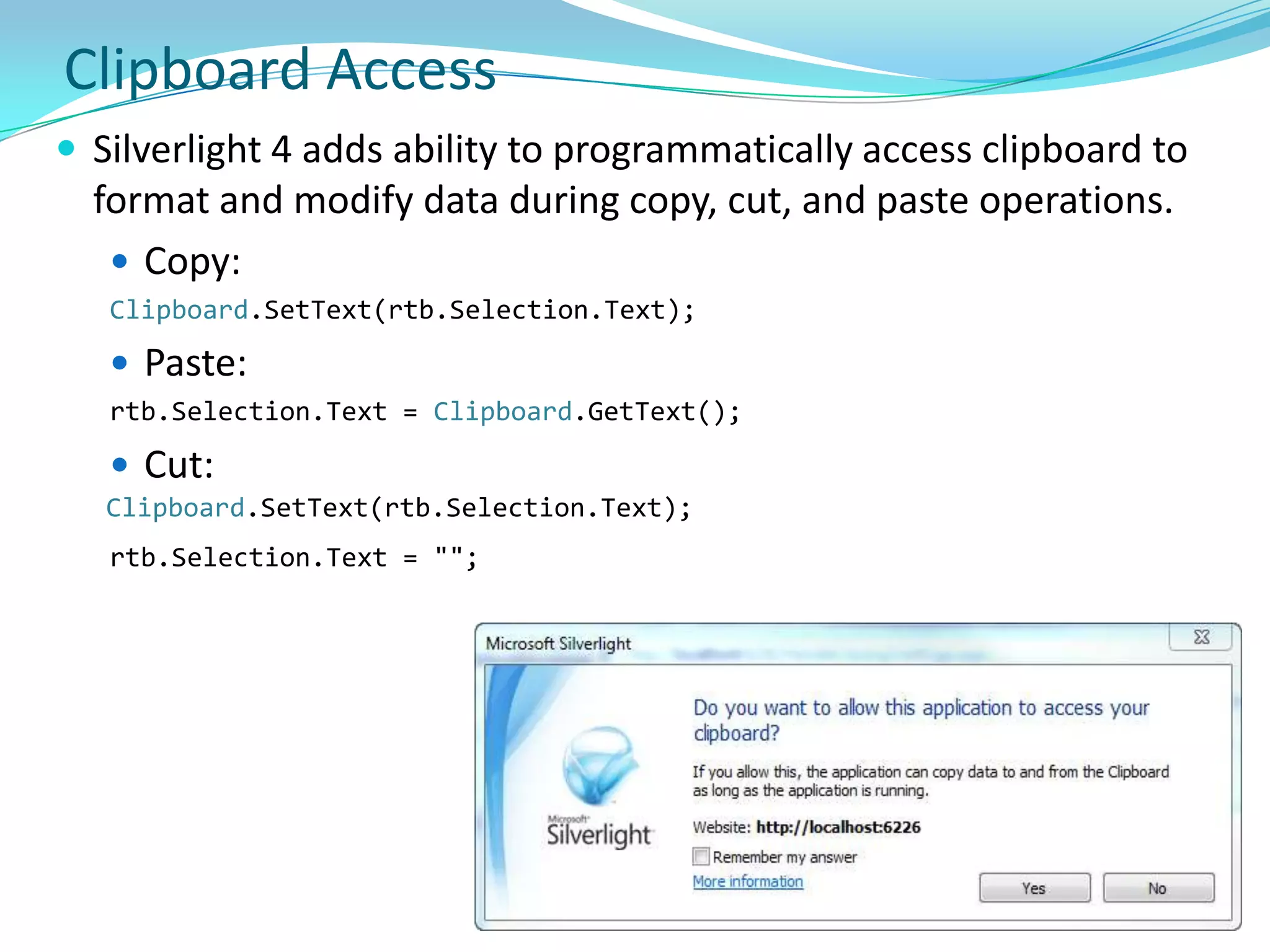
    Clipboard AccessSilverlight 4adds ability to programmatically access clipboard to format and modify data during copy, cut, and paste operations. Copy: Clipboard.SetText(rtb.Selection.Text);Paste:rtb.Selection.Text = Clipboard.GetText();Cut:Clipboard.SetText(rtb.Selection.Text);rtb.Selection.Text = "";
  • 282.
  • 283.
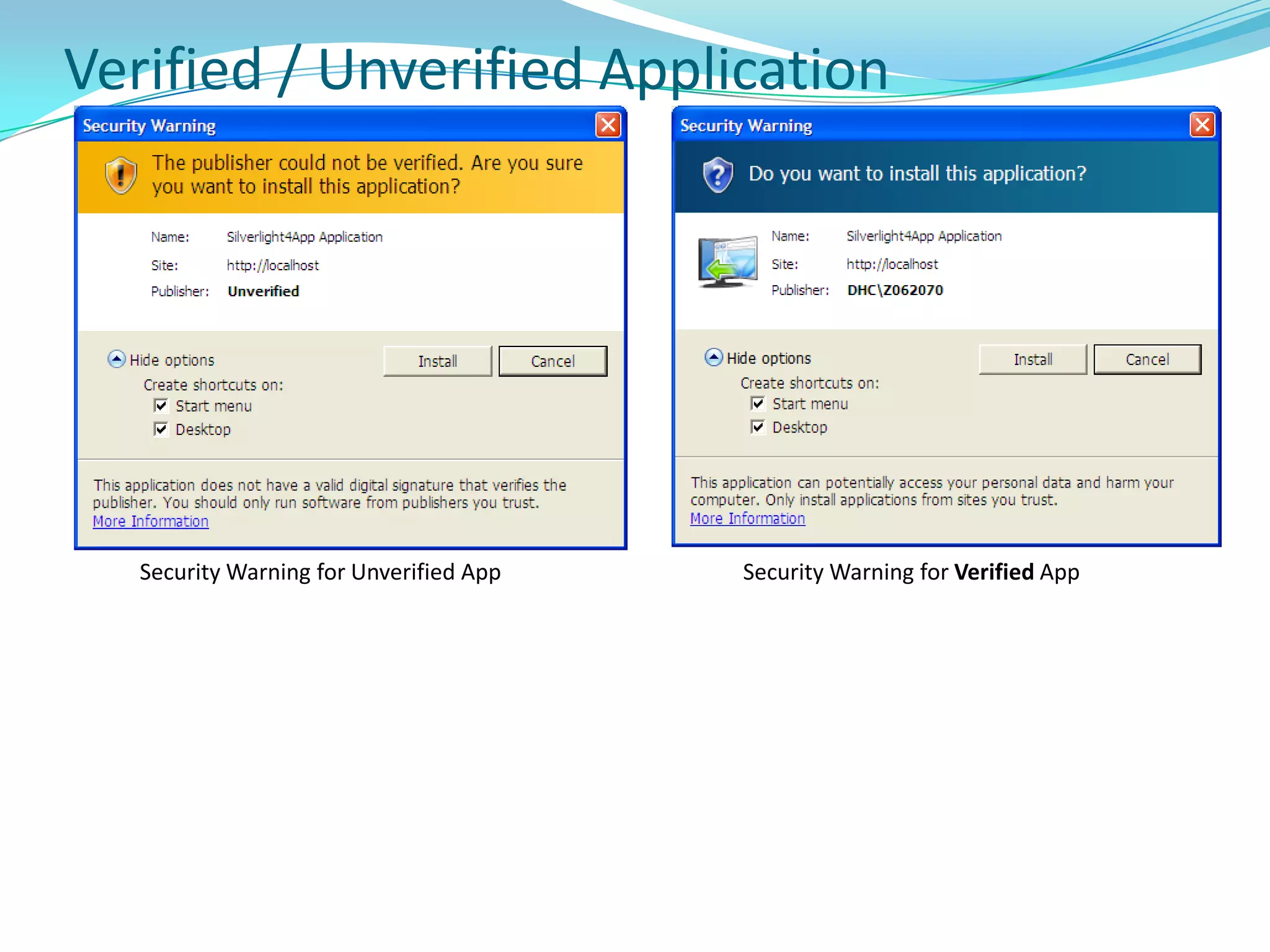
    Verified / UnverifiedApplicationSecurity Warning for Unverified AppSecurity Warning for Verified App
  • 284.
    Silverlight PerformanceTest onMultiple Platforms and BrowsersSet EnableFrameRateCounter to true During Development Use Transparent Background for a Silverlight Plug-in Sparingly When Animating the Opacity or Transform of a UIElement, set its CacheModeCache Visual Elements when Blending layers using Opacity and Rotating or Stretching Objects Avoid Using Windowless Mode Use Visibility Instead of Opacity Whenever PossibleSilverlight Uses Multi-Core in Rendering and Media In Full-Screen Mode, Hide Unused Objects
  • 285.
    Silverlight Performance (Cont’d)DoNot Use Width and Height with MediaElement Objects Do Not Use Width and Height with Path Objects Break Up CPU-Intensive Work into Smaller Tasks Break Up Large Application PackagesUse Double.ToString(CultureInfo.InvariantCulture) Rather Than Double.ToString() Use Stretch="Fill" When Rendering a Lot of ImagesPerform time-consuming operations on a background thread using BackgroundWorker class.
  • 286.
  • 287.
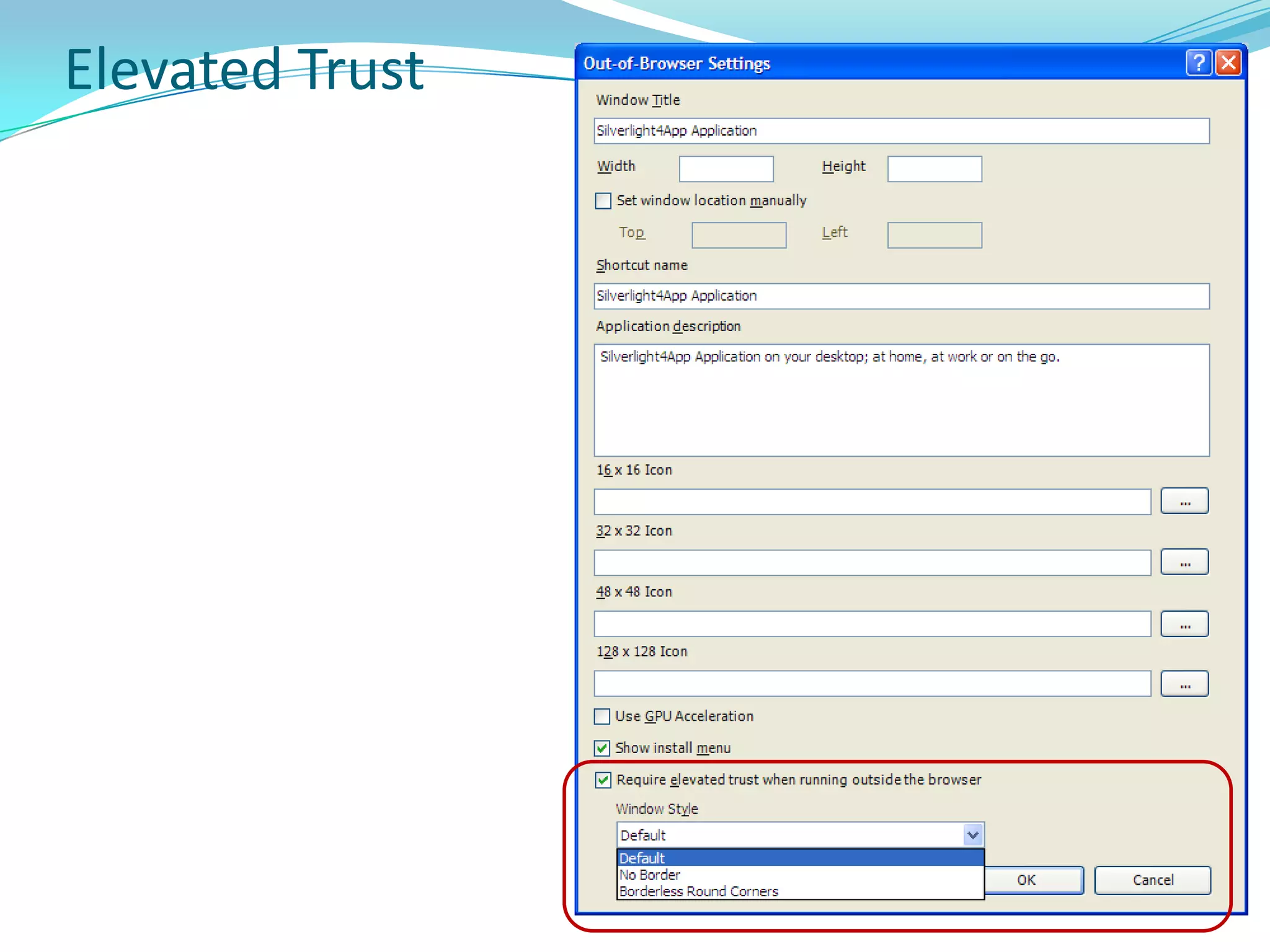
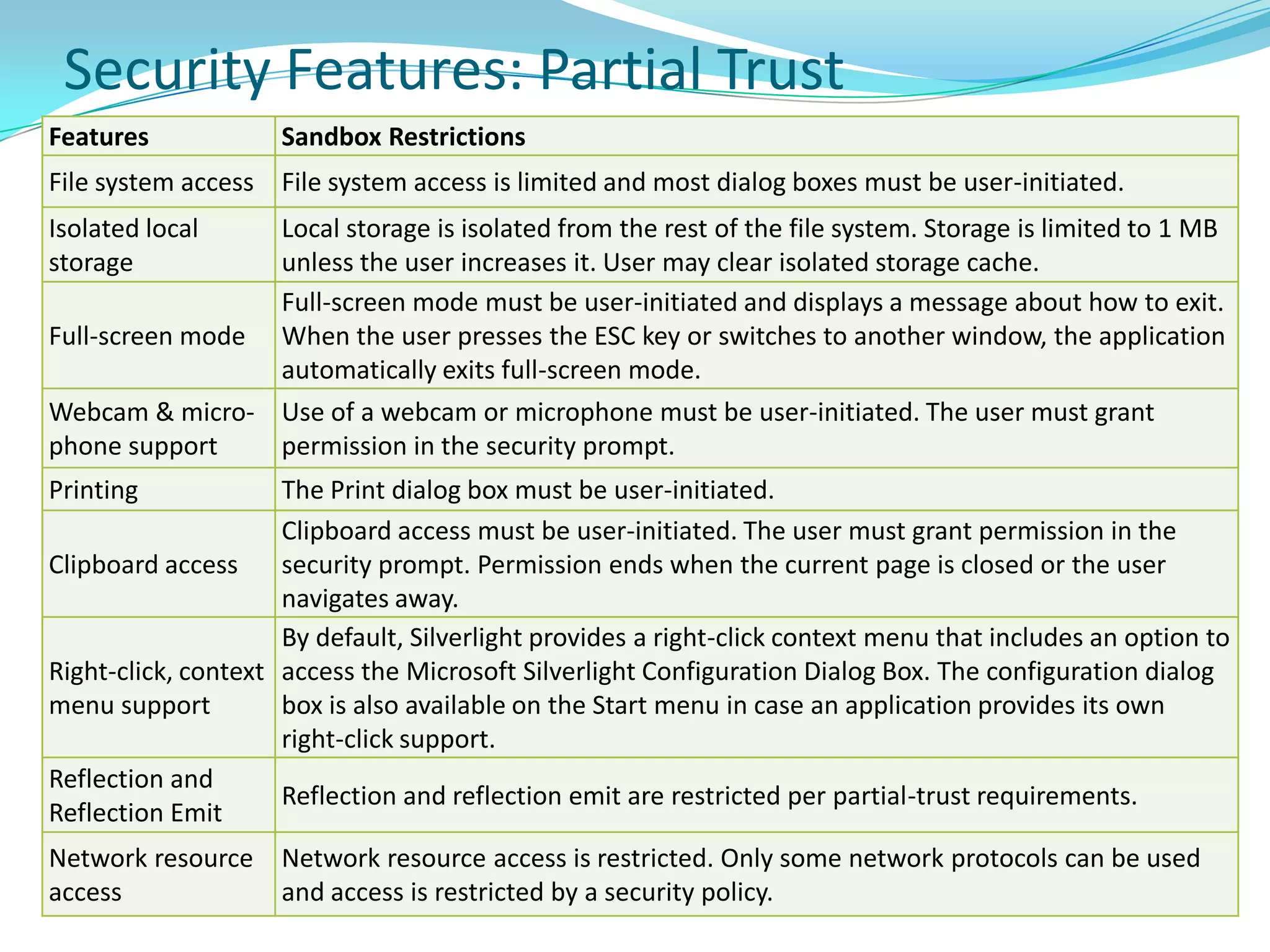
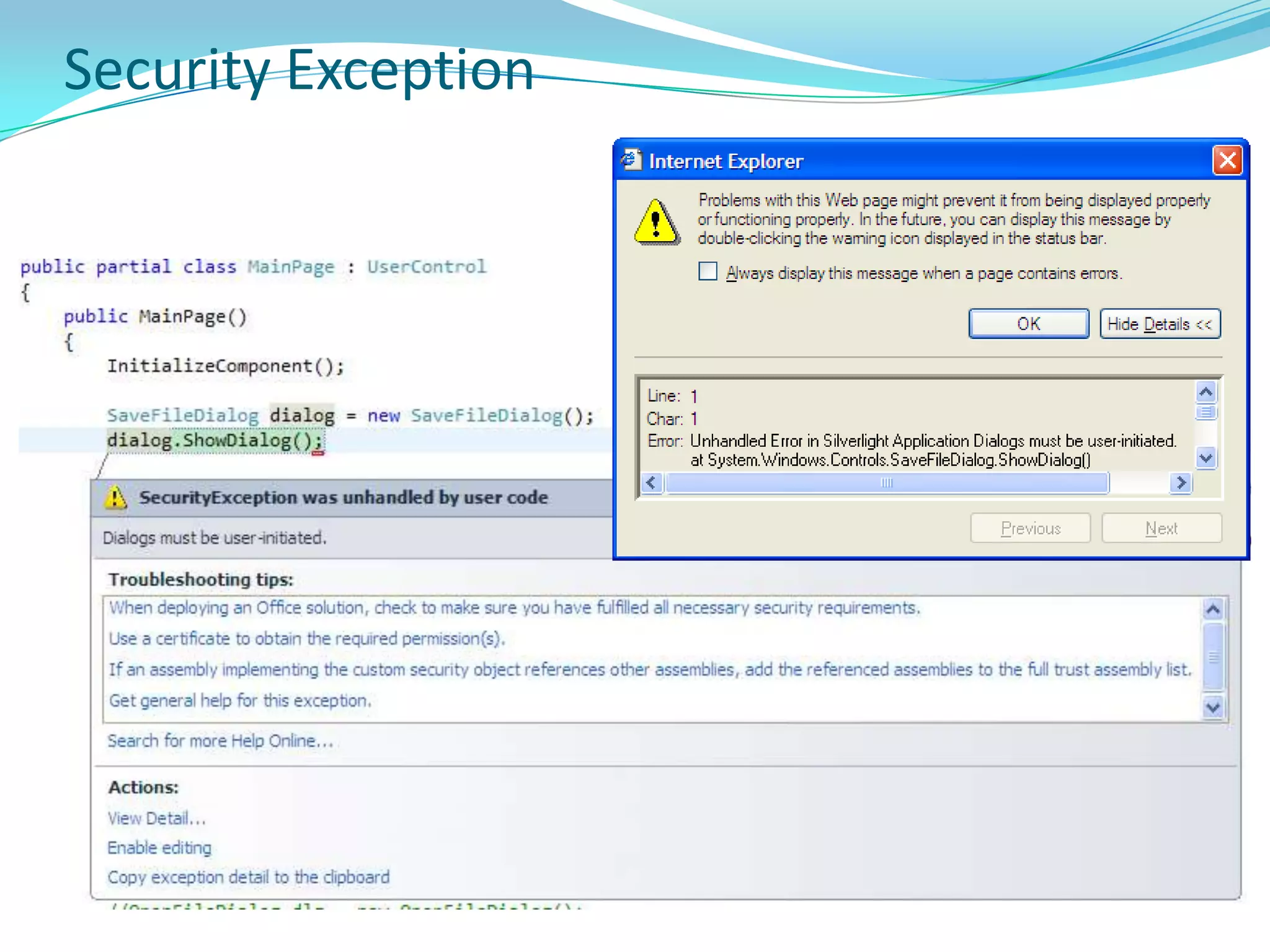
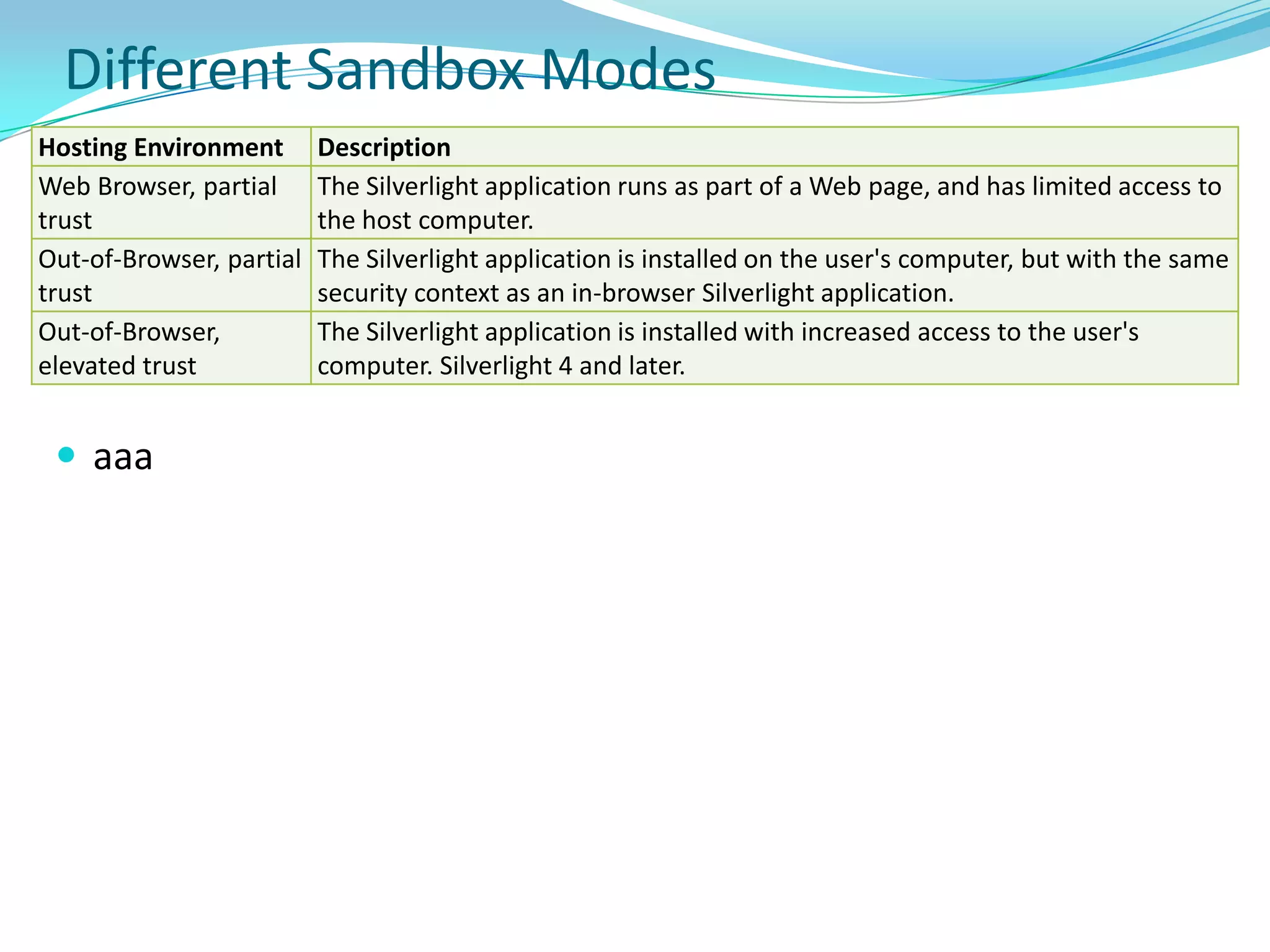
    Silverlight Security ModelBydefault, Silverlight apps are hosted in browser and run in an environment that restricts access to user's computer . Operate within partial-trust security boundary - called a sandbox. Silverlight apps run in a different security context than the rest of the HTML page that hosts the Silverlight plug-in.Cannot access file system and other system resources in the same way as traditional .NET applications. These actions can still be performed, but they typically must be initiated by the user.Otherwise Silverlight throws SecurityException exception.Despite the restricted execution environment, there are some security considerations when you build Silverlight applications. Silverlight 4 and later applications can be configured to run in elevated trust, which also has security implications.
  • 288.
    Silverlight SecurityApps operatewithin a partial-trust security boundary (sandbox). Cannot access the file system and other system resources in the same way as traditional .NET applications. This sandbox environment is enabled by a security model.In the context of security within the application, there are two code types in Silverlight: platform code and application code. Platform code is the API provided by the Silverlight runtime and SDK.Application code is the code that you write by using the platform code.Silverlight runtime can detect code type based on location of code assembly and by checking the public key of assembly. If an assembly is loaded from the Silverlight runtime or SDK installation directory, is signed with a public key from Microsoft, and meets some additional requirements, the assembly can contain platform code. This means that Silverlight application code is never considered to be platform code.
  • 289.
    Security LevelsSilverlight codehas three security levels: Transparent, SafeCritical, and Critical. Transparent Code - code that cannot elevate permissions of call stack. Transparent code can only run with same permission level as its caller. All app code is Transparent code. Has the following characteristics - Cannot contain unverifiable code. All of the code must be verifiably type-safe. Cannot call native code via a P/Invoke or COM interop. Cannot access Critical code or data unless the target is marked SafeCritical.SafeCritical Code - code layer on top of Critical code that helps to ensure calls are safe. Platform code can be Transparent, SafeCritical, or Critical
  • 290.
    Critical Code -code that has ability to perform operations outside the security sandbox (such as writing to the file system) Security Features: Partial Trust
  • 291.
  • 292.