Building
Mobile Apps
on
● A Linux-based Mobile Operating System
● Started in 2003
● Acquired by Google in 2005
● Open Source
What is Android?
Kurt Renzo Acosta
Research and Development
Engineer for Mobile Apps
History of Android
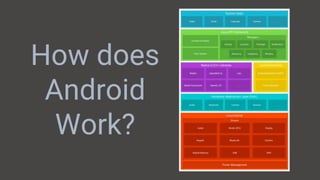
How does
Android
Work?
Why Kotlin?
● Modern. Expressive. Safe
● Readable. Concise
● 100% Interoperable with
Java
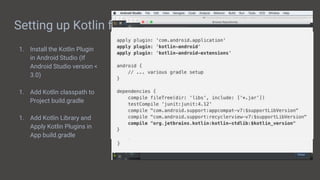
Setting up Kotlin for Android
1. Install the Kotlin Plugin
in Android Studio (If
Android Studio version <
3.0)
1. Add Kotlin classpath to
Project build.gradle
1. Add Kotlin Library and
Apply Kotlin Plugins in
App build.gradle
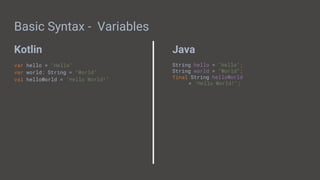
Kotlin Java
Basic Syntax - Variables
var hello = "Hello"
var world: String = "World"
val helloWorld = "Hello World!"
String hello = "Hello";
String world = "World";
final String helloWorld
= "Hello World!";
Kotlin Java
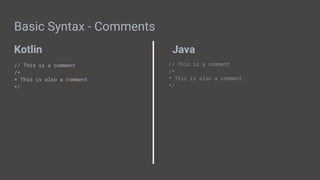
Basic Syntax - Comments
// This is a comment
/*
* This is also a comment
*/
// This is a comment
/*
* This is also a comment
*/
Kotlin Java
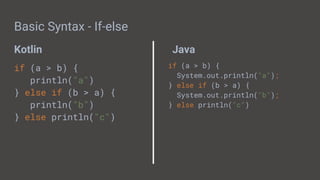
Basic Syntax - If-else
if (a > b) {
println("a")
} else if (b > a) {
println("b")
} else println("c")
if (a > b) {
System.out.println("a");
} else if (b > a) {
System.out.println("b");
} else println("c")
Kotlin Java
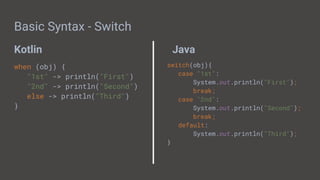
Basic Syntax - Switch
when (obj) {
"1st" -> println("First")
"2nd" -> println("Second")
else -> println("Third")
}
switch(obj){
case "1st":
System.out.println("First");
break;
case "2nd":
System.out.println("Second");
break;
default:
System.out.println("Third");
}
Kotlin Java
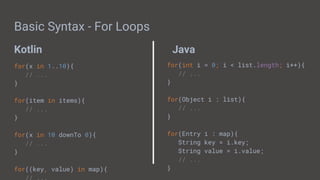
Basic Syntax - For Loops
for(x in 1..10){
// ...
}
for(item in items){
// ...
}
for(x in 10 downTo 0){
// ...
}
for((key, value) in map){
// ...
for(int i = 0; i < list.length; i++){
// ...
}
for(Object i : list){
// ...
}
for(Entry i : map){
String key = i.key;
String value = i.value;
// ...
}
Kotlin Java
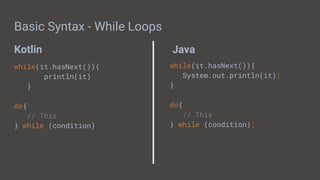
Basic Syntax - While Loops
while(it.hasNext()){
println(it)
}
do{
// This
} while (condition)
while(it.hasNext()){
System.out.println(it);
}
do{
// This
} while (condition);
Kotlin Java
Basic Syntax - Functions
fun main(args: Array<String>){
}
fun getInt(): Int{
}
public static void main(String[] args){
}
int getInt(){
}
Kotlin Java
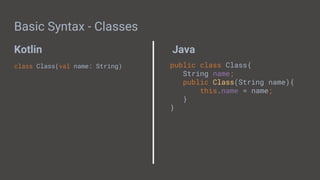
Basic Syntax - Classes
class Class(val name: String) public class Class{
String name;
public Class(String name){
this.name = name;
}
}
Kotlin Java
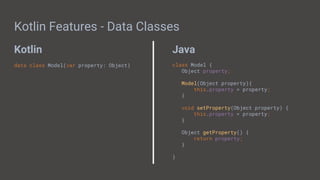
Kotlin Features - Data Classes
data class Model(var property: Object) class Model {
Object property;
Model(Object property){
this.property = property;
}
void setProperty(Object property) {
this.property = property;
}
Object getProperty() {
return property;
}
}
Kotlin Java
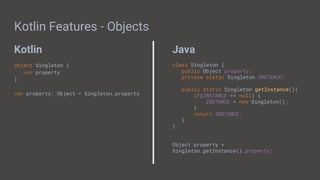
Kotlin Features - Objects
object Singleton {
var property
}
var property: Object = Singleton.property
class Singleton {
public Object property;
private static Singleton INSTANCE;
public static Singleton getInstance(){
if(INSTANCE == null) {
INSTANCE = new Singleton();
}
return INSTANCE;
}
}
Object property =
Singleton.getInstance().property;
Kotlin Java
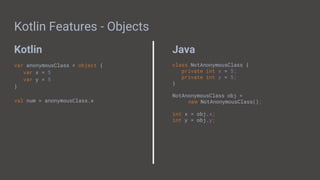
Kotlin Features - Objects
var anonymousClass = object {
var x = 5
var y = 5
}
val num = anonymousClass.x
class NotAnonymousClass {
private int x = 5;
private int y = 5;
}
NotAnonymousClass obj =
new NotAnonymousClass();
int x = obj.x;
int y = obj.y;
Kotlin Features - Objects
class ClassWithSingleton {
object Singleton {
var property
}
}
val property =
ClassWithSingleton.Singleton.property
class ClassWithSingleton {
companion object {
var property
}
}
val property = ClassWithSingleton.property
Kotlin Java
Kotlin Features - Automatic Getters/Setters
class Model(var property: Object)
val model = Model()
model.property = "An Object"
val property = model.property
class Model {
private Object property;
Object getProperty() {
return property;
}
void setProperty(Object property) {
this.property = property;
}
}
Model model = new Model();
model.setProperty("An Object");
Object property = model.getProperty();
Kotlin Java
Kotlin Features - Null Safety
var notNullable: String
var nullable: String?
fun main(args: Array<String>) {
notNullable = null //Error
notNullable = "Hi" //OK
nullable = null //OK
nullable = "Hi" //OK
}
String nullable;
public static void main(String[] args){
nullable = null; //OK
nullable = "HI"; //OK
}
Kotlin Java
Kotlin Features - Null Safety
var nullable: String?
fun main(args: Array<String>) {
var length = nullable?.length
var forceLength = nullable!!.length
length = nullable.length ?: 0
}
String nullable;
public static void main(String[] args){
int length;
if(nullable != null) {
length = nullable.length();
}
length = nullable != null ?
nullable.length() : 0;
}
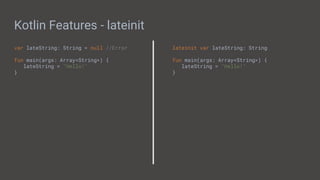
Kotlin Features - lateinit
var lateString: String = null //Error
fun main(args: Array<String>) {
lateString = "Hello!"
}
lateinit var lateString: String
fun main(args: Array<String>) {
lateString = "Hello!"
}
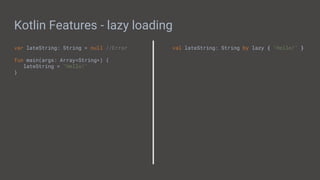
Kotlin Features - lazy loading
var lateString: String = null //Error
fun main(args: Array<String>) {
lateString = "Hello!"
}
val lateString: String by lazy { "Hello!" }
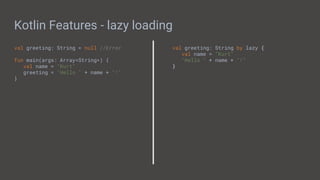
Kotlin Features - lazy loading
val greeting: String = null //Error
fun main(args: Array<String>) {
val name = "Kurt"
greeting = "Hello " + name + "!"
}
val greeting: String by lazy {
val name = "Kurt"
"Hello " + name + "!"
}
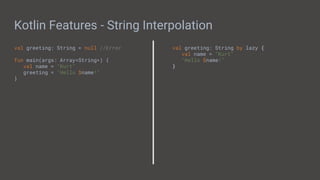
Kotlin Features - String Interpolation
val greeting: String = null //Error
fun main(args: Array<String>) {
val name = "Kurt"
greeting = "Hello $name!"
}
val greeting: String by lazy {
val name = "Kurt"
"Hello $name!"
}
Kotlin Features - Named Parameters
fun something(a: Boolean, b: Boolean, c: Boolean, d: Boolean){
return true
}
something(
a = true,
b = true,
c = true,
d = true
)
something(
d = true,
c = true,
b = true,
a = true
)
Kotlin Java
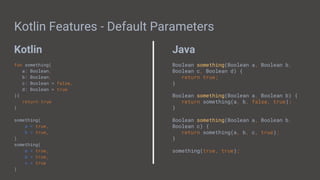
Kotlin Features - Default Parameters
fun something(
a: Boolean,
b: Boolean,
c: Boolean = false,
d: Boolean = true
){
return true
}
something(
a = true,
b = true,
)
something(
a = true,
b = true,
c = true
)
Boolean something(Boolean a, Boolean b,
Boolean c, Boolean d) {
return true;
}
Boolean something(Boolean a, Boolean b) {
return something(a, b, false, true);
}
Boolean something(Boolean a, Boolean b,
Boolean c) {
return something(a, b, c, true);
}
something(true, true);
Kotlin Java
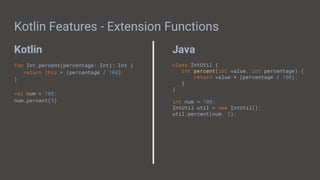
Kotlin Features - Extension Functions
fun Int.percent(percentage: Int): Int {
return this * (percentage / 100);
}
val num = 100;
num.percent(5)
class IntUtil {
int percent(int value, int percentage) {
return value * (percentage / 100);
}
}
int num = 100;
IntUtil util = new IntUtil();
util.percent(num, 5);
Kotlin Java
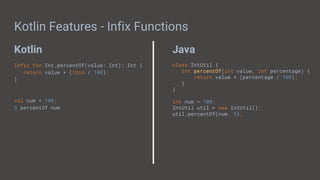
Kotlin Features - Infix Functions
Infix fun Int.percentOf(value: Int): Int {
return value * (this / 100);
}
val num = 100;
5 percentOf num
class IntUtil {
int percentOf(int value, int percentage) {
return value * (percentage / 100);
}
}
int num = 100;
IntUtil util = new IntUtil();
util.percentOf(num, 5);
Kotlin Features - Single-Expression Functions
fun sum(x: Int, y: Int): Int {
return x + y
}
fun checkAndroidVersion(apiLevel: Int):
String {
return when(apiLevel) {
26 -> "Oreo"
25 -> "Nougat"
23 -> "Marshmallow"
21 -> "Lollipop"
...
}
}
fun sum(x: Int, y: Int): Int = x + y
fun checkAndroidVersion(apiLevel: Int): =
when(apiLevel) {
26 -> "Oreo"
25 -> "Nougat"
23 -> "Marshmallow"
21 -> "Lollipop"
...
}
}
Kotlin Java
Kotlin Features - Operator Overloading
class Point(val x: Int, val y: Int) {
...
operator fun plus(other: Point): P =
Point(x + other.x, y + other.y)
}
val point1 = Point(5, 10)
val point2 = Point(10, 20)
val point3 = point1 + point2
class Point {
int x;
int y;
...
Point plus(Point point) {
return new Point(this.x + point.x, this.y +
point.y);
}
}
Point point1 = new Point(5, 10);
Point point2 = new Point(16, 15);
Point point3 = point1.plus(point2);
Kotlin Java
Kotlin Features - Higher-Order Functions
fun doIfLollipop(func: () -> Unit) {
if(versionIsLollipop){
func()
}
}
doIfLollipop { println("I'm a Lollipop!") }
void doIfLollipop(Runnable callback) {
if(versionIsLollipop){
callback.run();
}
}
doIfLollipop(new Runnable() {
@Override
public void run() {
System.out.println("I'm a Lollipop!");
}
});
Kotlin Java
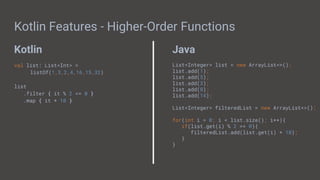
Kotlin Features - Higher-Order Functions
val list: List<Int> =
listOf(1,3,2,4,16,15,32)
list
.filter { it % 2 == 0 }
.map { it * 10 }
List<Integer> list = new ArrayList<>();
list.add(1);
list.add(5);
list.add(3);
list.add(8);
list.add(14);
List<Integer> filteredList = new ArrayList<>();
for(int i = 0; i < list.size(); i++){
if(list.get(i) % 2 == 0){
filteredList.add(list.get(i) * 10);
}
}
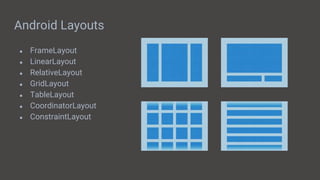
Android Layouts
● FrameLayout
● LinearLayout
● RelativeLayout
● GridLayout
● TableLayout
● CoordinatorLayout
● ConstraintLayout
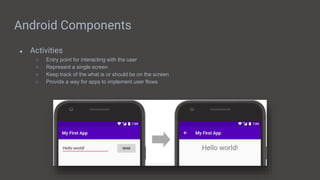
Android Components
● Activities
○ Entry point for interacting with the user
○ Represent a single screen
○ Keep track of the what is or should be on the screen
○ Provide a way for apps to implement user flows
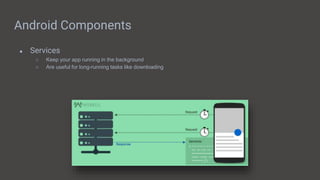
Android Components
● Services
○ Keep your app running in the background
○ Are useful for long-running tasks like downloading
Android Components
● Broadcast Receivers
○ Enables apps to deliver events to apps outside the regular user flow
○ Usually used for system events like if a screen is turned off, or the wi-fi is turned on
○ Has no user interface but usually communicates with a status bar notification
Android Components
● Content Providers
○ Are a set of app data that you can store in the file system
○ Enables other apps to query or modify the data if it allows it
○ Are entry points to the app’s data
○ Uses Uniform Resource Identifiers (URI)
Android Components
● Intents
○ Are used to connect the different Android Components
○ Can carry information from its component
○ Has two types:
■ Explicit Intents - Specify what to be opened
■ Implicit Intents - Specify what to be done
Let’s create our App
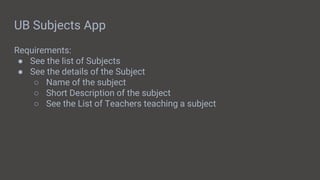
UB Subjects App
Requirements:
● See the list of Subjects
● See the details of the Subject
○ Name of the subject
○ Short Description of the subject
○ See the List of Teachers teaching a subject
Displaying a List of Data
1. Create a layout with a RecyclerView
2. Create a layout for each List Item
2. Create a RecyclerViewAdapter and set it
Connecting to a Web Service / API
Using AsyncTask
class GetUserTask : AsyncTask<String, Int, User> {
override fun onPreExecute() {
...
}
override fun doInBackground(vararg args: String){
val httpClient = HttpClient()
httpClient.setUrl("https://my.url/user")
.setHeader(...)
.setMethod("POST")
.setParameters(...)
.execute()
...
}
override fun onPostExecute() {
...
}
}
val getUserTask = GetUserTask()
getUserTask.execute(myUserId)
Using Retrofit
interface UserApi {
@GET("user/{uid}")
fun getUser(@Query userId: String)
: Call<Response<User>>
}
val retrofit = Retrofit.Builder()
.baseUrl("https://my.url")
.build()
val service = retrofit.create(UserApi::class.java)
service.getUser(myUserId)
Persisting your Data - Defining your Structure
With Content Providers
class DatabaseContract {
abstract class Table1 : BaseColumns {
val TABLE_NAME = "nameOfTable";
val COLUMN_NAME_COL1 = "column1";
val COLUMN_NAME_COL2 = "column2";
val COLUMN_NAME_COL3 = "column3";
}
}
Using Room
@Entity(tableName = "tableName")
data class TableModel(
@PrimaryKey(autoGenerate = true)
var id: String = "",
var column1: String = "",
var column2: String = "",
var column3: Int = 1
)
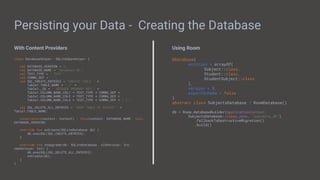
Persisting your Data - Creating the Database
With Content Providers
class DatabaseHelper: SQLiteOpenHelper {
val DATABASE_VERSION = 1;
val DATABASE_NAME = "database.db";
val TEXT_TYPE = " TEXT";
val COMMA_SEP = ",";
val SQL_CREATE_ENTRIES = "CREATE TABLE " +
Table1.TABLE_NAME + " (" +
Table1._ID + " INTEGER PRIMARY KEY," +
Table1.COLUMN_NAME_COL1 + TEXT_TYPE + COMMA_SEP +
Table1.COLUMN_NAME_COL2 + TEXT_TYPE + COMMA_SEP +
Table1.COLUMN_NAME_COL3 + TEXT_TYPE + COMMA_SEP + " )";
val SQL_DELETE_ALL_ENTRIES = "DROP TABLE IF EXISTS " +
Table1.TABLE_NAME;
constructor(context: Context) : this(context, DATABASE_NAME, null,
DATABASE_VERSION)
override fun onCreate(SQLiteDatabase db) {
db.execSQL(SQL_CREATE_ENTRIES);
}
override fun onUpgrade(db: SQLiteDatabase, oldVersion: Int,
newVersion: Int) {
db.execSQL(SQL_DELETE_ALL_ENTRIES);
onCreate(db);
}
}
Using Room
@Database(
entities = arrayOf(
Subject::class,
Student::class,
StudentSubject::class
),
version = 3,
exportSchema = false
)
abstract class SubjectsDatabase : RoomDatabase()
db = Room.databaseBuilder(applicationContext,
SubjectsDatabase::class.java, "subjects_db")
.fallbackToDestructiveMigration()
.build()
Persisting your Data - Defining your Methods
With Content Providers
class ExampleProvider : ContentProvider {
lateinit var mOpenHelper: MainDatabaseHelper
lateinit var db: SQLiteDatabase
val DBNAME = "mydb"
fun onCreate(): Boolean {
mOpenHelper =
MainDatabaseHelper(getContext(),DBNAME,null,1)
return true
}
fun insert(Uri uri, ContentValues values): Cursor {
...
db = mOpenHelper.getWritableDatabase()
}
fun query(...) : Cursor {
...
}
fun update(...) : Cursor {
...
}
fun delete(...) : Cursor {
...
}
fun getType(...) : Cursor {
...
}
}
Using Room
@Dao
interface StudentDao {
@Query("SELECT * FROM student_subject INNER
JOIN student ON student.id =
student_subject.studentId WHERE
student_subject.subjectId LIKE
:arg0")
fun getStudents(subjectId: String):
LiveData<List<Student>>
@Insert(onConflict = OnConflictStrategy.REPLACE)
fun saveStudent(student: Student)
}
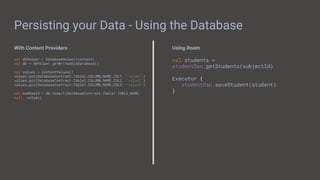
Persisting your Data - Using the Database
With Content Providers
val dbHelper = DatabaseHelper(context)
val db = dbHelper.getWriteableDatabase()
val values = ContentValues()
values.put(DatabaseContract.Table1.COLUMN_NAME_COL1, "value1")
values.put(DatabaseContract.Table1.COLUMN_NAME_COL2, "value2")
values.put(DatabaseContract.Table1.COLUMN_NAME_COL3, "value3")
val newRowId = db.insert(DatabaseContract.Table1.TABLE_NAME,
null, values)
Using Room
val students =
studentDao.getStudents(subjectId)
Executor {
studentDao.saveStudent(student)
}
Software Architecture - MVC
Software Architecture - MVP
Software Architecture - MVVM
Why should we have a clean architecture?
● Robustness
● Testability
● Maintainability
Testing Time!
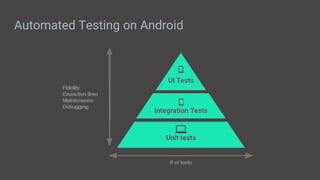
Automated Testing on Android
How do we test components in MVVM?
● User Interface & Interactions
○ Android UI Instrumentation test and mock the ViewModel
● ViewModel
○ JUnit test and mock the Repository
● Repository
○ JUnit test and mock the WebService and DatabaseDaos
● Dao
○ Integration Tests and use an in-memory database to make sure it doesn’t overwrite existing data
● Webservice
○ JUnit test along with MockWebServer just to check if it can receive responses
Q&A
Thank
you!

Building Mobile Apps with Android

  • 1.
  • 2.
    ● A Linux-basedMobile Operating System ● Started in 2003 ● Acquired by Google in 2005 ● Open Source What is Android?
  • 3.
    Kurt Renzo Acosta Researchand Development Engineer for Mobile Apps
  • 4.
  • 6.
  • 8.
    Why Kotlin? ● Modern.Expressive. Safe ● Readable. Concise ● 100% Interoperable with Java
  • 9.
    Setting up Kotlinfor Android 1. Install the Kotlin Plugin in Android Studio (If Android Studio version < 3.0) 1. Add Kotlin classpath to Project build.gradle 1. Add Kotlin Library and Apply Kotlin Plugins in App build.gradle
  • 10.
    Kotlin Java Basic Syntax- Variables var hello = "Hello" var world: String = "World" val helloWorld = "Hello World!" String hello = "Hello"; String world = "World"; final String helloWorld = "Hello World!";
  • 11.
    Kotlin Java Basic Syntax- Comments // This is a comment /* * This is also a comment */ // This is a comment /* * This is also a comment */
  • 12.
    Kotlin Java Basic Syntax- If-else if (a > b) { println("a") } else if (b > a) { println("b") } else println("c") if (a > b) { System.out.println("a"); } else if (b > a) { System.out.println("b"); } else println("c")
  • 13.
    Kotlin Java Basic Syntax- Switch when (obj) { "1st" -> println("First") "2nd" -> println("Second") else -> println("Third") } switch(obj){ case "1st": System.out.println("First"); break; case "2nd": System.out.println("Second"); break; default: System.out.println("Third"); }
  • 14.
    Kotlin Java Basic Syntax- For Loops for(x in 1..10){ // ... } for(item in items){ // ... } for(x in 10 downTo 0){ // ... } for((key, value) in map){ // ... for(int i = 0; i < list.length; i++){ // ... } for(Object i : list){ // ... } for(Entry i : map){ String key = i.key; String value = i.value; // ... }
  • 15.
    Kotlin Java Basic Syntax- While Loops while(it.hasNext()){ println(it) } do{ // This } while (condition) while(it.hasNext()){ System.out.println(it); } do{ // This } while (condition);
  • 16.
    Kotlin Java Basic Syntax- Functions fun main(args: Array<String>){ } fun getInt(): Int{ } public static void main(String[] args){ } int getInt(){ }
  • 17.
    Kotlin Java Basic Syntax- Classes class Class(val name: String) public class Class{ String name; public Class(String name){ this.name = name; } }
  • 18.
    Kotlin Java Kotlin Features- Data Classes data class Model(var property: Object) class Model { Object property; Model(Object property){ this.property = property; } void setProperty(Object property) { this.property = property; } Object getProperty() { return property; } }
  • 19.
    Kotlin Java Kotlin Features- Objects object Singleton { var property } var property: Object = Singleton.property class Singleton { public Object property; private static Singleton INSTANCE; public static Singleton getInstance(){ if(INSTANCE == null) { INSTANCE = new Singleton(); } return INSTANCE; } } Object property = Singleton.getInstance().property;
  • 20.
    Kotlin Java Kotlin Features- Objects var anonymousClass = object { var x = 5 var y = 5 } val num = anonymousClass.x class NotAnonymousClass { private int x = 5; private int y = 5; } NotAnonymousClass obj = new NotAnonymousClass(); int x = obj.x; int y = obj.y;
  • 21.
    Kotlin Features -Objects class ClassWithSingleton { object Singleton { var property } } val property = ClassWithSingleton.Singleton.property class ClassWithSingleton { companion object { var property } } val property = ClassWithSingleton.property
  • 22.
    Kotlin Java Kotlin Features- Automatic Getters/Setters class Model(var property: Object) val model = Model() model.property = "An Object" val property = model.property class Model { private Object property; Object getProperty() { return property; } void setProperty(Object property) { this.property = property; } } Model model = new Model(); model.setProperty("An Object"); Object property = model.getProperty();
  • 23.
    Kotlin Java Kotlin Features- Null Safety var notNullable: String var nullable: String? fun main(args: Array<String>) { notNullable = null //Error notNullable = "Hi" //OK nullable = null //OK nullable = "Hi" //OK } String nullable; public static void main(String[] args){ nullable = null; //OK nullable = "HI"; //OK }
  • 24.
    Kotlin Java Kotlin Features- Null Safety var nullable: String? fun main(args: Array<String>) { var length = nullable?.length var forceLength = nullable!!.length length = nullable.length ?: 0 } String nullable; public static void main(String[] args){ int length; if(nullable != null) { length = nullable.length(); } length = nullable != null ? nullable.length() : 0; }
  • 25.
    Kotlin Features -lateinit var lateString: String = null //Error fun main(args: Array<String>) { lateString = "Hello!" } lateinit var lateString: String fun main(args: Array<String>) { lateString = "Hello!" }
  • 26.
    Kotlin Features -lazy loading var lateString: String = null //Error fun main(args: Array<String>) { lateString = "Hello!" } val lateString: String by lazy { "Hello!" }
  • 27.
    Kotlin Features -lazy loading val greeting: String = null //Error fun main(args: Array<String>) { val name = "Kurt" greeting = "Hello " + name + "!" } val greeting: String by lazy { val name = "Kurt" "Hello " + name + "!" }
  • 28.
    Kotlin Features -String Interpolation val greeting: String = null //Error fun main(args: Array<String>) { val name = "Kurt" greeting = "Hello $name!" } val greeting: String by lazy { val name = "Kurt" "Hello $name!" }
  • 29.
    Kotlin Features -Named Parameters fun something(a: Boolean, b: Boolean, c: Boolean, d: Boolean){ return true } something( a = true, b = true, c = true, d = true ) something( d = true, c = true, b = true, a = true )
  • 30.
    Kotlin Java Kotlin Features- Default Parameters fun something( a: Boolean, b: Boolean, c: Boolean = false, d: Boolean = true ){ return true } something( a = true, b = true, ) something( a = true, b = true, c = true ) Boolean something(Boolean a, Boolean b, Boolean c, Boolean d) { return true; } Boolean something(Boolean a, Boolean b) { return something(a, b, false, true); } Boolean something(Boolean a, Boolean b, Boolean c) { return something(a, b, c, true); } something(true, true);
  • 31.
    Kotlin Java Kotlin Features- Extension Functions fun Int.percent(percentage: Int): Int { return this * (percentage / 100); } val num = 100; num.percent(5) class IntUtil { int percent(int value, int percentage) { return value * (percentage / 100); } } int num = 100; IntUtil util = new IntUtil(); util.percent(num, 5);
  • 32.
    Kotlin Java Kotlin Features- Infix Functions Infix fun Int.percentOf(value: Int): Int { return value * (this / 100); } val num = 100; 5 percentOf num class IntUtil { int percentOf(int value, int percentage) { return value * (percentage / 100); } } int num = 100; IntUtil util = new IntUtil(); util.percentOf(num, 5);
  • 33.
    Kotlin Features -Single-Expression Functions fun sum(x: Int, y: Int): Int { return x + y } fun checkAndroidVersion(apiLevel: Int): String { return when(apiLevel) { 26 -> "Oreo" 25 -> "Nougat" 23 -> "Marshmallow" 21 -> "Lollipop" ... } } fun sum(x: Int, y: Int): Int = x + y fun checkAndroidVersion(apiLevel: Int): = when(apiLevel) { 26 -> "Oreo" 25 -> "Nougat" 23 -> "Marshmallow" 21 -> "Lollipop" ... } }
  • 34.
    Kotlin Java Kotlin Features- Operator Overloading class Point(val x: Int, val y: Int) { ... operator fun plus(other: Point): P = Point(x + other.x, y + other.y) } val point1 = Point(5, 10) val point2 = Point(10, 20) val point3 = point1 + point2 class Point { int x; int y; ... Point plus(Point point) { return new Point(this.x + point.x, this.y + point.y); } } Point point1 = new Point(5, 10); Point point2 = new Point(16, 15); Point point3 = point1.plus(point2);
  • 35.
    Kotlin Java Kotlin Features- Higher-Order Functions fun doIfLollipop(func: () -> Unit) { if(versionIsLollipop){ func() } } doIfLollipop { println("I'm a Lollipop!") } void doIfLollipop(Runnable callback) { if(versionIsLollipop){ callback.run(); } } doIfLollipop(new Runnable() { @Override public void run() { System.out.println("I'm a Lollipop!"); } });
  • 36.
    Kotlin Java Kotlin Features- Higher-Order Functions val list: List<Int> = listOf(1,3,2,4,16,15,32) list .filter { it % 2 == 0 } .map { it * 10 } List<Integer> list = new ArrayList<>(); list.add(1); list.add(5); list.add(3); list.add(8); list.add(14); List<Integer> filteredList = new ArrayList<>(); for(int i = 0; i < list.size(); i++){ if(list.get(i) % 2 == 0){ filteredList.add(list.get(i) * 10); } }
  • 37.
    Android Layouts ● FrameLayout ●LinearLayout ● RelativeLayout ● GridLayout ● TableLayout ● CoordinatorLayout ● ConstraintLayout
  • 38.
    Android Components ● Activities ○Entry point for interacting with the user ○ Represent a single screen ○ Keep track of the what is or should be on the screen ○ Provide a way for apps to implement user flows
  • 39.
    Android Components ● Services ○Keep your app running in the background ○ Are useful for long-running tasks like downloading
  • 40.
    Android Components ● BroadcastReceivers ○ Enables apps to deliver events to apps outside the regular user flow ○ Usually used for system events like if a screen is turned off, or the wi-fi is turned on ○ Has no user interface but usually communicates with a status bar notification
  • 41.
    Android Components ● ContentProviders ○ Are a set of app data that you can store in the file system ○ Enables other apps to query or modify the data if it allows it ○ Are entry points to the app’s data ○ Uses Uniform Resource Identifiers (URI)
  • 42.
    Android Components ● Intents ○Are used to connect the different Android Components ○ Can carry information from its component ○ Has two types: ■ Explicit Intents - Specify what to be opened ■ Implicit Intents - Specify what to be done
  • 43.
  • 44.
    UB Subjects App Requirements: ●See the list of Subjects ● See the details of the Subject ○ Name of the subject ○ Short Description of the subject ○ See the List of Teachers teaching a subject
  • 45.
    Displaying a Listof Data 1. Create a layout with a RecyclerView 2. Create a layout for each List Item 2. Create a RecyclerViewAdapter and set it
  • 46.
    Connecting to aWeb Service / API Using AsyncTask class GetUserTask : AsyncTask<String, Int, User> { override fun onPreExecute() { ... } override fun doInBackground(vararg args: String){ val httpClient = HttpClient() httpClient.setUrl("https://my.url/user") .setHeader(...) .setMethod("POST") .setParameters(...) .execute() ... } override fun onPostExecute() { ... } } val getUserTask = GetUserTask() getUserTask.execute(myUserId) Using Retrofit interface UserApi { @GET("user/{uid}") fun getUser(@Query userId: String) : Call<Response<User>> } val retrofit = Retrofit.Builder() .baseUrl("https://my.url") .build() val service = retrofit.create(UserApi::class.java) service.getUser(myUserId)
  • 47.
    Persisting your Data- Defining your Structure With Content Providers class DatabaseContract { abstract class Table1 : BaseColumns { val TABLE_NAME = "nameOfTable"; val COLUMN_NAME_COL1 = "column1"; val COLUMN_NAME_COL2 = "column2"; val COLUMN_NAME_COL3 = "column3"; } } Using Room @Entity(tableName = "tableName") data class TableModel( @PrimaryKey(autoGenerate = true) var id: String = "", var column1: String = "", var column2: String = "", var column3: Int = 1 )
  • 48.
    Persisting your Data- Creating the Database With Content Providers class DatabaseHelper: SQLiteOpenHelper { val DATABASE_VERSION = 1; val DATABASE_NAME = "database.db"; val TEXT_TYPE = " TEXT"; val COMMA_SEP = ","; val SQL_CREATE_ENTRIES = "CREATE TABLE " + Table1.TABLE_NAME + " (" + Table1._ID + " INTEGER PRIMARY KEY," + Table1.COLUMN_NAME_COL1 + TEXT_TYPE + COMMA_SEP + Table1.COLUMN_NAME_COL2 + TEXT_TYPE + COMMA_SEP + Table1.COLUMN_NAME_COL3 + TEXT_TYPE + COMMA_SEP + " )"; val SQL_DELETE_ALL_ENTRIES = "DROP TABLE IF EXISTS " + Table1.TABLE_NAME; constructor(context: Context) : this(context, DATABASE_NAME, null, DATABASE_VERSION) override fun onCreate(SQLiteDatabase db) { db.execSQL(SQL_CREATE_ENTRIES); } override fun onUpgrade(db: SQLiteDatabase, oldVersion: Int, newVersion: Int) { db.execSQL(SQL_DELETE_ALL_ENTRIES); onCreate(db); } } Using Room @Database( entities = arrayOf( Subject::class, Student::class, StudentSubject::class ), version = 3, exportSchema = false ) abstract class SubjectsDatabase : RoomDatabase() db = Room.databaseBuilder(applicationContext, SubjectsDatabase::class.java, "subjects_db") .fallbackToDestructiveMigration() .build()
  • 49.
    Persisting your Data- Defining your Methods With Content Providers class ExampleProvider : ContentProvider { lateinit var mOpenHelper: MainDatabaseHelper lateinit var db: SQLiteDatabase val DBNAME = "mydb" fun onCreate(): Boolean { mOpenHelper = MainDatabaseHelper(getContext(),DBNAME,null,1) return true } fun insert(Uri uri, ContentValues values): Cursor { ... db = mOpenHelper.getWritableDatabase() } fun query(...) : Cursor { ... } fun update(...) : Cursor { ... } fun delete(...) : Cursor { ... } fun getType(...) : Cursor { ... } } Using Room @Dao interface StudentDao { @Query("SELECT * FROM student_subject INNER JOIN student ON student.id = student_subject.studentId WHERE student_subject.subjectId LIKE :arg0") fun getStudents(subjectId: String): LiveData<List<Student>> @Insert(onConflict = OnConflictStrategy.REPLACE) fun saveStudent(student: Student) }
  • 50.
    Persisting your Data- Using the Database With Content Providers val dbHelper = DatabaseHelper(context) val db = dbHelper.getWriteableDatabase() val values = ContentValues() values.put(DatabaseContract.Table1.COLUMN_NAME_COL1, "value1") values.put(DatabaseContract.Table1.COLUMN_NAME_COL2, "value2") values.put(DatabaseContract.Table1.COLUMN_NAME_COL3, "value3") val newRowId = db.insert(DatabaseContract.Table1.TABLE_NAME, null, values) Using Room val students = studentDao.getStudents(subjectId) Executor { studentDao.saveStudent(student) }
  • 51.
  • 52.
  • 53.
  • 54.
    Why should wehave a clean architecture? ● Robustness ● Testability ● Maintainability
  • 55.
  • 56.
  • 57.
    How do wetest components in MVVM? ● User Interface & Interactions ○ Android UI Instrumentation test and mock the ViewModel ● ViewModel ○ JUnit test and mock the Repository ● Repository ○ JUnit test and mock the WebService and DatabaseDaos ● Dao ○ Integration Tests and use an in-memory database to make sure it doesn’t overwrite existing data ● Webservice ○ JUnit test along with MockWebServer just to check if it can receive responses
  • 58.
  • 59.

Editor's Notes

  • #5 Donut = 1.6 = 4 Quick Search Box Screen Size Diversity Android Market Eclair = 2.0 - 2.1 = 5 - 7 Speech-to-text Home Screen Customization Google Maps Navigation Froyo = 2.2 - 2.2.3 = 8 Voice Actions Portable Hotspot Performance - Dalvik JIT Gingerbread = 2.3 - 2.3.7 = 9 - 10 Gaming APIs NFC Battery Management Honeycomb = 3.0 - 3.2.6 = 11 - 13 Tablet-friendly Design System Bar Quick Settings ICS = 4.0 - 4.0.4 = 14 - 15 Custom Home Screen Data Usage Control Android Beam JB = 4.1 - 4.3.1 = 16 - 18 Google Now Actionable Notification Account Switching KK = 4.4 - 4.4.4 = 19 - 20 Voice: OK Google Immersive Design - Hide everything except you what you want to see Smart Dialer Lollipop = 5.0 - 5.1.1 = 21 - 22 Material Design Multiscreen Notificiations MM = 6.0 - 6.0.1 = 23 Now on Tap Permissions Battery N = 7.0 = 24 Better UI and Notifications Quick Switch and Multi-window Vulkan Daydream
  • #6 O = 8.0 = 26 - Picture in Picture - Autofill Forms - Notification Dots - Faster Boot Speed - Google Play Protect - Neural Networks APi