Hacking iBooks and EPUB
with JavaScript!
Jim McKeeth
jim@mckeeth.org
@JimMcKeeth
What 400 Level Means
• Assumed understanding of JavaScript and HTML5 web technologies.
• More examples and less explanation.
• Please ask questions as we go.
About Jim McKeeth
• Lead Developer Evangelist for EmbarcaderoTechnologies
• Delphi XE5 creates native iOS & Android apps from same code
• Improvisational performer with ComedySportz Boise
• Inventor of pattern and swipe to unlock
• US Patent #s 6,766,456 & 8,352,745 . . . (First patented in 2000)
• Used on iOS,Android and Windows 8
Why Put JavaScript in a Book?
• Provide updated data to go
along with book topic
• Allow real time collaboration
between readers / students
• Create interactive story books
• Customize story to the reader
• Collect quiz responses
• Interesting animation effects
• Add games & bonuses
• Engage your readers
• Track readers
• Gather feedback
• Sky’s the limit!
Overview
• JavaScript Interactive Widgets
• Dashcode
• Tumult Hype
• Creating Widgets from Scratch
• Creating ePub from Scratch
• Cracking ePub
More Information
• 4 Part Series on iBooks JavaScript Widgets
• http://sn.im/ibooksjs
iBooks Author 2
• Free in the Mac App Store
• Extension on ePub 3 standard (non-compatible)
• DRM and license only for iBooks on the iPad
• Nice powerful and easy interface for building books
• Be aware of orientations
iBooks / ePub Technical Details
• Zip file of HTML5 content adhering to specific spec.
• 2 GB technical book size limit
• 200 MB recommended size
• iBooks IBA files encrypt the page content
• All resources must be included!
3D Models
• 20,000 to 50,000 moderately textured polygons
• Textures <= 1024x1024
• Use COLLADA (.dae) file format
• Specify a camera
• Simple lighting
• http://support.apple.com/kb/ht5093
3D Models
• Trimble SketchUp Make
• www.sketchup.com
• Free version creates .dae 3D models that
work in iBooks Author
• http://www.sketchup.com/products/3D-warehouse
3D Model Demo
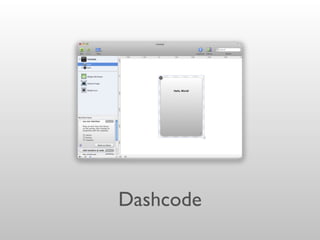
Dashcode
Dashcode
• JavaScript, HTML and CSS Editor
from Apple
• For creating Dashboard widgets
• Part of Xcode until Xcode 4.3
• Now a separate download: http://
bit.ly/Dashcode
Latest:“Late July” for
Aug 7, 2012 - 3.0.5
Demo Dashcode
Things to Remember
1. Backwards compatibility on, or parts disappear.
2. The back of the widget never gets displayed.
3. Text doesn’t show up in the default image unless
you change the option in the inspector.
4. Dashcode text parts layout odd on the iPad.
5. Java and other plugins don’t work on the iPad.
Posting to Web Services
• External web services must implement CORS
• (Cross-Origin Resource Sharing) headers.
• enable-cors.org
• www.w3.org/TR/cors
Tumult Hype 2
• HTML5 & JavaScript Multimedia Studio
• Create JavaScript Powered Animations and Interactions
• Creates Widgets Directly
• Compatible with iBooks Author & the iPad
• $59.99 in Mac App Store (on sale $29.99 through Sept 10th)
Tumult Hype Demo
Creating from Scratch
• Required files:
• Main.html - Main HTML file (any name
will work).
• Default.png – Preview image and place
holder.
• Info.plist – Property list describing
widget. References main HTML.
http://support.apple.com/kb/HT5068
Required Properties
• CFBundleIdentifier - Unique identifier
• CFBundleName - Friendly name
• MainHTML -The main HTML file
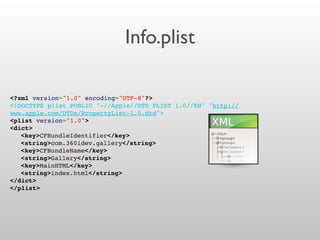
Info.plist
<?xml version="1.0" encoding="UTF-8"?>
<!DOCTYPE plist PUBLIC "-//Apple//DTD PLIST 1.0//EN" "http://
www.apple.com/DTDs/PropertyList-1.0.dtd">
<plist version="1.0">
<dict>
! <key>CFBundleIdentifier</key>
! <string>com.360idev.gallery</string>
! <key>CFBundleName</key>
! <string>Gallery</string>
! <key>MainHTML</key>
! <string>index.html</string>
</dict>
</plist>
Making a Package
• Put all files in a directory - Subdirectories are
OK (use relative paths for references).
• Rename root directory .wdgt
• Don’t Install Package! It gets deleted. Use
Duplicate to test.
• Context / Show Package Contents to edit.
Supported HTML5 Features
• localStorage (per book - between widgets)
• Geolocation (requests permission)
• Canvas
• CSS Animations
• Others . . .
Prevent Flicker
1. Add a IBNotifiesOnReady item set to true in the Dashboard widget's
info.plist file, so iBooks knows this Dashboard widget will tell it when to switch to
displaying the running HTML widget.
2. Set your Dashboard widget to load the Apple javascript library.
3. In javascript call widget.notifyContentIsReady() to notify iBooks it can
switch from showing the Default.png file to displaying the running HTML widget.
http://support.apple.com/kb/HT5068
From Scratch Demos
Things to Remember
1. Double clicking a widget on desktop deletes it
(installs it into the library).
2. The aspect ratio of your Default.png
determine the aspect ratio of your widget.
3. All JavaScript libraries must be referenced from
the Main HTML file, and in the package.
bookry.com
• Custom Sliding Puzzle
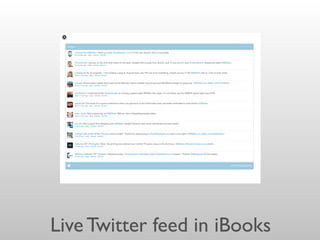
• LiveTwitter Feed
• InteractiveTimeline Images
• YouTubeVideo
• VimeoVideo
• Google Maps
• Live Polling
• More to come . . .
• Auto-generated customized widgets ready to add to iBooks (or look
at the code to figure out how they did it.)
• Free license includes “branding”
See also ibooksgenerator.com
Live Twitter feed in iBooks
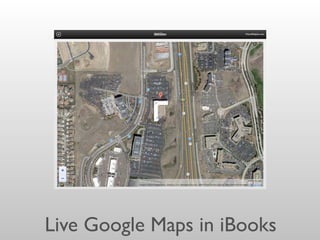
Live Google Maps in iBooks
Creating an ePub from Scratch
No iBooks Author, no Dashcode, just text editing!
Disclaimer
• So far I have been unable to access online content
without using iBooks Author.
International Digital
Publishing Forum
• Develops and maintains the EPUB
content publication standard
• idpf.org/epub
• ePub 3.0 is current standard
• October 2011
• Official support for JavaScript
Progressive Enhancements
& Fallbacks
2.4.1 Scripting Contexts
• container-constrained
• An instance of the [HTML5]
script element included in an
EPUB Content Document
that is embedded in a parent
Content Document using
one of the [HTML5] object,
iframe or embed elements.
• spine-level
• An instance of the [HTML5]
script element included in a
Top-level Content Document.
• JavaScript on the page itself!
•
iBooks Author widgets are
container-constrained
2.4.2 Content Conformance
• A container-constrained script must not contain instructions to:
• modify the DOM of the parent Content Document
• modify other contents in the Publication
• manipulate the size of its containing rectangle
• Container-constrained scripts
2.4.2 Content Conformance
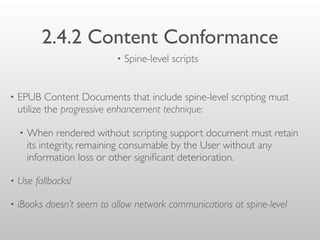
• EPUB Content Documents that include spine-level scripting must
utilize the progressive enhancement technique:
• When rendered without scripting support document must retain
its integrity, remaining consumable by the User without any
information loss or other significant deterioration.
• Use fallbacks!
• iBooks doesn’t seem to allow network communications at spine-level
• Spine-level scripts
The JavaScript epubReadingSystem
Object
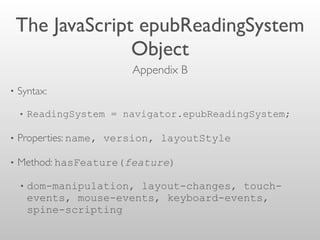
• Syntax:
• ReadingSystem = navigator.epubReadingSystem;
• Properties: name, version, layoutStyle
• Method: hasFeature(feature)
• dom-manipulation, layout-changes, touch-
events, mouse-events, keyboard-events,
spine-scripting
Appendix B 
preventDefault
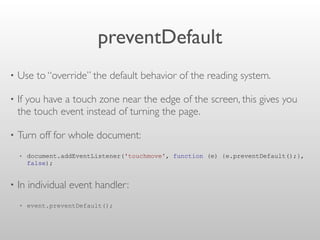
• Use to “override” the default behavior of the reading system.
• If you have a touch zone near the edge of the screen, this gives you
the touch event instead of turning the page.
• Turn off for whole document:
• document.addEventListener('touchmove', function (e) {e.preventDefault();},
false);
• In individual event handler:
• event.preventDefault();
ePub Samples
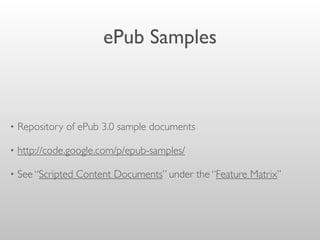
• Repository of ePub 3.0 sample documents
• http://code.google.com/p/epub-samples/
• See “Scripted Content Documents” under the “Feature Matrix”
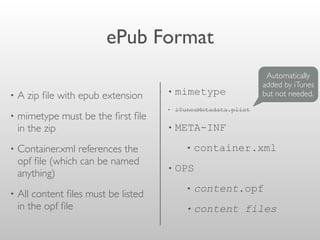
ePub Format
• A zip file with epub extension
• mimetype must be the first file
in the zip
• Container.xml references the
opf file (which can be named
anything)
• All content files must be listed
in the opf file
• mimetype
• iTunesMetadata.plist
• META-INF
• container.xml
• OPS
• content.opf
• content files
Automatically
added by iTunes
but not needed.
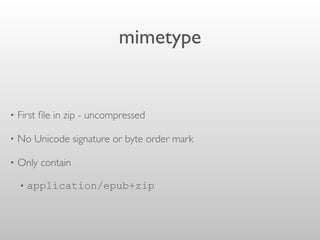
mimetype
• First file in zip - uncompressed
• No Unicode signature or byte order mark
• Only contain
• application/epub+zip
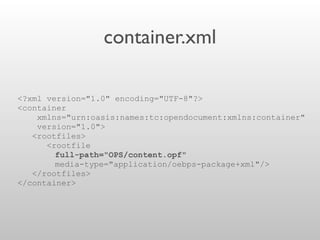
container.xml
<?xml version="1.0" encoding="UTF-8"?>
<container
xmlns="urn:oasis:names:tc:opendocument:xmlns:container"
version="1.0">
<rootfiles>
<rootfile
full-path="OPS/content.opf"
media-type="application/oebps-package+xml"/>
</rootfiles>
</container>
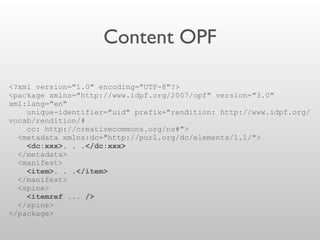
Content OPF
<?xml version="1.0" encoding="UTF-8"?>
<package xmlns="http://www.idpf.org/2007/opf" version="3.0"
xml:lang="en"
unique-identifier="uid" prefix="rendition: http://www.idpf.org/
vocab/rendition/#
cc: http://creativecommons.org/ns#">
<metadata xmlns:dc="http://purl.org/dc/elements/1.1/">
<dc:xxx>. . .</dc:xxx>
</metadata>
<manifest>
<item>. . .</item>
</manifest>
<spine>
<itemref ... />
</spine>
</package>
Content OPF
metadata
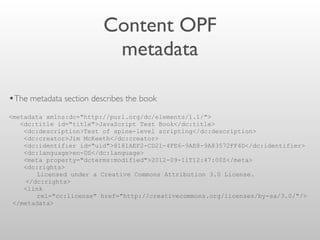
•The metadata section describes the book
<metadata xmlns:dc="http://purl.org/dc/elements/1.1/">
<dc:title id="title">JavaScript Test Book</dc:title>
<dc:description>Test of spine-level scripting</dc:description>
<dc:creator>Jim McKeeth</dc:creator>
<dc:identifier id="uid">8181AEF2-CD21-4FE6-9AE8-9A83572FF4D</dc:identifier>
<dc:language>en-US</dc:language>
<meta property="dcterms:modified">2012-09-11T12:47:00Z</meta>
<dc:rights>
Licensed under a Creative Commons Attribution 3.0 License.
</dc:rights>
<link
rel="cc:license" href="http://creativecommons.org/licenses/by-sa/3.0/"/>
</metadata>
Content OPF
manifest
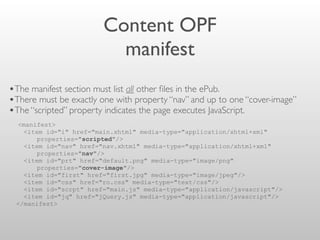
•The manifest section must list all other files in the ePub.
•There must be exactly one with property “nav” and up to one “cover-image”
•The “scripted” property indicates the page executes JavaScript.
<manifest>
<item id="i" href="main.xhtml" media-type="application/xhtml+xml"
properties="scripted"/>
<item id="nav" href="nav.xhtml" media-type="application/xhtml+xml"
properties="nav"/>
<item id="prt" href="default.png" media-type="image/png"
properties="cover-image"/>
<item id="first" href="first.jpg" media-type="image/jpeg"/>
<item id="css" href="ro.css" media-type="text/css"/>
<item id="scrpt" href="main.js" media-type="application/javascript"/>
<item id="jq" href="jQuery.js" media-type="application/javascript"/>
</manifest>
Content OPF
spine
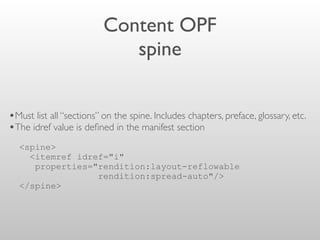
•Must list all “sections” on the spine. Includes chapters, preface, glossary, etc.
•The idref value is defined in the manifest section
<spine>
<itemref idref="i"
properties="rendition:layout-reflowable
rendition:spread-auto"/>
</spine>
Zipping an ePub
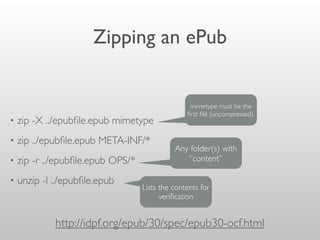
• zip -X ../epubfile.epub mimetype
• zip ../epubfile.epub META-INF/*
• zip -r ../epubfile.epub OPS/*
• unzip -l ../epubfile.epub
http://idpf.org/epub/30/spec/epub30-ocf.html
mimetype must be the
first file (uncompressed).
Any folder(s) with
“content”
Lists the contents for
verification
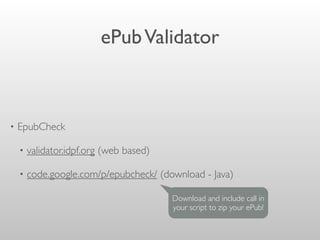
ePubValidator
• EpubCheck
• validator.idpf.org (web based)
• code.google.com/p/epubcheck/ (download - Java)
Download and include call in
your script to zip your ePub!
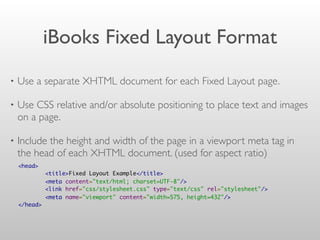
iBooks Fixed Layout Format
• Use a separate XHTML document for each Fixed Layout page.
• Use CSS relative and/or absolute positioning to place text and images
on a page.
• Include the height and width of the page in a viewport meta tag in
the head of each XHTML document. (used for aspect ratio)
<head>  
        <title>Fixed Layout Example</title>
        <meta content="text/html; charset=UTF-8"/>
        <link href="css/stylesheet.css" type="text/css" rel="stylesheet"/>
        <meta name="viewport" content="width=575, height=432"/>
</head>
From Scratch ePub Demo
Cracking ePub
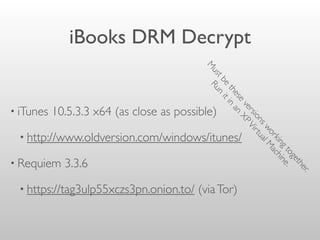
iBooks DRM Decrypt
• iTunes 10.5.3.3 x64 (as close as possible)
• http://www.oldversion.com/windows/itunes/
• Requiem 3.3.6
• https://tag3ulp55xczs3pn.onion.to/ (viaTor)
M
ustbe
these
versionsworkingtogether.
Run
itin
an
XPVirtualM
achine.
Other ePub Books
• Calibre
• http://calibre-ebook.com/ (eBook conversion and management)
• DeDRM plugins
• http://apprenticealf.wordpress.com/ 6.05 is latest
Other Possible Resources
• Threepress Consulting Blog
• http://blog.threepress.org/
• ePub Straight to the Point by Elizabeth Castro
• http://www.elizabethcastro.com/epub/
Have not read, but
was recommended.
More Information
• 4 Part Series on iBooks JavaScript Widgets
• http://sn.im/ibooksjs
• Might become an iBook
• jim@mckeeth.org or @JimMcKeeth

Hacking iBooks and ePub3 with JavaScript!

  • 1.
    Hacking iBooks andEPUB with JavaScript! Jim McKeeth jim@mckeeth.org @JimMcKeeth
  • 2.
    What 400 LevelMeans • Assumed understanding of JavaScript and HTML5 web technologies. • More examples and less explanation. • Please ask questions as we go.
  • 3.
    About Jim McKeeth •Lead Developer Evangelist for EmbarcaderoTechnologies • Delphi XE5 creates native iOS & Android apps from same code • Improvisational performer with ComedySportz Boise • Inventor of pattern and swipe to unlock • US Patent #s 6,766,456 & 8,352,745 . . . (First patented in 2000) • Used on iOS,Android and Windows 8
  • 4.
    Why Put JavaScriptin a Book? • Provide updated data to go along with book topic • Allow real time collaboration between readers / students • Create interactive story books • Customize story to the reader • Collect quiz responses • Interesting animation effects • Add games & bonuses • Engage your readers • Track readers • Gather feedback • Sky’s the limit!
  • 5.
    Overview • JavaScript InteractiveWidgets • Dashcode • Tumult Hype • Creating Widgets from Scratch • Creating ePub from Scratch • Cracking ePub
  • 6.
    More Information • 4Part Series on iBooks JavaScript Widgets • http://sn.im/ibooksjs
  • 7.
    iBooks Author 2 •Free in the Mac App Store • Extension on ePub 3 standard (non-compatible) • DRM and license only for iBooks on the iPad • Nice powerful and easy interface for building books • Be aware of orientations
  • 8.
    iBooks / ePubTechnical Details • Zip file of HTML5 content adhering to specific spec. • 2 GB technical book size limit • 200 MB recommended size • iBooks IBA files encrypt the page content • All resources must be included!
  • 9.
    3D Models • 20,000to 50,000 moderately textured polygons • Textures <= 1024x1024 • Use COLLADA (.dae) file format • Specify a camera • Simple lighting • http://support.apple.com/kb/ht5093
  • 10.
    3D Models • TrimbleSketchUp Make • www.sketchup.com • Free version creates .dae 3D models that work in iBooks Author • http://www.sketchup.com/products/3D-warehouse
  • 11.
  • 12.
  • 13.
    Dashcode • JavaScript, HTMLand CSS Editor from Apple • For creating Dashboard widgets • Part of Xcode until Xcode 4.3 • Now a separate download: http:// bit.ly/Dashcode Latest:“Late July” for Aug 7, 2012 - 3.0.5
  • 14.
  • 15.
    Things to Remember 1.Backwards compatibility on, or parts disappear. 2. The back of the widget never gets displayed. 3. Text doesn’t show up in the default image unless you change the option in the inspector. 4. Dashcode text parts layout odd on the iPad. 5. Java and other plugins don’t work on the iPad.
  • 16.
    Posting to WebServices • External web services must implement CORS • (Cross-Origin Resource Sharing) headers. • enable-cors.org • www.w3.org/TR/cors
  • 17.
    Tumult Hype 2 •HTML5 & JavaScript Multimedia Studio • Create JavaScript Powered Animations and Interactions • Creates Widgets Directly • Compatible with iBooks Author & the iPad • $59.99 in Mac App Store (on sale $29.99 through Sept 10th)
  • 18.
  • 19.
    Creating from Scratch •Required files: • Main.html - Main HTML file (any name will work). • Default.png – Preview image and place holder. • Info.plist – Property list describing widget. References main HTML. http://support.apple.com/kb/HT5068
  • 20.
    Required Properties • CFBundleIdentifier- Unique identifier • CFBundleName - Friendly name • MainHTML -The main HTML file
  • 21.
    Info.plist <?xml version="1.0" encoding="UTF-8"?> <!DOCTYPEplist PUBLIC "-//Apple//DTD PLIST 1.0//EN" "http:// www.apple.com/DTDs/PropertyList-1.0.dtd"> <plist version="1.0"> <dict> ! <key>CFBundleIdentifier</key> ! <string>com.360idev.gallery</string> ! <key>CFBundleName</key> ! <string>Gallery</string> ! <key>MainHTML</key> ! <string>index.html</string> </dict> </plist>
  • 22.
    Making a Package •Put all files in a directory - Subdirectories are OK (use relative paths for references). • Rename root directory .wdgt • Don’t Install Package! It gets deleted. Use Duplicate to test. • Context / Show Package Contents to edit.
  • 23.
    Supported HTML5 Features •localStorage (per book - between widgets) • Geolocation (requests permission) • Canvas • CSS Animations • Others . . .
  • 24.
    Prevent Flicker 1. Adda IBNotifiesOnReady item set to true in the Dashboard widget's info.plist file, so iBooks knows this Dashboard widget will tell it when to switch to displaying the running HTML widget. 2. Set your Dashboard widget to load the Apple javascript library. 3. In javascript call widget.notifyContentIsReady() to notify iBooks it can switch from showing the Default.png file to displaying the running HTML widget. http://support.apple.com/kb/HT5068
  • 25.
  • 26.
    Things to Remember 1.Double clicking a widget on desktop deletes it (installs it into the library). 2. The aspect ratio of your Default.png determine the aspect ratio of your widget. 3. All JavaScript libraries must be referenced from the Main HTML file, and in the package.
  • 27.
    bookry.com • Custom SlidingPuzzle • LiveTwitter Feed • InteractiveTimeline Images • YouTubeVideo • VimeoVideo • Google Maps • Live Polling • More to come . . . • Auto-generated customized widgets ready to add to iBooks (or look at the code to figure out how they did it.) • Free license includes “branding” See also ibooksgenerator.com
  • 28.
  • 29.
  • 30.
    Creating an ePubfrom Scratch No iBooks Author, no Dashcode, just text editing!
  • 31.
    Disclaimer • So farI have been unable to access online content without using iBooks Author.
  • 32.
    International Digital Publishing Forum •Develops and maintains the EPUB content publication standard • idpf.org/epub • ePub 3.0 is current standard • October 2011 • Official support for JavaScript
  • 33.
  • 34.
    2.4.1 Scripting Contexts •container-constrained • An instance of the [HTML5] script element included in an EPUB Content Document that is embedded in a parent Content Document using one of the [HTML5] object, iframe or embed elements. • spine-level • An instance of the [HTML5] script element included in a Top-level Content Document. • JavaScript on the page itself! • iBooks Author widgets are container-constrained
  • 35.
    2.4.2 Content Conformance •A container-constrained script must not contain instructions to: • modify the DOM of the parent Content Document • modify other contents in the Publication • manipulate the size of its containing rectangle • Container-constrained scripts
  • 36.
    2.4.2 Content Conformance •EPUB Content Documents that include spine-level scripting must utilize the progressive enhancement technique: • When rendered without scripting support document must retain its integrity, remaining consumable by the User without any information loss or other significant deterioration. • Use fallbacks! • iBooks doesn’t seem to allow network communications at spine-level • Spine-level scripts
  • 37.
    The JavaScript epubReadingSystem Object •Syntax: • ReadingSystem = navigator.epubReadingSystem; • Properties: name, version, layoutStyle • Method: hasFeature(feature) • dom-manipulation, layout-changes, touch- events, mouse-events, keyboard-events, spine-scripting Appendix B 
  • 38.
    preventDefault • Use to“override” the default behavior of the reading system. • If you have a touch zone near the edge of the screen, this gives you the touch event instead of turning the page. • Turn off for whole document: • document.addEventListener('touchmove', function (e) {e.preventDefault();}, false); • In individual event handler: • event.preventDefault();
  • 39.
    ePub Samples • Repositoryof ePub 3.0 sample documents • http://code.google.com/p/epub-samples/ • See “Scripted Content Documents” under the “Feature Matrix”
  • 40.
    ePub Format • Azip file with epub extension • mimetype must be the first file in the zip • Container.xml references the opf file (which can be named anything) • All content files must be listed in the opf file • mimetype • iTunesMetadata.plist • META-INF • container.xml • OPS • content.opf • content files Automatically added by iTunes but not needed.
  • 41.
    mimetype • First filein zip - uncompressed • No Unicode signature or byte order mark • Only contain • application/epub+zip
  • 42.
  • 43.
    Content OPF <?xml version="1.0"encoding="UTF-8"?> <package xmlns="http://www.idpf.org/2007/opf" version="3.0" xml:lang="en" unique-identifier="uid" prefix="rendition: http://www.idpf.org/ vocab/rendition/# cc: http://creativecommons.org/ns#"> <metadata xmlns:dc="http://purl.org/dc/elements/1.1/"> <dc:xxx>. . .</dc:xxx> </metadata> <manifest> <item>. . .</item> </manifest> <spine> <itemref ... /> </spine> </package>
  • 44.
    Content OPF metadata •The metadatasection describes the book <metadata xmlns:dc="http://purl.org/dc/elements/1.1/"> <dc:title id="title">JavaScript Test Book</dc:title> <dc:description>Test of spine-level scripting</dc:description> <dc:creator>Jim McKeeth</dc:creator> <dc:identifier id="uid">8181AEF2-CD21-4FE6-9AE8-9A83572FF4D</dc:identifier> <dc:language>en-US</dc:language> <meta property="dcterms:modified">2012-09-11T12:47:00Z</meta> <dc:rights> Licensed under a Creative Commons Attribution 3.0 License. </dc:rights> <link rel="cc:license" href="http://creativecommons.org/licenses/by-sa/3.0/"/> </metadata>
  • 45.
    Content OPF manifest •The manifestsection must list all other files in the ePub. •There must be exactly one with property “nav” and up to one “cover-image” •The “scripted” property indicates the page executes JavaScript. <manifest> <item id="i" href="main.xhtml" media-type="application/xhtml+xml" properties="scripted"/> <item id="nav" href="nav.xhtml" media-type="application/xhtml+xml" properties="nav"/> <item id="prt" href="default.png" media-type="image/png" properties="cover-image"/> <item id="first" href="first.jpg" media-type="image/jpeg"/> <item id="css" href="ro.css" media-type="text/css"/> <item id="scrpt" href="main.js" media-type="application/javascript"/> <item id="jq" href="jQuery.js" media-type="application/javascript"/> </manifest>
  • 46.
    Content OPF spine •Must listall “sections” on the spine. Includes chapters, preface, glossary, etc. •The idref value is defined in the manifest section <spine> <itemref idref="i" properties="rendition:layout-reflowable rendition:spread-auto"/> </spine>
  • 47.
    Zipping an ePub •zip -X ../epubfile.epub mimetype • zip ../epubfile.epub META-INF/* • zip -r ../epubfile.epub OPS/* • unzip -l ../epubfile.epub http://idpf.org/epub/30/spec/epub30-ocf.html mimetype must be the first file (uncompressed). Any folder(s) with “content” Lists the contents for verification
  • 48.
    ePubValidator • EpubCheck • validator.idpf.org(web based) • code.google.com/p/epubcheck/ (download - Java) Download and include call in your script to zip your ePub!
  • 49.
    iBooks Fixed LayoutFormat • Use a separate XHTML document for each Fixed Layout page. • Use CSS relative and/or absolute positioning to place text and images on a page. • Include the height and width of the page in a viewport meta tag in the head of each XHTML document. (used for aspect ratio) <head>           <title>Fixed Layout Example</title>         <meta content="text/html; charset=UTF-8"/>         <link href="css/stylesheet.css" type="text/css" rel="stylesheet"/>         <meta name="viewport" content="width=575, height=432"/> </head>
  • 50.
  • 51.
  • 52.
    iBooks DRM Decrypt •iTunes 10.5.3.3 x64 (as close as possible) • http://www.oldversion.com/windows/itunes/ • Requiem 3.3.6 • https://tag3ulp55xczs3pn.onion.to/ (viaTor) M ustbe these versionsworkingtogether. Run itin an XPVirtualM achine.
  • 53.
    Other ePub Books •Calibre • http://calibre-ebook.com/ (eBook conversion and management) • DeDRM plugins • http://apprenticealf.wordpress.com/ 6.05 is latest
  • 54.
    Other Possible Resources •Threepress Consulting Blog • http://blog.threepress.org/ • ePub Straight to the Point by Elizabeth Castro • http://www.elizabethcastro.com/epub/ Have not read, but was recommended.
  • 55.
    More Information • 4Part Series on iBooks JavaScript Widgets • http://sn.im/ibooksjs • Might become an iBook • jim@mckeeth.org or @JimMcKeeth