Silverlight Development &  The Model-View-ViewModel Pattern Derek Novavi 25 November 2009
Silverlight & Model-View-ViewModel Overview of Silverlight Silverlight 3 Features Silverlight 3 Development Silverlight Toolkit Sample Silverlight Application The Model-View-ViewModel Pattern Sample M-V-VM Silverlight Application Silverlight Unit Test Framework Third Party Products Silverlight 4 Beta
Overview of Silverlight
What is Silverlight? Web application framework that supports line-of-business applications. Competes with AJAX, Adobe Flex / AIR, Sun JavaFX, and emerging technologies HTML5, Google Gears. Also provides functionality similar to those in Adobe Flash for graphics, animation and video. Is available on multiple browsers used on Windows and Mac OS X.
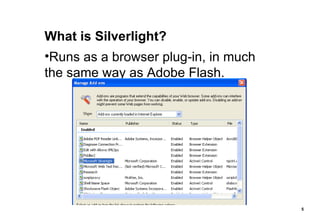
What is Silverlight? Runs as a browser plug-in, in much the same way as Adobe Flash.
Silverlight Versions Silverlight 1 - used a JavaScript programming model – no .NET or BCL. Silverlight 2 – supported .NET and BCL, with the familiar code-behind model. Silverlight 3 – enhancements include navigation support for LOB applications, Out-of-Browser applications, richer data-binding, improved networking, graphics and media.
Silverlight 3 Features
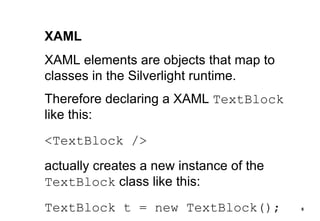
XAML XAML elements are objects that map to classes in the Silverlight runtime. Therefore declaring a XAML  TextBlock  like this: <TextBlock /> actually creates a new instance of the  TextBlock  class like this: TextBlock t = new TextBlock();
.NET Framework Support – CoreCLR CoreCLR still responsible for managing memory and enforcing CTS. JIT Compiler in CoreCLR is enhanced for fast startup time. Just 2MB in size. CoreCLR doesn’t need COM Interop or support for full-trust applications. CoreCLR includes a subset of the BCL called “Small BCL”.
Graphics and Animations Support for raster graphics and vector graphics. Local font usage for rendering text. Animation – declarative and customizable via XAML. Built-in support for video and audio – WMV, H.264, MP3, WMA, AAC.
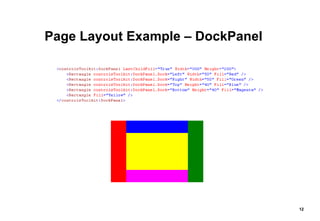
Page Layout and Design Canvas  – absolute positioning. Grid  – similar to an HTML table. StackPanel  – arranges elements in horizontal or vertical rows. DockPanel  – arranges elements around the edges of a panel. WrapPanel  – horizontal or vertical list, with wrapping.
Page Layout Example – DockPanel
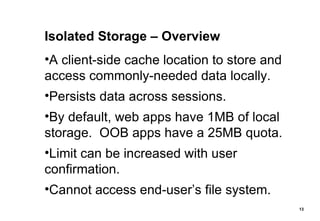
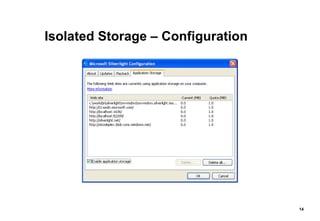
Isolated Storage – Overview A client-side cache location to store and access commonly-needed data locally. Persists data across sessions. By default, web apps have 1MB of local storage.  OOB apps have a 25MB quota. Limit can be increased with user confirmation. Cannot access end-user’s file system.
Isolated Storage – Configuration
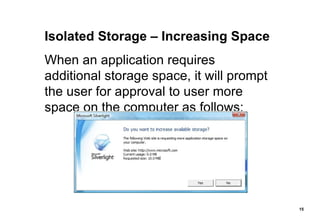
Isolated Storage – Increasing Space When an application requires additional storage space, it will prompt the user for approval to user more space on the computer as follows:
Isolated Storage – Key/Value Pairs Data can be saved and retrieved using key/values pairs. IsolatedStorageSettings  class provides a dictionary to store objects. Supports the familiar  Add, Contains, Remove  methods Also supports the familiar  Item  property, as in: userSettings[&quot;myKey&quot;] = myValue;
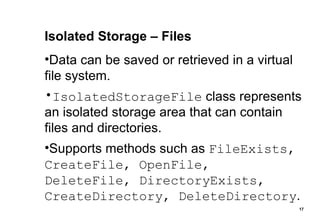
Isolated Storage – Files Data can be saved or retrieved in a virtual file system. IsolatedStorageFile  class represents an isolated storage area that can contain files and directories. Supports methods such as  FileExists, CreateFile, OpenFile, DeleteFile, DirectoryExists, CreateDirectory, DeleteDirectory .
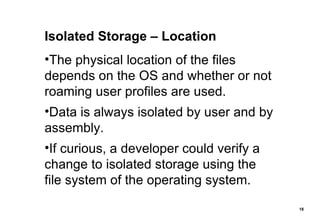
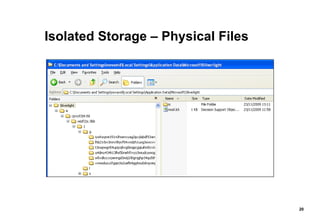
Isolated Storage – Location The physical location of the files depends on the OS and whether or not roaming user profiles are used. Data is always isolated by user and by assembly. If curious, a developer could verify a change to isolated storage using the file system of the operating system.
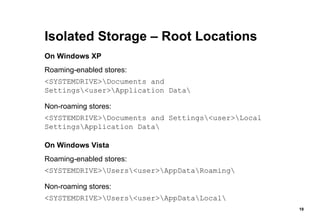
Isolated Storage – Root Locations On Windows XP Roaming-enabled stores:  <SYSTEMDRIVE>\Documents and Settings\<user>\Application Data\ Non-roaming stores:  <SYSTEMDRIVE>\Documents and Settings\<user>\Local Settings\Application Data\ On Windows Vista Roaming-enabled stores:  <SYSTEMDRIVE>\Users\<user>\AppData\Roaming\ Non-roaming stores:  <SYSTEMDRIVE>\Users\<user>\AppData\Local\
Isolated Storage – Physical Files
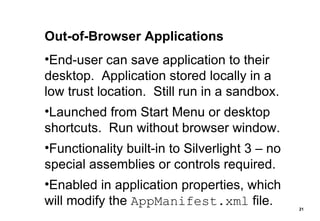
Out-of-Browser Applications End-user can save application to their desktop.  Application stored locally in a low trust location.  Still run in a sandbox. Launched from Start Menu or desktop shortcuts.  Run without browser window. Functionality built-in to Silverlight 3 – no special assemblies or controls required. Enabled in application properties, which will modify the  AppManifest.xml  file.
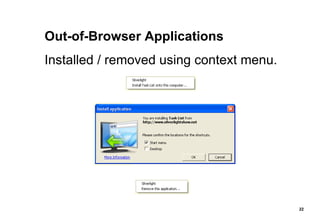
Out-of-Browser Applications Installed / removed using context menu.
Accessing Network Resources Supports  WebClient  class for basic HTTP or HTTPS access to URI-based resources e.g. retrieving XML, JSON, RSS or Atom data formats, or downloading media to browser cache. Supports  HttpWebRequest  and  HttpWebResponse  for more flexibility. Support WCF and WCF RIA Services. Can use auto-generated proxy classes. Supports sockets for &quot;push-style&quot; apps.
Navigation Framework Silverlight 3 introduced new  Frame  and  Page  controls to support navigation. Enables back-forward browser functionality via a hidden  iframe . Allows deep-linking, bookmarking, etc. Supports URI mapping (descriptive URIs). New &quot;Silverlight Navigation Application&quot; project template.
Data Binding – Overview Supports data-bound controls, XAML markup extensions, data context binding and Value Converters, Setting the  DataContext  property on an element enables binding on child elements. ItemsSource  property used to bind to collections implementing  IEnumerable . Bindings can be set in XAML or in code.
Data Binding – Modes OneTime  – updates the target property when the binding is created. OneWay  – updates the target property when the binding is created.  Changes to the source object propagate to the target. TwoWay  – updates either the target or source object when either change.
HTML Bridge Allows access to the HTML DOM from managed code in Silverlight. Allows one to call managed code in a Silverlight application from JavaScript. Used to communicate between a Silverlight app and its hosting web page. Attach SL event handlers to HTML controls. Attach JS event handlers to SL controls.
Silverlight Development
Building Silverlight Applications Visual Studio 2008, using the Silverlight project templates. Expression Blend. Eclipse, using the Eclipse Tools for Silverlight plug-in – on either Windows or MacOS.  (Version 2 of eclipse4sl will support Silverlight 3.)
VS2008 Silverlight 3 Project Templates [Above: Three Silverlight 3 templates, two .NET RIA Services templates]
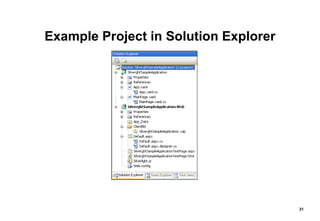
Example Project in Solution Explorer
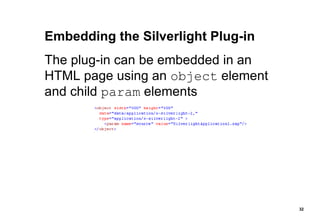
Embedding the Silverlight Plug-in The plug-in can be embedded in an HTML page using an  object  element and child  param  elements
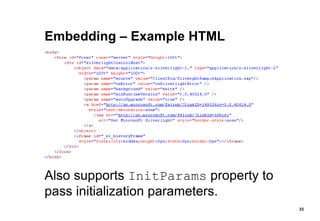
Embedding – Example HTML Also supports  InitParams  property to pass initialization parameters.
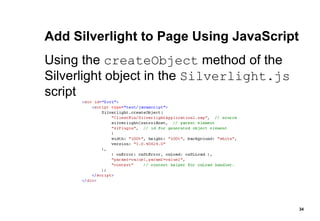
Add Silverlight to Page Using JavaScript Using the  createObject  method of the Silverlight object in the  Silverlight.js  script
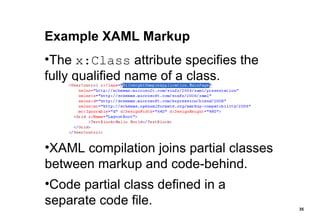
Example XAML Markup The  x:Class  attribute specifies the fully qualified name of a class. XAML compilation joins partial classes between markup and code-behind. Code partial class defined in a separate code file.
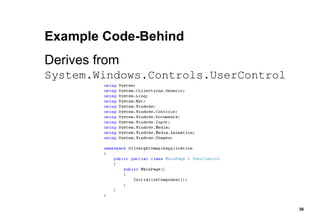
Example Code-Behind Derives from  System.Windows.Controls.UserControl
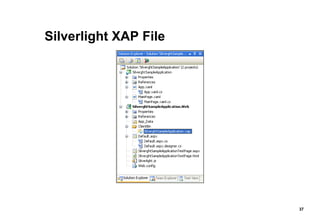
Silverlight XAP File
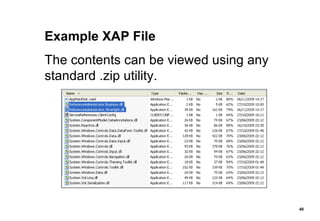
What is a XAP File? XAP is the file extension for Silverlight application packages. Contains compressed assemblies and resources of a Silverlight application. Gets copied into  ClientBin  folder. The Silverlight plug-in downloads and runs the XAP file.
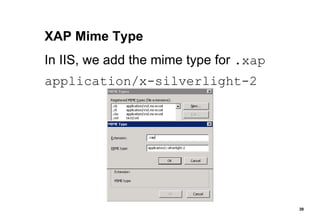
XAP Mime Type In IIS, we add the mime type for  .xap application/x-silverlight-2
Example XAP File The contents can be viewed using any standard .zip utility.
Contents of a XAP File An assembly for the application. An application manifest file which defines the assemblies deployed in the client application ( AppManifest.xml ). Any additional assemblies needed to run the application. Can also contain embedded resources files such as graphics, audio, video. If using WCF, might also contain  ServiceReferences.ClientConfig
App.xaml Used by Silverlight application to declare shared resources such as brushes, styles, etc. The code-behind file ( App.xaml.cs ) is used to handle global application-level events  (similar to  Global.asax.cs  in ASP.NET applications).
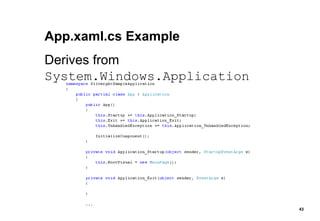
App.xaml.cs Example Derives from  System.Windows.Application
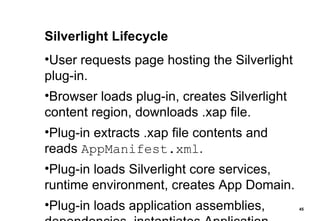
Silverlight Lifecycle [Sourced from MSDN documentation]
Silverlight Lifecycle User requests page hosting the Silverlight plug-in. Browser loads plug-in, creates Silverlight content region, downloads .xap file. Plug-in extracts .xap file contents and reads  AppManifest.xml . Plug-in loads Silverlight core services, runtime environment, creates App Domain. Plug-in loads application assemblies, dependencies, instantiates Application.
Silverlight Toolkit
Silverlight Toolkit – Overview Developed by Microsoft. Iterative, evolutionary model to release new controls and updates more often. Components categorised into Mature/SDK, Stable, Preview and Experimental quality bands. Recent updates in July 2009, Oct 2009, Nov 2009.
Silverlight Toolkit – Controls AutoCompleteBox  Calendar  ChildWindow  DataGrid  DataPager  DatePicker  GridSplitter  HeaderedItemsControl  TabControl  TreeView DockPanel  Expander  HeaderedContentControl  Label  NumericUpDown  Viewbox  WrapPanel Accordion  Charting  DataForm  DomainUpDown  ImplicitStyleManager  LayoutTransformer  Rating  TimePicker  TimeUpDown  GlobalCalendar  TransitioningContentControl  TreeMap  BusyIndicator [Drag and Drop support for items controls]
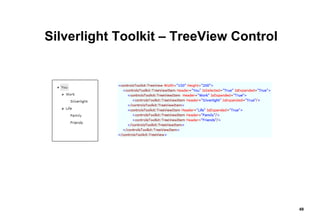
Silverlight Toolkit – TreeView Control
Silverlight Toolkit – DataGrid Control [Screenshot removed due to data content]
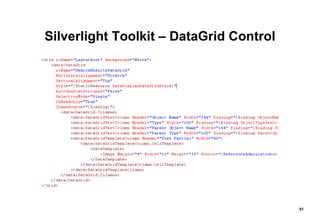
Silverlight Toolkit – DataGrid Control
Sample Silverlight Data Maintenance Application
Sample Application – Technologies Used Built using: Visual Studio 2008 Silverlight 3 Silverlight 3 SDK (e.g. SlSvcUtil.exe) Silverlight Toolkit WCF C# 3.0 Enterprise Library 4.1 & T-SQL sprocs
Sample Application – UI [Screenshots removed due to data content]
Sample Application – Controls Used Demos the following Silverlight controls: Grid, Image, TextBlock, TextBox, ComboBox, CheckBox, Button, ScrollViewer Demos the following Toolkit controls: DockPanel, GridSplitter, TreeView, TabControl, DataGrid, DataForm, AutoCompleteBox
Sample Application – Demo [Break out into Visual Studio for demo of application, and a detailed look at the code]
The Model-View-ViewModel Pattern
Model-View-ViewModel – Overview A design pattern that originated from Microsoft. A specialisation of Martin Fowler’s PresentationModel pattern. Based on Model-View-Controller pattern. Targeted at UI development platforms – Silverlight / WPF.
Model-View-ViewModel – Objectives Separation of concerns  – decoupling of presentation, business logic and data layers allows an application to be developed in multiple work-streams. Testability  – eliminate virtually all code from UI e.g. from code-behind .xaml.cs code files. Each layer can be unit-tested independently.
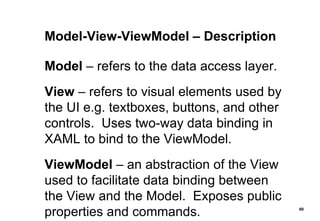
Model-View-ViewModel – Description Model  – refers to the data access layer. View  – refers to visual elements used by the UI e.g. textboxes, buttons, and other controls.  Uses two-way data binding in XAML to bind to the ViewModel. ViewModel  – an abstraction of the View used to facilitate data binding between the View and the Model.  Exposes public properties and commands.
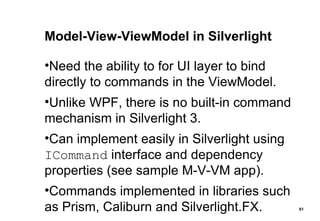
Model-View-ViewModel in Silverlight Need the ability to for UI layer to bind directly to commands in the ViewModel. Unlike WPF, there is no built-in command mechanism in Silverlight 3. Can implement easily in Silverlight using  ICommand  interface and dependency properties (see sample M-V-VM app). Commands implemented in libraries such as Prism, Caliburn and Silverlight.FX.
Sample M-V-VM Silverlight App – UI [Screenshots removed due to data content]
M-V-VM Sample – Technologies Used As with first POC shown, built using: Visual Studio 2008, Silverlight 3, Silverlight Toolkit, C# 3.0, EntLib 4.1, T-SQL sprocs But also uses the following: .NET RIA Services Silverlight Unit Test Framework Unity Application Block 1.2 Rhino Mocks 3.5 for Silverlight [And a lightweight M-V-VM framework]
Sample M-V-VM Silverlight App – Demo [Break out into Visual Studio for demo of application, detailed look at the code, unit tests, integration tests with UI automation, and explanation of the benefits of using Model-View-ViewModel]
Silverlight Unit Test Framework
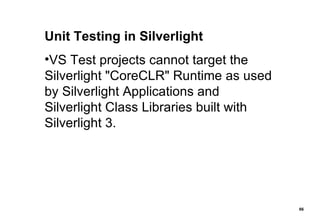
Unit Testing in Silverlight VS Test projects cannot target the Silverlight &quot;CoreCLR&quot; Runtime as used by Silverlight Applications and Silverlight Class Libraries built with Silverlight 3.
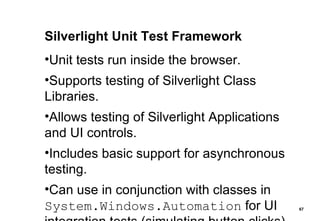
Silverlight Unit Test Framework Unit tests run inside the browser. Supports testing of Silverlight Class Libraries. Allows testing of Silverlight Applications and UI controls. Includes basic support for asynchronous testing. Can use in conjunction with classes in  System.Windows.Automation  for UI integration tests (simulating button clicks).
Silverlight Unit Test Framework [Sourced from SUT Framework website]
Silverlight Unit Testing See also Jamie Cansdale's Silverlight NUnit Project Template, which can be used with TestDriven.NET.
Third Party Products
Third Party Products In addition to: Silverlight Toolkit on CodePlex Silverlight Unit Test Framework There is an increasing range of support: Controls from vendors such as Infragistics, ComponentArt, Telerik and DevExpress. Rhino Mocks 3.5 for Silverlight Unity Application Block 1.2 for Silverlight
Silverlight 4 Beta
Silverlight 4 – What’s New (selected) Support for .NET 4 CLR – same compiled code can run on desktop and Silverlight without change. Elevated privileges and other improvements in OOB applications. Printing API. New  RichTextBox  control, and more. Support for drag & drop. Support for right-click.
Silverlight 4 – What’s New (selected) MouseWheel support on many controls. Data-binding improvements. SelectedValue and SelectedValuePath properties on Selector controls. Implicit styles. Managed Extensibility Framework. Webcam/Mic support. Support for Google Chrome. Silverlight Designer in VS2010.
Summary
Summary Silverlight is a rapidly-maturing technology which is increasingly difficult for .NET developers to ignore. Built-in functionality and third party support enables development of highly-responsive, robust line-of-business applications. Can use modern design patterns such as Model-View-View-Model to enable separation of concerns and unit-testing.
Useful Links
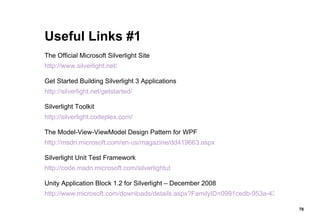
Useful Links #1 The Official Microsoft Silverlight Site http://www.silverlight.net/ Get Started Building Silverlight 3 Applications http://silverlight.net/getstarted/ Silverlight Toolkit http://silverlight.codeplex.com/ The Model-View-ViewModel Design Pattern for WPF http://msdn.microsoft.com/en-us/magazine/dd419663.aspx Silverlight Unit Test Framework http://code.msdn.microsoft.com/silverlightut Unity Application Block 1.2 for Silverlight – December 2008 http://www.microsoft.com/downloads/details.aspx?FamilyID=0991cedb-953a-4367-a2b6-071e31766b4c&DisplayLang=en
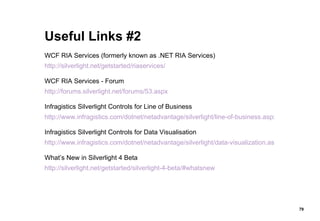
Useful Links #2 WCF RIA Services (formerly known as .NET RIA Services) http://silverlight.net/getstarted/riaservices/ WCF RIA Services - Forum http://forums.silverlight.net/forums/53.aspx Infragistics Silverlight Controls for Line of Business http://www.infragistics.com/dotnet/netadvantage/silverlight/line-of-business.aspx Infragistics Silverlight Controls for Data Visualisation http://www.infragistics.com/dotnet/netadvantage/silverlight/data-visualization.aspx What’s New in Silverlight 4 Beta http://silverlight.net/getstarted/silverlight-4-beta/#whatsnew

Silverlight Development & The Model-View-ViewModel Pattern

  • 1.
    Silverlight Development & The Model-View-ViewModel Pattern Derek Novavi 25 November 2009
  • 2.
    Silverlight & Model-View-ViewModelOverview of Silverlight Silverlight 3 Features Silverlight 3 Development Silverlight Toolkit Sample Silverlight Application The Model-View-ViewModel Pattern Sample M-V-VM Silverlight Application Silverlight Unit Test Framework Third Party Products Silverlight 4 Beta
  • 3.
  • 4.
    What is Silverlight?Web application framework that supports line-of-business applications. Competes with AJAX, Adobe Flex / AIR, Sun JavaFX, and emerging technologies HTML5, Google Gears. Also provides functionality similar to those in Adobe Flash for graphics, animation and video. Is available on multiple browsers used on Windows and Mac OS X.
  • 5.
    What is Silverlight?Runs as a browser plug-in, in much the same way as Adobe Flash.
  • 6.
    Silverlight Versions Silverlight1 - used a JavaScript programming model – no .NET or BCL. Silverlight 2 – supported .NET and BCL, with the familiar code-behind model. Silverlight 3 – enhancements include navigation support for LOB applications, Out-of-Browser applications, richer data-binding, improved networking, graphics and media.
  • 7.
  • 8.
    XAML XAML elementsare objects that map to classes in the Silverlight runtime. Therefore declaring a XAML TextBlock like this: <TextBlock /> actually creates a new instance of the TextBlock class like this: TextBlock t = new TextBlock();
  • 9.
    .NET Framework Support– CoreCLR CoreCLR still responsible for managing memory and enforcing CTS. JIT Compiler in CoreCLR is enhanced for fast startup time. Just 2MB in size. CoreCLR doesn’t need COM Interop or support for full-trust applications. CoreCLR includes a subset of the BCL called “Small BCL”.
  • 10.
    Graphics and AnimationsSupport for raster graphics and vector graphics. Local font usage for rendering text. Animation – declarative and customizable via XAML. Built-in support for video and audio – WMV, H.264, MP3, WMA, AAC.
  • 11.
    Page Layout andDesign Canvas – absolute positioning. Grid – similar to an HTML table. StackPanel – arranges elements in horizontal or vertical rows. DockPanel – arranges elements around the edges of a panel. WrapPanel – horizontal or vertical list, with wrapping.
  • 12.
    Page Layout Example– DockPanel
  • 13.
    Isolated Storage –Overview A client-side cache location to store and access commonly-needed data locally. Persists data across sessions. By default, web apps have 1MB of local storage. OOB apps have a 25MB quota. Limit can be increased with user confirmation. Cannot access end-user’s file system.
  • 14.
    Isolated Storage –Configuration
  • 15.
    Isolated Storage –Increasing Space When an application requires additional storage space, it will prompt the user for approval to user more space on the computer as follows:
  • 16.
    Isolated Storage –Key/Value Pairs Data can be saved and retrieved using key/values pairs. IsolatedStorageSettings class provides a dictionary to store objects. Supports the familiar Add, Contains, Remove methods Also supports the familiar Item property, as in: userSettings[&quot;myKey&quot;] = myValue;
  • 17.
    Isolated Storage –Files Data can be saved or retrieved in a virtual file system. IsolatedStorageFile class represents an isolated storage area that can contain files and directories. Supports methods such as FileExists, CreateFile, OpenFile, DeleteFile, DirectoryExists, CreateDirectory, DeleteDirectory .
  • 18.
    Isolated Storage –Location The physical location of the files depends on the OS and whether or not roaming user profiles are used. Data is always isolated by user and by assembly. If curious, a developer could verify a change to isolated storage using the file system of the operating system.
  • 19.
    Isolated Storage –Root Locations On Windows XP Roaming-enabled stores: <SYSTEMDRIVE>\Documents and Settings\<user>\Application Data\ Non-roaming stores: <SYSTEMDRIVE>\Documents and Settings\<user>\Local Settings\Application Data\ On Windows Vista Roaming-enabled stores: <SYSTEMDRIVE>\Users\<user>\AppData\Roaming\ Non-roaming stores: <SYSTEMDRIVE>\Users\<user>\AppData\Local\
  • 20.
    Isolated Storage –Physical Files
  • 21.
    Out-of-Browser Applications End-usercan save application to their desktop. Application stored locally in a low trust location. Still run in a sandbox. Launched from Start Menu or desktop shortcuts. Run without browser window. Functionality built-in to Silverlight 3 – no special assemblies or controls required. Enabled in application properties, which will modify the AppManifest.xml file.
  • 22.
    Out-of-Browser Applications Installed/ removed using context menu.
  • 23.
    Accessing Network ResourcesSupports WebClient class for basic HTTP or HTTPS access to URI-based resources e.g. retrieving XML, JSON, RSS or Atom data formats, or downloading media to browser cache. Supports HttpWebRequest and HttpWebResponse for more flexibility. Support WCF and WCF RIA Services. Can use auto-generated proxy classes. Supports sockets for &quot;push-style&quot; apps.
  • 24.
    Navigation Framework Silverlight3 introduced new Frame and Page controls to support navigation. Enables back-forward browser functionality via a hidden iframe . Allows deep-linking, bookmarking, etc. Supports URI mapping (descriptive URIs). New &quot;Silverlight Navigation Application&quot; project template.
  • 25.
    Data Binding –Overview Supports data-bound controls, XAML markup extensions, data context binding and Value Converters, Setting the DataContext property on an element enables binding on child elements. ItemsSource property used to bind to collections implementing IEnumerable . Bindings can be set in XAML or in code.
  • 26.
    Data Binding –Modes OneTime – updates the target property when the binding is created. OneWay – updates the target property when the binding is created. Changes to the source object propagate to the target. TwoWay – updates either the target or source object when either change.
  • 27.
    HTML Bridge Allowsaccess to the HTML DOM from managed code in Silverlight. Allows one to call managed code in a Silverlight application from JavaScript. Used to communicate between a Silverlight app and its hosting web page. Attach SL event handlers to HTML controls. Attach JS event handlers to SL controls.
  • 28.
  • 29.
    Building Silverlight ApplicationsVisual Studio 2008, using the Silverlight project templates. Expression Blend. Eclipse, using the Eclipse Tools for Silverlight plug-in – on either Windows or MacOS. (Version 2 of eclipse4sl will support Silverlight 3.)
  • 30.
    VS2008 Silverlight 3Project Templates [Above: Three Silverlight 3 templates, two .NET RIA Services templates]
  • 31.
    Example Project inSolution Explorer
  • 32.
    Embedding the SilverlightPlug-in The plug-in can be embedded in an HTML page using an object element and child param elements
  • 33.
    Embedding – ExampleHTML Also supports InitParams property to pass initialization parameters.
  • 34.
    Add Silverlight toPage Using JavaScript Using the createObject method of the Silverlight object in the Silverlight.js script
  • 35.
    Example XAML MarkupThe x:Class attribute specifies the fully qualified name of a class. XAML compilation joins partial classes between markup and code-behind. Code partial class defined in a separate code file.
  • 36.
    Example Code-Behind Derivesfrom System.Windows.Controls.UserControl
  • 37.
  • 38.
    What is aXAP File? XAP is the file extension for Silverlight application packages. Contains compressed assemblies and resources of a Silverlight application. Gets copied into ClientBin folder. The Silverlight plug-in downloads and runs the XAP file.
  • 39.
    XAP Mime TypeIn IIS, we add the mime type for .xap application/x-silverlight-2
  • 40.
    Example XAP FileThe contents can be viewed using any standard .zip utility.
  • 41.
    Contents of aXAP File An assembly for the application. An application manifest file which defines the assemblies deployed in the client application ( AppManifest.xml ). Any additional assemblies needed to run the application. Can also contain embedded resources files such as graphics, audio, video. If using WCF, might also contain ServiceReferences.ClientConfig
  • 42.
    App.xaml Used bySilverlight application to declare shared resources such as brushes, styles, etc. The code-behind file ( App.xaml.cs ) is used to handle global application-level events (similar to Global.asax.cs in ASP.NET applications).
  • 43.
    App.xaml.cs Example Derivesfrom System.Windows.Application
  • 44.
    Silverlight Lifecycle [Sourcedfrom MSDN documentation]
  • 45.
    Silverlight Lifecycle Userrequests page hosting the Silverlight plug-in. Browser loads plug-in, creates Silverlight content region, downloads .xap file. Plug-in extracts .xap file contents and reads AppManifest.xml . Plug-in loads Silverlight core services, runtime environment, creates App Domain. Plug-in loads application assemblies, dependencies, instantiates Application.
  • 46.
  • 47.
    Silverlight Toolkit –Overview Developed by Microsoft. Iterative, evolutionary model to release new controls and updates more often. Components categorised into Mature/SDK, Stable, Preview and Experimental quality bands. Recent updates in July 2009, Oct 2009, Nov 2009.
  • 48.
    Silverlight Toolkit –Controls AutoCompleteBox Calendar ChildWindow DataGrid DataPager DatePicker GridSplitter HeaderedItemsControl TabControl TreeView DockPanel Expander HeaderedContentControl Label NumericUpDown Viewbox WrapPanel Accordion Charting DataForm DomainUpDown ImplicitStyleManager LayoutTransformer Rating TimePicker TimeUpDown GlobalCalendar TransitioningContentControl TreeMap BusyIndicator [Drag and Drop support for items controls]
  • 49.
    Silverlight Toolkit –TreeView Control
  • 50.
    Silverlight Toolkit –DataGrid Control [Screenshot removed due to data content]
  • 51.
    Silverlight Toolkit –DataGrid Control
  • 52.
    Sample Silverlight DataMaintenance Application
  • 53.
    Sample Application –Technologies Used Built using: Visual Studio 2008 Silverlight 3 Silverlight 3 SDK (e.g. SlSvcUtil.exe) Silverlight Toolkit WCF C# 3.0 Enterprise Library 4.1 & T-SQL sprocs
  • 54.
    Sample Application –UI [Screenshots removed due to data content]
  • 55.
    Sample Application –Controls Used Demos the following Silverlight controls: Grid, Image, TextBlock, TextBox, ComboBox, CheckBox, Button, ScrollViewer Demos the following Toolkit controls: DockPanel, GridSplitter, TreeView, TabControl, DataGrid, DataForm, AutoCompleteBox
  • 56.
    Sample Application –Demo [Break out into Visual Studio for demo of application, and a detailed look at the code]
  • 57.
  • 58.
    Model-View-ViewModel – OverviewA design pattern that originated from Microsoft. A specialisation of Martin Fowler’s PresentationModel pattern. Based on Model-View-Controller pattern. Targeted at UI development platforms – Silverlight / WPF.
  • 59.
    Model-View-ViewModel – ObjectivesSeparation of concerns – decoupling of presentation, business logic and data layers allows an application to be developed in multiple work-streams. Testability – eliminate virtually all code from UI e.g. from code-behind .xaml.cs code files. Each layer can be unit-tested independently.
  • 60.
    Model-View-ViewModel – DescriptionModel – refers to the data access layer. View – refers to visual elements used by the UI e.g. textboxes, buttons, and other controls. Uses two-way data binding in XAML to bind to the ViewModel. ViewModel – an abstraction of the View used to facilitate data binding between the View and the Model. Exposes public properties and commands.
  • 61.
    Model-View-ViewModel in SilverlightNeed the ability to for UI layer to bind directly to commands in the ViewModel. Unlike WPF, there is no built-in command mechanism in Silverlight 3. Can implement easily in Silverlight using ICommand interface and dependency properties (see sample M-V-VM app). Commands implemented in libraries such as Prism, Caliburn and Silverlight.FX.
  • 62.
    Sample M-V-VM SilverlightApp – UI [Screenshots removed due to data content]
  • 63.
    M-V-VM Sample –Technologies Used As with first POC shown, built using: Visual Studio 2008, Silverlight 3, Silverlight Toolkit, C# 3.0, EntLib 4.1, T-SQL sprocs But also uses the following: .NET RIA Services Silverlight Unit Test Framework Unity Application Block 1.2 Rhino Mocks 3.5 for Silverlight [And a lightweight M-V-VM framework]
  • 64.
    Sample M-V-VM SilverlightApp – Demo [Break out into Visual Studio for demo of application, detailed look at the code, unit tests, integration tests with UI automation, and explanation of the benefits of using Model-View-ViewModel]
  • 65.
  • 66.
    Unit Testing inSilverlight VS Test projects cannot target the Silverlight &quot;CoreCLR&quot; Runtime as used by Silverlight Applications and Silverlight Class Libraries built with Silverlight 3.
  • 67.
    Silverlight Unit TestFramework Unit tests run inside the browser. Supports testing of Silverlight Class Libraries. Allows testing of Silverlight Applications and UI controls. Includes basic support for asynchronous testing. Can use in conjunction with classes in System.Windows.Automation for UI integration tests (simulating button clicks).
  • 68.
    Silverlight Unit TestFramework [Sourced from SUT Framework website]
  • 69.
    Silverlight Unit TestingSee also Jamie Cansdale's Silverlight NUnit Project Template, which can be used with TestDriven.NET.
  • 70.
  • 71.
    Third Party ProductsIn addition to: Silverlight Toolkit on CodePlex Silverlight Unit Test Framework There is an increasing range of support: Controls from vendors such as Infragistics, ComponentArt, Telerik and DevExpress. Rhino Mocks 3.5 for Silverlight Unity Application Block 1.2 for Silverlight
  • 72.
  • 73.
    Silverlight 4 –What’s New (selected) Support for .NET 4 CLR – same compiled code can run on desktop and Silverlight without change. Elevated privileges and other improvements in OOB applications. Printing API. New RichTextBox control, and more. Support for drag & drop. Support for right-click.
  • 74.
    Silverlight 4 –What’s New (selected) MouseWheel support on many controls. Data-binding improvements. SelectedValue and SelectedValuePath properties on Selector controls. Implicit styles. Managed Extensibility Framework. Webcam/Mic support. Support for Google Chrome. Silverlight Designer in VS2010.
  • 75.
  • 76.
    Summary Silverlight isa rapidly-maturing technology which is increasingly difficult for .NET developers to ignore. Built-in functionality and third party support enables development of highly-responsive, robust line-of-business applications. Can use modern design patterns such as Model-View-View-Model to enable separation of concerns and unit-testing.
  • 77.
  • 78.
    Useful Links #1The Official Microsoft Silverlight Site http://www.silverlight.net/ Get Started Building Silverlight 3 Applications http://silverlight.net/getstarted/ Silverlight Toolkit http://silverlight.codeplex.com/ The Model-View-ViewModel Design Pattern for WPF http://msdn.microsoft.com/en-us/magazine/dd419663.aspx Silverlight Unit Test Framework http://code.msdn.microsoft.com/silverlightut Unity Application Block 1.2 for Silverlight – December 2008 http://www.microsoft.com/downloads/details.aspx?FamilyID=0991cedb-953a-4367-a2b6-071e31766b4c&DisplayLang=en
  • 79.
    Useful Links #2WCF RIA Services (formerly known as .NET RIA Services) http://silverlight.net/getstarted/riaservices/ WCF RIA Services - Forum http://forums.silverlight.net/forums/53.aspx Infragistics Silverlight Controls for Line of Business http://www.infragistics.com/dotnet/netadvantage/silverlight/line-of-business.aspx Infragistics Silverlight Controls for Data Visualisation http://www.infragistics.com/dotnet/netadvantage/silverlight/data-visualization.aspx What’s New in Silverlight 4 Beta http://silverlight.net/getstarted/silverlight-4-beta/#whatsnew