Building animated UI with
Core Animation
Marco Zoffoli
iOS Developer
Agenda
• What is Core Animation?
• Layers
• Animating layer properties
• Transactions
• 3D transforms
• Advanced layer effects
• Performance tips & tricks

2 /50
Agenda
• What is Core Animation?
• Layers
• Animating layer properties
• Transactions
• 3D transforms
• Advanced layer effects
• Performance tips & tricks

3 /50
What is Core Animation?
• Core Animation is an animation framework for animating UI
elements and creating visual effects

• Available on both iOS and Mac OS X (we’ll cover only iOS)
• Just provide a few parameters and Core Animation will do
the rest:

• Starting point
• Ending point
• Timing

4 /50
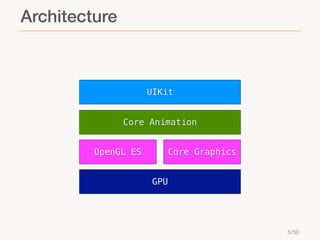
Architecture

UIKit
Core Animation
OpenGL ES

Core Graphics
GPU

5 /50
Agenda
• What is Core Animation?
• Layers
• Animating layer properties
• Transactions
• 3D transforms
• Advanced layer effects
• Performance tips & tricks

6 /50
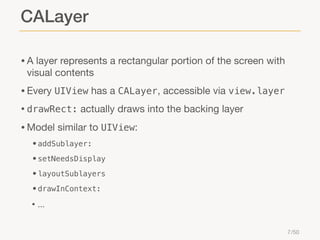
CALayer
• A layer represents a rectangular portion of the screen with
visual contents

• Every UIView has a CALayer, accessible via view.layer
• drawRect: actually draws into the backing layer

• Model similar to UIView:
• addSublayer:
• setNeedsDisplay
• layoutSublayers
• drawInContext:

• ...
7 /50
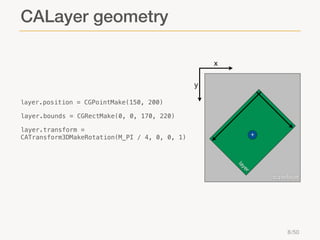
CALayer geometry
x
y
layer.position = CGPointMake(150, 200)

layer.bounds = CGRectMake(0, 0, 170, 220)
layer.transform =
CATransform3DMakeRotation(M_PI / 4, 0, 0, 1)

+

r
ye

la
superlayer

8 /50
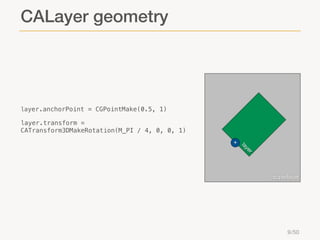
CALayer geometry

layer.anchorPoint = CGPointMake(0.5, 1)

layer.transform =
CATransform3DMakeRotation(M_PI / 4, 0, 0, 1)
ye

la

+

r
superlayer

y
la
er
9 /50
CALayer appearance
layer.cornerRadius = 5.0;

layer.borderWidth = 2.0;
layer.borderColor = [UIColor redColor].CGColor;

layer.shadowOpacity = 0.7;
layer.shadowRadius = 5.0;
layer.shadowOffset = CGSizeMake(1, 1);
layer.shadowColor = [UIColor blackColor].CGColor;

layer.mask = maskLayer;
superlayer

10 /50
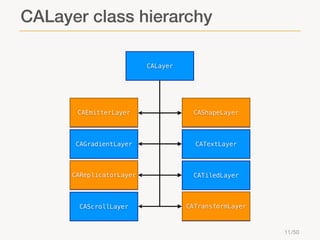
CALayer class hierarchy
CALayer

CAEmitterLayer

CAShapeLayer

CAGradientLayer

CATextLayer

CAReplicatorLayer

CATiledLayer

CAScrollLayer

CATransformLayer

11 /50
Agenda
• What is Core Animation?
• Layers
• Animating layer properties
• Transactions
• 3D transforms
• Advanced layer effects
• Performance tips & tricks

12 /50
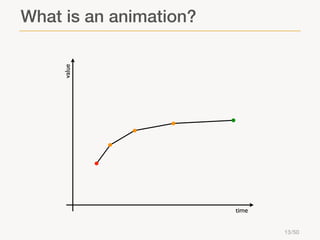
value

What is an animation?

time
13 /50
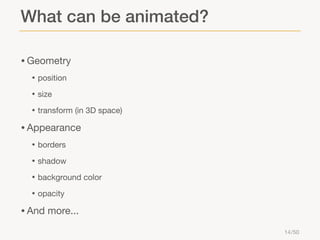
What can be animated?
• Geometry
• position
• size
• transform (in 3D space)

• Appearance
• borders
• shadow
• background color
• opacity

• And more...
14 /50
Implicit animation
Implicit animation
• Created automatically whenever an animatable property of a
CALayer is changed

• Animates between the current and the new values, using the
default duration and timing function

• Implemented as a transaction committed at the next runloop iteration

• CATransaction allows to override the default animation
properties, e.g.:

• [CATransaction

setAnimationDuration: 5.0]

16 /50
Implicit animation example
layer.position = CGPointMake(...);
[CATransaction setAnimationDuration: 3];
[CATransaction setAnimationTimingFunction: [CAMediaTimingFunction
functionWithName: kCAMediaTimingFunctionEaseInEaseOut]];
layer.position = CGPointMake(...);

17 /50
Disabling implicit animation
• If needed, implicit animation can be disabled:
• [CATransaction

setDisableActions: YES]

• Affects only the current transaction

• To disable implicit animation only on a particular property of
a given layer:

• layer.actions

= @{@"position" : [NSNull null]}

• Affects every following transaction

18 /50
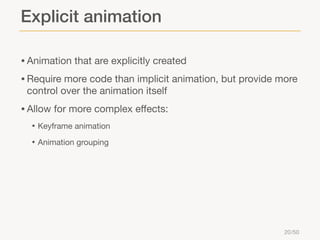
Explicit animation
Explicit animation
• Animation that are explicitly created
• Require more code than implicit animation, but provide more
control over the animation itself

• Allow for more complex effects:
• Keyframe animation
• Animation grouping

20 /50
Explicit animation example
CABasicAnimation *animation = [CABasicAnimation animationWithKeyPath:
@”position.x”];
animation.fromValue = @(startPosition.x);
animation.toValue = @(endPosition.x);
animation.duration = 3;
animation.timingFunction = [CAMediaTimingFunction functionWithName:
kCAMediaTimingFunctionEaseInEaseOut];
[layer addAnimation: animation forKey: @”animation”];

21 /50
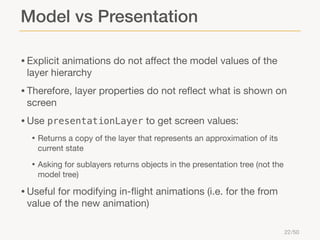
Model vs Presentation
• Explicit animations do not affect the model values of the
layer hierarchy

• Therefore, layer properties do not reflect what is shown on
screen

• Use presentationLayer to get screen values:
• Returns a copy of the layer that represents an approximation of its
current state

• Asking for sublayers returns objects in the presentation tree (not the
model tree)

• Useful for modifying in-flight animations (i.e. for the from
value of the new animation)

22 /50
Making it stick
• Explicitly set the model value to its final value

layer.position = endPosition;
CABasicAnimation *animation = [CABasicAnimation animationWithKeyPath:
@”position.x”];
animation.fromValue = @(startPosition.x);
animation.toValue = @(endPosition.x);
animation.duration = 3;
animation.timingFunction = [CAMediaTimingFunction functionWithName:
kCAMediaTimingFunctionEaseInEaseOut];
[layer addAnimation: animation forKey: @”animation”];

23 /50
Animation delegate
• Explicit animation can have an animation delegate
• Retained by the animation (beware of retain cycles!)

• Gets notified when an animation starts or ends:
• animationDidStart:
• animationDidStop:finished:

24 /50
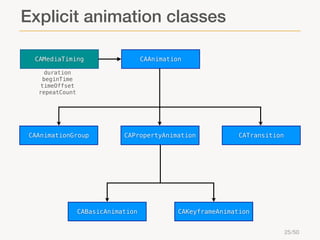
Explicit animation classes
CAMediaTiming

CAAnimation

duration
beginTime
timeOffset
repeatCount

CAAnimationGroup

CAPropertyAnimation

CABasicAnimation

CATransition

CAKeyframeAnimation
25 /50
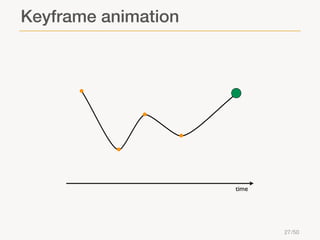
Keyframe animation
Keyframe animation

time

27 /50
CAKeyframeAnimation
• Keyframe values can be specified either with:
• values - Array of keyframe values
• path - CGPathRef (only for layer properties that contain a CGPoint data
type)

• Timing can be controlled with:
• keyTimes - Array of floats defining when to apply the corresponding
keyframe value (or path control point)

• timingFunctions - Array of CAMediaTimingFunctions, controlling
the pacing of each keyframe segment (linear, ease in, out, in/out)

• calculationMode - Controls how interpolated values should be
computed (linear, cubic, or discrete)

28 /50
Agenda
• What is Core Animation?
• Layers
• Animating layer properties
• Transactions
• 3D transforms
• Advanced layer effects
• Performance tips & tricks

29 /50
CATransaction
• It is the Core Animation mechanism for batching multiple

layer-tree operations into atomic updates to the render tree

• Every modification to a layer tree must be part of a
transaction

• Implicit:
• Transactions that are created automatically when the layer tree is
modified by a thread without an active transaction

• Committed automatically when the thread's run-loop next iterates

• Explicit:
• Explicitly created (with [CATransaction

begin]) and committed (with

[CATransaction commit])

30 /50
Explicit transactions
• Don’t forget to commit an explicit transaction (or bad things
may happen!)

• Multiple transactions can be nested
• Can have a completion block, called when all subsequently
added animations have completed

[CATransaction begin];
[CATransaction setCompletionBlock: ^{
...
}];
CABasicAnimation *animation = ...
[layer addAnimation: animation forKey: @”animation”];
[CATransaction commit];

31 /50
Agenda
• What is Core Animation?
• Layers
• Animating layer properties
• Transactions
• 3D transforms
• Advanced layer effects
• Performance tips & tricks

32 /50
3D transforms
• Layers can be transformed in 3D space
• The transform property is a 3D transform matrix
(CATransform3D)

• Possible transformations:
• Translate (CATransform3DMakeTranslation)
• Scale (CATransform3DMakeScale)
• Rotation (CATransform3DMakeRotation)

• Perspective can be achieved by manually altering the
transform’s m34 entry:
• transform.m34

= 1.0 / -zDistance;

33 /50
Is it really 3D?
• CALayer uses a flattened hierarchy rendering model
• i.e. it flattens its sublayers into the plane at Z=0

• So, even if we can apply a 3D transform to each of our

layers, we can’t group them into a single 3D object and
apply a 3D transform to that

• It’s a 2.5D model

34 /50
CATransformLayer
• CATransformLayer can be used to create true 3D layer
hierarchies

• i.e. it does not flatten its sublayers

• Because of this, many of the features of the standard
CALayer model are not supported:

• Only the sublayers of a CATransformLayer are rendered
• The opacity property is applied to each sublayer individually
• The hitTest: method should never be called on a transform layer (it
does not have a 2D coordinate space into which the point can be
mapped)

35 /50
Demo
Agenda
• What is Core Animation?
• Layers
• Animating layer properties
• Transactions
• 3D transforms
• Advanced layer effects
• Performance tips & tricks

37 /50
Replicators
• CAReplicatorLayer are special layers that create a
specified number of copies of its sublayer tree

• Each copy is automatically updated every time you add or
change a sublayer of the replicator layer

• Each copy can have geometric, temporal and color
transformations applied to it

38 /50
How to use replicators
CAReplicatorLayer *replicatorLayer = [CAReplicatorLayer layer];
replicatorLayer.instanceCount = 6;
replicatorLayer.instanceTransform = CATransform3DMakeTranslation(50, 0,
0);
replicatorLayer.instanceBlueOffset = -0.2;
[view.layer addSublayer: replicatorLayer];
circleLayer = [CALayer layer];
...
[replicatorLayer addSublayer: circleLayer];

39 /50
Particle emitters
• CAEmitterLayer class implements a particle emitter system

• An emitter has:
• A position (also in the z-axis)
• A shape (point, line, rectangle, circle, sphere, ...)
• A mode (outline, surface, volume, ...)
• An array of emitter cells (each must be an instance of CAEmitterCell)

40 /50
Emitter cells
• An emitter cell represents one source of particles emitted by
a CAEmitterLayer

• It defines the direction and the properties of the emitted
particles:

• birthRate
• velocity
• contents
• color
• emissionLatitude/emissionLongitude
• lifetime

• ...
41 /50
Emitter cells
• For many properties (velocity,

emissionLatitude,
emissionLongitude, color, lifetime, ...) a range

can be defined

• Each emitted particle will have its own value for the property, randomly
chosen within its range

• An emitter cell can also have an array of sub-cells
• Particles emitting particles!

42 /50
Demo
Agenda
• What is Core Animation?
• Layers
• Animating layer properties
• Transactions
• 3D transforms
• Advanced layer effects
• Performance tips & tricks

44 /50
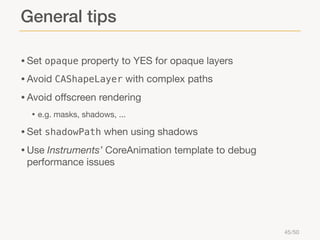
General tips
• Set opaque property to YES for opaque layers
• Avoid CAShapeLayer with complex paths
• Avoid offscreen rendering
• e.g. masks, shadows, ...

• Set shadowPath when using shadows
• Use Instruments’ CoreAnimation template to debug
performance issues

45 /50
Layer caching
•

Layers can be asked to cache theirs contents in a bitmap
• layer.shouldRasterize

= YES

• It will be reused when possible
• May lead to a significant performance improvement

46 /50
Layer caching
• Bitmaps require memory to be stored
• Devices are memory-limited, so cache space is limited

• Improves performance only when the cached bitmap can be
reused

• Caching and not-reusing is more expensive than not caching

• A rasterized layer is not really suited to be scaled
• The cached bitmap has a fixed size, depending on the layer’s size and
the rasterizationScale property

• Rasterization occurs before mask is applied

47 /50
Conclusions
Core Animation allows you to perform:

• Basic animations
• Keyframe-based animations
• More advanced effects:
• 3D transforms
• Replicators
• Particle emitters

48 /50
Q&A
Thank you!
For further information: marco.zoffoli@pragmamark.org

Building animated UI with Core Animation

  • 1.
    Building animated UIwith Core Animation Marco Zoffoli iOS Developer
  • 2.
    Agenda • What isCore Animation? • Layers • Animating layer properties • Transactions • 3D transforms • Advanced layer effects • Performance tips & tricks 2 /50
  • 3.
    Agenda • What isCore Animation? • Layers • Animating layer properties • Transactions • 3D transforms • Advanced layer effects • Performance tips & tricks 3 /50
  • 4.
    What is CoreAnimation? • Core Animation is an animation framework for animating UI elements and creating visual effects • Available on both iOS and Mac OS X (we’ll cover only iOS) • Just provide a few parameters and Core Animation will do the rest: • Starting point • Ending point • Timing 4 /50
  • 5.
  • 6.
    Agenda • What isCore Animation? • Layers • Animating layer properties • Transactions • 3D transforms • Advanced layer effects • Performance tips & tricks 6 /50
  • 7.
    CALayer • A layerrepresents a rectangular portion of the screen with visual contents • Every UIView has a CALayer, accessible via view.layer • drawRect: actually draws into the backing layer • Model similar to UIView: • addSublayer: • setNeedsDisplay • layoutSublayers • drawInContext: • ... 7 /50
  • 8.
    CALayer geometry x y layer.position =CGPointMake(150, 200) layer.bounds = CGRectMake(0, 0, 170, 220) layer.transform = CATransform3DMakeRotation(M_PI / 4, 0, 0, 1) + r ye la superlayer 8 /50
  • 9.
    CALayer geometry layer.anchorPoint =CGPointMake(0.5, 1) layer.transform = CATransform3DMakeRotation(M_PI / 4, 0, 0, 1) ye la + r superlayer y la er 9 /50
  • 10.
    CALayer appearance layer.cornerRadius =5.0; layer.borderWidth = 2.0; layer.borderColor = [UIColor redColor].CGColor; layer.shadowOpacity = 0.7; layer.shadowRadius = 5.0; layer.shadowOffset = CGSizeMake(1, 1); layer.shadowColor = [UIColor blackColor].CGColor; layer.mask = maskLayer; superlayer 10 /50
  • 11.
  • 12.
    Agenda • What isCore Animation? • Layers • Animating layer properties • Transactions • 3D transforms • Advanced layer effects • Performance tips & tricks 12 /50
  • 13.
    value What is ananimation? time 13 /50
  • 14.
    What can beanimated? • Geometry • position • size • transform (in 3D space) • Appearance • borders • shadow • background color • opacity • And more... 14 /50
  • 15.
  • 16.
    Implicit animation • Createdautomatically whenever an animatable property of a CALayer is changed • Animates between the current and the new values, using the default duration and timing function • Implemented as a transaction committed at the next runloop iteration • CATransaction allows to override the default animation properties, e.g.: • [CATransaction setAnimationDuration: 5.0] 16 /50
  • 17.
    Implicit animation example layer.position= CGPointMake(...); [CATransaction setAnimationDuration: 3]; [CATransaction setAnimationTimingFunction: [CAMediaTimingFunction functionWithName: kCAMediaTimingFunctionEaseInEaseOut]]; layer.position = CGPointMake(...); 17 /50
  • 18.
    Disabling implicit animation •If needed, implicit animation can be disabled: • [CATransaction setDisableActions: YES] • Affects only the current transaction • To disable implicit animation only on a particular property of a given layer: • layer.actions = @{@"position" : [NSNull null]} • Affects every following transaction 18 /50
  • 19.
  • 20.
    Explicit animation • Animationthat are explicitly created • Require more code than implicit animation, but provide more control over the animation itself • Allow for more complex effects: • Keyframe animation • Animation grouping 20 /50
  • 21.
    Explicit animation example CABasicAnimation*animation = [CABasicAnimation animationWithKeyPath: @”position.x”]; animation.fromValue = @(startPosition.x); animation.toValue = @(endPosition.x); animation.duration = 3; animation.timingFunction = [CAMediaTimingFunction functionWithName: kCAMediaTimingFunctionEaseInEaseOut]; [layer addAnimation: animation forKey: @”animation”]; 21 /50
  • 22.
    Model vs Presentation •Explicit animations do not affect the model values of the layer hierarchy • Therefore, layer properties do not reflect what is shown on screen • Use presentationLayer to get screen values: • Returns a copy of the layer that represents an approximation of its current state • Asking for sublayers returns objects in the presentation tree (not the model tree) • Useful for modifying in-flight animations (i.e. for the from value of the new animation) 22 /50
  • 23.
    Making it stick •Explicitly set the model value to its final value layer.position = endPosition; CABasicAnimation *animation = [CABasicAnimation animationWithKeyPath: @”position.x”]; animation.fromValue = @(startPosition.x); animation.toValue = @(endPosition.x); animation.duration = 3; animation.timingFunction = [CAMediaTimingFunction functionWithName: kCAMediaTimingFunctionEaseInEaseOut]; [layer addAnimation: animation forKey: @”animation”]; 23 /50
  • 24.
    Animation delegate • Explicitanimation can have an animation delegate • Retained by the animation (beware of retain cycles!) • Gets notified when an animation starts or ends: • animationDidStart: • animationDidStop:finished: 24 /50
  • 25.
  • 26.
  • 27.
  • 28.
    CAKeyframeAnimation • Keyframe valuescan be specified either with: • values - Array of keyframe values • path - CGPathRef (only for layer properties that contain a CGPoint data type) • Timing can be controlled with: • keyTimes - Array of floats defining when to apply the corresponding keyframe value (or path control point) • timingFunctions - Array of CAMediaTimingFunctions, controlling the pacing of each keyframe segment (linear, ease in, out, in/out) • calculationMode - Controls how interpolated values should be computed (linear, cubic, or discrete) 28 /50
  • 29.
    Agenda • What isCore Animation? • Layers • Animating layer properties • Transactions • 3D transforms • Advanced layer effects • Performance tips & tricks 29 /50
  • 30.
    CATransaction • It isthe Core Animation mechanism for batching multiple layer-tree operations into atomic updates to the render tree • Every modification to a layer tree must be part of a transaction • Implicit: • Transactions that are created automatically when the layer tree is modified by a thread without an active transaction • Committed automatically when the thread's run-loop next iterates • Explicit: • Explicitly created (with [CATransaction begin]) and committed (with [CATransaction commit]) 30 /50
  • 31.
    Explicit transactions • Don’tforget to commit an explicit transaction (or bad things may happen!) • Multiple transactions can be nested • Can have a completion block, called when all subsequently added animations have completed [CATransaction begin]; [CATransaction setCompletionBlock: ^{ ... }]; CABasicAnimation *animation = ... [layer addAnimation: animation forKey: @”animation”]; [CATransaction commit]; 31 /50
  • 32.
    Agenda • What isCore Animation? • Layers • Animating layer properties • Transactions • 3D transforms • Advanced layer effects • Performance tips & tricks 32 /50
  • 33.
    3D transforms • Layerscan be transformed in 3D space • The transform property is a 3D transform matrix (CATransform3D) • Possible transformations: • Translate (CATransform3DMakeTranslation) • Scale (CATransform3DMakeScale) • Rotation (CATransform3DMakeRotation) • Perspective can be achieved by manually altering the transform’s m34 entry: • transform.m34 = 1.0 / -zDistance; 33 /50
  • 34.
    Is it really3D? • CALayer uses a flattened hierarchy rendering model • i.e. it flattens its sublayers into the plane at Z=0 • So, even if we can apply a 3D transform to each of our layers, we can’t group them into a single 3D object and apply a 3D transform to that • It’s a 2.5D model 34 /50
  • 35.
    CATransformLayer • CATransformLayer canbe used to create true 3D layer hierarchies • i.e. it does not flatten its sublayers • Because of this, many of the features of the standard CALayer model are not supported: • Only the sublayers of a CATransformLayer are rendered • The opacity property is applied to each sublayer individually • The hitTest: method should never be called on a transform layer (it does not have a 2D coordinate space into which the point can be mapped) 35 /50
  • 36.
  • 37.
    Agenda • What isCore Animation? • Layers • Animating layer properties • Transactions • 3D transforms • Advanced layer effects • Performance tips & tricks 37 /50
  • 38.
    Replicators • CAReplicatorLayer arespecial layers that create a specified number of copies of its sublayer tree • Each copy is automatically updated every time you add or change a sublayer of the replicator layer • Each copy can have geometric, temporal and color transformations applied to it 38 /50
  • 39.
    How to usereplicators CAReplicatorLayer *replicatorLayer = [CAReplicatorLayer layer]; replicatorLayer.instanceCount = 6; replicatorLayer.instanceTransform = CATransform3DMakeTranslation(50, 0, 0); replicatorLayer.instanceBlueOffset = -0.2; [view.layer addSublayer: replicatorLayer]; circleLayer = [CALayer layer]; ... [replicatorLayer addSublayer: circleLayer]; 39 /50
  • 40.
    Particle emitters • CAEmitterLayerclass implements a particle emitter system • An emitter has: • A position (also in the z-axis) • A shape (point, line, rectangle, circle, sphere, ...) • A mode (outline, surface, volume, ...) • An array of emitter cells (each must be an instance of CAEmitterCell) 40 /50
  • 41.
    Emitter cells • Anemitter cell represents one source of particles emitted by a CAEmitterLayer • It defines the direction and the properties of the emitted particles: • birthRate • velocity • contents • color • emissionLatitude/emissionLongitude • lifetime • ... 41 /50
  • 42.
    Emitter cells • Formany properties (velocity, emissionLatitude, emissionLongitude, color, lifetime, ...) a range can be defined • Each emitted particle will have its own value for the property, randomly chosen within its range • An emitter cell can also have an array of sub-cells • Particles emitting particles! 42 /50
  • 43.
  • 44.
    Agenda • What isCore Animation? • Layers • Animating layer properties • Transactions • 3D transforms • Advanced layer effects • Performance tips & tricks 44 /50
  • 45.
    General tips • Setopaque property to YES for opaque layers • Avoid CAShapeLayer with complex paths • Avoid offscreen rendering • e.g. masks, shadows, ... • Set shadowPath when using shadows • Use Instruments’ CoreAnimation template to debug performance issues 45 /50
  • 46.
    Layer caching • Layers canbe asked to cache theirs contents in a bitmap • layer.shouldRasterize = YES • It will be reused when possible • May lead to a significant performance improvement 46 /50
  • 47.
    Layer caching • Bitmapsrequire memory to be stored • Devices are memory-limited, so cache space is limited • Improves performance only when the cached bitmap can be reused • Caching and not-reusing is more expensive than not caching • A rasterized layer is not really suited to be scaled • The cached bitmap has a fixed size, depending on the layer’s size and the rasterizationScale property • Rasterization occurs before mask is applied 47 /50
  • 48.
    Conclusions Core Animation allowsyou to perform: • Basic animations • Keyframe-based animations • More advanced effects: • 3D transforms • Replicators • Particle emitters 48 /50
  • 49.
  • 50.
    Thank you! For furtherinformation: marco.zoffoli@pragmamark.org