Building Agents with
LangGraph& Gemini
Tahreem Rasul
Google Developer Expert – Machine Learning
Tech Lead @ Red Buffer
Presented by: Tahreem Rasul
2.
$whoami
● TechEnthusiast! Electrical Engineer turned Medical Engineer now working in AI
● Tech Lead at Red Buffer
● Google Developer Expert in Machine Learning
● Technical Speaker (50+ talks across and internationally)
● Writer on AI/ML on Medium for different publications (including Towards Data Science)
Dictionary
● Allows forefficient data retrieval based on unique keys
● Flexible and easy to implement
● Leads to challenges in ensuring that the data is a particular structure,
especially for larger projects
● Doesn't check if the data is the correct type or structure
23.
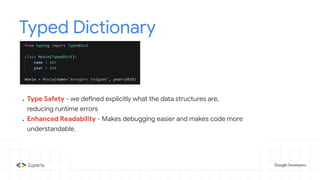
Typed Dictionary
● TypeSafety - we defined explicitly what the data structures are,
reducing runtime errors
● Enhanced Readability - Makes debugging easier and makes code more
understandable.
24.
Union
● Union letsyou say that a value can be more than one type
● Flexible and easy to code
● Type Safety as it can provide hints to help catch incorrect usage
25.
Optional
● In thiscase “name” can be either String or None!
● It cannot be anything else
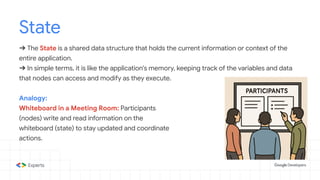
State
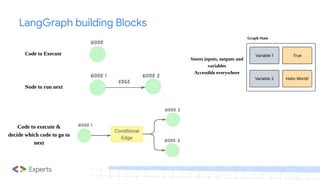
➔ The Stateis a shared data structure that holds the current information or context of the
entire application.
➔ In simple terms, it is like the application's memory, keeping track of the variables and data
that nodes can access and modify as they execute.
Analogy:
Whiteboard in a Meeting Room: Participants
(nodes) write and read information on the
whiteboard (state) to stay updated and coordinate
actions.
30.
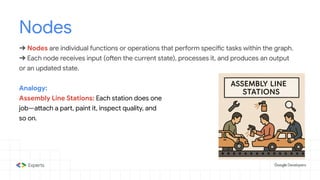
Nodes
➔ Nodes areindividual functions or operations that perform specific tasks within the graph.
➔ Each node receives input (often the current state), processes it, and produces an output
or an updated state.
Analogy:
Assembly Line Stations: Each station does one
job—attach a part, paint it, inspect quality, and
so on.
31.
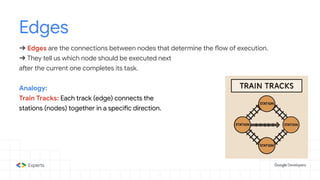
Edges
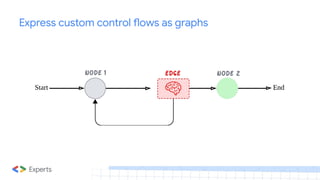
➔ Edges arethe connections between nodes that determine the flow of execution.
➔ They tell us which node should be executed next
after the current one completes its task.
Analogy:
Train Tracks: Each track (edge) connects the
stations (nodes) together in a specific direction.
32.
Conditional Edges
➔ ConditionalEdges are specialized connections that decide the next node to execute
based on specific conditions or logic applied to the current state.
Analogy:
Traffic Lights: Green means go one way, red
means stop, yellow means slow down. The
condition (light color) decides the next step.
33.
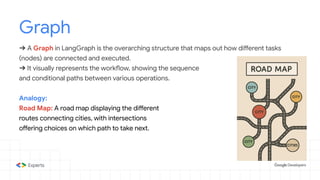
Graph
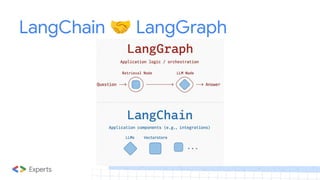
➔ A Graphin LangGraph is the overarching structure that maps out how different tasks
(nodes) are connected and executed.
➔ It visually represents the workflow, showing the sequence
and conditional paths between various operations.
Analogy:
Road Map: A road map displaying the different
routes connecting cities, with intersections
offering choices on which path to take next.
34.
START
➔ The STARTnode is a virtual entry point in LangGraph, marking where the workflow begins.
➔ It doesn't perform any operations itself but serves as the designated starting position for
the graph's execution.
Analogy:
Race Starting Line: The place where a race
officially begins.
35.
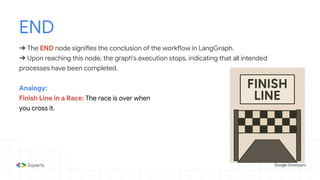
END
➔ The ENDnode signifies the conclusion of the workflow in LangGraph.
➔ Upon reaching this node, the graph's execution stops, indicating that all intended
processes have been completed.
Analogy:
Finish Line in a Race: The race is over when
you cross it.
36.
Tools
➔ Tools arespecialized functions or utilities that nodes can utilize to perform specific tasks
such as fetching data from an API.
➔ They enhance the capabilities of nodes by providing additional functionalities.
➔ Nodes are part of the graph structure, while tools are functionalities used within nodes
Analogy:
Tools in a Toolbox: A hammer for nails, a
screwdriver for screws, each tool has a distinct
purpose.
37.
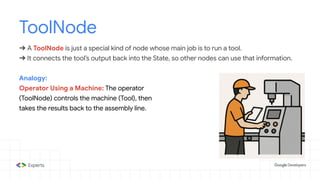
ToolNode
➔ A ToolNodeis just a special kind of node whose main job is to run a tool.
➔ It connects the tool’s output back into the State, so other nodes can use that information.
Analogy:
Operator Using a Machine: The operator
(ToolNode) controls the machine (Tool), then
takes the results back to the assembly line.
38.
StateGraph
➔ A StateGraphis a class in LangGraph used to build and compile the graph structure.
➔ It manages the nodes, edges, and the overall state, ensuring that the workflow operates in
a unified way and that data flows correctly between components.
Analogy:
Blueprint of a Building: Just as a blueprint
outlines the design and connections within a
building, a StateGraph defines the structure and
flow of the workflow.
39.
Runnable
➔ A Runnablein LangGraph is a standardized, executable component that performs a
specific task within an AI workflow.
➔ It serves as a fundamental building block, allowing for us to create modular systems.
Analogy:
LEGO Brick: Just as LEGO bricks can be
snapped together to build complex structures,
Runnables can be combined to create
sophisticated AI workflows.
40.
Messages
➔ Human Message
Representsinput from a user.
➔ System Message
Used to provide instructions or context to the model
➔ Function Message
Represents the result of a function call
➔ AI Message
Represents responses generated by AI models
➔ Tool Message
Similar to Function Message, but specific to tool usage
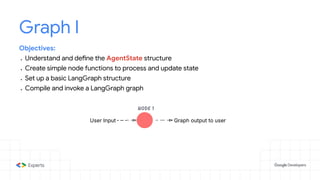
Graph I
Objectives:
● Understandand define the AgentState structure
● Create simple node functions to process and update state
● Set up a basic LangGraph structure
● Compile and invoke a LangGraph graph
44.
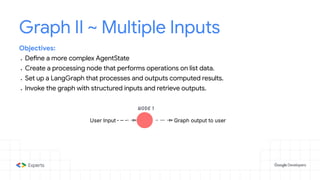
Graph II ~Multiple Inputs
Objectives:
● Define a more complex AgentState
● Create a processing node that performs operations on list data.
● Set up a LangGraph that processes and outputs computed results.
● Invoke the graph with structured inputs and retrieve outputs.
45.
Graph III ~Sequential Graph
Objectives:
● Create multiple Nodes that sequentially process and update different parts of the state.
● Connect Nodes together in a graph
● Invoke the Graph and see how the state is transformed step-by-step.
46.
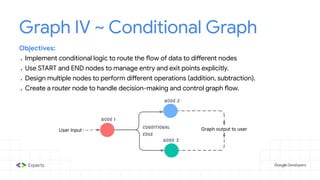
Graph IV ~Conditional Graph
Objectives:
● Implement conditional logic to route the flow of data to different nodes
● Use START and END nodes to manage entry and exit points explicitly.
● Design multiple nodes to perform different operations (addition, subtraction).
● Create a router node to handle decision-making and control graph flow.
47.
Graph V ~Looping Graph
Objectives:
● Implement looping logic to route the flow of data back to the nodes
● Create a single conditional edge to handle decision-making and control graph flow.
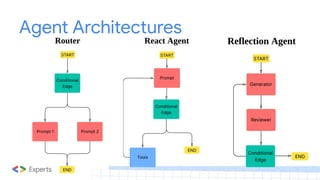
ReAct Agent
Objectives:
● Learnhow to create Tools in LangGraph
● How to create a ReAct Graph
● Work with different types of Messages such as ToolMessages
● Test out robustness of our graph
Podcast Agent
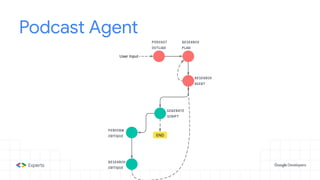
Objectives:
● User➔ Define the podcast topic
● Agent ➔ Generate an outline using Gemini
● Agent ➔ Conduct research using search tools like arXiv, PubMed, and Wikipedia
● Agent ➔ Write a script using Gemini incorporating the research findings.
● Agent ➔ Critique and iterate.
● (Optional) ➔ Generate audio using text-to-speech
Loops
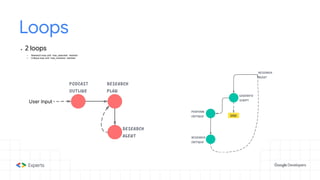
● 2 loops
○Research loop until `max_searches` reached
○ Critique loop until `max_revisions` reached
54.
Research Loop
● 3nodes
○ Podcast Outline
○ Research Plan
○ Research Agent
● Podcast Outline: Creates an outline based on initial task and
adds to outline key in state dictionary
● Research Plan: Generates search queries based on specified
task. Appends to queries key
● Research Agent: Conducts search based on latest queries in previous step.
Appends to content, updates tool_calls and search_count
● A conditional edge ➔ if max_searches reached, go to next loop, otherwise research
55.
Feedback Critique Loop
●3 nodes
○ Generate Script
○ Podcast Critique
○ Research Critique
● Generate Script: Generates script based on search
(& previous critique, if any). Appends to draft key
● Podcast Critique: Generates critique based on generated draft
in previous step. Appends to critique key
● Research Critique: Generates new search queries based on previous
queries and critique. Appends to queries
● A conditional edge ➔ if max_revisions reached, end, otherwise perform crtique
























![5G Explained! A High Level Overview [Introduction]](https://cdn.slidesharecdn.com/ss_thumbnails/5gexplainedahighleveloverview-260119165306-cc137a3e-thumbnail.jpg?width=640&height=640&fit=bounds)


