




Build Salesforce DX Plugin in 15
Minutes
@JitendraZaa – Sr Tech Architect @Bluewolf
@Cloudy_Abhi – Sr. Developer
Jitendra Zaa
MVP & Sr. Technical Architect at Bluewolf
21x Salesforce Certifications
@JitendraZaa
Speakers
Salesforce Lead at Homestar Financial
16x Salesforce Certifications
@cloudy_abhi
Abhi Tripathi
Agenda
• Salesforce DX everywhere
• Salesforce CLI
• Why Plugins ?
• What to know before creating first plugin
• DEMO
• Conclusion
• Resources
• Q&A
Salesforce DX
Everywhere
Why Salesforce DX
• Is new Toolset to streamline entire development life cycle
• Facilitates Automated Testing and Continuous Integration
• Compatible with many Source Code Management (SCM) tools
• New Packaging for ISV Partners
• Works with Build managers like Jenkins or TravisCI
Most Important :
Salesforce DX allows you to create
your own plugin
Do you know ?
Salesforce DX itself is a plugin build on top of Salesforce CLI ?
Lets talk about Salesforce CLI first !!!
https://github.com/JitendraZaa/sfdx-object-export
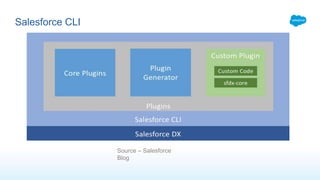
Salesforce CLI
Source – Salesforce
Blog
• Generate Test class coverage report in HTML or PDF Format after deployment
• Compare two Salesforce Instances and generate report
• Find list of all unused Apex Classes
• Generate Configuration Workbook, post deployment
Use Cases
Needs to know before Salesforce DX plugin
• Nodejs basic knowledge
• It uses Typescript language, created by Microsoft in 2012
• Typescript is superset of JavaScript
• Salesforce DX plugin generator is based on oclif (Open CLI Framework) by Heroku
team
• Yarn as dependency management
https://github.com/JitendraZaa/sfdx-object-export
DEMO
Conclusion
• Salesforce CLI
• Generating first plugin using plugin generator
• Connect to any Salesforce Org using existing SFDX Authentication
• Use Rest API in Plugin
• Use excle4node to create excel sheets
• Source Code - https://github.com/JitendraZaa/sfdx-object-export
Resources
• Source Code - https://github.com/JitendraZaa/sfdx-object-export
• Oclif - https://oclif.io/
• Create your first Salesforce DX Plugin - https://developer.salesforce.com/blogs/2018/05/create-
your-first-salesforce-cli-plugin.html
• Getting Started with Salesforce DX - https://developer.salesforce.com/blogs/2018/02/getting-
started-salesforce-dx-part-1-5.html
• Yarn - https://yarnpkg.com/en/
• Get Started with Salesforce DX Trail - https://trailhead.salesforce.com/en/trails/sfdx_get_started
Q&A
Build sfdx plugin in 15 minutes

Build sfdx plugin in 15 minutes

  • 1.
    Build Salesforce DXPlugin in 15 Minutes @JitendraZaa – Sr Tech Architect @Bluewolf @Cloudy_Abhi – Sr. Developer
  • 2.
    Jitendra Zaa MVP &Sr. Technical Architect at Bluewolf 21x Salesforce Certifications @JitendraZaa Speakers Salesforce Lead at Homestar Financial 16x Salesforce Certifications @cloudy_abhi Abhi Tripathi
  • 3.
    Agenda • Salesforce DXeverywhere • Salesforce CLI • Why Plugins ? • What to know before creating first plugin • DEMO • Conclusion • Resources • Q&A
  • 4.
  • 5.
    Why Salesforce DX •Is new Toolset to streamline entire development life cycle • Facilitates Automated Testing and Continuous Integration • Compatible with many Source Code Management (SCM) tools • New Packaging for ISV Partners • Works with Build managers like Jenkins or TravisCI
  • 6.
    Most Important : SalesforceDX allows you to create your own plugin
  • 7.
    Do you know? Salesforce DX itself is a plugin build on top of Salesforce CLI ? Lets talk about Salesforce CLI first !!! https://github.com/JitendraZaa/sfdx-object-export
  • 8.
  • 9.
    • Generate Testclass coverage report in HTML or PDF Format after deployment • Compare two Salesforce Instances and generate report • Find list of all unused Apex Classes • Generate Configuration Workbook, post deployment Use Cases
  • 10.
    Needs to knowbefore Salesforce DX plugin • Nodejs basic knowledge • It uses Typescript language, created by Microsoft in 2012 • Typescript is superset of JavaScript • Salesforce DX plugin generator is based on oclif (Open CLI Framework) by Heroku team • Yarn as dependency management https://github.com/JitendraZaa/sfdx-object-export
  • 11.
  • 12.
    Conclusion • Salesforce CLI •Generating first plugin using plugin generator • Connect to any Salesforce Org using existing SFDX Authentication • Use Rest API in Plugin • Use excle4node to create excel sheets • Source Code - https://github.com/JitendraZaa/sfdx-object-export
  • 13.
    Resources • Source Code- https://github.com/JitendraZaa/sfdx-object-export • Oclif - https://oclif.io/ • Create your first Salesforce DX Plugin - https://developer.salesforce.com/blogs/2018/05/create- your-first-salesforce-cli-plugin.html • Getting Started with Salesforce DX - https://developer.salesforce.com/blogs/2018/02/getting- started-salesforce-dx-part-1-5.html • Yarn - https://yarnpkg.com/en/ • Get Started with Salesforce DX Trail - https://trailhead.salesforce.com/en/trails/sfdx_get_started
  • 14.

Editor's Notes

  • #4Ā Here is our agenda, we are going to
  • #5Ā Salesforce DX is everywhere whether you are building apps or you are setting up continuous integration. In just 2 years salesforce DX has changed the way to source code driven development, The core principals of Salesforce Developer experience have been mentioned many times in Salesforce dx sessions That sharing, versioning, testing and collaborating with source
  • #6Ā The guiding principal for Salesforce DX starts with that everything is driven from source code. It is a set of tools which you’ve been already using, you can use the tool of your choice. SFDX have transformed salesforce development, From Source code driven development process to packaging in order to distribute the app you built. From collaborating with team to continuous delivery. Sfdx is for every trailblazer, if you building app using lightning app app builder, if you are writing apex code or building services that are operating and running on Heroku. Salesforce dx is here to empower you and do more.
  • #7Ā Which we are going to show you today!
  • #8Ā The CLI represents the coreĀ sfdx-cli. It is what you execute on your local machine or on your CI/CD system. It provides functionality to install custom plugins Salesforce CLI is a powerful command line interface that simplifies development and build automation when working with your Salesforce org. It helps you to Aggregate all the tools you need to develop with and perform commands against your Salesforce org It manages orgs and Synchronize source to and from scratch orgs You can do lot more things with Salesforce CLI 1. Importing and exporting data 2. executing tests 3. Creating, installing packages And the most important part is it’s a single interface for all the salesforce dx features
  • #9Ā Salesforce CLI architecture Before we start it’s important to learn what the moving parts around the Salesforce CLI are, and how they work together Salesforce DX functionality is provided by theĀ salesforcedxĀ plugin. It is bundled with the Salesforce CLI,
  • #12Ā Install yarn using command : sudo npm install -g yarn Execute sfdx plugins:generate – Generate plugin template Execute sfdx plugins:link (don’t provide any folder name after link as it will take current folder) heroku plugins:installĀ salesforcedx sfdx force:auth:web:login --setdefaultdevhubusername --setalias my-devhub-org