Secure cloud-enabled remote access to IoT devices
via web browser, SSH or TCP-based network protocols.
my-devices.net
Executive Summary
> Remotely manage and monitor your IoT devices securely using a device’s built-in web
server, command-line shell (SSH) or other TCP-based protocols.
> Securely connect mobile apps to your devices using REST APIs.
> Allow your customers to access their devices from anywhere.
> Assist your customers setting up or troubleshooting their devices.
> Secure your devices against unauthorized access or attacks from the internet.
> Don’t worry about firewalls, NAT, proxy servers or mobile routers preventing access to
your device.
> Avoid insecure port forwarding/dynamic DNS or complex VPNs.
> Host on public or private cloud.
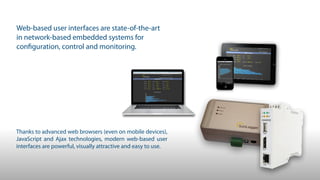
Web-based user interfaces are state-of-the-art 

in network-based embedded systems for 

configuration, control and monitoring.
Thanks to advanced web browsers (even on mobile devices),
JavaScript and Ajax technologies, modern web-based user
interfaces are powerful, visually attractive and easy to use.
Web-based user interfaces work great …
!
… if device and web browser are in the same local network
!
… or if the device is exposed to the Internet (a bad idea)
But what if…
> the user wants to access a device when away from home?
> the device is at a hard to reach remote location?
> support staff needs to access the device for trouble shooting?
What about Port Forwarding and Dynamic DNS?
> it’s simple and widely supported by internet routers
> it allows access to any TCP or UDP-based network service provided by
the device (if properly forwarded)
But …
> NAT router configuration for port forwarding can be complex,
especially if multiple devices must be accessible (every device needs a
unique public port number)
> a Dynamic DNS service is needed if the NAT router does not have a
static public IP address
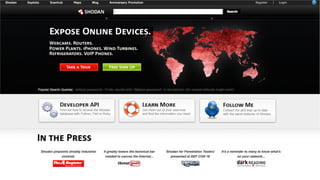
> the device is directly exposed to the internet – very high risk and
danger of denial-of-service or other attacks and thus a very bad idea

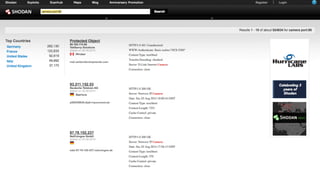
(be prepared to find your device on Shodan)
What about VPNs?
> the device is directly integrated into a remote network using a secure
tunnel through the internet
> secure, encrypted connection
> proven, standardized and widely available technology
But…
> VPNs may be blocked by network provider
> necessary network and VPN server infrastructure is difficult to setup and to
maintain, especially if lots of devices must be integrated
> all clients must have access to VPN in order to access the devices (difficult
with a large number of users in consumer markets, e.g. home automation)
> additional measures must be taken to isolate devices in the VPN from one
another and to prevent users from accessing devices they should not access
A Solution: my-devices.net
> uses secure (TLS) WebSocket-based tunneling, initiated by device

(NAT router, proxy and firewall friendly)
> reflector server connects device and client
> easy to integrate into a device (especially if Linux based):

single executable plus configuration file, or library for direct integration into
an application
> works with any web server
> can securely forward almost any TCP-based protocol, including SSH
!
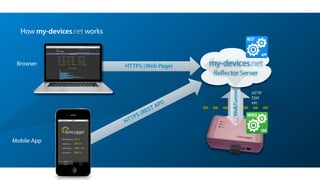
SDK
DEVICE
API
REST
HTTPS (REST API)
HTTPS (Web Page)
WebTunnel
my-devices.net
Reflector Server
HTTP
SSH
etc.
How my-devices.net works
Browser
Mobile App
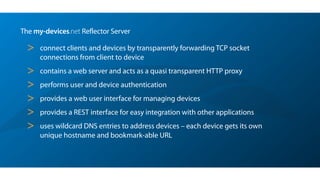
The my-devices.net Reflector Server
> connect clients and devices by transparently forwarding TCP socket
connections from client to device
> contains a web server and acts as a quasi transparent HTTP proxy
> performs user and device authentication
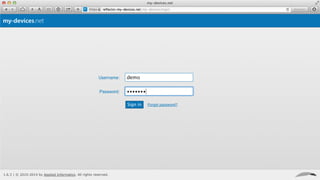
> provides a web user interface for managing devices
> provides a REST interface for easy integration with other applications
> uses wildcard DNS entries to address devices – each device gets its own
unique hostname and bookmark-able URL
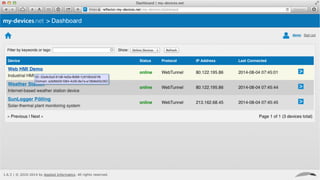
Tour
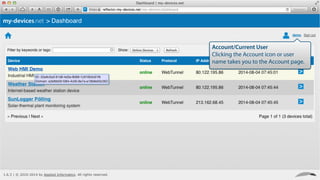
Account/Current User
Clicking the Account icon or user
name takes you to the Account page.
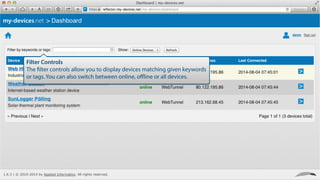
Filter Controls
The filter controls allow you to display devices matching given keywords
or tags. You can also switch between online, offline or all devices.
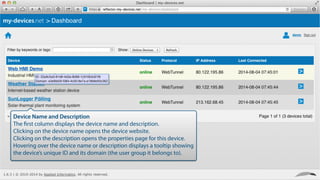
Device Name and Description
The first column displays the device name and description.
Clicking on the device name opens the device website.
Clicking on the description opens the properties page for this device.
Hovering over the device name or description displays a tooltip showing
the device’s unique ID and its domain (the user group it belongs to).
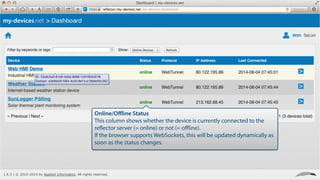
Online/Offline Status
This column shows whether the device is currently connected to the
reflector server (= online) or not (= offline).
If the browser supports WebSockets, this will be updated dynamically as
soon as the status changes.
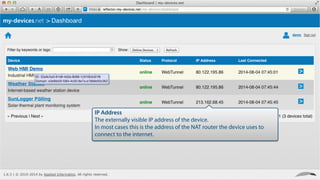
IP Address
The externally visible IP address of the device.
In most cases this is the address of the NAT router the device uses to
connect to the internet.
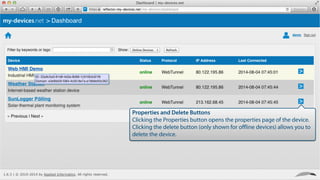
Properties and Delete Buttons
Clicking the Properties button opens the properties page of the device.
Clicking the delete button (only shown for offline devices) allows you to
delete the device.
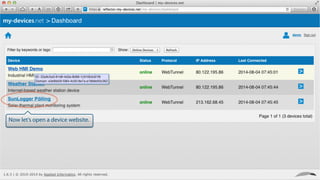
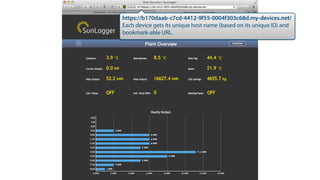
Now let’s open a device website.
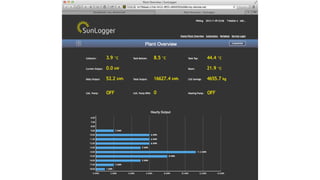
https://b170daab-c7cd-4412-9f55-0004f303c68d.my-devices.net/
Each device gets its unique host name (based on its unique ID) and
bookmark-able URL.
my-devices.net can be used for:
> remote access to IoT gateways, data loggers and monitoring devices, e.g. in renewable
energy (photovoltaics and wind energy plants), environmental monitoring, traffic and
transport, etc.
> smart metering (remote access to smart power meters or smart metering gateways)
> remote access to mobile devices for data acquisition, tracking, fleet management, etc.
> remote maintenance and servicing of consumer electronics, home/building
automation and HVAC devices
> remote maintenance and servicing of machines and industrial equipment
> remote access to IP network cameras and DVRs
> remote access to security and access control systems
To get started with my-devices.net:
> visit http://www.my-devices.net for more information
> read the white paper at 

http://www.my-devices.net/download/whitepaper/my-devices.net_WhitePaper.pdf
> register for a free account and connect up to five of your own devices at

http://www.my-devices.net/getstarted.html
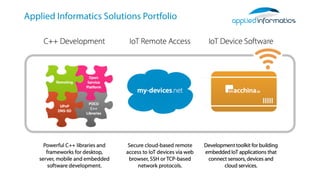
Applied Informatics Solutions Portfolio
For more information, please visit:
!
http://www.my-devices.net
http://www.appinf.com
Copyright © 2014-2015 by Applied Informatics Software Engineering GmbH. All rights reserved.
Applied Informatics Software Engineering GmbH
Maria Elend 143
9182 Maria Elend
Austria


+43 4253 32596 | info@appinf.com

Browser-based Secure Remote Access for the Internet of Things

  • 1.
    Secure cloud-enabled remoteaccess to IoT devices via web browser, SSH or TCP-based network protocols. my-devices.net
  • 2.
    Executive Summary > Remotelymanage and monitor your IoT devices securely using a device’s built-in web server, command-line shell (SSH) or other TCP-based protocols. > Securely connect mobile apps to your devices using REST APIs. > Allow your customers to access their devices from anywhere. > Assist your customers setting up or troubleshooting their devices. > Secure your devices against unauthorized access or attacks from the internet. > Don’t worry about firewalls, NAT, proxy servers or mobile routers preventing access to your device. > Avoid insecure port forwarding/dynamic DNS or complex VPNs. > Host on public or private cloud.
  • 3.
    Web-based user interfacesare state-of-the-art 
 in network-based embedded systems for 
 configuration, control and monitoring. Thanks to advanced web browsers (even on mobile devices), JavaScript and Ajax technologies, modern web-based user interfaces are powerful, visually attractive and easy to use.
  • 4.
    Web-based user interfaceswork great … ! … if device and web browser are in the same local network ! … or if the device is exposed to the Internet (a bad idea)
  • 5.
    But what if… >the user wants to access a device when away from home? > the device is at a hard to reach remote location? > support staff needs to access the device for trouble shooting?
  • 6.
    What about PortForwarding and Dynamic DNS? > it’s simple and widely supported by internet routers > it allows access to any TCP or UDP-based network service provided by the device (if properly forwarded)
  • 7.
    But … > NATrouter configuration for port forwarding can be complex, especially if multiple devices must be accessible (every device needs a unique public port number) > a Dynamic DNS service is needed if the NAT router does not have a static public IP address > the device is directly exposed to the internet – very high risk and danger of denial-of-service or other attacks and thus a very bad idea
 (be prepared to find your device on Shodan)
  • 10.
    What about VPNs? >the device is directly integrated into a remote network using a secure tunnel through the internet > secure, encrypted connection > proven, standardized and widely available technology
  • 11.
    But… > VPNs maybe blocked by network provider > necessary network and VPN server infrastructure is difficult to setup and to maintain, especially if lots of devices must be integrated > all clients must have access to VPN in order to access the devices (difficult with a large number of users in consumer markets, e.g. home automation) > additional measures must be taken to isolate devices in the VPN from one another and to prevent users from accessing devices they should not access
  • 12.
    A Solution: my-devices.net >uses secure (TLS) WebSocket-based tunneling, initiated by device
 (NAT router, proxy and firewall friendly) > reflector server connects device and client > easy to integrate into a device (especially if Linux based):
 single executable plus configuration file, or library for direct integration into an application > works with any web server > can securely forward almost any TCP-based protocol, including SSH
  • 13.
    ! SDK DEVICE API REST HTTPS (REST API) HTTPS(Web Page) WebTunnel my-devices.net Reflector Server HTTP SSH etc. How my-devices.net works Browser Mobile App
  • 14.
    The my-devices.net ReflectorServer > connect clients and devices by transparently forwarding TCP socket connections from client to device > contains a web server and acts as a quasi transparent HTTP proxy > performs user and device authentication > provides a web user interface for managing devices > provides a REST interface for easy integration with other applications > uses wildcard DNS entries to address devices – each device gets its own unique hostname and bookmark-able URL
  • 15.
  • 18.
    Account/Current User Clicking theAccount icon or user name takes you to the Account page.
  • 19.
    Filter Controls The filtercontrols allow you to display devices matching given keywords or tags. You can also switch between online, offline or all devices.
  • 20.
    Device Name andDescription The first column displays the device name and description. Clicking on the device name opens the device website. Clicking on the description opens the properties page for this device. Hovering over the device name or description displays a tooltip showing the device’s unique ID and its domain (the user group it belongs to).
  • 21.
    Online/Offline Status This columnshows whether the device is currently connected to the reflector server (= online) or not (= offline). If the browser supports WebSockets, this will be updated dynamically as soon as the status changes.
  • 22.
    IP Address The externallyvisible IP address of the device. In most cases this is the address of the NAT router the device uses to connect to the internet.
  • 23.
    Properties and DeleteButtons Clicking the Properties button opens the properties page of the device. Clicking the delete button (only shown for offline devices) allows you to delete the device.
  • 24.
    Now let’s opena device website.
  • 26.
    https://b170daab-c7cd-4412-9f55-0004f303c68d.my-devices.net/ Each device getsits unique host name (based on its unique ID) and bookmark-able URL.
  • 27.
    my-devices.net can beused for: > remote access to IoT gateways, data loggers and monitoring devices, e.g. in renewable energy (photovoltaics and wind energy plants), environmental monitoring, traffic and transport, etc. > smart metering (remote access to smart power meters or smart metering gateways) > remote access to mobile devices for data acquisition, tracking, fleet management, etc. > remote maintenance and servicing of consumer electronics, home/building automation and HVAC devices > remote maintenance and servicing of machines and industrial equipment > remote access to IP network cameras and DVRs > remote access to security and access control systems
  • 28.
    To get startedwith my-devices.net: > visit http://www.my-devices.net for more information > read the white paper at 
 http://www.my-devices.net/download/whitepaper/my-devices.net_WhitePaper.pdf > register for a free account and connect up to five of your own devices at
 http://www.my-devices.net/getstarted.html
  • 29.
  • 30.
    For more information,please visit: ! http://www.my-devices.net http://www.appinf.com Copyright © 2014-2015 by Applied Informatics Software Engineering GmbH. All rights reserved. Applied Informatics Software Engineering GmbH Maria Elend 143 9182 Maria Elend Austria 
 +43 4253 32596 | info@appinf.com