Welcome to the Brixton Library
Technology Initiative
(Coding for Adults)
ZCDixon@lambeth.gov.uk
BasilBibi@hotmail.com
January 30th 2016
Week 4 – Collections 1
Collections
• In computer science a collection is a grouping
of a variable number of data items (possibly
zero) that have some shared significance to
the problem being solved and need to be
operated upon together in some controlled
fashion – Wikipedia
• They formally belong to a group of data types
called Abstract Data Types.
Collections - Data Structures
• A data structure is a specialized format for organizing
and storing data. General data structure types include
the array, the file, the record, the table, the tree, and
so on.
Any data structure is designed to organize data to suit
a specific purpose so that it can be accessed and
worked with in appropriate ways. Wikipedia
• I will, in fact, claim that the difference between a bad
programmer and a good one is whether they consider
their code or their data structures more important. –
Linus Torvals (my minor change ‘he’ -> ‘they’ – sorry Linus )
Kinds of collections
• Different kinds of collections are Arrays, Lists,
Sets, Trees, Graphs and Maps or Dictionaries.
• Fixed-size arrays are usually not considered a
collection because they hold a fixed number
of data items, although they commonly play a
role in the implementation of collections.
• Variable-size arrays are generally considered
collections.
Python Collection Types
• In build types : list, set, dict, tuple
• collections module adds more :
• deque
• Counter
• OrderedDict : dict subclass that remembers the order
entries were added
• defaultdict : dict with missing values
Arrays, Python arrays and Lists
• In most computer languages an array is the simplest form
of collection.
• It is a sequence of memory positions that can be used to
store elements.
• Python considers the Array a special kind of List.
• The Python List has many very cool features that other
languages do not. These might be the reason to write
part or the whole of a system in Python.
Lists – indexed access
A sequence of memory positions that can be used to store elements.
# declare a variable myList of type List populated with elements 10 to 50
myList = [10, 20, 30, 40, 50]
# Can access the elements using an index.
print myList[3]
40
# Index position starts at zero.
print myList[0]
10
myList 10 20 30 40 50
index 0 1 2 3 4
Lists – indexed access
# Can use a variable to index elements in the array or list
index = 4
print myList [ index ]
50
# A access from the end using negative index
print myList [-1]
50
print myList[-3]
30
myList 10 20 30 40 50
index 0 1 2 3 4
-5 -4 -3 -2 -1
Lists – index out of range
# We get an IndexError when we try to index out of bounds
myList = [10, 20, 30, 40, 50]
print myList[ 20 ]
IndexError: list index out of range
Lists - slices
# Lists can be accessed using a ‘slice’
myList = [10, 20, 30, 40, 50]
# myList[ start : until ] UNTIL is not included
print myList [ 1 : 4 ]
[20,30,40]
# You can omit implied start and until
print myList [ : 4 ]
[10,20,30,40]
print myList [ 2 : ]
[30, 40, 50]
Lists - slices
# A slice can be defined in steps
myList = [10, 20, 30, 40, 50]
# myList[ start : until : step ]
print myList [ 1 : 4 : 2 ]
[20,40]
# With implied values for start and end
print myList [ : : 2]
[10, 30, 50]
print myList [ : : 3]
[10, 40]
Lists – assignment to slices
myList = [10,20,30,40,50]
# replace some values
myList[2:4] = ['C', 'D', 'E']
print myList
[10, 20, 'C', 'D', 'E', 50]
# now remove them by assigning an empty list to the same positions
myList[2:5] = []
print myList
[10, 20, 50]
# clear the list by replacing all the elements with an empty list
myList[:] = []
print myList
[]
Lists – Strings
# Strings are treated as a list
name = "Felix The House Cat“
print name[2:5]
'lix'
# Strings are immutable – you cannot change them :
name[2:5] = "CAN NOT DO THIS"
TypeError: 'str' object does not support item assignment
Lists – basic operation summary
Expression Result
myList[ 3 ] 40
myList[ 0 ] 10
index=4
myList[ index ]
50
myList[ -1 ] 50
myList[ -3 ] 30
myList[ 20 ] IndexError: list index out of range
myList[ 1 : 4 ] [20, 30, 40]
myList[ : 4] [10, 20, 30, 40]
myList[1:4:2] [20, 40]
myList[::2] [10, 30, 50]
myList[2:4] = ['C', 'D', 'E‘] [10, 20, 'C', 'D', 'E', 50]
myList[2:5] = [] [10, 20, 50]
myList[:] = [] []
myList[ : : -1 ] [50,40,30,20,10]
Given myList = [10,20,30,40,50]
Lists – more operations
Expression Result
remove(30) [10,20,40,50]
index(40) 3
index(99) ValueError: 99 is not in list
count(30) 1
append
reverse() [50, 40, 30, 20, 10]
Given myList = [10,20,30,40,50]
Lists – more expressions
Python Expression Results
len([1, 2, 3]) 3
[1, 2, 3] + [4, 5, 6] [1, 2, 3, 4, 5, 6]
['Hi!'] * 4 ['Hi!', 'Hi!', 'Hi!', 'Hi!']
3 in [1, 2, 3] True
Lists
Lists and arrays can be multidimensional.
Lists of lists.
myMulti = [ [1,2,3], ['a','b','c'], [100,200,300] ]
myMulti[ 0 ][ 2 ]
3
myMulti[ 1 ][ 1 ]
'b'
myMulti[ 1 ][ 1: ]
['b', 'c']
Arrays
• Array is different to List because all elements in an array must be the same
type
• myList = [10, 20, 'C', 'D', 'E', 30, 40, 50]
Python docs:
https://docs.python.org/2/library/array.html
The module defines the following type:
class array.array(typecode[, initializer])
A new array whose items are restricted by typecode, and initialized from
the optional initializer value, which must be a list, string, or iterable over
elements of the appropriate type.
Arrays - typecode
class array.array(typecode[, initializer])
Type code C Type Python Type
Minimum size in
bytes
'c' char character 1
'b' signed char int 1
'B' unsigned char int 1
'u' Py_UNICODE Unicode character 2 (see note)
'h' signed short int 2
'H' unsigned short int 2
'i' signed int int 2
'I' unsigned int long 2
'l' signed long int 4
'L' unsigned long long 4
'f' float float 4
'd' double float 8
myFloats = array.array( 'f' , [ 3.1415, 0.6931, 2.7182 ] )
Arrays – same type
import array
myIntArray = array.array('L', [10, 20, 30, 40, 50])
print myIntArray[1]
array.array('L', [10, 20, 'C', 'D', 'E', 30, 40, 50])
TypeError: an integer is required
Why Is Data Structure Choice Important?
Remember what Linus said about the importance of
data structures?
... whether they consider their code or their data
structures more important ...
Let’s see what he means.
Consider the differences between a List and an Array.
Why Chose List Or Array
• In most languages including Python List is
implemented as a chain of element positions
called a linked list.
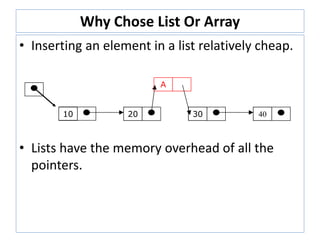
• Adding to the front of a list is cheap.
• Adding to the end of a list is expensive
because we have to run along the whole list to
find the end and then add the new element.
10 20 30 40
Why Chose List Or Array
• Inserting an element in a list relatively cheap.
• Lists have the memory overhead of all the
pointers.
10 20 30 40
A
Why Chose List Or Array
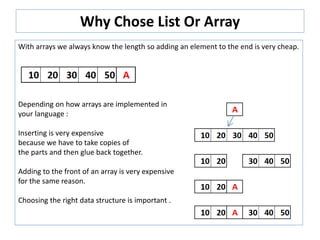
With arrays we always know the length so adding an element to the end is very cheap.
Depending on how arrays are implemented in
your language :
Inserting is very expensive
because we have to take copies of
the parts and then glue back together.
Adding to the front of an array is very expensive
for the same reason.
Choosing the right data structure is important .
Special list and arrays - Stack, Queue, Deque
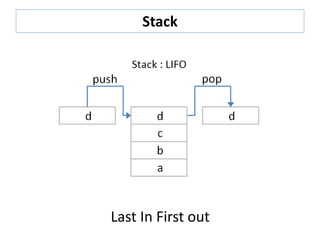
• A stack is a last in, first out (LIFO) data
structure
– Items are removed from a stack in the reverse
order from the way they were inserted
• A queue is a first in, first out (FIFO) data
structure
– Items are removed from a queue in the same
order as they were inserted
• A deque is a double-ended queue—items can
be inserted and removed at either end
Stack
Last In First out
Queue
First In First out
Deque – “deck” – Double ended Queue

Brixon Library Technology Initiative

  • 1.
    Welcome to theBrixton Library Technology Initiative (Coding for Adults) ZCDixon@lambeth.gov.uk BasilBibi@hotmail.com January 30th 2016 Week 4 – Collections 1
  • 2.
    Collections • In computerscience a collection is a grouping of a variable number of data items (possibly zero) that have some shared significance to the problem being solved and need to be operated upon together in some controlled fashion – Wikipedia • They formally belong to a group of data types called Abstract Data Types.
  • 3.
    Collections - DataStructures • A data structure is a specialized format for organizing and storing data. General data structure types include the array, the file, the record, the table, the tree, and so on. Any data structure is designed to organize data to suit a specific purpose so that it can be accessed and worked with in appropriate ways. Wikipedia • I will, in fact, claim that the difference between a bad programmer and a good one is whether they consider their code or their data structures more important. – Linus Torvals (my minor change ‘he’ -> ‘they’ – sorry Linus )
  • 4.
    Kinds of collections •Different kinds of collections are Arrays, Lists, Sets, Trees, Graphs and Maps or Dictionaries. • Fixed-size arrays are usually not considered a collection because they hold a fixed number of data items, although they commonly play a role in the implementation of collections. • Variable-size arrays are generally considered collections.
  • 5.
    Python Collection Types •In build types : list, set, dict, tuple • collections module adds more : • deque • Counter • OrderedDict : dict subclass that remembers the order entries were added • defaultdict : dict with missing values
  • 6.
    Arrays, Python arraysand Lists • In most computer languages an array is the simplest form of collection. • It is a sequence of memory positions that can be used to store elements. • Python considers the Array a special kind of List. • The Python List has many very cool features that other languages do not. These might be the reason to write part or the whole of a system in Python.
  • 7.
    Lists – indexedaccess A sequence of memory positions that can be used to store elements. # declare a variable myList of type List populated with elements 10 to 50 myList = [10, 20, 30, 40, 50] # Can access the elements using an index. print myList[3] 40 # Index position starts at zero. print myList[0] 10 myList 10 20 30 40 50 index 0 1 2 3 4
  • 8.
    Lists – indexedaccess # Can use a variable to index elements in the array or list index = 4 print myList [ index ] 50 # A access from the end using negative index print myList [-1] 50 print myList[-3] 30 myList 10 20 30 40 50 index 0 1 2 3 4 -5 -4 -3 -2 -1
  • 9.
    Lists – indexout of range # We get an IndexError when we try to index out of bounds myList = [10, 20, 30, 40, 50] print myList[ 20 ] IndexError: list index out of range
  • 10.
    Lists - slices #Lists can be accessed using a ‘slice’ myList = [10, 20, 30, 40, 50] # myList[ start : until ] UNTIL is not included print myList [ 1 : 4 ] [20,30,40] # You can omit implied start and until print myList [ : 4 ] [10,20,30,40] print myList [ 2 : ] [30, 40, 50]
  • 11.
    Lists - slices #A slice can be defined in steps myList = [10, 20, 30, 40, 50] # myList[ start : until : step ] print myList [ 1 : 4 : 2 ] [20,40] # With implied values for start and end print myList [ : : 2] [10, 30, 50] print myList [ : : 3] [10, 40]
  • 12.
    Lists – assignmentto slices myList = [10,20,30,40,50] # replace some values myList[2:4] = ['C', 'D', 'E'] print myList [10, 20, 'C', 'D', 'E', 50] # now remove them by assigning an empty list to the same positions myList[2:5] = [] print myList [10, 20, 50] # clear the list by replacing all the elements with an empty list myList[:] = [] print myList []
  • 13.
    Lists – Strings #Strings are treated as a list name = "Felix The House Cat“ print name[2:5] 'lix' # Strings are immutable – you cannot change them : name[2:5] = "CAN NOT DO THIS" TypeError: 'str' object does not support item assignment
  • 14.
    Lists – basicoperation summary Expression Result myList[ 3 ] 40 myList[ 0 ] 10 index=4 myList[ index ] 50 myList[ -1 ] 50 myList[ -3 ] 30 myList[ 20 ] IndexError: list index out of range myList[ 1 : 4 ] [20, 30, 40] myList[ : 4] [10, 20, 30, 40] myList[1:4:2] [20, 40] myList[::2] [10, 30, 50] myList[2:4] = ['C', 'D', 'E‘] [10, 20, 'C', 'D', 'E', 50] myList[2:5] = [] [10, 20, 50] myList[:] = [] [] myList[ : : -1 ] [50,40,30,20,10] Given myList = [10,20,30,40,50]
  • 15.
    Lists – moreoperations Expression Result remove(30) [10,20,40,50] index(40) 3 index(99) ValueError: 99 is not in list count(30) 1 append reverse() [50, 40, 30, 20, 10] Given myList = [10,20,30,40,50]
  • 16.
    Lists – moreexpressions Python Expression Results len([1, 2, 3]) 3 [1, 2, 3] + [4, 5, 6] [1, 2, 3, 4, 5, 6] ['Hi!'] * 4 ['Hi!', 'Hi!', 'Hi!', 'Hi!'] 3 in [1, 2, 3] True
  • 17.
    Lists Lists and arrayscan be multidimensional. Lists of lists. myMulti = [ [1,2,3], ['a','b','c'], [100,200,300] ] myMulti[ 0 ][ 2 ] 3 myMulti[ 1 ][ 1 ] 'b' myMulti[ 1 ][ 1: ] ['b', 'c']
  • 18.
    Arrays • Array isdifferent to List because all elements in an array must be the same type • myList = [10, 20, 'C', 'D', 'E', 30, 40, 50] Python docs: https://docs.python.org/2/library/array.html The module defines the following type: class array.array(typecode[, initializer]) A new array whose items are restricted by typecode, and initialized from the optional initializer value, which must be a list, string, or iterable over elements of the appropriate type.
  • 19.
    Arrays - typecode classarray.array(typecode[, initializer]) Type code C Type Python Type Minimum size in bytes 'c' char character 1 'b' signed char int 1 'B' unsigned char int 1 'u' Py_UNICODE Unicode character 2 (see note) 'h' signed short int 2 'H' unsigned short int 2 'i' signed int int 2 'I' unsigned int long 2 'l' signed long int 4 'L' unsigned long long 4 'f' float float 4 'd' double float 8 myFloats = array.array( 'f' , [ 3.1415, 0.6931, 2.7182 ] )
  • 20.
    Arrays – sametype import array myIntArray = array.array('L', [10, 20, 30, 40, 50]) print myIntArray[1] array.array('L', [10, 20, 'C', 'D', 'E', 30, 40, 50]) TypeError: an integer is required
  • 21.
    Why Is DataStructure Choice Important? Remember what Linus said about the importance of data structures? ... whether they consider their code or their data structures more important ... Let’s see what he means. Consider the differences between a List and an Array.
  • 22.
    Why Chose ListOr Array • In most languages including Python List is implemented as a chain of element positions called a linked list. • Adding to the front of a list is cheap. • Adding to the end of a list is expensive because we have to run along the whole list to find the end and then add the new element. 10 20 30 40
  • 23.
    Why Chose ListOr Array • Inserting an element in a list relatively cheap. • Lists have the memory overhead of all the pointers. 10 20 30 40 A
  • 24.
    Why Chose ListOr Array With arrays we always know the length so adding an element to the end is very cheap. Depending on how arrays are implemented in your language : Inserting is very expensive because we have to take copies of the parts and then glue back together. Adding to the front of an array is very expensive for the same reason. Choosing the right data structure is important .
  • 25.
    Special list andarrays - Stack, Queue, Deque • A stack is a last in, first out (LIFO) data structure – Items are removed from a stack in the reverse order from the way they were inserted • A queue is a first in, first out (FIFO) data structure – Items are removed from a queue in the same order as they were inserted • A deque is a double-ended queue—items can be inserted and removed at either end
  • 26.
  • 27.
  • 28.
    Deque – “deck”– Double ended Queue