List
Randomization
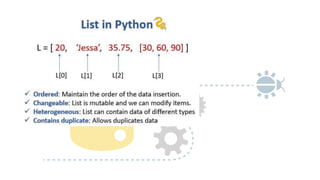
properties of a list.
•Mutable: The elements of the list can be modified. We can add or remove items to the list
after it has been created.
•Ordered: The items in the lists are ordered. Each item has a unique index value. The new
items will be added to the end of the list.
•Heterogenous: The list can contain different kinds of elements i.e; they can contain elements
of string, integer, boolean, or any type.
•Duplicates: The list can contain duplicates i.e., lists can have two items with the same
values.
Why use a list?
•The list data structure is very flexible It has many unique inbuilt functionalities
like pop(), append(), etc which makes it easier, where the data keeps changing.
•the list can contain duplicate elements i.e two or more items can have the same
values.
•Lists are Heterogeneous i.e, different kinds of objects/elements can be added
•As Lists are mutable it is used in applications where the values of the items
change frequently.
Creating a Python list
• Using list() constructor: the
constructor of a class has its class
name.
• Using square bracket ([]): we
can create a list simply by
enclosing the items inside the
square brackets.
# Using list constructor
my_list1 = list((1, 2, 3))
print(my_list1)
# Using square brackets[]
my_list2 = [1, 2, 3]
print(my_list2)
# with heterogeneous items
my_list3 = [1.0, 'Jessa', 3]
print(my_list3)
# empty list using list()
my_list4 = list()
print(my_list4)
# empty list using []
my_list5 = []
print(my_list4)
Indexing
list elements can be accessed using the “indexing” technique. Lists are ordered collections
with unique indexes for each item
my_list = [10, 20, 'Jessa', 12.50, 'Emma']
# accessing 2nd element of the list
print(my_list[1]) # 20
# accessing 5th element of the list
print(my_list[4]) # 'Emma'
Negative Indexing
The elements in the list can be accessed from right to left by using negative
indexing. The negative value starts from -1 to -length of the list. It indicates that the
list is indexed from the reverse/backward.
my_list = [10, 20, 'Jessa', 12.50, 'Emma’]
# accessing last element of the list
print(my_list[-1]) # output 'Emma’
# accessing second last element of the list
print(my_list[-2]) # output 12.5
# accessing 4th element from last
print(my_list[-4]) # output 20
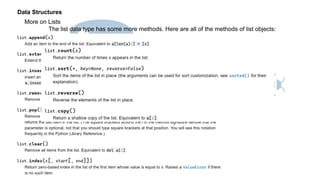
Data Structures
More on Lists
The list data type has some more methods. Here are all of the methods of list objects:
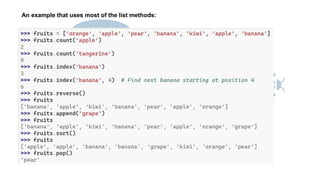
An example that uses most of the list methods:
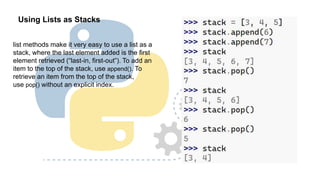
Using Lists as Stacks
list methods make it very easy to use a list as a
stack, where the last element added is the first
element retrieved (“last-in, first-out”). To add an
item to the top of the stack, use append(). To
retrieve an item from the top of the stack,
use pop() without an explicit index.
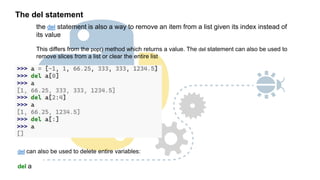
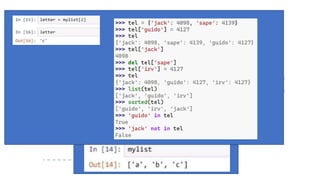
The del statement
the del statement is also a way to remove an item from a list given its index instead of
its value
This differs from the pop() method which returns a value. The del statement can also be used to
remove slices from a list or clear the entire list
del can also be used to delete entire variables:
del a
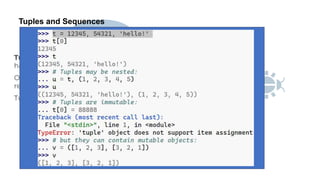
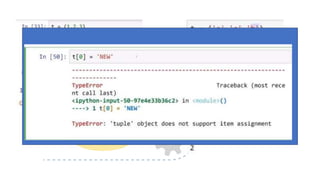
Tuples and Sequences
A tuple consists of a number of values separated by commas, for instance:
Sets
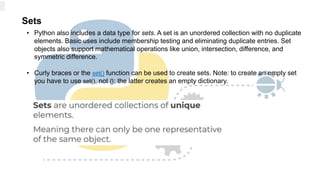
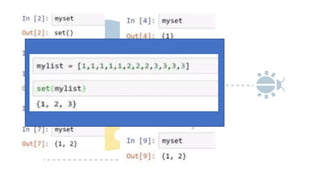
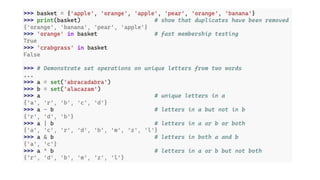
• Python also includes a data type for sets. A set is an unordered collection with no duplicate
elements. Basic uses include membership testing and eliminating duplicate entries. Set
objects also support mathematical operations like union, intersection, difference, and
symmetric difference.
• Curly braces or the set() function can be used to create sets. Note: to create an empty set
you have to use set(), not {}; the latter creates an empty dictionary.
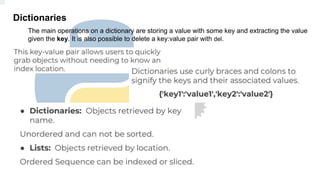
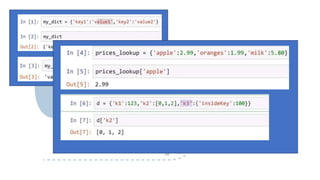
Dictionaries
The main operations on a dictionary are storing a value with some key and extracting the value
given the key. It is also possible to delete a key:value pair with del.
https://www.askpython.com/python-
modules/python-random-module-generate-
random-numbers-sequences
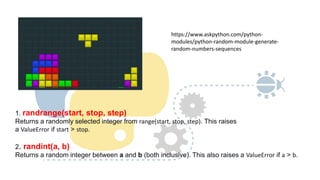
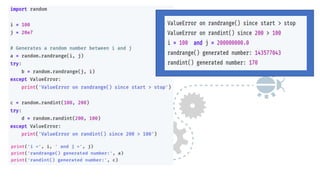
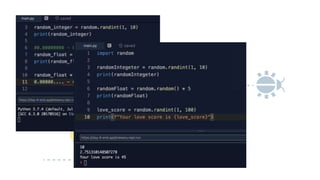
1. randrange(start, stop, step)
Returns a randomly selected integer from range(start, stop, step). This raises
a ValueError if start > stop.
2. randint(a, b)
Returns a random integer between a and b (both inclusive). This also raises a ValueError if a > b.
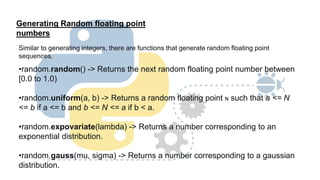
Generating Random floating point
numbers
Similar to generating integers, there are functions that generate random floating point
sequences.
•random.random() -> Returns the next random floating point number between
[0.0 to 1.0)
•random.uniform(a, b) -> Returns a random floating point N such that a <= N
<= b if a <= b and b <= N <= a if b < a.
•random.expovariate(lambda) -> Returns a number corresponding to an
exponential distribution.
•random.gauss(mu, sigma) -> Returns a number corresponding to a gaussian
distribution.
Exercise:
Instructions
You are going to write a virtual coin toss program. It will randomly tell the user "Heads" or "Tails".
Important, the first letter should be capitalised and spelt exactly like in the example e.g. Heads,
not heads.
There are many ways of doing this, you should generate a random number, either 0 or 1. Then
use that number to print out Heads or Tails. e.g. 1 means Heads 0 means Tails
Example Output
Heads or Tails
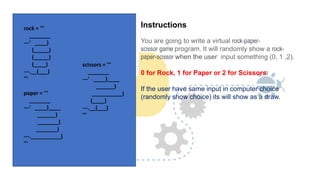
Instructions
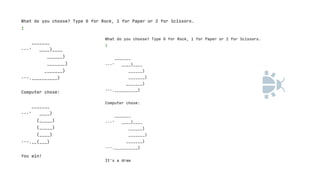
You are going to write a virtual rock-paper-
scissor game program. It will randomly show a rock-
paper-scissor when the user input something (0, 1 ,2).
0 for Rock, 1 for Paper or 2 for Scissors
If the user have same input in computer choice
(randomly show choice) its will show as a draw.
rock = '''
_______
---' ____)
(_____)
(_____)
(____)
---.__(___)
'''
paper = '''
_______
---' ____)____
______)
_______)
_______)
---.__________)
'''
scissors = '''
_______
---' ____)____
______)
__________)
(____)
---.__(___)
'''
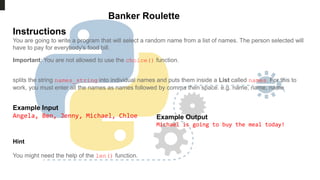
Banker Roulette
Instructions
You are going to write a program that will select a random name from a list of names. The person selected will
have to pay for everybody's food bill.
Important: You are not allowed to use the choice() function.
splits the string names_string into individual names and puts them inside a List called names. For this to
work, you must enter all the names as names followed by comma then space. e.g. name, name, name
Example Input
Angela, Ben, Jenny, Michael, Chloe Example Output
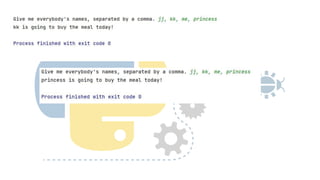
Michael is going to buy the meal today!
Hint
You might need the help of the len() function.
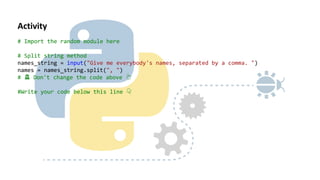
# Import the random module here
# Split string method
names_string = input("Give me everybody's names, separated by a comma. ")
names = names_string.split(", ")
# 🚨 Don't change the code above 👆
#Write your code below this line 👇
Activity
RANDOMISATION-NUMERICAL METHODS  FOR ENGINEERING.pptx

RANDOMISATION-NUMERICAL METHODS FOR ENGINEERING.pptx

  • 1.
  • 4.
    properties of alist. •Mutable: The elements of the list can be modified. We can add or remove items to the list after it has been created. •Ordered: The items in the lists are ordered. Each item has a unique index value. The new items will be added to the end of the list. •Heterogenous: The list can contain different kinds of elements i.e; they can contain elements of string, integer, boolean, or any type. •Duplicates: The list can contain duplicates i.e., lists can have two items with the same values.
  • 5.
    Why use alist? •The list data structure is very flexible It has many unique inbuilt functionalities like pop(), append(), etc which makes it easier, where the data keeps changing. •the list can contain duplicate elements i.e two or more items can have the same values. •Lists are Heterogeneous i.e, different kinds of objects/elements can be added •As Lists are mutable it is used in applications where the values of the items change frequently.
  • 6.
    Creating a Pythonlist • Using list() constructor: the constructor of a class has its class name. • Using square bracket ([]): we can create a list simply by enclosing the items inside the square brackets. # Using list constructor my_list1 = list((1, 2, 3)) print(my_list1) # Using square brackets[] my_list2 = [1, 2, 3] print(my_list2) # with heterogeneous items my_list3 = [1.0, 'Jessa', 3] print(my_list3) # empty list using list() my_list4 = list() print(my_list4) # empty list using [] my_list5 = [] print(my_list4)
  • 7.
    Indexing list elements canbe accessed using the “indexing” technique. Lists are ordered collections with unique indexes for each item my_list = [10, 20, 'Jessa', 12.50, 'Emma'] # accessing 2nd element of the list print(my_list[1]) # 20 # accessing 5th element of the list print(my_list[4]) # 'Emma'
  • 8.
    Negative Indexing The elementsin the list can be accessed from right to left by using negative indexing. The negative value starts from -1 to -length of the list. It indicates that the list is indexed from the reverse/backward. my_list = [10, 20, 'Jessa', 12.50, 'Emma’] # accessing last element of the list print(my_list[-1]) # output 'Emma’ # accessing second last element of the list print(my_list[-2]) # output 12.5 # accessing 4th element from last print(my_list[-4]) # output 20
  • 11.
    Data Structures More onLists The list data type has some more methods. Here are all of the methods of list objects:
  • 12.
    An example thatuses most of the list methods:
  • 13.
    Using Lists asStacks list methods make it very easy to use a list as a stack, where the last element added is the first element retrieved (“last-in, first-out”). To add an item to the top of the stack, use append(). To retrieve an item from the top of the stack, use pop() without an explicit index.
  • 14.
    The del statement thedel statement is also a way to remove an item from a list given its index instead of its value This differs from the pop() method which returns a value. The del statement can also be used to remove slices from a list or clear the entire list del can also be used to delete entire variables: del a
  • 15.
    Tuples and Sequences Atuple consists of a number of values separated by commas, for instance:
  • 17.
    Sets • Python alsoincludes a data type for sets. A set is an unordered collection with no duplicate elements. Basic uses include membership testing and eliminating duplicate entries. Set objects also support mathematical operations like union, intersection, difference, and symmetric difference. • Curly braces or the set() function can be used to create sets. Note: to create an empty set you have to use set(), not {}; the latter creates an empty dictionary.
  • 20.
    Dictionaries The main operationson a dictionary are storing a value with some key and extracting the value given the key. It is also possible to delete a key:value pair with del.
  • 24.
    https://www.askpython.com/python- modules/python-random-module-generate- random-numbers-sequences 1. randrange(start, stop,step) Returns a randomly selected integer from range(start, stop, step). This raises a ValueError if start > stop. 2. randint(a, b) Returns a random integer between a and b (both inclusive). This also raises a ValueError if a > b.
  • 27.
    Generating Random floatingpoint numbers Similar to generating integers, there are functions that generate random floating point sequences. •random.random() -> Returns the next random floating point number between [0.0 to 1.0) •random.uniform(a, b) -> Returns a random floating point N such that a <= N <= b if a <= b and b <= N <= a if b < a. •random.expovariate(lambda) -> Returns a number corresponding to an exponential distribution. •random.gauss(mu, sigma) -> Returns a number corresponding to a gaussian distribution.
  • 29.
    Exercise: Instructions You are goingto write a virtual coin toss program. It will randomly tell the user "Heads" or "Tails". Important, the first letter should be capitalised and spelt exactly like in the example e.g. Heads, not heads. There are many ways of doing this, you should generate a random number, either 0 or 1. Then use that number to print out Heads or Tails. e.g. 1 means Heads 0 means Tails Example Output Heads or Tails
  • 30.
    Instructions You are goingto write a virtual rock-paper- scissor game program. It will randomly show a rock- paper-scissor when the user input something (0, 1 ,2). 0 for Rock, 1 for Paper or 2 for Scissors If the user have same input in computer choice (randomly show choice) its will show as a draw. rock = ''' _______ ---' ____) (_____) (_____) (____) ---.__(___) ''' paper = ''' _______ ---' ____)____ ______) _______) _______) ---.__________) ''' scissors = ''' _______ ---' ____)____ ______) __________) (____) ---.__(___) '''
  • 32.
    Banker Roulette Instructions You aregoing to write a program that will select a random name from a list of names. The person selected will have to pay for everybody's food bill. Important: You are not allowed to use the choice() function. splits the string names_string into individual names and puts them inside a List called names. For this to work, you must enter all the names as names followed by comma then space. e.g. name, name, name Example Input Angela, Ben, Jenny, Michael, Chloe Example Output Michael is going to buy the meal today! Hint You might need the help of the len() function.
  • 33.
    # Import therandom module here # Split string method names_string = input("Give me everybody's names, separated by a comma. ") names = names_string.split(", ") # 🚨 Don't change the code above 👆 #Write your code below this line 👇 Activity