D2L and math formulae: Making 
friends. 
Kirthi Premadasa 
Associate Professor in Mathematics 
University of Wisconsin-Baraboo/Sauk County 
Presentation at the Ignite Conference 2014 
kirthi.premadasa@uwc.edu
Why ? 
 Almost any instructor in an area related to math, 
engineering, physics, chemistry, statistics, earth 
science, biology, may need at some point include 
math formulae in to D2L 
 The trick is to find the most time efficient and 
“student friendly” way to do this. 
 We will, during this presentation explore some 
options.
Three ways of inserting Equations in 
D2L 
 Using the build in equation editor 
 Using LaTeX 
 Using MathML
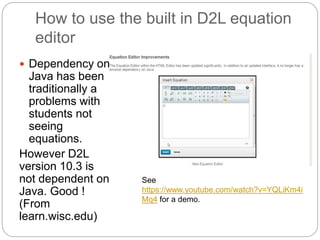
How to use the built in D2L equation 
editor 
 Dependency on 
Java has been 
traditionally a 
problems with 
students not 
seeing 
equations. 
However D2L 
version 10.3 is 
not dependent on 
Java. Good ! 
(From 
learn.wisc.edu) 
See 
https://www.youtube.com/watch?v=YQLiKm4i 
Mq4 for a demo.
LaTeX 
 LaTeX is a scientific word processing format. 
Instructors who are familiar with (recent math 
graduates) find it very easy but not necessarily 
students. 
For example, the LaTeX code for the formula 푥푛 
푛! 
is 
[sum frac{x^n}{n!}] 
However students can find a generator at 
http://www.codecogs.com/latex/eqneditor.php
How to include LaTeX in D2L
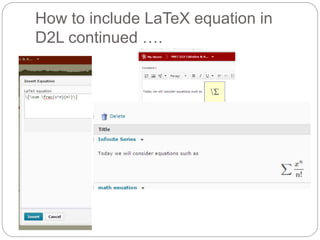
How to include LaTeX equation in 
D2L continued ….
How to convert complete MS Word 
docx files to LaTeX? 
 Can use the free software docx2tex 
See the video: 
https://www.youtube.com/watch?v=eqmh0TKwNpA
MathML 
 The Mathematical Markup Language (MathML) is 
the standard for including equations on the web 
 From the “Math Activity Statement” of the W3C 
Math Working Group: 
 “Designed as an XML application, MathML provides 
two sets of tags, one for the visual presentation of 
mathematics and the other associated with the 
meaning behind equations.”
How to convert a Word 2007/Word 
2013 equation to MathML 
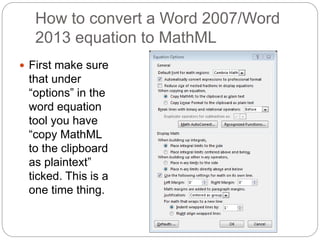
 First make sure 
that under 
“options” in the 
word equation 
tool you have 
“copy MathML 
to the clipboard 
as plaintext” 
ticked. This is a 
one time thing.
How to convert a Word 2007/Word 
2013 equation to MathML (contd) 
 Next type and copy the word equation and insert 
it to the D2L textbox as a MathML equation
How to convert a Word 2007/Word 
2013 equation to MathML (contd) 
Important: DO NOT hit “insert” at this point:
How to convert a Word 2007/Word 
2013 equation to MathML (contd)… 
 Remove the “mml:” from the beginning and end of 
tag before inserting. After you do this it should 
start with<mth xmlns…. And end with </math>
How to “draw” equation in to 
MathML/LaTeX 
 The tool 
http://webdemo.m 
yscript.com/#/de 
mo/equation will 
let you input 
equations by 
mouse/stylus and 
convert to 
MathML/LaTeX
The easiest “cheat” way to include an 
equation as a graphic. 
 Step 1 : Create the equation and text in MS 
word 2007/2013 and copy whole selection to 
clipboard 
 Go to the “home ribbon” and select “paste 
special” 
 Select paste as “picture” 
 Now open the text+equations as one image from 
D2L text tool 
 Will need to image smaller before uploading to 
D2L
Thank You !

Brightspace and Math Formulae: Making Friends - 2014 Brightspace Ignite Wisconsin

  • 1.
    D2L and mathformulae: Making friends. Kirthi Premadasa Associate Professor in Mathematics University of Wisconsin-Baraboo/Sauk County Presentation at the Ignite Conference 2014 kirthi.premadasa@uwc.edu
  • 2.
    Why ? Almost any instructor in an area related to math, engineering, physics, chemistry, statistics, earth science, biology, may need at some point include math formulae in to D2L  The trick is to find the most time efficient and “student friendly” way to do this.  We will, during this presentation explore some options.
  • 3.
    Three ways ofinserting Equations in D2L  Using the build in equation editor  Using LaTeX  Using MathML
  • 4.
    How to usethe built in D2L equation editor  Dependency on Java has been traditionally a problems with students not seeing equations. However D2L version 10.3 is not dependent on Java. Good ! (From learn.wisc.edu) See https://www.youtube.com/watch?v=YQLiKm4i Mq4 for a demo.
  • 5.
    LaTeX  LaTeXis a scientific word processing format. Instructors who are familiar with (recent math graduates) find it very easy but not necessarily students. For example, the LaTeX code for the formula 푥푛 푛! is [sum frac{x^n}{n!}] However students can find a generator at http://www.codecogs.com/latex/eqneditor.php
  • 6.
    How to includeLaTeX in D2L
  • 7.
    How to includeLaTeX equation in D2L continued ….
  • 8.
    How to convertcomplete MS Word docx files to LaTeX?  Can use the free software docx2tex See the video: https://www.youtube.com/watch?v=eqmh0TKwNpA
  • 9.
    MathML  TheMathematical Markup Language (MathML) is the standard for including equations on the web  From the “Math Activity Statement” of the W3C Math Working Group:  “Designed as an XML application, MathML provides two sets of tags, one for the visual presentation of mathematics and the other associated with the meaning behind equations.”
  • 10.
    How to converta Word 2007/Word 2013 equation to MathML  First make sure that under “options” in the word equation tool you have “copy MathML to the clipboard as plaintext” ticked. This is a one time thing.
  • 11.
    How to converta Word 2007/Word 2013 equation to MathML (contd)  Next type and copy the word equation and insert it to the D2L textbox as a MathML equation
  • 12.
    How to converta Word 2007/Word 2013 equation to MathML (contd) Important: DO NOT hit “insert” at this point:
  • 13.
    How to converta Word 2007/Word 2013 equation to MathML (contd)…  Remove the “mml:” from the beginning and end of tag before inserting. After you do this it should start with<mth xmlns…. And end with </math>
  • 14.
    How to “draw”equation in to MathML/LaTeX  The tool http://webdemo.m yscript.com/#/de mo/equation will let you input equations by mouse/stylus and convert to MathML/LaTeX
  • 15.
    The easiest “cheat”way to include an equation as a graphic.  Step 1 : Create the equation and text in MS word 2007/2013 and copy whole selection to clipboard  Go to the “home ribbon” and select “paste special”  Select paste as “picture”  Now open the text+equations as one image from D2L text tool  Will need to image smaller before uploading to D2L
  • 16.