BT2	
Session	
6/9/16	10:00	AM	


Use	Business	Analysts	for	User	
Interface	Design	
	
Presented	by:	
	
Cathy	Sargent	
The	Jackson	Laboratory	
	
	
Brought	to	you	by:		


350	Corporate	Way,	Suite	400,	Orange	Park,	FL	32073		
888---268---8770	··	904---278---0524	-	info@techwell.com	-	http://www.techwell.com/
Cathy	Sargent	
The	Jackson	Laboratory	
	
A	senior	business	system	analyst	at	The	Jackson	Laboratory,	Cathy	Sargent	
leverages	her	background	in	software	quality	assurance	to	approach	functional	
and	business	requirements	with	a	Murphy's	Law	attitude.	The	challenging	and	
innovative	science	behind	the	unique	technology	needs	of	the	Laboratory	
necessitate	that	business	and	functional	requirements	are	fully	met	and	the	user	
experience	is	consistent	in	an	application.	Cathy	draws	on	her	knowledge	of	
software	configuration	management	and	software	testing	to	focus	on	process	
improvement	and	documentation	while	implementing	ERPs,	LIMS,	and	web-
based	applications	in	validated	environments.
5/30/16	
1	
Use Business
Analysts for User
Interface Design
Better Software West – June 2016
Cathy Sargent, The Jackson Laboratory
Introduction
2
!   A Senior Business System Analyst at The Jackson
Laboratory in Bar Harbor, Maine
!   Started career in Software Quality Assurance
!   Implementation of ERPs, LIMS, and web based
applications
o  Validated and non-validated environments
5/30/16	
2	
Introduction
3
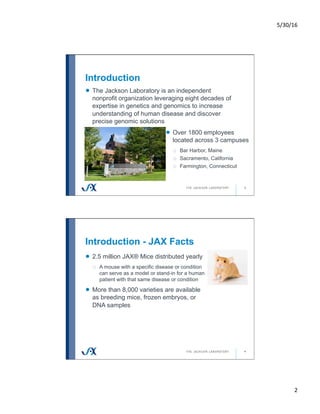
!   The Jackson Laboratory is an independent
nonprofit organization leveraging eight decades of
expertise in genetics and genomics to increase
understanding of human disease and discover
precise genomic solutions
!   Over 1800 employees
located across 3 campuses
o  Bar Harbor, Maine
o  Sacramento, California
o  Farmington, Connecticut
Introduction - JAX Facts
4
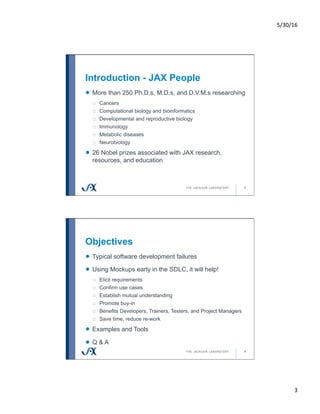
!   2.5 million JAX® Mice distributed yearly
o  A mouse with a specific disease or condition
can serve as a model or stand-in for a human
patient with that same disease or condition
!   More than 8,000 varieties are available
as breeding mice, frozen embryos, or
DNA samples
5/30/16	
3	
Introduction - JAX People
5
!   More than 250 Ph.D.s, M.D.s, and D.V.M.s researching
o  Cancers
o  Computational biology and bioinformatics
o  Developmental and reproductive biology
o  Immunology
o  Metabolic diseases
o  Neurobiology
!   26 Nobel prizes associated with JAX research,
resources, and education
Objectives
6
!   Typical software development failures
!   Using Mockups early in the SDLC, it will help!
o  Elicit requirements
o  Confirm use cases
o  Establish mutual understanding
o  Promote buy-in
o  Benefits Developers, Trainers, Testers, and Project Managers
o  Save time, reduce re-work
!   Examples and Tools
!   Q & A
5/30/16	
4	
Typical Software
Development
Failures
What comes to mind first?
7
Typical Software Failures
8
!   Unrealistic
schedules
!   Inaccurate estimates
!   Inadequate Testing
!   Scope creep
!   Unmanaged risks
!   Poor communication
!   Use of immature
technology
!   Poor Architecture
!   Solution not intuitive
to users
!   Poorly defined
requirements
!   Estimates are too
optimistic
!   Sloppy development
practices
!   Poor teamwork
!   Poor project
management
!   Stakeholder politics
!   Lack of user input
!   Commercial
pressures
!   Lack of skilled
resources
!   Inability to handle the
project's complexity
5/30/16	
5	
Typical Software Failures we'll
discuss
9
!   Unrealistic
schedules
! Inaccurate estimates
!   Inadequate Testing
!   Scope creep
!   Unmanaged risks
! Poor communication
!   Use of immature
technology
!   Poor Architecture
! Solution not intuitive
to users
! Poorly defined
requirements
!   Estimates are too
optimistic
!   Sloppy development
practices
!   Poor teamwork
!   Poor project
management
!   Stakeholder politics
! Lack of user input
!   Commercial
pressures
!   Lack of skilled
resources
!   Inability to handle the
project's complexity
What defines success?
10
!   Success isn't always measurable
!   It depends on who you ask!
o  "Projects that are delivered on time, within budget and meet
scope specifications may not necessarily perceived to be
successful by key stakeholders." - Jack S. Duggal, MBA, PMP
!   The judgment of your users matters
o  If the system doesn't meet their needs then ultimately it fails
5/30/16	
6	
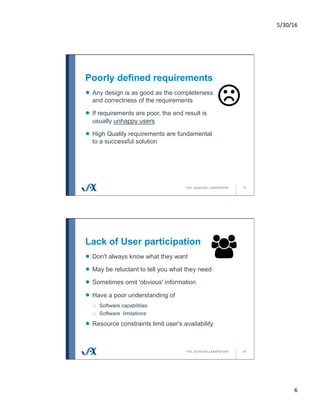
Poorly defined requirements
11
!   Any design is as good as the completeness
and correctness of the requirements
!   If requirements are poor, the end result is
usually unhappy users
!   High Quality requirements are fundamental
to a successful solution
Lack of User participation
12
!   Don't always know what they want
!   May be reluctant to tell you what they need
!   Sometimes omit 'obvious' information
!   Have a poor understanding of
o  Software capabilities
o  Software limitations
!   Resource constraints limit user's availability
5/30/16	
7	
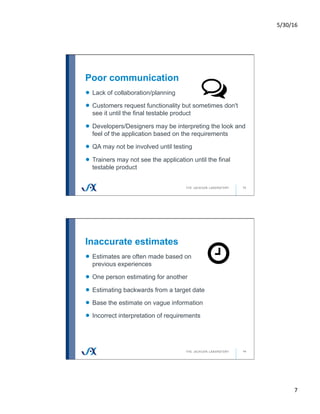
Poor communication
13
!   Lack of collaboration/planning
!   Customers request functionality but sometimes don't
see it until the final testable product
!   Developers/Designers may be interpreting the look and
feel of the application based on the requirements
!   QA may not be involved until testing
!   Trainers may not see the application until the final
testable product
Inaccurate estimates
14
!   Estimates are often made based on
previous experiences
!   One person estimating for another
!   Estimating backwards from a target date
!   Base the estimate on vague information
!   Incorrect interpretation of requirements
5/30/16	
8	
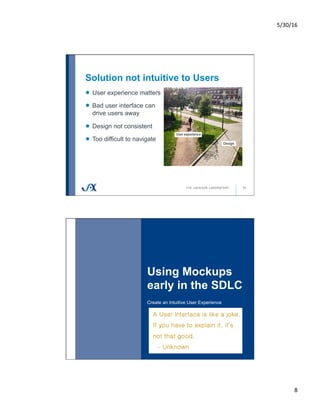
Solution not intuitive to Users
15
!   User experience matters
!   Bad user interface can
drive users away
!   Design not consistent
!   Too difficult to navigate
Using Mockups
early in the SDLC
Create an Intuitive User Experience
16
5/30/16	
9	
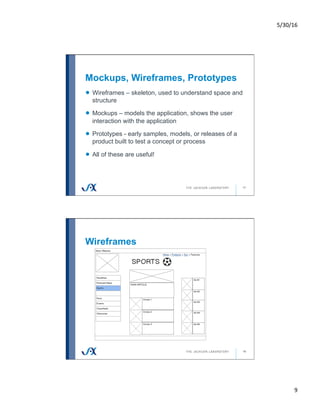
Mockups, Wireframes, Prototypes
17
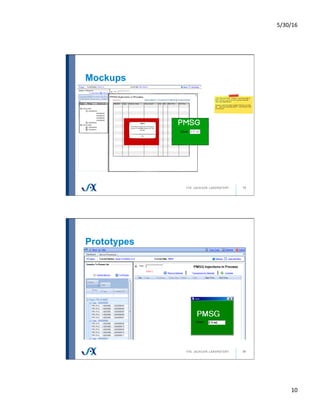
!   Wireframes – skeleton, used to understand space and
structure
!   Mockups – models the application, shows the user
interaction with the application
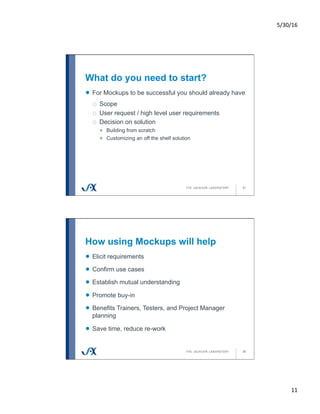
!   Prototypes - early samples, models, or releases of a
product built to test a concept or process
!   All of these are useful!
Wireframes
18
5/30/16	
10	
Mockups
19
Prototypes
20
5/30/16	
11	
What do you need to start?
21
!   For Mockups to be successful you should already have
o  Scope
o  User request / high level user requirements
o  Decision on solution
!   Building from scratch
!   Customizing an off the shelf solution
How using Mockups will help
22
!   Elicit requirements
!   Confirm use cases
!   Establish mutual understanding
!   Promote buy-in
!   Benefits Trainers, Testers, and Project Manager
planning
!   Save time, reduce re-work
5/30/16	
12	
Elicit Requirements
23
!   "What would you like the system to do?"
o  Ask this question only if you want:
!   Blank stares
!   A memory dump of everything the user knows about the process
!   A list of only exceptions
!   The end goal is clear language, accuracy, quality, and
completeness
Confirm Use Cases and Establish
Mutual understanding
24
!   Model business processes
!   Easy to edit platform
!   Link fields and forms to show the user interactions with
the system
o  Actors, triggers, results, and alternate paths
!   BA interpretations of the business needs is displayed
in visual format
5/30/16	
13	
Promote buy-in
25
!   Develop a 'walkthrough'
!   Users see how the system will function
o  Examples of their data right in the Mockups (content)
o  See transactions and flow of the data (interaction)
!   Gain end-user buy-in early in the SDLC
o  Users helped design the look and feel of the system
Planning Benefits
26
!   Properly scope the solution
o  Better overall design – does it fit?
!   Start planning deliverables
!   Allows for better estimates
o  More accurate deadlines
5/30/16	
14	
Save Time, reduce re-work
27
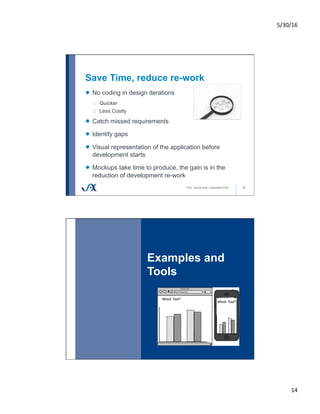
!   No coding in design iterations
o  Quicker
o  Less Costly
!   Catch missed requirements
!   Identify gaps
!   Visual representation of the application before
development starts
!   Mockups take time to produce, the gain is in the
reduction of development re-work
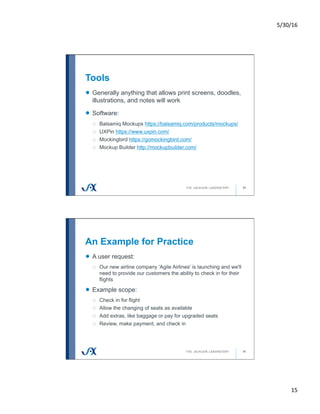
Examples and
Tools
28
5/30/16	
15	
Tools
29
!   Generally anything that allows print screens, doodles,
illustrations, and notes will work
!   Software:
o  Balsamiq Mockups https://balsamiq.com/products/mockups/
o  UXPin https://www.uxpin.com/
o  Mockingbird https://gomockingbird.com/
o  Mockup Builder http://mockupbuilder.com/
An Example for Practice
30
!   A user request:
o  Our new airline company 'Agile Airlines' is launching and we'll
need to provide our customers the ability to check in for their
flights
!   Example scope:
o  Check in for flight
o  Allow the changing of seats as available
o  Add extras, like baggage or pay for upgraded seats
o  Review, make payment, and check in
5/30/16	
16	
Assumptions?
31
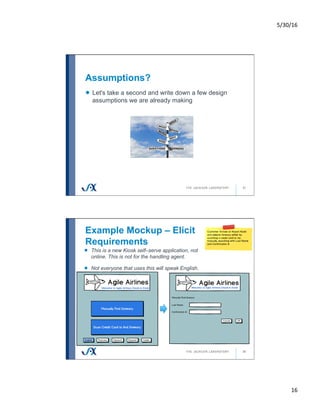
!   Let's take a second and write down a few design
assumptions we are already making
Example Mockup – Elicit
Requirements
32
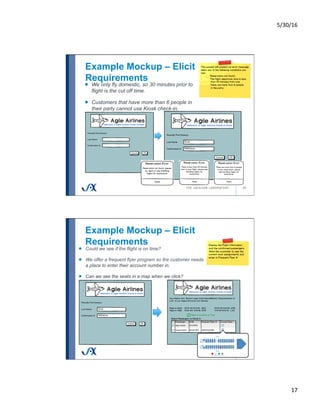
!   This is a new Kiosk self–serve application, not
online. This is not for the handling agent.
!   Not everyone that uses this will speak English.
5/30/16	
17	
Example Mockup – Elicit
Requirements
33
!   We only fly domestic, so 30 minutes prior to
flight is the cut off time.
!   Customers that have more than 6 people in
their party cannot use Kiosk check-in.
Example Mockup – Elicit
Requirements
34
!   Could we see if the flight is on time?
!   We offer a frequent flyer program so the customer needs
a place to enter their account number in.
!   Can we see the seats in a map when we click?
5/30/16	
18	
Example Mockup – Elicit
Requirements
35
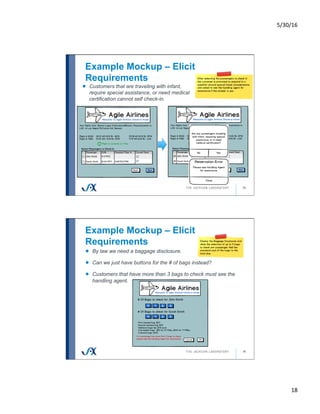
!   Customers that are traveling with infant,
require special assistance, or need medical
certification cannot self check-in.
Example Mockup – Elicit
Requirements
36
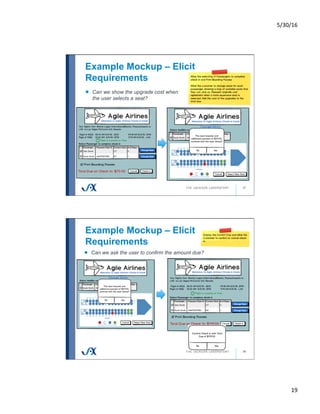
!   By law we need a baggage disclosure.
!   Can we just have buttons for the # of bags instead?
!   Customers that have more than 3 bags to check must see the
handling agent.
5/30/16	
19	
Example Mockup – Elicit
Requirements
37
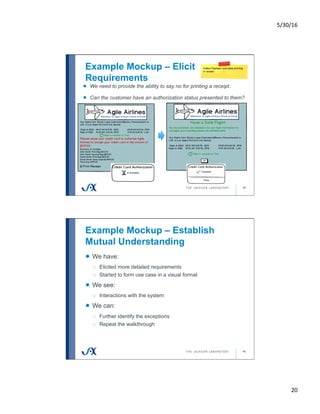
!   Can we show the upgrade cost when
the user selects a seat?
Example Mockup – Elicit
Requirements
38
!   Can we ask the user to confirm the amount due?
5/30/16	
20	
Example Mockup – Elicit
Requirements
39
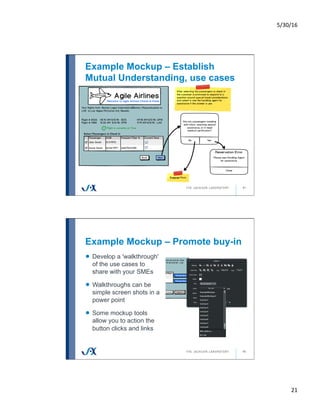
!   We need to provide the ability to say no for printing a receipt.
!   Can the customer have an authorization status presented to them?
Example Mockup – Establish
Mutual Understanding
40
!   We have:
o  Elicited more detailed requirements
o  Started to form use case in a visual format
!   We see:
o  Interactions with the system
!   We can:
o  Further identify the exceptions
o  Repeat the walkthrough
5/30/16	
21	
41
Example Mockup – Establish
Mutual Understanding, use cases
Example Mockup – Promote buy-in
42
!   Develop a 'walkthrough'
of the use cases to
share with your SMEs
!   Walkthroughs can be
simple screen shots in a
power point
!   Some mockup tools
allow you to action the
button clicks and links
5/30/16	
22	
Example Mockup – Planning
Benefits
43
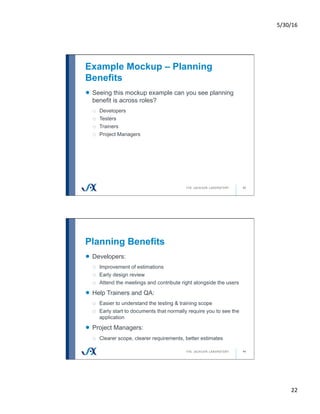
!   Seeing this mockup example can you see planning
benefit is across roles?
o  Developers
o  Testers
o  Trainers
o  Project Managers
Planning Benefits
44
!   Developers:
o  Improvement of estimations
o  Early design review
o  Attend the meetings and contribute right alongside the users
!   Help Trainers and QA:
o  Easier to understand the testing & training scope
o  Early start to documents that normally require you to see the
application
!   Project Managers:
o  Clearer scope, clearer requirements, better estimates
5/30/16	
23	
Example Mockup – Reduce rework
45
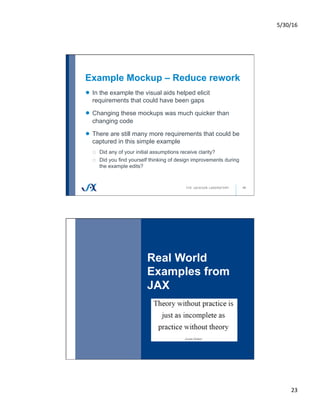
!   In the example the visual aids helped elicit
requirements that could have been gaps
!   Changing these mockups was much quicker than
changing code
!   There are still many more requirements that could be
captured in this simple example
o  Did any of your initial assumptions receive clarity?
o  Did you find yourself thinking of design improvements during
the example edits?
Real World
Examples from
JAX
46
5/30/16	
24	
Establish Mutual Understanding
47
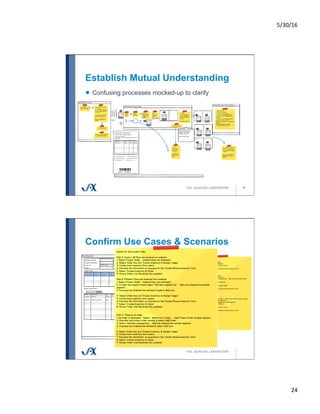
!   Confusing processes mocked-up to clarify
Confirm Use Cases & Scenarios
5/30/16	
25	
Promote buy-in
49
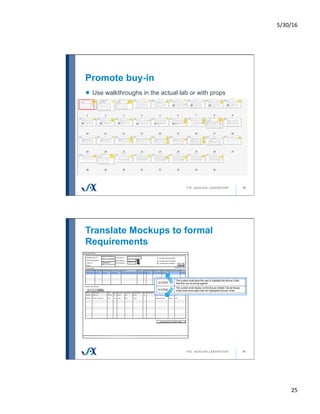
!   Use walkthroughs in the actual lab or with props
Translate Mockups to formal
Requirements
50
5/30/16	
26	
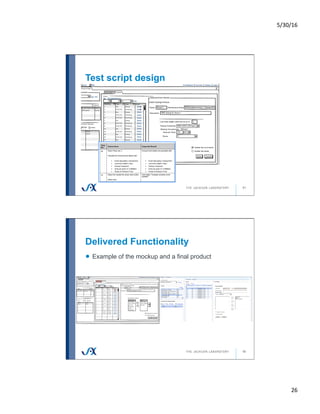
Test script design
51
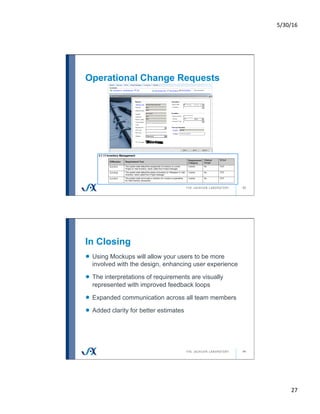
Delivered Functionality
52
!   Example of the mockup and a final product
5/30/16	
27	
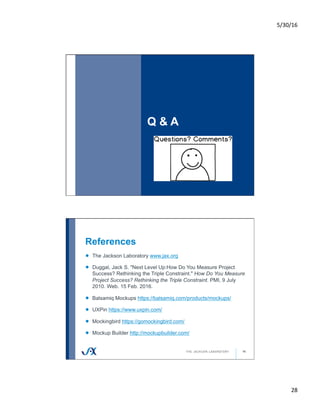
Operational Change Requests
53
In Closing
54
!   Using Mockups will allow your users to be more
involved with the design, enhancing user experience
!   The interpretations of requirements are visually
represented with improved feedback loops
!   Expanded communication across all team members
!   Added clarity for better estimates
5/30/16	
28	
Q & A
55
References
56
!   The Jackson Laboratory www.jax.org
! Duggal, Jack S. "Next Level Up:How Do You Measure Project
Success? Rethinking the Triple Constraint." How Do You Measure
Project Success? Rethinking the Triple Constraint. PMI, 9 July
2010. Web. 15 Feb. 2016.
!   Balsamiq Mockups https://balsamiq.com/products/mockups/
!   UXPin https://www.uxpin.com/
!   Mockingbird https://gomockingbird.com/
!   Mockup Builder http://mockupbuilder.com/

Use Business Analysts for User Interface Design

  • 1.
  • 2.
  • 3.
    5/30/16 1 Use Business Analysts forUser Interface Design Better Software West – June 2016 Cathy Sargent, The Jackson Laboratory Introduction 2 !   A Senior Business System Analyst at The Jackson Laboratory in Bar Harbor, Maine !   Started career in Software Quality Assurance !   Implementation of ERPs, LIMS, and web based applications o  Validated and non-validated environments
  • 4.
    5/30/16 2 Introduction 3 !   TheJackson Laboratory is an independent nonprofit organization leveraging eight decades of expertise in genetics and genomics to increase understanding of human disease and discover precise genomic solutions !   Over 1800 employees located across 3 campuses o  Bar Harbor, Maine o  Sacramento, California o  Farmington, Connecticut Introduction - JAX Facts 4 !   2.5 million JAX® Mice distributed yearly o  A mouse with a specific disease or condition can serve as a model or stand-in for a human patient with that same disease or condition !   More than 8,000 varieties are available as breeding mice, frozen embryos, or DNA samples
  • 5.
    5/30/16 3 Introduction - JAXPeople 5 !   More than 250 Ph.D.s, M.D.s, and D.V.M.s researching o  Cancers o  Computational biology and bioinformatics o  Developmental and reproductive biology o  Immunology o  Metabolic diseases o  Neurobiology !   26 Nobel prizes associated with JAX research, resources, and education Objectives 6 !   Typical software development failures !   Using Mockups early in the SDLC, it will help! o  Elicit requirements o  Confirm use cases o  Establish mutual understanding o  Promote buy-in o  Benefits Developers, Trainers, Testers, and Project Managers o  Save time, reduce re-work !   Examples and Tools !   Q & A
  • 6.
    5/30/16 4 Typical Software Development Failures What comesto mind first? 7 Typical Software Failures 8 !   Unrealistic schedules !   Inaccurate estimates !   Inadequate Testing !   Scope creep !   Unmanaged risks !   Poor communication !   Use of immature technology !   Poor Architecture !   Solution not intuitive to users !   Poorly defined requirements !   Estimates are too optimistic !   Sloppy development practices !   Poor teamwork !   Poor project management !   Stakeholder politics !   Lack of user input !   Commercial pressures !   Lack of skilled resources !   Inability to handle the project's complexity
  • 7.
    5/30/16 5 Typical Software Failureswe'll discuss 9 !   Unrealistic schedules ! Inaccurate estimates !   Inadequate Testing !   Scope creep !   Unmanaged risks ! Poor communication !   Use of immature technology !   Poor Architecture ! Solution not intuitive to users ! Poorly defined requirements !   Estimates are too optimistic !   Sloppy development practices !   Poor teamwork !   Poor project management !   Stakeholder politics ! Lack of user input !   Commercial pressures !   Lack of skilled resources !   Inability to handle the project's complexity What defines success? 10 !   Success isn't always measurable !   It depends on who you ask! o  "Projects that are delivered on time, within budget and meet scope specifications may not necessarily perceived to be successful by key stakeholders." - Jack S. Duggal, MBA, PMP !   The judgment of your users matters o  If the system doesn't meet their needs then ultimately it fails
  • 8.
    5/30/16 6 Poorly defined requirements 11 !  Any design is as good as the completeness and correctness of the requirements !   If requirements are poor, the end result is usually unhappy users !   High Quality requirements are fundamental to a successful solution Lack of User participation 12 !   Don't always know what they want !   May be reluctant to tell you what they need !   Sometimes omit 'obvious' information !   Have a poor understanding of o  Software capabilities o  Software limitations !   Resource constraints limit user's availability
  • 9.
    5/30/16 7 Poor communication 13 !  Lack of collaboration/planning !   Customers request functionality but sometimes don't see it until the final testable product !   Developers/Designers may be interpreting the look and feel of the application based on the requirements !   QA may not be involved until testing !   Trainers may not see the application until the final testable product Inaccurate estimates 14 !   Estimates are often made based on previous experiences !   One person estimating for another !   Estimating backwards from a target date !   Base the estimate on vague information !   Incorrect interpretation of requirements
  • 10.
    5/30/16 8 Solution not intuitiveto Users 15 !   User experience matters !   Bad user interface can drive users away !   Design not consistent !   Too difficult to navigate Using Mockups early in the SDLC Create an Intuitive User Experience 16
  • 11.
    5/30/16 9 Mockups, Wireframes, Prototypes 17 !  Wireframes – skeleton, used to understand space and structure !   Mockups – models the application, shows the user interaction with the application !   Prototypes - early samples, models, or releases of a product built to test a concept or process !   All of these are useful! Wireframes 18
  • 12.
  • 13.
    5/30/16 11 What do youneed to start? 21 !   For Mockups to be successful you should already have o  Scope o  User request / high level user requirements o  Decision on solution !   Building from scratch !   Customizing an off the shelf solution How using Mockups will help 22 !   Elicit requirements !   Confirm use cases !   Establish mutual understanding !   Promote buy-in !   Benefits Trainers, Testers, and Project Manager planning !   Save time, reduce re-work
  • 14.
    5/30/16 12 Elicit Requirements 23 !  "What would you like the system to do?" o  Ask this question only if you want: !   Blank stares !   A memory dump of everything the user knows about the process !   A list of only exceptions !   The end goal is clear language, accuracy, quality, and completeness Confirm Use Cases and Establish Mutual understanding 24 !   Model business processes !   Easy to edit platform !   Link fields and forms to show the user interactions with the system o  Actors, triggers, results, and alternate paths !   BA interpretations of the business needs is displayed in visual format
  • 15.
    5/30/16 13 Promote buy-in 25 !  Develop a 'walkthrough' !   Users see how the system will function o  Examples of their data right in the Mockups (content) o  See transactions and flow of the data (interaction) !   Gain end-user buy-in early in the SDLC o  Users helped design the look and feel of the system Planning Benefits 26 !   Properly scope the solution o  Better overall design – does it fit? !   Start planning deliverables !   Allows for better estimates o  More accurate deadlines
  • 16.
    5/30/16 14 Save Time, reducere-work 27 !   No coding in design iterations o  Quicker o  Less Costly !   Catch missed requirements !   Identify gaps !   Visual representation of the application before development starts !   Mockups take time to produce, the gain is in the reduction of development re-work Examples and Tools 28
  • 17.
    5/30/16 15 Tools 29 !   Generallyanything that allows print screens, doodles, illustrations, and notes will work !   Software: o  Balsamiq Mockups https://balsamiq.com/products/mockups/ o  UXPin https://www.uxpin.com/ o  Mockingbird https://gomockingbird.com/ o  Mockup Builder http://mockupbuilder.com/ An Example for Practice 30 !   A user request: o  Our new airline company 'Agile Airlines' is launching and we'll need to provide our customers the ability to check in for their flights !   Example scope: o  Check in for flight o  Allow the changing of seats as available o  Add extras, like baggage or pay for upgraded seats o  Review, make payment, and check in
  • 18.
    5/30/16 16 Assumptions? 31 !   Let'stake a second and write down a few design assumptions we are already making Example Mockup – Elicit Requirements 32 !   This is a new Kiosk self–serve application, not online. This is not for the handling agent. !   Not everyone that uses this will speak English.
  • 19.
    5/30/16 17 Example Mockup –Elicit Requirements 33 !   We only fly domestic, so 30 minutes prior to flight is the cut off time. !   Customers that have more than 6 people in their party cannot use Kiosk check-in. Example Mockup – Elicit Requirements 34 !   Could we see if the flight is on time? !   We offer a frequent flyer program so the customer needs a place to enter their account number in. !   Can we see the seats in a map when we click?
  • 20.
    5/30/16 18 Example Mockup –Elicit Requirements 35 !   Customers that are traveling with infant, require special assistance, or need medical certification cannot self check-in. Example Mockup – Elicit Requirements 36 !   By law we need a baggage disclosure. !   Can we just have buttons for the # of bags instead? !   Customers that have more than 3 bags to check must see the handling agent.
  • 21.
    5/30/16 19 Example Mockup –Elicit Requirements 37 !   Can we show the upgrade cost when the user selects a seat? Example Mockup – Elicit Requirements 38 !   Can we ask the user to confirm the amount due?
  • 22.
    5/30/16 20 Example Mockup –Elicit Requirements 39 !   We need to provide the ability to say no for printing a receipt. !   Can the customer have an authorization status presented to them? Example Mockup – Establish Mutual Understanding 40 !   We have: o  Elicited more detailed requirements o  Started to form use case in a visual format !   We see: o  Interactions with the system !   We can: o  Further identify the exceptions o  Repeat the walkthrough
  • 23.
    5/30/16 21 41 Example Mockup –Establish Mutual Understanding, use cases Example Mockup – Promote buy-in 42 !   Develop a 'walkthrough' of the use cases to share with your SMEs !   Walkthroughs can be simple screen shots in a power point !   Some mockup tools allow you to action the button clicks and links
  • 24.
    5/30/16 22 Example Mockup –Planning Benefits 43 !   Seeing this mockup example can you see planning benefit is across roles? o  Developers o  Testers o  Trainers o  Project Managers Planning Benefits 44 !   Developers: o  Improvement of estimations o  Early design review o  Attend the meetings and contribute right alongside the users !   Help Trainers and QA: o  Easier to understand the testing & training scope o  Early start to documents that normally require you to see the application !   Project Managers: o  Clearer scope, clearer requirements, better estimates
  • 25.
    5/30/16 23 Example Mockup –Reduce rework 45 !   In the example the visual aids helped elicit requirements that could have been gaps !   Changing these mockups was much quicker than changing code !   There are still many more requirements that could be captured in this simple example o  Did any of your initial assumptions receive clarity? o  Did you find yourself thinking of design improvements during the example edits? Real World Examples from JAX 46
  • 26.
    5/30/16 24 Establish Mutual Understanding 47 !  Confusing processes mocked-up to clarify Confirm Use Cases & Scenarios
  • 27.
    5/30/16 25 Promote buy-in 49 !  Use walkthroughs in the actual lab or with props Translate Mockups to formal Requirements 50
  • 28.
    5/30/16 26 Test script design 51 DeliveredFunctionality 52 !   Example of the mockup and a final product
  • 29.
    5/30/16 27 Operational Change Requests 53 InClosing 54 !   Using Mockups will allow your users to be more involved with the design, enhancing user experience !   The interpretations of requirements are visually represented with improved feedback loops !   Expanded communication across all team members !   Added clarity for better estimates
  • 30.
    5/30/16 28 Q & A 55 References 56 !  The Jackson Laboratory www.jax.org ! Duggal, Jack S. "Next Level Up:How Do You Measure Project Success? Rethinking the Triple Constraint." How Do You Measure Project Success? Rethinking the Triple Constraint. PMI, 9 July 2010. Web. 15 Feb. 2016. !   Balsamiq Mockups https://balsamiq.com/products/mockups/ !   UXPin https://www.uxpin.com/ !   Mockingbird https://gomockingbird.com/ !   Mockup Builder http://mockupbuilder.com/