1
Software Engineering: A Practitioner’s Approach
by Roger S. Pressman and Bruce R. MAXIM
Requirement Engineering
What is a requirement?
 It may range from a high-level abstract statement of a
service or of a system constraint to a detailed mathematical
functional specification
 This is inevitable as requirements may serve a dual function
 May be the basis for a bid for a contract - therefore must
be open to interpretation
 May be the basis for the contract itself - therefore must be
defined in detail
 Both these statements may be called requirements
2
Requirements definition/specification
 Requirements definition
 A statement in natural language plus diagrams of the services
the system provides and its operational constraints.Written for
customers
 Requirements specification
 A structured document setting out detailed descriptions of the
system services.Written as a contract between client and
contractor
 Software specification
 A detailed software description which can serve as a basis for a
design or implementation.Written for developers
3
IEEE Definition
4
 A condition or capability that must be met or possessed by a
system...to satisfy a contract, standard, specification, or
other formally imposed document
 IEEE Std 729
Sources of Requirements
5
 Stakeholders
 People affected in some way by the system
 Documents
 Existing system
 Domain/business area
Requirements Engineering tasks
6
 Inception—Establish a basic understanding of the problem and the nature of
the solution.
 Elicitation—Draw out the requirements from stakeholders.
 Elaboration—Create an analysis model that represents information,
functional, and behavioral aspects of the requirements.
 Negotiation—Agree on a deliverable system that is realistic for developers
and customers.
 Specification—Describe the requirements formally or informally.
 Validation—Review the requirement specification for errors, ambiguities,
omissions, and conflicts.
 Requirements management—Manage changing requirements.
Getting Requirements Right
7
 “The hardest single part of building a software system is deciding what to
build. No part of the work so cripples the resulting system if done wrong. No
other part is more difficult to rectify later.”
—Fred Brooks
 “The seeds of major software disasters are usually sown within the first three
months of commencing the software project.”
—Capers Jones
 “We spend a lot of time—the majority of project effort—not implementing or
testing, but trying to decide what to build.”
—Brian Lawrence
Inception
8
 At project inception, you establish a basic understanding of
the problem, the people who want a solution, the nature of
the solution that is desired, and the effectiveness preliminary
communication and collaboration between the other
stakeholders and the software team.
Inception
9
 Ask “context-free” questions
 Who is behind the request for this work?
 Who will use the solution (product/system)?
 What will be the economic benefits?
 How would you characterize “good” output from the system?
 What problems does this solution address?
 What environment will the product be used in?
 Are you the right person to answer these questions?
 Are these question relevant?
 Can anyone else provide additional information?
 Should I be asking you anything else?
 These questions (and others) will help to “break the ice” and
initiate the communication that is essential to successful
elicitation
Eliciting Requirements
10
 Why is it so difficult to clearly understand what the customer wants?
 Scope
 The boundary of the system is ill-defined.
 Customers/users specify unnecessary technical detail that may confuse rather than clarify
objectives.
 Understanding
 Customers are not completely sure of what is needed.
 Customers have a poor understanding of the capabilities and limitations of the computing
environment.
 Customers don’t have a full understanding of their problem domain.
 Customers have trouble communicating needs to the system engineer.
 Customers omit detail that is believed to be obvious.
 Customers specify requirements that conflict with other requirements.
 Customers specify requirements that are ambiguous or un testable.
 Volatility
 Requirements change over time.
Collaborative Requirements Gathering
11
 Meetings are attended by all interested stakeholders.
 Rules established for preparation and participation.
 Agenda should be formal enough to cover all important points, but informal enough
to encourage the free flow of ideas.
 A facilitator controls the meeting.
 A definition mechanism (blackboard, flip charts, etc.) is used.
 During the meeting:
 The problem is identified.
 Elements of the solution are proposed.
 Different approaches are negotiated.
 A preliminary set of solution requirements are obtained.
 The atmosphere is collaborative and non-threatening.
Quality Function Deployment
12
Quality function deployment (QFD) is a quality management technique
that translates the needs of the customer into technical requirements
for software
Normal requirements. The objectives and goals that are stated for a product
or system during meetings with the customer. If these requirements are present,
the customer is satisfied. Examples of normal requirements might be requested
types of graphical displays, specific system functions, and defined levels of
performance.
Expected requirements. These requirements are implicit to the product or
system and may be so fundamental that the customer does not explicitly state
them. Their absence will be a cause for significant dissatisfaction . Examples of
expected requirements are: ease of human/machine interaction, overall
operational correctness and reliability, and ease of software installation
13
Exciting requirements. These features go beyond the customer’s
expectations and prove to be very satisfying when present. For example,
software for a new mobile phone comes with standard features, but is
coupled with a set of unexpected capabilities (e.g., multi touch screen,
visual voice mail) that delight every user of the product.
Although QFD concepts can be applied across the entire software process
specific QFD techniques are applicable to the requirements elicitation
activity. QFD uses customer interviews and observation, surveys, and
examination of historical data (e.g., problem reports) as raw data for the
requirements gathering activity.
Elicitation Work Products
14
• Statement of need and feasibility.
• Statement of scope.
• List of participants in requirements elicitation.
• Description of the system’s technical environment.
• List of requirements and associated domain constraints.
• List of usage scenarios.
• Any prototypes developed to refine requirements.
Usage Scenarios
15
• developers and users can create a set of scenarios that identify a thread
of usage for the system to be constructed.The scenarios, often called use
cases provide a description of how the system will be used.
DEVELOPING USE CASES
16
• The first step in writing a use case is to define the set of “actors” that
will be involved in the story.
• Actors are the different people (or devices) that use the system or
product within the context of the function and behavior that is to be
described.
• Actors represent the roles that people (or devices) play as the system
operates.
• Defined somewhat more formally, an actor is anything that
communicates with the system or product and that is external to the
system itself.
• Every actor has one or more goals when using the system.
17
• Primary actors interact to achieve required system function
and derive the intended benefit from the system.They work
directly and frequently with the software.
• Secondary actors support the system so that primary actors can
do their work. Once actors have been identified, use cases
can be developed.
Use-Cases
18
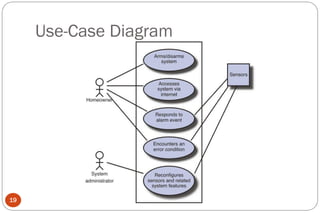
• A use-case scenario is a story about how someone or something external to
the software (known as an actor) interacts with the system.
• Each scenario answers the following questions:
• Who is the primary actor, the secondary actor(s)?
– What are the actor’s goals?
– What preconditions should exist before the story begins?
– What main tasks or functions are performed by the actor?
– What exceptions might be considered as the story is described? ( An Exception is
anything that leads to NOT achieving the use case’s goal.)
– What variations in the actor’s interaction are possible?
– What system information will the actor acquire, produce, or change?
– Will the actor have to inform the system about changes in the external environment?
– What information does the actor desire from the system?
– Does the actor wish to be informed about unexpected changes?
Use-Case Diagram
19
Elaboration.
20
• The information obtained from the customer during inception and
elicitation is expanded and refined during elaboration.
• Elaboration is driven by the creation and refinement of user
scenarios that describe how the end user (and other actors) will
interact with the system.
• Each user scenario is parsed to extract analysis classes—business
domain entities that are visible to the end user.
• The relationships and collaboration between classes are identified,
and a variety of supplementary diagrams are produced
Elements of the Analysis Model
21
 Scenario-based elements
• The system is described from the user’s point of view using a scenario-based approach.
 Use-case—How external actors interact with the system (use-case diagrams; detailed templates)
 Functional—How software functions are processed in the system (flow charts; activity diagrams)
 Class-based elements
 The various system objects (obtained from scenarios) including their attributes and functions
(class diagram)
 Behavioral elements
 How the system behaves in response to different events (state diagram)
 Flow-oriented elements
 How information is transformed as if flows through the system (data flow diagram)
Activity Diagram for RE
22
Class Based Elements
23
• Each usage scenario implies a set of objects that are manipulated as an
actor interacts with the system.These objects are categorized into
classes—a collection of things that have similar attributes and common
behaviors.
• For example, a UML class diagram can be used to depict a Sensor class
for the SafeHome security function .
• The diagram lists the attributes of sensors (e.g., name, type) and the
operations (e.g., identify,enable) that can be applied to modify these
attributes.
• In addition to class diagrams, other analysis modeling elements depict
• the manner in which classes collaborate with one another and the
relationships
Class Diagram
24
Behavioral elements.
25
 The state diagram is one method for representing the behavior of a system
by depicting its states and the events that cause the system to change
state.
 A state is any externally observable mode of behavior. In addition, the
state diagram indicates actions (e.g., process activation) taken as a
consequence of a particular event.
 To illustrate the use of a state diagram, consider software embedded
within the SafeHome control panel that is responsible for reading user
input.A simplified UML state diagram is shown in Figure
State Diagram
26
Negotiating Requirements
27
 In an ideal requirements engineering context, the inception, elicitation, and
elaboration tasks determine customer requirements in sufficient detail to
proceed to subsequent software engineering activities.
 Unfortunately, this rarely happens. In reality, you may have to enter into a
negotiation with one or more stakeholders.
 In most cases, stakeholders are asked to balance functionality, performance,
and other product or system characteristics against cost and time-to-
market.
 The intent of this negotiation is to develop a project plan that meets
stakeholder needs while at the same time reflecting the real-world
constraints (e.g., time, people, budget) that have been placed on the
software team.
 The best negotiations strive for a “win-win” result.That is, stakeholders win
by getting the system or product that satisfies the majority of their needs and
you (as a member of the software team) win by working to realistic and
achievable budgets and deadlines.
 Boehm defines a set of negotiation activities at the beginning of each
software process iteration. Rather than a single customer communication
activity, the following activities are defined:
1. Identification of the system or subsystem’s key stakeholders.
2. Determination of the stakeholders’“win conditions.”
3. Negotiation of the stakeholders’ win conditions to reconcile them into a set
of win-win conditions for all concerned (including the software team).
 Successful completion of these initial steps achieves a win-win result, which
becomes the key criterion for proceeding to subsequent software
engineering activities.
28
Specification.
29
• In the context of computer-based systems (and software), the term
• specification means different things to different people.A specification can be
a written document, a set of graphical models, a formal mathematical
model, a collection of usage scenarios, a prototype, or any combination of
these.
• Some suggest that a “standard template” [Som97] should be developed and
used for a specification, arguing that this leads to requirements that are
presented in a consistent and therefore more understandable manner.
• However, it is sometimes necessary to remain flexible when a specification
is to be developed.
• For large systems, a written document, combining natural language
descriptions and graphical models may be the best approach.
Validating Requirements
30
The work products produced as a consequence of requirements engineering are assessed for
quality during a validation step. Requirements validation examines the specification to
ensure:
 Is each requirement consistent with the objective of the system?
 Have all requirements been specified at the proper level of abstraction?
 Is the requirement really necessary?
 Is each requirement bounded and unambiguous?
 Does each requirement have attribution? (source noted?)
 Do any requirements conflict with other requirements?
 Is each requirement achievable in the system’s technical environment?
 Is each requirement testable, once implemented?
 Does the model reflect the system’s information, function and behavior?
 Has the model been appropriately “partitioned”?
 Have appropriate requirements patterns been used?
Requirements management
31
• Requirements for computer-based systems change, and the desire to
change requirements persists throughout the life of the system.
• Requirements management is a set of activities that help the project
team identify, control, and track requirements and changes to
requirements at any time as the project proceeds.
32
Functional and non-functional requirements
 Functional requirements
 Statements of services or functions the system should provide, how the
system should react to particular inputs and how the system should behave
in particular situations.
 Non-functional requirements
 constraints on the services or functions offered by the system such as
timing constraints, constraints on the development process, standards,
etc.
33
Functional requirements
• Describe functionality or system services
• Depend on the type of software, expected users and the type
of system where the software is used
• Functional user requirements may be high-level statements of
what the system should do but functional system
requirements should describe the system services in detail
34
Examples of functional requirements
 The user shall be able to search either all of the initial set of
databases or select a subset from it.
 The system shall provide appropriate viewers for the user to
read documents in the document store.
 Every order shall be allocated a unique identifier (ORDER_ID)
which the user shall be able to copy to the account’s permanent
storage area.
35
Non-functional requirements
 Define system properties and constraints e.g. reliability, response
time and storage requirements. Constraints are I/O device capability,
system representations, etc.
 Non-functional requirements may be more critical than functional
requirements. If these are not met, the system is useless.
36
Non-functional classifications
 Product requirements
 Requirements which specify that the delivered product must behave in a
particular way e.g. execution speed, reliability, etc.
 Organisational requirements
 Requirements which are a consequence of organisational policies and
procedures e.g. process standards used, implementation requirements,
etc.
 External requirements
 Requirements which arise from factors which are external to the system
and its development process e.g. interoperability requirements, legislative
requirements, etc.
Note: Interoperability is a property referring to the ability of diverse systems and organizations to work
together (inter-operate)
37
Non-functional requirement types
Performance
requirements
Space
requirements
Usability
requirements
Efficiency
requirements
Reliability
requirements
Portability
requirements
Interoperability
requirements
Ethical
requirements
Legislative
requirements
Implementation
requirements
Standards
requirements
Delivery
requirements
Safety
requirements
Privacy
requirements
Product
requirements
Organizational
requirements
External
requirements
Non-functional
requirements

Requirement Engineering.pdf

  • 1.
    1 Software Engineering: APractitioner’s Approach by Roger S. Pressman and Bruce R. MAXIM Requirement Engineering
  • 2.
    What is arequirement?  It may range from a high-level abstract statement of a service or of a system constraint to a detailed mathematical functional specification  This is inevitable as requirements may serve a dual function  May be the basis for a bid for a contract - therefore must be open to interpretation  May be the basis for the contract itself - therefore must be defined in detail  Both these statements may be called requirements 2
  • 3.
    Requirements definition/specification  Requirementsdefinition  A statement in natural language plus diagrams of the services the system provides and its operational constraints.Written for customers  Requirements specification  A structured document setting out detailed descriptions of the system services.Written as a contract between client and contractor  Software specification  A detailed software description which can serve as a basis for a design or implementation.Written for developers 3
  • 4.
    IEEE Definition 4  Acondition or capability that must be met or possessed by a system...to satisfy a contract, standard, specification, or other formally imposed document  IEEE Std 729
  • 5.
    Sources of Requirements 5 Stakeholders  People affected in some way by the system  Documents  Existing system  Domain/business area
  • 6.
    Requirements Engineering tasks 6 Inception—Establish a basic understanding of the problem and the nature of the solution.  Elicitation—Draw out the requirements from stakeholders.  Elaboration—Create an analysis model that represents information, functional, and behavioral aspects of the requirements.  Negotiation—Agree on a deliverable system that is realistic for developers and customers.  Specification—Describe the requirements formally or informally.  Validation—Review the requirement specification for errors, ambiguities, omissions, and conflicts.  Requirements management—Manage changing requirements.
  • 7.
    Getting Requirements Right 7 “The hardest single part of building a software system is deciding what to build. No part of the work so cripples the resulting system if done wrong. No other part is more difficult to rectify later.” —Fred Brooks  “The seeds of major software disasters are usually sown within the first three months of commencing the software project.” —Capers Jones  “We spend a lot of time—the majority of project effort—not implementing or testing, but trying to decide what to build.” —Brian Lawrence
  • 8.
    Inception 8  At projectinception, you establish a basic understanding of the problem, the people who want a solution, the nature of the solution that is desired, and the effectiveness preliminary communication and collaboration between the other stakeholders and the software team.
  • 9.
    Inception 9  Ask “context-free”questions  Who is behind the request for this work?  Who will use the solution (product/system)?  What will be the economic benefits?  How would you characterize “good” output from the system?  What problems does this solution address?  What environment will the product be used in?  Are you the right person to answer these questions?  Are these question relevant?  Can anyone else provide additional information?  Should I be asking you anything else?  These questions (and others) will help to “break the ice” and initiate the communication that is essential to successful elicitation
  • 10.
    Eliciting Requirements 10  Whyis it so difficult to clearly understand what the customer wants?  Scope  The boundary of the system is ill-defined.  Customers/users specify unnecessary technical detail that may confuse rather than clarify objectives.  Understanding  Customers are not completely sure of what is needed.  Customers have a poor understanding of the capabilities and limitations of the computing environment.  Customers don’t have a full understanding of their problem domain.  Customers have trouble communicating needs to the system engineer.  Customers omit detail that is believed to be obvious.  Customers specify requirements that conflict with other requirements.  Customers specify requirements that are ambiguous or un testable.  Volatility  Requirements change over time.
  • 11.
    Collaborative Requirements Gathering 11 Meetings are attended by all interested stakeholders.  Rules established for preparation and participation.  Agenda should be formal enough to cover all important points, but informal enough to encourage the free flow of ideas.  A facilitator controls the meeting.  A definition mechanism (blackboard, flip charts, etc.) is used.  During the meeting:  The problem is identified.  Elements of the solution are proposed.  Different approaches are negotiated.  A preliminary set of solution requirements are obtained.  The atmosphere is collaborative and non-threatening.
  • 12.
    Quality Function Deployment 12 Qualityfunction deployment (QFD) is a quality management technique that translates the needs of the customer into technical requirements for software Normal requirements. The objectives and goals that are stated for a product or system during meetings with the customer. If these requirements are present, the customer is satisfied. Examples of normal requirements might be requested types of graphical displays, specific system functions, and defined levels of performance. Expected requirements. These requirements are implicit to the product or system and may be so fundamental that the customer does not explicitly state them. Their absence will be a cause for significant dissatisfaction . Examples of expected requirements are: ease of human/machine interaction, overall operational correctness and reliability, and ease of software installation
  • 13.
    13 Exciting requirements. Thesefeatures go beyond the customer’s expectations and prove to be very satisfying when present. For example, software for a new mobile phone comes with standard features, but is coupled with a set of unexpected capabilities (e.g., multi touch screen, visual voice mail) that delight every user of the product. Although QFD concepts can be applied across the entire software process specific QFD techniques are applicable to the requirements elicitation activity. QFD uses customer interviews and observation, surveys, and examination of historical data (e.g., problem reports) as raw data for the requirements gathering activity.
  • 14.
    Elicitation Work Products 14 •Statement of need and feasibility. • Statement of scope. • List of participants in requirements elicitation. • Description of the system’s technical environment. • List of requirements and associated domain constraints. • List of usage scenarios. • Any prototypes developed to refine requirements.
  • 15.
    Usage Scenarios 15 • developersand users can create a set of scenarios that identify a thread of usage for the system to be constructed.The scenarios, often called use cases provide a description of how the system will be used.
  • 16.
    DEVELOPING USE CASES 16 •The first step in writing a use case is to define the set of “actors” that will be involved in the story. • Actors are the different people (or devices) that use the system or product within the context of the function and behavior that is to be described. • Actors represent the roles that people (or devices) play as the system operates. • Defined somewhat more formally, an actor is anything that communicates with the system or product and that is external to the system itself. • Every actor has one or more goals when using the system.
  • 17.
    17 • Primary actorsinteract to achieve required system function and derive the intended benefit from the system.They work directly and frequently with the software. • Secondary actors support the system so that primary actors can do their work. Once actors have been identified, use cases can be developed.
  • 18.
    Use-Cases 18 • A use-casescenario is a story about how someone or something external to the software (known as an actor) interacts with the system. • Each scenario answers the following questions: • Who is the primary actor, the secondary actor(s)? – What are the actor’s goals? – What preconditions should exist before the story begins? – What main tasks or functions are performed by the actor? – What exceptions might be considered as the story is described? ( An Exception is anything that leads to NOT achieving the use case’s goal.) – What variations in the actor’s interaction are possible? – What system information will the actor acquire, produce, or change? – Will the actor have to inform the system about changes in the external environment? – What information does the actor desire from the system? – Does the actor wish to be informed about unexpected changes?
  • 19.
  • 20.
    Elaboration. 20 • The informationobtained from the customer during inception and elicitation is expanded and refined during elaboration. • Elaboration is driven by the creation and refinement of user scenarios that describe how the end user (and other actors) will interact with the system. • Each user scenario is parsed to extract analysis classes—business domain entities that are visible to the end user. • The relationships and collaboration between classes are identified, and a variety of supplementary diagrams are produced
  • 21.
    Elements of theAnalysis Model 21  Scenario-based elements • The system is described from the user’s point of view using a scenario-based approach.  Use-case—How external actors interact with the system (use-case diagrams; detailed templates)  Functional—How software functions are processed in the system (flow charts; activity diagrams)  Class-based elements  The various system objects (obtained from scenarios) including their attributes and functions (class diagram)  Behavioral elements  How the system behaves in response to different events (state diagram)  Flow-oriented elements  How information is transformed as if flows through the system (data flow diagram)
  • 22.
  • 23.
    Class Based Elements 23 •Each usage scenario implies a set of objects that are manipulated as an actor interacts with the system.These objects are categorized into classes—a collection of things that have similar attributes and common behaviors. • For example, a UML class diagram can be used to depict a Sensor class for the SafeHome security function . • The diagram lists the attributes of sensors (e.g., name, type) and the operations (e.g., identify,enable) that can be applied to modify these attributes. • In addition to class diagrams, other analysis modeling elements depict • the manner in which classes collaborate with one another and the relationships
  • 24.
  • 25.
    Behavioral elements. 25  Thestate diagram is one method for representing the behavior of a system by depicting its states and the events that cause the system to change state.  A state is any externally observable mode of behavior. In addition, the state diagram indicates actions (e.g., process activation) taken as a consequence of a particular event.  To illustrate the use of a state diagram, consider software embedded within the SafeHome control panel that is responsible for reading user input.A simplified UML state diagram is shown in Figure
  • 26.
  • 27.
    Negotiating Requirements 27  Inan ideal requirements engineering context, the inception, elicitation, and elaboration tasks determine customer requirements in sufficient detail to proceed to subsequent software engineering activities.  Unfortunately, this rarely happens. In reality, you may have to enter into a negotiation with one or more stakeholders.  In most cases, stakeholders are asked to balance functionality, performance, and other product or system characteristics against cost and time-to- market.  The intent of this negotiation is to develop a project plan that meets stakeholder needs while at the same time reflecting the real-world constraints (e.g., time, people, budget) that have been placed on the software team.
  • 28.
     The bestnegotiations strive for a “win-win” result.That is, stakeholders win by getting the system or product that satisfies the majority of their needs and you (as a member of the software team) win by working to realistic and achievable budgets and deadlines.  Boehm defines a set of negotiation activities at the beginning of each software process iteration. Rather than a single customer communication activity, the following activities are defined: 1. Identification of the system or subsystem’s key stakeholders. 2. Determination of the stakeholders’“win conditions.” 3. Negotiation of the stakeholders’ win conditions to reconcile them into a set of win-win conditions for all concerned (including the software team).  Successful completion of these initial steps achieves a win-win result, which becomes the key criterion for proceeding to subsequent software engineering activities. 28
  • 29.
    Specification. 29 • In thecontext of computer-based systems (and software), the term • specification means different things to different people.A specification can be a written document, a set of graphical models, a formal mathematical model, a collection of usage scenarios, a prototype, or any combination of these. • Some suggest that a “standard template” [Som97] should be developed and used for a specification, arguing that this leads to requirements that are presented in a consistent and therefore more understandable manner. • However, it is sometimes necessary to remain flexible when a specification is to be developed. • For large systems, a written document, combining natural language descriptions and graphical models may be the best approach.
  • 30.
    Validating Requirements 30 The workproducts produced as a consequence of requirements engineering are assessed for quality during a validation step. Requirements validation examines the specification to ensure:  Is each requirement consistent with the objective of the system?  Have all requirements been specified at the proper level of abstraction?  Is the requirement really necessary?  Is each requirement bounded and unambiguous?  Does each requirement have attribution? (source noted?)  Do any requirements conflict with other requirements?  Is each requirement achievable in the system’s technical environment?  Is each requirement testable, once implemented?  Does the model reflect the system’s information, function and behavior?  Has the model been appropriately “partitioned”?  Have appropriate requirements patterns been used?
  • 31.
    Requirements management 31 • Requirementsfor computer-based systems change, and the desire to change requirements persists throughout the life of the system. • Requirements management is a set of activities that help the project team identify, control, and track requirements and changes to requirements at any time as the project proceeds.
  • 32.
    32 Functional and non-functionalrequirements  Functional requirements  Statements of services or functions the system should provide, how the system should react to particular inputs and how the system should behave in particular situations.  Non-functional requirements  constraints on the services or functions offered by the system such as timing constraints, constraints on the development process, standards, etc.
  • 33.
    33 Functional requirements • Describefunctionality or system services • Depend on the type of software, expected users and the type of system where the software is used • Functional user requirements may be high-level statements of what the system should do but functional system requirements should describe the system services in detail
  • 34.
    34 Examples of functionalrequirements  The user shall be able to search either all of the initial set of databases or select a subset from it.  The system shall provide appropriate viewers for the user to read documents in the document store.  Every order shall be allocated a unique identifier (ORDER_ID) which the user shall be able to copy to the account’s permanent storage area.
  • 35.
    35 Non-functional requirements  Definesystem properties and constraints e.g. reliability, response time and storage requirements. Constraints are I/O device capability, system representations, etc.  Non-functional requirements may be more critical than functional requirements. If these are not met, the system is useless.
  • 36.
    36 Non-functional classifications  Productrequirements  Requirements which specify that the delivered product must behave in a particular way e.g. execution speed, reliability, etc.  Organisational requirements  Requirements which are a consequence of organisational policies and procedures e.g. process standards used, implementation requirements, etc.  External requirements  Requirements which arise from factors which are external to the system and its development process e.g. interoperability requirements, legislative requirements, etc. Note: Interoperability is a property referring to the ability of diverse systems and organizations to work together (inter-operate)
  • 37.