1. GHz RP-TNC Antenna Connectors
Dual RP-TNC connectors are provided to connect external antennas.
2. Console Port
Connect the supplied nine-pin female DB-9 to male DB-9 serial cable to the serial port on
the bridge and to the COM port on a computer.
1. GHz RP-TNC LEFT Antenna Connector
The bridge provides two reverse TNC antenna connectors on the rear of the unit for
diversity configurations with two antennas. When using a single antenna, do connect
the antenna to the Left connector.
2. Console Port
Connect the supplied 9-pin, male-to-female, straight-through serial cable to the COM
port on a computer and to RS-232 serial port on the back of the bridge.
3. Ethernet Port (RJ-45)
Auto-sensing 10/100 Mbps.
The BR350 must be powered through methods including inline switch power, inline
patch panel, or an inline power injector.
4. GHz RP-TNC RIGHT/PRIMARY Atenna Connector
The bridge provides two reverse TNC antenna connectors on the rear of the unit for
diversity configurations with two antennas. When using a single antenna, connect the
antenna to the Right/Primary connector.
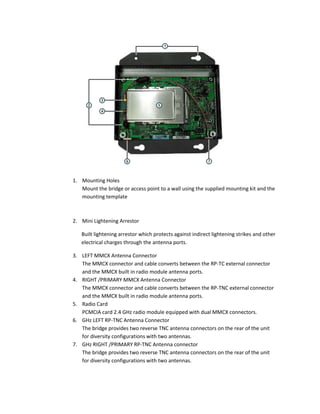
1. Mounting Holes
Mount the bridge or access point to a wall using the supplied mounting kit and the
mounting template
2. Mini Lightening Arrestor
Built lightening arrestor which protects against indirect lightening strikes and other
electrical charges through the antenna ports.
3. LEFT MMCX Antenna Connector
The MMCX connector and cable converts between the RP-TC external connector
and the MMCX built in radio module antenna ports.
4. RIGHT /PRIMARY MMCX Antenna Connector
The MMCX connector and cable converts between the RP-TNC external connector
and the MMCX built in radio module antenna ports.
5. Radio Card
PCMCIA card 2.4 GHz radio module equipped with dual MMCX connectors.
6. GHz LEFT RP-TNC Antenna Connector
The bridge provides two reverse TNC antenna connectors on the rear of the unit
for diversity configurations with two antennas.
7. GHz RIGHT /PRIMARY RP-TNC Antenna connector
The bridge provides two reverse TNC antenna connectors on the rear of the unit
for diversity configurations with two antennas.
1. AC Power Connector
Connect a 110V or 220V via the supplied power cord.
2. TO NETWORK Ethernet Connector
Connect with a straight through Ethernet cable from the “TO NETWORK”
Ethernet connector to the wired LAN.
3. TO AP/BRIDGE Ethernet Connectr
Connect a straight throught Ethernet cable from “TO AP /BRIDGE” Ethernet
connector to the access point Ethernet port. Read the label carefully on the
injector when making connections.

Bridges

  • 1.
    1. GHz RP-TNCAntenna Connectors Dual RP-TNC connectors are provided to connect external antennas. 2. Console Port Connect the supplied nine-pin female DB-9 to male DB-9 serial cable to the serial port on the bridge and to the COM port on a computer.
  • 2.
    1. GHz RP-TNCLEFT Antenna Connector The bridge provides two reverse TNC antenna connectors on the rear of the unit for diversity configurations with two antennas. When using a single antenna, do connect the antenna to the Left connector. 2. Console Port Connect the supplied 9-pin, male-to-female, straight-through serial cable to the COM port on a computer and to RS-232 serial port on the back of the bridge. 3. Ethernet Port (RJ-45) Auto-sensing 10/100 Mbps. The BR350 must be powered through methods including inline switch power, inline patch panel, or an inline power injector. 4. GHz RP-TNC RIGHT/PRIMARY Atenna Connector The bridge provides two reverse TNC antenna connectors on the rear of the unit for diversity configurations with two antennas. When using a single antenna, connect the antenna to the Right/Primary connector.
  • 3.
    1. Mounting Holes Mountthe bridge or access point to a wall using the supplied mounting kit and the mounting template 2. Mini Lightening Arrestor Built lightening arrestor which protects against indirect lightening strikes and other electrical charges through the antenna ports. 3. LEFT MMCX Antenna Connector The MMCX connector and cable converts between the RP-TC external connector and the MMCX built in radio module antenna ports. 4. RIGHT /PRIMARY MMCX Antenna Connector The MMCX connector and cable converts between the RP-TNC external connector and the MMCX built in radio module antenna ports. 5. Radio Card PCMCIA card 2.4 GHz radio module equipped with dual MMCX connectors. 6. GHz LEFT RP-TNC Antenna Connector The bridge provides two reverse TNC antenna connectors on the rear of the unit for diversity configurations with two antennas. 7. GHz RIGHT /PRIMARY RP-TNC Antenna connector The bridge provides two reverse TNC antenna connectors on the rear of the unit for diversity configurations with two antennas.
  • 4.
    1. AC PowerConnector Connect a 110V or 220V via the supplied power cord. 2. TO NETWORK Ethernet Connector Connect with a straight through Ethernet cable from the “TO NETWORK” Ethernet connector to the wired LAN. 3. TO AP/BRIDGE Ethernet Connectr Connect a straight throught Ethernet cable from “TO AP /BRIDGE” Ethernet connector to the access point Ethernet port. Read the label carefully on the injector when making connections.