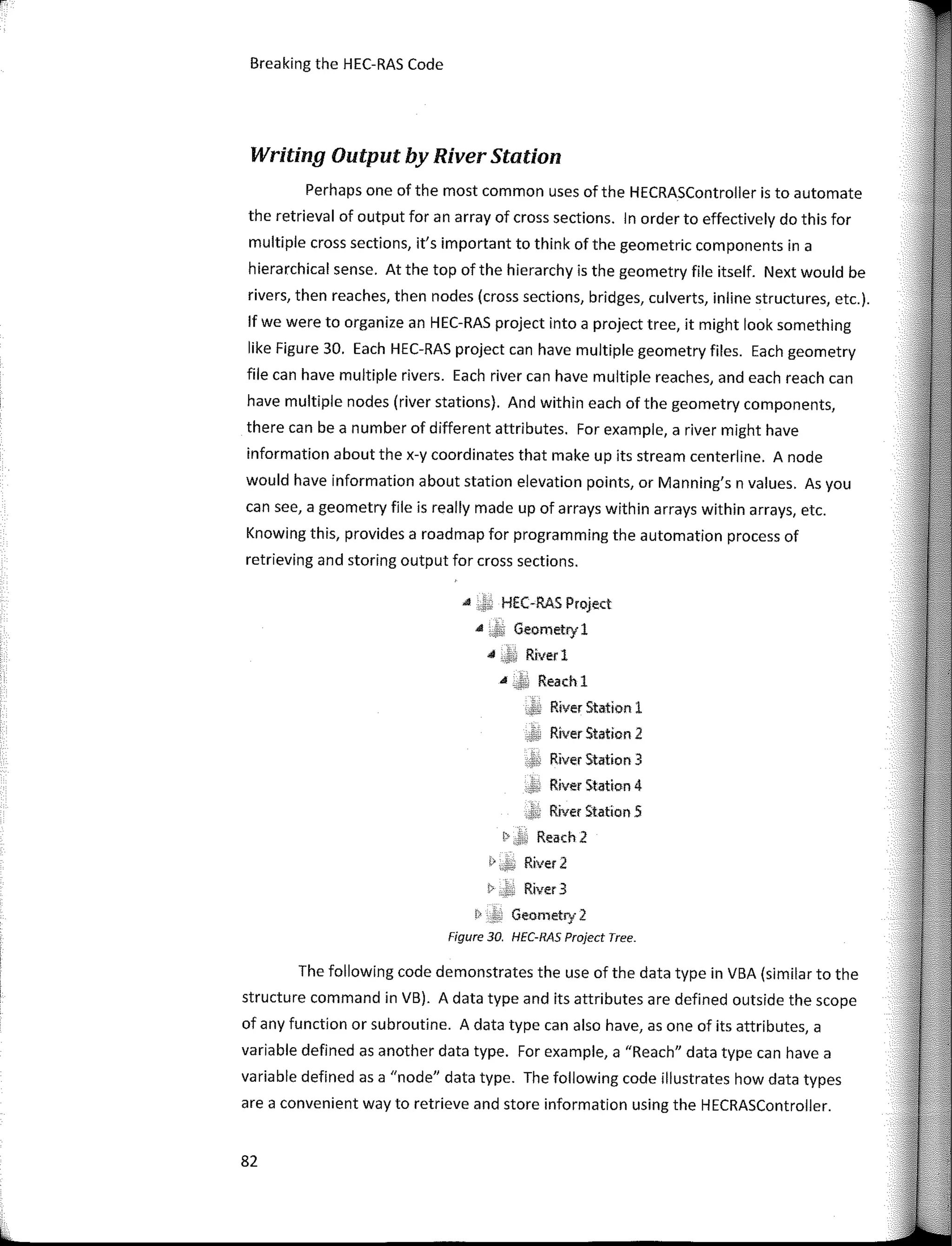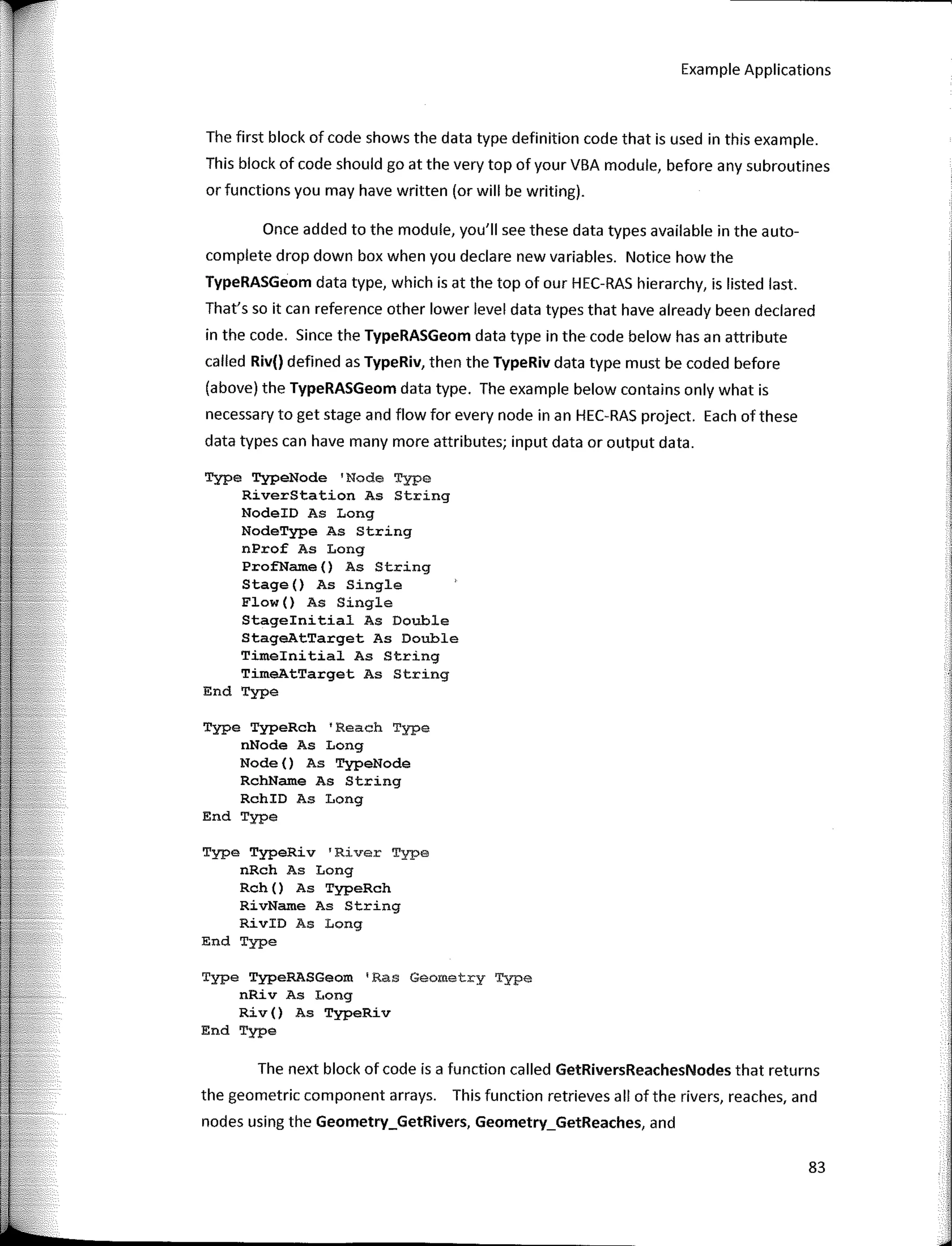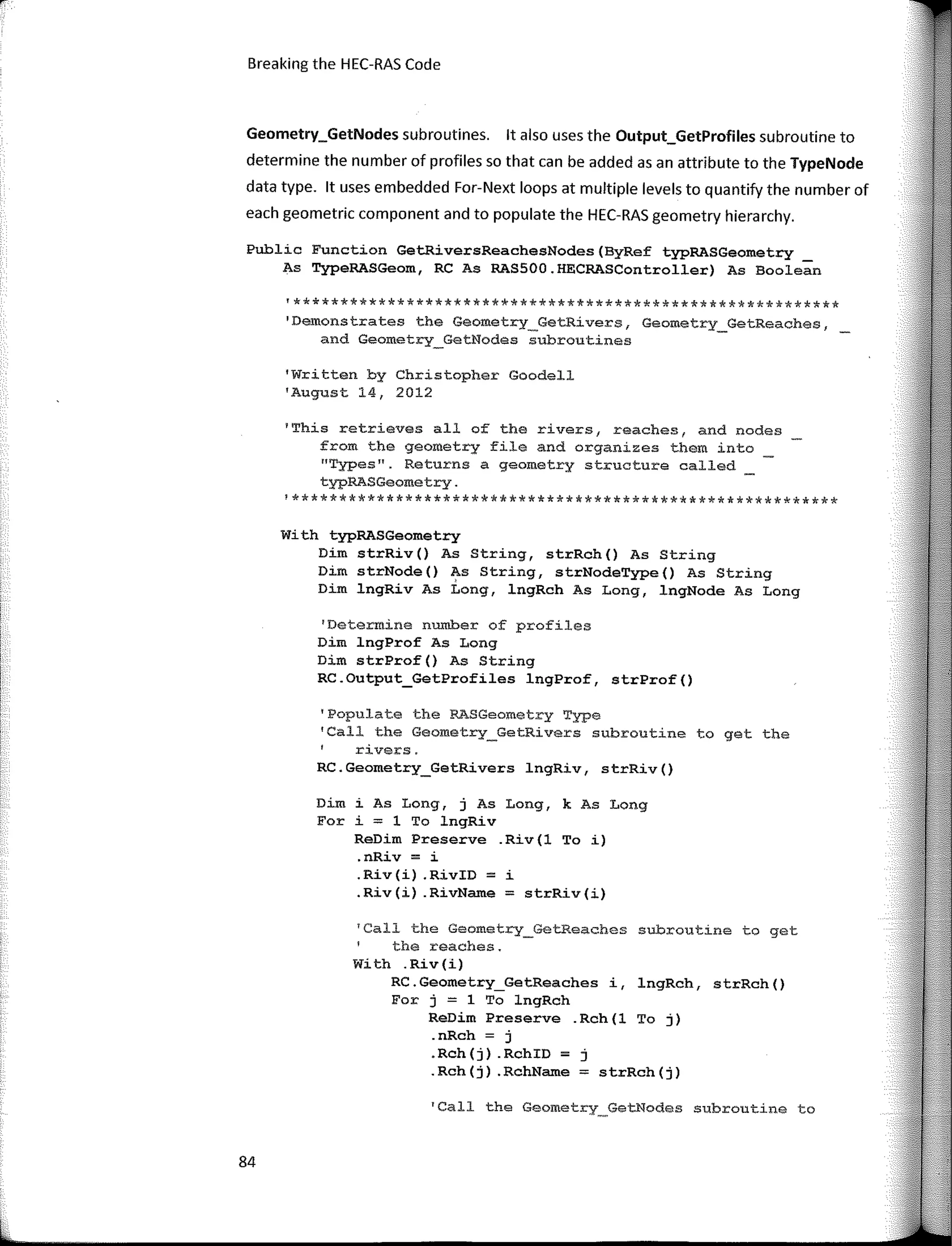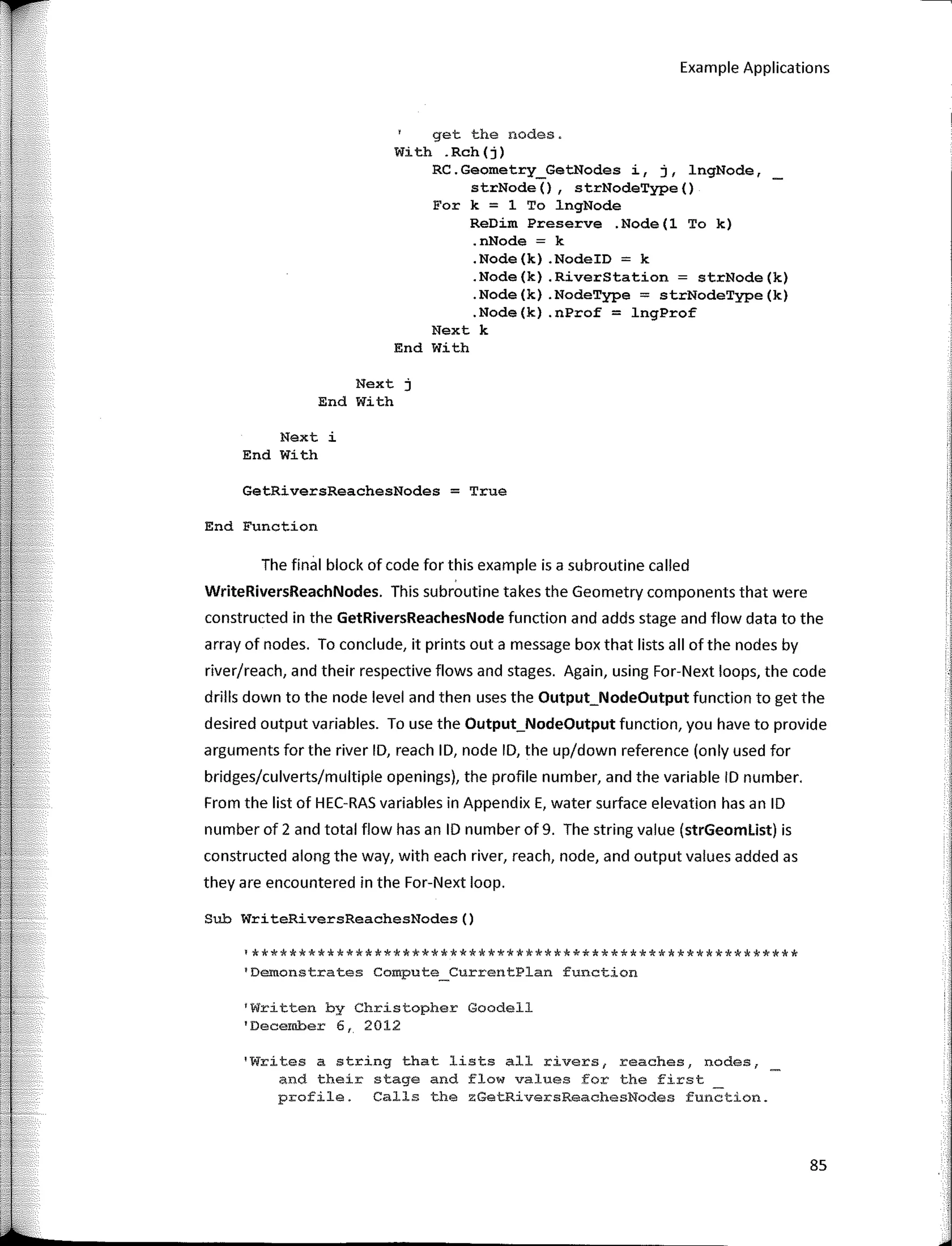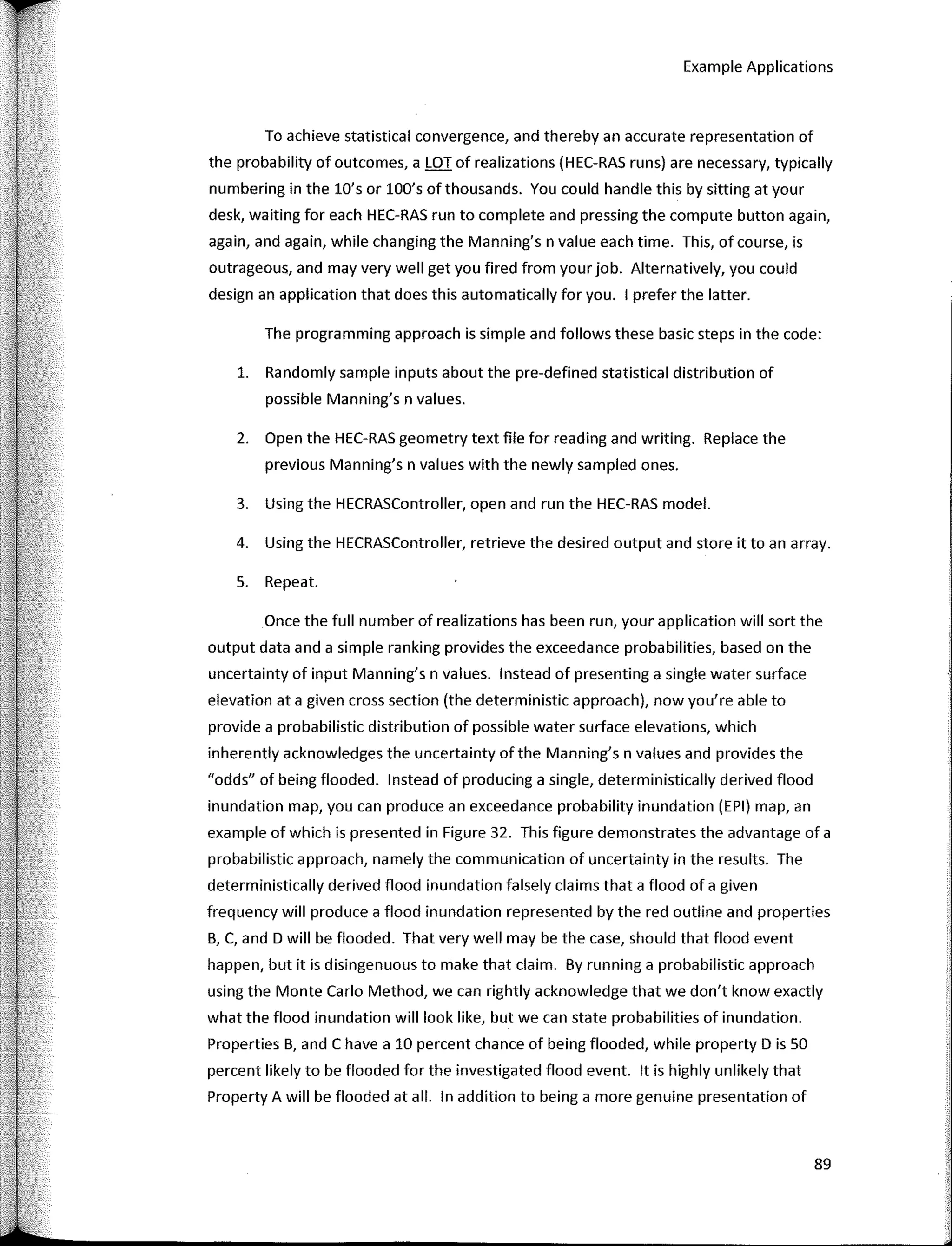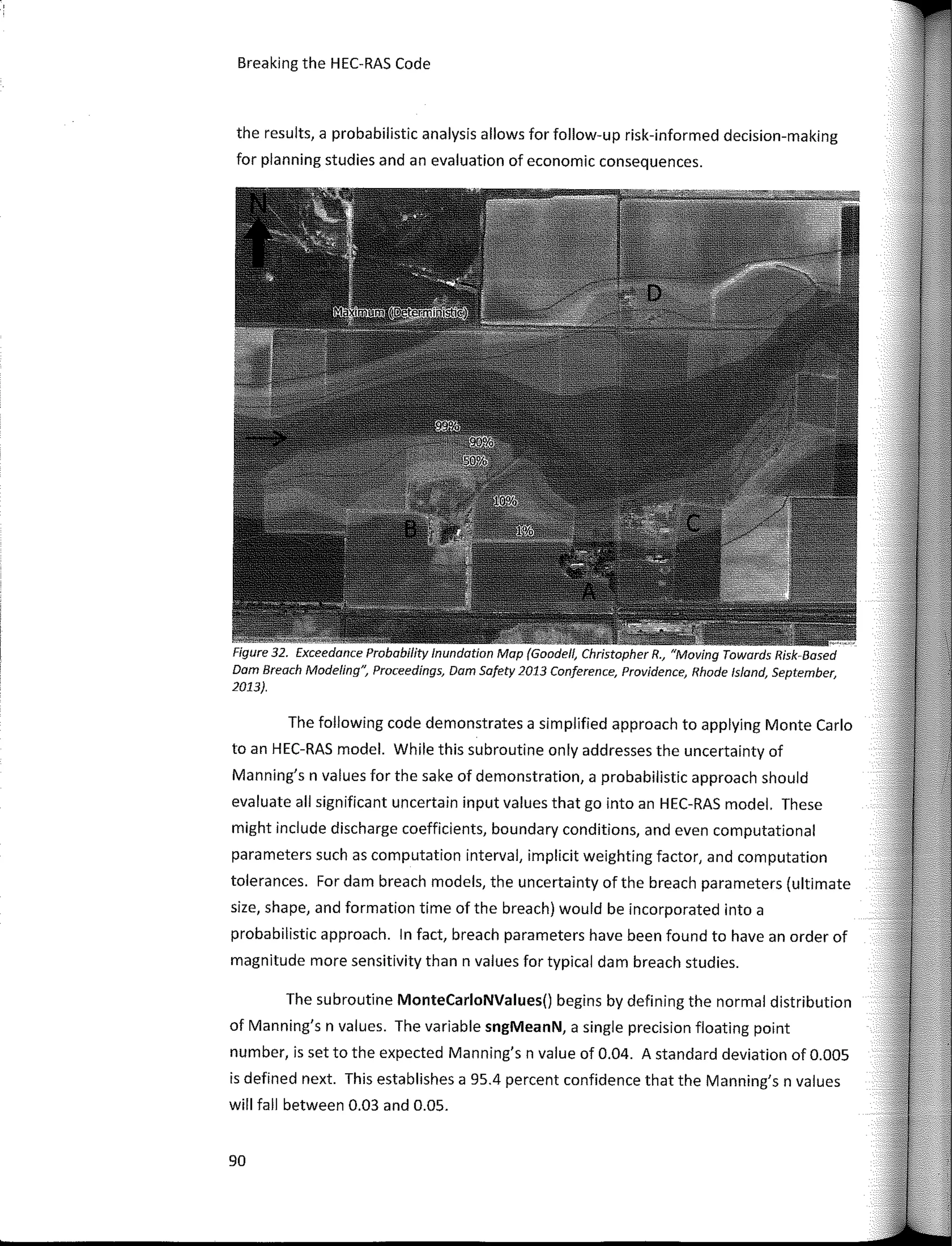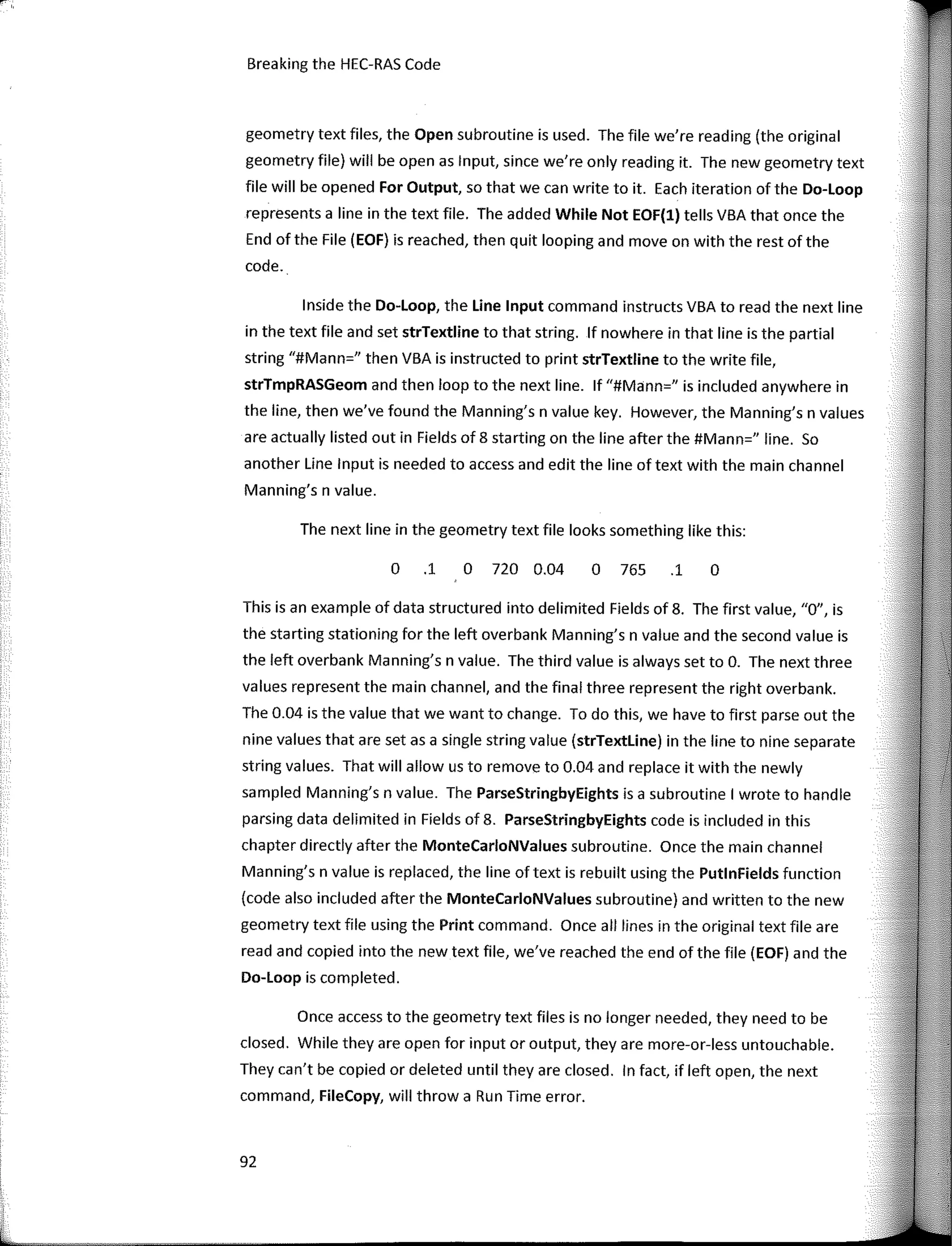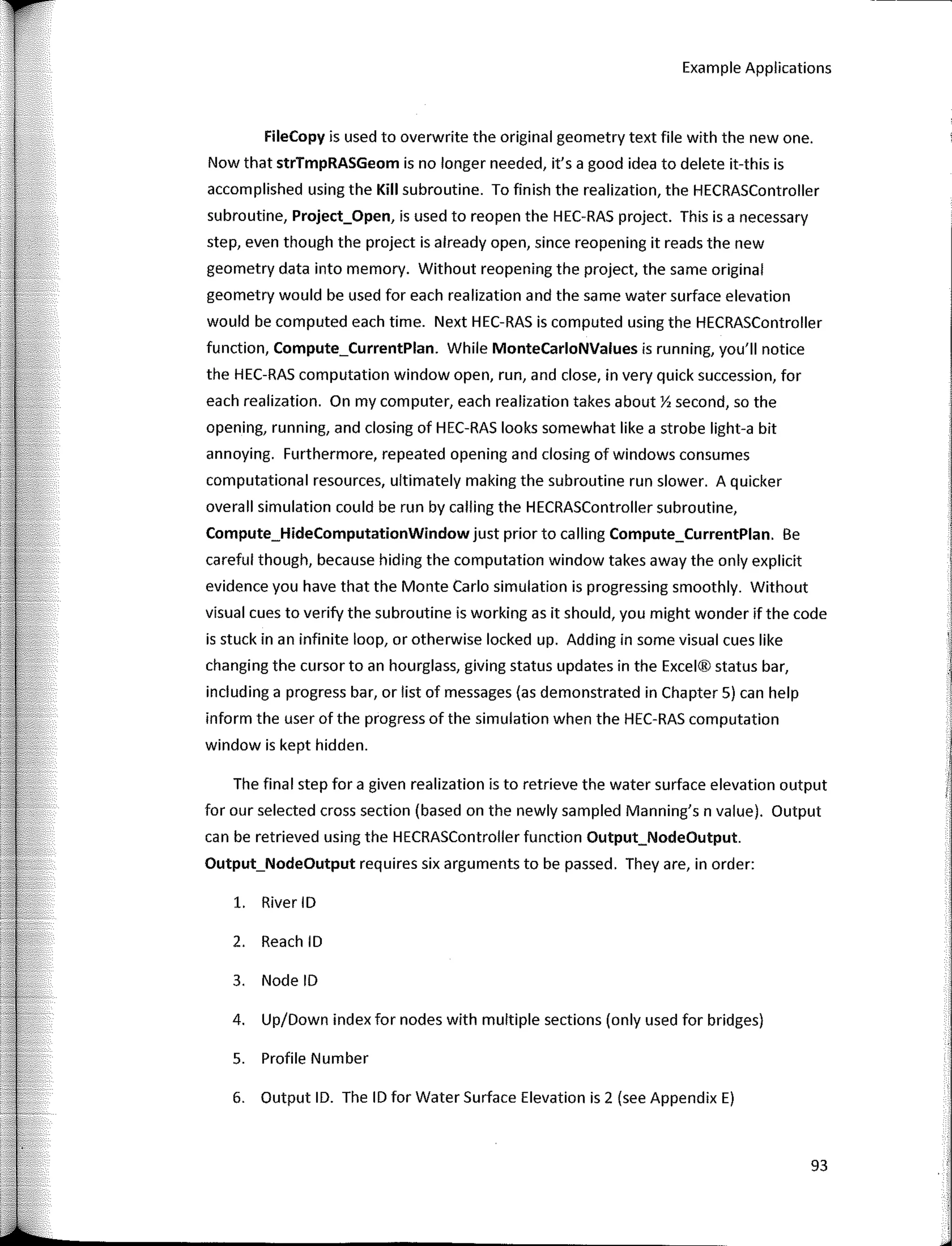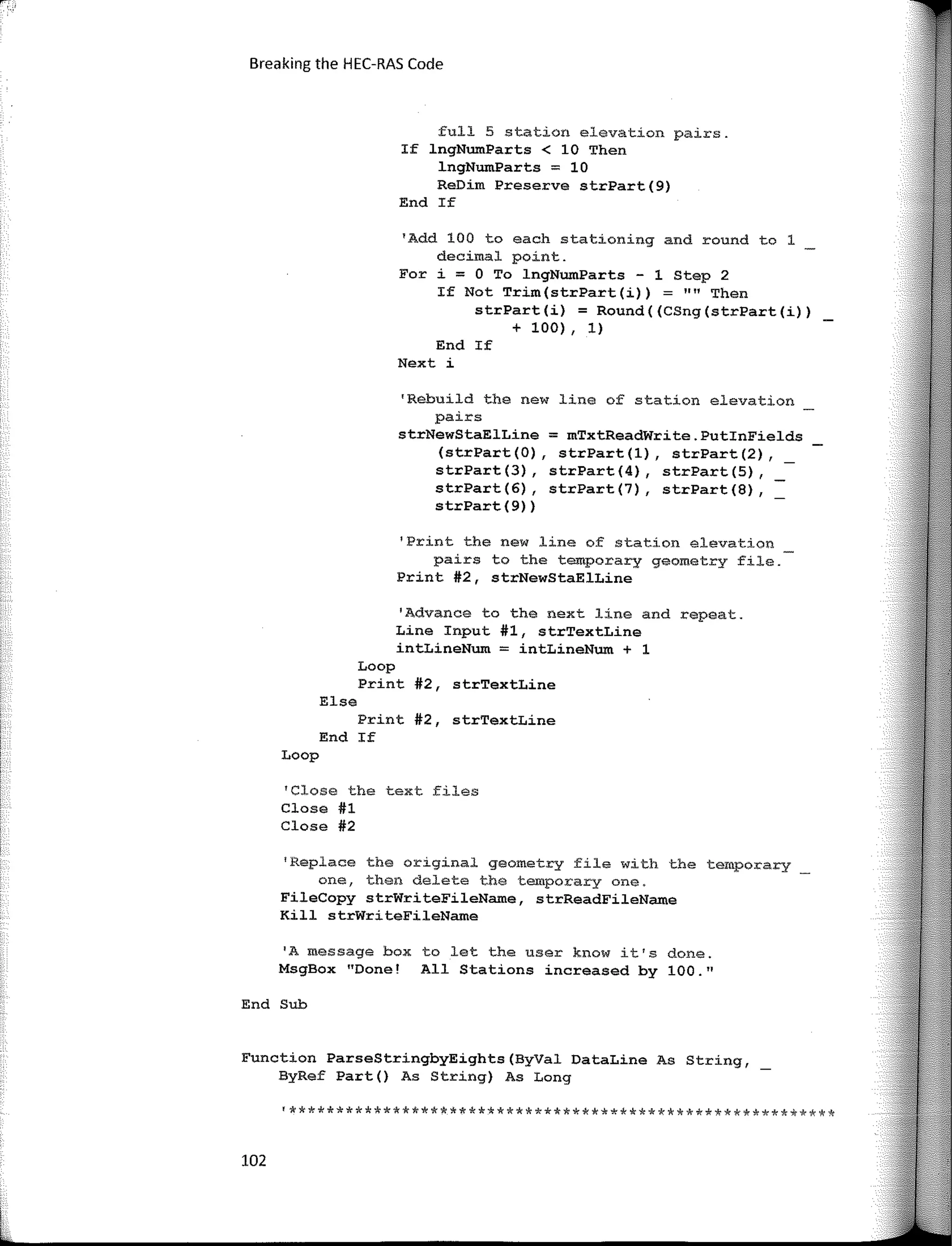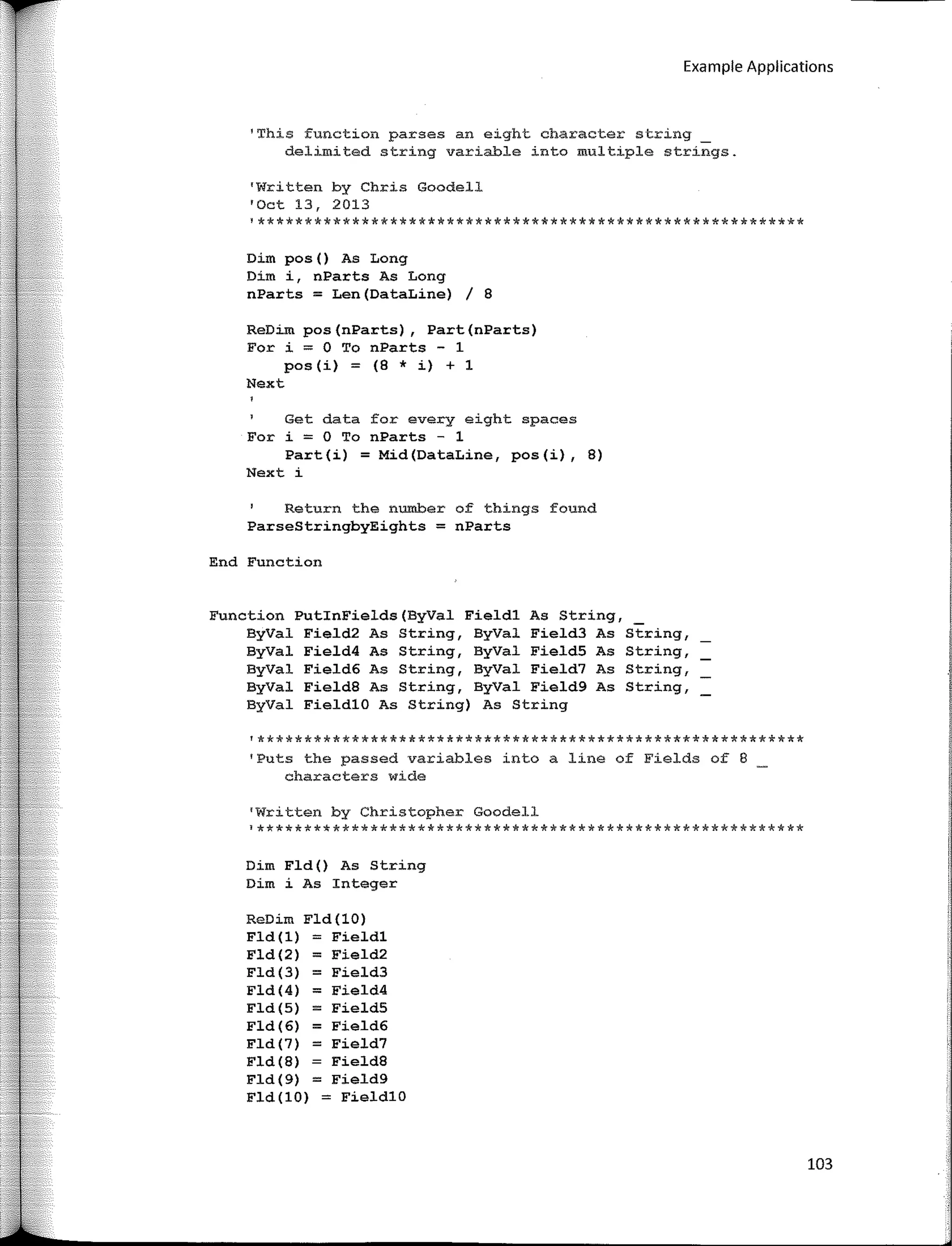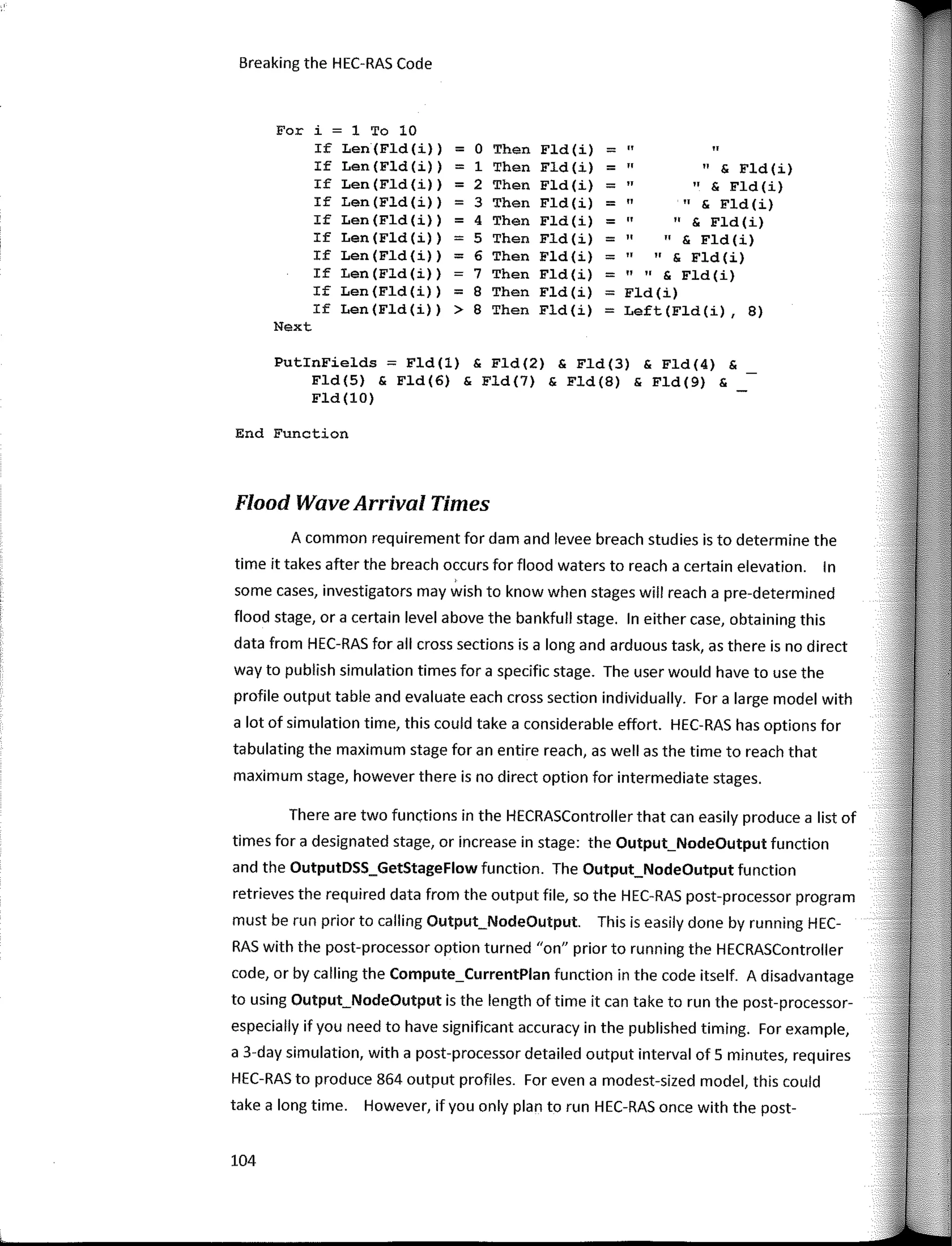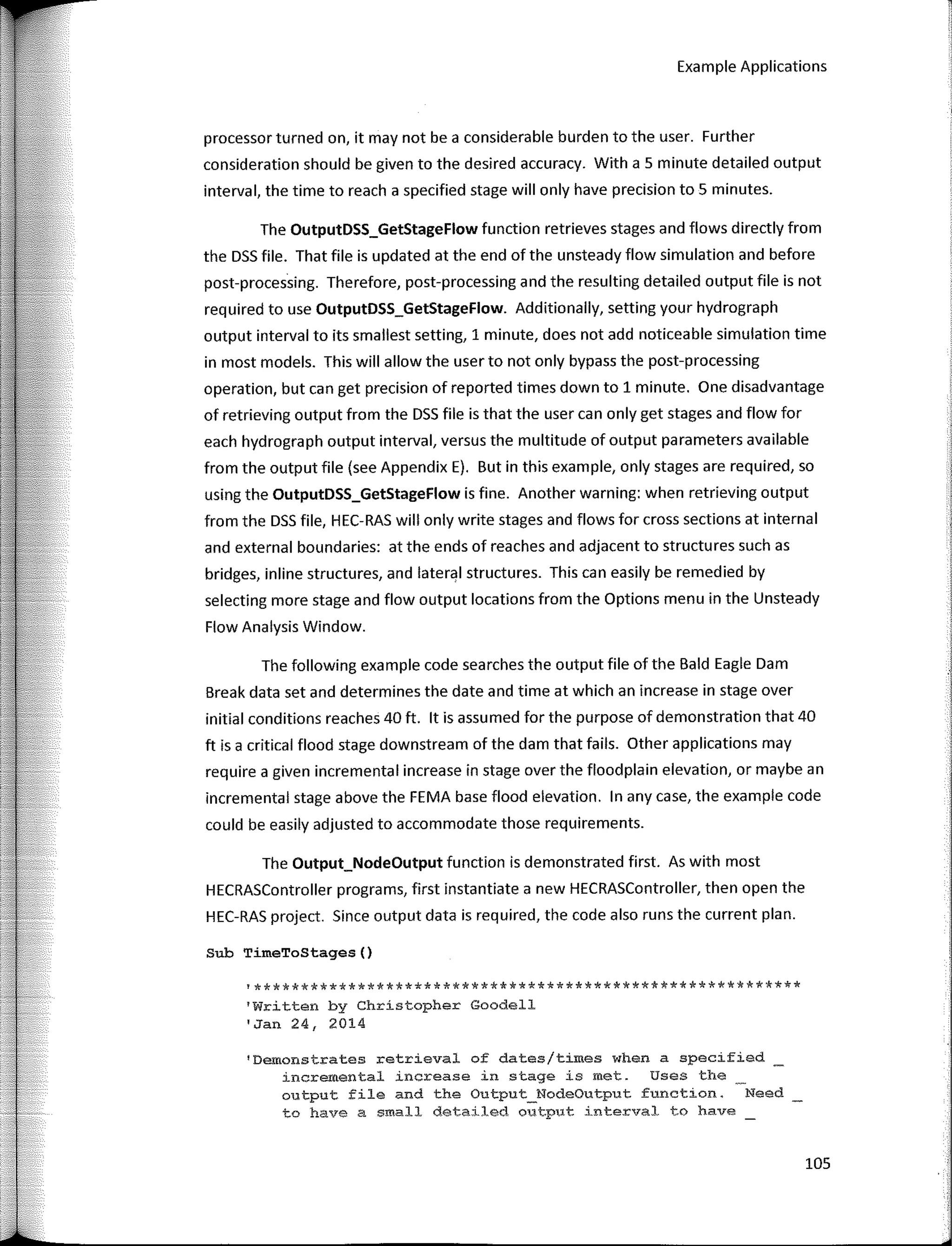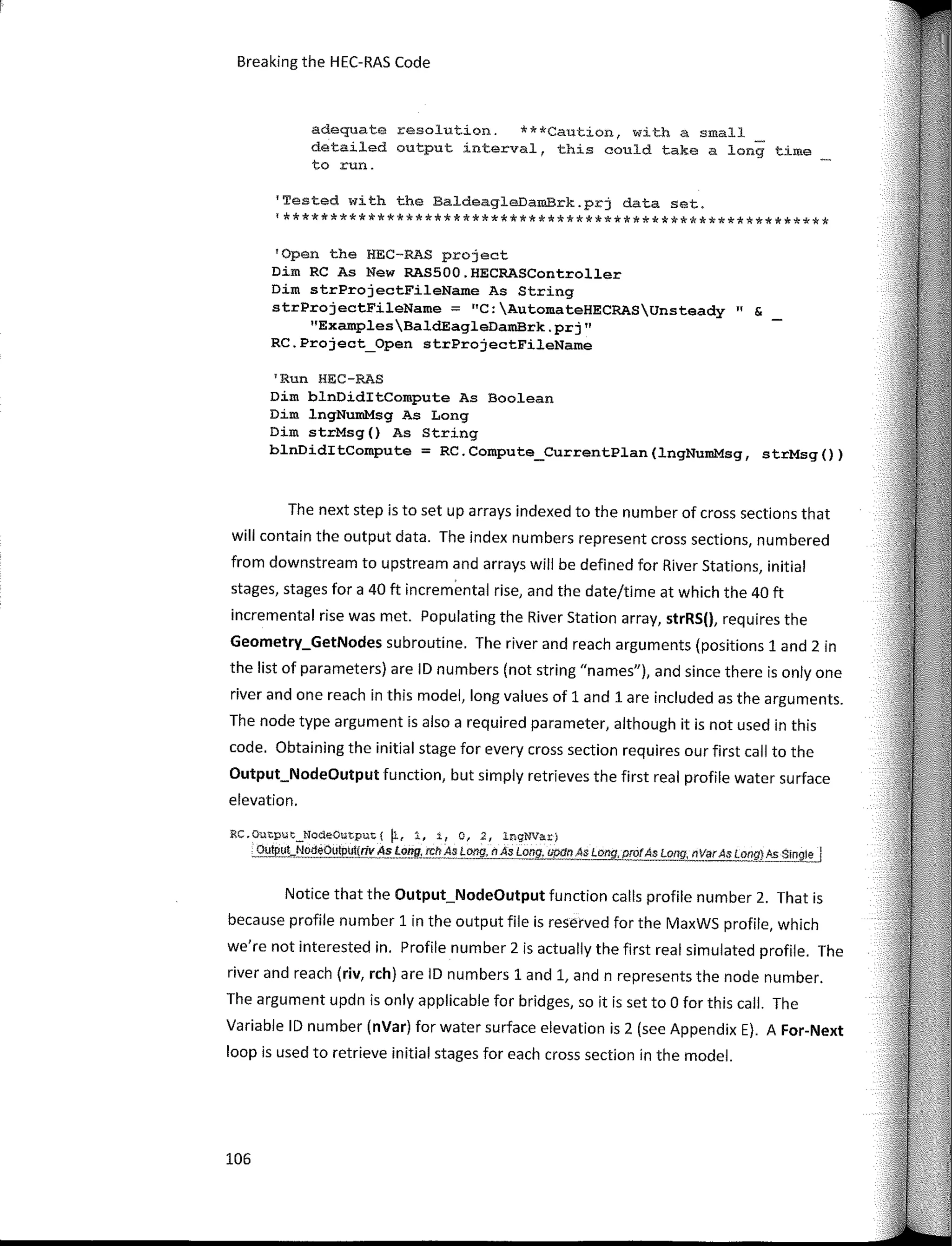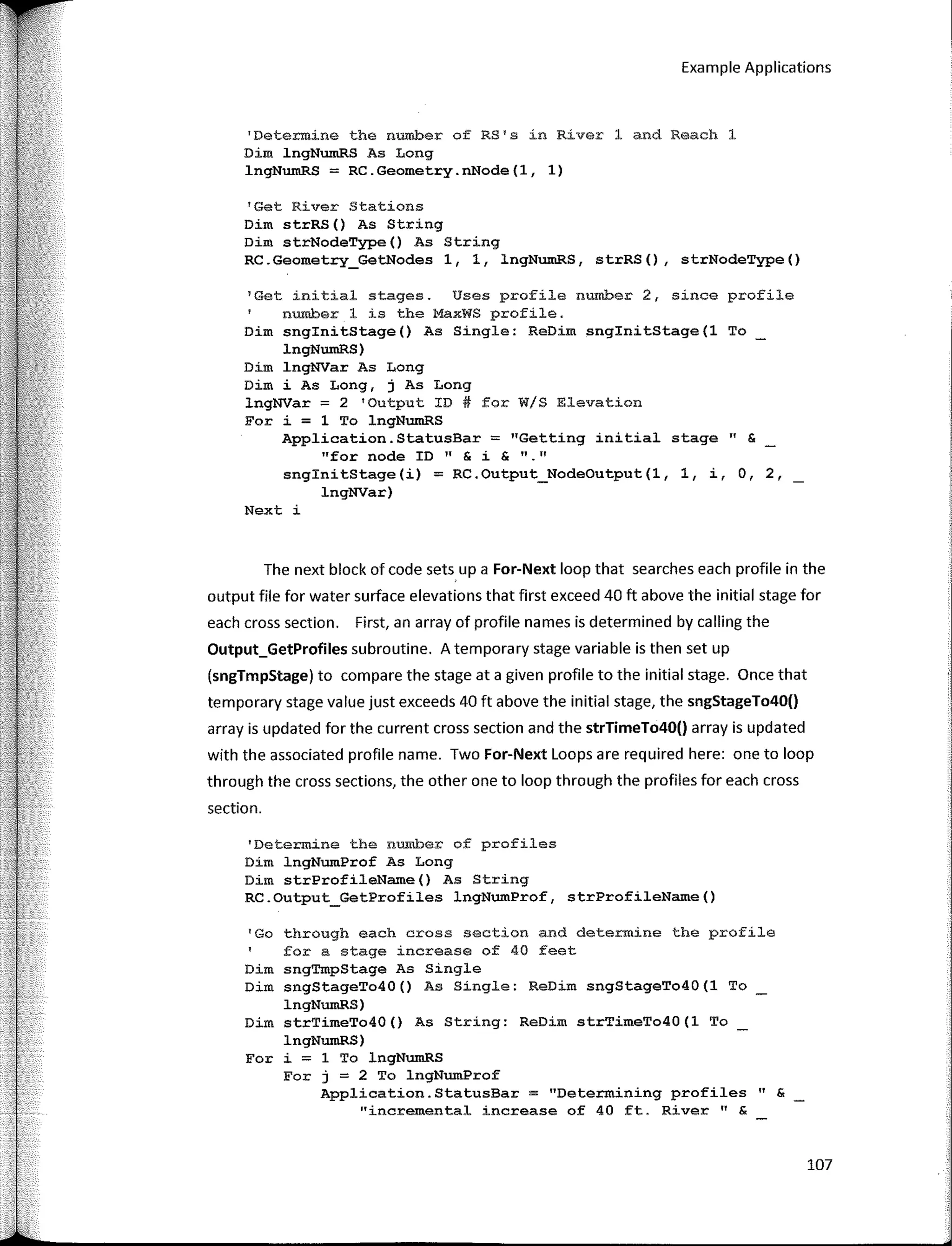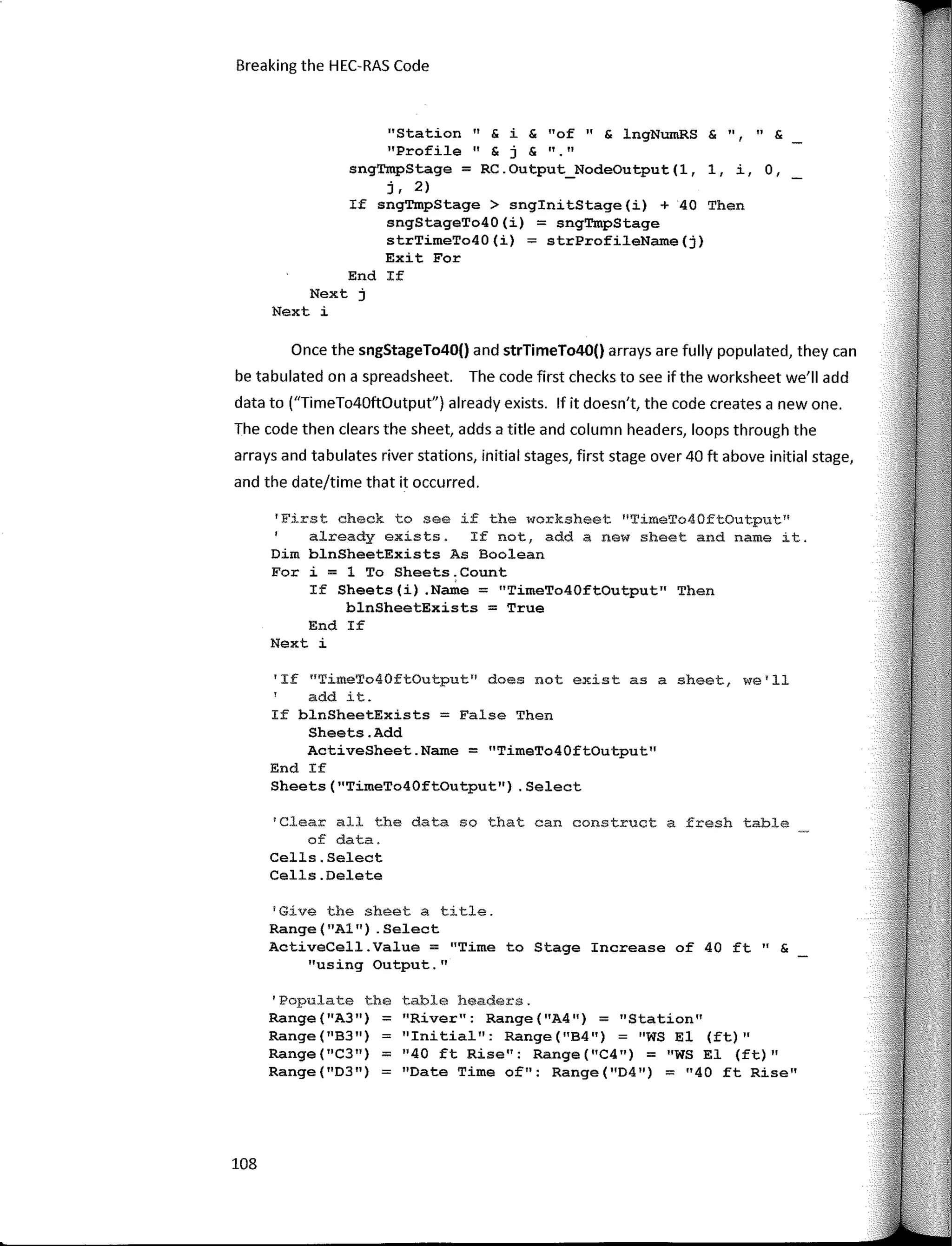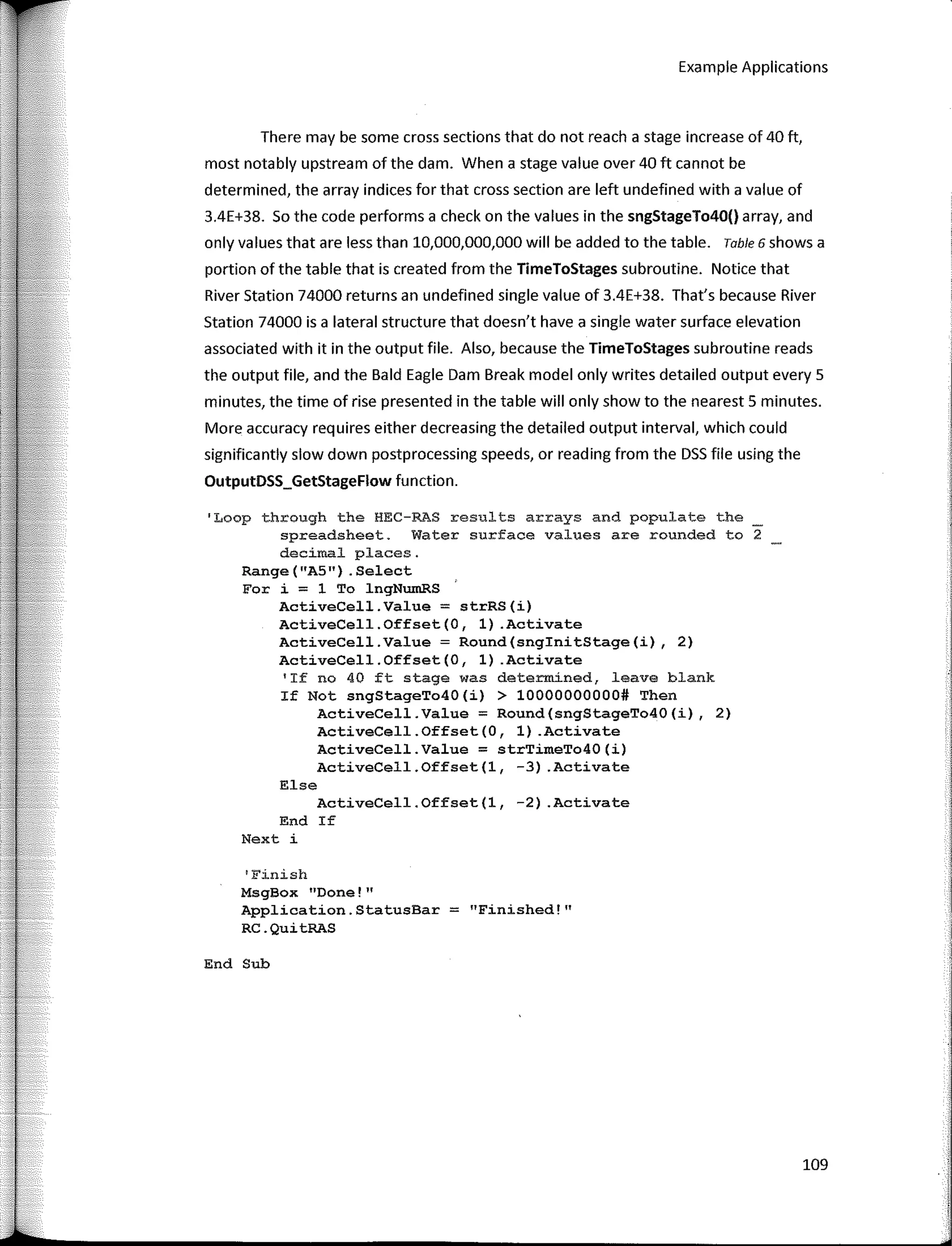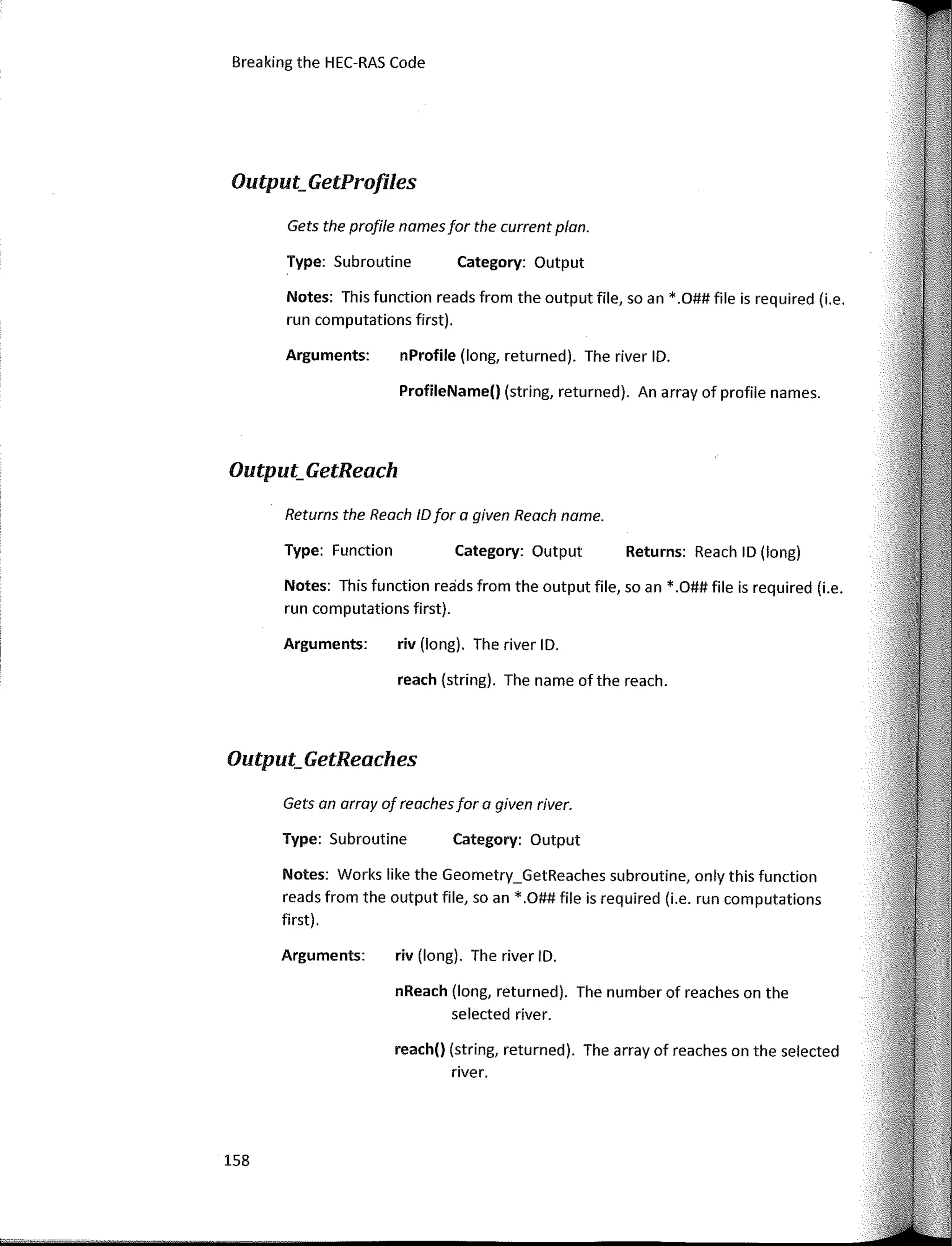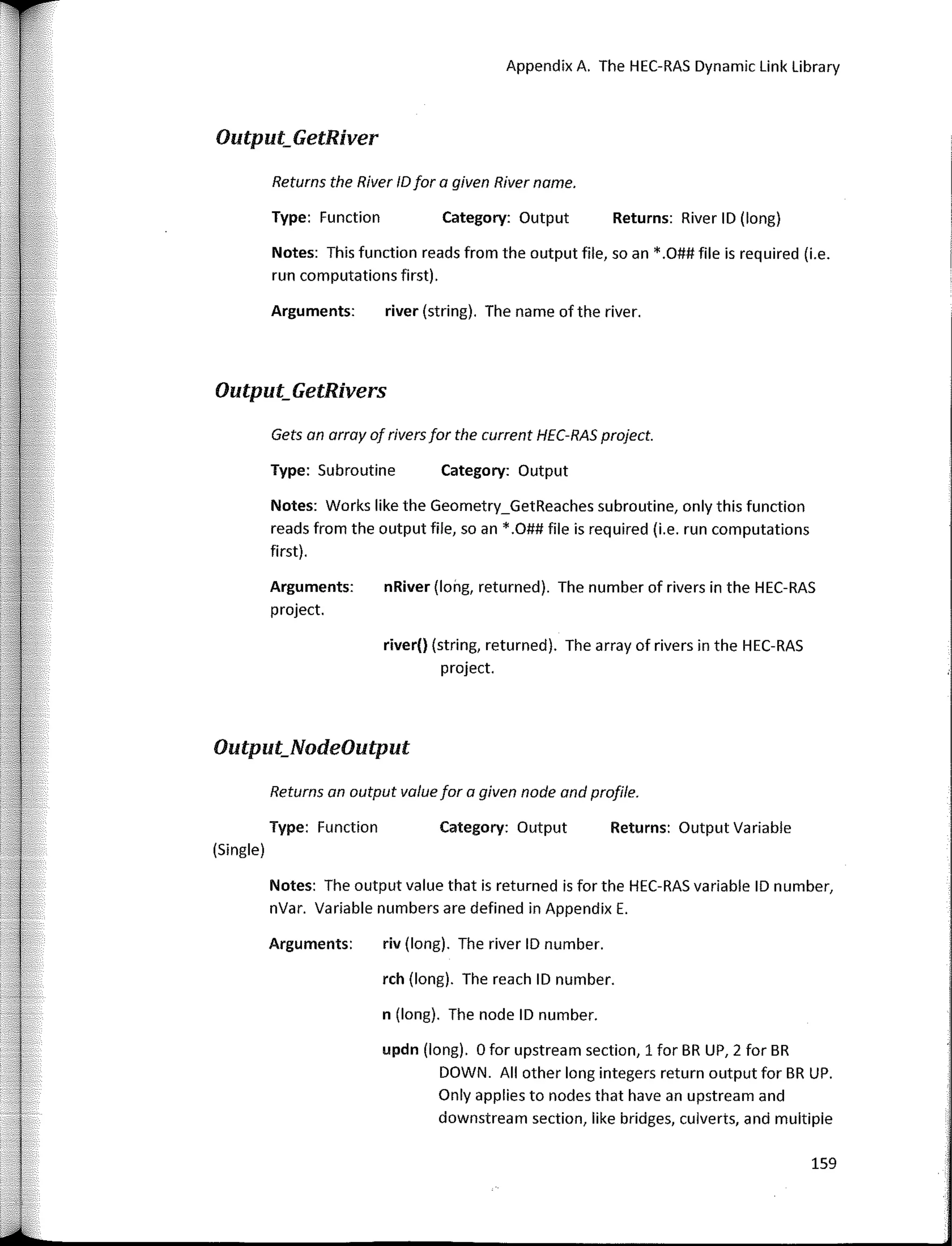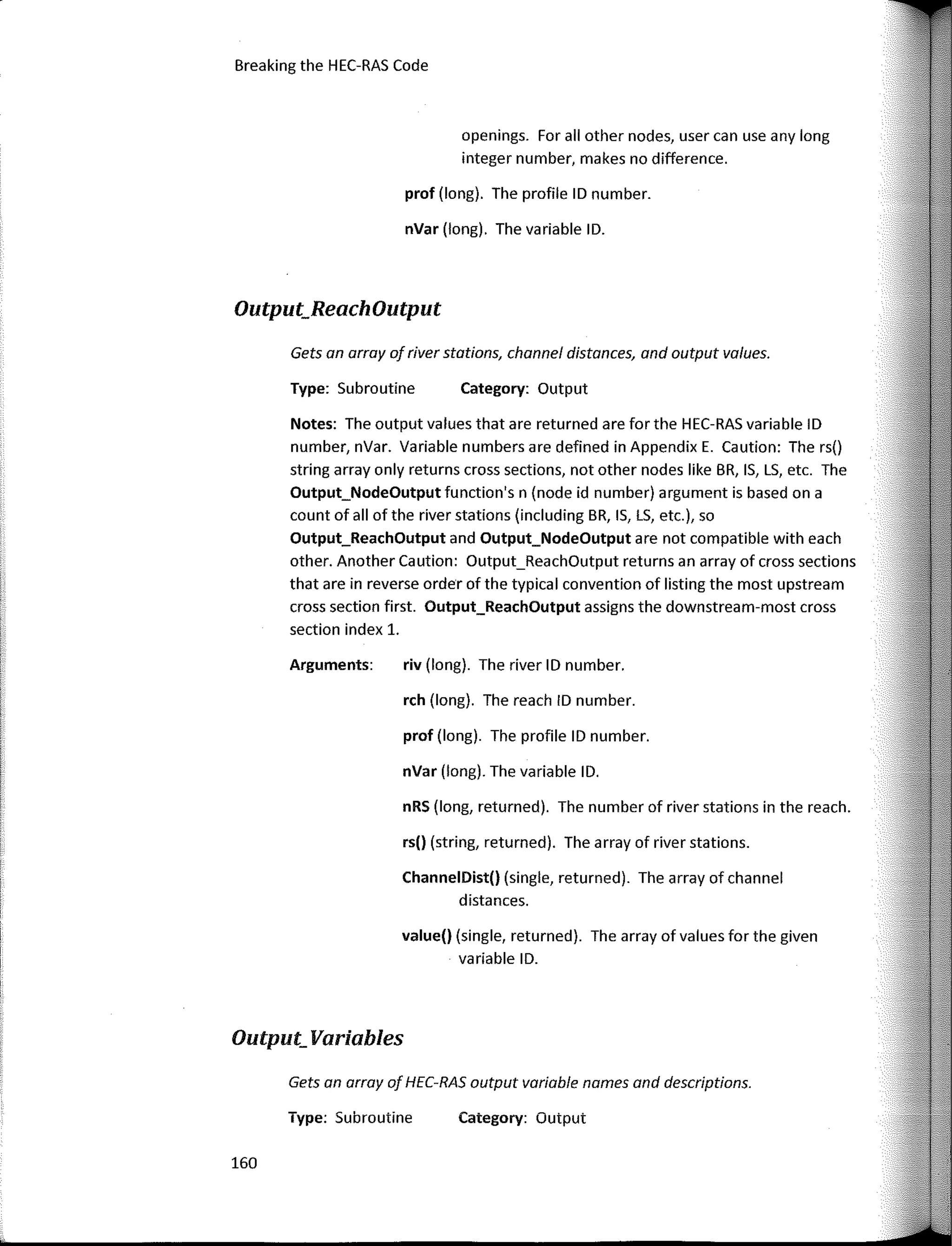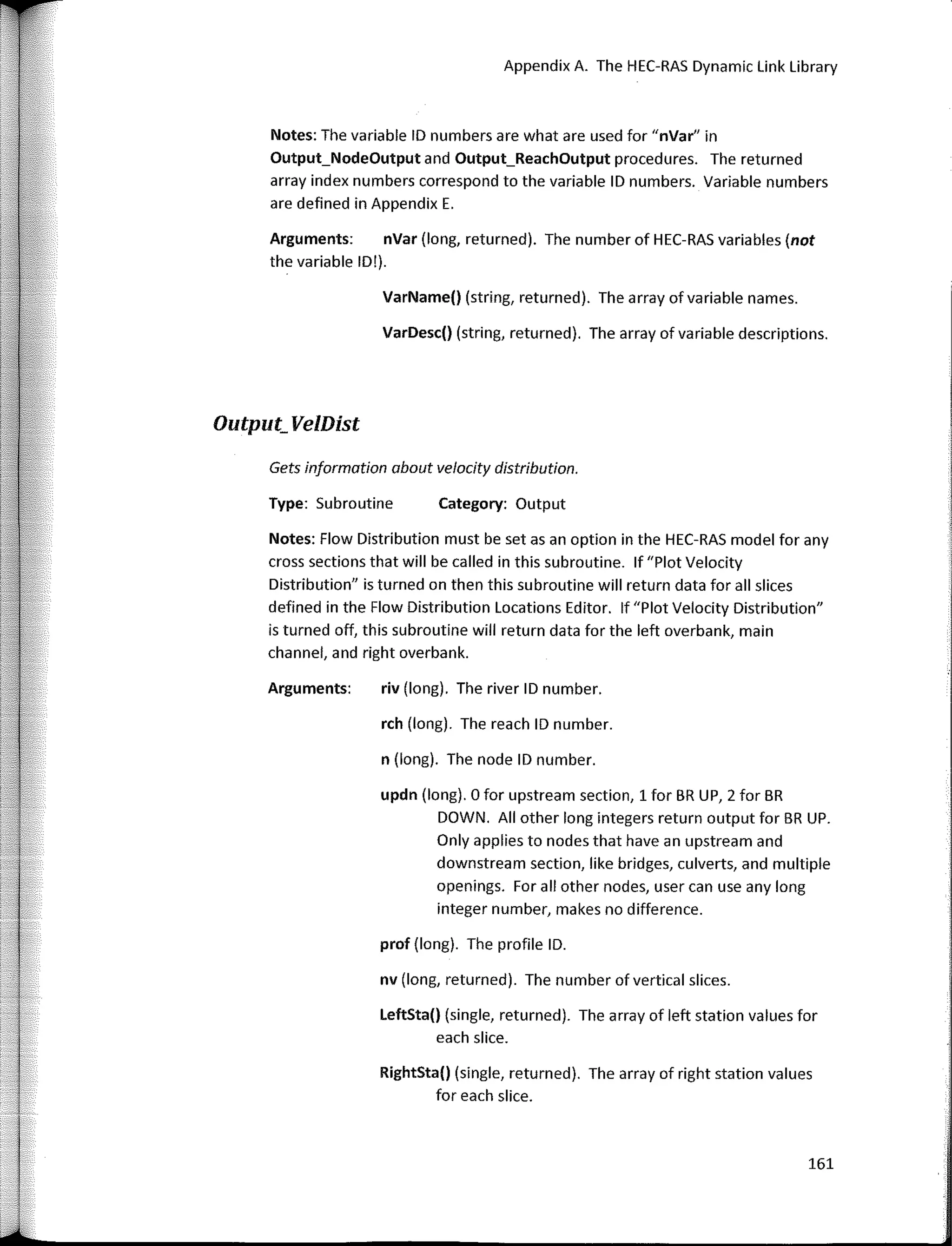

T  -
',)
Breaking the HEC-RAS Code
A User's Guide to Automating HEC-RAS
Breaking the HEC-RAS Code
A User's Guide to Automating HEC-RAS
First Edition
, Christopher Goodell, P.E., D.WRE
Portland OR
r
'
¡
1
!:
1
I'
'
Copyright© 2014 Christopher Goodell, P.E., D.WRE
Ali Rights Reserved
No part of this publication may be reproduced, distributed, ar transmitted in any formar by any means, including
photocopying, recording, or other electronic ar mechanical methods, without the prior written permission of the
publisher, except in the case of brief quotations embodied in critica! reviews and certain other noncommercial
uses permitted by copyright law. Far permission requests, email the author at www.therassolution.com.
Breaking the HEC-RAS Code: A User's Guide to Automating HEC-RAS
ISBN: 978-0-9908918-0-2
First Edition - Paperback
Published in the United States of America by:
hZls
Portland, Oregon
www.h21s.com
To arder a copy of this book, please visit:
www.therassolution.com
Sample VBA code far ali of the HECRAS Procedures, ali code presented in this book, a long with numerous example
applications can be ordered in electronic form as a single Microsoft® Excel® workbook from The RAS Solution,
www.therassolution.com
Disclaimer: No information, written or implied in this book ar any resource recommended should be considered
advice far any individual ar company, but constitutes a general education regarding automation of the software
program HEC-RAS. Neither h21s, nor the author, Christopher Goodell, nor any affiliated entity accepts liability far
anyone ar anything that uses information presented in this book.
Trademark notice: This book uses various trademarked names within its text. In the interest oftrademark holders,
this book cites their ownership of the trademarks, with no intention of infringement.
Software information: This book discusses strategies and techniques for automating the software program HEC­
RAS. HEC-RAS is developed and distributed free-of-charge by the United States Army Corps of Engineers, Hydrologic
Engineering Center in Davis, California. HEC-RAS and its supporting manuals may be downloaded from the
Hydrologic Engineering Center's website, www.hec.usace.army.mil.
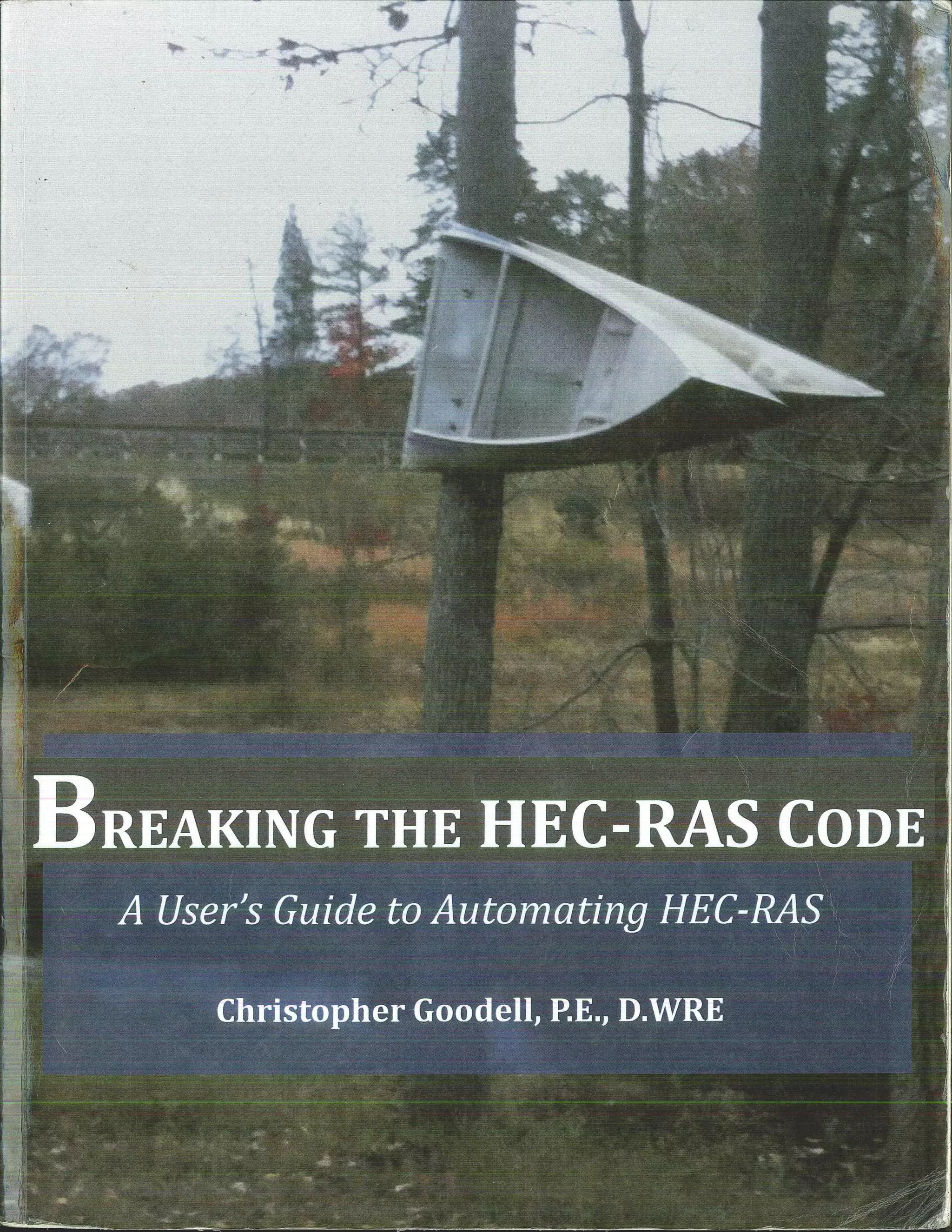
Cover Art: The photograph on the cover was taken by the author during a field visit in New Jersey, looking far high
water marks and evidence of a dam breach flood. The canee wrapped around a tree not only serves as a valuable
high water mark far calibration, but also demonstrates the enormity ofthe flood that occurred.
FOR WENDY, MAIAH, ABBY, ANO KATIE
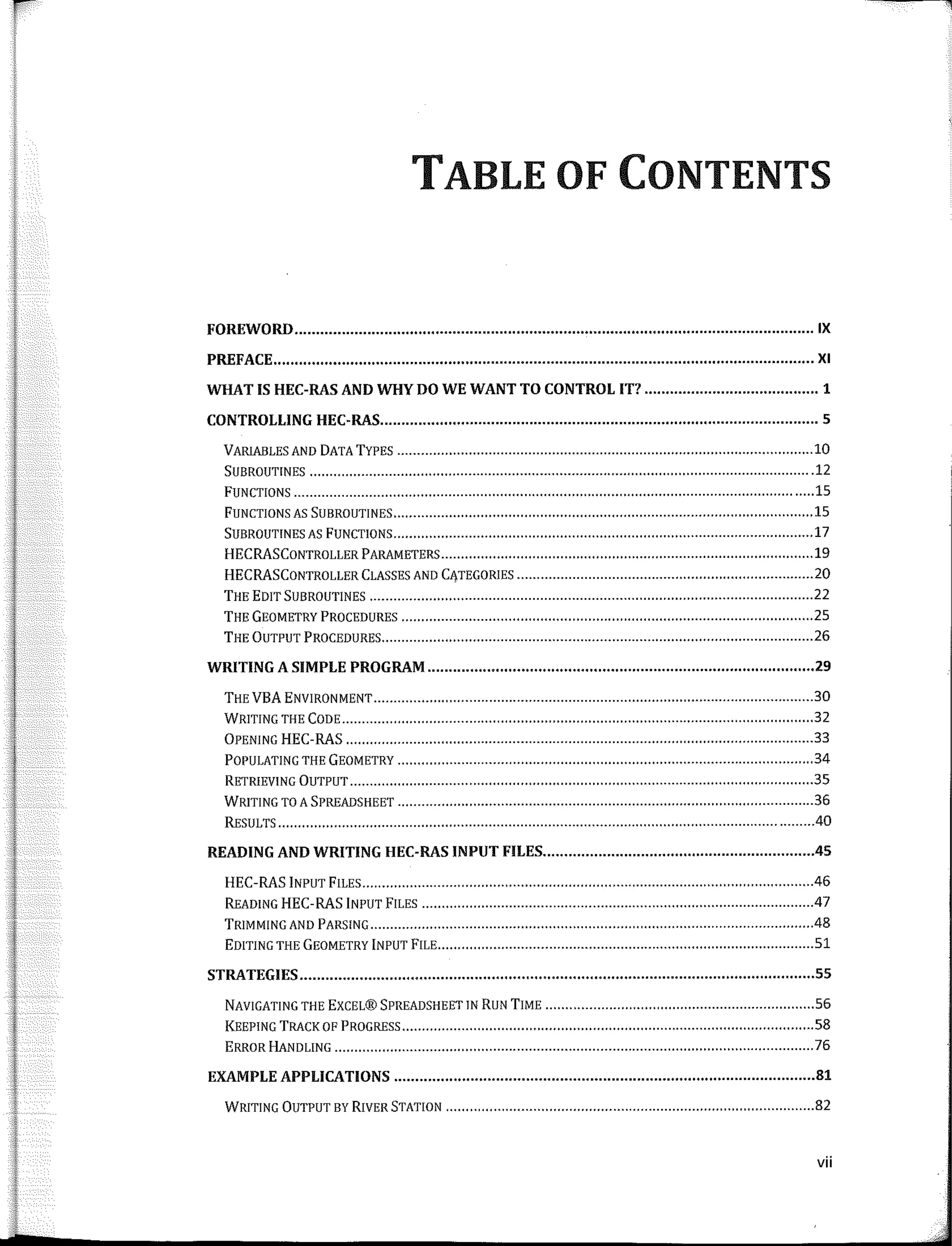
TABLE OF CONTENTS
FOREWORD IX
PREFACE XI
WHATIS HEC-RASANDWHYDOWEWANTTOCONTROL IT? 1
CONTROLLING HEC-RAS 5
VARIABLES ANO DATATYPES ......................................................................•.••............•.••..•............ 10
SUBROUTINES ...............................................................•............•..•......•........................................ 12
FUNCTIONS .........................................................•..........•..........•••.......•......................................... 15
FUNCTIONS AS SUBROUTINES ..•.•....................................................................................••............... 15
SUBROUTINES AS FUNCTIONS ..•••..................................................................................................... 17
HECRASCONTROLLER PARAMETERS ..............••.............••........•..........••.......................................... 19
HECRASCONTROLLER CLASSES ANO CATEGORIES ........................................••..••••••....•........•........... 20
THE EDIT SUBROUTINES 22
THE GEOMETRY PROCEDURES .............................•••.........••..•.......•.........•........................................ 25
THE ÜUTPUT PROCEDURES 26
WRITING A SIMPLE PROGRAM 29
THE VEA ENVIRONMENT ............•..................................................................••.............................. 30
WRITING THE CODE ........................................•..•....................................................................•.•.••• 32
ÜPENING HEC-RAS ...........•..................••...................................................................................... 33
POPULATING THE GEOMETRY ........•..............................................................•....•.................••......... 34
RETRIEVING ÜUTPUT ..........•......................•.........•..••....•...............................................................• 35
WRITING TO A SPREADSHEET .................•...•••................................................••.............................. .36
RESULTS .......•.............................................................................................................................. .40
READING AND WRITING HEC-RAS INPUT FILES 45
HEC-RAS INPUT FILES .....•...............................•..................................................••..............•........ .46
READING HEC-RAS INPUT FILES .47
TRIMMING ANO PARSING ..................................................•.........•......•........................................... .48
EDITING THE GEOMETRY INPUT FILE ..............•................................................................................ 51
STRATEGIES 55
NAVIGATING THE EXCEL® SPREADSHEET IN RUN TIME .........•.............•.••......................................... 56
KEEPING TRACK OF PROGRESS ..............................•..•..•••...........................................................•..•.. 58
ERROR HANDLING ...............................•......................................................................................... 76
EXAMPLE APPLICATIONS 81
WRITING ÜUTPUT BY RIVER STATION .........................................................................•....••............. 82
vii
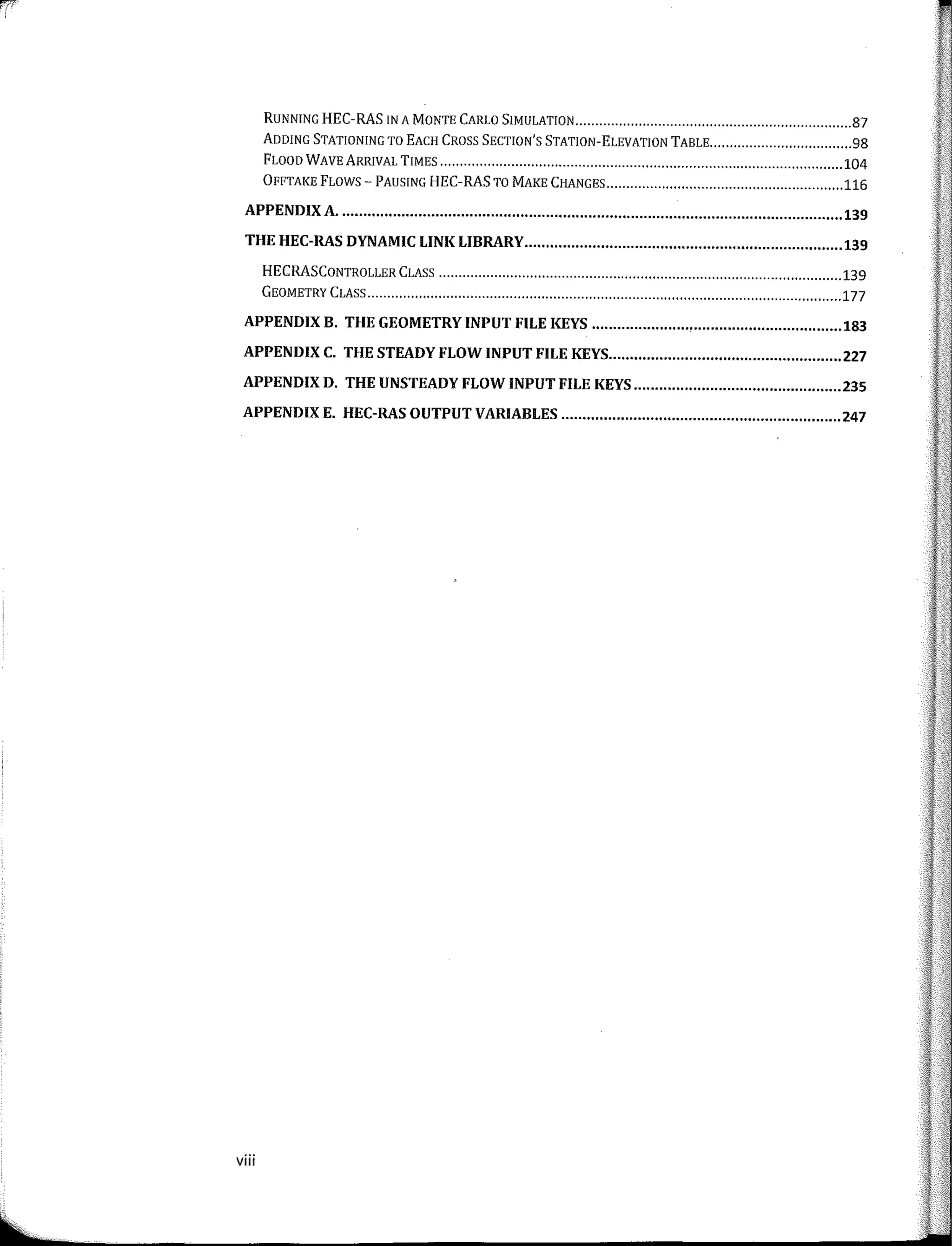
RUNNING HEC-RAS IN A MONTE CARLO S!MULATION 87
ADDING STATIONING TO EACH CROSS SECTION'S STATION-ELEVATION TABLE 98
FLOODWAVEARRIVAL TIMES 104
ÜFFTAKE FLOWS-PAUSING HEC-RASTO MAKE CHANGES 116
APPENDIX A•.•.•.•.•...•.•..•..•.•.•.•.•.•...•...•.........................•.•..............•.•.•.•.•.........•.•.•.•...•.•.•.•.•. 139
THE HEC-RAS DYNAMIC LINK LIBRARY.•.•...•.•...•.•.•.•.......•.•...•.•...•...•.•.•...•.................•..... 139
HECRASCONTROLLER CLASS 139
GEOMETRY CLASS 177
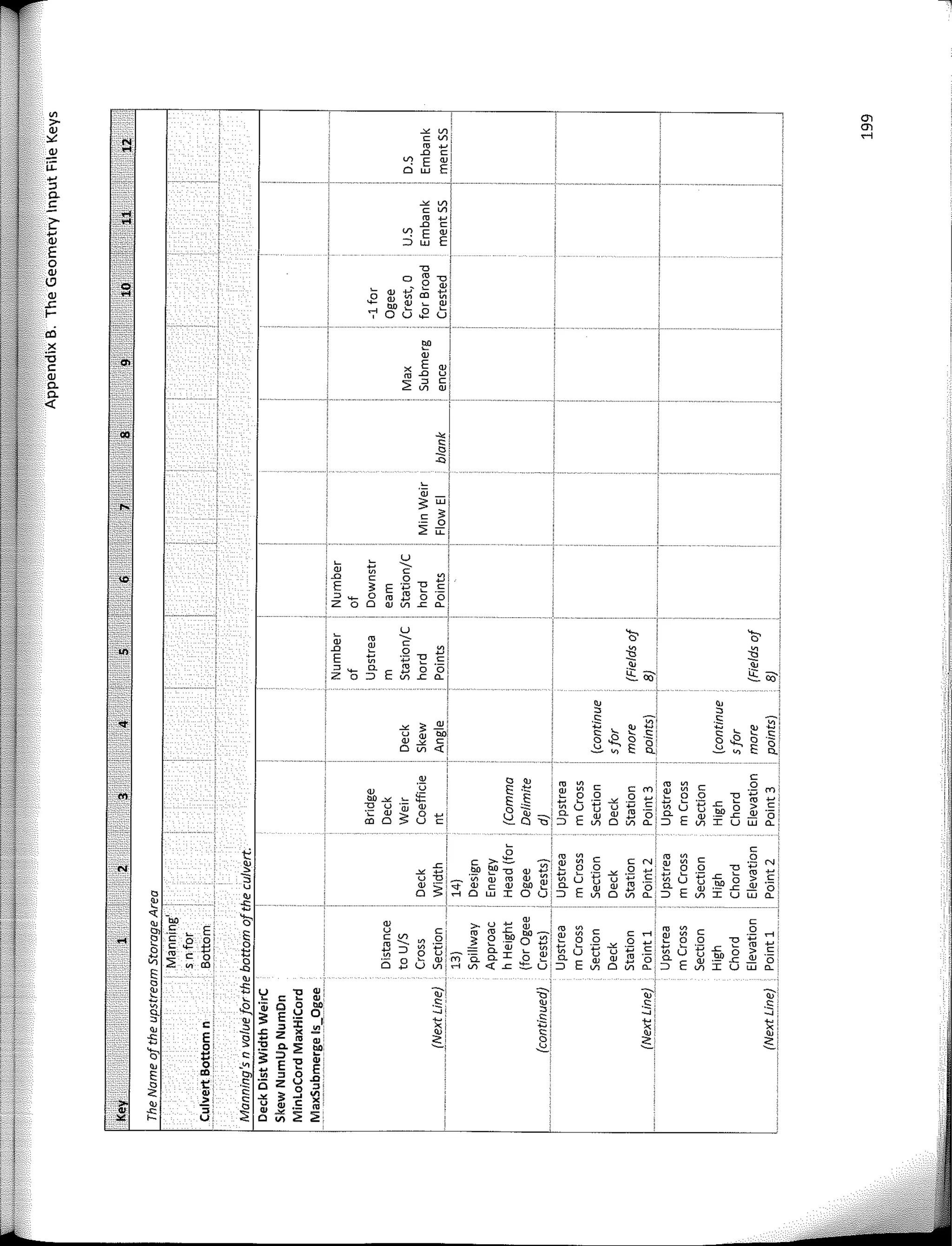
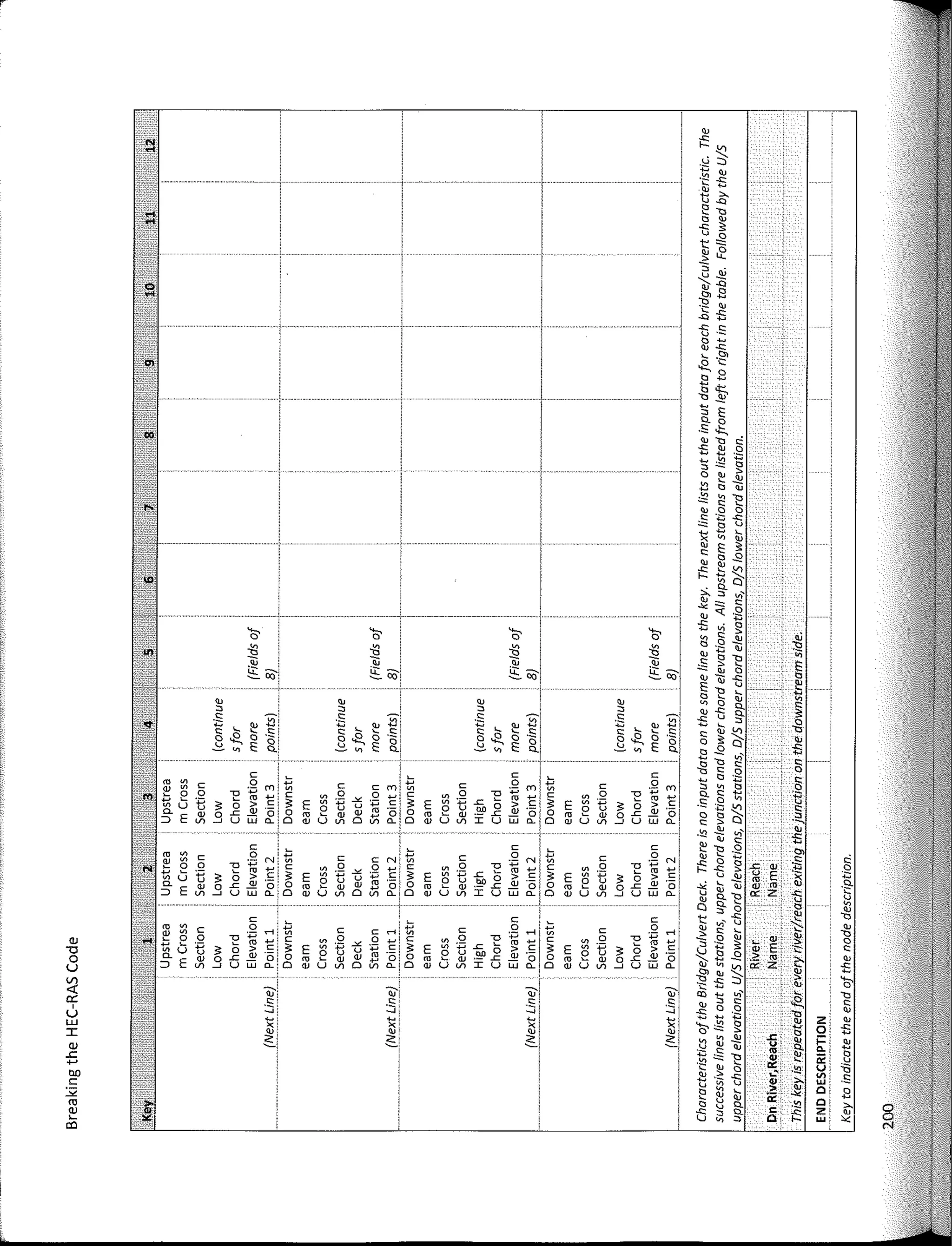
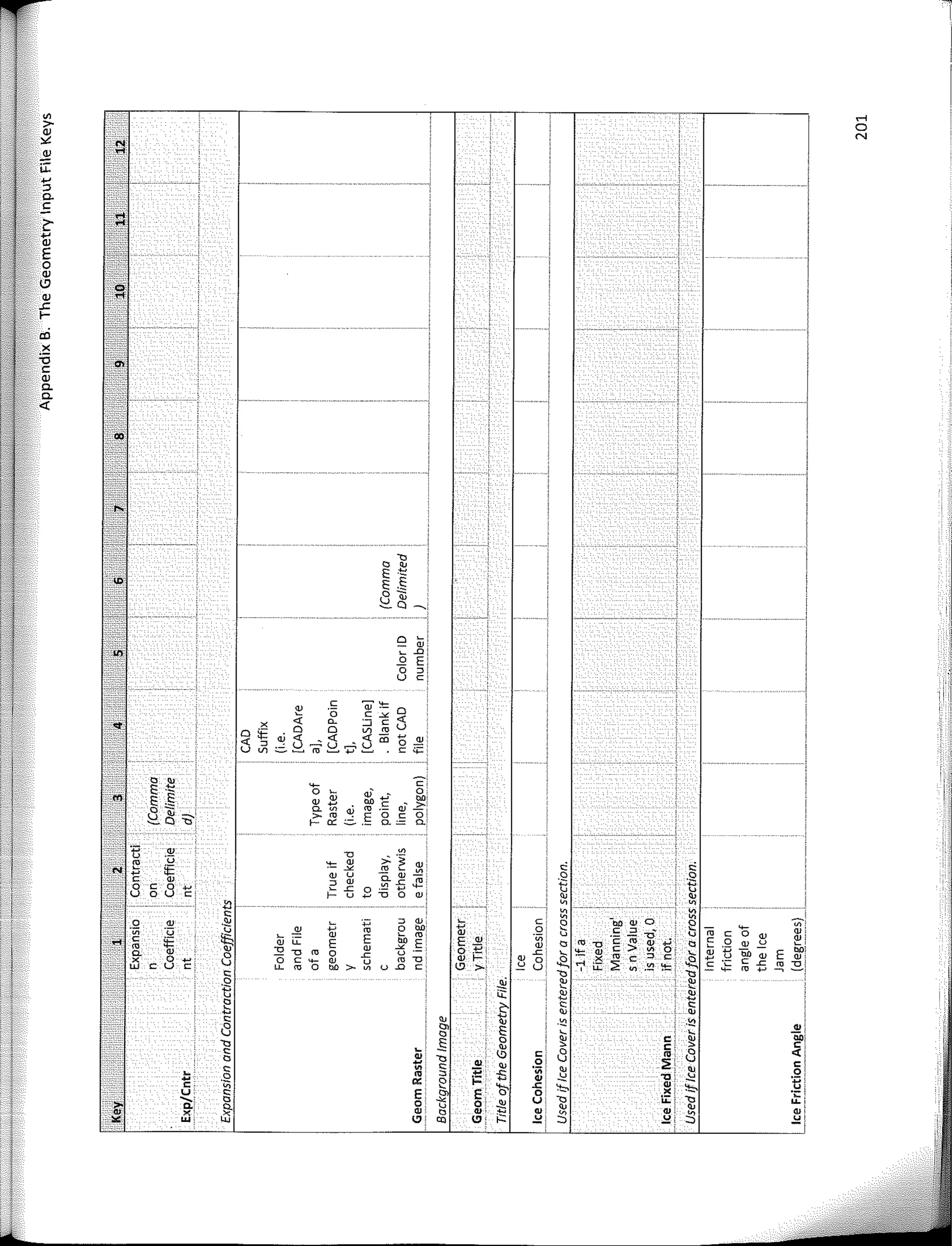
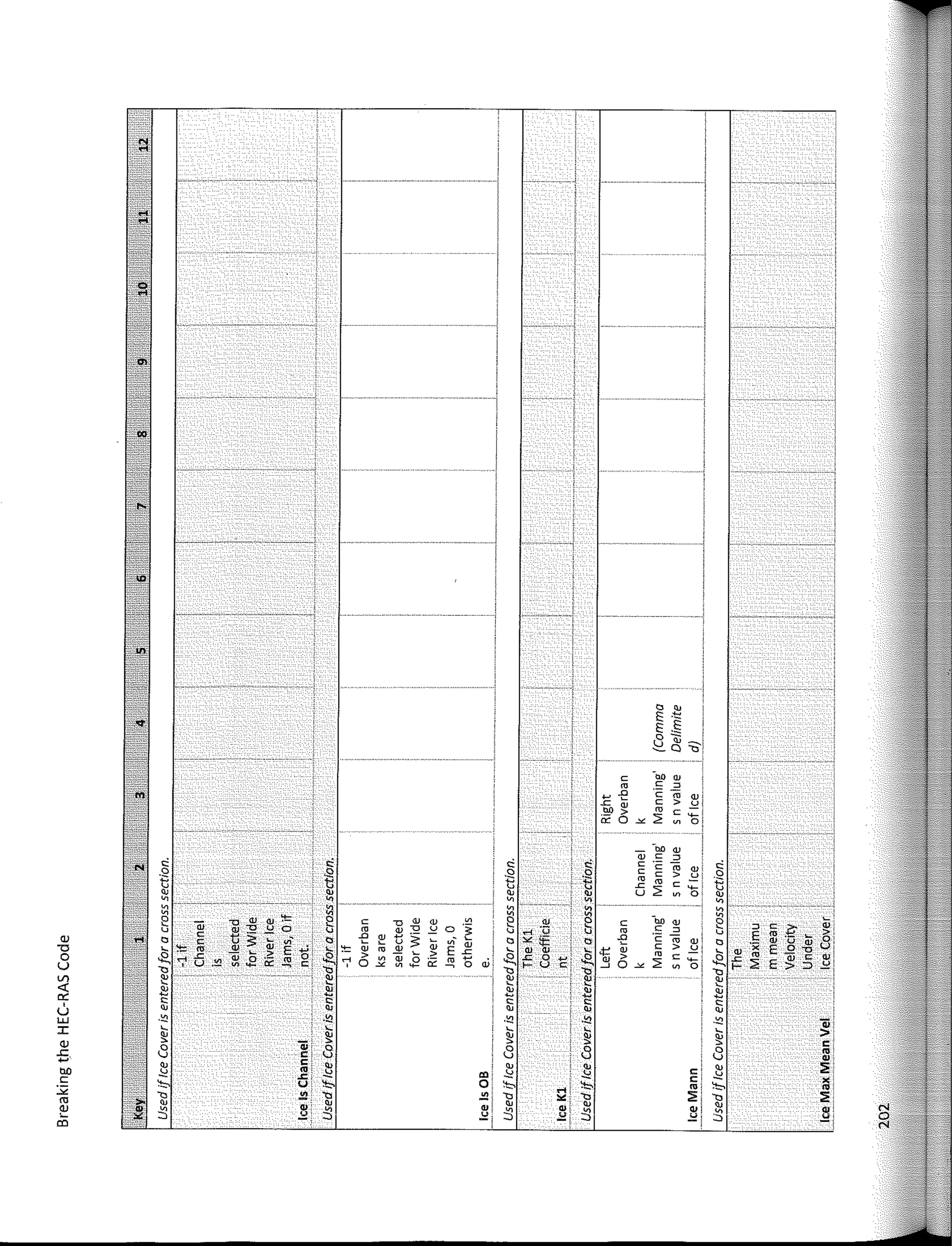
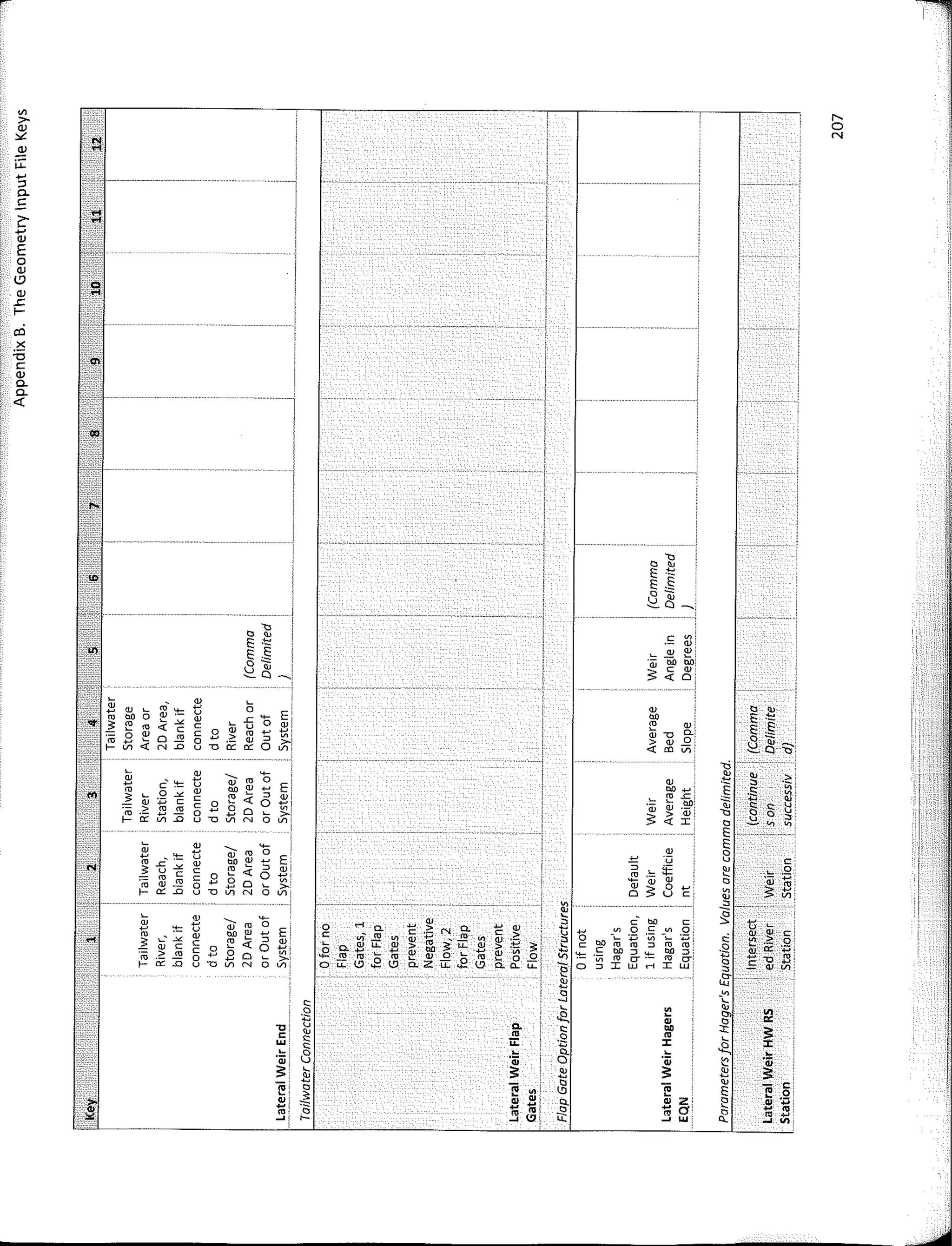
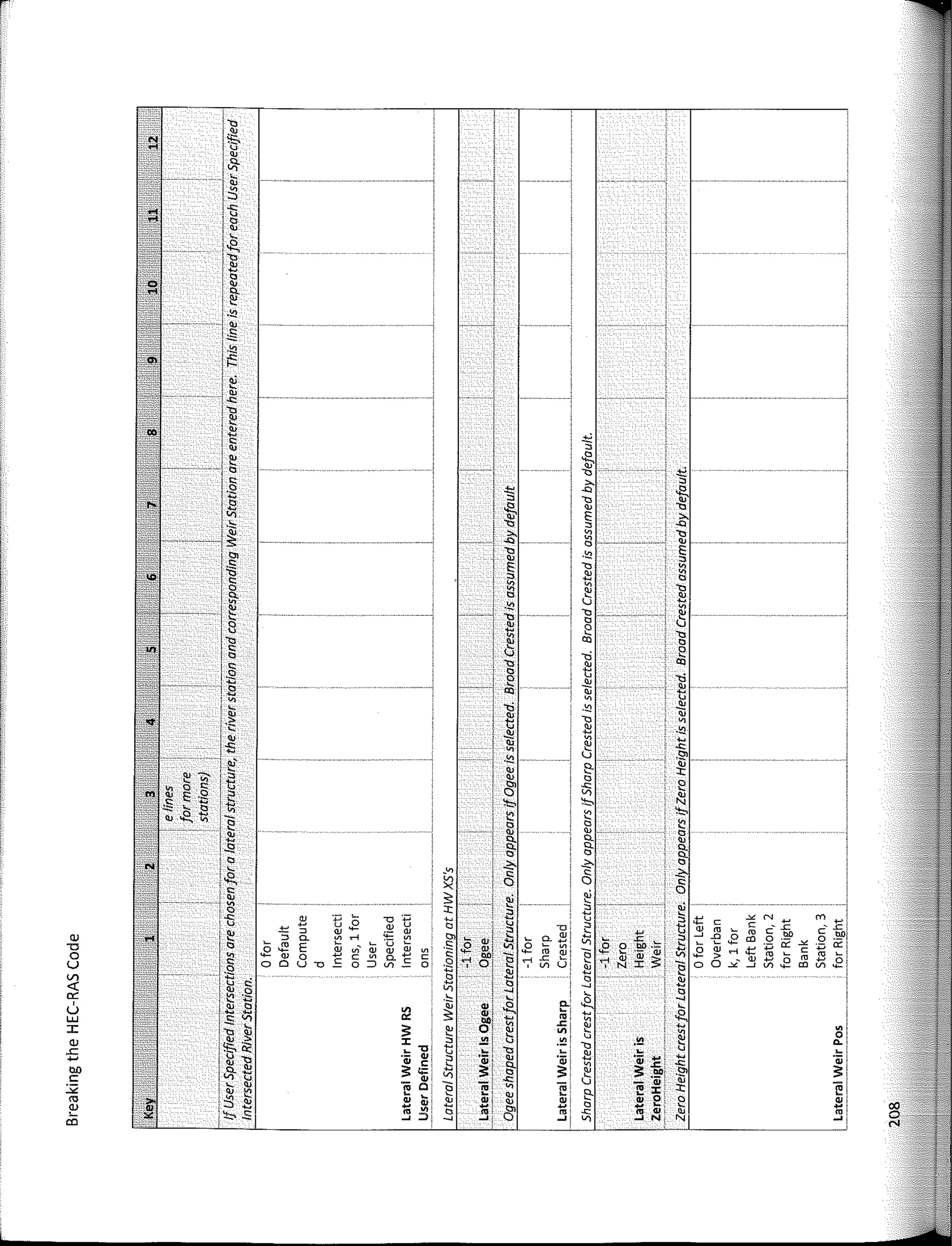
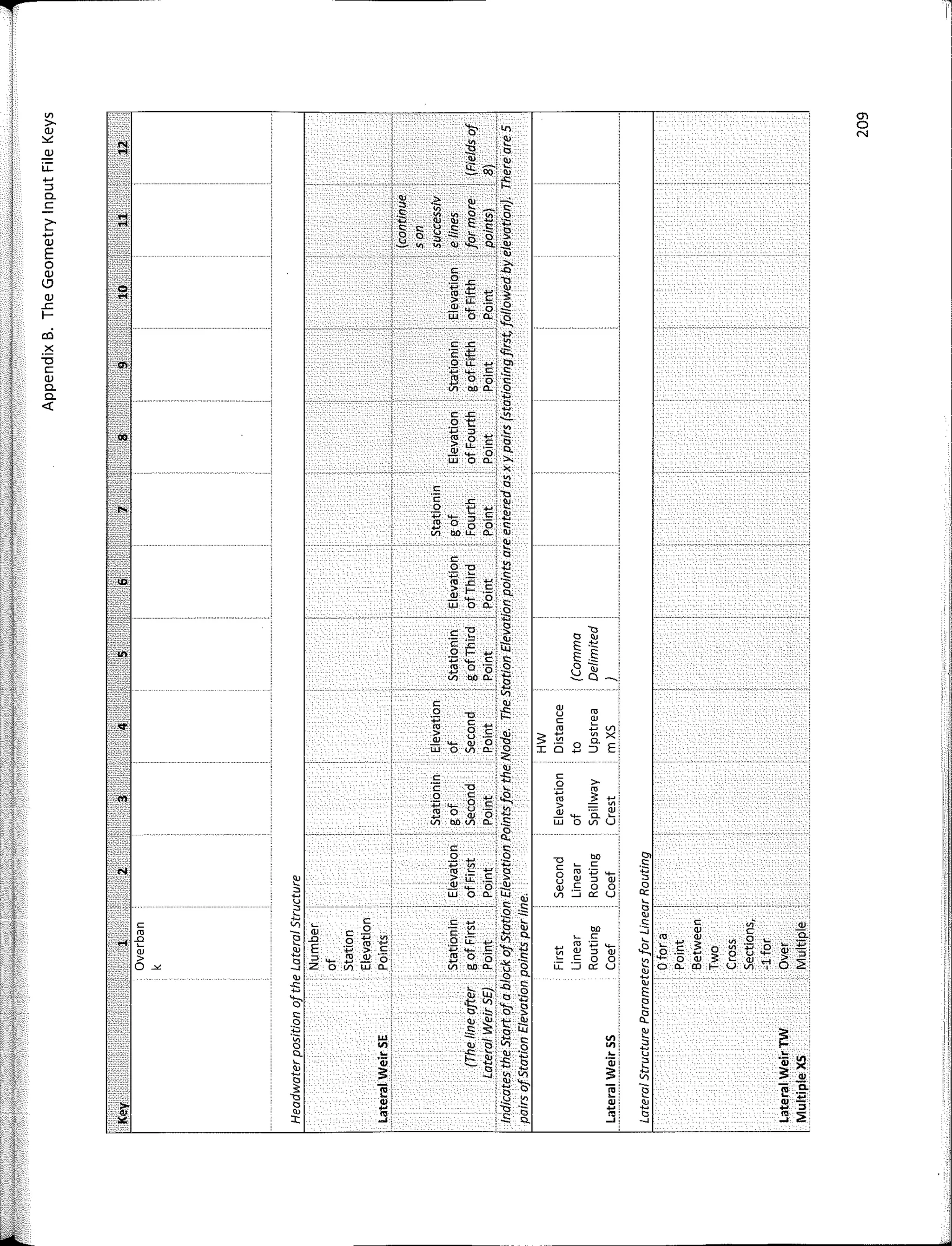
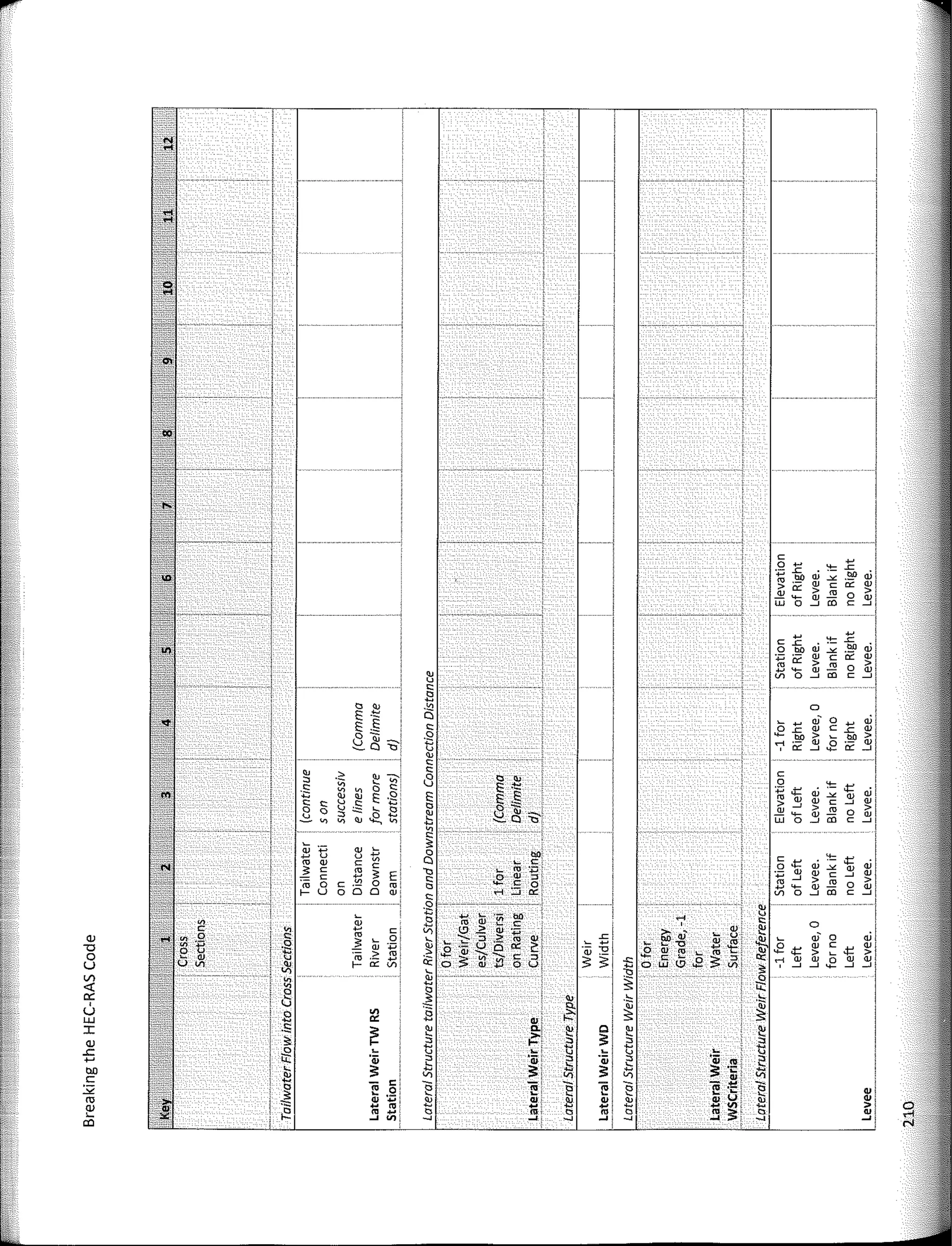
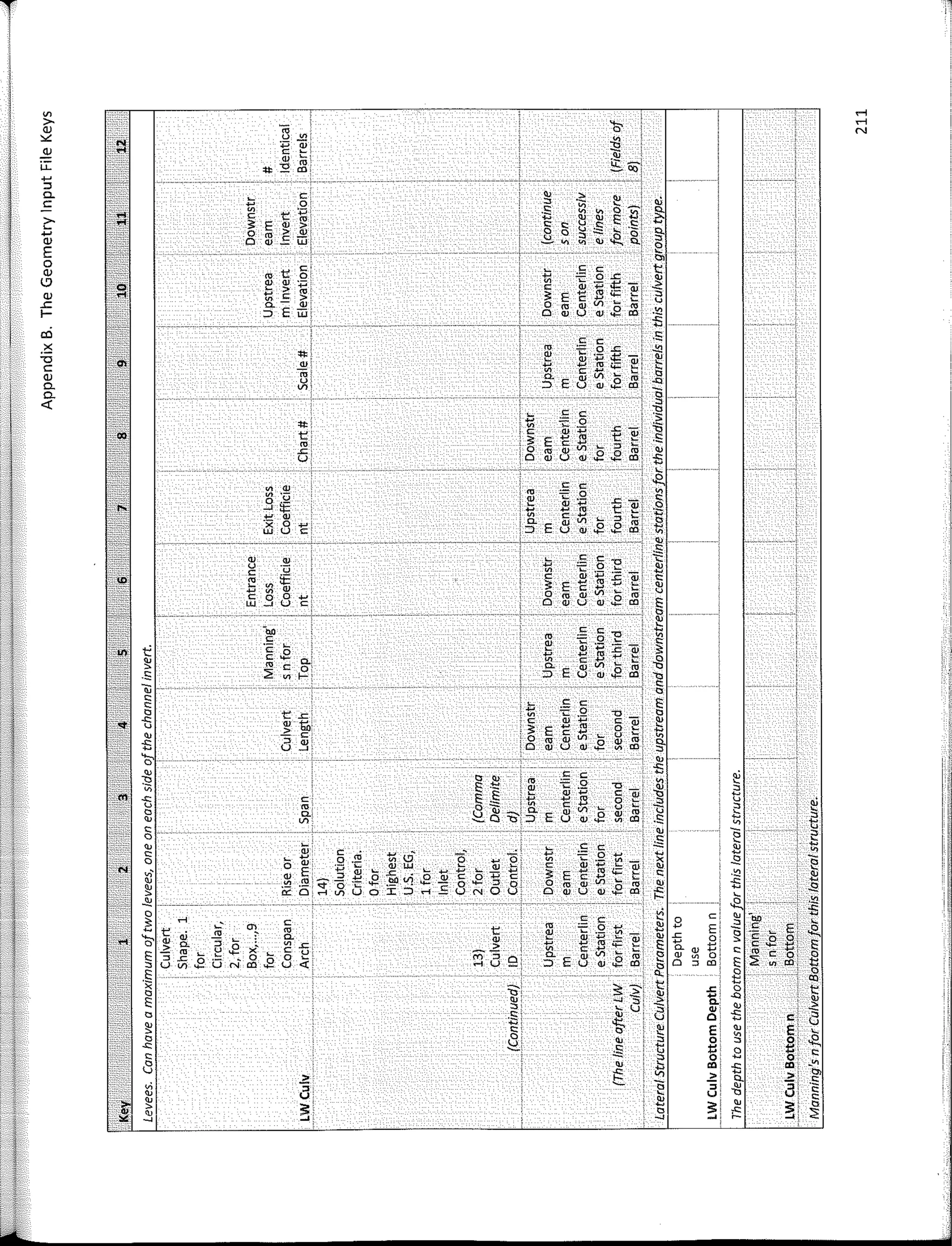
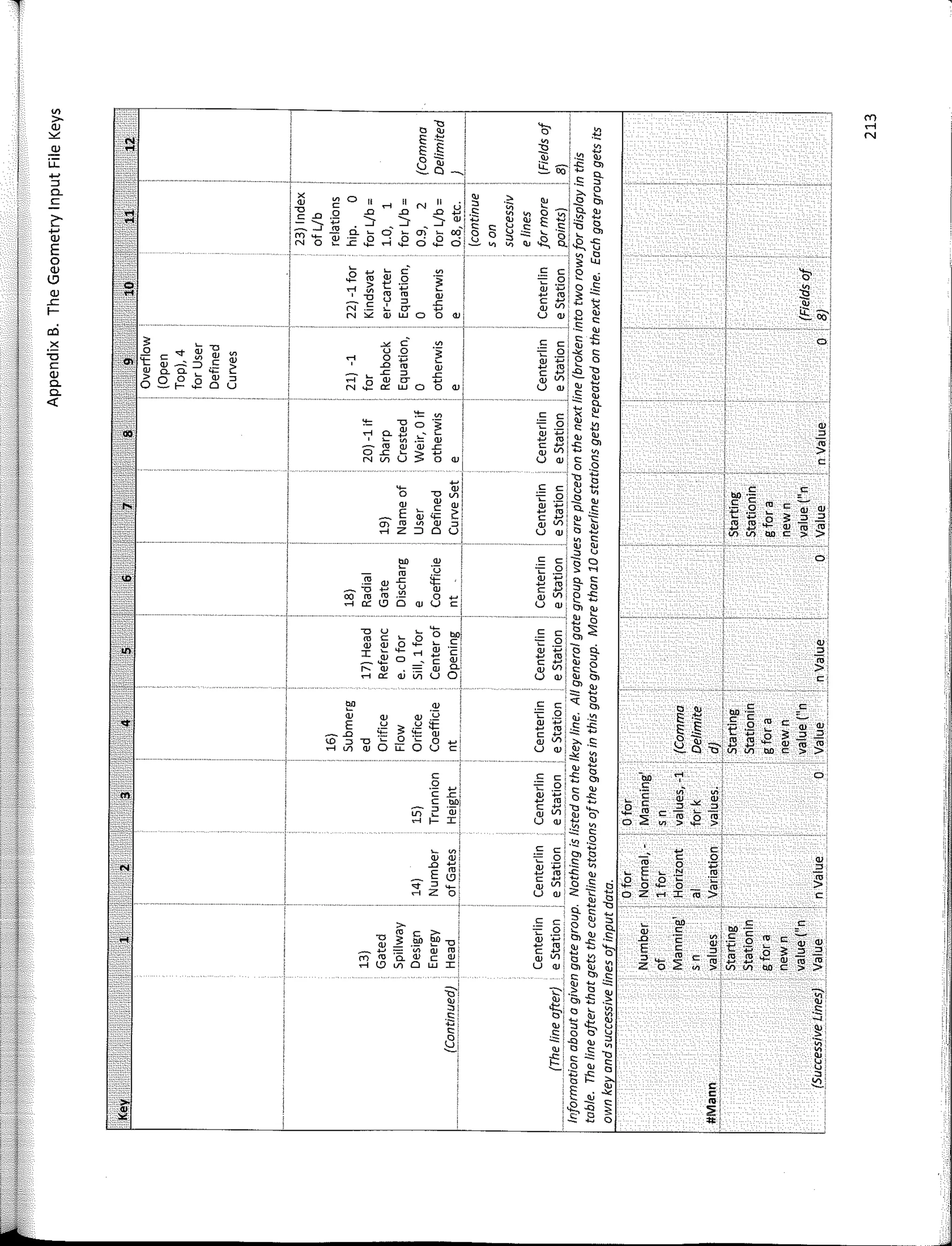
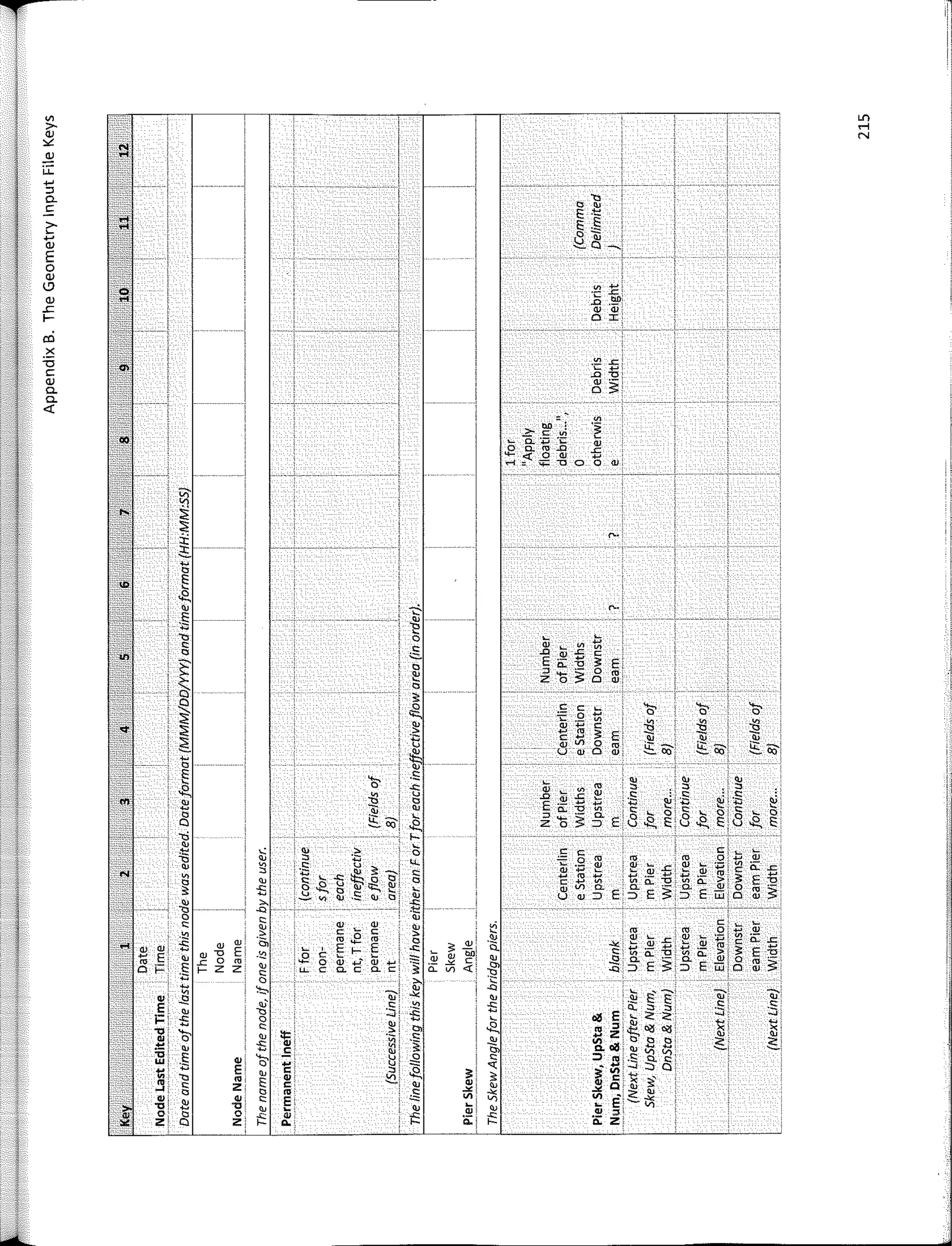
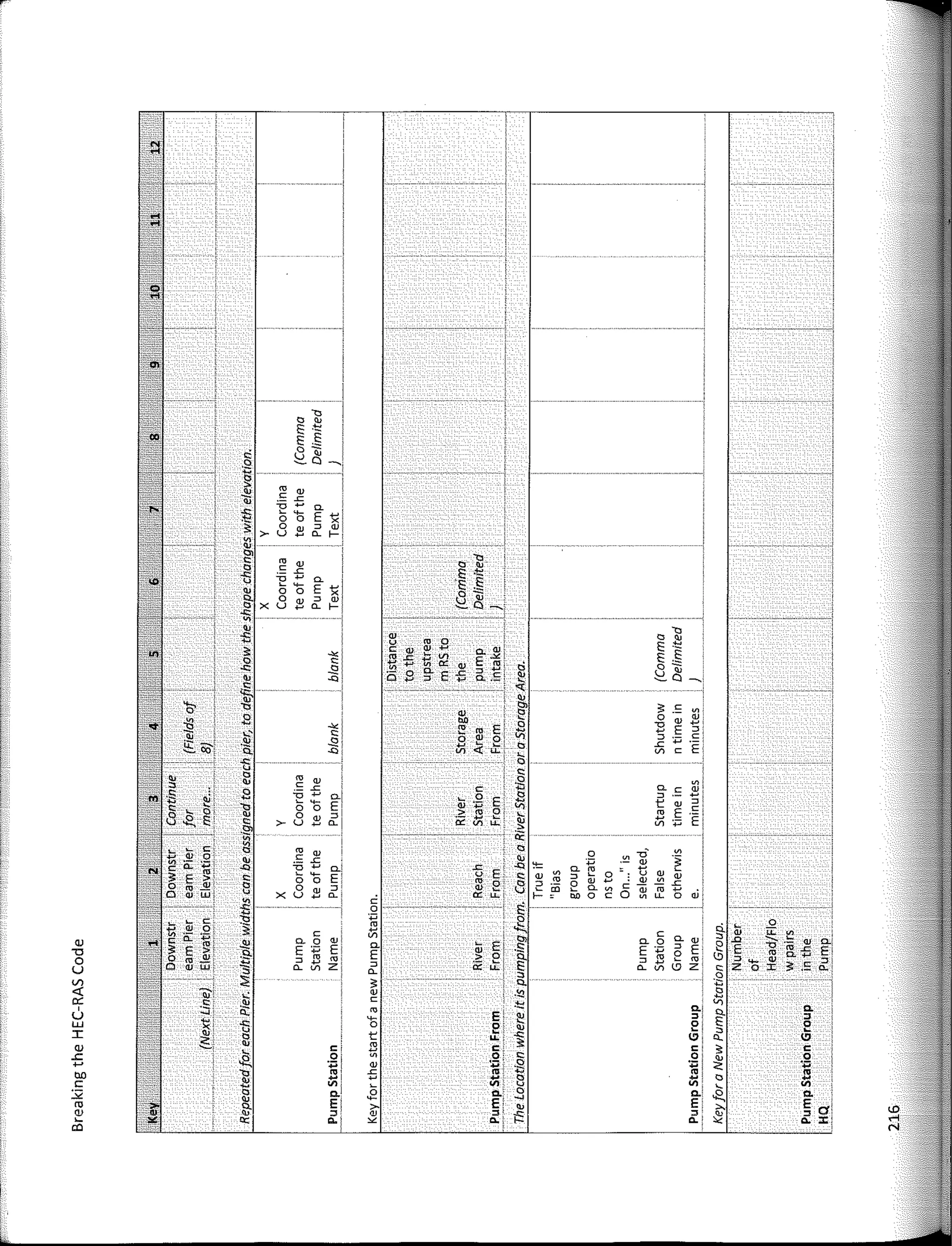
APPENDIX B. THE GEOMETRY INPUT FILE KEYS ......................................................•.•.. 183
APPENDIX C. THE STEADY FLOW INPUT FILE KEYS•...•.•.•.•.•.•..•...•.•.•...•.•...•.•.•.•...•.•.•..... 227
APPENDIX D. THE UNSTEADY FLOW INPUT FILE KEYS ............................•.•.....•.......•.•.• 235
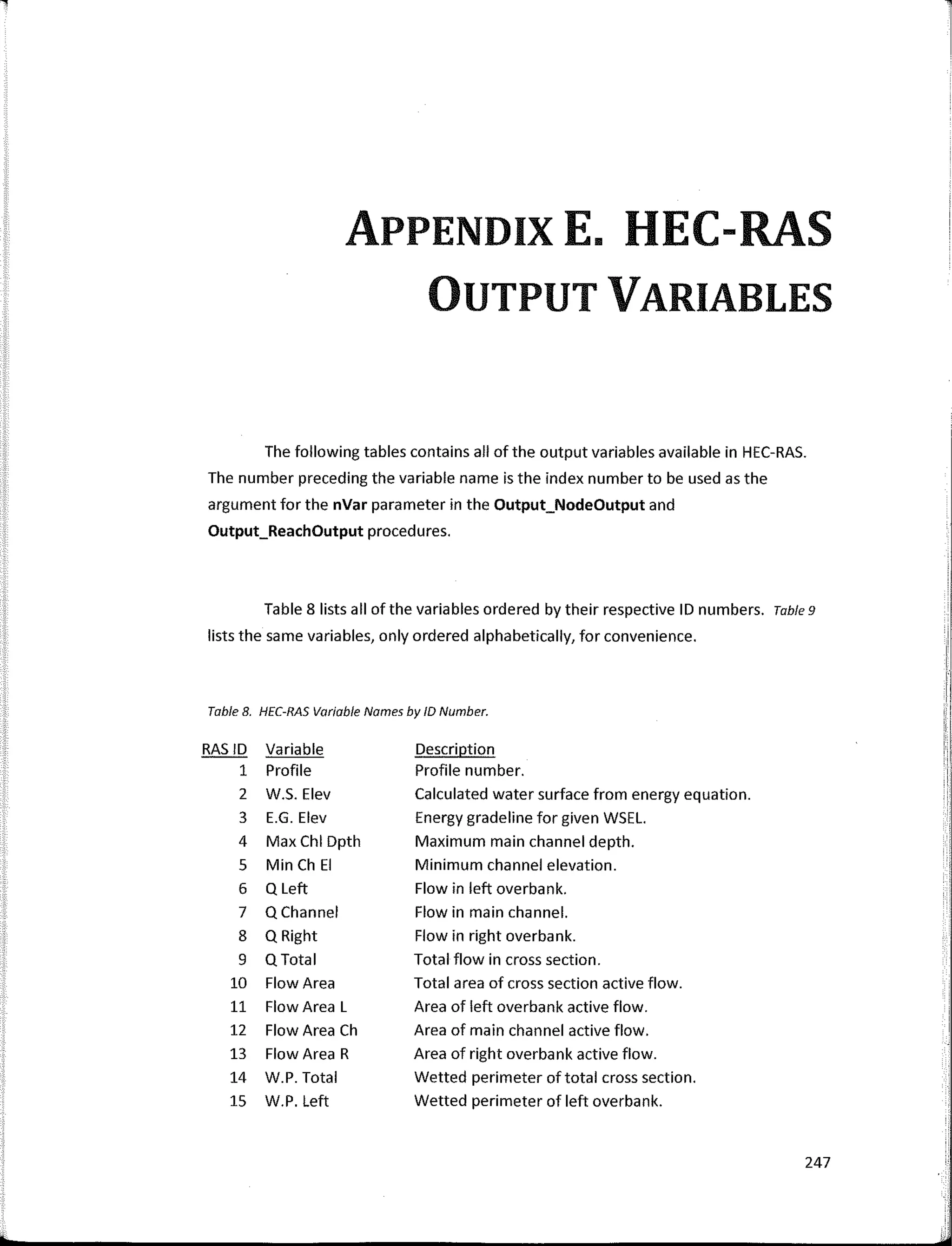
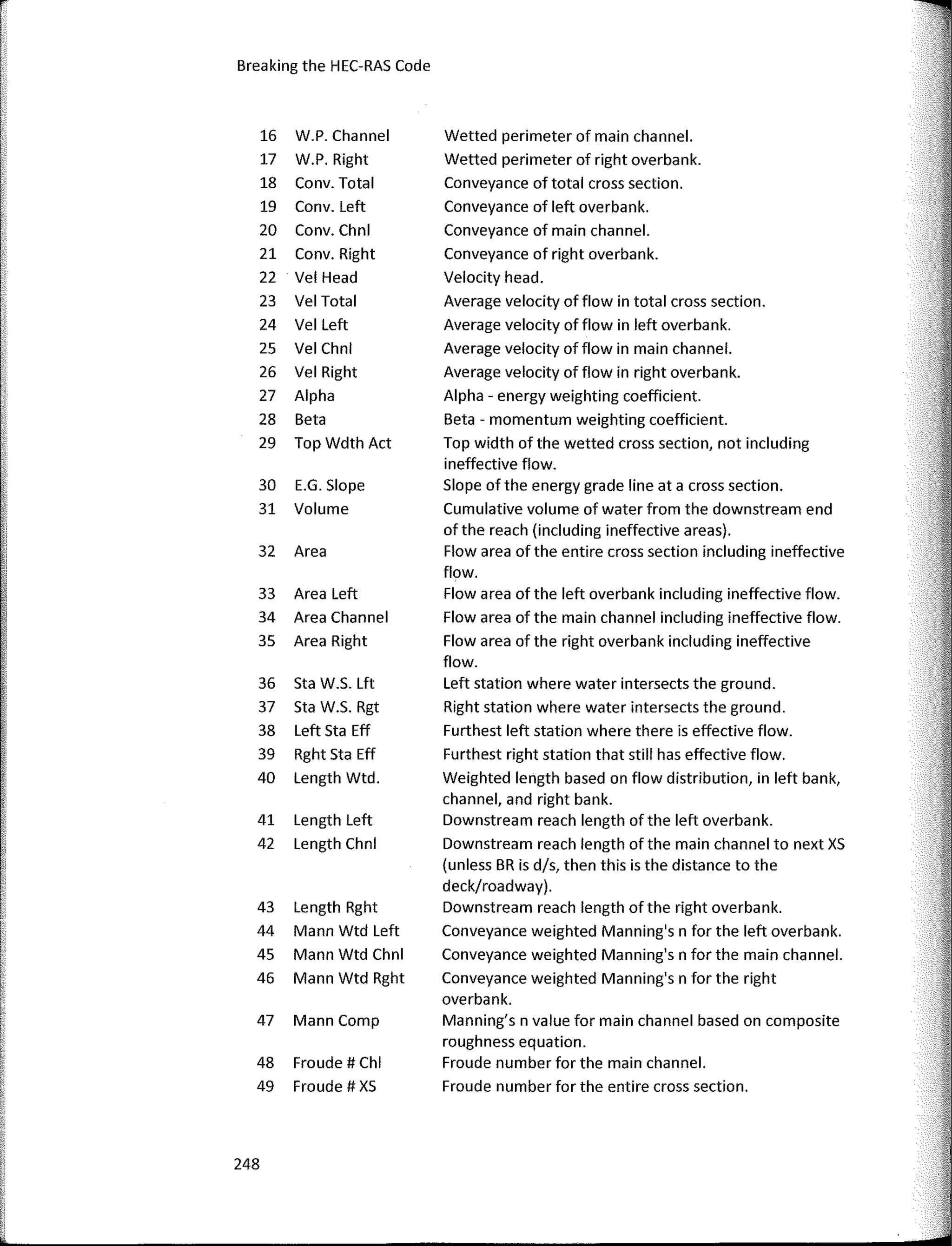
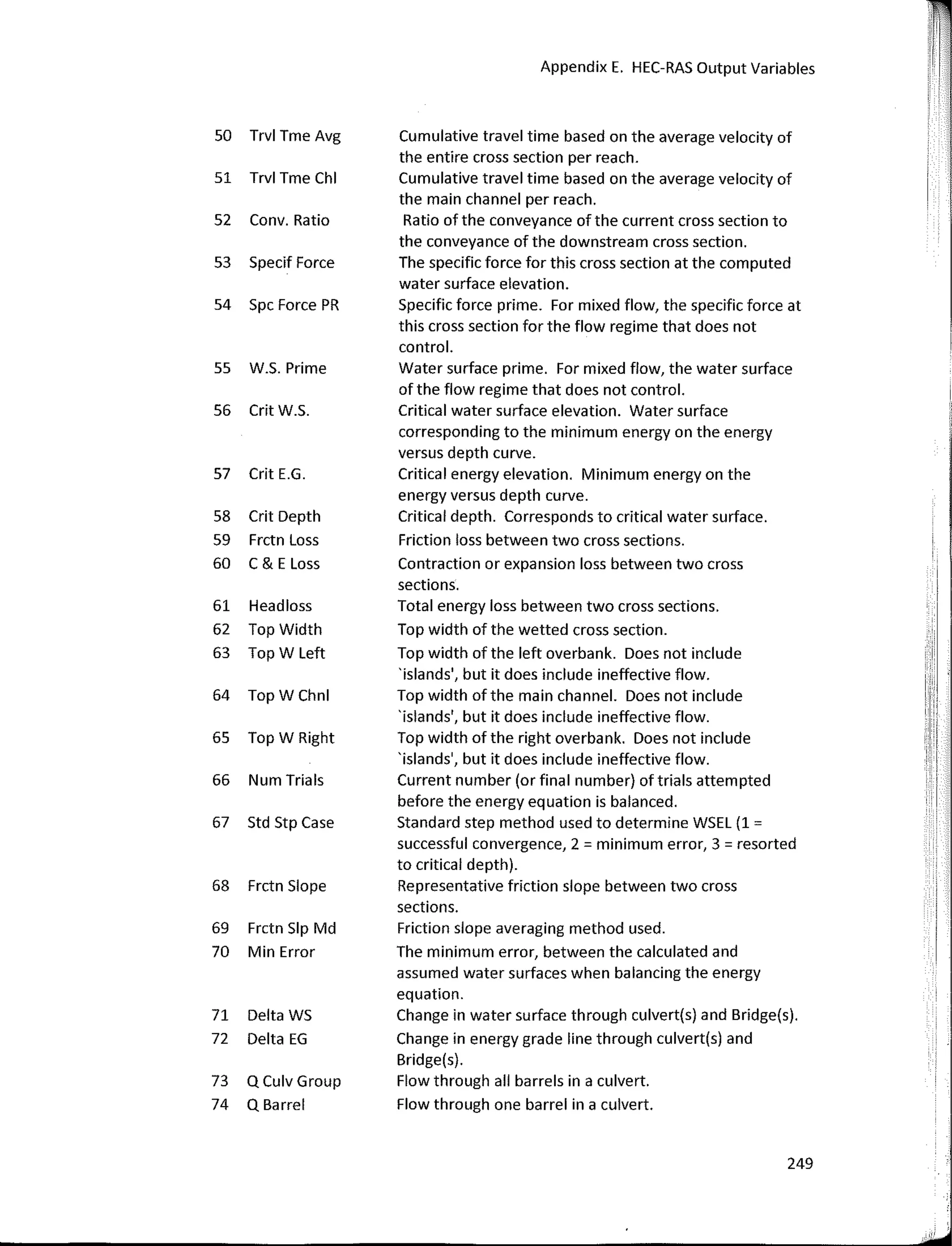
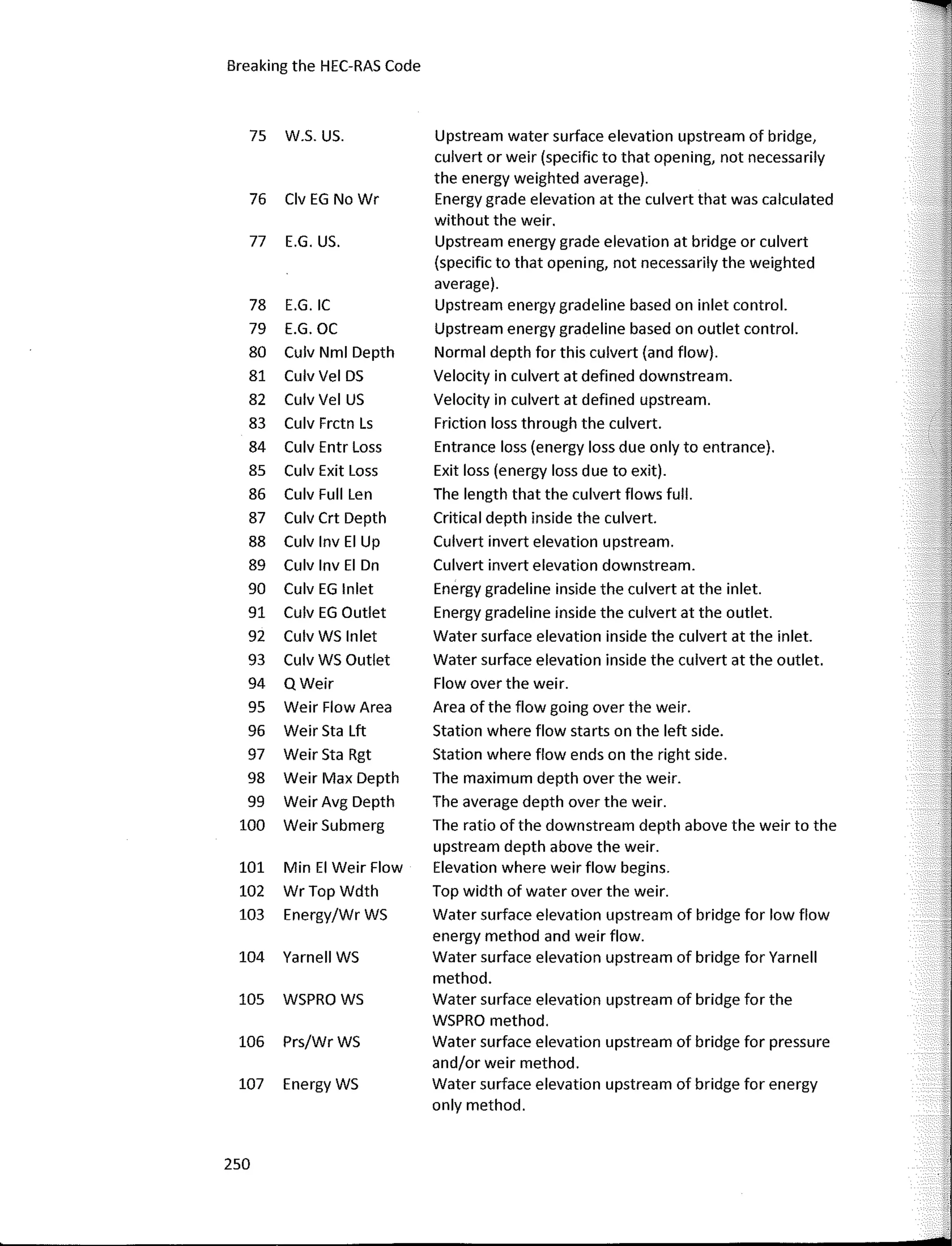
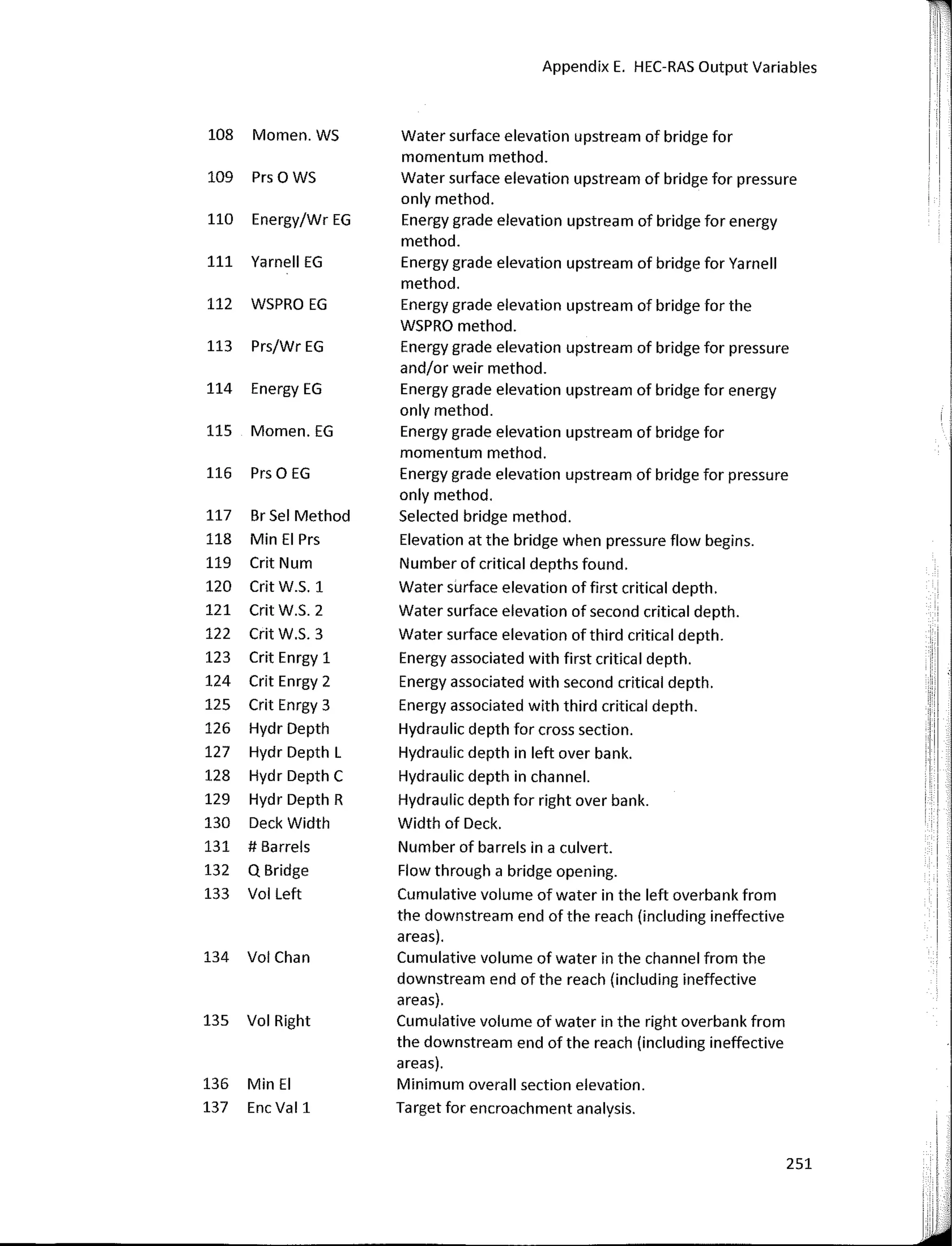
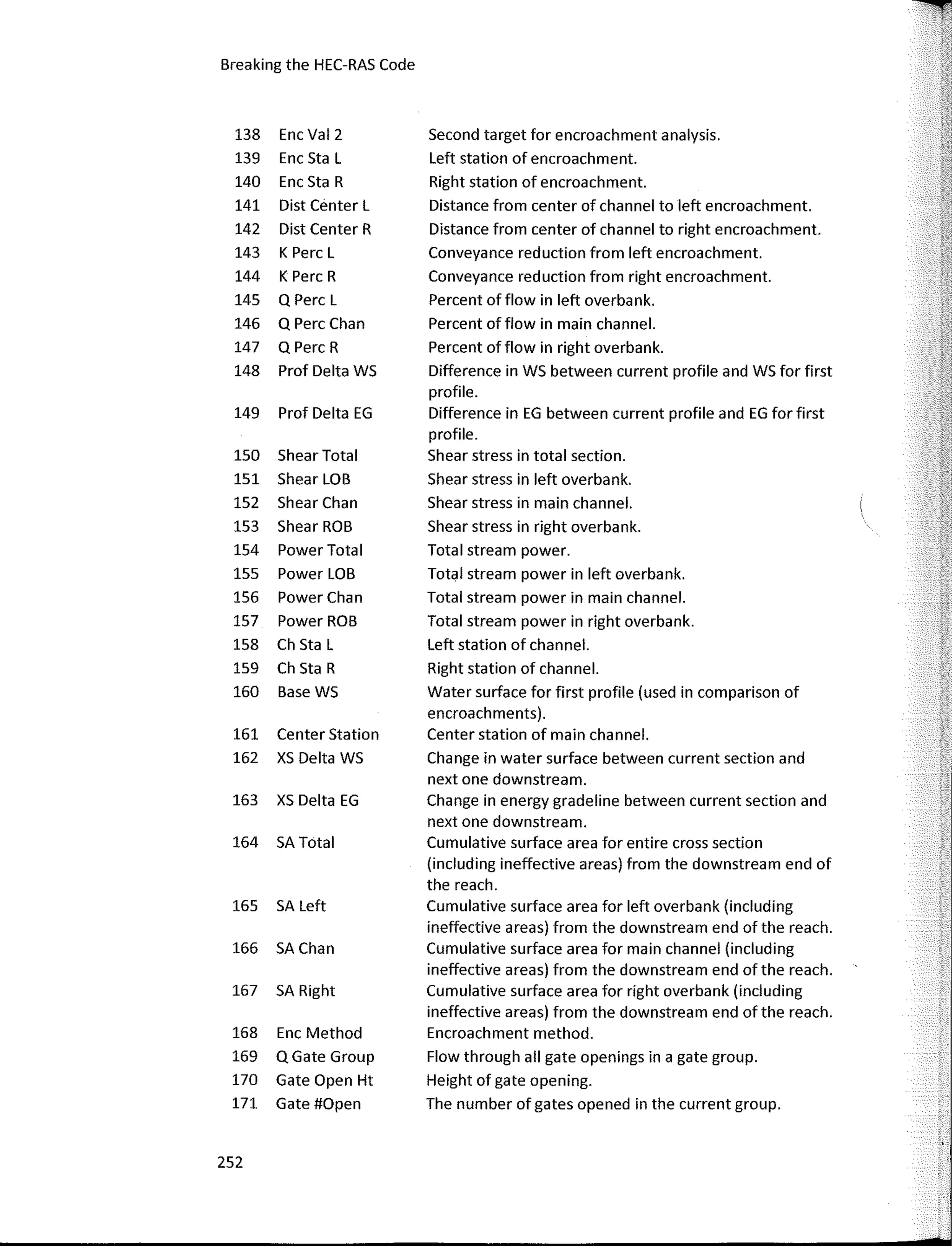
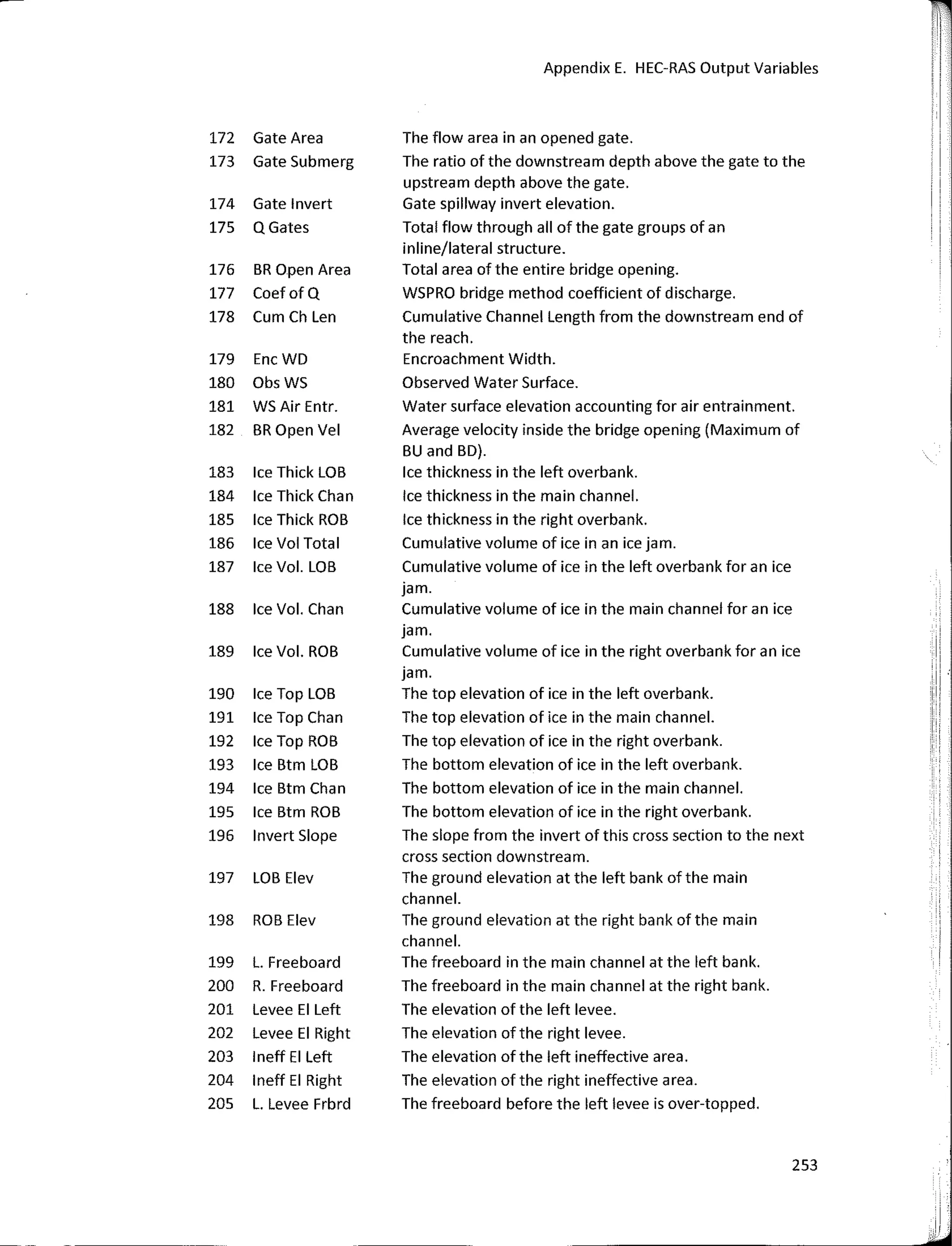
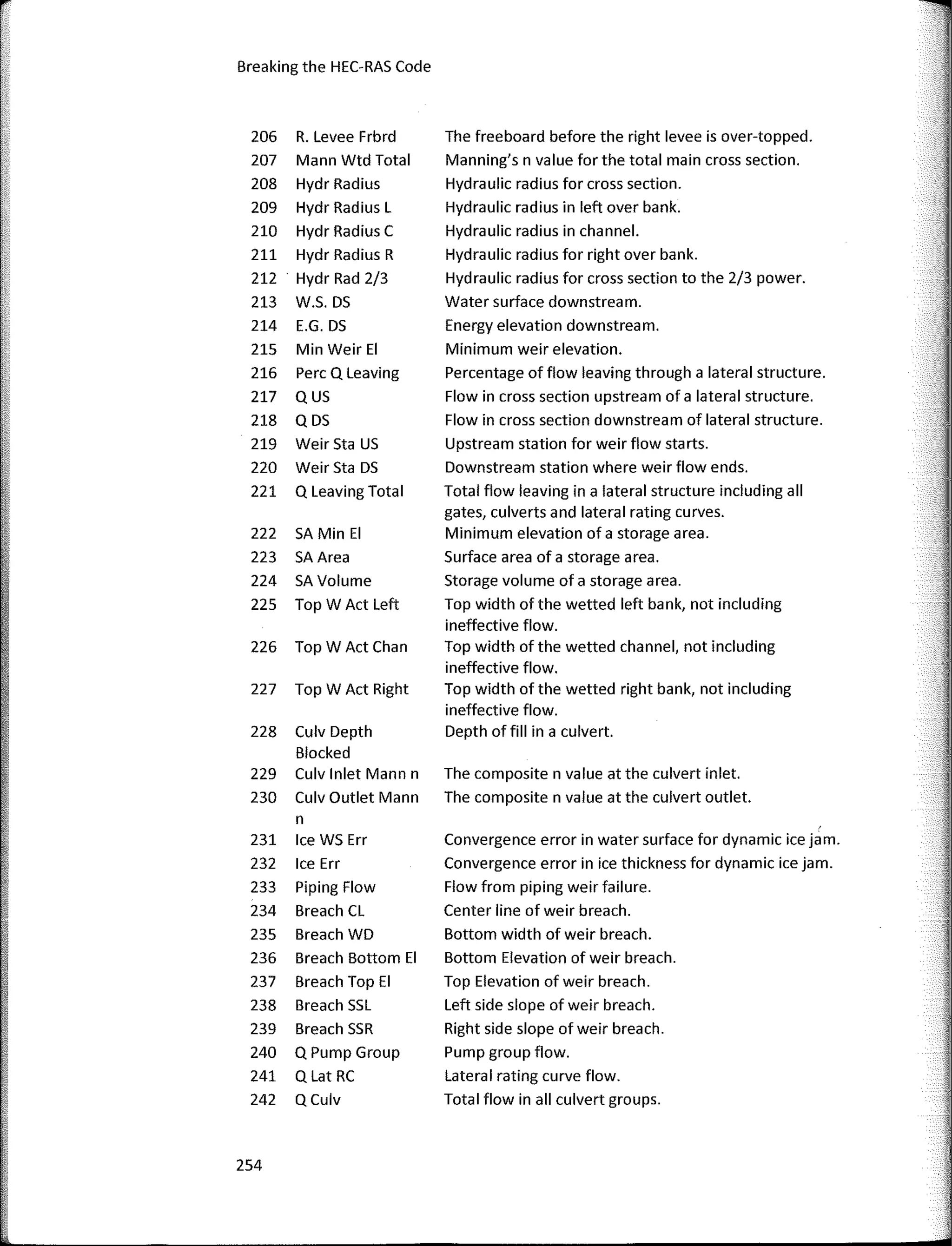
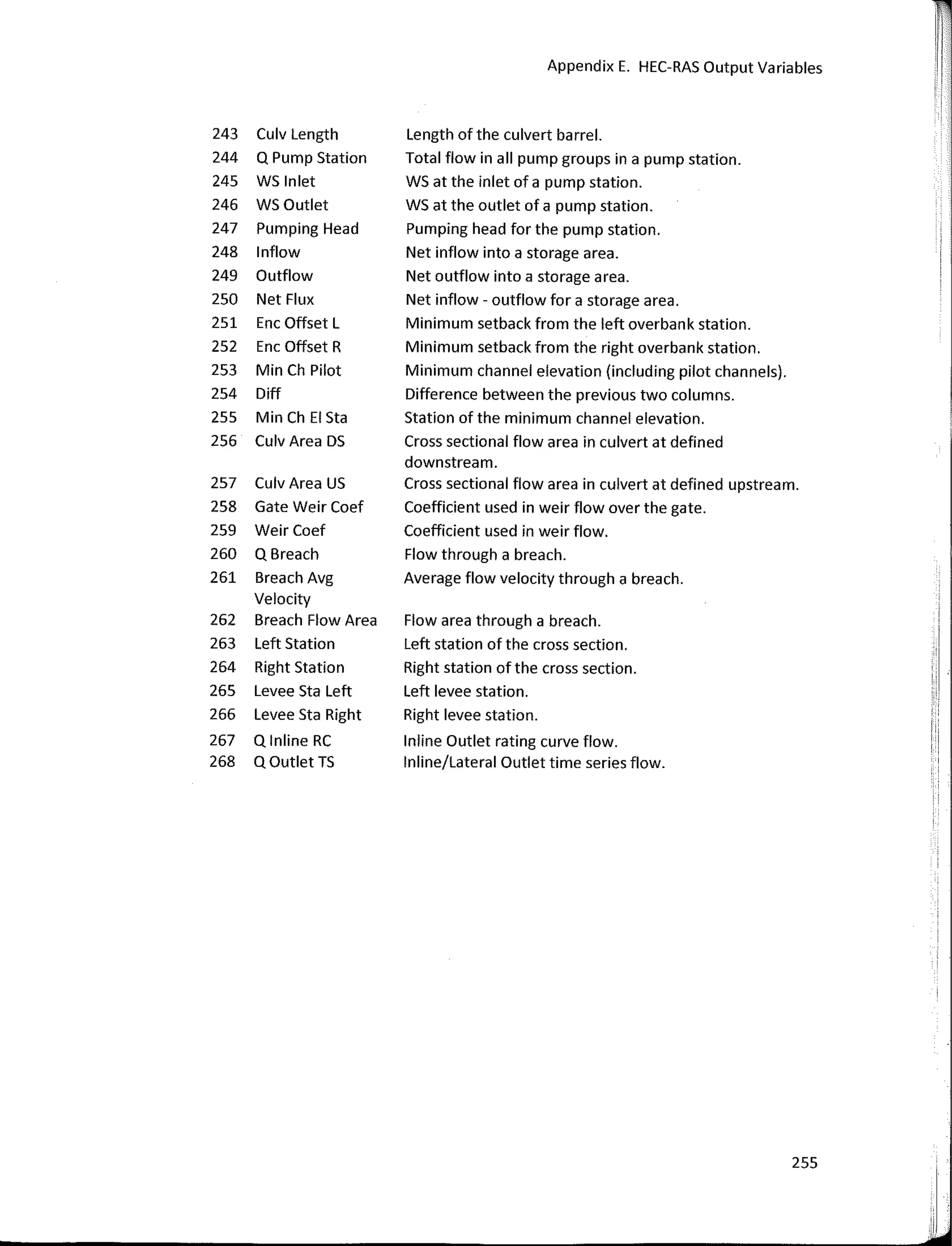
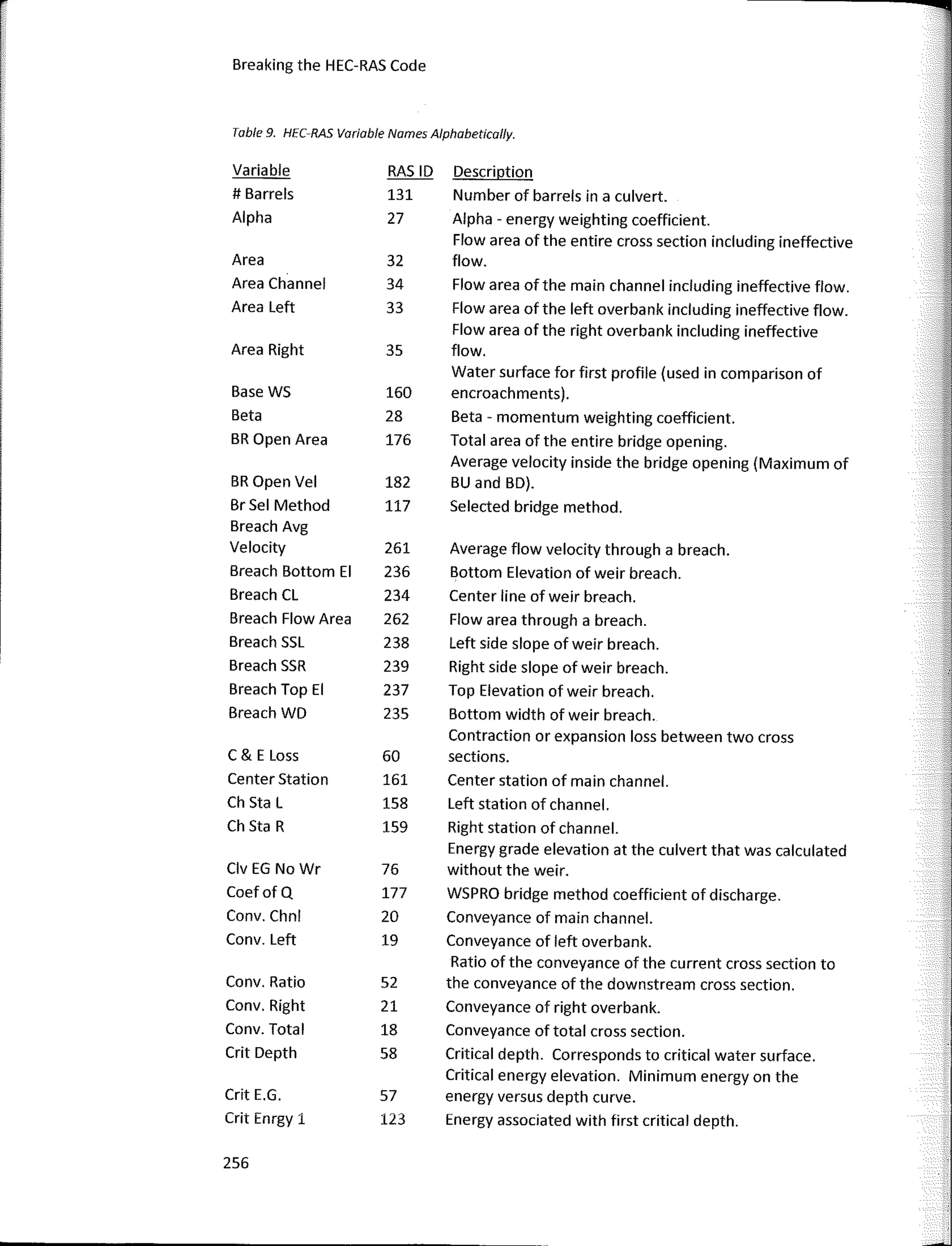
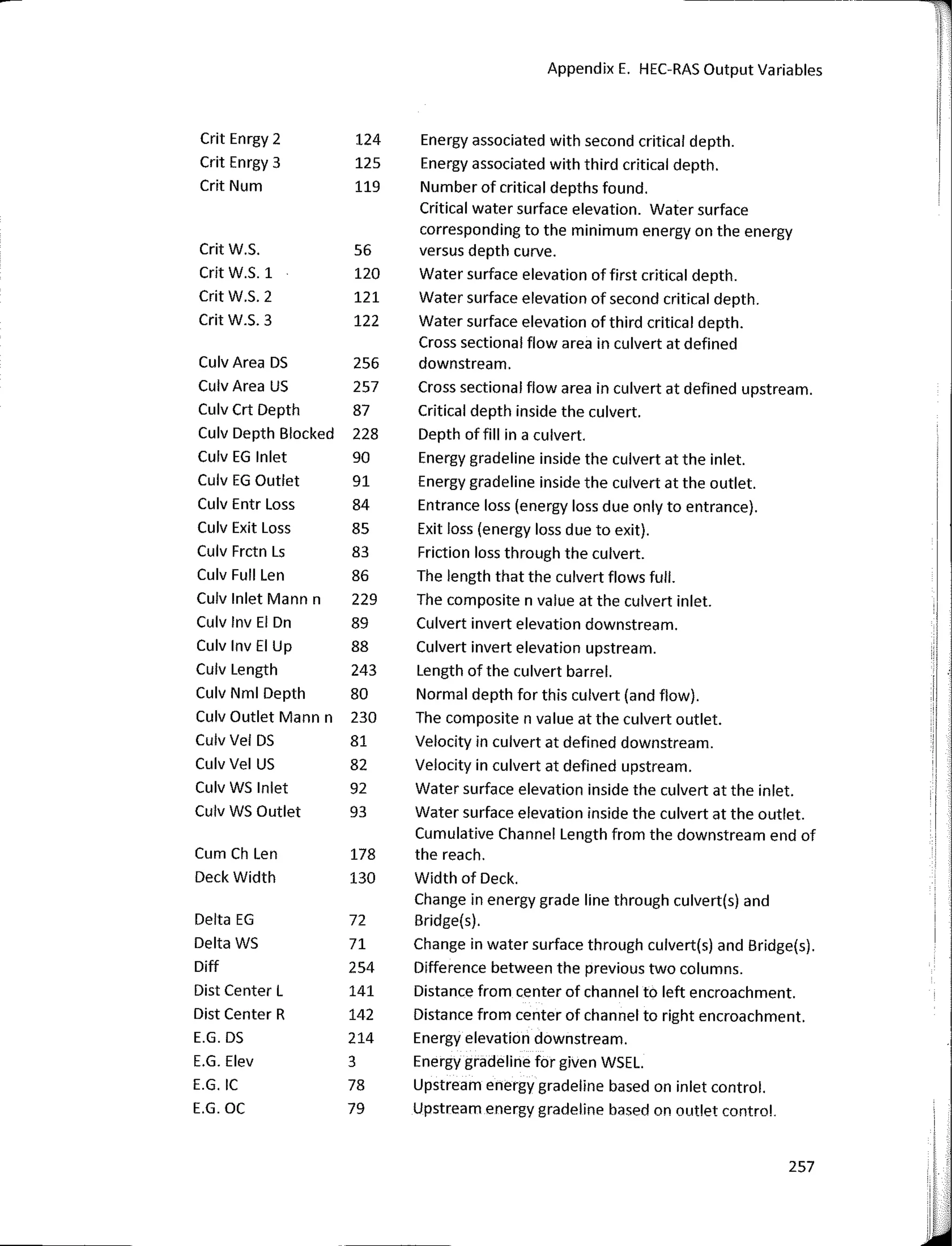
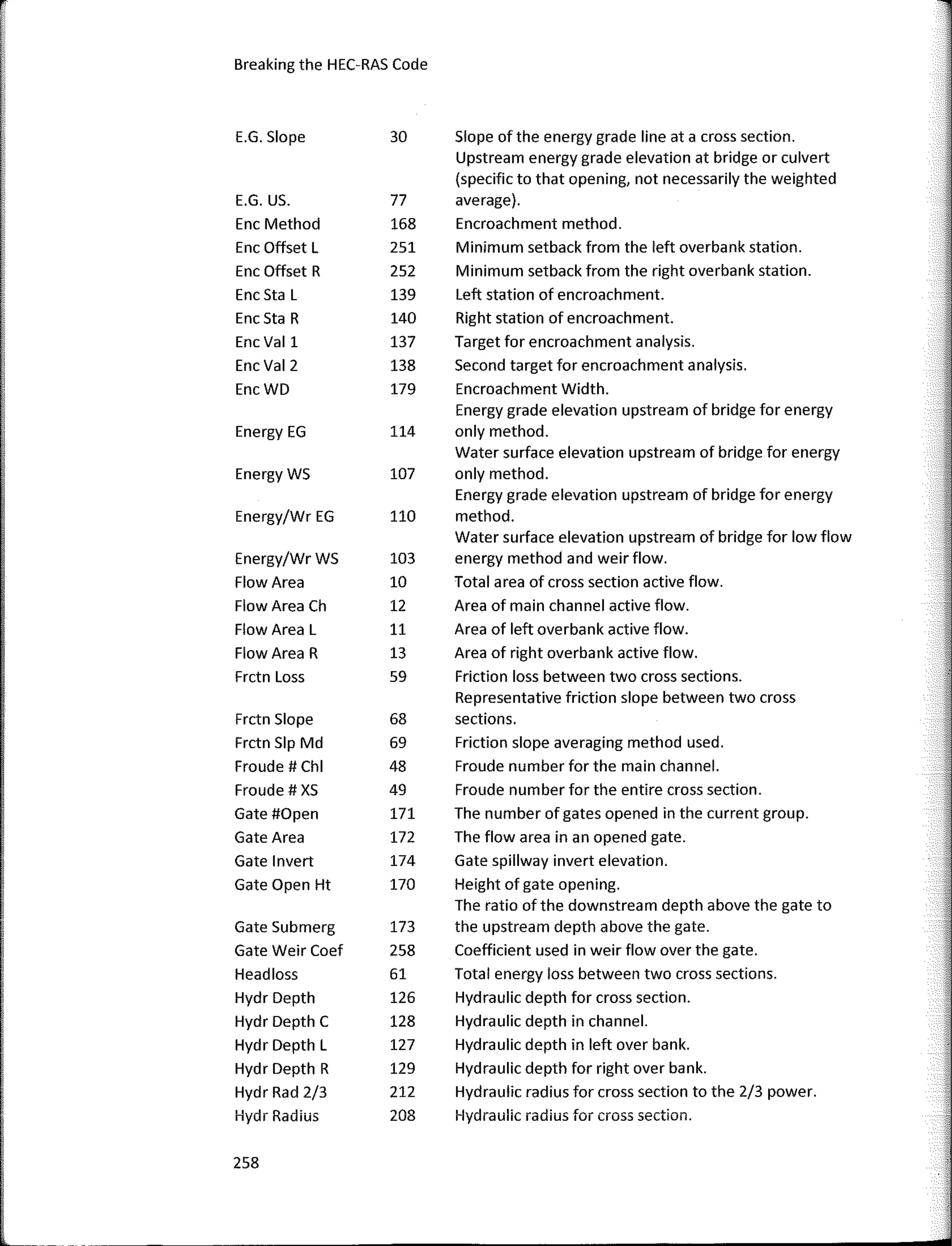
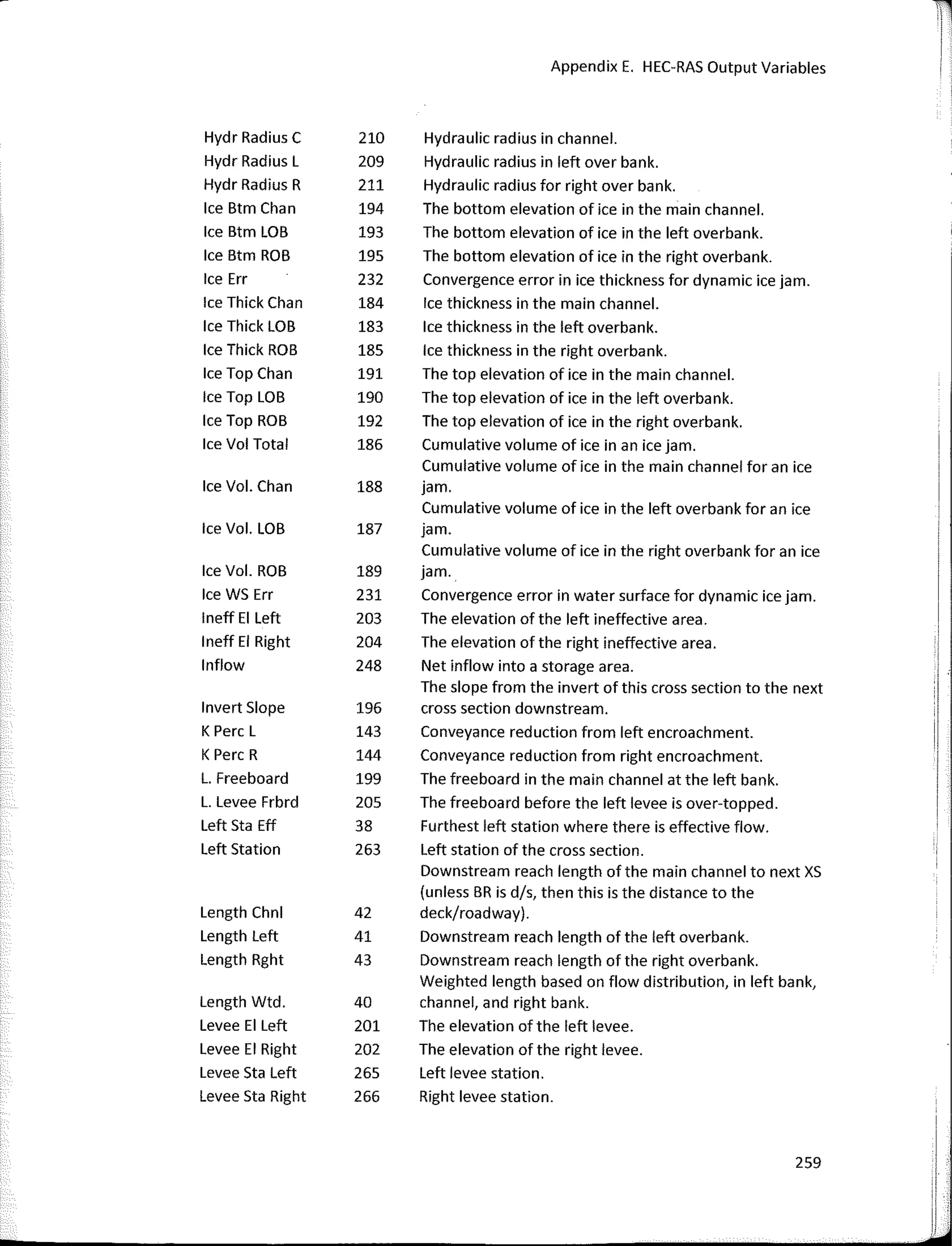
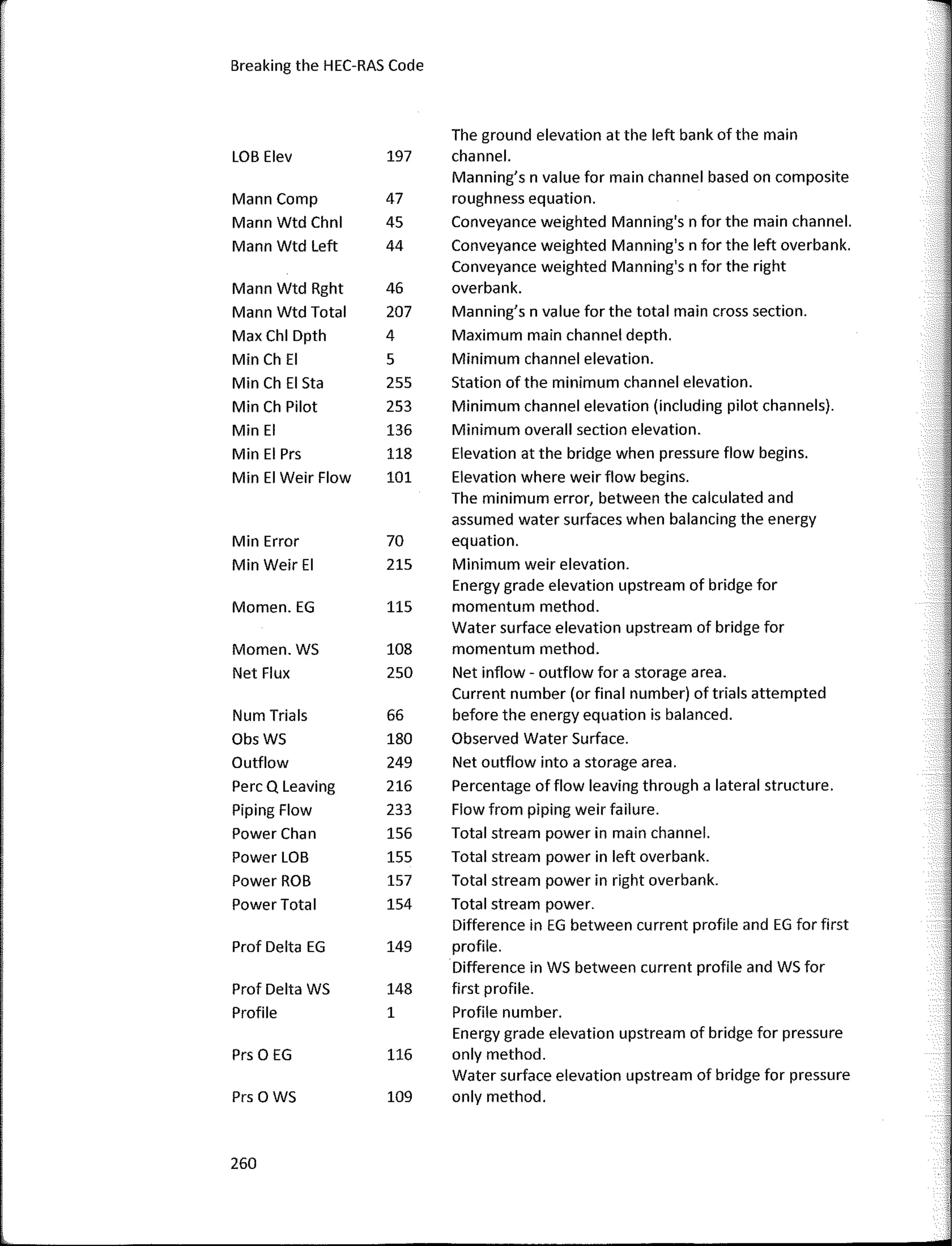
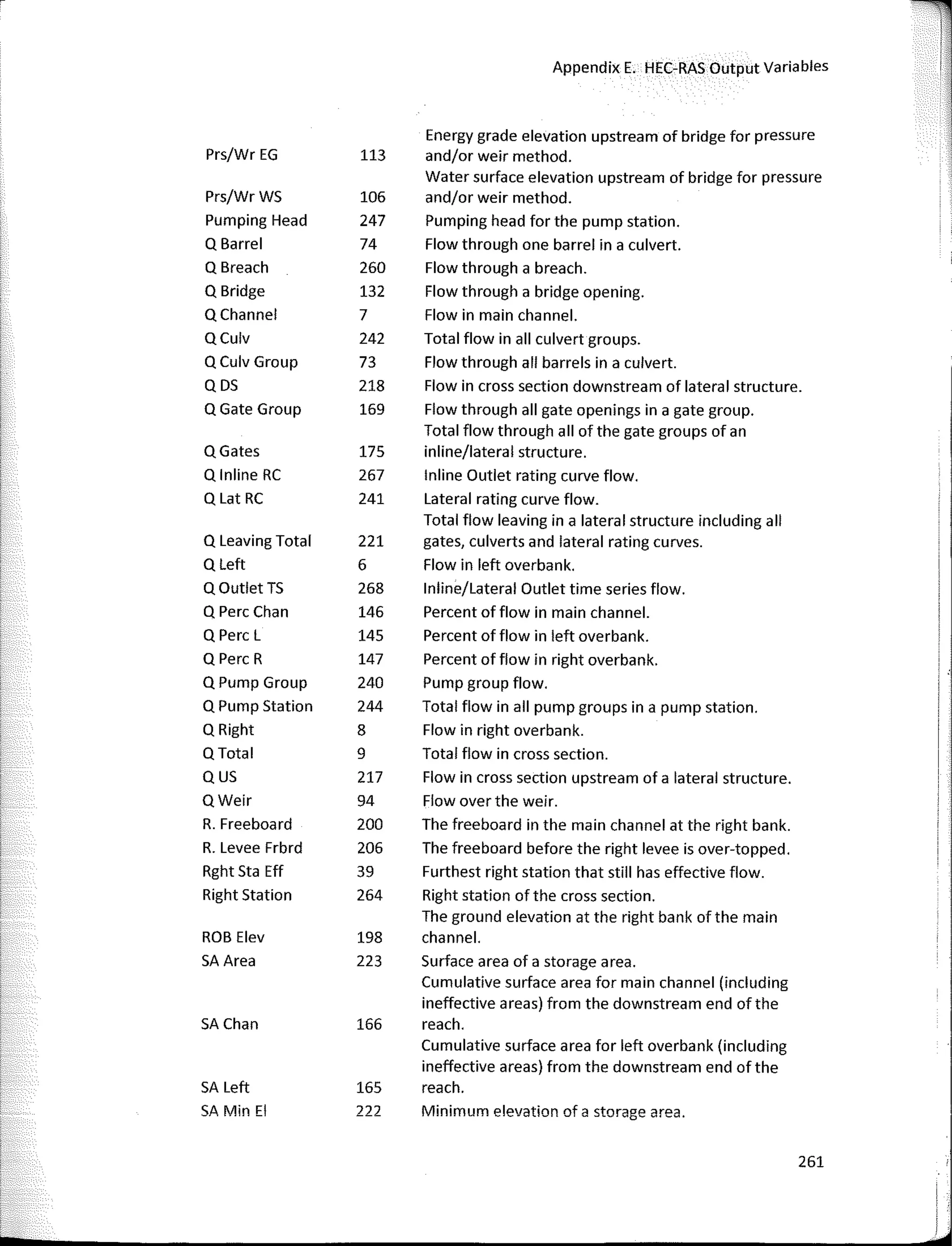
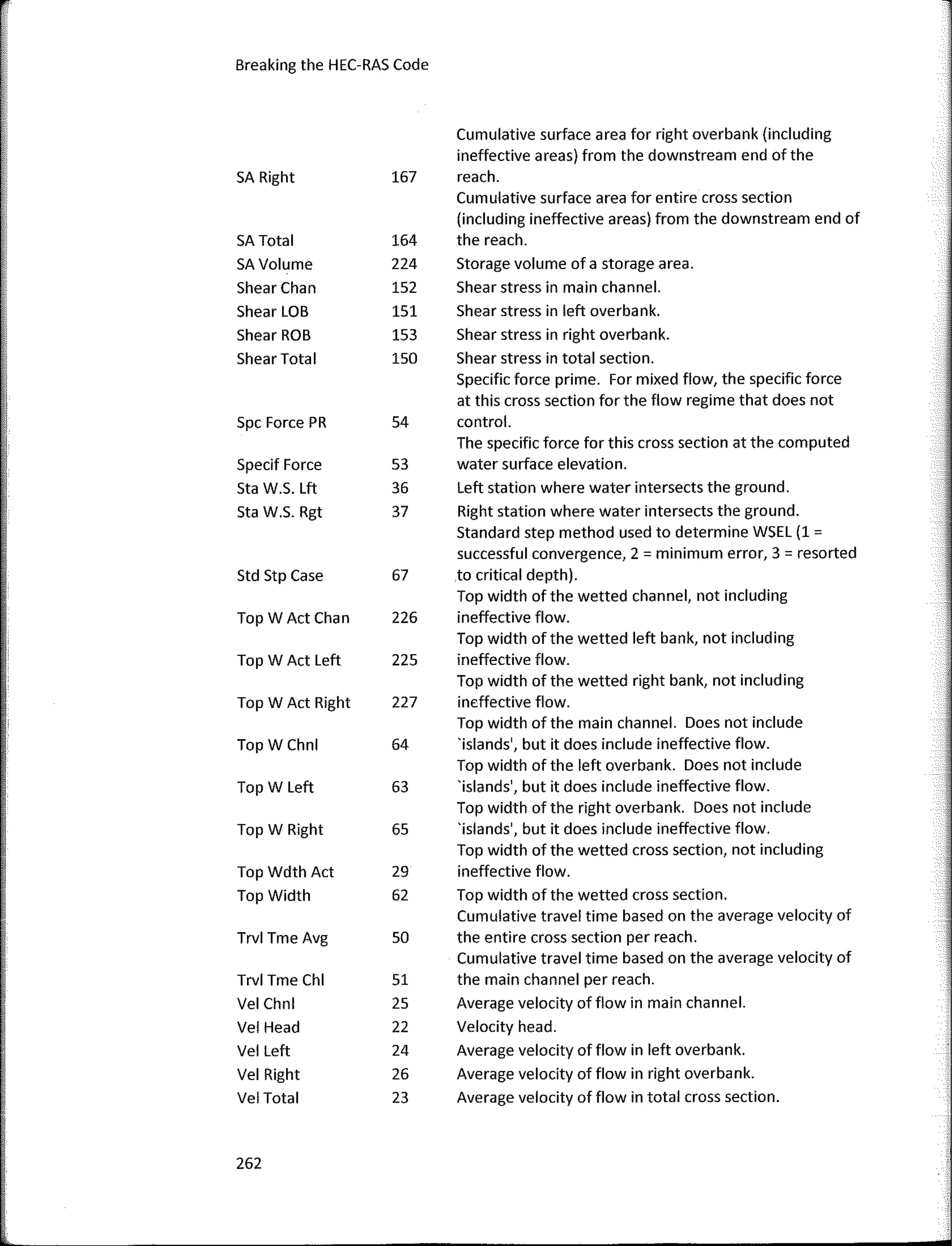
APPENDIX E. HEC-RAS OUTPUTVARIABLES .•.•.•...•.•.....•.•.•...•.•..•.•...•.•.•.....•.•...•...•.•.•..... 247
viii
r
FOREWORD
Far almost 30 years, 1 have worked on developing software tools with the goal
of making the process of perfarming complex hydrologic and hydraulic engineering
studies easier. When I first started working at the Hydrologic Engineering Center (HEC),
there were many separate tools available to perfarm all kinds of calculations, but they
were very difficult to use. HEC hada separate piece of software far each of the
fallowing applications: steady flow hydraulics, unsteady flow hydraulics, 2-dimensional
flow hydrodynamics, sediment transport analyses, riverine water quality modeling, and
hydraulic design of flood control channels. Each tool required its own data input
farmat, had its own unique way of perfarming hydraulic computations, and its own
output file farmat (which consisted, of a simple text file full of numbers). 1 knew very
early on in my career that I wanted to create a single software system that could
perfarm all types of hydraulic calculations and analyses, was easy to use, and was
visually-oriented. 1 was given that opportunity in 1991, and that was the birth of HEC-
RAS. As the author and the leader of the HEC-RAS development team, 1 have been
working to further this goal far my entire career.
Not very long after HEC-RAS was first released, Chris Goodell carne to work far
me as a member of the HEC-RAS team. 1 specifically hired Chris to work on the
development ofthe sediment transport analysis capabilities in HEC-RAS. Chris very
quickly became a key member of our team. He developed the first sediment transport
routines within HEC-RAS, and also worked on stable channel design functions, and many
other tools in the HEC-RAS hydraulic design module. Unfartunately far us, in 2003, Chris
decided he needed to move back to Portland in arder to be closer to family, but our
working relationship has remained strong since that time.
While I personally think that HEC-RAS is the best hydraulic engineering analysis
tool in the world (yes, 1 am biased) it still, to this day, cannot do everything that a
hydraulic engineer may want it to do. People have all kinds of unique applications in
which they would like to use the software to salve their specific problem.
Unfartunately, the software does not always have the exact capabilities they need. As
there is no way HEC could imagine every way in which a user would like to use HEC-RAS,
ix
we decided to make an open API (Application Programming Interface) that would allow
users to write their own applications, wherein they could use HEC-RAS to salve unique
hydraulic engineering problems. This API is called the HEC-RAS Controller
(H ECRASController).
This book is a tremendous resource that describes the details of the
HECRASController and how to use it. The reader is given the big picture covering why to
use the HECRASController, what is available in the HECRASController, how it works, and
even real world examples (complete with code) that salve many challenging hydraulic
engineering applications. The book explains ali ofthe available functions which are
exposed within the HECRASController, and then walks through the creation of a simple
program that opens HEC-RAS, modifies data input, runs the computations, and retrieves
specific output from the HEC-RAS binary output file. The book goes into great detail
about how to use the HECRASController to read and write to HEC-RAS input files.
Reading and writing to input files is used to automate modifying the input parameters.
The book discusses how to monitor the HEC-RAS computations/progress during a run, as
well as application strategies. The last part of the book contains detailed examples far
solving complex hydraulic problems, complete with the source code, and a step-by-step
discussion of what the code does. By learning how to use the HECRASController, users
have an opportunity to take the existing hydraulic computational capability in HEC-RAS,
and apply it in ways that currently do not exist. This makes it easy to extend HEC-RAS to
salve difficult engineering problems, without having to write an entire hydraulic
software application from scratch.
This book is the only complete resource that explains how to use the
HECRASController in its entirety; and is comprehensive, easy to read, and well-
documented. Chris has been writing code around HEC-RAS to salve unique problems far
years. He has also suggested severa! ideas far expanding and improving the
HECRASController. Chris has done an outstanding job with this book. Anyone with
experience in HEC-RAS anda basic understanding of programming language will be a ble
to use this book to help build applications that control HEC-RAS.
As the author and leader of the HEC-RAS development team, 1 highly
recommend Breaking the HEC-RAS Code to anyone who wants to take HEC-RAS and
expand its capabilities in arder to salve challenging hydraulic engineering problems.
Gary W. Brunner, P.E., D. WRE
Leoder of the HEC-RAS Development Team
Hydrologic Engineering Center, USACE
Dovis, CA
X
PREFACE
"Breaking the HEC-RAS Code" has been a true labor of love forme. Sorne of my
most enjoya ble times working have been when l've had the opportunity to immerse
myself in an HEC-RAS project and have had to rely on experience and creativity to make
it work. Like most engineers, writing is well outside my comfort zone. But I found that I
really enjoyed writing this book; it seemed that every page I wrote revealed more and
more possibilities for automating HEC-RAS using the HECRASController. The
HECRASController is a suite of programming procedures included with the installation of
HEC-RAS. As HEC-RAS users, we all know how powerful and useful the software is. But
we also know (or should know) that it has its limitations-and always will. To me,
discovering the HECRASController was like having my own personal HEC-RAS team
member- always there, just waiting to implementa new feature or functionality into
HEC-RAS for my own personal use. The applications seemed endless. lf I could dream it
up, it could be done.
Earlier in my career, 1 worked in California at the Hydrologic Engineering Center
on the HEC-RAS Development Team. There, 1 refined my HEC-RAS "chops", under the
guidance and mentorship of Gary Brunner. HEC is also where I first learned about the
HECRASController. The potential applications of this relatively unknown feature were
not lost on me, and I immediately began using it to automate HEC-RAS processes such
as retrieving output, automating input, and batch mode processing. 1 carried this skill
over to my current job at WEST Consultants, where efficiency in hydraulic modeling is
not only encouraged, but required to meet the tight budgets ever-so-present in the
competitive market of engineering consulting. While at WEST, 1 have compiled an
extensive library of spreadsheet macros that I use frequently to improve the efficiency
and quality of my HEC-RAS projects. The techniques I developed were further advanced
to proprietary software like WEST-EDI, HBox, and MCBreach-all software that makes
extensive use of the HECRASController. Meanwhile, through teaching HEC-RAS classes
regularly with the American Society of Civil Engineering Continuing Education Program,
and presenting papers ata variety of conferences, l've established myself asan expert in
the use of HEC-RAS. Technical support questions from weary and frustrated HEC-RAS
users flood my email inbox. To serve that need, 1 created the HEC-RAS help blog, "The
RAS Solution" in 2007. The RAS Solution has become quite popular and my audience is
xi
---1
¡,
'
worldwide. The blog currently generates over 22,000 monthly page views and serves as
a valuable resource for HEC-RAS modelers. Although not one of the most popular tapies
on The RAS Solution (mostly because people are just not aware of ít), HECRASController
questions always generate considerable buzz. Users want to know about it. Those who
do know something about it, want to know how to use it more effectively.
Although I have been successful in applying the HECRASController to my
projects, 1 found myself using precious project time learning or re-learning the
components ofthe HECRASController and how they are used in a programming
environment. Furthermore, prior to this book, there was no documentation on the
HECRASController. In fact, most HEC-RAS users don't even know it exists. Those who
have discovered the HECRASController spend frustrating hours trying to figure it out so
they can use it for their own projects. That is why I wrote this book.
"Breaking the HEC-RAS Code" is designed to be a manual for HEC-RAS Users. lt's
not only a "how-to" book, but also serves as a valuable reference for HECRASController
users. There are extensive libraries in the appendices that document how to use all of
the procedures in the HECRASController with detailed descriptions oftheir required
parameters and what they ali mean. An HEC-RAS user writing code to automate HEC-
RAS will draw on this referencé repeatedly, especially while learning the intricacies of
the HECRASController. Furthermore, this book is mean! for the typical HEC-RAS user.
Professional computer programmers may find the sample code and follow-up discussion
elementary. This is by design. l'm attempting to introduce HEC-RAS users to
programming code and how it can be used to automate and control HEC-RAS with the
HECRASController. Most HEC-RAS users have (at most) a very basic understanding of
programming language and limited experience writing code. My aim is not to teach
people how to be expert code writers -- there are many books already out there to
serve that purpose. The purpose of this book is to give HEC-RAS users the tooIs to
quickly and effectively develop applications that will control and automate HEC-RAS to
improve both the quality and efficiency of their projects - and to make HEC-RAS do
what it can't do on its own.
Assembling this book has taken years of research and documentation. Much of
this book was written during cross-country flights and nights in hotels on business trips.
I could not have done it without the help and support of a number of influential people
along the way. 1 want to thank Gary Brunner of the Hydrologic Engineering Center for
his mentorship while I worked on the HEC-RAS Team. Gary has been the lead developer
of HEC-RAS since the first version was released in 1995. His unparalleled knowledge of
HEC-RAS and his valuable insight have helped me tremendously in this effort. 1 also
want to thank Jeff Bradley, President of WEST Consultants, for giving me the
xii
opportunity to be an HEC-RAS instructor and for encouraging me to write papers on the
subject. Dr. Bradley is a successful businessman, but to my delight, he fosters a work
environment that values continuing education and research -- a rarity in the bottom-line
oriented consulting world. 1 would not be in the position to write this book, had it not
been for his support. 1 also want to acknowledge the following people for their help:
• Mark Jensen, lead interface programmer for HEC-RAS and the developer of the
HECRASController. He was a tremendous resource forme. When I couldn't
figure out a process related to the HECRASController-when I was having trouble
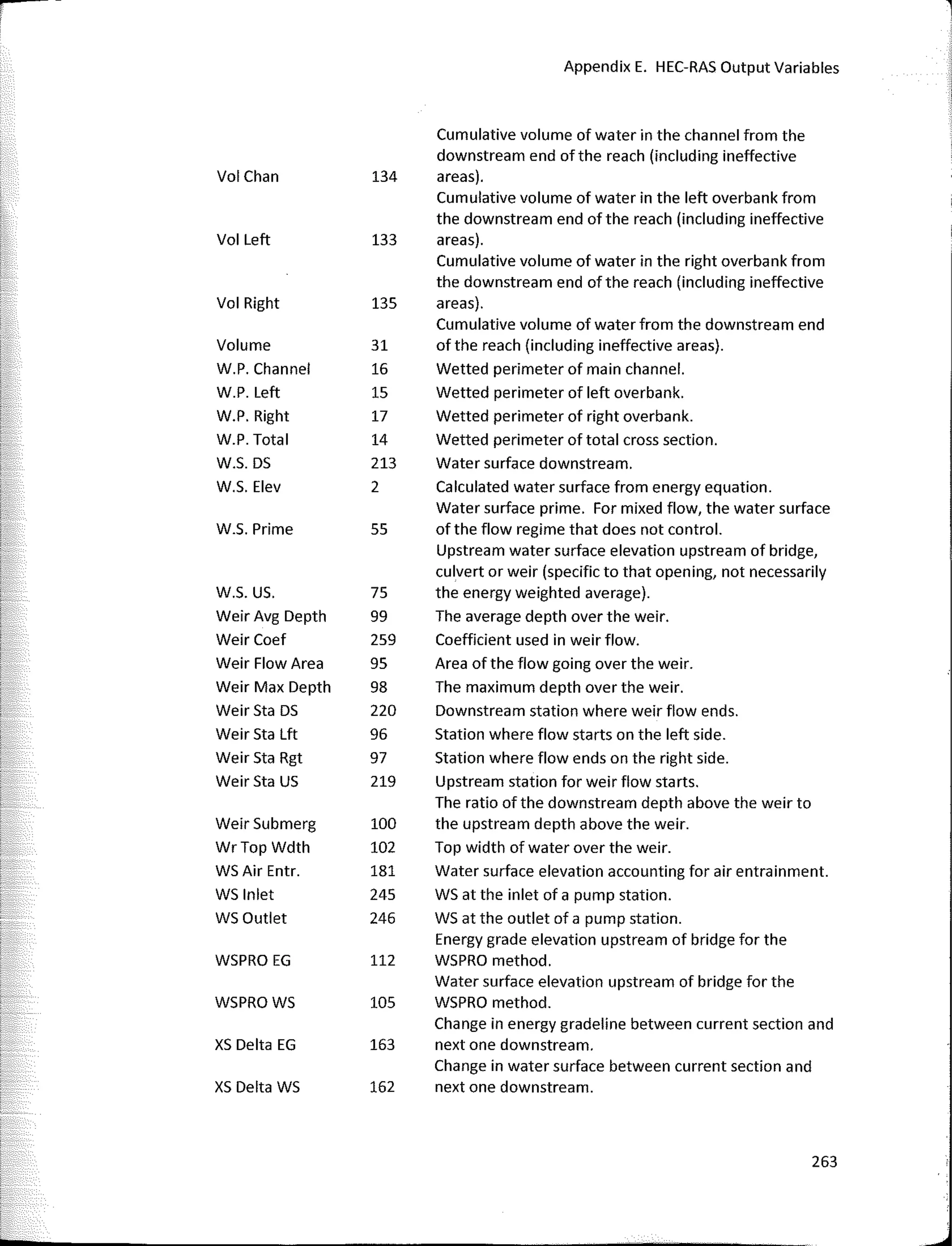
"breaking the HEC-RAS code"- Mark made himself available to help.
• The rest ofthe HEC-RAS Development Team: Steven Piper, Cameron Ackerman,
and Stanford Gibson for graciously offering assistance and insight to the variety
of HEC-RAS problems l've encountered over the years.
• My wife Wendy and daughters Maiah, Abby, and Katie. Thanks for your
encouragement and support, and for putting up with me while I wrote this
book.
My hope is that "Breaking the HEC-RAS Code" will serve as a valuable resource
to HEC-RAS modelers all around the globe.
Christopher R. Goode/1, P.E., D. WRE
xiii
1
WHAT IS HEC-RAS AND
WHY DO WE WANT TO
CONTROLIT?
The Hydroiogic Engineering Center's (HEC) River Analysis System (HEC-RAS) is
one of the most popular hydraulic analysis software programs in the world. Engineers,
scientists, and students from every corner of the globe have used HEC-RAS to predict
water surface elevations in rivers and streams under a variety of different studies
including flood defense, flood insurance, bridge and culvert hydraulics, river and stream
restoration, river and stream realignment, dam and levee design, dam removal, dam
and levee failure, and water supply. lt is accepted as a reliable hydraulic model by
federal agencies including the Federal Emergency Management Agency (FEMA), the
National Weather Service (NWS), the Natural Resource Conservation Service (NRCS),
and the U.5. Army Corps of Engineers.
HEC-RAS is developed and maintained by the Hydrologic Engineering Center
(HEC) in Davis, California. HEC (officially pronounced H-E-C, although to the displeasure
of most HEC staff, it's commonly pronounced "heck") is the Corps of Engineer's center
of expertise for surface and groundwater hydrology, river hydraulics, sediment
transport, hydrologic statistics and risk analysis, reservoir system analysis, planning
analysis, real-time water control management and other closely associated technica!
1
Breaking the HEC-RAS Code
subjects (see HEC website, www.hec.usace.army.mil). HEC was established in 1946 to
consolidate the Corps' water resources expertise in order to pass italong to new,
inexperienced Corps engineers. lmmediately following its inception, HEC began
offering training courses and developing computer programs which evolved into the,
now familiar, HEC software. The early years spawned software programs with very
uninteresting names, such as HEC-1, HEC-2, HEC-3, HEC-4, HEC-5, and HEC-6. These
were sophisticated programs for their day, using the latest techniques for watershed
hydrology, river hydraulics, sediment transport, etc., that would eventually be run on a
"new kind of computer'' - a desktop P.C. While still usable today, they are run on a DOS
platform and, by today's standards, HEC's suite of "numbered" programs are slow,
inefficient, and simply outdated. HEC recognized early on the trend towards graphical
user interface (GUI) platforms and object-oriented programming and in the early 1990's
began development of the Next Generation of hydraulics and hydrology software
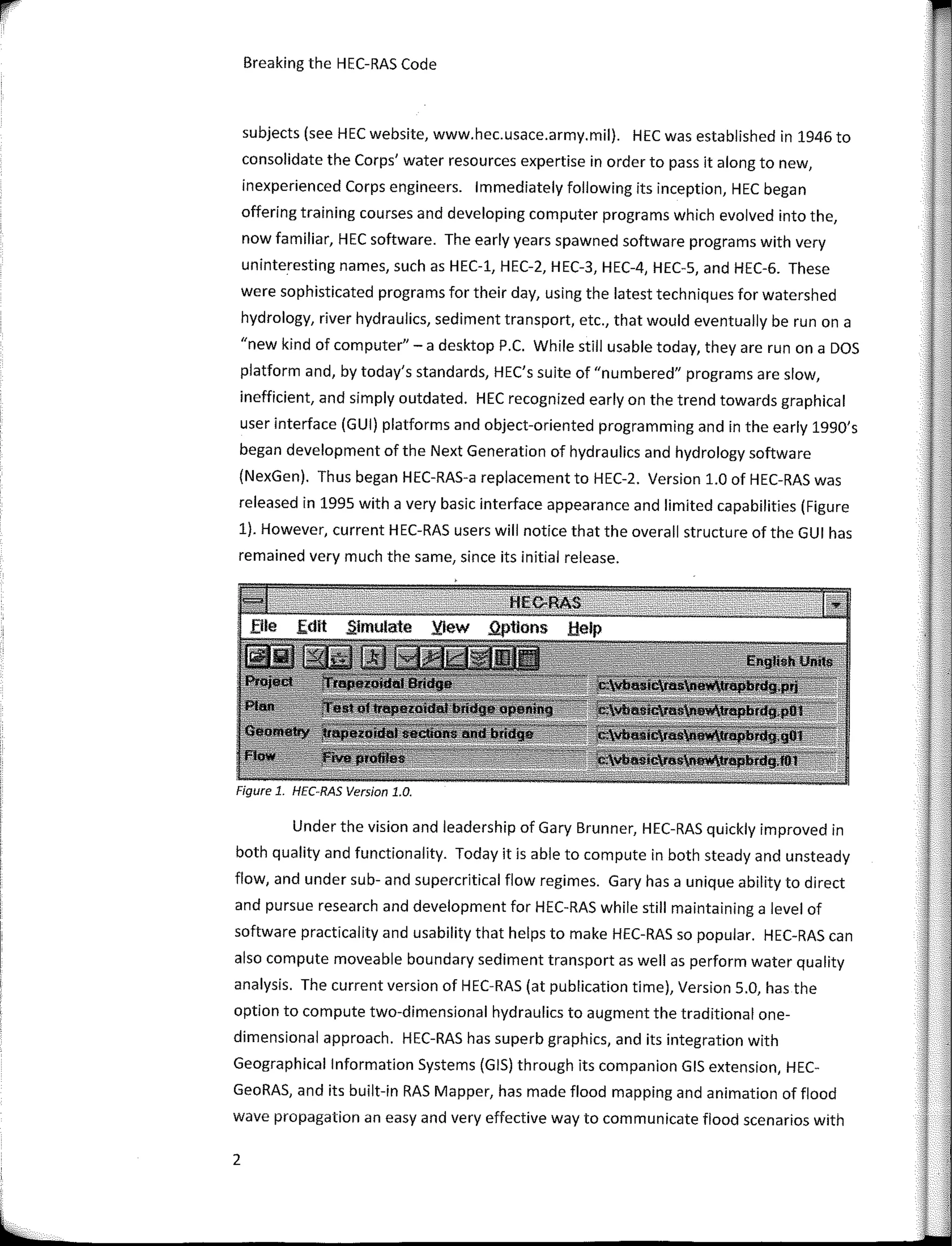
(NexGen). Thus began HEC-RAS-a replacement to HEC-2. Version 1.0 of HEC-RAS was
released in 1995 with a very basic interface appearance and limited capabilities (Figure
1). However, current HEC-RAS users will notice that the overall structure of the GUI has
remained very much the same, since its initial release.
Figure 1. HEC-RAS Version 1.0.
Under the vision and leadership of Gary Brunner, HEC-RAS quickly improved in
both quality and functionality. Today it is able to compute in both steady and unsteady
flow, and under sub- and supercritical flow regimes. Gary has a unique ability to direct
and pursue research and development for HEC-RAS while still maintaining a level of
software practicality and usability that helps to make HEC-RAS so popular. HEC-RAS can
also compute moveable boundary sediment transportas well as perform water quality
analysis. The curren! version of HEC-RAS (at publication time), Version 5.0, has the
option to compute two-dimensional hydraulics to augment the traditional one-
dimensional approach. HEC-RAS has superb graphics, and its integration with
Geographical lnformation Systems (GIS) through its companion GIS extension, HEC-
GeoRAS, and its built-in RAS Mapper, has made flood mapping and animation of flood
wave propagation an easy and very effective way to communicate flood scenarios with
2
What is HEC-RAS and Why do We want to Control it
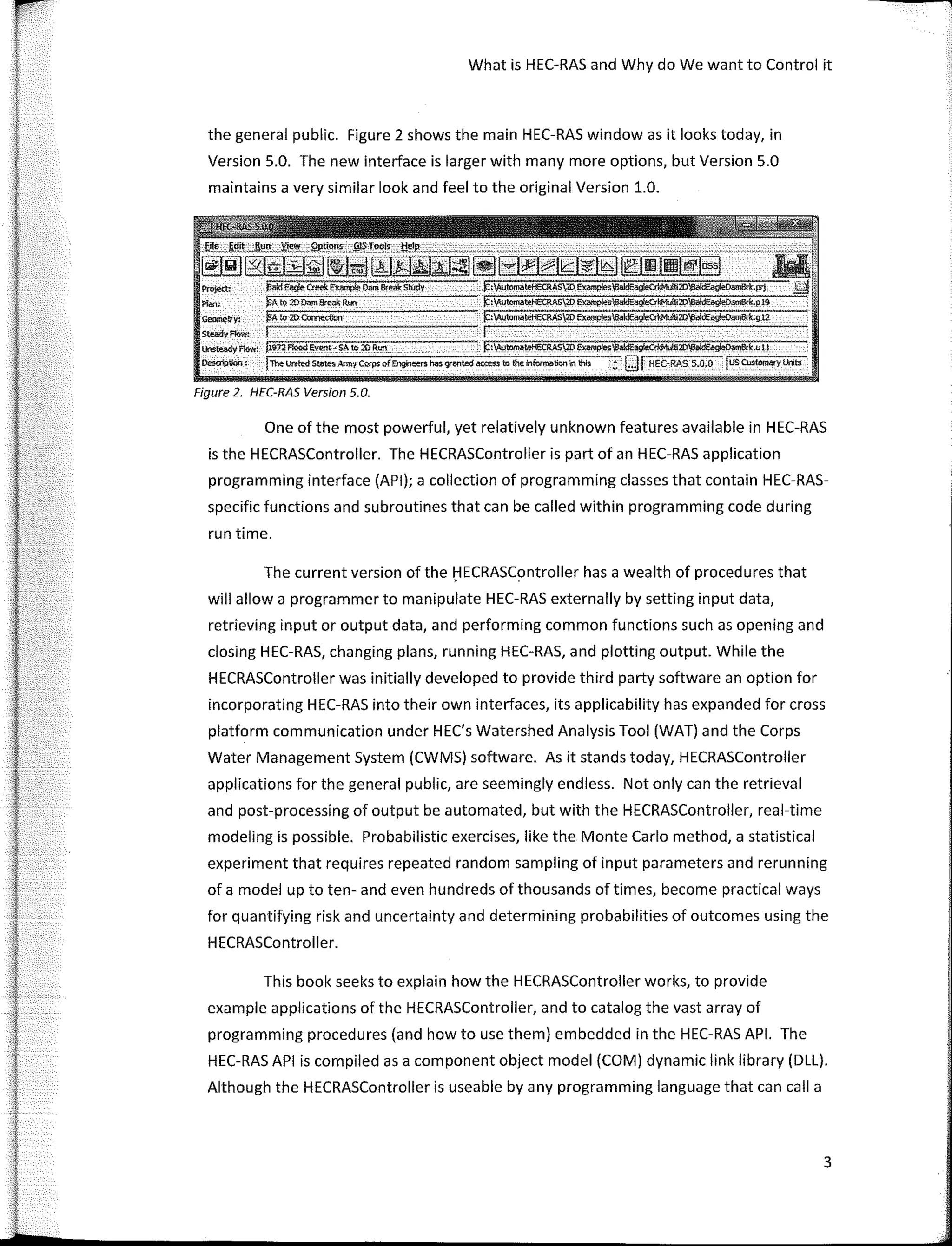
the general public. Figure 2 shows the main HEC-RAS window as it looks today, in
Version 5.0. The new interface is larger with many more options, but Version 5.0
maintains a very similar look and feel to the original Version 1.0.
Pro}e(� )3aídEag!e Cteek Eirample Oam &'eai: Stúdy
Pfan: pÁ to 20 � Break R!XI
Geoo!eb"y: !§A to 2D COMe.ctlon
StNdyflow:
lhsteady flow: ji.sn F!ood e.vent-SA to 20 Run �:'t,Autotnatel-lECRAS20 El(im,plesV3aidEa�2D�k,u11
Desoil)tion: jToelJf¡¡te(I s�ie Amir Corps off.ng,l��rs Msgr�ted ao:e$S to the lnfurm�bornn thls :; Qj HEC-RAS 5.-0.0 fusCustoml!fy Lnts
Figure 2, HEC-RAS Version 5.0.
One of the most powerful, yet relatively unknown features available in HEC-RAS
is the HECRASController. The HECRASController is part of an HEC-RAS application
programming interface (API); a collection of programming classes that contain HEC-RAS-
specific functions and subroutines that can be called within programming code during
run time.
The curren! version of the f:lECRASController has a wealth of procedures that
will allow a programmer to manipulate HEC-RAS externally by setting input data,
retrieving input or output data, and performing common functions such as opening and
closing HEC-RAS, changing plans, running HEC-RAS, and plotting output. While the
HECRASController was initially developed to provide third party software an option for
incorporating HEC-RAS into their own interfaces, its applicability has expanded for cross
platform communication under HEC's Watershed Analysis Tool (WAT) and the Corps
Water Management System (CWMS) software. As it stands today, HECRASController
applications for the general public, are seemingly endless. Not only can the retrieval
and post-processing of output be automated, but with the HECRASController, real-time
modeling is possible. Probabilistic exercises, like the Monte Cario method, a statistical
experiment that requires repeated random sampling of input parameters and rerunning
of a model up to ten- and even hundreds of thousands of times, become practica! ways
for quantifying risk and uncertainty and determining probabilities of outcomes using the
HECRASController.
This book seeks to explain how the HECRASController works, to provide
example applications of the HECRASController, and to catalog the vast array of
programming procedures (and how to use them) embedded in the HEC-RAS API. The
HEC-RAS API is compiled as a component object model (COM) dynamic link library (DLL).
Although the HECRASController is useable by any programming language that can calla
3
i.JI
:
l_
Breaking the HEC-RAS Code
DLL, this book will discuss the HECRASController and present examples of its use from a
Visual Basic® programming background. The reason is twofold:
• HEC-RAS is written in Visual Basic® (VB), so the HECRASController has a VB
"feel" to it, and
• The programming language behind the popular Macros in Microsoft® Excel® is
Visual Basic® for Applications (VBA) - a relative of VB that uses the same Visual
Basic® Runtime Library.
Excel® is much more widely used in the engineering community than software
writing applications, including Visual Studio®, and it is expected that the majority of the
readers of this book will use VBA in Excel® for automating HEC-RAS. This is not to
discount the advantages and elegance of creating a stand-alone piece of software that
controls HEC-RAS from more sophisticated and robust programming languages. There is
certainly a place for that. However, the concepts presented in this book, though
presented within the context of programming in VBA, can easily be applied to Visual
Basic® or other programming platforms by anyone with a reasonable level of skill in
object-oriented software programming.
4
.
. .
.
.
-¡ -·--·
. � - ' ';:-·
-.-
2
CONTROLLING HEC­RAS
Anyone who has downloaded and installed HEC-RAS (version 3.1 or later)
already has access to the HEC-RAS API. The HEC-RAS API is a reference library that
contains three publically available classes, each with its own set of procedures (blocks of
programming code that perform tasks) designed specifically to facilitate and control the
operation and behavior of HEC-RAS, to edit input files, and toread input and output
files. The HECRASController is one of these classes. HEC-RAS is compiled as a
Component Object Module (COM) server application and its companion
HECRASController can be called by any client program that can read a COM DLL. As
opposed to a fully contained, stand-alone software application, a client makes requests
to another computer program (i.e. HEC-RAS) through programs and libraries in the
computer's server (i.e. the HEC-RAS API) taking advantage of already-established
procedures. By adding HEC-RAS as a server application reference to your software
development project, the HEC-RAS API, and more specifically ali of its classes and
procedures, becomes available to use in your code. The HEC-RAS API is the server
application and the code written to control and automate HEC-RAS makes up the client
program.
To access the HEC-RAS API in Excel® (VBA), open the Excel® Visual Basic®
Editor by selecting the View tab and clicking on View Macros under the Macro button,
or by pressing Alt+Fll on the keyboard. lf no macros have been written to the current
Excel® Workbook, "View Macro's" will not work. In this case press Alt+Fll or add the
"Developer" tab to the menu ribbon at the top of the Excel® window. The Developer
5
¡
a
1
Breaking the HEC-RAS Code
tab includes a number of developer tools, including a "Visual Basic" button which will
open the Visual Basic® Editor. Once the Visual Basic® Editor is open, select the Tools
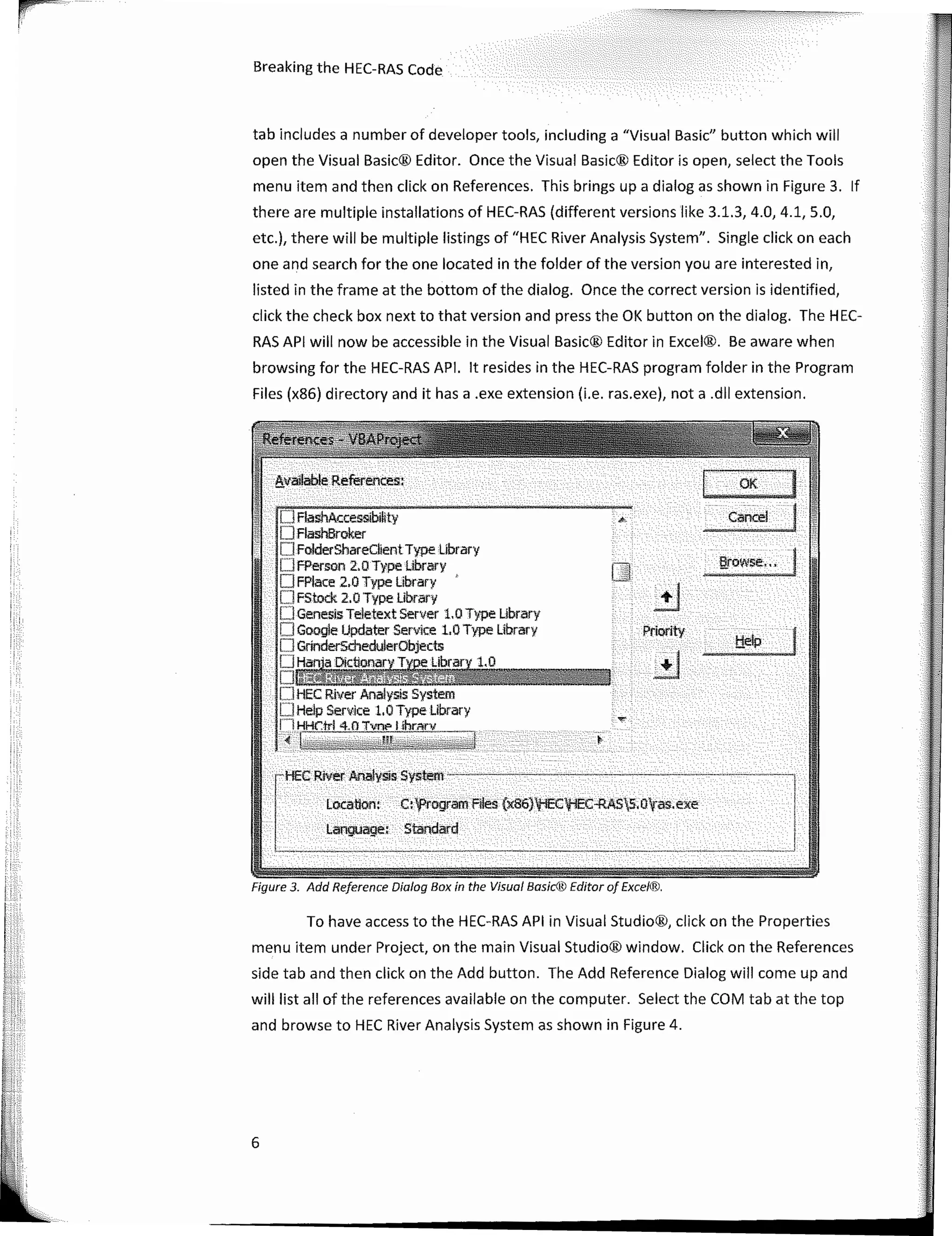
menu item and then click on References. This brings upa dialogas shown in Figure 3. lf
there are multiple installations of HEC-RAS (different versions like 3.1.3, 4.0, 4.1, 5.0,
etc.), there will be multiple listings of "HEC River Analysis System". Single click on each
one and search for the one located in the folder of the version you are interested in,
listed in the frame at the bottom of the dialog. Once the correct version is identified,
click the check box next to that version and press the OK button on the dialog. The HEC-
RAS API will now be accessible in the Visual Basic® Editor in Excel®. Be aware when
browsing for the HEC-RAS API. lt resides in the HEC-RAS program folder in the Program
Files (x86) directory and it has a .exe extension (i.e. ras.exe), nota .dll extension.
6
e.;,ovvse·,, �
J - OK
Cancel·
Priority
O FlashAt.:cessibiHy
· . OFlashBroker
D FolderShareClient Type library
OFPerson 2.0 Type Library
O FPlace 2.0 Type Library
OFstock 2.0Type Library
.• OGenesisTeletextServer 1.0Type Library
· ·· OGoogle Updater Service 1.0 Type Library
·· O GrinderschedulerObjects
.. OHaf)j_a Dictionar}'._T� Library 1.0
:- DfilMfu@KtffiUtt@4gn I t
OHEC River Analysis System
· OHe!pService l.OTypelibrary
. li HHC:lrl 4.0 Tvn,, 1 ihrnrv
�;j¡¡¡Ytj��!��v�;;;-f' �·--�� '.?'·' {ic':j:
····cHECRivliiiArial;si� System . . •· . . . . .. .. . .
: . .' · Locatiori: . t:tprógram'Filés (x86}'tEC'tiEC-RAS5;0l¡as.exe
· ·· Language, -Standard · . . · · · ·
', . �. . .
To have access to the HEC-RAS API in Visual Studio®, click on the Properties
menu item under Project, on the main Visual Studio® window. Click on the References
side tab and then click on the Add button. The Add Reference Dialog will come up and
will list all of the references available on the computer. Select the COM tab at the top
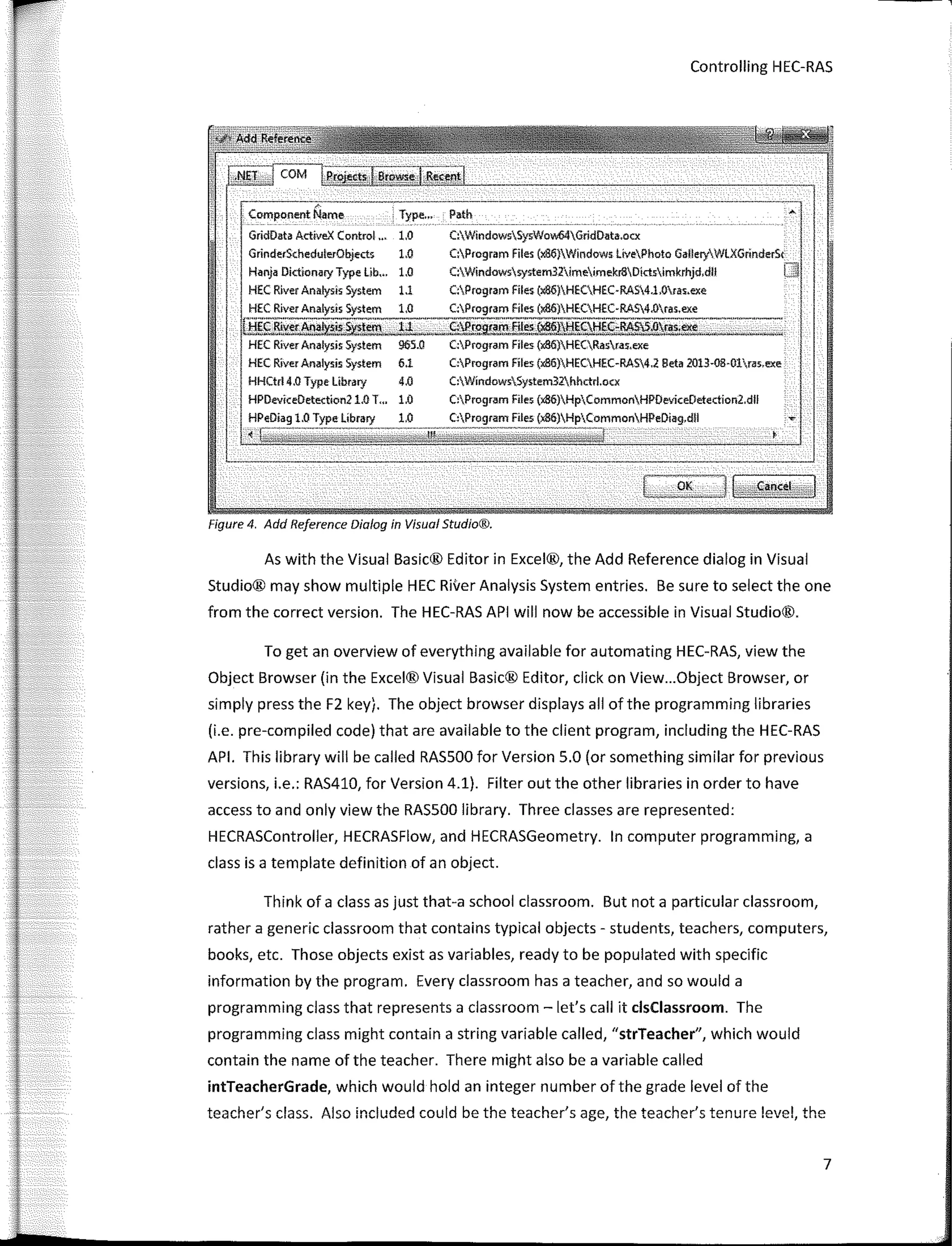
and browse to HEC River Analysis System as shown in Figure 4.
Figure 3. Add Reference Dialog Box in the Visual Basíc® Editor o/ Exce'®.
Controlling HEC-RAS
.----�;-·-------
Compo-nent Name
-----------,
. Type... Path
GridData ActiveX Control... 1.0
GrinderSchedulerObjects 1.0
Haoja Dictionary Type Lib... 1.0
HEC River Analys:ís System 1.1
C:WindowsSysVlow64GridData.ocx
C:Program Files (x86}Windows lívePhoto GalleryV/LXGrinderSc
C:Windows:sys:tem32imeimekr8Díctsimkrhjd,dll
C:Program Files (xa6)HECHEC·RAS4.1.0ras.exe
HEC River Analys:ís: System 1,0 C:Program Files (Jt86)HECHEC-RAS4.0ras.exe
U:!gfll����.§�lem-2d........_S:c}Pr295ilJ"-f!L�)lj!9.l;!�;-}lAS.S.Or�"�·
-�--·
-:::::...._-.
_
HEC Ríver Analys:is: System 965.Q C:Program Files (x86)HECRasras,exe
HEC Ríver Analys:is System 6.1
HHCtrl 4.0 Type library 4.0
HPDeviceDetection21,0 T,,. 1.0
1.0 Type líbrary 1.0
-..• - ----··-------------------
C:Program Files (x86)HECHEC-RAS4.2 Beta 2013·08·01ras,exe
C:WíndowsSystem32.hhctrl.ocx
C:Program Files (x86)HpCommonHPOeviceDetection2.dll
Files
Figure 4. Add Reference Dialog in Visual Studio®.
As with the Visual Basic® Editor in Excel®, the Add Reference dialog in Visual
Studio® may show multiple HEC River Analysis System entries. Be sure to select the one
from the corree! version. The HEC-RAS API will now be accessible in Visual Studio®.
To get an overview of everything available for automating HEC-RAS, view the
Object Browser (in the Excel® Visual Basic® Editor, click on View...Object Browser, or
simply press the F2 key). The object browser displays ali of the programming libraries
(i.e. pre-compiled code) that are available to the client program, including the HEC-RAS
API. This library will be called RASSOO for Version 5.0 (or something similar for previous
versions, i.e.: RAS410, for Version 4.1). Filter out the other libraries in order to have
access to and only view the RASSOO library. Three classes are represented:
HECRASController, HECRASFlow, and HECRASGeometry. In computer programming, a
class is a template definition of an object.
Think of a class as just that-a school classroom. But nota particular classroom,
rather a generic classroom that contains typical objects - students, teachers, computers,
books, etc. Those objects existas variables, ready to be populated with specific
information by the program. Every classroom has a teacher, and so would a
programming class that represents a classroom - let's call it clsClassroom. The
programming class might contain a string variable called, "strTeacher", which would
contain the name of the teacher. There might also be a variable called
intTeacherGrade, which would hold an integer number of the grade level of the
teacher's class. Also included could be the teacher's age, the teacher's tenure !evel, the
7
·�·-····-·--
Breaking the HEC-RAS Code
teacher's license status, and so on. An experienced programmer would recognize these
properties are ali attributed to the teacher and would therefore set upa sub-class calied
clsTeacher that can be instantiated within the classroom class. That way, ali attributes
associated with the teacher remain conveniently inside a single "teacher" class. Perhaps
there are two teachers in the class. Each teacher could be defined as its own clsTeacher
class within the clsClassroom class. However the strTeacher variable might be "Mrs.
Jones" for the first teacher and "Mr. Berg" for the second.
In addition to physical objects, a classroom has rules and procedures. So can
the clsClassroom class. Perhaps there is a procedure for asking a question. lt may go
something like this:
l. Student raises her hand.
2. lf the teacher calis on the student, the student asks the question.
3. lf the teacher does not call on the student, the student sits quietly with hand
patiently raised.
4. lfthe student asks her question before the teacher calis on the student, the
student is disciplined.
S. The student lowers her hand.
This example represents what could be programmed as a subroutine in clsClassroom
calied AskAQuestion.
The classes in the HEC-RAS API are simply collections of procedures that can be
called upan by the client program you create. lnstead of an AskAQuestion subroutine, ; ·•
the HEC-RAS API classes have subroutines that edit input values, retrieve output, and
manipulate HEC-RAS. Table 1 briefly describes the three publically available classes in the
HEC-RAS API.
..
Class Description
HECRASControlier Procedures and classes for programming level
communication with HEC-RAS.
HECRASFlow One function, "UnsteadyBoundarylndex".
HECRASGeometry HEC-RAS Geometry-related procedures.
Table 1 Programming Classes available in the HEC-RAS API Version 5 O
8
Controlling HEC-RAS
The HECRASFlow class appears to be a short-lived class construct that isn't really
maintained by HEC anymore. The HECRASGeometry class is actually referenced within
the HECRASController as a property called Geometry. The HECRASController contains
the overwhelming majority of useful procedures fer the general HEC-RAS community
and therefore the HECRASController will be the primary focus of this book.
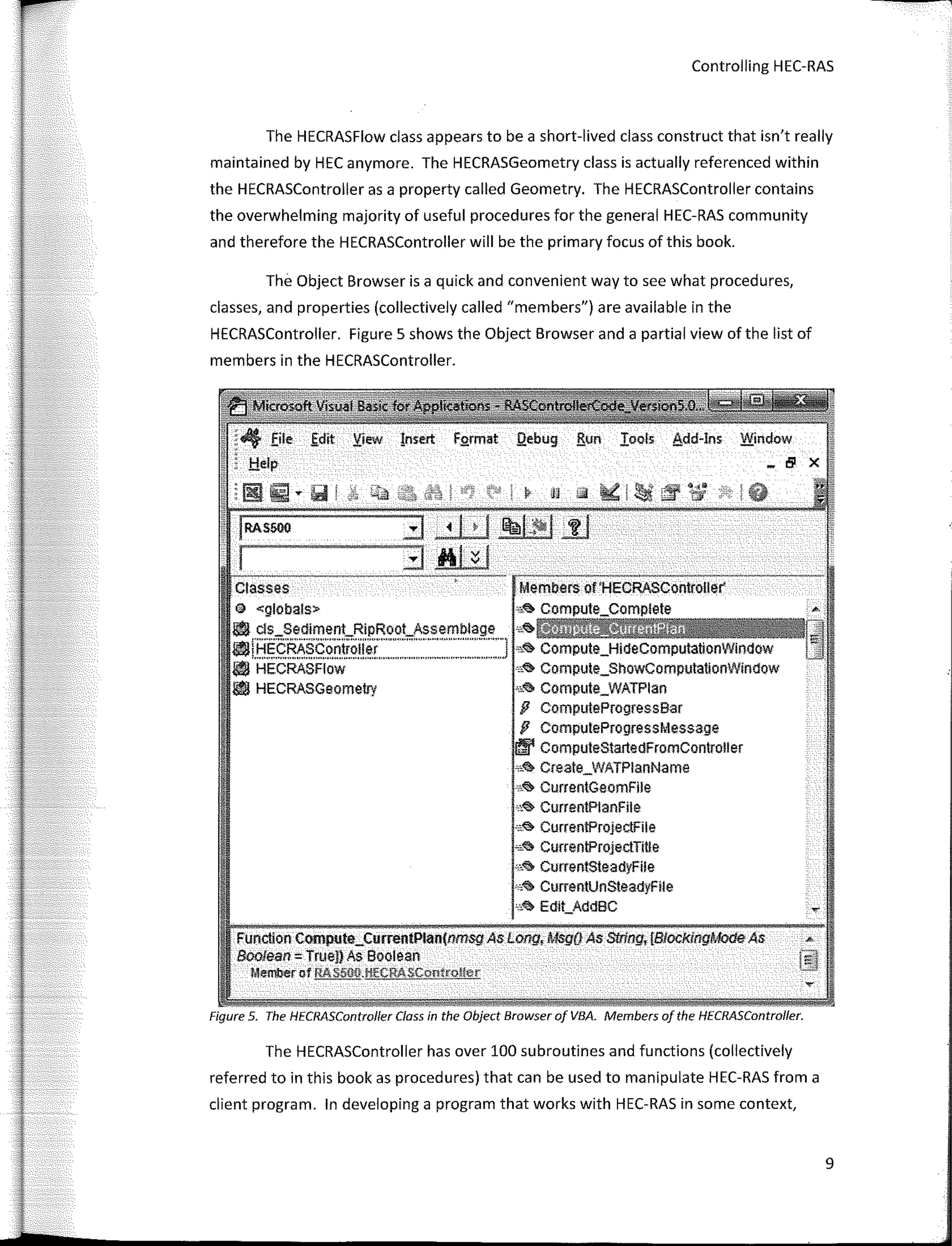
The Object Browser is a quick and convenient way to see what procedures,
classes, and properties (collectively called "members") are available in the
HECRASController. Figure 5 shows the Object Browser and a partial view of the list of
members in the HECRASController.
ctaeses Members of'HECRASController
@ <globals> A
l!'I ds_SedimenLRipRoot_Assemblage "'.,. ,
l'líHECRASContrnller 1 s.,. Compute_HideComputationWíndow
.,..,.,,,,,.""'""""'"""'""""""'""''"""'"""'"''"'"'"'"'""''"'"''""'''"""''
l'I HECRASFlow "<!> Compute_ShoWComputationWlmlow
l!'I HECRASGeometry "� Compute_WATPlan
fJ ComputeProgressBar
fJ ComputeProgressMessage
lffl' ComputeStartedFromController
,,.,. Create_WATPlanName
0
i<'> CurrentGeomFlle
°''� Curren!PlanFíle
,¿<il; Curren!ProjectFíle
""'il> Curren!ProjectTIUe
·"� CurrentsteadyFile
"'� CummtUnsteadyFíle
"''il> Edlt_AddBC .,.
Funcllon Compute_CurrentPlan(nm.sgAs Long, Msg(i As Sl!ing, {Blocf<lngModeAs "
Boofean = True!) As soorean
Memberof RAS500.l!!'CAASCon!coll<,r
Figure 5. The HECRASControlfer Class in the Object Browser of VBA. Members of the HECRASController.
The HECRASController has over 100 subroutines and functions (collectively
referred to in this book as procedures) that can be used to manipulate HEC-RAS from a
client program. In developing a program that works with HEC-RAS in sorne context,
9
---
-···-
10
.-.
•save the Ctanges
RC.prol
ss� Projeci,_Current
,,,� Project_New
"'� Projeci,_Open
,,��i4@44ii@H
.•,� Project_SaveAs
s.<:!> Ouí!Ras
,•.� Schematlc_ReachCount
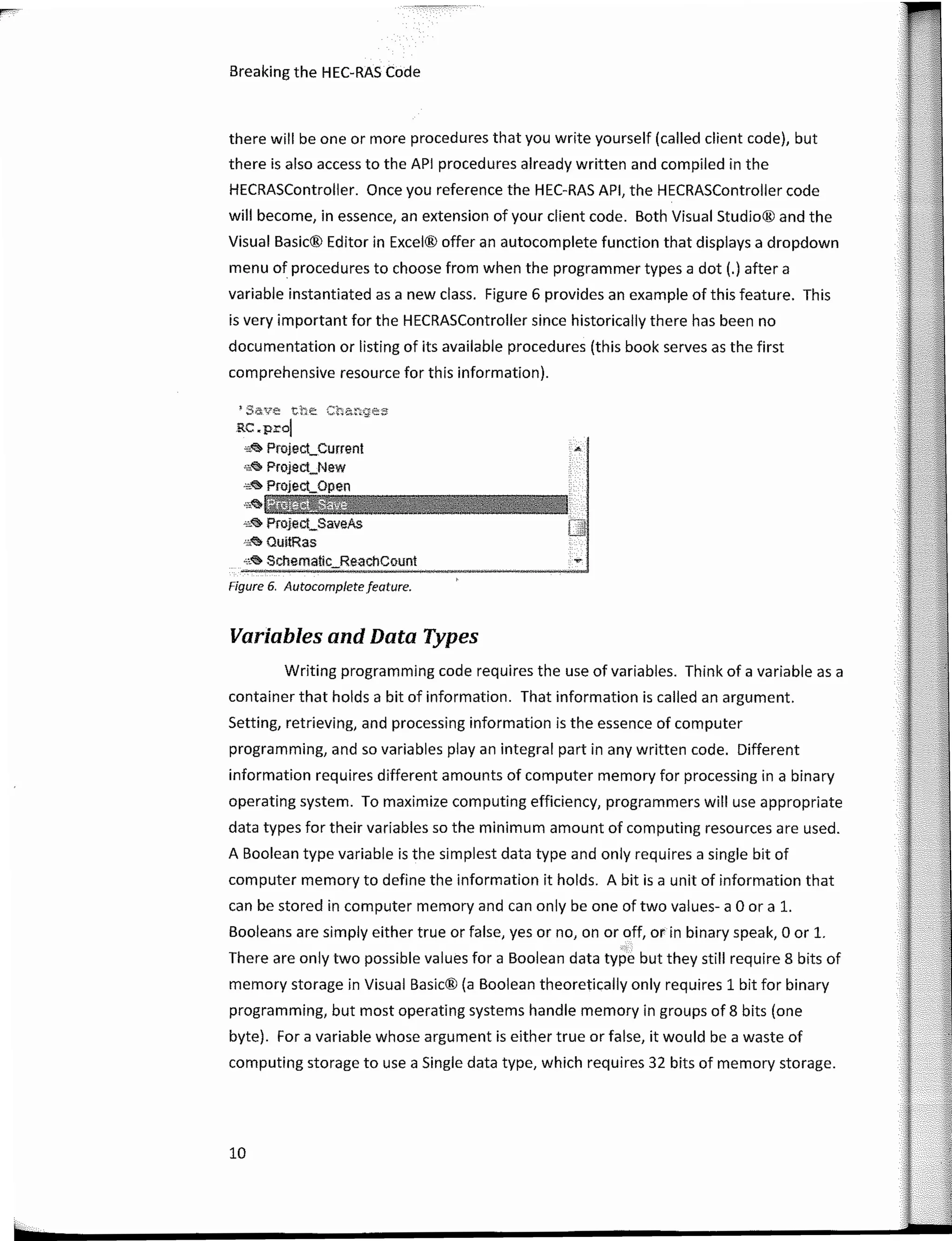
Figure 6. Autocomplete feature.
Breaking the HEC-RAS Code
Variables and Data Types
there will be one or more procedures that you write yourself (called client code), but
there is also access to the API procedures already written and compiled in the
HECRASController. Once you reference the HEC-RAS API, the HECRASController code
will become, in essence, an extension of your client code. Both Visual Studio® and the
Visual Basic® Editor in Excel® offer an autocomplete function that displays a dropdown
menu of procedures to choose from when the programmer types a dot (.) after a
variable instantiated as a new class. Figure 6 provides an example of this feature. This
is very important for the HECRASController since historically there has been no
documentation or listing of its available procedures (this book serves as the first
comprehensive resource for this information).
Writing programming code requires the use of variables. Think of a variable as a
container that holds a bit of information. That information is called an argument.
Setting, retrieving, and processing information is the essence of computer
programming, and so variables play an integral part in any written code. Different
information requires different amounts of computer memory for processing in a binary
operating system. To maximize computing efficiency, programmers will use appropriate
data types for their variables so the mínimum amount of computing resources are used.
A Boolean type variable is the simplest data type and only requires a single bit of
computer memory to define the information it holds. A bit is a unit of information that
can be stored in computer memory and can only be one of two values- a O ora l.
Booleans are simply either true or false, yes orno, on or off, or in binary speak, O or l.
�-:
There are only two possible values for a Boolean data type but they still require 8 bits of
memory storage in Visual Basic® (a Boolean theoretically only requires 1 bit for binary
programming, but most operating systems handle memory in groups of 8 bits (one
byte). For a variable whose argument is either true or false, it would be a waste of
computing storage to use a Single data type, which requires 32 bits of memory storage.
Controlling HEC-RAS
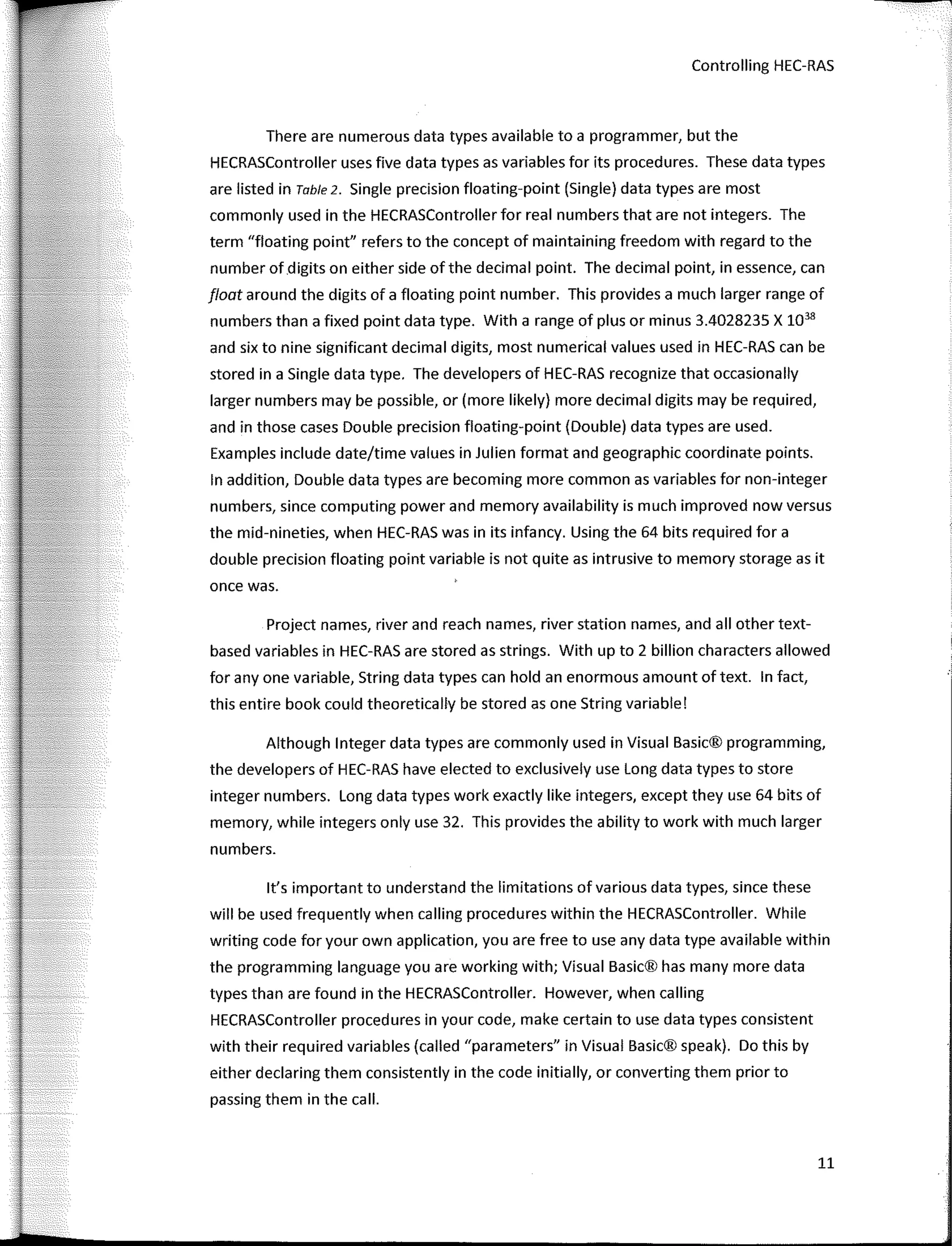
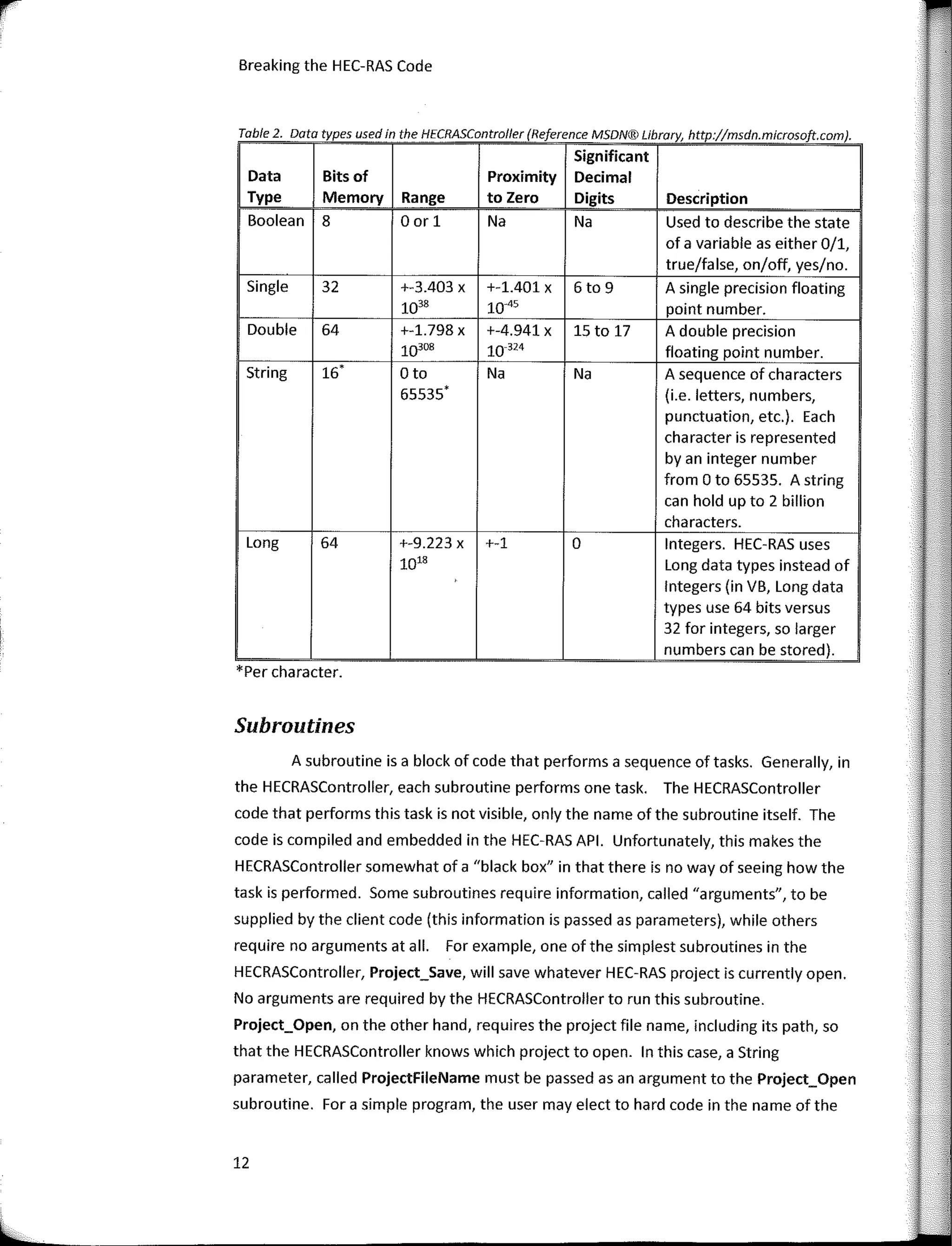
There are numerous data types available to a programmer, but the
HECRASController uses five data types as variables for its procedures. These data types
are listed in Table 2. Single precision floating-point (Single) data types are most
commonly used in the HECRASController for real numbers that are not integers. The
term "floating point" refers to the concept of maintaining freedom with regard to the
number of digits on either side of the decimal point. The decimal point, in essence, can
float around the digits of a floating point number. This provides a much larger range of
numbers than a fixed point data type. With a range of plus or minus 3.4028235 X 1038
and six to nine significant decimal digits, most numerical values used in HEC-RAS can be
stored in a Single data type. The developers of HEC-RAS recognize that occasionally
larger numbers may be possible, or (more likely) more decimal digits may be required,
and in those cases Double precision floating-point (Double) data types are used.
Examples include date/time values in Julien format and geographic coordinate points.
In addition, Double data types are becoming more common as variables for non-integer
numbers, since computing power and memory availability is much improved now versus
the mid-nineties, when HEC-RAS was in its infancy. Using the 64 bits required for a
double precision floating point variable is not quite as intrusive to memory storage as it
once was.
Project names, river and reach names, river station names, and all other text-
based variables in HEC-RAS are stored as strings. With up to 2 billion characters allowed
for any one variable, String data types can hold an enormous amount of text. In fact,
this entire book could theoretically be stored as one String variable!
Although lnteger data types are commonly used in Visual Basic® programming,
the developers of HEC-RAS have elected to exclusively use Long data types to store
integer numbers. Long data types work exactly like integers, except they use 64 bits of
memory, while integers only use 32. This provides the ability to work with much larger
numbers.
lt's important to understand the limitations of various data types, since these
will be used frequently when calling procedures within the HECRASController. While
writing code for your own application, you are free to use any data type available within
the programming language you are working with; Visual Basic® has many more data
types than are found in the HECRASController. However, when callíng
HECRASController procedures in your code, make certaín to use data types consistent
wíth their required variables (called "parameters" in Visual Basic® speak). Do thís by
either declaring them consístently in the code ínítíally, or convertíng them prior to
passíng them in the call.
11
Breaking the HEC-RAS Code
Table 2 Data types used in the HECRASController (Reference MSDN® Library http·//msdn microsoft com)
,
Significant
Data Bits of Proximity Decimal
Type Memory Range to Zero Digits Description
Boolean 8 O or 1 Na Na Used to describe the state
of a variable as either 0/1,
true/false, on/off, yes/no.
Single 32 +-3.403 X +-1.401 X 6to 9 A single precision floating
1038 10-'5 point number.
Double 64 +-1.798 X +-4.941 X 15 to 17 A double precision
10308 10-324 floating point number.
String 16' Oto Na Na A sequence of characters
55535' (i.e. letters, numbers,
punctuation, etc.). Each
character is represented
by an integer number
from O to 65535. A string
can hold up to 2 billion
characters.
Long 64 +-9.223 X +-1 o lntegers. HEC-RAS uses
10'8 Long data types instead of
lntegers (in VB, Long data
types use 64 bits versus
32 far integers, so larger
numbers can be stored).
*Per character.
Subroutines
A subroutine is a block of code that performs a sequence of tasks. Generally, in
the HECRASController, each subroutine performs one task. The HECRASController
code that performs this task is not visible, only the name of the subroutine itself. The
code is compiled and embedded in the HEC-RAS API. Unfortunately, this makes the
HECRASController somewhat of a "black box" in that there is no way of seeing how the
task is performed. Sorne subroutines require information, called "arguments", to be
supplied by the client code (this information is passed as parameters), while others
require no arguments at ali. Far example, one of the simples! subroutines in the
HECRASController, Project_Save, will save whatever HEC-RAS project is currently open.
No arguments are required by the HECRASController to run this subroutine.
Project_Open, on the other hand, requires the project file name, including its path, so
that the HECRASController knows which project to open. In this case, a String
parameter, called ProjectFileName must be passed asan argument to the Project_Open
subroutine. Far a simple program, the user may elect to hard code in the name of the
12
Controlling HEC-RAS
project to open. This is more common ifthe program is written far a specific HEC-RAS
project and is not expected to be used far any other projects. A more versatile program
may request the user to provide the project name toan input box or select the project
name from a dialog. The selected project name is then passed to the Project_Open
subroutine as the argument far the ProjectFileName parameter. In Visual Basic®,
arguments to be passed to a subroutine are defined in parameters listed after the call to
that subroutine without parentheses. The fallowing simple code demonstrates the
Project_Open subroutine as it might appear in a VBA program:
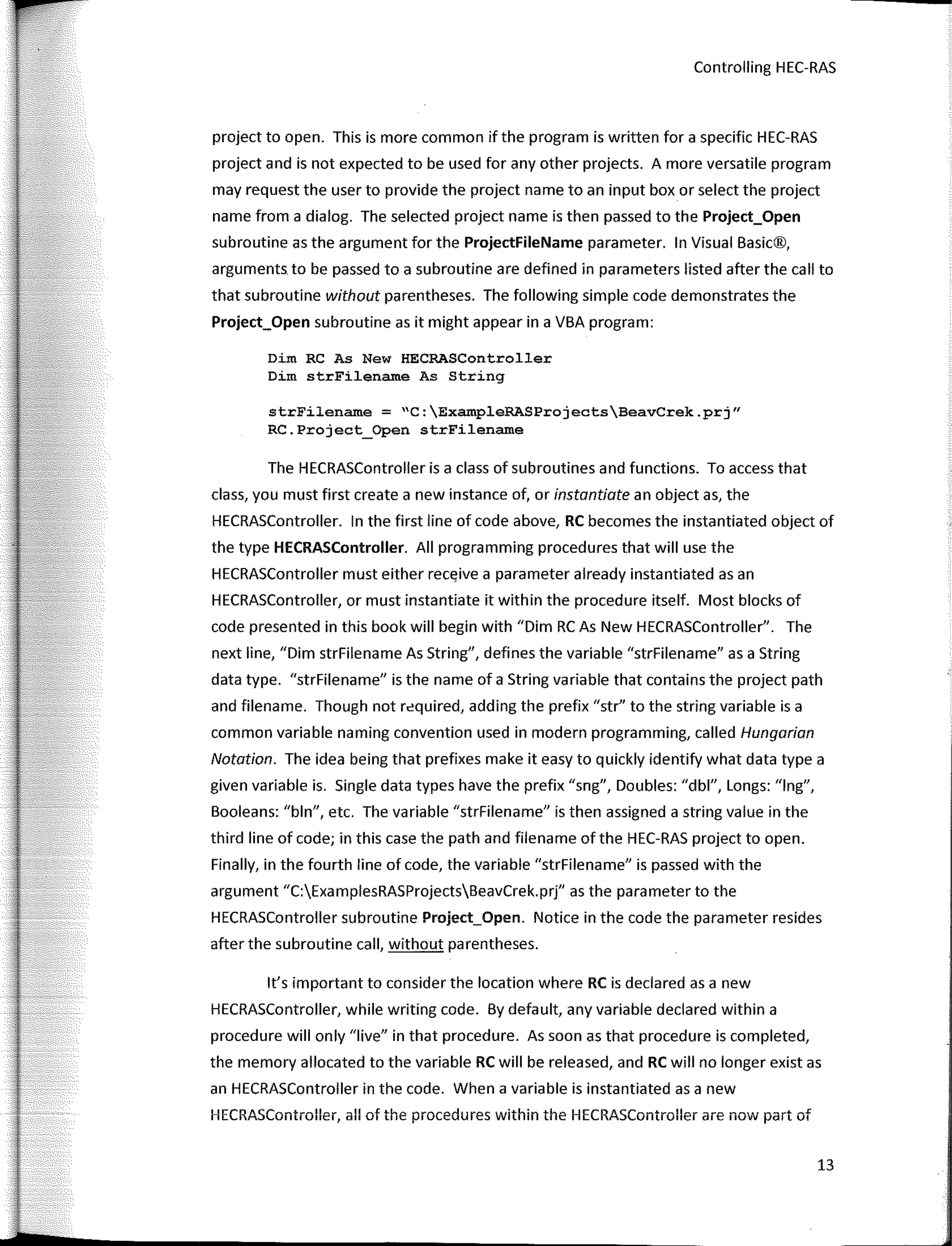
Dim RC As New HECRASController
Dim strFilename As String
strFilename = "C:ExampleRASProjectsBeavCrek.prj"
RC.Project_Open strFilename
The HECRASController is a class of subroutines and functions. To access that
class, you must first create a new instance of, or instantiate an object as, the
HECRASController. In the first line of code above, RC becomes the instantiated object of
the type HECRASController. AII programming procedures that will use the
HECRASController must either receive a parameter already instantiated asan
HECRASController, or must instantiate it within the procedure itself. Most blocks of
code presented in this book will begin with "Dirn RC As New HECRASController". The
next line, "Dirn strFilename As String", defines the variable "strFilename" as a String
data type. "strFilename" is the name of a String variable that contains the project path
and filename. Though not required, adding the prefix "str" to the string variable is a
common variable naming convention used in modern programming, called Hungarian
Notation. The idea being that prefixes make it easy to quickly identify what data type a
given variable is. Single data types have the prefix "sng", Doubles: "dbl", Longs: "lng",
Booleans: "bln", etc. The variable "strFilename" is then assigned a string value in the
third line of code; in this case the path and filename ofthe HEC-RAS project to open.
Finally, in the faurth line of code, the variable "strFilename" is passed with the
argument "C:ExamplesRASProjectsBeavCrek.prj" as the para meter to the
HECRASController subroutine Project_Open. Notice in the code the parameter resides
after the subroutine call, without parentheses.
lt's important to consider the location where RC is declared as a new
HECRASController, while writing code. By default, any variable declared within a
procedure will only "live" in that procedure. As soon as that procedure is completed,
the memory allocated to the variable RC will be released, and RC will no longer existas
an HECRASController in the code. When a variable is instantiated as a new
HECRASController, all of the procedures within the HECRASController are now part of
13
r
'
1
Breaking the HEC-RAS Code
that variable. But, until the Project_Open subroutine is called, HEC-RAS will not be open
as a process in Windows®. Then, once the ShowRAS subroutine is called, HEC-RAS will
be opened asan active application in the Windows® operating system. Until the
ShowRAS subroutine is called, you won't see HEC-RAS open on the desktop and it won't
be available to interact with, but it is nevertheless opened in the background as a
process. This can be verified by opening the Windows® Task Manager (Ctrl-Alt-Delete)
and viewing the active processes. During program run-time, if you pause the code with
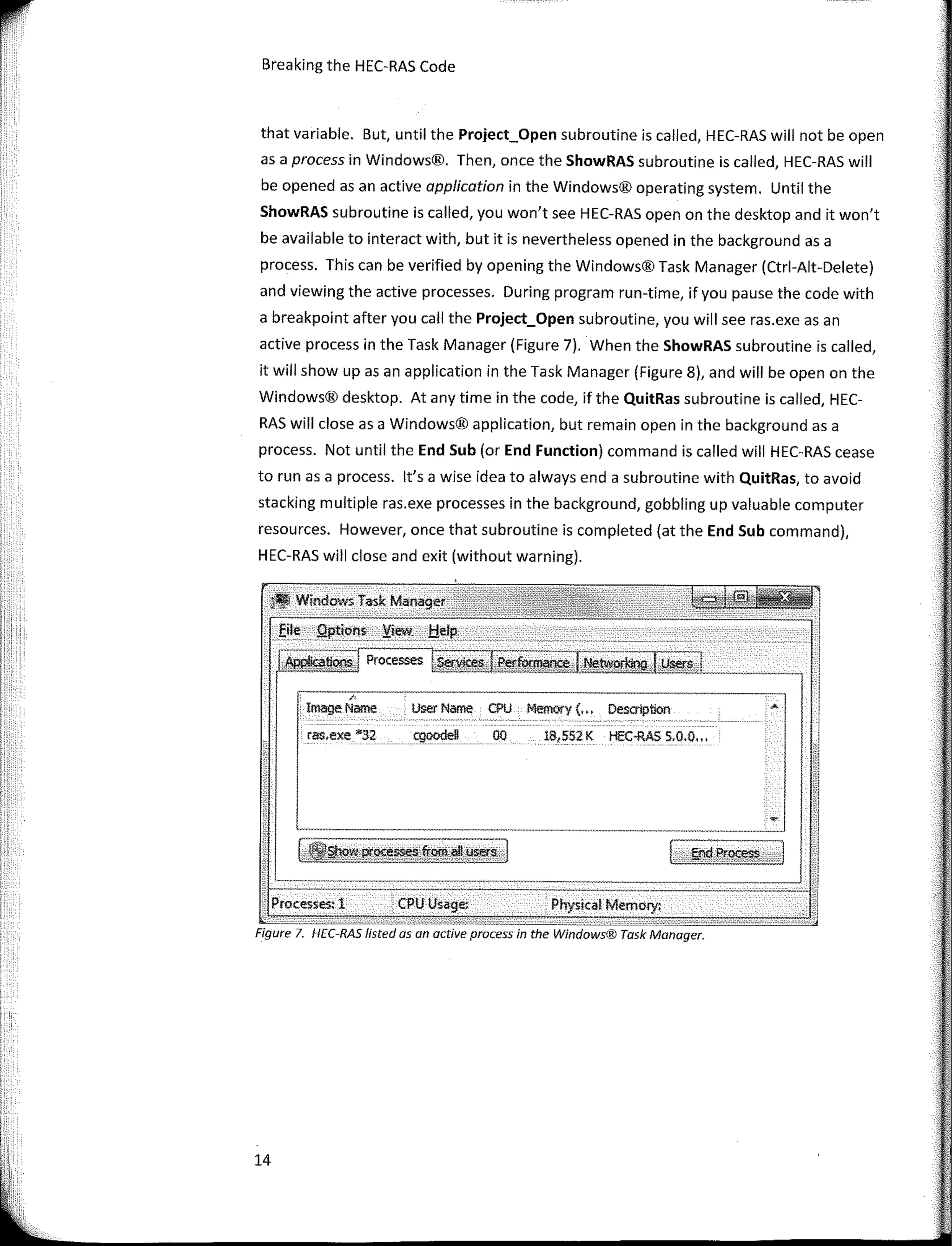
a breakpoint after you call the Project_Open subroutine, you will see ras.exe asan
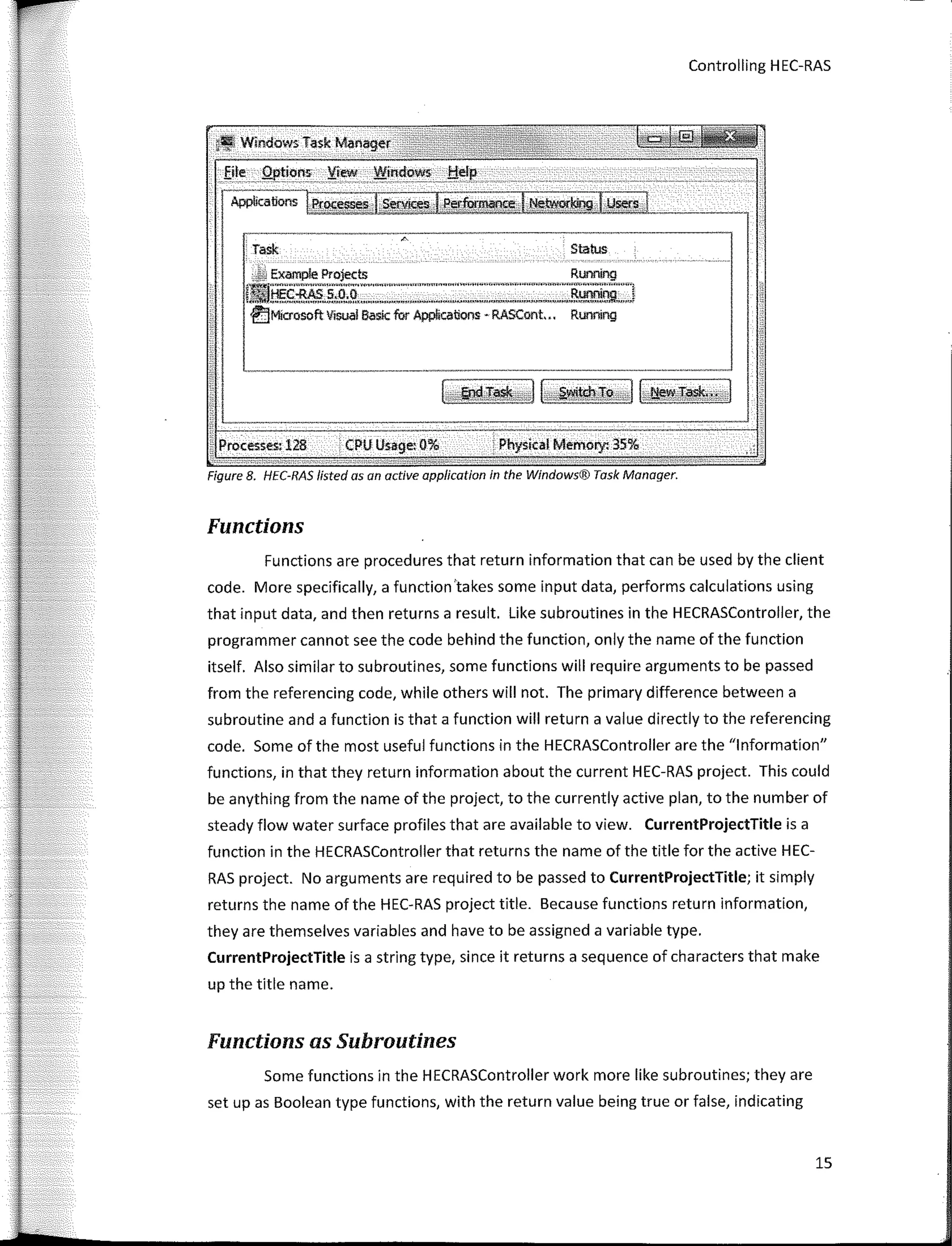
active process in the Task Manager (Figure 7). When the ShowRAS subroutine is called,
it will show upas an application in the Task Manager (Figure 8), and will be open on the
Windows® desktop. At any time in the code, if the QuitRas subroutine is called, HEC-
RAS will clase as a Windows® application, but remain open in the background as a
process, Not until the End Sub (or End Function) command is called will HEC-RAS cease
to runas a process. lt's a wise idea to always end a subroutine with QuitRas, to avoid
stacking multiple ras.exe processes in the background, gobbling up valuable computer
resources. However, once that subroutine is completed (at the End Sub command),
HEC-RAS will clase and exit (without warning).
Figure 7. HEC-RAS listed asan active process in the Windows® Task Manager.
• Windows Taslc Manager
user Name CPU Memory (... Descríption
Physkal Memory:
18,552K HEC-RAS 5,0,0.,,
00
cgoodeD
CPU Usage:
,
lmageName
ras.exe :ic32
· Processes: 1
i
1
,,,
1 .
1'
l
!
1
1
I! 14
11
''
¡,,
Controlling H EC-RAS
¡.Wíndows Task Manager
Eite _.Q¡,tions 'iie.w ..Wit:d<>� __f:!cl�
·---�---�-�
Applicatíons Proc� �=.,===========¡__ _
Task Status
.M Examp!e Projects Runníng
IJ!IJHEc-RAS s:O�.--�· ' """"""""�--,��:'"""""'"""'"""-'''"'Runnjng J
€)Microsoft Visual Basic fur Applicaions - RASCont.,. Running
Processesi 128 CPU Usage: 0% : Physical Memo,y. 35%
Figure 8. HEC-RAS lísted asan active application in the Windows® Task Manager.
Functions
Functions are procedures that return information that can be used by the client
cede. More specifically, a function 'takes sorne input data, performs calculations using
that input data, and then returns a result Like subroutines in the HECRASController, the
programmer cannot see the code behind the function, only the name of the function
itself. Also similar to subroutines, sorne functions will require arguments to be passed
from the referencing code, while others will not, The primary difference between a
subroutine and a function is that a function will return a value directly to the referencing
code, Sorne of the most useful functions in the HECRASController are the "lnformation"
functions, in that they return information about the current HEC-RAS project, This could
be anything from the name of the project, to the currently active plan, to the number of
steady flow water surface profiles that are available to view. CurrentProjectTitle is a
function in the HECRASController that returns the name of the title for the active HEC-
RAS project. No arguments are required to be passed to CurrentProjectTitle; it simply
returns the name of the HEC-RAS project title. Beca use functions return information,
they are themselves variables and have to be assigned a variable type.
CurrentProjectTitle is a string type, since it returns a sequence of characters that make
up the title name.
Functions as Subroutines
Sorne functions in the HECRASController work more like subroutines; they are
set up as Boolean type functions, with the return value being true or false, indicating
15
Breaking the HEC-RAS Code
whether the function execution was successful or not. This is particularly useful for
debugging or incorporating error checking into the code. lf something goes wrong
inside a Boolean type function, rather than crashing, it will return a "false" value.
Plan_SetCurrent is an example of a Boolean type function in the HECRASController.
Plan_SetCurrent changes the current plan in the active HEC-RAS project to the plan
defined as the argument to the function. This acts more like a subroutine, in that there
really is no data to return to the client code-ít only changes the current plan in the
active HEC-RAS project. However, Plan_SetCurrent is defined as a Boolean type and it
returns either a true or false value, depending on whether or not it was successful in
changing the plan to the specified new plan. An action that would trigger a false value
to be returned might be passing a string type variable that is nota name of a plan in the
active HEC-RAS project. The code behind the Plan_SetCurrent_function presumably
searches the active HEC-RAS project's input file. lf it doesn't find that specified plan
name, then it is notable to change to that plan, anda false value is returned. The
following simple code demonstrates the Plan_SetCurrent function as it might appear in
a VBA program:
Dim RC As New HECRASController
Dim strNewPlanName As String
Dim blnDiditCompute As Boolean
strNewPlanName = "Plan 1 Existing Conditions"
blnDiditCompute = RC.Plan_SetCurrent(strNewPlanName)
First the new HECRASController is instantiated as object RC, then
"strNewPlanName" is defined as a string type. "blnDidltCompute" is defined as a
Boolean that will be set equal to the value returned by the Plan_SetCurrent function.
Prior to calling the Plan_SetCurrent function, "strNewPlanName" is populated with the
title of the plan to set to current. Notice that when the function is called on the last line
of the code, the parameter, strNewPlanName, is encapsulated in parentheses.
In VBA, functions can be called in the same way as a subroutine, ifyou are not
concerned with the function's returned value. In this case, to set the current plan,
write:
RC.Plan SetCurrent strNewPlanNam.e
Notice that when written this way, the para meter is not encapsulated in parentheses.
16
Controlling HEC-RAS
Subroutines as Functions
Just like sorne functions that work like subroutines, there are sorne subroutines
in the HECRASController that work like functions, in that they can return information to
the client code. Subroutines cannot be set as data types as functions can, but their
parameters can be set as reference parameters. When a parameter is set as a
reference, its value defined in the subroutine is maintained outside the scope of that
subroutine. An advantage here is that more than one variable can be set in the
subroutine and returned to the client code. Arrays are common parameter types that
are sent to HECRASController subroutines by reference. An array is a variable that can
contain multiple values of the same data type and is defined in code with open and
closed parentheses. A list of all of the River Stations in a geometry file is an example of
data that can be stored in a reference array. Geometry_GetRivers is an example of a
subroutine that acts like a function and is demonstrated in a simple procedure below.
Sub Geometry_GetRivers()
Dim RC As New HECRASController
Dim lngRiv As Long
Dim strRiv() As String
'Open a RAS project
OpenRASProjectByRef RC
'Get an array of rivers.
RC.Geometry_GetRivers lngRiv, strRiv()
'Now generate a string that lists all of the rivers
separated by a comma.
Dim i As Integer
Dim strListOfRivers As String
For i = 1 To lngRiv
strListOfRivers = strListOfRivers & strRiv(i) & ", "
Next i
MsgBox strListOfRivers
End Sub
RC is set to a new instance of the HECRASController class. The first action in this
code is to open an existing HEC-RAS project by calling the OpenRASProjectByRef
subroutine. 1 wrote this separate subroutine to select an existing HEC-RAS project file
already input to a specific cell in an Excel® spreadsheet. In this example, the HEC-RAS
project name is input to cell "C4" in the "RASProjects" sheet.
17
Breaking the HEC-RAS Code
Sub OpenRASProjectByRef(ByRef RC As HECRASController)
'Opens a RAS project by calling from another subroutine
Dim strFilename As Stríng
Sheets("RASProjects") .Select
strFilename = Range("C4") .Value
RC.Project_Open Filename
End Sub
Prior to executing the code, the user will fill in cell "C4" with the name of the
project he or she wishes to work with. Since RC is passed asan HECRASController by
reference, then after OpenRASProjectByRef is complete and the code returns to the
Geometry_GetRivers subroutine, the RC remains active, and the HEC-RAS project
remains open and available far retrieving the River names. Geometry_GetRivers has
two reference parameters, nRivers and Rivers(). In the example procedure, lngRiv and
strRiv() are declared as Long and String data types and are passed as arguments far the
reference parameters. nRivers is the number of rivers in the active geometry file and
this parameter is defined as a Long data type (lngRiv) in the client code befare
Geometry_GetRivers is called. Likewise, Rivers() is a parameter that is defined as a
String array (strRiv()) prior to calling the subroutine. Rivers(), far example, can contain
one or more strings, each representing the name of a river in the active geometry file.
Befare an array is populated, the code must specify the number of elements that will be
assigned to the array. Once this is done, an index number (an integer) can be placed
within the array variable's parentheses to identify a given value in an array. For
example, a geometry file may contain five rivers. The strRiv() array will be
redimensioned with five String values, each representing the name of one of the rivers,
and each receiving its own index number. strRiv(l) then represents the first river in the
geometry file (contemporary programming prefers the base index of arrays to be O,
versus 1, which can get a bit confusing when writing code, but to date the
HECRASController still uses a base index of 1, with a few exceptions). When calling
Geometry_GetRivers, the user only needs to define the data type. Once the array is
passed to the subroutine, the HECRASController will redimension and populate it prior
to sending it back to the referencing code. Beca use it is a reference parameter, Rivers()
will maintain its values even after it leaves the scope of Geometry_GetRivers and is sent
back to the client code. The second half of the example code takes the river na mes in
the strRiv() array and displays them in a message box.
18
Controlling HEC-RAS
HECRASController Parameters
One of the challenges in working with the HECRASController, is knowing what
types of parameters are referenced in its subroutines and functions. This book serves as
a guide for this information; Appendix A lists all of the reference parameters and their
respective arguments for each subroutine and function in the HECRASController. There
is also a convenient feature available in Visual Studio® and Visual Basic® for
Applications that will assist in determining the types of parameters required for all of
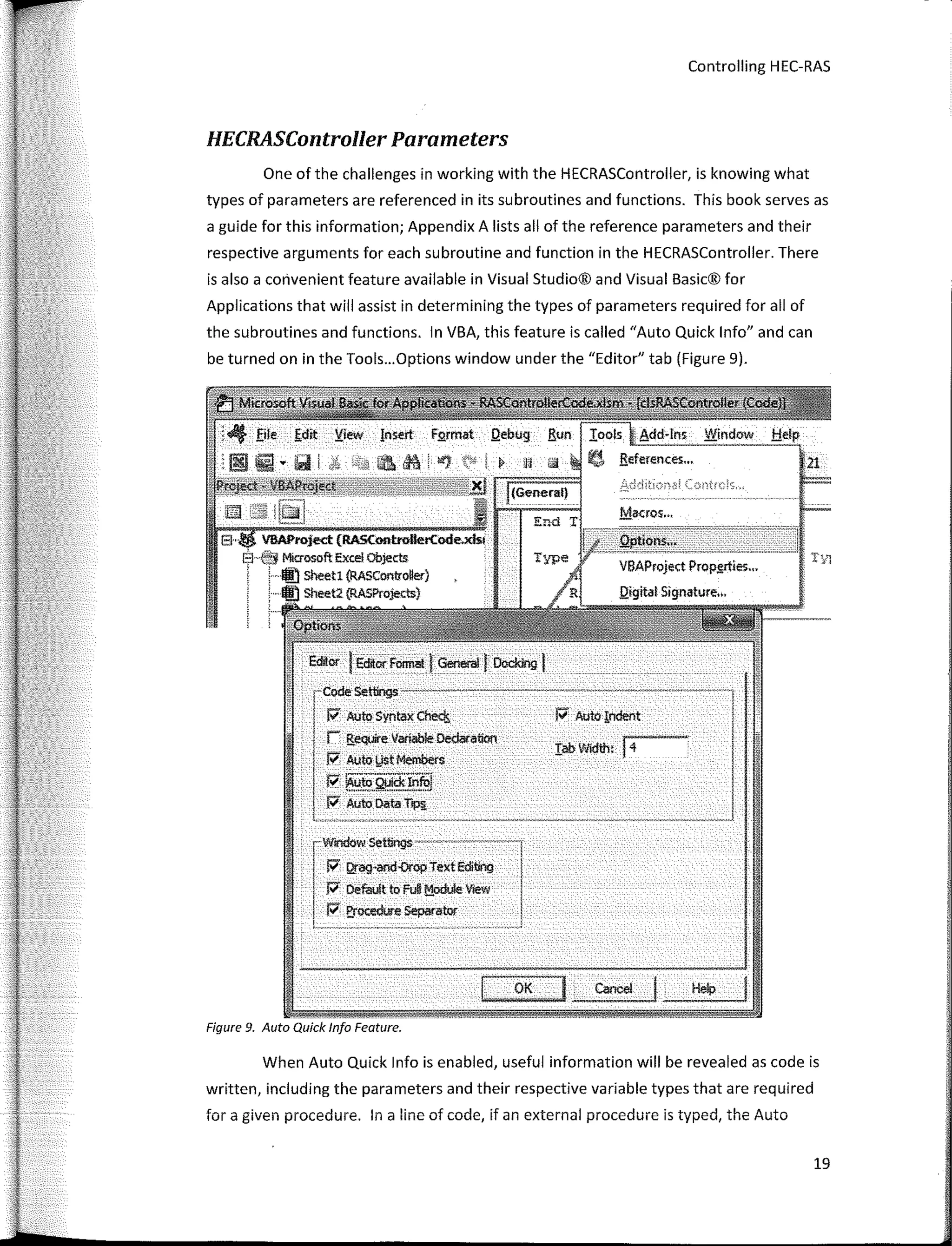
the subroutines and functions. In VBA, this feature is called "Auto Quick lnfo" and can
be turned on in the Tools...Options window under the "Editor" tab (Figure 9).
¡;; Auto Syntax Che<!¡
r !iequire Variable Oedaration
J;, Auto l,IStMembers
¡;; --·-···..··¡
"' iiluto Q!Jlck!nfui
P' Auto Data T,p¡¡
r�7ag=:·;ex;E(itlng
P' Derault to Ful! !';!_odule Vlew
P' E,rOO!dore Separator
1 , --------�- .� •• •• .,�. -• •v-• 
OK
- ---
Figure 9. Auto Quick lnfo Feature.
1
When Auto Quick lnfo is enabled, useful information will be revealed as code is
written, including the parameters and their respective variable types that are required
for a given procedure. In a line of code, if an externa! procedure is typed, the Auto
19
r
Breaking the HEC-RAS Code
Quick lnfo feature will provide a tool tip information box that lists the parameters and
their data types that the HECRASController is expecting, as shown in the following
example:
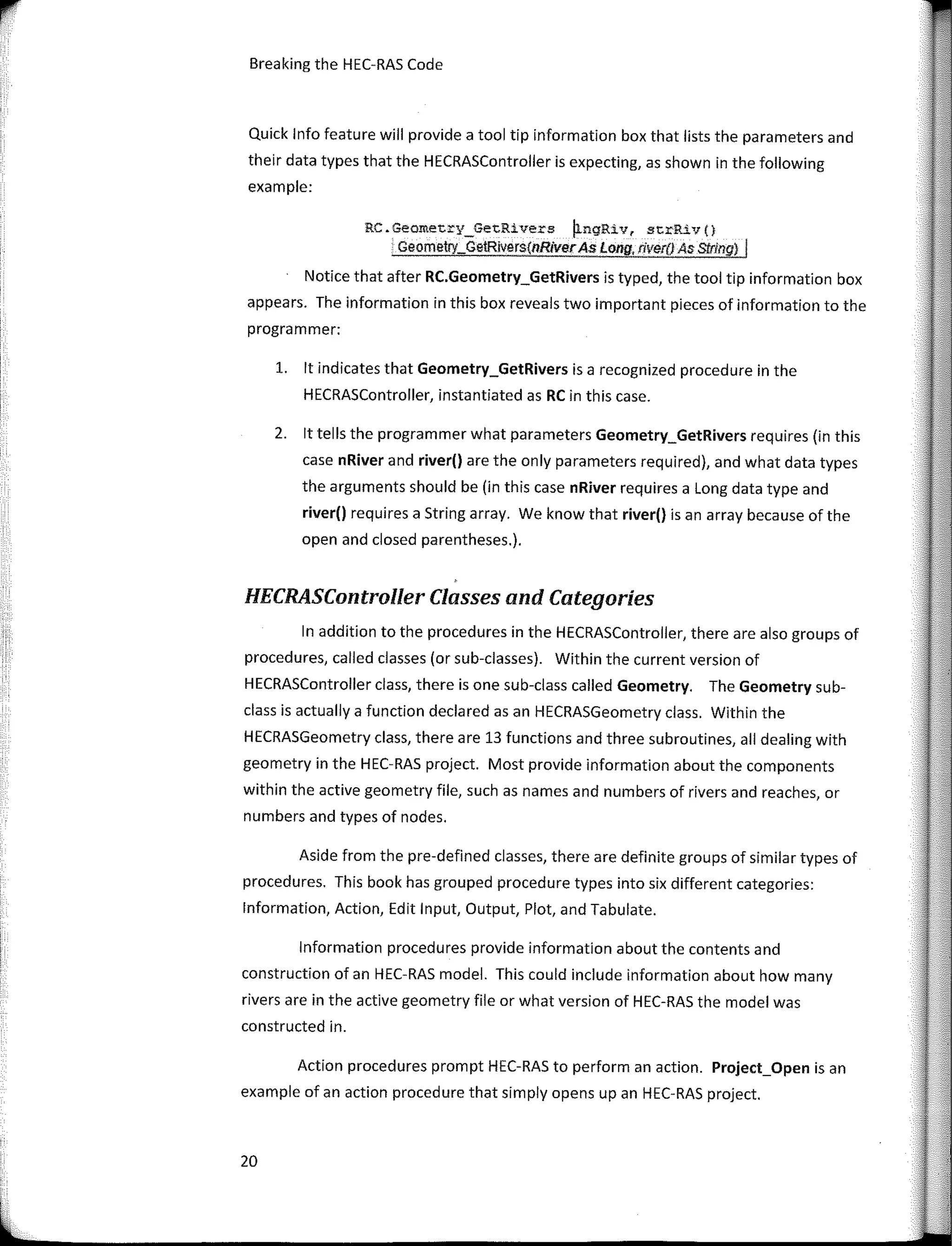
RC.Geometry_GetRivers �ngRiv, strRiv(}
Geometry_Ge!Rivers{nRiverAs Long, river() As Slring) I
Notice that after RC.Geometry_GetRivers is typed, the tool tip information box
appears. The information in this box reveaIs two important pieces of information to the
programmer:
l. lt indicates that Geometry_GetRivers is a recognized procedure in the
HECRASController, instantiated as RC in this case.
2. lt tells the programmer what parameters Geometry_GetRivers requires (in this
case nRiver and river() are the only parameters required), and what data types
the arguments should be (in this case nRiver requires a Long data type and
river() requires a String array. We know that river() is an array because of the
open and closed parentheses.).
HECRASController Classes and Categories
In addition to the procedures in the HECRASController, there are also groups of
procedures, called classes (or sub-classes). Within the current version of
HECRASController class, there is one sub-class called Geometry. The Geometry sub-
class is actually a function declared asan HECRASGeometry class. Within the
HECRASGeometry class, there are 13 functions and three subroutines, ali dealing with
geometry in the HEC-RAS project. Most provide information about the components
within the active geometry file, such as names and numbers of rivers and reaches, or
numbers and types of nades.
Aside from the pre-defined classes, there are definite groups of similar types of
procedures. This book has grouped procedure types into six different categories:
lnformation, Action, Edit Input, Output, Plot, and Tabulate.
lnformation procedures provide information about the contents and
construction of an HEC-RAS model. This could include information about how many
rivers are in the active geometry file or what version of HEC-RAS the model was
constructed in.
Action procedures prompt HEC-RAS to perform an action. Project_Open is an
example of an action procedure that simply opens upan HEC-RAS project.
20
Controlling HEC-RAS
Edit procedures allow the prograrnrner to edit the input files-typically the plan,
flow, and geornetry files. Sorne of these procedures will go directly to the input file and
change data based on argurnents passed by the referencing code (e.g.
Geometry_SetMann, which sets Manning's n values for a given cross section). Others
open upan HEC-RAS editor window so the user can edit input data directly in the HEC-
RAS form (e.g. Edit_XS, which opens the HEC-RAS cross section editor window).
Output procedures retrieve data frorn the HEC-RAS output file or the DSS file for
the active plan. For these procedures to work, there rnust be an output file or DSS file
to read frorn (sorne procedures retrieve data frorn the output file, sorne retrieve data
frorn the DSS file). Therefore the active plan has to have been computed prior to calling
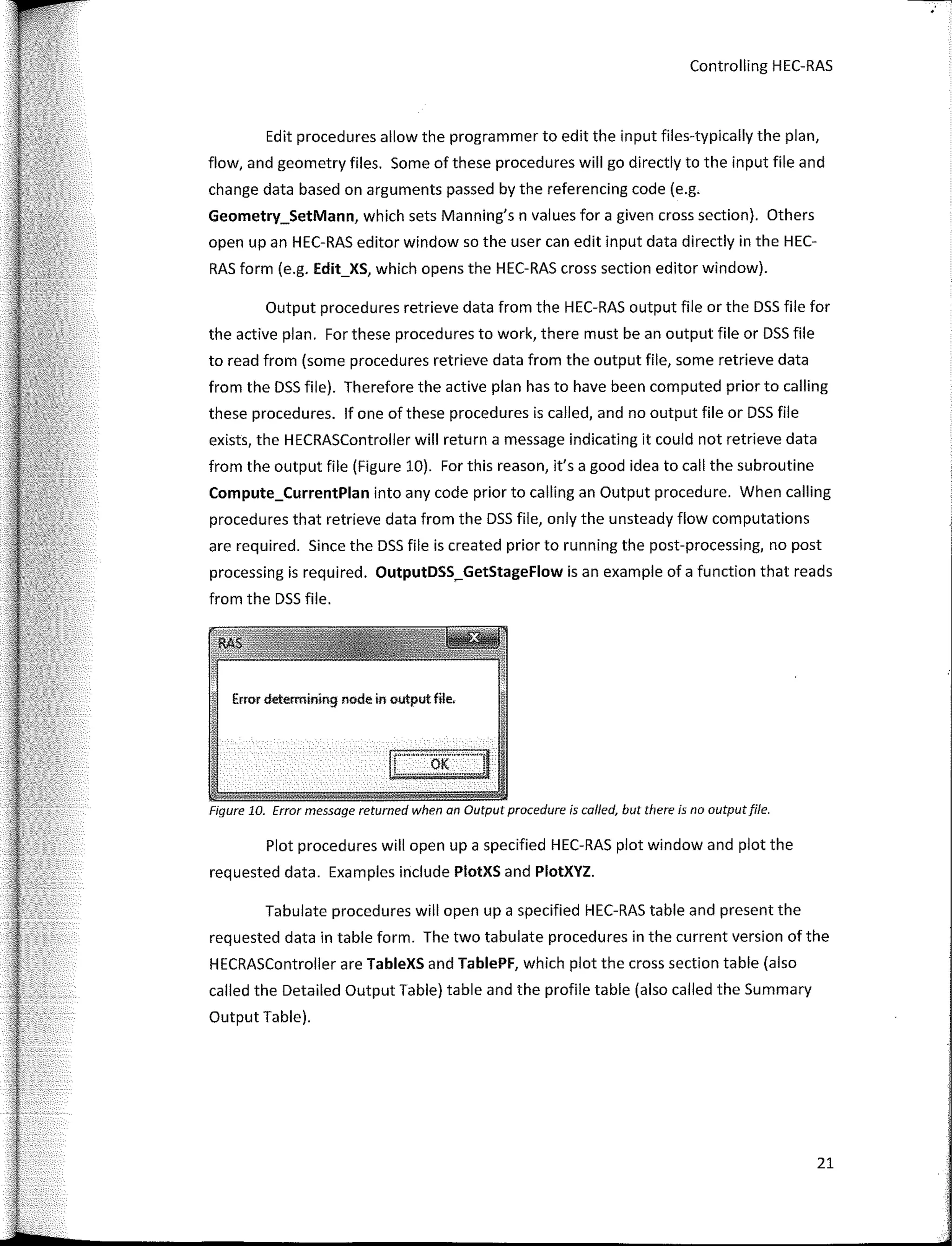
these procedures. lf one of these procedures is called, and no output file or DSS file
exists, the HECRASController will return a message indicating it could not retrieve data
from the output file (Figure 10). For this reason, it's a good idea to call the subroutine
Compute_CurrentPlan into any code prior to calling an Output procedure. When calling
procedures that retrieve data frorn the DSS file, only the unsteady flow cornputations
are required. Since the DSS file is created prior to running the post-processing, no post
processing is required. OutputDSS_GetStageFlow is an exarnple of a function that reads
frorn the DSS file.
Error determining node in output file,
Figure 10. Error message returned when an Output procedure is called, but there is no outputfile.
Plot procedures will open upa specified HEC-RAS plot window and plot the
requested data. Exarnples include PlotXS and PlotXYZ.
Tabulate procedures will open upa specified HEC-RAS table and present the
requested data in table forrn. The two tabulate procedures in the current version of the
HECRASController are TableXS and TablePF, which plot the cross section table (also
called the Detailed Output Table) table and the profile table (also called the Summary
Output Table).
21
Breaking the HEC-RAS Code
The Edit Subroutines
The HECRASController has a series of subroutines that start with "Edit." As the
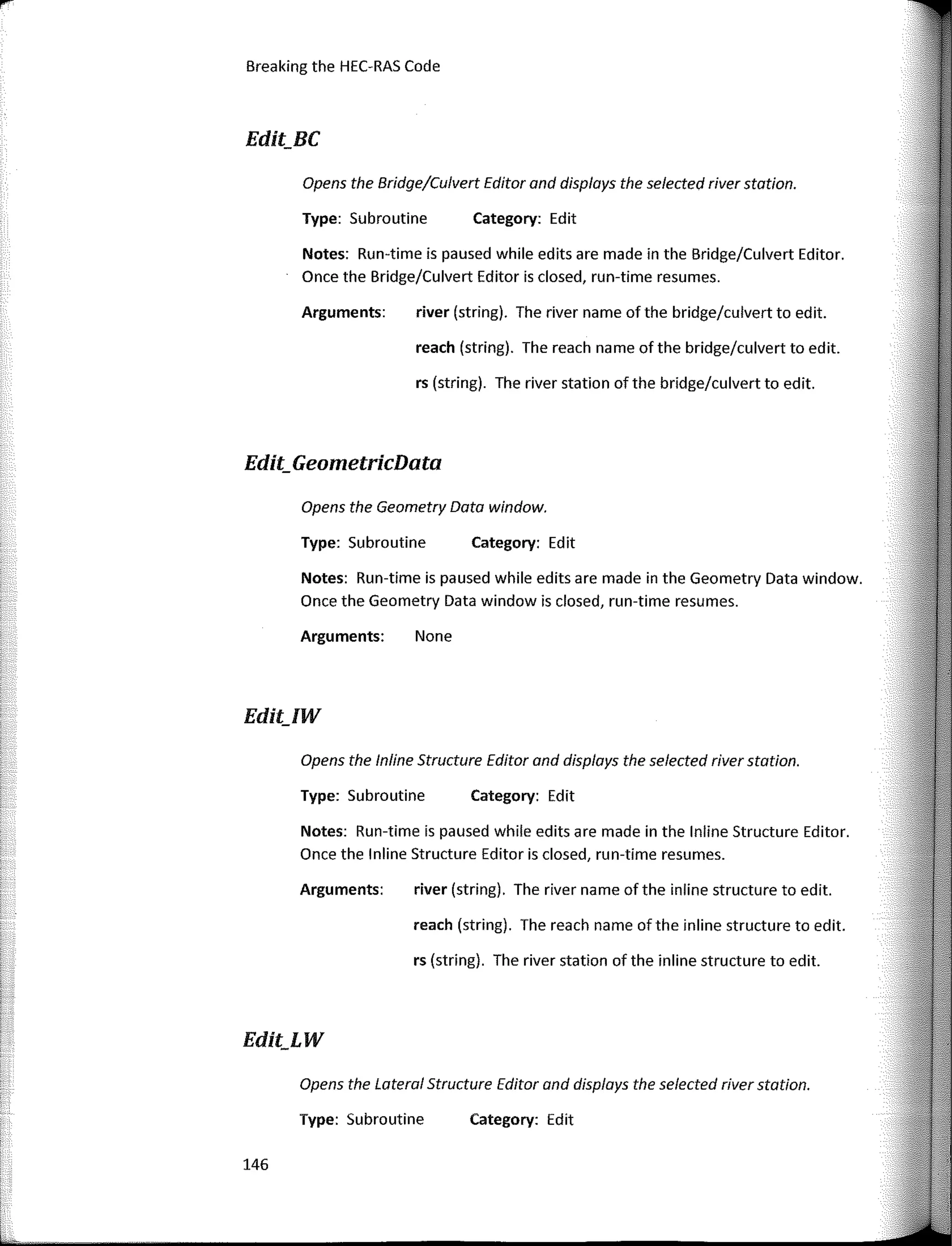
name implies, they are designed for editing input data in the active HEC-RAS project.
Four specific subroutines are designed to add a new component to the geometry:
1. Edit_AddBC -Adds a new crossing (bridge, culvert, or multiple opening).
2. Edit_AddlW­Adds a new inline structure (IW stands for "lnline Weir", the old
HEC-RAS moniker for inline structures).
3. Edit_AddLW­Adds a lateral structure (LW stands for "Lateral Weir", the old
HEC-RAS moniker for inline structures).
4. Edit_AddXS -Adds a new cross section.
To call one of these "Edit Add" subroutines, an existing river and reach must be
passed as arguments. Since these subroutines add a new nade to the geometry a new
river station is also required asan argument. Finally, an empty reference string is
required asan argument for any errors the HECRASController wants to send back to the
client code.
In HEC-RAS, a nade is any feature that occupies a discrete location on a river
reach, spatially ordered on that reach by a numerical string value -the River Station.
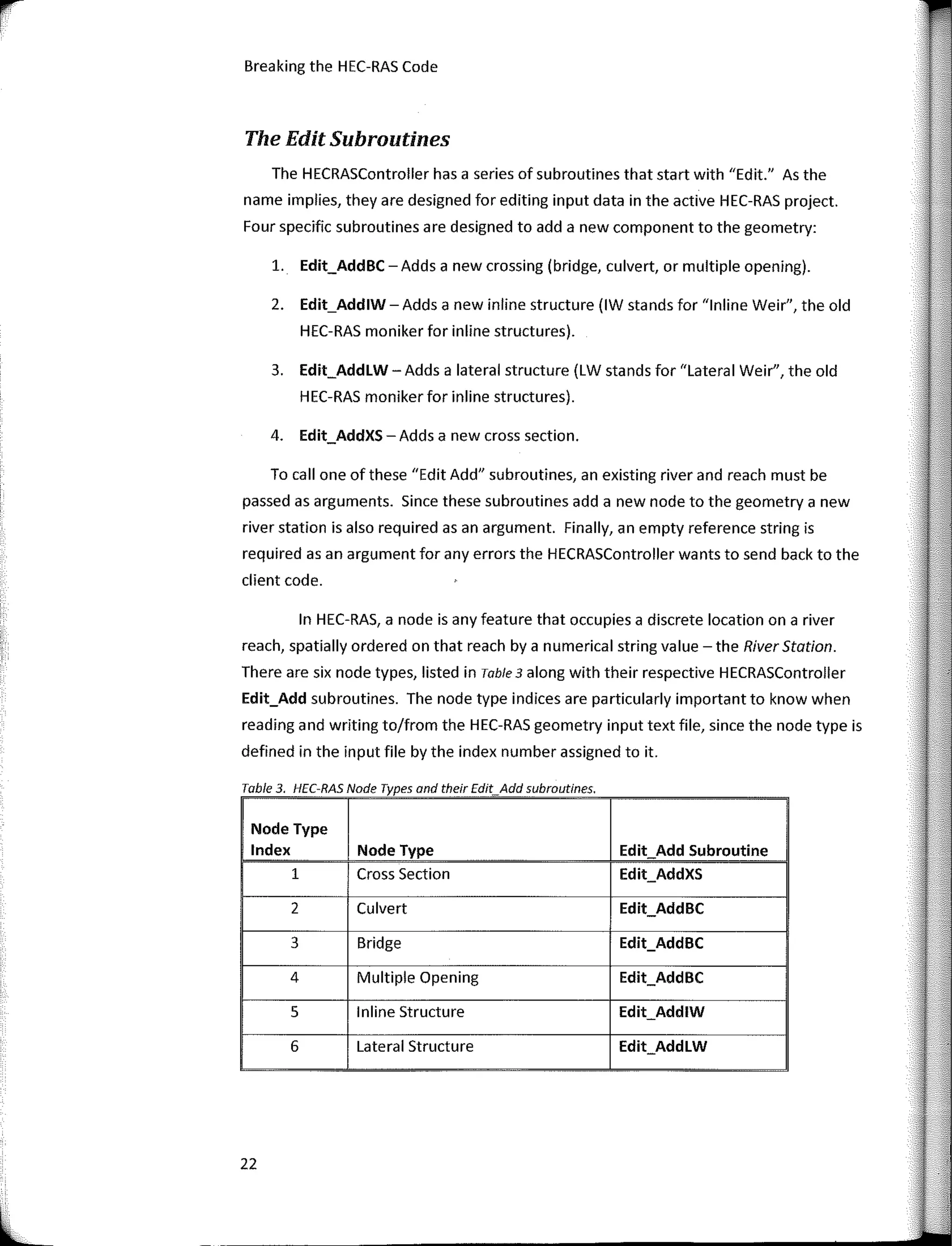
There are six nade types, listed in Table 3 along with their respective HECRASController
Edit_Add subroutines. The nade type indices are particularly importan! to know when
reading and writing to/from the HEC-RAS geometry input text file, since the nade type is
defined in the input file by the index number assigned to it.
Table 3 HEC-RAS Nade Types and their Edit Add subroutines
Node Type
lndex Node Type Edit Add Subroutine
1 Cross Section Edit_AddXS
2 Culvert Edit_AddBC
3 Bridge Edit_AddBC
4 Multiple Opening Edit_AddBC
5 lnline Structure Edit_AddlW
6 Lateral Structure Edit_AddLW
22
L
Controlling HEC-RAS
lfyou sean through any HEC-RAS geometry file, using a text editor, the first line
in a block of data that represents a node is: "Type RM Length L Ch R =". The number
that directly follows the "equals" sign is the node type index and that tells HEC-RAS
what type of node it is reading into memory. A node type index of "3", for example, is a
bridge. Reading and writing to/from HEC-RAS input files is covered in more detail in
Chapter 4.
The Edit subroutines are designed to open an editor window in HEC-RAS so that
a user can manually enter data into that editor. Each of the four Edit_Add subroutines
listed above have a companion Edit subroutine, so that once the geometric component
is added, input can be entered for it. Far example, a program may want to add a culvert
(node type 2) toan existing HEC-RAS project, so it calls the Edit_AddBC subroutine.
After the culvert is added, the Edit_BC subroutine is called, which will open the Bridge
and Culvert Editor from the HEC-RAS Geometry window, allowing the user to enter data
for the culvert directly into the HEC-RAS GUI. Besides the four Edit_Add subroutines
listed in Table 3, there are 12 Edit subroutines:
l. Edit_BC ­ Opens the Bridge and Culvert Editor for user edits.
2. Edit_GeometricData ­ Opens the Geometry Schematic for user edits.
3. Edit_lW­ Opens the lnline Structure Editor for user edits.
4. Edit_LW­ Opens the Lateral Structure Editor for user edits.
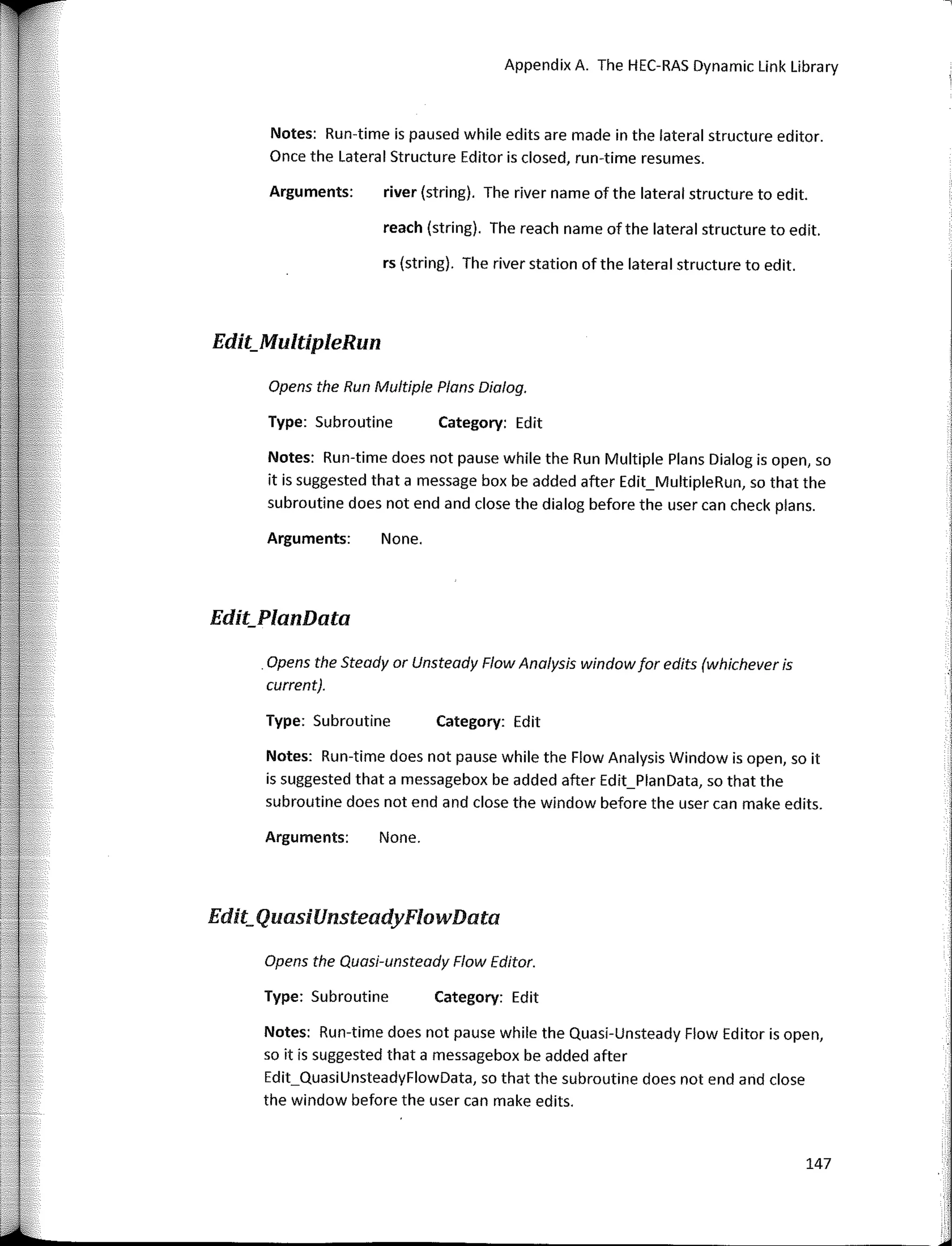
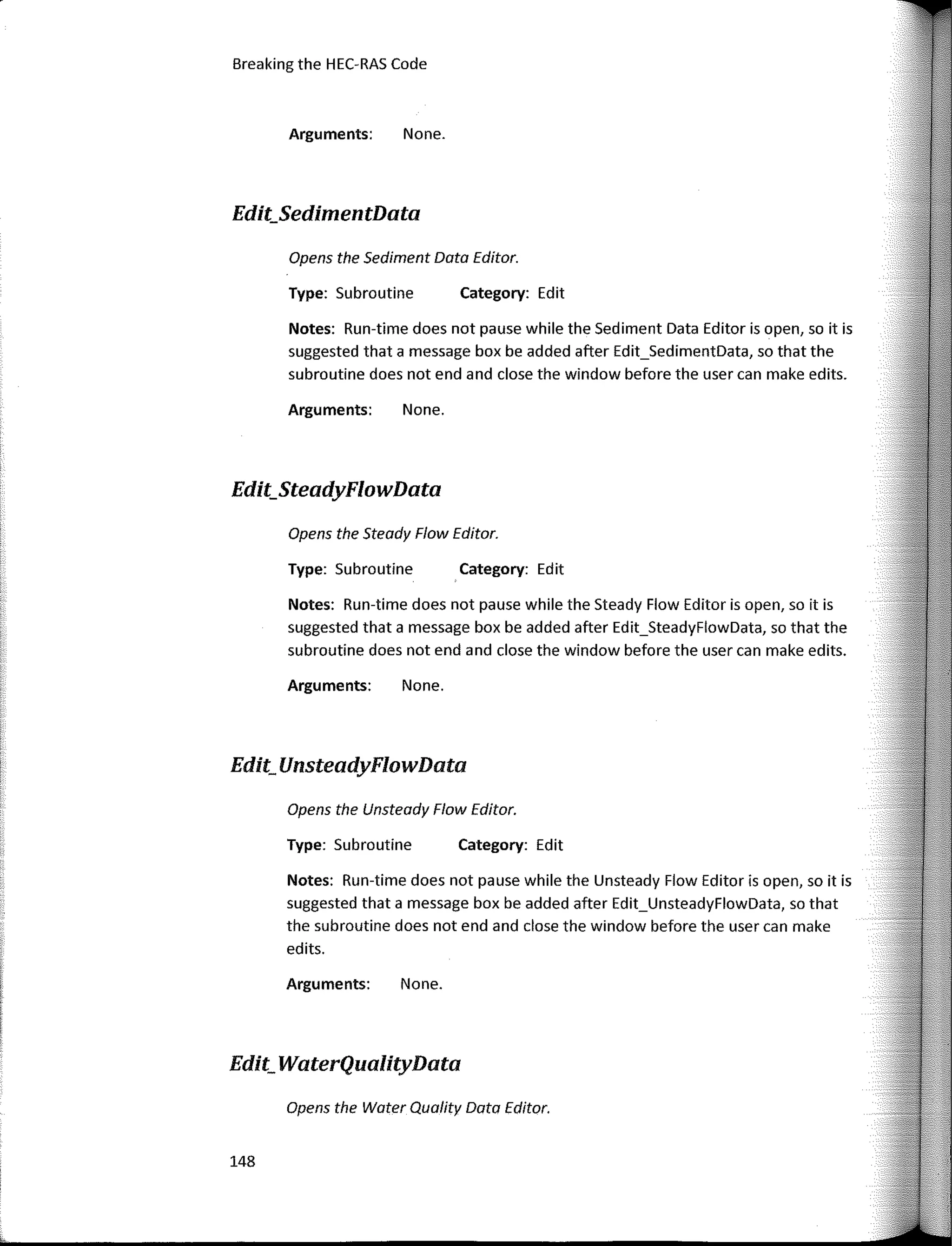
5. Edit_MultipleRun ­ Opens the Run Multiple Plans Dialog for user edits.
6. Edit_PlanData -Opens the Steady or Unsteady Flow Analysis Window
(whichever plan is active).
7. Edit_QuasiUnsteadyFlowData ­ Opens the Quasi Unsteady Flow Editor for user
edits.
8. Edit_SedimentData ­ Opens the Sediment Data Editor for user edits.
9. Edit_SteadyFlowData ­ Opens the Steady Flow Editor for user edits.
10. Edit_UnsteadyFlowData -Opens the Unsteady Flow Editor for user edits.
11. Edit_WaterQualityData -Opens the Water Quality Data Editor for user edits.
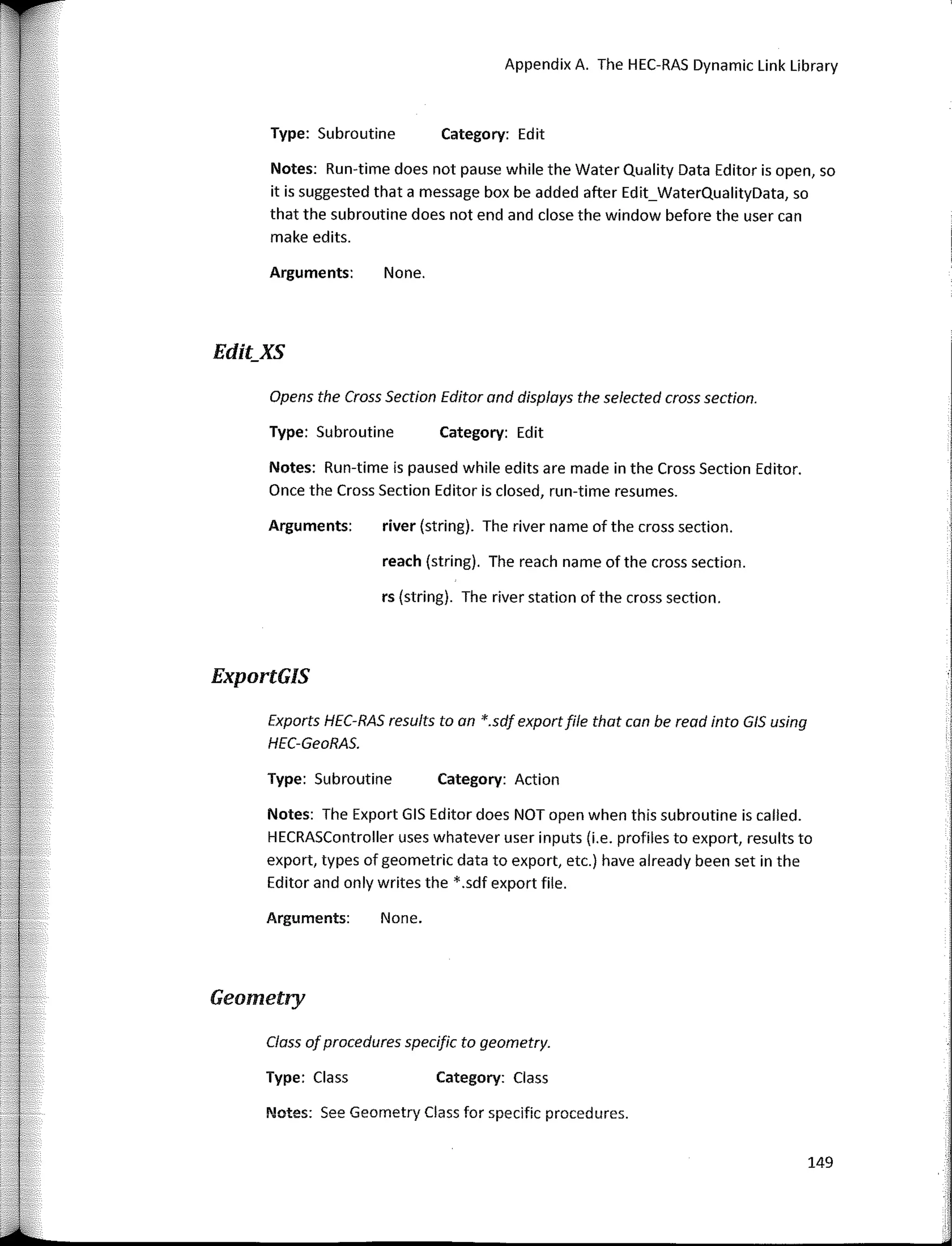
12. Edit_XS-Opens the Cross Section Editor for user edits.
There are sorne quirks to be aware of when using the Edit_Add subroutines.
First, the river station that is passed as the argument for the RS parameter must not
23
Breaking the HEC-RAS Code
already exist in the specified river/reach far the active geometry file. lf it does, HEC-RAS
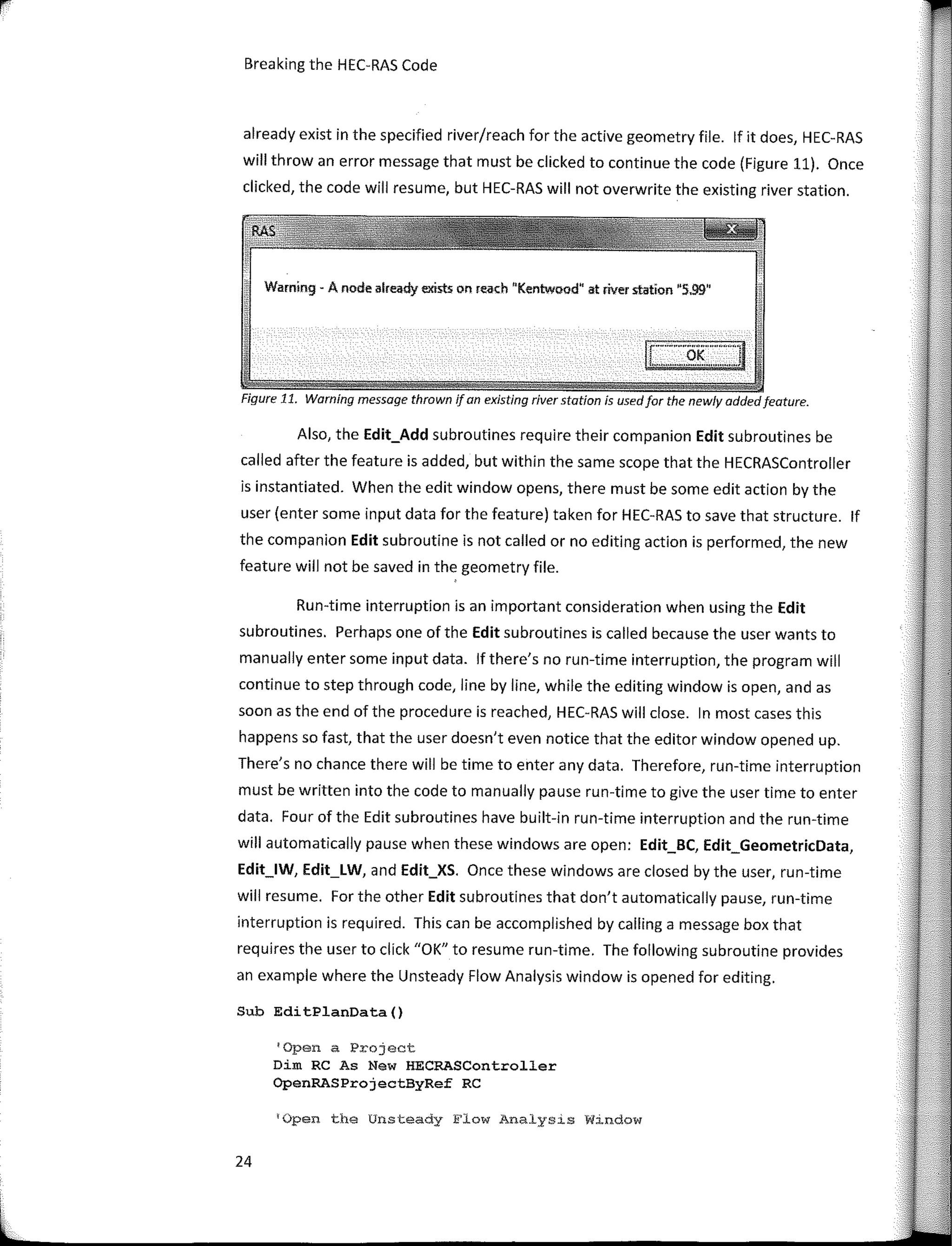
will throw an error message that must be clicked to continue the code (Figure 11). Once
clicked, the code will resume, but HEC-RAS will not overwrite the existing river station.
Warning - A node already exists on reach "Kentwood" st river ststion "5.99"
Figure 11. Warning message thrown ifan existing river statíon is usedfor the newly addedfeature.
Also, the Edit_Add subroutines require their companion Edit subroutines be
called after the feature is added, but within the same scope that the HECRASController
is instantiated. When the edit window opens, there must be sorne edit action by the
user (enter sorne input data far the feature) taken far HEC-RAS to save that structure. lf
the companion Edit subroutine is not called or no editing action is perfarmed, the new
feature will not be saved in the geometry file.
Run-time interruption is an important consideration when using the Edit
subroutines. Perhaps one of the Edit subroutines is called because the user wants to
manually enter sorne input data. lf there's no run-time interruption, the program will
continue to step through code, line by line, while the editing window is open, and as
soon as the end of the procedure is reached, HEC-RAS will clase. In most cases this
happens so fast, that the user doesn't even notice that the editor window opened up.
There's no chance there will be time to enter any data. Therefare, run-time interruption
must be written into the code to manually pause run-time to give the user time to enter
data. Four of the Edit subroutines have built-in run-time interruption and the run-time
will automatically pause when these windows are open: Edit_BC, Edit_GeometricData,
Edit_lW, Edit_LW, and Edit_XS. Once these windows are closed by the user, run-time
will resume. For the other Edit subroutines that don't automatically pause, run-time
interruption is required. This can be accomplished by calling a message box that
requires the user to click "OK" to resume run-time. The fallowing subroutine provides
an example where the Unsteady Flow Analysis window is opened far editing.
Sub EditPlanData()
'Open a Project
Dim RC As New HECRASController
OpenRASProjectByRef RC
'Open the Unsteady Flow Analys1s W1ndow
24
r
l
Controlling HEC-RAS
RC.Edit PlanData
TCall a message box to 1nterrupt run-time.
MsgBox 11
Click OK when done editing the Unsteady Flow" &
"Analysis Window.11
'Save the changes
RC.Project_Save
End Sub
AII ofthe Edit procedures in the HEC-RAS API along with their required
parameters and a description are listed in Appendix A.
The Geometry Procedures
The HEC-RAS API contains a series of geometry-related procedures that reside
both in the HECRASController class and the HECRASGeometry class. In the
HECRASController class, the geometry procedures all start with "Geometry_". Most of
these procedures are informational, in that they simply return sorne information about
geometry data in the current plan. For example, the Geometry_GetNode function
returns the node index for a passed River Station - nothing is added or edited in the
geometry file. Do not confuse the node index with the node type index. The former is
an integer number (1 ton, n being the number of nodes in a river/reach) that orders the
nodes in a river/reach, while the latter is an integer number (1 to 6) that defines the
type of the node, as defined in Table 3.
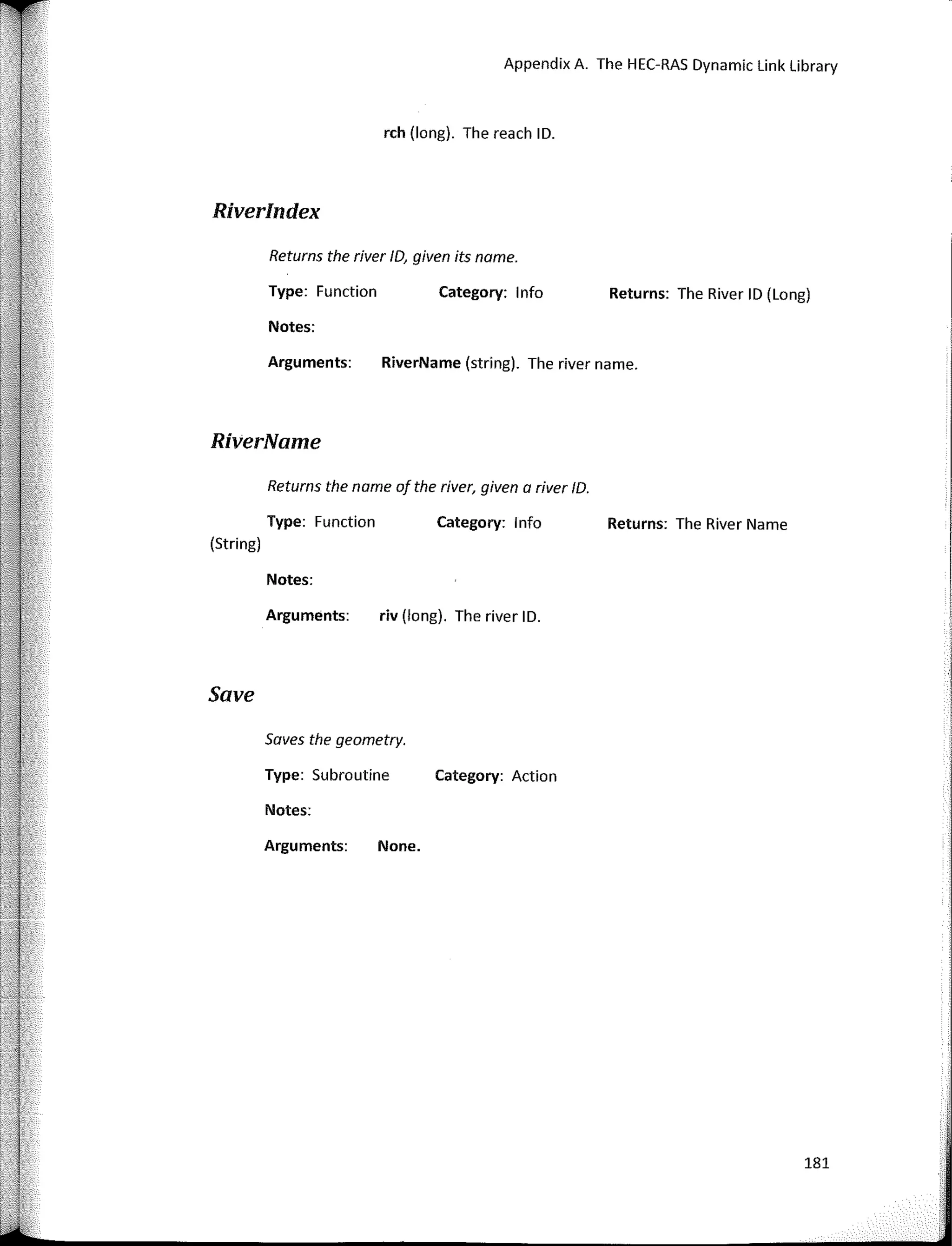
The HECRASGeometry class also contains a series of procedures. An example is
the Riverlndex function, which returns the river index number, given the passed String
argument, "RiverName". With the exception of the Save subroutine which saves the
data in the geometry file, all of the procedures in the HECRASGeometry class are
informational. To access these procedures in your code, either instantiate a variable as a
new HECRASGeometry class:
Dirn clsGeo As New HECRASGeornetry
or call directly from the HECRASController class by typing "Geometry" followed by a
period, after the instantiated HECRASController object. The Geometry variable is
already instantiated asan HECRASGeometry sub-class in the HECRASController class:
lngRiverindex = RC.Geometry.Riverindex(strRiverName)
25
'
'
1'
Breaking the HEC-RAS Code
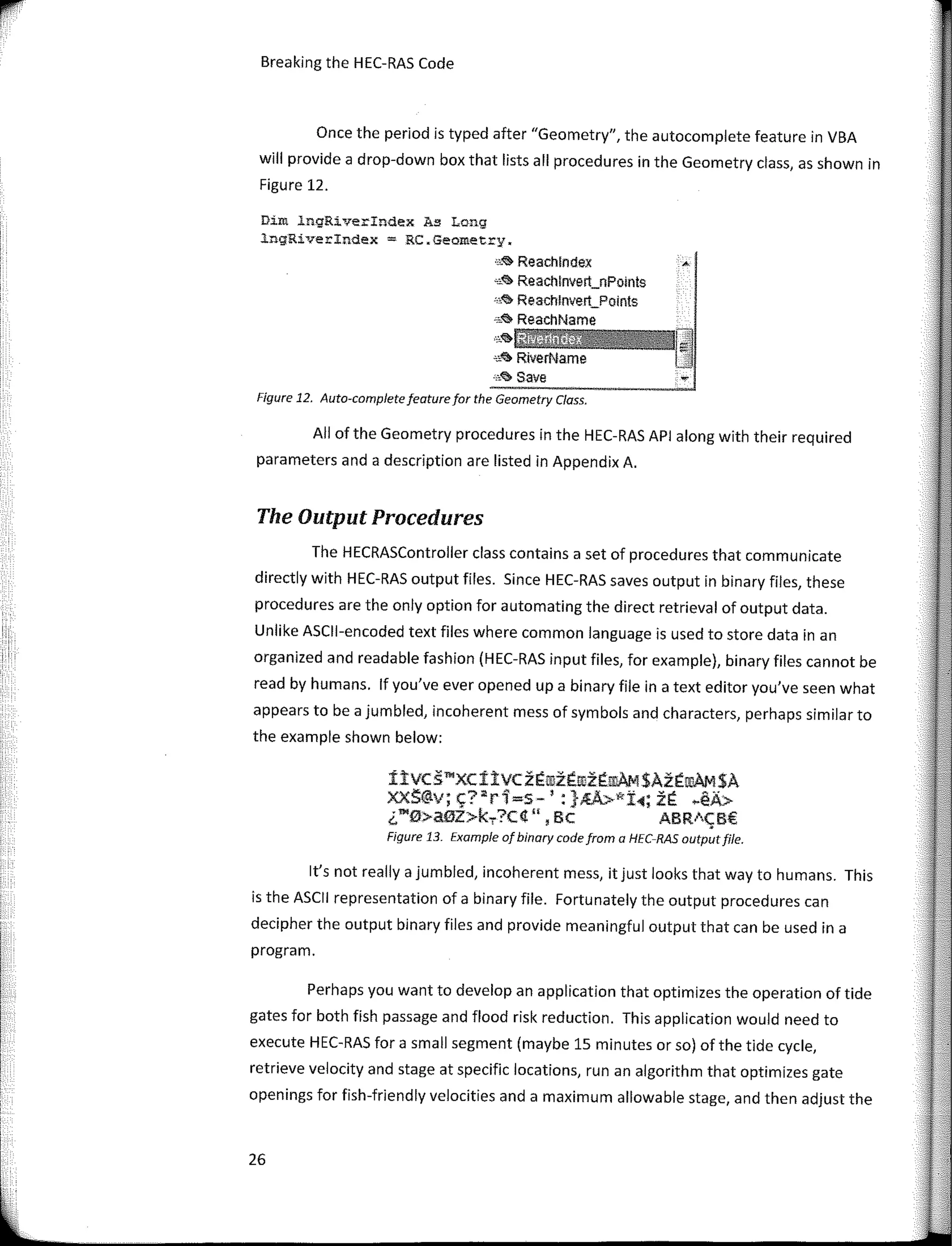
Once the period is typed after "Geometry", the autocomplete feature in VBA
will provide a drop-down box that lists ali procedures in the Geometry class, as shown in
Figure 12.
Dim ingRiverindex As Long
lngRiverindex = RC�Geometry.
,,,<& Reachlndex
-,<il> Reachlnvert_nPolnts
·.,<;, Reachlnvert_Polnts
"""" ReachName
,,,.�tíiMW
'""" RiverName
.•,� save
Figure 12. Auto-completefeaturefor the Geometry Class.
Ali of the Geometry procedures in the HEC-RAS API along with their required
parameters anda description are listed in Appendix A.
The Output Procedures
The HECRASController class contains a set of procedures that communicate
directly with HEC-RAS output files. Since HEC-RAS saves output in binary files, these
procedures are the only option for automating the direct retrieval of output data.
Unlike ASCll-encoded text files where common language is used to store data in an
organized and readable fashion (HEC-RAS input files, for example), binary files cannot be
read by humans. lf you've ever opened upa binary file in a text editor you've seen what
appears to be a jumbled, incoherent mess of symbols and characters, perhaps similar to
the example shown below:
ítvcs�xcítvczÉrozÉrozÉ!l!AM$AzÉ!l!AM$A
xxS@v;�?ªr1=s-':}�kt1;zÉ �éA>
¿"'0>aiiJZ>k.,.?C4", Be ABR1CB€
Figure 13. Example of binary code from a HEC-RAS outputfile.
lt's not really a jumbled, incoherent mess, itjust looks that way to humans. This
is the ASCII representation of a binary file. Fortunately the output procedures can
decipher the output binary files and provide meaningful output that can be used in a
program.
Perhaps you want to develop an application that optimizes the operation of tide
gales for both fish passage and flood risk reduction. This application would need to
execute HEC-RAS for a small segment (maybe 15 minutes or so) of the tide cycle,
retrieve velocity and stage at specific locations, run an algorithm that optimizes gate
openings for fish-friendly velocities anda maximum allowable stage, and then adjust the
26
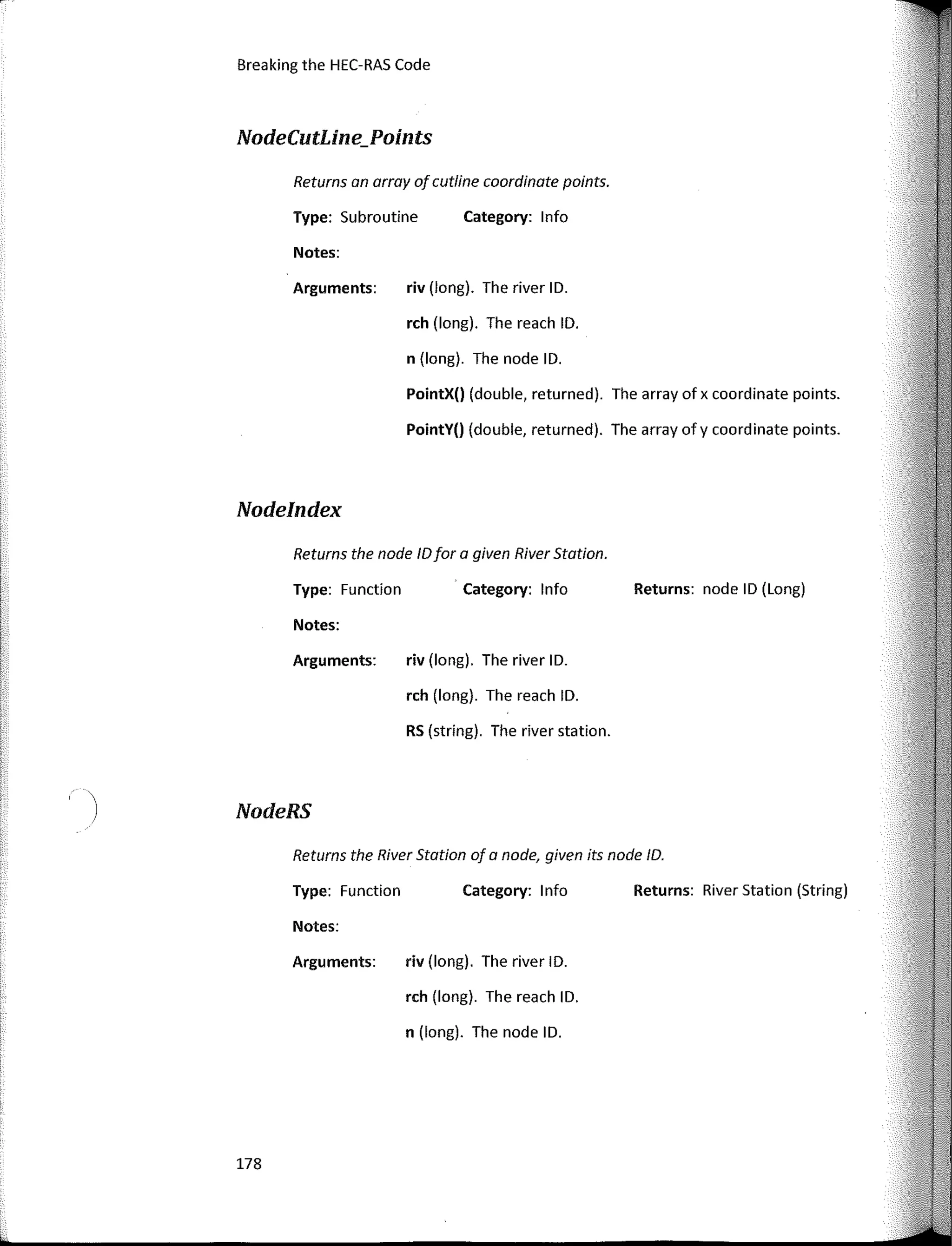
Controlling HEC-RAS
gate settings befare re-executing HEC-RAS far the next segment of the tide cycle. This
would be repeated far one ar more full tide cycles to evaluate the performance of the
tide gate design. The important step of retrieving output during run-time can only be
achieved by using the Output procedures in the HECRASController class.
As one might expect, to use the Output procedures, there must be an output file
toread, therefore HEC-RAS has to have been executed at least once befare calling an
output procedure. Therefore, the Compute_CurrentPlan subroutine is generally called
prior to calling output procedures.
The Output procedures read from two different HEC-RAS files: the output file
itself, designated with the extension .O##, where the ## number represents the HEC-
RAS plan the output file is associated with, and the DSS file, designated with the
extension .dss.
Only two procedures read from the DSS file and they are the
OutputDSS_GetStageFlow and OutputDSS_GetStageFlowSA functions. The first
populates an array of stage values andan array offlow values far a specified cross
section, while the second does the �ame far a storage a rea.
The rest of the Output procedures read from the output file. Many of these
return information about the model geometry itself- information like the names of
rivers, reaches, and nades. This information can also be accessed from the Geometry
procedures. Since the Geometry procedures do not require an output file be read, it's
generally easier to get geometric information that way.
The Output_NodeOutput and Output_ReachOutput will be the workhorses far
any application that interacts with HEC-RAS output. These two subroutines can retrieve
any of the 268 HEC-RAS output variables from the output file far any cross section and
any profile. The available output variables in HEC-RAS are numerous- more than even
the most experienced HEC-RAS users will ever use. They include sorne of the more
useful hydraulic parameters such as conveyance, velocity, shear stress, and hydraulic
radius. Also included are sorne obscure variables such as alpha energy weighting
coefficient, ice thickness, and water surface elevation accounting far air entrainment.
There are sorne differences between the two output retrieval procedures:
Output_NodeOutput retrieves output far one nade only, whereas the
Output_ReachOutput retrieves output far ali nades in a given reach. Also,
Output_ReachOutput orders the array of cross sections with the downstream-most
cross section first (i.e. the cross section at the downstream end of the reach gets index
"111.
27
Breaking the HEC-RAS Code
One of the arguments passed to the Output_NodeOutput and
Output_ReachOutput functions is a Long number representing the HEC-RAS variable ID
number that is being requested. AII 268 HEC-RAS variables, their ID numbers and
descriptions are presented in Appendix E.
28
3
WRITING A SIMPLE
PROGRAM
The applications using the HECRASController are near endless: simple programs
that run HEC-RAS plans in batch mode to complex Monte Cario simulations for
probabilistic analyses. The user is only limited by programming skill, creativity,
knowledge of HEC-RAS, and understanding of the HECRASController. This book aims to
provide the reader with enough understanding of the HECRASController to take on even
the most complex HEC-RAS automation exercises.
The previous chapter introduced the library of classes and procedures found in
the HEC-RAS API. Knowledge of the HEC-RAS API components will allow you to start
writing programs that can automate, manipulate, communicate with, and otherwise
control HEC-RAS. This chapter will illustrate how to use the HEC-RAS API components to
write a simple client program that automates the execution of HEC-RAS, retrieves
output, and organizes that output in an Excel® spreadsheet. The simple program, called
"GetWSELandVelocity" will open the HEC-RAS example project "Single Bridge - Example
2, BEAVCREK.prj" (that comes with every installation of HEC-RAS), execute the model,
and create a spreadsheet listing all of the cross sections and their computed water
surface elevations and average velocities. This program is written in an Excel® module
using VBA programming language.
29
Breaking the HEC-RAS Code
The VBA Environment
To begin, open Excel® and enter the VBA Environment by pressing Alt-Fll or by
clicking on the Visual Basic® button under the DEVELOPER tab. lf the DEVELOPER tab is
not already present in your list of menu items, you can add it by accessing the Excel®
Options under the File menu item and selecting Customize Ribbon. Check the box next
to the Developer tab so that it shows up on in your list of menu items. The DEVELOPER
tab provides quick access to the VBA Code Editor as well as a host of other programming
options and tools. The VBA editor will look like Figure 14 when it's opened for the first
time.
6- YllAProJect(flook1}
B 1­::/�or;oftfxce!Ob_¡e,,­­­is
' I!) Shtt:ti {Sheet.!)
· ;[) TluWoá,bo,¡I<
Figure 14. Visual Basic®far Applications Editor.
lf a module doesn't already exist, add one by clicking lnsert...Module from the
Visual Basic® Editor. A new module will be added and the space to the right of the
window will be ready for programming code. The name of the module can be changed
in the properties window (Figure 15). Befare accessing the HEC-RAS API, it must be
added as a reference. In the Visual Basic® for Applications window, select
Tools... References from the menu items. A window that lists ali of the available
reference libraries will come upas shown in Figure 16. Look for the HEC River Analysis
System reference and check the box next to it.
30
J
OK
Cancel
[J GrinderSchedulerObjecis
I] Hanja Dictionary Type Library 1. O
OHEC Ríver Analysis System
O HEC Ríver Analysis System
rHEC Ríver Anal ISfls;temil••••••••'-JS
O HEC Ríver Analysis System
O HEC River Analysis System
O Help Servi<:e LO Type Library
[] HHCtrl 4,0 Type Library
[] HPDeviceOetection2 1.0 Type Ubrary
[1HPeDiag 1.0 Type Library
O HpUpdateComponent l,Q Type Library
fl HTMI c:h@f"kp,r 1.0 Tynp I ihr;:wv
< ��fflq:,,¿44±:�::,�,-'::;:;�wx:tt�
available References:
X
¡General)
Writing a Simple Program
31
r----
Location, C:'frogram Files (x86)HECl!EC-RAS5.0'ras.exe
lailguage: Standard
8 Vl:IAf>rojed:(Bookl)
8 @ WcrowftEm!! Ob.iects
, !) ShttU (She:<!tí)
- � ThlsWod,book
e el Mo<i;!es
'�M<l<AA.:l
Figure 15. Visual Basíc®for Applications Editor with a New Module.
Figure 16. Add Reference Window.
lf there is no reference far HEC River Analysis System, then HEC-RAS needs to be
installed on the computer. lf there are multiple versions of HEC-RAS installed on the
Breaking the HEC-RAS Code
computer, there will be multiple entries far HEC River Analysis System. Make sure to
check the one far the version of HEC-RAS being used.
Writing the Code
Once the HEC River Analysis System reference is added, you will have access to
the HEC-RAS API and ali of its classes and procedures. To begin writing code, click in the
code window and type:
Sub GetWSELandVelocity()
Press return and VBA will automatically write the companion End Sub
command. lt's good practice to write sorne commentary throughout your code,
including the author and date of the code and a description of what the subroutine will
accomplish. Commentary is defined by placing an apostrophe (') befare sorne text. VBA
will automatically color commentary with green fant. Good programmers will include
comments often throughout their code, liberally describing each block of code, and
what its purpose is. My general rule of thumb is to provide enough comments so that
someone who may inherit my code in the future will be able to understand what the
procedure does, without explanation from me.
The next step is to instantiate a new variable asan HECRASController class by
typing:
Dim RC As New RAS500.HECRASController
Typing the RASSOO befare HECRASController is optional, if the RASSOO library is
already referenced. lnstantiating a new HECRASController makes all of the procedures
within the HECRASController class available to use in the new program. After this
command, typing "RC." will reveal the procedures in the autocomplete window that
VBA provides as a convenience. Your code should now look like the fallowing example.
Notice at the end ofthe comment line that starts with 'This subroutine opens..." there is
an underscore ( ). The underscore is a technique used in VB programming that allows
the code writer to continue a single command on successive lines. This works not only
far commentary, but far all types of code. Typically, a new line means a new command,
but the underscore allows far a single command to be wrapped on multiple lines. This
technique is prevalent throughout the examples in this book, so that the sample code
will fit within the book margins and still be legible. lt's not required far programming in
VB or VBA, but it is good practice and can make the code easier toread.
Sub GetWSELandVelocity()
32
Writing a Simple Program
'Instantiate a new RAS500.HECRASController Class
Dim RC As New RAS500.HECRASController
Opening HEC-RAS
Opening the HEC-RAS project requires a call to the Project_Open subroutine.
The Project_Open subroutine requests an argument for the HEC-RAS project you wish
to open, which is a string variable including both the file path and name. lt's important
to note that when the Project_Open subroutine is called, the HEC-RAS software starts
up with the specified HEC-RAS project, but it remains open in the background. You
won't see it on the Windows® desktop or on the task bar. The only way to verify that
HEC-RAS is open is to view the Windows® Task Manager and see if it is present in the
list of current applications. To see the HEC-RAS software during run-time, an additional
line of code
RC.ShowRAS
must be added after the Project_Open subroutine is called. This will open HEC-RAS with
the specified project, justas if it had been opened manually by double-clicking on the
desktop icon.
Be aware that abnormally long path names for HEC-RAS files can cause trouble
when using the HECRASController. This frequently occurs when using the default
location for the HEC-RAS example projects in the C:Program Files (x86)HECHEC-
RAS[version]Example Projects folder. Just be aware that if problems are encountered
with HEC-RAS accessing files during run-time, it is possible that the path is too long.
Moving all of the project files to a higher order folder (i.e. closer to the root drive C:)
might fix the problem.
Once open, the project can be executed by calling one of the "Compute"
subroutines. The Compute_CurrentPlan subroutine requires a Long variable argument
for the number of messages and a String array for the messages themselves. These will
be populated by the Compute_CurrentPlan_subroutine-simply provide empty variables
to be populated. At this point, the code will look something like the following sample.
Notice again that underscores are used to break commands over multiple lines. In
addition to breaking up commentary, the underscore is used in this sample to break up
a long String value that populates the strRASProject string. Breaking upa string within
quotations requires an ampersand (&) befare the underscore as shown.
Sub GetWSELandVelocity()
33
Breaking the HEC-RAS Code
'Instantiate a new RAS500.HECRASController Class
Dim RC As New RAS500.HECRASController
'Specify the HEC-RAS project, open it, execute it.
Dim strRASProject As String 'The path and filename of the
desired HEC-RAS Project
Dim lngMessages As Long 'number of messages returned by
the HECRASController
Dim strMessages() As String 'an array of messages
returned by the HECRASController
strRASProject = "C:AutomateHECRASSteady Examples" &
"BEAVCREK.prj"
RC.Project_Open strRASProject
RC.ShowRAS
RC.Compute_CurrentPlan lngMessages, strMessages()
End Sub
Populating the Geometry
The next step is to ask the HECRASController far the number of river stations in
the project, their na mes, and node types by using the Geometry_GetNodes subroutine.
The Geometry_GetNodes subroutine requests five arguments, the river ID, the reach ID,
the number of nodes, an array of river stations (nodes) andan array of node types. The
two arrays are reference parameters meaning the RAS Controller will populate them
inside the Geometry_GetNodes subroutine befare sending back to the
GetWSELandVelocity program. These five variables must first be declared befare the
Geometry_GetNodes subroutine can be called. In this example the Beaver Creek
example project is used, which only has one river and one reach, so the River ID and
Reach ID can both be set equal to 1.
strRASProject = "C:AutomateHECRASSteady Examples" &
"BEAVCREK.prj"
RC.Project_Open strRASProject
RC.ShowRAS
RC.Compute_CurrentPlan lngMessages, strMessages()
1
Find the number of Nodes (River Stations) in the Beaver
Creek Example.
'Declare variables for the River ID and Reach ID. Since
there is only one river and reach in the Beaver Creek
exampler their ID1
s can both be hardcoded to 1.
Dím lngRiverID As Long, lngReachID As Long I
River ID and
Reach ID
Dim lngNum_RS As Long 1
Nurober of nades - HEC-RAS
Controller will populate.
Dim strRS() As String 1
Array of names of the nades
34
Writing a Simple Program
Dim strNodeType() As String 1
Array of node type names
that go with the nodes
lngRiverID = 1
lngReachID = 1
RC.Geometry_GetNodes lngRiverID, lngReachID, lngNum_RS,
strRS(), strNodeType()
Retrieving Output
Once the River Stations and Nade Types are set far all ofthe nades, output from
the HECRASController can be retrieved. But fírst, sorne variables must be declared. Two
Single precision arrays must be declared to hold all of the water surface elevations and
all of the velocity values. Since the number of river stations has already been
determined, these arrays can be redimensioned to the number of river stations,
lngNum_RS. Finally, in arder far the HECRASController to know what variables to send
back, it needs to know the ID numbers of the variables that are desired. Long variables
lngWS_ID and lngAvgVel_lD are declared. The ID number far "Water Surface Elevation"
is 2 and "Average Velocity far the Total Cross Section" is 23. AII 268 HEC-RAS variable
IDs are presented in Appendix E.
lngReachID = 1
RC.Geometry_GetNodes lngRiverID, lngReachID, lngNum_RS,
strRS(), strNodeType()
'Declare single arrays far water surface elevation and
Average Velocity
Dim sngWS() As Single 'Array of water surface elevations
Dim sngAvgVel() As Single 'Array of Average Velocities
1
Redimension sngWS and sngAvgVel to the number of river
stations
ReDim sngWS(l To lngNum_RS)
ReDim sngAvgVel(l To lngNum_RS)
'Declare variables for the Water Surface Elevation and
Average Velocity IDs.
Dim lngWS_ID As Long 1
The Water Surface Elevation ID is 2.
Dim lngAvgVel_ID As Long 1
The Average Velocity ID for the
total cross section is 23.
lngWS_ID = 2
lngAvgVel_ID = 23
To retrieve the output, the Output_Nodeüutput function will be used. Because
it is a function, we need to set declared variables equal to it in the code: sngWS(J and
sngAvgVel(J. The Output_Nodeüutput function requests arguments far the river and
reach IDs, the river station ID, an UPDN Boolean (setting this to "O" will get output far
35
r-
1
Breaking the HEC-RAS Code
the upstream section at the bridge; the value is irrelevant for cross sections), the profile
number, and the HEC-RAS variable ID number. In this example, profile number 3 is used
and is hard-coded in the code. Since Output_NodeOutput can only send back one
output variable for one cross section ata time, a For-Next loop is set up to populate the
sngWS() and sngAvgVel() arrays. The lf-Then block of code is used to discriminate
against river stations that are not cross sections. Other types of river stations include:
bridges, culverts, inline structures, lateral structures, and multiple openings. The Node
Types that are sent back from the Geometry_GetNodes_subroutine are String variables
with two character IDs. For example, a bridge node has the Node Type "BR", and inline
structure is "IS". Cross Sections, however, are sent back as empty strings, which are
simply two quotation marks put together (i.e. ""). To only retrieve output for cross
sections, the lf-Then block searches for Node Types of "", and passes over the rest.
'Declare variables for the Water Surface Elevation and
Average Velocity IDs.
Dim lngWS_ID As Long 'The Water Surface Elevation ID is 2.
Dim lngAvgVel_ID As Long 'The Average Velocity ID for the
total cross section is 23.
lngWS_ID = 2
lngAvgVel_ID = 23
1
Search for cross sections and populate the sngWS(),
sngAvgVel() 1 and sngRS(} arrays
from the third profile, May '74 Flood.
Dim i As Long 'Index for the For-Next Loop
For i = 1 To lngNum_RS
If strNodeType(i);::;;: "" Then
'Gota regular cross section. An empty string
(i.e. 1111)
denotes a cross se-ction.
sngWS(i) = RC.Output_NodeOutput(lngRiverID,
lngReachID, i, O, 3, lngWS_ID)
sngAvgVel(i) = RC.Output_NodeOutput(lngRiverID,
lngReachID, i, O, 3, lngAvgVel_ID)
strRS(i) = RC.Geometry.NodeRS(lngRiverID,
lngReachID, i)
End If
Next i
Writing to a Spreadsheet
Now that the sngWS() and sngAvgVel() arrays are populated with the HEC-RAS
output, a worksheet can be set up in Excel® to present the data in tabular form. To
create a new sheet to write to and to fill that sheet with HEC-RAS output, use
procedures within the Windows.Application class. These procedures form the basis for
all of the tasks that can be accomplished in an Excel® spreadsheet. For example, if you
want to selecta cell on a spreadsheet and write a value in it, the Windows.Application
36
Writing a Simple Program
class has procedures that will automate that task. Another way to look at it is the
Windows.Application class is to Excel® as the HECRASController class is to HEC-RAS.
Perhaps the best way to learn the Windows.Application class is to record
Macros in Excel®. By perfarming a number of tasks in an Excel® spreadsheet while
recording those tasks to a macro, you will be a ble to see how Windows® writes the
code to perfarm these tasks. While the example codes in this book demonstrate sorne
of the more common and useful procedures in the Windows.Application class, those
available procedures are extensive-much more so than the HECRASController-and
beyond the scope of this book to describe in detail. Writing Macros is a skill that takes
practice and is also outside the scope of this book. Fortunately, there are many books
and online resources available that can provide more infarmation.
The first step in writing the GetWSELandVelocity output to a spreadsheet is to
create a new worksheet with a meaningful title. Using the Windows.Application class
takes sorne practice. More specifically, it's important to know what con't be done and
what will throw an exception. In this case, creating a new worksheet is simple, but if a
name is given that already exists as the name of another sheet, an exception will be
thrown, and the program will crastt. Excel® doesn't allow two worksheets with the
same name. So we must faresee this problem and account far that in the code. A
simple For-Next loop can search through the existing worksheets and look far one that
has the name we want to use-far this example, we'II use the name "RASResults". lf that
sheet does not exist, the code will create a new one with the name "RASResults". lf it
does exist, the code will simply select it-no need to create a new one. The following
part of the code demonstrates this procedure.
sngWS(i) = RC.Output_NodeOutput(lngRiverID,
lngReachID, i, O, 3, lngWS_ID)
sngAvgVel(i) = RC.Output_NodeOutput(lngRiverID,
lngReachID, i, O, 3, lngAvgVel_ID)
strRS(i) = RC.Geometry.NodeRS(lngRiverID,
lngReachID, i)
End If
Next i
'Create a sp:readsheet wi th Cross Sections, Water Surface
Elevations and Velocities.
1
E'irst check to see if the worksheet "RASResults11
already
exists. If not, add a new sheet and name it.
Dim blnSheetExists As Boolean 1
Boolean tag to set to true
if a 11
RASResults11
sheet already exists.
Fer i = 1 To Sheets.Count
If Sheets(i) .Name = "RASResults" Then
blnSheetExists = True
End If
37
re
1
Breaking the HEC-RAS Code
Next i
38
'Populate the table headers.
ActiveCell.Value = GetCurrentPlanName(RC)
"Cross Section"
"WS El (ft) 11
"Avg Vel (ft/s)"
Range("A3") =
Range ( "83 ") =
Range ("C3")
1
If 11
RASResults11
does not existas a sheet, we1
ll add it.
If blnSheetExists = False Then
Sheets.Add
ActiveSheet.Name = "RASResults"
End If
Sheets (''RASResults") . Select
'Include the Active Plan Name
Range("A2") .Select
'Give the sheet a title.
Range ("Al") . Select
ActiveCell.Value = "Results from Beaver Creek HEC-RAS" &
"run: May '74 Flood"
'Clear all the data so that can construct a fresh table
of data.
Cells.Select
Cells.Delete
Sheets.Add
ActiveSheet.Name = "RASResults"
End If
Sheets("RASResults11)
.Select
Now that the "RASResults" sheet exists and has been selected, we can start
entering data. lf the "RASResults" sheet already existed it's a good idea to delete any
data that may be in there already, to avoid possible overlapping of old data with new
data. So befare entering the data, a simple "Select all cells" and delete commands will
provide a fresh worksheet. The Cells.Select and Cells.Delete in the
Windows.Application class can take care of this task. The Range subclass is then used
to create a header for the table. Notice how the index for a Range is the name ofthe
cell on the spreadsheet. For example, Range("Al") is the cell in Column A and Row 1.
Be sure to put quotes around the index, if the Column-Row protocol is used. String
variables can also be used within the parentheses if desired. For this table, the river
stations will be displayed in rows, and the variables will be listed in columns.
Finally, use a For-Next loop to cycle through all ofthe data in the sngWSEL() and
sngAvgVel() arrays and write it to the table on the "RASResults" spreadsheet.
Populating a table of indeterminate size requires the use of the Offset procedure in the
r Writing a Simple Program
Windows.Application class. To begin, select the first cell in the table (the upper-left
hand cell of the table-in this case "A4"). The Offset procedures will move through the
table in a stepwise fashion, populating each cell individually as it cycles through the
arrays. The first argument in the Offset procedure is the number of rows to offset. The
second argument is the number of columns to offset. To advance across a table row
one cell ata time, the row remains the same, so a value of O is used as the first
argument. A value of 1 is used far the second argument. Once the end of the row in the
table is reached, advance down one row and move back to the left side of the table to
continue with output far the next river station. This requires 1 far the row offset
argument and -2 far the column offset argument.
The Round function is used to present the data in the table with the desired
number of decimal places. The Round function is contained in the VBA.Math class,
which is inherently available when using VBA (i.e. no need to declare a new instance of
the VBA.Math class). There are a lot of other useful procedures in the Math class far
automating HEC-RAS. 1 highly recommend exploring it in the Object Explorer window.
Without rounding, the entire Single precision floating point number will be entered into
the cell, which can include up to nine decimal places-not appropriate far water surface
elevations and velocities. This table will present water surface elevations rounded to
two decimal places and velocities rounded to one decimal place. The first argument of
the Round function is the number you wish to round, and the second is the number of
decimal places you desire far that number. Notice that the Round function not only
changes the number of decimal digits, but also converts the number to a string value.
So be sure to declare string values far each output variable so that it works properly in
your code.
After the table has been filled out, the GetWSELandVelocity subroutine is
completed by writing the command End Sub. But note that HEC-RAS will remain open
as both an application anda process unless the QuitRas subroutine is called. The
QuitRas subroutine will immediately end HEC-RAS asan application in Windows®. And
then once the End Sub command is executed, the ras.exe process will be halted.
Without QuitRas, it's possible to end up with multiple instances of HEC-RAS open as
either applications and/or processes in Windows®. This should be avoided. Since the
QuitRas subroutine coupled with the End Sub command will abruptly clase HEC-RAS
without any indication, 1 prefer to include a message box just prior to the QuitRas
subroutine that tells the user it is finished. To display a message box, use the MsgBox
function from the VBA library in the lnteraction class (the lnteraction class is inherent in
VBA, therefare it is not required to type this befare MsgBox). The advantage of this is
that run-time will pause, while the program waits far the user to acknowledge the
39
Breaking the HEC-RAS Code
message in the message box. While run-time is paused, the user will have the ability to
look through the HEC-RAS software prior to its closing. Try running this code without
the message box command and see how fast HEC-RAS opens, executes and clases. You
may hardly notice! Once the user presses the OK button on the message box, run-time
will resume, the QuitRAS subroutine and End Sub command will be executed, and HEC-
RAS will clase.
Range(11
C3") = "Avg Vel (ft/s)"
'Loop through the HEC-RAS results arrays and populate the
spreadsheet. Water surface values are rounded to 2
decimal places. Velocities to 1 decimal place.
'First, declare string values for conversion in the Round
function.
Dim strWSEL As String, strAvgVel As String
Range ( "A4") . Select
Fer í = 1 To lngNum_RS
strWSEL = Round(sngWS(í), 2)
strAvgVel = Round(sngAvgVel(í), 1)
'Step through the table, populating it with HEC-RAS
output. '
If strNodeType (i) :;;: 1111
Then
ActiveCell.Value = strRS(i)
ActíveCell.Offset(O, 1) .Actívate
ActíveCell.Value = strWSEL
ActíveCell.Offset(O, 1) .Actívate
ActiveCell.Value = strAvgVel
ActíveCell.Offset(l, -2) .Actívate
End If
Next i
'Close HEC-RAS
MsgBox "Done!"
RC.QuítRAS
End Sub
Results
The final result is a new spreadsheet with a concise table showing computed
water surface elevations and average velocities far each cross section far profile number
3, the "May '74 Flood" event, in plan 3, "Press/Weir Method: New Le, Le". Table4 shows
the resulting spreadsheet. Notice that there is sorne tidying up that can be done to the
table to make it even more presentable. Far example, you may wish to expand the
width of the columns so that the entire text of each table header is visible. Recording a
macro, and doing this manually in the spreadsheet will show the code required to
40
Writing a Simple Program
automate this process in the application. Also, notice how the river stations for the
interpolated cross sections (those marked with an asterisk*) are left justified in the
table, while the regular river stations are rightjustified. That is because when
populating the table, an asterisk is a non-numeric character so Excel® automatically
converts that value from a Single precision number to a String. By default in Excel®,
numerical values are right justified, string values are left justified. Again, recording a
macro and manually justifying the interpolated river stations to the right will reveal the
code that is required to automate this process in your procedure.
Table 4. Output presented in a Table using the HECRASController.
: t:1;,���=C�:,::�AA.°ruO,M,Y·:iR� ' -1
3 l1�
c
ross
SectWS El {ft) AvgVel (ft/s) -1
• 1
4 . 5.99 220.01 2.1. 1
s ¡s.875*
219.01· 2
6 1 s.16· 21a.49: 1.s:
1
¡¡JS.685:.ól ��::�; �:::
 9 ¡s.49* 211.95 1.5
: 10 ¡ s.41 211.32 1.6:
! 11 1
5.39" 215.65. 2.1•
: 12 15.24* 214.64: 2.4
. ,
. 13 i 5.13 213.33 2.8
' ¡
: 14 is.065* 212.s4; 2.4
: is l s 211.8: 2.1
161 .
·17
i _ l _ --�.,-- ----- ,
r--
l < • AASRes.u!u 1 ('!:)
The entire code for the GetWSELandVelocity subroutine is shown below for
convenience.
41
Breaking the HEC-RAS Code
Sub GetWSELandVelocity()
'Instantiate a new RASSOO.HECRASController Class
Dim RC As New RAS500.HECRASController
'Specify the HEC-RAS project, open it, execute it.
Dim strRASProject As String 'The path and filename of the
desired HEC-RAS Project
Dim lngMessages As Long 'number of messages returned by
the HECRASController
Dim strMessages() As String 'an array of messages
returned by the HECRASController
strRASProject; "C:AutomateHECRASSteady Examples" &
"BEAVCREK.prj"
RC.Project_Open strRASProject
RC.ShowRAS
RC.Compute_CurrentPlan lngMessages, strMessages()
'Find the number of Nodes (River Stations) in the Beaver
Creek Example.
1
Declare variables for the River ID and Reach ID. Since
there is only one river and reach in the Beaver Creek
example, their ID's can both be hardcoded to l.
Dim lngRiverID As Long, lngReachID As Long I River ID and
Reach ID
Dim lngNum_RS As Long 'Number of nades - HEC-RAS
Controller will populate.
Dim strRS() As String 1
Array of names of the nades
Dim strNodeType() As String 'Array of node type na.mes
that go with the nodes
lngRiverID = 1
lngReachID = 1
RC.Geometry_GetNodes lngRiverID, lngReachID, lngNum_RS,
strRS(), strNodeType()
'Declare single ar:r:·ays for water surface elevation and
Average Velocity
Dim sngWS() As Single 1
Array of water surface elevations
Dím sngAvgVel() As Single 1
Array of Average Velocíties
'Redi.mension sngWS a:nd sngAvgVel to the nurober of river
stations
ReDim sngWS(l To lngNum_RS)
ReDim sngAvgVel(l To lngNum_RS)
1
Declare variables for the Water Surface Elevation and
Average Velocity IDs.
Dim lngWS_ID As Long 1
The Water Surface Elevation ID is 2.
Dim lngAvgVel_ID As Long 1
The Average Velocity ID far the
total cross section is 23.
lngWS_ID = 2
lngAvgVel_ID = 23
'Search for cross sections and populate the sng't'iS {) r
42
Writing a Simple Program
sngAvgVel(), and sngRS() arrays
from the third profile1 May 1
74 Flood.
Dim i As Long 1
Index for the For-Next Loop
For i = 1 To lngNum_RS
If strNodeType(i) = "" Then
'Gota regular cross section. An empty string
(i.e. "11)
denotes a cross section.
sngWS(i) = RC.Output_NodeOutput(lngRiverID, _
lngReachID, i, o, 3, lngWS_ID)
sngAvgVel(i) = RC.Output_NodeOutput(lngRiverID,
lngReachID, i, O, 3, lngAvgVel_ID)
strRS(i) = RC.Geometry.NodeRS(lngRiverID,
lngReachID, i)
End If
Next i
'Create a spreadsheet with Cross Sections, Water Surface
Elevations and Velocities.
I
First check to see if the worksheet ''RASResul ts 11
al:ready
exists. If not, add a new sheet and name it.
Dim blnSheetExists As Boolean 'Boolean tag to set to true
if a nRASResults" sheet already exists.
For i = 1 To Sheets.Count
If Sheets(i) .Name = "RASResults" Then
blnSheetExists = True
End If
Next i
'If ºRASResults" does not existas a sheet, we'll add it.
If blnSheetExists = False Then
Sheets.Add
ActiveSheet.Name = "RASResults''
End If
Sheets(11
RASResults") .Select
1
Clear all the data so that can construct a fresh table
of data.
Cells.Select
Cells.Delete
'Give the sheet a title.
Range(11
Al11)
.Select
ActiveCell.Value = "Results from Beaver Creek HEC-RAS" &
"run: May '74 Flood"
'Include the Active Plan Name
Range("A2") .Select
ActiveCell.Value = GetCurrentPlanName(RC)
'Populate the table headers.
Range("A3") = "Cross Section"
Range("B3") = "WS El (ft) 11
Range("C3") = "Avg Vel (ft/s)"
43
Breaking the HEC-RAS Code
'Loop through the HEC�RAS results arrays and populate the
spreadsheet. Water surface values are rounded to 2
decimal places. Velocities to 1 decimal place.
'First, declare string values for conversion in the Round
function.
Dim strWSEL As String, strAvgVel As String
Range(11
A4") .Select
For i = 1 To lngNum_RS
strWSEL = Round(sngWS(í), 2)
strAvgVel = Round(sngAvgVel(í), 1)
'Step through the table, populating it with HEC-RAS
output.
If strNodeType(i) = "" Then
ActíveCell.Value = strRS(í)
ActíveCell.Offset(O, 1) .Actívate
ActiveCell.Value = strWSEL
ActíveCell.Offset(O, 1) .Actívate
ActiveCell.Value = strAvgVel
ActíveCell.Offset(l, -2) .Actívate
End If
Next i
1
Close HEC-RAS
MsgBox 11
Done!11
RC.QuítRAS
End Sub
44
4
READING AND WRITING
HEC-RAS INPUT FILES
As convenient and expansive as the HECRASController is, there are times where
it just does not have the subroutine or function needed to accomplish a specific task.
Fortunately, HEC-RAS input files are stored as ASCII (American Standard Code for
lnformation lnterchange) text files, meaning they can be opened and edited in any text
editor software application (Microsoft® Word, Microsoft® WordPad, Microsoft®
NotePad, etc.). Furthermore, this allows us toread and write HEC-RAS input files using
built-in statements in the Visual Basic® programming language such as Open, and Line
Input. In arder to effectively read and write HEC-RAS input files, it's necessary to
understand the structure in which these input files are built. The most common HEC-
RAS input text files for reading from and writing to are:
• Geometry File, * .g##
• Steady Flow File, *.f##
• Unsteady Flow File, * .u##
Other text input files that users may wish to manipulate are:
• Plan File, *.p##
• Project File,. *prj
• Geometry lmport File, *.RASlmport.sdf
45
Breaking the HEC-RAS Code
This chapter will cover the concepts and tooIs needed for reading and writing to HEC-
RAS input text files. Appendices B, C, and D present the keys and their corresponding
input values for the geometry, steady flow, and unsteady flow text files, respectively.
HEC-RAS Input Files
Open an HEC-RAS geometry file in a text editor and you'II immediately see a lot
of text and numbers that mayor may not make sense. Further inspection revea Is sorne
semblance of arder, although notas easy to understand and navigate as the HEC-RAS
GUI itself. However, once deciphered, you will notice that every bit of geometry input
data that you can see in the HEC-RAS GUI also resides in this text file. For example, the
first line in a geometry text file is "GEOM Title=XYZ", XYZ being the title of the geometry
file. lf you open up the Beaver Creek "Single Bridge-Example 2" Sample Problem
(C:Program Files (x86)HECHEC-RAS4.1.0Example ProjectsSteady
ExamplesBEAVCREK.gül), you'II see that the first line of text in the geometry text file is
"GEOM Title=Beaver Cr. + Bridge - P/W".
Scanning through the geometry file, notice that most of the lines include sorne
text followed by an equal sign (=), followed by sorne numbers or sorne text (or both).
Typically, the text to the left of the equal sign is a "key"-an identifier for HEC-RAS to
recognize what type of data is present on the right side of the equal sign. The data on
the right side of the equal sign can be numerical, strings, dates, etc. Frequently there
are multiple values to the right ofthe equal sign, in which case the data will be
separated by a comma (comma delimited). Not all lines use comma delimitation. Sorne
separate their input data into fields of constant spaces. This is a common input data
format for older DOS-based programs like HEC-2 and HEC-6, where fields of eight spaces
are used. Every input value must be segregated into a "Field of 8". The subroutine that
reads the text file will then know where to delimit the input values-every eighth space.
A disadvantage to this practice is the fact that every number is limited to eight digits, or
seven digits anda decimal point. lf more precision is needed, you are out of luck.
However, HEC-RAS, when it does use field delimitation, will use fields of 16 as well,
when input parameters may need more precision than that afforded by an eight digit
number.
The good news for us, as programmers wishing to access these text files in a
programming environment, is that if we can figure out what the key on a given line of
text means, then we know what the succeeding data is. This allows us to retrieve and
store any geometry data present in the geometry file if we can decipher the keys. Well,
you're in luck! The geometry and flow files are deciphered in Appendices B, e, and D.
46
Reading and Writing HEC-RAS Input Files
Reading HEC-RAS Input Files
Reading an HEC-RAS text file is actually very simple, once you know sorne key
statements anda few ofthe text reading procedures available in VBA. lt involves
advancing through the text file, line by line, reading the key, and then storing the data
to the right of the key to variables or structures of variables. lf the user is only
interested in certain geometry components, then it's only necessary to search on those
components and bypass everything else. However, if desired, it is conceivable toread
and store every bit of geometric data in a structure of VBA types, to be retrieved and
used however you like in your program. Ata rudimentary level, reading an HEC-RAS text
file consists of the following lines of code:
l. A string definition set to the name of the HEC-RAS text file.
2. An Open For Input statement to instruct VBA to open the HEC-RAS text file.
3. A Do Loop, for searching through the text file, one key ata time.
4. A Une Input statement, which instructs VBA to read the next line in the text file
and store itas sorne string value that can be accessed.
5. An lf Then conditional, for locating a specific key and saving the input data into
a variable.
6. A Close statement, which instructs VBA to close the text file.
A very simple example of reading from an HEC-RAS text file is demonstrated next.
This particular piece of code searches for the title of the geometry file, and stores it into
a variable.
Sub GetGeometryTitle()
'Open the geometry text file toread
Dim strGeomFile As String
strGeomFile = "C:AutomateHECRASSteady Examples" &
"BEAVCREK.g01"
Open strGeomFile Fer Input As #1
'Search the geometry text file for the key ºGeom Title11
Dim strTextLine As String
Dim strGeometryTitle As String
Do While Not EOF(l)
Line Input #1, strTextLine
If InStr(strTextLine, "Geom Title11)
Then
strGeometryTitle = TrimEqBefore(strTextLine)
End If
Loop
1
Close the text file
47
Breaking the HEC-RAS Code
Close #1
'Message the User
MsgBox "The Title of the geometry file is" &
strGeometryTitle & 11 11
End Sub
Trimming and Parsing
Notice that inside the lf Then conditional, a function TrimEqBefore is called.
This particular function is very useful, in fact necessary, to read HEC-RAS input text files.
The equal sign (=) that HEC-RAS uses to separate the key from the input data makes
parsing out the input data very easy. AII we have to do is identify the position ofthe
equal sign, and then take everything to the right ofitas input data. Let's take the line of
data we searched for in the example code above:
Geom Title=Beaver Cr. + Bridge - P/W
"Geom Title" is the key. We search on that key if we want to retrieve the name of the
geometry file, which in this case is "Beaver Cr. + Bridge - P/W". The equal sign
separates the key from the input data. The function TrimEqBefore removes the equal
sign and everything to the left of it, leaving only the input data. String manipulation
procedures like TrimEqBefore will be very useful in reading HEC-RAS input files. Over
time, you'II build a library ofyour own string manipulation procedures. The
TrimEqBefore function is shown here for your reference:
Public Function TrimEqBefore(x As String) As String
'This function takes a string and trims the equal sign
and everything before it.
Dim position As Long
position = InStr (1, x, "=")
TrimEqBefore = Right(x, Len(x) - position)
End Function
Many of the input keys in an HEC-RAS geometry or text file contain multiple
input values. For example, the "Type RM Length L Ch R" key contains five input values
after the equal sign, all separated by a comma (comma delimited). The key generally
provides a good hint as to what type of data follows (but not always!) and this particular
key is no exception. As the key implies, the first input data is the node type, the second
is the river station for that node, the third is the left overbank reach length, fourth is
main channel reach length, fifth is the right overbank reach length. Having a ready-
made parsing procedure makes reading and storing this data much easier (than
48
Reading and Writing HEC-RAS Input Files
rewriting a parsing procedure for every read/store of input data). Two parsing
procedures that will make life much easier when reading HEC-RAS geometry files are
presented next. The first parsing procedure shown below is a function called
ParseString. As its riame implies, it reads and parses a comma delimited string. A
referenced subroutine (FindCommas) provides the number and positions ofthe
commas in the input line. These simple, yet elegant procedures were written by Mark
Jensen in the early days of HEC-RAS development. To date, they are a staple ofthe HEC-
RAS code; every time a geometry file is opened, these procedures are called multiple
times (once for every comma delimited line in the geometry file).
Function ParseString(ByVal DataLine As String, ByRef Part()
As String) As Long
1
This function parses a ceroma delimited string variable
into multiple strings.
'Written by Mark Jensen
'Aug 19, 1993
Dim pos() As Long
Dim i, NumComma As Long
ReDim pos(lOOO), Part(lOOO)
FindCommas DataLine, pos, NumComma
Get data between coro.mas
For i = 1 To NumComma
Part(i) = Mid(DataLine, pos(i - 1) + 1, pos(i) -
pos(i - 1) - 1)
Next i
Part(i) = Right(DataLine, Len(DataLine) - pos(NumComma))
Return the number of things found
ParseStri11g = NumComma + 1
End Function
Sub FindConunas(ByVal strg As String, ByRef pos() As Long,
ByRef num As Long)
'Thís subroutine .locates the commas in an input string.
The number of conunas found is returned in the num&
variable and the location of the ceromas is stored in
the Pos&{) array.
'Written by Mark Jensen
'Aug 3, 1993
Dim i As Long
num = O
For i = 1 To Len(strg)
If Mid(strg, i, 1) ;:;:: "," Then
49
Breaking the HEC-RAS Code
num = num + 1
pos(num) = i
End If
Next i
End Sub
The next parsing procedure parses out data from a line of data in a text file that
is segregated into fields of eight character positions.
Function ParseStringbyEights(ByVal DataLine As String,
ByRef Part() As String) As Long
1
This function parses an eight character string
delimited string variable into multiple strings.
Dim pos() As Long
Dim i, nParts As Long
nParts = Len(DataLine) / 8
ReDim pos(nParts), Part(nParts)
Fer i = O To nParts - 1
pos (i) = (8 * i) + 1
Next
1
Get data for every eight spaces
For i = O To nParts - 1
Part(i) = Mid(DataLine, pos(i), 8)
Next i
'Return the number of things found
ParseStringbyEights nParts
End Function
There are sorne procedures built into the VBA library that are present in the
preceding code snippets that prove very useful in manipulating strings while reading
and storing data.
• Mid(x, y, z): This function returns a partial string from the original string, x. The
partial string begins at character position y in the original string and is z
positions long.
• Right(x, y): This function returns a partial string from the original string, x. The
partial string includes ali characters to the right of the y character position.
• Len(x): This function returns the length of string x (i.e. number of characters
including spaces).
50
Reading and Writing HEC-RAS Input Files
There are many more string manipulation routines built into the VBA library that
may prove useful in constructing code to read and write geometry files. They generally
reside in the VBA.Strings namespace in VBA.
Editing the Geometry Input File
Once you have become familiar with the input file construct used by HEC-RAS,
writing (ar rewriting) input files is easy. lt really boils down to knowing the keys, and
exactly how HEC-RAS expects the succeeding data to be structured (both in arder and by
delimitation type). In essence, you will be rebuilding the input file by copying and
pasting the original input file, line by line, into a new text file. When there is a data type
that changes, instead of copying from the original text file, rewrite it to the same
structure, substituting any new input data far the old. The fallowing simple subroutine
demonstrates how to gel into an HEC-RAS geometry file, locate the key far the
geometry tille, and then change the geometry tille to something different. After
defining the variables that will be used in this subroutine, the new geometry file is set to
"Beaver Creek Example Project". The standard comment header that I use far my code
to provide sorne basic (and useful !),infarmation about the code is included. The first
comment briefly describes what the procedure does. The second comment includes the
author and date. The third comment provides more detail about the code, including
important notes and comments that someone inheriting the code would want to know.
The final comment indicates what the code was tested with.
Sub ChangeGeometryTitle()
'**********************************************************
'Dernonstrates how to z-eacl and write to an HEC-RAS text
file.
'Written by Christopher Goodell
'Oct 27, 2013
1
This subroutíne reads the geomet.ry input file, finds the
geometry títle key1 and replaces the original
geometry title with a new title.
'Tested with the BEAVCREK.gül geometry file.
!**********************************************************
1
Define the new geometry title to use.
Dím strNewGeometryTitle As Stríng
strNewGeometryTitle = "Beaver Creek Example Project"
'Define the read and write files.
Dim strReadFileNam.e As String
Dim strWriteFileName As String
51
1
',,
I·
1
r,
i•
1
1,
1
1:
r
'
Breaking the HEC-RAS Code
strReadFileName = "C:AutomateHECRASSteady Examples" &
''BEAVCREK.g01"
strWriteFileName = 11
C:AutomateHECRASSteady Examples" &
"BEAVCREK.gOltemp"
1
0pen the read and write files input (reading) and
output (writing)
Open strReadFileName For Input As #l
·Open strWriteFileName For Output As #2
'Search for the key nGeom Title11•
When found, change the
títle then close the read and write files.
Dim strTextLine As String
Do While Not EOF(l)
Line Input #1, strTextLine
If InStr(l, strTextLine, "Geom Title") Then
Print #2, 11
Geom Title=" & strNewGeometryTitle
Else
Print #2, strTextLine
End If
Loop
Close #1
Close #2
'Replace the original geometry file with the temporary
one, then delete the temporary one.
FileCopy strWriteFileName, strReadFileName
Kill strWriteFileName
'A message box to let the user know it's done.
MsgBox "Done! Geometry Title changed to" &
strNewGeometryTitle & ""
End Sub
Next, the geometry text file you want toread is defined. Notice that the entire
file path, as well as the file name, is included in the name of the text file to read. This
file must already exist prior to running this subroutine-it is created when a geometry file
is first saved in an HEC-RAS project. The Open...For Input statement tells VBA this is a
text file that it will be reading data from. The numerical ID, #1 provides a convenient
(and mandatory) way to reference that text file later on in the code.
lmmediately following, a new text file is named. This will be the temporary file
that the subroutine will write to. lt's temporary because once it is created, it will
replace the original geometry text file, taking on the original file name. This coding
strategy is required since VBA does not allow reading and writing to the same text file
simultaneously. In essence, you will be copying the read file, line by line, to the write
file, changing only what you desire to be changed-in this example we are simply
changing the title of the geometry file. The Open...For Output statement tells VBA this
52
Reading and Writing HEC-RAS Input Files
is a text file that it will write data to. This line also requires a numerical reference-#2 in
this case.
The succeeding Do Loop block handles the step-by-step rewrite ofthe original
geometry text file. The Do statement instructs VBA to loop through this process until
the end of the text file is reached (EOF). lnside the Do Loop block the Une Input
statement advances to the next line in the read text file, and the String value,
strTextline is assigned that entire line of text. strTextline is evaluated to determine
whether it contains the key that we're searching for. The Do Loop is in effect searching
for the line that contains the geometry file title. The title of the geometry file resides
after the equals sign on the Geom Title key (see Appendix B). So once we find a line of
text where any part of it includes "Geom Title", we can rewrite that line in the new text
file, by using the Print statement, to include the new geometry file title after the key
and the equal sign.
lnside the Do Loop block, any number of searches are possible. This example
only changes the geometry title. The same Do Loop can be used to change anything in
the geometry file, from altering Manning's n values, resizing spillways, adjusting
discharge coefficients, or all three. 'We complete the subroutine by closing the
respective text files, and then replacing the original one with the new one. This is
accomplished by copying over the original geometry text file with the newly created
temporary one. The Kill statement is then used to delete the temporary file. The
geometry file will now have a new title, "Beaver Creek Example Project."
53
5
STRATEGIES
55
Breaking the HEC-RAS Code
Navigating the Excel® Spreadsheet in Run Time
Running an application in Excel® allows the user to take advantage ofthe built-
in functionality of the Excel® spreadsheet. This is very convenient, particularly when
dealing with a lot of data that a user may eventually want to see, and possibly edit, after
the application has completed. A good example is the retrieval and display of output
data ata number of cross sections far multiple profiles. Think ofthe profile output table
in HEC-RAS. Understanding how to automate the process of data retrieval from the
HEC-RAS output file and how to navigate around an Excel® spreadsheet in run time,
allows the user to organize and display output data in a desired farmat.
The most common method far moving around the spreadsheet in run time is
the Offset property. The Offset property is a member of the Excel.Range class and
returns a range object that represents an offset from a specified range. In other words,
it directs VBA to move from one cell to another. This is done by specifying the row and
column offset as arguments. Far example, if a user wants to move from the active cell
to a cell faur rows down and three columns to the right, he can type the command,
ActiveCell.Offset(4,3).Activat'l. ActiveCell is a Range property that indicates the
currently occupied cell in a spreadsheet. lf, far example, the active cell is cell Al, then
the ActiveCell.Offset(4,3) is cell DS. The Activate method simply instructs VBA to
actívate the offset cell; cell DS becomes the active cell.
The Offset property then becomes critica! when writing a large amount of data
to a spreadsheet. A Far Next loop makes this task efficient and compact.
For i = 1 to lngProfile
sngStage = RC.Output_NodeOutput(lngRívID, lngReachID,
lngNodeID, 1, i, 2)
sngFlow = RC.Output_NodeOutput(lngRívID, lngReachID, _
lngNodeID, 1, i, 9)
sngVelocity = RC.Output_NodeOutput(lngRivID, lngReachID,
lngNodeID, 1, i, 25)
ActíveCell.Value = Trím(strProfíle(í))
ActíveCell.Offset(O,l) .Actívate
ActiveCell.Value = Round(sngStage,2)
ActíveCell.Offset(0,1) .Actívate
ActiveCell.Value = Round(sngFlow,2)
ActíveCell.Offset(0,1) .Actívate
ActiveCell.Value = Round(sngVelocity,2)
ActíveCell.Offset(l,-3) .Actívate
Next i
This block of code lists out the stage, flow, and velocity far "lngNodelD". Each
row in the table represents a new profile of output data. There are "lngProfile" number
of profiles, in the For Next loop, and in each iteration, the table is built by using the
56
Strategies
Offset property. The Round function is used to keep the number of decimal places
appropriate for display. After each variable is placed in a cell, the code advances one
column to the right (O,l) for the next variable. After the row is complete, the code
returns to the initial column and advances one row (1,-3) to begin a new profile of data.
The result is an output table as shown in Table s. Profile name in the first column, stage
in the second, flow in the third, and velocity in the fourth.
Table 5. Creating a table using the ActiveCe/1.0ffset Property.
f,
B e 1)
�
1 01JAN1999 1200 658.95; 729.01 2.67
2 01JAN1999 1300 : 658.92: 725.70; 2.71;
� 01JAN1999 1400 ; 658.91 722.63: 2.71
,
4 01JAN1999 1500 658.91' 720.53: 2.70:
5 01JAN1999 1600 j
658.91 719.78" 2.70,
i 01JAN19991700 ; 658.91 720.521 2.101
•
7
s
There are a number of other useful Excel® properties and procedures that will assist
in building tables in run time:
l. Sheets(a): Class in Excel® library representing spreadsheet a. The argument, a,
is a string value representing the name of the sheet, found on the tab of the
sheet.
2. Range(a): Class in Excel® Library representing cella. The argument, a, is a
string value in the format "Al".
3. Range(a:b): Class in Excel® Library representing a range of cells, a:b. The
argument, a:b, is a string value representing a range of cells in the format
11
A1:Z10".
4. Cells(a, b]: Property in Application Class of the Excel® Library. Similar to Range,
only "a" and "b" are integers (i.e. Column A is 1, column Bis 2, etc.). This can
provide more efficiency than Range, as the arguments can be referenced to the
count in a For-Next loop, avoiding the repeated selection of new cells. For
example, the code above using the ActiveCell.Offset property could be re-
written using the Cells() property, and will perform much faster:
57
1
rr
1
1
'
Breaking the HEC-RAS Code
Fer i = 1 to lngProfile
sngStage = RC.Output_NodeOutput(lngRivID, lngReachID, _
lngNodeID, 1, i, 2)
sngFlow = RC.Output_NodeOutput(lngRivID, lngReachID,
lngNodeID, 1, i, 9)
sngVelocity = RC.Output_NodeOutput(lngRivID,
lngReachID, lngNodeID, 1, i, 25)
Cells(i, 1) .Value = Trim(strProfile(i))
Cells(i, 2) .Value = Round(sngStage,2)
Cells(i, 3) .Value = Round(sngFlow,2)
Cells(i, 4) .Value = Round(sngVelocity,2)
Next i
5. Select: Function in the Range class ofthe Excel® Library. Selects a cell or range
of cells.
6. Actívate: Method in the Range class ofthe Excel® Library. Activates a single
cell within a selected range.
7. ActiveCell: Property in the Application class of the Excel® Library. lndicates the
currently active cell inside the current selection.
8. Value: Property in the Range class of the Excel® Library. Used to entera value
into a cell orto querv the value in a cell.
9. Selection: Property in the Application class of the Excel® Library.
10. Clear: Function in the Range class ofthe Excel® Library. Used to delete the
content and formatting for a range of cells.
11. ClearContents: Function in the Range class of the Excel® Library. Used to
delete the contents in a range of cells.
12. Delete: Function in the Range class of the Excel® Library. Used to delete a
range of cells.
Keeping Track ofProgress
For an application that takes sorne time to perform tasks, it may be desirable to
monitorthe progress ofthe application while it's running. While VBA is plodding
through a particularly complex loop (For Next, Do Loop, etc.) that performs a number of
computations, the user may not see anything happen for a while, which can be
disconcerting. "Did the program crash? Is it stuck in a loop?" lt may just be that there
is a lot of work going on and the program takes sorne time to finish. Either way,
providing feedback during the run, indicating sorne form of progress, can set the user at
ease with the knowledge that the program is humming a long nicely. There are a
58
Strategies
number of ways in VBA to provide feedback on progress during a run. 1'11 discuss three
ways to do this. Any one of these (or ali of them) can be used to indicate progress.
The "Waít" Cursor
By default, the cursor on your screen, when in Excel®, looks like an arrow,
pointing up and to the left (the Northwest Arrow): But, when you hover over an
Excel® spreadsheet, it looks like a hollow cross, or one of the familiar shapes in the old
Tetris® game. Anywhere you can add text, Excel® will change the cursor automatically
to the I Beam. However, when things are happening in the background, you may have
noticed that Windows® will change the cursor to "Busy'', a rotating circle, to let you
know to be patient...things are happening in the background. Once the cursor changes
back to a hollow cross, you're ready to resume whatever task you were working on. The
"Busy" cursor can be incorporated into your VBA applications and it's a good idea to do
this for any application that takes more than a few seconds to run.
The cursor object resides in the Windows.Application class. There are four
cursor properties the Excel.MousePointer class that the cursor can be set to:
• xlDefault. Whatever the default is for a location in Excel®. For example, on
the spreadsheet, you get the hollow cross. In a text box, you get the IBeam.
In the Menu area, you get the Northwest Arrow. These are automatically
changed as you move the cursor around, when you are in default mode.
• xllBeam. The 1-beam shape commonly used in word processors. The cursor
will remain the IBeam no matter where you hover in Excel®.
• xlNorthwestArrow. The familiar arrow pointing up and to the left. The
cursor will remain the IBeam no matter where you hover in Excel®.
• xlWait. The rotating circle; the "Busy" cursor. The cursor will remain the
rotating circle no matter where you hover in Excel®.
I generally use xlWait (the rotating circle) while the program is running, and
xlDefault once the program has finished. The following is an example of the use of the
cursor object.
Sub OpenRASProject()
'**********************************************************
1
Demonstrates Project_Open subroutine and the cursor
property.
'Wrítten by Christopher Goodell
59
Breaking the HEC·RAS Code
'July 31, 2012
'Opens a RAS project by being called from another
subroutine
!**********************************************************
'Change the cursor to the Rotating Circle
Application.Cursor = xlWait
'Open a RAS Project
Dim RC As New RAS500.HECRASController
Dim strFilename As String
Sheets("RASProjects") .Select
strFilename = Range("C4") .Value
RC.Project_Open strFilename 'First open the RAS project
RC.ShowRAS
MsgBox "The HEC-RAS project" & strFilename & "is open."
1
Change the cursor back to default.
Application.Cursor = xlDefault
1
Close HEC-RAS
RC.QuitRAS
End Sub
The Status Bar
At times, it may be useful to provide more infarmation to the user than just the
"wait" cursor, while an application is working in the background. The rotating circle
indicates that something is happening in the background, but you really don't know the
degree of progress being made, or if indeed the program is stuck in a loop. The Status
Bar provides a convenient method far communicating infarmation about progress to the
user during run time so that the user can know how computations are proceeding.
Perhaps more importantly, it can let the user know if there is enough time to get a cup
of coffee, befare the program finishes.
The Status Bar is located on the bottom ofthe Excel® worksheet, just below the
sheet tabs (with the default settings), as shown in Figure 17. In this example, all ofthe
plans of an HEC·RAS project are being run, sequentially. The name ofthe plan currently
being run, "Sunny Day Failure", is written to the Status Bar.
60
Sub StatusBarExample()
RASGeom
UnsteadyFlowFíle
c:AutomateHECRASUnsteady ExamplesTestProject.prj
GeomFile ! SteadyflowFile
New Proiect Name
TestProject
Geometry File
C:AutomateHECRASUnsteady ExamplesBaldEagleDamBrk.gOl
¡storage Area _Name
STOUS '
'Written by Christopher Goodell
'December 10, 2013
1
Runs through a series of plans and shows the progress
using a status bar. Returns the status bar to the
previous message.
'Tested with the FLODENCR.prj data set.
'**********************************************************
!**********************************************************
1
Dernonstrates the Excel Status Bar.
Strategies
1
0pen a RAS project
Dim RC As New RAS500.HECRASController
Dim strFilename As String
Sheets("RASProjects") .Select
strFilename = Range(11
C4") .Value
RC.Project_Open strFilename
17
18
19
20
21
22
23
24
25
261
r
,,;, -
•
The programmer can insert lines of code specifying the text to be written to the
status bar that will let the user know periodically what is happening while the program
is running. In the following sample code, the subroutine cycles through a For Next loop
far the number of plans in the Bald Eagle Dam Break example project. Far each plan, it
instructs HEC-RAS to set that plan to current, and then compute the current plan. Just
prior to calling the Compute_CurrentPlan function, the subroutine writes a message to
the Status Bar, so the user can see which plan is being computed during run time.
Figure 17. Status Bar.
'Get the plan names
Dim lngPlanCount As Long, strPlanNames() As String
Dim blnincludeBasePlansOnly As Boolean
blnincludeBasePlansOnly = True
RC.Plan Names lngPlanCount, strPlanNames(),
61
Breaking the HEC-RAS Code
blnincludeBasePlansOnly
'Remember current Status Bar settings and set the display
property to True
Dim blnOldStatusBar As Boolean
blnOldStatusBar = Application.DisplayStatusBar
Application.DisplayStatusBar = True
'Loop through all the plans and compute each one, sending
a message to the status bar.
Dim blnDiditCompute As Boolean, lngNMsg As Long, strMsg()
As String
Dim i As Integer
Fer i = 1 To lngPlanCount
RC.Plan_SetCurrent (strPlanNames(i))
'Write the current plan to the Status Bar
Application.StatusBar = "Computing for plan"
& i & "of" & lngPlanCount & 11, " & strPlanNames(i)
& 11 • 11
blnDiditCompute = RC.Compute_CurrentPlan(lngNMsg, _
strMsg ())
Next i
'Reset Status Bar to previous settings
Application.StatusBar = False
Application.DisplayStatusBar = blnOldStatusBar
1
Close HEC-RAS
RC.QuitRAS
End Sub
lt's always a good idea to not only present what is happening at the rnornent,
but to also indicate sorne degree of progress. The exarnple in Figure 17 lists the current
plan, but also indicates which plan nurnber, out of the total nurnber of plans, the
application is working on.
This strategy gives the user sorne idea of how far along the prograrn is in its task
of running all of the plans. The Status Bar is a property in the Windows.Application
Class. Keep in rnind that the Status Bar property is set to Excel®, not to the specific
Excel® workbook you have open. Therefore, whatever rnessage is in the status bar, will
rernain there even if you open a new, cornpletely unrelated workbook. So rnake sure
you write sorne code that will return the Status Bar to its previous setting. In the
exarnple code above, prior to writing anything to the Status Bar, the subroutine stores
the Status Bar Display settings in a Boolean variable. Then after all of the HEC-RAS Plans
are run, the Status Bar text is erased, by setting Application.StatusBar to False, and then
its display status is returned to the original setting.
62
Strategies
The Progress Bar
" .
. . ' ... ' ...
1 ••• ' • ' , • ' •••
!!'·.,.
El·· VDAProject (RASControllerCode_VersK>M,;
Él· e'} Mfcrosoft Excel cbjects
·"11'.1 Sheet1 (RASController}
-lffi) Sheet2 (RASProJeds)
lí:) She.et-3 {RASGeom)
®) Sheet4 (Geometry dass)
lffl) Sheet5 (Vanables}
lf!l Sheet6 (OUtput)
IÍ!l s.,..,,(G<-)
1i!J SheeIB (SreadyflowRJe)
l.) Sheet9 {Unsteadyflov,1:"'!le)
' fil Th1sWorkbook
El éJj forms
1§1 U,erl'om,1
EHSMo<luies
; � clsRASControffer
· 4 dsTxi:ReadV>/nte
· � mGetTmetoTargetsl:age
Figure 18. Adding a New Form.
From here, you can add controls and develop your own utility with a "stand-
alone" feel to it, without any interaction with the spreadsheet in Excel®. The available
To use a progress bar, we'II have to create a new form in the VBA workspace.
Until now, we've been writing code, but in the VBA workspace a graphical form can be
added by right clicking anywhere in the Project Explorer viewer, and selecting
lnsert...UserForm. You'II see a new folder added in the Project Explorer called "Forms"
with a new form in it called "UserForml". The form is added to the VBA Workspace as a
gridded canvas to create your object-oriented artwork.
Another way to demonstrate progress during run-time is with a progress bar.
Because a progress bar is an object that must be added, it requires a little more effort
beyond the cursor and status bar options, but can add a nice look to your application
and provide a very quick, easy-to-gauge reading of its progress. Excel® comes with a
number of form controls that can serve as objects. Each of these controls is a class in
itself, and therefore comes with a number of built-in properties that can be set either
prior to, or during run time. Controls are useful far providing the user an interactive
way to control a software program. They are the basis behind object-oriented
programming. In fact, ali of the commands on the Excel® Quick Access Toolbar are
controls, mostly of the class "Buttons".
63
Controls I
� A abl m lfilil w r. ¡::! O ....J ...!.l ..'..!
il íif� !11
Control• !
�- A abl m�-
· •· w a ¡::!
.eJ Áf � fiñ"
�.:!J�,
controls are shown in the toolbox by selecting the toolbox icon in the VBA workspace or
by going to View...Toolbox.
Breaking the HEC-RAS Code
Figure 19. VBA Too/box of Controls.
There are a little more than a dozen controls already in the toolbox, but by
right-clicking anywhere on the Control tab in the toolbox, you can find additional
controls-and there are many already loaded to your computer. To show progress, we
need to add a progress bar to the tool box. Fortunately, there is a progress bar available
in "Additional Controls". Scroll down to Microsoft ProgressBar Control (or any other
Progress Bar Control that may be in your Additional Controls library). Check the box
next to it and click OK. This will add a progress bar to your list of controls in the tool
box.
Figure 20. VBA Toolbox with Progress Bar Added.
Clicking the ProgressBar tool will allow you to draw a progress bar onto your
form. For this example, all that is needed on the form is the progress bar. So the form
can be sized down to fit only the progress bar-for a nice streamlined look. The name of
both the form and the progress bar should also be changed to something more
meaningful than the default names. When naming objects, the programming
convention is to give the name a prefix that indicates what kind of object it is, followed
by a descriptive name. l've found this to be very useful, especially when trying to
64
;o ·fmCydeAl!Forms
:3200Q - - - -
;Tr!,,!�
:Tahoma
·-0000012&
i49.5
'o
'Demcnstrates the use of a Progress Bar
'**********************************************************
Sheet7 (Geomfile)
Sheet8 (Steadyf'íowfile)
: · Sheet9 (únsteadyF!owRle}
'· ;[11rnswwfbook
E1 e!j forms
· · !!l lrmPrao
Él·é'.:!Modules
Strategies
'Runs through a series of plans and shows the progress
using a progress bar
'Written by Christopher Goodell
TDecember 101 2013
(N¡wne) :frmProg >-
CXColor '0 &;$000000F&
-----�Coloc • 8fi80000012&
rderStyle 10-finBorderStyieNone
MA#tffi
interpret old code. In this example, l've called the form, "frmProg" and the progress bar
"progj'rog".
Figure 21. Newform with Progress Bar.
The names (and other properties of the objects) can be viewed and edited on
the Properties Window (View... Properties Window). The following code demonstrates
the progress bar.
Sub ProgressBarExample()
1
'I'ested with the FLODENCR.prj data set.
¡**********************************************************
65
Breaking the HEC-RAS Code
'Open an HEC-RAS project
Dim RC As New RASSOO.HECRASController
Dim strFilename As String
Sheets("RASProjects") .Select
strFilename = Range("C4") .Value
RC.Project_Open strFilename
'Get an array of Plan Names
Dim lngPlanCount As Long, strPlanNames() As String
Dim blnincludeBasePlansOnly As Boolean
blnincludeBasePlansOnly = True
RC.Plan_Names lngPlanCount, strPlanNam.es(),
blnincludeBasePlansOnly
'Set properties on the Progress form, and Show it.
Dim frmProg As New frmProg
frmProg.progProg.Min = O
frmProg.progProg.Max = 100
frmProg.progProg.Value = O
frmProg.Show (False)
1
Cycle through the plans and compute each onef
changing the progress bar value each time,
Dim blnDiditCompute As Boolean, lngNMsg As Long, strMsg()
As String
Dim i As Integer
Far i = 1 To lngPlanCount
RC.Plan_SetCurrent (strPlanNames(i))
RC.Compute_HideComputationWindow
blnDiditCompute = RC.Compute_CurrentPlan(lngNMsg,
strMsg ())
frmProg.progProg.Value = (i / lngPlanCount) * 100
Next i
'Close HEC-RAS
frmProg.Caption = "Finished!"
RC.QuitRAS
End Sub
Notice the caption for the form has been changed in the Properties Window to
"Please Wait..." To use the new progress form, declare itas a new variable in the code
and "show" it. Make sure to set the Modal argument for the Show event to "False".
When a form is shown and set to Modal, it maintains priority and the subroutine is
paused until that form is closed. By setting it to Modeless, VBA will continue to progress
through the subroutine, even with the form "shown." The actual progress displayed on
the progress bar during run time is set in its "Value" property, as well as defining a
mínimum and maximum numerical value for progress.
66
Strategies
Progress Usíng Events
Event programming is a convenient way to have control over your application
during run-time. A typical application without events will run from start to finish, calling
procedures along the way as they are written, with no interaction from the user during
run-time. One of the most commonly-used HECRASController procedures is the
Compute_CurrentPlan subroutine. Once computations are initiated with the
Compute_CurrentPlan subroutine, run-time is paused while HEC-RAS runs through its
simulation. Only when the simulation is complete, will VBA resume run-time and
proceed through the rest ofthe code. Let's say the programmer wishes to provide sorne
infarmation to the user during the HEC-RAS computations. This can be accomplished
two ways: through event programming or by setting the Compute_CurrentPlan
parameter "BlockingMode" to False. Event programming provides a method far the
user to fire off procedures while another procedure is working. Setting BlockingMode
to False tells VBA to continue on with the current procedure, even while HEC-RAS is
running. There is a reason that BlockingMode is set to True, by default. You could get
into trouble if your code tries to access HEC-RAS output while HEC-RAS is simulating. So
it's a good idea to be careful by setting BlockingMode to false when calling the
Compute_CurrentPlan function.
In HEC-RAS Version 5.0, the HECRASController has two events:
ComputeProgressBar, and ComputeProgressMessage. As the names suggest, these
two events will provide infarmation about the HEC-RAS computations to the user while
HEC-RAS is computing. The previous section demonstrates how to use a progress bar to
infarm the user of the progress of opening a series of plans and running each one
successively. The two HECRASController events return progress infarmation specifically
far the HEC-RAS computations alone. ComputeProgressBar returns a single value
called "Progress", a number between O and 1 that indicates the level of progress ofthe
HEC-RAS computations. A value of O means computations have yet to begin, a value of
1 indicates computations have completed. ComputeProgressMessage returns string
values that replicate the messages you see in the HEC-RAS computation window during
the simulation. Both progress and progress messages are available to the user through
the HEC-RAS Computation window, so the two available events in the HECRASController
are redundant, provided the application does not hide the computation window
(Compute_HideComputationWindow). However, if the user wishes to keep the
computation window hidden, but still provide computation progress to the user, the
HECRASController events can be used.
67
Breaking the HEC-RAS Code
Though Version 5.0 is limited to two specific events in the HECRASController, a
programmer can code his own events far any user action. Far example, an event could
be written so that when a user enters a new HEC-RAS geometry input value to a cell on
a worksheet, the input value is automatically, and immediately written to the geometry
text file. This would bypass the extra mouse clicks required to initiate the code through
a VBA object like a command button.
Event programming in VBA requires a specific coding protocol. The class that
contains the event (the HECRASController class or any other programmed class with
events) must be declared in the general section of a class module oran object module
(i.e. external to any subroutines or functions within that module).
To begin, first inserta new class module by right-clicking on the VBAProject icon
in the Project Explorer and selecting lnsert...Class Module. A new class module will be
inserted into the Class Modules falder and by default will be named "Classl". Once
inserted, you can rename the class to something more meaningful (Figure 22).
Befare any source code is written, declare a variable as HECRASController using
Dim WithEvents. This is placed. at the top of the class, befare all of the procedures
(Figure 23). Note that the statement New is not used here when declaring a new class
globally (i.e. above the source code in the class module). Therefare, the Set statement
must be used within any procedure in the class that wishes to instantiate a new
HECRASController class (far example, Set RC = HECRASController). The WithEvents
keyword enables the events that are preprogrammed within the HECRASController
class, so that they may be called in the code. There is already an event that comes with
every class module, called Class_lnitialize(), but we'II ignore that and work directly with
the HECRASController. In the fallowing example, we'II be using the Progress farm in two
different subroutines in the new clsRASControllerEvents, so a variable must be declared
as a new frmProg befare the source codeso that it is public to all procedures in the
class.
68
l,!serForm
Module
Dockable
J:!ide
Erint.•.
Dim frmProgressíon As
Dim WitbEvents RC As ffECRASController
69
•I rc;;mputeProgress6ar
Strategies
Private Sub RC_ComputeProgressBar(ByVal Progresa As S1ng1e)
·IIJ Sheet6 (Output)
, ··iiJ ThísvVorkbook
l:ll· e);¡ Forms
ffi···G:J Modules
Él· l:;jj dass Modules
L ·• dsRASControllerEvents
End Sub
VBAProject Propgrties•..
Figure 23. The ComputeProgressBar event.
Now the ComputeProgressBar subroutine is ready far sorne code. The code
here is quite simple. lt takes the variable Progress, returned by the HECRASController
during computations and applies it to the progress bar. This subroutine will be pinged
Once a new HECRASController is declared with events, the declared variable (RC
in the example) will show up in the dropdown box in the upper left above the code
window. When RC is selected in the left dropdown box, you'II see the two
HECRASController events automatically populated in the right dropdown box. Click on
the ComputeProgressBar event in the right dropdown box and VBA will automatically
inserta new subroutine called RC_ComputeProgressBar() as shown in Figure 23.
< �;;����¡;;;;¡;;]
Figure 22. lnsert Class Module.
Breaking the HEC-RAS Code
repeatedly throughout the computations, allowing us to show progress far the duration
of the simulation.
Sub RC_ComputeProgressBar(ByVal Progress As Single)
'**********************************************************
'Demonstrates the ComputeProgressBar event in the
HECRASController.
'Written by Christopher Goodell
'April 11, 2014
'After you declare W1thEvents RC as HECRASController the
events in the HECRASController will show up in the
dropdown box in the upper right, if RC is selected in
the upper left dropdown box. Sends the progress _
value to the progress bar.
!**********************************************************
'To make sure we only get Progress Values between O and l.
If Progress < O Then Progress = O
If Progress > 1 Then Progress = 1
frmProgression.progProg.Value = Progress * 100
End Sub
Now that the ComputeProgressBar subroutine is set up in the class module, a
subroutine can be written in a standard module to initiate the "events". This simply
requires a declaration of a variable (clsEvnts) as a new instance of the newly created
class (clsRASControllerEvents).
Sub ComputeProgressBar()
'**********************************************************
1
Demonstrates the ComputeProgressBar Event.
1
Written by Christopher Goodell
'April 14, 2014
'Calls the ComputeProgressBar event from clsEvnts. This
shows how to use a progress bar during computations,
'Tested with the BaldEagleDamBrk.prj data set. Any
BEC-RAS project will work, but data sets that take a
long time to run will demonstrate this better.
'**********************************************************
'Declare a new instance of clsRASControllerEvents
Dim clsEvnts As New clsRASControllerEvents
'call the ComputeProgressBar event
clsEvnts.ComputeProgressBar
End Sub
70
Strategies
Figure 24 shows both the HEC-RAS computation window and the progress bar
that was created in the middle of computation.
',
Iteralk:m {W}:
-1867
[Wn!e Geomeb'y tnforma«oo
layen C�te
•. �try PI'� -- --------- - - - ---- ---------------- -- -- - - - -- - - ---------
I
Rlven 6akl Ea9e o,
Rl!ad:1:- to<:k'Havl!tl
¡ meuo,.,
l. . ·-·-- --- -- - -----------------------------· --------- --------
r·U's:teadyFlowSlJN.Mton---- - ------- ---- -- ·· -··· -------�--.
i Shwbon:
'i Time: 14.2389 02JAN1999 Ot:.l<l:20 Iteratla'l(10): O
l Unsteedv Fiow Computations:
rPoot Pl'OO!:$$ __::c_:c-_-_-_-_·
·_·
--_-:::_·
-_
:_ - ======- vmn------------
1 Ríver: RS�
j R�: Node:T�:
!Prolwe; ��---------------
! Slmúabon:
Progress Using BlockingMode set to False
r""'-'"'""'--
Plaw. 'PMf - Van Thuu&. GU!et Sreadt Parameters'
¡ S!mulauoo r;t:arted ah !9Sep20t.406:19!27 AM
¡ · 64 Bit CO!IWtJ!atloo �es
f
n!ing Geometry
i omp!eted 'Mlbrg 9t!(!!l'*b'y
f
�m.etrlc Preprocesso.. HEC-RAS 5..1).0 eete June 2014
J S Inwmal 6ourn!ary o;rve($') beve been reed an
i
I
¡
Wflbng eveot condibons
Event amdi:rons tomp!ete
I Pe.rfurming lhlsteady flow Smmlatkm HfC-RA.55.0.0 aeta lllfle 2014
!
1
".-:-
__-_-
__-
__ce�
__
e-_- _
---
---·::_·::_-_·
_--:_-_,
-_-_,-__
-,
__·e- _
-- -
.e-
__-
__e,
__-_
- -
-- -
_-;::-·-e_·--:;::_·
·;:_-_
-
---
---
---
----
----
-----
--------
-----.--
-----_--_---_---- -
--_-
-;_-
-·_-
--_-_.
,
Figure 24. Progress Bar showíng progress.
Setting BlockingMode to False tells VBA to continue on with the current
procedure, even while HEC-RAS is running. lnserting a Do-Loop after the
Compute_CurrentPlan subroutine is called with BlockingMode set to False, provides an
easy and convenient way to show the user progress. The advantage that using Events
has over setting BlockingMode to False is that Events will return useful information
about the status of the HEC-RAS computations. Therefore, your messages sent to the
user while using BlockingMode set to False will have to be more generic; something like
"Still Computing..."
There is a reason that BlockingMode is set to True, by default. You could get
into trouble if your code tries to access HEC-RAS output while HEC-RAS is simulating. So
lt's a good idea to be careful when setting BlockingMode to false, by stepping into a
71
Breaking the HEC-RAS Code
controlled Do-Loop, one that will remain looping until HEC-RAS is done computing. The
following code demonstrates how one might use BlockingMode set to False to show the
user progress. The Compute_Complete function is tested far each loop to check if
computations are done. While HEC-RAS is computing, the elapsed time is computed in
the Do-Loop and reported to the Status Bar. Compute_Complete can only be called
when setting BlockingMode to False.
Sub ComputeBlockingModeFalse()
'**********************************************************
'Demonstrates the Compute_CurrentPlan Function with
Blocking Mode set to False.
'Written by Christopher Goodell
'September 18, 2014
'Computes the current plan with BlockingMode set to
false. While HEC-RAS is computing, a Do-Loop will
keep track of progress.
'Tested with the BaldEagleDamBrk.prj data set. Any
HEC-RAS project will work, but longer running data
sets demonstrate the BlockingMode feature best.
'****************�*****************************************
1
Instantiate a new HECRASController
Dim RC As New RAS500.HECRASController
'Open the Project
Dim strFilename As String
Sheets("RASProjects") .Select
strFilename = Range("C4") .Value
RC.Project_Open (strFilename) 'First open the RAS project
'Compute the current plan.
Dim lngMessages As Long
Dim strMessages() As String
Dim blnDiditCompute As Boolean
Dim blnBlockingMode As Boolean
blnBlockingMode = False
blnDiditCompute = RC.Compute_CurrentPlan(lngMessages,
strMessages(), blnBlockingMode)
1
Continue to loop, checking to see if HEC-RAS has finished
computing. When done, exit the do-loop.
Dim blnDiditComplete As Boolean
Dim dteStart
Dim dteElapsedTime
dteStart = Now()
Do
dteElapsedTime = Now() - dteStart
blnDiditComplete = RC.Compute_Complete()
72
Strategies
If blnDiditComplete = False Then
'Report the elapsed time.
Application.StatusBar = 11
Still working. " &
"Elapsed Time=" & Hour(dteElapsedTime) &
11
•
11
& Minute(dteElapsedTime) &
":" & Second(dteElapsedTime)
Else
'Computations are done. Report total time to
complete.
Application.StatusBar = "Finished! That" &
"took 11
& Hour(dteElapsedTime) &
":" & Minute(dteElapsedTime) &
":" & Second(dteElapsedTime)
End If
Loop Until blnDiditComplete = True
1
Close HEC-RAS
RC.QuitRAS
End Sub
The List Box
Using forms along with cede unlocks a wide range of strategies for user
interaction with your application. The progress bar was shown in the previous section
to be a simple, yet effective way to communicate the progress of your application while
it is running. The ListBox can show a scrolling list of messages during run-time, giving
the user valuable information about the status of the computations. While the progress
bar is limited to showing progress during run-time, the list box can provide limitless
amounts of information to the user about what is happening in the background while
the application is working. Like the progress bar, a list box is a form control available to
use from the controls in the VBA toolbox.
Controls I
� A abl �@P- c.- .= L1 ...J ..!..l ...'...l
� At f"_ol nll {tft
.%.! ..%3 lW 1:-.;I
Figure 25. UstBoxform control.
Add the ListBox to a new form (frmlist) and size it to fit the messages that will
be displayed. In this example, the caption far frmlist has been changed to
"Cornputation Messages".
73
Breaking the HEC-RAS Code
VBAProject (R.A5ControllerCode_Vel'Sion4.4
[3 -� Microsoft Excel Objects
;- f!li) Sheetl (RASConSol!e,)
j- � SheetZ (RASPro)&t.s)
- � Sheet3 {RASGeom)
� Sheet4{Geometry Class}
: f!li) SheetS (Vanables)
. f!li) Sheet6 (OUtpuQ
Í- «) Sheet7 (G<omFk)
; ,l!J Sheet8 {Stead-yF!owA1e)
; Qj sheets (Unsteadyflov.f'íle)
i... i'.j TuisWorkbook
B-é'f Forms:
'. áimml
. §1 frmP,og
E1 (;,3 Modules
' 4 dsRASController
4 dsTxtReadWrite
1
--&t mGetTimetoTargetStage
Figure 26. The VBA LístBox.
The code is similar to the Progress Bar code, only instead of changing the values
for the progress bar, messages are added to the ListBox using the .lstMessages.Addltem
method.
Sub ListBoxExarnple()
'**********************************************************
'Demonstrates the use of a ListBox.
1
Written by Christopher Goodell
1
December 11, 2013
1
0pens an existing HEC-RAS project, executes each plan
and writes a message to a list box window after each
plan run.
'Tested with the BEAVCREK.prj data set.
'**********************************************************
1
0pen an HEC-RAS Project
Dim RC As New RAS500.HECRASController
Dim strFilename As String
Sheets (''RASProjects"). Select
strFilename = Range(''C4") .Value
RC.Project_Open strFilename
1
Get a list of all of the plans
Dim lngPlanCount As Long, strPlanNames() As String
Dim blnincludeBasePlansOnly As Boolean
blnincludeBasePlansOnly = True
74
Strategies
RC.Plan_Names lngPlanCount, strPlanNames(),
blnincludeBasePlansOnly
'Show the ListBox Form, frmList
Dim frmListBox As New frmList
frmListBox.Show (False)
frmListBox.lstMessages.Additem "Running HEC-RAS Plans.11
'Cycle through the plans and compute each one,
adding a line of text to the ListBox each time.
Dim i As Integer
Dim blnDiditCompute As Boolean, lngMsg As Long, strMsg()
As String
For i = 1 To lngPlanCount
RC.Plan_SetCurrent (strPlanNames(i))
RC.Compute_HideComputationWindow
blnDiditCompute = RC.Compute_CurrentPlan(lngMsg,
strMsg ())
frmListBox.lstMessages.Additem 11
Running plan" &
strPlanNames (i) & 11
11
Next i
frmListBox.lstMessages.Additem 11
All Plans have been run. ''
frmListBox. Caption = "Finished ! 11
1
Close HEC-RAS
RC.QuitRAS
End Sub
As the subroutine ListBoxExample is being run, a scrolling list of messages show
up, one ata time, providing the user updates on which HEC-RAS plans are being
computed. When the subroutine is complete, a final message, "Ali Plans have been run."
is displayed and the ListBox form caption is changed to "Finished !"
,,,Runrnnq H!;C-RAS,PI¡¡;,$.,,,,,,,,,,,,,,,,,,,,,,,,,,,,,,,,,,
Running plan Method 5 Encroachment.
Running plan Method 1 Encroachment.
Running plan Method 4 Encroachment - Tria! l.
Running plan Method 4 Encroachment - Tria! 3,
Running plan Method 4 Encroachment - Trial 2.
Ali Plans have been run.
Figure 27. ListBox Computation Messages.
75
r
Breaking the HEC-RAS Code
Error Handling
lt is nearly inevitable that written code with any leve! of complexity will have
bugs in it. A bug is an unforeseen consequence in the code that makes an application do
something unexpected or unintended. lt might be a user input error, like entering a O
for an input that will be used as the denominator of an equation, causing the program
to attempt to divide by O. Programming languages do not like this, and VBA is no
exception, since there is no real-number solution when dividing by zero. When this
happens, VBA will display a run-time error message and abruptly halt the subroutine (a
dreaded crash), most likely leaving the user confused and frustrated. Run-time error
messages are notoriously obscure, and generally provide no real useful information to
the average user as to why the application crashed. A run-time error will usually be
accompanied by an error number, but the number really doesn't mean much to the
amateur programmer or user, especially if they do not know what triggered the error.
Dividing by zero is one example where a run-time message is actually descriptive
enough to tip off the user as to what the problem is. Clicking the Debug button on the
message window (Figure 28) will show the programmer where the offense took place.
RurHíme error 'U':
Divisíoo by zero
Figure 28. Run-time error, "Division by zero".
Though HEC-RAS is a very robust, user-friendly software application, like most
software, it is no stranger to the occasional run-time error. Anyone who has used HEC-
RAS for any length of time has no doubt triggered a run-time error, causing the software
to abruptly halt and close. At best this can be a nuisance, requiring the user to track
down the error in input data so that it can be fixed. Many times the error simply cannot
be troubleshot, and the user is left with one option: notifying HEC so that it can be fixed
for the next version of HEC-RAS. HEC's goal, as should be the goal for any software
developer, is forno run time errors to ever show up. The code should be sophisticated
enough to "catch" potential errors, before VBA does, and provide a coding strategy to
avoid a crash. This is called "Error Handling". lt is a strategy that should be employed
76
Strategies
in any computer program, especially those that will be run by users other than the
programmer. The concept involves predicting a potential input error (or any other error
for that matter), and writing in code to programmatically handle that error and prevent
a crash. Typically this involves either forcing a corrective action in the code or
prompting the user to entera proper input value-one that won't make the program
crash (i.e. displaying a message box that requests the user to entera non-zero number,
in the event that that number will be placed in the denominator of an equation). This is
easier said than done; it's nearly impossible to catch all potential errors in an
application, which is why bug-fixing is typically an interactive and on-going exercise
between user and programmer. That being said, error handling is a programming
strategy that should be employed, and ultimately leads to a more robust and user-
friendly application.
VBA provides the programmer error handling ability that is somewhat archaic,
when compared to more sophisticated programming languages, including VB. The
programmer must first anticípate a potential bug and then add language that will bypass
that bug and run other code to either correct the bug or inform the user of the problem.
The goal is to prevent a run-time error message and ultimate crash of the software.
In VBA there are a number of statements that can be used for error handling.
Sorne ofthe more common ones are:
• On Error
• Resume Next
• Gato
• Exit
The On Error statement tells VBA that if an error does occur, do whatever
comes after the On Error statement. So an On Error statement has to be followed by
sorne instructions. Resume Next is a convenient statement that merely tells VBA to
ignore the error and move on to the next line of code. No error handling is actually
done, VBA will just ignore and resume. Resume Next should be used only if you know
that the error is not fatal (i.e. won't lead to a crash], and won't negatively affect the
progress of the procedure being run or its results. The following code demonstrates the
use of the Resume Next error handling strategy.
77
Breaking the HEC-RAS Code
Sub ErrorHandlingExamplel()
1**********************************************************
'Demonstrates Error Handling using Resume Next.
'Written by Christopher Goodell
1
December 11, 2013
1
Uses an input box to request a num.ber from the user to
divide 100 by. A message box will return the answer.
If the user enters O ora non-number the code will
ignore the error and return VBA1
s nomenclature fer an
infinite number: l#INF.
'**********************************************************
Dim snginput As Single
Dim sngResult As Single
On Error Resume Next
snginput = InputBox(ºEnter a number to divide 100 by.")
sngResult = 100 / snglnput
MsgBox "The answer is" & sngResult & ""
End Sub
The Input Box function displays an input box far the user to entera number.
However, in arder to catch a potential error (far example, the user enters a value of O,
ora non-number), the On Error statement must be placed prior to the line of code that
could throw a run-time error, in this case trying to divide 100 by O. Here, On Error
Resume Next is used to ignore the error and continue on with the next line of code.
Without the On Error Resume Next line, VBA would have thrown a run time error
message (like Figure 28) and halted the program. With the On Error Resume Next line,
VBA continues on with the code and displays a message box giving the result. lf O is
input by the user, the message box will look like:
The answer is 1.#!NF.
Fígure 29. Result of dividing by zero.
The program did not crash, but instead displayed the message box with the
result, "1.#INF." "1.#INF. is VBA's nomenclature far an infinite number. A wise
programmer would add more code to force the user to entera non-zero number, but
this demonstrates the Resume Next statement far error handling.
78
Strategies
The Goto staternent instructs VBA, upon encountering an error, to go to sorne
other segrnent of code, which starts with an established Label. Therefore, every Goto
staternent rnust be followed by a Label ending in a colon(:). This allows the
prograrnrner to handle the error by issuing sorne additional code to take care of the
problern. The following code uses the Goto cornrnand with a label, ErrHandle:. U pon
encountering an error, VBA will then skip down to ErrHandle: in the code and proceed
through the succeeding lines. lt's irnportant to put the Exit Sub (or Exit Function)
staternent just prior to the error handling code, so that if the prograrn runs srnoothly
without errors, VBA doesn't proceed through the error handling code at the end of the
procedure. Exit Sub bypasses error handling and exits the subroutine. In this exarnple,
the prograrn will display a rnessage box that requests the user entera non-zero real
nurnber. Notice that the rnessage was left purposefully vague. lt didn't outright state
that the user entered a value of O. That is so other possible invalid entries will also be
covered under the error handling. For exarnple, if the user entered text instead of a
nurnber. lt's a good idea to be as specific as possible in error handling rnessages, but
not so specific to preclude other potential errors, which could lead to a confused and
frustrated user.
Sub ErrorHandlingExample2()
'**********************************************************
'Demonstrates Error Handling using the Goto statement.
'Written by Christopher Goodell
'December 11, 2013
'Uses an input box to request a number frorn the user to
divide 100 by. A message box will return the answer.
If the user enters O ora non-number the code will
go to error handling and return a message telling the
user to try again with a non-zero real number.
'**********************************************************
Dim snginput As Single
Dim sngResult As Single
MsgBox 11
The answer is" & sngResult & 11 11
Exit Sub
ErrHandle:
MsgBox "Please try again with a non-zero real number.11
On Error GoTo ErrHandle:
snglnput = InputBox("Enter a number to divide 100 by.11)
sngResult = 100 / snginput
End Sub
79
Breaking the HEC-RAS Code
Sub ErrorHandlingExample3()
'Check for zero or non-numeric values
Do
11 11
'Written by Christopher Goodell
'December 11, 2013
The Gato statement used to be commonplace in programming architecture, but
contemporary professional computer programmers are offended by its use and consider
Goto to be outdated-even prehistoric. Just Google'" the phrase "Gato Programming"
and see how many negative articles show up. "Using Gato is bad pragramming", "Gota
stí/1 considered harmful?", "Is it ever worthwhile using Gato?" just to name a few results.
Quite simply, it's generally frowned upan by the professional computer programming
community, which is understandable. Liberal use of the Goto statement creates a very
disjointed, unsophisticated code structure. Though it was commonplace decades ago, it
is rarely used in most codes today. However, to handle errors in VBA, Goto is still
relevant (far now), so use itas necessary.
snglnput = InputBox("Enter a number to divide 100 by.")
Loop Until IsNumeric(snginput) And snginput <> O
Dim snginput As Variant
Dim sngResult As Single
'Uses an input box to request a number from the user to
divide 100 by. A message box will return the answer.
If the user enters O ora non-number the code will
loop with another input box until the user enters a
non-zero real number.
!**********************************************************
'**********************************************************
1
Demonstrates explicit Error Handling using a Do Loop.
With a simple error like the user entering a zero or non-number, error handling
could be achieved explicitly without resorting toan On Error command. A more elegant
approach would force the user to correct the error immediately and then resume the
code. This can be accomplished by inserting the lnputBox function within a conditional
Do Loop, checking the validity of the value entered by the user. The following code will
force the user to entera valid number by looping over the lnputBox function until the
entered value agrees with the,conditional-in this case a non-zero numerical value.
Notice that snglnput is set as a Variant data type in this example. This is to prevent a
run time error thrown if the user enters a non-numerical value.
sngResult = 100 / snginput
MsgBox "The answer is" & sngResult &
End Sub
80
6
EXAMPLE APPLICATIONS
81
Breaking the HEC-RAS Code
Writing Output by River Station
Perhaps one of the most common uses of the HECRASController is to automate
the retrieval of output for an array of cross sections. In order to effectively do this for
multiple cross sections, it's important to think of the geometric components in a
hierarchical sense. At the top ofthe hierarchy is the geometry file itself. Next would be
rivers, then reaches, then nodes (cross sections, bridges, culverts, inline structures, etc.).
lf we were to organize an HEC-RAS project into a project tree, it might look something
like Figure 30. Each HEC-RAS project can have multiple geometry files. Each geometry
file can have multiple rivers. Each river can have multiple reaches, and each reach can
have multiple nodes (river stations). And within each of the geometry components,
there can be a number of different attributes. For example, a river might have
information about the x-y coordinates that make up its stream centerline. A node
would have information about station elevation points, or Manning's n values. As you
can see, a geometry file is really made up of arrays within arrays within arrays, etc.
Knowing this, provides a roadmap for programming the automation process of
retrieving and storing output for cross sections.
A HEC-RAS Project
" Geornetry I
,a Ríverl
" Reach 1
River Stetion 1
River Station 2
River Station 3
River Statlon 4
River Station 5
� Reach2
i> River 2
i> River 3
!> Geornetry 2
Figure 30. HEC-RAS Project Tree.
The following code demonstrates the use of the data type in VBA (similar to the
structure command in VB). A data type and its attributes are defined outside the scope
of any function or subroutine. A data type can also have, as one of its attributes, a
variable defined as another data type. For example, a "Reach" data type can have a
variable defined as a "node" data type. The following code illustrates how data types
are a convenient way to retrieve and store information using the HECRASController.
82
Example Applications
The first block of code shows the data type definition code that is used in this example.
This block of code should go at the very top of your VBA module, before any subroutines
or functions you may have written (or will be writing).
Once added to the module, you'II see these data types available in the auto-
complete drop down box when you declare new variables. Notice how the
TypeRASGeom data type, which is at the top of our HEC-RAS hierarchy, is listed last.
That's so it can reference other lower level data types that have already been declared
in the code. Since the TypeRASGeom data type in the code below has an attribute
called Riv() defined as TypeRiv, then the TypeRiv data type must be coded before
(above) the TypeRASGeom data type. The example below contains only what is
necessary to get stage and flow for every node in an HEC-RAS project. Each of these
data types can have many more attributes; input data or output data.
Type TypeNode 'Node Type
RiverStation As String
NodeID As Long
NodeType As String
nProf As Long
ProfName() As String
Stage() As Single
Flow () As Single
Stageinitial As Double
StageAtTarget As Double
Timeinitial As String
TimeAtTarget As String
End Type
Type TypeRch 'Reach Type
nNode As Long
Node () As TypeNode
RchName As String
RchID As Long
End Type
Type TypeRiv 'River Type
nRch As Long
Rch () As TypeRch
RivName As String
RivID As Long
End Type
Type TypeRASGeom 1
Ras Geometry Type
nRiv As Long
Riv () As TypeRiv
End Type
The next block of code is a function called GetRiversReachesNodes that returns
the geometric component arrays. This function retrieves all ofthe rivers, reaches, and
nodes using the Geometry_GetRivers, Geometry_GetReaches, and
83
Breaking the HEC-RAS Code
Geometry_GetNodes subroutines. lt also uses the Output_GetProfiles subroutine to
determine the number of profiles so that can be added asan attribute to the TypeNode
data type. lt uses embedded For-Next loops at multiple leveIs to quantify the number of
each geometric component and to populate the HEC-RAS geometry hierarchy.
Public Function GetRiversReachesNodes(ByRef typRASGeometry
As TypeRASGeom, RC As RASSOO.HECRASController) As Boolean
'**********************************************************
'Demonstrates the Geometry_GetRivers, Geometry_GetReaches,
and Geometry_GetNodes subroutines
'Written by Christopher Goodell
'August 14, 2012
'This retrieves all of the rivers, reaches, and nodes
from the geometry file and organizes them into
11
Types". Returns a geometry structure called
typRASGeometry.
!**********************************************************
With typRASGeometry
Dim strRiv() As String, strRch() As String
Dim strNode() As String, strNodeType() As String
Dim lngRiv As Long, lngRch As Long, lngNode As Long
'Determine number of profíles
Dim lngProf As Long
Dim strProf() As String
RC.Output_GetProfiles lngProf, strProf()
'Populate the FASGeometry Type
'Call the Geometry_GetRivers subroutine to get the
rivers.
RC.Geometry_GetRivers lngRiv, strRiv()
Dim i As Long, j As Long, k As Long
For i = 1 To lngRiv
ReDim Preserve .Riv(l To i)
.nRiv = i
.Riv(i) .RivID = i
.Riv(i) .RivName = strRiv(i)
1
Call the Geometry_GetReaches subroutine to get
the reaches.
With .Riv(i)
RC.Geometry_GetReaches i, lngRch, strRch()
For j = 1 To lngRch
ReDim Preserve .Rch(l To j)
.nRch = j
.Rch(j) .RchID = j
.Rch(j) .RchName = strRch(j)
'Call the Geometry_GetNodes subroutine to
84
r
"
Example Applications
get the nodes.
With .Rch(j)
RC.Geometry_GetNodes i, j, lngNode,
strNode(), strNodeType()
For k = 1 To lngNode
ReDim Preserve .Node(l To k)
.nNode = k
.Node(k) .NodeID = k
.Node(k) .RiverStation = strNode(k)
.Node(k) .NodeType = strNodeType(k)
.Node(k) .nProf = lngProf
Next k
End With
Next j
End With
Next i
End With
GetRiversReachesNodes = True
End Functíon
The final block of code far this example is a subroutine called
WriteRiversReachNodes. This subroutine takes the Geometry components that were
constructed in the GetRiversReachesNode function and adds stage and flow data to the
array of nades. To conclude, it prints out a message box that lists all of the nades by
river/reach, and their respective flows and stages. Again, using For-Next loops, the code
drills down to the node level and then uses the Output_NodeOutput function to get the
desired output variables. To use the Output_NodeOutput function, you have to provide
arguments far the river ID, reach ID, node ID, the up/down reference (only used far
bridges/culverts/multiple openings), the profile number, and the variable ID number.
From the list of HEC-RAS variables in Appendix E, water surface elevation has an ID
number of 2 and total flow has an ID number of 9. The string value (strGeomlist) is
constructed along the way, with each river, reach, node, and output values added as
they are encountered in the For-Next loop.
Sub WriteRiversReachesNodes()
'**********************************************************
1
Demonstrates Compute_CurrentPlan function
1
Written by Christopher Goodell
'December 6, 2012
'Writes a string that lists all rivers, reaches, nodes,
and theír stage and flow values for the first
profile. Calls the zGetRiversReachesNodes function.
85
Breaking the HEC-RAS Code
'Tested with the BeavCrek.prj and 3ReachUnsteady.prj data_
sets. Any HEC-RAS project will work.
'**********************************************************
'Open an HEC-RAS Project
Dim RC As New RASSOO.HECRASController
zOpenRASProjectByRef RC
'Run the Project so there's output to retrieve
Dim blnDiditWork As Boolean
Dim lngMsg As Long, strMsg() As String
blnDiditWork = RC.Compute_CurrentPlan(lngMsg, strMsg())
'Populate a RAS Geometry Type using the
GetRiverReachesNodes Function
Dim typRASGeometry As mRASController.TypeRASGeom
blnDiditWork � mRASController.zGetRiversReachesNodes
(typRASGeometry, RC)
'Write a string called strGeomList that contains all
Rivers, Reaches, NodesAgain, and their stages and
flows. strGeomList gets text added to it for every
new geometric component.
Dim strGeomList As String
Dim i As Long, j As Long, k As Long
1
Rivers
For i = 1 To typRASGeometry.nRiv
'Reaches
With typRASGeometry.Riv(i)
For j = 1 To .nRch
strGeom.List = strGeom.List & .RivName & ", " &
.Rch(j) .RchName & Chr(l3)
strGeomList = strGeomList & "RS" & Chr(9) &
"Stage (ft)" & Chr(9) & "Flow (cfs)'' &
Chr (13)
1
Nodes
With .Rch(j)
For k = 1 To .nNode
Application.StatusBar = "Working" &
"on River" & i & ", Reach" &
j&",RS"&
Trim(.Node(k) .RiverStation) &
ReDim .Node(k) .Stage(l To 1)
.Node(k) .Stage(l) = _
RC.Output_NodeOutput(i, j, k, 2,
1, 2)
ReDim .Node(k) .Flow(l To 1)
.Node(k) .Flow(l) = _
RC.Output_NodeOutput(i, j, k, 2,
1, 9)
86
11 11
Example Applications
strGeomList = strGeomList &
.Node(k) .RiverStation &
.Node(k) .NodeType & Chr(9) &
Round(.Node(k) .Stage(l), 2) &
Chr(9) & .Node(k) .Flow(l) & Chr(l3)
Next k
strGeomList = strGeomList & Chr(13)
End With
Next j
End With
Next i
'Show the string
MsgBox strGeomList
'Close HEC-RAS
RC.QuitRAS
End Sub
Runninq HEC-RAS in a Monte Cario Simulation
Monte Cario is a commonly used method for approximating solution outcomes
where inputs have a high degree of uncertainty. lntroduced by Stanislaw Ulam and
coined by John von Neumann in the 1940's for use in support of nuclear weapons
research, Monte Cario applications today vary broadly, supporting risk-based decision-
making efforts in various fields of science, engineering, insurance, finance, and even
sports. Until recently, making use of Monte Cario methods for probabilistic analysis in
flood studies has been difficult, namely dueto the lack of computing power afforded to
the typical "desktop" engineer. For statistically valid results, a Monte Cario simulation
can require repeated realizations numbering in the lO's or lOO's of thousands,
depending on the number of sampled input parameters and the acceptable error.
Running one realization of even a modestly complex unsteady HEC-RAS model can take
minutes or more, the total simulation time often depending on the skill of the modeler.
A one-minute long model realization, run 10,000 times would take nearly seven days!
For this technique to be practica! toan HEC-RAS modeler, an automated process is
required. The HECRASController and the ability toread and write to HEC-RAS input files
makes this possible.
Let's say we've identified our selection of Manning's n values in our HEC-RAS
modelas a significant source of input uncertainty (it always is). Rather than selecting
our "best approximation" of Manning's n values with the traditional deterministic
87
Breaking the HEC-RAS Code
approach, we've decided to acknowledge the uncertainty and quantify it in our results
by using the Monte Cario Method to generate probabilities of outcomes. This requires
first defining the statistical distribution of possible Manning's n values at each cross
section. You may be able to assign what you could call the expected Manning's n value,
ar mean value, by consulting a variety of photo references of similar rivers ar streams,
equations, experience and judgment, ar a combination of all. However, a truthful
modeler will acknowledge that this approximation could realistically be in error by a
significant margin, perhaps as high as plus ar minus 25 percent. To capture this
uncertainty in the input Manning's n values, a normal distribution (the bell-shaped
curve) can be constructed with the mean set to the expected Manning's n value, and the
standard distribution defined so that the majority of possible inputs fall in the "meat" of
the bell shaped curve. Figure 31 demonstrates a simple normal distribution of possible
Manning's n values. The expected, ar mean Manning's n value far this cross section is
0.04, represented by the symbol µ. Here, the modeler defines her confidence in her
ability to predict Manning's n values by establishing a plus ar minus range of 25 percent
(0.03 on the low end and O.OS on the high end). Setting these bounds to plus ar minus
two standard deviations (a) indicates that she believes with 95.4 percent confidence
that the true Manning's n valúe will be between 0.03 and O.OS, concentrated around the
expected value of 0.03 by a normal distribution. Far each realization in the Monte Cario
simulation, a Manning's n value will be randomly sampled, about the normal
distribution. In theory, and with enough realizations, 95.4 percent of the randomly
sampled Manning's n values will be between 0.03 and O.OS and the mean of all sampled
Manning's n values will be 0.04. In other words, the sampled Manning's n values will
follow the shape of the established normal distribution.
n = 0.04
llfl!­­....j­95.4o/o·-l----
99.7°/o-+·--
µ-3cr µ-2a µ-a µ µ+cr µ+2cr µ+3a
Figure 31. Normal Distribution of Possible Manning's n Va/ues.
88
Example Applications
To achieve statistical convergence, and thereby an accurate representation of
the probability of outcomes, a LOT of realizations (HEC-RAS runs) are necessary, typically
numbering in the lü's or lOO's ofthousands. You could handle this by sitting at your
desk, waiting for each HEC-RAS run to complete and pressing the compute button again,
again, and again, while changing the Manning's n value each time. This, of course, is
outrageous, and may very well get you fired from your job. Alternatively, you could
design an application that does this automatically for you. 1 prefer the latter.
The programming approach is simple and follows these basic steps in the code:
1. Randomly sample inputs about the pre-defined statistical distribution of
possible Manning's n values.
2. Open the HEC-RAS geometry text file for reading and writing. Replace the
previous Manning's n values with the newly sampled ones.
3. Using the HECRASController, open and run the HEC-RAS model.
4. Using the HECRASController, retrieve the desired output and store it toan array.
5. Repeat.
Once the full number of realizations has been run, your application will sort the
output data anda simple ranking provides the exceedance probabilities, based on the
uncertainty of input Manning's n values. lnstead of presenting a single water surface
elevation ata given cross section (the deterministic approach), now you're able to
provide a probabilistic distribution of possible water surface elevations, which
inherently acknowledges the uncertainty of the Manning's n values and provides the
"odds" of being flooded. lnstead of producing a single, deterministically derived flood
inundation map, you can produce an exceedance probability inundation (EPI) map, an
example of which is presented in Figure 32. This figure demonstrates the advantage of a
probabilistic approach, namely the communication of uncertainty in the results. The
deterministically derived flood inundation falsely claims that a flood of a given
frequency will produce a flood inundation represented by the red outline and properties
B, e, and D will be flooded. That very well may be the case, should that flood event
happen, but it is disingenuous to make that claim. By running a probabilistic approach
using the Monte Cario Method, we can rightly acknowledge that we don't know exactly
what the flood inundation will look like, but we can state probabilities of inundation.
Properties B, and e have a 10 percent chance of being flooded, while property D is 50
percent likely to be flooded for the investigated flood event. lt is highly unlikely that
Property A will be flooded at all. In addition to being a more genuine presentation of
89
Example Applications
To achieve statistical convergence, and thereby an accurate representation of
the probability of outcomes, a LOT of realizations (HEC-RAS runs) are necessary, typically
numbering in the lO's or lOO's ofthousands. You could handle this by sitting at your
desk, waiting far each HEC-RAS run to complete and pressing the compute button again,
again, and again, while changing the Manning's n value each time. This, of course, is
outrageous, and may very well get you fired from your job. Alternatively, you could
design an application that does this automatically far you. 1 prefer the latter.
The programming approach is simple and fallows these basic steps in the code:
1. Randomly sample inputs about the pre-defined statistical distribution of
possible Manning's n values.
2. Open the HEC-RAS geometry text file far reading and writing. Replace the
previous Manning's n values with the newly sampled ones.
3. Using the HECRASController, open and run the HEC-RAS model.
4. Using the HECRASController, retrieve the desired output and store it toan array.
S. Repeat.
Once the full number of realizations has been run, your application will sort the
output data anda simple ranking provides the exceedance probabilities, based on the
uncertainty of input Manning's n values. lnstead of presenting a single water surface
elevation ata given cross section (the deterministic approach), now you're able to
provide a probabilistic distribution of possible water surface elevations, which
inherently acknowledges the uncertainty ofthe Manning's n values and provides the
"odds" of being flooded. lnstead of producing a single, deterministically derived flood
inundation map, you can produce an exceedance probability inundation (EPI) map, an
example of which is presented in Figure 32. This figure demonstrates the advantage of a
probabilistic approach, namely the communication of uncertainty in the results. The
deterministically derived flood inundation falsely claims that a flood of a given
frequency will produce a flood inundation represented by the red outline and properties
B, C, and D will be flooded. That very well may be the case, should that flood event
happen, but it is disingenuous to make that claim. By running a probabilistic approach
using the Monte Cario Method, we can rightly acknowledge that we don't know exactly
what the flood inundation will look like, but we can state probabilities of inundation.
Properties B, and C have a 10 percent chance of being flooded, while property D is 50
percent likely to be flooded far the investigated flood event. lt is highly unlikely that
Property A will be flooded at all. In addition to being a more genuine presentation of
89
Breaking the HEC-RAS Code
the results, a probabilistic analysis allows for follow-up risk-informed decision-making
far planning studies and an evaluation of economic consequences.
Figure 32. Exceedance Probability lnundation Map {Goodell, Christopher R., "Moving Towards Risk-Based
Dom Breach Modeling': Proceedíngs, Dam Safety 2013 Conference, Providence, Rhode lsfand, September,
2013).
The following code demonstrates a simplified approach to applying Monte Cario
toan HEC-RAS model. While this subroutine only addresses the uncertainty of
Manning's n values for the sake of demonstration, a probabilistic approach should
evaluate ali significant uncertain input values that go into an HEC-RAS model. These
might include discharge coefficients, boundary conditions, and even computational
parameters such as computation interval, implicit weighting factor, and computation
tolerances. For dam breach models, the uncertainty of the breach parameters (ultimate
size, shape, and formation time of the breach) would be incorporated into a
probabilistic approach. In fact, breach parameters have been found to have an order of
magnitude more sensitivity than n values for typical dam breach studies.
The subroutine MonteCarloNValues() begins by defining the normal distribution
of Manning's n values. The variable sngMeanN, a single precision floating point
number, is set to the expected Manning's n value of 0.04. A standard deviation of 0.005
is defined next. This establishes a 95.4 percent confidence that the Manning's n values
will fall between 0.03 and O.OS.
90
Example Applications
The next block of code opens HEC-RAS using the Project_Open function, with
strRASProj being the path and project file we want to open. "Critica! Creek" is one of
the standard steady flow datasets that come with the HEC-RAS software.
In this subroutine, a new geometry text file will be created for each realization,
with the main channel Manning's n values resampled each time. To do this, the code
builds the new text file by copying the original geometry text file, line by line, only
changing the line of text that includes the main channel Manning's n value. The string
variable strRASGeom is the original geometry text file, including path, and
strTmpRASGeom will be the newly constructed text files with the sampled Manning's n
values.
The next section of code begins the For­Next loop, each loop representing one
realization in the Monte Cario simulation. The integer intNumRealizations is set equal
to 100 in this example, however the total number of realizations should be large enough
to ensure statistical converge of the computed mean and standard deviation of the
sampled Manning's n values. A test for convergence could be included in the For­Next
loop by recomputing the mean and standard deviation of the sampled Manning's n
Values from the previous realizatioris. Once the computed mean and standard
deviation are equal (within sorne tolerance) to the predefined mean (0.04) and standard
deviation (O.DOS), an Exit For command could be inserted to abort the For­Next loop
and continue on with the code.
The first step for each realization is to randomly sample a Manning's n value
about the predefined normal distribution. The Rnd function (VBA library, Math Class)
returns a random number between O and 1. However, VBA, by default, will cycle
through the same random numbers, so that after enough samples, a repeated pattern
will develop. To avoid this, the Randomize subroutine is called, which initializes the
random number generator and eliminates the recycling of random numbers. With a
random number of domain [0,1] generated, we can transform it around the normal
distribution we pre-defined, by first subtracting 0.5 (doma in (-0.5, +0.5]) and then
multiplying by the standard deviation and adding the mean. Therefore, a random
number of 0.5, will be transformed to the mean Manning's n value of 0.04, as we'd
expect.
Now that we have the randomly generated Manning's n value, sngRandNValue,
we can insert that into the geometry text file. This is accomplished by opening the
original geometry text file, reading it line by line, while at the same time creating a new
geometry file. The new file will be an exact copy of the original, only the main channel
Manning's n value for each cross section will be set to the sampled value. To access the
91
92
Breaking the HEC-RAS Code
The next line in the geometry text file looks something like this:
o
O 720 0.04 O 765 .1
O .1
geometry text files, the Open subroutine is used. The file we're reading (the original
geometry file) will be open as Input, since we're only reading it. The new geometry text
file will be opened Far Output, so that we can write to it. Each iteration of the Do-loop
represents a line in the text file. The added While Not EOF(l) tells VBA that once the
End of the File (EOF) is reached, then quit looping and move on with the rest of the
code.
lnside the Do-loop, the Une Input command instructs VBA toread the next line
in the text file and set strTextline to that string. lf nowhere in that line is the partial
string "#Mann=" then VBA is instructed to print strTextline to the write file,
strTmpRASGeom and then loop to the next line. lf "#Mann=" is included anywhere in
the line, then we've faund the Manning's n value key. However, the Manning's n values
are actually listed out in Fields of 8 starting on the line after the #Mann=" line. So
another Une Input is needed to access and edit the line of text with the main channel
Manning's n value.
This is an example of data structured into delimited Fields of 8. The first value, "O", is
the starting stationing far the left overbank Manning's n value and the second value is
the left overbank Manning's n value. The third value is always set to O. The next three
values represent the main channel, and the final three represent the right overbank.
The 0.04 is the value that we want to change. To do this, we have to first parse out the
nine values that are set as a single string value (strTextline) in the line to nine separate
string values. That will allow us to remove to 0.04 and replace it with the newly
sampled Manning's n value. The ParseStringbyEights is a subroutine I wrote to handle
parsing data delimited in Fields of 8. ParseStringbyEights code is included in this
chapter directly after the MonteCarloNValues subroutine. Once the main channel
Manning's n value is replaced, the line oftext is rebuilt using the PutlnFields function
(code also included after the MonteCarloNValues subroutine) and written to the new
geometry text file using the Print command. Once all lines in the original text file are
read and copied into the new text file, we've reached the end of the file (EOF) and the
Do-Loop is completed.
Once access to the geometry text files is no longer needed, they need to be
closed. While they are open far input or output, they are more-or-less untouchable.
They can't be copied or deleted until they are closed. In fact, if left open, the next
command, FileCopy, will throw a Run Time error.
Example Applications
FileCopy is used to overwrite the original geometry text file with the new one.
Now that strTmpRASGeom is no longer needed, it's a good idea to delete it-this is
accomplished using the Kili subroutine. To finish the realization, the HECRASController
subroutine, Project_Open, is used to reopen the HEC-RAS project. This is a necessary
step, even though the project is already open, since reopening it reads the new
geometry data into memory. Without reopening the project, the same original
geometry would be used for each realization and the same water surface elevation
would be computed each time. Next HEC-RAS is computed using the HECRASController
function, Compute_CurrentPlan. While MonteCarloNValues is running, you'II notice
the HEC-RAS computation window open, run, and close, in very quick succession, for
each realization. On my computer, each realization takes about Y, second, so the
opening, running, and closing of HEC-RAS looks somewhat like a strobe light-a bit
annoying. Furthermore, repeated opening and closing of windows consumes
computational resources, ultimately making the subroutine run slower. A quicker
overall simulation could be run by calling the HECRASController subroutine,
Compute_HideComputationWindow just prior to calling Compute_CurrentPlan. Be
careful though, because hiding the computation window takes away the only explicit
evidence you have that the Monte Cario simulation is progressing smoothly. Without
visual cuesto verify the subroutine is working as it should, you might wonder if the code
is stuck in an infinite loop, or otherwise locked up. Adding in sorne visual cues like
changing the cursor toan hourglass, giving status updates in the Excel® status bar,
including a progress bar, or list of messages (as demonstrated in Chapter 5) can help
inform the user of the progress of the simulation when the HEC-RAS computation
window is kept hidden.
The final step for a given realization is to retrieve the water surface elevation output
for our selected cross section (based on the newly sampled Manning's n value). Output
can be retrieved using the HECRASController function Output_NodeOutput.
Output_NodeOutput requires six arguments to be passed. They are, in order:
1. River ID
2. Reach ID
3. Node ID
4. Up/Down index for nodes with multiple sections (only used for bridges)
S. Profile Number
6. Output ID. The ID for Water Surface Elevation is 2 (see Appendix E)
93
Breaking the HEC-RAS Code
The water surface elevation is then stored in the array, sngWSElev. ReDim is used
to redimension the array to the number of water surface elevations that are stored in it.
The ReDim command by itself would set the number of indices for the array, but would
also initialize the array, wiping out any data that's already in it (from the previous
realizations). Adding the Preserve command does just that-it allows the dimensioning,
but preserves all data already in the array.
Once all realizations have been run (in the For-Next loop), the water surface
elevations in sngWSElev array have to be resorted, low to high, to establish exceedance
probabilities. The next block of code does this through a Do-Loop. The values in
sngWSElev are compared to each other, one-by one. lf a water surface elevation for
one index is found to be greater than a water surface elevation at the next higher index,
then those two values swap indices. By running this check through all indices, the array
will sort itself low to high.
With a sorted array of water surface elevations, at node "7", water surface
elevations can be assigned to various exceedance probabilities by determining
percentiles. For example, the 99 percent exceedance probability water surface
elevation is the water surface·elevation that resides at index
(1/lOO)*intNumRealizations. lf we have 1000 realizations that are sorted from low to
high then the 99 percent exceedance probability water surface elevation will be the
water surface elevation that occupies index number 10. There are more sophisticated
methods for determining exceedance probabilities, and they probably should be used
for smaller numbers of realizations. However, this brute-force method works fine for
most Monte Cario applications, where the number of realizations is high {lOOO's +).
With the exceedance probability water surface elevations established, the last
step is to pass that information on to the user. This can be done any number of ways,
including populating a table in Excel®, writing to a text file, or simply including it in a
message box window. Here the exceedance probability water surface elevations are
built into a single string variable, strOutput. Once strOutput is constructed, it is passed
to the MsgBox subroutine and the following window should open on your desktop:
94
Example Applications
.;Mkrosoft EJ«:el
,&---,'-',,:;,'
99% Exceedance Water Surface Elevsticn = 1784,24
90% Exceedance Water Surface fJevation = 1784.26
50% Exceedance Water Surface Eleva!ion = 1784,251
10% Exceedance Water Surface Elevation = 1784.34
1% Exceedance Water Surface Elevalion = 1784.35
¡r·..··o,(·"······¡J
··- ··- ..
Figure 33. Exceedance Probabílity Water Surface Elevations.
lfyou use the same number of realizations (100) when you run this subroutine,
you'II find that each time you run it, you'II gel slightly different results for the different
exceedance water surface elevations. lncreasing the number of realizations until you
have statistical convergence will take care of this problem. The results indicate that
water surface elevation at Node 7 is not very sensitive to Manning's n value. In fact, the
Monte Cario simulation suggests that there's a 98 percent probability that the water
surface elevation will be between 1.784.24 ft and 1784.35 ft,
This code was written in part to demonstrate strategies for reading and writing
from/to HEC-RAS text files. The Manning's n values could alternately be edited for each
realization using the HECRASController Geometry_SetMannLChR function.
Sub MonteCarloNValues()
'**********************************************************
'Demonstrates running HEC-RAS in a Monte Carlo Experiment.
'Written by Christopher Goodell
'November 7, 2013
'This subroutine randomly samples n
distribution and applies that n
channel of each cross section.
values about a normal
value to the main
The HEC-RAS project
is re-run after each sampling. Water surface
elevations are stored at the completion of each
realization and finally sorted to determine elevation
exceedance probabilities.
'Tested with the CRITCREK.prj data set. Code would have
to be slightly modified to work with other data sets.
'**********************************************************
1
Keep track of time
Dim timStartTime As Variant, timNowTime As Variant,
timElapseTime As Variant
timStartTime; Timer
95
Breaking the HEC-RAS Code
'Define the normal distribution of n values to use.
Dim sngMeanN As Single
Dim sngStd.DevN As Single
sngMeanN = 0.04 'mean, or expected value.
sngStdDevN = 0.015 1
This sets 2 standard deviations to
plus and minus 0.03 (50%), or
Manning's n values of 0.01 to 0.07.
'Open the HEC-RAS project
Dim RC As New RASSOO.HECRASController
Dim strRASProj As String 'HEC-RAS Project
Dim sngWSElev() As Single
'The array of computed water surface elevations for
each realizatíon.
strRASProj = "C:AutomateHECRASSteady Examples" &
"CRITCREK.prj"
'Open the HEC-RAS project Critical Creek - Example 1
RC.Project_Open (strRASProj)
1
Get all of the geometry into a Geometry Type
Dim typGeom As mSamples.TypeRASGeom
Dim blnGotit As Boolean
blnGotit = GetRiversReachesNodes(typGeom, RC)
'Define variables used in the For-Next Loop
Dim intNumMessages As Long
Dim strMessages() As String
Dim blnDiditCompute As Boolean
Dim strRiv As String, strRch As String, strRS As String
Dim sngNL As Single, sngNCh As Single, sngNR As Single
Dim strErrMsg As String
Dim sngSumMean As Single, sngCompMean As Single
Dim sngAllRandN() As Single
'Loop through each realization
Dim intNwnRealizations As Integer
intNumRealizations = 1000 'This number should be large
enough to reach statistical convergence on the
computed mean and standard deviation of sampled n
Values.
ReDim sngAllRandN(l To intNumRealizations)
Dim i As Integer, j As Integer, k As Integer, 1 As Integer
Fer i = 1 To intNumRealizations
'Get n value to use by randomly sarnpling about the
normal distribution
sngNL = 0.1
sngNCh = CSng(GetRandomNormal(sngMeanN, sngStdDevN))
sngNR = O .1
'Keep running tab of the computed mean
sngAllRandN(i) = sngNCh
sngSumMean = sngSumMean + sngNCh
96
Example Applications
sngCompMean = Round((sngSumMean / i), 4)
'Apply new n values to geometry
For j = 1 To typGeom.nRiv
With typGeom.Riv(j)
strRiv = .RivName
For k = 1 To .nRch
With .Rch(k)
strRch = .RchName
Fer 1 = 1 To .nNode
strRS = .Node(l) .RiverStation
RC.Geometry_SetMann_LChR strRiv,
strRch, strRS, sngNL, sngNCh,
sngNR, strErrMsg
Next 1
End With
Next k
End With
Next j
'Save the project with new Manning's n values
RC.Project_Save
•compute the HEC-RAS project
RC.Compute_HideComputationWindow
blnDiditCompute = RC.Compute_CurrentPlan
(intNumMessages, strMessages())
'Get water surface elevation output at River 1, Reach
1, River Station 7, for profile 1. The Output ID
for water surface elevation is 2.
ReDim Preserve sngWSElev(i)
sngWSElev(i) = RC.Output_NodeOutput(l, 1, 7, O, 1, 2)
1
Show Progress
timNowTime = Timer
timElapseTime =
Round((timNowTime - timStartTime) / 60, 2)
Application. StatusBar = ''Finished computing " &
"realization #11
& i & "of" & intNwnRealizations
& 11• Sampled N Value :;;;;: 11
& Round(sngNCh, 4) &
" All Samples Mean N value =" & sngCompMean &
"· Elapsed Time: " & timElapseTime & "minutes."
Next i
1
Close HEC-RAS
RC.QuitRAS
'Sort the water surface elevations low to high
Dim blnSorted As Boolean
Dim sngTemp As Single
Dirn intx As Integer
blnSorted = False
Do While Not blnSorted
blnSorted = True
For intx = O To UBound(sngWSElev) - 1
97
Breaking the HEC-RAS Code
If sngWSElev(intx) > sngWSElev(intx + 1) Then
sngTemp = sngWSElev(intX + 1)
sngWSElev(intx + 1) = sngWSElev(intX)
sngWSElev(intx) = sngTemp
blnSorted = False
End If
Next intx
Loop
'Determine the exceedance probability water surface
elevations.
Dim sngWSE199 As Single, sngWSEL90 As Single,
sngWSELSO As Single, sngWSELlO As Single,
sngWSELl As Single
sngWSE199 = sngWSElev(Cint(0.01 * UBound(sngWSElev)))
sngWSEL90 = sngWSElev(Cint(0.1 * UBound(sngWSElev)))
sngWSELSO = sngWSElev(Cint(0.5 * UBound(sngWSElev)))
sngWSELlO = sngWSElev(Cint(0.9 * UBound(sngWSElev)))
sngWSELl = sngWSElev(Cint(0.99 * UBound(sngWSElev)))
'Send the exceedance probability water surface elevations
and computed mean to a message box.
Dim strOutput As String
strOutput = 11
99% Exceedance Water Surface Elevation = 11 &
Round(sngWSE199, 2) & Chr(l3)
strOutput = strOutput & "90% Exceedance Water Surface" &
"Elevation =" & Round(sngWSEL90, 2) & Chr(l3)
strOutput = strOutput & 11
50% Exceedance Water Surface" &
"Elevation =" & Round(sngWSELSO, 2) & Chr(13)
strOutput = strOutput & "10% Exceedance Water Surface" &
"Elevation =" & Round(sngWSELlO, 2) & Chr(13)
strOutput = strOutput & 11
1% Exceedance Water Surface 11 &
"Elevation =" & Round(sngWSELl, 2) & Chr(13)
tirnElapseTime = Round((timNowTime - timStartTime) / 60, 1)
MsgBox "Total time: " & timElapseTime & 11
minutes. 11 &
Chr(13) & strOutput & 11
Computed Mean=" &
CStr(sngCompMean)
End Sub
Adding Stationinq to Each Cross Section's Station-Blevatton
Table.
Occasionally l've been asked if there is a way to globally change the stationing
far each cross section's station elevation table by a certain arnount. Perhaps sorne of
the cross sections have negative stationing values and the user wishes every cross
section's station elevation table to start at O. Maybe the user wants to center the invert
of the channel at Station O. Or the user rnay sirnply want to adjust the stationing of each
cross section by sorne constant value.
98
Example Applications
�y��
ws 11)(Jyr
WS 2Syr
G,QO!d
- - --- -.ft-- -�-
Levee
•
aanUlfll
legend
zaec
""
"""
S!abon {fil
enn
Multíp!y by a FKtor "'
Add a- Constint .,,
205
S"? � - Klln,¡4¡; PJ� P<ei>Nt... l,!,e1Md "� L�. l,o
l.!ll$lre5m l;IQ11ndary C<ou Sectio-r,
J±;:"""'==ccl
t,_--+"--,¡¡.-- ,,-----,
fneffectkre flowAte11� •..
J.evees*.
Qb�tructionr ,._
Add a lidto XS '*
AddTe>!-OJ,,� •••
Add a Ratmg Curve °'
Adjuit{!e<.'aÚ0111 •••
Adjust $tMio�
Adjust n or K wlu5 ,,,
�EW Cro� Sertíon ,.,
f;.opy Cummt C=s Sro:ion ..,
,&mame River Station '"
Qel�te Cross St'ctJon ,w
!:iotizontal Va.ría.tlon in n Vafoe.
Horitontal Va.rfotíon In E Values.
�ertlCa!V,nfatíon in n V11!ues ...
'711,6
.�:U·H)
'"
Rlven l�l
Reach: �
�lion i
O.Row
1Leve<;1onh!ftsicle
W'"Stabon �,�,
ooo=o,��Tu(
fi)'
Unfartunately, this tool can only be applied one cross section ata time. So this
task must be perfarmed once far each cross section, to globally change the stationing.
lt takes about 6 seconds to make this change far one cross section. lf the HEC-RAS
project has 1000 cross sections, this task would take an hour and farty minutes. lf sorne
automation code can be written in 30 minutes, then it would be worthwhile to write the
code, taking advantage of your newfaund knowledge of reading and writing to HEC-RAS
text files. Much of automating HEC-RAS really boíls down to levels of effort. "Wi/1 it
take more time and effort to write the code, orto just perform that task manual/y?" Of
course, there is sorne value to having another program added to your library of HEC-RAS
automation utilities far future use, so perhaps you'II be willing to spend a little more
time writing code than it would take to manually accomplish the task. But the bottom
line is long tedious tasks should be weighed against the effart that would be required to
write sorne automation code. lt may be hard to approximate this at first, but once you
have sorne experience writing HEC-RAS automation code, you'II be a ble to accurately
make this call.
Figure 34. Adjust Statíons ín the Cross Section Data Editor.
In HEC-RAS, there is a useful tool to adjust stationing in the Station Elevation
table-it's faund under the Options menu item of the Cross Section Data Editor (Figure
34).
The fallowing subroutine, AddStationing, adds a value of "100" to the stationing
far each station elevation point far each cross section in the BEAVCREK.prj dataset.
You'il notice that this code does not use the HECRASController, it strictly reads from and
99
Breaking the HEC-RAS Code
writes to the geometry text file. Once you get comfortable reading and writing HEC-RAS
input text files, you may find the HECRASController unnecessary for many of the
automation tasks you wish to perform, particularly ifthey are solely manipulation of
input data. The subroutine AddStationing calls two externa! functions
ParseStringbyEights and PutlnFields. Both presented after the AddStationing
subroutine.
After declaring sorne string variables, the subroutine begins by defining the read
and write geometry text files, which in this example will be from the first geometry file
(BEAVCREK.gOl) ofthe BEAVCREK.prj dataset. The read file, strReadFileName is opened
For Input as #1. The write file, strWriteFileName is opened For Output as #2.
Since the station elevation data for each cross section will be adjusted, a Do-
Loop block is created to cycle through all of the cross sections, searching out the key
that indicates a start of a block of station elevation data: #Sta/Elev. Once this key is
found, the code will loop through all the lines of station elevation data until #Mann is
found in the line. #Mann is the key for Manning's n values and is found immediately
after the station elevation data.
Within the Do-Loop, the code parses out each line of station elevation data by
using the ParseStringbyEights function. This function will return an array of "Parts",
each part representing a string value from an 8-character long field (Field of 8). The
geometry file includes five pairs of station elevation data per line, so there will be a
maximum of 10 parts sent back from ParseStringbyEights. Next, the code adds "100" to
every other Part, including Part O, using a For-Next loop with a Step 2 qualifier. Parts O,
2, 4, 6, and 8 are stations and Parts 1, 3, 5, 7, and 9 are elevations. lf the last line in a
block of station elevation data does not included a full five pairs, then the code will set
the "unused" Parts equal to"", also known as a null string.
With the stationing Parts redefined, the new line of text can be constructed,
using the PutlnFields function. PutlnFields takes 10 numbers and properly formats
them into Fields of 8. The newly constructed line of text, strNewStaEILine, is added into
the write file, strWriteFileNamem, using the Print subroutine.
Once the new geometry file is created, both the old and new are closed using
the Close subroutine, and then the new text file set as the official BEAVCREK.g01 file. A
final message box lets the user know that all stations have been increased by 100.
Sub AddStationing()
'**********************************************************
'Demonstrates how to make changes to all cross sections
100
Example Applications
by reading and writing toan HEC-RAS text file.
'Written by Christopher Goodell
'Nov 11, 2013
'This subroutine goes through all of the cross sections
in a geometry file and adds 100 to the stationing
in the station elevation table.
'Tested with the BEAVCREK.gOl geometry file.
'**********************************************************
'Define the read and write geometry files.
Dim strReadFileName As String
Dim strWriteFileName As String
strReadFileName = "C:AutomateHECRASSteady Examples" &
"BEAVCREK.g01"
strWriteFileName = "C:AutomateHECRASSteady Examples11
&
''BEAVCREK. gO 1 temp"
'Open the read file for input, write file for output
Open strReadFileName For Input As #1
Open strWriteFileNam.e For Output As #2
'Search for the start of station-elevation data
Dim i As Integer
Dim strTextLine As String, strNewStaElLine As String
Dim intLineNum As Integer
Do While Not EOF(l)
Line Input #1, strTextLine
intLineNum = intLineNum + 1
If InStr(l, strTextLine, "#Sta/Elev") Then
'This indicates the start of station-elevation data
'Print this line and advance to the next line to
start reading in station-elevation data.
Print #2, strTextLine
Line Input #1, strTextLine
intLineNum = intLineNum + 1
Dim lngNumParts As Long
Dim strPart() As String
'When #Mann is found in the strTextLine, that
indicates the table of station elevation data
is complete.
Do While InStr(l, strTextLine, 11
#Mann11)
= O
'This parses out the string into parts. The
even numbered parts (including O) are
stations, the odd numbered parts are
elevations.
lngNumParts = mTxtReadWrite.
ParseStringbyEights(strTextLine, strPart())
'This handles when a line does not have a
101
Breaking the HEC-RAS Code
full 5 station elevation pairs.
If lngNumParts < 10 Then
lngNumParts; 10
ReDim Preserve strPart(9)
End If
'Add 100 to each stationing and round to 1
decimal point.
For i; O To lngNumParts - 1 Step 2
If Not Trim(strPart(i)) = "" Then
strPart(i) ; Round((CSng(strPart(i))
+ 100) , 1)
End If
Next i
'Rebuild the new line of station elevation
pairs
strNewStaElLine = mTxtReadWrite.PutinFields
(strPart (O), strPart (1), strPart (2),
strPart(3), strPart(4), strPart(S),
strPart(6), strPart(7), strPart(8),
strPart(9))
'Print the new line of station elevation
pairs to the temporary geometry file.
Print #2, strNewStaElLine
'Advance to the next line and repeat.
Line Input #1, strTextLine
intLineNum = intLineNum + 1
Loop
Print #2, strTextLine
Else
Print #2, strTextLine
End If
Loop
'Close the text files
Close #1
Close #2
'Replace the original geometry file with the temporary
one, then delete the temporary one.
FileCopy strWriteFileName, strReadFileName
Kill strWriteFileName
'A message box to let the user know it1
s done.
MsgBox "Done! All Stations increased by 100."
End Sub
Function ParseStringbyEights(ByVal DataLine As String,
ByRef Part() As String) As Long
'**********************************************************
102
Example Applications
'This function parses an eight character string
delimited string variable into multiple strings.
'Written by Chris Goodell
'Oct 13, 2013
l**********************************************************
Dim pos() As Long
Dim i, nParts As Long
nParts = Len(DataLine) / 8
ReDim pos(nParts), Part(nParts)
For i = O To nParts - 1
pos(i) = (8 * i) + 1
Next
Get data far every eight spaces
For i = O To nParts - 1
Part(i) = Mid(DataLine, pos(i), 8)
Next i
Return the number of things found
ParseStringbyEights = nParts
End Function
Function PutlnFields(ByVal Fieldl As String,
ByVal Field2 As String, ByVal Field3 As String,
ByVal Field4 As String, ByVal Field5 As String,
ByVal Field6 As String, ByVal Field7 As String,
ByVal Field8 As String, ByVal Field9 As String,
ByVal FieldlO As String) As String
'**********************************************************
'Puts the passed variables into a line of Fields of 8
characters wide
'Written by Christopher Goodell
¡**********************************************************
Dim Fld () As String
Dim i As Integer
ReDim Fld (10)
Fld ( 1) = Fieldl
Fld ( 2) = Field2
Fld(3) = Field3
Fld(4) = Field4
Fld(S) = Field5
Fld(6) = Field6
Fld(7) = Field7
Fld ( 8) Field8
Fld(9) = Field9
Fld(lO) = FieldlO
103
Breaking the HEC-RAS Code
For i = 1 To 10
If Len (Fld (i)) = o Then Fld (i) = •• ••
If Len(Fld(i)) = 1 Then Fld(i) = •• •• s Fld (i)
If Len (Fld (i)) = 2 Then Fld (i) = •• •• & Fld (i)
If Len(Fld(i)) = 3 Then Fld (i) = •• •• & Fld (i)
If Len (Fld (i)) = 4 Then Fld (i) = •• •• & Fld (i)
If Len (Fld (i)) = 5 Then Fld (i) = •• •• & Fld (i)
If Len (Fld (i)) = 6 Then Fld(i) = •• •• s Fld (i)
If Len (Fld (i)) 7 Then Fld (i) = •• •• & Fld (i)
If Len (Fld (i)) = 8 Then Fld (i) = Fld(i)
If Len (Fld(i)) > 8 Then Fld (i) = Left (Fld (i) , 8)
Next
PutinFields = Fld(l) & Fld (2) & Fld(3) & Fld(4) &
Fld (5) & Fld(6) & Fld (7) & Fld(B) & Fld(9) &
Fld(lO)
End Function
Flood Wave Arrival Times
A common requirement for dam and levee breach studies is to determine the
time it takes after the breach occurs for flood waters to reach a certain elevation. In
sorne cases, investigators may wish to know when stages will reach a pre-determined
flood stage, ora certain level above the bankfull stage. In either case, obtaining this
data from HEC-RAS for ali cross sections is a long and arduous task, as there is no direct
way to publish simulation times for a specific stage. The user would have to use the
profile output table and evaluate each cross section individually. For a large model with
a lot of simulation time, this could take a considerable effort. HEC-RAS has options for
tabulating the maximum stage for an entire reach, as well as the time to reach that
maximum stage, however there is no direct option for intermediate stages.
There are two functions in the HECRASController that can easily produce a list of
times for a designated stage, or increase in stage: the Output_NodeOutput function
and the OutputDSS_GetStageFlow function. The Output_NodeOutput function
retrieves the required data from the output file, so the HEC-RAS post-processor program
must be run prior to calling Output_NodeOutput. This is easily done by running HEC-
RAS with the post-processor option turned "on" prior to running the HECRASController
code, or by calling the Compute_CurrentPlan function in the code itself. A disadvantage
to using Output_NodeOutput is the length of time it can take to run the post-processor-
especially if you need to have significant accuracy in the published timing. For example,
a 3-day simulation, with a post-processor detailed output interval of 5 minutes, requires
HEC-RAS to produce 864 output profiles. For even a modest-sized model, this could
take a long time. However, ifyou only plan to run HEC-RAS once with the post-
104
Example Applications
processor turned on, it may not be a considerable burden to the user. Further
consideration should be given to the desired accuracy. With a 5 minute detailed output
interval, the time to reach a specified stage will only have precision to 5 minutes.
The OutputDSS_GetStageFlow function retrieves stages and flows directly from
the DSS file. That file is updated at the end of the unsteady flow simulation and before
post-processing. Therefore, post-processing and the resulting detailed output file is not
required to use OutputDSS_GetStageFlow. Additionally, setting your hydrograph
output interval to its smallest setting, 1 minute, does not add noticeable simulation time
in most models. This will allow the user to not only bypass the post-processing
operation, but can get precision of reported times down to 1 minute. One disadvantage
of retrieving output from the DSS file is that the user can only get stages and flow for
each hydrograph output interval, versus the multitude of output parameters available
from the output file (see Appendix E). But in this example, only stages are required, so
using the OutputDSS_GetStageFlow is fine. Another warning: when retrieving output
from the DSS file, HEC-RAS will only write stages and flows for cross sections at interna!
and externa! boundaries: at the ends of reaches and adjacent to structures such as
bridges, inline structures, and lateral structures. This can easily be remedied by
selecting more stage and flow output locations from the Options menu in the Unsteady
Flow Analysis Window.
The following example code searches the output file of the Bald Eagle Dam
Break data set and determines the date and time at which an increase in stage over
initial conditions reaches 40 ft. lt is assumed for the purpose of demonstration that 40
ft is a critica! flood stage downstream of the dam that fails. Other applications may
require a given incremental increase in stage over the floodplain elevation, or maybe an
incremental stage above the FEMA base flood elevation. In any case, the example code
could be easily adjusted to accommodate those requirements.
The Output_NodeOutput function is demonstrated first. As with most
HECRASController programs, first instantiate a new HECRASController, then open the
HEC-RAS project. Since output data is required, the code also runs the curren! plan.
Sub TimeToStages()
'**********************************************************
'Written by Chrístopher Goodell
'Jan 24, 2014
'Demonstrates retrieval of dates/times when a specified
incremental increase in stage is met. Uses the
output file and the Output_NodeOutput function. Need
to have a small detailed out.put interval to have
105
Breaking the HEC-RAS Code
adequate resolution. ***Caution, with a small _
detailed output interval, this could take a long time
to run.
'Tested with the BaldeagleDamBrk.prj data set.
'**********************************************************
'Open the HEC-RAS project
Dim RC As New RAS500.HECRASController
Dim strProjectFileName As String
strProjectFileName;::;: "C:AutomateHECRASUnsteady" &
"ExamplesBaldEagleDamBrk.prj"
RC.Project_Open strProjectFileName
'Run HEC-RAS
Dim blnDiditCompute As Boolean
Dim lngNumMsg As Long
Dim strMsg() As String
blnDiditCompute = RC.Compute_CurrentPlan(lngNumMsg, strMsg())
The next step is to set up arrays indexed to the number of cross sections that
will contain the output data. The index numbers represent cross sections, numbered
from downstream to upstream and arrays will be defined for River Stations, initial
stages, stages for a 40 ft incremental rise, and the date/time at which the 40 ft
incremental rise was met. Populating the River Station arrav, strRS(), requires the
Geometry_GetNodes subroutine. The river and reach arguments (positions 1 and 2 in
the list of parameters) are ID numbers (not string "names"), and since there is only one
river and one reach in this model, long values of 1 and 1 are included as the arguments.
The node type argument is also a required parameter, although it is not used in this
code. Obtaining the initial stage for every cross section requires our first call to the
Output_NodeOutput function, but simply retrieves the first real profile water surface
elevation.
RC.Oatput_NodeOutput( �' 1, i, o, 2, lngNVar)
Output_NodeOutput{riv As_Long, rch As Long, n As Long, apdn As !::!!!!JJyrofAs Long, nVarAs Long) As Single .J
Notice that the Output_NodeOutput function calls profile number 2. That is
because profile number 1 in the output file is reserved for the MaxWS profile, which
we're not interested in. Profile number 2 is actually the first real simulated profile. The
river and reach (riv, rch) are ID numbers 1 and 1, and n represents the nade number.
The argument updn is only applicable for bridges, so it is set to O for this call. The
Variable ID number (nVar) for water surface elevation is 2 (see Appendix E). A For­Next
loop is used to retrieve initial stages for each cross section in the model.
106
Example Applications
'Determine the number of RS's in River 1 and Reach 1
Dim lngNumRS As Long
lngNumRS = RC.Geometry.nNode(l, 1)
'Get River Stations
Dim strRS() As String
Dim strNodeType() As String
RC.Geometry_GetNodes 1, 1, lngNumRS, strRS(), strNodeType()
1
Get initial stages. Uses profile number 2, since profile
number 1 is the MaxWS profile.
Dim snginitStage() As Single: ReDirn snginitStage(l To
lngNumRS)
Dim lngNVar As Long
Dim i As Long, j As Long
lngNVar = 2 'Output ID# for W/S Elevation
For i = 1 To lngNumRS
Application.StatusBar = "Getting initial stage" &
"fer node ID" & i & "·"
snginitStage(i) = RC.Output_NodeOutput(l, 1, i, O, 2,
lngNVar)
Next i
The next block of code sets, upa For-Next loop that searches each profile in the
output file for water surface elevations that first exceed 40 ft above the initial stage for
each cross section. First, an array of profile na mes is determined by calling the
Output_GetProfiles subroutine. A temporary stage variable is then set up
(sngTmpStage) to compare the stage ata given profile to the initial stage. Once that
temporary stage value just exceeds 40 ft above the initial stage, the sngStageTo40()
array is updated for the current cross section and the strTimeTo40() array is updated
with the associated profile name. Two For-Next Loops are required here: one to loop
through the cross sections, the other one to loop through the profiles for each cross
section.
'Determine the number of profiles
Dim lngNumProf As Long
Dim strProfileName() As String
RC.Output_GetProfiles lngNumProf, strProfileName()
'Go through each cross section and determine the profile
for a stage increase of 40 feet
Dim sngTmpStage As Single
Dim sngStageTo40() As Single: ReDim sngStageTo40(1 To
lngNumRS)
Dim strTimeTo40() As String: ReDim strTimeTo40(1 To
lngNumRS)
Fer i = 1 To lngNumRS
For j = 2 To lngNumProf
Application.StatusBar = "Determining profiles " &
"incremental increase of 40 ft. River" &
107
Breaking the HEC-RAS Code
Once the sngStageTo40() and strTimeTo40() arrays are fully populated, they can
be tabulated on a spreadsheet. The code first checks to see ifthe worksheet we'II add
data to ("TimeTo40ftüutput") already exists. lf it doesn't, the code creates a new one.
The code then clears the sheet, adds a title and column headers, loops through the
arrays and tabulates river stations, initial stages, first stage over 40 ft above initial stage,
and the date/time that it occurred.
1
Clear all the data so that can construct a fresh table
of data.
Cells.Select
Cells.Delete
table headers.
"River": Range("A4") = "Station"
''Initial": Range("B4") = ''WS El (ft) ''
"40 ft Rise": Range("C4") = "WS El (ft)"
"Date Time of": Range("D4") = 11
40 ft Rise"
"Station " & i & "of " & lngNumRS & 11, " &
''Profile '' & j & ''·''
sngTmpStage = RC.Output_NodeOutput(l, 1, i, O,
r. 2)
If sngTmpStage > snginitStage(i) + 40 Then
sngStageTo40(i) = sngTmpStage
strTimeTo40(i) = strProfileName(j)
Exit Far
End If
Next j
Next i
'Populate the
Range ("A3") =
Range(11
B3")
Range("C3") =
Range("D3")
'Give the sheet a title.
Range ("Al") . Select
ActiveCell.Value = "Time to Stage Increase of 40 ft" &
"using Output. 11
'If nTimeTo40ftOutput" does not existas a sheet, we'll
add it.
If blnSheetExists = False Then
Sheets.Add
ActiveSheet.Name = "TimeTo40ftOutput"
End If
Sheets("TimeTo40ftOutput") .Select
'First check to see if the worksheet "TimeTo40ftOutput"
already exists. If not, add a new sheet and name it.
Dirn blnSheetExists As Boolean
For i = 1 To Sheets.Count
If Sheets(i) .Name = "TimeTo40ftOutput" Then
blnSheetExists = True
End If
Next i
108
Example Applications
There may be sorne cross sections that do not reach a stage increase of 40 ft,
most notably upstream of the dam. When a stage value over 40 ft cannot be
determined, the array indices far that cross section are left undefined with a value of
3.4E+38. So the code performs a check on the values in the sngStageTo40() array, and
only values that are less than 10,000,000,000 will be added to the table. Table 6 shows a
portian of the table that is created from the TimeToStages subroutine. Notice that
River Station 74000 returns an undefined single value of 3.4E+38. That's because River
Station 74000 is a lateral structure that doesn't have a single water surface elevation
associated with it in the output file. Also, because the TimeToStages subroutine reads
the output file, and the Bald Eagle Dam Break model only writes detailed output every 5
minutes, the time of rise presented in the table will only show to the nearest 5 minutes.
More accuracy requires either decreasing the detailed output interval, which could
significantly slow down postprocessing speeds, or reading from the DSS file using the
OutputDSS_GetStageFlow function.
'Loop through the HEC-RAS results arrays and populate the
spreadsheet. Water surface values are rounded to 2
decimal places.
Range("A5") .Select
For i = 1 To lngNumRS
ActiveCell.Value = strRS(i)
ActiveCell.Offset(O, 1) .Activate
ActiveCell.Value = Round(snginitStage(i), 2)
ActiveCell.Offset(O, 1) .Activate
'If no 40 ft stage was determíned, leave blank
If Not sngStageTo40(i) > 10000000000# Then
ActiveCell.Value = Round(sngStageTo40(i), 2)
ActiveCell.Offset(O, 1) .Activate
ActiveCell.Value = strTimeTo40(i)
ActiveCell.Offset(l, -3) .Activate
Else
ActiveCell.Offset(l, -2) .Activate
End If
Next i
1
Finish
MsgBox "Done!"
Application.StatusBar = "Finished!"
RC.QuitRAS
End Sub
109
Breaking the HEC-RAS Code
Table 6. Tabulated Output using Output_NodeOutputfunction.
:rime to Stage Increase of 40 ft usmg output.
'
!River .tnítía] '40 ft Rise , Date Time of
.statron ws El [It] lws El (ft) 40 ft Rise
77815 585.6 627.14.03JAN1999 0245
77379' 585.09 627.37 03JAN1999 0245 '
76865 584.42 624.43.03JAN1999 0240
75908. 583.16 623.58,03JAN1999 0245 .
--- -
74651 581.45. 621.46 03JAN1999 0315 •
74120 580.96, 621.18 03JAN1999 0325
74000 3.4E+38 o
73035 580.11 620.11 03JAN1999 0315 .
72156, 579.32 619.89 03JAN1999 0315
71394 578.48 618.85 '03JAN1999 0310
70531 577.63 618.58 '03JAN1999 0310 .
69539 576.9 617.06'03JAN1999 0305 .
The TimeToStages example subrorutine is presented in entirety below:
Sub TimeToStages()
'**********************************************************
'Written by Christopher Goodell
'Jan 24, 2014
'Demonstrates retrieval of dates/times when a specified
incremental increase in stage is met. Uses the
output flle and the Output_NodeOutput function. Need
to have a small detailed output interval to have
adequate resolution. ***Caution, with a small
detailed output interval, this could take a long time
to run.
'Tested with the BaldeagleDamBrk.prj data set.
'**********************************************************
'Open the HEC-RAS project
Dim RC As New RASSOO.HECRASController
Dim strProjectFileName As String
strProjectFileName = "C:AutomateHECRASUnsteady" &
"ExamplesBald.EagleDamBrk.prj"
RC.Project_Open strProjectFileName
1
Run HEC-RAS
Dim blnDiditCompute As Boolean
Dim lngNumMsg As Long
Dim strMsg() As String
110
Example Applications
blnDiditCompute = RC.Compute_CurrentPlan(lngNumMsg, strMsg())
TDetermine the number of RS's in River 1 and Reach 1
Dim lngNumRS As Long
lngNumRS = RC.Geometry.nNode(l, 1)
'Get River Stations
Dim strRS() As String
Dim strNodeType() As String
RC.Geometry_GetNodes 1, 1, lngNumRS, strRS(), strNodeType()
'Get initial stages. Uses profile number 2, since profile
number 1 is the MaxWS profile.
Dim snginitStage() As Single: ReDim snginitStage(l To
lngNumRS)
Dim lngNVar As Long
Dim i As Long, j As Long
lngNVar = 2 •output ID# for W/S Elevation
For i = 1 To lngNumRS
Application.StatusBar :;:;;: ''Getting initial stage " &
"far nade ID" & i & "·"
snginitStage(i) = RC.Output_NodeOutput(l, 1, i, O, 2,
lngNVar)
Next i
'Determine the number ,of profiles
Dim lngNumProf As Long
Dim strProfileName() As String
RC.Output_GetProfiles lngNumProf, strProfileName()
1
Go through each cross section and determine the profile
for a stage increase of 40 feet
Dim sngTmpStage As Single
Dim sngStageTo40() As Single: ReDim sngStageTo40(1 To
lngNumRS)
Dim strTimeTo40() As String: ReDim strTimeTo40(1 To
lngNumRS)
For i = 1 To lngNumRS
Fer j = 2 To lngNumProf
Application.StatusBar:;;: "Determining profiles" &
"incremental increase of 40 ft. River 11
&
"Station " & i & "of 11
& lngNumRS & 11, 11
&
''Profile '' & j & ''·''
sngTmpStage:;;: RC.Output_NodeOutput(l, 1, i, O,
r. 2)
If sngTmpStage > snginitStage(i) + 40 Then
sngStageTo40(i) = sngTmpStage
strTimeTo40(i) = strProfileName(j)
Exit Fer
End If
Next j
Next i
'First check to see if the worksheet "TimeTo40ftOutput"
already exists. If not, add a new sheet and name it.
Dim blnSheetExists As Boolean
111
End Sub
112
Breaking the HEC-RAS Code
table headers.
''River": Range("A4") = 11
Station11
"Initial'': Range(''B4") = "WS El (ft)"
11
40 ft Rise": Range ( "C4 ") = "WS El (ft)"
"Date Time of": Range("D4'') = "40 ft Rise"
'Populate the
Range ( "A3")
Range("B3") =
Range ( "C311)
=
Range("D3") =
1
Clear all the data so that can construct a fresh table
of data.
Cells.Select
Cells.Delete
'Loop through the HEC-RAS results arrays and populate the
spreadsheet. Water surface values are rounded to 2
decimal places.
Range ( "A5") . Select
For í; 1 To lngNumRS
ActíveCell.Value; strRS(í)
ActíveCell.Offset(O, 1) .Actívate
ActíveCell.Value; Round(snginítStage(í), 2)
ActíveCell.Offset(O, 1) .Actívate
'If no 40 ft stage was determined, leave blank
If Not sngStageTo40(í) > 10000000000# Then
ActíveCell.Value; Round(sngStageTo40(í), 2)
ActíveCell.Offset(O, 1) .Actívate
ActíveCell.Value; strTímeTo40(í)
ActíveCell.Offset(l, -3) .Actívate
Else
ActíveCell.Offset(l, -2) .Actívate
End If
Next i
For i = 1 To Sheets.Count
If Sheets(i) .Name = "TimeTo40ftOutput" Then
blnSheetExists = True
End If
Next i
'Give the sheet a title.
Range("Al") .Select
ActiveCell.Value = "Time to Stage Increase of 40 ft" &
"using Output."
'If HTimeTo40ftOutput" <loes not existas a sheet, we'll
add ít.
If blnSheetExists = False Then
Sheets.Add
ActiveSheet.Name = "TimeTo40ftOutput"
End If
Sheets("TimeTo40ftOutput") .Select
'Finish
MsgBox "Done!"
Applícation.StatusBar = "Finished!"
RC.QuítRAS
Example Applications
Using the OutputDSS_GetStageFlow function only requires a slightly different
code from the example shown above. Perhaps the biggest difference is the fact that
the OutputDSS_GetStageFlow function does not require post-processing, since it reads
directly from the DSS file which is created at the end of the unsteady flow simulation.
Also, it's importan! to note that the OutputDSS_GetStageFlow function references
cross sections using string names for the river, reach, and river station, while the
Output_NodeOutput function uses the index numbers for these components.
Therefore, an intermediate step of determining the string na mes for the river and reach
is required.
Another difference is that OutputDSS_GetStageFlow returns stages and flows
for all of the cross sections, whereas Output_NodeOutput does one cross section ata
time. The entire code for retrieving date/times for a 40 ft incremental rise using the
OutputDSS_GetStageFlow function is presented next.
Sub TimeToStagesDSS()
'**********************************************************
'Written by Christopher Goodell
'Jan 261 2014
'Demonstrates retrieval of dates/times when a specified
incremental increase in stage is met. Uses the
DSS file and the OutputDSS_GetStageFlow function. _
Do not need to post process since the output file is
not read. Minimize hydrograph output interval for
more resolution. ***Caution. With a small hydraulic
output interval, this can take a long time to run.
Minimize the number of cross sections toread to
minimize run time.
'Tested with the BaldeagleDamBrk.prj data set.
'**********************************************************
'Open the HEC-RAS project
Dirn RC As New RAS500.HECRASController
Dim strProjectFileName As String
strProjectFileName = "C:AutomateHECRASUnsteady" &
"ExamplesBald.EagleDamBrk.prj"
RC.Project_Open strProjectFileName
'Run HEC-RAS
Dim blnDiditCompute As Boolean
Dim lngNumMsg As Long
Dim strMsg() As String
'Can uncheck the Post Processor in HEC-RAS since we don't
113
Breaking the HEC-RAS Code
need to retrieve output data when using the
OutputDSS_GetStageFlow function.
blnDiditCompute = RC.Compute_CurrentPlan(lngNumMsg,
strMsg ())
'Determine the number of RS's in River 1 and Reach 1
Dim lngNumRS As Long
lngNumRS = RC.Geometry.nNode(l, 1)
'Get River Stations
Dim strRS() As String
Dim strNodeType() As String
RC.Geometry_GetNodes 1, 1, lngNumRS, strRS(), strNodeType()
'Determine names far river, reach
Dim lngNumRiver As Long, lngNumReach As Long
Dim strRiver() As String, strReach() As String
RC.Geometry_GetRivers lngNumRiver, strRiver()
RC.Geometry_GetReaches 1, lngNumReach, strReach()
'Get initial stages as well as the stage and time to 40 ft
for each cross section. Uses the
OutputDSS_GetStageFlow function.
Dim sngTmpStage() As Single
Dirn sngTmpFlow() As Single
Dim lngTmpHydNum As Long
Dim dblTmpDateTime() As Double
Dim strErrMsg As String
Dirn snginitStage() As Single: ReDim snginitStage(l To
lngNumRS)
Dim sngStageTo40() As Single: ReDirn sngStageTo40(1 To
lngNumRS)
Dim strTimeTo40() As String: ReDim strTimeTo40(1 To
lngNumRS)
Dim i As Long, j As Long
For i = 1 To lngNumRS
Application.StatusBar = "Getting initial stage" &
"for node ID " & i & "·"
'Populate the temporary date/time, stage, and flow
arrays.
blnDiditCornpute = RC.OutputDSS_GetStageFlow
(strRiver(l), strReach(l), strRS(i),
lngTmpHydNum, dblTmpDateTirne(), sngTmpStage(),
sngTmpFlow(), strErrMsg)
'Initial stage is the first Hydraulic Output record.
snginitStage(i) = sngTmpStage(l)
If Not snginitStage(i) = -902 Then
For j = lngTmpHydNum / 2 To lngTmpHydNum
Application.StatusBar = "Determining" &
"profiles for incremental increase of" &
11
40 ft. River Station" & i & "of 11 &
lngNumRS & ", 11
& "Hydrograph " &
"Output # " & j & "."
If sngTmpStage(j) > 40 + snginitStage(i) Then
sngStageTo40(i) = sngTmpStage(j)
114
Example Applications
strTímeTo40(í) = CDate(dblTmpDateTíme(j))
Exit For
End If
Next j
End If
Next i
'First check to see if the worksheet "TimeTo40ftDSS"
already exists. If not, add a new sheet and name it.
Dim blnSheetExists As Boolean
For i = 1 To Sheets.Count
If Sheets(í) .Name = "TímeTo40ftDSS" Then
blnSheetExists = True
End If
Next i
'If 11
TimeT040ftDSS" does not existas a sheet, we'll
add it.
If blnSheetExísts = False Then
Sheets.Add
ActiveSheet.Name,;;::: "TimeTo40ftoSS"
End If
Sheets("TimeTo40ftDSS") .Select
'Clear all the data so that can construct a fresh table
of data.
Cells.Select
Cells.Delete
1
Give the sheet a title.
Range("Al") .Select
ActiveCell.Value = "Time to Stage Increase of 40 ft" &
"using DSS."
'Populate the table headers.
Range("A3") = "River": Range("A4") = "Station"
Range(''B3") = ''Initial": Range("B4") = ''WS El (ft)"
Range (ºC3") ;;:: "40 ft Rise": Range ("C4") ;;:: "WS El (ft)"
Range("D3") ;;:: "Date Time of": Range("D4") = "40 ft Rise"
'Loop through the HEC-RAS results arrays and populate the
spreadsheet. Water surface values are rounded to 2
decimal places.
Range ("AS") . Select
For í = 1 To lngNumRS
ActíveCell.Value = strRS(í)
ActíveCell.Offset(O, 1) .Actívate
ActíveCell.Value = Round(snginítStage(í), 2)
ActíveCell.Offset(O, 1) .Activate
'If no 40 ft stage was determined, leave blank
If Not sngStageTo40(í) > 10000000000# Then
ActíveCell.Value = Round(sngStageTo40(í), 2)
ActíveCell.Offset(O, 1) .Actívate
ActiveCell.Value = strTimeTo40(i)
ActíveCell.Offset(l, -3) .Actívate
115
Breaking the HEC-RAS Code
Else
ActiveCell.Offset(l, -2) .Activate
End If
Next i
'Finish
MsgBox "Done!"
Application. StatusBar = "Finished! ''
RC.QuitRAS
End Sub
0/ftake Flows - Pausing HEC-RAS to Make Changes
Occasionally users find the need to make changes to flow data during an HEC-
RAS simulation far a given time step, based on the results of a previous time step. This
poses a problem since there is no way far the user to explicitly make changes to input
data in the middle of a simulation and have those changes apply in real simulation time.
HEC-RAS does have sorne built-in optimization schemes, such as elevation controlled
gates, and "Navigation Dams". There's also the "Rules" boundary condition that can be
applied to gates ar pumps. Rules are great. They offer a lot of flexibility far automated
gate and/or pump control, and the applications are near endless. However, "Rules" only
apply to gates and pumps, and they are limited in what they can do and complicated to
use.
Another option, and one where the applications and possibilities are limitless, is
to use the HECRASController in conjunction with a restart file to effectively pause HEC-
RAS simulations to make those changes. The procedure is as fallows:
1. Set your simulation window to one day (ar whatever increment suits your
needs).
2. Set your model to create a restart file at the end of the run. This is done in the
Output Options menu item under Options in the unsteady flow analysis window.
Run the model once to create the first restar! file, then set the unsteady flow
editor to read that restart file as its initial conditions.
3. Run the one day simulation.
4. Read the output file and then make changes to the flow file based on computed
results at specific output locations.
S. Repeat steps 3 and 4 far a full (multiple-day) simulation.
HEC-RAS will record flows and stages at every location of the model to the restart
file so that when you rerun HEC-RAS, it doesn't start from the beginning, but rather
116
Example Applications
starts where it left off at the end of the previous day. This allows you to evaluate output
daily and make changes to your model accordingly. Any input in the flow file or plan file
can be changed in the middle of an HEC-RAS run in this manner. Geometry data cannot
be changed since any change in geometry requires a rebuilding of the restart file.
The fallowing example demonstrates the use of the pausing technique to run a
year-long simulation where the amount of lateral offtake flow is regulated by the stage
ata specific location in the reach. Far example, if the stage decreases below sorne
preset target, then the offtake flow will reduce correspondingly. lf it continues below a
second threshold stage, then the offtake flow is again reduced. Finally, below a critica!
stage, offtake flows are not allowed. This may simulate the desire to keep a certain
amount of baseflow in a stream far environmental considerations, orto satisfy a water-
rights restriction far irrigators. Although output is read daily in this example, the offtake
flows are only adjusted on a weekly basis, to give the system time to adjust to the
decrease (or increase) of flow.
This application requires a little upfront work in the HEC-RAS project to facilitate
the "pausing" feature. This is accomplished using a restart file and setting the
simulation duration to one day. HEC-RAS will then create a copy of the flow and stages
at every nade in the geometry at the end of the one-day simulation. Changes can be
made to the flow or plan files befare the model is rerun. When the model is rerun, it
uses the restart file as its initial conditions so that it can start from where it paused. To
make this work, the model must first run without using the restart file far initial
conditions. After all, how can it use a restart file, if it hasn't been created yet? This first
run should direct HEC-RAS to write the restart file by going into the Output Options of
the Unsteady Flow Analysis window and checking the box that says "Write lnitial
Condition file at the end of the simulation" (Figure 35). Note that HEC-RAS uses the
117
r-
i,
Breaking the HEC-RAS Code
terms "Restart File", "lnitial Condition File", and "Hot Start File" interchangeably. They
ali mean exactly the same thing.
""""' Ale Options IDetailed log OUtpvt J Compulalion leve! C>Jtpvt Options l HDFS Wrire Paremeters (Advonced) 1
r Y/rite Inltial Condibon Re{s} during S#Ilufation
First ffle tn¡e
<i' Hours- fi'om beginfng ofsimo!ation:
r Fixed Reference: Date: .!l rimet r-
fifenarne: �ay,erCr_latO-.;tµO 1,Cl,'f4;-1J"'!YYVY l"-,hr;m.rs:t
Serond aod addHionat r�tart fi!es 'A'litteryr
Hoursbe­tweeo writes{blank furnone}:
P' .ft/flte lnllial Concibon lie: at the end of!he siJTIWtloo
Fígure 35. Output Options wíndow.
Run HEC-RAS for one day so that the restart file can be created. Finally, set the
unsteady flow, initial conditions toread the restart file that was just created (Figure 36).
The model should be prepped and ready to run from the following application. This
example uses a modified version of the Beaver Cr. -unsteady flow example project
called "BeaverCr_LatOut.prj".
Starting with the beaver.prj dataset, the following changes were made to effectively
demonstrate the pausing technique.
l. Open the standard unsteady flow HEC-RAS dataset beaver.prj, then save project
as "BeaverCr_LatOut.prj
2. In the unsteady flow analysis window, change the starting and ending dates to
01JAN2014 and 02JAN2014, respectively. Make the starting and ending times
both 2400. This will create a 1 day simulation. Since we will only retrieve
output at the end of each 1-day simulation, change the Detailed Output lnterval
to 1 Day. Now go to the Options menu item and select Output Options... Under
the Restar! File Options tab, check the box that says "Write lnitial Condition file
at the end of the simulation".
118
Example Applications
steadyHow Oatá
fi!•__ Qptions_ !:{elp
Bounóarv Condl!ions Llnlttol.Coool.lillns.ij
!níllal Flow Qíst¡i!¡ution Method
C.- Use a RestartFile Fi!ename, !e,l¡utomateHECRAS';Jnsteady Examples!leaverCr_La· �
r: Enter Initial flow distribution (Op!íonal • leave blank to use boundary condtions)
AddRS•••
Figure 36. Using a Restart File for lnítíal Conditions.
3. In the unsteady flow editor, open the flow hydrograph for River Station 5.99.
Change the Date time interval to 1 Day. Then change the number of ordinales
(click on the No. Ordinales button) to 365. A new, 1-year long hypothetical
hydrograph was inserted for River Station 5.99 as shown in Figure 37. Also, for
the table dates, use a "Fixed Start Time" with a Date of 01JAN2014 and a Time
of 2400. Now add a lateral inflow hydrograph at River Station 5.76. Set the
Date time interval to 1 Year (the Date time interval is inconsequential, as long as
it is greater than the duration of the simulation). For simulation time 00:00
(01Jan2014 2400) entera value of O. Do the same for simulation time 8760:00
(01Jan2015 2400).
119
1
1..
..
Legend n
Feb
2015
Oec
Oc!
River: Beaver Creek Reach: Kentwood RS: 5. 99
14000
12000
10000
:í? 8000
"-
�
!>. 6000
.._
4000
2000
o
Feb Apr Jun Aug
2014
Date.
,··t¡ ---
Now that the model is prepped, we can runa year's worth of simulation, while
automatically pausing daily toread results and make adjustments to the offtake flow
accordingly. This requires running the model through a subroutine that uses the
HECRASController toread output and to rewrite the plan and flow files after each 1-day
simulation.
Breaking the HEC-RAS Code
4. Save the project and Compute the simulation. Reopen the unsteady flow editor
and ge to the lnitial Conditions tab. Select "Use a Restart File" and browse fer
and select the file "BeaverCr_LatOut.p03.02JAN2014 2400.rst".
Figure 37. 365 day hydrograph for example project BeoverCr_LotOut.prj.
5. Compute the simulation to verify that the initial conditions file is being read.
Close HEC-RAS.
120
The first step in writing the cede is to define a new HECRASController, open the
HEC-RAS project and run it. However, we can't dimensiona new HECRASController in
the current scope, because HEC-RAS will remain open as a process until the subroutine
has completed. We'II be manipulating the flow input text file and the only way fer the
new input data to be read into HEC-RAS is to reopen the project. lt can't be reopened if
it is already open. So, to get around this, we'II calla separate subroutine, called
OpenRunCloseRAS that will do just as the name implies. After the separate subroutine
opens, runs, and clases RAS, that subroutine ends and HEC-RAS is closed as a Windows®
process. Then we can return to the primary subroutine and continue on until we loop
through to the next day and do it all again. The OpenRunCloseRAS subroutine is
Example Applications
presented at the end of this section. Plan and flow files are also defined. Notice that in
addition to the established plan and flow files, temporary versions are also set up.
These temporary files will be used to write text input data to during run-time. Once the
temporary files are completed, they'II be copied over the origina Is to be used far the
next HEC-RAS simulation.
Sub OfftakeFlow()
'**********************************************************
'Demonstrates pausing of HEC-RAS to make changes to
offtake flows. Also demonstrates reading and writing
to HEC-RAS input files.
1
Written by Christopher Goodell
'February 3, 2014
'This subroutine will run HEC-RAS for ene day, then check
the results. It then reruns HEC-RAS for another day
and repeats. On every 7th <lay, ít will change the
offtake flow to a hypothetical offtake canal based on
the water surface elevation in the river. This
is done for a full year to demonstrate how offtake
flows can be guided by resulting water surface _
elevations.
'Tested with a modification to the beaver.prj data set
called BeaverCr_LatOut.prj. See the description in
the book for modifications that were made.
'**********************************************************
1
Qpen the HEC-RAS project, Run HEC-RAS and then close
HEC-RAS
Dim strProjectFileName As Stríng
strProjectFileName = "C:AutomateHECRASUnsteady" &
"ExamplesBeaverCr_LatOut.prj"
OpenRunCloseRAS strProjectFileName, False
'Define the plan and flow files and temporary files to
write to
Dim strPlanFile As String
Dim strNewPlanFile As String
Dim strFlowFile As String
Dim strNewFlowFile As String
strPlanFile = "C:AutomateHECRASUnsteady Examples" &
''BeaverCr Lat0ut.p03"
strNewPlanFil9 = "C:AutomateHECRASUnsteady Examples11
&
''BeaverCr LatOut. tempp03"
strFlowFile =-"C:AutomateHECRASUnsteady Examples" &
"BeaverCr Lat0ut.u02"
strNewFlowFile = "C:AutomateHECRASUnsteady Examples11
&
"BeaverCr_LatOut. tempu02''
121
i'
Breaking the HEC-RAS Code
Next, the target river station is set to "5.13" and the last profile name is stored
in a string variable called strProfName. The last profile represents the conditions at
the end of each incremental day. The last profile is determined using the
GetNumProfiles function, which calls the Output_GetProfiles subroutine.
GetNumProfiles is included at the end of this section. The initial start and end
date/times are also defined here. These will be adjusted by one day after each HEC-RAS
simulation. An additional function was written to convert date variables to strings so
that the date/times written to the plan text file is in the correct format. The
ConvertDateToString function is included at the end of this section.
'Get node ID number
Dim lngNodeID As Long
Dim lngRiv As Long, lngRch As Long, strNode As String
'Get from first river and first reach, node "5.13"
lngRiv = 1: lngRch = 1: strNode = 11
5.1311
lngNodeID = GetNodeID(strProjectFileName, lngRiv, lngRch,
strNode)
1
Get last profile number
Dim lngNumProf As Long
Dim strProfName() As String
lngNumProf = GetNumProfiles(strProjectFileName,
strProfName () )
'Set start and end dates and convert from strings to date
data types
Dim dteStartDate As Date, dteEndDate As Date
Dim strStartDate As String, strEnd.Date As String
dteStartDate = #1/1/2014#
strStartDate = mTxtReadWrite.ConvertDateToString
(dteStartDate)
dteEndDate dteStartDate + 1
strEndDate = mTxtReadWrite.ConvertDateToString(dteEndDate)
The column headers on the output spreadsheet are populated prior to entering
the Do-Loop that runs and pauses HEC-RAS for a year's worth of simulation. The Do
Loop is terminated once the start date reaches January 1, 2015, exactly one year after
the original start date. lnside the Do-Loop, the application retrieves the water surface
elevation at the target river station. Every seven days, it determines the offtake flow
based on the preset rules, records the offtake flows and stages on the spreadsheet, and
sets the new lateral offtake flows in the flow file. A progress bar is also set up to
provide progress updates to the user during the simulation. Retrieving the water
surface elevation requires calling the Output_NodeOutput function. However, since we
need to prevent the instantiation of a new HECRASController and opening HEC-RAS in
the current scope, a separate function was written, called GetOutputValue. This
function is presented at the end of the section. The rules indicate that if the stage at the
122
Example Applications
target location is greater than or equal to 211.5 ft, then the full amount of offtake flow
(4,000 cfs) is allowed. lfthe stage is between 211 and 211.5 ft, then 3,000 cfs can be
withdrawn. lf the stage is below 207.5 ft, then no offtake flows are allowed. Table 7
shows the complete offtake flow schedule used in this example.
Table 7. Ojftake Flow Schedule
Stage (ft) Offtake Flow (cfs)
>= 211.5 4000
>=211 3000
>=210.5 2000
>=210 1500
>=209.5 1000
>=209 800
>=208.5 600
>=208 400
>=207.5 200
< 207.5 o
'Populate column headers on the OfftakeOutput sheet.
Sheets(nOfftakeOutput") .Select
Cells(l, 1) .Value = "": Cells(2, 1) .Value = "Date"
Cells(l, 2) .Value = 11
0fftake": Cells(2, 2) .Value = "Flow"
Cells(l, 3) .Value = "New": Cells(2, 3) .Value:::: "Stage"
Cells(l, 4) .Value = "Original": Cells(2, 4) .Value = "Stage11
'Set properties on the Progress form, and Show it.
Dim frmProg As New frmProg
frmProg.progProg.Min = O
frmProg.progProg.Max = 1000
frmProg.progProg.Value = O
frmProg.Show (False)
1
Run HEC-RAS one day ata time. Pause HEC-RAS after one
day, check target water surface elevation, and then
change the offtake flow accordingly. Repeat using a
Do-Loop for an entire calendar year.
Dim strLine As String
Dim sngWSELinitial As Single
Dim sngWSEL As Single
Dim sngQOut As Single
Dim lngUpDn As Long
Dim lngVar As Long
lngUpDn = O 'regular cross section
Dim i As Integer, lngCount As Integer
i = 3
lngCount = O
Do Until dteStartDate >= #1/1/2015# 'Careful ... this is
123
Breaking the HEC-RAS Code
USA date convention (MM/DD/YYYY)
'Set the counter to keep track of 7th day
lngCount = lngCount + 1
'Get Water Surface Elevation at River Station 5.13
for first profile.
lngVar = 2 'Variable ID for Water Surface Elevation
sngWSELinitial = GetOutputValue(strProjectFileName,
lngRiv, lngRch, lngNodeID, lngUpDn, 1, _
lngVar)
'Get Water Surface Elevation at River Station 5.13
for last profile.
sngWSEL = GetOutputValue(strProjectFileName,
lngRiv, lngRch, lngNodeID, lngUpDn, lngNumProf,
lngVar)
1
Determíne new offtake flow based on target ws elev,
but only on the 7th day.
If lngCount = 7 Then
If sngWSEL >= 211.5 Then
sngQOut = -4000
Elseif sngWSEL >= 211 Then
sngQOut = -3000
Elseif sngWSEL >= 210.5 Then
sngQOut = -2000
Elseif sngWSEL >= 210 Then
sngQOut = -1500
Elseif sngWSEL >= 209.5 Then
sngQOut = -1000
Elseif sngWSEL >= 209 Then
sngQOut = -800
Elseif sngWSEL >= 208.5 Then
sngQOut = -600
Elseif sngWSEL >= 208 Then
sngQOut = -400
Elseif sngWSEL >= 207.5 Then
sngQOut -200
Else
sngQOut = O
End If
1
reset the counter
lngCount = O
Else
'Check to make sure withdrawls are not taken on ANY
day where the WSEL ís less than 207.5.
If sngWSEL < 207.5 Then
sngQOut = O
End If
End If
'Record offtake flows and ws elevatíons on spreadsheet
Cells(i, 1) .Value dteStartDate
Cells(i, 2) .Value = -1 * sngQOut
124
125
Example Applications
If i = 1 Then
Cells(i, 3) .Value = sngWSELinitial
" 11
1111
End If
(sngQOut, sngQOut, "", 1111
"", "", "", "")
Else
Print #2, strLine
End If
Loop
'Close the unsteady flow text files
Close #1
Close #2
Setting the offtake flows in HEC-RAS requires a read/write to the unsteady flow
text file. The offtake flow location is River Station 5.76, so another Do-Loop searches
the flow file for the key "Boundary Location=". Once it finds the "Boundary Location"
key, it checks to see if the partial string "5.76" is in that line of text, which indicates it
found the correct location. The application then rewrites that line of text in the
temporary flow file to include the new offtake flow, which is represented by the Single
variable sngQOut. Once the temporary flow file is rewritten, both it and the original
flow files are closed. Then the FileCopy and Kill subroutines (members of
VBA.FileSystem class) are used to replace the original flow file with the temporary one.
Else
Cells(i, 3) .Value = sngWSEL
End If
i = i + 1
'Replace the original flow file with the
temporary one, then delete the temporary one.
FileCopy strNewFlowFile, strFlowFile
Kill strNewFlowFile
Do While Not EOF ( 1·)
Line Input #1, strLine
If InStr(strLine, "Boundary Location=Beaver" &
"Creek") Then
Print #2, strLine
If InStr(strLine, "5.76") Then
Line Input #1, strLine: Print #2, strLine
Line Input #1, strLine
Print #2, mTxtReadWrite.PutinFields
'Set new Lateral Offtake flows
Open strFlowFile For Input As #1
Open strNewFlowFile Fer Output As #2
Next, the plan file is updated with a new simulation time window, representing
the next day in the process. Here, the application searches the plan text file for the key
"Simulation Date=". Once found, it replaces the previous date/time, with the new one
Else
126
run out of 365.
3) / 366) * 1000
& ". W/S Elev = " &
11 "
" & sngQOut &
1
Update Progress bar for "ith"
frmProg.progProg.Value = ((i -
frm.Prog.Caption = strStartDate
sngWSEL & "ft. Offtake Q =
'Open, ReRun, and Close HEC-RAS
OpenRunCloseRAS strProjectFileName, True
'Change the restart file to use for next time
Open strFlowFile Fer Input As #1
Open strNewFlewFile Fer Output As #2
Do While Not EOF(l)
Line Input #1, strLine
If InStr(strLine, "Restart Filename=") Then
'Change the restart fíle to use.
Print #2,
"Restart Filename=BeaverCr_LatOut.p03.n
(one day later). The original plan file is then overwritten by the temporary one and the
progress bar is updated. With a new flow file anda new plan file, HEC-RAS is reopened
(so that the new plan and flow files can be read in) and rerun for the next day in the
sequence by once again calling the OpenRunCloseRAS subroutine.
Print #2, strLine
End If
'Replace the original plan file with the
temporary one, then delete the temporary one.
FileCopy strNeWPlanFile, strPlanFile
Kill strNewPlanFile
1
Close the plan text files
Close #1
Close #2
Loop
Breaking the HEC-RAS Code
'Set simulation time in plan file
Open strPlanFile For Input As #1
Open strNewPlanFile For Output As #2
Do While Not EOF(l)
Line Input #1, strLine
If InStr(strLine, "Simulation Date=") Then
Print #2, "Simulation Date=" & dteStartDate &
",2400," & dteStartDate + 1 & ",240011
The restar! filename is updated in the plan text file so that it is properly
referenced for the next run. The application searches for the key "Restart Filename="
and replaces the old restart filename with the new one. Once the restar! filename is
replaced in the plan file, the HEC-RAS project is saved, the starting and ending
date/times are increased by one day and the entire process is repeated for the next
simulation day.
Example Applications
& strEndDate & "2400.rst"
'Get rid of the old restart file
If dteStartDate > #1/2/2014# Then
Kill strPlanFile & "." &
strStartDate & "2400.rst"
End If
Else
Print #2, strLine
End If
Loop
'Glose the unsteady flow text files
Close #1
Close #2
1
Replace the original flow file with the _
temporary one, then delete the temporary one.
FileCopy strNewFlowFile, strFlowFile
Kill strNewFlowFile
'Set new dates and get string versions
dteStartDate = dteStartDate + 1
strStartDate = mTxtReadWrite.ConvertDateToString
(dteStartDate)
dteEnc!Date = dteStartDate + 1
strEndDate = mTxtReadWrite.ConvertDateToString
{dteEnc!Date)
Loop
After looping through each one-day simulation for a full 365 days, the flow file
and plan file are reset to their original states and the application is complete.
'Reset flow file to initial settings.
frmProg.Caption = "Resetting Files ... 11
Open strFlowFile For Input As #1
Open strNewFlowFile For Output As #2
Do While Not EOF(l)
Line Input #1, strLine
If InStr(strLine, 11
Restart Filename=") Then
'Change the restart file to use.
Print #2,
"Restart Filename=BeaverCr_LatOut.pOl." &
"02JAN2014 2400.rst"
Elseif InStr(strLine, "Boundary Location=Beaver" &
"Creek") Then
Print #2, strLine
If InStr(strLine, 11
5.7611) Then
Line Input #1, strLine: Print #2, strLine
Line Input #1, strLine
Print #2, mTxtReadWrite.PutinFields
(O, O, '''', '''', 1111,
'''',
"", "", "", "")
127
Breaking the HEC-RAS Code
End If
Else
Print #2, strLine
End If
Loop
'Close the unsteady flow text files
Close #1
Close #2
'Replace the original flow file with the
temporary one, then delete the temporary one.
FileCopy strNewFlowFile, strFlowFile
Kill strNewFlowFile
'Reset plan file to initial settings.
Open strPlanFile For Input As #1
Open strNewPlanFile For Output As #2
Do While Not EOF(l)
Line Input #1, strLine
If InStr(strLine, "Simulation Date=") Then
Print #2, "Simulation Date=l/1/2014,2400,11
&
"1/2/2014,2400"
Else
Print #2, st�Line
End If
Loop
1
Close the plan text files
Close #1
Close #2
'Replace the original plan file with the
temporary one, then delete the temporary one.
FileCopy strNewPlanFile, strPlanFile
Kill strNewPlanFile
frmProg.Caption = "Finished!"
End Sub
Far each day in the simulation, the offtake flow (blue line) and the new stage
(red line) at the target location were recorded on the spreadsheet. The original stage
from a previous simulation (without offtake flows) is included as well far comparison
(green line). The results were plotted far visualization (Figure 38). Offtake withdrawals
are allowed through much of the year, except far a period in the late summer months
where stages dip below the threshold elevation of 207.5 ft. There's also a brief drought
period during the first half of December where offtake flows are not allowed. During
the spring and early summer snowmelt period, inflows to Beaver Creek increase
dramatically, and the full offtake allotment of 4,000 cfs is allowed briefly during the
month of May.
128
Example Applications
Offtake Flows
'Written by Christopher Goodell
1
February 3, 2014
The complete code far this application is presented below.
Sub OfftakeFlow()
8000
7000
6000
�
5000 .::.
3
o
4000 ¡¡:
QJ
""'
3000 ro
:E
2000
o
1000
o
11/7 12/27 2/15
..,,.,, =Offtake Flows
9/18
7/30
6/10
--New Stage at RS 5.13
'**********************************************************
1
Demonstrates pausing of HEC-RAS to make changes to
offtake flows. Also demonstrates reading and writing
to HEC-RAS input files
'This subroutine will run HEC-RAS for one day, then check
the results. It then reruns HEC-RAS for another day
and repeats. On every 7th day, it will change the
offtake flow to a hypothetical offtake canal based on
the water surface elevation in the river. This
is done for a full year to demonstrate how offtake
flows can be guided by resulting water surface
elevations.
213
212
211
.t:: 210
QJ
00
"' 209
i'ií
208
207
206
11/22 1/11 3/2 4/21
Original Stage at RS 5.13
Figure 38. Offtake F/ows.
1
Tested with a modification to the beaver.prj data set
called BeaverCr_LatOut.prj. See the description in
the book for modifications that were made.
¡**********************************************************
'Open the HEC-RAS project, Run HEC-RAS and then close
HEC-RAS
Dim strProjectFileName As String
strProjectFileName = "C:AutomateHECRASUnsteady" &
11
ExamplesBeaverCr_LatOut.prj"
OpenRunCloseRAS strProjectFileName, False
'Define the plan and flow files and temporary files to
129
Breaking the HEC-RAS Code
write to
Dim strPlanFile As String
Dim strNewPlanFile As String
Dim strFlowFile As String
Dim strNewFlowFile As String
strPlanFile = 11
C:AutomateHECRASUnsteady Examples" &
''BeaverCr Lat0ut.p03"
strNewPlanFil"e = "C:AutomateHECRASUnsteady Examples11
&
"BeaverCr Lat0ut.tempp0311
strFlowFile =-"C:AutomateHECRASUnsteady Examples" &
"BeaverCr Lat0ut.u0211
strNewFlowFii; = "C:AutomateHECRASUnsteady Examples" &
''BeaverCr_LatOut. tempu02"
'Get nade ID number
Dim lngNodeID As Long
Dim lngRiv As Long, lngRch As Long, strNode As String
'Get from first river and first reach, node 11
5.1311
lngRiv = 1: lngRch = 1: strNode = 11
5.1311
lngNodeID = GetNodeID(strProjectFileName, lngRiv, lngRch,
strNode)
'Get last profíle number
Dim lngNumProf As Long
Dim strProfName() As String
lngNwnProf = GetNwnProfiles(strProjectFileName,
s trProfName () )
'Set start and end dates and convert from strings to date
data types
Dim dteStartDate As Date, dteEndDate As Date
Dim strStartDate As String, strEndDate As String
dteStartDate = #1/1/2014#
strStartDate = mTxtReadWrite.ConvertDateToString
(dteStartDate)
dteEndDate = dteStartDate + 1
strEndDate = mTxtReadWrite.ConvertDateToString(dteEndDate)
'Populate column headers on the OfftakeOutput sheet.
Sheets("OfftakeOutput") .Select
Cells(l, 1) .Value = "": Cells(2, 1) .Value = "Date"
Cells(l, 2) .Value = 11
0fftake": Cells(2, 2) .Value = "Flow"
Cells(l, 3) .Value = "New": Cells(2, 3) .Value = "Stage"
Cells(l, 4) .Value = "Original": Cells(2, 4) .Value = "Stage"
'Set properties on the Progress form, and Show it.
Dim frmProg As New frmProg
frmProg.progProg.Min = O
frmProg.progProg.Max = 1000
frmProg.progProg.Value = O
frmProg.Show (False)
'Run HEC-RAS ene day ata time. Pause HEC-RAS after ene
day, check target water surface elevation, and then
change the offtake flow accordingly. Repeat using a
Do-I.,oop for an entire calendar year.
130
Example Applications
Dim strLine As String
Dim sngWSELinitial As Single
Dim sngWSEL As Single
Dim sngQOut As Single
Dim lngUpDn As Long
Dim lngVar As Long
lngUpDn = O 'regular cross section
Dim i As Integer, lngCount As Integer
i = 3
lngCount = O
Do Until dteStartDate >= #1/1/2015# 'Careful ... this is
USA date convention (MM/DD/YYYY)
'Set the counter to keep track of 7th day
lngCount = lngCount + 1
'Get Water Surface Elevation at River Station 5.13
for first profile.
lngVar = 2 'Variable ID for Water Surface Elevation
sngWSELinitial = GetOutputValue(strProjectFileName,
lngRiv, lngRch, lngNodeID, lngUpDn, 1,
lngVar)
'Get Water Surface Elevation at River Station 5.13
for last profile.
sngWSEL = GetOutputValue(strProjectFileName,
lngRiv, lngRch, lngNodeID, lngUpDn, lngNumProf,
lngVar)
1
Deterrnine new offtake flow based on target ws elev,
but only on the 7th day.
If lngCount = 7 Then
If sngWSEL >= 211.5 Then
sngQOut = -4000
Elseif sngWSEL >= 211 Then
sngQOut = -3000
Elseif sngWSEL >= 210.5 Then
sngQOut = -2000
Elseif sngWSEL >= 210 Then
sngQOut = -1500
Elseif sngWSEL >= 209.5 Then
sngQOut = -1000
Elseif sngWSEL >= 209 Then
sngQOut = -800
Elseif sngWSEL >= 208.5 Then
sngQOut = -600
Elseif sngWSEL >= 208 Then
sngQOut = -400
Elseif sngWSEL >= 207.5 Then
sngQOut = -200
Else
sngQOut = O
End If
'rcset the counter
131
132
Breaking the HEC-RAS Code
lngCount = O
Else
""
" 11
(sngQOut, sngQOut, "", ""
End If
Else
1111 f "" f "" f
"")
Print #2, strLine
End If
Loop
'Close the unsteady flow text files
Close #1
Close #2
'Set new Lateral Offtake flows
Open strFlowFile For Input As #1
Open strNewFlowFile Far Output As #2
'Record offtake flows and ws elevations on spreadsheet
Cells(i, 1) .Value = dteStartDate
Cells(i, 2) .Value = -1 * sngQOut
If i = 1 Then
Cells(i, 3) .Value = sngWSELinitial
Else
Cells(i, 3) .Value = sngWSEL
End If
i = i + 1
'Check to make sure withdrawls are not taken on ANY
day where the WSEL is less than 207.5.
If sngWSEL < 207.5 Then
sngQOut = O
End If
End If
Do While Not EOF(l)
Line Input #1, strLine
If InStr (st,rLine, "Boundary Location=Beaver " &
"Creek") Then
Print #2, strLine
If InStr(strLine, "5.76") Then
Line Input #1, strLine: Print #2, strLine
Line Input #1, strLine
Print #2, mTxtReadWrite.PutinFields
'Replace the original flow file with the _
temporary one, then delate the temporary one.
FileCopy strNewFlowFile, strFlowFile
Kill strNewFlowFile
'Set simulation time in plan file
Open strPlanFile For Input As #1
Open strNewPlanFile For Output As #2
Do While Not EOF(l)
Line Input #1, strLine
If InStr(strLine, "Simulation Date=") Then
Example Applications
Print #2, "Simulation Date=" & dteStartDate &
",2400," & dteStartDate + 1 & ",2400"
Else
Print #2, strLine
End If
Loop
'Close the plan text files
Close #1
Close #2
1
Replace the original plan file with the _
temporary one, then delete the temporary one.
FileCopy strNewPlanFile, strPlanFile
Kill strNewPlanFile
'Update Progress bar far "ith''
frmProg.progProg.Value = ((i -
frmProg.Caption = strStartDate
sngWSEL & "ft. Offtake Q = " & sngQOut & 11 11
run out of 365.
3) / 366) * 1000
& ". W/S Elev = " &
'Open, ReRun, and Close HEC-RAS
OpenRunCloseRAS strProjectFileName, True
'Change the restart file to use for next time
Open strFlowFile For Input As #1
Open strNewFlowFile For Output As #2
Do While Not EOF(l)
Line Input #1, strLine
If InStr(strLine, "Restart Filename::::11) Then
'Change the restart file to use.
Print #2,
"Restart Filename=BeaverCr_LatOut.p03."
& strEnd.Date & 11
2400.rst"
'Get rid of the old restart file
If dteStartDate > #1/2/2014# Then
Kill strPlanFile & "·" &
strStartDate & 11
2400.rst"
End If
Else
Print #2, strLine
End If
Loop
'Close the unsteady flow text files
Close #1
Close #2
1
Replace the original flow file with the _
temporary one, then delete the temporary one.
FileCopy strNewFlowFile, strFlowFile
Kill strNewFlowFile
'Set new dates and get string versions
dteStartDate = dteStartDate + 1
133
Breaking the HEC-RAS Code
strStartDate = mTxtReadWrite.ConvertDateToString
(dteStartoate)
dteEndDate = dteStartDate + 1
strEndDate = mTxtReadWrite.ConvertDateToString
(dteEndDate)
Loop
'Reset flow file to initial settings.
frmProg.Caption = "Resetting Files ... 11
Open strFlowFile For Input As #1
Open strNewFlowFile For Output As #2
Do While Not EOF(l)
Line Input #1, strLine
If InStr(strLine, 11
Restart Filename=") Then
'Change the restart file to use.
Print #2,
"Restart Filename=BeaverCr_LatOut.pOl.11
&
"02JAN2014 2400.rst"
Elseif InStr(strLine, 11
Boundary Location=Beaver" &
11
Creek11) Then
Print #2, strLine
If InStr(strLine, 11
5.7611) Then
Line Input #1, strLine: Print #2, strLine
Line Input #1, strLine
Print #2, mTxtReadWrite.PutlnFields
(O, o, 11n, 11111 1111, "",
1111
f
JI II
I
1111
I
1111)
End If
Else
Print #2, strLine
End If
Loop
'Close the unsteady flow text files
Close #1
Close #2
'Replace the original flow file with the
temporary one, then delate the temporary one.
FileCopy strNewFlowFile, strFlowFile
Kill strNewFlowFile
'Reset plan file to initial settings.
Open strPlanFile For Input As #1
Open strNewPlanFile For Output As #2
Do While Not EOF(l)
Line Input #1, strLine
If InStr(strLine, "Simulation Date=") Then
Print #2, "Simulation Date=l/1/2014,2400," &
"1/2/2014,2400"
Else
Print #2, strLine
134
Example Applications
End If
Loop
'Close the plan text files
Close #1
Close #2
'Replace the original plan file with the
temporary ene, then delete the temporary one.
FileCopy strNewPlanFile, strPlanFile
Kill strNewPlanFile
frmProg.Caption = "Finished!"
End Sub
The following procedures are called by the subroutine Offtakeflows:
Sub OpenRunCloseRAS(RASProject As String, HideRAS As Boolean)
'**********************************************************
'Demonstrates Project_Open subroutine and the
Compute_CurrentPlan function.
1
Written by Christopher Goodell
'August 26, 2014
'**********************************************************
'Open HEC-RAS
Dim RC As New HECRASController
RC.Project_Open RASProject
"Rtrn HEC-RAS
Dim blnDiditCompute As Boolean, lngMsg As Long,_
strMsg() As String
If HideRAS Then RC.Compute_HideComputationWindow
blnDiditCompute = RC.Compute_CurrentPlan(lngMsg, strMsg())
'Close HEC-RAS
RC.QuitRAS
End Sub
Function GetNodeID(RASProject As String, lngRiv As Long,
lngRch As Long, strNode As String) As Long
'**********************************************************
'Demonstrates the Output_NodeID function.
'Written by Christopher Goodell
'August 26, 2014
'Gets the node ID number for a gíven nade narne.
'**********************************************************
'Open HEC-RAS
Dim RC As New HECRASController
135
Breaking the HEC-RAS Code
RC.Project_Open RASProject
'Get Node ID
GetNodeID = RC.Output_GetNode(lngRiv, lngRch, strNode)
'Clase HEC-RAS
RC.QuitRAS
End Function
Function GetNumProfiles(RASProject As String,
ByRef strProfiles() As String) As Long
!**********************************************************
'Demonstrates the Output_GetProfiles subroutine.
'Written by Christopher Goodell
'August 26, 2014
'Gets the number of profiles and array of profile names.
'**********************************************************
'Open HEC-RAS
Dim RC As New HECRASController
RC.Project_Open RASProject
1
Get Profiles
Dim lngProf As Long
RC.Output_GetProfiles lngProf, strProfiles()
GetNumProfiles = lngProf
'Close HEC-RAS
RC.QuitRAS
End Function
Function GetOutputValue(RASProject As String, lngRiv As Long,
lngRch As Long, lngNode As Long, lngUpDn As Long,
lngProf As Long, lngVar As Long)
'**********************************************************
'Demonstrates the Output_NodeOutput function.
1
Written by Christopher Goodell
'August 26, 2014
'Gets an output value from the output file.
'**********************************************************
'Open HEC-RAS
Dim RC As New HECRASController
RC.Project_Open RASProject
136
Example Applications
'Get Output
GetOutputValue = RC.Output NodeOutput(lngRiv, lngRch,
lngNode, lngUpDn, lngProf, lngVar)
'Close HEC-RAS
RC.QuitRAS
End Function
137 1
APPENDIXA.
THE HEC-RAS DYNAMIC
LINK LIBRARY
HECRASController Class
Compute;Complete
Returns a true value once computatians have completed.
Type: Function Category: 1 nfo
Notes: Can be called during computations if Blocking Mode in
Compute_CurrentPlan is set to false.
Arguments: None.
139
140
Notes: This should be called before Compute_CurrentPlan.
Notes: Returns true, ifthe computation worked properly, false if not.
Returns: True or False
Category: Action
Category: Action
Category: Action
nmsg (long), the number of returned messages
msg() (string), messages returned from HECRASController
during computations.
BlockingMode (boolean, optional), True or false. lf Blocking
Mode is set to False, then code will continue to be read while
HEC-RAS is computing. Otherwise, run-time will be paused. By
default, the HECRASController sets blocking mode to "True".
None.
None.
Type: Function
(Boolean)
Computes the current plan.
Arguments:
Arguments:
Type: Subroutine
Type: Subroutine
Sets the computation window to be visible during computations.
Sets the computation window to be hidden during computations.
Notes: This should be called before Compute_CurrentPlan. Because by default
the RAS Controller shows the Computation Window, this is not necessary unless
the Computation Window was already hidden in a previous line of code.
Arguments:
Computes a WATplan.
Breaking the HEC-RAS Code
Compute;CurrentPlan
Compute_HideComputation Window
Compute_ShowComputation Window
Compute; WATPlan
Repeatedly returns the computation messages during computations.
ComputeProgressMessage
Repeatedly returns a single va/ue between O and 1, indicating the pragress of the
computations.
Returns: True or False
Appendix A. The HEC-RAS Dynamic Link Library
Category: Action
Category: lnfo
Category: lnfo
None.
Progress (single), progress of computations [O,l].
Type: Function
(Boolean)
Notes: For WAT only.
Arguments:
Type: Event
Arguments:
Type: Event
Notes: Must instantiate the HECRASController "With Events" in a class module
orina sheet. Then the event XX.ComputeProgressBar becomes available for
code. XX being the variable name for the instantiated HECRASController.
XX_ComputeProgressBar is called repeatedly once Compute_CurrentPlan is
called and through the duration of the HEC-RAS Computations.
ComputeProgressBar
Notes: Must instantiate the HECRASController "With Events" in a class module
orina sheet. Then the subroutine XX_ComputeProgressMessage becomes
available for code. XX being the variable name for the instantiated
HECRASController. XX_ComputeProgressMessage is called repeatedly once
Compute_CurrentPlan is called and through the duration ofthe HEC-RAS
Computations.
lndicates if computatians startedfram HECRASContraller.
ComputeStartedFromController
Msg (string), computation message.
1
1
'.
Returns: True or False
Category: 1 nfo
Arguments:
Type: Property
141
1
r,
'
lndicates the current HEC-RAS plan file and its path.
lndicates the current HEC-RAS geometryfile and its path.
Notes: Must set BlockingMode to false in the Compute_CurrentPlan function
for this to work.
Returns: String
Returns: The current Geometry
Returns: The current Plan File
Category: Action
Category: lnfo
Category: lnfo
None.
HECRASBasePlanName (string)
SimulationName (string)
Arguments:
Type: Function
Notes: ForWATonly.
Arguments:
Arguments: None
Type: Function
File (string)
Returns a WA T Plan Name, based on the RAS base plan name and the simulation
name.
Notes:
Type: Function
(string).
Arguments: None
Notes:
Breaking the HEC-RAS Code
Create_ WATPlanName
CurrentGeomFile
CurrentPlanFile
142
Appendix A. The HEC-RAS Dynamic Link Library
CurrentProjectFile
lndicates the current HEC-RAS projectfile and its path.
Type: Function
file (string)
Notes:
Arguments: None
CurrentProjectTitle
Category: lnfo Returns: The current project
lndicates the current HEC-RAS project title.
Type: Function
title (string)
Notes:
Arguments: None
CurrentSteadyFile
Category: lnfo Returns: The current project's
lndicates the current HEC-RAS steadyflowfile and path.
Type: Function
flow file (string)
Notes:
Arguments: None
CurrentUnsteadyFile
Category: lnfo Returns: The current steady
lndicates the current HEC-RAS unsteadyflowfile and path.
Type: Function
flow file (string)
Notes:
Arguments: None
Category: lnfo Returns: The current unsteady
143
Breaking the HEC-RAS Code
Edit_AddBC
Notes: The Edit_BC subroutine must be included in the code after Edit_AddBC,
and mus! call the newly added bridge/culvert in arder for it to be saved to the
geometry file. Edit_BC brings up the Bridge/Culvert Editor. No edits are
necessary to save the new bridge/culvert, the editor has to just open and clase.
Without Edit_BC, once the code has been completed and the HECRASController
clases, HEC-RAS will clase and the newly added bridge/culvert will be los!.
Category: Edit
Category: Edit
reach (string). The reach name to add the bridge/culvert to.
river (string). The river name to add the bridge/culvert to.
rs (string). The river station of the new bridge/culvert.
errmsg (string). lf an error occurs within the RAS Controller, RC
Returns a string containing a description of the error.
river (string). The river name to add the inline structure to.
reach (string). The reach name to add the inline structure to.
rs (string). The river station of the new inline structure.
errmsg (string). lf an error occurs within the RAS Controller, RC
Returns a string containing a description of the error.
Type: Subroutine
Arguments:
Adds a bridge/culvert.
Type: Subroutine
Adds an inline structure.
Arguments:
Notes: The Edit_lW subroutine must be included in the code after Edit_AddlW,
and must call the newly added inline structure in arder for it to be saved to the
geometry file. Edit_lW brings up the lnline Structure Editor. No edits are
necessary to save the new inline structure, the editor has to just open and clase.
Without Edit_lW, once the code has been completed and the HECRASController
clases, HEC-RAS will clase and the newly added inline structure will be lost.
Edit_AddIW
144
Appendix A. The HEC-RAS Dynamic Link Library
Edit_AddLW
Adds a lateral structure.
Type: Subroutine Category: Edit
Notes: The Edit_XS subroutine must be included in the code after Edit_AddXS,
and must call the newly added cross section in order for it to be saved to the
geometry file. Edit_XS brings up the cross section editor. No edits are
necessary to save the new cross section, the editor has to just open and clase.
Without Edit_XS, once the code has been completed and the HECRASController
clases, HEC-RAS will clase and the newly added cross section will be lost.
Notes: The Edit_LW subroutine must be included in the code after Edit_AddLW,
and must call the newly added lateral structure in order for it to be saved to the
geometry file. Edit_LW brings up the Lateral Structure Editor. No edits are
necessary to save the new lateral structure, the editor has to just open and
close. Without Edit_LW, once the code has been completed and the
HECRASController doses, HEC-RAS will close and the newly added lateral
structure will be lost.
Type: Subroutine Category: Edit
river (string). The river name to add the lateral structure to.
reach (string). The reach name to add the lateral structure to.
rs (string). The river station of the new lateral structure.
errmsg (string). lf an error occurs within the RAS Controller, RC
Returns a string containing a description of the error.
Arguments:
Adds a cross section.
Edit_AddXS
Arguments: river (string). The river name to add the cross section to.
reach (string). The reach name to add the cross section to.
rs (string). The river station of the new cross section.
errmsg (string). lf an error occurs within the RAS Controller, RC
Returns a string containing a description of the error.
145
Breaking the HEC-RAS Code
Edit_BC
Edit_GeometricData
Category: Edit
Category: Edit
Category: Edit
Category: Edit
river (string). The river name of the bridge/culvert to edit.
reach (string). The reach name of the bridge/culvert to edit.
rs (string). The river station of the bridge/culvert to edit.
river (string). The river name of the inline structure to edit.
rs (string). The river station of the inline structure to edit.
reach (string). The reach name ofthe inline structure to edit.
Type: Subroutine
Arguments:
Type: Subroutine
Opens the lnline Structure Editor and displays the selected river station.
Opens the Geometry Data window.
Opens the Bridge/Culvert Editor and displays the selected river station.
Arguments: None
Notes: Run-time is paused while edits are made in the Geometry Data window.
Once the Geometry Data window is closed, run-time resumes.
Type: Subroutine
Notes: Run-tirne is paused while edits are made in the Bridge/Culvert Editor.
Once the Bridge/Culvert Editor is closed, run-tlme resumes.
Notes: Run-time is paused while edits are made in the lnline Structure Editor.
Once the lnline Structure Editor is closed, run-time resumes.
Arguments:
Opens the Lateral Structure Editor and displays the selected river station.
Type: Subroutine
Edit_IW
Edit_LW
146
Opens the Run Mu/tiple Plans Dialog.
Appendix A. The HEC-RAS Dynamic Link Library
Edit_QuasiUnsteadyFlowData
Category: Edit
Category: Edit
river (string). The river name of the lateral structure to edit.
rs (string). The river station ofthe lateral structure to edit.
reach (string). The reach name of the lateral structure to edit.
None.
None.
Arguments:
Type: Subroutine
Arguments:
Type: Subroutine
Arguments:
Notes: Run-time is paused while edits are made in the lateral structure editor.
Once the Lateral Structure Editor is closed, run-time resumes.
Notes: Run-time does not pause while the Flow Analysis Window is open, so it
is suggested that a messagebox be added after Edit_PlanData, so that the
subroutine does not end and close the window before the user can make edits.
Notes: Run-time does not pause while the Run Multiple Plans Dialog is open, so
it is suggested that a message box be added after Edit_MultipleRun, so that the
subroutine does not end and close the dialog before the user can check plans.
. Opens the Steady ar Unsteady Flow Analysis window for edits (whichever is
current).
Edit_MultipleRun
Edit_PlanData
Opens the Quasi-unsteady Flow Editor.
Type: Subroutine Category: Edit
Notes: Run-time does not pause while the Quasi-Unsteady Flow Editor is open,
so it is suggested that a messagebox be added after
Edit_QuasiUnsteadyFlowData, so that the subroutine does not end and close
the window before the user can make edits.
147
Opens the Sediment Data Editor.
Opens the Steady Flow Editor.
Opens the Water Quality Data Editor.
Category: Edit
Category: Edit
Category: Edit
None.
None.
None.
None.
Arguments:
Type: Subroutine
Arguments:
Type: Subroutine
Arguments:
Notes: Run-time does not pause while the Steady Flow Editor is open, so it is
suggested that a message box be added after Edit_SteadyFlowData, so that the
subroutine does not end and clase the window befare the user can make edits.
Type: Subroutine
Notes: Run-time does not pause while the Sediment Data Editor is open, so it is
suggested that a message box be added after Edit_SedimentData, so that the
subroutine does not end and clase the window befare the user can make edits.
Opens the Unsteady Flow Editor.
Arguments:
Notes: Run-time does not pause while the Unsteady Flow Editor is open, so it is
suggested that a message box be added after Edit_UnsteadyFlowData, so that
the subroutine does not end and close the window befare the user can make
edits.
Breaking the HEC-RAS Code
Edit_SedimentData
Edit_SteadyFlowData
Edit_ UnsteadyFlowData
Edit_ WaterQualityData
148
149
Notes: See Geometry Class far specific procedures.
Opens the Cross Section Editor and displays the selected cross section.
Appendix A. The HEC-RAS Dynamic Link Ubrary
Category: Edit
Category: Edit
Category: Action
Category: Class
None.
reach (string). The reach name of the cross section.
river (string). The river name of the cross section.
rs (string). The river station of the cross section.
None.
Type: Subroutine
Arguments:
Type: Subroutine
Arguments:
Exports HEC-RAS results toan *.sdf exportfile that can be read into GIS using
HEC-GeoRAS.
Notes: Run-time is paused while edits are made in the Cross Section Editor.
Once the Cross Section Editor is closed, run-time resumes.
Type: Subroutine
Notes: Run-time does not pause while the Water Quality Data Editor is open, so
it is suggested that a message box be added after Edit_WaterQualityData, so
that the subroutine does not end and clase the window before the user can
make edits.
Arguments:
Notes: The Export GIS Editor does NOT open when this subroutine is called.
HECRASController uses whatever user inputs (i.e. profiles to export, results to
export, types of geometric data to export, etc.) have already been set in the
Editor and only writes the *.sdf export file.
Type: Class
Class ofprocedures specific to geometry.
Edit_XS
ExportGIS
Geometry
Breaking the HEC-RAS Code
Geometry_GetGateNames
Geometry_BreachParamGetXML
<,
Returns: String
Category: lnfa
Category: Action
Category: 1 nfa
None.
None.
xmlText (string).
rs (string). The river station ofthe inline structure.
reach (string). The reach name of the inline structure.
nGate (long, returned). The number of gate groups far the
inline structure.
river (string). The river name of the inline structure.
GateNames (string, returned). The array of gate group na mes
far the inline structure.
Arguments:
Arguments:
Type: Function
Notes:
Sets the dam breach parameters of the current plan using XML.
Returns a string variable listing out the dam breach parameters of the current
plan in XML format
Notes:
Type: Subroutine
Returns the number of gotes ond gate names far a specified inline structure.
Arguments:
Type: Subroutine
Notes:
Arguments:
Geometry_BreachParamSetXML
150
f
1
1
1¡
1
1
L
rI'
1s-
¡_
lr
f
f
Returns the GMLfile textfor the current geometryfile.
Returns an array ofnades and nade types in a specified river and reach.
Appendix A. The HEC-RAS Dynamic Link Library
Returns: String
Returns: Nade ID (Long)
Category: lnfo
Category: lnfo
geomfilename (string). The name of the geometry file.
rch (string). The reach name of the nade.
riv (string). The river name of the nade.
rs (string). The river station of the nade.
Type: Function
Returns the nade ID of a selected nade.
Arguments:
Type: Function
Notes:
errmsg (string, returned). An error message returned by the
HECRASController ifthere's a problem getting the gate
names.
Notes: Nade can be any geometric component with a River Station (i.e. cross
section, bridge/culvert, inline structure, lateral structure, multiple opening).
Arguments:
Geometry_GetGML
Geometry_GetNode
Geometry_GetNodes
Type: Subroutine Category: lnfo
Notes: A nade can be any geometric component with a River Station (i.e. cross
section, bridge/culvert, inline structure, lateral structure, multiple opening).
Arguments: riv (long). The river ID.
rch (long). The reach ID.
nRS (long, returned). The number of nades on the selected
river/reach.
151
152
Returns an array of river names.
Category: lnfo
Category: lnfo
Category: Action
riv (long). The river ID.
reach() (string, returned). The names of the reaches on the
selected river.
nReach (long, returned). The number of reaches in the selected
river.
nRiver (long, returned). The number of rivers.
river() (string, returned). The names ofthe rivers.
Type: Subroutine
Notes:
Type: Subroutine
Notes:
Arguments:
rs() (string, returned). The array of River Stations representing
nades on the selected river/reach.
NodeType() (string, returned). The array of nade types on the
selected river/reach.
Returns an array of reach names in a specified river.
Arguments:
Notes: The lmport Geometry Data from GIS Editor does NOT open when this
subroutine is called. HECRASController uses default settings far importing. A
new geometry file is created with this subroutine and all streams and nades are
imported. *Note the misspelling- "Geometery"- in the name ofthis subroutine.
lmports geometry data from an *.sdf importfile.
Type: Subroutine
Breaking the HEC-RAS Code
Geometry;GetReaches
Geometry;GetRivers
Geometery;GISlmport
Arguments:
Appendix A. The HEC-RAS Dynamic Link Library
title (string). The title of the new geometry file to import.
Filename (string, returned). The path and filename of the sdf
file.
Geometry_RatioMann
Notes:
Arguments:
Category: Action
riv (long). The River ID.
rchUp (long). The upstream reach ID in the range.
nUp (long). The upstream node ID in the range.
rchDn (long). The downstream reach ID in the range.
nDn (long). The downstream node ID in the range.
ratio (single). The ratio to apply to the Manning's n values in
the range of cross sections.
errmsg (string, returned). An error message returned by the
HECRASController if there's a problem changing the
Manning's n values by ratio.
Changes Manning's n Values overa specified range of cross sections by the input
ratio.
Type: Subroutine
Geometry_SetMann
Sets the Manning's n Values, by stationing, far a cross section.
Type: Function
(Boolean)
Category: Edit Returns: True or False
Notes: lf station values don't exist in the station elevation table,
HECRASController will use the closest station to apply the n value to.
Arguments: river (string). The river to set Manning's n Values.
reach (string). The reach to set Manning's n Values.
153
nMann (long). The number of Manning's n values to add.
154
Breaking the HEC-RAS Code
Returns: True or False
Category: Edit
Category: Ed it
river (string). The river to set Manning's n Values.
rs (string). The river station of the cross section to set
Manning's n Values.
reach (string). The reach to set Manning's n Values
MannLOB (single). Manning's n Value for the Left Overbank.
errmsg (string, returned). An error message returned if
something goes wrong with setting Manning's n values.
MannChan (single). Manning's n Value for the Left Overbank.
MannROB (single). Manning's n Value for the Right Overbank.
Sets the Manning's n Values, by left overbank, main channel, and right
overbank, far a cross section.
Arguments:
errmsg (string, returned). An error message returned if
something goes wrong with setting Manning's n values.
rs (string). The river station of the cross section to set
Manning's n Values.
Notes:
Station() (single). An array of the stationing values of the
Manning's n breakpoints.
Mann_n() (single). An array ofthe Manning's n values to add.
Notes: The Geometry_SetSAArea function works in runtime, sets the area, and
returns a "True" value. But, you must ShowRAS and then save the geometry.
Type: Function
(Boolean)
Geometry_SetMannLChR
Sets the Area of a Storoge Area.
Type: Function
(Boolean)
Geometry_SetSAArea
Appendix A. The HEC-RAS Dynamic Link Library
Otherwise changes to SA area are not saved. Also, make sure to NOT clase RAS
during run time.
Arguments: SAName (string). The name of the Storage Area.
Getñatal.ocations;Output
Gets al/ stage andflow hydrograph output locotions, including their dssfile
names and dss paths.
Type: Subroutine Category: 1 nfo
errmsg (string, returned). An error message returned if
something goes wrong with setting the area.
Area (single). The area to set the Storage Area with.
PlanTitle (string). The name of the Plan.
DSSFiles().(string, returned). The array of DSS filenames.
errmsg (string, returned). An error message returned if
something goes wrong with getting output locations.
DSSPathnames() (string, returned). The array of DSS
Pathnames.
Notes:
Arguments:
GetRASVersion
Returns the version number and date of HEC·RAS.
Returns the version number and date of HEC-RAS.
Notes: Works the same as HECRASVersion
Type: Function
Date (string)
Arguments:
HECRASVersion
None.
Category: lnfo Returns: Version Number and
155
Output_ComputationLevel_Export
Exports the computation leve/ output to a comma delímited textfile.
Notes: Far this to work, user must have a .hyd## file created, which contains
the computation level output in binary form. The .hyd## file is created when
the users runs HEC-RAS with the Computation Level Output box checked. Base
level data sent to the text file is River, Reach, and River Station. Flow, Stage,
Area, and Top Width are optional output parameters that can be sent.
*Caution-this subroutine can take a long time to run and can create a very large
text file.
Returns: Version Number and
Category: lnfo
Category: Action
· Category: Output
None.
Filename (string). The path and filename of the image to add.
WriteStage (boolean). True if you want stage data included in
the computation level text file. Otherwise false.
WriteFlow (boolean). True if you want flow data included in the
computation level text file. Otherwise false.
errmsg (string, returned). An error message returned if
something goes wrong with getting the count.
filename (string). The name to give to the new computation
level text file.
WriteArea (boolean). True ifyou want area data included in the
computation level text file. Otherwise false.
Arguments:
Type: Subroutine
Arguments:
Notes: This adds a map, but does not turn it on.
Notes: Works the same as GetRASVersion
Adds a map to the Geometry Schematic.
Type: Subroutine
Arguments:
Breaking the HEC-RAS Code
Type: Function
Date (string)
Map_Add
156
Appendix A. The HEC-RAS Dynamic Link Library
WriteTopWidth (boolean). True if you want top width data
included in the computation level text file. Otherwise
false.
Output_GetNode
Returns the Nade ID, far a given River Statian.
Type: Functian Category: Output Returns: Nade ID (long)
Notes: Works like the Geometry_GetNode function, only this function reads
from the output file, so an *.O## file is required (i.e. run computations first).
Arguments: riv (long). The river ID number.
rch (long). The reach ID number.
rs (string). The river station ofthe desired nade ID.
Output_GetNodes
Type: Subroutine Category: Output
Gets an array of nades and nade typesfar a given river and reach.
Notes: Works like the Geometry_GetNodes subroutine, only this subroutine
reads from the output file, so an *.O## file is required (i.e. run computations
first). A nade can be any geometric componen with a River Station (i.e. cross
section, bridge/culvert, inline structure, lateral structure, multiple opening).
Arguments: riv (long). The river ID.
rch (long). The reach ID.
nRS (long, returned). The number of nades an the selected
river/reach.
rs() (string, returned). The array of River Stations representing
nades on the selected river/reach.
NodeType() (string, returned). The array of nade types on the
selected river/reach.
157
Breaking the HEC-RAS Code
Output_GetProfiles
Output_GetReaches
Returns: Reach ID (long)
Category: Output
Category: Output
Category: Output
nProfile (long, returned). The river ID.
ProfileName() (string, returned). An array of profile names.
riv (long). The river ID.
reach (string). The name of the reach.
riv (long). The river ID.
nReach (long, returned). The number of reaches on the
selected river.
reach() (string, returned). The array of reaches on the selected
river.
Type: Subroutine
Arguments:
Returns the Reoch IDfar a given Reach name.
Type: Function
Arguments:
Notes: This function reads from the output file, so an * .O## file is required (i.e.
run computations first).
Gets the profile namesfar the current pion.
Notes: This function reads from the output file, so an *.O## file is required (i.e.
run computations first).
Type: Subroutine
Gets an array of reachesfar a given river.
Notes: Works like the Geometry_GetReaches subroutine, only this function
reads from the output file, so an *.O## file is required (i.e. run computations
first).
Arguments:
Output_GetReach
158
Appendix A. The HEC-RAS Dynamic Link Library
Gets an array af rivers far the current HEC-RAS project.
Returns an autput value far a given nade and prafile.
Returns: River ID (long)
Returns: Output Variable
Category: Output
Category: Output
Category: Output
river (string). The name of the river.
nRiver (long, returned). The number of rivers in the HEC-RAS
river() (string, returned). The array of rivers in the HEC-RAS
project.
riv (long). The river ID number.
159
updn (long). O far upstream section, 1 far BR UP, 2 far BR
DOWN. AII other long integers return output far BR UP.
Only applies to nades that have an upstream and
downstream section, like bridges, culverts, and multipie
rch (long). The reach ID number.
n (long). The nade ID number.
Returns the River IDfar a given River name.
Type: Functian
Arguments:
Type: Subroutine
Notes: Works like the Geometry_GetReaches subroutine, only this function
reads from the output file, so an *.O## file is required (í.e. run computations
fírst).
Arguments:
project.
Notes: This function reads from the output file, so an *.O## file is required (í.e.
run computations fírst).
Notes: The autput value that is returned is far the HEC-RAS variable ID number,
nVar. Variable numbers are defíned in Appendix E.
Arguments:
Output_GetRiver
Output_GetRivers
Output_NodeOutput
Type: Function
(Single)
Breaking the HEC-RAS Code
Output_ReachOutput
Output_ Variables
Category: Output
Category: Output
riv (long). The river ID number.
rch (long). The reach ID number.
nRS (long, returned). The number of river stations in the reach.
prof (long). The profile ID number.
nVar (long). The variable ID.
rs(l (string, returned). The array of river stations.
ChannelDist(l (single, returned). The array of channel
distances.
value(l (single, returned). The array of values far the given
variable ID.
Type: Subroutine
prof (long). The profile ID number.
nVar (long). The variable ID.
Arguments:
openings. Far all other nades, user can use any long
integer number, makes no difference.
Gets an array af river stations, channel distances, and output values.
Notes: The output values that are returned are far the HEC-RAS variable ID
number, nVar. Variable numbers are defined in Appendix E. Caution: The rs()
string array only returns cross sections, not other nades like BR, IS, LS, etc. The
Output_NodeOutput function's n (nade id number) argument is based on a
count of all of the river stations (including BR, IS, LS, etc.), so
Output_ReachOutput and Output_NodeOutput are not compatible with each
other. Another Caution: Output_Reachüutput returns an array of cross sections
that are in reverse arder of the typical convention of listing the most upstream
cross section first. Output_ReachOutput assigns the downstream-most cross
section index 1.
Type: Subroutine
Gets an array of HEC-RAS output variable names and descriptions.
160
Appendix A. The HEC-RAS Dynamic Link Library
VarDesc() (string, returned). The array of variable descriptions.
VarName() (string, returned). The array ofvariable names.
Category: Output
riv (long). The river ID number.
n (long). The nade ID number.
rch (long). The reach ID number.
updn (long). O for upstream section, 1 for BR UP, 2 for BR
DOWN. Ali other long integers return output for BR UP.
Only applies to nades that have an upstream and
downstream section, like bridges, culverts, and multiple
openings. Far ali other nades, user can use any long
integer number, makes no difference.
Notes: The variable ID numbers are what are used for "nVar" in
Output_NodeOutput and Output_ReachOutput procedures. The returned
array index numbers correspond to the variable ID numbers. Variable numbers
are defined in Appendix E.
Arguments: nVar (long, returned). The number of HEC-RAS variables (not
the variable ID!).
Type: Subroutine
Gets informotion obout velocity distribution.
Notes: Flow Distribution must be set asan option in the HEC-RAS model for any
cross sections that will be called in this subroutine. lf "Plot Velocity
Distribution" is turned on then this subroutine will return data for ali slices
defined in the Flow Distribution Locations Editor. lf "Plot Velocity Distribution"
is turned off, this subroutine will return data for the left overbank, main
channel, and right overbank.
Arguments:
Output_ VelDist
prof (long). The profile ID.
nv (long, returned). The number of vertical siices.
LeftSta() (single, returned). The array of left station values for
each slice.
RightSta() (single, returned). The array of right station values
for each slice.
161
Breaking the HEC-RAS Code
OutputDSS_GetStageFlow
Returns: True or False
Category: Output
rch (string). The reach name.
riv (string). The river name.
rs (string). The river station.
nvalue (long, returned). The number of hydrograph outputs.
Stage() (single, returned). The array of stage values.
Flow() (single, returned). The array of flow values.
errmsg (string, returned). An error message returned if
something goes wrong with getting output.
ValueDateTime() (double, returned). The array of date/times in
Julien format.
WP() (single, returned). The array of wetted perimeter values
for each siice.
Velocity() (single, returned). The array of velocity values for
each slice.
Area() (single, returned). The array of flow a rea values for each
slice.
ConvPerc() (single, returned). The array of percent of total
conveyance for each slice.
Flow() (single, returned). The array of flow values for each slice.
Returns stage andflowfor every hydrograph output interval.
HydrDepth() (single, returned). The array of hydraulic depth
values for each slice.
Notes: An output file is not needed, since this function reads the DSS file.
Therefore, postprocessing is not required, which could save a lot of time, if run
time efficiency is required. DateTimeValue is in Julien format, returned as a
double precision number, so either use the CDate() function to convert it to a
date, or if sending to a worksheet, set the cell(s) formatting to date/time.
Arguments:
Type: Function
(Boolean)
162
1
r
Appendix A. The HEC-RAS Dynamic Link Library
Given a plan name, returns the plan file, including path.
Not available. Will befar Monte Cario Analysis in future version of HEC-RAS.
163
Returns: True or False
Returns: Plan file and path
Returns: String
Category: Output
Category: 1 nfo
Category: lnfo
Flow() (single, returned). The array offlow values.
StorageArea (string). The storage area name.
Stage() (single, returned). The array of stage values.
nvalue (long, returned). The number of hydrograph outputs.
ValueDateTime() (double, returned). The array of date/times in
Julien formal.
errmsg (string, returned). An error message returned if
something goes wrong with getting output.
planName (string). The name of the plan.
Arguments:
Returns stage andflowfar every hydrogroph autput intervalfar a starage area.
Notes: An output file is not needed, since this function reads the DSS file.
Therefore, postprocessing is not required, which could save a lot of time, if run
time efficiency is required. DateTimeValue is in Julien formal, returned as a
dou ble precision number, so either use the CDate() function to convert it to a
date, or if sending to a worksheet, set the cell(s) formatting to date/time.
Names far storage areas cannot be read using the HECRASController, therefore
the storage area name has to be hard coded, read from an Excel® worksheet, or
retrieved interactively during run-time.
Arguments:
Notes:
Type: Function
Type: Function
(Boolean)
OutputDSS_GetStageFlowSA
Plan;GetFilename
Type: Function
(String)
Plan_GetParameterUncertaintyXML
Breaking the HEC-RAS Code
Plan_lnformationXML
Notes:
Returns: String
Category: lnfo
Category: 1 nfo
Category: lnfo
PlanCount (long, returned). The number of plans.
PlanNames() (string, returned). The array of plan names.
lncludeOnlyPlanslnBaseDirectory (boolean).
ReportCount (long, returned). The number of plan reports,
ReportNames() (string, returned). The array of plan reports.
Type: Function
Arguments: None
Notes:
Notes:
Type: Subroutine
Arguments: None
Not available. Wi/1 be far Monte Cario Analysis in future version of HEC-RAS.
Arguments:
Gets an array of ali of the Plan Names in the active HEC-RAS project.
Notes: Plan Reports are the "Cross Section Plot", "Profile Plot", "XYZ Plot",
"Cross Section Table", and "Profile Table". Does not print out the reports, only
lists the names ofthe available reports.
Lists out the output plan "reports"
Type: Subroutine
Arguments:
Plan_Names
Plan_Reports
164
Changes the current plan in the HEC-RAS project to the supplied Plan Name.
Not available. Wi/1 be far Monte Cario Analysis in future version of HEC-RAS.
Appendix A. The HEC-RAS Dynamic Link Library
Returns: True or False
Category: Action
Category: Action
PlanTitleToSet (string). The name of the plan to set.
xmlText (string)
Arguments:
Notes:
Type: Subroutine
Notes:
Arguments:
Plan_SetCurrent
Type: Function
(Boolean)
Plan_SetParameterUncertaintyXML
PlanOutput_IsCurrent
Checks ta see if a plan has an outputfile associated with it.
Type: Function
(Boolean)
Category: Action Returns: True or False
Notes: Displays a RAS window that shows a list of all of the curren! plans in the
RAS Project, and indicates the name and index number of the plan to check if it
has been computed. lf it does not have an output file (i.e. hasn't been
computed), a message box will ask if you want to run the plan. A message box
pops up that requires the user to click OK to continue with run-time. Otherwise
the RAS "Curren! Plan" window opens and clases quickly.
Arguments: PlanTitleToCheck (string). The name of the plan to check.
ShowMessagelist (boolean). Whether or not to display a
message box showing the plans.
errmsg (string, returned). An error message returned if
something goes wrong with this function.
165
Breaking the HEC-RAS Code
PlanOutput_SetMultiple
PlanOutput_SetCurrent
Returns: True or False
Returns: Number of plans set
Category: Action
Category: Action
Category: Plot
PlanTitleToSet (string). The plan title whose output to set as
nPlanTitleToSet (long)
PlanTitleToSet_O() (string). 0-based array of plan titles to set. r-
/
ShowMessagelist (boolean). Whether to have RAS
display,/
message box showing the plan na mes.
reach (string). The reach name.
river (string). The river name.
Arguments:
active.
Type: Function
Notes: Sets the multiple plan outputs. Only works if output files exist far the
selected plan. *Note, does not change the current plan, only changes the
output files that are displayed in the output tables and plots. **Note,
PlanOutput_SetMultiple requires a 0-based array far Plan_TitleToSet_O. The
subroutine Plan_Names returns a 1-based array so it must be converted to 0-
based, prior to calling PlanOutput_SetMultiple.
Sets which plans to set to view in output plots and tables.
Notes: This only works if an output file exists far the selected plan. Does not
change the current plan, only changes the output file that is displayed in the
output tables and plots.
Arguments:
Displays the Hydraulic Property Plotfar a given River, Reach, and River Station.
Type: Subroutine
Arguments:
Notes: Far unsteady flow plans only.
Sets the plan output to the selected plan.
Type: Function
(Boolean)
(Long)
PlotHydraulicTables
166
Notes: Must have an output file far this to work.
rs (string). The river station.
Notes: Must have an output file far this to work.
; !
1
Category: Plot
Category: Plot
Category: Plot
river (string). The river name.
reach (string). The reach name.
river (string). The river name.
reach (string). The reach name.
river (string). The river name.
reach (string). The reach name.
rs (string). The river statian.
Type: Subroutine
Arguments:
Type: Subrautine
Appendix A. The HEC-RAS Dynamic Link Library
Displays the Water Surface Profile Platfar a given River and Reach.
167
Notes: Must have an output file far this to work.
Displays the Rating Curve far a given River, Reach, and River Statian.
Displays the General Profile Platfar a given River and Reach.
Type: Subroutine
Arguments:
Displays the Stage and Flaw Hydrograph far a given River, Reach, and River
Station.
PlotPF
PlotPFGeneral
Arguments:
PlotRatingCurve
PlotStageFlow
/
Displays the XYZ Plot for a given River and Reach.
Disp/ays the Stage and Flow Hydrograph for a given Storage Area.
Displays the Cross Section Plot for a given River, Reach, and River Statian.
Category: Plot
Category: Plot
Category: Plot
Category: Plot
river (string). The river name.
reach (string). The reach name.
rs (string). The river station.
SAName (string). The storage area name.
reach (string). The reach name.
river (string). The river name.
rs (string). The river station.
river (string). The river name.
Arguments:
Type: Subroutine
Type: Subroutine
Arguments:
Notes: For unsteady flow plans only. Must have an output file for this to work.
Names for storage areas cannot be read using the HECRASController, therefore
the storage area name has to be hard coded, read from an Excel® worksheet, or
retrieved interactively during run-time.
Notes: For unsteady flow plans only. Must have an output file for this to work.
Notes:
Type: Subroutine
Arguments:
Arguments:
Notes:
Type: Subroutine
Breaking the HEC-RAS Code
PlotStageFlowSA
PlotXS
PlotXYZ
168
Appendix A. The HEC-RAS Dynamic Link Library
Starts a new HEC-RAS praject with a given prajectfile name and path and sets
the title.
Saves the current HEC-RAS project.
169
Returns: File name and Path
Category: lnfo
Category: Action
Category: Action
Category: Action
None.
title (string). The title of the new HEC-RAS project.
Filename (string). The path and file name of the new HEC-RAS
project.
ProjectFileName (string). Path and file name of the HEC-RAS
project to open.
Arguments:
Notes:
Type: Subroutine
Arguments:
reach (string). The reach name.
Notes:
Returns the file name and path af the current HEC-RAS praject.
Type: Subroutine
Notes:
Arguments:
Opens an HEC-RAS project with a given project file name and path.
Type: Subroutine
Type: Function
(String)
Project_Current
Project_New
Project_Open
Project_Save
170
Breaking the HEC-RAS Code
Schematic_ReachPointCount
Returns: Number of Reaches
Category: Action
Category: Action
Category: 1 nfo
None.
newProjectName (string). Path and file name of the HEC-RAS
project to save as.
None.
None.
Arguments:
Notes:
Type: Subroutine
Arguments:
Notes:
Closes HEC-RAS.
Arguments:
Type: Subroutine
Notes: QuitRAS should be called at the end of each procedure that opens an
HEC-RAS project. Without QuitRAS, RAS will remain open as a process after the
procedure is completed.
Returns the number of reaches in the current HEC-RAS project's active geometry.
Saves a new project with a given projectfile name and path.
Arguments:
Notes:
Returns the total number or reach vertex points that make up al/ of the
schematic reach fines in the active geometry.
·Type: Function
Project_SaveAs
QuitRAS
(Long)
Schematic_ReachCount
Returns arrays of rivets, reaches, and x-y coordinates far each reach.
Schematic_ReachPoints
Schematic_XSCount
Returns: Number of reach
Appendix A. The HEC-RAS Dynamic Link Library
Category: lnfo
Category: lnfo
None.
RiverName_O() (string, returned). The array of river names.
ReachName_O() (string, returned). The array of reach names.
ReachPointY_O() (double, returned). The array of reach y
coordinate points.
ReachStartlndex_O() (long, returned). The array of starting
index numbers far coordinate points.
ReachPointX_O() (double, returned). The array of reach x
coordinate points.
ReachPointCount_O() (long, returned). The array of the number
of reach points far each reach.
Notes:
Arguments:
Notes: AII array parameters are 0-based far this subroutine and must be
redimensioned to (ReachCount-1) or (ReachPointCount-1)
Arguments:
Type: Subroutine
Returns the number of cross sections in the current HEC-RAS project's active
geometry.
Type: Function
vertex points (Long)
,J
•
Type: Function
Sections (Long)
Category: Jnfo Returns: Number of Cross
Notes:
Arguments: None.
171
172
Displays the main HEC-RAS window.
Breaking the HEC-RAS Code
Returns: Number of cross
Category: lnfo
Category: lnfo
Category: Action
None.
XSStartlndex_O() (long, returned). The array of starting index
numbers for coordinate points.
RSName_O() (string, returned). The array of river stations.
Reachlndex_O() (long, returned). The array of reach IDs.
XSPointCount_O() (long, returned). The array of the number of
cross section points for each cross section.
XSPointY_O() (double, returned). The array of cross section y
coordinate points.
XSPointX_O() (double, returned). The array of cross section x
coordinate points.
Notes:
Arguments:
Type: Subroutine
Arguments:
Returns the total number or cross section vertex points thot moke upo// of the
cross sections in the active geometry.
Notes: AII array paameters are 0-based for this subroutine and must be
redimensioned to (XSC04nt-l) or (XSPointCount-1)
Returns arrays ofriver statians, their reaches, and arrays ofx-y coordinates for
each river station.
Type: Subroutine
Notes: Once a RAS project has been open, ShowRAS will display it. Just opening
a RAS project, only opens itas a process running in the background. You have to
ShowRAS to see it on your monitor. Run-time must be paused in sorne way to
Type: Function
section points (Long)
Schematic_XSPointCount
Schematic_XSPoints
ShowRAS
Notes: Far steady flow plans only.
Appendix A. The HEC-RAS Dynamic Link Library
Clears theflow data in the current ptan's steadyflowfile.
Returns: True or False
Category: Action
Category: Edit
None.
None.
river (string). The River name.
reach (string). The Reach name.
WSElev() (single). The array of water surface elevations to set
as fixed water surface boundary conditions.
Downstream (boolean). True if this is a downstream boundary.
Otherwise False.
Arguments:
Type: Subroutine
Arguments:
be able to see HEC-RAS though. lf the RAS Controller is defined within a
subroutine, as soon as that subroutine has been executed and completed, the
instance of HECRASController will clase (thus closing the HEC-RAS application).
To keep HEC-RAS open throw out a message box that requires user interaction
to clase, which effectively pauses the run-time.
Notes: Far steady flow plans only. The WSElev() array contains fixed water
surface elevations for each profile in the active plan's flow file.
Arguments:
SteadyFlow_ClearFlowData
Setsfixed water surface boundary conditions.
Type: Function
(Boolean)
SteadyFlow_FixedWSBoundary
SteadyFlow_nProfile
Returns the number of steadyflow profiles in the current plan's active steady
flowfile.
173
Displays the Profile Output Table far a given river and reach.
Displays the Cross Section Output Table far a given river, reach, and river statian.
Far a given River Statian, sets the flawsfar each profile in the active plan's
steadyflawfile.
Returns: Number of profiles
Category: lnfo
Category: Edit
Category: Tabulate
Category: Tabulate
None.
rs (string). The river station.
reach (string). The reach name.
river (string). The river name.
Flow() (single). The array of flow values to add.
river (string). The river name.
reach (string). The reach name.
Notes: Far steady flow plans only.
Arguments:
Type: Subroutine
Arguments:
Notes: Far steady flow plans only. lfthe River Station currently is not in the
flow table, it will be added. Need to first determine the number of profiles to
set up the item count in the Flow() array.
Arguments:
Type: Subroutine
Notes:
Type: Subroutine
Notes:
Type: Function
Breaking the HEC-RAS Code
(Long)
SteadyFlow_SetFlow
TablePF
TableXS
174
use the HECRASController to cammunicate with HEC-RAS.
175
UnsteadyFlow_SetGateOpening_Constant
Category: Edit
Appendix A. The HEC-RAS Dynamic Link Library
river (string). The river name.
reach (string). The reach name.
rs (string). The river station.
reach (string). The reach name.
river (string). The river name.
rs (string). The river station.
errmsg (string, returned). An error message returned if
something goes wrong with this subroutine.
GateName (string). The gate group name to set a new gate
opening height.
OpenHeight (single). The gate opening height to set.
Arguments:
Type: Subroutine
Arguments:
Notes: The time interval in the TS Gate Opening boundary condition is set to 1
year.
Sets the gate opening for a specified gate group to a canstant value in the Time
Series Gate Opening boundary candition.
This function anly warks with WA T, CAVI, and FRA. These three HEC applications
use the HECRASController to communicate with HEC-RAS.
/-�)
This function anly warks with WA T, CAVI, and FRA. These three HEC applications
wci.ComputePlan
wcf;CreateNewPlan
Breaking the HEC-RAS Code
wcf_InputDataLocations_Get
This function only works with WA T, CAVI, and FRA. These three HEC applications
use the HECRASController to communicate with HEC-RAS.
wcf_InputDataLocations_Set
This function only works with WA T, CAVI, and FRA. These three HEC applications
use the HECRASController to communicate with HEC-RAS.
wcf_OutputDataLocations
This function only works with WA T, CAVI, and FRA. These three HEC applicotions
use the HECRASController to communicate with HEC-RAS.
wcf_SetOutputPlans
This function only works with WA T, CAVI, and FRA. These three HEC applications
use the HECRASController to communicote with HEC-RAS.
176
Appendix A. The HEC-RAS Dynamic Link Library
Geometry Class
nNode
Returns the number of nades in a reach.
l1
Type: Function
(Long)
Notes:
Arguments:
NodeCType
Category: lnfo
riv (long). The river ID.
rch (long). The reach ID.
Returns: Number of nodes
Returns the crossing type af a given nade.
Type: Function Category: 1 nfo Returns: Crossing Type (String)
Notes: Crossing Types: BR for Bridge, Culv for Culvert, IS for lnline Structure, LS
for Lateral Structure, MO for Multiple Opening.
Arguments: riv (long). The river ID.
rch (long). The reach ID.
n (long). The node ID.
NodeCutline_nPoints
Returns the number of coardinate paints far a given cross sectian's cutline.
(Long)
Type: Function
Notes:
Arguments:
Category: 1 nfo
riv (long). The river ID.
rch (long). The reach ID.
n (long). The node ID.
Returns: Number of points
177
Breaking the HEC-RAS Code
NodeCutLine_Points
Returns an array afcutline coardinate points.
Type: Subroutine Category: lnfo
Notes:
riv (long). The river ID.
rch (long). The reach ID.
n (long). The node ID.
PointX() (double, returned). The array of x coordinate points.
PointY() (double, returned). The array ofy coordinate points.
riv (long). The river ID.
rch (long). The reach ID.
RS (string). The river station.
riv (long). The river ID.
rch (long). The reach ID.
n (long). The node ID.
Arguments:
Arguments:
Returns the nade IDfar a given River Station.
Type: Function Category: lnfo Returns: node ID (Long)
Notes:
Returns the River Statian af a nade, given its nade ID.
Type: Function Category: lnfo Returns: River Station (String)
Notes:
Arguments:
Nodelndex
NodeRS
178
Returns the number of reochesfar a given river ID.
Returns the number ofrivers in the active geametry.
Appendix A. The HEC-RAS Dynamic Link Library
Returns: Node Type (Long)
Returns: Number of Reaches
Returns: Number of Rivers
Returns: Reach ID (Long)
Category: lnfo
Category: lnfo
Category: lnfo
Category: lnfo
riv (long). The river ID.
rch (long). The reach ID.
n (long). The node ID.
riv (long). The river ID.
None.
Returns the nade type, given its nade ID.
Type: Function
Arguments:
Type: Function
Arguments:
Notes:
Notes: 1 = Cross Section, 2 = Culvert, 3 = Bridge, 4 = Multiple Opening, 5 = lnline
Structure, 6 = Lateral Structure.
Type: Function
Arguments:
Notes:
Returns the ID of a reach, given its name.
Type: Function
Notes:
NodeType
nReach
(Long)
nRiver
(Long)
Reachlndex
Arguments: riv (long). The river ID.
179
Breaking the HEC-RAS Code
Reachlnvert_Points
Reachlnvert_nPoints
Returns: Number of points
Returns: The Reach Name
Category: lnfo
Category: 1 nfo
Category: lnfo
rch (long). The reach ID.
riv (long). The river ID.
rch (long). The reach ID.
pointY() (double, returned). The array ofy coordinate points
for the reach.
pointX() (double, returned). The array of x coordinate points
for the reach.
riv (long). The river ID.
Type: Function
Arguments:
Notes:
Returns the number ofpoints that make up the stream centerline of a reoch,
given the river and reach /Os.
Type: Subroutine
ReachName (string). The reach name.
Arguments:
Notes: 1 = Cross Section, 2 = Culvert, 3 = Bridge, 4 = Multiple Opening, 5 = lnline
Structure, 6 = Lateral Structure.
Returns the name of the reach, given a reach ID.
Gets an array of coordinate points that make upa reach stream centerline.
(Long)
Arguments:
Notes:
ReachName
Type: Function
(String)
180
1,.
1
1
r1
L
r
Appendix A. The HEC-RAS Dynamic Link Library
rch (long). The reach ID.
Returns the name of the river, given a river ID.
Type: Function Category: lnfo Returns: The River Name
(String)
Riverlndex
Returns the river ID, given its name.
Type: Function Category: lnfo
Notes:
Returns: The River ID (Long)
Category: Action
RiverName (string). The river name.
riv (long). The river ID.
None.
Arguments:
Notes:
Arguments:
Saves the geometry.
Type: Subroutine
Notes:
Arguments:
RiverName
Save
181
� V:> N)
00
>
,.,
::e --Ñ
- ...
E-- �
�
•
CQ �
..:!
�
�
�
'-
Q �
z �
�
c.
c. z
c.
<
.....
�
�
�
----,
�
o
�
t.,
:'('4
o
.... -c
e <11
ce u
� <11 e
u e
e e
�
" - e
... ro .Q e {2_
u <11
� u
"' e
1i >- - {2_
o e e
E � "' "' "' _E! � :§
_E!
=>
� ... > "'
"' "' a: �
"' uz �
"' "' i e <11 > _;:! "' <U¡
o "' o "' u �
"' e o g u
e "' '
tr
o u e ¡¡; ü: "'
__ ,
> t- tu: u e e < o. t- <U¡
i
u; o. �,
<11
c-,
E e
,g e <U I
-2 o e o u �
:;; 8 �
!; "' "' ;
"' <U
"' ro ro
"' "'
ü: > 01 <11 > �I
"' <U ·.¡:;: u <U _E!. u ¡¡:
<U � ¡¡; ro· ,z ¡¡;
{:. : ,z <U
E e ro °'1
" ro �
"
(;::
=> � � <U
� <U
"'' � e ¡
o u � �I
<11
"' "' e
"' "' "' o.
"''
> u
s <U
ro
s <11
¡¡
s <U
u,
e· >- c.
-¡¡; !!! o u <11 o u
"'' o u ro•
w: ro > w: ro
iE w: "'
�,
u <U I � e u, � _E! i
¡:¿ o o e:, o o a o e a o
�!
.... t- 1
"' N u
"' N o.'
"' N
-o e'.�
e oc
E 8 P: 3
<OQJltlJQ
QJVltilo
'i
¡.
'
1
'
1
¡
1 ¡
. f"
¡
'&
� '
a} !
u:: �¡
ca ec
!
1
---- --·---- Í-
_ _j
T .
- ----------------- ----------;--
w
"'
00
r-i
L
""
µ
"' e:
� e
e X
12
o:
;;: E :p.
o rn .. .. "ti
o µ
In·
"' "' "
s
�
.. ""
o
e: e
[" e o: .e,
µ
"' 12
�x ·.¡:::;:
"
g- E
rn rn·
�
In �
"' "ti
"
"ti �
';
"
L
�: " �
"' "l o -!;
.o w: � e
"
E O:! o .e, -e
" - e
" "
z o
'
.e,
"§ 5
,,
" �
2 >
�
�
"ti
';
w, '; -!; �
" �
"' c.
"l {j
"O o -!;
vi vi �
" "
{j o
5 5
.• a
c
w 1
" .e, � -S
e
5
"' � -" "O,
" w �
"" E
u
5 w. �
i � e
e
"' -"•
"
-- � o s:
- u·
" 'il
�
"O
c. " C-•
u rl
"' � �
"O a .o e - .e
<( vi <( 1'l
" "O U, � '; � Q
� " <'
-!; 5 c
"" " {j .s o
e .c : 5
" � 1:'.
·e �- .s 5 c
w "O
� � " �
c.,_ �
s s. e
�
" �
� Q
�
" .
<'
Ji
L
�
"
o -g. Q
� 6 .g,
,;;
-= u
5
8 ·e:
-�
u
"ª
o--
"' -"'
"
·e -" .e
- u'
1:'. co
"O
rn u u rl .,: 5 D
:;¡ � ::;:: "' 5 e - .e.
�
L
o
- " "O u 1:'. c -S .,,_
" o
t
2:
"' �
e
" � " ',¡
o u � L
"' 3: ',¡ "' � .g, a
"' rn o
"O: ¡¡; Q 'e
> 5· .g,
""
�
§ <' ec
"
2
-s: ·e: e D 2'
w o u ec
·�
o L
"
D
�
.,,_ E
e
3
L µ
�;
� e e_,
"'
-Q
o L o rn
" ¿ " o �
L
o :,
"'
.e
- "' .o o 3: E E �I
"'
w .o
"'
>: V,
->···f .� 'E o s: .o rn
"'
� 1'l L L .o rn �
E �-
rn
Í
µ
"O ·;¡ rn. ·,a
a µ µ
.e -s
> I o c. rn • E
"' e .s rn >, � ¡¡: 1 E E I e .o u:
"' o o
" [" ·5. w rn 2, rn
" " ·¡; u
"O I D
- s:
- o L
:,; � El
"" - rn
"
¡¡¡ o u !::. tx: z o u; c. e, I
"' E w :,;
-�
z o o.
"' "' QJ I "
l'.l
"
,:
""
:
2' e
" D o
Q o
"
D
" l'.l
-S �
"" :e ¿ E t! !
L
µ
" -Q -S
o.
,t "' "' :, o. o
ll 3·
". ¡:, 3: i ¡:, ;;: V, ;;: "-
� o·
"' ... :e o: :e o
"' o
"'
¡¡: . ¡:, ::!::
i
¡:¡:¡
:'. ¡¡: ¡:, ¡¡: ¡:,
c
"' "'
-� [" :e ::;::
:111
� .a :e "' :e
:,
'& " '&
e• ii) � o :,: :
a :s
"' "'
.,,,. a
"' L
"'. "'1 � .a L
"' L
'ID:
"
rn
" .. � �I " �
�
" .. "
,- -Q ,- . w· -Q ,- -Q
--> o: .g, :,: E :,: : .g, :e I .g, :e i': E :e E
� u ·e: u :, u: ·e: u· ·e: u
" " u :,
"' "' "'· <
"'' "' "'I "' "' u. <
"' <
c:l
º'
-..:. i
'vi j
o:
o.,
e:
"''
t;:;l
"i
el
:.:::¡)
u,
"'·l
" "'
E .t::
E' .§
c-
u "'
� e:,
"
E
"'
Z'
"
e
:,
U'
"'
o
:E
-o
e
o
>- u
"
'6
-e
�
" e
e-�
:,
u IS
"' ..
'
__:
1
Q)
""O
o
u
;'.;!
ce
'
u
ur
I
Q)
..e
-bD
e
:;¡
n,
Q)
�
ce
r-,
00
rl
�
"'
.. ¡¡;
e
.o
-
E 3 o
" o
'°
- ro
z o u: >
� .s ro o "'
"'
µ -" � "O
� "O �
"
u .g ur.
:::,
"' "- �- "' -"'
.. i". E i" .e ,.., u,
"' -" � u
"''
� "O
" 8 o .g e '.e
:::, ur u
'° " "O u;
�
e
"
V
.o -c
" í2
µ
:e
:,:
¡;
"
w
� s
:::,
.. ID:
w
� e
::::, >· �
�- w
u e .
:'3
,,, u,
�
"'
� J2
"' N
1= ci: "'1
>
"' " ""'
e w' -"' e "DI
o u
" .g -c !
u e u (!)
oo¡
ro
"' ¡¡ .g "' �,..,
e
'o
s:
- u
'
-¡¡_
µ
¡;
"' ·e
"' - µ co fil. X
E <V
o E
"'
o o, .S (lJ
"' .O! "O
" "' o.
o
"'
o. o .e e ro o. >- o
X u µ
" "- µ ::::; z ."!' E :;; o f--
-
"
"e
1
E .t
E l:
�I
8 w
� Cl
---------- 1
o
¡
� e
1
t,
.,, o
ro
'°
e e ro �I
3 E
"" �
o ro ro V,
;¡
o
"' In e
1
;, o e
'° o
� ro :¡:;
•
e e
3 E ""l'l
o ro v,
ro �
"''
o
"' V, e �-
o e 1
" 2 ro
'° o 1
E
] ; ro
'° �1
e
E
"" l'l
8 w
�; o, ro V, .,,,.
:::, E In --'
� Cl e "'1
ro
"'
� o e
e .s: .g ro
'° _Q
� u i" ro
-fi
� � � ce
"' �'. e �
- "' E t, ""l'l
o a o.. .s
"' "'
"'
o
2
e, o .s: e ro ro
e,
E
l'l V,
"'
>- u
" "-� ::::; z �- :::, V, e �
t'
ti
e �
:8: �
�¡ �
�: 1 -� .o
Xi I e, {!!. Ci
{!!.: ' o J: 30
1'
e- �i � cii
.s: -ª·,
'
Q VI ü:1
.....1, o::::::g ::>wi
u: ut � u �;
CC: cc1, < CO LL.i
L-'-..L _¡_ L..__L ...:___L I
'&
:!l
<U
u:.,.--..,:
� "'"
••• j
e
o -o
"' <V
'
ro
""' ro:
> ro u
<V o <V'
¡¡¡
-:o �·
o ro:
_¡
� �i
o ":
<U o.
;:::::., ­.Q !
eo
e
e -o
e ro <V
. ce o
""' rol
"' ¡; u
ro ro
- o i"
,� In "":o
. V> ro
e
o -o
ra <V ,,
ro
""'
> ro u ro I
<V
- o e
m o :o ro'
"' <V
"'
-o u -o u
ro <V
E <;' c. <V 2 � �:
E ""' E ""' �
¡; u
"' "''
u
"' "''
e:
o .D e " o .D e• o o,
z zs o o o ¿ - o O, � -0¡
- "' -----J
� '­B
""
e
<V -o � � e, ·2 -o
.D <V
2
"'
e o·­� ro <V
""' � "'
o
""' ro:
E u t: "'
·-· e
"' ¡; u
" .Q .D "' <V
e t;i {1J ro
- o <V'
- e .e
" Q): .¡...; �
"":o �i
z o .D o o � u u <ll i l/) V>
' -¡; �·
¡; �I
tl I e :81
z u
a:
E
s: "°'
"'' <U
"'
.CI
-� -c
º' � a
-e ' � 'O
<V' X <V
""''
<V
-ti '
u•
"'- CI
..2: -.
a,' "'.
"'
-·- -----!
' i
l'
' '
1
--��-------
'& e ... <U
·&
�
<U
" V,
:!l c. :§ "' '
1
.�
<U <U
'"
e; -s u
�
-� O u
2_ � 8 -� "
!;c. "' "' <U
1
e
o
·¡o 1
ro
1
>
<V
¡¡¡
3 �
o
­s
u:
"'
e :� � �
o X ... i �
·¡o .§ <U
<2,
ro
" l!'. z!
> . " s :;; o ¡;
<V .e
:.§
o &ji " -
¡¡¡ :� E <U
"'
�, -s o
--- --:---------- ----· - . j
.1 <U
., �¡
-c
� g. ... ol
�
a., .D <V
3 u .e, e 1
"O ro e <U :;; �
o Í "
o
f:. " <U'
u u u: o o -s¡ <V
"' .s
V) <V 1
« V, e �1 �
ce <U'
" z'
<U'
' :§ 1 u .s¡ e
u .D Q, �. <U
u.l
�I � <U'
-s
I 1-'
-�i
·�1 I "-.
a.,
-e C:t �:
!
.e
�I
u, <U'
- <V
"'. u,
e
�!
bO
cl i a: w,
e: <V c. �: .!,
:_;;; �I o z 2
"' 1
w ¡¡;
"
a.,
"' w
�
�
1
::, a,
ce
l
en
00
'"'
e•
O,
p:
..
t,:
:
E:
.si
O'
e,,:
e,
.Q:
�·
t;,
e!
·º'
�:
ti,:
e'
.Q.
�·
...
.,,.
­QO QJ '
e :::::i:
t ·� �:
" .. '
O� C'
u. 11)¡
''°
-o e
e ·e
o e
u ro e
8=: � 11)
�·
e:
".
ro:
>:
e
e
..
:¡;
"'
o
"'
"'.
'e;'
"'
e
o
-s
¡;
"'
-c
�
o
-c
j
's
o
�
"'
-s
'b
� •.......,,,_,,,,,
t
"'
§
i3
"'
-s
.s
!.s
�
_§,
�. i
&;
"'
"'
-o
.l!.
u
"
.e,
º:
-o .
e-
"'.
u·
"
.e
u
-c '
u,
�·
":
:g:
o·
-o .
nr .
ti·
"
"'.
u
�·
"
o
U,
"''
"''
;: :
o·
¡¡:'
o:
ix
a.
V,.
3:
-c r
u:
'+- eo:
U
�
�:
o:
"'.
ur .
� a.,
" ...
e:�:
<= ,-..
" o
� E z
-8 o
º � 5
l'1
e
'&
c.
';,- '&
c.
e o .s " " .s "
:2 -c
{l
Q.
:2 2 Q.
g .� V, -�
" !; .� :¡¡ V, -� �
o
�
o
"'
�" o o :§
�
" � :§
�¡:¡¡ o. .; o. � e 2. w: .;
------- ---- -- --- - -----<
" •§ 1' " -� 1'
:, :,
:§ :i] o -,,. .s "' :i] o E"
E �- �
" E
e e :§ .s e e u
:§ .s
o u c. o u c.
o :, o· o :, O•
.!=. ,,,
"' " -2, o.: .!=.
"' "' " -2, Q.
e -.,,,
"
o .e e
"
p
;e: �, e -¡¡;
ro C! .e e >
> u,
" - ·01 4" ro e
¡¡¡ o �- a: :;: ">•
-""
e .e e C·
o 4" .¡....,¡ ·2 o·
p a: ·5¡ .e e :.¡:::;:
ro
- 'ti' 4" ro e ro
In a: :;: �-
o �, "' w
"
o,
e .e § -"" w .
o t'.
i:l e ".
p
"
.e ·2 ro.
ro o �- t'.
.si e e >.
> u;
'i,'
" " ro
" - º' " o e
¡¡¡ o �, " .Q � :;:
"'
o,
c �
o
.e
i:l
Q
-""
t'. -C e
e .e e
o
" �, c :i] t'.
·2 O•
p o e,
" 2 e ·¡,;
�
" "
ro
- �I .Q
§1 o ro e j'l,
� :;:
"' o
�
u,
"' w
---1
""
o :,
e -C
.¡,_ -.,,,
"
"'
o 1'
" {: e ".
p
:e �' i
e -¡¡;
ro
" 1' e >
> f- .s:
" -s :e ro
¡¡¡ - º' :;:
e
o a..!
'5
""
f-
"'
- --------- -
Q .!!! -------------- - ----- - -- ----- -- --- �-�------
{: u: 'ec
e 1' s e
C'
o :e �- " e .Q:
·¡,; e, -s " 1' e
f-
1
�-
ro
- ·o:
""
e :e ro e ro
� o...¡ o :;: In.
"' o
� ,),
f-
"'
-----¡
e
s " -"" cr '
o "O ! -s "O e
"
p e
" .s e ·2
�:
ro o �, e o e
> C!
"
u
·01 o
" u ro e
o " " '" " :;:
c ¡¡¡
"' c, •
"' -e "' "'!
o .g
B " e
-C
�
� o
�
.s -"" :2
e "O .s e <' "O e e· u
,,, o e V -c e.§ c e ·2 o
"
13 ·¡,; o c.
" -2.
o e p V,
b ro u
's -c 8 qj
�[
u ro e ro
:::
�
- " " :;: In
"' o
"' �- .g �a "' "' "' !2
"'
! c
:g .s ! :§ '--'
e
<' ! a -"" " "
o, o e
" :g
·¡,; � e
.21 V, -¡¡;
§ ro e �1 -2. � .,.
""'
e
> a: .!::1 .e e �- c � e > o,
" o, e
"" ro rc : o i'.'
"' e
1' ¡¡¡
- ii' tn o, a: :;: e
� o �, :2 ce
"' o
,,, . c
"'.
j¡
u o ;,
e " .,. B
� V, � -"" -""
! L
e
o o ,,, e
e; e e o
a " e p ! e � ,,,
"' � " e
"' CI p
.o i'.' .o ·2 "" ·2 .o
O) o
"'
o �- o "' g¡ "! o o
"'
-o '¡; E p > i'.' p a: .!:: ' b 4" ::: E e _le. � e :.¡::;, o E ·¡,; > i'.',
E " "' " ·¡¡;
"' O,
"'' !2 " "' e i'.'
"' e <O•
E " "' " ·ro,
o z o In ¡¡¡ � � o �- " .3 �- z o :;: "' a: :;: �- z -In ¡¡¡
u � "' "' ! u >¡
"'' � o �-
V) � � " �
<( c. -.:::-!
"' :g "' c.
ce o ". e ". -2,
, '¡;,: "'-·
u :i] o o,
o· :i]
Lu
2 "! � E "! 2
I C• o e·
:!; >! ::::i ,,,
� "' !; >'
O) .!!!I
"' j¡ "
..
..e e w·
E_:
"'' 13.
e
É.'
e �'
- _,,, -..1 o .,. , e _,,,
bJ) o, "'I a CI •
:::,
"' o, "'
e .s iA: o "'' '¡; :;: .s �;
". "" "
:;;¡ c E :::, i E e
ro e
�I " �
:::, e :::,
(l)
o � "'. o: o
"'
L --X:: :,
"'I �
"" �
"'
:,
"'·
ca
l
E:
o
jj'
O•
ce
C·
C'
o·
u:
o
e Z
.g o
w o.�
�ºº
µ.
e·
·5
n,
µ•
e
·5.
c.:
-c
e
o
u
b�
-o
e
8
b�
<"."
..,
(l)
E
o
(l)
�
(l)
F
ai
X
'o
e
(l)
o.
o.
<(
¡
.,
¡
¡
.�
""·
e
·¡o
:g_.
O•
�·
"''
"O V, .
.....
�
QJ'
� t �:
:::, o u
e
·º ......
e�·
C M:
Ul :::) ·¡¡¡·
M ¡:: I;
ó
"'
_E
cr, ro
,... z
o"
.o
J
ci. �
:.e ..2
ro
-'i5
"' ro
,... ce
i'" "'
QJ w QJ·u
E .� � � i.fü
í:o-§-ot o0·
;:;: o....,
.-lll')QJQU:::: Uc
�-
w :
c.
�
u
�·
e,
t'.
2"'
ro >
<!l e
"'
·¡:;
iE
"'
"'8
- ·-
º V,
"' "'
c.�
>- ro
1- !)
Q)
"O
o
u
Vl
<(
ce
'
u
w
I
Q)
s:
�
OJJ
e:
:_;;¡
"'
(l)
�
ce
fü
E
o
QJ
(.!)
QJ
s:
1--
:w-
--�-------
-��
�
"
u
� �
a ¡,,
<U
;: e E
e
"
e
"' "§
s
n: o
"'
"
>
-s �
"
<U ¡¡¡
,t o ¡¡¡
E "
<U
e
§
5 " e
§ "'
" " l'.)
§
e � e .s
.... l'.) ¿ a e �
.s �
"'
Q.
¿
e � <U '& �
e,
o ¡,, - � <U
-c 3 <U <U �-
�
e
" "' E -o e, �
i"' "' :;; "' i"' " E e
" o o :¡; -c � .s:
� " o•
�
ro o "e
E ,;; <U
" e.
"
e u
"' e " E --'
" E
"
1: .o .o � �, -¡¡; ·¡¡¡
,... " .o "C :;; ·¡¡ ro l!: .o E E ". V) .o E '6 ro E
" " .o
"' ·¡¡ �¡ "' o ro
E "' �:
3 e
�
ro ro � > -o ro .o u¡ -o ro e,
"' .o u -c � -o
" -"'
o
"
�
"'
ro ro _g,
s i " - "
-e-
s �
" - e
"
"C
s 1'l ro ro
E _g,I s 2 z o O' e ro :::,,
1 "' u :r: :r: 3 E E
"'· z o
"' <1>, :r: z o o
"' "' I 3 E "': f- N w o u,
l!: l!: l!: l!:
" e e e e;
E E B E B
l
u u 3 3 u :
<U
"
<U <U
"
l
<U
o o "l
e
"' e e e rol
"
e 2 e ¡¡¡; e ¡¡¡; e
2 l "
8 ;;: 8 .Q 8 .Q 8
!I 8 3
" "
o :e o
"' o
"' e o o
1' .ol 1' -" 1' .o 1' .O' 1' 'E o
"' "' "' "' "' "' "' rol
"' "' N
1 <U � <U f- <U f-
�
�l
<U > "C
I :e .,,. I :r I o o
1
e, e,
". e, e,
E' e E' e E' e E' 2! E' e s:
"" e e ¡:, e e �
: s o s o "l s o "' s o· s o "
l
V) U¡ V) u u. V) u &'.¡ V) u V) u 2:
1
; i
1,v :
1
1
2:-
·e
"'
...
u
"'
""
�
:::,
�I
º'
u¡
:¿. :¿.
e
o
"
"'
o
-1§
"'
"
:§
o
"
ce o
�
"'
o �
<u t,
.s <u
� .s
� �
� �
�
" "
o
·;:; Q
e,
-
-�
e,
<u
o .;,
<u o
>
�
'e
o �
"' �
<u
"'
<u <u
-s -s
.s .s
- -
e
"
<u
'º
·¡¡
t <u
8 8
"' "'
"
:§ --- - ----�
:§ --
B "" ""
e'
" bJ) ,!!:! e
" � -
co > o. o
"" .Q o C>
e ·¡:;
'.P :g: ce � e: .!:::!
·" ce .2 o.
<u ;¡; .,, ,E
.s ro �
"' '.P tt: E
"'
t �
""
E
" "" C>
"" "" .�· o
"" " "" � � o o
" e o o
- ""
<u e o o o <u C>
u
- o ,=
8 :::, sx: u e z o .s :::, o: u e a. .s
� �
t, e
"
�
" � � B
s(
.. e, o
"" z
"" a. <u
"'
e; e
e ·¡;_ e
·a e
a V> 8 V> 8
"' ""
o .!!! o
't' c. � a. �
<u E s( E s(
� ¡;¡ <u ¡¡; <u
"' "'
!'-- e ,.. o e
- e
<u e � e ..
te o o s o o
!x
u u
"'
u u
¡
1
1
1
1
--j
.. i
g::
.....
gfi
-g!
o¡
"' 1
§1
u¡
e
o
'.P
ro
C>
O"
W e
"'
"O
o
u
�
'
u
w
I
"'
.s:
-o.o
e:
:¡;¡
n,
e
"'
"" U)
:,-
'& ())
QJ
'"'
"" _:r,¡
{l
.!'!
... � '
¡:;:
!:S ÍX)'
'-' ·1
:,
c. <U .;,,
E :,
···� !'.! ..s :;¡ ">•
�
i
. t; � <U
!8
e c., .s.
'-' o :, -.
QJ
-� "' "' '"
E <U
�
<U
o
"'
QJ a c
o
(!)
. "' <U � :¡:¡ .s:
<U
-2,
"'
µ
QJ --�
"' "'
¡; u, c'
x: a <"
- ·o:
1- �
6 ¡¡¡ o O..'
o
có <"
-�
X
.· 6 e �
:¡; ..,, c.,
o
"'
µ
e: .., if:,
"' ;:¡: c.
QJ e <U
"' - ·5.
<U o In
c. :g o c.
c. c.,
< ';: ·"'
<U
o s e �
c., o 1:
·"'
<U :¡:¡ =>
-·
5 "' o
� > u, c.
� <V
'o
·o·
<U
1l.
¡¡¡ c.
5
.'::;: � E �
�
:, 8 c 1:
-,:1":!,:: Q. V, o =>
-
E �
o
,.,· :¡:¡ u, e
: o
"' - �!
c.,
u In
-� : V, ' o
<U ·I
� '" --�
Q.
1
::r:
�
8 � e
o �
�
o :¡:¡
::r:
"" "' :e -
� <U
s > t-- e
c., > <V
- ·o:
1
:, o J'.l ¡¡¡ o -:
" -c c.,
V,
s <U
e Q)
o J'.l
"' 's
., c., � e
,',-iri c.,
� �
o :e µ
<U
<U
"' t-- .É,
"' "' "' - o
e �
'" In o o..
3 <U 5
<U 'S ¡¡
5 't, e
1 <U o "O
""
� :+:,:; e
"' . "' µ
�
't,
� > o e
<U
lJ . _g, c.,
's
::S - <V
� 't, ·w o V, c.
o
Q. .., o
g. <U -c �
.S?> ce
'e
"ü � "O
"' <" ;je <U
o :.Q e µ.
e � ::r: <U •µ o ,É·
a ·;;; <V e u
o
�: '5 <U
'"' - <U o
ci.
;;: u :Q o 8' In o
"' c.
� e
"' <U Q.
"' e
<U
3 Q. o o
-� "' 'e
"'
µ
<U
"
c.,
"' e µ
e, e o <U
> ;:¡: c
'5 .S?> 3 e <V ·¡;
o e
-
o '5 � ________j ::::: 3
¡¡¡ o Q..
<U
.51-
s -� Cl
' o
o Cl
-"' u.¡...,; -"' � e; � �
¡¡: -�
}
>- ro .c ,
·"'
,j ¡; o
.Q
·;;;
>-
"' "'
e c
j;:
3
�
e
e.o ""O: J
o bOi
�
"O <V .o o :¡:¡
;;: o
-:�
� eo µ
¡; <U
"' t;'
µ
o .s: <U 'a. a. "iij I �
"' "'
<U
E :¡:¡ �
"' ;:¡: c
oc u
E <V :, ·;;; <U co :
Q. :r:' .Q 2 <V
- g,,
"' "'
> ·;¡¡ <V <U.
"' �-
"' µ e <U c <V e "c.
<( .cJ "' u e => - µ <V
.s: u: µ
-
<U <V :¡:¡
"'
Q.
�
o w :r:·
:2 "' B
o m ";' o 2' o V, ¡¡¡ o.. µ
"' o
E s
3 c., c., V,
<U <U <U
<U
�
"' "' "'
o
"' e,·
"'
,_:
"' 5
,,,. 3 w,
3 :e;
3 <U:
"' -;¡;
c· e' o �
� o .,. o
·Zfl o <U
·"'
<V e
� 'l:i: � ·-· � � "" 1ii :;¡
,3 "' o
�
o·
"' �· "' <V:
"' W' w
U• O¡ �
"' "' "'.
"' <U
�. <U <U
'& �- <U �·
o .:
"' "' .:¡
"' ·� :§
� <V
e ·w; e <U' e <U
l
·;;;
:, ;;: s ;;:; s ;;:¡ s ;;:
l <U ;;:
,::
@- e. V, C• V, c, V, e: e.
!::. c
t e <U el <U
5! <U c: <U g. e
3 O· ¡:: o ¡:: ¡:: O'
¡:: o
"' u u, u¡ u u, u
"'
"O
o
u
�
u
I.W
I
"'
.e
..,
""
e
:;¡
ro
�
co
¡§
¡u
!·§
-¡¡
o
�
E
E
�
8 �¡
�o
,¡
"' B
e
"
µ
iS �
- .. "'
X
:; - "'
o i"
"
e �
o o. 4é
B "'
e X,
8 "' o. "' � o e: º'
>- � :::, � V, <( u o ca:
---------;
"' B
e
"' 1;!
�
� o "" "'
- "' i"
"'
c
"'
o o §: 1i3 o ¡,> e f-- X'
o
"
µ o e
º'
X u µ ::, � V, <( u o OJ'
-- ------ --------- --------- '
- '{j
o
"' "'
E
e
'
c
"' o e:'
z u oi
e
o
-�
e
e
o
u
. ··---- -----1
'"
:.§
'
w
Q
-�
o
Q
o
�
'6' 1
!l -�--
! ;,;- o
""' Q
--- ------ -- -- -- -------- -�- :,.
w
-�
"<
� � �
;.s w
� :;:: o E -c
t w
E '5
e u
:.§ ,S
o o u
' o
""
�
""
,S
� � w Q
w
ro
:.§
.s -o
o,
c
'le
- c
�: ';,
o
o o u ·a: ,g
o
"' "'
> u µ V, O,
""
w
ro ¡':
e -o
�
- e µ
'"
o c .s
o o u
o
2 "'
·¡¡
"'
X u V, O,
B
e
ro µ
�
e e e
iS ü: o
¡, - µ ,,,
o e u
o
"'
·¡¡ w
> u µ O,' c
"
e
B e ro µ 8
� ;'.) o.
'" !'.' o
w
"' e �
" u -c e
ü: �
,O
"" "' "' �
" E
·¡¡
" i" ro e µ
- µ
<(
e O,
µ � e e o o e,
o � ro ro
" B ¡,> o e
"' o ·o, w
u
-� E .c w o,
z o µ µ V, <( u o u wr X u µ O,'
e
o
�
' QI'. B
o
"'' w V,
" e ""'.s, w
o,
�: t::I _.:
rS
e 2· :;:: c'
'6'
B O,
e: :.§ 'e-
�
�· u
�
;, w w
w e, ¡': e o
e
i: e .s
o
�
8 �
'
u
""
W, o
" �' 8
� o :,.
U, "<
"
en
rl
ro
�
Q.
:::,
'�
;�
'�
:O
o
�'
e:
�:
e:
1;¡
l:::¡
ro'
ooj
o.'
o:
}- ¡
�:
"-'
u,
e
ro
Q.
� .e
6 �:
u <(
ro
u
E
"'
"' �
ro 1:
� �
t; e
o.-
::, E
�
�
� E
o ro
o"'
"''
w,
:,
···¡
<( !
V1 i
a.i
::,,
e '
º'
·..:,:
�:
o·
u:
¡�
¡ e
:¡:;
. "
•o
·u
.-
...
.E.
..,,
e
.!2
s
�!
o
u,
B
"
"' e
� 6 e;
<uo
'C
-�
'C
w
t:
�
e
o
B
"
e "
e E
8 ¡::
<(i
""
e
o·
e:
o.
·¡¡:
..c.
C•
o:
u
(!)
"O
o
u
�
u
LI.J
I
(!)
.e:
�
bJ)
e
:¡;¡
"'
(!)
�
"'
·¡
11
11
,:,
rt
�"'
e V'l t
ro �1
V) ..o �!
O Lb E¡
i'.'
""
X E
ro ..o
:;;: .5l
""
..o
E
"
:Z
�
""
. ..o
E
. "
:z
""
bO �
u u
-c Q)
"' o
""
·¡¡
�
·¡¡:¡ ,..,
s8
e
.g rrl
ro
>
""
m
e
.g rl
ro �
> e
v ·o
üJ �
u
.e �
bO o
·- .e
IU
u
.e �
bO o
·- .e
IU
o
>'=-
i'.'u
"" ro
e ""
w I
E.
o·
t
co
...
"
e,
ti
"1
�I
1
1
. . . . . . 1
e
i i¡
1
!
¡:¡:¡ o o
a..lo
Q¡¡
:§ i
ll
1
1
1
"O
.e �
ec o
·- .e
IU
rl, t; e
.¡...,' e "' o
.s: 5 E ¡3 B
o.o m - ru
a..·DQJUV'l
-j.
�
e crri:'t: e
E � B t.; :8 �: � E � B
IB b 3: � � �! g IB b �
�
.--tt: e e
.¡..., e "'.Q.:,;:. o
c'5E"'0u:.¡:;
·o. o m e QJ QJ
.�
a..;OVUU"JO�,
e
e o
o "'O �
B 5 o >
� _g 6 �
ro ::¡
i" o
�u
::, E
QJ
el
o
u
�
a:
'
u
u.J
I
QJ
.e
-ec
e
:_;;;
"'
�
co
r
l
"' '"""'
e- o
QJ
"'
"' �
QJ
";""' 5:
..,
:,
o.
E.
z-
..,
QJ
E
o
QJ
!)
QJ
s:
¡..-
'°
X
i5
e:
QJ
o.
o.
<!
-e
o
-�
E
E &
3"'
� Cl
e ai:
6
.o :
E:
o
"' :1
u C•
e
-- ¡ !
1c' ·¡; "' -- o
e �
X
"'
e, ::, e
"'
o o V, .. u
o ii= (V<( �<C <( zs µ
"'
<) "' ¿2,ro2,'¡7U o ¡¡:;;
V, e
e: •
- 1�
o � .,,- µ'
o .
"' "' ""
M•
µ
E .,,- >-
Q. � "! .. o
>- .. § o e
f- e: o.= Q.
"O
�
- "' >- -�
"' � �
� ..
"'
u
- "' -"'
B s
"' "' _g- 'P ..
,= .e
2 - u
u "O o
"' "' "'
� �
"' "'
� e � -,,,, o �
i!
¡:;
"' 2 "' g
.E! .. e ""
� o e
" "O .. -
�
"' E
.. "' ·¡;; u
·e ;¡¡ e o
"' "''
"' a: E eo E E "' "'
o .. "O
"'
..,. o E o
"' "' �·
"O
"'
� E e > � O,
B ect
"O .. o .e u o f-.
.e �
" "' "' " e· �
"' To
"' E ur ,
o e
o "' u
"' "O
"' "' o -2, 'e .15 ;;¡: e -2,
µ
-c e .e
�i
u; .. eo >- � u .o e C) >-·
"' u u, �
·"' �- -= - .. � �
-c
"
�
!!' !!'
� �
.s e e i
"' "' ¡
"' "' ·"' ·"'
"' E
...
o e, � _,
.§ o � e: '!i no:
�
"' e, e,
!) e 3 ... 3 "''
.. -e
gl
� e �
"'
o �¡
� ·¡;;
"' "'
.. "' i= -s ..,.
o: 2 .. "' �;
"' '.Pi
'& .e � � U'
E E o ·-i
o -to o· �
u -c ¡;: -e .z ¡
"' "' .,:
.. o ... .. � .. :'S
"':
ce
"':
;::
"'
::, �¡
"''
.,
-----"
'
·-----·
--------- - --
e
i
E
E
B '" =c;­1
� C)
e ·on
"'
ro -� -"
µ -e e ro "'j
.e
"'
e > u'
bO > ro e -:
o: o � 2 b¡
·on
"'
"'
e
-"
" " " "
e e ro
"" "
B B B �
e e >
B
ro ro e -" '
.e
2
_,
<U
" <U u � o <U
� ------�-. - ... � � � �
:;: �
�
�
:;:
2 w -c
"' "' '= g e -o
"' "'
�
"' e ·on
"' g => e
�:
u (1J :Q -" o ro
"'
-o -" o ·� .-< "ü b ro e
-" E "' .fe
" e e
1:J3 �- e -e � µ
3 �- e
"" iE
"' -e ·e ro wi
"' u � O•
e :;; u :;;
"'
e ·;¡
"' u·
"Cl L
'= "' �L E ..; . L
'= "' ro _g, E L
"' "' L .te,
"'
e > �i L V E o -o
-2, .e -� o· -2, > 6 > .e
-2, .e o -2, > ro e -2, .e "' w e ,,:
o <;'
"' o .ll: 7 �
"' o: .ll:
�
w: µ
"' 2 -· 2 E
u u
·" �
- tx: e:; o � �
- o -e ... u e; � o � � º: -e ... > ::, u.
-e 'e -e -:
V)
� � � � �
<( 2) 2) 2) <U 2)
ex: �
e e e e e
' <U <U <U <U <U
u
-� -� -�
·"' -� al
WJ
I L L L L L
>
"
� --¡¡: 'li � � � e
B B B B B ..
.e C,
"'
�
.1!
e·
.1! ' <U
.1!
j
<U 2'
M mi
"'' -" e'
-"
.C, el
"
e u.
""' o:
""' ""'
ro.
""' "'
:_¡;¡ .-<
-e lll. -e �· -c
""
-e :;; : -e :;;
ro <U
e: <U -;;¡ <U
"
<U <U
"'
" ::1 :S ::1 ::1 �! ::1 "
� ::?. u. ::?. .!:!j o
co -¡
"'
m
o
N
C,
o:
:P:
ro.
�i
W¡
e·
o'
:¡:;¡
ro'
¡fj¡
iii ¡
í:'i
"''
�:
rn:
"'
e·
='
"''
.e:
.!::.;
-+
o �
E
1
E
o
!:,o Q '<,'
e
"'
ro
"' "''
e
� .o � -"
.e w u �
"" > :e o
oc o � f-
"'
"'
"'
tu
"'
... � �
i
e e
-" �
� B e � .g
ro u �
u .e :e o u
"' O; O; u f-
"' O;
"' "' "' "'
::i � � "'
"' e
g > 2 g e
"' g w o
E � u u
f
ro
"' "' e
)'.!:
� e .o .,,
o �
·;;:¡.
o
"' o -e X -" o o ro
2
'
u u
' ,jé
"' ·" �
'
E :¡:; > ,É!
a "' o .2_ "' "' -
.2_ > O: .2_ � ro
"' o
a. � �
"'
.e � �
-" a_
V, "'
o· � o � f- v : z o V, w a_
.,, -e -e -c
� � � O;
'
O;
� � �
�
e e e e
O; O;
>
O; O;
·"' ·"' �· ·"' ·"'
' ' �· ' ' W'
);: );: O;
);:
>
""
8 8 "' 8 "' 8 ,•
"'
i:". u,
"' ·a:;,
.1! ·¡¡¡· O;
�;
.1! e O;
;;:,
-" �
"'
e u u
'°' "' '°' :e. '°' !! .
o Q.•
.,, Q. .,, "' . -c f-. -c ::;
> O;
-ª:
O;
"'
O;
"'
O;
e r
.. :'S :'S :'S :'S ...
"' !e !e.
e-
1ií
E
o
"'
o
"'
s:
1-
a:i
X
'o
e:
"'
c.
c.
<(
�·
e
�
ec e
e
"
-,¡¡ ·e e
'o <U
"
o
� a.
ro
"'
a. X
ee <.o o W:
·- - -- - ------�
e �
e
o
"
-,¡¡ ·e e
'o " e o
� 2 a.
ro ro X
o: <.o ¡.- w
ea "
" "' �
.e
u u
·s m o �
¡;; o
" u e
o -o a. •
- ¡¡¡ "' -o � -o
o . o
" ro
"
" �
" "
a. ce t, .e t, 5 "
.,.
·¡¡¡
"
m,
a. � ro � 1' "' 1' - .,.
> ro
5 .s: ,8 6 '7
ce �:
f- l!J
"' u u o U:
o ... N ;,
o
" oi
.,· ro 'E
u
'o
"
� a. 's �
ro ,_� ro 6 >
l!J f- ,8 ¡¡¡ ,8 o:
- o
--¡,-----
J
ci
1
1
�1
51
•
1
".
u:
11 ll
�1 o
a
!I
�
�
Q
.!,
:.§ 1
1'
�I �
�
u
�
1 1:,
V,
<U
:.§
.!,
-o'
6
-o E 6 "
ro m
"
- 2 1' - co
o
"' u '7 o
1�1�iil
D QJ w E vi
V)l
1
f lr,,[I
§- E � E Ji �i
� �"·1
1
m o, ro
" e "
_º UJ �1
i � il
·a. 8: �
"' "' s:
o;
<lJ
:.§
�
-a �
o e <U
u o e
V>
<(
"'
u
u.J
I
<lJ
s:
-llJ)
e
:¡;¡
"'
<lJ
�
co
L
--,
1
1
..,.,
o
N
u:
�-
e :
o
t:'
e
.;¡
· o e� ::g e
�co<(o
B .P B O B
(1) � ·¡: <+- ·;::
V)Ql.LrlLL
o
ci. ai
E -o
o o
u:,:
ci. Q)
E -o
o o
u:,:
>
�"O
a, ro
e a,
"' r,
� "'
a, QJ ·u
E u:tf:l�
ío '"§ "C € o 4-0:
� o
MU"lQJOU:: u
e
-Q)
E
o
Q)
(.9
Q)
s:
f-
cci
.2:'.:
"O
e:
Q)
c.
c.
<(
(IJ
""Cl
o
u
V)
<t
ce
u
"-'
I
O)
.e
-OJ)
e:
�
ro
�
CD
. r
i '
Ji
..,-=---·'� --. � -- ·-----.
. -s
F -13'
' '-
..
······---,. E
o
-U
$
"
....
o
... o
E ..
m·
E
z o
� e
U•
e· ..
.,l ;':
i
-------j
. 1
, .....
--·.:;.-·¡;
.. ;;:e
1
----·----·-----·-----------------¡
'
----------··----·---------�
'
·---·--------·---
-· ----·- -- -----··-· ---·- - ----·-··-- -- - ··-- ---¡
--·-·---· ···-----·---�
-e
e
m
... �
·- e
� .�
- t:
m "
� e
" e
38
1
'¡:
lf
1:
!i
1¡
'¡
I,
'I
11
11
1
"
'I
1
1
1
r I
e
o
:.:.:;.
<U'
�'
v,'
"'
c.
o
¡,;
e� ec e
<11 o e -� o
o.o-� ti ·� ro �·
,!:;tl0::J4­ll0::I
vi ro a- -- ro o-
::i J: LU rl I LU
a.
..
¡¡:
t
"'
e
6 .8
u "O
"'
t
"'
e
6 .8
u "O
"' "
>- o
"' N
"' J:l
2
¡¡:
...,
:,
o.
E
e:-
...,
"'
E
o
"'
l!)
"'
s:
f--
a:i
X
:¡;
e
"'
o.
o.
<(
1i·
1
(l)
-o
o
u
�
a:
u
u.J
I
(l)
..e
-llJ)
e:
�
"'
(l)
�
"'
s :¡;; � "O
B
u .2
""
-" �
"" uz ""
� a. � <--< �
""
E :;; ·¡:;
.2 "" "' "" "" "'
"" o � e
"' a.� e
o o u "O E o ::,
"' E O•
"'
"'
;;:
:c
-.,,.
·¡¡;
"
e:
s "'
"
� e
-
" "
� .,,.
m ::, :
�
1
-·---l
-i¡
1
1
--/1
-"' 1
'Q _j
s
:r:
w
1
o
.s � e!
.2 "1
o
7 ""'
E O!
B
1
u;
-�
�
..,
..,
1! 8°!
�
"''
w -1
w ..
g ·-·
"'
u; ;;: 1
e -1
s ¡¡
"
__, �
�
{;
�
""
"
�
'5 .Q
"'
" �
"' '"
� E:
"
� .Q
" � "
.Q
'"
" ·"' §
'"
§ -c
�
j!¡
� "' -e
o j!¡
·"' "'
""
1:1 - - - • ---
o
o
j!¡
2
""
lG ce o
o 'ti g¡
" j!¡
" w 'ti
e �
�
"' '"
"'
'ti
·"'
tl " "'
�
j!¡
·"'
�
w
"'
-<:
·"'
-�
e- '"
'" :r:
'" o
e
8' ti
""' ""
�
� t:
""'
o o t:
'" '" o
e,
� '"
Q, Q,
o Q,
.;;,. .;;,. o
o o .;;,.
o o
6
1! ¡;
'"
::::i -- --------
---¡
il w
5 � N
"' �
w
"' e �
u "O •
�
t
"" m e - .e - .e.
s �
.2 m e ec
E�!
¡¡ o.. w:
- -so .=:!
�
� -e "' o·-
V) '- t;:
.e e � :.¡::; o::: �
- 2 �¡ e ·¡¡¡
"' .2 "" ....
"' m ¡¡
e m
-·
1 7 '7 � 3¡ >
"" � m � ,.2,
V'l u: j!¡ :c
e o o s: �
"' - "' "'
o j!¡
" __,
__, 1
- o
- __,
.g c.l .g
-
-· w .g
� m·
�
�
.e I w .,,,
"'' � o:
.,,¡
" ·"' <>.·
"
·-. w ..
'"
.:: j!¡
·ai �: � ·a:¡.
§- "' "' .c· -c
;;:: o ;;: .�; -� ;;:1
-c
�
e :
"' rii :
V,
�: e- :e: :r:
� �! "
o e w:
"'
o �
- �· 00
m• .c m � �
m· o
o �1 u; � �,
"'
1'
O)
o
N
"'
:§
�
o
Oc
�
o
.,
.� e �- "'
�
"' e c.
� "' "' o
� �
!
� ¡¡
�·
-2, e o
e ¡:; :¡;
� 's ;: u
- >
� "' "' ";' ::,
�
o o.
"' >-- u V> o
.,
:¡
�
e
o
o.
�
�
1,
i'! I¡
'
u
·ifi �
�
;, ;;:
V)
"'
2 'i!! a.
� "
E
� :,
o
"' ::,
� �
"'
� u,
<'l_ X
:, E.
V>'
"''
�:
'ijj.
;;:'
'O ec
"o ro :§
u Q) ::J w:
a, e o o·
V'l ::J a::: u.
�
e
l'l
5' .!!!
:e o .8
e
o 'O
:¡:¡ e
� 8
w ó 8{
e
·e -o
o e
:¡:¡ 4- o
"' o u
¡}í eo �
�
� -----------
e
� 6 :8
E ·¡:¡ �
�b��
('.'
..,
a,
E
o
a,
(D
a,
s:
f--
c:i
,!,<;
"O
e
a,
c.
c.
<(
1
"
"'
>
�
"
u
c o
l!!
" o "' o
" ,te "'
e
,te
- >
o
ce '-;' " " "'
"
� �
- �
o
w::
.;,
�
l!!
;¡
u
g
V,
e
"
-"'
�
e �
o �
"'
_e
"
_e
<Ú
""
<Ú � co
ro ii'
"'
> ii'
"' e
"'
> ro >
¡¡:; - "' ¡¡; o
"'
o � e �
-- ·--·- ·---
� �
e _e
" .s:
<Ú
o ec <Ú � ""
"' ii'
"' e ii'
"'
ro > ro >
�
- "' ¡¡; o
"'
� o � e �
o
o � o,' o � <Ú
_e
"'
e s:
"'
- "" >
o ""
>
'-;' ii' "' ii' "'
�
- �
e
o
" "'
"' "' <Ú � <Ú
ro
"' "' e "' "'
> � �
"'
> ro >
- "'
o
"'
¡¡:; o � ¡¡; e �
e
"' <Ú " "'
o �
"' "'
·¡e;
"' "' e �
"'
ro � > ro >
�
- "' ¡¡; o
"'
� o � e �
:
<U!
2'.,
:, :
U¡
B':
�;
'.O :
:, .
º'
"' .
�
t:
e
3 E'
o ro·
o a.i:
�
j aj .g
���
1J
e
ro
e.'�
ºº
2B
ro <U
J §
ro o
f- u
-1
1
!
1
1
1
1
"''''
QJ
-a
o
u
Vl
<(
o::
'
u
w
I
QJ
s:
�
bJJ
e
32
"'
�
"'
1
1!
T ,1
1
1
,,
'
E'
o·
e:
o:
"':
e:.
E'
o·
g
"'
>·
:i.
U•
$
....
e'
E:
.8:
�.
O•
=:
.e
1í
"
a
E
o
g
"'
.2
�·
u·
� e
t; :e
� E�
o ro a,
o"' u
;,
�
e
;, E
o ro
o "
. �
; t;
,e
g
·a
� IB.. "e .... o.
.c.
�· v¡· .P w t: o i �1
� � ­ :::1 o:
:C ::J .--r C 8 NO U.
e
ro
"-
V'>
�·
�i
ro,
co:
e•
o
�'
>i
".
iii ¡
"'
.!!!
ro,
u,
""
e
ro
a.
�
e
o
u
ro t'.
� �
t; e
a.-
:, E
';-.
x'
o o
co -
z-
-'"
E
o
'"
l!)
'"
s:
1-
o::i
·"'
"O
e
'"
o.
o.
<!
>-
"
�
"'
ro .e
"O
� e ·fü
<U
� ·¡¡_ §: :r:
ro
"' V, <( s:
o "O
c. '
:o ro -o � -o
in . o
<U � <U
"' <U �
<U <U c. ce t, .s: � <U .;
·¡¡¡ ro V, �
"' <U �
c.�
� � co �
>- ro
5 .e o 6 7
f- "'
V,
- u u o u
<U
·¡¡
iE
·¡¡¡ <U
5 o �
u e
o � N 3
-' o -o
"'
.,;
'" ro 'E <U
<U
-� 'o
� -
: t; c. <U o c.
>- o � 6 "' 6 >
Q� 6
. "' f-
-in
-tx:
- o
-
31
o!
ü:¡
'"
e'.
"
6 u
e 3:: "'
>
"' ·�
<U .s: .2!
;¡¡ u u. i o
ce
SD] .�
-..1 cc ¡ t
aj -�1
l
�Q;
e ¡ ...
" .l?,
� t
" "
f �
"
E,
e
o
e,
e e J
<U .; o o <U.
... u e
"' '§ -o E e:
l'l .g e <U <U <U
3 e•
"' 2 ..e �
"' _g¡
m => E .s: ro o .e
3 � u f- o .o o= � ui
+------
� e V,
<U o
5
.o ·� bD <U
�¡
E <U
e
e'. �
e
"' "'
=>
- >
"' => �¡ .e
z o ci e: u ¡¡: u
1
- - - - -
1
1!
2
"
"
...
� e e
�
e "'
o o
1
"'
º§ "O
1 �
"' "'
1 �
.!1 ..e �
"' "'
__j .e, u. o .o
1 5
1 ...
-o l o
<U I
<lJ b.. -¡:¡: 1:
"O
(]) .21
�
o
u
o"'[ "
V)
"
<(
5
o::
1
1
o
u
LU -c
"
I -"'
1
"
<lJ �
s: .Q
�
5
co
e -e 1 o.
32 ::::1 QJ i
�
u -".
ro
;,; ..el "
<lJ ¡:'
�
� "''
"" 1
1
<Y)
rl
N
"'
2
>
e:
o
o
o
"'
2
>
e
e
e
...
:;¡ :
".
'
S-1
O;
.�:
�-
�-
o·
u·
�'
�
"'
-"
E
er �
rl z
't
"'
_E
a, ro
rl z
"'
u
�
-¡¡ o
O 11 ..--!
-"
:::,
ci_ �
:.e ..e
',_
'
e
....,
O)
E
o
O)
l.?
O)
s:
f--
o:i
,!,,
"O
e
O)
c.
c.
<(
n
t: <Ú
. -S'
" c.
> ro �
'S .s:
,2
u
"'
1 � •
-e� :g �¡
_
QJ roi
0 ;i:i:32co¡ i !
..... --··---r- .
----�·--··----------· 1'
--·-----••·---·¡
-� 1
--� � .Qi i
I i � l Ji
1
1
fi ¡. r: .._¡
-S e' , J
o, ro t'. o! [ 1,
.E � §;' Pi
:l ! � ![... , ..
1
"'! i
::j :1 ¡ !
""Qj �¡ ¡ i
- :�.:: -·-----------·---� ------·--·-·-------------·-··---r------------------4
·.12 i 1 ,
,--�-·.e··
·
·-¡
�t---·------:;:!-:
·t
:1-------------··�---- J
-�·+g· w__u_cJ. i ·----1
1t! j§jJ I
-----�-,:��-- "--------------------�-------·---�l-------- ··----:---- ----- ---··--·· ·-·--1
.
). ·--
�
-�
!,
f
¡ 15- 1
-
01
-���! i i l
.¡.;...,,.é'a-,.,.""-'ccc-'J ::1 ..--�--...-----�:-=+-·----- � .,, t � = � ,
�{�!-�- j � � 1 l§ � 1 El 2 !
- ::::i QJ ! B QJ ,__1 a, ro o ro Q) 2 i
.,:;I - ------- ---------�-�-- __:::._�--�: V1 et} -�� -��-�1
! QJ l e e ,
l U f'II VI Ci"O l'O t: ·e I
I e �t'3olc:-� QJ o'¡
c. ro ....,._:¡:;'¡º�tí....,·-
�J �t, 3"�:rl:rlroo. � 5]
V'l; r1 O B V'l
..
,
1
!
_V') r::a :::> E u a.1 V'l --�·
1
1
�¡ e '- -� e
O v1 .g -� � IB� E t, Ei � � ·g I
Q) E¡ '.J -�.E.e · .E tí �.E� �! t:í � i E e :;:;
--------� �.!�-�aº i1 :;¡ n :s 8 "'8 s¡_�� o � � "E! __�¡
.....� � � t'.
11
� � �
1
1
.!!! a.'¡ aJ W"-!1,!.Q
:::::iQ � ""..e > 1 .............. � 1
u,.._ )( ... e ul ,.,, ,.._ a e �
QN�ª,.E84:· 53oii:�::J E� vti coi
.....................----------f.···---------- ···----- ····· �r-- -�I
'"cil �·
(lJI .st
!, .i[
�· �
í 11
, �I
i I
QJ
-a
o
u
V)
<(
ce
'
u
w ...
I
QJ
s:
-01)
e:
:;;¡
"'
QJ
�
ce
,1
1
1
E:
ro
<u
�-
<11 ..e:
·e.¡...,,
.O "CIP
� �¡
� ... �
ro O ro
E - E
e ... 1- ...
o (!) .¡...,' QI .¡...,'
e a. e o. e:
1
1
<u I
E'
ro,
z,
1
<u
-s
"
.Q
.[
<u 1 -·
El -�
ro
z
1
¡l
'!
V,
>-
<lJ
"' ....
_!',! "!'"1-
¡:¡:
...,
::,
a.
E
>-
�
...,
<lJ
E
o
<lJ
<D
<lJ
s:
f-
a:i
.i!5
"O
e:
<lJ
a.
a.
<t
-c
o <U
E .t,
E
�
¿ o
:2 "'- a
g ro
� E "'
<U
1' c5 a. 1
§ - E �1
o o
iil¡
¡;: o
2i "
>- u o. f- ¡
:e -"¡
o, -,,
e ro
"' o
o
·= 1
V
-5
s: e .t,
1' - a. '
- si
'E E
"' o o E o:.:::::
§- o
"' " u <U
X u
- o. �a
"'
"'
1
" -,,
5 "' ro o o
�
u
E
¡;:
11
e
"' � � a.� ,§
o ro .e � V,
� �:
E
� �
"' e:
" ti
¡ -c
·"' a. 8 <U
¡ B E s:
�
"' .Q, o ::, � a..�! �a �·
t
·+ .s 1 -------
"'
�
1
"
';' 1
o, ,: e ">•
B "' ' e o
"'
t :l;¡ ti "" E¡ b; 'O
"' -·
¡ e- �
"' - E ::, .
s.OJ[
o
"' et ::, el
.!>; .Q¡ � L
o s:
"' 'it
! o. .Q¡ V, <( u., � V, e
-5 1 1 o
' e;
t o ro ' s
" "' "'
�
e .s: i e
Ei
a.
·=
o,·
B � � a.l L o B ::, -:
- 1= ::, .
-,, o o E' <U ·¡:;
"' "' e·
� o
" o ::, 1 > ro
º' � ro E
E
.g_ E " >- u 2i o.¡ 2 � it;
�
�
"'
,!e'
V,
� ro
"'
o o "O "'
"
e .e
El " "' "'
"' �
..Q '6 � a.l -" ,Q
'= a. e t:
" 5 - Ei u e <U "' ::, o
"' "'
o
"' o·
a 2
ro
2 "' - "' -"' .e
e o
"'
::, '
"' �. ¡¡¡ a.
"'
e a; ro
-
"'
X u
- o.¡ é e: u.' f- ce o e o
"' u. o qj:
5 -1 o E! --------- -
:s,
"' o o
ro <le; Q. L
¡;: e � e
"'
¡¡:
� 1
"'
o, a.
"''
� ..o .....
<l)
� a. o :¡¡ E a. o
2 "' a.
E
"' E a. .s E
.,, ::,
E E 'O 70 ..e El
-o .e, E 2 (!) ro a.�
o ::, ro ro -� 2
�
::, ro ro. ::,
"'
'S - " - Z'
- ,: .s ::, 1
u o. V, z o. tx: u. o. V, O) e z o :X: o.'
�
::, o
Vl
' ,: o.
"'
<l'. 'iii'I ...: "' ·"' B
ce c·
�
e
"' "'
' ·-1 ro a., a.
u �· - El � ::, . �
::,
UJ t: ¡ i'i o
º' "' e 2
I
"'' 1= �· -c �
�¡ ¡¡ u. 1
¡;: "'.
e,
"'
<l) e, ro e· e, ¡;: e
L
-
..e: .g_ ·21 "' º' " o
"' s
�
"'
'.O; o ¡: <
ec -,,
"'' s:
"" "' ..
�
�, - � e �· o �
e
�I 5 "'. "'· �
"'
:.i2 " a.' o e,' .g_ a.
"' El - El
�
E E
"' � >-
"' c-,
a
(!) ::,
"' ::, ' ¡:: ::,
�
::,
� ce o.
" e, I "':
"' :e
ce
'
r
e
o
·�
"'
>
e
o
·�
"'
>
E
(!!
e
o.
ci
�
"'
'"
o,
e
�
o
�
o
e
o
-c
2
V,
�
'"
.�
ce
o
'"
-Q
e
o .;
<.J
E c .s
a.
...,
� .s
�
o, � � E
'
"'
.s .s: "' :, .¡
Q .. i:i a.
"'' e,
s :i: --¡; .s e:
:=;
"'
:,
-s
Q
.,o
e .s
"'
�·e
� s
'" ! s
1 '"
e, ¡¡¡
e O• �
� ¡:;:! �
... '"
o �. -c
u
"' r
o a.'
...,
Ei
'" '"
s ::, :
t:
o.:
O'
...
e
0,
·,¡:;.
..
In
a.
E
:,
..
Q.I o:
� 1-;
� ro
o <U,
Ü) 4::
"'
u
e "'
t! �
o .8
1
mi
�¡
1
a. "'
E E.
:, ro
o. z
>
ur
w
"' e
50
>
"'
w
"' ,te
50
e
o
·�
In
a. a.
E E .�
� e. t:
�
.2 s:
3 1:'.
1 .Q 5
� -
I it
- L..... - :e .2
1
- ---- ----- ------- -------- - -
'
e-
-a,
E
o
a,
(!)
a,
.e
f-
co
><
'o
e:
a,
Q_
Q_
<(
00
,...
"'
¡
>1
.,,
¡¡¡:
-...:
...
�·
""
# [
o
o
�
ro -o
e e
�N
00
>-8 2
-5:
ro,
e:
·······1···
!
Q)
"O
o
u
V,
<(
ce
'
u
UJ
I
Q)
..e
�
01)
"
:;;;
"'
�
co
O'>
,--¡
N
ro
e
�
ºº
x82
ro
e
�
ºº
x82
T
i
1
!
¡
¡
1
-1
1
1
1
X'
o!
cc :
X,
o·
ce
1
'
�:
g¡,
i" ro
o i"
"' <(
ro
e
�
ºº
;-82:l
ro
e
'6
Ob
x82
e-
-ClJ
E
o
ClJ
l9
ClJ
s:
f-
cci
X
'o
e
ClJ
a.
a.
<
o
N
N
.--<'
�:
e
·a:
o_:
"'
e '"
� ....
o Ó e
x82�
"'
e
'o
Ob
>- 8 2
"'
>- e
+-' �
� o
08
"'
00 X e
·€ +-> t, �
.i�·5�g
,.,., a. o u
O)
"O
o
u
�
u
u.J
I
O)
.e
....,
bJ)
e
:_;;;
ro
�
co
�
1
i
i
T
1
i:
!
rl
N
N
s: "'
:,: E
<V ro
e: z
�
"' 1é
E =>
::l G: 1::
o,..__ 's
> o e,
e
s "2
� ..e 1::
v t- ·a
w o e,
"'
'
.,¡
e:!
=>'
u¡
e'.'
...,
QI
E
o
QI
(D
QI
.c
t--
o:i
,!,S
'O
e
QI
a.
a.
<(
"o
s;
�
o
"
"'
s
�
e
o
-c
"
�
o
.Q
"
.Q
e
o
u
:e
i
"
-�
.s
e
e
o
:;;
.s
"
:8
.g
§1
e
� N
� N
N
;,. ;,.
.D ,-< .D
�
"'
�
" e
'" �-
.2 eo .2
ro o
ro p o ro
> �
- > o=
:e
� e
e �
.s o
e
1
g
1
�
�
<2,
-.,
.,,
:S
1
---------!
1
""
"
_,
� �·
� � �.
e .s:
8 <2, o o:
� E: Cl.!
e
1'
e
o ;;; .Q
"' :e u �
il
� � t
ro
'"
� 'e
8_1
'" ro
¡¡¡ J? > >
----i
'¡
'
' '
i '& 1
11
¡
1 1
�'éi5'1
-r --!
¡e e
.o -e ro o
¡ :g e u ·¡o ·I
o I! ro P¡
i> -c e,
L� � u
·2.r
J? '" " m
'"' � > >
¡--········ ''
-o e 1 e e
" ro o o � ro o ;
t w
"' "' !'.'
:�
.e
·" m w ro
""
u ., 1
� t: -c :¡¡ > t .s:
" "
�
'"
c. e w ro ro ¡¡¡ J? w 01
� � o > > 1- > > C.'
�-
�-
'"
�I .s:
,g¡
.....
":
>·
!)? -�¡
�¡ �I
el g¡
-: �¡
�l
·-¡
'5,
>!
l'.l
o
"
e,
"
�
" � e
:.§
"
o
.D ·¡o
·"' E "'
>
;5:
" � w
z o ¡¡¡
"
.,,
�
o
-c
u
o
.,,
Oc
-c
.,,
.s
.,,
a
�
.,,
�
:::,
.c .
u,
ro I
�:
¡
----------· ·-· --- .
!
'
O)
"O
o
u
�
ce
u
w.J
I
O)
s:
..,
""
e
31
ro
(!)
�
ce
1
!
1
l:i)
r l
1
"'
N
N
.....
'.
,.._,
º'
e
¡
..¿i
_g¡.
u
cr :
.e'
u¡
"o l
o,
w .e'
a. +-'i
o ""
vi E i
'
'0
...1
� �¡
e ._ w
� .E -5:
o o
,z
<U a
c. ._
� <E
"' -
e -
·- "'
,: ,:
"ti .
.�
"'
µ e
i �
"'
.e <U
�
.e
- "" E
1
"' 'O
µ
ii' -"
" "'
- o µ
�"' -"·
o <U <U
" e,
a ¡¡¡ o .e .o 1
"' - "'
Q
-µ « µI '""'
o
"'
E
E e
-
8 "' "' "' o
.e E µ
µ
o "' "' J2
¡j
- .., µ
"' -o
o
"' "' " -:E ·5 e
e ¡¡¡ o .e .D
1 �o ro
� µ µ <( µ¡
"' "'
¡¡j 1
� µ
! o
<U .e -"
·� .e
- "" e .e
µ
o ii' ro µl
bÓ� J2
t - .D c• e
o c. <U
E o,i
:'
e ·5
o .e Ei "'
ro
o ¡¡¡ µ µ w ..,
"' m ,
E ¡
<U
-------- ----
¡ ----
-5 <U
:§ -" o
"' .s: e .µ¡ o
s µ
- "'
<U
-" . z"' -"'
- o .o C' -O ll.l :, -o
"'
o c. <U
E 1-·- c §;: '- ·:, e'
o .e QJ
¡ ("() :::, ro ro,
E ¡¡¡ µ µ w
E i'""' "' "' 1­ � (.!) aJ.
Q
"' l
"' ! �
"'
¡,
cS
1
"ti
"'
1, "
.§
� 1 "
Q
o,
{ 1
�.
Q l
e o·
._ l
u
3;l
"'
lo ,:'i
<Ú
�
"'
.2
§1
e
-�
�
1!
u
"
"'
"'
"
o
"'
e
"'
e
.g
1
B
V,
._
-!;
l
e
--------i--------·· o
1, :e o
"'
1
:lil � E .�
1
E ,§
.� � 8"'
� CQ: Q �a �1
1
"'
�
" l3 1' E
:§ -.S-; "' '
._ l': "'
o o <U'
t
e
-!; .s
"'
o ::: ec'
o o Q
.s u
- o 'O I
�
"' E C>.
"
», o ce w•
o
l
"'
,-bO e B
l.s ._ 'O ro o V, 1' c.
[C
.B e u
"' ,_;.
"' o o <U'
lC o t'. "' e· e o
'"' e u -t:
·o· 'e u f- .g,,
!2 "' <U ro
-
"' "' > > c.
B >- o w¡
--t--·- V,
¡-tlO e -5 µ
¡.!:: ._ 'O ro o o 1' .e
,e
.B e u p .., w o eo '
iC o 'E "' e o
"'
<U
¡ ro e u 'e
's. .., u .g,1
.z <U <U ro .s o
"' "' > > c. X w
---1-----
Q
·- Jz
e
"" e o
""·- le -¡¡; o � 1'
e e
"' e I·- :,
" .¡....;:
"'
·- o <U· e u -c o
t :¡::; a � �1 � - E t'. ru e
"' o � <U
"' "' - e -c
·g_, " u
ce-
µ µ <U
�¡� <U ro
-'O
"' "' "" e
"' e: > > §¡ X o w,
-;;;-, "
-c
,: :
"' u
.s. Q
o: �
"' <U.
·¡¡ �·
._
oí,.
µ -!; e
"' -�i
"'
ro·
5 �L .s 1j.
- u e <U I
c
"
Q o:'
ro �: 'o .,,,,
B C,
u
·¡¡;
t'. "'
.,
"' "' w·
.. > lo 5;
e-
�
(1)
E
o
(1)
(D
(1)
..e
f-
c::i
.�
"Cl
e
(1)
o.
o.
<(
"O " '&
-"
�
u
�
"
u � s:
<U o u .� "ü:i'
.e - e
u o :, "O /;:_ ...
" " 'S
-" :,
u
.s .._
-·
" e � l'.J
.e -�
�
-ii
u e c.
"'
.s
e ·O o :§
o o
:, 'C � � E: Cl.· o
"
.e,
"' 'C -s e
-�
o
�
e e .._
E E
'o N
�
¡¡ o - E ,§ E ,§
c.
"'
o
"
'Q'.
:§ 8 " �!
ó,
8 " tr
>U
-a.. �a .s �a
�
&
" 'O
a o
" :;; e
" E �
e e
-s - "
u <U .o
;g � N
- .o :§> -e t �- ·€'
.o
"'
�
- '15' E E - -
o o e o:
" "
w: J: e
" o ·¡¡ :, > > UI :,
·g_:
<U
- v:; ! -!l o
-s X u .... a.
s z o o -" z y
.._
"
> --- ------· �
� -S
.._
e
" -2, e
"'
" e
- 'E � e .;
" w ....
�
� w ro
j E
:,
�
,..¡ o .o ro e u � � c. �-
u
-1= 8 e
�
.o
-·
E :e 't w E e:
� o o ro
·" - "'
e
"
o w ·5, s, :,
o .e w
= " - o o 's:
� >U .... a. X Z u > vi•
8 .... .o J: u
"'
a.·
" � " .
� .Q
't!
.t: ro s
"' '§ ro e:
.§ :;; w t; :;; e
� O:
� u
" � e ro u
"'
"' .E +'
:8 .o 'E
<U e 'o rl ..,: .o 4= -e t e �¡
QJ
'§ .; .c :::, �· t
.._ c. E > �
- "' E " -�1
..o
el o N= e e, X o
-.... o o e:
" � <U
" l'.'
"'
>· l'.'
-.... :, o � :, . o 's :§ :, > > "' <U:
o lf' .. ;u o o
- .E <U
- � -lo u:¡¡ �
u rl
E
z o u u· X V
-a. z o o -" vii :e
e, '& " w
V, E ¡;; E E:
<! �
·i e e
8 e :.¡ ..,
ce e e e
,§:
•
"' " .s e,
"'
u .._
E .... "' .. .Q ¡¡¡ .Q
UJ
� � .� 'S - a a
I 15: e
"'
" -� " o J::
·e J::
QJ E vi·
:5
:;: e N
..e: e -e e,
" "
·¡: e e e
.., "· u·
-s o
B " .s,
� o <I: e
"
.... u . :i:
o .... t:
t)J) e,
"' 5 :, :,
:.¡ ·¡::
"'
"' E u � .o :,
"
.,, �
,:: a u
"' "'
�
" .o V, .. i
32 � "
� ¡¡;
� - :s: :;: ....
�
e �
" :e :e .._1
"' � " " .!!?: o Ui <t
QJ
':¿ ·¡:
:S "' "' b "' b
� a. X .s X e, X .5 ¡ N
O) 1 N
-o'
<U
-"
<U u
-"
"'
u ¡¡ s:
<U u
.e
- e
u o :, "O
<U
"'
u
<U
� .e
.E u
e
o :, "O
<U
-"
u
� <U
.e
.E u
e
o :, "O
�
u
<U
s:
u
e
:, "O
- --- i
�
u
<U
.c
u
e
:, "o
í
1
'I
U')
N
N
.
.,,.
�t
X
"'.
e
....,
O)
E
o
O)
<.D
O)
_e
f-
o:i
,!,'.,
"O
e
O)
c.
c.
<(
¡
rI·
l
li
L
,,
!,
',
i•
r
l
e
'�
'&
,,
; �
r !�
'!
f � � J:l
¡ o .s
E
o
• "-
1
"'
J
.,
""
m
�
"'
!'!'
l
m 1
!
.e
u �
�
"' :e
l
i5 .,
., ; í
�
! ::¡
:, j
1
""' o
., - 1
""
u
� -� !
"' -s
- 1
o
!'!' �
.,
<11
m �
.e e;
-o u
o s: ""'
.,
Cl
.,
u ., .o
¡ V, tl
l <1: � -c
1
ex: .,
�
• .s
1
u
LU
�
el
:r �
1 <11
·g s
! ..e:
� o
ce
i
"" " o
¡ e �
:.:.:
"
j "'
.,
"' :3
� "'
l "' "'
"'
j
L
T !1,
1
1
1 > V) r-,
1
N
Q > tt',:-
N
T"f'
< �
�
...
�
E-- �
en ..:! -----�-- --- --------·-
�
�
'- �
= "'
-'<
E-- "'
E­­
�
1-S
::> : 'o'
: "'
' "
• c. !O
u '"'
z -------------- -----: 15 --�--------
1"'
1 "
>< .. '�
"'
�
==
;l'.l
Q -í fil -�--·-· �- --�-
E
"'
z o t.�
: 5-
, .,
� ..:! ; o:
....: C'
c. '- ¡.g
"
:,
c. o
"'
<
!�
____,,
__________'
'º
"'
. e,
e
� ;-g
E
E i :e
1
: "
8"' : :::,
� e, � : "'
1
··: ¡:: ------,
�
;�
1
.1!
<U
.o
. "'
e E
i
:,
'1
1
a. z
t:
. "' i
e
i
. :,
s: <U .e e
u
E
.Q
:2
1 ro
. "'
1
" ro . -<: §1
o: CI -�
.. "' ,i1j
·.s
:� "'
u
� <U . "' . .g,
E 1"'
" ..s :,
> ro V,
o: z 1 "' '-
. "' �
.Q
·C
"O B CI : ,: � � a.
> .e
" o :;¡ i5 ro
<U "O u ro
"' ¡ i:i' " . CI .e =>
.,. . -"'
"
ro .e' E §
� u ¡:;
' " .c --... <U � bO <U
" 't ro <U e!' <U CI
� � <U u
E " � > ,Q E bO !'.' -"' 1:
:e :, � .. w -� ro
" :�
:, .. ro ·¡¡; .. <U ¡:;
"' � o ,:: :,
- � .e .e
"'
:,
,..
·"' u 'O
i'§
V, m z o V, u a. E � o: u
C'
'"
Q
� '-
-c
.. CI ..
�
:..g :,
�
. "' o
.s 1i : e::
V) ec
,:: E :,
:, u
ª,!!:'.! CI e bO
� � � �
ro a.
"
e
"O
"'
o � ..,
e oc! . -ac e
�
..
.... :, .e :.!,'.! "' o::
ms- o u . ¡,: e Q e �
�
.o .,,,..
"' o::
" Cl
" a.
N
N
eo
"'
"'
i
-·--1
!
-- -- -·-- - -- - -----i
!
''
.1
i
¡
'
-!
- -----¡
'
---------!
'
-·-·---------·
i
··-·,-· .--·- ---------¡
L-
.,
-- __,,.---'·: .'
. . ' " .. '
---�---.....----,--,--� " _..,... , _
¡
M, ----e----..-- ....-..�--..�- -w--·----•-••• ••-�•---•)
- ---------- '·- - - < ---- --
1-----------· ,.,,.. ::, ,._-�·------ ·:�·--- " ¡
1
------------1
1
----1
1
------
-------------------¡
Q)
"t:J
o
u
�
u
u.J
I
Q)
.e
-""
e
:;;¡
m
�
ce
!'
O)
N
N
"
r
1
"' ¡
� e
ro o
� "' :¡:;
� 3 ro
"" "' ro o u
� w = o
M o. ¡¡: ro �,
"
. "'
. ::,
t: ñi :t t:
o e: o
o. Q. o. °"
"' ro
§ � : .§ §
e:
"'
o.
VI ::,
�
VI �
VI
" VI
"'
o (!) o (!)
,o
·�
'º
. "'
__ ¡�
le,
"'
:�
l 1:::
' ...
:�
-c
10
-s
"
E
o ro :o ro �
o w o w eo
"' o
z e, M e e, N
"'
e w :¡:;
... e' :::, e' ::, :¡:;
3 ;¡:: ro
.s w w
"' o:
� o � o ·x o 2
"'
o E :¡:;
""
E :¡:;
""
w ¡¡: o. ro
-- ------ __¡
e:
: :2
«i:· : 8-
,t
....• e,
. V,
8
..•... "'
.s
. t:
o
Q.
.§
. "
2 -c
..:.: w' ·�
2 ...
"O E I -!;
e
w ¡:: I
"'
. E
;::
"'
.s
. 'ti
·e
t: '"'
. t:
o
"
:o
o.
E
Q.
§ ¡:: .§
�-- VI 'O :�
VI e
"'
o w e,
V>
>-
<lJ
"" �·
..!!
ü:
�
::,
Q.
e
�
o
¡¡:
>-
-o
"'
<lJ
�
Vl
<lJ
s:
f-
u
.�
-o
e
<lJ
Q.
Q.
<l'.
o
rn
N
----1
t: ..
g_ E
E ¡::
- t:
�a
�--· .;
t:
o J!l
o. ro
§ e
"' t:
"' ro
o ¡:;
t:
o
o.
§
---¡
_,--"---·-----·
---r
i
1
Q)
"O
o
u
�
ce
u
LLl
I
Q)
.e
-bD
e
:;;;:
ro
(])
�
ce
¡,
.1
r!
,_¡
�
<V
E
..
z
<V
�
"-
<V
E
"'
z
� <V
"' E
-� "'
"' z
�
<V
�
"-
'!;
�
<V
.e
E
�
z
:;:
o
¡¡:
>
-o
ro
QJ
tí
QJ
s:
f-
u
-�
-o
e
QJ
c.
c.
<(
'&
{¡
l ¡¡¡-
'" �
" ¡¡j
-� L
e .e, �
�
e e l'.'
ª
o '" o
�
"'
:.§ E
.e "'
"'
"'
ro
¡:¡: µ
"'
eo
ro
.e .e
u
"' "'
¡:¡: o
"'
- - - - - --------
.e
t
"'
=> ec
ro
o µ
u,
"'
�
t eo
L
.e ro
Q t .e
u
-s =>
"'
o o
o u;
"'
'"
L
'& .e,
{¡
e
o
'" "'
,;
" "'
8 ro
� ¡¡¡- .e
In
-"
f-
----------
·�
'" -s eo
" I
:§
�
o rn
�
'"
.e
e L
'& � u
ª
.e, o .e "'
E
L
'§ o
"'
e, f-
"'
>
-e '"
o
.� eo e,
E � ro 1 _g "O
E e§ :g .e e
"'
1
si: u lu o
"'
ª 1 e "' •-!:2 u ro
'" .e
"'
a o
""
µ
i f- e,
"' "' "'
L
'"
-s
eo "' eo
e "O .s "O
o e � ro o e ro
L .e .e
"'
:¡:; o
"' u i t: o u
> ro u
e "' ·o ' " u
"'
ii:
µ
"' o '.Q: "' o
"' "' .. "'
u
"' "'
'"
·�
:.§
a M': g
' ""
eo � ; wJ:
.e
"' � rn 1
¡¡j ! t:
"'
u
E si: .e ,e µ
µ u :..g ec
ro
ro t'.' e "' ' "" e ro
"' ¡:¡: o --c; 15 ¡:¡: µ
o: z e,
"' 1 >-
"'
1
f
..,,
·,
i E z- o 1º e ·� "'
µ
o.
eo "' '"" o 'º L
o ro eo
<U
"' "' rn ro
"' e
"' , ,: "' "'
.e =>
-c
"'
ro
2 "' �
"O "O
1 "
L u ·¡:; .o <; µ
"' "'
ro
L .e ¡¡:: e
"' .g ro
"' eo "' e .e
o
"' E u ro => o;
lcil - >
�
E
"' .� � ·¡o e µ
u
u >
·"' > 6 e "' rn
"' => ro rn ro
"' e .a
ro o. o ¡:¡: => ro ro =>
ii:
µ
;;:: ¡¡; o µ .e
E .e ¡:¡:
V) z o
"' - e, ro => .o 00
E "' o z
"' u o. µ o: u o
"'
<,: 1
o ----:Q
'"
o:: Qj � ' ;; C'
L
" 3'
' ""
u � o: "' 'º " � "I e,
UJ
2
g 1­g "'
L
I
'" "" "'
¡:
"" a
o: .s -e: e
¡;: " .s
<U u o
;�
=>
"'
oll �
'&
u �
s: o: e: :§
- .e
'" L ;: ,¡; .. "'
OJ) u
f '" e
'º
e
f o
o: .� :8 o
� '" o:
e L o: e: ro
g
:;;;
"'
o
"' :� o:
ro > ; u
"- "- "'
ii: o ::, ' ::, ::,
µ
"'
<l) :­1 ..
L
"'
"' "'
:;;:
o
¡¡:
>
"O
"'
<lJ
In
<lJ
.e
1-
u
.1"
"O
e
<lJ
Q.
Q.
<t
·en.
�
�
�
"'
Q.
-�
o
Q.
!11
u:
�
·¡;
Q.
"'
"'
2
s'.'_
"'
2'
o
fi
·"'
-c
i'l -�-�--�----
� ','i
�
u
"'
.s 11
1
�
'!!
o
� --�----- o
"' ,Q
5 o
.s "' 1:
2 � ,.
e �
o
"'
u
t
�
.:e. i;:
"' e
:.§ o -c
.., e
"' � 2 o
� e
e
E' o
"' 'e
¡:: o
8 u
o
� ¡ ':S �
J'.lf­ o ; g. e
�
o
,a -c
e
e it5 �
8 _J § :o
e ce
5 "' ;;g 5 m
"' "'
o � .-a 5
-c
- ro s: => ,� e
- ro .e' ro .e' ec
... e <U E c. w' ;: N
E <U �
� c. � E ¡ <-2. u � � e
� -E,
5 c. e ,2 e o vi
"'
c.
5 c. � ·p
o o <U o o 1"' o 5 e
5 s <U
5 <U
,2 "' =>
"'
ec ¡;¡ z o u
"' I Q. o z
- "" o
- z o o: u Q.
!11
,o
-.�
� lv'i
a t e
"' !-o .g
.s ·e e
� � �
o o o
ce ce
"'
E
" E <U
E
o c. o a. o
! o
"' ;;:: !
¡;¡ ;,
;¡.
g a. � a. �
.,. :§- : :§-
"'
::, :::,
',rl
� � Vl
::e:: ..:! >
E--
�
�
'- �
�
•
Q ::::>
>< Q.
� z
Q �
z �
�
Q. o
Q. ..:!
< '-
>
Q
<
�
�
Vl
z
�
� e
e
"'
c. o
"'
"O
E ., E
e
"
" "' "' o
a. In z -"
:=. e:-
"' "'
"" "'
"O
e "' E e
o
"' "
� �
"' o
"' ..,: z -" .e
"' e- B
E "' "'
"'
"O
"" "'
z e e "'
e
" o i" e
e
- o � o
o �..e
·" "' « u
e
"'
"O
e
"
o
"'
G �:
:� o
u u:¡
LI)
re,
N
,,
,,
,,'
I,•
'i,
'1
'!
1
1:
¡:
O)
"O
o
u
�
ce
u
LW
I
O)
.r:
-OJ)
e
:¡¡
ro
f"
ce
1
-g_ : .c
t I
:i: J:
3:: ·=: s
o E· a
¡:¡: CJ' i:i:
"'
. .,,
:�
' "
. ,.
: -�
. "
t:l
. "
' "'
i <Ü
. ,.
,o
• .Q
"
e
'.2
.�
' "
i i'5
:-
' "
•O
�
"
'ti' : 8
� . C'
.,, . "
ti:: __: "t)
.._ oO: §
o
• .Q
:-S
.,,
�
.,,
" e,
.s o e :íi
. " ¿ -c
"
'8 <S .� ] "
� "', 'ti �
...
""·
,:
o
¡¡::
>-
-o
ro
�
"
::::,
(lJ
..e:
l-
o
.�
-o
e
(lJ
a.
a.
<l'.
�
.g
"O ...
.. "' t
"'
� �
"' rn E sa
!=
:::, X � rn
¡:¡:
"'
¡:: u,
t:
rn
�
"'
..,
..
-�
�
..
�
:::,
.. ..
� E 00
"
(!J ¡:: m
"'
8
1 "'
l '::.:::'
'"'
i�
..,
:,..'
e --·--··-M-•
..,
j
�--
'º
:r:
"'
: �--
:ii
' "'
' '"
i ·-:__
jb
:E
,E,
1:
.g
�[··· ,
o
:g
-c;
t
:¡¡
"'
E � .a
rn ¡::: .g �
i': '
"' .. "' t, "' "'
E "' � � � -"' .s:
� g != :::, "' rn �
¡:: E o u, o
e
8
"'
-¡;; �
e: /5
"' -�
�
E
"'
.. V>
E
"'
¡::
�
..
� ...
rn
�
"'
� ...
� ,E,
" � �
" "' o .:!!
o
� "
"' E
"'
"O
e
o
�
"'
"'
1
!
!
--r-----
'
'
�·
...
e•
·-1
e,
"'I
a.,
º'
.,,
rtil
"'1
QJ
"O
o
u
Vl
<(
ce
u
UJ
I
QJ
s:
�
bJ)
e:
'.:,:
"'
QJ
ce
'¡¡
1
;I
11
li
il
1
1
1
...
1
·:
•
1
:·
1
1
"'
<Y)
N
�
�
o
-g
�
�
!
:§
: <.,
, c:-
.g
s
o
-o
"'
-s
,__-----__, s
�
i
s
o
-c
'"
·-S
'º
-�
. .,,
. '"
:¡:::
�
"'
e,
�
"'
j
,§
. :3
<!)
;�
·ce
:ó
: iu
. l:
: '"
-s
: e
··-
:�
!.�
······: §
e:
"
.e,
.e,
s
�
•O
:�
. '"
. �
.s
�
1
s
e
o,
'"
-s
'e,
'"
�
____ ¡ �
. .,,
: '"
I�
o
�
s
�
o
e
5
�
-�
"'
�
�
o "'
.>
_f
. "'
,;:
o
u:
>-
""Cl
"'
(l)
�
"'
e
:::i
(l)
..e
f-
ci
-�
""Cl
e
(l)
c.
c.
<(
r
1
i
r:;
i;
¡:
•r
1,,
1
1
Q)
""O
o
f
u
V)
1
<l'.
ce
u
1 w
1
I
' Q)
¡. .e
•· -
I' bD
e:
1 :52
"'
1 (!)
1 �
li
ce
I';
f}
'
..,
¡j
<U
s,'
�
....
:,.:-
� -�----------- .
....
<>:'
:::,
o
;';
,:'
�
.,;
'�
�
o
-O
o
2
]
e
i i•····--·--·--·
I e;
o
'u
;e
: .g
' c
·�
'o
-O
i 1!
'�
i .8
i�
;::
<U
�
<U <U .,; <U
� 2' 2' :§ �
:§ o o i(Í o :§
:,; -s -c e,
c 2 e u <U e
8 � .� � � :s o.
8
� "," �
ti --2,
c
2
e <U
o
�
�
u �
e ro
o .e
u
u �
<U
i5
V,
�
ro
µ
.e
u
e �
u: i5
111
f'
¡1
1
1
,¡1
(
t,
"".e
� bO
"'·-
f- :,:
e
!
e �.
<U "'
Q. >·
o ii: ¡
"
E
.,,
"'
2 E
6 �
3
<U
� eo .e
o u
"' r:
"'
u: u, f-
3
6 X
�
o u
"'
u: "' 2
u,
_,
s:
o·
�,
d
'
�-
""
e",
m '
f-:
!
X!
m ,
2¡
:
i
" :
É ll
e�·
::, E!
o..
u
E
..
o
e
o O'
:g O,
"' o..
·s x,
� �:
:: fü aj!
o o.>,
rr: o a::: l
¡ l
' '
' '
I I
QJ aJ ! '
� +-'•
u 0!
"
E
:� 1
� Ei
'
·I·
e,
u
E
..
o
e: �'
o ·5,
·� a.
­� füi'
� .:!
z :,:,
ti
. �
. "
llJ;Q
E �
·- "
f- Q
: -S
·u
' ·¡¡;
;�
+-':i
e e
QJ : 8
QJ
�
e
E u ;.g
·.¡::::;.s ...... §
.. o
. ""
"
,,,:
E
e,
<U ·x ·e:
� <U
"' "' a.•
e, 2 E O:
-- -- -- -------- ---- --·-
:
<U
"'
"O
o "O
8!
"" ""
e e "O
rl e N e m o "' e
,;: 'i: � 2:- 'i: � o.. � <U �
"'
o..:
e e e
"" e e x:
" ·a e � ·a ,g e 's "'"
o ,g o.. o ,g o.. ::, m 'i: o.. ::, 2:
;;:
o
u:
>-
"O
ro
(])
-V>
e
::,
(])
.e
l-
o
-�
"O
e
(])
c.
c.
<(
"'
"'
e
e '
..,
"' E
e: ..
e
"' .e
�
.e �
"'
rn
o o. st
"'
!
-!
...
j
1
-----! �
"'
¡ J;
� �
u
1..'J!
<U
,@
� .s. '§,
rn
,: " :;;,�
"' 1 ';,
r s
� � ;�
¡ "'
.'!! ,@ XI •
rn ro 1 §:
,: "
"' �i:¡:¡
{�
: e
o
'u
3' e:-
al .g
-1 e
u.'. :::i
----- -: o
...._ �r..Q
'"!;:: �
'& v,J § e
� !: ' e, e
� 8;§ "'
"'
"
e:' '.i::l e
¡:: :2: s -e
._ o:·s
�
·�;�
"'
"¡ � �
�¡'2 o
1
Q) e
"'�
e e
·- o
IU
o
"' -
,,,�
e e
·- o
IU
Q) e ._
� t: Q)
·­ o.::::
I U OC
-! �
to
! -s
'º
1 '"
,�
l�
··• :::,... ....
¡�
it
: "
! fil-
. "'
�
.�
; -s
'a
e' .
� i
8
3
"
o E
u: ·e
;;;-
i
e ,--<
3
o
o
u: �
"
u
rn
,--< u,
., �
"O
"'
o i:"
u rn
V1
f-
<,:
a::
u
w
I
.,
..e:
...,
bJl
e
'.><
ro
.,
�
ce
n
:1 [!
1
,'
1:
1
1
1
!)
"O
e
IU .C:
" o..
!!.O {!:
� 111)'
U'I; o:
"O -a·
� �:
� �:
.a o·
o ü::
e:
.._ o:
Q) :¡.:; 1
> m:
oc tí':
"'
>-
"'
"' ·N
� ..,
ü:
�
::,
c.
e
:;:
o
;:¡::
>-
"O
"'
"'
�
"'
e
::::,
"'
.e
f-
ci
.!:5
"O
e
"'
c.
c.
<(
g!
o
; ­Q �
:e
�
E
e
u
.!e
t
e
e
:�
e
e
u
C'
"
-- "
e
"
e
- -Q
"
-c;
- �
e
:�
- "
"
¡ ¡::
�
'º
:�6 ..
u
C'
: .g
e
"
'º
i -Q
"
: -s
�
-2,
B
•e
"
: 1:
�
�
�
"
�
<V
,g
�
e
--!!!
' .¡::,,
- "'
"'
-º
e
"
·�
s �
a .E "O
<V � <V
"
� e el � <V
� <VI e ,= ::, zs
o � u,
o
�
"
- -"
�
"
!�
: "'
-�
"' -
u
"'
"' :,:
e­
.. 1 �
�- �
=>:
- - <V
"' �
"' -
o 11'
i
¡..
1
1
{-------- -------- -- �
�
<V ;, �,
-"' o <V'
E ¡¡: :::,
:,
- ro,
z o >,
.el
o.,
-¡¡¡
"''
� ti,t
.. 01
�
�·
"' -g_¡
�
E :e­
� �¡
ª.9
e
-·
::, .5;
a, t'.
""Cl <V
�
"'
o � �
�
u
- i"
V)
o
.,:
ce
'
u
LW
I
a,
s:
�
bO
e
32
n,
Q)
�
ca
V,
>
u;
a,
,,.
"' N
N
..!!! ...
¡_¡:
-::,
c.
e
:,: :�-
o
¡¡:
>
-o
"'
a,
-V,
e
:::)
a, ... .l
..e i
f-
o
-�
-o
e
a,
c.
c.
<(
1n
¿
:2
�
:E
: .�
' "
N
�
'O
:s
�
'e
.s
ro �
�
7 '" t:'. o
sx
... � ro 'e
� ro
"
6 � :-e 3 � :::, � i;:,,
- e o -� ¿ � �
_.,'
e .:? '" t:'.
o w ¡¡: o o ce u:¡ o
�
:;:
�
e
"
s
o
t: i
�
"'
�1 ;::;
�·
"' l'.)
ce: c.,
-,!! " �
�
:::i:
APPENDIX E. HEC-RAS
ÜUTPUT VARIABLES
The fallowing tables contains ali of the output variables available in HEC-RAS.
The number preceding the variable name is the index number to be used as the
argument far the nVar parameter in the Output_NodeOutput and
Output_ReachOutput procedures.
Table 8 lists all ofthe variables ordered by their respective ID numbers. Table 9
lists the same variables, only ordered alphabetically, far convenience. 1
'
1
1
Table B. HEC-RAS Variable Names by ID Number.
,11
:i1
RASID Variable Description ';!
1 Profile Profile number. ,·
1
2 W.S. Elev Calculated water surface from energy equation.
3 E.G. Elev Energy gradeline far given WSEL.
4 Max Chl Dpth Maximum main channel depth.
5 Min Ch El Mínimum channel elevation.
6 Q Left Flow in left overbank.
7 Q Channel Flow in main channel.
8 Q Right Flow in right overbank.
9 Q Total Total flow in cross section.
10 Flow Area Total area of cross section active flow.
11 Flow Area L Area of left overbank active flow.
12 Flow Area Ch Area of main channel active flow.
13 Flow Area R Area of right overbank active flow.
14 W.P. Total Wetted perimeter of total cross section.
15 W.P. Left Wetted perimeter of left overbank.
247
Breaking the HEC-RAS Code
16 W.P. Channel Wetted perimeter of main channel.
17 W.P. Right Wetted perimeter of right overbank.
18 Conv. Total Conveyance of total cross section.
19 Conv. Left Conveyance of left overbank.
20 Conv. Chnl Conveyance of main channel.
21 Conv. Right Conveyance of right overbank.
22 VelHead Velocity head.
23 Vel Total Average velocity of flow in total cross section.
24 Vel Left Average velocity of flow in left overbank.
25 Vel Chnl Average velocity of flow in main channel.
26 Vel Right Average velocity of flow in right overbank.
27 Alpha Alpha - energy weighting coefficient.
28 Beta Beta - momentum weighting coefficient.
29 Top Wdth Act Top width of the wetted cross section, not including
ineffective flow.
30 E.G. Slope Slope of the energy grade line ata cross section.
31 Volume Cumulative volume of water from the downstream end
of the reach (including ineffective areas).
32 Area Flow area of the entire cross section including ineffective
flow.
33 Area Left Flow area of the left overbank including ineffective flow.
34 Area Channel Flow area of the main channel including ineffective flow.
35 Area Right Flow area of the right overbank including ineffective
flow.
36 Sta W.S. Lft Left station where water intersects the ground.
37 Sta W.S. Rgt Right station where water intersects the ground.
38 Left Sta Eff Furthest left station where there is effective flow.
39 Rght Sta Eff Furthest right station that still has effective flow.
40 Length Wtd. Weighted length based on flow distribution, in left bank,
channel, and right bank.
'
41 Length Left Downstream reach length of the left overbank.
e
42 Length Chnl Downstream reach length of the main channel to next XS
(unless BR is d/s, then this is the distance to the
deck/roadway).
,. 43 Length Rght Downstream reach length ofthe right overbank.
:;
44 Mann Wtd Left Conveyance weighted Manning's n for the left overbank.
[ 45 Mann Wtd Chnl Conveyance weighted Manning's n for the main channel.
' 46 Mann Wtd Rght Conveyance weighted Manning's n for the right
overbank.
47 Mann Comp Manning's n value for main channel based on composite
roughness equation.
48 Fraude# Chl Froude number for the main channel.
49 Froude # XS Froude number for the entire cross section.
248
50 Trvl Tme Avg
51 Trvl Tme Chl
52 Conv. Ratio
53 Specif Force
54 Spc Force PR
55 W.S. Prime
56 Crit W.S.
57 Crit E.G.
58 Crit Depth
59 Frctn Loss
60 c & E Loss
61 Headloss
62 Top Width
63 Top W Left
64 TopWChnl
65 Top W Right
66 Num Tria Is
67 Std Stp Case
68 Frctn Slope
69 Frctn Slp Md
70 Min Error
71 Delta WS
72 Delta EG
73 Q Culv Group
74 Q Barrel
Appendix E. HEC-RAS Output Variables
Cumulative travel time based on the average velocity of
the entire cross section per reach.
Cumulative travel time based on the average velocity of
the main channel per reach.
Ratio ofthe conveyance ofthe current cross section to
the conveyance of the downstream cross section.
The specific force for this cross section at the computed
water surface elevation.
Specific force prime. For mixed flow, the specific force at
this cross section for the flow regime that does not
control.
Water surface prime. For mixed flow, the water surface
of the flow regime that does not control.
Critica! water surface elevation. Water surface
corresponding to the mínimum energy on the energy
versus depth curve.
Critica! energy elevation. Mínimum energy on the
energy versus depth curve.
Critica! depth. Corresponds to critica! water surface.
Friction loss between two cross sections.
Contraction or expansion loss between two cross
sections.
Total energy loss between two cross sections.
Top width of the wetted cross section.
Top width of the left overbank. Does not include
'Islands', but it does include ineffective flow.
Top width ofthe main channel. Does not include
'islands', but it does include ineffective flow.
Top width of the right overbank. Does not include
'islands', but it does include ineffective flow.
Curren! number (or final number) of triaIs attempted
before the energy equation is balanced.
Standard step method used to determine WSEL (1 =
successful convergence, 2 = mínimum error, 3 = resorted
to critica! depth).
Representative friction slope between two cross
sections.
Friction slope averaging method used.
The mínimum error, between the calculated and
assumed water surfaces when balancing the energy
equation.
Change in water surface through culvert(s) and Bridge(s).
Change in energy grade line through culvert(s) and
Bridge(s).
Flow through all barreis in a culvert.
Flow through one barrel in a culvert.
249
íl
1
i:,,
'!'•
• 11
1"
I i
/I!
Breaking the HEC-RAS Code
75 W.S. US. Upstream water surface elevation upstream of bridge,
culvert or weir (specific to that opening, not necessarily
the energy weighted average).
76 Clv EG No Wr Energy grade elevation at the culvert that was calculated
without the weir.
77 E.G. US. Upstream energy grade elevation at bridge or culvert
(specific to that opening, not necessarily the weighted
average).
78 E.G. IC Upstream energy gradeline based on inlet control.
79 E.G.OC Upstream energy gradeline based on outlet control.
80 Culv Nml Depth Normal depth far this culvert (and flow).
81 Culv Vel DS Velocity in culvert at defined downstream.
82 Culv Vel US Velocity in culvert at defined upstream.
83 Culv Frctn Ls Friction loss through the culvert.
84 Culv Entr Loss Entrance loss (energy loss due only to entrance).
85 Culv Exit Loss Exit loss (energy loss dueto exit).
86 Culv Full Len The length that the culvert flows full.
87 Culv Crt Depth Critica! depth inside the culvert.
88 Culv lnv El Up Culvert invert elevation upstream.
89 Culv lnv El Dn Culvert invert elevation downstream.
90 Culv EG lnlet Energy gradeline inside the culvert at the inlet.
91 Culv EG Outlet Energy gradeline inside the culvert at the outlet.
92 Culv WS lnlet Water surface elevation inside the culvert at the inlet.
93 Culv WS Outlet Water surface elevation inside the culvert at the outlet.
94 QWeir Flow over the weir.
95 Weir Flow Area Area of the flow going over the weir.
96 Weir Sta Lft Station where flow starts on the left side.
97 Weir Sta Rgt Station where flow ends on the right side.
98 Weir Max Depth The maximum depth over the weir.
99 Weir Avg Depth The average depth over the weir.
100 Weir Submerg The ratio of the downstream depth above the weir to the
upstream depth above the weir.
101 Min El Weir Flow Elevation where weir flow begins.
102 WrTopWdth Top width of water over the weir.
103 Energy/Wr WS Water surface elevation upstream of bridge far low flow
energy method and weir flow.
104 Yarnell WS Water surface elevation upstream of bridge far Yarnell
method.
105 WSPRO WS Water surface elevation upstream of bridge far the
WSPRO method.
106 Prs/WrWS Water surface elevation upstream of bridge far pressure
and/or weir method.
107 Energy WS Water surface elevation upstream of bridge far energy
only method.
250
i:11
Appendix E. HEC-RAS Output Variables
il
: 1
108 Mamen. WS Water surface elevation upstream of bridge far 11
momentum method.
109 Prs O WS Water surface elevation upstream of bridge far pressure
only method.
110 Energy/Wr EG Energy grade elevation upstream of bridge far energy
method.
111 Yarnell EG Energy grade elevation upstream of bridge far Yarnell
method.
112 WSPRO EG Energy grade elevation upstream of bridge far the
WSPRO method.
113 Prs/Wr EG Energy grade elevation upstream of bridge far pressure
and/or weir method.
114 Energy EG Energy grade elevation upstream of bridge far energy
only method. '
'i
115 Mamen. EG Energy grade elevation upstream of bridge far
momentum method.
116 Prs O EG Energy grade elevation upstream of bridge far pressure
only method.
117 Br Sel Method Selected bridge method.
118 Min El Prs Elevation at the bridge when pressure flow begins.
119 Crit Num Number of critical depths faund.
120 Crit W.S. 1 Water surface elevation of first critical depth.
121 Crit W.S. 2 Water surface elevation of second critical depth.
122 Crit W.S. 3 Water surface elevation of third critical depth.
123 Crit Enrgy 1 Energy associated with first critical depth.
124 Crit Enrgy 2 Energy associated with second critical depth.
f
125 Crit Enrgy 3 Energy associated with third critical depth.
126 Hydr Depth Hydraulic depth far cross section.
127 Hydr Depth L Hydraulic depth in left over bank.
128 Hydr Depth e Hydraulic depth in channel.
129 Hydr Depth R Hydraulic depth far right over bank.
130 Deck Width Width of Deck.
131 # Barreis Number of barreis in a culvert.
132 Q Bridge Flow through a bridge opening.
133 Vol Left Cumulative volume of water in the left overbank from
the downstream end of the reach (including ineffective
areas).
134 VolChan Cumulative volume of water in the channel from the
downstream end of the reach (including ineffective
areas).
135 Vol Right Cumulative volume of water in the right overbank from
the downstream end of the reach (including ineffective
areas).
136 Min El Mínimum overall section elevation.
137 Ene Val 1 Target far encroachment analysis.
251
i ,¡ ¡
)1.
Breaking the HEC-RAS Code
138 Ene Val 2 Second target for encroachment analysis.
139 Ene Sta L Left station of encroachment.
140 Ene Sta R Right station of encroachment.
141 Dist Center L Distance from center of channel to left encroachment.
142 Dist Center R Distance from center of channel to right encroachment.
143 K Perc L Conveyance reduction from left encroachment.
144 K Perc R Conveyance reduction from right encroachment.
145 Q Perc L Percent of flow in left overbank.
146 Q Perc Chan Percent of flow in main channel.
147 Q Perc R Percent of flow in right overbank.
148 Prof Delta WS Difference in WS between current profile and WS for first
profile.
149 Prof Delta EG Difference in EG between current profile and EG for first
profile.
150 ShearTotal Shear stress in total section.
151 Shear LOB Shear stress in left overbank.
152 Shear Chan Shear stress in main channel.
153 Shear ROB Shear stress in right overbank.
154 Power Total Total stream power.
155 Power LOB Total stream power in left overbank.
156 Power Chan Total stream power in main channel.
157 Power ROB Total stream power in right overbank.
158 Ch Sta L Left station of channel.
159 Ch Sta R Right station of channel.
160 Base WS Water surface for first profile (used in comparison of
encroachments).
161 Center Station Center station of main channel.
162 XS Delta WS Change in water surface between current section and
next one downstream.
163 XS Delta EG Change in energy gradeline between current section and
next one downstream.
164 SA Total Cumulative surface area for entire cross section
(including ineffective areas) from the downstream end of
the reach.
165 SA Left Cumulative surface area for left overbank (including
ineffective areas) from the downstream end of the reach.
166 SA Chan Cumulative surface area for main channel (including
ineffective areas) from the downstream end of the reach.
167 SA Right Cumulative surface area for right overbank (including
ineffective areas) from the downstream end of the reach.
168 Ene Method Encroachment method.
169 Q Gate Group Flow through ali gate openings in a gate group.
170 Gate Open Ht Height of gate opening.
171 Gate #Open The number of gates opened in the current group.
252
Appendix E. HEC-RAS Output Variables
I·
1
172 Gate Area The flow area in an opened gate.
173 Gate Submerg The ratio of the downstream depth above the gate to the
upstream depth above the gate.
174 Gate lnvert Gate spillway invert elevation.
175 Q Gates Total flow through all of the gate groups of an '
'1
inline/lateral structure. !
176 BR Open Area Total area of the entire bridge opening.
177 Coef of Q WSPRO bridge method coefficient of discharge.
178 Cum Ch Len Cumulative Channel Length from the downstream end of
the reach.
179 EncWD Encroachment Width.
180 ObsWS Observed Water Surface.
181 WS Air Entr. Water surface elevation accounting for air entrainment.
182 BR Open Vel Average velocity inside the bridge opening (Maximum of
BU and BD).
183 Ice Thick LOB Ice thickness in the left overbank.
184 Ice Thick Chan Ice thickness in the main channel.
185 Ice Thick ROB Ice thickness in the right overbank.
186 Ice Vol Total Cumulative volume of ice in an ice jam.
187 Ice Vol. LOB Cumulative volume of ice in the left overbank for an ice
jam.
188 Ice Vol. Chan Cumulative volume of ice in the main channel for an ice
jam.
189 Ice Vol. ROB Cumulative volume of ice in the right overbank for an ice
jam. 1
190 Ice Top LOB The top elevation of ice in the left overbank. ji
191 Ice Top Chan The top elevation of ice in the main channel. 1
I'·
192 Ice Top ROB The top elevation of ice in the right overbank. '1
I i
193 Ice Btm LOB The bottom elevation of ice in the left overbank.
194 Ice Btm Chan The bottom elevation of ice in the main channel.
195 Ice Btm ROB The bottom elevation of ice in the right overbank.
196 lnvert Slope The slope from the invert of this cross section to the next
cross section downstream.
197 LOB Elev The ground elevation at the left bank ofthe main
channel.
198 ROB Elev The ground elevation at the right bank of the main
channel.
199 L. Freeboard The freeboard in the main channel at the left bank.
200 R. Freeboard The freeboard in the main channel at the right bank.
201 Levee El Left The elevation of the left levee.
202 Levee El Right The elevation of the right levee.
203 lneff El Left The elevation ofthe left ineffective area.
204 lneff El Right The elevation of the right ineffective a rea.
205 L. Levee Frbrd The freeboard before the left levee is over-topped.
253
i
!,
Breaking the HEC-RAS Code
206 R. Levee Frbrd The freeboard befare the right levee is over-topped.
207 Mann Wtd Total Manning's n value for the total main cross section.
208 Hydr Radius Hydraulic radius for cross section.
209 Hydr Radius L Hydraulic radius in left over bank.
210 Hydr Radius C Hydraulic radius in channel.
211 Hydr Radius R Hydraulic radius for right over bank.
212 Hydr Rad 2/3 Hydraulic radius for cross section to the 2/3 power.
213 W.S. DS Water surface downstream.
214 E.G. DS Energy elevation downstream.
215 Min Weir El Mínimum weir elevation.
216 Perc Q Leaving Percentage of flow leaving through a lateral structure.
217 QUS Flow in cross section upstream of a lateral structure.
218 QDS Flow in cross section downstream of lateral structure.
219 Weir Sta US Upstream station for weir flow starts.
220 Weir Sta DS Downstream station where weir flow ends.
221 Q Leaving Total Total flow leaving in a lateral structure including all
gates, culverts and lateral rating curves.
222 SA Min El Mínimum elevation of a storage a rea.
223 SA Area Surface area of a storage area.
224 SA Volume Storage volume of a storage area.
225 Top W Act Left Top width of the wetted left bank, not including
ineffective flow.
226 Top W Act Chan Top width of the wetted channel, not including
ineffective flow.
227 Top W Act Right Top width of the wetted right bank, not including
ineffective flow.
228 Culv Depth Depth of fill in a culvert.
Blocked
229 Culv lnlet Mann n The composite n value at the culvert inlet.
230 Culv Outlet Mann The composite n value at the culvert outlet.
n
231 Ice WS Err Convergence error in water surface for dynamic ice jam.
232 Ice Err Convergence error in ice thickness for dynamic ice jam.
233 Piping Flow Flow from piping weir failure.
234 Breach CL Center line of weir breach.
235 Breach WD Bottom width of weir breach.
236 Breach Bottom El Bottom Elevation of weir breach.
237 Breach Top El Top Elevation of weir breach.
238 Breach SSL Left side slope of weir breach.
239 Breach SSR Right side slope of weir breach.
240 Q Pump Group Pump group flow.
241 Q Lat RC Lateral rating curve flow.
242 QCulv Total flow in all culvert groups.
' 254
Appendix E. HEC-RAS Output Variables
243 Culv Length Length of the culvert barrel.
244 Q Pump Station Total flow in all pump groups in a pump station.
245 WS lnlet WS at the inlet of a pump station.
246 WSOutlet WS at the outlet of a pump station.
247 Pumping Head Pumping head for the pump station.
248 lnflow Net inflow into a storage area.
249 Outflow Net outflow into a storage a rea.
250 Net Flux Net inflow - outflow for a storage area.
251 Ene Offset L Mínimum setback from the left overbank station.
252 Ene Offset R Mínimum setback from the right overbank station.
253 Min Ch Pilot Mínimum channel elevation (including pilot channels).
254 Diff Difference between the previous two columns.
255 Min Ch El Sta Station of the mínimum channel elevation.
256 Culv Area DS Cross sectional flow area in culvert at defined
downstream.
257 Culv Area US Cross sectional flow area in culvert at defined upstream.
258 Gate Weir Coef Coefficient used in weir flow over the gate.
259 Weir Coef Coefficient used in weir flow.
260 Q Breach Flow through a breach.
261 Breach Avg Average flow velocity through a breach.
Velocity
262 Breach Flow Area Flow area through a breach.
263 Left Station Left station of the cross section.
264 Right Station Right station of the cross section.
265 Levee Sta Left Left levee station.
266 Levee Sta Right Right levee station.
1:
267 Qlnline RC lnline Outlet rating curve flow. 11
! :
268 Q Outlet TS lnline/Lateral Outlet time series flow.
255
,,
,'.
r Breaking the HEC-RAS Code
¡
1
Table 9. HEC-RAS Variable Names Alphabetically.
Variable RASID Description
# Barreis 131 Number of barreis in a culvert.
1
1 Alpha 27 Alpha - energy weighting coefficient.
1 Flow area of the entire cross section including ineffective
Area 32 flow.
Area Channel 34 Flow area of the main channel including ineffective flow.
Area Left 33 Flow area of the left overbank including ineffective flow.
Flow area of the right overbank including ineffective
Area Right 35 flow.
Water surface for first profile (used in comparison of a
B
Base WS 160 encroachments).
Beta 28 Beta - momentum weighting coefficient.
BR Open Area 176 Total area of the entire bridge opening.
Average velocity inside the bridge opening (Maximum of
BR Open Vel 182 BU and BD).
Br Sel Method 117 Selected bridge method.
Breach Avg
Velocity 261 Average flow velocity through a breach.
Breach Bottom El 236 Bottom Elevation of weir breach.
Breach CL 234 Center line of weir breach.
Breach Flow Area 262 Flow area through a breach.
Breach SSL 238 Left side slope of weir breach.
Breach SSR 239 Right side slope of weir breach.
Breach Top El 237 Top Elevation of weir breach.
Breach WD 235 Bottom width of weir breach.
Contraction or expansion loss between two cross sJ
c & E Loss 60 sections.
·�
Center Station 161 Center station of main channel. :9
-r
Ch Sta L 158 Left station of channel. 1
Ch Sta R 159 Right station of channel.
Energy grade elevation at the culvert that was calculated
Clv EG No Wr 76 without the weir.
Coefof Q 177 WSPRO bridge method coefficient of discharge.
Conv. Chnl 20 Conveyance of main channel.
Conv. Left 19 Conveyance of left overbank.
Ratio of the conveyance of the current cross section to
Conv. Ratio 52 the conveyance of the downstream cross section.
Conv. Right 21 Conveyance of right overbank.
Conv. Total 18 Conveyance of total cross section.
Crit Depth 58 Critica! depth. Corresponds to critica! water surface.
Critica! energy elevation. Mínimum energy on the
Crit E.G. 57 energy versus depth curve.
Crit Enrgy 1 123 Energy associated with first critica! depth.
256
¡!i
Appendix E. HEC-RAS Output Variables 1
',,
11
Crit Enrgy 2 124 Energy associated with second critica! depth.
Crit Enrgy 3 125 Energy associated with third critica! depth.
Crit Num 119 Number of critica! depths faund.
Critica! water surface elevation. Water surface
corresponding to the mínimum energy on the energy
Crit W.S. 56 versus depth curve.
Crit W.S. 1 120 Water surface elevation of first critica! depth.
Crit W.S. 2 121 Water surface elevation of second critica! depth.
Crit W.S. 3 122 Water surface elevation of third critica! depth.
Cross sectional flow area in culvert at defined
Culv Area DS 256 downstream.
Culv Area US 257 Cross sectional flow area in culvert at defined upstream.
Culv Crt Depth 87 Critica! depth inside the culvert.
Culv Depth Blocked 228 Depth offill in a culvert.
Culv EG lnlet 90 Energy gradeline inside the culvert at the inlet.
Culv EG Outlet 91 Energy gradeline inside the culvert at the outlet.
Culv Entr Loss 84 Entrance loss (energy loss due only to entrance).
Culv Exit Loss 85 Exit loss (energy loss dueto exit).
Culv Frctn Ls 83 Friction loss through the culvert.
Culv Full Len 86 The length that the culvert flows full.
Culv lnlet Mann n 229 The composite n value at the culvert inlet.
1
Culv lnv El Dn 89 Culvert invert elevation downstream. 1
Culv lnv El Up 88 Culvert invert elevation upstream. .1
Culv Length 243 Length of the culvert barrel.
Culv Nml Depth 80 Normal depth far this culvert (and flow).
Culv Outlet Mann n 230 The composite n value at the culvert outlet.
Culv Vel DS 81 Velocity in culvert at defined downstream.
Culv Vel US 82 Velocity in culvert at defined upstream.
Culv WS lnlet 92 Water surface elevation inside the culvert at the inlet.
Culv WS Outlet 93 Water surface elevation inside the culvert al the outlet.
Cumulative Channel Length from the downstream end of
Cum Ch Len 178 the reach.
Deck Width 130 Width of Deck.
Change in energy grade line through culvert(s) and
Delta EG 72 Bridge(s).
Delta WS 71 Change in water surface through culvert(s) and Bridge(s).
Diff 254 Difference between the previous two columns.
Dist Center L 141 Distance from center of channel to left encroachment.
Dist Center R 142 Distance from center of channel to right encroachment.
E.G. DS 214 Energy elevation downstream.
E.G. Elev 3 Energy gradeline far given WSEL.
E.G. IC 78 Upstream energy gradeline based on inlet control.
E.G. OC 79 Upstream energy gradeline based on outlet contra!.
257
!I
u
1
Breaking the HEC-RAS Code
E.G. Slope 30 Slope of the energy grade line ata cross section.
Upstream energy grade elevation at bridge or culvert
(specific to that opening, not necessarily the weighted
E.G. US. 77 average).
Ene Method 168 Encroachment method.
Ene Offset L 251 Mínimum setback from the left overbank station.
Ene Offset R 252 Mínimum setback from the right overbank station.
Ene Sta L 139 Left station of encroachment.
Ene Sta R 140 Right station of encroachment.
Ene Val 1 137 Target far encroachment analysis.
Ene Val 2 138 Second target far encroachment analysis.
EncWD 179 Encroachment Width.
Energy grade elevation upstream of bridge far energy
Energy EG 114 only method.
Water surface elevation upstream of bridge far energy
Energy WS 107 only method.
Energy grade elevation upstream of bridge far energy
Energy/Wr EG 110 method.
Water surface elevation upstream of bridge far low flow
Energy/Wr WS 103 energy method and weir flow.
Flow Area 10 Total area of cross section active flow.
Flow Area Ch 12 Area of main channel active flow.
Flow Area L 11 Area of left overbank active flow.
Flow Area R 13 Area of right overbank active flow.
Frctn Loss 59 Friction loss between two cross sections.
Representative friction slope between two cross
Frctn Slope 68 sections.
Frctn Slp Md 69 Friction slope averaging method used.
Fraude# Chl 48 Fraude number far the main channel.
Fraude# XS 49 Fraude number far the entire cross section.
Gate #Open 171 The number of gales opened in the curren! group.
Gate Area 172 The flow area in an opened gate.
Gate lnvert 174 Gate spillway invert elevation.
Gate Open Ht 170 Height of gate opening.
The ratio ofthe downstream depth above the gate to
Gate Submerg 173 the upstream depth above the gate.
Gate Weir Coef 258 Coefficient used in weir flow over the gate. '2
Headloss 61 Total energy loss between two cross sections.
Hydr Depth 126 Hydraulic depth far cross section.
Hydr Depth e 128 Hydraulic depth in channel.
Hydr Depth L 127 Hydraulic depth in left over bank.
Hydr Depth R 129 Hydraulic depth far right over bank.
Hydr Rad 2/3 212 Hydraulic radius far cross section to the 2/3 power.
Hydr Radius 208 Hydraulic radius far cross section.
258
Appendix E. HEC-RAS Output Variables
Hydr Radius C 210 Hydraulic radius in channel.
Hydr Radius L 209 Hydraulic radius in left over bank.
Hydr Radius R 211 Hydraulic radius for right over bank.
Ice Btm Chan 194 The bottom elevation of ice in the main channel.
Ice Btm LOB 193 The bottom elevation of ice in the left overbank.
Ice Btm ROB 195 The bottom elevation of ice in the right overbank.
Ice Err 232 Convergence error in ice thickness for dynamic ice jam.
Ice Thick Chan 184 Ice thickness in the main channel.
Ice Thick LOB 183 Ice thickness in the left overbank.
Ice Thick ROB 185 Ice thickness in the right overbank.
Ice Top Chan 191 The top elevation of ice in the main channel.
Ice Top LOB 190 The top elevation of ice in the left overbank.
Ice Top ROB 192 The top elevation of ice in the right overbank.
Ice Vol Total 186 Cumulative volume of ice in an ice jam.
Cumulative volume of ice in the main channel for an ice
Ice Vol. Chan 188 jam.
Cumulative volume of ice in the left overbank for an ice
Ice Vol. LOB 187 jam.
Cumulative volume of ice in the right overbank for an ice
Ice Vol. ROB 189 jam.
Ice WS Err 231 Convergence error in water surface for dynamic ice jam.
lneff El Left 203 The elevation of the left ineffective area.
lneff El Right 204 The elevation of the right ineffective area.
lnflow 248 Net inflow into a storage area. i .
The slope from the invert of this cross section to the next
lnvert Slope 196 cross section downstream.
K Perc L 143 Conveyance reduction from left encroachment.
K Perc R 144 Conveyance reduction from right encroachment.
L. Freeboard 199 The freeboard in the main channel at the left bank.
L. Levee Frbrd 205 The freeboard before the left levee is over-topped.
Left Sta Eff 38 Furthest left station where there is effective flow.
Left Station 263 Left station of the cross section.
Downstream reach length of the main channel to next XS
(unless BR is d/s, then this is the distance to the
Length Chnl 42 deck/roadway).
Length Left 41 Downstream reach length of the left overbank.
Length Rght 43 Downstream reach length of the right overbank.
Weighted length based on flow distribution, in left bank,
Length Wtd. 40 channel, and right bank.
Levee El Left 201 The elevation of the left levee.
Levee El Right 202 The elevation of the right levee.
Levee Sta Left 265 Left levee station.
Levee Sta Right 266 Right levee station.
1
259 1
1
¡¡
1
[i
¡J
Breaking the HEC-RAS Code
The ground elevation at the left bank of the main
LOB Elev 197 channel.
Manning's n value for main channel based on composite
Mann Comp 47 roughness equation.
Mann Wtd Chnl 45 Conveyance weighted Manning's n for the main channel.
Mann Wtd Left 44 Conveyance weighted Manning's n for the left overbank.
Conveyance weighted Manning's n for the right
Mann Wtd Rght 46 overbank.
Mann Wtd Total 207 Manning's n value for the total main cross section.
Max Chl Dpth 4 Maximum main channel depth.
Min Ch El 5 Mínimum channel elevation.
Min Ch El Sta 255 Station of the mínimum channel elevation.
Min Ch Pilot 253 Mínimum channel elevation (including pilot channels).
Min El 136 Mínimum overall section elevation.
Min El Prs 118 Elevation at the bridge when pressure flow begins.
Min El Weir Flow 101 Elevation where weir flow begins.
The mínimum error, between the calculated and
assumed water surfaces when balancing the energy
Min Error 70 equation.
Min WeirEI 215 Mínimum weir elevation.
Energy grade elevation upstream of bridge for
Momen. EG 115 momentum method.
Water surface elevation upstream of bridge for
Momen. WS 108 momentum method.
Net Flux 250 Net inflow - outflow for a storage a rea.
Current number (or final number) of triaIs attempted
Num Trials 66 before the energy equation is balanced.
ObsWS 180 Observed Water Surface.
Outflow 249 Net outflow into a storage area.
Perc Q Leaving 216 Percentage offlow leaving through a lateral structure.
Piping Flow 233 Flow from piping weir failure.
Power Chan 156 Total stream power in main channel.
Power LOB 155 Total stream power in left overbank.
Power ROB 157 Total stream power in right overbank.
Power Total 154 Total stream power.
Difference in EG between current profile and EG for first
Prof Delta EG 149 profile.
Difference in WS between current profile and WS for
Prof Delta WS 148 first profile.
Profile 1 Profile number.
Energy grade elevation upstream of bridge for pressure
Prs O EG 116 only method.
Water surface elevation upstream of bridge for pressure
Prs O WS 109 only method.
260
Appendix E. HEC-RAS Output Variables
Energy grade elevation upstream of bridge for pressure
Prs/Wr EG 113 and/or weir method.
Water surface elevation upstream of bridge for pressure
Prs/WrWS 106 and/or weir method.
Pumping Head 247 Pumping head for the pump station.
Q Barrel 74 Flow through one barrel in a culvert.
Q Breach 260 Flow through a breach.
Q Bridge 132 Flow through a bridge opening.
Q Channel 7 Flow in main channel.
QCulv 242 Total flow in all culvert groups.
Q Culv Group 73 Flow through all barreis in a culvert.
QDS 218 Flow in cross section downstream of lateral structure.
Q Gate Group 169 Flow through all gate openings in a gate group.
Total flow through all of the gate groups of an
Q Gates 175 inline/lateral structure.
Q lnline RC 267 lnline Outlet rating curve flow.
Q Lat RC 241 Lateral rating curve flow.
Total flow leaving in a lateral structure including all
Q Leaving Total 221 gates, culverts and lateral rating curves.
Qleft 6 Flow in left overbank.
Q Outlet TS 268 lnline/Lateral Outlet time series flow.
Q Perc Chan 146 Percent of flow in main channel.
Q Perc L 145 Percent of flow in left overbank.
Q Perc R 147 Percent of flow in right overbank.
QPump Group 240 Pump group flow. i:
Q Pump Station 244 Total flow in all pump groups in a pump station.
Q Right 8 Flow in right overbank.
Q Total 9 Total flow in cross section.
QUS 217 Flow in cross section upstream of a lateral structure.
QWeir 94 Flow over the weir.
R. Freeboard 200 The freeboard in the main channel at the right bank.
R. Levee Frbrd 206 The freeboard before the right levee is over-topped.
Rght Sta Eff 39 Furthest right station that still has effective flow.
Right Station 264 Right station of the cross section.
The ground elevation at the right bank of the main
ROB Elev 198 channel.
SA Area 223 Surface area of a storage a rea.
Cumulative surface area for main channel (including
ineffective areas) from the downstream end ofthe
SA Chan 166 reach.
Cumulative surface area for left overbank (including
ineffective areas) from the downstream end of the
SA Left 165 reach.
SA Min El 222 Mínimum elevation of a storage area.
261
Breaking the HEC-RAS Code
Cumulative surface a rea for right overbank (including
ineffective areas) from the downstream end ofthe
SA Right 167 reach.
Cumulative surface area for entire cross section
(including ineffective areas) from the downstream end of
SA Total 164 the reach.
SA Volume 224 Storage volume of a storage area.
Shear Chan 152 Shear stress in main channel.
Shear LOB 151 Shear stress in left overbank.
Shear ROB 153 Shear stress in right overbank.
ShearTotal 150 Shear stress in total section.
Specific force prime. Far mixed flow, the specific force
at this cross section for the flow regime that does not
Spc Force PR 54 control.
The specific force for this cross section at the computed
Specif Force 53 water surface elevation.
Sta W.S. Lft 36 Left station where water intersects the ground.
Sta W.S. Rgt 37 Right station where water intersects the ground.
Standard step method used to determine WSEL (1 =
successful convergence, 2 = mínimum error, 3 = resorted
Std Stp Case 67 to critica! depth).
Top width of the wetted channel, not including
Top W Act Chan 226 ineffective flow.
Top width of the wetted left bank, not including
Top W Act Left 225 ineffective flow.
Top width of the wetted right bank, not including
Top w Act Right 227 ineffective flow.
Top width of the main channel. Does not include
Top W Chnl 64 'islands', but it does include ineffective flow.
Top width of the left overbank. Does not include
Top W Left 63 'islands', but it does include ineffective flow.
Top width of the right overbank. Does not include
Top W Right 65 'islands', but it does include ineffective flow.
Top width of the wetted cross section, not including
Top Wdth Act 29 ineffective flow. o
Top Width 62 Top width of the wetted cross section.
Cumulative travel time based on the average velocity of
Trvl Tme Avg so the entire cross section per reach.
Cumulative travel time based on the average velocity of
Trvl Tme Chl 51 the main channel per reach.
Vel Chnl 25 Average velocity of flow in main channel.
VelHead 22 Velocity head.
Vel Left 24 Average velocity of flow in left overbank.
Vel Right 26 Average velocity of flow in right overbank.
Vel Total 23 Average velocity of flow in total cross section.
262
�-
Appendix E. HEC-RAS Output Variables
Cumulative volume of water in the channel from the
downstream end of the reach (including ineffective
VolChan 134 areas).
Cumulative volume of water in the left overbank from
the downstream end of the reach (including ineffective
Vol Left 133 areas).
Cumulative volume of water in the right overbank from
the downstream end of the reach (including ineffective
Vol Right 135 areas).
Cumulative volume of water from the downstream end
Volume 31 of the reach (including ineffective areas).
W.P. Channel 16 Wetted perimeter of main channel.
W.P. Left 15 Wetted perimeter of left overbank.
W.P. Right 17 Wetted perimeter of right overbank.
W.P. Total 14 Wetted perimeter of total cross section.
W.S. DS 213 Water surface downstream.
W.S. Elev 2 Calculated water surface from energy equation.
Water surface prime. Far mixed flow, the water surface
W.S. Prime 55 of the flow regime that does not control.
Upstream water surface elevation upstream of bridge,
culvert ar weir (specific to that opening, not necessarily
w.s. us. 75 the energy weighted average).
Weir Avg Depth 99 The average depth over the weir.
Weir Coef 259 Coefficient used in weir flow.
Weir Flow Area 95 Area of the flow going over the weir.
Weir Max Depth 98 The maximum depth over the weir.
Weir Sta DS 220 Downstream station where weir flow ends.
Weir Sta Lft 96 Station where flow starts on the left side.
Weir Sta Rgt 97 Station where flow ends on the right side.
Weir Sta US 219 Upstream station far weir flow starts.
The ratio of the downstream depth above the weir to
Weir Submerg 100 the upstream depth above the weir.
WrTop Wdth 102 Top width of water over the weir.
WS Air Entr. 181 Water surface elevation accounting far air entrainment.
WS lnlet 245 WS at the inlet of a pump station.
WS Outlet 246 WS al the outlet of a pump station.
Energy grade elevation upstream of bridge far the
WSPRO EG 112 WSPRO method.
Water surface elevation upstream of bridge far the
WSPROWS 105 WSPRO method.
Change in energy gradeline between curren! section and
XS Delta EG 163 next one downstream.
Change in water surface between curren! section and
XS Delta WS 162 next one downstream.
263
l
Yarnell EG
Yarnell WS
264
111
104
Energy grade elevation upstream of bridge for Yarnell
method.
Water surface elevation upstream of bridge for Yarnell
method.
Breaking the HEC-RAS Code
Breaking the hec code

Breaking the hec code

  • 2.
    T - ',) Breakingthe HEC-RAS Code A User's Guide to Automating HEC-RAS
  • 3.
    Breaking the HEC-RASCode A User's Guide to Automating HEC-RAS First Edition , Christopher Goodell, P.E., D.WRE Portland OR
  • 4.
    r ' ¡ 1 !: 1 I' ' Copyright© 2014 ChristopherGoodell, P.E., D.WRE Ali Rights Reserved No part of this publication may be reproduced, distributed, ar transmitted in any formar by any means, including photocopying, recording, or other electronic ar mechanical methods, without the prior written permission of the publisher, except in the case of brief quotations embodied in critica! reviews and certain other noncommercial uses permitted by copyright law. Far permission requests, email the author at www.therassolution.com. Breaking the HEC-RAS Code: A User's Guide to Automating HEC-RAS ISBN: 978-0-9908918-0-2 First Edition - Paperback Published in the United States of America by: hZls Portland, Oregon www.h21s.com To arder a copy of this book, please visit: www.therassolution.com Sample VBA code far ali of the HECRAS Procedures, ali code presented in this book, a long with numerous example applications can be ordered in electronic form as a single Microsoft® Excel® workbook from The RAS Solution, www.therassolution.com Disclaimer: No information, written or implied in this book ar any resource recommended should be considered advice far any individual ar company, but constitutes a general education regarding automation of the software program HEC-RAS. Neither h21s, nor the author, Christopher Goodell, nor any affiliated entity accepts liability far anyone ar anything that uses information presented in this book. Trademark notice: This book uses various trademarked names within its text. In the interest oftrademark holders, this book cites their ownership of the trademarks, with no intention of infringement. Software information: This book discusses strategies and techniques for automating the software program HEC­ RAS. HEC-RAS is developed and distributed free-of-charge by the United States Army Corps of Engineers, Hydrologic Engineering Center in Davis, California. HEC-RAS and its supporting manuals may be downloaded from the Hydrologic Engineering Center's website, www.hec.usace.army.mil. Cover Art: The photograph on the cover was taken by the author during a field visit in New Jersey, looking far high water marks and evidence of a dam breach flood. The canee wrapped around a tree not only serves as a valuable high water mark far calibration, but also demonstrates the enormity ofthe flood that occurred.
  • 5.
    FOR WENDY, MAIAH,ABBY, ANO KATIE
  • 6.
    TABLE OF CONTENTS FOREWORDIX PREFACE XI WHATIS HEC-RASANDWHYDOWEWANTTOCONTROL IT? 1 CONTROLLING HEC-RAS 5 VARIABLES ANO DATATYPES ......................................................................•.••............•.••..•............ 10 SUBROUTINES ...............................................................•............•..•......•........................................ 12 FUNCTIONS .........................................................•..........•..........•••.......•......................................... 15 FUNCTIONS AS SUBROUTINES ..•.•....................................................................................••............... 15 SUBROUTINES AS FUNCTIONS ..•••..................................................................................................... 17 HECRASCONTROLLER PARAMETERS ..............••.............••........•..........••.......................................... 19 HECRASCONTROLLER CLASSES ANO CATEGORIES ........................................••..••••••....•........•........... 20 THE EDIT SUBROUTINES 22 THE GEOMETRY PROCEDURES .............................•••.........••..•.......•.........•........................................ 25 THE ÜUTPUT PROCEDURES 26 WRITING A SIMPLE PROGRAM 29 THE VEA ENVIRONMENT ............•..................................................................••.............................. 30 WRITING THE CODE ........................................•..•....................................................................•.•.••• 32 ÜPENING HEC-RAS ...........•..................••...................................................................................... 33 POPULATING THE GEOMETRY ........•..............................................................•....•.................••......... 34 RETRIEVING ÜUTPUT ..........•......................•.........•..••....•...............................................................• 35 WRITING TO A SPREADSHEET .................•...•••................................................••.............................. .36 RESULTS .......•.............................................................................................................................. .40 READING AND WRITING HEC-RAS INPUT FILES 45 HEC-RAS INPUT FILES .....•...............................•..................................................••..............•........ .46 READING HEC-RAS INPUT FILES .47 TRIMMING ANO PARSING ..................................................•.........•......•........................................... .48 EDITING THE GEOMETRY INPUT FILE ..............•................................................................................ 51 STRATEGIES 55 NAVIGATING THE EXCEL® SPREADSHEET IN RUN TIME .........•.............•.••......................................... 56 KEEPING TRACK OF PROGRESS ..............................•..•..•••...........................................................•..•.. 58 ERROR HANDLING ...............................•......................................................................................... 76 EXAMPLE APPLICATIONS 81 WRITING ÜUTPUT BY RIVER STATION .........................................................................•....••............. 82 vii
  • 7.
    RUNNING HEC-RAS INA MONTE CARLO S!MULATION 87 ADDING STATIONING TO EACH CROSS SECTION'S STATION-ELEVATION TABLE 98 FLOODWAVEARRIVAL TIMES 104 ÜFFTAKE FLOWS-PAUSING HEC-RASTO MAKE CHANGES 116 APPENDIX A•.•.•.•.•...•.•..•..•.•.•.•.•.•...•...•.........................•.•..............•.•.•.•.•.........•.•.•.•...•.•.•.•.•. 139 THE HEC-RAS DYNAMIC LINK LIBRARY.•.•...•.•...•.•.•.•.......•.•...•.•...•...•.•.•...•.................•..... 139 HECRASCONTROLLER CLASS 139 GEOMETRY CLASS 177 APPENDIX B. THE GEOMETRY INPUT FILE KEYS ......................................................•.•.. 183 APPENDIX C. THE STEADY FLOW INPUT FILE KEYS•...•.•.•.•.•.•..•...•.•.•...•.•...•.•.•.•...•.•.•..... 227 APPENDIX D. THE UNSTEADY FLOW INPUT FILE KEYS ............................•.•.....•.......•.•.• 235 APPENDIX E. HEC-RAS OUTPUTVARIABLES .•.•.•...•.•.....•.•.•...•.•..•.•...•.•.•.....•.•...•...•.•.•..... 247 viii
  • 8.
    r FOREWORD Far almost 30years, 1 have worked on developing software tools with the goal of making the process of perfarming complex hydrologic and hydraulic engineering studies easier. When I first started working at the Hydrologic Engineering Center (HEC), there were many separate tools available to perfarm all kinds of calculations, but they were very difficult to use. HEC hada separate piece of software far each of the fallowing applications: steady flow hydraulics, unsteady flow hydraulics, 2-dimensional flow hydrodynamics, sediment transport analyses, riverine water quality modeling, and hydraulic design of flood control channels. Each tool required its own data input farmat, had its own unique way of perfarming hydraulic computations, and its own output file farmat (which consisted, of a simple text file full of numbers). 1 knew very early on in my career that I wanted to create a single software system that could perfarm all types of hydraulic calculations and analyses, was easy to use, and was visually-oriented. 1 was given that opportunity in 1991, and that was the birth of HEC- RAS. As the author and the leader of the HEC-RAS development team, 1 have been working to further this goal far my entire career. Not very long after HEC-RAS was first released, Chris Goodell carne to work far me as a member of the HEC-RAS team. 1 specifically hired Chris to work on the development ofthe sediment transport analysis capabilities in HEC-RAS. Chris very quickly became a key member of our team. He developed the first sediment transport routines within HEC-RAS, and also worked on stable channel design functions, and many other tools in the HEC-RAS hydraulic design module. Unfartunately far us, in 2003, Chris decided he needed to move back to Portland in arder to be closer to family, but our working relationship has remained strong since that time. While I personally think that HEC-RAS is the best hydraulic engineering analysis tool in the world (yes, 1 am biased) it still, to this day, cannot do everything that a hydraulic engineer may want it to do. People have all kinds of unique applications in which they would like to use the software to salve their specific problem. Unfartunately, the software does not always have the exact capabilities they need. As there is no way HEC could imagine every way in which a user would like to use HEC-RAS, ix
  • 9.
    we decided tomake an open API (Application Programming Interface) that would allow users to write their own applications, wherein they could use HEC-RAS to salve unique hydraulic engineering problems. This API is called the HEC-RAS Controller (H ECRASController). This book is a tremendous resource that describes the details of the HECRASController and how to use it. The reader is given the big picture covering why to use the HECRASController, what is available in the HECRASController, how it works, and even real world examples (complete with code) that salve many challenging hydraulic engineering applications. The book explains ali ofthe available functions which are exposed within the HECRASController, and then walks through the creation of a simple program that opens HEC-RAS, modifies data input, runs the computations, and retrieves specific output from the HEC-RAS binary output file. The book goes into great detail about how to use the HECRASController to read and write to HEC-RAS input files. Reading and writing to input files is used to automate modifying the input parameters. The book discusses how to monitor the HEC-RAS computations/progress during a run, as well as application strategies. The last part of the book contains detailed examples far solving complex hydraulic problems, complete with the source code, and a step-by-step discussion of what the code does. By learning how to use the HECRASController, users have an opportunity to take the existing hydraulic computational capability in HEC-RAS, and apply it in ways that currently do not exist. This makes it easy to extend HEC-RAS to salve difficult engineering problems, without having to write an entire hydraulic software application from scratch. This book is the only complete resource that explains how to use the HECRASController in its entirety; and is comprehensive, easy to read, and well- documented. Chris has been writing code around HEC-RAS to salve unique problems far years. He has also suggested severa! ideas far expanding and improving the HECRASController. Chris has done an outstanding job with this book. Anyone with experience in HEC-RAS anda basic understanding of programming language will be a ble to use this book to help build applications that control HEC-RAS. As the author and leader of the HEC-RAS development team, 1 highly recommend Breaking the HEC-RAS Code to anyone who wants to take HEC-RAS and expand its capabilities in arder to salve challenging hydraulic engineering problems. Gary W. Brunner, P.E., D. WRE Leoder of the HEC-RAS Development Team Hydrologic Engineering Center, USACE Dovis, CA X
  • 10.
    PREFACE "Breaking the HEC-RASCode" has been a true labor of love forme. Sorne of my most enjoya ble times working have been when l've had the opportunity to immerse myself in an HEC-RAS project and have had to rely on experience and creativity to make it work. Like most engineers, writing is well outside my comfort zone. But I found that I really enjoyed writing this book; it seemed that every page I wrote revealed more and more possibilities for automating HEC-RAS using the HECRASController. The HECRASController is a suite of programming procedures included with the installation of HEC-RAS. As HEC-RAS users, we all know how powerful and useful the software is. But we also know (or should know) that it has its limitations-and always will. To me, discovering the HECRASController was like having my own personal HEC-RAS team member- always there, just waiting to implementa new feature or functionality into HEC-RAS for my own personal use. The applications seemed endless. lf I could dream it up, it could be done. Earlier in my career, 1 worked in California at the Hydrologic Engineering Center on the HEC-RAS Development Team. There, 1 refined my HEC-RAS "chops", under the guidance and mentorship of Gary Brunner. HEC is also where I first learned about the HECRASController. The potential applications of this relatively unknown feature were not lost on me, and I immediately began using it to automate HEC-RAS processes such as retrieving output, automating input, and batch mode processing. 1 carried this skill over to my current job at WEST Consultants, where efficiency in hydraulic modeling is not only encouraged, but required to meet the tight budgets ever-so-present in the competitive market of engineering consulting. While at WEST, 1 have compiled an extensive library of spreadsheet macros that I use frequently to improve the efficiency and quality of my HEC-RAS projects. The techniques I developed were further advanced to proprietary software like WEST-EDI, HBox, and MCBreach-all software that makes extensive use of the HECRASController. Meanwhile, through teaching HEC-RAS classes regularly with the American Society of Civil Engineering Continuing Education Program, and presenting papers ata variety of conferences, l've established myself asan expert in the use of HEC-RAS. Technical support questions from weary and frustrated HEC-RAS users flood my email inbox. To serve that need, 1 created the HEC-RAS help blog, "The RAS Solution" in 2007. The RAS Solution has become quite popular and my audience is xi ---1
  • 11.
    ¡, ' worldwide. The blogcurrently generates over 22,000 monthly page views and serves as a valuable resource for HEC-RAS modelers. Although not one of the most popular tapies on The RAS Solution (mostly because people are just not aware of ít), HECRASController questions always generate considerable buzz. Users want to know about it. Those who do know something about it, want to know how to use it more effectively. Although I have been successful in applying the HECRASController to my projects, 1 found myself using precious project time learning or re-learning the components ofthe HECRASController and how they are used in a programming environment. Furthermore, prior to this book, there was no documentation on the HECRASController. In fact, most HEC-RAS users don't even know it exists. Those who have discovered the HECRASController spend frustrating hours trying to figure it out so they can use it for their own projects. That is why I wrote this book. "Breaking the HEC-RAS Code" is designed to be a manual for HEC-RAS Users. lt's not only a "how-to" book, but also serves as a valuable reference for HECRASController users. There are extensive libraries in the appendices that document how to use all of the procedures in the HECRASController with detailed descriptions oftheir required parameters and what they ali mean. An HEC-RAS user writing code to automate HEC- RAS will draw on this referencé repeatedly, especially while learning the intricacies of the HECRASController. Furthermore, this book is mean! for the typical HEC-RAS user. Professional computer programmers may find the sample code and follow-up discussion elementary. This is by design. l'm attempting to introduce HEC-RAS users to programming code and how it can be used to automate and control HEC-RAS with the HECRASController. Most HEC-RAS users have (at most) a very basic understanding of programming language and limited experience writing code. My aim is not to teach people how to be expert code writers -- there are many books already out there to serve that purpose. The purpose of this book is to give HEC-RAS users the tooIs to quickly and effectively develop applications that will control and automate HEC-RAS to improve both the quality and efficiency of their projects - and to make HEC-RAS do what it can't do on its own. Assembling this book has taken years of research and documentation. Much of this book was written during cross-country flights and nights in hotels on business trips. I could not have done it without the help and support of a number of influential people along the way. 1 want to thank Gary Brunner of the Hydrologic Engineering Center for his mentorship while I worked on the HEC-RAS Team. Gary has been the lead developer of HEC-RAS since the first version was released in 1995. His unparalleled knowledge of HEC-RAS and his valuable insight have helped me tremendously in this effort. 1 also want to thank Jeff Bradley, President of WEST Consultants, for giving me the xii
  • 12.
    opportunity to bean HEC-RAS instructor and for encouraging me to write papers on the subject. Dr. Bradley is a successful businessman, but to my delight, he fosters a work environment that values continuing education and research -- a rarity in the bottom-line oriented consulting world. 1 would not be in the position to write this book, had it not been for his support. 1 also want to acknowledge the following people for their help: • Mark Jensen, lead interface programmer for HEC-RAS and the developer of the HECRASController. He was a tremendous resource forme. When I couldn't figure out a process related to the HECRASController-when I was having trouble "breaking the HEC-RAS code"- Mark made himself available to help. • The rest ofthe HEC-RAS Development Team: Steven Piper, Cameron Ackerman, and Stanford Gibson for graciously offering assistance and insight to the variety of HEC-RAS problems l've encountered over the years. • My wife Wendy and daughters Maiah, Abby, and Katie. Thanks for your encouragement and support, and for putting up with me while I wrote this book. My hope is that "Breaking the HEC-RAS Code" will serve as a valuable resource to HEC-RAS modelers all around the globe. Christopher R. Goode/1, P.E., D. WRE xiii
  • 13.
    1 WHAT IS HEC-RASAND WHY DO WE WANT TO CONTROLIT? The Hydroiogic Engineering Center's (HEC) River Analysis System (HEC-RAS) is one of the most popular hydraulic analysis software programs in the world. Engineers, scientists, and students from every corner of the globe have used HEC-RAS to predict water surface elevations in rivers and streams under a variety of different studies including flood defense, flood insurance, bridge and culvert hydraulics, river and stream restoration, river and stream realignment, dam and levee design, dam removal, dam and levee failure, and water supply. lt is accepted as a reliable hydraulic model by federal agencies including the Federal Emergency Management Agency (FEMA), the National Weather Service (NWS), the Natural Resource Conservation Service (NRCS), and the U.5. Army Corps of Engineers. HEC-RAS is developed and maintained by the Hydrologic Engineering Center (HEC) in Davis, California. HEC (officially pronounced H-E-C, although to the displeasure of most HEC staff, it's commonly pronounced "heck") is the Corps of Engineer's center of expertise for surface and groundwater hydrology, river hydraulics, sediment transport, hydrologic statistics and risk analysis, reservoir system analysis, planning analysis, real-time water control management and other closely associated technica! 1
  • 14.
    Breaking the HEC-RASCode subjects (see HEC website, www.hec.usace.army.mil). HEC was established in 1946 to consolidate the Corps' water resources expertise in order to pass italong to new, inexperienced Corps engineers. lmmediately following its inception, HEC began offering training courses and developing computer programs which evolved into the, now familiar, HEC software. The early years spawned software programs with very uninteresting names, such as HEC-1, HEC-2, HEC-3, HEC-4, HEC-5, and HEC-6. These were sophisticated programs for their day, using the latest techniques for watershed hydrology, river hydraulics, sediment transport, etc., that would eventually be run on a "new kind of computer'' - a desktop P.C. While still usable today, they are run on a DOS platform and, by today's standards, HEC's suite of "numbered" programs are slow, inefficient, and simply outdated. HEC recognized early on the trend towards graphical user interface (GUI) platforms and object-oriented programming and in the early 1990's began development of the Next Generation of hydraulics and hydrology software (NexGen). Thus began HEC-RAS-a replacement to HEC-2. Version 1.0 of HEC-RAS was released in 1995 with a very basic interface appearance and limited capabilities (Figure 1). However, current HEC-RAS users will notice that the overall structure of the GUI has remained very much the same, since its initial release. Figure 1. HEC-RAS Version 1.0. Under the vision and leadership of Gary Brunner, HEC-RAS quickly improved in both quality and functionality. Today it is able to compute in both steady and unsteady flow, and under sub- and supercritical flow regimes. Gary has a unique ability to direct and pursue research and development for HEC-RAS while still maintaining a level of software practicality and usability that helps to make HEC-RAS so popular. HEC-RAS can also compute moveable boundary sediment transportas well as perform water quality analysis. The curren! version of HEC-RAS (at publication time), Version 5.0, has the option to compute two-dimensional hydraulics to augment the traditional one- dimensional approach. HEC-RAS has superb graphics, and its integration with Geographical lnformation Systems (GIS) through its companion GIS extension, HEC- GeoRAS, and its built-in RAS Mapper, has made flood mapping and animation of flood wave propagation an easy and very effective way to communicate flood scenarios with 2
  • 15.
    What is HEC-RASand Why do We want to Control it the general public. Figure 2 shows the main HEC-RAS window as it looks today, in Version 5.0. The new interface is larger with many more options, but Version 5.0 maintains a very similar look and feel to the original Version 1.0. Pro}e(� )3aídEag!e Cteek Eirample Oam &'eai: Stúdy Pfan: pÁ to 20 � Break R!XI Geoo!eb"y: !§A to 2D COMe.ctlon StNdyflow: lhsteady flow: ji.sn F!ood e.vent-SA to 20 Run �:'t,Autotnatel-lECRAS20 El(im,plesV3aidEa�2D�k,u11 Desoil)tion: jToelJf¡¡te(I s�ie Amir Corps off.ng,l��rs Msgr�ted ao:e$S to the lnfurm�bornn thls :; Qj HEC-RAS 5.-0.0 fusCustoml!fy Lnts Figure 2, HEC-RAS Version 5.0. One of the most powerful, yet relatively unknown features available in HEC-RAS is the HECRASController. The HECRASController is part of an HEC-RAS application programming interface (API); a collection of programming classes that contain HEC-RAS- specific functions and subroutines that can be called within programming code during run time. The curren! version of the f:lECRASController has a wealth of procedures that will allow a programmer to manipulate HEC-RAS externally by setting input data, retrieving input or output data, and performing common functions such as opening and closing HEC-RAS, changing plans, running HEC-RAS, and plotting output. While the HECRASController was initially developed to provide third party software an option for incorporating HEC-RAS into their own interfaces, its applicability has expanded for cross platform communication under HEC's Watershed Analysis Tool (WAT) and the Corps Water Management System (CWMS) software. As it stands today, HECRASController applications for the general public, are seemingly endless. Not only can the retrieval and post-processing of output be automated, but with the HECRASController, real-time modeling is possible. Probabilistic exercises, like the Monte Cario method, a statistical experiment that requires repeated random sampling of input parameters and rerunning of a model up to ten- and even hundreds of thousands of times, become practica! ways for quantifying risk and uncertainty and determining probabilities of outcomes using the HECRASController. This book seeks to explain how the HECRASController works, to provide example applications of the HECRASController, and to catalog the vast array of programming procedures (and how to use them) embedded in the HEC-RAS API. The HEC-RAS API is compiled as a component object model (COM) dynamic link library (DLL). Although the HECRASController is useable by any programming language that can calla 3
  • 16.
    i.JI : l_ Breaking the HEC-RASCode DLL, this book will discuss the HECRASController and present examples of its use from a Visual Basic® programming background. The reason is twofold: • HEC-RAS is written in Visual Basic® (VB), so the HECRASController has a VB "feel" to it, and • The programming language behind the popular Macros in Microsoft® Excel® is Visual Basic® for Applications (VBA) - a relative of VB that uses the same Visual Basic® Runtime Library. Excel® is much more widely used in the engineering community than software writing applications, including Visual Studio®, and it is expected that the majority of the readers of this book will use VBA in Excel® for automating HEC-RAS. This is not to discount the advantages and elegance of creating a stand-alone piece of software that controls HEC-RAS from more sophisticated and robust programming languages. There is certainly a place for that. However, the concepts presented in this book, though presented within the context of programming in VBA, can easily be applied to Visual Basic® or other programming platforms by anyone with a reasonable level of skill in object-oriented software programming. 4
  • 17.
    . . . . . -¡ -·--· .� - ' ';:-· -.- 2 CONTROLLING HEC­RAS Anyone who has downloaded and installed HEC-RAS (version 3.1 or later) already has access to the HEC-RAS API. The HEC-RAS API is a reference library that contains three publically available classes, each with its own set of procedures (blocks of programming code that perform tasks) designed specifically to facilitate and control the operation and behavior of HEC-RAS, to edit input files, and toread input and output files. The HECRASController is one of these classes. HEC-RAS is compiled as a Component Object Module (COM) server application and its companion HECRASController can be called by any client program that can read a COM DLL. As opposed to a fully contained, stand-alone software application, a client makes requests to another computer program (i.e. HEC-RAS) through programs and libraries in the computer's server (i.e. the HEC-RAS API) taking advantage of already-established procedures. By adding HEC-RAS as a server application reference to your software development project, the HEC-RAS API, and more specifically ali of its classes and procedures, becomes available to use in your code. The HEC-RAS API is the server application and the code written to control and automate HEC-RAS makes up the client program. To access the HEC-RAS API in Excel® (VBA), open the Excel® Visual Basic® Editor by selecting the View tab and clicking on View Macros under the Macro button, or by pressing Alt+Fll on the keyboard. lf no macros have been written to the current Excel® Workbook, "View Macro's" will not work. In this case press Alt+Fll or add the "Developer" tab to the menu ribbon at the top of the Excel® window. The Developer 5 ¡ a 1
  • 18.
    Breaking the HEC-RASCode tab includes a number of developer tools, including a "Visual Basic" button which will open the Visual Basic® Editor. Once the Visual Basic® Editor is open, select the Tools menu item and then click on References. This brings upa dialogas shown in Figure 3. lf there are multiple installations of HEC-RAS (different versions like 3.1.3, 4.0, 4.1, 5.0, etc.), there will be multiple listings of "HEC River Analysis System". Single click on each one and search for the one located in the folder of the version you are interested in, listed in the frame at the bottom of the dialog. Once the correct version is identified, click the check box next to that version and press the OK button on the dialog. The HEC- RAS API will now be accessible in the Visual Basic® Editor in Excel®. Be aware when browsing for the HEC-RAS API. lt resides in the HEC-RAS program folder in the Program Files (x86) directory and it has a .exe extension (i.e. ras.exe), nota .dll extension. 6 e.;,ovvse·,, � J - OK Cancel· Priority O FlashAt.:cessibiHy · . OFlashBroker D FolderShareClient Type library OFPerson 2.0 Type Library O FPlace 2.0 Type Library OFstock 2.0Type Library .• OGenesisTeletextServer 1.0Type Library · ·· OGoogle Updater Service 1.0 Type Library ·· O GrinderschedulerObjects .. OHaf)j_a Dictionar}'._T� Library 1.0 :- DfilMfu@KtffiUtt@4gn I t OHEC River Analysis System · OHe!pService l.OTypelibrary . li HHC:lrl 4.0 Tvn,, 1 ihrnrv �;j¡¡¡Ytj��!��v�;;;-f' �·--�� '.?'·' {ic':j: ····cHECRivliiiArial;si� System . . •· . . . . .. .. . . : . .' · Locatiori: . t:tprógram'Filés (x86}'tEC'tiEC-RAS5;0l¡as.exe · ·· Language, -Standard · . . · · · · ', . �. . . To have access to the HEC-RAS API in Visual Studio®, click on the Properties menu item under Project, on the main Visual Studio® window. Click on the References side tab and then click on the Add button. The Add Reference Dialog will come up and will list all of the references available on the computer. Select the COM tab at the top and browse to HEC River Analysis System as shown in Figure 4. Figure 3. Add Reference Dialog Box in the Visual Basíc® Editor o/ Exce'®.
  • 19.
    Controlling HEC-RAS .----�;-·------- Compo-nent Name -----------, .Type... Path GridData ActiveX Control... 1.0 GrinderSchedulerObjects 1.0 Haoja Dictionary Type Lib... 1.0 HEC River Analys:ís System 1.1 C:WindowsSysVlow64GridData.ocx C:Program Files (x86}Windows lívePhoto GalleryV/LXGrinderSc C:Windows:sys:tem32imeimekr8Díctsimkrhjd,dll C:Program Files (xa6)HECHEC·RAS4.1.0ras.exe HEC River Analys:ís: System 1,0 C:Program Files (Jt86)HECHEC-RAS4.0ras.exe U:!gfll����.§�lem-2d........_S:c}Pr295ilJ"-f!L�)lj!9.l;!�;-}lAS.S.Or�"�· -�--· -:::::...._-. _ HEC Ríver Analys:is: System 965.Q C:Program Files (x86)HECRasras,exe HEC Ríver Analys:is System 6.1 HHCtrl 4.0 Type library 4.0 HPDeviceDetection21,0 T,,. 1.0 1.0 Type líbrary 1.0 -..• - ----··------------------- C:Program Files (x86)HECHEC-RAS4.2 Beta 2013·08·01ras,exe C:WíndowsSystem32.hhctrl.ocx C:Program Files (x86)HpCommonHPOeviceDetection2.dll Files Figure 4. Add Reference Dialog in Visual Studio®. As with the Visual Basic® Editor in Excel®, the Add Reference dialog in Visual Studio® may show multiple HEC River Analysis System entries. Be sure to select the one from the corree! version. The HEC-RAS API will now be accessible in Visual Studio®. To get an overview of everything available for automating HEC-RAS, view the Object Browser (in the Excel® Visual Basic® Editor, click on View...Object Browser, or simply press the F2 key). The object browser displays ali of the programming libraries (i.e. pre-compiled code) that are available to the client program, including the HEC-RAS API. This library will be called RASSOO for Version 5.0 (or something similar for previous versions, i.e.: RAS410, for Version 4.1). Filter out the other libraries in order to have access to and only view the RASSOO library. Three classes are represented: HECRASController, HECRASFlow, and HECRASGeometry. In computer programming, a class is a template definition of an object. Think of a class as just that-a school classroom. But nota particular classroom, rather a generic classroom that contains typical objects - students, teachers, computers, books, etc. Those objects existas variables, ready to be populated with specific information by the program. Every classroom has a teacher, and so would a programming class that represents a classroom - let's call it clsClassroom. The programming class might contain a string variable called, "strTeacher", which would contain the name of the teacher. There might also be a variable called intTeacherGrade, which would hold an integer number of the grade level of the teacher's class. Also included could be the teacher's age, the teacher's tenure !evel, the 7
  • 20.
    ·�·-····-·-- Breaking the HEC-RASCode teacher's license status, and so on. An experienced programmer would recognize these properties are ali attributed to the teacher and would therefore set upa sub-class calied clsTeacher that can be instantiated within the classroom class. That way, ali attributes associated with the teacher remain conveniently inside a single "teacher" class. Perhaps there are two teachers in the class. Each teacher could be defined as its own clsTeacher class within the clsClassroom class. However the strTeacher variable might be "Mrs. Jones" for the first teacher and "Mr. Berg" for the second. In addition to physical objects, a classroom has rules and procedures. So can the clsClassroom class. Perhaps there is a procedure for asking a question. lt may go something like this: l. Student raises her hand. 2. lf the teacher calis on the student, the student asks the question. 3. lf the teacher does not call on the student, the student sits quietly with hand patiently raised. 4. lfthe student asks her question before the teacher calis on the student, the student is disciplined. S. The student lowers her hand. This example represents what could be programmed as a subroutine in clsClassroom calied AskAQuestion. The classes in the HEC-RAS API are simply collections of procedures that can be called upan by the client program you create. lnstead of an AskAQuestion subroutine, ; ·• the HEC-RAS API classes have subroutines that edit input values, retrieve output, and manipulate HEC-RAS. Table 1 briefly describes the three publically available classes in the HEC-RAS API. .. Class Description HECRASControlier Procedures and classes for programming level communication with HEC-RAS. HECRASFlow One function, "UnsteadyBoundarylndex". HECRASGeometry HEC-RAS Geometry-related procedures. Table 1 Programming Classes available in the HEC-RAS API Version 5 O 8
  • 21.
    Controlling HEC-RAS The HECRASFlowclass appears to be a short-lived class construct that isn't really maintained by HEC anymore. The HECRASGeometry class is actually referenced within the HECRASController as a property called Geometry. The HECRASController contains the overwhelming majority of useful procedures fer the general HEC-RAS community and therefore the HECRASController will be the primary focus of this book. The Object Browser is a quick and convenient way to see what procedures, classes, and properties (collectively called "members") are available in the HECRASController. Figure 5 shows the Object Browser and a partial view of the list of members in the HECRASController. ctaeses Members of'HECRASController @ <globals> A l!'I ds_SedimenLRipRoot_Assemblage "'.,. , l'líHECRASContrnller 1 s.,. Compute_HideComputationWíndow .,..,.,,,,,.""'""""'"""'""""""'""''"""'"""'"''"'"'"'"'""''"'"''""'''"""'' l'I HECRASFlow "<!> Compute_ShoWComputationWlmlow l!'I HECRASGeometry "� Compute_WATPlan fJ ComputeProgressBar fJ ComputeProgressMessage lffl' ComputeStartedFromController ,,.,. Create_WATPlanName 0 i<'> CurrentGeomFlle °''� Curren!PlanFíle ,¿<il; Curren!ProjectFíle ""'il> Curren!ProjectTIUe ·"� CurrentsteadyFile "'� CummtUnsteadyFíle "''il> Edlt_AddBC .,. Funcllon Compute_CurrentPlan(nm.sgAs Long, Msg(i As Sl!ing, {Blocf<lngModeAs " Boofean = True!) As soorean Memberof RAS500.l!!'CAASCon!coll<,r Figure 5. The HECRASControlfer Class in the Object Browser of VBA. Members of the HECRASController. The HECRASController has over 100 subroutines and functions (collectively referred to in this book as procedures) that can be used to manipulate HEC-RAS from a client program. In developing a program that works with HEC-RAS in sorne context, 9
  • 22.
    --- -···- 10 .-. •save the Ctanges RC.prol ss�Projeci,_Current ,,,� Project_New "'� Projeci,_Open ,,��i4@44ii@H .•,� Project_SaveAs s.<:!> Ouí!Ras ,•.� Schematlc_ReachCount Figure 6. Autocomplete feature. Breaking the HEC-RAS Code Variables and Data Types there will be one or more procedures that you write yourself (called client code), but there is also access to the API procedures already written and compiled in the HECRASController. Once you reference the HEC-RAS API, the HECRASController code will become, in essence, an extension of your client code. Both Visual Studio® and the Visual Basic® Editor in Excel® offer an autocomplete function that displays a dropdown menu of procedures to choose from when the programmer types a dot (.) after a variable instantiated as a new class. Figure 6 provides an example of this feature. This is very important for the HECRASController since historically there has been no documentation or listing of its available procedures (this book serves as the first comprehensive resource for this information). Writing programming code requires the use of variables. Think of a variable as a container that holds a bit of information. That information is called an argument. Setting, retrieving, and processing information is the essence of computer programming, and so variables play an integral part in any written code. Different information requires different amounts of computer memory for processing in a binary operating system. To maximize computing efficiency, programmers will use appropriate data types for their variables so the mínimum amount of computing resources are used. A Boolean type variable is the simplest data type and only requires a single bit of computer memory to define the information it holds. A bit is a unit of information that can be stored in computer memory and can only be one of two values- a O ora l. Booleans are simply either true or false, yes orno, on or off, or in binary speak, O or l. �-: There are only two possible values for a Boolean data type but they still require 8 bits of memory storage in Visual Basic® (a Boolean theoretically only requires 1 bit for binary programming, but most operating systems handle memory in groups of 8 bits (one byte). For a variable whose argument is either true or false, it would be a waste of computing storage to use a Single data type, which requires 32 bits of memory storage.
  • 23.
    Controlling HEC-RAS There arenumerous data types available to a programmer, but the HECRASController uses five data types as variables for its procedures. These data types are listed in Table 2. Single precision floating-point (Single) data types are most commonly used in the HECRASController for real numbers that are not integers. The term "floating point" refers to the concept of maintaining freedom with regard to the number of digits on either side of the decimal point. The decimal point, in essence, can float around the digits of a floating point number. This provides a much larger range of numbers than a fixed point data type. With a range of plus or minus 3.4028235 X 1038 and six to nine significant decimal digits, most numerical values used in HEC-RAS can be stored in a Single data type. The developers of HEC-RAS recognize that occasionally larger numbers may be possible, or (more likely) more decimal digits may be required, and in those cases Double precision floating-point (Double) data types are used. Examples include date/time values in Julien format and geographic coordinate points. In addition, Double data types are becoming more common as variables for non-integer numbers, since computing power and memory availability is much improved now versus the mid-nineties, when HEC-RAS was in its infancy. Using the 64 bits required for a double precision floating point variable is not quite as intrusive to memory storage as it once was. Project names, river and reach names, river station names, and all other text- based variables in HEC-RAS are stored as strings. With up to 2 billion characters allowed for any one variable, String data types can hold an enormous amount of text. In fact, this entire book could theoretically be stored as one String variable! Although lnteger data types are commonly used in Visual Basic® programming, the developers of HEC-RAS have elected to exclusively use Long data types to store integer numbers. Long data types work exactly like integers, except they use 64 bits of memory, while integers only use 32. This provides the ability to work with much larger numbers. lt's important to understand the limitations of various data types, since these will be used frequently when calling procedures within the HECRASController. While writing code for your own application, you are free to use any data type available within the programming language you are working with; Visual Basic® has many more data types than are found in the HECRASController. However, when callíng HECRASController procedures in your code, make certaín to use data types consistent wíth their required variables (called "parameters" in Visual Basic® speak). Do thís by either declaring them consístently in the code ínítíally, or convertíng them prior to passíng them in the call. 11
  • 24.
    Breaking the HEC-RASCode Table 2 Data types used in the HECRASController (Reference MSDN® Library http·//msdn microsoft com) , Significant Data Bits of Proximity Decimal Type Memory Range to Zero Digits Description Boolean 8 O or 1 Na Na Used to describe the state of a variable as either 0/1, true/false, on/off, yes/no. Single 32 +-3.403 X +-1.401 X 6to 9 A single precision floating 1038 10-'5 point number. Double 64 +-1.798 X +-4.941 X 15 to 17 A double precision 10308 10-324 floating point number. String 16' Oto Na Na A sequence of characters 55535' (i.e. letters, numbers, punctuation, etc.). Each character is represented by an integer number from O to 65535. A string can hold up to 2 billion characters. Long 64 +-9.223 X +-1 o lntegers. HEC-RAS uses 10'8 Long data types instead of lntegers (in VB, Long data types use 64 bits versus 32 far integers, so larger numbers can be stored). *Per character. Subroutines A subroutine is a block of code that performs a sequence of tasks. Generally, in the HECRASController, each subroutine performs one task. The HECRASController code that performs this task is not visible, only the name of the subroutine itself. The code is compiled and embedded in the HEC-RAS API. Unfortunately, this makes the HECRASController somewhat of a "black box" in that there is no way of seeing how the task is performed. Sorne subroutines require information, called "arguments", to be supplied by the client code (this information is passed as parameters), while others require no arguments at ali. Far example, one of the simples! subroutines in the HECRASController, Project_Save, will save whatever HEC-RAS project is currently open. No arguments are required by the HECRASController to run this subroutine. Project_Open, on the other hand, requires the project file name, including its path, so that the HECRASController knows which project to open. In this case, a String parameter, called ProjectFileName must be passed asan argument to the Project_Open subroutine. Far a simple program, the user may elect to hard code in the name of the 12
  • 25.
    Controlling HEC-RAS project toopen. This is more common ifthe program is written far a specific HEC-RAS project and is not expected to be used far any other projects. A more versatile program may request the user to provide the project name toan input box or select the project name from a dialog. The selected project name is then passed to the Project_Open subroutine as the argument far the ProjectFileName parameter. In Visual Basic®, arguments to be passed to a subroutine are defined in parameters listed after the call to that subroutine without parentheses. The fallowing simple code demonstrates the Project_Open subroutine as it might appear in a VBA program: Dim RC As New HECRASController Dim strFilename As String strFilename = "C:ExampleRASProjectsBeavCrek.prj" RC.Project_Open strFilename The HECRASController is a class of subroutines and functions. To access that class, you must first create a new instance of, or instantiate an object as, the HECRASController. In the first line of code above, RC becomes the instantiated object of the type HECRASController. AII programming procedures that will use the HECRASController must either receive a parameter already instantiated asan HECRASController, or must instantiate it within the procedure itself. Most blocks of code presented in this book will begin with "Dirn RC As New HECRASController". The next line, "Dirn strFilename As String", defines the variable "strFilename" as a String data type. "strFilename" is the name of a String variable that contains the project path and filename. Though not required, adding the prefix "str" to the string variable is a common variable naming convention used in modern programming, called Hungarian Notation. The idea being that prefixes make it easy to quickly identify what data type a given variable is. Single data types have the prefix "sng", Doubles: "dbl", Longs: "lng", Booleans: "bln", etc. The variable "strFilename" is then assigned a string value in the third line of code; in this case the path and filename ofthe HEC-RAS project to open. Finally, in the faurth line of code, the variable "strFilename" is passed with the argument "C:ExamplesRASProjectsBeavCrek.prj" as the para meter to the HECRASController subroutine Project_Open. Notice in the code the parameter resides after the subroutine call, without parentheses. lt's important to consider the location where RC is declared as a new HECRASController, while writing code. By default, any variable declared within a procedure will only "live" in that procedure. As soon as that procedure is completed, the memory allocated to the variable RC will be released, and RC will no longer existas an HECRASController in the code. When a variable is instantiated as a new HECRASController, all of the procedures within the HECRASController are now part of 13
  • 26.
    r ' 1 Breaking the HEC-RASCode that variable. But, until the Project_Open subroutine is called, HEC-RAS will not be open as a process in Windows®. Then, once the ShowRAS subroutine is called, HEC-RAS will be opened asan active application in the Windows® operating system. Until the ShowRAS subroutine is called, you won't see HEC-RAS open on the desktop and it won't be available to interact with, but it is nevertheless opened in the background as a process. This can be verified by opening the Windows® Task Manager (Ctrl-Alt-Delete) and viewing the active processes. During program run-time, if you pause the code with a breakpoint after you call the Project_Open subroutine, you will see ras.exe asan active process in the Task Manager (Figure 7). When the ShowRAS subroutine is called, it will show upas an application in the Task Manager (Figure 8), and will be open on the Windows® desktop. At any time in the code, if the QuitRas subroutine is called, HEC- RAS will clase as a Windows® application, but remain open in the background as a process, Not until the End Sub (or End Function) command is called will HEC-RAS cease to runas a process. lt's a wise idea to always end a subroutine with QuitRas, to avoid stacking multiple ras.exe processes in the background, gobbling up valuable computer resources. However, once that subroutine is completed (at the End Sub command), HEC-RAS will clase and exit (without warning). Figure 7. HEC-RAS listed asan active process in the Windows® Task Manager. • Windows Taslc Manager user Name CPU Memory (... Descríption Physkal Memory: 18,552K HEC-RAS 5,0,0.,, 00 cgoodeD CPU Usage: , lmageName ras.exe :ic32 · Processes: 1 i 1 ,,, 1 . 1' l ! 1 1 I! 14 11 '' ¡,,
  • 27.
    Controlling H EC-RAS ¡.WíndowsTask Manager Eite _.Q¡,tions 'iie.w ..Wit:d<>� __f:!cl� ·---�---�-� Applicatíons Proc� �=.,===========¡__ _ Task Status .M Examp!e Projects Runníng IJ!IJHEc-RAS s:O�.--�· ' """"""""�--,��:'"""""'"""'"""-'''"'Runnjng J €)Microsoft Visual Basic fur Applicaions - RASCont.,. Running Processesi 128 CPU Usage: 0% : Physical Memo,y. 35% Figure 8. HEC-RAS lísted asan active application in the Windows® Task Manager. Functions Functions are procedures that return information that can be used by the client cede. More specifically, a function 'takes sorne input data, performs calculations using that input data, and then returns a result Like subroutines in the HECRASController, the programmer cannot see the code behind the function, only the name of the function itself. Also similar to subroutines, sorne functions will require arguments to be passed from the referencing code, while others will not, The primary difference between a subroutine and a function is that a function will return a value directly to the referencing code, Sorne of the most useful functions in the HECRASController are the "lnformation" functions, in that they return information about the current HEC-RAS project, This could be anything from the name of the project, to the currently active plan, to the number of steady flow water surface profiles that are available to view. CurrentProjectTitle is a function in the HECRASController that returns the name of the title for the active HEC- RAS project. No arguments are required to be passed to CurrentProjectTitle; it simply returns the name of the HEC-RAS project title. Beca use functions return information, they are themselves variables and have to be assigned a variable type. CurrentProjectTitle is a string type, since it returns a sequence of characters that make up the title name. Functions as Subroutines Sorne functions in the HECRASController work more like subroutines; they are set up as Boolean type functions, with the return value being true or false, indicating 15
  • 28.
    Breaking the HEC-RASCode whether the function execution was successful or not. This is particularly useful for debugging or incorporating error checking into the code. lf something goes wrong inside a Boolean type function, rather than crashing, it will return a "false" value. Plan_SetCurrent is an example of a Boolean type function in the HECRASController. Plan_SetCurrent changes the current plan in the active HEC-RAS project to the plan defined as the argument to the function. This acts more like a subroutine, in that there really is no data to return to the client code-ít only changes the current plan in the active HEC-RAS project. However, Plan_SetCurrent is defined as a Boolean type and it returns either a true or false value, depending on whether or not it was successful in changing the plan to the specified new plan. An action that would trigger a false value to be returned might be passing a string type variable that is nota name of a plan in the active HEC-RAS project. The code behind the Plan_SetCurrent_function presumably searches the active HEC-RAS project's input file. lf it doesn't find that specified plan name, then it is notable to change to that plan, anda false value is returned. The following simple code demonstrates the Plan_SetCurrent function as it might appear in a VBA program: Dim RC As New HECRASController Dim strNewPlanName As String Dim blnDiditCompute As Boolean strNewPlanName = "Plan 1 Existing Conditions" blnDiditCompute = RC.Plan_SetCurrent(strNewPlanName) First the new HECRASController is instantiated as object RC, then "strNewPlanName" is defined as a string type. "blnDidltCompute" is defined as a Boolean that will be set equal to the value returned by the Plan_SetCurrent function. Prior to calling the Plan_SetCurrent function, "strNewPlanName" is populated with the title of the plan to set to current. Notice that when the function is called on the last line of the code, the parameter, strNewPlanName, is encapsulated in parentheses. In VBA, functions can be called in the same way as a subroutine, ifyou are not concerned with the function's returned value. In this case, to set the current plan, write: RC.Plan SetCurrent strNewPlanNam.e Notice that when written this way, the para meter is not encapsulated in parentheses. 16
  • 29.
    Controlling HEC-RAS Subroutines asFunctions Just like sorne functions that work like subroutines, there are sorne subroutines in the HECRASController that work like functions, in that they can return information to the client code. Subroutines cannot be set as data types as functions can, but their parameters can be set as reference parameters. When a parameter is set as a reference, its value defined in the subroutine is maintained outside the scope of that subroutine. An advantage here is that more than one variable can be set in the subroutine and returned to the client code. Arrays are common parameter types that are sent to HECRASController subroutines by reference. An array is a variable that can contain multiple values of the same data type and is defined in code with open and closed parentheses. A list of all of the River Stations in a geometry file is an example of data that can be stored in a reference array. Geometry_GetRivers is an example of a subroutine that acts like a function and is demonstrated in a simple procedure below. Sub Geometry_GetRivers() Dim RC As New HECRASController Dim lngRiv As Long Dim strRiv() As String 'Open a RAS project OpenRASProjectByRef RC 'Get an array of rivers. RC.Geometry_GetRivers lngRiv, strRiv() 'Now generate a string that lists all of the rivers separated by a comma. Dim i As Integer Dim strListOfRivers As String For i = 1 To lngRiv strListOfRivers = strListOfRivers & strRiv(i) & ", " Next i MsgBox strListOfRivers End Sub RC is set to a new instance of the HECRASController class. The first action in this code is to open an existing HEC-RAS project by calling the OpenRASProjectByRef subroutine. 1 wrote this separate subroutine to select an existing HEC-RAS project file already input to a specific cell in an Excel® spreadsheet. In this example, the HEC-RAS project name is input to cell "C4" in the "RASProjects" sheet. 17
  • 30.
    Breaking the HEC-RASCode Sub OpenRASProjectByRef(ByRef RC As HECRASController) 'Opens a RAS project by calling from another subroutine Dim strFilename As Stríng Sheets("RASProjects") .Select strFilename = Range("C4") .Value RC.Project_Open Filename End Sub Prior to executing the code, the user will fill in cell "C4" with the name of the project he or she wishes to work with. Since RC is passed asan HECRASController by reference, then after OpenRASProjectByRef is complete and the code returns to the Geometry_GetRivers subroutine, the RC remains active, and the HEC-RAS project remains open and available far retrieving the River names. Geometry_GetRivers has two reference parameters, nRivers and Rivers(). In the example procedure, lngRiv and strRiv() are declared as Long and String data types and are passed as arguments far the reference parameters. nRivers is the number of rivers in the active geometry file and this parameter is defined as a Long data type (lngRiv) in the client code befare Geometry_GetRivers is called. Likewise, Rivers() is a parameter that is defined as a String array (strRiv()) prior to calling the subroutine. Rivers(), far example, can contain one or more strings, each representing the name of a river in the active geometry file. Befare an array is populated, the code must specify the number of elements that will be assigned to the array. Once this is done, an index number (an integer) can be placed within the array variable's parentheses to identify a given value in an array. For example, a geometry file may contain five rivers. The strRiv() array will be redimensioned with five String values, each representing the name of one of the rivers, and each receiving its own index number. strRiv(l) then represents the first river in the geometry file (contemporary programming prefers the base index of arrays to be O, versus 1, which can get a bit confusing when writing code, but to date the HECRASController still uses a base index of 1, with a few exceptions). When calling Geometry_GetRivers, the user only needs to define the data type. Once the array is passed to the subroutine, the HECRASController will redimension and populate it prior to sending it back to the referencing code. Beca use it is a reference parameter, Rivers() will maintain its values even after it leaves the scope of Geometry_GetRivers and is sent back to the client code. The second half of the example code takes the river na mes in the strRiv() array and displays them in a message box. 18
  • 31.
    Controlling HEC-RAS HECRASController Parameters Oneof the challenges in working with the HECRASController, is knowing what types of parameters are referenced in its subroutines and functions. This book serves as a guide for this information; Appendix A lists all of the reference parameters and their respective arguments for each subroutine and function in the HECRASController. There is also a convenient feature available in Visual Studio® and Visual Basic® for Applications that will assist in determining the types of parameters required for all of the subroutines and functions. In VBA, this feature is called "Auto Quick lnfo" and can be turned on in the Tools...Options window under the "Editor" tab (Figure 9). ¡;; Auto Syntax Che<!¡ r !iequire Variable Oedaration J;, Auto l,IStMembers ¡;; --·-···..··¡ "' iiluto Q!Jlck!nfui P' Auto Data T,p¡¡ r�7ag=:·;ex;E(itlng P' Derault to Ful! !';!_odule Vlew P' E,rOO!dore Separator 1 , --------�- .� •• •• .,�. -• •v-• OK - --- Figure 9. Auto Quick lnfo Feature. 1 When Auto Quick lnfo is enabled, useful information will be revealed as code is written, including the parameters and their respective variable types that are required for a given procedure. In a line of code, if an externa! procedure is typed, the Auto 19
  • 32.
    r Breaking the HEC-RASCode Quick lnfo feature will provide a tool tip information box that lists the parameters and their data types that the HECRASController is expecting, as shown in the following example: RC.Geometry_GetRivers �ngRiv, strRiv(} Geometry_Ge!Rivers{nRiverAs Long, river() As Slring) I Notice that after RC.Geometry_GetRivers is typed, the tool tip information box appears. The information in this box reveaIs two important pieces of information to the programmer: l. lt indicates that Geometry_GetRivers is a recognized procedure in the HECRASController, instantiated as RC in this case. 2. lt tells the programmer what parameters Geometry_GetRivers requires (in this case nRiver and river() are the only parameters required), and what data types the arguments should be (in this case nRiver requires a Long data type and river() requires a String array. We know that river() is an array because of the open and closed parentheses.). HECRASController Classes and Categories In addition to the procedures in the HECRASController, there are also groups of procedures, called classes (or sub-classes). Within the current version of HECRASController class, there is one sub-class called Geometry. The Geometry sub- class is actually a function declared asan HECRASGeometry class. Within the HECRASGeometry class, there are 13 functions and three subroutines, ali dealing with geometry in the HEC-RAS project. Most provide information about the components within the active geometry file, such as names and numbers of rivers and reaches, or numbers and types of nades. Aside from the pre-defined classes, there are definite groups of similar types of procedures. This book has grouped procedure types into six different categories: lnformation, Action, Edit Input, Output, Plot, and Tabulate. lnformation procedures provide information about the contents and construction of an HEC-RAS model. This could include information about how many rivers are in the active geometry file or what version of HEC-RAS the model was constructed in. Action procedures prompt HEC-RAS to perform an action. Project_Open is an example of an action procedure that simply opens upan HEC-RAS project. 20
  • 33.
    Controlling HEC-RAS Edit proceduresallow the prograrnrner to edit the input files-typically the plan, flow, and geornetry files. Sorne of these procedures will go directly to the input file and change data based on argurnents passed by the referencing code (e.g. Geometry_SetMann, which sets Manning's n values for a given cross section). Others open upan HEC-RAS editor window so the user can edit input data directly in the HEC- RAS form (e.g. Edit_XS, which opens the HEC-RAS cross section editor window). Output procedures retrieve data frorn the HEC-RAS output file or the DSS file for the active plan. For these procedures to work, there rnust be an output file or DSS file to read frorn (sorne procedures retrieve data frorn the output file, sorne retrieve data frorn the DSS file). Therefore the active plan has to have been computed prior to calling these procedures. lf one of these procedures is called, and no output file or DSS file exists, the HECRASController will return a message indicating it could not retrieve data from the output file (Figure 10). For this reason, it's a good idea to call the subroutine Compute_CurrentPlan into any code prior to calling an Output procedure. When calling procedures that retrieve data frorn the DSS file, only the unsteady flow cornputations are required. Since the DSS file is created prior to running the post-processing, no post processing is required. OutputDSS_GetStageFlow is an exarnple of a function that reads frorn the DSS file. Error determining node in output file, Figure 10. Error message returned when an Output procedure is called, but there is no outputfile. Plot procedures will open upa specified HEC-RAS plot window and plot the requested data. Exarnples include PlotXS and PlotXYZ. Tabulate procedures will open upa specified HEC-RAS table and present the requested data in table forrn. The two tabulate procedures in the current version of the HECRASController are TableXS and TablePF, which plot the cross section table (also called the Detailed Output Table) table and the profile table (also called the Summary Output Table). 21
  • 34.
    Breaking the HEC-RASCode The Edit Subroutines The HECRASController has a series of subroutines that start with "Edit." As the name implies, they are designed for editing input data in the active HEC-RAS project. Four specific subroutines are designed to add a new component to the geometry: 1. Edit_AddBC -Adds a new crossing (bridge, culvert, or multiple opening). 2. Edit_AddlW­Adds a new inline structure (IW stands for "lnline Weir", the old HEC-RAS moniker for inline structures). 3. Edit_AddLW­Adds a lateral structure (LW stands for "Lateral Weir", the old HEC-RAS moniker for inline structures). 4. Edit_AddXS -Adds a new cross section. To call one of these "Edit Add" subroutines, an existing river and reach must be passed as arguments. Since these subroutines add a new nade to the geometry a new river station is also required asan argument. Finally, an empty reference string is required asan argument for any errors the HECRASController wants to send back to the client code. In HEC-RAS, a nade is any feature that occupies a discrete location on a river reach, spatially ordered on that reach by a numerical string value -the River Station. There are six nade types, listed in Table 3 along with their respective HECRASController Edit_Add subroutines. The nade type indices are particularly importan! to know when reading and writing to/from the HEC-RAS geometry input text file, since the nade type is defined in the input file by the index number assigned to it. Table 3 HEC-RAS Nade Types and their Edit Add subroutines Node Type lndex Node Type Edit Add Subroutine 1 Cross Section Edit_AddXS 2 Culvert Edit_AddBC 3 Bridge Edit_AddBC 4 Multiple Opening Edit_AddBC 5 lnline Structure Edit_AddlW 6 Lateral Structure Edit_AddLW 22 L
  • 35.
    Controlling HEC-RAS lfyou seanthrough any HEC-RAS geometry file, using a text editor, the first line in a block of data that represents a node is: "Type RM Length L Ch R =". The number that directly follows the "equals" sign is the node type index and that tells HEC-RAS what type of node it is reading into memory. A node type index of "3", for example, is a bridge. Reading and writing to/from HEC-RAS input files is covered in more detail in Chapter 4. The Edit subroutines are designed to open an editor window in HEC-RAS so that a user can manually enter data into that editor. Each of the four Edit_Add subroutines listed above have a companion Edit subroutine, so that once the geometric component is added, input can be entered for it. Far example, a program may want to add a culvert (node type 2) toan existing HEC-RAS project, so it calls the Edit_AddBC subroutine. After the culvert is added, the Edit_BC subroutine is called, which will open the Bridge and Culvert Editor from the HEC-RAS Geometry window, allowing the user to enter data for the culvert directly into the HEC-RAS GUI. Besides the four Edit_Add subroutines listed in Table 3, there are 12 Edit subroutines: l. Edit_BC ­ Opens the Bridge and Culvert Editor for user edits. 2. Edit_GeometricData ­ Opens the Geometry Schematic for user edits. 3. Edit_lW­ Opens the lnline Structure Editor for user edits. 4. Edit_LW­ Opens the Lateral Structure Editor for user edits. 5. Edit_MultipleRun ­ Opens the Run Multiple Plans Dialog for user edits. 6. Edit_PlanData -Opens the Steady or Unsteady Flow Analysis Window (whichever plan is active). 7. Edit_QuasiUnsteadyFlowData ­ Opens the Quasi Unsteady Flow Editor for user edits. 8. Edit_SedimentData ­ Opens the Sediment Data Editor for user edits. 9. Edit_SteadyFlowData ­ Opens the Steady Flow Editor for user edits. 10. Edit_UnsteadyFlowData -Opens the Unsteady Flow Editor for user edits. 11. Edit_WaterQualityData -Opens the Water Quality Data Editor for user edits. 12. Edit_XS-Opens the Cross Section Editor for user edits. There are sorne quirks to be aware of when using the Edit_Add subroutines. First, the river station that is passed as the argument for the RS parameter must not 23
  • 36.
    Breaking the HEC-RASCode already exist in the specified river/reach far the active geometry file. lf it does, HEC-RAS will throw an error message that must be clicked to continue the code (Figure 11). Once clicked, the code will resume, but HEC-RAS will not overwrite the existing river station. Warning - A node already exists on reach "Kentwood" st river ststion "5.99" Figure 11. Warning message thrown ifan existing river statíon is usedfor the newly addedfeature. Also, the Edit_Add subroutines require their companion Edit subroutines be called after the feature is added, but within the same scope that the HECRASController is instantiated. When the edit window opens, there must be sorne edit action by the user (enter sorne input data far the feature) taken far HEC-RAS to save that structure. lf the companion Edit subroutine is not called or no editing action is perfarmed, the new feature will not be saved in the geometry file. Run-time interruption is an important consideration when using the Edit subroutines. Perhaps one of the Edit subroutines is called because the user wants to manually enter sorne input data. lf there's no run-time interruption, the program will continue to step through code, line by line, while the editing window is open, and as soon as the end of the procedure is reached, HEC-RAS will clase. In most cases this happens so fast, that the user doesn't even notice that the editor window opened up. There's no chance there will be time to enter any data. Therefare, run-time interruption must be written into the code to manually pause run-time to give the user time to enter data. Four of the Edit subroutines have built-in run-time interruption and the run-time will automatically pause when these windows are open: Edit_BC, Edit_GeometricData, Edit_lW, Edit_LW, and Edit_XS. Once these windows are closed by the user, run-time will resume. For the other Edit subroutines that don't automatically pause, run-time interruption is required. This can be accomplished by calling a message box that requires the user to click "OK" to resume run-time. The fallowing subroutine provides an example where the Unsteady Flow Analysis window is opened far editing. Sub EditPlanData() 'Open a Project Dim RC As New HECRASController OpenRASProjectByRef RC 'Open the Unsteady Flow Analys1s W1ndow 24
  • 37.
    r l Controlling HEC-RAS RC.Edit PlanData TCalla message box to 1nterrupt run-time. MsgBox 11 Click OK when done editing the Unsteady Flow" & "Analysis Window.11 'Save the changes RC.Project_Save End Sub AII ofthe Edit procedures in the HEC-RAS API along with their required parameters and a description are listed in Appendix A. The Geometry Procedures The HEC-RAS API contains a series of geometry-related procedures that reside both in the HECRASController class and the HECRASGeometry class. In the HECRASController class, the geometry procedures all start with "Geometry_". Most of these procedures are informational, in that they simply return sorne information about geometry data in the current plan. For example, the Geometry_GetNode function returns the node index for a passed River Station - nothing is added or edited in the geometry file. Do not confuse the node index with the node type index. The former is an integer number (1 ton, n being the number of nodes in a river/reach) that orders the nodes in a river/reach, while the latter is an integer number (1 to 6) that defines the type of the node, as defined in Table 3. The HECRASGeometry class also contains a series of procedures. An example is the Riverlndex function, which returns the river index number, given the passed String argument, "RiverName". With the exception of the Save subroutine which saves the data in the geometry file, all of the procedures in the HECRASGeometry class are informational. To access these procedures in your code, either instantiate a variable as a new HECRASGeometry class: Dirn clsGeo As New HECRASGeornetry or call directly from the HECRASController class by typing "Geometry" followed by a period, after the instantiated HECRASController object. The Geometry variable is already instantiated asan HECRASGeometry sub-class in the HECRASController class: lngRiverindex = RC.Geometry.Riverindex(strRiverName) 25
  • 38.
    ' ' 1' Breaking the HEC-RASCode Once the period is typed after "Geometry", the autocomplete feature in VBA will provide a drop-down box that lists ali procedures in the Geometry class, as shown in Figure 12. Dim ingRiverindex As Long lngRiverindex = RC�Geometry. ,,,<& Reachlndex -,<il> Reachlnvert_nPolnts ·.,<;, Reachlnvert_Polnts """" ReachName ,,,.�tíiMW '""" RiverName .•,� save Figure 12. Auto-completefeaturefor the Geometry Class. Ali of the Geometry procedures in the HEC-RAS API along with their required parameters anda description are listed in Appendix A. The Output Procedures The HECRASController class contains a set of procedures that communicate directly with HEC-RAS output files. Since HEC-RAS saves output in binary files, these procedures are the only option for automating the direct retrieval of output data. Unlike ASCll-encoded text files where common language is used to store data in an organized and readable fashion (HEC-RAS input files, for example), binary files cannot be read by humans. lf you've ever opened upa binary file in a text editor you've seen what appears to be a jumbled, incoherent mess of symbols and characters, perhaps similar to the example shown below: ítvcs�xcítvczÉrozÉrozÉ!l!AM$AzÉ!l!AM$A xxS@v;�?ªr1=s-':}�kt1;zÉ �éA> ¿"'0>aiiJZ>k.,.?C4", Be ABR1CB€ Figure 13. Example of binary code from a HEC-RAS outputfile. lt's not really a jumbled, incoherent mess, itjust looks that way to humans. This is the ASCII representation of a binary file. Fortunately the output procedures can decipher the output binary files and provide meaningful output that can be used in a program. Perhaps you want to develop an application that optimizes the operation of tide gales for both fish passage and flood risk reduction. This application would need to execute HEC-RAS for a small segment (maybe 15 minutes or so) of the tide cycle, retrieve velocity and stage at specific locations, run an algorithm that optimizes gate openings for fish-friendly velocities anda maximum allowable stage, and then adjust the 26
  • 39.
    Controlling HEC-RAS gate settingsbefare re-executing HEC-RAS far the next segment of the tide cycle. This would be repeated far one ar more full tide cycles to evaluate the performance of the tide gate design. The important step of retrieving output during run-time can only be achieved by using the Output procedures in the HECRASController class. As one might expect, to use the Output procedures, there must be an output file toread, therefore HEC-RAS has to have been executed at least once befare calling an output procedure. Therefore, the Compute_CurrentPlan subroutine is generally called prior to calling output procedures. The Output procedures read from two different HEC-RAS files: the output file itself, designated with the extension .O##, where the ## number represents the HEC- RAS plan the output file is associated with, and the DSS file, designated with the extension .dss. Only two procedures read from the DSS file and they are the OutputDSS_GetStageFlow and OutputDSS_GetStageFlowSA functions. The first populates an array of stage values andan array offlow values far a specified cross section, while the second does the �ame far a storage a rea. The rest of the Output procedures read from the output file. Many of these return information about the model geometry itself- information like the names of rivers, reaches, and nades. This information can also be accessed from the Geometry procedures. Since the Geometry procedures do not require an output file be read, it's generally easier to get geometric information that way. The Output_NodeOutput and Output_ReachOutput will be the workhorses far any application that interacts with HEC-RAS output. These two subroutines can retrieve any of the 268 HEC-RAS output variables from the output file far any cross section and any profile. The available output variables in HEC-RAS are numerous- more than even the most experienced HEC-RAS users will ever use. They include sorne of the more useful hydraulic parameters such as conveyance, velocity, shear stress, and hydraulic radius. Also included are sorne obscure variables such as alpha energy weighting coefficient, ice thickness, and water surface elevation accounting far air entrainment. There are sorne differences between the two output retrieval procedures: Output_NodeOutput retrieves output far one nade only, whereas the Output_ReachOutput retrieves output far ali nades in a given reach. Also, Output_ReachOutput orders the array of cross sections with the downstream-most cross section first (i.e. the cross section at the downstream end of the reach gets index "111. 27
  • 40.
    Breaking the HEC-RASCode One of the arguments passed to the Output_NodeOutput and Output_ReachOutput functions is a Long number representing the HEC-RAS variable ID number that is being requested. AII 268 HEC-RAS variables, their ID numbers and descriptions are presented in Appendix E. 28
  • 41.
    3 WRITING A SIMPLE PROGRAM Theapplications using the HECRASController are near endless: simple programs that run HEC-RAS plans in batch mode to complex Monte Cario simulations for probabilistic analyses. The user is only limited by programming skill, creativity, knowledge of HEC-RAS, and understanding of the HECRASController. This book aims to provide the reader with enough understanding of the HECRASController to take on even the most complex HEC-RAS automation exercises. The previous chapter introduced the library of classes and procedures found in the HEC-RAS API. Knowledge of the HEC-RAS API components will allow you to start writing programs that can automate, manipulate, communicate with, and otherwise control HEC-RAS. This chapter will illustrate how to use the HEC-RAS API components to write a simple client program that automates the execution of HEC-RAS, retrieves output, and organizes that output in an Excel® spreadsheet. The simple program, called "GetWSELandVelocity" will open the HEC-RAS example project "Single Bridge - Example 2, BEAVCREK.prj" (that comes with every installation of HEC-RAS), execute the model, and create a spreadsheet listing all of the cross sections and their computed water surface elevations and average velocities. This program is written in an Excel® module using VBA programming language. 29
  • 42.
    Breaking the HEC-RASCode The VBA Environment To begin, open Excel® and enter the VBA Environment by pressing Alt-Fll or by clicking on the Visual Basic® button under the DEVELOPER tab. lf the DEVELOPER tab is not already present in your list of menu items, you can add it by accessing the Excel® Options under the File menu item and selecting Customize Ribbon. Check the box next to the Developer tab so that it shows up on in your list of menu items. The DEVELOPER tab provides quick access to the VBA Code Editor as well as a host of other programming options and tools. The VBA editor will look like Figure 14 when it's opened for the first time. 6- YllAProJect(flook1} B 1­::/�or;oftfxce!Ob_¡e,,­­­is ' I!) Shtt:ti {Sheet.!) · ;[) TluWoá,bo,¡I< Figure 14. Visual Basic®far Applications Editor. lf a module doesn't already exist, add one by clicking lnsert...Module from the Visual Basic® Editor. A new module will be added and the space to the right of the window will be ready for programming code. The name of the module can be changed in the properties window (Figure 15). Befare accessing the HEC-RAS API, it must be added as a reference. In the Visual Basic® for Applications window, select Tools... References from the menu items. A window that lists ali of the available reference libraries will come upas shown in Figure 16. Look for the HEC River Analysis System reference and check the box next to it. 30
  • 43.
    J OK Cancel [J GrinderSchedulerObjecis I] HanjaDictionary Type Library 1. O OHEC Ríver Analysis System O HEC Ríver Analysis System rHEC Ríver Anal ISfls;temil••••••••'-JS O HEC Ríver Analysis System O HEC River Analysis System O Help Servi<:e LO Type Library [] HHCtrl 4,0 Type Library [] HPDeviceOetection2 1.0 Type Ubrary [1HPeDiag 1.0 Type Library O HpUpdateComponent l,Q Type Library fl HTMI c:h@f"kp,r 1.0 Tynp I ihr;:wv < ��fflq:,,¿44±:�::,�,-'::;:;�wx:tt� available References: X ¡General) Writing a Simple Program 31 r---- Location, C:'frogram Files (x86)HECl!EC-RAS5.0'ras.exe lailguage: Standard 8 Vl:IAf>rojed:(Bookl) 8 @ WcrowftEm!! Ob.iects , !) ShttU (She:<!tí) - � ThlsWod,book e el Mo<i;!es '�M<l<AA.:l Figure 15. Visual Basíc®for Applications Editor with a New Module. Figure 16. Add Reference Window. lf there is no reference far HEC River Analysis System, then HEC-RAS needs to be installed on the computer. lf there are multiple versions of HEC-RAS installed on the
  • 44.
    Breaking the HEC-RASCode computer, there will be multiple entries far HEC River Analysis System. Make sure to check the one far the version of HEC-RAS being used. Writing the Code Once the HEC River Analysis System reference is added, you will have access to the HEC-RAS API and ali of its classes and procedures. To begin writing code, click in the code window and type: Sub GetWSELandVelocity() Press return and VBA will automatically write the companion End Sub command. lt's good practice to write sorne commentary throughout your code, including the author and date of the code and a description of what the subroutine will accomplish. Commentary is defined by placing an apostrophe (') befare sorne text. VBA will automatically color commentary with green fant. Good programmers will include comments often throughout their code, liberally describing each block of code, and what its purpose is. My general rule of thumb is to provide enough comments so that someone who may inherit my code in the future will be able to understand what the procedure does, without explanation from me. The next step is to instantiate a new variable asan HECRASController class by typing: Dim RC As New RAS500.HECRASController Typing the RASSOO befare HECRASController is optional, if the RASSOO library is already referenced. lnstantiating a new HECRASController makes all of the procedures within the HECRASController class available to use in the new program. After this command, typing "RC." will reveal the procedures in the autocomplete window that VBA provides as a convenience. Your code should now look like the fallowing example. Notice at the end ofthe comment line that starts with 'This subroutine opens..." there is an underscore ( ). The underscore is a technique used in VB programming that allows the code writer to continue a single command on successive lines. This works not only far commentary, but far all types of code. Typically, a new line means a new command, but the underscore allows far a single command to be wrapped on multiple lines. This technique is prevalent throughout the examples in this book, so that the sample code will fit within the book margins and still be legible. lt's not required far programming in VB or VBA, but it is good practice and can make the code easier toread. Sub GetWSELandVelocity() 32
  • 45.
    Writing a SimpleProgram 'Instantiate a new RAS500.HECRASController Class Dim RC As New RAS500.HECRASController Opening HEC-RAS Opening the HEC-RAS project requires a call to the Project_Open subroutine. The Project_Open subroutine requests an argument for the HEC-RAS project you wish to open, which is a string variable including both the file path and name. lt's important to note that when the Project_Open subroutine is called, the HEC-RAS software starts up with the specified HEC-RAS project, but it remains open in the background. You won't see it on the Windows® desktop or on the task bar. The only way to verify that HEC-RAS is open is to view the Windows® Task Manager and see if it is present in the list of current applications. To see the HEC-RAS software during run-time, an additional line of code RC.ShowRAS must be added after the Project_Open subroutine is called. This will open HEC-RAS with the specified project, justas if it had been opened manually by double-clicking on the desktop icon. Be aware that abnormally long path names for HEC-RAS files can cause trouble when using the HECRASController. This frequently occurs when using the default location for the HEC-RAS example projects in the C:Program Files (x86)HECHEC- RAS[version]Example Projects folder. Just be aware that if problems are encountered with HEC-RAS accessing files during run-time, it is possible that the path is too long. Moving all of the project files to a higher order folder (i.e. closer to the root drive C:) might fix the problem. Once open, the project can be executed by calling one of the "Compute" subroutines. The Compute_CurrentPlan subroutine requires a Long variable argument for the number of messages and a String array for the messages themselves. These will be populated by the Compute_CurrentPlan_subroutine-simply provide empty variables to be populated. At this point, the code will look something like the following sample. Notice again that underscores are used to break commands over multiple lines. In addition to breaking up commentary, the underscore is used in this sample to break up a long String value that populates the strRASProject string. Breaking upa string within quotations requires an ampersand (&) befare the underscore as shown. Sub GetWSELandVelocity() 33
  • 46.
    Breaking the HEC-RASCode 'Instantiate a new RAS500.HECRASController Class Dim RC As New RAS500.HECRASController 'Specify the HEC-RAS project, open it, execute it. Dim strRASProject As String 'The path and filename of the desired HEC-RAS Project Dim lngMessages As Long 'number of messages returned by the HECRASController Dim strMessages() As String 'an array of messages returned by the HECRASController strRASProject = "C:AutomateHECRASSteady Examples" & "BEAVCREK.prj" RC.Project_Open strRASProject RC.ShowRAS RC.Compute_CurrentPlan lngMessages, strMessages() End Sub Populating the Geometry The next step is to ask the HECRASController far the number of river stations in the project, their na mes, and node types by using the Geometry_GetNodes subroutine. The Geometry_GetNodes subroutine requests five arguments, the river ID, the reach ID, the number of nodes, an array of river stations (nodes) andan array of node types. The two arrays are reference parameters meaning the RAS Controller will populate them inside the Geometry_GetNodes subroutine befare sending back to the GetWSELandVelocity program. These five variables must first be declared befare the Geometry_GetNodes subroutine can be called. In this example the Beaver Creek example project is used, which only has one river and one reach, so the River ID and Reach ID can both be set equal to 1. strRASProject = "C:AutomateHECRASSteady Examples" & "BEAVCREK.prj" RC.Project_Open strRASProject RC.ShowRAS RC.Compute_CurrentPlan lngMessages, strMessages() 1 Find the number of Nodes (River Stations) in the Beaver Creek Example. 'Declare variables for the River ID and Reach ID. Since there is only one river and reach in the Beaver Creek exampler their ID1 s can both be hardcoded to 1. Dím lngRiverID As Long, lngReachID As Long I River ID and Reach ID Dim lngNum_RS As Long 1 Nurober of nades - HEC-RAS Controller will populate. Dim strRS() As String 1 Array of names of the nades 34
  • 47.
    Writing a SimpleProgram Dim strNodeType() As String 1 Array of node type names that go with the nodes lngRiverID = 1 lngReachID = 1 RC.Geometry_GetNodes lngRiverID, lngReachID, lngNum_RS, strRS(), strNodeType() Retrieving Output Once the River Stations and Nade Types are set far all ofthe nades, output from the HECRASController can be retrieved. But fírst, sorne variables must be declared. Two Single precision arrays must be declared to hold all of the water surface elevations and all of the velocity values. Since the number of river stations has already been determined, these arrays can be redimensioned to the number of river stations, lngNum_RS. Finally, in arder far the HECRASController to know what variables to send back, it needs to know the ID numbers of the variables that are desired. Long variables lngWS_ID and lngAvgVel_lD are declared. The ID number far "Water Surface Elevation" is 2 and "Average Velocity far the Total Cross Section" is 23. AII 268 HEC-RAS variable IDs are presented in Appendix E. lngReachID = 1 RC.Geometry_GetNodes lngRiverID, lngReachID, lngNum_RS, strRS(), strNodeType() 'Declare single arrays far water surface elevation and Average Velocity Dim sngWS() As Single 'Array of water surface elevations Dim sngAvgVel() As Single 'Array of Average Velocities 1 Redimension sngWS and sngAvgVel to the number of river stations ReDim sngWS(l To lngNum_RS) ReDim sngAvgVel(l To lngNum_RS) 'Declare variables for the Water Surface Elevation and Average Velocity IDs. Dim lngWS_ID As Long 1 The Water Surface Elevation ID is 2. Dim lngAvgVel_ID As Long 1 The Average Velocity ID for the total cross section is 23. lngWS_ID = 2 lngAvgVel_ID = 23 To retrieve the output, the Output_Nodeüutput function will be used. Because it is a function, we need to set declared variables equal to it in the code: sngWS(J and sngAvgVel(J. The Output_Nodeüutput function requests arguments far the river and reach IDs, the river station ID, an UPDN Boolean (setting this to "O" will get output far 35
  • 48.
    r- 1 Breaking the HEC-RASCode the upstream section at the bridge; the value is irrelevant for cross sections), the profile number, and the HEC-RAS variable ID number. In this example, profile number 3 is used and is hard-coded in the code. Since Output_NodeOutput can only send back one output variable for one cross section ata time, a For-Next loop is set up to populate the sngWS() and sngAvgVel() arrays. The lf-Then block of code is used to discriminate against river stations that are not cross sections. Other types of river stations include: bridges, culverts, inline structures, lateral structures, and multiple openings. The Node Types that are sent back from the Geometry_GetNodes_subroutine are String variables with two character IDs. For example, a bridge node has the Node Type "BR", and inline structure is "IS". Cross Sections, however, are sent back as empty strings, which are simply two quotation marks put together (i.e. ""). To only retrieve output for cross sections, the lf-Then block searches for Node Types of "", and passes over the rest. 'Declare variables for the Water Surface Elevation and Average Velocity IDs. Dim lngWS_ID As Long 'The Water Surface Elevation ID is 2. Dim lngAvgVel_ID As Long 'The Average Velocity ID for the total cross section is 23. lngWS_ID = 2 lngAvgVel_ID = 23 1 Search for cross sections and populate the sngWS(), sngAvgVel() 1 and sngRS(} arrays from the third profile, May '74 Flood. Dim i As Long 'Index for the For-Next Loop For i = 1 To lngNum_RS If strNodeType(i);::;;: "" Then 'Gota regular cross section. An empty string (i.e. 1111) denotes a cross se-ction. sngWS(i) = RC.Output_NodeOutput(lngRiverID, lngReachID, i, O, 3, lngWS_ID) sngAvgVel(i) = RC.Output_NodeOutput(lngRiverID, lngReachID, i, O, 3, lngAvgVel_ID) strRS(i) = RC.Geometry.NodeRS(lngRiverID, lngReachID, i) End If Next i Writing to a Spreadsheet Now that the sngWS() and sngAvgVel() arrays are populated with the HEC-RAS output, a worksheet can be set up in Excel® to present the data in tabular form. To create a new sheet to write to and to fill that sheet with HEC-RAS output, use procedures within the Windows.Application class. These procedures form the basis for all of the tasks that can be accomplished in an Excel® spreadsheet. For example, if you want to selecta cell on a spreadsheet and write a value in it, the Windows.Application 36
  • 49.
    Writing a SimpleProgram class has procedures that will automate that task. Another way to look at it is the Windows.Application class is to Excel® as the HECRASController class is to HEC-RAS. Perhaps the best way to learn the Windows.Application class is to record Macros in Excel®. By perfarming a number of tasks in an Excel® spreadsheet while recording those tasks to a macro, you will be a ble to see how Windows® writes the code to perfarm these tasks. While the example codes in this book demonstrate sorne of the more common and useful procedures in the Windows.Application class, those available procedures are extensive-much more so than the HECRASController-and beyond the scope of this book to describe in detail. Writing Macros is a skill that takes practice and is also outside the scope of this book. Fortunately, there are many books and online resources available that can provide more infarmation. The first step in writing the GetWSELandVelocity output to a spreadsheet is to create a new worksheet with a meaningful title. Using the Windows.Application class takes sorne practice. More specifically, it's important to know what con't be done and what will throw an exception. In this case, creating a new worksheet is simple, but if a name is given that already exists as the name of another sheet, an exception will be thrown, and the program will crastt. Excel® doesn't allow two worksheets with the same name. So we must faresee this problem and account far that in the code. A simple For-Next loop can search through the existing worksheets and look far one that has the name we want to use-far this example, we'II use the name "RASResults". lf that sheet does not exist, the code will create a new one with the name "RASResults". lf it does exist, the code will simply select it-no need to create a new one. The following part of the code demonstrates this procedure. sngWS(i) = RC.Output_NodeOutput(lngRiverID, lngReachID, i, O, 3, lngWS_ID) sngAvgVel(i) = RC.Output_NodeOutput(lngRiverID, lngReachID, i, O, 3, lngAvgVel_ID) strRS(i) = RC.Geometry.NodeRS(lngRiverID, lngReachID, i) End If Next i 'Create a sp:readsheet wi th Cross Sections, Water Surface Elevations and Velocities. 1 E'irst check to see if the worksheet "RASResults11 already exists. If not, add a new sheet and name it. Dim blnSheetExists As Boolean 1 Boolean tag to set to true if a 11 RASResults11 sheet already exists. Fer i = 1 To Sheets.Count If Sheets(i) .Name = "RASResults" Then blnSheetExists = True End If 37
  • 50.
    re 1 Breaking the HEC-RASCode Next i 38 'Populate the table headers. ActiveCell.Value = GetCurrentPlanName(RC) "Cross Section" "WS El (ft) 11 "Avg Vel (ft/s)" Range("A3") = Range ( "83 ") = Range ("C3") 1 If 11 RASResults11 does not existas a sheet, we1 ll add it. If blnSheetExists = False Then Sheets.Add ActiveSheet.Name = "RASResults" End If Sheets (''RASResults") . Select 'Include the Active Plan Name Range("A2") .Select 'Give the sheet a title. Range ("Al") . Select ActiveCell.Value = "Results from Beaver Creek HEC-RAS" & "run: May '74 Flood" 'Clear all the data so that can construct a fresh table of data. Cells.Select Cells.Delete Sheets.Add ActiveSheet.Name = "RASResults" End If Sheets("RASResults11) .Select Now that the "RASResults" sheet exists and has been selected, we can start entering data. lf the "RASResults" sheet already existed it's a good idea to delete any data that may be in there already, to avoid possible overlapping of old data with new data. So befare entering the data, a simple "Select all cells" and delete commands will provide a fresh worksheet. The Cells.Select and Cells.Delete in the Windows.Application class can take care of this task. The Range subclass is then used to create a header for the table. Notice how the index for a Range is the name ofthe cell on the spreadsheet. For example, Range("Al") is the cell in Column A and Row 1. Be sure to put quotes around the index, if the Column-Row protocol is used. String variables can also be used within the parentheses if desired. For this table, the river stations will be displayed in rows, and the variables will be listed in columns. Finally, use a For-Next loop to cycle through all ofthe data in the sngWSEL() and sngAvgVel() arrays and write it to the table on the "RASResults" spreadsheet. Populating a table of indeterminate size requires the use of the Offset procedure in the
  • 51.
    r Writing aSimple Program Windows.Application class. To begin, select the first cell in the table (the upper-left hand cell of the table-in this case "A4"). The Offset procedures will move through the table in a stepwise fashion, populating each cell individually as it cycles through the arrays. The first argument in the Offset procedure is the number of rows to offset. The second argument is the number of columns to offset. To advance across a table row one cell ata time, the row remains the same, so a value of O is used as the first argument. A value of 1 is used far the second argument. Once the end of the row in the table is reached, advance down one row and move back to the left side of the table to continue with output far the next river station. This requires 1 far the row offset argument and -2 far the column offset argument. The Round function is used to present the data in the table with the desired number of decimal places. The Round function is contained in the VBA.Math class, which is inherently available when using VBA (i.e. no need to declare a new instance of the VBA.Math class). There are a lot of other useful procedures in the Math class far automating HEC-RAS. 1 highly recommend exploring it in the Object Explorer window. Without rounding, the entire Single precision floating point number will be entered into the cell, which can include up to nine decimal places-not appropriate far water surface elevations and velocities. This table will present water surface elevations rounded to two decimal places and velocities rounded to one decimal place. The first argument of the Round function is the number you wish to round, and the second is the number of decimal places you desire far that number. Notice that the Round function not only changes the number of decimal digits, but also converts the number to a string value. So be sure to declare string values far each output variable so that it works properly in your code. After the table has been filled out, the GetWSELandVelocity subroutine is completed by writing the command End Sub. But note that HEC-RAS will remain open as both an application anda process unless the QuitRas subroutine is called. The QuitRas subroutine will immediately end HEC-RAS asan application in Windows®. And then once the End Sub command is executed, the ras.exe process will be halted. Without QuitRas, it's possible to end up with multiple instances of HEC-RAS open as either applications and/or processes in Windows®. This should be avoided. Since the QuitRas subroutine coupled with the End Sub command will abruptly clase HEC-RAS without any indication, 1 prefer to include a message box just prior to the QuitRas subroutine that tells the user it is finished. To display a message box, use the MsgBox function from the VBA library in the lnteraction class (the lnteraction class is inherent in VBA, therefare it is not required to type this befare MsgBox). The advantage of this is that run-time will pause, while the program waits far the user to acknowledge the 39
  • 52.
    Breaking the HEC-RASCode message in the message box. While run-time is paused, the user will have the ability to look through the HEC-RAS software prior to its closing. Try running this code without the message box command and see how fast HEC-RAS opens, executes and clases. You may hardly notice! Once the user presses the OK button on the message box, run-time will resume, the QuitRAS subroutine and End Sub command will be executed, and HEC- RAS will clase. Range(11 C3") = "Avg Vel (ft/s)" 'Loop through the HEC-RAS results arrays and populate the spreadsheet. Water surface values are rounded to 2 decimal places. Velocities to 1 decimal place. 'First, declare string values for conversion in the Round function. Dim strWSEL As String, strAvgVel As String Range ( "A4") . Select Fer í = 1 To lngNum_RS strWSEL = Round(sngWS(í), 2) strAvgVel = Round(sngAvgVel(í), 1) 'Step through the table, populating it with HEC-RAS output. ' If strNodeType (i) :;;: 1111 Then ActiveCell.Value = strRS(i) ActíveCell.Offset(O, 1) .Actívate ActíveCell.Value = strWSEL ActíveCell.Offset(O, 1) .Actívate ActiveCell.Value = strAvgVel ActíveCell.Offset(l, -2) .Actívate End If Next i 'Close HEC-RAS MsgBox "Done!" RC.QuítRAS End Sub Results The final result is a new spreadsheet with a concise table showing computed water surface elevations and average velocities far each cross section far profile number 3, the "May '74 Flood" event, in plan 3, "Press/Weir Method: New Le, Le". Table4 shows the resulting spreadsheet. Notice that there is sorne tidying up that can be done to the table to make it even more presentable. Far example, you may wish to expand the width of the columns so that the entire text of each table header is visible. Recording a macro, and doing this manually in the spreadsheet will show the code required to 40
  • 53.
    Writing a SimpleProgram automate this process in the application. Also, notice how the river stations for the interpolated cross sections (those marked with an asterisk*) are left justified in the table, while the regular river stations are rightjustified. That is because when populating the table, an asterisk is a non-numeric character so Excel® automatically converts that value from a Single precision number to a String. By default in Excel®, numerical values are right justified, string values are left justified. Again, recording a macro and manually justifying the interpolated river stations to the right will reveal the code that is required to automate this process in your procedure. Table 4. Output presented in a Table using the HECRASController. : t:1;,���=C�:,::�AA.°ruO,M,Y·:iR� ' -1 3 l1� c ross SectWS El {ft) AvgVel (ft/s) -1 • 1 4 . 5.99 220.01 2.1. 1 s ¡s.875* 219.01· 2 6 1 s.16· 21a.49: 1.s: 1 ¡¡JS.685:.ól ��::�; �::: 9 ¡s.49* 211.95 1.5 : 10 ¡ s.41 211.32 1.6: ! 11 1 5.39" 215.65. 2.1• : 12 15.24* 214.64: 2.4 . , . 13 i 5.13 213.33 2.8 ' ¡ : 14 is.065* 212.s4; 2.4 : is l s 211.8: 2.1 161 . ·17 i _ l _ --�.,-- ----- , r-- l < • AASRes.u!u 1 ('!:) The entire code for the GetWSELandVelocity subroutine is shown below for convenience. 41
  • 54.
    Breaking the HEC-RASCode Sub GetWSELandVelocity() 'Instantiate a new RASSOO.HECRASController Class Dim RC As New RAS500.HECRASController 'Specify the HEC-RAS project, open it, execute it. Dim strRASProject As String 'The path and filename of the desired HEC-RAS Project Dim lngMessages As Long 'number of messages returned by the HECRASController Dim strMessages() As String 'an array of messages returned by the HECRASController strRASProject; "C:AutomateHECRASSteady Examples" & "BEAVCREK.prj" RC.Project_Open strRASProject RC.ShowRAS RC.Compute_CurrentPlan lngMessages, strMessages() 'Find the number of Nodes (River Stations) in the Beaver Creek Example. 1 Declare variables for the River ID and Reach ID. Since there is only one river and reach in the Beaver Creek example, their ID's can both be hardcoded to l. Dim lngRiverID As Long, lngReachID As Long I River ID and Reach ID Dim lngNum_RS As Long 'Number of nades - HEC-RAS Controller will populate. Dim strRS() As String 1 Array of names of the nades Dim strNodeType() As String 'Array of node type na.mes that go with the nodes lngRiverID = 1 lngReachID = 1 RC.Geometry_GetNodes lngRiverID, lngReachID, lngNum_RS, strRS(), strNodeType() 'Declare single ar:r:·ays for water surface elevation and Average Velocity Dim sngWS() As Single 1 Array of water surface elevations Dím sngAvgVel() As Single 1 Array of Average Velocíties 'Redi.mension sngWS a:nd sngAvgVel to the nurober of river stations ReDim sngWS(l To lngNum_RS) ReDim sngAvgVel(l To lngNum_RS) 1 Declare variables for the Water Surface Elevation and Average Velocity IDs. Dim lngWS_ID As Long 1 The Water Surface Elevation ID is 2. Dim lngAvgVel_ID As Long 1 The Average Velocity ID far the total cross section is 23. lngWS_ID = 2 lngAvgVel_ID = 23 'Search for cross sections and populate the sng't'iS {) r 42
  • 55.
    Writing a SimpleProgram sngAvgVel(), and sngRS() arrays from the third profile1 May 1 74 Flood. Dim i As Long 1 Index for the For-Next Loop For i = 1 To lngNum_RS If strNodeType(i) = "" Then 'Gota regular cross section. An empty string (i.e. "11) denotes a cross section. sngWS(i) = RC.Output_NodeOutput(lngRiverID, _ lngReachID, i, o, 3, lngWS_ID) sngAvgVel(i) = RC.Output_NodeOutput(lngRiverID, lngReachID, i, O, 3, lngAvgVel_ID) strRS(i) = RC.Geometry.NodeRS(lngRiverID, lngReachID, i) End If Next i 'Create a spreadsheet with Cross Sections, Water Surface Elevations and Velocities. I First check to see if the worksheet ''RASResul ts 11 al:ready exists. If not, add a new sheet and name it. Dim blnSheetExists As Boolean 'Boolean tag to set to true if a nRASResults" sheet already exists. For i = 1 To Sheets.Count If Sheets(i) .Name = "RASResults" Then blnSheetExists = True End If Next i 'If ºRASResults" does not existas a sheet, we'll add it. If blnSheetExists = False Then Sheets.Add ActiveSheet.Name = "RASResults'' End If Sheets(11 RASResults") .Select 1 Clear all the data so that can construct a fresh table of data. Cells.Select Cells.Delete 'Give the sheet a title. Range(11 Al11) .Select ActiveCell.Value = "Results from Beaver Creek HEC-RAS" & "run: May '74 Flood" 'Include the Active Plan Name Range("A2") .Select ActiveCell.Value = GetCurrentPlanName(RC) 'Populate the table headers. Range("A3") = "Cross Section" Range("B3") = "WS El (ft) 11 Range("C3") = "Avg Vel (ft/s)" 43
  • 56.
    Breaking the HEC-RASCode 'Loop through the HEC�RAS results arrays and populate the spreadsheet. Water surface values are rounded to 2 decimal places. Velocities to 1 decimal place. 'First, declare string values for conversion in the Round function. Dim strWSEL As String, strAvgVel As String Range(11 A4") .Select For i = 1 To lngNum_RS strWSEL = Round(sngWS(í), 2) strAvgVel = Round(sngAvgVel(í), 1) 'Step through the table, populating it with HEC-RAS output. If strNodeType(i) = "" Then ActíveCell.Value = strRS(í) ActíveCell.Offset(O, 1) .Actívate ActiveCell.Value = strWSEL ActíveCell.Offset(O, 1) .Actívate ActiveCell.Value = strAvgVel ActíveCell.Offset(l, -2) .Actívate End If Next i 1 Close HEC-RAS MsgBox 11 Done!11 RC.QuítRAS End Sub 44
  • 57.
    4 READING AND WRITING HEC-RASINPUT FILES As convenient and expansive as the HECRASController is, there are times where it just does not have the subroutine or function needed to accomplish a specific task. Fortunately, HEC-RAS input files are stored as ASCII (American Standard Code for lnformation lnterchange) text files, meaning they can be opened and edited in any text editor software application (Microsoft® Word, Microsoft® WordPad, Microsoft® NotePad, etc.). Furthermore, this allows us toread and write HEC-RAS input files using built-in statements in the Visual Basic® programming language such as Open, and Line Input. In arder to effectively read and write HEC-RAS input files, it's necessary to understand the structure in which these input files are built. The most common HEC- RAS input text files for reading from and writing to are: • Geometry File, * .g## • Steady Flow File, *.f## • Unsteady Flow File, * .u## Other text input files that users may wish to manipulate are: • Plan File, *.p## • Project File,. *prj • Geometry lmport File, *.RASlmport.sdf 45
  • 58.
    Breaking the HEC-RASCode This chapter will cover the concepts and tooIs needed for reading and writing to HEC- RAS input text files. Appendices B, C, and D present the keys and their corresponding input values for the geometry, steady flow, and unsteady flow text files, respectively. HEC-RAS Input Files Open an HEC-RAS geometry file in a text editor and you'II immediately see a lot of text and numbers that mayor may not make sense. Further inspection revea Is sorne semblance of arder, although notas easy to understand and navigate as the HEC-RAS GUI itself. However, once deciphered, you will notice that every bit of geometry input data that you can see in the HEC-RAS GUI also resides in this text file. For example, the first line in a geometry text file is "GEOM Title=XYZ", XYZ being the title of the geometry file. lf you open up the Beaver Creek "Single Bridge-Example 2" Sample Problem (C:Program Files (x86)HECHEC-RAS4.1.0Example ProjectsSteady ExamplesBEAVCREK.gül), you'II see that the first line of text in the geometry text file is "GEOM Title=Beaver Cr. + Bridge - P/W". Scanning through the geometry file, notice that most of the lines include sorne text followed by an equal sign (=), followed by sorne numbers or sorne text (or both). Typically, the text to the left of the equal sign is a "key"-an identifier for HEC-RAS to recognize what type of data is present on the right side of the equal sign. The data on the right side of the equal sign can be numerical, strings, dates, etc. Frequently there are multiple values to the right ofthe equal sign, in which case the data will be separated by a comma (comma delimited). Not all lines use comma delimitation. Sorne separate their input data into fields of constant spaces. This is a common input data format for older DOS-based programs like HEC-2 and HEC-6, where fields of eight spaces are used. Every input value must be segregated into a "Field of 8". The subroutine that reads the text file will then know where to delimit the input values-every eighth space. A disadvantage to this practice is the fact that every number is limited to eight digits, or seven digits anda decimal point. lf more precision is needed, you are out of luck. However, HEC-RAS, when it does use field delimitation, will use fields of 16 as well, when input parameters may need more precision than that afforded by an eight digit number. The good news for us, as programmers wishing to access these text files in a programming environment, is that if we can figure out what the key on a given line of text means, then we know what the succeeding data is. This allows us to retrieve and store any geometry data present in the geometry file if we can decipher the keys. Well, you're in luck! The geometry and flow files are deciphered in Appendices B, e, and D. 46
  • 59.
    Reading and WritingHEC-RAS Input Files Reading HEC-RAS Input Files Reading an HEC-RAS text file is actually very simple, once you know sorne key statements anda few ofthe text reading procedures available in VBA. lt involves advancing through the text file, line by line, reading the key, and then storing the data to the right of the key to variables or structures of variables. lf the user is only interested in certain geometry components, then it's only necessary to search on those components and bypass everything else. However, if desired, it is conceivable toread and store every bit of geometric data in a structure of VBA types, to be retrieved and used however you like in your program. Ata rudimentary level, reading an HEC-RAS text file consists of the following lines of code: l. A string definition set to the name of the HEC-RAS text file. 2. An Open For Input statement to instruct VBA to open the HEC-RAS text file. 3. A Do Loop, for searching through the text file, one key ata time. 4. A Une Input statement, which instructs VBA to read the next line in the text file and store itas sorne string value that can be accessed. 5. An lf Then conditional, for locating a specific key and saving the input data into a variable. 6. A Close statement, which instructs VBA to close the text file. A very simple example of reading from an HEC-RAS text file is demonstrated next. This particular piece of code searches for the title of the geometry file, and stores it into a variable. Sub GetGeometryTitle() 'Open the geometry text file toread Dim strGeomFile As String strGeomFile = "C:AutomateHECRASSteady Examples" & "BEAVCREK.g01" Open strGeomFile Fer Input As #1 'Search the geometry text file for the key ºGeom Title11 Dim strTextLine As String Dim strGeometryTitle As String Do While Not EOF(l) Line Input #1, strTextLine If InStr(strTextLine, "Geom Title11) Then strGeometryTitle = TrimEqBefore(strTextLine) End If Loop 1 Close the text file 47
  • 60.
    Breaking the HEC-RASCode Close #1 'Message the User MsgBox "The Title of the geometry file is" & strGeometryTitle & 11 11 End Sub Trimming and Parsing Notice that inside the lf Then conditional, a function TrimEqBefore is called. This particular function is very useful, in fact necessary, to read HEC-RAS input text files. The equal sign (=) that HEC-RAS uses to separate the key from the input data makes parsing out the input data very easy. AII we have to do is identify the position ofthe equal sign, and then take everything to the right ofitas input data. Let's take the line of data we searched for in the example code above: Geom Title=Beaver Cr. + Bridge - P/W "Geom Title" is the key. We search on that key if we want to retrieve the name of the geometry file, which in this case is "Beaver Cr. + Bridge - P/W". The equal sign separates the key from the input data. The function TrimEqBefore removes the equal sign and everything to the left of it, leaving only the input data. String manipulation procedures like TrimEqBefore will be very useful in reading HEC-RAS input files. Over time, you'II build a library ofyour own string manipulation procedures. The TrimEqBefore function is shown here for your reference: Public Function TrimEqBefore(x As String) As String 'This function takes a string and trims the equal sign and everything before it. Dim position As Long position = InStr (1, x, "=") TrimEqBefore = Right(x, Len(x) - position) End Function Many of the input keys in an HEC-RAS geometry or text file contain multiple input values. For example, the "Type RM Length L Ch R" key contains five input values after the equal sign, all separated by a comma (comma delimited). The key generally provides a good hint as to what type of data follows (but not always!) and this particular key is no exception. As the key implies, the first input data is the node type, the second is the river station for that node, the third is the left overbank reach length, fourth is main channel reach length, fifth is the right overbank reach length. Having a ready- made parsing procedure makes reading and storing this data much easier (than 48
  • 61.
    Reading and WritingHEC-RAS Input Files rewriting a parsing procedure for every read/store of input data). Two parsing procedures that will make life much easier when reading HEC-RAS geometry files are presented next. The first parsing procedure shown below is a function called ParseString. As its riame implies, it reads and parses a comma delimited string. A referenced subroutine (FindCommas) provides the number and positions ofthe commas in the input line. These simple, yet elegant procedures were written by Mark Jensen in the early days of HEC-RAS development. To date, they are a staple ofthe HEC- RAS code; every time a geometry file is opened, these procedures are called multiple times (once for every comma delimited line in the geometry file). Function ParseString(ByVal DataLine As String, ByRef Part() As String) As Long 1 This function parses a ceroma delimited string variable into multiple strings. 'Written by Mark Jensen 'Aug 19, 1993 Dim pos() As Long Dim i, NumComma As Long ReDim pos(lOOO), Part(lOOO) FindCommas DataLine, pos, NumComma Get data between coro.mas For i = 1 To NumComma Part(i) = Mid(DataLine, pos(i - 1) + 1, pos(i) - pos(i - 1) - 1) Next i Part(i) = Right(DataLine, Len(DataLine) - pos(NumComma)) Return the number of things found ParseStri11g = NumComma + 1 End Function Sub FindConunas(ByVal strg As String, ByRef pos() As Long, ByRef num As Long) 'Thís subroutine .locates the commas in an input string. The number of conunas found is returned in the num& variable and the location of the ceromas is stored in the Pos&{) array. 'Written by Mark Jensen 'Aug 3, 1993 Dim i As Long num = O For i = 1 To Len(strg) If Mid(strg, i, 1) ;:;:: "," Then 49
  • 62.
    Breaking the HEC-RASCode num = num + 1 pos(num) = i End If Next i End Sub The next parsing procedure parses out data from a line of data in a text file that is segregated into fields of eight character positions. Function ParseStringbyEights(ByVal DataLine As String, ByRef Part() As String) As Long 1 This function parses an eight character string delimited string variable into multiple strings. Dim pos() As Long Dim i, nParts As Long nParts = Len(DataLine) / 8 ReDim pos(nParts), Part(nParts) Fer i = O To nParts - 1 pos (i) = (8 * i) + 1 Next 1 Get data for every eight spaces For i = O To nParts - 1 Part(i) = Mid(DataLine, pos(i), 8) Next i 'Return the number of things found ParseStringbyEights nParts End Function There are sorne procedures built into the VBA library that are present in the preceding code snippets that prove very useful in manipulating strings while reading and storing data. • Mid(x, y, z): This function returns a partial string from the original string, x. The partial string begins at character position y in the original string and is z positions long. • Right(x, y): This function returns a partial string from the original string, x. The partial string includes ali characters to the right of the y character position. • Len(x): This function returns the length of string x (i.e. number of characters including spaces). 50
  • 63.
    Reading and WritingHEC-RAS Input Files There are many more string manipulation routines built into the VBA library that may prove useful in constructing code to read and write geometry files. They generally reside in the VBA.Strings namespace in VBA. Editing the Geometry Input File Once you have become familiar with the input file construct used by HEC-RAS, writing (ar rewriting) input files is easy. lt really boils down to knowing the keys, and exactly how HEC-RAS expects the succeeding data to be structured (both in arder and by delimitation type). In essence, you will be rebuilding the input file by copying and pasting the original input file, line by line, into a new text file. When there is a data type that changes, instead of copying from the original text file, rewrite it to the same structure, substituting any new input data far the old. The fallowing simple subroutine demonstrates how to gel into an HEC-RAS geometry file, locate the key far the geometry tille, and then change the geometry tille to something different. After defining the variables that will be used in this subroutine, the new geometry file is set to "Beaver Creek Example Project". The standard comment header that I use far my code to provide sorne basic (and useful !),infarmation about the code is included. The first comment briefly describes what the procedure does. The second comment includes the author and date. The third comment provides more detail about the code, including important notes and comments that someone inheriting the code would want to know. The final comment indicates what the code was tested with. Sub ChangeGeometryTitle() '********************************************************** 'Dernonstrates how to z-eacl and write to an HEC-RAS text file. 'Written by Christopher Goodell 'Oct 27, 2013 1 This subroutíne reads the geomet.ry input file, finds the geometry títle key1 and replaces the original geometry title with a new title. 'Tested with the BEAVCREK.gül geometry file. !********************************************************** 1 Define the new geometry title to use. Dím strNewGeometryTitle As Stríng strNewGeometryTitle = "Beaver Creek Example Project" 'Define the read and write files. Dim strReadFileNam.e As String Dim strWriteFileName As String 51 1 ',, I· 1 r, i• 1 1, 1 1:
  • 64.
    r ' Breaking the HEC-RASCode strReadFileName = "C:AutomateHECRASSteady Examples" & ''BEAVCREK.g01" strWriteFileName = 11 C:AutomateHECRASSteady Examples" & "BEAVCREK.gOltemp" 1 0pen the read and write files input (reading) and output (writing) Open strReadFileName For Input As #l ·Open strWriteFileName For Output As #2 'Search for the key nGeom Title11• When found, change the títle then close the read and write files. Dim strTextLine As String Do While Not EOF(l) Line Input #1, strTextLine If InStr(l, strTextLine, "Geom Title") Then Print #2, 11 Geom Title=" & strNewGeometryTitle Else Print #2, strTextLine End If Loop Close #1 Close #2 'Replace the original geometry file with the temporary one, then delete the temporary one. FileCopy strWriteFileName, strReadFileName Kill strWriteFileName 'A message box to let the user know it's done. MsgBox "Done! Geometry Title changed to" & strNewGeometryTitle & "" End Sub Next, the geometry text file you want toread is defined. Notice that the entire file path, as well as the file name, is included in the name of the text file to read. This file must already exist prior to running this subroutine-it is created when a geometry file is first saved in an HEC-RAS project. The Open...For Input statement tells VBA this is a text file that it will be reading data from. The numerical ID, #1 provides a convenient (and mandatory) way to reference that text file later on in the code. lmmediately following, a new text file is named. This will be the temporary file that the subroutine will write to. lt's temporary because once it is created, it will replace the original geometry text file, taking on the original file name. This coding strategy is required since VBA does not allow reading and writing to the same text file simultaneously. In essence, you will be copying the read file, line by line, to the write file, changing only what you desire to be changed-in this example we are simply changing the title of the geometry file. The Open...For Output statement tells VBA this 52
  • 65.
    Reading and WritingHEC-RAS Input Files is a text file that it will write data to. This line also requires a numerical reference-#2 in this case. The succeeding Do Loop block handles the step-by-step rewrite ofthe original geometry text file. The Do statement instructs VBA to loop through this process until the end of the text file is reached (EOF). lnside the Do Loop block the Une Input statement advances to the next line in the read text file, and the String value, strTextline is assigned that entire line of text. strTextline is evaluated to determine whether it contains the key that we're searching for. The Do Loop is in effect searching for the line that contains the geometry file title. The title of the geometry file resides after the equals sign on the Geom Title key (see Appendix B). So once we find a line of text where any part of it includes "Geom Title", we can rewrite that line in the new text file, by using the Print statement, to include the new geometry file title after the key and the equal sign. lnside the Do Loop block, any number of searches are possible. This example only changes the geometry title. The same Do Loop can be used to change anything in the geometry file, from altering Manning's n values, resizing spillways, adjusting discharge coefficients, or all three. 'We complete the subroutine by closing the respective text files, and then replacing the original one with the new one. This is accomplished by copying over the original geometry text file with the newly created temporary one. The Kill statement is then used to delete the temporary file. The geometry file will now have a new title, "Beaver Creek Example Project." 53
  • 66.
  • 67.
    Breaking the HEC-RASCode Navigating the Excel® Spreadsheet in Run Time Running an application in Excel® allows the user to take advantage ofthe built- in functionality of the Excel® spreadsheet. This is very convenient, particularly when dealing with a lot of data that a user may eventually want to see, and possibly edit, after the application has completed. A good example is the retrieval and display of output data ata number of cross sections far multiple profiles. Think ofthe profile output table in HEC-RAS. Understanding how to automate the process of data retrieval from the HEC-RAS output file and how to navigate around an Excel® spreadsheet in run time, allows the user to organize and display output data in a desired farmat. The most common method far moving around the spreadsheet in run time is the Offset property. The Offset property is a member of the Excel.Range class and returns a range object that represents an offset from a specified range. In other words, it directs VBA to move from one cell to another. This is done by specifying the row and column offset as arguments. Far example, if a user wants to move from the active cell to a cell faur rows down and three columns to the right, he can type the command, ActiveCell.Offset(4,3).Activat'l. ActiveCell is a Range property that indicates the currently occupied cell in a spreadsheet. lf, far example, the active cell is cell Al, then the ActiveCell.Offset(4,3) is cell DS. The Activate method simply instructs VBA to actívate the offset cell; cell DS becomes the active cell. The Offset property then becomes critica! when writing a large amount of data to a spreadsheet. A Far Next loop makes this task efficient and compact. For i = 1 to lngProfile sngStage = RC.Output_NodeOutput(lngRívID, lngReachID, lngNodeID, 1, i, 2) sngFlow = RC.Output_NodeOutput(lngRívID, lngReachID, _ lngNodeID, 1, i, 9) sngVelocity = RC.Output_NodeOutput(lngRivID, lngReachID, lngNodeID, 1, i, 25) ActíveCell.Value = Trím(strProfíle(í)) ActíveCell.Offset(O,l) .Actívate ActiveCell.Value = Round(sngStage,2) ActíveCell.Offset(0,1) .Actívate ActiveCell.Value = Round(sngFlow,2) ActíveCell.Offset(0,1) .Actívate ActiveCell.Value = Round(sngVelocity,2) ActíveCell.Offset(l,-3) .Actívate Next i This block of code lists out the stage, flow, and velocity far "lngNodelD". Each row in the table represents a new profile of output data. There are "lngProfile" number of profiles, in the For Next loop, and in each iteration, the table is built by using the 56
  • 68.
    Strategies Offset property. TheRound function is used to keep the number of decimal places appropriate for display. After each variable is placed in a cell, the code advances one column to the right (O,l) for the next variable. After the row is complete, the code returns to the initial column and advances one row (1,-3) to begin a new profile of data. The result is an output table as shown in Table s. Profile name in the first column, stage in the second, flow in the third, and velocity in the fourth. Table 5. Creating a table using the ActiveCe/1.0ffset Property. f, B e 1) � 1 01JAN1999 1200 658.95; 729.01 2.67 2 01JAN1999 1300 : 658.92: 725.70; 2.71; � 01JAN1999 1400 ; 658.91 722.63: 2.71 , 4 01JAN1999 1500 658.91' 720.53: 2.70: 5 01JAN1999 1600 j 658.91 719.78" 2.70, i 01JAN19991700 ; 658.91 720.521 2.101 • 7 s There are a number of other useful Excel® properties and procedures that will assist in building tables in run time: l. Sheets(a): Class in Excel® library representing spreadsheet a. The argument, a, is a string value representing the name of the sheet, found on the tab of the sheet. 2. Range(a): Class in Excel® Library representing cella. The argument, a, is a string value in the format "Al". 3. Range(a:b): Class in Excel® Library representing a range of cells, a:b. The argument, a:b, is a string value representing a range of cells in the format 11 A1:Z10". 4. Cells(a, b]: Property in Application Class of the Excel® Library. Similar to Range, only "a" and "b" are integers (i.e. Column A is 1, column Bis 2, etc.). This can provide more efficiency than Range, as the arguments can be referenced to the count in a For-Next loop, avoiding the repeated selection of new cells. For example, the code above using the ActiveCell.Offset property could be re- written using the Cells() property, and will perform much faster: 57
  • 69.
    1 rr 1 1 ' Breaking the HEC-RASCode Fer i = 1 to lngProfile sngStage = RC.Output_NodeOutput(lngRivID, lngReachID, _ lngNodeID, 1, i, 2) sngFlow = RC.Output_NodeOutput(lngRivID, lngReachID, lngNodeID, 1, i, 9) sngVelocity = RC.Output_NodeOutput(lngRivID, lngReachID, lngNodeID, 1, i, 25) Cells(i, 1) .Value = Trim(strProfile(i)) Cells(i, 2) .Value = Round(sngStage,2) Cells(i, 3) .Value = Round(sngFlow,2) Cells(i, 4) .Value = Round(sngVelocity,2) Next i 5. Select: Function in the Range class ofthe Excel® Library. Selects a cell or range of cells. 6. Actívate: Method in the Range class ofthe Excel® Library. Activates a single cell within a selected range. 7. ActiveCell: Property in the Application class of the Excel® Library. lndicates the currently active cell inside the current selection. 8. Value: Property in the Range class of the Excel® Library. Used to entera value into a cell orto querv the value in a cell. 9. Selection: Property in the Application class of the Excel® Library. 10. Clear: Function in the Range class ofthe Excel® Library. Used to delete the content and formatting for a range of cells. 11. ClearContents: Function in the Range class of the Excel® Library. Used to delete the contents in a range of cells. 12. Delete: Function in the Range class of the Excel® Library. Used to delete a range of cells. Keeping Track ofProgress For an application that takes sorne time to perform tasks, it may be desirable to monitorthe progress ofthe application while it's running. While VBA is plodding through a particularly complex loop (For Next, Do Loop, etc.) that performs a number of computations, the user may not see anything happen for a while, which can be disconcerting. "Did the program crash? Is it stuck in a loop?" lt may just be that there is a lot of work going on and the program takes sorne time to finish. Either way, providing feedback during the run, indicating sorne form of progress, can set the user at ease with the knowledge that the program is humming a long nicely. There are a 58
  • 70.
    Strategies number of waysin VBA to provide feedback on progress during a run. 1'11 discuss three ways to do this. Any one of these (or ali of them) can be used to indicate progress. The "Waít" Cursor By default, the cursor on your screen, when in Excel®, looks like an arrow, pointing up and to the left (the Northwest Arrow): But, when you hover over an Excel® spreadsheet, it looks like a hollow cross, or one of the familiar shapes in the old Tetris® game. Anywhere you can add text, Excel® will change the cursor automatically to the I Beam. However, when things are happening in the background, you may have noticed that Windows® will change the cursor to "Busy'', a rotating circle, to let you know to be patient...things are happening in the background. Once the cursor changes back to a hollow cross, you're ready to resume whatever task you were working on. The "Busy" cursor can be incorporated into your VBA applications and it's a good idea to do this for any application that takes more than a few seconds to run. The cursor object resides in the Windows.Application class. There are four cursor properties the Excel.MousePointer class that the cursor can be set to: • xlDefault. Whatever the default is for a location in Excel®. For example, on the spreadsheet, you get the hollow cross. In a text box, you get the IBeam. In the Menu area, you get the Northwest Arrow. These are automatically changed as you move the cursor around, when you are in default mode. • xllBeam. The 1-beam shape commonly used in word processors. The cursor will remain the IBeam no matter where you hover in Excel®. • xlNorthwestArrow. The familiar arrow pointing up and to the left. The cursor will remain the IBeam no matter where you hover in Excel®. • xlWait. The rotating circle; the "Busy" cursor. The cursor will remain the rotating circle no matter where you hover in Excel®. I generally use xlWait (the rotating circle) while the program is running, and xlDefault once the program has finished. The following is an example of the use of the cursor object. Sub OpenRASProject() '********************************************************** 1 Demonstrates Project_Open subroutine and the cursor property. 'Wrítten by Christopher Goodell 59
  • 71.
    Breaking the HEC·RASCode 'July 31, 2012 'Opens a RAS project by being called from another subroutine !********************************************************** 'Change the cursor to the Rotating Circle Application.Cursor = xlWait 'Open a RAS Project Dim RC As New RAS500.HECRASController Dim strFilename As String Sheets("RASProjects") .Select strFilename = Range("C4") .Value RC.Project_Open strFilename 'First open the RAS project RC.ShowRAS MsgBox "The HEC-RAS project" & strFilename & "is open." 1 Change the cursor back to default. Application.Cursor = xlDefault 1 Close HEC-RAS RC.QuitRAS End Sub The Status Bar At times, it may be useful to provide more infarmation to the user than just the "wait" cursor, while an application is working in the background. The rotating circle indicates that something is happening in the background, but you really don't know the degree of progress being made, or if indeed the program is stuck in a loop. The Status Bar provides a convenient method far communicating infarmation about progress to the user during run time so that the user can know how computations are proceeding. Perhaps more importantly, it can let the user know if there is enough time to get a cup of coffee, befare the program finishes. The Status Bar is located on the bottom ofthe Excel® worksheet, just below the sheet tabs (with the default settings), as shown in Figure 17. In this example, all ofthe plans of an HEC·RAS project are being run, sequentially. The name ofthe plan currently being run, "Sunny Day Failure", is written to the Status Bar. 60
  • 72.
    Sub StatusBarExample() RASGeom UnsteadyFlowFíle c:AutomateHECRASUnsteady ExamplesTestProject.prj GeomFile! SteadyflowFile New Proiect Name TestProject Geometry File C:AutomateHECRASUnsteady ExamplesBaldEagleDamBrk.gOl ¡storage Area _Name STOUS ' 'Written by Christopher Goodell 'December 10, 2013 1 Runs through a series of plans and shows the progress using a status bar. Returns the status bar to the previous message. 'Tested with the FLODENCR.prj data set. '********************************************************** !********************************************************** 1 Dernonstrates the Excel Status Bar. Strategies 1 0pen a RAS project Dim RC As New RAS500.HECRASController Dim strFilename As String Sheets("RASProjects") .Select strFilename = Range(11 C4") .Value RC.Project_Open strFilename 17 18 19 20 21 22 23 24 25 261 r ,,;, - • The programmer can insert lines of code specifying the text to be written to the status bar that will let the user know periodically what is happening while the program is running. In the following sample code, the subroutine cycles through a For Next loop far the number of plans in the Bald Eagle Dam Break example project. Far each plan, it instructs HEC-RAS to set that plan to current, and then compute the current plan. Just prior to calling the Compute_CurrentPlan function, the subroutine writes a message to the Status Bar, so the user can see which plan is being computed during run time. Figure 17. Status Bar. 'Get the plan names Dim lngPlanCount As Long, strPlanNames() As String Dim blnincludeBasePlansOnly As Boolean blnincludeBasePlansOnly = True RC.Plan Names lngPlanCount, strPlanNames(), 61
  • 73.
    Breaking the HEC-RASCode blnincludeBasePlansOnly 'Remember current Status Bar settings and set the display property to True Dim blnOldStatusBar As Boolean blnOldStatusBar = Application.DisplayStatusBar Application.DisplayStatusBar = True 'Loop through all the plans and compute each one, sending a message to the status bar. Dim blnDiditCompute As Boolean, lngNMsg As Long, strMsg() As String Dim i As Integer Fer i = 1 To lngPlanCount RC.Plan_SetCurrent (strPlanNames(i)) 'Write the current plan to the Status Bar Application.StatusBar = "Computing for plan" & i & "of" & lngPlanCount & 11, " & strPlanNames(i) & 11 • 11 blnDiditCompute = RC.Compute_CurrentPlan(lngNMsg, _ strMsg ()) Next i 'Reset Status Bar to previous settings Application.StatusBar = False Application.DisplayStatusBar = blnOldStatusBar 1 Close HEC-RAS RC.QuitRAS End Sub lt's always a good idea to not only present what is happening at the rnornent, but to also indicate sorne degree of progress. The exarnple in Figure 17 lists the current plan, but also indicates which plan nurnber, out of the total nurnber of plans, the application is working on. This strategy gives the user sorne idea of how far along the prograrn is in its task of running all of the plans. The Status Bar is a property in the Windows.Application Class. Keep in rnind that the Status Bar property is set to Excel®, not to the specific Excel® workbook you have open. Therefore, whatever rnessage is in the status bar, will rernain there even if you open a new, cornpletely unrelated workbook. So rnake sure you write sorne code that will return the Status Bar to its previous setting. In the exarnple code above, prior to writing anything to the Status Bar, the subroutine stores the Status Bar Display settings in a Boolean variable. Then after all of the HEC-RAS Plans are run, the Status Bar text is erased, by setting Application.StatusBar to False, and then its display status is returned to the original setting. 62
  • 74.
    Strategies The Progress Bar ". . . ' ... ' ... 1 ••• ' • ' , • ' ••• !!'·.,. El·· VDAProject (RASControllerCode_VersK>M,; Él· e'} Mfcrosoft Excel cbjects ·"11'.1 Sheet1 (RASController} -lffi) Sheet2 (RASProJeds) lí:) She.et-3 {RASGeom) ®) Sheet4 (Geometry dass) lffl) Sheet5 (Vanables} lf!l Sheet6 (OUtput) IÍ!l s.,..,,(G<-) 1i!J SheeIB (SreadyflowRJe) l.) Sheet9 {Unsteadyflov,1:"'!le) ' fil Th1sWorkbook El éJj forms 1§1 U,erl'om,1 EHSMo<luies ; � clsRASControffer · 4 dsTxi:ReadV>/nte · � mGetTmetoTargetsl:age Figure 18. Adding a New Form. From here, you can add controls and develop your own utility with a "stand- alone" feel to it, without any interaction with the spreadsheet in Excel®. The available To use a progress bar, we'II have to create a new form in the VBA workspace. Until now, we've been writing code, but in the VBA workspace a graphical form can be added by right clicking anywhere in the Project Explorer viewer, and selecting lnsert...UserForm. You'II see a new folder added in the Project Explorer called "Forms" with a new form in it called "UserForml". The form is added to the VBA Workspace as a gridded canvas to create your object-oriented artwork. Another way to demonstrate progress during run-time is with a progress bar. Because a progress bar is an object that must be added, it requires a little more effort beyond the cursor and status bar options, but can add a nice look to your application and provide a very quick, easy-to-gauge reading of its progress. Excel® comes with a number of form controls that can serve as objects. Each of these controls is a class in itself, and therefore comes with a number of built-in properties that can be set either prior to, or during run time. Controls are useful far providing the user an interactive way to control a software program. They are the basis behind object-oriented programming. In fact, ali of the commands on the Excel® Quick Access Toolbar are controls, mostly of the class "Buttons". 63
  • 75.
    Controls I � Aabl m lfilil w r. ¡::! O ....J ...!.l ..'..! il íif� !11 Control• ! �- A abl m�- · •· w a ¡::! .eJ Áf � fiñ" �.:!J�, controls are shown in the toolbox by selecting the toolbox icon in the VBA workspace or by going to View...Toolbox. Breaking the HEC-RAS Code Figure 19. VBA Too/box of Controls. There are a little more than a dozen controls already in the toolbox, but by right-clicking anywhere on the Control tab in the toolbox, you can find additional controls-and there are many already loaded to your computer. To show progress, we need to add a progress bar to the tool box. Fortunately, there is a progress bar available in "Additional Controls". Scroll down to Microsoft ProgressBar Control (or any other Progress Bar Control that may be in your Additional Controls library). Check the box next to it and click OK. This will add a progress bar to your list of controls in the tool box. Figure 20. VBA Toolbox with Progress Bar Added. Clicking the ProgressBar tool will allow you to draw a progress bar onto your form. For this example, all that is needed on the form is the progress bar. So the form can be sized down to fit only the progress bar-for a nice streamlined look. The name of both the form and the progress bar should also be changed to something more meaningful than the default names. When naming objects, the programming convention is to give the name a prefix that indicates what kind of object it is, followed by a descriptive name. l've found this to be very useful, especially when trying to 64
  • 76.
    ;o ·fmCydeAl!Forms :3200Q -- - - ;Tr!,,!� :Tahoma ·-0000012& i49.5 'o 'Demcnstrates the use of a Progress Bar '********************************************************** Sheet7 (Geomfile) Sheet8 (Steadyf'íowfile) : · Sheet9 (únsteadyF!owRle} '· ;[11rnswwfbook E1 e!j forms · · !!l lrmPrao Él·é'.:!Modules Strategies 'Runs through a series of plans and shows the progress using a progress bar 'Written by Christopher Goodell TDecember 101 2013 (N¡wne) :frmProg >- CXColor '0 &;$000000F& -----�Coloc • 8fi80000012& rderStyle 10-finBorderStyieNone MA#tffi interpret old code. In this example, l've called the form, "frmProg" and the progress bar "progj'rog". Figure 21. Newform with Progress Bar. The names (and other properties of the objects) can be viewed and edited on the Properties Window (View... Properties Window). The following code demonstrates the progress bar. Sub ProgressBarExample() 1 'I'ested with the FLODENCR.prj data set. ¡********************************************************** 65
  • 77.
    Breaking the HEC-RASCode 'Open an HEC-RAS project Dim RC As New RASSOO.HECRASController Dim strFilename As String Sheets("RASProjects") .Select strFilename = Range("C4") .Value RC.Project_Open strFilename 'Get an array of Plan Names Dim lngPlanCount As Long, strPlanNames() As String Dim blnincludeBasePlansOnly As Boolean blnincludeBasePlansOnly = True RC.Plan_Names lngPlanCount, strPlanNam.es(), blnincludeBasePlansOnly 'Set properties on the Progress form, and Show it. Dim frmProg As New frmProg frmProg.progProg.Min = O frmProg.progProg.Max = 100 frmProg.progProg.Value = O frmProg.Show (False) 1 Cycle through the plans and compute each onef changing the progress bar value each time, Dim blnDiditCompute As Boolean, lngNMsg As Long, strMsg() As String Dim i As Integer Far i = 1 To lngPlanCount RC.Plan_SetCurrent (strPlanNames(i)) RC.Compute_HideComputationWindow blnDiditCompute = RC.Compute_CurrentPlan(lngNMsg, strMsg ()) frmProg.progProg.Value = (i / lngPlanCount) * 100 Next i 'Close HEC-RAS frmProg.Caption = "Finished!" RC.QuitRAS End Sub Notice the caption for the form has been changed in the Properties Window to "Please Wait..." To use the new progress form, declare itas a new variable in the code and "show" it. Make sure to set the Modal argument for the Show event to "False". When a form is shown and set to Modal, it maintains priority and the subroutine is paused until that form is closed. By setting it to Modeless, VBA will continue to progress through the subroutine, even with the form "shown." The actual progress displayed on the progress bar during run time is set in its "Value" property, as well as defining a mínimum and maximum numerical value for progress. 66
  • 78.
    Strategies Progress Usíng Events Eventprogramming is a convenient way to have control over your application during run-time. A typical application without events will run from start to finish, calling procedures along the way as they are written, with no interaction from the user during run-time. One of the most commonly-used HECRASController procedures is the Compute_CurrentPlan subroutine. Once computations are initiated with the Compute_CurrentPlan subroutine, run-time is paused while HEC-RAS runs through its simulation. Only when the simulation is complete, will VBA resume run-time and proceed through the rest ofthe code. Let's say the programmer wishes to provide sorne infarmation to the user during the HEC-RAS computations. This can be accomplished two ways: through event programming or by setting the Compute_CurrentPlan parameter "BlockingMode" to False. Event programming provides a method far the user to fire off procedures while another procedure is working. Setting BlockingMode to False tells VBA to continue on with the current procedure, even while HEC-RAS is running. There is a reason that BlockingMode is set to True, by default. You could get into trouble if your code tries to access HEC-RAS output while HEC-RAS is simulating. So it's a good idea to be careful by setting BlockingMode to false when calling the Compute_CurrentPlan function. In HEC-RAS Version 5.0, the HECRASController has two events: ComputeProgressBar, and ComputeProgressMessage. As the names suggest, these two events will provide infarmation about the HEC-RAS computations to the user while HEC-RAS is computing. The previous section demonstrates how to use a progress bar to infarm the user of the progress of opening a series of plans and running each one successively. The two HECRASController events return progress infarmation specifically far the HEC-RAS computations alone. ComputeProgressBar returns a single value called "Progress", a number between O and 1 that indicates the level of progress ofthe HEC-RAS computations. A value of O means computations have yet to begin, a value of 1 indicates computations have completed. ComputeProgressMessage returns string values that replicate the messages you see in the HEC-RAS computation window during the simulation. Both progress and progress messages are available to the user through the HEC-RAS Computation window, so the two available events in the HECRASController are redundant, provided the application does not hide the computation window (Compute_HideComputationWindow). However, if the user wishes to keep the computation window hidden, but still provide computation progress to the user, the HECRASController events can be used. 67
  • 79.
    Breaking the HEC-RASCode Though Version 5.0 is limited to two specific events in the HECRASController, a programmer can code his own events far any user action. Far example, an event could be written so that when a user enters a new HEC-RAS geometry input value to a cell on a worksheet, the input value is automatically, and immediately written to the geometry text file. This would bypass the extra mouse clicks required to initiate the code through a VBA object like a command button. Event programming in VBA requires a specific coding protocol. The class that contains the event (the HECRASController class or any other programmed class with events) must be declared in the general section of a class module oran object module (i.e. external to any subroutines or functions within that module). To begin, first inserta new class module by right-clicking on the VBAProject icon in the Project Explorer and selecting lnsert...Class Module. A new class module will be inserted into the Class Modules falder and by default will be named "Classl". Once inserted, you can rename the class to something more meaningful (Figure 22). Befare any source code is written, declare a variable as HECRASController using Dim WithEvents. This is placed. at the top of the class, befare all of the procedures (Figure 23). Note that the statement New is not used here when declaring a new class globally (i.e. above the source code in the class module). Therefare, the Set statement must be used within any procedure in the class that wishes to instantiate a new HECRASController class (far example, Set RC = HECRASController). The WithEvents keyword enables the events that are preprogrammed within the HECRASController class, so that they may be called in the code. There is already an event that comes with every class module, called Class_lnitialize(), but we'II ignore that and work directly with the HECRASController. In the fallowing example, we'II be using the Progress farm in two different subroutines in the new clsRASControllerEvents, so a variable must be declared as a new frmProg befare the source codeso that it is public to all procedures in the class. 68
  • 80.
    l,!serForm Module Dockable J:!ide Erint.•. Dim frmProgressíon As DimWitbEvents RC As ffECRASController 69 •I rc;;mputeProgress6ar Strategies Private Sub RC_ComputeProgressBar(ByVal Progresa As S1ng1e) ·IIJ Sheet6 (Output) , ··iiJ ThísvVorkbook l:ll· e);¡ Forms ffi···G:J Modules Él· l:;jj dass Modules L ·• dsRASControllerEvents End Sub VBAProject Propgrties•.. Figure 23. The ComputeProgressBar event. Now the ComputeProgressBar subroutine is ready far sorne code. The code here is quite simple. lt takes the variable Progress, returned by the HECRASController during computations and applies it to the progress bar. This subroutine will be pinged Once a new HECRASController is declared with events, the declared variable (RC in the example) will show up in the dropdown box in the upper left above the code window. When RC is selected in the left dropdown box, you'II see the two HECRASController events automatically populated in the right dropdown box. Click on the ComputeProgressBar event in the right dropdown box and VBA will automatically inserta new subroutine called RC_ComputeProgressBar() as shown in Figure 23. < �;;����¡;;;;¡;;] Figure 22. lnsert Class Module.
  • 81.
    Breaking the HEC-RASCode repeatedly throughout the computations, allowing us to show progress far the duration of the simulation. Sub RC_ComputeProgressBar(ByVal Progress As Single) '********************************************************** 'Demonstrates the ComputeProgressBar event in the HECRASController. 'Written by Christopher Goodell 'April 11, 2014 'After you declare W1thEvents RC as HECRASController the events in the HECRASController will show up in the dropdown box in the upper right, if RC is selected in the upper left dropdown box. Sends the progress _ value to the progress bar. !********************************************************** 'To make sure we only get Progress Values between O and l. If Progress < O Then Progress = O If Progress > 1 Then Progress = 1 frmProgression.progProg.Value = Progress * 100 End Sub Now that the ComputeProgressBar subroutine is set up in the class module, a subroutine can be written in a standard module to initiate the "events". This simply requires a declaration of a variable (clsEvnts) as a new instance of the newly created class (clsRASControllerEvents). Sub ComputeProgressBar() '********************************************************** 1 Demonstrates the ComputeProgressBar Event. 1 Written by Christopher Goodell 'April 14, 2014 'Calls the ComputeProgressBar event from clsEvnts. This shows how to use a progress bar during computations, 'Tested with the BaldEagleDamBrk.prj data set. Any BEC-RAS project will work, but data sets that take a long time to run will demonstrate this better. '********************************************************** 'Declare a new instance of clsRASControllerEvents Dim clsEvnts As New clsRASControllerEvents 'call the ComputeProgressBar event clsEvnts.ComputeProgressBar End Sub 70
  • 82.
    Strategies Figure 24 showsboth the HEC-RAS computation window and the progress bar that was created in the middle of computation. ', Iteralk:m {W}: -1867 [Wn!e Geomeb'y tnforma«oo layen C�te •. �try PI'� -- --------- - - - ---- ---------------- -- -- - - - -- - - --------- I Rlven 6akl Ea9e o, Rl!ad:1:- to<:k'Havl!tl ¡ meuo,., l. . ·-·-- --- -- - -----------------------------· --------- -------- r·U's:teadyFlowSlJN.Mton---- - ------- ---- -- ·· -··· -------�--. i Shwbon: 'i Time: 14.2389 02JAN1999 Ot:.l<l:20 Iteratla'l(10): O l Unsteedv Fiow Computations: rPoot Pl'OO!:$$ __::c_:c-_-_-_-_· ·_· --_-:::_· -_ :_ - ======- vmn------------ 1 Ríver: RS� j R�: Node:T�: !Prolwe; ��--------------- ! Slmúabon: Progress Using BlockingMode set to False r""'-'"'""'-- Plaw. 'PMf - Van Thuu&. GU!et Sreadt Parameters' ¡ S!mulauoo r;t:arted ah !9Sep20t.406:19!27 AM ¡ · 64 Bit CO!IWtJ!atloo �es f n!ing Geometry i omp!eted 'Mlbrg 9t!(!!l'*b'y f �m.etrlc Preprocesso.. HEC-RAS 5..1).0 eete June 2014 J S Inwmal 6ourn!ary o;rve($') beve been reed an i I ¡ Wflbng eveot condibons Event amdi:rons tomp!ete I Pe.rfurming lhlsteady flow Smmlatkm HfC-RA.55.0.0 aeta lllfle 2014 ! 1 ".-:- __-_- __- __ce� __ e-_- _ --- ---·::_·::_-_· _--:_-_, -_-_,-__ -, __·e- _ -- - .e- __- __e, __-_ - - -- - _-;::-·-e_·--:;::_· ·;:_-_ - --- --- --- ---- ---- ----- -------- -----.-- -----_--_---_---- - --_- -;_- -·_- --_-_. , Figure 24. Progress Bar showíng progress. Setting BlockingMode to False tells VBA to continue on with the current procedure, even while HEC-RAS is running. lnserting a Do-Loop after the Compute_CurrentPlan subroutine is called with BlockingMode set to False, provides an easy and convenient way to show the user progress. The advantage that using Events has over setting BlockingMode to False is that Events will return useful information about the status of the HEC-RAS computations. Therefore, your messages sent to the user while using BlockingMode set to False will have to be more generic; something like "Still Computing..." There is a reason that BlockingMode is set to True, by default. You could get into trouble if your code tries to access HEC-RAS output while HEC-RAS is simulating. So lt's a good idea to be careful when setting BlockingMode to false, by stepping into a 71
  • 83.
    Breaking the HEC-RASCode controlled Do-Loop, one that will remain looping until HEC-RAS is done computing. The following code demonstrates how one might use BlockingMode set to False to show the user progress. The Compute_Complete function is tested far each loop to check if computations are done. While HEC-RAS is computing, the elapsed time is computed in the Do-Loop and reported to the Status Bar. Compute_Complete can only be called when setting BlockingMode to False. Sub ComputeBlockingModeFalse() '********************************************************** 'Demonstrates the Compute_CurrentPlan Function with Blocking Mode set to False. 'Written by Christopher Goodell 'September 18, 2014 'Computes the current plan with BlockingMode set to false. While HEC-RAS is computing, a Do-Loop will keep track of progress. 'Tested with the BaldEagleDamBrk.prj data set. Any HEC-RAS project will work, but longer running data sets demonstrate the BlockingMode feature best. '****************�***************************************** 1 Instantiate a new HECRASController Dim RC As New RAS500.HECRASController 'Open the Project Dim strFilename As String Sheets("RASProjects") .Select strFilename = Range("C4") .Value RC.Project_Open (strFilename) 'First open the RAS project 'Compute the current plan. Dim lngMessages As Long Dim strMessages() As String Dim blnDiditCompute As Boolean Dim blnBlockingMode As Boolean blnBlockingMode = False blnDiditCompute = RC.Compute_CurrentPlan(lngMessages, strMessages(), blnBlockingMode) 1 Continue to loop, checking to see if HEC-RAS has finished computing. When done, exit the do-loop. Dim blnDiditComplete As Boolean Dim dteStart Dim dteElapsedTime dteStart = Now() Do dteElapsedTime = Now() - dteStart blnDiditComplete = RC.Compute_Complete() 72
  • 84.
    Strategies If blnDiditComplete =False Then 'Report the elapsed time. Application.StatusBar = 11 Still working. " & "Elapsed Time=" & Hour(dteElapsedTime) & 11 • 11 & Minute(dteElapsedTime) & ":" & Second(dteElapsedTime) Else 'Computations are done. Report total time to complete. Application.StatusBar = "Finished! That" & "took 11 & Hour(dteElapsedTime) & ":" & Minute(dteElapsedTime) & ":" & Second(dteElapsedTime) End If Loop Until blnDiditComplete = True 1 Close HEC-RAS RC.QuitRAS End Sub The List Box Using forms along with cede unlocks a wide range of strategies for user interaction with your application. The progress bar was shown in the previous section to be a simple, yet effective way to communicate the progress of your application while it is running. The ListBox can show a scrolling list of messages during run-time, giving the user valuable information about the status of the computations. While the progress bar is limited to showing progress during run-time, the list box can provide limitless amounts of information to the user about what is happening in the background while the application is working. Like the progress bar, a list box is a form control available to use from the controls in the VBA toolbox. Controls I � A abl �@P- c.- .= L1 ...J ..!..l ...'...l � At f"_ol nll {tft .%.! ..%3 lW 1:-.;I Figure 25. UstBoxform control. Add the ListBox to a new form (frmlist) and size it to fit the messages that will be displayed. In this example, the caption far frmlist has been changed to "Cornputation Messages". 73
  • 85.
    Breaking the HEC-RASCode VBAProject (R.A5ControllerCode_Vel'Sion4.4 [3 -� Microsoft Excel Objects ;- f!li) Sheetl (RASConSol!e,) j- � SheetZ (RASPro)&t.s) - � Sheet3 {RASGeom) � Sheet4{Geometry Class} : f!li) SheetS (Vanables) . f!li) Sheet6 (OUtpuQ Í- «) Sheet7 (G<omFk) ; ,l!J Sheet8 {Stead-yF!owA1e) ; Qj sheets (Unsteadyflov.f'íle) i... i'.j TuisWorkbook B-é'f Forms: '. áimml . §1 frmP,og E1 (;,3 Modules ' 4 dsRASController 4 dsTxtReadWrite 1 --&t mGetTimetoTargetStage Figure 26. The VBA LístBox. The code is similar to the Progress Bar code, only instead of changing the values for the progress bar, messages are added to the ListBox using the .lstMessages.Addltem method. Sub ListBoxExarnple() '********************************************************** 'Demonstrates the use of a ListBox. 1 Written by Christopher Goodell 1 December 11, 2013 1 0pens an existing HEC-RAS project, executes each plan and writes a message to a list box window after each plan run. 'Tested with the BEAVCREK.prj data set. '********************************************************** 1 0pen an HEC-RAS Project Dim RC As New RAS500.HECRASController Dim strFilename As String Sheets (''RASProjects"). Select strFilename = Range(''C4") .Value RC.Project_Open strFilename 1 Get a list of all of the plans Dim lngPlanCount As Long, strPlanNames() As String Dim blnincludeBasePlansOnly As Boolean blnincludeBasePlansOnly = True 74
  • 86.
    Strategies RC.Plan_Names lngPlanCount, strPlanNames(), blnincludeBasePlansOnly 'Showthe ListBox Form, frmList Dim frmListBox As New frmList frmListBox.Show (False) frmListBox.lstMessages.Additem "Running HEC-RAS Plans.11 'Cycle through the plans and compute each one, adding a line of text to the ListBox each time. Dim i As Integer Dim blnDiditCompute As Boolean, lngMsg As Long, strMsg() As String For i = 1 To lngPlanCount RC.Plan_SetCurrent (strPlanNames(i)) RC.Compute_HideComputationWindow blnDiditCompute = RC.Compute_CurrentPlan(lngMsg, strMsg ()) frmListBox.lstMessages.Additem 11 Running plan" & strPlanNames (i) & 11 11 Next i frmListBox.lstMessages.Additem 11 All Plans have been run. '' frmListBox. Caption = "Finished ! 11 1 Close HEC-RAS RC.QuitRAS End Sub As the subroutine ListBoxExample is being run, a scrolling list of messages show up, one ata time, providing the user updates on which HEC-RAS plans are being computed. When the subroutine is complete, a final message, "Ali Plans have been run." is displayed and the ListBox form caption is changed to "Finished !" ,,,Runrnnq H!;C-RAS,PI¡¡;,$.,,,,,,,,,,,,,,,,,,,,,,,,,,,,,,,,,, Running plan Method 5 Encroachment. Running plan Method 1 Encroachment. Running plan Method 4 Encroachment - Tria! l. Running plan Method 4 Encroachment - Tria! 3, Running plan Method 4 Encroachment - Trial 2. Ali Plans have been run. Figure 27. ListBox Computation Messages. 75
  • 87.
    r Breaking the HEC-RASCode Error Handling lt is nearly inevitable that written code with any leve! of complexity will have bugs in it. A bug is an unforeseen consequence in the code that makes an application do something unexpected or unintended. lt might be a user input error, like entering a O for an input that will be used as the denominator of an equation, causing the program to attempt to divide by O. Programming languages do not like this, and VBA is no exception, since there is no real-number solution when dividing by zero. When this happens, VBA will display a run-time error message and abruptly halt the subroutine (a dreaded crash), most likely leaving the user confused and frustrated. Run-time error messages are notoriously obscure, and generally provide no real useful information to the average user as to why the application crashed. A run-time error will usually be accompanied by an error number, but the number really doesn't mean much to the amateur programmer or user, especially if they do not know what triggered the error. Dividing by zero is one example where a run-time message is actually descriptive enough to tip off the user as to what the problem is. Clicking the Debug button on the message window (Figure 28) will show the programmer where the offense took place. RurHíme error 'U': Divisíoo by zero Figure 28. Run-time error, "Division by zero". Though HEC-RAS is a very robust, user-friendly software application, like most software, it is no stranger to the occasional run-time error. Anyone who has used HEC- RAS for any length of time has no doubt triggered a run-time error, causing the software to abruptly halt and close. At best this can be a nuisance, requiring the user to track down the error in input data so that it can be fixed. Many times the error simply cannot be troubleshot, and the user is left with one option: notifying HEC so that it can be fixed for the next version of HEC-RAS. HEC's goal, as should be the goal for any software developer, is forno run time errors to ever show up. The code should be sophisticated enough to "catch" potential errors, before VBA does, and provide a coding strategy to avoid a crash. This is called "Error Handling". lt is a strategy that should be employed 76
  • 88.
    Strategies in any computerprogram, especially those that will be run by users other than the programmer. The concept involves predicting a potential input error (or any other error for that matter), and writing in code to programmatically handle that error and prevent a crash. Typically this involves either forcing a corrective action in the code or prompting the user to entera proper input value-one that won't make the program crash (i.e. displaying a message box that requests the user to entera non-zero number, in the event that that number will be placed in the denominator of an equation). This is easier said than done; it's nearly impossible to catch all potential errors in an application, which is why bug-fixing is typically an interactive and on-going exercise between user and programmer. That being said, error handling is a programming strategy that should be employed, and ultimately leads to a more robust and user- friendly application. VBA provides the programmer error handling ability that is somewhat archaic, when compared to more sophisticated programming languages, including VB. The programmer must first anticípate a potential bug and then add language that will bypass that bug and run other code to either correct the bug or inform the user of the problem. The goal is to prevent a run-time error message and ultimate crash of the software. In VBA there are a number of statements that can be used for error handling. Sorne ofthe more common ones are: • On Error • Resume Next • Gato • Exit The On Error statement tells VBA that if an error does occur, do whatever comes after the On Error statement. So an On Error statement has to be followed by sorne instructions. Resume Next is a convenient statement that merely tells VBA to ignore the error and move on to the next line of code. No error handling is actually done, VBA will just ignore and resume. Resume Next should be used only if you know that the error is not fatal (i.e. won't lead to a crash], and won't negatively affect the progress of the procedure being run or its results. The following code demonstrates the use of the Resume Next error handling strategy. 77
  • 89.
    Breaking the HEC-RASCode Sub ErrorHandlingExamplel() 1********************************************************** 'Demonstrates Error Handling using Resume Next. 'Written by Christopher Goodell 1 December 11, 2013 1 Uses an input box to request a num.ber from the user to divide 100 by. A message box will return the answer. If the user enters O ora non-number the code will ignore the error and return VBA1 s nomenclature fer an infinite number: l#INF. '********************************************************** Dim snginput As Single Dim sngResult As Single On Error Resume Next snginput = InputBox(ºEnter a number to divide 100 by.") sngResult = 100 / snglnput MsgBox "The answer is" & sngResult & "" End Sub The Input Box function displays an input box far the user to entera number. However, in arder to catch a potential error (far example, the user enters a value of O, ora non-number), the On Error statement must be placed prior to the line of code that could throw a run-time error, in this case trying to divide 100 by O. Here, On Error Resume Next is used to ignore the error and continue on with the next line of code. Without the On Error Resume Next line, VBA would have thrown a run time error message (like Figure 28) and halted the program. With the On Error Resume Next line, VBA continues on with the code and displays a message box giving the result. lf O is input by the user, the message box will look like: The answer is 1.#!NF. Fígure 29. Result of dividing by zero. The program did not crash, but instead displayed the message box with the result, "1.#INF." "1.#INF. is VBA's nomenclature far an infinite number. A wise programmer would add more code to force the user to entera non-zero number, but this demonstrates the Resume Next statement far error handling. 78
  • 90.
    Strategies The Goto staternentinstructs VBA, upon encountering an error, to go to sorne other segrnent of code, which starts with an established Label. Therefore, every Goto staternent rnust be followed by a Label ending in a colon(:). This allows the prograrnrner to handle the error by issuing sorne additional code to take care of the problern. The following code uses the Goto cornrnand with a label, ErrHandle:. U pon encountering an error, VBA will then skip down to ErrHandle: in the code and proceed through the succeeding lines. lt's irnportant to put the Exit Sub (or Exit Function) staternent just prior to the error handling code, so that if the prograrn runs srnoothly without errors, VBA doesn't proceed through the error handling code at the end of the procedure. Exit Sub bypasses error handling and exits the subroutine. In this exarnple, the prograrn will display a rnessage box that requests the user entera non-zero real nurnber. Notice that the rnessage was left purposefully vague. lt didn't outright state that the user entered a value of O. That is so other possible invalid entries will also be covered under the error handling. For exarnple, if the user entered text instead of a nurnber. lt's a good idea to be as specific as possible in error handling rnessages, but not so specific to preclude other potential errors, which could lead to a confused and frustrated user. Sub ErrorHandlingExample2() '********************************************************** 'Demonstrates Error Handling using the Goto statement. 'Written by Christopher Goodell 'December 11, 2013 'Uses an input box to request a number frorn the user to divide 100 by. A message box will return the answer. If the user enters O ora non-number the code will go to error handling and return a message telling the user to try again with a non-zero real number. '********************************************************** Dim snginput As Single Dim sngResult As Single MsgBox 11 The answer is" & sngResult & 11 11 Exit Sub ErrHandle: MsgBox "Please try again with a non-zero real number.11 On Error GoTo ErrHandle: snglnput = InputBox("Enter a number to divide 100 by.11) sngResult = 100 / snginput End Sub 79
  • 91.
    Breaking the HEC-RASCode Sub ErrorHandlingExample3() 'Check for zero or non-numeric values Do 11 11 'Written by Christopher Goodell 'December 11, 2013 The Gato statement used to be commonplace in programming architecture, but contemporary professional computer programmers are offended by its use and consider Goto to be outdated-even prehistoric. Just Google'" the phrase "Gato Programming" and see how many negative articles show up. "Using Gato is bad pragramming", "Gota stí/1 considered harmful?", "Is it ever worthwhile using Gato?" just to name a few results. Quite simply, it's generally frowned upan by the professional computer programming community, which is understandable. Liberal use of the Goto statement creates a very disjointed, unsophisticated code structure. Though it was commonplace decades ago, it is rarely used in most codes today. However, to handle errors in VBA, Goto is still relevant (far now), so use itas necessary. snglnput = InputBox("Enter a number to divide 100 by.") Loop Until IsNumeric(snginput) And snginput <> O Dim snginput As Variant Dim sngResult As Single 'Uses an input box to request a number from the user to divide 100 by. A message box will return the answer. If the user enters O ora non-number the code will loop with another input box until the user enters a non-zero real number. !********************************************************** '********************************************************** 1 Demonstrates explicit Error Handling using a Do Loop. With a simple error like the user entering a zero or non-number, error handling could be achieved explicitly without resorting toan On Error command. A more elegant approach would force the user to correct the error immediately and then resume the code. This can be accomplished by inserting the lnputBox function within a conditional Do Loop, checking the validity of the value entered by the user. The following code will force the user to entera valid number by looping over the lnputBox function until the entered value agrees with the,conditional-in this case a non-zero numerical value. Notice that snglnput is set as a Variant data type in this example. This is to prevent a run time error thrown if the user enters a non-numerical value. sngResult = 100 / snginput MsgBox "The answer is" & sngResult & End Sub 80
  • 92.
  • 93.
    Breaking the HEC-RASCode Writing Output by River Station Perhaps one of the most common uses of the HECRASController is to automate the retrieval of output for an array of cross sections. In order to effectively do this for multiple cross sections, it's important to think of the geometric components in a hierarchical sense. At the top ofthe hierarchy is the geometry file itself. Next would be rivers, then reaches, then nodes (cross sections, bridges, culverts, inline structures, etc.). lf we were to organize an HEC-RAS project into a project tree, it might look something like Figure 30. Each HEC-RAS project can have multiple geometry files. Each geometry file can have multiple rivers. Each river can have multiple reaches, and each reach can have multiple nodes (river stations). And within each of the geometry components, there can be a number of different attributes. For example, a river might have information about the x-y coordinates that make up its stream centerline. A node would have information about station elevation points, or Manning's n values. As you can see, a geometry file is really made up of arrays within arrays within arrays, etc. Knowing this, provides a roadmap for programming the automation process of retrieving and storing output for cross sections. A HEC-RAS Project " Geornetry I ,a Ríverl " Reach 1 River Stetion 1 River Station 2 River Station 3 River Statlon 4 River Station 5 � Reach2 i> River 2 i> River 3 !> Geornetry 2 Figure 30. HEC-RAS Project Tree. The following code demonstrates the use of the data type in VBA (similar to the structure command in VB). A data type and its attributes are defined outside the scope of any function or subroutine. A data type can also have, as one of its attributes, a variable defined as another data type. For example, a "Reach" data type can have a variable defined as a "node" data type. The following code illustrates how data types are a convenient way to retrieve and store information using the HECRASController. 82
  • 94.
    Example Applications The firstblock of code shows the data type definition code that is used in this example. This block of code should go at the very top of your VBA module, before any subroutines or functions you may have written (or will be writing). Once added to the module, you'II see these data types available in the auto- complete drop down box when you declare new variables. Notice how the TypeRASGeom data type, which is at the top of our HEC-RAS hierarchy, is listed last. That's so it can reference other lower level data types that have already been declared in the code. Since the TypeRASGeom data type in the code below has an attribute called Riv() defined as TypeRiv, then the TypeRiv data type must be coded before (above) the TypeRASGeom data type. The example below contains only what is necessary to get stage and flow for every node in an HEC-RAS project. Each of these data types can have many more attributes; input data or output data. Type TypeNode 'Node Type RiverStation As String NodeID As Long NodeType As String nProf As Long ProfName() As String Stage() As Single Flow () As Single Stageinitial As Double StageAtTarget As Double Timeinitial As String TimeAtTarget As String End Type Type TypeRch 'Reach Type nNode As Long Node () As TypeNode RchName As String RchID As Long End Type Type TypeRiv 'River Type nRch As Long Rch () As TypeRch RivName As String RivID As Long End Type Type TypeRASGeom 1 Ras Geometry Type nRiv As Long Riv () As TypeRiv End Type The next block of code is a function called GetRiversReachesNodes that returns the geometric component arrays. This function retrieves all ofthe rivers, reaches, and nodes using the Geometry_GetRivers, Geometry_GetReaches, and 83
  • 95.
    Breaking the HEC-RASCode Geometry_GetNodes subroutines. lt also uses the Output_GetProfiles subroutine to determine the number of profiles so that can be added asan attribute to the TypeNode data type. lt uses embedded For-Next loops at multiple leveIs to quantify the number of each geometric component and to populate the HEC-RAS geometry hierarchy. Public Function GetRiversReachesNodes(ByRef typRASGeometry As TypeRASGeom, RC As RASSOO.HECRASController) As Boolean '********************************************************** 'Demonstrates the Geometry_GetRivers, Geometry_GetReaches, and Geometry_GetNodes subroutines 'Written by Christopher Goodell 'August 14, 2012 'This retrieves all of the rivers, reaches, and nodes from the geometry file and organizes them into 11 Types". Returns a geometry structure called typRASGeometry. !********************************************************** With typRASGeometry Dim strRiv() As String, strRch() As String Dim strNode() As String, strNodeType() As String Dim lngRiv As Long, lngRch As Long, lngNode As Long 'Determine number of profíles Dim lngProf As Long Dim strProf() As String RC.Output_GetProfiles lngProf, strProf() 'Populate the FASGeometry Type 'Call the Geometry_GetRivers subroutine to get the rivers. RC.Geometry_GetRivers lngRiv, strRiv() Dim i As Long, j As Long, k As Long For i = 1 To lngRiv ReDim Preserve .Riv(l To i) .nRiv = i .Riv(i) .RivID = i .Riv(i) .RivName = strRiv(i) 1 Call the Geometry_GetReaches subroutine to get the reaches. With .Riv(i) RC.Geometry_GetReaches i, lngRch, strRch() For j = 1 To lngRch ReDim Preserve .Rch(l To j) .nRch = j .Rch(j) .RchID = j .Rch(j) .RchName = strRch(j) 'Call the Geometry_GetNodes subroutine to 84
  • 96.
    r " Example Applications get thenodes. With .Rch(j) RC.Geometry_GetNodes i, j, lngNode, strNode(), strNodeType() For k = 1 To lngNode ReDim Preserve .Node(l To k) .nNode = k .Node(k) .NodeID = k .Node(k) .RiverStation = strNode(k) .Node(k) .NodeType = strNodeType(k) .Node(k) .nProf = lngProf Next k End With Next j End With Next i End With GetRiversReachesNodes = True End Functíon The final block of code far this example is a subroutine called WriteRiversReachNodes. This subroutine takes the Geometry components that were constructed in the GetRiversReachesNode function and adds stage and flow data to the array of nades. To conclude, it prints out a message box that lists all of the nades by river/reach, and their respective flows and stages. Again, using For-Next loops, the code drills down to the node level and then uses the Output_NodeOutput function to get the desired output variables. To use the Output_NodeOutput function, you have to provide arguments far the river ID, reach ID, node ID, the up/down reference (only used far bridges/culverts/multiple openings), the profile number, and the variable ID number. From the list of HEC-RAS variables in Appendix E, water surface elevation has an ID number of 2 and total flow has an ID number of 9. The string value (strGeomlist) is constructed along the way, with each river, reach, node, and output values added as they are encountered in the For-Next loop. Sub WriteRiversReachesNodes() '********************************************************** 1 Demonstrates Compute_CurrentPlan function 1 Written by Christopher Goodell 'December 6, 2012 'Writes a string that lists all rivers, reaches, nodes, and theír stage and flow values for the first profile. Calls the zGetRiversReachesNodes function. 85
  • 97.
    Breaking the HEC-RASCode 'Tested with the BeavCrek.prj and 3ReachUnsteady.prj data_ sets. Any HEC-RAS project will work. '********************************************************** 'Open an HEC-RAS Project Dim RC As New RASSOO.HECRASController zOpenRASProjectByRef RC 'Run the Project so there's output to retrieve Dim blnDiditWork As Boolean Dim lngMsg As Long, strMsg() As String blnDiditWork = RC.Compute_CurrentPlan(lngMsg, strMsg()) 'Populate a RAS Geometry Type using the GetRiverReachesNodes Function Dim typRASGeometry As mRASController.TypeRASGeom blnDiditWork � mRASController.zGetRiversReachesNodes (typRASGeometry, RC) 'Write a string called strGeomList that contains all Rivers, Reaches, NodesAgain, and their stages and flows. strGeomList gets text added to it for every new geometric component. Dim strGeomList As String Dim i As Long, j As Long, k As Long 1 Rivers For i = 1 To typRASGeometry.nRiv 'Reaches With typRASGeometry.Riv(i) For j = 1 To .nRch strGeom.List = strGeom.List & .RivName & ", " & .Rch(j) .RchName & Chr(l3) strGeomList = strGeomList & "RS" & Chr(9) & "Stage (ft)" & Chr(9) & "Flow (cfs)'' & Chr (13) 1 Nodes With .Rch(j) For k = 1 To .nNode Application.StatusBar = "Working" & "on River" & i & ", Reach" & j&",RS"& Trim(.Node(k) .RiverStation) & ReDim .Node(k) .Stage(l To 1) .Node(k) .Stage(l) = _ RC.Output_NodeOutput(i, j, k, 2, 1, 2) ReDim .Node(k) .Flow(l To 1) .Node(k) .Flow(l) = _ RC.Output_NodeOutput(i, j, k, 2, 1, 9) 86 11 11
  • 98.
    Example Applications strGeomList =strGeomList & .Node(k) .RiverStation & .Node(k) .NodeType & Chr(9) & Round(.Node(k) .Stage(l), 2) & Chr(9) & .Node(k) .Flow(l) & Chr(l3) Next k strGeomList = strGeomList & Chr(13) End With Next j End With Next i 'Show the string MsgBox strGeomList 'Close HEC-RAS RC.QuitRAS End Sub Runninq HEC-RAS in a Monte Cario Simulation Monte Cario is a commonly used method for approximating solution outcomes where inputs have a high degree of uncertainty. lntroduced by Stanislaw Ulam and coined by John von Neumann in the 1940's for use in support of nuclear weapons research, Monte Cario applications today vary broadly, supporting risk-based decision- making efforts in various fields of science, engineering, insurance, finance, and even sports. Until recently, making use of Monte Cario methods for probabilistic analysis in flood studies has been difficult, namely dueto the lack of computing power afforded to the typical "desktop" engineer. For statistically valid results, a Monte Cario simulation can require repeated realizations numbering in the lO's or lOO's of thousands, depending on the number of sampled input parameters and the acceptable error. Running one realization of even a modestly complex unsteady HEC-RAS model can take minutes or more, the total simulation time often depending on the skill of the modeler. A one-minute long model realization, run 10,000 times would take nearly seven days! For this technique to be practica! toan HEC-RAS modeler, an automated process is required. The HECRASController and the ability toread and write to HEC-RAS input files makes this possible. Let's say we've identified our selection of Manning's n values in our HEC-RAS modelas a significant source of input uncertainty (it always is). Rather than selecting our "best approximation" of Manning's n values with the traditional deterministic 87
  • 99.
    Breaking the HEC-RASCode approach, we've decided to acknowledge the uncertainty and quantify it in our results by using the Monte Cario Method to generate probabilities of outcomes. This requires first defining the statistical distribution of possible Manning's n values at each cross section. You may be able to assign what you could call the expected Manning's n value, ar mean value, by consulting a variety of photo references of similar rivers ar streams, equations, experience and judgment, ar a combination of all. However, a truthful modeler will acknowledge that this approximation could realistically be in error by a significant margin, perhaps as high as plus ar minus 25 percent. To capture this uncertainty in the input Manning's n values, a normal distribution (the bell-shaped curve) can be constructed with the mean set to the expected Manning's n value, and the standard distribution defined so that the majority of possible inputs fall in the "meat" of the bell shaped curve. Figure 31 demonstrates a simple normal distribution of possible Manning's n values. The expected, ar mean Manning's n value far this cross section is 0.04, represented by the symbol µ. Here, the modeler defines her confidence in her ability to predict Manning's n values by establishing a plus ar minus range of 25 percent (0.03 on the low end and O.OS on the high end). Setting these bounds to plus ar minus two standard deviations (a) indicates that she believes with 95.4 percent confidence that the true Manning's n valúe will be between 0.03 and O.OS, concentrated around the expected value of 0.03 by a normal distribution. Far each realization in the Monte Cario simulation, a Manning's n value will be randomly sampled, about the normal distribution. In theory, and with enough realizations, 95.4 percent of the randomly sampled Manning's n values will be between 0.03 and O.OS and the mean of all sampled Manning's n values will be 0.04. In other words, the sampled Manning's n values will follow the shape of the established normal distribution. n = 0.04 llfl!­­....j­95.4o/o·-l---- 99.7°/o-+·-- µ-3cr µ-2a µ-a µ µ+cr µ+2cr µ+3a Figure 31. Normal Distribution of Possible Manning's n Va/ues. 88
  • 100.
    Example Applications To achievestatistical convergence, and thereby an accurate representation of the probability of outcomes, a LOT of realizations (HEC-RAS runs) are necessary, typically numbering in the lü's or lOO's ofthousands. You could handle this by sitting at your desk, waiting for each HEC-RAS run to complete and pressing the compute button again, again, and again, while changing the Manning's n value each time. This, of course, is outrageous, and may very well get you fired from your job. Alternatively, you could design an application that does this automatically for you. 1 prefer the latter. The programming approach is simple and follows these basic steps in the code: 1. Randomly sample inputs about the pre-defined statistical distribution of possible Manning's n values. 2. Open the HEC-RAS geometry text file for reading and writing. Replace the previous Manning's n values with the newly sampled ones. 3. Using the HECRASController, open and run the HEC-RAS model. 4. Using the HECRASController, retrieve the desired output and store it toan array. 5. Repeat. Once the full number of realizations has been run, your application will sort the output data anda simple ranking provides the exceedance probabilities, based on the uncertainty of input Manning's n values. lnstead of presenting a single water surface elevation ata given cross section (the deterministic approach), now you're able to provide a probabilistic distribution of possible water surface elevations, which inherently acknowledges the uncertainty of the Manning's n values and provides the "odds" of being flooded. lnstead of producing a single, deterministically derived flood inundation map, you can produce an exceedance probability inundation (EPI) map, an example of which is presented in Figure 32. This figure demonstrates the advantage of a probabilistic approach, namely the communication of uncertainty in the results. The deterministically derived flood inundation falsely claims that a flood of a given frequency will produce a flood inundation represented by the red outline and properties B, e, and D will be flooded. That very well may be the case, should that flood event happen, but it is disingenuous to make that claim. By running a probabilistic approach using the Monte Cario Method, we can rightly acknowledge that we don't know exactly what the flood inundation will look like, but we can state probabilities of inundation. Properties B, and e have a 10 percent chance of being flooded, while property D is 50 percent likely to be flooded for the investigated flood event. lt is highly unlikely that Property A will be flooded at all. In addition to being a more genuine presentation of 89
  • 101.
    Example Applications To achievestatistical convergence, and thereby an accurate representation of the probability of outcomes, a LOT of realizations (HEC-RAS runs) are necessary, typically numbering in the lO's or lOO's ofthousands. You could handle this by sitting at your desk, waiting far each HEC-RAS run to complete and pressing the compute button again, again, and again, while changing the Manning's n value each time. This, of course, is outrageous, and may very well get you fired from your job. Alternatively, you could design an application that does this automatically far you. 1 prefer the latter. The programming approach is simple and fallows these basic steps in the code: 1. Randomly sample inputs about the pre-defined statistical distribution of possible Manning's n values. 2. Open the HEC-RAS geometry text file far reading and writing. Replace the previous Manning's n values with the newly sampled ones. 3. Using the HECRASController, open and run the HEC-RAS model. 4. Using the HECRASController, retrieve the desired output and store it toan array. S. Repeat. Once the full number of realizations has been run, your application will sort the output data anda simple ranking provides the exceedance probabilities, based on the uncertainty of input Manning's n values. lnstead of presenting a single water surface elevation ata given cross section (the deterministic approach), now you're able to provide a probabilistic distribution of possible water surface elevations, which inherently acknowledges the uncertainty ofthe Manning's n values and provides the "odds" of being flooded. lnstead of producing a single, deterministically derived flood inundation map, you can produce an exceedance probability inundation (EPI) map, an example of which is presented in Figure 32. This figure demonstrates the advantage of a probabilistic approach, namely the communication of uncertainty in the results. The deterministically derived flood inundation falsely claims that a flood of a given frequency will produce a flood inundation represented by the red outline and properties B, C, and D will be flooded. That very well may be the case, should that flood event happen, but it is disingenuous to make that claim. By running a probabilistic approach using the Monte Cario Method, we can rightly acknowledge that we don't know exactly what the flood inundation will look like, but we can state probabilities of inundation. Properties B, and C have a 10 percent chance of being flooded, while property D is 50 percent likely to be flooded far the investigated flood event. lt is highly unlikely that Property A will be flooded at all. In addition to being a more genuine presentation of 89
  • 102.
    Breaking the HEC-RASCode the results, a probabilistic analysis allows for follow-up risk-informed decision-making far planning studies and an evaluation of economic consequences. Figure 32. Exceedance Probability lnundation Map {Goodell, Christopher R., "Moving Towards Risk-Based Dom Breach Modeling': Proceedíngs, Dam Safety 2013 Conference, Providence, Rhode lsfand, September, 2013). The following code demonstrates a simplified approach to applying Monte Cario toan HEC-RAS model. While this subroutine only addresses the uncertainty of Manning's n values for the sake of demonstration, a probabilistic approach should evaluate ali significant uncertain input values that go into an HEC-RAS model. These might include discharge coefficients, boundary conditions, and even computational parameters such as computation interval, implicit weighting factor, and computation tolerances. For dam breach models, the uncertainty of the breach parameters (ultimate size, shape, and formation time of the breach) would be incorporated into a probabilistic approach. In fact, breach parameters have been found to have an order of magnitude more sensitivity than n values for typical dam breach studies. The subroutine MonteCarloNValues() begins by defining the normal distribution of Manning's n values. The variable sngMeanN, a single precision floating point number, is set to the expected Manning's n value of 0.04. A standard deviation of 0.005 is defined next. This establishes a 95.4 percent confidence that the Manning's n values will fall between 0.03 and O.OS. 90
  • 103.
    Example Applications The nextblock of code opens HEC-RAS using the Project_Open function, with strRASProj being the path and project file we want to open. "Critica! Creek" is one of the standard steady flow datasets that come with the HEC-RAS software. In this subroutine, a new geometry text file will be created for each realization, with the main channel Manning's n values resampled each time. To do this, the code builds the new text file by copying the original geometry text file, line by line, only changing the line of text that includes the main channel Manning's n value. The string variable strRASGeom is the original geometry text file, including path, and strTmpRASGeom will be the newly constructed text files with the sampled Manning's n values. The next section of code begins the For­Next loop, each loop representing one realization in the Monte Cario simulation. The integer intNumRealizations is set equal to 100 in this example, however the total number of realizations should be large enough to ensure statistical converge of the computed mean and standard deviation of the sampled Manning's n values. A test for convergence could be included in the For­Next loop by recomputing the mean and standard deviation of the sampled Manning's n Values from the previous realizatioris. Once the computed mean and standard deviation are equal (within sorne tolerance) to the predefined mean (0.04) and standard deviation (O.DOS), an Exit For command could be inserted to abort the For­Next loop and continue on with the code. The first step for each realization is to randomly sample a Manning's n value about the predefined normal distribution. The Rnd function (VBA library, Math Class) returns a random number between O and 1. However, VBA, by default, will cycle through the same random numbers, so that after enough samples, a repeated pattern will develop. To avoid this, the Randomize subroutine is called, which initializes the random number generator and eliminates the recycling of random numbers. With a random number of domain [0,1] generated, we can transform it around the normal distribution we pre-defined, by first subtracting 0.5 (doma in (-0.5, +0.5]) and then multiplying by the standard deviation and adding the mean. Therefore, a random number of 0.5, will be transformed to the mean Manning's n value of 0.04, as we'd expect. Now that we have the randomly generated Manning's n value, sngRandNValue, we can insert that into the geometry text file. This is accomplished by opening the original geometry text file, reading it line by line, while at the same time creating a new geometry file. The new file will be an exact copy of the original, only the main channel Manning's n value for each cross section will be set to the sampled value. To access the 91
  • 104.
    92 Breaking the HEC-RASCode The next line in the geometry text file looks something like this: o O 720 0.04 O 765 .1 O .1 geometry text files, the Open subroutine is used. The file we're reading (the original geometry file) will be open as Input, since we're only reading it. The new geometry text file will be opened Far Output, so that we can write to it. Each iteration of the Do-loop represents a line in the text file. The added While Not EOF(l) tells VBA that once the End of the File (EOF) is reached, then quit looping and move on with the rest of the code. lnside the Do-loop, the Une Input command instructs VBA toread the next line in the text file and set strTextline to that string. lf nowhere in that line is the partial string "#Mann=" then VBA is instructed to print strTextline to the write file, strTmpRASGeom and then loop to the next line. lf "#Mann=" is included anywhere in the line, then we've faund the Manning's n value key. However, the Manning's n values are actually listed out in Fields of 8 starting on the line after the #Mann=" line. So another Une Input is needed to access and edit the line of text with the main channel Manning's n value. This is an example of data structured into delimited Fields of 8. The first value, "O", is the starting stationing far the left overbank Manning's n value and the second value is the left overbank Manning's n value. The third value is always set to O. The next three values represent the main channel, and the final three represent the right overbank. The 0.04 is the value that we want to change. To do this, we have to first parse out the nine values that are set as a single string value (strTextline) in the line to nine separate string values. That will allow us to remove to 0.04 and replace it with the newly sampled Manning's n value. The ParseStringbyEights is a subroutine I wrote to handle parsing data delimited in Fields of 8. ParseStringbyEights code is included in this chapter directly after the MonteCarloNValues subroutine. Once the main channel Manning's n value is replaced, the line oftext is rebuilt using the PutlnFields function (code also included after the MonteCarloNValues subroutine) and written to the new geometry text file using the Print command. Once all lines in the original text file are read and copied into the new text file, we've reached the end of the file (EOF) and the Do-Loop is completed. Once access to the geometry text files is no longer needed, they need to be closed. While they are open far input or output, they are more-or-less untouchable. They can't be copied or deleted until they are closed. In fact, if left open, the next command, FileCopy, will throw a Run Time error.
  • 105.
    Example Applications FileCopy isused to overwrite the original geometry text file with the new one. Now that strTmpRASGeom is no longer needed, it's a good idea to delete it-this is accomplished using the Kili subroutine. To finish the realization, the HECRASController subroutine, Project_Open, is used to reopen the HEC-RAS project. This is a necessary step, even though the project is already open, since reopening it reads the new geometry data into memory. Without reopening the project, the same original geometry would be used for each realization and the same water surface elevation would be computed each time. Next HEC-RAS is computed using the HECRASController function, Compute_CurrentPlan. While MonteCarloNValues is running, you'II notice the HEC-RAS computation window open, run, and close, in very quick succession, for each realization. On my computer, each realization takes about Y, second, so the opening, running, and closing of HEC-RAS looks somewhat like a strobe light-a bit annoying. Furthermore, repeated opening and closing of windows consumes computational resources, ultimately making the subroutine run slower. A quicker overall simulation could be run by calling the HECRASController subroutine, Compute_HideComputationWindow just prior to calling Compute_CurrentPlan. Be careful though, because hiding the computation window takes away the only explicit evidence you have that the Monte Cario simulation is progressing smoothly. Without visual cuesto verify the subroutine is working as it should, you might wonder if the code is stuck in an infinite loop, or otherwise locked up. Adding in sorne visual cues like changing the cursor toan hourglass, giving status updates in the Excel® status bar, including a progress bar, or list of messages (as demonstrated in Chapter 5) can help inform the user of the progress of the simulation when the HEC-RAS computation window is kept hidden. The final step for a given realization is to retrieve the water surface elevation output for our selected cross section (based on the newly sampled Manning's n value). Output can be retrieved using the HECRASController function Output_NodeOutput. Output_NodeOutput requires six arguments to be passed. They are, in order: 1. River ID 2. Reach ID 3. Node ID 4. Up/Down index for nodes with multiple sections (only used for bridges) S. Profile Number 6. Output ID. The ID for Water Surface Elevation is 2 (see Appendix E) 93
  • 106.
    Breaking the HEC-RASCode The water surface elevation is then stored in the array, sngWSElev. ReDim is used to redimension the array to the number of water surface elevations that are stored in it. The ReDim command by itself would set the number of indices for the array, but would also initialize the array, wiping out any data that's already in it (from the previous realizations). Adding the Preserve command does just that-it allows the dimensioning, but preserves all data already in the array. Once all realizations have been run (in the For-Next loop), the water surface elevations in sngWSElev array have to be resorted, low to high, to establish exceedance probabilities. The next block of code does this through a Do-Loop. The values in sngWSElev are compared to each other, one-by one. lf a water surface elevation for one index is found to be greater than a water surface elevation at the next higher index, then those two values swap indices. By running this check through all indices, the array will sort itself low to high. With a sorted array of water surface elevations, at node "7", water surface elevations can be assigned to various exceedance probabilities by determining percentiles. For example, the 99 percent exceedance probability water surface elevation is the water surface·elevation that resides at index (1/lOO)*intNumRealizations. lf we have 1000 realizations that are sorted from low to high then the 99 percent exceedance probability water surface elevation will be the water surface elevation that occupies index number 10. There are more sophisticated methods for determining exceedance probabilities, and they probably should be used for smaller numbers of realizations. However, this brute-force method works fine for most Monte Cario applications, where the number of realizations is high {lOOO's +). With the exceedance probability water surface elevations established, the last step is to pass that information on to the user. This can be done any number of ways, including populating a table in Excel®, writing to a text file, or simply including it in a message box window. Here the exceedance probability water surface elevations are built into a single string variable, strOutput. Once strOutput is constructed, it is passed to the MsgBox subroutine and the following window should open on your desktop: 94
  • 107.
    Example Applications .;Mkrosoft EJ«:el ,&---,'-',,:;,' 99%Exceedance Water Surface Elevsticn = 1784,24 90% Exceedance Water Surface fJevation = 1784.26 50% Exceedance Water Surface Eleva!ion = 1784,251 10% Exceedance Water Surface Elevation = 1784.34 1% Exceedance Water Surface Elevalion = 1784.35 ¡r·..··o,(·"······¡J ··- ··- .. Figure 33. Exceedance Probabílity Water Surface Elevations. lfyou use the same number of realizations (100) when you run this subroutine, you'II find that each time you run it, you'II gel slightly different results for the different exceedance water surface elevations. lncreasing the number of realizations until you have statistical convergence will take care of this problem. The results indicate that water surface elevation at Node 7 is not very sensitive to Manning's n value. In fact, the Monte Cario simulation suggests that there's a 98 percent probability that the water surface elevation will be between 1.784.24 ft and 1784.35 ft, This code was written in part to demonstrate strategies for reading and writing from/to HEC-RAS text files. The Manning's n values could alternately be edited for each realization using the HECRASController Geometry_SetMannLChR function. Sub MonteCarloNValues() '********************************************************** 'Demonstrates running HEC-RAS in a Monte Carlo Experiment. 'Written by Christopher Goodell 'November 7, 2013 'This subroutine randomly samples n distribution and applies that n channel of each cross section. values about a normal value to the main The HEC-RAS project is re-run after each sampling. Water surface elevations are stored at the completion of each realization and finally sorted to determine elevation exceedance probabilities. 'Tested with the CRITCREK.prj data set. Code would have to be slightly modified to work with other data sets. '********************************************************** 1 Keep track of time Dim timStartTime As Variant, timNowTime As Variant, timElapseTime As Variant timStartTime; Timer 95
  • 108.
    Breaking the HEC-RASCode 'Define the normal distribution of n values to use. Dim sngMeanN As Single Dim sngStd.DevN As Single sngMeanN = 0.04 'mean, or expected value. sngStdDevN = 0.015 1 This sets 2 standard deviations to plus and minus 0.03 (50%), or Manning's n values of 0.01 to 0.07. 'Open the HEC-RAS project Dim RC As New RASSOO.HECRASController Dim strRASProj As String 'HEC-RAS Project Dim sngWSElev() As Single 'The array of computed water surface elevations for each realizatíon. strRASProj = "C:AutomateHECRASSteady Examples" & "CRITCREK.prj" 'Open the HEC-RAS project Critical Creek - Example 1 RC.Project_Open (strRASProj) 1 Get all of the geometry into a Geometry Type Dim typGeom As mSamples.TypeRASGeom Dim blnGotit As Boolean blnGotit = GetRiversReachesNodes(typGeom, RC) 'Define variables used in the For-Next Loop Dim intNumMessages As Long Dim strMessages() As String Dim blnDiditCompute As Boolean Dim strRiv As String, strRch As String, strRS As String Dim sngNL As Single, sngNCh As Single, sngNR As Single Dim strErrMsg As String Dim sngSumMean As Single, sngCompMean As Single Dim sngAllRandN() As Single 'Loop through each realization Dim intNwnRealizations As Integer intNumRealizations = 1000 'This number should be large enough to reach statistical convergence on the computed mean and standard deviation of sampled n Values. ReDim sngAllRandN(l To intNumRealizations) Dim i As Integer, j As Integer, k As Integer, 1 As Integer Fer i = 1 To intNumRealizations 'Get n value to use by randomly sarnpling about the normal distribution sngNL = 0.1 sngNCh = CSng(GetRandomNormal(sngMeanN, sngStdDevN)) sngNR = O .1 'Keep running tab of the computed mean sngAllRandN(i) = sngNCh sngSumMean = sngSumMean + sngNCh 96
  • 109.
    Example Applications sngCompMean =Round((sngSumMean / i), 4) 'Apply new n values to geometry For j = 1 To typGeom.nRiv With typGeom.Riv(j) strRiv = .RivName For k = 1 To .nRch With .Rch(k) strRch = .RchName Fer 1 = 1 To .nNode strRS = .Node(l) .RiverStation RC.Geometry_SetMann_LChR strRiv, strRch, strRS, sngNL, sngNCh, sngNR, strErrMsg Next 1 End With Next k End With Next j 'Save the project with new Manning's n values RC.Project_Save •compute the HEC-RAS project RC.Compute_HideComputationWindow blnDiditCompute = RC.Compute_CurrentPlan (intNumMessages, strMessages()) 'Get water surface elevation output at River 1, Reach 1, River Station 7, for profile 1. The Output ID for water surface elevation is 2. ReDim Preserve sngWSElev(i) sngWSElev(i) = RC.Output_NodeOutput(l, 1, 7, O, 1, 2) 1 Show Progress timNowTime = Timer timElapseTime = Round((timNowTime - timStartTime) / 60, 2) Application. StatusBar = ''Finished computing " & "realization #11 & i & "of" & intNwnRealizations & 11• Sampled N Value :;;;;: 11 & Round(sngNCh, 4) & " All Samples Mean N value =" & sngCompMean & "· Elapsed Time: " & timElapseTime & "minutes." Next i 1 Close HEC-RAS RC.QuitRAS 'Sort the water surface elevations low to high Dim blnSorted As Boolean Dim sngTemp As Single Dirn intx As Integer blnSorted = False Do While Not blnSorted blnSorted = True For intx = O To UBound(sngWSElev) - 1 97
  • 110.
    Breaking the HEC-RASCode If sngWSElev(intx) > sngWSElev(intx + 1) Then sngTemp = sngWSElev(intX + 1) sngWSElev(intx + 1) = sngWSElev(intX) sngWSElev(intx) = sngTemp blnSorted = False End If Next intx Loop 'Determine the exceedance probability water surface elevations. Dim sngWSE199 As Single, sngWSEL90 As Single, sngWSELSO As Single, sngWSELlO As Single, sngWSELl As Single sngWSE199 = sngWSElev(Cint(0.01 * UBound(sngWSElev))) sngWSEL90 = sngWSElev(Cint(0.1 * UBound(sngWSElev))) sngWSELSO = sngWSElev(Cint(0.5 * UBound(sngWSElev))) sngWSELlO = sngWSElev(Cint(0.9 * UBound(sngWSElev))) sngWSELl = sngWSElev(Cint(0.99 * UBound(sngWSElev))) 'Send the exceedance probability water surface elevations and computed mean to a message box. Dim strOutput As String strOutput = 11 99% Exceedance Water Surface Elevation = 11 & Round(sngWSE199, 2) & Chr(l3) strOutput = strOutput & "90% Exceedance Water Surface" & "Elevation =" & Round(sngWSEL90, 2) & Chr(l3) strOutput = strOutput & 11 50% Exceedance Water Surface" & "Elevation =" & Round(sngWSELSO, 2) & Chr(13) strOutput = strOutput & "10% Exceedance Water Surface" & "Elevation =" & Round(sngWSELlO, 2) & Chr(13) strOutput = strOutput & 11 1% Exceedance Water Surface 11 & "Elevation =" & Round(sngWSELl, 2) & Chr(13) tirnElapseTime = Round((timNowTime - timStartTime) / 60, 1) MsgBox "Total time: " & timElapseTime & 11 minutes. 11 & Chr(13) & strOutput & 11 Computed Mean=" & CStr(sngCompMean) End Sub Adding Stationinq to Each Cross Section's Station-Blevatton Table. Occasionally l've been asked if there is a way to globally change the stationing far each cross section's station elevation table by a certain arnount. Perhaps sorne of the cross sections have negative stationing values and the user wishes every cross section's station elevation table to start at O. Maybe the user wants to center the invert of the channel at Station O. Or the user rnay sirnply want to adjust the stationing of each cross section by sorne constant value. 98
  • 111.
    Example Applications �y�� ws 11)(Jyr WS2Syr G,QO!d - - --- -.ft-- -�- Levee • aanUlfll legend zaec "" """ S!abon {fil enn Multíp!y by a FKtor "' Add a- Constint .,, 205 S"? � - Klln,¡4¡; PJ� P<ei>Nt... l,!,e1Md "� L�. l,o l.!ll$lre5m l;IQ11ndary C<ou Sectio-r, J±;:"""'==ccl t,_--+"--,¡¡.-- ,,-----, fneffectkre flowAte11� •.. J.evees*. Qb�tructionr ,._ Add a lidto XS '* AddTe>!-OJ,,� ••• Add a Ratmg Curve °' Adjuit{!e<.'aÚ0111 ••• Adjust $tMio� Adjust n or K wlu5 ,,, �EW Cro� Sertíon ,., f;.opy Cummt C=s Sro:ion .., ,&mame River Station '" Qel�te Cross St'ctJon ,w !:iotizontal Va.ría.tlon in n Vafoe. Horitontal Va.rfotíon In E Values. �ertlCa!V,nfatíon in n V11!ues ... '711,6 .�:U·H) '" Rlven l�l Reach: � �lion i O.Row 1Leve<;1onh!ftsicle W'"Stabon �,�, ooo=o,��Tu( fi)' Unfartunately, this tool can only be applied one cross section ata time. So this task must be perfarmed once far each cross section, to globally change the stationing. lt takes about 6 seconds to make this change far one cross section. lf the HEC-RAS project has 1000 cross sections, this task would take an hour and farty minutes. lf sorne automation code can be written in 30 minutes, then it would be worthwhile to write the code, taking advantage of your newfaund knowledge of reading and writing to HEC-RAS text files. Much of automating HEC-RAS really boíls down to levels of effort. "Wi/1 it take more time and effort to write the code, orto just perform that task manual/y?" Of course, there is sorne value to having another program added to your library of HEC-RAS automation utilities far future use, so perhaps you'II be willing to spend a little more time writing code than it would take to manually accomplish the task. But the bottom line is long tedious tasks should be weighed against the effart that would be required to write sorne automation code. lt may be hard to approximate this at first, but once you have sorne experience writing HEC-RAS automation code, you'II be a ble to accurately make this call. Figure 34. Adjust Statíons ín the Cross Section Data Editor. In HEC-RAS, there is a useful tool to adjust stationing in the Station Elevation table-it's faund under the Options menu item of the Cross Section Data Editor (Figure 34). The fallowing subroutine, AddStationing, adds a value of "100" to the stationing far each station elevation point far each cross section in the BEAVCREK.prj dataset. You'il notice that this code does not use the HECRASController, it strictly reads from and 99
  • 112.
    Breaking the HEC-RASCode writes to the geometry text file. Once you get comfortable reading and writing HEC-RAS input text files, you may find the HECRASController unnecessary for many of the automation tasks you wish to perform, particularly ifthey are solely manipulation of input data. The subroutine AddStationing calls two externa! functions ParseStringbyEights and PutlnFields. Both presented after the AddStationing subroutine. After declaring sorne string variables, the subroutine begins by defining the read and write geometry text files, which in this example will be from the first geometry file (BEAVCREK.gOl) ofthe BEAVCREK.prj dataset. The read file, strReadFileName is opened For Input as #1. The write file, strWriteFileName is opened For Output as #2. Since the station elevation data for each cross section will be adjusted, a Do- Loop block is created to cycle through all of the cross sections, searching out the key that indicates a start of a block of station elevation data: #Sta/Elev. Once this key is found, the code will loop through all the lines of station elevation data until #Mann is found in the line. #Mann is the key for Manning's n values and is found immediately after the station elevation data. Within the Do-Loop, the code parses out each line of station elevation data by using the ParseStringbyEights function. This function will return an array of "Parts", each part representing a string value from an 8-character long field (Field of 8). The geometry file includes five pairs of station elevation data per line, so there will be a maximum of 10 parts sent back from ParseStringbyEights. Next, the code adds "100" to every other Part, including Part O, using a For-Next loop with a Step 2 qualifier. Parts O, 2, 4, 6, and 8 are stations and Parts 1, 3, 5, 7, and 9 are elevations. lf the last line in a block of station elevation data does not included a full five pairs, then the code will set the "unused" Parts equal to"", also known as a null string. With the stationing Parts redefined, the new line of text can be constructed, using the PutlnFields function. PutlnFields takes 10 numbers and properly formats them into Fields of 8. The newly constructed line of text, strNewStaEILine, is added into the write file, strWriteFileNamem, using the Print subroutine. Once the new geometry file is created, both the old and new are closed using the Close subroutine, and then the new text file set as the official BEAVCREK.g01 file. A final message box lets the user know that all stations have been increased by 100. Sub AddStationing() '********************************************************** 'Demonstrates how to make changes to all cross sections 100
  • 113.
    Example Applications by readingand writing toan HEC-RAS text file. 'Written by Christopher Goodell 'Nov 11, 2013 'This subroutine goes through all of the cross sections in a geometry file and adds 100 to the stationing in the station elevation table. 'Tested with the BEAVCREK.gOl geometry file. '********************************************************** 'Define the read and write geometry files. Dim strReadFileName As String Dim strWriteFileName As String strReadFileName = "C:AutomateHECRASSteady Examples" & "BEAVCREK.g01" strWriteFileName = "C:AutomateHECRASSteady Examples11 & ''BEAVCREK. gO 1 temp" 'Open the read file for input, write file for output Open strReadFileName For Input As #1 Open strWriteFileNam.e For Output As #2 'Search for the start of station-elevation data Dim i As Integer Dim strTextLine As String, strNewStaElLine As String Dim intLineNum As Integer Do While Not EOF(l) Line Input #1, strTextLine intLineNum = intLineNum + 1 If InStr(l, strTextLine, "#Sta/Elev") Then 'This indicates the start of station-elevation data 'Print this line and advance to the next line to start reading in station-elevation data. Print #2, strTextLine Line Input #1, strTextLine intLineNum = intLineNum + 1 Dim lngNumParts As Long Dim strPart() As String 'When #Mann is found in the strTextLine, that indicates the table of station elevation data is complete. Do While InStr(l, strTextLine, 11 #Mann11) = O 'This parses out the string into parts. The even numbered parts (including O) are stations, the odd numbered parts are elevations. lngNumParts = mTxtReadWrite. ParseStringbyEights(strTextLine, strPart()) 'This handles when a line does not have a 101
  • 114.
    Breaking the HEC-RASCode full 5 station elevation pairs. If lngNumParts < 10 Then lngNumParts; 10 ReDim Preserve strPart(9) End If 'Add 100 to each stationing and round to 1 decimal point. For i; O To lngNumParts - 1 Step 2 If Not Trim(strPart(i)) = "" Then strPart(i) ; Round((CSng(strPart(i)) + 100) , 1) End If Next i 'Rebuild the new line of station elevation pairs strNewStaElLine = mTxtReadWrite.PutinFields (strPart (O), strPart (1), strPart (2), strPart(3), strPart(4), strPart(S), strPart(6), strPart(7), strPart(8), strPart(9)) 'Print the new line of station elevation pairs to the temporary geometry file. Print #2, strNewStaElLine 'Advance to the next line and repeat. Line Input #1, strTextLine intLineNum = intLineNum + 1 Loop Print #2, strTextLine Else Print #2, strTextLine End If Loop 'Close the text files Close #1 Close #2 'Replace the original geometry file with the temporary one, then delete the temporary one. FileCopy strWriteFileName, strReadFileName Kill strWriteFileName 'A message box to let the user know it1 s done. MsgBox "Done! All Stations increased by 100." End Sub Function ParseStringbyEights(ByVal DataLine As String, ByRef Part() As String) As Long '********************************************************** 102
  • 115.
    Example Applications 'This functionparses an eight character string delimited string variable into multiple strings. 'Written by Chris Goodell 'Oct 13, 2013 l********************************************************** Dim pos() As Long Dim i, nParts As Long nParts = Len(DataLine) / 8 ReDim pos(nParts), Part(nParts) For i = O To nParts - 1 pos(i) = (8 * i) + 1 Next Get data far every eight spaces For i = O To nParts - 1 Part(i) = Mid(DataLine, pos(i), 8) Next i Return the number of things found ParseStringbyEights = nParts End Function Function PutlnFields(ByVal Fieldl As String, ByVal Field2 As String, ByVal Field3 As String, ByVal Field4 As String, ByVal Field5 As String, ByVal Field6 As String, ByVal Field7 As String, ByVal Field8 As String, ByVal Field9 As String, ByVal FieldlO As String) As String '********************************************************** 'Puts the passed variables into a line of Fields of 8 characters wide 'Written by Christopher Goodell ¡********************************************************** Dim Fld () As String Dim i As Integer ReDim Fld (10) Fld ( 1) = Fieldl Fld ( 2) = Field2 Fld(3) = Field3 Fld(4) = Field4 Fld(S) = Field5 Fld(6) = Field6 Fld(7) = Field7 Fld ( 8) Field8 Fld(9) = Field9 Fld(lO) = FieldlO 103
  • 116.
    Breaking the HEC-RASCode For i = 1 To 10 If Len (Fld (i)) = o Then Fld (i) = •• •• If Len(Fld(i)) = 1 Then Fld(i) = •• •• s Fld (i) If Len (Fld (i)) = 2 Then Fld (i) = •• •• & Fld (i) If Len(Fld(i)) = 3 Then Fld (i) = •• •• & Fld (i) If Len (Fld (i)) = 4 Then Fld (i) = •• •• & Fld (i) If Len (Fld (i)) = 5 Then Fld (i) = •• •• & Fld (i) If Len (Fld (i)) = 6 Then Fld(i) = •• •• s Fld (i) If Len (Fld (i)) 7 Then Fld (i) = •• •• & Fld (i) If Len (Fld (i)) = 8 Then Fld (i) = Fld(i) If Len (Fld(i)) > 8 Then Fld (i) = Left (Fld (i) , 8) Next PutinFields = Fld(l) & Fld (2) & Fld(3) & Fld(4) & Fld (5) & Fld(6) & Fld (7) & Fld(B) & Fld(9) & Fld(lO) End Function Flood Wave Arrival Times A common requirement for dam and levee breach studies is to determine the time it takes after the breach occurs for flood waters to reach a certain elevation. In sorne cases, investigators may wish to know when stages will reach a pre-determined flood stage, ora certain level above the bankfull stage. In either case, obtaining this data from HEC-RAS for ali cross sections is a long and arduous task, as there is no direct way to publish simulation times for a specific stage. The user would have to use the profile output table and evaluate each cross section individually. For a large model with a lot of simulation time, this could take a considerable effort. HEC-RAS has options for tabulating the maximum stage for an entire reach, as well as the time to reach that maximum stage, however there is no direct option for intermediate stages. There are two functions in the HECRASController that can easily produce a list of times for a designated stage, or increase in stage: the Output_NodeOutput function and the OutputDSS_GetStageFlow function. The Output_NodeOutput function retrieves the required data from the output file, so the HEC-RAS post-processor program must be run prior to calling Output_NodeOutput. This is easily done by running HEC- RAS with the post-processor option turned "on" prior to running the HECRASController code, or by calling the Compute_CurrentPlan function in the code itself. A disadvantage to using Output_NodeOutput is the length of time it can take to run the post-processor- especially if you need to have significant accuracy in the published timing. For example, a 3-day simulation, with a post-processor detailed output interval of 5 minutes, requires HEC-RAS to produce 864 output profiles. For even a modest-sized model, this could take a long time. However, ifyou only plan to run HEC-RAS once with the post- 104
  • 117.
    Example Applications processor turnedon, it may not be a considerable burden to the user. Further consideration should be given to the desired accuracy. With a 5 minute detailed output interval, the time to reach a specified stage will only have precision to 5 minutes. The OutputDSS_GetStageFlow function retrieves stages and flows directly from the DSS file. That file is updated at the end of the unsteady flow simulation and before post-processing. Therefore, post-processing and the resulting detailed output file is not required to use OutputDSS_GetStageFlow. Additionally, setting your hydrograph output interval to its smallest setting, 1 minute, does not add noticeable simulation time in most models. This will allow the user to not only bypass the post-processing operation, but can get precision of reported times down to 1 minute. One disadvantage of retrieving output from the DSS file is that the user can only get stages and flow for each hydrograph output interval, versus the multitude of output parameters available from the output file (see Appendix E). But in this example, only stages are required, so using the OutputDSS_GetStageFlow is fine. Another warning: when retrieving output from the DSS file, HEC-RAS will only write stages and flows for cross sections at interna! and externa! boundaries: at the ends of reaches and adjacent to structures such as bridges, inline structures, and lateral structures. This can easily be remedied by selecting more stage and flow output locations from the Options menu in the Unsteady Flow Analysis Window. The following example code searches the output file of the Bald Eagle Dam Break data set and determines the date and time at which an increase in stage over initial conditions reaches 40 ft. lt is assumed for the purpose of demonstration that 40 ft is a critica! flood stage downstream of the dam that fails. Other applications may require a given incremental increase in stage over the floodplain elevation, or maybe an incremental stage above the FEMA base flood elevation. In any case, the example code could be easily adjusted to accommodate those requirements. The Output_NodeOutput function is demonstrated first. As with most HECRASController programs, first instantiate a new HECRASController, then open the HEC-RAS project. Since output data is required, the code also runs the curren! plan. Sub TimeToStages() '********************************************************** 'Written by Chrístopher Goodell 'Jan 24, 2014 'Demonstrates retrieval of dates/times when a specified incremental increase in stage is met. Uses the output file and the Output_NodeOutput function. Need to have a small detailed out.put interval to have 105
  • 118.
    Breaking the HEC-RASCode adequate resolution. ***Caution, with a small _ detailed output interval, this could take a long time to run. 'Tested with the BaldeagleDamBrk.prj data set. '********************************************************** 'Open the HEC-RAS project Dim RC As New RAS500.HECRASController Dim strProjectFileName As String strProjectFileName;::;: "C:AutomateHECRASUnsteady" & "ExamplesBaldEagleDamBrk.prj" RC.Project_Open strProjectFileName 'Run HEC-RAS Dim blnDiditCompute As Boolean Dim lngNumMsg As Long Dim strMsg() As String blnDiditCompute = RC.Compute_CurrentPlan(lngNumMsg, strMsg()) The next step is to set up arrays indexed to the number of cross sections that will contain the output data. The index numbers represent cross sections, numbered from downstream to upstream and arrays will be defined for River Stations, initial stages, stages for a 40 ft incremental rise, and the date/time at which the 40 ft incremental rise was met. Populating the River Station arrav, strRS(), requires the Geometry_GetNodes subroutine. The river and reach arguments (positions 1 and 2 in the list of parameters) are ID numbers (not string "names"), and since there is only one river and one reach in this model, long values of 1 and 1 are included as the arguments. The node type argument is also a required parameter, although it is not used in this code. Obtaining the initial stage for every cross section requires our first call to the Output_NodeOutput function, but simply retrieves the first real profile water surface elevation. RC.Oatput_NodeOutput( �' 1, i, o, 2, lngNVar) Output_NodeOutput{riv As_Long, rch As Long, n As Long, apdn As !::!!!!JJyrofAs Long, nVarAs Long) As Single .J Notice that the Output_NodeOutput function calls profile number 2. That is because profile number 1 in the output file is reserved for the MaxWS profile, which we're not interested in. Profile number 2 is actually the first real simulated profile. The river and reach (riv, rch) are ID numbers 1 and 1, and n represents the nade number. The argument updn is only applicable for bridges, so it is set to O for this call. The Variable ID number (nVar) for water surface elevation is 2 (see Appendix E). A For­Next loop is used to retrieve initial stages for each cross section in the model. 106
  • 119.
    Example Applications 'Determine thenumber of RS's in River 1 and Reach 1 Dim lngNumRS As Long lngNumRS = RC.Geometry.nNode(l, 1) 'Get River Stations Dim strRS() As String Dim strNodeType() As String RC.Geometry_GetNodes 1, 1, lngNumRS, strRS(), strNodeType() 1 Get initial stages. Uses profile number 2, since profile number 1 is the MaxWS profile. Dim snginitStage() As Single: ReDirn snginitStage(l To lngNumRS) Dim lngNVar As Long Dim i As Long, j As Long lngNVar = 2 'Output ID# for W/S Elevation For i = 1 To lngNumRS Application.StatusBar = "Getting initial stage" & "fer node ID" & i & "·" snginitStage(i) = RC.Output_NodeOutput(l, 1, i, O, 2, lngNVar) Next i The next block of code sets, upa For-Next loop that searches each profile in the output file for water surface elevations that first exceed 40 ft above the initial stage for each cross section. First, an array of profile na mes is determined by calling the Output_GetProfiles subroutine. A temporary stage variable is then set up (sngTmpStage) to compare the stage ata given profile to the initial stage. Once that temporary stage value just exceeds 40 ft above the initial stage, the sngStageTo40() array is updated for the current cross section and the strTimeTo40() array is updated with the associated profile name. Two For-Next Loops are required here: one to loop through the cross sections, the other one to loop through the profiles for each cross section. 'Determine the number of profiles Dim lngNumProf As Long Dim strProfileName() As String RC.Output_GetProfiles lngNumProf, strProfileName() 'Go through each cross section and determine the profile for a stage increase of 40 feet Dim sngTmpStage As Single Dim sngStageTo40() As Single: ReDim sngStageTo40(1 To lngNumRS) Dim strTimeTo40() As String: ReDim strTimeTo40(1 To lngNumRS) Fer i = 1 To lngNumRS For j = 2 To lngNumProf Application.StatusBar = "Determining profiles " & "incremental increase of 40 ft. River" & 107
  • 120.
    Breaking the HEC-RASCode Once the sngStageTo40() and strTimeTo40() arrays are fully populated, they can be tabulated on a spreadsheet. The code first checks to see ifthe worksheet we'II add data to ("TimeTo40ftüutput") already exists. lf it doesn't, the code creates a new one. The code then clears the sheet, adds a title and column headers, loops through the arrays and tabulates river stations, initial stages, first stage over 40 ft above initial stage, and the date/time that it occurred. 1 Clear all the data so that can construct a fresh table of data. Cells.Select Cells.Delete table headers. "River": Range("A4") = "Station" ''Initial": Range("B4") = ''WS El (ft) '' "40 ft Rise": Range("C4") = "WS El (ft)" "Date Time of": Range("D4") = 11 40 ft Rise" "Station " & i & "of " & lngNumRS & 11, " & ''Profile '' & j & ''·'' sngTmpStage = RC.Output_NodeOutput(l, 1, i, O, r. 2) If sngTmpStage > snginitStage(i) + 40 Then sngStageTo40(i) = sngTmpStage strTimeTo40(i) = strProfileName(j) Exit Far End If Next j Next i 'Populate the Range ("A3") = Range(11 B3") Range("C3") = Range("D3") 'Give the sheet a title. Range ("Al") . Select ActiveCell.Value = "Time to Stage Increase of 40 ft" & "using Output. 11 'If nTimeTo40ftOutput" does not existas a sheet, we'll add it. If blnSheetExists = False Then Sheets.Add ActiveSheet.Name = "TimeTo40ftOutput" End If Sheets("TimeTo40ftOutput") .Select 'First check to see if the worksheet "TimeTo40ftOutput" already exists. If not, add a new sheet and name it. Dirn blnSheetExists As Boolean For i = 1 To Sheets.Count If Sheets(i) .Name = "TimeTo40ftOutput" Then blnSheetExists = True End If Next i 108
  • 121.
    Example Applications There maybe sorne cross sections that do not reach a stage increase of 40 ft, most notably upstream of the dam. When a stage value over 40 ft cannot be determined, the array indices far that cross section are left undefined with a value of 3.4E+38. So the code performs a check on the values in the sngStageTo40() array, and only values that are less than 10,000,000,000 will be added to the table. Table 6 shows a portian of the table that is created from the TimeToStages subroutine. Notice that River Station 74000 returns an undefined single value of 3.4E+38. That's because River Station 74000 is a lateral structure that doesn't have a single water surface elevation associated with it in the output file. Also, because the TimeToStages subroutine reads the output file, and the Bald Eagle Dam Break model only writes detailed output every 5 minutes, the time of rise presented in the table will only show to the nearest 5 minutes. More accuracy requires either decreasing the detailed output interval, which could significantly slow down postprocessing speeds, or reading from the DSS file using the OutputDSS_GetStageFlow function. 'Loop through the HEC-RAS results arrays and populate the spreadsheet. Water surface values are rounded to 2 decimal places. Range("A5") .Select For i = 1 To lngNumRS ActiveCell.Value = strRS(i) ActiveCell.Offset(O, 1) .Activate ActiveCell.Value = Round(snginitStage(i), 2) ActiveCell.Offset(O, 1) .Activate 'If no 40 ft stage was determíned, leave blank If Not sngStageTo40(i) > 10000000000# Then ActiveCell.Value = Round(sngStageTo40(i), 2) ActiveCell.Offset(O, 1) .Activate ActiveCell.Value = strTimeTo40(i) ActiveCell.Offset(l, -3) .Activate Else ActiveCell.Offset(l, -2) .Activate End If Next i 1 Finish MsgBox "Done!" Application.StatusBar = "Finished!" RC.QuitRAS End Sub 109
  • 122.
    Breaking the HEC-RASCode Table 6. Tabulated Output using Output_NodeOutputfunction. :rime to Stage Increase of 40 ft usmg output. ' !River .tnítía] '40 ft Rise , Date Time of .statron ws El [It] lws El (ft) 40 ft Rise 77815 585.6 627.14.03JAN1999 0245 77379' 585.09 627.37 03JAN1999 0245 ' 76865 584.42 624.43.03JAN1999 0240 75908. 583.16 623.58,03JAN1999 0245 . --- - 74651 581.45. 621.46 03JAN1999 0315 • 74120 580.96, 621.18 03JAN1999 0325 74000 3.4E+38 o 73035 580.11 620.11 03JAN1999 0315 . 72156, 579.32 619.89 03JAN1999 0315 71394 578.48 618.85 '03JAN1999 0310 70531 577.63 618.58 '03JAN1999 0310 . 69539 576.9 617.06'03JAN1999 0305 . The TimeToStages example subrorutine is presented in entirety below: Sub TimeToStages() '********************************************************** 'Written by Christopher Goodell 'Jan 24, 2014 'Demonstrates retrieval of dates/times when a specified incremental increase in stage is met. Uses the output flle and the Output_NodeOutput function. Need to have a small detailed output interval to have adequate resolution. ***Caution, with a small detailed output interval, this could take a long time to run. 'Tested with the BaldeagleDamBrk.prj data set. '********************************************************** 'Open the HEC-RAS project Dim RC As New RASSOO.HECRASController Dim strProjectFileName As String strProjectFileName = "C:AutomateHECRASUnsteady" & "ExamplesBald.EagleDamBrk.prj" RC.Project_Open strProjectFileName 1 Run HEC-RAS Dim blnDiditCompute As Boolean Dim lngNumMsg As Long Dim strMsg() As String 110
  • 123.
    Example Applications blnDiditCompute =RC.Compute_CurrentPlan(lngNumMsg, strMsg()) TDetermine the number of RS's in River 1 and Reach 1 Dim lngNumRS As Long lngNumRS = RC.Geometry.nNode(l, 1) 'Get River Stations Dim strRS() As String Dim strNodeType() As String RC.Geometry_GetNodes 1, 1, lngNumRS, strRS(), strNodeType() 'Get initial stages. Uses profile number 2, since profile number 1 is the MaxWS profile. Dim snginitStage() As Single: ReDim snginitStage(l To lngNumRS) Dim lngNVar As Long Dim i As Long, j As Long lngNVar = 2 •output ID# for W/S Elevation For i = 1 To lngNumRS Application.StatusBar :;:;;: ''Getting initial stage " & "far nade ID" & i & "·" snginitStage(i) = RC.Output_NodeOutput(l, 1, i, O, 2, lngNVar) Next i 'Determine the number ,of profiles Dim lngNumProf As Long Dim strProfileName() As String RC.Output_GetProfiles lngNumProf, strProfileName() 1 Go through each cross section and determine the profile for a stage increase of 40 feet Dim sngTmpStage As Single Dim sngStageTo40() As Single: ReDim sngStageTo40(1 To lngNumRS) Dim strTimeTo40() As String: ReDim strTimeTo40(1 To lngNumRS) For i = 1 To lngNumRS Fer j = 2 To lngNumProf Application.StatusBar:;;: "Determining profiles" & "incremental increase of 40 ft. River 11 & "Station " & i & "of 11 & lngNumRS & 11, 11 & ''Profile '' & j & ''·'' sngTmpStage:;;: RC.Output_NodeOutput(l, 1, i, O, r. 2) If sngTmpStage > snginitStage(i) + 40 Then sngStageTo40(i) = sngTmpStage strTimeTo40(i) = strProfileName(j) Exit Fer End If Next j Next i 'First check to see if the worksheet "TimeTo40ftOutput" already exists. If not, add a new sheet and name it. Dim blnSheetExists As Boolean 111
  • 124.
    End Sub 112 Breaking theHEC-RAS Code table headers. ''River": Range("A4") = 11 Station11 "Initial'': Range(''B4") = "WS El (ft)" 11 40 ft Rise": Range ( "C4 ") = "WS El (ft)" "Date Time of": Range("D4'') = "40 ft Rise" 'Populate the Range ( "A3") Range("B3") = Range ( "C311) = Range("D3") = 1 Clear all the data so that can construct a fresh table of data. Cells.Select Cells.Delete 'Loop through the HEC-RAS results arrays and populate the spreadsheet. Water surface values are rounded to 2 decimal places. Range ( "A5") . Select For í; 1 To lngNumRS ActíveCell.Value; strRS(í) ActíveCell.Offset(O, 1) .Actívate ActíveCell.Value; Round(snginítStage(í), 2) ActíveCell.Offset(O, 1) .Actívate 'If no 40 ft stage was determined, leave blank If Not sngStageTo40(í) > 10000000000# Then ActíveCell.Value; Round(sngStageTo40(í), 2) ActíveCell.Offset(O, 1) .Actívate ActíveCell.Value; strTímeTo40(í) ActíveCell.Offset(l, -3) .Actívate Else ActíveCell.Offset(l, -2) .Actívate End If Next i For i = 1 To Sheets.Count If Sheets(i) .Name = "TimeTo40ftOutput" Then blnSheetExists = True End If Next i 'Give the sheet a title. Range("Al") .Select ActiveCell.Value = "Time to Stage Increase of 40 ft" & "using Output." 'If HTimeTo40ftOutput" <loes not existas a sheet, we'll add ít. If blnSheetExists = False Then Sheets.Add ActiveSheet.Name = "TimeTo40ftOutput" End If Sheets("TimeTo40ftOutput") .Select 'Finish MsgBox "Done!" Applícation.StatusBar = "Finished!" RC.QuítRAS
  • 125.
    Example Applications Using theOutputDSS_GetStageFlow function only requires a slightly different code from the example shown above. Perhaps the biggest difference is the fact that the OutputDSS_GetStageFlow function does not require post-processing, since it reads directly from the DSS file which is created at the end of the unsteady flow simulation. Also, it's importan! to note that the OutputDSS_GetStageFlow function references cross sections using string names for the river, reach, and river station, while the Output_NodeOutput function uses the index numbers for these components. Therefore, an intermediate step of determining the string na mes for the river and reach is required. Another difference is that OutputDSS_GetStageFlow returns stages and flows for all of the cross sections, whereas Output_NodeOutput does one cross section ata time. The entire code for retrieving date/times for a 40 ft incremental rise using the OutputDSS_GetStageFlow function is presented next. Sub TimeToStagesDSS() '********************************************************** 'Written by Christopher Goodell 'Jan 261 2014 'Demonstrates retrieval of dates/times when a specified incremental increase in stage is met. Uses the DSS file and the OutputDSS_GetStageFlow function. _ Do not need to post process since the output file is not read. Minimize hydrograph output interval for more resolution. ***Caution. With a small hydraulic output interval, this can take a long time to run. Minimize the number of cross sections toread to minimize run time. 'Tested with the BaldeagleDamBrk.prj data set. '********************************************************** 'Open the HEC-RAS project Dirn RC As New RAS500.HECRASController Dim strProjectFileName As String strProjectFileName = "C:AutomateHECRASUnsteady" & "ExamplesBald.EagleDamBrk.prj" RC.Project_Open strProjectFileName 'Run HEC-RAS Dim blnDiditCompute As Boolean Dim lngNumMsg As Long Dim strMsg() As String 'Can uncheck the Post Processor in HEC-RAS since we don't 113
  • 126.
    Breaking the HEC-RASCode need to retrieve output data when using the OutputDSS_GetStageFlow function. blnDiditCompute = RC.Compute_CurrentPlan(lngNumMsg, strMsg ()) 'Determine the number of RS's in River 1 and Reach 1 Dim lngNumRS As Long lngNumRS = RC.Geometry.nNode(l, 1) 'Get River Stations Dim strRS() As String Dim strNodeType() As String RC.Geometry_GetNodes 1, 1, lngNumRS, strRS(), strNodeType() 'Determine names far river, reach Dim lngNumRiver As Long, lngNumReach As Long Dim strRiver() As String, strReach() As String RC.Geometry_GetRivers lngNumRiver, strRiver() RC.Geometry_GetReaches 1, lngNumReach, strReach() 'Get initial stages as well as the stage and time to 40 ft for each cross section. Uses the OutputDSS_GetStageFlow function. Dim sngTmpStage() As Single Dirn sngTmpFlow() As Single Dim lngTmpHydNum As Long Dim dblTmpDateTime() As Double Dim strErrMsg As String Dirn snginitStage() As Single: ReDim snginitStage(l To lngNumRS) Dim sngStageTo40() As Single: ReDirn sngStageTo40(1 To lngNumRS) Dim strTimeTo40() As String: ReDim strTimeTo40(1 To lngNumRS) Dim i As Long, j As Long For i = 1 To lngNumRS Application.StatusBar = "Getting initial stage" & "for node ID " & i & "·" 'Populate the temporary date/time, stage, and flow arrays. blnDiditCornpute = RC.OutputDSS_GetStageFlow (strRiver(l), strReach(l), strRS(i), lngTmpHydNum, dblTmpDateTirne(), sngTmpStage(), sngTmpFlow(), strErrMsg) 'Initial stage is the first Hydraulic Output record. snginitStage(i) = sngTmpStage(l) If Not snginitStage(i) = -902 Then For j = lngTmpHydNum / 2 To lngTmpHydNum Application.StatusBar = "Determining" & "profiles for incremental increase of" & 11 40 ft. River Station" & i & "of 11 & lngNumRS & ", 11 & "Hydrograph " & "Output # " & j & "." If sngTmpStage(j) > 40 + snginitStage(i) Then sngStageTo40(i) = sngTmpStage(j) 114
  • 127.
    Example Applications strTímeTo40(í) =CDate(dblTmpDateTíme(j)) Exit For End If Next j End If Next i 'First check to see if the worksheet "TimeTo40ftDSS" already exists. If not, add a new sheet and name it. Dim blnSheetExists As Boolean For i = 1 To Sheets.Count If Sheets(í) .Name = "TímeTo40ftDSS" Then blnSheetExists = True End If Next i 'If 11 TimeT040ftDSS" does not existas a sheet, we'll add it. If blnSheetExísts = False Then Sheets.Add ActiveSheet.Name,;;::: "TimeTo40ftoSS" End If Sheets("TimeTo40ftDSS") .Select 'Clear all the data so that can construct a fresh table of data. Cells.Select Cells.Delete 1 Give the sheet a title. Range("Al") .Select ActiveCell.Value = "Time to Stage Increase of 40 ft" & "using DSS." 'Populate the table headers. Range("A3") = "River": Range("A4") = "Station" Range(''B3") = ''Initial": Range("B4") = ''WS El (ft)" Range (ºC3") ;;:: "40 ft Rise": Range ("C4") ;;:: "WS El (ft)" Range("D3") ;;:: "Date Time of": Range("D4") = "40 ft Rise" 'Loop through the HEC-RAS results arrays and populate the spreadsheet. Water surface values are rounded to 2 decimal places. Range ("AS") . Select For í = 1 To lngNumRS ActíveCell.Value = strRS(í) ActíveCell.Offset(O, 1) .Actívate ActíveCell.Value = Round(snginítStage(í), 2) ActíveCell.Offset(O, 1) .Activate 'If no 40 ft stage was determined, leave blank If Not sngStageTo40(í) > 10000000000# Then ActíveCell.Value = Round(sngStageTo40(í), 2) ActíveCell.Offset(O, 1) .Actívate ActiveCell.Value = strTimeTo40(i) ActíveCell.Offset(l, -3) .Actívate 115
  • 128.
    Breaking the HEC-RASCode Else ActiveCell.Offset(l, -2) .Activate End If Next i 'Finish MsgBox "Done!" Application. StatusBar = "Finished! '' RC.QuitRAS End Sub 0/ftake Flows - Pausing HEC-RAS to Make Changes Occasionally users find the need to make changes to flow data during an HEC- RAS simulation far a given time step, based on the results of a previous time step. This poses a problem since there is no way far the user to explicitly make changes to input data in the middle of a simulation and have those changes apply in real simulation time. HEC-RAS does have sorne built-in optimization schemes, such as elevation controlled gates, and "Navigation Dams". There's also the "Rules" boundary condition that can be applied to gates ar pumps. Rules are great. They offer a lot of flexibility far automated gate and/or pump control, and the applications are near endless. However, "Rules" only apply to gates and pumps, and they are limited in what they can do and complicated to use. Another option, and one where the applications and possibilities are limitless, is to use the HECRASController in conjunction with a restart file to effectively pause HEC- RAS simulations to make those changes. The procedure is as fallows: 1. Set your simulation window to one day (ar whatever increment suits your needs). 2. Set your model to create a restart file at the end of the run. This is done in the Output Options menu item under Options in the unsteady flow analysis window. Run the model once to create the first restar! file, then set the unsteady flow editor to read that restart file as its initial conditions. 3. Run the one day simulation. 4. Read the output file and then make changes to the flow file based on computed results at specific output locations. S. Repeat steps 3 and 4 far a full (multiple-day) simulation. HEC-RAS will record flows and stages at every location of the model to the restart file so that when you rerun HEC-RAS, it doesn't start from the beginning, but rather 116
  • 129.
    Example Applications starts whereit left off at the end of the previous day. This allows you to evaluate output daily and make changes to your model accordingly. Any input in the flow file or plan file can be changed in the middle of an HEC-RAS run in this manner. Geometry data cannot be changed since any change in geometry requires a rebuilding of the restart file. The fallowing example demonstrates the use of the pausing technique to run a year-long simulation where the amount of lateral offtake flow is regulated by the stage ata specific location in the reach. Far example, if the stage decreases below sorne preset target, then the offtake flow will reduce correspondingly. lf it continues below a second threshold stage, then the offtake flow is again reduced. Finally, below a critica! stage, offtake flows are not allowed. This may simulate the desire to keep a certain amount of baseflow in a stream far environmental considerations, orto satisfy a water- rights restriction far irrigators. Although output is read daily in this example, the offtake flows are only adjusted on a weekly basis, to give the system time to adjust to the decrease (or increase) of flow. This application requires a little upfront work in the HEC-RAS project to facilitate the "pausing" feature. This is accomplished using a restart file and setting the simulation duration to one day. HEC-RAS will then create a copy of the flow and stages at every nade in the geometry at the end of the one-day simulation. Changes can be made to the flow or plan files befare the model is rerun. When the model is rerun, it uses the restart file as its initial conditions so that it can start from where it paused. To make this work, the model must first run without using the restart file far initial conditions. After all, how can it use a restart file, if it hasn't been created yet? This first run should direct HEC-RAS to write the restart file by going into the Output Options of the Unsteady Flow Analysis window and checking the box that says "Write lnitial Condition file at the end of the simulation" (Figure 35). Note that HEC-RAS uses the 117 r- i,
  • 130.
    Breaking the HEC-RASCode terms "Restart File", "lnitial Condition File", and "Hot Start File" interchangeably. They ali mean exactly the same thing. """"' Ale Options IDetailed log OUtpvt J Compulalion leve! C>Jtpvt Options l HDFS Wrire Paremeters (Advonced) 1 r Y/rite Inltial Condibon Re{s} during S#Ilufation First ffle tn¡e <i' Hours- fi'om beginfng ofsimo!ation: r Fixed Reference: Date: .!l rimet r- fifenarne: �ay,erCr_latO-.;tµO 1,Cl,'f4;-1J"'!YYVY l"-,hr;m.rs:t Serond aod addHionat r�tart fi!es 'A'litteryr Hoursbe­tweeo writes{blank furnone}: P' .ft/flte lnllial Concibon lie: at the end of!he siJTIWtloo Fígure 35. Output Options wíndow. Run HEC-RAS for one day so that the restart file can be created. Finally, set the unsteady flow, initial conditions toread the restart file that was just created (Figure 36). The model should be prepped and ready to run from the following application. This example uses a modified version of the Beaver Cr. -unsteady flow example project called "BeaverCr_LatOut.prj". Starting with the beaver.prj dataset, the following changes were made to effectively demonstrate the pausing technique. l. Open the standard unsteady flow HEC-RAS dataset beaver.prj, then save project as "BeaverCr_LatOut.prj 2. In the unsteady flow analysis window, change the starting and ending dates to 01JAN2014 and 02JAN2014, respectively. Make the starting and ending times both 2400. This will create a 1 day simulation. Since we will only retrieve output at the end of each 1-day simulation, change the Detailed Output lnterval to 1 Day. Now go to the Options menu item and select Output Options... Under the Restar! File Options tab, check the box that says "Write lnitial Condition file at the end of the simulation". 118
  • 131.
    Example Applications steadyHow Oatá fi!•__Qptions_ !:{elp Bounóarv Condl!ions Llnlttol.Coool.lillns.ij !níllal Flow Qíst¡i!¡ution Method C.- Use a RestartFile Fi!ename, !e,l¡utomateHECRAS';Jnsteady Examples!leaverCr_La· � r: Enter Initial flow distribution (Op!íonal • leave blank to use boundary condtions) AddRS••• Figure 36. Using a Restart File for lnítíal Conditions. 3. In the unsteady flow editor, open the flow hydrograph for River Station 5.99. Change the Date time interval to 1 Day. Then change the number of ordinales (click on the No. Ordinales button) to 365. A new, 1-year long hypothetical hydrograph was inserted for River Station 5.99 as shown in Figure 37. Also, for the table dates, use a "Fixed Start Time" with a Date of 01JAN2014 and a Time of 2400. Now add a lateral inflow hydrograph at River Station 5.76. Set the Date time interval to 1 Year (the Date time interval is inconsequential, as long as it is greater than the duration of the simulation). For simulation time 00:00 (01Jan2014 2400) entera value of O. Do the same for simulation time 8760:00 (01Jan2015 2400). 119
  • 132.
    1 1.. .. Legend n Feb 2015 Oec Oc! River: BeaverCreek Reach: Kentwood RS: 5. 99 14000 12000 10000 :í? 8000 "- � !>. 6000 .._ 4000 2000 o Feb Apr Jun Aug 2014 Date. ,··t¡ --- Now that the model is prepped, we can runa year's worth of simulation, while automatically pausing daily toread results and make adjustments to the offtake flow accordingly. This requires running the model through a subroutine that uses the HECRASController toread output and to rewrite the plan and flow files after each 1-day simulation. Breaking the HEC-RAS Code 4. Save the project and Compute the simulation. Reopen the unsteady flow editor and ge to the lnitial Conditions tab. Select "Use a Restart File" and browse fer and select the file "BeaverCr_LatOut.p03.02JAN2014 2400.rst". Figure 37. 365 day hydrograph for example project BeoverCr_LotOut.prj. 5. Compute the simulation to verify that the initial conditions file is being read. Close HEC-RAS. 120 The first step in writing the cede is to define a new HECRASController, open the HEC-RAS project and run it. However, we can't dimensiona new HECRASController in the current scope, because HEC-RAS will remain open as a process until the subroutine has completed. We'II be manipulating the flow input text file and the only way fer the new input data to be read into HEC-RAS is to reopen the project. lt can't be reopened if it is already open. So, to get around this, we'II calla separate subroutine, called OpenRunCloseRAS that will do just as the name implies. After the separate subroutine opens, runs, and clases RAS, that subroutine ends and HEC-RAS is closed as a Windows® process. Then we can return to the primary subroutine and continue on until we loop through to the next day and do it all again. The OpenRunCloseRAS subroutine is
  • 133.
    Example Applications presented atthe end of this section. Plan and flow files are also defined. Notice that in addition to the established plan and flow files, temporary versions are also set up. These temporary files will be used to write text input data to during run-time. Once the temporary files are completed, they'II be copied over the origina Is to be used far the next HEC-RAS simulation. Sub OfftakeFlow() '********************************************************** 'Demonstrates pausing of HEC-RAS to make changes to offtake flows. Also demonstrates reading and writing to HEC-RAS input files. 1 Written by Christopher Goodell 'February 3, 2014 'This subroutine will run HEC-RAS for ene day, then check the results. It then reruns HEC-RAS for another day and repeats. On every 7th <lay, ít will change the offtake flow to a hypothetical offtake canal based on the water surface elevation in the river. This is done for a full year to demonstrate how offtake flows can be guided by resulting water surface _ elevations. 'Tested with a modification to the beaver.prj data set called BeaverCr_LatOut.prj. See the description in the book for modifications that were made. '********************************************************** 1 Qpen the HEC-RAS project, Run HEC-RAS and then close HEC-RAS Dim strProjectFileName As Stríng strProjectFileName = "C:AutomateHECRASUnsteady" & "ExamplesBeaverCr_LatOut.prj" OpenRunCloseRAS strProjectFileName, False 'Define the plan and flow files and temporary files to write to Dim strPlanFile As String Dim strNewPlanFile As String Dim strFlowFile As String Dim strNewFlowFile As String strPlanFile = "C:AutomateHECRASUnsteady Examples" & ''BeaverCr Lat0ut.p03" strNewPlanFil9 = "C:AutomateHECRASUnsteady Examples11 & ''BeaverCr LatOut. tempp03" strFlowFile =-"C:AutomateHECRASUnsteady Examples" & "BeaverCr Lat0ut.u02" strNewFlowFile = "C:AutomateHECRASUnsteady Examples11 & "BeaverCr_LatOut. tempu02'' 121 i'
  • 134.
    Breaking the HEC-RASCode Next, the target river station is set to "5.13" and the last profile name is stored in a string variable called strProfName. The last profile represents the conditions at the end of each incremental day. The last profile is determined using the GetNumProfiles function, which calls the Output_GetProfiles subroutine. GetNumProfiles is included at the end of this section. The initial start and end date/times are also defined here. These will be adjusted by one day after each HEC-RAS simulation. An additional function was written to convert date variables to strings so that the date/times written to the plan text file is in the correct format. The ConvertDateToString function is included at the end of this section. 'Get node ID number Dim lngNodeID As Long Dim lngRiv As Long, lngRch As Long, strNode As String 'Get from first river and first reach, node "5.13" lngRiv = 1: lngRch = 1: strNode = 11 5.1311 lngNodeID = GetNodeID(strProjectFileName, lngRiv, lngRch, strNode) 1 Get last profile number Dim lngNumProf As Long Dim strProfName() As String lngNumProf = GetNumProfiles(strProjectFileName, strProfName () ) 'Set start and end dates and convert from strings to date data types Dim dteStartDate As Date, dteEndDate As Date Dim strStartDate As String, strEnd.Date As String dteStartDate = #1/1/2014# strStartDate = mTxtReadWrite.ConvertDateToString (dteStartDate) dteEndDate dteStartDate + 1 strEndDate = mTxtReadWrite.ConvertDateToString(dteEndDate) The column headers on the output spreadsheet are populated prior to entering the Do-Loop that runs and pauses HEC-RAS for a year's worth of simulation. The Do Loop is terminated once the start date reaches January 1, 2015, exactly one year after the original start date. lnside the Do-Loop, the application retrieves the water surface elevation at the target river station. Every seven days, it determines the offtake flow based on the preset rules, records the offtake flows and stages on the spreadsheet, and sets the new lateral offtake flows in the flow file. A progress bar is also set up to provide progress updates to the user during the simulation. Retrieving the water surface elevation requires calling the Output_NodeOutput function. However, since we need to prevent the instantiation of a new HECRASController and opening HEC-RAS in the current scope, a separate function was written, called GetOutputValue. This function is presented at the end of the section. The rules indicate that if the stage at the 122
  • 135.
    Example Applications target locationis greater than or equal to 211.5 ft, then the full amount of offtake flow (4,000 cfs) is allowed. lfthe stage is between 211 and 211.5 ft, then 3,000 cfs can be withdrawn. lf the stage is below 207.5 ft, then no offtake flows are allowed. Table 7 shows the complete offtake flow schedule used in this example. Table 7. Ojftake Flow Schedule Stage (ft) Offtake Flow (cfs) >= 211.5 4000 >=211 3000 >=210.5 2000 >=210 1500 >=209.5 1000 >=209 800 >=208.5 600 >=208 400 >=207.5 200 < 207.5 o 'Populate column headers on the OfftakeOutput sheet. Sheets(nOfftakeOutput") .Select Cells(l, 1) .Value = "": Cells(2, 1) .Value = "Date" Cells(l, 2) .Value = 11 0fftake": Cells(2, 2) .Value = "Flow" Cells(l, 3) .Value = "New": Cells(2, 3) .Value:::: "Stage" Cells(l, 4) .Value = "Original": Cells(2, 4) .Value = "Stage11 'Set properties on the Progress form, and Show it. Dim frmProg As New frmProg frmProg.progProg.Min = O frmProg.progProg.Max = 1000 frmProg.progProg.Value = O frmProg.Show (False) 1 Run HEC-RAS one day ata time. Pause HEC-RAS after one day, check target water surface elevation, and then change the offtake flow accordingly. Repeat using a Do-Loop for an entire calendar year. Dim strLine As String Dim sngWSELinitial As Single Dim sngWSEL As Single Dim sngQOut As Single Dim lngUpDn As Long Dim lngVar As Long lngUpDn = O 'regular cross section Dim i As Integer, lngCount As Integer i = 3 lngCount = O Do Until dteStartDate >= #1/1/2015# 'Careful ... this is 123
  • 136.
    Breaking the HEC-RASCode USA date convention (MM/DD/YYYY) 'Set the counter to keep track of 7th day lngCount = lngCount + 1 'Get Water Surface Elevation at River Station 5.13 for first profile. lngVar = 2 'Variable ID for Water Surface Elevation sngWSELinitial = GetOutputValue(strProjectFileName, lngRiv, lngRch, lngNodeID, lngUpDn, 1, _ lngVar) 'Get Water Surface Elevation at River Station 5.13 for last profile. sngWSEL = GetOutputValue(strProjectFileName, lngRiv, lngRch, lngNodeID, lngUpDn, lngNumProf, lngVar) 1 Determíne new offtake flow based on target ws elev, but only on the 7th day. If lngCount = 7 Then If sngWSEL >= 211.5 Then sngQOut = -4000 Elseif sngWSEL >= 211 Then sngQOut = -3000 Elseif sngWSEL >= 210.5 Then sngQOut = -2000 Elseif sngWSEL >= 210 Then sngQOut = -1500 Elseif sngWSEL >= 209.5 Then sngQOut = -1000 Elseif sngWSEL >= 209 Then sngQOut = -800 Elseif sngWSEL >= 208.5 Then sngQOut = -600 Elseif sngWSEL >= 208 Then sngQOut = -400 Elseif sngWSEL >= 207.5 Then sngQOut -200 Else sngQOut = O End If 1 reset the counter lngCount = O Else 'Check to make sure withdrawls are not taken on ANY day where the WSEL ís less than 207.5. If sngWSEL < 207.5 Then sngQOut = O End If End If 'Record offtake flows and ws elevatíons on spreadsheet Cells(i, 1) .Value dteStartDate Cells(i, 2) .Value = -1 * sngQOut 124
  • 137.
    125 Example Applications If i= 1 Then Cells(i, 3) .Value = sngWSELinitial " 11 1111 End If (sngQOut, sngQOut, "", 1111 "", "", "", "") Else Print #2, strLine End If Loop 'Close the unsteady flow text files Close #1 Close #2 Setting the offtake flows in HEC-RAS requires a read/write to the unsteady flow text file. The offtake flow location is River Station 5.76, so another Do-Loop searches the flow file for the key "Boundary Location=". Once it finds the "Boundary Location" key, it checks to see if the partial string "5.76" is in that line of text, which indicates it found the correct location. The application then rewrites that line of text in the temporary flow file to include the new offtake flow, which is represented by the Single variable sngQOut. Once the temporary flow file is rewritten, both it and the original flow files are closed. Then the FileCopy and Kill subroutines (members of VBA.FileSystem class) are used to replace the original flow file with the temporary one. Else Cells(i, 3) .Value = sngWSEL End If i = i + 1 'Replace the original flow file with the temporary one, then delete the temporary one. FileCopy strNewFlowFile, strFlowFile Kill strNewFlowFile Do While Not EOF ( 1·) Line Input #1, strLine If InStr(strLine, "Boundary Location=Beaver" & "Creek") Then Print #2, strLine If InStr(strLine, "5.76") Then Line Input #1, strLine: Print #2, strLine Line Input #1, strLine: Print #2, strLine Line Input #1, strLine Print #2, mTxtReadWrite.PutinFields 'Set new Lateral Offtake flows Open strFlowFile For Input As #1 Open strNewFlowFile Fer Output As #2 Next, the plan file is updated with a new simulation time window, representing the next day in the process. Here, the application searches the plan text file for the key "Simulation Date=". Once found, it replaces the previous date/time, with the new one
  • 138.
    Else 126 run out of365. 3) / 366) * 1000 & ". W/S Elev = " & 11 " " & sngQOut & 1 Update Progress bar for "ith" frmProg.progProg.Value = ((i - frm.Prog.Caption = strStartDate sngWSEL & "ft. Offtake Q = 'Open, ReRun, and Close HEC-RAS OpenRunCloseRAS strProjectFileName, True 'Change the restart file to use for next time Open strFlowFile Fer Input As #1 Open strNewFlewFile Fer Output As #2 Do While Not EOF(l) Line Input #1, strLine If InStr(strLine, "Restart Filename=") Then 'Change the restart fíle to use. Print #2, "Restart Filename=BeaverCr_LatOut.p03.n (one day later). The original plan file is then overwritten by the temporary one and the progress bar is updated. With a new flow file anda new plan file, HEC-RAS is reopened (so that the new plan and flow files can be read in) and rerun for the next day in the sequence by once again calling the OpenRunCloseRAS subroutine. Print #2, strLine End If 'Replace the original plan file with the temporary one, then delete the temporary one. FileCopy strNeWPlanFile, strPlanFile Kill strNewPlanFile 1 Close the plan text files Close #1 Close #2 Loop Breaking the HEC-RAS Code 'Set simulation time in plan file Open strPlanFile For Input As #1 Open strNewPlanFile For Output As #2 Do While Not EOF(l) Line Input #1, strLine If InStr(strLine, "Simulation Date=") Then Print #2, "Simulation Date=" & dteStartDate & ",2400," & dteStartDate + 1 & ",240011 The restar! filename is updated in the plan text file so that it is properly referenced for the next run. The application searches for the key "Restart Filename=" and replaces the old restart filename with the new one. Once the restar! filename is replaced in the plan file, the HEC-RAS project is saved, the starting and ending date/times are increased by one day and the entire process is repeated for the next simulation day.
  • 139.
    Example Applications & strEndDate& "2400.rst" 'Get rid of the old restart file If dteStartDate > #1/2/2014# Then Kill strPlanFile & "." & strStartDate & "2400.rst" End If Else Print #2, strLine End If Loop 'Glose the unsteady flow text files Close #1 Close #2 1 Replace the original flow file with the _ temporary one, then delete the temporary one. FileCopy strNewFlowFile, strFlowFile Kill strNewFlowFile 'Set new dates and get string versions dteStartDate = dteStartDate + 1 strStartDate = mTxtReadWrite.ConvertDateToString (dteStartDate) dteEnc!Date = dteStartDate + 1 strEndDate = mTxtReadWrite.ConvertDateToString {dteEnc!Date) Loop After looping through each one-day simulation for a full 365 days, the flow file and plan file are reset to their original states and the application is complete. 'Reset flow file to initial settings. frmProg.Caption = "Resetting Files ... 11 Open strFlowFile For Input As #1 Open strNewFlowFile For Output As #2 Do While Not EOF(l) Line Input #1, strLine If InStr(strLine, 11 Restart Filename=") Then 'Change the restart file to use. Print #2, "Restart Filename=BeaverCr_LatOut.pOl." & "02JAN2014 2400.rst" Elseif InStr(strLine, "Boundary Location=Beaver" & "Creek") Then Print #2, strLine If InStr(strLine, 11 5.7611) Then Line Input #1, strLine: Print #2, strLine Line Input #1, strLine: Print #2, strLine Line Input #1, strLine Print #2, mTxtReadWrite.PutinFields (O, O, '''', '''', 1111, '''', "", "", "", "") 127
  • 140.
    Breaking the HEC-RASCode End If Else Print #2, strLine End If Loop 'Close the unsteady flow text files Close #1 Close #2 'Replace the original flow file with the temporary one, then delete the temporary one. FileCopy strNewFlowFile, strFlowFile Kill strNewFlowFile 'Reset plan file to initial settings. Open strPlanFile For Input As #1 Open strNewPlanFile For Output As #2 Do While Not EOF(l) Line Input #1, strLine If InStr(strLine, "Simulation Date=") Then Print #2, "Simulation Date=l/1/2014,2400,11 & "1/2/2014,2400" Else Print #2, st�Line End If Loop 1 Close the plan text files Close #1 Close #2 'Replace the original plan file with the temporary one, then delete the temporary one. FileCopy strNewPlanFile, strPlanFile Kill strNewPlanFile frmProg.Caption = "Finished!" End Sub Far each day in the simulation, the offtake flow (blue line) and the new stage (red line) at the target location were recorded on the spreadsheet. The original stage from a previous simulation (without offtake flows) is included as well far comparison (green line). The results were plotted far visualization (Figure 38). Offtake withdrawals are allowed through much of the year, except far a period in the late summer months where stages dip below the threshold elevation of 207.5 ft. There's also a brief drought period during the first half of December where offtake flows are not allowed. During the spring and early summer snowmelt period, inflows to Beaver Creek increase dramatically, and the full offtake allotment of 4,000 cfs is allowed briefly during the month of May. 128
  • 141.
    Example Applications Offtake Flows 'Writtenby Christopher Goodell 1 February 3, 2014 The complete code far this application is presented below. Sub OfftakeFlow() 8000 7000 6000 � 5000 .::. 3 o 4000 ¡¡: QJ ""' 3000 ro :E 2000 o 1000 o 11/7 12/27 2/15 ..,,.,, =Offtake Flows 9/18 7/30 6/10 --New Stage at RS 5.13 '********************************************************** 1 Demonstrates pausing of HEC-RAS to make changes to offtake flows. Also demonstrates reading and writing to HEC-RAS input files 'This subroutine will run HEC-RAS for one day, then check the results. It then reruns HEC-RAS for another day and repeats. On every 7th day, it will change the offtake flow to a hypothetical offtake canal based on the water surface elevation in the river. This is done for a full year to demonstrate how offtake flows can be guided by resulting water surface elevations. 213 212 211 .t:: 210 QJ 00 "' 209 i'ií 208 207 206 11/22 1/11 3/2 4/21 Original Stage at RS 5.13 Figure 38. Offtake F/ows. 1 Tested with a modification to the beaver.prj data set called BeaverCr_LatOut.prj. See the description in the book for modifications that were made. ¡********************************************************** 'Open the HEC-RAS project, Run HEC-RAS and then close HEC-RAS Dim strProjectFileName As String strProjectFileName = "C:AutomateHECRASUnsteady" & 11 ExamplesBeaverCr_LatOut.prj" OpenRunCloseRAS strProjectFileName, False 'Define the plan and flow files and temporary files to 129
  • 142.
    Breaking the HEC-RASCode write to Dim strPlanFile As String Dim strNewPlanFile As String Dim strFlowFile As String Dim strNewFlowFile As String strPlanFile = 11 C:AutomateHECRASUnsteady Examples" & ''BeaverCr Lat0ut.p03" strNewPlanFil"e = "C:AutomateHECRASUnsteady Examples11 & "BeaverCr Lat0ut.tempp0311 strFlowFile =-"C:AutomateHECRASUnsteady Examples" & "BeaverCr Lat0ut.u0211 strNewFlowFii; = "C:AutomateHECRASUnsteady Examples" & ''BeaverCr_LatOut. tempu02" 'Get nade ID number Dim lngNodeID As Long Dim lngRiv As Long, lngRch As Long, strNode As String 'Get from first river and first reach, node 11 5.1311 lngRiv = 1: lngRch = 1: strNode = 11 5.1311 lngNodeID = GetNodeID(strProjectFileName, lngRiv, lngRch, strNode) 'Get last profíle number Dim lngNumProf As Long Dim strProfName() As String lngNwnProf = GetNwnProfiles(strProjectFileName, s trProfName () ) 'Set start and end dates and convert from strings to date data types Dim dteStartDate As Date, dteEndDate As Date Dim strStartDate As String, strEndDate As String dteStartDate = #1/1/2014# strStartDate = mTxtReadWrite.ConvertDateToString (dteStartDate) dteEndDate = dteStartDate + 1 strEndDate = mTxtReadWrite.ConvertDateToString(dteEndDate) 'Populate column headers on the OfftakeOutput sheet. Sheets("OfftakeOutput") .Select Cells(l, 1) .Value = "": Cells(2, 1) .Value = "Date" Cells(l, 2) .Value = 11 0fftake": Cells(2, 2) .Value = "Flow" Cells(l, 3) .Value = "New": Cells(2, 3) .Value = "Stage" Cells(l, 4) .Value = "Original": Cells(2, 4) .Value = "Stage" 'Set properties on the Progress form, and Show it. Dim frmProg As New frmProg frmProg.progProg.Min = O frmProg.progProg.Max = 1000 frmProg.progProg.Value = O frmProg.Show (False) 'Run HEC-RAS ene day ata time. Pause HEC-RAS after ene day, check target water surface elevation, and then change the offtake flow accordingly. Repeat using a Do-I.,oop for an entire calendar year. 130
  • 143.
    Example Applications Dim strLineAs String Dim sngWSELinitial As Single Dim sngWSEL As Single Dim sngQOut As Single Dim lngUpDn As Long Dim lngVar As Long lngUpDn = O 'regular cross section Dim i As Integer, lngCount As Integer i = 3 lngCount = O Do Until dteStartDate >= #1/1/2015# 'Careful ... this is USA date convention (MM/DD/YYYY) 'Set the counter to keep track of 7th day lngCount = lngCount + 1 'Get Water Surface Elevation at River Station 5.13 for first profile. lngVar = 2 'Variable ID for Water Surface Elevation sngWSELinitial = GetOutputValue(strProjectFileName, lngRiv, lngRch, lngNodeID, lngUpDn, 1, lngVar) 'Get Water Surface Elevation at River Station 5.13 for last profile. sngWSEL = GetOutputValue(strProjectFileName, lngRiv, lngRch, lngNodeID, lngUpDn, lngNumProf, lngVar) 1 Deterrnine new offtake flow based on target ws elev, but only on the 7th day. If lngCount = 7 Then If sngWSEL >= 211.5 Then sngQOut = -4000 Elseif sngWSEL >= 211 Then sngQOut = -3000 Elseif sngWSEL >= 210.5 Then sngQOut = -2000 Elseif sngWSEL >= 210 Then sngQOut = -1500 Elseif sngWSEL >= 209.5 Then sngQOut = -1000 Elseif sngWSEL >= 209 Then sngQOut = -800 Elseif sngWSEL >= 208.5 Then sngQOut = -600 Elseif sngWSEL >= 208 Then sngQOut = -400 Elseif sngWSEL >= 207.5 Then sngQOut = -200 Else sngQOut = O End If 'rcset the counter 131
  • 144.
    132 Breaking the HEC-RASCode lngCount = O Else "" " 11 (sngQOut, sngQOut, "", "" End If Else 1111 f "" f "" f "") Print #2, strLine End If Loop 'Close the unsteady flow text files Close #1 Close #2 'Set new Lateral Offtake flows Open strFlowFile For Input As #1 Open strNewFlowFile Far Output As #2 'Record offtake flows and ws elevations on spreadsheet Cells(i, 1) .Value = dteStartDate Cells(i, 2) .Value = -1 * sngQOut If i = 1 Then Cells(i, 3) .Value = sngWSELinitial Else Cells(i, 3) .Value = sngWSEL End If i = i + 1 'Check to make sure withdrawls are not taken on ANY day where the WSEL is less than 207.5. If sngWSEL < 207.5 Then sngQOut = O End If End If Do While Not EOF(l) Line Input #1, strLine If InStr (st,rLine, "Boundary Location=Beaver " & "Creek") Then Print #2, strLine If InStr(strLine, "5.76") Then Line Input #1, strLine: Print #2, strLine Line Input #1, strLine: Print #2, strLine Line Input #1, strLine Print #2, mTxtReadWrite.PutinFields 'Replace the original flow file with the _ temporary one, then delate the temporary one. FileCopy strNewFlowFile, strFlowFile Kill strNewFlowFile 'Set simulation time in plan file Open strPlanFile For Input As #1 Open strNewPlanFile For Output As #2 Do While Not EOF(l) Line Input #1, strLine If InStr(strLine, "Simulation Date=") Then
  • 145.
    Example Applications Print #2,"Simulation Date=" & dteStartDate & ",2400," & dteStartDate + 1 & ",2400" Else Print #2, strLine End If Loop 'Close the plan text files Close #1 Close #2 1 Replace the original plan file with the _ temporary one, then delete the temporary one. FileCopy strNewPlanFile, strPlanFile Kill strNewPlanFile 'Update Progress bar far "ith'' frmProg.progProg.Value = ((i - frmProg.Caption = strStartDate sngWSEL & "ft. Offtake Q = " & sngQOut & 11 11 run out of 365. 3) / 366) * 1000 & ". W/S Elev = " & 'Open, ReRun, and Close HEC-RAS OpenRunCloseRAS strProjectFileName, True 'Change the restart file to use for next time Open strFlowFile For Input As #1 Open strNewFlowFile For Output As #2 Do While Not EOF(l) Line Input #1, strLine If InStr(strLine, "Restart Filename::::11) Then 'Change the restart file to use. Print #2, "Restart Filename=BeaverCr_LatOut.p03." & strEnd.Date & 11 2400.rst" 'Get rid of the old restart file If dteStartDate > #1/2/2014# Then Kill strPlanFile & "·" & strStartDate & 11 2400.rst" End If Else Print #2, strLine End If Loop 'Close the unsteady flow text files Close #1 Close #2 1 Replace the original flow file with the _ temporary one, then delete the temporary one. FileCopy strNewFlowFile, strFlowFile Kill strNewFlowFile 'Set new dates and get string versions dteStartDate = dteStartDate + 1 133
  • 146.
    Breaking the HEC-RASCode strStartDate = mTxtReadWrite.ConvertDateToString (dteStartoate) dteEndDate = dteStartDate + 1 strEndDate = mTxtReadWrite.ConvertDateToString (dteEndDate) Loop 'Reset flow file to initial settings. frmProg.Caption = "Resetting Files ... 11 Open strFlowFile For Input As #1 Open strNewFlowFile For Output As #2 Do While Not EOF(l) Line Input #1, strLine If InStr(strLine, 11 Restart Filename=") Then 'Change the restart file to use. Print #2, "Restart Filename=BeaverCr_LatOut.pOl.11 & "02JAN2014 2400.rst" Elseif InStr(strLine, 11 Boundary Location=Beaver" & 11 Creek11) Then Print #2, strLine If InStr(strLine, 11 5.7611) Then Line Input #1, strLine: Print #2, strLine Line Input #1, strLine: Print #2, strLine Line Input #1, strLine Print #2, mTxtReadWrite.PutlnFields (O, o, 11n, 11111 1111, "", 1111 f JI II I 1111 I 1111) End If Else Print #2, strLine End If Loop 'Close the unsteady flow text files Close #1 Close #2 'Replace the original flow file with the temporary one, then delate the temporary one. FileCopy strNewFlowFile, strFlowFile Kill strNewFlowFile 'Reset plan file to initial settings. Open strPlanFile For Input As #1 Open strNewPlanFile For Output As #2 Do While Not EOF(l) Line Input #1, strLine If InStr(strLine, "Simulation Date=") Then Print #2, "Simulation Date=l/1/2014,2400," & "1/2/2014,2400" Else Print #2, strLine 134
  • 147.
    Example Applications End If Loop 'Closethe plan text files Close #1 Close #2 'Replace the original plan file with the temporary ene, then delete the temporary one. FileCopy strNewPlanFile, strPlanFile Kill strNewPlanFile frmProg.Caption = "Finished!" End Sub The following procedures are called by the subroutine Offtakeflows: Sub OpenRunCloseRAS(RASProject As String, HideRAS As Boolean) '********************************************************** 'Demonstrates Project_Open subroutine and the Compute_CurrentPlan function. 1 Written by Christopher Goodell 'August 26, 2014 '********************************************************** 'Open HEC-RAS Dim RC As New HECRASController RC.Project_Open RASProject "Rtrn HEC-RAS Dim blnDiditCompute As Boolean, lngMsg As Long,_ strMsg() As String If HideRAS Then RC.Compute_HideComputationWindow blnDiditCompute = RC.Compute_CurrentPlan(lngMsg, strMsg()) 'Close HEC-RAS RC.QuitRAS End Sub Function GetNodeID(RASProject As String, lngRiv As Long, lngRch As Long, strNode As String) As Long '********************************************************** 'Demonstrates the Output_NodeID function. 'Written by Christopher Goodell 'August 26, 2014 'Gets the node ID number for a gíven nade narne. '********************************************************** 'Open HEC-RAS Dim RC As New HECRASController 135
  • 148.
    Breaking the HEC-RASCode RC.Project_Open RASProject 'Get Node ID GetNodeID = RC.Output_GetNode(lngRiv, lngRch, strNode) 'Clase HEC-RAS RC.QuitRAS End Function Function GetNumProfiles(RASProject As String, ByRef strProfiles() As String) As Long !********************************************************** 'Demonstrates the Output_GetProfiles subroutine. 'Written by Christopher Goodell 'August 26, 2014 'Gets the number of profiles and array of profile names. '********************************************************** 'Open HEC-RAS Dim RC As New HECRASController RC.Project_Open RASProject 1 Get Profiles Dim lngProf As Long RC.Output_GetProfiles lngProf, strProfiles() GetNumProfiles = lngProf 'Close HEC-RAS RC.QuitRAS End Function Function GetOutputValue(RASProject As String, lngRiv As Long, lngRch As Long, lngNode As Long, lngUpDn As Long, lngProf As Long, lngVar As Long) '********************************************************** 'Demonstrates the Output_NodeOutput function. 1 Written by Christopher Goodell 'August 26, 2014 'Gets an output value from the output file. '********************************************************** 'Open HEC-RAS Dim RC As New HECRASController RC.Project_Open RASProject 136
  • 149.
    Example Applications 'Get Output GetOutputValue= RC.Output NodeOutput(lngRiv, lngRch, lngNode, lngUpDn, lngProf, lngVar) 'Close HEC-RAS RC.QuitRAS End Function 137 1
  • 150.
    APPENDIXA. THE HEC-RAS DYNAMIC LINKLIBRARY HECRASController Class Compute;Complete Returns a true value once computatians have completed. Type: Function Category: 1 nfo Notes: Can be called during computations if Blocking Mode in Compute_CurrentPlan is set to false. Arguments: None. 139
  • 151.
    140 Notes: This shouldbe called before Compute_CurrentPlan. Notes: Returns true, ifthe computation worked properly, false if not. Returns: True or False Category: Action Category: Action Category: Action nmsg (long), the number of returned messages msg() (string), messages returned from HECRASController during computations. BlockingMode (boolean, optional), True or false. lf Blocking Mode is set to False, then code will continue to be read while HEC-RAS is computing. Otherwise, run-time will be paused. By default, the HECRASController sets blocking mode to "True". None. None. Type: Function (Boolean) Computes the current plan. Arguments: Arguments: Type: Subroutine Type: Subroutine Sets the computation window to be visible during computations. Sets the computation window to be hidden during computations. Notes: This should be called before Compute_CurrentPlan. Because by default the RAS Controller shows the Computation Window, this is not necessary unless the Computation Window was already hidden in a previous line of code. Arguments: Computes a WATplan. Breaking the HEC-RAS Code Compute;CurrentPlan Compute_HideComputation Window Compute_ShowComputation Window Compute; WATPlan
  • 152.
    Repeatedly returns thecomputation messages during computations. ComputeProgressMessage Repeatedly returns a single va/ue between O and 1, indicating the pragress of the computations. Returns: True or False Appendix A. The HEC-RAS Dynamic Link Library Category: Action Category: lnfo Category: lnfo None. Progress (single), progress of computations [O,l]. Type: Function (Boolean) Notes: For WAT only. Arguments: Type: Event Arguments: Type: Event Notes: Must instantiate the HECRASController "With Events" in a class module orina sheet. Then the event XX.ComputeProgressBar becomes available for code. XX being the variable name for the instantiated HECRASController. XX_ComputeProgressBar is called repeatedly once Compute_CurrentPlan is called and through the duration of the HEC-RAS Computations. ComputeProgressBar Notes: Must instantiate the HECRASController "With Events" in a class module orina sheet. Then the subroutine XX_ComputeProgressMessage becomes available for code. XX being the variable name for the instantiated HECRASController. XX_ComputeProgressMessage is called repeatedly once Compute_CurrentPlan is called and through the duration ofthe HEC-RAS Computations. lndicates if computatians startedfram HECRASContraller. ComputeStartedFromController Msg (string), computation message. 1 1 '. Returns: True or False Category: 1 nfo Arguments: Type: Property 141 1 r, '
  • 153.
    lndicates the currentHEC-RAS plan file and its path. lndicates the current HEC-RAS geometryfile and its path. Notes: Must set BlockingMode to false in the Compute_CurrentPlan function for this to work. Returns: String Returns: The current Geometry Returns: The current Plan File Category: Action Category: lnfo Category: lnfo None. HECRASBasePlanName (string) SimulationName (string) Arguments: Type: Function Notes: ForWATonly. Arguments: Arguments: None Type: Function File (string) Returns a WA T Plan Name, based on the RAS base plan name and the simulation name. Notes: Type: Function (string). Arguments: None Notes: Breaking the HEC-RAS Code Create_ WATPlanName CurrentGeomFile CurrentPlanFile 142
  • 154.
    Appendix A. TheHEC-RAS Dynamic Link Library CurrentProjectFile lndicates the current HEC-RAS projectfile and its path. Type: Function file (string) Notes: Arguments: None CurrentProjectTitle Category: lnfo Returns: The current project lndicates the current HEC-RAS project title. Type: Function title (string) Notes: Arguments: None CurrentSteadyFile Category: lnfo Returns: The current project's lndicates the current HEC-RAS steadyflowfile and path. Type: Function flow file (string) Notes: Arguments: None CurrentUnsteadyFile Category: lnfo Returns: The current steady lndicates the current HEC-RAS unsteadyflowfile and path. Type: Function flow file (string) Notes: Arguments: None Category: lnfo Returns: The current unsteady 143
  • 155.
    Breaking the HEC-RASCode Edit_AddBC Notes: The Edit_BC subroutine must be included in the code after Edit_AddBC, and mus! call the newly added bridge/culvert in arder for it to be saved to the geometry file. Edit_BC brings up the Bridge/Culvert Editor. No edits are necessary to save the new bridge/culvert, the editor has to just open and clase. Without Edit_BC, once the code has been completed and the HECRASController clases, HEC-RAS will clase and the newly added bridge/culvert will be los!. Category: Edit Category: Edit reach (string). The reach name to add the bridge/culvert to. river (string). The river name to add the bridge/culvert to. rs (string). The river station of the new bridge/culvert. errmsg (string). lf an error occurs within the RAS Controller, RC Returns a string containing a description of the error. river (string). The river name to add the inline structure to. reach (string). The reach name to add the inline structure to. rs (string). The river station of the new inline structure. errmsg (string). lf an error occurs within the RAS Controller, RC Returns a string containing a description of the error. Type: Subroutine Arguments: Adds a bridge/culvert. Type: Subroutine Adds an inline structure. Arguments: Notes: The Edit_lW subroutine must be included in the code after Edit_AddlW, and must call the newly added inline structure in arder for it to be saved to the geometry file. Edit_lW brings up the lnline Structure Editor. No edits are necessary to save the new inline structure, the editor has to just open and clase. Without Edit_lW, once the code has been completed and the HECRASController clases, HEC-RAS will clase and the newly added inline structure will be lost. Edit_AddIW 144
  • 156.
    Appendix A. TheHEC-RAS Dynamic Link Library Edit_AddLW Adds a lateral structure. Type: Subroutine Category: Edit Notes: The Edit_XS subroutine must be included in the code after Edit_AddXS, and must call the newly added cross section in order for it to be saved to the geometry file. Edit_XS brings up the cross section editor. No edits are necessary to save the new cross section, the editor has to just open and clase. Without Edit_XS, once the code has been completed and the HECRASController clases, HEC-RAS will clase and the newly added cross section will be lost. Notes: The Edit_LW subroutine must be included in the code after Edit_AddLW, and must call the newly added lateral structure in order for it to be saved to the geometry file. Edit_LW brings up the Lateral Structure Editor. No edits are necessary to save the new lateral structure, the editor has to just open and close. Without Edit_LW, once the code has been completed and the HECRASController doses, HEC-RAS will close and the newly added lateral structure will be lost. Type: Subroutine Category: Edit river (string). The river name to add the lateral structure to. reach (string). The reach name to add the lateral structure to. rs (string). The river station of the new lateral structure. errmsg (string). lf an error occurs within the RAS Controller, RC Returns a string containing a description of the error. Arguments: Adds a cross section. Edit_AddXS Arguments: river (string). The river name to add the cross section to. reach (string). The reach name to add the cross section to. rs (string). The river station of the new cross section. errmsg (string). lf an error occurs within the RAS Controller, RC Returns a string containing a description of the error. 145
  • 157.
    Breaking the HEC-RASCode Edit_BC Edit_GeometricData Category: Edit Category: Edit Category: Edit Category: Edit river (string). The river name of the bridge/culvert to edit. reach (string). The reach name of the bridge/culvert to edit. rs (string). The river station of the bridge/culvert to edit. river (string). The river name of the inline structure to edit. rs (string). The river station of the inline structure to edit. reach (string). The reach name ofthe inline structure to edit. Type: Subroutine Arguments: Type: Subroutine Opens the lnline Structure Editor and displays the selected river station. Opens the Geometry Data window. Opens the Bridge/Culvert Editor and displays the selected river station. Arguments: None Notes: Run-time is paused while edits are made in the Geometry Data window. Once the Geometry Data window is closed, run-time resumes. Type: Subroutine Notes: Run-tirne is paused while edits are made in the Bridge/Culvert Editor. Once the Bridge/Culvert Editor is closed, run-tlme resumes. Notes: Run-time is paused while edits are made in the lnline Structure Editor. Once the lnline Structure Editor is closed, run-time resumes. Arguments: Opens the Lateral Structure Editor and displays the selected river station. Type: Subroutine Edit_IW Edit_LW 146
  • 158.
    Opens the RunMu/tiple Plans Dialog. Appendix A. The HEC-RAS Dynamic Link Library Edit_QuasiUnsteadyFlowData Category: Edit Category: Edit river (string). The river name of the lateral structure to edit. rs (string). The river station ofthe lateral structure to edit. reach (string). The reach name of the lateral structure to edit. None. None. Arguments: Type: Subroutine Arguments: Type: Subroutine Arguments: Notes: Run-time is paused while edits are made in the lateral structure editor. Once the Lateral Structure Editor is closed, run-time resumes. Notes: Run-time does not pause while the Flow Analysis Window is open, so it is suggested that a messagebox be added after Edit_PlanData, so that the subroutine does not end and close the window before the user can make edits. Notes: Run-time does not pause while the Run Multiple Plans Dialog is open, so it is suggested that a message box be added after Edit_MultipleRun, so that the subroutine does not end and close the dialog before the user can check plans. . Opens the Steady ar Unsteady Flow Analysis window for edits (whichever is current). Edit_MultipleRun Edit_PlanData Opens the Quasi-unsteady Flow Editor. Type: Subroutine Category: Edit Notes: Run-time does not pause while the Quasi-Unsteady Flow Editor is open, so it is suggested that a messagebox be added after Edit_QuasiUnsteadyFlowData, so that the subroutine does not end and close the window before the user can make edits. 147
  • 159.
    Opens the SedimentData Editor. Opens the Steady Flow Editor. Opens the Water Quality Data Editor. Category: Edit Category: Edit Category: Edit None. None. None. None. Arguments: Type: Subroutine Arguments: Type: Subroutine Arguments: Notes: Run-time does not pause while the Steady Flow Editor is open, so it is suggested that a message box be added after Edit_SteadyFlowData, so that the subroutine does not end and clase the window befare the user can make edits. Type: Subroutine Notes: Run-time does not pause while the Sediment Data Editor is open, so it is suggested that a message box be added after Edit_SedimentData, so that the subroutine does not end and clase the window befare the user can make edits. Opens the Unsteady Flow Editor. Arguments: Notes: Run-time does not pause while the Unsteady Flow Editor is open, so it is suggested that a message box be added after Edit_UnsteadyFlowData, so that the subroutine does not end and close the window befare the user can make edits. Breaking the HEC-RAS Code Edit_SedimentData Edit_SteadyFlowData Edit_ UnsteadyFlowData Edit_ WaterQualityData 148
  • 160.
    149 Notes: See GeometryClass far specific procedures. Opens the Cross Section Editor and displays the selected cross section. Appendix A. The HEC-RAS Dynamic Link Ubrary Category: Edit Category: Edit Category: Action Category: Class None. reach (string). The reach name of the cross section. river (string). The river name of the cross section. rs (string). The river station of the cross section. None. Type: Subroutine Arguments: Type: Subroutine Arguments: Exports HEC-RAS results toan *.sdf exportfile that can be read into GIS using HEC-GeoRAS. Notes: Run-time is paused while edits are made in the Cross Section Editor. Once the Cross Section Editor is closed, run-time resumes. Type: Subroutine Notes: Run-time does not pause while the Water Quality Data Editor is open, so it is suggested that a message box be added after Edit_WaterQualityData, so that the subroutine does not end and clase the window before the user can make edits. Arguments: Notes: The Export GIS Editor does NOT open when this subroutine is called. HECRASController uses whatever user inputs (i.e. profiles to export, results to export, types of geometric data to export, etc.) have already been set in the Editor and only writes the *.sdf export file. Type: Class Class ofprocedures specific to geometry. Edit_XS ExportGIS Geometry
  • 161.
    Breaking the HEC-RASCode Geometry_GetGateNames Geometry_BreachParamGetXML <, Returns: String Category: lnfa Category: Action Category: 1 nfa None. None. xmlText (string). rs (string). The river station ofthe inline structure. reach (string). The reach name of the inline structure. nGate (long, returned). The number of gate groups far the inline structure. river (string). The river name of the inline structure. GateNames (string, returned). The array of gate group na mes far the inline structure. Arguments: Arguments: Type: Function Notes: Sets the dam breach parameters of the current plan using XML. Returns a string variable listing out the dam breach parameters of the current plan in XML format Notes: Type: Subroutine Returns the number of gotes ond gate names far a specified inline structure. Arguments: Type: Subroutine Notes: Arguments: Geometry_BreachParamSetXML 150 f 1 1 1¡ 1 1 L rI' 1s- ¡_ lr f f
  • 162.
    Returns the GMLfiletextfor the current geometryfile. Returns an array ofnades and nade types in a specified river and reach. Appendix A. The HEC-RAS Dynamic Link Library Returns: String Returns: Nade ID (Long) Category: lnfo Category: lnfo geomfilename (string). The name of the geometry file. rch (string). The reach name of the nade. riv (string). The river name of the nade. rs (string). The river station of the nade. Type: Function Returns the nade ID of a selected nade. Arguments: Type: Function Notes: errmsg (string, returned). An error message returned by the HECRASController ifthere's a problem getting the gate names. Notes: Nade can be any geometric component with a River Station (i.e. cross section, bridge/culvert, inline structure, lateral structure, multiple opening). Arguments: Geometry_GetGML Geometry_GetNode Geometry_GetNodes Type: Subroutine Category: lnfo Notes: A nade can be any geometric component with a River Station (i.e. cross section, bridge/culvert, inline structure, lateral structure, multiple opening). Arguments: riv (long). The river ID. rch (long). The reach ID. nRS (long, returned). The number of nades on the selected river/reach. 151
  • 163.
    152 Returns an arrayof river names. Category: lnfo Category: lnfo Category: Action riv (long). The river ID. reach() (string, returned). The names of the reaches on the selected river. nReach (long, returned). The number of reaches in the selected river. nRiver (long, returned). The number of rivers. river() (string, returned). The names ofthe rivers. Type: Subroutine Notes: Type: Subroutine Notes: Arguments: rs() (string, returned). The array of River Stations representing nades on the selected river/reach. NodeType() (string, returned). The array of nade types on the selected river/reach. Returns an array of reach names in a specified river. Arguments: Notes: The lmport Geometry Data from GIS Editor does NOT open when this subroutine is called. HECRASController uses default settings far importing. A new geometry file is created with this subroutine and all streams and nades are imported. *Note the misspelling- "Geometery"- in the name ofthis subroutine. lmports geometry data from an *.sdf importfile. Type: Subroutine Breaking the HEC-RAS Code Geometry;GetReaches Geometry;GetRivers Geometery;GISlmport
  • 164.
    Arguments: Appendix A. TheHEC-RAS Dynamic Link Library title (string). The title of the new geometry file to import. Filename (string, returned). The path and filename of the sdf file. Geometry_RatioMann Notes: Arguments: Category: Action riv (long). The River ID. rchUp (long). The upstream reach ID in the range. nUp (long). The upstream node ID in the range. rchDn (long). The downstream reach ID in the range. nDn (long). The downstream node ID in the range. ratio (single). The ratio to apply to the Manning's n values in the range of cross sections. errmsg (string, returned). An error message returned by the HECRASController if there's a problem changing the Manning's n values by ratio. Changes Manning's n Values overa specified range of cross sections by the input ratio. Type: Subroutine Geometry_SetMann Sets the Manning's n Values, by stationing, far a cross section. Type: Function (Boolean) Category: Edit Returns: True or False Notes: lf station values don't exist in the station elevation table, HECRASController will use the closest station to apply the n value to. Arguments: river (string). The river to set Manning's n Values. reach (string). The reach to set Manning's n Values. 153
  • 165.
    nMann (long). Thenumber of Manning's n values to add. 154 Breaking the HEC-RAS Code Returns: True or False Returns: True or False Category: Edit Category: Ed it river (string). The river to set Manning's n Values. rs (string). The river station of the cross section to set Manning's n Values. reach (string). The reach to set Manning's n Values MannLOB (single). Manning's n Value for the Left Overbank. errmsg (string, returned). An error message returned if something goes wrong with setting Manning's n values. MannChan (single). Manning's n Value for the Left Overbank. MannROB (single). Manning's n Value for the Right Overbank. Sets the Manning's n Values, by left overbank, main channel, and right overbank, far a cross section. Arguments: errmsg (string, returned). An error message returned if something goes wrong with setting Manning's n values. rs (string). The river station of the cross section to set Manning's n Values. Notes: Station() (single). An array of the stationing values of the Manning's n breakpoints. Mann_n() (single). An array ofthe Manning's n values to add. Notes: The Geometry_SetSAArea function works in runtime, sets the area, and returns a "True" value. But, you must ShowRAS and then save the geometry. Type: Function (Boolean) Geometry_SetMannLChR Sets the Area of a Storoge Area. Type: Function (Boolean) Geometry_SetSAArea
  • 166.
    Appendix A. TheHEC-RAS Dynamic Link Library Otherwise changes to SA area are not saved. Also, make sure to NOT clase RAS during run time. Arguments: SAName (string). The name of the Storage Area. Getñatal.ocations;Output Gets al/ stage andflow hydrograph output locotions, including their dssfile names and dss paths. Type: Subroutine Category: 1 nfo errmsg (string, returned). An error message returned if something goes wrong with setting the area. Area (single). The area to set the Storage Area with. PlanTitle (string). The name of the Plan. DSSFiles().(string, returned). The array of DSS filenames. errmsg (string, returned). An error message returned if something goes wrong with getting output locations. DSSPathnames() (string, returned). The array of DSS Pathnames. Notes: Arguments: GetRASVersion Returns the version number and date of HEC·RAS. Returns the version number and date of HEC-RAS. Notes: Works the same as HECRASVersion Type: Function Date (string) Arguments: HECRASVersion None. Category: lnfo Returns: Version Number and 155
  • 167.
    Output_ComputationLevel_Export Exports the computationleve/ output to a comma delímited textfile. Notes: Far this to work, user must have a .hyd## file created, which contains the computation level output in binary form. The .hyd## file is created when the users runs HEC-RAS with the Computation Level Output box checked. Base level data sent to the text file is River, Reach, and River Station. Flow, Stage, Area, and Top Width are optional output parameters that can be sent. *Caution-this subroutine can take a long time to run and can create a very large text file. Returns: Version Number and Category: lnfo Category: Action · Category: Output None. Filename (string). The path and filename of the image to add. WriteStage (boolean). True if you want stage data included in the computation level text file. Otherwise false. WriteFlow (boolean). True if you want flow data included in the computation level text file. Otherwise false. errmsg (string, returned). An error message returned if something goes wrong with getting the count. filename (string). The name to give to the new computation level text file. WriteArea (boolean). True ifyou want area data included in the computation level text file. Otherwise false. Arguments: Type: Subroutine Arguments: Notes: This adds a map, but does not turn it on. Notes: Works the same as GetRASVersion Adds a map to the Geometry Schematic. Type: Subroutine Arguments: Breaking the HEC-RAS Code Type: Function Date (string) Map_Add 156
  • 168.
    Appendix A. TheHEC-RAS Dynamic Link Library WriteTopWidth (boolean). True if you want top width data included in the computation level text file. Otherwise false. Output_GetNode Returns the Nade ID, far a given River Statian. Type: Functian Category: Output Returns: Nade ID (long) Notes: Works like the Geometry_GetNode function, only this function reads from the output file, so an *.O## file is required (i.e. run computations first). Arguments: riv (long). The river ID number. rch (long). The reach ID number. rs (string). The river station ofthe desired nade ID. Output_GetNodes Type: Subroutine Category: Output Gets an array of nades and nade typesfar a given river and reach. Notes: Works like the Geometry_GetNodes subroutine, only this subroutine reads from the output file, so an *.O## file is required (i.e. run computations first). A nade can be any geometric componen with a River Station (i.e. cross section, bridge/culvert, inline structure, lateral structure, multiple opening). Arguments: riv (long). The river ID. rch (long). The reach ID. nRS (long, returned). The number of nades an the selected river/reach. rs() (string, returned). The array of River Stations representing nades on the selected river/reach. NodeType() (string, returned). The array of nade types on the selected river/reach. 157
  • 169.
    Breaking the HEC-RASCode Output_GetProfiles Output_GetReaches Returns: Reach ID (long) Category: Output Category: Output Category: Output nProfile (long, returned). The river ID. ProfileName() (string, returned). An array of profile names. riv (long). The river ID. reach (string). The name of the reach. riv (long). The river ID. nReach (long, returned). The number of reaches on the selected river. reach() (string, returned). The array of reaches on the selected river. Type: Subroutine Arguments: Returns the Reoch IDfar a given Reach name. Type: Function Arguments: Notes: This function reads from the output file, so an * .O## file is required (i.e. run computations first). Gets the profile namesfar the current pion. Notes: This function reads from the output file, so an *.O## file is required (i.e. run computations first). Type: Subroutine Gets an array of reachesfar a given river. Notes: Works like the Geometry_GetReaches subroutine, only this function reads from the output file, so an *.O## file is required (i.e. run computations first). Arguments: Output_GetReach 158
  • 170.
    Appendix A. TheHEC-RAS Dynamic Link Library Gets an array af rivers far the current HEC-RAS project. Returns an autput value far a given nade and prafile. Returns: River ID (long) Returns: Output Variable Category: Output Category: Output Category: Output river (string). The name of the river. nRiver (long, returned). The number of rivers in the HEC-RAS river() (string, returned). The array of rivers in the HEC-RAS project. riv (long). The river ID number. 159 updn (long). O far upstream section, 1 far BR UP, 2 far BR DOWN. AII other long integers return output far BR UP. Only applies to nades that have an upstream and downstream section, like bridges, culverts, and multipie rch (long). The reach ID number. n (long). The nade ID number. Returns the River IDfar a given River name. Type: Functian Arguments: Type: Subroutine Notes: Works like the Geometry_GetReaches subroutine, only this function reads from the output file, so an *.O## file is required (í.e. run computations fírst). Arguments: project. Notes: This function reads from the output file, so an *.O## file is required (í.e. run computations fírst). Notes: The autput value that is returned is far the HEC-RAS variable ID number, nVar. Variable numbers are defíned in Appendix E. Arguments: Output_GetRiver Output_GetRivers Output_NodeOutput Type: Function (Single)
  • 171.
    Breaking the HEC-RASCode Output_ReachOutput Output_ Variables Category: Output Category: Output riv (long). The river ID number. rch (long). The reach ID number. nRS (long, returned). The number of river stations in the reach. prof (long). The profile ID number. nVar (long). The variable ID. rs(l (string, returned). The array of river stations. ChannelDist(l (single, returned). The array of channel distances. value(l (single, returned). The array of values far the given variable ID. Type: Subroutine prof (long). The profile ID number. nVar (long). The variable ID. Arguments: openings. Far all other nades, user can use any long integer number, makes no difference. Gets an array af river stations, channel distances, and output values. Notes: The output values that are returned are far the HEC-RAS variable ID number, nVar. Variable numbers are defined in Appendix E. Caution: The rs() string array only returns cross sections, not other nades like BR, IS, LS, etc. The Output_NodeOutput function's n (nade id number) argument is based on a count of all of the river stations (including BR, IS, LS, etc.), so Output_ReachOutput and Output_NodeOutput are not compatible with each other. Another Caution: Output_Reachüutput returns an array of cross sections that are in reverse arder of the typical convention of listing the most upstream cross section first. Output_ReachOutput assigns the downstream-most cross section index 1. Type: Subroutine Gets an array of HEC-RAS output variable names and descriptions. 160
  • 172.
    Appendix A. TheHEC-RAS Dynamic Link Library VarDesc() (string, returned). The array of variable descriptions. VarName() (string, returned). The array ofvariable names. Category: Output riv (long). The river ID number. n (long). The nade ID number. rch (long). The reach ID number. updn (long). O for upstream section, 1 for BR UP, 2 for BR DOWN. Ali other long integers return output for BR UP. Only applies to nades that have an upstream and downstream section, like bridges, culverts, and multiple openings. Far ali other nades, user can use any long integer number, makes no difference. Notes: The variable ID numbers are what are used for "nVar" in Output_NodeOutput and Output_ReachOutput procedures. The returned array index numbers correspond to the variable ID numbers. Variable numbers are defined in Appendix E. Arguments: nVar (long, returned). The number of HEC-RAS variables (not the variable ID!). Type: Subroutine Gets informotion obout velocity distribution. Notes: Flow Distribution must be set asan option in the HEC-RAS model for any cross sections that will be called in this subroutine. lf "Plot Velocity Distribution" is turned on then this subroutine will return data for ali slices defined in the Flow Distribution Locations Editor. lf "Plot Velocity Distribution" is turned off, this subroutine will return data for the left overbank, main channel, and right overbank. Arguments: Output_ VelDist prof (long). The profile ID. nv (long, returned). The number of vertical siices. LeftSta() (single, returned). The array of left station values for each slice. RightSta() (single, returned). The array of right station values for each slice. 161
  • 173.
    Breaking the HEC-RASCode OutputDSS_GetStageFlow Returns: True or False Category: Output rch (string). The reach name. riv (string). The river name. rs (string). The river station. nvalue (long, returned). The number of hydrograph outputs. Stage() (single, returned). The array of stage values. Flow() (single, returned). The array of flow values. errmsg (string, returned). An error message returned if something goes wrong with getting output. ValueDateTime() (double, returned). The array of date/times in Julien format. WP() (single, returned). The array of wetted perimeter values for each siice. Velocity() (single, returned). The array of velocity values for each slice. Area() (single, returned). The array of flow a rea values for each slice. ConvPerc() (single, returned). The array of percent of total conveyance for each slice. Flow() (single, returned). The array of flow values for each slice. Returns stage andflowfor every hydrograph output interval. HydrDepth() (single, returned). The array of hydraulic depth values for each slice. Notes: An output file is not needed, since this function reads the DSS file. Therefore, postprocessing is not required, which could save a lot of time, if run time efficiency is required. DateTimeValue is in Julien format, returned as a double precision number, so either use the CDate() function to convert it to a date, or if sending to a worksheet, set the cell(s) formatting to date/time. Arguments: Type: Function (Boolean) 162 1 r
  • 174.
    Appendix A. TheHEC-RAS Dynamic Link Library Given a plan name, returns the plan file, including path. Not available. Will befar Monte Cario Analysis in future version of HEC-RAS. 163 Returns: True or False Returns: Plan file and path Returns: String Category: Output Category: 1 nfo Category: lnfo Flow() (single, returned). The array offlow values. StorageArea (string). The storage area name. Stage() (single, returned). The array of stage values. nvalue (long, returned). The number of hydrograph outputs. ValueDateTime() (double, returned). The array of date/times in Julien formal. errmsg (string, returned). An error message returned if something goes wrong with getting output. planName (string). The name of the plan. Arguments: Returns stage andflowfar every hydrogroph autput intervalfar a starage area. Notes: An output file is not needed, since this function reads the DSS file. Therefore, postprocessing is not required, which could save a lot of time, if run time efficiency is required. DateTimeValue is in Julien formal, returned as a dou ble precision number, so either use the CDate() function to convert it to a date, or if sending to a worksheet, set the cell(s) formatting to date/time. Names far storage areas cannot be read using the HECRASController, therefore the storage area name has to be hard coded, read from an Excel® worksheet, or retrieved interactively during run-time. Arguments: Notes: Type: Function Type: Function (Boolean) OutputDSS_GetStageFlowSA Plan;GetFilename Type: Function (String) Plan_GetParameterUncertaintyXML
  • 175.
    Breaking the HEC-RASCode Plan_lnformationXML Notes: Returns: String Category: lnfo Category: 1 nfo Category: lnfo PlanCount (long, returned). The number of plans. PlanNames() (string, returned). The array of plan names. lncludeOnlyPlanslnBaseDirectory (boolean). ReportCount (long, returned). The number of plan reports, ReportNames() (string, returned). The array of plan reports. Type: Function Arguments: None Notes: Notes: Type: Subroutine Arguments: None Not available. Wi/1 be far Monte Cario Analysis in future version of HEC-RAS. Arguments: Gets an array of ali of the Plan Names in the active HEC-RAS project. Notes: Plan Reports are the "Cross Section Plot", "Profile Plot", "XYZ Plot", "Cross Section Table", and "Profile Table". Does not print out the reports, only lists the names ofthe available reports. Lists out the output plan "reports" Type: Subroutine Arguments: Plan_Names Plan_Reports 164
  • 176.
    Changes the currentplan in the HEC-RAS project to the supplied Plan Name. Not available. Wi/1 be far Monte Cario Analysis in future version of HEC-RAS. Appendix A. The HEC-RAS Dynamic Link Library Returns: True or False Category: Action Category: Action PlanTitleToSet (string). The name of the plan to set. xmlText (string) Arguments: Notes: Type: Subroutine Notes: Arguments: Plan_SetCurrent Type: Function (Boolean) Plan_SetParameterUncertaintyXML PlanOutput_IsCurrent Checks ta see if a plan has an outputfile associated with it. Type: Function (Boolean) Category: Action Returns: True or False Notes: Displays a RAS window that shows a list of all of the curren! plans in the RAS Project, and indicates the name and index number of the plan to check if it has been computed. lf it does not have an output file (i.e. hasn't been computed), a message box will ask if you want to run the plan. A message box pops up that requires the user to click OK to continue with run-time. Otherwise the RAS "Curren! Plan" window opens and clases quickly. Arguments: PlanTitleToCheck (string). The name of the plan to check. ShowMessagelist (boolean). Whether or not to display a message box showing the plans. errmsg (string, returned). An error message returned if something goes wrong with this function. 165
  • 177.
    Breaking the HEC-RASCode PlanOutput_SetMultiple PlanOutput_SetCurrent Returns: True or False Returns: Number of plans set Category: Action Category: Action Category: Plot PlanTitleToSet (string). The plan title whose output to set as nPlanTitleToSet (long) PlanTitleToSet_O() (string). 0-based array of plan titles to set. r- / ShowMessagelist (boolean). Whether to have RAS display,/ message box showing the plan na mes. reach (string). The reach name. river (string). The river name. Arguments: active. Type: Function Notes: Sets the multiple plan outputs. Only works if output files exist far the selected plan. *Note, does not change the current plan, only changes the output files that are displayed in the output tables and plots. **Note, PlanOutput_SetMultiple requires a 0-based array far Plan_TitleToSet_O. The subroutine Plan_Names returns a 1-based array so it must be converted to 0- based, prior to calling PlanOutput_SetMultiple. Sets which plans to set to view in output plots and tables. Notes: This only works if an output file exists far the selected plan. Does not change the current plan, only changes the output file that is displayed in the output tables and plots. Arguments: Displays the Hydraulic Property Plotfar a given River, Reach, and River Station. Type: Subroutine Arguments: Notes: Far unsteady flow plans only. Sets the plan output to the selected plan. Type: Function (Boolean) (Long) PlotHydraulicTables 166
  • 178.
    Notes: Must havean output file far this to work. rs (string). The river station. Notes: Must have an output file far this to work. ; ! 1 Category: Plot Category: Plot Category: Plot river (string). The river name. reach (string). The reach name. river (string). The river name. reach (string). The reach name. river (string). The river name. reach (string). The reach name. rs (string). The river statian. Type: Subroutine Arguments: Type: Subrautine Appendix A. The HEC-RAS Dynamic Link Library Displays the Water Surface Profile Platfar a given River and Reach. 167 Notes: Must have an output file far this to work. Displays the Rating Curve far a given River, Reach, and River Statian. Displays the General Profile Platfar a given River and Reach. Type: Subroutine Arguments: Displays the Stage and Flaw Hydrograph far a given River, Reach, and River Station. PlotPF PlotPFGeneral Arguments: PlotRatingCurve PlotStageFlow /
  • 179.
    Displays the XYZPlot for a given River and Reach. Disp/ays the Stage and Flow Hydrograph for a given Storage Area. Displays the Cross Section Plot for a given River, Reach, and River Statian. Category: Plot Category: Plot Category: Plot Category: Plot river (string). The river name. reach (string). The reach name. rs (string). The river station. SAName (string). The storage area name. reach (string). The reach name. river (string). The river name. rs (string). The river station. river (string). The river name. Arguments: Type: Subroutine Type: Subroutine Arguments: Notes: For unsteady flow plans only. Must have an output file for this to work. Names for storage areas cannot be read using the HECRASController, therefore the storage area name has to be hard coded, read from an Excel® worksheet, or retrieved interactively during run-time. Notes: For unsteady flow plans only. Must have an output file for this to work. Notes: Type: Subroutine Arguments: Arguments: Notes: Type: Subroutine Breaking the HEC-RAS Code PlotStageFlowSA PlotXS PlotXYZ 168
  • 180.
    Appendix A. TheHEC-RAS Dynamic Link Library Starts a new HEC-RAS praject with a given prajectfile name and path and sets the title. Saves the current HEC-RAS project. 169 Returns: File name and Path Category: lnfo Category: Action Category: Action Category: Action None. title (string). The title of the new HEC-RAS project. Filename (string). The path and file name of the new HEC-RAS project. ProjectFileName (string). Path and file name of the HEC-RAS project to open. Arguments: Notes: Type: Subroutine Arguments: reach (string). The reach name. Notes: Returns the file name and path af the current HEC-RAS praject. Type: Subroutine Notes: Arguments: Opens an HEC-RAS project with a given project file name and path. Type: Subroutine Type: Function (String) Project_Current Project_New Project_Open Project_Save
  • 181.
    170 Breaking the HEC-RASCode Schematic_ReachPointCount Returns: Number of Reaches Category: Action Category: Action Category: 1 nfo None. newProjectName (string). Path and file name of the HEC-RAS project to save as. None. None. Arguments: Notes: Type: Subroutine Arguments: Notes: Closes HEC-RAS. Arguments: Type: Subroutine Notes: QuitRAS should be called at the end of each procedure that opens an HEC-RAS project. Without QuitRAS, RAS will remain open as a process after the procedure is completed. Returns the number of reaches in the current HEC-RAS project's active geometry. Saves a new project with a given projectfile name and path. Arguments: Notes: Returns the total number or reach vertex points that make up al/ of the schematic reach fines in the active geometry. ·Type: Function Project_SaveAs QuitRAS (Long) Schematic_ReachCount
  • 182.
    Returns arrays ofrivets, reaches, and x-y coordinates far each reach. Schematic_ReachPoints Schematic_XSCount Returns: Number of reach Appendix A. The HEC-RAS Dynamic Link Library Category: lnfo Category: lnfo None. RiverName_O() (string, returned). The array of river names. ReachName_O() (string, returned). The array of reach names. ReachPointY_O() (double, returned). The array of reach y coordinate points. ReachStartlndex_O() (long, returned). The array of starting index numbers far coordinate points. ReachPointX_O() (double, returned). The array of reach x coordinate points. ReachPointCount_O() (long, returned). The array of the number of reach points far each reach. Notes: Arguments: Notes: AII array parameters are 0-based far this subroutine and must be redimensioned to (ReachCount-1) or (ReachPointCount-1) Arguments: Type: Subroutine Returns the number of cross sections in the current HEC-RAS project's active geometry. Type: Function vertex points (Long) ,J • Type: Function Sections (Long) Category: Jnfo Returns: Number of Cross Notes: Arguments: None. 171
  • 183.
    172 Displays the mainHEC-RAS window. Breaking the HEC-RAS Code Returns: Number of cross Category: lnfo Category: lnfo Category: Action None. XSStartlndex_O() (long, returned). The array of starting index numbers for coordinate points. RSName_O() (string, returned). The array of river stations. Reachlndex_O() (long, returned). The array of reach IDs. XSPointCount_O() (long, returned). The array of the number of cross section points for each cross section. XSPointY_O() (double, returned). The array of cross section y coordinate points. XSPointX_O() (double, returned). The array of cross section x coordinate points. Notes: Arguments: Type: Subroutine Arguments: Returns the total number or cross section vertex points thot moke upo// of the cross sections in the active geometry. Notes: AII array paameters are 0-based for this subroutine and must be redimensioned to (XSC04nt-l) or (XSPointCount-1) Returns arrays ofriver statians, their reaches, and arrays ofx-y coordinates for each river station. Type: Subroutine Notes: Once a RAS project has been open, ShowRAS will display it. Just opening a RAS project, only opens itas a process running in the background. You have to ShowRAS to see it on your monitor. Run-time must be paused in sorne way to Type: Function section points (Long) Schematic_XSPointCount Schematic_XSPoints ShowRAS
  • 184.
    Notes: Far steadyflow plans only. Appendix A. The HEC-RAS Dynamic Link Library Clears theflow data in the current ptan's steadyflowfile. Returns: True or False Category: Action Category: Edit None. None. river (string). The River name. reach (string). The Reach name. WSElev() (single). The array of water surface elevations to set as fixed water surface boundary conditions. Downstream (boolean). True if this is a downstream boundary. Otherwise False. Arguments: Type: Subroutine Arguments: be able to see HEC-RAS though. lf the RAS Controller is defined within a subroutine, as soon as that subroutine has been executed and completed, the instance of HECRASController will clase (thus closing the HEC-RAS application). To keep HEC-RAS open throw out a message box that requires user interaction to clase, which effectively pauses the run-time. Notes: Far steady flow plans only. The WSElev() array contains fixed water surface elevations for each profile in the active plan's flow file. Arguments: SteadyFlow_ClearFlowData Setsfixed water surface boundary conditions. Type: Function (Boolean) SteadyFlow_FixedWSBoundary SteadyFlow_nProfile Returns the number of steadyflow profiles in the current plan's active steady flowfile. 173
  • 185.
    Displays the ProfileOutput Table far a given river and reach. Displays the Cross Section Output Table far a given river, reach, and river statian. Far a given River Statian, sets the flawsfar each profile in the active plan's steadyflawfile. Returns: Number of profiles Category: lnfo Category: Edit Category: Tabulate Category: Tabulate None. rs (string). The river station. reach (string). The reach name. river (string). The river name. Flow() (single). The array of flow values to add. river (string). The river name. reach (string). The reach name. Notes: Far steady flow plans only. Arguments: Type: Subroutine Arguments: Notes: Far steady flow plans only. lfthe River Station currently is not in the flow table, it will be added. Need to first determine the number of profiles to set up the item count in the Flow() array. Arguments: Type: Subroutine Notes: Type: Subroutine Notes: Type: Function Breaking the HEC-RAS Code (Long) SteadyFlow_SetFlow TablePF TableXS 174
  • 186.
    use the HECRASControllerto cammunicate with HEC-RAS. 175 UnsteadyFlow_SetGateOpening_Constant Category: Edit Appendix A. The HEC-RAS Dynamic Link Library river (string). The river name. reach (string). The reach name. rs (string). The river station. reach (string). The reach name. river (string). The river name. rs (string). The river station. errmsg (string, returned). An error message returned if something goes wrong with this subroutine. GateName (string). The gate group name to set a new gate opening height. OpenHeight (single). The gate opening height to set. Arguments: Type: Subroutine Arguments: Notes: The time interval in the TS Gate Opening boundary condition is set to 1 year. Sets the gate opening for a specified gate group to a canstant value in the Time Series Gate Opening boundary candition. This function anly warks with WA T, CAVI, and FRA. These three HEC applications use the HECRASController to communicate with HEC-RAS. /-�) This function anly warks with WA T, CAVI, and FRA. These three HEC applications wci.ComputePlan wcf;CreateNewPlan
  • 187.
    Breaking the HEC-RASCode wcf_InputDataLocations_Get This function only works with WA T, CAVI, and FRA. These three HEC applications use the HECRASController to communicate with HEC-RAS. wcf_InputDataLocations_Set This function only works with WA T, CAVI, and FRA. These three HEC applications use the HECRASController to communicate with HEC-RAS. wcf_OutputDataLocations This function only works with WA T, CAVI, and FRA. These three HEC applicotions use the HECRASController to communicate with HEC-RAS. wcf_SetOutputPlans This function only works with WA T, CAVI, and FRA. These three HEC applications use the HECRASController to communicote with HEC-RAS. 176
  • 188.
    Appendix A. TheHEC-RAS Dynamic Link Library Geometry Class nNode Returns the number of nades in a reach. l1 Type: Function (Long) Notes: Arguments: NodeCType Category: lnfo riv (long). The river ID. rch (long). The reach ID. Returns: Number of nodes Returns the crossing type af a given nade. Type: Function Category: 1 nfo Returns: Crossing Type (String) Notes: Crossing Types: BR for Bridge, Culv for Culvert, IS for lnline Structure, LS for Lateral Structure, MO for Multiple Opening. Arguments: riv (long). The river ID. rch (long). The reach ID. n (long). The node ID. NodeCutline_nPoints Returns the number of coardinate paints far a given cross sectian's cutline. (Long) Type: Function Notes: Arguments: Category: 1 nfo riv (long). The river ID. rch (long). The reach ID. n (long). The node ID. Returns: Number of points 177
  • 189.
    Breaking the HEC-RASCode NodeCutLine_Points Returns an array afcutline coardinate points. Type: Subroutine Category: lnfo Notes: riv (long). The river ID. rch (long). The reach ID. n (long). The node ID. PointX() (double, returned). The array of x coordinate points. PointY() (double, returned). The array ofy coordinate points. riv (long). The river ID. rch (long). The reach ID. RS (string). The river station. riv (long). The river ID. rch (long). The reach ID. n (long). The node ID. Arguments: Arguments: Returns the nade IDfar a given River Station. Type: Function Category: lnfo Returns: node ID (Long) Notes: Returns the River Statian af a nade, given its nade ID. Type: Function Category: lnfo Returns: River Station (String) Notes: Arguments: Nodelndex NodeRS 178
  • 190.
    Returns the numberof reochesfar a given river ID. Returns the number ofrivers in the active geametry. Appendix A. The HEC-RAS Dynamic Link Library Returns: Node Type (Long) Returns: Number of Reaches Returns: Number of Rivers Returns: Reach ID (Long) Category: lnfo Category: lnfo Category: lnfo Category: lnfo riv (long). The river ID. rch (long). The reach ID. n (long). The node ID. riv (long). The river ID. None. Returns the nade type, given its nade ID. Type: Function Arguments: Type: Function Arguments: Notes: Notes: 1 = Cross Section, 2 = Culvert, 3 = Bridge, 4 = Multiple Opening, 5 = lnline Structure, 6 = Lateral Structure. Type: Function Arguments: Notes: Returns the ID of a reach, given its name. Type: Function Notes: NodeType nReach (Long) nRiver (Long) Reachlndex Arguments: riv (long). The river ID. 179
  • 191.
    Breaking the HEC-RASCode Reachlnvert_Points Reachlnvert_nPoints Returns: Number of points Returns: The Reach Name Category: lnfo Category: 1 nfo Category: lnfo rch (long). The reach ID. riv (long). The river ID. rch (long). The reach ID. pointY() (double, returned). The array ofy coordinate points for the reach. pointX() (double, returned). The array of x coordinate points for the reach. riv (long). The river ID. riv (long). The river ID. Type: Function Arguments: Notes: Returns the number ofpoints that make up the stream centerline of a reoch, given the river and reach /Os. Type: Subroutine ReachName (string). The reach name. Arguments: Notes: 1 = Cross Section, 2 = Culvert, 3 = Bridge, 4 = Multiple Opening, 5 = lnline Structure, 6 = Lateral Structure. Returns the name of the reach, given a reach ID. Gets an array of coordinate points that make upa reach stream centerline. (Long) Arguments: Notes: ReachName Type: Function (String) 180 1,. 1 1 r1 L r
  • 192.
    Appendix A. TheHEC-RAS Dynamic Link Library rch (long). The reach ID. Returns the name of the river, given a river ID. Type: Function Category: lnfo Returns: The River Name (String) Riverlndex Returns the river ID, given its name. Type: Function Category: lnfo Notes: Returns: The River ID (Long) Category: Action RiverName (string). The river name. riv (long). The river ID. None. Arguments: Notes: Arguments: Saves the geometry. Type: Subroutine Notes: Arguments: RiverName Save 181
  • 194.
    � V:> N) 00 > ,., ::e--Ñ - ... E-- � � • CQ � ..:! � � � '- Q � z � � c. c. z c. < ..... � � � ----, � o � t., :'('4 o .... -c e <11 ce u � <11 e u e e e � " - e ... ro .Q e {2_ u <11 � u "' e 1i >- - {2_ o e e E � "' "' "' _E! � :§ _E! => � ... > "' "' "' a: � "' uz � "' "' i e <11 > _;:! "' <U¡ o "' o "' u � "' e o g u e "' ' tr o u e ¡¡; ü: "' __ , > t- tu: u e e < o. t- <U¡ i u; o. �, <11 c-, E e ,g e <U I -2 o e o u � :;; 8 � !; "' "' ; "' <U "' ro ro "' "' ü: > 01 <11 > �I "' <U ·.¡:;: u <U _E!. u ¡¡: <U � ¡¡; ro· ,z ¡¡; {:. : ,z <U E e ro °'1 " ro � " (;:: => � � <U � <U "'' � e ¡ o u � �I <11 "' "' e "' "' "' o. "'' > u s <U ro s <11 ¡¡ s <U u, e· >- c. -¡¡; !!! o u <11 o u "'' o u ro• w: ro > w: ro iE w: "' �, u <U I � e u, � _E! i ¡:¿ o o e:, o o a o e a o �! .... t- 1 "' N u "' N o.' "' N
  • 195.
    -o e'.� e oc E8 P: 3 <OQJltlJQ QJVltilo 'i ¡. ' 1 ' 1 ¡ 1 ¡ . f" ¡ '& � ' a} ! u:: �¡ ca ec ! 1 ---- --·---- Í- _ _j T . - ----------------- ----------;-- w
  • 196.
    "' 00 r-i L "" µ "' e: � e eX 12 o: ;;: E :p. o rn .. .. "ti o µ In· "' "' " s � .. "" o e: e [" e o: .e, µ "' 12 �x ·.¡:::;: " g- E rn rn· � In � "' "ti " "ti � '; " L �: " � "' "l o -!; .o w: � e " E O:! o .e, -e " - e " " z o ' .e, "§ 5 ,, " � 2 > � � "ti '; w, '; -!; � " � "' c. "l {j "O o -!; vi vi � " " {j o 5 5 .• a c w 1 " .e, � -S e 5 "' � -" "O, " w � "" E u 5 w. � i � e e "' -"• " -- � o s: - u· " 'il � "O c. " C-• u rl "' � � "O a .o e - .e <( vi <( 1'l " "O U, � '; � Q � " <' -!; 5 c "" " {j .s o e .c : 5 " � 1:'. ·e �- .s 5 c w "O � � " � c.,_ � s s. e � " � � Q � " . <' Ji L � " o -g. Q � 6 .g, ,;; -= u 5 8 ·e: -� u "ª o-- "' -"' " ·e -" .e - u' 1:'. co "O rn u u rl .,: 5 D :;¡ � ::;:: "' 5 e - .e. � L o - " "O u 1:'. c -S .,,_ " o t 2: "' � e " � " ',¡ o u � L "' 3: ',¡ "' � .g, a "' rn o "O: ¡¡; Q 'e > 5· .g, "" � § <' ec " 2 -s: ·e: e D 2' w o u ec ·� o L " D � .,,_ E e 3 L µ �; � e e_, "' -Q o L o rn " ¿ " o � L o :, "' .e - "' .o o 3: E E �I "' w .o "' >: V, ->···f .� 'E o s: .o rn "' � 1'l L L .o rn � E �- rn Í µ "O ·;¡ rn. ·,a a µ µ .e -s > I o c. rn • E "' e .s rn >, � ¡¡: 1 E E I e .o u: "' o o " [" ·5. w rn 2, rn " " ·¡; u "O I D - s: - o L :,; � El "" - rn " ¡¡¡ o u !::. tx: z o u; c. e, I "' E w :,; -� z o o. "' "' QJ I " l'.l " ,: "" : 2' e " D o Q o " D " l'.l -S � "" :e ¿ E t! ! L µ " -Q -S o. ,t "' "' :, o. o ll 3· ". ¡:, 3: i ¡:, ;;: V, ;;: "- � o· "' ... :e o: :e o "' o "' ¡¡: . ¡:, ::!:: i ¡:¡:¡ :'. ¡¡: ¡:, ¡¡: ¡:, c "' "' -� [" :e ::;:: :111 � .a :e "' :e :, '& " '& e• ii) � o :,: : a :s "' "' .,,,. a "' L "'. "'1 � .a L "' L 'ID: " rn " .. � �I " � � " .. " ,- -Q ,- . w· -Q ,- -Q --> o: .g, :,: E :,: : .g, :e I .g, :e i': E :e E � u ·e: u :, u: ·e: u· ·e: u " " u :, "' "' "'· < "'' "' "'I "' "' u. < "' <
  • 197.
    c:l º' -..:. i 'vi j o: o., e: "'' t;:;l "i el :.:::¡) u, "'·l ""' E .t:: E' .§ c- u "' � e:, " E "' Z' " e :, U' "' o :E -o e o >- u " '6 -e � " e e-� :, u IS "' .. ' __: 1 Q) ""O o u ;'.;! ce ' u ur I Q) ..e -bD e :;¡ n, Q) � ce
  • 198.
    r-, 00 rl � "' .. ¡¡; e .o - E 3o " o '° - ro z o u: > � .s ro o "' "' µ -" � "O � "O � " u .g ur. :::, "' "- �- "' -"' .. i". E i" .e ,.., u, "' -" � u "'' � "O " 8 o .g e '.e :::, ur u '° " "O u; � e " V .o -c " í2 µ :e :,: ¡; " w � s :::, .. ID: w � e ::::, >· � �- w u e . :'3 ,,, u, � "' � J2 "' N 1= ci: "'1 > "' " ""' e w' -"' e "DI o u " .g -c ! u e u (!) oo¡ ro "' ¡¡ .g "' �,.., e 'o s: - u ' -¡¡_ µ ¡; "' ·e "' - µ co fil. X E <V o E "' o o, .S (lJ "' .O! "O " "' o. o "' o. o .e e ro o. >- o X u µ " "- µ ::::; z ."!' E :;; o f-- - " "e 1 E .t E l: �I 8 w � Cl ---------- 1 o ¡ � e 1 t, .,, o ro '° e e ro �I 3 E "" � o ro ro V, ;¡ o "' In e 1 ;, o e '° o � ro :¡:; • e e 3 E ""l'l o ro v, ro � "'' o "' V, e �- o e 1 " 2 ro '° o 1 E ] ; ro '° �1 e E "" l'l 8 w �; o, ro V, .,,,. :::, E In --' � Cl e "'1 ro "' � o e e .s: .g ro '° _Q � u i" ro -fi � � � ce "' �'. e � - "' E t, ""l'l o a o.. .s "' "' "' o 2 e, o .s: e ro ro e, E l'l V, "' >- u " "-� ::::; z �- :::, V, e � t' ti e � :8: � �¡ � �: 1 -� .o Xi I e, {!!. Ci {!!.: ' o J: 30 1' e- �i � cii .s: -ª·, ' Q VI ü:1 .....1, o::::::g ::>wi u: ut � u �; CC: cc1, < CO LL.i L-'-..L _¡_ L..__L ...:___L I
  • 199.
    '& :!l <U u:.,.--..,: � "'" ••• j e o-o "' <V ' ro ""' ro: > ro u <V o <V' ¡¡¡ -:o �· o ro: _¡ � �i o ": <U o. ;:::::., ­.Q ! eo e e -o e ro <V . ce o ""' rol "' ¡; u ro ro - o i" ,� In "":o . V> ro e o -o ra <V ,, ro ""' > ro u ro I <V - o e m o :o ro' "' <V "' -o u -o u ro <V E <;' c. <V 2 � �: E ""' E ""' � ¡; u "' "'' u "' "'' e: o .D e " o .D e• o o, z zs o o o ¿ - o O, � -0¡ - "' -----J � '­B "" e <V -o � � e, ·2 -o .D <V 2 "' e o·­� ro <V ""' � "' o ""' ro: E u t: "' ·-· e "' ¡; u " .Q .D "' <V e t;i {1J ro - o <V' - e .e " Q): .¡...; � "":o �i z o .D o o � u u <ll i l/) V> ' -¡; �· ¡; �I tl I e :81 z u a: E s: "°' "'' <U "' .CI -� -c º' � a -e ' � 'O <V' X <V ""'' <V -ti ' u• "'- CI ..2: -. a,' "'. "' -·- -----! ' i l' ' ' 1 --��------- '& e ... <U ·& � <U " V, :!l c. :§ "' ' 1 .� <U <U '" e; -s u � -� O u 2_ � 8 -� " !;c. "' "' <U 1 e o ·¡o 1 ro 1 > <V ¡¡¡ 3 � o ­s u: "' e :� � � o X ... i � ·¡o .§ <U <2, ro " l!'. z! > . " s :;; o ¡; <V .e :.§ o &ji " - ¡¡¡ :� E <U "' �, -s o --- --:---------- ----· - . j .1 <U ., �¡ -c � g. ... ol � a., .D <V 3 u .e, e 1 "O ro e <U :;; � o Í " o f:. " <U' u u u: o o -s¡ <V "' .s V) <V 1 « V, e �1 � ce <U' " z' <U' ' :§ 1 u .s¡ e u .D Q, �. <U u.l �I � <U' -s I 1-' -�i ·�1 I "-. a., -e C:t �: ! .e �I u, <U' - <V "'. u, e �! bO cl i a: w, e: <V c. �: .!, :_;;; �I o z 2 "' 1 w ¡¡; " a., "' w � � 1 ::, a, ce
  • 200.
    l en 00 '"' e• O, p: .. t,: : E: .si O' e,,: e, .Q: �· t;, e! ·º' �: ti,: e' .Q. �· ... .,,. ­QO QJ ' e:::::i: t ·� �: " .. ' O� C' u. 11)¡ ''° -o e e ·e o e u ro e 8=: � 11) �· e: ". ro: >: e e .. :¡; "' o "' "'. 'e;' "' e o -s ¡; "' -c � o -c j 's o � "' -s 'b � •.......,,,_,,,,, t "' § i3 "' -s .s !.s � _§, �. i &; "' "' -o .l!. u " .e, º: -o . e- "'. u· " .e u -c ' u, �· ": :g: o· -o . nr . ti· " "'. u �· " o U, "'' "'' ;: : o· ¡¡:' o: ix a. V,. 3: -c r u: '+- eo: U � �: o: "'. ur . � a., " ... e:�: <= ,-.. " o � E z -8 o º � 5 l'1
  • 201.
    e '& c. ';,- '& c. e o.s " " .s " :2 -c {l Q. :2 2 Q. g .� V, -� " !; .� :¡¡ V, -� � o � o "' �" o o :§ � " � :§ �¡:¡¡ o. .; o. � e 2. w: .; ------- ---- -- --- - -----< " •§ 1' " -� 1' :, :, :§ :i] o -,,. .s "' :i] o E" E �- � " E e e :§ .s e e u :§ .s o u c. o u c. o :, o· o :, O• .!=. ,,, "' " -2, o.: .!=. "' "' " -2, Q. e -.,,, " o .e e " p ;e: �, e -¡¡; ro C! .e e > > u, " - ·01 4" ro e ¡¡¡ o �- a: :;: ">• -"" e .e e C· o 4" .¡....,¡ ·2 o· p a: ·5¡ .e e :.¡:::;: ro - 'ti' 4" ro e ro In a: :;: �- o �, "' w " o, e .e § -"" w . o t'. i:l e ". p " .e ·2 ro. ro o �- t'. .si e e >. > u; 'i,' " " ro " - º' " o e ¡¡¡ o �, " .Q � :;: "' o, c � o .e i:l Q -"" t'. -C e e .e e o " �, c :i] t'. ·2 O• p o e, " 2 e ·¡,; � " " ro - �I .Q §1 o ro e j'l, � :;: "' o � u, "' w ---1 "" o :, e -C .¡,_ -.,,, " "' o 1' " {: e ". p :e �' i e -¡¡; ro " 1' e > > f- .s: " -s :e ro ¡¡¡ - º' :;: e o a..! '5 "" f- "' - --------- - Q .!!! -------------- - ----- - -- ----- -- --- �-�------ {: u: 'ec e 1' s e C' o :e �- " e .Q: ·¡,; e, -s " 1' e f- 1 �- ro - ·o: "" e :e ro e ro � o...¡ o :;: In. "' o � ,), f- "' -----¡ e s " -"" cr ' o "O ! -s "O e " p e " .s e ·2 �: ro o �, e o e > C! " u ·01 o " u ro e o " " '" " :;: c ¡¡¡ "' c, • "' -e "' "'! o .g B " e -C � � o � .s -"" :2 e "O .s e <' "O e e· u ,,, o e V -c e.§ c e ·2 o " 13 ·¡,; o c. " -2. o e p V, b ro u 's -c 8 qj �[ u ro e ro ::: � - " " :;: In "' o "' �- .g �a "' "' "' !2 "' ! c :g .s ! :§ '--' e <' ! a -"" " " o, o e " :g ·¡,; � e .21 V, -¡¡; § ro e �1 -2. � .,. ""' e > a: .!::1 .e e �- c � e > o, " o, e "" ro rc : o i'.' "' e 1' ¡¡¡ - ii' tn o, a: :;: e � o �, :2 ce "' o ,,, . c "'. j¡ u o ;, e " .,. B � V, � -"" -"" ! L e o o ,,, e e; e e o a " e p ! e � ,,, "' � " e "' CI p .o i'.' .o ·2 "" ·2 .o O) o "' o �- o "' g¡ "! o o "' -o '¡; E p > i'.' p a: .!:: ' b 4" ::: E e _le. � e :.¡::;, o E ·¡,; > i'.', E " "' " ·¡¡; "' O, "'' !2 " "' e i'.' "' e <O• E " "' " ·ro, o z o In ¡¡¡ � � o �- " .3 �- z o :;: "' a: :;: �- z -In ¡¡¡ u � "' "' ! u >¡ "'' � o �- V) � � " � <( c. -.:::-! "' :g "' c. ce o ". e ". -2, , '¡;,: "'-· u :i] o o, o· :i] Lu 2 "! � E "! 2 I C• o e· :!; >! ::::i ,,, � "' !; >' O) .!!!I "' j¡ " .. ..e e w· E_: "'' 13. e É.' e �' - _,,, -..1 o .,. , e _,,, bJ) o, "'I a CI • :::, "' o, "' e .s iA: o "'' '¡; :;: .s �; ". "" " :;;¡ c E :::, i E e ro e �I " � :::, e :::, (l) o � "'. o: o "' L --X:: :, "'I � "" � "' :, "'· ca
  • 202.
    l E: o jj' O• ce C· C' o· u: o e Z .g o wo.� �ºº µ. e· ·5 n, µ• e ·5. c.: -c e o u b� -o e 8 b� <"." .., (l) E o (l) � (l) F ai X 'o e (l) o. o. <(
  • 203.
    ¡ ., ¡ ¡ .� ""· e ·¡o :g_. O• �· "'' "O V, . ..... � QJ' �t �: :::, o u e ·º ...... e�· C M: Ul :::) ·¡¡¡· M ¡:: I; ó "' _E cr, ro ,... z o" .o J ci. � :.e ..2 ro -'i5 "' ro ,... ce i'" "' QJ w QJ·u E .� � � i.fü í:o-§-ot o0· ;:;: o...., .-lll')QJQU:::: Uc �- w : c. � u �· e, t'. 2"' ro > <!l e "' ·¡:; iE "' "'8 - ·- º V, "' "' c.� >- ro 1- !) Q) "O o u Vl <( ce ' u w I Q) s: � OJJ e: :_;;¡ "' (l) � ce
  • 204.
    fü E o QJ (.!) QJ s: 1-- :w- --�------- -�� � " u � � a ¡,, <U ;:e E e " e "' "§ s n: o "' " > -s � " <U ¡¡¡ ,t o ¡¡¡ E " <U e § 5 " e § "' " " l'.) § e � e .s .... l'.) ¿ a e � .s � "' Q. ¿ e � <U '& � e, o ¡,, - � <U -c 3 <U <U �- � e " "' E -o e, � i"' "' :;; "' i"' " E e " o o :¡; -c � .s: � " o• � ro o "e E ,;; <U " e. " e u "' e " E --' " E " 1: .o .o � �, -¡¡; ·¡¡¡ ,... " .o "C :;; ·¡¡ ro l!: .o E E ". V) .o E '6 ro E " " .o "' ·¡¡ �¡ "' o ro E "' �: 3 e � ro ro � > -o ro .o u¡ -o ro e, "' .o u -c � -o " -"' o " � "' ro ro _g, s i " - " -e- s � " - e " "C s 1'l ro ro E _g,I s 2 z o O' e ro :::,, 1 "' u :r: :r: 3 E E "'· z o "' <1>, :r: z o o "' "' I 3 E "': f- N w o u, l!: l!: l!: l!: " e e e e; E E B E B l u u 3 3 u : <U " <U <U " l <U o o "l e "' e e e rol " e 2 e ¡¡¡; e ¡¡¡; e 2 l " 8 ;;: 8 .Q 8 .Q 8 !I 8 3 " " o :e o "' o "' e o o 1' .ol 1' -" 1' .o 1' .O' 1' 'E o "' "' "' "' "' "' "' rol "' "' N 1 <U � <U f- <U f- � �l <U > "C I :e .,,. I :r I o o 1 e, e, ". e, e, E' e E' e E' e E' 2! E' e s: "" e e ¡:, e e � : s o s o "l s o "' s o· s o " l V) U¡ V) u u. V) u &'.¡ V) u V) u 2: 1 ; i 1,v :
  • 205.
    1 1 2:- ·e "' ... u "' "" � :::, �I º' u¡ :¿. :¿. e o " "' o -1§ "' " :§ o " ce o � "' o� <u t, .s <u � .s � � � � � " " o ·;:; Q e, - -� e, <u o .;, <u o > � 'e o � "' � <u "' <u <u -s -s .s .s - - e " <u 'º ·¡¡ t <u 8 8 "' "' " :§ --- - ----� :§ -- B "" "" e' " bJ) ,!!:! e " � - co > o. o "" .Q o C> e ·¡:; '.P :g: ce � e: .!:::! ·" ce .2 o. <u ;¡; .,, ,E .s ro � "' '.P tt: E "' t � "" E " "" C> "" "" .�· o "" " "" � � o o " e o o - "" <u e o o o <u C> u - o ,= 8 :::, sx: u e z o .s :::, o: u e a. .s � � t, e " � " � � B s( .. e, o "" z "" a. <u "' e; e e ·¡;_ e ·a e a V> 8 V> 8 "' "" o .!!! o 't' c. � a. � <u E s( E s( � ¡;¡ <u ¡¡; <u "' "' !'-- e ,.. o e - e <u e � e .. te o o s o o !x u u "' u u ¡ 1 1 1 1 --j .. i g:: ..... gfi -g! o¡ "' 1 §1 u¡ e o '.P ro C> O" W e "' "O o u � ' u w I "' .s: -o.o e: :¡;¡ n, e "'
  • 206.
    "" U) :,- '& ()) QJ '"' ""_:r,¡ {l .!'! ... � ' ¡:;: !:S ÍX)' '-' ·1 :, c. <U .;,, E :, ···� !'.! ..s :;¡ ">• � i . t; � <U !8 e c., .s. '-' o :, -. QJ -� "' "' '" E <U � <U o "' QJ a c o (!) . "' <U � :¡:¡ .s: <U -2, "' µ QJ --� "' "' ¡; u, c' x: a <" - ·o: 1- � 6 ¡¡¡ o O..' o có <" -� X .· 6 e � :¡; ..,, c., o "' µ e: .., if:, "' ;:¡: c. QJ e <U "' - ·5. <U o In c. :g o c. c. c., < ';: ·"' <U o s e � c., o 1: ·"' <U :¡:¡ => -· 5 "' o � > u, c. � <V 'o ·o· <U 1l. ¡¡¡ c. 5 .'::;: � E � � :, 8 c 1: -,:1":!,:: Q. V, o => - E � o ,.,· :¡:¡ u, e : o "' - �! c., u In -� : V, ' o <U ·I � '" --� Q. 1 ::r: � 8 � e o � � o :¡:¡ ::r: "" "' :e - � <U s > t-- e c., > <V - ·o: 1 :, o J'.l ¡¡¡ o -: " -c c., V, s <U e Q) o J'.l "' 's ., c., � e ,',-iri c., � � o :e µ <U <U "' t-- .É, "' "' "' - o e � '" In o o.. 3 <U 5 <U 'S ¡¡ 5 't, e 1 <U o "O "" � :+:,:; e "' . "' µ � 't, � > o e <U lJ . _g, c., 's ::S - <V � 't, ·w o V, c. o Q. .., o g. <U -c � .S?> ce 'e "ü � "O "' <" ;je <U o :.Q e µ. e � ::r: <U •µ o ,É· a ·;;; <V e u o �: '5 <U '"' - <U o ci. ;;: u :Q o 8' In o "' c. � e "' <U Q. "' e <U 3 Q. o o -� "' 'e "' µ <U " c., "' e µ e, e o <U > ;:¡: c '5 .S?> 3 e <V ·¡; o e - o '5 � ________j ::::: 3 ¡¡¡ o Q.. <U .51- s -� Cl ' o o Cl -"' u.¡...,; -"' � e; � � ¡¡: -� } >- ro .c , ·"' ,j ¡; o .Q ·;;; >- "' "' e c j;: 3 � e e.o ""O: J o bOi � "O <V .o o :¡:¡ ;;: o -:� � eo µ ¡; <U "' t;' µ o .s: <U 'a. a. "iij I � "' "' <U E :¡:¡ � "' ;:¡: c oc u E <V :, ·;;; <U co : Q. :r:' .Q 2 <V - g,, "' "' > ·;¡¡ <V <U. "' �- "' µ e <U c <V e "c. <( .cJ "' u e => - µ <V .s: u: µ - <U <V :¡:¡ "' Q. � o w :r:· :2 "' B o m ";' o 2' o V, ¡¡¡ o.. µ "' o E s 3 c., c., V, <U <U <U <U � "' "' "' o "' e,· "' ,_: "' 5 ,,,. 3 w, 3 :e; 3 <U: "' -;¡; c· e' o � � o .,. o ·Zfl o <U ·"' <V e � 'l:i: � ·-· � � "" 1ii :;¡ ,3 "' o � o· "' �· "' <V: "' W' w U• O¡ � "' "' "'. "' <U �. <U <U '& �- <U �· o .: "' "' .:¡ "' ·� :§ � <V e ·w; e <U' e <U l ·;;; :, ;;: s ;;:; s ;;:¡ s ;;: l <U ;;: ,:: @- e. V, C• V, c, V, e: e. !::. c t e <U el <U 5! <U c: <U g. e 3 O· ¡:: o ¡:: ¡:: O' ¡:: o "' u u, u¡ u u, u
  • 207.
    "' "O o u � u I.W I "' .e .., "" e :;¡ ro � co ¡§ ¡u !·§ -¡¡ o � E E � 8 �¡ �o ,¡ "' B e " µ iS� - .. "' X :; - "' o i" " e � o o. 4é B "' e X, 8 "' o. "' � o e: º' >- � :::, � V, <( u o ca: ---------; "' B e "' 1;! � � o "" "' - "' i" "' c "' o o §: 1i3 o ¡,> e f-- X' o " µ o e º' X u µ ::, � V, <( u o OJ' -- ------ --------- --------- ' - '{j o "' "' E e ' c "' o e:' z u oi e o -� e e o u . ··---- -----1 '" :.§ ' w Q -� o Q o � '6' 1 !l -�-- ! ;,;- o ""' Q --- ------ -- -- -- -------- -�- :,. w -� "< � � � ;.s w � :;:: o E -c t w E '5 e u :.§ ,S o o u ' o "" � "" ,S � � w Q w ro :.§ .s -o o, c 'le - c �: ';, o o o u ·a: ,g o "' "' > u µ V, O, "" w ro ¡': e -o � - e µ '" o c .s o o u o 2 "' ·¡¡ "' X u V, O, B e ro µ � e e e iS ü: o ¡, - µ ,,, o e u o "' ·¡¡ w > u µ O,' c " e B e ro µ 8 � ;'.) o. '" !'.' o w "' e � " u -c e ü: � ,O "" "' "' � " E ·¡¡ " i" ro e µ - µ <( e O, µ � e e o o e, o � ro ro " B ¡,> o e "' o ·o, w u -� E .c w o, z o µ µ V, <( u o u wr X u µ O,' e o � ' QI'. B o "'' w V, " e ""'.s, w o, �: t::I _.: rS e 2· :;:: c' '6' B O, e: :.§ 'e- � �· u � ;, w w w e, ¡': e o e i: e .s o � 8 � ' u "" W, o " �' 8 � o :,. U, "<
  • 208.
  • 209.
    "'' w, :, ···¡ <( ! V1 i a.i ::,, e' º' ·..:,: �: o· u: ¡� ¡ e :¡:; . " •o ·u .- ... .E. ..,, e .!2 s �! o u, B " "' e � 6 e; <uo 'C -� 'C w t: � e o B " e " e E 8 ¡:: <(i "" e o· e: o. ·¡¡: ..c. C• o: u (!) "O o u � u LI.J I (!) .e: � bJ) e :¡;¡ "' (!) � "'
  • 210.
    ·¡ 11 11 ,:, rt �"' e V'l t ro�1 V) ..o �! O Lb E¡ i'.' "" X E ro ..o :;;: .5l "" ..o E " :Z � "" . ..o E . " :z "" bO � u u -c Q) "' o "" ·¡¡ � ·¡¡:¡ ,.., s8 e .g rrl ro > "" m e .g rl ro � > e v ·o üJ � u .e � bO o ·- .e IU u .e � bO o ·- .e IU o >'=- i'.'u "" ro e "" w I E. o· t co ...
  • 211.
    " e, ti "1 �I 1 1 . . .. . . 1 e i i¡ 1 ! ¡:¡:¡ o o a..lo Q¡¡ :§ i ll 1 1 1 "O .e � ec o ·- .e IU rl, t; e .¡...,' e "' o .s: 5 E ¡3 B o.o m - ru a..·DQJUV'l -j. � e crri:'t: e E � B t.; :8 �: � E � B IB b 3: � � �! g IB b � � .--tt: e e .¡..., e "'.Q.:,;:. o c'5E"'0u:.¡:; ·o. o m e QJ QJ .� a..;OVUU"JO�, e e o o "'O � B 5 o > � _g 6 � ro ::¡ i" o �u ::, E QJ el o u � a: ' u u.J I QJ .e -ec e :_;;; "' � co r
  • 212.
    l "' '"""' e- o QJ "' "'� QJ ";""' 5: .., :, o. E. z- .., QJ E o QJ !) QJ s: ¡..- '° X i5 e: QJ o. o. <! -e o -� E E & 3"' � Cl e ai: 6 .o : E: o "' :1 u C• e -- ¡ ! 1c' ·¡; "' -- o e � X "' e, ::, e "' o o V, .. u o ii= (V<( �<C <( zs µ "' <) "' ¿2,ro2,'¡7U o ¡¡:;; V, e e: • - 1� o � .,,- µ' o . "' "' "" M• µ E .,,- >- Q. � "! .. o >- .. § o e f- e: o.= Q. "O � - "' >- -� "' � � � .. "' u - "' -"' B s "' "' _g- 'P .. ,= .e 2 - u u "O o "' "' "' � � "' "' � e � -,,,, o � i! ¡:; "' 2 "' g .E! .. e "" � o e " "O .. - � "' E .. "' ·¡;; u ·e ;¡¡ e o "' "'' "' a: E eo E E "' "' o .. "O "' ..,. o E o "' "' �· "O "' � E e > � O, B ect "O .. o .e u o f-. .e � " "' "' " e· � "' To "' E ur , o e o "' u "' "O "' "' o -2, 'e .15 ;;¡: e -2, µ -c e .e �i u; .. eo >- � u .o e C) >-· "' u u, � ·"' �- -= - .. � � -c " � !!' !!' � � .s e e i "' "' ¡ "' "' ·"' ·"' "' E ... o e, � _, .§ o � e: '!i no: � "' e, e, !) e 3 ... 3 "'' .. -e gl � e � "' o �¡ � ·¡;; "' "' .. "' i= -s ..,. o: 2 .. "' �; "' '.Pi '& .e � � U' E E o ·-i o -to o· � u -c ¡;: -e .z ¡ "' "' .,: .. o ... .. � .. :'S "': ce "': ;:: "' ::, �¡ "''
  • 213.
    ., -----" ' ·-----· --------- - -- e i E E B'" =c;­1 � C) e ·on "' ro -� -" µ -e e ro "'j .e "' e > u' bO > ro e -: o: o � 2 b¡ ·on "' "' e -" " " " " e e ro "" " B B B � e e > B ro ro e -" ' .e 2 _, <U " <U u � o <U � ------�-. - ... � � � � :;: � � � :;: 2 w -c "' "' '= g e -o "' "' � "' e ·on "' g => e �: u (1J :Q -" o ro "' -o -" o ·� .-< "ü b ro e -" E "' .fe " e e 1:J3 �- e -e � µ 3 �- e "" iE "' -e ·e ro wi "' u � O• e :;; u :;; "' e ·;¡ "' u· "Cl L '= "' �L E ..; . L '= "' ro _g, E L "' "' L .te, "' e > �i L V E o -o -2, .e -� o· -2, > 6 > .e -2, .e o -2, > ro e -2, .e "' w e ,,: o <;' "' o .ll: 7 � "' o: .ll: � w: µ "' 2 -· 2 E u u ·" � - tx: e:; o � � - o -e ... u e; � o � � º: -e ... > ::, u. -e 'e -e -: V) � � � � � <( 2) 2) 2) <U 2) ex: � e e e e e ' <U <U <U <U <U u -� -� -� ·"' -� al WJ I L L L L L > " � --¡¡: 'li � � � e B B B B B .. .e C, "' � .1! e· .1! ' <U .1! j <U 2' M mi "'' -" e' -" .C, el " e u. ""' o: ""' ""' ro. ""' "' :_¡;¡ .-< -e lll. -e �· -c "" -e :;; : -e :;; ro <U e: <U -;;¡ <U " <U <U "' " ::1 :S ::1 ::1 �! ::1 " � ::?. u. ::?. .!:!j o co -¡ "'
  • 214.
    m o N C, o: :P: ro. �i W¡ e· o' :¡:;¡ ro' ¡fj¡ iii ¡ í:'i "'' �: rn: "' e· =' "'' .e: .!::.; -+ o � E 1 E o !:,oQ '<,' e "' ro "' "'' e � .o � -" .e w u � "" > :e o oc o � f- "' "' "' tu "' ... � � i e e -" � � B e � .g ro u � u .e :e o u "' O; O; u f- "' O; "' "' "' "' ::i � � "' "' e g > 2 g e "' g w o E � u u f ro "' "' e )'.!: � e .o .,, o � ·;;:¡. o "' o -e X -" o o ro 2 ' u u ' ,jé "' ·" � ' E :¡:; > ,É! a "' o .2_ "' "' - .2_ > O: .2_ � ro "' o a. � � "' .e � � -" a_ V, "' o· � o � f- v : z o V, w a_ .,, -e -e -c � � � O; ' O; � � � � e e e e O; O; > O; O; ·"' ·"' �· ·"' ·"' ' ' �· ' ' W' );: );: O; );: > "" 8 8 "' 8 "' 8 ,• "' i:". u, "' ·a:;, .1! ·¡¡¡· O; �; .1! e O; ;;:, -" � "' e u u '°' "' '°' :e. '°' !! . o Q.• .,, Q. .,, "' . -c f-. -c ::; > O; -ª: O; "' O; "' O; e r .. :'S :'S :'S :'S ... "' !e !e. e- 1ií E o "' o "' s: 1- a:i X 'o e: "' c. c. <(
  • 215.
    �· e � ec e e " -,¡¡ ·ee 'o <U " o � a. ro "' a. X ee <.o o W: ·- - -- - ------� e � e o " -,¡¡ ·e e 'o " e o � 2 a. ro ro X o: <.o ¡.- w ea " " "' � .e u u ·s m o � ¡;; o " u e o -o a. • - ¡¡¡ "' -o � -o o . o " ro " " � " " a. ce t, .e t, 5 " .,. ·¡¡¡ " m, a. � ro � 1' "' 1' - .,. > ro 5 .s: ,8 6 '7 ce �: f- l!J "' u u o U: o ... N ;, o " oi .,· ro 'E u 'o " � a. 's � ro ,_� ro 6 > l!J f- ,8 ¡¡¡ ,8 o: - o --¡,----- J ci 1 1 �1 51 • 1 ". u: 11 ll �1 o a !I � � Q .!, :.§ 1 1' �I � � u � 1 1:, V, <U :.§ .!, -o' 6 -o E 6 " ro m " - 2 1' - co o "' u '7 o 1�1�iil D QJ w E vi V)l 1 f lr,,[I §- E � E Ji �i � �"·1 1 m o, ro " e " _º UJ �1 i � il ·a. 8: � "' "' s: o; <lJ :.§ � -a � o e <U u o e V> <( "' u u.J I <lJ s: -llJ) e :¡;¡ "' <lJ � co L
  • 216.
    --, 1 1 ..,., o N u: �- e : o t:' e .;¡ · oe� ::g e �co<(o B .P B O B (1) � ·¡: <+- ·;:: V)Ql.LrlLL o ci. ai E -o o o u:,: ci. Q) E -o o o u:,: > �"O a, ro e a, "' r, � "' a, QJ ·u E u:tf:l� ío '"§ "C € o 4-0: � o MU"lQJOU:: u e -Q) E o Q) (.9 Q) s: f- cci .2:'.: "O e: Q) c. c. <(
  • 217.
    (IJ ""Cl o u V) <t ce u "-' I O) .e -OJ) e: � ro � CD . r i ' Ji ..,-=---·'�--. � -- ·-----. . -s F -13' ' '- .. ······---,. E o -U $ " .... o ... o E .. m· E z o � e U• e· .. .,l ;': i -------j . 1 , ..... --·.:;.-·¡; .. ;;:e 1 ----·----·-----·-----------------¡ ' ----------··----·---------� ' ·---·--------·--- -· ----·- -- -----··-· ---·- - ----·-··-- -- - ··-- ---¡ --·-·---· ···-----·---� -e e m ... � ·- e � .� - t: m " � e " e 38
  • 218.
    1 '¡: lf 1: !i 1¡ '¡ I, 'I 11 11 1 " 'I 1 1 1 r I e o :.:.:;. <U' �' v,' "' c. o ¡,; e� ece <11 o e -� o o.o-� ti ·� ro �· ,!:;tl0::J4­ll0::I vi ro a- -- ro o- ::i J: LU rl I LU a. .. ¡¡: t "' e 6 .8 u "O "' t "' e 6 .8 u "O "' " >- o "' N "' J:l 2 ¡¡: ..., :, o. E e:- ..., "' E o "' l!) "' s: f-- a:i X :¡; e "' o. o. <(
  • 219.
    1i· 1 (l) -o o u � a: u u.J I (l) ..e -llJ) e: � "' (l) � "' s :¡;; �"O B u .2 "" -" � "" uz "" � a. � <--< � "" E :;; ·¡:; .2 "" "' "" "" "' "" o � e "' a.� e o o u "O E o ::, "' E O• "' "' ;;: :c -.,,. ·¡¡; " e: s "' " � e - " " � .,,. m ::, : � 1 -·---l -i¡ 1 1 --/1 -"' 1 'Q _j s :r: w 1 o .s � e! .2 "1 o 7 ""' E O! B 1 u; -� � .., .., 1! 8°! � "'' w -1 w .. g ·-· "' u; ;;: 1 e -1 s ¡¡ " __, � � {; � "" " � '5 .Q "' " � "' '" � E: " � .Q " � " .Q '" " ·"' § '" § -c � j!¡ � "' -e o j!¡ ·"' "' "" 1:1 - - - • --- o o j!¡ 2 "" lG ce o o 'ti g¡ " j!¡ " w 'ti e � � "' '" "' 'ti ·"' tl " "' � j!¡ ·"' � w "' -<: ·"' -� e- '" '" :r: '" o e 8' ti ""' "" � � t: ""' o o t: '" '" o e, � '" Q, Q, o Q, .;;,. .;;,. o o o .;;,. o o 6 1! ¡; '" ::::i -- -------- ---¡ il w 5 � N "' � w "' e � u "O • � t "" m e - .e - .e. s � .2 m e ec E�! ¡¡ o.. w: - -so .=:! � � -e "' o·- V) '- t;: .e e � :.¡::; o::: � - 2 �¡ e ·¡¡¡ "' .2 "" .... "' m ¡¡ e m -· 1 7 '7 � 3¡ > "" � m � ,.2, V'l u: j!¡ :c e o o s: � "' - "' "' o j!¡ " __, __, 1 - o - __, .g c.l .g - -· w .g � m· � � .e I w .,,, "'' � o: .,,¡ " ·"' <>.· " ·-. w .. '" .:: j!¡ ·ai �: � ·a:¡. §- "' "' .c· -c ;;:: o ;;: .�; -� ;;:1 -c � e : "' rii : V, �: e- :e: :r: � �! " o e w: "' o � - �· 00 m• .c m � � m· o o �1 u; � �, "'
  • 220.
    1' O) o N "' :§ � o Oc � o ., .� e �-"' � "' e c. � "' "' o � � ! � ¡¡ �· -2, e o e ¡:; :¡; � 's ;: u - > � "' "' ";' ::, � o o. "' >-- u V> o ., :¡ � e o o. � � 1, i'! I¡ ' u ·ifi � � ;, ;;: V) "' 2 'i!! a. � " E � :, o "' ::, � � "' � u, <'l_ X :, E. V>' "'' �: 'ijj. ;;:' 'O ec "o ro :§ u Q) ::J w: a, e o o· V'l ::J a::: u. � e l'l 5' .!!! :e o .8 e o 'O :¡:¡ e � 8 w ó 8{ e ·e -o o e :¡:¡ 4- o "' o u ¡}í eo � � � ----------- e � 6 :8 E ·¡:¡ � �b�� ('.' .., a, E o a, (D a, s: f-- c:i ,!,<; "O e a, c. c. <( 1
  • 221.
    " "' > � " u c o l!! " o"' o " ,te "' e ,te - > o ce '-;' " " "' " � � - � o w:: .;, � l!! ;¡ u g V, e " -"' � e � o � "' _e " _e <Ú "" <Ú � co ro ii' "' > ii' "' e "' > ro > ¡¡:; - "' ¡¡; o "' o � e � -- ·--·- ·--- � � e _e " .s: <Ú o ec <Ú � "" "' ii' "' e ii' "' ro > ro > � - "' ¡¡; o "' � o � e � o o � o,' o � <Ú _e "' e s: "' - "" > o "" > '-;' ii' "' ii' "' � - � e o " "' "' "' <Ú � <Ú ro "' "' e "' "' > � � "' > ro > - "' o "' ¡¡:; o � ¡¡; e � e "' <Ú " "' o � "' "' ·¡e; "' "' e � "' ro � > ro > � - "' ¡¡; o "' � o � e � : <U! 2'., :, : U¡ B': �; '.O : :, . º' "' . � t: e 3 E' o ro· o a.i: � j aj .g ��� 1J e ro e.'� ºº 2B ro <U J § ro o f- u -1 1 ! 1 1 1 1 "'''' QJ -a o u Vl <( o:: ' u w I QJ s: � bJJ e 32 "' � "' 1 1!
  • 222.
    T ,1 1 1 ,, ' E' o· e: o: "': e:. E' o· g "' >· :i. U• $ .... e' E: .8: �. O• =: .e 1í " a E o g "' .2 �· u· � e t;:e � E� o ro a, o"' u ;, � e ;, E o ro o " . � ; t; ,e g ·a � IB.. "e .... o. .c. �· v¡· .P w t: o i �1 � � ­ :::1 o: :C ::J .--r C 8 NO U. e ro "- V'> �· �i ro, co: e• o �' >i ". iii ¡ "' .!!! ro, u, "" e ro a. � e o u ro t'. � � t; e a.- :, E ';-. x' o o co - z- -'" E o '" l!) '" s: 1- o::i ·"' "O e '" o. o. <!
  • 223.
    >- " � "' ro .e "O � e·fü <U � ·¡¡_ §: :r: ro "' V, <( s: o "O c. ' :o ro -o � -o in . o <U � <U "' <U � <U <U c. ce t, .s: � <U .; ·¡¡¡ ro V, � "' <U � c.� � � co � >- ro 5 .e o 6 7 f- "' V, - u u o u <U ·¡¡ iE ·¡¡¡ <U 5 o � u e o � N 3 -' o -o "' .,; '" ro 'E <U <U -� 'o � - : t; c. <U o c. >- o � 6 "' 6 > Q� 6 . "' f- -in -tx: - o - 31 o! ü:¡ '" e'. " 6 u e 3:: "' > "' ·� <U .s: .2! ;¡¡ u u. i o ce SD] .� -..1 cc ¡ t aj -�1 l �Q; e ¡ ... " .l?, � t " " f � " E, e o e, e e J <U .; o o <U. ... u e "' '§ -o E e: l'l .g e <U <U <U 3 e• "' 2 ..e � "' _g¡ m => E .s: ro o .e 3 � u f- o .o o= � ui +------ � e V, <U o 5 .o ·� bD <U �¡ E <U e e'. � e "' "' => - > "' => �¡ .e z o ci e: u ¡¡: u 1 - - - - - 1 1! 2 " " ... � e e � e "' o o 1 "' º§ "O 1 � "' "' 1 � .!1 ..e � "' "' __j .e, u. o .o 1 5 1 ... -o l o <U I <lJ b.. -¡:¡: 1: "O (]) .21 � o u o"'[ " V) " <( 5 o:: 1 1 o u LU -c " I -"' 1 " <lJ � s: .Q � 5 co e -e 1 o. 32 ::::1 QJ i � u -". ro ;,; ..el " <lJ ¡:' � � "'' "" 1
  • 224.
    1 <Y) rl N "' 2 > e: o o o "' 2 > e e e ... :;¡ : ". ' S-1 O; .�: �- �- o· u· �' � "' -" E er � rlz 't "' _E a, ro rl z "' u � -¡¡ o O 11 ..--! -" :::, ci_ � :.e ..e ',_ ' e ...., O) E o O) l.? O) s: f-- o:i ,!,, "O e O) c. c. <(
  • 225.
    n t: <Ú . -S' "c. > ro � 'S .s: ,2 u "' 1 � • -e� :g �¡ _ QJ roi 0 ;i:i:32co¡ i ! ..... --··---r- . ----�·--··----------· 1' --·-----••·---·¡ -� 1 --� � .Qi i I i � l Ji 1 1 fi ¡. r: .._¡ -S e' , J o, ro t'. o! [ 1, .E � §;' Pi :l ! � ![... , .. 1 "'! i ::j :1 ¡ ! ""Qj �¡ ¡ i - :�.:: -·-----------·---� ------·--·-·-------------·-··---r------------------4 ·.12 i 1 , ,--�-·.e·· · ·-¡ �t---·------:;:!-: ·t :1-------------··�---- J -�·+g· w__u_cJ. i ·----1 1t! j§jJ I -----�-,:��-- "--------------------�-------·---�l-------- ··----:---- ----- ---··--·· ·-·--1 . ). ·-- � -� !, f ¡ 15- 1 - 01 -���! i i l .¡.;...,,.é'a-,.,.""-'ccc-'J ::1 ..--�--...-----�:-=+-·----- � .,, t � = � , �{�!-�- j � � 1 l§ � 1 El 2 ! - ::::i QJ ! B QJ ,__1 a, ro o ro Q) 2 i .,:;I - ------- ---------�-�-- __:::._�--�: V1 et} -�� -��-�1 ! QJ l e e , l U f'II VI Ci"O l'O t: ·e I I e �t'3olc:-� QJ o'¡ c. ro ....,._:¡:;'¡º�tí....,·- �J �t, 3"�:rl:rlroo. � 5] V'l; r1 O B V'l .. , 1 ! _V') r::a :::> E u a.1 V'l --�· 1 1 �¡ e '- -� e O v1 .g -� � IB� E t, Ei � � ·g I Q) E¡ '.J -�.E.e · .E tí �.E� �! t:í � i E e :;:; --------� �.!�-�aº i1 :;¡ n :s 8 "'8 s¡_�� o � � "E! __�¡ .....� � � t'. 11 � � � 1 1 .!!! a.'¡ aJ W"-!1,!.Q :::::iQ � ""..e > 1 .............. � 1 u,.._ )( ... e ul ,.,, ,.._ a e � QN�ª,.E84:· 53oii:�::J E� vti coi .....................----------f.···---------- ···----- ····· �r-- -�I '"cil �· (lJI .st !, .i[ �· � í 11 , �I i I QJ -a o u V) <( ce ' u w ... I QJ s: -01) e: :;;¡ "' QJ � ce
  • 226.
    ,1 1 1 E: ro <u �- <11 ..e: ·e.¡...,, .O "CIP ��¡ � ... � ro O ro E - E e ... 1- ... o (!) .¡...,' QI .¡...,' e a. e o. e: 1 1 <u I E' ro, z, 1 <u -s " .Q .[ <u 1 -· El -� ro z 1 ¡l '! V, >- <lJ "' .... _!',! "!'"1- ¡:¡: ..., ::, a. E >- � ..., <lJ E o <lJ <D <lJ s: f- a:i .i!5 "O e: <lJ a. a. <t
  • 227.
    -c o <U E .t, E � ¿o :2 "'- a g ro � E "' <U 1' c5 a. 1 § - E �1 o o iil¡ ¡;: o 2i " >- u o. f- ¡ :e -"¡ o, -,, e ro "' o o ·= 1 V -5 s: e .t, 1' - a. ' - si 'E E "' o o E o:.::::: §- o "' " u <U X u - o. �a "' "' 1 " -,, 5 "' ro o o � u E ¡;: 11 e "' � � a.� ,§ o ro .e � V, � �: E � � "' e: " ti ¡ -c ·"' a. 8 <U ¡ B E s: � "' .Q, o ::, � a..�! �a �· t ·+ .s 1 ------- "' � 1 " ';' 1 o, ,: e ">• B "' ' e o "' t :l;¡ ti "" E¡ b; 'O "' -· ¡ e- � "' - E ::, . s.OJ[ o "' et ::, el .!>; .Q¡ � L o s: "' 'it ! o. .Q¡ V, <( u., � V, e -5 1 1 o ' e; t o ro ' s " "' "' � e .s: i e Ei a. ·= o,· B � � a.l L o B ::, -: - 1= ::, . -,, o o E' <U ·¡:; "' "' e· � o " o ::, 1 > ro º' � ro E E .g_ E " >- u 2i o.¡ 2 � it; � � "' ,!e' V, � ro "' o o "O "' " e .e El " "' "' "' � ..Q '6 � a.l -" ,Q '= a. e t: " 5 - Ei u e <U "' ::, o "' "' o "' o· a 2 ro 2 "' - "' -"' .e e o "' ::, ' "' �. ¡¡¡ a. "' e a; ro - "' X u - o.¡ é e: u.' f- ce o e o "' u. o qj: 5 -1 o E! --------- - :s, "' o o ro <le; Q. L ¡;: e � e "' ¡¡: � 1 "' o, a. "'' � ..o ..... <l) � a. o :¡¡ E a. o 2 "' a. E "' E a. .s E .,, ::, E E 'O 70 ..e El -o .e, E 2 (!) ro a.� o ::, ro ro -� 2 � ::, ro ro. ::, "' 'S - " - Z' - ,: .s ::, 1 u o. V, z o. tx: u. o. V, O) e z o :X: o.' � ::, o Vl ' ,: o. "' <l'. 'iii'I ...: "' ·"' B ce c· � e "' "' ' ·-1 ro a., a. u �· - El � ::, . � ::, UJ t: ¡ i'i o º' "' e 2 I "'' 1= �· -c � �¡ ¡¡ u. 1 ¡;: "'. e, "' <l) e, ro e· e, ¡;: e L - ..e: .g_ ·21 "' º' " o "' s � "' '.O; o ¡: < ec -,, "'' s: "" "' .. � �, - � e �· o � e �I 5 "'. "'· � "' :.i2 " a.' o e,' .g_ a. "' El - El � E E "' � >- "' c-, a (!) ::, "' ::, ' ¡:: ::, � ::, � ce o. " e, I "': "' :e ce '
  • 228.
    r e o ·� "' > e o ·� "' > E (!! e o. ci � "' '" o, e � o � o e o -c 2 V, � '" .� ce o '" -Q e o .; <.J E c.s a. ..., � .s � o, � � E ' "' .s .s: "' :, .¡ Q .. i:i a. "'' e, s :i: --¡; .s e: :=; "' :, -s Q .,o e .s "' �·e � s '" ! s 1 '" e, ¡¡¡ e O• � � ¡:;:! � ... '" o �. -c u "' r o a.' ..., Ei '" '" s ::, : t: o.: O' ... e 0, ·,¡:;. .. In a. E :, .. Q.I o: � 1-; � ro o <U, Ü) 4:: "' u e "' t! � o .8 1 mi �¡ 1 a. "' E E. :, ro o. z > ur w "' e 50 > "' w "' ,te 50 e o ·� In a. a. E E .� � e. t: � .2 s: 3 1:'. 1 .Q 5 � - I it - L..... - :e .2 1 - ---- ----- ------- -------- - - ' e- -a, E o a, (!) a, .e f- co >< 'o e: a, Q_ Q_ <(
  • 229.
    00 ,... "' ¡ >1 .,, ¡¡¡: -...: ... �· "" # [ o o � ro -o ee �N 00 >-8 2 -5: ro, e: ·······1··· ! Q) "O o u V, <( ce ' u UJ I Q) ..e � 01) " :;;; "' � co
  • 230.
    O'> ,--¡ N ro e � ºº x82 ro e � ºº x82 T i 1 ! ¡ ¡ 1 -1 1 1 1 X' o! cc : X, o· ce 1 ' �: g¡, i" ro oi" "' <( ro e � ºº ;-82:l ro e '6 Ob x82 e- -ClJ E o ClJ l9 ClJ s: f- cci X 'o e ClJ a. a. <
  • 231.
    o N N .--<' �: e ·a: o_: "' e '" � .... oÓ e x82� "' e 'o Ob >- 8 2 "' >- e +-' � � o 08 "' 00 X e ·€ +-> t, � .i�·5�g ,.,., a. o u O) "O o u � u u.J I O) .e ...., bJ) e :_;;; ro � co � 1 i i
  • 232.
    T 1 i: ! rl N N s: "' :,: E <Vro e: z � "' 1é E => ::l G: 1:: o,..__ 's > o e, e s "2 � ..e 1:: v t- ·a w o e, "' ' .,¡ e:! =>' u¡ e'.' ..., QI E o QI (D QI .c t-- o:i ,!,S 'O e QI a. a. <(
  • 233.
    "o s; � o " "' s � e o -c " � o .Q " .Q e o u :e i " -� .s e e o :;; .s " :8 .g §1 e � N � N N ;,.;,. .D ,-< .D � "' � " e '" �- .2 eo .2 ro o ro p o ro > � - > o= :e � e e � .s o e 1 g 1 � � <2, -., .,, :S 1 ---------! 1 "" " _, � �· � � �. e .s: 8 <2, o o: � E: Cl.! e 1' e o ;;; .Q "' :e u � il � � t ro '" � 'e 8_1 '" ro ¡¡¡ J? > > ----i '¡ ' ' ' i '& 1 11 ¡ 1 1 �'éi5'1 -r --! ¡e e .o -e ro o ¡ :g e u ·¡o ·I o I! ro P¡ i> -c e, L� � u ·2.r J? '" " m '"' � > > ¡--········ '' -o e 1 e e " ro o o � ro o ; t w "' "' !'.' :� .e ·" m w ro "" u ., 1 � t: -c :¡¡ > t .s: " " � '" c. e w ro ro ¡¡¡ J? w 01 � � o > > 1- > > C.' �- �- '" �I .s: ,g¡ ..... ": >· !)? -�¡ �¡ �I el g¡ -: �¡ �l ·-¡ '5, >! l'.l o " e, " � " � e :.§ " o .D ·¡o ·"' E "' > ;5: " � w z o ¡¡¡ " .,, � o -c u o .,, Oc -c .,, .s .,, a � .,, � :::, .c . u, ro I �: ¡ ----------· ·-· --- . ! ' O) "O o u � ce u w.J I O) s: .., "" e 31 ro (!) � ce 1 ! 1 l:i)
  • 234.
    r l 1 "' N N ..... '. ,.._, º' e ¡ ..¿i _g¡. u cr : .e' u¡ "ol o, w .e' a. +-'i o "" vi E i ' '0 ...1 � �¡ e ._ w � .E -5: o o ,z <U a c. ._ � <E "' - e - ·- "' ,: ,: "ti . .� "' µ e i � "' .e <U � .e - "" E 1 "' 'O µ ii' -" " "' - o µ �"' -"· o <U <U " e, a ¡¡¡ o .e .o 1 "' - "' Q -µ « µI '""' o "' E E e - 8 "' "' "' o .e E µ µ o "' "' J2 ¡j - .., µ "' -o o "' "' " -:E ·5 e e ¡¡¡ o .e .D 1 �o ro � µ µ <( µ¡ "' "' ¡¡j 1 � µ ! o <U .e -" ·� .e - "" e .e µ o ii' ro µl bÓ� J2 t - .D c• e o c. <U E o,i :' e ·5 o .e Ei "' ro o ¡¡¡ µ µ w .., "' m , E ¡ <U -------- ---- ¡ ---- -5 <U :§ -" o "' .s: e .µ¡ o s µ - "' <U -" . z"' -"' - o .o C' -O ll.l :, -o "' o c. <U E 1-·- c §;: '- ·:, e' o .e QJ ¡ ("() :::, ro ro, E ¡¡¡ µ µ w E i'""' "' "' 1­ � (.!) aJ. Q "' l "' ! � "' ¡, cS 1 "ti "' 1, " .§ � 1 " Q o, { 1 �. Q l e o· ._ l u 3;l "' lo ,:'i <Ú � "' .2 §1 e -� � 1! u " "' "' " o "' e "' e .g 1 B V, ._ -!; l e --------i--------·· o 1, :e o "' 1 :lil � E .� 1 E ,§ .� � 8"' � CQ: Q �a �1 1 "' � " l3 1' E :§ -.S-; "' ' ._ l': "' o o <U' t e -!; .s "' o ::: ec' o o Q .s u - o 'O I � "' E C>. " », o ce w• o l "' ,-bO e B l.s ._ 'O ro o V, 1' c. [C .B e u "' ,_;. "' o o <U' lC o t'. "' e· e o '"' e u -t: ·o· 'e u f- .g,, !2 "' <U ro - "' "' > > c. B >- o w¡ --t--·- V, ¡-tlO e -5 µ ¡.!:: ._ 'O ro o o 1' .e ,e .B e u p .., w o eo ' iC o 'E "' e o "' <U ¡ ro e u 'e 's. .., u .g,1 .z <U <U ro .s o "' "' > > c. X w ---1----- Q ·- Jz e "" e o ""·- le -¡¡; o � 1' e e "' e I·- :, " .¡....;: "' ·- o <U· e u -c o t :¡::; a � �1 � - E t'. ru e "' o � <U "' "' - e -c ·g_, " u ce- µ µ <U �¡� <U ro -'O "' "' "" e "' e: > > §¡ X o w, -;;;-, " -c ,: : "' u .s. Q o: � "' <U. ·¡¡ �· ._ oí,. µ -!; e "' -�i "' ro· 5 �L .s 1j. - u e <U I c " Q o:' ro �: 'o .,,,, B C, u ·¡¡; t'. "' ., "' "' w· .. > lo 5; e- � (1) E o (1) (D (1) ..e f- c::i .� "Cl e (1) o. o. <(
  • 235.
    "O " '& -" � u � " u� s: <U o u .� "ü:i' .e - e u o :, "O /;:_ ... " " 'S -" :, u .s .._ -· " e � l'.J .e -� � -ii u e c. "' .s e ·O o :§ o o :, 'C � � E: Cl.· o " .e, "' 'C -s e -� o � e e .._ E E 'o N � ¡¡ o - E ,§ E ,§ c. "' o " 'Q'. :§ 8 " �! ó, 8 " tr >U -a.. �a .s �a � & " 'O a o " :;; e " E � e e -s - " u <U .o ;g � N - .o :§> -e t �- ·€' .o "' � - '15' E E - - o o e o: " " w: J: e " o ·¡¡ :, > > UI :, ·g_: <U - v:; ! -!l o -s X u .... a. s z o o -" z y .._ " > --- ------· � � -S .._ e " -2, e "' " e - 'E � e .; " w .... � � w ro j E :, � ,..¡ o .o ro e u � � c. �- u -1= 8 e � .o -· E :e 't w E e: � o o ro ·" - "' e " o w ·5, s, :, o .e w = " - o o 's: � >U .... a. X Z u > vi• 8 .... .o J: u "' a.· " � " . � .Q 't! .t: ro s "' '§ ro e: .§ :;; w t; :;; e � O: � u " � e ro u "' "' .E +' :8 .o 'E <U e 'o rl ..,: .o 4= -e t e �¡ QJ '§ .; .c :::, �· t .._ c. E > � - "' E " -�1 ..o el o N= e e, X o -.... o o e: " � <U " l'.' "' >· l'.' -.... :, o � :, . o 's :§ :, > > "' <U: o lf' .. ;u o o - .E <U - � -lo u:¡¡ � u rl E z o u u· X V -a. z o o -" vii :e e, '& " w V, E ¡;; E E: <! � ·i e e 8 e :.¡ .., ce e e e ,§: • "' " .s e, "' u .._ E .... "' .. .Q ¡¡¡ .Q UJ � � .� 'S - a a I 15: e "' " -� " o J:: ·e J:: QJ E vi· :5 :;: e N ..e: e -e e, " " ·¡: e e e .., "· u· -s o B " .s, � o <I: e " .... u . :i: o .... t: t)J) e, "' 5 :, :, :.¡ ·¡:: "' "' E u � .o :, " .,, � ,:: a u "' "' � " .o V, .. i 32 � " � ¡¡; � - :s: :;: .... � e � " :e :e .._1 "' � " " .!!?: o Ui <t QJ ':¿ ·¡: :S "' "' b "' b � a. X .s X e, X .5 ¡ N O) 1 N -o' <U -" <U u -" "' u ¡¡ s: <U u .e - e u o :, "O <U "' u <U � .e .E u e o :, "O <U -" u � <U .e .E u e o :, "O � u <U s: u e :, "O - --- i � u <U .c u e :, "o
  • 236.
  • 237.
    rI· l li L ,, !, ', i• r l e '� '& ,, ; � r !� '! f� � J:l ¡ o .s E o • "- 1 "' J ., "" m � "' !'!' l m 1 ! .e u � � "' :e l i5 ., ., ; í � ! ::¡ :, j 1 ""' o ., - 1 "" u � -� ! "' -s - 1 o !'!' � ., <11 m � .e e; -o u o s: ""' ., Cl ., u ., .o ¡ V, tl l <1: � -c 1 ex: ., � • .s 1 u LU � el :r � 1 <11 ·g s ! ..e: � o ce i "" " o ¡ e � :.:.: " j "' ., "' :3 � "' l "' "' "' j L
  • 238.
    T !1, 1 1 1 >V) r-, 1 N Q > tt',:- N T"f' < � � ... � E-- � en ..:! -----�-- --- --------·- � � '- � = "' -'< E-- "' E­­ � 1-S ::> : 'o' : "' ' " • c. !O u '"' z -------------- -----: 15 --�-------- 1"' 1 " >< .. '� "' � == ;l'.l Q -í fil -�--·-· �- --�- E "' z o t.� : 5- , ., � ..:! ; o: ....: C' c. '- ¡.g " :, c. o "' < !� ____,, __________' 'º "' . e, e � ;-g E E i :e 1 : " 8"' : :::, � e, � : "' 1 ··: ¡:: ------, � ;� 1 .1! <U .o . "' e E i :, '1 1 a. z t: . "' i e i . :, s: <U .e e u E .Q :2 1 ro . "' 1 " ro . -<: §1 o: CI -� .. "' ,i1j ·.s :� "' u � <U . "' . .g, E 1"' " ..s :, > ro V, o: z 1 "' '- . "' � .Q ·C "O B CI : ,: � � a. > .e " o :;¡ i5 ro <U "O u ro "' ¡ i:i' " . CI .e => .,. . -"' " ro .e' E § � u ¡:; ' " .c --... <U � bO <U " 't ro <U e!' <U CI � � <U u E " � > ,Q E bO !'.' -"' 1: :e :, � .. w -� ro " :� :, .. ro ·¡¡; .. <U ¡:; "' � o ,:: :, - � .e .e "' :, ,.. ·"' u 'O i'§ V, m z o V, u a. E � o: u C' '" Q � '- -c .. CI .. � :..g :, � . "' o .s 1i : e:: V) ec ,:: E :, :, u ª,!!:'.! CI e bO � � � � ro a. " e "O "' o � .., e oc! . -ac e � .. .... :, .e :.!,'.! "' o:: ms- o u . ¡,: e Q e � � .o .,,,.. "' o:: " Cl " a. N N
  • 239.
    eo "' "' i -·--1 ! -- -- -·--- -- - -----i ! '' .1 i ¡ ' -! - -----¡ ' ---------! ' -·-·---------· i ··-·,-· .--·- ---------¡ L- ., -- __,,.---'·: .' . . ' " .. ' ---�---.....----,--,--� " _..,... , _ ¡ M, ----e----..-- ....-..�--..�- -w--·----•-••• ••-�•---•) - ---------- '·- - - < ---- -- 1-----------· ,.,,.. ::, ,._-�·------ ·:�·--- " ¡ 1 ------------1 1 ----1 1 ------ -------------------¡ Q) "t:J o u � u u.J I Q) .e -"" e :;;¡ m � ce
  • 240.
    !' O) N N " r 1 "' ¡ � e roo � "' :¡:; � 3 ro "" "' ro o u � w = o M o. ¡¡: ro �, " . "' . ::, t: ñi :t t: o e: o o. Q. o. °" "' ro § � : .§ § e: "' o. VI ::, � VI � VI " VI "' o (!) o (!) ,o ·� 'º . "' __ ¡� le, "' :� l 1::: ' ... :� -c 10 -s " E o ro :o ro � o w o w eo "' o z e, M e e, N "' e w :¡:; ... e' :::, e' ::, :¡:; 3 ;¡:: ro .s w w "' o: � o � o ·x o 2 "' o E :¡:; "" E :¡:; "" w ¡¡: o. ro -- ------ __¡ e: : :2 «i:· : 8- ,t ....• e, . V, 8 ..•... "' .s . t: o Q. .§ . " 2 -c ..:.: w' ·� 2 ... "O E I -!; e w ¡:: I "' . E ;:: "' .s . 'ti ·e t: '"' . t: o " :o o. E Q. § ¡:: .§ �-- VI 'O :� VI e "' o w e, V> >- <lJ "" �· ..!! ü: � ::, Q. e � o ¡¡: >- -o "' <lJ � Vl <lJ s: f- u .� -o e <lJ Q. Q. <l'.
  • 241.
    o rn N ----1 t: .. g_ E E¡:: - t: �a �--· .; t: o J!l o. ro § e "' t: "' ro o ¡:; t: o o. § ---¡ _,--"---·-----· ---r i 1 Q) "O o u � ce u LLl I Q) .e -bD e :;;;: ro (]) � ce ¡,
  • 242.
    .1 r! ,_¡ � <V E .. z <V � "- <V E "' z � <V "' E -�"' "' z � <V � "- '!; � <V .e E � z :;: o ¡¡: > -o ro QJ tí QJ s: f- u -� -o e QJ c. c. <(
  • 243.
    '& {¡ l ¡¡¡- '" � "¡¡j -� L e .e, � � e e l'.' ª o '" o � "' :.§ E .e "' "' "' ro ¡:¡: µ "' eo ro .e .e u "' "' ¡:¡: o "' - - - - - -------- .e t "' => ec ro o µ u, "' � t eo L .e ro Q t .e u -s => "' o o o u; "' '" L '& .e, {¡ e o '" "' ,; " "' 8 ro � ¡¡¡- .e In -" f- ---------- ·� '" -s eo " I :§ � o rn � '" .e e L '& � u ª .e, o .e "' E L '§ o "' e, f- "' > -e '" o .� eo e, E � ro 1 _g "O E e§ :g .e e "' 1 si: u lu o "' ª 1 e "' •-!:2 u ro '" .e "' a o "" µ i f- e, "' "' "' L '" -s eo "' eo e "O .s "O o e � ro o e ro L .e .e "' :¡:; o "' u i t: o u > ro u e "' ·o ' " u "' ii: µ "' o '.Q: "' o "' "' .. "' u "' "' '" ·� :.§ a M': g ' "" eo � ; wJ: .e "' � rn 1 ¡¡j ! t: "' u E si: .e ,e µ µ u :..g ec ro ro t'.' e "' ' "" e ro "' ¡:¡: o --c; 15 ¡:¡: µ o: z e, "' 1 >- "' 1 f ..,, ·, i E z- o 1º e ·� "' µ o. eo "' '"" o 'º L o ro eo <U "' "' rn ro "' e "' , ,: "' "' .e => -c "' ro 2 "' � "O "O 1 " L u ·¡:; .o <; µ "' "' ro L .e ¡¡:: e "' .g ro "' eo "' e .e o "' E u ro => o; lcil - > � E "' .� � ·¡o e µ u u > ·"' > 6 e "' rn "' => ro rn ro "' e .a ro o. o ¡:¡: => ro ro => ii: µ ;;:: ¡¡; o µ .e E .e ¡:¡: V) z o "' - e, ro => .o 00 E "' o z "' u o. µ o: u o "' <,: 1 o ----:Q '" o:: Qj � ' ;; C' L " 3' ' "" u � o: "' 'º " � "I e, UJ 2 g 1­g "' L I '" "" "' ¡: "" a o: .s -e: e ¡;: " .s <U u o ;� => "' oll � '& u � s: o: e: :§ - .e '" L ;: ,¡; .. "' OJ) u f '" e 'º e f o o: .� :8 o � '" o: e L o: e: ro g :;;; "' o "' :� o: ro > ; u "- "- "' ii: o ::, ' ::, ::, µ "' <l) :­1 .. L "' "' "'
  • 244.
    :;;: o ¡¡: > "O "' <lJ In <lJ .e 1- u .1" "O e <lJ Q. Q. <t ·en. � � � "' Q. -� o Q. !11 u: � ·¡; Q. "' "' 2 s'.'_ "' 2' o fi ·"' -c i'l -�-�--�---- � ','i � u "' .s11 1 � '!! o � --�----- o "' ,Q 5 o .s "' 1: 2 � ,. e � o "' u t � .:e. i;: "' e :.§ o -c .., e "' � 2 o � e e E' o "' 'e ¡:: o 8 u o � ¡ ':S � J'.lf­ o ; g. e � o ,a -c e e it5 � 8 _J § :o e ce 5 "' ;;g 5 m "' "' o � .-a 5 -c - ro s: => ,� e - ro .e' ro .e' ec ... e <U E c. w' ;: N E <U � � c. � E ¡ <-2. u � � e � -E, 5 c. e ,2 e o vi "' c. 5 c. � ·p o o <U o o 1"' o 5 e 5 s <U 5 <U ,2 "' => "' ec ¡;¡ z o u "' I Q. o z - "" o - z o o: u Q. !11 ,o -.� � lv'i a t e "' !-o .g .s ·e e � � � o o o ce ce "' E " E <U E o c. o a. o ! o "' ;;:: ! ¡;¡ ;, ;¡. g a. � a. � .,. :§- : :§- "' ::, :::, ',rl
  • 245.
    � � Vl ::e::..:! > E-- � � '- � � • Q ::::> >< Q. � z Q � z � � Q. o Q. ..:! < '- > Q < � � Vl z � � e e "' c. o "' "O E ., E e " " "' "' o a. In z -" :=. e:- "' "' "" "' "O e "' E e o "' " � � "' o "' ..,: z -" .e "' e- B E "' "' "' "O "" "' z e e "' e " o i" e e - o � o o �..e ·" "' « u e "' "O e " o "' G �: :� o u u:¡ LI) re, N ,, ,, ,,' I,• 'i, '1 '!
  • 246.
  • 247.
    1 -g_ : .c tI :i: J: 3:: ·=: s o E· a ¡:¡: CJ' i:i: "' . .,, :� ' " . ,. : -� . " t:l . " ' "' i <Ü . ,. ,o • .Q " e '.2 .� ' " i i'5 :- ' " •O � " 'ti' : 8 � . C' .,, . " ti:: __: "t) .._ oO: § o • .Q :-S .,, � .,, " e, .s o e :íi . " ¿ -c " '8 <S .� ] " � "', 'ti � ... ""· ,: o ¡¡:: >- -o ro � " ::::, (lJ ..e: l- o .� -o e (lJ a. a. <l'.
  • 248.
    � .g "O ... .. "'t "' � � "' rn E sa != :::, X � rn ¡:¡: "' ¡:: u, t: rn � "' .., .. -� � .. � :::, .. .. � E 00 " (!J ¡:: m "' 8 1 "' l '::.:::' '"' i� .., :,..' e --·--··-M-• .., j �-- 'º :r: "' : �-- :ii ' "' ' '" i ·-:__ jb :E ,E, 1: .g �[··· , o :g -c; t :¡¡ "' E � .a rn ¡::: .g � i': ' "' .. "' t, "' "' E "' � � � -"' .s: � g != :::, "' rn � ¡:: E o u, o e 8 "' -¡;; � e: /5 "' -� � E "' .. V> E "' ¡:: � .. � ... rn � "' � ... � ,E, " � � " "' o .:!! o � " "' E "' "O e o � "' "' 1 ! ! --r----- ' ' �· ... e• ·-1 e, "'I a., º' .,, rtil "'1 QJ "O o u Vl <( ce u UJ I QJ s: � bJ) e: '.:,: "' QJ ce
  • 249.
    '¡¡ 1 ;I 11 li il 1 1 1 ... 1 ·: • 1 :· 1 1 "' <Y) N � � o -g � � ! :§ : <., , c:- .g s o -o "' -s ,__-----__,s � i s o -c '" ·-S 'º -� . .,, . '" :¡::: � "' e, � "' j ,§ . :3 <!) ;� ·ce :ó : iu . l: : '" -s : e ··- :� !.� ······: § e: " .e, .e, s � •O :� . '" . � .s � 1 s e o, '" -s 'e, '" � ____ ¡ � . .,, : '" I� o � s � o e 5 � -� "' � � o "' .> _f . "' ,;: o u: >- ""Cl "' (l) � "' e :::i (l) ..e f- ci -� ""Cl e (l) c. c. <(
  • 250.
    r 1 i r:; i; ¡: •r 1,, 1 1 Q) ""O o f u V) 1 <l'. ce u 1 w 1 I ' Q) ¡..e •· - I' bD e: 1 :52 "' 1 (!) 1 � li ce I'; f} ' .., ¡j <U s,' � .... :,.:- � -�----------- . .... <>:' :::, o ;'; ,:' � .,; '� � o -O o 2 ] e i i•····--·--·--· I e; o 'u ;e : .g ' c ·� 'o -O i 1! '� i .8 i� ;:: <U � <U <U .,; <U � 2' 2' :§ � :§ o o i(Í o :§ :,; -s -c e, c 2 e u <U e 8 � .� � � :s o. 8 � "," � ti --2, c 2 e <U o � � u � e ro o .e u u � <U i5 V, � ro µ .e u e � u: i5
  • 251.
    111 f' ¡1 1 1 ,¡1 ( t, "".e � bO "'·- f- :,: e ! e�. <U "' Q. >· o ii: ¡ " E .,, "' 2 E 6 � 3 <U � eo .e o u "' r: "' u: u, f- 3 6 X � o u "' u: "' 2 u, _, s: o· �, d ' �- "" e", m ' f-: ! X! m , 2¡ : i " : É ll e�· ::, E! o.. u E .. o e o O' :g O, "' o.. ·s x, � �: :: fü aj! o o.>, rr: o a::: l ¡ l ' ' ' ' I I QJ aJ ! ' � +-'• u 0! " E :� 1 � Ei ' ·I· e, u E .. o e: �' o ·5, ·� a. ­� füi' � .:! z :,:, ti . � . " llJ;Q E � ·- " f- Q : -S ·u ' ·¡¡; ;� +-':i e e QJ : 8 QJ � e E u ;.g ·.¡::::;.s ...... § .. o . "" " ,,,: E e, <U ·x ·e: � <U "' "' a.• e, 2 E O: -- -- -- -------- ---- --·- : <U "' "O o "O 8! "" "" e e "O rl e N e m o "' e ,;: 'i: � 2:- 'i: � o.. � <U � "' o..: e e e "" e e x: " ·a e � ·a ,g e 's "'" o ,g o.. o ,g o.. ::, m 'i: o.. ::, 2: ;;: o u: >- "O ro (]) -V> e ::, (]) .e l- o -� "O e (]) c. c. <(
  • 252.
    "' "' e e ' .., "' E e:.. e "' .e � .e � "' rn o o. st "' ! -! ... j 1 -----! � "' ¡ J; � � u 1..'J! <U ,@ � .s. '§, rn ,: " :;;,� "' 1 ';, r s � � ;� ¡ "' .'!! ,@ XI • rn ro 1 §: ,: " "' �i:¡:¡ {� : e o 'u 3' e:- al .g -1 e u.'. :::i ----- -: o ...._ �r..Q '"!;:: � '& v,J § e � !: ' e, e � 8;§ "' "' " e:' '.i::l e ¡:: :2: s -e ._ o:·s � ·�;� "' "¡ � � �¡'2 o 1 Q) e "'� e e ·- o IU o "' - ,,,� e e ·- o IU Q) e ._ � t: Q) ·­ o.:::: I U OC -! � to ! -s 'º 1 '" ,� l� ··• :::,... .... ¡� it : " ! fil- . "' � .� ; -s 'a e' . � i 8 3 " o E u: ·e ;;;- i e ,--< 3 o o u: � " u rn ,--< u, ., � "O "' o i:" u rn V1 f- <,: a:: u w I ., ..e: ..., bJl e '.>< ro ., � ce
  • 253.
    n :1 [! 1 ,' 1: 1 1 1 !) "O e IU .C: "o.. !!.O {!: � 111)' U'I; o: "O -a· � �: � �: .a o· o ü:: e: .._ o: Q) :¡.:; 1 > m: oc tí': "' >- "' "' ·N � .., ü: � ::, c. e :;: o ;:¡:: >- "O "' "' � "' e ::::, "' .e f- ci .!:5 "O e "' c. c. <(
  • 254.
    g! o ; ­Q � :e � E e u .!e t e e :� e e u C' " --" e " e - -Q " -c; - � e :� - " " ¡ ¡:: � 'º :�6 .. u C' : .g e " 'º i -Q " : -s � -2, B •e " : 1: � � � " � <V ,g � e --!!! ' .¡::,, - "' "' -º e " ·� s � a .E "O <V � <V " � e el � <V � <VI e ,= ::, zs o � u, o � " - -" � " !� : "' -� "' - u "' "' :,: e­ .. 1 � �- � =>: - - <V "' � "' - o 11' i ¡.. 1 1 {-------- -------- -- � � <V ;, �, -"' o <V' E ¡¡: :::, :, - ro, z o >, .el o., -¡¡¡ "'' � ti,t .. 01 � �· "' -g_¡ � E :e­ � �¡ ª.9 e -· ::, .5; a, t'. ""Cl <V � "' o � � � u - i" V) o .,: ce ' u LW I a, s: � bO e 32 n, Q) � ca
  • 255.
    V, > u; a, ,,. "' N N ..!!! ... ¡_¡: -::, c. e :,::�- o ¡¡: > -o "' a, -V, e :::) a, ... .l ..e i f- o -� -o e a, c. c. <( 1n ¿ :2 � :E : .� ' " N � 'O :s � 'e .s ro � � 7 '" t:'. o sx ... � ro 'e � ro " 6 � :-e 3 � :::, � i;:,, - e o -� ¿ � � _.,' e .:? '" t:'. o w ¡¡: o o ce u:¡ o � :;: � e " s o t: i � "' �1 ;::; �· "' l'.) ce: c., -,!! " � � :::i:
  • 256.
    APPENDIX E. HEC-RAS ÜUTPUTVARIABLES The fallowing tables contains ali of the output variables available in HEC-RAS. The number preceding the variable name is the index number to be used as the argument far the nVar parameter in the Output_NodeOutput and Output_ReachOutput procedures. Table 8 lists all ofthe variables ordered by their respective ID numbers. Table 9 lists the same variables, only ordered alphabetically, far convenience. 1 ' 1 1 Table B. HEC-RAS Variable Names by ID Number. ,11 :i1 RASID Variable Description ';! 1 Profile Profile number. ,· 1 2 W.S. Elev Calculated water surface from energy equation. 3 E.G. Elev Energy gradeline far given WSEL. 4 Max Chl Dpth Maximum main channel depth. 5 Min Ch El Mínimum channel elevation. 6 Q Left Flow in left overbank. 7 Q Channel Flow in main channel. 8 Q Right Flow in right overbank. 9 Q Total Total flow in cross section. 10 Flow Area Total area of cross section active flow. 11 Flow Area L Area of left overbank active flow. 12 Flow Area Ch Area of main channel active flow. 13 Flow Area R Area of right overbank active flow. 14 W.P. Total Wetted perimeter of total cross section. 15 W.P. Left Wetted perimeter of left overbank. 247
  • 257.
    Breaking the HEC-RASCode 16 W.P. Channel Wetted perimeter of main channel. 17 W.P. Right Wetted perimeter of right overbank. 18 Conv. Total Conveyance of total cross section. 19 Conv. Left Conveyance of left overbank. 20 Conv. Chnl Conveyance of main channel. 21 Conv. Right Conveyance of right overbank. 22 VelHead Velocity head. 23 Vel Total Average velocity of flow in total cross section. 24 Vel Left Average velocity of flow in left overbank. 25 Vel Chnl Average velocity of flow in main channel. 26 Vel Right Average velocity of flow in right overbank. 27 Alpha Alpha - energy weighting coefficient. 28 Beta Beta - momentum weighting coefficient. 29 Top Wdth Act Top width of the wetted cross section, not including ineffective flow. 30 E.G. Slope Slope of the energy grade line ata cross section. 31 Volume Cumulative volume of water from the downstream end of the reach (including ineffective areas). 32 Area Flow area of the entire cross section including ineffective flow. 33 Area Left Flow area of the left overbank including ineffective flow. 34 Area Channel Flow area of the main channel including ineffective flow. 35 Area Right Flow area of the right overbank including ineffective flow. 36 Sta W.S. Lft Left station where water intersects the ground. 37 Sta W.S. Rgt Right station where water intersects the ground. 38 Left Sta Eff Furthest left station where there is effective flow. 39 Rght Sta Eff Furthest right station that still has effective flow. 40 Length Wtd. Weighted length based on flow distribution, in left bank, channel, and right bank. ' 41 Length Left Downstream reach length of the left overbank. e 42 Length Chnl Downstream reach length of the main channel to next XS (unless BR is d/s, then this is the distance to the deck/roadway). ,. 43 Length Rght Downstream reach length ofthe right overbank. :; 44 Mann Wtd Left Conveyance weighted Manning's n for the left overbank. [ 45 Mann Wtd Chnl Conveyance weighted Manning's n for the main channel. ' 46 Mann Wtd Rght Conveyance weighted Manning's n for the right overbank. 47 Mann Comp Manning's n value for main channel based on composite roughness equation. 48 Fraude# Chl Froude number for the main channel. 49 Froude # XS Froude number for the entire cross section. 248
  • 258.
    50 Trvl TmeAvg 51 Trvl Tme Chl 52 Conv. Ratio 53 Specif Force 54 Spc Force PR 55 W.S. Prime 56 Crit W.S. 57 Crit E.G. 58 Crit Depth 59 Frctn Loss 60 c & E Loss 61 Headloss 62 Top Width 63 Top W Left 64 TopWChnl 65 Top W Right 66 Num Tria Is 67 Std Stp Case 68 Frctn Slope 69 Frctn Slp Md 70 Min Error 71 Delta WS 72 Delta EG 73 Q Culv Group 74 Q Barrel Appendix E. HEC-RAS Output Variables Cumulative travel time based on the average velocity of the entire cross section per reach. Cumulative travel time based on the average velocity of the main channel per reach. Ratio ofthe conveyance ofthe current cross section to the conveyance of the downstream cross section. The specific force for this cross section at the computed water surface elevation. Specific force prime. For mixed flow, the specific force at this cross section for the flow regime that does not control. Water surface prime. For mixed flow, the water surface of the flow regime that does not control. Critica! water surface elevation. Water surface corresponding to the mínimum energy on the energy versus depth curve. Critica! energy elevation. Mínimum energy on the energy versus depth curve. Critica! depth. Corresponds to critica! water surface. Friction loss between two cross sections. Contraction or expansion loss between two cross sections. Total energy loss between two cross sections. Top width of the wetted cross section. Top width of the left overbank. Does not include 'Islands', but it does include ineffective flow. Top width ofthe main channel. Does not include 'islands', but it does include ineffective flow. Top width of the right overbank. Does not include 'islands', but it does include ineffective flow. Curren! number (or final number) of triaIs attempted before the energy equation is balanced. Standard step method used to determine WSEL (1 = successful convergence, 2 = mínimum error, 3 = resorted to critica! depth). Representative friction slope between two cross sections. Friction slope averaging method used. The mínimum error, between the calculated and assumed water surfaces when balancing the energy equation. Change in water surface through culvert(s) and Bridge(s). Change in energy grade line through culvert(s) and Bridge(s). Flow through all barreis in a culvert. Flow through one barrel in a culvert. 249 íl 1 i:,, '!'• • 11 1" I i /I!
  • 259.
    Breaking the HEC-RASCode 75 W.S. US. Upstream water surface elevation upstream of bridge, culvert or weir (specific to that opening, not necessarily the energy weighted average). 76 Clv EG No Wr Energy grade elevation at the culvert that was calculated without the weir. 77 E.G. US. Upstream energy grade elevation at bridge or culvert (specific to that opening, not necessarily the weighted average). 78 E.G. IC Upstream energy gradeline based on inlet control. 79 E.G.OC Upstream energy gradeline based on outlet control. 80 Culv Nml Depth Normal depth far this culvert (and flow). 81 Culv Vel DS Velocity in culvert at defined downstream. 82 Culv Vel US Velocity in culvert at defined upstream. 83 Culv Frctn Ls Friction loss through the culvert. 84 Culv Entr Loss Entrance loss (energy loss due only to entrance). 85 Culv Exit Loss Exit loss (energy loss dueto exit). 86 Culv Full Len The length that the culvert flows full. 87 Culv Crt Depth Critica! depth inside the culvert. 88 Culv lnv El Up Culvert invert elevation upstream. 89 Culv lnv El Dn Culvert invert elevation downstream. 90 Culv EG lnlet Energy gradeline inside the culvert at the inlet. 91 Culv EG Outlet Energy gradeline inside the culvert at the outlet. 92 Culv WS lnlet Water surface elevation inside the culvert at the inlet. 93 Culv WS Outlet Water surface elevation inside the culvert at the outlet. 94 QWeir Flow over the weir. 95 Weir Flow Area Area of the flow going over the weir. 96 Weir Sta Lft Station where flow starts on the left side. 97 Weir Sta Rgt Station where flow ends on the right side. 98 Weir Max Depth The maximum depth over the weir. 99 Weir Avg Depth The average depth over the weir. 100 Weir Submerg The ratio of the downstream depth above the weir to the upstream depth above the weir. 101 Min El Weir Flow Elevation where weir flow begins. 102 WrTopWdth Top width of water over the weir. 103 Energy/Wr WS Water surface elevation upstream of bridge far low flow energy method and weir flow. 104 Yarnell WS Water surface elevation upstream of bridge far Yarnell method. 105 WSPRO WS Water surface elevation upstream of bridge far the WSPRO method. 106 Prs/WrWS Water surface elevation upstream of bridge far pressure and/or weir method. 107 Energy WS Water surface elevation upstream of bridge far energy only method. 250
  • 260.
    i:11 Appendix E. HEC-RASOutput Variables il : 1 108 Mamen. WS Water surface elevation upstream of bridge far 11 momentum method. 109 Prs O WS Water surface elevation upstream of bridge far pressure only method. 110 Energy/Wr EG Energy grade elevation upstream of bridge far energy method. 111 Yarnell EG Energy grade elevation upstream of bridge far Yarnell method. 112 WSPRO EG Energy grade elevation upstream of bridge far the WSPRO method. 113 Prs/Wr EG Energy grade elevation upstream of bridge far pressure and/or weir method. 114 Energy EG Energy grade elevation upstream of bridge far energy only method. ' 'i 115 Mamen. EG Energy grade elevation upstream of bridge far momentum method. 116 Prs O EG Energy grade elevation upstream of bridge far pressure only method. 117 Br Sel Method Selected bridge method. 118 Min El Prs Elevation at the bridge when pressure flow begins. 119 Crit Num Number of critical depths faund. 120 Crit W.S. 1 Water surface elevation of first critical depth. 121 Crit W.S. 2 Water surface elevation of second critical depth. 122 Crit W.S. 3 Water surface elevation of third critical depth. 123 Crit Enrgy 1 Energy associated with first critical depth. 124 Crit Enrgy 2 Energy associated with second critical depth. f 125 Crit Enrgy 3 Energy associated with third critical depth. 126 Hydr Depth Hydraulic depth far cross section. 127 Hydr Depth L Hydraulic depth in left over bank. 128 Hydr Depth e Hydraulic depth in channel. 129 Hydr Depth R Hydraulic depth far right over bank. 130 Deck Width Width of Deck. 131 # Barreis Number of barreis in a culvert. 132 Q Bridge Flow through a bridge opening. 133 Vol Left Cumulative volume of water in the left overbank from the downstream end of the reach (including ineffective areas). 134 VolChan Cumulative volume of water in the channel from the downstream end of the reach (including ineffective areas). 135 Vol Right Cumulative volume of water in the right overbank from the downstream end of the reach (including ineffective areas). 136 Min El Mínimum overall section elevation. 137 Ene Val 1 Target far encroachment analysis. 251 i ,¡ ¡ )1.
  • 261.
    Breaking the HEC-RASCode 138 Ene Val 2 Second target for encroachment analysis. 139 Ene Sta L Left station of encroachment. 140 Ene Sta R Right station of encroachment. 141 Dist Center L Distance from center of channel to left encroachment. 142 Dist Center R Distance from center of channel to right encroachment. 143 K Perc L Conveyance reduction from left encroachment. 144 K Perc R Conveyance reduction from right encroachment. 145 Q Perc L Percent of flow in left overbank. 146 Q Perc Chan Percent of flow in main channel. 147 Q Perc R Percent of flow in right overbank. 148 Prof Delta WS Difference in WS between current profile and WS for first profile. 149 Prof Delta EG Difference in EG between current profile and EG for first profile. 150 ShearTotal Shear stress in total section. 151 Shear LOB Shear stress in left overbank. 152 Shear Chan Shear stress in main channel. 153 Shear ROB Shear stress in right overbank. 154 Power Total Total stream power. 155 Power LOB Total stream power in left overbank. 156 Power Chan Total stream power in main channel. 157 Power ROB Total stream power in right overbank. 158 Ch Sta L Left station of channel. 159 Ch Sta R Right station of channel. 160 Base WS Water surface for first profile (used in comparison of encroachments). 161 Center Station Center station of main channel. 162 XS Delta WS Change in water surface between current section and next one downstream. 163 XS Delta EG Change in energy gradeline between current section and next one downstream. 164 SA Total Cumulative surface area for entire cross section (including ineffective areas) from the downstream end of the reach. 165 SA Left Cumulative surface area for left overbank (including ineffective areas) from the downstream end of the reach. 166 SA Chan Cumulative surface area for main channel (including ineffective areas) from the downstream end of the reach. 167 SA Right Cumulative surface area for right overbank (including ineffective areas) from the downstream end of the reach. 168 Ene Method Encroachment method. 169 Q Gate Group Flow through ali gate openings in a gate group. 170 Gate Open Ht Height of gate opening. 171 Gate #Open The number of gates opened in the current group. 252
  • 262.
    Appendix E. HEC-RASOutput Variables I· 1 172 Gate Area The flow area in an opened gate. 173 Gate Submerg The ratio of the downstream depth above the gate to the upstream depth above the gate. 174 Gate lnvert Gate spillway invert elevation. 175 Q Gates Total flow through all of the gate groups of an ' '1 inline/lateral structure. ! 176 BR Open Area Total area of the entire bridge opening. 177 Coef of Q WSPRO bridge method coefficient of discharge. 178 Cum Ch Len Cumulative Channel Length from the downstream end of the reach. 179 EncWD Encroachment Width. 180 ObsWS Observed Water Surface. 181 WS Air Entr. Water surface elevation accounting for air entrainment. 182 BR Open Vel Average velocity inside the bridge opening (Maximum of BU and BD). 183 Ice Thick LOB Ice thickness in the left overbank. 184 Ice Thick Chan Ice thickness in the main channel. 185 Ice Thick ROB Ice thickness in the right overbank. 186 Ice Vol Total Cumulative volume of ice in an ice jam. 187 Ice Vol. LOB Cumulative volume of ice in the left overbank for an ice jam. 188 Ice Vol. Chan Cumulative volume of ice in the main channel for an ice jam. 189 Ice Vol. ROB Cumulative volume of ice in the right overbank for an ice jam. 1 190 Ice Top LOB The top elevation of ice in the left overbank. ji 191 Ice Top Chan The top elevation of ice in the main channel. 1 I'· 192 Ice Top ROB The top elevation of ice in the right overbank. '1 I i 193 Ice Btm LOB The bottom elevation of ice in the left overbank. 194 Ice Btm Chan The bottom elevation of ice in the main channel. 195 Ice Btm ROB The bottom elevation of ice in the right overbank. 196 lnvert Slope The slope from the invert of this cross section to the next cross section downstream. 197 LOB Elev The ground elevation at the left bank ofthe main channel. 198 ROB Elev The ground elevation at the right bank of the main channel. 199 L. Freeboard The freeboard in the main channel at the left bank. 200 R. Freeboard The freeboard in the main channel at the right bank. 201 Levee El Left The elevation of the left levee. 202 Levee El Right The elevation of the right levee. 203 lneff El Left The elevation ofthe left ineffective area. 204 lneff El Right The elevation of the right ineffective a rea. 205 L. Levee Frbrd The freeboard before the left levee is over-topped. 253 i !,
  • 263.
    Breaking the HEC-RASCode 206 R. Levee Frbrd The freeboard befare the right levee is over-topped. 207 Mann Wtd Total Manning's n value for the total main cross section. 208 Hydr Radius Hydraulic radius for cross section. 209 Hydr Radius L Hydraulic radius in left over bank. 210 Hydr Radius C Hydraulic radius in channel. 211 Hydr Radius R Hydraulic radius for right over bank. 212 Hydr Rad 2/3 Hydraulic radius for cross section to the 2/3 power. 213 W.S. DS Water surface downstream. 214 E.G. DS Energy elevation downstream. 215 Min Weir El Mínimum weir elevation. 216 Perc Q Leaving Percentage of flow leaving through a lateral structure. 217 QUS Flow in cross section upstream of a lateral structure. 218 QDS Flow in cross section downstream of lateral structure. 219 Weir Sta US Upstream station for weir flow starts. 220 Weir Sta DS Downstream station where weir flow ends. 221 Q Leaving Total Total flow leaving in a lateral structure including all gates, culverts and lateral rating curves. 222 SA Min El Mínimum elevation of a storage a rea. 223 SA Area Surface area of a storage area. 224 SA Volume Storage volume of a storage area. 225 Top W Act Left Top width of the wetted left bank, not including ineffective flow. 226 Top W Act Chan Top width of the wetted channel, not including ineffective flow. 227 Top W Act Right Top width of the wetted right bank, not including ineffective flow. 228 Culv Depth Depth of fill in a culvert. Blocked 229 Culv lnlet Mann n The composite n value at the culvert inlet. 230 Culv Outlet Mann The composite n value at the culvert outlet. n 231 Ice WS Err Convergence error in water surface for dynamic ice jam. 232 Ice Err Convergence error in ice thickness for dynamic ice jam. 233 Piping Flow Flow from piping weir failure. 234 Breach CL Center line of weir breach. 235 Breach WD Bottom width of weir breach. 236 Breach Bottom El Bottom Elevation of weir breach. 237 Breach Top El Top Elevation of weir breach. 238 Breach SSL Left side slope of weir breach. 239 Breach SSR Right side slope of weir breach. 240 Q Pump Group Pump group flow. 241 Q Lat RC Lateral rating curve flow. 242 QCulv Total flow in all culvert groups. ' 254
  • 264.
    Appendix E. HEC-RASOutput Variables 243 Culv Length Length of the culvert barrel. 244 Q Pump Station Total flow in all pump groups in a pump station. 245 WS lnlet WS at the inlet of a pump station. 246 WSOutlet WS at the outlet of a pump station. 247 Pumping Head Pumping head for the pump station. 248 lnflow Net inflow into a storage area. 249 Outflow Net outflow into a storage a rea. 250 Net Flux Net inflow - outflow for a storage area. 251 Ene Offset L Mínimum setback from the left overbank station. 252 Ene Offset R Mínimum setback from the right overbank station. 253 Min Ch Pilot Mínimum channel elevation (including pilot channels). 254 Diff Difference between the previous two columns. 255 Min Ch El Sta Station of the mínimum channel elevation. 256 Culv Area DS Cross sectional flow area in culvert at defined downstream. 257 Culv Area US Cross sectional flow area in culvert at defined upstream. 258 Gate Weir Coef Coefficient used in weir flow over the gate. 259 Weir Coef Coefficient used in weir flow. 260 Q Breach Flow through a breach. 261 Breach Avg Average flow velocity through a breach. Velocity 262 Breach Flow Area Flow area through a breach. 263 Left Station Left station of the cross section. 264 Right Station Right station of the cross section. 265 Levee Sta Left Left levee station. 266 Levee Sta Right Right levee station. 1: 267 Qlnline RC lnline Outlet rating curve flow. 11 ! : 268 Q Outlet TS lnline/Lateral Outlet time series flow. 255 ,, ,'.
  • 265.
    r Breaking theHEC-RAS Code ¡ 1 Table 9. HEC-RAS Variable Names Alphabetically. Variable RASID Description # Barreis 131 Number of barreis in a culvert. 1 1 Alpha 27 Alpha - energy weighting coefficient. 1 Flow area of the entire cross section including ineffective Area 32 flow. Area Channel 34 Flow area of the main channel including ineffective flow. Area Left 33 Flow area of the left overbank including ineffective flow. Flow area of the right overbank including ineffective Area Right 35 flow. Water surface for first profile (used in comparison of a B Base WS 160 encroachments). Beta 28 Beta - momentum weighting coefficient. BR Open Area 176 Total area of the entire bridge opening. Average velocity inside the bridge opening (Maximum of BR Open Vel 182 BU and BD). Br Sel Method 117 Selected bridge method. Breach Avg Velocity 261 Average flow velocity through a breach. Breach Bottom El 236 Bottom Elevation of weir breach. Breach CL 234 Center line of weir breach. Breach Flow Area 262 Flow area through a breach. Breach SSL 238 Left side slope of weir breach. Breach SSR 239 Right side slope of weir breach. Breach Top El 237 Top Elevation of weir breach. Breach WD 235 Bottom width of weir breach. Contraction or expansion loss between two cross sJ c & E Loss 60 sections. ·� Center Station 161 Center station of main channel. :9 -r Ch Sta L 158 Left station of channel. 1 Ch Sta R 159 Right station of channel. Energy grade elevation at the culvert that was calculated Clv EG No Wr 76 without the weir. Coefof Q 177 WSPRO bridge method coefficient of discharge. Conv. Chnl 20 Conveyance of main channel. Conv. Left 19 Conveyance of left overbank. Ratio of the conveyance of the current cross section to Conv. Ratio 52 the conveyance of the downstream cross section. Conv. Right 21 Conveyance of right overbank. Conv. Total 18 Conveyance of total cross section. Crit Depth 58 Critica! depth. Corresponds to critica! water surface. Critica! energy elevation. Mínimum energy on the Crit E.G. 57 energy versus depth curve. Crit Enrgy 1 123 Energy associated with first critica! depth. 256
  • 266.
    ¡!i Appendix E. HEC-RASOutput Variables 1 ',, 11 Crit Enrgy 2 124 Energy associated with second critica! depth. Crit Enrgy 3 125 Energy associated with third critica! depth. Crit Num 119 Number of critica! depths faund. Critica! water surface elevation. Water surface corresponding to the mínimum energy on the energy Crit W.S. 56 versus depth curve. Crit W.S. 1 120 Water surface elevation of first critica! depth. Crit W.S. 2 121 Water surface elevation of second critica! depth. Crit W.S. 3 122 Water surface elevation of third critica! depth. Cross sectional flow area in culvert at defined Culv Area DS 256 downstream. Culv Area US 257 Cross sectional flow area in culvert at defined upstream. Culv Crt Depth 87 Critica! depth inside the culvert. Culv Depth Blocked 228 Depth offill in a culvert. Culv EG lnlet 90 Energy gradeline inside the culvert at the inlet. Culv EG Outlet 91 Energy gradeline inside the culvert at the outlet. Culv Entr Loss 84 Entrance loss (energy loss due only to entrance). Culv Exit Loss 85 Exit loss (energy loss dueto exit). Culv Frctn Ls 83 Friction loss through the culvert. Culv Full Len 86 The length that the culvert flows full. Culv lnlet Mann n 229 The composite n value at the culvert inlet. 1 Culv lnv El Dn 89 Culvert invert elevation downstream. 1 Culv lnv El Up 88 Culvert invert elevation upstream. .1 Culv Length 243 Length of the culvert barrel. Culv Nml Depth 80 Normal depth far this culvert (and flow). Culv Outlet Mann n 230 The composite n value at the culvert outlet. Culv Vel DS 81 Velocity in culvert at defined downstream. Culv Vel US 82 Velocity in culvert at defined upstream. Culv WS lnlet 92 Water surface elevation inside the culvert at the inlet. Culv WS Outlet 93 Water surface elevation inside the culvert al the outlet. Cumulative Channel Length from the downstream end of Cum Ch Len 178 the reach. Deck Width 130 Width of Deck. Change in energy grade line through culvert(s) and Delta EG 72 Bridge(s). Delta WS 71 Change in water surface through culvert(s) and Bridge(s). Diff 254 Difference between the previous two columns. Dist Center L 141 Distance from center of channel to left encroachment. Dist Center R 142 Distance from center of channel to right encroachment. E.G. DS 214 Energy elevation downstream. E.G. Elev 3 Energy gradeline far given WSEL. E.G. IC 78 Upstream energy gradeline based on inlet control. E.G. OC 79 Upstream energy gradeline based on outlet contra!. 257 !I u 1
  • 267.
    Breaking the HEC-RASCode E.G. Slope 30 Slope of the energy grade line ata cross section. Upstream energy grade elevation at bridge or culvert (specific to that opening, not necessarily the weighted E.G. US. 77 average). Ene Method 168 Encroachment method. Ene Offset L 251 Mínimum setback from the left overbank station. Ene Offset R 252 Mínimum setback from the right overbank station. Ene Sta L 139 Left station of encroachment. Ene Sta R 140 Right station of encroachment. Ene Val 1 137 Target far encroachment analysis. Ene Val 2 138 Second target far encroachment analysis. EncWD 179 Encroachment Width. Energy grade elevation upstream of bridge far energy Energy EG 114 only method. Water surface elevation upstream of bridge far energy Energy WS 107 only method. Energy grade elevation upstream of bridge far energy Energy/Wr EG 110 method. Water surface elevation upstream of bridge far low flow Energy/Wr WS 103 energy method and weir flow. Flow Area 10 Total area of cross section active flow. Flow Area Ch 12 Area of main channel active flow. Flow Area L 11 Area of left overbank active flow. Flow Area R 13 Area of right overbank active flow. Frctn Loss 59 Friction loss between two cross sections. Representative friction slope between two cross Frctn Slope 68 sections. Frctn Slp Md 69 Friction slope averaging method used. Fraude# Chl 48 Fraude number far the main channel. Fraude# XS 49 Fraude number far the entire cross section. Gate #Open 171 The number of gales opened in the curren! group. Gate Area 172 The flow area in an opened gate. Gate lnvert 174 Gate spillway invert elevation. Gate Open Ht 170 Height of gate opening. The ratio ofthe downstream depth above the gate to Gate Submerg 173 the upstream depth above the gate. Gate Weir Coef 258 Coefficient used in weir flow over the gate. '2 Headloss 61 Total energy loss between two cross sections. Hydr Depth 126 Hydraulic depth far cross section. Hydr Depth e 128 Hydraulic depth in channel. Hydr Depth L 127 Hydraulic depth in left over bank. Hydr Depth R 129 Hydraulic depth far right over bank. Hydr Rad 2/3 212 Hydraulic radius far cross section to the 2/3 power. Hydr Radius 208 Hydraulic radius far cross section. 258
  • 268.
    Appendix E. HEC-RASOutput Variables Hydr Radius C 210 Hydraulic radius in channel. Hydr Radius L 209 Hydraulic radius in left over bank. Hydr Radius R 211 Hydraulic radius for right over bank. Ice Btm Chan 194 The bottom elevation of ice in the main channel. Ice Btm LOB 193 The bottom elevation of ice in the left overbank. Ice Btm ROB 195 The bottom elevation of ice in the right overbank. Ice Err 232 Convergence error in ice thickness for dynamic ice jam. Ice Thick Chan 184 Ice thickness in the main channel. Ice Thick LOB 183 Ice thickness in the left overbank. Ice Thick ROB 185 Ice thickness in the right overbank. Ice Top Chan 191 The top elevation of ice in the main channel. Ice Top LOB 190 The top elevation of ice in the left overbank. Ice Top ROB 192 The top elevation of ice in the right overbank. Ice Vol Total 186 Cumulative volume of ice in an ice jam. Cumulative volume of ice in the main channel for an ice Ice Vol. Chan 188 jam. Cumulative volume of ice in the left overbank for an ice Ice Vol. LOB 187 jam. Cumulative volume of ice in the right overbank for an ice Ice Vol. ROB 189 jam. Ice WS Err 231 Convergence error in water surface for dynamic ice jam. lneff El Left 203 The elevation of the left ineffective area. lneff El Right 204 The elevation of the right ineffective area. lnflow 248 Net inflow into a storage area. i . The slope from the invert of this cross section to the next lnvert Slope 196 cross section downstream. K Perc L 143 Conveyance reduction from left encroachment. K Perc R 144 Conveyance reduction from right encroachment. L. Freeboard 199 The freeboard in the main channel at the left bank. L. Levee Frbrd 205 The freeboard before the left levee is over-topped. Left Sta Eff 38 Furthest left station where there is effective flow. Left Station 263 Left station of the cross section. Downstream reach length of the main channel to next XS (unless BR is d/s, then this is the distance to the Length Chnl 42 deck/roadway). Length Left 41 Downstream reach length of the left overbank. Length Rght 43 Downstream reach length of the right overbank. Weighted length based on flow distribution, in left bank, Length Wtd. 40 channel, and right bank. Levee El Left 201 The elevation of the left levee. Levee El Right 202 The elevation of the right levee. Levee Sta Left 265 Left levee station. Levee Sta Right 266 Right levee station. 1 259 1 1 ¡¡ 1 [i ¡J
  • 269.
    Breaking the HEC-RASCode The ground elevation at the left bank of the main LOB Elev 197 channel. Manning's n value for main channel based on composite Mann Comp 47 roughness equation. Mann Wtd Chnl 45 Conveyance weighted Manning's n for the main channel. Mann Wtd Left 44 Conveyance weighted Manning's n for the left overbank. Conveyance weighted Manning's n for the right Mann Wtd Rght 46 overbank. Mann Wtd Total 207 Manning's n value for the total main cross section. Max Chl Dpth 4 Maximum main channel depth. Min Ch El 5 Mínimum channel elevation. Min Ch El Sta 255 Station of the mínimum channel elevation. Min Ch Pilot 253 Mínimum channel elevation (including pilot channels). Min El 136 Mínimum overall section elevation. Min El Prs 118 Elevation at the bridge when pressure flow begins. Min El Weir Flow 101 Elevation where weir flow begins. The mínimum error, between the calculated and assumed water surfaces when balancing the energy Min Error 70 equation. Min WeirEI 215 Mínimum weir elevation. Energy grade elevation upstream of bridge for Momen. EG 115 momentum method. Water surface elevation upstream of bridge for Momen. WS 108 momentum method. Net Flux 250 Net inflow - outflow for a storage a rea. Current number (or final number) of triaIs attempted Num Trials 66 before the energy equation is balanced. ObsWS 180 Observed Water Surface. Outflow 249 Net outflow into a storage area. Perc Q Leaving 216 Percentage offlow leaving through a lateral structure. Piping Flow 233 Flow from piping weir failure. Power Chan 156 Total stream power in main channel. Power LOB 155 Total stream power in left overbank. Power ROB 157 Total stream power in right overbank. Power Total 154 Total stream power. Difference in EG between current profile and EG for first Prof Delta EG 149 profile. Difference in WS between current profile and WS for Prof Delta WS 148 first profile. Profile 1 Profile number. Energy grade elevation upstream of bridge for pressure Prs O EG 116 only method. Water surface elevation upstream of bridge for pressure Prs O WS 109 only method. 260
  • 270.
    Appendix E. HEC-RASOutput Variables Energy grade elevation upstream of bridge for pressure Prs/Wr EG 113 and/or weir method. Water surface elevation upstream of bridge for pressure Prs/WrWS 106 and/or weir method. Pumping Head 247 Pumping head for the pump station. Q Barrel 74 Flow through one barrel in a culvert. Q Breach 260 Flow through a breach. Q Bridge 132 Flow through a bridge opening. Q Channel 7 Flow in main channel. QCulv 242 Total flow in all culvert groups. Q Culv Group 73 Flow through all barreis in a culvert. QDS 218 Flow in cross section downstream of lateral structure. Q Gate Group 169 Flow through all gate openings in a gate group. Total flow through all of the gate groups of an Q Gates 175 inline/lateral structure. Q lnline RC 267 lnline Outlet rating curve flow. Q Lat RC 241 Lateral rating curve flow. Total flow leaving in a lateral structure including all Q Leaving Total 221 gates, culverts and lateral rating curves. Qleft 6 Flow in left overbank. Q Outlet TS 268 lnline/Lateral Outlet time series flow. Q Perc Chan 146 Percent of flow in main channel. Q Perc L 145 Percent of flow in left overbank. Q Perc R 147 Percent of flow in right overbank. QPump Group 240 Pump group flow. i: Q Pump Station 244 Total flow in all pump groups in a pump station. Q Right 8 Flow in right overbank. Q Total 9 Total flow in cross section. QUS 217 Flow in cross section upstream of a lateral structure. QWeir 94 Flow over the weir. R. Freeboard 200 The freeboard in the main channel at the right bank. R. Levee Frbrd 206 The freeboard before the right levee is over-topped. Rght Sta Eff 39 Furthest right station that still has effective flow. Right Station 264 Right station of the cross section. The ground elevation at the right bank of the main ROB Elev 198 channel. SA Area 223 Surface area of a storage a rea. Cumulative surface area for main channel (including ineffective areas) from the downstream end ofthe SA Chan 166 reach. Cumulative surface area for left overbank (including ineffective areas) from the downstream end of the SA Left 165 reach. SA Min El 222 Mínimum elevation of a storage area. 261
  • 271.
    Breaking the HEC-RASCode Cumulative surface a rea for right overbank (including ineffective areas) from the downstream end ofthe SA Right 167 reach. Cumulative surface area for entire cross section (including ineffective areas) from the downstream end of SA Total 164 the reach. SA Volume 224 Storage volume of a storage area. Shear Chan 152 Shear stress in main channel. Shear LOB 151 Shear stress in left overbank. Shear ROB 153 Shear stress in right overbank. ShearTotal 150 Shear stress in total section. Specific force prime. Far mixed flow, the specific force at this cross section for the flow regime that does not Spc Force PR 54 control. The specific force for this cross section at the computed Specif Force 53 water surface elevation. Sta W.S. Lft 36 Left station where water intersects the ground. Sta W.S. Rgt 37 Right station where water intersects the ground. Standard step method used to determine WSEL (1 = successful convergence, 2 = mínimum error, 3 = resorted Std Stp Case 67 to critica! depth). Top width of the wetted channel, not including Top W Act Chan 226 ineffective flow. Top width of the wetted left bank, not including Top W Act Left 225 ineffective flow. Top width of the wetted right bank, not including Top w Act Right 227 ineffective flow. Top width of the main channel. Does not include Top W Chnl 64 'islands', but it does include ineffective flow. Top width of the left overbank. Does not include Top W Left 63 'islands', but it does include ineffective flow. Top width of the right overbank. Does not include Top W Right 65 'islands', but it does include ineffective flow. Top width of the wetted cross section, not including Top Wdth Act 29 ineffective flow. o Top Width 62 Top width of the wetted cross section. Cumulative travel time based on the average velocity of Trvl Tme Avg so the entire cross section per reach. Cumulative travel time based on the average velocity of Trvl Tme Chl 51 the main channel per reach. Vel Chnl 25 Average velocity of flow in main channel. VelHead 22 Velocity head. Vel Left 24 Average velocity of flow in left overbank. Vel Right 26 Average velocity of flow in right overbank. Vel Total 23 Average velocity of flow in total cross section. 262
  • 272.
    �- Appendix E. HEC-RASOutput Variables Cumulative volume of water in the channel from the downstream end of the reach (including ineffective VolChan 134 areas). Cumulative volume of water in the left overbank from the downstream end of the reach (including ineffective Vol Left 133 areas). Cumulative volume of water in the right overbank from the downstream end of the reach (including ineffective Vol Right 135 areas). Cumulative volume of water from the downstream end Volume 31 of the reach (including ineffective areas). W.P. Channel 16 Wetted perimeter of main channel. W.P. Left 15 Wetted perimeter of left overbank. W.P. Right 17 Wetted perimeter of right overbank. W.P. Total 14 Wetted perimeter of total cross section. W.S. DS 213 Water surface downstream. W.S. Elev 2 Calculated water surface from energy equation. Water surface prime. Far mixed flow, the water surface W.S. Prime 55 of the flow regime that does not control. Upstream water surface elevation upstream of bridge, culvert ar weir (specific to that opening, not necessarily w.s. us. 75 the energy weighted average). Weir Avg Depth 99 The average depth over the weir. Weir Coef 259 Coefficient used in weir flow. Weir Flow Area 95 Area of the flow going over the weir. Weir Max Depth 98 The maximum depth over the weir. Weir Sta DS 220 Downstream station where weir flow ends. Weir Sta Lft 96 Station where flow starts on the left side. Weir Sta Rgt 97 Station where flow ends on the right side. Weir Sta US 219 Upstream station far weir flow starts. The ratio of the downstream depth above the weir to Weir Submerg 100 the upstream depth above the weir. WrTop Wdth 102 Top width of water over the weir. WS Air Entr. 181 Water surface elevation accounting far air entrainment. WS lnlet 245 WS at the inlet of a pump station. WS Outlet 246 WS al the outlet of a pump station. Energy grade elevation upstream of bridge far the WSPRO EG 112 WSPRO method. Water surface elevation upstream of bridge far the WSPROWS 105 WSPRO method. Change in energy gradeline between curren! section and XS Delta EG 163 next one downstream. Change in water surface between curren! section and XS Delta WS 162 next one downstream. 263 l
  • 273.
    Yarnell EG Yarnell WS 264 111 104 Energygrade elevation upstream of bridge for Yarnell method. Water surface elevation upstream of bridge for Yarnell method. Breaking the HEC-RAS Code