Technology in the Boston
              Public Schools
              Office of Instructional & Information Technology
              Type Date Here

Melissa Dodd
                Type Presenter Name/Contact Here
Chief Information Officer
                                                                 1
BPS Technology Vision
Why technology matters


     "Students who are college and career ready
     employ technology thoughtfully to enhance
     their reading, writing, speaking, listening, and
  language use. They tailor their searches online to
    acquire useful information efficiently, and they
   integrate what they learn using technology with
  what they learn offline. They are familiar with the
  strengths and limitations of various technological
      tools and mediums and can select and use
  those best suited to their communication goals.”

          - Common Core State Standards

                                                        2
BPS Technology Vision
Why technology matters


  Technology enables educational innovation to
  prepare students for college & career success in
                the 21st century.


   Providing access to customized technologies
   that empower students to engage in learning
        everywhere helps close access and
              achievement gaps.


                                                     3
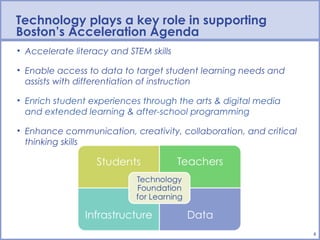
Technology plays a key role in supporting
Boston’s Acceleration Agenda
• Accelerate literacy and STEM skills

• Enable access to data to target student learning needs and
  assists with differentiation of instruction

• Enrich student experiences through the arts & digital media
  and extended learning & after-school programming

• Enhance communication, creativity, collaboration, and critical
  thinking skills


                                                                   4
Digital Learning


“We need to make digital learning the norm rather than the
   exception. Every day should be digital learning day.”
          – Arne Duncan, US Secretary of Education


                                                             5
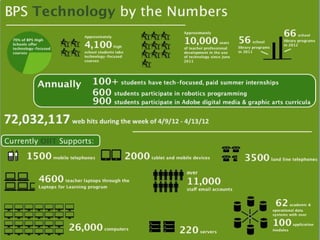
Infographic: Technology in the BPS


                                     6
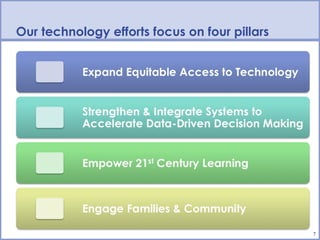
Our technology efforts focus on four pillars


                                               7
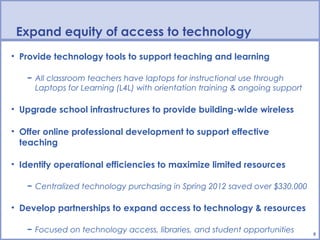
Expand equity of access to technology
• Provide technology tools to support teaching and learning

   − All classroom teachers have laptops for instructional use through
     Laptops for Learning (L4L) with orientation training & ongoing support

• Upgrade school infrastructures to provide building-wide wireless

• Offer online professional development to support effective
  teaching

• Identify operational efficiencies to maximize limited resources

   − Centralized technology purchasing in Spring 2012 saved over $330,000

• Develop partnerships to expand access to technology & resources

   − Focused on technology access, libraries, and student opportunities       8
Expand equity of access to technology
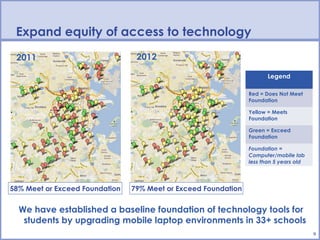
 2011                            2012

                                                                       Legend

                                                                Red = Does Not Meet
                                                                Foundation

                                                                Yellow = Meets
                                                                Foundation

                                                                Green = Exceed
                                                                Foundation

                                                                Foundation =
                                                                Computer/mobile lab
                                                                less than 5 years old


58% Meet or Exceed Foundation   79% Meet or Exceed Foundation


  We have established a baseline foundation of technology tools for
   students by upgrading mobile laptop environments in 33+ schools
                                                                                        9
Strengthen & integrate data systems to
accelerate data-driven decision making
• BPS uses over 60 separate systems to collect and store data

• To make data available when and where it is needed, we must
  ensure that these systems are
   − User-friendly
   − Connected
• We are carrying out a multi-pronged strategy to meet these needs

   − Upgrading core systems and retiring legacy systems
   − Designing useful, thorough reporting & analytic tools
   − Automating operational processes
   − Bolstering application security to ensure student confidentiality
• Moving forward, we will create and implement centralized protocols
  for adopting systems
                                                                         10
Strengthen & integrate data systems to
accelerate data-driven decision making
                      Student Information System (SIS) is a fully
             integrated system that lets schools collect & manage
             data while making data accessible to students and
             families
               − Daily & period attendance

               − eTranscripts & online gradebook

               − Scheduling

               − Student & family portals

               − Department, school, class, teacher web pages

                     Data warehouse is a central repository for
             academic and operational data, allowing robust
             reporting & analysis for schools and the district
               − Leading & lagging indicators

               − Attendance reports & dashboards

               − Assessment data: MCAS, DIBELS                      11
Empower 21st century learning skills for students
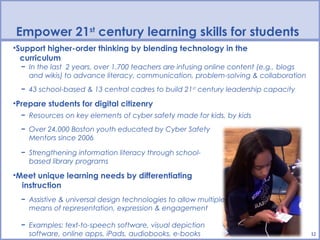
•Support higher-order thinking by blending technology in the
  curriculum
  − In the last 2 years, over 1,700 teachers are infusing online content (e.g., blogs
    and wikis) to advance literacy, communication, problem-solving & collaboration
  − 43 school-based & 13 central cadres to build 21st century leadership capacity

•Prepare students for digital citizenry
  − Resources on key elements of cyber safety made for kids, by kids
  − Over 24,000 Boston youth educated by Cyber Safety
    Mentors since 2006

  − Strengthening information literacy through school-
    based library programs

•Meet unique learning needs by differentiating
  instruction
  − Assistive & universal design technologies to allow multiple
    means of representation, expression & engagement

  − Examples: text-to-speech software, visual depiction
    software, online apps, iPads, audiobooks, e-books                                   12
Empower 21st century learning skills for students
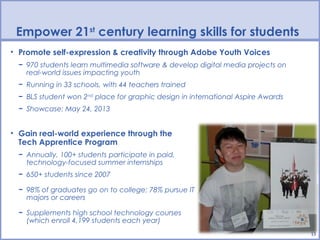
• Promote self-expression & creativity through Adobe Youth Voices
  − 970 students learn multimedia software & develop digital media projects on
    real-world issues impacting youth
  − Running in 33 schools, with 44 teachers trained
  − BLS student won 2nd place for graphic design in international Aspire Awards
  − Showcase: May 24, 2013


• Gain real-world experience through the
  Tech Apprentice Program
  − Annually, 100+ students participate in paid,
    technology-focused summer internships
  − 650+ students since 2007

  − 98% of graduates go on to college; 78% pursue IT
    majors or careers

  − Supplements high school technology courses
    (which enroll 4,199 students each year)
                                                                                  13
Empower 21st century learning skills for students

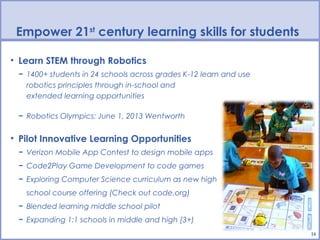
• Learn STEM through Robotics
 − 1400+ students in 24 schools across grades K-12 learn and use
   robotics principles through in-school and
   extended learning opportunities

 − Robotics Olympics: June 1, 2013 Wentworth


• Pilot Innovative Learning Opportunities
 − Verizon Mobile App Contest to design mobile apps
 − Code2Play Game Development to code games
 − Exploring Computer Science curriculum as new high
   school course offering (Check out code.org)
 − Blended learning middle school pilot
 − Expanding 1:1 schools in middle and high (3+)
                                                                   14
Support struggling students with technology
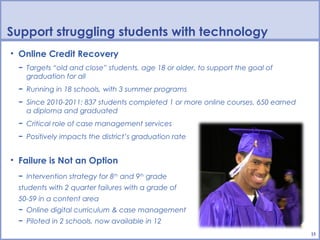
• Online Credit Recovery
 − Targets “old and close” students, age 18 or older, to support the goal of
   graduation for all
 − Running in 18 schools, with 3 summer programs
 − Since 2010-2011: 837 students completed 1 or more online courses, 650 earned
   a diploma and graduated
 − Critical role of case management services
 − Positively impacts the district’s graduation rate


• Failure is Not an Option
 − Intervention strategy for 8th and 9th grade
 students with 2 quarter failures with a grade of
 50-59 in a content area
 − Online digital curriculum & case management
 − Piloted in 2 schools, now available in 12
                                                                                  15
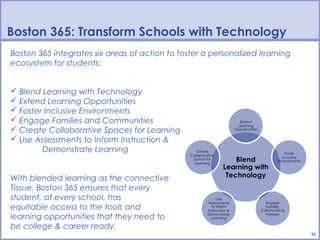
Boston 365: Transform Schools with Technology
Boston 365 integrates six areas of action to foster a personalized learning
ecosystem for students:


 Blend Learning with Technology
 Extend Learning Opportunities
 Foster Inclusive Environments
 Engage Families and Communities
 Create Collaborative Spaces for Learning
 Use Assessments to Inform Instruction &
        Demonstrate Learning


With blended learning as the connective
Tissue, Boston 365 ensures that every
student, at every school, has
equitable access to the tools and
learning opportunities that they need to
be college & career ready.
                                                                              16
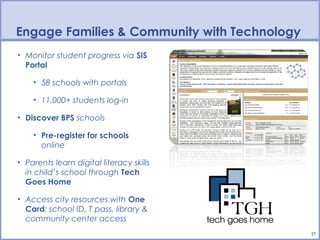
Engage Families & Community with Technology
• Monitor student progress via SIS
  Portal

    • 58 schools with portals

    • 11,000+ students log-in

• Discover BPS schools

    • Pre-register for schools
      online

• Parents learn digital literacy skills
  in child’s school through Tech
  Goes Home

• Access city resources with One
  Card: school ID, T pass, library &
  community center access
                                              17
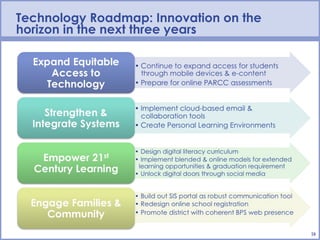
Technology Roadmap: Innovation on the
horizon in the next three years


                                        18
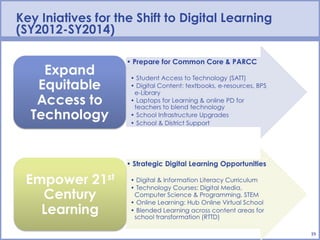
Key Iniatives for the Shift to Digital Learning
(SY2012-SY2014)


                                                  19
To Learn More:


                Melissa Dodd
           Chief Information Officer
            Boston Public Schools
        mdodd@bostonpublicschools.org

    www.bostonpublicschools.org/technology
              @BPSTechnology


                                             20

Technology in the Boston Public Schools 2013

  • 1.
    Technology in theBoston Public Schools Office of Instructional & Information Technology Type Date Here Melissa Dodd Type Presenter Name/Contact Here Chief Information Officer 1
  • 2.
    BPS Technology Vision Whytechnology matters "Students who are college and career ready employ technology thoughtfully to enhance their reading, writing, speaking, listening, and language use. They tailor their searches online to acquire useful information efficiently, and they integrate what they learn using technology with what they learn offline. They are familiar with the strengths and limitations of various technological tools and mediums and can select and use those best suited to their communication goals.” - Common Core State Standards 2
  • 3.
    BPS Technology Vision Whytechnology matters Technology enables educational innovation to prepare students for college & career success in the 21st century. Providing access to customized technologies that empower students to engage in learning everywhere helps close access and achievement gaps. 3
  • 4.
    Technology plays akey role in supporting Boston’s Acceleration Agenda • Accelerate literacy and STEM skills • Enable access to data to target student learning needs and assists with differentiation of instruction • Enrich student experiences through the arts & digital media and extended learning & after-school programming • Enhance communication, creativity, collaboration, and critical thinking skills 4
  • 5.
    Digital Learning “We needto make digital learning the norm rather than the exception. Every day should be digital learning day.” – Arne Duncan, US Secretary of Education 5
  • 6.
  • 7.
    Our technology effortsfocus on four pillars 7
  • 8.
    Expand equity ofaccess to technology • Provide technology tools to support teaching and learning − All classroom teachers have laptops for instructional use through Laptops for Learning (L4L) with orientation training & ongoing support • Upgrade school infrastructures to provide building-wide wireless • Offer online professional development to support effective teaching • Identify operational efficiencies to maximize limited resources − Centralized technology purchasing in Spring 2012 saved over $330,000 • Develop partnerships to expand access to technology & resources − Focused on technology access, libraries, and student opportunities 8
  • 9.
    Expand equity ofaccess to technology 2011 2012 Legend Red = Does Not Meet Foundation Yellow = Meets Foundation Green = Exceed Foundation Foundation = Computer/mobile lab less than 5 years old 58% Meet or Exceed Foundation 79% Meet or Exceed Foundation We have established a baseline foundation of technology tools for students by upgrading mobile laptop environments in 33+ schools 9
  • 10.
    Strengthen & integratedata systems to accelerate data-driven decision making • BPS uses over 60 separate systems to collect and store data • To make data available when and where it is needed, we must ensure that these systems are − User-friendly − Connected • We are carrying out a multi-pronged strategy to meet these needs − Upgrading core systems and retiring legacy systems − Designing useful, thorough reporting & analytic tools − Automating operational processes − Bolstering application security to ensure student confidentiality • Moving forward, we will create and implement centralized protocols for adopting systems 10
  • 11.
    Strengthen & integratedata systems to accelerate data-driven decision making Student Information System (SIS) is a fully integrated system that lets schools collect & manage data while making data accessible to students and families − Daily & period attendance − eTranscripts & online gradebook − Scheduling − Student & family portals − Department, school, class, teacher web pages Data warehouse is a central repository for academic and operational data, allowing robust reporting & analysis for schools and the district − Leading & lagging indicators − Attendance reports & dashboards − Assessment data: MCAS, DIBELS 11
  • 12.
    Empower 21st centurylearning skills for students •Support higher-order thinking by blending technology in the curriculum − In the last 2 years, over 1,700 teachers are infusing online content (e.g., blogs and wikis) to advance literacy, communication, problem-solving & collaboration − 43 school-based & 13 central cadres to build 21st century leadership capacity •Prepare students for digital citizenry − Resources on key elements of cyber safety made for kids, by kids − Over 24,000 Boston youth educated by Cyber Safety Mentors since 2006 − Strengthening information literacy through school- based library programs •Meet unique learning needs by differentiating instruction − Assistive & universal design technologies to allow multiple means of representation, expression & engagement − Examples: text-to-speech software, visual depiction software, online apps, iPads, audiobooks, e-books 12
  • 13.
    Empower 21st centurylearning skills for students • Promote self-expression & creativity through Adobe Youth Voices − 970 students learn multimedia software & develop digital media projects on real-world issues impacting youth − Running in 33 schools, with 44 teachers trained − BLS student won 2nd place for graphic design in international Aspire Awards − Showcase: May 24, 2013 • Gain real-world experience through the Tech Apprentice Program − Annually, 100+ students participate in paid, technology-focused summer internships − 650+ students since 2007 − 98% of graduates go on to college; 78% pursue IT majors or careers − Supplements high school technology courses (which enroll 4,199 students each year) 13
  • 14.
    Empower 21st centurylearning skills for students • Learn STEM through Robotics − 1400+ students in 24 schools across grades K-12 learn and use robotics principles through in-school and extended learning opportunities − Robotics Olympics: June 1, 2013 Wentworth • Pilot Innovative Learning Opportunities − Verizon Mobile App Contest to design mobile apps − Code2Play Game Development to code games − Exploring Computer Science curriculum as new high school course offering (Check out code.org) − Blended learning middle school pilot − Expanding 1:1 schools in middle and high (3+) 14
  • 15.
    Support struggling studentswith technology • Online Credit Recovery − Targets “old and close” students, age 18 or older, to support the goal of graduation for all − Running in 18 schools, with 3 summer programs − Since 2010-2011: 837 students completed 1 or more online courses, 650 earned a diploma and graduated − Critical role of case management services − Positively impacts the district’s graduation rate • Failure is Not an Option − Intervention strategy for 8th and 9th grade students with 2 quarter failures with a grade of 50-59 in a content area − Online digital curriculum & case management − Piloted in 2 schools, now available in 12 15
  • 16.
    Boston 365: TransformSchools with Technology Boston 365 integrates six areas of action to foster a personalized learning ecosystem for students:  Blend Learning with Technology  Extend Learning Opportunities  Foster Inclusive Environments  Engage Families and Communities  Create Collaborative Spaces for Learning  Use Assessments to Inform Instruction & Demonstrate Learning With blended learning as the connective Tissue, Boston 365 ensures that every student, at every school, has equitable access to the tools and learning opportunities that they need to be college & career ready. 16
  • 17.
    Engage Families &Community with Technology • Monitor student progress via SIS Portal • 58 schools with portals • 11,000+ students log-in • Discover BPS schools • Pre-register for schools online • Parents learn digital literacy skills in child’s school through Tech Goes Home • Access city resources with One Card: school ID, T pass, library & community center access 17
  • 18.
    Technology Roadmap: Innovationon the horizon in the next three years 18
  • 19.
    Key Iniatives forthe Shift to Digital Learning (SY2012-SY2014) 19
  • 20.
    To Learn More: Melissa Dodd Chief Information Officer Boston Public Schools mdodd@bostonpublicschools.org www.bostonpublicschools.org/technology @BPSTechnology 20

Editor's Notes

  • #2 Welcome with iPhone App. Andrew Bott, Principal at Orchard Gardens, recently met with a parent and used his iPhone and a low cost app to assist with translating in Mandarin. Now, Andrew is the only person the mom wants to meet with. The capabilities of technology are quickly becoming limited only by our own creativity. This evening, I plan to: Update you on key technology initiatives and how they support the Acceleration Agenda Provide a roadmap for the direction of technology in the district over the next three years Introduce increasing access to digital resources to support learning and come back for future discussion
  • #3 The role of technology in education isn’t just the tech skills but also using technology as a key tool to help support our goal of closing access and achievement gaps and support student learning At the core, excellent teachers are what matters. And technology can help good teachers become excellent teachers; and extend the reach and opportunities of excellent teachers Technology more than enables innovation – it can be a game changer. Our students are growing in a world where they don’t know life without technology. 9.5 out of 10 youth use the Internet. There are requirements to use tech successfully in every area of life The US Bureau of Statistics released the fastest growing jobs by 2016. Over a 1/3 are technology related, with the #1 being Network Systems & Data Communications Analysts Nearly ½ of all college students take a course online And we are continually inundated with information and technology tools in every day activities – watching TV, going to the bank, applying for a job. The US Dept of Commerce released a study a number of years back that ranked Education last out of 55 industries and their use of technology. Technology is no longer a nice-to-have, it’s a necessary tool to help teachers teach and students to learn. 97% of teens play video games – and youth who play video games that parallel civic life are more likely to follow current events, raise $ for charity, and commit to civic participation
  • #4 The role of technology in education isn’t just the tech skills but also using technology as a key tool to help support our goal of closing access and achievement gaps and support student learning At the core, excellent teachers are what matters. And technology can help good teachers become excellent teachers; and extend the reach and opportunities of excellent teachers Technology more than enables innovation – it can be a game changer. Our students are growing in a world where they don’t know life without technology. 9.5 out of 10 youth use the Internet. There are requirements to use tech successfully in every area of life The US Bureau of Statistics released the fastest growing jobs by 2016. Over a 1/3 are technology related, with the #1 being Network Systems & Data Communications Analysts Nearly ½ of all college students take a course online And we are continually inundated with information and technology tools in every day activities – watching TV, going to the bank, applying for a job. The US Dept of Commerce released a study a number of years back that ranked Education last out of 55 industries and their use of technology. Technology is no longer a nice-to-have, it’s a necessary tool to help teachers teach and students to learn. 97% of teens play video games – and youth who play video games that parallel civic life are more likely to follow current events, raise $ for charity, and commit to civic participation
  • #5 Technology plays a pivotal role in helping to realize the vision of a BPS graduate and throughout this presentation I will demonstration how. Our work as a technology department is to support and develop a technology foundation for learning – that ensures the needed infrastructure, data systems, and tools & resources for teachers and students to succeed. We have had very strong IT leadership – and need to make sure I credit our past leaders specifically Kim Rice for establish a solid foundation for us to build on. To give you an idea of how our work supports these 4 quadrants, we put together an infographic, which is a visual display of complex information quickly and clearly Technology supports the Acceleration Agenda by: Helping to close access and opportunity gaps We have increased our graduation rate by 6% over the last X years due to online credit recovery Students have access to academic supports and rich, tools through sites like Khan Academy that extends their learning in an engaging way from any computer, anywhere across the city. students to compete in today’s world, they need the 2. Accelerating literacy and STEM skills We support the IT pipeline by placing over 100 students annually in paid, technology internships to explore career opportunities in industries (not just technology) Use educational apps to develop language acquisition… 3. Enabling access to data to target student learning needs and assisting with differentiation of instruction With iPads and educational apps, students on the autism spectrum learn communication skills, build self-confidence, and access the curriculum in meaningful ways Enhancing communication, creativity, collaboration, and critical thinking We strengthened arts opportunities by 900 students expressing their voice through Adobe Youth Voices Program Students in kindergarten through high school are learning engineering concepts and problem-solving skills through robotics programming
  • #6 Over the next 24 months, OIIT envisions system-wide transformation that leverages technology to create student-centered spaces for engaging and personalized learning that is academically rigorous and aligned to the Common Core. With digital learning as a core component of our district’s reform agenda, we will transform schools and equitably prepare BPS youth with access to the skills and knowledge needed for active global citizenship in the 21 st century.
  • #7 70% of high schools offer technology-focused courses We’re also seeing a growth in school-based library programs over the last 2 years. We support everything with a power button. But we’re more than the people you call when something doesn’t work – but if you do call, we’ll answer your call in a minute and a half.
  • #8 I will use these four pillars to guide our discussion this evening, providing examples of key initiatives that demonstrate the breadth and depth of technology infusion across the district. I could go on and on with examples – so I’m happy to provide additional information as a supplement to this presentation.
  • #9 Expanding equity of access is ensuring that our teachers have the right tools to provide effective and engaging instruction; that our students have the right tools to help them learn, and that we continually seek innovative ways to maximize efficiencies to deliver on the district’s mission. L4L Started in 2008, one of a few urban districts at the time that recognized that if we wanted provide access to technology for students, we needed to get the tools into our classrooms and specifically the hands of teacher. Leveraged strategic funds in 2011 and refreshed a year early to generate revenue for the district. Conducted survey: 90% reports that the laptop either supported (68%) or fundamentally changed (22%) the way that they teach Daily, approx. 3500 laptops are connected to our network. (being connected doesn’t mean that they aren’t in use) Infrastructure: 5 Year capital plan. A strong core to meet the multimedia and data demands of schools. Online PD – with the adoption of the MA Curriculum Frameworks, teachers will need new training. To reach our numbers, we’re working to leverage online environments. We have demonstrated success with our ELL Category training and our plan to build on this success. Centralized technology purchasing – fundamental shift in how we handle technology purchasing… Because of the foundation that we have laid in terms of infrastructure and teacher access, we are strengthening our focus on student access to technology E-Rate- federal reimbursement Sale of equipment – L4L Partnerships – we recognize that we can’t do this alone. I did want to mention that Target just announced that Boston was awarded a library makeover for the 4 time – the Trotter, one of our turnaround schools To generate additional funding to support expanding access E-Rate: Over the last 3 years, we have brought in between 3 and 6 million in savings. This year, we have applied for over 11 million in savings. Technology Access: Timothy Smith Network, Celtics & Ray of Hope Foundation Library Makeovers: Target Student Learning Opportunities: Adobe, Boston Private Industry Council, Barr Foundation, Verizon, NSF
  • #10 Through the strategic use of funds, able to upgrade technology in a significant number of schools. At the beginning of this year, we had just 58% meeting or exceeding a minimum foundation of 1 mobile/technology lab less than 5 years old. By the end of this year 79% of schools will meet this minimum foundation Access to mobile learning environments is a minimum requirement for schools: to support project-based learning, literacy development, to assist with assessments. Moving forward, working with schools on a cost-sharing model to pool our resources and consult on what the right set of technology tools and resources are to meeting the unique learning needs of their students. Through data collection, we can identify schools that are most in need of technology upgrades and work with them to purchase technology for their schools. This would allow us to help schools close an “access gap” and work with them to plan how they can leverage their budgets next year to strengthen technology access to support their academic goals & targets. Through a cost-sharing model with schools, we were able to generate revenue to upgrade 5 additional mobile labs for schools % of Schools Meeting Baseline Technology Foundation of 1 computer/mobile lab less than 5 years old
  • #11 Robust, flexible and connected data systems and infrastructure are critical for us to our jobs well. Spend less time accessing and pulling data and more time being able to interpret it and develop strategies to impact change and improvement. Connect to focus of Parthenon project which is helping the district develop a comprehensive data strategy to ensure that we use data across the organization to inform decision-making, instruction, and to help students realize their full potential. In order to successfully achieve this vision, we need a flexible and robust data system foundation. Leverage Race to the Top funds to support this work and build a culture of effective data use to inform instruction Example of automating operational processes: Digitizing historical transcripts for closed schools Moving the teacher evaluation process online Developing an exam school notification site so that parents could more quickly find out exam school results Key ways that oiit is helping to do this – and automation so that they spend time looking for data and using it to improve services to kids Improve individual systems but better connect to provide real-time user friendly data to better pinpoint student needs Across the more than 60 systems, we’re embarking on efforts to improve core systems and link them together more effectively In doing so it will enable us to have the following capabilities – automated processes Examples are powerful - How teachers/principals – what type of information they are looking for – See a picture of what it means Automate processes – teacher evaluations – teachers move between schools files don’t always follow – moving paper-based to online system any teacher would be able to see the history of evauations as well as school leaders – trends across evaluations to identify needed professional development for teachers Zoom in on students who have needs – L&L or attendance – you can set parameters Talk about the 50 systems to convey the complexity Organizationally – what structures and processes we need to have – to ensure that we’re not siloed – changing our practice for how new systems are adopted Take the same approach with respect to our systems as data group
  • #12 Other systems: SEIMS, teacher evaluations, ELL data management The SIS represents a paradigm shift for the district – reduce paper processes, make data more transparent to our families, comprehensive picture of the whole child Data Warehouse – no one system will meet all of our complex needs Leading & Lagging Indicators report, developed with RAE, pulls together a number of student indicators – attendance, grades, disciplinary issues, to identify students’ risk factors for This interactive data inquiry tool provides key indicators on the performance of students who are currently enrolled in school. The summary information on key indicators includes demographic characteristics, discipline, learning outcomes in core academic areas, performance on MCAS, and other measures. Detailed information on each student can be obtained via dynamic drill-through options on each interative chart. This online tool is intended for use in school and classroom planning, and to support data inquiry. School administrators and teachers are encouraged to use the information to identify students with various levels of challenges and to design appropriate intervention programs to address the varying needs.
  • #13 Helping teachers use and embed technology 10,000 seats of technology professional development offered, since June 2011, focus on infusing technology into teaching & learning and using the SIS and BPS data systems to support instruction and monitor student progress 25 school-based leadership teams trained on using technology as a tool of change through 21 st century leadership cadres program Meeting unique learning needs by differentiating instruction Deployed over 200 mobile devices (iPads and iPod Touches) for English Language Learners and students on the Austism spectrum. Trained 150 teachers in integrating mobile technologies with students in the classroom
  • #14 Develop technology skills – graphic design & multimedia creation Have on the job experiences to explore IT fields Visit the Mayor’s Summer Jobs website to see a video that we developed with support from Boston Properties (insert video of 3 rd grade engineering class here) Additional Notes: Literacy & Analytical Writing Technology integration into the Common Writing Assignment Web-based interventions to support reading (e.g. SuccessMaker, Read 180, Lexia) Online resources, databases, and research tools Reading Street & Anthology online curriculum resources Online formative assessments for grades 3-12 Science, Technology, Engineering & Mathematics (STEM) Robotics in K-12 (28 schools) Computer modeling, programming & 3D gaming (Star Logo & Scratch) in middle & high schools First in Math in elementary schools Algebra 1 online course for “off-track” youth Robotics: In 28 schools K-Grade 1: Bee-Bots Teaches programming & problem-solving while reinforcing language, math & science knowledge aligned to learning standards Adapted to support literacy development & language acquisition Grades 2-8: Alpha-Robotics & Lego Robotics Interdisciplinary focus on math, science, literacy, programming, inc. problem-solving, creativity & collaboration Annual Robotics Olympics (200 students). June 2, 2012 at Wentworth Institute for Technology Grades 7-12: Programming, Electronic & Mechanical Design After-school & extended learning focus Machine Science Sumo Robot Competition Robotics School Vacation Bootcamps
  • #15 Stats on Computer Science: By 2020, there will be 1 million more computer jobs than students in computer science Computer science is among the highest paid college degrees Computer programming jobs are growing at 2 times the national average Less than 2.4% of college graduates graduate with a degree in computer science Of U.S. college students, only 2% are in computer programming in comparison to other math and science degrees Nationally, 9 out of 10 schools do not offer computer programming classes
  • #16 1,274 students were enrolled in 2,618 online CSRP courses between September 2010 and August 2011.  18 years or older by graduation date  Have passed both the ELA and Math MCAS3  Have taken or are scheduled to take MCAS Science  Need to complete one to four courses to meet graduation requirements  At risk of not returning to finish their high school education Attendance is mandatory at the assigned CSRP lab site to take quizzes and final exams in the presence of CSRP lab instructors. Individual sites may have additional attendance requirements (e.g., weekly, bi- weekly) for successful completion of the program. Unit quizzes may be taken three times to achieve a passing score. The CSRP teacher may reset tests after the third attempt if needed. The minimum proficiency for CSRP is 70% on each learning objective unless the student has an IEP stating otherwise. Credit cannot be awarded until this level of proficiency is achieved. Course Completers: 56.5% maie, 43.4% female; nearly 90% are Black or Latino.
  • #18 TGH Educated 2,196 families since 2010 on the use of technology through the Technology Goes Home program. TGH graduation is June 23 Online curriculum offered in English & Spanish Tech Goes Home creates access and possibilities for new technology users: ●      Majority of household incomes under $20,000/yr ●      79% single female heads of household ●      41% of adults are English language learners ●      10% of students have severe physical disabilities Tech Goes Home is currently funded by a mix of federal, state and foundation grantees including, but not limited to the US Department of Commerce, the city of Boston and Hub on Wheels (an annual city-wide event in Boston for which TGH is the main beneficiary) Delivering Results Tech Goes Home transforms the digital divide into a web of connection.  Nearly 90% of program graduates subscribe to and maintain Internet access in their homes long after program completion.  In addition: 85% of students who completed TGH at their school regularly use their new computer to do homework and extend learning time Students who complete TGH spend more of their home computer time on school assignments than other connected students Enrolling in TGH led to first-time school involvement for 65% of parents in the program.  For Spanish-speaking parents, first-time participation reached 80%.
  • #19 The possibilities of educational technology are growing exponentially We want Boston to be on the cutting edge, planning is already underway: Expand Access: e-content, exploring replicating success of our 1:1 programs like TBA, and prepare for online assessments that are right around the corner Data: RFP for cloud-based email & collaboration – support going paperless and document storage. I keep everything on my laptop and phone and can pull something up through a search function; personal learning environments – rather than having to go to multiple places, how can I access everything from one entry point 21 st Cent Learning: our students need to do more than just be critical consumers of information – they need to be producers of it. Working with Academic leadership on a k12 digital literacy curriculum – technology skills & use across content areas; digital safety - expand pilots of blending and online learning to extend the school day - harness the wealth of educational content on the web, our kids live in a social, connected world. Family - While divides are diminishing, they still exist. Yet mobile access to cell & smartphones is growing. Language of common core – how to embed technology – connection to commoncore - PARCC assessments – online research integrated into response NAEP – technology based assessments Expand Access to Mobile Technology for Students Equity of access to devices in every school through cost-sharing funding model between OIIT & schools Develop and adopt e-content & e-textbooks Implement cloud-based communication & collaboration Tools Design & Implement a Digital Literacy Curriculum Across Content Areas At the core, educate all students on being digital citizens - Internet Safety & Cyber bullying Prepare students to be critical consumers & constructors of information & new ideas Align to support CommonCore By 2014, districts will need to report on internet safety and cyber-bullying education to Federal government. Federal requirement to educate all students on internet safety and cyberbullying Unlock digital doors to learning opportunities: YouTube & Social Media Leverage Blended & Virtual Learning to Extend Learning Opportunities Implement pilot program in middle grades to identify best practice for engaging students & expanding enrichment Ensure all students graduate with an online learning experience Create Personal Online Environments for Learning to Take Place Everywhere Integrate tools, resources, and content with a signal point of entry for students Empower students to construct their own learning
  • #20 The possibilities of educational technology are growing exponentially We want Boston to be on the cutting edge, planning is already underway: FCC: digital textbooks in the next 5 years (based on most refresh cycles of textbooks – textbooks bought today will still be in use in 2023)