BPOS Information
BPOS Information
BPOS Information
BPOS Information
BPOS Information
BPOS Information
BPOS Information
BPOS Information
BPOS Information
BPOS Information
BPOS Information
BPOS Information
BPOS Information
BPOS Information
BPOS Information
BPOS Information
BPOS Information
BPOS Information
BPOS Information
BPOS Information
BPOS Information
BPOS Information
BPOS Information
BPOS Information
BPOS Information
BPOS Information
BPOS Information
BPOS Information

Editor's Notes

  • #3 Partners: Use this slide to introduce your company and your offerings
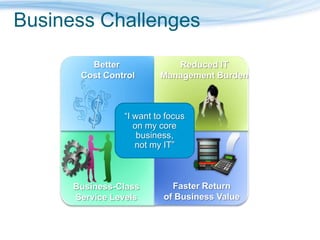
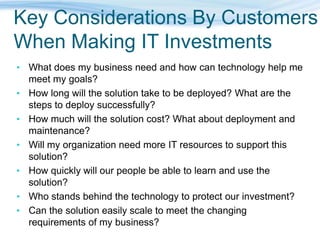
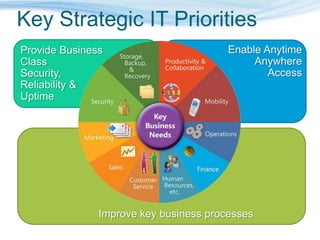
  • #5 Instruction to presenter: This is a possible script that can be used and modified for each presentation. You don’t have money to burn. You want tangible benefits that will increase revenue, reduce costs, and help people get more work done, without adding operational burdens that further prevent strategic decision making. It is an ongoing challenge to select and use the right IT technology and infrastructure for your organization. By working with a partner and Microsoft, you have a cost-effective resource at your fingertips to help analyze your business needs and determine how technology can help meet them in the short and long term.We can help assess your needs and design a strategy to get or keep your IT network healthy enough to meet the demands of your day-to-day operations while also meeting your budget, support, and training needs.
  • #6 Use some of the following questions to identify the most pressing needs of your customer.Where in your business are there information and computer security needs that could be better met? (Protect your data, protect your business)What are you doing to back up your critical business information? If there was a computer failure, how would you recover? (Protect your data, protect your business)If you could improve your employees’ efficiency when they’re working on computers, how would you do that? Better management of information? Software that’s easier to use? What else? (Get more done in and out of the office.)Do your employees have mobile access to critical applications and information? If not, how could that access help your business? If they do have mobile access, what could be done to make it better and more productive? (Get more done in and out of the office.)What kinds of process challenges do you face? If you had an IT solution that could help you manage business processes better, what would it look like? (Empower your people with business solutions)What business applications are you currently using, if any? What additional day-to-day capabilities would be useful to you? (Empower your people with business solutions)Solutions:Protect your data, protect your business Security, backup, infrastructure protectionGet more done in and out of the office Desktop productivity and mobilityFind and win new business—and delight your customers CRM applications, online search, and marketingEmpower your people with business solutions Connected and adaptable business solutions
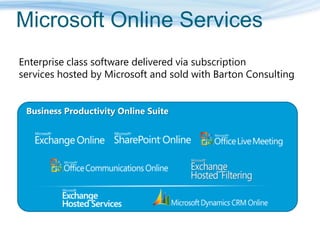
  • #8 Let’s now drill down on “Online” services. Online services is a set of enterprise class software delivered as subscription services hosted by Microsoft and sold through partners. Our goals is to create a service option for every one of our business software products. The initial set of services we are offering focus on the business productivity capabilities that includes Exchange Online, Office SharePoint Online, Office Live Meeting, Office Communications Online, Exchange Hosted Services and Microsoft Dynamics CRM Online. Exchange Hosted Services are attached services that include filtering, archiving, encryption and continuity. We plan to add many more Online services to this portfolio in the coming months.The Business Productivity Online Suite, shown here, includes Exchange Online, Office SharePoint Online, Office Communications Online, and Office Live Meeting. Office Communications Online is currently available as part of the dedicated offering and a multi-tenant offering of the service will be added in early 2009.
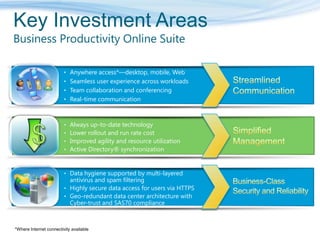
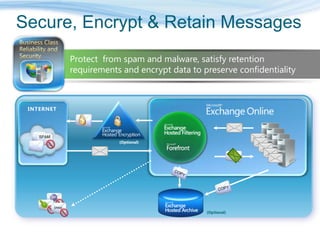
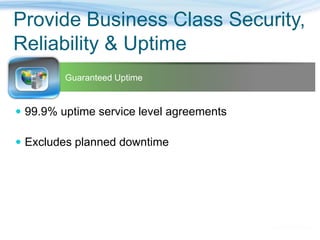
  • #9 Beyond just hosting our software, we have made key investments to create a set of unique values for online services. The key pillars are streamlined communication, simplified management and business class security and reliability. The text shown are the key value prop in each pillar category. By providing the latest business productivity capabilities delivered from a single service platform, end users can truly enjoy an integrated experience. End user will be able to access these services over the web, through their laptop/desktop or mobile devices. They can also securely access these services over the internet without VPN. End user will be able to have presence awareness of their colleagues and partners and be able to collaborate seamlessly between emails, documents and over conferencing and instant messaging. From the IT administration perspective, our service will be managed from a single administration portal. Administrators will have a single place to go to view operational statistics, provision new users and track any support issues. All services will be backed by a 99.9% SLA with financial guarantees and included in each service is a premium disaster recovery service that will allow fast switch over to a geographic separated datacenter in case of primary datacenter failure. We also perform regular scheduled independent audit to ensure our service is SAS 70 compliant and highly secured. Stable, dedicated infrastructure; hosted in Microsoft datacenters99.9% guaranteed service availability with financial penaltiesDynamic scale for additional capacityIncreased agility and user productivityEvergreen technology management – the latest Microsoft technologies and releases at no additional chargeSingle sign-on experience through Active Directory synchronizationSimple, predictable monthly fees and straightforward on-boarding costsRobust business continuity/disaster recoveryStrategic relationship with Microsoft provides innovation in use of Microsoft technology and extensive insight into Microsoft products
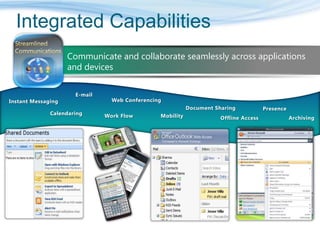
  • #10 With Microsoft Online, we have put together a suite of always up to date business productivity capabilities. This will help many of our customers that have not been able to take full advantage of our software’s integrated capabilities because of the various versions of the applications they run on premises. With Microsoft Online, we are giving end users the ability to have a wide range of methods to communicate and collaborate. Users can start from any forms of communication and switch to another. For example, an user can switch from email exchange to instant messaging and then move to a web conference or start with instant messaging and then move to email or conferencing. They will access to emails, contacts, documents whether they are online or offline such as using our Sharepoint synchronizing feature with Outlook or connect via a wide array of active sync mobile devices or through web portals.
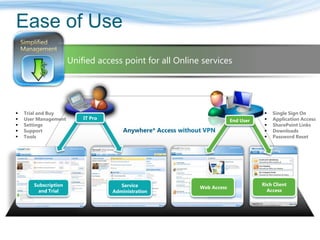
  • #11 Customer who buy Microsoft Online Services are looking to simplify how they consume and manage technology. To satisfy this need, we have designed and integrated, easy to use Company Portal and Administration Center for the IT pro to help them manage, support and configure not just one , but all their Microsoft Online Services in one place. The Company Portal is design for the IT Pro to manage his/her subscriptions and trial accounts for all of our Online services. Customer can expect a consistent operational processes of learn, try, buy, use and renew. Once the service is activated, the IT Pro will manage the service via the Administration Center. Key capabilities of the Administration Center includes:Unified management from one placeUser managementCo-existence with your on-premise ExchangeAccess to data migration toolsSupport issues and trackingService HealthConfigure service settingsIn addition to IT pros, end users also want a consistent and integrated experience when they use these services. The Microsoft Online Sign-On Tool and My Company Portal make it easy for end users to mange their identity and access services their company has subscribed to.
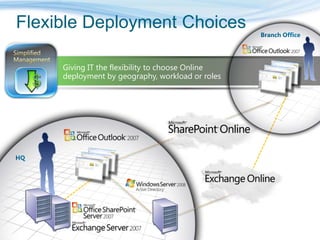
  • #12 For reasons such as data compliance, customization requirements, flexibility, etc., customer may want to deploy a hybrid approach between online and on-premise. Another key value we provide is the flexibility to choose your deployment model between on-premises and online by geography, workload or roles. In this example, the customer decides to deploy Exchange Server in their own datacenter for users in their headquarter and have their branch office users subscribe to Exchange Online. To enable a seamless experience such as a single address book, we provide a tool to synchronize entries in your on-premises directory with our Online directory. With this tool, any changes you make on your directory are synchronize with our directory such as changing adding or deleting a user, change user attributes, etc. For SharePoint, in this example, customer can choose to deploy a set of site collections on their on-premise SharePoint deployment and another set of site collections is deployed on SharePoint Online. In this case, no matter where the users are at, they can access to sites from both site collections.
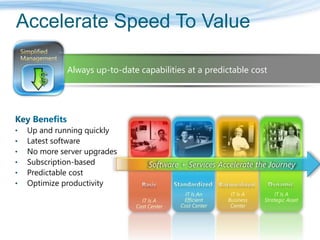
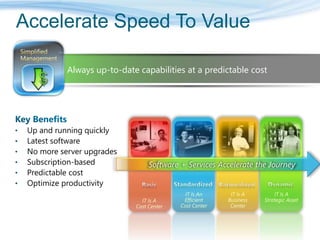
  • #13 With our services, customers don’t have to spend time or effort in deployment and start to be productive quickly. Customers don’t have to worry about updates and upgrades. Our services help transform IT from being a cost center into a strategic asset.
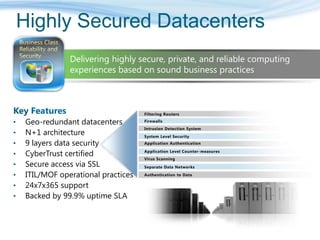
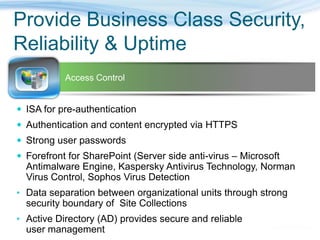
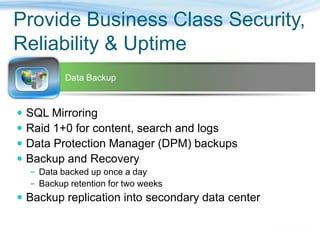
  • #16 One area that we are very conscious of is the importance of security and availability. We want to ensure that customer feel confident that we are protecting their data and the service is highly available. Our service runs on a set of datacenters that are managed by a centralized organization within Microsoft that are making major investments in datacenter spaces and capabilities. We deploy our service on the latest hardware and network equipments in a N+1 architecture to enable failover capabilities as well as saving your data in a separate geo-redundant location. We are regularly tested by a third party CyberTrust to ensure our infrastructure is secure against attacks. We follow ITIL/MOF in our operational processes and we are in the process of getting our SAS-70 audit to ensure we have strictest level of control. Above all, we will provide 24x7 IT Pro support and our service availability is backed by a 99.9% uptime SLA with financial penalties if we fail to meet the SLA. Physical security is but one part it. When you look, we ultimately need to make sure that since we are providing an internet based service, we are protecting customer’s data in a variety of ways. We look at this as multiple layers of protection. Microsoft is actually providing 9 layers of logical security for our customers and their service and data. Filtering Routers: these are implemented to protect against any traffic we do not see as well constructed. One of the great benefits of providing a focused service like BPOS is we actually set up the routers to protect against any form of malform data. We block at an aggregate at the edge. Firewalls are set up as deny all. Behind the firewalls we have an Intrusion Detection System. We have a very sophisticated correlation engine for any intrusion alert that we’re tracking 24 hours a day. Below the IDS, we have a level System Level Security. When you look, the service operations organization actually has broad based, dual factor authentication. This means each individual within a support and service operations team have either some sort of secure ID card or a RSH secure ID token that is coupled with their role. Each individual must have a user ID and password and must apply a pin with their secure ID token. Based on the role they have, we grant access per individuals to the service.  Application Authentication: when you get below the System Level Security, the customers actually have application level authentication. We have a very sophisticated mechanism by which we provide access to data. The structure of the service provides users access to only those capabilities they are designed to have. In the reseller model where a partner is actually providing the service to the customer, they have a level of application authentication that sits over top of that which the customers have. So we’re able to provide a very rich set of security protocols for our customers, as it relates to authentication to the different services.Microsoft, as most people know, has a good history as relates to security and trustworthy computing. Our services are actually designed to make sure that we apply those security methods not only to the software, but we also treat that software as a service. So when we do our threat walling and follow the Windows initiative, we’re thinking about our applications as if they are delivered through the Internet. We apply a significant level of counter measures, such as buffer overflows and SQL injection, we make sure that the applications we’re running are sandboxed so you can’t activate elevated levels of security or access a higher level of authentication when you’re actually doing work within our application. Virus Scanning is provided for multiple set of capabilities. We actually virus scan at all over our server levels, we have in place intrusion detection at the host and we’re scanning our content via Microsoft ForeFront.Then we have Separate Data Networks. When you look inside the data center, So what when we do our threat walling and follow the Windows initiative. These are implemented in a form that breaks it apart. For example, the data bases are on a separate sub net then from the actual content server or something that is an internet facing device.When you look, even though we are an internet facing service, very few devices have direct access to the internet. All of the servers are on some form of non-routable subnet space. Finally you are authenticated into the data. The data itself is never stored on the physical servers, we run separate data networks and the data is stored on dedicated storage devices. So when you look at the content, the content is actually being sent from dedicated storage devices, which allows us to provide significant levels of backup as well.
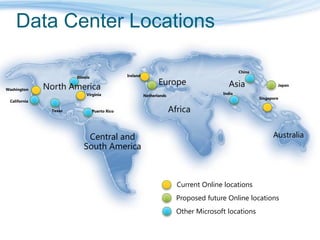
  • #17 Once we layered our data center practices in place, we’re actually deploying for our Business Productivity Online Suite in a number of locations. Because service is still in its infancy, we’ve only deployed in two locations in North America at this time. Ultimately, we will be replicating this model in other Microsoft data centers across the world.
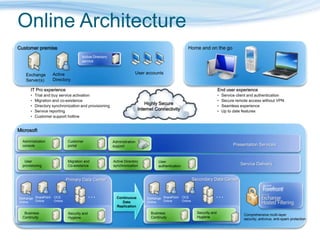
  • #18 The bottom picture shows three layers: the datacenter layer, the service delivery layer and the presentation layer. Admin Console is used by admin to do add/delete users, provide tools for coexistence and migration, tools for A/D sync and the Sign In Client that is used for single sign on. We also offer Customer Support for the IT Admin (not end user support). We expect end users to go to their IT admin for support. Exchange Hosted Services is used by BPO for filtering inbound mail for virus/spam.Forefront is used to filter viruses in outbound mail and SharePoint.On the top, we show the customer premise. Typical customer has a local exchange server and AD. On the top right, we show end user experience both at home and on the go (anywhere access).
  • #22 With our services, customers don’t have to spend time or effort in deployment and start to be productive quickly. Customers don’t have to worry about updates and upgrades. Our services help transform IT from being a cost center into a strategic asset.