An introduction to blogging with students
                 Created by: Erin Boreman
   A blog or weblog is a site that allows
    individuals to interact with one another.

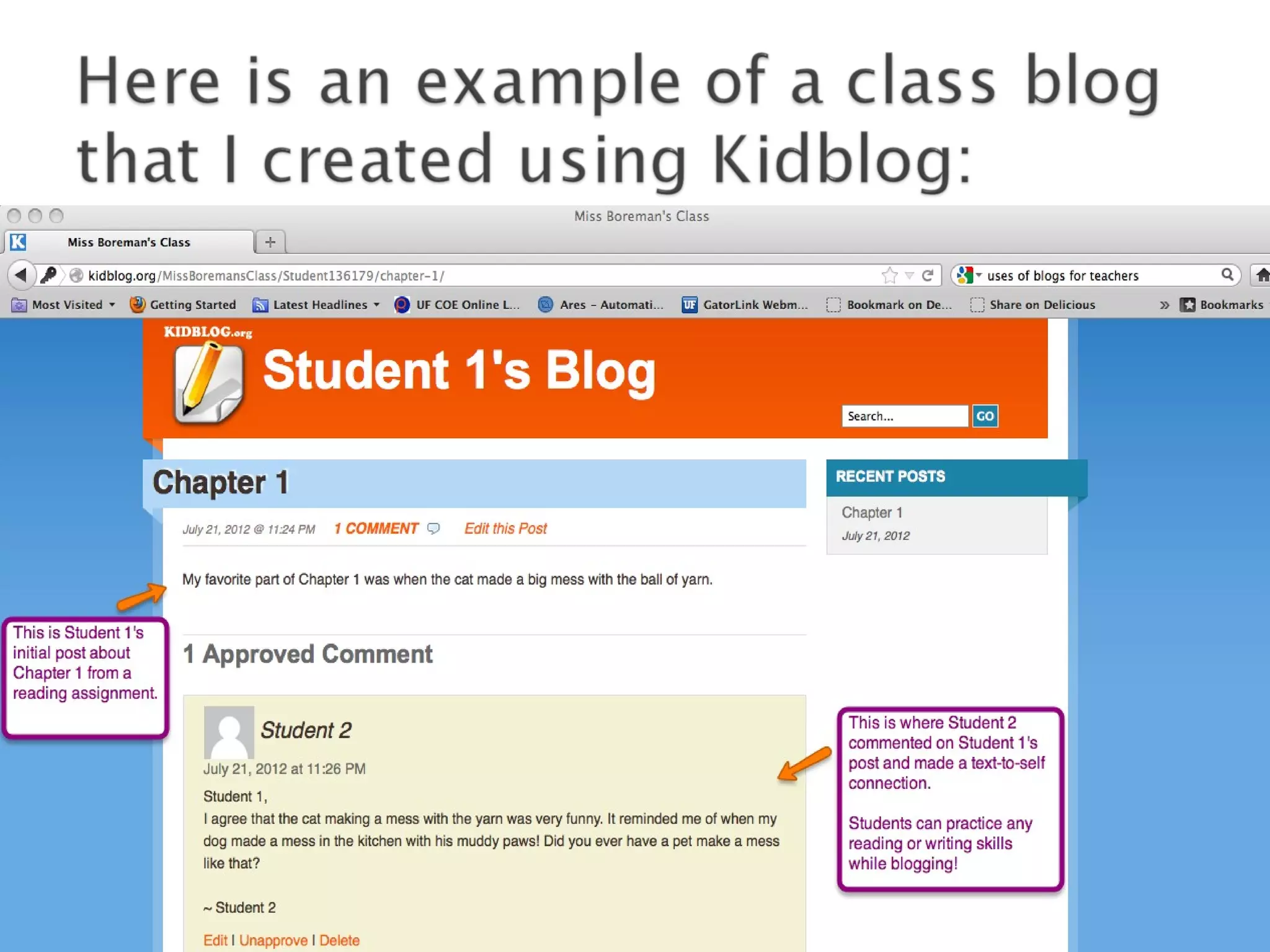
   Blogs are made up of initial posts and
    comments that are made in response to the
    initial post.

   Here is a video that explains the big picture
    about blogs:
        Blogs in Plain English - leelefever
   In an era of media convergence, blogs allow
    the sharing of diverse perspectives centered
    around a common topic.

   Blogging allows individuals in any location to
    interact with each other in real time.

    Unlike personal messages, blogs allow all
    participants to view postings and comments
    simultaneously.
   Teachers can use blogs to:

   Seek advice from other teachers about lesson
    ideas, teaching practices, or behavior concerns.

   Engage in professional development.

   Communicate with parents.

   Get their students communicating while using
    technology!
   Students are reading and writing in response
    to subject matter and each other.

   There are opportunities to blog with other
    students around the world.

   An increase in critical thinking and
    engagement in learning activities.
   First, find a blogging site that fits your needs.

   Kidblog.org is an example of a blogging site
    that is both teacher and student friendly.

   Here is a link to a video tutorial I found that
    explains how to use Kidblog with your class:
          Using kidblog.org - itechbob
   Kidblog: http://kidblog.org

   Support Blogging:
    http://supportblogging.com/Educational+Bloggin

   Blogger:
     http://www.blogger.com/tour_start.g
   If you have any questions or comments about
    this presentation, feel free to contact me at
    erinboreman@gmail.com.

Basics of Blogging

  • 1.
    An introduction toblogging with students Created by: Erin Boreman
  • 2.
    A blog or weblog is a site that allows individuals to interact with one another.  Blogs are made up of initial posts and comments that are made in response to the initial post.  Here is a video that explains the big picture about blogs: Blogs in Plain English - leelefever
  • 3.
    In an era of media convergence, blogs allow the sharing of diverse perspectives centered around a common topic.  Blogging allows individuals in any location to interact with each other in real time.  Unlike personal messages, blogs allow all participants to view postings and comments simultaneously.
  • 4.
    Teachers can use blogs to:  Seek advice from other teachers about lesson ideas, teaching practices, or behavior concerns.  Engage in professional development.  Communicate with parents.  Get their students communicating while using technology!
  • 5.
    Students are reading and writing in response to subject matter and each other.  There are opportunities to blog with other students around the world.  An increase in critical thinking and engagement in learning activities.
  • 6.
    First, find a blogging site that fits your needs.  Kidblog.org is an example of a blogging site that is both teacher and student friendly.  Here is a link to a video tutorial I found that explains how to use Kidblog with your class: Using kidblog.org - itechbob
  • 8.
    Kidblog: http://kidblog.org  Support Blogging: http://supportblogging.com/Educational+Bloggin  Blogger: http://www.blogger.com/tour_start.g
  • 9.
    If you have any questions or comments about this presentation, feel free to contact me at erinboreman@gmail.com.