EPAS 10
Roel P. Tabuyo
Subject Teacher
Blender
• a motorized small kitchen appliance that blends,
chops, and grates food.
• a handy electrical gadget that makes chopping and
mixing food easier.
• liquidizer or kitchen appliance used to mix
ingredients or make puree.
• a stationary, upright electrical device which is
distinguished from a hand-powered or electric
mixer that may be used for similar purposes.
How a blender operates
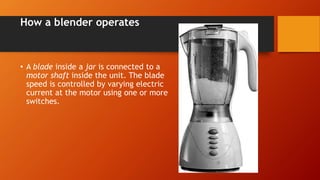
• A blade inside a jar is connected to a
motor shaft inside the unit. The blade
speed is controlled by varying electric
current at the motor using one or more
switches.
Uses of blenders
• to crush ice in drinks;
• to make smooth purées of semi-solid ingredients such as cooked
vegetables and meat;
• to reduce small solids such as spices and seeds to powder or nut
butters;
• to blend mixtures of powders, granules, and/or liquids thoroughly;
• to help dissolve solid into liquid.
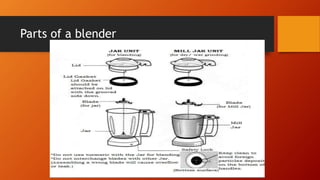
Parts of a blender
Parts and functions of a blender
• Blending container
• is made of glass, plastic, or
stainless steel, and often has
graduated markings for approximate
measuring purposes.
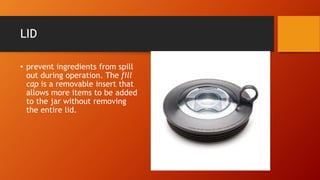
LID
• prevent ingredients from spill
out during operation. The fill
cap is a removable insert that
allows more items to be added
to the jar without removing
the entire lid.
BLADE ASSEMBLY
• assembly is located at the
bottom which could be
removed for cleaning purposes.
In cases where the blades are
removable, the container
should have an “o-ring”
between the body of the
container and the base to seal
both and prevent the contents
from leaking.
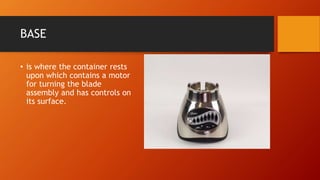
BASE
• is where the container rests
upon which contains a motor
for turning the blade
assembly and has controls on
its surface.
SELECTOR SWITCH
 used to control the
speed of the motor. It
comes in different
speed. Modern blenders
offer a number of
possible speeds.
POWER TRAIN/MOTOR
• fan-cooled electric motor
which is secured into the
housing by way of vibration
dampeners and a small
output shaft penetrates the
upper housing and meshes
with the blade assembly
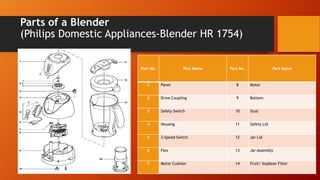
Parts of a Blender
(Philips Domestic Appliances-Blender HR 1754)
Part No. Part Name Part No. Part Name
1 Panel 8 Motor
2 Drive Coupling 9 Bottom
3 Safety Switch 10 Stud
4 Housing 11 Safety Lid
5 3-Speed Switch 12 Jar Lid
6 Flex 13 Jar Assembly
7 Motor Cushion 14 Fruit/ Soybean Filter
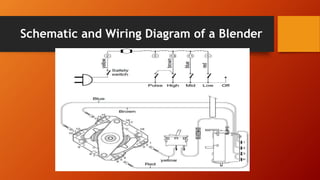
Schematic and Wiring Diagram of a Blender
Procedure and Techniques in Troubleshooting an
Electronically-Controlled Domestic Appliance
Electric Fan (ECEF)/ Blender
• Conduct a quick diagnosis of the trouble symptom and repair the
defective set in the shortest possible time. Do not troubleshoot an
electric fan/ blender unless you have determined the fault. Trace
the fault from the mechanical section or electrical circuit section.
• When troubleshooting integrated circuits (ICs) in the
electrical/electronic circuit section, do not remove the IC from
the PCB. Secure a circuit diagram from the manufacturer to help
you identify the function of the IC. Consider the pin out of the IC.
• When troubleshooting in the electrical/ electronic circuit section,
prior to pre-testing, consider voltage measurement on components
first before removing it for testing. If the measured voltage is
normal, the component might be the cause of the problem. Either
way, if the measured voltage is not normal (increased or
decreased) the preceding circuit/ components might be the cause.
• If the trouble symptom is caused by aging components, the
defective component is usually one of them. However, in high-
power-handling circuits, a defective component may cause other
components to malfunction.
• Be familiar with the usual defects of components. (e.g. capacitors
usually become leaky, shorted or open/ resistor increase their
resistance when they become defective/ semi-conductors such as
transistors usually become open or shorted)
• . Don’t replace an opened fuse or burned resistor unless you have
corrected the trouble.
• Always suspect a faulty contact on mechanical switch circuit
rather than defective electronic components.
• . When measuring resistance in the circuit, make sure that the
circuit if OFF and power is not being supplied in the circuit, and
that stored charges in capacitors are properly discharged. Failure
to do so can damage the volt-ohm-milliameter (VOM) and the
circuit due to the low resistance of the ohmmeter.
• . When measuring resistance in the circuit, make sure that the
circuit if OFF and power is not being supplied in the circuit, and
that stored charges in capacitors are properly discharged. Failure
to do so can damage the volt-ohm-milliameter (VOM) and the
circuit due to the low resistance of the ohmmeter.
• Use soldering irons with the proper power rating to prevent the
components and the circuit board from being overheated and
damaged. Soldering iron tips should be cleaned and preferably slim.
• Use proper tools and soldering aids when troubleshooting PCB.
Ground the soldering iron to avoid damaging ICs and transistors.
• Dry solder joints are hard to detect. However, when they are
found or
suspected, remove the components from the PCB; then, file or
cleanthe leads and solder the joints back. Reheating dry joints with
a new soldering lead is another remedy. When re-soldering, make
sure you do not overheat the components. Overheating the PCB may
cause the copper layer on it to warp and peel off.
• USE Personal Protective Equipment.
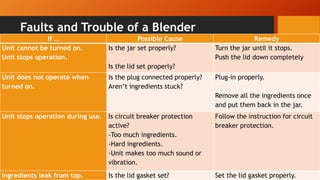
Faults and Trouble of a Blender
If … Possible Cause Remedy
Unit cannot be turned on.
Unit stops operation.
Is the jar set properly?
Is the lid set properly?
Turn the jar until it stops.
Push the lid down completely
Unit does not operate when
turned on.
Is the plug connected properly?
Aren’t ingredients stuck?
Plug-in properly.
Remove all the ingredients once
and put them back in the jar.
Unit stops operation during use. Is circuit breaker protection
active?
-Too much ingredients.
-Hard ingredients.
-Unit makes too much sound or
vibration.
Follow the instruction for circuit
breaker protection.
Ingredients leak from top. Is the lid gasket set? Set the lid gasket properly.
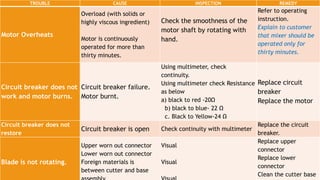
TROUBLE CAUSE INSPECTION REMEDY
Motor Overheats
Overload (with solids or
highly viscous ingredient)
Motor is continuously
operated for more than
thirty minutes.
Check the smoothness of the
motor shaft by rotating with
hand.
Refer to operating
instruction.
Explain to customer
that mixer should be
operated only for
thirty minutes.
Circuit breaker does not
work and motor burns.
Circuit breaker failure.
Motor burnt.
Using multimeter, check
continuity.
Using multimeter check Resistance
as below
a) black to red -20Ω
b) black to blue- 22 Ω
c. Black to Yellow-24 Ω
Replace circuit
breaker
Replace the motor
Circuit breaker does not
restore
Circuit breaker is open Check continuity with multimeter
Replace the circuit
breaker.
Blade is not rotating.
Upper worn out connector
Lower worn out connector
Foreign materials is
between cutter and base
Visual
Visual
Replace upper
connector
Replace lower
connector
Clean the cutter base
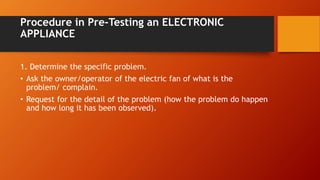
Procedure in Pre-Testing an ELECTRONIC
APPLIANCE
1. Determine the specific problem.
• Ask the owner/operator of the electric fan of what is the
problem/ complain.
• Request for the detail of the problem (how the problem do happen
and how long it has been observed).
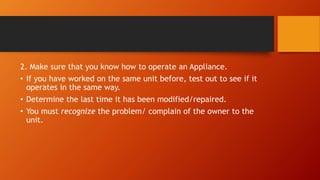
2. Make sure that you know how to operate an Appliance.
• If you have worked on the same unit before, test out to see if it
operates in the same way.
• Determine the last time it has been modified/repaired.
• You must recognize the problem/ complain of the owner to the
unit.
• 3. Perform visual inspection into the unit.
• Prepare the tools needed and remove the cover ready for
inspection.
• Apply careful physical inspection on the parts/components. (Look
for burned and broken components; Inspect for loose connections
or broken wires; Scratches or sign of misuse)
•
4. For safety reason, check the AC plug of the unit with an ohmmeter and
record your findings.
5. Inform the owner about the findings of conducted pre-testing
procedure.
6. Record your findings for your reference to troubleshooting/ repairing.
Precautionary Measures in Performing Pre-
Testing
• To avoid the electrical shock, wear rubberized cotton gloves. Keep
your hands dry at all times.
• Discharge large capacitors by connecting a jumper wire across
their two conducting terminals.
• Observe the polarity of the components when replacing them.
• Don’t replace an opened fuse or burned resistor unless you have
corrected the trouble.
• When replacing the resistor (SCR/TRIAC), the replacement should
have the same current rating.
• To avoid short circuit to nearby components, use needle-pointed
probes for better contact.
• Use VOM accordingly.
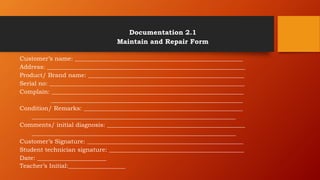
Documentation 2.1
Maintain and Repair Form
Customer’s name: ________________________________________________________
Address: __________________________________________________________________
Product/ Brand name: ____________________________________________________
Serial no: _________________________________________________________________
Complain: ________________________________________________________________
________________________________________________________________
Condition/ Remarks: _____________________________________________________
____________________________________________________________________
Comments/ initial diagnosis: ______________________________________________
____________________________________________________________________
Customer’s Signature: ____________________________________________________
Student technician signature: _____________________________________________
Date: _______________________
Teacher’s Initial:___________________
Directions: On a sheet of padpaper, state the
problem/ symptoms of the fault/ defects given in
each number.
1. Defective rotor or end bents.
2. Inadequate lubricant with accumulated dirt.
3. Loose guard mark screw and worn out shaft washers.
4. Defective switch or electronic system control.
5. Defective stator.
6. Broken rod set pin.
7. Jar not properly set.
8. Too much or hard ingredients.
9. Lid gasket not properly set.
10. Upper worn out connector.

blenders.pptx

  • 1.
    EPAS 10 Roel P.Tabuyo Subject Teacher
  • 2.
    Blender • a motorizedsmall kitchen appliance that blends, chops, and grates food. • a handy electrical gadget that makes chopping and mixing food easier. • liquidizer or kitchen appliance used to mix ingredients or make puree. • a stationary, upright electrical device which is distinguished from a hand-powered or electric mixer that may be used for similar purposes.
  • 3.
    How a blenderoperates • A blade inside a jar is connected to a motor shaft inside the unit. The blade speed is controlled by varying electric current at the motor using one or more switches.
  • 4.
    Uses of blenders •to crush ice in drinks; • to make smooth purées of semi-solid ingredients such as cooked vegetables and meat; • to reduce small solids such as spices and seeds to powder or nut butters; • to blend mixtures of powders, granules, and/or liquids thoroughly; • to help dissolve solid into liquid.
  • 5.
    Parts of ablender
  • 6.
    Parts and functionsof a blender • Blending container • is made of glass, plastic, or stainless steel, and often has graduated markings for approximate measuring purposes.
  • 7.
    LID • prevent ingredientsfrom spill out during operation. The fill cap is a removable insert that allows more items to be added to the jar without removing the entire lid.
  • 8.
    BLADE ASSEMBLY • assemblyis located at the bottom which could be removed for cleaning purposes. In cases where the blades are removable, the container should have an “o-ring” between the body of the container and the base to seal both and prevent the contents from leaking.
  • 9.
    BASE • is wherethe container rests upon which contains a motor for turning the blade assembly and has controls on its surface.
  • 10.
    SELECTOR SWITCH  usedto control the speed of the motor. It comes in different speed. Modern blenders offer a number of possible speeds.
  • 11.
    POWER TRAIN/MOTOR • fan-cooledelectric motor which is secured into the housing by way of vibration dampeners and a small output shaft penetrates the upper housing and meshes with the blade assembly
  • 12.
    Parts of aBlender (Philips Domestic Appliances-Blender HR 1754) Part No. Part Name Part No. Part Name 1 Panel 8 Motor 2 Drive Coupling 9 Bottom 3 Safety Switch 10 Stud 4 Housing 11 Safety Lid 5 3-Speed Switch 12 Jar Lid 6 Flex 13 Jar Assembly 7 Motor Cushion 14 Fruit/ Soybean Filter
  • 13.
    Schematic and WiringDiagram of a Blender
  • 14.
    Procedure and Techniquesin Troubleshooting an Electronically-Controlled Domestic Appliance Electric Fan (ECEF)/ Blender • Conduct a quick diagnosis of the trouble symptom and repair the defective set in the shortest possible time. Do not troubleshoot an electric fan/ blender unless you have determined the fault. Trace the fault from the mechanical section or electrical circuit section.
  • 15.
    • When troubleshootingintegrated circuits (ICs) in the electrical/electronic circuit section, do not remove the IC from the PCB. Secure a circuit diagram from the manufacturer to help you identify the function of the IC. Consider the pin out of the IC.
  • 16.
    • When troubleshootingin the electrical/ electronic circuit section, prior to pre-testing, consider voltage measurement on components first before removing it for testing. If the measured voltage is normal, the component might be the cause of the problem. Either way, if the measured voltage is not normal (increased or decreased) the preceding circuit/ components might be the cause.
  • 17.
    • If thetrouble symptom is caused by aging components, the defective component is usually one of them. However, in high- power-handling circuits, a defective component may cause other components to malfunction.
  • 18.
    • Be familiarwith the usual defects of components. (e.g. capacitors usually become leaky, shorted or open/ resistor increase their resistance when they become defective/ semi-conductors such as transistors usually become open or shorted)
  • 19.
    • . Don’treplace an opened fuse or burned resistor unless you have corrected the trouble.
  • 20.
    • Always suspecta faulty contact on mechanical switch circuit rather than defective electronic components.
  • 21.
    • . Whenmeasuring resistance in the circuit, make sure that the circuit if OFF and power is not being supplied in the circuit, and that stored charges in capacitors are properly discharged. Failure to do so can damage the volt-ohm-milliameter (VOM) and the circuit due to the low resistance of the ohmmeter.
  • 22.
    • . Whenmeasuring resistance in the circuit, make sure that the circuit if OFF and power is not being supplied in the circuit, and that stored charges in capacitors are properly discharged. Failure to do so can damage the volt-ohm-milliameter (VOM) and the circuit due to the low resistance of the ohmmeter.
  • 23.
    • Use solderingirons with the proper power rating to prevent the components and the circuit board from being overheated and damaged. Soldering iron tips should be cleaned and preferably slim.
  • 24.
    • Use propertools and soldering aids when troubleshooting PCB. Ground the soldering iron to avoid damaging ICs and transistors.
  • 25.
    • Dry solderjoints are hard to detect. However, when they are found or suspected, remove the components from the PCB; then, file or cleanthe leads and solder the joints back. Reheating dry joints with a new soldering lead is another remedy. When re-soldering, make sure you do not overheat the components. Overheating the PCB may cause the copper layer on it to warp and peel off.
  • 26.
    • USE PersonalProtective Equipment.
  • 27.
    Faults and Troubleof a Blender If … Possible Cause Remedy Unit cannot be turned on. Unit stops operation. Is the jar set properly? Is the lid set properly? Turn the jar until it stops. Push the lid down completely Unit does not operate when turned on. Is the plug connected properly? Aren’t ingredients stuck? Plug-in properly. Remove all the ingredients once and put them back in the jar. Unit stops operation during use. Is circuit breaker protection active? -Too much ingredients. -Hard ingredients. -Unit makes too much sound or vibration. Follow the instruction for circuit breaker protection. Ingredients leak from top. Is the lid gasket set? Set the lid gasket properly.
  • 28.
    TROUBLE CAUSE INSPECTIONREMEDY Motor Overheats Overload (with solids or highly viscous ingredient) Motor is continuously operated for more than thirty minutes. Check the smoothness of the motor shaft by rotating with hand. Refer to operating instruction. Explain to customer that mixer should be operated only for thirty minutes. Circuit breaker does not work and motor burns. Circuit breaker failure. Motor burnt. Using multimeter, check continuity. Using multimeter check Resistance as below a) black to red -20Ω b) black to blue- 22 Ω c. Black to Yellow-24 Ω Replace circuit breaker Replace the motor Circuit breaker does not restore Circuit breaker is open Check continuity with multimeter Replace the circuit breaker. Blade is not rotating. Upper worn out connector Lower worn out connector Foreign materials is between cutter and base Visual Visual Replace upper connector Replace lower connector Clean the cutter base
  • 29.
    Procedure in Pre-Testingan ELECTRONIC APPLIANCE 1. Determine the specific problem. • Ask the owner/operator of the electric fan of what is the problem/ complain. • Request for the detail of the problem (how the problem do happen and how long it has been observed).
  • 30.
    2. Make surethat you know how to operate an Appliance. • If you have worked on the same unit before, test out to see if it operates in the same way. • Determine the last time it has been modified/repaired. • You must recognize the problem/ complain of the owner to the unit.
  • 31.
    • 3. Performvisual inspection into the unit. • Prepare the tools needed and remove the cover ready for inspection. • Apply careful physical inspection on the parts/components. (Look for burned and broken components; Inspect for loose connections or broken wires; Scratches or sign of misuse) •
  • 32.
    4. For safetyreason, check the AC plug of the unit with an ohmmeter and record your findings. 5. Inform the owner about the findings of conducted pre-testing procedure. 6. Record your findings for your reference to troubleshooting/ repairing.
  • 33.
    Precautionary Measures inPerforming Pre- Testing • To avoid the electrical shock, wear rubberized cotton gloves. Keep your hands dry at all times. • Discharge large capacitors by connecting a jumper wire across their two conducting terminals. • Observe the polarity of the components when replacing them. • Don’t replace an opened fuse or burned resistor unless you have corrected the trouble. • When replacing the resistor (SCR/TRIAC), the replacement should have the same current rating.
  • 34.
    • To avoidshort circuit to nearby components, use needle-pointed probes for better contact. • Use VOM accordingly.
  • 35.
    Documentation 2.1 Maintain andRepair Form Customer’s name: ________________________________________________________ Address: __________________________________________________________________ Product/ Brand name: ____________________________________________________ Serial no: _________________________________________________________________ Complain: ________________________________________________________________ ________________________________________________________________ Condition/ Remarks: _____________________________________________________ ____________________________________________________________________ Comments/ initial diagnosis: ______________________________________________ ____________________________________________________________________ Customer’s Signature: ____________________________________________________ Student technician signature: _____________________________________________ Date: _______________________ Teacher’s Initial:___________________
  • 36.
    Directions: On asheet of padpaper, state the problem/ symptoms of the fault/ defects given in each number. 1. Defective rotor or end bents. 2. Inadequate lubricant with accumulated dirt. 3. Loose guard mark screw and worn out shaft washers. 4. Defective switch or electronic system control. 5. Defective stator. 6. Broken rod set pin. 7. Jar not properly set. 8. Too much or hard ingredients. 9. Lid gasket not properly set. 10. Upper worn out connector.