BIOMETRIC SECURITY CSCE875
Dr. S. RAVI,
Dept. of Computer Science,
School of Engineering and Technology
Pondicherry University , Pondicherry
Definition:
“Biometric technologies” are automated
methods of verifying or recognizing the
identity of a living person based on a
physiological or behavioral characteristics”.
Automation - Biometric authentication
techniques are done completely by machine,
generally (but not always) a digital computer.
Person - The subjects of biometric
authentication are living humans. For this
reason, the field should perhaps be more
accurately called “anthropometric
authentication”.
2
Definition:
• “Biometrics” - is the use of computers to
recognize people, despite all of the across-
individual similarities and within-individual
variations.
3
Definition:
• Examples of physiological and behavioral
characteristics currently used for automatic
identification include fingerprints, voice, iris,
retina, hand, face, handwriting, keystroke, and
finger shape.
• But this is only a partial list as new measures
(such as gait, ear shape, head resonance, optical
skin reflectance and body odor) are being
developed all of the time.
4
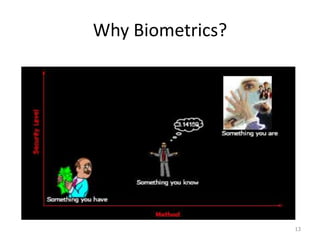
Introduction
• People’s identity are verified and identified by
three basic means:
– (Possession-based) Something they have (identity
document or token)
– (Knowledge-based) - Something they know
(password, PIN)
– (Biometrics-based ) - Something they are (human
body such as fingerprint or iris).
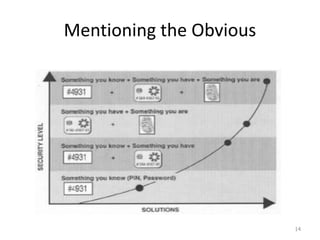
• The strongest authentication involves a
combination of all three.
5
How are people identified?
Person Identification
• Identifying fellow human beings has been crucial to
the fabric of human society
• In the early days of civilization, people lived in small
communities and everyone knew each other
• With the population growth and increase in
mobility, we started relying on documents and
secrets to establish identity
• Person identification is now an integral part of the
infrastructure needed for diverse business sectors
such as banking, border control, law enforcement.
6
System administrators might ultimately be
concerned with:
• (1) the “false rejection rate”, which is the
probability that a true user identity claim will
be falsely rejected, thus causing inconvenience;
• (2) the “false acceptance rate”, which is the
probability that a false identity claim will be
accepted, thus allowing fraud;
7
• (3) the system throughput rate, measuring the
number of users that can be processed in a
time period;
• (4) the user acceptance of the system, which
may be highly dependent upon the way the
system is “packaged” and marketed; and
• (5) the ultimate total cost savings realized from
implementing the system.
8
Problems with Possession- or Knowledge-
based Approaches
• Card may be lost, stolen or forgotten
– Password or PIN may be forgotten or guessed
by the imposters
• ~25% of people seem to write their PIN on their ATM
card
• Estimates of annual identity fraud:
– More than 11 million adults became victims of
identity fraud in 2011 (Javelin Strategy &
Research, 2012 Identity Fraud Report)
– $1 billion in fraudulent cellular phone use
– $3 billion in ATM withdrawals
• The traditional approaches are unable to differentiate
between an authorized person and an impostor 9
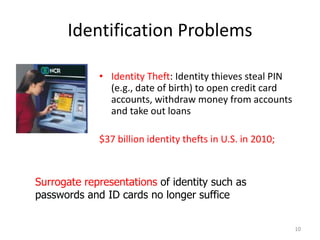
Identification Problems
• Identity Theft: Identity thieves steal PIN
(e.g., date of birth) to open credit card
accounts, withdraw money from accounts
and take out loans
$37 billion identity thefts in U.S. in 2010;
10
Surrogate representations of identity such as
passwords and ID cards no longer suffice
What are Biometrics?
• Biometrics – science, which deals with the automated
recognition of individuals (or plants/animals) based on
biological and behavioral characteristics
• Biometry – mathematical and statistical analysis of biological
data
• Biometric system – a pattern recognition system that
recognizes a person by determining the authenticity of a
specific biological and/or behavioral characteristic (biometric)
• Anthropometry–measurement techniques of human body
and its specific parts
• Forensic (judicial) anthropometry–identification of criminals
by these measurement techniques
11
Why Biometrics
12
Why Biometrics?
13
Mentioning the Obvious
14
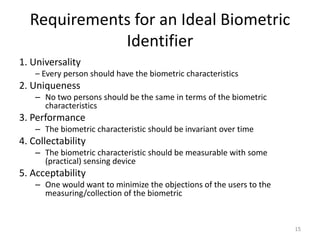
Requirements for an Ideal Biometric
Identifier
1. Universality
– Every person should have the biometric characteristics
2. Uniqueness
– No two persons should be the same in terms of the biometric
characteristics
3. Performance
– The biometric characteristic should be invariant over time
4. Collectability
– The biometric characteristic should be measurable with some
(practical) sensing device
5. Acceptability
– One would want to minimize the objections of the users to the
measuring/collection of the biometric
15
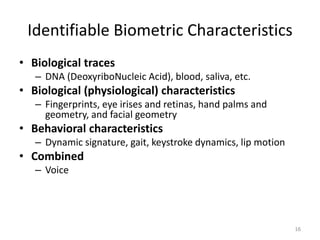
Identifiable Biometric Characteristics
• Biological traces
– DNA (DeoxyriboNucleic Acid), blood, saliva, etc.
• Biological (physiological) characteristics
– Fingerprints, eye irises and retinas, hand palms and
geometry, and facial geometry
• Behavioral characteristics
– Dynamic signature, gait, keystroke dynamics, lip motion
• Combined
– Voice
16
Biometrics is Not New!!
• Bertillon system (1882) took a subject's
photograph, and recorded head length, head
breadth, length of middle finger, length of the
left foot, and length of the cubit.
• Galton/Henry system of fingerprint
classification adopted by Scotland Yard in
1900
• FBI set up a fingerprint identification division
in 1924
17
Emphasis now is to automatically perform reliable
person identification in unattended mode, often
remotely (or at a distance).
Biometrics is Not New!!
• AFIS (Automated Fingerprint Identification
System) installed in 1965 with a database of
810,000 fingerprints.
• First face recognition paper published in 1971
(Goldstein et al.)
• FBI installed IAFIS (Integrated Automated
Fingerprint Identification System) in ~2000 with
a database of 47 million 10 prints; average of
50,000 searches per day; ~15% of searches are
in lights out mode; 2 hour response time for
criminal search
18
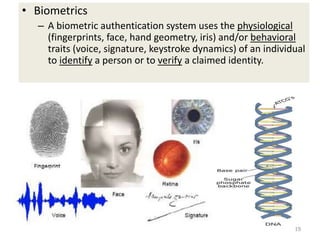
• Biometrics
– A biometric authentication system uses the physiological
(fingerprints, face, hand geometry, iris) and/or behavioral
traits (voice, signature, keystroke dynamics) of an individual
to identify a person or to verify a claimed identity.
19
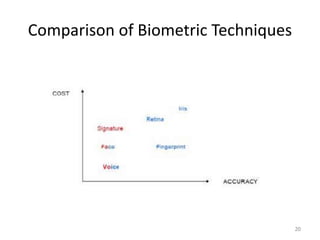
Comparison of Biometric Techniques
20
Key Biometric Terms and Process
21
Using Biometrics
Enrollment, Verification
Recognition
22
Using Biometrics
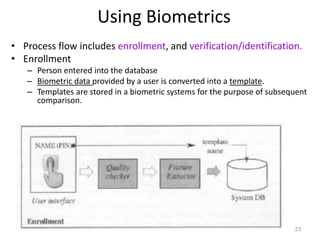
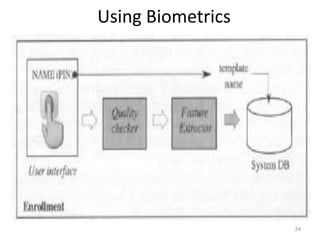
• Process flow includes enrollment, and verification/identification.
• Enrollment
– Person entered into the database
– Biometric data provided by a user is converted into a template.
– Templates are stored in a biometric systems for the purpose of subsequent
comparison.
23
Using Biometrics
24
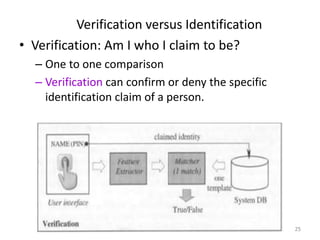
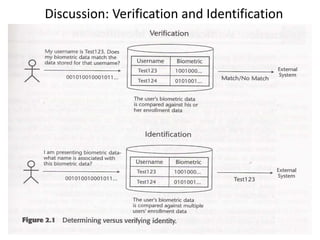
Verification versus Identification
• Verification: Am I who I claim to be?
– One to one comparison
– Verification can confirm or deny the specific
identification claim of a person.
25
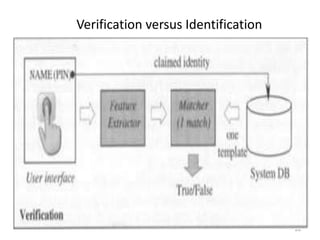
Verification versus Identification
26
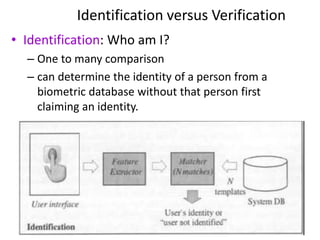
Identification versus Verification
• Identification: Who am I?
– One to many comparison
– can determine the identity of a person from a
biometric database without that person first
claiming an identity.
27
Discussion: Verification and Identification
• Verification system answers the question: “Am I who I
claim to be?”
• The answer returned by the system is match or no
match.
• Identification systems answers the question: “Who am
I”
• The answer returned by the system is an identity such
as a name or ID number.
28
Discussion: Verification and Identification
29
When are verification and identification
appropriate?
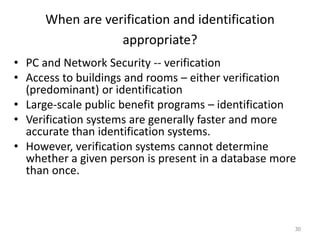
• PC and Network Security -- verification
• Access to buildings and rooms – either verification
(predominant) or identification
• Large-scale public benefit programs – identification
• Verification systems are generally faster and more
accurate than identification systems.
• However, verification systems cannot determine
whether a given person is present in a database more
than once.
30
When are verification and identification
appropriate?
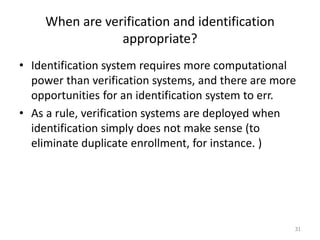
• Identification system requires more computational
power than verification systems, and there are more
opportunities for an identification system to err.
• As a rule, verification systems are deployed when
identification simply does not make sense (to
eliminate duplicate enrollment, for instance. )
31
Total Biometrics Market
32
Different Biometrics
33
The operational goals of biometric applications are just
as variable as the technologies:
1. Some systems search for known individuals;
2. Some search for unknown individuals;
3. Some verify a claimed identity;
4. Some verify an unclaimed identity; and
5. Some verify that the individual has no identity in
the system at all.
6. Some systems search one or multiple submitted
samples against a large database of millions of
previously stored “templates” – the biometric data
given at the time of enrollment.
34
Overt Versus Covert
If the user is aware that a biometric identifier is
being measured, the use is overt. If unaware,
the use is covert.
Almost all conceivable access control and non-
forensic applications are overt. Forensic
applications can be covert.
Habituated Versus Non-Habituated
Users presenting a biometric trait on a daily
basis can be considered habituated after a short
period of time. Users who have not presented
the trait recently can be considered “non-
habituated”.
35
Attended Versus Non-Attended
 refers to whether the use of the biometric device during
operation will be observed and guided by system
management.
 Standard Versus Non-Standard Environment
If the application will take place indoors at standard
temperature (20 °C), pressure (1 atm), and other
environmental conditions, particularly where lighting
conditions can be controlled
36
• Public Versus Private
Will the users of the system be customers of the
system management (public) or employees
(private)?
• Open Versus Closed
Will the system be required, now or in the
future, to exchange data with other biometric
systems run by other management?
37
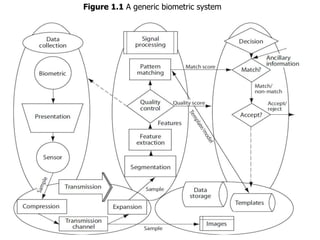
A System Model
Figure 1.1 shows a generic biometric
authentication system divided into five
subsystems:
• Data collection,
• Data transmission,
• Signal processing,
• Decision and
• Data storage.
38
39
Figure 1.1 A generic biometric system
Data Collection
Data Collection
The user’s characteristic must be presented to
a sensor. The presentation of any biometric
characteristic to the sensor introduces a
behavioral (and, consequently, psychological)
component to every biometric method. This
behavioral component may vary widely
between users, between applications, and
between the test laboratory and the
operational environment.
40
41
The output of the sensor, which is the input
data upon which the system is built, is the
convolution of:
(1)the biometric measure;
(2)the way the measure is presented; and
(3) the technical characteristics of the
sensor.
Both the repeatability and the
distinctiveness of the measurement are
negatively impacted by changes in any of
these factors.
42
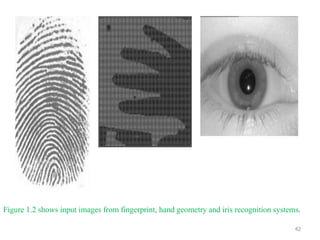
Figure 1.2 shows input images from fingerprint, hand geometry and iris recognition systems.
Physiological and Behavioral Characteristics
• Physiological or behavioral characteristics are distinctive, which
provide basic measurement of biometrics.
• Physiological biometrics are based on direct measurements of a
part of the human body, such as finger-scan, facial-scan, iris-
scan, hand-scan, and retina-scan.
• Behavioral biometrics are based on measurements and data
derived from an action and therefore indirectly measure
characteristics of the human body, such as voice-scan and
signature-scan.
• The element of time is essential to behavioral biometrics.
43
Transmission
• Some, but not all, biometric systems collect
data at one location but store and/or process
it at another. Such systems require data
transmission. If a great amount of data is
involved, compression may be required
before transmission or storage to conserve
bandwidth and storage space.
• In such cases, the transmitted or stored
compressed data must be expanded before
further use.
44
• The process of compression and expansion
generally causes quality loss in the restored
signal, with loss increasing with increasing
compression ratio. The compression technique
used will depend upon the biometric signal. An
interesting area of research is in finding, for a
given biometric technique, compression
methods with minimum impact on the signal-
processing subsystem.
45
DNA (Deoxyribo Nucleic Acid)
The Ultimate Biometric
• One-dimensional unique code for one’s individuality,
but identical twins have identical DNA patterns
• Issues limiting the utility of DNA
– Contamination
– Access
– Automatic real-time recognition issues
– Privacy issues: information about susceptibilities of a
person to certain diseases could be gained from the DNA
pattern
46
Signal Processing
• Having acquired and possibly transmitted a
biometric characteristic, we must prepare it for
matching with other like measures.
• The signal-processing subsystem divides into
four tasks:
a) segmentation,
b) feature extraction,
c) quality control, and
d) pattern matching.
47
Segmentation
• Segmentation is the process of finding the
biometric pattern within the transmitted signal.
For example, a facial recognition system must
first find the boundaries of the face or faces in
the transmitted image.
A speaker verification system must find the
speech activity within a signal that may contain
periods of non-speech sounds. Once the raw
biometric pattern of interest has been found
and extracted from larger signal, the pattern is
sent to the feature extraction process.
48
Feature extraction
• Preserving those qualities that are both
distinctive and repeatable. These qualities
expressed in mathematical form are called
“features”.
• The feature “sample”, now of very small size
compared to the original signal, will be sent to
the pattern matching process for comparison
with one or more previously identified and
stored feature templates or models.
• “template” - stored features
49
• The term “enrollment” refers to the placing of
a template or model into the database for the
very first time. Once in the database and
associated with an identity by external
information (provided by the enrollee or
others), the enrollment biometric data is
referred to as the template or model for the
individual to which it refers.
50
Pattern matching
• The purpose of the pattern matching process is
to compare a presented feature sample to the
stored data, and to send to the decision
subsystem a quantitative measure of the
comparison. An exception is enrollment in
systems allowing multiple enrollments. In this
application, the pattern matching process can be
skipped.
51
Pattern matching
• The pattern matching process might only make a
comparison against a single stored template. In
all other cases, such as large-scale identification,
the pattern matching process compares the
present sample to multiple templates or models
from the database one at a time, as instructed by
the decision subsystem, sending on a
quantitative “distance” measure for each
comparison.
• In place of a “distance” measure, some systems
use “similarity” measures, such as maximum
likelihood values. 52
Storage
• There will be one or more forms of storage
used, depending upon the biometric system.
• Templates or models from enrolled users will be
stored in a database for comparison by the
pattern matcher to incoming feature samples.
For systems only performing “one-to-one”
matching, the database may be distributed on
smart cards, optically read cards or magnetic
stripe cards carried by each enrolled user.
53
Storage
• Depending upon system policy, no central
database need exist, although in this application
a centralized database can be used to detect
counterfeit cards or to reissue lost cards without
re-collecting the biometric pattern.
54
Decision
• The decision subsystem implements system
policy by directing the database search,
determines “matches” or “non-matches” based
on the distance or similarity measures received
from the pattern matcher, and ultimately makes
an “accept/reject” decision based on the system
policy.
• Such a decision policy could be to reject the
identity claim (either positive or negative) of any
user whose pattern could not be acquired..
55
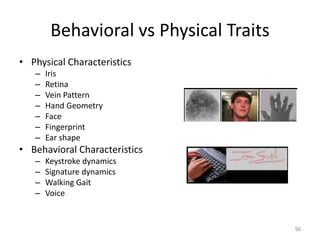
Behavioral vs Physical Traits
• Physical Characteristics
– Iris
– Retina
– Vein Pattern
– Hand Geometry
– Face
– Fingerprint
– Ear shape
• Behavioral Characteristics
– Keystroke dynamics
– Signature dynamics
– Walking Gait
– Voice
56
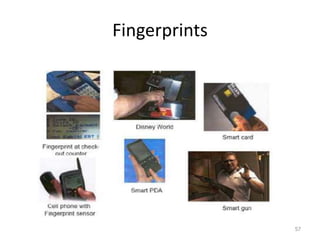
Fingerprints
57
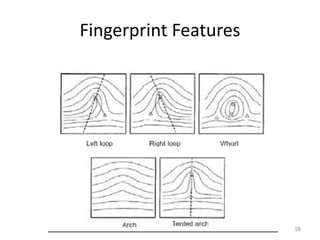
Fingerprint Features
58
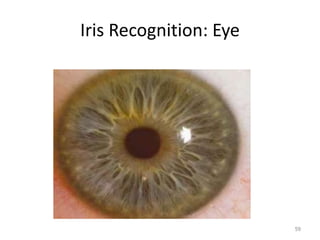
Iris Recognition: Eye
59
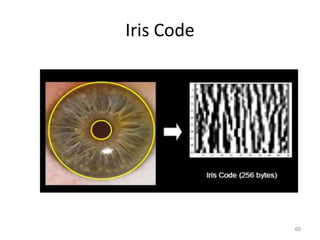
Iris Code
60
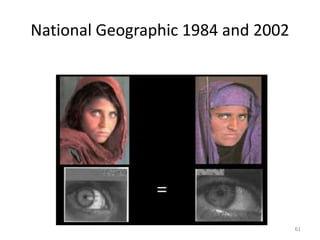
National Geographic 1984 and 2002
61
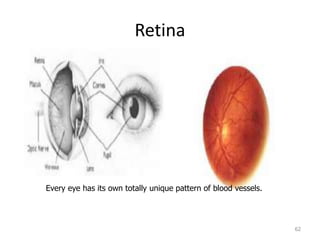
Retina
62
Every eye has its own totally unique pattern of blood vessels.
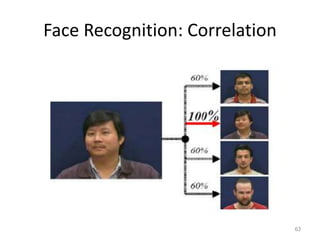
Face Recognition: Correlation
63
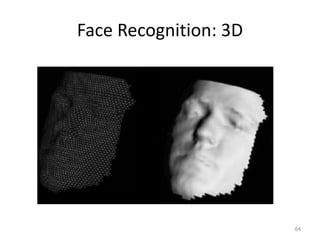
Face Recognition: 3D
64
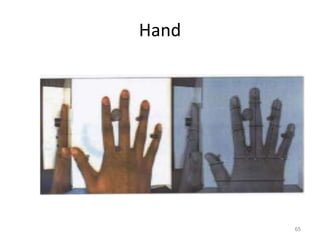
Hand
65
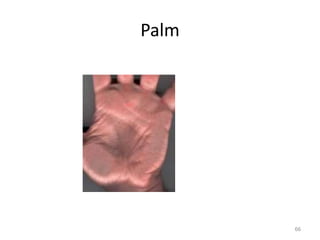
Palm
66
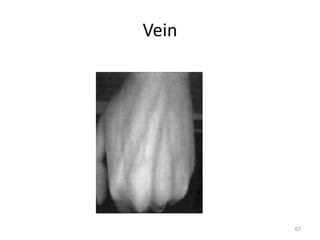
Vein
67
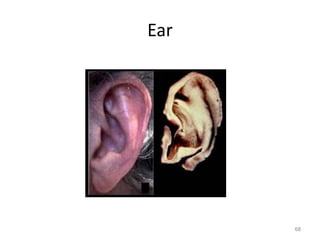
Ear
68
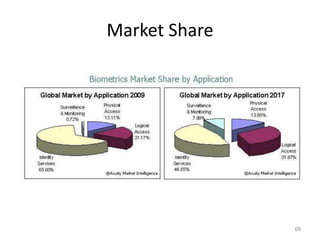
Market Share
69
Biometric Applications
70
Biometric Application
• Biometric technology is used for many applications
– Providing time and attendance functionality for a small
company
– Ensuring the integrity of a 10 million-person voter
registration database
• The benefit of using biometrics include increased
security, increased convenience, reduced fraud or
delivery of enhanced services.
71
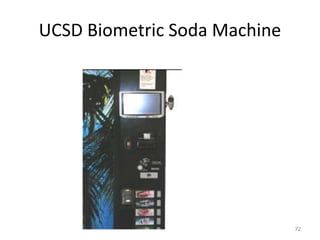
UCSD Biometric Soda Machine
72
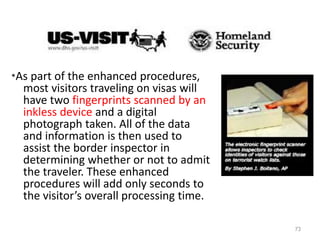
*As part of the enhanced procedures,
most visitors traveling on visas will
have two fingerprints scanned by an
inkless device and a digital
photograph taken. All of the data
and information is then used to
assist the border inspector in
determining whether or not to admit
the traveler. These enhanced
procedures will add only seconds to
the visitor’s overall processing time.
73
National Biometric ID Cards
U.K. to consider national biometric ID cards, database
By Laura Rohde, COMPUTERWORLD (Nov 29, 2003)- The U.K.
government is set to consider legislation next year for the
establishment of compulsory biometric identity cards and a
central database of all U.K. subjects, it was announced by the
government this week.
The information that the government is considering for inclusion on
the card includes personal details such as a person's home
address and telephone number, his National Insurance number
(the equivalent of the U.S. Social Security number), medical
information and criminal convictions, as well as the biometric
information, most likely in the form of an iris, fingerprint or palm
print scan.
74
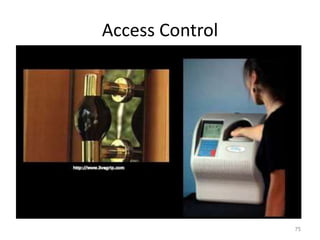
Access Control
75
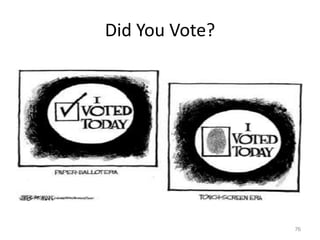
Did You Vote?
76
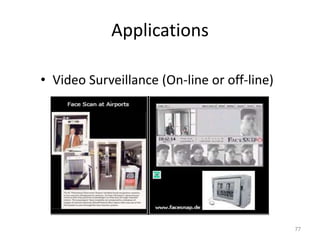
Applications
• Video Surveillance (On-line or off-line)
77
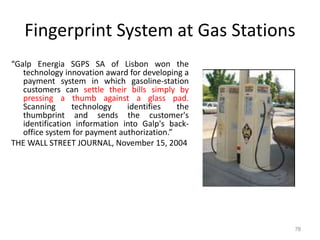
Fingerprint System at Gas Stations
“Galp Energia SGPS SA of Lisbon won the
technology innovation award for developing a
payment system in which gasoline-station
customers can settle their bills simply by
pressing a thumb against a glass pad.
Scanning technology identifies the
thumbprint and sends the customer's
identification information into Galp's back-
office system for payment authorization.”
THE WALL STREET JOURNAL, November 15, 2004
78
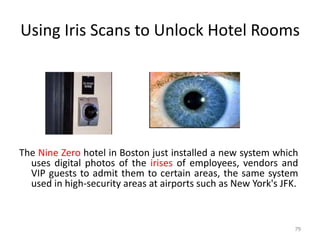
Using Iris Scans to Unlock Hotel Rooms
The Nine Zero hotel in Boston just installed a new system which
uses digital photos of the irises of employees, vendors and
VIP guests to admit them to certain areas, the same system
used in high-security areas at airports such as New York's JFK.
79
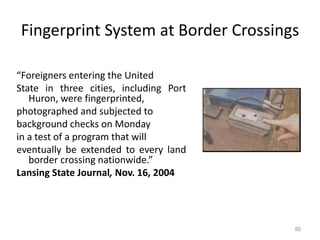
Fingerprint System at Border Crossings
“Foreigners entering the United
State in three cities, including Port
Huron, were fingerprinted,
photographed and subjected to
background checks on Monday
in a test of a program that will
eventually be extended to every land
border crossing nationwide.”
Lansing State Journal, Nov. 16, 2004
80
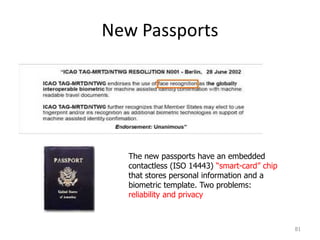
New Passports
81
The new passports have an embedded
contactless (ISO 14443) “smart-card” chip
that stores personal information and a
biometric template. Two problems:
reliability and privacy
• Immigration cards hold both passport number
and measures of the user’s hand
• Fingerprints is taken as a legal requirement for
a driver license, but not stored anywhere on
the license
• Automatic facial recognition systems searches
for known card cheats in a casino
• Season tickets to an amusement park linked to
the shape of the purchaser’s fingers
82
• Home incarceration programs supervised by
automatic voice recognition systems
• Confidential delivery of health care through iris
recognition
• These systems seem completely different in
terms of purpose, procedures, and
technologies, but each uses “biometric
authentication” in some way.
83
Want to Charge It? You'll Have to Talk to
Your Credit Card
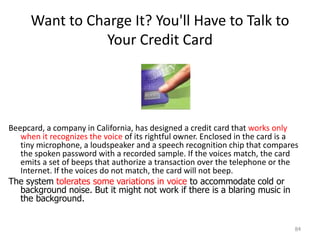
Beepcard, a company in California, has designed a credit card that works only
when it recognizes the voice of its rightful owner. Enclosed in the card is a
tiny microphone, a loudspeaker and a speech recognition chip that compares
the spoken password with a recorded sample. If the voices match, the card
emits a set of beeps that authorize a transaction over the telephone or the
Internet. If the voices do not match, the card will not beep.
The system tolerates some variations in voice to accommodate cold or
background noise. But it might not work if there is a blaring music in
the background.
84
Biometrics for Personalization
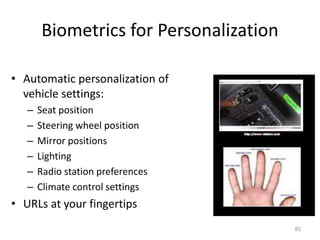
• Automatic personalization of
vehicle settings:
– Seat position
– Steering wheel position
– Mirror positions
– Lighting
– Radio station preferences
– Climate control settings
• URLs at your fingertips
85
Key Terms
86
Template (1)
• A template is a small file derived from the distinctive
features of a user’s biometric data, used to perform
biometric matches.
• Templates, is calculated during enrollment or
verification phase. The template be understood as a
compact representation of the collected feature
data, where useless or redundant information is
discarded.
• Biometric systems store and compare biometric
templates, NOT biometric data.
87
Template (2)
• Most template occupy less than 1 kilobyte, and some
of them are as small as 9 bytes; size of template
differs from vendor to vendor.
• Templates are proprietary to each vendor and each
technology, and there is no common biometric
template format.
• This is beneficial from a privacy perspective, but the
lack of interoperability deterred some would-be
users.
88
Templates
• Biometric data CAN NOT be reconstructed from
biometric templates.
• Templates are extractions of distinctive features and
not adequate to reconstruct the full biometric image
or data.
• Unique templates are generated every time a user
presents biometric data. For example, two
immediately successive placement of a finger on a
biometric device generate entirely different
templates which are processed by vendor’s algorithm
and recognizable as being from the same person, but
are not identical.
89
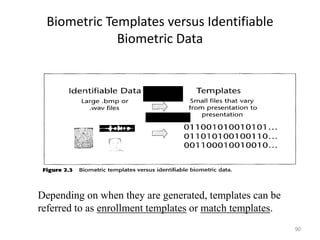
Biometric Templates versus Identifiable
Biometric Data
90
Depending on when they are generated, templates can be
referred to as enrollment templates or match templates.
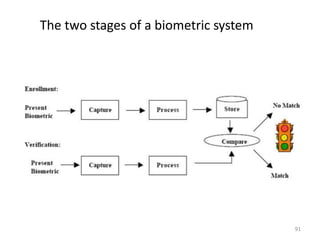
The two stages of a biometric system
91
Enrollment and Template Creation (1)
• Enrollment is a process to acquire, assess, process,
and store user’s biometric data in the form of a
template.
• Stored templates are used for subsequent
verification and identification.
• Quality enrollment is a critical factor in the long-term
accuracy of biometric system.
92
Enrollment and Template Creation (2)
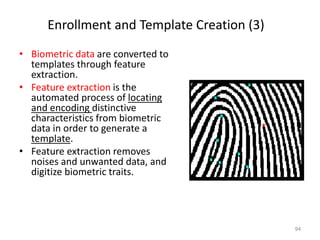
• Presentation is the process by which a user
provides biometric data to an acquisition
device – the hardware used to collect
biometric data.
• For example, looking in the direction of a
camera, placing a finger on a platen, or
reciting a passphrase.
93
Enrollment and Template Creation (3)
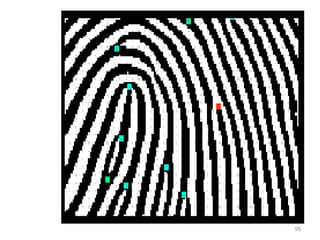
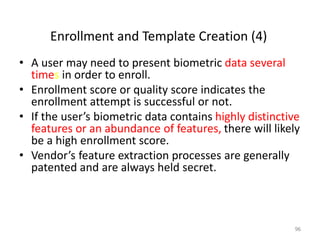
• Biometric data are converted to
templates through feature
extraction.
• Feature extraction is the
automated process of locating
and encoding distinctive
characteristics from biometric
data in order to generate a
template.
• Feature extraction removes
noises and unwanted data, and
digitize biometric traits.
94
95
Enrollment and Template Creation (4)
• A user may need to present biometric data several
times in order to enroll.
• Enrollment score or quality score indicates the
enrollment attempt is successful or not.
• If the user’s biometric data contains highly distinctive
features or an abundance of features, there will likely
be a high enrollment score.
• Vendor’s feature extraction processes are generally
patented and are always held secret.
96
How Biometric Matching Works
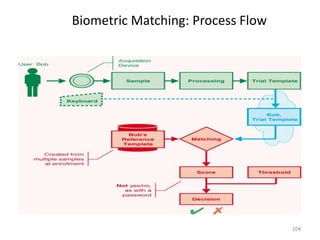
• Verification/Identification template is
compared with enrollment templates.
• The comparison renders a score, or
confident value.
• The score is compared with threshold.
• If the score exceeds the threshold, the
comparison is a match, non-match
otherwise.
97
Biometric Algorithm
• A biometric algorithm is a recipe for turning
raw data - like physical traits – into a digital
representation in the form of a template. It
also allows the matching of an enrolled
template with a new template just created
for verifying an identity, called the live
template.
98
Biometric Matching
• Matching is the comparison of enrolled biometric
templates with a new template just created for
verification to determine their degree of similarity or
correlation.
• In verification systems, a verification template is
matched against a user’s enrollment template or
templates (multiple).
• In Identification systems, the verification template is
matched against dozens, thousands, even millions of
enrollment templates.
99
Biometric Matching – Scoring
• Biometric systems utilize proprietary algorithms to
process templates and generate scores.
• Some of them use a scale of 1 to 100, others use a
scale of -1 to 1.
• Traditional authentication methods such as password
offer on a yes’/no response.
• In biometric system, there is no 100 percent
correlation between enrollment and verification
templates.
100
Biometric Matching --Threshold
• A threshold is a predefined number, which
establishes the degree of correlation necessary for a
comparison to be deemed a match.
• Thresholds can vary from user to user, from
transaction to transaction, and from verification to
verification attempt.
• System can be either highly secure for valuable
transaction or less secure for low-value transaction,
depending on their threshold settings.
• Traditional authentication can not offer such
flexibility.
101
Biometric Matching -- Decision
• The result of the comparison between the
score and the threshold is a decision.
• The decisions a biometric system can make
include match, non-match, and inconclusive.
102
Biometric Matching: Process Flow
103
 The user submits a sample (biometric data) via an acquisition device
(for example, a scanner or camera)
 This biometric is then processed to extract information about
distinctive features to create a trial template or verification template
 Templates are large number sequences. The trial/match template is
the user’s “password.”
 Trial/match template is compared against the reference template
stored in biometric database.
Biometric Matching: Process Flow
104
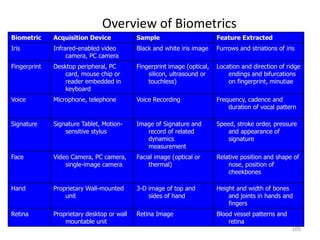
Overview of Biometrics
105
Biometric Acquisition Device Sample Feature Extracted
Iris Infrared-enabled video
camera, PC camera
Black and white iris image Furrows and striations of iris
Fingerprint Desktop peripheral, PC
card, mouse chip or
reader embedded in
keyboard
Fingerprint image (optical,
silicon, ultrasound or
touchless)
Location and direction of ridge
endings and bifurcations
on fingerprint, minutiae
Voice Microphone, telephone Voice Recording Frequency, cadence and
duration of vocal pattern
Signature Signature Tablet, Motion-
sensitive stylus
Image of Signature and
record of related
dynamics
measurement
Speed, stroke order, pressure
and appearance of
signature
Face Video Camera, PC camera,
single-image camera
Facial image (optical or
thermal)
Relative position and shape of
nose, position of
cheekbones
Hand Proprietary Wall-mounted
unit
3-D image of top and
sides of hand
Height and width of bones
and joints in hands and
fingers
Retina Proprietary desktop or wall
mountable unit
Retina Image Blood vessel patterns and
retina
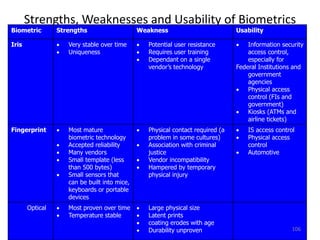
Strengths, Weaknesses and Usability of Biometrics
Biometric Strengths Weakness Usability
Iris  Very stable over time
 Uniqueness
 Potential user resistance
 Requires user training
 Dependant on a single
vendor’s technology
 Information security
access control,
especially for
Federal Institutions and
government
agencies
 Physical access
control (FIs and
government)
 Kiosks (ATMs and
airline tickets)
Fingerprint  Most mature
biometric technology
 Accepted reliability
 Many vendors
 Small template (less
than 500 bytes)
 Small sensors that
can be built into mice,
keyboards or portable
devices
 Physical contact required (a
problem in some cultures)
 Association with criminal
justice
 Vendor incompatibility
 Hampered by temporary
physical injury
 IS access control
 Physical access
control
 Automotive
Optical  Most proven over time
 Temperature stable
 Large physical size
 Latent prints
 coating erodes with age
 Durability unproven 106
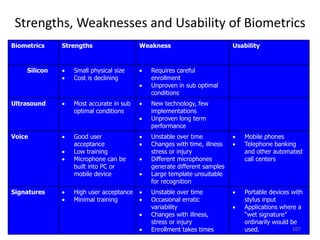
Strengths, Weaknesses and Usability of Biometrics
Biometrics Strengths Weakness Usability
Silicon  Small physical size
 Cost is declining
 Requires careful
enrollment
 Unproven in sub optimal
conditions
Ultrasound  Most accurate in sub
optimal conditions
 New technology, few
implementations
 Unproven long term
performance
Voice  Good user
acceptance
 Low training
 Microphone can be
built into PC or
mobile device
 Unstable over time
 Changes with time, illness
stress or injury
 Different microphones
generate different samples
 Large template unsuitable
for recognition
 Mobile phones
 Telephone banking
and other automated
call centers
Signatures  High user acceptance
 Minimal training
 Unstable over time
 Occasional erratic
variability
 Changes with illness,
stress or injury
 Enrollment takes times
 Portable devices with
stylus input
 Applications where a
“wet signature”
ordinarily would be
used. 107
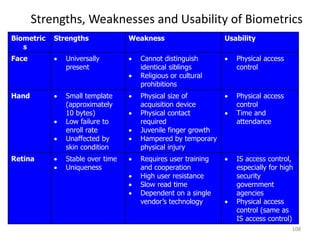
Strengths, Weaknesses and Usability of Biometrics
Biometric
s
Strengths Weakness Usability
Face  Universally
present
 Cannot distinguish
identical siblings
 Religious or cultural
prohibitions
 Physical access
control
Hand  Small template
(approximately
10 bytes)
 Low failure to
enroll rate
 Unaffected by
skin condition
 Physical size of
acquisition device
 Physical contact
required
 Juvenile finger growth
 Hampered by temporary
physical injury
 Physical access
control
 Time and
attendance
Retina  Stable over time
 Uniqueness
 Requires user training
and cooperation
 High user resistance
 Slow read time
 Dependent on a single
vendor’s technology
 IS access control,
especially for high
security
government
agencies
 Physical access
control (same as
IS access control)
108
Accuracy in Biometric Systems
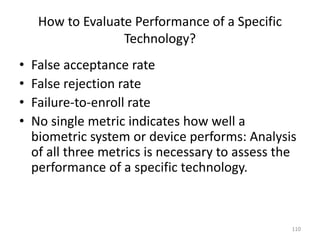
How to Evaluate Performance of a Specific
Technology?
• False acceptance rate
• False rejection rate
• Failure-to-enroll rate
• No single metric indicates how well a
biometric system or device performs: Analysis
of all three metrics is necessary to assess the
performance of a specific technology.
110
False Acceptance Rate
• If John Smith enters Jane Doe’s username or ID, presents
biometric data, and successfully matching as Jane Doe.
• This is classified as false acceptance.
• The probability of this happening is referred to as false
acceptance rate (FAR)[ stated as: percentage, fraction]
• This is because two people have similar enough biometric
characteristics – a fingerprint, a voice, or a face – that the
system finds a high degree of correlation between the users’
template.
111
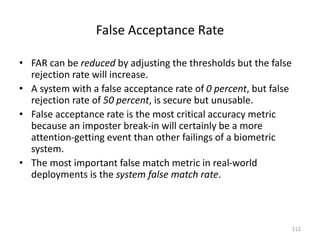
False Acceptance Rate
• FAR can be reduced by adjusting the thresholds but the false
rejection rate will increase.
• A system with a false acceptance rate of 0 percent, but false
rejection rate of 50 percent, is secure but unusable.
• False acceptance rate is the most critical accuracy metric
because an imposter break-in will certainly be a more
attention-getting event than other failings of a biometric
system.
• The most important false match metric in real-world
deployments is the system false match rate.
112
False Rejection Rate
• If John Smith enters his username or ID, presents his biometric
data to a biometric system, and fails to match.
• This is classified as false rejection.
• The probability of this happening is the false rejection rate (FRR).
• This can be attributed to changes in user’s biometric data,
changes in how a user presents biometric data, and changes in
the environment in which data is presented.
• High FRR will result in lost productivity, frustrated users, and an
increased burden on help desk or support personnel.
113
Reasons of FRR
• Changes in user’s biometric data
– Voice-scan system is influenced by sore throats
– Facial-scan system is affected by changes in weight
– Fingerprint changes over time, scars, aging and
general wear.
114
Acceptance and Rejections
• If someone else is trying to verify as you, the
system would try to match the two templates.
– If the two templates were to match – this is classified
as false acceptance.
– If your authentication template fails to match your
enrolled template, then this is referred to as a false
rejection.
– If you are new and fail to enroll to a biometric system,
this is called – failure to enroll (FTE).
115
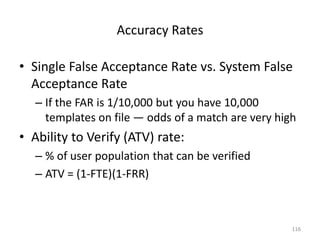
Accuracy Rates
• Single False Acceptance Rate vs. System False
Acceptance Rate
– If the FAR is 1/10,000 but you have 10,000
templates on file — odds of a match are very high
• Ability to Verify (ATV) rate:
– % of user population that can be verified
– ATV = (1-FTE)(1-FRR)
116

Biometrics - Chapter 1 Introduction.pptx

  • 1.
    BIOMETRIC SECURITY CSCE875 Dr.S. RAVI, Dept. of Computer Science, School of Engineering and Technology Pondicherry University , Pondicherry
  • 2.
    Definition: “Biometric technologies” areautomated methods of verifying or recognizing the identity of a living person based on a physiological or behavioral characteristics”. Automation - Biometric authentication techniques are done completely by machine, generally (but not always) a digital computer. Person - The subjects of biometric authentication are living humans. For this reason, the field should perhaps be more accurately called “anthropometric authentication”. 2
  • 3.
    Definition: • “Biometrics” -is the use of computers to recognize people, despite all of the across- individual similarities and within-individual variations. 3
  • 4.
    Definition: • Examples ofphysiological and behavioral characteristics currently used for automatic identification include fingerprints, voice, iris, retina, hand, face, handwriting, keystroke, and finger shape. • But this is only a partial list as new measures (such as gait, ear shape, head resonance, optical skin reflectance and body odor) are being developed all of the time. 4
  • 5.
    Introduction • People’s identityare verified and identified by three basic means: – (Possession-based) Something they have (identity document or token) – (Knowledge-based) - Something they know (password, PIN) – (Biometrics-based ) - Something they are (human body such as fingerprint or iris). • The strongest authentication involves a combination of all three. 5 How are people identified?
  • 6.
    Person Identification • Identifyingfellow human beings has been crucial to the fabric of human society • In the early days of civilization, people lived in small communities and everyone knew each other • With the population growth and increase in mobility, we started relying on documents and secrets to establish identity • Person identification is now an integral part of the infrastructure needed for diverse business sectors such as banking, border control, law enforcement. 6
  • 7.
    System administrators mightultimately be concerned with: • (1) the “false rejection rate”, which is the probability that a true user identity claim will be falsely rejected, thus causing inconvenience; • (2) the “false acceptance rate”, which is the probability that a false identity claim will be accepted, thus allowing fraud; 7
  • 8.
    • (3) thesystem throughput rate, measuring the number of users that can be processed in a time period; • (4) the user acceptance of the system, which may be highly dependent upon the way the system is “packaged” and marketed; and • (5) the ultimate total cost savings realized from implementing the system. 8
  • 9.
    Problems with Possession-or Knowledge- based Approaches • Card may be lost, stolen or forgotten – Password or PIN may be forgotten or guessed by the imposters • ~25% of people seem to write their PIN on their ATM card • Estimates of annual identity fraud: – More than 11 million adults became victims of identity fraud in 2011 (Javelin Strategy & Research, 2012 Identity Fraud Report) – $1 billion in fraudulent cellular phone use – $3 billion in ATM withdrawals • The traditional approaches are unable to differentiate between an authorized person and an impostor 9
  • 10.
    Identification Problems • IdentityTheft: Identity thieves steal PIN (e.g., date of birth) to open credit card accounts, withdraw money from accounts and take out loans $37 billion identity thefts in U.S. in 2010; 10 Surrogate representations of identity such as passwords and ID cards no longer suffice
  • 11.
    What are Biometrics? •Biometrics – science, which deals with the automated recognition of individuals (or plants/animals) based on biological and behavioral characteristics • Biometry – mathematical and statistical analysis of biological data • Biometric system – a pattern recognition system that recognizes a person by determining the authenticity of a specific biological and/or behavioral characteristic (biometric) • Anthropometry–measurement techniques of human body and its specific parts • Forensic (judicial) anthropometry–identification of criminals by these measurement techniques 11
  • 12.
  • 13.
  • 14.
  • 15.
    Requirements for anIdeal Biometric Identifier 1. Universality – Every person should have the biometric characteristics 2. Uniqueness – No two persons should be the same in terms of the biometric characteristics 3. Performance – The biometric characteristic should be invariant over time 4. Collectability – The biometric characteristic should be measurable with some (practical) sensing device 5. Acceptability – One would want to minimize the objections of the users to the measuring/collection of the biometric 15
  • 16.
    Identifiable Biometric Characteristics •Biological traces – DNA (DeoxyriboNucleic Acid), blood, saliva, etc. • Biological (physiological) characteristics – Fingerprints, eye irises and retinas, hand palms and geometry, and facial geometry • Behavioral characteristics – Dynamic signature, gait, keystroke dynamics, lip motion • Combined – Voice 16
  • 17.
    Biometrics is NotNew!! • Bertillon system (1882) took a subject's photograph, and recorded head length, head breadth, length of middle finger, length of the left foot, and length of the cubit. • Galton/Henry system of fingerprint classification adopted by Scotland Yard in 1900 • FBI set up a fingerprint identification division in 1924 17 Emphasis now is to automatically perform reliable person identification in unattended mode, often remotely (or at a distance).
  • 18.
    Biometrics is NotNew!! • AFIS (Automated Fingerprint Identification System) installed in 1965 with a database of 810,000 fingerprints. • First face recognition paper published in 1971 (Goldstein et al.) • FBI installed IAFIS (Integrated Automated Fingerprint Identification System) in ~2000 with a database of 47 million 10 prints; average of 50,000 searches per day; ~15% of searches are in lights out mode; 2 hour response time for criminal search 18
  • 19.
    • Biometrics – Abiometric authentication system uses the physiological (fingerprints, face, hand geometry, iris) and/or behavioral traits (voice, signature, keystroke dynamics) of an individual to identify a person or to verify a claimed identity. 19
  • 20.
  • 21.
    Key Biometric Termsand Process 21
  • 22.
  • 23.
    Using Biometrics • Processflow includes enrollment, and verification/identification. • Enrollment – Person entered into the database – Biometric data provided by a user is converted into a template. – Templates are stored in a biometric systems for the purpose of subsequent comparison. 23
  • 24.
  • 25.
    Verification versus Identification •Verification: Am I who I claim to be? – One to one comparison – Verification can confirm or deny the specific identification claim of a person. 25
  • 26.
  • 27.
    Identification versus Verification •Identification: Who am I? – One to many comparison – can determine the identity of a person from a biometric database without that person first claiming an identity. 27
  • 28.
    Discussion: Verification andIdentification • Verification system answers the question: “Am I who I claim to be?” • The answer returned by the system is match or no match. • Identification systems answers the question: “Who am I” • The answer returned by the system is an identity such as a name or ID number. 28
  • 29.
  • 30.
    When are verificationand identification appropriate? • PC and Network Security -- verification • Access to buildings and rooms – either verification (predominant) or identification • Large-scale public benefit programs – identification • Verification systems are generally faster and more accurate than identification systems. • However, verification systems cannot determine whether a given person is present in a database more than once. 30
  • 31.
    When are verificationand identification appropriate? • Identification system requires more computational power than verification systems, and there are more opportunities for an identification system to err. • As a rule, verification systems are deployed when identification simply does not make sense (to eliminate duplicate enrollment, for instance. ) 31
  • 32.
  • 33.
  • 34.
    The operational goalsof biometric applications are just as variable as the technologies: 1. Some systems search for known individuals; 2. Some search for unknown individuals; 3. Some verify a claimed identity; 4. Some verify an unclaimed identity; and 5. Some verify that the individual has no identity in the system at all. 6. Some systems search one or multiple submitted samples against a large database of millions of previously stored “templates” – the biometric data given at the time of enrollment. 34
  • 35.
    Overt Versus Covert Ifthe user is aware that a biometric identifier is being measured, the use is overt. If unaware, the use is covert. Almost all conceivable access control and non- forensic applications are overt. Forensic applications can be covert. Habituated Versus Non-Habituated Users presenting a biometric trait on a daily basis can be considered habituated after a short period of time. Users who have not presented the trait recently can be considered “non- habituated”. 35
  • 36.
    Attended Versus Non-Attended refers to whether the use of the biometric device during operation will be observed and guided by system management.  Standard Versus Non-Standard Environment If the application will take place indoors at standard temperature (20 °C), pressure (1 atm), and other environmental conditions, particularly where lighting conditions can be controlled 36
  • 37.
    • Public VersusPrivate Will the users of the system be customers of the system management (public) or employees (private)? • Open Versus Closed Will the system be required, now or in the future, to exchange data with other biometric systems run by other management? 37
  • 38.
    A System Model Figure1.1 shows a generic biometric authentication system divided into five subsystems: • Data collection, • Data transmission, • Signal processing, • Decision and • Data storage. 38
  • 39.
    39 Figure 1.1 Ageneric biometric system
  • 40.
    Data Collection Data Collection Theuser’s characteristic must be presented to a sensor. The presentation of any biometric characteristic to the sensor introduces a behavioral (and, consequently, psychological) component to every biometric method. This behavioral component may vary widely between users, between applications, and between the test laboratory and the operational environment. 40
  • 41.
    41 The output ofthe sensor, which is the input data upon which the system is built, is the convolution of: (1)the biometric measure; (2)the way the measure is presented; and (3) the technical characteristics of the sensor. Both the repeatability and the distinctiveness of the measurement are negatively impacted by changes in any of these factors.
  • 42.
    42 Figure 1.2 showsinput images from fingerprint, hand geometry and iris recognition systems.
  • 43.
    Physiological and BehavioralCharacteristics • Physiological or behavioral characteristics are distinctive, which provide basic measurement of biometrics. • Physiological biometrics are based on direct measurements of a part of the human body, such as finger-scan, facial-scan, iris- scan, hand-scan, and retina-scan. • Behavioral biometrics are based on measurements and data derived from an action and therefore indirectly measure characteristics of the human body, such as voice-scan and signature-scan. • The element of time is essential to behavioral biometrics. 43
  • 44.
    Transmission • Some, butnot all, biometric systems collect data at one location but store and/or process it at another. Such systems require data transmission. If a great amount of data is involved, compression may be required before transmission or storage to conserve bandwidth and storage space. • In such cases, the transmitted or stored compressed data must be expanded before further use. 44
  • 45.
    • The processof compression and expansion generally causes quality loss in the restored signal, with loss increasing with increasing compression ratio. The compression technique used will depend upon the biometric signal. An interesting area of research is in finding, for a given biometric technique, compression methods with minimum impact on the signal- processing subsystem. 45
  • 46.
    DNA (Deoxyribo NucleicAcid) The Ultimate Biometric • One-dimensional unique code for one’s individuality, but identical twins have identical DNA patterns • Issues limiting the utility of DNA – Contamination – Access – Automatic real-time recognition issues – Privacy issues: information about susceptibilities of a person to certain diseases could be gained from the DNA pattern 46
  • 47.
    Signal Processing • Havingacquired and possibly transmitted a biometric characteristic, we must prepare it for matching with other like measures. • The signal-processing subsystem divides into four tasks: a) segmentation, b) feature extraction, c) quality control, and d) pattern matching. 47
  • 48.
    Segmentation • Segmentation isthe process of finding the biometric pattern within the transmitted signal. For example, a facial recognition system must first find the boundaries of the face or faces in the transmitted image. A speaker verification system must find the speech activity within a signal that may contain periods of non-speech sounds. Once the raw biometric pattern of interest has been found and extracted from larger signal, the pattern is sent to the feature extraction process. 48
  • 49.
    Feature extraction • Preservingthose qualities that are both distinctive and repeatable. These qualities expressed in mathematical form are called “features”. • The feature “sample”, now of very small size compared to the original signal, will be sent to the pattern matching process for comparison with one or more previously identified and stored feature templates or models. • “template” - stored features 49
  • 50.
    • The term“enrollment” refers to the placing of a template or model into the database for the very first time. Once in the database and associated with an identity by external information (provided by the enrollee or others), the enrollment biometric data is referred to as the template or model for the individual to which it refers. 50
  • 51.
    Pattern matching • Thepurpose of the pattern matching process is to compare a presented feature sample to the stored data, and to send to the decision subsystem a quantitative measure of the comparison. An exception is enrollment in systems allowing multiple enrollments. In this application, the pattern matching process can be skipped. 51
  • 52.
    Pattern matching • Thepattern matching process might only make a comparison against a single stored template. In all other cases, such as large-scale identification, the pattern matching process compares the present sample to multiple templates or models from the database one at a time, as instructed by the decision subsystem, sending on a quantitative “distance” measure for each comparison. • In place of a “distance” measure, some systems use “similarity” measures, such as maximum likelihood values. 52
  • 53.
    Storage • There willbe one or more forms of storage used, depending upon the biometric system. • Templates or models from enrolled users will be stored in a database for comparison by the pattern matcher to incoming feature samples. For systems only performing “one-to-one” matching, the database may be distributed on smart cards, optically read cards or magnetic stripe cards carried by each enrolled user. 53
  • 54.
    Storage • Depending uponsystem policy, no central database need exist, although in this application a centralized database can be used to detect counterfeit cards or to reissue lost cards without re-collecting the biometric pattern. 54
  • 55.
    Decision • The decisionsubsystem implements system policy by directing the database search, determines “matches” or “non-matches” based on the distance or similarity measures received from the pattern matcher, and ultimately makes an “accept/reject” decision based on the system policy. • Such a decision policy could be to reject the identity claim (either positive or negative) of any user whose pattern could not be acquired.. 55
  • 56.
    Behavioral vs PhysicalTraits • Physical Characteristics – Iris – Retina – Vein Pattern – Hand Geometry – Face – Fingerprint – Ear shape • Behavioral Characteristics – Keystroke dynamics – Signature dynamics – Walking Gait – Voice 56
  • 57.
  • 58.
  • 59.
  • 60.
  • 61.
  • 62.
    Retina 62 Every eye hasits own totally unique pattern of blood vessels.
  • 63.
  • 64.
  • 65.
  • 66.
  • 67.
  • 68.
  • 69.
  • 70.
  • 71.
    Biometric Application • Biometrictechnology is used for many applications – Providing time and attendance functionality for a small company – Ensuring the integrity of a 10 million-person voter registration database • The benefit of using biometrics include increased security, increased convenience, reduced fraud or delivery of enhanced services. 71
  • 72.
  • 73.
    *As part ofthe enhanced procedures, most visitors traveling on visas will have two fingerprints scanned by an inkless device and a digital photograph taken. All of the data and information is then used to assist the border inspector in determining whether or not to admit the traveler. These enhanced procedures will add only seconds to the visitor’s overall processing time. 73
  • 74.
    National Biometric IDCards U.K. to consider national biometric ID cards, database By Laura Rohde, COMPUTERWORLD (Nov 29, 2003)- The U.K. government is set to consider legislation next year for the establishment of compulsory biometric identity cards and a central database of all U.K. subjects, it was announced by the government this week. The information that the government is considering for inclusion on the card includes personal details such as a person's home address and telephone number, his National Insurance number (the equivalent of the U.S. Social Security number), medical information and criminal convictions, as well as the biometric information, most likely in the form of an iris, fingerprint or palm print scan. 74
  • 75.
  • 76.
  • 77.
    Applications • Video Surveillance(On-line or off-line) 77
  • 78.
    Fingerprint System atGas Stations “Galp Energia SGPS SA of Lisbon won the technology innovation award for developing a payment system in which gasoline-station customers can settle their bills simply by pressing a thumb against a glass pad. Scanning technology identifies the thumbprint and sends the customer's identification information into Galp's back- office system for payment authorization.” THE WALL STREET JOURNAL, November 15, 2004 78
  • 79.
    Using Iris Scansto Unlock Hotel Rooms The Nine Zero hotel in Boston just installed a new system which uses digital photos of the irises of employees, vendors and VIP guests to admit them to certain areas, the same system used in high-security areas at airports such as New York's JFK. 79
  • 80.
    Fingerprint System atBorder Crossings “Foreigners entering the United State in three cities, including Port Huron, were fingerprinted, photographed and subjected to background checks on Monday in a test of a program that will eventually be extended to every land border crossing nationwide.” Lansing State Journal, Nov. 16, 2004 80
  • 81.
    New Passports 81 The newpassports have an embedded contactless (ISO 14443) “smart-card” chip that stores personal information and a biometric template. Two problems: reliability and privacy
  • 82.
    • Immigration cardshold both passport number and measures of the user’s hand • Fingerprints is taken as a legal requirement for a driver license, but not stored anywhere on the license • Automatic facial recognition systems searches for known card cheats in a casino • Season tickets to an amusement park linked to the shape of the purchaser’s fingers 82
  • 83.
    • Home incarcerationprograms supervised by automatic voice recognition systems • Confidential delivery of health care through iris recognition • These systems seem completely different in terms of purpose, procedures, and technologies, but each uses “biometric authentication” in some way. 83
  • 84.
    Want to ChargeIt? You'll Have to Talk to Your Credit Card Beepcard, a company in California, has designed a credit card that works only when it recognizes the voice of its rightful owner. Enclosed in the card is a tiny microphone, a loudspeaker and a speech recognition chip that compares the spoken password with a recorded sample. If the voices match, the card emits a set of beeps that authorize a transaction over the telephone or the Internet. If the voices do not match, the card will not beep. The system tolerates some variations in voice to accommodate cold or background noise. But it might not work if there is a blaring music in the background. 84
  • 85.
    Biometrics for Personalization •Automatic personalization of vehicle settings: – Seat position – Steering wheel position – Mirror positions – Lighting – Radio station preferences – Climate control settings • URLs at your fingertips 85
  • 86.
  • 87.
    Template (1) • Atemplate is a small file derived from the distinctive features of a user’s biometric data, used to perform biometric matches. • Templates, is calculated during enrollment or verification phase. The template be understood as a compact representation of the collected feature data, where useless or redundant information is discarded. • Biometric systems store and compare biometric templates, NOT biometric data. 87
  • 88.
    Template (2) • Mosttemplate occupy less than 1 kilobyte, and some of them are as small as 9 bytes; size of template differs from vendor to vendor. • Templates are proprietary to each vendor and each technology, and there is no common biometric template format. • This is beneficial from a privacy perspective, but the lack of interoperability deterred some would-be users. 88
  • 89.
    Templates • Biometric dataCAN NOT be reconstructed from biometric templates. • Templates are extractions of distinctive features and not adequate to reconstruct the full biometric image or data. • Unique templates are generated every time a user presents biometric data. For example, two immediately successive placement of a finger on a biometric device generate entirely different templates which are processed by vendor’s algorithm and recognizable as being from the same person, but are not identical. 89
  • 90.
    Biometric Templates versusIdentifiable Biometric Data 90 Depending on when they are generated, templates can be referred to as enrollment templates or match templates.
  • 91.
    The two stagesof a biometric system 91
  • 92.
    Enrollment and TemplateCreation (1) • Enrollment is a process to acquire, assess, process, and store user’s biometric data in the form of a template. • Stored templates are used for subsequent verification and identification. • Quality enrollment is a critical factor in the long-term accuracy of biometric system. 92
  • 93.
    Enrollment and TemplateCreation (2) • Presentation is the process by which a user provides biometric data to an acquisition device – the hardware used to collect biometric data. • For example, looking in the direction of a camera, placing a finger on a platen, or reciting a passphrase. 93
  • 94.
    Enrollment and TemplateCreation (3) • Biometric data are converted to templates through feature extraction. • Feature extraction is the automated process of locating and encoding distinctive characteristics from biometric data in order to generate a template. • Feature extraction removes noises and unwanted data, and digitize biometric traits. 94
  • 95.
  • 96.
    Enrollment and TemplateCreation (4) • A user may need to present biometric data several times in order to enroll. • Enrollment score or quality score indicates the enrollment attempt is successful or not. • If the user’s biometric data contains highly distinctive features or an abundance of features, there will likely be a high enrollment score. • Vendor’s feature extraction processes are generally patented and are always held secret. 96
  • 97.
    How Biometric MatchingWorks • Verification/Identification template is compared with enrollment templates. • The comparison renders a score, or confident value. • The score is compared with threshold. • If the score exceeds the threshold, the comparison is a match, non-match otherwise. 97
  • 98.
    Biometric Algorithm • Abiometric algorithm is a recipe for turning raw data - like physical traits – into a digital representation in the form of a template. It also allows the matching of an enrolled template with a new template just created for verifying an identity, called the live template. 98
  • 99.
    Biometric Matching • Matchingis the comparison of enrolled biometric templates with a new template just created for verification to determine their degree of similarity or correlation. • In verification systems, a verification template is matched against a user’s enrollment template or templates (multiple). • In Identification systems, the verification template is matched against dozens, thousands, even millions of enrollment templates. 99
  • 100.
    Biometric Matching –Scoring • Biometric systems utilize proprietary algorithms to process templates and generate scores. • Some of them use a scale of 1 to 100, others use a scale of -1 to 1. • Traditional authentication methods such as password offer on a yes’/no response. • In biometric system, there is no 100 percent correlation between enrollment and verification templates. 100
  • 101.
    Biometric Matching --Threshold •A threshold is a predefined number, which establishes the degree of correlation necessary for a comparison to be deemed a match. • Thresholds can vary from user to user, from transaction to transaction, and from verification to verification attempt. • System can be either highly secure for valuable transaction or less secure for low-value transaction, depending on their threshold settings. • Traditional authentication can not offer such flexibility. 101
  • 102.
    Biometric Matching --Decision • The result of the comparison between the score and the threshold is a decision. • The decisions a biometric system can make include match, non-match, and inconclusive. 102
  • 103.
    Biometric Matching: ProcessFlow 103  The user submits a sample (biometric data) via an acquisition device (for example, a scanner or camera)  This biometric is then processed to extract information about distinctive features to create a trial template or verification template  Templates are large number sequences. The trial/match template is the user’s “password.”  Trial/match template is compared against the reference template stored in biometric database.
  • 104.
  • 105.
    Overview of Biometrics 105 BiometricAcquisition Device Sample Feature Extracted Iris Infrared-enabled video camera, PC camera Black and white iris image Furrows and striations of iris Fingerprint Desktop peripheral, PC card, mouse chip or reader embedded in keyboard Fingerprint image (optical, silicon, ultrasound or touchless) Location and direction of ridge endings and bifurcations on fingerprint, minutiae Voice Microphone, telephone Voice Recording Frequency, cadence and duration of vocal pattern Signature Signature Tablet, Motion- sensitive stylus Image of Signature and record of related dynamics measurement Speed, stroke order, pressure and appearance of signature Face Video Camera, PC camera, single-image camera Facial image (optical or thermal) Relative position and shape of nose, position of cheekbones Hand Proprietary Wall-mounted unit 3-D image of top and sides of hand Height and width of bones and joints in hands and fingers Retina Proprietary desktop or wall mountable unit Retina Image Blood vessel patterns and retina
  • 106.
    Strengths, Weaknesses andUsability of Biometrics Biometric Strengths Weakness Usability Iris  Very stable over time  Uniqueness  Potential user resistance  Requires user training  Dependant on a single vendor’s technology  Information security access control, especially for Federal Institutions and government agencies  Physical access control (FIs and government)  Kiosks (ATMs and airline tickets) Fingerprint  Most mature biometric technology  Accepted reliability  Many vendors  Small template (less than 500 bytes)  Small sensors that can be built into mice, keyboards or portable devices  Physical contact required (a problem in some cultures)  Association with criminal justice  Vendor incompatibility  Hampered by temporary physical injury  IS access control  Physical access control  Automotive Optical  Most proven over time  Temperature stable  Large physical size  Latent prints  coating erodes with age  Durability unproven 106
  • 107.
    Strengths, Weaknesses andUsability of Biometrics Biometrics Strengths Weakness Usability Silicon  Small physical size  Cost is declining  Requires careful enrollment  Unproven in sub optimal conditions Ultrasound  Most accurate in sub optimal conditions  New technology, few implementations  Unproven long term performance Voice  Good user acceptance  Low training  Microphone can be built into PC or mobile device  Unstable over time  Changes with time, illness stress or injury  Different microphones generate different samples  Large template unsuitable for recognition  Mobile phones  Telephone banking and other automated call centers Signatures  High user acceptance  Minimal training  Unstable over time  Occasional erratic variability  Changes with illness, stress or injury  Enrollment takes times  Portable devices with stylus input  Applications where a “wet signature” ordinarily would be used. 107
  • 108.
    Strengths, Weaknesses andUsability of Biometrics Biometric s Strengths Weakness Usability Face  Universally present  Cannot distinguish identical siblings  Religious or cultural prohibitions  Physical access control Hand  Small template (approximately 10 bytes)  Low failure to enroll rate  Unaffected by skin condition  Physical size of acquisition device  Physical contact required  Juvenile finger growth  Hampered by temporary physical injury  Physical access control  Time and attendance Retina  Stable over time  Uniqueness  Requires user training and cooperation  High user resistance  Slow read time  Dependent on a single vendor’s technology  IS access control, especially for high security government agencies  Physical access control (same as IS access control) 108
  • 109.
  • 110.
    How to EvaluatePerformance of a Specific Technology? • False acceptance rate • False rejection rate • Failure-to-enroll rate • No single metric indicates how well a biometric system or device performs: Analysis of all three metrics is necessary to assess the performance of a specific technology. 110
  • 111.
    False Acceptance Rate •If John Smith enters Jane Doe’s username or ID, presents biometric data, and successfully matching as Jane Doe. • This is classified as false acceptance. • The probability of this happening is referred to as false acceptance rate (FAR)[ stated as: percentage, fraction] • This is because two people have similar enough biometric characteristics – a fingerprint, a voice, or a face – that the system finds a high degree of correlation between the users’ template. 111
  • 112.
    False Acceptance Rate •FAR can be reduced by adjusting the thresholds but the false rejection rate will increase. • A system with a false acceptance rate of 0 percent, but false rejection rate of 50 percent, is secure but unusable. • False acceptance rate is the most critical accuracy metric because an imposter break-in will certainly be a more attention-getting event than other failings of a biometric system. • The most important false match metric in real-world deployments is the system false match rate. 112
  • 113.
    False Rejection Rate •If John Smith enters his username or ID, presents his biometric data to a biometric system, and fails to match. • This is classified as false rejection. • The probability of this happening is the false rejection rate (FRR). • This can be attributed to changes in user’s biometric data, changes in how a user presents biometric data, and changes in the environment in which data is presented. • High FRR will result in lost productivity, frustrated users, and an increased burden on help desk or support personnel. 113
  • 114.
    Reasons of FRR •Changes in user’s biometric data – Voice-scan system is influenced by sore throats – Facial-scan system is affected by changes in weight – Fingerprint changes over time, scars, aging and general wear. 114
  • 115.
    Acceptance and Rejections •If someone else is trying to verify as you, the system would try to match the two templates. – If the two templates were to match – this is classified as false acceptance. – If your authentication template fails to match your enrolled template, then this is referred to as a false rejection. – If you are new and fail to enroll to a biometric system, this is called – failure to enroll (FTE). 115
  • 116.
    Accuracy Rates • SingleFalse Acceptance Rate vs. System False Acceptance Rate – If the FAR is 1/10,000 but you have 10,000 templates on file — odds of a match are very high • Ability to Verify (ATV) rate: – % of user population that can be verified – ATV = (1-FTE)(1-FRR) 116