Binary Numbers
Binary
Octal
Hexadecimal
Binary Numbers
• COUNTING SYSTEMS UNLIMITED . . . Since you have been using the
10 different digits 0, 1, 2, 3, 4, 5, 6, 7, 8, and 9 all your life, you may
wonder how it is possible to count and do arithmetic without using all 10.
Actually, there is no advantage in using 10 counting digits rather than, say,
8, 12, or 16. The 10-digit system (called the decimal system, since the word
"decimal" means "based on 10") probably came into universal use because
man first started to count by using his fingers, and there happen to be 10 of
them.
• To see how to count by using other than 10 digits, notice how we count in
the ordinary decimal system. We represent a number higher than 9, the
highest digit, by a combination of two or more digits. The number next
after 9 is 10, and then 11, etc. After we reach 99, the highest number that
can be written with two digits, we start using three digits. The number next
after 99 is 100, and then comes 101, etc.
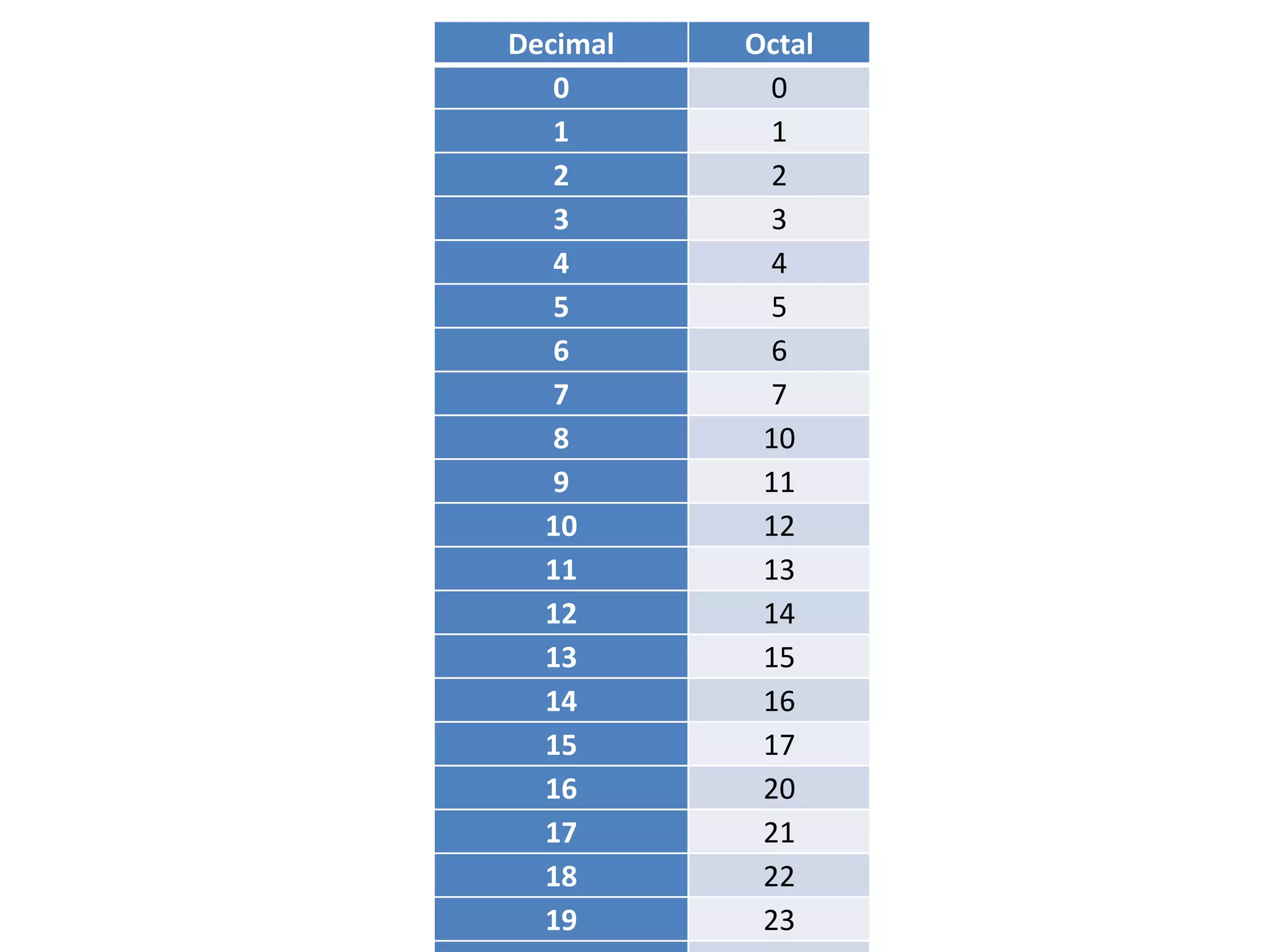
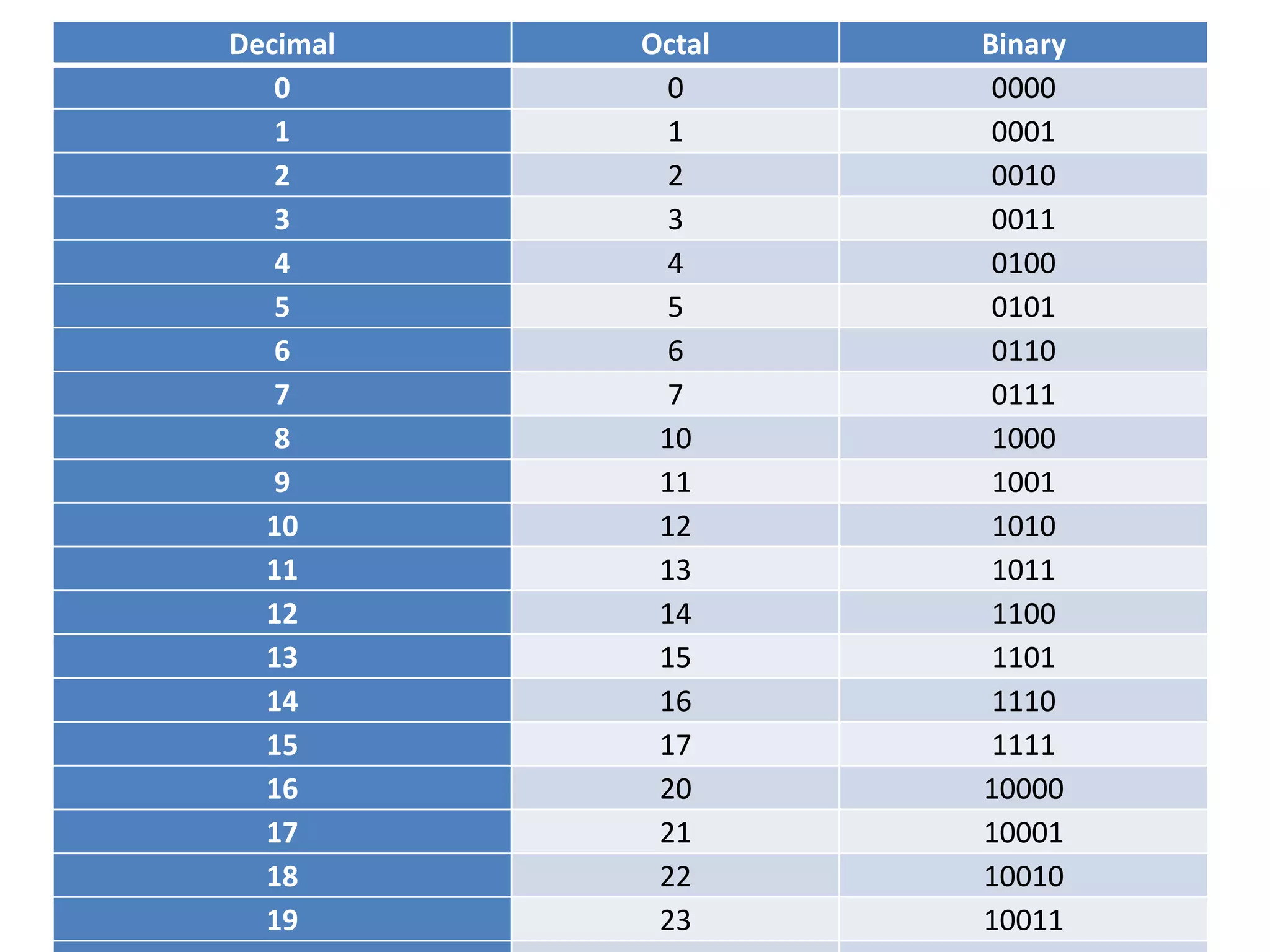
• Now let's try counting in the octal system. "Octal" means "based on eight";
that is, we use only the eight digits 0, 1, 2, 3, 4, 5, 6, and 7. The digits 8 and
9 are not used. So now what do we do after we have counted to 7? Since
we have used up all the symbols we are permitted to use, we write 10 as the
next number and then comes 11 and so on up to 17. After 17 comes 20.
Decimal Octal
0 0
1 1
2 2
3 3
4 4
5 5
6 6
7 7
8 10
9 11
10 12
11 13
12 14
13 15
14 16
15 17
16 20
17 21
18 22
19 23
Binary Numbers
• THE NATURAL BINARY SYSTEM ... Now that you have seen how it
is possible to count in numbering systems other than the
decimal system, we shall consider the system of most interest in
electronics. That is the binary system, which uses only the two
digits 0 and 1.
• We can count in the binary system by using the plan explained in
the preceding topic for counting in other systems. The first
number in counting is 1, of course. Since we can use no digit
higher than 1, we must go to two digits and write 10 for the
second binary number. Then comes 11, and after that we must
go to three digits and write 100.
• Binary numbers as written in the table form the natural binary
numbering system. It is called natural because it follows the
general counting method used in the decimal, octal, and other
numbering systems. As you will see later in the lesson, the
natural binary system is only one of a number of methods for
representing numbers by using only the digits 0 and 1.
Decimal Octal Binary
0 0 0000
1 1 0001
2 2 0010
3 3 0011
4 4 0100
5 5 0101
6 6 0110
7 7 0111
8 10 1000
9 11 1001
10 12 1010
11 13 1011
12 14 1100
13 15 1101
14 16 1110
15 17 1111
16 20 10000
17 21 10001
18 22 10010
19 23 10011
Binary Numbers
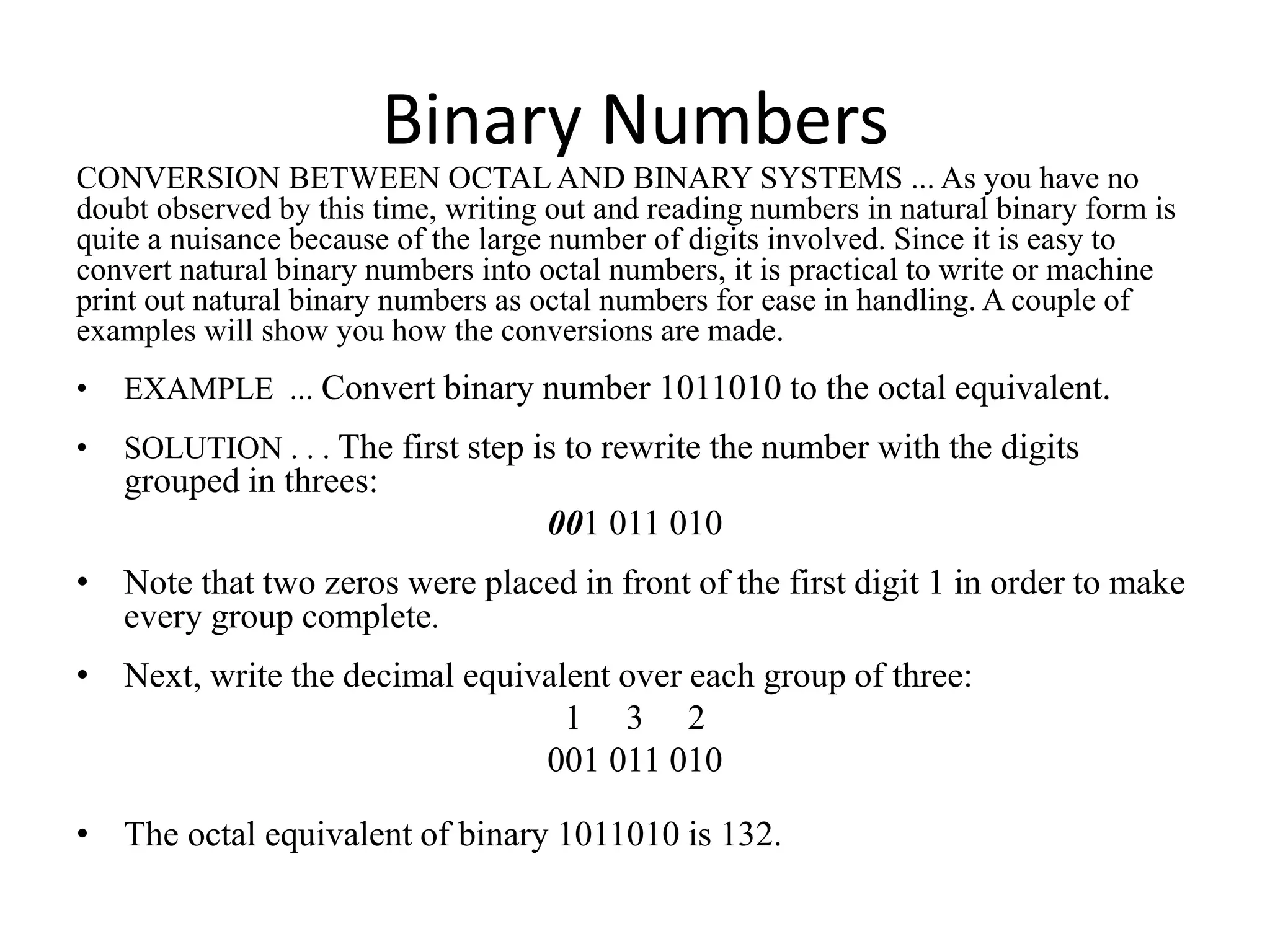
CONVERSION BETWEEN OCTAL AND BINARY SYSTEMS ... As you have no
doubt observed by this time, writing out and reading numbers in natural binary form is
quite a nuisance because of the large number of digits involved. Since it is easy to
convert natural binary numbers into octal numbers, it is practical to write or machine
print out natural binary numbers as octal numbers for ease in handling. A couple of
examples will show you how the conversions are made.
• EXAMPLE ... Convert binary number 1011010 to the octal equivalent.
• SOLUTION . . . The first step is to rewrite the number with the digits
grouped in threes:
001 011 010
• Note that two zeros were placed in front of the first digit 1 in order to make
every group complete.
• Next, write the decimal equivalent over each group of three:
1 3 2
001 011 010
• The octal equivalent of binary 1011010 is 132.
Binary Numbers
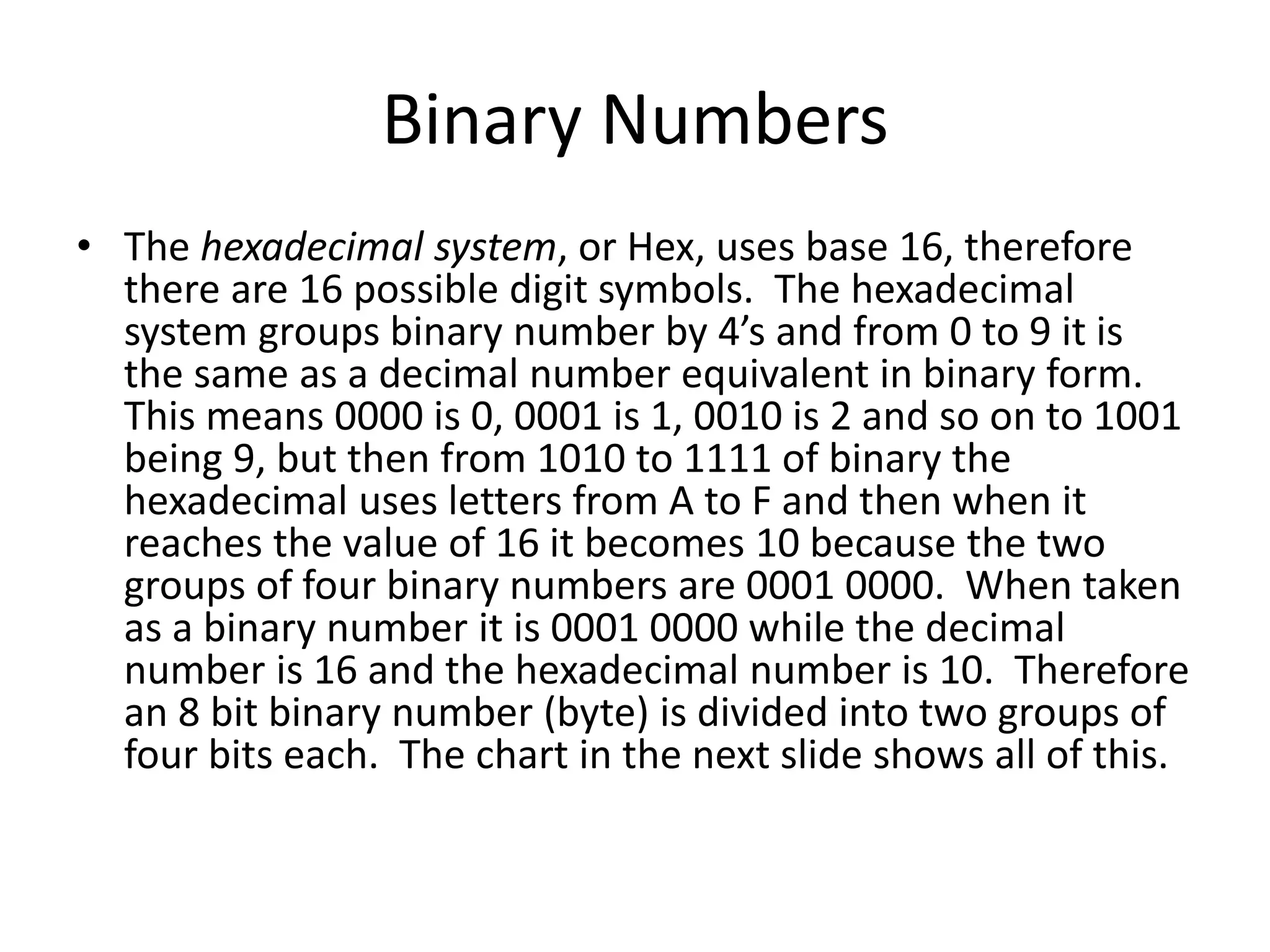
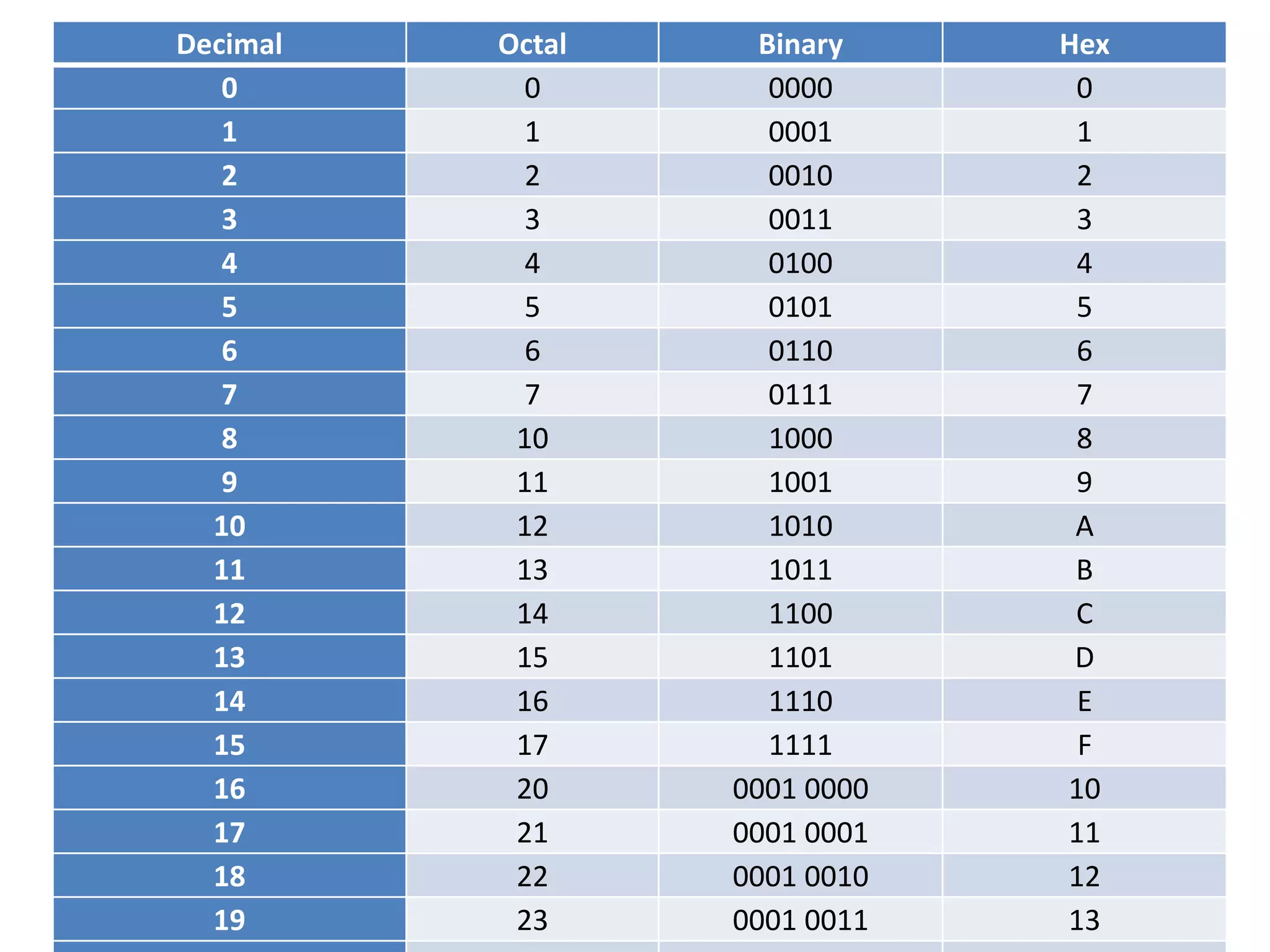
• The hexadecimal system, or Hex, uses base 16, therefore
there are 16 possible digit symbols. The hexadecimal
system groups binary number by 4’s and from 0 to 9 it is
the same as a decimal number equivalent in binary form.
This means 0000 is 0, 0001 is 1, 0010 is 2 and so on to 1001
being 9, but then from 1010 to 1111 of binary the
hexadecimal uses letters from A to F and then when it
reaches the value of 16 it becomes 10 because the two
groups of four binary numbers are 0001 0000. When taken
as a binary number it is 0001 0000 while the decimal
number is 16 and the hexadecimal number is 10. Therefore
an 8 bit binary number (byte) is divided into two groups of
four bits each. The chart in the next slide shows all of this.
Decimal Octal Binary Hex
0 0 0000 0
1 1 0001 1
2 2 0010 2
3 3 0011 3
4 4 0100 4
5 5 0101 5
6 6 0110 6
7 7 0111 7
8 10 1000 8
9 11 1001 9
10 12 1010 A
11 13 1011 B
12 14 1100 C
13 15 1101 D
14 16 1110 E
15 17 1111 F
16 20 0001 0000 10
17 21 0001 0001 11
18 22 0001 0010 12
19 23 0001 0011 13
Binary Numbers
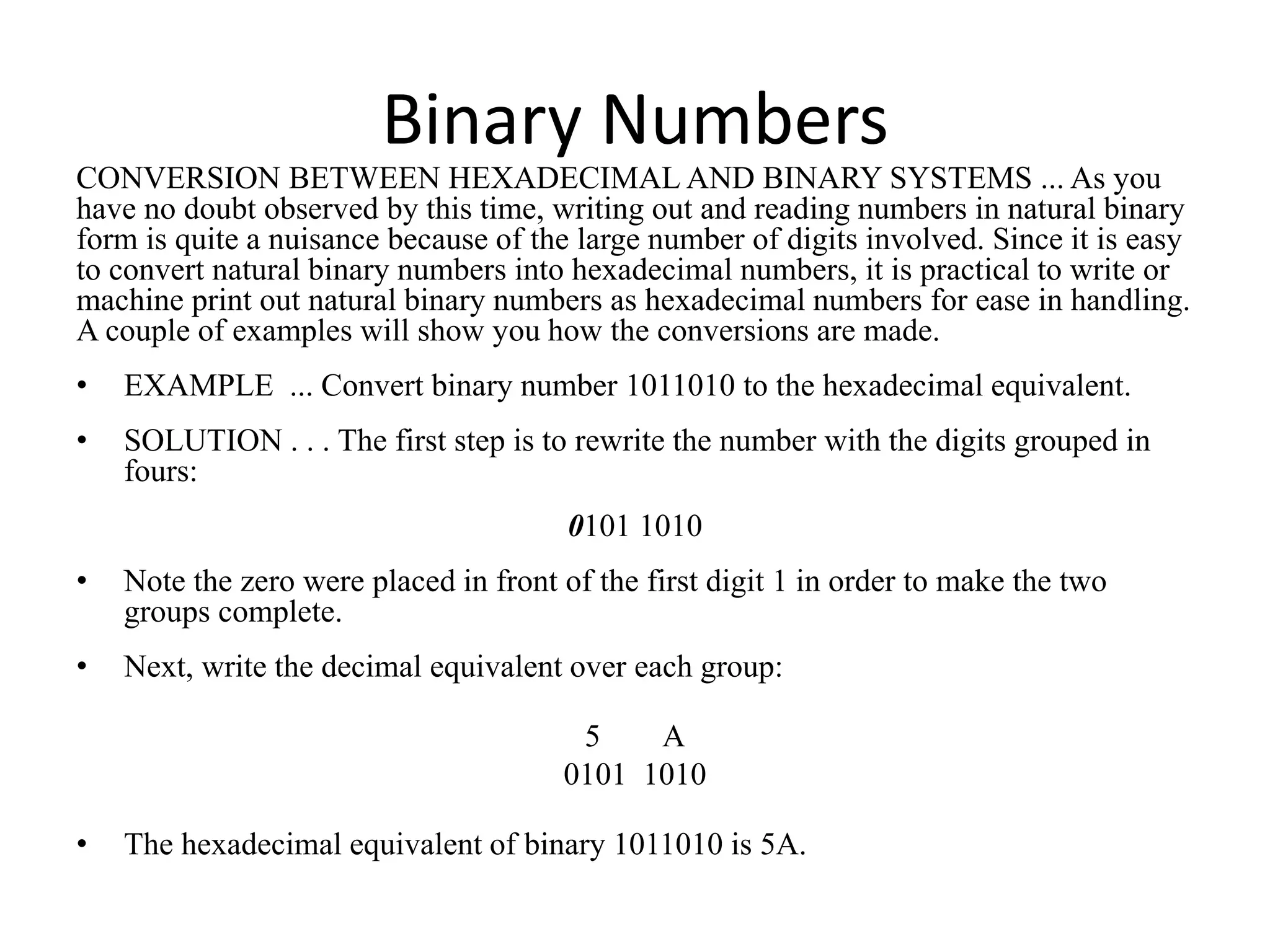
CONVERSION BETWEEN HEXADECIMAL AND BINARY SYSTEMS ... As you
have no doubt observed by this time, writing out and reading numbers in natural binary
form is quite a nuisance because of the large number of digits involved. Since it is easy
to convert natural binary numbers into hexadecimal numbers, it is practical to write or
machine print out natural binary numbers as hexadecimal numbers for ease in handling.
A couple of examples will show you how the conversions are made.
• EXAMPLE ... Convert binary number 1011010 to the hexadecimal equivalent.
• SOLUTION . . . The first step is to rewrite the number with the digits grouped in
fours:
0101 1010
• Note the zero were placed in front of the first digit 1 in order to make the two
groups complete.
• Next, write the decimal equivalent over each group:
5 A
0101 1010
• The hexadecimal equivalent of binary 1011010 is 5A.
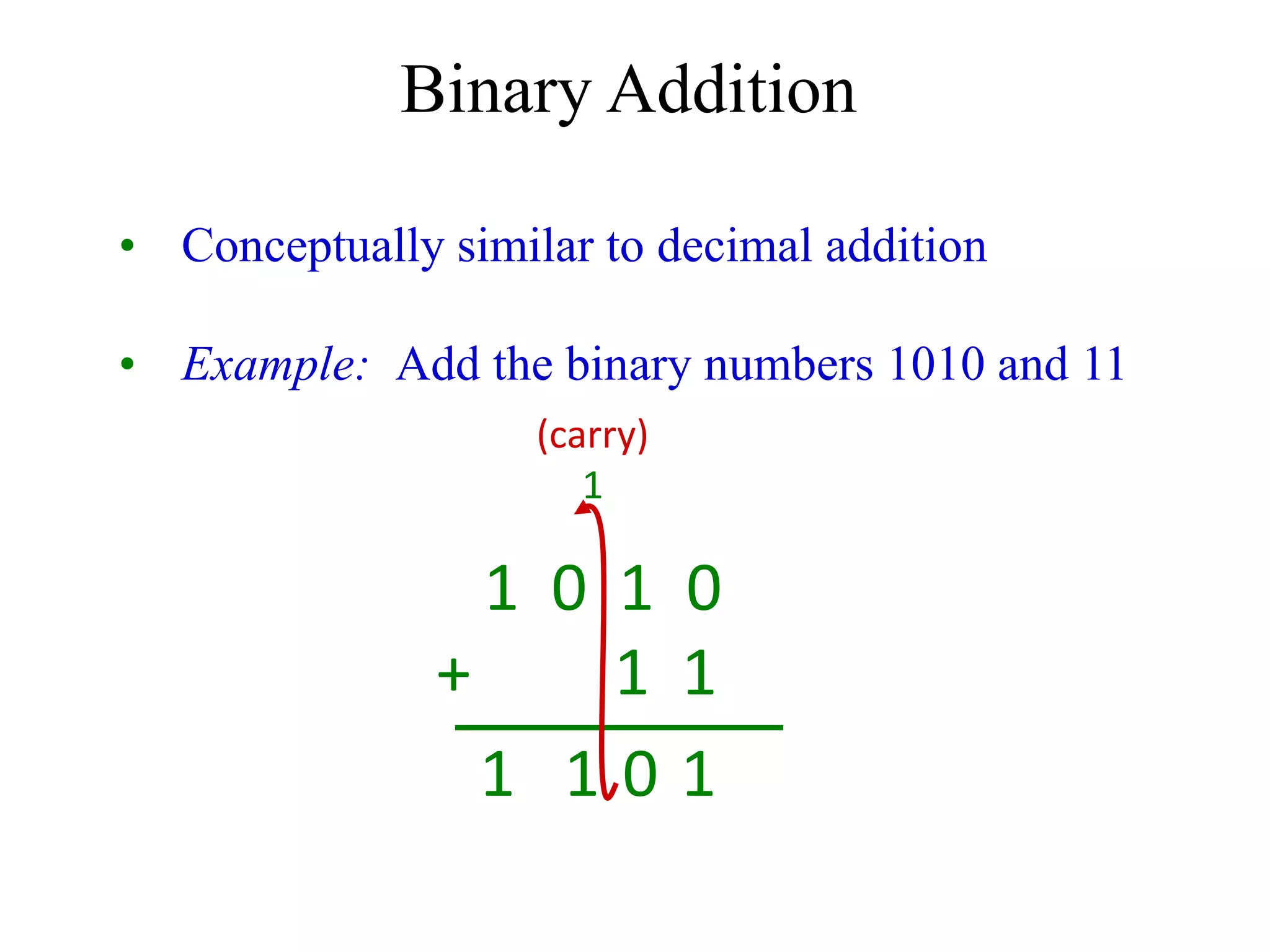
• Conceptually similar to decimal addition
• Example: Add the binary numbers 1010 and 11
Binary Addition
1 0 1 0
+ 1 1
(carry)
1
1
0
1
1
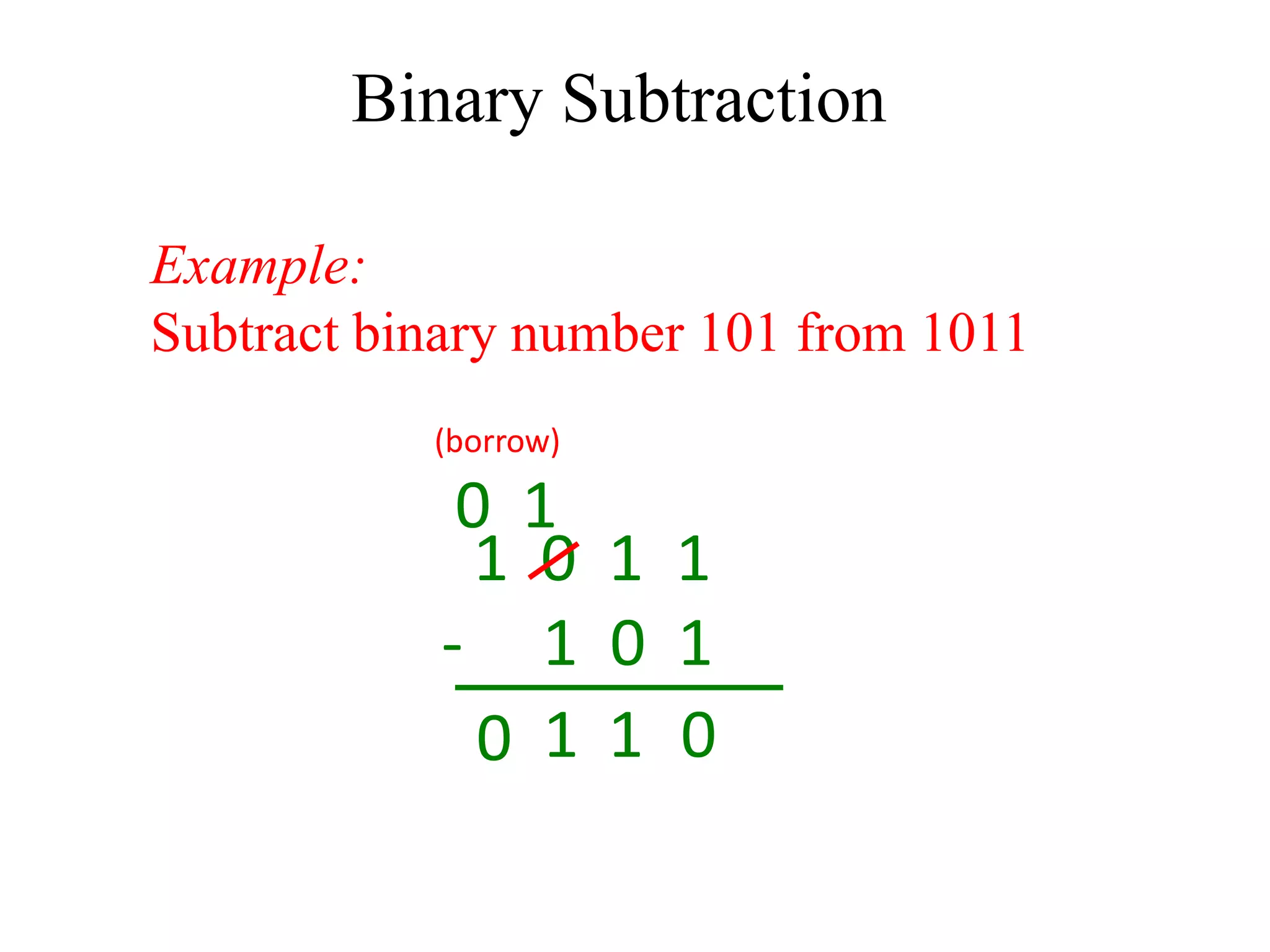
Example:
Subtract binary number 101 from 1011
Binary Subtraction
1 0 1 1
- 1 0 1
(borrow)
0
1
1
0
1
0
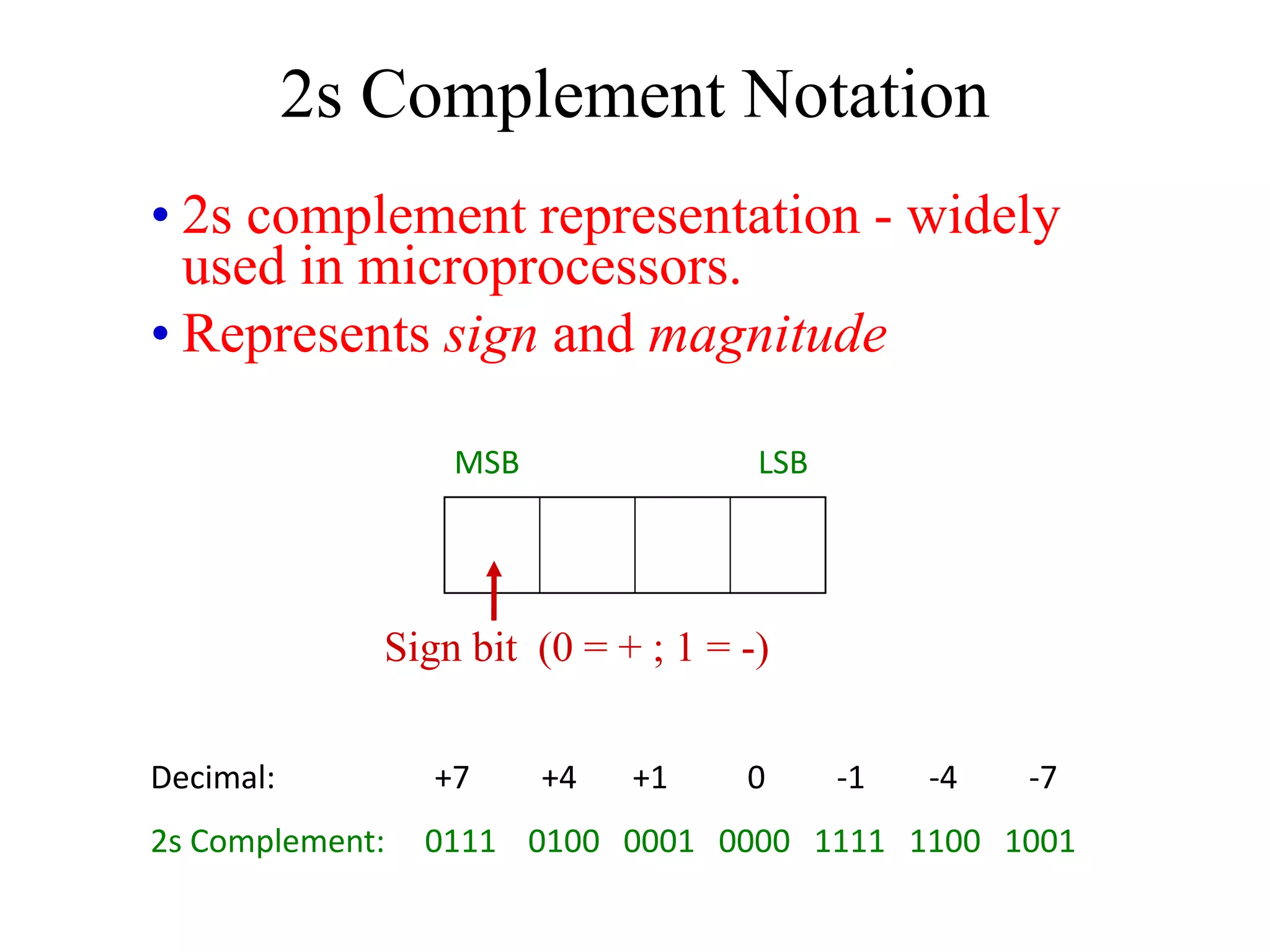
• 2s complement representation - widely
used in microprocessors.
• Represents sign and magnitude
2s Complement Notation
Decimal: +7 +4 +1 0 -1 -4 -7
2s Complement: 0111 0100 0001 0000 1111 1100 1001
MSB LSB
Sign bit (0 = + ; 1 = -)
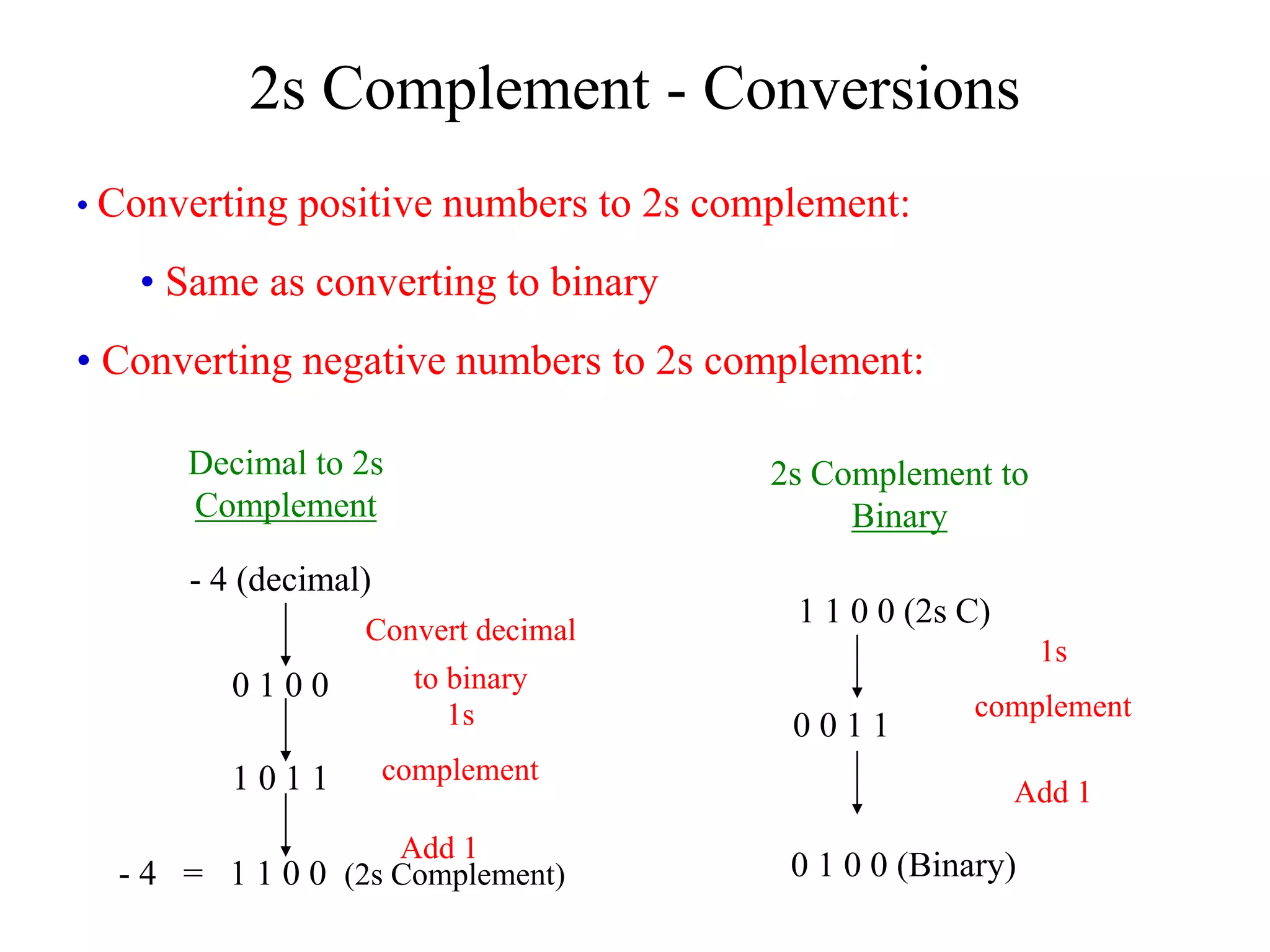
• Converting positive numbers to 2s complement:
• Same as converting to binary
• Converting negative numbers to 2s complement:
2s Complement - Conversions
- 4 (decimal)
0 1 0 0
1 0 1 1
- 4 = 1 1 0 0 (2s Complement)
Decimal to 2s
Complement
Convert decimal
to binary
1s
complement
Add 1
2s Complement to
Binary
1 1 0 0 (2s C)
0 0 1 1
0 1 0 0 (Binary)
1s
complement
Add 1
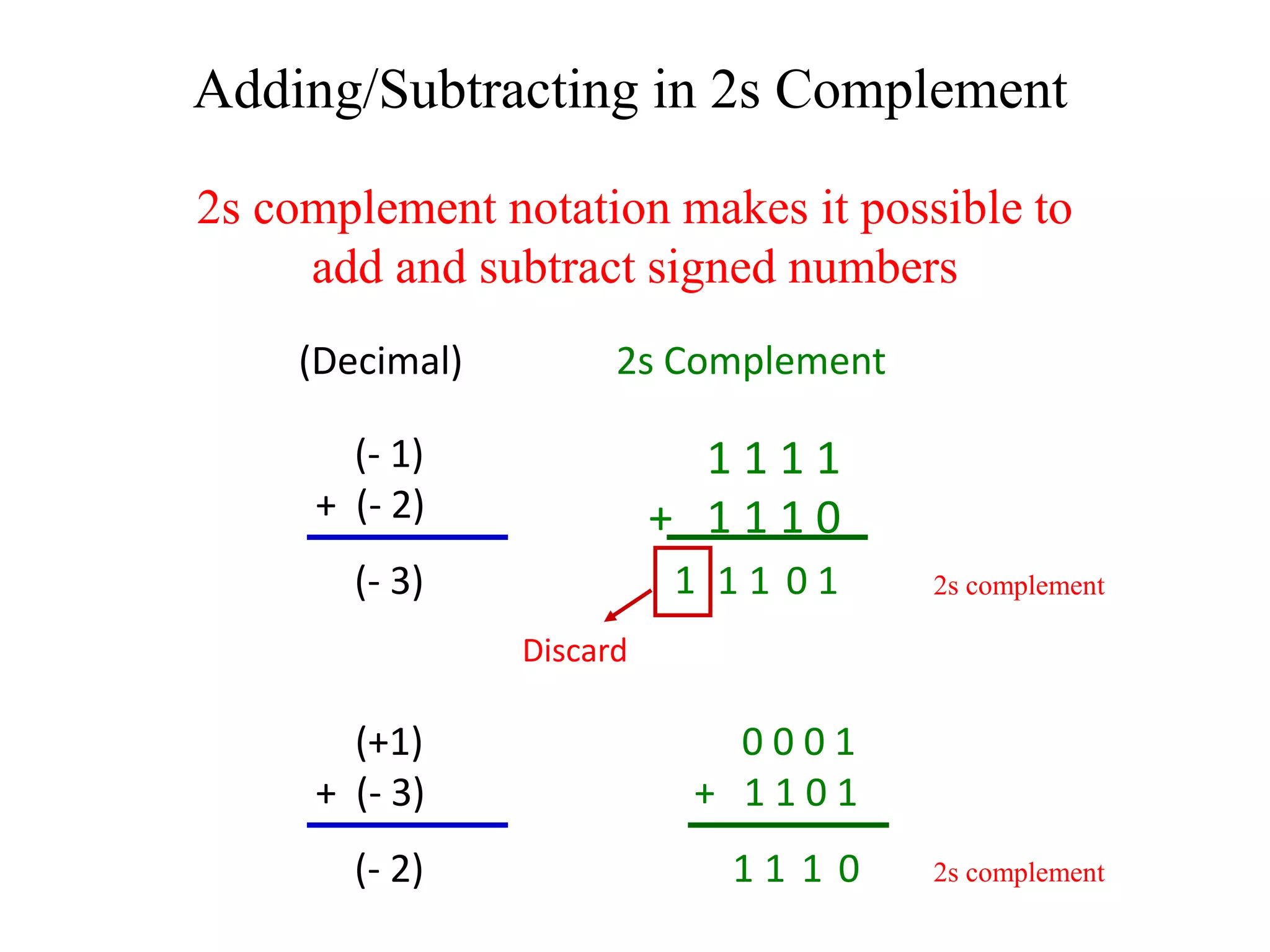
2s complement notation makes it possible to
add and subtract signed numbers
Adding/Subtracting in 2s Complement
(- 1)
+ (- 2)
(- 3)
1 1 1 1
+ 1 1 1 0
1
0
1
1
1
Discard
(+1)
+ (- 3)
(- 2)
0 0 0 1
+ 1 1 0 1
0
1
1
1
(Decimal) 2s Complement
2s complement
2s complement
Practical Suggestion for Binary Math
• Use a scientific calculator.
• Most scientific calculators have
DEC, BIN, OCT, and HEX modes
and can either convert between codes
or perform arithmetic in different
number systems.
• Most scientific calculators also
have other functions that are
valuable in digital electronics
such as AND, OR, NOT, XOR,
and XNOR logic functions.

binary-numbers-7-12-2011.pdf

  • 1.
  • 2.
    Binary Numbers • COUNTINGSYSTEMS UNLIMITED . . . Since you have been using the 10 different digits 0, 1, 2, 3, 4, 5, 6, 7, 8, and 9 all your life, you may wonder how it is possible to count and do arithmetic without using all 10. Actually, there is no advantage in using 10 counting digits rather than, say, 8, 12, or 16. The 10-digit system (called the decimal system, since the word "decimal" means "based on 10") probably came into universal use because man first started to count by using his fingers, and there happen to be 10 of them. • To see how to count by using other than 10 digits, notice how we count in the ordinary decimal system. We represent a number higher than 9, the highest digit, by a combination of two or more digits. The number next after 9 is 10, and then 11, etc. After we reach 99, the highest number that can be written with two digits, we start using three digits. The number next after 99 is 100, and then comes 101, etc. • Now let's try counting in the octal system. "Octal" means "based on eight"; that is, we use only the eight digits 0, 1, 2, 3, 4, 5, 6, and 7. The digits 8 and 9 are not used. So now what do we do after we have counted to 7? Since we have used up all the symbols we are permitted to use, we write 10 as the next number and then comes 11 and so on up to 17. After 17 comes 20.
  • 3.
    Decimal Octal 0 0 11 2 2 3 3 4 4 5 5 6 6 7 7 8 10 9 11 10 12 11 13 12 14 13 15 14 16 15 17 16 20 17 21 18 22 19 23
  • 4.
    Binary Numbers • THENATURAL BINARY SYSTEM ... Now that you have seen how it is possible to count in numbering systems other than the decimal system, we shall consider the system of most interest in electronics. That is the binary system, which uses only the two digits 0 and 1. • We can count in the binary system by using the plan explained in the preceding topic for counting in other systems. The first number in counting is 1, of course. Since we can use no digit higher than 1, we must go to two digits and write 10 for the second binary number. Then comes 11, and after that we must go to three digits and write 100. • Binary numbers as written in the table form the natural binary numbering system. It is called natural because it follows the general counting method used in the decimal, octal, and other numbering systems. As you will see later in the lesson, the natural binary system is only one of a number of methods for representing numbers by using only the digits 0 and 1.
  • 5.
    Decimal Octal Binary 00 0000 1 1 0001 2 2 0010 3 3 0011 4 4 0100 5 5 0101 6 6 0110 7 7 0111 8 10 1000 9 11 1001 10 12 1010 11 13 1011 12 14 1100 13 15 1101 14 16 1110 15 17 1111 16 20 10000 17 21 10001 18 22 10010 19 23 10011
  • 6.
    Binary Numbers CONVERSION BETWEENOCTAL AND BINARY SYSTEMS ... As you have no doubt observed by this time, writing out and reading numbers in natural binary form is quite a nuisance because of the large number of digits involved. Since it is easy to convert natural binary numbers into octal numbers, it is practical to write or machine print out natural binary numbers as octal numbers for ease in handling. A couple of examples will show you how the conversions are made. • EXAMPLE ... Convert binary number 1011010 to the octal equivalent. • SOLUTION . . . The first step is to rewrite the number with the digits grouped in threes: 001 011 010 • Note that two zeros were placed in front of the first digit 1 in order to make every group complete. • Next, write the decimal equivalent over each group of three: 1 3 2 001 011 010 • The octal equivalent of binary 1011010 is 132.
  • 7.
    Binary Numbers • Thehexadecimal system, or Hex, uses base 16, therefore there are 16 possible digit symbols. The hexadecimal system groups binary number by 4’s and from 0 to 9 it is the same as a decimal number equivalent in binary form. This means 0000 is 0, 0001 is 1, 0010 is 2 and so on to 1001 being 9, but then from 1010 to 1111 of binary the hexadecimal uses letters from A to F and then when it reaches the value of 16 it becomes 10 because the two groups of four binary numbers are 0001 0000. When taken as a binary number it is 0001 0000 while the decimal number is 16 and the hexadecimal number is 10. Therefore an 8 bit binary number (byte) is divided into two groups of four bits each. The chart in the next slide shows all of this.
  • 8.
    Decimal Octal BinaryHex 0 0 0000 0 1 1 0001 1 2 2 0010 2 3 3 0011 3 4 4 0100 4 5 5 0101 5 6 6 0110 6 7 7 0111 7 8 10 1000 8 9 11 1001 9 10 12 1010 A 11 13 1011 B 12 14 1100 C 13 15 1101 D 14 16 1110 E 15 17 1111 F 16 20 0001 0000 10 17 21 0001 0001 11 18 22 0001 0010 12 19 23 0001 0011 13
  • 9.
    Binary Numbers CONVERSION BETWEENHEXADECIMAL AND BINARY SYSTEMS ... As you have no doubt observed by this time, writing out and reading numbers in natural binary form is quite a nuisance because of the large number of digits involved. Since it is easy to convert natural binary numbers into hexadecimal numbers, it is practical to write or machine print out natural binary numbers as hexadecimal numbers for ease in handling. A couple of examples will show you how the conversions are made. • EXAMPLE ... Convert binary number 1011010 to the hexadecimal equivalent. • SOLUTION . . . The first step is to rewrite the number with the digits grouped in fours: 0101 1010 • Note the zero were placed in front of the first digit 1 in order to make the two groups complete. • Next, write the decimal equivalent over each group: 5 A 0101 1010 • The hexadecimal equivalent of binary 1011010 is 5A.
  • 10.
    • Conceptually similarto decimal addition • Example: Add the binary numbers 1010 and 11 Binary Addition 1 0 1 0 + 1 1 (carry) 1 1 0 1 1
  • 11.
    Example: Subtract binary number101 from 1011 Binary Subtraction 1 0 1 1 - 1 0 1 (borrow) 0 1 1 0 1 0
  • 12.
    • 2s complementrepresentation - widely used in microprocessors. • Represents sign and magnitude 2s Complement Notation Decimal: +7 +4 +1 0 -1 -4 -7 2s Complement: 0111 0100 0001 0000 1111 1100 1001 MSB LSB Sign bit (0 = + ; 1 = -)
  • 13.
    • Converting positivenumbers to 2s complement: • Same as converting to binary • Converting negative numbers to 2s complement: 2s Complement - Conversions - 4 (decimal) 0 1 0 0 1 0 1 1 - 4 = 1 1 0 0 (2s Complement) Decimal to 2s Complement Convert decimal to binary 1s complement Add 1 2s Complement to Binary 1 1 0 0 (2s C) 0 0 1 1 0 1 0 0 (Binary) 1s complement Add 1
  • 14.
    2s complement notationmakes it possible to add and subtract signed numbers Adding/Subtracting in 2s Complement (- 1) + (- 2) (- 3) 1 1 1 1 + 1 1 1 0 1 0 1 1 1 Discard (+1) + (- 3) (- 2) 0 0 0 1 + 1 1 0 1 0 1 1 1 (Decimal) 2s Complement 2s complement 2s complement
  • 15.
    Practical Suggestion forBinary Math • Use a scientific calculator. • Most scientific calculators have DEC, BIN, OCT, and HEX modes and can either convert between codes or perform arithmetic in different number systems. • Most scientific calculators also have other functions that are valuable in digital electronics such as AND, OR, NOT, XOR, and XNOR logic functions.