



Moodle + Microsoft:
Better Together
INTRODUCING MOODLE PLUGINS FOR MICROSOFT OFFICE
Jason Cole
CEO
Doug Mahugh
Technical Evangelist
About Remote-Learner
A Bold Bet in Openness
“We’re convinced that openness is good for our
customers, good for the community and good for
our business.”
- Jean Paoli, President, Microsoft Open Technologies, Inc.
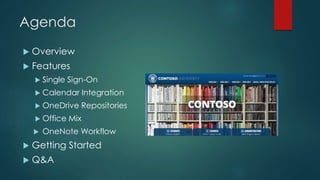
Agenda
 Overview
 Features
 Single Sign-On
 Calendar Integration
 OneDrive Repositories
 Office Mix
 OneNote Workflow
 Getting Started
 Q&A
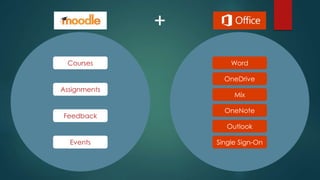
Assignments
Feedback
Events
Courses Word
Single Sign-On
OneDrive
Mix
OneNote
Outlook
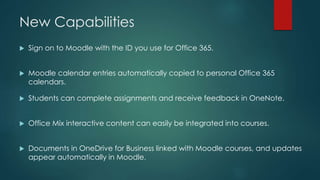
New Capabilities
 Sign on to Moodle with the ID you use for Office 365.
 Moodle calendar entries automatically copied to personal Office 365
calendars.
 Students can complete assignments and receive feedback in OneNote.
 Office Mix interactive content can easily be integrated into courses.
 Documents in OneDrive for Business linked with Moodle courses, and updates
appear automatically in Moodle.
Benefits for Teachers and Students
 Easy access. No additional credentials to remember.
 Work offline. Include Office documents created on any device – even
without an Internet connection.
 Mobile friendly. Moodle calendar events can be synced with Office 365 and
show up in mobile devices including Android, iOS, and Windows Phone.
 Classroom ready. Teachers can add interactive Office Mix lectures in
Moodle courses, manage Moodle assignment submissions through OneNote,
and store Moodle course documents on OneDrive.
Features
Single Sign-On
Calendar Integration
OneDrive Repositories
Office Mix
OneNote Workflow
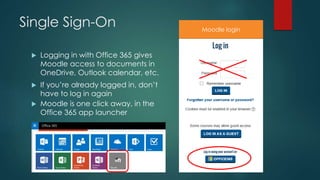
Single Sign-On
 Logging in with Office 365 gives
Moodle access to documents in
OneDrive, Outlook calendar, etc.
 If you’re already logged in, don’t
have to log in again
 Moodle is one click away, in the
Office 365 app launcher
Moodle login
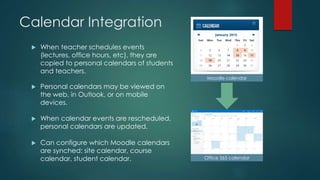
Calendar Integration
 When teacher schedules events
(lectures, office hours, etc), they are
copied to personal calendars of students
and teachers.
 Personal calendars may be viewed on
the web, in Outlook, or on mobile
devices.
 When calendar events are rescheduled,
personal calendars are updated.
 Can configure which Moodle calendars
are synched: site calendar, course
calendar, student calendar.
Moodle calendar
Office 365 calendar
OneDrive Repositories
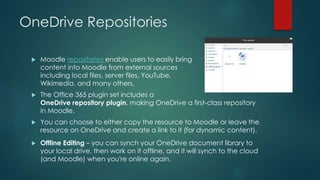
 Moodle repositories enable users to easily bring
content into Moodle from external sources
including local files, server files, YouTube,
Wikimedia, and many others.
 The Office 365 plugin set includes a
OneDrive repository plugin, making OneDrive a first-class repository
in Moodle.
 You can choose to either copy the resource to Moodle or leave the
resource on OneDrive and create a link to it (for dynamic content).
 Offline Editing – you can synch your OneDrive document library to
your local drive, then work on it offline, and it will synch to the cloud
(and Moodle) when you're online again.
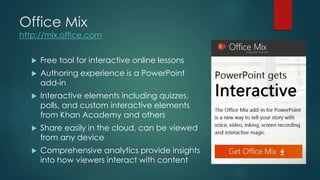
Office Mix
http://mix.office.com
 Free tool for interactive online lessons
 Authoring experience is a PowerPoint
add-in
 Interactive elements including quizzes,
polls, and custom interactive elements
from Khan Academy and others
 Share easily in the cloud, can be viewed
from any device
 Comprehensive analytics provide insights
into how viewers interact with content
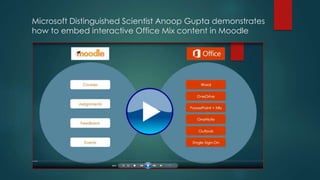
Microsoft Distinguished Scientist Anoop Gupta demonstrates
how to embed interactive Office Mix content in Moodle
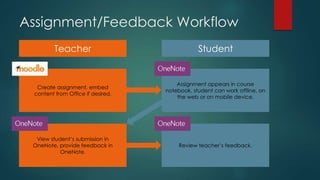
View student’s submission in
OneNote, provide feedback in
OneNote.
Create assignment, embed
content from Office if desired.
Teacher Student
Assignment appears in course
notebook, student can work offline, on
the web or on mobile device.
Review teacher’s feedback.
Assignment/Feedback Workflow
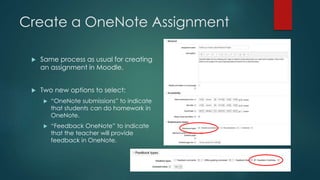
Create a OneNote Assignment
 Same process as usual for creating
an assignment in Moodle.
 Two new options to select:
 “OneNote submissions” to indicate
that students can do homework in
OneNote.
 “Feedback OneNote” to indicate
that the teacher will provide
feedback in OneNote.
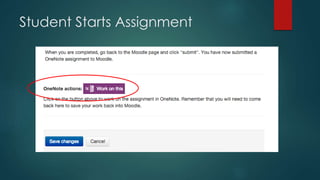
Student Starts Assignment
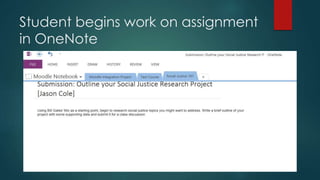
Student begins work on assignment
in OneNote
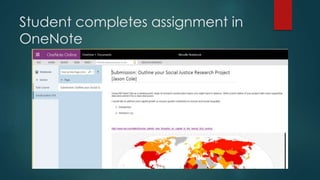
Student completes assignment in
OneNote
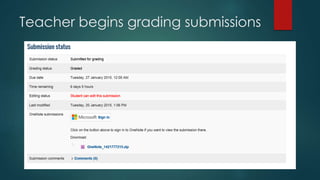
Teacher begins grading submissions
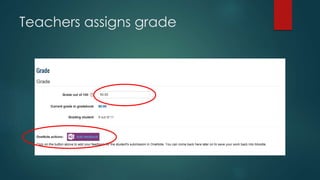
Teachers assigns grade
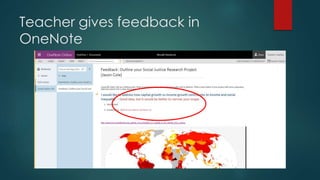
Teacher gives feedback in
OneNote
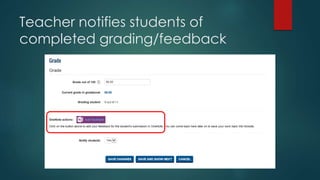
Teacher notifies students of
completed grading/feedback
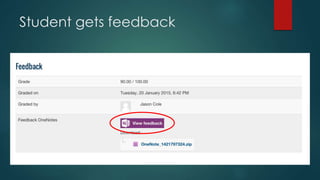
Student gets feedback
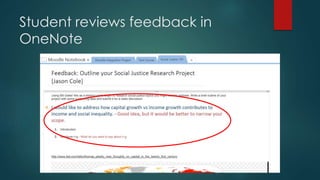
Student reviews feedback in
OneNote
Potential Class Assignments
Field trip reflection with pictures
Data gathering in the field
Annotated web bibliography
Lecture Notes
Submit recordings
Pictures and drawings for annotation
Getting Started
HOW TO GET IT, WHERE TO LEARN MORE
Two plugins: Office 365 and
Microsoft Services
Office 365 plugin
 Single Sign-On with Office 365
 Office Mix integration
 OneDrive integration
 Calendar integration
Moodle plugin directory:
https://moodle.org/plugins/view/local_office
365
GitHub repo:
https://github.com/MSOpenTech/moodle-
local_office365
Microsoft Services plugin
 OneNote integration (for
assignments and feedback)
 Office Mix integration
Moodle plugin directory:
https://moodle.org/plugins/view/local_
microsoftservices
GitHub repo:
https://github.com/MSOpenTech/mood
le-local_microsoftservices
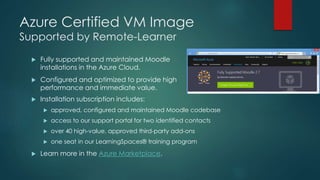
Azure Certified VM Image
Supported by Remote-Learner
 Fully supported and maintained Moodle
installations in the Azure Cloud.
 Configured and optimized to provide high
performance and immediate value.
 Installation subscription includes:
 approved, configured and maintained Moodle codebase
 access to our support portal for two identified contacts
 over 40 high-value, approved third-party add-ons
 one seat in our LearningSpaces® training program
 Learn more in the Azure Marketplace.
Learn more about how to use
Office tools in Education
 Office Mix in Education:
https://mix.office.com/watch/14iqkll3cdyv
 OneNote for Teachers:
http://www.onenoteforteachers.com/
 OneNote Class Notebook Creator:
https://store.office.com/app.aspx?ui=en-US&rs=en-
US&ad=US&assetid=WA104371260&appredirect=fals
e&fromAR=1
Plugins developed “The Moodle
Way”
 Fully open source plugins
 Available through Moodle plugin repository and GitHub
 Collaborating with Moodle partners and user community
 Enhancements to community source:
 Oidc plugin – enable SSO with Office 365, Google, Facebook, others
 Oembed plugin – applies to Office Mix, Flickr, YouTube, Slideshare
 Ongoing commitment to future roadmap
Looking Forward
 MS Open Tech and Remote-Learner are committed to
evolving the project
 Improve document embedding
 OneNote for Business integration
 Office365 video integration
 Your opinion counts: what would you like to see next?
 Expansion to non-English markets: Microsoft is working
with Remote-Learner to bring Moodle Partners on board
in other markets
Q&A

BETT 2015: Moodle and Microsoft, Better Together

  • 1.
    Moodle + Microsoft: BetterTogether INTRODUCING MOODLE PLUGINS FOR MICROSOFT OFFICE Jason Cole CEO Doug Mahugh Technical Evangelist
  • 2.
  • 3.
    A Bold Betin Openness “We’re convinced that openness is good for our customers, good for the community and good for our business.” - Jean Paoli, President, Microsoft Open Technologies, Inc.
  • 4.
    Agenda  Overview  Features Single Sign-On  Calendar Integration  OneDrive Repositories  Office Mix  OneNote Workflow  Getting Started  Q&A
  • 5.
  • 6.
    New Capabilities  Signon to Moodle with the ID you use for Office 365.  Moodle calendar entries automatically copied to personal Office 365 calendars.  Students can complete assignments and receive feedback in OneNote.  Office Mix interactive content can easily be integrated into courses.  Documents in OneDrive for Business linked with Moodle courses, and updates appear automatically in Moodle.
  • 7.
    Benefits for Teachersand Students  Easy access. No additional credentials to remember.  Work offline. Include Office documents created on any device – even without an Internet connection.  Mobile friendly. Moodle calendar events can be synced with Office 365 and show up in mobile devices including Android, iOS, and Windows Phone.  Classroom ready. Teachers can add interactive Office Mix lectures in Moodle courses, manage Moodle assignment submissions through OneNote, and store Moodle course documents on OneDrive.
  • 8.
    Features Single Sign-On Calendar Integration OneDriveRepositories Office Mix OneNote Workflow
  • 9.
    Single Sign-On  Loggingin with Office 365 gives Moodle access to documents in OneDrive, Outlook calendar, etc.  If you’re already logged in, don’t have to log in again  Moodle is one click away, in the Office 365 app launcher Moodle login
  • 10.
    Calendar Integration  Whenteacher schedules events (lectures, office hours, etc), they are copied to personal calendars of students and teachers.  Personal calendars may be viewed on the web, in Outlook, or on mobile devices.  When calendar events are rescheduled, personal calendars are updated.  Can configure which Moodle calendars are synched: site calendar, course calendar, student calendar. Moodle calendar Office 365 calendar
  • 11.
    OneDrive Repositories  Moodlerepositories enable users to easily bring content into Moodle from external sources including local files, server files, YouTube, Wikimedia, and many others.  The Office 365 plugin set includes a OneDrive repository plugin, making OneDrive a first-class repository in Moodle.  You can choose to either copy the resource to Moodle or leave the resource on OneDrive and create a link to it (for dynamic content).  Offline Editing – you can synch your OneDrive document library to your local drive, then work on it offline, and it will synch to the cloud (and Moodle) when you're online again.
  • 12.
    Office Mix http://mix.office.com  Freetool for interactive online lessons  Authoring experience is a PowerPoint add-in  Interactive elements including quizzes, polls, and custom interactive elements from Khan Academy and others  Share easily in the cloud, can be viewed from any device  Comprehensive analytics provide insights into how viewers interact with content
  • 13.
    Microsoft Distinguished ScientistAnoop Gupta demonstrates how to embed interactive Office Mix content in Moodle
  • 14.
    View student’s submissionin OneNote, provide feedback in OneNote. Create assignment, embed content from Office if desired. Teacher Student Assignment appears in course notebook, student can work offline, on the web or on mobile device. Review teacher’s feedback. Assignment/Feedback Workflow
  • 15.
    Create a OneNoteAssignment  Same process as usual for creating an assignment in Moodle.  Two new options to select:  “OneNote submissions” to indicate that students can do homework in OneNote.  “Feedback OneNote” to indicate that the teacher will provide feedback in OneNote.
  • 16.
  • 17.
    Student begins workon assignment in OneNote
  • 18.
  • 19.
  • 20.
  • 21.
  • 22.
    Teacher notifies studentsof completed grading/feedback
  • 23.
  • 24.
  • 25.
    Potential Class Assignments Fieldtrip reflection with pictures Data gathering in the field Annotated web bibliography Lecture Notes Submit recordings Pictures and drawings for annotation
  • 26.
    Getting Started HOW TOGET IT, WHERE TO LEARN MORE
  • 27.
    Two plugins: Office365 and Microsoft Services Office 365 plugin  Single Sign-On with Office 365  Office Mix integration  OneDrive integration  Calendar integration Moodle plugin directory: https://moodle.org/plugins/view/local_office 365 GitHub repo: https://github.com/MSOpenTech/moodle- local_office365 Microsoft Services plugin  OneNote integration (for assignments and feedback)  Office Mix integration Moodle plugin directory: https://moodle.org/plugins/view/local_ microsoftservices GitHub repo: https://github.com/MSOpenTech/mood le-local_microsoftservices
  • 28.
    Azure Certified VMImage Supported by Remote-Learner  Fully supported and maintained Moodle installations in the Azure Cloud.  Configured and optimized to provide high performance and immediate value.  Installation subscription includes:  approved, configured and maintained Moodle codebase  access to our support portal for two identified contacts  over 40 high-value, approved third-party add-ons  one seat in our LearningSpaces® training program  Learn more in the Azure Marketplace.
  • 29.
    Learn more abouthow to use Office tools in Education  Office Mix in Education: https://mix.office.com/watch/14iqkll3cdyv  OneNote for Teachers: http://www.onenoteforteachers.com/  OneNote Class Notebook Creator: https://store.office.com/app.aspx?ui=en-US&rs=en- US&ad=US&assetid=WA104371260&appredirect=fals e&fromAR=1
  • 30.
    Plugins developed “TheMoodle Way”  Fully open source plugins  Available through Moodle plugin repository and GitHub  Collaborating with Moodle partners and user community  Enhancements to community source:  Oidc plugin – enable SSO with Office 365, Google, Facebook, others  Oembed plugin – applies to Office Mix, Flickr, YouTube, Slideshare  Ongoing commitment to future roadmap
  • 31.
    Looking Forward  MSOpen Tech and Remote-Learner are committed to evolving the project  Improve document embedding  OneNote for Business integration  Office365 video integration  Your opinion counts: what would you like to see next?  Expansion to non-English markets: Microsoft is working with Remote-Learner to bring Moodle Partners on board in other markets
  • 32.