Best Practices for Database Schema Design Presenter: Kirill Dmitriev Try it free! www.ironnspeed.com/download
Etiquette Ask questions at any time via Question and Answer facility Moderator will queue them up and … …  I will read aloud and answer so everyone can hear …  in the order received This allows everyone to hear the question and is much faster We expect many questions during this webinar! Listening via computer (VOIP)? Turn up your computer’s volume! ... or put on a headset if you can’t hear …  or dial in via landline telephone if you still can’t hear
What is Covered in this Course Best Practices for Database Schema Design How Schema Design Affects Application Generation by Iron Speed Designer How to Modify Schema in Database and in Iron Speed Designer
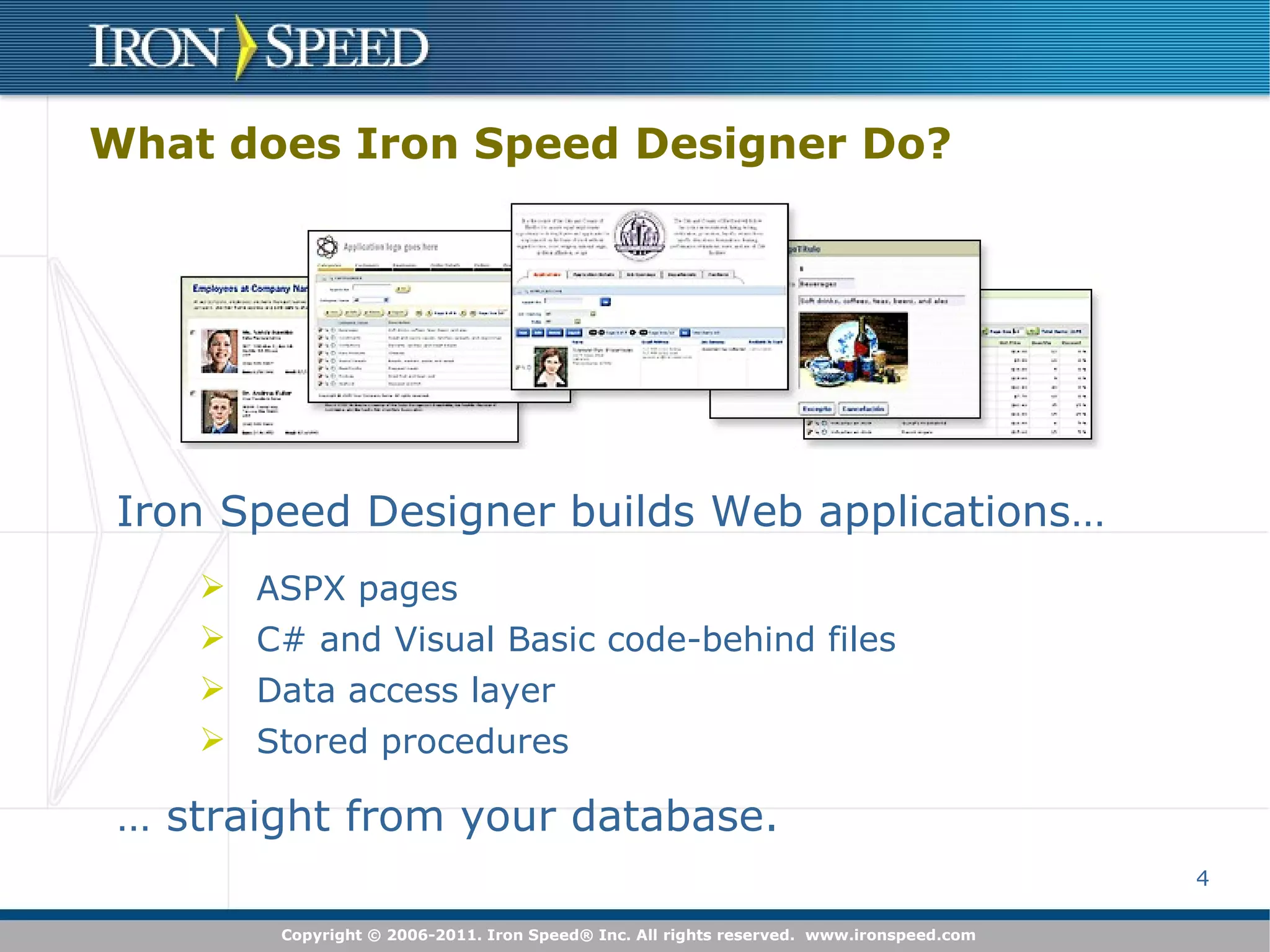
What does Iron Speed Designer Do? ASPX pages C# and Visual Basic code-behind files Data access layer Stored procedures Iron Speed Designer builds Web applications… …  straight from your database.
To get most of Iron Speed Designer prepare your database first! Iron Speed Designer uses database schema to create pages Pages layout and functionality are driven by schema Application performance depends on your schema Properly designed schema is easy extendable To create web application with Iron Speed Designer no knowledge of code, ASPX or other .NET concepts required but knowledge of database schemas, foreign keys, and SQL is helpful
Prepare Your Database The better your database is structured…   … the more Iron Speed Designer can do You’ll get more Web pages You’ll get more sophisticated master-detail Web pages It’s easier to extend your application It’s easier to maintain your data
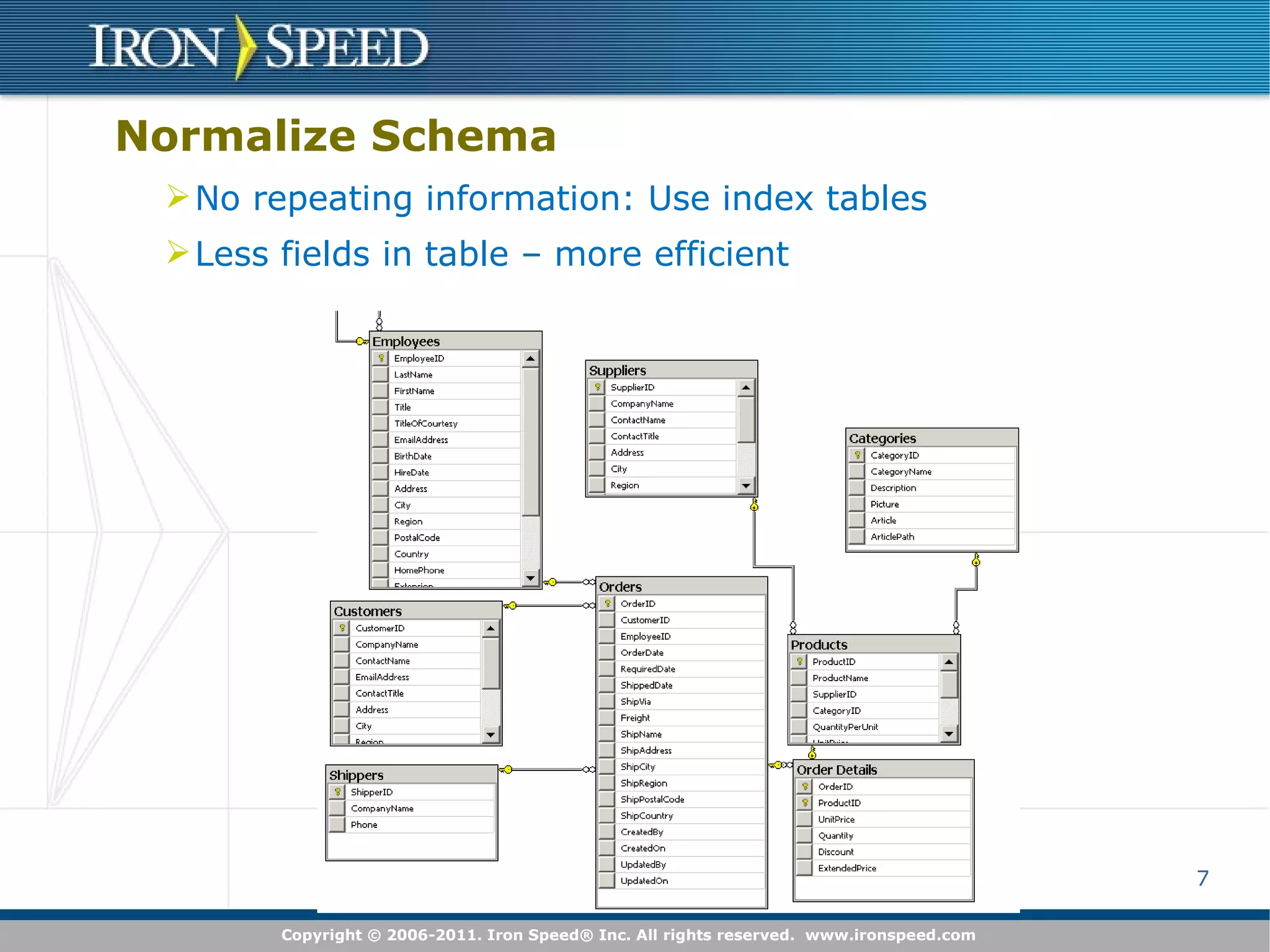
No repeating information: Use index tables Less fields in table – more efficient Normalize Schema
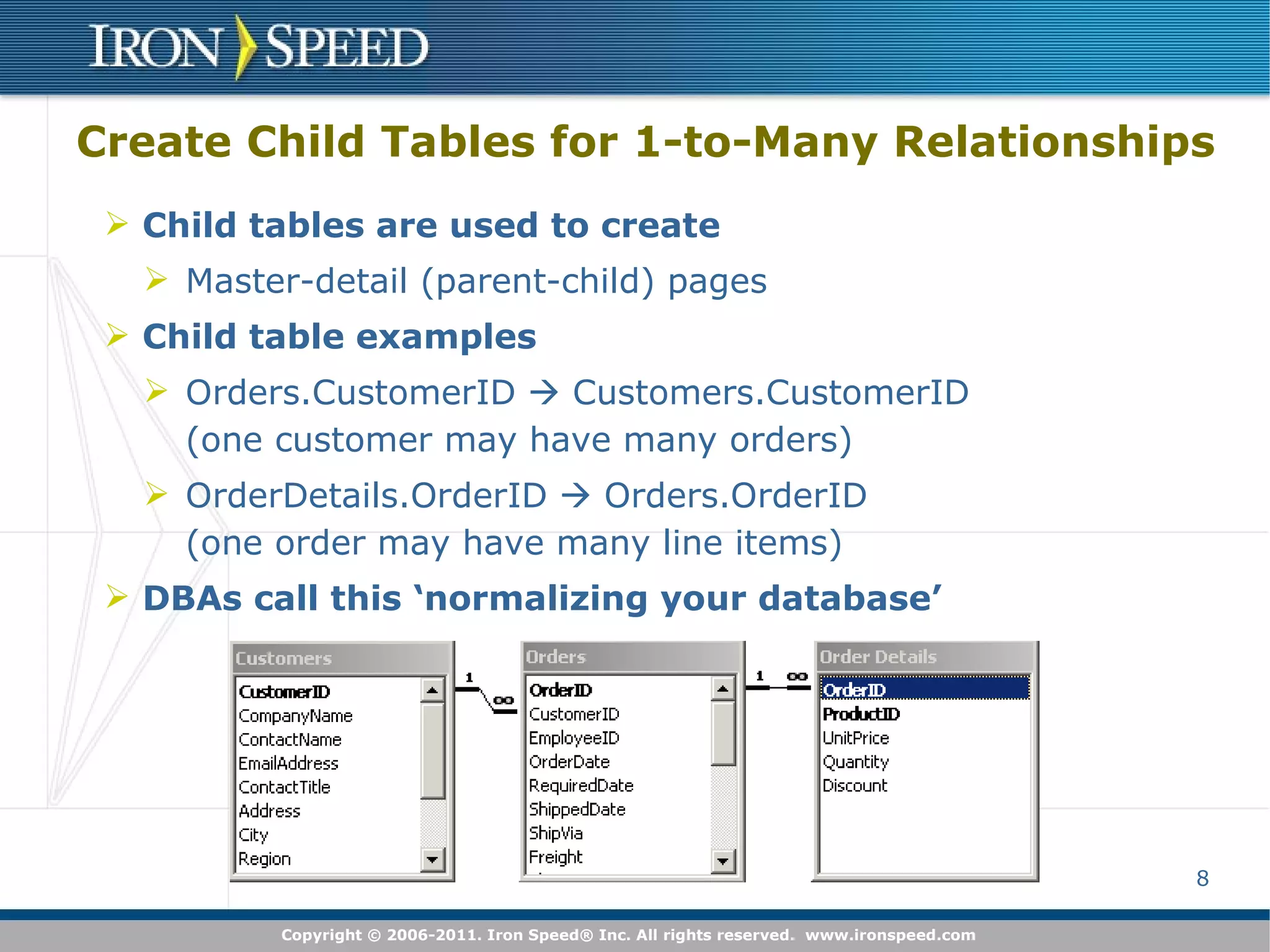
Create Child Tables for 1-to-Many Relationships Child tables are used to create Master-detail (parent-child) pages Child table examples Orders.CustomerID    Customers.CustomerID  (one customer may have many orders) OrderDetails.OrderID    Orders.OrderID  (one order may have many line items) DBAs call this ‘normalizing your database’
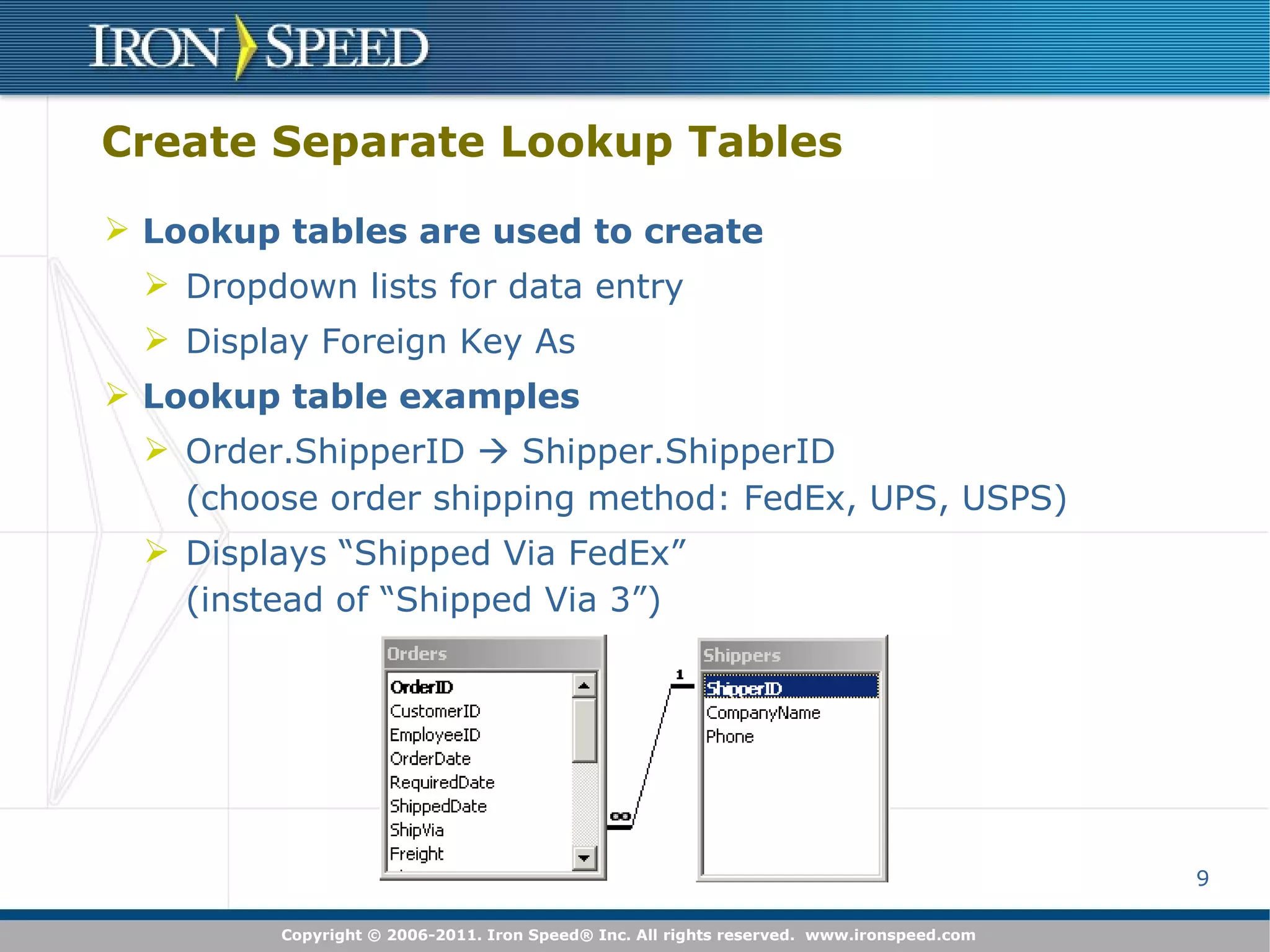
Create Separate Lookup Tables Lookup tables are used to create Dropdown lists for data entry Display Foreign Key As Lookup table examples Order.ShipperID    Shipper.ShipperID  (choose order shipping method: FedEx, UPS, USPS) Displays “Shipped Via FedEx”  (instead of “Shipped Via 3”)
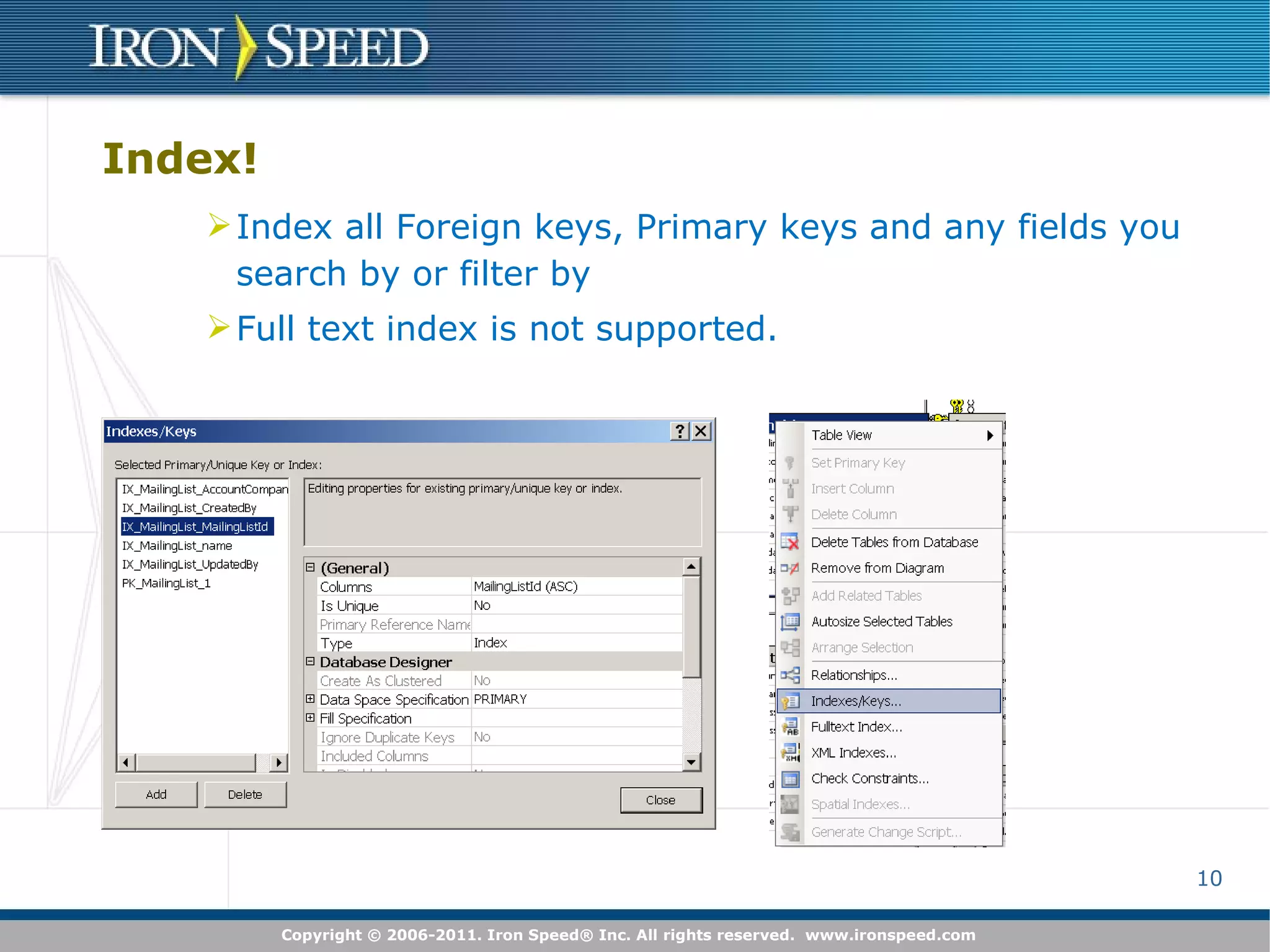
Index! Index all Foreign keys, Primary keys and any fields you search by or filter by Full text index is not supported.
Naming conventions Use meaningful names: they are used by Iron Speed Designer to create labels Use Camel Case! Iron Speed Designer can parse names based on capitalization:  ContactID -> Contact; UserName -> User Name File name: use Companion field to specify a file name for File upload. See Designer\ConfigurationOptions.xsl Singular and Plural: helps to create proper names for pages: CategoriesTable instead of CategoryTable
Fields Data Types Using correct data type helps Designer to generate proper controls If your string field is supposed to hold not more then 20 symbols limit its length to 20 (nvarchar(20)) If your field can have only two values, use bit type Use image type for images rather than binary Use money rather than decimal for currency
Create Database Views for Complex Queries Create Database views for Multi-table joins Complex queries: distinct, not, nested queries Create via Microsoft Enterprise Manager or similar tool Designer treats database views just like database tables Database view examples Current quarter sales (query filters based on time) Paid invoices (query filters based on status field) Iron Speed Designer is not a query construction tool !
Make Database Views Updatable if Possible Designer uses updatable database views to create Add Record page Edit Record page Edit Table pages Create updatable views in your database Cannot make an updatable view in Designer View must have primary key declared in database Update ‘flows’ through the view to underlying tables Iron Speed Designer is not a query construction tool !
Declare Primary Keys in your Database Primary keys are used to create Show Record pages Edit Record pages Edit Table pages Primary key relationship examples Orders.OrderID Shipper.ShipperID Not permitted to modify your database? Create a Virtual Primary Key in Iron Speed Designer
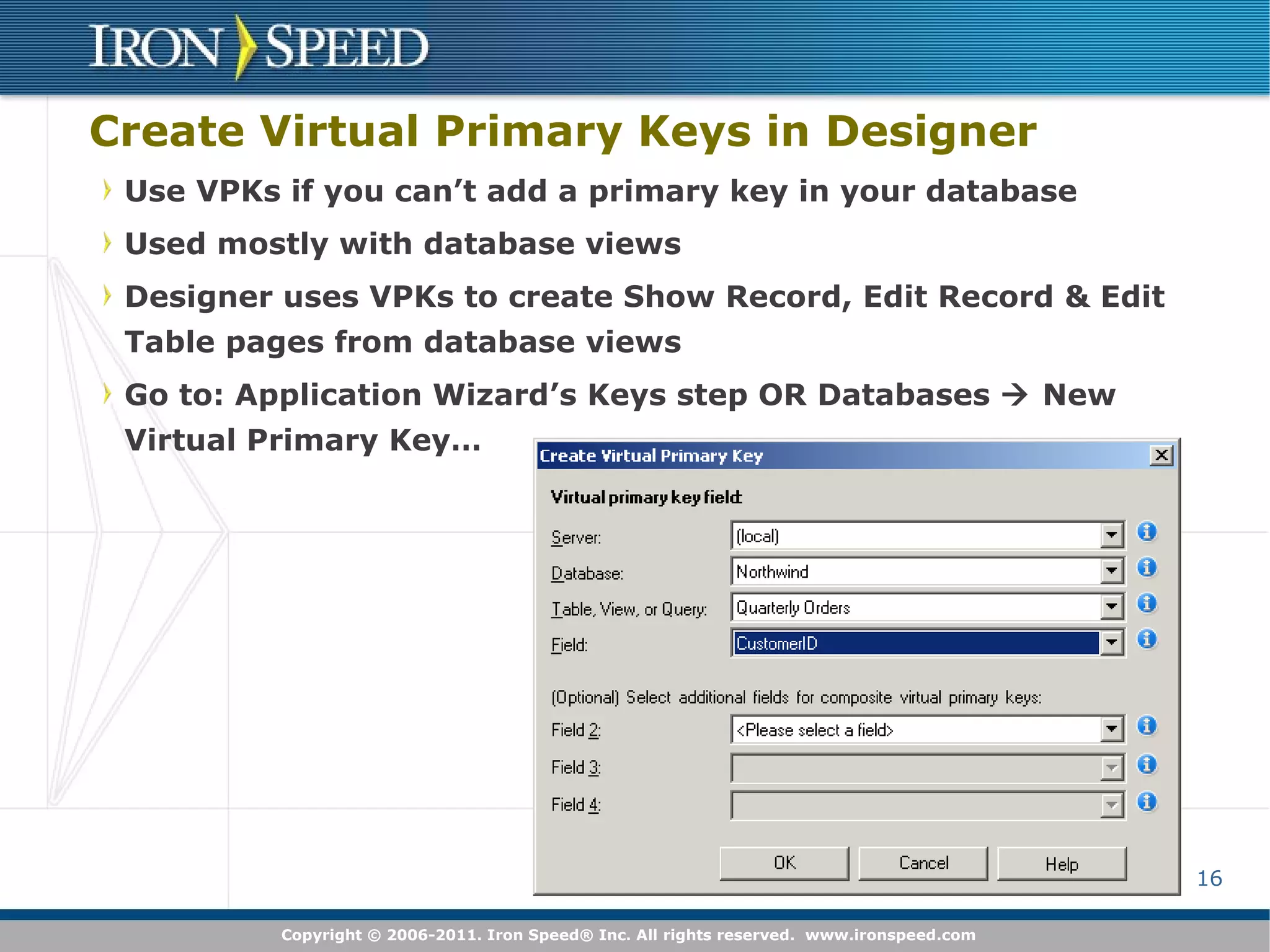
Create Virtual Primary Keys in Designer Use VPKs if you can’t add a primary key in your database Used mostly with database views Designer uses VPKs to create Show Record, Edit Record & Edit Table pages from database views Go to: Application Wizard’s Keys step OR Databases    New Virtual Primary Key…
Declare Foreign Keys in your Database Foreign keys are used to create Master-detail (parent-child) pages Every Designer-built page can be a master-detail page! Pages with data from multiple tables (multi-table joins) Display Foreign Key As Foreign key relationship examples OrderDetails.OrderID    Orders.OrderID  Orders.ShipperID    Shipper.ShipperID Not permitted to modify your database? Create a Virtual Foreign Key in Iron Speed Designer Throw me a frickin' bone here!  I'm the boss!  Need the info!  – Dr. Evil
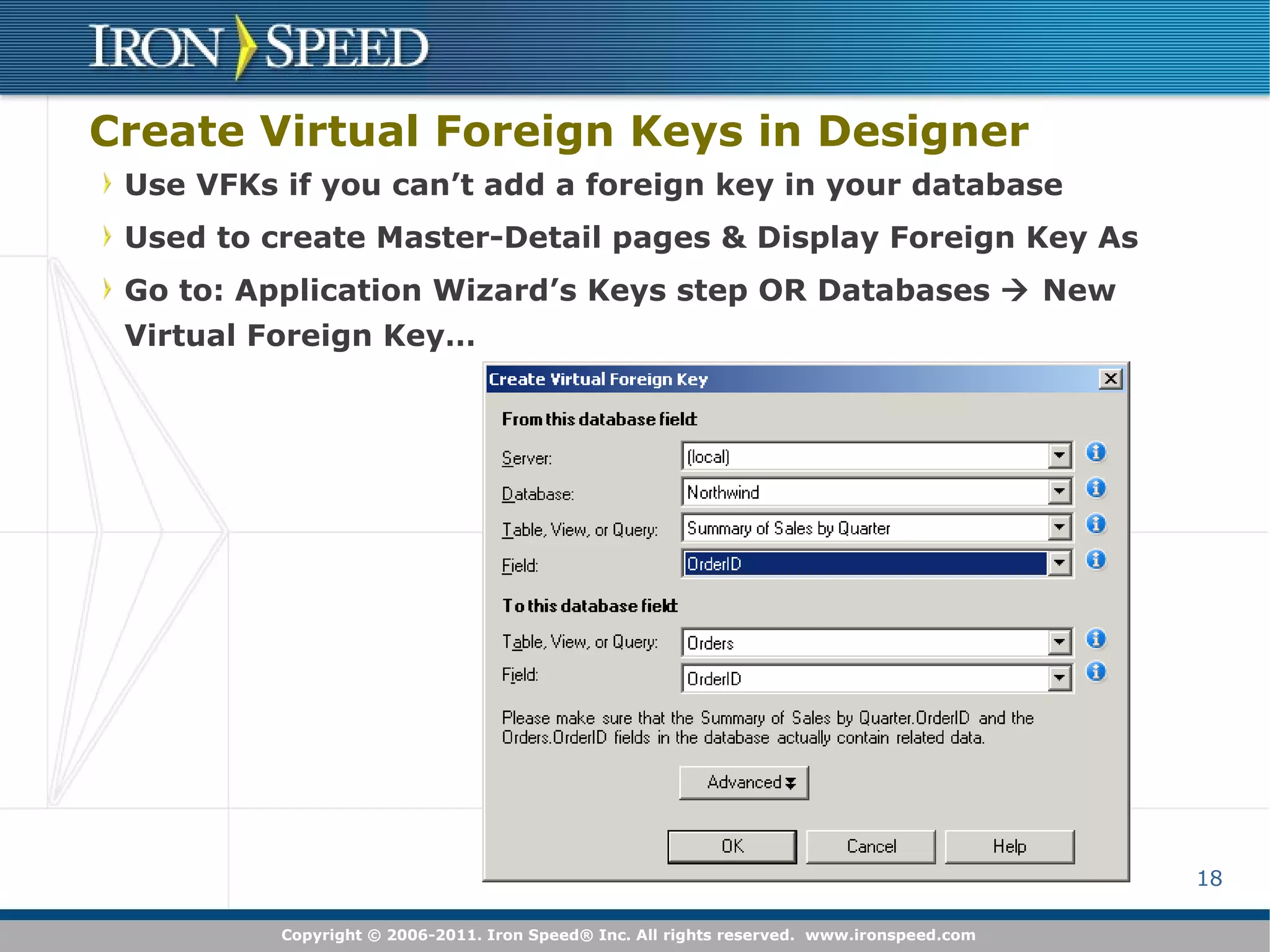
Create Virtual Foreign Keys in Designer Use VFKs if you can’t add a foreign key in your database Used to create Master-Detail pages & Display Foreign Key As Go to: Application Wizard’s Keys step OR Databases    New Virtual Foreign Key…
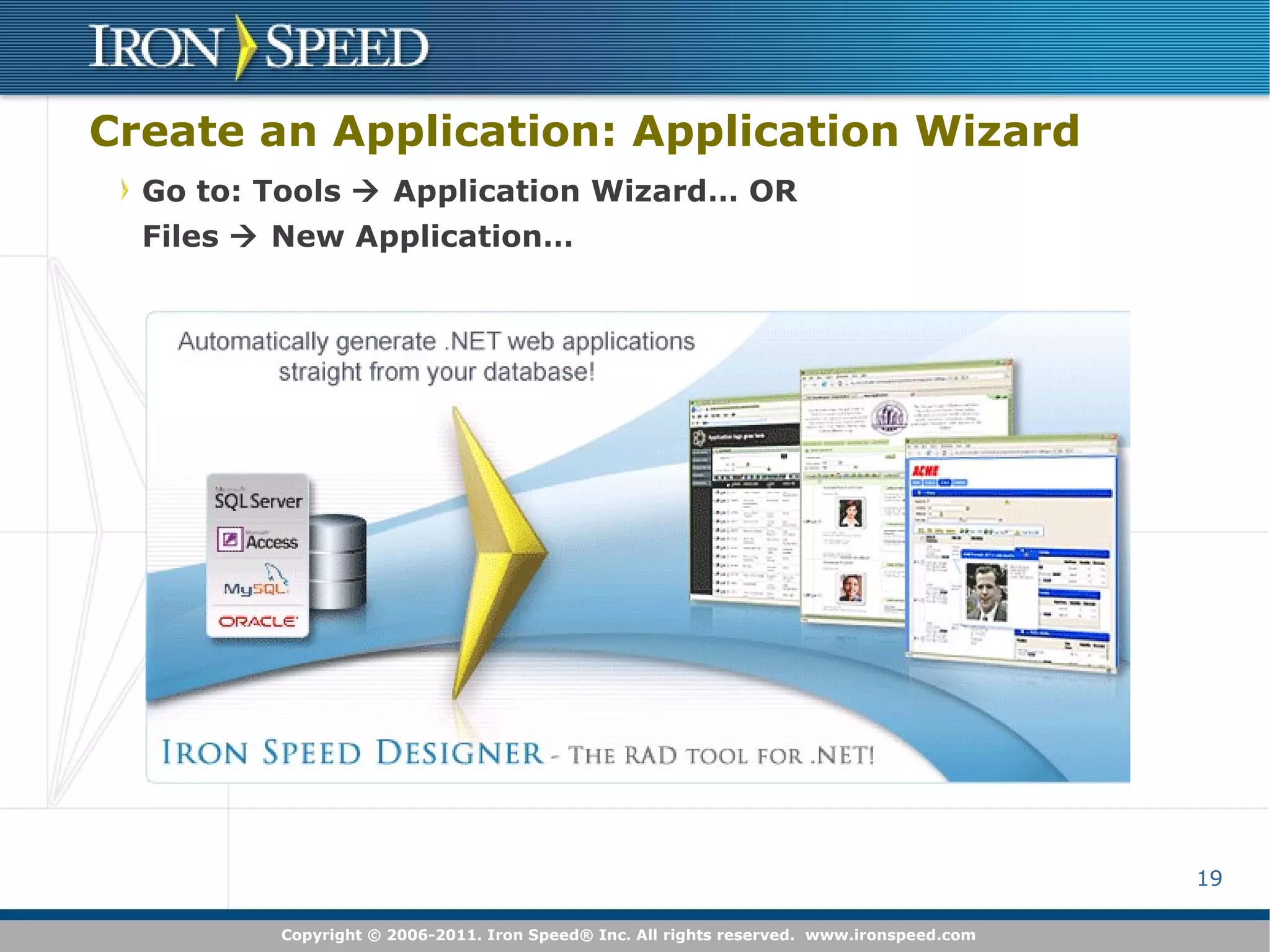
Create an Application: Application Wizard Go to: Tools    Application Wizard… OR Files    New Application…

Best Practices for Database Schema Design

  • 1.
    Best Practices forDatabase Schema Design Presenter: Kirill Dmitriev Try it free! www.ironnspeed.com/download
  • 2.
    Etiquette Ask questionsat any time via Question and Answer facility Moderator will queue them up and … … I will read aloud and answer so everyone can hear … in the order received This allows everyone to hear the question and is much faster We expect many questions during this webinar! Listening via computer (VOIP)? Turn up your computer’s volume! ... or put on a headset if you can’t hear … or dial in via landline telephone if you still can’t hear
  • 3.
    What is Coveredin this Course Best Practices for Database Schema Design How Schema Design Affects Application Generation by Iron Speed Designer How to Modify Schema in Database and in Iron Speed Designer
  • 4.
    What does IronSpeed Designer Do? ASPX pages C# and Visual Basic code-behind files Data access layer Stored procedures Iron Speed Designer builds Web applications… … straight from your database.
  • 5.
    To get mostof Iron Speed Designer prepare your database first! Iron Speed Designer uses database schema to create pages Pages layout and functionality are driven by schema Application performance depends on your schema Properly designed schema is easy extendable To create web application with Iron Speed Designer no knowledge of code, ASPX or other .NET concepts required but knowledge of database schemas, foreign keys, and SQL is helpful
  • 6.
    Prepare Your DatabaseThe better your database is structured… … the more Iron Speed Designer can do You’ll get more Web pages You’ll get more sophisticated master-detail Web pages It’s easier to extend your application It’s easier to maintain your data
  • 7.
    No repeating information:Use index tables Less fields in table – more efficient Normalize Schema
  • 8.
    Create Child Tablesfor 1-to-Many Relationships Child tables are used to create Master-detail (parent-child) pages Child table examples Orders.CustomerID  Customers.CustomerID (one customer may have many orders) OrderDetails.OrderID  Orders.OrderID (one order may have many line items) DBAs call this ‘normalizing your database’
  • 9.
    Create Separate LookupTables Lookup tables are used to create Dropdown lists for data entry Display Foreign Key As Lookup table examples Order.ShipperID  Shipper.ShipperID (choose order shipping method: FedEx, UPS, USPS) Displays “Shipped Via FedEx” (instead of “Shipped Via 3”)
  • 10.
    Index! Index allForeign keys, Primary keys and any fields you search by or filter by Full text index is not supported.
  • 11.
    Naming conventions Usemeaningful names: they are used by Iron Speed Designer to create labels Use Camel Case! Iron Speed Designer can parse names based on capitalization: ContactID -> Contact; UserName -> User Name File name: use Companion field to specify a file name for File upload. See Designer\ConfigurationOptions.xsl Singular and Plural: helps to create proper names for pages: CategoriesTable instead of CategoryTable
  • 12.
    Fields Data TypesUsing correct data type helps Designer to generate proper controls If your string field is supposed to hold not more then 20 symbols limit its length to 20 (nvarchar(20)) If your field can have only two values, use bit type Use image type for images rather than binary Use money rather than decimal for currency
  • 13.
    Create Database Viewsfor Complex Queries Create Database views for Multi-table joins Complex queries: distinct, not, nested queries Create via Microsoft Enterprise Manager or similar tool Designer treats database views just like database tables Database view examples Current quarter sales (query filters based on time) Paid invoices (query filters based on status field) Iron Speed Designer is not a query construction tool !
  • 14.
    Make Database ViewsUpdatable if Possible Designer uses updatable database views to create Add Record page Edit Record page Edit Table pages Create updatable views in your database Cannot make an updatable view in Designer View must have primary key declared in database Update ‘flows’ through the view to underlying tables Iron Speed Designer is not a query construction tool !
  • 15.
    Declare Primary Keysin your Database Primary keys are used to create Show Record pages Edit Record pages Edit Table pages Primary key relationship examples Orders.OrderID Shipper.ShipperID Not permitted to modify your database? Create a Virtual Primary Key in Iron Speed Designer
  • 16.
    Create Virtual PrimaryKeys in Designer Use VPKs if you can’t add a primary key in your database Used mostly with database views Designer uses VPKs to create Show Record, Edit Record & Edit Table pages from database views Go to: Application Wizard’s Keys step OR Databases  New Virtual Primary Key…
  • 17.
    Declare Foreign Keysin your Database Foreign keys are used to create Master-detail (parent-child) pages Every Designer-built page can be a master-detail page! Pages with data from multiple tables (multi-table joins) Display Foreign Key As Foreign key relationship examples OrderDetails.OrderID  Orders.OrderID Orders.ShipperID  Shipper.ShipperID Not permitted to modify your database? Create a Virtual Foreign Key in Iron Speed Designer Throw me a frickin' bone here!  I'm the boss!  Need the info! – Dr. Evil
  • 18.
    Create Virtual ForeignKeys in Designer Use VFKs if you can’t add a foreign key in your database Used to create Master-Detail pages & Display Foreign Key As Go to: Application Wizard’s Keys step OR Databases  New Virtual Foreign Key…
  • 19.
    Create an Application:Application Wizard Go to: Tools  Application Wizard… OR Files  New Application…