Put your company logo here
OHUG Global Conference
Las Vegas, NV
June 14 – 18, 2009
Benefits Auditing
• Highlight some of the challenges introduced by
Oracle Advanced Benefits
• Highlight the need and importance of
implementing auditing controls
• Highlight the audits and controls Dunkin’ Brands,
Inc. has implemented
• Demonstrate a custom tool developed by
Dunkin’ Brands, Inc.
Objectives
• Sean Fielding sean.fielding@dunkinbrands.com
o IT Manager, Business Process Integration Services
• Mike Metcalf
michael.s.metcalf@gmail.com
o Senior HRIS Analyst
• Karen Baggett
karen.baggett@dunkinbrands.com
o Senior HRIS Analyst
Presenters
Dunkin’ Brands, Inc.
Environment
• Oracle 11.5.10.2 (Implemented Nov-2007)
o Human Resources
o Employee Self-Service
o Manager Self-Service
o Advanced Benefits
o iRecruitement
o Talent Management
o Compensation Workbench
o Time and Labor
o iLearning
o Discoverer 4i
• ADP Enterprise (Implemented Nov-2007)
o ADP Connection
Initial Challenges
New to HRMS Suite of
Oracle Applications
Implemented “Big Bang”
Tightly Integrated
Applications
Heavily reliant on
implementation partners
Controls not in place
Typical Benefits Process
Life Without Auditing
• Billing Statements
• Employees identified issues
Paycheck
Discrepancies
Denial of Coverage
• Impact not evaluated
Audit Categories
Adjustments
Configurations
LifeEvents
Vendors
Backfeed
Deductions
“that’s a lotta fish to fry”
Configuration Auditing
• Validate Benefit plans and rates are inline with
business requirements
o Detailed test plans
o Yearly review of configuration
Configurations
Life Event Auditing
• Validate Life Events
 Validate Collapsing Rules
 Review Backed out Life Events
 Audit Custom processes
• Validate Participation Process
 Review errors
 Review results
• Examples
 Backed out Life Events during Open
Enrollment period
LifeEvents
VendorAuditing
• Validate outbound data accuracy
o Periodic review of interfaces
• Validate inbound data accuracy
o checksums
o Hash totals
o Periodic report comparisons
• Validate Billing Statements
• Validate Interface errors
o Error handling procedures
Vendors
Backfeed Auditing
• Compare backfeed inbound file against standard ADP
reports
• Compare 3rd
Party Payroll Tables tie against Payroll
results
o Use checksums and totals on interface files
• Validate and resolve process errors
Backfeed
Deduction/Earning Auditing
• Validate elections are accurately reflected in
employee paychecks
• Validate fast formulas are processing correctly
• ADP Connection issues
Dedu ctio
ns
Adjustment Auditing
• Validate financial controls
o Perform a period review of the adjustments and
supporting controls
• SOX compliance
• Traceability
Ad
just
m
ents
Why a Tool?
• Catch all
• Become proactive
• SOX Compliance/Financial Controls
• Transparency
• Usability
• Increase paycheck accuracy
• Decrease Employee Issues
Solution
Developed a custom Benefits Audit
Workbench (BAW) tool.
• Initial focus on deduction/earnings
o Based on a initial review of our exposure, this area
was deemed the most problematic.
• Provide Benefits with decision making data
o Benefit resources spend their time researching
issues rather than gathering information.
Benefits of Tool
• Q2 2008
o Project initiated for analysis of the deduction/earnings
o Individual reporting implemented
• Q2 2009
o BAW1.0 Introduced
o Identified a number of issues including
 Bugs in the delivered Oracle ADP Views which required
patches to be applied
 Rate calculation issues
 Bugs in Fast Formulas
 Bug in the rounding of the first deduction
 Mid-year FSA elections
• In the Pipeline
o BAW2.0
 Enhanced look and feel, improved usability
 Additional functionality for traceability and compliance around
adjustments
Benefits Audit Workbench
• Concurrent program scheduled on a weekly
basis
o Produces a benefits snapshot by employee and
payroll period dimensions.
• Self-Service Web Page
o Provides a user workbench for reviewing and
addressing issues.
Initial Rules
• Flexible Spending Account Trending
• Deduction Trending
• Missing Initial Payment
FSA Trending Rule
• Identifies employee FSA deductions that are trending
towards a total payroll contribution amount that is
different from the employee’s coverage amount.
These are identified by the following calculation:
• Trending = Benefit Coverage Amount – (Actual YTD
Payroll Deductions + Scheduled Payroll Deductions)
• Common Causes
o Mid Year elections
o Fast Formulas incorrectly calculates the deduction schedule
Deduction Trending Rule
• Identifies employee deductions where the actual
payroll contribution amount does not equal the
expected payroll contribution amount for the year.
These are identified by the following calculation:
• Trending = Actual YTD Payroll Deductions - Expected
YTD Payroll Deductions
• Common Causes
o Fast Formula rounding issues
o ADP View Date issues
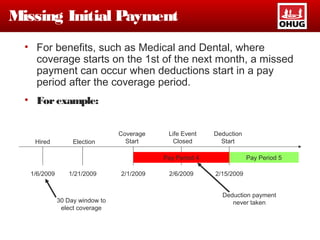
Missing Initial Payment
• For benefits, such as Medical and Dental, where
coverage starts on the 1st of the next month, a missed
payment can occur when deductions start in a pay
period after the coverage period.
• Forexample:
Hired
1/6/2009
Election
1/21/2009
Coverage
Start
2/1/2009
30 Day window to
elect coverage
Life Event
Closed
2/6/2009
Deduction
Start
2/15/2009
Pay Period 4 Pay Period 5
Deduction payment
never taken
Demonstration
• Core Functionality
• Deduction Trending Example
• FSA Trending Example
• Missing Payment Example
• Adjustments Example
Questions

Benefits Auditing

  • 1.
    Put your companylogo here OHUG Global Conference Las Vegas, NV June 14 – 18, 2009 Benefits Auditing
  • 2.
    • Highlight someof the challenges introduced by Oracle Advanced Benefits • Highlight the need and importance of implementing auditing controls • Highlight the audits and controls Dunkin’ Brands, Inc. has implemented • Demonstrate a custom tool developed by Dunkin’ Brands, Inc. Objectives
  • 3.
    • Sean Fieldingsean.fielding@dunkinbrands.com o IT Manager, Business Process Integration Services • Mike Metcalf michael.s.metcalf@gmail.com o Senior HRIS Analyst • Karen Baggett karen.baggett@dunkinbrands.com o Senior HRIS Analyst Presenters
  • 4.
  • 5.
    Environment • Oracle 11.5.10.2(Implemented Nov-2007) o Human Resources o Employee Self-Service o Manager Self-Service o Advanced Benefits o iRecruitement o Talent Management o Compensation Workbench o Time and Labor o iLearning o Discoverer 4i • ADP Enterprise (Implemented Nov-2007) o ADP Connection
  • 6.
    Initial Challenges New toHRMS Suite of Oracle Applications Implemented “Big Bang” Tightly Integrated Applications Heavily reliant on implementation partners Controls not in place
  • 7.
  • 8.
    Life Without Auditing •Billing Statements • Employees identified issues Paycheck Discrepancies Denial of Coverage • Impact not evaluated
  • 9.
  • 10.
    Configuration Auditing • ValidateBenefit plans and rates are inline with business requirements o Detailed test plans o Yearly review of configuration Configurations
  • 11.
    Life Event Auditing •Validate Life Events  Validate Collapsing Rules  Review Backed out Life Events  Audit Custom processes • Validate Participation Process  Review errors  Review results • Examples  Backed out Life Events during Open Enrollment period LifeEvents
  • 12.
    VendorAuditing • Validate outbounddata accuracy o Periodic review of interfaces • Validate inbound data accuracy o checksums o Hash totals o Periodic report comparisons • Validate Billing Statements • Validate Interface errors o Error handling procedures Vendors
  • 13.
    Backfeed Auditing • Comparebackfeed inbound file against standard ADP reports • Compare 3rd Party Payroll Tables tie against Payroll results o Use checksums and totals on interface files • Validate and resolve process errors Backfeed
  • 14.
    Deduction/Earning Auditing • Validateelections are accurately reflected in employee paychecks • Validate fast formulas are processing correctly • ADP Connection issues Dedu ctio ns
  • 15.
    Adjustment Auditing • Validatefinancial controls o Perform a period review of the adjustments and supporting controls • SOX compliance • Traceability Ad just m ents
  • 16.
    Why a Tool? •Catch all • Become proactive • SOX Compliance/Financial Controls • Transparency • Usability • Increase paycheck accuracy • Decrease Employee Issues
  • 17.
    Solution Developed a customBenefits Audit Workbench (BAW) tool. • Initial focus on deduction/earnings o Based on a initial review of our exposure, this area was deemed the most problematic. • Provide Benefits with decision making data o Benefit resources spend their time researching issues rather than gathering information.
  • 18.
    Benefits of Tool •Q2 2008 o Project initiated for analysis of the deduction/earnings o Individual reporting implemented • Q2 2009 o BAW1.0 Introduced o Identified a number of issues including  Bugs in the delivered Oracle ADP Views which required patches to be applied  Rate calculation issues  Bugs in Fast Formulas  Bug in the rounding of the first deduction  Mid-year FSA elections • In the Pipeline o BAW2.0  Enhanced look and feel, improved usability  Additional functionality for traceability and compliance around adjustments
  • 19.
    Benefits Audit Workbench •Concurrent program scheduled on a weekly basis o Produces a benefits snapshot by employee and payroll period dimensions. • Self-Service Web Page o Provides a user workbench for reviewing and addressing issues.
  • 20.
    Initial Rules • FlexibleSpending Account Trending • Deduction Trending • Missing Initial Payment
  • 21.
    FSA Trending Rule •Identifies employee FSA deductions that are trending towards a total payroll contribution amount that is different from the employee’s coverage amount. These are identified by the following calculation: • Trending = Benefit Coverage Amount – (Actual YTD Payroll Deductions + Scheduled Payroll Deductions) • Common Causes o Mid Year elections o Fast Formulas incorrectly calculates the deduction schedule
  • 22.
    Deduction Trending Rule •Identifies employee deductions where the actual payroll contribution amount does not equal the expected payroll contribution amount for the year. These are identified by the following calculation: • Trending = Actual YTD Payroll Deductions - Expected YTD Payroll Deductions • Common Causes o Fast Formula rounding issues o ADP View Date issues
  • 23.
    Missing Initial Payment •For benefits, such as Medical and Dental, where coverage starts on the 1st of the next month, a missed payment can occur when deductions start in a pay period after the coverage period. • Forexample: Hired 1/6/2009 Election 1/21/2009 Coverage Start 2/1/2009 30 Day window to elect coverage Life Event Closed 2/6/2009 Deduction Start 2/15/2009 Pay Period 4 Pay Period 5 Deduction payment never taken
  • 24.
    Demonstration • Core Functionality •Deduction Trending Example • FSA Trending Example • Missing Payment Example • Adjustments Example
  • 25.

Editor's Notes

  • #4 Oracle for 16 years HR for 6 years At Dunkin’ Brands for 1 year Mike/Karen not able to join See Mike at the Acquire booth
  • #5 Oracle for 16 years HR for 6 years At Dunkin’ Brands for 1 year Mike/Karen not able to join See Mike at the Acquire booth
  • #7 Prior to Oracle implementation, the HR, Benefits, and Payroll functions were handled through loosely integrated applications. Departments were able to effect changes with little to no impact on other departments. HR, Benefits, and Payroll applications were tightly integrated for this first time. Integration provide many benefits (including streamlining our process), but also required the average user to understand their processes and the impact on down stream processes. Oracle Advanced Benefits provides some great functionality, but also introduces some complexity to the process. Oracle is a built based on functionality, not on usability. This can hide issues from end users. New to supporting Oracle and understanding the potential impact of decisions made during go live. Implemented Big Bang – overwhelmed the user base with new procedures, processes, etc. Engaged consulting/no resources – we were able to implement quickly, but at the cost of loosing a lot of the implementation knowledge No control because no real ownership of the implementation
  • #8 Take a look at a typical benefits process…
  • #9 Unfortunately, primary source for identifying issues was the employees with bad paychecks. If not identified, these issues would pile up and results in large discrepencies that needed to be resolved over several pay periods. Billing statements – review of Billing Statements help to identify issues – However, problems in the interface files can mask the problems. Built individual discoverer reports as need to uncover little problems
  • #14 Validate files are loaded properly and have not been manipulated
  • #15 Fast Formula Start date logic (i.e. first of the next month) and the amounts make sense for that start date Rounding logic Modifications to elections process correctly. ADP Views not passing over the correct amounts, no amount, etc.
  • #17 Focus benefit resources on resolving issues rather than gathering data Typical oracle – built for functionality rather than usability – ability to display data in a pay period matrix Transparency – ability to see all transactions and their impact
  • #18 Provide data in a format that is easily reviewed – spend their time researching issues and less time attempting to find the issues.
  • #20 The concurrent process identifies all currently active employees that have has a deduction/earning within the current year. A snapshot of the data is taken with a dimension of payroll period end date. Rules are applied to the data, and any issues is reported out to the Benefits team via the BAW.