HOME
DONATE
PHOTOS
CONTACTS
EVENTS
SOFTWARE
  The software that has been used to produce the
     new modified Ben Kende website is called
     iWeb.
  It can be downloaded here for macs:
  http://download.cnet.com/Apple-iWeb/3000-
      10248_4-87377.html


  iWeb has given me access to the Ben Kende
     Website, which means I can now edit the
     website in order to make it more advanced.
  I can now edit the website under each
      subheading, and add more things to it.


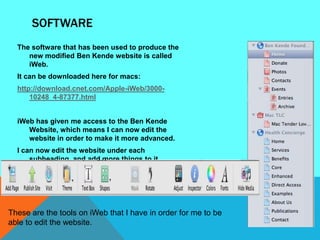
These are the tools on iWeb that I have in order for me to be
able to edit the website.
THEME
On the software iWeb, there were many choices of themes that you could
   choose for the background. The current theme is just plain white so I
   was thinking of using a different theme to add more colour to the
   website. I have chosen with two themes to choose from:


        Fine Line                               Layered Paper
CHOSEN THEME
      I chose to use the Fine Line theme as the layout for the website because it
          is more eye catching, and suits this particular website.


The way that
each link to
each page is                                                          I like how at the
placed in a                                                           top there is a
clear way for                                                         wide space in a
the user.                                                             colored text
                                                                      box.

  A lot of
  space for
  pictures.
                                                                          A variety of
                                                                          colours.
HOME PAGE
                                    The logo is
                                    shown at the
At first, the homepage
                                    top.
    contained a description
    about Ben Kende and his
    injury. However I have
    edited this page slightly and
    changed it into a page with
    just pictures of Ben and
    welcome words saying
    “Welcome to the Ben Kende
    Website!”


I think this is quite effective
     because it is eye catching
     as the front page shows
     pictures of Ben and him
     playing the sport he loved –
     Rugby.
ABOUT BEN PAGE
For this page, I had added a new
   one and pasted the story
   about Ben, and his
   Background information.


I had added a slight bit amount
    of text regarding when the
    accident actually took
    place, and where to look at
    the design of the Ben Kende
    T-shirts.
DONATION PAGE

 This is the donation page that I
 have modified. I think that it was
 quite difficult to edit because
 there was something wrong with
 the text box tool.


To change the look a little bit, I
added red colour to the
important note.
PHOTOS PAGE
    For this page, I just had to add more photos and edit the titles of each photo as
       there were only a few pictures from some of the Ben Kende events.


I had a choice to the amount of pictures that were to be put on to the page. I had
    around 70 pictures, and I chose the selection of having 75 pictures on one
    page, therefore having all the pictures on one page.
I had also fixed the subheadings for each pictures, but I made them very simple.
VIDEO PAGE
I added an extra page to the Ben
    Kende Website called „Video‟s‟. It
    consists of two videos:
-   One made by Isabella Kende
    (Ben‟s Younger sister) about his
    situation
-   The second one is an interview
    with Ben Kende about his
    situation


I am not too sure that the video‟s
will work as when it‟s displayed on
the website in progress it doesn‟t
display up. Therefore when I publish
the site, I will check if it works.
If it results in not working, I will
cancel These are the video‟s
         the video‟s.
           embedded, and it
           displays like this while
           the website is under
           construction:
CONTACTS PAGE
For the contacts page, I left
   the text the same but I
   just added more
   pictures to make it more
   appealing.
EVENTS PAGE
 For this page, there are
    many events therefore I
    didn‟t edit the main
    events page but each
    individual one.


This is the main page
for the events, and
within these links there
are more details of
events and pictures.
EVENTS PAGE
   Here‟s an example of one of the
      event pages in depth:


This is one of the events that
   have happened „Silent
   Auction‟. This is what it looks
   like when you click on the
   link from the main e vent
   page.

Before and after website

  • 3.
  • 4.
  • 5.
  • 6.
  • 7.
  • 9.
    SOFTWARE Thesoftware that has been used to produce the new modified Ben Kende website is called iWeb. It can be downloaded here for macs: http://download.cnet.com/Apple-iWeb/3000- 10248_4-87377.html iWeb has given me access to the Ben Kende Website, which means I can now edit the website in order to make it more advanced. I can now edit the website under each subheading, and add more things to it. These are the tools on iWeb that I have in order for me to be able to edit the website.
  • 10.
    THEME On the softwareiWeb, there were many choices of themes that you could choose for the background. The current theme is just plain white so I was thinking of using a different theme to add more colour to the website. I have chosen with two themes to choose from: Fine Line Layered Paper
  • 11.
    CHOSEN THEME I chose to use the Fine Line theme as the layout for the website because it is more eye catching, and suits this particular website. The way that each link to each page is I like how at the placed in a top there is a clear way for wide space in a the user. colored text box. A lot of space for pictures. A variety of colours.
  • 12.
    HOME PAGE The logo is shown at the At first, the homepage top. contained a description about Ben Kende and his injury. However I have edited this page slightly and changed it into a page with just pictures of Ben and welcome words saying “Welcome to the Ben Kende Website!” I think this is quite effective because it is eye catching as the front page shows pictures of Ben and him playing the sport he loved – Rugby.
  • 13.
    ABOUT BEN PAGE Forthis page, I had added a new one and pasted the story about Ben, and his Background information. I had added a slight bit amount of text regarding when the accident actually took place, and where to look at the design of the Ben Kende T-shirts.
  • 14.
    DONATION PAGE Thisis the donation page that I have modified. I think that it was quite difficult to edit because there was something wrong with the text box tool. To change the look a little bit, I added red colour to the important note.
  • 15.
    PHOTOS PAGE For this page, I just had to add more photos and edit the titles of each photo as there were only a few pictures from some of the Ben Kende events. I had a choice to the amount of pictures that were to be put on to the page. I had around 70 pictures, and I chose the selection of having 75 pictures on one page, therefore having all the pictures on one page. I had also fixed the subheadings for each pictures, but I made them very simple.
  • 16.
    VIDEO PAGE I addedan extra page to the Ben Kende Website called „Video‟s‟. It consists of two videos: - One made by Isabella Kende (Ben‟s Younger sister) about his situation - The second one is an interview with Ben Kende about his situation I am not too sure that the video‟s will work as when it‟s displayed on the website in progress it doesn‟t display up. Therefore when I publish the site, I will check if it works. If it results in not working, I will cancel These are the video‟s the video‟s. embedded, and it displays like this while the website is under construction:
  • 17.
    CONTACTS PAGE For thecontacts page, I left the text the same but I just added more pictures to make it more appealing.
  • 18.
    EVENTS PAGE Forthis page, there are many events therefore I didn‟t edit the main events page but each individual one. This is the main page for the events, and within these links there are more details of events and pictures.
  • 19.
    EVENTS PAGE Here‟s an example of one of the event pages in depth: This is one of the events that have happened „Silent Auction‟. This is what it looks like when you click on the link from the main e vent page.