Internet Technologies- JavaBeans 
Java Beans
Internet Technologies- JavaBeans 
Tuesday, November 18, 2014 
2 
Components 
• Hardware components of Integrated 
Circuits – Resistors, Capacitors and 
Inductors 
• All of these components can be reused in 
different type of circuits 
• Software components – buttons, 
textboxes, checkboxes, radio buttons 
• The above mentioned components can be 
used in the following applications: 
– Calculator 
– Railway reservation system 
– Online polling system etc.,
Internet Technologies- JavaBeans 
Tuesday, November 18, 2014 
3 
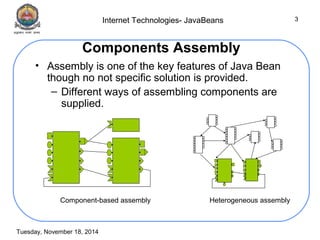
Components Assembly 
• Assembly is one of the key features of Java Bean 
though no not specific solution is provided. 
– Different ways of assembling components are 
supplied. 
Component-based assembly Heterogeneous assembly
Internet Technologies- JavaBeans 
Tuesday, November 18, 2014 
4 
What are beans? 
• Reusable Java code 
• Easiest to reuse is static objects; 
– Ex: Text fields, buttons 
– Available as third-party products 
– Limited interaction with environment 
– The functionality does not change 
• Can be composed into complex beans 
• Drag-and-drop using application 
construction tools
Internet Technologies- JavaBeans 
Tuesday, November 18, 2014 
5 
What is a Java Bean? 
• A component technology for Java that 
allows a developer to create reusable 
software objects. 
• A Java Bean is a reusable software 
component that can be visually 
manipulated in builder tools( during the 
software development). 
• A Java Bean is a software component that 
has been designed to be reusable in a 
variety of different environments.
Internet Technologies- JavaBeans 
Tuesday, November 18, 2014 
6 
Advantages of Java Beans 
• Obtains all the benefits of Java (write-once, run-anywhere) 
• The properties, events and methods of a bean 
that are exposed to an application builder tool can 
be controlled 
• A Bean may be designed to operate correctly in 
different locales 
• Auxiliary software can be provided to help a 
person configure a Bean 
• The configuration settings of a Bean can be saved 
in persistent storage and restored at a later time 
• A Bean may register to receive events from other 
objects and can generate events that are sent to 
other objects
Internet Technologies- JavaBeans 
Tuesday, November 18, 2014 
7 
Application Builder Tools 
• A utility that enables the user to configure 
a set of Beans, connect them together, 
and produce a working application 
– A palette is provided that lists all of the 
available Beans 
– A worksheet is displayed that allows the 
designer to lay out Beans in a GUI. A designer 
may drag and drop a Bean from the palette to 
this worksheet 
– Special editors and customizers allow a Bean 
to be configured 
– Commands allow a designer to inquire about 
the state and behavior of a Bean 
– Capabilities exist to interconnect beans
Internet Technologies- JavaBeans 
Tuesday, November 18, 2014 
8 
Design Patterns for Properties 
A property is a subset of a Bean’s state 
• Simple properties 
• Boolean properties 
• Indexed properties
Internet Technologies- JavaBeans 
Tuesday, November 18, 2014 
9 
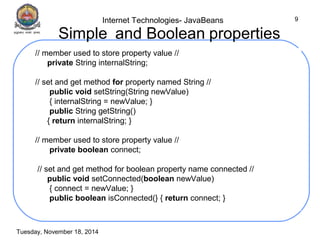
Simple and Boolean properties 
// member used to store property value // 
private String internalString; 
// set and get method for property named String // 
public void setString(String newValue) 
{ internalString = newValue; } 
public String getString() 
{ return internalString; } 
// member used to store property value // 
private boolean connect; 
// set and get method for boolean property name connected // 
public void setConnected(boolean newValue) 
{ connect = newValue; } 
public boolean isConnected(} { return connect; }
Internet Technologies- JavaBeans 
Tuesday, November 18, 2014 
10 
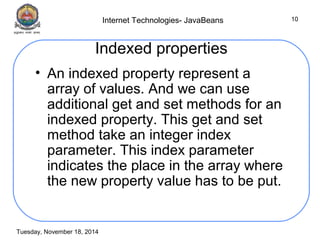
Indexed properties 
• An indexed property represent a 
array of values. And we can use 
additional get and set methods for an 
indexed property. This get and set 
method take an integer index 
parameter. This index parameter 
indicates the place in the array where 
the new property value has to be put.
Internet Technologies- JavaBeans 
Tuesday, November 18, 2014 
11 
Indexed properties 
// member to store indexed property // 
private int[] numbers = {1, 2, 3, 4}; 
// set and get method for complete array // 
public void setNumbers(int[] newValue) 
{ 
numbers = newValue; 
} 
public int[] getNumbers() 
{ 
return numbers; 
}
Internet Technologies- JavaBeans 
Indexed properties 
Tuesday, November 18, 2014 
12 
// set and get method with index to set one element 
of array // 
public void setNumbers(int index, int newValue) 
{ 
numbers[index] = newValue; 
} 
public int getNumbers(int index) 
{ 
return numbers[index]; 
}
Internet Technologies- JavaBeans 
Tuesday, November 18, 2014 
13 
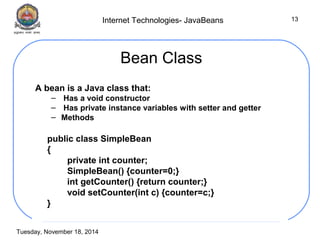
Bean Class 
A bean is a Java class that: 
– Has a void constructor 
– Has private instance variables with setter and getter 
– Methods 
public class SimpleBean 
{ 
private int counter; 
SimpleBean() {counter=0;} 
int getCounter() {return counter;} 
void setCounter(int c) {counter=c;} 
}
Internet Technologies- JavaBeans 
Tuesday, November 18, 2014 
14
Internet Technologies- JavaBeans 
Tuesday, November 18, 2014 
15 
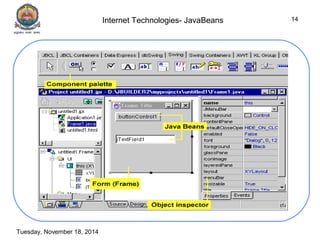
Steps involved in Creating a Java Bean 
a. Write the SimpleBean code. 
b. Create a manifest, the JAR file, and the class 
file SimpleBean.class. 
c. Load the JAR file (using NetBeans) 
– Start NetBeans. 
– From the File menu select "New Project" to create a new 
application for your bean. You can use "Open Project" to 
add your bean to an existing application. 
– Create a new application using the New Project Wizard. 
– Select a newly created project in the List of Projects, 
expand the Source Packages node, and select the 
Default Package element. 
– Click the right mouse button and select New|JFrameForm 
from the pop-up menu. 
– Select the newly created Form node in the Project Tree. 
A blank form opens in the GUI Builder view of an Editor 
tab.
Internet Technologies- JavaBeans 
Tuesday, November 18, 2014 
16 
Steps involved in Creating a Java Bean 
continued 
– Open the Palette Manager for Swing/AWT 
components by selecting Palette Manager in the Tools 
menu. 
– In the Palette Manager window select the beans 
components in the Palette tree and press the "Add 
from JAR" button. 
– Specify a location for your SimpleBean JAR file and 
follow the Add from JAR Wizard instructions. 
– Select the Palette and Properties options from the 
Windows menu. 
– Expand the beans group in the Palette window. The 
SimpleBean object appears. Drag the SimpleBean 
object to the GUI Builder panel. 
d. Inspect Properties and Events
Internet Technologies- JavaBeans 
Tuesday, November 18, 2014 
17 
JAR Files 
– A JAR file allows to efficiently deploy a 
set of classes and their associated 
resources 
– Elements in a JAR file are compressed 
– Digital signatures may also be 
associated with the individual elements 
in a JAR file
Internet Technologies- JavaBeans 
Tuesday, November 18, 2014 
18 
Manifest Files 
– To indicate which of the components in a JAR 
file are Java Beans 
– Example 
• d:/demo/one.gif 
• d:/demo/two.gif 
• d:/demo/three.gif 
• d:/demo/one.class 
Java- Bean:True 
– A manifest file may reference several .class 
files. If a .class file is a Java Bean, its entry 
must be immediately followed by the line 
“Java- Bean:True”.
Internet Technologies- JavaBeans 
Tuesday, November 18, 2014 
19 
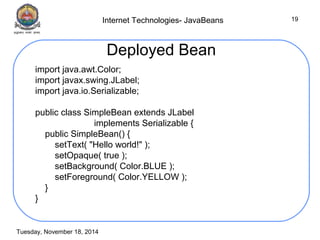
Deployed Bean 
import java.awt.Color; 
import javax.swing.JLabel; 
import java.io.Serializable; 
public class SimpleBean extends JLabel 
implements Serializable { 
public SimpleBean() { 
setText( "Hello world!" ); 
setOpaque( true ); 
setBackground( Color.BLUE ); 
setForeground( Color.YELLOW ); 
} 
}

Beans presentation

  • 1.
  • 2.
    Internet Technologies- JavaBeans Tuesday, November 18, 2014 2 Components • Hardware components of Integrated Circuits – Resistors, Capacitors and Inductors • All of these components can be reused in different type of circuits • Software components – buttons, textboxes, checkboxes, radio buttons • The above mentioned components can be used in the following applications: – Calculator – Railway reservation system – Online polling system etc.,
  • 3.
    Internet Technologies- JavaBeans Tuesday, November 18, 2014 3 Components Assembly • Assembly is one of the key features of Java Bean though no not specific solution is provided. – Different ways of assembling components are supplied. Component-based assembly Heterogeneous assembly
  • 4.
    Internet Technologies- JavaBeans Tuesday, November 18, 2014 4 What are beans? • Reusable Java code • Easiest to reuse is static objects; – Ex: Text fields, buttons – Available as third-party products – Limited interaction with environment – The functionality does not change • Can be composed into complex beans • Drag-and-drop using application construction tools
  • 5.
    Internet Technologies- JavaBeans Tuesday, November 18, 2014 5 What is a Java Bean? • A component technology for Java that allows a developer to create reusable software objects. • A Java Bean is a reusable software component that can be visually manipulated in builder tools( during the software development). • A Java Bean is a software component that has been designed to be reusable in a variety of different environments.
  • 6.
    Internet Technologies- JavaBeans Tuesday, November 18, 2014 6 Advantages of Java Beans • Obtains all the benefits of Java (write-once, run-anywhere) • The properties, events and methods of a bean that are exposed to an application builder tool can be controlled • A Bean may be designed to operate correctly in different locales • Auxiliary software can be provided to help a person configure a Bean • The configuration settings of a Bean can be saved in persistent storage and restored at a later time • A Bean may register to receive events from other objects and can generate events that are sent to other objects
  • 7.
    Internet Technologies- JavaBeans Tuesday, November 18, 2014 7 Application Builder Tools • A utility that enables the user to configure a set of Beans, connect them together, and produce a working application – A palette is provided that lists all of the available Beans – A worksheet is displayed that allows the designer to lay out Beans in a GUI. A designer may drag and drop a Bean from the palette to this worksheet – Special editors and customizers allow a Bean to be configured – Commands allow a designer to inquire about the state and behavior of a Bean – Capabilities exist to interconnect beans
  • 8.
    Internet Technologies- JavaBeans Tuesday, November 18, 2014 8 Design Patterns for Properties A property is a subset of a Bean’s state • Simple properties • Boolean properties • Indexed properties
  • 9.
    Internet Technologies- JavaBeans Tuesday, November 18, 2014 9 Simple and Boolean properties // member used to store property value // private String internalString; // set and get method for property named String // public void setString(String newValue) { internalString = newValue; } public String getString() { return internalString; } // member used to store property value // private boolean connect; // set and get method for boolean property name connected // public void setConnected(boolean newValue) { connect = newValue; } public boolean isConnected(} { return connect; }
  • 10.
    Internet Technologies- JavaBeans Tuesday, November 18, 2014 10 Indexed properties • An indexed property represent a array of values. And we can use additional get and set methods for an indexed property. This get and set method take an integer index parameter. This index parameter indicates the place in the array where the new property value has to be put.
  • 11.
    Internet Technologies- JavaBeans Tuesday, November 18, 2014 11 Indexed properties // member to store indexed property // private int[] numbers = {1, 2, 3, 4}; // set and get method for complete array // public void setNumbers(int[] newValue) { numbers = newValue; } public int[] getNumbers() { return numbers; }
  • 12.
    Internet Technologies- JavaBeans Indexed properties Tuesday, November 18, 2014 12 // set and get method with index to set one element of array // public void setNumbers(int index, int newValue) { numbers[index] = newValue; } public int getNumbers(int index) { return numbers[index]; }
  • 13.
    Internet Technologies- JavaBeans Tuesday, November 18, 2014 13 Bean Class A bean is a Java class that: – Has a void constructor – Has private instance variables with setter and getter – Methods public class SimpleBean { private int counter; SimpleBean() {counter=0;} int getCounter() {return counter;} void setCounter(int c) {counter=c;} }
  • 14.
    Internet Technologies- JavaBeans Tuesday, November 18, 2014 14
  • 15.
    Internet Technologies- JavaBeans Tuesday, November 18, 2014 15 Steps involved in Creating a Java Bean a. Write the SimpleBean code. b. Create a manifest, the JAR file, and the class file SimpleBean.class. c. Load the JAR file (using NetBeans) – Start NetBeans. – From the File menu select "New Project" to create a new application for your bean. You can use "Open Project" to add your bean to an existing application. – Create a new application using the New Project Wizard. – Select a newly created project in the List of Projects, expand the Source Packages node, and select the Default Package element. – Click the right mouse button and select New|JFrameForm from the pop-up menu. – Select the newly created Form node in the Project Tree. A blank form opens in the GUI Builder view of an Editor tab.
  • 16.
    Internet Technologies- JavaBeans Tuesday, November 18, 2014 16 Steps involved in Creating a Java Bean continued – Open the Palette Manager for Swing/AWT components by selecting Palette Manager in the Tools menu. – In the Palette Manager window select the beans components in the Palette tree and press the "Add from JAR" button. – Specify a location for your SimpleBean JAR file and follow the Add from JAR Wizard instructions. – Select the Palette and Properties options from the Windows menu. – Expand the beans group in the Palette window. The SimpleBean object appears. Drag the SimpleBean object to the GUI Builder panel. d. Inspect Properties and Events
  • 17.
    Internet Technologies- JavaBeans Tuesday, November 18, 2014 17 JAR Files – A JAR file allows to efficiently deploy a set of classes and their associated resources – Elements in a JAR file are compressed – Digital signatures may also be associated with the individual elements in a JAR file
  • 18.
    Internet Technologies- JavaBeans Tuesday, November 18, 2014 18 Manifest Files – To indicate which of the components in a JAR file are Java Beans – Example • d:/demo/one.gif • d:/demo/two.gif • d:/demo/three.gif • d:/demo/one.class Java- Bean:True – A manifest file may reference several .class files. If a .class file is a Java Bean, its entry must be immediately followed by the line “Java- Bean:True”.
  • 19.
    Internet Technologies- JavaBeans Tuesday, November 18, 2014 19 Deployed Bean import java.awt.Color; import javax.swing.JLabel; import java.io.Serializable; public class SimpleBean extends JLabel implements Serializable { public SimpleBean() { setText( "Hello world!" ); setOpaque( true ); setBackground( Color.BLUE ); setForeground( Color.YELLOW ); } }