Presenter:
John C. Malonson III
president@bdpala.org
November 21st, 2009
USING GOOGLE “SITES”
WELCOME!
 Tell Us About You!
 Name
 Occupation or types of opportunities you
are looking for
 What brought you here today?
 What do you hope to learn from today’s
presentation?
ABOUT US
 Website
www.bdpala.org
 Facebook Group
“BDPA Los Angeles”
 Twitter
www.twitter.com/bdpala
OUTLINE
 What is Google Sites?
 Site Examples
 Key Features
 Page Templates (Types)
 Google Documents Integration
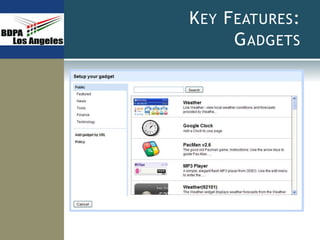
 Google Gadgets
 Live Demonstration: DIY
WHAT IS GOOGLE SITES?
 A Free “Website” and “Wiki” creation service
 Utilizes Wiki format to allow easy creation and
editing of interlinked web pages in a collaborative
environment
 No fancy tools required
 No “web guy” bottlenecks
 Public or Private
SITE EXAMPLES
 Team Project
 Club / Organization
KEY FEATURES:
PAGE TEMPLATES
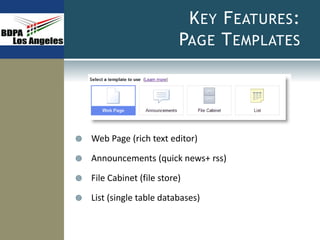
 Web Page (rich text editor)
 Announcements (quick news+ rss)
 File Cabinet (file store)
 List (single table databases)
KEY FEATURES:
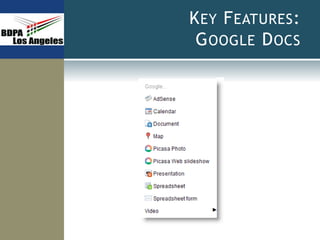
GOOGLE DOCS
KEY FEATURES:
GADGETS
LIVE DEMONSTRATION: DIY
 Create Site
 New Page, Announcements, File Cabinet, List
 Menus
 Control Access
 Subscribe to Changes
PUTTING IT ALL TOGETHER
 Revisit “Team Project- Project Eggplant” example
 What we’ve learned:
 How Google Sites works
 Note: BDPA LA is exploring Google Sites as a web
page alternative. If you’re interested in joining the
web team, contact:
president@bdpala.org
REFERENCES
 Google Sites
 http://sites.google.com/support
 Wikipedia
 “Wiki”
 “Google Sites

BDPA LA: Google Sites

  • 1.
    Presenter: John C. MalonsonIII president@bdpala.org November 21st, 2009 USING GOOGLE “SITES”
  • 2.
    WELCOME!  Tell UsAbout You!  Name  Occupation or types of opportunities you are looking for  What brought you here today?  What do you hope to learn from today’s presentation?
  • 3.
    ABOUT US  Website www.bdpala.org Facebook Group “BDPA Los Angeles”  Twitter www.twitter.com/bdpala
  • 4.
    OUTLINE  What isGoogle Sites?  Site Examples  Key Features  Page Templates (Types)  Google Documents Integration  Google Gadgets  Live Demonstration: DIY
  • 5.
    WHAT IS GOOGLESITES?  A Free “Website” and “Wiki” creation service  Utilizes Wiki format to allow easy creation and editing of interlinked web pages in a collaborative environment  No fancy tools required  No “web guy” bottlenecks  Public or Private
  • 6.
    SITE EXAMPLES  TeamProject  Club / Organization
  • 7.
    KEY FEATURES: PAGE TEMPLATES Web Page (rich text editor)  Announcements (quick news+ rss)  File Cabinet (file store)  List (single table databases)
  • 8.
  • 9.
  • 10.
    LIVE DEMONSTRATION: DIY Create Site  New Page, Announcements, File Cabinet, List  Menus  Control Access  Subscribe to Changes
  • 11.
    PUTTING IT ALLTOGETHER  Revisit “Team Project- Project Eggplant” example  What we’ve learned:  How Google Sites works  Note: BDPA LA is exploring Google Sites as a web page alternative. If you’re interested in joining the web team, contact: president@bdpala.org
  • 12.
    REFERENCES  Google Sites http://sites.google.com/support  Wikipedia  “Wiki”  “Google Sites

Editor's Notes

  • #6 Google “Google Sites” and the tagline will read ‘Free Websites and Wikis’ Other than a browser, no additional tools required (rich text editor – i.e. wordpad, MS Word lite) Collaboration occurs due to all trusted users being able to modify and entire site or page
  • #7 Begin with the end in mind
  • #9 Not the first to provide this type of service Geocities Tripod Other Key Feature: SPACE (images, files)