Big Data and Automated Content Analysis
Week 5 – Monday
»Automated content analysis with NLP and
regular expressions«
Damian Trilling
d.c.trilling@uva.nl
@damian0604
www.damiantrilling.net
Afdeling Communicatiewetenschap
Universiteit van Amsterdam
6 March 2017
Regular expressions Some more Natural Language Processing Take-home message & next steps
Today
1 ACA using regular expressions
Bottom-up vs. top-down
What is a regexp?
Using a regexp in Python
2 Some more Natural Language Processing
Stemming
Parsing sentences
3 Take-home message & next steps
Big Data and Automated Content Analysis Damian Trilling
Regular expressions Some more Natural Language Processing Take-home message & next steps
Automated content analysis using regular expressions
Big Data and Automated Content Analysis Damian Trilling
Regular expressions Some more Natural Language Processing Take-home message & next steps
Bottom-up vs. top-down
Bottom-up
• Count most frequently occurring words (Week 2)
• Maybe better: Count combinations of words ⇒ Which words
co-occur together? (Chapter 9, not obligatory)
We don’t specify what to look for in advance
Big Data and Automated Content Analysis Damian Trilling
Regular expressions Some more Natural Language Processing Take-home message & next steps
Bottom-up vs. top-down
Bottom-up
• Count most frequently occurring words (Week 2)
• Maybe better: Count combinations of words ⇒ Which words
co-occur together? (Chapter 9, not obligatory)
We don’t specify what to look for in advance
Top-down
• Count frequencies of pre-defined words (like in
BOW-sentiment analysis)
• Maybe better: patterns instead of words (regular
expressions, today!)
We do specify what to look for in advance
Big Data and Automated Content Analysis Damian Trilling
Regular expressions Some more Natural Language Processing Take-home message & next steps
What is a regexp?
Regular Expressions: What and why?
What is a regexp?
• a very widespread way to describe patterns in strings
Big Data and Automated Content Analysis Damian Trilling
Regular expressions Some more Natural Language Processing Take-home message & next steps
What is a regexp?
Regular Expressions: What and why?
What is a regexp?
• a very widespread way to describe patterns in strings
• Think of wildcards like * or operators like OR, AND or NOT in
search strings: a regexp does the same, but is much more
powerful
Big Data and Automated Content Analysis Damian Trilling
Regular expressions Some more Natural Language Processing Take-home message & next steps
What is a regexp?
Regular Expressions: What and why?
What is a regexp?
• a very widespread way to describe patterns in strings
• Think of wildcards like * or operators like OR, AND or NOT in
search strings: a regexp does the same, but is much more
powerful
• You can use them in many editors (!), in the Terminal, in
STATA . . . and in Python
Big Data and Automated Content Analysis Damian Trilling
Regular expressions Some more Natural Language Processing Take-home message & next steps
What is a regexp?
An example
From last week’s task
• We wanted to remove everything but words from a tweet
• We did so by calling the .replace() method
• We could do this with a regular expression as well:
[ˆa-zA-Z] would match anything that is not a letter
Big Data and Automated Content Analysis Damian Trilling
Regular expressions Some more Natural Language Processing Take-home message & next steps
What is a regexp?
Basic regexp elements
Alternatives
[TtFf] matches either T or t or F or f
Twitter|Facebook matches either Twitter or Facebook
. matches any character
Big Data and Automated Content Analysis Damian Trilling
Regular expressions Some more Natural Language Processing Take-home message & next steps
What is a regexp?
Basic regexp elements
Alternatives
[TtFf] matches either T or t or F or f
Twitter|Facebook matches either Twitter or Facebook
. matches any character
Repetition
* the expression before occurs 0 or more times
+ the expression before occurs 1 or more times
Big Data and Automated Content Analysis Damian Trilling
Regular expressions Some more Natural Language Processing Take-home message & next steps
What is a regexp?
regexp quizz
Which words would be matched?
1 [Pp]ython
Big Data and Automated Content Analysis Damian Trilling
Regular expressions Some more Natural Language Processing Take-home message & next steps
What is a regexp?
regexp quizz
Which words would be matched?
1 [Pp]ython
2 [A-Z]+
Big Data and Automated Content Analysis Damian Trilling
Regular expressions Some more Natural Language Processing Take-home message & next steps
What is a regexp?
regexp quizz
Which words would be matched?
1 [Pp]ython
2 [A-Z]+
3 RT ?:? @[a-zA-Z0-9]*
Big Data and Automated Content Analysis Damian Trilling
Regular expressions Some more Natural Language Processing Take-home message & next steps
What is a regexp?
What else is possible?
If you google regexp or regular expression, you’ll get a bunch
of useful overviews. The wikipedia page is not too bad, either.
Big Data and Automated Content Analysis Damian Trilling
Regular expressions Some more Natural Language Processing Take-home message & next steps
Using a regexp in Python
How to use regular expressions in Python
The module re
re.findall("[Tt]witter|[Ff]acebook",testo) returns a list
with all occurances of Twitter or Facebook in the
string called testo
re.findall("[0-9]+[a-zA-Z]+",testo) returns a list with all
words that start with one or more numbers followed
by one or more letters in the string called testo
Big Data and Automated Content Analysis Damian Trilling
Regular expressions Some more Natural Language Processing Take-home message & next steps
Using a regexp in Python
How to use regular expressions in Python
The module re
re.findall("[Tt]witter|[Ff]acebook",testo) returns a list
with all occurances of Twitter or Facebook in the
string called testo
re.findall("[0-9]+[a-zA-Z]+",testo) returns a list with all
words that start with one or more numbers followed
by one or more letters in the string called testo
re.sub("[Tt]witter|[Ff]acebook","a social medium",testo)
returns a string in which all all occurances of Twitter
or Facebook are replaced by "a social medium"
Big Data and Automated Content Analysis Damian Trilling
Regular expressions Some more Natural Language Processing Take-home message & next steps
Using a regexp in Python
How to use regular expressions in Python
The module re
re.match(" +([0-9]+) of ([0-9]+) points",line) returns
None unless it exactly matches the string line. If it
does, you can access the part between () with the
.group() method.
Example:
1 line=" 2 of 25 points"
2 result=re.match(" +([0-9]+) of ([0-9]+) points",line)
3 if result:
4 print ("Your points:",result.group(1))
5 print ("Maximum points:",result.group(2))
Your points: 2
Maximum points: 25
Big Data and Automated Content Analysis Damian Trilling
Regular expressions Some more Natural Language Processing Take-home message & next steps
Using a regexp in Python
Possible applications
Data preprocessing
• Remove unwanted characters, words, . . .
• Identify meaningful bits of text: usernames, headlines, where
an article starts, . . .
• filter (distinguish relevant from irrelevant cases)
Big Data and Automated Content Analysis Damian Trilling
Regular expressions Some more Natural Language Processing Take-home message & next steps
Using a regexp in Python
Possible applications
Data analysis: Automated coding
• Actors
• Brands
• links or other markers that follow a regular pattern
• Numbers (!)
Big Data and Automated Content Analysis Damian Trilling
Example 1: Counting actors
1 import re, csv
2 from os import listdir, path
3 mypath ="/home/damian/artikelen"
4 matchcount54_list=[]
5 matchcount10_list=[]
6 filename_list = [f for f in listdir(mypath) if path.isfile(path.join(
mypath,f))]
7 for f in filename_list:
8 matchcount54=0
9 matchcount10=0
10 with open(path.join(mypath,f),mode="r",encoding="utf-8") as fi:
11 artikel=fi.readlines()
12 for line in artikel:
13 matches54 = re.findall(’Israel.*(minister|politician.*|[Aa]
uthorit)’,line)
14 matches10 = re.findall(’[Pp]alest’,line)
15 matchcount54+=len(matches54)
16 matchcount10+=len(matches10)
17 matchcount54_list.append(matchcount54)
18 matchcount10_list.append(matchcount10)
19 output=zip(filename_list,matchcount10_list,matchcount54_list)
20 with open("overzichtstabel.csv", mode=’w’,encoding="utf-8") as fo:
21 writer = csv.writer(fo)
22 writer.writerows(output)
Regular expressions Some more Natural Language Processing Take-home message & next steps
Using a regexp in Python
Example 2: Which number has this Lexis Nexis article?
1 All Rights Reserved
2
3 2 of 200 DOCUMENTS
4
5 De Telegraaf
6
7 21 maart 2014 vrijdag
8
9 Brussel bereikt akkoord aanpak probleembanken;
10 ECB krijgt meer in melk te brokkelen
11
12 SECTION: Finance; Blz. 24
13 LENGTH: 660 woorden
14
15 BRUSSEL Europa heeft gisteren op de valreep een akkoord bereikt
16 over een saneringsfonds voor banken. Daarmee staat de laatste
Big Data and Automated Content Analysis Damian Trilling
Regular expressions Some more Natural Language Processing Take-home message & next steps
Using a regexp in Python
Example 2: Check the number of a lexis nexis article
1 All Rights Reserved
2
3 2 of 200 DOCUMENTS
4
5 De Telegraaf
6
7 21 maart 2014 vrijdag
8
9 Brussel bereikt akkoord aanpak probleembanken;
10 ECB krijgt meer in melk te brokkelen
11
12 SECTION: Finance; Blz. 24
13 LENGTH: 660 woorden
14
15 BRUSSEL Europa heeft gisteren op de valreep een akkoord bereikt
16 over een saneringsfonds voor banken. Daarmee staat de laatste
1 for line in tekst:
2 matchObj=re.match(r" +([0-9]+) of ([0-9]+) DOCUMENTS",line)
3 if matchObj:
4 numberofarticle= int(matchObj.group(1))
5 totalnumberofarticles= int(matchObj.group(2))
Big Data and Automated Content Analysis Damian Trilling
Regular expressions Some more Natural Language Processing Take-home message & next steps
Using a regexp in Python
Practice yourself!
http://www.pyregex.com/
Big Data and Automated Content Analysis Damian Trilling
Regular expressions Some more Natural Language Processing Take-home message & next steps
Some more Natural Language Processing
Big Data and Automated Content Analysis Damian Trilling
Regular expressions Some more Natural Language Processing Take-home message & next steps
Some more NLP: What and why?
What can we do?
• remove stopwords (last week)
Big Data and Automated Content Analysis Damian Trilling
Regular expressions Some more Natural Language Processing Take-home message & next steps
Some more NLP: What and why?
What can we do?
• remove stopwords (last week)
• stemming
Big Data and Automated Content Analysis Damian Trilling
Regular expressions Some more Natural Language Processing Take-home message & next steps
Some more NLP: What and why?
What can we do?
• remove stopwords (last week)
• stemming
• Parse sentences (advanced)
Big Data and Automated Content Analysis Damian Trilling
Regular expressions Some more Natural Language Processing Take-home message & next steps
Stemming
NLP: What and why?
Why do stemming?
• Because we do not want to distinguish between smoke,
smoked, smoking, . . .
• Typical preprocessing step (like stopword removal)
Big Data and Automated Content Analysis Damian Trilling
Regular expressions Some more Natural Language Processing Take-home message & next steps
Stemming
Stemming
(with NLTK, see Bird, S., Loper, E., & Klein, E. (2009). Natural language processing
with Python. Sebastopol, CA: O’Reilly.)
1 from nltk.stem.snowball import SnowballStemmer
2 stemmer=SnowballStemmer("english")
3 frase="I am running while generously greeting my neighbors"
4 frasenuevo=""
5 for palabra in frase.split():
6 frasenuevo=frasenuevo + stemmer.stem(palabra) + " "
If we now did print(frasenuevo), it would return:
1 i am run while generous greet my neighbor
Big Data and Automated Content Analysis Damian Trilling
Regular expressions Some more Natural Language Processing Take-home message & next steps
Stemming
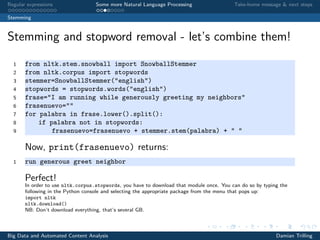
Stemming and stopword removal - let’s combine them!
1 from nltk.stem.snowball import SnowballStemmer
2 from nltk.corpus import stopwords
3 stemmer=SnowballStemmer("english")
4 stopwords = stopwords.words("english")
5 frase="I am running while generously greeting my neighbors"
6 frasenuevo=""
7 for palabra in frase.lower().split():
8 if palabra not in stopwords:
9 frasenuevo=frasenuevo + stemmer.stem(palabra) + " "
Now, print(frasenuevo) returns:
1 run generous greet neighbor
Perfect!
Big Data and Automated Content Analysis Damian Trilling
Regular expressions Some more Natural Language Processing Take-home message & next steps
Stemming
Stemming and stopword removal - let’s combine them!
1 from nltk.stem.snowball import SnowballStemmer
2 from nltk.corpus import stopwords
3 stemmer=SnowballStemmer("english")
4 stopwords = stopwords.words("english")
5 frase="I am running while generously greeting my neighbors"
6 frasenuevo=""
7 for palabra in frase.lower().split():
8 if palabra not in stopwords:
9 frasenuevo=frasenuevo + stemmer.stem(palabra) + " "
Now, print(frasenuevo) returns:
1 run generous greet neighbor
Perfect!
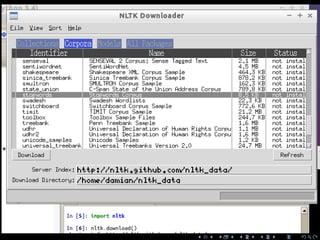
In order to use nltk.corpus.stopwords, you have to download that module once. You can do so by typing the
following in the Python console and selecting the appropriate package from the menu that pops up:
import nltk
nltk.download()
NB: Don’t download everything, that’s several GB.
Big Data and Automated Content Analysis Damian Trilling
Regular expressions Some more Natural Language Processing Take-home message & next steps
Parsing sentences
NLP: What and why?
Why parse sentences?
• To find out what grammatical function words have
• and to get closer to the meaning.
Big Data and Automated Content Analysis Damian Trilling
Regular expressions Some more Natural Language Processing Take-home message & next steps
Parsing sentences
Parsing a sentence
1 import nltk
2 sentence = "At eight o’clock on Thursday morning, Arthur didn’t feel
very good."
3 tokens = nltk.word_tokenize(sentence)
4 print (tokens)
nltk.word_tokenize(sentence) is similar to sentence.split(),
but compare handling of punctuation and the didn’t in the
output:
1 [’At’, ’eight’, "o’clock", ’on’, ’Thursday’, ’morning’,’Arthur’, ’did’,
"n’t", ’feel’, ’very’, ’good’, ’.’]
Big Data and Automated Content Analysis Damian Trilling
Regular expressions Some more Natural Language Processing Take-home message & next steps
Parsing sentences
Parsing a sentence
Now, as the next step, you can “tag” the tokenized sentence:
1 tagged = nltk.pos_tag(tokens)
2 print (tagged[0:6])
gives you the following:
1 [(’At’, ’IN’), (’eight’, ’CD’), ("o’clock", ’JJ’), (’on’, ’IN’),
2 (’Thursday’, ’NNP’), (’morning’, ’NN’)]
Big Data and Automated Content Analysis Damian Trilling
Regular expressions Some more Natural Language Processing Take-home message & next steps
Parsing sentences
Parsing a sentence
Now, as the next step, you can “tag” the tokenized sentence:
1 tagged = nltk.pos_tag(tokens)
2 print (tagged[0:6])
gives you the following:
1 [(’At’, ’IN’), (’eight’, ’CD’), ("o’clock", ’JJ’), (’on’, ’IN’),
2 (’Thursday’, ’NNP’), (’morning’, ’NN’)]
And you could get the word type of "morning" with
tagged[5][1]!
Big Data and Automated Content Analysis Damian Trilling
Regular expressions Some more Natural Language Processing Take-home message & next steps
Parsing sentences
More NLP
Look at http://nltk.org
Big Data and Automated Content Analysis Damian Trilling
Regular expressions Some more Natural Language Processing Take-home message & next steps
Take-home message
Take-home exam
Next meetings
Big Data and Automated Content Analysis Damian Trilling
Regular expressions Some more Natural Language Processing Take-home message & next steps
Take-home messages
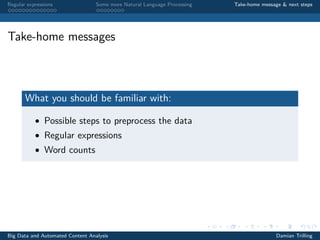
What you should be familiar with:
• Possible steps to preprocess the data
• Regular expressions
• Word counts
Big Data and Automated Content Analysis Damian Trilling
Regular expressions Some more Natural Language Processing Take-home message & next steps
Next meetings
Wednesday
Statistics with pandas and Jupyter Notebook
Take-home exam
Big Data and Automated Content Analysis Damian Trilling

BDACA1617s2 - Lecture5

  • 1.
    Big Data andAutomated Content Analysis Week 5 – Monday »Automated content analysis with NLP and regular expressions« Damian Trilling d.c.trilling@uva.nl @damian0604 www.damiantrilling.net Afdeling Communicatiewetenschap Universiteit van Amsterdam 6 March 2017
  • 2.
    Regular expressions Somemore Natural Language Processing Take-home message & next steps Today 1 ACA using regular expressions Bottom-up vs. top-down What is a regexp? Using a regexp in Python 2 Some more Natural Language Processing Stemming Parsing sentences 3 Take-home message & next steps Big Data and Automated Content Analysis Damian Trilling
  • 3.
    Regular expressions Somemore Natural Language Processing Take-home message & next steps Automated content analysis using regular expressions Big Data and Automated Content Analysis Damian Trilling
  • 4.
    Regular expressions Somemore Natural Language Processing Take-home message & next steps Bottom-up vs. top-down Bottom-up vs. top-down Bottom-up • Count most frequently occurring words (Week 2) • Maybe better: Count combinations of words ⇒ Which words co-occur together? (Chapter 9, not obligatory) We don’t specify what to look for in advance Big Data and Automated Content Analysis Damian Trilling
  • 5.
    Regular expressions Somemore Natural Language Processing Take-home message & next steps Bottom-up vs. top-down Bottom-up vs. top-down Bottom-up • Count most frequently occurring words (Week 2) • Maybe better: Count combinations of words ⇒ Which words co-occur together? (Chapter 9, not obligatory) We don’t specify what to look for in advance Top-down • Count frequencies of pre-defined words (like in BOW-sentiment analysis) • Maybe better: patterns instead of words (regular expressions, today!) We do specify what to look for in advance Big Data and Automated Content Analysis Damian Trilling
  • 6.
    Regular expressions Somemore Natural Language Processing Take-home message & next steps What is a regexp? Regular Expressions: What and why? What is a regexp? • a very widespread way to describe patterns in strings Big Data and Automated Content Analysis Damian Trilling
  • 7.
    Regular expressions Somemore Natural Language Processing Take-home message & next steps What is a regexp? Regular Expressions: What and why? What is a regexp? • a very widespread way to describe patterns in strings • Think of wildcards like * or operators like OR, AND or NOT in search strings: a regexp does the same, but is much more powerful Big Data and Automated Content Analysis Damian Trilling
  • 8.
    Regular expressions Somemore Natural Language Processing Take-home message & next steps What is a regexp? Regular Expressions: What and why? What is a regexp? • a very widespread way to describe patterns in strings • Think of wildcards like * or operators like OR, AND or NOT in search strings: a regexp does the same, but is much more powerful • You can use them in many editors (!), in the Terminal, in STATA . . . and in Python Big Data and Automated Content Analysis Damian Trilling
  • 9.
    Regular expressions Somemore Natural Language Processing Take-home message & next steps What is a regexp? An example From last week’s task • We wanted to remove everything but words from a tweet • We did so by calling the .replace() method • We could do this with a regular expression as well: [ˆa-zA-Z] would match anything that is not a letter Big Data and Automated Content Analysis Damian Trilling
  • 10.
    Regular expressions Somemore Natural Language Processing Take-home message & next steps What is a regexp? Basic regexp elements Alternatives [TtFf] matches either T or t or F or f Twitter|Facebook matches either Twitter or Facebook . matches any character Big Data and Automated Content Analysis Damian Trilling
  • 11.
    Regular expressions Somemore Natural Language Processing Take-home message & next steps What is a regexp? Basic regexp elements Alternatives [TtFf] matches either T or t or F or f Twitter|Facebook matches either Twitter or Facebook . matches any character Repetition * the expression before occurs 0 or more times + the expression before occurs 1 or more times Big Data and Automated Content Analysis Damian Trilling
  • 12.
    Regular expressions Somemore Natural Language Processing Take-home message & next steps What is a regexp? regexp quizz Which words would be matched? 1 [Pp]ython Big Data and Automated Content Analysis Damian Trilling
  • 13.
    Regular expressions Somemore Natural Language Processing Take-home message & next steps What is a regexp? regexp quizz Which words would be matched? 1 [Pp]ython 2 [A-Z]+ Big Data and Automated Content Analysis Damian Trilling
  • 14.
    Regular expressions Somemore Natural Language Processing Take-home message & next steps What is a regexp? regexp quizz Which words would be matched? 1 [Pp]ython 2 [A-Z]+ 3 RT ?:? @[a-zA-Z0-9]* Big Data and Automated Content Analysis Damian Trilling
  • 15.
    Regular expressions Somemore Natural Language Processing Take-home message & next steps What is a regexp? What else is possible? If you google regexp or regular expression, you’ll get a bunch of useful overviews. The wikipedia page is not too bad, either. Big Data and Automated Content Analysis Damian Trilling
  • 16.
    Regular expressions Somemore Natural Language Processing Take-home message & next steps Using a regexp in Python How to use regular expressions in Python The module re re.findall("[Tt]witter|[Ff]acebook",testo) returns a list with all occurances of Twitter or Facebook in the string called testo re.findall("[0-9]+[a-zA-Z]+",testo) returns a list with all words that start with one or more numbers followed by one or more letters in the string called testo Big Data and Automated Content Analysis Damian Trilling
  • 17.
    Regular expressions Somemore Natural Language Processing Take-home message & next steps Using a regexp in Python How to use regular expressions in Python The module re re.findall("[Tt]witter|[Ff]acebook",testo) returns a list with all occurances of Twitter or Facebook in the string called testo re.findall("[0-9]+[a-zA-Z]+",testo) returns a list with all words that start with one or more numbers followed by one or more letters in the string called testo re.sub("[Tt]witter|[Ff]acebook","a social medium",testo) returns a string in which all all occurances of Twitter or Facebook are replaced by "a social medium" Big Data and Automated Content Analysis Damian Trilling
  • 18.
    Regular expressions Somemore Natural Language Processing Take-home message & next steps Using a regexp in Python How to use regular expressions in Python The module re re.match(" +([0-9]+) of ([0-9]+) points",line) returns None unless it exactly matches the string line. If it does, you can access the part between () with the .group() method. Example: 1 line=" 2 of 25 points" 2 result=re.match(" +([0-9]+) of ([0-9]+) points",line) 3 if result: 4 print ("Your points:",result.group(1)) 5 print ("Maximum points:",result.group(2)) Your points: 2 Maximum points: 25 Big Data and Automated Content Analysis Damian Trilling
  • 19.
    Regular expressions Somemore Natural Language Processing Take-home message & next steps Using a regexp in Python Possible applications Data preprocessing • Remove unwanted characters, words, . . . • Identify meaningful bits of text: usernames, headlines, where an article starts, . . . • filter (distinguish relevant from irrelevant cases) Big Data and Automated Content Analysis Damian Trilling
  • 20.
    Regular expressions Somemore Natural Language Processing Take-home message & next steps Using a regexp in Python Possible applications Data analysis: Automated coding • Actors • Brands • links or other markers that follow a regular pattern • Numbers (!) Big Data and Automated Content Analysis Damian Trilling
  • 21.
    Example 1: Countingactors 1 import re, csv 2 from os import listdir, path 3 mypath ="/home/damian/artikelen" 4 matchcount54_list=[] 5 matchcount10_list=[] 6 filename_list = [f for f in listdir(mypath) if path.isfile(path.join( mypath,f))] 7 for f in filename_list: 8 matchcount54=0 9 matchcount10=0 10 with open(path.join(mypath,f),mode="r",encoding="utf-8") as fi: 11 artikel=fi.readlines() 12 for line in artikel: 13 matches54 = re.findall(’Israel.*(minister|politician.*|[Aa] uthorit)’,line) 14 matches10 = re.findall(’[Pp]alest’,line) 15 matchcount54+=len(matches54) 16 matchcount10+=len(matches10) 17 matchcount54_list.append(matchcount54) 18 matchcount10_list.append(matchcount10) 19 output=zip(filename_list,matchcount10_list,matchcount54_list) 20 with open("overzichtstabel.csv", mode=’w’,encoding="utf-8") as fo: 21 writer = csv.writer(fo) 22 writer.writerows(output)
  • 22.
    Regular expressions Somemore Natural Language Processing Take-home message & next steps Using a regexp in Python Example 2: Which number has this Lexis Nexis article? 1 All Rights Reserved 2 3 2 of 200 DOCUMENTS 4 5 De Telegraaf 6 7 21 maart 2014 vrijdag 8 9 Brussel bereikt akkoord aanpak probleembanken; 10 ECB krijgt meer in melk te brokkelen 11 12 SECTION: Finance; Blz. 24 13 LENGTH: 660 woorden 14 15 BRUSSEL Europa heeft gisteren op de valreep een akkoord bereikt 16 over een saneringsfonds voor banken. Daarmee staat de laatste Big Data and Automated Content Analysis Damian Trilling
  • 23.
    Regular expressions Somemore Natural Language Processing Take-home message & next steps Using a regexp in Python Example 2: Check the number of a lexis nexis article 1 All Rights Reserved 2 3 2 of 200 DOCUMENTS 4 5 De Telegraaf 6 7 21 maart 2014 vrijdag 8 9 Brussel bereikt akkoord aanpak probleembanken; 10 ECB krijgt meer in melk te brokkelen 11 12 SECTION: Finance; Blz. 24 13 LENGTH: 660 woorden 14 15 BRUSSEL Europa heeft gisteren op de valreep een akkoord bereikt 16 over een saneringsfonds voor banken. Daarmee staat de laatste 1 for line in tekst: 2 matchObj=re.match(r" +([0-9]+) of ([0-9]+) DOCUMENTS",line) 3 if matchObj: 4 numberofarticle= int(matchObj.group(1)) 5 totalnumberofarticles= int(matchObj.group(2)) Big Data and Automated Content Analysis Damian Trilling
  • 24.
    Regular expressions Somemore Natural Language Processing Take-home message & next steps Using a regexp in Python Practice yourself! http://www.pyregex.com/ Big Data and Automated Content Analysis Damian Trilling
  • 25.
    Regular expressions Somemore Natural Language Processing Take-home message & next steps Some more Natural Language Processing Big Data and Automated Content Analysis Damian Trilling
  • 26.
    Regular expressions Somemore Natural Language Processing Take-home message & next steps Some more NLP: What and why? What can we do? • remove stopwords (last week) Big Data and Automated Content Analysis Damian Trilling
  • 27.
    Regular expressions Somemore Natural Language Processing Take-home message & next steps Some more NLP: What and why? What can we do? • remove stopwords (last week) • stemming Big Data and Automated Content Analysis Damian Trilling
  • 28.
    Regular expressions Somemore Natural Language Processing Take-home message & next steps Some more NLP: What and why? What can we do? • remove stopwords (last week) • stemming • Parse sentences (advanced) Big Data and Automated Content Analysis Damian Trilling
  • 29.
    Regular expressions Somemore Natural Language Processing Take-home message & next steps Stemming NLP: What and why? Why do stemming? • Because we do not want to distinguish between smoke, smoked, smoking, . . . • Typical preprocessing step (like stopword removal) Big Data and Automated Content Analysis Damian Trilling
  • 30.
    Regular expressions Somemore Natural Language Processing Take-home message & next steps Stemming Stemming (with NLTK, see Bird, S., Loper, E., & Klein, E. (2009). Natural language processing with Python. Sebastopol, CA: O’Reilly.) 1 from nltk.stem.snowball import SnowballStemmer 2 stemmer=SnowballStemmer("english") 3 frase="I am running while generously greeting my neighbors" 4 frasenuevo="" 5 for palabra in frase.split(): 6 frasenuevo=frasenuevo + stemmer.stem(palabra) + " " If we now did print(frasenuevo), it would return: 1 i am run while generous greet my neighbor Big Data and Automated Content Analysis Damian Trilling
  • 31.
    Regular expressions Somemore Natural Language Processing Take-home message & next steps Stemming Stemming and stopword removal - let’s combine them! 1 from nltk.stem.snowball import SnowballStemmer 2 from nltk.corpus import stopwords 3 stemmer=SnowballStemmer("english") 4 stopwords = stopwords.words("english") 5 frase="I am running while generously greeting my neighbors" 6 frasenuevo="" 7 for palabra in frase.lower().split(): 8 if palabra not in stopwords: 9 frasenuevo=frasenuevo + stemmer.stem(palabra) + " " Now, print(frasenuevo) returns: 1 run generous greet neighbor Perfect! Big Data and Automated Content Analysis Damian Trilling
  • 32.
    Regular expressions Somemore Natural Language Processing Take-home message & next steps Stemming Stemming and stopword removal - let’s combine them! 1 from nltk.stem.snowball import SnowballStemmer 2 from nltk.corpus import stopwords 3 stemmer=SnowballStemmer("english") 4 stopwords = stopwords.words("english") 5 frase="I am running while generously greeting my neighbors" 6 frasenuevo="" 7 for palabra in frase.lower().split(): 8 if palabra not in stopwords: 9 frasenuevo=frasenuevo + stemmer.stem(palabra) + " " Now, print(frasenuevo) returns: 1 run generous greet neighbor Perfect! In order to use nltk.corpus.stopwords, you have to download that module once. You can do so by typing the following in the Python console and selecting the appropriate package from the menu that pops up: import nltk nltk.download() NB: Don’t download everything, that’s several GB. Big Data and Automated Content Analysis Damian Trilling
  • 34.
    Regular expressions Somemore Natural Language Processing Take-home message & next steps Parsing sentences NLP: What and why? Why parse sentences? • To find out what grammatical function words have • and to get closer to the meaning. Big Data and Automated Content Analysis Damian Trilling
  • 35.
    Regular expressions Somemore Natural Language Processing Take-home message & next steps Parsing sentences Parsing a sentence 1 import nltk 2 sentence = "At eight o’clock on Thursday morning, Arthur didn’t feel very good." 3 tokens = nltk.word_tokenize(sentence) 4 print (tokens) nltk.word_tokenize(sentence) is similar to sentence.split(), but compare handling of punctuation and the didn’t in the output: 1 [’At’, ’eight’, "o’clock", ’on’, ’Thursday’, ’morning’,’Arthur’, ’did’, "n’t", ’feel’, ’very’, ’good’, ’.’] Big Data and Automated Content Analysis Damian Trilling
  • 36.
    Regular expressions Somemore Natural Language Processing Take-home message & next steps Parsing sentences Parsing a sentence Now, as the next step, you can “tag” the tokenized sentence: 1 tagged = nltk.pos_tag(tokens) 2 print (tagged[0:6]) gives you the following: 1 [(’At’, ’IN’), (’eight’, ’CD’), ("o’clock", ’JJ’), (’on’, ’IN’), 2 (’Thursday’, ’NNP’), (’morning’, ’NN’)] Big Data and Automated Content Analysis Damian Trilling
  • 37.
    Regular expressions Somemore Natural Language Processing Take-home message & next steps Parsing sentences Parsing a sentence Now, as the next step, you can “tag” the tokenized sentence: 1 tagged = nltk.pos_tag(tokens) 2 print (tagged[0:6]) gives you the following: 1 [(’At’, ’IN’), (’eight’, ’CD’), ("o’clock", ’JJ’), (’on’, ’IN’), 2 (’Thursday’, ’NNP’), (’morning’, ’NN’)] And you could get the word type of "morning" with tagged[5][1]! Big Data and Automated Content Analysis Damian Trilling
  • 38.
    Regular expressions Somemore Natural Language Processing Take-home message & next steps Parsing sentences More NLP Look at http://nltk.org Big Data and Automated Content Analysis Damian Trilling
  • 39.
    Regular expressions Somemore Natural Language Processing Take-home message & next steps Take-home message Take-home exam Next meetings Big Data and Automated Content Analysis Damian Trilling
  • 40.
    Regular expressions Somemore Natural Language Processing Take-home message & next steps Take-home messages What you should be familiar with: • Possible steps to preprocess the data • Regular expressions • Word counts Big Data and Automated Content Analysis Damian Trilling
  • 41.
    Regular expressions Somemore Natural Language Processing Take-home message & next steps Next meetings Wednesday Statistics with pandas and Jupyter Notebook Take-home exam Big Data and Automated Content Analysis Damian Trilling