
The Linux command line Writing and running Python code Next meetings
Big Data and Automated Content Analysis
Week 1 – Wednesday
»First steps in the VM«
Damian Trilling
d.c.trilling@uva.nl
@damian0604
www.damiantrilling.net
Afdeling Communicatiewetenschap
Universiteit van Amsterdam
8 February 2017
Big Data and Automated Content Analysis Damian Trilling
The Linux command line Writing and running Python code Next meetings
Today
1 The Linux command line
2 Writing and running Python code
3 Next meetings
Big Data and Automated Content Analysis Damian Trilling
The Linux command line Writing and running Python code Next meetings
When point-and-click doesn’t help you further:
The Linux command line
Big Data and Automated Content Analysis Damian Trilling
The Linux command line Writing and running Python code Next meetings
The tools
General idea
Whereever possbile, we use tools that are
• platform-independent
• free (as in beer and as in speech)
• open source
.
Big Data and Automated Content Analysis Damian Trilling
The Linux command line Writing and running Python code Next meetings
The tools
General idea
Whereever possbile, we use tools that are
• platform-independent
• free (as in beer and as in speech)
• open source
To make things easier, we work with a virtual machine in which
everyone runs the same Linux version.
Big Data and Automated Content Analysis Damian Trilling
The Linux command line Writing and running Python code Next meetings
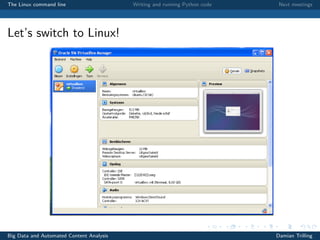
Let’s switch to Linux!
Big Data and Automated Content Analysis Damian Trilling
The Linux command line Writing and running Python code Next meetings
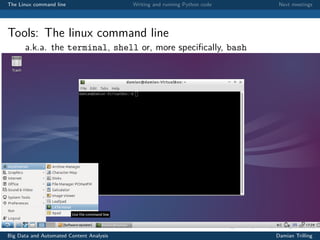
Tools: The linux command line
a.k.a. the terminal, shell or, more specifically, bash
Big Data and Automated Content Analysis Damian Trilling
The Linux command line Writing and running Python code Next meetings
Tools: The linux command line
Big Data and Automated Content Analysis Damian Trilling
The Linux command line Writing and running Python code Next meetings
Tools: The linux command line
Why?
Big Data and Automated Content Analysis Damian Trilling
The Linux command line Writing and running Python code Next meetings
Tools: The linux command line
Why?
• Direct access to your computer’s functions
Big Data and Automated Content Analysis Damian Trilling
The Linux command line Writing and running Python code Next meetings
Tools: The linux command line
Why?
• Direct access to your computer’s functions
• In contrast to point-and-click programs, command line
programs can easily be linked to each other, scripted, . . .
Big Data and Automated Content Analysis Damian Trilling
The Linux command line Writing and running Python code Next meetings
Tools: The linux command line
Why?
• Direct access to your computer’s functions
• In contrast to point-and-click programs, command line
programs can easily be linked to each other, scripted, . . .
• Suitable for handling even huge files
Big Data and Automated Content Analysis Damian Trilling
The Linux command line Writing and running Python code Next meetings
Tools: The linux command line
Why?
• Direct access to your computer’s functions
• In contrast to point-and-click programs, command line
programs can easily be linked to each other, scripted, . . .
• Suitable for handling even huge files
• You simply cannot open them in many GUI programs
• . . . or it takes ages
• The command line allows you to do such things without
problems
Big Data and Automated Content Analysis Damian Trilling
The Linux command line Writing and running Python code Next meetings
Tools: The linux command line
Why?
• Direct access to your computer’s functions
• In contrast to point-and-click programs, command line
programs can easily be linked to each other, scripted, . . .
• Suitable for handling even huge files
• You simply cannot open them in many GUI programs
• . . . or it takes ages
• The command line allows you to do such things without
problems
• It is reproducible (ever tried to explain to your parents on the
phone where they have to click?)
Big Data and Automated Content Analysis Damian Trilling
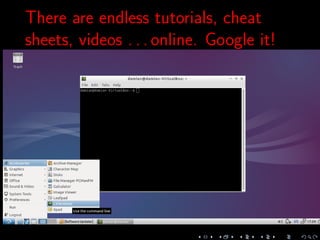
There are endless tutorials, cheat
sheets, videos . . . online. Google it!
The Linux command line Writing and running Python code Next meetings
Exercise
Take the book.
Follow the instructions in Chapter 2.
Big Data and Automated Content Analysis Damian Trilling
The Linux command line Writing and running Python code Next meetings
A language, not a program:
Python
Big Data and Automated Content Analysis Damian Trilling
The Linux command line Writing and running Python code Next meetings
Python
What?
• A language, not a specific program
• Huge advantage: flexibility, portability
• One of the languages for data analysis. (The other one is R.)
Big Data and Automated Content Analysis Damian Trilling
The Linux command line Writing and running Python code Next meetings
Python
What?
• A language, not a specific program
• Huge advantage: flexibility, portability
• One of the languages for data analysis. (The other one is R.)
But Python is more flexible—the original version of Dropbox was written in Python. I’d say: R for
numbers, Python for text and messy stuff. But that’s just my personal view.
Big Data and Automated Content Analysis Damian Trilling
The Linux command line Writing and running Python code Next meetings
Python
What?
• A language, not a specific program
• Huge advantage: flexibility, portability
• One of the languages for data analysis. (The other one is R.)
Which version?
We use Python 3.
http://www.google.com or http://www.stackexchange.com still offer a lot
of Python2-code, but that can easily be adapted. Most notable difference: In
Python 2, you write print "Hi", this has changed to print ("Hi")
Big Data and Automated Content Analysis Damian Trilling
The Linux command line Writing and running Python code Next meetings
If it’s not a program, how do you work with it?
Interactive mode
• Just type python3 on the command line, and you can start
entering Python commands (You can leave again by entering quit())
• Great for quick try-outs, but you cannot even save your code
Big Data and Automated Content Analysis Damian Trilling
The Linux command line Writing and running Python code Next meetings
If it’s not a program, how do you work with it?
Interactive mode
• Just type python3 on the command line, and you can start
entering Python commands (You can leave again by entering quit())
• Great for quick try-outs, but you cannot even save your code
An editor of your choice
• Write your program in any text editor, save it as myprog.py
• and run it from the command line with ./myprog.py or
python3 myprog.py
Big Data and Automated Content Analysis Damian Trilling
The Linux command line Writing and running Python code Next meetings
If it’s not a program, how do you start it?
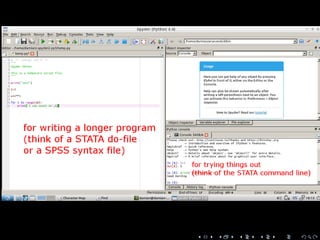
An IDE (Integrated Development Environment)
• Provides an interface
• Both quick interactive try-outs and writing larger programs
• We use spyder, which looks a bit like RStudio (and to some
extent like Stata)
Big Data and Automated Content Analysis Damian Trilling
The Linux command line Writing and running Python code Next meetings
If it’s not a program, how do you start it?
An IDE (Integrated Development Environment)
• Provides an interface
• Both quick interactive try-outs and writing larger programs
• We use spyder, which looks a bit like RStudio (and to some
extent like Stata)
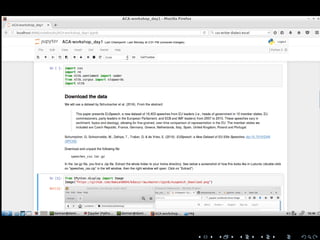
Jupyter Notebook
• Runs in your browser
• Stores results and text along with code
• Great for interactive playing with data and for sharing results
Big Data and Automated Content Analysis Damian Trilling
Let’s start up a Python environment and write a
Hello-world-program!
The Linux command line Writing and running Python code Next meetings
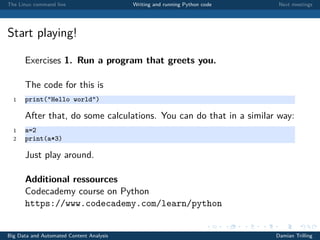
Start playing!
Exercises 1. Run a program that greets you.
The code for this is
1 print("Hello world")
After that, do some calculations. You can do that in a similar way:
1 a=2
2 print(a*3)
Just play around.
Additional ressources
Codecademy course on Python
https://www.codecademy.com/learn/python
Big Data and Automated Content Analysis Damian Trilling
The Linux command line Writing and running Python code Next meetings
Next meetings
Big Data and Automated Content Analysis Damian Trilling
The Linux command line Writing and running Python code Next meetings
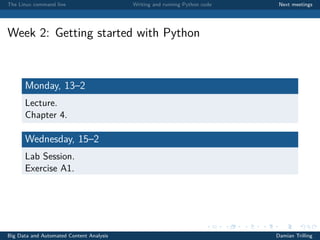
Week 2: Getting started with Python
Monday, 13–2
Lecture.
Chapter 4.
Wednesday, 15–2
Lab Session.
Exercise A1.
Big Data and Automated Content Analysis Damian Trilling

BDACA1617s2 - Tutorial 1

  • 1.
    The Linux commandline Writing and running Python code Next meetings Big Data and Automated Content Analysis Week 1 – Wednesday »First steps in the VM« Damian Trilling d.c.trilling@uva.nl @damian0604 www.damiantrilling.net Afdeling Communicatiewetenschap Universiteit van Amsterdam 8 February 2017 Big Data and Automated Content Analysis Damian Trilling
  • 2.
    The Linux commandline Writing and running Python code Next meetings Today 1 The Linux command line 2 Writing and running Python code 3 Next meetings Big Data and Automated Content Analysis Damian Trilling
  • 3.
    The Linux commandline Writing and running Python code Next meetings When point-and-click doesn’t help you further: The Linux command line Big Data and Automated Content Analysis Damian Trilling
  • 4.
    The Linux commandline Writing and running Python code Next meetings The tools General idea Whereever possbile, we use tools that are • platform-independent • free (as in beer and as in speech) • open source . Big Data and Automated Content Analysis Damian Trilling
  • 5.
    The Linux commandline Writing and running Python code Next meetings The tools General idea Whereever possbile, we use tools that are • platform-independent • free (as in beer and as in speech) • open source To make things easier, we work with a virtual machine in which everyone runs the same Linux version. Big Data and Automated Content Analysis Damian Trilling
  • 7.
    The Linux commandline Writing and running Python code Next meetings Let’s switch to Linux! Big Data and Automated Content Analysis Damian Trilling
  • 8.
    The Linux commandline Writing and running Python code Next meetings Tools: The linux command line a.k.a. the terminal, shell or, more specifically, bash Big Data and Automated Content Analysis Damian Trilling
  • 9.
    The Linux commandline Writing and running Python code Next meetings Tools: The linux command line Big Data and Automated Content Analysis Damian Trilling
  • 10.
    The Linux commandline Writing and running Python code Next meetings Tools: The linux command line Why? Big Data and Automated Content Analysis Damian Trilling
  • 11.
    The Linux commandline Writing and running Python code Next meetings Tools: The linux command line Why? • Direct access to your computer’s functions Big Data and Automated Content Analysis Damian Trilling
  • 12.
    The Linux commandline Writing and running Python code Next meetings Tools: The linux command line Why? • Direct access to your computer’s functions • In contrast to point-and-click programs, command line programs can easily be linked to each other, scripted, . . . Big Data and Automated Content Analysis Damian Trilling
  • 13.
    The Linux commandline Writing and running Python code Next meetings Tools: The linux command line Why? • Direct access to your computer’s functions • In contrast to point-and-click programs, command line programs can easily be linked to each other, scripted, . . . • Suitable for handling even huge files Big Data and Automated Content Analysis Damian Trilling
  • 14.
    The Linux commandline Writing and running Python code Next meetings Tools: The linux command line Why? • Direct access to your computer’s functions • In contrast to point-and-click programs, command line programs can easily be linked to each other, scripted, . . . • Suitable for handling even huge files • You simply cannot open them in many GUI programs • . . . or it takes ages • The command line allows you to do such things without problems Big Data and Automated Content Analysis Damian Trilling
  • 15.
    The Linux commandline Writing and running Python code Next meetings Tools: The linux command line Why? • Direct access to your computer’s functions • In contrast to point-and-click programs, command line programs can easily be linked to each other, scripted, . . . • Suitable for handling even huge files • You simply cannot open them in many GUI programs • . . . or it takes ages • The command line allows you to do such things without problems • It is reproducible (ever tried to explain to your parents on the phone where they have to click?) Big Data and Automated Content Analysis Damian Trilling
  • 16.
    There are endlesstutorials, cheat sheets, videos . . . online. Google it!
  • 17.
    The Linux commandline Writing and running Python code Next meetings Exercise Take the book. Follow the instructions in Chapter 2. Big Data and Automated Content Analysis Damian Trilling
  • 18.
    The Linux commandline Writing and running Python code Next meetings A language, not a program: Python Big Data and Automated Content Analysis Damian Trilling
  • 19.
    The Linux commandline Writing and running Python code Next meetings Python What? • A language, not a specific program • Huge advantage: flexibility, portability • One of the languages for data analysis. (The other one is R.) Big Data and Automated Content Analysis Damian Trilling
  • 20.
    The Linux commandline Writing and running Python code Next meetings Python What? • A language, not a specific program • Huge advantage: flexibility, portability • One of the languages for data analysis. (The other one is R.) But Python is more flexible—the original version of Dropbox was written in Python. I’d say: R for numbers, Python for text and messy stuff. But that’s just my personal view. Big Data and Automated Content Analysis Damian Trilling
  • 21.
    The Linux commandline Writing and running Python code Next meetings Python What? • A language, not a specific program • Huge advantage: flexibility, portability • One of the languages for data analysis. (The other one is R.) Which version? We use Python 3. http://www.google.com or http://www.stackexchange.com still offer a lot of Python2-code, but that can easily be adapted. Most notable difference: In Python 2, you write print "Hi", this has changed to print ("Hi") Big Data and Automated Content Analysis Damian Trilling
  • 22.
    The Linux commandline Writing and running Python code Next meetings If it’s not a program, how do you work with it? Interactive mode • Just type python3 on the command line, and you can start entering Python commands (You can leave again by entering quit()) • Great for quick try-outs, but you cannot even save your code Big Data and Automated Content Analysis Damian Trilling
  • 23.
    The Linux commandline Writing and running Python code Next meetings If it’s not a program, how do you work with it? Interactive mode • Just type python3 on the command line, and you can start entering Python commands (You can leave again by entering quit()) • Great for quick try-outs, but you cannot even save your code An editor of your choice • Write your program in any text editor, save it as myprog.py • and run it from the command line with ./myprog.py or python3 myprog.py Big Data and Automated Content Analysis Damian Trilling
  • 24.
    The Linux commandline Writing and running Python code Next meetings If it’s not a program, how do you start it? An IDE (Integrated Development Environment) • Provides an interface • Both quick interactive try-outs and writing larger programs • We use spyder, which looks a bit like RStudio (and to some extent like Stata) Big Data and Automated Content Analysis Damian Trilling
  • 25.
    The Linux commandline Writing and running Python code Next meetings If it’s not a program, how do you start it? An IDE (Integrated Development Environment) • Provides an interface • Both quick interactive try-outs and writing larger programs • We use spyder, which looks a bit like RStudio (and to some extent like Stata) Jupyter Notebook • Runs in your browser • Stores results and text along with code • Great for interactive playing with data and for sharing results Big Data and Automated Content Analysis Damian Trilling
  • 28.
    Let’s start upa Python environment and write a Hello-world-program!
  • 29.
    The Linux commandline Writing and running Python code Next meetings Start playing! Exercises 1. Run a program that greets you. The code for this is 1 print("Hello world") After that, do some calculations. You can do that in a similar way: 1 a=2 2 print(a*3) Just play around. Additional ressources Codecademy course on Python https://www.codecademy.com/learn/python Big Data and Automated Content Analysis Damian Trilling
  • 30.
    The Linux commandline Writing and running Python code Next meetings Next meetings Big Data and Automated Content Analysis Damian Trilling
  • 31.
    The Linux commandline Writing and running Python code Next meetings Week 2: Getting started with Python Monday, 13–2 Lecture. Chapter 4. Wednesday, 15–2 Lab Session. Exercise A1. Big Data and Automated Content Analysis Damian Trilling