1
Coffee from a Friend:
Using Third Party Java Libraries
2014/03/18– Matthew Fyleman
2
 Matthew Fyleman
 21 YearsasaNotes/Domino Developer
 MostlyWorking on:
 Xpagesconversions
 Product development
Who AmI?
3
 Based on MyExperiences
 Beginner Level!
 Using JavaGenerally in XPages
 Will focuson .jar files, but will look at other
waysof incorporating Java
 What to usewhen
What isthisTalk About?
4
 Why Java?
 Advantagesover SSJS
 Java Options
 Prepackaged Options
 .jarspackaged into Extension Libraries
 OpenNTF.org
 ApachePOI Example
 Raw Libraries
 Deploying
 Incorporation
 Security
 Creating .jars
 Questions
What amI talking about?
5
It hasa better structure than ssjs
 Stronglytyped
 Object Oriented fromtheground up
It‘sa very useful skill
 Widelyused outsideNotes/Domino
 Encouragesbetter programming practise
Why Java?– 1. Thebasics
6
<<Demonstration>>
Why Java?– 2. ItsFaster than SSJS
But not asmuch asyou might think!
7
Seealso Stephan Wissel‘sblog post:
http://www.wissel.net/blog/d6plinks/SHWL-8SLCVR
Why Java?– 3. ItsEasier to Debug
8
Why Java?– 4. ThereareLotsof 3rd Party Libraries
 AdobeAcrobat (PDF) Manipulation
 Word and Excel Creation and Modification
 XMLparsing
 ... Many more
 If you need it, thereisprobably a Java
library out there
 Tested and stable(relatively!)
9
 Raw Java
 You’realreadydoing this!
 JavaClassFiles
 Better for development
 .jarsprovideobfuscation
 .jarsareeasilyportable– writeonceuseanywhere
 Managed Beans
 Much easier to createthan you might think
 Automatically work within ascope
 .jar Files
Java Options
10
 Almost certainly donethisalready:
 var vecThis= new java.util.Vector();
 Can Import Packages
 importPackage(java.util);
 var vecThis= new Vector();
 Can beadisadvantage, particularly for beginners!
Java Options– Raw Java
11
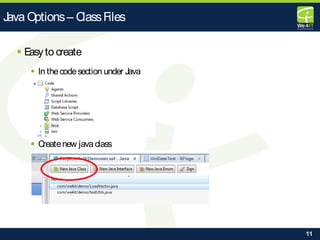
 Easyto create
 In thecodesection under Java
 Createnew java class
Java Options– ClassFiles
12
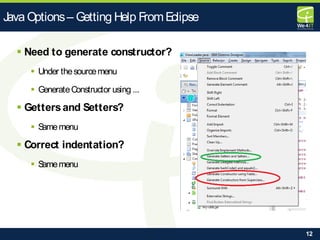
 Need to generate constructor?
 Under thesourcemenu
 GenerateConstructor using ...
 Gettersand Setters?
 Samemenu
 Correct indentation?
 Samemenu
Java Options– Getting Help FromEclipse
13
Rulesfor Managed Beans
 If you haveaconstructor, it must beparameterless
 Fieldsin your classareonlypublically accessiblethrough gettersand
setters
 To support persistenceit should implement theSerializableinterface
 It needsan entryin thefaces-config.xml file
 SeePer Laustenspage‘Creating Your First managed bean for
Xpages’
http://per.lausten.dk/blog/2012/02/creating-your-first-
managed-bean-for-xpages.html
Java Options– Managed Beans
14
 You are probably not the first!
 Check OpenNTF.org
 Pre-Packaged into an Extension Library
 Easyto Use
 Documentation (?)
 Onceext lib installed, no securitysettingsto
think about
Pre-Packaged Options
15
 Demonstration
Pre-Packaged Options
16
 Not AlwaysAvailable
 Extension Librariesneed to be
deployed to the server!
 What can you do if thisisnot an option?
Pre-Packaged Options- Issues
17
 Thiswasthesituation I found myself in on arecent project
 Customer needed .docx filemanipulation
 Customer would not permit third party deployment to the
server
 Deployed thePOI Libswithin myApplication
 No Deployment to theServer (technically speaking!)
 Simple
 Still had accessto theFunctionality
UsetheLibrary‘RAW‘
18
 ThreeOptions:
1. Deployto theserver filesystem
 Non-starter
2. Deployunder WEB-INF
 Better but onlyuseif you are8.5.2 or lower
3. Deployto jar areaunder ‘code‘
 Best option
Deployment Options
19
 Java Librariesfor manipulatingMicrosoft Word and
Excel files
 Open Source
 Main library ispoi-3.9-20121203.jar
 But you will need othersparticularly if you wish to
work on docx and xlsx
 dom4j-1.6.1.jar
 stax-api-1.0.1.jar
 xmlbeans-2.3.0.jar
ApachePOI Project
20
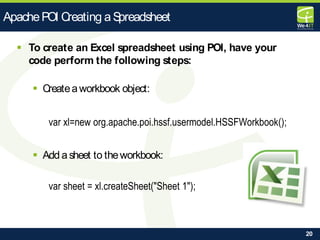
 To create an Excel spreadsheet using POI, have your
code perform the following steps:
 Createaworkbook object:
var xl=new org.apache.poi.hssf.usermodel.HSSFWorkbook();
 Add asheet to theworkbook:
var sheet = xl.createSheet("Sheet 1");
ApachePOI Creating aSpreadsheet
21
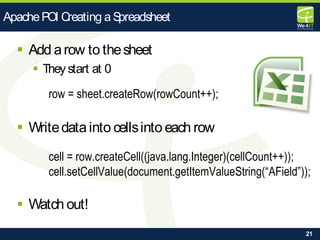
 Add arow to thesheet
 They start at 0
row = sheet.createRow(rowCount++);
 Writedatainto cellsinto each row
cell = row.createCell((java.lang.Integer)(cellCount++));
cell.setCellValue(document.getItemValueString(“AField”));
 Watch out!
ApachePOI Creating aSpreadsheet
22
 Demonstration
Deployment
23
 Sooner or later you will hit this
 Need to edit the‘java.policy’ file
 Proper wayisto databasespecificentry
 For Production Systems
 Doesn’t work on Domino 9 ?
 For Dev EnvironmentsYou Can Cheat!
grant { permission java.security.AllPermission; };
 Seeblog post ‘JavaSecurity in Xpages’ fromStephan Wissel:
 http://www.wissel.net/blog/d6plinks/SHWL-8JYAT5
 don‘t missNathan Freeman‘scomment!
Deployment - SecurityIssues
24
 Similar to working with Excel:
 Get thedocument
 Get document’sparagraphs
 Get thetext runsin theparagraphs
 Search and replacein text runs
 Get thetables
 Iteratethrough therows
 Iteratethrough thecells
 Do paragraph search and replacein each cell
ApachePOI Search and Replacein Word
25
 Java Librariesfor manipulating AdobeAcrobat
(pdf) documents
 Open Source– but ApacheLicense!
 Main library isitextpdf-5.5.0.jar
 UnlikePOI, thisisall you need for basicPDFs
iTextPdf
26
 Itsopen sourceso itsfree, right?
 Maybe, but check thelicense
 E.g. ApacheLicense
 Freeto useif your softwareisalso distributed under an
ApacheLicense
 Otherwisetheremaybeafeefor commercial use
 iText – OEM license, 125 desktops, approx. $3,000
Deployment - LicenseIssues
27
 Doing a lot of @Formula conversion to SSJS
 Encountering a lot of List Ops
 SSJShasno built in permutation operations
 Wanted alibrary of List Op utilities
What About MyOwn .jars
28
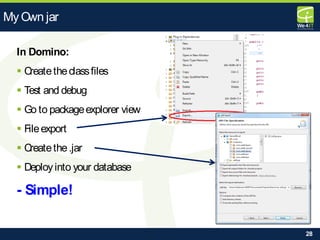
In Domino:
 Createtheclassfiles
 Test and debug
 Go to packageexplorer view
 Fileexport
 Createthe.jar
 Deployinto your database
- Simple!
MyOwn jar
29
 We4IT– www.we4it.com
 OpenNTF– www.openntf.org
 Ulrich Krause– www.eknori.de
 Wissel.net – Stephan Wissel‘sblog
 XpagesPortableCommand Guide–
Martin Donnelly et. al., IBM Press
Resourcesand Information
30
Questions?
31
matthew.fyleman@we4it.com

bccon-2014 dev02 xpages-coffe-from-a-friend-using-third-party-java-libraries

  • 1.
    1 Coffee from aFriend: Using Third Party Java Libraries 2014/03/18– Matthew Fyleman
  • 2.
    2  Matthew Fyleman 21 YearsasaNotes/Domino Developer  MostlyWorking on:  Xpagesconversions  Product development Who AmI?
  • 3.
    3  Based onMyExperiences  Beginner Level!  Using JavaGenerally in XPages  Will focuson .jar files, but will look at other waysof incorporating Java  What to usewhen What isthisTalk About?
  • 4.
    4  Why Java? Advantagesover SSJS  Java Options  Prepackaged Options  .jarspackaged into Extension Libraries  OpenNTF.org  ApachePOI Example  Raw Libraries  Deploying  Incorporation  Security  Creating .jars  Questions What amI talking about?
  • 5.
    5 It hasa betterstructure than ssjs  Stronglytyped  Object Oriented fromtheground up It‘sa very useful skill  Widelyused outsideNotes/Domino  Encouragesbetter programming practise Why Java?– 1. Thebasics
  • 6.
    6 <<Demonstration>> Why Java?– 2.ItsFaster than SSJS But not asmuch asyou might think!
  • 7.
    7 Seealso Stephan Wissel‘sblogpost: http://www.wissel.net/blog/d6plinks/SHWL-8SLCVR Why Java?– 3. ItsEasier to Debug
  • 8.
    8 Why Java?– 4.ThereareLotsof 3rd Party Libraries  AdobeAcrobat (PDF) Manipulation  Word and Excel Creation and Modification  XMLparsing  ... Many more  If you need it, thereisprobably a Java library out there  Tested and stable(relatively!)
  • 9.
    9  Raw Java You’realreadydoing this!  JavaClassFiles  Better for development  .jarsprovideobfuscation  .jarsareeasilyportable– writeonceuseanywhere  Managed Beans  Much easier to createthan you might think  Automatically work within ascope  .jar Files Java Options
  • 10.
    10  Almost certainlydonethisalready:  var vecThis= new java.util.Vector();  Can Import Packages  importPackage(java.util);  var vecThis= new Vector();  Can beadisadvantage, particularly for beginners! Java Options– Raw Java
  • 11.
    11  Easyto create In thecodesection under Java  Createnew java class Java Options– ClassFiles
  • 12.
    12  Need togenerate constructor?  Under thesourcemenu  GenerateConstructor using ...  Gettersand Setters?  Samemenu  Correct indentation?  Samemenu Java Options– Getting Help FromEclipse
  • 13.
    13 Rulesfor Managed Beans If you haveaconstructor, it must beparameterless  Fieldsin your classareonlypublically accessiblethrough gettersand setters  To support persistenceit should implement theSerializableinterface  It needsan entryin thefaces-config.xml file  SeePer Laustenspage‘Creating Your First managed bean for Xpages’ http://per.lausten.dk/blog/2012/02/creating-your-first- managed-bean-for-xpages.html Java Options– Managed Beans
  • 14.
    14  You areprobably not the first!  Check OpenNTF.org  Pre-Packaged into an Extension Library  Easyto Use  Documentation (?)  Onceext lib installed, no securitysettingsto think about Pre-Packaged Options
  • 15.
  • 16.
    16  Not AlwaysAvailable Extension Librariesneed to be deployed to the server!  What can you do if thisisnot an option? Pre-Packaged Options- Issues
  • 17.
    17  Thiswasthesituation Ifound myself in on arecent project  Customer needed .docx filemanipulation  Customer would not permit third party deployment to the server  Deployed thePOI Libswithin myApplication  No Deployment to theServer (technically speaking!)  Simple  Still had accessto theFunctionality UsetheLibrary‘RAW‘
  • 18.
    18  ThreeOptions: 1. Deploytotheserver filesystem  Non-starter 2. Deployunder WEB-INF  Better but onlyuseif you are8.5.2 or lower 3. Deployto jar areaunder ‘code‘  Best option Deployment Options
  • 19.
    19  Java LibrariesformanipulatingMicrosoft Word and Excel files  Open Source  Main library ispoi-3.9-20121203.jar  But you will need othersparticularly if you wish to work on docx and xlsx  dom4j-1.6.1.jar  stax-api-1.0.1.jar  xmlbeans-2.3.0.jar ApachePOI Project
  • 20.
    20  To createan Excel spreadsheet using POI, have your code perform the following steps:  Createaworkbook object: var xl=new org.apache.poi.hssf.usermodel.HSSFWorkbook();  Add asheet to theworkbook: var sheet = xl.createSheet("Sheet 1"); ApachePOI Creating aSpreadsheet
  • 21.
    21  Add arowto thesheet  They start at 0 row = sheet.createRow(rowCount++);  Writedatainto cellsinto each row cell = row.createCell((java.lang.Integer)(cellCount++)); cell.setCellValue(document.getItemValueString(“AField”));  Watch out! ApachePOI Creating aSpreadsheet
  • 22.
  • 23.
    23  Sooner orlater you will hit this  Need to edit the‘java.policy’ file  Proper wayisto databasespecificentry  For Production Systems  Doesn’t work on Domino 9 ?  For Dev EnvironmentsYou Can Cheat! grant { permission java.security.AllPermission; };  Seeblog post ‘JavaSecurity in Xpages’ fromStephan Wissel:  http://www.wissel.net/blog/d6plinks/SHWL-8JYAT5  don‘t missNathan Freeman‘scomment! Deployment - SecurityIssues
  • 24.
    24  Similar toworking with Excel:  Get thedocument  Get document’sparagraphs  Get thetext runsin theparagraphs  Search and replacein text runs  Get thetables  Iteratethrough therows  Iteratethrough thecells  Do paragraph search and replacein each cell ApachePOI Search and Replacein Word
  • 25.
    25  Java Librariesformanipulating AdobeAcrobat (pdf) documents  Open Source– but ApacheLicense!  Main library isitextpdf-5.5.0.jar  UnlikePOI, thisisall you need for basicPDFs iTextPdf
  • 26.
    26  Itsopen sourcesoitsfree, right?  Maybe, but check thelicense  E.g. ApacheLicense  Freeto useif your softwareisalso distributed under an ApacheLicense  Otherwisetheremaybeafeefor commercial use  iText – OEM license, 125 desktops, approx. $3,000 Deployment - LicenseIssues
  • 27.
    27  Doing alot of @Formula conversion to SSJS  Encountering a lot of List Ops  SSJShasno built in permutation operations  Wanted alibrary of List Op utilities What About MyOwn .jars
  • 28.
    28 In Domino:  Createtheclassfiles Test and debug  Go to packageexplorer view  Fileexport  Createthe.jar  Deployinto your database - Simple! MyOwn jar
  • 29.
    29  We4IT– www.we4it.com OpenNTF– www.openntf.org  Ulrich Krause– www.eknori.de  Wissel.net – Stephan Wissel‘sblog  XpagesPortableCommand Guide– Martin Donnelly et. al., IBM Press Resourcesand Information
  • 30.
  • 31.