Automated Web Testing with SeleniumBy Jodie MinersPresented to SBTUG30 September 2009
What is Selenium?It’s Free and Open SourceIt originally came from ThoughtworksIt comes in 3 flavoursIDE (Integrated Development Environment) – for recording test cases in FirefoxRC (Remote Control) – for running automated tests on any browserGrid – for large scale test runs of multiple tests in parallel You can get it here http://www.seleniumhq.org/“Selenium tests run directly in a browser, just as real users do”
Why use SeleniumYou are always doing the same steps over and over againYou need to get to the last step in a wizard to test that stepYou want to pre-fill some dummy dataFormal Functional and Regression TestingLoad Testing *
Selenium IDEA Firefox add-on that allows you to record tests for playing back in any browser.Very simple to useAllows non developers to get up and running with automated testing very quicklyThen they can pass on to developers for refinement or inclusion into a continuous build systemCan extend it easily with a little bit of HTML knowledge
Recording and PlaybackFirst Decide what you are testing and work out your test case(s)IDE DemoRecord a testPlay back a testDebug a testStep through a testCapture screen shotAsserts
SeleneseThe language of selenium. It is quite easy to learn3 parts to itCommand – eg TypeLocator – eg Input BoxValue – eg “ABC”Can easily be written in HTMLThings to help build the IDE testsAssert / Wait for Page to Load / Verify Text Present / Verify element present on each pageSlow things down with pauses and timeoutsStep through firs then run, add pauses and wait’s if it fails because it’s going too fastAdd think times
Selenese LocatorsCan Locate page elements by the following 4 methodsID, DOM, Xpath, CSSIDE recorderwill choose the best one to use, or you can choose which ever method if you are coding the tests. Can also use Wildcards and Regular Expressions See http://seleniumhq.org/docs/04_selenese_commands.html for more info - it’s very comprehensiveInstall Firebug to help with working out the locators
Selenium RCTakes a little time and effort to get it up and runningCan then run your tests scripts from IDE in different browsersWith good results reportingOr write the tests in code and automate the testing even furtherIssuesNeed to Install and use JavaVery command line / batch file basedSelenium RC Demo
DemoRun the test in FirefoxRun the test in IERun the test in ChromeNote that they are all in sequence
Coding your testsCoding of Selenium testing can be done inJava, Ruby, Groovy, C#, Perl, PHP, PythonMost examples are Java or Ruby, not that many people using C#Add If statementsEg if stock exists then add to cart (rather than having an error message)Add looping statementsFor each product found, add to cartEasier to add parameterisation or data driven testseg have a list of products in a file or table – add each of the products to the cart(you can do data driven tests in IDE – see here http://wiki.openqa.org/display/SEL/datadriven )Multiple test runsRun the test 4 times, each time logged in as a different userSelenium Code Demo with NUnit
DemoShow the codePaste the selenese inShow NunitvsMSTest?Run the Nunit testHave one prepared ready to go
ReportingThere is a great reporting framework if you code in Java or use TestNGLogging Selenium http://loggingselenium.sourceforge.net/For C# these are the options: Just capture the Selenium output to a fileCode a reporting framework yourselfUse the Visual Studio Team System Test Edition frameworkUse the NUnit reportingI use a combination of VSTT reporting and some additional logging to a database that I created myself.
Selenium GridScale out the tests to run on multiple browsers at the same timeSaves time in doing the testingBut you need to rely on the reporting as you can’t watch 5+ browsers do the testingGreat tutorial and demo here http://selenium-grid.seleniumhq.org/Requires Java SDK and Apache Ant to run
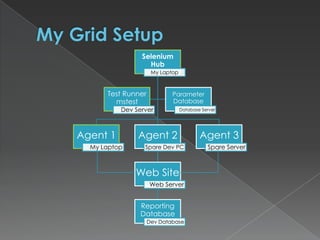
My Grid Setup
Taking the Grid FurtherScale out your grid to the Cloud using Amazon EC2 serviceOr use a third party serviceSauce Labs http://www.saucelabs.comIn early betaUses your own code So can set up the code to either run locally or via web Current special US$100 for 5000 minutesLots of Browser / OS combinationsTest Environment PictureBrowserMobhttp://www.browsermob.comTime consuming to set upSome limitations on which selenium commands can be usedLots of options (eg can test with specific bandwidth limitations)Can be used as for http requests only, as well as real browser testsAround US$2.00 per browser per hour
More Advanced TopicsUI Element mapping – How developers can make it easier for end users to build Selenium tests using element locator names that they can understandhttp://ttwhy.org/home/blog/2007/05/12/selenium-ui-element-locator/Using Xpath references with the Ext-JS javascript framework http://www.xeolabs.com/portal/node/34
Load TestingPurists say Selenium is not for load testingThat is mainly because of the hardware required to run multiple browsers on the same machine.I hit limits of 5-8 browsers on a standard desktop machine and 12-15 browsers on a serverUse Browser Mob or SauceLabs to overcome these issues.Also as Selenium uses Real Browsers it requires real logins to simulate real loads – so you have to log in as real users on your systemIt does not do virtual load and virtual users
Recording in IE (just for @aussienick)Watin for .nethttp://watin.sourceforge.net/Has a built in recorder for IEThere are also Watir (ruby), and Watij (java) variants http://wtr.rubyforge.org/Visual Studio Team System 2008 Test Edition (VSTT)Visual Studio Team System 2010 Test Edition + Team Foundation ServerLooks FantasticWill also record and play back windows appsMust use TFS

Automated Web Testing With Selenium

  • 1.
    Automated Web Testingwith SeleniumBy Jodie MinersPresented to SBTUG30 September 2009
  • 2.
    What is Selenium?It’sFree and Open SourceIt originally came from ThoughtworksIt comes in 3 flavoursIDE (Integrated Development Environment) – for recording test cases in FirefoxRC (Remote Control) – for running automated tests on any browserGrid – for large scale test runs of multiple tests in parallel You can get it here http://www.seleniumhq.org/“Selenium tests run directly in a browser, just as real users do”
  • 3.
    Why use SeleniumYouare always doing the same steps over and over againYou need to get to the last step in a wizard to test that stepYou want to pre-fill some dummy dataFormal Functional and Regression TestingLoad Testing *
  • 4.
    Selenium IDEA Firefoxadd-on that allows you to record tests for playing back in any browser.Very simple to useAllows non developers to get up and running with automated testing very quicklyThen they can pass on to developers for refinement or inclusion into a continuous build systemCan extend it easily with a little bit of HTML knowledge
  • 5.
    Recording and PlaybackFirstDecide what you are testing and work out your test case(s)IDE DemoRecord a testPlay back a testDebug a testStep through a testCapture screen shotAsserts
  • 6.
    SeleneseThe language ofselenium. It is quite easy to learn3 parts to itCommand – eg TypeLocator – eg Input BoxValue – eg “ABC”Can easily be written in HTMLThings to help build the IDE testsAssert / Wait for Page to Load / Verify Text Present / Verify element present on each pageSlow things down with pauses and timeoutsStep through firs then run, add pauses and wait’s if it fails because it’s going too fastAdd think times
  • 7.
    Selenese LocatorsCan Locatepage elements by the following 4 methodsID, DOM, Xpath, CSSIDE recorderwill choose the best one to use, or you can choose which ever method if you are coding the tests. Can also use Wildcards and Regular Expressions See http://seleniumhq.org/docs/04_selenese_commands.html for more info - it’s very comprehensiveInstall Firebug to help with working out the locators
  • 8.
    Selenium RCTakes alittle time and effort to get it up and runningCan then run your tests scripts from IDE in different browsersWith good results reportingOr write the tests in code and automate the testing even furtherIssuesNeed to Install and use JavaVery command line / batch file basedSelenium RC Demo
  • 9.
    DemoRun the testin FirefoxRun the test in IERun the test in ChromeNote that they are all in sequence
  • 10.
    Coding your testsCodingof Selenium testing can be done inJava, Ruby, Groovy, C#, Perl, PHP, PythonMost examples are Java or Ruby, not that many people using C#Add If statementsEg if stock exists then add to cart (rather than having an error message)Add looping statementsFor each product found, add to cartEasier to add parameterisation or data driven testseg have a list of products in a file or table – add each of the products to the cart(you can do data driven tests in IDE – see here http://wiki.openqa.org/display/SEL/datadriven )Multiple test runsRun the test 4 times, each time logged in as a different userSelenium Code Demo with NUnit
  • 11.
    DemoShow the codePastethe selenese inShow NunitvsMSTest?Run the Nunit testHave one prepared ready to go
  • 12.
    ReportingThere is agreat reporting framework if you code in Java or use TestNGLogging Selenium http://loggingselenium.sourceforge.net/For C# these are the options: Just capture the Selenium output to a fileCode a reporting framework yourselfUse the Visual Studio Team System Test Edition frameworkUse the NUnit reportingI use a combination of VSTT reporting and some additional logging to a database that I created myself.
  • 13.
    Selenium GridScale outthe tests to run on multiple browsers at the same timeSaves time in doing the testingBut you need to rely on the reporting as you can’t watch 5+ browsers do the testingGreat tutorial and demo here http://selenium-grid.seleniumhq.org/Requires Java SDK and Apache Ant to run
  • 14.
  • 15.
    Taking the GridFurtherScale out your grid to the Cloud using Amazon EC2 serviceOr use a third party serviceSauce Labs http://www.saucelabs.comIn early betaUses your own code So can set up the code to either run locally or via web Current special US$100 for 5000 minutesLots of Browser / OS combinationsTest Environment PictureBrowserMobhttp://www.browsermob.comTime consuming to set upSome limitations on which selenium commands can be usedLots of options (eg can test with specific bandwidth limitations)Can be used as for http requests only, as well as real browser testsAround US$2.00 per browser per hour
  • 16.
    More Advanced TopicsUIElement mapping – How developers can make it easier for end users to build Selenium tests using element locator names that they can understandhttp://ttwhy.org/home/blog/2007/05/12/selenium-ui-element-locator/Using Xpath references with the Ext-JS javascript framework http://www.xeolabs.com/portal/node/34
  • 17.
    Load TestingPurists saySelenium is not for load testingThat is mainly because of the hardware required to run multiple browsers on the same machine.I hit limits of 5-8 browsers on a standard desktop machine and 12-15 browsers on a serverUse Browser Mob or SauceLabs to overcome these issues.Also as Selenium uses Real Browsers it requires real logins to simulate real loads – so you have to log in as real users on your systemIt does not do virtual load and virtual users
  • 18.
    Recording in IE(just for @aussienick)Watin for .nethttp://watin.sourceforge.net/Has a built in recorder for IEThere are also Watir (ruby), and Watij (java) variants http://wtr.rubyforge.org/Visual Studio Team System 2008 Test Edition (VSTT)Visual Studio Team System 2010 Test Edition + Team Foundation ServerLooks FantasticWill also record and play back windows appsMust use TFS