

Dependency Injection With Apex
Using apex and custom settings to inject dependencies and decouple your applications
​ Mike Bernard
​ Senior Developer at nCino, Inc.
​ mike.bernard@ncino.com
​ @_mikebernard
​ 
•  What?
•  Why?
•  How?
•  Demo
•  Things to Consider
Agenda
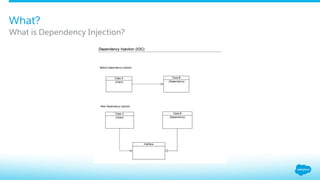
​ Dependency Injection is a software design pattern that allows dependencies to be given
(injected) to a consuming class at runtime.
​ The consuming class does not know anything about the dependency. It only knows that the
dependency will be provided to it at runtime, making the consuming class responsible for only
the actions it needs to perform.
What is Dependency Injection?
What?
What?
What is Dependency Injection?
Why?
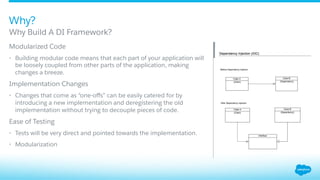
​ Modularized Code
•  Building modular code means that each part of your application will
be loosely coupled from other parts of the application, making
changes a breeze.
​ Implementation Changes
•  Changes that come as “one-offs” can be easily catered for by
introducing a new implementation and deregistering the old
implementation without trying to decouple pieces of code.
​ Ease of Testing
•  Tests will be very direct and pointed towards the implementation.
•  Modularization
​ Why Build A DI Framework?
​ Create a DI Framework using Salesforce with a few simple steps:
​ Step 1: Define Beans
​ Step 2: Create a Bean Registry Using Custom Settings
​ Step 3: Define a BeanRegistry Singleton
​ Step 4: One Last Thing… A Factory!
How Can We Implement This On SFDC?
How?
How: Step 1
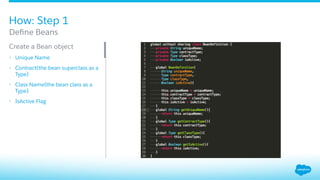
​ Create a Bean object
•  Unique Name
•  Contract(the bean superclass as a
Type)
•  Class Name(the bean class as a
Type)
•  IsActive Flag
​ Define Beans
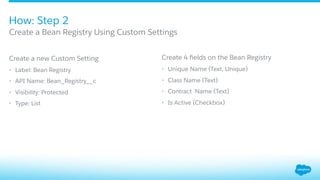
​ Create a new Custom Setting
•  Label: Bean Registry
•  API Name: Bean_Registry__c
•  Visibility: Protected
•  Type: List
Create 4 fields on the Bean Registry
•  Unique Name (Text, Unique)
•  Class Name (Text)
•  Contract Name (Text)
•  Is Active (Checkbox)
How: Step 2
​ Create a Bean Registry Using Custom Settings
​  Empty (protected) constructor
​  Private static instance
​  getInstance method to return the current instance (custom settings are loaded into memory in
each execution context).
​  Global registerBean method
​  Global deRegisterBean method
​  Just a few other helpful methods…
Define a BeanRegistry Singleton
How: Step 3
How: Step 3
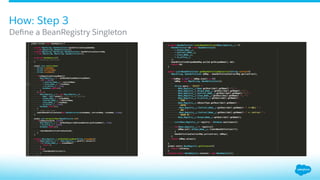
​ Define a BeanRegistry Singleton
How: Step 4
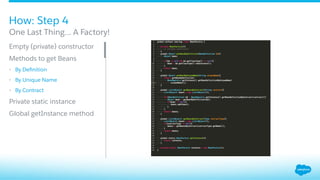
​ Empty (private) constructor
​ Methods to get Beans
•  By Definition
•  By Unique Name
•  By Contract
​ Private static instance
​ Global getInstance method
​ One Last Thing… A Factory!
•  Create a Bean interface
•  Create our first Bean
Keep it simple: create a Visualforce button and drop it on the Account Page Layout
On button click, the value in the Type picklist changes
…Now let’s put this to work!
Let’s see it in action
Demo
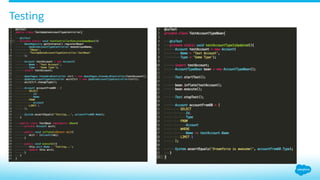
Testing
Things to Consider
•  Limitations
•  Extra CPU Cycles to locate beans and cast into interfaces. Mostly negligible.
•  Custom settings limits
•  Debugging can be cumbersome if working across managed packages.
•  Possible Enhancements
•  Pass parameters dynamically
•  Cache bean instances
Thank you
Code used in this presentation is available at
https://github.com/mikebernard/Dependency-Injection-Framework
Thank you

Dependency Injection with Apex

  • 1.
    Dependency Injection WithApex Using apex and custom settings to inject dependencies and decouple your applications ​ Mike Bernard ​ Senior Developer at nCino, Inc. ​ mike.bernard@ncino.com ​ @_mikebernard ​ 
  • 2.
    •  What? •  Why? • How? •  Demo •  Things to Consider Agenda
  • 3.
    ​ Dependency Injection isa software design pattern that allows dependencies to be given (injected) to a consuming class at runtime. ​ The consuming class does not know anything about the dependency. It only knows that the dependency will be provided to it at runtime, making the consuming class responsible for only the actions it needs to perform. What is Dependency Injection? What?
  • 4.
  • 5.
    Why? ​ Modularized Code •  Buildingmodular code means that each part of your application will be loosely coupled from other parts of the application, making changes a breeze. ​ Implementation Changes •  Changes that come as “one-offs” can be easily catered for by introducing a new implementation and deregistering the old implementation without trying to decouple pieces of code. ​ Ease of Testing •  Tests will be very direct and pointed towards the implementation. •  Modularization ​ Why Build A DI Framework?
  • 6.
    ​ Create a DIFramework using Salesforce with a few simple steps: ​ Step 1: Define Beans ​ Step 2: Create a Bean Registry Using Custom Settings ​ Step 3: Define a BeanRegistry Singleton ​ Step 4: One Last Thing… A Factory! How Can We Implement This On SFDC? How?
  • 7.
    How: Step 1 ​ Createa Bean object •  Unique Name •  Contract(the bean superclass as a Type) •  Class Name(the bean class as a Type) •  IsActive Flag ​ Define Beans
  • 8.
    ​ Create a newCustom Setting •  Label: Bean Registry •  API Name: Bean_Registry__c •  Visibility: Protected •  Type: List Create 4 fields on the Bean Registry •  Unique Name (Text, Unique) •  Class Name (Text) •  Contract Name (Text) •  Is Active (Checkbox) How: Step 2 ​ Create a Bean Registry Using Custom Settings
  • 9.
    ​  Empty (protected)constructor ​  Private static instance ​  getInstance method to return the current instance (custom settings are loaded into memory in each execution context). ​  Global registerBean method ​  Global deRegisterBean method ​  Just a few other helpful methods… Define a BeanRegistry Singleton How: Step 3
  • 10.
    How: Step 3 ​ Definea BeanRegistry Singleton
  • 11.
    How: Step 4 ​ Empty(private) constructor ​ Methods to get Beans •  By Definition •  By Unique Name •  By Contract ​ Private static instance ​ Global getInstance method ​ One Last Thing… A Factory!
  • 12.
    •  Create aBean interface •  Create our first Bean Keep it simple: create a Visualforce button and drop it on the Account Page Layout On button click, the value in the Type picklist changes …Now let’s put this to work!
  • 13.
    Let’s see itin action Demo
  • 14.
  • 15.
    Things to Consider • Limitations •  Extra CPU Cycles to locate beans and cast into interfaces. Mostly negligible. •  Custom settings limits •  Debugging can be cumbersome if working across managed packages. •  Possible Enhancements •  Pass parameters dynamically •  Cache bean instances
  • 16.
    Thank you Code usedin this presentation is available at https://github.com/mikebernard/Dependency-Injection-Framework
  • 17.