Updates of UDEMY courses: (BasicWordPress)
1. WordPress for Beginners
2. How To Create A Website using WordPress
3. Talking With Clients – Creating a WordPress Website
4. Build Your First Website in 1 Week with HTML5 and CSS3
Prepared by……..
Shibly Ahmed & Mostofa Kamal
Sr. Executive
SJ Innovation LLC
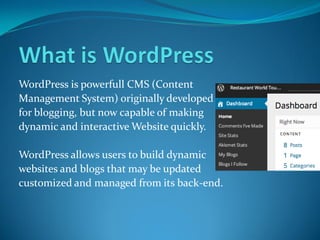
WordPress is powerfull CMS (Content
Management System) originally developed
for blogging, but now capable of making
dynamic and interactive Website quickly.
WordPress allows users to build dynamic
websites and blogs that may be updated
customized and managed from its back-end.
 Open Source web application
 Self-hosted & hosted option
 Supports W3C Web Standards*
 Over 26,000 Plug-in
 Outstanding Visual Editor
 Relatively simple learning curve for developers & clients
*The World Wide Web Consortium is the main
international standards organization for the World Wide
Web
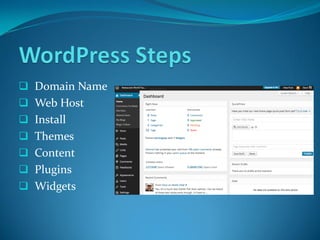
 Domain Name
 Web Host
 Install
 Themes
 Content
 Plugins
 Widgets
Domain Name:
A domain name locates an organization or
other entity on the Internet. For example,
the domain name www.totalbaseball.com
locates an Internet address for
"totalbaseball.com" at Internet point
199.0.0.2.
Web hosts:
Web hosts are companies that provide space
on a server owned or leased for use by clients,
as well as providing Internet connectivity,
typically in a data center.
Themes:
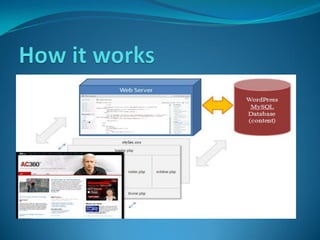
WordPress Theme is a collection of files that
work together to produce a graphical interface
with an underlying unifying design for a
weblog.
Content:
Content allows users to spotlight their posts
and have them uniquely displayed by a theme.
The content is intended to be displayed on a
blog’s front page; by using the module
consistently in this manner, users are given
a reliable Featured Content experience on
which they can rely even when switching themes.
WordPress Plug-ins:
WordPress plugins are bits of software that can be
uploaded to to extend and expand the functionalityof
your WordPress site.
* Spam blocker
* Add additional SEO capabilities
* Contact/Tell-a-Friend form
* Google XML Sitemaps
* Automaticallypost to social networks
* Database Backup
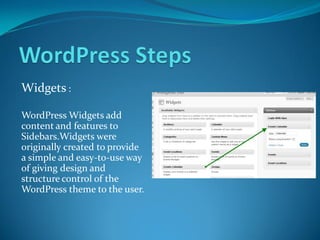
Widgets :
WordPress Widgets add
content and features to
Sidebars.Widgets were
originally created to provide
a simple and easy-to-use way
of giving design and
structure control of the
WordPress theme to the user.
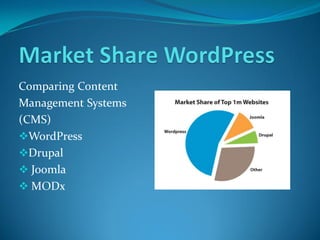
Comparing Content
Management Systems
(CMS)
WordPress
Drupal
 Joomla
 MODx
WordPress.com WordPress.org
Hosted on WordPress.com Self-Hosted on your
Web Hosting Account
Limited Customization Virtually Unlimited
Customization
Limited selection of established Can select from thousands
based themes of free/fee-themes to
choose from widgets,
create your own
No access to extra plug-ins
& widgets
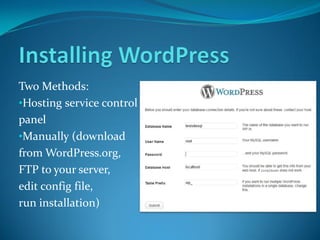
Two Methods:
•Hosting service control
panel
•Manually (download
from WordPress.org,
FTP to your server,
edit config file,
run installation)
WordPress Codex - codex.wordpress.org
WordPress Showcase - wordpress.org/showcase
Designing for WordPress - css-tricks.com/designing-for-
wordpress-complete-series-downloads
Digging into WordPress - digwp.com
Digging into WordPress (The Book)
Chicago WordPress Meetup
Basic word press

Basic word press

  • 1.
    Updates of UDEMYcourses: (BasicWordPress) 1. WordPress for Beginners 2. How To Create A Website using WordPress 3. Talking With Clients – Creating a WordPress Website 4. Build Your First Website in 1 Week with HTML5 and CSS3 Prepared by…….. Shibly Ahmed & Mostofa Kamal Sr. Executive SJ Innovation LLC
  • 2.
    WordPress is powerfullCMS (Content Management System) originally developed for blogging, but now capable of making dynamic and interactive Website quickly. WordPress allows users to build dynamic websites and blogs that may be updated customized and managed from its back-end.
  • 3.
     Open Sourceweb application  Self-hosted & hosted option  Supports W3C Web Standards*  Over 26,000 Plug-in  Outstanding Visual Editor  Relatively simple learning curve for developers & clients *The World Wide Web Consortium is the main international standards organization for the World Wide Web
  • 4.
     Domain Name Web Host  Install  Themes  Content  Plugins  Widgets
  • 5.
    Domain Name: A domainname locates an organization or other entity on the Internet. For example, the domain name www.totalbaseball.com locates an Internet address for "totalbaseball.com" at Internet point 199.0.0.2.
  • 6.
    Web hosts: Web hostsare companies that provide space on a server owned or leased for use by clients, as well as providing Internet connectivity, typically in a data center.
  • 7.
    Themes: WordPress Theme isa collection of files that work together to produce a graphical interface with an underlying unifying design for a weblog.
  • 8.
    Content: Content allows usersto spotlight their posts and have them uniquely displayed by a theme. The content is intended to be displayed on a blog’s front page; by using the module consistently in this manner, users are given a reliable Featured Content experience on which they can rely even when switching themes.
  • 9.
    WordPress Plug-ins: WordPress pluginsare bits of software that can be uploaded to to extend and expand the functionalityof your WordPress site. * Spam blocker * Add additional SEO capabilities * Contact/Tell-a-Friend form * Google XML Sitemaps * Automaticallypost to social networks * Database Backup
  • 10.
    Widgets : WordPress Widgetsadd content and features to Sidebars.Widgets were originally created to provide a simple and easy-to-use way of giving design and structure control of the WordPress theme to the user.
  • 11.
  • 12.
    WordPress.com WordPress.org Hosted onWordPress.com Self-Hosted on your Web Hosting Account Limited Customization Virtually Unlimited Customization Limited selection of established Can select from thousands based themes of free/fee-themes to choose from widgets, create your own No access to extra plug-ins & widgets
  • 14.
    Two Methods: •Hosting servicecontrol panel •Manually (download from WordPress.org, FTP to your server, edit config file, run installation)
  • 15.
    WordPress Codex -codex.wordpress.org WordPress Showcase - wordpress.org/showcase Designing for WordPress - css-tricks.com/designing-for- wordpress-complete-series-downloads Digging into WordPress - digwp.com Digging into WordPress (The Book) Chicago WordPress Meetup