BasicPhotography<@Triet Ho/>1
IntroductionObjectivesGet basic knowledge of  factors that create a picture (ISO, Aperture and Shutter speed)Understand common shooting modes on cameras10 tips for beach photography AttendeesEveryoneTime: 30 minutesConfidential2
A Picture is captured when light reaches the sensor3
Factors control the amount of lightAperture (f): Door of the lensShutter (shutter speed): Door of the sensorSensor’s sensitivity (ISO): light sensitive of the sensorExamples of the combinations4
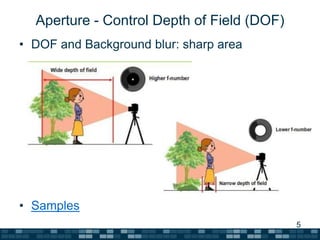
Aperture - Control Depth of Field (DOF)DOF and Background blur: sharp area Samples5
Shutter Speed – Freezing and blurring MotionCamera Shake can also blur the picture at slow shooter speed.6
ISO – Noise FactorLow ISO gives high quality imageHigh ISO allows faster shutter speedThe same ISO give different qualities on different cameras. See here7
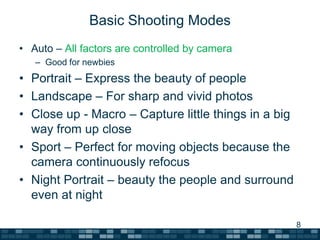
Basic Shooting ModesAuto – All factors are controlled by cameraGood for newbiesPortrait – Express the beauty of peopleLandscape – For sharp and vivid photosClose up - Macro – Capture little things in a big way from up closeSport – Perfect for moving objects because the camera continuously refocusNight Portrait – beauty the people and surround even at night8
Creative Shutting modesP – Program: Shutter Speed, ApertureCapture the best momentsAV – Aperture Priority: Shutter Speed, ApertureGood for portrait with blur background or keep everything in focus for landscape shots.TV – Shutter Speed priority: Aperture, Shutter SpeedFreeze or blur subject motionsM – Manual: Aperture, Shutter SpeedAdvanced usersLegend: Auto, Manual9
Tips - Q&ATips10 tips for beach photographyQ&A10
Thank you! - 2011trietho@gmail.comReference: http://www.canon.co.jp/imaging/enjoydslr11

Basic Photography

  • 1.
  • 2.
    IntroductionObjectivesGet basic knowledgeof factors that create a picture (ISO, Aperture and Shutter speed)Understand common shooting modes on cameras10 tips for beach photography AttendeesEveryoneTime: 30 minutesConfidential2
  • 3.
    A Picture iscaptured when light reaches the sensor3
  • 4.
    Factors control theamount of lightAperture (f): Door of the lensShutter (shutter speed): Door of the sensorSensor’s sensitivity (ISO): light sensitive of the sensorExamples of the combinations4
  • 5.
    Aperture - ControlDepth of Field (DOF)DOF and Background blur: sharp area Samples5
  • 6.
    Shutter Speed –Freezing and blurring MotionCamera Shake can also blur the picture at slow shooter speed.6
  • 7.
    ISO – NoiseFactorLow ISO gives high quality imageHigh ISO allows faster shutter speedThe same ISO give different qualities on different cameras. See here7
  • 8.
    Basic Shooting ModesAuto– All factors are controlled by cameraGood for newbiesPortrait – Express the beauty of peopleLandscape – For sharp and vivid photosClose up - Macro – Capture little things in a big way from up closeSport – Perfect for moving objects because the camera continuously refocusNight Portrait – beauty the people and surround even at night8
  • 9.
    Creative Shutting modesP– Program: Shutter Speed, ApertureCapture the best momentsAV – Aperture Priority: Shutter Speed, ApertureGood for portrait with blur background or keep everything in focus for landscape shots.TV – Shutter Speed priority: Aperture, Shutter SpeedFreeze or blur subject motionsM – Manual: Aperture, Shutter SpeedAdvanced usersLegend: Auto, Manual9
  • 10.
    Tips - Q&ATips10tips for beach photographyQ&A10
  • 11.
    Thank you! -2011trietho@gmail.comReference: http://www.canon.co.jp/imaging/enjoydslr11