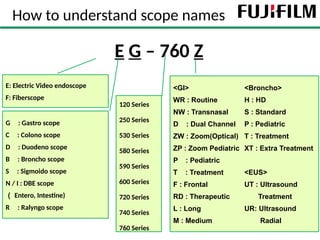
How to understandscope names
3
E G – 760 Z
E: Electric Video endoscope
F: Fiberscope
G : Gastro scope
C : Colono scope
D : Duodeno scope
B : Broncho scope
S : Sigmoido scope
N / I : DBE scope
( Entero, Intestine)
R : Ralyngo scope
120 Series
250 Series
530 Series
580 Series
590 Series
600 Series
720 Series
740 Series
760 Series
<GI>
WR : Routine
NW : Transnasal
D : Dual Channel
ZW : Zoom(Optical)
ZP : Zoom Pediatric
P : Pediatric
T : Treatment
F : Frontal
RD : Therapeutic
L : Long
M : Medium
<Broncho>
H : HD
S : Standard
P : Pediatric
T : Treatment
XT : Extra Treatment
<EUS>
UT : Ultrasound
Treatment
UR: Ultrasound
Radial
4.
Agenda
1. Capture images
2.Output different lights
3. Bending the endoscope angle
4. Keep clear view by flushing the lens
5. Feed air to inflate the GI tract
6. Feed Co2 to inflate the GI tract
7. Suction to remove body fluid or air
8. Treatment using devices
9. Water jet function
10. Zoom in and out
• 1st
click Freezesthe image
• 2nd
click captures the image
F/T(Freeze/Trigger)
• 1st
click freezed the image
• By releasing the 1st
click, the image is captured
F+T(Freeze + Trigger)
• 1st
click freezes the image
• Click with a different button captures the image
FRZ(Freeze)
1. Capture images
We have 3 ways to capture images
FUJIFILM’s
unique way
“Double click”
Olympus user may
be used to this
7.
Agenda
1. Capture images
2.Output different lights
3. Bending the endoscope angle
4. Feed air to inflate the GI tract
5. Feed Co2 to inflate the GI tract
6. Keep clear view by flushing the lens
7. Suction to remove body fluid or air
8. Treatment using devices
9. Water jet function
10. Zoom in and out
8.
2. Output differentlights
8
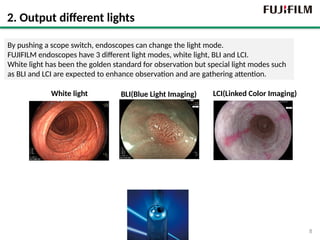
By pushing a scope switch, endoscopes can change the light mode.
FUJIFILM endoscopes have 3 different light modes, white light, BLI and LCI.
White light has been the golden standard for observation but special light modes such
as BLI and LCI are expected to enhance observation and are gathering attention.
White light BLI(Blue Light Imaging) LCI(Linked Color Imaging)
9.
Agenda
1. Capture images
2.Output different lights
3. Bending the endoscope angle
4. Feed air to inflate the GI tract
5. Feed Co2 to inflate the GI tract
6. Keep clear view by flushing the lens
7. Suction to remove body fluid or air
8. Treatment using devices
9. Water jet function
10. Zoom in and out
10.
Up/Down
Right/Left
Lock R/L
Lock U/D
3.Bending the endoscope
The scope angle can be maneuvered by moving the 2 dials below
These dials can be locked by the locking levers.
11.
11
07/23/2025
3. Bending theendoscope
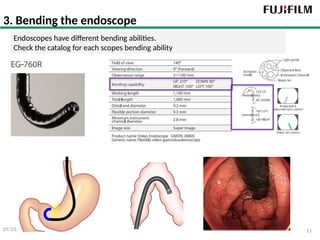
Endoscopes have different bending abilities.
Check the catalog for each scopes bending ability
12.
1. Capture images
2.Output different lights
3. Bending the endoscope angle
4. Feed air to inflate the GI tract
5. Feed Co2 to inflate the GI tract
6. Keep clear view by flushing the lens
7. Suction to remove body fluid or air
8. Treatment using devices
9. Water jet function
10. Zoom in and out
Agenda
13.
Air/Water Button
4. Feedingair
Air feeding is done by lightly pressing the air/water button.
It is generally done to inflate the GI tract.
Before insufflating
After insufflating
Air
14.
07/23/2025 14
4. Howto feed air
When you block the air water button, air goes through the tip of the endoscope.
15.
4. Mechanism ofair feed
Usually, air flows from the light source and out of the air water button.
When you cover the air water button, air goes through the tip of the endoscope.
16.
Agenda
1. Capture images
2.Output different lights
3. Bending the endoscope angle
4. Feed air to inflate the GI tract
5. Feed Co2 to inflate the GI tract
6. Keep clear view by flushing the lens
7. Suction to remove body fluid or air
8. Treatment using devices
9. Water jet function
10. Zoom in and out
17.
5. CO2 orroom air?
Usually, room air is used for air inflation. However, C02 can be an alternative in
Advanced procedures, lengthy procedures and unsedated procedures.
CO2 is absorbed by the body 150 times faster than air
⇒CO2 enables doctors to perform optimum procedures with minimum patients’
discomfort. from bloating with air and cramping.
18.
5. FUJIFILM’s EndoscopicCO2 regulator
Pipeline in hospital
Gas tank
Or
We have a CO2 regulator, GW-100.
CO2 can be supplied by a pipeline in the hospital or gas tank to the GW-100,
And be sent from the GW-100 to the water tank
2-way connector
1-step connector
19.
Agenda
1. Capture images
2.Output different lights
3. Bending the endoscope angle
4. Feed air to inflate the GI tract
5. Feed Co2 to inflate the GI tract
6. Keep clear view by flushing the lens
7. Suction to remove body fluid or air
8. Treatment using devices
9. Water jet function
10. Zoom in and out
20.
6. Feeding waterto remove the stain on the lens
Air/Water Button
Remove, water drop, Fog & stain
The view can
get foggy
during long
procedures.
6. Mechanism ofwater feed
Usually, air flows from the light source and out of the air water button.
When you cover the air water button, the pressure in the water tank increases and water is
pushed out of it. This water goes to the tip of the scope.
Air
Water
Air
23.
Agenda
1. Capture images
2.Output different lights
3. Bending the endoscope angle
4. Feed air to inflate the GI tract
5. Feed Co2 to inflate the GI tract
6. Keep clear view by flushing the lens
7. Suction to remove body fluid or air
8. Treatment using devices
9. Water jet function
10. Zoom in and out
24.
7. Suction toremove the body fluid or air
Suction machine or
hospital pipeline
Suction
tube
connection
Connection to
the endsocope
or
Suction from the tip of
the endoscope
Objects can be sucked through the tip of the endoscope and sent to a external pipeline or
equipment. Suction is usually done to remove body fluid or deflate the GI tract.
The lumen
for suction.
This is also
the channel
for devices
25.
07/23/2025 25
7. Howto do suction
When you press the suction button, suction is done by the tip of the endoscope.
26.
7. Mechanism ofsuction
: Suction Route
: Air Route
: Water Route
: Water Jet Route
Suction Pump
Usually, air is sucked from the tip of the scope and comes out of the suction button.
When the suction button is pushed, the sucked air goes towards to the suction pump instead.
27.
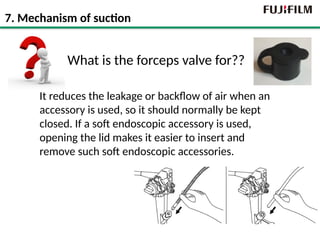
What is theforceps valve for??
It reduces the leakage or backflow of air when an
accessory is used, so it should normally be kept
closed. If a soft endoscopic accessory is used,
opening the lid makes it easier to insert and
remove such soft endoscopic accessories.
7. Mechanism of suction
28.
7. Major troubleshooting
Is the forceps valve attached ?
Is it damaged?
Is the suction valve damaged? Is it
stuck? Maybe Solid materials or
thick fluids have adhered to the
suction valve?
Is the Suction unit on? Is the suction
tube connected to the scope?
Hey! No suction!
※Refer to the manual for more
trouble shooting.
Suction Pump
29.
Agenda
1. Capture images
2.Output different lights
3. Bending the endoscope angle
4. Feed air to inflate the GI tract
5. Feed Co2 to inflate the GI tract
6. Keep clear view by flushing the lens
7. Suction to remove body fluid or air
8. Treatment using devices
9. Water jet function
10. Zoom in and out
30.
About 15cm
8. Treatmentusing devices
① Length of scope < Length of accessories
Working Length
More than 30cm
Lengthof the accessory and scope is one important factor for compatibility
The length of the accessory must be longer than the length of the scope.
The length of the red letters below
must be considered as well.
31.
② CH diameter> Diameter of accessori
Suction CH > Diameter of
acc
Diameterof the accessory and the scope’s working channel is one important factor
for compatibility. The diameter of the accessory must be smaller.
8. Treatment using devices
32.
32
8. Where tolook for diameter and length
07/23/2025
Working length is 1800mm
(Remember:
working length+45cm is
necessary)
Applicable Channel
diameter:
≧2.8mm
33.
Agenda
1. Capture images
2.Output different lights
3. Bending the endoscope angle
4. Feed air to inflate the GI tract
5. Feed Co2 to inflate the GI tract
6. Keep clear view by flushing the lens
7. Suction to remove body fluid or air
8. Treatment using devices
9. Water jet function
10. Zoom in and out
34.
34
9. Water jetfunction
07/23/2025
How is it done?
Shoot water
through the
water jet
channel
Shoot water
through the
forceps
channel
Check! The
endoscope should
have a water jet
channel
FUJIFILM JW-2
(other brands are used as well)
Why water jet?
Injecting water jet into the gastrointestinal lumen is helpful for maintaining a clear
endoscopic view, washing away blood or mucus in the lumen or on the surface of the tip
of the endoscope. This contributes to reducing time and discomfort of examination.
35.
Switch 4/5
Zoom
Optical Zoom
ElectricalZoom
10. Zoom in and out
Why zoom
By diagnosing detailed surface and vessel patterns, doctors
characterize the lesion for treatment decision and decide their
treatment strategy.
How There are 2 types of magnification; Electrical zoom and
optical zoom. Electrical zoom is the conventional type of zoom and it
is like pinching in a smart phone(image quality gets bad). Optical
zoom does not compromise image quality.
Zoom
parameter