INTRODUCTION TO
DATABASE MANAGEMENT SYSTEM(DBMS)
Presented By
Pritirani pradhan
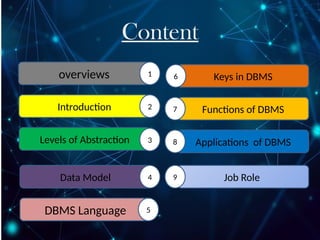
Content
overviews 1
Introduction 2
Levels of Abstraction 3
Data Model 4
DBMS Language 5
Keys in DBMS
6
Functions of DBMS
7
Applications of DBMS
8
Job Role
9
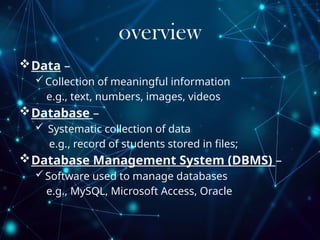
overview
Data –
Collection of meaningful information
e.g., text, numbers, images, videos
Database –
 Systematic collection of data
e.g., record of students stored in files;
Database Management System (DBMS) –
Software used to manage databases
e.g., MySQL, Microsoft Access, Oracle
Introduction to DBMS
DBMS stands for Database Management System.
 DBMS = Database + Management System.
 A database management system stores data in
such a way that it becomes easier to retrieve,
manipulate, and produce information.
 Database is a collection of data and
Management System is a set of programs to
store and retrieve those data.
Needs OF DBMS
Database systems are basically developed for
large amount of data.
 When dealing with huge amount of data, there
are two things that require optimization:
 Storage of data and
 Retrieval of data.
Levels of Abstraction
Internal Level (Physical Level):
Describes how data are physically
stored on the storage medium;
closest to the database
programmer; lowest level of
abstraction.
Conceptual Level (Logical Level):
Describes what data are stored in
the database; closest to the
database manager; intermediate
level of abstraction.
External Level (View Level):
Describes how data are viewed by
individual users; closest to users;
Relational Data Model
 Data stored in tables (relations) as rows and columns.
 These tables are called relations.
Terminology in Relational Data Model
Relation: A table—data organized in rows and columns.
Tuple: A row in a table.
Attribute: A column in a table.
Degree: Number of attributes in a relation.
Cardinality: Number of tuples in a relation.
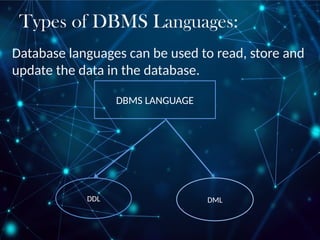
Types of DBMS Languages:
Database languages can be used to read, store and
update the data in the database.
DBMS LANGUAGE
DML
DDL
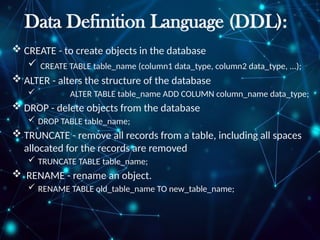
Data Definition Language (DDL):
 CREATE - to create objects in the database
 CREATE TABLE table_name (column1 data_type, column2 data_type, ...);
 ALTER - alters the structure of the database
 ALTER TABLE table_name ADD COLUMN column_name data_type;
 DROP - delete objects from the database
 DROP TABLE table_name;
 TRUNCATE - remove all records from a table, including all spaces
allocated for the records are removed
 TRUNCATE TABLE table_name;
 RENAME - rename an object.
 RENAME TABLE old_table_name TO new_table_name;
Data Manipulation Language (DML):
Manipulation Language (DML) statements are used for managing
data within schema objects. Some examples:
 SELECT - Retrieve data from the a database
 Select * from table_name;
 INSERT - Insert data into a table
 INSERT INTO table_name (column1, column2, ...) VALUES (value1,
value2, ...);
 UPDATE - Updates existing data within a table
 UPDATE table_name SET column1 = value1, column2 = value2 WHERE
condition;
 DELETE - deletes all records from a table, the space for the
records remain
 DELETE FROM table_name WHERE condition;
Keys in DBMS:
Primary Key: Attribute(s) that uniquely identify tuples in
a relation.
Candidate Key: Possible attribute combinations that can
serve as primary key.
Foreign Key: Non-key attribute whose values come from
primary key of another table
Functions of DBMS:
 To store data
 To organize data
 To control access to data
 To protect data
 Create databases
 Modify database data (insert, update, delete)
 Maintain database structures
 Provide security
 Perform backup and recovery
Applications of DBMS:
 Banking: customer information, account, loans,
transactions
 Airline: reservation and schedule in
 Universities: student info, course registration, grades
 Sales: customer, product, purchase data
 Railway reservation systems
 Online shopping etc.
Why DBMS Professionals Are in
Demand ?
 Every company generates and stores large volumes of
data
 DBMS ensures data availability, consistency, and security
 Data-driven decision-making fuels demand for DBMS
skills
Key Job Roles in DBMS
Job Title
Description
Database Administrator (DBA) Manages DB systems, ensures security, performance,
backup
Database Developer Builds queries, procedures, and optimizes database
operations
Data Analyst Uses DBMS to extract and analyze data
Data Engineer
Constructs data pipelines, integrates systems using
DBMS
SQL Developer Specializes in writing queries and stored procedures
Database Administrator (DBA) Description
Introduction to Database system 123.pptx

Introduction to Database system 123.pptx

  • 1.
    INTRODUCTION TO DATABASE MANAGEMENTSYSTEM(DBMS) Presented By Pritirani pradhan
  • 2.
    Content overviews 1 Introduction 2 Levelsof Abstraction 3 Data Model 4 DBMS Language 5 Keys in DBMS 6 Functions of DBMS 7 Applications of DBMS 8 Job Role 9
  • 3.
    overview Data – Collection ofmeaningful information e.g., text, numbers, images, videos Database –  Systematic collection of data e.g., record of students stored in files; Database Management System (DBMS) – Software used to manage databases e.g., MySQL, Microsoft Access, Oracle
  • 4.
    Introduction to DBMS DBMSstands for Database Management System.  DBMS = Database + Management System.  A database management system stores data in such a way that it becomes easier to retrieve, manipulate, and produce information.  Database is a collection of data and Management System is a set of programs to store and retrieve those data.
  • 5.
    Needs OF DBMS Databasesystems are basically developed for large amount of data.  When dealing with huge amount of data, there are two things that require optimization:  Storage of data and  Retrieval of data.
  • 6.
    Levels of Abstraction InternalLevel (Physical Level): Describes how data are physically stored on the storage medium; closest to the database programmer; lowest level of abstraction. Conceptual Level (Logical Level): Describes what data are stored in the database; closest to the database manager; intermediate level of abstraction. External Level (View Level): Describes how data are viewed by individual users; closest to users;
  • 7.
    Relational Data Model Data stored in tables (relations) as rows and columns.  These tables are called relations.
  • 8.
    Terminology in RelationalData Model Relation: A table—data organized in rows and columns. Tuple: A row in a table. Attribute: A column in a table. Degree: Number of attributes in a relation. Cardinality: Number of tuples in a relation.
  • 9.
    Types of DBMSLanguages: Database languages can be used to read, store and update the data in the database. DBMS LANGUAGE DML DDL
  • 10.
    Data Definition Language(DDL):  CREATE - to create objects in the database  CREATE TABLE table_name (column1 data_type, column2 data_type, ...);  ALTER - alters the structure of the database  ALTER TABLE table_name ADD COLUMN column_name data_type;  DROP - delete objects from the database  DROP TABLE table_name;  TRUNCATE - remove all records from a table, including all spaces allocated for the records are removed  TRUNCATE TABLE table_name;  RENAME - rename an object.  RENAME TABLE old_table_name TO new_table_name;
  • 11.
    Data Manipulation Language(DML): Manipulation Language (DML) statements are used for managing data within schema objects. Some examples:  SELECT - Retrieve data from the a database  Select * from table_name;  INSERT - Insert data into a table  INSERT INTO table_name (column1, column2, ...) VALUES (value1, value2, ...);  UPDATE - Updates existing data within a table  UPDATE table_name SET column1 = value1, column2 = value2 WHERE condition;  DELETE - deletes all records from a table, the space for the records remain  DELETE FROM table_name WHERE condition;
  • 12.
    Keys in DBMS: PrimaryKey: Attribute(s) that uniquely identify tuples in a relation. Candidate Key: Possible attribute combinations that can serve as primary key. Foreign Key: Non-key attribute whose values come from primary key of another table
  • 14.
    Functions of DBMS: To store data  To organize data  To control access to data  To protect data  Create databases  Modify database data (insert, update, delete)  Maintain database structures  Provide security  Perform backup and recovery
  • 15.
    Applications of DBMS: Banking: customer information, account, loans, transactions  Airline: reservation and schedule in  Universities: student info, course registration, grades  Sales: customer, product, purchase data  Railway reservation systems  Online shopping etc.
  • 16.
    Why DBMS ProfessionalsAre in Demand ?  Every company generates and stores large volumes of data  DBMS ensures data availability, consistency, and security  Data-driven decision-making fuels demand for DBMS skills
  • 17.
    Key Job Rolesin DBMS Job Title Description Database Administrator (DBA) Manages DB systems, ensures security, performance, backup Database Developer Builds queries, procedures, and optimizes database operations Data Analyst Uses DBMS to extract and analyze data Data Engineer Constructs data pipelines, integrates systems using DBMS SQL Developer Specializes in writing queries and stored procedures Database Administrator (DBA) Description