









Please go to the Table of Contents to access additional chapters. 
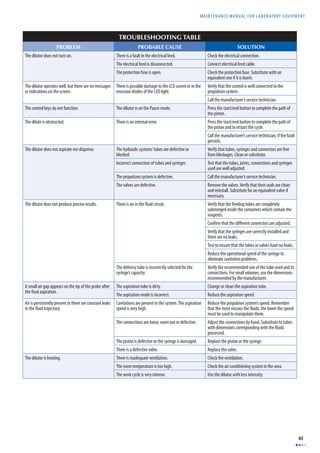
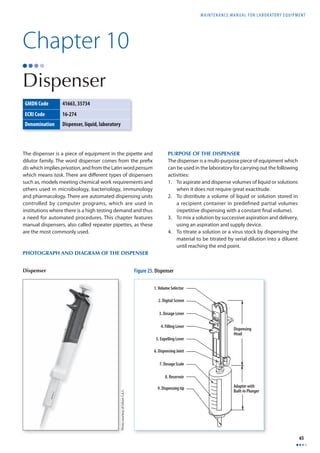
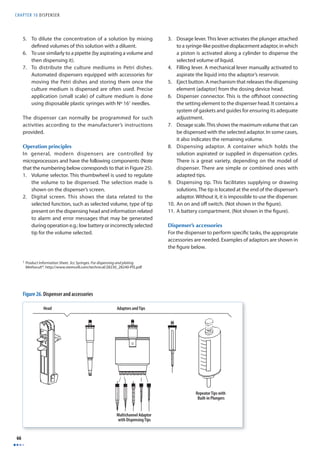
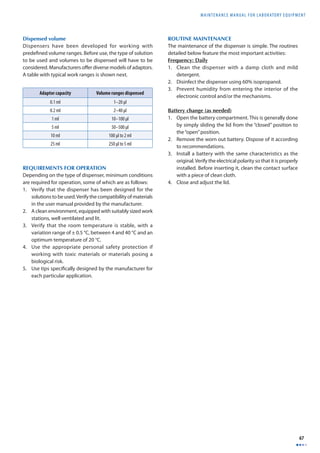
MAINTENANCE 
Manual 
for Laboratory Equipment 
2nd Edition
MAINTENANCE 
Manual 
for Laboratory Equipment 
2nd Edition
WHO Library Cataloguing-in-Publication Data 
Maintenance manual for laboratory equipment, 2nd ed. 
1.Laboratory equipment. 2.Maintenance. 3.Manuals. I.World Health Organization. II.Pan American Health Organization. 
ISBN 978 92 4 159635 0 (NLM classifi cation: WX 147) 
© World Health Organization 2008 
All rights reserved. Publications of the World Health Organization can be obtained from WHO Press, World Health Organization, 20 Avenue Appia, 1211 Geneva 27, Switzerland 
(tel.: +41 22 791 3264; fax: +41 22 791 4857; e-mail: bookorders@who.int). Requests for permission to reproduce or translate WHO publications – whether for sale or for 
noncommercial distribution – should be addressed to WHO Press, at the above address (fax: +41 22 791 4806; e-mail: permissions@who.int). 
The designations employed and the presentation of the material in this publication do not imply the expression of any opinion whatsoever on the part of the World Health 
Organization concerning the legal status of any country, territory, city or area or of its authorities, or concerning the delimitation of its frontiers or boundaries. Dotted lines on 
maps represent approximate border lines for which there may not yet be full agreement. 
The mention of specifi c companies or of certain manufacturers’ products does not imply that they are endorsed or recommended by the World Health Organization in 
preference to others of a similar nature that are not mentioned. Errors and omissions excepted, the names of proprietary products are distinguished by initial capital 
letters. 
All reasonable precautions have been taken by the World Health Organization to verify the information contained in this publication. However, the published material is being 
distributed without warranty of any kind, either expressed or implied. The responsibility for the interpretation and use of the material lies with the reader. In no event shall the 
World Health Organization be liable for damages arising from its use. 
Design and Layout: L’IV Com Sàrl, Morges Switzerland 
Printed in Spain 
Contact: 
Dr G. Vercauteren, Coordinator, Diagnostics and Laboratory Technology, Department of Essential Health Technologies, World Health Organization, 20 Avenue Appia, 1211 Geneva 
2, Switzerland 
This document is available at www.who.int/diagnostics_laboratory
MAINTENANCE MANUAL F O R LABORATORY EQUIPMENT 
iii 
Table of Contents 
TABLE OF FIGURES viii 
ACKNOWLEDGEMENTS x 
INTRODUCTION xi 
CHAPTER 1 • MICROPLATE READER 1 
Photograph of microplate reader 1 
Purpose of the microplate reader 1 
Operation principles 1 
Installation requirements 3 
Routine maintenance 3 
Troubleshooting table 4 
Basic defi nitions 5 
CHAPTER 2 • MICROPLATE WASHER 7 
Photograph of microplate washer 7 
Purpose of the microplate washer 7 
Operation principles 7 
Installation requirements 9 
Routine maintenance 9 
Troubleshooting table 11 
Basic defi nitions 12 
CHAPTER 3 • pH METER 13 
Purpose of the equipment 13 
Photograph and components of the pH meter 13 
Operation principles 13 
pH meter components 14 
Typical circuit 15 
Installation requirements 16 
General calibration procedure 16 
General maintenance of the pH meter 17 
Basic maintenance of the electrode 18 
Troubleshooting table 18 
Basic defi nitions 19 
Annex: The pH theory 20
TABLE OF CONTENTS 
iv 
CHAPTER 4 • BALANCES 21 
Photographs of balances 21 
Purpose of the balance 22 
Operation principles 22 
Installation requirements 26 
Routine maintenance 27 
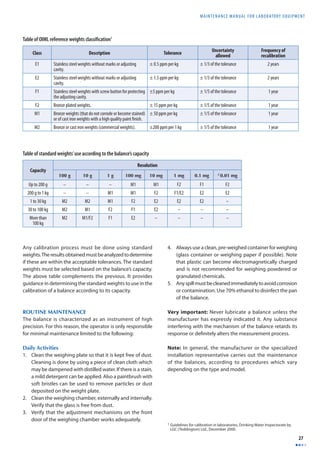
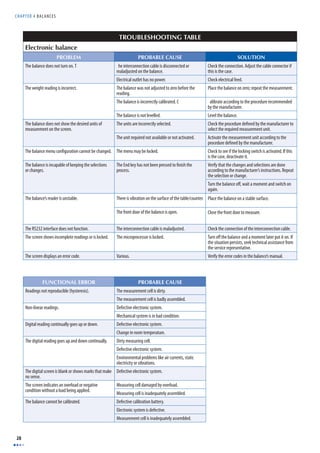
Troubleshooting table 28 
Basic defi nitions 29 
CHAPTER 5 • WATER BATH 31 
Diagram of a water bath 31 
Operation principles 31 
Water bath controls 32 
Water bath operation 32 
Troubleshooting table 34 
Basic defi nitions 34 
CHAPTER 6 • BIOLOGICAL SAFETY CABINET 35 
Illustration of a biological safety cabinet 35 
Purposes of the equipment 35 
Operation principles 35 
Biological safety 39 
Installation requirements 39 
Using the safety cabinet 39 
Routine maintenance 40 
Functional evaluation (alternative) 41 
Table of functional evaluation of biological safety cabinets 42 
Troubleshooting table 43 
Basic defi nitions 44 
CHAPTER 7 • CENTRIFUGE 45 
Photograph of centrifuge 45 
Purpose of the centrifuge 45 
Operation principles 45 
Components of the centrifuge 46 
Installation requirements 48 
Routine maintenance 48 
Appropriate management and storage recommendations 48 
Troubleshooting table 50 
Basic defi nitions 52 
CHAPTER 8 • WATER DISTILLER 53 
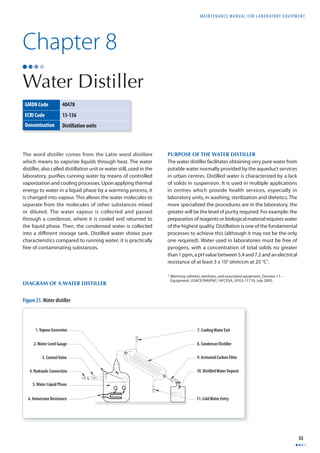
Diagram of a water distiller 53 
Purpose of the water distiller 53 
Operation principles 54 
Installation requirements 54 
Routine maintenance 55 
Troubleshooting table 56 
Basic defi nitions 57
MAINTENANCE MANUAL F O R LABORATORY EQUIPMENT 
v 
CHAPTER 9 • DILUTOR 59 
Diagram of a dilutor 59 
Purpose of the dilutor 59 
Operation principles 60 
Installation requirements 61 
Routine maintenance 61 
Troubleshooting table 63 
Basic defi nitions 64 
CHAPTER 10 • DISPENSER 65 
Photograph and diagram of the dispenser 65 
Purpose of the dispenser 65 
Requirements for operation 67 
Routine maintenance 67 
Troubleshooting table 68 
Basic defi nitions 68 
CHAPTER 11 • SPECTROPHOTOMETER 69 
Photograph of spectrophotometer 69 
Purpose of the equipment 69 
Operation principles 69 
Spectrophotometer components 72 
Installation requirements 73 
Spectrophotometer maintenance 73 
Good practices when using the spectrophotometer 75 
Troubleshooting table 77 
Basic defi nitions 79 
CHAPTER 12 • AUTOCLAVE 81 
Photograph of the autoclave 81 
Purpose of the autoclave 81 
Operation principles 82 
Operation of the autoclave 84 
Installation requirements 87 
Routine maintenance 88 
Maintenance of specialized components 90 
Troubleshooting table 91 
Basic defi nitions 92 
CHAPTER 13 • DRYING OVEN 93 
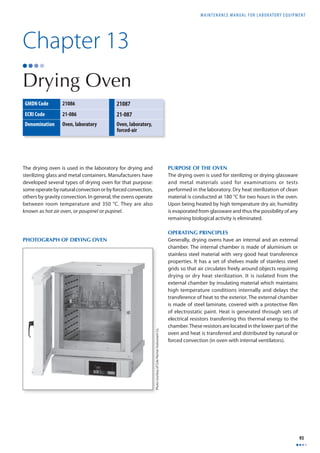
Photograph of drying oven 93 
Purpose of the oven 93 
Operating principles 93 
Installation requirements 94 
Oven operation 94 
Oven controls 95 
Quality control 96 
Routine maintenance 96 
Troubleshooting table 97 
Basic defi nitions 98
TABLE OF CONTENTS 
vi 
CHAPTER 14 • INCUBATOR 99 
Photograph of incubator 99 
Operating principles 99 
Incubator controls 101 
Installation requirements 101 
Routine maintenance and use of the incubator 101 
Troubleshooting table 103 
Basic defi nitions 104 
CHAPTER 15 • MICROSCOPE 105 
Photographs of microscopes 105 
Purpose of the equipment 106 
Operation principles 106 
Installation requirements 108 
Description of potential problems with microscopes 109 
General maintenance of the microscope 111 
Troubleshooting table 115 
Basic defi nitions 116 
CHAPTER 16 • PIPETTES 119 
Photographs of pipettes 119 
Purpose of the pipettes 120 
Operation principles of the pipette 120 
Requirements for use 120 
Using the pipette 121 
Routine maintenance 122 
Troubleshooting table 125 
Basic defi nitions 126 
CHAPTER 17 • STIRRING HEATING PLATE 127 
Photograph of the stirring heating plate 127 
Operation principles 127 
Controls of the stirring heating plate 127 
Installation requirements 128 
Operation of the stirring heating plate 128 
Routine maintenance 128 
Troubleshooting table 129 
Basic defi nitions 129 
CHAPTER 18 • REFRIGERATORS AND FREEZERS 131 
Photograph of a refrigerated storage unit 131 
Purpose of refrigerated storage units 132 
Operation principles 132 
Installation requirements 133 
Refrigerator control circuit 134 
Refrigerator operation 134 
Refrigerator routine maintenance 135 
Troubleshooting table 137
MAINTENANCE MANUAL F O R LABORATORY EQUIPMENT 
vii 
Operation of ultralow freezers 138 
Turning the unit on 138 
Routine maintenance 139 
Troubleshooting table 140 
Basic defi nitions 141 
CHAPTER 19 • CHEMISTRY ANALYSERS 143 
Photographs of chemistry analysers 143 
Purpose of chemistry analysers 144 
Operation principle 144 
Components 144 
Installation requirements 145 
Operation of the dry chemistry analyser 145 
Operation of the wet chemistry analyser 146 
Routine maintenance of chemistry analysers 146 
Non-routine maintenance and troubleshooting 147 
Troubleshooting table 148 
Basic defi nitions 148 
CHAPTER 20 • COLORIMETERS 149 
Photograph of colorimeter 149 
Purpose of the colorimeter 149 
Operating principle 149 
Components 150 
Installation requirements 150 
Operation of the colorimeter 150 
Operation of the haemoglobinometer 151 
Routine maintenance 151 
Troubleshooting table 154 
Basic defi nitions 155 
BIBLIOGRAPHY 157
TABLE OF FIGURES 
viii 
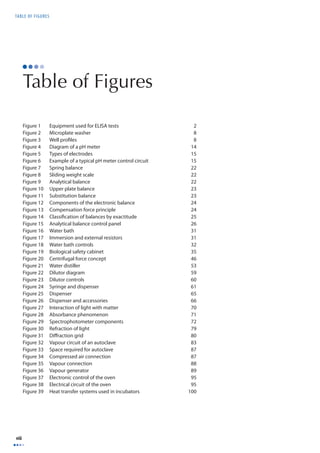
Table of Figures 
Figure 1 Equipment used for ELISA tests 2 
Figure 2 Microplate washer 8 
Figure 3 Well profi les 8 
Figure 4 Diagram of a pH meter 14 
Figure 5 Types of electrodes 15 
Figure 6 Example of a typical pH meter control circuit 15 
Figure 7 Spring balance 22 
Figure 8 Sliding weight scale 22 
Figure 9 Analytical balance 22 
Figure 10 Upper plate balance 23 
Figure 11 Substitution balance 23 
Figure 12 Components of the electronic balance 24 
Figure 13 Compensation force principle 24 
Figure 14 Classifi cation of balances by exactitude 25 
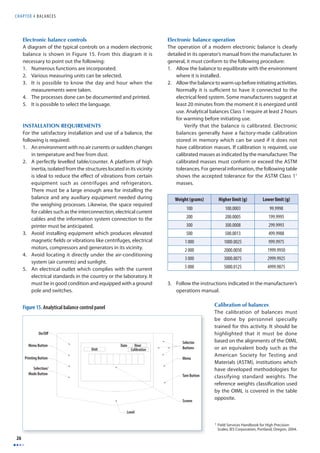
Figure 15 Analytical balance control panel 26 
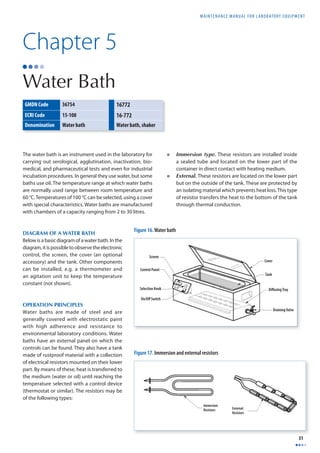
Figure 16 Water bath 31 
Figure 17 Immersion and external resistors 31 
Figure 18 Water bath controls 32 
Figure 19 Biological safety cabinet 35 
Figure 20 Centrifugal force concept 46 
Figure 21 Water distiller 53 
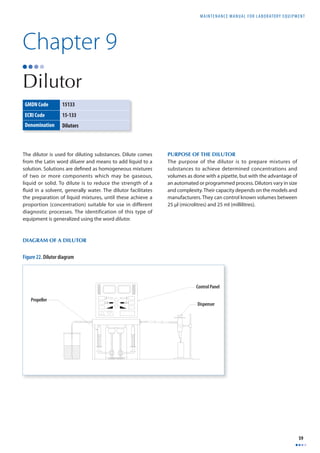
Figure 22 Dilutor diagram 59 
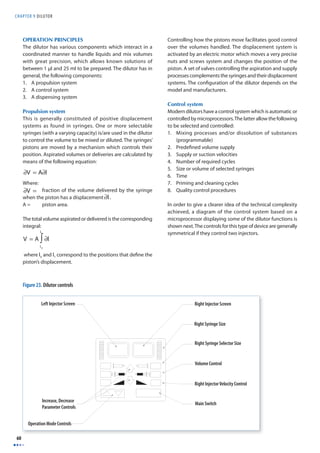
Figure 23 Dilutor controls 60 
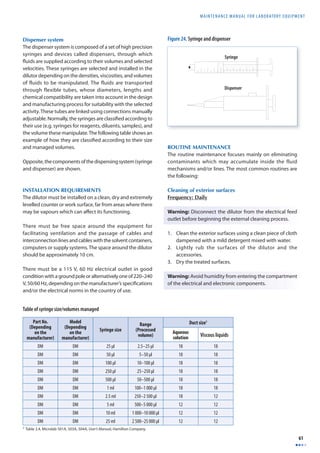
Figure 24 Syringe and dispenser 61 
Figure 25 Dispenser 65 
Figure 26 Dispenser and accessories 66 
Figure 27 Interaction of light with matter 70 
Figure 28 Absorbance phenomenon 71 
Figure 29 Spectrophotometer components 72 
Figure 30 Refraction of light 79 
Figure 31 Diff raction grid 80 
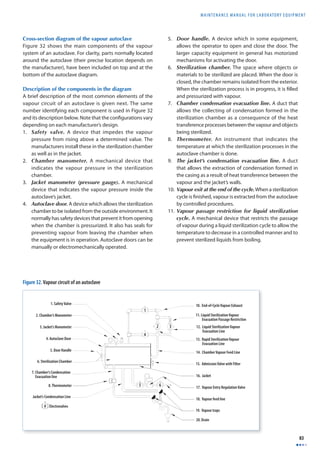
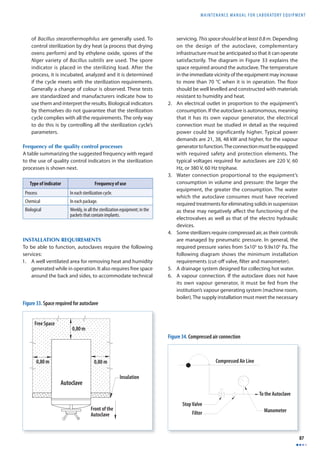
Figure 32 Vapour circuit of an autoclave 83 
Figure 33 Space required for autoclave 87 
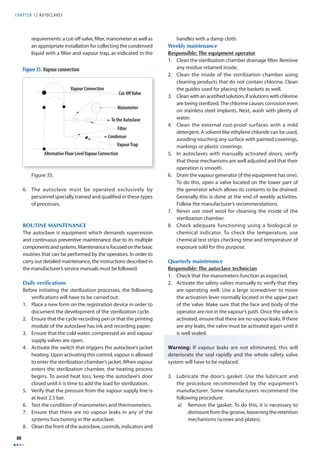
Figure 34 Compressed air connection 87 
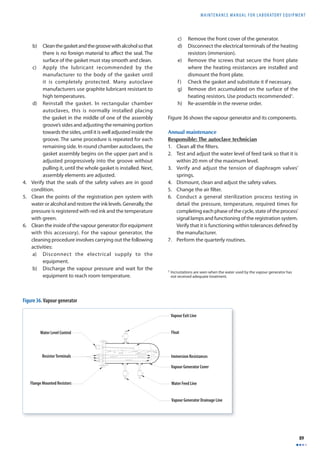
Figure 35 Vapour connection 88 
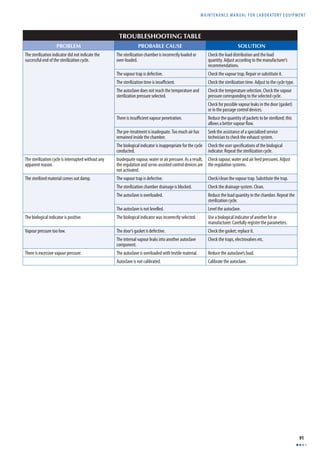
Figure 36 Vapour generator 89 
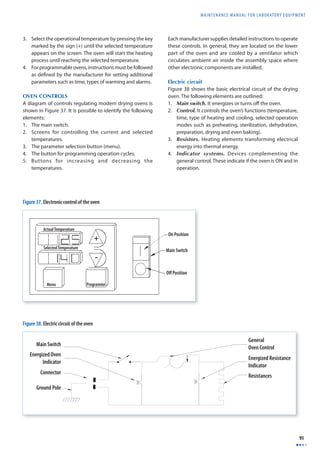
Figure 37 Electronic control of the oven 95 
Figure 38 Electrical circuit of the oven 95 
Figure 39 Heat transfer systems used in incubators 100
MAINTENANCE MANUAL F O R LABORATORY EQUIPMENT 
ix 
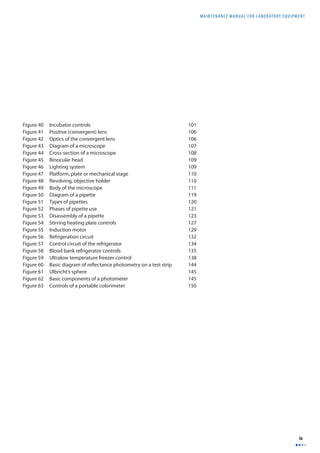
Figure 40 Incubator controls 101 
Figure 41 Positive (convergent) lens 106 
Figure 42 Optics of the convergent lens 106 
Figure 43 Diagram of a microscope 107 
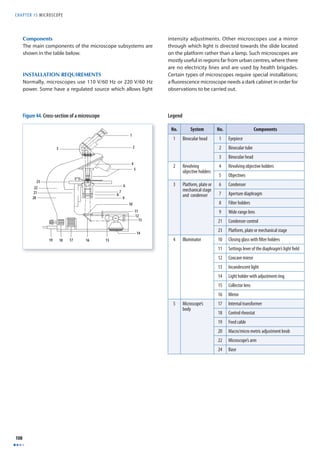
Figure 44 Cross-section of a microscope 108 
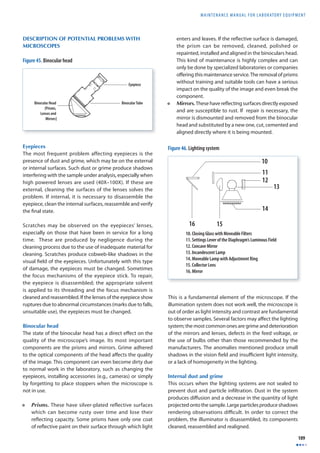
Figure 45 Binocular head 109 
Figure 46 Lighting system 109 
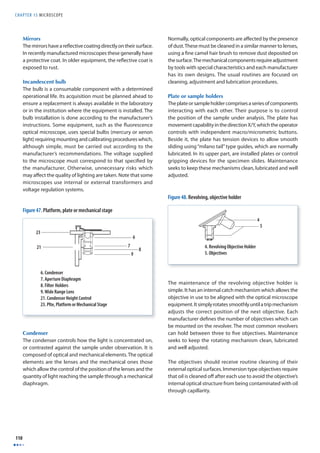
Figure 47 Platform, plate or mechanical stage 110 
Figure 48 Revolving, objective holder 110 
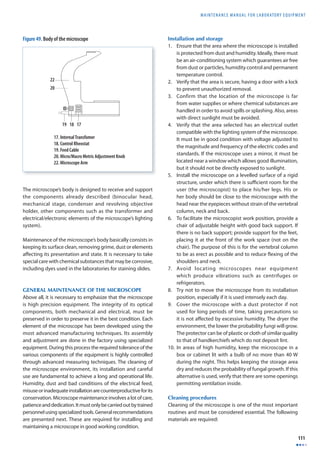
Figure 49 Body of the microscope 111 
Figure 50 Diagram of a pipette 119 
Figure 51 Types of pipettes 120 
Figure 52 Phases of pipette use 121 
Figure 53 Disassembly of a pipette 123 
Figure 54 Stirring heating plate controls 127 
Figure 55 Induction motor 129 
Figure 56 Refrigeration circuit 132 
Figure 57 Control circuit of the refrigerator 134 
Figure 58 Blood bank refrigerator controls 135 
Figure 59 Ultralow temperature freezer control 138 
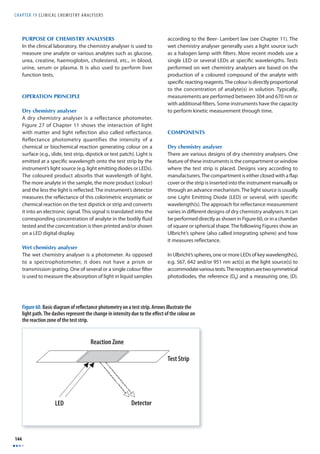
Figure 60 Basic diagram of refl ectance photometry on a test strip 144 
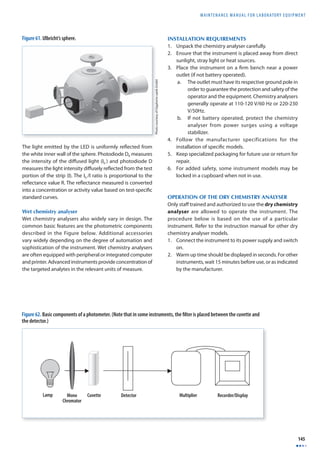
Figure 61 Ulbricht’s sphere 145 
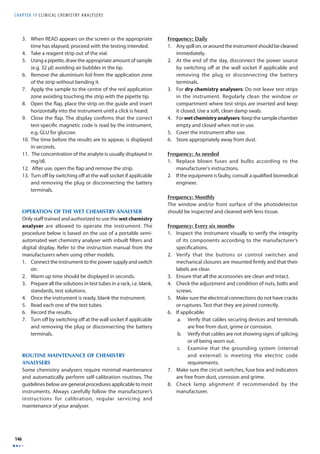
Figure 62 Basic components of a photometer 145 
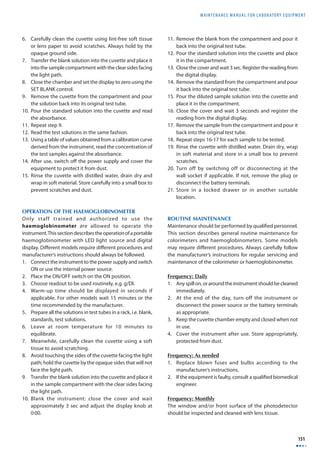
Figure 63 Controls of a portable colorimeter 150
PREFACE 
x 
Acknowledgements 
This manual is a revised edition of “Manual de mantenimiento para equipo de laboratorio” (PAHO, 2005) translated from 
Spanish into English. Revisions include additional chapters on laboratory equipment commonly used in some laboratories 
and updates allowing global use of the manual. 
The revised version has been prepared under the direction of Dr Gaby Vercauteren, World Health Organization, Geneva, 
Switzerland and in coordination with Dr Jean-Marc Gabastou, Pan-American Health Organization/World Health Organization, 
Washington, DC, USA; translated by Ms Christine Philips; reviewed by Ms Mercedes Pérez González and adapted, revised and 
edited by Mrs Isabelle Prud’homme. 
WHO kindly expresses thanks to those who have participated at all levels in the elaboration of this manual. WHO wishes to 
acknowledge the original contribution of Dr Jorge Enrique Villamil who wrote the fi rst edition of this manual in 2005 (Manual 
para mantenimiento de equipo de laboratorio, ISBN 92 75 32590 1) and Dr Jean-Marc Gabastou and Mr Antonio Hernández, 
Reviewers at Essential Medicines Vaccines and Health Technologies at PAHO. 
WHO also thanks manufacturers who have granted permission to use their images in this publication.
MAINTENANCE MANUAL F O R LABORATORY EQUIPMENT 
xi 
Introduction 
This manual has been developed to support personnel employed in health laboratories. Its purpose is to give a better 
understanding of the technical requirements regarding installation, use and maintenance of various types of equipment which 
play an important role in performing diagnostic testing. The manual also aims to provide support to personnel responsible 
for technical management, implementation of quality management and maintenance. 
Due to the diversity of origins, brands and models, this manual off ers general recommendations. Equipment-specifi c details 
are explained in depth in the maintenance and installation user manuals from manufacturers. These should be requested 
and ordered through the procurement processes of the individual agencies and professionals responsible for the acquisition 
of technology, or directly from the manufacturer. 
This manual was originally developed by the Pan-American Health Organization (PAHO) to support improved quality 
programmes which PAHO promotes in regional laboratories. The English version was produced by WHO to further expand 
support for quality programmes in other regions. The revised edition now includes 20 equipment groups selected to cover 
those most commonly used in low to medium technical complexity laboratories across the world. Given the diff erences in 
technical complexity, brands and existing models, each chapter has been developed with basic equipment in mind, including 
new technology where relevant. The following information is included in each chapter: 
• Groups of equipment, organized by their generic names. Alternative names have also been included. 
• Photographs or diagrams, or a combination of both to identify the type of equipment under consideration. 
• A brief explanation on the main uses or applications of the equipment in the laboratory. 
• A basic description of the principles by which the equipment operates with explanations of principles or physical and/or 
chemical laws which the interested reader can – or should study in depth. 
• Installation requirements with emphasis on the electrical aspects and the requirements for safe installation and operation, 
including worldwide electrical standards. 
• Basic routine maintenance, classifi ed according to the required frequency (daily, weekly, monthly, quarterly, annually 
or sporadically). The procedures are numbered and presented in the actual sequence in which these should take place 
(model-specifi c procedures can be found in the manuals published by the manufacturers). 
• Troubleshooting tables with the most frequent problems aff ecting the equipment with possible causes and actions that 
may resolve these problems. 
• A list of basic defi nitions of some of the specialized terms used. 
• For some equipment, additional themes related to calibration, quality control and design (with operational controls). 
This information, along with good use and care, helps to maintain laboratory equipment in optimal condition.
MAINTENANCE MANUAL F O R LABORATORY EQUIPMENT 
1 
Chapter 1 
Microplate Reader 
The microplate reader also known as “Photometric 
micro-plate reader or ELISA reader” is a specialized 
spectrophotometer designed to read results of the ELISA 
test, a technique used to determine the presence of 
antibodies or specifi c antigens in samples. The technique 
is based on the detection of an antigen or antibodies 
captured on a solid surface using direct or secondary, 
labelled antibodies, producing a reaction whose product 
can be read by the spectrophotometer. The word ELISA is 
the acronym for “Enzyme-Linked Immunosorbent Assay”. 
This chapter covers the use of microplate readers for ELISA 
testing. For additional information on the instrument 
principles of operation and maintenance, consult Chapter 
11 discussing the spectrophotometer. 
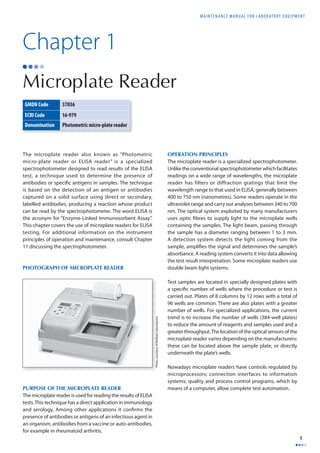
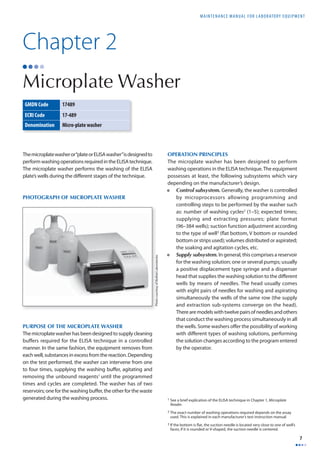
PHOTOGRAPH OF MICROPLATE READER 
PURPOSE OF THE MICROPLATE READER 
The microplate reader is used for reading the results of ELISA 
tests. This technique has a direct application in immunology 
and serology. Among other applications it confi rms the 
presence of antibodies or antigens of an infectious agent in 
an organism, antibodies from a vaccine or auto-antibodies, 
for example in rheumatoid arthritis. 
OPERATION PRINCIPLES 
The microplate reader is a specialized spectrophotometer. 
Unlike the conventional spectrophotometer which facilitates 
readings on a wide range of wavelengths, the microplate 
reader has filters or diffraction gratings that limit the 
wavelength range to that used in ELISA, generally between 
400 to 750 nm (nanometres). Some readers operate in the 
ultraviolet range and carry out analyses between 340 to 700 
nm. The optical system exploited by many manufacturers 
uses optic fi bres to supply light to the microplate wells 
containing the samples. The light beam, passing through 
the sample has a diameter ranging between 1 to 3 mm. 
A detection system detects the light coming from the 
sample, amplifi es the signal and determines the sample’s 
absorbance. A reading system converts it into data allowing 
the test result interpretation. Some microplate readers use 
double beam light systems. 
Test samples are located in specially designed plates with 
a specifi c number of wells where the procedure or test is 
carried out. Plates of 8 columns by 12 rows with a total of 
96 wells are common. There are also plates with a greater 
number of wells. For specialized applications, the current 
trend is to increase the number of wells (384-well plates) 
to reduce the amount of reagents and samples used and a 
greater throughput. The location of the optical sensors of the 
microplate reader varies depending on the manufacturers: 
these can be located above the sample plate, or directly 
underneath the plate’s wells. 
Nowadays microplate readers have controls regulated by 
microprocessors; connection interfaces to information 
systems; quality and process control programs, which by 
means of a computer, allow complete test automation. 
GMDN Code 37036 
ECRI Code 16-979 
Denomination Photometric micro-plate reader 
Photo courtesy of BioRad Laboratories
CHAPTER 1 MICROPLATE READER 
2 
Equipment required for ELISA testing 
In order to perform the ELISA technique, the following 
equipment is required: 
1. Microplate reader. 
2. Microplate washer (Chapter 2). 
3. Liquid dispensing system (multi-channel pipettes may 
be used). 
4. Incubator to incubate the plates. 
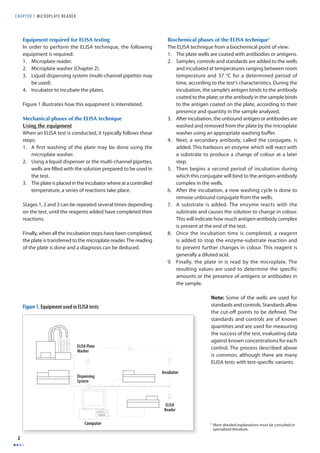
Figure 1 illustrates how this equipment is interrelated. 
Mechanical phases of the ELISA technique 
Using the equipment 
When an ELISA test is conducted, it typically follows these 
steps: 
1. A fi rst washing of the plate may be done using the 
microplate washer. 
2. Using a liquid dispenser or the multi-channel pipettes, 
wells are fi lled with the solution prepared to be used in 
the test. 
3. The plate is placed in the incubator where at a controlled 
temperature, a series of reactions take place. 
Stages 1, 2 and 3 can be repeated several times depending 
on the test, until the reagents added have completed their 
reactions. 
Finally, when all the incubation steps have been completed, 
the plate is transferred to the microplate reader. The reading 
of the plate is done and a diagnosis can be deduced. 
Biochemical phases of the ELISA technique1 
The ELISA technique from a biochemical point of view: 
1. The plate wells are coated with antibodies or antigens. 
2. Samples, controls and standards are added to the wells 
and incubated at temperatures ranging between room 
temperature and 37 °C for a determined period of 
time, according to the test’s characteristics. During the 
incubation, the sample’s antigen binds to the antibody 
coated to the plate; or the antibody in the sample binds 
to the antigen coated on the plate, according to their 
presence and quantity in the sample analyzed. 
3. After incubation, the unbound antigen or antibodies are 
washed and removed from the plate by the microplate 
washer using an appropriate washing buff er. 
4. Next, a secondary antibody, called the conjugate, is 
added. This harbours an enzyme which will react with 
a substrate to produce a change of colour at a later 
step. 
5. Then begins a second period of incubation during 
which this conjugate will bind to the antigen-antibody 
complex in the wells. 
6. After the incubation, a new washing cycle is done to 
remove unbound conjugate from the wells. 
7. A substrate is added. The enzyme reacts with the 
substrate and causes the solution to change in colour. 
This will indicate how much antigen-antibody complex 
is present at the end of the test. 
8. Once the incubation time is completed, a reagent 
is added to stop the enzyme-substrate reaction and 
to prevent further changes in colour. This reagent is 
generally a diluted acid. 
9. Finally, the plate in is read by the microplate. The 
resulting values are used to determine the specific 
amounts or the presence of antigens or antibodies in 
the sample. 
Note: Some of the wells are used for 
standards and controls. Standards allow 
the cut-off points to be defi ned. The 
standards and controls are of known 
quantities and are used for measuring 
the success of the test, evaluating data 
against known concentrations for each 
control. The process described above 
is common, although there are many 
ELISA tests with test-specifi c variants. 
1 More detailed explanations must be consulted in 
specialized literature. 
Figure 1. Equipment used in ELISA tests 
ELISA Plate 
Washer 
Dispensing 
System 
Incubator 
ELISA 
Reader 
Computer
MAINTENANCE MANUAL F O R LABORATORY EQUIPMENT 
3 
INSTALLATION REQUIREMENTS 
In order for the microplate reader to operate correctly, the 
following points need to be respected: 
1. A clean, dust free environment. 
2. A stable work table away from equipment that vibrates 
(centrifuges, agitators). It should be of a suitable size so 
that there is working space at the side of the microplate 
reader. The required complementary equipment for 
conducting the technique described above is: washer, 
incubator, dispenser and computer with its peripheral 
attachments. 
3. An electrical supply source, which complies with the 
country’s norms and standards. In the countries of the 
Americas for example, 110 V and 60 Hertz frequencies 
are generally used, whereas other regions of the World 
use 220-240V, 50/60HZ. 
Calibration of the microplate reader 
The calibration of a microplate reader is a specialized process 
which must be executed by a technician or trained engineer 
following the instructions provided by each manufacturer. 
In order to do the calibration, it is necessary to have a set 
of grey fi lters mounted on a plate of equal geometric size 
to those used in the analyses. Manufacturers provide these 
calibration plates for any wavelength the equipment uses. 
Calibration plates are equipped with at least three pre-established 
optic density values within the measurement 
ranges; low, medium, and high value. In order to perform 
the calibration, follow this process: 
1. Place the calibration plate on the equipment. 
2. Carry out a complete reading with the calibration plate. 
Verify if there are diff erences in the readings obtained 
from well to well. If this is the case, invert the plate (180°) 
and repeat the reading to rule out that diff erences are 
attributed to the plate itself. In general, it is accepted 
that the instrument does not need further calibration if 
the plate results are as expected at two wavelengths. 
3. Verify if the reader requires calibration. If so, proceed 
with the calibration following the routine outlined by 
the manufacturer, verifying that the reading’s linearity 
is maintained as rigorously as possible. 
4. If the instrument does not have a calibration plate, verify 
it by placing a coloured solution in the wells of a plate 
and immediately carry out a complete reading. Then 
invert the plate 180° and read the plate again. If both 
readings display identical, average values in each row, 
the reader is calibrated. 
5. Verify that the reader is calibrated, column by column. 
Place a clean, empty plate and carry out a reading. If 
there is no diff erence between each of the average 
reading of the fi rst to the last column, it can be assumed 
that the reader is calibrated. 
ROUTINE MAINTENANCE 
Maintenance described next focuses exclusively on the 
microplate reader. The maintenance of the microplate 
washer is described in Chapter 2. 
Basic maintenance 
Frequency: Daily 
1. Review that optical sensors of each channel are clean. 
If dirt is detected, clean the surface of the windows of 
the light emitters and the sensors with a small brush. 
2. Confi rm that the lighting system is clean. 
3. Verify that the reader’s calibration is adequate. When 
the daily operations begin, let the reader warm up for 
30 minutes. Next, do a blank reading and then read a 
full plate of substrate. The readings must be identical. 
If not, invert the plate and repeat the reading in order 
to determine if the deviation originated in the plate or 
the reader. 
4. Examine the automatic drawer sliding system. It must 
be smooth and constant. 
Preventive maintenance 
Frequency: Quarterly 
1. Verify the stability of the lamp. Use the calibration plate, 
conducting readings with intervals of 30 minutes with 
the same plate. Compare readings. There must be no 
diff erences. 
2. Clean the detectors’ optical systems and the lighting 
systems. 
3. Clean the plate drawer. 
4. Verify the alignment of each well with the light emission 
and detection systems.
CHAPTER 1 MICROPLATE READER 
4 
TROUBLESHOOTING TABLE 
PROBLEM PROBABLE CAUSE SOLUTION 
The reader gives a reading that does not make sense. The illumination lamp is out of service. Replace the lamp with one with the same 
characteristics as the original. 
The reader’s readings vary from row to row. Dirty optical sensors. Clean the sensors. 
The illumination system’s lenses or parts are dirty. Clean the lighting system’s lenses. 
Lack of calibration in one or more channels. Verify the calibration of each one of the channels. 
The reader displays high absorbance values. Reagents expired and/or incorrectly prepared. Check to see if the TMB is colourless and the 
preparation adequate. 
Contamination with other samples. Repeat the test verifying the labelling, the washer 
and how the pipette was used. 
Incorrect wavelength fi lter. Verify the recommended wavelength for the test. 
Adjust if it is incorrect. 
Insuffi cient or ineffi cient washing. Verify the washing method used. Use an appropriate 
quality control test. 
Very long incubation time or very high temperature. Check incubation times and temperatures. 
Incorrect sample dilution. Check process for sample dilution. 
Some reagent was omitted. Verify that the test has been carried out according to 
the established procedure. 
The reader displays low absorbance values. Very short incubation time and very low 
temperature. 
Check temperatures and incubation times. 
The reagents were not at room temperature. Check that the reagents are stable at room 
temperature. 
Excessive washing of the plate. Adjust the washing process to what the test 
manufacturers indicate. 
Incorrect wavelength fi lter. Verify the wavelength selected. Use wavelength 
recommended for the test. 
Expired or incorrectly prepared reagents. Check the used reagents. Test the dilutions. 
A reagent was omitted. Verify that the test was done according to the 
established procedure. 
The plate displays scratches at the bottom of the 
wells. 
Prepare a new plate and repeat the test. 
Incorrectly selected or dirty plate. Verify the type of plate used. Prepare a new plate 
and repeat the test. 
The plate wells have dried up. Change the manner in which the plate is washed. 
The plate is incorrectly placed or is seated unevenly 
Check the placement of the plate. Repeat the 
in the reader. 
reading. 
Humidity or fi ngerprints on the outer part of the 
bottom of the plate. 
Verify that the plate under the bottom of the wells 
is clean. 
Residual quantities of washing buff er in the wells 
before adding the substrate. 
Confi rm that the washing buff er is completely 
removed. 
The substrate tablets do not dissolve completely. Verify that the tablets dissolve correctly. 
The substrate tablet has been contaminated by 
humidity or metal clips or is not complete. 
Test the integrity and handling of substrate tablets. 
The position of the blank well could have been 
changed and an incorrect quantity has been 
subtracted at each reading. 
Verify that the plate set-up is correct. 
The reader displays unexpected variation in the 
optical density readings. 
The reader’s lamp is unstable. Replace the lamp with one that has similar 
characteristics as the original. 
The reader displays a gradual increase or decrease 
from column to column. 
Inappropriate calibration of the plate’s advance 
motor. 
Calibrate the advance so that at each step the wells 
remain exactly aligned with the lighting system. 
The optical density readings are very low compared 
to the operator’s optical evaluation criteria. 
The reading is being carried out with a diff erent 
wavelength than required for the test. 
Verify the wavelength used when conducting 
the reading. If this is the problem, adjust the 
wavelength and repeat the reading. Verify that the 
recommended wavelength fi lter has been selected.
MAINTENANCE MANUAL F O R LABORATORY EQUIPMENT 
5 
Low reproducibility. Sample homogeneity. Mix the reagents before use. Allow these to 
equilibrate to room temperature. 
Incorrect pipetting procedure. Ensure pipette’s tips are changed between samples 
and that excessive liquid inside is removed. 
Reader not calibrated. Check the calibration. Use an appropriate quality 
control set. 
instrument. 
Wait until the reader has warmed up to its operating 
temperature. 
Expired reagents. Verify the expiry dates of the reagents. 
when washed. 
The blank sample shows high absorbance. Contaminated substrate. Check that TMB is colourless and its preparation. 
The data are not transferred from the reader to the 
microprocessor. 
Verify selected codes. 
transmission plugs. 
manufacturer. 
Misaligned light beam. The reader was transferred or moved without using 
the necessary precautions. 
Call the specialized service technician. 
The light source – lamp – has been changed and 
the replacement has not been installed or aligned 
correctly. 
Verify its assembly and alignment. 
The plate was incorrectly loaded. 
reading carrying out the adjustments. 
the reader. reading carrying out the adjustments. 
Computer fails to indicate the error codes. The programme which controls the activation of 
alarms and warning messages is defective or is 
not validated by the manufacturer. 
Call the specialized service technician. 
The reader demonstrates failure in detecting errors. Various components of the system display failure, 
such as the liquid level detection system. 
Call the specialized service technician. 
BASIC DEFINITIONS 
Chemiluminescence. Emission of light or luminescence resulting directly from a chemical reaction at environmental temperatures. 
ELISA (Enzyme-Linked Immunosorbent Assay). Biochemical technique used mainly in Immunology to detect the presence of an antibody or an antigen in a 
sample. 
ELISA plate. Consumable standardized to carry out the ELISA technique. Generally, plates have 96 wells in a typical confi guration of 8 rows by 12 columns. There 
are also ELISA plates with 384 wells or up to 1536 wells for specialized high throughput testing in centres with high demand. 
Microplate washer. Equipment used for washing plates during specifi c stages of an ELISA test with the aim of removing unbound components during reactions. 
Microplate washers use special buff ers in the washing process. 
Enzyme. Protein that accelerates (catalyses) chemical reactions. 
Fluorophore. Molecules absorbing light at a determined wavelength and emitting it at a higher wavelength. 
Microplate reader. The name given to spectrophotometers with the capacity to read microplates. 
TMB. Tetramethylbenzidine, a substrate for the horseradish peroxidase (HRP) enzyme.
MAINTENANCE MANUAL F O R LABORATORY EQUIPMENT 
7 
Chapter 2 
Microplate Washer 
The microplate washer or “plate or ELISA washer” is designed to 
perform washing operations required in the ELISA technique. 
The microplate washer performs the washing of the ELISA 
plate’s wells during the diff erent stages of the technique. 
PHOTOGRAPH OF MICROPLATE WASHER 
PURPOSE OF THE MICROPLATE WASHER 
The microplate washer has been designed to supply cleaning 
buffers required for the ELISA technique in a controlled 
manner. In the same fashion, the equipment removes from 
each well, substances in excess from the reaction. Depending 
on the test performed, the washer can intervene from one 
to four times, supplying the washing buff er, agitating and 
removing the unbound reagents1 until the programmed 
times and cycles are completed. The washer has of two 
reservoirs; one for the washing buff er, the other for the waste 
generated during the washing process. 
OPERATION PRINCIPLES 
The microplate washer has been designed to perform 
washing operations in the ELISA technique. The equipment 
possesses at least, the following subsystems which vary 
depending on the manufacturer’s design. 
• Control subsystem. Generally, the washer is controlled 
by microprocessors allowing programming and 
controlling steps to be performed by the washer such 
as: number of washing cycles2 (1–5); expected times; 
supplying and extracting pressures; plate format 
(96–384 wells); suction function adjustment according 
to the type of well3 (fl at bottom, V bottom or rounded 
bottom or strips used); volumes distributed or aspirated; 
the soaking and agitation cycles, etc. 
• Supply subsystem. In general, this comprises a reservoir 
for the washing solution; one or several pumps; usually 
a positive displacement type syringe and a dispenser 
head that supplies the washing solution to the diff erent 
wells by means of needles. The head usually comes 
with eight pairs of needles for washing and aspirating 
simultaneously the wells of the same row (the supply 
and extraction sub-systems converge on the head). 
There are models with twelve pairs of needles and others 
that conduct the washing process simultaneously in all 
the wells. Some washers off er the possibility of working 
with diff erent types of washing solutions, performing 
the solution changes according to the program entered 
by the operator. 
1 See a brief explication of the ELISA technique in Chapter 1, Microplate 
Reader. 
2 The exact number of washing operations required depends on the assay 
used. This is explained in each manufacturer’s test instruction manual. 
3 If the bottom is fl at, the suction needle is located very close to one of well’s 
faces; if it is rounded or V-shaped, the suction needle is centered. 
GMDN Code 17489 
ECRI Code 17-489 
Denomination Micro-plate washer 
Photo courtesy of BioRad Laboratories
CHAPTER 2 MICROPLAT E WASHER 
8 
• Extraction or suction system. This requires a vacuum 
mechanism and a storage system for gathering the fl uids 
and waste removed from the wells. The vacuum may be 
supplied by external and internal pumps. Extraction is 
done by a set of needles mounted on the washer/dryer’s 
head. The number of needles varies from one to three, 
according to the washer model used. 
If it uses only one needle, the washing and 
extraction operation is done with this single needle. 
If it uses two needles, one is used for supplying the 
washing solution and the other for extraction. If it uses 
three needles, the fi rst is used for supplying the washing 
solution, the second for extraction and the third for 
controlling (extracting) any excess volume in the well. 
Generally, the extraction needle is longer than the 
supply needle, which enables it to advance (vertically) 
up to a height ranging between 0.3 and 0.5 mm from 
the bottom of the well. 
• Advance sub-system. This is composed of a 
mechanism which moves the supply and extraction 
head horizontally to reach each well in the ELISA plate. 
When the horizontal movement to the following row 
occurs, there is a vertical movement towards the well 
to dispense or extract the washing solution. There 
are washers which carry out these operations in a 
simultaneous manner. 
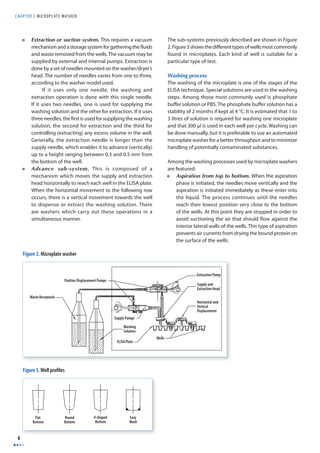
The sub-systems previously described are shown in Figure 
2. Figure 3 shows the diff erent types of wells most commonly 
found in microplates. Each kind of well is suitable for a 
particular type of test. 
Washing process 
The washing of the microplate is one of the stages of the 
ELISA technique. Special solutions are used in the washing 
steps. Among those most commonly used is phosphate 
buff er solution or PBS. The phosphate buff er solution has a 
stability of 2 months if kept at 4 °C. It is estimated that 1 to 
3 litres of solution is required for washing one microplate 
and that 300 μl is used in each well per cycle. Washing can 
be done manually, but it is preferable to use an automated 
microplate washer for a better throughput and to minimize 
handling of potentially contaminated substances. 
Among the washing processes used by microplate washers 
are featured: 
• Aspiration from top to bottom. When the aspiration 
phase is initiated, the needles move vertically and the 
aspiration is initiated immediately as these enter into 
the liquid. The process continues until the needles 
reach their lowest position very close to the bottom 
of the wells. At this point they are stopped in order to 
avoid suctioning the air that should fl ow against the 
interior lateral walls of the wells. This type of aspiration 
prevents air currents from drying the bound protein on 
the surface of the wells. 
Figure 2. Microplate washer 
Waste Receptacle 
Extraction Pump 
Supply and 
Extraction Head 
Horizontal and 
Vertical 
Displacement 
Wells 
Supply Pumps 
Washing 
Solution 
ELISA Plate 
Positive Displacement Pumps 
Flat 
Bottom 
Round 
Bottom 
V-shaped 
Bottom 
Easy 
Wash 
Figure 3. Well profi les
MAINTENANCE MANUAL F O R LABORATORY EQUIPMENT 
9 
• Simultaneous distribution and aspiration. In certain 
types of washer, the washing and aspiration systems 
operate simultaneously, generating a controlled 
turbulence inside the well which removes the unbound 
substances during the incubations. 
• Aspiration from the base of the wells. In this system, 
the aspiration of the fluid contained in the wells is 
performed initially with the aspiration needles in a 
position very close to the bottom, immediately 
beginning a suctioning cycle, usually time-controlled. 
This system may aspirate air if there are diff erences in 
the levels of the tanks. 
Washer calibration 
The microplate washer is critical for guaranteeing that the 
ELISA technique performs as expected. The alignment to 
be taken into account for the eff ective functioning of the 
equipment is presented next: 
• Position of the needles (supply and aspiration head). 
The horizontal and vertical position adjustment with 
respect to the wells must be verifi ed carefully. If the 
plate has fl at bottom wells, the supply needle must be 
checked to see that it is situated very close to the well’s 
wall. If the bottom is round or V-shaped, the suction 
needle should be located in the centre of the well: 
upon the vertical movement, a needle-base distance 
is maintained in the well, usually between 0.3 to 0.5 
mm. The needles must never be allowed to touch the 
bottom of the wells to avoid mechanical interferences 
between the needle point and the well’s base during 
the aspiration function. 
• Aspiration time. Appropriately adjust the aspiration 
time so that a solution fi lm adhered to the well’s wall 
can fl ow towards the bottom. Avoid very long time 
lapses to prevent the coating on the wells from drying 
up. Check that the suction system’s needles are clean 
(free of obstructions). 
• Distributed Volume. Check that the volume distributed 
is as close as possible to the maximum capacity of the 
well; confi rm that all the wells are fi lled uniformly (at 
the same level). Verify that the distributing needles are 
clean (free of obstructions). 
• Vacuum. The suctioning system must be calibrated 
effi ciently. If the vacuum is too strong, the test can 
be altered. In fact, it could dry out the wells and 
considerably weaken the enzyme activity in the wells 
and completely alter the test result. The majority of 
washers function with a vacuum ranging between 60 
and 70% of atmospheric pressure. In some washers, the 
vacuum is made in an external pump which operates as 
an accessory of the washer. Its operation is controlled 
by the washer, which means that the vacuum pump 
operates only when required. 
Washing process verifi cation 
To verify that the washing process is done according to 
the specifications of ELISA techniques, manufacturers 
of ELISA tests have developed procedures to be carried 
out regularly. One of the controls1 is based on using the 
peroxidase reagent, which is dispensed using a pipette in 
the plate wells to be read at 405, 450 and 492 nm. At once 
the wells are washed and a colourless substrate is added 
(TMB/H2O2–Tetramethylbenzidine/Hydrogen Peroxide). 
Whatever conjugate remains will hydrolyze the enzyme 
and the chromogen will change to blue. After stopping 
the reaction with acid, the TMB will turn yellow again. The 
resulting colour intensity is directly related to the washing 
process effi ciency. 
INSTALLATION REQUIREMENTS 
For the microplate washer to operate correctly, the following 
is necessary: 
1. A clean, dust-free environment. 
2. A stable work table located away from equipment 
that generates vibrations, (centrifuges, and agitators). 
It must be of a suitable size to locate the necessary 
complementary equipment: reader, incubator, 
distributor and computer with its peripheral attachments 
at the side of the microplate washer. 
3. An electric outlet in good condition with a ground pole 
and, an electrical connection which complies with the 
country’s or the laboratory’s norms and standards. In the 
countries of the Americas, the 110 V and 60 Hz frequency 
is generally used. In other parts of the World, the 220-240 
V and 50/60 Hz frequency is generally used. 
ROUTINE MAINTENANCE 
The routine maintenance described next focuses exclusively 
on the microplate washer. Maintenance of the microplate 
reader is dealt with in the Chapter 1. 
Basic maintenance 
Frequency: Daily 
1. Verify the volume distributed. 
2. Test the fi lling uniformity. 
3. Verify the aspiration sub-system’s effi ciency. 
4. Confirm the cleaning of the supply and extraction 
needles. 
5. Clean the washer with distilled water after use, to remove 
every vestige of salt in the supply and extraction sub-systems’ 
channels. The needles may be kept submerged 
in distilled water. 
6. Verify that the body of the washer has been cleaned. 
If necessary, clean the exterior surfaces with a piece of 
cloth, moistened with a mild detergent. 
1 Procedure developed by PANBIO, ELISA Check Plus, Cat. Nº E-ECP01T.
CHAPTER 2 MICROPLAT E WASHER 
10 
Preventive maintenance 
Frequency: Quarterly 
1. Disassemble and clean the channels and connectors. 
Verify their integrity. If leaks or any vestiges of corrosion 
are detected, adjust and/or replace. 
2. Verify the integrity of the mechanical components. 
Lubricate according to the manufacturer’s 
instructions. 
3. Test the adjustment of each one of the sub-systems. 
Calibrate according to the manufacturer’s 
recommendations. 
4. Confi rm the integrity of the electrical connector and the 
inter-connection cable. 
5. Clean the washer with distilled water after using it in 
order to remove every vestige of salt in the supply and 
extraction subsystems’ channels. 
6. Verify the integrity of the fuse, and that its contact 
points are clean. 
Note: Trained technical personnel must carry out 
maintenance of the control system. If necessary, call the 
manufacturer or representative.
MAINTENANCE MANUAL F O R LABORATORY EQUIPMENT 
11 
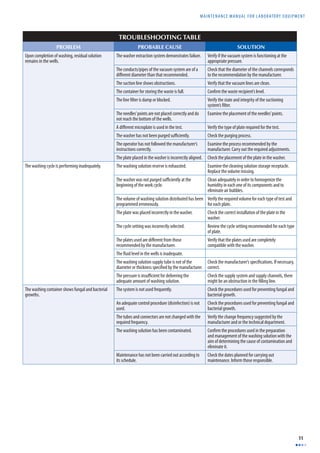
TROUBLESHOOTING TABLE 
PROBLEM PROBABLE CAUSE SOLUTION 
Upon completion of washing, residual solution 
remains in the wells. 
The washer extraction system demonstrates failure. Verify if the vacuum system is functioning at the 
appropriate pressure. 
The conducts/pipes of the vacuum system are of a 
diff erent diameter than that recommended. 
Check that the diameter of the channels corresponds 
to the recommendation by the manufacturer. 
The suction line shows obstructions. Verify that the vacuum lines are clean. 
The container for storing the waste is full. Confi rm the waste recipient’s level. 
The line fi lter is damp or blocked. Verify the state and integrity of the suctioning 
system’s fi lter. 
The needles’ points are not placed correctly and do 
not reach the bottom of the wells. 
Examine the placement of the needles’ points. 
A diff erent microplate is used in the test. Verify the type of plate required for the test. 
The washer has not been purged suffi ciently. Check the purging process. 
The operator has not followed the manufacturer’s 
instructions correctly. 
Examine the process recommended by the 
manufacturer. Carry out the required adjustments. 
The plate placed in the washer is incorrectly aligned. Check the placement of the plate in the washer. 
The washing cycle is performing inadequately. The washing solution reserve is exhausted. Examine the cleaning solution storage receptacle. 
Replace the volume missing. 
The washer was not purged suffi ciently at the 
beginning of the work cycle. 
Clean adequately in order to homogenize the 
humidity in each one of its components and to 
eliminate air bubbles. 
The volume of washing solution distributed has been 
programmed erroneously. 
Verify the required volume for each type of test and 
for each plate. 
The plate was placed incorrectly in the washer. Check the correct installation of the plate in the 
washer. 
The cycle setting was incorrectly selected. Review the cycle setting recommended for each type 
of plate. 
The plates used are diff erent from those 
recommended by the manufacturer. 
Verify that the plates used are completely 
compatible with the washer. 
The fl uid level in the wells is inadequate. 
The washing solution supply tube is not of the 
diameter or thickness specifi ed by the manufacturer. 
Check the manufacturer’s specifi cations. If necessary, 
correct. 
The pressure is insuffi cient for delivering the 
adequate amount of washing solution. 
Check the supply system and supply channels, there 
might be an obstruction in the fi lling line. 
The washing container shows fungal and bacterial 
growths. 
The system is not used frequently. Check the procedures used for preventing fungal and 
bacterial growth. 
An adequate control procedure (disinfection) is not 
used. 
Check the procedures used for preventing fungal and 
bacterial growth. 
The tubes and connectors are not changed with the 
required frequency. 
Verify the change frequency suggested by the 
manufacturer and or the technical department. 
The washing solution has been contaminated. Confi rm the procedures used in the preparation 
and management of the washing solution with the 
aim of determining the cause of contamination and 
eliminate it. 
Maintenance has not been carried out according to 
its schedule. 
Check the dates planned for carrying out 
maintenance. Inform those responsible.
CHAPTER 2 MICROPLAT E WASHER 
12 
BASIC DEFINITIONS 
Buff er. A solution containing either a weak acid and its salt or, a weak base and its salt, which makes it resistant to changes in pH at a given temperature. 
PBS. One of the solutions used to perform washing operations in ELISA tests. PBS is the acronym for Phosphate Buff er Solution. This is made of the following 
substances: NaCl, KCl, NaHPO42H2O and KH2SO4. The manufacturers supply technical bulletins which indicate the proportions and instructions for preparing PBS. In 
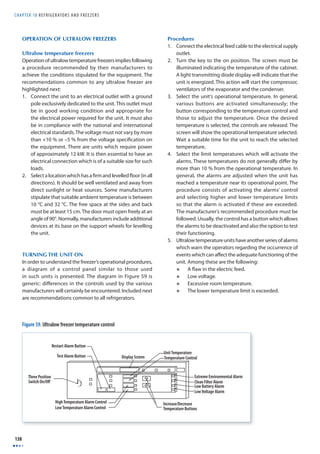
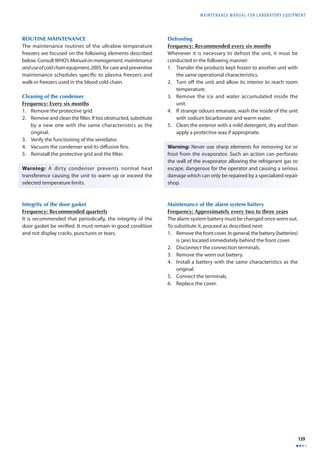
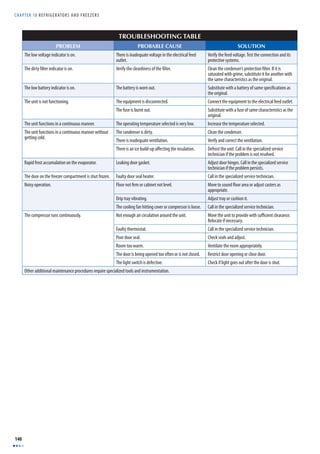
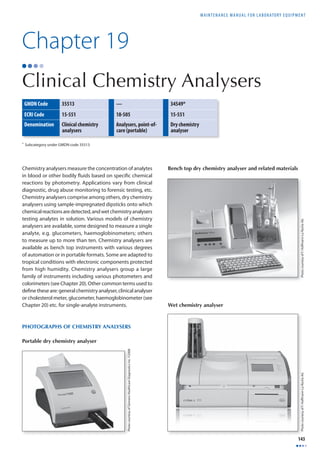
general, one part of concentrated PBS is mixed with 19 parts of deionised water. 
Plate (ELISA). Consumable with standard dimensions, designed to hold samples and reactions for the ELISA technique. In general, these have 96, 384 or 1536 wells 
and are made of plastics such as polystyrene and polypropylene. There are plates specially treated to facilitate the performance of the tests. 
Positive displacement pump. A pump adjusted by a plunger moving along a cylinder. The mechanism is similar to that of a syringe. It is equipped with a set of 
valves for controlling the fl ow to and from the pump. 
TMB/H2O2. (Tetramethylbenzidine/hydrogen peroxide). A set of reagents used for verifying the quality of washing done on the wells used in the ELISA technique.
MAINTENANCE MANUAL F O R LABORATORY EQUIPMENT 
13 
Chapter 3 
pH Meter 
GMDN Code 15164 
ECRI Code 15-164 
Denomination pH Meter 
The pH meter is used for determining the concentration of 
hydrogen ions [H+] in a solution. This equipment, provided 
it is carefully used and calibrated, measures the acidity of 
an aqueous solution. pH meters are sometimes called pH 
analysers, pH monitors or potentiometers. 
PURPOSE OF THE EQUIPMENT 
The pH meter is commonly used in any fi eld of science 
related to aqueous solutions. It is used in areas such as 
agriculture, water treatment and purifi cation, in industrial 
processes such as petrochemicals, paper manufacture, 
foods, pharmaceuticals, research and development, metal 
mechanics, etc. In the health laboratory, its applications 
are related to the control of culture mediums and to the 
measurement of the alkalinity or acidity of broths and 
buff ers. In specialized laboratories, diagnostic equipment 
microelectrodes are used to measure the pH of liquid 
blood components. The plasma pH allows the patient’s 
health to be evaluated. It normally measures between 7.35 
and 7.45. This value relates to the patient’s metabolism 
in which a multitude of reactions occurs where acids and 
bases are normally kept in balance. Acids constantly liberate 
hydrogen ions [H+] and the organism neutralizes or balances 
acidity by liberating bicarbonate ions [HCO–]. The acid-base 
3 
ratio in the organism is maintained by the kidneys, (organs 
in which any excesses present are eliminated). The plasma 
pH is one of the characteristics that vary with factors such 
as age or state of health of the patient. Table 1 shows typical 
pH values of some bodily fl uids. 
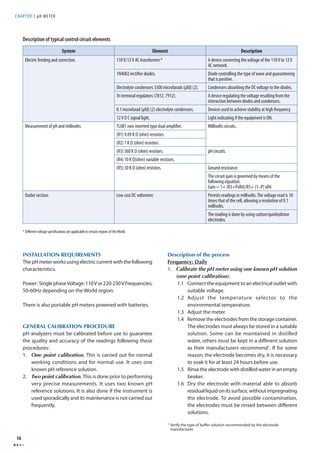
PHOTOGRAPH AND COMPONENTS OF THE 
pH METER 
1 
3 
2 
OPERATION PRINCIPLES 
The pH meter measures the concentration of hydrogen ions 
[H+] using an ion-sensitive electrode. Under ideal conditions, 
this electrode should respond in the presence of only 
one type of ion. In reality, there are always interactions or 
interferences with other types of ions present in the solution. 
A pH electrode is generally a combined electrode, in which 
a reference electrode and an internal glass electrode are 
integrated into a combined probe. The lower part of the 
probe ends in a round bulb of thin glass where the tip 
of the internal electrode is found. The body of the probe 
pH values of some bodily fl uids 
Fluid pH Value 
Bile 7.8 – 8.6 
Saliva 6.4 – 6.8 
Urine 5.5 – 7.0 
Gastric Juice 1.5 – 1.8 
Blood 7.35 – 7.45 
Photo courtesy of Consort 
1 Electrode carrying arm and electrode 
2 Digital display 
3 Control panel with temperature adjustment control, mode 
selection (Standby/mV/pH) and calibration controls
CHAPTER 3 pH METER 
14 
contains saturated potassium chloride (KCl) and a solution 
0.1 M of hydrogen chloride (HCl). The tip of the reference 
electrode’s cathode is inside the body of the probe. On the 
outside and end of the inner tube is the anodized end. The 
reference electrode is usually made of the same type of 
material as the internal electrode. Both tubes, interior and 
exterior, contain a reference solution. Only the outer tube 
has contact with the measured solution through a porous 
cap which acts as a saline bridge. 
This device acts like a galvanized cell. The reference electrode 
is the internal tube of the pH meter probe, which cannot lose 
ions through interactions with the surrounding environment. 
Therefore as a reference, it remains static (unchangeable) 
during the measuring process. The external tube of the 
probe contains the medium which is allowed to mix with 
the external environment. As a result, this tube must be 
fi lled periodically with a potassium chloride solution (KCI) 
for restoring the capacity of the electrode which would 
otherwise be inhibited by a loss of ions and evaporation. 
The glass bulb on the lower part of the pH electrode acts 
as a measuring element and is covered with a layer of 
hydrated gel on its exterior and interior. Metallic sodium 
cations [Na+] are diff used in the hydrated gel outside of 
the glass and in the solution, while the hydrogen ions [H+] 
are diff used in the gel. This gel makes the pH electrode 
ion-selective: Hydrogen ions [H+] cannot pass through the 
glass membrane of the pH electrode. Sodium ions [Na+] pass 
through and cause a change in free energy, which the pH 
meter measures. A brief explanation of the theory on how 
electrodes function is included in the appendix at the end 
of the chapter. 
pH METER COMPONENTS 
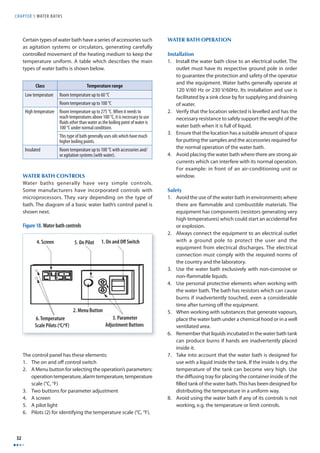
A pH meter generally has the following components: 
1. The body of the instrument containing the circuits, 
controls, connectors, display screens and measuring 
scales. The following are among some of its most 
important components: 
a) An ON and OFF switch. Not all pH meters have an 
on and off switch. Some simply have a cord with a 
plug which allows it to be connected to a suitable 
electrical outlet. 
b) Temperature control. This control allows 
adjustments according to the temperature of the 
solution measured. 
c) Calibration controls. Depending on the design, 
pH meters possess one or two calibration buttons 
or dials. Normally these are identifi ed by Cal 1 and 
Cal 2. If the pH meter is calibrated using only one 
solution, the Cal 1 button is used; making sure 
that Cal 2 is set at a 100%. If the pH meter allows 
two point calibrations, two known pH solutions 
covering the range of pH to be measured are used. 
In this case, the two controls are used (Cal 1 and Cal 
2). In special cases, a three-point calibration must 
be done (using three known pH solutions). 
d) Mode selector. The functions generally included 
in this control are: 
I. Standby mode (0). In this position the electrodes 
are protected from electrical currents. It is the 
position used for maintaining the equipment 
while stored. 
II. pH mode. In this position the equipment can 
take pH measurements after performing the 
required calibration procedures. 
4 
High Impedance 
Voltmeter 
KCI KCI 
Temperature 
Regulator 
Reference 
Terminal 
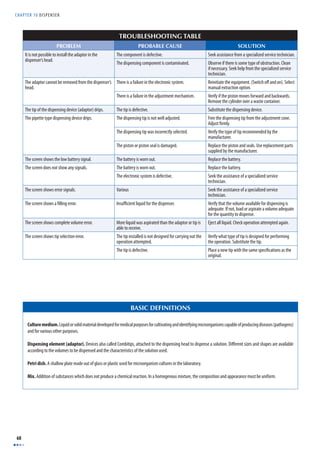
Saline Mesh Bridge Solution Under Analysis 
Ag/AgCI Electrode 
Active Termimal 
Special Glass Permeable to Ions 
Figure 4. Diagram of a pH meter
MAINTENANCE MANUAL F O R LABORATORY EQUIPMENT 
15 
III. Millivolt mode (mV). In this position the 
equipment is capable of performing millivoltage 
readings. 
IV. ATC mode. The automatic temperature control 
mode is used when the pH is measured in 
solutions for which the temperature varies. This 
function requires the use of a special probe. Not 
all pH meters have this control. 
2. A combined electrode or probe. This device must 
be stored in distilled water and stay connected to the 
measuring instrument. A combination electrode has a 
reference electrode (also known as Calomel electrode) 
and an internal electrode, integrated into the same body. 
Its design varies depending on the manufacturer. 
TYPICAL CIRCUIT 
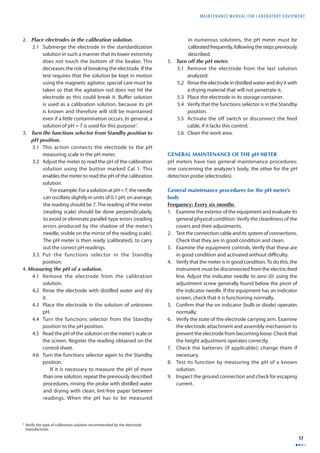
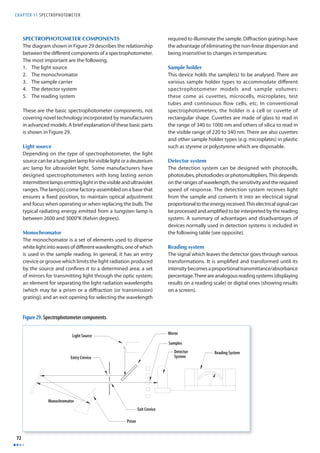
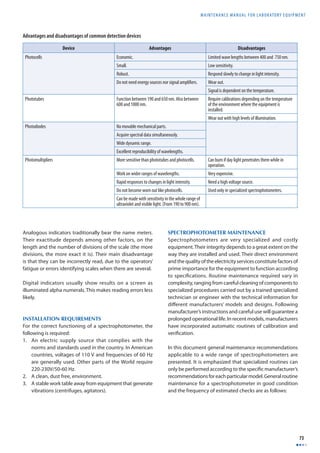
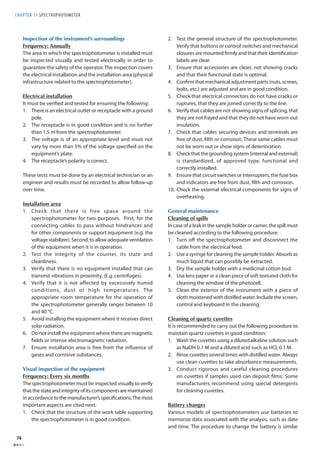
Figure 6 features a typical circuit adapted to the control 
system of the pH meter. Each manufacturer has its own 
designs and variations. 
Figure 5. Types of electrodes 
110 VAC 
Combined Electrode 
1N 4002 
Silver Wire (Ag) 
Reference Electrode 
Semi-Permeable Mesh 
Buffer Solution 
7812 
3,300 
mfd 
0.1 
mfd 
3,300 
mfd 
0.1 
mfd 
7912 
10K 
Variable 
resistor 
12V 
Lamp 
Entrance 
2 7 
10K 
Reference 
560K 
pH 
30K 
mV 
9,09 K 
1,00 K 
TL081 
Transformer 
110 V AC/ 12 V DC 
10K 
Zero 
3 
6 
Exit 
pH 
mV 
4 
5 
1 
Figure 6. Example of a typical pH meter control circuit 
Platinum Wire (Pi) 
Reference Electrode (Calomel) 
h 
Mercury [Hg] 
Mercury Chloride [Hg CI] 
Potassium Chloride 
Porous Stopper
CHAPTER 3 pH METER 
16 
System Element Description 
Electric feeding and correction. 
110 V/12 V AC transformer.* A device converting the voltage of the 110 V to 12 V 
AC network. 
1N4002 rectifi er diodes. Diode controlling the type of wave and guaranteeing 
that is positive. 
Electrolyte condensers 3300 microfarads (μfd) (2). Condensers absorbing the DC voltage to the diodes. 
Tri terminal regulators (7812, 7912). A device regulating the voltage resulting from the 
interaction between diodes and condensers. 
0.1 microfarad (μfd) (2) electrolyte condensers. Devices used to achieve stability at high frequency. 
12 V D C signal light. Light indicating if the equipment is ON. 
Measurement of pH and millivolts. TL081 non-inverted type dual amplifi er. Millivolts circuits. 
(R1) 9.09 K Ω (ohm) resistors. 
(R2) 1 K Ω (ohm) resistors. 
(R3) 560 K Ω (ohm) resistors. pH circuits. 
(R4) 10 K Ω(ohm) variable resistors. 
(R5) 30 K Ω (ohm) resistors. Ground resistance. 
The circuit gain is governed by means of the 
following equation: 
Gain = 1+ (R3+PxR4)/R5+ (1–P) xR4. 
Outlet section. Low cost DC voltmeter. Permits readings in millivolts. The voltage read is 10 
times that of the cell, allowing a resolution of 0.1 
millivolts. 
The reading is done by using carbon/quinhydrone 
electrodes. 
Description of typical control circuit elements 
* Diff erent voltage specifi cations are applicable in certain regions of the World. 
INSTALLATION REQUIREMENTS 
The pH meter works using electric current with the following 
characteristics. 
Power: Single phase Voltage: 110 V or 220-230 V Frequencies; 
50-60Hz depending on the World region. 
There is also portable pH meters powered with batteries. 
GENERAL CALIBRATION PROCEDURE 
pH analyzers must be calibrated before use to guarantee 
the quality and accuracy of the readings following these 
procedures: 
1. One point calibration. This is carried out for normal 
working conditions and for normal use. It uses one 
known pH reference solution. 
2. Two point calibration. This is done prior to performing 
very precise measurements. It uses two known pH 
reference solutions. It is also done if the instrument is 
used sporadically and its maintenance is not carried out 
frequently. 
Description of the process 
Frequency: Daily 
1. Calibrate the pH meter using one known pH solution 
(one point calibration). 
1.1 Connect the equipment to an electrical outlet with 
suitable voltage. 
1.2 Adjust the temperature selector to the 
environmental temperature. 
1.3 Adjust the meter. 
1.4 Remove the electrodes from the storage container. 
The electrodes must always be stored in a suitable 
solution. Some can be maintained in distilled 
water, others must be kept in a diff erent solution 
as their manufacturers recommend1. If for some 
reason, the electrode becomes dry, it is necessary 
to soak it for at least 24 hours before use. 
1.5 Rinse the electrode with distilled water in an empty 
beaker. 
1.6 Dry the electrode with material able to absorb 
residual liquid on its surface, without impregnating 
the electrode. To avoid possible contamination, 
the electrodes must be rinsed between diff erent 
solutions. 
1 Verify the type of buff er solution recommended by the electrode 
manufacturer.
MAINTENANCE MANUAL F O R LABORATORY EQUIPMENT 
17 
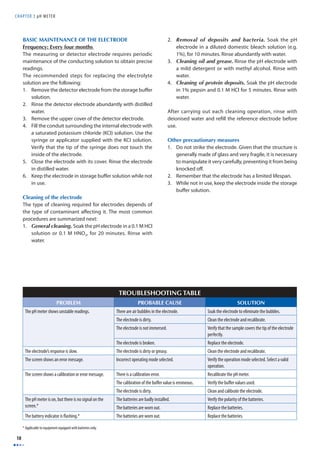
2. Place electrodes in the calibration solution. 
2.1 Submerge the electrode in the standardization 
solution in such a manner that its lower extremity 
does not touch the bottom of the beaker. This 
decreases the risk of breaking the electrode. If the 
test requires that the solution be kept in motion 
using the magnetic agitator, special care must be 
taken so that the agitation rod does not hit the 
electrode as this could break it. Buff er solution 
is used as a calibration solution, because its pH 
is known and therefore will still be maintained 
even if a little contamination occurs. In general, a 
solution of pH = 7 is used for this purpose1. 
3. Turn the functions selector from Standby position to 
pH position. 
3.1 This action connects the electrode to the pH 
measuring scale in the pH meter. 
3.2 Adjust the meter to read the pH of the calibration 
solution using the button marked Cal 1. This 
enables the meter to read the pH of the calibration 
solution. 
For example: For a solution at pH = 7, the needle 
can oscillate slightly in units of 0.1 pH; on average, 
the reading should be 7. The reading of the meter 
(reading scale) should be done perpendicularly, 
to avoid or eliminate parallel-type errors (reading 
errors produced by the shadow of the meter’s 
needle, visible on the mirror of the reading scale). 
The pH meter is then ready (calibrated), to carry 
out the correct pH readings. 
3.3. Put the functions selector in the Standby 
position. 
4. Measuring the pH of a solution. 
4.1 Remove the electrode from the calibration 
solution. 
4.2 Rinse the electrode with distilled water and dry 
it. 
4.3 Place the electrode in the solution of unknown 
pH. 
4.4 Turn the functions selector from the Standby 
position to the pH position. 
4.5 Read the pH of the solution on the meter’s scale or 
the screen. Register the reading obtained on the 
control sheet. 
4.6 Turn the functions selector again to the Standby 
position. 
If it is necessary to measure the pH of more 
than one solution, repeat the previously described 
procedures, rinsing the probe with distilled water 
and drying with clean, lint-free paper between 
readings. When the pH has to be measured 
in numerous solutions, the pH meter must be 
calibrated frequently, following the steps previously 
described. 
5. Turn off the pH meter. 
5.1 Remove the electrode from the last solution 
analyzed. 
5.2 Rinse the electrode in distilled water and dry it with 
a drying material that will not penetrate it. 
5.3 Place the electrode in its storage container. 
5.4 Verify that the functions selector is in the Standby 
position. 
5.5 Activate the off switch or disconnect the feed 
cable, if it lacks this control. 
5.6 Clean the work area. 
GENERAL MAINTENANCE OF THE pH METER 
pH meters have two general maintenance procedures: 
one concerning the analyzer’s body, the other for the pH 
detection probe (electrodes). 
General maintenance procedures for the pH meter’s 
body 
Frequency: Every six months 
1. Examine the exterior of the equipment and evaluate its 
general physical condition. Verify the cleanliness of the 
covers and their adjustments. 
2. Test the connection cable and its system of connections. 
Check that they are in good condition and clean. 
3. Examine the equipment controls. Verify that these are 
in good condition and activated without diffi culty. 
4. Verify that the meter is in good condition. To do this, the 
instrument must be disconnected from the electric feed 
line. Adjust the indicator needle to zero (0) using the 
adjustment screw generally found below the pivot of 
the indicator needle. If the equipment has an indicator 
screen, check that it is functioning normally. 
5. Confi rm that the on indicator (bulb or diode) operates 
normally. 
6. Verify the state of the electrode carrying arm. Examine 
the electrode attachment and assembly mechanism to 
prevent the electrode from becoming loose. Check that 
the height adjustment operates correctly. 
7. Check the batteries (if applicable); change them if 
necessary. 
8. Test its function by measuring the pH of a known 
solution. 
9. Inspect the ground connection and check for escaping 
current. 
1 Verify the type of calibration solution recommended by the electrode 
manufacturer.
CHAPTER 3 pH METER 
18 
BASIC MAINTENANCE OF THE ELECTRODE 
Frequency: Every four months 
The measuring or detector electrode requires periodic 
maintenance of the conducting solution to obtain precise 
readings. 
The recommended steps for replacing the electrolyte 
solution are the following: 
1. Remove the detector electrode from the storage buff er 
solution. 
2. Rinse the detector electrode abundantly with distilled 
water. 
3. Remove the upper cover of the detector electrode. 
4. Fill the conduit surrounding the internal electrode with 
a saturated potassium chloride (KCI) solution. Use the 
syringe or applicator supplied with the KCI solution. 
Verify that the tip of the syringe does not touch the 
inside of the electrode. 
5. Close the electrode with its cover. Rinse the electrode 
in distilled water. 
6. Keep the electrode in storage buff er solution while not 
in use. 
Cleaning of the electrode 
The type of cleaning required for electrodes depends of 
the type of contaminant aff ecting it. The most common 
procedures are summarized next: 
1. General cleaning. Soak the pH electrode in a 0.1 M HCl 
solution or 0.1 M HNO3, for 20 minutes. Rinse with 
water. 
2. Removal of deposits and bacteria. Soak the pH 
electrode in a diluted domestic bleach solution (e.g. 
1%), for 10 minutes. Rinse abundantly with water. 
3. Cleaning oil and grease. Rinse the pH electrode with 
a mild detergent or with methyl alcohol. Rinse with 
water. 
4. Cleaning of protein deposits. Soak the pH electrode 
in 1% pepsin and 0.1 M HCl for 5 minutes. Rinse with 
water. 
After carrying out each cleaning operation, rinse with 
deionised water and refi ll the reference electrode before 
use. 
Other precautionary measures 
1. Do not strike the electrode. Given that the structure is 
generally made of glass and very fragile, it is necessary 
to manipulate it very carefully, preventing it from being 
knocked off . 
2. Remember that the electrode has a limited lifespan. 
3. While not in use, keep the electrode inside the storage 
buff er solution. 
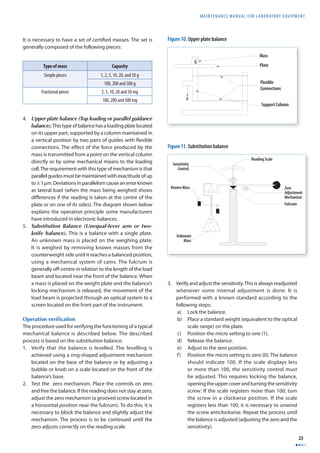
TROUBLESHOOTING TABLE 
PROBLEM PROBABLE CAUSE SOLUTION 
The pH meter shows unstable readings. There are air bubbles in the electrode. Soak the electrode to eliminate the bubbles. 
The electrode is dirty. Clean the electrode and recalibrate. 
The electrode is not immersed. Verify that the sample covers the tip of the electrode 
perfectly. 
The electrode is broken. Replace the electrode. 
The electrode’s response is slow. The electrode is dirty or greasy. Clean the electrode and recalibrate. 
The screen shows an error message. Incorrect operating mode selected. Verify the operation mode selected. Select a valid 
operation. 
The screen shows a calibration or error message. There is a calibration error. Recalibrate the pH meter. 
The calibration of the buff er value is erroneous. Verify the buff er values used. 
The electrode is dirty. Clean and calibrate the electrode. 
The pH meter is on, but there is no signal on the 
screen.* 
The batteries are badly installed. Verify the polarity of the batteries. 
The batteries are worn out. Replace the batteries. 
The battery indicator is fl ashing.* The batteries are worn out. Replace the batteries. 
* Applicable to equipment equipped with batteries only.
MAINTENANCE MANUAL F O R LABORATORY EQUIPMENT 
19 
BASIC DEFINITIONS 
Buff er. A solution containing either a weak acid and its salt or, a weak base and its salt, which makes it resistant to changes in pH at a given temperature. 
Calomel electrode. A reference electrode used with the active electrode for determining the pH of a solution. This electrode is constructed with a mercury base 
(Hg), a covering of dimercuric chloride (Hg2Cl2) and a potassium chloride solution of 0.1 M. It is represented as Cl2[Hg2Cl2, KCl]Hg. 
Dissociation. A phenomenon through which a break in the molecules occurs. As a result it produces electrically charged particles (ions). 
Electrolyte. A solute which produces a conducting solution, e.g. NaCl (sodium chloride) and NH4OH. 
Gel. A semisolid substance (e.g. jelly) composed of a colloid (solid) dispersed in a liquid medium. 
Ion. Neutral atom which gains or loses an electron. When the atom loses an electron, it becomes a positively charged ion, called a cation. If the atom gains or captures 
an electron, it becomes a negatively charged ion, called an anion. 
Ion-sensitive electrode. A device which produces a diff erence in potential proportional to the concentration of an analyte. 
Molarity. Number of Moles (M) in a substance in a litre of solution. (Number of moles of solute in a litre (L) of solution). The brackets around the ionic symbol 
indicate that it is treated as a molar concentration. 
Mol. (abbreviation for molecule). A quantity of any substance whose mass expressed in grams is numerically equal to its atomic mass. 
Mole (unit). The amount of a substance that contains as many atoms, molecules, ions, or other elementary units as the number of atoms in 0.012 kilogram of 
carbon 12. It corresponds to the number 6.0225 × 10²³, or Avogadro’s number, also called gram molecule. 
The mass in grams of this amount of a substance, numerically equal to the molecular weight of the substance, also called gram-molecular weight. 
pH. Measurement of the concentration of the hydrogen ion (H+) given in moles per litre (M) in a solution. The pH concept was proposed by Sørensen and Lindstrøm- 
Lang in 1909 to facilitate expressing very low ion concentrations. It is defi ned by the following equation: 
pH = –log [H+] or [H+] = 10-pH 
It measures the acidity of a solution. Example, in water the concentration of [H+] is 1.0 x 10⁻⁷ M resulting in pH = 7. This allows the range of concentrations from 
1 to 10-14 M, to be expressed from zero (0) to 14. There are diverse systems for measuring the acidity of a solution. An acidic substance dissolved in water is capable 
of producing H+ ions. A basic substance dissolved in water is capable of producing [OH–] (hydroxides) ions. 
An acid substance has a greater quantity of ions [H+] than pure water; a basic substance shows greater quantities of ions [OH–] than pure water. The concentrations 
of substances are expressed in moles per litre. 
In pure water, the ion concentration [H+] and [OH–] is 1.0 x 10⁻⁷ M, it is thus considered a neutral substance. In reality, it is a weak electrolyte that is dissociated 
following the following equation: 
H2O ' [H+][OH–] 
In all aqueous solutions there is a balance expressed as: 
[H+][OH–] = K 
H2O 
If the solution is diluted, the concentration of the non-dissociated water can be considered constant: 
[H+][OH–] = [H2O]K = Ka 
The new constant Ka is called a constant of dissociation or ionic product of water and its value is 1.0x10⁻¹⁴ at 25 °C. 
[H+][OH–] = 1.0 x 10⁻¹⁴ 
X x X = 1.0 x 10-14 
X2 = 1.0 x 10⁻¹⁴ 
X = 1.0 x 10⁻⁷ 
In pure water the concentrations of H+ and OH– are 1.0 x 10⁻⁷ M, a very low concentration, given that the molar concentration of water is 55.4 mol/litre. 
Solution. Homogenous liquid mixture (with uniform properties) of two or more substances. It is characterized by the absence of chemical reactions among the 
components in the mixture. The component in greater proportion and generally in a liquid state is called solvent and that or those in a lesser quantity, the solutes.
CHAPTER 3 pH METER 
20 
Annex 
The pH theory 
pH electrodes ideally behave as an electrochemical cell and react to the concentration of ions [H+]. This generates an 
electromotive force (EMF) which, according to the Nernst law is calculated using the following equation: 
E = E o + RT 
Given that: 
nF 
lnaH L where a is the eff ective concentration of ions (Activity) 
If n = 1, the equation is then rewritten as: 
E = E o − R'T 
F 
pH 
E° is a constant dependant on the temperature. If E° is substituted by E’T, the calibration will be more sensitive. Real electrodes 
do not always perform according to the Nernst equation. If the concept of sensibility (s) is introduced, the equation can be 
rewritten as: 
E = E 'T − s 
R'T 
F 
pH 
The values of E’ and s are found when measuring the EMF in two solutions with known pH. S is the slope of E versus pH, 
while E’ is found at the intersection with the axis y. When E’ and s are known, the equation can be rewritten and the pH can 
be calculated as: 
pH = E 'T − E 
s 
R'T 
T 
ln aH 
pH = lnaH
MAINTENANCE MANUAL F O R LABORATORY EQUIPMENT 
21 
Chapter 4 
Balances 
GMDN Code 10261 10263 45513 46548 
ECRI Code 10-261 10-263 18-449 18-451 
Denomination Balances Electronic balances Analytical electronic 
The balance is an instrument which measures the mass of 
a body or substance using the gravity force which acts on 
that body. The word comes from the Latin terms bis which 
means two and lanx, plate. The balance has other names 
such as scale and weight. It must be taken into account that 
the weight is the force which the gravitational fi eld exercises 
balances 
Micro analytical, 
microelectronic 
balances 
on a body’s mass, this force being the product of the mass 
by the local acceleration of gravity [F = m x g]. The term 
local is used to emphasize that this acceleration depends 
on factors such as the geographical latitude, altitude and 
the Earth’s density where the measurement is taken. This 
force is measured in Newtons. 
Photo courtesy of Acculab Corporation 
Photo courtesy of Ohaus Corporation 
PHOTOGRAPHS OF BALANCES 
Mechanical balance Electronic balance
CHAPTER 4 BALANCES 
22 
PURPOSE OF THE BALANCE 
The balance is used for measuring the mass of a body or 
substance or its weight. In the laboratory, the balance is used 
for weighing as part of quality control activities (on devices 
like pipettes), in the preparation of mixtures of components 
in predefined proportions and in the determination of 
specifi c densities or weights. 
OPERATION PRINCIPLES 
There are diff erences in design, principles and criteria of 
metrology amongst balances. At present, there are two large 
groups of balances: mechanical and electronic balances. 
Mechanical balances 
The following are some of the more common ones: 
1. Spring balance. Its function is based on a mechanical 
property of springs as the force exercised on a spring 
is proportional to the spring’s elasticity constant [k], 
multiplied by its elongation [x] [F = -kx]. The greater 
the mass [m] placed on the balance’s plate, the greater 
the elongation will be, given that the elongation is 
proportional to the mass and the spring’s constant. The 
calibration of a spring balance depends on the force 
of gravity acting on the object weighed. This type of 
balance is used when great precision is not necessary. 
2. Sliding weight balance. This type of balance is 
equipped with two known weights which can be moved 
on setting scales (one macro, the other micro). Upon 
placing a substance of unknown mass on the tray, its 
weight is determined by moving the weight on both 
setting scales until the equilibrium position is reached. 
At this point, the weight is obtained by adding both 
quantities indicated by the sliding masses’ position on 
the scale. 
3. Analytical balance. This balance functions by comparing 
known weight masses with that of a substance of 
unknown weight. It is composed of a base on a bar or 
symmetrical lever, maintained by a blade-like support 
on a central point called a fulcrum. At its ends, there 
are stirrups, also supported with blades which allow 
these to oscillate smoothly. From there, two plates 
are suspended. Certifi ed weights are placed on one 
of the plates and unknown weights on the other. The 
balance has a securing system or lock, which allows 
the main lever to remain stable when not in use or 
when it is necessary to modify the counter-weights. The 
balance is inside an external box which protects it from 
interferences, such as air currents. Analytical balances 
can weigh ten thousandths of a gram (0.0001 g) or 100 
thousandths of a gram (0.00001 g). This type of balance 
generally has a capacity of up to 200 grams. 
X 
Spring Without Load 
Displacement 
Measuring Scale 
Mass 
F=-kx 
F=mg 
Spring With Load 
m 
F = F1 
-kx = mg 
Figure 7. Spring balance 
Tray 
Macro Scale 
Micro Sliding Weight 
Macro Sliding Weight 
Micro Scale 
Figure 8. Sliding weight scale 
Figure 9. Analytical balance
MAINTENANCE MANUAL F O R LABORATORY EQUIPMENT 
23 
It is necessary to have a set of certifi ed masses. The set is 
generally composed of the following pieces: 
4. Upper plate balance (Top loading or parallel guidance 
balance). This type of balance has a loading plate located 
on its upper part, supported by a column maintained in 
a vertical position by two pairs of guides with fl exible 
connections. The eff ect of the force produced by the 
mass is transmitted from a point on the vertical column 
directly or by some mechanical means to the loading 
cell. The requirement with this type of mechanism is that 
parallel guides must be maintained with exactitude of up 
to ± 1 μm. Deviations in parallelism cause an error known 
as lateral load (when the mass being weighed shows 
diff erences if the reading is taken at the centre of the 
plate or on one of its sides). The diagram shown below 
explains the operation principle some manufacturers 
have introduced in electronic balances. 
5. Substitution Balance (Unequal-lever arm or two-knife 
balance). This is a balance with a single plate. 
An unknown mass is placed on the weighing plate. 
It is weighed by removing known masses from the 
counterweight side until it reaches a balanced position, 
using a mechanical system of cams. The fulcrum is 
generally off -centre in relation to the length of the load 
beam and located near the front of the balance. When 
a mass is placed on the weight plate and the balance’s 
locking mechanism is released, the movement of the 
load beam is projected through an optical system to a 
screen located on the front part of the instrument. 
Operation verifi cation 
The procedure used for verifying the functioning of a typical 
mechanical balance is described below. The described 
process is based on the substitution balance. 
1. Verify that the balance is levelled. The levelling is 
achieved using a ring-shaped adjustment mechanism 
located on the base of the balance or by adjusting a 
bubble or knob on a scale located on the front of the 
balance’s base. 
2. Test the zero mechanism. Place the controls on zero 
and free the balance. If the reading does not stay at zero, 
adjust the zero mechanism (a grooved screw located in 
a horizontal position near the fulcrum). To do this, it is 
necessary to block the balance and slightly adjust the 
mechanism. The process is to be continued until the 
zero adjusts correctly on the reading scale. 
Figure 10. Upper plate balance 
3. Verify and adjust the sensitivity. This is always readjusted 
whenever some internal adjustment is done. It is 
performed with a known standard according to the 
following steps: 
a) Lock the balance. 
b) Place a standard weight (equivalent to the optical 
scale range) on the plate. 
c) Position the micro setting to one (1). 
d) Release the balance. 
e) Adjust to the zero position. 
f ) Position the micro setting to zero (0). The balance 
should indicate 100. If the scale displays less 
or more than 100, the sensitivity control must 
be adjusted. This requires locking the balance, 
opening the upper cover and turning the sensitivity 
screw: If the scale registers more than 100; turn 
the screw in a clockwise position. If the scale 
registers less than 100, it is necessary to unwind 
the screw anticlockwise. Repeat the process until 
the balance is adjusted (adjusting the zero and the 
sensitivity). 
Type of mass Capacity 
Simple pieces 
1, 2, 5, 10, 20, and 50 g 
100, 200 and 500 g 
Fractional pieces 
2, 5, 10, 20 and 50 mg 
100, 200 and 500 mg 
Mass 
Plate 
Flexible 
Connections 
Support Column 
F 
G 
Figure 11. Substitution balance
CHAPTER 4 BALANCES 
24 
4. Verify the plate’s brake. It is mounted on a threaded 
axis which touches the plate in order to prevent it from 
oscillating when the balance is locked. In case of an 
imbalance, the axis must be rotated slightly until the 
distance between the break and the plate is zero when 
the balance is locked. 
Maintenance of the mechanical balance 
The maintenance of mechanical balances is limited to the 
following routines: 
Frequency: Daily 
1. Verify the level. 
2. Verify the zero setting. 
3. Verify the sensitivity adjustment. 
4. Clean the weighing plate. 
Frequency: Annually 
1. Calibrate the balance and document the process. 
2. Disassemble and clean the internal components. This 
must be done according to the process outlined by the 
manufacturer or a specialized fi rm must be contracted 
to do so. 
Electronic balances 
The electronic balances have three basic components: 
1. A weighing plate. The object to be weighed placed 
on the weighing plate exercises a pressure distributed 
randomly over the surface of the plate. By means of 
a transfer mechanism (levers, supports, guides), the 
weight’s load is concentrated on a simple force [F] which 
can be measured. [F = ∫P∂a]. The pressure’s integral part 
on the area allows the force to be calculated. 
2. A measuring device known as “load cell” produces an 
exit signal corresponding to the load’s force in the form 
of changes in the voltage or frequency. 
3. A digital analogous electronic circuit shows the fi nal 
result of the weight digitally. 
Laboratory balances operate according to the principle 
of compensation of the electromagnetic force applicable 
to displacements or torques. The combination of their 
mechanical components and automatic reading systems 
provides weight measurements at defi ned levels of accuracy 
depending on the model. 
Principle. The mobile parts (weighing plate, support 
column [a], bobbin, position and load indicator [G] -the 
object in the process of being weighed-) are maintained 
in equilibrium by a compensation force [F] equal to the 
weight. The compensation force is generated by an electrical 
current through a bobbin in the air gap of a cylindrical 
electromagnet. The force F is calculated with the equation 
[F = I x L x B] where: I = electrical intensity, L = total length 
of the wire of the coil and B = magnetic fl ow intensity in the 
electromagnet’s air gap. 
With any change in the load (weight/mass), the mobile 
mechanical system responds by moving vertically a fraction 
of distance. Detected by a photosensor [e], an electrical 
signal is sent to the servo-amplifi er [f ]. This changes the 
fl ow of electrical current passing through the bobbin of the 
magnet [c] in such a manner that the mobile system returns 
to the balanced position upon adjusting of the magnetic 
fl ow in the electromagnet. Consequently, the weight of 
the mass [G] can be measured indirectly at the start of the 
electrical current fl ow, which passes through the circuit 
measuring the voltage [V] by means of a precision resistor 
[R], [V = I x R]. To date, many systems developed use the 
electronic system for carrying out very exact measurements 
of mass and weight. The following diagram explains how 
electronic balances function. 
Figure 12. Components of electronic balances 
Transfer 
Mechanism 
Load Cell 
Screen and 
Signal Processor 
P 
Figure 13. Compensation force principle 
G 
b 
a 
e 
f 
c d 
R V=I*R 
I
MAINTENANCE MANUAL F O R LABORATORY EQUIPMENT 
25 
The signal processing system 
The signal processing system is composed of the circuit which 
transforms the electrical signal emitted by the transducer 
into numerical data which can be read on a screen. The 
signal process comprises the following functions: 
1. Tare setting. This setting is used to adjust the reading 
value at zero with any load within the balance’s capacity 
range. It is controlled by a button generally located on 
the front part of the balance. It is commonly used for 
taring the weighing container. 
2. Repeatability setting control. During a reading, weighed 
values are averaged within a predefi ned period of time. 
This function is very useful when weighing operations 
need to be carried out in unstable conditions, e.g. in 
the presence of air currents or vibrations. This control 
defi nes the time period allowed for a result to lie within 
preset limits for it to be considered stable. In addition, 
it can be adjusted to suit a particular application. 
3. Rounding off. In general, electronic balances process 
data internally at a greater resolution than shown on the 
screen. The internal net value rounded off is displayed 
on the screen. 
4. Stability detector. This light indicator fades when the 
weighing result becomes stable and is ready to be 
read. Alternatively in other balance models, this feature 
allows the display of the result on the screen when the 
measure of the weight becomes stable. 
5. Electronic signalling process. It allows the processing 
and display of the weighing operation results. It may also 
allow other special functions such as piece counting, 
percentage weighing, dynamic weighing of unstable 
weight (e.g. animals), and formula weighing, among 
others. The calculations are done by the microprocessor 
following the instructions entered by the operator on 
the balance’s keyboard. 
Classification of balances 
The International Organization of Legal Metrology (OIML) 
has classifi ed the balances into four groups: 
• Group I: special exactitude 
• Group II: high exactitude 
• Group III: medium exactitude 
• Group IV: ordinary exactitude 
The graph in Figure 14 shows the above-mentioned 
classifi cation. 
In the metrological classifi cation of electronic balances, only 
two parameters are of importance: 
1. The maximum load [Max.] 
2. The value of the digital division [d]1 
The number of the scale’s divisions is calculated by means 
of the following formula. 
n = Max 
dd 
The OIML accepts the following convention for laboratory 
balances. 
1. Ultramicroanalytics dd = 0.1 μg 
2. Microanalytics dd = 1 μg 
3. Semi-microanalytics dd = 0.01 mg 
4. Macroanalytics dd = 0.1 mg 
5. Precision dd ≥ 1 mg 
1 Kupper, W., Balances and Weighing, Mettler Instrument Corp., Princeton- 
Hightstown, NJ. 
Figure 14. Classifi cation of balances by exactitude
CHAPTER 4 BALANCES 
26 
Electronic balance controls 
A diagram of the typical controls on a modern electronic 
balance is shown in Figure 15. From this diagram it is 
necessary to point out the following: 
1. Numerous functions are incorporated. 
2. Various measuring units can be selected. 
3. It is possible to know the day and hour when the 
measurements were taken. 
4. The processes done can be documented and printed. 
5. It is possible to select the language. 
INSTALLATION REQUIREMENTS 
For the satisfactory installation and use of a balance, the 
following is required: 
1. An environment with no air currents or sudden changes 
in temperature and free from dust. 
2. A perfectly levelled table/counter. A platform of high 
inertia, isolated from the structures located in its vicinity 
is ideal to reduce the eff ect of vibrations from certain 
equipment such as centrifuges and refrigerators. 
There must be a large enough area for installing the 
balance and any auxiliary equipment needed during 
the weighing processes. Likewise, the space required 
for cables such as the interconnection, electrical current 
cables and the information system connection to the 
printer must be anticipated. 
3. Avoid installing equipment which produces elevated 
magnetic fi elds or vibrations like centrifuges, electrical 
motors, compressors and generators in its vicinity. 
4. Avoid locating it directly under the air-conditioning 
system (air currents) and sunlight. 
5. An electrical outlet which complies with the current 
electrical standards in the country or the laboratory. It 
must be in good condition and equipped with a ground 
pole and switches. 
Electronic balance operation 
The operation of a modern electronic balance is clearly 
detailed in its operator’s manual from the manufacturer. In 
general, it must conform to the following procedure: 
1. Allow the balance to equilibrate with the environment 
where it is installed. 
2. Allow the balance to warm-up before initiating activities. 
Normally it is suffi cient to have it connected to the 
electrical feed system. Some manufacturers suggest at 
least 20 minutes from the moment it is energized until 
use. Analytical balances Class 1 require at least 2 hours 
for warming before initiating use. 
Verify that the balance is calibrated. Electronic 
balances generally have a factory-made calibration 
stored in memory which can be used if it does not 
have calibration masses. If calibration is required, use 
calibrated masses as indicated by the manufacturer. The 
calibrated masses must conform or exceed the ASTM 
tolerances. For general information, the following table 
shows the accepted tolerance for the ASTM Class 11 
masses. 
Weight (grams) Higher limit (g) Lower limit (g) 
100 100.0003 99.9998 
200 200.0005 199.9995 
300 300.0008 299.9993 
500 500.0013 499.9988 
1 000 1000.0025 999.9975 
2 000 2000.0050 1999.9950 
3 000 3000.0075 2999.9925 
5 000 5000.0125 4999.9875 
3. Follow the instructions indicated in the manufacturer’s 
operations manual. 
Calibration of balances 
The calibration of balances must 
be done by personnel specially 
trained for this activity. It should be 
highlighted that it must be done 
based on the alignments of the OIML 
or an equivalent body such as the 
American Society for Testing and 
Materials (ASTM), institutions which 
have developed methodologies for 
classifying standard weights. The 
reference weights classifi cation used 
by the OIML is covered in the table 
opposite. 
1 Field Services Handbook for High Precision 
Scales, IES Corporation, Portland, Oregon, 2004. 
Selector 
Buttons 
Menu 
Tare Button 
Screen 
Level 
On/Off 
Menu Button 
Printing Button 
Selection/ 
Mode Button 
Unit 
Date Hour 
Calibration 
Figure 15. Analytical balance control panel
MAINTENANCE MANUAL F O R LABORATORY EQUIPMENT 
27 
Table of OIML reference weights classifi cation1 
Class Description Tolerance Uncertainty 
allowed 
Frequency of 
recalibration 
E1 
Stainless steel weights without marks or adjusting 
cavity. 
± 0.5 ppm per kg ± 1/3 of the tolerance 2 years 
E2 Stainless steel weights without marks or adjusting 
cavity. 
± 1.5 ppm per kg ± 1/3 of the tolerance 2 years 
F1 Stainless steel weights with screw button for protecting 
the adjusting cavity. 
±5 ppm per kg ± 1/5 of the tolerance 1 year 
F2 Bronze plated weights. ± 15 ppm per kg ± 1/5 of the tolerance 1 year 
M1 Bronze weights (that do not corrode or become stained) 
or of cast iron weights with a high quality paint fi nish. 
± 50 ppm per kg ± 1/5 of the tolerance 1 year 
M2 Bronze or cast iron weights (commercial weights). ±200 ppm per 1 kg ± 1/5 of the tolerance 1 year 
Table of standard weights’ use according to the balance’s capacity 
Any calibration process must be done using standard 
weights. The results obtained must be analyzed to determine 
if these are within the acceptable tolerances. The standard 
weights must be selected based on the balance’s capacity. 
The above table complements the previous. It provides 
guidance in determining the standard weights to use in the 
calibration of a balance according to its capacity. 
ROUTINE MAINTENANCE 
The balance is characterized as an instrument of high 
precision. For this reason, the operator is only responsible 
for minimal maintenance limited to the following: 
Daily Activities 
1. Clean the weighing plate so that it is kept free of dust. 
Cleaning is done by using a piece of clean cloth which 
may be dampened with distilled water. If there is a stain, 
a mild detergent can be applied. Also a paintbrush with 
soft bristles can be used to remove particles or dust 
deposited on the weight plate. 
2. Clean the weighing chamber, externally and internally. 
Verify that the glass is free from dust. 
3. Verify that the adjustment mechanisms on the front 
door of the weighing chamber works adequately. 
4. Always use a clean, pre-weighed container for weighing 
(glass container or weighing paper if possible). Note 
that plastic can become electromagnetically charged 
and is not recommended for weighing powdered or 
granulated chemicals. 
5. Any spill must be cleaned immediately to avoid corrosion 
or contamination. Use 70% ethanol to disinfect the pan 
of the balance. 
Very important: Never lubricate a balance unless the 
manufacturer has expressly indicated it. Any substance 
interfering with the mechanism of the balance retards its 
response or defi nitely alters the measurement process. 
Note: In general, the manufacturer or the specialized 
installation representative carries out the maintenance 
of the balances, according to procedures which vary 
depending on the type and model. 
1 Guidelines for calibration in laboratories, Drinking Water Inspectorate by 
LGC (Teddington) Ltd., December 2000. 
Capacity 
Resolution 
100 g 10 g 1 g 100 mg 10 mg 1 mg 0.1 mg ˜0.01 mg 
Up to 200 g – – – M1 M1 F2 F1 F2 
200 g to 1 kg – – M1 M1 F2 F1/E2 E2 E2 
1 to 30 kg M2 M2 M1 F2 E2 E2 E2 – 
30 to 100 kg M2 M1 F2 F1 E2 – – – 
More than 
M2 M1/F2 F1 E2 – – – – 
100 kg
CHAPTER 4 BALANCES 
28 
TROUBLESHOOTING TABLE 
FUNCTIONAL ERROR PROBABLE CAUSE 
Readings not reproducible (hysteresis). The measurement cell is dirty. 
The measurement cell is badly assembled. 
Non-linear readings. Defective electronic system. 
Mechanical system is in bad condition. 
Digital reading continually goes up or down. Defective electronic system. 
Change in room temperature. 
The digital reading goes up and down continually. Dirty measuring cell. 
Defective electronic system. 
Environmental problems like air currents, static 
electricity or vibrations. 
The digital screen is blank or shows marks that make 
no sense. 
Defective electronic system. 
The screen indicates an overload or negative 
condition without a load being applied. 
Measuring cell damaged by overload. 
Measuring cell is inadequately assembled. 
The balance cannot be calibrated. Defective calibration battery. 
Electronic system is defective. 
Measurement cell is inadequately assembled. 
Electronic balance 
PROBLEM PROBABLE CAUSE SOLUTION 
The balance does not turn on. T he interconnection cable is disconnected or 
maladjusted on the balance. 
Check the connection. Adjust the cable connector if 
this is the case. 
Electrical outlet has no power. Check electrical feed. 
The weight reading is incorrect. The balance was not adjusted to zero before the 
reading. 
Place the balance on zero; repeat the measurement. 
The balance is incorrectly calibrated. C alibrate according to the procedure recommended 
by the manufacturer. 
The balance is not levelled. Level the balance. 
The balance does not show the desired units of 
measurement on the screen. 
The units are incorrectly selected. 
select the required measurement unit. 
The unit required not available or not activated. Activate the measurement unit according to the 
The menu may be locked. Check to see if the locking switch is activated. If this 
is the case, deactivate it. 
The balance is incapable of keeping the selections 
or changes. process. 
Verify that the changes and selections are done 
according to the manufacturer’s instructions. Repeat 
the selection or change. 
The balance’s reader is unstable. There is vibration on the surface of the table/counter. 
again. 
The front door of the balance is open. 
Place the balance on a stable surface. 
Close the front door to measure. 
The RS232 interface does not function. The interconnection cable is maladjusted. Check the connection of the interconnection cable. 
The screen shows incomplete readings or is locked. The microprocessor is locked. 
the situation persists, seek technical assistance from 
the service representative. 
The screen displays an error code. Various. Verify the error codes in the balance’s manual.
MAINTENANCE MANUAL F O R LABORATORY EQUIPMENT 
29 
BASIC DEFINITIONS 
ASTM. American Society of Testing and Materials. 
Calibration. Determination of the correct value of an instrument’s reading by measurement or comparison against a standard or norm. A balance is calibrated by 
using standard weights. 
Certifi ed masses. Masses conforming to the tolerance defi ned by the certifi cation bodies. The ASTM classes 1 to 4 standards are those most widely used and must 
be used (a compulsory reference) for performing the calibration routines. 
Exactitude. The sum of all the balance’s errors. This is called total error band. 
Hysteresis. The diff erence in the results when the load in the balance is increased or decreased. 
Lateral load. A balance’s ability to consistently read the value of masses, no matter where they are placed on the weighing scale. This is also called corner load. 
Lateral load error. A deviation in the results when an object is weighed placing it in diff erent parts of the weighing plate, i.e. in the centre of the plate and on 
one of its sides. 
Linear error. A diff erence showed when the balance is loaded in a successive manner, increasing the quantity of weight in equal magnitude until it reaches its 
maximum capacity and unloaded in an analogous process. The diff erences shown between the readings obtained and the arithmetic values corresponding to the 
weights used are interpreted as non-linearity. 
Linearity. Refers to the ability of a balance to perform accurate readings of weights throughout its weighing capacity . A graph showing weight compared to the 
weight indication on a perfectly linear balance should generate a straight line. In order to determine the linear error of a balance, certifi ed masses must be used. 
The procedure allows the linear diff erences to be calculated by reading certifi ed masses with and without preloading. The diff erence between the readings allows 
the linear error to be calculated. 
Mass. A physical property of the bodies related to the quantity of matter, expressed in kilograms (kg), these contain. In physics, there are two quantities to which 
the name mass is given: gravitational mass which is a measure of the way a body interacts with the gravitational fi eld (if the body’s mass is small, the body 
experiences a weaker force than if its mass were greater) and the inertial mass, which is a quantitative or numerical measure of a body’s inertia, that is, of its 
resistance to acceleration. The unit for expressing mass is the kilogram [kg]. 
OIML. International Offi ce of Legal Metrology. 
Sensitivity. The smallest mass detected by the balance or the smallest mass that the balance can measure correctly. 
Sensitivity error. Constant deviation throughout the weighing range or capacity of a balance. 
Traceability. The ability to relate the measurements of an instrument to a defi ned standard.
MAINTENANCE MANUAL F O R LABORATORY EQUIPMENT 
31 
Chapter 5 
Water Bath 
The water bath is an instrument used in the laboratory for 
carrying out serological, agglutination, inactivation, bio-medical, 
and pharmaceutical tests and even for industrial 
incubation procedures. In general they use water, but some 
baths use oil. The temperature range at which water baths 
are normally used range between room temperature and 
60 °C. Temperatures of 100 °C can be selected, using a cover 
with special characteristics. Water baths are manufactured 
with chambers of a capacity ranging from 2 to 30 litres. 
DIAGRAM OF A WATER BATH 
Below is a basic diagram of a water bath. In the 
diagram, it is possible to observe the electronic 
control, the screen, the cover (an optional 
accessory) and the tank. Other components 
can be installed, e.g. a thermometer and 
an agitation unit to keep the temperature 
constant (not shown). 
OPERATION PRINCIPLES 
Water baths are made of steel and are 
generally covered with electrostatic paint 
with high adherence and resistance to 
environmental laboratory conditions. Water 
baths have an external panel on which the 
controls can be found. They also have a tank 
made of rustproof material with a collection 
of electrical resistors mounted on their lower 
part. By means of these, heat is transferred to 
the medium (water or oil) until reaching the 
temperature selected with a control device 
(thermostat or similar). The resistors may be 
of the following types: 
• Immersion type. These resistors are installed inside 
i 
a sealed tube and located on the lower part of the 
container in direct contact with heating medium. 
• External. These resistors are located on the lower part 
but on the outside of the tank. These are protected by 
an isolating material which prevents heat loss. This type 
of resistor transfers the heat to the bottom of the tank 
through thermal conduction. 
GMDN Code 36754 16772 
ECRI Code 15-108 16-772 
Denomination Water bath Water bath, shaker 
Figure 16. Water bath 
External 
Resistors 
Figure 17. Immersion and external resistors 
Immersion 
Resistors
CHAPTER 5 WATER BATHS 
32 
Certain types of water bath have a series of accessories such 
as agitation systems or circulators, generating carefully 
controlled movement of the heating medium to keep the 
temperature uniform. A table which describes the main 
types of water baths is shown below. 
WATER BATH CONTROLS 
Water baths generally have very simple controls. 
Some manufacturers have incorporated controls with 
microprocessors. They vary depending on the type of 
bath. The diagram of a basic water bath’s control panel is 
shown next. 
The control panel has these elements: 
1. The on and off control switch 
2. A Menu button for selecting the operation’s parameters: 
operation temperature, alarm temperature, temperature 
scale (°C, °F) 
3. Two buttons for parameter adjustment 
4. A screen 
5. A pilot light 
6. Pilots (2) for identifying the temperature scale (°C, °F). 
WATER BATH OPERATION 
Installation 
1. Install the water bath close to an electrical outlet. The 
outlet must have its respective ground pole in order 
to guarantee the protection and safety of the operator 
and the equipment. Water baths generally operate at 
120 V/60 Hz or 230 V/60Hz. Its installation and use is 
facilitated by a sink close by for supplying and draining 
of water. 
2. Verify that the location selected is levelled and has the 
necessary resistance to safely support the weight of the 
water bath when it is full of liquid. 
3. Ensure that the location has a suitable amount of space 
for putting the samples and the accessories required for 
the normal operation of the water bath. 
4. Avoid placing the water bath where there are strong air 
currents which can interfere with its normal operation. 
For example: in front of an air-conditioning unit or 
window. 
Safety 
1. Avoid the use of the water bath in environments where 
there are fl ammable and combustible materials. The 
equipment has components (resistors generating very 
high temperatures) which could start an accidental fi re 
or explosion. 
2. Always connect the equipment to an electrical outlet 
with a ground pole to protect the user and the 
equipment from electrical discharges. The electrical 
connection must comply with the required norms of 
the country and the laboratory. 
3. Use the water bath exclusively with non-corrosive or 
non-fl ammable liquids. 
4. Use personal protective elements when working with 
the water bath. The bath has resistors which can cause 
burns if inadvertently touched, even a considerable 
time after turning off the equipment. 
5. When working with substances that generate vapours, 
place the water bath under a chemical hood or in a well 
ventilated area. 
6. Remember that liquids incubated in the water bath tank 
can produce burns if hands are inadvertently placed 
inside it. 
7. Take into account that the water bath is designed for 
use with a liquid inside the tank. If the inside is dry, the 
temperature of the tank can become very high. Use 
the diff using tray for placing the container inside of the 
fi lled tank of the water bath. This has been designed for 
distributing the temperature in a uniform way. 
8. Avoid using the water bath if any of its controls is not 
working, e.g. the temperature or limit controls. 
Class Temperature range 
Low temperature Room temperature up to 60 °C 
Room temperature up to 100 °C 
High temperature Room temperature up to 275 °C. When it needs to 
reach temperatures above 100 °C, it is necessary to use 
fl uids other than water as the boiling point of water is 
100 °C under normal conditions 
This type of bath generally uses oils which have much 
higher boiling points. 
Insulated Room temperature up to 100 °C with accessories and/ 
or agitation systems (with water). 
4. Screen 5. On Pilot 1. On and Off Switch 
2. Menu Button 
6. Temperature 
Scale Pilots (oC/oF) 
3. Parameter 
Adjustment Buttons 
Figure 18. Water bath controls
MAINTENANCE MANUAL F O R LABORATORY EQUIPMENT 
33 
Using the water bath 
Before using the water bath, verify that it is clean and 
that accessories needed are installed. The steps normally 
followed are: 
1. Fill the water bath with fl uid to keep the temperature 
constant (water or oil). Verify that once the containers 
to be heated are placed, the fl uid level is between 4 and 
5 cm from the top of the tank. 
2. Install the control instruments needed, such as 
thermometers and circulators. Use additional mounts 
provided for this purpose. Verify the position of the 
thermometer’s bulb or thermal probe to ensure that 
the readings are correct. 
3. If water is used as the warming fl uid, verify that it is clean. 
Some manufacturers recommend adding products 
which prevent the formation of fungus or algae. 
4. Put the main switch Nº 1 in the ON position (the 
numbers identifying the controls herein correspond 
to those shown in the diagram). Some manufacturers 
have incorporated controls with microprocessors which 
initiate auto-verifi cation routines once the ON switch is 
activated. 
5. Select the operation temperature using the Menu Nº 2 
button and the buttons for adjusting the parameters. 
6. Select the cut-off temperature (in water baths with this 
control). This is a safety control which cuts off the supply 
of electricity if it exceeds the selected temperature. 
This is selected also by using the menu button and is 
controlled by the parameter adjustment buttons. 
7. Avoid using the water bath with the substances 
indicated below: 
a) Bleach. 
b) Liquids with high chlorine content. 
c) Weak saline solutions such as sodium chloride, 
calcium chloride or chromium compounds. 
d) Strong concentrations of any acid. 
e) Strong concentrations of any salt. 
f ) Weak concentrations of hydrochloric, hydrobromic, 
hydroiodic, sulphuric or chromic acids. 
g) Deionised water, as it causes corrosion and 
perforation in the stainless steel. 
Maintenance 
Warning: Before carrying out any maintenance activity, 
disconnect the equipment from the electrical feed outlet. 
Water baths are equipment whose maintenance is simple. 
The recommended routines mainly focus on the cleaning 
of external components. The most common routines are 
featured next. 
Cleaning 
Frequency: Monthly 
1. Turn off and disconnect the equipment. Wait until it 
cools to avoid the risk of burns and accidents. 
2. Remove the fl uid used for heating. If it is water, it can 
be poured through a siphon. If it is oil; collect into a 
container with an adequate capacity. 
3. Remove the thermal diff usion grid located at the bottom 
of the tank. 
4. Disassemble the circulator and clean to remove scale 
and potential algae present. 
5. Clean the interior of the tank with a mild detergent. 
If there is any indication of corrosion, use substances 
for cleaning stainless steel. Rub lightly with synthetic 
sponges or equivalent. Avoid using steel wool to remove 
rust stains as these leave particles of steel which could 
accelerate corrosion. 
6. Avoid bending or striking the temperature control 
capillary tube generally located at the bottom of the 
tank. 
7. Clean the exterior and interior of the water bath with 
clean water. 
Lubrication 
Frequency: Daily 
For water baths with an agitation unit or circulator 
system: 
Lubricate the axis of the circulator’s electric motor. Put a 
drop of mineral oil on the axis so that a good lubricating 
condition is maintained between the motor’s bearings 
and its axis. 
Periodic inspection 
Frequency: Quarterly 
Check the thermometer or temperature controls every three 
months using known standards. If no reference standard is 
available, use an ice/water mixture and/or boiling water. 
Note that the thermometer or the water bath temperature 
controls should also be checked when the equipment is fi rst 
installed after purchase.
CHAPTER 5 WATER BATHS 
34 
TROUBLESHOOTING TABLE 
PROBLEM PROBABLE CAUSE SOLUTION 
There is no power to the instrument. The water bath is disconnected. Connect the water bath. 
The switch is defective. Change the switch. 
The fuse is defective. Substitute the fuse. 
The water bath is not getting hot. The temperature control not set. Set the temperature control. 
The resistor(s) is/are defective. Change resistor(s). 
The limit control is not set Set the limit control. 
The temperature is higher than that selected. The temperature control is defective. Change the temperature control if required. 
Verify the selection of the parameters. 
The samples are warmed slowly. The tank is empty or contains very little fl uid. Fill the tank up to the recommended level. 
The temperature is increasing very slowly. The resistor(s) is/are defective. Change the resistor(s). 
The temperature control is defective. Substitute temperature control. 
BASIC DEFINITIONS 
Circulator. An apparatus that shakes or stirs fl uids to keep their properties (temperature, color, density) homogenous. These are also called agitators. 
Diff using tray. Device located at the bottom of the water bath to support the containers located inside the tank. It also allows thermal convection currents generated 
in the fl uid contained in the tank to circulate from top to bottom and back to the top, maintaining the temperature homogeneous at the level selected by the operator. 
In general the diff using tray is made of stainless steel. 
Electrostatic painting. A painting process that uses the particle-attracting property of electrostatic charges. A potential diff erence of 80-150kV is applied to a 
grid of wires through which the paint is sprayed to charge each particle. The metal objects to be sprayed are connected to the opposite terminal of the high-voltage 
circuit, so that they attract the particles of paint. The piece covered with paint particles is then placed in an electrical oven to melt the particles, making them adhere 
strongly to the piece. 
Fuse. A safety device which protects the electrical circuits from excessive current. Fuses are made of materials whose dimensions and properties equip them to 
work well within some predefi ned conditions. If for some reason the design parameters are exceeded, the material burns out and interrupts the passage of the 
electrical current. 
Immersion resistor. An electrical resistor (see defi nition below) inside of a sealed tube. These are generally used for heating fl uids as water or oil. 
Resistance. Opposition that a material or electrical circuit imposes to the fl ow of electric current. It is the property of a circuit that transforms electrical energy 
into heat as it opposes the fl ow of current. The resistance [R], of a body of uniform section such as a wire, is directly proportional to the length [l] and inversely 
proportional to the sectional area [a]. The resistance is calculated by the following equation: 
R = k × l 
a 
Where: 
k = constant that depends on the units employed 
l = Length of the conductor 
a = sectional area of the conductor 
The ohm (Ω) is the common unit of electrical resistance; one ohm is equal to one volt per ampere.
MAINTENANCE MANUAL F O R LABORATORY EQUIPMENT 
35 
Chapter 6 
Biological Safety Cabinet 
GMDN Code 15698 20652 20653 20654 
ECRI Code 15-698 20-652 20-653 20-654 
Denomination Cabinets, biological 
This equipment is designed for controlling aerosols and 
microparticles associated with managing potentially 
toxic or infectious biological material in laboratories in 
activities such as agitation, centrifugation, pipetting, and 
opening of pressurized containers. Safety cabinets have 
been designed to protect the user, the environment and 
the sample manipulated using appropriate ventilation 
conditions. They are also known as laminar fl ow cabinets 
and/or biosafety cabinets. 
ILLUSTRATION OF A BIOLOGICAL SAFETY CABINET 
PURPOSES OF THE EQUIPMENT 
The biological safety cabinet is used for the following: 
1. To protect the worker from risks associated with the 
management of potentially infectious biological 
material. 
2. To protect the sample being analyzed from becoming 
contaminated. 
3. To protect the environment. 
The cabinets are used for routine work related to pathogens 
(parasites, bacteria, virus, fungus), cell culture and under 
very precise conditions, the management of toxic agents. 
OPERATION PRINCIPLES 
The biological safety cabinet is a chamber generally 
constructed of steel. It has a front glass window of adjustable 
height, a ventilation system with an electrical motor, a 
ventilator and a set of ducts which while functioning, 
generate a negative pressure condition inside the cabinet. 
This forces the air to fl ow from inside the cabinet through 
the front opening to generate a curtain of air protecting 
the operator. Internally, the air is conducted through a 
series of grids and ducts to be finally treated in HEPA1 
fi lters. Depending on the design of the cabinet, the air is 
recycled inside the laboratory or extracted and renewed in 
diverse proportions. The air fl ow, which in Class II cabinets 
moves from the fi lter towards the work surface, is laminar. A 
summary of the existing type of cabinets and their principal 
characteristics is presented next. 
1 HEPA: High Effi ciency Particulate Air. 
safety 
Cabinets, biological 
safety, class I 
Cabinets, biological 
safety, class II 
Cabinets, biological 
safety, class III 
Figure 19. Biological safety cabinet
CHAPTER 6 BIOLOGICAL SAFET Y CABINET 
36 
Type of cabinet, with illustration Characteristics 
CLASS I — TYPE A 
1. Protection provided: to the operator and the 
environment. 
2. Air velocity on entering the cabinet: 38 cm/s. 
3. Suitable for working with bio-safety level1 1, 2 or 3 
agents. 
4. Filtration HEPA, located in extraction system which 
may or may not be connected to the exterior. 
5. Disadvantage: Does not protect the sample 
manipulated in the cabinet. 
CLASS II — TYPE A 
1. Protection off ered: To the operator, the product and 
environment. 
2. Air velocity on entering the cabinet: 38 cm/s. 
3. Suitable for working with agents with biosafety level 
1, 2 or 3. 
4. Filtration system: two HEPA fi lters, one located on the 
work surface; the second on the extraction system 
which may or may not be connected to the exterior. 
If they are connected to the exterior, it utilizes a bell 
type connection. 
5. They recycle approximately 70 % of the air volume and 
renew 30 % of it. 
Summary of biological safety cabinet types 
HEPA Extraction Filter 
Vertical Laminar Flow 
Rear Plenum 
Work Area 
Rear Grid 
Ventilator Motors 
Ventilator Suction Mouth 
HEPA Filtered Air 
Front Window 
Front Aperature 
Air Entry 
Front Grid 
Potentially Contained Air 
1 See biosafety classifi cations levels of agents in the following section “Biological safety”.
MAINTENANCE MANUAL F O R LABORATORY EQUIPMENT 
37 
Type of cabinet, with illustration Characteristics 
CLASS II — TYPE B1 
1. Protection provided: to the operator, the product and 
the environment. 
2. Air velocity entering the cabinet: 50.8 cm/s. 
3. Suitable for working with agents with biosafety level 
1, 2 or 3. 
4. Filtration system: Two HEPA fi lters. It extracts 
potentially contaminated air (70 %) through a duct 
and recycles inside of the cabinet, after fi ltering, air 
taken from the exterior, through the front grid (30 %). 
5. All biologically contaminated ducts have a negative 
pressure. 
6. Allows work with small quantities of toxic and 
radioactive chemicals. 
CLASS II — TYPE B2 
1. Protection provided: to the operator, the product and 
the environment. 
2. Air velocity on entering the cabinet 50.8 cm/s. 
3. Suitable for working with agents of biosafety level 1, 2 
or 3. 
4. Filtration system: Two HEPA fi lters. It is known as the 
total extraction cabinet. It does not have any type of 
recirculation. 
5. All biologically contaminated ducts have a negative 
pressure. 
6. It has an extraction duct which allows work with toxic 
and radioactive chemicals. 
Plenum System 
Exyraction Duct 
HEPA Filters 
Laminar Flow 
Work Surface 
V=100 PLm 
[50.8cm/s] 
Prefilter 
Extraction Duct 
HEPA 
Extraction Filter 
Posterior Duct with 
Negative Pressure 
Back Grid 
Front Grid 
Lateral View 
HEPA 
Supply Filter 
V vert = 55 PLm - (28cm/s) 
V = 100 PLm - (50.8cm/s)
CHAPTER 6 BIOLOGICAL SAFET Y CABINET 
38 
Type of cabinet, with illustration Characteristics 
CLASS II — TYPE B3 OR A/B3 
1. Protection provided: to the operator, the product and 
the environment. 
2. Air velocity on entering the cabinet: 50.8 cm/s. 
3. Suitable for working with agents of biosafety level 1, 2 
or 3. 
4. Filtration system: Two HEPA fi lters. 
5. All biologically contaminated ducts have a negative 
pressure. 
6. It is known as a combined cabin. It can be connected 
by means of a duct. It is denominated as Type B3. If the 
duct is missing, it is a Type A. It recycles 70 % of the air 
volume inside the cabinet. 
CLASS III 
1. Protection provided: to the operator, the product and 
the environment. 
2. Filtration system: two HEPA fi lters in series in the 
extraction; a HEPA fi lter in the admission. 
3. Suitable for working with agents classifi ed biosafety 
level 4. 
4. Totally sealed cabinet. The intake and extraction 
elements are conducted through a double -door pass-through 
box. The manipulation of materials is done by 
using sealed gloves at the front of the cabinet. 
HEPA Extraction Filter 
HEPA Supply Filter 
V vert = 55 PLm (28cm/s) 
V = 100 PLm - (50.8cm/s) 
Front Grid 
Rear Duct with Pressure [-] 
Rear Grid 
LATERAL VIEW
MAINTENANCE MANUAL F O R LABORATORY EQUIPMENT 
39 
BIOLOGICAL SAFETY1 
Microorganisms have been classifi ed into four categories 
based on factors such as pathogenicity, infectious doses, 
transmission modes, and host range, availability of 
preventive measures and eff ectiveness of treatment for 
the disease caused. 
1. Risk level 1 group is composed of biological agents 
very unlikely to cause sickness in healthy humans or 
animals. (No individual and community risk). 
2. Risk level 2 group is composed of pathogens which 
cause sickness in humans or animals but unlikely to 
be dangerous to laboratory workers, the community, 
domestic animals or the environment under normal 
circumstances. Those exposed in the laboratory rarely 
become seriously ill. There are preventive measures 
and effective treatment available and the risk of 
dissemination is limited. (Moderate individual risk, 
limited community risk). 
3. Risk level 3 group is composed of pathogens which 
usually cause serious sicknesses to human beings and 
animals and produce a serious economic impact. 
However, infection by casual contact by one 
individual to another is not common. The sicknesses 
these produce are treatable by antimicrobial or anti-parasitic 
agents. (High individual risk, low community 
risk). 
4. Risk level 4 group is composed of pathogens which 
usually produce very serious sicknesses in human beings 
or animals, frequently without treatments available. 
These agents are easily spread from one individual 
to another or from animal to human being or vice 
versa, directly or indirectly or by casual contact. (High 
individual risk, high community risk). 
INSTALLATION REQUIREMENTS 
The following are requirements for a cabinet to function 
adequately: 
1. A laboratory area protected from air currents from 
windows or air-conditioning systems. The cabinet must 
also be located far from the laboratory circulation zones 
in order to avoid air currents that could affect the 
curtain of air inside the cabinet. It must also be verifi ed 
that the cabinet is not installed alongside other types 
of cabinets such as chemical hoods. 
2. An electrical connection equipped with the respective 
control and safety elements; the electrical outlet with 
a ground pole. 
3. A levelled and fi rm table designed for supporting the 
weight of the cabinet and allowing the operator to work 
comfortably. There must be free space for placing the 
feet and its height must be adequate. 
4. The floor on which it is located must be flat and 
levelled. 
5. The free space around the cabinet recommended by the 
manufacturer must be respected. Likewise, the height 
of the room must be verifi ed (the ceiling must be of 
recommended height so that it can function without 
hindrance). 
6. Type B cabinets must have an extraction duct equipped 
with the following required control devices: regulating 
valves that allow the flow of air to be isolated and 
regulated. 
7. Gas connections must be in the immediate vicinity of 
the cabinet in order to facilitate the connection to these 
service valves. 
8. The cabinet must be certifi ed annually to verify that it 
complies with the established requirements in the NSF 
49 Regulation. 
USE OF THE SAFETY CABINET 
Correct utilization of the biological safety cabinet is achieved 
by complying with the following instructions: 
1. Plan the work to be done in the biological safety cabinet 
in advance. Determine what procedure and equipment 
will be used. Coordinate the time of the cabinet’s use 
with the other laboratory professionals in order to avoid 
interruption or undesired traffi c while it is in use. 
2. Turn on the cabinet. Turn off the UV lamp if lit. Turn on 
the fl uorescent light lamp and the cabinet’s ventilator. 
Verify that the grids in front and behind are free of 
obstructions. Prepare the work area. Allow the cabinet 
to function for at least 15 minutes. 
3. Wash hands and forearms with germicidal soap. Put on 
the personal protective apparel: coat/overall with long 
sleeves and adjustable cuff s, protective eyeglasses and 
mask if the work requires it. Prepare the interior surfaces 
of the cabinet applying 70% ethanol or a suitable 
disinfectant. After this, let the air fl ow through. 
4. Only load and install the materials and equipment 
required for the test or manipulation. Distinguish 
between the clean areas and dirty areas. Place the 
material in such a way that the clean materials do not 
mix or cross used or dirty materials or impede the 
circulation of the internal air through the front and 
back grids. Place a biosafety bag for disposing waste 
materials, a container with disinfectant for the pipettes 
and a container for storing sharps. Avoid locating very 
large objects near one another. Upon fi nalizing the 
placing of the materials, the fl ow of air must be allowed 
to sweep through the cabinet for approximately 3 to 5 
minutes in order to eliminate any particle produced or 
freed during the loading of materials and equipment. 
5. Initiate activities. Slowly introduce hands into the work 
area. Carry on the processes and tasks in a methodical 
1 The Laboratory Biosafety Guidelines, 3rd. Edition-Draft, Health Canada, 2001. and careful manner (from the clean areas to the
CHAPTER 6 BIOLOGICAL SAFET Y CABINET 
40 
potentially contaminated areas). Keep the materials 
at least 10 cm behind the front grid. Try to perform 
the most risky and contaminating activities towards 
the back of the cabinet’s work area. Avoid the use of 
open fl ames of lighters since this breaks the laminar 
fl ow pattern and may burn the fi lter. Avoid removing 
hands from the work area until all procedures are 
accomplished and the potentially dangerous materials 
are disposed of in the biosafety bag or in the pipette 
and sharp containers. 
6. Clean the cabinet, allowing the air to fl ow freely for 3 to 
5 minutes upon ending all the procedures. 
7. Decontaminate the surfaces of all the materials 
and equipment in contact with the biologically 
contaminated material. Apply 70% ethanol or a suitable 
disinfectant and allow drying. Lift the equipment and 
materials and disinfect the area underneath. Cover the 
open containers before removal from the work area. 
Transfer materials to their appropriate place (incubator, 
autoclave, etc.). 
8. Discard the gloves and remove personal protective 
elements. Dispose of these following the laboratory’s 
established procedure. Wash hands with a lot of water 
and soap. 
9. Turn off the ventilator, the fl uorescent lamp, close the 
front opening and turn on the ultraviolet light. 
Note: In case of a leak or spill inside the cabinet while in 
use, it must be kept in operation and all the objects or 
equipment involved must undergo a process of surface 
decontamination. This will prevent the cabinet from 
releasing contaminants. 
Decontamination of the cabinet 
The decontamination of the biological safety cabinet is an 
activity which must be done before any maintenance work 
involving opening its surfaces or internal components. 
Whenever any of the processes indicated next are needed, 
decontamination of the cabinet must be done previously. 
1. Changing of fi lters. 
2. Conducting tests requiring access to the interior surfaces 
or exposure of the cabinet. 
3. Before conducting certifi cation tests when the cabinet 
has been used with classifi ed agents such as level 2 or 
3 biological risk agents. 
4. Before moving the cabinet to a diff erent location. 
5. After a spill of a material containing high risk agents. 
The most suitable decontamination procedure must be 
defined by the professional responsible for industrial 
safety and professional risks. In annex G of the NSF 49 
Standard, the procedure for decontaminating the cabinet 
using depolymerised paraformaldehyde is described. Only 
professionals who have received the relevant training must 
conduct such procedures. 
ROUTINE MAINTENANCE 
Warning: The maintenance of internal components must 
only be done by trained and qualifi ed personnel. In order 
to carry out maintenance on the internal components, 
decontamination must be done previously. Personal 
protection must be worn to perform the routines. 
General maintenance required for the biological safety 
cabinet is for the most part simple to perform. The routines 
and frequencies are shown below: 
Frequency: Weekly 
1. Decontaminate the work surface and the interior 
surfaces of the cabinet with 70% ethanol. 
2. Clean the front glass door and the surface of the 
ultraviolet lamp, using a domestic cleaning solution. 
3. Verify the precision of the manometer’s reading, 
indicating any fall in pressure fl owing through the HEPA 
fi lter. Register the date and the reading in the cabinet’s 
log book. 
Frequency: Monthly 
1. Clean the exterior surfaces, especially the front and 
the upper part using a piece of damp cloth in order to 
remove the dust. 
2. Disinfect the surface of the lower compartment with 
70% Ethanol or a suitable disinfecting solution. 
3. Verify the state of the service valves. 
4. Do the tasks due on a weekly basis. 
Frequency: Annually 
1. Carry out the certification process according to 
established outlines in the NSF 49 regulation. 
2. Check the intensity of the UV lamp1 with a radiometer. 
Substitute it if necessary. 
3. Test the state of the fl uorescent lamp. Substitute it if 
necessary. 
4. Perform the tasks due on a monthly basis. 
Removal of the work surface 
For the removal of the work surface the following procedure 
is required: 
1. Decontaminate the surface before removing it. 
2. Loosen and remove the attachment screws located on 
the front part of the work surface. 
3. Loosen, but do not remove the attachment screws 
located on the back part. 
4. Raise the front end and remove it, pulling it towards the 
front part of the cabinet. 
5. Decontaminate the interior part of the work surface. 
6. To assemble it, perform the activities described in steps 
2, 3 and 4 in reverse order. 
1 UV lamps have irradiation capacity lasting approximately 7,500 hours. Some 
manufacturers suggest annual substitution.
MAINTENANCE MANUAL F O R LABORATORY EQUIPMENT 
41 
Changing of the ultraviolet lamp 
In order to change the ultraviolet lamp, the manufacturers’ 
instructions must be followed. In general, the following 
procedures are done: 
1. Turn on the cabinet and leave it working for 5 
minutes. 
2. Raise the front window to its maximum position. 
3. Decontaminate the interior surfaces and the UV lamp. 
4. Disconnect the electrical feed to the cabinet. 
5. Disconnect the UV tube from its connectors turning 
it 90 degrees. Next, install a spare part with the same 
characteristics as the original. Some manufacturers have 
installed the lamps on a plate located in the front of the 
cabinet, which is necessary to unscrew and lift so that 
the assembly of the lamp is kept visible. Once this is 
done, the lamp can be substituted as indicated above. 
Specialized maintenance 
Eventually, the cabinet will require specialized maintenance. 
The following are some procedures to be done according 
to the manufacturer’s technical service manuals by a 
specialized contractor. 
1. Annual certifi cation in accordance with Regulation NSF 
49 outlines. 
2. Motor change. Generally, it uses maintenance-free sealed 
rollers and function by induction through frequency 
control. This motor does not have brushes. (*)1. 
3. Replacing ventilators. (*) 
4. Replacing the HEPA fi lter (*). The replacement frequency 
depends on the use of the cabinet and the system of 
environmental control installed in the laboratory. If 
there is a good control of dust, the fi lter could last many 
years. 
5. Repair of the electronic control system: fl ow control 
alarms, position of the window, velocity controls. 
6. Repair/cleaning of the fl ow regulator valves, bell type 
adjustment fi ttings. 
Cabinet certifi cation 
The certifi cation process of the biological safety cabinets 
is regulated by Standard NSF 49, which applies to all Class 
II cabinets. This defines materials, design criteria and 
construction, operation parameters and tests which allow 
the cabinet to be guaranteed as safe and suitable for the 
work performed. The following is a list of tests, in which 
standards mentioned are included. The standards must be 
consulted for details. The certifi cation process comprises 
the following tests: 
1. Air tightness test. This is done on the exterior surfaces. 
Determine if joints, seals, penetration and solderings are 
free from leaks. 
2. HEPA fi lter leak tests. Determines the integrity of the 
supply and extraction of HEPA fi lters, their location and 
mounted frames. 
3. Temperature increase test. Determines the maximum 
temperature increase in the cabinet when the ventilator 
and lights are operating. 
4. Noise test. Determines the level of noise produced by 
the cabinet. 
5. Luminous intensity test. Determines the luminous 
intensity on the cabinet’s work surface. 
6. Vibrations test. Determine how much vibration there 
is in the cabinet when it is functioning. 
7. Protection test to personnel, to the product and cross 
contamination biological tests. The test determines 
if aerosols are contained in the cabinet, if external 
contaminants reach the work table area and if aerosols 
are reduced by the cabinet. 
8. Stability test. Determines if the cabinet has structural 
stability. Analyzes the resistance to shaking, to distortion 
by means of applied force, to defl ection of the work 
surface subjected to load and resistance to the tilting 
of the work surface due to heavy loading conditions. 
9. Vertical fl ow velocity test. Determines the velocity of 
the air moved vertically towards the work surface. 
10. Entry fl ow velocity test. Determines the velocity at 
which the fl ow enters the cabinet through the front 
opening and the cabinet’s extraction volume. 
11. Smoke test. Determines if the fl ow of air along the 
entire perimeter of the front opening advances towards 
the cabinet, and if the vertical fl ow moving towards the 
bottom does not show dead points or fl ow backs on the 
work surface. 
12. Drainage escape test. Defi nes the contention capacity 
for spills below the work surface. 
13. Motor/ventilator system functioning test. Determines 
if the system provides the necessary static pressure. 
14. Electric system test. Determines if there are potential 
risks of electrical discharges. Measures the escaping 
currents, the polarity, the functioning of the ground 
defect protection system and the ground circuit 
resistance. 
FUNCTIONAL EVALUATION (ALTERNATIVE) 
In case there are biological safety cabinets in the laboratory, 
but no authorized certification services available, the 
personnel responsible for maintenance has the option of 
conducting annual revision procedures based on Standard 
NSF 49. Duly documented, it should identify with low levels 
of uncertainty if the cabinet is in good condition and its 
operation normal2. The following are outlines of how these 
activities must be done. 
1. Installation evaluation. Verify that the cabinet 
installation conditions are in accordance with the 
recommendations from the manufacturer. 
1 (*) These require specialized decontamination beforehand. 
2 The functional evaluation is essentially based on the availability 
(institutional or zonal) of properly trained and experienced technicians and 
engineers.
CHAPTER 6 BIOLOGICAL SAFET Y CABINET 
42 
2. Operational evaluation. Test to see if the cabinet is 
working in accordance with its manufacturing and 
design characteristics. 
3. Performance evaluation. Verify the cabinet’s capacity to 
provide an adequate work space in normal and critical 
working conditions. 
In the following table are featured the parameters to be 
taken into account in the functional evaluation. These are 
generally included in inspection forms1 designed for this 
purpose. 
Table of functional evaluation of biological safety cabinets 
1 Each institution designs its own formats for record keeping of technical 
maintenance. 
Parameters Observation 
Institutional identifi cation of cabinets Brand, model, type, series, location, inventory code, date. 
ELECTRICAL 
Voltage Voltage measurement. Requires a voltmeter. 
Amperage Amperage measurement. Requires a voltmeter or amperemeter clip. 
Motor/ventilator Verifi cation of operation temperature. Verify noise level and vibration. 
Illumination – Fluorescent Confi rmation that the lamp is functional. 
Illumination – Ultraviolet Confi rmation of the operational hours of the lamps and their light intensity. Requires a radiometer. 
Electrical outlet Integrity revision, quality of the contact and available voltages. 
Switches Control of state and integrity. 
Integrity cables and connectors Visual verifi cation. 
Alarms Testing of state and calibration. 
PHYSICAL 
Internal/external fi nishes Visual verifi cation. 
State of fi lters and pre-fi lters Visual verifi cation. There must be no leaks, neither in the fi ltering material nor in the seals. 
Seals/gaskets Visual verifi cation. There must be no leaks. 
Sliding window Visual verifi cation. Must be able to be moved smoothly and maintain the selected positions. 
OPERATIONAL 
Flow velocity Control of velocity according to the class and type of cabinet. Requires an anemometer (wind gauge). 
Noise level Requires audiometer. 
Pressure diff erential in the HEPA fi lter. Take a manometer reading of the cabinet. 
PERFORMANCE 
Counting of particles Method defi ned in the Federal Standard 209D, E. Requires DOP generator, photometer and particle counter. 
CONDITIONS OF THE INSTALLATION AREA 
Temperature Requires thermometer: approximately 20–22 °C. 
Humidity Requires hygrometer: approximately 45–55 %. 
Cleanliness Must be adequate. 
Air currents There must be no air currents to aff ect the working of the cabinet.
MAINTENANCE MANUAL F O R LABORATORY EQUIPMENT 
43 
TROUBLESHOOTING TABLE1 
PROBLEM PROBABLE CAUSE SOLUTION 
Neither the light nor the ventilation system in the 
cabinet works. 
The cabinet is disconnected from the electrical 
outlet. 
Verify that the cabinet is connected to an electrical 
outlet and that the cable is well connected to the 
cabinet’s electrical box. 
There is no electrical feed in the connection. Confi rm that the electrical outlet is energized and 
that the circuit breaker is not deactivated (thermo 
magnetic protection). Restart switches. 
The cabinet’s ventilator is functioning but the light 
does not. 
The lamp is defective. Replace the lamp. Use one with the same 
characteristics of the original 
The lamp is badly connected. Check the lamps connection. Adjust to the correct 
position. 
The thermo magnetic protection of the service 
breaker is activated. 
Reconnect the circuit breaker. 
The lamp’s wire is disconnected. Check the lamp’s wire. 
The lamp’s ballast is defective. Replace the ballast. 
The ventilator is not blowing but the light is coming 
on. 
The front window is closed. Open the window until it reaches the work position. 
The ventilator’s motor is defective. Replace the motor ventilator set. 
The ventilator’s motor is disconnected. Check the motor’s connections. 
The manometer indicates an increase in the fall of 
pressure through the fi lter. 
Retention of particles in the HEPA fi lter has 
increased. 
Normal process during the useful life of the fi lter. 
There is blockage in the grids or return slots. Verify that the grids are not obstructed by 
equipment or material. 
The extraction pipe is obstructed. Test that there are no existing blockages or 
restrictions in the extraction pipe. 
There is a blockage or restriction under the work 
surface. 
Verify that the pipe below the work surface is free of 
obstructions. 
There is contamination in the samples manipulated 
in the cabinet. 
Work procedures are inadequate. Check that the cabinet is being used according to 
procedures and good practices. 
Restrictions in the return slots or blockage of the 
extraction duct. 
Test the return and extraction system to see if they 
are free from obstructions. 
The cabinet’s external factors aff ect its fl ow patterns 
on the inside and cause contamination. 
Verify the installation of the cabinet and the 
procedures that are being carried out. 
The HEPA fi lter is defective. Replace the HEPA fi lter and certify the cabinet. 
1 Purifi er® Delta® Series, Biological Safety Cabinets, User’s Manual, Kansas City, Labconco Corporation, Part Nº 36960-20, Rev. A ECO B296.
CHAPTER 6 BIOLOGICAL SAFET Y CABINET 
44 
BASIC DEFINITIONS 
Aerosol. A suspension of fi ne solid or liquid particles in the air. Their average diameter ranges between 10-4 and 10-7 cm. 
Air supply. Air which enters the cabinet through the front or work opening and replaces the air extracted from the cabinet. 
Biological Safety cabinet. Equipment with appropriate ventilation conditions protecting the user, the environment and the sample from aerosols and microparticles, 
associated with the management of potentially infectious biological material in laboratories as a result of activities such as agitation, centrifugation, use of pipettes 
and opening of pressurized containers. 
Certifi cation. Procedure establishing that the biological safety cabinet’s functioning complies with criteria and minimum requirements to operate safely. Standard 
NSF 49 applies to the Class II cabins, Type A, B1, B2 and B3. 
Decontamination. Removal or destruction of infectious agents; removal or neutralization of toxic agents. 
HEPA fi lter. A fi lter with the ability to remove particles with average diameters of 0.3 μm with 99.97 % effi ciency. These fi lters are constructed of Boron silicate 
micro fi bres bonded together with a water resistant adhesive. The fi ltering material is folded inside of a frame with the aim of increasing the fi ltration area. 
Laminar fl ow. Non-turbulent fl ow of a viscous fl uid (e.g. air) in layers near a boundary. It occurs when Reynolds number [Re] is less than 3000. 
NSF. An acronym of the National Sanitation Foundation, a non-profi t organization dedicated to research, education and service, which seeks to resolve problems 
related to human beings, promote health and enrichment of the quality of life through conservation and improvement of the environment. NSF standards supply 
the basic criteria for promoting salubrious conditions and public health protection. 
Toxic. A substance with a physiologically adverse eff ect on the biological systems. 
Ultraviolet light (UV). This is electromagnetic radiation, the wavelength of which is between 200 and 390 nm. It is used in biological safety cabinets for its 
germicidal properties. 
Work surface. A surface used when performing work, operation or activity inside the biological safety cabinet in this case.
MAINTENANCE MANUAL F O R LABORATORY EQUIPMENT 
45 
Chapter 7 
Centrifuge 
GMDN Code 15115 10778 10778 
ECRI Code 15-115 15-117 15-116 
Denomination Centrifuges, standing, low velocity, 
non-refrigerated, for blood bank 
Centrifuge, standing, 
refrigerated 
Standing centrifuge 
The word centrifuge comes from the Latin word centrum 
which means centre and fugere which means to escape. The 
centrifuge is designed to use the centrifugal force generated 
in rotational movements to separate the constitutive 
elements of a mixture. There is a wide range of centrifuges 
capable of serving specifi c industry and research needs. This 
chapter focuses on standing centrifuges normally used in 
public health and clinical laboratories. 
PHOTOGRAPH OF CENTRIFUGE 
PURPOSE OF THE CENTRIFUGE 
The centrifuge uses centrifugal force (the force generated 
when an object rotates around a single point), for separating 
solids suspended in a liquid by sedimentation, or liquids of 
diverse density. The rotational movements allow forces much 
greater than gravity to be generated in controlled periods 
of time. In the laboratory, centrifuges are generally used in 
processes such as the separation of solid components from 
biological liquids through sedimentation and in particular 
of blood components: red cells, white cells, platelets among 
others and for conducting multiple tests and treatments. 
There are several kinds of centrifuges. The most widely used 
in public health, surveillance and clinical laboratories are the 
table-top centrifuge, the ultracentrifuge, the haeamatocrit 
centrifuge and the standing centrifuge. 
OPERATION PRINCIPLES 
Centrifuges represent a practical application of Newton’s 
law of motion. When a body of mass [m] turns around 
a central point [O], it is subjected to a centripetal force 
[N] directed towards the rotation axis with a magnitude 
N = mω2R, where [m] is the mass of the body, [R] is the radius 
and ω is the angular speed. Centrifuges possess a rotating 
axis on which is mounted a rotor with sample receiving 
compartments. Tangential speed is defi ned by the following 
equation: VT=ωR. 
Photo courtesy of Beckman Coulter
CHAPTER 7 CENTRIFUGE 
46 
When the system spins at a speed of ω radians per second, 
the samples are subjected to the centrifugal force Fp of the 
same magnitude as N, but in an opposite direction. The 
fi gure shown below1 features a diagram of the concept, 
of its actual application and of the obtained result. This 
Fp force acts on particles in the substance centrifuged, 
causing them to separate as a result of diff erences in density. 
Denser particles will settle at the bottom of the tube in 
shorter periods of time, while lighter ones require longer 
periods of time, settling onto those of greater density. The 
relationship between the centrifugal acceleration [ω2r ] to a 
given radius [r] and the force of gravity [g] is known as the 
relative centrifugal fi eld or [RCF]2. 
RCF = rω2 
g 
The RCF is the tool which allows rotors of different 
specifi cations to be compared when equivalent centrifugal 
eff ects are required. 
COMPONENTS OF THE CENTRIFUGE 
The most important components of a centrifuge are the 
following3: 
The electric/electronic control which generally has the 
following elements: 
1. On and off control, operation time control (timer), 
rotation speed control (in some centrifuges), temperature 
control (in refrigerated centrifuges), vibration control 
(safety mechanism) and brake system. 
2. Refrigeration system (in refrigerated centrifuges). 
3. Vacuum system (in ultracentrifuges, not shown in the 
fi gure). 
4. Base 
5. Lid/cover 
6. Casing 
7. Electric motor 
8. Rotor. There are different types of rotors. The most 
common are the fi xed angle, the swinging buckets, the 
vertical tube and the almost vertical tube types, which 
are explained next. 
Sectional diagram of a centrifuge (numbers correspond to 
descriptions in the text above) 
1 Newton’s law of movement, together with the explanation of the inertia 
marks of reference can be consulted in books on physics, chapters on 
uniform circular movement. 
2 RCF. Relative Centrifugal Field. 
3 The numbers identifying each component correspond to those in the 
sectional diagram of the centrifuge. 
Figure 20. Centrifugal force concept
MAINTENANCE MANUAL F O R LABORATORY EQUIPMENT 
47 
Types of rotors 
Centrifuges use many diff erent types of rotors. Among the 
most commonly used are the following: 
Type of rotor Characteristics Transversal cross-section 
Fixed angle rotors. These are general purpose rotors. They keep tubes at a fi xed 
angle [α] which by design, is specifi ed between 20 and 45 
degrees. They are used for sediment sub-cellular particles. 
The angle shortens the trajectory of the particles and the 
centrifugation time compared to the swinging buckets 
rotors. 
Swinging buckets rotors. These are used for carrying out isopycnic studies (separation 
by density) and rate-zonal studies (separation by 
sedimentation coeffi cient), where maximum resolution of 
the zones is required for the sample. 
Vertical tube rotors. This type of rotor keeps tubes parallel to the rotational axis. 
Thus, separate bands are formed across the tube’s diameter, 
not its length. These rotors are used for carrying out 
isopycnic studies and in some cases, zonal limit separations 
where a short centrifugation time is important. These rotors 
use specially designed tubes. 
Almost vertical tube rotors. This type of rotor is designed for gradient centrifugation 
when some sample components do not participate in 
the gradient. The small angle of these rotors reduces the 
centrifugation time in comparison to fi xed angle rotors. 
_ 
Position in 
Rotation 
Position 
at Rest 
r
CHAPTER 7 CENTRIFUGE 
48 
Normally, manufacturers specify rotors to be used in 
centrifuges by providing specialized publications of tables 
with the following information: 
1. Type of rotor. Specifi es the type of rotor for which the 
technical information is being provided. 
2. Nominal capacity of the rotor. Defi nes the capacity in 
litres or litre submultiples. For example: 6 litres; 250 ml, 
etc. 
3. Maximum speed. This indicates the maximum speed 
at which this particular rotor should be operated in 
revolutions per minutes (RPM). 
4. Maximum Relative Centrifugal fi eld (RCF) obtained by 
that type of rotor. 
5. k Factor, the sedimentation coeffi cient, defi ned by the 
following equation: 
Where: 
ω= angular speed in radians per second 
rmax = maximum radius in mm, measured in the 
centrifugation tube 
rmin = minimum radius in mm, measured in the 
centrifugation tube 
The time required for sedimentation can be calculated 
in hours using this factor. 
6. Information on the compatibility of the rotor with other 
models of centrifuges from the same manufacturer. 
Recently manufactured centrifuges have incorporated 
numerous improvements into their design to provide 
greater safety and longer operational life. Among advances 
mentioned are controls based on microprocessors. By means 
of software controlled by a keyboard, these have several 
diff erent operational programs in memory. According to the 
type of rotor being used and procedure conducted, these 
programs control the centrifugation time, the required 
temperature, the rotor’s revolutions, the acceleration and 
deceleration, alarms warning the operator about any 
anomaly during operation. 
Manufacturers have also incorporated induction motors 
(without brushes) in centrifuges. These have the advantage 
of electronically controlling currents and magnetic 
fields regulating the rotor’s speed which reduces the 
frequency of maintenance. Operation and maintenance 
of such equipment must be carried out according to the 
manufacturer’s recommendations. 
INSTALLATION REQUIREMENTS 
Centrifuges require the following for normal operation: 
1. An electrical connection with a capacity suitable for the 
equipment providing stable single phase or triphase 
type voltage (depending on the model and specifi cation 
given by the manufacturer). In general, centrifuges use 
110V or 220 V/60 Hz. 
2. A clean, dust free environment with a fi rm levelled 
fl oor. 
3. If the centrifuge is refrigerated, it needs a free space on 
the side of the condenser for adequate heat transfer. 
4. A cabinet in which the centrifuge accessories such as 
the alternate rotors can be kept. 
ROUTINE MAINTENANCE 
The routine maintenance required by a centrifuge depends 
on multiple factors such as the incorporated technology, 
usage intensity, training of users, quality of the electrical 
feed and environmental conditions. The following are 
general recommendations regarding adequate use and 
most common maintenance for guaranteeing correct 
operation. The routines or specialized repairs will depend on 
manufacturers’ recommendations for each brand and model. 
Always disinfect the rotor bowl, centrifuge head, buckets 
and trunnion rings as applicable before any servicing of 
centrifuges used to prepare clinical or infectious samples. 
Priority recommendation. Verify that only qualifi ed personnel 
trained and familiar with the use, care, risks and handling 
of the centrifuge operates it. It is the laboratory directors’ 
responsibility to supervise and take necessary precautions 
so that personnel operating centrifuges understand the 
implications of working with such equipment. 
APPROPRIATE MANAGEMENT AND STORAGE 
RECOMMENDATIONS1 
Rotors 
1. Register the date of purchase of each one of the rotors, 
including information related to the serial and model 
number. 
2. Read and understand the rotor manuals, equipment 
and tubes before use. Comply with indications for use 
and care specifi ed by the manufacturer. 
3. Use rotors only in centrifuges for which these have 
been manufactured. Do not interchange rotors without 
verifying the compatibility with the centrifuge. 
4. Register operation parameters for each rotor in a log 
book in order to determine its remaining operational 
life and to acquire its replacements when needed. 
5. Use the recommendations regarding maximum speed 
and sample density from the manufacturer. Each rotor 
is designed for supporting a maximum level of eff ort; 
these specifi cations must be followed rigorously. 
1 http://www.sunysb.edu/facilities/ehs/lab/cs.shtml 
k = 
ln rmax rmin ( ) 
ω2 × 10¹³ 
3600
MAINTENANCE MANUAL F O R LABORATORY EQUIPMENT 
49 
6. Obey the recommendation related to reducing the 
operation speed when working with high density 
solutions in stainless steel tubes or plastic adaptors. 
Manufacturers provide the related information. 
7. Use titanium rotors if working with saline solutions 
frequently. 
8. Protect the rotors’ coating in order to avoid the metal 
base from deteriorating. Do not use alkaline detergents 
or cleaning solutions which can remove the protective 
fi lm. The rotors generally made of aluminium [Al] are 
covered by a fi lm of anodized aluminium which protects 
their metal structure. 
9. Use plastic brushes when cleaning the rotor. Metal 
brushes scratch the protective coating and generate 
sources for future corrosion. Corrosion is accelerated 
in operation conditions and shortens the rotor’s 
operational life. 
10. If there are spills of corrosive substances, wash the rotor 
immediately. 
11. Air dry the rotor once cleaned and washed with water. 
12. Store vertical tube rotors and almost vertical tube rotors 
with the larger side facing downwards and without their 
covers. 
13. Store rotors in a dry area. Avoid leaving them in the 
centrifuge. 
14. Store swinging buckets rotors without the compartments’ 
covers. 
15. Lubricate spiral and O-rings, according to the 
manufacturer’s recommendation. 
16. Observe recommendations related to guaranteed times 
and operational life of each type of rotor. 
17. Avoid using rotors whose operational lives have 
ended. 
18. Use a shield if working with radioactive material. 
19. Load or unload rotors inside a biological safety cabinet 
if working with materials classifi ed as Biosafety level II 
or higher. 
20. Never try to open the cover of a centrifuge while it is 
functioning and never try to stop the rotor by hand. 
Tubes 
Tube care includes aspects such as fi lling of the tubes, 
adequate temperature selection, centrifugation speed 
limitations, washing and sterilization. The principle 
recommendations are the following: 
1. Wash tubes, adaptors and other accessories by hand 
using a 1:10 mild detergent solution in water and a soft 
textured brush (not metallic). Avoid using automatic 
dishwashers. 
2. Avoid using alcohol and acetone since such liquids aff ect 
the structure of the tubes. Manufacturers recommend 
the solvent to be used with each type of centrifugation 
tube material. 
3. Avoid drying tubes in a drying oven. Dry always with a 
stream of hot air. 
4. Verify if the tubes are reusable or not. If they are 
disposable, use them only once. 
5. For sterilizing, it is necessary to verify the material from 
which the tube is made, as not all can stand sterilization 
by heat. Glass tubes are normally sterilized with vapour 
at 121 °C for 30 minutes. 
6. Store tubes and bottles in a dark, fresh, dry place, 
far from chemical vapours or ultraviolet radiation 
sources. 
7. Verify maximum fi lling levels and the sealing of thin 
wall tubes in order to avoid collapse inside the rotor 
by the action of the centrifugal force. Comply with 
manufacturers recommendations. 
Preventive maintenance 
Warning: Never carry out a technical intervention in a 
centrifuge if it has not been previously decontaminated. 
The most important maintenance routines performed on a 
centrifuge are the following: 
Frequency: Monthly 
1. Verify that the centrifuge external components are free 
of dust and stains. Avoid aff ecting the rotor with spills. 
Clean the rotor compartment using a mild detergent. 
2. Test that the rotors’ connecting and adjustment 
mechanisms are in good condition. Keep the points 
lubricated as the manufacturer recommends. 
3. Verify the locking /safety mechanism of the centrifuge’s 
cover. This is fundamental in guaranteeing operators’ 
safety as this mechanism keeps the cover of the 
centrifuge closed while the rotor is turning. 
4. Check the lubrication state of elements such as for 
O-rings as the manufacturer recommends. Always use 
lubricants according to the manufacturer’s instructions 
(frequency and type of lubricants). In recently 
manufactured centrifuges, there are sealed ball bearings 
which do not require lubrication. 
5. Verify the state of gaskets and watertight joints. 
Frequency: Annually 
1. Verify that electronic cards are clean and well connected. 
2. Test operation controls needed for selection of the 
diff erent parameters of the centrifuge: speed, time, 
temperature, alarms selectors and analogous or digital 
instruments. 
3. Verify compliance with electrical standards. Use an 
electric safety analyzer: earth resistance test, escaping 
current test. 
4. If the centrifuge is refrigerated, test the temperature by 
using an electronic thermometer. The temperature must 
not vary by more than ± 3 °C. 
5. Examine the exactitude of the time controls. Use a timer. 
The time measured must not vary by more than ± 10 % 
of the programmed time.
CHAPTER 7 CENTRIFUGE 
50 
6. Verify the actual rotation speed against the selected 
one using a normal load. The testing is done with 
a tachometer or a photo tachometer. If the hatch 
is not transparent, the procedure indicated by the 
manufacturer must be followed. 
7. Confi rm the functioning of the brake system. 
8. Verify the functioning of the refrigeration system in 
refrigerated centrifuges. The following are the most 
important activities: 
a) Check the selected temperatures. These should 
not vary by more than 3 °C from the temperatures 
measured on the digital thermometer. 
b) Verify the state of the air intake filter. If the 
fi lter is obstructed, clean or substitute with an 
equivalent. 
c) Conduct a detailed cleaning of the diff using wing of 
the condenser to eliminate the fi lth deposited. This 
maintains the heat transference rate according to 
the design specifi cations. If abnormal functioning 
is detected, seek assistance from a specialized 
service technician. 
Note: Avoid spilling liquids on control keys. The keys must 
be operated with the fi ngertips: The operator should avoid 
using fi ngernails, as this can result in the perforation of their 
protective membrane. 
Every six months: 
Verify the state of the motor’s brushes, if the centrifuge has 
a motor with brushes. Substitute with new ones (with the 
same specifi cations as the original) if necessary. Perform this 
routine every six months. 
Tools and required instrumentation 
In order to carry out the maintenance inspections normally 
required for a centrifuge, the following tools or instruments 
are necessary: 
1. A key for tightening and slackening the rotor’s nuts. 
2. An electrical safety analyzer or an instrument for 
measuring escaping current. 
3. A timer. 
4. An electronic thermometer with exactitude of 0.5°C for 
refrigerated centrifuges. 
5. A tachometer or photo tachometer. 
TROUBLESHOOTING TABLE 
Rotors1 
PROBLEM PROBABLE CAUSE SOLUTION 
Severe vibration. The rotor is unbalanced. Balance the rotor’s load. Fill all the opposite tubes 
with the same level of liquid of same density. 
Distribute the weight of the opposite tubes 
symmetrically. 
Load fi xed angle or vertical tube rotors 
symmetrically. 
The speed selected is near the rotor’s critical speed 
range. 
Select a rotation outside of the critical speed range. 
The rotor is incorrectly mounted. Verify the rotor’s assembly. Test that it is well 
adjusted. 
There is a lack of lubrication in the rotor’s supports. Lubricate the pivoting axis according to the 
manufacturer’s recommendation. For e.g. each 250 
centrifugation procedures. 
Rotor covers, canister or cubes diffi cult to loosen 
after centrifugation. 
A vacuum is being produced during centrifugation. Open the ventilation line in the upper part of the 
rotor or bucket to eliminate the vacuum. 
The rings are contaminated with fi lth, dried 
lubricants or metallic particles. 
Perform routine cleaning of the rings and lubricate. 
Use recommended products recommended by the 
manufacturers. 
1 Rotors and Tubes for Beckman Coulter J2, J6 and Avanti® J series centrifuges, User’s Manual, Palo Alto, California, The Spinco Business Center of Beckman Coulter, 2001.
MAINTENANCE MANUAL F O R LABORATORY EQUIPMENT 
51 
Tubes 
PROBLEM PROBABLE CAUSE SOLUTION 
The tubes leak. The covers are badly secured. Adjust the covers. 
The tubes are too full. The meniscus must be lower in order to prevent 
leaks. 
The maximum recommended level has been 
exceeded in the open tubes. 
Verify the volume and speed recommendations for 
the centrifugation. 
A defi cient seal is presumed in the rapid seal tubes. Press lightly, after heat sealing (only if the contents 
are not aff ected). If leaks are visible, seal again. 
The tubes are cracked or broken. The tubes can be broken or become fragile if they are 
used below the recommended temperature. 
If the sample is frozen, warm to 2 °C before 
centrifuging. Evaluate how the tubes behave at low 
temperatures before centrifuging. 
The tubes become fragile with age and use. Discard expired tubes, use new ones. 
Various systems 
PROBLEM PROBABLE CAUSE SOLUTION 
The main switch is in the on position but the 
centrifuge is not functioning. 
There is no power to the instrument. Verify the power supply. 
The centrifugue cover cannot be opened. The centrifuge is off . Turn the centrifuge ON. Press the handle and open 
the cover. 
The balance indicator is activated. The load to be centrifuged is unbalanced. Balance the load to centrifuge. 
The centrifuge is not levelled. Level the centrifuge. 
There is a vibration at low speed. The rotor adjustment mechanism is slack. Correctly adjust the fastening system. 
The load is unbalanced. Verify the balance of the load to be centrifuged. 
The selected speed is close to the rotor’s resonance 
Select a more elevated rotation speed or use a 
point. 
diff erent type of rotor. 
There are fl uctuations in the rotation speed. The transmission belts are in a bad condition (*). Turn off the centrifuge. Verify the condition and state 
of the belts. The belts must be tempered. 
The rotation speed does not reach the selected 
speed. 
The brushes are defective. Turn off the centrifuge. Verify the condition of the 
brushes. If this is the problem, put new brushes with 
the same specifi cations as the originals. 
The speed control calibration is maladjusted. Adjust the speed control calibration. 
The chamber is cold but the rotor is warm. The temperature is incorrectly selected. Verify the temperature selection. 
The display which signals the state of the brushes 
is on. 
The brushes are in a bad condition. Turn off the centrifuge. Verify the condition of the 
brushes. Substitute the brushes by others with the 
same specifi cation. 
(*) Valid procedure in centrifuges with potential belt transmission system.
CHAPTER 7 CENTRIFUGE 
52 
BASIC DEFINITIONS 
Anodized coating. A hard, thin layer of aluminium oxide, which is deposited on the surface of a rotor by means of electrochemical processes with the aim of 
preventing corrosion. The coating is often fi nished in various colours. 
Angular speed. The turning rate of a body measured in radians per second. It is calculated using the following formula: 
ω = 2π ×rpm 
60 
Where: 
rpm = revolutions per minute 
π = constant with a value of 3.1416 
Brush. A device that transmits electrical energy between the external electrical connection (cables in a static state) and the internal components (in rotation) of a 
motor. In general, brushes are manufactured in very soft textured graphite and, in motors, must be changed regularly (every six months). 
Centrifugal force. Apparent force equal and opposite to the centripetal force, driving a rotating body away from the centre of rotation and caused by the inertia of 
the body. It is one of the components of the inertia vector, which equals the set of forces acting on a body. Its magnitude is always [m x an] and its direction radial, 
moving away from the centre. 
Density. A body’s mass by volume unit, generally expressed in gram per cm3. 
D = m 
V 
Isopycnic separation. A method for separating particles based on the density of the particle’s fl otation. It is known as sedimentation in balance. The speed of a 
particle due to diff erences in density is given in the formula: 
v = 
d2 ρp − ρc ( ) 
18μ 
⎛ 
⎝ 
⎜⎜ 
⎞ 
⎠ 
⎟⎟ × g 
Where: 
v = speed of sedimentation 
dr 
dt 
⎛ 
⎜ 
⎝ 
⎞ 
⎟ 
⎠ 
d = diameter of the particle 
ρp = density of the particle 
ρc = density of the solution 
μ = viscosity of the liquid medium 
g = gravitational force 
Radian. A unit of angular measure equal to the angle subtended at the centre of a circle by an arc equal in length to the radius of the circle. It is expressed as the 
ratio between the arc formed by the angle with its vertex in the centre of the circle, and the radius of that circle. 
RCF (Relative centrifugal fi eld or force). A relationship between the centrifugal acceleration and a specifi c speed and radius, [rω2] given with the normal gravity 
acceleration. It is calculated by means of the following equation: 
RCF = rω2 
g 
Where: 
R = radius in mm 
ω= angular speed in radians per second 
ω = 2π ×rpm 
60 
g = Standard gravity acceleration = 9 807 mm/s2 
Resonance. A situation in which a mechanical system vibrates as a response to a force applied at the system’s natural frequency. 
Sedimentation. Particles from a suspension settling at the bottom of the liquid as a result of the action of the gravitational force. During centrifugation, this process 
is accelerated and particles move away from the rotational axis.
MAINTENANCE MANUAL F O R LABORATORY EQUIPMENT 
53 
Chapter 8 
Water Distiller 
GMDN Code 40478 
ECRI Code 15-136 
Denomination Distillation units 
The word distiller comes from the Latin word distillare 
which means to vaporize liquids through heat. The water 
distiller, also called distillation unit or water still, used in the 
laboratory, purifi es running water by means of controlled 
vaporization and cooling processes. Upon applying thermal 
energy to water in a liquid phase by a warming process, it 
is changed into vapour. This allows the water molecules to 
separate from the molecules of other substances mixed 
or diluted. The water vapour is collected and passed 
through a condenser, where it is cooled and returned to 
the liquid phase. Then, the condensed water is collected 
into a diff erent storage tank. Distilled water shows pure 
characteristics compared to running water; it is practically 
free of contaminating substances. 
PURPOSE OF THE WATER DISTILLER 
The water distiller facilitates obtaining very pure water from 
potable water normally provided by the aqueduct services 
in urban centres. Distilled water is characterized by a lack 
of solids in suspension. It is used in multiple applications 
in centres which provide health services, especially in 
laboratory units, in washing, sterilization and dietetics. The 
more specialized the procedures are in the laboratory, the 
greater will be the level of purity required. For example: the 
preparation of reagents or biological material requires water 
of the highest quality. Distillation is one of the fundamental 
processes to achieve this (although it may not be the only 
one required). Water used in laboratories must be free of 
pyrogens, with a concentration of total solids no greater 
than 1 ppm, a pH value between 5.4 and 7.2 and an electrical 
resistance of at least 3 x 10⁵ ohm/cm at 25 °C1. 
1 Warming cabinets, sterilizers, and associated equipment, Division 11– 
Equipment, USACE/NAVFAC/ AFCESA, UFGS-11710, July 2003. DIAGRAM OF A WATER DISTILLER 
1. Vapour Generator 
2. Water Level Gauge 
3. Control Valve 
4. Hydraulic Connection 
5. Water Liquid Phase 
6. Immersion Resistance 
7. Cooling Water Exit 
8. Condenser/Distiller 
9. Activated Carbon Filter 
10. Distilled Water Deposit 
11. Cold Water Entry 
Figure 21. Water distiller
CHAPTER 8 WATER DISTILLER 
54 
OPERATION PRINCIPLES 
The function of a distiller is based on a phenomenon 
demonstrated in nature known as the water cycle. The 
energy coming from the sun heats the water from the seas 
and transforms part of it into water vapour. This vapour is 
concentrated in clouds. When atmospheric conditions are 
suitable, these cool and condense the water which returns 
to the surface of the Earth in the form of rain. 
Functioning of the water distiller 
The water distiller reproduces the natural phenomenon 
described above. The configuration and design vary 
depending on the volume of water required. The following 
is a general explanation of the components of a distiller and 
a description of how these function. 
1. Vapour generator. Also known as the boiling tank, 
this component is the container where the water to 
be distilled is stored. In general, it has a hydraulic 
connection which allows the water evaporated and 
distilled to be replenished. It is generally made of glass 
in small distillers or of stainless steel with copper, tin or 
titanium coverings in large capacity machines. It can 
have level, fl ow and water quality feed controls, which 
protect the distiller in case some irregularity in the 
water supply occurs. As a source of energy, it uses the 
water vapour coming from a boiler or vapour generator, 
or the thermal energy from electrical immersion 
resistors through direct conduction. These cause the 
water temperature to rise until, in normal conditions 
(atmospheric pressure equal to an atmosphere and 
gravity acceleration equal to 9.80665 m/s2) water in the 
liquid phase is transformed into vapour at 100 °C. 
2. Water level. Device which allows the quantity of water 
to be regulated inside the vapour generator. It is joined 
directly to the connection which supplies the water 
used by the distiller. When the quantity of water in 
liquid phase contained in the boiling tank decreases, 
the device allows the quantity of liquid evaporated to 
be recovered. 
3. Control valve. Mechanical or electromechanical device 
which allows the fl ow of water towards the vapour 
generator tank to be regulated. 
4. Hydraulic connection. Network which supplies water 
in liquid phase to the vapour generator tank. 
5. Water in liquid phase. Water inside the vapour generator 
tank. It receives thermal energy from the immersion 
resistors and it is converted to vapour when the required 
temperature and pressure conditions are met. 
6. Immersion resistors. Devices generating heat when 
an electrical current circulates through them. These 
are isolated by a ceramic cap and protected from the 
external environment by a metal shield. 
7. Refrigeration water outlet. Line carrying the water 
used for condensing the water vapour thus removing 
the thermal energy from it (cooling). 
8. Condenser. Device in which the vapour loses thermal 
energy, cools and returns to its liquid phase. In order 
to accelerate the process, forced convection by low 
temperature fl uid circulation (air or water) around the 
line through which the vapour fl ows is used. 
9. Filter. Distillers have activated carbon fi lters located at 
the exit of the condenser or collector. These eliminate 
fl avours or particles which may be present in the vapour 
being condensed. 
10. Distilled water container. Device in which the fl uid 
completing the distillation process is collected. Distilled 
water must be stored in special plastic containers to avoid 
ionic contamination. Polyethylene, polypropylene or 
polytetrafl uoroethylene containers are generally used. 
INSTALLATION REQUIREMENTS 
Depending on the design, capacity and type of distiller, 
the required installation may vary. The most common 
requirements are the following: 
1. A well ventilated environment in which the equipment 
can be installed. This is necessary because the distiller 
transfers heat to a fl uid and increases the temperature 
of the area where it is installed. It is necessary to leave 
free space around the distiller so that the fl ow of air is 
facilitated. Some distillers are assembled inside a metal 
box and need to be installed on a support to facilitate 
the circulation of air under them. 
2. A potable water connection. Typically the required 
hydraulic connection has a diameter of 1/2”. To ensure a 
smooth operation, the quality of the water feeding the 
distiller must be evaluated to determine if it is necessary 
to install a treatment system1 to prevent the presence 
of incrustations or sediments in the vapour generating 
tank and on immersion resistors. Potable water is used 
for feeding the vapour generator and for refrigerating 
the condenser2. 
3. A distilled water connection. The distilled water produced 
is initially collected into a storage tank. In large capacity 
equipment, it is distributed to consumption points from 
the tank by means of a network. In small or medium 
equipment, it is transferred to containers from which it 
is used at the feed points. 
4. Cleaning connection. This is used to drain impurities 
which may accumulate in the vapour generator tank 
using a siphon located near the distiller. 
1 Water treatment has been designed for removing substances normally 
present in water due to the great solvent capacity of water. The substances 
in general are inorganic ions (anions and cations) such as bicarbonate, 
sulphite, chloride, calcium, magnesium, sodium, potassium, magnesium, 
iron, nitrates and traces of many others. 
2 Some manufacturers cool the condenser through the use of ventilators 
which make air circulate on the condenser’s fi ns, generating heat 
transference processes by forced convection from the diff usion surface to 
the environment.
MAINTENANCE MANUAL F O R LABORATORY EQUIPMENT 
55 
5. An electrical connection equipped with control 
and safety devices complying with the national and 
international electrical standards used in the laboratory, 
adapted to the capacity of the resistive elements of the 
distiller. In general, the voltage is 220-240 V, 50/60 Hz. 
Note: Always verify manufacturer’s recommendations on 
installation to ensure the distiller is operating according to 
the specifi cations. 
ROUTINE MAINTENANCE 
The maintenance depends on the design and capacity of 
the distiller. The maintenance described in this manual 
focuses on a distiller equipped with a stainless steel vapour 
generator tank with immersion resistors and a condenser 
refrigerated through a ventilator impelling air (on or through 
the condenser’s diff using fi ns). 
Warning: Before carrying out an inspection or routine 
maintenance, verify that the distiller is turned off and 
disconnected from the electrical source. 
Inspection and cleaning of the vapour generator tank 
Frequency: Monthly 
1. Remove the protective panel or open the door allowing 
access to the boiling tank or vapour generator. 
2. Remove the cover of the boiling tank. 
3. Visually verify if the interior walls or the immersion 
resistors show solid deposits or sediments. The quantity 
of deposits present depends on the quality of water fed 
to the distiller. If there is an accumulation of sediments, 
it must be cleaned to avoid damaging the resistors1. 
4. Clean accumulated deposits. In general, the cleaning 
process requires a chemical product especially designed 
for removing them. The product must be selected 
according to the characteristics of the water used. This 
is determined by a chemical analysis. 
5. Drain water from the generator tank until its level is 
approximately 10 cm above the location of the water 
level probe or the immersion resistance (verify that the 
water level is higher than the base of the tank to ensure 
that all of the elements stay submerged in water). 
6. Add the chemical product recommended for the type 
of water used. 
7. Mix well. 
8. Allow the chemical to act overnight or as recommended 
by the manufacturer. 
9. Drain the contents of the tank on the following 
morning. 
10. Add clean water, wash and drain until the chemical 
has been completely removed along with the mineral 
residues from the aff ected surfaces. 
11. Reinstall the cover. 
12. Place the front panels or adjust the door. 
13. Operate the equipment normally. 
Warning: Under no circumstances, should the solution used 
for removing sediments be distilled. 
Change of the activated carbon fi lter 
Frequency: Every three months 
Normally, the activated carbon fi lter is submerged in water 
below the dispenser system which comes from the distilled 
water storage tank. It is assembled on a casing installed on 
the distilled water distribution line. In general, it is a device 
which can be easily substituted. The following process is 
generally done: 
1. Unscrew the top of the fi lter. 
2. Remove the used fi ltering element. 
3. Install a new element with the same characteristics as 
the original. 
4. Reinstall the top of the fi lter. 
Warning: The fi lter is adjusted inside its casing by means 
of O-rings or gaskets that must be installed carefully within 
their grooves in order to avoid leaks of distilled water. 
Cleaning of the condenser 
Frequency: Annually 
1. In order to clean the condenser, it is necessary to remove 
the protective panels or open the door, giving access to 
the condenser. 
2. Verify that the distiller is disconnected from the electrical 
outlet. 
3. Remove the condenser. Disconnect the linkage system 
for the entry of vapour and the connection which links 
the condenser to the distilled product storage tank. 
4. Remove screws joining the ventilator with the condenser. 
Disconnect the ventilator terminals from its connection 
points. 
5. Remove the ventilator and clean the dirt accumulated 
on the blades. Lubricate the rotation axis with mineral 
oil (two drops). 
6. Remove the condenser. Aspirate dirt, dust and fl uff 
accumulated on the surface of the diffusing fins. 
Compressed air or a brush dampened with soap and 
water can also be used. 
7. Rinse the parts. 
8. Dry. 
9. Assemble again in the reverse order to that described. 
Sterilization of the distilled water storage tank 
1 The minerals deposited on the cover of the immersion resistors are 
particularly poor heat conductors in that they impede an effi cient transfer 
of heat between the immersion resistance and the water in the distillation 
process. This makes the temperature of the resistance rise above that it 
would reach in normal operating conditions, deteriorating its condition and 
integrity..
CHAPTER 8 WATER DISTILLER 
56 
Frequency: Occasionally 
Before operating a new water distiller, it is recommended 
to insure that the distilled water storage tank is sterile and 
clean. To carry out the sterilization, use a chemical process 
with domestic bleach (chlorine based), for example. The 
procedure is as follows: 
1. Verify that the main switch is off . 
2. Open the front panel in order to access the storage tank 
for the distilled product. 
3. Remove the activated carbon fi lter from its housing. 
4. Prepare a chlorine bleach solution with a concentration 
of 200 ppm and add it to the storage tank. 
5. Allow the solution to interact with the tank for at least 
three hours. 
6. Empty the storage tank using the drainage line. 
7. Turn on the distiller and allow the storage tank to be 
fi lled with distilled water. 
8. Drain the storage tank again. 
9. Install the activated carbon fi lter in its place. 
10. Allow the distiller to fi ll the storage tank with distilled 
water. The activated carbon filter will remove any 
remnant of chlorine bleach used. 
TROUBLESHOOTING TABLE 
PROBLEM PROBABLE CAUSE SOLUTION 
The distiller does not produce distilled water. There is no energy supply. Verify that the electric connector is well adjusted in 
the electrical outlet. 
Confi rm that there is power in the circuit feeding the 
distiller. 
Verify that the main switch is in the on position. 
Test to ensure that there is water in the vapour 
generator or boiling chamber. 
The immersion resistance is burnt out. Verify the integrity of the immersion resistance. 
Measure electrical continuity or resistance in 
ohms. Substitute with another that has the same 
characteristics as the original. 
There is water around the distiller. The distiller or some of its components are 
incorrectly adjusted. 
Test the fi lter to ensure that the activated carbon is 
well installed and that water fl ows through it. 
Verify that the collector tank of condensed liquid is 
properly placed. 
Confi rm that the drainage installation does not have 
leaks. 
There is vapour around the distiller. The distiller’s ventilation is inadequate. Verify that the distiller has free space around it and 
at the back. 
Test that there are no objects interfering with the 
fl ow of air towards the distiller. 
Remove any object aff ecting the fl ow of air 
The refrigeration ventilation does not function. Verify the condition of the ventilator. If it is turned 
ON and not functioning, substitute the ventilator 
with another with the same characteristics as the 
original. 
The distilled water has a fl avour. The carbon fi lter is worn out. Replace the activated carbon fi lter.
MAINTENANCE MANUAL F O R LABORATORY EQUIPMENT 
57 
BASIC DEFINITIONS 
Distillation. A process through which a fl uid in liquid phase is heated until converted into vapour and then cooled and condensed back into liquid phase. The 
distillation process is used for separating mixed substances, taking advantage of their diff erence in volatility. To obtain very pure substances, consecutive distillation 
cycles are performed with the aim of progressively eliminating other substances present in the mix. 
Hardness (of water). A chemical characteristic of water determined by the carbonate, bicarbonate, chlorine, sulphate and occasionally calcium nitrate and 
magnesium content. The resulting resistance is undesirable in some processes. There are two types of resistors in water. 
• Temporary hardness. This is determined by the magnesium and calcium carbonate and bicarbonate content. It may be eliminated by boiling the water and 
subsequently fi ltering out the precipitate. It is also known as carbonate resistance. 
• Permanent hardness. This is determined by all the calcium and magnesium salts, except the carbonates and bicarbonates. It cannot be eliminated by the 
boiling of water and it is also known as non-bicarbonate resistance. 
Interpretation of resistance: 
Resistance as CaCO3 interpretation 
0–75 soft water 
75–150 water with little resistance 
150–300 resistant water 
> 300 water with great resistance 
In potable water, the maximum limit allowed is 300 mg /l. 
In water for heaters, the limit is 0 mg / l. 
• Calcium resistance or hardness (RCa++). Quantity of calcium present in water. 
• Magnesium resistance or hardness (RMg++). Quantity of magnesium present in water. 
• Total resistance or general hardness [TH]. Quantity in calcium [Ca] solution and magnesium [Mg] as cations, without taking into account the nature of the 
anions present in the water. It is expressed as ppm (parts per million) of calcium carbonate (CaCo3). 
Incrustation (scale). A name given to solids in suspension deposited in layers on the surface of water storage containers. 
Solution. A homogenous mix of two or more substances characterized by the absence of chemical reactions between the components of the liquid mixture. The 
liquid component which generally appears in greater proportion is called the solvent and that found in a lesser quantity in solution, the solute.
MAINTENANCE MANUAL F O R LABORATORY EQUIPMENT 
59 
Chapter 9 
Dilutor 
The dilutor is used for diluting substances. Dilute comes 
from the Latin word diluere and means to add liquid to a 
solution. Solutions are defi ned as homogeneous mixtures 
of two or more components which may be gaseous, 
liquid or solid. To dilute is to reduce the strength of a 
fl uid in a solvent, generally water. The dilutor facilitates 
the preparation of liquid mixtures, until these achieve a 
proportion (concentration) suitable for use in different 
diagnostic processes. The identification of this type of 
equipment is generalized using the word dilutor. 
DIAGRAM OF A DILUTOR 
PURPOSE OF THE DILUTOR 
The purpose of the dilutor is to prepare mixtures of 
substances to achieve determined concentrations and 
volumes as done with a pipette, but with the advantage of 
an automated or programmed process. Dilutors vary in size 
and complexity. Their capacity depends on the models and 
manufacturers. They can control known volumes between 
25 μl (microlitres) and 25 ml (millilitres). 
GMDN Code 15133 
ECRI Code 15-133 
Denomination Dilutors 
Propeller 
Control Panel 
Dispenser 
Figure 22. Dilutor diagram
CHAPTER 9 D I LUTOR 
60 
OPERATION PRINCIPLES 
The dilutor has various components which interact in a 
coordinated manner to handle liquids and mix volumes 
with great precision, which allows known solutions of 
between 1 μl and 25 ml to be prepared. The dilutor has in 
general, the following components: 
1. A propulsion system 
2. A control system 
3. A dispensing system 
Propulsion system 
This is generally constituted of positive displacement 
systems as found in syringes. One or more selectable 
syringes (with a varying capacity) is/are used in the dilutor 
to control the volume to be mixed or diluted. The syringes’ 
pistons are moved by a mechanism which controls their 
position. Aspirated volumes or deliveries are calculated by 
means of the following equation: 
Where: 
V = fraction of the volume delivered by the syringe 
when the piston has a displacement ∂l. 
A = piston area. 
The total volume aspirated or delivered is the corresponding 
integral: 
l1∫ 
where lo and l1 correspond to the positions that defi ne the 
piston’s displacement. 
Controlling how the pistons move facilitates good control 
over the volumes handled. The displacement system is 
activated by an electric motor which moves a very precise 
nuts and screws system and changes the position of the 
piston. A set of valves controlling the aspiration and supply 
processes complements the syringes and their displacement 
systems. The confi guration of the dilutor depends on the 
model and manufacturers. 
Control system 
Modern dilutors have a control system which is automatic or 
controlled by microprocessors. The latter allow the following 
to be selected and controlled: 
1. Mixing processes and/or dissolution of substances 
(programmable) 
2. Predefi ned volume supply 
3. Supply or suction velocities 
4. Number of required cycles 
5. Size or volume of selected syringes 
6. Time 
7. Priming and cleaning cycles 
8. Quality control procedures 
In order to give a clearer idea of the technical complexity 
achieved, a diagram of the control system based on a 
microprocessor displaying some of the dilutor functions is 
shown next. The controls for this type of device are generally 
symmetrical if they control two injectors. 
∂V = A∂l 
∂V = 
∂l 
V = A ∂l 
lo 
Left Injector Screen 
Increase, Decrease 
Parameter Controls 
Operation Mode Controls 
Right Injector Screen 
Right Syringe Size 
Right Syringe Selector Size 
Volume Control 
Right Injector Velocity Control 
Main Switch 
Figure 23. Dilutor controls
MAINTENANCE MANUAL F O R LABORATORY EQUIPMENT 
61 
Dispenser system 
The dispenser system is composed of a set of high precision 
syringes and devices called dispensers, through which 
fl uids are supplied according to their volumes and selected 
velocities. These syringes are selected and installed in the 
dilutor depending on the densities, viscosities, and volumes 
of fluids to be manipulated. The fluids are transported 
through flexible tubes, whose diameters, lengths and 
chemical compatibility are taken into account in the design 
and manufacturing process for suitability with the selected 
activity. These tubes are linked using connections manually 
adjustable. Normally, the syringes are classifi ed according to 
their use (e.g. syringes for reagents, diluents, samples), and 
the volume these manipulate. The following table shows an 
example of how they are classifi ed according to their size 
and managed volumes. 
Opposite, the components of the dispensing system (syringe 
and dispenser) are shown. 
INSTALLATION REQUIREMENTS 
The dilutor must be installed on a clean, dry and extremely 
levelled counter or work surface, far from areas where there 
may be vapours which can aff ect its functioning. 
There must be free space around the equipment for 
facilitating ventilation and the passage of cables and 
interconnection lines and cables with the solvent containers, 
computers or supply systems. The space around the dilutor 
should be approximately 10 cm. 
There must be a 115 V, 60 Hz electrical outlet in good 
condition with a ground pole or alternatively one of 220–240 
V, 50/60 Hz, depending on the manufacturer’s specifi cations 
and/or the electrical norms in the country of use. 
Figure 24. Syringe and dispenser 
ROUTINE MAINTENANCE 
The routine maintenance focuses mainly on eliminating 
contaminants which may accumulate inside the fluid 
mechanisms and/or lines. The most common routines are 
the following: 
Cleaning of exterior surfaces 
Frequency: Daily 
Warning: Disconnect the dilutor from the electrical feed 
outlet before beginning the external cleaning process. 
1. Clean the exterior surfaces using a clean piece of cloth 
dampened with a mild detergent mixed with water. 
2. Lightly rub the surfaces of the dilutor and the 
accessories. 
3. Dry the treated surfaces. 
Warning: Avoid humidity from entering the compartment 
of the electrical and electronic components. 
Table of syringe size/volumes managed 
Part No. 
(Depending 
on the 
manufacturer) 
Model 
(Depending 
on the 
manufacturer) 
Syringe size 
Range 
(Processed 
volume) 
Duct size1 
Aqueous 
solution Viscous liquids 
DM DM 25 μl 2.5–25 μl 18 18 
DM DM 50 μl 5–50 μl 18 18 
DM DM 100 μl 10–100 μl 18 18 
DM DM 250 μl 25–250 μl 18 18 
DM DM 500 μl 50–500 μl 18 18 
DM DM 1 ml 100–1 000 μl 18 18 
DM DM 2.5 ml 250–2 500 μl 18 12 
DM DM 5 ml 500–5 000 μl 12 12 
DM DM 10 ml 1 000–10 000 μl 12 12 
DM DM 25 ml 2 500–25 000 μl 12 12 
1 Table 2.4, Microlab 501A, 503A, 504A, User’s Manual, Hamilton Company. 
Syringe 
Dispenser
CHAPTER 9 D I LUTOR 
62 
Cleaning of syringes, hoses or lines 
Warning: If the dilutor has been in contact with dangerous 
substances, the safety and prevention procedures 
implemented in the laboratory must be respected. 
Frequency: Daily 
1. Feed the system with a cleaning solution. Consult the 
manufacturer to enquire about the solution to use. Verify 
that each system’s elements come into contact with the 
solution and that air bubbles have been eliminated. This 
process is known as priming. In order to feed the system, 
the dilutor is connected to a container in which the used 
solution is present. Once the priming is complete; the 
waste solution goes into another container for fi nal 
disposal. 
2. Clean the system. In order to carry out cleaning, a fl uid 
which complements the cleaning solution is circulated 
(consult the manufacturer’s recommendations). It is 
common to use deionised water as a cleaning fl uid. 
Depending on the substances processed in the dilutor, 
other cleaning agents can be used such as ethanol, urea, 
or a 10% bleach solution in deionised water. 
Cleaning of the fluid conduction system 
Frequency: Before putting into service for the fi rst time 
1. Prepare a container with cleaning solution and place 
the fi lling tube inside (manufacturers recommend using 
cleaning agents compatible with the dilutor). 
2. Place the waste line inside the waste container. 
3. Run a feed or priming cycle until the fl uid’s lines becomes 
clean. 
4. Remove the fi lling tube from the cleaning solution and 
place it inside a container with deionised water. Start a 
feed or priming cycle again until the fl uid trajectory is 
free of cleaning solution. Discard the fl uid and rinse the 
waste container. 
5. Suspend the feed cycle. 
6. Place the fl uid propulsion system in the rest position. 
7. Use the system as it is clean and ready. 
Procedure for storing the dilutor 
Frequency: Whenever stored for a prolonged period of 
time 
1. Purge and prime the system using methanol (facilitates 
drying). 
2. Remove the tubes and syringes. 
3. Store the syringes in their original protective covers. 
4. Cover the body of the dilutor in order to protect it from 
dust. 
5. Store. 
Quality control 
The quality control of dilutors is similar to that of pipettes. 
In order to resolve uncertainties, please see the explanation 
regarding how calibration is conducted in Chapter 16 on 
pipettes.
MAINTENANCE MANUAL F O R LABORATORY EQUIPMENT 
63 
TROUBLESHOOTING TABLE 
PROBLEM PROBABLE CAUSE SOLUTION 
The dilutor does not turn on. There is a fault in the electrical feed. Check the electrical connection. 
The electrical feed is disconnected. Connect electrical feed cable. 
The protection fuse is open. Check the protection fuse. Substitute with an 
equivalent one if it is burnt. 
The dilutor operates well, but there are no messages 
or indications on the screen. 
There is possible damage to the LCD screen or in the 
emission diodes of the LED light. 
Verify that the control is well connected to the 
propulsion system. 
Call the manufacturer’s service technician. 
The control keys do not function. The dilutor is on the Pause mode. Press the start/end button to complete the path of 
the piston. 
The dilute is obstructed. There is an internal error. Press the start/end button to complete the path of 
the piston and to restart the cycle. 
Call the manufacturer’s service technician, if the fault 
persists. 
The dilutor does not aspirate nor dispense. The hydraulic systems’ tubes are defective or 
blocked. 
Verify that tubes, syringes and connectors are free 
from blockages. Clean or substitute. 
Incorrect connection of tubes and syringes Test that the tubes, joints, connections and syringes 
used are well adjusted. 
The propulsion system is defective. Call the manufacturer’s service technician. 
The valves are defective. Remove the valves. Verify that their seals are clean 
and reinstall. Substitute for an equivalent valve if 
necessary. 
The dilutor does not produce precise results. There is air in the fl uid circuit. Verify that the feeding tubes are completely 
submerged inside the containers which contain the 
reagents. 
Confi rm that the diff erent connectors are adjusted. 
Verify that the syringes are correctly installed and 
there are no leaks. 
Test to ensure that the tubes or valves have no leaks. 
Reduce the operational speed of the syringe to 
eliminate cavitation problems. 
The delivery tube is incorrectly selected for the 
syringe’s capacity. 
Verify the recommended size of the tube used and its 
connections. For small volumes, use the dimensions 
recommended by the manufacturer. 
A small air gap appears on the tip of the probe after 
the fi nal aspiration. 
The aspiration tube is dirty. Change or clean the aspiration tube. 
The aspiration mode is incorrect. Reduce the aspiration speed. 
Air is persistently present or there are constant leaks 
in the fl uid trajectory. 
Cavitations are present in the system. The aspiration 
speed is very high. 
Reduce the propulsion system’s speed. Remember 
that the more viscous the fl uids, the lower the speed 
must be used to manipulate them. 
The connections are loose, worn out or defective. Adjust the connections by hand. Substitute to tubes 
with dimensions corresponding with the fl uids 
processed. 
The piston is defective or the syringe is damaged. Replace the piston or the syringe. 
There is a defective valve. Replace the valve. 
The dilutor is heating. There is inadequate ventilation. Check the ventilation. 
The room temperature is too high. Check the air conditioning system in the area. 
The work cycle is very intense. Use the dilutor with less intensity.
CHAPTER 9 D I LUTOR 
64 
BASIC DEFINITIONS 
Cavitations. A phenomenon in fl uids when a vacuum is created upon emptying a vessel. The pressure decreases until it reaches the vapour pressure of the fl uid. 
This produces diverse phenomena such as vaporization of gases dissolved in the liquid or, in the case of water, the formation of vapour bubbles collapsing after an 
infi nitesimal time lapse, perforating the surfaces of conducts in the immediate vicinity. This occurs in dilutors when using large capacity syringes with elevated 
propulsion speed. 
Concentration. A quantity measurement of a chemical substance present in a solution. The concept is expressed as the quantity of a substance dissolved into a 
solvent. Concentration is expressed in diverse forms; the most common are: molarity [M], molality [m], normality [N], percentage rate of solute. 
Dilution. To reduce the concentration of a solution by adding other fl uids. The fl uid added is known as the diluent. Adding the molecules of a liquid substance with 
the molecules of another liquid substance. In order to determine the volume V1 of liquid needed to obtain V2 volume at a concentration C2 from a stock solution of 
concentration C1, the following equation is used: 
V1 = V2C2 
C1 
Dispenser. A device used for distributing liquids. 
Dispensing. Distributing a fl uid at a constant volume or in a progressive form. 
Dissolution. Process by which a chemical in solid form is dissolved in a solvent (e.g. water or other liquid). The chemical now in solution is called the solute. 
Equivalent – gram [Eq]. Mass in grams of solute divided by its equivalent weight [EW]: 
Eq = mass(g) 
EW (g) 
Equivalent weight [EW] (of one substance). Results from dividing the molecular weight [MW] by its valency. 
EW = MW (g) 
valency 
Molality [m]. Number of moles of a given substance, for every 1000 g of solvent. Thus an m molal solution is obtained by adding m moles of the substance to 
1000 g of water. 
Molarity [M] (of a solution component). Number of moles of solute for each litre of fi nal solution. A solution n Molar of a salt is obtained by adding n moles from 
that salt to water until obtaining one (1) litre of solution. Normally, the formula employed is the following: 
M = moles 
Vol(L) 
Mole. Molecular weight (MW) of the solute expressed in grams: 
moles= mass(g) 
EW 
Normality [N] (of a solute). Number of moles of solute per litre of fi nal solution. 
N = Eq 
Vol(L) 
Solution. A homogeneous liquid mixture of two or more substances. The dissolved chemical(s) called the solute(s) usually name the solution. The substance in 
which the solute(s) are now dissolved is called the solvent. There is a usually greater quantity of solvent than solute(s) in a solution. 
Weight/Volume. Relationship in clinical biochemistry expressing the mass of the solution in grams or its submultiples per volume unit in litres or submultiples 
of a litre. For example: g/l, mg/ml. 
Note: Another type of notation known as “part per unit” is used for measuring extremely low concentrations. For example: parts per million (ppm) means that there 
is a particle of a given substance for each 999 999 particles of other substances.
MAINTENANCE MANUAL F O R LABORATORY EQUIPMENT 
65 
The dispenser is a piece of equipment in the pipette and 
dilutor family. The word dispenser comes from the prefi x 
dis which implies privation, and from the Latin word pensum 
which means task. There are diff erent types of dispensers 
such as, models meeting chemical work requirements and 
others used in microbiology, bacteriology, immunology 
and pharmacology. There are automated dispensing units 
controlled by computer programs, which are used in 
institutions where there is a high testing demand and thus 
a need for automated procedures. This chapter features 
manual dispensers, also called repeater pipettes, as these 
are the most commonly used. 
PHOTOGRAPH AND DIAGRAM OF THE DISPENSER 
PURPOSE OF THE DISPENSER 
The dispenser is a multi-purpose piece of equipment which 
can be used in the laboratory for carrying out the following 
activities: 
1. To aspirate and dispense volumes of liquid or solutions 
when it does not require great exactitude. 
2. To distribute a volume of liquid or solution stored in 
a recipient container in predefined partial volumes 
(repetitive dispensing with a constant fi nal volume). 
3. To mix a solution by successive aspiration and delivery, 
using an aspiration and supply device. 
4. To titrate a solution or a virus stock by dispensing the 
material to be titrated by serial dilution into a diluent 
until reaching the end point. 
Chapter 10 
Dispenser 
GMDN Code 41663, 35734 
ECRI Code 16-274 
Denomination Dispenser, liquid, laboratory 
1. Volume Selector 
2. Digital Screen 
3. Dosage Lever 
4. Filling Lever 
5. Expelling Lever 
6. Dispensing Joint 
7. Dosage Scale 
8. Reservoir 
Dispensing 
Head 
9. Dispensing tip Adapter with 
Built-in Plunger 
Figure 25. Dispenser 
Photo courtesy of Gilson S.A.S. 
Dispenser
CHAPTER 10 DISPENSER 
66 
5. To dilute the concentration of a solution by mixing 
defi ned volumes of this solution with a diluent. 
6. To use similarly to a pipette (by aspirating a volume and 
then dispensing it). 
7. To distribute the culture mediums in Petri dishes. 
Automated dispensers equipped with accessories for 
moving the Petri dishes and storing them once the 
culture medium is dispensed are often used. Precise 
application (small scale) of culture medium is done 
using disposable plastic syringes with Nº 161 needles. 
The dispenser can normally be programmed for such 
activities according to the manufacturer’s instructions 
provided. 
Operation principles 
In general, modern dispensers are controlled by 
microprocessors and have the following components (Note 
that the numbering below corresponds to that in Figure 25). 
1. Volume selector. This thumbwheel is used to regulate 
the volume to be dispensed. The selection made is 
shown on the dispenser’s screen. 
2. Digital screen. This shows the data related to the 
selected function, such as selected volume, type of tip 
present on the dispensing head and information related 
to alarm and error messages that may be generated 
during operation e.g.: low battery or incorrectly selected 
tip for the volume selected. 
3. Dosage lever. This lever activates the plunger attached 
to a syringe-like positive displacement adaptor, in which 
a piston is activated along a cylinder to dispense the 
selected volume of liquid. 
4. Filling lever. A mechanical lever manually activated to 
aspirate the liquid into the adaptor’s reservoir. 
5. Eject button. A mechanism that releases the dispensing 
element (adaptor) from the dosing device head. 
6. Dispenser connector. This is the off shoot connecting 
the setting element to the dispenser head. It contains a 
system of gaskets and guides for ensuring its adequate 
adjustment. 
7. Dosage scale. This shows the maximum volume that can 
be dispensed with the selected adaptor. In some cases, 
it also indicates the remaining volume. 
8. Dispensing adaptor. A container which holds the 
solution aspirated or supplied in dispensation cycles. 
There is a great variety, depending on the model of 
dispenser. There are simple or combined ones with 
adapted tips. 
9. Dispensing tip. This facilitates supplying or drawing 
solutions. The tip is located at the end of the dispenser’s 
adaptor. Without it, it is impossible to use the dispenser. 
10. An on and off switch. (Not shown in the fi gure). 
11. A battery compartment. (Not shown in the fi gure). 
Dispenser’s accessories 
For the dispenser to perform specifi c tasks, the appropriate 
accessories are needed. Examples of adaptors are shown in 
the fi gure below. 
1 Product Information Sheet. 3cc Syringes. For dispensing and plating 
Methocult®. http://www.stemcell.com/technical/28230_28240-PIS.pdf 
Head Adaptors and Tips 
Multichannel Adaptor 
with Dispensing Tips 
Repeator Tips with 
Built-in Plungers 
Figure 26. Dispenser and accessories
MAINTENANCE MANUAL F O R LABORATORY EQUIPMENT 
67 
Dispensed volume 
Dispensers have been developed for working with 
predefi ned volume ranges. Before use, the type of solution 
to be used and volumes to be dispensed will have to be 
considered. Manufacturers off er diverse models of adaptors. 
A table with typical work ranges is shown next. 
REQUIREMENTS FOR OPERATION 
Depending on the type of dispenser, minimum conditions 
are required for operation, some of which are as follows: 
1. Verify that the dispenser has been designed for the 
solutions to be used. Verify the compatibility of materials 
in the user manual provided by the manufacturer. 
2. A clean environment, equipped with suitably sized work 
stations, well ventilated and lit. 
3. Verify that the room temperature is stable, with a 
variation range of ± 0.5 °C, between 4 and 40 °C and an 
optimum temperature of 20 °C. 
4. Use the appropriate personal safety protection if 
working with toxic materials or materials posing a 
biological risk. 
5. Use tips specifi cally designed by the manufacturer for 
each particular application. 
ROUTINE MAINTENANCE 
The maintenance of the dispenser is simple. The routines 
detailed below feature the most important activities: 
Frequency: Daily 
1. Clean the dispenser with a damp cloth and mild 
detergent. 
2. Disinfect the dispenser using 60% isopropanol. 
3. Prevent humidity from entering the interior of the 
electronic control and/or the mechanisms. 
Battery change (as needed) 
1. Open the battery compartment. This is generally done 
by simply sliding the lid from the “closed” position to 
the “open” position. 
2. Remove the worn out battery. Dispose of it according 
to recommendations. 
3. Install a battery with the same characteristics as the 
original. Verify the electrical polarity so that it is properly 
installed. Before inserting it, clean the contact surface 
with a piece of clean cloth. 
4. Close and adjust the lid. 
Adaptor capacity Volume ranges dispensed 
0.1 ml 1–20 μl 
0.2 ml 2–40 μl 
1 ml 10–100 μl 
5 ml 50–500 μl 
10 ml 100 μl to 2 ml 
25 ml 250 μl to 5 ml
CHAPTER 10 DISPENSER 
68 
TROUBLESHOOTING TABLE 
PROBLEM PROBABLE CAUSE SOLUTION 
It is not possible to install the adaptor in the 
dispenser’s head. 
The component is defective. Seek assistance from a specialized service technician. 
The dispensing component is contaminated. Observe if there is some type of obstruction. Clean 
if necessary. Seek help from the specialized service 
technician. 
The adaptor cannot be removed from the dispenser’s 
head. 
There is a failure in the electronic system. Reinitiate the equipment. (Switch off and on). Select 
manual extraction option. 
There is a failure in the adjustment mechanism. Verify if the piston moves forward and backwards. 
Remove the cylinder over a waste container. 
The tip of the dispensing device (adaptor) drips. The tip is defective. Substitute the dispensing device. 
The pipette type dispensing device drips. The dispensing tip is not well adjusted. Free the dispensing tip from the adjustment cone. 
Adjust fi rmly. 
The dispensing tip was incorrectly selected. Verify the type of tip recommended by the 
manufacturer. 
The piston or piston seal is damaged. Replace the piston and seals. Use replacement parts 
supplied by the manufacturer. 
The screen shows the low battery signal. The battery is worn out. Replace the battery. 
The screen does not show any signals. The battery is worn out. Replace the battery. 
The electronic system is defective. Seek the assistance of a specialized service 
technician. 
The screen shows error signals. Various Seek the assistance of a specialized service 
technician. 
The screen shows a fi lling error. Insuffi cient liquid for the dispenser. Verify that the volume available for dispensing is 
adequate. If not, load or aspirate a volume adequate 
for the quantity to dispense. 
The screen shows complete volume error. More liquid was aspirated than the adaptor or tip is 
able to receive. 
Eject all liquid. Check operation attempted again. 
The screen shows tip selection error. The tip installed is not designed for carrying out the 
operation attempted. 
Verify what type of tip is designed for performing 
the operation. Substitute the tip. 
The tip is defective. Place a new tip with the same specifi cations as the 
original. 
BASIC DEFINITIONS 
Culture medium. Liquid or solid material developed for medical purposes for cultivating and identifying microorganisms capable of producing diseases (pathogens) 
and for various other purposes. 
Dispensing element (adaptor). Devices also called Combitips, attached to the dispensing head to dispense a solution. Diff erent sizes and shapes are available 
according to the volumes to be dispensed and the characteristics of the solution used. 
Petri dish. A shallow plate made out of glass or plastic used for microorganism cultures in the laboratory. 
Mix. Addition of substances which does not produce a chemical reaction. In a homogenous mixture, the composition and appearance must be uniform.
MAINTENANCE MANUAL F O R LABORATORY EQUIPMENT 
69 
Chapter 11 
Spectrophotometer 
GMDN Code 36411 36411 36411 
ECRI Code 15-082 15-083 15-084 
Denomination Spectrophotometer, 
The word spectrophotometer is derived from the Latin word 
spectrum, which means image, and the Greek word phos 
or photos, which means light. The spectrophotometer 
is one of the main diagnostic and research instruments 
developed. It uses the properties of light and its interaction 
with other substances. Generally, light from a lamp with 
special characteristics is guided through a device, which 
selects and separates a determined wave length and makes 
it pass through a sample. The light intensity leaving the 
sample is captured and compared with that which passed 
through the sample. Transmittance, which depends on 
factors such as the substance concentration is calculated 
from this intensity ratio. 
PURPOSE OF THE EQUIPMENT 
The spectrophotometer is used in the laboratory for 
determining the presence or concentration of a substance 
in a solution, thus allowing a qualitative or quantitative 
analysis of the sample. 
OPERATION PRINCIPLES 
As a basic principle, light is considered to be a form of 
electromagnetic energy. In space, it has a constant and 
universal velocity [C] of approximately 3 x 10⁸ m/s. In any 
other medium (transparent) through which light passes, its 
velocity will be slightly lower and can be calculated by the 
following equation: 
v0 = C 
n 
Where: 
v0= Velocity at which light passes through the medium 
n = Medium refraction index: whose value oscillates, in 
general, between 1.0 and 2.5. 
ultraviolet 
Spectrophotometer, 
ultraviolet, visible 
Spectrophotometer, 
visible 
Photo courtesy of Beckman Coulter 
PHOTOGRAPH OF SPECTROPHOTOMETER 
Conventional spectrophotometer
CHAPTER 11 SPECTROPHOTOMETER 
70 
The electromagnetic energy has a very wide range of 
wavelengths. Some examples are shown in the following 
table: 
Upon passing or interacting with diverse mediums, 
light undergoes a series of phenomena. Among these 
are featured refl ection, refraction, diff raction, absorption, 
diff usion, polarization and other phenomena measured by 
various instruments and devices. The table below shows the 
wavelength ranges used for carrying out spectrophotometry 
tests. 
With regard to the interaction of light with matter, Figure 
27 assists in clarifying the complexity of phenomena that 
occur. 
The diagram in Figure 27 shows that the incidental radiation 
[Io] can undergo a series of transformations. It can be 
refl ected [Ir], transmitted [It], diff used [Id], absorbed and 
directly emitted as fl uorescence [If ]. The phenomena on 
which spectrophotometry is based are mainly absorption 
and transmission. In order to understand how, it is necessary 
to take Beer Lambert’s law into account. 
Beer Lambert’s Law. Also known as Beer’s law or Beer 
Lambert Bouguer’s law, it identifi es the relationship between 
the concentration of the sample and the intensity of light 
transmitted through it. With regard to the law mentioned, 
there are two implicit concepts: transmittance [T] and 
absorbance [A]. 
The transmittance [T] is the fraction of the incidental light of 
determined wavelength passing through the sample. 
Where: 
It = intensity of the transmitted radiation 
Io = intensity of the incidental radiation 
Type of electromagnetic 
energy Range of wavelength 
Radio waves From a few meters to a few kilometres 
Radar waves From 1 to 10 cm 
Infrared waves From 1 to 10 microns (10-6 m) 
Visible light From 300 to 700 nm (nanometres) 
X rays From 0.1 to 0.5 Å (Angstrom) 
Gamma rays Approximately 0.0012 Å (Angstrom) 
Section of the lighting 
spectrum Range of wavelength 
Ultraviolet 10–200 nm (nanometres) 
Near ultraviolet 200–280 nm 
Visible light 380–780 nm 
Near infrared 780–3 000 nm 
Mid infrared 3 000–20 000 nm 
Far infrared 30 000–300 000 nm 
T = I t 
I o 
Absorbed Radiation 
Incidental 
Radiation (Io) 
Reflected 
Radiation (Ir) 
Transmitted 
Radiation (It) 
Diffused 
Radiation (Id) 
Fluorescence(If) 
Figure 27. Interaction of light with matter
MAINTENANCE MANUAL F O R LABORATORY EQUIPMENT 
71 
The percentage of transmittance [%T] can be expressed by 
the following equation: 
The concentration of light absorbing molecules in a sample 
is proportional to the absorbance [A] of that sample. It is 
expressed mathematically as: 
Where: 
A = Absorbance measured 
ε = Molecule absorbance coeffi cient 
[litres/moles/cm] 
l = Distance of the trajectory traversed (path length) 
by the light in the sample 
c = Sample concentration [moles/litres] 
Absorbance [A] is related to transmittance [T] through the 
following equation: 
The following diagram explains the phenomenon of 
absorbance: 
The graphs presented next demonstrate how absorbance [A] 
and transmittance [T] vary as a function of the concentration 
[C] according to Beer Lambert’s law. 
Concentration 
Absorbance graph 
In conclusion it can be inferred that by increasing the 
concentration of a substance, the transmittance is decreased 
and, upon increasing the concentration of the substance, 
absorbance is increased. 
The linearity of Beer Lambert’s law is aff ected if the following 
conditions occur. 
1. Displacement of the sample’s chemical balance as a 
function of the concentration. 
2. Deviations in the absorbance coefficients, greater 
concentrations than 0.01 M due to electrostatic 
interaction between nearby molecules. 
3. Changes in the refraction index at high concentrations 
of the analyte. 
4. Diff usion of light due to particles in the sample. 
5. Fluorescence or phosphorescence of the sample. 
6. Non-monochromatic radiation. 
%T = I t 
I o 
×100 
A =ε × l × c 
A = log10 
1 
T 
= log10 
I o 
I t 
= log1010ε×c×l =ε ×c × l 
Figure 28. Absorbance phenomenon 
Incidental Light 
lo 
Transmitted Light 
lt = lo x 10 -a(Q)*c*l 
Pathlength 
Absorbing Solution of 
Concentration [C] 
Moles/Litre 
Concentration 
Transmittance 
A = Log 1T 
Transmittance graph 
A = cxx l x c 
Absorbance
CHAPTER 11 SPECTROPHOTOMETER 
72 
SPECTROPHOTOMETER COMPONENTS 
The diagram shown in Figure 29 describes the relationship 
between the diff erent components of a spectrophotometer. 
The most important are the following. 
1. The light source 
2. The monochromator 
3. The sample carrier 
4. The detector system 
5. The reading system 
These are the basic spectrophotometer components, not 
covering novel technology incorporated by manufacturers 
in advanced models. A brief explanation of these basic parts 
is shown in Figure 29. 
Light source 
Depending on the type of spectrophotometer, the light 
source can be a tungsten lamp for visible light or a deuterium 
arc lamp for ultraviolet light. Some manufacturers have 
designed spectrophotometers with long lasting xenon 
intermittent lamps emitting light in the visible and ultraviolet 
ranges. The lamp(s) come factory-assembled on a base that 
ensures a fi xed position, to maintain optical adjustment 
and focus when operating or when replacing the bulb. The 
typical radiating energy emitted from a tungsten lamp is 
between 2600 and 3000°K (Kelvin degrees). 
Monochromator 
The monochomator is a set of elements used to disperse 
white light into waves of diff erent wavelengths, one of which 
is used in the sample reading. In general, it has an entry 
crevice or groove which limits the light radiation produced 
by the source and confi nes it to a determined area; a set 
of mirrors for transmitting light through the optic system; 
an element for separating the light radiation wavelengths 
(which may be a prism or a diff raction (or transmission) 
grating); and an exit opening for selecting the wavelength 
required to illuminate the sample. Diff raction gratings have 
the advantage of eliminating the non-linear dispersion and 
being insensitive to changes in temperature. 
Sample holder 
This device holds the sample(s) to be analysed. There are 
various sample holder types to accommodate diff erent 
spectrophotometer models and sample volumes: 
these come as cuvettes, microcells, microplates, test 
tubes and continuous flow cells, etc. In conventional 
spectrophotometers, the holder is a cell or cuvette of 
rectangular shape. Cuvettes are made of glass to read in 
the range of 340 to 1000 nm and others of silica to read in 
the visible range of 220 to 340 nm. There are also cuvettes 
and other sample holder types (e.g. microplates) in plastic 
such as styrene or polystyrene which are disposable. 
Detector system 
The detection system can be designed with photocells, 
phototubes, photodiodes or photomultipliers. This depends 
on the ranges of wavelength, the sensitivity and the required 
speed of response. The detection system receives light 
from the sample and converts it into an electrical signal 
proportional to the energy received. This electrical signal can 
be processed and amplifi ed to be interpreted by the reading 
system. A summary of advantages and disadvantages of 
devices normally used in detection systems is included in 
the following table (see opposite). 
Reading system 
The signal which leaves the detector goes through various 
transformations. It is amplifi ed and transformed until its 
intensity becomes a proportional transmittance/absorbance 
percentage. There are analogous reading systems (displaying 
results on a reading scale) or digital ones (showing results 
on a screen). 
Light Source 
Entry Crevice 
Monochromator 
Prism 
Exit Crevice 
Mirror 
Samples 
Detector 
System 
Reading System 
Figure 29. Spectrophotometer components
MAINTENANCE MANUAL F O R LABORATORY EQUIPMENT 
73 
Advantages and disadvantages of common detection devices 
Device Advantages Disadvantages 
Photocells Economic. Limited wave lengths between 400 and 750 nm. 
Small. Low sensitivity. 
Robust. Respond slowly to change in light intensity. 
Do not need energy sources nor signal amplifi ers. Wear out. 
Signal is dependent on the temperature. 
Phototubes Function between 190 and 650 nm. Also between 
600 and 1000 nm. 
Require calibrations depending on the temperature 
of the environment where the equipment is 
installed. 
Wear out with high levels of illumination. 
Photodiodes No movable mechanical parts. 
Acquire spectral data simultaneously. 
Wide dynamic range. 
Excellent reproducibility of wavelengths. 
Photomultipliers More sensitive than phototubes and photocells. Can burn if day light penetrates them while in 
operation. 
Work on wider ranges of wavelengths. Very expensive. 
Rapid responses to changes in light intensity. Need a high voltage source. 
Do not become worn out like photocells. Used only in specialized spectrophotometers. 
Can be made with sensitivity in the whole range of 
ultraviolet and visible light. (From 190 to 900 nm). 
Analogous indicators traditionally bear the name meters. 
Their exactitude depends among other factors, on the 
length and the number of divisions of the scale (the more 
divisions, the more exact it is). Their main disadvantage 
is that they can be incorrectly read, due to the operators’ 
fatigue or errors identifying scales when there are several. 
Digital indicators usually show results on a screen as 
illuminated alpha numerals. This makes reading errors less 
likely. 
INSTALLATION REQUIREMENTS 
For the correct functioning of a spectrophotometer, the 
following is required: 
1. An electric supply source that complies with the 
norms and standards used in the country. In American 
countries, voltages of 110 V and frequencies of 60 Hz 
are generally used. Other parts of the World require 
220-230V/50-60 Hz. 
2. A clean, dust free, environment. 
3. A stable work table away from equipment that generate 
vibrations (centrifuges, agitators). 
SPECTROPHOTOMETER MAINTENANCE 
Spectrophotometers are very specialized and costly 
equipment. Their integrity depends to a great extent on the 
way they are installed and used. Their direct environment 
and the quality of the electricity services constitute factors of 
prime importance for the equipment to function according 
to specifi cations. Routine maintenance required vary in 
complexity, ranging from careful cleaning of components to 
specialized procedures carried out by a trained specialized 
technician or engineer with the technical information for 
diff erent manufacturers’ models and designs. Following 
manufacturer’s instructions and careful use will guarantee a 
prolonged operational life. In recent models, manufacturers 
have incorporated automatic routines of calibration and 
verifi cation. 
In this document general maintenance recommendations 
applicable to a wide range of spectrophotometers are 
presented. It is emphasized that specialized routines can 
only be performed according to the specifi c manufacturer’s 
recommendations for each particular model. General routine 
maintenance for a spectrophotometer in good condition 
and the frequency of estimated checks are as follows:
CHAPTER 11 SPECTROPHOTOMETER 
74 
Inspection of the instrument’s surroundings 
Frequency: Annually 
The area in which the spectrophotometer is installed must 
be inspected visually and tested electrically in order to 
guarantee the safety of the operator. The inspection covers 
the electrical installation and the installation area (physical 
infrastructure related to the spectrophotometer). 
Electrical installation 
It must be verifi ed and tested for ensuring the following: 
1. There is an electrical outlet or receptacle with a ground 
pole. 
2. The receptacle is in good condition and is no further 
than 1.5 m from the spectrophotometer. 
3. The voltage is of an appropriate level and must not 
vary by more than 5% of the voltage specifi ed on the 
equipment’s plate. 
4. The receptacle’s polarity is correct. 
These tests must be done by an electrical technician or an 
engineer and results must be recorded to allow follow-up 
over time. 
Installation area 
1. Check that there is free space around the 
spectrophotometer for two purposes. First, for the 
connecting cables to pass without hindrances and 
for other components or support equipment (e.g. the 
voltage stabilizer). Second, to allow adequate ventilation 
of the equipment when it is in operation. 
2. Test the integrity of the counter, its state and 
cleanliness. 
3. Verify that there is no equipment installed that can 
transmit vibrations in proximity. (E.g. centrifuges). 
4. Verify that it is not affected by excessively humid 
conditions, dust or high temperatures. The 
appropriate room temperature for the operation of 
the spectrophotometer generally ranges between 10 
and 40 °C. 
5. Avoid installing the equipment where it receives direct 
solar radiation. 
6. Do not install the equipment where there are magnetic 
fi elds or intense electromagnetic radiation. 
7. Ensure installation area is free from the infl uence of 
gases and corrosive substances. 
Visual inspection of the equipment 
Frequency: Every six months 
The spectrophotometer must be inspected visually to verify 
that the state and integrity of its components are maintained 
in accordance to the manufacturer’s specifi cations. The most 
important aspects are cited next: 
1. Check that the structure of the work table supporting 
the spectrophotometer is in good condition. 
2. Test the general structure of the spectrophotometer. 
Verify that buttons or control switches and mechanical 
closures are mounted fi rmly and that their identifi cation 
labels are clear. 
3. Ensure that accessories are clean, not showing cracks 
and that their functional state is optimal. 
4. Confi rm that mechanical adjustment parts (nuts, screws, 
bolts, etc.) are adjusted and are in good condition. 
5. Check that electrical connectors do not have cracks or 
ruptures, that they are joined correctly to the line. 
6. Verify that cables are not showing signs of splicing, that 
they are not frayed and that they do not have worn-out 
insulation. 
7. Check that cables securing devices and terminals are 
free of dust, fi lth or corrosion. These same cables must 
not be worn out or show signs of deterioration. 
8. Check that the grounding system (internal and external) 
is standardized, of approved type, functional and 
correctly installed. 
9. Ensure that circuit switches or interrupters, the fuse box 
and indicators are free from dust, fi lth and corrosion. 
10. Check the external electrical components for signs of 
overheating. 
General maintenance 
Cleaning of spills 
In case of a leak in the sample holder or carrier, the spill must 
be cleaned according to the following procedure: 
1. Turn off the spectrophotometer and disconnect the 
cable from the electrical feed. 
2. Use a syringe for cleaning the sample holder. Absorb as 
much liquid that can possibly be extracted. 
3. Dry the sample holder with a medicinal cotton bud. 
4. Use lens paper or a clean piece of soft textured cloth for 
cleaning the window of the photocell. 
5. Clean the exterior of the instrument with a piece of 
cloth moistened with distilled water. Include the screen, 
control and keyboard in the cleaning. 
Cleaning of quartz cuvettes 
It is recommended to carry out the following procedure to 
maintain quartz cuvettes in good condition: 
1. Wash the cuvettes using a diluted alkaline solution such 
as NaOH 0.1 M and a diluted acid such as HCl, 0.1 M. 
2. Rinse cuvettes several times with distilled water. Always 
use clean cuvettes to take absorbance measurements. 
3. Conduct rigorous and careful cleaning procedures 
on cuvettes if samples used can deposit fi lms. Some 
manufacturers recommend using special detergents 
for cleaning cuvettes. 
Battery changes 
Various models of spectrophotometers use batteries to 
memorize data associated with the analysis, such as date 
and time. The procedure to change the battery is similar
MAINTENANCE MANUAL F O R LABORATORY EQUIPMENT 
75 
in the various equipment. Following this procedure is 
recommended: 
1. Verify that the low battery indication appears on the 
instrument’s screen. 
2. Turn off the spectrophotometer. 
3. Disconnect the electrical feed cable. 
4. Open the battery compartment and remove the worn-out 
batteries. 
5. Clean the electrical contact points. 
6. Install new batteries with the same specifi cations as the 
originals. 
7. Close the compartment. 
8. Reconnect the equipment. 
9. Adjust the date and time information. 
Change of bulb/lamp 
The bulb is a consumable with a limited operational life. 
It must be foreseen that at some point in time, it will be 
necessary to replace it. Most likely it will burn out, or suff er 
from internal metallization and evaporation and the light 
emitted will no longer meet the spectrophotometric 
processes specifications. Lamp change steps differ for 
each model and one must always follow the manufacturer’s 
instructions. Common steps are as follows: 
1. Verify that the bulb is not functioning or that there 
is some indication of fl aw. In modern equipment, a 
sign will appear on the screen or an error code. In old 
equipment, the light will simply no longer work. 
2. Turn off the spectrophotometer. 
3. Disconnect the feed cable. 
4. Undo the screws securing the top of the lamp’s 
compartment. 
5. Undo the screws keeping the lamp’s mechanism fi xed. 
6. Undo the screws fastening the electrical connection 
cable to the lamp (in some equipment, this might not 
be necessary, as the assembly base has direct contact 
mechanism to the lamp’s contact terminals). 
7. Install a new lamp with the same characteristics as the 
original. Use gloves to avoid getting fi ngerprints on the 
surface of the lamp. 
8. Reconnect the electrical feed cables to the lamp. 
9. Reinstall the screws keeping the lamp in place. 
10. Replace the screws securing the lamp’s compartment’s 
cover. 
11. Reconnect the spectrophotometer. 
12. Turn the equipment ON and carry out the 
equipment’s recalibration procedure stipulated by the 
manufacturer. 
Preventive Maintenance 
Preventive maintenance of the spectrophotometer must 
correspond with routines and frequencies recommended 
by the manufacturer. A series of basic routines which can 
be performed in the laboratory is presented next: 
1. Clean the spectrophotometer externally, including the 
controls, screens or measurement meters. This can be 
done using a piece of fi ne cloth (similar to the texture 
used in handkerchiefs) dampened with distilled water. 
2. Inspect and clean the electrical feed cable. 
3. Verify that the lamp is clean and in good state. If it is not 
functioning, install a new one with the same specifi cations 
as the original. In modern spectrophotometers, the 
lamp’s state is detected automatically by software which 
controls the state and functioning of the equipment 
making it easy to determine when it is necessary to 
change the lamp. Change the lamp and carry out the 
subsequent adjustments following the manufacturer’s 
recommendations. 
4. Check the protection fuse. Before opening the 
compartment where the fuse is housed, check that 
the spectrophotometer is turned off and check 
that its contacts are clean and in good condition. If 
it is necessary, replace by a new one with the same 
characteristics as recommended by the manufacturer. 
5. Put the instrument in the operational confi guration. 
6. Activate the “on” switch and allow it to warm up for fi ve 
(5) minutes. Verify that: 
a) The lights or pilot indicators work. 
b) The reading indicators stay on zero (0). 
c) The light source works. 
7. Carry out an escaping current test in the “on” and “off ” 
position. 
a) Verify the ground pole and the correct polarity. 
b) Verify the correct polarity without a ground pole. 
c) Verify the inverse polarity without a ground pole. 
8. Calibrate the front panel of the spectrophotometer 
according to the manufacturer’s instructions. 
9. Measure the equipment’s sensitivity. 
10. Conduct a test according to Beer’s law. 
11. Return the spectrophotometer to the initial confi guration 
if the calibration has been successfully completed. 
GOOD PRACTICES WHEN USING THE 
SPECTROPHOTOMETER 
1. Calibrate the spectrophotometer every time a set of 
samples is to be analysed. 
2. Keep the cover of the sample holder and compartment 
closed during the measurement process to ensure 
adequate reading. 
3. Avoid reusing disposable cuvettes. 
4. Only use quartz cuvettes for carrying out analysis under 
310 nm. 
5. Avoid the use of plastic cuvettes if using organic 
solvents. 
6. Use high quality boron silicate glassware for preparing 
standards. Avoid the use of sodium glass (sodium oxide) 
whenever possible, as prolonged contact with standards 
can permeate it and produce erroneous results.
CHAPTER 11 SPECTROPHOTOMETER 
76 
7. Carefully clean the glass cuvettes after use. Discard 
those that show lines on the clear surface. 
8. Use high quality reagents. Those of low quality can 
cause contamination even in very low concentrations. 
The diluents used (water or solvents) must be free of 
impurities. 
9. Verify that samples or standards did not degas inside 
the cuvettes. This phenomenon produces bubbles on 
the inner surface of the cuvettes and causes errors in 
the readings. 
10. Take into account that not all substances comply 
with Beer’s law. Carry out linearity tests on the range 
of concentrations to be used. It is recommended to 
prepare a group of known high standard solutions and 
verify the results. The phenomena that aff ects Beer’s law 
are the following: 
a) High concentration by molecular association of 
ionic species. 
b) Variation in hydration at low concentrations 
changing the nature of complex ions. 
c) Absorptions that do not comply with the Beer law 
require graphing results of known standards. This 
will indicate reading versus the concentration such 
that the reading of the unknown concentrations 
can be related to concentrations from the graph.
MAINTENANCE MANUAL F O R LABORATORY EQUIPMENT 
77 
TROUBLESHOOTING TABLE 
Automated spectrophotometer1 
PROBLEM PROBABLE CAUSE SOLUTION 
The spectrophotometer is without power. The on and off switch is in the off position. Move the switch to the on position. 
There is no electric energy in the feed outlet. Verify the general electric feed. Test that some safety 
mechanism has not misfi red. 
The electric feed cable is not connected well. Connect the feed cable fi rmly. 
The keyboard’s buttons do not respond. The initialization of the equipment during start-up 
is incomplete. 
Turn off the equipment and switch on again. 
An incorrect command was activated during start-up. 
The serial port RS 232 does not respond. There was incomplete initialization of the equipment 
during start-up. 
Turn off the equipment and switch on again. 
The interconnection cable is badly connected. Verify the connection. 
The LCD screen is diffi cult to read. The contrast control is maladjusted. Adjust the contrast. 
The base lighting system burnt out. Call the representative. 
The printer is blocked. There is a paper jam in the printer. Remove the excess paper with fi nely pointed 
tweezers. 
Turn off the equipment, remove the paper and 
reinstall again. 
The printer’s paper does not auto feed or advance. The printer paper is installed erroneously. Turn off the equipment, reinsert the roll of paper. 
The front edge of the paper is not aligned or folded. Turn off the equipment. Reinsert the roll of paper. 
Cut the front edge and realign in the feed system. 
The paper feed control does not respond. Call the representative. 
The cuvette does not enter the sample holder 
compartment. 
The cuvette is of the wrong size. Use the size of cuvettes specifi ed by the 
manufacturer. 
The cuvette’s adjustment mechanism is incorrectly 
placed. 
Correct the position of the adjustment mechanism. 
The reading shows fl uctuations. There are interferences in the light path. Verify that the cuvette is not scratched. 
Verify that there are no particles fl oating in the 
cuvette. 
Rub the optic walls of the cuvette with a piece of 
clean cloth. 
Verify that the working range selected is appropriate 
for the sample under analysis. 
The reading shows negative values. There is no 
absorbance reading. 
There is no sample. Add a sample to the solution. 
The cuvette is incorrectly positioned. Verify the orientation of the cuvette’s window. 
The wavelength is erroneously selected. Adjust the wavelength to the range compatible with 
the analysis. 
The equipment was erroneously calibrated with a 
sample instead of a blank solution. 
Calibrate with a blank solution or with distilled 
water. 
1 Instruction Manual, Spectrophotometer, SmartSpecTM 3000, BIO-RAD Laboratories.
CHAPTER 11 SPECTROPHOTOMETER 
78 
Non-automated spectrophotometer1 
PROBLEM PROBABLE CAUSE SOLUTION 
The source lamp does not light-up. The fi lament is broken. Replace the lamp. 
The safety fuse is burnt out. Replace the lamp. 
There is resistance in the lamp’s fi lament. Replace the lamp. 
The voltage is erroneous. Review the voltage. Check the feed source. 
Low readings in the meter or in the galvanometer. The source lamp is defective. Replace the lamp. 
The photocell is dirty or defective. Clean or replace the photocell. 
The amplifying circuit is defective. Change or repair the amplifying circuit. 
The source lamp’s voltage is low. Adjust the voltage. 
Unstable indication of the measurer. The Zener diode stabilizer is defective. Replace the Zener diode. 
1 Operation seminar workshop and Maintenance of Spectrophotometers, Maintenance Subregional Project, RE-HS-02, OPS/OMS Agreement.
MAINTENANCE MANUAL F O R LABORATORY EQUIPMENT 
79 
BASIC DEFINITIONS 
Absorption. A physical phenomenon occurring when atoms or molecules of a substance absorb light (photons). The energy of a photon is taken up by another entity, 
e.g. by an atom whose valence electrons change between two electronic energy levels destroying the photon in the process. The energy absorbed is lost through 
heat or radiation. Absorbance is a mathematical measure of absorption, expressed in optical density units (OD). 
Angstrom. A unit of length equal to 10-10m. Its symbol is [Å]. It is used for carrying out measurements of X- or Gamma-rays. 
Band width. A wavelength range that a monochromator can transmit. 
Diff raction. Phenomenon caused by a change in the directions and intensities of a group of waves after reaching an obstacle, or through a narrow aperture whose 
size is approximately the same as the wavelength of the waves. 
Diff raction grating. A component of the monochromator, also called “transmission grating”. It diff racts light and is shaped as a series of parallel fi ssures carved 
onto a refl ecting surface. It is made by tracer machines protected against vibrations and temperature variations. Gratings used in spectrophotometers are copies of 
one master grating that usually has more than 1200 fi ssures per millimetre. Figure 31 demonstrates the phenomenon of diff raction. 
If the refl ection angle [δ] is known as well as the width [d] of the fi ssures, the wavelength [λ] can be determined according to the following equation: 
sinδ = nλ 
d 
Intensity [IV]. The amount of light emitted by a source in a particular direction per unit of time. More generally, a measurement of the average energy fl ow per 
unit of time. To get the intensity, the energy per unit of volume is multiplied by the speed at which the energy moves. The resulting vector is the energy by square 
surface per unit of time. 
Molar extinction or absorptivity coeffi cient [ε]. Measures how strongly a chemical species absorbs light at a determined wavelength. It is an intrinsic property 
of the chemical species. When there is more than one absorbing species in a solution, the absorbance is the sum of the absorbance values for each individual species. 
The absorbance at a given wavelength of a mixture of species X, Y ... is given by 
A = ∫ [Cx ×εx + Cy ×εy + ...] 
Where A is the absorbance of the mixture. 
Nanometre. A unit of length corresponding to 10-9 m (a thousand millionth of a metre). It is identifi ed by the symbol [nm]. It is used for measuring visible or 
ultraviolet light wavelengths. 
Path length. The distance covered by visible or ultraviolet light through a sample in an analytical cell (cuvette or well). 
Refraction. A change of direction that occurs when a ray of light reaches the interface between two media. 
The light cuts at an angle [a] and refracts at an angle [b] upon changing propagation medium. 
Figure 30. Refraction of light
CHAPTER 11 SPECTROPHOTOMETER 
80 
Spectrophotometry. A method of chemical analysis based on the absorption or attenuation of light of a specifi ed wavelength or frequency by matter. The light 
interacts with specifi c features of the molecular species being analyzed: the light absorbed depends on the wavelength, the concentration of the species and the 
trajectory. This allows determining properties such as the concentration of substances, which in the fi eld of basic health, serves to perform a multitude of analysis 
for determining the health status of a patient. 
Wavelength. The distance between crests of a wave. It determines the nature of the diff erent forms of radiant energy in the electromagnetic spectrum. For 
electromagnetic waves, the wavelength in meters is calculated by the speed of light divided by frequency (number of peaks passing through a certain point in a 
determined time). 
J 
J 
SinJ = n Q 
d 
Figure 31. Diff raction grid 
d 
2 
3 
4 
5 
6 
ΔΔ = diffff erence in wavelength between two adjacent slots (fifi ssures).
Maintenance manual for laboratory equipment 
81 
Chapter 12 
Autoclave 
GMDN Code 35366 35366 35366 
ECRI Code 13-746 16-141 16-142 
Denomination Sterilizing unit, 
The autoclave is a piece of equipment used for sterilizing. 
The word sterilizing means the destruction or elimination 
of all forms of life (microbial, including spores) present 
in inanimate objects by means of physical, chemical or 
gaseous procedures. The word sterilizer comes from the 
Latin word sterilis which means not to bear fruit. This chapter 
will focus exclusively on autoclaves as these are greatly 
used in public health establishments, clinical and research 
laboratories. This type of equipment is also known as a 
sterilizer. Sterilization must be considered as a group of 
very important interrelated processes for carrying out 
health services, (sterilization of materials, culture medium, 
instruments) within rigorous conditions of asepsis. The 
processes associated in achieving sterile conditions of 
inanimate objects are the following: 
1. Cleaning 
2. Decontamination 
3. Inspection 
4. Preparation and packing 
5. Sterilization 
6. Storage 
7. Delivery of materials 
PURPOSE OF THE AUTOCLAVE 
The autoclave is equipment designed with the aim of reliably 
eliminating1 microorganisms, which would otherwise 
be present on objects used in diagnostic activities, in 
treatment or surveillance in health institutions (hospitals, 
laboratories). It is also widely used in the food processing 
and pharmaceutical industries. In the laboratory, materials 
and objects are sterilized for the following purposes: 
1. To prepare materials for bacteriological cell cultures 
(test tubes, pipettes, Petri dishes, etc.) in order to avoid 
their contamination. 
2. Prepare elements used for taking samples. (All must be 
in sterile conditions: needles, tubes, containers). 
3. Sterilize contaminated material. 
Autoclaves are available in many sizes. The smallest are 
the table-top type and the largest are complex equipment 
that require a great amount of pre-installation for their 
operation. The volume of the sterilization chamber is taken 
as a reference and measured in cubic decimetres [dm3] or in 
litres [l] in order to measure the autoclave’s size. Depending 
on how their operation is controlled, it is possible to find 
manual, semiautomatic or fully automatic models. 
1 The Food and Drug Administration (FDA) classifies sterility of an article 
based on statistical studies. An article is considered sterile if the probability 
of encountering it not sterile in a set of articles submitted to the same 
process of sterilization, is less than one in a million. This index is called 
Sterility Assurance Level (SAL) and describes the theoretic potential of 
microbial inactivation in a sterilization process. 
steam 
Sterilizing unit, bulk Sterilizing unit, 
tabletop 
Photo courtesy of Systec GmbH 
PHOTOGRAPH OF autoclave
CHAPTER 12 AUTOCLA VES 
82 
OPERATION PRINCIPLES 
Autoclaves work by taking advantage of the thermodynamic 
properties of water which can be considered as a pure 
substance. In normal conditions (at sea level and pressure 
of 1 atmosphere) water (in liquid phase) boils and is 
converted into vapour (gaseous phase) at a 100 °C. If the 
pressure is reduced, it boils at a lower temperature. If the 
pressure rises, it boils at a greater temperature. Through 
the control of water vapour pressure, the autoclave can, 
in its sealed chamber, reach temperatures higher than 100 
°C; or inversely, by controlling the temperature, can achieve 
pressures greater than atmospheric pressure. The following 
graph demonstrates the behaviour of water depending on 
conditions of pressure and temperature. 
Autoclaves use pressurized saturated vapour (with a quality 
greater than 98%) for transmitting thermal energy to 
elements that require sterilization. In general, this method 
is known by the terms steam or moist heat sterilization. This is 
the sterilization method mostly used due to its effectiveness, 
rapidity and low cost. However, not all materials can be 
sterilized with moist heat; for those elements that are 
affected by heat and humidity, alternative methods of 
sterilization have been developed. In the laboratory, in order 
to carry out sterilization processes, steam autoclaves as well 
as drying ovens using dry heat (without the presence of 
humidity) are used. See Chapter 13: Drying ovens. 
Temperature / Volume Graphic Pressure / Temperature Graphic 
Temperature 
P3 
P2 
Saturated 
Vapour Line 
D 
Volume 
P1 
Critical 
Point 
B C 
Saturated 
Liquid Line 
A 
1. This graph shows two defined lines: the saturated liquid (to the left) and the 
saturated vapour (to the right) lines. 
Pressure 
Fusion Line 
Liquid Phase 
H H’ 
Solid 
Phase 
Critical Point 
Vaporization Line 
Vapour Phase 
G G’ 
E E’ 
Sublimation line 
Temperature 
1. This graph shows the behaviour and relation between the solid, liquid and 
gaseous phases of water depending on the pressure and temperature conditions. 
2. As the pressure increases, so does the temperature. (See lines P1, P2, P3) 
where: 
P3 > P2 > P1. 
2. The sublimation lines show that at determined conditions, if heat is 
transferred to the solid phase, it can be converted directly into the vapour phase 
(section E-E), without going through the liquid phase. 
3. To the left of the saturated liquid line, the water is in a liquid state (plot A-B). 
Upon heat transfer, the temperature of the liquid is raised from Temperature A 
to B. 
3. The fusion line shows that at determined conditions, upon transferring heat 
to water, the solid phase is transformed into the liquid phase and, if more heat is 
added, it is transformed to the vapour phase (section H-H’). 
4. Between the line of saturated liquid and saturated vapour (section B-C) there 
is a mixture of the vapour and liquid phases, and the temperature remains 
constant. The closer it is to point C, the greater is the vapour’s quality1. 
4. The vaporization line shows at which temperature conditions the water in 
liquid phase is transformed into the vapour phase. 
5. To the right of the saturated vapour line, all the water is in vapour phase 
(section C-D). 
5. The point at which the three lines are intercepted is called the Triple Point. In 
such circumstances the three phases exist simultaneously in equilibrium. 
1 Quality [X]. The relationship between total vapour mass and total mass (liquid mass plus vapour mass). Quality = 1: means that the vapour is saturated and that 
any increase in temperature will overheat the vapour.
MAINTENANCE MANUAL F O R LABORATORY EQUIPMENT 
83 
Cross-section diagram of the vapour autoclave 
Figure 32 shows the main components of the vapour 
system of an autoclave. For clarity, parts normally located 
around the autoclave (their precise location depends on 
the manufacturer), have been included on top and at the 
bottom of the autoclave diagram. 
Description of the components in the diagram 
A brief description of the most common elements of the 
vapour circuit of an autoclave is given next. The same 
number identifying each component is used in Figure 32 
and its description below. Note that the confi gurations vary 
depending on each manufacturer’s design. 
1. Safety valve. A device that impedes the vapour 
pressure from rising above a determined value. The 
manufacturers install these in the sterilization chamber 
as well as in the jacket. 
2. Chamber manometer. A mechanical device that 
indicates the vapour pressure in the sterilization 
chamber. 
3. Jacket manometer (pressure gauge). A mechanical 
device that indicates the vapour pressure inside the 
autoclave’s jacket. 
4. Autoclave door. A device which allows the sterilization 
chamber to be isolated from the outside environment. It 
normally has safety devices that prevent it from opening 
when the chamber is pressurized. It also has seals for 
preventing vapour from leaving the chamber when 
the equipment is in operation. Autoclave doors can be 
manually or electromechanically operated. 
5. Door handle. A device which in some equipment, 
allows the operator to open and close the door. The 
larger capacity equipment in general has motorized 
mechanisms for activating the door. 
6. Sterilization chamber. The space where objects or 
materials to be sterilized are placed. When the door is 
closed, the chamber remains isolated from the exterior. 
When the sterilization process is in progress, it is fi lled 
and pressurized with vapour. 
7. Chamber condensation evacuation line. A duct that 
allows the collecting of condensation formed in the 
sterilization chamber as a consequence of the heat 
transference processes between the vapour and objects 
being sterilized. 
8. Thermometer. An instrument that indicates the 
temperature at which the sterilization processes in the 
autoclave chamber is done. 
9. The jacket’s condensation evacuation line. A duct 
that allows the extraction of condensation formed in 
the casing as a result of heat transference between the 
vapour and the jacket’s walls. 
10. Vapour exit at the end of the cycle. When a sterilization 
cycle is fi nished, vapour is extracted from the autoclave 
by controlled procedures. 
11. Vapour passage restriction for liquid sterilization 
cycle. A mechanical device that restricts the passage 
of vapour during a liquid sterilization cycle to allow the 
temperature to decrease in a controlled manner and to 
prevent sterilized liquids from boiling. 
1. Safety Valve 
2. Chamber’s Manometer 
3. Jacket’s Manometer 
4. Autoclave Door 
5. Door Handle 
6. Sterilization Chamber 
7. Chamber’s Condensation 
Evacuation line 
8. Thermometer 
Jacket’s Condensation Line 
# Electrovalves 
10. End-of-Cycle Vapour Exhaust 
11. Liquid Sterilization Vapour 
Evacuation Passage Restriction 
12. Liquid Sterilization Vapour 
Evacuation Line 
13. Rapid Sterilization Vapour 
Evacuation Line 
14. Chamber Vapour Feed Line 
15. Admission Valve with Filter 
16. Jacket 
17. Vapour Entry Regulation Valve 
18. Vapour feed line 
19. Vapour traps 
20. Drain 
1 
4 
2 3 
5 6 
Figure 32. Vapour circuit of an autoclave
CHAPTER 12 AUTOCLAVES 
84 
12. Vapour evacuation duct for sterilization of liquids. 
A path followed by vapour when a liquid sterilization 
process is being conducted and which passes through 
the restriction described above. 
13. Vapour evacuation line during the rapid sterilization 
cycle. A path that follows vapour when a rapid 
sterilization cycle is being carried out. 
14. Vapour feed line. A conduct that feeds the autoclave 
with vapour. This line has controls and accessories that 
enable vapour to reach the autoclave at the conditions 
stipulated for the sterilization cycle. 
15. Air admission valve with fi lter. A device that allows the 
entry of fi ltered air upon fi nishing the sterilization cycle. 
The valve homogenizes the pressure of the sterilization 
chamber to that of the atmosphere. 
16. Jacket. A space located around the sterilization 
chamber in which vapour circulates. Its purpose is to 
transfer heat to the chamber and lessen the formation 
of condensation. It is connected to the chamber and to 
the drainage through lines controlled by electrovalves. 
Not all autoclaves have jackets. Some manufacturers 
substitute it by placing electrical resistors around the 
sterilization chamber. 
17. Vapour entry regulation valve. It is a mechanical 
device which controls the pressure at which vapour 
enters the autoclave. Depending on the cycle selected, 
the pressure and the temperature will be diff erent. The 
greater the pressure, the greater the temperature. The 
lesser pressure, the lesser the temperature. 
18. Vapour feed line. A duct that brings vapour from the 
boiler or the vapour generator to the autoclave. 
19. Vapour trap. A device designed to take maximum 
advantage of vapour’s thermal energy. Its function is to 
prevent vapour from leaving the system. The trap only 
allows condensed liquid formed in the chamber, jacket 
and autoclave conducts to leave. 
20. Drain. A collection line for the condensed liquid 
produced in the autoclave to exit. 
Nowadays, autoclaves use microprocessor-controlled 
systems and each one of their valves and accessories work 
in accordance with pre-established programs stored in their 
memory. Operations remain recorded in a registering system, 
which allows the diff erent stages of the sterilization to be 
checked. Each manufacturer has incorporated registering 
systems which are indispensable for quality control. 
Vapour production. The vapour autoclaves use is generated 
in devices which transfer thermal energy to water using 
electrical energy or fossil combustible. These are called 
boilers or vapour generators and constitute a fundamental 
component of the autoclave. Depending on their size 
and the frequency of use, autoclaves have vapour feed 
systems that originate from a central system of boilers or 
from their own vapour generator. These generally function 
with electrical resistors and come already incorporated 
into the equipment or are supplied as an accessory by the 
manufacturers. 
OPERATION OF THE AUTOCLAVE 
The general operation of an autoclave is described next. 
Some procedures will vary according to the degree of 
automation incorporated into the equipment: 
1. Verify that the registering system has forms and/or 
paper required for documenting the development of 
the sterilization cycle. Supply any missing element (ink, 
form, etc.). 
2. Turn the autoclave ON. 
3. Open the door of the autoclave. In large capacity 
autoclaves, this process is done electromechanically. It is 
often manual in medium and low capacity autoclaves. 
4. Place the sterilization baskets or containers containing 
the previously prepared material (cleaned, washed, 
dried, classifi ed and packaged) into the sterilization 
chamber, according to the manufacturers’ recommended 
distribution instructions. 
5. Close the door of the autoclave1. 
6. Select the required sterilization cycle depending on the 
type of objects or materials to be sterilized2. In general, 
a labelled button corresponding to the cycle required 
is pressed and automatically initiates the programmed 
cycle. From this moment on, the process proceeds as 
indicated next3: 
a) The pre-treatment phase is initiated. In this 
phase, short alternate cycles of emptying and 
injecting of vapour into the sterilization chamber 
are performed so that air is extracted from it and 
packets protecting the material are sterilized. 
b) When the air has been removed, filling and 
pressurization of the sterilization chamber is 
initiated. At this time, the vapour enters into 
contact with objects to be sterilized and a process 
of heat transference is initiated between high 
temperature vapour and articles to be sterilized. 
Upon transferring thermal energy, a portion of 
vapour is converted into liquid water (condensed 
liquid) in the exterior layers of the material used 
for packing, simultaneously decreasing its volume 
in a signifi cant way. More vapour can then enter 
the sterilization chamber, which penetrates even 
further inside the packages to be sterilized. Vapour 
eventually completely surrounds these and the 
pressure and temperature are established. 
1 Before loading the autoclave, the jacket is pressurized so that the interior 
of the chamber is hot to reduce the formation of condensed liquid at the 
beginning of the sterilization cycle. 
2 See the information on the sterilization cycles included further on. 
3 A typical cycle of a sterilizing autoclave, equipped with an exhaust system 
activated by an electro hydraulic pump is described.
MAINTENANCE MANUAL F O R LABORATORY EQUIPMENT 
85 
c) Once these conditions are attained, the countdown 
for completing the sterilization (depending on the 
type of objects or materials being processed) is 
initiated. The higher the temperature and pressure, 
the lesser the time required for sterilizing. 
d) Once the programmed sterilization time has 
ended, post treatment process is initiated. This 
includes depressurization of the chamber normally 
done with the help of the exhaust and drying 
system using the supply of heat transferred from 
the jacket to the sterilization chamber. Upon 
decreasing the pressure, the required temperature 
for evaporating any liquid residue that may have 
formed on objects during depressurization is 
attained. A vacuum of 10 % of the atmospheric 
pressure is created and maintained steady for 
a period of time. When liquids are sterilized, no 
vacuum is created; rather, vapour extraction is 
controlled through a restrictive mechanism to 
prevent boiling inside the containers autoclaved. 
e) Finally, controlled entry of air through valves with 
high efficiency filters will be allowed until the 
pressure in the sterilization chamber is equal to 
the atmospheric pressure. The sterilization cycle 
has ended. 
7. Open the door of the autoclave. 
8. Unload the sterilized material. 
9. Close the door once the sterilized material is unloaded 
to conserve the heat in the sterilization chamber and 
facilitate the next sterilization cycle. 
10. Store the sterilized material appropriately. 
Note: The sterilization cycles must be supervised and 
submitted to quality control procedures through the use 
of physical, chemical and biological type indicators for 
ensuring their eff ectiveness. 
Warning: Not all objects can be sterilized with moist heat. 
Some require sterilization procedures at low temperature. 
Verify which procedure must be used according to the type 
of material to be sterilized. 
Sterilization cycles 
The sterilization processes follow predefined cycles 
according to the type of load to be sterilized. There are 
diff erent sterilization cycles for porous materials, surgical 
instruments, liquids or heat sensitive material. The main 
ones known as clinical sterilization cycles are carried out 
under the following conditions: 121 °C / 1.1 kg /cm2 or 
134 °C / 2.2 kg /cm2. Their main characteristics are featured 
in the table on the next page. 
Note: The sterilization cycle times are adjusted to the 
altitude where the autoclave is located. Manufacturers 
supply compensation tables to be taken into account. In 
general, the higher the altitude of the equipment’s location, 
the longer the sterilization time will be. 
Quality Control 
In order for a product to be considered sterilized, it is 
necessary to verify that all the stages of the sterilization 
process have been carried out correctly. To verify that these 
have been fulfi lled, a series of tests have been developed 
to evaluate the characteristics of the process and its 
infl uence on the activity of microorganisms. Evaluations 
of the temperature, pressure, time, humidity and general 
equipment behaviour are carried out to certify that it 
complies with, and functions according to procedures that 
demonstrated its validity and reliability. There are also tests 
or indicators that allow the death of the microorganisms 
to be certifi ed in order to guarantee the quality of the 
sterilization processes. Diff erent categories of tests have 
been developed. Some are featured next: 
1. Sterilization process indicators. These are designed 
for supervising the functioning of the autoclaves. 
They include instruments that control parameters 
like temperature, time and pressure (thermometers, 
manometers and chronometers) and register the 
development of the process. The registering systems 
of modern autoclaves (microprocessor) register all 
the parameters of the sterilization cycle and also halt 
the cycle in case some anomaly occurs. There is also 
the Bowie-Dick test in this category: it evaluates the 
effi ciency of the exhaust pump using a test sheet which 
changes in colour uniformly if the process has been 
completed satisfactorily. If it is not the case, the colour 
of the sheet is uneven. 
2. Chemical indicators. These are typical chemical 
tests changing colour or state when exposed to the 
diff erent phases of the sterilization process. Chemical 
indicators allow the diff erentiation of articles submitted 
or exposed to a successful sterilization process from 
those that have not. Among the best known are the 
adhesive tapes or strips that go inside a component or 
on packages. The ISO Nº 11140-1 standard describes 
categories of chemical indicators. One has to keep in 
mind that chemical indicators by themselves do not 
guarantee that the sterilization process complied with 
all the requirements: personnel who use these must 
receive precise training to allow them to determine if 
the result obtained is coherent with the evolution of the 
whole sterilization process. 
3. Biological indicators. These are considered the best 
methods for controlling the quality of a sterilization 
process. They are made of live microorganisms which 
have a greater resistance to a determined sterilization 
process, or of chemical reagents which react in the 
presence of the specifi c proteins of this type of organism. 
In order to control the sterilization process by saturated 
vapour, (hydrogen peroxide) or formaldehyde, spores
CHAPTER 12 AUTOCLAVES 
86 
Cycle no. Materials Temp. ˚C Pressure 
kg/cm2 Typical graph1 
1 • Porous loads 
• Textiles 
• Wrapped 
instruments 
• Tubes 
135 2.2 
2 • Open 
instruments 
• Utensils 
• Glassware 
• Open containers 
135 2.2 
3 • Heat sensitive 
materials 
• Rubber 
• Plastic 
121 1.1 
4 • Liquids in open 
or semi-closed 
containers.(*) 
121 1.1 
Convention A: Pre-treatment. Alternate cycles of injection / vacuum of vapour. 
(+) 
Pressure/Temperature 
(-) 
Pre-treatment. (Processes 1, 2, 3). 
Process 4: Sterilization. 
C: Post-treatment (Process 5: vacuum and drying). 
D: Internal and external pressures completely mixed. 
Note: The liquid process does not have vacuum after sterilization. The cooling is natural. 
121o C, 20 min 
1 2 3 5 
1 The graphs included correspond to an autoclave with an emptying pump, Getinge brand GE-660 autoclave. 
(*) Times depend on the volume of the load. There is no vacuum during cooling. 
1 2 3 5 
A 
C 
135o C, 7 min 
D 
< 50 mb, 5 min 
Time 
Atmospheric 
Pressure 
Atmospheric 
Pressure 
Pressure/Temperature 
(-) 
135o C, 4 min 
1 2 3 5 
A 
C 
D 
< 50 mb, 2 min 
(+) 
4 
< 50 mb, 5 min 
Atmospheric 
Pressure 
Pressure/Temperature 
(+) 
(-) 
A 
4 
D 
Time 
121o C, 20 minTime 
Atmospheric 
Pressure 
(+) 
(-) 
Pressure/Temperature 
Time
MAINTENANCE MANUAL F O R LABORATORY EQUIPMENT 
87 
of Bacillus stearothermophilus are generally used. To 
control sterilization by dry heat (a process that drying 
ovens perform) and by ethylene oxide, spores of the 
Niger variety of Bacillus subtilis are used. The spore 
indicator is placed in the sterilizing load. After the 
process, it is incubated, analyzed and it is determined 
if the cycle meets with the sterilization requirements. 
Generally a change of colour is observed. These tests 
are standardized and manufacturers indicate how to 
use them and interpret the results. Biological indicators 
by themselves do not guarantee that the sterilization 
cycle complies with all the requirements. The only way 
to do this is by controlling all the sterilization cycle’s 
parameters. 
Frequency of the quality control processes 
A table summarizing the suggested frequency with regard 
to the use of quality control indicators in the sterilization 
processes is shown next. 
INSTALLATION REQUIREMENTS 
To be able to function, autoclaves require the following 
services: 
A well ventilated area for removing heat and humidity 
generated while in operation. It also requires free space 
around the back and sides, to accommodate technical 
servicing. This space should be at least 0.8 m. Depending 
on the design of the autoclave, complementary 
infrastructure must be anticipated so that it can operate 
satisfactorily. The diagram in Figure 33 explains the 
space required around the autoclave. The temperature 
in the immediate vicinity of the equipment may increase 
to more than 70 °C when it is in operation. The fl oor 
should be well levelled and constructed with materials 
resistant to humidity and heat. 
2. An electrical outlet in proportion to the equipment’s 
consumption. If the autoclave is autonomous, meaning 
that it has its own vapour generator, the electrical 
connection must be studied in detail as the required 
power could be significantly higher. Typical power 
demands are 21, 38, 48 kW and higher, for the vapour 
generator to function. The connection must be equipped 
with required safety and protection elements. The 
typical voltages required for autoclaves are 220 V, 60 
Hz, or 380 V, 60 Hz triphase. 
3. Water connection proportional to the equipment’s 
consumption in volume and pressure: the larger the 
equipment, the greater the consumption. The water 
which the autoclave consumes must have received 
required treatments for eliminating solids in suspension 
as these may negatively aff ect the functioning of the 
electrovalves as well as that of the electro hydraulic 
devices. 
4. Some sterilizers require compressed air, as their controls 
are managed by pneumatic pressure. In general, the 
required pressure varies from 5x10⁵ to 9.9x10⁵ Pa. The 
following diagram shows the minimum installation 
requirements (cut-off valve, fi lter and manometer). 
5. A drainage system designed for collecting hot water. 
6. A vapour connection. If the autoclave does not have 
its own vapour generator, it must be fed from the 
institution’s vapour generating system (machine room, 
boiler). The supply installation must meet the necessary 
Type of indicator Frequency of use 
Process In each sterilization cycle. 
Chemical In each package. 
Biological Weekly, in all the sterilization equipment; in the 
packets that contain implants. 
1. 
Figure 33. Space required for autoclave 
Figure 34. Compressed air connection
CHAPTER 12 AUTOCLAVES 
88 
requirements: a cut-off valve, fi lter, manometer as well as 
an appropriate installation for collecting the condensed 
liquid with a fi lter and vapour trap, as indicated in the 
Figure 35. Vapour connection 
Figure 35. 
6. The autoclave must be operated exclusively by 
personnel specially trained and qualifi ed in these types 
of processes. 
ROUTINE MAINTENANCE 
The autoclave is equipment which demands supervision 
and continuous preventive maintenance due to its multiple 
components and systems. Maintenance is focused on the basic 
routines that can be performed by the operators. In order to 
carry out detailed maintenance, the instructions described in 
the manufacturer’s service manuals must be followed. 
Daily verifi cations 
Before initiating the sterilization processes, the following 
verifi cations will have to be carried out: 
1. Place a new form on the registration device in order to 
document the development of the sterilization cycle. 
2. Ensure that the cycle-recording pen or that the printing 
module of the autoclave has ink and recording paper. 
3. Ensure that the cold water, compressed air and vapour 
supply valves are open. 
4. Activate the switch that triggers the autoclave’s jacket 
heating. Upon activating this control, vapour is allowed 
to enter the sterilization chamber’s jacket. When vapour 
enters the sterilization chamber, the heating process 
begins. To avoid heat loss, keep the autoclave’s door 
closed until it is time to add the load for sterilization. 
5. Verify that the pressure from the vapour supply line is 
at least 2.5 bar. 
6. Test the condition of manometers and thermometers. 
7. Ensure that there are no vapour leaks in any of the 
systems functioning in the autoclave. 
8. Clean the front of the autoclave, controls, indicators and 
handles with a damp cloth. 
Weekly maintenance 
Responsible: The equipment operator 
1. Clean the sterilization chamber drainage fi lter. Remove 
any residue retained inside. 
2. Clean the inside of the sterilization chamber using 
cleaning products that do not contain chlorine. Clean 
the guides used for placing the baskets as well. 
3. Clean with an acetifi ed solution, if solutions with chlorine 
are being sterilized. The chlorine causes corrosion even 
on stainless steel implants. Next, wash with plenty of 
water. 
4. Clean the external rust-proof surfaces with a mild 
detergent. A solvent like ethylene chloride can be used, 
avoiding touching any surface with painted coverings, 
markings or plastic coverings. 
5. In autoclaves with manually activated doors, verify 
that these mechanisms are well adjusted and that their 
operation is smooth. 
6. Drain the vapour generator (if the equipment has one). 
To do this, open a valve located on the lower part of 
the generator which allows its contents to be drained. 
Generally this is done at the end of weekly activities. 
Follow the manufacturer’s recommendations. 
7. Never use steel wool for cleaning the inside of the 
sterilization chamber. 
8. Check adequate functioning using a biological or 
chemical indicator. To check the temperature, use 
chemical test strips checking time and temperature of 
exposure sold for this purpose. 
Quarterly maintenance 
Responsible: The autoclave technician 
1. Check that the manometers function as expected. 
2. Activate the safety valves manually to verify that they 
are operating well. Use a large screwdriver to move 
the activation lever normally located in the upper part 
of the valve. Make sure that the face and body of the 
operator are not in the vapour’s path. Once the valve is 
activated, ensure that there are no vapour leaks. If there 
are any leaks, the valve must be activated again until it 
is well sealed. 
Warning: If vapour leaks are not eliminated, this will 
deteriorate the seal rapidly and the whole safety valve 
system will have to be replaced. 
3. Lubricate the door’s gasket. Use the lubricant and 
the procedure recommended by the equipment’s 
manufacturer. Some manufacturers recommend the 
following procedure: 
a) Remove the gasket. To do this, it is necessary to 
dismount from the groove, loosening the retention 
mechanisms (screws and plates). 
Cut-0ff Valve 
Manometer 
To the Autoclave 
Vapour Connection 
Filter 
Condenser 
Vapour Trap 
Alternative Floor Level Vapour Connection
MAINTENANCE MANUAL F O R LABORATORY EQUIPMENT 
89 
b) Clean the gasket and the groove with alcohol so that 
there is no foreign material to aff ect the seal. The 
surface of the gasket must stay smooth and clean. 
c) Apply the lubricant recommended by the 
manufacturer to the body of the gasket until 
it is completely protected. Many autoclave 
manufacturers use graphite lubricant resistant to 
high temperatures. 
d) Reinstall the gasket. In rectangular chamber 
autoclaves, this is normally installed placing 
the gasket in the middle of one of the assembly 
groove’s sides and adjusting the remaining portion 
towards the sides, until it is well adjusted inside the 
groove. The same procedure is repeated for each 
remaining side. In round chamber autoclaves, the 
gasket assembly begins on the upper part and is 
adjusted progressively into the groove without 
pulling it, until the whole gasket is installed. Next, 
assembly elements are adjusted. 
4. Verify that the seals of the safety valves are in good 
condition. 
5. Clean the points of the registration pen system with 
water or alcohol and restore the ink levels. Generally, the 
pressure is registered with red ink and the temperature 
with green. 
6. Clean the inside of the vapour generator (for equipment 
with this accessory). For the vapour generator, the 
cleaning procedure involves carrying out the following 
activities: 
a) Disconnect the electrical supply to the 
equipment. 
b) Discharge the vapour pressure and wait for the 
equipment to reach room temperature. 
c) Remove the front cover of the generator. 
d) Disconnect the electrical terminals of the heating 
resistors (immersion). 
e) Remove the screws that secure the front plate 
where the heating resistances are installed and 
dismount the front plate. 
f ) Check the gasket and substitute it if necessary. 
g) Remove dirt accumulated on the surface of the 
heating resistors. Use products recommended1. 
h) Re-assemble in the reverse order. 
Figure 36 shows the vapour generator and its components. 
Annual maintenance 
Responsible: The autoclave technician 
1. Clean all the fi lters. 
2. Test and adjust the water level of feed tank so that it is 
within 20 mm of the maximum level. 
3. Verify and adjust the tension of diaphragm valves’ 
springs. 
4. Dismount, clean and adjust the safety valves. 
5. Change the air fi lter. 
6. Conduct a general sterilization process testing in 
detail the pressure, temperature, required times for 
completing each phase of the cycle, state of the process’ 
signal lamps and functioning of the registration system. 
Verify that it is functioning within tolerances defi ned by 
the manufacturer. 
7. Perform the quarterly routines. 
1 Incrustations are seen when the water used by the vapour generator has 
not received adequate treatment. 
Water Level Control 
Resistor Terminals 
Flange Mounted Resistors 
Vapour Exit Line 
Float 
Immersion Resistances 
Vapour Generator Cover 
Water Feed Line 
Vapour Generator Drainage Line 
Figure 36. Vapour generator
CHAPTER 12 AUTOCLAVES 
90 
MAINTENANCE OF SPECIALIZED COMPONENTS 
Included next are some specialized routines requiring 
a service technician and applicable to equipment 
components. Given that autoclaves have multiple designs, 
routines stipulated here are only applicable to certain 
equipment models. 
Maintenance of solenoid valves 
1. Verify the sound made by the bobbins or solenoids 
(humming). Excessive noise is a warning of overheating 
due to abnormally high electric currents through the 
solenoid. Current alternates rise when the impedance [Z] 
of the circuit decreases. This occurs when the solenoid 
is not adequately surrounded by a closed iron cover. 
An air gap in the magnetic circuit can be caused by dirt 
which prevents the protective cover from reaching its 
fi nal position when the solenoid is energized. Carefully 
clean the housing of the bobbin and its nucleus so that 
the piston’s movement is not impeded by fi lth. 
2. Replace the O-rings between the solenoid and the body 
of the valve once these have been disassembled. 
3. Before any disassembly, verify how the solenoid valve 
is installed. Some possess clear installation indications 
but others lack such information. 
4. When dismounting a servo-assisted solenoid valve, 
control the position of the orifi ces that put it in contact 
with the work environment, so as to be able to re-assemble 
the valve. 
Cleaning of the vapour fi lter 
Warning: Before disassembling the vapour fi lter, dissipate 
the vapour pressure in the system. 
1. Lift the cover. 
2. Remove the mesh. 
3. Clean carefully. 
4. Reinstall the mesh. 
5. Replace the cover. 
Here are some of the most common problems. Given the 
diversity of brands, models and available technology, it 
is advisable that users follow instructions from the user 
manual for the autoclave used.
MAINTENANCE MANUAL F O R LABORATORY EQUIPMENT 
91 
TROUBLESHOOTING TABLE 
PROBLEM PROBABLE CAUSE SOLUTION 
The sterilization indicator did not indicate the 
successful end of the sterilization cycle. 
The sterilization chamber is incorrectly loaded or 
over-loaded. 
Check the load distribution and the load 
quantity. Adjust according to the manufacturer’s 
recommendations. 
The vapour trap is defective. Check the vapour trap. Repair or substitute it. 
The sterilization time is insuffi cient. Check the sterilization time. Adjust to the cycle type. 
The autoclave does not reach the temperature and 
sterilization pressure selected. 
Check the temperature selection. Check the vapour 
pressure corresponding to the selected cycle. 
Check for possible vapour leaks in the door (gasket) 
or in the passage control devices. 
There is insuffi cient vapour penetration. Reduce the quantity of packets to be sterilized; this 
allows a better vapour fl ow. 
The pre-treatment is inadequate. Too much air has 
remained inside the chamber. 
Seek the assistance of a specialized service 
technician to check the exhaust system. 
The biological indicator is inappropriate for the cycle 
conducted. 
Check the user specifi cations of the biological 
indicator. Repeat the sterilization cycle. 
The sterilization cycle is interrupted without any 
apparent reason. 
Inadequate vapour, water or air pressure. As a result, 
the regulation and servo-assisted control devices are 
not activated. 
Check vapour, water and air feed pressures. Adjust 
the regulation systems. 
The sterilized material comes out damp. The vapour trap is defective. Check/clean the vapour trap. Substitute the trap. 
The sterilization chamber drainage is blocked. Check the drainage system. Clean. 
The autoclave is overloaded. Reduce the load quantity in the chamber. Repeat the 
sterilization cycle. 
The autoclave is not levelled. Level the autoclave. 
The biological indicator is positive. The biological indicator was incorrectly selected. Use a biological indicator of another lot or 
manufacturer. Carefully register the parameters. 
Vapour pressure too low. The door’s gasket is defective. Check the gasket; replace it. 
The internal vapour leaks into another autoclave 
component. 
Check the traps, electrovalves etc. 
There is excessive vapour pressure. The autoclave is overloaded with textile material. Reduce the autoclave’s load. 
Autoclave is not calibrated. Calibrate the autoclave.
CHAPTER 12 AUTOCLAVES 
92 
BASIC DEFINITIONS 
Asepsis. A set of procedures necessary to eliminate microorganisms. 
Atmosphere. An old unit of pressure equivalent to 101 325 Pa (Pascals) or to 14.69 pounds per square inch. 
Bar. A unit of pressure equivalent to 105 Pa (Pascals). 
Cleaning. Mechanical removal of all foreign material located on the surface of inanimate objects; in general, it implies the use of clean water combined with a 
detergent. It is a basic procedure performed before submitting the objects to their respective sterilization processes. Cleaning can be done manually or by using 
automatic methods. It must be understood that it is not a procedure destroying microorganisms, but only decreasing their quantity. 
Decontamination. A procedure to decrease the quantity of microorganisms of an object or substance so that its use or/and manipulation is safe. For example, 
objects used in patient care procedures in possible contact with fl uids, bodily substances or organic materials require decontamination or even sterilization (see 
defi nition below). 
Disinfection. A process that uses physical or chemical means to destroy any form of life in a vegetative state from inanimate objects (excluding spores). 
Inspection. A visual evaluation of washed articles, with the purpose of fi nding defects or dirt that may interfere with the sterilization processes. It is a process of 
great importance which may be done using a magnifying glass to discern minute details. 
Jacket. Enclosed space around the sterilization chamber through which vapour circulates. Its function is to transfer heat to the sterilization chamber in the pre-treatment 
stages (air removal) and post treatment (drying of the sterilized material). 
Moist heat. A sterilization method that eliminates microorganisms by denaturation of the proteins which is accelerated by the presence of water vapour (steam). 
Pascal (Pa). A unit of pressure from the International system, which corresponds to the force of a Newton (N) that acts on a (1) square meter: 
Pa = 1N 
m2 
Quality. Thermodynamic property identifi ed in general with the letter [X] and defi ned as the relationship existing between the vapour mass and the total mass of 
the substance under saturated conditions. 
Servo-assisted valves. Solenoid-type valves that depend on the surrounding pressure to close or open. In general, these have membranes with small openings 
through which the working medium is supplied. 
Solenoid valves. Electromagnetic control devices used in multiple applications also known as electrovalves. The position of a piston is controlled by a bobbin which 
is energized or at rest. The piston permits or impedes the passage of a fl uid inside of a determined circuit. They are used in hydraulic, pneumatic, vapour and vacuum 
systems. Manufacturers have developed a great number of designs for specialized applications. 
Sterilization. A set of actions by means of which all forms of life are destroyed (including spores) on inanimate objects using physical, chemical and gaseous 
procedures. 
Sterilization chamber. The area where objects requiring sterilization are placed. When the sterilization process is being carried out, the chamber is fi lled with 
pressurized vapour, reaching temperatures directly related to the selected pressures. During the sterilization cycle, it is sealed by a door by a safeguarding system 
which can only be opened once the sterilization process has been completed and the internal pressure has reached that of the atmosphere. 
Sterilization indicator. A chemical or biological indicator that allows checking if an object or material has been submitted to a sterilization process successfully. 
The most commonly known are the thermosensitive tape (it changes colour when the determined temperature conditions are reached) and B. stearothermophilus 
spores. 
Vapour trap. A device designed to restrict the passage of vapour and allow the passage of condensed liquid.
MAINTENANCE MANUAL F O R LABORATORY EQUIPMENT 
93 
Chapter 13 
Drying Oven 
The drying oven is used in the laboratory for drying and 
sterilizing glass and metal containers. Manufacturers have 
developed several types of drying oven for that purpose: 
some operate by natural convection or by forced convection, 
others by gravity convection. In general, the ovens operate 
between room temperature and 350 °C. They are also 
known as hot air oven, or poupinel or pupinel. 
PURPOSE OF THE OVEN 
The drying oven is used for sterilizing or drying glassware 
and metal materials used for examinations or tests 
performed in the laboratory. Dry heat sterilization of clean 
material is conducted at 180 °C for two hours in the oven. 
Upon being heated by high temperature dry air, humidity 
is evaporated from glassware and thus the possibility of any 
remaining biological activity is eliminated. 
OPERATING PRINCIPLES 
Generally, drying ovens have an internal and an external 
chamber. The internal chamber is made of aluminium or 
stainless steel material with very good heat transference 
properties. It has a set of shelves made of stainless steel 
grids so that air circulates freely around objects requiring 
drying or dry heat sterilization. It is isolated from the 
external chamber by insulating material which maintains 
high temperature conditions internally and delays the 
transference of heat to the exterior. The external chamber 
is made of steel laminate, covered with a protective fi lm 
of electrostatic paint. Heat is generated through sets of 
electrical resistors transferring this thermal energy to the 
chamber. These resistors are located in the lower part of the 
oven and heat is transferred and distributed by natural or 
forced convection (in oven with internal ventilators). 
GMDN Code 21086 21087 
ECRI Code 21-086 21-087 
Denomination Oven, laboratory Oven, laboratory, 
forced-air 
PHOTOGRAPH OF DRYING OVEN 
Photo courtesy of Cole-Parmer Instrument Co.
CHAPTER 13 DRYING OVEN 
94 
The power (energy by a unit of time) dissipated by an 
electrical resistor can be calculated by means of the 
following equation: 
Where: 
I = Intensity of the electric current in amps [A] 
R = electrical resistance in ohms [Ω] 
Given that the energy is neither created nor destroyed but 
transformed, it is possible to calculate the thermal energy 
equivalent to the resistive elements. In the case of a resistive 
wire, the quantity of heat [q] dissipated can be calculated 
by the following equation1: 
Where: 
R = resistance of resistive wire 
I = intensity of the electrical current 
r0 = outer radius of the wire 
L = length of the resistance wire 
= is the heat generated per unit volume 
Resistance [R] can be calculated by the following 
equation: 
Where: 
ρ = resistivity of the resistor’s material 
A = surface of the resistance wire 
The oven has a metallic door with its own thermal insulation 
equipped with a similarly insulated handle to prevent burns 
on hands. The door is installed on the front part of the oven 
by a set of hinges which allow it to open at a 180° angle. 
The modern oven is controlled by a module with a microprocessor. 
It allows selection of the equipment’s operation parameters and 
its alarms; and the programming of cycles or thermal processes 
through which are controlled, not only the temperatures but 
also the way in which they need to vary in time through phases 
of heating/cooling (natural) or through stable temperatures 
maintained within certain time intervals. Ovens operate normally 
from room temperature up to 350 °C. Some models have limited 
ranges of operation. Older ovens simply have a set of resistors, 
whose operation is controlled by a thermostat. 
The following table features the temperature/time relationship 
required for dry heat sterilization in drying ovens. 
Table of temperature/sterilization time by dry heat 
Temperature °C Time in minutes2 
180 30 
170 60 
160 120 
150 150 
140 180 
121 360 
INSTALLATION REQUIREMENTS 
In order to be used, the drying oven requires the 
following: 
1. A large, strong, levelled work table. 
2. Free space of at least 5 cm around the oven and enough 
space to place the material to be processed. 
3. An electrical outlet with a ground pole of appropriate 
size for supplying electrical power to the oven. It must 
be in good condition and comply with the national 
or international electrical standards used in the 
laboratory and must not be more than 1 m away from 
the equipment. The typical voltage used is 110 V or 220 
V/60 Hz. 
4. Verifying that the electrical circuit has the necessary 
protection devices for guaranteeing an adequate 
electrical feed. 
OVEN OPERATION 
A series of precautions must be taken into account for the 
correct operation of the oven. Among the most important 
are the following: 
1. Do not use fl ammable or explosive materials in the 
oven. 
2. Avoid spills of acid solutions or corrosive vapours 
inside the oven to prevent corrosion of the surfaces 
and interior shelves. 
3. Use personal protection elements (insulated gloves, 
safety glasses and tongs for placing or removing 
substances or materials inside the drying oven). 
Operation routine 
In general, the following procedure is performed: 
1. Activate the main switch, pressing the button usually 
identifi ed by the symbol [I]. 
2. Press the key identifi ed as Program. 
1 This example of heat transference equation is for a wire-type resistor of 
circular shape. For other shapes, diff erent equations must be used. 
2 Time is counted from the moment that the corresponding temperature is 
reached. 
P = I 2R 
I 2R = q˙ π r0 
2L 
q˙ 
R = ρ L 
A
MAINTENANCE MANUAL F O R LABORATORY EQUIPMENT 
95 
3. Select the operational temperature by pressing the key 
marked by the sign (+) until the selected temperature 
appears on the screen. The oven will start the heating 
process until reaching the selected temperature. 
4. For programmable ovens, instructions must be followed 
as defi ned by the manufacturer for setting additional 
parameters such as time, types of warming and alarms. 
OVEN CONTROLS 
A diagram of controls regulating modern drying ovens is 
shown in Figure 37. It is possible to identify the following 
elements: 
1. The main switch. 
2. Screens for controlling the current and selected 
temperatures. 
3. The parameter selection button (menu). 
4. The button for programming operation cycles. 
5. Buttons for increasing and decreasing the 
temperatures. 
Each manufacturer supplies detailed instructions to operate 
these controls. In general, they are located on the lower 
part of the oven and are cooled by a ventilator which 
circulates ambient air inside the assembly space where 
other electronic components are installed. 
Electric circuit 
Figure 38 shows the basic electrical circuit of the drying 
oven. The following elements are outlined: 
1. Main switch. It energizes or turns off the oven. 
2. Control. It controls the oven’s functions (temperature, 
time, type of heating and cooling, selected operation 
modes such as preheating, sterilization, dehydration, 
preparation, drying and even baking). 
3. Resistors. Heating elements transforming electrical 
energy into thermal energy. 
4. Indicator systems. Devices complementing the 
general control. These indicate if the oven is ON and in 
operation. 
Selected Temperature 
Menu Programme 
On Position 
Main Switch 
Off Position 
Figure 37. Electronic control of the oven 
Genera l 
Oven Control 
Energized Resistance 
Indicator 
Resistances 
Figure 38. Electric circuit of the oven 
Main Switch 
Energized Oven 
Indicator 
Connector 
Ground Pole
CHAPTER 13 DRYING OVEN 
96 
QUALITY CONTROL 
Quality control of drying ovens is slightly demanding since 
sterilization by dry heat has temperature and time as critical 
parameters. Generally, spores of Bacillus subtilis (Niger 
variety) are used as biological indicators. These must be 
incubated for several hours after the sterilization process. 
The initial spore load of the biological indicator ranges 
between 5 x 10⁵ and 1 x 10⁶. The eff ectiveness of the cycle 
depends on the diffusion of heat, its amount available 
and the amount lost. Its microbicidal action is aff ected 
by the presence of organic material or fi lth on the article. 
Sterilization by dry heat must be limited to materials which 
cannot be sterilized in autoclaves. 
ROUTINE MAINTENANCE 
The maintenance required by a drying oven is simple and 
no complex routine maintenance is necessary. General 
maintenance routines to carry as necessary are described 
next. The procedures vary depending on the type of oven 
and designs from diff erent manufacturers. 
Warning: Before carrying out any maintenance routine 
on the oven, verify that it is at room temperature and 
disconnected from the electrical feed outlet. 
Access to electronic components 
Frequency: Whenever necessary 
The oven’s electronic components are usually located in 
its lower part. In order to be able to check them, proceed 
as follows: 
1. Disconnect the oven from the electrical feed outlet. 
2. Move the oven forward until the front part of the base 
is aligned with the edge of the working space. 
3. Place two wedges of approximately 3 cm in thickness 
below each front support. This will elevate the front part 
of the oven and facilitate the inspection of electronic 
elements once the lower cover is removed. 
4. Remove the screws securing the lower cover and lift 
it. Next, check the electronic control components. In 
general, the following elements are located in this 
compartment. 
a) The programmable control panel 
b) A safety release 
c) The main switch and circuit breaker (combined) 
5. Replace the cover once checking has been completed. 
Changing of the heating resistors 
Frequency: Whenever necessary 
The procedure explained next must be performed by 
personnel with a good knowledge of electricity. 
1. Disconnect the oven from the electrical feed outlet. 
2. Remove the thermometer from the upper part of the 
chamber. 
3. Open the door and remove the shelves. 
4. Disconnect the thermometer’s probe. 
5. Remove the screws that secure the lower panel. 
6. Remove the lower panel. 
7. Remove the screws that secure the resistor’s electrical 
feed cables and disconnect the terminals fastening 
these to the resistors. 
8. Remove the screws that secure the resistors as well as 
the external resistors. 
9. Install new resistors with the same characteristics as the 
originals. 
10. Reinstall the parts and reconnect the electrical 
components. 
Changing the cooling ventilator 
Frequency: Whenever necessary 
To change the cooling ventilator (generally located in the 
lower part), these procedures must be followed: 
1. Proceed as explained for opening the electronic 
compartment. 
2. Disconnect the ventilator’s electrical feed terminals. 
3. Undo the screws that secure the ventilator. 
4. Install a ventilator with the same specifi cations as the 
original; connect the wires feeding the ventilator to the 
terminals. 
5. Replace the protective cover. 
Changing of the door gasket 
Frequency: Whenever necessary 
The door’s gasket is usually made of silicone. 
1. Turn off the oven and open the door. 
2. Loosen the safety devices that keep the gasket in 
place. 
3. Remove the gasket using a screwdriver for disengaging 
it from the retention guide. Avoid using excessive force 
which can distort the housing. 
4. Install the replacement gasket starting from the upper 
part. Next, move the rest of the gasket towards the sides, 
securing it with the assembly elements which fasten it 
to the door. Finish the procedures on the lower part of 
the door in the same fashion. 
Changing of the thermocouple 
Frequency: Whenever necessary 
1. Open the electronic control compartment. 
2. Remove the thermocouple’s connecting cables from 
their connection points on the control card. 
3. Loosen the thermocouple assembly from the upper 
part of the oven. Move it towards the front part until a 
free length of at least 15 cm of connector cable is left 
exposed. 
4. Cut the cable from the thermocouple to remove its 
wrapping. 
5. Secure the cut ends of the defective thermocouple with 
the cables from the replacement. Use tape to prevent 
these from becoming loose.
MAINTENANCE MANUAL F O R LABORATORY EQUIPMENT 
97 
TROUBLESHOOTING TABLE 
PROBLEM PROBABLE CAUSE SOLUTION 
There is no power to the oven. The oven is not connected. Connect the oven to the electrical outlet. 
The main switch is off . Activate the start switch. 
The circuit breaker is defective. Change the circuit breaker. 
The control card is defective. Substitute the control card. 
The connector cable is defective. Check/repair connector cables. 
Erratic elevated temperature. The thermocouple is defective. Substitute the thermocouple. 
The control is defective. Substitute the control. 
The oven shows heating errors. A temperature lower than that selected. Change the temperature selection. Wait until it 
reaches the selected temperature. 
The thermocouple is defective. Substitute the thermocouple. 
The heating resistor is defective. Substitute the heating resistor. 
The relay is defective. Substitute the relay. 
The control is defective. Replace the control. 
The screen displays the message “open”. The thermocouple circuit is open. Verify the thermocouple connection or substitute the 
thermocouple. 
6. Gently pull the defective thermocouple outside of 
the electronic compartment while keeping the 
electric wiring attached to use as a guide during its 
replacement 
7. Disconnect the wires of the old thermocouple and place 
those of the new thermocouple into their respective 
connection terminals. Check that the original polarity 
is maintained. 
8. Reassemble the protective cover. 
Changing of the door hinges 
Frequency: Whenever necessary 
To change the door hinges, proceed as explained next: 
1. Open the door and lift it from the hinges. 
2. Remove the assembly screws of the defective hinges. 
3. Remove the defective hinge(s). 
4. Put the new hinge(s) in place and tighten with the 
assembly screws. 
5. Reinstall the door.
CHAPTER 13 DRYING OVEN 
98 
BASIC DEFINITIONS 
Circuit breaker. An electrical control device which allows a piece of equipment or a device to be ON or OFF. It is also called a switch. 
Electric Thermocouple. A device used for accurate measurement of temperature. It consists of wirings of two diff erent metals joined together at one end, producing 
a small voltage proportional to the diff erence in temperature between the two ends. This phenomenon is known as the “Seebeck eff ect” in honour of its discoverer, 
the German physician Thomas Seebeck. 
Heat. A form of energy transferred from one system at a given temperature to another at a lower temperature by means of the diff erence in temperature between 
the two. When a system of great mass [M] is put in contact with another of small mass [m’] at a diff erent temperature, the resulting temperature is close to the initial 
one of the greater mass system. It is said, then, that a quantity of heat ΔQ has been transferred from the system of higher temperature to that of lower temperature. 
The quantity of heat ΔQ is proportional to the change in temperature ΔT. The proportion constant [C] or heat capacity of the system, allows the following relationship 
to be established: ΔQ = CΔT, which infers that one of the consequences of the change in temperature in a system is heat transference. 
Resistance. Opposition that a material or electrical circuit imposes to the fl ow of electric current. It is the property of a circuit that transforms electrical energy into 
heat as it opposes the fl ow of current. The resistance [R], of a body of uniform section such as a wire, is directly proportional to the length [l] and inversely proportional 
to the sectional area [a]. The resistance is calculated by the following equation: 
R = k × l 
a 
Where: 
k = constant that depends on the units employed 
l = Length of the conductor 
a = sectional area of the conductor 
The ohm (Ω) is the common unit of electrical resistance; one ohm is equal to one volt per ampere. 
Thermostat. A device which regulates the temperature of a system. It usually operates by expansion of one of its components which mechanically activates another 
element, for example a switch which controls a particular function.
MAINTENANCE MANUAL F O R LABORATORY EQUIPMENT 
99 
Chapter 14 
Incubator 
The word incubator comes from the Latin word incubare 
which means to brood. The incubator is designed as a 
chamber of controlled temperature, atmosphere and 
humidity for the purpose of maintaining live organisms 
in an environment suitable for their growth. Among its 
most common uses are incubation of bacteriological, 
viral, microbiological and cellular cultures; determination 
of the biochemical demand for oxygen (BOD) and 
biological storage. Incubators vary in complexity and 
design. Some only control temperature while others 
control the atmospheric composition as well. Some have 
the capacity to achieve temperature conditions below 
room temperature with refrigeration systems. Depending 
on the design and specifications, incubators control 
temperatures from -10 °C and go up to 75 °C or slightly 
more. Some incubators have CO2 injection for achieving 
special atmospheric conditions at which the growth of 
diverse species of organisms and cells is favoured. 
OPERATING PRINCIPLES 
The incubator uses diverse means of heat transference 
and environmental control to achieve conditions for 
specialized laboratory procedures. In general, these have 
a system of electrical resistors controlled by thermostats 
or microprocessors. As for the heat transference systems, 
the incubators use conduction and natural or forced 
convection. 
Thermal conduction 
In incubators functioning by thermal conduction, a set 
of electrical resistors transfers heat directly to the wall of 
the chamber where samples are incubated. The resistors 
constitute a region of high temperature, while the chamber 
is one of lower temperature. Transference of thermal energy 
always occurs from the region of higher temperature 
towards the region of lower temperature according to the 
following basic equation by Fourier: 
q= −kA ∂T 
∂x 
Where: 
q = quantity of heat transferred by conduction 
k = thermal conductivity of the material 
a = area of heat transference 
∂T= temperature gradient in the direction of the heat fl ow 
The minus sign (–) is introduced into the equation to fulfi l 
the second law of thermodynamics. 
GMDN Code 35482 35483 
ECRI Code 15-151 15-152 
Denomination Aerobic incubator Anaerobic incubator 
Photo courtesy of Cole-Parmer Instrument Co. 
PHOTOGRAPH OF INCUBATOR 
Standard incubator
CHAPTER 14 INCUBATOR 
100 
Thermal convection 
In incubators with thermal convection, heat generated by 
the system of resistors is transferred through air circulating 
in the incubation chamber, transferring it to the samples. 
The effi ciency of this process depends on air fl ow patterns. 
In general, air enters from the bottom of the incubator 
and is heated in a compartment from which it fl ows into 
the incubation chamber according to uniform patterns. It 
fi nally exits through a pipe located in the upper part of the 
incubator. 
The basic equation which explains convection is1: 
q = hA Tw − Tθ ( ) 
Where: 
q = Quantity of heat transferred by convection 
h = Convection coeffi cient for heat transfer 
A = Area by which heat is transferred 
TW = Temperature on the surface of the resistor 
Tθ = Temperature of the fl uid (air) 
Some incubators also have ventilators to circulate air by 
forced convection. In the following diagram, three designs 
used for incubators are shown in Figure 39: thermal 
conduction, natural convection and forced convection. 
When a temperature lower than room temperature [Ta] is 
needed in the incubation chamber, it is necessary to have a 
refrigeration system. This allows heat to be extracted to keep 
the incubation chamber cooler. The refrigeration system is 
operated by the incubator’s temperature control system. 
Water in liquid state has a great capacity of absorption and 
thermal retention. Some manufacturers have incorporated 
water chambers surrounding the incubation chamber into 
their designs. This is particularly useful for guaranteeing 
very stable temperature conditions inside the incubation 
chamber. 
Incubators designed to inject and maintain concentrations 
of gases such as carbon dioxide (CO2) in the incubation 
chamber between 3 % and 5 % are available. 
The incubator temperature control system is based on 
the use of thermostats (bi-metallic or fluid expansion); 
thermocouples, thermistors or diverse semi-conductor 
elements. These use electronic circuits which control, 
through microprocessors, the temperature as well as the 
incubator’s functions. Each manufacturer has developed its 
own design. Actual or programmed incubator temperature 
and other information are shown on light emitting diodes 
(LED) displays. 
In order for an incubator’s temperature to be properly 
regulated, there must be a diff erence of at least 5 °C between 
the temperature of the chamber [Tc] and room temperature 
[Ta]. If the chamber’s temperature [Tc] must be lower than 
room temperature [Ta], a refrigeration system is required. In 
consequence, the acquisition of incubators depends on the 
type of procedures carried out in the laboratory. Technical 
specifi cations must be studied and carefully defi ned in 
order for the acquisition to meet the actual needs of each 
laboratory. 
1 Heat transference by convection equation, developed by Isaac Newton (law 
of cooling). 
0 
Figure 39. Heat transfer systems used in incubators 
Conduction Natural Convection Forced Convection
MAINTENANCE MANUAL F O R LABORATORY EQUIPMENT 
101 
INCUBATOR CONTROLS 
The diagram shown in Figure 40 illustrates the type of 
controls normally found in recent models of incubators. 
1. A main switch for turning the equipment on or off. 
Some manufacturers include a protection breaker. The 
switch has two positions: ON position [I], the incubator is 
energized. In position [O], the incubator is turned OFF. 
2. A screen displaying the selected parameters. For 
example: selected temperature, alarm temperature 
(maximum and minimum). 
3. Two control buttons are normally identifi ed as Menu 
and Selection or Set. These allow the incubator to be 
programmed and to determine the alarm thresholds. 
4. Two selection buttons for temperature adjustment. The 
selection buttons are used in combination with control 
buttons. 
5. A set of LED displays signalling the operational state. 
If the heating system is in operation, the LED reads as 
“Heat”. If the incubator is being programmed, the LED 
display reads as “Program”. 
6. The selection and control buttons are located on the 
control panel. 
Each manufacturer uses controls suitable for the incubator’s 
design: in general, incubators have the controls mentioned 
above. Instructions are found in user manuals provided by 
the manufacturers. 
In general, the parameter desired is selected by using the 
Menu button. Using the selection button(s), parameters are 
adjusted until reaching the desired point. The selection is 
then confi rmed by using the Selection or Set button. 
INSTALLATION REQUIREMENTS 
Incubators require the following conditions for their 
functioning: 
1. An electrical connection complying with the electrical 
standards used in the country. The electrical outlet 
feeding the incubator must not be more than 1.5 m 
away from the incubator. The electrical connection must 
supply a voltage of 120 V, 60 Hz or 220-240 V, 50/60 Hz 
and have its own ground connection. 
2. Free space on the sides and back of the equipment 
to allow a passage for cables and ventilation required 
for the incubator’s normal functioning. This space is 
estimated between 5 and 10 cm. 
3. An area in the laboratory where the temperature 
variation is minimal. 
4. A fi rm, levelled table or counter, capable of supporting 
the incubator’s weight. The weight of an incubator with 
three shelves is between 60 and 80 kg. 
5. Pressure regulators, hoses and connections for 
incubators using carbon dioxide (CO2), as well as anchors 
permitting the high pressure CO2 tank to be secured. 
ROUTINE MAINTENANCE AND USE OF THE 
INCUBATOR 
The general operation and routine maintenance for 
incubators are featured next. The specifi c procedures must 
be followed according to the recommendation of each 
manufacturer. 
Recommendations for operation 
1. Do not use an incubator in the presence of fl ammable 
or combustible materials as components inside of 
this equipment could act as ignition sources during 
operation. 
LED Indicators (5) 
Control Panel (6) 
Programme 
Alarm 
Control Buttons (3) Selection Buttons (4) 
On Position 
Off Position 
Main Switch (1) 
Display Screen (2) 
Menu 
Selec 
C 
Heat 
Figure 40. Incubator controls
CHAPTER 14 INCUBATOR 
102 
2. Avoid spilling acid solutions inside the incubator. These 
cause the incubation chamber material to deteriorate. 
Whenever possible, try to use substances whose pH 
is neutral. Avoid incubating substances generating 
corrosive vapours. 
3. Avoid placing receptacles on the lower cover which 
protects the resistive heating elements. 
4. Use personal protective elements when using the 
incubator: safety eyeglasses, gloves, tongs for placing 
and removing containers. 
5. Avoid staying in front of an open incubator. Some 
substances emit vapours that should not be inhaled. 
6. Calibrate the incubator where it is installed to establish 
its uniformity and stability. 
7. Verify the operational temperature of the incubator in 
the morning and evening hours, with certifi ed calibrated 
instruments (thermometer, thermocouple, etc.). 
8. Register in the appropriate document or form each 
excursion detected in the incubator (i.e. temperature, 
humidity or CO2 level) and any corrective action 
necessary. 
9. Daily: Verify that the temperature in the incubator does 
not vary more than one degree centigrade (+/– 1 °C). 
Record temperature. 
10. Add a non-volatile microbial inhibiting agent if water is 
needed inside the incubator to maintain a certain level 
of humidity. 
Cleaning recommendations 
Clean cell culture or bacterial incubators regularly, at least 
every 14 days and after any infectious material spill, using 
appropriate disinfectants. 
1. Disconnect the incubator before initiating the cleaning 
processes. 
2. Use non-abrasive cleaning agents: a piece of cloth 
dampened with mild detergent for cleaning easily 
reached interior and exterior surfaces. 
3. Avoid contact between cleaning agents and electric 
elements. 
4. Wait until the incubator is dry (free of humidity) before 
connecting it again. 
Routine Maintenance 
A well installed and operated incubator has few maintenance 
demands and many years can elapse before it requires any 
technical intervention. When any maintenance activity is 
performed, it must be done according to the manufacturer’s 
recommendations. 
Warning: Before performing any repairs, verify that 
the incubator has been decontaminated, is clean and 
disconnected from the electrical feed line. 
The routine maintenance presented next must be carried 
out only by approved personnel with technical training on 
the incubator that are aware of the risks run in this type of 
activity. These routines focus on verifying the conditions 
and correct functioning of the following components: 
1. The door gasket. This is generally made of a silicone base 
for which several years of use are guaranteed. In order 
to substitute the gasket, it is necessary to dismount the 
door and remove the mechanisms that fasten it to the 
door. In general, the gasket is mounted in a groove. The 
new gasket must have the same specifi cations as the 
original. Its mounting is done using the gasket’s housing 
on the door and the fastening mechanism which can be 
as simple as a set of screws in some incubators. 
2. Heating elements (system of resistors). The heating 
elements are generally located in the lower part of the 
incubator. In order to substitute them, it is necessary 
to dismount the panels and the lower covers of the 
incubator. In some incubators, the doors need to be 
dismounted as well (the exterior, metal, the interior, 
glass). Once the protective covers are removed, the 
resistors and the temperature sensor systems are 
disconnected and substituted by new ones with the 
same specifications as the originals. All removed 
elements are then reassembled, and a calibration is 
performed. 
3. Cooling ventilator. In case of damage, this component 
must be substituted by a ventilator with the same 
characteristics as the original. To install, the compartment 
in which it is housed must be opened. In some 
incubators, it is necessary to dismount the doors and 
some protective panels. Once this is done, the damaged 
ventilator is disconnected and replaced by the new one, 
verifying that the air blows in the right direction. All 
dismounted elements are then reassembled. 
For replacing the components mentioned below, proceed 
similarly as described for the previous components. It is 
very important to use replacement parts with the same 
specifi cations as the originals. 
4. Internal circulation ventilator. 
5. Electronic control. 
6. Electronic components. 
7. Thermocouples. 
8. Glass door (internal). 
9. Handle. 
10. Body of the incubator (internal and external elements).
MAINTENANCE MANUAL F O R LABORATORY EQUIPMENT 
103 
The common situations presented in the following table must be resolved by approved personnel with specialized training in incubator 
operation and maintenance. Special cases must be treated according to the manufacturers’ recommendations. 
TROUBLESHOOTING TABLE 
Standard incubator 
PROBLEM PROBABLE CAUSE SOLUTION 
The incubator does not function. There is no power in the electrical feed network. Check the condition of the electrical connection. 
The on/off switch is in the off position. Place the switch to the ON position. 
The electrical feed cable is defective. Check the cable or replace it. 
The incubator displays heating errors. The temperature control is defective. Check and adjust or replace the temperature control. 
The heating resistor is defective. Replace the resistor with a spare one with the same 
characteristics as the original. 
The heating resistor connection is defective. Clean connection points. Adjust the connection. 
The electric thermocouple is defective. Replace the electric thermocouple. 
The temperature selected is lower than room 
temperature. 
Check the incubator’s specifi cation. Only refrigerated 
incubators can operate in these conditions. Normally 
the ambient temperature is lower than that of the 
incubator. 
The relay is defective. Replace the relay. 
The door gasket(s) is/are defective. Change the door gasket(s). 
The alarm remains on and the temperature is higher 
than that selected. 
The temperature selected was changed to a lower 
value than the maximum limit of the alarm. 
Wait until the temperature of the incubator goes 
down to the selected temperature. 
The temperature control is defective. Replace the temperature control. 
The relay is defective. Replace the relay. 
The screen continually shows an error sign. Usually 
the LED displays the letters EEE. 
The alarm diode is fl ashing. Allow the incubator to cool until it stabilizes at the 
selected operational temperature. 
Low temperature incubator 
PROBLEM PROBABLE CAUSE SOLUTION 
The incubator control does not function. The switch is turned off . Turn on the main switch. 
There is no electrical feed. Verify the electrical feed circuit. 
The temperature readings are erratic. (It is higher or 
lower than selected). 
There is an accumulation of frost around the 
evaporator. 
Defrost according to the procedure defi ned by the 
manufacturer. 
Reduce the cooling temperature. 
The temperature in the incubation chamber is 
uniform, but higher than selected. 
There is an accumulation of frost around the 
evaporator. 
Defrost according to the procedure defi ned by the 
manufacturer. 
The fl ow of air in the interior is blocked by samples. Reorganize the content of the incubator to allow the 
air to fl ow. 
The temperature is higher or lower than selected. The temperature control could require calibration. Calibrate according to the procedure defi ned by the 
manufacturer. 
The control is disconnected while in operation. The voltage line is inadequate. Verify the voltage line, this must not vary by more 
than 5% of the specifi ed voltage indicated on the 
plate. 
The electrical connection is defective. 
The compressor does not function although the 
cooling LED is on. 
The thermal protector of the compressor is open. Verify the voltage; it must not vary by more than 5% 
of the voltage specifi ed on the plate. 
Temperature readings are higher than those selected 
and set off the alarm over 40 °C. 
The cooling relay is defective. Replace the cooling relay. 
The compressor is defective. Replace the compressor. Load the refrigerant and 
calibrate (this is a specialized procedure which 
requires special tools).
CHAPTER 14 INCUBATOR 
104 
BASIC DEFINITIONS 
Biochemical Oxygen Demand (BOD). Amount of oxygen required by aerobic microorganisms to decompose the organic matter in a sample. It is used as an indicator 
of the degree of pollution of water. The (BOD) is measured as the mass in milligrams of oxygen used per litre of a sample when it is incubated at 20 °C over 6 days. 
LED (Light-emitting diode). It is an electronic device which is widely used for displaying data on screens. 
Resistance. Opposition that a material or electrical circuit imposes to the fl ow of electric current. It is the property of a circuit that transforms electrical energy into 
heat as it opposes the fl ow of current. The resistance [R], of a body of uniform section such as a wire, is directly proportional to the length [l] and inversely proportional 
to the sectional area [a]. The resistance is calculated by the following equation: 
R = k × l 
a 
Where: 
k = constant that depends on the units employed 
l = Length of the conductor 
a = sectional area of the conductor 
The ohm (Ω) is the common unit of electrical resistance; one ohm is equal to one volt per ampere. 
Thermal conduction. This is a form of heat transference within a substance when heat fl ows from the point of higher temperature to that of lower temperature. 
Thermal convection. This is a form of heat transference through the movement of fl uid or air. 
Thermistor. This is an electronic component, the resistance of which varies with temperature. They are low cost devices used in diverse applications; the most 
common one is temperature control. 
Thermocouple. A device for accurate measurement of temperature consisting of two dissimilar metals joined together at one end, producing a small voltage which 
is proportional to the diff erence in temperature between the two when one of the connections has a higher temperature than the other. This phenomenon is known 
as the “Seebeck eff ect” in honour of its discoverer, the German physician Thomas Seebeck. 
Thermostat. This is a device which regulates the temperature of a system. In general, it operates by expanding one of its components which mechanically activates 
another, for example a switch that controls a particular function.
MAINTENANCE MANUAL F O R LABORATORY EQUIPMENT 
105 
Chapter 15 
Microscope 
GMDN Code 36351 
ECRI Code 12-536 
Denomination Microscopes 
The word microscope comes from the fusion of the Greek 
words micros which means small and skopien, to see or 
examine. This chapter presents the care and routine 
maintenance of microscopes used in clinical practice. 
Depending on the contrast system, microscopes are 
given diff erent names. Among the most common are the 
following: 
• Clear fi eld optical microscope 
• Dark fi eld optical microscope 
• Fluorescence optical microscope 
• Phase contrast optical microscope 
• Interference optical microscope 
• Polarized light optical microscope 
• Inverted optical microscope 
• Stereoscopic microscope 
 This type of microscope uses 
various systems of lenses and 
controlled illumination to achieve 
magnifi cation of an object. 
 This type of microscope allows 
tridimensional images or volumes to 
be appraised by superimposing two 
single images, one for each eye, over 
each other. 
Photo courtesy of Nikon Instruments 
Thi f i 
PHOTOGRAPHS OF MICROSCOPES 
Stereoscopic microscope 
Binocular microscope 
Photo courtesy of Olympus
CHAPTER 15 MICROSCOPE 
106 
PURPOSE OF THE EQUIPMENT 
The microscope is a precision instrument with optical 
subsystems (lenses, fi lters, prisms, condensers); mechanical 
subsystems controlling the position of the sample in tri-dimensional 
space X, Y, Z; electrical (transformers and light 
source) and electronic subsystems (cameras, video, etc.) 
interacting to amplify and control the image formation 
of objects which are not detectable to the human eye. To 
observe samples, it is essential to prepare these according 
to techniques which emphasize details to be observed. 
The microscope constitutes a diagnostic aid of fi rst order in 
healthcare, in specialties such as haematology, bacteriology, 
parasitology and in the training of human resources (there 
are microscopes with specialized additions for students to 
carry out observations directed by a professor). The technical 
developments applied to microscopes have allowed the 
design of numerous specialized models by the industry 
and academia. These play a key role in developing human 
knowledge and understanding the workings of nature. 
OPERATION PRINCIPLES 
The microscope is constructed using the physical properties 
of lenses interacting with light. A lens is an optical element 
usually made of glass which can refract light. It is of 
calculated dimensions and in general has parabolic or 
spherical surfaces. If light rays reaching one surface of the 
lens converge in a common point F when exiting it, such 
lens is known as positive or convergent. If it disperses the 
light rays crossing it, it is divergent or negative. Positive 
lenses (convergent) shown in Figure 41 constitute the 
building blocks of microscopes. 
In Figure 41, it is possible to identify the focus [F], (the point 
where the light rays are concentrated) and how light is 
refracted across the lens. The distance between the lens and 
the focus is known universally as the focal distance [D]. 
Figure 42 summarizes concepts related to the functioning 
of lenses applied to the design of microscopes. 
Figure 41. Positive (convergent) lens 
Figure 42. Optics of the convergent lens 
Object [h’] located at a distance [a] from the 
lens produces image [h] at a distance [b] 
from the lens, where [h] = [h’]. The focus [F], 
where the light waves are concentrated is at 
the focal distance [f ] from the lens. See text 
for additinal details and related equations.
Maintenance manual for laboratory equipment 
107 
When an illuminated object [h’] is placed at a distance [a] 
in front of a convergent lens, light rays cross the lens and 
are refracted. A ray crossing the upper part of the object 
crosses the optical axis of the lens at the focal point [F’]. 
It is refracted by both surfaces of the lens and exits in one 
direction, parallel to the optical axis. The ray crossing the 
upper part of the object in parallel with the optical axis 
passes through the lens and is refracted. It then travels 
through the focal point [F] on the image’s side until it 
crosses the first ray at a distance [b] from the lens where 
the image is formed. In the case shown in Figure 42, the 
distance [a] is greater than the focal distance [f’], where a 
real image is formed inverted at a distance [b] behind the 
lens. The focal distance [f ] is related to the distances [a] and 
[b] in the equation: 
The magnification [M] of a lens, defined by the relationship 
between the size of the object and the size of the image 
formed is represented by the equation: 
b 
h 
M = = 
Where: 
[h] and [h’] correspond respectively to the dimensions 
of the image and the object; [a] and [b] to the distances 
between the lens and the point where the image is formed 
and between the lens and the point where the object is 
located. 
€ 
1 
f 
= 1 
a 
+ 1 
b 
a 
h 
' 
/ 
Figure 43. Diagram of a microscope
CHAPTER 15 MICROSCOPE 
108 
Components 
The main components of the microscope subsystems are 
shown in the table below. 
INSTALLATION REQUIREMENTS 
Normally, microscopes use 110 V/60 Hz or 220 V/60 Hz 
power. Some have a regulated source which allows light 
intensity adjustments. Other microscopes use a mirror 
through which light is directed towards the slide located 
on the platform rather than a lamp. Such microscopes are 
mostly useful in regions far from urban centres, where there 
are no electricity lines and are used by health brigades. 
Certain types of microscopes require special installations; 
a fl uorescence microscope needs a dark cabinet in order for 
observations to be carried out. 
Figure 44. Cross-section of a microscope Legend 
No. System No. Components 
1 Binocular head 1 Eyepiece 
2 Binocular tube 
3 Binocular head 
2 Revolving 
objective holders 
4 Revolving objective holders 
5 Objectives 
3 Platform, plate or 
mechanical stage 
and condenser 
6 Condenser 
7 Aperture diaphragm 
8 Filter holders 
9 Wide range lens 
21 Condenser control 
23 Platform, plate or mechanical stage 
4 Illuminator 10 Closing glass with fi lter holders 
11 Settings lever of the diaphragm’s light fi eld 
12 Concave mirror 
13 Incandescent light 
14 Light holder with adjustment ring 
15 Collector lens 
16 Mirror 
5 Microscope’s 
body 
17 Internal transformer 
18 Control rheostat 
19 Feed cable 
20 Macro/micro metric adjustment knob 
22 Microscope’s arm 
24 Base 
1 
3 2 
4 
5 
6 
7 
8 
9 
10 
11 
12 
13 
14 
19 18 17 16 15 
22 
21 
20 
23
MAINTENANCE MANUAL F O R LABORATORY EQUIPMENT 
109 
DESCRIPTION OF POTENTIAL PROBLEMS WITH 
MICROSCOPES 
Eyepieces 
The most frequent problem affecting eyepieces is the 
presence of dust and grime, which may be on the external 
or internal surfaces. Such dust or grime produce shadows 
interfering with the sample under analysis, especially when 
high powered lenses are used (40X–100X). If these are 
external, cleaning the surfaces of the lenses solves the 
problem. If internal, it is necessary to disassemble the 
eyepiece, clean the internal surfaces, reassemble and verify 
the fi nal state. 
Scratches may be observed on the eyepieces’ lenses, 
especially on those that have been in service for a long 
time. These are produced by negligence during the 
cleaning process due to the use of inadequate material for 
cleaning. Scratches produce cobweb-like shadows in the 
visual fi eld of the eyepieces. Unfortunately with this type 
of damage, the eyepieces must be changed. Sometimes 
the focus mechanisms of the eyepiece stick. To repair, 
the eyepiece is disassembled; the appropriate solvent 
is applied to its threading and the focus mechanism is 
cleaned and reassembled. If the lenses of the eyepiece show 
ruptures due to abnormal circumstances (marks due to falls, 
unsuitable use), the eyepieces must be changed. 
Binocular head 
The state of the binocular head has a direct eff ect on the 
quality of the microscope’s image. Its most important 
components are the prisms and mirrors. Grime adhered 
to the optical components of the head aff ects the quality 
of the image. This component can even become dirty due 
to normal work in the laboratory, such as changing the 
eyepieces, installing accessories (e.g., cameras) or simply 
by forgetting to place stoppers when the microscope is 
not in use. 
• Prisms. These have silver-plated reflective surfaces 
which can become rusty over time and lose their 
refl ecting capacity. Some prisms have only one coat 
of refl ective paint on their surface through which light 
enters and leaves. If the refl ective surface is damaged, 
the prism can be removed, cleaned, polished or 
repainted, installed and aligned in the binoculars head. 
This kind of maintenance is highly complex and can 
only be done by specialized laboratories or companies 
off ering this maintenance service. The removal of prisms 
without training and suitable tools can have a serious 
impact on the quality of the image and even break the 
component. 
• Mirrors. These have refl ecting surfaces directly exposed 
and are susceptible to rust. If repair is necessary, the 
mirror is dismounted and removed from the binocular 
head and substituted by a new one, cut, cemented and 
aligned directly where it is being mounted. 
Figure 46. Lighting system 
This is a fundamental element of the microscope. If the 
illumination system does not work well, the microscope is 
out of order as light intensity and contrast are fundamental 
to observe samples. Several factors may aff ect the lighting 
system; the most common ones are grime and deterioration 
of the mirrors and lenses, defects in the feed voltage, or 
the use of bulbs other than those recommended by the 
manufacturers. The anomalies mentioned produce small 
shadows in the vision fi eld and insuffi cient light intensity, 
or a lack of homogeneity in the lighting. 
Internal dust and grime 
This occurs when the lighting systems are not sealed to 
prevent dust and particle infi ltration. Dust in the system 
produces diff usion and a decrease in the quantity of light 
projected onto the sample. Large particles produce shadows 
rendering observations diffi cult. In order to correct the 
problem, the illuminator is disassembled, its components 
cleaned, reassembled and realigned. 
Figure 45. Binocular head
CHAPTER 15 MICROSCOPE 
110 
Mirrors 
The mirrors have a refl ective coating directly on their surface. 
In recently manufactured microscopes these generally have 
a protective coat. In older equipment, the refl ective coat is 
exposed to rust. 
Incandescent bulb 
The bulb is a consumable component with a determined 
operational life. Its acquisition must be planned ahead to 
ensure a replacement is always available in the laboratory 
or in the institution where the equipment is installed. The 
bulb installation is done according to the manufacturer’s 
instructions. Some equipment, such as the fl uorescence 
optical microscope, uses special bulbs (mercury or xenon 
light) requiring mounting and calibrating procedures which, 
although simple, must be carried out according to the 
manufacturer’s recommendations. The voltage supplied 
to the microscope must correspond to that specifi ed by 
the manufacturer. Otherwise, unnecessary risks which 
may aff ect the quality of lighting are taken. Note that some 
microscopes use internal or external transformers and 
voltage regulation systems. 
Condenser 
The condenser controls how the light is concentrated on, 
or contrasted against the sample under observation. It is 
composed of optical and mechanical elements. The optical 
elements are the lenses and the mechanical ones those 
which allow the control of the position of the lenses and the 
quantity of light reaching the sample through a mechanical 
diaphragm. 
Normally, optical components are aff ected by the presence 
of dust. These must be cleaned in a similar manner to lenses, 
using a fi ne camel hair brush to remove dust deposited on 
the surface. The mechanical components require adjustment 
by tools with special characteristics and each manufacturer 
has its own designs. The usual routines are focused on 
cleaning, adjustment and lubrication procedures. 
Plate or sample holders 
The plate or sample holder comprises a series of components 
interacting with each other. Their purpose is to control 
the position of the sample under analysis. The plate has 
movement capability in the direction X/Y, which the operator 
controls with independent macro/micrometric buttons. 
Beside it, the plate has tension devices to allow smooth 
sliding using “milano tail” type guides, which are normally 
lubricated. In its upper part, are installed plates or control 
gripping devices for the specimen slides. Maintenance 
seeks to keep these mechanisms clean, lubricated and well 
adjusted. 
The maintenance of the revolving objective holder is 
simple. It has an internal catch mechanism which allows the 
objective in use to be aligned with the optical microscope 
equipment. It simply rotates smoothly until a trip mechanism 
adjusts the correct position of the next objective. Each 
manufacturer defi nes the number of objectives which can 
be mounted on the revolver. The most common revolvers 
can hold between three to fi ve objectives. Maintenance 
seeks to keep the rotating mechanism clean, lubricated 
and well adjusted. 
The objectives should receive routine cleaning of their 
external optical surfaces. Immersion type objectives require 
that oil is cleaned off after each use to avoid the objective’s 
internal optical structure from being contaminated with oil 
through capillarity. 
Figure 47. Platform, plate or mechanical stage 
Figure 48. Revolving, objective holder
MAINTENANCE MANUAL F O R LABORATORY EQUIPMENT 
111 
The microscope’s body is designed to receive and support 
the components already described (binocular head, 
mechanical stage, condenser and revolving objective 
holder, other components such as the transformer and 
electrical/electronic elements of the microscope’s lighting 
system). 
Maintenance of the microscope’s body basically consists in 
keeping its surface clean, removing grime, dust or elements 
aff ecting its presentation and state. It is necessary to take 
special care with chemical substances that may be corrosive, 
including dyes used in the laboratories for staining slides. 
GENERAL MAINTENANCE OF THE MICROSCOPE 
Above all, it is necessary to emphasize that the microscope 
is high precision equipment. The integrity of its optical 
components, both mechanical and electrical, must be 
preserved in order to preserve it in the best condition. Each 
element of the microscope has been developed using the 
most advanced manufacturing techniques. Its assembly 
and adjustment are done in the factory using specialized 
equipment. During this process the required tolerance of the 
various components of the equipment is highly controlled 
through advanced measuring techniques. The cleaning of 
the microscope environment, its installation and careful 
use are fundamental to achieve a long and operational life. 
Humidity, dust and bad conditions of the electrical feed, 
misuse or inadequate installation are counterproductive for its 
conservation. Microscope maintenance involves a lot of care, 
patience and dedication. It must only be carried out by trained 
personnel using specialized tools. General recommendations 
are presented next. These are required for installing and 
maintaining a microscope in good working condition. 
Installation and storage 
1. Ensure that the area where the microscope is installed 
is protected from dust and humidity. Ideally, there must 
be an air-conditioning system which guarantees air free 
from dust or particles, humidity control and permanent 
temperature control. 
2. Verify that the area is secure, having a door with a lock 
to prevent unauthorized removal. 
3. Confirm that the location of the microscope is far 
from water supplies or where chemical substances are 
handled in order to avoid spills or splashing. Also, areas 
with direct sunlight must be avoided. 
4. Verify that the area selected has an electrical outlet 
compatible with the lighting system of the microscope. 
It must be in good condition with voltage adjusted to 
the magnitude and frequency of the electric codes and 
standards. If the microscope uses a mirror, it must be 
located near a window which allows good illumination, 
but it should not be directly exposed to sunlight. 
5. Install the microscope on a levelled surface of a rigid 
structure, under which there is suffi cient room for the 
user (the microscopist) to place his/her legs. His or 
her body should be close to the microscope with the 
head near the eyepieces without strain of the vertebral 
column, neck and back. 
6. To facilitate the microscopist work position, provide a 
chair of adjustable height with good back support. If 
there is no back support; provide support for the feet, 
placing it at the front of the work space (not on the 
chair). The purpose of this is for the vertebral column 
to be as erect as possible and to reduce fl exing of the 
shoulders and neck. 
7. Avoid locating microscopes near equipment 
which produce vibrations such as centrifuges or 
refrigerators. 
8. Try not to move the microscope from its installation 
position, especially if it is used intensely each day. 
9. Cover the microscope with a dust protector if not 
used for long periods of time, taking precautions so 
it is not aff ected by excessive humidity. The dryer the 
environment, the lower the probability fungi will grow. 
The protector can be of plastic or cloth of similar quality 
to that of handkerchiefs which do not deposit lint. 
10. In areas of high humidity, keep the microscope in a 
box or cabinet lit with a bulb of no more than 40 W 
during the night. This helps keeping the storage area 
dry and reduces the probability of fungal growth. If this 
alternative is used, verify that there are some openings 
permitting ventilation inside. 
Cleaning procedures 
Cleaning of the microscope is one of the most important 
routines and must be considered essential. The following 
materials are required: 
Figure 49. Body of the microscope
CHAPTER 15 MICROSCOPE 
112 
1. A piece of clean cloth with a similar texture to that of a 
handkerchief. 
2. A bottle of lens cleaning solution which can be obtained 
from opticians. Normally, it does not aff ect the lenses’ 
protective coating nor the adhesives or cements used 
in their assembly. Among widely used cleaning liquids 
are ethyl ether, xylene and white gasoline. 
Warning: Some manufacturers do not recommend using 
alcohol or acetone as these can aff ect (dissolve) the cements 
and adhesives used for attaching lenses. 
3. Lens paper. This can normally be obtained from 
opticians. If it is not possible to obtain this material, it 
can be substituted with soft absorbent paper or with 
medicinal type cotton. Also a piece of soft silk can be 
used. 
4. A piece of very fi ne chamois. This can be obtained from 
shoe shops. 
5. A rubber (nasal) bulb for blowing air. A device can be 
made in the laboratory by connecting a Pasteur pipette 
to the rubber bulb. 
6. A plastic cover to protect the microscope from its 
external environment when not in use. A cloth bag with 
a texture similar to handkerchief material can also be 
used. 
7. A soft camel hair brush or a fi ne paint brush. Importantly, 
the brush’s hair should be natural, of uniform length 
with a very soft texture, dry and free from grease. It 
is possible to obtain this in photography stores. Also, 
it is possible to fi nd an equivalent in shops supplying 
cosmetics. 
8. A 250 g packet of desiccant (silica gel). This is used to 
control the humidity in the microscope’s storage box 
if it is airtight. It changes colour when it is saturated 
by humidity to detect when it needs to be substituted 
or renewed. When it is in good condition, the colour is 
generally blue; when it is saturated with humidity, it is 
pink. 
9. Bulbs and replacement fuses. These should be of the 
same model as those installed by the manufacturer or 
of equivalent characteristics. 
Note: All required materials for cleaning must be kept 
clean and stored in containers that protect them from their 
external environment. 
Cleaning of the optical elements 
In a microscope, there are two types of optical elements: 
those external in contact with their outside environment and 
those internal, inside the body of the microscope and more 
protected (objectives, eyepieces, mirrors, prisms, condenser, 
illuminator, etc.). The cleaning procedures, although similar, 
diff er with regard to the care and precautions. 
1. The external optical elements of eyepieces, objectives, 
condenser and illuminator are cleaned by gently 
brushing their surfaces with the camel hair brush. This 
removes dust particles. The rubber bulb is then used to 
blow streams of air onto the lenses’ surface to ensure 
that these are free from dust. If dust is found adhered to 
the optical surface, a piece of very soft clean cloth is used 
with small circular movements, without exercising too 
much pressure on the lens. The nasal bulb is used again 
to blow air on the lens to remove adhered particles. A 
piece of fi ne chamois can also be used. If so, place the 
chamois at the end of a small cylindrical object with a 
slightly smaller diameter than that of the lens. Without 
exercising much pressure, rotate gently on the lens 
surface. Finally, air is blown onto the lens surface with 
the nasal aspirator. This is suffi cient to clean the external 
surfaces. The piece of chamois can be humidifi ed with 
distilled water if necessary. 
2. Under adequate conditions of installation, interior 
surfaces of optical elements should not be aff ected 
by dust or particles. If for some reason, particles are 
detected, it is necessary to open them to carry out the 
cleaning process. An eyepiece or objective must never 
be opened if there is not a clean environment to carry 
out the cleaning procedure. Clean with a camel hair 
brush and with the nasal aspirator according to the 
procedure explained previously. It is not recommended 
to dismount the objectives for any reason as this could 
alter the tolerances achieved by the manufacturer. 
If dismounted, it would be necessary to realign the 
elements and this is only feasible if the manufacturer’s 
precise instructions are followed. Cleaning of the 
objectives will be limited to keeping the front and back 
lenses clean. 
3. If immersion oil residues are detected on the lens 
surface, remove using lens paper or medicinal type 
cotton. The lens’ surface must be then cleaned with a 
solution composed of 80 % ether petroleum and 20 % 
2-Propanol. 
Cleaning of the microscope’s body 
1. The microscope’s body can be cleaned with a detergent 
solution to remove external fi lth and cut the grease and 
oil. This must be applied with a small brush. After the 
grease and fi lth have been removed, the microscope’s 
body must be cleaned with a 50/50 solution of distilled 
water and 95% ethanol. 
Note: This solution is not adequate for cleaning optical 
surfaces. 
2. The parts integrated in adjustment mechanisms for 
the macro/micrometric (thick and fi ne) adjustment, the 
condenser and the stage or platform must be lubricated 
periodically with refi ned machine oil to facilitate smooth 
movement.
MAINTENANCE MANUAL F O R LABORATORY EQUIPMENT 
113 
Microscope maintenance 
Among the most important steps for maintaining 
a microscope in suitable operation conditions are the 
following: 
1. Verify the adjustment of the mechanical stage. It must 
move gently in all directions (X-Y) and must stay in the 
position selected by the microscopist. 
2. Test the focus adjustment mechanism. The focus 
selected by the microscopist must remain stable. The 
height must not change from that assigned by the 
microscopist. 
3. Verify the functioning of the diaphragm. 
4. Clean all the mechanical components. 
5. Lubricate the microscope according to the 
manufacturer’s recommendations. 
6. Confirm the adjustment of the specimen holder 
(gripping device). 
7. Verify the optical alignment. 
Precautions 
1. Avoid cleaning optical components with ethanol 
because it aff ects the optical elements. Also, do not 
clean the base of the platform with xylene or acetone. 
2. Do not use ordinary paper to clean lenses as it could 
scratch their surface. 
3. To prevent leaving fi ngerprints, do not touch lenses with 
bare fi ngers. 
4. Do not clean the eyepieces’ lenses or objectives with 
cloth or paper, because the coating covering the optical 
elements could deteriorate. Clean these surfaces with 
a camel hair brush or by blowing air with a nasal 
aspirator. 
5. Avoid leaving the microscope without the eyepieces. 
Place stoppers on these to prevent dust and particles 
from entering the binocular head. 
6. Do not leave the microscope stored inside a box in 
humid environments. 
7. Avoid pressing the objective against slides as it could 
damage the thin lamina or its front lens. Adjust the focus 
slowly and carefully. 
8. Keep the platform or mechanical stage clean. 
9. Do not disassemble optical components since this 
can produce misalignments. Optical surfaces must be 
cleaned fi rst with a camel hair brush and then with a 
chamois or lens paper. 
10. Use both hands for lifting the microscope, one 
hand supporting the microscope arm and the other 
supporting its base. 
11. Avoid touching the surface of the bulb with fi ngers 
when changing it. Fingerprints decrease the light 
intensity. 
12. Verify that the feed voltage is correct in order to 
prolong the life span of the bulb. Whenever possible, 
use the lowest light intensity needed for carrying out 
observations. 
13. Connect the microscope to a voltage stabilizer if the 
feed voltage is not stable. 
Special care in warm climates 
In warm climates as well as in dry ones, the main problem 
affecting the microscope is dust since it affects the 
mechanical and the optical systems. This problem can be 
controlled by the following steps: 
1. Always protect the microscope with a plastic cover 
when not in use. 
2. After use, clean the microscope by blowing air using a 
nasal aspirator. 
3. Clean the lenses with a camel hair brush or with an air 
brush. If the dust stays adhered to optical surfaces, try 
to remove it with lens paper. However, rub the surface 
very gently to avoid scratches. 
Special antifungal care in humid climates 
In humid and generally warm climates, microscopes can be 
aff ected by fungi growing mainly on the surface of lenses, 
in the grooves of screws and under the protective paint. If 
the equipment is not adequately protected, it could become 
useless in a short period of time. The following care instructions 
will assist in preventing the formation of fungus. 
1. At night, store the microscope in a box equipped with 
an electric light of no more than 40 W. The bulb must be 
installed in the upper part of the box, near the binocular 
head and must be kept on during the night. The box 
must have some openings to allow the air to circulate. 
The temperature inside the box must not exceed 50 °C 
so that properties of the microscope’s lubricants are not 
aff ected. 
2. If it is not possible to use a box with electric light, as an 
alternative, a drying agent such as silicone gel or rice 
can be used. When a drying agent is used, verify that 
the microscope is kept in a protected box or under a 
cover made of fabric similar to that of a handkerchief. 
Verify that the drying agent is in good condition. If this 
is not the case, substitute it. 
3. Clean the microscope periodically. Use latex gloves if 
lenses must be touched. This will prevent leaving any 
fi ngerprint and decrease the risks of fungal growth. 
4. If none of the mentioned alternatives is feasible, put the 
microscope in a place with good air circulation. When 
the microscope is not in use, it may be located under 
direct solar light, for short periods. This reduces the 
humidity and the risk of fungi growing on the surfaces 
of the equipment. 
5. Air conditioning (temperature and humidity control) 
signifi cantly prevents fungal growth on microscopes. 
However, this is not an option for a great number 
of laboratories. If the air conditioning service is not 
continuous in the area where the microscope is installed, 
precautions must be taken to control the humidity.
CHAPTER 15 MICROSCOPE 
114 
Removal of fungal hair 
1. Check and clean the microscope frequently using the 
procedures mentioned in this chapter. Control the 
humidity conditions where the microscope is stored. 
If adequate ventilation is maintained, it decreases the 
possibility of fungal growth on the microscope. 
2. If fungal growth is detected, use a small piece of cotton 
dampened in an antifungal solution, normally ether or 
xylol (xylene). Rub gently making circular motions on 
the entire surface of the lens. An oscillatory movement 
can also be used, towards the front and back or left-right- 
left, exercising a very moderate pressure on the 
surface of the lens. If necessary, repeat the procedure 
with a new piece of cotton. 
3. When removal of the fungal hair is completed, clean 
with a small piece of clean cotton. 
Microscope care 
Frequency: Daily (after use) 
1. Clean the immersion oil off from the 100X objective. 
Use lens paper or, if not available, use medicinal type 
cotton. 
2. Clean the sample holders. 
3. Clean the condenser. 
4. Place the light intensity control rheostat in the 
lowest position and then turn off the lighting system 
completely. 
5. Cover the microscope with a protective cover (of plastic 
or cloth). Ensure that it is kept in a well ventilated place 
where the humidity and temperature are controlled. If it 
has a ventilated storage box equipped with a light bulb 
for humidity control, place the microscope inside, turn 
on the light and close the box. 
Frequency: Each month 
1. Remove dust particles from the microscope’s body. Use 
a piece of cloth dampened with distilled water. 
2. Remove dust particles from the eyepieces, objectives 
and condenser. Use a rubber bulb for blowing air. Next, 
clean the lenses’ surface with lens cleaning solution. Do 
not apply this solution to lenses directly, but on lens 
paper and then rub their surfaces gently with the wet 
paper. 
3. Remove the slide holder mechanism, clean carefully and 
reinstall. 
Frequency: Every six months 
As a complement to the monthly maintenance routines, the 
following are recommended: 
1. Carry out a general visual inspection of the microscope. 
Verify that each component is in good condition, clean 
and mechanically well adjusted. 
2. Verify that good ventilation conditions, temperature 
and humidity control are maintained in the place of 
installation. 
3. Test the quality of the electric system that feeds the 
microscope. Verify the integrity of the connectors, fuses 
and of the incandescent light.
MAINTENANCE MANUAL F O R LABORATORY EQUIPMENT 
115 
TROUBLESHOOTING TABLE 
Lighting system 
PROBLEM PROBABLE CAUSE SOLUTION 
The lighting system does not come on. The electrical feed cable is disconnected. Connect the electrical feed system. 
The protection fuse is burnt out. Replace the protection fuse. 
The bulb is burnt out. Replace the light bulb. Ensure it is well aligned. 
The lighting switch is defective. Replace the switch. 
The lighting system is not producing uniform light. The electrical system shows voltage errors. Check and repair the electrical system. Connect the 
microscope through a voltage stabilizer. 
The microscope’s connector to the wall outlet is 
slack. 
Connect the plug to the outlet. If any of the elements 
are defective, replace it. 
The bulb is badly installed and is not making good 
contact. 
Reinstall the bulb. 
There are metal or black specks on the bulb’s surface. Replace the light bulb. 
The sample is not illuminated in a uniform manner. The light source is not centred. Rectify the alignment of the condenser. 
The objective is not well centred. Slowly turn the revolving objective holder until the 
adjustment catch sound. 
The sample is poorly illuminated. The diaphragm’s iris is almost closed. Open the diaphragm’s iris until the lighting is 
adequate. 
The condenser is very far (very low). Bring the condenser closer. 
The condenser’s lenses show dust or fungal growth. Clean the condenser. Remove the dust with a brush. 
Remove the fungi with a lens cleaning solution. 
There is excessive contrast in the image. The diaphragm’s iris of the condenser is almost 
closed. 
Open the iris of the diaphragm slightly. 
The image is slightly too clear and shiny. The diaphragm’s iris of the condenser is very open. Close the diaphragm’s iris slightly. 
Optical/mechanical system 
PROBLEM PROBABLE CAUSE SOLUTION 
The mechanical stage does not stay in position and 
the image is continually going out of focus. 
The adjustment tension of the mechanical stage is 
slack. 
Adjust the tension mechanism of the mechanical 
stage. 
The mechanical stage cannot be raised to its higher 
limit. 
The mechanical stage is locked very low. Loosen the locking mechanism of the mechanical 
stage. Adjust to the desired height. Readjust the 
locking mechanism. 
There is poor quality of the image with objective 
40X. 
The lenses show fungi. Remove the fungi using a cleaning solution. Follow 
the manufacturer’s instructions regarding the device. 
The lenses are damaged. Check the objective. Verify if the lenses show 
scratches, punctures or nicks. Replace the objective. 
The lenses are accidentally smeared with immersion 
oil. 
Remove the oil carefully with lens paper. 
The immersion objective does not give clear images. The objective is being used without immersion oil. Place immersion oil on the slide. 
The immersion oil is of a low refraction index. Use good quality oil. 
There is immersion oil in the interior of the objective. Clean the lenses with lens paper. If cleaning the 
outside is not the solution, send the objective to 
a specialized laboratory for repair. (Dismount the 
lenses, clean, change the seals, cement, realign and 
assemble). 
Dust or visible dirt is in the fi eld of vision. Dust present on the collector lens of the light source. Remove particles of dust with a camel hair brush. 
Dust present on the upper lens of the condenser. Remove the dust particles with a camel hair brush. 
There is dust on the eyepiece. Remove the particles of dust with a camel hair 
brush.
CHAPTER 15 MICROSCOPE 
116 
NA = nsin(φ) 
BASIC DEFINITIONS 
Acetone. This is a colourless, fl ammable liquid with an excellent capacity to mix with water; a solvent used for a great number of organic substances. Boiling point: 
56 °C. Chemical formula: 
CH3 – CO – CH3 
Diaphragm. This is a device which controls the fl ow of light through the microscope. There are two types of diaphragms: the aperture diaphragm which adjusts 
the angle of the aperture in the microscope, and the fi eld diaphragm which regulates the size of the image. The purpose of the diaphragms in optical microscopes 
is to prevent rays of light with severe aberrations from reaching the image formation levels and to ensure an adequate distribution of light in the sample as well as 
in the image’s space. 
Ethanol. This is a colourless liquid also known as ethylene alcohol. A widely used industrial solvent, for example in the pharmaceutical industry. Its density is 0.806 
g/cm3, boiling point 78.3 °C and chemical formula: 
CH3 – CH2OH 
Ether. This is a liquid substance derived from alcohol by eliminating one molecule of water between two molecules of alcohol. It is an excellent solvent which is not 
very soluble in water and is very volatile and fl ammable. Its boiling point is 35 °C and chemical formula: 
CH3 – CH2 – O – CH2 – CH3 
Eyepiece. Set of lenses through which the microscopist observes the image (real or virtual image depending on the relationship that exists with other sets of 
microscope lenses). 
Field depth. The specimen or sample’s compactness which is reasonably clear at a determined level of focus. 
Field of vision. The surface area seen when looking through the microscope. The area decreases with increasing power of magnifi cation. The diameter of the fi eld of 
vision is measured in millimetres (mm) on the intermediate plane of the image. The fi eld of vision in an optical microscope at a particular magnifi cation is expressed 
as its diameter in mm or simply as a number. 
Focus. The point where, as a result of the light’s refraction, the light rays passing through a lens are concentrated. If the light rays converge in one point, the lens is 
positive and the focus is real; if the light rays diverge, the lens is negative and the focus virtual. 
Focus depth. A range at which the image plane can be moved maintaining clarity. 
Numerical aperture. This is a measurement of the capacity of an objective to concentrate light and distinguish minute details of an object. Normally, the value of 
the numerical aperture is recorded on the side of the objective’s body. Greater values of numerical aperture allow a greater number of oblique rays of light to pass 
through the objective’s front lenses, producing a higher resolution of the image. It is expressed mathematically as: 
Where: 
NA = numerical aperture 
n = refraction index (n = 1 air; n = 1.52 immersion oil) 
Φ = aperture angle. At a greater the angle, a greater 
thenumerical aperture, a greater resolution 
Numerical aperture Mathematical expression 
NA = n x Sin Φ 
0.27 = 1 x 
Sin (16°) 
Magnifi cation 
approx. 10X 
NA = n x Sin Φ 
0.42 = 1 x 
Sin (25°) 
Magnifi cation 
approx. 20X 
NA = n x Sin Φ 
0.68 = 1 x 
Sin (43°) 
Magnifi cation 
approx. 40X
MAINTENANCE MANUAL F O R LABORATORY EQUIPMENT 
117 
Propanol. Also known as isopropyl alcohol and prepared by the hydration of propylene. It is used as a solvent as well as in the preparation of acetone. Its boiling 
point is 83 °C and chemical formula: 
CH3 – CHOH – CH3 
Range of useful magnifi cation. [RUM] of an objective/eyepiece combination is defi ned by the numerical aperture of the system. For perceiving the details of 
an image, a minimum magnifi cation traditionally between 500 and 1000 times the numerical aperture [NA] of the objective is required. {Acceptable from RUM = 
(500) x [NA] to (1 000) x [NA]}. 
Refraction index. Value calculated by comparing the speed of light in space and in a second medium of greater density. It is normally represented by the letter [n] 
or [n´] in technical literature or in mathematical equations. 
Resolution. The ability to distinguish the fi nest details from a slide or particular sample. Among factors which most infl uence achieving a good resolution are the 
numerical aperture, the type of sample, the lighting, the aberration correction and the type of contrast used. It is one of the most important characteristics of the 
microscope. 
Revolving objective holder. Mechanical device designed for mounting the objectives and allowing rapid interchange by means of a rotational movement. Its 
capacity depends on the type of microscope. In general, it varies between three and fi ve objectives. 
Xylene. Ethyl benzene isomer obtained from coal. It is used as a solvent and also in the preparation of dyes and lacquers. Its boiling point is 138 °C / 144 °C and 
chemical formula: 
CH3 
C6H4 
CH3
MAINTENANCE MANUAL F O R LABORATORY EQUIPMENT 
119 
Chapter 16 
Pipettes 
GMDN Code 15166 
ECRI Code 15-166 
Denomination Pipettes 
Pipettes are devices used for measuring or transferring small 
volumes of liquid from one container to another with great 
precision. There are many pipette models. Initially, they were 
made of glass; at present, there is a wide range of options. 
Fixed volume and variable volume pipettes with mechanical 
controls are highlighted herein. Recently, pipettes with 
electronic controls have been introduced into the market. 
This chapter deals with aspects referring to the maintenance 
and calibration1 of mechanical pipettes. 
1 Calibration must be done exclusively by trained personnel according to 
current international standards as BS ES ISO 8655-6:2002 or updated ones. 
Reference work instruments must be suitably calibrated by national or 
international institutions, responsible for verifying the compliance with 
international measurement standards. 
PHOTOGRAPHS OF PIPETTES 
Figure 50. Diagram of a pipette 
Single channel pipette Multichannel pipette 
Photo courtesy of Gilson S.A.S. 
Photo courtesy of Eppendorf AG
CHAPTER 16 PIPETTES 
120 
PURPOSE OF THE PIPETTES 
Pipettes are devices widely used in clinical and research 
laboratories to supply very exact quantities of fl uids. 
OPERATION PRINCIPLES OF THE PIPETTE 
The mechanical or piston pipette generally functions by 
manually transmitting force exercised on a plunger. The 
plunger is an axis connected to a piston which moves along 
a fi xed length cylinder, forcing a predetermined volume of 
liquid outside or inside the pipette. 
There are two types of piston pipettes: the fi xed volume 
type with a predetermined liquid volume known as nominal 
volume [Nv] and the variable volume type, which allows 
adjusting of the volume dispensed within a determined 
range depending on the pipette’s specifi cations. Volume 
adjustment is achieved by modifying the range of the 
piston’s movement inside the plunger. In variable volume 
pipettes, the nominal volume is the maximum volume 
the pipette can hold according to the manufacturer’s 
specifi cations. 
Fixed volume and variable volume pipettes can be 
subdivided into two types: A and B. Pipettes of the type 
A are named air displacement pipettes due to the fact that 
there is a volume of air between the head of the piston and 
the liquid in the cylinder (see pipette No. 1, Figure 51). Type 
B pipettes are called positive displacement pipettes or direct 
displacement pipettes as the piston is in direct contact with 
the liquid (see pipette No. 2). Figure 44 shows diff erences 
between these types of pipettes. 
Air displacement pipettes have the advantage of presenting 
less risks of contamination when heavily used. However, 
they are not as precise as positive displacement pipettes 
when working with very small volumes of liquid due to the 
compressibility of air. All piston pipettes have disposable tips 
for minimizing risks of contamination. It is recommended 
to exclusively use tips provided by the manufacturer or 
compatible with the specifi c pipette to guarantee their 
correct adjustment to the pipette’s body as well as volumes 
dispensed. In order to facilitate identifying these volumes, 
some manufacturers have adopted a colour code which 
simplifi es the identifi cation of the volumes to be dispensed. 
The following table demonstrates this colour convention. 
Table of pipette colour coding 
Volume range in microlitres (μl) Colour 
0.1–2.5 μl Black 
0.5–10 μl Grey 
2.0–20 μl Grey/Yellow 
10–100 μl Yellow 
50–200 μl Yellow 
100–1000 μl Blue 
500–2500 μl Red 
REQUIREMENTS FOR USE 
To use a pipette, the laboratory must be suitably clean and 
well lit. The general conditions are the following: 
1. Verify that room temperature is stable with an optimum 
temperature of 20 °C with a variation range of ± 5 °C 
(between 15 °C and 30 °C). 
2. Confi rm that the relative humidity is higher than 50 %. 
The pipettes and samples or liquid materials must be 
stabilized to the conditions of the laboratory. Typically 
it is recommended to equilibrate these in the laboratory 
two to three hours before the work is performed. 
3. Avoid working with pipettes under direct sunlight. 
4. Use the appropriate protective elements if working with 
toxic materials or those carrying a biological risk. 
0 
Figure 51. Types of pipettes
MAINTENANCE MANUAL F O R LABORATORY EQUIPMENT 
121 
USING THE PIPETTE 
In order to obtain precise, exact and reliable results, it is 
necessary for pipette operators to know in detail correct 
pipetting procedures. This is achieved by training and 
detailed follow-up regarding the use of pipettes. The general 
outlines for the appropriate use of pipettes are as follows: 
Warning: Before using a pipette, verify that it is correctly 
calibrated and suitable for the transfer of liquid volume to 
be performed. 
General recommendations 
1. Verify that the pipette is in a vertical position to aspirate 
a liquid. The vertical position guarantees that there is no 
uncertainty due to minimal variation at the surface of 
the liquid. 
2. Use the recommendation outlined by the manufacturer 
for the minimum immersion depth of the pipette’s tip 
to aspirate liquids. The depths vary according to the 
pipette type and capacity. A general guide is shown in 
the following table1: 
3. Humidify tips of air displacement pipettes for better 
pipetting accuracy. To humidify the tip, draw working 
solution several times, dispensing its contents into 
the waste container. This reduces the possibility of air 
bubbles being aspirated when dense or hydrophobic 
liquids are aspirated. The process mentioned allows 
humidity to be homogeneous in the pipette’s air 
chamber (area between the piston’s head and the 
liquid’s surface). Pre-humidifying is not necessary in 
pipette dispensing volumes lower than or equal to 
10 μl. Neither is humidifying necessary for positive 
displacement pipettes. 
4. After fi lling the pipette tip, remove any drop on the tip 
by gently sliding the pipette tip against the wall of the 
original tube. Absorbent material may be required to 
avoid touching the pipette’s tip and taking necessary 
precautions in case the material shows any sign of 
contamination. 
5. Dispense the liquid drawn by letting the tip touch the 
wall of the receiving tube. The pipette’s tip must form 
an angle ranging between 30 and 45° with the tube at 
8 to 10 mm above the surface of liquid. 
Correct pipetting technique 
The following is a description of the general steps required 
when using a mechanical air displacement pipette. The 
operator must take into account specifi c recommendations 
of the manufacturer. This observation must also be respected 
when using electronically-controlled pipettes. The diagram 
in Figure 52 shows the description of the process. 
Table of tip immersion depth according to the pipette 
volume range 
Volume range of the pipette 
(μl) 
Depth of the immersion 
(mm) 
1–100 2–3 
100–1000 2–4 
1 000–5000 2–5 
1 Blues, J., Bayliss, D., Buckley, M., The calibration and use of piston pipette, UK, 
National Physical Laboratory, Teddington, Middlesex, 2004, page. 6. 
(www.npl.co.uk) 
Position 
A 1 2 3 4 5 6 
B 
C 
F 
Figure 52. Phases of pipette use
CHAPTER 16 PIPETTES 
122 
1. Place a new tip according to the pipette specifi cations 
on the pipette tip holder. Avoid contaminating the 
tip with other substances. Verify that it remains well 
adjusted. 
2. Press the plunger gently until it reaches the fi rst limit. 
Until this point, the tip of the pipette must not touch 
the liquid. 
3. Put the extremity of the tip in the liquid. Verify the 
recommended depth included in table 2 or use the 
recommendation provided by the manufacturer. 
Confi rm that the pipette is in a vertical position. This 
process corresponds to the position 1B (fi rst to the left) 
in the fi gure. 
4. Release the plunger gently for the pipette to aspirate the 
liquid (position 2A). Verify that the plunger is completely 
released. Wait at least two seconds before removing the 
pipette’s tip from the liquid. 
5. Place the pipette’s tip against the wall of the receiving 
tube. Verify that the angle formed between the pipette’s 
tip and its wall is between 30 and 45°. If the receiving 
tube already contains liquid, avoid the pipette’s tip from 
being submerged (position 3A). 
6. Dispense the contents of the pipette by pressing the 
plunger gently but fi rmly, until reaching the fi rst limit 
(position 4B). At all times, maintain contact between 
the pipette’s tip and the wall of the receiving container. 
Gently slide the tip against the inside wall at 8 to 10 mm 
from the tube edge to ensure that there are no drops of 
liquid left on the pipette tip. 
7. Press the plunger gently until it reaches the second 
limit on the piston’s path (position 5C). This expels any 
fraction of liquid still in the pipette’s tip, by forcing out 
the air in the chamber through the opening of the tip. 
Keep the plunger pressed at the second limit while the 
pipette is removed from the receiving tube. Once the 
pipette is removed, gently release the plunger to the 
higher limit position. 
8. Discard the pipette’s tip. To do this, press the expulsion 
mechanism’s button (position 6). 
Note: If a variable volume pipette is used, the volume to 
be dispensed must fi rst be selected. To do this, instructions 
indicated by the manufacturer must be followed. Normally 
the volume controls are found in the upper part of the 
pipette. It is necessary that the operator understands and 
learns to diff erentiate the scales. 
ROUTINE MAINTENANCE 
General outlines of the required routine maintenance for 
mechanical pipettes are featured next. Specifi c maintenance 
must be carried out on the diff erent models according to 
the instructions manuals provided by the manufacturers. 
Inspection: 
Frequency: Daily 
Pipettes require frequent inspection in order to detect 
abnormal wear and tear or damage and/or to verify that 
they are in good working condition. Inspection must cover 
the following aspects: 
1. Verify the integrity and adjustment of the mechanisms. 
These must move smoothly. The piston must move 
smoothly. 
2. Confi rm that the tip holder is not displaying distortions 
or signs of being worn out, as it is essential for the 
exactitude of measurements. Verify the adjustment of 
the tips. 
3. Put on a tip and fi ll it with distilled water. The pipette 
must not show any leak. 
Cleaning and decontamination 
1. Every day, verify that the pipette is clean. If dirt is 
detected, it must be cleaned using a suitable solvent 
or a mild detergent solution. Check the manufacturer’s 
recommendation regarding the compatibility of the 
pipette with solvents to select the appropriate one. 
2. Sterilize the pipette according to the manufacturer’s 
indications. Some pipettes can be sterilized in an 
autoclave using a cycle of 121 °C for approximately 
20 minutes. Some will need to be disassembled for 
the vapour to come into contact with their internal 
components1. Disassembly consists of liberating and 
unscrewing the central body of the pipette according 
to the procedures indicated by the manufacturer. To 
disassemble or assemble some pipettes, a set of tools 
(keys) provided by the manufacturers with the pipette at 
the time of sale must be used. After the sterilization cycle, 
the pipette must only be reassembled once at room 
temperature. Prior to assembly, it should be verifi ed 
that the components are dry. Some manufacturers 
recommend sterilizing the pipette using a 60 % 
isopropanol solution and washing the components 
with distilled water, drying and assembling. 
3. If a pipette has been used with harmful substances, 
it is the responsibility of the user to ensure that it 
is completely decontaminated before it is used in 
other procedures or removed from the laboratory. It is 
advisable to expeditiously prepare a report indicating its 
brand, model, serial number, contaminating substances 
and substances or procedures with which it was treated 
or cleaned. 
1 Pipettes which can be sterilized with vapour have a mark with such 
identifi cation; the manufacturer supplies the requirements for disassembly.
MAINTENANCE MANUAL F O R LABORATORY EQUIPMENT 
123 
Maintenance 
Frequency: Bi-annually 
A pipette used daily must be submitted to the following 
procedures for guaranteeing its correct functioning: 
1. Disassemble the pipette. Follow the procedure described 
by the manufacturer in the user manual (the procedure 
varies depending on the brand and model). Normally, 
the main body of the pipette is disassembled from the 
tip ejector system unscrewing the body of the pipette 
from the cylinder. 
2. Clean the O rings, the plunger and the inside of the 
cylinder before lubricating. If the internal components 
were contaminated accidentally, all the surfaces should 
be cleaned with a mild detergent and then with distilled 
water. If the O rings or gaskets need to be changed, 
replacement parts with the same characteristics as the 
original should be used. The type of ring or gasket varies 
depending on the pipette brand, type and model. 
3. Lubricate the plunger and piston with silicone grease1 
specially developed for pipettes. Always use the 
lubricant recommended by the manufacturer. Remove 
any excessive lubricant with absorbent paper. 
4. Assemble following the reverse process to that of 
disassembly. 
5. Calibrate the pipette before use. 
Concepts of pipette calibration 
Calibration of pipettes is done using standardized 
procedures. 
The calibration method depends mainly on the volume the 
pipette handles. The smaller the volume range of the pipette, 
the more demanding and costly the calibration process is. 
A brief description of the gravimetric process used with 
pipettes dispensing volumes between 20 μl (microlitres) 
and 1 ml (millilitre) is explained in this chapter. 
Required materials and equipments2 
1. Analytical balance. 
2. Electronic thermometer with a 0.1 °C or greater 
resolution, of suitable temperature range with a 
submersible probe 
3. Hygrometer with a standard uncertainty of 10 % or 
less. 
4. Barometer with a standard uncertainty of 0.5 kPa or 
less. 
5. Timer. 
6. Micropipettes of various volumes. 
7. Disposable tips of various volumes. 
8. Flat bottom vials. 
9. Bi- or tri-distilled degassed water. 
10. Trained operator. 
Recommended Pipette Calibration Frequency 
(Quarterly) 
Principle 
The procedure is based on measuring the volume of a water 
sample from the mass of water dispensed by the pipette 
and dividing that mass by the water density. In practice, 
a group of measurements is done, to which corrections 
are applied to compensate for any variation due to non 
standard temperature and atmospheric pressure and to any 
signifi cant evaporation during test. 
1 There are diff erent specifi cations for silicone grease; therefore the grease 
recommended by the pipettes manufacturer must be used. 
2 The equipment used in pipette calibration must be certifi ed by an 
accredited calibration laboratory. 
Handle 
Cover 
Handle 
Piston 
Assembly 
Piston 
O Type Seal 
Spring Support 
Piston Spring 
Tips Ejector 
Tip Ejector Spring 
Volume Display Window 
Tips Ejector Collar 
Secondary Spring 
Conical Tip 
Filter 
Button 
Figure 53. Disassembly of a pipette
CHAPTER 16 PIPETTES 
124 
This type of test allows the following: 
1. To compare diff erent types of pipettes to each other to 
detect if there are diff erences among them. 
2. To check the precision and exactitude of a pipette. 
3. To check the exactitude and precision of a batch of 
pipettes. 
4. To check factors attributable to the use of one pipette 
by several users. 
Procedure1 
The procedure explained next is valid for air displacement 
pipettes. It includes the following steps: 
1. Install a new tip on the pipette. 
2. Pipet distilled water and empty into the waste container. 
Repeat at least 5 times in order to stabilize the humidity 
of the air inside the pipette. 
3. Add water to the weighing receptacle until the level of 
liquid reaches at least 3 mm. 
4. Register the temperature of the water, environmental 
pressure and relative humidity. 
5. Cover the weighing receptacle, if this applies. 
6. Register the weight shown on the balance or press tab 
so that the reading is zero (0). 
7. Fill the pipette with water from the storage container 
and dispense it into the weighing receptacle expelling 
all the water. This is done in the same way pipettes are 
used on a daily basis (see step 7 of the Correct pipetting 
technique). 
8. Register the new weight detected by the balance. 
9. Repeat steps 7 and 8 nine (9) additional times, recording 
the weight registered by the balance at the end of each 
cycle. 
10. Register the temperature of the liquid inside the weighing 
receptacle at the end of the tenth cycle and measure the 
time elapsed since the measurements started. 
11. Evaluate if evaporation has been signifi cant (this is critical 
when working with pipettes of very small volumes). If 
this is the case, an additional period of time [Ta] equal 
to the time used during the ten measurements must be 
allowed to elapse, and when completed, a new reading 
has to be carried out. 
12. The mass of water lost by evaporation in the additional 
time [Ta] is divided by the total number of samples 
analyzed (ten). This will give an indication of the average 
mass of liquid lost due to evaporation per cycle. This 
fi gure must be added to each of the mass readings. 
Calculations 
Proceed as follows: 
1. Calculate the mass of water dispensed by the pipette 
in each cycle. Subtract the reading registered at the 
end of the previous cycle to the reading registered 
in the current cycle. Repeat for all measurements. If 
appropriate, add the average mass corresponding to 
the calculated evaporation per cycle. 
2. Convert each mass value to a volume at 20 °C, dividing 
the mass by the density of water adjusted to the 
mentioned temperature. 
Vi = Mi 
D 
3. Calculate the average of the volumes calculated in 
step 2. (The sum of volumes, divided by the number 
of samples). Apply the adjustments per phenomenon 
such as the air pressure onto the mass (fl otation). To 
accomplish this, multiply each mass by a correction 
factor [Z]. 
X =ΣVi n × Z 
4. Calculate the standard deviation of the sample. 
SD = 1 
n −1 
nΣ 
× Xi − XAV ( )2 
i=1 
5. Calculate the coeffi cient of variation. 
[Cv]CV (%) = S 
XAV 
×100 
A table containing a summary of the mathematical formulae 
mentioned is shown next. 
Table of mathematical formulae 
X = Vi Σ n × Z 
SD = 1 
n −1 
nΣ 
× Xi − XAV ( )2 
i=1 
E s = X −Vn 
[Cv]CV (%) = S 
XAV 
− 
X X 
AV Nom 
X 
Nom 
Vi = Mi 
D 
D 
% = 
Conventions: Conventions: 
X =average volume 
SD = standard deviation 
Z = adjustment factor in 
(μl / mg)2 
×100 
CV(%) = variation coeffi cient 
D(%) = error 
1 The procedure presented is a general guide. For complete details, consult 
the standards BS ES ISO 8655-6:2002 or current updates. 
2 The values Z depend on the temperature and pressure of distilled 
water. Refer to specialized publications such as the Standard BS EN ISO 
8655-6:2002, Attachment A.
MAINTENANCE MANUAL F O R LABORATORY EQUIPMENT 
125 
TROUBLESHOOTING TABLE 
PROBLEM PROBABLE CAUSE SOLUTION 
The pipette displays leaks. The tip is placed incorrectly on the pipette. Install the tip according to the procedure indicated 
by the manufacturer. 
There are foreign bodies between the tip and the 
adjustment cone. 
Clean the joint. Remove the tip and clean the 
adjustment cone. Install a new tip. 
There are foreign bodies between the piston and the 
O-ring in the cylinder. 
Disassemble and clean the cylinder/piston set. 
Lubricate and assemble. 
There is insuffi cient lubricant in the piston and/or 
the O-ring. 
Disassemble and lubricate adequately. 
The O-ring is twisted or damaged. Replace the O-ring. Disassemble, clean, replace 
gasket, lubricate and assemble. 
The piston is contaminated. Clean the piston and lightly lubricate. 
The lower cone is slack. Adjust the lower cone. 
There are visible drops inside the pipette’s tip. There is non-homogeneous humidifi cation of the 
plastic wall. 
Install a new tip on the pipette. 
The pipette shows inaccuracies. Incorrect operation of the pipette. Check the pipetting technique and correct the 
detected errors. 
There are foreign bodies under the activation button. Clean the button’s assembly mount. 
The pipette tip is incorrectly mounted. Check the fi t of the pipette’s tip. Install a diff erent tip 
suitable for the pipette’s specifi cation. 
There is interference in the calibration. Recalibrate according to standardized procedure. 
Check use procedure. 
The tip is contaminated. Use a new tip. 
The tip shows inaccuracies with determined liquids. The calibration is inadequate. Recalibrate the pipette using standardized 
procedure. 
Adjust the calibration if liquids of high viscosity are 
used. 
The control button does not move smoothly or shows 
high resistance to its activation. 
The piston is contaminated. Clean and lightly lubricate. 
The gasket is contaminated. Disassemble the pipette, clean all the gaskets, or 
replace them if necessary. Lightly lubricate. 
The piston is damaged. Replace the piston and the piston’s gaskets. Lightly 
lubricate. 
Solvent vapours have entered into the pipette. Unscrew the central joint of the pipette. Ventilate, 
clean and lightly lubricate the piston.
CHAPTER 16 PIPETTES 
126 
BASIC DEFINITIONS 
Coeffi cient of variation [%CV]. A statistical parameter representing the ratio of the standard deviation of a distribution to its mean. 
Density. Relationship between a body’s mass and the volume which it occupies. The average density of an object is equal to its total mass divided by its total volume. 
It is identifi ed by the Greek letter Ro [ρ]. In the International System of Units, density is measured in kilograms by cubic metres [kg/m3]. 
Error (of a measurement). A diff erence shown between the value measured and the correct value. 
Exactitude. A concept related to errors shown in measurements. It is said that an instrument is exact when the value of a group of measurements are suffi ciently 
close to the real value. 
Mass. A physical property of the bodies related to the quantity of matter these contain, expressed in kilograms (kg). In physics, there are two quantities to which the 
name mass is given: gravitational mass which is a measure of the way a body interacts with the gravitational fi eld (if the body’s mass is small, the body experiences 
a weaker force than if its mass were greater) and the inertial mass, which is quantitative or numerical measure of a body’s inertia, that is, of its resistance to being 
accelerated. 
Microgram [μg]. A unit of weight equivalent to 1 x 10⁻⁶ grams (g). 
Microlitre [μl]. A unit of capacity equivalent to 1 x 10⁻⁶ litres (l). One (1) μl of water weighing exactly one (1) mg and has a volume of 1 mm3. 
Milligram [mg]. A unit of weight equivalent to 1 x 10⁻³ grams (g). 
Millilitre [ml]. A unit of capacity equivalent to 1 x 10⁻³ litres (l). One (1) ml of water weighing exactly (1) g and has a volume of 1 cm3. 
Precision. A concept related to errors shown in measurements. An instrument or method is precise when upon repeating a measurement in independent tests, 
the results obtained are similar. 
Range. A diff erence between the maximum and minimum value which an instrument reads or measures. 
Standard deviation [SD]. Measure of the dispersion of a set of data from its mean. The more spread apart the data is, the higher the deviation. It is used as a 
statistical parameter for determining the global error of a sample set. 
Volume. A quantity of physical space that a mass occupies. It is calculated by dividing the mass by its average density.
MAINTENANCE MANUAL F O R LABORATORY EQUIPMENT 
127 
Chapter 17 
Stirring Heating Plate 
GMDN Code 36815 
ECRI Code 16-287 
Denomination Heating Plates 
The stirring heating plate or heated stirring heating plate 
has been developed to heat and mix fluids contained 
in laboratory receptacles such as fl asks, test tubes and 
beakers. 
PHOTOGRAPH OF THE STIRRING HEATING PLATE 
Selected / Actual Temperature 
Display Screen 
Temperature Mode 
On/Off Button 
Temperature 
Selection Button 
HEAT AGIT 
RESET 
Temperature 
Scale Button 
Selected / Actual Speed 
Display Screen 
Agitation Mode On/Off Button 
Reset Button 
Agitation Speed Button 
Figure 54. Stirring heating plate controls 
OPERATION PRINCIPLES 
Generally, the stirring heating plate has a fl at surface on 
which are placed receptacles containing fl uids to be heated 
and agitated. Its surface is made of good thermal conductors 
such as aluminium [Al] or ceramic materials. Some heating 
plates exclusively use radiation sources such as infrared 
(infrared light) for heating. Stirring hot plates have a heating 
element (an electrical resistor), a control system (on and off , 
temperature control, agitation control and its respective 
motor). The motors used in these types of instruments are 
generally of single phase induction named shaded pole1. 
The speed range depends on the number of poles and the 
frequency of the feed voltage. 
Temperature: 
Room Temperature up to approximately 500 °C. 
Rotation speed: 
From 60 RPM up to approximately 1200 RPM. 
CONTROLS OF THE STIRRING HEATING PLATE 
The diagram in Figure 54 includes a typical control found on 
a stirring heating plate. The diagram shown corresponds to 
a microprocessor-regulated heating plate which is found in 
most modern equipment. 
1 The power of these motors is 
approximately 1/20 hp; these 
are characterized by having a 
low torque and being low in 
price. They are called shaded pole 
induction motors. 
Photo courtesy of Cole-Parmer Instrument Co.
CHAPTER 17 S T I R R I N G H E ATING P L AT E 
128 
The control has buttons for selecting the temperature 
and the stirring heating plate’s speed. These can be used 
independently or in combination. To select the parameters, 
only the corresponding control button needs to be activated 
and the temperature and speed selected, whichever is 
required. 
INSTALLATION REQUIREMENTS 
The stirring heating plate needs to be connected to an 
electrical outlet in good condition with a ground pole. 
The outlet must be compatible with the equipment and in 
compliance with the national and international electrical 
standards. In general, stirring heating plates operate with 
voltages of 120 V/60 Hz, or 230 V/50-60 Hz. 
For normal operation it is required to have an appropriately 
levelled surface with suffi cient resistance to support the 
weight of the stirring heating plate together with that of 
the receptacles and liquids these may contain. 
OPERATION OF THE STIRRING HEATING PLATE 
Precautions 
1. Always connect the stirring heating plate to an electrical 
outlet in good condition which has a ground pole. 
2. Disconnect the equipment before carrying out any 
maintenance routine. 
3. Avoid using the equipment in the presence of 
combustible or flammable materials. Avoid using 
equipment in environments with corrosive vapours. 
4. Carefully check if substances have a low ignition point 
(Flash point). It could start a fire or an explosion if 
the vapour touches the surface of the heater at this 
temperature. 
5. If working with fl ammable liquids, use personal protective 
elements: gloves and protective eyeglasses. 
6. Take into account that the surface of the equipment 
can stay hot for a long period after being turned off or 
disconnected. 
7. Avoid placing on the heating surface: 
a) Metallic laminates 
b) Materials with insulating properties 
c) Low melting point glassware 
8. Maintain a free space around the equipment to facilitate 
its connection and placing materials or substances 
needed with the equipment. Some manufacturers 
recommend a free space of approximately 15 cm. 
9. Avoid placing combustible materials near the 
equipment. 
10. Avoid using containers whose weight exceeds the 
capacity indicated by the manufacturer. 
ROUTINE MAINTENANCE 
The stirring heating plate is designed to work under 
normal conditions and requires minimal maintenance. 
This equipment should work without problems for several 
years if well installed and operated. This document 
presents the general routine maintenance recommended 
by manufacturers. Specialized procedures must be done 
carefully following manufacturers’ recommendations. 
Cleaning 
Frequency: Monthly 
1. Clean the equipment in a vertical position to avoid 
cleaning agents from reaching internal components. 
2. Use a mild detergent. Apply to the external surfaces 
using a piece of cloth of similar texture to that of a 
handkerchief. 
3. Verify that the equipment is completely dry before 
connecting it again. 
Replacement of the ceramic surface 
Frequency: Whenever necessary 
General recommendations applicable to the substitution of 
the ceramic surface are presented next. 
1. Verify that the heating plate is disconnected and cold. 
This prevents the risk of electric shock or burns. 
2. Handle the equipment with extreme care since a broken 
ceramic surface has dangerously sharp edges. 
3. Place the unit with its heating surface facing 
downwards. 
4. Remove the screws which secure the lower cover and 
remove it. 
5. Locate and disconnect the cables which feed the 
electrical resistors (in models with such elements). 
6. Disconnect the cables connecting the equipment’s 
control and the resistors. 
7. Remove the screws which fasten the upper cover to the 
base. Verify that they do not aff ect the connection to the 
heating resistors. 
8. Place the new ceramic surface in its appropriate 
location. 
9. Observe how the safety devices of the damaged ceramic 
cover are positioned. Remove the safety devices and 
place the heating and insulating elements inside the 
new surface, maintaining the same alignment and 
distribution of the original. Put the new safety devices 
back. 
10. Reconnect the components in the reverse order to that 
described above.
MAINTENANCE MANUAL F O R LABORATORY EQUIPMENT 
129 
Main Bobbin 
Secondary Bobbin 
Stator 
Rotor 
Poles 
Figure 55. Induction motor 
Replacement of fuses 
Frequency: Whenever necessary 
If the stirring heating plate is connected and the main 
switch is in the on position but it is not warming up, it is 
possible that a fuse needs to be changed. The following is 
the process for changing the fuse: 
1. Place the main switch in the off position and disconnect 
the electrical feed cable. 
2. Remove the top of the fuse compartment with a fl at 
screwdriver. 
3. Replace the fuse by a new one with the same 
specifi cations as the original. 
4. Replace the fuse’s compartment cover. 
TROUBLESHOOTING TABLE 
PROBLEM PROBABLE CAUSE SOLUTION 
There is no electrical power. There is a failure in the protection fuse. Substitute the protection fuse. 
There is a failure in the electrical connection feeding 
the equipment. 
Check the state of the electrical connection. 
The equipment is disconnected from the electrical 
feed outlet. 
Connect the equipment to the electrical outlet. 
The electrical feed cable is defective. Substitute the electrical feed cable. 
The plate shows no sign of warming up. The heating function has not been selected. Activate the heating function on the control panel. 
The heating resistor is out of service. Substitute the heating resistor. Install replacement 
parts with the same characteristics as the original. 
There is no rotation. The rotation function has not been selected. Activate the rotation control on the control panel. 
BASIC DEFINITIONS 
Erlenmeyer. A glass container used in laboratories to put or measure substances. 
Shaded pole motor. An induction motor used in small machines. It is characterized by having a bobbin (squirrel cage rotor) requiring a rotating magnetic fi eld for 
starting. Each fi eld pole has a shading coil (copper ring) which induces currents causing the magnetic fl ow to become imbalanced in relation to the fl ow in the other 
portion, producing a torque in the rotor. These motors are low cost and low effi ciency. Their speed can be calculated by means of the equation: 
n(rpm) = 120 f 
p 
Where: 
[n] = synchronous speed in revolutions per minute 
[f] = frequency of voltage applied 
[p] = number of poles in the stator 
A diagram is included showing the inner part of the electrical circuits. 
Ignition point. The temperature at which molecules of a substance react with oxygen in the air, initiating combustion. This temperature is called Flash Point.
MAINTENANCE MANUAL F O R LABORATORY EQUIPMENT 
Photo courtesy of Cole-Parmer Instrument Co. 
131 
Chapter 18 
Refrigerators and Freezers 
GMDN Code 13315 13315 17157 35486 40513 15145 
ECRI Code 13-315 15-170 17-157 15-171 22065 15-145 
Denomination Refrigerators Biological 
PHOTOGRAPH OF A REFRIGERATED STORAGE UNIT 
refrigerators 
Laboratory 
refrigerators 
Blood bank 
refrigerators 
Freezer, 
laboratory, 
ultralow 
Freezer, 
laboratory 
REFRIGERATORS AND FREEZERS 
Refrigerators and freezers are among the most important 
pieces of equipment in laboratories. They maintain a 
temperature controlled (refrigerated) environment for 
various fl uids and substances. At lower temperatures, less 
chemical and biological activity is present so that fl uids 
and substances are better preserved. To achieve this, the 
temperature of the refrigerated storage unit needs to be 
lower than ambient temperature. In the laboratory, diff erent 
kinds of refrigerators and freezers are used. They can be 
grouped by temperature ranges: 
• Conservation refrigerators in the range of 
2 to 8 °C. 
• Low temperature freezers in the range of 
–15 to –35 °C. 
• Ultralow temperature freezers in the range of 
–60 to –86 °C. 
A unit with appropriate functions must be selected 
depending on the activities carried out in the laboratory. For 
example: if it is necessary to conserve whole blood, it will be 
appropriate to use a Blood bank refrigerator which provides 
temperatures between 2 and 8 °C. On the other hand, if it is 
required to conserve a particular viral or microbial stock, an 
ultralow temperature freezer is required. Refrigerators and 
freezers are essential for conserving biological substances 
and reagents. This chapter deals with the operational and 
maintenance aspects of the conservation refrigerators and 
ultralow temperature freezers.
CHAPTER 18 R E F R I G E RATORS AND F R E E Z E R S 
132 
PURPOSE OF REFRIGERATED STORAGE UNITS 
Refrigerators and freezers are used for the conservation 
of blood and its derivatives, biological liquids and tissues, 
reagents, chemicals, and stocks. In general, the higher the 
temperature the more chemical and biological activity 
is present. By reducing temperature, one can control the 
eff ects on the composition and structure of substances to be 
preserved. In the laboratory, systems of refrigeration are used 
for conserving substances such as reagents and biological 
elements which would otherwise decompose or lose their 
properties. Refrigeration, as a technique off ers conditions 
which renders possible the conservation of elements such as 
blood and its derivatives needed for diagnosis, surveillance 
and for providing health services. It is possible to achieve 
extremely low temperature ranges, such as those used for 
master stocks conservation (–86 °C) or temperatures within 
the range of 2 and 8 °C, which is suffi cient for conserving 
reagents and diverse biological products. 
OPERATION PRINCIPLES 
Refrigerators and freezers function according to laws of 
physics regulating the energy transfer where temperature 
diff erences exist. From the second law of thermodynamics 
it is known that, if thermal energy needs to be transferred 
from a point with low temperature to another with high 
temperature, a mechanical task needs to be carried out. 
Modern refrigerators and freezers are thermal systems 
which function mainly using a cycle called compression, 
where refrigerant gas with special properties achieving heat 
transference is used. This chapter focuses on explaining how 
refrigerators and freezers using compression operate. 
High Pressure 
Zone 
Exterior Ta 
Qh Qh Qh Qh Qh Qh Qh 2 
3 Condenser 
Expansion 
Valve 
Filter 
4 
Low Pressure Zone 
[4-1] 
QI QI QI QI QI QI QI 
Evaporator 
Refrigerator Environment Ta 
[2-3] 
Refrigerant Fluid: Ideal Compression Cycle 
2 
3 2’ 
4’ 4 
S 
T 
Compressor 
Thermal 
Isolation 
1 
Figure 56. Refrigeration circuit 
Refrigeration circuit 
The basic circuit shown in Figure 56 demonstrates how 
a refrigerator functions. On the left side it is possible 
to distinguish the following components: evaporator, 
condenser, compressor, expansion valve, filter and 
interconnection tubing. Within each one of these 
components, refrigerant gas circulates. 
On the right side of the figure is shown a graph of 
temperature [T] versus entropy [S], which demonstrates the 
functioning of an ideal1 refrigeration cycle. The numbers on 
the basic diagram on the left show points of the adiabatic 
processes (compression [1-2] and choking [3-4]) and the 
processes involved in heat transference (in the evaporator – 
refrigerated environment [4-1], in the condenser [2-3] on the 
exterior). The complete cycle is described as the sequence 
of processes [1-2-3-4-1]. 
Evaporator. Contains a network of channels through which 
the refrigerant gas circulates. In the evaporator, a process of 
heat transference [Ql] occurs at a constant pressure. In order 
for the refrigeration process to occur, the environment to 
be refrigerated must be surrounded by a system of thermal 
isolation. This is to prevent thermal energy from entering 
the evaporator’s zone of infl uence at the same rate as the 
refrigerant gas absorbs it. The refrigerant gas enters into 
a liquid phase in the evaporator by point [4] (ideal) or [4’] 
(real) and while it passes through the network of evaporator 
channels, it absorbs heat [Ql] and progressively transforms 
into vapour. When the refrigerant gas reaches point [1], 
it is under the form of vapour. It is then suctioned by the 
compressor through a tube or line. 
1 The real cycle diff ers from the ideal cycle by some irreversible processes not 
indicated in the graph for the sake of clarity and simplicity.
MAINTENANCE MANUAL F O R LABORATORY EQUIPMENT 
133 
Compressor. Usually propelled by an electric motor, the 
compressor suctions the vaporized refrigerant from the 
evaporator (saturated) at low pressure and by means of 
a piston or set of pistons, exercises a process of reversible 
adiabatic compression on it (without heat transfer) between 
points [1-2]. Upon being discharged from the compressor, 
the vapour is hot as a result of the compression process and 
is delivered to the condenser in point [2]. 
Condenser. Similar device to the evaporator, which has 
a network of channels through which the refrigerant gas 
circulates. As the temperature of the refrigerant is higher 
than ambient temperature [Ta], a heat transference process 
[Qh] is produced from the refrigerant to the environment 
at constant pressure. To facilitate heat transference, the 
condenser tubes have thin fi ns which increase the transfer 
surface. As heat continues to be lost [Qh] as a result of the 
process of transference, the refrigerant returns to its liquid 
phase until it reaches point [3] as saturated liquid where it 
enters the expansion valve. 
Expansion valve. Allowing the refrigerant to flow in a 
controlled manner, the valve exercises a resistance on the 
passage of the refrigerant to avoid any heat transference 
by an adiabatic process. As a result, the pressure in the 
valve is reduced in a drastic way in point [4]. A fi lter is 
generally installed at the exit of the expansion valve. Some 
manufacturers replace the expansion valve by a capillary 
tube which has an equivalent restrictive effect on the 
passage of the cooling fl uid. 
Filter. Retains humidity and impurities which may be 
present in the refrigerant. At the back of the fi lter, the system 
is connected again to the evaporator at point [4] and the 
cycle described is repeated. 
Liquid collector. Sometimes placed by manufacturers 
before the refrigerant enters the compressor. Its purpose 
is to retain any portion of that fluid in liquid phase to 
guarantee that only vaporized refrigerant gas enters the 
compressor (not shown in the refrigeration diagram). 
Thermal insulation. Set of materials with the property 
of slowing heat transference. Its function consists of 
preventing thermal energy from the environment to reach 
the refrigeration area at the same rate as the system extracts 
the internal thermal energy. All refrigeration equipment has 
adequate thermal isolation for this purpose. Among the most 
commonly used insulation materials are polyurethane foam 
and glass wool. Similarly, it is customary to manufacture 
interior surfaces in materials such as ABS plastic. 
Service valves. Valves used for loading the refrigeration 
circuit with refrigerant gas. By means of these valves, the 
draining and filling systems are connected so that the 
refrigerated storage unit operates according to specifi cations 
established by the manufacturer. Only the manufacturer 
and specialized technical personnel have access to these 
valves (not indicated in the refrigeration diagram). 
Thermal protector. This is a protective device which is 
activated and disconnects the compressor in case overloads 
aff ecting the bobbins in the compressor’s fi eld occur (It 
pertains to the electrical system and is not indicated in the 
refrigeration system’s diagram). 
Note: The evaporator, as well as the condenser are made 
of materials with good thermal conduction properties 
such as aluminium [Al] and copper [Cu]. To improve heat 
transference, ventilation systems which induce forced 
convection processes have been incorporated. To attain the 
diff erent temperatures (refrigeration) required in laboratories 
or in the industry, manufacturers have developed diverse 
designs and refrigerants for the targeted results. 
INSTALLATION REQUIREMENTS 
For their functioning refrigerators and freezers require the 
following precautions: 
1. An electrical connection with a ground pole appropriate 
to the voltage and frequency of the equipment. In 
general depending on their capacity, refrigerators and 
freezers can be obtained in versions with 115 V, 60 Hz 
and 220-240 V, 50 Hz. Electrical connections complying 
with international and national electric standards used 
in the laboratory must be anticipated. 
2. If more than one unit installed depend on the same 
electrical circuit, it must be verifi ed that the capacity 
(electrical power) and safety devices are adequate 
for supplying the amount of power required by these 
units. 
3. Directly connect the unit to the electrical outlet. Never 
connect a unit to an overloaded electrical outlet or one 
with voltage defi ciencies. Avoid the use of electrical 
extensions. The electrical outlet must not be more than 
2 m from the unit. 
4. Install the unit on a levelled surface, leaving free space 
around the equipment. Refrigerators and freezers have 
a levelling system at their base which allows them 
to adjust to small diff erences in level of the fl oor. It is 
customary to leave a free space of 15 cm at the sides 
and at the back of the unit to facilitate ventilation of 
the condenser. 
5. Avoid installing the unit under direct sunlight or near a 
heat source such as radiators or heaters. Remember that 
the greater the diff erence in temperature is between the 
environment and the condenser, the more effi cient will 
the heat transference be.
CHAPTER 18 R E F R I G E RATORS AND F R E E Z E R S 
134 
REFRIGERATOR CONTROL CIRCUIT 
The scheme in Figure 57 is a typical control circuit installed 
in refrigerators and freezers. Its purpose is to give an idea of 
how their diverse subsystems are interrelated. The control 
circuit of each model varies according to the characteristics 
incorporated by the manufacturer. 
The following are featured as central components: 
1. The main switch. It energizes the refrigerator. 
2. The door switch. It turns on the light when the door is 
Figure 57. Control circuit of the refrigerator 
115 V/ 60 Hz 
1. Key Switch 
2. Door Switch 
4. Evaporator Ventilators 
6. Frontal Resistor 
6. Condenser Resistor 
5” Defrosting Resistor 
3. Compressor 
Condenser Ventilator 
5. Defrosting Switch 
7. Thermostat 
Refrigerator Light 
5’ Defrosting Switch 
2 
5” Defrosting Control Limiter 
5” Defrosting Temporizer 
5”’ Defrosting Motor 
Compressor Temporizer 
Release 
Evaporator 
Ventilator Switch 2 
opened. 
3. The compressor. 
4. The evaporator’s ventilators. 
5. The defrosting subsystem. The switch, resistors, 
temporizer (5, 5’, 5’’, 5’’’, 5’’’’). 
6. The resistor subsystem for defrosting or maintaining the 
equipment’s components free from ice. 
7. The thermostat. 
REFRIGERATOR OPERATION 
Conservation refrigerators 
The operation of conservation refrigerators is generally very 
simple. Each manufacturer gives basic recommendations. 
Some of these are highlighted below. 
1. Connect the refrigerator’s electrical feed cable to an 
electrical outlet equipped with a ground pole and the 
capacity to supply voltage at the required power. 
2. Activate the on switch. Some manufacturers place key 
switches on refrigerators. Wait for the refrigerator to 
reach the operating temperature before storing any 
product. The manufacturers adjust the temperature of 
refrigerators at approximately 4 °C. 
3. Select the temperature at which the alarm must be 
activated. Follow the instructions provided by the 
manufacturer. 
4. Load the refrigerator according to the capacity 
established by the manufacturer.
MAINTENANCE MANUAL F O R LABORATORY EQUIPMENT 
135 
5. Distribute the load homogeneously inside the 
refrigerator. The temperature uniformity depends on 
the free circulation of air within the refrigerator. 
6. Avoid opening the door for long periods of time in order 
to prevent thermal energy and humidity (from the air) 
from entering into the refrigerated environment. This 
forms ice and increases the working temperature of the 
refrigeration system. Open only for placing or removing 
stored elements. 
Conservation refrigerator controls 
A diagram of a recently developed control for conservation 
refrigerators (e.g. a Blood bank refrigerator) is shown in 
Figure 58. 
The following controls can be seen in the diagram: 
1. A main switch, activated by a key 
2. Open door, low battery and abnormal technical 
condition indicators 
3. Buttons for adjusting parameters 
4. Display screen 
REFRIGERATOR ROUTINE MAINTENANCE 
Refrigerators are generally not very demanding from a 
maintenance perspective, although demanding with 
regards to the quality of the electrical feed systems. If 
connected to good quality electrical circuits and good 
ventilation fl ows around the unit, they can function for 
years without specialized technical service. The refrigeration 
circuit is sealed during manufacturing and does not have 
components requiring routine maintenance. The most 
common maintenance routines are described next. Consult 
Technical Service Indicator 
Thermometer 
Key Switch 
Door Open Indicator 
Low Battery Indicator 
Display Screen 
Temperature Increase Button 
Selector Button for Alarm, 
Temperature Parameters 
Audio 
Temperature Decrease Button 
Figure 58. Blood bank refrigerator controls 
WHO’s Manual on management, maintenance and use of cold 
chain equipment, 2005, for care and preventive maintenance 
schedules specific to Blood bank refrigerators, plasma 
freezers and walk-in refrigerators and freezers used in the 
blood cold chain. 
Cleaning the interior 
Frequency: Every quarter 
1. Verify that the refrigerator’s inner shelves are clean. 
These are generally made of rust proof metallic mesh. 
Before cleaning, any material which can interfere must 
be removed from the refrigerator. Move the empty 
shelves towards the front. Dampen a piece of cloth with 
a mild detergent and apply by rubbing surfaces gently. 
Dry and place in their original position. 
2. If the refrigerator has drawers, cleaning is done the 
same way. Empty the drawers and dismount from 
the adjustment devices. Remove them from the 
refrigerator. 
3. Once the shelves and drawers are dismounted, clean the 
interior walls of the refrigerator, using a mild detergent. 
Dry before mounting the internal accessories. 
4. Apply a mild detergent with a damp piece of cloth to the 
drawers. Rub carefully. Dry the drawers and put them 
back on their mounts in the refrigerator. 
Warning: Avoid using steel wool or other abrasive materials 
for cleaning the shelves and drawers. Avoid using gasoline, 
naphtha or thinners, as these damage the plastic, the 
packing or the paint on the surfaces.
CHAPTER 18 R E F R I G E RATORS AND F R E E Z E R S 
136 
Cleaning of the condenser 
Frequency: Every six months 
1. Disconnect the electrical feed cable. 
2. Verify the position of the condenser. Manufacturers 
usually place it at the lower back of the equipment. In 
some refrigerators, it is installed on the top part. 
3. Remove the condenser’s protective grids and the 
protective fi lter (not all manufacturers provide a fi lter). 
4. Remove the dust and grime deposited on the surface of 
the condenser. Use an aspirator equipped with a suction 
brush. Run it over the entire surface of the condenser 
to remove grime or accumulated dust. Verify that the 
tubes’ surfaces as well as those of the heat conducting 
wings are clean. Vacuum the fi lter as well (if present). 
5. Replace the cover. 
6. Connect the refrigerator to the electrical connection. 
Warning: If the condenser is not clean, this will interfere 
with the heat transference process and the refrigerator 
could “heat” or function at temperatures diff erent than 
selected. 
The door gasket verifi cation 
Frequency: Quarterly 
The door gasket is a component which must stay in a 
good condition for the unit to work correctly. To verify its 
condition, one must proceed according to the following 
steps: 
1. Open the door. 
2. Insert a strip of paper of about 5 cm in width between 
the door gasket and the edge of the refrigerator’s body 
where the gasket is housed. 
3. Close the door. 
4. Pull the paper gently from the exterior. The paper must 
put up resistance when being moved outwards. If the 
paper can be moved without resistance, the gasket 
must be substituted. Perform this procedure on 10 cm 
of gasket at a time around the entire gasket housing. 
Warning: A door gasket in bad condition produces various 
problems in the functioning of cooling units: 
1. It allows humidity to enter which condenses and freezes 
inside the evaporator. 
2. It increases the time needed by the compressor for 
maintaining the selected temperature. 
3. It aff ects the storage temperature. 
4. It increases the operational costs. 
Defrosting 
Frequency: Every six months 
Many modern freezers have automatic cycles for defrosting 
the evaporator in order to avoid frost accumulation. 
Normally, these cycles are done with a set of electrical 
resistors which rapidly eliminate the frost present. Some 
models do not have defrosting cycles and the process is 
done manually on a scheduled basis. The following are the 
recommended procedures for defrosting. 
1. Verify that the thickness of the frost is more than 
8 mm. 
2. Remove the contents of the compartments. 
3. Disconnect the freezer. 
4. Leave the door open. 
5. Remove the water while it is accumulating in the 
compartments. Use a sponge or a piece of absorbent 
cloth. 
6. Place a towel to avoid the melting ice from wetting the 
front and interior part of the refrigerator. 
Warning: Never use sharp elements to remove ice or frost 
from the evaporator. Such an action can perforate the wall 
of the evaporator and allow the refrigerant gas to escape 
causing a serious defect which can only be repaired by a 
specialist.
MAINTENANCE MANUAL F O R LABORATORY EQUIPMENT 
137 
TROUBLESHOOTING TABLE 
PROBLEM PROBABLE CAUSE SOLUTION 
The unit is not functioning. Blown fuse. Check fuse. 
The equipment is disconnected. Verify the unit’s connection. 
There is no or low electricity in the feed circuit. Test the electrical connection. 
Verify the main switch (breaker). 
The freezer is functioning continuously but is not 
cooling. 
The thermostat is adjusted too high. Confi rm the adjustment of the thermostat. 
Adjust the thermostat to a lower temperature. 
The unit contains excessive frost. Defrost the unit. 
The unit is showing fl uctuations in temperature. The temperature control is not calibrated. Calibrate the operational temperature according to 
the procedure defi ned by the manufacturer. 
The condenser is dirty. Clean the condenser according to the procedure cited 
in the maintenance routines. 
The unit shows a high temperature. The door is open. Verify that the door is well adjusted and closed. 
Poor door seal. Level cabinet and adjust door seal or replace gasket. 
There is a defect in the electrical feed. Confi rm that the electrical connection functions 
correctly. 
A warm load (liquids or solids) was placed inside 
the unit. 
Wait for the unit to cool the load. 
The compressor is not functioning. Verify the functioning of the compressor. 
Test to see if one of the alarms is on. 
The compressor is functioning but there is no ice in 
the evaporator. 
Verify if the evaporator’s ventilators are functioning. 
The compressor is functioning, but there is no ice in 
the evaporator and the evaporator’s ventilators are 
functioning well. 
A complete verifi cation of the refrigeration system is 
required. Call in the specialized service technician. 
Low refrigerant gas level. Call in the specialized service technician. 
Upon operating the unit, noises similar to clicking 
sounds can be heard. 
The compressor’s thermal protector has been 
disconnected. 
Verify that the feed voltage is correct. 
Noisy operation. Floor not stable or cabinet not levelled. Move to an adequate fl oor area or adjust casters as 
appropriate. 
Drip tray vibrating. Adjust tray or cushion it. 
The cooling fan hitting cover or compressor is loose. Call in the specialized service technician. 
The compressor runs continuously. Not enough air circulation around the unit. Move the unit to provide with suffi cient clearance. 
Relocate if necessary. 
Faulty thermostat. Call in the specialized service technician. 
Poor door seal. Check seals and adjust. 
Room too warm. Ventilate the room appropriately. 
The door is being opened too often or is not closed. Restrict door opening or close door. 
The light switch is defective. Check if light goes out after the door is shut.
CHAPTER 18 R E F R I G E RATORS AND F R E E Z E R S 
138 
OPERATION OF ULTRALOW FREEZERS 
Ultralow temperature freezers 
Operation of ultralow temperature freezers implies following 
a procedure recommended by their manufacturers to 
achieve the conditions stipulated for the equipment. The 
recommendations common to any ultralow freezer are 
highlighted next: 
1. Connect the unit to an electrical outlet with a ground 
pole exclusively dedicated to the unit. This outlet must 
be in good working condition and appropriate for 
the electrical power required for the unit. It must also 
be in compliance with the national and international 
electrical standards. The voltage must not vary by more 
than +10 % or –5 % from the voltage specifi cation on 
the equipment. There are units which require power 
of approximately 12 kW. It is then essential to have an 
electrical connection which is of a suitable size for such 
loads. 
2. Select a location which has a fi rm and levelled fl oor (in all 
directions). It should be well ventilated and away from 
direct sunlight or heat sources. Some manufacturers 
stipulate that suitable ambient temperature is between 
10 °C and 32 °C. The free space at the sides and back 
must be at least 15 cm. The door must open freely at an 
angle of 90°. Normally, manufacturers include additional 
devices at its base on the support wheels for levelling 
the unit. 
TURNING THE UNIT ON 
In order to understand the freezer’s operational procedures, 
a diagram of a control panel similar to those used 
in such units is presented. The diagram in Figure 59 is 
generic: diff erences in the controls used by the various 
manufacturers will certainly be encountered. Included next 
are recommendations common to all refrigerators. 
Figure 59. Ultralow freezer temperature control 
Procedures 
1. Connect the electrical feed cable to the electrical supply 
outlet. 
2. Turn the key to the on position. The screen must be 
illuminated indicating the temperature of the cabinet. 
A light transmitting diode display will indicate that the 
unit is energized. This action will start the compressor, 
ventilators of the evaporator and the condenser. 
3. Select the unit’s operational temperature. In general, 
various buttons are activated simultaneously; the 
button corresponding to the temperature control and 
those to adjust the temperature. Once the desired 
temperature is selected, the controls are released. The 
screen will show the operational temperature selected. 
Wait a suitable time for the unit to reach the selected 
temperature. 
4. Select the limit temperatures which will activate the 
alarms. These temperatures do not generally diff er by 
more than 10 % from the operational temperature. In 
general, the alarms are adjusted when the unit has 
reached a temperature near its operational point. The 
procedure consists of activating the alarms’ control 
and selecting higher and lower temperature limits 
so that the alarm is activated if these are exceeded. 
The manufacturer’s recommended procedure must be 
followed. Usually, the control has a button which allows 
the alarms to be deactivated and also the option to test 
their functioning. 
5. Ultralow temperature units have another series of alarms 
which warn the operators regarding the occurrence of 
events which can aff ect the adequate functioning of the 
unit. Among these are the following: 
• A fl aw in the electric feed. 
• Low voltage. 
• Excessive room temperature. 
• The lower temperature limit is exceeded.
MAINTENANCE MANUAL F O R LABORATORY EQUIPMENT 
139 
ROUTINE MAINTENANCE 
The maintenance routines of the ultralow temperature 
freezers are focused on the following elements described 
below. Consult WHO’s Manual on management, maintenance 
and use of cold chain equipment, 2005, for care and preventive 
maintenance schedules specifi c to plasma freezers and 
walk-in freezers used in the blood cold chain. 
Cleaning of the condenser 
Frequency: Every six months 
1. Remove the protective grid. 
2. Remove and clean the fi lter. If too obstructed, substitute 
by a new one with the same characteristics as the 
original. 
3. Verify the functioning of the ventilator. 
4. Vacuum the condenser and its diff usive fi ns. 
5. Reinstall the protective grid and the fi lter. 
Warning: A dirty condenser prevents normal heat 
transference causing the unit to warm up or exceed the 
selected temperature limits. 
Integrity of the door gasket 
Frequency: Recommended quarterly 
It is recommended that periodically, the integrity of the 
door gasket be verifi ed. It must remain in good condition 
and not display cracks, punctures or tears. 
Defrosting 
Frequency: Recommended every six months 
Whenever it is necessary to defrost the unit, it must be 
conducted in the following manner: 
1. Transfer the products kept frozen to another unit with 
the same operational characteristics. 
2. Turn off the unit and allow its interior to reach room 
temperature. 
3. Remove the ice and water accumulated inside the 
unit. 
4. If strange odours emanate, wash the inside of the unit 
with sodium bicarbonate and warm water. 
5. Clean the exterior with a mild detergent, dry and then 
apply a protective wax if appropriate. 
Warning: Never use sharp elements for removing ice or 
frost from the evaporator. Such an action can perforate 
the wall of the evaporator allowing the refrigerant gas to 
escape, dangerous for the operator and causing a serious 
damage which can only be repaired by a specialized repair 
shop. 
Maintenance of the alarm system battery 
Frequency: Approximately every two to three years 
The alarm system battery must be changed once worn out. 
To substitute it, proceed as described next: 
1. Remove the front cover. In general, the battery (batteries) 
is (are) located immediately behind the front cover. 
2. Disconnect the connection terminals. 
3. Remove the worn out battery. 
4. Install a battery with the same characteristics as the 
original. 
5. Connect the terminals. 
6. Replace the cover.
CHAPTER 18 R E F R I G E RATORS AND F R E E Z E R S 
140 
TROUBLESHOOTING TABLE 
PROBLEM PROBABLE CAUSE SOLUTION 
The low voltage indicator is on. There is inadequate voltage in the electrical feed 
outlet. 
Verify the feed voltage. Test the connection and its 
protective systems. 
The dirty fi lter indicator is on. Verify the cleanliness of the fi lter. Clean the condenser’s protection fi lter. If it is 
saturated with grime, substitute it for another with 
the same characteristics as the original. 
The low battery indicator is on. The battery is worn out. Substitute with a battery of same specifi cations as 
the original. 
The unit is not functioning. The equipment is disconnected. Connect the equipment to the electrical feed outlet. 
The fuse is burnt out. Substitute with a fuse of same characteristics as the 
original. 
The unit functions in a continuous manner. The operating temperature selected is very low. Increase the temperature selected. 
The unit functions in a continuous manner without 
getting cold. 
The condenser is dirty. Clean the condenser. 
There is inadequate ventilation. Verify and correct the ventilation. 
There is an ice build-up aff ecting the insulation. Defrost the unit. Call in the specialized service 
technician if the problem is not resolved. 
Rapid frost accumulation on the evaporator. Leaking door gasket. Adjust door hinges. Call in the specialized service 
technician if the problem persists. 
The door on the freezer compartment is shut frozen. Faulty door seal heater. Call in the specialized service technician. 
Noisy operation. Floor not fi rm or cabinet not level. Move to sound fl oor area or adjust casters as 
appropriate. 
Drip tray vibrating. Adjust tray or cushion it. 
The cooling fan hitting cover or compressor is loose. Call in the specialized service technician. 
The compressor runs continuously. Not enough air circulation around the unit. Move the unit to provide with suffi cient clearance. 
Relocate if necessary. 
Faulty thermostat. Call in the specialized service technician. 
Poor door seal. Check seals and adjust. 
Room too warm. Ventilate the room appropriately. 
The door is being opened too often or is not closed. Restrict door opening or close door. 
The light switch is defective. Check if light goes out after the door is shut. 
Other additional maintenance procedures require specialized tools and instrumentation.
MAINTENANCE MANUAL F O R LABORATORY EQUIPMENT 
141 
BASIC DEFINITIONS 
Adiabatic process. A process in which there is no transference of heat. This implies ΔQ= 0. 
BTU. This is a unit for determining the heat transference in the English System. BTU is the acronym for the British Thermal Unit. One BTU is the quantity of heat that 
must be transferred for increasing the temperature of one pound of water from 63 °F to 64 °F. 
Calorie. This is a quantity of heat which must be transferred to a gram of water to raise the temperature by 1 °C. This defi nition applies when under normal conditions 
(atmospheric pressure equal to 760 mm Hg, gravity acceleration equal to 9.81 m/s2); the temperature of a gram of water is increased from 14.5 to 15.5 °C. 
Entropy. Measure of a system’s energy that is unavailable for work, or of the degree of a system’s disorder. The reversible diff erential changes of entropy are expressed 
by means of the following equation: 
dS = dQ 
T 
Where: 
dQ: heat absorbed from a reserve at temperature T during an infi nitesimal reversible change of the state. 
T: temperature of the reserve. 
The following equation must be carried out for any reversible cycle change. 
ΔS = dS = dQ 
∫ = 0 
T 
If the cycle is irreversible, it must be: 
ΔS = dQ 
T ∫  0 
Heat. This is a form of transferred energy over the limit of a system at a given temperature, to another one at a lower temperature by virtue of the temperature 
diff erence between the two systems. When a system of great mass [M] is placed in contact with another of small mass [m’] at a diff erent temperature, the resulting 
fi nal temperature is close to the initial temperature of the greater mass system. It is therefore said that a quantity of heat ΔQ has been transferred from the system 
of higher temperature to the system of lower temperature. The heat quantity ΔQ is proportional to the change in temperature ΔT. The proportion constant [C], called 
the system’s caloric capacity, allows the following relationship ΔQ=CΔT to be established, from which it is inferred that one of the consequences of the change in 
temperature in a system is the transference of heat. 
Latent heat. The quantity of thermal energy required for a change in phase to occur in a substance, for example: from liquid phase to vapour phase. 
Refrigerant gas. A substance (i.e. coolant) used as a medium in the processes of heat absorption. 
Specifi c heat. The quantity of heat required to increase the unit of mass by one degree. 
Sensitive heat. The quantity of energy required for increasing the temperature of the refrigerant gas upon absorbing heat. For example: the quantity of heat 
required for raising the temperature from 15 to 20 °C or from 30 to 40 °C. 
Thermal system. A device which operates in a thermodynamic cycle and carries out a certain positive quantity of work as a result of the transference of heat 
between a body at high temperature to a body at low temperature.
MAINTENANCE MANUAL F O R LABORATORY EQUIPMENT 
Photo courtesy of F. Hoff mann-La Roche AG 
143 
Chapter 19 
Clinical Chemistry Analysers 
GMDN Code 35513 — 34549* 
ECRI Code 15-551 18-505 15-551 
Denomination Clinical chemistry 
Chemistry analysers measure the concentration of analytes 
in blood or other bodily fl uids based on specifi c chemical 
reactions by photometry. Applications vary from clinical 
diagnostic, drug abuse monitoring to forensic testing, etc. 
Chemistry analysers comprise among others, dry chemistry 
analysers using sample-impregnated dipsticks onto which 
chemical reactions are detected, and wet chemistry analysers 
testing analytes in solution. Various models of chemistry 
analysers are available, some designed to measure a single 
analyte, e.g. glucometers, haemoglobinometers; others 
to measure up to more than ten. Chemistry analysers are 
available as bench top instruments with various degrees 
of automation or in portable formats. Some are adapted to 
tropical conditions with electronic components protected 
from high humidity. Chemistry analysers group a large 
family of instruments including various photometers and 
colorimeters (see Chapter 20). Other common terms used to 
defi ne these are: general chemistry analyser, clinical analyser 
or cholesterol meter, glucometer, haemoglobinometer (see 
Chapter 20) etc. for single-analyte instruments. 
PHOTOGRAPHS OF CHEMISTRY ANALYSERS 
Portable dry chemistry analyser 
Photo courtesy of F. Hoff mann-La Roche AG 
Bench top dry chemistry analyser and related materials 
Wet chemistry analyser 
Photo courtesy of Siemens Healthcare Diagnostics Inc. ©2008 
analysers 
Analysers, point-of-care 
(portable) 
Dry chemistry 
analyser 
* Subcategory under GMDN code 35513
CHAPTER 19 C L I N I CAL CHEMISTRY ANALYSERS 
144 
PURPOSE OF CHEMISTRY ANALYSERS 
In the clinical laboratory, the chemistry analyser is used to 
measure one analyte or various analytes such as glucose, 
urea, creatine, haemoglobin, cholesterol, etc., in blood, 
urine, serum or plasma. It is also used to perform liver 
function tests. 
OPERATION PRINCIPLE 
Dry chemistry analyser 
A dry chemistry analyser is a reflectance photometer. 
Figure 27 of Chapter 11 shows the interaction of light 
with matter and light refl ection also called refl ectance. 
Reflectance photometry quantifies the intensity of a 
chemical or biochemical reaction generating colour on a 
surface (e.g., slide, test strip, dipstick or test patch). Light is 
emitted at a specifi c wavelength onto the test strip by the 
instrument’s light source (e.g. light emitting diodes or LEDs). 
The coloured product absorbs that wavelength of light. 
The more analyte in the sample, the more product (colour) 
and the less the light is refl ected. The instrument’s detector 
measures the refl ectance of this colorimetric enzymatic or 
chemical reaction on the test dipstick or strip and converts 
it into an electronic signal. This signal is translated into the 
corresponding concentration of analyte in the bodily fl uid 
tested and the concentration is then printed and/or shown 
on a LED digital display. 
Wet chemistry analyser 
The wet chemistry analyser is a photometer. As opposed 
to a spectrophotometer, it does not have a prism or 
transmission grating. One of several or a single colour fi lter 
is used to measure the absorption of light in liquid samples 
Figure 60. Basic diagram of refl ectance photometry on a test strip. Arrows illustrate the 
light path. The dashes represent the change in intensity due to the eff ect of the colour on 
the reaction zone of the test strip. 
Reaction Zone 
Test Strip 
LED Detector 
according to the Beer- Lambert law (see Chapter 11). The 
wet chemistry analyser generally uses a light source such 
as a halogen lamp with fi lters. More recent models use a 
single LED or several LEDs at specifi c wavelengths. Tests 
performed on wet chemistry analysers are based on the 
production of a coloured compound of the analyte with 
specifi c reacting reagents. The colour is directly proportional 
to the concentration of analyte(s) in solution. Typically, 
measurements are performed between 304 and 670 nm or 
with additional fi lters. Some instruments have the capacity 
to perform kinetic measurement through time. 
COMPONENTS 
Dry chemistry analyser 
There are various designs of dry chemistry analysers. One 
feature of these instruments is the compartment or window 
where the test strip is placed. Designs vary according to 
manufacturers. The compartment is either closed with a fl ap 
cover or the strip is inserted into the instrument manually or 
through an advance mechanism. The light source is usually 
one Light Emitting Diode (LED) or several, with specifi c 
wavelength(s). The approach for refl ectance measurement 
varies in diff erent designs of dry chemistry analysers. It can 
be performed directly as shown in Figure 60, or in a chamber 
of square or spherical shape. The following Figures show an 
Ulbricht’s sphere (also called integrating sphere) and how 
it measures refl ectance. 
In Ulbricht’s spheres, one or more LEDs of key wavelength(s), 
e.g. 567, 642 and/or 951 nm act(s) as the light source(s) to 
accommodate various tests. The receptors are two symmetrical 
photodiodes, the reference (DR) and a measuring one, (D).
MAINTENANCE MANUAL F O R LABORATORY EQUIPMENT 
145 
Figure 61. Ulbricht’s sphere. 
The light emitted by the LED is uniformly refl ected from 
the white inner wall of the sphere. Photodiode DR measures 
the intensity of the diff used light (I0 ) and photodiode D 
measures the light intensity diff usely refl ected from the test 
portion of the strip (I). The I0 /I ratio is proportional to the 
refl ectance value R. The refl ectance measured is converted 
into a concentration or activity value based on test-specifi c 
standard curves. 
Wet chemistry analyser 
Wet chemistry analysers also widely vary in design. The 
common basic features are the photometric components 
described in the Figure below. Additional accessories 
vary widely depending on the degree of automation and 
sophistication of the instrument. Wet chemistry analysers 
are often equipped with peripheral or integrated computer 
and printer. Advanced instruments provide concentration of 
the targeted analytes in the relevant units of measure. 
INSTALLATION REQUIREMENTS 
1. Unpack the chemistry analyser carefully. 
2. Ensure that the instrument is placed away from direct 
sunlight, stray light or heat sources. 
3. Place the instrument on a fi rm bench near a power 
outlet (if not battery operated). 
a. The outlet must have its respective ground pole in 
order to guarantee the protection and safety of the 
operator and the equipment. Chemistry analysers 
generally operate at 110-120 V/60 Hz or 220-230 
V/50Hz. 
b. If not battery operated, protect the chemistry 
analyser from power surges using a voltage 
stabilizer. 
4. Follow the manufacturer specifications for the 
installation of specifi c models. 
5. Keep specialized packaging for future use or return for 
repair. 
6. For added safety, some instrument models may be 
locked in a cupboard when not in use. 
OPERATION OF THE DRY CHEMISTRY ANALYSER 
Only staff trained and authorized to use the dry chemistry 
analyser are allowed to operate the instrument. The 
procedure below is based on the use of a particular 
instrument. Refer to the instruction manual for other dry 
chemistry analyser models. 
1. Connect the instrument to its power supply and switch 
on. 
2. Warm up time should be displayed in seconds. For other 
instruments, wait 15 minutes before use, or as indicated 
by the manufacturer. 
Photo courtesy of Gigahertz-optik GmbH 
Figure 62. Basic components of a photometer. (Note that in some instruments, the fi lter is placed between the cuvette and 
the detector.)
CHAPTER 19 C L I N I CAL CHEMISTRY ANALYSERS 
146 
3. When READ appears on the screen or the appropriate 
time has elapsed, proceed with the testing intended. 
4. Take a reagent strip out of the vial. 
5. Using a pipette, draw the appropriate amount of sample 
(e.g. 32 μl) avoiding air bubbles in the tip. 
6. Remove the aluminium foil from the application zone 
of the strip without bending it. 
7. Apply the sample to the centre of the red application 
zone avoiding touching the strip with the pipette tip. 
8. Open the fl ap, place the strip on the guide and insert 
horizontally into the instrument until a click is heard. 
9. Close the fl ap. The display confi rms that the correct 
test-specifi c magnetic code is read by the instrument, 
e.g. GLU for glucose. 
10. The time before the results are to appear, is displayed 
in seconds. 
11. The concentration of the analyte is usually displayed in 
mg/dl. 
12. After use, open the fl ap and remove the strip. 
13. Turn off by switching off at the wall socket if applicable 
and removing the plug or disconnecting the battery 
terminals. 
OPERATION OF THE WET CHEMISTRY ANALYSER 
Only staff trained and authorized to use the wet chemistry 
analyser are allowed to operate the instrument. The 
procedure below is based on the use of a portable semi-automated 
wet chemistry analyser with inbuilt fi lters and 
digital display. Refer to the instruction manual from the 
manufacturers when using other models. 
1. Connect the instrument to the power supply and switch 
on. 
2. Warm up time should be displayed in seconds. 
3. Prepare all the solutions in test tubes in a rack, i.e. blank, 
standards, test solutions. 
4. Once the instrument is ready, blank the instrument. 
5. Read each one of the test tubes. 
6. Record the results. 
7. Turn off by switching off at the wall socket if applicable 
and removing the plug or disconnecting the battery 
terminals. 
ROUTINE MAINTENANCE OF CHEMISTRY 
ANALYSERS 
Some chemistry analysers require minimal maintenance 
and automatically perform self-calibration routines. The 
guidelines below are general procedures applicable to most 
instruments. Always carefully follow the manufacturer’s 
instructions for calibration, regular servicing and 
maintenance of your analyser. 
Frequency: Daily 
1. Any spill on, or around the instrument should be cleaned 
immediately. 
2. At the end of the day, disconnect the power source 
by switching off at the wall socket if applicable and 
removing the plug or disconnecting the battery 
terminals. 
3. For dry chemistry analysers: Do not leave test strips 
in the instrument. Regularly clean the window or 
compartment where test strips are inserted and keep 
it closed. Use a soft, clean damp swab. 
4. For wet chemistry analysers: Keep the sample chamber 
empty and closed when not in use. 
5. Cover the instrument after use. 
6. Store appropriately away from dust. 
Frequency: As needed 
1. Replace blown fuses and bulbs according to the 
manufacturer’s instructions. 
2. If the equipment is faulty, consult a qualifi ed biomedical 
engineer. 
Frequency: Monthly 
The window and/or front surface of the photodetector 
should be inspected and cleaned with lens tissue. 
Frequency: Every six months 
1. Inspect the instrument visually to verify the integrity 
of its components according to the manufacturer’s 
specifi cations. 
2. Verify that the buttons or control switches and 
mechanical closures are mounted fi rmly and that their 
labels are clear. 
3. Ensure that all the accessories are clean and intact. 
4. Check the adjustment and condition of nuts, bolts and 
screws. 
5. Make sure the electrical connections do not have cracks 
or ruptures. Test that they are joined correctly. 
6. If applicable: 
a. Verify that cables securing devices and terminals 
are free from dust, grime or corrosion. 
b. Verify that cables are not showing signs of splicing 
or of being worn out. 
c. Examine that the grounding system (internal 
and external) is meeting the electric code 
requirements. 
7. Make sure the circuit switches, fuse box and indicators 
are free from dust, corrosion and grime. 
8. Check lamp alignment if recommended by the 
manufacturer.
MAINTENANCE MANUAL F O R LABORATORY EQUIPMENT 
147 
Frequency: Annually 
These tests must be performed by an electrician (for 
instruments using main power), engineer or other trained 
personnel. Results must be recorded and retained for follow-up 
through time. 
1. Check the installation location for safety of the electrical 
(for instruments using main power only) and the physical 
infrastructures. 
2. For instruments using main power: 
a. Check that the voltage is appropriate and does 
not vary more than 5% from the voltage in the 
equipment specifi cations. 
b. Check that the polarity of the outlet is correct. 
3. Check that there is sufficient space around the 
instrument for the connecting cables and for adequate 
ventilation. 
4. Test the integrity of the counter and its cleanliness. 
5. Verify that the instrument is away from equipment 
generating vibrations and direct solar radiation. 
6. Check that there is no excessive humidity, high 
temperature or dust. 
7. Ensure that there is no source of smoke, gas or corrosive 
emissions nearby. 
NON-ROUTINE MAINTENANCE AND 
TROUBLESHOOTING 
These instructions are general guidelines for troubleshooting 
chemistry analysers. Since there are numerous models 
available, always refer to the instruction manual from the 
manufacturer and follow the steps recommended. 
1. If there is no light passing through the system, or if its 
intensity is not constant, change the bulb. 
2. If there is light in the system but no display response, 
change the photocell. 
3. Always replace blown fuses and bulbs according to the 
manufacturer’s instructions. 
4. If the equipment is faulty, consult a qualifi ed biomedical 
engineer. 
5. If the chemistry analyser fails to switch on, check the 
electric socket outlet. Plug and check the fuse or the 
battery terminals. 
6. In case of a major breakdown, consult a qualified 
biomedical engineer.
CHAPTER 19 C L I N I CAL CHEMISTRY ANALYSERS 
148 
TROUBLESHOOTING TABLE 
PROBLEM PROBABLE CAUSE SOLUTION 
The analyser does not start. The on and off switch is in the off position. Move the switch to the on position. 
There is no electric energy in the feed outlet. Verify the general electric feed. Test that some safety 
mechanism has not misfi red. 
The electric feed cable is not well connected. Connect the feed cable fi rmly. 
The batteries are worn out or not well connected. Check the batteries connection and status. Replace 
or recharge if necessary. 
The command buttons do not respond. The initialization of the equipment during start-up 
is incomplete. 
Turn off the equipment and switch on again. 
An incorrect command was activated, during start-up. 
The serial port does not respond. There was incomplete initialization of the equipment 
during start-up. 
Turn off the equipment and switch on again. 
The interconnection cable is not properly connected. Verify the connection. 
The LCD screen is diffi cult to read. The contrast control is maladjusted. Adjust the contrasts. 
Base lighting system burnt out. Call the company representative. 
The printer is blocked. Paper jam. Remove the excess paper with fi nely pointed 
tweezers. 
Remove the paper and reinstall again. 
The printer’s paper does not auto feed or advance. The printer paper is installed erroneously. Reinsert the roll of paper correctly. 
The front edge of the paper is not aligned or is 
folded. 
Reinsert the roll of paper. Cut the front edge and 
realign in the feed system. 
The paper feed control does not respond. Call the company representative. 
The cuvette does not fi t in the sample holder 
compartment of the wet chemistry analyser. 
The cuvette is of wrong size. Use the size of cuvette specifi ed by the manufacturer. 
The cuvette’s adjustment mechanism is incorrectly 
Correct the position of the adjustment mechanism. 
placed. 
The test strip is not read by the dry chemistry 
analyser. 
The strip was not placed correctly in the analyser. Make sure the usual click is heard when the strip is 
placed if applicable. 
Check that the strip was placed in the analyser in 
the correct orientation and with the black underside 
facing down. 
The dry chemistry analyser does not perform as 
expected. 
The incorrect test strip was used. Check that the strip corresponds to the test required. 
Repeat assay with the correct strip if needed. 
The instrument is defective. Perform the instrument checks as recommended 
by the manufacturer. Some instruments provide on 
screen user guidance to follow and quality control 
strips to check the optical system. 
BASIC DEFINITIONS 
Analyte. Component of a bodily fl uid (e.g. blood, urine, etc.) which itself cannot be measured, but with certain properties which can be measured using a medical 
device designed for that purpose. For example lactate cannot be measured but lactate concentration can. Common analytes evaluated in clinical chemistry include 
cholesterol, urea, creatin, glucose, etc., which are measured to assess the health status of patients. 
Refl ectance (R). Ratio between the intensity of light refl ected (I0) on a surface with that of the incident light (I), I0/I. 
Test strip. Flat testing device containing test reagents and materials used for diagnostic purposes. Test strips of various degrees of complexity have been developed. 
These can simply consist of fi lter paper with bound reactive or of an elaborated system of reagent paper, transport fi bres, reagent/indicator layers and magnetic 
strips with data encoded. The test or reaction zone is the area where the reaction takes place and where it is read by a dry chemistry analyser or directly by an 
operator. 
Note: Other relevant defi nitions may be found in Chapter 11.
MAINTENANCE MANUAL F O R LABORATORY EQUIPMENT 
149 
Photo courtesy of Hemocue AB 
Chapter 20 
Colorimeters 
GMDN Code 36910 38837 15146 
ECRI Code 18-257 18-258 15-146 
Denomination Photometer, fi lter, 
automated 
Photometer, fi lter, 
manual 
Haemoglobin analysers 
(Haemoglobinometer) 
PURPOSE OF THE COLORIMETER 
A colorimeter is an electrically powered instrument which 
measures the concentration of analytes in coloured 
solutions. It is a simple version of a photometer. The 
diff erence in the quality of its fi lters makes it less sensitive. 
The colorimeter is used for clinical chemistry, namely for 
determining haemoglobin concentrations. Colorimeters 
are made by several manufacturers and include types 
with inbuilt individual removable fi lters or fi lter wheels 
for up to ten wavelengths. Some models are adapted 
for hot and humid climates with gelatine fi lters encased 
in glass to prevent fungal growth and coated individual 
components to prevent corrosion. Colorimeters may be 
manual or semi-automated. Absorbance readings are done 
with needle or digital readouts. The haemoglobinometer is 
a portable colorimeter designed to provide direct, accurate 
haemoglobin concentration readings in g/dl or g/l. It will 
also be covered in this chapter. 
OPERATING PRINCIPLE 
A colorimeter uses filters to produce light of a single 
wavelength selected according to the colour of the solution 
being measured. The coloured light passes through the 
sample and the amount of light emerging is measured on a 
scale of absorbance. The absorbance is directly proportional 
to the concentration of the coloured compound in the 
solution according to Beer-Lambert law (see Chapter 11). It 
can usually measure reliably between 0 and 0.7 absorbance 
units. Calibration factors are higher for colorimeters than for 
photometers as they are less sensitive. Calibration factors 
for specifi c methods or reagents are usually provided by 
manufacturers or in the literature. 
Haemoglobinometers measure the concentration of 
haemoglobin in blood. The majority of models is manually 
operated and uses main or battery cell power. New models 
have rechargeable batteries and/or use solar energy as 
a source of power. Most require dilution of blood before 
haemoglobin measurement. Some models use a device 
for collecting blood without dilution; these devices are 
single use and disposable, thus increasing the cost of 
haemoglobin estimation. 
PHOTOGRAPH OF COLORIMETER 
Portable haemoglobinometer
CHAPTER 20 COLORIMETERS 
150 
Figure 63. Controls on a portable colorimeter 
Photo courtesy of Biochrome Ltd 
COMPONENTS 
The basic components of colorimeters are similar to those 
of a photometer as shown in Figure 62, Chapter 19. As 
mentioned earlier in this chapter, these instruments 
are simpler and due to the quality of their filters, less 
sensitive. The light source may be a diode lamp emitting 
monochromatic light. Alternatively light produced by a 
tungsten or halogen lamp may be fi ltered to achieve the 
required wavelength. Depending on the model, the controls 
of the instrument may feature the following: 
1. Display window 
2. ON/OFF button 
3. Cuvette chamber 
4. Test button 
5. Reference button 
6. Various modes selection button, e.g., Absorbance/ 
%Transmittance, Kinetics (not on all models) 
INSTALLATION REQUIREMENTS 
1. A clean, dust, fume and smoke free environment, away 
from direct sunlight is required. 
2. Unpack carefully and assemble following instructions 
from the manufacturer if applicable. 
3. Place the instrument on a fi rm bench and, if required, 
near (no more than 1.5 m away) an electric power outlet 
with a ground pole. 
a. The outlet must have its respective ground pole 
in order to guarantee the protection and safety 
of the operator and the equipment. Colorimeters 
generally operate at 110-120 V/60 Hz or 220-230 
V/50Hz. 
b. If not battery operated, protect the instrument 
from power surges using a voltage stabilizer. 
4. Follow the manufacturer specifications for the 
installation of specifi c models. 
5. For added safety, the instrument may be locked in a 
cupboard when not in use. This may not be possible 
for large models, although these could be locked in 
another fashion if judged necessary. 
OPERATION OF THE COLORIMETER 
Only staff trained and authorized to use the colorimeter are 
allowed to operate the instrument. This section is based on 
the use of the portable colorimeter model, equipped with 
inbuilt fi lters and a digital display. Other models may require 
diff erent procedures and manufacturer’s instructions should 
always be followed. 
1. Connect the unit to the power supply and switch ON. 
2. Allow 15 minutes for the instrument’s optical and 
electronic systems to warm up. 
3. Select the correct wavelength for the compound to be 
tested e.g. 540 nm for haemoglobincyanide. 
4. Select “absorbance” using the Mode button. 
5. Arrange all the required solutions in a test rack: blank 
(reagent containing no sample); standard of known 
concentration and test solutions (samples). 
Display window 
Absorbance / %Transmittance 
mode button 
ON/OFF Button 
Cuvette chamber with cuvette 
Test Button 
Reference Button 
Kinetic mode button
MAINTENANCE MANUAL F O R LABORATORY EQUIPMENT 
151 
6. Carefully clean the cuvette using lint-free soft tissue 
or lens paper to avoid scratches. Always hold by the 
opaque ground side. 
7. Transfer the blank solution into the cuvette and place it 
into the sample compartment with the clear sides facing 
the light path. 
8. Close the chamber and set the display to zero using the 
SET BLANK control. 
9. Remove the cuvette from the compartment and pour 
the solution back into its original test tube. 
10. Pour the standard solution into the cuvette and read 
the absorbance. 
11. Repeat step 9. 
12. Read the test solutions in the same fashion. 
13. Using a table of values obtained from a calibration curve 
derived from the instrument, read the concentration of 
the test samples against the absorbance. 
14. After use, switch off the power supply and cover the 
equipment to protect it from dust. 
15. Rinse the cuvette with distilled water, drain dry and 
wrap in soft material. Store carefully into a small box to 
prevent scratches and dust. 
OPERATION OF THE HAEMOGLOBINOMETER 
Only staff trained and authorized to use the 
haemoglobinometer are allowed to operate the 
instrument. This section describes the operation of a portable 
haemoglobinometer with LED light source and digital 
display. Diff erent models require diff erent procedures and 
manufacturer’s instructions should always be followed. 
1. Connect the instrument to the power supply and switch 
ON or use the internal power source. 
2. Place the ON/OFF switch on the ON position. 
3. Choose readout to be used routinely, e.g. g/Dl. 
4. Warm-up time should be displayed in seconds if 
applicable. For other models wait 15 minutes or the 
time recommended by the manufacturer. 
5. Prepare all the solutions in test tubes in a rack, i.e. blank, 
standards, test solutions. 
6. Leave at room temperature for 10 minutes to 
equilibrate. 
7. Meanwhile, carefully clean the cuvette using a soft 
tissue to avoid scratching. 
8. Avoid touching the sides of the cuvette facing the light 
path; hold the cuvette by the opaque sides that will not 
face the light path. 
9. Transfer the blank solution into the cuvette and place it 
in the sample compartment with the clear sides facing 
the light path. 
10. Blank the instrument: close the cover and wait 
approximately 3 sec and adjust the display knob at 
0:00. 
11. Remove the blank from the compartment and pour it 
back into the original test tube. 
12. Pour the standard solution into the cuvette and place 
it in the compartment. 
13. Close the cover and wait 3 sec. Register the reading from 
the digital display. 
14. Remove the standard from the compartment and pour 
it back into the original test tube. 
15. Pour the diluted sample solution into the cuvette and 
place it in the compartment. 
16. Close the cover and wait 3 seconds and register the 
reading from the digital display. 
17. Remove the sample from the compartment and pour it 
back into the original test tube. 
18. Repeat steps 16-17 for each sample to be tested. 
19. Rinse the cuvette with distilled water. Drain dry, wrap 
in soft material and store in a small box to prevent 
scratches. 
20. Turn off by switching off or disconnecting at the 
wall socket if applicable. If not, remove the plug or 
disconnect the battery terminals. 
21. Store in a locked drawer or in another suitable 
location. 
ROUTINE MAINTENANCE 
Maintenance should be performed by qualifi ed personnel. 
This section describes general routine maintenance for 
colorimeters and haemoglobinometers. Some models 
may require diff erent procedures. Always carefully follow 
the manufacturer’s instructions for regular servicing and 
maintenance of the colorimeter or haemoglobinometer. 
Frequency: Daily 
1. Any spill on, or around the instrument should be cleaned 
immediately. 
2. At the end of the day, turn off the instrument or 
disconnect the power source or the battery terminals 
as appropriate. 
3. Keep the cuvette chamber empty and closed when not 
in use. 
4. Cover the instrument after use. Store appropriately, 
protected from dust. 
Frequency: As needed 
1. Replace blown fuses and bulbs according to the 
manufacturer’s instructions. 
2. If the equipment is faulty, consult a qualifi ed biomedical 
engineer. 
Frequency: Monthly 
The window and/or front surface of the photodetector 
should be inspected and cleaned with lens tissue.
CHAPTER 20 COLORIMETERS 
152 
Frequency: Every six months 
1. Inspect the instrument visually to verify the integrity 
of its components according to the manufacturer’s 
specifi cations. 
2. Verify that the buttons or control switches and 
mechanical closures are mounted fi rmly and that their 
labels are clear. 
3. Ensure that all the accessories are clean and intact. 
4. Check the adjustment and condition of nuts, bolts and 
screws. 
5. Make sure the electrical connections do not have cracks 
or ruptures. Test that these are joined correctly. 
6. If applicable: 
a. Verify that cables securing devices and terminals 
are free from dust, grime or corrosion. 
b. Verify that cables are not showing signs of splicing 
or of being worn out. 
c. Examine that the grounding system (internal 
and external) is meeting the electric code 
requirements. 
7. Make sure the circuit switches or interrupters, fuse box 
and indicators are free from dust, corrosion and grime. 
8. Check lamp alignment if recommended by the 
manufacturer. 
Frequency: Annually 
These tests must be performed by an electrician or engineer 
and results must be recorded and archived for follow-up 
through time. 
1. Check the installation location for safety of the electrical 
and the physical infrastructures. 
2. For instruments using main power: 
a. Check that the voltage is appropriate and does 
not vary more than 5% from the voltage in the 
equipment specifi cations. 
b. The polarity of the outlet is correct. 
3. Check that there is sufficient space around the 
instrument for the connecting cables and for adequate 
ventilation. 
4. Test the integrity of the counter and its cleanliness. 
5. Verify that the instrument is away from equipment 
generating vibrations and direct solar radiation. 
6. Check that there is no excessive humidity, dust or high 
temperature. 
7. Ensure that there is no source of smoke, gas or corrosive 
emissions nearby. 
General maintenance 
Refer to the general maintenance of spectrophotometer 
in Chapter 11 for the cleaning of spills and replacement of 
batteries. 
Cuvette use and maintenance 
Cuvettes must be rigorously clean for accurate 
measurements. Clean these as described in Chapter 11. 
Additional recommendations are as follow: 
1. Always hold cuvettes by their opaque, non-optical 
walls. 
2. Unless specified by the operator’s manual, do not 
perform any measurements without performing a blank 
determination. 
3. Use a single cuvette or a set of matched cuvettes 
for proper performance of the instrument. Note: 
Absorbance of cuvettes should not exceed 0.01 when 
measuring distilled water. To avoid incorrect results, a 
cuvette exceeding this limit should not be used as part 
of a set unless it is matched with one with the same 
absorbance reading when measuring distilled water. 
4. Remove bubbles present in the solution by gently 
tapping the cuvette with the fi nger. 
5. Ensure that there is a high enough level of solution in 
the cuvette (above the light beam) so that the refl ection 
of light from the surface does not interfere with the 
reading. 
6. All solutions used and the specimen to be measured 
should be clear. If the mixed reagent solution and 
specimen is turbid, the measurement must be repeated 
after checking and confi rming the cuvette’s transparency 
and cleanliness. 
7. If a kinetic measurement is performed over a long 
period of time, seal the cuvette to avoid evaporation 
causing erroneously high readings. 
8. When performing readings on a series of specimens, 
readjust the zero every 5 to 10 measurements by 
reading the blank solution to avoid a drift of the zero. 
9. Do not leave the cuvette in the instrument. 
10. If using semi-micro or micro-cuvettes, ensure correct 
positioning in the light path to avoid false readings due 
to partially refl ected light. 
11. Store in a dust-free box to prevent damage as 
scratched or damaged cuvettes can lead to incorrect 
measurements.
MAINTENANCE MANUAL F O R LABORATORY EQUIPMENT 
153 
Optical fi lters use and maintenance 
1. Handle removable fi lters by the circumference to avoid 
contamination. 
2. Keep spare fi lters in a dust-free box to insure protection 
from breakage or scratches. 
3. Ensure that a fi lter is in its slot when the lamp is turned 
ON to avoid damage to the photocell. Store fi lters in the 
appropriate storage box when the instrument is not in 
use. 
4. When the instrument is cool and turned OFF, clean the 
fi lters and optical window with lens tissue as instructed 
by the manufacturer. 
Light source use and maintenance 
1. Turn OFF the lamp after each use to maximize its life 
span. Some manufacturers recommend keeping a 
record log of the instrument lamp use. 
2. Check lamp periodically. Replace if it is the cause of 
instability in the absorption signal. 
Lamp alignment 
The following are procedures to align new lamps. Refer 
to the instructions from the manufacturer to insure the 
procedure is performed according to specifi cations of the 
instrument model in use. 
Realign the new lamp as follows: 
1. Place a clean cuvette fi lled with distilled water in position 
in the instrument. 
2. Set the meter to a mid-scale reading, e.g. at 50% 
transmission. 
3. Move each optical component slightly in turn and check 
if the reading was aff ected. 
4. If needed, adjust the lamp alignment for maximum 
transmission. 
5. Alternatively, place a white card in front of the photocell 
(some instruments will allow this). Observe the image of 
the lamp on the card. It should be vertical and in focus. 
If not, adjust the lamp alignment until the best image 
is obtained.
CHAPTER 20 COLORIMETERS 
154 
Troubleshooting tables containing problems sometimes encountered with colorimeters are presented below. Since instrument models vary 
widely the following guidelines take precedence: 
1. Always refer to the instruction manual from the manufacturer. 
2. If an instrument fails to switch on, if applicable, check the electric socket outlet. Plug and check the fuse or the battery terminals. 
3. In case of a major breakdown, consult a qualifi ed biomedical engineer. 
TROUBLESHOOTING TABLE 
Automated Colorimeter 
PROBLEM PROBABLE CAUSE SOLUTION 
The colorimeter does not start. The on/off switch is in the off position. Move the switch to the on position. 
There is no electric energy in the feed outlet. Verify the main electric feed. Verify that some 
electrical safety mechanism has not been misfi red. 
The electric feed cable is not well connected. Connect the feed cable fi rmly. 
The keyboard or buttons do not respond. The initialization of the equipment during start-up 
is incomplete. 
Turn off the equipment and switch on again. 
An incorrect command was activated, during start-up. 
The serial port does not respond. There was incomplete initialization of the equipment 
during start-up. 
Turn off the equipment and switch on again. 
The interconnection cable is not connected well. Verify the connection. 
The LCD screen is diffi cult to read. The contrast control is maladjusted. Adjust the contrasts. 
Base lighting system burnt out. Call the representative. 
The printer is blocked. Paper jam. Remove the excess paper with fi nely pointed 
tweezers. 
Remove the paper and reinstall again. 
The printer’s paper does not auto feed or advance. The printer paper is installed incorrectly. Reinsert the roll of paper. 
The front edge of the paper is not aligned or folded. Reinsert the roll of paper. Cut the front edge and 
realign in the feed system. 
The paper feed control does not respond. Call the representative. 
The cuvette does not enter in the sample holder 
compartment. 
The cuvette is of wrong size. Use the size of cuvette specifi ed by the manufacturer. 
The cuvette’s adjustment mechanism is incorrectly 
Correct the position of the adjustment mechanism. 
placed. 
The reading shows fl uctuations. There are interferences in the light’s path. Verify that the cuvette is not scratched. 
Verify that there are no particles fl oating in the 
cuvette. 
Rub the optic walls of the cuvette with a piece of 
clean cloth. 
Verify that the working range (wavelength and 
dilution) selected is appropriate for the sample 
analyzed. 
The reading shows negative values. There is no 
absorbance reading. 
There is no sample. Add a sample to the solution. 
The cuvette is incorrectly positioned. Verify the orientation of the cuvette. Clear sides 
should face the light path. 
The wavelength is erroneously selected. Adjust the wavelength to the range compatible with 
the analysis. 
The equipment was calibrated with a sample in 
place of a standard solution. 
Calibrate with a standard solution or with distilled 
water.
MAINTENANCE MANUAL F O R LABORATORY EQUIPMENT 
155 
Non-automated Colorimeter 
PROBLEM PROBABLE CAUSE SOLUTION 
The source lamp does not light up. The fi lament is broken. Replace the lamp. 
The safety fuse is burnt out. Replace the fuse. 
There is resistance in the lamp’s fi lament. Replace the lamp. 
The voltage is incorrect. Review the voltage. Check the feed source. 
Low readings in the meter or in the galvanometer. The source lamp is defective. Replace the lamp. 
The photocell is dirty or defective. Clean or replace the photocell. 
The multiplier is defective. Change or repair the multiplier. 
The source lamp’s voltage is low. Adjust the voltage. 
BASIC DEFINITIONS 
Since these instruments are based on the photometry principles, relevant defi nitions may be found in Chapter 11.
MAINTENANCE MANUAL F O R LABORATORY EQUIPMENT 
157 
Bibliography 
American Society for Testing and Materials, Annual book of Standards 1994. Water Hardness Determination. Method ASTM 
D1126-92. 
Aston, R., Principles of Biomedical Instrumentation and Measurement, Merrill Publishing Company, 1990. 
Blues, J., Bayliss, D., Buckley, M., The calibration and use of piston pipettes, National Physical Laboratory, Teddigton, Middlesex, 
UK, 2004 (www.npl.co.uk). 
Carter J., Lema O., Practical Laboratory Manual for Health Centres in Eastern Africa, AMREF, 1994. 
Cheesborough, Monica, District Laboratory Practice in Tropical Countries, Part 1, Tropical Health Technology, UK, 2005. 
Class II (Laminar Flow) Biohazard Cabinetry, NSF International Standard, NSF-49-1992. 
Gordon, J., Sonntag, R., Fundamentals of Classical Thermodynamics, New York, John Wiley and Sons, 2nd. Editions, 1976. 
Guidelines for calibration in laboratories, Drinking water Inspectorate by LGC (Teddington) TLTD, December 2000. 
Fitzgerald, A., Kingsley, C., Kusko, A., Electric Machinery, Mc Graw Hill Co., 1971. 
HealthCare Product Comparison System, ECRI, 2002. 
Holman, J., Heat Transfer, New York, Mc Graw Hill Co., 1972. 
Johns, Warren L. Selection of basic laboratory equipment for laboratories with limited resources, World Health Organization, 
2000. 
Lobkowicz, F., Melissinos A., Physics for Scientist and Engineers, vol. 2, Philadelphia. W.B. Saunders Company, 1975. 
Maintenance and repair of laboratory equipment, hospital and diagnostic by image, Geneva, WHO, 1996. 
Manual for Basic Techniques for a Health Laboratory. WHO, Geneva 2nd. Edition, 2003. 
Manual on the management, maintenance and use of blood cold chain equipment, WHO, Geneva, 2005. 
Primary Containment for Biohazards: Selection, Installation and Use of Biological Safety Cabinets, Washington DC U.S. Department 
of Health and Human Services, Center for Disease Control and Prevention and National Institute of Health, 2nd. Edition, 
2000.
BIBLIOGRAPHY 
158 
Ram S., Lamba, De La Cuétara, R., Locally Produced Low Cost Equipment Project, UNESCO-IUPAC. 
The blood cold chain, guide to the selection and procurement of equipment and accessories, WHO, Geneva, 2002. 
The Laboratory Safety Guidelines, Public Health Agency of Canada. 
The microscope, A Practical Guide, New Delhi, India, WHO, Regional Offi ce for South-East Asia, 1999. 
Universal Medical Devices Nomenclature SystemTM (UMDNS), Product category Thesaurus, ECRI,5200 Bulter Pike, Plymouth 
Meeting, PA, USA 2000.
contact 
Diagnostics and Laboratory Technology 
World Health Organization 
20 Avenue Appia 
CH-1211 Geneva 27 
Switzerland 
E-mail: diagnostics@who.int 
www.who.int/diagnostics_laboratory 
ISBN 92 4 159635 0

B2 df9d01

  • 1.
    Please go tothe Table of Contents to access additional chapters. MAINTENANCE Manual for Laboratory Equipment 2nd Edition
  • 2.
    MAINTENANCE Manual forLaboratory Equipment 2nd Edition
  • 3.
    WHO Library Cataloguing-in-PublicationData Maintenance manual for laboratory equipment, 2nd ed. 1.Laboratory equipment. 2.Maintenance. 3.Manuals. I.World Health Organization. II.Pan American Health Organization. ISBN 978 92 4 159635 0 (NLM classifi cation: WX 147) © World Health Organization 2008 All rights reserved. Publications of the World Health Organization can be obtained from WHO Press, World Health Organization, 20 Avenue Appia, 1211 Geneva 27, Switzerland (tel.: +41 22 791 3264; fax: +41 22 791 4857; e-mail: bookorders@who.int). Requests for permission to reproduce or translate WHO publications – whether for sale or for noncommercial distribution – should be addressed to WHO Press, at the above address (fax: +41 22 791 4806; e-mail: permissions@who.int). The designations employed and the presentation of the material in this publication do not imply the expression of any opinion whatsoever on the part of the World Health Organization concerning the legal status of any country, territory, city or area or of its authorities, or concerning the delimitation of its frontiers or boundaries. Dotted lines on maps represent approximate border lines for which there may not yet be full agreement. The mention of specifi c companies or of certain manufacturers’ products does not imply that they are endorsed or recommended by the World Health Organization in preference to others of a similar nature that are not mentioned. Errors and omissions excepted, the names of proprietary products are distinguished by initial capital letters. All reasonable precautions have been taken by the World Health Organization to verify the information contained in this publication. However, the published material is being distributed without warranty of any kind, either expressed or implied. The responsibility for the interpretation and use of the material lies with the reader. In no event shall the World Health Organization be liable for damages arising from its use. Design and Layout: L’IV Com Sàrl, Morges Switzerland Printed in Spain Contact: Dr G. Vercauteren, Coordinator, Diagnostics and Laboratory Technology, Department of Essential Health Technologies, World Health Organization, 20 Avenue Appia, 1211 Geneva 2, Switzerland This document is available at www.who.int/diagnostics_laboratory
  • 4.
    MAINTENANCE MANUAL FO R LABORATORY EQUIPMENT iii Table of Contents TABLE OF FIGURES viii ACKNOWLEDGEMENTS x INTRODUCTION xi CHAPTER 1 • MICROPLATE READER 1 Photograph of microplate reader 1 Purpose of the microplate reader 1 Operation principles 1 Installation requirements 3 Routine maintenance 3 Troubleshooting table 4 Basic defi nitions 5 CHAPTER 2 • MICROPLATE WASHER 7 Photograph of microplate washer 7 Purpose of the microplate washer 7 Operation principles 7 Installation requirements 9 Routine maintenance 9 Troubleshooting table 11 Basic defi nitions 12 CHAPTER 3 • pH METER 13 Purpose of the equipment 13 Photograph and components of the pH meter 13 Operation principles 13 pH meter components 14 Typical circuit 15 Installation requirements 16 General calibration procedure 16 General maintenance of the pH meter 17 Basic maintenance of the electrode 18 Troubleshooting table 18 Basic defi nitions 19 Annex: The pH theory 20
  • 5.
    TABLE OF CONTENTS iv CHAPTER 4 • BALANCES 21 Photographs of balances 21 Purpose of the balance 22 Operation principles 22 Installation requirements 26 Routine maintenance 27 Troubleshooting table 28 Basic defi nitions 29 CHAPTER 5 • WATER BATH 31 Diagram of a water bath 31 Operation principles 31 Water bath controls 32 Water bath operation 32 Troubleshooting table 34 Basic defi nitions 34 CHAPTER 6 • BIOLOGICAL SAFETY CABINET 35 Illustration of a biological safety cabinet 35 Purposes of the equipment 35 Operation principles 35 Biological safety 39 Installation requirements 39 Using the safety cabinet 39 Routine maintenance 40 Functional evaluation (alternative) 41 Table of functional evaluation of biological safety cabinets 42 Troubleshooting table 43 Basic defi nitions 44 CHAPTER 7 • CENTRIFUGE 45 Photograph of centrifuge 45 Purpose of the centrifuge 45 Operation principles 45 Components of the centrifuge 46 Installation requirements 48 Routine maintenance 48 Appropriate management and storage recommendations 48 Troubleshooting table 50 Basic defi nitions 52 CHAPTER 8 • WATER DISTILLER 53 Diagram of a water distiller 53 Purpose of the water distiller 53 Operation principles 54 Installation requirements 54 Routine maintenance 55 Troubleshooting table 56 Basic defi nitions 57
  • 6.
    MAINTENANCE MANUAL FO R LABORATORY EQUIPMENT v CHAPTER 9 • DILUTOR 59 Diagram of a dilutor 59 Purpose of the dilutor 59 Operation principles 60 Installation requirements 61 Routine maintenance 61 Troubleshooting table 63 Basic defi nitions 64 CHAPTER 10 • DISPENSER 65 Photograph and diagram of the dispenser 65 Purpose of the dispenser 65 Requirements for operation 67 Routine maintenance 67 Troubleshooting table 68 Basic defi nitions 68 CHAPTER 11 • SPECTROPHOTOMETER 69 Photograph of spectrophotometer 69 Purpose of the equipment 69 Operation principles 69 Spectrophotometer components 72 Installation requirements 73 Spectrophotometer maintenance 73 Good practices when using the spectrophotometer 75 Troubleshooting table 77 Basic defi nitions 79 CHAPTER 12 • AUTOCLAVE 81 Photograph of the autoclave 81 Purpose of the autoclave 81 Operation principles 82 Operation of the autoclave 84 Installation requirements 87 Routine maintenance 88 Maintenance of specialized components 90 Troubleshooting table 91 Basic defi nitions 92 CHAPTER 13 • DRYING OVEN 93 Photograph of drying oven 93 Purpose of the oven 93 Operating principles 93 Installation requirements 94 Oven operation 94 Oven controls 95 Quality control 96 Routine maintenance 96 Troubleshooting table 97 Basic defi nitions 98
  • 7.
    TABLE OF CONTENTS vi CHAPTER 14 • INCUBATOR 99 Photograph of incubator 99 Operating principles 99 Incubator controls 101 Installation requirements 101 Routine maintenance and use of the incubator 101 Troubleshooting table 103 Basic defi nitions 104 CHAPTER 15 • MICROSCOPE 105 Photographs of microscopes 105 Purpose of the equipment 106 Operation principles 106 Installation requirements 108 Description of potential problems with microscopes 109 General maintenance of the microscope 111 Troubleshooting table 115 Basic defi nitions 116 CHAPTER 16 • PIPETTES 119 Photographs of pipettes 119 Purpose of the pipettes 120 Operation principles of the pipette 120 Requirements for use 120 Using the pipette 121 Routine maintenance 122 Troubleshooting table 125 Basic defi nitions 126 CHAPTER 17 • STIRRING HEATING PLATE 127 Photograph of the stirring heating plate 127 Operation principles 127 Controls of the stirring heating plate 127 Installation requirements 128 Operation of the stirring heating plate 128 Routine maintenance 128 Troubleshooting table 129 Basic defi nitions 129 CHAPTER 18 • REFRIGERATORS AND FREEZERS 131 Photograph of a refrigerated storage unit 131 Purpose of refrigerated storage units 132 Operation principles 132 Installation requirements 133 Refrigerator control circuit 134 Refrigerator operation 134 Refrigerator routine maintenance 135 Troubleshooting table 137
  • 8.
    MAINTENANCE MANUAL FO R LABORATORY EQUIPMENT vii Operation of ultralow freezers 138 Turning the unit on 138 Routine maintenance 139 Troubleshooting table 140 Basic defi nitions 141 CHAPTER 19 • CHEMISTRY ANALYSERS 143 Photographs of chemistry analysers 143 Purpose of chemistry analysers 144 Operation principle 144 Components 144 Installation requirements 145 Operation of the dry chemistry analyser 145 Operation of the wet chemistry analyser 146 Routine maintenance of chemistry analysers 146 Non-routine maintenance and troubleshooting 147 Troubleshooting table 148 Basic defi nitions 148 CHAPTER 20 • COLORIMETERS 149 Photograph of colorimeter 149 Purpose of the colorimeter 149 Operating principle 149 Components 150 Installation requirements 150 Operation of the colorimeter 150 Operation of the haemoglobinometer 151 Routine maintenance 151 Troubleshooting table 154 Basic defi nitions 155 BIBLIOGRAPHY 157
  • 9.
    TABLE OF FIGURES viii Table of Figures Figure 1 Equipment used for ELISA tests 2 Figure 2 Microplate washer 8 Figure 3 Well profi les 8 Figure 4 Diagram of a pH meter 14 Figure 5 Types of electrodes 15 Figure 6 Example of a typical pH meter control circuit 15 Figure 7 Spring balance 22 Figure 8 Sliding weight scale 22 Figure 9 Analytical balance 22 Figure 10 Upper plate balance 23 Figure 11 Substitution balance 23 Figure 12 Components of the electronic balance 24 Figure 13 Compensation force principle 24 Figure 14 Classifi cation of balances by exactitude 25 Figure 15 Analytical balance control panel 26 Figure 16 Water bath 31 Figure 17 Immersion and external resistors 31 Figure 18 Water bath controls 32 Figure 19 Biological safety cabinet 35 Figure 20 Centrifugal force concept 46 Figure 21 Water distiller 53 Figure 22 Dilutor diagram 59 Figure 23 Dilutor controls 60 Figure 24 Syringe and dispenser 61 Figure 25 Dispenser 65 Figure 26 Dispenser and accessories 66 Figure 27 Interaction of light with matter 70 Figure 28 Absorbance phenomenon 71 Figure 29 Spectrophotometer components 72 Figure 30 Refraction of light 79 Figure 31 Diff raction grid 80 Figure 32 Vapour circuit of an autoclave 83 Figure 33 Space required for autoclave 87 Figure 34 Compressed air connection 87 Figure 35 Vapour connection 88 Figure 36 Vapour generator 89 Figure 37 Electronic control of the oven 95 Figure 38 Electrical circuit of the oven 95 Figure 39 Heat transfer systems used in incubators 100
  • 10.
    MAINTENANCE MANUAL FO R LABORATORY EQUIPMENT ix Figure 40 Incubator controls 101 Figure 41 Positive (convergent) lens 106 Figure 42 Optics of the convergent lens 106 Figure 43 Diagram of a microscope 107 Figure 44 Cross-section of a microscope 108 Figure 45 Binocular head 109 Figure 46 Lighting system 109 Figure 47 Platform, plate or mechanical stage 110 Figure 48 Revolving, objective holder 110 Figure 49 Body of the microscope 111 Figure 50 Diagram of a pipette 119 Figure 51 Types of pipettes 120 Figure 52 Phases of pipette use 121 Figure 53 Disassembly of a pipette 123 Figure 54 Stirring heating plate controls 127 Figure 55 Induction motor 129 Figure 56 Refrigeration circuit 132 Figure 57 Control circuit of the refrigerator 134 Figure 58 Blood bank refrigerator controls 135 Figure 59 Ultralow temperature freezer control 138 Figure 60 Basic diagram of refl ectance photometry on a test strip 144 Figure 61 Ulbricht’s sphere 145 Figure 62 Basic components of a photometer 145 Figure 63 Controls of a portable colorimeter 150
  • 11.
    PREFACE x Acknowledgements This manual is a revised edition of “Manual de mantenimiento para equipo de laboratorio” (PAHO, 2005) translated from Spanish into English. Revisions include additional chapters on laboratory equipment commonly used in some laboratories and updates allowing global use of the manual. The revised version has been prepared under the direction of Dr Gaby Vercauteren, World Health Organization, Geneva, Switzerland and in coordination with Dr Jean-Marc Gabastou, Pan-American Health Organization/World Health Organization, Washington, DC, USA; translated by Ms Christine Philips; reviewed by Ms Mercedes Pérez González and adapted, revised and edited by Mrs Isabelle Prud’homme. WHO kindly expresses thanks to those who have participated at all levels in the elaboration of this manual. WHO wishes to acknowledge the original contribution of Dr Jorge Enrique Villamil who wrote the fi rst edition of this manual in 2005 (Manual para mantenimiento de equipo de laboratorio, ISBN 92 75 32590 1) and Dr Jean-Marc Gabastou and Mr Antonio Hernández, Reviewers at Essential Medicines Vaccines and Health Technologies at PAHO. WHO also thanks manufacturers who have granted permission to use their images in this publication.
  • 12.
    MAINTENANCE MANUAL FO R LABORATORY EQUIPMENT xi Introduction This manual has been developed to support personnel employed in health laboratories. Its purpose is to give a better understanding of the technical requirements regarding installation, use and maintenance of various types of equipment which play an important role in performing diagnostic testing. The manual also aims to provide support to personnel responsible for technical management, implementation of quality management and maintenance. Due to the diversity of origins, brands and models, this manual off ers general recommendations. Equipment-specifi c details are explained in depth in the maintenance and installation user manuals from manufacturers. These should be requested and ordered through the procurement processes of the individual agencies and professionals responsible for the acquisition of technology, or directly from the manufacturer. This manual was originally developed by the Pan-American Health Organization (PAHO) to support improved quality programmes which PAHO promotes in regional laboratories. The English version was produced by WHO to further expand support for quality programmes in other regions. The revised edition now includes 20 equipment groups selected to cover those most commonly used in low to medium technical complexity laboratories across the world. Given the diff erences in technical complexity, brands and existing models, each chapter has been developed with basic equipment in mind, including new technology where relevant. The following information is included in each chapter: • Groups of equipment, organized by their generic names. Alternative names have also been included. • Photographs or diagrams, or a combination of both to identify the type of equipment under consideration. • A brief explanation on the main uses or applications of the equipment in the laboratory. • A basic description of the principles by which the equipment operates with explanations of principles or physical and/or chemical laws which the interested reader can – or should study in depth. • Installation requirements with emphasis on the electrical aspects and the requirements for safe installation and operation, including worldwide electrical standards. • Basic routine maintenance, classifi ed according to the required frequency (daily, weekly, monthly, quarterly, annually or sporadically). The procedures are numbered and presented in the actual sequence in which these should take place (model-specifi c procedures can be found in the manuals published by the manufacturers). • Troubleshooting tables with the most frequent problems aff ecting the equipment with possible causes and actions that may resolve these problems. • A list of basic defi nitions of some of the specialized terms used. • For some equipment, additional themes related to calibration, quality control and design (with operational controls). This information, along with good use and care, helps to maintain laboratory equipment in optimal condition.
  • 14.
    MAINTENANCE MANUAL FO R LABORATORY EQUIPMENT 1 Chapter 1 Microplate Reader The microplate reader also known as “Photometric micro-plate reader or ELISA reader” is a specialized spectrophotometer designed to read results of the ELISA test, a technique used to determine the presence of antibodies or specifi c antigens in samples. The technique is based on the detection of an antigen or antibodies captured on a solid surface using direct or secondary, labelled antibodies, producing a reaction whose product can be read by the spectrophotometer. The word ELISA is the acronym for “Enzyme-Linked Immunosorbent Assay”. This chapter covers the use of microplate readers for ELISA testing. For additional information on the instrument principles of operation and maintenance, consult Chapter 11 discussing the spectrophotometer. PHOTOGRAPH OF MICROPLATE READER PURPOSE OF THE MICROPLATE READER The microplate reader is used for reading the results of ELISA tests. This technique has a direct application in immunology and serology. Among other applications it confi rms the presence of antibodies or antigens of an infectious agent in an organism, antibodies from a vaccine or auto-antibodies, for example in rheumatoid arthritis. OPERATION PRINCIPLES The microplate reader is a specialized spectrophotometer. Unlike the conventional spectrophotometer which facilitates readings on a wide range of wavelengths, the microplate reader has filters or diffraction gratings that limit the wavelength range to that used in ELISA, generally between 400 to 750 nm (nanometres). Some readers operate in the ultraviolet range and carry out analyses between 340 to 700 nm. The optical system exploited by many manufacturers uses optic fi bres to supply light to the microplate wells containing the samples. The light beam, passing through the sample has a diameter ranging between 1 to 3 mm. A detection system detects the light coming from the sample, amplifi es the signal and determines the sample’s absorbance. A reading system converts it into data allowing the test result interpretation. Some microplate readers use double beam light systems. Test samples are located in specially designed plates with a specifi c number of wells where the procedure or test is carried out. Plates of 8 columns by 12 rows with a total of 96 wells are common. There are also plates with a greater number of wells. For specialized applications, the current trend is to increase the number of wells (384-well plates) to reduce the amount of reagents and samples used and a greater throughput. The location of the optical sensors of the microplate reader varies depending on the manufacturers: these can be located above the sample plate, or directly underneath the plate’s wells. Nowadays microplate readers have controls regulated by microprocessors; connection interfaces to information systems; quality and process control programs, which by means of a computer, allow complete test automation. GMDN Code 37036 ECRI Code 16-979 Denomination Photometric micro-plate reader Photo courtesy of BioRad Laboratories
  • 15.
    CHAPTER 1 MICROPLATEREADER 2 Equipment required for ELISA testing In order to perform the ELISA technique, the following equipment is required: 1. Microplate reader. 2. Microplate washer (Chapter 2). 3. Liquid dispensing system (multi-channel pipettes may be used). 4. Incubator to incubate the plates. Figure 1 illustrates how this equipment is interrelated. Mechanical phases of the ELISA technique Using the equipment When an ELISA test is conducted, it typically follows these steps: 1. A fi rst washing of the plate may be done using the microplate washer. 2. Using a liquid dispenser or the multi-channel pipettes, wells are fi lled with the solution prepared to be used in the test. 3. The plate is placed in the incubator where at a controlled temperature, a series of reactions take place. Stages 1, 2 and 3 can be repeated several times depending on the test, until the reagents added have completed their reactions. Finally, when all the incubation steps have been completed, the plate is transferred to the microplate reader. The reading of the plate is done and a diagnosis can be deduced. Biochemical phases of the ELISA technique1 The ELISA technique from a biochemical point of view: 1. The plate wells are coated with antibodies or antigens. 2. Samples, controls and standards are added to the wells and incubated at temperatures ranging between room temperature and 37 °C for a determined period of time, according to the test’s characteristics. During the incubation, the sample’s antigen binds to the antibody coated to the plate; or the antibody in the sample binds to the antigen coated on the plate, according to their presence and quantity in the sample analyzed. 3. After incubation, the unbound antigen or antibodies are washed and removed from the plate by the microplate washer using an appropriate washing buff er. 4. Next, a secondary antibody, called the conjugate, is added. This harbours an enzyme which will react with a substrate to produce a change of colour at a later step. 5. Then begins a second period of incubation during which this conjugate will bind to the antigen-antibody complex in the wells. 6. After the incubation, a new washing cycle is done to remove unbound conjugate from the wells. 7. A substrate is added. The enzyme reacts with the substrate and causes the solution to change in colour. This will indicate how much antigen-antibody complex is present at the end of the test. 8. Once the incubation time is completed, a reagent is added to stop the enzyme-substrate reaction and to prevent further changes in colour. This reagent is generally a diluted acid. 9. Finally, the plate in is read by the microplate. The resulting values are used to determine the specific amounts or the presence of antigens or antibodies in the sample. Note: Some of the wells are used for standards and controls. Standards allow the cut-off points to be defi ned. The standards and controls are of known quantities and are used for measuring the success of the test, evaluating data against known concentrations for each control. The process described above is common, although there are many ELISA tests with test-specifi c variants. 1 More detailed explanations must be consulted in specialized literature. Figure 1. Equipment used in ELISA tests ELISA Plate Washer Dispensing System Incubator ELISA Reader Computer
  • 16.
    MAINTENANCE MANUAL FO R LABORATORY EQUIPMENT 3 INSTALLATION REQUIREMENTS In order for the microplate reader to operate correctly, the following points need to be respected: 1. A clean, dust free environment. 2. A stable work table away from equipment that vibrates (centrifuges, agitators). It should be of a suitable size so that there is working space at the side of the microplate reader. The required complementary equipment for conducting the technique described above is: washer, incubator, dispenser and computer with its peripheral attachments. 3. An electrical supply source, which complies with the country’s norms and standards. In the countries of the Americas for example, 110 V and 60 Hertz frequencies are generally used, whereas other regions of the World use 220-240V, 50/60HZ. Calibration of the microplate reader The calibration of a microplate reader is a specialized process which must be executed by a technician or trained engineer following the instructions provided by each manufacturer. In order to do the calibration, it is necessary to have a set of grey fi lters mounted on a plate of equal geometric size to those used in the analyses. Manufacturers provide these calibration plates for any wavelength the equipment uses. Calibration plates are equipped with at least three pre-established optic density values within the measurement ranges; low, medium, and high value. In order to perform the calibration, follow this process: 1. Place the calibration plate on the equipment. 2. Carry out a complete reading with the calibration plate. Verify if there are diff erences in the readings obtained from well to well. If this is the case, invert the plate (180°) and repeat the reading to rule out that diff erences are attributed to the plate itself. In general, it is accepted that the instrument does not need further calibration if the plate results are as expected at two wavelengths. 3. Verify if the reader requires calibration. If so, proceed with the calibration following the routine outlined by the manufacturer, verifying that the reading’s linearity is maintained as rigorously as possible. 4. If the instrument does not have a calibration plate, verify it by placing a coloured solution in the wells of a plate and immediately carry out a complete reading. Then invert the plate 180° and read the plate again. If both readings display identical, average values in each row, the reader is calibrated. 5. Verify that the reader is calibrated, column by column. Place a clean, empty plate and carry out a reading. If there is no diff erence between each of the average reading of the fi rst to the last column, it can be assumed that the reader is calibrated. ROUTINE MAINTENANCE Maintenance described next focuses exclusively on the microplate reader. The maintenance of the microplate washer is described in Chapter 2. Basic maintenance Frequency: Daily 1. Review that optical sensors of each channel are clean. If dirt is detected, clean the surface of the windows of the light emitters and the sensors with a small brush. 2. Confi rm that the lighting system is clean. 3. Verify that the reader’s calibration is adequate. When the daily operations begin, let the reader warm up for 30 minutes. Next, do a blank reading and then read a full plate of substrate. The readings must be identical. If not, invert the plate and repeat the reading in order to determine if the deviation originated in the plate or the reader. 4. Examine the automatic drawer sliding system. It must be smooth and constant. Preventive maintenance Frequency: Quarterly 1. Verify the stability of the lamp. Use the calibration plate, conducting readings with intervals of 30 minutes with the same plate. Compare readings. There must be no diff erences. 2. Clean the detectors’ optical systems and the lighting systems. 3. Clean the plate drawer. 4. Verify the alignment of each well with the light emission and detection systems.
  • 17.
    CHAPTER 1 MICROPLATEREADER 4 TROUBLESHOOTING TABLE PROBLEM PROBABLE CAUSE SOLUTION The reader gives a reading that does not make sense. The illumination lamp is out of service. Replace the lamp with one with the same characteristics as the original. The reader’s readings vary from row to row. Dirty optical sensors. Clean the sensors. The illumination system’s lenses or parts are dirty. Clean the lighting system’s lenses. Lack of calibration in one or more channels. Verify the calibration of each one of the channels. The reader displays high absorbance values. Reagents expired and/or incorrectly prepared. Check to see if the TMB is colourless and the preparation adequate. Contamination with other samples. Repeat the test verifying the labelling, the washer and how the pipette was used. Incorrect wavelength fi lter. Verify the recommended wavelength for the test. Adjust if it is incorrect. Insuffi cient or ineffi cient washing. Verify the washing method used. Use an appropriate quality control test. Very long incubation time or very high temperature. Check incubation times and temperatures. Incorrect sample dilution. Check process for sample dilution. Some reagent was omitted. Verify that the test has been carried out according to the established procedure. The reader displays low absorbance values. Very short incubation time and very low temperature. Check temperatures and incubation times. The reagents were not at room temperature. Check that the reagents are stable at room temperature. Excessive washing of the plate. Adjust the washing process to what the test manufacturers indicate. Incorrect wavelength fi lter. Verify the wavelength selected. Use wavelength recommended for the test. Expired or incorrectly prepared reagents. Check the used reagents. Test the dilutions. A reagent was omitted. Verify that the test was done according to the established procedure. The plate displays scratches at the bottom of the wells. Prepare a new plate and repeat the test. Incorrectly selected or dirty plate. Verify the type of plate used. Prepare a new plate and repeat the test. The plate wells have dried up. Change the manner in which the plate is washed. The plate is incorrectly placed or is seated unevenly Check the placement of the plate. Repeat the in the reader. reading. Humidity or fi ngerprints on the outer part of the bottom of the plate. Verify that the plate under the bottom of the wells is clean. Residual quantities of washing buff er in the wells before adding the substrate. Confi rm that the washing buff er is completely removed. The substrate tablets do not dissolve completely. Verify that the tablets dissolve correctly. The substrate tablet has been contaminated by humidity or metal clips or is not complete. Test the integrity and handling of substrate tablets. The position of the blank well could have been changed and an incorrect quantity has been subtracted at each reading. Verify that the plate set-up is correct. The reader displays unexpected variation in the optical density readings. The reader’s lamp is unstable. Replace the lamp with one that has similar characteristics as the original. The reader displays a gradual increase or decrease from column to column. Inappropriate calibration of the plate’s advance motor. Calibrate the advance so that at each step the wells remain exactly aligned with the lighting system. The optical density readings are very low compared to the operator’s optical evaluation criteria. The reading is being carried out with a diff erent wavelength than required for the test. Verify the wavelength used when conducting the reading. If this is the problem, adjust the wavelength and repeat the reading. Verify that the recommended wavelength fi lter has been selected.
  • 18.
    MAINTENANCE MANUAL FO R LABORATORY EQUIPMENT 5 Low reproducibility. Sample homogeneity. Mix the reagents before use. Allow these to equilibrate to room temperature. Incorrect pipetting procedure. Ensure pipette’s tips are changed between samples and that excessive liquid inside is removed. Reader not calibrated. Check the calibration. Use an appropriate quality control set. instrument. Wait until the reader has warmed up to its operating temperature. Expired reagents. Verify the expiry dates of the reagents. when washed. The blank sample shows high absorbance. Contaminated substrate. Check that TMB is colourless and its preparation. The data are not transferred from the reader to the microprocessor. Verify selected codes. transmission plugs. manufacturer. Misaligned light beam. The reader was transferred or moved without using the necessary precautions. Call the specialized service technician. The light source – lamp – has been changed and the replacement has not been installed or aligned correctly. Verify its assembly and alignment. The plate was incorrectly loaded. reading carrying out the adjustments. the reader. reading carrying out the adjustments. Computer fails to indicate the error codes. The programme which controls the activation of alarms and warning messages is defective or is not validated by the manufacturer. Call the specialized service technician. The reader demonstrates failure in detecting errors. Various components of the system display failure, such as the liquid level detection system. Call the specialized service technician. BASIC DEFINITIONS Chemiluminescence. Emission of light or luminescence resulting directly from a chemical reaction at environmental temperatures. ELISA (Enzyme-Linked Immunosorbent Assay). Biochemical technique used mainly in Immunology to detect the presence of an antibody or an antigen in a sample. ELISA plate. Consumable standardized to carry out the ELISA technique. Generally, plates have 96 wells in a typical confi guration of 8 rows by 12 columns. There are also ELISA plates with 384 wells or up to 1536 wells for specialized high throughput testing in centres with high demand. Microplate washer. Equipment used for washing plates during specifi c stages of an ELISA test with the aim of removing unbound components during reactions. Microplate washers use special buff ers in the washing process. Enzyme. Protein that accelerates (catalyses) chemical reactions. Fluorophore. Molecules absorbing light at a determined wavelength and emitting it at a higher wavelength. Microplate reader. The name given to spectrophotometers with the capacity to read microplates. TMB. Tetramethylbenzidine, a substrate for the horseradish peroxidase (HRP) enzyme.
  • 20.
    MAINTENANCE MANUAL FO R LABORATORY EQUIPMENT 7 Chapter 2 Microplate Washer The microplate washer or “plate or ELISA washer” is designed to perform washing operations required in the ELISA technique. The microplate washer performs the washing of the ELISA plate’s wells during the diff erent stages of the technique. PHOTOGRAPH OF MICROPLATE WASHER PURPOSE OF THE MICROPLATE WASHER The microplate washer has been designed to supply cleaning buffers required for the ELISA technique in a controlled manner. In the same fashion, the equipment removes from each well, substances in excess from the reaction. Depending on the test performed, the washer can intervene from one to four times, supplying the washing buff er, agitating and removing the unbound reagents1 until the programmed times and cycles are completed. The washer has of two reservoirs; one for the washing buff er, the other for the waste generated during the washing process. OPERATION PRINCIPLES The microplate washer has been designed to perform washing operations in the ELISA technique. The equipment possesses at least, the following subsystems which vary depending on the manufacturer’s design. • Control subsystem. Generally, the washer is controlled by microprocessors allowing programming and controlling steps to be performed by the washer such as: number of washing cycles2 (1–5); expected times; supplying and extracting pressures; plate format (96–384 wells); suction function adjustment according to the type of well3 (fl at bottom, V bottom or rounded bottom or strips used); volumes distributed or aspirated; the soaking and agitation cycles, etc. • Supply subsystem. In general, this comprises a reservoir for the washing solution; one or several pumps; usually a positive displacement type syringe and a dispenser head that supplies the washing solution to the diff erent wells by means of needles. The head usually comes with eight pairs of needles for washing and aspirating simultaneously the wells of the same row (the supply and extraction sub-systems converge on the head). There are models with twelve pairs of needles and others that conduct the washing process simultaneously in all the wells. Some washers off er the possibility of working with diff erent types of washing solutions, performing the solution changes according to the program entered by the operator. 1 See a brief explication of the ELISA technique in Chapter 1, Microplate Reader. 2 The exact number of washing operations required depends on the assay used. This is explained in each manufacturer’s test instruction manual. 3 If the bottom is fl at, the suction needle is located very close to one of well’s faces; if it is rounded or V-shaped, the suction needle is centered. GMDN Code 17489 ECRI Code 17-489 Denomination Micro-plate washer Photo courtesy of BioRad Laboratories
  • 21.
    CHAPTER 2 MICROPLATE WASHER 8 • Extraction or suction system. This requires a vacuum mechanism and a storage system for gathering the fl uids and waste removed from the wells. The vacuum may be supplied by external and internal pumps. Extraction is done by a set of needles mounted on the washer/dryer’s head. The number of needles varies from one to three, according to the washer model used. If it uses only one needle, the washing and extraction operation is done with this single needle. If it uses two needles, one is used for supplying the washing solution and the other for extraction. If it uses three needles, the fi rst is used for supplying the washing solution, the second for extraction and the third for controlling (extracting) any excess volume in the well. Generally, the extraction needle is longer than the supply needle, which enables it to advance (vertically) up to a height ranging between 0.3 and 0.5 mm from the bottom of the well. • Advance sub-system. This is composed of a mechanism which moves the supply and extraction head horizontally to reach each well in the ELISA plate. When the horizontal movement to the following row occurs, there is a vertical movement towards the well to dispense or extract the washing solution. There are washers which carry out these operations in a simultaneous manner. The sub-systems previously described are shown in Figure 2. Figure 3 shows the diff erent types of wells most commonly found in microplates. Each kind of well is suitable for a particular type of test. Washing process The washing of the microplate is one of the stages of the ELISA technique. Special solutions are used in the washing steps. Among those most commonly used is phosphate buff er solution or PBS. The phosphate buff er solution has a stability of 2 months if kept at 4 °C. It is estimated that 1 to 3 litres of solution is required for washing one microplate and that 300 μl is used in each well per cycle. Washing can be done manually, but it is preferable to use an automated microplate washer for a better throughput and to minimize handling of potentially contaminated substances. Among the washing processes used by microplate washers are featured: • Aspiration from top to bottom. When the aspiration phase is initiated, the needles move vertically and the aspiration is initiated immediately as these enter into the liquid. The process continues until the needles reach their lowest position very close to the bottom of the wells. At this point they are stopped in order to avoid suctioning the air that should fl ow against the interior lateral walls of the wells. This type of aspiration prevents air currents from drying the bound protein on the surface of the wells. Figure 2. Microplate washer Waste Receptacle Extraction Pump Supply and Extraction Head Horizontal and Vertical Displacement Wells Supply Pumps Washing Solution ELISA Plate Positive Displacement Pumps Flat Bottom Round Bottom V-shaped Bottom Easy Wash Figure 3. Well profi les
  • 22.
    MAINTENANCE MANUAL FO R LABORATORY EQUIPMENT 9 • Simultaneous distribution and aspiration. In certain types of washer, the washing and aspiration systems operate simultaneously, generating a controlled turbulence inside the well which removes the unbound substances during the incubations. • Aspiration from the base of the wells. In this system, the aspiration of the fluid contained in the wells is performed initially with the aspiration needles in a position very close to the bottom, immediately beginning a suctioning cycle, usually time-controlled. This system may aspirate air if there are diff erences in the levels of the tanks. Washer calibration The microplate washer is critical for guaranteeing that the ELISA technique performs as expected. The alignment to be taken into account for the eff ective functioning of the equipment is presented next: • Position of the needles (supply and aspiration head). The horizontal and vertical position adjustment with respect to the wells must be verifi ed carefully. If the plate has fl at bottom wells, the supply needle must be checked to see that it is situated very close to the well’s wall. If the bottom is round or V-shaped, the suction needle should be located in the centre of the well: upon the vertical movement, a needle-base distance is maintained in the well, usually between 0.3 to 0.5 mm. The needles must never be allowed to touch the bottom of the wells to avoid mechanical interferences between the needle point and the well’s base during the aspiration function. • Aspiration time. Appropriately adjust the aspiration time so that a solution fi lm adhered to the well’s wall can fl ow towards the bottom. Avoid very long time lapses to prevent the coating on the wells from drying up. Check that the suction system’s needles are clean (free of obstructions). • Distributed Volume. Check that the volume distributed is as close as possible to the maximum capacity of the well; confi rm that all the wells are fi lled uniformly (at the same level). Verify that the distributing needles are clean (free of obstructions). • Vacuum. The suctioning system must be calibrated effi ciently. If the vacuum is too strong, the test can be altered. In fact, it could dry out the wells and considerably weaken the enzyme activity in the wells and completely alter the test result. The majority of washers function with a vacuum ranging between 60 and 70% of atmospheric pressure. In some washers, the vacuum is made in an external pump which operates as an accessory of the washer. Its operation is controlled by the washer, which means that the vacuum pump operates only when required. Washing process verifi cation To verify that the washing process is done according to the specifications of ELISA techniques, manufacturers of ELISA tests have developed procedures to be carried out regularly. One of the controls1 is based on using the peroxidase reagent, which is dispensed using a pipette in the plate wells to be read at 405, 450 and 492 nm. At once the wells are washed and a colourless substrate is added (TMB/H2O2–Tetramethylbenzidine/Hydrogen Peroxide). Whatever conjugate remains will hydrolyze the enzyme and the chromogen will change to blue. After stopping the reaction with acid, the TMB will turn yellow again. The resulting colour intensity is directly related to the washing process effi ciency. INSTALLATION REQUIREMENTS For the microplate washer to operate correctly, the following is necessary: 1. A clean, dust-free environment. 2. A stable work table located away from equipment that generates vibrations, (centrifuges, and agitators). It must be of a suitable size to locate the necessary complementary equipment: reader, incubator, distributor and computer with its peripheral attachments at the side of the microplate washer. 3. An electric outlet in good condition with a ground pole and, an electrical connection which complies with the country’s or the laboratory’s norms and standards. In the countries of the Americas, the 110 V and 60 Hz frequency is generally used. In other parts of the World, the 220-240 V and 50/60 Hz frequency is generally used. ROUTINE MAINTENANCE The routine maintenance described next focuses exclusively on the microplate washer. Maintenance of the microplate reader is dealt with in the Chapter 1. Basic maintenance Frequency: Daily 1. Verify the volume distributed. 2. Test the fi lling uniformity. 3. Verify the aspiration sub-system’s effi ciency. 4. Confirm the cleaning of the supply and extraction needles. 5. Clean the washer with distilled water after use, to remove every vestige of salt in the supply and extraction sub-systems’ channels. The needles may be kept submerged in distilled water. 6. Verify that the body of the washer has been cleaned. If necessary, clean the exterior surfaces with a piece of cloth, moistened with a mild detergent. 1 Procedure developed by PANBIO, ELISA Check Plus, Cat. Nº E-ECP01T.
  • 23.
    CHAPTER 2 MICROPLATE WASHER 10 Preventive maintenance Frequency: Quarterly 1. Disassemble and clean the channels and connectors. Verify their integrity. If leaks or any vestiges of corrosion are detected, adjust and/or replace. 2. Verify the integrity of the mechanical components. Lubricate according to the manufacturer’s instructions. 3. Test the adjustment of each one of the sub-systems. Calibrate according to the manufacturer’s recommendations. 4. Confi rm the integrity of the electrical connector and the inter-connection cable. 5. Clean the washer with distilled water after using it in order to remove every vestige of salt in the supply and extraction subsystems’ channels. 6. Verify the integrity of the fuse, and that its contact points are clean. Note: Trained technical personnel must carry out maintenance of the control system. If necessary, call the manufacturer or representative.
  • 24.
    MAINTENANCE MANUAL FO R LABORATORY EQUIPMENT 11 TROUBLESHOOTING TABLE PROBLEM PROBABLE CAUSE SOLUTION Upon completion of washing, residual solution remains in the wells. The washer extraction system demonstrates failure. Verify if the vacuum system is functioning at the appropriate pressure. The conducts/pipes of the vacuum system are of a diff erent diameter than that recommended. Check that the diameter of the channels corresponds to the recommendation by the manufacturer. The suction line shows obstructions. Verify that the vacuum lines are clean. The container for storing the waste is full. Confi rm the waste recipient’s level. The line fi lter is damp or blocked. Verify the state and integrity of the suctioning system’s fi lter. The needles’ points are not placed correctly and do not reach the bottom of the wells. Examine the placement of the needles’ points. A diff erent microplate is used in the test. Verify the type of plate required for the test. The washer has not been purged suffi ciently. Check the purging process. The operator has not followed the manufacturer’s instructions correctly. Examine the process recommended by the manufacturer. Carry out the required adjustments. The plate placed in the washer is incorrectly aligned. Check the placement of the plate in the washer. The washing cycle is performing inadequately. The washing solution reserve is exhausted. Examine the cleaning solution storage receptacle. Replace the volume missing. The washer was not purged suffi ciently at the beginning of the work cycle. Clean adequately in order to homogenize the humidity in each one of its components and to eliminate air bubbles. The volume of washing solution distributed has been programmed erroneously. Verify the required volume for each type of test and for each plate. The plate was placed incorrectly in the washer. Check the correct installation of the plate in the washer. The cycle setting was incorrectly selected. Review the cycle setting recommended for each type of plate. The plates used are diff erent from those recommended by the manufacturer. Verify that the plates used are completely compatible with the washer. The fl uid level in the wells is inadequate. The washing solution supply tube is not of the diameter or thickness specifi ed by the manufacturer. Check the manufacturer’s specifi cations. If necessary, correct. The pressure is insuffi cient for delivering the adequate amount of washing solution. Check the supply system and supply channels, there might be an obstruction in the fi lling line. The washing container shows fungal and bacterial growths. The system is not used frequently. Check the procedures used for preventing fungal and bacterial growth. An adequate control procedure (disinfection) is not used. Check the procedures used for preventing fungal and bacterial growth. The tubes and connectors are not changed with the required frequency. Verify the change frequency suggested by the manufacturer and or the technical department. The washing solution has been contaminated. Confi rm the procedures used in the preparation and management of the washing solution with the aim of determining the cause of contamination and eliminate it. Maintenance has not been carried out according to its schedule. Check the dates planned for carrying out maintenance. Inform those responsible.
  • 25.
    CHAPTER 2 MICROPLATE WASHER 12 BASIC DEFINITIONS Buff er. A solution containing either a weak acid and its salt or, a weak base and its salt, which makes it resistant to changes in pH at a given temperature. PBS. One of the solutions used to perform washing operations in ELISA tests. PBS is the acronym for Phosphate Buff er Solution. This is made of the following substances: NaCl, KCl, NaHPO42H2O and KH2SO4. The manufacturers supply technical bulletins which indicate the proportions and instructions for preparing PBS. In general, one part of concentrated PBS is mixed with 19 parts of deionised water. Plate (ELISA). Consumable with standard dimensions, designed to hold samples and reactions for the ELISA technique. In general, these have 96, 384 or 1536 wells and are made of plastics such as polystyrene and polypropylene. There are plates specially treated to facilitate the performance of the tests. Positive displacement pump. A pump adjusted by a plunger moving along a cylinder. The mechanism is similar to that of a syringe. It is equipped with a set of valves for controlling the fl ow to and from the pump. TMB/H2O2. (Tetramethylbenzidine/hydrogen peroxide). A set of reagents used for verifying the quality of washing done on the wells used in the ELISA technique.
  • 26.
    MAINTENANCE MANUAL FO R LABORATORY EQUIPMENT 13 Chapter 3 pH Meter GMDN Code 15164 ECRI Code 15-164 Denomination pH Meter The pH meter is used for determining the concentration of hydrogen ions [H+] in a solution. This equipment, provided it is carefully used and calibrated, measures the acidity of an aqueous solution. pH meters are sometimes called pH analysers, pH monitors or potentiometers. PURPOSE OF THE EQUIPMENT The pH meter is commonly used in any fi eld of science related to aqueous solutions. It is used in areas such as agriculture, water treatment and purifi cation, in industrial processes such as petrochemicals, paper manufacture, foods, pharmaceuticals, research and development, metal mechanics, etc. In the health laboratory, its applications are related to the control of culture mediums and to the measurement of the alkalinity or acidity of broths and buff ers. In specialized laboratories, diagnostic equipment microelectrodes are used to measure the pH of liquid blood components. The plasma pH allows the patient’s health to be evaluated. It normally measures between 7.35 and 7.45. This value relates to the patient’s metabolism in which a multitude of reactions occurs where acids and bases are normally kept in balance. Acids constantly liberate hydrogen ions [H+] and the organism neutralizes or balances acidity by liberating bicarbonate ions [HCO–]. The acid-base 3 ratio in the organism is maintained by the kidneys, (organs in which any excesses present are eliminated). The plasma pH is one of the characteristics that vary with factors such as age or state of health of the patient. Table 1 shows typical pH values of some bodily fl uids. PHOTOGRAPH AND COMPONENTS OF THE pH METER 1 3 2 OPERATION PRINCIPLES The pH meter measures the concentration of hydrogen ions [H+] using an ion-sensitive electrode. Under ideal conditions, this electrode should respond in the presence of only one type of ion. In reality, there are always interactions or interferences with other types of ions present in the solution. A pH electrode is generally a combined electrode, in which a reference electrode and an internal glass electrode are integrated into a combined probe. The lower part of the probe ends in a round bulb of thin glass where the tip of the internal electrode is found. The body of the probe pH values of some bodily fl uids Fluid pH Value Bile 7.8 – 8.6 Saliva 6.4 – 6.8 Urine 5.5 – 7.0 Gastric Juice 1.5 – 1.8 Blood 7.35 – 7.45 Photo courtesy of Consort 1 Electrode carrying arm and electrode 2 Digital display 3 Control panel with temperature adjustment control, mode selection (Standby/mV/pH) and calibration controls
  • 27.
    CHAPTER 3 pHMETER 14 contains saturated potassium chloride (KCl) and a solution 0.1 M of hydrogen chloride (HCl). The tip of the reference electrode’s cathode is inside the body of the probe. On the outside and end of the inner tube is the anodized end. The reference electrode is usually made of the same type of material as the internal electrode. Both tubes, interior and exterior, contain a reference solution. Only the outer tube has contact with the measured solution through a porous cap which acts as a saline bridge. This device acts like a galvanized cell. The reference electrode is the internal tube of the pH meter probe, which cannot lose ions through interactions with the surrounding environment. Therefore as a reference, it remains static (unchangeable) during the measuring process. The external tube of the probe contains the medium which is allowed to mix with the external environment. As a result, this tube must be fi lled periodically with a potassium chloride solution (KCI) for restoring the capacity of the electrode which would otherwise be inhibited by a loss of ions and evaporation. The glass bulb on the lower part of the pH electrode acts as a measuring element and is covered with a layer of hydrated gel on its exterior and interior. Metallic sodium cations [Na+] are diff used in the hydrated gel outside of the glass and in the solution, while the hydrogen ions [H+] are diff used in the gel. This gel makes the pH electrode ion-selective: Hydrogen ions [H+] cannot pass through the glass membrane of the pH electrode. Sodium ions [Na+] pass through and cause a change in free energy, which the pH meter measures. A brief explanation of the theory on how electrodes function is included in the appendix at the end of the chapter. pH METER COMPONENTS A pH meter generally has the following components: 1. The body of the instrument containing the circuits, controls, connectors, display screens and measuring scales. The following are among some of its most important components: a) An ON and OFF switch. Not all pH meters have an on and off switch. Some simply have a cord with a plug which allows it to be connected to a suitable electrical outlet. b) Temperature control. This control allows adjustments according to the temperature of the solution measured. c) Calibration controls. Depending on the design, pH meters possess one or two calibration buttons or dials. Normally these are identifi ed by Cal 1 and Cal 2. If the pH meter is calibrated using only one solution, the Cal 1 button is used; making sure that Cal 2 is set at a 100%. If the pH meter allows two point calibrations, two known pH solutions covering the range of pH to be measured are used. In this case, the two controls are used (Cal 1 and Cal 2). In special cases, a three-point calibration must be done (using three known pH solutions). d) Mode selector. The functions generally included in this control are: I. Standby mode (0). In this position the electrodes are protected from electrical currents. It is the position used for maintaining the equipment while stored. II. pH mode. In this position the equipment can take pH measurements after performing the required calibration procedures. 4 High Impedance Voltmeter KCI KCI Temperature Regulator Reference Terminal Saline Mesh Bridge Solution Under Analysis Ag/AgCI Electrode Active Termimal Special Glass Permeable to Ions Figure 4. Diagram of a pH meter
  • 28.
    MAINTENANCE MANUAL FO R LABORATORY EQUIPMENT 15 III. Millivolt mode (mV). In this position the equipment is capable of performing millivoltage readings. IV. ATC mode. The automatic temperature control mode is used when the pH is measured in solutions for which the temperature varies. This function requires the use of a special probe. Not all pH meters have this control. 2. A combined electrode or probe. This device must be stored in distilled water and stay connected to the measuring instrument. A combination electrode has a reference electrode (also known as Calomel electrode) and an internal electrode, integrated into the same body. Its design varies depending on the manufacturer. TYPICAL CIRCUIT Figure 6 features a typical circuit adapted to the control system of the pH meter. Each manufacturer has its own designs and variations. Figure 5. Types of electrodes 110 VAC Combined Electrode 1N 4002 Silver Wire (Ag) Reference Electrode Semi-Permeable Mesh Buffer Solution 7812 3,300 mfd 0.1 mfd 3,300 mfd 0.1 mfd 7912 10K Variable resistor 12V Lamp Entrance 2 7 10K Reference 560K pH 30K mV 9,09 K 1,00 K TL081 Transformer 110 V AC/ 12 V DC 10K Zero 3 6 Exit pH mV 4 5 1 Figure 6. Example of a typical pH meter control circuit Platinum Wire (Pi) Reference Electrode (Calomel) h Mercury [Hg] Mercury Chloride [Hg CI] Potassium Chloride Porous Stopper
  • 29.
    CHAPTER 3 pHMETER 16 System Element Description Electric feeding and correction. 110 V/12 V AC transformer.* A device converting the voltage of the 110 V to 12 V AC network. 1N4002 rectifi er diodes. Diode controlling the type of wave and guaranteeing that is positive. Electrolyte condensers 3300 microfarads (μfd) (2). Condensers absorbing the DC voltage to the diodes. Tri terminal regulators (7812, 7912). A device regulating the voltage resulting from the interaction between diodes and condensers. 0.1 microfarad (μfd) (2) electrolyte condensers. Devices used to achieve stability at high frequency. 12 V D C signal light. Light indicating if the equipment is ON. Measurement of pH and millivolts. TL081 non-inverted type dual amplifi er. Millivolts circuits. (R1) 9.09 K Ω (ohm) resistors. (R2) 1 K Ω (ohm) resistors. (R3) 560 K Ω (ohm) resistors. pH circuits. (R4) 10 K Ω(ohm) variable resistors. (R5) 30 K Ω (ohm) resistors. Ground resistance. The circuit gain is governed by means of the following equation: Gain = 1+ (R3+PxR4)/R5+ (1–P) xR4. Outlet section. Low cost DC voltmeter. Permits readings in millivolts. The voltage read is 10 times that of the cell, allowing a resolution of 0.1 millivolts. The reading is done by using carbon/quinhydrone electrodes. Description of typical control circuit elements * Diff erent voltage specifi cations are applicable in certain regions of the World. INSTALLATION REQUIREMENTS The pH meter works using electric current with the following characteristics. Power: Single phase Voltage: 110 V or 220-230 V Frequencies; 50-60Hz depending on the World region. There is also portable pH meters powered with batteries. GENERAL CALIBRATION PROCEDURE pH analyzers must be calibrated before use to guarantee the quality and accuracy of the readings following these procedures: 1. One point calibration. This is carried out for normal working conditions and for normal use. It uses one known pH reference solution. 2. Two point calibration. This is done prior to performing very precise measurements. It uses two known pH reference solutions. It is also done if the instrument is used sporadically and its maintenance is not carried out frequently. Description of the process Frequency: Daily 1. Calibrate the pH meter using one known pH solution (one point calibration). 1.1 Connect the equipment to an electrical outlet with suitable voltage. 1.2 Adjust the temperature selector to the environmental temperature. 1.3 Adjust the meter. 1.4 Remove the electrodes from the storage container. The electrodes must always be stored in a suitable solution. Some can be maintained in distilled water, others must be kept in a diff erent solution as their manufacturers recommend1. If for some reason, the electrode becomes dry, it is necessary to soak it for at least 24 hours before use. 1.5 Rinse the electrode with distilled water in an empty beaker. 1.6 Dry the electrode with material able to absorb residual liquid on its surface, without impregnating the electrode. To avoid possible contamination, the electrodes must be rinsed between diff erent solutions. 1 Verify the type of buff er solution recommended by the electrode manufacturer.
  • 30.
    MAINTENANCE MANUAL FO R LABORATORY EQUIPMENT 17 2. Place electrodes in the calibration solution. 2.1 Submerge the electrode in the standardization solution in such a manner that its lower extremity does not touch the bottom of the beaker. This decreases the risk of breaking the electrode. If the test requires that the solution be kept in motion using the magnetic agitator, special care must be taken so that the agitation rod does not hit the electrode as this could break it. Buff er solution is used as a calibration solution, because its pH is known and therefore will still be maintained even if a little contamination occurs. In general, a solution of pH = 7 is used for this purpose1. 3. Turn the functions selector from Standby position to pH position. 3.1 This action connects the electrode to the pH measuring scale in the pH meter. 3.2 Adjust the meter to read the pH of the calibration solution using the button marked Cal 1. This enables the meter to read the pH of the calibration solution. For example: For a solution at pH = 7, the needle can oscillate slightly in units of 0.1 pH; on average, the reading should be 7. The reading of the meter (reading scale) should be done perpendicularly, to avoid or eliminate parallel-type errors (reading errors produced by the shadow of the meter’s needle, visible on the mirror of the reading scale). The pH meter is then ready (calibrated), to carry out the correct pH readings. 3.3. Put the functions selector in the Standby position. 4. Measuring the pH of a solution. 4.1 Remove the electrode from the calibration solution. 4.2 Rinse the electrode with distilled water and dry it. 4.3 Place the electrode in the solution of unknown pH. 4.4 Turn the functions selector from the Standby position to the pH position. 4.5 Read the pH of the solution on the meter’s scale or the screen. Register the reading obtained on the control sheet. 4.6 Turn the functions selector again to the Standby position. If it is necessary to measure the pH of more than one solution, repeat the previously described procedures, rinsing the probe with distilled water and drying with clean, lint-free paper between readings. When the pH has to be measured in numerous solutions, the pH meter must be calibrated frequently, following the steps previously described. 5. Turn off the pH meter. 5.1 Remove the electrode from the last solution analyzed. 5.2 Rinse the electrode in distilled water and dry it with a drying material that will not penetrate it. 5.3 Place the electrode in its storage container. 5.4 Verify that the functions selector is in the Standby position. 5.5 Activate the off switch or disconnect the feed cable, if it lacks this control. 5.6 Clean the work area. GENERAL MAINTENANCE OF THE pH METER pH meters have two general maintenance procedures: one concerning the analyzer’s body, the other for the pH detection probe (electrodes). General maintenance procedures for the pH meter’s body Frequency: Every six months 1. Examine the exterior of the equipment and evaluate its general physical condition. Verify the cleanliness of the covers and their adjustments. 2. Test the connection cable and its system of connections. Check that they are in good condition and clean. 3. Examine the equipment controls. Verify that these are in good condition and activated without diffi culty. 4. Verify that the meter is in good condition. To do this, the instrument must be disconnected from the electric feed line. Adjust the indicator needle to zero (0) using the adjustment screw generally found below the pivot of the indicator needle. If the equipment has an indicator screen, check that it is functioning normally. 5. Confi rm that the on indicator (bulb or diode) operates normally. 6. Verify the state of the electrode carrying arm. Examine the electrode attachment and assembly mechanism to prevent the electrode from becoming loose. Check that the height adjustment operates correctly. 7. Check the batteries (if applicable); change them if necessary. 8. Test its function by measuring the pH of a known solution. 9. Inspect the ground connection and check for escaping current. 1 Verify the type of calibration solution recommended by the electrode manufacturer.
  • 31.
    CHAPTER 3 pHMETER 18 BASIC MAINTENANCE OF THE ELECTRODE Frequency: Every four months The measuring or detector electrode requires periodic maintenance of the conducting solution to obtain precise readings. The recommended steps for replacing the electrolyte solution are the following: 1. Remove the detector electrode from the storage buff er solution. 2. Rinse the detector electrode abundantly with distilled water. 3. Remove the upper cover of the detector electrode. 4. Fill the conduit surrounding the internal electrode with a saturated potassium chloride (KCI) solution. Use the syringe or applicator supplied with the KCI solution. Verify that the tip of the syringe does not touch the inside of the electrode. 5. Close the electrode with its cover. Rinse the electrode in distilled water. 6. Keep the electrode in storage buff er solution while not in use. Cleaning of the electrode The type of cleaning required for electrodes depends of the type of contaminant aff ecting it. The most common procedures are summarized next: 1. General cleaning. Soak the pH electrode in a 0.1 M HCl solution or 0.1 M HNO3, for 20 minutes. Rinse with water. 2. Removal of deposits and bacteria. Soak the pH electrode in a diluted domestic bleach solution (e.g. 1%), for 10 minutes. Rinse abundantly with water. 3. Cleaning oil and grease. Rinse the pH electrode with a mild detergent or with methyl alcohol. Rinse with water. 4. Cleaning of protein deposits. Soak the pH electrode in 1% pepsin and 0.1 M HCl for 5 minutes. Rinse with water. After carrying out each cleaning operation, rinse with deionised water and refi ll the reference electrode before use. Other precautionary measures 1. Do not strike the electrode. Given that the structure is generally made of glass and very fragile, it is necessary to manipulate it very carefully, preventing it from being knocked off . 2. Remember that the electrode has a limited lifespan. 3. While not in use, keep the electrode inside the storage buff er solution. TROUBLESHOOTING TABLE PROBLEM PROBABLE CAUSE SOLUTION The pH meter shows unstable readings. There are air bubbles in the electrode. Soak the electrode to eliminate the bubbles. The electrode is dirty. Clean the electrode and recalibrate. The electrode is not immersed. Verify that the sample covers the tip of the electrode perfectly. The electrode is broken. Replace the electrode. The electrode’s response is slow. The electrode is dirty or greasy. Clean the electrode and recalibrate. The screen shows an error message. Incorrect operating mode selected. Verify the operation mode selected. Select a valid operation. The screen shows a calibration or error message. There is a calibration error. Recalibrate the pH meter. The calibration of the buff er value is erroneous. Verify the buff er values used. The electrode is dirty. Clean and calibrate the electrode. The pH meter is on, but there is no signal on the screen.* The batteries are badly installed. Verify the polarity of the batteries. The batteries are worn out. Replace the batteries. The battery indicator is fl ashing.* The batteries are worn out. Replace the batteries. * Applicable to equipment equipped with batteries only.
  • 32.
    MAINTENANCE MANUAL FO R LABORATORY EQUIPMENT 19 BASIC DEFINITIONS Buff er. A solution containing either a weak acid and its salt or, a weak base and its salt, which makes it resistant to changes in pH at a given temperature. Calomel electrode. A reference electrode used with the active electrode for determining the pH of a solution. This electrode is constructed with a mercury base (Hg), a covering of dimercuric chloride (Hg2Cl2) and a potassium chloride solution of 0.1 M. It is represented as Cl2[Hg2Cl2, KCl]Hg. Dissociation. A phenomenon through which a break in the molecules occurs. As a result it produces electrically charged particles (ions). Electrolyte. A solute which produces a conducting solution, e.g. NaCl (sodium chloride) and NH4OH. Gel. A semisolid substance (e.g. jelly) composed of a colloid (solid) dispersed in a liquid medium. Ion. Neutral atom which gains or loses an electron. When the atom loses an electron, it becomes a positively charged ion, called a cation. If the atom gains or captures an electron, it becomes a negatively charged ion, called an anion. Ion-sensitive electrode. A device which produces a diff erence in potential proportional to the concentration of an analyte. Molarity. Number of Moles (M) in a substance in a litre of solution. (Number of moles of solute in a litre (L) of solution). The brackets around the ionic symbol indicate that it is treated as a molar concentration. Mol. (abbreviation for molecule). A quantity of any substance whose mass expressed in grams is numerically equal to its atomic mass. Mole (unit). The amount of a substance that contains as many atoms, molecules, ions, or other elementary units as the number of atoms in 0.012 kilogram of carbon 12. It corresponds to the number 6.0225 × 10²³, or Avogadro’s number, also called gram molecule. The mass in grams of this amount of a substance, numerically equal to the molecular weight of the substance, also called gram-molecular weight. pH. Measurement of the concentration of the hydrogen ion (H+) given in moles per litre (M) in a solution. The pH concept was proposed by Sørensen and Lindstrøm- Lang in 1909 to facilitate expressing very low ion concentrations. It is defi ned by the following equation: pH = –log [H+] or [H+] = 10-pH It measures the acidity of a solution. Example, in water the concentration of [H+] is 1.0 x 10⁻⁷ M resulting in pH = 7. This allows the range of concentrations from 1 to 10-14 M, to be expressed from zero (0) to 14. There are diverse systems for measuring the acidity of a solution. An acidic substance dissolved in water is capable of producing H+ ions. A basic substance dissolved in water is capable of producing [OH–] (hydroxides) ions. An acid substance has a greater quantity of ions [H+] than pure water; a basic substance shows greater quantities of ions [OH–] than pure water. The concentrations of substances are expressed in moles per litre. In pure water, the ion concentration [H+] and [OH–] is 1.0 x 10⁻⁷ M, it is thus considered a neutral substance. In reality, it is a weak electrolyte that is dissociated following the following equation: H2O ' [H+][OH–] In all aqueous solutions there is a balance expressed as: [H+][OH–] = K H2O If the solution is diluted, the concentration of the non-dissociated water can be considered constant: [H+][OH–] = [H2O]K = Ka The new constant Ka is called a constant of dissociation or ionic product of water and its value is 1.0x10⁻¹⁴ at 25 °C. [H+][OH–] = 1.0 x 10⁻¹⁴ X x X = 1.0 x 10-14 X2 = 1.0 x 10⁻¹⁴ X = 1.0 x 10⁻⁷ In pure water the concentrations of H+ and OH– are 1.0 x 10⁻⁷ M, a very low concentration, given that the molar concentration of water is 55.4 mol/litre. Solution. Homogenous liquid mixture (with uniform properties) of two or more substances. It is characterized by the absence of chemical reactions among the components in the mixture. The component in greater proportion and generally in a liquid state is called solvent and that or those in a lesser quantity, the solutes.
  • 33.
    CHAPTER 3 pHMETER 20 Annex The pH theory pH electrodes ideally behave as an electrochemical cell and react to the concentration of ions [H+]. This generates an electromotive force (EMF) which, according to the Nernst law is calculated using the following equation: E = E o + RT Given that: nF lnaH L where a is the eff ective concentration of ions (Activity) If n = 1, the equation is then rewritten as: E = E o − R'T F pH E° is a constant dependant on the temperature. If E° is substituted by E’T, the calibration will be more sensitive. Real electrodes do not always perform according to the Nernst equation. If the concept of sensibility (s) is introduced, the equation can be rewritten as: E = E 'T − s R'T F pH The values of E’ and s are found when measuring the EMF in two solutions with known pH. S is the slope of E versus pH, while E’ is found at the intersection with the axis y. When E’ and s are known, the equation can be rewritten and the pH can be calculated as: pH = E 'T − E s R'T T ln aH pH = lnaH
  • 34.
    MAINTENANCE MANUAL FO R LABORATORY EQUIPMENT 21 Chapter 4 Balances GMDN Code 10261 10263 45513 46548 ECRI Code 10-261 10-263 18-449 18-451 Denomination Balances Electronic balances Analytical electronic The balance is an instrument which measures the mass of a body or substance using the gravity force which acts on that body. The word comes from the Latin terms bis which means two and lanx, plate. The balance has other names such as scale and weight. It must be taken into account that the weight is the force which the gravitational fi eld exercises balances Micro analytical, microelectronic balances on a body’s mass, this force being the product of the mass by the local acceleration of gravity [F = m x g]. The term local is used to emphasize that this acceleration depends on factors such as the geographical latitude, altitude and the Earth’s density where the measurement is taken. This force is measured in Newtons. Photo courtesy of Acculab Corporation Photo courtesy of Ohaus Corporation PHOTOGRAPHS OF BALANCES Mechanical balance Electronic balance
  • 35.
    CHAPTER 4 BALANCES 22 PURPOSE OF THE BALANCE The balance is used for measuring the mass of a body or substance or its weight. In the laboratory, the balance is used for weighing as part of quality control activities (on devices like pipettes), in the preparation of mixtures of components in predefined proportions and in the determination of specifi c densities or weights. OPERATION PRINCIPLES There are diff erences in design, principles and criteria of metrology amongst balances. At present, there are two large groups of balances: mechanical and electronic balances. Mechanical balances The following are some of the more common ones: 1. Spring balance. Its function is based on a mechanical property of springs as the force exercised on a spring is proportional to the spring’s elasticity constant [k], multiplied by its elongation [x] [F = -kx]. The greater the mass [m] placed on the balance’s plate, the greater the elongation will be, given that the elongation is proportional to the mass and the spring’s constant. The calibration of a spring balance depends on the force of gravity acting on the object weighed. This type of balance is used when great precision is not necessary. 2. Sliding weight balance. This type of balance is equipped with two known weights which can be moved on setting scales (one macro, the other micro). Upon placing a substance of unknown mass on the tray, its weight is determined by moving the weight on both setting scales until the equilibrium position is reached. At this point, the weight is obtained by adding both quantities indicated by the sliding masses’ position on the scale. 3. Analytical balance. This balance functions by comparing known weight masses with that of a substance of unknown weight. It is composed of a base on a bar or symmetrical lever, maintained by a blade-like support on a central point called a fulcrum. At its ends, there are stirrups, also supported with blades which allow these to oscillate smoothly. From there, two plates are suspended. Certifi ed weights are placed on one of the plates and unknown weights on the other. The balance has a securing system or lock, which allows the main lever to remain stable when not in use or when it is necessary to modify the counter-weights. The balance is inside an external box which protects it from interferences, such as air currents. Analytical balances can weigh ten thousandths of a gram (0.0001 g) or 100 thousandths of a gram (0.00001 g). This type of balance generally has a capacity of up to 200 grams. X Spring Without Load Displacement Measuring Scale Mass F=-kx F=mg Spring With Load m F = F1 -kx = mg Figure 7. Spring balance Tray Macro Scale Micro Sliding Weight Macro Sliding Weight Micro Scale Figure 8. Sliding weight scale Figure 9. Analytical balance
  • 36.
    MAINTENANCE MANUAL FO R LABORATORY EQUIPMENT 23 It is necessary to have a set of certifi ed masses. The set is generally composed of the following pieces: 4. Upper plate balance (Top loading or parallel guidance balance). This type of balance has a loading plate located on its upper part, supported by a column maintained in a vertical position by two pairs of guides with fl exible connections. The eff ect of the force produced by the mass is transmitted from a point on the vertical column directly or by some mechanical means to the loading cell. The requirement with this type of mechanism is that parallel guides must be maintained with exactitude of up to ± 1 μm. Deviations in parallelism cause an error known as lateral load (when the mass being weighed shows diff erences if the reading is taken at the centre of the plate or on one of its sides). The diagram shown below explains the operation principle some manufacturers have introduced in electronic balances. 5. Substitution Balance (Unequal-lever arm or two-knife balance). This is a balance with a single plate. An unknown mass is placed on the weighing plate. It is weighed by removing known masses from the counterweight side until it reaches a balanced position, using a mechanical system of cams. The fulcrum is generally off -centre in relation to the length of the load beam and located near the front of the balance. When a mass is placed on the weight plate and the balance’s locking mechanism is released, the movement of the load beam is projected through an optical system to a screen located on the front part of the instrument. Operation verifi cation The procedure used for verifying the functioning of a typical mechanical balance is described below. The described process is based on the substitution balance. 1. Verify that the balance is levelled. The levelling is achieved using a ring-shaped adjustment mechanism located on the base of the balance or by adjusting a bubble or knob on a scale located on the front of the balance’s base. 2. Test the zero mechanism. Place the controls on zero and free the balance. If the reading does not stay at zero, adjust the zero mechanism (a grooved screw located in a horizontal position near the fulcrum). To do this, it is necessary to block the balance and slightly adjust the mechanism. The process is to be continued until the zero adjusts correctly on the reading scale. Figure 10. Upper plate balance 3. Verify and adjust the sensitivity. This is always readjusted whenever some internal adjustment is done. It is performed with a known standard according to the following steps: a) Lock the balance. b) Place a standard weight (equivalent to the optical scale range) on the plate. c) Position the micro setting to one (1). d) Release the balance. e) Adjust to the zero position. f ) Position the micro setting to zero (0). The balance should indicate 100. If the scale displays less or more than 100, the sensitivity control must be adjusted. This requires locking the balance, opening the upper cover and turning the sensitivity screw: If the scale registers more than 100; turn the screw in a clockwise position. If the scale registers less than 100, it is necessary to unwind the screw anticlockwise. Repeat the process until the balance is adjusted (adjusting the zero and the sensitivity). Type of mass Capacity Simple pieces 1, 2, 5, 10, 20, and 50 g 100, 200 and 500 g Fractional pieces 2, 5, 10, 20 and 50 mg 100, 200 and 500 mg Mass Plate Flexible Connections Support Column F G Figure 11. Substitution balance
  • 37.
    CHAPTER 4 BALANCES 24 4. Verify the plate’s brake. It is mounted on a threaded axis which touches the plate in order to prevent it from oscillating when the balance is locked. In case of an imbalance, the axis must be rotated slightly until the distance between the break and the plate is zero when the balance is locked. Maintenance of the mechanical balance The maintenance of mechanical balances is limited to the following routines: Frequency: Daily 1. Verify the level. 2. Verify the zero setting. 3. Verify the sensitivity adjustment. 4. Clean the weighing plate. Frequency: Annually 1. Calibrate the balance and document the process. 2. Disassemble and clean the internal components. This must be done according to the process outlined by the manufacturer or a specialized fi rm must be contracted to do so. Electronic balances The electronic balances have three basic components: 1. A weighing plate. The object to be weighed placed on the weighing plate exercises a pressure distributed randomly over the surface of the plate. By means of a transfer mechanism (levers, supports, guides), the weight’s load is concentrated on a simple force [F] which can be measured. [F = ∫P∂a]. The pressure’s integral part on the area allows the force to be calculated. 2. A measuring device known as “load cell” produces an exit signal corresponding to the load’s force in the form of changes in the voltage or frequency. 3. A digital analogous electronic circuit shows the fi nal result of the weight digitally. Laboratory balances operate according to the principle of compensation of the electromagnetic force applicable to displacements or torques. The combination of their mechanical components and automatic reading systems provides weight measurements at defi ned levels of accuracy depending on the model. Principle. The mobile parts (weighing plate, support column [a], bobbin, position and load indicator [G] -the object in the process of being weighed-) are maintained in equilibrium by a compensation force [F] equal to the weight. The compensation force is generated by an electrical current through a bobbin in the air gap of a cylindrical electromagnet. The force F is calculated with the equation [F = I x L x B] where: I = electrical intensity, L = total length of the wire of the coil and B = magnetic fl ow intensity in the electromagnet’s air gap. With any change in the load (weight/mass), the mobile mechanical system responds by moving vertically a fraction of distance. Detected by a photosensor [e], an electrical signal is sent to the servo-amplifi er [f ]. This changes the fl ow of electrical current passing through the bobbin of the magnet [c] in such a manner that the mobile system returns to the balanced position upon adjusting of the magnetic fl ow in the electromagnet. Consequently, the weight of the mass [G] can be measured indirectly at the start of the electrical current fl ow, which passes through the circuit measuring the voltage [V] by means of a precision resistor [R], [V = I x R]. To date, many systems developed use the electronic system for carrying out very exact measurements of mass and weight. The following diagram explains how electronic balances function. Figure 12. Components of electronic balances Transfer Mechanism Load Cell Screen and Signal Processor P Figure 13. Compensation force principle G b a e f c d R V=I*R I
  • 38.
    MAINTENANCE MANUAL FO R LABORATORY EQUIPMENT 25 The signal processing system The signal processing system is composed of the circuit which transforms the electrical signal emitted by the transducer into numerical data which can be read on a screen. The signal process comprises the following functions: 1. Tare setting. This setting is used to adjust the reading value at zero with any load within the balance’s capacity range. It is controlled by a button generally located on the front part of the balance. It is commonly used for taring the weighing container. 2. Repeatability setting control. During a reading, weighed values are averaged within a predefi ned period of time. This function is very useful when weighing operations need to be carried out in unstable conditions, e.g. in the presence of air currents or vibrations. This control defi nes the time period allowed for a result to lie within preset limits for it to be considered stable. In addition, it can be adjusted to suit a particular application. 3. Rounding off. In general, electronic balances process data internally at a greater resolution than shown on the screen. The internal net value rounded off is displayed on the screen. 4. Stability detector. This light indicator fades when the weighing result becomes stable and is ready to be read. Alternatively in other balance models, this feature allows the display of the result on the screen when the measure of the weight becomes stable. 5. Electronic signalling process. It allows the processing and display of the weighing operation results. It may also allow other special functions such as piece counting, percentage weighing, dynamic weighing of unstable weight (e.g. animals), and formula weighing, among others. The calculations are done by the microprocessor following the instructions entered by the operator on the balance’s keyboard. Classification of balances The International Organization of Legal Metrology (OIML) has classifi ed the balances into four groups: • Group I: special exactitude • Group II: high exactitude • Group III: medium exactitude • Group IV: ordinary exactitude The graph in Figure 14 shows the above-mentioned classifi cation. In the metrological classifi cation of electronic balances, only two parameters are of importance: 1. The maximum load [Max.] 2. The value of the digital division [d]1 The number of the scale’s divisions is calculated by means of the following formula. n = Max dd The OIML accepts the following convention for laboratory balances. 1. Ultramicroanalytics dd = 0.1 μg 2. Microanalytics dd = 1 μg 3. Semi-microanalytics dd = 0.01 mg 4. Macroanalytics dd = 0.1 mg 5. Precision dd ≥ 1 mg 1 Kupper, W., Balances and Weighing, Mettler Instrument Corp., Princeton- Hightstown, NJ. Figure 14. Classifi cation of balances by exactitude
  • 39.
    CHAPTER 4 BALANCES 26 Electronic balance controls A diagram of the typical controls on a modern electronic balance is shown in Figure 15. From this diagram it is necessary to point out the following: 1. Numerous functions are incorporated. 2. Various measuring units can be selected. 3. It is possible to know the day and hour when the measurements were taken. 4. The processes done can be documented and printed. 5. It is possible to select the language. INSTALLATION REQUIREMENTS For the satisfactory installation and use of a balance, the following is required: 1. An environment with no air currents or sudden changes in temperature and free from dust. 2. A perfectly levelled table/counter. A platform of high inertia, isolated from the structures located in its vicinity is ideal to reduce the eff ect of vibrations from certain equipment such as centrifuges and refrigerators. There must be a large enough area for installing the balance and any auxiliary equipment needed during the weighing processes. Likewise, the space required for cables such as the interconnection, electrical current cables and the information system connection to the printer must be anticipated. 3. Avoid installing equipment which produces elevated magnetic fi elds or vibrations like centrifuges, electrical motors, compressors and generators in its vicinity. 4. Avoid locating it directly under the air-conditioning system (air currents) and sunlight. 5. An electrical outlet which complies with the current electrical standards in the country or the laboratory. It must be in good condition and equipped with a ground pole and switches. Electronic balance operation The operation of a modern electronic balance is clearly detailed in its operator’s manual from the manufacturer. In general, it must conform to the following procedure: 1. Allow the balance to equilibrate with the environment where it is installed. 2. Allow the balance to warm-up before initiating activities. Normally it is suffi cient to have it connected to the electrical feed system. Some manufacturers suggest at least 20 minutes from the moment it is energized until use. Analytical balances Class 1 require at least 2 hours for warming before initiating use. Verify that the balance is calibrated. Electronic balances generally have a factory-made calibration stored in memory which can be used if it does not have calibration masses. If calibration is required, use calibrated masses as indicated by the manufacturer. The calibrated masses must conform or exceed the ASTM tolerances. For general information, the following table shows the accepted tolerance for the ASTM Class 11 masses. Weight (grams) Higher limit (g) Lower limit (g) 100 100.0003 99.9998 200 200.0005 199.9995 300 300.0008 299.9993 500 500.0013 499.9988 1 000 1000.0025 999.9975 2 000 2000.0050 1999.9950 3 000 3000.0075 2999.9925 5 000 5000.0125 4999.9875 3. Follow the instructions indicated in the manufacturer’s operations manual. Calibration of balances The calibration of balances must be done by personnel specially trained for this activity. It should be highlighted that it must be done based on the alignments of the OIML or an equivalent body such as the American Society for Testing and Materials (ASTM), institutions which have developed methodologies for classifying standard weights. The reference weights classifi cation used by the OIML is covered in the table opposite. 1 Field Services Handbook for High Precision Scales, IES Corporation, Portland, Oregon, 2004. Selector Buttons Menu Tare Button Screen Level On/Off Menu Button Printing Button Selection/ Mode Button Unit Date Hour Calibration Figure 15. Analytical balance control panel
  • 40.
    MAINTENANCE MANUAL FO R LABORATORY EQUIPMENT 27 Table of OIML reference weights classifi cation1 Class Description Tolerance Uncertainty allowed Frequency of recalibration E1 Stainless steel weights without marks or adjusting cavity. ± 0.5 ppm per kg ± 1/3 of the tolerance 2 years E2 Stainless steel weights without marks or adjusting cavity. ± 1.5 ppm per kg ± 1/3 of the tolerance 2 years F1 Stainless steel weights with screw button for protecting the adjusting cavity. ±5 ppm per kg ± 1/5 of the tolerance 1 year F2 Bronze plated weights. ± 15 ppm per kg ± 1/5 of the tolerance 1 year M1 Bronze weights (that do not corrode or become stained) or of cast iron weights with a high quality paint fi nish. ± 50 ppm per kg ± 1/5 of the tolerance 1 year M2 Bronze or cast iron weights (commercial weights). ±200 ppm per 1 kg ± 1/5 of the tolerance 1 year Table of standard weights’ use according to the balance’s capacity Any calibration process must be done using standard weights. The results obtained must be analyzed to determine if these are within the acceptable tolerances. The standard weights must be selected based on the balance’s capacity. The above table complements the previous. It provides guidance in determining the standard weights to use in the calibration of a balance according to its capacity. ROUTINE MAINTENANCE The balance is characterized as an instrument of high precision. For this reason, the operator is only responsible for minimal maintenance limited to the following: Daily Activities 1. Clean the weighing plate so that it is kept free of dust. Cleaning is done by using a piece of clean cloth which may be dampened with distilled water. If there is a stain, a mild detergent can be applied. Also a paintbrush with soft bristles can be used to remove particles or dust deposited on the weight plate. 2. Clean the weighing chamber, externally and internally. Verify that the glass is free from dust. 3. Verify that the adjustment mechanisms on the front door of the weighing chamber works adequately. 4. Always use a clean, pre-weighed container for weighing (glass container or weighing paper if possible). Note that plastic can become electromagnetically charged and is not recommended for weighing powdered or granulated chemicals. 5. Any spill must be cleaned immediately to avoid corrosion or contamination. Use 70% ethanol to disinfect the pan of the balance. Very important: Never lubricate a balance unless the manufacturer has expressly indicated it. Any substance interfering with the mechanism of the balance retards its response or defi nitely alters the measurement process. Note: In general, the manufacturer or the specialized installation representative carries out the maintenance of the balances, according to procedures which vary depending on the type and model. 1 Guidelines for calibration in laboratories, Drinking Water Inspectorate by LGC (Teddington) Ltd., December 2000. Capacity Resolution 100 g 10 g 1 g 100 mg 10 mg 1 mg 0.1 mg ˜0.01 mg Up to 200 g – – – M1 M1 F2 F1 F2 200 g to 1 kg – – M1 M1 F2 F1/E2 E2 E2 1 to 30 kg M2 M2 M1 F2 E2 E2 E2 – 30 to 100 kg M2 M1 F2 F1 E2 – – – More than M2 M1/F2 F1 E2 – – – – 100 kg
  • 41.
    CHAPTER 4 BALANCES 28 TROUBLESHOOTING TABLE FUNCTIONAL ERROR PROBABLE CAUSE Readings not reproducible (hysteresis). The measurement cell is dirty. The measurement cell is badly assembled. Non-linear readings. Defective electronic system. Mechanical system is in bad condition. Digital reading continually goes up or down. Defective electronic system. Change in room temperature. The digital reading goes up and down continually. Dirty measuring cell. Defective electronic system. Environmental problems like air currents, static electricity or vibrations. The digital screen is blank or shows marks that make no sense. Defective electronic system. The screen indicates an overload or negative condition without a load being applied. Measuring cell damaged by overload. Measuring cell is inadequately assembled. The balance cannot be calibrated. Defective calibration battery. Electronic system is defective. Measurement cell is inadequately assembled. Electronic balance PROBLEM PROBABLE CAUSE SOLUTION The balance does not turn on. T he interconnection cable is disconnected or maladjusted on the balance. Check the connection. Adjust the cable connector if this is the case. Electrical outlet has no power. Check electrical feed. The weight reading is incorrect. The balance was not adjusted to zero before the reading. Place the balance on zero; repeat the measurement. The balance is incorrectly calibrated. C alibrate according to the procedure recommended by the manufacturer. The balance is not levelled. Level the balance. The balance does not show the desired units of measurement on the screen. The units are incorrectly selected. select the required measurement unit. The unit required not available or not activated. Activate the measurement unit according to the The menu may be locked. Check to see if the locking switch is activated. If this is the case, deactivate it. The balance is incapable of keeping the selections or changes. process. Verify that the changes and selections are done according to the manufacturer’s instructions. Repeat the selection or change. The balance’s reader is unstable. There is vibration on the surface of the table/counter. again. The front door of the balance is open. Place the balance on a stable surface. Close the front door to measure. The RS232 interface does not function. The interconnection cable is maladjusted. Check the connection of the interconnection cable. The screen shows incomplete readings or is locked. The microprocessor is locked. the situation persists, seek technical assistance from the service representative. The screen displays an error code. Various. Verify the error codes in the balance’s manual.
  • 42.
    MAINTENANCE MANUAL FO R LABORATORY EQUIPMENT 29 BASIC DEFINITIONS ASTM. American Society of Testing and Materials. Calibration. Determination of the correct value of an instrument’s reading by measurement or comparison against a standard or norm. A balance is calibrated by using standard weights. Certifi ed masses. Masses conforming to the tolerance defi ned by the certifi cation bodies. The ASTM classes 1 to 4 standards are those most widely used and must be used (a compulsory reference) for performing the calibration routines. Exactitude. The sum of all the balance’s errors. This is called total error band. Hysteresis. The diff erence in the results when the load in the balance is increased or decreased. Lateral load. A balance’s ability to consistently read the value of masses, no matter where they are placed on the weighing scale. This is also called corner load. Lateral load error. A deviation in the results when an object is weighed placing it in diff erent parts of the weighing plate, i.e. in the centre of the plate and on one of its sides. Linear error. A diff erence showed when the balance is loaded in a successive manner, increasing the quantity of weight in equal magnitude until it reaches its maximum capacity and unloaded in an analogous process. The diff erences shown between the readings obtained and the arithmetic values corresponding to the weights used are interpreted as non-linearity. Linearity. Refers to the ability of a balance to perform accurate readings of weights throughout its weighing capacity . A graph showing weight compared to the weight indication on a perfectly linear balance should generate a straight line. In order to determine the linear error of a balance, certifi ed masses must be used. The procedure allows the linear diff erences to be calculated by reading certifi ed masses with and without preloading. The diff erence between the readings allows the linear error to be calculated. Mass. A physical property of the bodies related to the quantity of matter, expressed in kilograms (kg), these contain. In physics, there are two quantities to which the name mass is given: gravitational mass which is a measure of the way a body interacts with the gravitational fi eld (if the body’s mass is small, the body experiences a weaker force than if its mass were greater) and the inertial mass, which is a quantitative or numerical measure of a body’s inertia, that is, of its resistance to acceleration. The unit for expressing mass is the kilogram [kg]. OIML. International Offi ce of Legal Metrology. Sensitivity. The smallest mass detected by the balance or the smallest mass that the balance can measure correctly. Sensitivity error. Constant deviation throughout the weighing range or capacity of a balance. Traceability. The ability to relate the measurements of an instrument to a defi ned standard.
  • 44.
    MAINTENANCE MANUAL FO R LABORATORY EQUIPMENT 31 Chapter 5 Water Bath The water bath is an instrument used in the laboratory for carrying out serological, agglutination, inactivation, bio-medical, and pharmaceutical tests and even for industrial incubation procedures. In general they use water, but some baths use oil. The temperature range at which water baths are normally used range between room temperature and 60 °C. Temperatures of 100 °C can be selected, using a cover with special characteristics. Water baths are manufactured with chambers of a capacity ranging from 2 to 30 litres. DIAGRAM OF A WATER BATH Below is a basic diagram of a water bath. In the diagram, it is possible to observe the electronic control, the screen, the cover (an optional accessory) and the tank. Other components can be installed, e.g. a thermometer and an agitation unit to keep the temperature constant (not shown). OPERATION PRINCIPLES Water baths are made of steel and are generally covered with electrostatic paint with high adherence and resistance to environmental laboratory conditions. Water baths have an external panel on which the controls can be found. They also have a tank made of rustproof material with a collection of electrical resistors mounted on their lower part. By means of these, heat is transferred to the medium (water or oil) until reaching the temperature selected with a control device (thermostat or similar). The resistors may be of the following types: • Immersion type. These resistors are installed inside i a sealed tube and located on the lower part of the container in direct contact with heating medium. • External. These resistors are located on the lower part but on the outside of the tank. These are protected by an isolating material which prevents heat loss. This type of resistor transfers the heat to the bottom of the tank through thermal conduction. GMDN Code 36754 16772 ECRI Code 15-108 16-772 Denomination Water bath Water bath, shaker Figure 16. Water bath External Resistors Figure 17. Immersion and external resistors Immersion Resistors
  • 45.
    CHAPTER 5 WATERBATHS 32 Certain types of water bath have a series of accessories such as agitation systems or circulators, generating carefully controlled movement of the heating medium to keep the temperature uniform. A table which describes the main types of water baths is shown below. WATER BATH CONTROLS Water baths generally have very simple controls. Some manufacturers have incorporated controls with microprocessors. They vary depending on the type of bath. The diagram of a basic water bath’s control panel is shown next. The control panel has these elements: 1. The on and off control switch 2. A Menu button for selecting the operation’s parameters: operation temperature, alarm temperature, temperature scale (°C, °F) 3. Two buttons for parameter adjustment 4. A screen 5. A pilot light 6. Pilots (2) for identifying the temperature scale (°C, °F). WATER BATH OPERATION Installation 1. Install the water bath close to an electrical outlet. The outlet must have its respective ground pole in order to guarantee the protection and safety of the operator and the equipment. Water baths generally operate at 120 V/60 Hz or 230 V/60Hz. Its installation and use is facilitated by a sink close by for supplying and draining of water. 2. Verify that the location selected is levelled and has the necessary resistance to safely support the weight of the water bath when it is full of liquid. 3. Ensure that the location has a suitable amount of space for putting the samples and the accessories required for the normal operation of the water bath. 4. Avoid placing the water bath where there are strong air currents which can interfere with its normal operation. For example: in front of an air-conditioning unit or window. Safety 1. Avoid the use of the water bath in environments where there are fl ammable and combustible materials. The equipment has components (resistors generating very high temperatures) which could start an accidental fi re or explosion. 2. Always connect the equipment to an electrical outlet with a ground pole to protect the user and the equipment from electrical discharges. The electrical connection must comply with the required norms of the country and the laboratory. 3. Use the water bath exclusively with non-corrosive or non-fl ammable liquids. 4. Use personal protective elements when working with the water bath. The bath has resistors which can cause burns if inadvertently touched, even a considerable time after turning off the equipment. 5. When working with substances that generate vapours, place the water bath under a chemical hood or in a well ventilated area. 6. Remember that liquids incubated in the water bath tank can produce burns if hands are inadvertently placed inside it. 7. Take into account that the water bath is designed for use with a liquid inside the tank. If the inside is dry, the temperature of the tank can become very high. Use the diff using tray for placing the container inside of the fi lled tank of the water bath. This has been designed for distributing the temperature in a uniform way. 8. Avoid using the water bath if any of its controls is not working, e.g. the temperature or limit controls. Class Temperature range Low temperature Room temperature up to 60 °C Room temperature up to 100 °C High temperature Room temperature up to 275 °C. When it needs to reach temperatures above 100 °C, it is necessary to use fl uids other than water as the boiling point of water is 100 °C under normal conditions This type of bath generally uses oils which have much higher boiling points. Insulated Room temperature up to 100 °C with accessories and/ or agitation systems (with water). 4. Screen 5. On Pilot 1. On and Off Switch 2. Menu Button 6. Temperature Scale Pilots (oC/oF) 3. Parameter Adjustment Buttons Figure 18. Water bath controls
  • 46.
    MAINTENANCE MANUAL FO R LABORATORY EQUIPMENT 33 Using the water bath Before using the water bath, verify that it is clean and that accessories needed are installed. The steps normally followed are: 1. Fill the water bath with fl uid to keep the temperature constant (water or oil). Verify that once the containers to be heated are placed, the fl uid level is between 4 and 5 cm from the top of the tank. 2. Install the control instruments needed, such as thermometers and circulators. Use additional mounts provided for this purpose. Verify the position of the thermometer’s bulb or thermal probe to ensure that the readings are correct. 3. If water is used as the warming fl uid, verify that it is clean. Some manufacturers recommend adding products which prevent the formation of fungus or algae. 4. Put the main switch Nº 1 in the ON position (the numbers identifying the controls herein correspond to those shown in the diagram). Some manufacturers have incorporated controls with microprocessors which initiate auto-verifi cation routines once the ON switch is activated. 5. Select the operation temperature using the Menu Nº 2 button and the buttons for adjusting the parameters. 6. Select the cut-off temperature (in water baths with this control). This is a safety control which cuts off the supply of electricity if it exceeds the selected temperature. This is selected also by using the menu button and is controlled by the parameter adjustment buttons. 7. Avoid using the water bath with the substances indicated below: a) Bleach. b) Liquids with high chlorine content. c) Weak saline solutions such as sodium chloride, calcium chloride or chromium compounds. d) Strong concentrations of any acid. e) Strong concentrations of any salt. f ) Weak concentrations of hydrochloric, hydrobromic, hydroiodic, sulphuric or chromic acids. g) Deionised water, as it causes corrosion and perforation in the stainless steel. Maintenance Warning: Before carrying out any maintenance activity, disconnect the equipment from the electrical feed outlet. Water baths are equipment whose maintenance is simple. The recommended routines mainly focus on the cleaning of external components. The most common routines are featured next. Cleaning Frequency: Monthly 1. Turn off and disconnect the equipment. Wait until it cools to avoid the risk of burns and accidents. 2. Remove the fl uid used for heating. If it is water, it can be poured through a siphon. If it is oil; collect into a container with an adequate capacity. 3. Remove the thermal diff usion grid located at the bottom of the tank. 4. Disassemble the circulator and clean to remove scale and potential algae present. 5. Clean the interior of the tank with a mild detergent. If there is any indication of corrosion, use substances for cleaning stainless steel. Rub lightly with synthetic sponges or equivalent. Avoid using steel wool to remove rust stains as these leave particles of steel which could accelerate corrosion. 6. Avoid bending or striking the temperature control capillary tube generally located at the bottom of the tank. 7. Clean the exterior and interior of the water bath with clean water. Lubrication Frequency: Daily For water baths with an agitation unit or circulator system: Lubricate the axis of the circulator’s electric motor. Put a drop of mineral oil on the axis so that a good lubricating condition is maintained between the motor’s bearings and its axis. Periodic inspection Frequency: Quarterly Check the thermometer or temperature controls every three months using known standards. If no reference standard is available, use an ice/water mixture and/or boiling water. Note that the thermometer or the water bath temperature controls should also be checked when the equipment is fi rst installed after purchase.
  • 47.
    CHAPTER 5 WATERBATHS 34 TROUBLESHOOTING TABLE PROBLEM PROBABLE CAUSE SOLUTION There is no power to the instrument. The water bath is disconnected. Connect the water bath. The switch is defective. Change the switch. The fuse is defective. Substitute the fuse. The water bath is not getting hot. The temperature control not set. Set the temperature control. The resistor(s) is/are defective. Change resistor(s). The limit control is not set Set the limit control. The temperature is higher than that selected. The temperature control is defective. Change the temperature control if required. Verify the selection of the parameters. The samples are warmed slowly. The tank is empty or contains very little fl uid. Fill the tank up to the recommended level. The temperature is increasing very slowly. The resistor(s) is/are defective. Change the resistor(s). The temperature control is defective. Substitute temperature control. BASIC DEFINITIONS Circulator. An apparatus that shakes or stirs fl uids to keep their properties (temperature, color, density) homogenous. These are also called agitators. Diff using tray. Device located at the bottom of the water bath to support the containers located inside the tank. It also allows thermal convection currents generated in the fl uid contained in the tank to circulate from top to bottom and back to the top, maintaining the temperature homogeneous at the level selected by the operator. In general the diff using tray is made of stainless steel. Electrostatic painting. A painting process that uses the particle-attracting property of electrostatic charges. A potential diff erence of 80-150kV is applied to a grid of wires through which the paint is sprayed to charge each particle. The metal objects to be sprayed are connected to the opposite terminal of the high-voltage circuit, so that they attract the particles of paint. The piece covered with paint particles is then placed in an electrical oven to melt the particles, making them adhere strongly to the piece. Fuse. A safety device which protects the electrical circuits from excessive current. Fuses are made of materials whose dimensions and properties equip them to work well within some predefi ned conditions. If for some reason the design parameters are exceeded, the material burns out and interrupts the passage of the electrical current. Immersion resistor. An electrical resistor (see defi nition below) inside of a sealed tube. These are generally used for heating fl uids as water or oil. Resistance. Opposition that a material or electrical circuit imposes to the fl ow of electric current. It is the property of a circuit that transforms electrical energy into heat as it opposes the fl ow of current. The resistance [R], of a body of uniform section such as a wire, is directly proportional to the length [l] and inversely proportional to the sectional area [a]. The resistance is calculated by the following equation: R = k × l a Where: k = constant that depends on the units employed l = Length of the conductor a = sectional area of the conductor The ohm (Ω) is the common unit of electrical resistance; one ohm is equal to one volt per ampere.
  • 48.
    MAINTENANCE MANUAL FO R LABORATORY EQUIPMENT 35 Chapter 6 Biological Safety Cabinet GMDN Code 15698 20652 20653 20654 ECRI Code 15-698 20-652 20-653 20-654 Denomination Cabinets, biological This equipment is designed for controlling aerosols and microparticles associated with managing potentially toxic or infectious biological material in laboratories in activities such as agitation, centrifugation, pipetting, and opening of pressurized containers. Safety cabinets have been designed to protect the user, the environment and the sample manipulated using appropriate ventilation conditions. They are also known as laminar fl ow cabinets and/or biosafety cabinets. ILLUSTRATION OF A BIOLOGICAL SAFETY CABINET PURPOSES OF THE EQUIPMENT The biological safety cabinet is used for the following: 1. To protect the worker from risks associated with the management of potentially infectious biological material. 2. To protect the sample being analyzed from becoming contaminated. 3. To protect the environment. The cabinets are used for routine work related to pathogens (parasites, bacteria, virus, fungus), cell culture and under very precise conditions, the management of toxic agents. OPERATION PRINCIPLES The biological safety cabinet is a chamber generally constructed of steel. It has a front glass window of adjustable height, a ventilation system with an electrical motor, a ventilator and a set of ducts which while functioning, generate a negative pressure condition inside the cabinet. This forces the air to fl ow from inside the cabinet through the front opening to generate a curtain of air protecting the operator. Internally, the air is conducted through a series of grids and ducts to be finally treated in HEPA1 fi lters. Depending on the design of the cabinet, the air is recycled inside the laboratory or extracted and renewed in diverse proportions. The air fl ow, which in Class II cabinets moves from the fi lter towards the work surface, is laminar. A summary of the existing type of cabinets and their principal characteristics is presented next. 1 HEPA: High Effi ciency Particulate Air. safety Cabinets, biological safety, class I Cabinets, biological safety, class II Cabinets, biological safety, class III Figure 19. Biological safety cabinet
  • 49.
    CHAPTER 6 BIOLOGICALSAFET Y CABINET 36 Type of cabinet, with illustration Characteristics CLASS I — TYPE A 1. Protection provided: to the operator and the environment. 2. Air velocity on entering the cabinet: 38 cm/s. 3. Suitable for working with bio-safety level1 1, 2 or 3 agents. 4. Filtration HEPA, located in extraction system which may or may not be connected to the exterior. 5. Disadvantage: Does not protect the sample manipulated in the cabinet. CLASS II — TYPE A 1. Protection off ered: To the operator, the product and environment. 2. Air velocity on entering the cabinet: 38 cm/s. 3. Suitable for working with agents with biosafety level 1, 2 or 3. 4. Filtration system: two HEPA fi lters, one located on the work surface; the second on the extraction system which may or may not be connected to the exterior. If they are connected to the exterior, it utilizes a bell type connection. 5. They recycle approximately 70 % of the air volume and renew 30 % of it. Summary of biological safety cabinet types HEPA Extraction Filter HEPA Extraction Filter Vertical Laminar Flow Rear Plenum Work Area Rear Grid Ventilator Motors Ventilator Suction Mouth HEPA Filtered Air Front Window Front Aperature Air Entry Front Grid Potentially Contained Air 1 See biosafety classifi cations levels of agents in the following section “Biological safety”.
  • 50.
    MAINTENANCE MANUAL FO R LABORATORY EQUIPMENT 37 Type of cabinet, with illustration Characteristics CLASS II — TYPE B1 1. Protection provided: to the operator, the product and the environment. 2. Air velocity entering the cabinet: 50.8 cm/s. 3. Suitable for working with agents with biosafety level 1, 2 or 3. 4. Filtration system: Two HEPA fi lters. It extracts potentially contaminated air (70 %) through a duct and recycles inside of the cabinet, after fi ltering, air taken from the exterior, through the front grid (30 %). 5. All biologically contaminated ducts have a negative pressure. 6. Allows work with small quantities of toxic and radioactive chemicals. CLASS II — TYPE B2 1. Protection provided: to the operator, the product and the environment. 2. Air velocity on entering the cabinet 50.8 cm/s. 3. Suitable for working with agents of biosafety level 1, 2 or 3. 4. Filtration system: Two HEPA fi lters. It is known as the total extraction cabinet. It does not have any type of recirculation. 5. All biologically contaminated ducts have a negative pressure. 6. It has an extraction duct which allows work with toxic and radioactive chemicals. Plenum System Exyraction Duct HEPA Filters Laminar Flow Work Surface V=100 PLm [50.8cm/s] Prefilter Extraction Duct HEPA Extraction Filter Posterior Duct with Negative Pressure Back Grid Front Grid Lateral View HEPA Supply Filter V vert = 55 PLm - (28cm/s) V = 100 PLm - (50.8cm/s)
  • 51.
    CHAPTER 6 BIOLOGICALSAFET Y CABINET 38 Type of cabinet, with illustration Characteristics CLASS II — TYPE B3 OR A/B3 1. Protection provided: to the operator, the product and the environment. 2. Air velocity on entering the cabinet: 50.8 cm/s. 3. Suitable for working with agents of biosafety level 1, 2 or 3. 4. Filtration system: Two HEPA fi lters. 5. All biologically contaminated ducts have a negative pressure. 6. It is known as a combined cabin. It can be connected by means of a duct. It is denominated as Type B3. If the duct is missing, it is a Type A. It recycles 70 % of the air volume inside the cabinet. CLASS III 1. Protection provided: to the operator, the product and the environment. 2. Filtration system: two HEPA fi lters in series in the extraction; a HEPA fi lter in the admission. 3. Suitable for working with agents classifi ed biosafety level 4. 4. Totally sealed cabinet. The intake and extraction elements are conducted through a double -door pass-through box. The manipulation of materials is done by using sealed gloves at the front of the cabinet. HEPA Extraction Filter HEPA Supply Filter V vert = 55 PLm (28cm/s) V = 100 PLm - (50.8cm/s) Front Grid Rear Duct with Pressure [-] Rear Grid LATERAL VIEW
  • 52.
    MAINTENANCE MANUAL FO R LABORATORY EQUIPMENT 39 BIOLOGICAL SAFETY1 Microorganisms have been classifi ed into four categories based on factors such as pathogenicity, infectious doses, transmission modes, and host range, availability of preventive measures and eff ectiveness of treatment for the disease caused. 1. Risk level 1 group is composed of biological agents very unlikely to cause sickness in healthy humans or animals. (No individual and community risk). 2. Risk level 2 group is composed of pathogens which cause sickness in humans or animals but unlikely to be dangerous to laboratory workers, the community, domestic animals or the environment under normal circumstances. Those exposed in the laboratory rarely become seriously ill. There are preventive measures and effective treatment available and the risk of dissemination is limited. (Moderate individual risk, limited community risk). 3. Risk level 3 group is composed of pathogens which usually cause serious sicknesses to human beings and animals and produce a serious economic impact. However, infection by casual contact by one individual to another is not common. The sicknesses these produce are treatable by antimicrobial or anti-parasitic agents. (High individual risk, low community risk). 4. Risk level 4 group is composed of pathogens which usually produce very serious sicknesses in human beings or animals, frequently without treatments available. These agents are easily spread from one individual to another or from animal to human being or vice versa, directly or indirectly or by casual contact. (High individual risk, high community risk). INSTALLATION REQUIREMENTS The following are requirements for a cabinet to function adequately: 1. A laboratory area protected from air currents from windows or air-conditioning systems. The cabinet must also be located far from the laboratory circulation zones in order to avoid air currents that could affect the curtain of air inside the cabinet. It must also be verifi ed that the cabinet is not installed alongside other types of cabinets such as chemical hoods. 2. An electrical connection equipped with the respective control and safety elements; the electrical outlet with a ground pole. 3. A levelled and fi rm table designed for supporting the weight of the cabinet and allowing the operator to work comfortably. There must be free space for placing the feet and its height must be adequate. 4. The floor on which it is located must be flat and levelled. 5. The free space around the cabinet recommended by the manufacturer must be respected. Likewise, the height of the room must be verifi ed (the ceiling must be of recommended height so that it can function without hindrance). 6. Type B cabinets must have an extraction duct equipped with the following required control devices: regulating valves that allow the flow of air to be isolated and regulated. 7. Gas connections must be in the immediate vicinity of the cabinet in order to facilitate the connection to these service valves. 8. The cabinet must be certifi ed annually to verify that it complies with the established requirements in the NSF 49 Regulation. USE OF THE SAFETY CABINET Correct utilization of the biological safety cabinet is achieved by complying with the following instructions: 1. Plan the work to be done in the biological safety cabinet in advance. Determine what procedure and equipment will be used. Coordinate the time of the cabinet’s use with the other laboratory professionals in order to avoid interruption or undesired traffi c while it is in use. 2. Turn on the cabinet. Turn off the UV lamp if lit. Turn on the fl uorescent light lamp and the cabinet’s ventilator. Verify that the grids in front and behind are free of obstructions. Prepare the work area. Allow the cabinet to function for at least 15 minutes. 3. Wash hands and forearms with germicidal soap. Put on the personal protective apparel: coat/overall with long sleeves and adjustable cuff s, protective eyeglasses and mask if the work requires it. Prepare the interior surfaces of the cabinet applying 70% ethanol or a suitable disinfectant. After this, let the air fl ow through. 4. Only load and install the materials and equipment required for the test or manipulation. Distinguish between the clean areas and dirty areas. Place the material in such a way that the clean materials do not mix or cross used or dirty materials or impede the circulation of the internal air through the front and back grids. Place a biosafety bag for disposing waste materials, a container with disinfectant for the pipettes and a container for storing sharps. Avoid locating very large objects near one another. Upon fi nalizing the placing of the materials, the fl ow of air must be allowed to sweep through the cabinet for approximately 3 to 5 minutes in order to eliminate any particle produced or freed during the loading of materials and equipment. 5. Initiate activities. Slowly introduce hands into the work area. Carry on the processes and tasks in a methodical 1 The Laboratory Biosafety Guidelines, 3rd. Edition-Draft, Health Canada, 2001. and careful manner (from the clean areas to the
  • 53.
    CHAPTER 6 BIOLOGICALSAFET Y CABINET 40 potentially contaminated areas). Keep the materials at least 10 cm behind the front grid. Try to perform the most risky and contaminating activities towards the back of the cabinet’s work area. Avoid the use of open fl ames of lighters since this breaks the laminar fl ow pattern and may burn the fi lter. Avoid removing hands from the work area until all procedures are accomplished and the potentially dangerous materials are disposed of in the biosafety bag or in the pipette and sharp containers. 6. Clean the cabinet, allowing the air to fl ow freely for 3 to 5 minutes upon ending all the procedures. 7. Decontaminate the surfaces of all the materials and equipment in contact with the biologically contaminated material. Apply 70% ethanol or a suitable disinfectant and allow drying. Lift the equipment and materials and disinfect the area underneath. Cover the open containers before removal from the work area. Transfer materials to their appropriate place (incubator, autoclave, etc.). 8. Discard the gloves and remove personal protective elements. Dispose of these following the laboratory’s established procedure. Wash hands with a lot of water and soap. 9. Turn off the ventilator, the fl uorescent lamp, close the front opening and turn on the ultraviolet light. Note: In case of a leak or spill inside the cabinet while in use, it must be kept in operation and all the objects or equipment involved must undergo a process of surface decontamination. This will prevent the cabinet from releasing contaminants. Decontamination of the cabinet The decontamination of the biological safety cabinet is an activity which must be done before any maintenance work involving opening its surfaces or internal components. Whenever any of the processes indicated next are needed, decontamination of the cabinet must be done previously. 1. Changing of fi lters. 2. Conducting tests requiring access to the interior surfaces or exposure of the cabinet. 3. Before conducting certifi cation tests when the cabinet has been used with classifi ed agents such as level 2 or 3 biological risk agents. 4. Before moving the cabinet to a diff erent location. 5. After a spill of a material containing high risk agents. The most suitable decontamination procedure must be defined by the professional responsible for industrial safety and professional risks. In annex G of the NSF 49 Standard, the procedure for decontaminating the cabinet using depolymerised paraformaldehyde is described. Only professionals who have received the relevant training must conduct such procedures. ROUTINE MAINTENANCE Warning: The maintenance of internal components must only be done by trained and qualifi ed personnel. In order to carry out maintenance on the internal components, decontamination must be done previously. Personal protection must be worn to perform the routines. General maintenance required for the biological safety cabinet is for the most part simple to perform. The routines and frequencies are shown below: Frequency: Weekly 1. Decontaminate the work surface and the interior surfaces of the cabinet with 70% ethanol. 2. Clean the front glass door and the surface of the ultraviolet lamp, using a domestic cleaning solution. 3. Verify the precision of the manometer’s reading, indicating any fall in pressure fl owing through the HEPA fi lter. Register the date and the reading in the cabinet’s log book. Frequency: Monthly 1. Clean the exterior surfaces, especially the front and the upper part using a piece of damp cloth in order to remove the dust. 2. Disinfect the surface of the lower compartment with 70% Ethanol or a suitable disinfecting solution. 3. Verify the state of the service valves. 4. Do the tasks due on a weekly basis. Frequency: Annually 1. Carry out the certification process according to established outlines in the NSF 49 regulation. 2. Check the intensity of the UV lamp1 with a radiometer. Substitute it if necessary. 3. Test the state of the fl uorescent lamp. Substitute it if necessary. 4. Perform the tasks due on a monthly basis. Removal of the work surface For the removal of the work surface the following procedure is required: 1. Decontaminate the surface before removing it. 2. Loosen and remove the attachment screws located on the front part of the work surface. 3. Loosen, but do not remove the attachment screws located on the back part. 4. Raise the front end and remove it, pulling it towards the front part of the cabinet. 5. Decontaminate the interior part of the work surface. 6. To assemble it, perform the activities described in steps 2, 3 and 4 in reverse order. 1 UV lamps have irradiation capacity lasting approximately 7,500 hours. Some manufacturers suggest annual substitution.
  • 54.
    MAINTENANCE MANUAL FO R LABORATORY EQUIPMENT 41 Changing of the ultraviolet lamp In order to change the ultraviolet lamp, the manufacturers’ instructions must be followed. In general, the following procedures are done: 1. Turn on the cabinet and leave it working for 5 minutes. 2. Raise the front window to its maximum position. 3. Decontaminate the interior surfaces and the UV lamp. 4. Disconnect the electrical feed to the cabinet. 5. Disconnect the UV tube from its connectors turning it 90 degrees. Next, install a spare part with the same characteristics as the original. Some manufacturers have installed the lamps on a plate located in the front of the cabinet, which is necessary to unscrew and lift so that the assembly of the lamp is kept visible. Once this is done, the lamp can be substituted as indicated above. Specialized maintenance Eventually, the cabinet will require specialized maintenance. The following are some procedures to be done according to the manufacturer’s technical service manuals by a specialized contractor. 1. Annual certifi cation in accordance with Regulation NSF 49 outlines. 2. Motor change. Generally, it uses maintenance-free sealed rollers and function by induction through frequency control. This motor does not have brushes. (*)1. 3. Replacing ventilators. (*) 4. Replacing the HEPA fi lter (*). The replacement frequency depends on the use of the cabinet and the system of environmental control installed in the laboratory. If there is a good control of dust, the fi lter could last many years. 5. Repair of the electronic control system: fl ow control alarms, position of the window, velocity controls. 6. Repair/cleaning of the fl ow regulator valves, bell type adjustment fi ttings. Cabinet certifi cation The certifi cation process of the biological safety cabinets is regulated by Standard NSF 49, which applies to all Class II cabinets. This defines materials, design criteria and construction, operation parameters and tests which allow the cabinet to be guaranteed as safe and suitable for the work performed. The following is a list of tests, in which standards mentioned are included. The standards must be consulted for details. The certifi cation process comprises the following tests: 1. Air tightness test. This is done on the exterior surfaces. Determine if joints, seals, penetration and solderings are free from leaks. 2. HEPA fi lter leak tests. Determines the integrity of the supply and extraction of HEPA fi lters, their location and mounted frames. 3. Temperature increase test. Determines the maximum temperature increase in the cabinet when the ventilator and lights are operating. 4. Noise test. Determines the level of noise produced by the cabinet. 5. Luminous intensity test. Determines the luminous intensity on the cabinet’s work surface. 6. Vibrations test. Determine how much vibration there is in the cabinet when it is functioning. 7. Protection test to personnel, to the product and cross contamination biological tests. The test determines if aerosols are contained in the cabinet, if external contaminants reach the work table area and if aerosols are reduced by the cabinet. 8. Stability test. Determines if the cabinet has structural stability. Analyzes the resistance to shaking, to distortion by means of applied force, to defl ection of the work surface subjected to load and resistance to the tilting of the work surface due to heavy loading conditions. 9. Vertical fl ow velocity test. Determines the velocity of the air moved vertically towards the work surface. 10. Entry fl ow velocity test. Determines the velocity at which the fl ow enters the cabinet through the front opening and the cabinet’s extraction volume. 11. Smoke test. Determines if the fl ow of air along the entire perimeter of the front opening advances towards the cabinet, and if the vertical fl ow moving towards the bottom does not show dead points or fl ow backs on the work surface. 12. Drainage escape test. Defi nes the contention capacity for spills below the work surface. 13. Motor/ventilator system functioning test. Determines if the system provides the necessary static pressure. 14. Electric system test. Determines if there are potential risks of electrical discharges. Measures the escaping currents, the polarity, the functioning of the ground defect protection system and the ground circuit resistance. FUNCTIONAL EVALUATION (ALTERNATIVE) In case there are biological safety cabinets in the laboratory, but no authorized certification services available, the personnel responsible for maintenance has the option of conducting annual revision procedures based on Standard NSF 49. Duly documented, it should identify with low levels of uncertainty if the cabinet is in good condition and its operation normal2. The following are outlines of how these activities must be done. 1. Installation evaluation. Verify that the cabinet installation conditions are in accordance with the recommendations from the manufacturer. 1 (*) These require specialized decontamination beforehand. 2 The functional evaluation is essentially based on the availability (institutional or zonal) of properly trained and experienced technicians and engineers.
  • 55.
    CHAPTER 6 BIOLOGICALSAFET Y CABINET 42 2. Operational evaluation. Test to see if the cabinet is working in accordance with its manufacturing and design characteristics. 3. Performance evaluation. Verify the cabinet’s capacity to provide an adequate work space in normal and critical working conditions. In the following table are featured the parameters to be taken into account in the functional evaluation. These are generally included in inspection forms1 designed for this purpose. Table of functional evaluation of biological safety cabinets 1 Each institution designs its own formats for record keeping of technical maintenance. Parameters Observation Institutional identifi cation of cabinets Brand, model, type, series, location, inventory code, date. ELECTRICAL Voltage Voltage measurement. Requires a voltmeter. Amperage Amperage measurement. Requires a voltmeter or amperemeter clip. Motor/ventilator Verifi cation of operation temperature. Verify noise level and vibration. Illumination – Fluorescent Confi rmation that the lamp is functional. Illumination – Ultraviolet Confi rmation of the operational hours of the lamps and their light intensity. Requires a radiometer. Electrical outlet Integrity revision, quality of the contact and available voltages. Switches Control of state and integrity. Integrity cables and connectors Visual verifi cation. Alarms Testing of state and calibration. PHYSICAL Internal/external fi nishes Visual verifi cation. State of fi lters and pre-fi lters Visual verifi cation. There must be no leaks, neither in the fi ltering material nor in the seals. Seals/gaskets Visual verifi cation. There must be no leaks. Sliding window Visual verifi cation. Must be able to be moved smoothly and maintain the selected positions. OPERATIONAL Flow velocity Control of velocity according to the class and type of cabinet. Requires an anemometer (wind gauge). Noise level Requires audiometer. Pressure diff erential in the HEPA fi lter. Take a manometer reading of the cabinet. PERFORMANCE Counting of particles Method defi ned in the Federal Standard 209D, E. Requires DOP generator, photometer and particle counter. CONDITIONS OF THE INSTALLATION AREA Temperature Requires thermometer: approximately 20–22 °C. Humidity Requires hygrometer: approximately 45–55 %. Cleanliness Must be adequate. Air currents There must be no air currents to aff ect the working of the cabinet.
  • 56.
    MAINTENANCE MANUAL FO R LABORATORY EQUIPMENT 43 TROUBLESHOOTING TABLE1 PROBLEM PROBABLE CAUSE SOLUTION Neither the light nor the ventilation system in the cabinet works. The cabinet is disconnected from the electrical outlet. Verify that the cabinet is connected to an electrical outlet and that the cable is well connected to the cabinet’s electrical box. There is no electrical feed in the connection. Confi rm that the electrical outlet is energized and that the circuit breaker is not deactivated (thermo magnetic protection). Restart switches. The cabinet’s ventilator is functioning but the light does not. The lamp is defective. Replace the lamp. Use one with the same characteristics of the original The lamp is badly connected. Check the lamps connection. Adjust to the correct position. The thermo magnetic protection of the service breaker is activated. Reconnect the circuit breaker. The lamp’s wire is disconnected. Check the lamp’s wire. The lamp’s ballast is defective. Replace the ballast. The ventilator is not blowing but the light is coming on. The front window is closed. Open the window until it reaches the work position. The ventilator’s motor is defective. Replace the motor ventilator set. The ventilator’s motor is disconnected. Check the motor’s connections. The manometer indicates an increase in the fall of pressure through the fi lter. Retention of particles in the HEPA fi lter has increased. Normal process during the useful life of the fi lter. There is blockage in the grids or return slots. Verify that the grids are not obstructed by equipment or material. The extraction pipe is obstructed. Test that there are no existing blockages or restrictions in the extraction pipe. There is a blockage or restriction under the work surface. Verify that the pipe below the work surface is free of obstructions. There is contamination in the samples manipulated in the cabinet. Work procedures are inadequate. Check that the cabinet is being used according to procedures and good practices. Restrictions in the return slots or blockage of the extraction duct. Test the return and extraction system to see if they are free from obstructions. The cabinet’s external factors aff ect its fl ow patterns on the inside and cause contamination. Verify the installation of the cabinet and the procedures that are being carried out. The HEPA fi lter is defective. Replace the HEPA fi lter and certify the cabinet. 1 Purifi er® Delta® Series, Biological Safety Cabinets, User’s Manual, Kansas City, Labconco Corporation, Part Nº 36960-20, Rev. A ECO B296.
  • 57.
    CHAPTER 6 BIOLOGICALSAFET Y CABINET 44 BASIC DEFINITIONS Aerosol. A suspension of fi ne solid or liquid particles in the air. Their average diameter ranges between 10-4 and 10-7 cm. Air supply. Air which enters the cabinet through the front or work opening and replaces the air extracted from the cabinet. Biological Safety cabinet. Equipment with appropriate ventilation conditions protecting the user, the environment and the sample from aerosols and microparticles, associated with the management of potentially infectious biological material in laboratories as a result of activities such as agitation, centrifugation, use of pipettes and opening of pressurized containers. Certifi cation. Procedure establishing that the biological safety cabinet’s functioning complies with criteria and minimum requirements to operate safely. Standard NSF 49 applies to the Class II cabins, Type A, B1, B2 and B3. Decontamination. Removal or destruction of infectious agents; removal or neutralization of toxic agents. HEPA fi lter. A fi lter with the ability to remove particles with average diameters of 0.3 μm with 99.97 % effi ciency. These fi lters are constructed of Boron silicate micro fi bres bonded together with a water resistant adhesive. The fi ltering material is folded inside of a frame with the aim of increasing the fi ltration area. Laminar fl ow. Non-turbulent fl ow of a viscous fl uid (e.g. air) in layers near a boundary. It occurs when Reynolds number [Re] is less than 3000. NSF. An acronym of the National Sanitation Foundation, a non-profi t organization dedicated to research, education and service, which seeks to resolve problems related to human beings, promote health and enrichment of the quality of life through conservation and improvement of the environment. NSF standards supply the basic criteria for promoting salubrious conditions and public health protection. Toxic. A substance with a physiologically adverse eff ect on the biological systems. Ultraviolet light (UV). This is electromagnetic radiation, the wavelength of which is between 200 and 390 nm. It is used in biological safety cabinets for its germicidal properties. Work surface. A surface used when performing work, operation or activity inside the biological safety cabinet in this case.
  • 58.
    MAINTENANCE MANUAL FO R LABORATORY EQUIPMENT 45 Chapter 7 Centrifuge GMDN Code 15115 10778 10778 ECRI Code 15-115 15-117 15-116 Denomination Centrifuges, standing, low velocity, non-refrigerated, for blood bank Centrifuge, standing, refrigerated Standing centrifuge The word centrifuge comes from the Latin word centrum which means centre and fugere which means to escape. The centrifuge is designed to use the centrifugal force generated in rotational movements to separate the constitutive elements of a mixture. There is a wide range of centrifuges capable of serving specifi c industry and research needs. This chapter focuses on standing centrifuges normally used in public health and clinical laboratories. PHOTOGRAPH OF CENTRIFUGE PURPOSE OF THE CENTRIFUGE The centrifuge uses centrifugal force (the force generated when an object rotates around a single point), for separating solids suspended in a liquid by sedimentation, or liquids of diverse density. The rotational movements allow forces much greater than gravity to be generated in controlled periods of time. In the laboratory, centrifuges are generally used in processes such as the separation of solid components from biological liquids through sedimentation and in particular of blood components: red cells, white cells, platelets among others and for conducting multiple tests and treatments. There are several kinds of centrifuges. The most widely used in public health, surveillance and clinical laboratories are the table-top centrifuge, the ultracentrifuge, the haeamatocrit centrifuge and the standing centrifuge. OPERATION PRINCIPLES Centrifuges represent a practical application of Newton’s law of motion. When a body of mass [m] turns around a central point [O], it is subjected to a centripetal force [N] directed towards the rotation axis with a magnitude N = mω2R, where [m] is the mass of the body, [R] is the radius and ω is the angular speed. Centrifuges possess a rotating axis on which is mounted a rotor with sample receiving compartments. Tangential speed is defi ned by the following equation: VT=ωR. Photo courtesy of Beckman Coulter
  • 59.
    CHAPTER 7 CENTRIFUGE 46 When the system spins at a speed of ω radians per second, the samples are subjected to the centrifugal force Fp of the same magnitude as N, but in an opposite direction. The fi gure shown below1 features a diagram of the concept, of its actual application and of the obtained result. This Fp force acts on particles in the substance centrifuged, causing them to separate as a result of diff erences in density. Denser particles will settle at the bottom of the tube in shorter periods of time, while lighter ones require longer periods of time, settling onto those of greater density. The relationship between the centrifugal acceleration [ω2r ] to a given radius [r] and the force of gravity [g] is known as the relative centrifugal fi eld or [RCF]2. RCF = rω2 g The RCF is the tool which allows rotors of different specifi cations to be compared when equivalent centrifugal eff ects are required. COMPONENTS OF THE CENTRIFUGE The most important components of a centrifuge are the following3: The electric/electronic control which generally has the following elements: 1. On and off control, operation time control (timer), rotation speed control (in some centrifuges), temperature control (in refrigerated centrifuges), vibration control (safety mechanism) and brake system. 2. Refrigeration system (in refrigerated centrifuges). 3. Vacuum system (in ultracentrifuges, not shown in the fi gure). 4. Base 5. Lid/cover 6. Casing 7. Electric motor 8. Rotor. There are different types of rotors. The most common are the fi xed angle, the swinging buckets, the vertical tube and the almost vertical tube types, which are explained next. Sectional diagram of a centrifuge (numbers correspond to descriptions in the text above) 1 Newton’s law of movement, together with the explanation of the inertia marks of reference can be consulted in books on physics, chapters on uniform circular movement. 2 RCF. Relative Centrifugal Field. 3 The numbers identifying each component correspond to those in the sectional diagram of the centrifuge. Figure 20. Centrifugal force concept
  • 60.
    MAINTENANCE MANUAL FO R LABORATORY EQUIPMENT 47 Types of rotors Centrifuges use many diff erent types of rotors. Among the most commonly used are the following: Type of rotor Characteristics Transversal cross-section Fixed angle rotors. These are general purpose rotors. They keep tubes at a fi xed angle [α] which by design, is specifi ed between 20 and 45 degrees. They are used for sediment sub-cellular particles. The angle shortens the trajectory of the particles and the centrifugation time compared to the swinging buckets rotors. Swinging buckets rotors. These are used for carrying out isopycnic studies (separation by density) and rate-zonal studies (separation by sedimentation coeffi cient), where maximum resolution of the zones is required for the sample. Vertical tube rotors. This type of rotor keeps tubes parallel to the rotational axis. Thus, separate bands are formed across the tube’s diameter, not its length. These rotors are used for carrying out isopycnic studies and in some cases, zonal limit separations where a short centrifugation time is important. These rotors use specially designed tubes. Almost vertical tube rotors. This type of rotor is designed for gradient centrifugation when some sample components do not participate in the gradient. The small angle of these rotors reduces the centrifugation time in comparison to fi xed angle rotors. _ Position in Rotation Position at Rest r
  • 61.
    CHAPTER 7 CENTRIFUGE 48 Normally, manufacturers specify rotors to be used in centrifuges by providing specialized publications of tables with the following information: 1. Type of rotor. Specifi es the type of rotor for which the technical information is being provided. 2. Nominal capacity of the rotor. Defi nes the capacity in litres or litre submultiples. For example: 6 litres; 250 ml, etc. 3. Maximum speed. This indicates the maximum speed at which this particular rotor should be operated in revolutions per minutes (RPM). 4. Maximum Relative Centrifugal fi eld (RCF) obtained by that type of rotor. 5. k Factor, the sedimentation coeffi cient, defi ned by the following equation: Where: ω= angular speed in radians per second rmax = maximum radius in mm, measured in the centrifugation tube rmin = minimum radius in mm, measured in the centrifugation tube The time required for sedimentation can be calculated in hours using this factor. 6. Information on the compatibility of the rotor with other models of centrifuges from the same manufacturer. Recently manufactured centrifuges have incorporated numerous improvements into their design to provide greater safety and longer operational life. Among advances mentioned are controls based on microprocessors. By means of software controlled by a keyboard, these have several diff erent operational programs in memory. According to the type of rotor being used and procedure conducted, these programs control the centrifugation time, the required temperature, the rotor’s revolutions, the acceleration and deceleration, alarms warning the operator about any anomaly during operation. Manufacturers have also incorporated induction motors (without brushes) in centrifuges. These have the advantage of electronically controlling currents and magnetic fields regulating the rotor’s speed which reduces the frequency of maintenance. Operation and maintenance of such equipment must be carried out according to the manufacturer’s recommendations. INSTALLATION REQUIREMENTS Centrifuges require the following for normal operation: 1. An electrical connection with a capacity suitable for the equipment providing stable single phase or triphase type voltage (depending on the model and specifi cation given by the manufacturer). In general, centrifuges use 110V or 220 V/60 Hz. 2. A clean, dust free environment with a fi rm levelled fl oor. 3. If the centrifuge is refrigerated, it needs a free space on the side of the condenser for adequate heat transfer. 4. A cabinet in which the centrifuge accessories such as the alternate rotors can be kept. ROUTINE MAINTENANCE The routine maintenance required by a centrifuge depends on multiple factors such as the incorporated technology, usage intensity, training of users, quality of the electrical feed and environmental conditions. The following are general recommendations regarding adequate use and most common maintenance for guaranteeing correct operation. The routines or specialized repairs will depend on manufacturers’ recommendations for each brand and model. Always disinfect the rotor bowl, centrifuge head, buckets and trunnion rings as applicable before any servicing of centrifuges used to prepare clinical or infectious samples. Priority recommendation. Verify that only qualifi ed personnel trained and familiar with the use, care, risks and handling of the centrifuge operates it. It is the laboratory directors’ responsibility to supervise and take necessary precautions so that personnel operating centrifuges understand the implications of working with such equipment. APPROPRIATE MANAGEMENT AND STORAGE RECOMMENDATIONS1 Rotors 1. Register the date of purchase of each one of the rotors, including information related to the serial and model number. 2. Read and understand the rotor manuals, equipment and tubes before use. Comply with indications for use and care specifi ed by the manufacturer. 3. Use rotors only in centrifuges for which these have been manufactured. Do not interchange rotors without verifying the compatibility with the centrifuge. 4. Register operation parameters for each rotor in a log book in order to determine its remaining operational life and to acquire its replacements when needed. 5. Use the recommendations regarding maximum speed and sample density from the manufacturer. Each rotor is designed for supporting a maximum level of eff ort; these specifi cations must be followed rigorously. 1 http://www.sunysb.edu/facilities/ehs/lab/cs.shtml k = ln rmax rmin ( ) ω2 × 10¹³ 3600
  • 62.
    MAINTENANCE MANUAL FO R LABORATORY EQUIPMENT 49 6. Obey the recommendation related to reducing the operation speed when working with high density solutions in stainless steel tubes or plastic adaptors. Manufacturers provide the related information. 7. Use titanium rotors if working with saline solutions frequently. 8. Protect the rotors’ coating in order to avoid the metal base from deteriorating. Do not use alkaline detergents or cleaning solutions which can remove the protective fi lm. The rotors generally made of aluminium [Al] are covered by a fi lm of anodized aluminium which protects their metal structure. 9. Use plastic brushes when cleaning the rotor. Metal brushes scratch the protective coating and generate sources for future corrosion. Corrosion is accelerated in operation conditions and shortens the rotor’s operational life. 10. If there are spills of corrosive substances, wash the rotor immediately. 11. Air dry the rotor once cleaned and washed with water. 12. Store vertical tube rotors and almost vertical tube rotors with the larger side facing downwards and without their covers. 13. Store rotors in a dry area. Avoid leaving them in the centrifuge. 14. Store swinging buckets rotors without the compartments’ covers. 15. Lubricate spiral and O-rings, according to the manufacturer’s recommendation. 16. Observe recommendations related to guaranteed times and operational life of each type of rotor. 17. Avoid using rotors whose operational lives have ended. 18. Use a shield if working with radioactive material. 19. Load or unload rotors inside a biological safety cabinet if working with materials classifi ed as Biosafety level II or higher. 20. Never try to open the cover of a centrifuge while it is functioning and never try to stop the rotor by hand. Tubes Tube care includes aspects such as fi lling of the tubes, adequate temperature selection, centrifugation speed limitations, washing and sterilization. The principle recommendations are the following: 1. Wash tubes, adaptors and other accessories by hand using a 1:10 mild detergent solution in water and a soft textured brush (not metallic). Avoid using automatic dishwashers. 2. Avoid using alcohol and acetone since such liquids aff ect the structure of the tubes. Manufacturers recommend the solvent to be used with each type of centrifugation tube material. 3. Avoid drying tubes in a drying oven. Dry always with a stream of hot air. 4. Verify if the tubes are reusable or not. If they are disposable, use them only once. 5. For sterilizing, it is necessary to verify the material from which the tube is made, as not all can stand sterilization by heat. Glass tubes are normally sterilized with vapour at 121 °C for 30 minutes. 6. Store tubes and bottles in a dark, fresh, dry place, far from chemical vapours or ultraviolet radiation sources. 7. Verify maximum fi lling levels and the sealing of thin wall tubes in order to avoid collapse inside the rotor by the action of the centrifugal force. Comply with manufacturers recommendations. Preventive maintenance Warning: Never carry out a technical intervention in a centrifuge if it has not been previously decontaminated. The most important maintenance routines performed on a centrifuge are the following: Frequency: Monthly 1. Verify that the centrifuge external components are free of dust and stains. Avoid aff ecting the rotor with spills. Clean the rotor compartment using a mild detergent. 2. Test that the rotors’ connecting and adjustment mechanisms are in good condition. Keep the points lubricated as the manufacturer recommends. 3. Verify the locking /safety mechanism of the centrifuge’s cover. This is fundamental in guaranteeing operators’ safety as this mechanism keeps the cover of the centrifuge closed while the rotor is turning. 4. Check the lubrication state of elements such as for O-rings as the manufacturer recommends. Always use lubricants according to the manufacturer’s instructions (frequency and type of lubricants). In recently manufactured centrifuges, there are sealed ball bearings which do not require lubrication. 5. Verify the state of gaskets and watertight joints. Frequency: Annually 1. Verify that electronic cards are clean and well connected. 2. Test operation controls needed for selection of the diff erent parameters of the centrifuge: speed, time, temperature, alarms selectors and analogous or digital instruments. 3. Verify compliance with electrical standards. Use an electric safety analyzer: earth resistance test, escaping current test. 4. If the centrifuge is refrigerated, test the temperature by using an electronic thermometer. The temperature must not vary by more than ± 3 °C. 5. Examine the exactitude of the time controls. Use a timer. The time measured must not vary by more than ± 10 % of the programmed time.
  • 63.
    CHAPTER 7 CENTRIFUGE 50 6. Verify the actual rotation speed against the selected one using a normal load. The testing is done with a tachometer or a photo tachometer. If the hatch is not transparent, the procedure indicated by the manufacturer must be followed. 7. Confi rm the functioning of the brake system. 8. Verify the functioning of the refrigeration system in refrigerated centrifuges. The following are the most important activities: a) Check the selected temperatures. These should not vary by more than 3 °C from the temperatures measured on the digital thermometer. b) Verify the state of the air intake filter. If the fi lter is obstructed, clean or substitute with an equivalent. c) Conduct a detailed cleaning of the diff using wing of the condenser to eliminate the fi lth deposited. This maintains the heat transference rate according to the design specifi cations. If abnormal functioning is detected, seek assistance from a specialized service technician. Note: Avoid spilling liquids on control keys. The keys must be operated with the fi ngertips: The operator should avoid using fi ngernails, as this can result in the perforation of their protective membrane. Every six months: Verify the state of the motor’s brushes, if the centrifuge has a motor with brushes. Substitute with new ones (with the same specifi cations as the original) if necessary. Perform this routine every six months. Tools and required instrumentation In order to carry out the maintenance inspections normally required for a centrifuge, the following tools or instruments are necessary: 1. A key for tightening and slackening the rotor’s nuts. 2. An electrical safety analyzer or an instrument for measuring escaping current. 3. A timer. 4. An electronic thermometer with exactitude of 0.5°C for refrigerated centrifuges. 5. A tachometer or photo tachometer. TROUBLESHOOTING TABLE Rotors1 PROBLEM PROBABLE CAUSE SOLUTION Severe vibration. The rotor is unbalanced. Balance the rotor’s load. Fill all the opposite tubes with the same level of liquid of same density. Distribute the weight of the opposite tubes symmetrically. Load fi xed angle or vertical tube rotors symmetrically. The speed selected is near the rotor’s critical speed range. Select a rotation outside of the critical speed range. The rotor is incorrectly mounted. Verify the rotor’s assembly. Test that it is well adjusted. There is a lack of lubrication in the rotor’s supports. Lubricate the pivoting axis according to the manufacturer’s recommendation. For e.g. each 250 centrifugation procedures. Rotor covers, canister or cubes diffi cult to loosen after centrifugation. A vacuum is being produced during centrifugation. Open the ventilation line in the upper part of the rotor or bucket to eliminate the vacuum. The rings are contaminated with fi lth, dried lubricants or metallic particles. Perform routine cleaning of the rings and lubricate. Use recommended products recommended by the manufacturers. 1 Rotors and Tubes for Beckman Coulter J2, J6 and Avanti® J series centrifuges, User’s Manual, Palo Alto, California, The Spinco Business Center of Beckman Coulter, 2001.
  • 64.
    MAINTENANCE MANUAL FO R LABORATORY EQUIPMENT 51 Tubes PROBLEM PROBABLE CAUSE SOLUTION The tubes leak. The covers are badly secured. Adjust the covers. The tubes are too full. The meniscus must be lower in order to prevent leaks. The maximum recommended level has been exceeded in the open tubes. Verify the volume and speed recommendations for the centrifugation. A defi cient seal is presumed in the rapid seal tubes. Press lightly, after heat sealing (only if the contents are not aff ected). If leaks are visible, seal again. The tubes are cracked or broken. The tubes can be broken or become fragile if they are used below the recommended temperature. If the sample is frozen, warm to 2 °C before centrifuging. Evaluate how the tubes behave at low temperatures before centrifuging. The tubes become fragile with age and use. Discard expired tubes, use new ones. Various systems PROBLEM PROBABLE CAUSE SOLUTION The main switch is in the on position but the centrifuge is not functioning. There is no power to the instrument. Verify the power supply. The centrifugue cover cannot be opened. The centrifuge is off . Turn the centrifuge ON. Press the handle and open the cover. The balance indicator is activated. The load to be centrifuged is unbalanced. Balance the load to centrifuge. The centrifuge is not levelled. Level the centrifuge. There is a vibration at low speed. The rotor adjustment mechanism is slack. Correctly adjust the fastening system. The load is unbalanced. Verify the balance of the load to be centrifuged. The selected speed is close to the rotor’s resonance Select a more elevated rotation speed or use a point. diff erent type of rotor. There are fl uctuations in the rotation speed. The transmission belts are in a bad condition (*). Turn off the centrifuge. Verify the condition and state of the belts. The belts must be tempered. The rotation speed does not reach the selected speed. The brushes are defective. Turn off the centrifuge. Verify the condition of the brushes. If this is the problem, put new brushes with the same specifi cations as the originals. The speed control calibration is maladjusted. Adjust the speed control calibration. The chamber is cold but the rotor is warm. The temperature is incorrectly selected. Verify the temperature selection. The display which signals the state of the brushes is on. The brushes are in a bad condition. Turn off the centrifuge. Verify the condition of the brushes. Substitute the brushes by others with the same specifi cation. (*) Valid procedure in centrifuges with potential belt transmission system.
  • 65.
    CHAPTER 7 CENTRIFUGE 52 BASIC DEFINITIONS Anodized coating. A hard, thin layer of aluminium oxide, which is deposited on the surface of a rotor by means of electrochemical processes with the aim of preventing corrosion. The coating is often fi nished in various colours. Angular speed. The turning rate of a body measured in radians per second. It is calculated using the following formula: ω = 2π ×rpm 60 Where: rpm = revolutions per minute π = constant with a value of 3.1416 Brush. A device that transmits electrical energy between the external electrical connection (cables in a static state) and the internal components (in rotation) of a motor. In general, brushes are manufactured in very soft textured graphite and, in motors, must be changed regularly (every six months). Centrifugal force. Apparent force equal and opposite to the centripetal force, driving a rotating body away from the centre of rotation and caused by the inertia of the body. It is one of the components of the inertia vector, which equals the set of forces acting on a body. Its magnitude is always [m x an] and its direction radial, moving away from the centre. Density. A body’s mass by volume unit, generally expressed in gram per cm3. D = m V Isopycnic separation. A method for separating particles based on the density of the particle’s fl otation. It is known as sedimentation in balance. The speed of a particle due to diff erences in density is given in the formula: v = d2 ρp − ρc ( ) 18μ ⎛ ⎝ ⎜⎜ ⎞ ⎠ ⎟⎟ × g Where: v = speed of sedimentation dr dt ⎛ ⎜ ⎝ ⎞ ⎟ ⎠ d = diameter of the particle ρp = density of the particle ρc = density of the solution μ = viscosity of the liquid medium g = gravitational force Radian. A unit of angular measure equal to the angle subtended at the centre of a circle by an arc equal in length to the radius of the circle. It is expressed as the ratio between the arc formed by the angle with its vertex in the centre of the circle, and the radius of that circle. RCF (Relative centrifugal fi eld or force). A relationship between the centrifugal acceleration and a specifi c speed and radius, [rω2] given with the normal gravity acceleration. It is calculated by means of the following equation: RCF = rω2 g Where: R = radius in mm ω= angular speed in radians per second ω = 2π ×rpm 60 g = Standard gravity acceleration = 9 807 mm/s2 Resonance. A situation in which a mechanical system vibrates as a response to a force applied at the system’s natural frequency. Sedimentation. Particles from a suspension settling at the bottom of the liquid as a result of the action of the gravitational force. During centrifugation, this process is accelerated and particles move away from the rotational axis.
  • 66.
    MAINTENANCE MANUAL FO R LABORATORY EQUIPMENT 53 Chapter 8 Water Distiller GMDN Code 40478 ECRI Code 15-136 Denomination Distillation units The word distiller comes from the Latin word distillare which means to vaporize liquids through heat. The water distiller, also called distillation unit or water still, used in the laboratory, purifi es running water by means of controlled vaporization and cooling processes. Upon applying thermal energy to water in a liquid phase by a warming process, it is changed into vapour. This allows the water molecules to separate from the molecules of other substances mixed or diluted. The water vapour is collected and passed through a condenser, where it is cooled and returned to the liquid phase. Then, the condensed water is collected into a diff erent storage tank. Distilled water shows pure characteristics compared to running water; it is practically free of contaminating substances. PURPOSE OF THE WATER DISTILLER The water distiller facilitates obtaining very pure water from potable water normally provided by the aqueduct services in urban centres. Distilled water is characterized by a lack of solids in suspension. It is used in multiple applications in centres which provide health services, especially in laboratory units, in washing, sterilization and dietetics. The more specialized the procedures are in the laboratory, the greater will be the level of purity required. For example: the preparation of reagents or biological material requires water of the highest quality. Distillation is one of the fundamental processes to achieve this (although it may not be the only one required). Water used in laboratories must be free of pyrogens, with a concentration of total solids no greater than 1 ppm, a pH value between 5.4 and 7.2 and an electrical resistance of at least 3 x 10⁵ ohm/cm at 25 °C1. 1 Warming cabinets, sterilizers, and associated equipment, Division 11– Equipment, USACE/NAVFAC/ AFCESA, UFGS-11710, July 2003. DIAGRAM OF A WATER DISTILLER 1. Vapour Generator 2. Water Level Gauge 3. Control Valve 4. Hydraulic Connection 5. Water Liquid Phase 6. Immersion Resistance 7. Cooling Water Exit 8. Condenser/Distiller 9. Activated Carbon Filter 10. Distilled Water Deposit 11. Cold Water Entry Figure 21. Water distiller
  • 67.
    CHAPTER 8 WATERDISTILLER 54 OPERATION PRINCIPLES The function of a distiller is based on a phenomenon demonstrated in nature known as the water cycle. The energy coming from the sun heats the water from the seas and transforms part of it into water vapour. This vapour is concentrated in clouds. When atmospheric conditions are suitable, these cool and condense the water which returns to the surface of the Earth in the form of rain. Functioning of the water distiller The water distiller reproduces the natural phenomenon described above. The configuration and design vary depending on the volume of water required. The following is a general explanation of the components of a distiller and a description of how these function. 1. Vapour generator. Also known as the boiling tank, this component is the container where the water to be distilled is stored. In general, it has a hydraulic connection which allows the water evaporated and distilled to be replenished. It is generally made of glass in small distillers or of stainless steel with copper, tin or titanium coverings in large capacity machines. It can have level, fl ow and water quality feed controls, which protect the distiller in case some irregularity in the water supply occurs. As a source of energy, it uses the water vapour coming from a boiler or vapour generator, or the thermal energy from electrical immersion resistors through direct conduction. These cause the water temperature to rise until, in normal conditions (atmospheric pressure equal to an atmosphere and gravity acceleration equal to 9.80665 m/s2) water in the liquid phase is transformed into vapour at 100 °C. 2. Water level. Device which allows the quantity of water to be regulated inside the vapour generator. It is joined directly to the connection which supplies the water used by the distiller. When the quantity of water in liquid phase contained in the boiling tank decreases, the device allows the quantity of liquid evaporated to be recovered. 3. Control valve. Mechanical or electromechanical device which allows the fl ow of water towards the vapour generator tank to be regulated. 4. Hydraulic connection. Network which supplies water in liquid phase to the vapour generator tank. 5. Water in liquid phase. Water inside the vapour generator tank. It receives thermal energy from the immersion resistors and it is converted to vapour when the required temperature and pressure conditions are met. 6. Immersion resistors. Devices generating heat when an electrical current circulates through them. These are isolated by a ceramic cap and protected from the external environment by a metal shield. 7. Refrigeration water outlet. Line carrying the water used for condensing the water vapour thus removing the thermal energy from it (cooling). 8. Condenser. Device in which the vapour loses thermal energy, cools and returns to its liquid phase. In order to accelerate the process, forced convection by low temperature fl uid circulation (air or water) around the line through which the vapour fl ows is used. 9. Filter. Distillers have activated carbon fi lters located at the exit of the condenser or collector. These eliminate fl avours or particles which may be present in the vapour being condensed. 10. Distilled water container. Device in which the fl uid completing the distillation process is collected. Distilled water must be stored in special plastic containers to avoid ionic contamination. Polyethylene, polypropylene or polytetrafl uoroethylene containers are generally used. INSTALLATION REQUIREMENTS Depending on the design, capacity and type of distiller, the required installation may vary. The most common requirements are the following: 1. A well ventilated environment in which the equipment can be installed. This is necessary because the distiller transfers heat to a fl uid and increases the temperature of the area where it is installed. It is necessary to leave free space around the distiller so that the fl ow of air is facilitated. Some distillers are assembled inside a metal box and need to be installed on a support to facilitate the circulation of air under them. 2. A potable water connection. Typically the required hydraulic connection has a diameter of 1/2”. To ensure a smooth operation, the quality of the water feeding the distiller must be evaluated to determine if it is necessary to install a treatment system1 to prevent the presence of incrustations or sediments in the vapour generating tank and on immersion resistors. Potable water is used for feeding the vapour generator and for refrigerating the condenser2. 3. A distilled water connection. The distilled water produced is initially collected into a storage tank. In large capacity equipment, it is distributed to consumption points from the tank by means of a network. In small or medium equipment, it is transferred to containers from which it is used at the feed points. 4. Cleaning connection. This is used to drain impurities which may accumulate in the vapour generator tank using a siphon located near the distiller. 1 Water treatment has been designed for removing substances normally present in water due to the great solvent capacity of water. The substances in general are inorganic ions (anions and cations) such as bicarbonate, sulphite, chloride, calcium, magnesium, sodium, potassium, magnesium, iron, nitrates and traces of many others. 2 Some manufacturers cool the condenser through the use of ventilators which make air circulate on the condenser’s fi ns, generating heat transference processes by forced convection from the diff usion surface to the environment.
  • 68.
    MAINTENANCE MANUAL FO R LABORATORY EQUIPMENT 55 5. An electrical connection equipped with control and safety devices complying with the national and international electrical standards used in the laboratory, adapted to the capacity of the resistive elements of the distiller. In general, the voltage is 220-240 V, 50/60 Hz. Note: Always verify manufacturer’s recommendations on installation to ensure the distiller is operating according to the specifi cations. ROUTINE MAINTENANCE The maintenance depends on the design and capacity of the distiller. The maintenance described in this manual focuses on a distiller equipped with a stainless steel vapour generator tank with immersion resistors and a condenser refrigerated through a ventilator impelling air (on or through the condenser’s diff using fi ns). Warning: Before carrying out an inspection or routine maintenance, verify that the distiller is turned off and disconnected from the electrical source. Inspection and cleaning of the vapour generator tank Frequency: Monthly 1. Remove the protective panel or open the door allowing access to the boiling tank or vapour generator. 2. Remove the cover of the boiling tank. 3. Visually verify if the interior walls or the immersion resistors show solid deposits or sediments. The quantity of deposits present depends on the quality of water fed to the distiller. If there is an accumulation of sediments, it must be cleaned to avoid damaging the resistors1. 4. Clean accumulated deposits. In general, the cleaning process requires a chemical product especially designed for removing them. The product must be selected according to the characteristics of the water used. This is determined by a chemical analysis. 5. Drain water from the generator tank until its level is approximately 10 cm above the location of the water level probe or the immersion resistance (verify that the water level is higher than the base of the tank to ensure that all of the elements stay submerged in water). 6. Add the chemical product recommended for the type of water used. 7. Mix well. 8. Allow the chemical to act overnight or as recommended by the manufacturer. 9. Drain the contents of the tank on the following morning. 10. Add clean water, wash and drain until the chemical has been completely removed along with the mineral residues from the aff ected surfaces. 11. Reinstall the cover. 12. Place the front panels or adjust the door. 13. Operate the equipment normally. Warning: Under no circumstances, should the solution used for removing sediments be distilled. Change of the activated carbon fi lter Frequency: Every three months Normally, the activated carbon fi lter is submerged in water below the dispenser system which comes from the distilled water storage tank. It is assembled on a casing installed on the distilled water distribution line. In general, it is a device which can be easily substituted. The following process is generally done: 1. Unscrew the top of the fi lter. 2. Remove the used fi ltering element. 3. Install a new element with the same characteristics as the original. 4. Reinstall the top of the fi lter. Warning: The fi lter is adjusted inside its casing by means of O-rings or gaskets that must be installed carefully within their grooves in order to avoid leaks of distilled water. Cleaning of the condenser Frequency: Annually 1. In order to clean the condenser, it is necessary to remove the protective panels or open the door, giving access to the condenser. 2. Verify that the distiller is disconnected from the electrical outlet. 3. Remove the condenser. Disconnect the linkage system for the entry of vapour and the connection which links the condenser to the distilled product storage tank. 4. Remove screws joining the ventilator with the condenser. Disconnect the ventilator terminals from its connection points. 5. Remove the ventilator and clean the dirt accumulated on the blades. Lubricate the rotation axis with mineral oil (two drops). 6. Remove the condenser. Aspirate dirt, dust and fl uff accumulated on the surface of the diffusing fins. Compressed air or a brush dampened with soap and water can also be used. 7. Rinse the parts. 8. Dry. 9. Assemble again in the reverse order to that described. Sterilization of the distilled water storage tank 1 The minerals deposited on the cover of the immersion resistors are particularly poor heat conductors in that they impede an effi cient transfer of heat between the immersion resistance and the water in the distillation process. This makes the temperature of the resistance rise above that it would reach in normal operating conditions, deteriorating its condition and integrity..
  • 69.
    CHAPTER 8 WATERDISTILLER 56 Frequency: Occasionally Before operating a new water distiller, it is recommended to insure that the distilled water storage tank is sterile and clean. To carry out the sterilization, use a chemical process with domestic bleach (chlorine based), for example. The procedure is as follows: 1. Verify that the main switch is off . 2. Open the front panel in order to access the storage tank for the distilled product. 3. Remove the activated carbon fi lter from its housing. 4. Prepare a chlorine bleach solution with a concentration of 200 ppm and add it to the storage tank. 5. Allow the solution to interact with the tank for at least three hours. 6. Empty the storage tank using the drainage line. 7. Turn on the distiller and allow the storage tank to be fi lled with distilled water. 8. Drain the storage tank again. 9. Install the activated carbon fi lter in its place. 10. Allow the distiller to fi ll the storage tank with distilled water. The activated carbon filter will remove any remnant of chlorine bleach used. TROUBLESHOOTING TABLE PROBLEM PROBABLE CAUSE SOLUTION The distiller does not produce distilled water. There is no energy supply. Verify that the electric connector is well adjusted in the electrical outlet. Confi rm that there is power in the circuit feeding the distiller. Verify that the main switch is in the on position. Test to ensure that there is water in the vapour generator or boiling chamber. The immersion resistance is burnt out. Verify the integrity of the immersion resistance. Measure electrical continuity or resistance in ohms. Substitute with another that has the same characteristics as the original. There is water around the distiller. The distiller or some of its components are incorrectly adjusted. Test the fi lter to ensure that the activated carbon is well installed and that water fl ows through it. Verify that the collector tank of condensed liquid is properly placed. Confi rm that the drainage installation does not have leaks. There is vapour around the distiller. The distiller’s ventilation is inadequate. Verify that the distiller has free space around it and at the back. Test that there are no objects interfering with the fl ow of air towards the distiller. Remove any object aff ecting the fl ow of air The refrigeration ventilation does not function. Verify the condition of the ventilator. If it is turned ON and not functioning, substitute the ventilator with another with the same characteristics as the original. The distilled water has a fl avour. The carbon fi lter is worn out. Replace the activated carbon fi lter.
  • 70.
    MAINTENANCE MANUAL FO R LABORATORY EQUIPMENT 57 BASIC DEFINITIONS Distillation. A process through which a fl uid in liquid phase is heated until converted into vapour and then cooled and condensed back into liquid phase. The distillation process is used for separating mixed substances, taking advantage of their diff erence in volatility. To obtain very pure substances, consecutive distillation cycles are performed with the aim of progressively eliminating other substances present in the mix. Hardness (of water). A chemical characteristic of water determined by the carbonate, bicarbonate, chlorine, sulphate and occasionally calcium nitrate and magnesium content. The resulting resistance is undesirable in some processes. There are two types of resistors in water. • Temporary hardness. This is determined by the magnesium and calcium carbonate and bicarbonate content. It may be eliminated by boiling the water and subsequently fi ltering out the precipitate. It is also known as carbonate resistance. • Permanent hardness. This is determined by all the calcium and magnesium salts, except the carbonates and bicarbonates. It cannot be eliminated by the boiling of water and it is also known as non-bicarbonate resistance. Interpretation of resistance: Resistance as CaCO3 interpretation 0–75 soft water 75–150 water with little resistance 150–300 resistant water > 300 water with great resistance In potable water, the maximum limit allowed is 300 mg /l. In water for heaters, the limit is 0 mg / l. • Calcium resistance or hardness (RCa++). Quantity of calcium present in water. • Magnesium resistance or hardness (RMg++). Quantity of magnesium present in water. • Total resistance or general hardness [TH]. Quantity in calcium [Ca] solution and magnesium [Mg] as cations, without taking into account the nature of the anions present in the water. It is expressed as ppm (parts per million) of calcium carbonate (CaCo3). Incrustation (scale). A name given to solids in suspension deposited in layers on the surface of water storage containers. Solution. A homogenous mix of two or more substances characterized by the absence of chemical reactions between the components of the liquid mixture. The liquid component which generally appears in greater proportion is called the solvent and that found in a lesser quantity in solution, the solute.
  • 72.
    MAINTENANCE MANUAL FO R LABORATORY EQUIPMENT 59 Chapter 9 Dilutor The dilutor is used for diluting substances. Dilute comes from the Latin word diluere and means to add liquid to a solution. Solutions are defi ned as homogeneous mixtures of two or more components which may be gaseous, liquid or solid. To dilute is to reduce the strength of a fl uid in a solvent, generally water. The dilutor facilitates the preparation of liquid mixtures, until these achieve a proportion (concentration) suitable for use in different diagnostic processes. The identification of this type of equipment is generalized using the word dilutor. DIAGRAM OF A DILUTOR PURPOSE OF THE DILUTOR The purpose of the dilutor is to prepare mixtures of substances to achieve determined concentrations and volumes as done with a pipette, but with the advantage of an automated or programmed process. Dilutors vary in size and complexity. Their capacity depends on the models and manufacturers. They can control known volumes between 25 μl (microlitres) and 25 ml (millilitres). GMDN Code 15133 ECRI Code 15-133 Denomination Dilutors Propeller Control Panel Dispenser Figure 22. Dilutor diagram
  • 73.
    CHAPTER 9 DI LUTOR 60 OPERATION PRINCIPLES The dilutor has various components which interact in a coordinated manner to handle liquids and mix volumes with great precision, which allows known solutions of between 1 μl and 25 ml to be prepared. The dilutor has in general, the following components: 1. A propulsion system 2. A control system 3. A dispensing system Propulsion system This is generally constituted of positive displacement systems as found in syringes. One or more selectable syringes (with a varying capacity) is/are used in the dilutor to control the volume to be mixed or diluted. The syringes’ pistons are moved by a mechanism which controls their position. Aspirated volumes or deliveries are calculated by means of the following equation: Where: V = fraction of the volume delivered by the syringe when the piston has a displacement ∂l. A = piston area. The total volume aspirated or delivered is the corresponding integral: l1∫ where lo and l1 correspond to the positions that defi ne the piston’s displacement. Controlling how the pistons move facilitates good control over the volumes handled. The displacement system is activated by an electric motor which moves a very precise nuts and screws system and changes the position of the piston. A set of valves controlling the aspiration and supply processes complements the syringes and their displacement systems. The confi guration of the dilutor depends on the model and manufacturers. Control system Modern dilutors have a control system which is automatic or controlled by microprocessors. The latter allow the following to be selected and controlled: 1. Mixing processes and/or dissolution of substances (programmable) 2. Predefi ned volume supply 3. Supply or suction velocities 4. Number of required cycles 5. Size or volume of selected syringes 6. Time 7. Priming and cleaning cycles 8. Quality control procedures In order to give a clearer idea of the technical complexity achieved, a diagram of the control system based on a microprocessor displaying some of the dilutor functions is shown next. The controls for this type of device are generally symmetrical if they control two injectors. ∂V = A∂l ∂V = ∂l V = A ∂l lo Left Injector Screen Increase, Decrease Parameter Controls Operation Mode Controls Right Injector Screen Right Syringe Size Right Syringe Selector Size Volume Control Right Injector Velocity Control Main Switch Figure 23. Dilutor controls
  • 74.
    MAINTENANCE MANUAL FO R LABORATORY EQUIPMENT 61 Dispenser system The dispenser system is composed of a set of high precision syringes and devices called dispensers, through which fl uids are supplied according to their volumes and selected velocities. These syringes are selected and installed in the dilutor depending on the densities, viscosities, and volumes of fluids to be manipulated. The fluids are transported through flexible tubes, whose diameters, lengths and chemical compatibility are taken into account in the design and manufacturing process for suitability with the selected activity. These tubes are linked using connections manually adjustable. Normally, the syringes are classifi ed according to their use (e.g. syringes for reagents, diluents, samples), and the volume these manipulate. The following table shows an example of how they are classifi ed according to their size and managed volumes. Opposite, the components of the dispensing system (syringe and dispenser) are shown. INSTALLATION REQUIREMENTS The dilutor must be installed on a clean, dry and extremely levelled counter or work surface, far from areas where there may be vapours which can aff ect its functioning. There must be free space around the equipment for facilitating ventilation and the passage of cables and interconnection lines and cables with the solvent containers, computers or supply systems. The space around the dilutor should be approximately 10 cm. There must be a 115 V, 60 Hz electrical outlet in good condition with a ground pole or alternatively one of 220–240 V, 50/60 Hz, depending on the manufacturer’s specifi cations and/or the electrical norms in the country of use. Figure 24. Syringe and dispenser ROUTINE MAINTENANCE The routine maintenance focuses mainly on eliminating contaminants which may accumulate inside the fluid mechanisms and/or lines. The most common routines are the following: Cleaning of exterior surfaces Frequency: Daily Warning: Disconnect the dilutor from the electrical feed outlet before beginning the external cleaning process. 1. Clean the exterior surfaces using a clean piece of cloth dampened with a mild detergent mixed with water. 2. Lightly rub the surfaces of the dilutor and the accessories. 3. Dry the treated surfaces. Warning: Avoid humidity from entering the compartment of the electrical and electronic components. Table of syringe size/volumes managed Part No. (Depending on the manufacturer) Model (Depending on the manufacturer) Syringe size Range (Processed volume) Duct size1 Aqueous solution Viscous liquids DM DM 25 μl 2.5–25 μl 18 18 DM DM 50 μl 5–50 μl 18 18 DM DM 100 μl 10–100 μl 18 18 DM DM 250 μl 25–250 μl 18 18 DM DM 500 μl 50–500 μl 18 18 DM DM 1 ml 100–1 000 μl 18 18 DM DM 2.5 ml 250–2 500 μl 18 12 DM DM 5 ml 500–5 000 μl 12 12 DM DM 10 ml 1 000–10 000 μl 12 12 DM DM 25 ml 2 500–25 000 μl 12 12 1 Table 2.4, Microlab 501A, 503A, 504A, User’s Manual, Hamilton Company. Syringe Dispenser
  • 75.
    CHAPTER 9 DI LUTOR 62 Cleaning of syringes, hoses or lines Warning: If the dilutor has been in contact with dangerous substances, the safety and prevention procedures implemented in the laboratory must be respected. Frequency: Daily 1. Feed the system with a cleaning solution. Consult the manufacturer to enquire about the solution to use. Verify that each system’s elements come into contact with the solution and that air bubbles have been eliminated. This process is known as priming. In order to feed the system, the dilutor is connected to a container in which the used solution is present. Once the priming is complete; the waste solution goes into another container for fi nal disposal. 2. Clean the system. In order to carry out cleaning, a fl uid which complements the cleaning solution is circulated (consult the manufacturer’s recommendations). It is common to use deionised water as a cleaning fl uid. Depending on the substances processed in the dilutor, other cleaning agents can be used such as ethanol, urea, or a 10% bleach solution in deionised water. Cleaning of the fluid conduction system Frequency: Before putting into service for the fi rst time 1. Prepare a container with cleaning solution and place the fi lling tube inside (manufacturers recommend using cleaning agents compatible with the dilutor). 2. Place the waste line inside the waste container. 3. Run a feed or priming cycle until the fl uid’s lines becomes clean. 4. Remove the fi lling tube from the cleaning solution and place it inside a container with deionised water. Start a feed or priming cycle again until the fl uid trajectory is free of cleaning solution. Discard the fl uid and rinse the waste container. 5. Suspend the feed cycle. 6. Place the fl uid propulsion system in the rest position. 7. Use the system as it is clean and ready. Procedure for storing the dilutor Frequency: Whenever stored for a prolonged period of time 1. Purge and prime the system using methanol (facilitates drying). 2. Remove the tubes and syringes. 3. Store the syringes in their original protective covers. 4. Cover the body of the dilutor in order to protect it from dust. 5. Store. Quality control The quality control of dilutors is similar to that of pipettes. In order to resolve uncertainties, please see the explanation regarding how calibration is conducted in Chapter 16 on pipettes.
  • 76.
    MAINTENANCE MANUAL FO R LABORATORY EQUIPMENT 63 TROUBLESHOOTING TABLE PROBLEM PROBABLE CAUSE SOLUTION The dilutor does not turn on. There is a fault in the electrical feed. Check the electrical connection. The electrical feed is disconnected. Connect electrical feed cable. The protection fuse is open. Check the protection fuse. Substitute with an equivalent one if it is burnt. The dilutor operates well, but there are no messages or indications on the screen. There is possible damage to the LCD screen or in the emission diodes of the LED light. Verify that the control is well connected to the propulsion system. Call the manufacturer’s service technician. The control keys do not function. The dilutor is on the Pause mode. Press the start/end button to complete the path of the piston. The dilute is obstructed. There is an internal error. Press the start/end button to complete the path of the piston and to restart the cycle. Call the manufacturer’s service technician, if the fault persists. The dilutor does not aspirate nor dispense. The hydraulic systems’ tubes are defective or blocked. Verify that tubes, syringes and connectors are free from blockages. Clean or substitute. Incorrect connection of tubes and syringes Test that the tubes, joints, connections and syringes used are well adjusted. The propulsion system is defective. Call the manufacturer’s service technician. The valves are defective. Remove the valves. Verify that their seals are clean and reinstall. Substitute for an equivalent valve if necessary. The dilutor does not produce precise results. There is air in the fl uid circuit. Verify that the feeding tubes are completely submerged inside the containers which contain the reagents. Confi rm that the diff erent connectors are adjusted. Verify that the syringes are correctly installed and there are no leaks. Test to ensure that the tubes or valves have no leaks. Reduce the operational speed of the syringe to eliminate cavitation problems. The delivery tube is incorrectly selected for the syringe’s capacity. Verify the recommended size of the tube used and its connections. For small volumes, use the dimensions recommended by the manufacturer. A small air gap appears on the tip of the probe after the fi nal aspiration. The aspiration tube is dirty. Change or clean the aspiration tube. The aspiration mode is incorrect. Reduce the aspiration speed. Air is persistently present or there are constant leaks in the fl uid trajectory. Cavitations are present in the system. The aspiration speed is very high. Reduce the propulsion system’s speed. Remember that the more viscous the fl uids, the lower the speed must be used to manipulate them. The connections are loose, worn out or defective. Adjust the connections by hand. Substitute to tubes with dimensions corresponding with the fl uids processed. The piston is defective or the syringe is damaged. Replace the piston or the syringe. There is a defective valve. Replace the valve. The dilutor is heating. There is inadequate ventilation. Check the ventilation. The room temperature is too high. Check the air conditioning system in the area. The work cycle is very intense. Use the dilutor with less intensity.
  • 77.
    CHAPTER 9 DI LUTOR 64 BASIC DEFINITIONS Cavitations. A phenomenon in fl uids when a vacuum is created upon emptying a vessel. The pressure decreases until it reaches the vapour pressure of the fl uid. This produces diverse phenomena such as vaporization of gases dissolved in the liquid or, in the case of water, the formation of vapour bubbles collapsing after an infi nitesimal time lapse, perforating the surfaces of conducts in the immediate vicinity. This occurs in dilutors when using large capacity syringes with elevated propulsion speed. Concentration. A quantity measurement of a chemical substance present in a solution. The concept is expressed as the quantity of a substance dissolved into a solvent. Concentration is expressed in diverse forms; the most common are: molarity [M], molality [m], normality [N], percentage rate of solute. Dilution. To reduce the concentration of a solution by adding other fl uids. The fl uid added is known as the diluent. Adding the molecules of a liquid substance with the molecules of another liquid substance. In order to determine the volume V1 of liquid needed to obtain V2 volume at a concentration C2 from a stock solution of concentration C1, the following equation is used: V1 = V2C2 C1 Dispenser. A device used for distributing liquids. Dispensing. Distributing a fl uid at a constant volume or in a progressive form. Dissolution. Process by which a chemical in solid form is dissolved in a solvent (e.g. water or other liquid). The chemical now in solution is called the solute. Equivalent – gram [Eq]. Mass in grams of solute divided by its equivalent weight [EW]: Eq = mass(g) EW (g) Equivalent weight [EW] (of one substance). Results from dividing the molecular weight [MW] by its valency. EW = MW (g) valency Molality [m]. Number of moles of a given substance, for every 1000 g of solvent. Thus an m molal solution is obtained by adding m moles of the substance to 1000 g of water. Molarity [M] (of a solution component). Number of moles of solute for each litre of fi nal solution. A solution n Molar of a salt is obtained by adding n moles from that salt to water until obtaining one (1) litre of solution. Normally, the formula employed is the following: M = moles Vol(L) Mole. Molecular weight (MW) of the solute expressed in grams: moles= mass(g) EW Normality [N] (of a solute). Number of moles of solute per litre of fi nal solution. N = Eq Vol(L) Solution. A homogeneous liquid mixture of two or more substances. The dissolved chemical(s) called the solute(s) usually name the solution. The substance in which the solute(s) are now dissolved is called the solvent. There is a usually greater quantity of solvent than solute(s) in a solution. Weight/Volume. Relationship in clinical biochemistry expressing the mass of the solution in grams or its submultiples per volume unit in litres or submultiples of a litre. For example: g/l, mg/ml. Note: Another type of notation known as “part per unit” is used for measuring extremely low concentrations. For example: parts per million (ppm) means that there is a particle of a given substance for each 999 999 particles of other substances.
  • 78.
    MAINTENANCE MANUAL FO R LABORATORY EQUIPMENT 65 The dispenser is a piece of equipment in the pipette and dilutor family. The word dispenser comes from the prefi x dis which implies privation, and from the Latin word pensum which means task. There are diff erent types of dispensers such as, models meeting chemical work requirements and others used in microbiology, bacteriology, immunology and pharmacology. There are automated dispensing units controlled by computer programs, which are used in institutions where there is a high testing demand and thus a need for automated procedures. This chapter features manual dispensers, also called repeater pipettes, as these are the most commonly used. PHOTOGRAPH AND DIAGRAM OF THE DISPENSER PURPOSE OF THE DISPENSER The dispenser is a multi-purpose piece of equipment which can be used in the laboratory for carrying out the following activities: 1. To aspirate and dispense volumes of liquid or solutions when it does not require great exactitude. 2. To distribute a volume of liquid or solution stored in a recipient container in predefined partial volumes (repetitive dispensing with a constant fi nal volume). 3. To mix a solution by successive aspiration and delivery, using an aspiration and supply device. 4. To titrate a solution or a virus stock by dispensing the material to be titrated by serial dilution into a diluent until reaching the end point. Chapter 10 Dispenser GMDN Code 41663, 35734 ECRI Code 16-274 Denomination Dispenser, liquid, laboratory 1. Volume Selector 2. Digital Screen 3. Dosage Lever 4. Filling Lever 5. Expelling Lever 6. Dispensing Joint 7. Dosage Scale 8. Reservoir Dispensing Head 9. Dispensing tip Adapter with Built-in Plunger Figure 25. Dispenser Photo courtesy of Gilson S.A.S. Dispenser
  • 79.
    CHAPTER 10 DISPENSER 66 5. To dilute the concentration of a solution by mixing defi ned volumes of this solution with a diluent. 6. To use similarly to a pipette (by aspirating a volume and then dispensing it). 7. To distribute the culture mediums in Petri dishes. Automated dispensers equipped with accessories for moving the Petri dishes and storing them once the culture medium is dispensed are often used. Precise application (small scale) of culture medium is done using disposable plastic syringes with Nº 161 needles. The dispenser can normally be programmed for such activities according to the manufacturer’s instructions provided. Operation principles In general, modern dispensers are controlled by microprocessors and have the following components (Note that the numbering below corresponds to that in Figure 25). 1. Volume selector. This thumbwheel is used to regulate the volume to be dispensed. The selection made is shown on the dispenser’s screen. 2. Digital screen. This shows the data related to the selected function, such as selected volume, type of tip present on the dispensing head and information related to alarm and error messages that may be generated during operation e.g.: low battery or incorrectly selected tip for the volume selected. 3. Dosage lever. This lever activates the plunger attached to a syringe-like positive displacement adaptor, in which a piston is activated along a cylinder to dispense the selected volume of liquid. 4. Filling lever. A mechanical lever manually activated to aspirate the liquid into the adaptor’s reservoir. 5. Eject button. A mechanism that releases the dispensing element (adaptor) from the dosing device head. 6. Dispenser connector. This is the off shoot connecting the setting element to the dispenser head. It contains a system of gaskets and guides for ensuring its adequate adjustment. 7. Dosage scale. This shows the maximum volume that can be dispensed with the selected adaptor. In some cases, it also indicates the remaining volume. 8. Dispensing adaptor. A container which holds the solution aspirated or supplied in dispensation cycles. There is a great variety, depending on the model of dispenser. There are simple or combined ones with adapted tips. 9. Dispensing tip. This facilitates supplying or drawing solutions. The tip is located at the end of the dispenser’s adaptor. Without it, it is impossible to use the dispenser. 10. An on and off switch. (Not shown in the fi gure). 11. A battery compartment. (Not shown in the fi gure). Dispenser’s accessories For the dispenser to perform specifi c tasks, the appropriate accessories are needed. Examples of adaptors are shown in the fi gure below. 1 Product Information Sheet. 3cc Syringes. For dispensing and plating Methocult®. http://www.stemcell.com/technical/28230_28240-PIS.pdf Head Adaptors and Tips Multichannel Adaptor with Dispensing Tips Repeator Tips with Built-in Plungers Figure 26. Dispenser and accessories
  • 80.
    MAINTENANCE MANUAL FO R LABORATORY EQUIPMENT 67 Dispensed volume Dispensers have been developed for working with predefi ned volume ranges. Before use, the type of solution to be used and volumes to be dispensed will have to be considered. Manufacturers off er diverse models of adaptors. A table with typical work ranges is shown next. REQUIREMENTS FOR OPERATION Depending on the type of dispenser, minimum conditions are required for operation, some of which are as follows: 1. Verify that the dispenser has been designed for the solutions to be used. Verify the compatibility of materials in the user manual provided by the manufacturer. 2. A clean environment, equipped with suitably sized work stations, well ventilated and lit. 3. Verify that the room temperature is stable, with a variation range of ± 0.5 °C, between 4 and 40 °C and an optimum temperature of 20 °C. 4. Use the appropriate personal safety protection if working with toxic materials or materials posing a biological risk. 5. Use tips specifi cally designed by the manufacturer for each particular application. ROUTINE MAINTENANCE The maintenance of the dispenser is simple. The routines detailed below feature the most important activities: Frequency: Daily 1. Clean the dispenser with a damp cloth and mild detergent. 2. Disinfect the dispenser using 60% isopropanol. 3. Prevent humidity from entering the interior of the electronic control and/or the mechanisms. Battery change (as needed) 1. Open the battery compartment. This is generally done by simply sliding the lid from the “closed” position to the “open” position. 2. Remove the worn out battery. Dispose of it according to recommendations. 3. Install a battery with the same characteristics as the original. Verify the electrical polarity so that it is properly installed. Before inserting it, clean the contact surface with a piece of clean cloth. 4. Close and adjust the lid. Adaptor capacity Volume ranges dispensed 0.1 ml 1–20 μl 0.2 ml 2–40 μl 1 ml 10–100 μl 5 ml 50–500 μl 10 ml 100 μl to 2 ml 25 ml 250 μl to 5 ml
  • 81.
    CHAPTER 10 DISPENSER 68 TROUBLESHOOTING TABLE PROBLEM PROBABLE CAUSE SOLUTION It is not possible to install the adaptor in the dispenser’s head. The component is defective. Seek assistance from a specialized service technician. The dispensing component is contaminated. Observe if there is some type of obstruction. Clean if necessary. Seek help from the specialized service technician. The adaptor cannot be removed from the dispenser’s head. There is a failure in the electronic system. Reinitiate the equipment. (Switch off and on). Select manual extraction option. There is a failure in the adjustment mechanism. Verify if the piston moves forward and backwards. Remove the cylinder over a waste container. The tip of the dispensing device (adaptor) drips. The tip is defective. Substitute the dispensing device. The pipette type dispensing device drips. The dispensing tip is not well adjusted. Free the dispensing tip from the adjustment cone. Adjust fi rmly. The dispensing tip was incorrectly selected. Verify the type of tip recommended by the manufacturer. The piston or piston seal is damaged. Replace the piston and seals. Use replacement parts supplied by the manufacturer. The screen shows the low battery signal. The battery is worn out. Replace the battery. The screen does not show any signals. The battery is worn out. Replace the battery. The electronic system is defective. Seek the assistance of a specialized service technician. The screen shows error signals. Various Seek the assistance of a specialized service technician. The screen shows a fi lling error. Insuffi cient liquid for the dispenser. Verify that the volume available for dispensing is adequate. If not, load or aspirate a volume adequate for the quantity to dispense. The screen shows complete volume error. More liquid was aspirated than the adaptor or tip is able to receive. Eject all liquid. Check operation attempted again. The screen shows tip selection error. The tip installed is not designed for carrying out the operation attempted. Verify what type of tip is designed for performing the operation. Substitute the tip. The tip is defective. Place a new tip with the same specifi cations as the original. BASIC DEFINITIONS Culture medium. Liquid or solid material developed for medical purposes for cultivating and identifying microorganisms capable of producing diseases (pathogens) and for various other purposes. Dispensing element (adaptor). Devices also called Combitips, attached to the dispensing head to dispense a solution. Diff erent sizes and shapes are available according to the volumes to be dispensed and the characteristics of the solution used. Petri dish. A shallow plate made out of glass or plastic used for microorganism cultures in the laboratory. Mix. Addition of substances which does not produce a chemical reaction. In a homogenous mixture, the composition and appearance must be uniform.
  • 82.
    MAINTENANCE MANUAL FO R LABORATORY EQUIPMENT 69 Chapter 11 Spectrophotometer GMDN Code 36411 36411 36411 ECRI Code 15-082 15-083 15-084 Denomination Spectrophotometer, The word spectrophotometer is derived from the Latin word spectrum, which means image, and the Greek word phos or photos, which means light. The spectrophotometer is one of the main diagnostic and research instruments developed. It uses the properties of light and its interaction with other substances. Generally, light from a lamp with special characteristics is guided through a device, which selects and separates a determined wave length and makes it pass through a sample. The light intensity leaving the sample is captured and compared with that which passed through the sample. Transmittance, which depends on factors such as the substance concentration is calculated from this intensity ratio. PURPOSE OF THE EQUIPMENT The spectrophotometer is used in the laboratory for determining the presence or concentration of a substance in a solution, thus allowing a qualitative or quantitative analysis of the sample. OPERATION PRINCIPLES As a basic principle, light is considered to be a form of electromagnetic energy. In space, it has a constant and universal velocity [C] of approximately 3 x 10⁸ m/s. In any other medium (transparent) through which light passes, its velocity will be slightly lower and can be calculated by the following equation: v0 = C n Where: v0= Velocity at which light passes through the medium n = Medium refraction index: whose value oscillates, in general, between 1.0 and 2.5. ultraviolet Spectrophotometer, ultraviolet, visible Spectrophotometer, visible Photo courtesy of Beckman Coulter PHOTOGRAPH OF SPECTROPHOTOMETER Conventional spectrophotometer
  • 83.
    CHAPTER 11 SPECTROPHOTOMETER 70 The electromagnetic energy has a very wide range of wavelengths. Some examples are shown in the following table: Upon passing or interacting with diverse mediums, light undergoes a series of phenomena. Among these are featured refl ection, refraction, diff raction, absorption, diff usion, polarization and other phenomena measured by various instruments and devices. The table below shows the wavelength ranges used for carrying out spectrophotometry tests. With regard to the interaction of light with matter, Figure 27 assists in clarifying the complexity of phenomena that occur. The diagram in Figure 27 shows that the incidental radiation [Io] can undergo a series of transformations. It can be refl ected [Ir], transmitted [It], diff used [Id], absorbed and directly emitted as fl uorescence [If ]. The phenomena on which spectrophotometry is based are mainly absorption and transmission. In order to understand how, it is necessary to take Beer Lambert’s law into account. Beer Lambert’s Law. Also known as Beer’s law or Beer Lambert Bouguer’s law, it identifi es the relationship between the concentration of the sample and the intensity of light transmitted through it. With regard to the law mentioned, there are two implicit concepts: transmittance [T] and absorbance [A]. The transmittance [T] is the fraction of the incidental light of determined wavelength passing through the sample. Where: It = intensity of the transmitted radiation Io = intensity of the incidental radiation Type of electromagnetic energy Range of wavelength Radio waves From a few meters to a few kilometres Radar waves From 1 to 10 cm Infrared waves From 1 to 10 microns (10-6 m) Visible light From 300 to 700 nm (nanometres) X rays From 0.1 to 0.5 Å (Angstrom) Gamma rays Approximately 0.0012 Å (Angstrom) Section of the lighting spectrum Range of wavelength Ultraviolet 10–200 nm (nanometres) Near ultraviolet 200–280 nm Visible light 380–780 nm Near infrared 780–3 000 nm Mid infrared 3 000–20 000 nm Far infrared 30 000–300 000 nm T = I t I o Absorbed Radiation Incidental Radiation (Io) Reflected Radiation (Ir) Transmitted Radiation (It) Diffused Radiation (Id) Fluorescence(If) Figure 27. Interaction of light with matter
  • 84.
    MAINTENANCE MANUAL FO R LABORATORY EQUIPMENT 71 The percentage of transmittance [%T] can be expressed by the following equation: The concentration of light absorbing molecules in a sample is proportional to the absorbance [A] of that sample. It is expressed mathematically as: Where: A = Absorbance measured ε = Molecule absorbance coeffi cient [litres/moles/cm] l = Distance of the trajectory traversed (path length) by the light in the sample c = Sample concentration [moles/litres] Absorbance [A] is related to transmittance [T] through the following equation: The following diagram explains the phenomenon of absorbance: The graphs presented next demonstrate how absorbance [A] and transmittance [T] vary as a function of the concentration [C] according to Beer Lambert’s law. Concentration Absorbance graph In conclusion it can be inferred that by increasing the concentration of a substance, the transmittance is decreased and, upon increasing the concentration of the substance, absorbance is increased. The linearity of Beer Lambert’s law is aff ected if the following conditions occur. 1. Displacement of the sample’s chemical balance as a function of the concentration. 2. Deviations in the absorbance coefficients, greater concentrations than 0.01 M due to electrostatic interaction between nearby molecules. 3. Changes in the refraction index at high concentrations of the analyte. 4. Diff usion of light due to particles in the sample. 5. Fluorescence or phosphorescence of the sample. 6. Non-monochromatic radiation. %T = I t I o ×100 A =ε × l × c A = log10 1 T = log10 I o I t = log1010ε×c×l =ε ×c × l Figure 28. Absorbance phenomenon Incidental Light lo Transmitted Light lt = lo x 10 -a(Q)*c*l Pathlength Absorbing Solution of Concentration [C] Moles/Litre Concentration Transmittance A = Log 1T Transmittance graph A = cxx l x c Absorbance
  • 85.
    CHAPTER 11 SPECTROPHOTOMETER 72 SPECTROPHOTOMETER COMPONENTS The diagram shown in Figure 29 describes the relationship between the diff erent components of a spectrophotometer. The most important are the following. 1. The light source 2. The monochromator 3. The sample carrier 4. The detector system 5. The reading system These are the basic spectrophotometer components, not covering novel technology incorporated by manufacturers in advanced models. A brief explanation of these basic parts is shown in Figure 29. Light source Depending on the type of spectrophotometer, the light source can be a tungsten lamp for visible light or a deuterium arc lamp for ultraviolet light. Some manufacturers have designed spectrophotometers with long lasting xenon intermittent lamps emitting light in the visible and ultraviolet ranges. The lamp(s) come factory-assembled on a base that ensures a fi xed position, to maintain optical adjustment and focus when operating or when replacing the bulb. The typical radiating energy emitted from a tungsten lamp is between 2600 and 3000°K (Kelvin degrees). Monochromator The monochomator is a set of elements used to disperse white light into waves of diff erent wavelengths, one of which is used in the sample reading. In general, it has an entry crevice or groove which limits the light radiation produced by the source and confi nes it to a determined area; a set of mirrors for transmitting light through the optic system; an element for separating the light radiation wavelengths (which may be a prism or a diff raction (or transmission) grating); and an exit opening for selecting the wavelength required to illuminate the sample. Diff raction gratings have the advantage of eliminating the non-linear dispersion and being insensitive to changes in temperature. Sample holder This device holds the sample(s) to be analysed. There are various sample holder types to accommodate diff erent spectrophotometer models and sample volumes: these come as cuvettes, microcells, microplates, test tubes and continuous flow cells, etc. In conventional spectrophotometers, the holder is a cell or cuvette of rectangular shape. Cuvettes are made of glass to read in the range of 340 to 1000 nm and others of silica to read in the visible range of 220 to 340 nm. There are also cuvettes and other sample holder types (e.g. microplates) in plastic such as styrene or polystyrene which are disposable. Detector system The detection system can be designed with photocells, phototubes, photodiodes or photomultipliers. This depends on the ranges of wavelength, the sensitivity and the required speed of response. The detection system receives light from the sample and converts it into an electrical signal proportional to the energy received. This electrical signal can be processed and amplifi ed to be interpreted by the reading system. A summary of advantages and disadvantages of devices normally used in detection systems is included in the following table (see opposite). Reading system The signal which leaves the detector goes through various transformations. It is amplifi ed and transformed until its intensity becomes a proportional transmittance/absorbance percentage. There are analogous reading systems (displaying results on a reading scale) or digital ones (showing results on a screen). Light Source Entry Crevice Monochromator Prism Exit Crevice Mirror Samples Detector System Reading System Figure 29. Spectrophotometer components
  • 86.
    MAINTENANCE MANUAL FO R LABORATORY EQUIPMENT 73 Advantages and disadvantages of common detection devices Device Advantages Disadvantages Photocells Economic. Limited wave lengths between 400 and 750 nm. Small. Low sensitivity. Robust. Respond slowly to change in light intensity. Do not need energy sources nor signal amplifi ers. Wear out. Signal is dependent on the temperature. Phototubes Function between 190 and 650 nm. Also between 600 and 1000 nm. Require calibrations depending on the temperature of the environment where the equipment is installed. Wear out with high levels of illumination. Photodiodes No movable mechanical parts. Acquire spectral data simultaneously. Wide dynamic range. Excellent reproducibility of wavelengths. Photomultipliers More sensitive than phototubes and photocells. Can burn if day light penetrates them while in operation. Work on wider ranges of wavelengths. Very expensive. Rapid responses to changes in light intensity. Need a high voltage source. Do not become worn out like photocells. Used only in specialized spectrophotometers. Can be made with sensitivity in the whole range of ultraviolet and visible light. (From 190 to 900 nm). Analogous indicators traditionally bear the name meters. Their exactitude depends among other factors, on the length and the number of divisions of the scale (the more divisions, the more exact it is). Their main disadvantage is that they can be incorrectly read, due to the operators’ fatigue or errors identifying scales when there are several. Digital indicators usually show results on a screen as illuminated alpha numerals. This makes reading errors less likely. INSTALLATION REQUIREMENTS For the correct functioning of a spectrophotometer, the following is required: 1. An electric supply source that complies with the norms and standards used in the country. In American countries, voltages of 110 V and frequencies of 60 Hz are generally used. Other parts of the World require 220-230V/50-60 Hz. 2. A clean, dust free, environment. 3. A stable work table away from equipment that generate vibrations (centrifuges, agitators). SPECTROPHOTOMETER MAINTENANCE Spectrophotometers are very specialized and costly equipment. Their integrity depends to a great extent on the way they are installed and used. Their direct environment and the quality of the electricity services constitute factors of prime importance for the equipment to function according to specifi cations. Routine maintenance required vary in complexity, ranging from careful cleaning of components to specialized procedures carried out by a trained specialized technician or engineer with the technical information for diff erent manufacturers’ models and designs. Following manufacturer’s instructions and careful use will guarantee a prolonged operational life. In recent models, manufacturers have incorporated automatic routines of calibration and verifi cation. In this document general maintenance recommendations applicable to a wide range of spectrophotometers are presented. It is emphasized that specialized routines can only be performed according to the specifi c manufacturer’s recommendations for each particular model. General routine maintenance for a spectrophotometer in good condition and the frequency of estimated checks are as follows:
  • 87.
    CHAPTER 11 SPECTROPHOTOMETER 74 Inspection of the instrument’s surroundings Frequency: Annually The area in which the spectrophotometer is installed must be inspected visually and tested electrically in order to guarantee the safety of the operator. The inspection covers the electrical installation and the installation area (physical infrastructure related to the spectrophotometer). Electrical installation It must be verifi ed and tested for ensuring the following: 1. There is an electrical outlet or receptacle with a ground pole. 2. The receptacle is in good condition and is no further than 1.5 m from the spectrophotometer. 3. The voltage is of an appropriate level and must not vary by more than 5% of the voltage specifi ed on the equipment’s plate. 4. The receptacle’s polarity is correct. These tests must be done by an electrical technician or an engineer and results must be recorded to allow follow-up over time. Installation area 1. Check that there is free space around the spectrophotometer for two purposes. First, for the connecting cables to pass without hindrances and for other components or support equipment (e.g. the voltage stabilizer). Second, to allow adequate ventilation of the equipment when it is in operation. 2. Test the integrity of the counter, its state and cleanliness. 3. Verify that there is no equipment installed that can transmit vibrations in proximity. (E.g. centrifuges). 4. Verify that it is not affected by excessively humid conditions, dust or high temperatures. The appropriate room temperature for the operation of the spectrophotometer generally ranges between 10 and 40 °C. 5. Avoid installing the equipment where it receives direct solar radiation. 6. Do not install the equipment where there are magnetic fi elds or intense electromagnetic radiation. 7. Ensure installation area is free from the infl uence of gases and corrosive substances. Visual inspection of the equipment Frequency: Every six months The spectrophotometer must be inspected visually to verify that the state and integrity of its components are maintained in accordance to the manufacturer’s specifi cations. The most important aspects are cited next: 1. Check that the structure of the work table supporting the spectrophotometer is in good condition. 2. Test the general structure of the spectrophotometer. Verify that buttons or control switches and mechanical closures are mounted fi rmly and that their identifi cation labels are clear. 3. Ensure that accessories are clean, not showing cracks and that their functional state is optimal. 4. Confi rm that mechanical adjustment parts (nuts, screws, bolts, etc.) are adjusted and are in good condition. 5. Check that electrical connectors do not have cracks or ruptures, that they are joined correctly to the line. 6. Verify that cables are not showing signs of splicing, that they are not frayed and that they do not have worn-out insulation. 7. Check that cables securing devices and terminals are free of dust, fi lth or corrosion. These same cables must not be worn out or show signs of deterioration. 8. Check that the grounding system (internal and external) is standardized, of approved type, functional and correctly installed. 9. Ensure that circuit switches or interrupters, the fuse box and indicators are free from dust, fi lth and corrosion. 10. Check the external electrical components for signs of overheating. General maintenance Cleaning of spills In case of a leak in the sample holder or carrier, the spill must be cleaned according to the following procedure: 1. Turn off the spectrophotometer and disconnect the cable from the electrical feed. 2. Use a syringe for cleaning the sample holder. Absorb as much liquid that can possibly be extracted. 3. Dry the sample holder with a medicinal cotton bud. 4. Use lens paper or a clean piece of soft textured cloth for cleaning the window of the photocell. 5. Clean the exterior of the instrument with a piece of cloth moistened with distilled water. Include the screen, control and keyboard in the cleaning. Cleaning of quartz cuvettes It is recommended to carry out the following procedure to maintain quartz cuvettes in good condition: 1. Wash the cuvettes using a diluted alkaline solution such as NaOH 0.1 M and a diluted acid such as HCl, 0.1 M. 2. Rinse cuvettes several times with distilled water. Always use clean cuvettes to take absorbance measurements. 3. Conduct rigorous and careful cleaning procedures on cuvettes if samples used can deposit fi lms. Some manufacturers recommend using special detergents for cleaning cuvettes. Battery changes Various models of spectrophotometers use batteries to memorize data associated with the analysis, such as date and time. The procedure to change the battery is similar
  • 88.
    MAINTENANCE MANUAL FO R LABORATORY EQUIPMENT 75 in the various equipment. Following this procedure is recommended: 1. Verify that the low battery indication appears on the instrument’s screen. 2. Turn off the spectrophotometer. 3. Disconnect the electrical feed cable. 4. Open the battery compartment and remove the worn-out batteries. 5. Clean the electrical contact points. 6. Install new batteries with the same specifi cations as the originals. 7. Close the compartment. 8. Reconnect the equipment. 9. Adjust the date and time information. Change of bulb/lamp The bulb is a consumable with a limited operational life. It must be foreseen that at some point in time, it will be necessary to replace it. Most likely it will burn out, or suff er from internal metallization and evaporation and the light emitted will no longer meet the spectrophotometric processes specifications. Lamp change steps differ for each model and one must always follow the manufacturer’s instructions. Common steps are as follows: 1. Verify that the bulb is not functioning or that there is some indication of fl aw. In modern equipment, a sign will appear on the screen or an error code. In old equipment, the light will simply no longer work. 2. Turn off the spectrophotometer. 3. Disconnect the feed cable. 4. Undo the screws securing the top of the lamp’s compartment. 5. Undo the screws keeping the lamp’s mechanism fi xed. 6. Undo the screws fastening the electrical connection cable to the lamp (in some equipment, this might not be necessary, as the assembly base has direct contact mechanism to the lamp’s contact terminals). 7. Install a new lamp with the same characteristics as the original. Use gloves to avoid getting fi ngerprints on the surface of the lamp. 8. Reconnect the electrical feed cables to the lamp. 9. Reinstall the screws keeping the lamp in place. 10. Replace the screws securing the lamp’s compartment’s cover. 11. Reconnect the spectrophotometer. 12. Turn the equipment ON and carry out the equipment’s recalibration procedure stipulated by the manufacturer. Preventive Maintenance Preventive maintenance of the spectrophotometer must correspond with routines and frequencies recommended by the manufacturer. A series of basic routines which can be performed in the laboratory is presented next: 1. Clean the spectrophotometer externally, including the controls, screens or measurement meters. This can be done using a piece of fi ne cloth (similar to the texture used in handkerchiefs) dampened with distilled water. 2. Inspect and clean the electrical feed cable. 3. Verify that the lamp is clean and in good state. If it is not functioning, install a new one with the same specifi cations as the original. In modern spectrophotometers, the lamp’s state is detected automatically by software which controls the state and functioning of the equipment making it easy to determine when it is necessary to change the lamp. Change the lamp and carry out the subsequent adjustments following the manufacturer’s recommendations. 4. Check the protection fuse. Before opening the compartment where the fuse is housed, check that the spectrophotometer is turned off and check that its contacts are clean and in good condition. If it is necessary, replace by a new one with the same characteristics as recommended by the manufacturer. 5. Put the instrument in the operational confi guration. 6. Activate the “on” switch and allow it to warm up for fi ve (5) minutes. Verify that: a) The lights or pilot indicators work. b) The reading indicators stay on zero (0). c) The light source works. 7. Carry out an escaping current test in the “on” and “off ” position. a) Verify the ground pole and the correct polarity. b) Verify the correct polarity without a ground pole. c) Verify the inverse polarity without a ground pole. 8. Calibrate the front panel of the spectrophotometer according to the manufacturer’s instructions. 9. Measure the equipment’s sensitivity. 10. Conduct a test according to Beer’s law. 11. Return the spectrophotometer to the initial confi guration if the calibration has been successfully completed. GOOD PRACTICES WHEN USING THE SPECTROPHOTOMETER 1. Calibrate the spectrophotometer every time a set of samples is to be analysed. 2. Keep the cover of the sample holder and compartment closed during the measurement process to ensure adequate reading. 3. Avoid reusing disposable cuvettes. 4. Only use quartz cuvettes for carrying out analysis under 310 nm. 5. Avoid the use of plastic cuvettes if using organic solvents. 6. Use high quality boron silicate glassware for preparing standards. Avoid the use of sodium glass (sodium oxide) whenever possible, as prolonged contact with standards can permeate it and produce erroneous results.
  • 89.
    CHAPTER 11 SPECTROPHOTOMETER 76 7. Carefully clean the glass cuvettes after use. Discard those that show lines on the clear surface. 8. Use high quality reagents. Those of low quality can cause contamination even in very low concentrations. The diluents used (water or solvents) must be free of impurities. 9. Verify that samples or standards did not degas inside the cuvettes. This phenomenon produces bubbles on the inner surface of the cuvettes and causes errors in the readings. 10. Take into account that not all substances comply with Beer’s law. Carry out linearity tests on the range of concentrations to be used. It is recommended to prepare a group of known high standard solutions and verify the results. The phenomena that aff ects Beer’s law are the following: a) High concentration by molecular association of ionic species. b) Variation in hydration at low concentrations changing the nature of complex ions. c) Absorptions that do not comply with the Beer law require graphing results of known standards. This will indicate reading versus the concentration such that the reading of the unknown concentrations can be related to concentrations from the graph.
  • 90.
    MAINTENANCE MANUAL FO R LABORATORY EQUIPMENT 77 TROUBLESHOOTING TABLE Automated spectrophotometer1 PROBLEM PROBABLE CAUSE SOLUTION The spectrophotometer is without power. The on and off switch is in the off position. Move the switch to the on position. There is no electric energy in the feed outlet. Verify the general electric feed. Test that some safety mechanism has not misfi red. The electric feed cable is not connected well. Connect the feed cable fi rmly. The keyboard’s buttons do not respond. The initialization of the equipment during start-up is incomplete. Turn off the equipment and switch on again. An incorrect command was activated during start-up. The serial port RS 232 does not respond. There was incomplete initialization of the equipment during start-up. Turn off the equipment and switch on again. The interconnection cable is badly connected. Verify the connection. The LCD screen is diffi cult to read. The contrast control is maladjusted. Adjust the contrast. The base lighting system burnt out. Call the representative. The printer is blocked. There is a paper jam in the printer. Remove the excess paper with fi nely pointed tweezers. Turn off the equipment, remove the paper and reinstall again. The printer’s paper does not auto feed or advance. The printer paper is installed erroneously. Turn off the equipment, reinsert the roll of paper. The front edge of the paper is not aligned or folded. Turn off the equipment. Reinsert the roll of paper. Cut the front edge and realign in the feed system. The paper feed control does not respond. Call the representative. The cuvette does not enter the sample holder compartment. The cuvette is of the wrong size. Use the size of cuvettes specifi ed by the manufacturer. The cuvette’s adjustment mechanism is incorrectly placed. Correct the position of the adjustment mechanism. The reading shows fl uctuations. There are interferences in the light path. Verify that the cuvette is not scratched. Verify that there are no particles fl oating in the cuvette. Rub the optic walls of the cuvette with a piece of clean cloth. Verify that the working range selected is appropriate for the sample under analysis. The reading shows negative values. There is no absorbance reading. There is no sample. Add a sample to the solution. The cuvette is incorrectly positioned. Verify the orientation of the cuvette’s window. The wavelength is erroneously selected. Adjust the wavelength to the range compatible with the analysis. The equipment was erroneously calibrated with a sample instead of a blank solution. Calibrate with a blank solution or with distilled water. 1 Instruction Manual, Spectrophotometer, SmartSpecTM 3000, BIO-RAD Laboratories.
  • 91.
    CHAPTER 11 SPECTROPHOTOMETER 78 Non-automated spectrophotometer1 PROBLEM PROBABLE CAUSE SOLUTION The source lamp does not light-up. The fi lament is broken. Replace the lamp. The safety fuse is burnt out. Replace the lamp. There is resistance in the lamp’s fi lament. Replace the lamp. The voltage is erroneous. Review the voltage. Check the feed source. Low readings in the meter or in the galvanometer. The source lamp is defective. Replace the lamp. The photocell is dirty or defective. Clean or replace the photocell. The amplifying circuit is defective. Change or repair the amplifying circuit. The source lamp’s voltage is low. Adjust the voltage. Unstable indication of the measurer. The Zener diode stabilizer is defective. Replace the Zener diode. 1 Operation seminar workshop and Maintenance of Spectrophotometers, Maintenance Subregional Project, RE-HS-02, OPS/OMS Agreement.
  • 92.
    MAINTENANCE MANUAL FO R LABORATORY EQUIPMENT 79 BASIC DEFINITIONS Absorption. A physical phenomenon occurring when atoms or molecules of a substance absorb light (photons). The energy of a photon is taken up by another entity, e.g. by an atom whose valence electrons change between two electronic energy levels destroying the photon in the process. The energy absorbed is lost through heat or radiation. Absorbance is a mathematical measure of absorption, expressed in optical density units (OD). Angstrom. A unit of length equal to 10-10m. Its symbol is [Å]. It is used for carrying out measurements of X- or Gamma-rays. Band width. A wavelength range that a monochromator can transmit. Diff raction. Phenomenon caused by a change in the directions and intensities of a group of waves after reaching an obstacle, or through a narrow aperture whose size is approximately the same as the wavelength of the waves. Diff raction grating. A component of the monochromator, also called “transmission grating”. It diff racts light and is shaped as a series of parallel fi ssures carved onto a refl ecting surface. It is made by tracer machines protected against vibrations and temperature variations. Gratings used in spectrophotometers are copies of one master grating that usually has more than 1200 fi ssures per millimetre. Figure 31 demonstrates the phenomenon of diff raction. If the refl ection angle [δ] is known as well as the width [d] of the fi ssures, the wavelength [λ] can be determined according to the following equation: sinδ = nλ d Intensity [IV]. The amount of light emitted by a source in a particular direction per unit of time. More generally, a measurement of the average energy fl ow per unit of time. To get the intensity, the energy per unit of volume is multiplied by the speed at which the energy moves. The resulting vector is the energy by square surface per unit of time. Molar extinction or absorptivity coeffi cient [ε]. Measures how strongly a chemical species absorbs light at a determined wavelength. It is an intrinsic property of the chemical species. When there is more than one absorbing species in a solution, the absorbance is the sum of the absorbance values for each individual species. The absorbance at a given wavelength of a mixture of species X, Y ... is given by A = ∫ [Cx ×εx + Cy ×εy + ...] Where A is the absorbance of the mixture. Nanometre. A unit of length corresponding to 10-9 m (a thousand millionth of a metre). It is identifi ed by the symbol [nm]. It is used for measuring visible or ultraviolet light wavelengths. Path length. The distance covered by visible or ultraviolet light through a sample in an analytical cell (cuvette or well). Refraction. A change of direction that occurs when a ray of light reaches the interface between two media. The light cuts at an angle [a] and refracts at an angle [b] upon changing propagation medium. Figure 30. Refraction of light
  • 93.
    CHAPTER 11 SPECTROPHOTOMETER 80 Spectrophotometry. A method of chemical analysis based on the absorption or attenuation of light of a specifi ed wavelength or frequency by matter. The light interacts with specifi c features of the molecular species being analyzed: the light absorbed depends on the wavelength, the concentration of the species and the trajectory. This allows determining properties such as the concentration of substances, which in the fi eld of basic health, serves to perform a multitude of analysis for determining the health status of a patient. Wavelength. The distance between crests of a wave. It determines the nature of the diff erent forms of radiant energy in the electromagnetic spectrum. For electromagnetic waves, the wavelength in meters is calculated by the speed of light divided by frequency (number of peaks passing through a certain point in a determined time). J J SinJ = n Q d Figure 31. Diff raction grid d 2 3 4 5 6 ΔΔ = diffff erence in wavelength between two adjacent slots (fifi ssures).
  • 94.
    Maintenance manual forlaboratory equipment 81 Chapter 12 Autoclave GMDN Code 35366 35366 35366 ECRI Code 13-746 16-141 16-142 Denomination Sterilizing unit, The autoclave is a piece of equipment used for sterilizing. The word sterilizing means the destruction or elimination of all forms of life (microbial, including spores) present in inanimate objects by means of physical, chemical or gaseous procedures. The word sterilizer comes from the Latin word sterilis which means not to bear fruit. This chapter will focus exclusively on autoclaves as these are greatly used in public health establishments, clinical and research laboratories. This type of equipment is also known as a sterilizer. Sterilization must be considered as a group of very important interrelated processes for carrying out health services, (sterilization of materials, culture medium, instruments) within rigorous conditions of asepsis. The processes associated in achieving sterile conditions of inanimate objects are the following: 1. Cleaning 2. Decontamination 3. Inspection 4. Preparation and packing 5. Sterilization 6. Storage 7. Delivery of materials PURPOSE OF THE AUTOCLAVE The autoclave is equipment designed with the aim of reliably eliminating1 microorganisms, which would otherwise be present on objects used in diagnostic activities, in treatment or surveillance in health institutions (hospitals, laboratories). It is also widely used in the food processing and pharmaceutical industries. In the laboratory, materials and objects are sterilized for the following purposes: 1. To prepare materials for bacteriological cell cultures (test tubes, pipettes, Petri dishes, etc.) in order to avoid their contamination. 2. Prepare elements used for taking samples. (All must be in sterile conditions: needles, tubes, containers). 3. Sterilize contaminated material. Autoclaves are available in many sizes. The smallest are the table-top type and the largest are complex equipment that require a great amount of pre-installation for their operation. The volume of the sterilization chamber is taken as a reference and measured in cubic decimetres [dm3] or in litres [l] in order to measure the autoclave’s size. Depending on how their operation is controlled, it is possible to find manual, semiautomatic or fully automatic models. 1 The Food and Drug Administration (FDA) classifies sterility of an article based on statistical studies. An article is considered sterile if the probability of encountering it not sterile in a set of articles submitted to the same process of sterilization, is less than one in a million. This index is called Sterility Assurance Level (SAL) and describes the theoretic potential of microbial inactivation in a sterilization process. steam Sterilizing unit, bulk Sterilizing unit, tabletop Photo courtesy of Systec GmbH PHOTOGRAPH OF autoclave
  • 95.
    CHAPTER 12 AUTOCLAVES 82 OPERATION PRINCIPLES Autoclaves work by taking advantage of the thermodynamic properties of water which can be considered as a pure substance. In normal conditions (at sea level and pressure of 1 atmosphere) water (in liquid phase) boils and is converted into vapour (gaseous phase) at a 100 °C. If the pressure is reduced, it boils at a lower temperature. If the pressure rises, it boils at a greater temperature. Through the control of water vapour pressure, the autoclave can, in its sealed chamber, reach temperatures higher than 100 °C; or inversely, by controlling the temperature, can achieve pressures greater than atmospheric pressure. The following graph demonstrates the behaviour of water depending on conditions of pressure and temperature. Autoclaves use pressurized saturated vapour (with a quality greater than 98%) for transmitting thermal energy to elements that require sterilization. In general, this method is known by the terms steam or moist heat sterilization. This is the sterilization method mostly used due to its effectiveness, rapidity and low cost. However, not all materials can be sterilized with moist heat; for those elements that are affected by heat and humidity, alternative methods of sterilization have been developed. In the laboratory, in order to carry out sterilization processes, steam autoclaves as well as drying ovens using dry heat (without the presence of humidity) are used. See Chapter 13: Drying ovens. Temperature / Volume Graphic Pressure / Temperature Graphic Temperature P3 P2 Saturated Vapour Line D Volume P1 Critical Point B C Saturated Liquid Line A 1. This graph shows two defined lines: the saturated liquid (to the left) and the saturated vapour (to the right) lines. Pressure Fusion Line Liquid Phase H H’ Solid Phase Critical Point Vaporization Line Vapour Phase G G’ E E’ Sublimation line Temperature 1. This graph shows the behaviour and relation between the solid, liquid and gaseous phases of water depending on the pressure and temperature conditions. 2. As the pressure increases, so does the temperature. (See lines P1, P2, P3) where: P3 > P2 > P1. 2. The sublimation lines show that at determined conditions, if heat is transferred to the solid phase, it can be converted directly into the vapour phase (section E-E), without going through the liquid phase. 3. To the left of the saturated liquid line, the water is in a liquid state (plot A-B). Upon heat transfer, the temperature of the liquid is raised from Temperature A to B. 3. The fusion line shows that at determined conditions, upon transferring heat to water, the solid phase is transformed into the liquid phase and, if more heat is added, it is transformed to the vapour phase (section H-H’). 4. Between the line of saturated liquid and saturated vapour (section B-C) there is a mixture of the vapour and liquid phases, and the temperature remains constant. The closer it is to point C, the greater is the vapour’s quality1. 4. The vaporization line shows at which temperature conditions the water in liquid phase is transformed into the vapour phase. 5. To the right of the saturated vapour line, all the water is in vapour phase (section C-D). 5. The point at which the three lines are intercepted is called the Triple Point. In such circumstances the three phases exist simultaneously in equilibrium. 1 Quality [X]. The relationship between total vapour mass and total mass (liquid mass plus vapour mass). Quality = 1: means that the vapour is saturated and that any increase in temperature will overheat the vapour.
  • 96.
    MAINTENANCE MANUAL FO R LABORATORY EQUIPMENT 83 Cross-section diagram of the vapour autoclave Figure 32 shows the main components of the vapour system of an autoclave. For clarity, parts normally located around the autoclave (their precise location depends on the manufacturer), have been included on top and at the bottom of the autoclave diagram. Description of the components in the diagram A brief description of the most common elements of the vapour circuit of an autoclave is given next. The same number identifying each component is used in Figure 32 and its description below. Note that the confi gurations vary depending on each manufacturer’s design. 1. Safety valve. A device that impedes the vapour pressure from rising above a determined value. The manufacturers install these in the sterilization chamber as well as in the jacket. 2. Chamber manometer. A mechanical device that indicates the vapour pressure in the sterilization chamber. 3. Jacket manometer (pressure gauge). A mechanical device that indicates the vapour pressure inside the autoclave’s jacket. 4. Autoclave door. A device which allows the sterilization chamber to be isolated from the outside environment. It normally has safety devices that prevent it from opening when the chamber is pressurized. It also has seals for preventing vapour from leaving the chamber when the equipment is in operation. Autoclave doors can be manually or electromechanically operated. 5. Door handle. A device which in some equipment, allows the operator to open and close the door. The larger capacity equipment in general has motorized mechanisms for activating the door. 6. Sterilization chamber. The space where objects or materials to be sterilized are placed. When the door is closed, the chamber remains isolated from the exterior. When the sterilization process is in progress, it is fi lled and pressurized with vapour. 7. Chamber condensation evacuation line. A duct that allows the collecting of condensation formed in the sterilization chamber as a consequence of the heat transference processes between the vapour and objects being sterilized. 8. Thermometer. An instrument that indicates the temperature at which the sterilization processes in the autoclave chamber is done. 9. The jacket’s condensation evacuation line. A duct that allows the extraction of condensation formed in the casing as a result of heat transference between the vapour and the jacket’s walls. 10. Vapour exit at the end of the cycle. When a sterilization cycle is fi nished, vapour is extracted from the autoclave by controlled procedures. 11. Vapour passage restriction for liquid sterilization cycle. A mechanical device that restricts the passage of vapour during a liquid sterilization cycle to allow the temperature to decrease in a controlled manner and to prevent sterilized liquids from boiling. 1. Safety Valve 2. Chamber’s Manometer 3. Jacket’s Manometer 4. Autoclave Door 5. Door Handle 6. Sterilization Chamber 7. Chamber’s Condensation Evacuation line 8. Thermometer Jacket’s Condensation Line # Electrovalves 10. End-of-Cycle Vapour Exhaust 11. Liquid Sterilization Vapour Evacuation Passage Restriction 12. Liquid Sterilization Vapour Evacuation Line 13. Rapid Sterilization Vapour Evacuation Line 14. Chamber Vapour Feed Line 15. Admission Valve with Filter 16. Jacket 17. Vapour Entry Regulation Valve 18. Vapour feed line 19. Vapour traps 20. Drain 1 4 2 3 5 6 Figure 32. Vapour circuit of an autoclave
  • 97.
    CHAPTER 12 AUTOCLAVES 84 12. Vapour evacuation duct for sterilization of liquids. A path followed by vapour when a liquid sterilization process is being conducted and which passes through the restriction described above. 13. Vapour evacuation line during the rapid sterilization cycle. A path that follows vapour when a rapid sterilization cycle is being carried out. 14. Vapour feed line. A conduct that feeds the autoclave with vapour. This line has controls and accessories that enable vapour to reach the autoclave at the conditions stipulated for the sterilization cycle. 15. Air admission valve with fi lter. A device that allows the entry of fi ltered air upon fi nishing the sterilization cycle. The valve homogenizes the pressure of the sterilization chamber to that of the atmosphere. 16. Jacket. A space located around the sterilization chamber in which vapour circulates. Its purpose is to transfer heat to the chamber and lessen the formation of condensation. It is connected to the chamber and to the drainage through lines controlled by electrovalves. Not all autoclaves have jackets. Some manufacturers substitute it by placing electrical resistors around the sterilization chamber. 17. Vapour entry regulation valve. It is a mechanical device which controls the pressure at which vapour enters the autoclave. Depending on the cycle selected, the pressure and the temperature will be diff erent. The greater the pressure, the greater the temperature. The lesser pressure, the lesser the temperature. 18. Vapour feed line. A duct that brings vapour from the boiler or the vapour generator to the autoclave. 19. Vapour trap. A device designed to take maximum advantage of vapour’s thermal energy. Its function is to prevent vapour from leaving the system. The trap only allows condensed liquid formed in the chamber, jacket and autoclave conducts to leave. 20. Drain. A collection line for the condensed liquid produced in the autoclave to exit. Nowadays, autoclaves use microprocessor-controlled systems and each one of their valves and accessories work in accordance with pre-established programs stored in their memory. Operations remain recorded in a registering system, which allows the diff erent stages of the sterilization to be checked. Each manufacturer has incorporated registering systems which are indispensable for quality control. Vapour production. The vapour autoclaves use is generated in devices which transfer thermal energy to water using electrical energy or fossil combustible. These are called boilers or vapour generators and constitute a fundamental component of the autoclave. Depending on their size and the frequency of use, autoclaves have vapour feed systems that originate from a central system of boilers or from their own vapour generator. These generally function with electrical resistors and come already incorporated into the equipment or are supplied as an accessory by the manufacturers. OPERATION OF THE AUTOCLAVE The general operation of an autoclave is described next. Some procedures will vary according to the degree of automation incorporated into the equipment: 1. Verify that the registering system has forms and/or paper required for documenting the development of the sterilization cycle. Supply any missing element (ink, form, etc.). 2. Turn the autoclave ON. 3. Open the door of the autoclave. In large capacity autoclaves, this process is done electromechanically. It is often manual in medium and low capacity autoclaves. 4. Place the sterilization baskets or containers containing the previously prepared material (cleaned, washed, dried, classifi ed and packaged) into the sterilization chamber, according to the manufacturers’ recommended distribution instructions. 5. Close the door of the autoclave1. 6. Select the required sterilization cycle depending on the type of objects or materials to be sterilized2. In general, a labelled button corresponding to the cycle required is pressed and automatically initiates the programmed cycle. From this moment on, the process proceeds as indicated next3: a) The pre-treatment phase is initiated. In this phase, short alternate cycles of emptying and injecting of vapour into the sterilization chamber are performed so that air is extracted from it and packets protecting the material are sterilized. b) When the air has been removed, filling and pressurization of the sterilization chamber is initiated. At this time, the vapour enters into contact with objects to be sterilized and a process of heat transference is initiated between high temperature vapour and articles to be sterilized. Upon transferring thermal energy, a portion of vapour is converted into liquid water (condensed liquid) in the exterior layers of the material used for packing, simultaneously decreasing its volume in a signifi cant way. More vapour can then enter the sterilization chamber, which penetrates even further inside the packages to be sterilized. Vapour eventually completely surrounds these and the pressure and temperature are established. 1 Before loading the autoclave, the jacket is pressurized so that the interior of the chamber is hot to reduce the formation of condensed liquid at the beginning of the sterilization cycle. 2 See the information on the sterilization cycles included further on. 3 A typical cycle of a sterilizing autoclave, equipped with an exhaust system activated by an electro hydraulic pump is described.
  • 98.
    MAINTENANCE MANUAL FO R LABORATORY EQUIPMENT 85 c) Once these conditions are attained, the countdown for completing the sterilization (depending on the type of objects or materials being processed) is initiated. The higher the temperature and pressure, the lesser the time required for sterilizing. d) Once the programmed sterilization time has ended, post treatment process is initiated. This includes depressurization of the chamber normally done with the help of the exhaust and drying system using the supply of heat transferred from the jacket to the sterilization chamber. Upon decreasing the pressure, the required temperature for evaporating any liquid residue that may have formed on objects during depressurization is attained. A vacuum of 10 % of the atmospheric pressure is created and maintained steady for a period of time. When liquids are sterilized, no vacuum is created; rather, vapour extraction is controlled through a restrictive mechanism to prevent boiling inside the containers autoclaved. e) Finally, controlled entry of air through valves with high efficiency filters will be allowed until the pressure in the sterilization chamber is equal to the atmospheric pressure. The sterilization cycle has ended. 7. Open the door of the autoclave. 8. Unload the sterilized material. 9. Close the door once the sterilized material is unloaded to conserve the heat in the sterilization chamber and facilitate the next sterilization cycle. 10. Store the sterilized material appropriately. Note: The sterilization cycles must be supervised and submitted to quality control procedures through the use of physical, chemical and biological type indicators for ensuring their eff ectiveness. Warning: Not all objects can be sterilized with moist heat. Some require sterilization procedures at low temperature. Verify which procedure must be used according to the type of material to be sterilized. Sterilization cycles The sterilization processes follow predefined cycles according to the type of load to be sterilized. There are diff erent sterilization cycles for porous materials, surgical instruments, liquids or heat sensitive material. The main ones known as clinical sterilization cycles are carried out under the following conditions: 121 °C / 1.1 kg /cm2 or 134 °C / 2.2 kg /cm2. Their main characteristics are featured in the table on the next page. Note: The sterilization cycle times are adjusted to the altitude where the autoclave is located. Manufacturers supply compensation tables to be taken into account. In general, the higher the altitude of the equipment’s location, the longer the sterilization time will be. Quality Control In order for a product to be considered sterilized, it is necessary to verify that all the stages of the sterilization process have been carried out correctly. To verify that these have been fulfi lled, a series of tests have been developed to evaluate the characteristics of the process and its infl uence on the activity of microorganisms. Evaluations of the temperature, pressure, time, humidity and general equipment behaviour are carried out to certify that it complies with, and functions according to procedures that demonstrated its validity and reliability. There are also tests or indicators that allow the death of the microorganisms to be certifi ed in order to guarantee the quality of the sterilization processes. Diff erent categories of tests have been developed. Some are featured next: 1. Sterilization process indicators. These are designed for supervising the functioning of the autoclaves. They include instruments that control parameters like temperature, time and pressure (thermometers, manometers and chronometers) and register the development of the process. The registering systems of modern autoclaves (microprocessor) register all the parameters of the sterilization cycle and also halt the cycle in case some anomaly occurs. There is also the Bowie-Dick test in this category: it evaluates the effi ciency of the exhaust pump using a test sheet which changes in colour uniformly if the process has been completed satisfactorily. If it is not the case, the colour of the sheet is uneven. 2. Chemical indicators. These are typical chemical tests changing colour or state when exposed to the diff erent phases of the sterilization process. Chemical indicators allow the diff erentiation of articles submitted or exposed to a successful sterilization process from those that have not. Among the best known are the adhesive tapes or strips that go inside a component or on packages. The ISO Nº 11140-1 standard describes categories of chemical indicators. One has to keep in mind that chemical indicators by themselves do not guarantee that the sterilization process complied with all the requirements: personnel who use these must receive precise training to allow them to determine if the result obtained is coherent with the evolution of the whole sterilization process. 3. Biological indicators. These are considered the best methods for controlling the quality of a sterilization process. They are made of live microorganisms which have a greater resistance to a determined sterilization process, or of chemical reagents which react in the presence of the specifi c proteins of this type of organism. In order to control the sterilization process by saturated vapour, (hydrogen peroxide) or formaldehyde, spores
  • 99.
    CHAPTER 12 AUTOCLAVES 86 Cycle no. Materials Temp. ˚C Pressure kg/cm2 Typical graph1 1 • Porous loads • Textiles • Wrapped instruments • Tubes 135 2.2 2 • Open instruments • Utensils • Glassware • Open containers 135 2.2 3 • Heat sensitive materials • Rubber • Plastic 121 1.1 4 • Liquids in open or semi-closed containers.(*) 121 1.1 Convention A: Pre-treatment. Alternate cycles of injection / vacuum of vapour. (+) Pressure/Temperature (-) Pre-treatment. (Processes 1, 2, 3). Process 4: Sterilization. C: Post-treatment (Process 5: vacuum and drying). D: Internal and external pressures completely mixed. Note: The liquid process does not have vacuum after sterilization. The cooling is natural. 121o C, 20 min 1 2 3 5 1 The graphs included correspond to an autoclave with an emptying pump, Getinge brand GE-660 autoclave. (*) Times depend on the volume of the load. There is no vacuum during cooling. 1 2 3 5 A C 135o C, 7 min D < 50 mb, 5 min Time Atmospheric Pressure Atmospheric Pressure Pressure/Temperature (-) 135o C, 4 min 1 2 3 5 A C D < 50 mb, 2 min (+) 4 < 50 mb, 5 min Atmospheric Pressure Pressure/Temperature (+) (-) A 4 D Time 121o C, 20 minTime Atmospheric Pressure (+) (-) Pressure/Temperature Time
  • 100.
    MAINTENANCE MANUAL FO R LABORATORY EQUIPMENT 87 of Bacillus stearothermophilus are generally used. To control sterilization by dry heat (a process that drying ovens perform) and by ethylene oxide, spores of the Niger variety of Bacillus subtilis are used. The spore indicator is placed in the sterilizing load. After the process, it is incubated, analyzed and it is determined if the cycle meets with the sterilization requirements. Generally a change of colour is observed. These tests are standardized and manufacturers indicate how to use them and interpret the results. Biological indicators by themselves do not guarantee that the sterilization cycle complies with all the requirements. The only way to do this is by controlling all the sterilization cycle’s parameters. Frequency of the quality control processes A table summarizing the suggested frequency with regard to the use of quality control indicators in the sterilization processes is shown next. INSTALLATION REQUIREMENTS To be able to function, autoclaves require the following services: A well ventilated area for removing heat and humidity generated while in operation. It also requires free space around the back and sides, to accommodate technical servicing. This space should be at least 0.8 m. Depending on the design of the autoclave, complementary infrastructure must be anticipated so that it can operate satisfactorily. The diagram in Figure 33 explains the space required around the autoclave. The temperature in the immediate vicinity of the equipment may increase to more than 70 °C when it is in operation. The fl oor should be well levelled and constructed with materials resistant to humidity and heat. 2. An electrical outlet in proportion to the equipment’s consumption. If the autoclave is autonomous, meaning that it has its own vapour generator, the electrical connection must be studied in detail as the required power could be significantly higher. Typical power demands are 21, 38, 48 kW and higher, for the vapour generator to function. The connection must be equipped with required safety and protection elements. The typical voltages required for autoclaves are 220 V, 60 Hz, or 380 V, 60 Hz triphase. 3. Water connection proportional to the equipment’s consumption in volume and pressure: the larger the equipment, the greater the consumption. The water which the autoclave consumes must have received required treatments for eliminating solids in suspension as these may negatively aff ect the functioning of the electrovalves as well as that of the electro hydraulic devices. 4. Some sterilizers require compressed air, as their controls are managed by pneumatic pressure. In general, the required pressure varies from 5x10⁵ to 9.9x10⁵ Pa. The following diagram shows the minimum installation requirements (cut-off valve, fi lter and manometer). 5. A drainage system designed for collecting hot water. 6. A vapour connection. If the autoclave does not have its own vapour generator, it must be fed from the institution’s vapour generating system (machine room, boiler). The supply installation must meet the necessary Type of indicator Frequency of use Process In each sterilization cycle. Chemical In each package. Biological Weekly, in all the sterilization equipment; in the packets that contain implants. 1. Figure 33. Space required for autoclave Figure 34. Compressed air connection
  • 101.
    CHAPTER 12 AUTOCLAVES 88 requirements: a cut-off valve, fi lter, manometer as well as an appropriate installation for collecting the condensed liquid with a fi lter and vapour trap, as indicated in the Figure 35. Vapour connection Figure 35. 6. The autoclave must be operated exclusively by personnel specially trained and qualifi ed in these types of processes. ROUTINE MAINTENANCE The autoclave is equipment which demands supervision and continuous preventive maintenance due to its multiple components and systems. Maintenance is focused on the basic routines that can be performed by the operators. In order to carry out detailed maintenance, the instructions described in the manufacturer’s service manuals must be followed. Daily verifi cations Before initiating the sterilization processes, the following verifi cations will have to be carried out: 1. Place a new form on the registration device in order to document the development of the sterilization cycle. 2. Ensure that the cycle-recording pen or that the printing module of the autoclave has ink and recording paper. 3. Ensure that the cold water, compressed air and vapour supply valves are open. 4. Activate the switch that triggers the autoclave’s jacket heating. Upon activating this control, vapour is allowed to enter the sterilization chamber’s jacket. When vapour enters the sterilization chamber, the heating process begins. To avoid heat loss, keep the autoclave’s door closed until it is time to add the load for sterilization. 5. Verify that the pressure from the vapour supply line is at least 2.5 bar. 6. Test the condition of manometers and thermometers. 7. Ensure that there are no vapour leaks in any of the systems functioning in the autoclave. 8. Clean the front of the autoclave, controls, indicators and handles with a damp cloth. Weekly maintenance Responsible: The equipment operator 1. Clean the sterilization chamber drainage fi lter. Remove any residue retained inside. 2. Clean the inside of the sterilization chamber using cleaning products that do not contain chlorine. Clean the guides used for placing the baskets as well. 3. Clean with an acetifi ed solution, if solutions with chlorine are being sterilized. The chlorine causes corrosion even on stainless steel implants. Next, wash with plenty of water. 4. Clean the external rust-proof surfaces with a mild detergent. A solvent like ethylene chloride can be used, avoiding touching any surface with painted coverings, markings or plastic coverings. 5. In autoclaves with manually activated doors, verify that these mechanisms are well adjusted and that their operation is smooth. 6. Drain the vapour generator (if the equipment has one). To do this, open a valve located on the lower part of the generator which allows its contents to be drained. Generally this is done at the end of weekly activities. Follow the manufacturer’s recommendations. 7. Never use steel wool for cleaning the inside of the sterilization chamber. 8. Check adequate functioning using a biological or chemical indicator. To check the temperature, use chemical test strips checking time and temperature of exposure sold for this purpose. Quarterly maintenance Responsible: The autoclave technician 1. Check that the manometers function as expected. 2. Activate the safety valves manually to verify that they are operating well. Use a large screwdriver to move the activation lever normally located in the upper part of the valve. Make sure that the face and body of the operator are not in the vapour’s path. Once the valve is activated, ensure that there are no vapour leaks. If there are any leaks, the valve must be activated again until it is well sealed. Warning: If vapour leaks are not eliminated, this will deteriorate the seal rapidly and the whole safety valve system will have to be replaced. 3. Lubricate the door’s gasket. Use the lubricant and the procedure recommended by the equipment’s manufacturer. Some manufacturers recommend the following procedure: a) Remove the gasket. To do this, it is necessary to dismount from the groove, loosening the retention mechanisms (screws and plates). Cut-0ff Valve Manometer To the Autoclave Vapour Connection Filter Condenser Vapour Trap Alternative Floor Level Vapour Connection
  • 102.
    MAINTENANCE MANUAL FO R LABORATORY EQUIPMENT 89 b) Clean the gasket and the groove with alcohol so that there is no foreign material to aff ect the seal. The surface of the gasket must stay smooth and clean. c) Apply the lubricant recommended by the manufacturer to the body of the gasket until it is completely protected. Many autoclave manufacturers use graphite lubricant resistant to high temperatures. d) Reinstall the gasket. In rectangular chamber autoclaves, this is normally installed placing the gasket in the middle of one of the assembly groove’s sides and adjusting the remaining portion towards the sides, until it is well adjusted inside the groove. The same procedure is repeated for each remaining side. In round chamber autoclaves, the gasket assembly begins on the upper part and is adjusted progressively into the groove without pulling it, until the whole gasket is installed. Next, assembly elements are adjusted. 4. Verify that the seals of the safety valves are in good condition. 5. Clean the points of the registration pen system with water or alcohol and restore the ink levels. Generally, the pressure is registered with red ink and the temperature with green. 6. Clean the inside of the vapour generator (for equipment with this accessory). For the vapour generator, the cleaning procedure involves carrying out the following activities: a) Disconnect the electrical supply to the equipment. b) Discharge the vapour pressure and wait for the equipment to reach room temperature. c) Remove the front cover of the generator. d) Disconnect the electrical terminals of the heating resistors (immersion). e) Remove the screws that secure the front plate where the heating resistances are installed and dismount the front plate. f ) Check the gasket and substitute it if necessary. g) Remove dirt accumulated on the surface of the heating resistors. Use products recommended1. h) Re-assemble in the reverse order. Figure 36 shows the vapour generator and its components. Annual maintenance Responsible: The autoclave technician 1. Clean all the fi lters. 2. Test and adjust the water level of feed tank so that it is within 20 mm of the maximum level. 3. Verify and adjust the tension of diaphragm valves’ springs. 4. Dismount, clean and adjust the safety valves. 5. Change the air fi lter. 6. Conduct a general sterilization process testing in detail the pressure, temperature, required times for completing each phase of the cycle, state of the process’ signal lamps and functioning of the registration system. Verify that it is functioning within tolerances defi ned by the manufacturer. 7. Perform the quarterly routines. 1 Incrustations are seen when the water used by the vapour generator has not received adequate treatment. Water Level Control Resistor Terminals Flange Mounted Resistors Vapour Exit Line Float Immersion Resistances Vapour Generator Cover Water Feed Line Vapour Generator Drainage Line Figure 36. Vapour generator
  • 103.
    CHAPTER 12 AUTOCLAVES 90 MAINTENANCE OF SPECIALIZED COMPONENTS Included next are some specialized routines requiring a service technician and applicable to equipment components. Given that autoclaves have multiple designs, routines stipulated here are only applicable to certain equipment models. Maintenance of solenoid valves 1. Verify the sound made by the bobbins or solenoids (humming). Excessive noise is a warning of overheating due to abnormally high electric currents through the solenoid. Current alternates rise when the impedance [Z] of the circuit decreases. This occurs when the solenoid is not adequately surrounded by a closed iron cover. An air gap in the magnetic circuit can be caused by dirt which prevents the protective cover from reaching its fi nal position when the solenoid is energized. Carefully clean the housing of the bobbin and its nucleus so that the piston’s movement is not impeded by fi lth. 2. Replace the O-rings between the solenoid and the body of the valve once these have been disassembled. 3. Before any disassembly, verify how the solenoid valve is installed. Some possess clear installation indications but others lack such information. 4. When dismounting a servo-assisted solenoid valve, control the position of the orifi ces that put it in contact with the work environment, so as to be able to re-assemble the valve. Cleaning of the vapour fi lter Warning: Before disassembling the vapour fi lter, dissipate the vapour pressure in the system. 1. Lift the cover. 2. Remove the mesh. 3. Clean carefully. 4. Reinstall the mesh. 5. Replace the cover. Here are some of the most common problems. Given the diversity of brands, models and available technology, it is advisable that users follow instructions from the user manual for the autoclave used.
  • 104.
    MAINTENANCE MANUAL FO R LABORATORY EQUIPMENT 91 TROUBLESHOOTING TABLE PROBLEM PROBABLE CAUSE SOLUTION The sterilization indicator did not indicate the successful end of the sterilization cycle. The sterilization chamber is incorrectly loaded or over-loaded. Check the load distribution and the load quantity. Adjust according to the manufacturer’s recommendations. The vapour trap is defective. Check the vapour trap. Repair or substitute it. The sterilization time is insuffi cient. Check the sterilization time. Adjust to the cycle type. The autoclave does not reach the temperature and sterilization pressure selected. Check the temperature selection. Check the vapour pressure corresponding to the selected cycle. Check for possible vapour leaks in the door (gasket) or in the passage control devices. There is insuffi cient vapour penetration. Reduce the quantity of packets to be sterilized; this allows a better vapour fl ow. The pre-treatment is inadequate. Too much air has remained inside the chamber. Seek the assistance of a specialized service technician to check the exhaust system. The biological indicator is inappropriate for the cycle conducted. Check the user specifi cations of the biological indicator. Repeat the sterilization cycle. The sterilization cycle is interrupted without any apparent reason. Inadequate vapour, water or air pressure. As a result, the regulation and servo-assisted control devices are not activated. Check vapour, water and air feed pressures. Adjust the regulation systems. The sterilized material comes out damp. The vapour trap is defective. Check/clean the vapour trap. Substitute the trap. The sterilization chamber drainage is blocked. Check the drainage system. Clean. The autoclave is overloaded. Reduce the load quantity in the chamber. Repeat the sterilization cycle. The autoclave is not levelled. Level the autoclave. The biological indicator is positive. The biological indicator was incorrectly selected. Use a biological indicator of another lot or manufacturer. Carefully register the parameters. Vapour pressure too low. The door’s gasket is defective. Check the gasket; replace it. The internal vapour leaks into another autoclave component. Check the traps, electrovalves etc. There is excessive vapour pressure. The autoclave is overloaded with textile material. Reduce the autoclave’s load. Autoclave is not calibrated. Calibrate the autoclave.
  • 105.
    CHAPTER 12 AUTOCLAVES 92 BASIC DEFINITIONS Asepsis. A set of procedures necessary to eliminate microorganisms. Atmosphere. An old unit of pressure equivalent to 101 325 Pa (Pascals) or to 14.69 pounds per square inch. Bar. A unit of pressure equivalent to 105 Pa (Pascals). Cleaning. Mechanical removal of all foreign material located on the surface of inanimate objects; in general, it implies the use of clean water combined with a detergent. It is a basic procedure performed before submitting the objects to their respective sterilization processes. Cleaning can be done manually or by using automatic methods. It must be understood that it is not a procedure destroying microorganisms, but only decreasing their quantity. Decontamination. A procedure to decrease the quantity of microorganisms of an object or substance so that its use or/and manipulation is safe. For example, objects used in patient care procedures in possible contact with fl uids, bodily substances or organic materials require decontamination or even sterilization (see defi nition below). Disinfection. A process that uses physical or chemical means to destroy any form of life in a vegetative state from inanimate objects (excluding spores). Inspection. A visual evaluation of washed articles, with the purpose of fi nding defects or dirt that may interfere with the sterilization processes. It is a process of great importance which may be done using a magnifying glass to discern minute details. Jacket. Enclosed space around the sterilization chamber through which vapour circulates. Its function is to transfer heat to the sterilization chamber in the pre-treatment stages (air removal) and post treatment (drying of the sterilized material). Moist heat. A sterilization method that eliminates microorganisms by denaturation of the proteins which is accelerated by the presence of water vapour (steam). Pascal (Pa). A unit of pressure from the International system, which corresponds to the force of a Newton (N) that acts on a (1) square meter: Pa = 1N m2 Quality. Thermodynamic property identifi ed in general with the letter [X] and defi ned as the relationship existing between the vapour mass and the total mass of the substance under saturated conditions. Servo-assisted valves. Solenoid-type valves that depend on the surrounding pressure to close or open. In general, these have membranes with small openings through which the working medium is supplied. Solenoid valves. Electromagnetic control devices used in multiple applications also known as electrovalves. The position of a piston is controlled by a bobbin which is energized or at rest. The piston permits or impedes the passage of a fl uid inside of a determined circuit. They are used in hydraulic, pneumatic, vapour and vacuum systems. Manufacturers have developed a great number of designs for specialized applications. Sterilization. A set of actions by means of which all forms of life are destroyed (including spores) on inanimate objects using physical, chemical and gaseous procedures. Sterilization chamber. The area where objects requiring sterilization are placed. When the sterilization process is being carried out, the chamber is fi lled with pressurized vapour, reaching temperatures directly related to the selected pressures. During the sterilization cycle, it is sealed by a door by a safeguarding system which can only be opened once the sterilization process has been completed and the internal pressure has reached that of the atmosphere. Sterilization indicator. A chemical or biological indicator that allows checking if an object or material has been submitted to a sterilization process successfully. The most commonly known are the thermosensitive tape (it changes colour when the determined temperature conditions are reached) and B. stearothermophilus spores. Vapour trap. A device designed to restrict the passage of vapour and allow the passage of condensed liquid.
  • 106.
    MAINTENANCE MANUAL FO R LABORATORY EQUIPMENT 93 Chapter 13 Drying Oven The drying oven is used in the laboratory for drying and sterilizing glass and metal containers. Manufacturers have developed several types of drying oven for that purpose: some operate by natural convection or by forced convection, others by gravity convection. In general, the ovens operate between room temperature and 350 °C. They are also known as hot air oven, or poupinel or pupinel. PURPOSE OF THE OVEN The drying oven is used for sterilizing or drying glassware and metal materials used for examinations or tests performed in the laboratory. Dry heat sterilization of clean material is conducted at 180 °C for two hours in the oven. Upon being heated by high temperature dry air, humidity is evaporated from glassware and thus the possibility of any remaining biological activity is eliminated. OPERATING PRINCIPLES Generally, drying ovens have an internal and an external chamber. The internal chamber is made of aluminium or stainless steel material with very good heat transference properties. It has a set of shelves made of stainless steel grids so that air circulates freely around objects requiring drying or dry heat sterilization. It is isolated from the external chamber by insulating material which maintains high temperature conditions internally and delays the transference of heat to the exterior. The external chamber is made of steel laminate, covered with a protective fi lm of electrostatic paint. Heat is generated through sets of electrical resistors transferring this thermal energy to the chamber. These resistors are located in the lower part of the oven and heat is transferred and distributed by natural or forced convection (in oven with internal ventilators). GMDN Code 21086 21087 ECRI Code 21-086 21-087 Denomination Oven, laboratory Oven, laboratory, forced-air PHOTOGRAPH OF DRYING OVEN Photo courtesy of Cole-Parmer Instrument Co.
  • 107.
    CHAPTER 13 DRYINGOVEN 94 The power (energy by a unit of time) dissipated by an electrical resistor can be calculated by means of the following equation: Where: I = Intensity of the electric current in amps [A] R = electrical resistance in ohms [Ω] Given that the energy is neither created nor destroyed but transformed, it is possible to calculate the thermal energy equivalent to the resistive elements. In the case of a resistive wire, the quantity of heat [q] dissipated can be calculated by the following equation1: Where: R = resistance of resistive wire I = intensity of the electrical current r0 = outer radius of the wire L = length of the resistance wire = is the heat generated per unit volume Resistance [R] can be calculated by the following equation: Where: ρ = resistivity of the resistor’s material A = surface of the resistance wire The oven has a metallic door with its own thermal insulation equipped with a similarly insulated handle to prevent burns on hands. The door is installed on the front part of the oven by a set of hinges which allow it to open at a 180° angle. The modern oven is controlled by a module with a microprocessor. It allows selection of the equipment’s operation parameters and its alarms; and the programming of cycles or thermal processes through which are controlled, not only the temperatures but also the way in which they need to vary in time through phases of heating/cooling (natural) or through stable temperatures maintained within certain time intervals. Ovens operate normally from room temperature up to 350 °C. Some models have limited ranges of operation. Older ovens simply have a set of resistors, whose operation is controlled by a thermostat. The following table features the temperature/time relationship required for dry heat sterilization in drying ovens. Table of temperature/sterilization time by dry heat Temperature °C Time in minutes2 180 30 170 60 160 120 150 150 140 180 121 360 INSTALLATION REQUIREMENTS In order to be used, the drying oven requires the following: 1. A large, strong, levelled work table. 2. Free space of at least 5 cm around the oven and enough space to place the material to be processed. 3. An electrical outlet with a ground pole of appropriate size for supplying electrical power to the oven. It must be in good condition and comply with the national or international electrical standards used in the laboratory and must not be more than 1 m away from the equipment. The typical voltage used is 110 V or 220 V/60 Hz. 4. Verifying that the electrical circuit has the necessary protection devices for guaranteeing an adequate electrical feed. OVEN OPERATION A series of precautions must be taken into account for the correct operation of the oven. Among the most important are the following: 1. Do not use fl ammable or explosive materials in the oven. 2. Avoid spills of acid solutions or corrosive vapours inside the oven to prevent corrosion of the surfaces and interior shelves. 3. Use personal protection elements (insulated gloves, safety glasses and tongs for placing or removing substances or materials inside the drying oven). Operation routine In general, the following procedure is performed: 1. Activate the main switch, pressing the button usually identifi ed by the symbol [I]. 2. Press the key identifi ed as Program. 1 This example of heat transference equation is for a wire-type resistor of circular shape. For other shapes, diff erent equations must be used. 2 Time is counted from the moment that the corresponding temperature is reached. P = I 2R I 2R = q˙ π r0 2L q˙ R = ρ L A
  • 108.
    MAINTENANCE MANUAL FO R LABORATORY EQUIPMENT 95 3. Select the operational temperature by pressing the key marked by the sign (+) until the selected temperature appears on the screen. The oven will start the heating process until reaching the selected temperature. 4. For programmable ovens, instructions must be followed as defi ned by the manufacturer for setting additional parameters such as time, types of warming and alarms. OVEN CONTROLS A diagram of controls regulating modern drying ovens is shown in Figure 37. It is possible to identify the following elements: 1. The main switch. 2. Screens for controlling the current and selected temperatures. 3. The parameter selection button (menu). 4. The button for programming operation cycles. 5. Buttons for increasing and decreasing the temperatures. Each manufacturer supplies detailed instructions to operate these controls. In general, they are located on the lower part of the oven and are cooled by a ventilator which circulates ambient air inside the assembly space where other electronic components are installed. Electric circuit Figure 38 shows the basic electrical circuit of the drying oven. The following elements are outlined: 1. Main switch. It energizes or turns off the oven. 2. Control. It controls the oven’s functions (temperature, time, type of heating and cooling, selected operation modes such as preheating, sterilization, dehydration, preparation, drying and even baking). 3. Resistors. Heating elements transforming electrical energy into thermal energy. 4. Indicator systems. Devices complementing the general control. These indicate if the oven is ON and in operation. Selected Temperature Menu Programme On Position Main Switch Off Position Figure 37. Electronic control of the oven Genera l Oven Control Energized Resistance Indicator Resistances Figure 38. Electric circuit of the oven Main Switch Energized Oven Indicator Connector Ground Pole
  • 109.
    CHAPTER 13 DRYINGOVEN 96 QUALITY CONTROL Quality control of drying ovens is slightly demanding since sterilization by dry heat has temperature and time as critical parameters. Generally, spores of Bacillus subtilis (Niger variety) are used as biological indicators. These must be incubated for several hours after the sterilization process. The initial spore load of the biological indicator ranges between 5 x 10⁵ and 1 x 10⁶. The eff ectiveness of the cycle depends on the diffusion of heat, its amount available and the amount lost. Its microbicidal action is aff ected by the presence of organic material or fi lth on the article. Sterilization by dry heat must be limited to materials which cannot be sterilized in autoclaves. ROUTINE MAINTENANCE The maintenance required by a drying oven is simple and no complex routine maintenance is necessary. General maintenance routines to carry as necessary are described next. The procedures vary depending on the type of oven and designs from diff erent manufacturers. Warning: Before carrying out any maintenance routine on the oven, verify that it is at room temperature and disconnected from the electrical feed outlet. Access to electronic components Frequency: Whenever necessary The oven’s electronic components are usually located in its lower part. In order to be able to check them, proceed as follows: 1. Disconnect the oven from the electrical feed outlet. 2. Move the oven forward until the front part of the base is aligned with the edge of the working space. 3. Place two wedges of approximately 3 cm in thickness below each front support. This will elevate the front part of the oven and facilitate the inspection of electronic elements once the lower cover is removed. 4. Remove the screws securing the lower cover and lift it. Next, check the electronic control components. In general, the following elements are located in this compartment. a) The programmable control panel b) A safety release c) The main switch and circuit breaker (combined) 5. Replace the cover once checking has been completed. Changing of the heating resistors Frequency: Whenever necessary The procedure explained next must be performed by personnel with a good knowledge of electricity. 1. Disconnect the oven from the electrical feed outlet. 2. Remove the thermometer from the upper part of the chamber. 3. Open the door and remove the shelves. 4. Disconnect the thermometer’s probe. 5. Remove the screws that secure the lower panel. 6. Remove the lower panel. 7. Remove the screws that secure the resistor’s electrical feed cables and disconnect the terminals fastening these to the resistors. 8. Remove the screws that secure the resistors as well as the external resistors. 9. Install new resistors with the same characteristics as the originals. 10. Reinstall the parts and reconnect the electrical components. Changing the cooling ventilator Frequency: Whenever necessary To change the cooling ventilator (generally located in the lower part), these procedures must be followed: 1. Proceed as explained for opening the electronic compartment. 2. Disconnect the ventilator’s electrical feed terminals. 3. Undo the screws that secure the ventilator. 4. Install a ventilator with the same specifi cations as the original; connect the wires feeding the ventilator to the terminals. 5. Replace the protective cover. Changing of the door gasket Frequency: Whenever necessary The door’s gasket is usually made of silicone. 1. Turn off the oven and open the door. 2. Loosen the safety devices that keep the gasket in place. 3. Remove the gasket using a screwdriver for disengaging it from the retention guide. Avoid using excessive force which can distort the housing. 4. Install the replacement gasket starting from the upper part. Next, move the rest of the gasket towards the sides, securing it with the assembly elements which fasten it to the door. Finish the procedures on the lower part of the door in the same fashion. Changing of the thermocouple Frequency: Whenever necessary 1. Open the electronic control compartment. 2. Remove the thermocouple’s connecting cables from their connection points on the control card. 3. Loosen the thermocouple assembly from the upper part of the oven. Move it towards the front part until a free length of at least 15 cm of connector cable is left exposed. 4. Cut the cable from the thermocouple to remove its wrapping. 5. Secure the cut ends of the defective thermocouple with the cables from the replacement. Use tape to prevent these from becoming loose.
  • 110.
    MAINTENANCE MANUAL FO R LABORATORY EQUIPMENT 97 TROUBLESHOOTING TABLE PROBLEM PROBABLE CAUSE SOLUTION There is no power to the oven. The oven is not connected. Connect the oven to the electrical outlet. The main switch is off . Activate the start switch. The circuit breaker is defective. Change the circuit breaker. The control card is defective. Substitute the control card. The connector cable is defective. Check/repair connector cables. Erratic elevated temperature. The thermocouple is defective. Substitute the thermocouple. The control is defective. Substitute the control. The oven shows heating errors. A temperature lower than that selected. Change the temperature selection. Wait until it reaches the selected temperature. The thermocouple is defective. Substitute the thermocouple. The heating resistor is defective. Substitute the heating resistor. The relay is defective. Substitute the relay. The control is defective. Replace the control. The screen displays the message “open”. The thermocouple circuit is open. Verify the thermocouple connection or substitute the thermocouple. 6. Gently pull the defective thermocouple outside of the electronic compartment while keeping the electric wiring attached to use as a guide during its replacement 7. Disconnect the wires of the old thermocouple and place those of the new thermocouple into their respective connection terminals. Check that the original polarity is maintained. 8. Reassemble the protective cover. Changing of the door hinges Frequency: Whenever necessary To change the door hinges, proceed as explained next: 1. Open the door and lift it from the hinges. 2. Remove the assembly screws of the defective hinges. 3. Remove the defective hinge(s). 4. Put the new hinge(s) in place and tighten with the assembly screws. 5. Reinstall the door.
  • 111.
    CHAPTER 13 DRYINGOVEN 98 BASIC DEFINITIONS Circuit breaker. An electrical control device which allows a piece of equipment or a device to be ON or OFF. It is also called a switch. Electric Thermocouple. A device used for accurate measurement of temperature. It consists of wirings of two diff erent metals joined together at one end, producing a small voltage proportional to the diff erence in temperature between the two ends. This phenomenon is known as the “Seebeck eff ect” in honour of its discoverer, the German physician Thomas Seebeck. Heat. A form of energy transferred from one system at a given temperature to another at a lower temperature by means of the diff erence in temperature between the two. When a system of great mass [M] is put in contact with another of small mass [m’] at a diff erent temperature, the resulting temperature is close to the initial one of the greater mass system. It is said, then, that a quantity of heat ΔQ has been transferred from the system of higher temperature to that of lower temperature. The quantity of heat ΔQ is proportional to the change in temperature ΔT. The proportion constant [C] or heat capacity of the system, allows the following relationship to be established: ΔQ = CΔT, which infers that one of the consequences of the change in temperature in a system is heat transference. Resistance. Opposition that a material or electrical circuit imposes to the fl ow of electric current. It is the property of a circuit that transforms electrical energy into heat as it opposes the fl ow of current. The resistance [R], of a body of uniform section such as a wire, is directly proportional to the length [l] and inversely proportional to the sectional area [a]. The resistance is calculated by the following equation: R = k × l a Where: k = constant that depends on the units employed l = Length of the conductor a = sectional area of the conductor The ohm (Ω) is the common unit of electrical resistance; one ohm is equal to one volt per ampere. Thermostat. A device which regulates the temperature of a system. It usually operates by expansion of one of its components which mechanically activates another element, for example a switch which controls a particular function.
  • 112.
    MAINTENANCE MANUAL FO R LABORATORY EQUIPMENT 99 Chapter 14 Incubator The word incubator comes from the Latin word incubare which means to brood. The incubator is designed as a chamber of controlled temperature, atmosphere and humidity for the purpose of maintaining live organisms in an environment suitable for their growth. Among its most common uses are incubation of bacteriological, viral, microbiological and cellular cultures; determination of the biochemical demand for oxygen (BOD) and biological storage. Incubators vary in complexity and design. Some only control temperature while others control the atmospheric composition as well. Some have the capacity to achieve temperature conditions below room temperature with refrigeration systems. Depending on the design and specifications, incubators control temperatures from -10 °C and go up to 75 °C or slightly more. Some incubators have CO2 injection for achieving special atmospheric conditions at which the growth of diverse species of organisms and cells is favoured. OPERATING PRINCIPLES The incubator uses diverse means of heat transference and environmental control to achieve conditions for specialized laboratory procedures. In general, these have a system of electrical resistors controlled by thermostats or microprocessors. As for the heat transference systems, the incubators use conduction and natural or forced convection. Thermal conduction In incubators functioning by thermal conduction, a set of electrical resistors transfers heat directly to the wall of the chamber where samples are incubated. The resistors constitute a region of high temperature, while the chamber is one of lower temperature. Transference of thermal energy always occurs from the region of higher temperature towards the region of lower temperature according to the following basic equation by Fourier: q= −kA ∂T ∂x Where: q = quantity of heat transferred by conduction k = thermal conductivity of the material a = area of heat transference ∂T= temperature gradient in the direction of the heat fl ow The minus sign (–) is introduced into the equation to fulfi l the second law of thermodynamics. GMDN Code 35482 35483 ECRI Code 15-151 15-152 Denomination Aerobic incubator Anaerobic incubator Photo courtesy of Cole-Parmer Instrument Co. PHOTOGRAPH OF INCUBATOR Standard incubator
  • 113.
    CHAPTER 14 INCUBATOR 100 Thermal convection In incubators with thermal convection, heat generated by the system of resistors is transferred through air circulating in the incubation chamber, transferring it to the samples. The effi ciency of this process depends on air fl ow patterns. In general, air enters from the bottom of the incubator and is heated in a compartment from which it fl ows into the incubation chamber according to uniform patterns. It fi nally exits through a pipe located in the upper part of the incubator. The basic equation which explains convection is1: q = hA Tw − Tθ ( ) Where: q = Quantity of heat transferred by convection h = Convection coeffi cient for heat transfer A = Area by which heat is transferred TW = Temperature on the surface of the resistor Tθ = Temperature of the fl uid (air) Some incubators also have ventilators to circulate air by forced convection. In the following diagram, three designs used for incubators are shown in Figure 39: thermal conduction, natural convection and forced convection. When a temperature lower than room temperature [Ta] is needed in the incubation chamber, it is necessary to have a refrigeration system. This allows heat to be extracted to keep the incubation chamber cooler. The refrigeration system is operated by the incubator’s temperature control system. Water in liquid state has a great capacity of absorption and thermal retention. Some manufacturers have incorporated water chambers surrounding the incubation chamber into their designs. This is particularly useful for guaranteeing very stable temperature conditions inside the incubation chamber. Incubators designed to inject and maintain concentrations of gases such as carbon dioxide (CO2) in the incubation chamber between 3 % and 5 % are available. The incubator temperature control system is based on the use of thermostats (bi-metallic or fluid expansion); thermocouples, thermistors or diverse semi-conductor elements. These use electronic circuits which control, through microprocessors, the temperature as well as the incubator’s functions. Each manufacturer has developed its own design. Actual or programmed incubator temperature and other information are shown on light emitting diodes (LED) displays. In order for an incubator’s temperature to be properly regulated, there must be a diff erence of at least 5 °C between the temperature of the chamber [Tc] and room temperature [Ta]. If the chamber’s temperature [Tc] must be lower than room temperature [Ta], a refrigeration system is required. In consequence, the acquisition of incubators depends on the type of procedures carried out in the laboratory. Technical specifi cations must be studied and carefully defi ned in order for the acquisition to meet the actual needs of each laboratory. 1 Heat transference by convection equation, developed by Isaac Newton (law of cooling). 0 Figure 39. Heat transfer systems used in incubators Conduction Natural Convection Forced Convection
  • 114.
    MAINTENANCE MANUAL FO R LABORATORY EQUIPMENT 101 INCUBATOR CONTROLS The diagram shown in Figure 40 illustrates the type of controls normally found in recent models of incubators. 1. A main switch for turning the equipment on or off. Some manufacturers include a protection breaker. The switch has two positions: ON position [I], the incubator is energized. In position [O], the incubator is turned OFF. 2. A screen displaying the selected parameters. For example: selected temperature, alarm temperature (maximum and minimum). 3. Two control buttons are normally identifi ed as Menu and Selection or Set. These allow the incubator to be programmed and to determine the alarm thresholds. 4. Two selection buttons for temperature adjustment. The selection buttons are used in combination with control buttons. 5. A set of LED displays signalling the operational state. If the heating system is in operation, the LED reads as “Heat”. If the incubator is being programmed, the LED display reads as “Program”. 6. The selection and control buttons are located on the control panel. Each manufacturer uses controls suitable for the incubator’s design: in general, incubators have the controls mentioned above. Instructions are found in user manuals provided by the manufacturers. In general, the parameter desired is selected by using the Menu button. Using the selection button(s), parameters are adjusted until reaching the desired point. The selection is then confi rmed by using the Selection or Set button. INSTALLATION REQUIREMENTS Incubators require the following conditions for their functioning: 1. An electrical connection complying with the electrical standards used in the country. The electrical outlet feeding the incubator must not be more than 1.5 m away from the incubator. The electrical connection must supply a voltage of 120 V, 60 Hz or 220-240 V, 50/60 Hz and have its own ground connection. 2. Free space on the sides and back of the equipment to allow a passage for cables and ventilation required for the incubator’s normal functioning. This space is estimated between 5 and 10 cm. 3. An area in the laboratory where the temperature variation is minimal. 4. A fi rm, levelled table or counter, capable of supporting the incubator’s weight. The weight of an incubator with three shelves is between 60 and 80 kg. 5. Pressure regulators, hoses and connections for incubators using carbon dioxide (CO2), as well as anchors permitting the high pressure CO2 tank to be secured. ROUTINE MAINTENANCE AND USE OF THE INCUBATOR The general operation and routine maintenance for incubators are featured next. The specifi c procedures must be followed according to the recommendation of each manufacturer. Recommendations for operation 1. Do not use an incubator in the presence of fl ammable or combustible materials as components inside of this equipment could act as ignition sources during operation. LED Indicators (5) Control Panel (6) Programme Alarm Control Buttons (3) Selection Buttons (4) On Position Off Position Main Switch (1) Display Screen (2) Menu Selec C Heat Figure 40. Incubator controls
  • 115.
    CHAPTER 14 INCUBATOR 102 2. Avoid spilling acid solutions inside the incubator. These cause the incubation chamber material to deteriorate. Whenever possible, try to use substances whose pH is neutral. Avoid incubating substances generating corrosive vapours. 3. Avoid placing receptacles on the lower cover which protects the resistive heating elements. 4. Use personal protective elements when using the incubator: safety eyeglasses, gloves, tongs for placing and removing containers. 5. Avoid staying in front of an open incubator. Some substances emit vapours that should not be inhaled. 6. Calibrate the incubator where it is installed to establish its uniformity and stability. 7. Verify the operational temperature of the incubator in the morning and evening hours, with certifi ed calibrated instruments (thermometer, thermocouple, etc.). 8. Register in the appropriate document or form each excursion detected in the incubator (i.e. temperature, humidity or CO2 level) and any corrective action necessary. 9. Daily: Verify that the temperature in the incubator does not vary more than one degree centigrade (+/– 1 °C). Record temperature. 10. Add a non-volatile microbial inhibiting agent if water is needed inside the incubator to maintain a certain level of humidity. Cleaning recommendations Clean cell culture or bacterial incubators regularly, at least every 14 days and after any infectious material spill, using appropriate disinfectants. 1. Disconnect the incubator before initiating the cleaning processes. 2. Use non-abrasive cleaning agents: a piece of cloth dampened with mild detergent for cleaning easily reached interior and exterior surfaces. 3. Avoid contact between cleaning agents and electric elements. 4. Wait until the incubator is dry (free of humidity) before connecting it again. Routine Maintenance A well installed and operated incubator has few maintenance demands and many years can elapse before it requires any technical intervention. When any maintenance activity is performed, it must be done according to the manufacturer’s recommendations. Warning: Before performing any repairs, verify that the incubator has been decontaminated, is clean and disconnected from the electrical feed line. The routine maintenance presented next must be carried out only by approved personnel with technical training on the incubator that are aware of the risks run in this type of activity. These routines focus on verifying the conditions and correct functioning of the following components: 1. The door gasket. This is generally made of a silicone base for which several years of use are guaranteed. In order to substitute the gasket, it is necessary to dismount the door and remove the mechanisms that fasten it to the door. In general, the gasket is mounted in a groove. The new gasket must have the same specifi cations as the original. Its mounting is done using the gasket’s housing on the door and the fastening mechanism which can be as simple as a set of screws in some incubators. 2. Heating elements (system of resistors). The heating elements are generally located in the lower part of the incubator. In order to substitute them, it is necessary to dismount the panels and the lower covers of the incubator. In some incubators, the doors need to be dismounted as well (the exterior, metal, the interior, glass). Once the protective covers are removed, the resistors and the temperature sensor systems are disconnected and substituted by new ones with the same specifications as the originals. All removed elements are then reassembled, and a calibration is performed. 3. Cooling ventilator. In case of damage, this component must be substituted by a ventilator with the same characteristics as the original. To install, the compartment in which it is housed must be opened. In some incubators, it is necessary to dismount the doors and some protective panels. Once this is done, the damaged ventilator is disconnected and replaced by the new one, verifying that the air blows in the right direction. All dismounted elements are then reassembled. For replacing the components mentioned below, proceed similarly as described for the previous components. It is very important to use replacement parts with the same specifi cations as the originals. 4. Internal circulation ventilator. 5. Electronic control. 6. Electronic components. 7. Thermocouples. 8. Glass door (internal). 9. Handle. 10. Body of the incubator (internal and external elements).
  • 116.
    MAINTENANCE MANUAL FO R LABORATORY EQUIPMENT 103 The common situations presented in the following table must be resolved by approved personnel with specialized training in incubator operation and maintenance. Special cases must be treated according to the manufacturers’ recommendations. TROUBLESHOOTING TABLE Standard incubator PROBLEM PROBABLE CAUSE SOLUTION The incubator does not function. There is no power in the electrical feed network. Check the condition of the electrical connection. The on/off switch is in the off position. Place the switch to the ON position. The electrical feed cable is defective. Check the cable or replace it. The incubator displays heating errors. The temperature control is defective. Check and adjust or replace the temperature control. The heating resistor is defective. Replace the resistor with a spare one with the same characteristics as the original. The heating resistor connection is defective. Clean connection points. Adjust the connection. The electric thermocouple is defective. Replace the electric thermocouple. The temperature selected is lower than room temperature. Check the incubator’s specifi cation. Only refrigerated incubators can operate in these conditions. Normally the ambient temperature is lower than that of the incubator. The relay is defective. Replace the relay. The door gasket(s) is/are defective. Change the door gasket(s). The alarm remains on and the temperature is higher than that selected. The temperature selected was changed to a lower value than the maximum limit of the alarm. Wait until the temperature of the incubator goes down to the selected temperature. The temperature control is defective. Replace the temperature control. The relay is defective. Replace the relay. The screen continually shows an error sign. Usually the LED displays the letters EEE. The alarm diode is fl ashing. Allow the incubator to cool until it stabilizes at the selected operational temperature. Low temperature incubator PROBLEM PROBABLE CAUSE SOLUTION The incubator control does not function. The switch is turned off . Turn on the main switch. There is no electrical feed. Verify the electrical feed circuit. The temperature readings are erratic. (It is higher or lower than selected). There is an accumulation of frost around the evaporator. Defrost according to the procedure defi ned by the manufacturer. Reduce the cooling temperature. The temperature in the incubation chamber is uniform, but higher than selected. There is an accumulation of frost around the evaporator. Defrost according to the procedure defi ned by the manufacturer. The fl ow of air in the interior is blocked by samples. Reorganize the content of the incubator to allow the air to fl ow. The temperature is higher or lower than selected. The temperature control could require calibration. Calibrate according to the procedure defi ned by the manufacturer. The control is disconnected while in operation. The voltage line is inadequate. Verify the voltage line, this must not vary by more than 5% of the specifi ed voltage indicated on the plate. The electrical connection is defective. The compressor does not function although the cooling LED is on. The thermal protector of the compressor is open. Verify the voltage; it must not vary by more than 5% of the voltage specifi ed on the plate. Temperature readings are higher than those selected and set off the alarm over 40 °C. The cooling relay is defective. Replace the cooling relay. The compressor is defective. Replace the compressor. Load the refrigerant and calibrate (this is a specialized procedure which requires special tools).
  • 117.
    CHAPTER 14 INCUBATOR 104 BASIC DEFINITIONS Biochemical Oxygen Demand (BOD). Amount of oxygen required by aerobic microorganisms to decompose the organic matter in a sample. It is used as an indicator of the degree of pollution of water. The (BOD) is measured as the mass in milligrams of oxygen used per litre of a sample when it is incubated at 20 °C over 6 days. LED (Light-emitting diode). It is an electronic device which is widely used for displaying data on screens. Resistance. Opposition that a material or electrical circuit imposes to the fl ow of electric current. It is the property of a circuit that transforms electrical energy into heat as it opposes the fl ow of current. The resistance [R], of a body of uniform section such as a wire, is directly proportional to the length [l] and inversely proportional to the sectional area [a]. The resistance is calculated by the following equation: R = k × l a Where: k = constant that depends on the units employed l = Length of the conductor a = sectional area of the conductor The ohm (Ω) is the common unit of electrical resistance; one ohm is equal to one volt per ampere. Thermal conduction. This is a form of heat transference within a substance when heat fl ows from the point of higher temperature to that of lower temperature. Thermal convection. This is a form of heat transference through the movement of fl uid or air. Thermistor. This is an electronic component, the resistance of which varies with temperature. They are low cost devices used in diverse applications; the most common one is temperature control. Thermocouple. A device for accurate measurement of temperature consisting of two dissimilar metals joined together at one end, producing a small voltage which is proportional to the diff erence in temperature between the two when one of the connections has a higher temperature than the other. This phenomenon is known as the “Seebeck eff ect” in honour of its discoverer, the German physician Thomas Seebeck. Thermostat. This is a device which regulates the temperature of a system. In general, it operates by expanding one of its components which mechanically activates another, for example a switch that controls a particular function.
  • 118.
    MAINTENANCE MANUAL FO R LABORATORY EQUIPMENT 105 Chapter 15 Microscope GMDN Code 36351 ECRI Code 12-536 Denomination Microscopes The word microscope comes from the fusion of the Greek words micros which means small and skopien, to see or examine. This chapter presents the care and routine maintenance of microscopes used in clinical practice. Depending on the contrast system, microscopes are given diff erent names. Among the most common are the following: • Clear fi eld optical microscope • Dark fi eld optical microscope • Fluorescence optical microscope • Phase contrast optical microscope • Interference optical microscope • Polarized light optical microscope • Inverted optical microscope • Stereoscopic microscope This type of microscope uses various systems of lenses and controlled illumination to achieve magnifi cation of an object. This type of microscope allows tridimensional images or volumes to be appraised by superimposing two single images, one for each eye, over each other. Photo courtesy of Nikon Instruments Thi f i PHOTOGRAPHS OF MICROSCOPES Stereoscopic microscope Binocular microscope Photo courtesy of Olympus
  • 119.
    CHAPTER 15 MICROSCOPE 106 PURPOSE OF THE EQUIPMENT The microscope is a precision instrument with optical subsystems (lenses, fi lters, prisms, condensers); mechanical subsystems controlling the position of the sample in tri-dimensional space X, Y, Z; electrical (transformers and light source) and electronic subsystems (cameras, video, etc.) interacting to amplify and control the image formation of objects which are not detectable to the human eye. To observe samples, it is essential to prepare these according to techniques which emphasize details to be observed. The microscope constitutes a diagnostic aid of fi rst order in healthcare, in specialties such as haematology, bacteriology, parasitology and in the training of human resources (there are microscopes with specialized additions for students to carry out observations directed by a professor). The technical developments applied to microscopes have allowed the design of numerous specialized models by the industry and academia. These play a key role in developing human knowledge and understanding the workings of nature. OPERATION PRINCIPLES The microscope is constructed using the physical properties of lenses interacting with light. A lens is an optical element usually made of glass which can refract light. It is of calculated dimensions and in general has parabolic or spherical surfaces. If light rays reaching one surface of the lens converge in a common point F when exiting it, such lens is known as positive or convergent. If it disperses the light rays crossing it, it is divergent or negative. Positive lenses (convergent) shown in Figure 41 constitute the building blocks of microscopes. In Figure 41, it is possible to identify the focus [F], (the point where the light rays are concentrated) and how light is refracted across the lens. The distance between the lens and the focus is known universally as the focal distance [D]. Figure 42 summarizes concepts related to the functioning of lenses applied to the design of microscopes. Figure 41. Positive (convergent) lens Figure 42. Optics of the convergent lens Object [h’] located at a distance [a] from the lens produces image [h] at a distance [b] from the lens, where [h] = [h’]. The focus [F], where the light waves are concentrated is at the focal distance [f ] from the lens. See text for additinal details and related equations.
  • 120.
    Maintenance manual forlaboratory equipment 107 When an illuminated object [h’] is placed at a distance [a] in front of a convergent lens, light rays cross the lens and are refracted. A ray crossing the upper part of the object crosses the optical axis of the lens at the focal point [F’]. It is refracted by both surfaces of the lens and exits in one direction, parallel to the optical axis. The ray crossing the upper part of the object in parallel with the optical axis passes through the lens and is refracted. It then travels through the focal point [F] on the image’s side until it crosses the first ray at a distance [b] from the lens where the image is formed. In the case shown in Figure 42, the distance [a] is greater than the focal distance [f’], where a real image is formed inverted at a distance [b] behind the lens. The focal distance [f ] is related to the distances [a] and [b] in the equation: The magnification [M] of a lens, defined by the relationship between the size of the object and the size of the image formed is represented by the equation: b h M = = Where: [h] and [h’] correspond respectively to the dimensions of the image and the object; [a] and [b] to the distances between the lens and the point where the image is formed and between the lens and the point where the object is located. € 1 f = 1 a + 1 b a h ' / Figure 43. Diagram of a microscope
  • 121.
    CHAPTER 15 MICROSCOPE 108 Components The main components of the microscope subsystems are shown in the table below. INSTALLATION REQUIREMENTS Normally, microscopes use 110 V/60 Hz or 220 V/60 Hz power. Some have a regulated source which allows light intensity adjustments. Other microscopes use a mirror through which light is directed towards the slide located on the platform rather than a lamp. Such microscopes are mostly useful in regions far from urban centres, where there are no electricity lines and are used by health brigades. Certain types of microscopes require special installations; a fl uorescence microscope needs a dark cabinet in order for observations to be carried out. Figure 44. Cross-section of a microscope Legend No. System No. Components 1 Binocular head 1 Eyepiece 2 Binocular tube 3 Binocular head 2 Revolving objective holders 4 Revolving objective holders 5 Objectives 3 Platform, plate or mechanical stage and condenser 6 Condenser 7 Aperture diaphragm 8 Filter holders 9 Wide range lens 21 Condenser control 23 Platform, plate or mechanical stage 4 Illuminator 10 Closing glass with fi lter holders 11 Settings lever of the diaphragm’s light fi eld 12 Concave mirror 13 Incandescent light 14 Light holder with adjustment ring 15 Collector lens 16 Mirror 5 Microscope’s body 17 Internal transformer 18 Control rheostat 19 Feed cable 20 Macro/micro metric adjustment knob 22 Microscope’s arm 24 Base 1 3 2 4 5 6 7 8 9 10 11 12 13 14 19 18 17 16 15 22 21 20 23
  • 122.
    MAINTENANCE MANUAL FO R LABORATORY EQUIPMENT 109 DESCRIPTION OF POTENTIAL PROBLEMS WITH MICROSCOPES Eyepieces The most frequent problem affecting eyepieces is the presence of dust and grime, which may be on the external or internal surfaces. Such dust or grime produce shadows interfering with the sample under analysis, especially when high powered lenses are used (40X–100X). If these are external, cleaning the surfaces of the lenses solves the problem. If internal, it is necessary to disassemble the eyepiece, clean the internal surfaces, reassemble and verify the fi nal state. Scratches may be observed on the eyepieces’ lenses, especially on those that have been in service for a long time. These are produced by negligence during the cleaning process due to the use of inadequate material for cleaning. Scratches produce cobweb-like shadows in the visual fi eld of the eyepieces. Unfortunately with this type of damage, the eyepieces must be changed. Sometimes the focus mechanisms of the eyepiece stick. To repair, the eyepiece is disassembled; the appropriate solvent is applied to its threading and the focus mechanism is cleaned and reassembled. If the lenses of the eyepiece show ruptures due to abnormal circumstances (marks due to falls, unsuitable use), the eyepieces must be changed. Binocular head The state of the binocular head has a direct eff ect on the quality of the microscope’s image. Its most important components are the prisms and mirrors. Grime adhered to the optical components of the head aff ects the quality of the image. This component can even become dirty due to normal work in the laboratory, such as changing the eyepieces, installing accessories (e.g., cameras) or simply by forgetting to place stoppers when the microscope is not in use. • Prisms. These have silver-plated reflective surfaces which can become rusty over time and lose their refl ecting capacity. Some prisms have only one coat of refl ective paint on their surface through which light enters and leaves. If the refl ective surface is damaged, the prism can be removed, cleaned, polished or repainted, installed and aligned in the binoculars head. This kind of maintenance is highly complex and can only be done by specialized laboratories or companies off ering this maintenance service. The removal of prisms without training and suitable tools can have a serious impact on the quality of the image and even break the component. • Mirrors. These have refl ecting surfaces directly exposed and are susceptible to rust. If repair is necessary, the mirror is dismounted and removed from the binocular head and substituted by a new one, cut, cemented and aligned directly where it is being mounted. Figure 46. Lighting system This is a fundamental element of the microscope. If the illumination system does not work well, the microscope is out of order as light intensity and contrast are fundamental to observe samples. Several factors may aff ect the lighting system; the most common ones are grime and deterioration of the mirrors and lenses, defects in the feed voltage, or the use of bulbs other than those recommended by the manufacturers. The anomalies mentioned produce small shadows in the vision fi eld and insuffi cient light intensity, or a lack of homogeneity in the lighting. Internal dust and grime This occurs when the lighting systems are not sealed to prevent dust and particle infi ltration. Dust in the system produces diff usion and a decrease in the quantity of light projected onto the sample. Large particles produce shadows rendering observations diffi cult. In order to correct the problem, the illuminator is disassembled, its components cleaned, reassembled and realigned. Figure 45. Binocular head
  • 123.
    CHAPTER 15 MICROSCOPE 110 Mirrors The mirrors have a refl ective coating directly on their surface. In recently manufactured microscopes these generally have a protective coat. In older equipment, the refl ective coat is exposed to rust. Incandescent bulb The bulb is a consumable component with a determined operational life. Its acquisition must be planned ahead to ensure a replacement is always available in the laboratory or in the institution where the equipment is installed. The bulb installation is done according to the manufacturer’s instructions. Some equipment, such as the fl uorescence optical microscope, uses special bulbs (mercury or xenon light) requiring mounting and calibrating procedures which, although simple, must be carried out according to the manufacturer’s recommendations. The voltage supplied to the microscope must correspond to that specifi ed by the manufacturer. Otherwise, unnecessary risks which may aff ect the quality of lighting are taken. Note that some microscopes use internal or external transformers and voltage regulation systems. Condenser The condenser controls how the light is concentrated on, or contrasted against the sample under observation. It is composed of optical and mechanical elements. The optical elements are the lenses and the mechanical ones those which allow the control of the position of the lenses and the quantity of light reaching the sample through a mechanical diaphragm. Normally, optical components are aff ected by the presence of dust. These must be cleaned in a similar manner to lenses, using a fi ne camel hair brush to remove dust deposited on the surface. The mechanical components require adjustment by tools with special characteristics and each manufacturer has its own designs. The usual routines are focused on cleaning, adjustment and lubrication procedures. Plate or sample holders The plate or sample holder comprises a series of components interacting with each other. Their purpose is to control the position of the sample under analysis. The plate has movement capability in the direction X/Y, which the operator controls with independent macro/micrometric buttons. Beside it, the plate has tension devices to allow smooth sliding using “milano tail” type guides, which are normally lubricated. In its upper part, are installed plates or control gripping devices for the specimen slides. Maintenance seeks to keep these mechanisms clean, lubricated and well adjusted. The maintenance of the revolving objective holder is simple. It has an internal catch mechanism which allows the objective in use to be aligned with the optical microscope equipment. It simply rotates smoothly until a trip mechanism adjusts the correct position of the next objective. Each manufacturer defi nes the number of objectives which can be mounted on the revolver. The most common revolvers can hold between three to fi ve objectives. Maintenance seeks to keep the rotating mechanism clean, lubricated and well adjusted. The objectives should receive routine cleaning of their external optical surfaces. Immersion type objectives require that oil is cleaned off after each use to avoid the objective’s internal optical structure from being contaminated with oil through capillarity. Figure 47. Platform, plate or mechanical stage Figure 48. Revolving, objective holder
  • 124.
    MAINTENANCE MANUAL FO R LABORATORY EQUIPMENT 111 The microscope’s body is designed to receive and support the components already described (binocular head, mechanical stage, condenser and revolving objective holder, other components such as the transformer and electrical/electronic elements of the microscope’s lighting system). Maintenance of the microscope’s body basically consists in keeping its surface clean, removing grime, dust or elements aff ecting its presentation and state. It is necessary to take special care with chemical substances that may be corrosive, including dyes used in the laboratories for staining slides. GENERAL MAINTENANCE OF THE MICROSCOPE Above all, it is necessary to emphasize that the microscope is high precision equipment. The integrity of its optical components, both mechanical and electrical, must be preserved in order to preserve it in the best condition. Each element of the microscope has been developed using the most advanced manufacturing techniques. Its assembly and adjustment are done in the factory using specialized equipment. During this process the required tolerance of the various components of the equipment is highly controlled through advanced measuring techniques. The cleaning of the microscope environment, its installation and careful use are fundamental to achieve a long and operational life. Humidity, dust and bad conditions of the electrical feed, misuse or inadequate installation are counterproductive for its conservation. Microscope maintenance involves a lot of care, patience and dedication. It must only be carried out by trained personnel using specialized tools. General recommendations are presented next. These are required for installing and maintaining a microscope in good working condition. Installation and storage 1. Ensure that the area where the microscope is installed is protected from dust and humidity. Ideally, there must be an air-conditioning system which guarantees air free from dust or particles, humidity control and permanent temperature control. 2. Verify that the area is secure, having a door with a lock to prevent unauthorized removal. 3. Confirm that the location of the microscope is far from water supplies or where chemical substances are handled in order to avoid spills or splashing. Also, areas with direct sunlight must be avoided. 4. Verify that the area selected has an electrical outlet compatible with the lighting system of the microscope. It must be in good condition with voltage adjusted to the magnitude and frequency of the electric codes and standards. If the microscope uses a mirror, it must be located near a window which allows good illumination, but it should not be directly exposed to sunlight. 5. Install the microscope on a levelled surface of a rigid structure, under which there is suffi cient room for the user (the microscopist) to place his/her legs. His or her body should be close to the microscope with the head near the eyepieces without strain of the vertebral column, neck and back. 6. To facilitate the microscopist work position, provide a chair of adjustable height with good back support. If there is no back support; provide support for the feet, placing it at the front of the work space (not on the chair). The purpose of this is for the vertebral column to be as erect as possible and to reduce fl exing of the shoulders and neck. 7. Avoid locating microscopes near equipment which produce vibrations such as centrifuges or refrigerators. 8. Try not to move the microscope from its installation position, especially if it is used intensely each day. 9. Cover the microscope with a dust protector if not used for long periods of time, taking precautions so it is not aff ected by excessive humidity. The dryer the environment, the lower the probability fungi will grow. The protector can be of plastic or cloth of similar quality to that of handkerchiefs which do not deposit lint. 10. In areas of high humidity, keep the microscope in a box or cabinet lit with a bulb of no more than 40 W during the night. This helps keeping the storage area dry and reduces the probability of fungal growth. If this alternative is used, verify that there are some openings permitting ventilation inside. Cleaning procedures Cleaning of the microscope is one of the most important routines and must be considered essential. The following materials are required: Figure 49. Body of the microscope
  • 125.
    CHAPTER 15 MICROSCOPE 112 1. A piece of clean cloth with a similar texture to that of a handkerchief. 2. A bottle of lens cleaning solution which can be obtained from opticians. Normally, it does not aff ect the lenses’ protective coating nor the adhesives or cements used in their assembly. Among widely used cleaning liquids are ethyl ether, xylene and white gasoline. Warning: Some manufacturers do not recommend using alcohol or acetone as these can aff ect (dissolve) the cements and adhesives used for attaching lenses. 3. Lens paper. This can normally be obtained from opticians. If it is not possible to obtain this material, it can be substituted with soft absorbent paper or with medicinal type cotton. Also a piece of soft silk can be used. 4. A piece of very fi ne chamois. This can be obtained from shoe shops. 5. A rubber (nasal) bulb for blowing air. A device can be made in the laboratory by connecting a Pasteur pipette to the rubber bulb. 6. A plastic cover to protect the microscope from its external environment when not in use. A cloth bag with a texture similar to handkerchief material can also be used. 7. A soft camel hair brush or a fi ne paint brush. Importantly, the brush’s hair should be natural, of uniform length with a very soft texture, dry and free from grease. It is possible to obtain this in photography stores. Also, it is possible to fi nd an equivalent in shops supplying cosmetics. 8. A 250 g packet of desiccant (silica gel). This is used to control the humidity in the microscope’s storage box if it is airtight. It changes colour when it is saturated by humidity to detect when it needs to be substituted or renewed. When it is in good condition, the colour is generally blue; when it is saturated with humidity, it is pink. 9. Bulbs and replacement fuses. These should be of the same model as those installed by the manufacturer or of equivalent characteristics. Note: All required materials for cleaning must be kept clean and stored in containers that protect them from their external environment. Cleaning of the optical elements In a microscope, there are two types of optical elements: those external in contact with their outside environment and those internal, inside the body of the microscope and more protected (objectives, eyepieces, mirrors, prisms, condenser, illuminator, etc.). The cleaning procedures, although similar, diff er with regard to the care and precautions. 1. The external optical elements of eyepieces, objectives, condenser and illuminator are cleaned by gently brushing their surfaces with the camel hair brush. This removes dust particles. The rubber bulb is then used to blow streams of air onto the lenses’ surface to ensure that these are free from dust. If dust is found adhered to the optical surface, a piece of very soft clean cloth is used with small circular movements, without exercising too much pressure on the lens. The nasal bulb is used again to blow air on the lens to remove adhered particles. A piece of fi ne chamois can also be used. If so, place the chamois at the end of a small cylindrical object with a slightly smaller diameter than that of the lens. Without exercising much pressure, rotate gently on the lens surface. Finally, air is blown onto the lens surface with the nasal aspirator. This is suffi cient to clean the external surfaces. The piece of chamois can be humidifi ed with distilled water if necessary. 2. Under adequate conditions of installation, interior surfaces of optical elements should not be aff ected by dust or particles. If for some reason, particles are detected, it is necessary to open them to carry out the cleaning process. An eyepiece or objective must never be opened if there is not a clean environment to carry out the cleaning procedure. Clean with a camel hair brush and with the nasal aspirator according to the procedure explained previously. It is not recommended to dismount the objectives for any reason as this could alter the tolerances achieved by the manufacturer. If dismounted, it would be necessary to realign the elements and this is only feasible if the manufacturer’s precise instructions are followed. Cleaning of the objectives will be limited to keeping the front and back lenses clean. 3. If immersion oil residues are detected on the lens surface, remove using lens paper or medicinal type cotton. The lens’ surface must be then cleaned with a solution composed of 80 % ether petroleum and 20 % 2-Propanol. Cleaning of the microscope’s body 1. The microscope’s body can be cleaned with a detergent solution to remove external fi lth and cut the grease and oil. This must be applied with a small brush. After the grease and fi lth have been removed, the microscope’s body must be cleaned with a 50/50 solution of distilled water and 95% ethanol. Note: This solution is not adequate for cleaning optical surfaces. 2. The parts integrated in adjustment mechanisms for the macro/micrometric (thick and fi ne) adjustment, the condenser and the stage or platform must be lubricated periodically with refi ned machine oil to facilitate smooth movement.
  • 126.
    MAINTENANCE MANUAL FO R LABORATORY EQUIPMENT 113 Microscope maintenance Among the most important steps for maintaining a microscope in suitable operation conditions are the following: 1. Verify the adjustment of the mechanical stage. It must move gently in all directions (X-Y) and must stay in the position selected by the microscopist. 2. Test the focus adjustment mechanism. The focus selected by the microscopist must remain stable. The height must not change from that assigned by the microscopist. 3. Verify the functioning of the diaphragm. 4. Clean all the mechanical components. 5. Lubricate the microscope according to the manufacturer’s recommendations. 6. Confirm the adjustment of the specimen holder (gripping device). 7. Verify the optical alignment. Precautions 1. Avoid cleaning optical components with ethanol because it aff ects the optical elements. Also, do not clean the base of the platform with xylene or acetone. 2. Do not use ordinary paper to clean lenses as it could scratch their surface. 3. To prevent leaving fi ngerprints, do not touch lenses with bare fi ngers. 4. Do not clean the eyepieces’ lenses or objectives with cloth or paper, because the coating covering the optical elements could deteriorate. Clean these surfaces with a camel hair brush or by blowing air with a nasal aspirator. 5. Avoid leaving the microscope without the eyepieces. Place stoppers on these to prevent dust and particles from entering the binocular head. 6. Do not leave the microscope stored inside a box in humid environments. 7. Avoid pressing the objective against slides as it could damage the thin lamina or its front lens. Adjust the focus slowly and carefully. 8. Keep the platform or mechanical stage clean. 9. Do not disassemble optical components since this can produce misalignments. Optical surfaces must be cleaned fi rst with a camel hair brush and then with a chamois or lens paper. 10. Use both hands for lifting the microscope, one hand supporting the microscope arm and the other supporting its base. 11. Avoid touching the surface of the bulb with fi ngers when changing it. Fingerprints decrease the light intensity. 12. Verify that the feed voltage is correct in order to prolong the life span of the bulb. Whenever possible, use the lowest light intensity needed for carrying out observations. 13. Connect the microscope to a voltage stabilizer if the feed voltage is not stable. Special care in warm climates In warm climates as well as in dry ones, the main problem affecting the microscope is dust since it affects the mechanical and the optical systems. This problem can be controlled by the following steps: 1. Always protect the microscope with a plastic cover when not in use. 2. After use, clean the microscope by blowing air using a nasal aspirator. 3. Clean the lenses with a camel hair brush or with an air brush. If the dust stays adhered to optical surfaces, try to remove it with lens paper. However, rub the surface very gently to avoid scratches. Special antifungal care in humid climates In humid and generally warm climates, microscopes can be aff ected by fungi growing mainly on the surface of lenses, in the grooves of screws and under the protective paint. If the equipment is not adequately protected, it could become useless in a short period of time. The following care instructions will assist in preventing the formation of fungus. 1. At night, store the microscope in a box equipped with an electric light of no more than 40 W. The bulb must be installed in the upper part of the box, near the binocular head and must be kept on during the night. The box must have some openings to allow the air to circulate. The temperature inside the box must not exceed 50 °C so that properties of the microscope’s lubricants are not aff ected. 2. If it is not possible to use a box with electric light, as an alternative, a drying agent such as silicone gel or rice can be used. When a drying agent is used, verify that the microscope is kept in a protected box or under a cover made of fabric similar to that of a handkerchief. Verify that the drying agent is in good condition. If this is not the case, substitute it. 3. Clean the microscope periodically. Use latex gloves if lenses must be touched. This will prevent leaving any fi ngerprint and decrease the risks of fungal growth. 4. If none of the mentioned alternatives is feasible, put the microscope in a place with good air circulation. When the microscope is not in use, it may be located under direct solar light, for short periods. This reduces the humidity and the risk of fungi growing on the surfaces of the equipment. 5. Air conditioning (temperature and humidity control) signifi cantly prevents fungal growth on microscopes. However, this is not an option for a great number of laboratories. If the air conditioning service is not continuous in the area where the microscope is installed, precautions must be taken to control the humidity.
  • 127.
    CHAPTER 15 MICROSCOPE 114 Removal of fungal hair 1. Check and clean the microscope frequently using the procedures mentioned in this chapter. Control the humidity conditions where the microscope is stored. If adequate ventilation is maintained, it decreases the possibility of fungal growth on the microscope. 2. If fungal growth is detected, use a small piece of cotton dampened in an antifungal solution, normally ether or xylol (xylene). Rub gently making circular motions on the entire surface of the lens. An oscillatory movement can also be used, towards the front and back or left-right- left, exercising a very moderate pressure on the surface of the lens. If necessary, repeat the procedure with a new piece of cotton. 3. When removal of the fungal hair is completed, clean with a small piece of clean cotton. Microscope care Frequency: Daily (after use) 1. Clean the immersion oil off from the 100X objective. Use lens paper or, if not available, use medicinal type cotton. 2. Clean the sample holders. 3. Clean the condenser. 4. Place the light intensity control rheostat in the lowest position and then turn off the lighting system completely. 5. Cover the microscope with a protective cover (of plastic or cloth). Ensure that it is kept in a well ventilated place where the humidity and temperature are controlled. If it has a ventilated storage box equipped with a light bulb for humidity control, place the microscope inside, turn on the light and close the box. Frequency: Each month 1. Remove dust particles from the microscope’s body. Use a piece of cloth dampened with distilled water. 2. Remove dust particles from the eyepieces, objectives and condenser. Use a rubber bulb for blowing air. Next, clean the lenses’ surface with lens cleaning solution. Do not apply this solution to lenses directly, but on lens paper and then rub their surfaces gently with the wet paper. 3. Remove the slide holder mechanism, clean carefully and reinstall. Frequency: Every six months As a complement to the monthly maintenance routines, the following are recommended: 1. Carry out a general visual inspection of the microscope. Verify that each component is in good condition, clean and mechanically well adjusted. 2. Verify that good ventilation conditions, temperature and humidity control are maintained in the place of installation. 3. Test the quality of the electric system that feeds the microscope. Verify the integrity of the connectors, fuses and of the incandescent light.
  • 128.
    MAINTENANCE MANUAL FO R LABORATORY EQUIPMENT 115 TROUBLESHOOTING TABLE Lighting system PROBLEM PROBABLE CAUSE SOLUTION The lighting system does not come on. The electrical feed cable is disconnected. Connect the electrical feed system. The protection fuse is burnt out. Replace the protection fuse. The bulb is burnt out. Replace the light bulb. Ensure it is well aligned. The lighting switch is defective. Replace the switch. The lighting system is not producing uniform light. The electrical system shows voltage errors. Check and repair the electrical system. Connect the microscope through a voltage stabilizer. The microscope’s connector to the wall outlet is slack. Connect the plug to the outlet. If any of the elements are defective, replace it. The bulb is badly installed and is not making good contact. Reinstall the bulb. There are metal or black specks on the bulb’s surface. Replace the light bulb. The sample is not illuminated in a uniform manner. The light source is not centred. Rectify the alignment of the condenser. The objective is not well centred. Slowly turn the revolving objective holder until the adjustment catch sound. The sample is poorly illuminated. The diaphragm’s iris is almost closed. Open the diaphragm’s iris until the lighting is adequate. The condenser is very far (very low). Bring the condenser closer. The condenser’s lenses show dust or fungal growth. Clean the condenser. Remove the dust with a brush. Remove the fungi with a lens cleaning solution. There is excessive contrast in the image. The diaphragm’s iris of the condenser is almost closed. Open the iris of the diaphragm slightly. The image is slightly too clear and shiny. The diaphragm’s iris of the condenser is very open. Close the diaphragm’s iris slightly. Optical/mechanical system PROBLEM PROBABLE CAUSE SOLUTION The mechanical stage does not stay in position and the image is continually going out of focus. The adjustment tension of the mechanical stage is slack. Adjust the tension mechanism of the mechanical stage. The mechanical stage cannot be raised to its higher limit. The mechanical stage is locked very low. Loosen the locking mechanism of the mechanical stage. Adjust to the desired height. Readjust the locking mechanism. There is poor quality of the image with objective 40X. The lenses show fungi. Remove the fungi using a cleaning solution. Follow the manufacturer’s instructions regarding the device. The lenses are damaged. Check the objective. Verify if the lenses show scratches, punctures or nicks. Replace the objective. The lenses are accidentally smeared with immersion oil. Remove the oil carefully with lens paper. The immersion objective does not give clear images. The objective is being used without immersion oil. Place immersion oil on the slide. The immersion oil is of a low refraction index. Use good quality oil. There is immersion oil in the interior of the objective. Clean the lenses with lens paper. If cleaning the outside is not the solution, send the objective to a specialized laboratory for repair. (Dismount the lenses, clean, change the seals, cement, realign and assemble). Dust or visible dirt is in the fi eld of vision. Dust present on the collector lens of the light source. Remove particles of dust with a camel hair brush. Dust present on the upper lens of the condenser. Remove the dust particles with a camel hair brush. There is dust on the eyepiece. Remove the particles of dust with a camel hair brush.
  • 129.
    CHAPTER 15 MICROSCOPE 116 NA = nsin(φ) BASIC DEFINITIONS Acetone. This is a colourless, fl ammable liquid with an excellent capacity to mix with water; a solvent used for a great number of organic substances. Boiling point: 56 °C. Chemical formula: CH3 – CO – CH3 Diaphragm. This is a device which controls the fl ow of light through the microscope. There are two types of diaphragms: the aperture diaphragm which adjusts the angle of the aperture in the microscope, and the fi eld diaphragm which regulates the size of the image. The purpose of the diaphragms in optical microscopes is to prevent rays of light with severe aberrations from reaching the image formation levels and to ensure an adequate distribution of light in the sample as well as in the image’s space. Ethanol. This is a colourless liquid also known as ethylene alcohol. A widely used industrial solvent, for example in the pharmaceutical industry. Its density is 0.806 g/cm3, boiling point 78.3 °C and chemical formula: CH3 – CH2OH Ether. This is a liquid substance derived from alcohol by eliminating one molecule of water between two molecules of alcohol. It is an excellent solvent which is not very soluble in water and is very volatile and fl ammable. Its boiling point is 35 °C and chemical formula: CH3 – CH2 – O – CH2 – CH3 Eyepiece. Set of lenses through which the microscopist observes the image (real or virtual image depending on the relationship that exists with other sets of microscope lenses). Field depth. The specimen or sample’s compactness which is reasonably clear at a determined level of focus. Field of vision. The surface area seen when looking through the microscope. The area decreases with increasing power of magnifi cation. The diameter of the fi eld of vision is measured in millimetres (mm) on the intermediate plane of the image. The fi eld of vision in an optical microscope at a particular magnifi cation is expressed as its diameter in mm or simply as a number. Focus. The point where, as a result of the light’s refraction, the light rays passing through a lens are concentrated. If the light rays converge in one point, the lens is positive and the focus is real; if the light rays diverge, the lens is negative and the focus virtual. Focus depth. A range at which the image plane can be moved maintaining clarity. Numerical aperture. This is a measurement of the capacity of an objective to concentrate light and distinguish minute details of an object. Normally, the value of the numerical aperture is recorded on the side of the objective’s body. Greater values of numerical aperture allow a greater number of oblique rays of light to pass through the objective’s front lenses, producing a higher resolution of the image. It is expressed mathematically as: Where: NA = numerical aperture n = refraction index (n = 1 air; n = 1.52 immersion oil) Φ = aperture angle. At a greater the angle, a greater thenumerical aperture, a greater resolution Numerical aperture Mathematical expression NA = n x Sin Φ 0.27 = 1 x Sin (16°) Magnifi cation approx. 10X NA = n x Sin Φ 0.42 = 1 x Sin (25°) Magnifi cation approx. 20X NA = n x Sin Φ 0.68 = 1 x Sin (43°) Magnifi cation approx. 40X
  • 130.
    MAINTENANCE MANUAL FO R LABORATORY EQUIPMENT 117 Propanol. Also known as isopropyl alcohol and prepared by the hydration of propylene. It is used as a solvent as well as in the preparation of acetone. Its boiling point is 83 °C and chemical formula: CH3 – CHOH – CH3 Range of useful magnifi cation. [RUM] of an objective/eyepiece combination is defi ned by the numerical aperture of the system. For perceiving the details of an image, a minimum magnifi cation traditionally between 500 and 1000 times the numerical aperture [NA] of the objective is required. {Acceptable from RUM = (500) x [NA] to (1 000) x [NA]}. Refraction index. Value calculated by comparing the speed of light in space and in a second medium of greater density. It is normally represented by the letter [n] or [n´] in technical literature or in mathematical equations. Resolution. The ability to distinguish the fi nest details from a slide or particular sample. Among factors which most infl uence achieving a good resolution are the numerical aperture, the type of sample, the lighting, the aberration correction and the type of contrast used. It is one of the most important characteristics of the microscope. Revolving objective holder. Mechanical device designed for mounting the objectives and allowing rapid interchange by means of a rotational movement. Its capacity depends on the type of microscope. In general, it varies between three and fi ve objectives. Xylene. Ethyl benzene isomer obtained from coal. It is used as a solvent and also in the preparation of dyes and lacquers. Its boiling point is 138 °C / 144 °C and chemical formula: CH3 C6H4 CH3
  • 132.
    MAINTENANCE MANUAL FO R LABORATORY EQUIPMENT 119 Chapter 16 Pipettes GMDN Code 15166 ECRI Code 15-166 Denomination Pipettes Pipettes are devices used for measuring or transferring small volumes of liquid from one container to another with great precision. There are many pipette models. Initially, they were made of glass; at present, there is a wide range of options. Fixed volume and variable volume pipettes with mechanical controls are highlighted herein. Recently, pipettes with electronic controls have been introduced into the market. This chapter deals with aspects referring to the maintenance and calibration1 of mechanical pipettes. 1 Calibration must be done exclusively by trained personnel according to current international standards as BS ES ISO 8655-6:2002 or updated ones. Reference work instruments must be suitably calibrated by national or international institutions, responsible for verifying the compliance with international measurement standards. PHOTOGRAPHS OF PIPETTES Figure 50. Diagram of a pipette Single channel pipette Multichannel pipette Photo courtesy of Gilson S.A.S. Photo courtesy of Eppendorf AG
  • 133.
    CHAPTER 16 PIPETTES 120 PURPOSE OF THE PIPETTES Pipettes are devices widely used in clinical and research laboratories to supply very exact quantities of fl uids. OPERATION PRINCIPLES OF THE PIPETTE The mechanical or piston pipette generally functions by manually transmitting force exercised on a plunger. The plunger is an axis connected to a piston which moves along a fi xed length cylinder, forcing a predetermined volume of liquid outside or inside the pipette. There are two types of piston pipettes: the fi xed volume type with a predetermined liquid volume known as nominal volume [Nv] and the variable volume type, which allows adjusting of the volume dispensed within a determined range depending on the pipette’s specifi cations. Volume adjustment is achieved by modifying the range of the piston’s movement inside the plunger. In variable volume pipettes, the nominal volume is the maximum volume the pipette can hold according to the manufacturer’s specifi cations. Fixed volume and variable volume pipettes can be subdivided into two types: A and B. Pipettes of the type A are named air displacement pipettes due to the fact that there is a volume of air between the head of the piston and the liquid in the cylinder (see pipette No. 1, Figure 51). Type B pipettes are called positive displacement pipettes or direct displacement pipettes as the piston is in direct contact with the liquid (see pipette No. 2). Figure 44 shows diff erences between these types of pipettes. Air displacement pipettes have the advantage of presenting less risks of contamination when heavily used. However, they are not as precise as positive displacement pipettes when working with very small volumes of liquid due to the compressibility of air. All piston pipettes have disposable tips for minimizing risks of contamination. It is recommended to exclusively use tips provided by the manufacturer or compatible with the specifi c pipette to guarantee their correct adjustment to the pipette’s body as well as volumes dispensed. In order to facilitate identifying these volumes, some manufacturers have adopted a colour code which simplifi es the identifi cation of the volumes to be dispensed. The following table demonstrates this colour convention. Table of pipette colour coding Volume range in microlitres (μl) Colour 0.1–2.5 μl Black 0.5–10 μl Grey 2.0–20 μl Grey/Yellow 10–100 μl Yellow 50–200 μl Yellow 100–1000 μl Blue 500–2500 μl Red REQUIREMENTS FOR USE To use a pipette, the laboratory must be suitably clean and well lit. The general conditions are the following: 1. Verify that room temperature is stable with an optimum temperature of 20 °C with a variation range of ± 5 °C (between 15 °C and 30 °C). 2. Confi rm that the relative humidity is higher than 50 %. The pipettes and samples or liquid materials must be stabilized to the conditions of the laboratory. Typically it is recommended to equilibrate these in the laboratory two to three hours before the work is performed. 3. Avoid working with pipettes under direct sunlight. 4. Use the appropriate protective elements if working with toxic materials or those carrying a biological risk. 0 Figure 51. Types of pipettes
  • 134.
    MAINTENANCE MANUAL FO R LABORATORY EQUIPMENT 121 USING THE PIPETTE In order to obtain precise, exact and reliable results, it is necessary for pipette operators to know in detail correct pipetting procedures. This is achieved by training and detailed follow-up regarding the use of pipettes. The general outlines for the appropriate use of pipettes are as follows: Warning: Before using a pipette, verify that it is correctly calibrated and suitable for the transfer of liquid volume to be performed. General recommendations 1. Verify that the pipette is in a vertical position to aspirate a liquid. The vertical position guarantees that there is no uncertainty due to minimal variation at the surface of the liquid. 2. Use the recommendation outlined by the manufacturer for the minimum immersion depth of the pipette’s tip to aspirate liquids. The depths vary according to the pipette type and capacity. A general guide is shown in the following table1: 3. Humidify tips of air displacement pipettes for better pipetting accuracy. To humidify the tip, draw working solution several times, dispensing its contents into the waste container. This reduces the possibility of air bubbles being aspirated when dense or hydrophobic liquids are aspirated. The process mentioned allows humidity to be homogeneous in the pipette’s air chamber (area between the piston’s head and the liquid’s surface). Pre-humidifying is not necessary in pipette dispensing volumes lower than or equal to 10 μl. Neither is humidifying necessary for positive displacement pipettes. 4. After fi lling the pipette tip, remove any drop on the tip by gently sliding the pipette tip against the wall of the original tube. Absorbent material may be required to avoid touching the pipette’s tip and taking necessary precautions in case the material shows any sign of contamination. 5. Dispense the liquid drawn by letting the tip touch the wall of the receiving tube. The pipette’s tip must form an angle ranging between 30 and 45° with the tube at 8 to 10 mm above the surface of liquid. Correct pipetting technique The following is a description of the general steps required when using a mechanical air displacement pipette. The operator must take into account specifi c recommendations of the manufacturer. This observation must also be respected when using electronically-controlled pipettes. The diagram in Figure 52 shows the description of the process. Table of tip immersion depth according to the pipette volume range Volume range of the pipette (μl) Depth of the immersion (mm) 1–100 2–3 100–1000 2–4 1 000–5000 2–5 1 Blues, J., Bayliss, D., Buckley, M., The calibration and use of piston pipette, UK, National Physical Laboratory, Teddington, Middlesex, 2004, page. 6. (www.npl.co.uk) Position A 1 2 3 4 5 6 B C F Figure 52. Phases of pipette use
  • 135.
    CHAPTER 16 PIPETTES 122 1. Place a new tip according to the pipette specifi cations on the pipette tip holder. Avoid contaminating the tip with other substances. Verify that it remains well adjusted. 2. Press the plunger gently until it reaches the fi rst limit. Until this point, the tip of the pipette must not touch the liquid. 3. Put the extremity of the tip in the liquid. Verify the recommended depth included in table 2 or use the recommendation provided by the manufacturer. Confi rm that the pipette is in a vertical position. This process corresponds to the position 1B (fi rst to the left) in the fi gure. 4. Release the plunger gently for the pipette to aspirate the liquid (position 2A). Verify that the plunger is completely released. Wait at least two seconds before removing the pipette’s tip from the liquid. 5. Place the pipette’s tip against the wall of the receiving tube. Verify that the angle formed between the pipette’s tip and its wall is between 30 and 45°. If the receiving tube already contains liquid, avoid the pipette’s tip from being submerged (position 3A). 6. Dispense the contents of the pipette by pressing the plunger gently but fi rmly, until reaching the fi rst limit (position 4B). At all times, maintain contact between the pipette’s tip and the wall of the receiving container. Gently slide the tip against the inside wall at 8 to 10 mm from the tube edge to ensure that there are no drops of liquid left on the pipette tip. 7. Press the plunger gently until it reaches the second limit on the piston’s path (position 5C). This expels any fraction of liquid still in the pipette’s tip, by forcing out the air in the chamber through the opening of the tip. Keep the plunger pressed at the second limit while the pipette is removed from the receiving tube. Once the pipette is removed, gently release the plunger to the higher limit position. 8. Discard the pipette’s tip. To do this, press the expulsion mechanism’s button (position 6). Note: If a variable volume pipette is used, the volume to be dispensed must fi rst be selected. To do this, instructions indicated by the manufacturer must be followed. Normally the volume controls are found in the upper part of the pipette. It is necessary that the operator understands and learns to diff erentiate the scales. ROUTINE MAINTENANCE General outlines of the required routine maintenance for mechanical pipettes are featured next. Specifi c maintenance must be carried out on the diff erent models according to the instructions manuals provided by the manufacturers. Inspection: Frequency: Daily Pipettes require frequent inspection in order to detect abnormal wear and tear or damage and/or to verify that they are in good working condition. Inspection must cover the following aspects: 1. Verify the integrity and adjustment of the mechanisms. These must move smoothly. The piston must move smoothly. 2. Confi rm that the tip holder is not displaying distortions or signs of being worn out, as it is essential for the exactitude of measurements. Verify the adjustment of the tips. 3. Put on a tip and fi ll it with distilled water. The pipette must not show any leak. Cleaning and decontamination 1. Every day, verify that the pipette is clean. If dirt is detected, it must be cleaned using a suitable solvent or a mild detergent solution. Check the manufacturer’s recommendation regarding the compatibility of the pipette with solvents to select the appropriate one. 2. Sterilize the pipette according to the manufacturer’s indications. Some pipettes can be sterilized in an autoclave using a cycle of 121 °C for approximately 20 minutes. Some will need to be disassembled for the vapour to come into contact with their internal components1. Disassembly consists of liberating and unscrewing the central body of the pipette according to the procedures indicated by the manufacturer. To disassemble or assemble some pipettes, a set of tools (keys) provided by the manufacturers with the pipette at the time of sale must be used. After the sterilization cycle, the pipette must only be reassembled once at room temperature. Prior to assembly, it should be verifi ed that the components are dry. Some manufacturers recommend sterilizing the pipette using a 60 % isopropanol solution and washing the components with distilled water, drying and assembling. 3. If a pipette has been used with harmful substances, it is the responsibility of the user to ensure that it is completely decontaminated before it is used in other procedures or removed from the laboratory. It is advisable to expeditiously prepare a report indicating its brand, model, serial number, contaminating substances and substances or procedures with which it was treated or cleaned. 1 Pipettes which can be sterilized with vapour have a mark with such identifi cation; the manufacturer supplies the requirements for disassembly.
  • 136.
    MAINTENANCE MANUAL FO R LABORATORY EQUIPMENT 123 Maintenance Frequency: Bi-annually A pipette used daily must be submitted to the following procedures for guaranteeing its correct functioning: 1. Disassemble the pipette. Follow the procedure described by the manufacturer in the user manual (the procedure varies depending on the brand and model). Normally, the main body of the pipette is disassembled from the tip ejector system unscrewing the body of the pipette from the cylinder. 2. Clean the O rings, the plunger and the inside of the cylinder before lubricating. If the internal components were contaminated accidentally, all the surfaces should be cleaned with a mild detergent and then with distilled water. If the O rings or gaskets need to be changed, replacement parts with the same characteristics as the original should be used. The type of ring or gasket varies depending on the pipette brand, type and model. 3. Lubricate the plunger and piston with silicone grease1 specially developed for pipettes. Always use the lubricant recommended by the manufacturer. Remove any excessive lubricant with absorbent paper. 4. Assemble following the reverse process to that of disassembly. 5. Calibrate the pipette before use. Concepts of pipette calibration Calibration of pipettes is done using standardized procedures. The calibration method depends mainly on the volume the pipette handles. The smaller the volume range of the pipette, the more demanding and costly the calibration process is. A brief description of the gravimetric process used with pipettes dispensing volumes between 20 μl (microlitres) and 1 ml (millilitre) is explained in this chapter. Required materials and equipments2 1. Analytical balance. 2. Electronic thermometer with a 0.1 °C or greater resolution, of suitable temperature range with a submersible probe 3. Hygrometer with a standard uncertainty of 10 % or less. 4. Barometer with a standard uncertainty of 0.5 kPa or less. 5. Timer. 6. Micropipettes of various volumes. 7. Disposable tips of various volumes. 8. Flat bottom vials. 9. Bi- or tri-distilled degassed water. 10. Trained operator. Recommended Pipette Calibration Frequency (Quarterly) Principle The procedure is based on measuring the volume of a water sample from the mass of water dispensed by the pipette and dividing that mass by the water density. In practice, a group of measurements is done, to which corrections are applied to compensate for any variation due to non standard temperature and atmospheric pressure and to any signifi cant evaporation during test. 1 There are diff erent specifi cations for silicone grease; therefore the grease recommended by the pipettes manufacturer must be used. 2 The equipment used in pipette calibration must be certifi ed by an accredited calibration laboratory. Handle Cover Handle Piston Assembly Piston O Type Seal Spring Support Piston Spring Tips Ejector Tip Ejector Spring Volume Display Window Tips Ejector Collar Secondary Spring Conical Tip Filter Button Figure 53. Disassembly of a pipette
  • 137.
    CHAPTER 16 PIPETTES 124 This type of test allows the following: 1. To compare diff erent types of pipettes to each other to detect if there are diff erences among them. 2. To check the precision and exactitude of a pipette. 3. To check the exactitude and precision of a batch of pipettes. 4. To check factors attributable to the use of one pipette by several users. Procedure1 The procedure explained next is valid for air displacement pipettes. It includes the following steps: 1. Install a new tip on the pipette. 2. Pipet distilled water and empty into the waste container. Repeat at least 5 times in order to stabilize the humidity of the air inside the pipette. 3. Add water to the weighing receptacle until the level of liquid reaches at least 3 mm. 4. Register the temperature of the water, environmental pressure and relative humidity. 5. Cover the weighing receptacle, if this applies. 6. Register the weight shown on the balance or press tab so that the reading is zero (0). 7. Fill the pipette with water from the storage container and dispense it into the weighing receptacle expelling all the water. This is done in the same way pipettes are used on a daily basis (see step 7 of the Correct pipetting technique). 8. Register the new weight detected by the balance. 9. Repeat steps 7 and 8 nine (9) additional times, recording the weight registered by the balance at the end of each cycle. 10. Register the temperature of the liquid inside the weighing receptacle at the end of the tenth cycle and measure the time elapsed since the measurements started. 11. Evaluate if evaporation has been signifi cant (this is critical when working with pipettes of very small volumes). If this is the case, an additional period of time [Ta] equal to the time used during the ten measurements must be allowed to elapse, and when completed, a new reading has to be carried out. 12. The mass of water lost by evaporation in the additional time [Ta] is divided by the total number of samples analyzed (ten). This will give an indication of the average mass of liquid lost due to evaporation per cycle. This fi gure must be added to each of the mass readings. Calculations Proceed as follows: 1. Calculate the mass of water dispensed by the pipette in each cycle. Subtract the reading registered at the end of the previous cycle to the reading registered in the current cycle. Repeat for all measurements. If appropriate, add the average mass corresponding to the calculated evaporation per cycle. 2. Convert each mass value to a volume at 20 °C, dividing the mass by the density of water adjusted to the mentioned temperature. Vi = Mi D 3. Calculate the average of the volumes calculated in step 2. (The sum of volumes, divided by the number of samples). Apply the adjustments per phenomenon such as the air pressure onto the mass (fl otation). To accomplish this, multiply each mass by a correction factor [Z]. X =ΣVi n × Z 4. Calculate the standard deviation of the sample. SD = 1 n −1 nΣ × Xi − XAV ( )2 i=1 5. Calculate the coeffi cient of variation. [Cv]CV (%) = S XAV ×100 A table containing a summary of the mathematical formulae mentioned is shown next. Table of mathematical formulae X = Vi Σ n × Z SD = 1 n −1 nΣ × Xi − XAV ( )2 i=1 E s = X −Vn [Cv]CV (%) = S XAV − X X AV Nom X Nom Vi = Mi D D % = Conventions: Conventions: X =average volume SD = standard deviation Z = adjustment factor in (μl / mg)2 ×100 CV(%) = variation coeffi cient D(%) = error 1 The procedure presented is a general guide. For complete details, consult the standards BS ES ISO 8655-6:2002 or current updates. 2 The values Z depend on the temperature and pressure of distilled water. Refer to specialized publications such as the Standard BS EN ISO 8655-6:2002, Attachment A.
  • 138.
    MAINTENANCE MANUAL FO R LABORATORY EQUIPMENT 125 TROUBLESHOOTING TABLE PROBLEM PROBABLE CAUSE SOLUTION The pipette displays leaks. The tip is placed incorrectly on the pipette. Install the tip according to the procedure indicated by the manufacturer. There are foreign bodies between the tip and the adjustment cone. Clean the joint. Remove the tip and clean the adjustment cone. Install a new tip. There are foreign bodies between the piston and the O-ring in the cylinder. Disassemble and clean the cylinder/piston set. Lubricate and assemble. There is insuffi cient lubricant in the piston and/or the O-ring. Disassemble and lubricate adequately. The O-ring is twisted or damaged. Replace the O-ring. Disassemble, clean, replace gasket, lubricate and assemble. The piston is contaminated. Clean the piston and lightly lubricate. The lower cone is slack. Adjust the lower cone. There are visible drops inside the pipette’s tip. There is non-homogeneous humidifi cation of the plastic wall. Install a new tip on the pipette. The pipette shows inaccuracies. Incorrect operation of the pipette. Check the pipetting technique and correct the detected errors. There are foreign bodies under the activation button. Clean the button’s assembly mount. The pipette tip is incorrectly mounted. Check the fi t of the pipette’s tip. Install a diff erent tip suitable for the pipette’s specifi cation. There is interference in the calibration. Recalibrate according to standardized procedure. Check use procedure. The tip is contaminated. Use a new tip. The tip shows inaccuracies with determined liquids. The calibration is inadequate. Recalibrate the pipette using standardized procedure. Adjust the calibration if liquids of high viscosity are used. The control button does not move smoothly or shows high resistance to its activation. The piston is contaminated. Clean and lightly lubricate. The gasket is contaminated. Disassemble the pipette, clean all the gaskets, or replace them if necessary. Lightly lubricate. The piston is damaged. Replace the piston and the piston’s gaskets. Lightly lubricate. Solvent vapours have entered into the pipette. Unscrew the central joint of the pipette. Ventilate, clean and lightly lubricate the piston.
  • 139.
    CHAPTER 16 PIPETTES 126 BASIC DEFINITIONS Coeffi cient of variation [%CV]. A statistical parameter representing the ratio of the standard deviation of a distribution to its mean. Density. Relationship between a body’s mass and the volume which it occupies. The average density of an object is equal to its total mass divided by its total volume. It is identifi ed by the Greek letter Ro [ρ]. In the International System of Units, density is measured in kilograms by cubic metres [kg/m3]. Error (of a measurement). A diff erence shown between the value measured and the correct value. Exactitude. A concept related to errors shown in measurements. It is said that an instrument is exact when the value of a group of measurements are suffi ciently close to the real value. Mass. A physical property of the bodies related to the quantity of matter these contain, expressed in kilograms (kg). In physics, there are two quantities to which the name mass is given: gravitational mass which is a measure of the way a body interacts with the gravitational fi eld (if the body’s mass is small, the body experiences a weaker force than if its mass were greater) and the inertial mass, which is quantitative or numerical measure of a body’s inertia, that is, of its resistance to being accelerated. Microgram [μg]. A unit of weight equivalent to 1 x 10⁻⁶ grams (g). Microlitre [μl]. A unit of capacity equivalent to 1 x 10⁻⁶ litres (l). One (1) μl of water weighing exactly one (1) mg and has a volume of 1 mm3. Milligram [mg]. A unit of weight equivalent to 1 x 10⁻³ grams (g). Millilitre [ml]. A unit of capacity equivalent to 1 x 10⁻³ litres (l). One (1) ml of water weighing exactly (1) g and has a volume of 1 cm3. Precision. A concept related to errors shown in measurements. An instrument or method is precise when upon repeating a measurement in independent tests, the results obtained are similar. Range. A diff erence between the maximum and minimum value which an instrument reads or measures. Standard deviation [SD]. Measure of the dispersion of a set of data from its mean. The more spread apart the data is, the higher the deviation. It is used as a statistical parameter for determining the global error of a sample set. Volume. A quantity of physical space that a mass occupies. It is calculated by dividing the mass by its average density.
  • 140.
    MAINTENANCE MANUAL FO R LABORATORY EQUIPMENT 127 Chapter 17 Stirring Heating Plate GMDN Code 36815 ECRI Code 16-287 Denomination Heating Plates The stirring heating plate or heated stirring heating plate has been developed to heat and mix fluids contained in laboratory receptacles such as fl asks, test tubes and beakers. PHOTOGRAPH OF THE STIRRING HEATING PLATE Selected / Actual Temperature Display Screen Temperature Mode On/Off Button Temperature Selection Button HEAT AGIT RESET Temperature Scale Button Selected / Actual Speed Display Screen Agitation Mode On/Off Button Reset Button Agitation Speed Button Figure 54. Stirring heating plate controls OPERATION PRINCIPLES Generally, the stirring heating plate has a fl at surface on which are placed receptacles containing fl uids to be heated and agitated. Its surface is made of good thermal conductors such as aluminium [Al] or ceramic materials. Some heating plates exclusively use radiation sources such as infrared (infrared light) for heating. Stirring hot plates have a heating element (an electrical resistor), a control system (on and off , temperature control, agitation control and its respective motor). The motors used in these types of instruments are generally of single phase induction named shaded pole1. The speed range depends on the number of poles and the frequency of the feed voltage. Temperature: Room Temperature up to approximately 500 °C. Rotation speed: From 60 RPM up to approximately 1200 RPM. CONTROLS OF THE STIRRING HEATING PLATE The diagram in Figure 54 includes a typical control found on a stirring heating plate. The diagram shown corresponds to a microprocessor-regulated heating plate which is found in most modern equipment. 1 The power of these motors is approximately 1/20 hp; these are characterized by having a low torque and being low in price. They are called shaded pole induction motors. Photo courtesy of Cole-Parmer Instrument Co.
  • 141.
    CHAPTER 17 ST I R R I N G H E ATING P L AT E 128 The control has buttons for selecting the temperature and the stirring heating plate’s speed. These can be used independently or in combination. To select the parameters, only the corresponding control button needs to be activated and the temperature and speed selected, whichever is required. INSTALLATION REQUIREMENTS The stirring heating plate needs to be connected to an electrical outlet in good condition with a ground pole. The outlet must be compatible with the equipment and in compliance with the national and international electrical standards. In general, stirring heating plates operate with voltages of 120 V/60 Hz, or 230 V/50-60 Hz. For normal operation it is required to have an appropriately levelled surface with suffi cient resistance to support the weight of the stirring heating plate together with that of the receptacles and liquids these may contain. OPERATION OF THE STIRRING HEATING PLATE Precautions 1. Always connect the stirring heating plate to an electrical outlet in good condition which has a ground pole. 2. Disconnect the equipment before carrying out any maintenance routine. 3. Avoid using the equipment in the presence of combustible or flammable materials. Avoid using equipment in environments with corrosive vapours. 4. Carefully check if substances have a low ignition point (Flash point). It could start a fire or an explosion if the vapour touches the surface of the heater at this temperature. 5. If working with fl ammable liquids, use personal protective elements: gloves and protective eyeglasses. 6. Take into account that the surface of the equipment can stay hot for a long period after being turned off or disconnected. 7. Avoid placing on the heating surface: a) Metallic laminates b) Materials with insulating properties c) Low melting point glassware 8. Maintain a free space around the equipment to facilitate its connection and placing materials or substances needed with the equipment. Some manufacturers recommend a free space of approximately 15 cm. 9. Avoid placing combustible materials near the equipment. 10. Avoid using containers whose weight exceeds the capacity indicated by the manufacturer. ROUTINE MAINTENANCE The stirring heating plate is designed to work under normal conditions and requires minimal maintenance. This equipment should work without problems for several years if well installed and operated. This document presents the general routine maintenance recommended by manufacturers. Specialized procedures must be done carefully following manufacturers’ recommendations. Cleaning Frequency: Monthly 1. Clean the equipment in a vertical position to avoid cleaning agents from reaching internal components. 2. Use a mild detergent. Apply to the external surfaces using a piece of cloth of similar texture to that of a handkerchief. 3. Verify that the equipment is completely dry before connecting it again. Replacement of the ceramic surface Frequency: Whenever necessary General recommendations applicable to the substitution of the ceramic surface are presented next. 1. Verify that the heating plate is disconnected and cold. This prevents the risk of electric shock or burns. 2. Handle the equipment with extreme care since a broken ceramic surface has dangerously sharp edges. 3. Place the unit with its heating surface facing downwards. 4. Remove the screws which secure the lower cover and remove it. 5. Locate and disconnect the cables which feed the electrical resistors (in models with such elements). 6. Disconnect the cables connecting the equipment’s control and the resistors. 7. Remove the screws which fasten the upper cover to the base. Verify that they do not aff ect the connection to the heating resistors. 8. Place the new ceramic surface in its appropriate location. 9. Observe how the safety devices of the damaged ceramic cover are positioned. Remove the safety devices and place the heating and insulating elements inside the new surface, maintaining the same alignment and distribution of the original. Put the new safety devices back. 10. Reconnect the components in the reverse order to that described above.
  • 142.
    MAINTENANCE MANUAL FO R LABORATORY EQUIPMENT 129 Main Bobbin Secondary Bobbin Stator Rotor Poles Figure 55. Induction motor Replacement of fuses Frequency: Whenever necessary If the stirring heating plate is connected and the main switch is in the on position but it is not warming up, it is possible that a fuse needs to be changed. The following is the process for changing the fuse: 1. Place the main switch in the off position and disconnect the electrical feed cable. 2. Remove the top of the fuse compartment with a fl at screwdriver. 3. Replace the fuse by a new one with the same specifi cations as the original. 4. Replace the fuse’s compartment cover. TROUBLESHOOTING TABLE PROBLEM PROBABLE CAUSE SOLUTION There is no electrical power. There is a failure in the protection fuse. Substitute the protection fuse. There is a failure in the electrical connection feeding the equipment. Check the state of the electrical connection. The equipment is disconnected from the electrical feed outlet. Connect the equipment to the electrical outlet. The electrical feed cable is defective. Substitute the electrical feed cable. The plate shows no sign of warming up. The heating function has not been selected. Activate the heating function on the control panel. The heating resistor is out of service. Substitute the heating resistor. Install replacement parts with the same characteristics as the original. There is no rotation. The rotation function has not been selected. Activate the rotation control on the control panel. BASIC DEFINITIONS Erlenmeyer. A glass container used in laboratories to put or measure substances. Shaded pole motor. An induction motor used in small machines. It is characterized by having a bobbin (squirrel cage rotor) requiring a rotating magnetic fi eld for starting. Each fi eld pole has a shading coil (copper ring) which induces currents causing the magnetic fl ow to become imbalanced in relation to the fl ow in the other portion, producing a torque in the rotor. These motors are low cost and low effi ciency. Their speed can be calculated by means of the equation: n(rpm) = 120 f p Where: [n] = synchronous speed in revolutions per minute [f] = frequency of voltage applied [p] = number of poles in the stator A diagram is included showing the inner part of the electrical circuits. Ignition point. The temperature at which molecules of a substance react with oxygen in the air, initiating combustion. This temperature is called Flash Point.
  • 144.
    MAINTENANCE MANUAL FO R LABORATORY EQUIPMENT Photo courtesy of Cole-Parmer Instrument Co. 131 Chapter 18 Refrigerators and Freezers GMDN Code 13315 13315 17157 35486 40513 15145 ECRI Code 13-315 15-170 17-157 15-171 22065 15-145 Denomination Refrigerators Biological PHOTOGRAPH OF A REFRIGERATED STORAGE UNIT refrigerators Laboratory refrigerators Blood bank refrigerators Freezer, laboratory, ultralow Freezer, laboratory REFRIGERATORS AND FREEZERS Refrigerators and freezers are among the most important pieces of equipment in laboratories. They maintain a temperature controlled (refrigerated) environment for various fl uids and substances. At lower temperatures, less chemical and biological activity is present so that fl uids and substances are better preserved. To achieve this, the temperature of the refrigerated storage unit needs to be lower than ambient temperature. In the laboratory, diff erent kinds of refrigerators and freezers are used. They can be grouped by temperature ranges: • Conservation refrigerators in the range of 2 to 8 °C. • Low temperature freezers in the range of –15 to –35 °C. • Ultralow temperature freezers in the range of –60 to –86 °C. A unit with appropriate functions must be selected depending on the activities carried out in the laboratory. For example: if it is necessary to conserve whole blood, it will be appropriate to use a Blood bank refrigerator which provides temperatures between 2 and 8 °C. On the other hand, if it is required to conserve a particular viral or microbial stock, an ultralow temperature freezer is required. Refrigerators and freezers are essential for conserving biological substances and reagents. This chapter deals with the operational and maintenance aspects of the conservation refrigerators and ultralow temperature freezers.
  • 145.
    CHAPTER 18 RE F R I G E RATORS AND F R E E Z E R S 132 PURPOSE OF REFRIGERATED STORAGE UNITS Refrigerators and freezers are used for the conservation of blood and its derivatives, biological liquids and tissues, reagents, chemicals, and stocks. In general, the higher the temperature the more chemical and biological activity is present. By reducing temperature, one can control the eff ects on the composition and structure of substances to be preserved. In the laboratory, systems of refrigeration are used for conserving substances such as reagents and biological elements which would otherwise decompose or lose their properties. Refrigeration, as a technique off ers conditions which renders possible the conservation of elements such as blood and its derivatives needed for diagnosis, surveillance and for providing health services. It is possible to achieve extremely low temperature ranges, such as those used for master stocks conservation (–86 °C) or temperatures within the range of 2 and 8 °C, which is suffi cient for conserving reagents and diverse biological products. OPERATION PRINCIPLES Refrigerators and freezers function according to laws of physics regulating the energy transfer where temperature diff erences exist. From the second law of thermodynamics it is known that, if thermal energy needs to be transferred from a point with low temperature to another with high temperature, a mechanical task needs to be carried out. Modern refrigerators and freezers are thermal systems which function mainly using a cycle called compression, where refrigerant gas with special properties achieving heat transference is used. This chapter focuses on explaining how refrigerators and freezers using compression operate. High Pressure Zone Exterior Ta Qh Qh Qh Qh Qh Qh Qh 2 3 Condenser Expansion Valve Filter 4 Low Pressure Zone [4-1] QI QI QI QI QI QI QI Evaporator Refrigerator Environment Ta [2-3] Refrigerant Fluid: Ideal Compression Cycle 2 3 2’ 4’ 4 S T Compressor Thermal Isolation 1 Figure 56. Refrigeration circuit Refrigeration circuit The basic circuit shown in Figure 56 demonstrates how a refrigerator functions. On the left side it is possible to distinguish the following components: evaporator, condenser, compressor, expansion valve, filter and interconnection tubing. Within each one of these components, refrigerant gas circulates. On the right side of the figure is shown a graph of temperature [T] versus entropy [S], which demonstrates the functioning of an ideal1 refrigeration cycle. The numbers on the basic diagram on the left show points of the adiabatic processes (compression [1-2] and choking [3-4]) and the processes involved in heat transference (in the evaporator – refrigerated environment [4-1], in the condenser [2-3] on the exterior). The complete cycle is described as the sequence of processes [1-2-3-4-1]. Evaporator. Contains a network of channels through which the refrigerant gas circulates. In the evaporator, a process of heat transference [Ql] occurs at a constant pressure. In order for the refrigeration process to occur, the environment to be refrigerated must be surrounded by a system of thermal isolation. This is to prevent thermal energy from entering the evaporator’s zone of infl uence at the same rate as the refrigerant gas absorbs it. The refrigerant gas enters into a liquid phase in the evaporator by point [4] (ideal) or [4’] (real) and while it passes through the network of evaporator channels, it absorbs heat [Ql] and progressively transforms into vapour. When the refrigerant gas reaches point [1], it is under the form of vapour. It is then suctioned by the compressor through a tube or line. 1 The real cycle diff ers from the ideal cycle by some irreversible processes not indicated in the graph for the sake of clarity and simplicity.
  • 146.
    MAINTENANCE MANUAL FO R LABORATORY EQUIPMENT 133 Compressor. Usually propelled by an electric motor, the compressor suctions the vaporized refrigerant from the evaporator (saturated) at low pressure and by means of a piston or set of pistons, exercises a process of reversible adiabatic compression on it (without heat transfer) between points [1-2]. Upon being discharged from the compressor, the vapour is hot as a result of the compression process and is delivered to the condenser in point [2]. Condenser. Similar device to the evaporator, which has a network of channels through which the refrigerant gas circulates. As the temperature of the refrigerant is higher than ambient temperature [Ta], a heat transference process [Qh] is produced from the refrigerant to the environment at constant pressure. To facilitate heat transference, the condenser tubes have thin fi ns which increase the transfer surface. As heat continues to be lost [Qh] as a result of the process of transference, the refrigerant returns to its liquid phase until it reaches point [3] as saturated liquid where it enters the expansion valve. Expansion valve. Allowing the refrigerant to flow in a controlled manner, the valve exercises a resistance on the passage of the refrigerant to avoid any heat transference by an adiabatic process. As a result, the pressure in the valve is reduced in a drastic way in point [4]. A fi lter is generally installed at the exit of the expansion valve. Some manufacturers replace the expansion valve by a capillary tube which has an equivalent restrictive effect on the passage of the cooling fl uid. Filter. Retains humidity and impurities which may be present in the refrigerant. At the back of the fi lter, the system is connected again to the evaporator at point [4] and the cycle described is repeated. Liquid collector. Sometimes placed by manufacturers before the refrigerant enters the compressor. Its purpose is to retain any portion of that fluid in liquid phase to guarantee that only vaporized refrigerant gas enters the compressor (not shown in the refrigeration diagram). Thermal insulation. Set of materials with the property of slowing heat transference. Its function consists of preventing thermal energy from the environment to reach the refrigeration area at the same rate as the system extracts the internal thermal energy. All refrigeration equipment has adequate thermal isolation for this purpose. Among the most commonly used insulation materials are polyurethane foam and glass wool. Similarly, it is customary to manufacture interior surfaces in materials such as ABS plastic. Service valves. Valves used for loading the refrigeration circuit with refrigerant gas. By means of these valves, the draining and filling systems are connected so that the refrigerated storage unit operates according to specifi cations established by the manufacturer. Only the manufacturer and specialized technical personnel have access to these valves (not indicated in the refrigeration diagram). Thermal protector. This is a protective device which is activated and disconnects the compressor in case overloads aff ecting the bobbins in the compressor’s fi eld occur (It pertains to the electrical system and is not indicated in the refrigeration system’s diagram). Note: The evaporator, as well as the condenser are made of materials with good thermal conduction properties such as aluminium [Al] and copper [Cu]. To improve heat transference, ventilation systems which induce forced convection processes have been incorporated. To attain the diff erent temperatures (refrigeration) required in laboratories or in the industry, manufacturers have developed diverse designs and refrigerants for the targeted results. INSTALLATION REQUIREMENTS For their functioning refrigerators and freezers require the following precautions: 1. An electrical connection with a ground pole appropriate to the voltage and frequency of the equipment. In general depending on their capacity, refrigerators and freezers can be obtained in versions with 115 V, 60 Hz and 220-240 V, 50 Hz. Electrical connections complying with international and national electric standards used in the laboratory must be anticipated. 2. If more than one unit installed depend on the same electrical circuit, it must be verifi ed that the capacity (electrical power) and safety devices are adequate for supplying the amount of power required by these units. 3. Directly connect the unit to the electrical outlet. Never connect a unit to an overloaded electrical outlet or one with voltage defi ciencies. Avoid the use of electrical extensions. The electrical outlet must not be more than 2 m from the unit. 4. Install the unit on a levelled surface, leaving free space around the equipment. Refrigerators and freezers have a levelling system at their base which allows them to adjust to small diff erences in level of the fl oor. It is customary to leave a free space of 15 cm at the sides and at the back of the unit to facilitate ventilation of the condenser. 5. Avoid installing the unit under direct sunlight or near a heat source such as radiators or heaters. Remember that the greater the diff erence in temperature is between the environment and the condenser, the more effi cient will the heat transference be.
  • 147.
    CHAPTER 18 RE F R I G E RATORS AND F R E E Z E R S 134 REFRIGERATOR CONTROL CIRCUIT The scheme in Figure 57 is a typical control circuit installed in refrigerators and freezers. Its purpose is to give an idea of how their diverse subsystems are interrelated. The control circuit of each model varies according to the characteristics incorporated by the manufacturer. The following are featured as central components: 1. The main switch. It energizes the refrigerator. 2. The door switch. It turns on the light when the door is Figure 57. Control circuit of the refrigerator 115 V/ 60 Hz 1. Key Switch 2. Door Switch 4. Evaporator Ventilators 6. Frontal Resistor 6. Condenser Resistor 5” Defrosting Resistor 3. Compressor Condenser Ventilator 5. Defrosting Switch 7. Thermostat Refrigerator Light 5’ Defrosting Switch 2 5” Defrosting Control Limiter 5” Defrosting Temporizer 5”’ Defrosting Motor Compressor Temporizer Release Evaporator Ventilator Switch 2 opened. 3. The compressor. 4. The evaporator’s ventilators. 5. The defrosting subsystem. The switch, resistors, temporizer (5, 5’, 5’’, 5’’’, 5’’’’). 6. The resistor subsystem for defrosting or maintaining the equipment’s components free from ice. 7. The thermostat. REFRIGERATOR OPERATION Conservation refrigerators The operation of conservation refrigerators is generally very simple. Each manufacturer gives basic recommendations. Some of these are highlighted below. 1. Connect the refrigerator’s electrical feed cable to an electrical outlet equipped with a ground pole and the capacity to supply voltage at the required power. 2. Activate the on switch. Some manufacturers place key switches on refrigerators. Wait for the refrigerator to reach the operating temperature before storing any product. The manufacturers adjust the temperature of refrigerators at approximately 4 °C. 3. Select the temperature at which the alarm must be activated. Follow the instructions provided by the manufacturer. 4. Load the refrigerator according to the capacity established by the manufacturer.
  • 148.
    MAINTENANCE MANUAL FO R LABORATORY EQUIPMENT 135 5. Distribute the load homogeneously inside the refrigerator. The temperature uniformity depends on the free circulation of air within the refrigerator. 6. Avoid opening the door for long periods of time in order to prevent thermal energy and humidity (from the air) from entering into the refrigerated environment. This forms ice and increases the working temperature of the refrigeration system. Open only for placing or removing stored elements. Conservation refrigerator controls A diagram of a recently developed control for conservation refrigerators (e.g. a Blood bank refrigerator) is shown in Figure 58. The following controls can be seen in the diagram: 1. A main switch, activated by a key 2. Open door, low battery and abnormal technical condition indicators 3. Buttons for adjusting parameters 4. Display screen REFRIGERATOR ROUTINE MAINTENANCE Refrigerators are generally not very demanding from a maintenance perspective, although demanding with regards to the quality of the electrical feed systems. If connected to good quality electrical circuits and good ventilation fl ows around the unit, they can function for years without specialized technical service. The refrigeration circuit is sealed during manufacturing and does not have components requiring routine maintenance. The most common maintenance routines are described next. Consult Technical Service Indicator Thermometer Key Switch Door Open Indicator Low Battery Indicator Display Screen Temperature Increase Button Selector Button for Alarm, Temperature Parameters Audio Temperature Decrease Button Figure 58. Blood bank refrigerator controls WHO’s Manual on management, maintenance and use of cold chain equipment, 2005, for care and preventive maintenance schedules specific to Blood bank refrigerators, plasma freezers and walk-in refrigerators and freezers used in the blood cold chain. Cleaning the interior Frequency: Every quarter 1. Verify that the refrigerator’s inner shelves are clean. These are generally made of rust proof metallic mesh. Before cleaning, any material which can interfere must be removed from the refrigerator. Move the empty shelves towards the front. Dampen a piece of cloth with a mild detergent and apply by rubbing surfaces gently. Dry and place in their original position. 2. If the refrigerator has drawers, cleaning is done the same way. Empty the drawers and dismount from the adjustment devices. Remove them from the refrigerator. 3. Once the shelves and drawers are dismounted, clean the interior walls of the refrigerator, using a mild detergent. Dry before mounting the internal accessories. 4. Apply a mild detergent with a damp piece of cloth to the drawers. Rub carefully. Dry the drawers and put them back on their mounts in the refrigerator. Warning: Avoid using steel wool or other abrasive materials for cleaning the shelves and drawers. Avoid using gasoline, naphtha or thinners, as these damage the plastic, the packing or the paint on the surfaces.
  • 149.
    CHAPTER 18 RE F R I G E RATORS AND F R E E Z E R S 136 Cleaning of the condenser Frequency: Every six months 1. Disconnect the electrical feed cable. 2. Verify the position of the condenser. Manufacturers usually place it at the lower back of the equipment. In some refrigerators, it is installed on the top part. 3. Remove the condenser’s protective grids and the protective fi lter (not all manufacturers provide a fi lter). 4. Remove the dust and grime deposited on the surface of the condenser. Use an aspirator equipped with a suction brush. Run it over the entire surface of the condenser to remove grime or accumulated dust. Verify that the tubes’ surfaces as well as those of the heat conducting wings are clean. Vacuum the fi lter as well (if present). 5. Replace the cover. 6. Connect the refrigerator to the electrical connection. Warning: If the condenser is not clean, this will interfere with the heat transference process and the refrigerator could “heat” or function at temperatures diff erent than selected. The door gasket verifi cation Frequency: Quarterly The door gasket is a component which must stay in a good condition for the unit to work correctly. To verify its condition, one must proceed according to the following steps: 1. Open the door. 2. Insert a strip of paper of about 5 cm in width between the door gasket and the edge of the refrigerator’s body where the gasket is housed. 3. Close the door. 4. Pull the paper gently from the exterior. The paper must put up resistance when being moved outwards. If the paper can be moved without resistance, the gasket must be substituted. Perform this procedure on 10 cm of gasket at a time around the entire gasket housing. Warning: A door gasket in bad condition produces various problems in the functioning of cooling units: 1. It allows humidity to enter which condenses and freezes inside the evaporator. 2. It increases the time needed by the compressor for maintaining the selected temperature. 3. It aff ects the storage temperature. 4. It increases the operational costs. Defrosting Frequency: Every six months Many modern freezers have automatic cycles for defrosting the evaporator in order to avoid frost accumulation. Normally, these cycles are done with a set of electrical resistors which rapidly eliminate the frost present. Some models do not have defrosting cycles and the process is done manually on a scheduled basis. The following are the recommended procedures for defrosting. 1. Verify that the thickness of the frost is more than 8 mm. 2. Remove the contents of the compartments. 3. Disconnect the freezer. 4. Leave the door open. 5. Remove the water while it is accumulating in the compartments. Use a sponge or a piece of absorbent cloth. 6. Place a towel to avoid the melting ice from wetting the front and interior part of the refrigerator. Warning: Never use sharp elements to remove ice or frost from the evaporator. Such an action can perforate the wall of the evaporator and allow the refrigerant gas to escape causing a serious defect which can only be repaired by a specialist.
  • 150.
    MAINTENANCE MANUAL FO R LABORATORY EQUIPMENT 137 TROUBLESHOOTING TABLE PROBLEM PROBABLE CAUSE SOLUTION The unit is not functioning. Blown fuse. Check fuse. The equipment is disconnected. Verify the unit’s connection. There is no or low electricity in the feed circuit. Test the electrical connection. Verify the main switch (breaker). The freezer is functioning continuously but is not cooling. The thermostat is adjusted too high. Confi rm the adjustment of the thermostat. Adjust the thermostat to a lower temperature. The unit contains excessive frost. Defrost the unit. The unit is showing fl uctuations in temperature. The temperature control is not calibrated. Calibrate the operational temperature according to the procedure defi ned by the manufacturer. The condenser is dirty. Clean the condenser according to the procedure cited in the maintenance routines. The unit shows a high temperature. The door is open. Verify that the door is well adjusted and closed. Poor door seal. Level cabinet and adjust door seal or replace gasket. There is a defect in the electrical feed. Confi rm that the electrical connection functions correctly. A warm load (liquids or solids) was placed inside the unit. Wait for the unit to cool the load. The compressor is not functioning. Verify the functioning of the compressor. Test to see if one of the alarms is on. The compressor is functioning but there is no ice in the evaporator. Verify if the evaporator’s ventilators are functioning. The compressor is functioning, but there is no ice in the evaporator and the evaporator’s ventilators are functioning well. A complete verifi cation of the refrigeration system is required. Call in the specialized service technician. Low refrigerant gas level. Call in the specialized service technician. Upon operating the unit, noises similar to clicking sounds can be heard. The compressor’s thermal protector has been disconnected. Verify that the feed voltage is correct. Noisy operation. Floor not stable or cabinet not levelled. Move to an adequate fl oor area or adjust casters as appropriate. Drip tray vibrating. Adjust tray or cushion it. The cooling fan hitting cover or compressor is loose. Call in the specialized service technician. The compressor runs continuously. Not enough air circulation around the unit. Move the unit to provide with suffi cient clearance. Relocate if necessary. Faulty thermostat. Call in the specialized service technician. Poor door seal. Check seals and adjust. Room too warm. Ventilate the room appropriately. The door is being opened too often or is not closed. Restrict door opening or close door. The light switch is defective. Check if light goes out after the door is shut.
  • 151.
    CHAPTER 18 RE F R I G E RATORS AND F R E E Z E R S 138 OPERATION OF ULTRALOW FREEZERS Ultralow temperature freezers Operation of ultralow temperature freezers implies following a procedure recommended by their manufacturers to achieve the conditions stipulated for the equipment. The recommendations common to any ultralow freezer are highlighted next: 1. Connect the unit to an electrical outlet with a ground pole exclusively dedicated to the unit. This outlet must be in good working condition and appropriate for the electrical power required for the unit. It must also be in compliance with the national and international electrical standards. The voltage must not vary by more than +10 % or –5 % from the voltage specifi cation on the equipment. There are units which require power of approximately 12 kW. It is then essential to have an electrical connection which is of a suitable size for such loads. 2. Select a location which has a fi rm and levelled fl oor (in all directions). It should be well ventilated and away from direct sunlight or heat sources. Some manufacturers stipulate that suitable ambient temperature is between 10 °C and 32 °C. The free space at the sides and back must be at least 15 cm. The door must open freely at an angle of 90°. Normally, manufacturers include additional devices at its base on the support wheels for levelling the unit. TURNING THE UNIT ON In order to understand the freezer’s operational procedures, a diagram of a control panel similar to those used in such units is presented. The diagram in Figure 59 is generic: diff erences in the controls used by the various manufacturers will certainly be encountered. Included next are recommendations common to all refrigerators. Figure 59. Ultralow freezer temperature control Procedures 1. Connect the electrical feed cable to the electrical supply outlet. 2. Turn the key to the on position. The screen must be illuminated indicating the temperature of the cabinet. A light transmitting diode display will indicate that the unit is energized. This action will start the compressor, ventilators of the evaporator and the condenser. 3. Select the unit’s operational temperature. In general, various buttons are activated simultaneously; the button corresponding to the temperature control and those to adjust the temperature. Once the desired temperature is selected, the controls are released. The screen will show the operational temperature selected. Wait a suitable time for the unit to reach the selected temperature. 4. Select the limit temperatures which will activate the alarms. These temperatures do not generally diff er by more than 10 % from the operational temperature. In general, the alarms are adjusted when the unit has reached a temperature near its operational point. The procedure consists of activating the alarms’ control and selecting higher and lower temperature limits so that the alarm is activated if these are exceeded. The manufacturer’s recommended procedure must be followed. Usually, the control has a button which allows the alarms to be deactivated and also the option to test their functioning. 5. Ultralow temperature units have another series of alarms which warn the operators regarding the occurrence of events which can aff ect the adequate functioning of the unit. Among these are the following: • A fl aw in the electric feed. • Low voltage. • Excessive room temperature. • The lower temperature limit is exceeded.
  • 152.
    MAINTENANCE MANUAL FO R LABORATORY EQUIPMENT 139 ROUTINE MAINTENANCE The maintenance routines of the ultralow temperature freezers are focused on the following elements described below. Consult WHO’s Manual on management, maintenance and use of cold chain equipment, 2005, for care and preventive maintenance schedules specifi c to plasma freezers and walk-in freezers used in the blood cold chain. Cleaning of the condenser Frequency: Every six months 1. Remove the protective grid. 2. Remove and clean the fi lter. If too obstructed, substitute by a new one with the same characteristics as the original. 3. Verify the functioning of the ventilator. 4. Vacuum the condenser and its diff usive fi ns. 5. Reinstall the protective grid and the fi lter. Warning: A dirty condenser prevents normal heat transference causing the unit to warm up or exceed the selected temperature limits. Integrity of the door gasket Frequency: Recommended quarterly It is recommended that periodically, the integrity of the door gasket be verifi ed. It must remain in good condition and not display cracks, punctures or tears. Defrosting Frequency: Recommended every six months Whenever it is necessary to defrost the unit, it must be conducted in the following manner: 1. Transfer the products kept frozen to another unit with the same operational characteristics. 2. Turn off the unit and allow its interior to reach room temperature. 3. Remove the ice and water accumulated inside the unit. 4. If strange odours emanate, wash the inside of the unit with sodium bicarbonate and warm water. 5. Clean the exterior with a mild detergent, dry and then apply a protective wax if appropriate. Warning: Never use sharp elements for removing ice or frost from the evaporator. Such an action can perforate the wall of the evaporator allowing the refrigerant gas to escape, dangerous for the operator and causing a serious damage which can only be repaired by a specialized repair shop. Maintenance of the alarm system battery Frequency: Approximately every two to three years The alarm system battery must be changed once worn out. To substitute it, proceed as described next: 1. Remove the front cover. In general, the battery (batteries) is (are) located immediately behind the front cover. 2. Disconnect the connection terminals. 3. Remove the worn out battery. 4. Install a battery with the same characteristics as the original. 5. Connect the terminals. 6. Replace the cover.
  • 153.
    CHAPTER 18 RE F R I G E RATORS AND F R E E Z E R S 140 TROUBLESHOOTING TABLE PROBLEM PROBABLE CAUSE SOLUTION The low voltage indicator is on. There is inadequate voltage in the electrical feed outlet. Verify the feed voltage. Test the connection and its protective systems. The dirty fi lter indicator is on. Verify the cleanliness of the fi lter. Clean the condenser’s protection fi lter. If it is saturated with grime, substitute it for another with the same characteristics as the original. The low battery indicator is on. The battery is worn out. Substitute with a battery of same specifi cations as the original. The unit is not functioning. The equipment is disconnected. Connect the equipment to the electrical feed outlet. The fuse is burnt out. Substitute with a fuse of same characteristics as the original. The unit functions in a continuous manner. The operating temperature selected is very low. Increase the temperature selected. The unit functions in a continuous manner without getting cold. The condenser is dirty. Clean the condenser. There is inadequate ventilation. Verify and correct the ventilation. There is an ice build-up aff ecting the insulation. Defrost the unit. Call in the specialized service technician if the problem is not resolved. Rapid frost accumulation on the evaporator. Leaking door gasket. Adjust door hinges. Call in the specialized service technician if the problem persists. The door on the freezer compartment is shut frozen. Faulty door seal heater. Call in the specialized service technician. Noisy operation. Floor not fi rm or cabinet not level. Move to sound fl oor area or adjust casters as appropriate. Drip tray vibrating. Adjust tray or cushion it. The cooling fan hitting cover or compressor is loose. Call in the specialized service technician. The compressor runs continuously. Not enough air circulation around the unit. Move the unit to provide with suffi cient clearance. Relocate if necessary. Faulty thermostat. Call in the specialized service technician. Poor door seal. Check seals and adjust. Room too warm. Ventilate the room appropriately. The door is being opened too often or is not closed. Restrict door opening or close door. The light switch is defective. Check if light goes out after the door is shut. Other additional maintenance procedures require specialized tools and instrumentation.
  • 154.
    MAINTENANCE MANUAL FO R LABORATORY EQUIPMENT 141 BASIC DEFINITIONS Adiabatic process. A process in which there is no transference of heat. This implies ΔQ= 0. BTU. This is a unit for determining the heat transference in the English System. BTU is the acronym for the British Thermal Unit. One BTU is the quantity of heat that must be transferred for increasing the temperature of one pound of water from 63 °F to 64 °F. Calorie. This is a quantity of heat which must be transferred to a gram of water to raise the temperature by 1 °C. This defi nition applies when under normal conditions (atmospheric pressure equal to 760 mm Hg, gravity acceleration equal to 9.81 m/s2); the temperature of a gram of water is increased from 14.5 to 15.5 °C. Entropy. Measure of a system’s energy that is unavailable for work, or of the degree of a system’s disorder. The reversible diff erential changes of entropy are expressed by means of the following equation: dS = dQ T Where: dQ: heat absorbed from a reserve at temperature T during an infi nitesimal reversible change of the state. T: temperature of the reserve. The following equation must be carried out for any reversible cycle change. ΔS = dS = dQ ∫ = 0 T If the cycle is irreversible, it must be: ΔS = dQ T ∫ 0 Heat. This is a form of transferred energy over the limit of a system at a given temperature, to another one at a lower temperature by virtue of the temperature diff erence between the two systems. When a system of great mass [M] is placed in contact with another of small mass [m’] at a diff erent temperature, the resulting fi nal temperature is close to the initial temperature of the greater mass system. It is therefore said that a quantity of heat ΔQ has been transferred from the system of higher temperature to the system of lower temperature. The heat quantity ΔQ is proportional to the change in temperature ΔT. The proportion constant [C], called the system’s caloric capacity, allows the following relationship ΔQ=CΔT to be established, from which it is inferred that one of the consequences of the change in temperature in a system is the transference of heat. Latent heat. The quantity of thermal energy required for a change in phase to occur in a substance, for example: from liquid phase to vapour phase. Refrigerant gas. A substance (i.e. coolant) used as a medium in the processes of heat absorption. Specifi c heat. The quantity of heat required to increase the unit of mass by one degree. Sensitive heat. The quantity of energy required for increasing the temperature of the refrigerant gas upon absorbing heat. For example: the quantity of heat required for raising the temperature from 15 to 20 °C or from 30 to 40 °C. Thermal system. A device which operates in a thermodynamic cycle and carries out a certain positive quantity of work as a result of the transference of heat between a body at high temperature to a body at low temperature.
  • 156.
    MAINTENANCE MANUAL FO R LABORATORY EQUIPMENT Photo courtesy of F. Hoff mann-La Roche AG 143 Chapter 19 Clinical Chemistry Analysers GMDN Code 35513 — 34549* ECRI Code 15-551 18-505 15-551 Denomination Clinical chemistry Chemistry analysers measure the concentration of analytes in blood or other bodily fl uids based on specifi c chemical reactions by photometry. Applications vary from clinical diagnostic, drug abuse monitoring to forensic testing, etc. Chemistry analysers comprise among others, dry chemistry analysers using sample-impregnated dipsticks onto which chemical reactions are detected, and wet chemistry analysers testing analytes in solution. Various models of chemistry analysers are available, some designed to measure a single analyte, e.g. glucometers, haemoglobinometers; others to measure up to more than ten. Chemistry analysers are available as bench top instruments with various degrees of automation or in portable formats. Some are adapted to tropical conditions with electronic components protected from high humidity. Chemistry analysers group a large family of instruments including various photometers and colorimeters (see Chapter 20). Other common terms used to defi ne these are: general chemistry analyser, clinical analyser or cholesterol meter, glucometer, haemoglobinometer (see Chapter 20) etc. for single-analyte instruments. PHOTOGRAPHS OF CHEMISTRY ANALYSERS Portable dry chemistry analyser Photo courtesy of F. Hoff mann-La Roche AG Bench top dry chemistry analyser and related materials Wet chemistry analyser Photo courtesy of Siemens Healthcare Diagnostics Inc. ©2008 analysers Analysers, point-of-care (portable) Dry chemistry analyser * Subcategory under GMDN code 35513
  • 157.
    CHAPTER 19 CL I N I CAL CHEMISTRY ANALYSERS 144 PURPOSE OF CHEMISTRY ANALYSERS In the clinical laboratory, the chemistry analyser is used to measure one analyte or various analytes such as glucose, urea, creatine, haemoglobin, cholesterol, etc., in blood, urine, serum or plasma. It is also used to perform liver function tests. OPERATION PRINCIPLE Dry chemistry analyser A dry chemistry analyser is a reflectance photometer. Figure 27 of Chapter 11 shows the interaction of light with matter and light refl ection also called refl ectance. Reflectance photometry quantifies the intensity of a chemical or biochemical reaction generating colour on a surface (e.g., slide, test strip, dipstick or test patch). Light is emitted at a specifi c wavelength onto the test strip by the instrument’s light source (e.g. light emitting diodes or LEDs). The coloured product absorbs that wavelength of light. The more analyte in the sample, the more product (colour) and the less the light is refl ected. The instrument’s detector measures the refl ectance of this colorimetric enzymatic or chemical reaction on the test dipstick or strip and converts it into an electronic signal. This signal is translated into the corresponding concentration of analyte in the bodily fl uid tested and the concentration is then printed and/or shown on a LED digital display. Wet chemistry analyser The wet chemistry analyser is a photometer. As opposed to a spectrophotometer, it does not have a prism or transmission grating. One of several or a single colour fi lter is used to measure the absorption of light in liquid samples Figure 60. Basic diagram of refl ectance photometry on a test strip. Arrows illustrate the light path. The dashes represent the change in intensity due to the eff ect of the colour on the reaction zone of the test strip. Reaction Zone Test Strip LED Detector according to the Beer- Lambert law (see Chapter 11). The wet chemistry analyser generally uses a light source such as a halogen lamp with fi lters. More recent models use a single LED or several LEDs at specifi c wavelengths. Tests performed on wet chemistry analysers are based on the production of a coloured compound of the analyte with specifi c reacting reagents. The colour is directly proportional to the concentration of analyte(s) in solution. Typically, measurements are performed between 304 and 670 nm or with additional fi lters. Some instruments have the capacity to perform kinetic measurement through time. COMPONENTS Dry chemistry analyser There are various designs of dry chemistry analysers. One feature of these instruments is the compartment or window where the test strip is placed. Designs vary according to manufacturers. The compartment is either closed with a fl ap cover or the strip is inserted into the instrument manually or through an advance mechanism. The light source is usually one Light Emitting Diode (LED) or several, with specifi c wavelength(s). The approach for refl ectance measurement varies in diff erent designs of dry chemistry analysers. It can be performed directly as shown in Figure 60, or in a chamber of square or spherical shape. The following Figures show an Ulbricht’s sphere (also called integrating sphere) and how it measures refl ectance. In Ulbricht’s spheres, one or more LEDs of key wavelength(s), e.g. 567, 642 and/or 951 nm act(s) as the light source(s) to accommodate various tests. The receptors are two symmetrical photodiodes, the reference (DR) and a measuring one, (D).
  • 158.
    MAINTENANCE MANUAL FO R LABORATORY EQUIPMENT 145 Figure 61. Ulbricht’s sphere. The light emitted by the LED is uniformly refl ected from the white inner wall of the sphere. Photodiode DR measures the intensity of the diff used light (I0 ) and photodiode D measures the light intensity diff usely refl ected from the test portion of the strip (I). The I0 /I ratio is proportional to the refl ectance value R. The refl ectance measured is converted into a concentration or activity value based on test-specifi c standard curves. Wet chemistry analyser Wet chemistry analysers also widely vary in design. The common basic features are the photometric components described in the Figure below. Additional accessories vary widely depending on the degree of automation and sophistication of the instrument. Wet chemistry analysers are often equipped with peripheral or integrated computer and printer. Advanced instruments provide concentration of the targeted analytes in the relevant units of measure. INSTALLATION REQUIREMENTS 1. Unpack the chemistry analyser carefully. 2. Ensure that the instrument is placed away from direct sunlight, stray light or heat sources. 3. Place the instrument on a fi rm bench near a power outlet (if not battery operated). a. The outlet must have its respective ground pole in order to guarantee the protection and safety of the operator and the equipment. Chemistry analysers generally operate at 110-120 V/60 Hz or 220-230 V/50Hz. b. If not battery operated, protect the chemistry analyser from power surges using a voltage stabilizer. 4. Follow the manufacturer specifications for the installation of specifi c models. 5. Keep specialized packaging for future use or return for repair. 6. For added safety, some instrument models may be locked in a cupboard when not in use. OPERATION OF THE DRY CHEMISTRY ANALYSER Only staff trained and authorized to use the dry chemistry analyser are allowed to operate the instrument. The procedure below is based on the use of a particular instrument. Refer to the instruction manual for other dry chemistry analyser models. 1. Connect the instrument to its power supply and switch on. 2. Warm up time should be displayed in seconds. For other instruments, wait 15 minutes before use, or as indicated by the manufacturer. Photo courtesy of Gigahertz-optik GmbH Figure 62. Basic components of a photometer. (Note that in some instruments, the fi lter is placed between the cuvette and the detector.)
  • 159.
    CHAPTER 19 CL I N I CAL CHEMISTRY ANALYSERS 146 3. When READ appears on the screen or the appropriate time has elapsed, proceed with the testing intended. 4. Take a reagent strip out of the vial. 5. Using a pipette, draw the appropriate amount of sample (e.g. 32 μl) avoiding air bubbles in the tip. 6. Remove the aluminium foil from the application zone of the strip without bending it. 7. Apply the sample to the centre of the red application zone avoiding touching the strip with the pipette tip. 8. Open the fl ap, place the strip on the guide and insert horizontally into the instrument until a click is heard. 9. Close the fl ap. The display confi rms that the correct test-specifi c magnetic code is read by the instrument, e.g. GLU for glucose. 10. The time before the results are to appear, is displayed in seconds. 11. The concentration of the analyte is usually displayed in mg/dl. 12. After use, open the fl ap and remove the strip. 13. Turn off by switching off at the wall socket if applicable and removing the plug or disconnecting the battery terminals. OPERATION OF THE WET CHEMISTRY ANALYSER Only staff trained and authorized to use the wet chemistry analyser are allowed to operate the instrument. The procedure below is based on the use of a portable semi-automated wet chemistry analyser with inbuilt fi lters and digital display. Refer to the instruction manual from the manufacturers when using other models. 1. Connect the instrument to the power supply and switch on. 2. Warm up time should be displayed in seconds. 3. Prepare all the solutions in test tubes in a rack, i.e. blank, standards, test solutions. 4. Once the instrument is ready, blank the instrument. 5. Read each one of the test tubes. 6. Record the results. 7. Turn off by switching off at the wall socket if applicable and removing the plug or disconnecting the battery terminals. ROUTINE MAINTENANCE OF CHEMISTRY ANALYSERS Some chemistry analysers require minimal maintenance and automatically perform self-calibration routines. The guidelines below are general procedures applicable to most instruments. Always carefully follow the manufacturer’s instructions for calibration, regular servicing and maintenance of your analyser. Frequency: Daily 1. Any spill on, or around the instrument should be cleaned immediately. 2. At the end of the day, disconnect the power source by switching off at the wall socket if applicable and removing the plug or disconnecting the battery terminals. 3. For dry chemistry analysers: Do not leave test strips in the instrument. Regularly clean the window or compartment where test strips are inserted and keep it closed. Use a soft, clean damp swab. 4. For wet chemistry analysers: Keep the sample chamber empty and closed when not in use. 5. Cover the instrument after use. 6. Store appropriately away from dust. Frequency: As needed 1. Replace blown fuses and bulbs according to the manufacturer’s instructions. 2. If the equipment is faulty, consult a qualifi ed biomedical engineer. Frequency: Monthly The window and/or front surface of the photodetector should be inspected and cleaned with lens tissue. Frequency: Every six months 1. Inspect the instrument visually to verify the integrity of its components according to the manufacturer’s specifi cations. 2. Verify that the buttons or control switches and mechanical closures are mounted fi rmly and that their labels are clear. 3. Ensure that all the accessories are clean and intact. 4. Check the adjustment and condition of nuts, bolts and screws. 5. Make sure the electrical connections do not have cracks or ruptures. Test that they are joined correctly. 6. If applicable: a. Verify that cables securing devices and terminals are free from dust, grime or corrosion. b. Verify that cables are not showing signs of splicing or of being worn out. c. Examine that the grounding system (internal and external) is meeting the electric code requirements. 7. Make sure the circuit switches, fuse box and indicators are free from dust, corrosion and grime. 8. Check lamp alignment if recommended by the manufacturer.
  • 160.
    MAINTENANCE MANUAL FO R LABORATORY EQUIPMENT 147 Frequency: Annually These tests must be performed by an electrician (for instruments using main power), engineer or other trained personnel. Results must be recorded and retained for follow-up through time. 1. Check the installation location for safety of the electrical (for instruments using main power only) and the physical infrastructures. 2. For instruments using main power: a. Check that the voltage is appropriate and does not vary more than 5% from the voltage in the equipment specifi cations. b. Check that the polarity of the outlet is correct. 3. Check that there is sufficient space around the instrument for the connecting cables and for adequate ventilation. 4. Test the integrity of the counter and its cleanliness. 5. Verify that the instrument is away from equipment generating vibrations and direct solar radiation. 6. Check that there is no excessive humidity, high temperature or dust. 7. Ensure that there is no source of smoke, gas or corrosive emissions nearby. NON-ROUTINE MAINTENANCE AND TROUBLESHOOTING These instructions are general guidelines for troubleshooting chemistry analysers. Since there are numerous models available, always refer to the instruction manual from the manufacturer and follow the steps recommended. 1. If there is no light passing through the system, or if its intensity is not constant, change the bulb. 2. If there is light in the system but no display response, change the photocell. 3. Always replace blown fuses and bulbs according to the manufacturer’s instructions. 4. If the equipment is faulty, consult a qualifi ed biomedical engineer. 5. If the chemistry analyser fails to switch on, check the electric socket outlet. Plug and check the fuse or the battery terminals. 6. In case of a major breakdown, consult a qualified biomedical engineer.
  • 161.
    CHAPTER 19 CL I N I CAL CHEMISTRY ANALYSERS 148 TROUBLESHOOTING TABLE PROBLEM PROBABLE CAUSE SOLUTION The analyser does not start. The on and off switch is in the off position. Move the switch to the on position. There is no electric energy in the feed outlet. Verify the general electric feed. Test that some safety mechanism has not misfi red. The electric feed cable is not well connected. Connect the feed cable fi rmly. The batteries are worn out or not well connected. Check the batteries connection and status. Replace or recharge if necessary. The command buttons do not respond. The initialization of the equipment during start-up is incomplete. Turn off the equipment and switch on again. An incorrect command was activated, during start-up. The serial port does not respond. There was incomplete initialization of the equipment during start-up. Turn off the equipment and switch on again. The interconnection cable is not properly connected. Verify the connection. The LCD screen is diffi cult to read. The contrast control is maladjusted. Adjust the contrasts. Base lighting system burnt out. Call the company representative. The printer is blocked. Paper jam. Remove the excess paper with fi nely pointed tweezers. Remove the paper and reinstall again. The printer’s paper does not auto feed or advance. The printer paper is installed erroneously. Reinsert the roll of paper correctly. The front edge of the paper is not aligned or is folded. Reinsert the roll of paper. Cut the front edge and realign in the feed system. The paper feed control does not respond. Call the company representative. The cuvette does not fi t in the sample holder compartment of the wet chemistry analyser. The cuvette is of wrong size. Use the size of cuvette specifi ed by the manufacturer. The cuvette’s adjustment mechanism is incorrectly Correct the position of the adjustment mechanism. placed. The test strip is not read by the dry chemistry analyser. The strip was not placed correctly in the analyser. Make sure the usual click is heard when the strip is placed if applicable. Check that the strip was placed in the analyser in the correct orientation and with the black underside facing down. The dry chemistry analyser does not perform as expected. The incorrect test strip was used. Check that the strip corresponds to the test required. Repeat assay with the correct strip if needed. The instrument is defective. Perform the instrument checks as recommended by the manufacturer. Some instruments provide on screen user guidance to follow and quality control strips to check the optical system. BASIC DEFINITIONS Analyte. Component of a bodily fl uid (e.g. blood, urine, etc.) which itself cannot be measured, but with certain properties which can be measured using a medical device designed for that purpose. For example lactate cannot be measured but lactate concentration can. Common analytes evaluated in clinical chemistry include cholesterol, urea, creatin, glucose, etc., which are measured to assess the health status of patients. Refl ectance (R). Ratio between the intensity of light refl ected (I0) on a surface with that of the incident light (I), I0/I. Test strip. Flat testing device containing test reagents and materials used for diagnostic purposes. Test strips of various degrees of complexity have been developed. These can simply consist of fi lter paper with bound reactive or of an elaborated system of reagent paper, transport fi bres, reagent/indicator layers and magnetic strips with data encoded. The test or reaction zone is the area where the reaction takes place and where it is read by a dry chemistry analyser or directly by an operator. Note: Other relevant defi nitions may be found in Chapter 11.
  • 162.
    MAINTENANCE MANUAL FO R LABORATORY EQUIPMENT 149 Photo courtesy of Hemocue AB Chapter 20 Colorimeters GMDN Code 36910 38837 15146 ECRI Code 18-257 18-258 15-146 Denomination Photometer, fi lter, automated Photometer, fi lter, manual Haemoglobin analysers (Haemoglobinometer) PURPOSE OF THE COLORIMETER A colorimeter is an electrically powered instrument which measures the concentration of analytes in coloured solutions. It is a simple version of a photometer. The diff erence in the quality of its fi lters makes it less sensitive. The colorimeter is used for clinical chemistry, namely for determining haemoglobin concentrations. Colorimeters are made by several manufacturers and include types with inbuilt individual removable fi lters or fi lter wheels for up to ten wavelengths. Some models are adapted for hot and humid climates with gelatine fi lters encased in glass to prevent fungal growth and coated individual components to prevent corrosion. Colorimeters may be manual or semi-automated. Absorbance readings are done with needle or digital readouts. The haemoglobinometer is a portable colorimeter designed to provide direct, accurate haemoglobin concentration readings in g/dl or g/l. It will also be covered in this chapter. OPERATING PRINCIPLE A colorimeter uses filters to produce light of a single wavelength selected according to the colour of the solution being measured. The coloured light passes through the sample and the amount of light emerging is measured on a scale of absorbance. The absorbance is directly proportional to the concentration of the coloured compound in the solution according to Beer-Lambert law (see Chapter 11). It can usually measure reliably between 0 and 0.7 absorbance units. Calibration factors are higher for colorimeters than for photometers as they are less sensitive. Calibration factors for specifi c methods or reagents are usually provided by manufacturers or in the literature. Haemoglobinometers measure the concentration of haemoglobin in blood. The majority of models is manually operated and uses main or battery cell power. New models have rechargeable batteries and/or use solar energy as a source of power. Most require dilution of blood before haemoglobin measurement. Some models use a device for collecting blood without dilution; these devices are single use and disposable, thus increasing the cost of haemoglobin estimation. PHOTOGRAPH OF COLORIMETER Portable haemoglobinometer
  • 163.
    CHAPTER 20 COLORIMETERS 150 Figure 63. Controls on a portable colorimeter Photo courtesy of Biochrome Ltd COMPONENTS The basic components of colorimeters are similar to those of a photometer as shown in Figure 62, Chapter 19. As mentioned earlier in this chapter, these instruments are simpler and due to the quality of their filters, less sensitive. The light source may be a diode lamp emitting monochromatic light. Alternatively light produced by a tungsten or halogen lamp may be fi ltered to achieve the required wavelength. Depending on the model, the controls of the instrument may feature the following: 1. Display window 2. ON/OFF button 3. Cuvette chamber 4. Test button 5. Reference button 6. Various modes selection button, e.g., Absorbance/ %Transmittance, Kinetics (not on all models) INSTALLATION REQUIREMENTS 1. A clean, dust, fume and smoke free environment, away from direct sunlight is required. 2. Unpack carefully and assemble following instructions from the manufacturer if applicable. 3. Place the instrument on a fi rm bench and, if required, near (no more than 1.5 m away) an electric power outlet with a ground pole. a. The outlet must have its respective ground pole in order to guarantee the protection and safety of the operator and the equipment. Colorimeters generally operate at 110-120 V/60 Hz or 220-230 V/50Hz. b. If not battery operated, protect the instrument from power surges using a voltage stabilizer. 4. Follow the manufacturer specifications for the installation of specifi c models. 5. For added safety, the instrument may be locked in a cupboard when not in use. This may not be possible for large models, although these could be locked in another fashion if judged necessary. OPERATION OF THE COLORIMETER Only staff trained and authorized to use the colorimeter are allowed to operate the instrument. This section is based on the use of the portable colorimeter model, equipped with inbuilt fi lters and a digital display. Other models may require diff erent procedures and manufacturer’s instructions should always be followed. 1. Connect the unit to the power supply and switch ON. 2. Allow 15 minutes for the instrument’s optical and electronic systems to warm up. 3. Select the correct wavelength for the compound to be tested e.g. 540 nm for haemoglobincyanide. 4. Select “absorbance” using the Mode button. 5. Arrange all the required solutions in a test rack: blank (reagent containing no sample); standard of known concentration and test solutions (samples). Display window Absorbance / %Transmittance mode button ON/OFF Button Cuvette chamber with cuvette Test Button Reference Button Kinetic mode button
  • 164.
    MAINTENANCE MANUAL FO R LABORATORY EQUIPMENT 151 6. Carefully clean the cuvette using lint-free soft tissue or lens paper to avoid scratches. Always hold by the opaque ground side. 7. Transfer the blank solution into the cuvette and place it into the sample compartment with the clear sides facing the light path. 8. Close the chamber and set the display to zero using the SET BLANK control. 9. Remove the cuvette from the compartment and pour the solution back into its original test tube. 10. Pour the standard solution into the cuvette and read the absorbance. 11. Repeat step 9. 12. Read the test solutions in the same fashion. 13. Using a table of values obtained from a calibration curve derived from the instrument, read the concentration of the test samples against the absorbance. 14. After use, switch off the power supply and cover the equipment to protect it from dust. 15. Rinse the cuvette with distilled water, drain dry and wrap in soft material. Store carefully into a small box to prevent scratches and dust. OPERATION OF THE HAEMOGLOBINOMETER Only staff trained and authorized to use the haemoglobinometer are allowed to operate the instrument. This section describes the operation of a portable haemoglobinometer with LED light source and digital display. Diff erent models require diff erent procedures and manufacturer’s instructions should always be followed. 1. Connect the instrument to the power supply and switch ON or use the internal power source. 2. Place the ON/OFF switch on the ON position. 3. Choose readout to be used routinely, e.g. g/Dl. 4. Warm-up time should be displayed in seconds if applicable. For other models wait 15 minutes or the time recommended by the manufacturer. 5. Prepare all the solutions in test tubes in a rack, i.e. blank, standards, test solutions. 6. Leave at room temperature for 10 minutes to equilibrate. 7. Meanwhile, carefully clean the cuvette using a soft tissue to avoid scratching. 8. Avoid touching the sides of the cuvette facing the light path; hold the cuvette by the opaque sides that will not face the light path. 9. Transfer the blank solution into the cuvette and place it in the sample compartment with the clear sides facing the light path. 10. Blank the instrument: close the cover and wait approximately 3 sec and adjust the display knob at 0:00. 11. Remove the blank from the compartment and pour it back into the original test tube. 12. Pour the standard solution into the cuvette and place it in the compartment. 13. Close the cover and wait 3 sec. Register the reading from the digital display. 14. Remove the standard from the compartment and pour it back into the original test tube. 15. Pour the diluted sample solution into the cuvette and place it in the compartment. 16. Close the cover and wait 3 seconds and register the reading from the digital display. 17. Remove the sample from the compartment and pour it back into the original test tube. 18. Repeat steps 16-17 for each sample to be tested. 19. Rinse the cuvette with distilled water. Drain dry, wrap in soft material and store in a small box to prevent scratches. 20. Turn off by switching off or disconnecting at the wall socket if applicable. If not, remove the plug or disconnect the battery terminals. 21. Store in a locked drawer or in another suitable location. ROUTINE MAINTENANCE Maintenance should be performed by qualifi ed personnel. This section describes general routine maintenance for colorimeters and haemoglobinometers. Some models may require diff erent procedures. Always carefully follow the manufacturer’s instructions for regular servicing and maintenance of the colorimeter or haemoglobinometer. Frequency: Daily 1. Any spill on, or around the instrument should be cleaned immediately. 2. At the end of the day, turn off the instrument or disconnect the power source or the battery terminals as appropriate. 3. Keep the cuvette chamber empty and closed when not in use. 4. Cover the instrument after use. Store appropriately, protected from dust. Frequency: As needed 1. Replace blown fuses and bulbs according to the manufacturer’s instructions. 2. If the equipment is faulty, consult a qualifi ed biomedical engineer. Frequency: Monthly The window and/or front surface of the photodetector should be inspected and cleaned with lens tissue.
  • 165.
    CHAPTER 20 COLORIMETERS 152 Frequency: Every six months 1. Inspect the instrument visually to verify the integrity of its components according to the manufacturer’s specifi cations. 2. Verify that the buttons or control switches and mechanical closures are mounted fi rmly and that their labels are clear. 3. Ensure that all the accessories are clean and intact. 4. Check the adjustment and condition of nuts, bolts and screws. 5. Make sure the electrical connections do not have cracks or ruptures. Test that these are joined correctly. 6. If applicable: a. Verify that cables securing devices and terminals are free from dust, grime or corrosion. b. Verify that cables are not showing signs of splicing or of being worn out. c. Examine that the grounding system (internal and external) is meeting the electric code requirements. 7. Make sure the circuit switches or interrupters, fuse box and indicators are free from dust, corrosion and grime. 8. Check lamp alignment if recommended by the manufacturer. Frequency: Annually These tests must be performed by an electrician or engineer and results must be recorded and archived for follow-up through time. 1. Check the installation location for safety of the electrical and the physical infrastructures. 2. For instruments using main power: a. Check that the voltage is appropriate and does not vary more than 5% from the voltage in the equipment specifi cations. b. The polarity of the outlet is correct. 3. Check that there is sufficient space around the instrument for the connecting cables and for adequate ventilation. 4. Test the integrity of the counter and its cleanliness. 5. Verify that the instrument is away from equipment generating vibrations and direct solar radiation. 6. Check that there is no excessive humidity, dust or high temperature. 7. Ensure that there is no source of smoke, gas or corrosive emissions nearby. General maintenance Refer to the general maintenance of spectrophotometer in Chapter 11 for the cleaning of spills and replacement of batteries. Cuvette use and maintenance Cuvettes must be rigorously clean for accurate measurements. Clean these as described in Chapter 11. Additional recommendations are as follow: 1. Always hold cuvettes by their opaque, non-optical walls. 2. Unless specified by the operator’s manual, do not perform any measurements without performing a blank determination. 3. Use a single cuvette or a set of matched cuvettes for proper performance of the instrument. Note: Absorbance of cuvettes should not exceed 0.01 when measuring distilled water. To avoid incorrect results, a cuvette exceeding this limit should not be used as part of a set unless it is matched with one with the same absorbance reading when measuring distilled water. 4. Remove bubbles present in the solution by gently tapping the cuvette with the fi nger. 5. Ensure that there is a high enough level of solution in the cuvette (above the light beam) so that the refl ection of light from the surface does not interfere with the reading. 6. All solutions used and the specimen to be measured should be clear. If the mixed reagent solution and specimen is turbid, the measurement must be repeated after checking and confi rming the cuvette’s transparency and cleanliness. 7. If a kinetic measurement is performed over a long period of time, seal the cuvette to avoid evaporation causing erroneously high readings. 8. When performing readings on a series of specimens, readjust the zero every 5 to 10 measurements by reading the blank solution to avoid a drift of the zero. 9. Do not leave the cuvette in the instrument. 10. If using semi-micro or micro-cuvettes, ensure correct positioning in the light path to avoid false readings due to partially refl ected light. 11. Store in a dust-free box to prevent damage as scratched or damaged cuvettes can lead to incorrect measurements.
  • 166.
    MAINTENANCE MANUAL FO R LABORATORY EQUIPMENT 153 Optical fi lters use and maintenance 1. Handle removable fi lters by the circumference to avoid contamination. 2. Keep spare fi lters in a dust-free box to insure protection from breakage or scratches. 3. Ensure that a fi lter is in its slot when the lamp is turned ON to avoid damage to the photocell. Store fi lters in the appropriate storage box when the instrument is not in use. 4. When the instrument is cool and turned OFF, clean the fi lters and optical window with lens tissue as instructed by the manufacturer. Light source use and maintenance 1. Turn OFF the lamp after each use to maximize its life span. Some manufacturers recommend keeping a record log of the instrument lamp use. 2. Check lamp periodically. Replace if it is the cause of instability in the absorption signal. Lamp alignment The following are procedures to align new lamps. Refer to the instructions from the manufacturer to insure the procedure is performed according to specifi cations of the instrument model in use. Realign the new lamp as follows: 1. Place a clean cuvette fi lled with distilled water in position in the instrument. 2. Set the meter to a mid-scale reading, e.g. at 50% transmission. 3. Move each optical component slightly in turn and check if the reading was aff ected. 4. If needed, adjust the lamp alignment for maximum transmission. 5. Alternatively, place a white card in front of the photocell (some instruments will allow this). Observe the image of the lamp on the card. It should be vertical and in focus. If not, adjust the lamp alignment until the best image is obtained.
  • 167.
    CHAPTER 20 COLORIMETERS 154 Troubleshooting tables containing problems sometimes encountered with colorimeters are presented below. Since instrument models vary widely the following guidelines take precedence: 1. Always refer to the instruction manual from the manufacturer. 2. If an instrument fails to switch on, if applicable, check the electric socket outlet. Plug and check the fuse or the battery terminals. 3. In case of a major breakdown, consult a qualifi ed biomedical engineer. TROUBLESHOOTING TABLE Automated Colorimeter PROBLEM PROBABLE CAUSE SOLUTION The colorimeter does not start. The on/off switch is in the off position. Move the switch to the on position. There is no electric energy in the feed outlet. Verify the main electric feed. Verify that some electrical safety mechanism has not been misfi red. The electric feed cable is not well connected. Connect the feed cable fi rmly. The keyboard or buttons do not respond. The initialization of the equipment during start-up is incomplete. Turn off the equipment and switch on again. An incorrect command was activated, during start-up. The serial port does not respond. There was incomplete initialization of the equipment during start-up. Turn off the equipment and switch on again. The interconnection cable is not connected well. Verify the connection. The LCD screen is diffi cult to read. The contrast control is maladjusted. Adjust the contrasts. Base lighting system burnt out. Call the representative. The printer is blocked. Paper jam. Remove the excess paper with fi nely pointed tweezers. Remove the paper and reinstall again. The printer’s paper does not auto feed or advance. The printer paper is installed incorrectly. Reinsert the roll of paper. The front edge of the paper is not aligned or folded. Reinsert the roll of paper. Cut the front edge and realign in the feed system. The paper feed control does not respond. Call the representative. The cuvette does not enter in the sample holder compartment. The cuvette is of wrong size. Use the size of cuvette specifi ed by the manufacturer. The cuvette’s adjustment mechanism is incorrectly Correct the position of the adjustment mechanism. placed. The reading shows fl uctuations. There are interferences in the light’s path. Verify that the cuvette is not scratched. Verify that there are no particles fl oating in the cuvette. Rub the optic walls of the cuvette with a piece of clean cloth. Verify that the working range (wavelength and dilution) selected is appropriate for the sample analyzed. The reading shows negative values. There is no absorbance reading. There is no sample. Add a sample to the solution. The cuvette is incorrectly positioned. Verify the orientation of the cuvette. Clear sides should face the light path. The wavelength is erroneously selected. Adjust the wavelength to the range compatible with the analysis. The equipment was calibrated with a sample in place of a standard solution. Calibrate with a standard solution or with distilled water.
  • 168.
    MAINTENANCE MANUAL FO R LABORATORY EQUIPMENT 155 Non-automated Colorimeter PROBLEM PROBABLE CAUSE SOLUTION The source lamp does not light up. The fi lament is broken. Replace the lamp. The safety fuse is burnt out. Replace the fuse. There is resistance in the lamp’s fi lament. Replace the lamp. The voltage is incorrect. Review the voltage. Check the feed source. Low readings in the meter or in the galvanometer. The source lamp is defective. Replace the lamp. The photocell is dirty or defective. Clean or replace the photocell. The multiplier is defective. Change or repair the multiplier. The source lamp’s voltage is low. Adjust the voltage. BASIC DEFINITIONS Since these instruments are based on the photometry principles, relevant defi nitions may be found in Chapter 11.
  • 170.
    MAINTENANCE MANUAL FO R LABORATORY EQUIPMENT 157 Bibliography American Society for Testing and Materials, Annual book of Standards 1994. Water Hardness Determination. Method ASTM D1126-92. Aston, R., Principles of Biomedical Instrumentation and Measurement, Merrill Publishing Company, 1990. Blues, J., Bayliss, D., Buckley, M., The calibration and use of piston pipettes, National Physical Laboratory, Teddigton, Middlesex, UK, 2004 (www.npl.co.uk). Carter J., Lema O., Practical Laboratory Manual for Health Centres in Eastern Africa, AMREF, 1994. Cheesborough, Monica, District Laboratory Practice in Tropical Countries, Part 1, Tropical Health Technology, UK, 2005. Class II (Laminar Flow) Biohazard Cabinetry, NSF International Standard, NSF-49-1992. Gordon, J., Sonntag, R., Fundamentals of Classical Thermodynamics, New York, John Wiley and Sons, 2nd. Editions, 1976. Guidelines for calibration in laboratories, Drinking water Inspectorate by LGC (Teddington) TLTD, December 2000. Fitzgerald, A., Kingsley, C., Kusko, A., Electric Machinery, Mc Graw Hill Co., 1971. HealthCare Product Comparison System, ECRI, 2002. Holman, J., Heat Transfer, New York, Mc Graw Hill Co., 1972. Johns, Warren L. Selection of basic laboratory equipment for laboratories with limited resources, World Health Organization, 2000. Lobkowicz, F., Melissinos A., Physics for Scientist and Engineers, vol. 2, Philadelphia. W.B. Saunders Company, 1975. Maintenance and repair of laboratory equipment, hospital and diagnostic by image, Geneva, WHO, 1996. Manual for Basic Techniques for a Health Laboratory. WHO, Geneva 2nd. Edition, 2003. Manual on the management, maintenance and use of blood cold chain equipment, WHO, Geneva, 2005. Primary Containment for Biohazards: Selection, Installation and Use of Biological Safety Cabinets, Washington DC U.S. Department of Health and Human Services, Center for Disease Control and Prevention and National Institute of Health, 2nd. Edition, 2000.
  • 171.
    BIBLIOGRAPHY 158 RamS., Lamba, De La Cuétara, R., Locally Produced Low Cost Equipment Project, UNESCO-IUPAC. The blood cold chain, guide to the selection and procurement of equipment and accessories, WHO, Geneva, 2002. The Laboratory Safety Guidelines, Public Health Agency of Canada. The microscope, A Practical Guide, New Delhi, India, WHO, Regional Offi ce for South-East Asia, 1999. Universal Medical Devices Nomenclature SystemTM (UMDNS), Product category Thesaurus, ECRI,5200 Bulter Pike, Plymouth Meeting, PA, USA 2000.
  • 172.
    contact Diagnostics andLaboratory Technology World Health Organization 20 Avenue Appia CH-1211 Geneva 27 Switzerland E-mail: diagnostics@who.int www.who.int/diagnostics_laboratory ISBN 92 4 159635 0