Model Q45P
2-Wire pH Transmitter
Home Office European Office
Analytical Technology, Inc. ATI (UK) Limited
6 Iron Bridge Drive Unit 1 & 2 Gatehead Business Park
Collegeville, PA 19426 Delph New Road, Delph
Saddleworth OL3 5DE
Ph: 800-959-0299 Ph: +44 (0)1457-873-318
610-917-0991
Fax: 610-917-0992 Fax: + 44 (0)1457-874-468
Email: sales@analyticaltechnology.com Email:sales@atiuk.com
PRODUCT WARRANTY
Analytical Technology, Inc. (Manufacturer) warrants to the Customer that if any part(s)
of the Manufacturer's equipment proves to be defective in materials or workmanship
within the earlier of 18 months of the date of shipment or 12 months of the date of start-
up, such defective parts will be repaired or replaced free of charge. Inspection and
repairs to products thought to be defective within the warranty period will be completed
at the Manufacturer's facilities in Collegeville, PA. Products on which warranty repairs
are required shall be shipped freight prepaid to the Manufacturer. The product(s) will be
returned freight prepaid and allowed if it is determined by the manufacturer that the
part(s) failed due to defective materials or workmanship.
This warranty does not cover consumable items, batteries, or wear items subject
to periodic replacement including lamps and fuses.
Gas sensors carry a 12 months from date of shipment warranty and are subject
to inspection for evidence of misuse, abuse, alteration, improper storage, or extended
exposure to excessive gas concentrations. Should inspection indicate that sensors
have failed due to any of the above, the warranty shall not apply.
The Manufacturer assumes no liability for consequential damages of any kind,
and the buyer by acceptance of this equipment will assume all liability for the
consequences of its use or misuse by the Customer, his employees, or others. A defect
within the meaning of this warranty is any part of any piece of a Manufacturer's product
which shall, when such part is capable of being renewed, repaired, or replaced, operate
to condemn such piece of equipment.
This warranty is in lieu of all other warranties ( including without limiting the
generality of the foregoing warranties of merchantability and fitness for a particular
purpose), guarantees, obligations or liabilities expressed or implied by the Manufacturer
or its representatives and by statute or rule of law.
This warranty is void if the Manufacturer's product(s) has been subject to misuse
or abuse, or has not been operated or stored in accordance with instructions, or if the
serial number has been removed.
Analytical Technology, Inc. makes no other warranty expressed or implied except
as stated above.
2
O&M Manual
Rev-X (7/15)
Table of Contents
PART 1 - INTRODUCTION..................................4
1.1 General (Q45P, pH Monitor) ............4
1.2 Features ..........................................5
1.3 Q45P System Specifications............5
1.4 Q45P Performance Specifications ...6
1.5 General – Q25P pH Sensor .............7
1.6 Sensor Features ..............................7
1.7 Q25P Sensor Specifications ............7
PART 2 – ANALYZER MOUNTING.....................9
2.1 General............................................9
2.2 Wall or Pipe Mount.........................11
PART 3 – SENSOR/FLOWCELL MOUNTING ..13
3.1 General..........................................13
3.2 Flow Tee Mounting ........................14
3.3 Union Mounting..............................15
3.5 Submersion Mounting ....................17
3.6 Insertion Mounting .........................18
3.7 Conventional pH Sensors ..............20
3.71 Sealed Flowcell..............................21
3.72 Flow Tee Adapter...........................22
3.8 Lock-n-Load System......................23
PART 4 – ELECTRICAL INSTALLATION.........24
4.1 General..........................................24
4.2 Two-Wire .......................................24
4.21 Load Drive .....................................26
4.3 Sensor Wiring ................................27
4.4 Direct Sensor Connection ..............28
4.5 Junction Box Connection ...............30
4.6 Combination Electrode
Connection.............................................31
4.7 External Temperature
Compensation ........................................33
4.8 External Preamplifier......................34
PART 5 – CONFIGURATION.............................35
5.1 User Interface.................................35
5.11 Keys...............................................36
5.12 Display ...........................................36
5.2 Software.........................................38
5.21 Software Navigation ......................38
5.22 Measure Menu [MEASURE]...........41
5.23 Calibration Menu [CAL]..................42
5.24 Configuration Menu [CONFIG] .......43
5.25 Control Menu [CONTROL] .............46
PART 6 – CALIBRATION..................................51
6.1 Overview and Methods...................51
6.11 Sensor Slope..................................51
6.12 Sensor Offset .................................52
6.13 2-Point Calibration Explained .........52
6.14 1-Point Calibration Explained .........52
6.2 Performing a 2-Point Calibration.....53
6.3 Performing a 1-Point Calibration.....54
6.4 Temperature Calibration.................56
PART 7 – PID CONTROLLER DETAILS...........57
7.1 PID Description ..............................57
7.2 PID Algorithm.................................57
7.3 Classical PID Tuning......................59
7.4 Manual PID Override Control .........60
7.5 Common PID Pitfalls ......................60
PART 8 – MAINTENANCE AND
TROUBLESHOOTING.......................................62
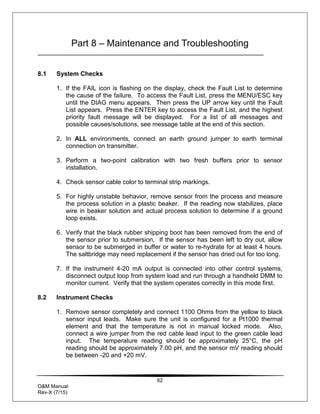
8.1 System Checks ..............................62
8.2 Instrument Checks .........................62
8.4 Cleaning the Sensor.......................67
8.5 Replacing the Saltbridge and
Reference Buffer Solution.......................68
8.6 Troubleshooting .............................69
SPARE PARTS..................................................71
3
O&M Manual
Rev-X (7/15)
Table of Figures
FIGURE 1 - Q45 ENCLOSURE DIMENSIONS ...................................................................................10
FIGURE 2 - MOUNTING BRACKET DIMENSIONS..............................................................................11
FIGURE 3 - WALL MOUNTING DIAGRAM ........................................................................................12
FIGURE 4 - PIPE MOUNTING DIAGRAM..........................................................................................12
FIGURE 5 - Q25 SENSOR TYPES..................................................................................................13
FIGURE 6 - FLOW THROUGH TEE MOUNT .....................................................................................14
FIGURE 7 - 1.5" UNION MOUNT....................................................................................................15
FIGURE 8 - 2" UNION MOUNT.......................................................................................................16
FIGURE 9 - SENSOR SUBMERSION MOUNT ...................................................................................17
FIGURE 10 - S.S. SENSOR INSERTION MOUNT..............................................................................18
FIGURE 11 - CPVC SENSOR INSERTION MOUNT...........................................................................19
FIGURE 12 - (63-0013) COMBINATION PH SENSOR, FLOW TYPE....................................................20
FIGURE 13 - (63-0009) COMBINATION PH SENSOR, SUB. TYPE .....................................................20
FIGURE 14 - SEALED FLOWCELL DETAILS.....................................................................................21
FIGURE 15 - TWIST-LOCK FLOW TEE ...........................................................................................22
FIGURE 16 - LOCK-N-LOAD SENSOR EXPLODED VIEW...................................................................23
FIGURE 17 - DC/LOOP POWER WIRING DIAGRAM .........................................................................25
FIGURE 18 - CABLE DESCRIPTION, MODEL Q25P .........................................................................27
FIGURE 19 - DETACHABLE SINGLE SHIELDED CABLE, MODEL Q25P ..............................................27
FIGURE 20 - SENSOR CABLE PREPARATION .................................................................................28
FIGURE 21 - JUNCTION BOX INTERCONNECT WIRING ....................................................................30
FIGURE 22 - SENSOR CONNECTIONS, COMBINATION ELECTRODES................................................31
FIGURE 23 - COMBINATION ELECTRODE CONNECTIONS ................................................................32
FIGURE 24 - EXTERNAL TEMPERATURE COMPENSATION ...............................................................33
FIGURE 25 - EXTERNAL PREAMP FOR CONVENTIONAL SENSOR WIRING.........................................34
FIGURE 26 - USER INTERFACE.....................................................................................................35
FIGURE 27 - SOFTWARE MAP ......................................................................................................40
FIGURE 28 - AUTOMATIC PH BUFFER TABLES...............................................................................45
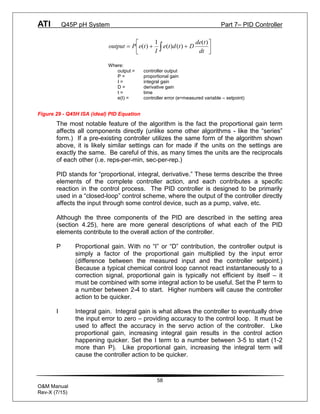
FIGURE 29 - Q45H ISA (IDEAL) PID EQUATION ............................................................................58
FIGURE 30 - REPLACING THE SALTBRIDGE AND REFERENCE BUFFER ............................................68
4
O&M Manual
Rev-X (7/15)
Part 1 - Introduction
1.1 General (Q45P, pH Monitor)
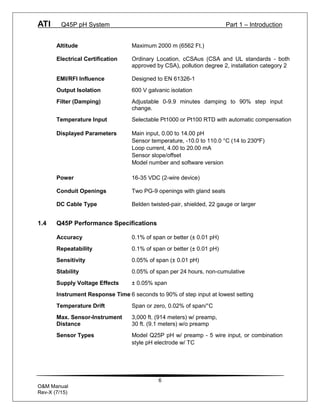
The Model Q45P provides continuous measurement of pH in aqueous systems.
It is suitable for potable water, wastewater, and a wide variety of process water
applications. Q45P monitors may be used with Q25P “differential” pH sensors or
a variety of conventional “combination” pH sensors.
Monitors are available in three electronic versions, a loop-powered 2-wire
transmitter, a dual “AA” battery operated portable unit with two voltage outputs,
and a 5-17 VDC Externally powered unit with two voltage outputs. This manual
refers to the Loop-Powered 2-wire transmitter version.
In all configurations, the Q45P displays pH, sensor temperature, sensor output
millivolts, and output loop current on the secondary line of the custom display.
WARNING: Not following operating instructions may impair safety.
ATI Q45P pH System Part 1 – Introduction
5
O&M Manual
Rev-X (7/15)
1.2 Features
· Q45P electronic transmitters are fully isolated, loop powered instruments for 2-
wire DC applications.
· Output Hold, Output Simulate, Output Alarm, and Output Delay Functions. All
forced changes in output condition include bumpless transfer for gradual return to
on-line signal levels to avoid system control shocks on both analog outputs.
· Selectable Output Fail Alarm feature allows system diagnostic failures to be sent
to external monitoring systems.
· Large, high contrast, custom LCD display with LED back light provides excellent
readability in any light conditions. The second line of display utilizes 5x7 dot
matrix characters for clear message display. Two of four measured parameters
may be on the display simultaneously.
· Diagnostic messages provide a clear description of any problem with no
confusing error codes to look up. Messages are also included for diagnosing
calibration problems.
· Two-point and sample calibration methods include auto-buffer recognition from
13 built-in buffer tables, with stability checks during calibration.
· Selectable Pt1000 or Pt100 temperature inputs.
· Security lock feature to prevent unauthorized tampering.
1.3 Q45P System Specifications
Enclosure NEMA 4X, polycarbonate, stainless steel hardware,
weatherproof and corrosion resistant.
Mounting Options Wall or pipe mount bracket standard. Bracket suitable for
either 1.5” or 2” I.D. U-Bolts for pipe mounting.
Weight 1 lb. (0.45 kg)
Display 0.75” (19.1 mm) high 4-digit main display with sign
12-digit secondary display, 0.3" (7.6 mm) 5x7 dot matrix.
Keypad 4-key membrane type, polycarbonate
Ambient Temperature Service, -20 to 60 °C (-4 to 140 ºF)
Storage, -30 to 70 °C (-22 to 158 ºF)
Ambient Humidity 0 to 95%, indoor/outdoor use, non-condensing.
ATI Q45P pH System Part 1 – Introduction
6
O&M Manual
Rev-X (7/15)
Altitude Maximum 2000 m (6562 Ft.)
Electrical Certification Ordinary Location, cCSAus (CSA and UL standards - both
approved by CSA), pollution degree 2, installation category 2
EMI/RFI Influence Designed to EN 61326-1
Output Isolation 600 V galvanic isolation
Filter (Damping) Adjustable 0-9.9 minutes damping to 90% step input
change.
Temperature Input Selectable Pt1000 or Pt100 RTD with automatic compensation
Displayed Parameters Main input, 0.00 to 14.00 pH
Sensor temperature, -10.0 to 110.0 °C (14 to 230ºF)
Loop current, 4.00 to 20.00 mA
Sensor slope/offset
Model number and software version
Power 16-35 VDC (2-wire device)
Conduit Openings Two PG-9 openings with gland seals
DC Cable Type Belden twisted-pair, shielded, 22 gauge or larger
1.4 Q45P Performance Specifications
Accuracy 0.1% of span or better (± 0.01 pH)
Repeatability 0.1% of span or better (± 0.01 pH)
Sensitivity 0.05% of span (± 0.01 pH)
Stability 0.05% of span per 24 hours, non-cumulative
Supply Voltage Effects ± 0.05% span
Instrument Response Time 6 seconds to 90% of step input at lowest setting
Temperature Drift Span or zero, 0.02% of span/°C
Max. Sensor-Instrument 3,000 ft. (914 meters) w/ preamp,
Distance 30 ft. (9.1 meters) w/o preamp
Sensor Types Model Q25P pH w/ preamp - 5 wire input, or combination
style pH electrode w/ TC
ATI Q45P pH System Part 1 – Introduction
7
O&M Manual
Rev-X (7/15)
1.5 General – Q25P pH Sensor
The Model Q25P is a “differential” pH sensor designed for the measurement of
pH of aqueous solutions. The differential design utilizes a second glass
measuring electrode contained in an internal buffer as the reference element.
This eliminates the need for a silver/silver chloride reference used in
conventional pH sensor designs. It is designed to perform in the harshest of
environments, including applications that poison conventional pH sensors. All
seals are dual o-ring using multiple sealing materials.
1.6 Sensor Features
· A high volume, dual junction saltbridge to maximize the in-service lifetime of
the sensor. The annular junction provides a large surface area to minimize
the chance of fouling. Large electrolyte volume and dual reference junctions
minimize contamination. The saltbridge is replaceable.
· An integral preamplifier encapsulated in the provides a low impedance signal
output which ensures stable readings in noisy environments. Sensor to
transmitter separation can be up to 3,000 feet (914 meters).
· Pt1000 RTD. The temperature element used in ATI sensors is highly
accurate and provides a highly linear output.
· Available in various configurations including submersible, flow type with quick
disconnect, sanitary, and insertion.
1.7 Q25P Sensor Specifications
Measuring Range 0 to 14.00 pH
Sensitivity 0.01 pH
Stability 0.02 pH per 24 hours, non-cumulative
Wetted Materials PEEK, ceramic, titanium, glass, Viton, EDPM
(optional: 316 stainless steel body)
Temperature Pt1000 RTD
Compensation
Sensor Cable 6 Conductor (5 are used) plus 2 shields,
15 feet (4.6 meters) standard length
Temperature Range -5 to +95 °C (23 to 203 °F)
Pressure Range 0 to 100 psig
ATI Q45P pH System Part 1 – Introduction
8
O&M Manual
Rev-X (7/15)
Maximum Flow Rate 10 feet (3 meters) per second
Sensor to Analyzer 3,000 feet (914 meters) maximum
Distance
Sensor Body Options 1” NPT convertible, 1¼” insertion, 1½” or 2” sanitary-style
Weight 1 lb. (0.45 kg)
Notes:1. The type of hardware used to mount the sensor may limit the maximum
temperature and pressure ratings. Please consult the hardware
manufacturer’s specifications to obtain the relevant temperature and pressure
rating information.
2. The maximum flow rate specification is lower for process solutions with low
ionic conductivity or high suspended solids concentration. High flow rates in
low ionic conductivity processes may cause a measurement error due to static
electrical discharge. High flow rates in processes with high suspended solids
concentration may decrease the functional life of the sensor by eroding the
pH-sensitive glass electrode.
1.8 Important Sensor Notes
· The glass electrode must be wetted at all times to ensure proper functionality.
Q25P sensors are shipped with a fluid-filled cap over the electrode to enable
immediate use (remove cap before installing, save for storage and shipping
purposes). Electrodes that have dried out for any reason should be hydrated
for 24 hours to restore full functionality.
· Hydrofluoric acid (HF) will dissolve conventional glass electrodes. For
applications involving hydrofluoric acid, a pH sensor with antimony electrode
is recommended.
NOTE: The standard Q25P process electrode is made of glass and can
break if not handled properly. Should the electrode ever break,
USE CAUTION when handling the sensor to avoid serious cuts.
Equipment bearing this marking may not be discarded by traditional
methods in the European community after August 12 2005 per EU
Directive 2002/96/EC. End users must return old equipment to the
manufacturer for proper disposal.
9
O&M Manual
Rev-X (7/15)
Part 2 – Analyzer Mounting
2.1 General
All Q45 Series instruments provide for mounting flexibility. A bracket is included
that allows mounting to walls or pipes. In all cases, choose a location that is
readily accessible for calibrations. Also consider that it may be necessary to
utilize a location where solutions can be used during the calibration process. To
take full advantage of the high contrast display, mount the instrument in a
location where the display can be viewed from various angles and long
distances.
Locate the instrument in close proximity to the point of sensor installation - this
will allow easy access during calibration. The standard cable length of the pH
sensor is 15 feet. For sensor cables longer than 30 feet, use the optional
junction box (07-0100) and sensor interconnect cable (31-0057).
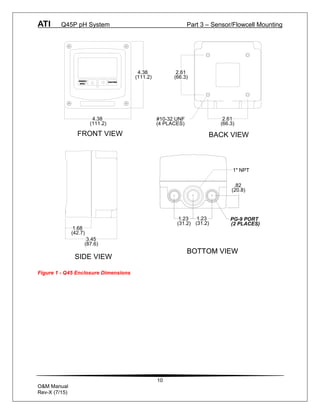
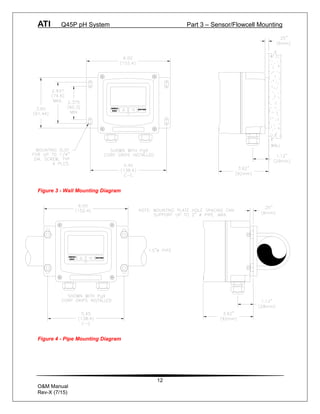
Refer to Figure 3 and Figure 1 - Q45 Enclosure Dimensions
4 for detailed dimensions of each type of system.
ATI Q45P pH System Part 3 – Sensor/Flowcell Mounting
10
O&M Manual
Rev-X (7/15)
Figure 1 - Q45 Enclosure Dimensions
1" NPT
1.23
(31.2)
.82
(20.8)
BOTTOM VIEW
3.45
(87.6)
1.68
(42.7)
SIDE VIEW
4.38
(111.2)
4.38
(111.2)
ENTER
MENU
ESC
FRONT VIEW
2.61
(66.3)
2.61
(66.3)
#10-32 UNF
(4 PLACES)
BACK VIEW
PG-9 PORT
(2 PLACES)
1.23
(31.2)
BOTTOM VIEW
ATI Q45P pH System Part 3 – Sensor/Flowcell Mounting
11
O&M Manual
Rev-X (7/15)
2.2 Wall or Pipe Mount
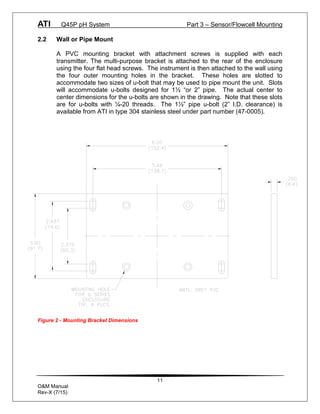
A PVC mounting bracket with attachment screws is supplied with each
transmitter. The multi-purpose bracket is attached to the rear of the enclosure
using the four flat head screws. The instrument is then attached to the wall using
the four outer mounting holes in the bracket. These holes are slotted to
accommodate two sizes of u-bolt that may be used to pipe mount the unit. Slots
will accommodate u-bolts designed for 1½ “or 2” pipe. The actual center to
center dimensions for the u-bolts are shown in the drawing. Note that these slots
are for u-bolts with ¼-20 threads. The 1½” pipe u-bolt (2” I.D. clearance) is
available from ATI in type 304 stainless steel under part number (47-0005).
Figure 2 - Mounting Bracket Dimensions
ATI Q45P pH System Part 3 – Sensor/Flowcell Mounting
12
O&M Manual
Rev-X (7/15)
ENTER
MENU
ESC
Figure 3 - Wall Mounting Diagram
ENTER
MENU
ESC
Figure 4 - Pipe Mounting Diagram
13
O&M Manual
Rev-X (7/15)
Part 3 – Sensor/Flowcell Mounting
3.1 General
The Q25P pH Sensor mounting options include flow-through, submersion,
insertion (special hardware required), or sanitary mount depending on the type of
sensor purchased.
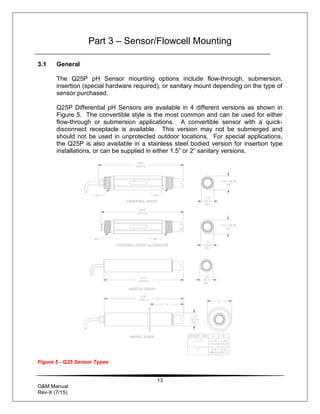
Q25P Differential pH Sensors are available in 4 different versions as shown in
Figure 5. The convertible style is the most common and can be used for either
flow-through or submersion applications. A convertible sensor with a quick-
disconnect receptacle is available. This version may not be submerged and
should not be used in unprotected outdoor locations. For special applications,
the Q25P is also available in a stainless steel bodied version for insertion type
installations, or can be supplied in either 1.5” or 2” sanitary versions.
Figure 5 - Q25 Sensor Types
ATI Q45P pH System Part 3 – Sensor/Flowcell Mounting
14
O&M Manual
Rev-X (7/15)
3.2 Flow Tee Mounting
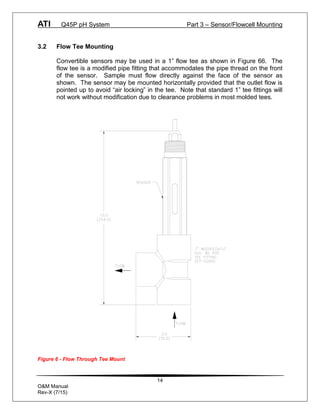
Convertible sensors may be used in a 1” flow tee as shown in Figure 66. The
flow tee is a modified pipe fitting that accommodates the pipe thread on the front
of the sensor. Sample must flow directly against the face of the sensor as
shown. The sensor may be mounted horizontally provided that the outlet flow is
pointed up to avoid “air locking” in the tee. Note that standard 1” tee fittings will
not work without modification due to clearance problems in most molded tees.
Figure 6 - Flow Through Tee Mount
ATI Q45P pH System Part 3 – Sensor/Flowcell Mounting
15
O&M Manual
Rev-X (7/15)
3.3 Union Mounting
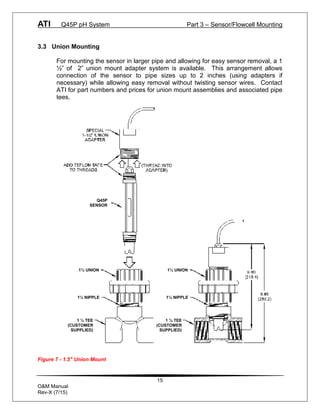
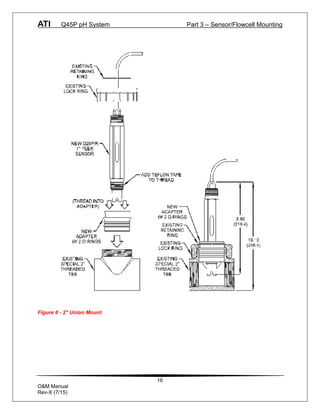
For mounting the sensor in larger pipe and allowing for easy sensor removal, a 1
½” of 2” union mount adapter system is available. This arrangement allows
connection of the sensor to pipe sizes up to 2 inches (using adapters if
necessary) while allowing easy removal without twisting sensor wires. Contact
ATI for part numbers and prices for union mount assemblies and associated pipe
tees.
Figure 7 - 1.5" Union Mount
Q45P
SENSOR
1½ UNION
1½ NIPPLE
1 ½ TEE
(CUSTOMER
SUPPLIED)
1½ UNION
1½ NIPPLE
1 ½ TEE
(CUSTOMER
SUPPLIED)
ATI Q45P pH System Part 3 – Sensor/Flowcell Mounting
16
O&M Manual
Rev-X (7/15)
Figure 8 - 2" Union Mount
ATI Q45P pH System Part 3 – Sensor/Flowcell Mounting
17
O&M Manual
Rev-X (7/15)
3.5 Submersion Mounting
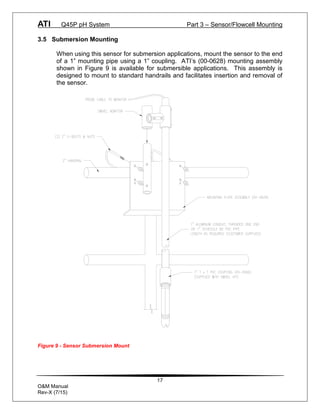
When using this sensor for submersion applications, mount the sensor to the end
of a 1” mounting pipe using a 1” coupling. ATI’s (00-0628) mounting assembly
shown in Figure 9 is available for submersible applications. This assembly is
designed to mount to standard handrails and facilitates insertion and removal of
the sensor.
Figure 9 - Sensor Submersion Mount
ATI Q45P pH System Part 3 – Sensor/Flowcell Mounting
18
O&M Manual
Rev-X (7/15)
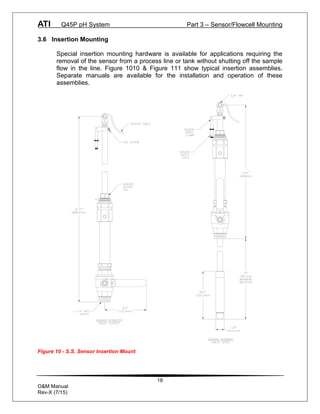
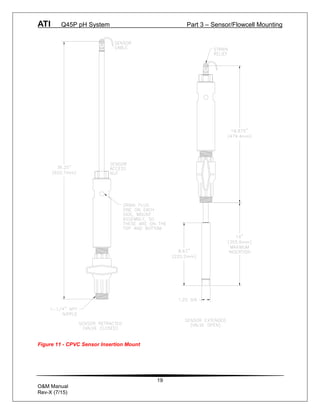
3.6 Insertion Mounting
Special insertion mounting hardware is available for applications requiring the
removal of the sensor from a process line or tank without shutting off the sample
flow in the line. Figure 1010 & Figure 111 show typical insertion assemblies.
Separate manuals are available for the installation and operation of these
assemblies.
Figure 10 - S.S. Sensor Insertion Mount
ATI Q45P pH System Part 3 – Sensor/Flowcell Mounting
19
O&M Manual
Rev-X (7/15)
Figure 11 - CPVC Sensor Insertion Mount
ATI Q45P pH System Part 3 – Sensor/Flowcell Mounting
20
O&M Manual
Rev-X (7/15)
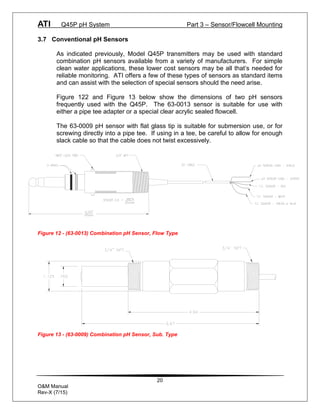
3.7 Conventional pH Sensors
As indicated previously, Model Q45P transmitters may be used with standard
combination pH sensors available from a variety of manufacturers. For simple
clean water applications, these lower cost sensors may be all that’s needed for
reliable monitoring. ATI offers a few of these types of sensors as standard items
and can assist with the selection of special sensors should the need arise.
Figure 122 and Figure 13 below show the dimensions of two pH sensors
frequently used with the Q45P. The 63-0013 sensor is suitable for use with
either a pipe tee adapter or a special clear acrylic sealed flowcell.
The 63-0009 pH sensor with flat glass tip is suitable for submersion use, or for
screwing directly into a pipe tee. If using in a tee, be careful to allow for enough
slack cable so that the cable does not twist excessively.
Figure 12 - (63-0013) Combination pH Sensor, Flow Type
Figure 13 - (63-0009) Combination pH Sensor, Sub. Type
ATI Q45P pH System Part 3 – Sensor/Flowcell Mounting
21
O&M Manual
Rev-X (7/15)
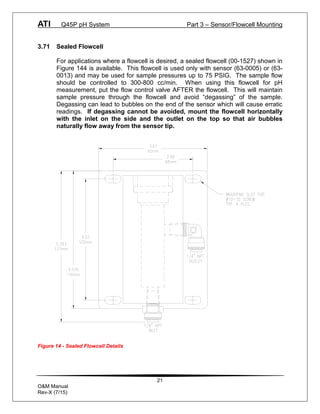
3.71 Sealed Flowcell
For applications where a flowcell is desired, a sealed flowcell (00-1527) shown in
Figure 144 is available. This flowcell is used only with sensor (63-0005) or (63-
0013) and may be used for sample pressures up to 75 PSIG. The sample flow
should be controlled to 300-800 cc/min. When using this flowcell for pH
measurement, put the flow control valve AFTER the flowcell. This will maintain
sample pressure through the flowcell and avoid “degassing” of the sample.
Degassing can lead to bubbles on the end of the sensor which will cause erratic
readings. If degassing cannot be avoided, mount the flowcell horizontally
with the inlet on the side and the outlet on the top so that air bubbles
naturally flow away from the sensor tip.
Figure 14 - Sealed Flowcell Details
ATI Q45P pH System Part 3 – Sensor/Flowcell Mounting
22
O&M Manual
Rev-X (7/15)
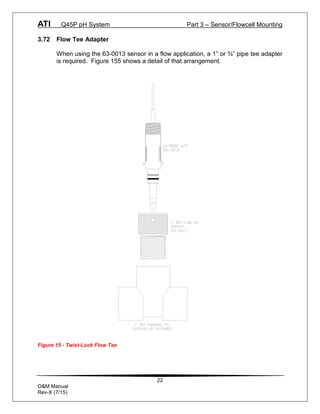
3.72 Flow Tee Adapter
When using the 63-0013 sensor in a flow application, a 1” or ¾” pipe tee adapter
is required. Figure 155 shows a detail of that arrangement.
Figure 15 - Twist-Lock Flow Tee
ATI Q45P pH System Part 3 – Sensor/Flowcell Mounting
23
O&M Manual
Rev-X (7/15)
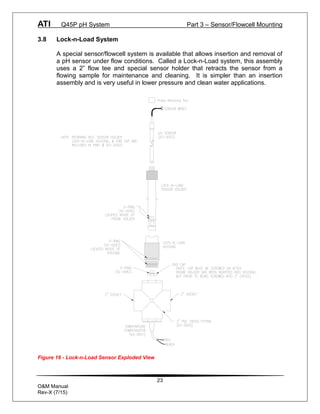
3.8 Lock-n-Load System
A special sensor/flowcell system is available that allows insertion and removal of
a pH sensor under flow conditions. Called a Lock-n-Load system, this assembly
uses a 2” flow tee and special sensor holder that retracts the sensor from a
flowing sample for maintenance and cleaning. It is simpler than an insertion
assembly and is very useful in lower pressure and clean water applications.
Figure 16 - Lock-n-Load Sensor Exploded View
24
O&M Manual
Rev-X (7/15)
Part 4 – Electrical Installation
4.1 General
The Q45 is powered in one of 3 ways, depending on the version purchased. The
2-wire version is a 16-35 VDC powered transmitter. The battery powered unit is
supplied with 2-“C” cell batteries. The 5-17 VDC Externally Powered Transmitter
is designed for low power operation for solar power applications. Please verify
the type of unit before connecting any power.
WARNING: Do not connect AC line power to the 2-wire system. Severe
damage will result.
Important Notes:
1. Use wiring practices that conform to all national, state and local electrical
codes. For proper safety as well as stable measuring performance, it is
important that the earth ground connection be made to a solid ground point
from earth terminal 12 as shown in Figure 17.
2. Do NOT run sensor cables or instrument 4-20 mA output wiring in the same
conduit that contains AC power wiring. AC power wiring should be run in a
dedicated conduit to prevent electrical noise from coupling with the
instrumentation signals.
3. This analyzer must be installed by specifically trained personnel in
accordance with relevant local codes and instructions contained in this
operating manual. Observe the analyzer's technical specifications and input
ratings.
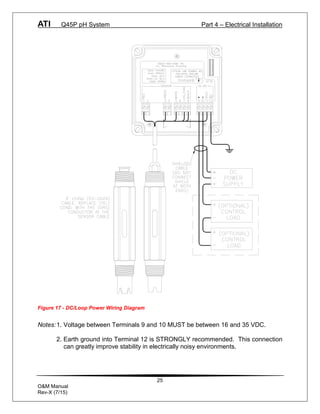
4.2 Two-Wire
In the two-wire configuration, a separate DC power supply must be used to
power the instrument. The exact connection of this power supply is dependent
on the control system into which the instrument will connect. See Figure 17 for
further details. Any twisted pair shielded cable can be used for connection of the
instrument to the power supply. Route signal cable away from AC power lines,
adjustable frequency drives, motors, or other noisy electrical signal lines. Do not
run sensor or signal cables in conduit that contains AC power lines or motor
leads.
ATI Q45P pH System Part 4 – Electrical Installation
25
O&M Manual
Rev-X (7/15)
Figure 17 - DC/Loop Power Wiring Diagram
Notes:1. Voltage between Terminals 9 and 10 MUST be between 16 and 35 VDC.
2. Earth ground into Terminal 12 is STRONGLY recommended. This connection
can greatly improve stability in electrically noisy environments.
ATI Q45P pH System Part 4 – Electrical Installation
26
O&M Manual
Rev-X (7/15)
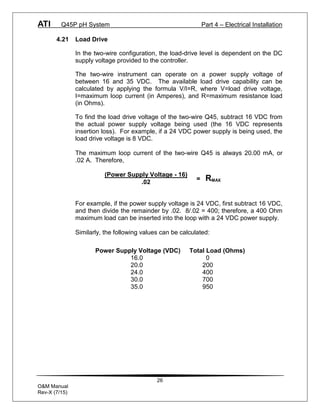
4.21 Load Drive
In the two-wire configuration, the load-drive level is dependent on the DC
supply voltage provided to the controller.
The two-wire instrument can operate on a power supply voltage of
between 16 and 35 VDC. The available load drive capability can be
calculated by applying the formula V/I=R, where V=load drive voltage,
I=maximum loop current (in Amperes), and R=maximum resistance load
(in Ohms).
To find the load drive voltage of the two-wire Q45, subtract 16 VDC from
the actual power supply voltage being used (the 16 VDC represents
insertion loss). For example, if a 24 VDC power supply is being used, the
load drive voltage is 8 VDC.
The maximum loop current of the two-wire Q45 is always 20.00 mA, or
.02 A. Therefore,
For example, if the power supply voltage is 24 VDC, first subtract 16 VDC,
and then divide the remainder by .02. 8/.02 = 400; therefore, a 400 Ohm
maximum load can be inserted into the loop with a 24 VDC power supply.
Similarly, the following values can be calculated:
(Power Supply Voltage - 16)
.02
= RMAX
Power Supply Voltage (VDC) Total Load (Ohms)
16.0 0
20.0 200
24.0 400
30.0 700
35.0 950
ATI Q45P pH System Part 4 – Electrical Installation
27
O&M Manual
Rev-X (7/15)
4.3 Sensor Wiring
The sensor cable can be quickly connected to the Q45 terminal strip by matching
the wire colors on the cable to the color designations on the label in the monitor.
A junction box is also available to provide a break point for long sensor cable
runs. Route signal cable away from AC power lines, adjustable frequency drives,
motors, or other noisy electrical signal lines. Do not run sensor or signal cables
in conduit that contains AC power lines or motor leads.
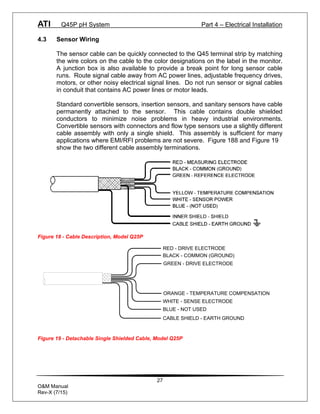
Standard convertible sensors, insertion sensors, and sanitary sensors have cable
permanently attached to the sensor. This cable contains double shielded
conductors to minimize noise problems in heavy industrial environments.
Convertible sensors with connectors and flow type sensors use a slightly different
cable assembly with only a single shield. This assembly is sufficient for many
applications where EMI/RFI problems are not severe. Figure 188 and Figure 19
show the two different cable assembly terminations.
Figure 18 - Cable Description, Model Q25P
RED - DRIVE ELECTRODE
BLACK - COMMON (GROUND)
GREEN - DRIVE ELECTRODE
ORANGE - TEMPERATURE COMPENSATION
WHITE - SENSE ELECTRODE
BLUE - NOT USED
CABLE SHIELD - EARTH GROUND
Figure 19 - Detachable Single Shielded Cable, Model Q25P
ATI Q45P pH System Part 4 – Electrical Installation
28
O&M Manual
Rev-X (7/15)
DANGER: DO NOT connect sensor cable to power lines. Serious injury
may result.
Take care to route sensor cable away from AC power lines, adjustable frequency
drives, motors, or other noisy electrical signal lines. Do not run signal lines in the
same conduit as AC power lines. Run signal cable in dedicated metal conduit if
possible. For optimum electrical noise protection, run an earth ground wire to the
ground terminal in the transmitter.
Only ATi’s custom 6-wire shielded interconnect cable should be used when
connecting the Model Q25P sensor to the analyzer. This high-performance,
double shielded, polyethylene jacketed cable is specially designed to provide the
proper signal shielding for the sensor used in this system. Substituted cables
may cause problems with system performance
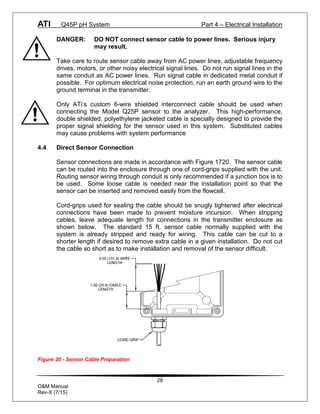
4.4 Direct Sensor Connection
Sensor connections are made in accordance with Figure 1720. The sensor cable
can be routed into the enclosure through one of cord-grips supplied with the unit.
Routing sensor wiring through conduit is only recommended if a junction box is to
be used. Some loose cable is needed near the installation point so that the
sensor can be inserted and removed easily from the flowcell.
Cord-grips used for sealing the cable should be snugly tightened after electrical
connections have been made to prevent moisture incursion. When stripping
cables, leave adequate length for connections in the transmitter enclosure as
shown below. The standard 15 ft. sensor cable normally supplied with the
system is already stripped and ready for wiring. This cable can be cut to a
shorter length if desired to remove extra cable in a given installation. Do not cut
the cable so short as to make installation and removal of the sensor difficult.
Figure 20 - Sensor Cable Preparation
ATI Q45P pH System Part 4 – Electrical Installation
29
O&M Manual
Rev-X (7/15)
ATI Q45P pH System Part 4 – Electrical Installation
30
O&M Manual
Rev-X (7/15)
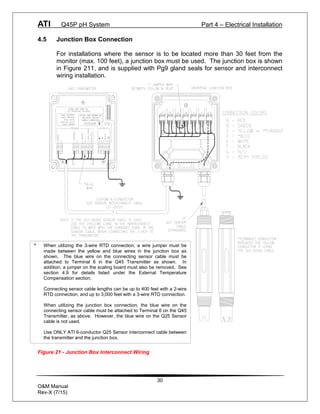
4.5 Junction Box Connection
For installations where the sensor is to be located more than 30 feet from the
monitor (max. 100 feet), a junction box must be used. The junction box is shown
in Figure 211, and is supplied with Pg9 gland seals for sensor and interconnect
wiring installation.
Figure 21 - Junction Box Interconnect Wiring
* When utilizing the 3-wire RTD connection, a wire jumper must be
made between the yellow and blue wires in the junction box as
shown. The blue wire on the connecting sensor cable must be
attached to Terminal 6 in the Q45 Transmitter as shown. In
addition, a jumper on the scaling board must also be removed. See
section 4.9 for details listed under the External Temperature
Compensation section.
Connecting sensor cable lengths can be up to 400 feet with a 2-wire
RTD connection, and up to 3,000 feet with a 3-wire RTD connection.
When utilizing the junction box connection, the blue wire on the
connecting sensor cable must be attached to Terminal 6 on the Q45
Transmitter, as above. However, the blue wire on the Q25 Sensor
cable is not used.
Use ONLY ATI 6-conductor Q25 Sensor interconnect cable between
the transmitter and the junction box.
ATI Q45P pH System Part 4 – Electrical Installation
31
O&M Manual
Rev-X (7/15)
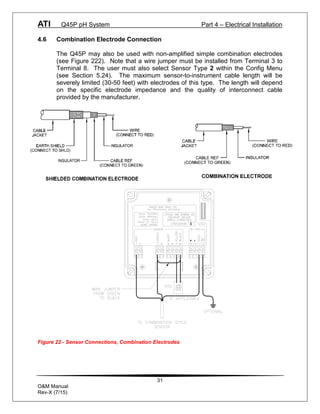
4.6 Combination Electrode Connection
The Q45P may also be used with non-amplified simple combination electrodes
(see Figure 222). Note that a wire jumper must be installed from Terminal 3 to
Terminal 8. The user must also select Sensor Type 2 within the Config Menu
(see Section 5.24). The maximum sensor-to-instrument cable length will be
severely limited (30-50 feet) with electrodes of this type. The length will depend
on the specific electrode impedance and the quality of interconnect cable
provided by the manufacturer.
Figure 22 - Sensor Connections, Combination Electrodes
ATI Q45P pH System Part 4 – Electrical Installation
32
O&M Manual
Rev-X (7/15)
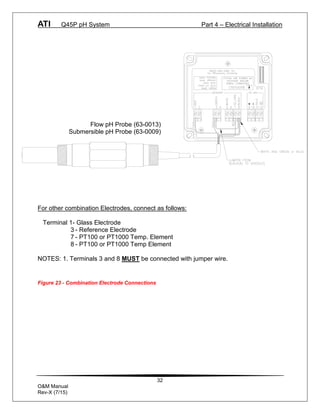
For other combination Electrodes, connect as follows:
Terminal 1- Glass Electrode
3 - Reference Electrode
7 - PT100 or PT1000 Temp. Element
8 - PT100 or PT1000 Temp Element
NOTES: 1. Terminals 3 and 8 MUST be connected with jumper wire.
Figure 23 - Combination Electrode Connections
Flow pH Probe (63-0013)
Submersible pH Probe (63-0009)
ATI Q45P pH System Part 4 – Electrical Installation
33
O&M Manual
Rev-X (7/15)
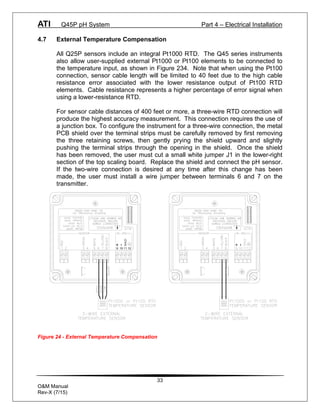
4.7 External Temperature Compensation
All Q25P sensors include an integral Pt1000 RTD. The Q45 series instruments
also allow user-supplied external Pt1000 or Pt100 elements to be connected to
the temperature input, as shown in Figure 234. Note that when using the Pt100
connection, sensor cable length will be limited to 40 feet due to the high cable
resistance error associated with the lower resistance output of Pt100 RTD
elements. Cable resistance represents a higher percentage of error signal when
using a lower-resistance RTD.
For sensor cable distances of 400 feet or more, a three-wire RTD connection will
produce the highest accuracy measurement. This connection requires the use of
a junction box. To configure the instrument for a three-wire connection, the metal
PCB shield over the terminal strips must be carefully removed by first removing
the three retaining screws, then gently prying the shield upward and slightly
pushing the terminal strips through the opening in the shield. Once the shield
has been removed, the user must cut a small white jumper J1 in the lower-right
section of the top scaling board. Replace the shield and connect the pH sensor.
If the two-wire connection is desired at any time after this change has been
made, the user must install a wire jumper between terminals 6 and 7 on the
transmitter.
11
SHLD
9 10 12
Figure 24 - External Temperature Compensation
ATI Q45P pH System Part 4 – Electrical Installation
34
O&M Manual
Rev-X (7/15)
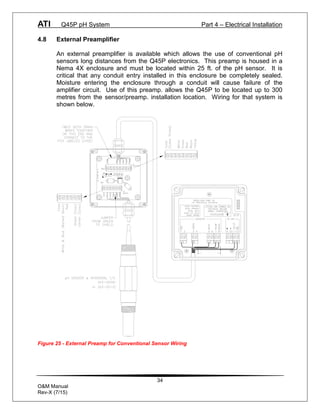
4.8 External Preamplifier
An external preamplifier is available which allows the use of conventional pH
sensors long distances from the Q45P electronics. This preamp is housed in a
Nema 4X enclosure and must be located within 25 ft. of the pH sensor. It is
critical that any conduit entry installed in this enclosure be completely sealed.
Moisture entering the enclosure through a conduit will cause failure of the
amplifier circuit. Use of this preamp. allows the Q45P to be located up to 300
metres from the sensor/preamp. installation location. Wiring for that system is
shown below.
Figure 25 - External Preamp for Conventional Sensor Wiring
35
O&M Manual
Rev-X (7/15)
Part 5 – Configuration
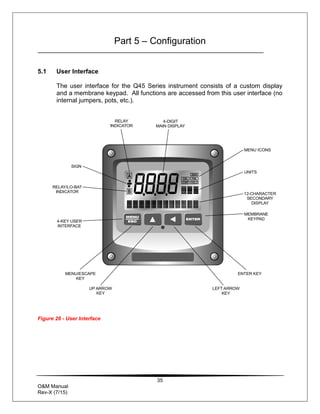
5.1 User Interface
The user interface for the Q45 Series instrument consists of a custom display
and a membrane keypad. All functions are accessed from this user interface (no
internal jumpers, pots, etc.).
Figure 26 - User Interface
MENU ICONS
UNITS
12-CHARACTER
SECONDARY
DISPLAY
MEMBRANE
KEYPAD
MENU
ESC
ENTER
A
B
DIAG
FAIL
HOLD
CAL
CONF
MENU ICONS
UNITS
12-CHARACTER
SECONDARY
DISPLAY
MEMBRANE
KEYPAD
ENTER KEY
LEFT ARROW
KEY
4-DIGIT
MAIN DISPLAY
MENU/ESCAPE
KEY
UP ARROW
KEY
SIGN
RELAY/LO-BAT
INDICATOR
4-KEY USER
INTERFACE
RELAY
INDICATOR
ATI Q45P pH System Part 5 – Configuration
36
O&M Manual
Rev-X (7/15)
5.11 Keys
All user configurations occur through the use of four membrane keys. These
keys are used as follows:
MENU/ESC To scroll through the menu section headers or to escape
from anywhere in software. The escape sequence allows
the user to back out of any changes in a logical manner.
Using the escape key aborts all changes to the current
screen and backs the user out one level in the software tree.
The manual will refer to this key as either MENU or ESC,
depending upon its particular function. In the battery-
powered version of the Q45, this is also the ON button.
UP (arrow) To scroll through individual list or display items and to
change number values.
LEFT (arrow) To move the cursor from right to left during changes to a
number value.
ENTER To select a menu section or list item for change and to store
any change.
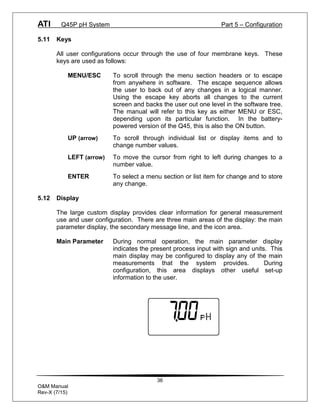
5.12 Display
The large custom display provides clear information for general measurement
use and user configuration. There are three main areas of the display: the main
parameter display, the secondary message line, and the icon area.
Main Parameter During normal operation, the main parameter display
indicates the present process input with sign and units. This
main display may be configured to display any of the main
measurements that the system provides. During
configuration, this area displays other useful set-up
information to the user.
ATI Q45P pH System Part 5 – Configuration
37
O&M Manual
Rev-X (7/15)
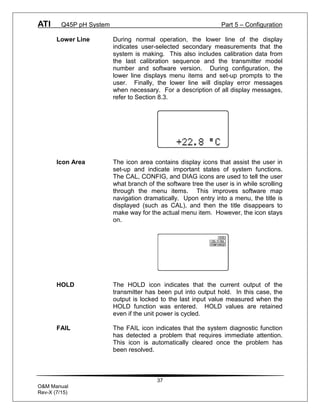
Lower Line During normal operation, the lower line of the display
indicates user-selected secondary measurements that the
system is making. This also includes calibration data from
the last calibration sequence and the transmitter model
number and software version. During configuration, the
lower line displays menu items and set-up prompts to the
user. Finally, the lower line will display error messages
when necessary. For a description of all display messages,
refer to Section 8.3.
Icon Area The icon area contains display icons that assist the user in
set-up and indicate important states of system functions.
The CAL, CONFIG, and DIAG icons are used to tell the user
what branch of the software tree the user is in while scrolling
through the menu items. This improves software map
navigation dramatically. Upon entry into a menu, the title is
displayed (such as CAL), and then the title disappears to
make way for the actual menu item. However, the icon stays
on.
HOLD The HOLD icon indicates that the current output of the
transmitter has been put into output hold. In this case, the
output is locked to the last input value measured when the
HOLD function was entered. HOLD values are retained
even if the unit power is cycled.
FAIL The FAIL icon indicates that the system diagnostic function
has detected a problem that requires immediate attention.
This icon is automatically cleared once the problem has
been resolved.
ATI Q45P pH System Part 5 – Configuration
38
O&M Manual
Rev-X (7/15)
5.2 Software
The software of the Q45P is organized in an easy to follow menu-based system.
All user settings are organized under five menu sections: Measure, Calibration
[CAL], Configuration [CONFIG], Control [CONTROL] and Diagnostics [DIAG].
Note: The default Measure Menu is display-only and has no menu icon.
5.21 Software Navigation
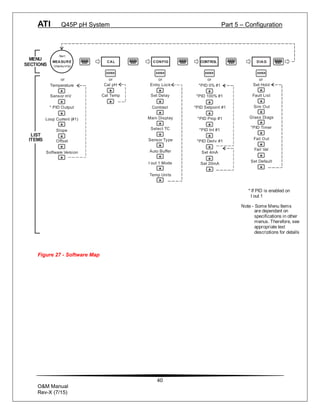
Within the CAL, CONFIG, CONTROL, and DIAG menu sections is a list of
selectable items. Once a menu section (such as CONFIG) has been selected
with the MENU key, the user can access the item list in this section by pressing
either the ENTER key or the UP arrow key. The list items can then be scrolled
through using the UP arrow key. Once the last item is reached, the list wraps
around and the first list item is shown again. The items in the menu sections are
organized such that more frequently used functions are first, while more
permanent function settings are later in the list. See Figure 277 for a visual
description of the software.
Each list item allows a change to a stored system variable. List items are
designed in one of two forms: simple single variable, or multiple variable
sequence. In the single variable format, the user can quickly modify one
parameter - for example, changing temperature display units from °F to °C. In
the multiple variable sequence, variables are changed as the result of some
process. For example, the calibration of pH generally requires more than one
piece of information to be entered. The majority of the menu items in the
software consist of the single variable format type.
Any data that may be changed will be flashing. This flashing indicates user entry
mode and is initiated by pressing the ENTER key. The UP arrow key will
increase a flashing digit from 0 to 9. The LEFT arrow key moves the flashing
digit from right to left. Once the change has been completed, pressing ENTER
again stores the variable and stops the flashing. Pressing ESC aborts the
change and also exits user entry mode.
The starting (default) screen is always the Measure Menu. The UP arrow key is
used to select the desired display. From anywhere in this section the user can
press the MENU key to select one of the four Menu Sections.
The UP arrow icon next to all list items on the display is a reminder to scroll
through the list using the UP arrow key.
ATI Q45P pH System Part 5 – Configuration
39
O&M Manual
Rev-X (7/15)
To select a list item for modification, first select the proper menu with the MENU
key. Scroll to the list item with the UP arrow key and then press the ENTER key.
This tells the system that the user wishes to perform a change on that item. For
single item type screens, once the user presses the ENTER key, part or all of the
variable will begin to flash, indicating that the user may modify that variable using
the arrow keys. However, if the instrument is locked, the transmitter will display
the message Locked! and will not enter user entry mode. The instrument must
be unlocked by entering the proper code value to allow authorized changes to
user entered values. Once the variable has been reset, pressing the ENTER key
again causes the change to be stored and the flashing to stop. The message
Accepted! will be displayed if the change is within pre-defined variable limits. If
the user decides not to modify the value after it has already been partially
changed, pressing the ESC key aborts the modification and returns the entry to
its original stored value.
In a menu item which is a multiple variable sequence type, once the ENTER key
is pressed there may be several prompts and sequences that are run to complete
the modification. The ESC key can always be used to abort the sequence
without changing any stored variables.
ATI Q45P pH System Part 5 – Configuration
40
O&M Manual
Rev-X (7/15)
Start
MEASURE
(displayonly)
CAL CONFIG DIAG
E NTER ENTE R ENTE R
ME NU
ESC
MENU
ESC
MENU
ESC
MENU
ESC
or or or
Cal pH *PID 0% #1 Set Hold
Cal Temp *PID 100% #1
*PID Setpoint #1
*PID Prop #1
Fault List
Sim Out
Fail Out
Fail Val
Software Version
Temperature
* PID Output
Loop Current (#1)
LIST
ITEMS
MENU
SECTIONS
Set Default
Slope
CONTROL
MENU
E SC
* If PID is enabled on
I out 1
*PID Int #1
*PID Deriv #1
Set 4mA
Set 20mA
E NTER
or
Entry Lock
Set Delay
Contrast
Main Display
I out 1 Mode
Temp Units
Sensor mV
Offset
Select TC
Sensor Type
Auto Buffer
Glass Diags
*PID Timer
Note - Some Menu Items
are dependant on
specifications in other
menus. Therefore, see
appropriate text
descriptions for details
or
Figure 27 - Software Map
ATI Q45P pH System Part 5 – Configuration
41
O&M Manual
Rev-X (7/15)
5.22 Measure Menu [MEASURE]
The default menu for the system is the display-only menu MEASURE. This menu
is a display-only measurement menu, and has no changeable list items. When
left alone, the instrument will automatically return to this menu after
approximately 30 minutes. While in the default menu, the UP arrow allows the
user to scroll through the secondary variables on the lower line of the display. A
brief description of the fields in the basic transmitter version is as follows:
TRANSMITTER MEAS SCREENS:
25.7° Temperature display. Can be displayed in °C or °F,
depending on user selection. A small “m” on the left side of
the screen indicates the transmitter has automatically
jumped to a manual 25°C setting due to a failure with the
temperature signal input.
+132 mV Raw sensor voltage. Useful for diagnosing problems.
100% 20.00 mA Shows the present controller output level on left, and actual
[Iout1=PID] transmitter current on the right. The controller can be placed
in manual while viewing this screen by pressing and holding
the ENTER key for 5 seconds until a small flashing “m”
appears on the screen. At that point the controller output
can be adjusted up or down using the UP and LEFT arrow
keys. To return to automatic operation, press and hold the
ENTER key for 5 seconds and the “M” will disappear.
20.00 mA Transmitter output current.
Slope = 100% Sensor output response vs. ideal calibration. This value
updates after each calibration. As the sensor ages, the slope
reading will decay indicating sensor aging. Useful for
resolving sensor problems.
Offset = 0.0 mV Sensor output current at a zero ppm input. This value
updates after a zero-calibration has been performed. Useful
for resolving sensor problems.
Q45P v4.01 Transmitter software version number.
Note: A display test (all segments ON) can be actuated by pressing and
holding the ENTER key while viewing the model/version number on
the lower line of the display.
ATI Q45P pH System Part 5 – Configuration
42
O&M Manual
Rev-X (7/15)
The MEASURE screens are intended to be used as a very quick means of
looking up critical values during operation or troubleshooting.
5.23 Calibration Menu [CAL]
The calibration menu contains items for frequent calibration of user parameters.
There are two items in this list: Cal pH, Cal Temp.
Cal pH The pH calibration function allows the user to adjust the
transmitter offset and span reading to match reference
buffers, or to adjust the sensor offset to match the sample
reading. See Part 6 - Calibration for more details.
Cal Temp The temperature calibration function allows the user to
adjust the offset of the temperature response by a small
factor of ±5 °C. The temperature input is factory calibrated
to very high accuracy. However, long cable lengths and
junction boxes may degrade the accuracy of the temperature
measurement in some extreme situations. Therefore, this
feature is provided as an adjustment. See Part 6 -
Calibration for more details.
ATI Q45P pH System Part 5 – Configuration
43
O&M Manual
Rev-X (7/15)
5.24 Configuration Menu [CONFIG]
The Configuration Menu contains all of the general user settings:
Entry Lock This function allows the user to lock out unauthorized
tampering with instrument settings. All settings may be
viewed while the instrument is locked, but they cannot be
modified. The Entry Lock feature is a toggle-type setting;
that is, entering the correct code will lock the transmitter and
entering the correct code again will unlock it. The code is
preset at a fixed value. Press ENTER to initiate user entry
mode and the first digit will flash. Use arrow keys to modify
value. See the last page of this manual for the Q45P
lock/unlock code. Press ENTER to toggle lock setting
once code is correct. Incorrect codes do not change state of
lock condition.
Set Delay The delay function sets the amount of damping on the
instrument. This function allows the user to apply a first
order time delay function to the pH measurements being
made. Both the display and the output value are affected by
the degree of damping. Functions such as calibration are
not affected by this parameter. The calibration routines
contain their own filtering and stability monitoring functions to
minimize the calibration timing. Press ENTER to initiate user
entry mode, and the value will flash. Use the arrow keys to
modify value; range is 0.1 to 9.9 minutes. Press ENTER to
store the new value.
Contrast This function sets the contrast level for the display. The
custom display is designed with a wide temperature range,
Super-Twist Nematic (STN) fluid.
The STN display provides the highest possible contrast and
widest viewing angle under all conditions. Contrast control
of this type of display is generally not necessary, so contrast
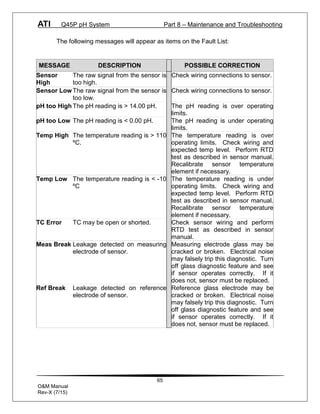
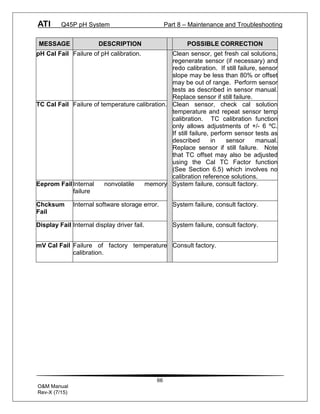
control is provided as a means for possible adjustment due
to aging at extreme ranges. In addition, the display has an
automatic temperature compensation network. Press
ENTER to initiate user entry mode, and the value will flash.
Use arrow keys to modify the value; range is 0 to 8 (0 being
lightest). Press ENTER to update and store the new value.
ATI Q45P pH System Part 5 – Configuration
44
O&M Manual
Rev-X (7/15)
Main This function allows the user to change the measurement in
Display the primary display area. The user may select between pH, sensor
temperature, or output current. Using this function, the user may
choose to put temperature in the main display area and pH on the
secondary, lower line of the display. Press ENTER to initiate user
entry mode, and the entire value will flash. Use the UP arrow key
to modify the desired display value. Press ENTER to store the new
value.
Select TC This function allows the user to select either a Pt1000 or Pt100
platinum RTD temperature element. The Pt1000 element is the
standard element in all high performance Q25 sensors; it is the
recommended temperature sensing element for all measurements.
The Pt100 selection is provided as an alternative for use with
existing combination-style sensors. Press ENTER to initiate user
entry mode, and the entire value will flash. Use the UP arrow key
to modify the desired value. Press ENTER to store the new value.
Sensor Type This function sets the sensor input type. This selection is critical for
control of the internal diagnostics and compensation factors. Press
ENTER to initiate user entry mode, and the entire value will flash.
Use the UP arrow key to modify the desired value. Selections are 1
for Q25P glass sensor, 2 for combination electrode, 3 for Q25P
antimony electrode, and 4 for pure water sensor using special
compensation table. Press ENTER to store the new value.
Auto Buffer This is a multiple variable function that allows the user to choose
which pH buffer sets that will be utilized in the 2-point calibration
mode. The Q45P contains 3 sets of built-in buffer tables with
compensation values ranging from 0 to 95 °C. During 2-point
calibration, the instrument will automatically identify which buffer is
being used and compensate for the value based on the built-in
tables. This allows very quick, highly accurate calibrations by the
user. The order in which the buffers are used during calibration is
unimportant, since the system automatically chooses the correct
buffer.
The default setting for this feature is OFF, which disables the auto-
recognition function. Press ENTER to change this setting. The
buffer table set options are: 1: [4/7/10], 2: [4/7/9.18], and 3:
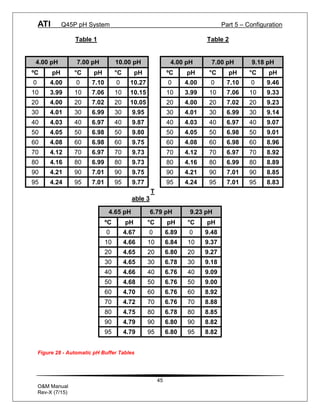
[4.65/6.79/9.23]. See Figure 28 for buffer tables. Once the buffer
set is selected, press ENTER and the message Accepted! will be
displayed on the lower line.
ATI Q45P pH System Part 5 – Configuration
45
O&M Manual
Rev-X (7/15)
Table 1 Table 2
T
able 3
Figure 28 - Automatic pH Buffer Tables
4.00 pH 7.00 pH 10.00 pH
ºC pH °C pH °C pH
0 4.00 0 7.10 0 10.27
10 3.99 10 7.06 10 10.15
20 4.00 20 7.02 20 10.05
30 4.01 30 6.99 30 9.95
40 4.03 40 6.97 40 9.87
50 4.05 50 6.98 50 9.80
60 4.08 60 6.98 60 9.75
70 4.12 70 6.97 70 9.73
80 4.16 80 6.99 80 9.73
90 4.21 90 7.01 90 9.75
95 4.24 95 7.01 95 9.77
4.00 pH 7.00 pH 9.18 pH
ºC pH °C pH °C pH
0 4.00 0 7.10 0 9.46
10 3.99 10 7.06 10 9.33
20 4.00 20 7.02 20 9.23
30 4.01 30 6.99 30 9.14
40 4.03 40 6.97 40 9.07
50 4.05 50 6.98 50 9.01
60 4.08 60 6.98 60 8.96
70 4.12 70 6.97 70 8.92
80 4.16 80 6.99 80 8.89
90 4.21 90 7.01 90 8.85
95 4.24 95 7.01 95 8.83
4.65 pH 6.79 pH 9.23 pH
ºC pH °C pH °C pH
0 4.67 0 6.89 0 9.48
10 4.66 10 6.84 10 9.37
20 4.65 20 6.80 20 9.27
30 4.65 30 6.78 30 9.18
40 4.66 40 6.76 40 9.09
50 4.68 50 6.76 50 9.00
60 4.70 60 6.76 60 8.92
70 4.72 70 6.76 70 8.88
80 4.75 80 6.78 80 8.85
90 4.79 90 6.80 90 8.82
95 4.79 95 6.80 95 8.82
ATI Q45P pH System Part 5 – Configuration
46
O&M Manual
Rev-X (7/15)
Iout#1 Mode This function sets analog output #1 to either track pH
(default) or enables the PID controller to operate on the pH
input. Press ENTER to initiate user entry mode, and the
entire value will flash. Use the UP arrow key to modify the
desired value; selections include 1-pH for pH tracking or 2-
PID for pH PID control. Press ENTER to store the new
value.
Temp Units This function sets the display units for temperature
measurement. Press ENTER to initiate user entry mode,
and the entire value will flash. Use the UP arrow key to
modify the desired display value. The choices are °F and
°C. Press ENTER to store the new value.
5.25 Control Menu [CONTROL]
The Control Menu contains all of the output control user settings:
Set PID 0% If the PID is enabled, this function sets the minimum and
Set PID 100% maximum controller end points. Unlike the standard 4-20
[Iout1=PID] mA output, the controller does not “scale” output values
across the endpoints. Rather, the endpoints determine
where the controller would normally force minimum or
maximum output in an attempt to recover the setpoint (even
though the controller can achieve 0% or 100% anywhere
within the range.)
If the 0% point is lower than the 100% point, then the
controller action will be “reverse” acting. That is, the output
of the controller will increase if the measured value is less
than the setpoint, and the output will decrease if the
measured value is larger than the setpoint. Flipping the
stored values in these points will reverse the action of the
controller to “direct” mode.
The entry value is limited to a value within the range
specified in “Set Range”, and the 0% and the 100% point
must be separated by at least 1% of this range Use the
LEFT arrow key to select the first digit to be modified. Then
use the UP and LEFT arrow keys to select the desired
numerical value. Press ENTER to store the new value.
ATI Q45P pH System Part 5 – Configuration
47
O&M Manual
Rev-X (7/15)
PID Setpnt The measured value which the controller is attempting to
[Iout1=PID] maintain by adjusting output value. It is the nature of the
PID controller that it never actually gets to the exact value
and stops. The controller is continually making smaller and
smaller adjustments as the measured value gets near the
setpoint.
PID Prop Proportional gain factor. The proportional gain value is a
[Iout1=PID] multiplier on the controller error (difference between
measured value and setpoint value.) Increasing this value
will make the controller more responsive.
PID Int Integral is the number of “repeats-per-minute” of the action
[Iout1=PID] of the controller. It is the number of times per minute that
the controller acts on the input error. At a setting of 2.0 rpm,
there are two repeats every minute. If the integral is set to
zero, a fixed offset value is added to the controller (manual
reset.) Increasing this value will make the controller more
responsive.
PID Deriv Derivative is a second order implementation of Integral, used
[Iout1=PID] to suppress “second-order” effects from process variables.
These variables may include items like pumps or mixers that
may have minor impacts on the measured value. The
derivative factor is rarely used in water treatment process,
and therefore, it is best in most cases to leave it at the
default value. Increasing this value will make the controller
more responsive.
Set 4 mA These functions set the main 4 and 20 mA current loop
Set 20 mA output points for the transmitter. The units displayed depend
[Iout1=pH] on the selection made in the CONFIG menu for Iout #1
Mode.
The value stored for the 4 mA point may be higher or lower
than the value stored for the 20 mA point. The entry values
are limited to values within the range specified in “Set
Range”, and the 4 mA and the 20 mA point must be
separated by at least 1% of this range Use the LEFT arrow
key to select the first digit to be modified. Then use the UP
and LEFT arrow keys to select the desired numerical value.
Press ENTER to store the new value.
ATI Q45P pH System Part 5 – Configuration
48
O&M Manual
Rev-X (7/15)
5.26 Diagnostics Menu [DIAG]
The diagnostics menu contains all of the user settings that are specific to the
system diagnostic functions, as well as functions that aid in troubleshooting
application problems.
Set Hold The Set Hold function locks the current loop output values
on the present process value. This function can be used
prior to calibration, or when removing the sensor from the
process, to hold the output in a known state. Once HOLD is
released, the outputs return to their normal state of following
the process input. The transfer out of HOLD is bumpless on
the both analog outputs - that is, the transfer occurs in a
smooth manner rather than as an abrupt change. An icon
on the display indicates the HOLD state, and the HOLD state
is retained even if power is cycled. Press ENTER to initiate
user entry mode, and entire value will flash. Use the UP
arrow key to modify the desired value, selections are ON for
engaging the HOLD function, and OFF to disengage the
function. Press ENTER to store the new value.
The Set Hold function can also hold at an output value
specified by the user. To customize the hold value, first turn
the HOLD function on. Press the ESC key to go to the DIAG
Menu and scroll to Sim Output using the UP arrow key.
Press ENTER. Follow the instructions under Sim Output
(see following page).
Fault List The Fault List screen is a read-only screen that allows the
user to display the cause of the highest priority failure. The
screen indicates the number of faults present in the system
and a message detailing the highest priority fault present.
Note that some faults can result in multiple displayed failures
due to the high number of internal tests occurring. As faults
are corrected, they are immediately cleared.
Faults are not stored; therefore, they are immediately
removed if power is cycled. If the problem causing the faults
still exists, however, faults will be displayed again after
power is re-applied and a period of time elapses during
which the diagnostic system re-detects them. The exception
to this rule is the calibration failure. When a calibration fails,
no corrupt data is stored. Therefore, the system continues
to function normally on the data that was present before the
calibration was attempted.
ATI Q45P pH System Part 5 – Configuration
49
O&M Manual
Rev-X (7/15)
After 30 minutes or if power to the transmitter is cycled, the
failure for calibration will be cleared until calibration is
attempted again. If the problem still exists, the calibration
failure will re-occur. Press ENTER to initiate view of the
highest priority failure. The display will automatically return
to normal after a few seconds.
Sim Out The Sim Out function allows the user to simulate the pH
level of the instrument in the user selected display range.
The user enters a pH value directly onto the screen, and
the output responds as if it were actually receiving the signal
from the sensor. This allows the user to check the function
of attached monitoring equipment during set-up or
troubleshooting. Escaping this screen returns the unit to
normal operation. Press ENTER to initiate the user entry
mode, and the right-most digit of the value will flash. Use
arrow keys to modify desired value.
The starting display value will be the last read value of the
input. The output will be under control of the SIM screen
until the ESC key is pressed.
Note: If the HOLD function is engaged before the Sim Output
function is engaged, the simulated output will remain the
same even when the ESC key is pressed. Disengage the
HOLD function to return to normal output.
NOTE: If the HOLD function is engaged before the
Sim Output function is engaged, the simulated output
will remain the same even when the ESC key is pressed.
Disengage the HOLD function to return to normal
output.
Glass Diags This feature not for loop powered devices.
PID Timer This function sets a timer to monitor the amount of time the
[Iout1=PID] PID controller remains at 0% or 100%. This function only
appears if the PID controller is enabled. If the timer is set to
0000, the feature is effectively disabled. If the timer value is
set to any number other zero, a FAIL condition will occur if
the PID controller remains at 0% or 100% for the timer value.
If one of the relays are set to FAIL mode, this failure
condition can be signaled by a changing relay contact.
ATI Q45P pH System Part 5 – Configuration
50
O&M Manual
Rev-X (7/15)
Press ENTER to initiate user entry mode, and the entire
value will flash. Use the UP arrow key to modify desired
value; range of value is 0-9999 seconds. Press ENTER to
store the new value
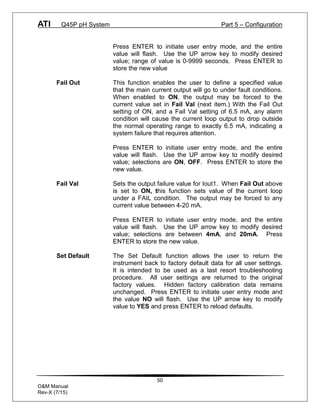
Fail Out This function enables the user to define a specified value
that the main current output will go to under fault conditions.
When enabled to ON, the output may be forced to the
current value set in Fail Val (next item.) With the Fail Out
setting of ON, and a Fail Val setting of 6.5 mA, any alarm
condition will cause the current loop output to drop outside
the normal operating range to exactly 6.5 mA, indicating a
system failure that requires attention.
Press ENTER to initiate user entry mode, and the entire
value will flash. Use the UP arrow key to modify desired
value; selections are ON, OFF. Press ENTER to store the
new value.
Fail Val Sets the output failure value for Iout1. When Fail Out above
is set to ON, this function sets value of the current loop
under a FAIL condition. The output may be forced to any
current value between 4-20 mA.
Press ENTER to initiate user entry mode, and the entire
value will flash. Use the UP arrow key to modify desired
value; selections are between 4mA, and 20mA. Press
ENTER to store the new value.
Set Default The Set Default function allows the user to return the
instrument back to factory default data for all user settings.
It is intended to be used as a last resort troubleshooting
procedure. All user settings are returned to the original
factory values. Hidden factory calibration data remains
unchanged. Press ENTER to initiate user entry mode and
the value NO will flash. Use the UP arrow key to modify
value to YES and press ENTER to reload defaults.
51
O&M Manual
Rev-X (7/15)
Part 6 – Calibration
6.1 Overview and Methods
Since the sensor slope (mV/pH output) will degrade over time, the instrument
must be calibrated periodically to maintain a high degree of measurement
accuracy. Frequency of calibration must be determined by the application. High
temperature applications or applications involving extreme pH operating
conditions may require more frequent calibration than those that operate at more
neutral pH levels and ambient level temperatures. It is important for the user to
establish a periodic cleaning and calibration schedule for sensor maintenance to
maintain high system accuracy.
Before calibrating the instrument for the very first time after initial installation, it is
important to select the proper operating parameters in the configuration menus
for items like Sensor Type and Auto Buffers.
If Auto Buffers is not enabled, select buffers with values that are close to the
normal operating pH of the process. For example, if the process is operating
normally at 8 pH, buffer values of 9.18 pH and 7.00 pH are preferred over buffers
of 4.00 pH and 7.00 pH. If possible, select one of the buffers to be near 7.00 pH.
NOTE: Buffers must be at least 2 pH units apart to ensure accurate
calibration.
The system provides two methods of pH calibration: 2-point and 1-point. These
two methods are significantly different. See Sections 6.13 and 6.14 for a brief
description of their uses.
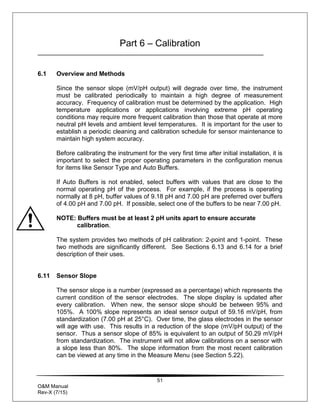
6.11 Sensor Slope
The sensor slope is a number (expressed as a percentage) which represents the
current condition of the sensor electrodes. The slope display is updated after
every calibration. When new, the sensor slope should be between 95% and
105%. A 100% slope represents an ideal sensor output of 59.16 mV/pH, from
standardization (7.00 pH at 25°C). Over time, the glass electrodes in the sensor
will age with use. This results in a reduction of the slope (mV/pH output) of the
sensor. Thus a sensor slope of 85% is equivalent to an output of 50.29 mV/pH
from standardization. The instrument will not allow calibrations on a sensor with
a slope less than 80%. The slope information from the most recent calibration
can be viewed at any time in the Measure Menu (see Section 5.22).
ATI Q45P pH System Part 6 – Calibration
52
O&M Manual
Rev-X (7/15)
6.12 Sensor Offset
Sensor offset is a number that indicates sensor output (expressed in mV) in 7.00
pH buffer at 25 ºC. Ideally, the sensor will output 0 mV under these conditions.
A sensor offset reading of +10 mV indicates that the sensor will output +10 mV
when placed into a perfect 7.00 pH buffer at 25 ºC. In other words, sensor offset
shifts the entire mV/pH curve up or down. Sensor offset is generally produced by
a small voltage drop at the sensor reference junction. Large offsets are most
typically the result of foulants on the reference junction, an aged reference
junction, or a weak reference fill solution. The instrument does not allow
calibrations on a sensor with an offset greater than +90 mV or less than –90 mV.
Sensor offset information from the most recent calibration can be viewed at any
time in the Measure Menu (See Section 5.22).
6.13 2-Point Calibration Explained
The 2-point calibration method involves the movement of the sensor through two
known pH buffer values. Therefore, the sensor must be removed from the
application to utilize this method. Two-point calibration adjusts both the slope
and the offset of the sensor. It is the recommended method of calibration for
highest accuracy. In addition, this calibration method utilizes an automatic buffer
recognition and compensation method.
IMPORTANT: the 2-point calibration mode MUST be performed when a new
sensor is first put into operation so that accurate calibration data is available for
possible later 1-point calibrations.
6.14 1-Point Calibration Explained
The 1-point calibration method is generally known as the "grab sample"
calibration method. In the 1-point calibration method, the sensor may be
removed from the application and placed into one buffer. It may also be left in
the measurement process and calibrated by reference. 1-point calibration
adjusts only the sensor offset. Since the sensor slope degrades much slower
than the sensor offset, this method may be used as a frequent calibration method
between more involved 2-point calibrations. For example, a user may choose to
perform on-line 1-point calibrations weekly and 2-point calibrations monthly.
ATI Q45P pH System Part 6 – Calibration
53
O&M Manual
Rev-X (7/15)
6.2 Performing a 2-Point Calibration
The 2-point calibration method utilizes an automatic buffer recognition and
compensation system. For this system to operate properly, the user must first
configure the proper buffers in the Set Buffers screen (see Section 5.24). If the
buffers are not present in this menu, the user can override the automatic values
and enter arbitrary values. However, the highest accuracy is provided when the
user selects and uses buffers from this pre-defined table list. With the pre-
defined buffers, the temperature variations in the buffer are automatically
compensated for during the calibration process. If the buffer data is manually
entered, the calibration buffer sample must be very temperature stable to achieve
the same degree of accuracy.
Procedure
1. Remove sensor from application. Rinse and clean if necessary.
2. Allow sensor to temperature equilibrate with the buffer as best as possible. With
the sensor coming from an application solution that differs greatly in temperature
from the buffer, the user may have to wait as much as 20 minutes for this to
occur.
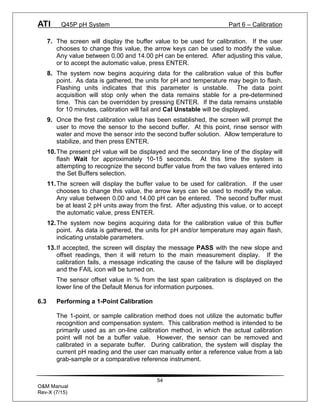
3. Scroll to the CAL menu section using the MENU key and press ENTER or the UP
arrow key. Cal pH will then be displayed.
4. Press the ENTER key. The screen will display a flashing 1 for 1-point or a 2 for
2-point calibration. Using the UP arrow key, set for a 2-point calibration and
press ENTER.
5. The display will prompt the user to place the sensor in the first buffer and press
ENTER. If the sensor has been placed into this buffer already, once the
temperature has stabilized, press ENTER to continue.
6. The present pH value will be displayed and the secondary line of the display will
flash Wait for approximately 10-15 seconds. At this time the system is
attempting to recognize the first buffer value from the two values entered into the
Set Buffers selection.
ATI Q45P pH System Part 6 – Calibration
54
O&M Manual
Rev-X (7/15)
7. The screen will display the buffer value to be used for calibration. If the user
chooses to change this value, the arrow keys can be used to modify the value.
Any value between 0.00 and 14.00 pH can be entered. After adjusting this value,
or to accept the automatic value, press ENTER.
8. The system now begins acquiring data for the calibration value of this buffer
point. As data is gathered, the units for pH and temperature may begin to flash.
Flashing units indicates that this parameter is unstable. The data point
acquisition will stop only when the data remains stable for a pre-determined
time. This can be overridden by pressing ENTER. If the data remains unstable
for 10 minutes, calibration will fail and Cal Unstable will be displayed.
9. Once the first calibration value has been established, the screen will prompt the
user to move the sensor to the second buffer. At this point, rinse sensor with
water and move the sensor into the second buffer solution. Allow temperature to
stabilize, and then press ENTER.
10.The present pH value will be displayed and the secondary line of the display will
flash Wait for approximately 10-15 seconds. At this time the system is
attempting to recognize the second buffer value from the two values entered into
the Set Buffers selection.
11.The screen will display the buffer value to be used for calibration. If the user
chooses to change this value, the arrow keys can be used to modify the value.
Any value between 0.00 and 14.00 pH can be entered. The second buffer must
be at least 2 pH units away from the first. After adjusting this value, or to accept
the automatic value, press ENTER.
12.The system now begins acquiring data for the calibration value of this buffer
point. As data is gathered, the units for pH and/or temperature may again flash,
indicating unstable parameters.
13.If accepted, the screen will display the message PASS with the new slope and
offset readings, then it will return to the main measurement display. If the
calibration fails, a message indicating the cause of the failure will be displayed
and the FAIL icon will be turned on.
The sensor offset value in % from the last span calibration is displayed on the
lower line of the Default Menus for information purposes.
6.3 Performing a 1-Point Calibration
The 1-point, or sample calibration method does not utilize the automatic buffer
recognition and compensation system. This calibration method is intended to be
primarily used as an on-line calibration method, in which the actual calibration
point will not be a buffer value. However, the sensor can be removed and
calibrated in a separate buffer. During calibration, the system will display the
current pH reading and the user can manually enter a reference value from a lab
grab-sample or a comparative reference instrument.
ATI Q45P pH System Part 6 – Calibration
55
O&M Manual
Rev-X (7/15)
Procedure
1. Determine whether the calibration will be done on-line or with the sensor
removed and placed into a buffer. If the sensor is removed from the
application, rinse and clean if necessary.
2. If the sensor has been removed and placed into a buffer, allow sensor to
temperature equilibrate with the buffer as much as possible. With the sensor
coming from an application which differs greatly in temperature difference, the
user may have to wait as much as 20 minutes. If the sensor is on-line, the
user may want to set the output HOLD feature prior to calibration to lock out
any output fluctuations.
3. Scroll to the CAL menu section using the MENU key and press ENTER or the
UP arrow key. Cal pH will then be displayed.
4. Press the ENTER key. The screen will display a flashing 1 for 1-point or a 2
for 2-point calibration. Using the UP arrow key, set for a 1-point calibration
and press ENTER.
5. The system now begins acquiring data for the calibration value. As data is
gathered, the units for pH and temperature may flash. Flashing units indicate
that this parameter is unstable. The calibration data point acquisition will stop
only when the data remains stable for a pre-determined amount of time. This
can be overridden by pressing ENTER. If the data remains unstable for 10
minutes, the calibration will fail and the message Cal Unstable will be
displayed.
6. The screen will display the last measured pH value [or the auto buffer value, if
activated] and a message will be displayed prompting the user for the lab
value. The user must then modify the screen value with the arrow keys and
press ENTER. The system then performs the proper checks.
7. If accepted, the screen will display the message PASS with the new offset
reading, and then it will return to the main measurement display. If the
calibration fails, a message indicating the cause of the failure will be
displayed and the FAIL icon will be turned on.
ATI Q45P pH System Part 6 – Calibration
56
O&M Manual
Rev-X (7/15)
6.4 Temperature Calibration
The temperature input is factory calibrated for the highest accuracy. Temperature
calibration is not recommended unless the installation involves long cable lengths. For
example, at 50 feet, readings may be off ±0.2 °C. The temperature calibration
sequence is essentially a 1-point offset calibration that allows adjustments of
approximately ±5 °C.
The sensor temperature may be calibrated on line, or the sensor can be removed from
the process and placed into a known solution temperature reference. In any case, it is
critical that the sensor be allowed to reach temperature equilibrium with the solution in
order to provide the highest accuracy. When moving the sensor between widely
different temperature conditions, it may be necessary to allow the sensor to stabilize as
much as one hour before the calibration sequence is initiated. If the sensor is on-line,
the user may want to set the output HOLD feature prior to calibration to lock out any
output fluctuations.
Procedure
1. Scroll to the CAL menu section using the MENU key and press ENTER or the
UP arrow key.
2. Press the UP arrow key until Cal Temp is displayed.
3. Press the ENTER key. The message Place sensor in solution then press
ENTER will be displayed. Move the sensor into the calibration reference (if it
hasn’t been moved already) and wait for temperature equilibrium to be
achieved. Press ENTER to begin the calibration sequence.
4. The message Adjust temp value then press ENTER will be displayed, and
the right-most digit will begin to flash, indicating that the value can be
modified. Using the UP and LEFT arrow keys, modify the value to the known
ref solution temperature. Adjustments up to ± 5 °C from the factory calibrated
temperature are allowed. Press ENTER.
5. The calibration data gathering process will begin. The message Wait will
flash as data is accumulated and analyzed. The °C or °F symbol may flash
periodically if the reading is too unstable.
6. Once completed, the display will indicate PASS or FAIL. If the unit fails, the
temperature adjustment may be out of range, the sensor may not have
achieved complete temperature equilibrium, or there may be a problem with
the temperature element. In the event of calibration failure, it is
recommended to attempt the calibration again immediately.
57
O&M Manual
Rev-X (7/15)
Part 7 – PID Controller Details
7.1 PID Description
PID control, like many other control schemes, are used in chemical control to
improve the efficiency of chemical addition or control. By properly tuning the
control loop that controls chemical addition, only the amount of chemical that is
truly required is added to the system, saving money. The savings can be
substantial when compared to a system which may be simply adding chemical at
a constant rate to maintain some minimal addition under even the worst case
conditions. The PID output controller is highly advantageous over simple control
schemes that just utilize direct (proportional only) 4-20 mA output connections for
control, since the PID controller can automatically adjust the “rate” of recovery
based on the error between the setpoint and the measured value – which can be
a substantial efficiency improvement..
The PID controller is basically designed to provide a “servo” action on the 4-20
mA output to control a process. If the user requires that a measured process
stay as close as possible to a specific setpoint value, the controller output will
change from 0% to 100% in an effort to keep the process at the setpoint. To
affect this control, the controller must be used with properly selected control
elements (valves, proper chemicals, etc.) that enable the controller to add or
subtract chemical rapidly enough. This is not only specific to pumps and valves,
but also to line sizes, delays in the system, etc.
This section is included to give a brief description of tuning details for the PID
controller, and is not intended to be an exhaustive analysis of the complexities of
PID loop tuning. Numerous sources are available for specialized methods of
tuning that are appropriate for a specific application.
7.2 PID Algorithm
As most users of PID controllers realize, the terminology for the actual algorithm
terms and even the algorithms themselves can vary between different
manufacturers. This is important to recognize as early as possible, since just
plugging in similar values from one controller into another can result in
dramatically different results. There are various basic forms of PID algorithms
that are commonly seen, and the implementation here is the most common
version; The ISA algorithm (commonly referred to as the “ideal” algorithm.)
ATI Q45P pH System Part 7– PID Controller
58
O&M Manual
Rev-X (7/15)
ú
û
ù
ê
ë
é
+
+
= ò dt
t
de
D
t
d
t
e
I
t
e
P
output
)
(
)
(
)
(
1
)
(
Where:
output = controller output
P = proportional gain
I = integral gain
D = derivative gain
t = time
e(t) = controller error (e=measured variable – setpoint)
Figure 29 - Q45H ISA (ideal) PID Equation
The most notable feature of the algorithm is the fact the proportional gain term
affects all components directly (unlike some other algorithms - like the “series”
form.) If a pre-existing controller utilizes the same form of the algorithm shown
above, it is likely similar settings can for made if the units on the settings are
exactly the same. Be careful of this, as many times the units are the reciprocals
of each other (i.e. reps-per-min, sec-per-rep.)
PID stands for “proportional, integral, derivative.” These terms describe the three
elements of the complete controller action, and each contributes a specific
reaction in the control process. The PID controller is designed to be primarily
used in a “closed-loop” control scheme, where the output of the controller directly
affects the input through some control device, such as a pump, valve, etc.
Although the three components of the PID are described in the setting area
(section 4.25), here are more general descriptions of what each of the PID
elements contribute to the overall action of the controller.
P Proportional gain. With no “I” or “D” contribution, the controller output is
simply a factor of the proportional gain multiplied by the input error
(difference between the measured input and the controller setpoint.)
Because a typical chemical control loop cannot react instantaneously to a
correction signal, proportional gain is typically not efficient by itself – it
must be combined with some integral action to be useful. Set the P term to
a number between 2-4 to start. Higher numbers will cause the controller
action to be quicker.
I Integral gain. Integral gain is what allows the controller to eventually drive
the input error to zero – providing accuracy to the control loop. It must be
used to affect the accuracy in the servo action of the controller. Like
proportional gain, increasing integral gain results in the control action
happening quicker. Set the I term to a number between 3-5 to start (1-2
more than P). Like proportional gain, increasing the integral term will
cause the controller action to be quicker.
ATI Q45P pH System Part 7– PID Controller
59
O&M Manual
Rev-X (7/15)
D Derivative gain. The addition of derivative control can be problematic in
many applications, because it greatly contributes to oscillatory behavior.
In inherently slow chemical control process’, differential control is
generally added in very small amounts to suppress erratic actions in the
process that are non-continuous, such as pumps and valves clicking on
and off. However, as a starting point for chemical process control, its best
to leave the “D” term set to 0.
Based on these descriptions, the focus on tuning for chemical applications really
only involves adjustment of “P” and “I” in most cases. However, increasing both
increases the response of the controller. The difference is in the time of recovery.
Although combinations of high “P’s” and low “I” will appear to operate the same
as combinations of low “P’s” and high “I’s”, there will be a difference in rate of
recovery and stability. Because of the way the algorithm is structured, large “P’s”
can have a larger impact to instability, because the proportional gain term
impacts all the other terms directly. Therefore, keep proportional gain lower to
start and increase integral gain to achieve the effect required.
Many of the classical tuning techniques have the user start with all values at 0,
and then increase the P term until oscillations occur. The P value is then
reduced to ½ of the oscillatory value, and the I term is increased to give the
desired response. This can be done with the Q45H controller, with the exception
that the I term should start no lower than 1.0.
If it appears that even large amounts of integral gain (>20) don’t appreciably
increase the desired response, drop I back to about 1.0, and increase P by 1.00,
and start increasing I again. In most chemical control schemes, I will be
approximately 3 times the value of P.
7.3 Classical PID Tuning
Unlike many high speed position applications where PID loops are commonly
used, the chemical feed application employed by this instrument does not require
intense mathematical exercise to determine tuning parameters for the PID. In
fact, the risk of instability is far greater with overly tuned PID control schemes. In
addition, many of the classical mathematical exercises can be damaging or
wasteful in the use of chemicals when the process is bumped with large amounts
of input error to seek a response curve. Because of this, the general adjustment
guidelines described in section 6.2 are sufficient for almost all application tuning
for this instrument. Beyond this, many sources are available for classical tuning
methods.
ATI Q45P pH System Part 7– PID Controller
60
O&M Manual
Rev-X (7/15)
7.4 Manual PID Override Control
The Q45 PID output function allows the user to take manual control of the PID
control signal. This is often useful when starting up a control loop, or in the event
that you wish to bump the system manually to measure system response time.
To access the manual PID control, you must be in the MEASURE mode of
operation and you must have the PID output displayed on the lower line. This
line will indicate “XX.X% XX.X mA” with the X values simply indicating the
current values. With this display on the screen, press and hold the ENTER key
for about 5 seconds. You will see a small “m” show up between the % value and
the mA value. This indicates you are now in manual mode.
Once in manual, you may increase the PID output by pressing the UP arrow or
you may decrease the output by pressing the LEFT arrow. This will allow you to
drive the PID output to any desired setting.
To revert to normal PID control, press and hold the ENTER key again until the
“m” indicator disappears.
7.5 Common PID Pitfalls
The most common problem occurring in PID control applications involves the
false belief that proper settings on only the PID controller can balance any
process to an efficient level.
Close-loop control can only be effective if all elements in the loop are properly
selected for the application, and the process behavior is properly understood.
Luckily, the nature of simple chemical control process’ are generally slow in
nature. Therefore, even a de-tuned controller (one that responds somewhat
slowly) can still provide substantial improvements to setpoint control. In fact,
damaging oscillatory behavior is far more likely in tightly tuned controllers where
the user attempted to increase response too much.
When deciding on a PID control scheme, it is important to initially review all
elements of the process. Sticking valves, undersized pumps, or delays in
reaction times associated with chemical addition can have a dramatic effect on
the stability of the control loop. When controlling a chemical mix or reaction, the
sensor should be placed in a location that ensures proper mixing or reaction time
has occurred.
ATI Q45P pH System Part 7– PID Controller
61
O&M Manual
Rev-X (7/15)
The easiest processes to control with closed-loop schemes are generally linear,
and symmetrical, in nature. For example, controlling level in tank where the
opening of valve for a fixed period of time corresponds linearly to the amount that
flows into a tank. Chemical control process’ can be more problematic when the
nature of the setpoint value is non-linear relative to the input of chemical added.
For example, pH control of a process may appear linear only in a certain range of
operation, and become highly exponential at the extreme ranges of the
measuring scale. In addition, if a chemical process is not symmetrical, that
means it responds differentially to the addition and subtraction of chemical. It is
important in these applications to study steady-state impact as well as step-
change impact to process changes. In other words, once the process has
apparently been tuned under normal operating conditions, the user should
attempt to force a dramatic change to the input to study how the output reacts. If
this is difficult to do with the actual process input (the recommended method), the
user can place the control in manual at an extreme control point such as 5% or
95%, and release it in manual. The recovery should not be overly oscillatory. If
so, the loop needs to be de-tuned to deal with that condition (reduce P and/or I.)
62
O&M Manual
Rev-X (7/15)
Part 8 – Maintenance and Troubleshooting
8.1 System Checks
1. If the FAIL icon is flashing on the display, check the Fault List to determine
the cause of the failure. To access the Fault List, press the MENU/ESC key
until the DIAG menu appears. Then press the UP arrow key until the Fault
List appears. Press the ENTER key to access the Fault List, and the highest
priority fault message will be displayed. For a list of all messages and
possible causes/solutions, see message table at the end of this section.
2. In ALL environments, connect an earth ground jumper to earth terminal
connection on transmitter.
3. Perform a two-point calibration with two fresh buffers prior to sensor
installation.
4. Check sensor cable color to terminal strip markings.
5. For highly unstable behavior, remove sensor from the process and measure
the process solution in a plastic beaker. If the reading now stabilizes, place
wire in beaker solution and actual process solution to determine if a ground
loop exists.
6. Verify that the black rubber shipping boot has been removed from the end of
the sensor prior to submersion. If the sensor has been left to dry out, allow
sensor to be submerged in buffer or water to re-hydrate for at least 4 hours.
The saltbridge may need replacement if the sensor has dried out for too long.
7. If the instrument 4-20 mA output is connected into other control systems,
disconnect output loop from system load and run through a handheld DMM to
monitor current. Verify that the system operates correctly in this mode first.
8.2 Instrument Checks
1. Remove sensor completely and connect 1100 Ohms from the yellow to black
sensor input leads. Make sure the unit is configured for a Pt1000 thermal
element and that the temperature is not in manual locked mode. Also,
connect a wire jumper from the red cable lead input to the green cable lead
input. The temperature reading should be approximately 25°C, the pH
reading should be approximately 7.00 pH, and the sensor mV reading should
be between -20 and +20 mV.
ATI Q45P pH System Part 8 – Maintenance and Troubleshooting
63
O&M Manual
Rev-X (7/15)
2. With a DMM, measure the DC voltage from the white sensor lead connection
to the black sensor lead connection. With the positive DMM lead on the white
wire, the meter should read between -4.5 and -5.5 VDC.
3. For the DC transmitter variation, verify that power supply has required voltage
based on size of resistance in current loop. Large resistive loads can reduce
available power for transmitter.
8.3 Display Messages
The Q45 Series instruments provide a number of diagnostic messages that
indicate problems during normal operation and calibration. These messages
appear as prompts on the secondary line of the display or as items on the Fault
List as follows.
ATI Q45P pH System Part 8 – Maintenance and Troubleshooting
64
O&M Manual
Rev-X (7/15)
The following messages will appear as prompts:
MESSAGE DESCRIPTION POSSIBLE CORRECTION
Max is 200 Entry failed, maximum value
allowed is 200.
Reduce value to ≤ 200
Min is 200 Entry failed, minimum value
allowed is 200.
Increase value to ≥ 200
Cal
Unstable
Calibration problem, data too
unstable to calibrate.
Clean sensor, get fresh cal solutions,
allow temperature and pH readings to
fully stabilize, do not handle sensor or
cable during calibration.
Slope HIGH Sensor slope from calibration
is greater than 110%.
Get fresh cal solutions, allow
temperature and pH readings to fully
stabilize, check for correct buffer values
Slope LOW Sensor slope from calibration
is less than 80%.
Clean sensor, get fresh cal solutions,
allow temperature and pH readings to
fully stabilize, check for correct buffer
values.
Offset HIGH Sensor offset from calibration
is less than –90 mV or
greater than +90 mV
Clean or replace saltbridge, replace
reference cell solution, clean sensor,
get fresh cal solutions, allow
temperature and pH readings to fully
stabilize, check for correct buffer
values.
Out of
Range
Input value is outside
selected range of the specific
list item being configured.
Check manual for limits of the function
to be configured.
Locked! Transmitter security setting is
locked.
Enter security code to allow
modifications to settings.
Unlocked! Transmitter security has just
been unlocked.
Displayed just after security code has
been entered.
TC-F25
lock!
The TC selection is in F25
mode, locked at 25 ºC
Calibration and TC adjustment cannot
be performed while the TC is in F25
mode. To allow access to TC
calibrations, change TC mode from F25
(fixed 25) to SENS (sensor).
ATI Q45P pH System Part 8 – Maintenance and Troubleshooting
65
O&M Manual
Rev-X (7/15)
The following messages will appear as items on the Fault List:
MESSAGE DESCRIPTION POSSIBLE CORRECTION
Sensor
High
The raw signal from the sensor is
too high.
Check wiring connections to sensor.
Sensor Low The raw signal from the sensor is
too low.
Check wiring connections to sensor.
pH too High The pH reading is > 14.00 pH. The pH reading is over operating
limits.
pH too Low The pH reading is < 0.00 pH. The pH reading is under operating
limits.
Temp High The temperature reading is > 110
ºC.
The temperature reading is over
operating limits. Check wiring and
expected temp level. Perform RTD
test as described in sensor manual.
Recalibrate sensor temperature
element if necessary.
Temp Low The temperature reading is < -10
ºC
The temperature reading is under
operating limits. Check wiring and
expected temp level. Perform RTD
test as described in sensor manual.
Recalibrate sensor temperature
element if necessary.
TC Error TC may be open or shorted. Check sensor wiring and perform
RTD test as described in sensor
manual.
Meas Break Leakage detected on measuring
electrode of sensor.
Measuring electrode glass may be
cracked or broken. Electrical noise
may falsely trip this diagnostic. Turn
off glass diagnostic feature and see
if sensor operates correctly. If it
does not, sensor must be replaced.
Ref Break Leakage detected on reference
electrode of sensor.
Reference glass electrode may be
cracked or broken. Electrical noise
may falsely trip this diagnostic. Turn
off glass diagnostic feature and see
if sensor operates correctly. If it
does not, sensor must be replaced.
ATI Q45P pH System Part 8 – Maintenance and Troubleshooting
66
O&M Manual
Rev-X (7/15)
MESSAGE DESCRIPTION POSSIBLE CORRECTION
pH Cal Fail Failure of pH calibration. Clean sensor, get fresh cal solutions,
regenerate sensor (if necessary) and
redo calibration. If still failure, sensor
slope may be less than 80% or offset
may be out of range. Perform sensor
tests as described in sensor manual.
Replace sensor if still failure.
TC Cal Fail Failure of temperature calibration. Clean sensor, check cal solution
temperature and repeat sensor temp
calibration. TC calibration function
only allows adjustments of +/- 6 ºC.
If still failure, perform sensor tests as
described in sensor manual.
Replace sensor if still failure. Note
that TC offset may also be adjusted
using the Cal TC Factor function
(See Section 6.5) which involves no
calibration reference solutions.
Eeprom FailInternal nonvolatile memory
failure
System failure, consult factory.
Chcksum
Fail
Internal software storage error. System failure, consult factory.
Display Fail Internal display driver fail. System failure, consult factory.
mV Cal Fail Failure of factory temperature
calibration.
Consult factory.
ATI Q45P pH System Part 8 – Maintenance and Troubleshooting
67
O&M Manual
Rev-X (7/15)
8.4 Cleaning the Sensor
Keep the sensor as clean as possible for optimum measurement accuracy - this
includes both the saltbridge and the measuring electrode glass. Frequency of
cleaning depends upon the process solution.
Carefully wipe the measuring end of the sensor with a clean soft cloth. Then
rinse with clean, warm water - use distilled or de-ionized water if possible. This
should remove most contaminate buildup.
Prepare a mild solution of soap and warm water. Use a non-abrasive detergent
(such as dishwashing liquid).
NOTE: DO NOT use a soap containing any oils (such as lanolin). Oils
can coat the glass electrode and harm sensor performance.
Soak the sensor for several minutes in the soap solution.
Use a small, extra-soft bristle brush (such as a mushroom brush) to thoroughly
clean the electrode and saltbridge surfaces. If surface deposits are not
completely removed after performing this step, use a dilute acid to dissolve the
deposits. After soaking, rinse the sensor thoroughly with clean, warm water.
Placing the sensor in pH 7 buffer for about 10 minutes will help to neutralize any
remaining acid.
NOTE: DO NOT soak the sensor in dilute acid solution for more than 5
minutes. This will help to prevent the acid from being absorbed into the
saltbridge.
WARNING: ACIDS ARE HAZARDOUS. Always wear eye and skin
protection when handling. Follow all Material Safety Data Sheet
recommendations. A hazardous chemical reaction can be created when
certain acids come in contact with process chemicals. Make this
determination before cleaning with any acid, regardless of concentration.
ATI Q45P pH System Part 8 – Maintenance and Troubleshooting
68
O&M Manual
Rev-X (7/15)
8.5 Replacing the Saltbridge and Reference Buffer Solution
1. Hold the sensor with the process electrode pointing up. Place a cloth or towel
around the saltbridge. Turn the saltbridge counterclockwise (by hand) to
loosen and remove the saltbridge. Do NOT use pliers.
2. Pour out the old reference buffer by inverting the sensor (process electrode
pointing down). If the reference buffer does not run out, gently shake or tap
the sensor.
3. Rinse the reference chamber of the sensor with de-ionized water. Fill the
reference chamber of the sensor with fresh Reference Cell Buffer. The
chamber holds 6 to 7 mL of solution. MAKE SURE that 6 to7 mL is used
when refilling. The chamber should be FULL.
4. Inspect the new saltbridge to verify that there are 2 o-rings inside the
threaded section of the saltbridge
5. Place the new saltbridge over the ground assembly of the sensor. Place a
cloth or towel around the saltbridge and hand-tighten the saltbridge by turning
it clockwise.
NOTE: Every ATI Q25P Sensor includes a spare bottle of Reference
Buffer Solution, 7.0 pH. This is NOT typical pH 7 buffer, it is a special
“high-capacity” buffer developed to ensure the highest possible stability
of the reference portion of the pH measurement. No substitutions should
be made.
Figure 30 - Replacing the Saltbridge and Reference Buffer
ATI Q45P pH System Part 8 – Maintenance and Troubleshooting
69
O&M Manual
Rev-X (7/15)
8.6 Troubleshooting
The first step in resolving any measurement problem is to determine whether the
trouble lies in the sensor or the transmitter. Since measurement problems can
often be traced to dirty sensor electrode glass and/or saltbridge, cleaning the
sensor using the method outlined in Section 8.4 should always be the first step in
any troubleshooting.
If the sensor cannot be calibrated after cleaning, replace the saltbridge and
reference cell buffer 7 pH as outlined in Section 8.5.
If the sensor still cannot be calibrated, perform the following test. A multimeter, 7
pH buffer and another buffer at least 2 pH units away will be needed.
1. With transmitter power on and sensor connected, place the multimeter’s
positive (+) lead on the white position of the transmitter terminal strip and the
negative (-) lead on the black position. The multimeter should read between
–4.2 and –6.5 VDC.
2. Disconnect the sensor’s red, green, yellow, and white wires from the
transmitter or junction box. Re-check Step 1.
3. Place the sensor in pH 7 buffer. As in calibration, allow the temperatures of
the sensor and buffer to equilibrate at room temperature (approximately 25
ºC).
4. Verify that the sensor’s temperature element (Pt1000 RTD) is functioning
properly by measuring the resistance between the sensor’s yellow and black
wires. The nominal resistance value at 25 ºC is 1097 ohms. Use the
following table as a guide to the approximate resistance value:
ºC RTD Ω
20 1078
25 1097
30 1117
35 1136
5. Reconnect the yellow and white wires.
ATI Q45P pH System Part 8 – Maintenance and Troubleshooting
70
O&M Manual
Rev-X (7/15)
6. Connect the multimeter’s positive (+) lead to the red wire and its negative (-)
lead to the green wire. With the sensor in the pH 7 buffer at approximately
20-30 ºC, measure the DC millivolts. The sensor offset reading should be
between –50 and +50 mV. If it is not, replace sensor reference solution and
saltbridge (See Section 8.5) and re-test.
7. With the multimeter connected as in Step 5, rinse the sensor with clean water
and place it in the second buffer. Allow the temperatures to equilibrate as
before. Now measure the sensor span reading. Use the following table to
determine approximate mV:
pH mV
2.00 +296
4.00 +178
7.00 0
9.18 -129
10.00 -178
NOTE: The mV values listed above are for ideal conditions (sensor
offset = 0 mV) and therefore represent midpoints in a range. The table
shows the difference in mV which should be seen when going from one
pH value to another. For example, at 7.00 pH, the mV reading will be from
–50 to +50 mV (at room temperature) if the sensor is working properly. If
the reading is exactly +20 mV, then going to 4.00 pH buffer should
produce a reading of +198 mV, or a difference of +178 mV.
71
O&M Manual
Rev-X (7/15)
Spare Parts
Part No. Description
Spare Electronics
07-0001 Q45P pH transmitter, 2-Wire
03-0340 Q45P Front Lid Assembly
Spare Sensors
07-0062 Q25P1 pH Sensor 30’
63-0009 Submersible pH Sensor, 25’, Pt100
63-0013 Twist-Lock probe, pH with Temperature Comp., 25’, Pt100
63-0053 Lock-n-Load pH Sensor, 25’
63-0051 Lock-n-Load Temperature Compensator, 25’
Spare Flowcells
00-1527 Twist-Lock pH Seal Acrylic Flowcell Assembly
Spare Sensor Components
63-0017 ¾” NPT Flow “T” adapter for (63-0013)
63-0021 1” NPT Flow “T” adapter for (63-0013)
05-0060 Saltbridge replacement
09-0034 pH 4 Buffer, 1000 mL
09-0036 pH 7 Buffer, 1000 mL
09-0037 pH 10 Buffer, 1000 mL
05-0057 pH/ORP Sensor Regeneration Kit for P1, R1 and R2 sensors
05-0067 pH/ORP Sensor Regeneration Kit for P2 sensor
Misc Components
07-0100 Junction box
31-0057 Sensor interconnect cable
Lock/Unlock Code: 1451

Q45P-2-Wire-pH-Transmitter.pdf

  • 1.
    Model Q45P 2-Wire pHTransmitter Home Office European Office Analytical Technology, Inc. ATI (UK) Limited 6 Iron Bridge Drive Unit 1 & 2 Gatehead Business Park Collegeville, PA 19426 Delph New Road, Delph Saddleworth OL3 5DE Ph: 800-959-0299 Ph: +44 (0)1457-873-318 610-917-0991 Fax: 610-917-0992 Fax: + 44 (0)1457-874-468 Email: sales@analyticaltechnology.com Email:sales@atiuk.com
  • 2.
    PRODUCT WARRANTY Analytical Technology,Inc. (Manufacturer) warrants to the Customer that if any part(s) of the Manufacturer's equipment proves to be defective in materials or workmanship within the earlier of 18 months of the date of shipment or 12 months of the date of start- up, such defective parts will be repaired or replaced free of charge. Inspection and repairs to products thought to be defective within the warranty period will be completed at the Manufacturer's facilities in Collegeville, PA. Products on which warranty repairs are required shall be shipped freight prepaid to the Manufacturer. The product(s) will be returned freight prepaid and allowed if it is determined by the manufacturer that the part(s) failed due to defective materials or workmanship. This warranty does not cover consumable items, batteries, or wear items subject to periodic replacement including lamps and fuses. Gas sensors carry a 12 months from date of shipment warranty and are subject to inspection for evidence of misuse, abuse, alteration, improper storage, or extended exposure to excessive gas concentrations. Should inspection indicate that sensors have failed due to any of the above, the warranty shall not apply. The Manufacturer assumes no liability for consequential damages of any kind, and the buyer by acceptance of this equipment will assume all liability for the consequences of its use or misuse by the Customer, his employees, or others. A defect within the meaning of this warranty is any part of any piece of a Manufacturer's product which shall, when such part is capable of being renewed, repaired, or replaced, operate to condemn such piece of equipment. This warranty is in lieu of all other warranties ( including without limiting the generality of the foregoing warranties of merchantability and fitness for a particular purpose), guarantees, obligations or liabilities expressed or implied by the Manufacturer or its representatives and by statute or rule of law. This warranty is void if the Manufacturer's product(s) has been subject to misuse or abuse, or has not been operated or stored in accordance with instructions, or if the serial number has been removed. Analytical Technology, Inc. makes no other warranty expressed or implied except as stated above.
  • 3.
    2 O&M Manual Rev-X (7/15) Tableof Contents PART 1 - INTRODUCTION..................................4 1.1 General (Q45P, pH Monitor) ............4 1.2 Features ..........................................5 1.3 Q45P System Specifications............5 1.4 Q45P Performance Specifications ...6 1.5 General – Q25P pH Sensor .............7 1.6 Sensor Features ..............................7 1.7 Q25P Sensor Specifications ............7 PART 2 – ANALYZER MOUNTING.....................9 2.1 General............................................9 2.2 Wall or Pipe Mount.........................11 PART 3 – SENSOR/FLOWCELL MOUNTING ..13 3.1 General..........................................13 3.2 Flow Tee Mounting ........................14 3.3 Union Mounting..............................15 3.5 Submersion Mounting ....................17 3.6 Insertion Mounting .........................18 3.7 Conventional pH Sensors ..............20 3.71 Sealed Flowcell..............................21 3.72 Flow Tee Adapter...........................22 3.8 Lock-n-Load System......................23 PART 4 – ELECTRICAL INSTALLATION.........24 4.1 General..........................................24 4.2 Two-Wire .......................................24 4.21 Load Drive .....................................26 4.3 Sensor Wiring ................................27 4.4 Direct Sensor Connection ..............28 4.5 Junction Box Connection ...............30 4.6 Combination Electrode Connection.............................................31 4.7 External Temperature Compensation ........................................33 4.8 External Preamplifier......................34 PART 5 – CONFIGURATION.............................35 5.1 User Interface.................................35 5.11 Keys...............................................36 5.12 Display ...........................................36 5.2 Software.........................................38 5.21 Software Navigation ......................38 5.22 Measure Menu [MEASURE]...........41 5.23 Calibration Menu [CAL]..................42 5.24 Configuration Menu [CONFIG] .......43 5.25 Control Menu [CONTROL] .............46 PART 6 – CALIBRATION..................................51 6.1 Overview and Methods...................51 6.11 Sensor Slope..................................51 6.12 Sensor Offset .................................52 6.13 2-Point Calibration Explained .........52 6.14 1-Point Calibration Explained .........52 6.2 Performing a 2-Point Calibration.....53 6.3 Performing a 1-Point Calibration.....54 6.4 Temperature Calibration.................56 PART 7 – PID CONTROLLER DETAILS...........57 7.1 PID Description ..............................57 7.2 PID Algorithm.................................57 7.3 Classical PID Tuning......................59 7.4 Manual PID Override Control .........60 7.5 Common PID Pitfalls ......................60 PART 8 – MAINTENANCE AND TROUBLESHOOTING.......................................62 8.1 System Checks ..............................62 8.2 Instrument Checks .........................62 8.4 Cleaning the Sensor.......................67 8.5 Replacing the Saltbridge and Reference Buffer Solution.......................68 8.6 Troubleshooting .............................69 SPARE PARTS..................................................71
  • 4.
    3 O&M Manual Rev-X (7/15) Tableof Figures FIGURE 1 - Q45 ENCLOSURE DIMENSIONS ...................................................................................10 FIGURE 2 - MOUNTING BRACKET DIMENSIONS..............................................................................11 FIGURE 3 - WALL MOUNTING DIAGRAM ........................................................................................12 FIGURE 4 - PIPE MOUNTING DIAGRAM..........................................................................................12 FIGURE 5 - Q25 SENSOR TYPES..................................................................................................13 FIGURE 6 - FLOW THROUGH TEE MOUNT .....................................................................................14 FIGURE 7 - 1.5" UNION MOUNT....................................................................................................15 FIGURE 8 - 2" UNION MOUNT.......................................................................................................16 FIGURE 9 - SENSOR SUBMERSION MOUNT ...................................................................................17 FIGURE 10 - S.S. SENSOR INSERTION MOUNT..............................................................................18 FIGURE 11 - CPVC SENSOR INSERTION MOUNT...........................................................................19 FIGURE 12 - (63-0013) COMBINATION PH SENSOR, FLOW TYPE....................................................20 FIGURE 13 - (63-0009) COMBINATION PH SENSOR, SUB. TYPE .....................................................20 FIGURE 14 - SEALED FLOWCELL DETAILS.....................................................................................21 FIGURE 15 - TWIST-LOCK FLOW TEE ...........................................................................................22 FIGURE 16 - LOCK-N-LOAD SENSOR EXPLODED VIEW...................................................................23 FIGURE 17 - DC/LOOP POWER WIRING DIAGRAM .........................................................................25 FIGURE 18 - CABLE DESCRIPTION, MODEL Q25P .........................................................................27 FIGURE 19 - DETACHABLE SINGLE SHIELDED CABLE, MODEL Q25P ..............................................27 FIGURE 20 - SENSOR CABLE PREPARATION .................................................................................28 FIGURE 21 - JUNCTION BOX INTERCONNECT WIRING ....................................................................30 FIGURE 22 - SENSOR CONNECTIONS, COMBINATION ELECTRODES................................................31 FIGURE 23 - COMBINATION ELECTRODE CONNECTIONS ................................................................32 FIGURE 24 - EXTERNAL TEMPERATURE COMPENSATION ...............................................................33 FIGURE 25 - EXTERNAL PREAMP FOR CONVENTIONAL SENSOR WIRING.........................................34 FIGURE 26 - USER INTERFACE.....................................................................................................35 FIGURE 27 - SOFTWARE MAP ......................................................................................................40 FIGURE 28 - AUTOMATIC PH BUFFER TABLES...............................................................................45 FIGURE 29 - Q45H ISA (IDEAL) PID EQUATION ............................................................................58 FIGURE 30 - REPLACING THE SALTBRIDGE AND REFERENCE BUFFER ............................................68
  • 5.
    4 O&M Manual Rev-X (7/15) Part1 - Introduction 1.1 General (Q45P, pH Monitor) The Model Q45P provides continuous measurement of pH in aqueous systems. It is suitable for potable water, wastewater, and a wide variety of process water applications. Q45P monitors may be used with Q25P “differential” pH sensors or a variety of conventional “combination” pH sensors. Monitors are available in three electronic versions, a loop-powered 2-wire transmitter, a dual “AA” battery operated portable unit with two voltage outputs, and a 5-17 VDC Externally powered unit with two voltage outputs. This manual refers to the Loop-Powered 2-wire transmitter version. In all configurations, the Q45P displays pH, sensor temperature, sensor output millivolts, and output loop current on the secondary line of the custom display. WARNING: Not following operating instructions may impair safety.
  • 6.
    ATI Q45P pHSystem Part 1 – Introduction 5 O&M Manual Rev-X (7/15) 1.2 Features · Q45P electronic transmitters are fully isolated, loop powered instruments for 2- wire DC applications. · Output Hold, Output Simulate, Output Alarm, and Output Delay Functions. All forced changes in output condition include bumpless transfer for gradual return to on-line signal levels to avoid system control shocks on both analog outputs. · Selectable Output Fail Alarm feature allows system diagnostic failures to be sent to external monitoring systems. · Large, high contrast, custom LCD display with LED back light provides excellent readability in any light conditions. The second line of display utilizes 5x7 dot matrix characters for clear message display. Two of four measured parameters may be on the display simultaneously. · Diagnostic messages provide a clear description of any problem with no confusing error codes to look up. Messages are also included for diagnosing calibration problems. · Two-point and sample calibration methods include auto-buffer recognition from 13 built-in buffer tables, with stability checks during calibration. · Selectable Pt1000 or Pt100 temperature inputs. · Security lock feature to prevent unauthorized tampering. 1.3 Q45P System Specifications Enclosure NEMA 4X, polycarbonate, stainless steel hardware, weatherproof and corrosion resistant. Mounting Options Wall or pipe mount bracket standard. Bracket suitable for either 1.5” or 2” I.D. U-Bolts for pipe mounting. Weight 1 lb. (0.45 kg) Display 0.75” (19.1 mm) high 4-digit main display with sign 12-digit secondary display, 0.3" (7.6 mm) 5x7 dot matrix. Keypad 4-key membrane type, polycarbonate Ambient Temperature Service, -20 to 60 °C (-4 to 140 ºF) Storage, -30 to 70 °C (-22 to 158 ºF) Ambient Humidity 0 to 95%, indoor/outdoor use, non-condensing.
  • 7.
    ATI Q45P pHSystem Part 1 – Introduction 6 O&M Manual Rev-X (7/15) Altitude Maximum 2000 m (6562 Ft.) Electrical Certification Ordinary Location, cCSAus (CSA and UL standards - both approved by CSA), pollution degree 2, installation category 2 EMI/RFI Influence Designed to EN 61326-1 Output Isolation 600 V galvanic isolation Filter (Damping) Adjustable 0-9.9 minutes damping to 90% step input change. Temperature Input Selectable Pt1000 or Pt100 RTD with automatic compensation Displayed Parameters Main input, 0.00 to 14.00 pH Sensor temperature, -10.0 to 110.0 °C (14 to 230ºF) Loop current, 4.00 to 20.00 mA Sensor slope/offset Model number and software version Power 16-35 VDC (2-wire device) Conduit Openings Two PG-9 openings with gland seals DC Cable Type Belden twisted-pair, shielded, 22 gauge or larger 1.4 Q45P Performance Specifications Accuracy 0.1% of span or better (± 0.01 pH) Repeatability 0.1% of span or better (± 0.01 pH) Sensitivity 0.05% of span (± 0.01 pH) Stability 0.05% of span per 24 hours, non-cumulative Supply Voltage Effects ± 0.05% span Instrument Response Time 6 seconds to 90% of step input at lowest setting Temperature Drift Span or zero, 0.02% of span/°C Max. Sensor-Instrument 3,000 ft. (914 meters) w/ preamp, Distance 30 ft. (9.1 meters) w/o preamp Sensor Types Model Q25P pH w/ preamp - 5 wire input, or combination style pH electrode w/ TC
  • 8.
    ATI Q45P pHSystem Part 1 – Introduction 7 O&M Manual Rev-X (7/15) 1.5 General – Q25P pH Sensor The Model Q25P is a “differential” pH sensor designed for the measurement of pH of aqueous solutions. The differential design utilizes a second glass measuring electrode contained in an internal buffer as the reference element. This eliminates the need for a silver/silver chloride reference used in conventional pH sensor designs. It is designed to perform in the harshest of environments, including applications that poison conventional pH sensors. All seals are dual o-ring using multiple sealing materials. 1.6 Sensor Features · A high volume, dual junction saltbridge to maximize the in-service lifetime of the sensor. The annular junction provides a large surface area to minimize the chance of fouling. Large electrolyte volume and dual reference junctions minimize contamination. The saltbridge is replaceable. · An integral preamplifier encapsulated in the provides a low impedance signal output which ensures stable readings in noisy environments. Sensor to transmitter separation can be up to 3,000 feet (914 meters). · Pt1000 RTD. The temperature element used in ATI sensors is highly accurate and provides a highly linear output. · Available in various configurations including submersible, flow type with quick disconnect, sanitary, and insertion. 1.7 Q25P Sensor Specifications Measuring Range 0 to 14.00 pH Sensitivity 0.01 pH Stability 0.02 pH per 24 hours, non-cumulative Wetted Materials PEEK, ceramic, titanium, glass, Viton, EDPM (optional: 316 stainless steel body) Temperature Pt1000 RTD Compensation Sensor Cable 6 Conductor (5 are used) plus 2 shields, 15 feet (4.6 meters) standard length Temperature Range -5 to +95 °C (23 to 203 °F) Pressure Range 0 to 100 psig
  • 9.
    ATI Q45P pHSystem Part 1 – Introduction 8 O&M Manual Rev-X (7/15) Maximum Flow Rate 10 feet (3 meters) per second Sensor to Analyzer 3,000 feet (914 meters) maximum Distance Sensor Body Options 1” NPT convertible, 1¼” insertion, 1½” or 2” sanitary-style Weight 1 lb. (0.45 kg) Notes:1. The type of hardware used to mount the sensor may limit the maximum temperature and pressure ratings. Please consult the hardware manufacturer’s specifications to obtain the relevant temperature and pressure rating information. 2. The maximum flow rate specification is lower for process solutions with low ionic conductivity or high suspended solids concentration. High flow rates in low ionic conductivity processes may cause a measurement error due to static electrical discharge. High flow rates in processes with high suspended solids concentration may decrease the functional life of the sensor by eroding the pH-sensitive glass electrode. 1.8 Important Sensor Notes · The glass electrode must be wetted at all times to ensure proper functionality. Q25P sensors are shipped with a fluid-filled cap over the electrode to enable immediate use (remove cap before installing, save for storage and shipping purposes). Electrodes that have dried out for any reason should be hydrated for 24 hours to restore full functionality. · Hydrofluoric acid (HF) will dissolve conventional glass electrodes. For applications involving hydrofluoric acid, a pH sensor with antimony electrode is recommended. NOTE: The standard Q25P process electrode is made of glass and can break if not handled properly. Should the electrode ever break, USE CAUTION when handling the sensor to avoid serious cuts. Equipment bearing this marking may not be discarded by traditional methods in the European community after August 12 2005 per EU Directive 2002/96/EC. End users must return old equipment to the manufacturer for proper disposal.
  • 10.
    9 O&M Manual Rev-X (7/15) Part2 – Analyzer Mounting 2.1 General All Q45 Series instruments provide for mounting flexibility. A bracket is included that allows mounting to walls or pipes. In all cases, choose a location that is readily accessible for calibrations. Also consider that it may be necessary to utilize a location where solutions can be used during the calibration process. To take full advantage of the high contrast display, mount the instrument in a location where the display can be viewed from various angles and long distances. Locate the instrument in close proximity to the point of sensor installation - this will allow easy access during calibration. The standard cable length of the pH sensor is 15 feet. For sensor cables longer than 30 feet, use the optional junction box (07-0100) and sensor interconnect cable (31-0057). Refer to Figure 3 and Figure 1 - Q45 Enclosure Dimensions 4 for detailed dimensions of each type of system.
  • 11.
    ATI Q45P pHSystem Part 3 – Sensor/Flowcell Mounting 10 O&M Manual Rev-X (7/15) Figure 1 - Q45 Enclosure Dimensions 1" NPT 1.23 (31.2) .82 (20.8) BOTTOM VIEW 3.45 (87.6) 1.68 (42.7) SIDE VIEW 4.38 (111.2) 4.38 (111.2) ENTER MENU ESC FRONT VIEW 2.61 (66.3) 2.61 (66.3) #10-32 UNF (4 PLACES) BACK VIEW PG-9 PORT (2 PLACES) 1.23 (31.2) BOTTOM VIEW
  • 12.
    ATI Q45P pHSystem Part 3 – Sensor/Flowcell Mounting 11 O&M Manual Rev-X (7/15) 2.2 Wall or Pipe Mount A PVC mounting bracket with attachment screws is supplied with each transmitter. The multi-purpose bracket is attached to the rear of the enclosure using the four flat head screws. The instrument is then attached to the wall using the four outer mounting holes in the bracket. These holes are slotted to accommodate two sizes of u-bolt that may be used to pipe mount the unit. Slots will accommodate u-bolts designed for 1½ “or 2” pipe. The actual center to center dimensions for the u-bolts are shown in the drawing. Note that these slots are for u-bolts with ¼-20 threads. The 1½” pipe u-bolt (2” I.D. clearance) is available from ATI in type 304 stainless steel under part number (47-0005). Figure 2 - Mounting Bracket Dimensions
  • 13.
    ATI Q45P pHSystem Part 3 – Sensor/Flowcell Mounting 12 O&M Manual Rev-X (7/15) ENTER MENU ESC Figure 3 - Wall Mounting Diagram ENTER MENU ESC Figure 4 - Pipe Mounting Diagram
  • 14.
    13 O&M Manual Rev-X (7/15) Part3 – Sensor/Flowcell Mounting 3.1 General The Q25P pH Sensor mounting options include flow-through, submersion, insertion (special hardware required), or sanitary mount depending on the type of sensor purchased. Q25P Differential pH Sensors are available in 4 different versions as shown in Figure 5. The convertible style is the most common and can be used for either flow-through or submersion applications. A convertible sensor with a quick- disconnect receptacle is available. This version may not be submerged and should not be used in unprotected outdoor locations. For special applications, the Q25P is also available in a stainless steel bodied version for insertion type installations, or can be supplied in either 1.5” or 2” sanitary versions. Figure 5 - Q25 Sensor Types
  • 15.
    ATI Q45P pHSystem Part 3 – Sensor/Flowcell Mounting 14 O&M Manual Rev-X (7/15) 3.2 Flow Tee Mounting Convertible sensors may be used in a 1” flow tee as shown in Figure 66. The flow tee is a modified pipe fitting that accommodates the pipe thread on the front of the sensor. Sample must flow directly against the face of the sensor as shown. The sensor may be mounted horizontally provided that the outlet flow is pointed up to avoid “air locking” in the tee. Note that standard 1” tee fittings will not work without modification due to clearance problems in most molded tees. Figure 6 - Flow Through Tee Mount
  • 16.
    ATI Q45P pHSystem Part 3 – Sensor/Flowcell Mounting 15 O&M Manual Rev-X (7/15) 3.3 Union Mounting For mounting the sensor in larger pipe and allowing for easy sensor removal, a 1 ½” of 2” union mount adapter system is available. This arrangement allows connection of the sensor to pipe sizes up to 2 inches (using adapters if necessary) while allowing easy removal without twisting sensor wires. Contact ATI for part numbers and prices for union mount assemblies and associated pipe tees. Figure 7 - 1.5" Union Mount Q45P SENSOR 1½ UNION 1½ NIPPLE 1 ½ TEE (CUSTOMER SUPPLIED) 1½ UNION 1½ NIPPLE 1 ½ TEE (CUSTOMER SUPPLIED)
  • 17.
    ATI Q45P pHSystem Part 3 – Sensor/Flowcell Mounting 16 O&M Manual Rev-X (7/15) Figure 8 - 2" Union Mount
  • 18.
    ATI Q45P pHSystem Part 3 – Sensor/Flowcell Mounting 17 O&M Manual Rev-X (7/15) 3.5 Submersion Mounting When using this sensor for submersion applications, mount the sensor to the end of a 1” mounting pipe using a 1” coupling. ATI’s (00-0628) mounting assembly shown in Figure 9 is available for submersible applications. This assembly is designed to mount to standard handrails and facilitates insertion and removal of the sensor. Figure 9 - Sensor Submersion Mount
  • 19.
    ATI Q45P pHSystem Part 3 – Sensor/Flowcell Mounting 18 O&M Manual Rev-X (7/15) 3.6 Insertion Mounting Special insertion mounting hardware is available for applications requiring the removal of the sensor from a process line or tank without shutting off the sample flow in the line. Figure 1010 & Figure 111 show typical insertion assemblies. Separate manuals are available for the installation and operation of these assemblies. Figure 10 - S.S. Sensor Insertion Mount
  • 20.
    ATI Q45P pHSystem Part 3 – Sensor/Flowcell Mounting 19 O&M Manual Rev-X (7/15) Figure 11 - CPVC Sensor Insertion Mount
  • 21.
    ATI Q45P pHSystem Part 3 – Sensor/Flowcell Mounting 20 O&M Manual Rev-X (7/15) 3.7 Conventional pH Sensors As indicated previously, Model Q45P transmitters may be used with standard combination pH sensors available from a variety of manufacturers. For simple clean water applications, these lower cost sensors may be all that’s needed for reliable monitoring. ATI offers a few of these types of sensors as standard items and can assist with the selection of special sensors should the need arise. Figure 122 and Figure 13 below show the dimensions of two pH sensors frequently used with the Q45P. The 63-0013 sensor is suitable for use with either a pipe tee adapter or a special clear acrylic sealed flowcell. The 63-0009 pH sensor with flat glass tip is suitable for submersion use, or for screwing directly into a pipe tee. If using in a tee, be careful to allow for enough slack cable so that the cable does not twist excessively. Figure 12 - (63-0013) Combination pH Sensor, Flow Type Figure 13 - (63-0009) Combination pH Sensor, Sub. Type
  • 22.
    ATI Q45P pHSystem Part 3 – Sensor/Flowcell Mounting 21 O&M Manual Rev-X (7/15) 3.71 Sealed Flowcell For applications where a flowcell is desired, a sealed flowcell (00-1527) shown in Figure 144 is available. This flowcell is used only with sensor (63-0005) or (63- 0013) and may be used for sample pressures up to 75 PSIG. The sample flow should be controlled to 300-800 cc/min. When using this flowcell for pH measurement, put the flow control valve AFTER the flowcell. This will maintain sample pressure through the flowcell and avoid “degassing” of the sample. Degassing can lead to bubbles on the end of the sensor which will cause erratic readings. If degassing cannot be avoided, mount the flowcell horizontally with the inlet on the side and the outlet on the top so that air bubbles naturally flow away from the sensor tip. Figure 14 - Sealed Flowcell Details
  • 23.
    ATI Q45P pHSystem Part 3 – Sensor/Flowcell Mounting 22 O&M Manual Rev-X (7/15) 3.72 Flow Tee Adapter When using the 63-0013 sensor in a flow application, a 1” or ¾” pipe tee adapter is required. Figure 155 shows a detail of that arrangement. Figure 15 - Twist-Lock Flow Tee
  • 24.
    ATI Q45P pHSystem Part 3 – Sensor/Flowcell Mounting 23 O&M Manual Rev-X (7/15) 3.8 Lock-n-Load System A special sensor/flowcell system is available that allows insertion and removal of a pH sensor under flow conditions. Called a Lock-n-Load system, this assembly uses a 2” flow tee and special sensor holder that retracts the sensor from a flowing sample for maintenance and cleaning. It is simpler than an insertion assembly and is very useful in lower pressure and clean water applications. Figure 16 - Lock-n-Load Sensor Exploded View
  • 25.
    24 O&M Manual Rev-X (7/15) Part4 – Electrical Installation 4.1 General The Q45 is powered in one of 3 ways, depending on the version purchased. The 2-wire version is a 16-35 VDC powered transmitter. The battery powered unit is supplied with 2-“C” cell batteries. The 5-17 VDC Externally Powered Transmitter is designed for low power operation for solar power applications. Please verify the type of unit before connecting any power. WARNING: Do not connect AC line power to the 2-wire system. Severe damage will result. Important Notes: 1. Use wiring practices that conform to all national, state and local electrical codes. For proper safety as well as stable measuring performance, it is important that the earth ground connection be made to a solid ground point from earth terminal 12 as shown in Figure 17. 2. Do NOT run sensor cables or instrument 4-20 mA output wiring in the same conduit that contains AC power wiring. AC power wiring should be run in a dedicated conduit to prevent electrical noise from coupling with the instrumentation signals. 3. This analyzer must be installed by specifically trained personnel in accordance with relevant local codes and instructions contained in this operating manual. Observe the analyzer's technical specifications and input ratings. 4.2 Two-Wire In the two-wire configuration, a separate DC power supply must be used to power the instrument. The exact connection of this power supply is dependent on the control system into which the instrument will connect. See Figure 17 for further details. Any twisted pair shielded cable can be used for connection of the instrument to the power supply. Route signal cable away from AC power lines, adjustable frequency drives, motors, or other noisy electrical signal lines. Do not run sensor or signal cables in conduit that contains AC power lines or motor leads.
  • 26.
    ATI Q45P pHSystem Part 4 – Electrical Installation 25 O&M Manual Rev-X (7/15) Figure 17 - DC/Loop Power Wiring Diagram Notes:1. Voltage between Terminals 9 and 10 MUST be between 16 and 35 VDC. 2. Earth ground into Terminal 12 is STRONGLY recommended. This connection can greatly improve stability in electrically noisy environments.
  • 27.
    ATI Q45P pHSystem Part 4 – Electrical Installation 26 O&M Manual Rev-X (7/15) 4.21 Load Drive In the two-wire configuration, the load-drive level is dependent on the DC supply voltage provided to the controller. The two-wire instrument can operate on a power supply voltage of between 16 and 35 VDC. The available load drive capability can be calculated by applying the formula V/I=R, where V=load drive voltage, I=maximum loop current (in Amperes), and R=maximum resistance load (in Ohms). To find the load drive voltage of the two-wire Q45, subtract 16 VDC from the actual power supply voltage being used (the 16 VDC represents insertion loss). For example, if a 24 VDC power supply is being used, the load drive voltage is 8 VDC. The maximum loop current of the two-wire Q45 is always 20.00 mA, or .02 A. Therefore, For example, if the power supply voltage is 24 VDC, first subtract 16 VDC, and then divide the remainder by .02. 8/.02 = 400; therefore, a 400 Ohm maximum load can be inserted into the loop with a 24 VDC power supply. Similarly, the following values can be calculated: (Power Supply Voltage - 16) .02 = RMAX Power Supply Voltage (VDC) Total Load (Ohms) 16.0 0 20.0 200 24.0 400 30.0 700 35.0 950
  • 28.
    ATI Q45P pHSystem Part 4 – Electrical Installation 27 O&M Manual Rev-X (7/15) 4.3 Sensor Wiring The sensor cable can be quickly connected to the Q45 terminal strip by matching the wire colors on the cable to the color designations on the label in the monitor. A junction box is also available to provide a break point for long sensor cable runs. Route signal cable away from AC power lines, adjustable frequency drives, motors, or other noisy electrical signal lines. Do not run sensor or signal cables in conduit that contains AC power lines or motor leads. Standard convertible sensors, insertion sensors, and sanitary sensors have cable permanently attached to the sensor. This cable contains double shielded conductors to minimize noise problems in heavy industrial environments. Convertible sensors with connectors and flow type sensors use a slightly different cable assembly with only a single shield. This assembly is sufficient for many applications where EMI/RFI problems are not severe. Figure 188 and Figure 19 show the two different cable assembly terminations. Figure 18 - Cable Description, Model Q25P RED - DRIVE ELECTRODE BLACK - COMMON (GROUND) GREEN - DRIVE ELECTRODE ORANGE - TEMPERATURE COMPENSATION WHITE - SENSE ELECTRODE BLUE - NOT USED CABLE SHIELD - EARTH GROUND Figure 19 - Detachable Single Shielded Cable, Model Q25P
  • 29.
    ATI Q45P pHSystem Part 4 – Electrical Installation 28 O&M Manual Rev-X (7/15) DANGER: DO NOT connect sensor cable to power lines. Serious injury may result. Take care to route sensor cable away from AC power lines, adjustable frequency drives, motors, or other noisy electrical signal lines. Do not run signal lines in the same conduit as AC power lines. Run signal cable in dedicated metal conduit if possible. For optimum electrical noise protection, run an earth ground wire to the ground terminal in the transmitter. Only ATi’s custom 6-wire shielded interconnect cable should be used when connecting the Model Q25P sensor to the analyzer. This high-performance, double shielded, polyethylene jacketed cable is specially designed to provide the proper signal shielding for the sensor used in this system. Substituted cables may cause problems with system performance 4.4 Direct Sensor Connection Sensor connections are made in accordance with Figure 1720. The sensor cable can be routed into the enclosure through one of cord-grips supplied with the unit. Routing sensor wiring through conduit is only recommended if a junction box is to be used. Some loose cable is needed near the installation point so that the sensor can be inserted and removed easily from the flowcell. Cord-grips used for sealing the cable should be snugly tightened after electrical connections have been made to prevent moisture incursion. When stripping cables, leave adequate length for connections in the transmitter enclosure as shown below. The standard 15 ft. sensor cable normally supplied with the system is already stripped and ready for wiring. This cable can be cut to a shorter length if desired to remove extra cable in a given installation. Do not cut the cable so short as to make installation and removal of the sensor difficult. Figure 20 - Sensor Cable Preparation
  • 30.
    ATI Q45P pHSystem Part 4 – Electrical Installation 29 O&M Manual Rev-X (7/15)
  • 31.
    ATI Q45P pHSystem Part 4 – Electrical Installation 30 O&M Manual Rev-X (7/15) 4.5 Junction Box Connection For installations where the sensor is to be located more than 30 feet from the monitor (max. 100 feet), a junction box must be used. The junction box is shown in Figure 211, and is supplied with Pg9 gland seals for sensor and interconnect wiring installation. Figure 21 - Junction Box Interconnect Wiring * When utilizing the 3-wire RTD connection, a wire jumper must be made between the yellow and blue wires in the junction box as shown. The blue wire on the connecting sensor cable must be attached to Terminal 6 in the Q45 Transmitter as shown. In addition, a jumper on the scaling board must also be removed. See section 4.9 for details listed under the External Temperature Compensation section. Connecting sensor cable lengths can be up to 400 feet with a 2-wire RTD connection, and up to 3,000 feet with a 3-wire RTD connection. When utilizing the junction box connection, the blue wire on the connecting sensor cable must be attached to Terminal 6 on the Q45 Transmitter, as above. However, the blue wire on the Q25 Sensor cable is not used. Use ONLY ATI 6-conductor Q25 Sensor interconnect cable between the transmitter and the junction box.
  • 32.
    ATI Q45P pHSystem Part 4 – Electrical Installation 31 O&M Manual Rev-X (7/15) 4.6 Combination Electrode Connection The Q45P may also be used with non-amplified simple combination electrodes (see Figure 222). Note that a wire jumper must be installed from Terminal 3 to Terminal 8. The user must also select Sensor Type 2 within the Config Menu (see Section 5.24). The maximum sensor-to-instrument cable length will be severely limited (30-50 feet) with electrodes of this type. The length will depend on the specific electrode impedance and the quality of interconnect cable provided by the manufacturer. Figure 22 - Sensor Connections, Combination Electrodes
  • 33.
    ATI Q45P pHSystem Part 4 – Electrical Installation 32 O&M Manual Rev-X (7/15) For other combination Electrodes, connect as follows: Terminal 1- Glass Electrode 3 - Reference Electrode 7 - PT100 or PT1000 Temp. Element 8 - PT100 or PT1000 Temp Element NOTES: 1. Terminals 3 and 8 MUST be connected with jumper wire. Figure 23 - Combination Electrode Connections Flow pH Probe (63-0013) Submersible pH Probe (63-0009)
  • 34.
    ATI Q45P pHSystem Part 4 – Electrical Installation 33 O&M Manual Rev-X (7/15) 4.7 External Temperature Compensation All Q25P sensors include an integral Pt1000 RTD. The Q45 series instruments also allow user-supplied external Pt1000 or Pt100 elements to be connected to the temperature input, as shown in Figure 234. Note that when using the Pt100 connection, sensor cable length will be limited to 40 feet due to the high cable resistance error associated with the lower resistance output of Pt100 RTD elements. Cable resistance represents a higher percentage of error signal when using a lower-resistance RTD. For sensor cable distances of 400 feet or more, a three-wire RTD connection will produce the highest accuracy measurement. This connection requires the use of a junction box. To configure the instrument for a three-wire connection, the metal PCB shield over the terminal strips must be carefully removed by first removing the three retaining screws, then gently prying the shield upward and slightly pushing the terminal strips through the opening in the shield. Once the shield has been removed, the user must cut a small white jumper J1 in the lower-right section of the top scaling board. Replace the shield and connect the pH sensor. If the two-wire connection is desired at any time after this change has been made, the user must install a wire jumper between terminals 6 and 7 on the transmitter. 11 SHLD 9 10 12 Figure 24 - External Temperature Compensation
  • 35.
    ATI Q45P pHSystem Part 4 – Electrical Installation 34 O&M Manual Rev-X (7/15) 4.8 External Preamplifier An external preamplifier is available which allows the use of conventional pH sensors long distances from the Q45P electronics. This preamp is housed in a Nema 4X enclosure and must be located within 25 ft. of the pH sensor. It is critical that any conduit entry installed in this enclosure be completely sealed. Moisture entering the enclosure through a conduit will cause failure of the amplifier circuit. Use of this preamp. allows the Q45P to be located up to 300 metres from the sensor/preamp. installation location. Wiring for that system is shown below. Figure 25 - External Preamp for Conventional Sensor Wiring
  • 36.
    35 O&M Manual Rev-X (7/15) Part5 – Configuration 5.1 User Interface The user interface for the Q45 Series instrument consists of a custom display and a membrane keypad. All functions are accessed from this user interface (no internal jumpers, pots, etc.). Figure 26 - User Interface MENU ICONS UNITS 12-CHARACTER SECONDARY DISPLAY MEMBRANE KEYPAD MENU ESC ENTER A B DIAG FAIL HOLD CAL CONF MENU ICONS UNITS 12-CHARACTER SECONDARY DISPLAY MEMBRANE KEYPAD ENTER KEY LEFT ARROW KEY 4-DIGIT MAIN DISPLAY MENU/ESCAPE KEY UP ARROW KEY SIGN RELAY/LO-BAT INDICATOR 4-KEY USER INTERFACE RELAY INDICATOR
  • 37.
    ATI Q45P pHSystem Part 5 – Configuration 36 O&M Manual Rev-X (7/15) 5.11 Keys All user configurations occur through the use of four membrane keys. These keys are used as follows: MENU/ESC To scroll through the menu section headers or to escape from anywhere in software. The escape sequence allows the user to back out of any changes in a logical manner. Using the escape key aborts all changes to the current screen and backs the user out one level in the software tree. The manual will refer to this key as either MENU or ESC, depending upon its particular function. In the battery- powered version of the Q45, this is also the ON button. UP (arrow) To scroll through individual list or display items and to change number values. LEFT (arrow) To move the cursor from right to left during changes to a number value. ENTER To select a menu section or list item for change and to store any change. 5.12 Display The large custom display provides clear information for general measurement use and user configuration. There are three main areas of the display: the main parameter display, the secondary message line, and the icon area. Main Parameter During normal operation, the main parameter display indicates the present process input with sign and units. This main display may be configured to display any of the main measurements that the system provides. During configuration, this area displays other useful set-up information to the user.
  • 38.
    ATI Q45P pHSystem Part 5 – Configuration 37 O&M Manual Rev-X (7/15) Lower Line During normal operation, the lower line of the display indicates user-selected secondary measurements that the system is making. This also includes calibration data from the last calibration sequence and the transmitter model number and software version. During configuration, the lower line displays menu items and set-up prompts to the user. Finally, the lower line will display error messages when necessary. For a description of all display messages, refer to Section 8.3. Icon Area The icon area contains display icons that assist the user in set-up and indicate important states of system functions. The CAL, CONFIG, and DIAG icons are used to tell the user what branch of the software tree the user is in while scrolling through the menu items. This improves software map navigation dramatically. Upon entry into a menu, the title is displayed (such as CAL), and then the title disappears to make way for the actual menu item. However, the icon stays on. HOLD The HOLD icon indicates that the current output of the transmitter has been put into output hold. In this case, the output is locked to the last input value measured when the HOLD function was entered. HOLD values are retained even if the unit power is cycled. FAIL The FAIL icon indicates that the system diagnostic function has detected a problem that requires immediate attention. This icon is automatically cleared once the problem has been resolved.
  • 39.
    ATI Q45P pHSystem Part 5 – Configuration 38 O&M Manual Rev-X (7/15) 5.2 Software The software of the Q45P is organized in an easy to follow menu-based system. All user settings are organized under five menu sections: Measure, Calibration [CAL], Configuration [CONFIG], Control [CONTROL] and Diagnostics [DIAG]. Note: The default Measure Menu is display-only and has no menu icon. 5.21 Software Navigation Within the CAL, CONFIG, CONTROL, and DIAG menu sections is a list of selectable items. Once a menu section (such as CONFIG) has been selected with the MENU key, the user can access the item list in this section by pressing either the ENTER key or the UP arrow key. The list items can then be scrolled through using the UP arrow key. Once the last item is reached, the list wraps around and the first list item is shown again. The items in the menu sections are organized such that more frequently used functions are first, while more permanent function settings are later in the list. See Figure 277 for a visual description of the software. Each list item allows a change to a stored system variable. List items are designed in one of two forms: simple single variable, or multiple variable sequence. In the single variable format, the user can quickly modify one parameter - for example, changing temperature display units from °F to °C. In the multiple variable sequence, variables are changed as the result of some process. For example, the calibration of pH generally requires more than one piece of information to be entered. The majority of the menu items in the software consist of the single variable format type. Any data that may be changed will be flashing. This flashing indicates user entry mode and is initiated by pressing the ENTER key. The UP arrow key will increase a flashing digit from 0 to 9. The LEFT arrow key moves the flashing digit from right to left. Once the change has been completed, pressing ENTER again stores the variable and stops the flashing. Pressing ESC aborts the change and also exits user entry mode. The starting (default) screen is always the Measure Menu. The UP arrow key is used to select the desired display. From anywhere in this section the user can press the MENU key to select one of the four Menu Sections. The UP arrow icon next to all list items on the display is a reminder to scroll through the list using the UP arrow key.
  • 40.
    ATI Q45P pHSystem Part 5 – Configuration 39 O&M Manual Rev-X (7/15) To select a list item for modification, first select the proper menu with the MENU key. Scroll to the list item with the UP arrow key and then press the ENTER key. This tells the system that the user wishes to perform a change on that item. For single item type screens, once the user presses the ENTER key, part or all of the variable will begin to flash, indicating that the user may modify that variable using the arrow keys. However, if the instrument is locked, the transmitter will display the message Locked! and will not enter user entry mode. The instrument must be unlocked by entering the proper code value to allow authorized changes to user entered values. Once the variable has been reset, pressing the ENTER key again causes the change to be stored and the flashing to stop. The message Accepted! will be displayed if the change is within pre-defined variable limits. If the user decides not to modify the value after it has already been partially changed, pressing the ESC key aborts the modification and returns the entry to its original stored value. In a menu item which is a multiple variable sequence type, once the ENTER key is pressed there may be several prompts and sequences that are run to complete the modification. The ESC key can always be used to abort the sequence without changing any stored variables.
  • 41.
    ATI Q45P pHSystem Part 5 – Configuration 40 O&M Manual Rev-X (7/15) Start MEASURE (displayonly) CAL CONFIG DIAG E NTER ENTE R ENTE R ME NU ESC MENU ESC MENU ESC MENU ESC or or or Cal pH *PID 0% #1 Set Hold Cal Temp *PID 100% #1 *PID Setpoint #1 *PID Prop #1 Fault List Sim Out Fail Out Fail Val Software Version Temperature * PID Output Loop Current (#1) LIST ITEMS MENU SECTIONS Set Default Slope CONTROL MENU E SC * If PID is enabled on I out 1 *PID Int #1 *PID Deriv #1 Set 4mA Set 20mA E NTER or Entry Lock Set Delay Contrast Main Display I out 1 Mode Temp Units Sensor mV Offset Select TC Sensor Type Auto Buffer Glass Diags *PID Timer Note - Some Menu Items are dependant on specifications in other menus. Therefore, see appropriate text descriptions for details or Figure 27 - Software Map
  • 42.
    ATI Q45P pHSystem Part 5 – Configuration 41 O&M Manual Rev-X (7/15) 5.22 Measure Menu [MEASURE] The default menu for the system is the display-only menu MEASURE. This menu is a display-only measurement menu, and has no changeable list items. When left alone, the instrument will automatically return to this menu after approximately 30 minutes. While in the default menu, the UP arrow allows the user to scroll through the secondary variables on the lower line of the display. A brief description of the fields in the basic transmitter version is as follows: TRANSMITTER MEAS SCREENS: 25.7° Temperature display. Can be displayed in °C or °F, depending on user selection. A small “m” on the left side of the screen indicates the transmitter has automatically jumped to a manual 25°C setting due to a failure with the temperature signal input. +132 mV Raw sensor voltage. Useful for diagnosing problems. 100% 20.00 mA Shows the present controller output level on left, and actual [Iout1=PID] transmitter current on the right. The controller can be placed in manual while viewing this screen by pressing and holding the ENTER key for 5 seconds until a small flashing “m” appears on the screen. At that point the controller output can be adjusted up or down using the UP and LEFT arrow keys. To return to automatic operation, press and hold the ENTER key for 5 seconds and the “M” will disappear. 20.00 mA Transmitter output current. Slope = 100% Sensor output response vs. ideal calibration. This value updates after each calibration. As the sensor ages, the slope reading will decay indicating sensor aging. Useful for resolving sensor problems. Offset = 0.0 mV Sensor output current at a zero ppm input. This value updates after a zero-calibration has been performed. Useful for resolving sensor problems. Q45P v4.01 Transmitter software version number. Note: A display test (all segments ON) can be actuated by pressing and holding the ENTER key while viewing the model/version number on the lower line of the display.
  • 43.
    ATI Q45P pHSystem Part 5 – Configuration 42 O&M Manual Rev-X (7/15) The MEASURE screens are intended to be used as a very quick means of looking up critical values during operation or troubleshooting. 5.23 Calibration Menu [CAL] The calibration menu contains items for frequent calibration of user parameters. There are two items in this list: Cal pH, Cal Temp. Cal pH The pH calibration function allows the user to adjust the transmitter offset and span reading to match reference buffers, or to adjust the sensor offset to match the sample reading. See Part 6 - Calibration for more details. Cal Temp The temperature calibration function allows the user to adjust the offset of the temperature response by a small factor of ±5 °C. The temperature input is factory calibrated to very high accuracy. However, long cable lengths and junction boxes may degrade the accuracy of the temperature measurement in some extreme situations. Therefore, this feature is provided as an adjustment. See Part 6 - Calibration for more details.
  • 44.
    ATI Q45P pHSystem Part 5 – Configuration 43 O&M Manual Rev-X (7/15) 5.24 Configuration Menu [CONFIG] The Configuration Menu contains all of the general user settings: Entry Lock This function allows the user to lock out unauthorized tampering with instrument settings. All settings may be viewed while the instrument is locked, but they cannot be modified. The Entry Lock feature is a toggle-type setting; that is, entering the correct code will lock the transmitter and entering the correct code again will unlock it. The code is preset at a fixed value. Press ENTER to initiate user entry mode and the first digit will flash. Use arrow keys to modify value. See the last page of this manual for the Q45P lock/unlock code. Press ENTER to toggle lock setting once code is correct. Incorrect codes do not change state of lock condition. Set Delay The delay function sets the amount of damping on the instrument. This function allows the user to apply a first order time delay function to the pH measurements being made. Both the display and the output value are affected by the degree of damping. Functions such as calibration are not affected by this parameter. The calibration routines contain their own filtering and stability monitoring functions to minimize the calibration timing. Press ENTER to initiate user entry mode, and the value will flash. Use the arrow keys to modify value; range is 0.1 to 9.9 minutes. Press ENTER to store the new value. Contrast This function sets the contrast level for the display. The custom display is designed with a wide temperature range, Super-Twist Nematic (STN) fluid. The STN display provides the highest possible contrast and widest viewing angle under all conditions. Contrast control of this type of display is generally not necessary, so contrast control is provided as a means for possible adjustment due to aging at extreme ranges. In addition, the display has an automatic temperature compensation network. Press ENTER to initiate user entry mode, and the value will flash. Use arrow keys to modify the value; range is 0 to 8 (0 being lightest). Press ENTER to update and store the new value.
  • 45.
    ATI Q45P pHSystem Part 5 – Configuration 44 O&M Manual Rev-X (7/15) Main This function allows the user to change the measurement in Display the primary display area. The user may select between pH, sensor temperature, or output current. Using this function, the user may choose to put temperature in the main display area and pH on the secondary, lower line of the display. Press ENTER to initiate user entry mode, and the entire value will flash. Use the UP arrow key to modify the desired display value. Press ENTER to store the new value. Select TC This function allows the user to select either a Pt1000 or Pt100 platinum RTD temperature element. The Pt1000 element is the standard element in all high performance Q25 sensors; it is the recommended temperature sensing element for all measurements. The Pt100 selection is provided as an alternative for use with existing combination-style sensors. Press ENTER to initiate user entry mode, and the entire value will flash. Use the UP arrow key to modify the desired value. Press ENTER to store the new value. Sensor Type This function sets the sensor input type. This selection is critical for control of the internal diagnostics and compensation factors. Press ENTER to initiate user entry mode, and the entire value will flash. Use the UP arrow key to modify the desired value. Selections are 1 for Q25P glass sensor, 2 for combination electrode, 3 for Q25P antimony electrode, and 4 for pure water sensor using special compensation table. Press ENTER to store the new value. Auto Buffer This is a multiple variable function that allows the user to choose which pH buffer sets that will be utilized in the 2-point calibration mode. The Q45P contains 3 sets of built-in buffer tables with compensation values ranging from 0 to 95 °C. During 2-point calibration, the instrument will automatically identify which buffer is being used and compensate for the value based on the built-in tables. This allows very quick, highly accurate calibrations by the user. The order in which the buffers are used during calibration is unimportant, since the system automatically chooses the correct buffer. The default setting for this feature is OFF, which disables the auto- recognition function. Press ENTER to change this setting. The buffer table set options are: 1: [4/7/10], 2: [4/7/9.18], and 3: [4.65/6.79/9.23]. See Figure 28 for buffer tables. Once the buffer set is selected, press ENTER and the message Accepted! will be displayed on the lower line.
  • 46.
    ATI Q45P pHSystem Part 5 – Configuration 45 O&M Manual Rev-X (7/15) Table 1 Table 2 T able 3 Figure 28 - Automatic pH Buffer Tables 4.00 pH 7.00 pH 10.00 pH ºC pH °C pH °C pH 0 4.00 0 7.10 0 10.27 10 3.99 10 7.06 10 10.15 20 4.00 20 7.02 20 10.05 30 4.01 30 6.99 30 9.95 40 4.03 40 6.97 40 9.87 50 4.05 50 6.98 50 9.80 60 4.08 60 6.98 60 9.75 70 4.12 70 6.97 70 9.73 80 4.16 80 6.99 80 9.73 90 4.21 90 7.01 90 9.75 95 4.24 95 7.01 95 9.77 4.00 pH 7.00 pH 9.18 pH ºC pH °C pH °C pH 0 4.00 0 7.10 0 9.46 10 3.99 10 7.06 10 9.33 20 4.00 20 7.02 20 9.23 30 4.01 30 6.99 30 9.14 40 4.03 40 6.97 40 9.07 50 4.05 50 6.98 50 9.01 60 4.08 60 6.98 60 8.96 70 4.12 70 6.97 70 8.92 80 4.16 80 6.99 80 8.89 90 4.21 90 7.01 90 8.85 95 4.24 95 7.01 95 8.83 4.65 pH 6.79 pH 9.23 pH ºC pH °C pH °C pH 0 4.67 0 6.89 0 9.48 10 4.66 10 6.84 10 9.37 20 4.65 20 6.80 20 9.27 30 4.65 30 6.78 30 9.18 40 4.66 40 6.76 40 9.09 50 4.68 50 6.76 50 9.00 60 4.70 60 6.76 60 8.92 70 4.72 70 6.76 70 8.88 80 4.75 80 6.78 80 8.85 90 4.79 90 6.80 90 8.82 95 4.79 95 6.80 95 8.82
  • 47.
    ATI Q45P pHSystem Part 5 – Configuration 46 O&M Manual Rev-X (7/15) Iout#1 Mode This function sets analog output #1 to either track pH (default) or enables the PID controller to operate on the pH input. Press ENTER to initiate user entry mode, and the entire value will flash. Use the UP arrow key to modify the desired value; selections include 1-pH for pH tracking or 2- PID for pH PID control. Press ENTER to store the new value. Temp Units This function sets the display units for temperature measurement. Press ENTER to initiate user entry mode, and the entire value will flash. Use the UP arrow key to modify the desired display value. The choices are °F and °C. Press ENTER to store the new value. 5.25 Control Menu [CONTROL] The Control Menu contains all of the output control user settings: Set PID 0% If the PID is enabled, this function sets the minimum and Set PID 100% maximum controller end points. Unlike the standard 4-20 [Iout1=PID] mA output, the controller does not “scale” output values across the endpoints. Rather, the endpoints determine where the controller would normally force minimum or maximum output in an attempt to recover the setpoint (even though the controller can achieve 0% or 100% anywhere within the range.) If the 0% point is lower than the 100% point, then the controller action will be “reverse” acting. That is, the output of the controller will increase if the measured value is less than the setpoint, and the output will decrease if the measured value is larger than the setpoint. Flipping the stored values in these points will reverse the action of the controller to “direct” mode. The entry value is limited to a value within the range specified in “Set Range”, and the 0% and the 100% point must be separated by at least 1% of this range Use the LEFT arrow key to select the first digit to be modified. Then use the UP and LEFT arrow keys to select the desired numerical value. Press ENTER to store the new value.
  • 48.
    ATI Q45P pHSystem Part 5 – Configuration 47 O&M Manual Rev-X (7/15) PID Setpnt The measured value which the controller is attempting to [Iout1=PID] maintain by adjusting output value. It is the nature of the PID controller that it never actually gets to the exact value and stops. The controller is continually making smaller and smaller adjustments as the measured value gets near the setpoint. PID Prop Proportional gain factor. The proportional gain value is a [Iout1=PID] multiplier on the controller error (difference between measured value and setpoint value.) Increasing this value will make the controller more responsive. PID Int Integral is the number of “repeats-per-minute” of the action [Iout1=PID] of the controller. It is the number of times per minute that the controller acts on the input error. At a setting of 2.0 rpm, there are two repeats every minute. If the integral is set to zero, a fixed offset value is added to the controller (manual reset.) Increasing this value will make the controller more responsive. PID Deriv Derivative is a second order implementation of Integral, used [Iout1=PID] to suppress “second-order” effects from process variables. These variables may include items like pumps or mixers that may have minor impacts on the measured value. The derivative factor is rarely used in water treatment process, and therefore, it is best in most cases to leave it at the default value. Increasing this value will make the controller more responsive. Set 4 mA These functions set the main 4 and 20 mA current loop Set 20 mA output points for the transmitter. The units displayed depend [Iout1=pH] on the selection made in the CONFIG menu for Iout #1 Mode. The value stored for the 4 mA point may be higher or lower than the value stored for the 20 mA point. The entry values are limited to values within the range specified in “Set Range”, and the 4 mA and the 20 mA point must be separated by at least 1% of this range Use the LEFT arrow key to select the first digit to be modified. Then use the UP and LEFT arrow keys to select the desired numerical value. Press ENTER to store the new value.
  • 49.
    ATI Q45P pHSystem Part 5 – Configuration 48 O&M Manual Rev-X (7/15) 5.26 Diagnostics Menu [DIAG] The diagnostics menu contains all of the user settings that are specific to the system diagnostic functions, as well as functions that aid in troubleshooting application problems. Set Hold The Set Hold function locks the current loop output values on the present process value. This function can be used prior to calibration, or when removing the sensor from the process, to hold the output in a known state. Once HOLD is released, the outputs return to their normal state of following the process input. The transfer out of HOLD is bumpless on the both analog outputs - that is, the transfer occurs in a smooth manner rather than as an abrupt change. An icon on the display indicates the HOLD state, and the HOLD state is retained even if power is cycled. Press ENTER to initiate user entry mode, and entire value will flash. Use the UP arrow key to modify the desired value, selections are ON for engaging the HOLD function, and OFF to disengage the function. Press ENTER to store the new value. The Set Hold function can also hold at an output value specified by the user. To customize the hold value, first turn the HOLD function on. Press the ESC key to go to the DIAG Menu and scroll to Sim Output using the UP arrow key. Press ENTER. Follow the instructions under Sim Output (see following page). Fault List The Fault List screen is a read-only screen that allows the user to display the cause of the highest priority failure. The screen indicates the number of faults present in the system and a message detailing the highest priority fault present. Note that some faults can result in multiple displayed failures due to the high number of internal tests occurring. As faults are corrected, they are immediately cleared. Faults are not stored; therefore, they are immediately removed if power is cycled. If the problem causing the faults still exists, however, faults will be displayed again after power is re-applied and a period of time elapses during which the diagnostic system re-detects them. The exception to this rule is the calibration failure. When a calibration fails, no corrupt data is stored. Therefore, the system continues to function normally on the data that was present before the calibration was attempted.
  • 50.
    ATI Q45P pHSystem Part 5 – Configuration 49 O&M Manual Rev-X (7/15) After 30 minutes or if power to the transmitter is cycled, the failure for calibration will be cleared until calibration is attempted again. If the problem still exists, the calibration failure will re-occur. Press ENTER to initiate view of the highest priority failure. The display will automatically return to normal after a few seconds. Sim Out The Sim Out function allows the user to simulate the pH level of the instrument in the user selected display range. The user enters a pH value directly onto the screen, and the output responds as if it were actually receiving the signal from the sensor. This allows the user to check the function of attached monitoring equipment during set-up or troubleshooting. Escaping this screen returns the unit to normal operation. Press ENTER to initiate the user entry mode, and the right-most digit of the value will flash. Use arrow keys to modify desired value. The starting display value will be the last read value of the input. The output will be under control of the SIM screen until the ESC key is pressed. Note: If the HOLD function is engaged before the Sim Output function is engaged, the simulated output will remain the same even when the ESC key is pressed. Disengage the HOLD function to return to normal output. NOTE: If the HOLD function is engaged before the Sim Output function is engaged, the simulated output will remain the same even when the ESC key is pressed. Disengage the HOLD function to return to normal output. Glass Diags This feature not for loop powered devices. PID Timer This function sets a timer to monitor the amount of time the [Iout1=PID] PID controller remains at 0% or 100%. This function only appears if the PID controller is enabled. If the timer is set to 0000, the feature is effectively disabled. If the timer value is set to any number other zero, a FAIL condition will occur if the PID controller remains at 0% or 100% for the timer value. If one of the relays are set to FAIL mode, this failure condition can be signaled by a changing relay contact.
  • 51.
    ATI Q45P pHSystem Part 5 – Configuration 50 O&M Manual Rev-X (7/15) Press ENTER to initiate user entry mode, and the entire value will flash. Use the UP arrow key to modify desired value; range of value is 0-9999 seconds. Press ENTER to store the new value Fail Out This function enables the user to define a specified value that the main current output will go to under fault conditions. When enabled to ON, the output may be forced to the current value set in Fail Val (next item.) With the Fail Out setting of ON, and a Fail Val setting of 6.5 mA, any alarm condition will cause the current loop output to drop outside the normal operating range to exactly 6.5 mA, indicating a system failure that requires attention. Press ENTER to initiate user entry mode, and the entire value will flash. Use the UP arrow key to modify desired value; selections are ON, OFF. Press ENTER to store the new value. Fail Val Sets the output failure value for Iout1. When Fail Out above is set to ON, this function sets value of the current loop under a FAIL condition. The output may be forced to any current value between 4-20 mA. Press ENTER to initiate user entry mode, and the entire value will flash. Use the UP arrow key to modify desired value; selections are between 4mA, and 20mA. Press ENTER to store the new value. Set Default The Set Default function allows the user to return the instrument back to factory default data for all user settings. It is intended to be used as a last resort troubleshooting procedure. All user settings are returned to the original factory values. Hidden factory calibration data remains unchanged. Press ENTER to initiate user entry mode and the value NO will flash. Use the UP arrow key to modify value to YES and press ENTER to reload defaults.
  • 52.
    51 O&M Manual Rev-X (7/15) Part6 – Calibration 6.1 Overview and Methods Since the sensor slope (mV/pH output) will degrade over time, the instrument must be calibrated periodically to maintain a high degree of measurement accuracy. Frequency of calibration must be determined by the application. High temperature applications or applications involving extreme pH operating conditions may require more frequent calibration than those that operate at more neutral pH levels and ambient level temperatures. It is important for the user to establish a periodic cleaning and calibration schedule for sensor maintenance to maintain high system accuracy. Before calibrating the instrument for the very first time after initial installation, it is important to select the proper operating parameters in the configuration menus for items like Sensor Type and Auto Buffers. If Auto Buffers is not enabled, select buffers with values that are close to the normal operating pH of the process. For example, if the process is operating normally at 8 pH, buffer values of 9.18 pH and 7.00 pH are preferred over buffers of 4.00 pH and 7.00 pH. If possible, select one of the buffers to be near 7.00 pH. NOTE: Buffers must be at least 2 pH units apart to ensure accurate calibration. The system provides two methods of pH calibration: 2-point and 1-point. These two methods are significantly different. See Sections 6.13 and 6.14 for a brief description of their uses. 6.11 Sensor Slope The sensor slope is a number (expressed as a percentage) which represents the current condition of the sensor electrodes. The slope display is updated after every calibration. When new, the sensor slope should be between 95% and 105%. A 100% slope represents an ideal sensor output of 59.16 mV/pH, from standardization (7.00 pH at 25°C). Over time, the glass electrodes in the sensor will age with use. This results in a reduction of the slope (mV/pH output) of the sensor. Thus a sensor slope of 85% is equivalent to an output of 50.29 mV/pH from standardization. The instrument will not allow calibrations on a sensor with a slope less than 80%. The slope information from the most recent calibration can be viewed at any time in the Measure Menu (see Section 5.22).
  • 53.
    ATI Q45P pHSystem Part 6 – Calibration 52 O&M Manual Rev-X (7/15) 6.12 Sensor Offset Sensor offset is a number that indicates sensor output (expressed in mV) in 7.00 pH buffer at 25 ºC. Ideally, the sensor will output 0 mV under these conditions. A sensor offset reading of +10 mV indicates that the sensor will output +10 mV when placed into a perfect 7.00 pH buffer at 25 ºC. In other words, sensor offset shifts the entire mV/pH curve up or down. Sensor offset is generally produced by a small voltage drop at the sensor reference junction. Large offsets are most typically the result of foulants on the reference junction, an aged reference junction, or a weak reference fill solution. The instrument does not allow calibrations on a sensor with an offset greater than +90 mV or less than –90 mV. Sensor offset information from the most recent calibration can be viewed at any time in the Measure Menu (See Section 5.22). 6.13 2-Point Calibration Explained The 2-point calibration method involves the movement of the sensor through two known pH buffer values. Therefore, the sensor must be removed from the application to utilize this method. Two-point calibration adjusts both the slope and the offset of the sensor. It is the recommended method of calibration for highest accuracy. In addition, this calibration method utilizes an automatic buffer recognition and compensation method. IMPORTANT: the 2-point calibration mode MUST be performed when a new sensor is first put into operation so that accurate calibration data is available for possible later 1-point calibrations. 6.14 1-Point Calibration Explained The 1-point calibration method is generally known as the "grab sample" calibration method. In the 1-point calibration method, the sensor may be removed from the application and placed into one buffer. It may also be left in the measurement process and calibrated by reference. 1-point calibration adjusts only the sensor offset. Since the sensor slope degrades much slower than the sensor offset, this method may be used as a frequent calibration method between more involved 2-point calibrations. For example, a user may choose to perform on-line 1-point calibrations weekly and 2-point calibrations monthly.
  • 54.
    ATI Q45P pHSystem Part 6 – Calibration 53 O&M Manual Rev-X (7/15) 6.2 Performing a 2-Point Calibration The 2-point calibration method utilizes an automatic buffer recognition and compensation system. For this system to operate properly, the user must first configure the proper buffers in the Set Buffers screen (see Section 5.24). If the buffers are not present in this menu, the user can override the automatic values and enter arbitrary values. However, the highest accuracy is provided when the user selects and uses buffers from this pre-defined table list. With the pre- defined buffers, the temperature variations in the buffer are automatically compensated for during the calibration process. If the buffer data is manually entered, the calibration buffer sample must be very temperature stable to achieve the same degree of accuracy. Procedure 1. Remove sensor from application. Rinse and clean if necessary. 2. Allow sensor to temperature equilibrate with the buffer as best as possible. With the sensor coming from an application solution that differs greatly in temperature from the buffer, the user may have to wait as much as 20 minutes for this to occur. 3. Scroll to the CAL menu section using the MENU key and press ENTER or the UP arrow key. Cal pH will then be displayed. 4. Press the ENTER key. The screen will display a flashing 1 for 1-point or a 2 for 2-point calibration. Using the UP arrow key, set for a 2-point calibration and press ENTER. 5. The display will prompt the user to place the sensor in the first buffer and press ENTER. If the sensor has been placed into this buffer already, once the temperature has stabilized, press ENTER to continue. 6. The present pH value will be displayed and the secondary line of the display will flash Wait for approximately 10-15 seconds. At this time the system is attempting to recognize the first buffer value from the two values entered into the Set Buffers selection.
  • 55.
    ATI Q45P pHSystem Part 6 – Calibration 54 O&M Manual Rev-X (7/15) 7. The screen will display the buffer value to be used for calibration. If the user chooses to change this value, the arrow keys can be used to modify the value. Any value between 0.00 and 14.00 pH can be entered. After adjusting this value, or to accept the automatic value, press ENTER. 8. The system now begins acquiring data for the calibration value of this buffer point. As data is gathered, the units for pH and temperature may begin to flash. Flashing units indicates that this parameter is unstable. The data point acquisition will stop only when the data remains stable for a pre-determined time. This can be overridden by pressing ENTER. If the data remains unstable for 10 minutes, calibration will fail and Cal Unstable will be displayed. 9. Once the first calibration value has been established, the screen will prompt the user to move the sensor to the second buffer. At this point, rinse sensor with water and move the sensor into the second buffer solution. Allow temperature to stabilize, and then press ENTER. 10.The present pH value will be displayed and the secondary line of the display will flash Wait for approximately 10-15 seconds. At this time the system is attempting to recognize the second buffer value from the two values entered into the Set Buffers selection. 11.The screen will display the buffer value to be used for calibration. If the user chooses to change this value, the arrow keys can be used to modify the value. Any value between 0.00 and 14.00 pH can be entered. The second buffer must be at least 2 pH units away from the first. After adjusting this value, or to accept the automatic value, press ENTER. 12.The system now begins acquiring data for the calibration value of this buffer point. As data is gathered, the units for pH and/or temperature may again flash, indicating unstable parameters. 13.If accepted, the screen will display the message PASS with the new slope and offset readings, then it will return to the main measurement display. If the calibration fails, a message indicating the cause of the failure will be displayed and the FAIL icon will be turned on. The sensor offset value in % from the last span calibration is displayed on the lower line of the Default Menus for information purposes. 6.3 Performing a 1-Point Calibration The 1-point, or sample calibration method does not utilize the automatic buffer recognition and compensation system. This calibration method is intended to be primarily used as an on-line calibration method, in which the actual calibration point will not be a buffer value. However, the sensor can be removed and calibrated in a separate buffer. During calibration, the system will display the current pH reading and the user can manually enter a reference value from a lab grab-sample or a comparative reference instrument.
  • 56.
    ATI Q45P pHSystem Part 6 – Calibration 55 O&M Manual Rev-X (7/15) Procedure 1. Determine whether the calibration will be done on-line or with the sensor removed and placed into a buffer. If the sensor is removed from the application, rinse and clean if necessary. 2. If the sensor has been removed and placed into a buffer, allow sensor to temperature equilibrate with the buffer as much as possible. With the sensor coming from an application which differs greatly in temperature difference, the user may have to wait as much as 20 minutes. If the sensor is on-line, the user may want to set the output HOLD feature prior to calibration to lock out any output fluctuations. 3. Scroll to the CAL menu section using the MENU key and press ENTER or the UP arrow key. Cal pH will then be displayed. 4. Press the ENTER key. The screen will display a flashing 1 for 1-point or a 2 for 2-point calibration. Using the UP arrow key, set for a 1-point calibration and press ENTER. 5. The system now begins acquiring data for the calibration value. As data is gathered, the units for pH and temperature may flash. Flashing units indicate that this parameter is unstable. The calibration data point acquisition will stop only when the data remains stable for a pre-determined amount of time. This can be overridden by pressing ENTER. If the data remains unstable for 10 minutes, the calibration will fail and the message Cal Unstable will be displayed. 6. The screen will display the last measured pH value [or the auto buffer value, if activated] and a message will be displayed prompting the user for the lab value. The user must then modify the screen value with the arrow keys and press ENTER. The system then performs the proper checks. 7. If accepted, the screen will display the message PASS with the new offset reading, and then it will return to the main measurement display. If the calibration fails, a message indicating the cause of the failure will be displayed and the FAIL icon will be turned on.
  • 57.
    ATI Q45P pHSystem Part 6 – Calibration 56 O&M Manual Rev-X (7/15) 6.4 Temperature Calibration The temperature input is factory calibrated for the highest accuracy. Temperature calibration is not recommended unless the installation involves long cable lengths. For example, at 50 feet, readings may be off ±0.2 °C. The temperature calibration sequence is essentially a 1-point offset calibration that allows adjustments of approximately ±5 °C. The sensor temperature may be calibrated on line, or the sensor can be removed from the process and placed into a known solution temperature reference. In any case, it is critical that the sensor be allowed to reach temperature equilibrium with the solution in order to provide the highest accuracy. When moving the sensor between widely different temperature conditions, it may be necessary to allow the sensor to stabilize as much as one hour before the calibration sequence is initiated. If the sensor is on-line, the user may want to set the output HOLD feature prior to calibration to lock out any output fluctuations. Procedure 1. Scroll to the CAL menu section using the MENU key and press ENTER or the UP arrow key. 2. Press the UP arrow key until Cal Temp is displayed. 3. Press the ENTER key. The message Place sensor in solution then press ENTER will be displayed. Move the sensor into the calibration reference (if it hasn’t been moved already) and wait for temperature equilibrium to be achieved. Press ENTER to begin the calibration sequence. 4. The message Adjust temp value then press ENTER will be displayed, and the right-most digit will begin to flash, indicating that the value can be modified. Using the UP and LEFT arrow keys, modify the value to the known ref solution temperature. Adjustments up to ± 5 °C from the factory calibrated temperature are allowed. Press ENTER. 5. The calibration data gathering process will begin. The message Wait will flash as data is accumulated and analyzed. The °C or °F symbol may flash periodically if the reading is too unstable. 6. Once completed, the display will indicate PASS or FAIL. If the unit fails, the temperature adjustment may be out of range, the sensor may not have achieved complete temperature equilibrium, or there may be a problem with the temperature element. In the event of calibration failure, it is recommended to attempt the calibration again immediately.
  • 58.
    57 O&M Manual Rev-X (7/15) Part7 – PID Controller Details 7.1 PID Description PID control, like many other control schemes, are used in chemical control to improve the efficiency of chemical addition or control. By properly tuning the control loop that controls chemical addition, only the amount of chemical that is truly required is added to the system, saving money. The savings can be substantial when compared to a system which may be simply adding chemical at a constant rate to maintain some minimal addition under even the worst case conditions. The PID output controller is highly advantageous over simple control schemes that just utilize direct (proportional only) 4-20 mA output connections for control, since the PID controller can automatically adjust the “rate” of recovery based on the error between the setpoint and the measured value – which can be a substantial efficiency improvement.. The PID controller is basically designed to provide a “servo” action on the 4-20 mA output to control a process. If the user requires that a measured process stay as close as possible to a specific setpoint value, the controller output will change from 0% to 100% in an effort to keep the process at the setpoint. To affect this control, the controller must be used with properly selected control elements (valves, proper chemicals, etc.) that enable the controller to add or subtract chemical rapidly enough. This is not only specific to pumps and valves, but also to line sizes, delays in the system, etc. This section is included to give a brief description of tuning details for the PID controller, and is not intended to be an exhaustive analysis of the complexities of PID loop tuning. Numerous sources are available for specialized methods of tuning that are appropriate for a specific application. 7.2 PID Algorithm As most users of PID controllers realize, the terminology for the actual algorithm terms and even the algorithms themselves can vary between different manufacturers. This is important to recognize as early as possible, since just plugging in similar values from one controller into another can result in dramatically different results. There are various basic forms of PID algorithms that are commonly seen, and the implementation here is the most common version; The ISA algorithm (commonly referred to as the “ideal” algorithm.)
  • 59.
    ATI Q45P pHSystem Part 7– PID Controller 58 O&M Manual Rev-X (7/15) ú û ù ê ë é + + = ò dt t de D t d t e I t e P output ) ( ) ( ) ( 1 ) ( Where: output = controller output P = proportional gain I = integral gain D = derivative gain t = time e(t) = controller error (e=measured variable – setpoint) Figure 29 - Q45H ISA (ideal) PID Equation The most notable feature of the algorithm is the fact the proportional gain term affects all components directly (unlike some other algorithms - like the “series” form.) If a pre-existing controller utilizes the same form of the algorithm shown above, it is likely similar settings can for made if the units on the settings are exactly the same. Be careful of this, as many times the units are the reciprocals of each other (i.e. reps-per-min, sec-per-rep.) PID stands for “proportional, integral, derivative.” These terms describe the three elements of the complete controller action, and each contributes a specific reaction in the control process. The PID controller is designed to be primarily used in a “closed-loop” control scheme, where the output of the controller directly affects the input through some control device, such as a pump, valve, etc. Although the three components of the PID are described in the setting area (section 4.25), here are more general descriptions of what each of the PID elements contribute to the overall action of the controller. P Proportional gain. With no “I” or “D” contribution, the controller output is simply a factor of the proportional gain multiplied by the input error (difference between the measured input and the controller setpoint.) Because a typical chemical control loop cannot react instantaneously to a correction signal, proportional gain is typically not efficient by itself – it must be combined with some integral action to be useful. Set the P term to a number between 2-4 to start. Higher numbers will cause the controller action to be quicker. I Integral gain. Integral gain is what allows the controller to eventually drive the input error to zero – providing accuracy to the control loop. It must be used to affect the accuracy in the servo action of the controller. Like proportional gain, increasing integral gain results in the control action happening quicker. Set the I term to a number between 3-5 to start (1-2 more than P). Like proportional gain, increasing the integral term will cause the controller action to be quicker.
  • 60.
    ATI Q45P pHSystem Part 7– PID Controller 59 O&M Manual Rev-X (7/15) D Derivative gain. The addition of derivative control can be problematic in many applications, because it greatly contributes to oscillatory behavior. In inherently slow chemical control process’, differential control is generally added in very small amounts to suppress erratic actions in the process that are non-continuous, such as pumps and valves clicking on and off. However, as a starting point for chemical process control, its best to leave the “D” term set to 0. Based on these descriptions, the focus on tuning for chemical applications really only involves adjustment of “P” and “I” in most cases. However, increasing both increases the response of the controller. The difference is in the time of recovery. Although combinations of high “P’s” and low “I” will appear to operate the same as combinations of low “P’s” and high “I’s”, there will be a difference in rate of recovery and stability. Because of the way the algorithm is structured, large “P’s” can have a larger impact to instability, because the proportional gain term impacts all the other terms directly. Therefore, keep proportional gain lower to start and increase integral gain to achieve the effect required. Many of the classical tuning techniques have the user start with all values at 0, and then increase the P term until oscillations occur. The P value is then reduced to ½ of the oscillatory value, and the I term is increased to give the desired response. This can be done with the Q45H controller, with the exception that the I term should start no lower than 1.0. If it appears that even large amounts of integral gain (>20) don’t appreciably increase the desired response, drop I back to about 1.0, and increase P by 1.00, and start increasing I again. In most chemical control schemes, I will be approximately 3 times the value of P. 7.3 Classical PID Tuning Unlike many high speed position applications where PID loops are commonly used, the chemical feed application employed by this instrument does not require intense mathematical exercise to determine tuning parameters for the PID. In fact, the risk of instability is far greater with overly tuned PID control schemes. In addition, many of the classical mathematical exercises can be damaging or wasteful in the use of chemicals when the process is bumped with large amounts of input error to seek a response curve. Because of this, the general adjustment guidelines described in section 6.2 are sufficient for almost all application tuning for this instrument. Beyond this, many sources are available for classical tuning methods.
  • 61.
    ATI Q45P pHSystem Part 7– PID Controller 60 O&M Manual Rev-X (7/15) 7.4 Manual PID Override Control The Q45 PID output function allows the user to take manual control of the PID control signal. This is often useful when starting up a control loop, or in the event that you wish to bump the system manually to measure system response time. To access the manual PID control, you must be in the MEASURE mode of operation and you must have the PID output displayed on the lower line. This line will indicate “XX.X% XX.X mA” with the X values simply indicating the current values. With this display on the screen, press and hold the ENTER key for about 5 seconds. You will see a small “m” show up between the % value and the mA value. This indicates you are now in manual mode. Once in manual, you may increase the PID output by pressing the UP arrow or you may decrease the output by pressing the LEFT arrow. This will allow you to drive the PID output to any desired setting. To revert to normal PID control, press and hold the ENTER key again until the “m” indicator disappears. 7.5 Common PID Pitfalls The most common problem occurring in PID control applications involves the false belief that proper settings on only the PID controller can balance any process to an efficient level. Close-loop control can only be effective if all elements in the loop are properly selected for the application, and the process behavior is properly understood. Luckily, the nature of simple chemical control process’ are generally slow in nature. Therefore, even a de-tuned controller (one that responds somewhat slowly) can still provide substantial improvements to setpoint control. In fact, damaging oscillatory behavior is far more likely in tightly tuned controllers where the user attempted to increase response too much. When deciding on a PID control scheme, it is important to initially review all elements of the process. Sticking valves, undersized pumps, or delays in reaction times associated with chemical addition can have a dramatic effect on the stability of the control loop. When controlling a chemical mix or reaction, the sensor should be placed in a location that ensures proper mixing or reaction time has occurred.
  • 62.
    ATI Q45P pHSystem Part 7– PID Controller 61 O&M Manual Rev-X (7/15) The easiest processes to control with closed-loop schemes are generally linear, and symmetrical, in nature. For example, controlling level in tank where the opening of valve for a fixed period of time corresponds linearly to the amount that flows into a tank. Chemical control process’ can be more problematic when the nature of the setpoint value is non-linear relative to the input of chemical added. For example, pH control of a process may appear linear only in a certain range of operation, and become highly exponential at the extreme ranges of the measuring scale. In addition, if a chemical process is not symmetrical, that means it responds differentially to the addition and subtraction of chemical. It is important in these applications to study steady-state impact as well as step- change impact to process changes. In other words, once the process has apparently been tuned under normal operating conditions, the user should attempt to force a dramatic change to the input to study how the output reacts. If this is difficult to do with the actual process input (the recommended method), the user can place the control in manual at an extreme control point such as 5% or 95%, and release it in manual. The recovery should not be overly oscillatory. If so, the loop needs to be de-tuned to deal with that condition (reduce P and/or I.)
  • 63.
    62 O&M Manual Rev-X (7/15) Part8 – Maintenance and Troubleshooting 8.1 System Checks 1. If the FAIL icon is flashing on the display, check the Fault List to determine the cause of the failure. To access the Fault List, press the MENU/ESC key until the DIAG menu appears. Then press the UP arrow key until the Fault List appears. Press the ENTER key to access the Fault List, and the highest priority fault message will be displayed. For a list of all messages and possible causes/solutions, see message table at the end of this section. 2. In ALL environments, connect an earth ground jumper to earth terminal connection on transmitter. 3. Perform a two-point calibration with two fresh buffers prior to sensor installation. 4. Check sensor cable color to terminal strip markings. 5. For highly unstable behavior, remove sensor from the process and measure the process solution in a plastic beaker. If the reading now stabilizes, place wire in beaker solution and actual process solution to determine if a ground loop exists. 6. Verify that the black rubber shipping boot has been removed from the end of the sensor prior to submersion. If the sensor has been left to dry out, allow sensor to be submerged in buffer or water to re-hydrate for at least 4 hours. The saltbridge may need replacement if the sensor has dried out for too long. 7. If the instrument 4-20 mA output is connected into other control systems, disconnect output loop from system load and run through a handheld DMM to monitor current. Verify that the system operates correctly in this mode first. 8.2 Instrument Checks 1. Remove sensor completely and connect 1100 Ohms from the yellow to black sensor input leads. Make sure the unit is configured for a Pt1000 thermal element and that the temperature is not in manual locked mode. Also, connect a wire jumper from the red cable lead input to the green cable lead input. The temperature reading should be approximately 25°C, the pH reading should be approximately 7.00 pH, and the sensor mV reading should be between -20 and +20 mV.
  • 64.
    ATI Q45P pHSystem Part 8 – Maintenance and Troubleshooting 63 O&M Manual Rev-X (7/15) 2. With a DMM, measure the DC voltage from the white sensor lead connection to the black sensor lead connection. With the positive DMM lead on the white wire, the meter should read between -4.5 and -5.5 VDC. 3. For the DC transmitter variation, verify that power supply has required voltage based on size of resistance in current loop. Large resistive loads can reduce available power for transmitter. 8.3 Display Messages The Q45 Series instruments provide a number of diagnostic messages that indicate problems during normal operation and calibration. These messages appear as prompts on the secondary line of the display or as items on the Fault List as follows.
  • 65.
    ATI Q45P pHSystem Part 8 – Maintenance and Troubleshooting 64 O&M Manual Rev-X (7/15) The following messages will appear as prompts: MESSAGE DESCRIPTION POSSIBLE CORRECTION Max is 200 Entry failed, maximum value allowed is 200. Reduce value to ≤ 200 Min is 200 Entry failed, minimum value allowed is 200. Increase value to ≥ 200 Cal Unstable Calibration problem, data too unstable to calibrate. Clean sensor, get fresh cal solutions, allow temperature and pH readings to fully stabilize, do not handle sensor or cable during calibration. Slope HIGH Sensor slope from calibration is greater than 110%. Get fresh cal solutions, allow temperature and pH readings to fully stabilize, check for correct buffer values Slope LOW Sensor slope from calibration is less than 80%. Clean sensor, get fresh cal solutions, allow temperature and pH readings to fully stabilize, check for correct buffer values. Offset HIGH Sensor offset from calibration is less than –90 mV or greater than +90 mV Clean or replace saltbridge, replace reference cell solution, clean sensor, get fresh cal solutions, allow temperature and pH readings to fully stabilize, check for correct buffer values. Out of Range Input value is outside selected range of the specific list item being configured. Check manual for limits of the function to be configured. Locked! Transmitter security setting is locked. Enter security code to allow modifications to settings. Unlocked! Transmitter security has just been unlocked. Displayed just after security code has been entered. TC-F25 lock! The TC selection is in F25 mode, locked at 25 ºC Calibration and TC adjustment cannot be performed while the TC is in F25 mode. To allow access to TC calibrations, change TC mode from F25 (fixed 25) to SENS (sensor).
  • 66.
    ATI Q45P pHSystem Part 8 – Maintenance and Troubleshooting 65 O&M Manual Rev-X (7/15) The following messages will appear as items on the Fault List: MESSAGE DESCRIPTION POSSIBLE CORRECTION Sensor High The raw signal from the sensor is too high. Check wiring connections to sensor. Sensor Low The raw signal from the sensor is too low. Check wiring connections to sensor. pH too High The pH reading is > 14.00 pH. The pH reading is over operating limits. pH too Low The pH reading is < 0.00 pH. The pH reading is under operating limits. Temp High The temperature reading is > 110 ºC. The temperature reading is over operating limits. Check wiring and expected temp level. Perform RTD test as described in sensor manual. Recalibrate sensor temperature element if necessary. Temp Low The temperature reading is < -10 ºC The temperature reading is under operating limits. Check wiring and expected temp level. Perform RTD test as described in sensor manual. Recalibrate sensor temperature element if necessary. TC Error TC may be open or shorted. Check sensor wiring and perform RTD test as described in sensor manual. Meas Break Leakage detected on measuring electrode of sensor. Measuring electrode glass may be cracked or broken. Electrical noise may falsely trip this diagnostic. Turn off glass diagnostic feature and see if sensor operates correctly. If it does not, sensor must be replaced. Ref Break Leakage detected on reference electrode of sensor. Reference glass electrode may be cracked or broken. Electrical noise may falsely trip this diagnostic. Turn off glass diagnostic feature and see if sensor operates correctly. If it does not, sensor must be replaced.
  • 67.
    ATI Q45P pHSystem Part 8 – Maintenance and Troubleshooting 66 O&M Manual Rev-X (7/15) MESSAGE DESCRIPTION POSSIBLE CORRECTION pH Cal Fail Failure of pH calibration. Clean sensor, get fresh cal solutions, regenerate sensor (if necessary) and redo calibration. If still failure, sensor slope may be less than 80% or offset may be out of range. Perform sensor tests as described in sensor manual. Replace sensor if still failure. TC Cal Fail Failure of temperature calibration. Clean sensor, check cal solution temperature and repeat sensor temp calibration. TC calibration function only allows adjustments of +/- 6 ºC. If still failure, perform sensor tests as described in sensor manual. Replace sensor if still failure. Note that TC offset may also be adjusted using the Cal TC Factor function (See Section 6.5) which involves no calibration reference solutions. Eeprom FailInternal nonvolatile memory failure System failure, consult factory. Chcksum Fail Internal software storage error. System failure, consult factory. Display Fail Internal display driver fail. System failure, consult factory. mV Cal Fail Failure of factory temperature calibration. Consult factory.
  • 68.
    ATI Q45P pHSystem Part 8 – Maintenance and Troubleshooting 67 O&M Manual Rev-X (7/15) 8.4 Cleaning the Sensor Keep the sensor as clean as possible for optimum measurement accuracy - this includes both the saltbridge and the measuring electrode glass. Frequency of cleaning depends upon the process solution. Carefully wipe the measuring end of the sensor with a clean soft cloth. Then rinse with clean, warm water - use distilled or de-ionized water if possible. This should remove most contaminate buildup. Prepare a mild solution of soap and warm water. Use a non-abrasive detergent (such as dishwashing liquid). NOTE: DO NOT use a soap containing any oils (such as lanolin). Oils can coat the glass electrode and harm sensor performance. Soak the sensor for several minutes in the soap solution. Use a small, extra-soft bristle brush (such as a mushroom brush) to thoroughly clean the electrode and saltbridge surfaces. If surface deposits are not completely removed after performing this step, use a dilute acid to dissolve the deposits. After soaking, rinse the sensor thoroughly with clean, warm water. Placing the sensor in pH 7 buffer for about 10 minutes will help to neutralize any remaining acid. NOTE: DO NOT soak the sensor in dilute acid solution for more than 5 minutes. This will help to prevent the acid from being absorbed into the saltbridge. WARNING: ACIDS ARE HAZARDOUS. Always wear eye and skin protection when handling. Follow all Material Safety Data Sheet recommendations. A hazardous chemical reaction can be created when certain acids come in contact with process chemicals. Make this determination before cleaning with any acid, regardless of concentration.
  • 69.
    ATI Q45P pHSystem Part 8 – Maintenance and Troubleshooting 68 O&M Manual Rev-X (7/15) 8.5 Replacing the Saltbridge and Reference Buffer Solution 1. Hold the sensor with the process electrode pointing up. Place a cloth or towel around the saltbridge. Turn the saltbridge counterclockwise (by hand) to loosen and remove the saltbridge. Do NOT use pliers. 2. Pour out the old reference buffer by inverting the sensor (process electrode pointing down). If the reference buffer does not run out, gently shake or tap the sensor. 3. Rinse the reference chamber of the sensor with de-ionized water. Fill the reference chamber of the sensor with fresh Reference Cell Buffer. The chamber holds 6 to 7 mL of solution. MAKE SURE that 6 to7 mL is used when refilling. The chamber should be FULL. 4. Inspect the new saltbridge to verify that there are 2 o-rings inside the threaded section of the saltbridge 5. Place the new saltbridge over the ground assembly of the sensor. Place a cloth or towel around the saltbridge and hand-tighten the saltbridge by turning it clockwise. NOTE: Every ATI Q25P Sensor includes a spare bottle of Reference Buffer Solution, 7.0 pH. This is NOT typical pH 7 buffer, it is a special “high-capacity” buffer developed to ensure the highest possible stability of the reference portion of the pH measurement. No substitutions should be made. Figure 30 - Replacing the Saltbridge and Reference Buffer
  • 70.
    ATI Q45P pHSystem Part 8 – Maintenance and Troubleshooting 69 O&M Manual Rev-X (7/15) 8.6 Troubleshooting The first step in resolving any measurement problem is to determine whether the trouble lies in the sensor or the transmitter. Since measurement problems can often be traced to dirty sensor electrode glass and/or saltbridge, cleaning the sensor using the method outlined in Section 8.4 should always be the first step in any troubleshooting. If the sensor cannot be calibrated after cleaning, replace the saltbridge and reference cell buffer 7 pH as outlined in Section 8.5. If the sensor still cannot be calibrated, perform the following test. A multimeter, 7 pH buffer and another buffer at least 2 pH units away will be needed. 1. With transmitter power on and sensor connected, place the multimeter’s positive (+) lead on the white position of the transmitter terminal strip and the negative (-) lead on the black position. The multimeter should read between –4.2 and –6.5 VDC. 2. Disconnect the sensor’s red, green, yellow, and white wires from the transmitter or junction box. Re-check Step 1. 3. Place the sensor in pH 7 buffer. As in calibration, allow the temperatures of the sensor and buffer to equilibrate at room temperature (approximately 25 ºC). 4. Verify that the sensor’s temperature element (Pt1000 RTD) is functioning properly by measuring the resistance between the sensor’s yellow and black wires. The nominal resistance value at 25 ºC is 1097 ohms. Use the following table as a guide to the approximate resistance value: ºC RTD Ω 20 1078 25 1097 30 1117 35 1136 5. Reconnect the yellow and white wires.
  • 71.
    ATI Q45P pHSystem Part 8 – Maintenance and Troubleshooting 70 O&M Manual Rev-X (7/15) 6. Connect the multimeter’s positive (+) lead to the red wire and its negative (-) lead to the green wire. With the sensor in the pH 7 buffer at approximately 20-30 ºC, measure the DC millivolts. The sensor offset reading should be between –50 and +50 mV. If it is not, replace sensor reference solution and saltbridge (See Section 8.5) and re-test. 7. With the multimeter connected as in Step 5, rinse the sensor with clean water and place it in the second buffer. Allow the temperatures to equilibrate as before. Now measure the sensor span reading. Use the following table to determine approximate mV: pH mV 2.00 +296 4.00 +178 7.00 0 9.18 -129 10.00 -178 NOTE: The mV values listed above are for ideal conditions (sensor offset = 0 mV) and therefore represent midpoints in a range. The table shows the difference in mV which should be seen when going from one pH value to another. For example, at 7.00 pH, the mV reading will be from –50 to +50 mV (at room temperature) if the sensor is working properly. If the reading is exactly +20 mV, then going to 4.00 pH buffer should produce a reading of +198 mV, or a difference of +178 mV.
  • 72.
    71 O&M Manual Rev-X (7/15) SpareParts Part No. Description Spare Electronics 07-0001 Q45P pH transmitter, 2-Wire 03-0340 Q45P Front Lid Assembly Spare Sensors 07-0062 Q25P1 pH Sensor 30’ 63-0009 Submersible pH Sensor, 25’, Pt100 63-0013 Twist-Lock probe, pH with Temperature Comp., 25’, Pt100 63-0053 Lock-n-Load pH Sensor, 25’ 63-0051 Lock-n-Load Temperature Compensator, 25’ Spare Flowcells 00-1527 Twist-Lock pH Seal Acrylic Flowcell Assembly Spare Sensor Components 63-0017 ¾” NPT Flow “T” adapter for (63-0013) 63-0021 1” NPT Flow “T” adapter for (63-0013) 05-0060 Saltbridge replacement 09-0034 pH 4 Buffer, 1000 mL 09-0036 pH 7 Buffer, 1000 mL 09-0037 pH 10 Buffer, 1000 mL 05-0057 pH/ORP Sensor Regeneration Kit for P1, R1 and R2 sensors 05-0067 pH/ORP Sensor Regeneration Kit for P2 sensor Misc Components 07-0100 Junction box 31-0057 Sensor interconnect cable Lock/Unlock Code: 1451