Continuous Delivery
(Azure App Slots):
A modern developer's
BAE.
By: Wale Ayandiran
@waleCloud
@ forloop Asaba
November 10, 2017
What we will cover at
the end
● What is Continuous Integration &
Continuous Delivery
● Staging/Pipeline/Slots workflow
● Git & Versioning
● Various cloud hosting Platforms
● Sample web Application on this
methodology
Objective:
Hello World!
❖ Wale Ayandiran
❖ Web developer and Solution Consultant
❖ Web development Learning Facilitator
@ekobits
❖ Bits Academy Trainer
❖ Writer at medium.com/justcodenow
❖ Medium @waleloud
Which one is continuous delivery again???
Continuous Delivery Defined
Continuous delivery is a software
development methodology where the
release process is automated.
Every software change is automatically
built, tested, and deployed to
production.
Source: Amazon
Before the final push to production, a
person, an automated test, or a business
rule decides when the final push should
occur.
Although every successful software
change can be immediately released to
production with continuous delivery, not
all changes need to be released right
away.
So you're telling me continuous delivery is ghen
ghen abi?
What has been happening before now? Oya
tell me na!
The Old BAE
We were basically
uploading and
downloading files.
:)
How do I continuously deliver?
Meet BAE's sister →
Continuous Integration
(CI)
Continuous Integration
CI - Continuous integration is a
software development practice
where members of a team use a
version control system and
integrate their work frequently
to the same location, such as a
master branch.
Each change is built and verified
by tests and other verifications in
order to detect any integration
errors as quickly as possible
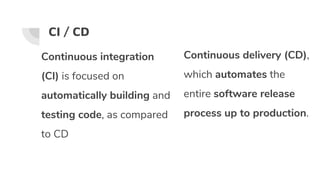
CI / CD
Continuous integration
(CI) is focused on
automatically building and
testing code, as compared
to CD
Continuous delivery (CD),
which automates the
entire software release
process up to production.
HELLO BAE
New BAE (CD) Tools
● Git & Version Control System
Cloud development platforms
THE FLOOR IS LIVE IMPLEMENTATION.
A Simple demo using MS Azure and Github
to handle Staging and Auto Deployment.
Join In: live
DISCLAIMER
I’m not affiliated to Microsoft or any of their
products of sort.
Step 1 Step 2 Step 3 Step 4
Login to
portal.azure.com or
create an account.
Step 5
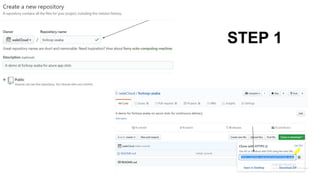
Procedure A Git & AzureCreate a repo on
github, name it
forloop-asaba,
clone repo on local
PC
Open your
favorite Terminal,
create a new file
(index.php)
Git add,
commit &
push
Click on Create new
Web App.
STEP 1
STEP 2/3
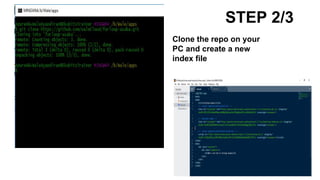
Clone the repo on your
PC and create a new
index file
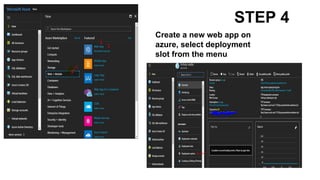
STEP 4
Create a new web app on
azure, select deployment
slot from the menu
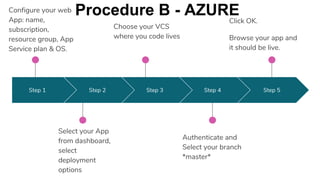
Step 1 Step 2 Step 3 Step 4
Authenticate and
Select your branch
*master*
Step 5
Configure your web
App: name,
subscription,
resource group, App
Service plan & OS.
Select your App
from dashboard,
select
deployment
options
Choose your VCS
where you code lives
Click OK.
Browse your app and
it should be live.
Procedure B - AZURE
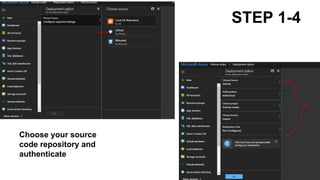
STEP 1-4
Choose your source
code repository and
authenticate
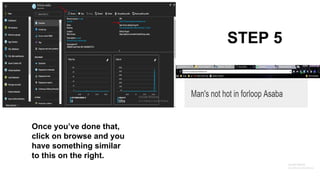
STEP 5
Once you’ve done that,
click on browse and you
have something similar
to this on the right.
Step 1 Step 2 Step 3 Step 4
GOTO Procedure B
STEP 3
Step 5
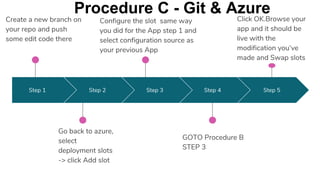
Create a new branch on
your repo and push
some edit code there
Go back to azure,
select
deployment slots
-> click Add slot
Configure the slot same way
you did for the App step 1 and
select configuration source as
your previous App
Click OK.Browse your
app and it should be
live with the
modification you’ve
made and Swap slots
Procedure C - Git & Azure
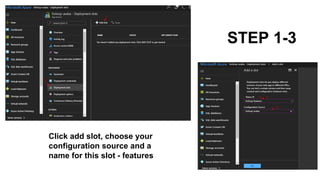
STEP 1-3
Click add slot, choose your
configuration source and a
name for this slot - features
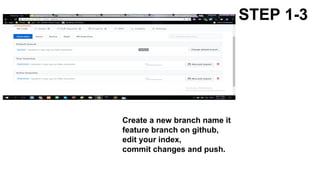
STEP 1-3
Create a new branch name it
feature branch on github,
edit your index,
commit changes and push.
STEP 1-3
Setup your deployment options
and choose the feature branch as
shown on the right image.
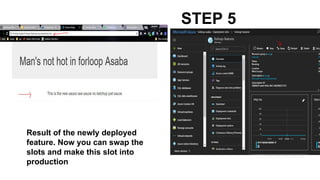
STEP 5
Result of the newly deployed
feature. Now you can swap the
slots and make this slot into
production
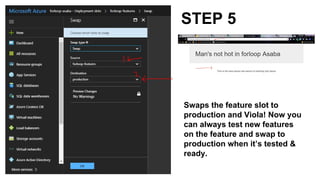
STEP 5
Swaps the feature slot to
production and Viola! Now you
can always test new features
on the feature and swap to
production when it’s tested &
ready.
https://goo.gl/L6NtDp - Live
https://goo.gl/jDwuJZ - Features/Staging
Links to the Apps
CONTINUOUS DELIVERY
Why we love it
❖ Less scary, small and frequent
❖ Move faster
❖ More empowering
❖ Breeds confidence
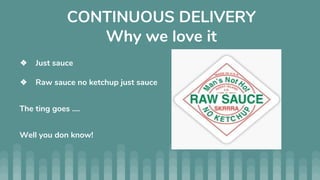
CONTINUOUS DELIVERY
Why we love it
❖ Just sauce
❖ Raw sauce no ketchup just sauce
The ting goes ....
Well you don know!
Thank You.
Connect with me
@waleCloud

Azure slots for app deployment the continuous delivery way

  • 1.
    Continuous Delivery (Azure AppSlots): A modern developer's BAE. By: Wale Ayandiran @waleCloud @ forloop Asaba November 10, 2017
  • 2.
    What we willcover at the end ● What is Continuous Integration & Continuous Delivery ● Staging/Pipeline/Slots workflow ● Git & Versioning ● Various cloud hosting Platforms ● Sample web Application on this methodology Objective:
  • 3.
    Hello World! ❖ WaleAyandiran ❖ Web developer and Solution Consultant ❖ Web development Learning Facilitator @ekobits ❖ Bits Academy Trainer ❖ Writer at medium.com/justcodenow ❖ Medium @waleloud
  • 4.
    Which one iscontinuous delivery again???
  • 5.
    Continuous Delivery Defined Continuousdelivery is a software development methodology where the release process is automated. Every software change is automatically built, tested, and deployed to production. Source: Amazon Before the final push to production, a person, an automated test, or a business rule decides when the final push should occur. Although every successful software change can be immediately released to production with continuous delivery, not all changes need to be released right away.
  • 6.
    So you're tellingme continuous delivery is ghen ghen abi? What has been happening before now? Oya tell me na!
  • 7.
    The Old BAE Wewere basically uploading and downloading files. :)
  • 8.
    How do Icontinuously deliver? Meet BAE's sister → Continuous Integration (CI)
  • 9.
    Continuous Integration CI -Continuous integration is a software development practice where members of a team use a version control system and integrate their work frequently to the same location, such as a master branch. Each change is built and verified by tests and other verifications in order to detect any integration errors as quickly as possible
  • 10.
    CI / CD Continuousintegration (CI) is focused on automatically building and testing code, as compared to CD Continuous delivery (CD), which automates the entire software release process up to production.
  • 11.
  • 12.
    New BAE (CD)Tools ● Git & Version Control System Cloud development platforms
  • 13.
    THE FLOOR ISLIVE IMPLEMENTATION. A Simple demo using MS Azure and Github to handle Staging and Auto Deployment. Join In: live
  • 14.
    DISCLAIMER I’m not affiliatedto Microsoft or any of their products of sort.
  • 15.
    Step 1 Step2 Step 3 Step 4 Login to portal.azure.com or create an account. Step 5 Procedure A Git & AzureCreate a repo on github, name it forloop-asaba, clone repo on local PC Open your favorite Terminal, create a new file (index.php) Git add, commit & push Click on Create new Web App.
  • 16.
  • 17.
    STEP 2/3 Clone therepo on your PC and create a new index file
  • 18.
    STEP 4 Create anew web app on azure, select deployment slot from the menu
  • 19.
    Step 1 Step2 Step 3 Step 4 Authenticate and Select your branch *master* Step 5 Configure your web App: name, subscription, resource group, App Service plan & OS. Select your App from dashboard, select deployment options Choose your VCS where you code lives Click OK. Browse your app and it should be live. Procedure B - AZURE
  • 20.
    STEP 1-4 Choose yoursource code repository and authenticate
  • 21.
    STEP 5 Once you’vedone that, click on browse and you have something similar to this on the right.
  • 22.
    Step 1 Step2 Step 3 Step 4 GOTO Procedure B STEP 3 Step 5 Create a new branch on your repo and push some edit code there Go back to azure, select deployment slots -> click Add slot Configure the slot same way you did for the App step 1 and select configuration source as your previous App Click OK.Browse your app and it should be live with the modification you’ve made and Swap slots Procedure C - Git & Azure
  • 23.
    STEP 1-3 Click addslot, choose your configuration source and a name for this slot - features
  • 24.
    STEP 1-3 Create anew branch name it feature branch on github, edit your index, commit changes and push.
  • 25.
    STEP 1-3 Setup yourdeployment options and choose the feature branch as shown on the right image.
  • 26.
    STEP 5 Result ofthe newly deployed feature. Now you can swap the slots and make this slot into production
  • 27.
    STEP 5 Swaps thefeature slot to production and Viola! Now you can always test new features on the feature and swap to production when it’s tested & ready.
  • 28.
    https://goo.gl/L6NtDp - Live https://goo.gl/jDwuJZ- Features/Staging Links to the Apps
  • 29.
    CONTINUOUS DELIVERY Why welove it ❖ Less scary, small and frequent ❖ Move faster ❖ More empowering ❖ Breeds confidence
  • 30.
    CONTINUOUS DELIVERY Why welove it ❖ Just sauce ❖ Raw sauce no ketchup just sauce The ting goes .... Well you don know!
  • 31.