HELSINKI
BY
KOMPOZURE
REGISTER NOW  http://bit.ly/devops-hki-2018
FAUG #8
DEVOPS
MOBILE CLIENT RELEASES
Okko Oulasvirta
Principal Consultant MSCD ALM
okko.oulasvirta@kompozure.com
@OkkoOulasvirta
Global DevOps Boot Camp HKI 2018  http://bit.ly/devops-hki-2018
KOMPOZURE
FAUG #8
DEVOPS: MOBILE CLIENT RELEASES
VISUAL STUDIO TEAM SERVICES
VISUAL STUDIO APP CENTER
GOOGLE PLAY
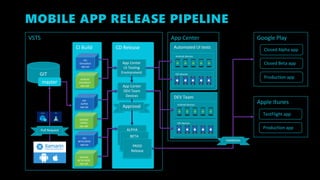
MOBILE APP RELEASE PIPELINE
VSTS App Center Google Play
Production app
Apple Itunes
TestFlight app
Production app
GIT
master
CI Build
iOS
Simulation
app.ipa
iOS
ALPHA
app.ipa
Android
Simulation
app.apk
Android
ALPHA
app.apk
CD Release
App Center
UI Testing
Environment
Automated UI tests
iOS devices
DEV Team
Android devices
Android devices
App Center
DEV Team
Devices
iOS devices
ALPHA
Approval
Pull Request
Closed Beta app
Closed Alpha app
BETA
PROD
Release
Validation
iOS
BETA,PROD
app.ipa
Android
BETA,PROD
app.apk
KEY POINTS FOR MOBILE BUILD
• Build all app configs from same commit
• UI-TEST, DEV, TEST, PROD, etc.
• Modify config appsettings.json, Android/iOS manifest
files etc. before build task
• Build number format 1.0.$(Build.BuildID)
• Increment app version code, version name using
$(Build.BuildNumber)
• Use different package name and label for different
configurations
• Keep your signing certificates safe with VSTS secured
files
• Publish different artifacts for different branches
• Run task with custom conditions to support multiple
branches  and(succeeded(),
eq(variables['Build.SourceBranch'], 'refs/heads/master’))
• NEWS ALERT! You can also build iOS apps with VSTS hosted
build agent (preview)
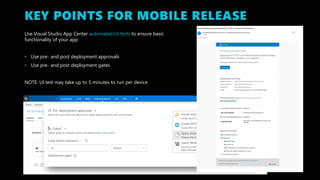
KEY POINTS FOR MOBILE RELEASE
Use Visual Studio App Center automated UI tests to ensure basic
functionality of your app
• Use pre- and post deployment approvals
• Use pre- and post deployment gates
NOTE: UI test may take up to 5 minutes to run per device
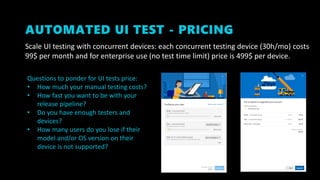
AUTOMATED UI TEST - PRICING
Scale UI testing with concurrent devices: each concurrent testing device (30h/mo) costs
99$ per month and for enterprise use (no test time limit) price is 499$ per device.
Questions to ponder for UI tests price:
• How much your manual testing costs?
• How fast you want to be with your
release pipeline?
• Do you have enough testers and
devices?
• How many users do you lose if their
model and/or OS version on their
device is not supported?
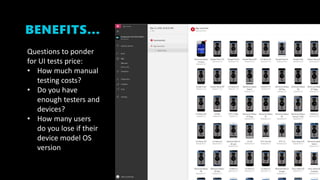
BENEFITS…
Questions to ponder
for UI tests price:
• How much manual
testing costs?
• Do you have
enough testers and
devices?
• How many users
do you lose if their
device model OS
version
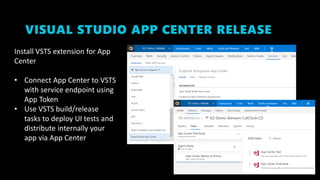
VISUAL STUDIO APP CENTER RELEASE
Install VSTS extension for App
Center
• Connect App Center to VSTS
with service endpoint using
App Token
• Use VSTS build/release
tasks to deploy UI tests and
distribute internally your
app via App Center
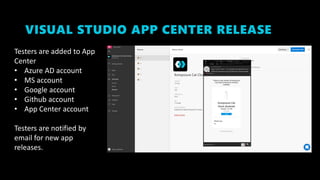
VISUAL STUDIO APP CENTER RELEASE
Testers are added to App
Center
• Azure AD account
• MS account
• Google account
• Github account
• App Center account
Testers are notified by
email for new app
releases.
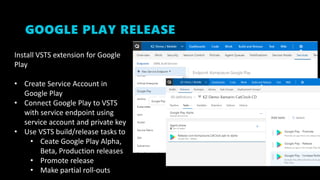
GOOGLE PLAY RELEASE
Install VSTS extension for Google
Play
• Create Service Account in
Google Play
• Connect Google Play to VSTS
with service endpoint using
service account and private key
• Use VSTS build/release tasks to
• Ceate Google Play Alpha,
Beta, Production releases
• Promote release
• Make partial roll-outs
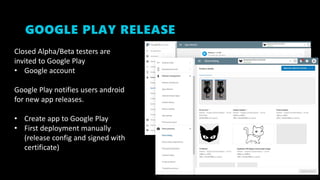
GOOGLE PLAY RELEASE
Closed Alpha/Beta testers are
invited to Google Play
• Google account
Google Play notifies users android
for new app releases.
• Create app to Google Play
• First deployment manually
(release config and signed with
certificate)
DEMO
SIMPLE XAMARIN BUILD
SIMPLE APP CENTER “APP LAUNCHES” TEST
FAUG #?
DEVOPS: AZURE RELEASES
ARM TEMPLATES, VSTS CI/CD PIPELINE
FAUG #?
DEVOPS: MOBILE TESTING
APP CENTER TESTING – “DEVICE IN THE CLOUD”
XAMARIN UITESTS
FAUG #?
DEVOPS: MOBILE MONITORING
AZURE APP CENTER
AZURE APPINSIGHTS
FAUG #?
SHARE CODE WITH NUGETS
VSTS PACKAGE MANAGEMENT
PRIVATE NUGETS, NPM, MAVEN…

Finland Azure User Group #8 DevOps Mobile Client Releases

  • 1.
    HELSINKI BY KOMPOZURE REGISTER NOW http://bit.ly/devops-hki-2018
  • 2.
    FAUG #8 DEVOPS MOBILE CLIENTRELEASES Okko Oulasvirta Principal Consultant MSCD ALM okko.oulasvirta@kompozure.com @OkkoOulasvirta Global DevOps Boot Camp HKI 2018  http://bit.ly/devops-hki-2018 KOMPOZURE
  • 3.
    FAUG #8 DEVOPS: MOBILECLIENT RELEASES VISUAL STUDIO TEAM SERVICES VISUAL STUDIO APP CENTER GOOGLE PLAY
  • 4.
    MOBILE APP RELEASEPIPELINE VSTS App Center Google Play Production app Apple Itunes TestFlight app Production app GIT master CI Build iOS Simulation app.ipa iOS ALPHA app.ipa Android Simulation app.apk Android ALPHA app.apk CD Release App Center UI Testing Environment Automated UI tests iOS devices DEV Team Android devices Android devices App Center DEV Team Devices iOS devices ALPHA Approval Pull Request Closed Beta app Closed Alpha app BETA PROD Release Validation iOS BETA,PROD app.ipa Android BETA,PROD app.apk
  • 5.
    KEY POINTS FORMOBILE BUILD • Build all app configs from same commit • UI-TEST, DEV, TEST, PROD, etc. • Modify config appsettings.json, Android/iOS manifest files etc. before build task • Build number format 1.0.$(Build.BuildID) • Increment app version code, version name using $(Build.BuildNumber) • Use different package name and label for different configurations • Keep your signing certificates safe with VSTS secured files • Publish different artifacts for different branches • Run task with custom conditions to support multiple branches  and(succeeded(), eq(variables['Build.SourceBranch'], 'refs/heads/master’)) • NEWS ALERT! You can also build iOS apps with VSTS hosted build agent (preview)
  • 6.
    KEY POINTS FORMOBILE RELEASE Use Visual Studio App Center automated UI tests to ensure basic functionality of your app • Use pre- and post deployment approvals • Use pre- and post deployment gates NOTE: UI test may take up to 5 minutes to run per device
  • 7.
    AUTOMATED UI TEST- PRICING Scale UI testing with concurrent devices: each concurrent testing device (30h/mo) costs 99$ per month and for enterprise use (no test time limit) price is 499$ per device. Questions to ponder for UI tests price: • How much your manual testing costs? • How fast you want to be with your release pipeline? • Do you have enough testers and devices? • How many users do you lose if their model and/or OS version on their device is not supported?
  • 8.
    BENEFITS… Questions to ponder forUI tests price: • How much manual testing costs? • Do you have enough testers and devices? • How many users do you lose if their device model OS version
  • 9.
    VISUAL STUDIO APPCENTER RELEASE Install VSTS extension for App Center • Connect App Center to VSTS with service endpoint using App Token • Use VSTS build/release tasks to deploy UI tests and distribute internally your app via App Center
  • 10.
    VISUAL STUDIO APPCENTER RELEASE Testers are added to App Center • Azure AD account • MS account • Google account • Github account • App Center account Testers are notified by email for new app releases.
  • 11.
    GOOGLE PLAY RELEASE InstallVSTS extension for Google Play • Create Service Account in Google Play • Connect Google Play to VSTS with service endpoint using service account and private key • Use VSTS build/release tasks to • Ceate Google Play Alpha, Beta, Production releases • Promote release • Make partial roll-outs
  • 12.
    GOOGLE PLAY RELEASE ClosedAlpha/Beta testers are invited to Google Play • Google account Google Play notifies users android for new app releases. • Create app to Google Play • First deployment manually (release config and signed with certificate)
  • 13.
    DEMO SIMPLE XAMARIN BUILD SIMPLEAPP CENTER “APP LAUNCHES” TEST
  • 14.
    FAUG #? DEVOPS: AZURERELEASES ARM TEMPLATES, VSTS CI/CD PIPELINE
  • 15.
    FAUG #? DEVOPS: MOBILETESTING APP CENTER TESTING – “DEVICE IN THE CLOUD” XAMARIN UITESTS
  • 16.
    FAUG #? DEVOPS: MOBILEMONITORING AZURE APP CENTER AZURE APPINSIGHTS
  • 17.
    FAUG #? SHARE CODEWITH NUGETS VSTS PACKAGE MANAGEMENT PRIVATE NUGETS, NPM, MAVEN…