


Dipping Your Toes Into Cloud
Native Application
Development
Who is this guy?
– mattfarina.com, @mattfarina
– Principal Engineer, Advanced Technology
Group, Hewlett Packard Enterprise
– Go, Node.js, PHP, Ruby, Python, .NET… in
just past 5 years
– Recently wrote book, “Go in Practice”
– Co-lead Kubernetes SIG Apps
– Likes to build things in the cloud
– Doesn’t like bullet lists
2
3By Swaminathan https://www.flickr.com/photos/araswami/2284451064/
Been doing cloud for 6 years and cloud
native for 4 years. Yes, there is a
difference
4By Ted Silveira https://www.flickr.com/photos/cafebongo/14062452417/
Went from a large monolithic pet app to
a cloud native application through a
practical process
5By Dubwise Version https://www.flickr.com/photos/dubwise_version/4718137117
1.Why care about cloud native
development?
2.What is cloud native?
3.What tools can be used?
4.How can you get from here to
there?
6
Why care about
cloud native?
7
8By: Fernando FrazĂŁo/AgĂŞncia Brasil
Speed and Flexibility
9
Almost No Downtime
By: Marcin Wichary
What does cloud
native really
mean?
10
“container packaged,
dynamically scheduled,
and microservices based
application development
and operations.”
– Cloud Native Computing Foundation (CNCF)
11
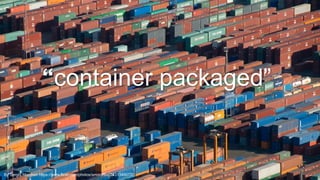
“container packaged”
12By Sergio Morchon https://www.flickr.com/photos/smorchon/2431349077/
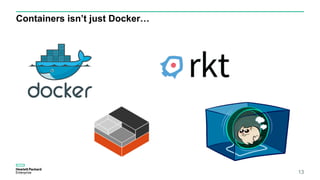
Containers isn’t just Docker…
13
Does this mean I
can’t do cloud
native with VMs?
14
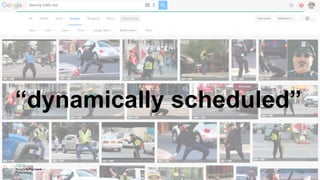
“dynamically scheduled”
15
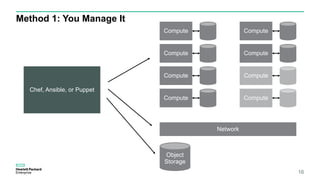
Method 1: You Manage It
16
Object
Storage
Chef, Ansible, or Puppet
Network
Compute
Compute
Compute
Compute
Compute
Compute
Compute
Compute
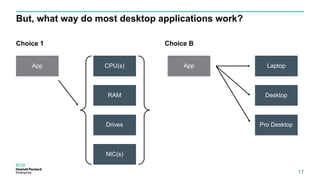
But, what way do most desktop applications work?
Choice 1 Choice B
17
App Laptop
Desktop
Pro Desktop
App CPU(s)
RAM
Drives
NIC(s)
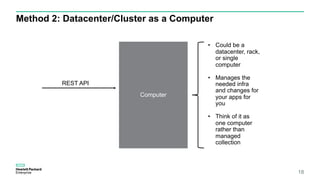
Method 2: Datacenter/Cluster as a Computer
18
Computer
• Could be a
datacenter, rack,
or single
computer
• Manages the
needed infra
and changes for
your apps for
you
• Think of it as
one computer
rather than
managed
collection
REST API
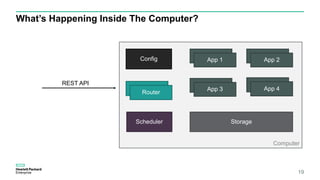
What’s Happening Inside The Computer?
19
Computer
REST API
Router
Scheduler
App 1 App 2
App 3 App 4
Storage
Config
20
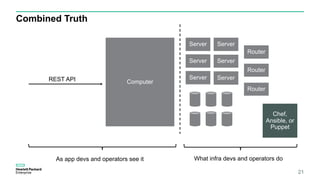
Combined Truth
21
ComputerREST API
Server
Server
Server Server
Server
Server
Router
Router
Router
Chef,
Ansible, or
Puppet
As app devs and operators see it What infra devs and operators do
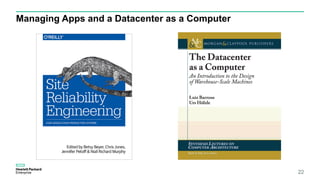
Managing Apps and a Datacenter as a Computer
22
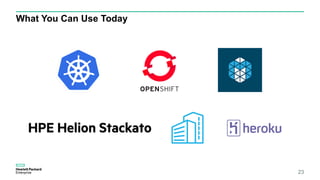
What You Can Use Today
23
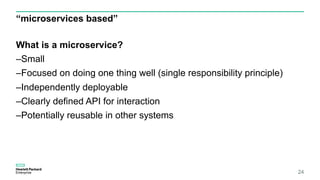
“microservices based”
What is a microservice?
–Small
–Focused on doing one thing well (single responsibility principle)
–Independently deployable
–Clearly defined API for interaction
–Potentially reusable in other systems
24
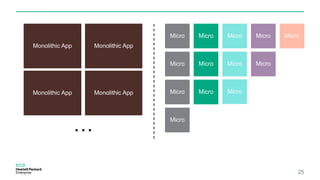
25
Monolithic App
Monolithic App
Monolithic App
Monolithic App
…
Micro Micro Micro Micro Micro
Micro
Micro
Micro
Micro
Micro
Micro
Micro
Micro
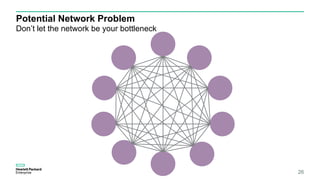
Potential Network Problem
Don’t let the network be your bottleneck
26
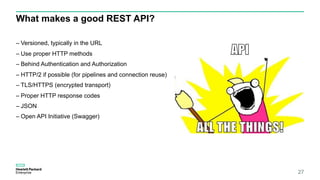
What makes a good REST API?
– Versioned, typically in the URL
– Use proper HTTP methods
– Behind Authentication and Authorization
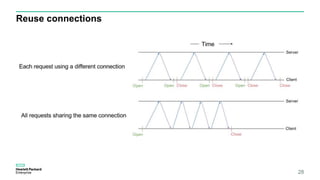
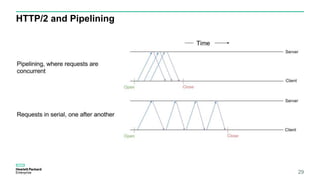
– HTTP/2 if possible (for pipelines and connection reuse)
– TLS/HTTPS (encrypted transport)
– Proper HTTP response codes
– JSON
– Open API Initiative (Swagger)
27
Reuse connections
28
HTTP/2 and Pipelining
29
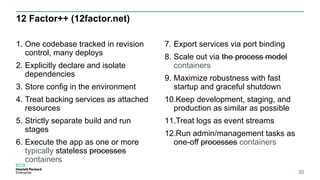
12 Factor++ (12factor.net)
1. One codebase tracked in revision
control, many deploys
2. Explicitly declare and isolate
dependencies
3. Store config in the environment
4. Treat backing services as attached
resources
5. Strictly separate build and run
stages
6. Execute the app as one or more
typically stateless processes
containers
7. Export services via port binding
8. Scale out via the process model
containers
9. Maximize robustness with fast
startup and graceful shutdown
10.Keep development, staging, and
production as similar as possible
11.Treat logs as event streams
12.Run admin/management tasks as
one-off processes containers
30
Store config in the environment
31
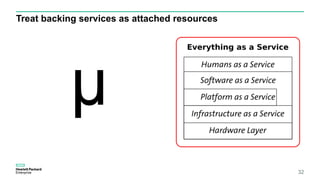
Treat backing services as attached resources
32
µ
Execute the app as one or more stateless processes
33
Treat logs as event streams (stdout)
34
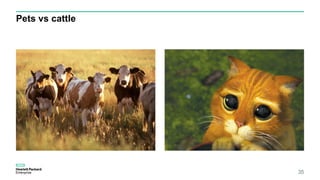
Pets vs cattle
35
Updating
Applications
36
37
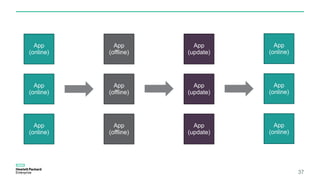
App
(online)
App
(online)
App
(online)
App
(offline)
App
(offline)
App
(offline)
App
(update)
App
(update)
App
(update)
App
(online)
App
(online)
App
(online)
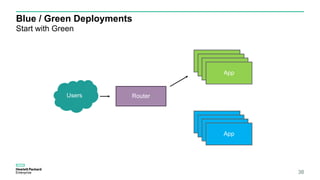
Blue / Green Deployments
Start with Green
38
RouterUsers
App
App
App
App
App
App
App
App
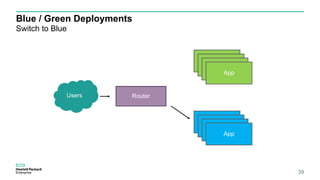
Blue / Green Deployments
Switch to Blue
39
RouterUsers
App
App
App
App
App
App
App
App
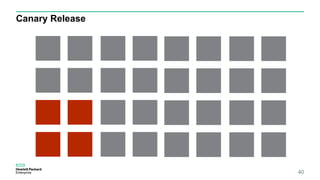
Canary Release
40
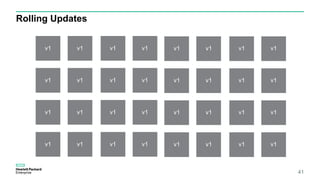
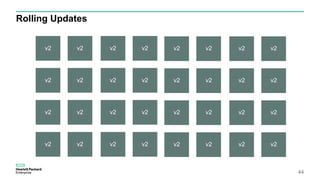
Rolling Updates
41
v1 v1
v1 v1
v1 v1
v1 v1
v1 v1
v1 v1
v1 v1
v1 v1
v1 v1
v1 v1
v1 v1
v1 v1
v1 v1
v1 v1
v1 v1
v1 v1
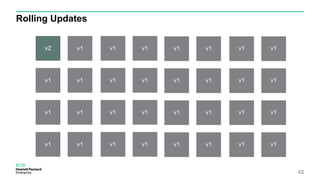
Rolling Updates
42
v2 v1
v1 v1
v1 v1
v1 v1
v1 v1
v1 v1
v1 v1
v1 v1
v1 v1
v1 v1
v1 v1
v1 v1
v1 v1
v1 v1
v1 v1
v1 v1
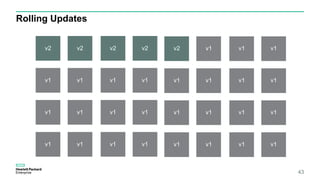
Rolling Updates
43
v2 v2
v1 v1
v2 v2
v1 v1
v1 v1
v1 v1
v1 v1
v1 v1
v2 v1
v1 v1
v1 v1
v1 v1
v1 v1
v1 v1
v1 v1
v1 v1
Rolling Updates
44
v2 v2
v2 v2
v2 v2
v2 v2
v2 v2
v2 v2
v2 v2
v2 v2
v2 v2
v2 v2
v2 v2
v2 v2
v2 v2
v2 v2
v2 v2
v2 v2
3 Paths To Cloud Native:
1. Migration
2. Greenfield
3. Additive
45
Path 1: Migrating
46
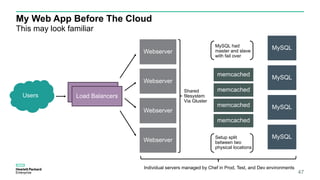
My Web App Before The Cloud
47
This may look familiar
Webserver
Webserver
Webserver
Webserver
Load Balancers
Load BalancersUsers
Shared
filesystem
Via Gluster
memcached
memcached
memcached
memcached
MySQL
MySQL
MySQL
MySQL
MySQL had
master and slave
with fail over
Setup split
between two
physical locations
Individual servers managed by Chef in Prod, Test, and Dev environments
3x Web Apps
+ more coming
48
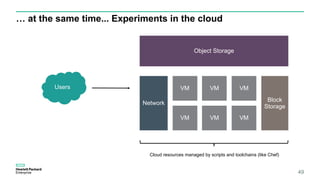
… at the same time... Experiments in the cloud
49
Object Storage
VMVM VM
VM VM VM
Network
Users
Cloud resources managed by scripts and toolchains (like Chef)
Block
Storage
50
51
52
aPaaS
53
Development Platform
54
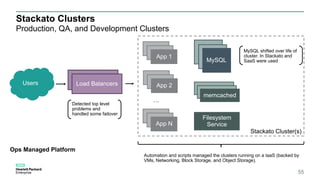
Stackato Cluster(s)
Stackato Clusters
Production, QA, and Development Clusters
55
App 1
Load Balancers
Load BalancersUsers
memcached
memcached
memcached
MySQL
MySQL
MySQL
MySQL shifted over life of
cluster. In Stackato and
SaaS were used
Automation and scripts managed the clusters running on a IaaS (backed by
VMs, Networking, Block Storage, and Object Storage).
App 1
App 1
App 1
App 1
App 2
App 1
App 1
App N
…
Detected top level
problems and
handled some failover
Ops Managed Platform
Filesystem
Service
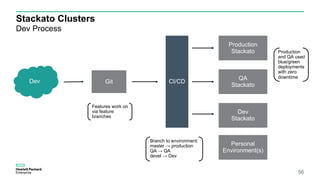
Stackato Clusters
Dev Process
56
Production
Stackato
QA
Stackato
Dev
Stackato
Personal
Environment(s)
CI/CDGitDev
Branch to environment:
master → production
QA → QA
devel → Dev
Production
and QA used
blue/green
deployments
with zero
downtime
Features work on
via feature
branches
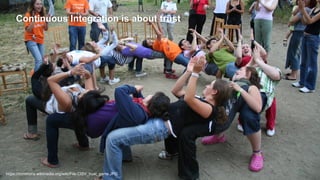
Continuous Integration is about trust
57https://commons.wikimedia.org/wiki/File:CISV_trust_game.JPG
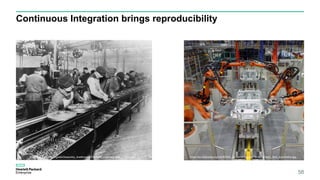
Continuous Integration brings reproducibility
58
https://en.wikipedia.org/wiki/Assembly_line#/media/File:Ford_assembly_line_-_1913.jpg https://en.wikipedia.org/wiki/KUKA_Systems#/media/File:Application_field_automotive.jpg
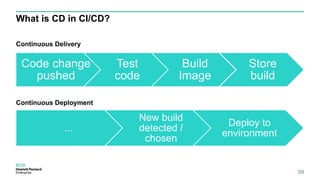
What is CD in CI/CD?
Continuous Delivery
Continuous Deployment
59
Code change
pushed
Test
code
Build
Image
Store
build
...
New build
detected /
chosen
Deploy to
environment
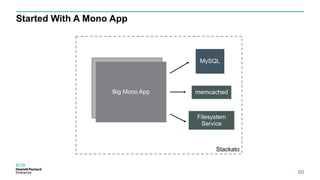
Started With A Mono App
60
Stackato
memcached
MySQL
Filesystem
Service
App 1
Big Mono App
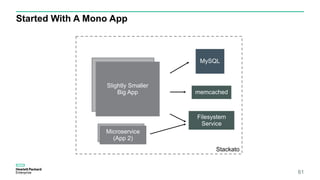
Started With A Mono App
61
Stackato
memcached
MySQL
Filesystem
Service
App 1Slightly Smaller
Big App
App 1Microservice
(App 2)
Path 2: Greenfield
62
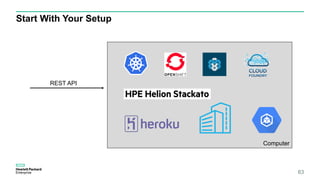
Start With Your Setup
63
Computer
REST API
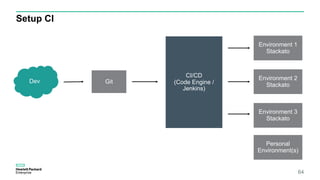
Setup CI
64
Environment 1
Stackato
Environment 2
Stackato
Environment 3
Stackato
Personal
Environment(s)
CI/CD
(Code Engine /
Jenkins)
GitDev
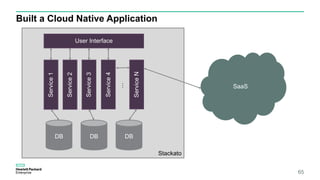
Built a Cloud Native Application
65
Stackato
DB DB DB
User Interface
Service1
Service2
Service3
Service4
ServiceN
…
SaaS
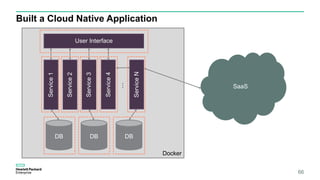
Built a Cloud Native Application
66
Docker
DB DB DB
User Interface
Service1
Service2
Service3
Service4
ServiceN
…
SaaS
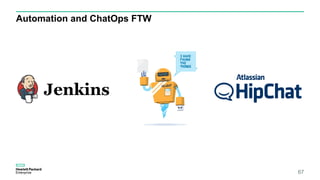
Automation and ChatOps FTW
67
Path 3: Additive
68
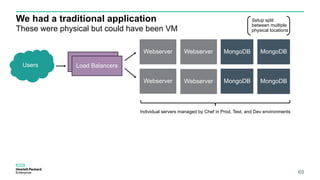
We had a traditional application
69
These were physical but could have been VM
Webserver
Webserver
Webserver
Load Balancers
Load BalancersUsers
MongoDB
MongoDB
MongoDB
MongoDB
Setup split
between multiple
physical locations
Individual servers managed by Chef in Prod, Test, and Dev environments
Webserver
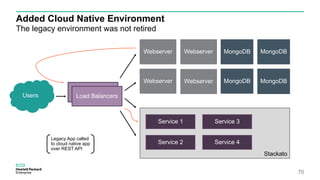
Added Cloud Native Environment
70
The legacy environment was not retired
Webserver
Webserver
Webserver MongoDB
MongoDB
MongoDB
MongoDB
Legacy App called
to cloud native app
over REST API
Webserver
Stackato
Service 1
Service 2
Service 3
Service 4
Load Balancers
Load BalancersUsers
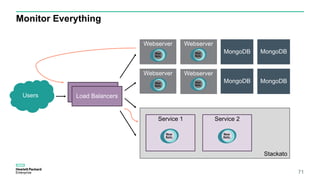
Monitor Everything
71
Webserver
Webserver
Webserver
MongoDB
MongoDB
MongoDB
MongoDB
Webserver
Stackato
Service 1 Service 2
Load Balancers
Load BalancersUsers
Monitor Intelligently
If you didn’t monitor it did it happen?
72
Tools You Can Use
73
74
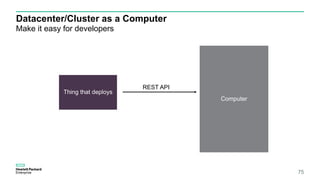
Datacenter/Cluster as a Computer
Make it easy for developers
75
Computer
REST API
Thing that deploys
Start With A Platform
Think Datacenter as a Computer
76
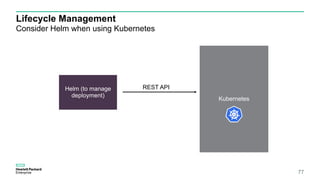
Lifecycle Management
Consider Helm when using Kubernetes
77
Kubernetes
REST APIHelm (to manage
deployment)
CI/CD
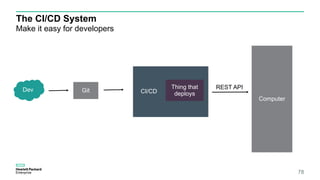
The CI/CD System
Make it easy for developers
78
Computer
REST APIThing that
deploys
GitDev
CI/CD Systems
There are just so many
79
Some Are Container Based By Default
80
ChatOps
81
Config service
82
Monitor Everything
83
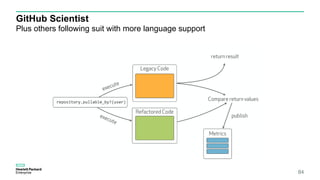
GitHub Scientist
Plus others following suit with more language support
84
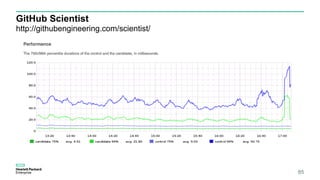
GitHub Scientist
http://githubengineering.com/scientist/
85
Questions?Matt Farina
@mattfarina
mattfarina.com / hpe.com
86

Dipping Your Toes Into Cloud Native Application Development