
zekeLabs
Learning made Simpler !
www.zekeLabs.com
Amazon Web Services
Amazon Storage Gateway
Storage Gateway
● Connects on-premises software appliance with Cloud Based storage.
● Seamless and Secure Integration between on-premises IT environment and AWS’s Storage
Infrastructure.
● Enables the organization to securely store data to the AWS Cloud for scalable and Cost effective
storage.
● Storage Gateway : A virtual appliance that’s installed into a Hypervisor running on the physical data
centre that will replicate the data to AWS cloud.
● Available for download as a virtual machine (VM) image that can be installed on a host in the
datacenter.
● After installing it needs to be associated to AWS Account through an activation process.
Storage Gateway Types
● File Gateway (NFS): To store Flat files to S3. Object Based Storage. These files are accessed from
S3 through a Network File System (NFS) mount point.
● Volume Gateway (iSCSI): BLOCK based Storage. Disk volumes using the iSCSI block protocol. Used
for off-site backups.
● Stored in the Cloud as Amazon EBS Snapshots.
● Snapshots are incremental backups that capture only changed blocks.
● Snapshot storage is also compressed to minimize the storage charges.
● Volume Gateway has two Categories:
a. Gateway Stored Volumes: Entire Data Set stored on site for low latency. 1GB - 16 TB
b. Gateway Cached Volumes: 1Gb- 32 TB
● Tape Gateway (VTL): Uses Virtual Tape Library Interface. Backup and Archiving Solutions using
current solutions like Netbackup etc. Virtual Tapes that can be sent to S3 and Lifecycle policies can be
configured.
File Gateway
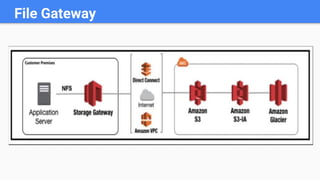
● Files are stored as objects in your S3 buckets, accessed through a Network File System (NFS) mount
point.
● Ownership, permissions, and timestamps are durably stored in S3 in the user-metadata of the object
associated with the file.
● Once objects are transferred to S3, they can be managed as native S3 objects, and bucket policies
such as versioning, lifecycle management, and cross-region replication apply directly to objects stored
in your bucket
File Gateway
Volume Gateway
● The volume interface presents your applications with disk volumes
using the iSCSI block protocol.
● Data written to these volumes can be asynchronously backed up as
point-in-time snapshots of your volumes, and stored in the cloud as
Amazon EBS snapshots.
● Snapshots are incremental backups that capture only changed blocks.
All snapshot storage is also compressed to minimize your storage
charges.
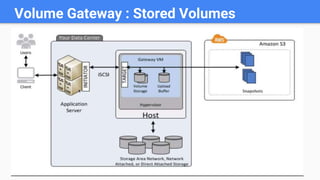
Volume Gateway : Stored Volumes
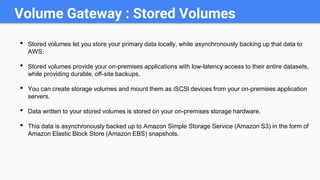
• Stored volumes let you store your primary data locally, while asynchronously backing up that data to
AWS.
• Stored volumes provide your on-premises applications with low-latency access to their entire datasets,
while providing durable, off-site backups.
• You can create storage volumes and mount them as iSCSl devices from your on-premises application
servers.
• Data written to your stored volumes is stored on your on-premises storage hardware.
• This data is asynchronously backed up to Amazon Simple Storage Service (Amazon S3) in the form of
Amazon Elastic Block Store (Amazon EBS) snapshots.
Volume Gateway : Cached Volumes
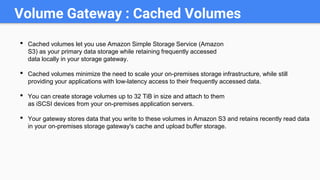
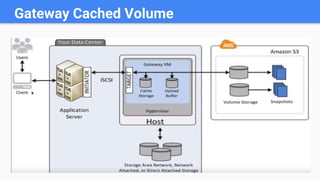
• Cached volumes let you use Amazon Simple Storage Service (Amazon
S3) as your primary data storage while retaining frequently accessed
data locally in your storage gateway.
• Cached volumes minimize the need to scale your on-premises storage infrastructure, while still
providing your applications with low-latency access to their frequently accessed data.
• You can create storage volumes up to 32 TiB in size and attach to them
as iSCSI devices from your on-premises application servers.
• Your gateway stores data that you write to these volumes in Amazon S3 and retains recently read data
in your on-premises storage gateway's cache and upload buffer storage.
Gateway Cached Volume
Tape Gateway
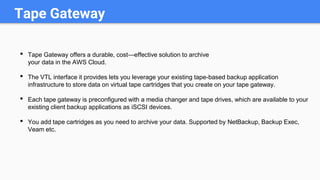
• Tape Gateway offers a durable, cost—effective solution to archive
your data in the AWS Cloud.
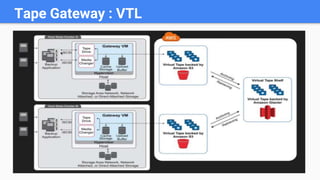
• The VTL interface it provides lets you leverage your existing tape-based backup application
infrastructure to store data on virtual tape cartridges that you create on your tape gateway.
• Each tape gateway is preconfigured with a media changer and tape drives, which are available to your
existing client backup applications as iSCSI devices.
• You add tape cartridges as you need to archive your data. Supported by NetBackup, Backup Exec,
Veam etc.
Tape Gateway : VTL
Storage Gateway: Summary
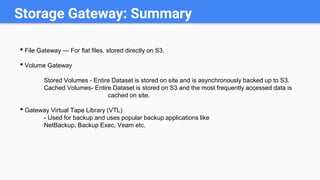
• File Gateway — For flat files, stored directly on S3.
• Volume Gateway
Stored Volumes - Entire Dataset is stored on site and is asynchronously backed up to S3.
Cached Volumes- Entire Dataset is stored on S3 and the most frequently accessed data is
cached on site.
• Gateway Virtual Tape Library (VTL)
- Used for backup and uses popular backup applications like
NetBackup, Backup Exec, Veam etc.
Visit : www.zekeLabs.com for more details
THANK YOU
Let us know how can we help your organization to Upskill the
employees to stay updated in the ever-evolving IT Industry.
Get in touch:
www.zekeLabs.com | +91-8095465880 | info@zekeLabs.com

AWS Storage Gateway

  • 1.
  • 2.
  • 3.
  • 4.
    Storage Gateway ● Connectson-premises software appliance with Cloud Based storage. ● Seamless and Secure Integration between on-premises IT environment and AWS’s Storage Infrastructure. ● Enables the organization to securely store data to the AWS Cloud for scalable and Cost effective storage. ● Storage Gateway : A virtual appliance that’s installed into a Hypervisor running on the physical data centre that will replicate the data to AWS cloud. ● Available for download as a virtual machine (VM) image that can be installed on a host in the datacenter. ● After installing it needs to be associated to AWS Account through an activation process.
  • 5.
    Storage Gateway Types ●File Gateway (NFS): To store Flat files to S3. Object Based Storage. These files are accessed from S3 through a Network File System (NFS) mount point. ● Volume Gateway (iSCSI): BLOCK based Storage. Disk volumes using the iSCSI block protocol. Used for off-site backups. ● Stored in the Cloud as Amazon EBS Snapshots. ● Snapshots are incremental backups that capture only changed blocks. ● Snapshot storage is also compressed to minimize the storage charges. ● Volume Gateway has two Categories: a. Gateway Stored Volumes: Entire Data Set stored on site for low latency. 1GB - 16 TB b. Gateway Cached Volumes: 1Gb- 32 TB ● Tape Gateway (VTL): Uses Virtual Tape Library Interface. Backup and Archiving Solutions using current solutions like Netbackup etc. Virtual Tapes that can be sent to S3 and Lifecycle policies can be configured.
  • 6.
    File Gateway ● Filesare stored as objects in your S3 buckets, accessed through a Network File System (NFS) mount point. ● Ownership, permissions, and timestamps are durably stored in S3 in the user-metadata of the object associated with the file. ● Once objects are transferred to S3, they can be managed as native S3 objects, and bucket policies such as versioning, lifecycle management, and cross-region replication apply directly to objects stored in your bucket
  • 7.
  • 8.
    Volume Gateway ● Thevolume interface presents your applications with disk volumes using the iSCSI block protocol. ● Data written to these volumes can be asynchronously backed up as point-in-time snapshots of your volumes, and stored in the cloud as Amazon EBS snapshots. ● Snapshots are incremental backups that capture only changed blocks. All snapshot storage is also compressed to minimize your storage charges.
  • 9.
    Volume Gateway :Stored Volumes
  • 10.
    Volume Gateway :Stored Volumes • Stored volumes let you store your primary data locally, while asynchronously backing up that data to AWS. • Stored volumes provide your on-premises applications with low-latency access to their entire datasets, while providing durable, off-site backups. • You can create storage volumes and mount them as iSCSl devices from your on-premises application servers. • Data written to your stored volumes is stored on your on-premises storage hardware. • This data is asynchronously backed up to Amazon Simple Storage Service (Amazon S3) in the form of Amazon Elastic Block Store (Amazon EBS) snapshots.
  • 11.
    Volume Gateway :Cached Volumes • Cached volumes let you use Amazon Simple Storage Service (Amazon S3) as your primary data storage while retaining frequently accessed data locally in your storage gateway. • Cached volumes minimize the need to scale your on-premises storage infrastructure, while still providing your applications with low-latency access to their frequently accessed data. • You can create storage volumes up to 32 TiB in size and attach to them as iSCSI devices from your on-premises application servers. • Your gateway stores data that you write to these volumes in Amazon S3 and retains recently read data in your on-premises storage gateway's cache and upload buffer storage.
  • 12.
  • 13.
    Tape Gateway • TapeGateway offers a durable, cost—effective solution to archive your data in the AWS Cloud. • The VTL interface it provides lets you leverage your existing tape-based backup application infrastructure to store data on virtual tape cartridges that you create on your tape gateway. • Each tape gateway is preconfigured with a media changer and tape drives, which are available to your existing client backup applications as iSCSI devices. • You add tape cartridges as you need to archive your data. Supported by NetBackup, Backup Exec, Veam etc.
  • 14.
  • 15.
    Storage Gateway: Summary •File Gateway — For flat files, stored directly on S3. • Volume Gateway Stored Volumes - Entire Dataset is stored on site and is asynchronously backed up to S3. Cached Volumes- Entire Dataset is stored on S3 and the most frequently accessed data is cached on site. • Gateway Virtual Tape Library (VTL) - Used for backup and uses popular backup applications like NetBackup, Backup Exec, Veam etc.
  • 16.
    Visit : www.zekeLabs.comfor more details THANK YOU Let us know how can we help your organization to Upskill the employees to stay updated in the ever-evolving IT Industry. Get in touch: www.zekeLabs.com | +91-8095465880 | info@zekeLabs.com